Free UPC to ASIN Converter
Convert UPC to ASIN in seconds. Paste any valid UPC code, click convert, and instantly get the matching Amazon ASIN without manual catalog searches.

What is the UPC to ASIN Converter?
The free UPC to ASIN Converter by Seller Assistant instantly converts UPC or EAN barcodes to Amazon ASINs. Perfect for wholesale and online arbitrage sellers matching supplier catalogs to Amazon listings.
UPC to ASIN in Seconds
Paste any UPC or barcode and instantly find the matching Amazon ASIN and product details.
Multiple ASIN Matches
When one UPC maps to multiple ASINs, Seller Assistant's converter shows all matching listings so you can pick the right one.
Save Time on Research
Eliminate manual Amazon catalog searches. Convert supplier UPCs to ASINs in your sourcing workflow instantly.
Reduce Conversion Errors
Real Amazon catalog data and advanced matching logic deliver highly accurate results and reduce mismatches.
Bulk Conversion via PLA
Upload a supplier XLSX or XLS file into Price List Analyzer to convert thousands of UPCs with full profit analysis.
Free for Single Lookups
Single UPC to ASIN conversions are completely free. No account required.
How to Convert UPC to ASIN
Turn supplier catalogs into profitable Purchase Orders with our bulk UPC to ASIN converter and FBA calculator.
- 1
Enter Your UPC Code
Paste one or more UPC codes into the input field above. You can enter a single UPC or multiple codes (each on a new line) for bulk conversion.
- 2
Click Convert
Click the Convert button to run the UPC to ASIN conversion. The tool will instantly match your UPC codes to their corresponding Amazon ASINs.
- 3
Review and Copy Results
View the returned ASINs and copy them into your spreadsheet, sourcing tool, or use them with Seller Assistant workflow tools. Use these ASINs for product research, competitor analysis, or supplier search.
- 4
For Bulk Lists, Use Price List Analyzer
If you have a large supplier price list with hundreds of UPCs, use Price List Analyzer for faster bulk UPC to ASIN conversion with profitability calculations and restriction checking included.
Why Choose Seller Assistant's UPC to ASIN Converter?
When sourcing products on Amazon, accuracy and speed matter. That's why sellers trust Seller Assistant's free UPC to ASIN converter:
Instant Matching
Get ASIN results in seconds using real Amazon catalog data.
Part of Ecosystem
The free converter integrates seamlessly with Seller Assistant Extension and Price List Analyzer.
Built by Sellers, for Sellers
Trusted by 45,000+ extension users for online arbitrage, wholesale sourcing, and dropshipping.
Trusted for Scale
Process thousands of UPCs monthly without slowdowns. From solo entrepreneurs to agency VAs, our converter handles your workflow.
No Setup Required
No complex setup. Paste your UPCs, click convert, use your ASINs. The simplicity is intentional. We respect your time.
Common Use Cases
Our UPC to ASIN converter is used by different types of Amazon sellers and sourcing models. The most common workflows are:
Online Arbitrage
Find a product at retail and need to check if it's on Amazon? Paste the UPC, get the ASIN instantly. Continue your profit analysis immediately. Spot-check products in real-time while sourcing.
Wholesale Sourcing
Your supplier sends a catalog with UPCs, not ASINs. Use Price List Analyzer to bulk convert your entire supplier list, see profit potential, and identify FBA restrictions automatically. Convert and analyze supplier catalogs in one workflow.
Dropshipping
Converting supplier UPCs to ASINs helps you verify products exist on Amazon and check FBA/FBM eligibility. Integrate directly with your product sourcing process. Verify Amazon compatibility before sourcing.
Virtual Assistant Workflows
Managing multiple seller accounts means processing product lists quickly. Convert UPCs to ASINs and use Price List Analyzer for deeper analysis. Handle more accounts with the same effort. Streamline client sourcing workflows.
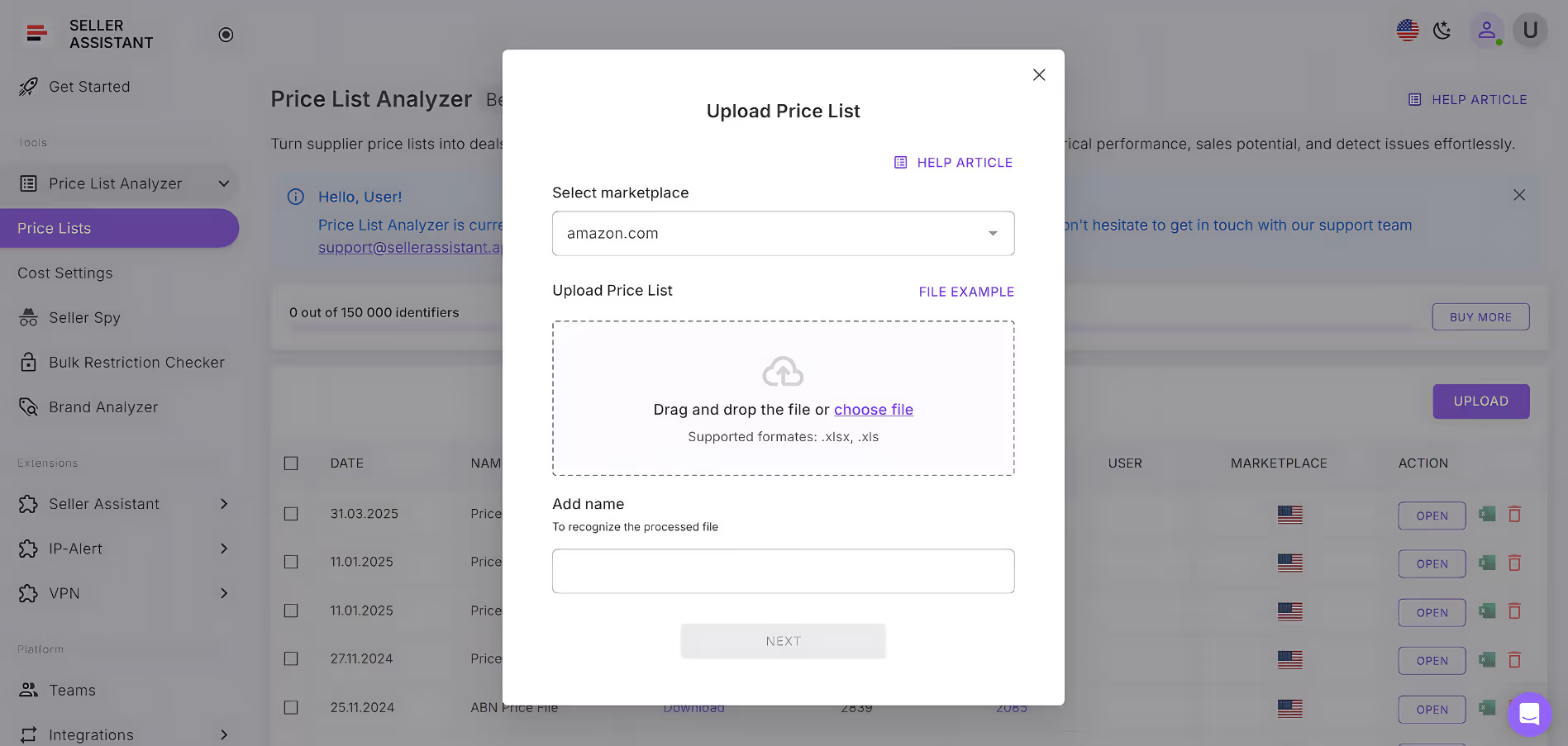
Bulk UPC to ASIN Converter
Bulk UPC to ASIN conversion
Simply upload UPCs or EANs and get the conversion results to your mailbox.
Try Bulk UPC to ASIN ConverterUPC/EAN to ASIN on Amazon: Seller’s Guide
Note: Looking for a quicker way to convert UPC or EAN codes to ASINs? We’ve put together a simple free tool that does it instantly. Try Free UPC to ASIN Converter tool or Free EAN to ASIN Converter tool
UPC/EAN to ASIN conversion is essential for online arbitrage, wholesale, and dropshipping sellers who match supplier products to Amazon listings and check profitability. This seller’s guide explains how UPC, EAN, and ASIN identifiers work together, why UPC/EAN to ASIN conversion matters, and which tools you can use to automate it at scale.
If you just need a fast UPC to ASIN converter tool, use our Best Free UPC to ASIN Converter Tool
🚀 Try Our Free UPC to ASIN Converter
Convert UPCs into Amazon ASINs in seconds to quickly identify products and validate sourcing ideas. Built for fast, accurate product research. No signup required.
ASIN vs. UPC vs. EAN — What Is the Difference?
ASIN, UPC, and EAN are all product identifiers but have different uses and formats. Here’s the explanation of what they are.
Related: Seller Assistant Extension Review
Seller Assistant — the Ultimate Tool for Amazon Online Arbitrage
ASIN
ASIN stands for Amazon Standard Identification Number. It is a unique identifier assigned to each product on Amazon. ASINs are used to track products, identify them in search results, and create product listings.
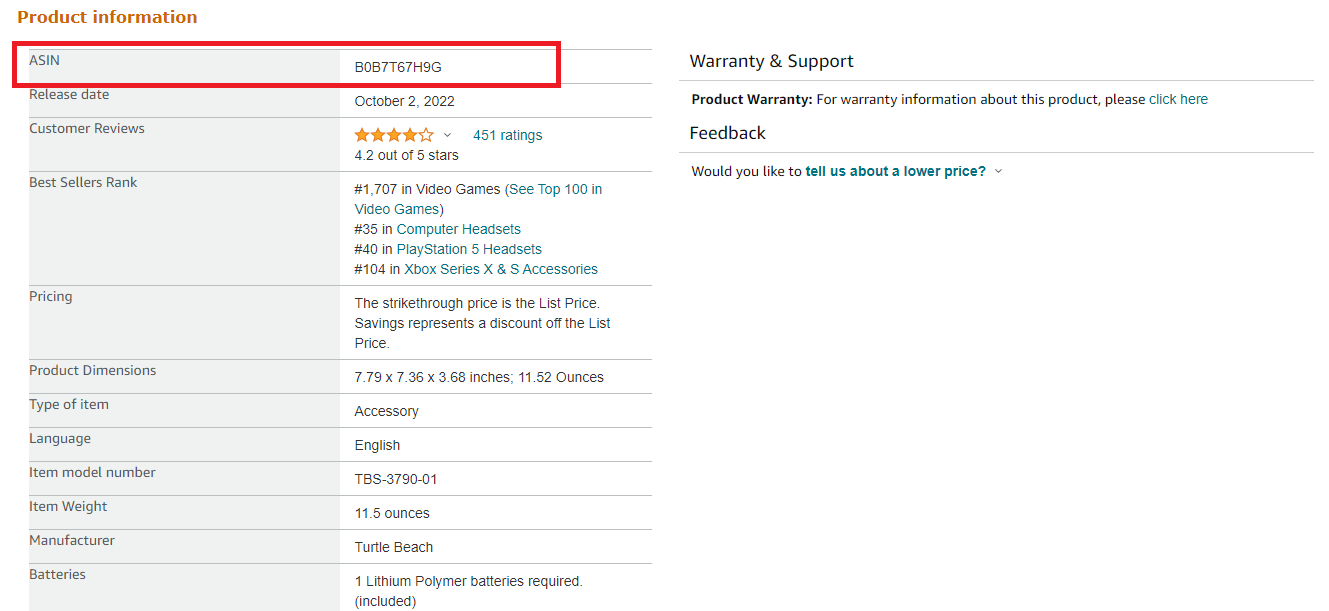
Amazon ASIN
UPC
UPC stands for Universal Product Code. It is a 12-digit barcode used to identify products in the United States and Canada. UPCs are required for selling products on Amazon.
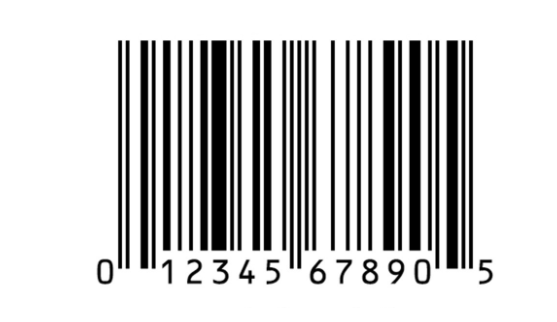
UPC example
EAN
EAN stands for European Article Number. It is a 13-digit barcode used to identify products in Europe and other parts of the world. EANs are also accepted on Amazon.
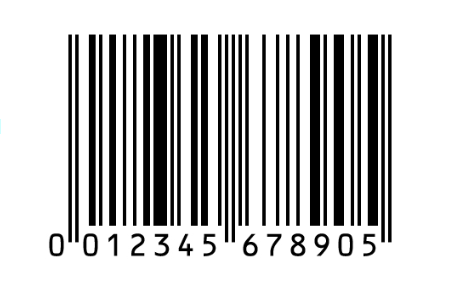
EAN example
The main difference between ASINs and UPCs/EANs is that ASINs are specific to Amazon, while UPCs/EANs can be used in any store that sells products with barcodes. Another difference is that ASINs are 10 characters long, while UPCs/EANs are 12/13 characters long.
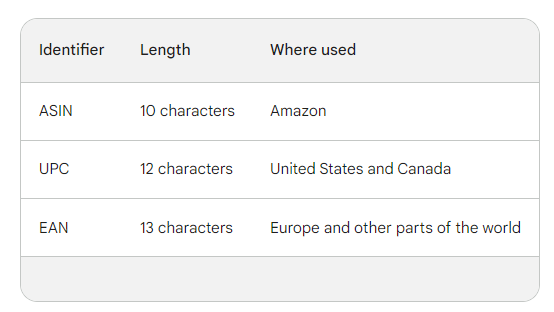
Difference between ASINs and UPCs/EANs
Related: Amazon ASIN, EAN, ISBN, and UPC Explained
Why Do You Need to Convert UPC to ASIN?
Amazon sellers doing online arbitrage, wholesale sellers, and dropshippers who make money on the price difference of the products from different suppliers must be able to convert UPCs or EANs to ASINs. Here’s why that is necessary.
Product matching
You must be able to match products on Amazon and other websites. UPCs and EANs are unique identifiers for products, but they are not always displayed on Amazon product pages. By converting the UPC to an ASIN, sellers can quickly and easily identify the product on Amazon.
Example. An online arbitrage seller finds a product on a retail website that is listed at a lower price than it is selling for on Amazon. To see if the product is a profitable deal, the seller must convert a UPC to ASIN to look up the product on Amazon and check the sales and performance data. If the seller determines the product is profitable, they can purchase it from the retail website and list it on Amazon for a higher price.
Profitability estimation
You must estimate if a product is a profitable deal. Amazon provides sellers with information about the product’s Best Sellers Rank, ratings, and other product performance metrics, but this data is only available for products with ASINs. By converting the UPC or EAN to an ASIN, sellers can get a better idea of how well a product is selling and whether it is likely to be profitable.
Example. A wholesale seller gets a list from a supplier with 1000 products. The supplier provides the seller with the UPCs for the products. The wholesale seller must search the Amazon ASINs that match UPCs or EANs and find their product listings. They compare the product average Buy Box prices to the wholesale prices of the products they get from the supplier. They sort out the products having a lower wholesale price than the average selling price on Amazon. These products are the candidates for profitable deals.
What Is UPC/EAN to ASIN Converter?
A UPC/EAN to ASIN converter is any tool that converts UPCs and EANs into Amazon ASINs so you can identify the correct listing and analyze demand and profitability. UPC to ASIN converters are useful for sellers, as they help them automatically identify products on Amazon. That lets them quickly estimate if these products are suitable for selling and help save time and effort.
Tip. Suppose you are an online arbitrage or wholesale seller, dropshipper, or virtual assistant doing product research. In that case, one of your best options is to use an all-in-one product research tool with all the necessary features to find high-profit deals, including the UPC/EAN to ASIN converter feature. Seller Assistant offers all these features.
Benefits of Seller Assistant’s UPC/EAN to ASIN Converter
Seller Assistant’s UPC/EAN to ASIN Converter is a powerful tool that can help sellers quickly and easily identify a product’s ASIN on Amazon by its UPC or EAN. Below are the benefits it offers.
Time-saving
Seller Assistant’s UPC to ASIN converter can save sellers a lot of time by automating the process of converting UPCs and EANs to ASINs.
Improved product identification
UPC/EAN codes can be challenging to identify products, especially for items sold in packs (5-pack, 10-pack, etc.). These products may have the same UPC/EAN code, but the quantity may differ. Seller Assistant’s UPC/EAN to ASIN converter helps quickly and accurately provide product ASINs for these products.
Reduced errors
For a single UPC code, there may be multiple ASINs. That can lead to errors in Amazon Inventory Loader, which may incorrectly match UPCs with ASINs. Using Seller Assistant’s UPC/EAN to ASIN converter can help to reduce these errors.
Improved profitability estimates
Wholesale sellers often receive lists of products with UPC/EAN codes. To determine if these products are profitable to resell on Amazon, sellers must compare them to similar products already listed on the platform. ASINs are needed to find these products. Seller Assistant’s UPC/EAN to ASIN converter can help sellers quickly and easily convert UPC/EAN codes to ASINs, which allows for more accurate profitability estimates.
Ease of use
Seller Assistant’s UPC to ASIN Converter is easy to use. Sellers simply need to enter the UPC or EAN for the product and click “Convert.” The converter will then return the ASIN for the product.
All-in-one functionality
Seller Assistant offers everything you need for product research, including UPC/EAN to ASIN Converter. You can easily understand if a product is suitable for reselling and don’t need to switch between many tools and pay separately for each of them.
FAQ
How to create a new ASIN on Amazon?
To create a new ASIN on Amazon, go to Seller Central, click “Inventory” > “Add a Product” > “Create New ASIN,” and enter the product details.
What does ASIN mean?
ASIN stands for Amazon Standard Identification Number. It is a unique 10-digit alphanumeric code assigned to each product on Amazon. ASIN is used to track inventory, identify products in search results, and create product listings.
Can you get a UPC from an ASIN?
You can use a UPC/EAN to ASIN converter to find the UPC for a product if you have the ASIN. These converters work by searching for the product on Amazon using the ASIN and then returning the UPC for the product.
Is ASIN and UPC the same?
No, ASIN and UPC are not the same. ASIN stands for Amazon Standard Identification Number, a unique 10-digit code assigned to each product on Amazon. UPC stands for Universal Product Code, a unique 12-digit barcode assigned to products worldwide. ASIN is used to identify products on Amazon, while UPC is used to identify products across all retail channels.
How do I get an ASIN number?
If you are selling a product on Amazon that already has a product listing, you will need to use the existing ASIN. If you are selling a new product or a product that does not yet have a listing, you will need to create a new ASIN.
Can I convert UPC to EAN?
When you scan a product’s barcode, you may need to convert a UPC into an EAN if your scanner doesn’t do this automatically. If your scanner doesn’t read a 12-digit UPC number, just add a 0 before the first UPC code’s digit to convert it into an EAN.
Final Thoughts
All Amazon sellers are very well aware that time is money. You need to be able to quickly and easily identify products that are profitable to sell on Amazon. By converting UPCs and EANs to ASINs, you can quickly and easily find such products.
Seller Assistant’s UPC to ASIN converter and EAN to ASIN converter can help you to do it quickly and accurately. Seller Assistant is an excellent product research tool that combines all must-have features to find winning products. In addition, it offers an FBM&FBA profit calculator, Quick View, Stock Checker, Restrictions Checker, and more. This browser extension lets you identify if a product will bring you profit and if it has any problems or restrictions. You can see all this data right on the Amazon product search and search pages.
Quick Overview of Price List Analyzer
See how to analyze supplier price lists, match UPCs to ASINs, and calculate profit in bulk — all in one workflow.
Frequently Asked Questions
What is an ASIN?
What is a UPC?
Why does one UPC return multiple ASINs?
What is the UPC to ASIN Converter?
Can I convert UPCs to ASINs in bulk?
How accurate is the UPC to ASIN Converter?
Who should use this tool?
Is the UPC to ASIN Converter free?
How do I use the bulk UPC to ASIN feature in Price List Analyzer?
Can I analyze products beyond ASIN matching?
Start Selling Smarter with Seller Assistant
Analyze price lists, check margins, and source products faster with the full Seller Assistant toolkit.
Start free trial14-day risk free trial. Cancel anytime.
Not sure which plan fits your sourcing workflow? Chat with our team — we're happy to help.