.svg)
How to Check Amazon Product Risk Flags
Download Amazon Seller Guide
This guide will help you get started, understand the basics of Amazon selling, and explain in simple words how it all works.

Sourcing profitable Amazon products isn’t just about finding high margins – it’s about avoiding hidden risks that can wipe out those profits. Many deals look great on the surface but hide problems like restrictions, IP complaints, hazmat rules, or costly fees.
That’s where Seller Assistant's Alerts and Flags feature comes in. It automatically identifies risky ASINs and shows clear warning icons, helping you make safe, informed sourcing decisions. Whether you’re analyzing supplier catalogs in Price List Analyzer or researching individual listings with Seller Assistant Extension, these alerts let you spot potential issues instantly – before they turn into expensive mistakes.
Note. Seller Assistant is an end-to-end Amazon workflow management platform that integrates 10+ wholesale-focused solutions into one connected system. It combines sourcing workflow automation, bulk research and intelligence tools, and integrated Chrome extensions – giving you everything you need to streamline finding deals, managing suppliers, and creating purchase orders.

The platform aggregates: workflow management tools – Purchase Orders Module, Suppliers Database, Warehouses Database to organize, automate, and scale every step of your wholesale and arbitrage operations; bulk research & sourcing tools – Price List Analyzer, Bulk Restriction Checker, Sourcing AI, Brand Analyzer, Seller Spy to evaluate supplier price lists, verify selling eligibility and restrictions, open new brands, and discover winning product ideas from competitors to expand your product catalog; Chrome extensions – Seller Assistant Browser Extension, IP-Alert Extension, and built-in VPN by Seller Assistant to deep-research products, check IP claims and compliance, and access geoblocked supplier sites directly within your browser; and integrations & team access features – seamless API connectivity and integrations with Zapier, Airtable, and Make, plus Virtual Assistant Accounts for secure, scalable team collaboration.
With Seller Assistant, every step of your Amazon wholesale and arbitrage workflow is automated and connected.
What Are Product Risk Flags
When evaluating products to resell on Amazon, not every deal is as safe as it appears. Some items may look profitable on the surface but carry hidden risks – such as restrictions, potential IP complaints, or high fulfillment costs – that can quickly turn them into losses. Product risk flags are indicators that highlight these potential problems. They show sellers which products might cause account issues, incur unexpected expenses, or fail to meet Amazon’s selling requirements.
Understanding product risk flags is essential for keeping your sourcing decisions safe and profitable. They act as early warnings, helping you avoid items that could be blocked, restricted, or too costly to handle. By paying attention to these alerts before placing orders with suppliers, you can focus only on deals that are genuinely sellable and sustainable for your business.
Types of risk flags
Before we explore how to identify these flags in your sourcing tools, let’s look at the main types of alerts and what each one means.
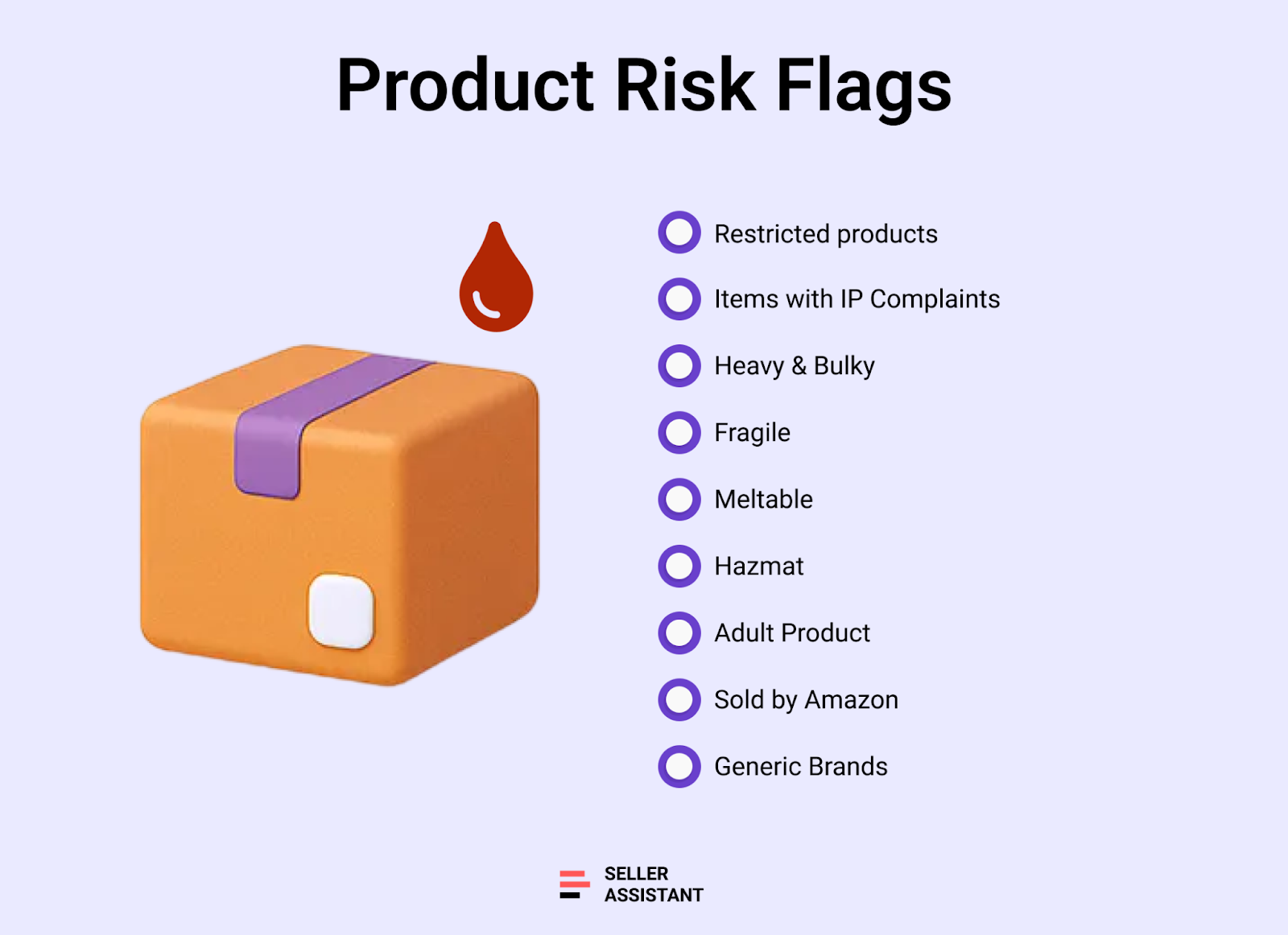
Restricted products
Items that need Amazon’s approval to sell – often due to safety, licensing, or brand control.
Examples
Branded skincare sets, children’s car seats, or collectible coins.
Why avoid
Without approval, you can’t list them, and new sellers are less likely to get ungated quickly. You need to check if you can ungate products before sourcing them.
Items with IP Complaints
Products that have a history of intellectual property or authenticity complaints.
Examples
Branded electronics, designer accessories, or health supplements.
Why avoid
IP complaints can damage your account health and may lead to suspended listings or costly appeals.
Heavy and bulky products
Items that exceed Amazon’s standard size and weight limits and require special handling.
Examples
Office chairs, gym equipment, or large pet crates.
Why avoid
High fulfillment fees and slower delivery make these deals less profitable.
Fragile products
Products that can easily break during shipping or storage.
Examples
Glass candle jars, monitors, or ceramic cookware.
Why avoid
High return rates and extra packaging needs can quickly cut into margins.
Meltable products
Temperature-sensitive products that can melt in warm conditions.
Examples
Protein bars, scented wax melts, or natural lip balms.
Why avoid
Amazon limits FBA storage for meltables during summer months, which can cause stock disposal losses.
Hazmat products
Items considered hazardous due to flammability, pressure, or chemical content.
Examples
Spray paints, power banks, or cleaning aerosols.
Why avoid
Require Amazon’s hazmat approval and special storage, adding complexity and cost.
Adult products
Adult or sexually themed items with strict listing and advertising rules.
Examples
Intimate apparel, personal lubricants, or adult games.
Why avoid
Limited ad visibility and packaging requirements complicate sales.
Products sold by Amazon
Listings where Amazon itself is the main seller holding more than 50% of the Buy Box.
Examples
Amazon Basics accessories, popular tech gadgets, or household staples.
Why avoid
Competing with Amazon usually means losing the Buy Box and earning minimal sales.
Generic brands
Unbranded or incomplete listings without official brand registration.
Examples
“No-name” kitchen tools or off-brand phone cases.
Why avoid
You can’t add your offer to these listings, making them unsellable.
Why Product Risks Matter
Ignoring product risks can quickly turn a profitable-looking deal into a costly mistake. Products that seem promising may later cause listing removal, account health issues, or unexpected fees. Understanding and checking risk flags before sourcing helps you protect your margins, stay compliant with Amazon policies, and keep your selling account safe.
Prevent unsellable inventory
Buying items that turn out to be restricted, hazmat, or generic can leave you stuck with stock you can’t list. Risk checks ensure every product you order is actually sellable.
Protect your account health
Sourcing products linked to IP complaints, restrictions, or policy violations can trigger warnings and suspensions. Avoiding risky ASINs safeguards your account performance and long-term business stability.
Reduce hidden costs
Heavy, bulky, or fragile items increase FBA fees, storage costs, and return rates. Identifying these risks early keeps your profit calculations accurate and prevents margin erosion.
Save time in product research
Spotting red flags upfront helps you skip unsuitable ASINs immediately. That means less wasted effort analyzing products you’ll never be able to sell.
Win the right Buy Box battles
Recognizing listings dominated by Amazon or packed with policy issues allows you to focus on products with real selling potential. You invest your resources only where competition and compliance are manageable.
How to Check Amazon Product Risks
Manually spotting risky products while sourcing is time-consuming and unreliable. It’s almost impossible to check every ASIN for potential issues like IP complaints, hazmat requirements, or oversized dimensions by hand – especially when working with hundreds of supplier listings. Your first step in evaluating any deal should be confirming that the product is safe to sell and won’t cause compliance or profitability problems later.
To make this process automatic, Amazon resellers use tools that identify product risks in real time. Seller Assistant offers Alerts and Flags feature, which works in two ways:
- Price List Analyzer shows risk flags while you scan supplier catalogs or bulk spreadsheets.
- Seller Assistant Extension displays the same flags instantly on Amazon product pages and supplier websites during single-product research.
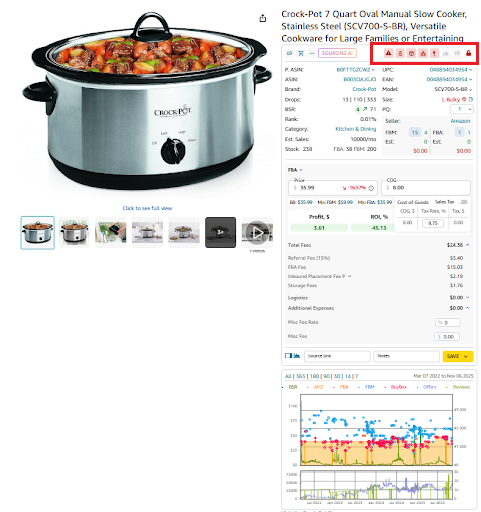
These tools allow you to filter out risky ASINs early and focus only on products that are safe, compliant, and worth adding to your sourcing list.
How Seller Assistant marks each risk flag
The Alerts and Flags feature in Seller Assistant visually marks every potential product risk with a unique red icon. These icons appear directly beside the ASIN in your Price List Analyzer results or in the Seller Assistant Extension panel on Amazon product pages, your competitor storefronts, and supplier websites. Each symbol helps you instantly recognize what kind of issue you’re dealing with – so you can decide whether to skip the product, request approval, or factor extra costs into your analysis.
Restricted
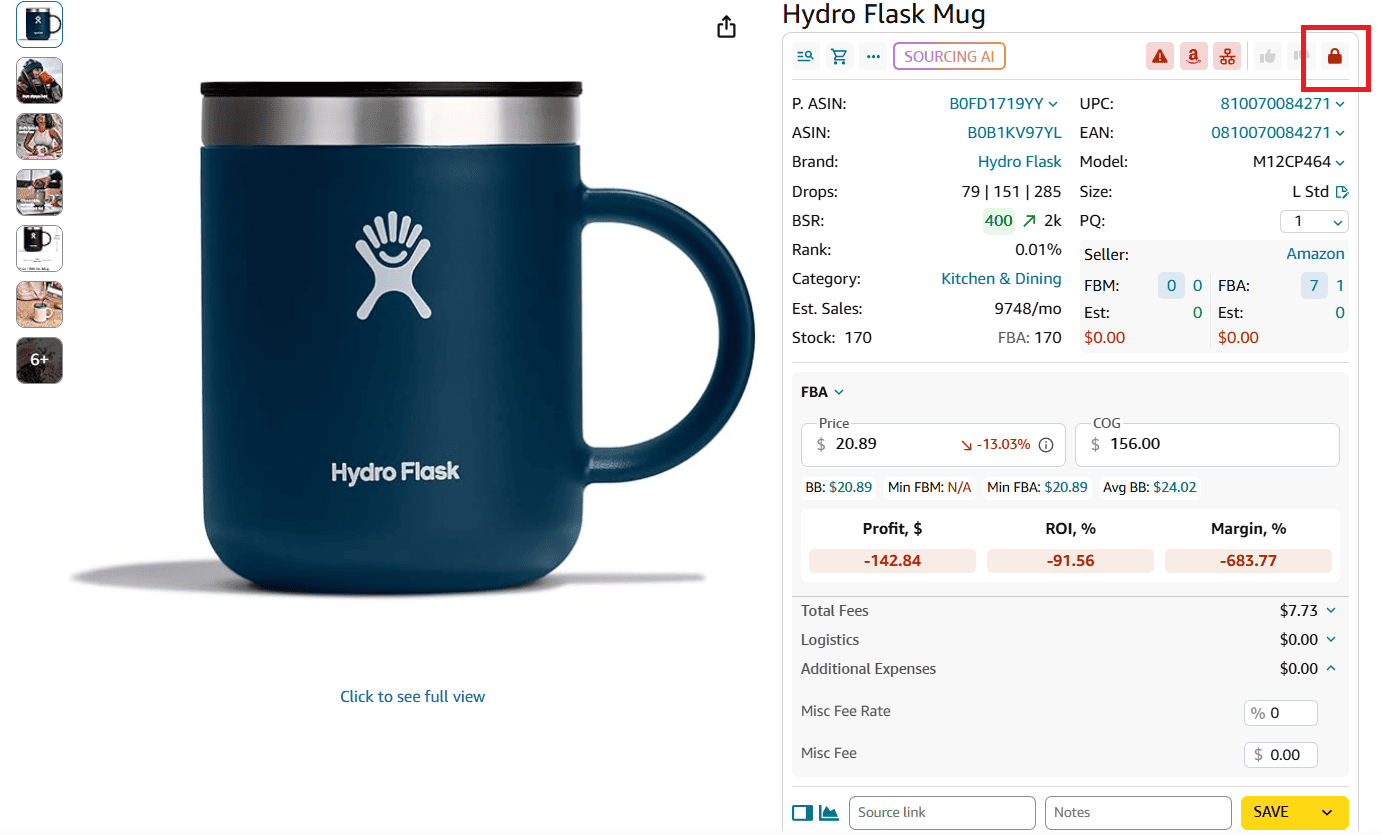
Icon: Red lock
Marks items that require Amazon’s approval to sell. Always verify eligibility before adding these products to your order list.
IP complaints
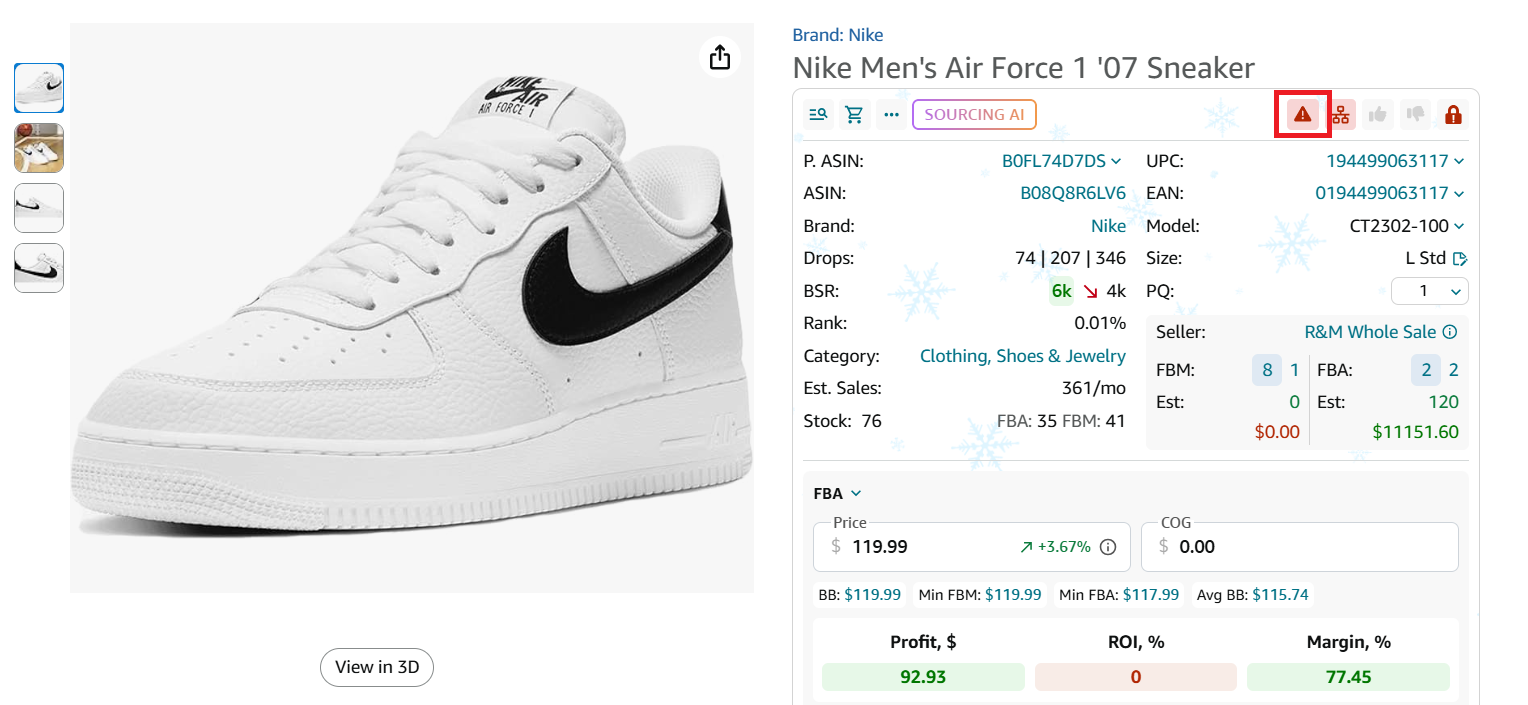
Icon: Red warning triangle
Signals products linked to intellectual property or authenticity disputes. Avoid these ASINs to prevent account health violations or suspensions.
Heavy and bulky
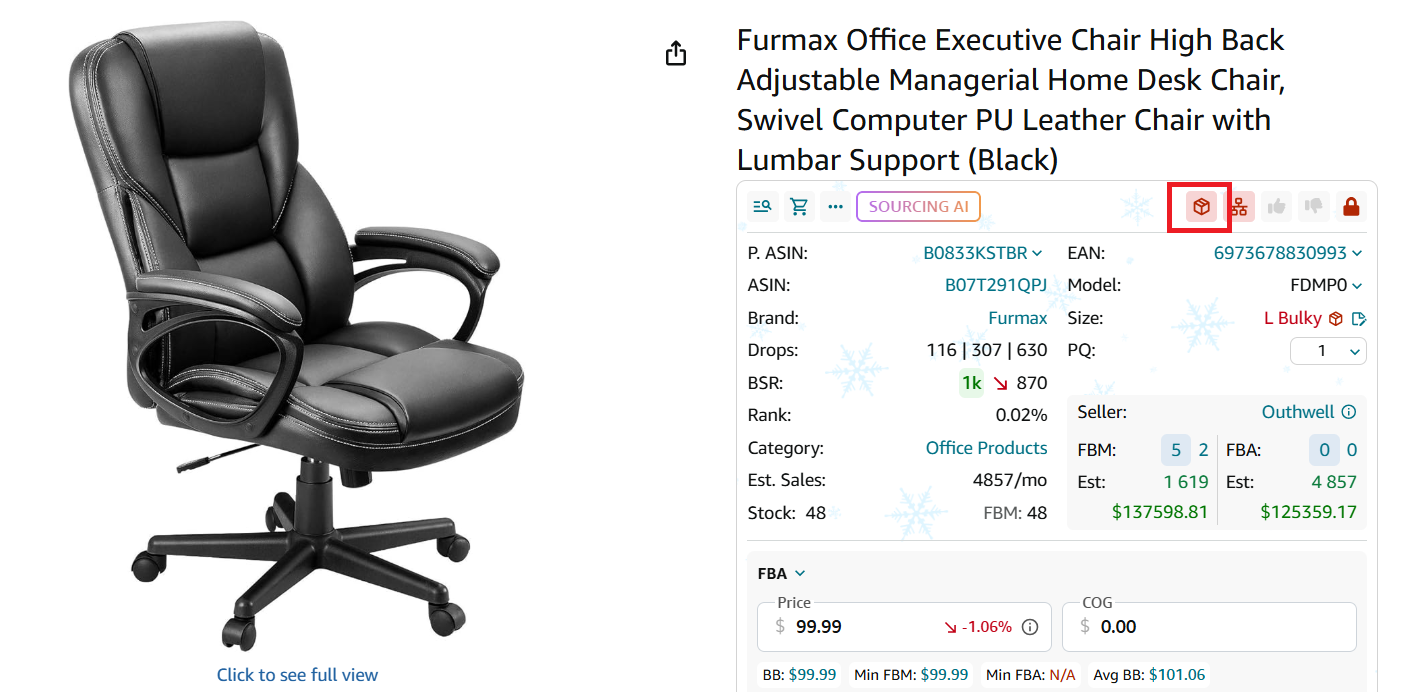
Icon: Red box
Indicates large or overweight items that trigger higher FBA fees and special handling. Check size tiers before sourcing.
Fragile
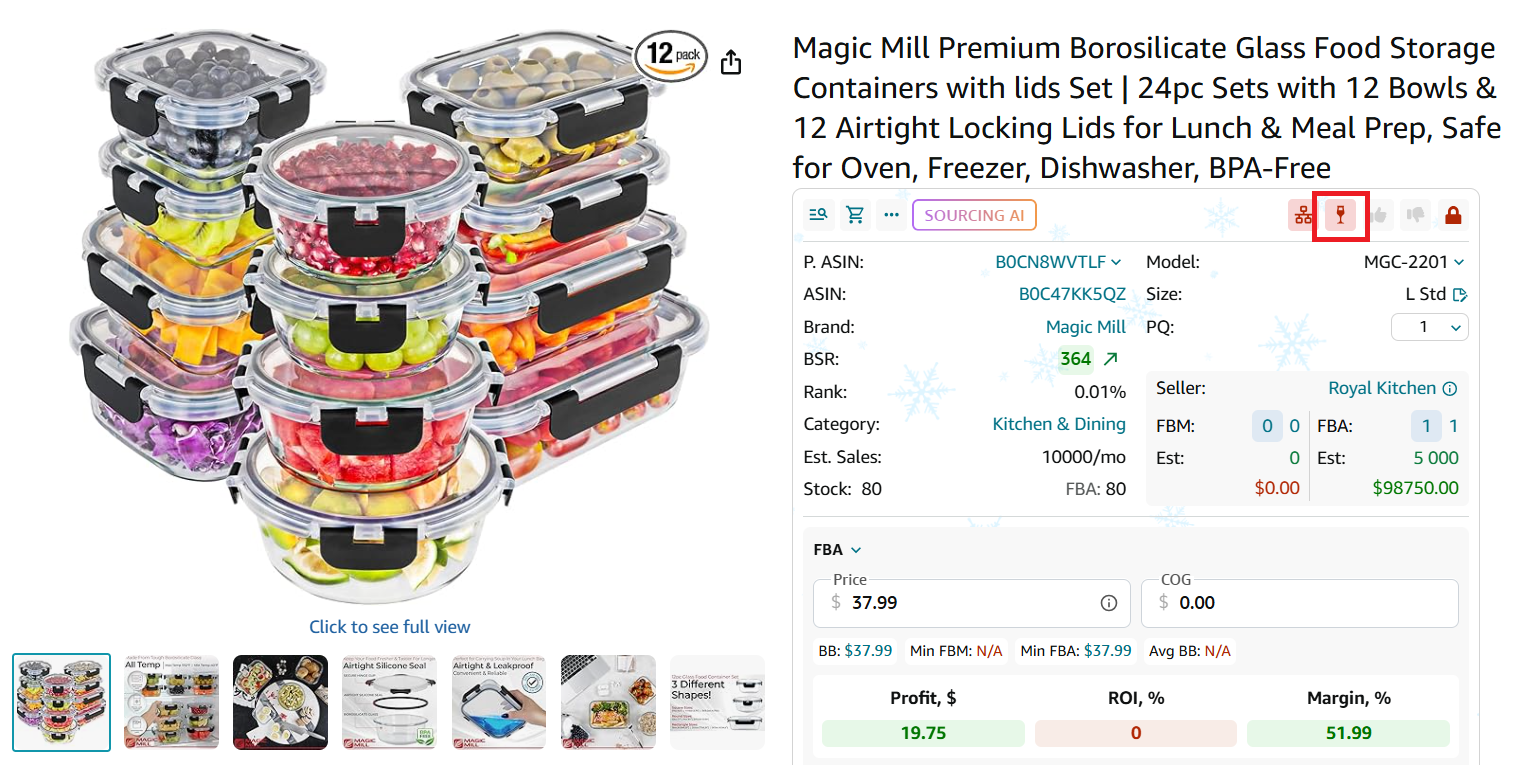
Icon: Red glass
Identifies products prone to breaking during shipping or prep. Consider additional packaging costs or avoid entirely.
Meltable
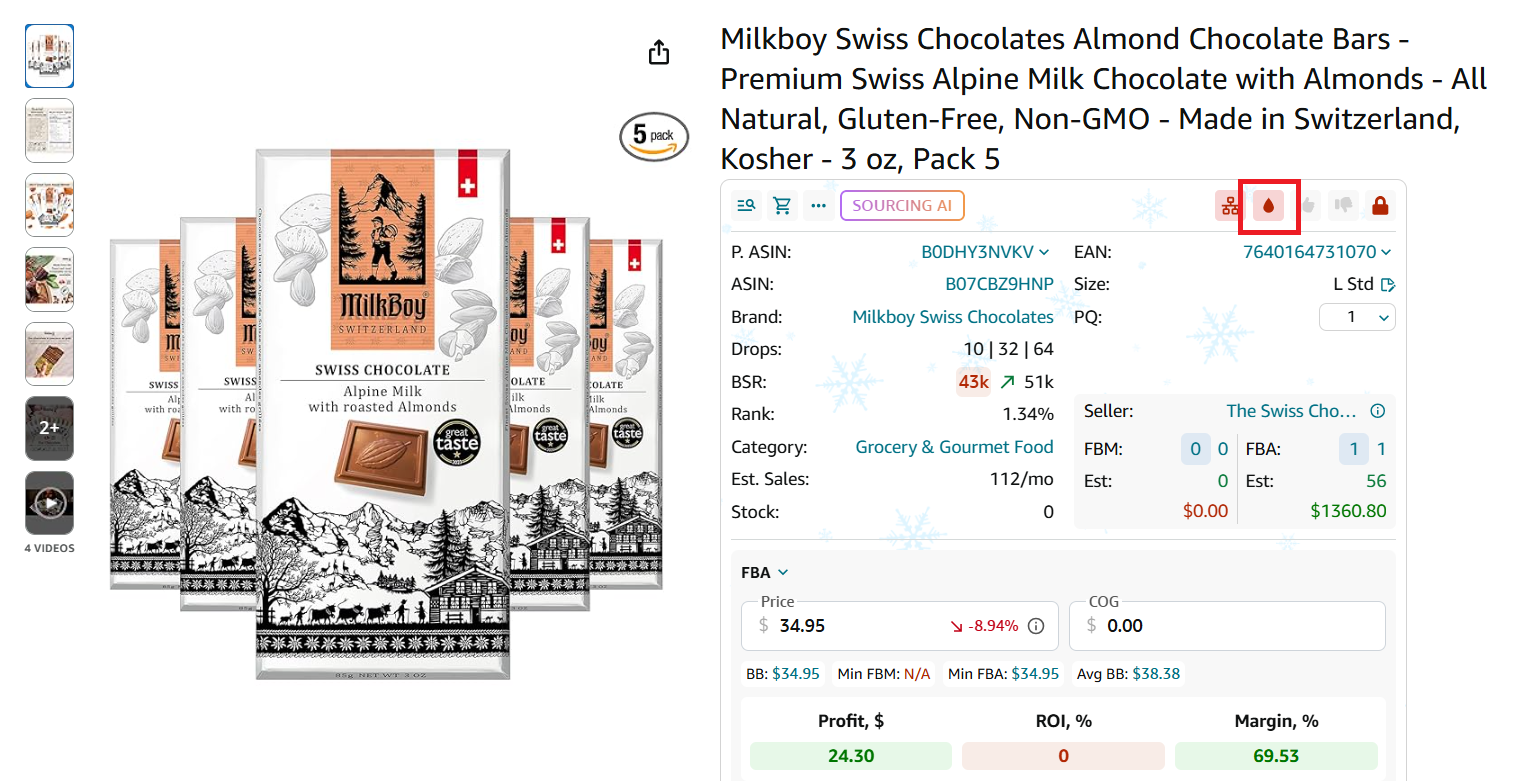
Icon: Red droplet
Highlights temperature-sensitive items that may melt in warm conditions. These can’t be stored in FBA warehouses during summer months.
Hazmat
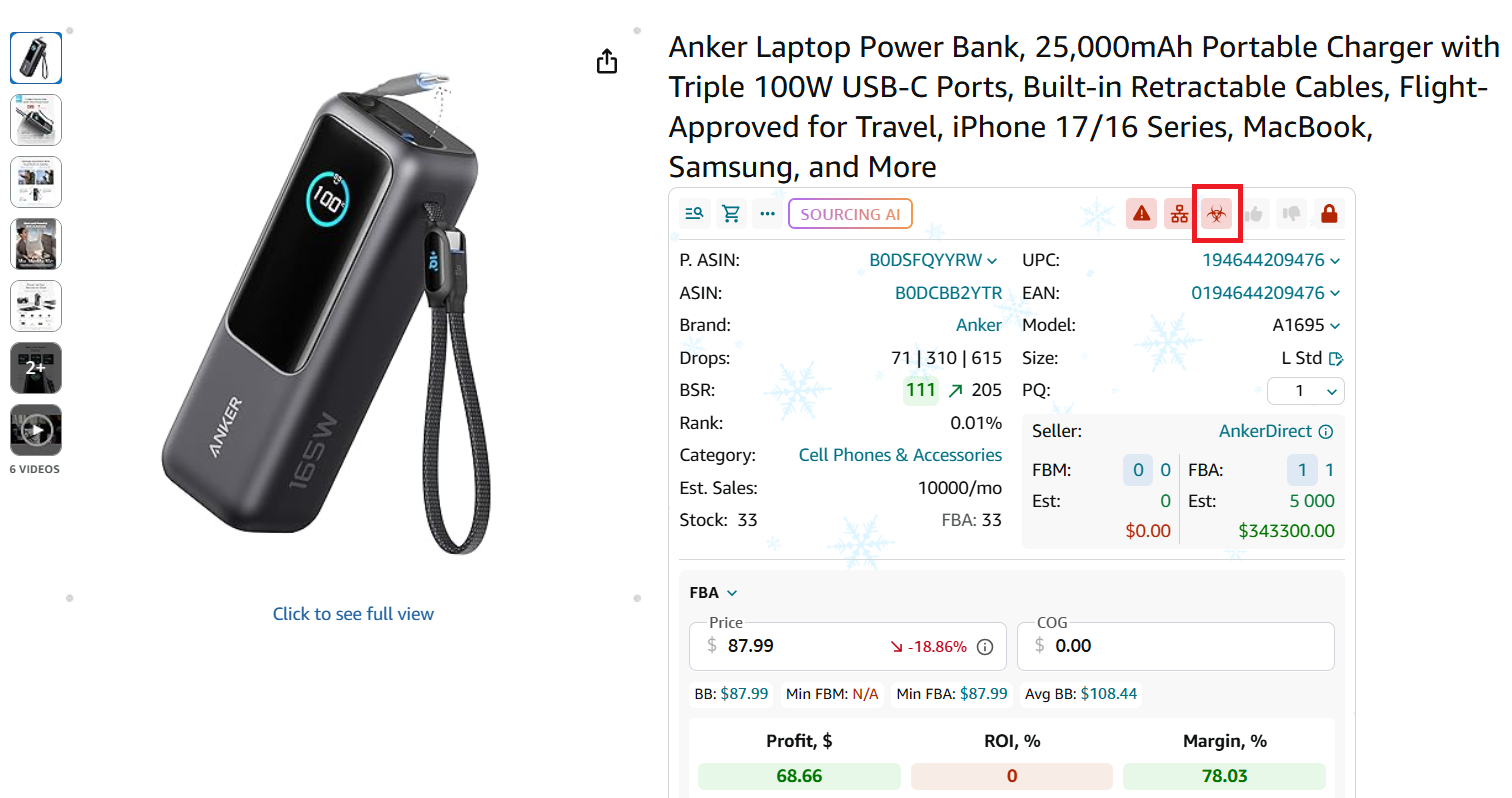
Icon: Red hazmat symbol
Marks hazardous materials–flammable, pressurized, or chemical-based products. They require Amazon hazmat approval and extra documentation.
Adult products
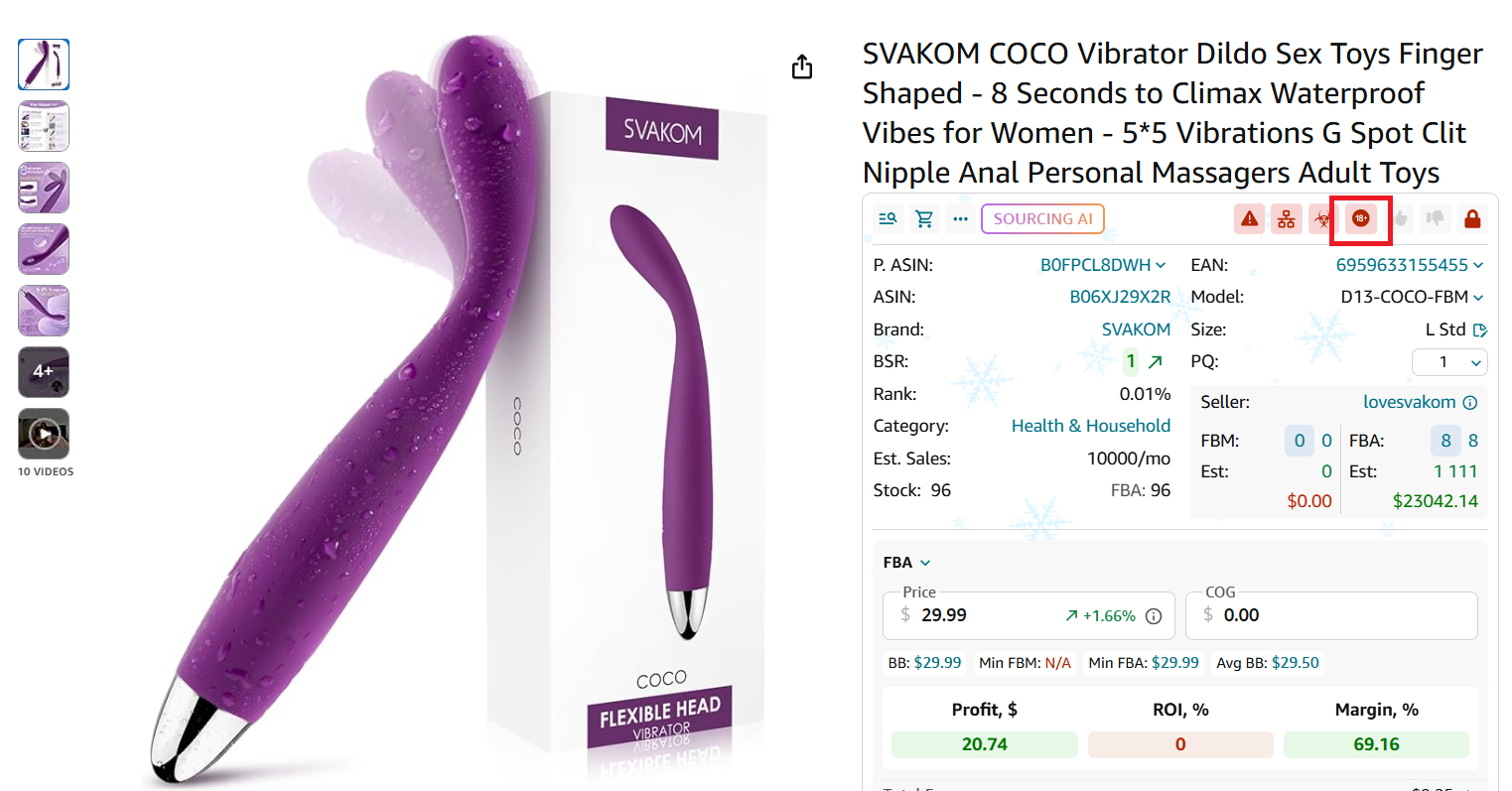
Icon: Red 18+ sign
Represents adult or sexual wellness products with special packaging and advertising limitations. Ensure compliance before sourcing.
Sold by Amazon
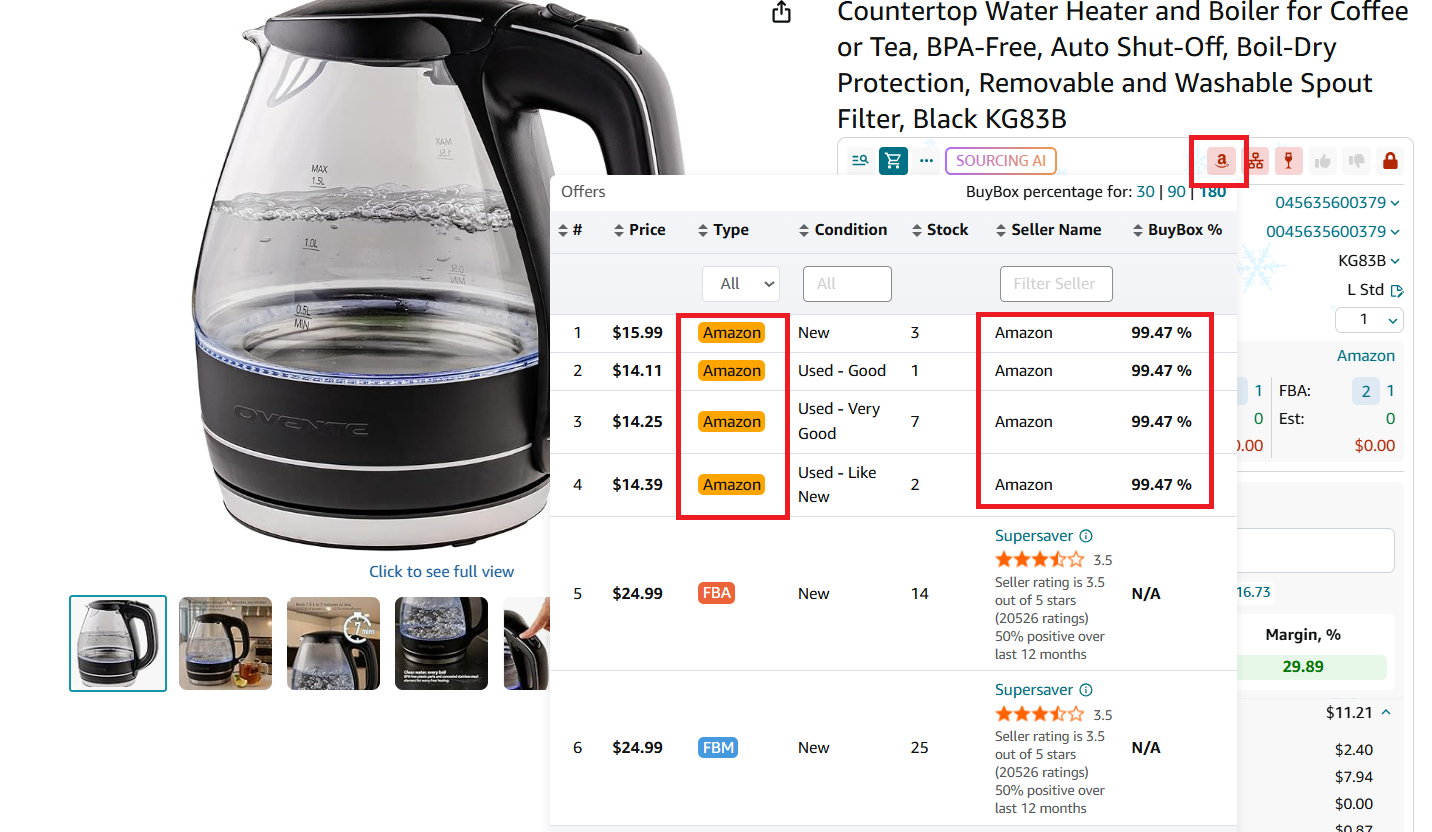
Icon: Red letter “A”
Shows listings where Amazon itself is the main seller. Competing against Amazon usually results in losing the Buy Box.
Generic brands
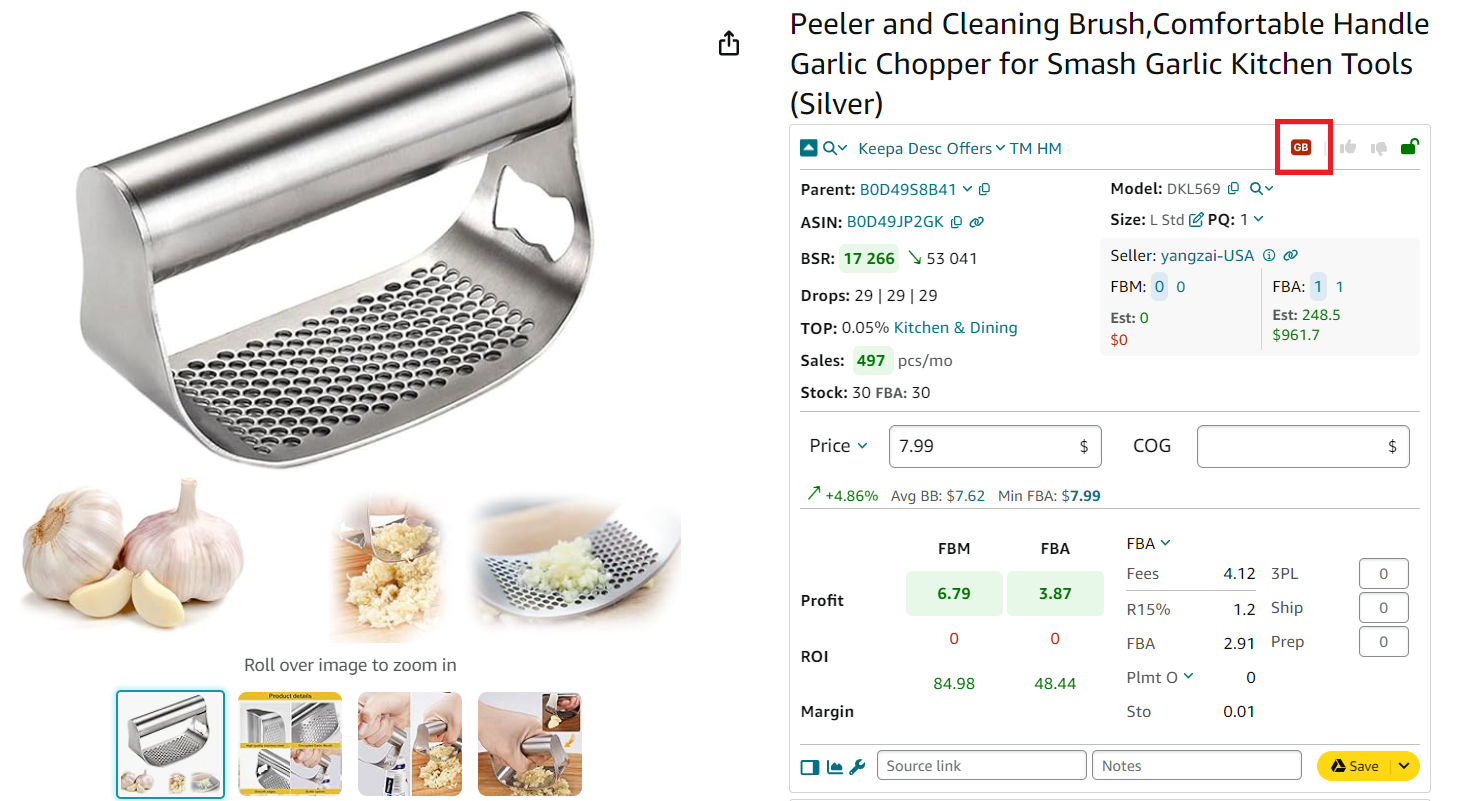
Icon: Red “GB” letters
Flags unbranded or incomplete listings without brand registration. These can’t be listed by third-party sellers, so avoid sourcing them.
Check Product Risks While Scanning Supplier Catalogs
One of the most efficient ways to avoid problematic ASINs is to check for product risk alerts directly during your sourcing process – not after you’ve already analyzed profits or placed an order. Seller Assistant’s Price List Analyzer integrates these checks into your bulk research, showing all Alerts and Flags right inside your supplier catalog view. This allows you to spot both profitable and low-risk deals in a single step.
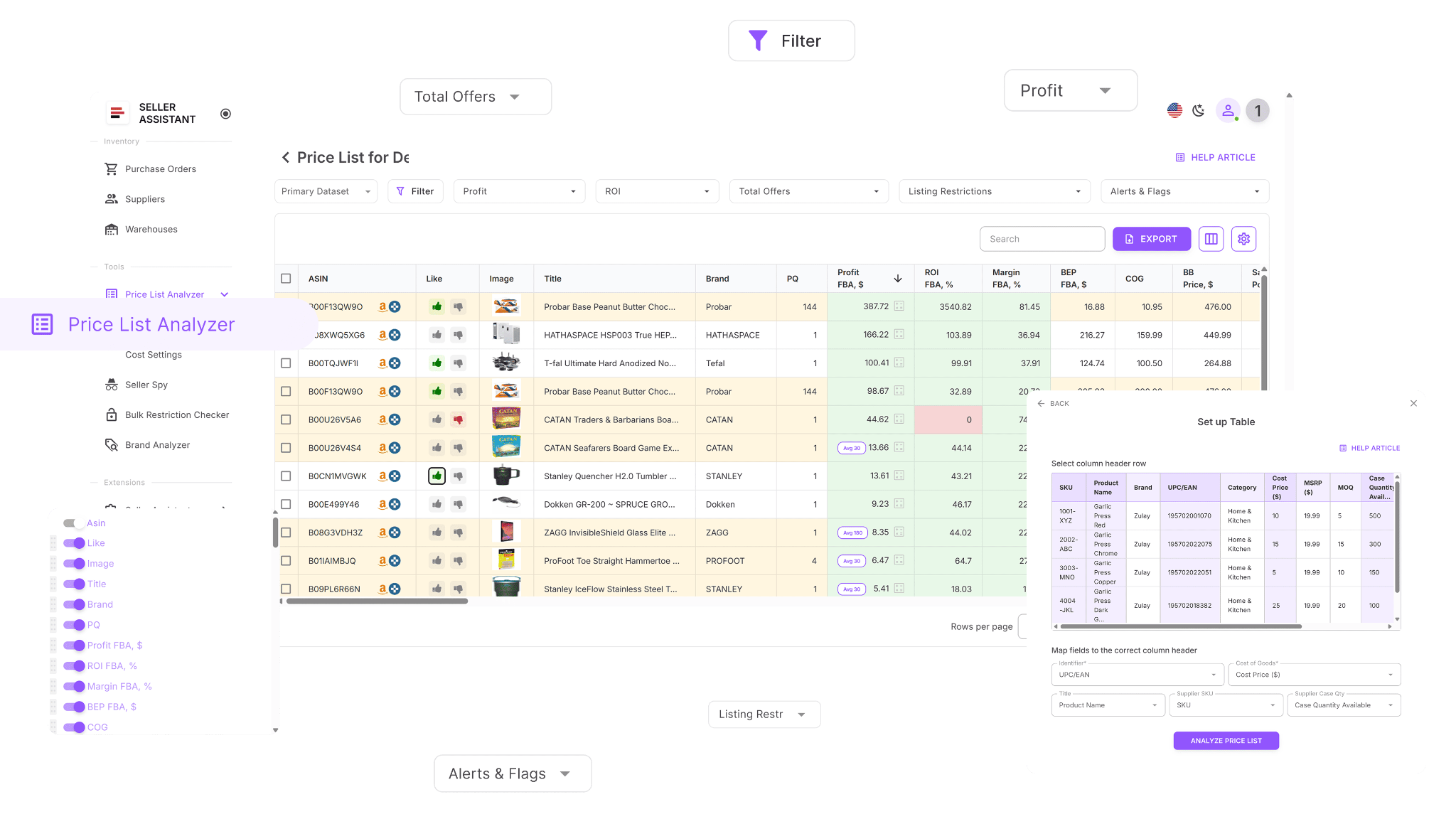
When you upload your supplier file, Price List Analyzer automatically links each SKU to its correct Amazon ASIN, calculates all profitability metrics, and highlights any product risk flags in a single, easy-to-read dashboard. This automation eliminates manual verification, prevents risky purchases, and helps you focus only on ASINs that meet your selling standards.
What Price List Analyzer is designed for
Price List Analyzer is a bulk product research tool built for wholesale, online arbitrage, and dropshipping sellers. It processes large supplier spreadsheets, connects them to Amazon listings, and enriches each item with key data points like sales velocity, competition, profitability, and product risk alerts. In minutes, it transforms raw supplier data into actionable insights.
How to Analyze Suppliers’ Price Lists in Bulk | Price List Analyzer Review
The tool upgrades your supplier file with over 100 valuable data points – from sales trends, Buy Box history, and Amazon fees to ROI, FBA costs, and competition metrics. Alongside these details, it displays product Alerts and Flags such as Hazmat, IP risk, meltable, fragile, or heavy and bulky indicators.
You can filter or sort your list by profitability, sales, or specific risk factors, highlight your best opportunities, and update cost or shipping data in real time to recalculate profit.
Designed for speed and accuracy, Price List Analyzer helps you make confident sourcing decisions supported by full, up-to-date data.
How Price List Analyzer helps you
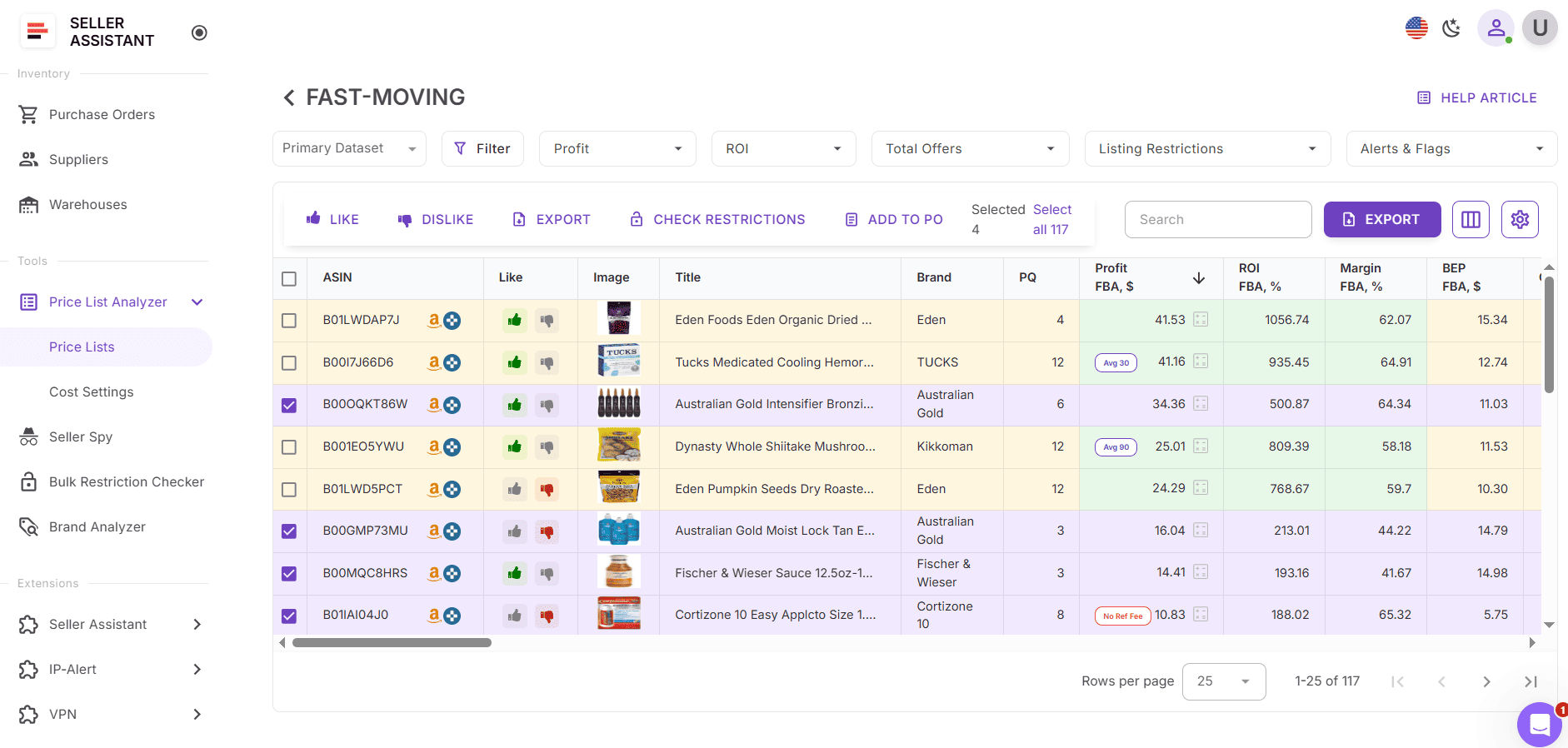
- Analyze large supplier catalogs and quickly detect low-risk, high-margin products.
- Match supplier SKUs to Amazon ASINs automatically.
- Identify product risks such as IP issues, Hazmat, meltable, fragile, or sold-by-Amazon listings with built-in Alerts and Flags.
- View more than 100 data points, including BSR, Buy Box history, profit, ROI, fees, and sales velocity.
- Filter, sort, and save layouts based on profitability and risk factors for efficient deal review.
- Mark products as liked or disliked, build purchase lists, and export selected ASINs for ordering.
- Adjust cost, prep, or shipping values and see profit updates instantly.
- Add team notes that stay attached to the same ASIN in future uploads.
How to check Alerts and Flags using Price List Analyzer
When Price List Analyzer processes your supplier file, it automatically highlights each product with relevant risk icons. These alerts appear in the Warnings or Flags column beside each ASIN, showing potential issues such as Hazmat, IP complaint, meltable, or heavy and bulky.
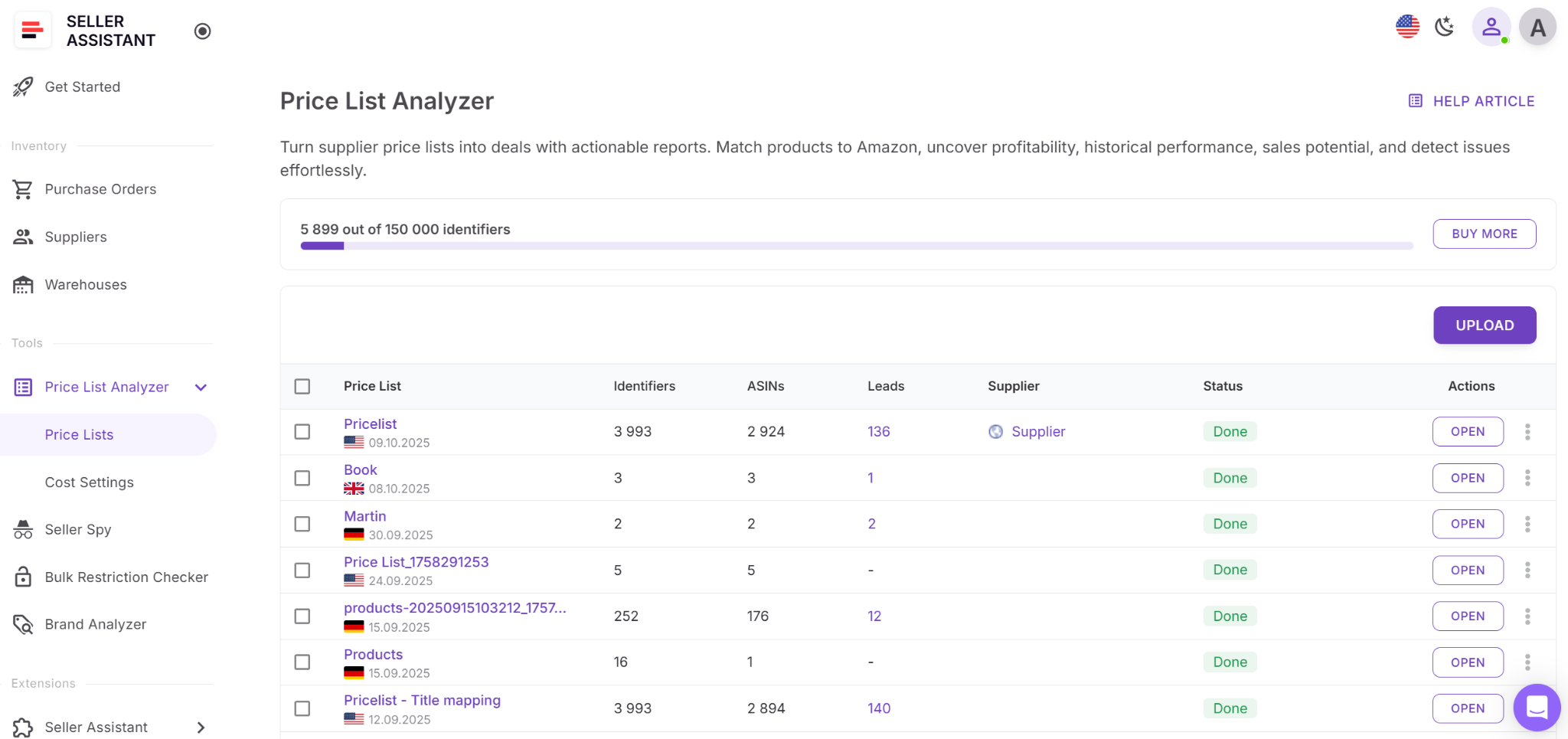
Step 1. Upload your supplier file
In your Seller Assistant dashboard, open Price List Analyzer and upload your Excel or CSV file containing UPCs or EANs with cost data. The tool matches each item to its ASIN, runs profitability analysis, and displays all Alerts and Flags.
Step 2. Locate the risk flags
Once processed, check the Alerts or Flags column. Each icon represents a specific product issue – for example, a red warning for IP complaints, a droplet for meltable, or a hazmat symbol for restricted materials.
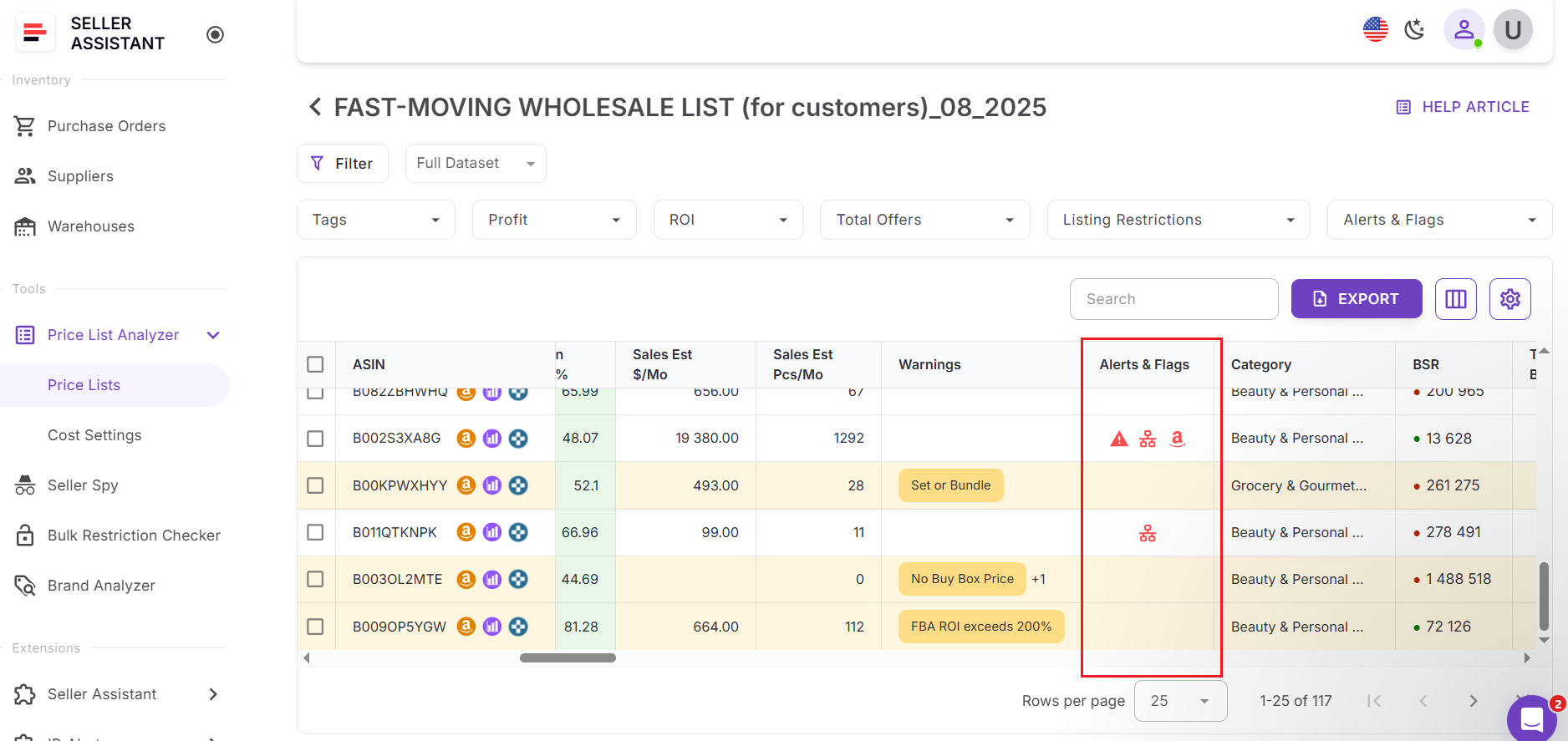
Step 3. Review risky ASINs
Scroll through your list and focus on items with red or caution icons. Hover over each to view short explanations of what the flag means and how it may affect your sourcing decision.
Step 4. Filter your list by risk type
Use the Filters menu to show or hide items based on specific alerts – such as excluding Hazmat or fragile products. Combine these filters with profit or ROI settings to find the safest and most profitable deals.
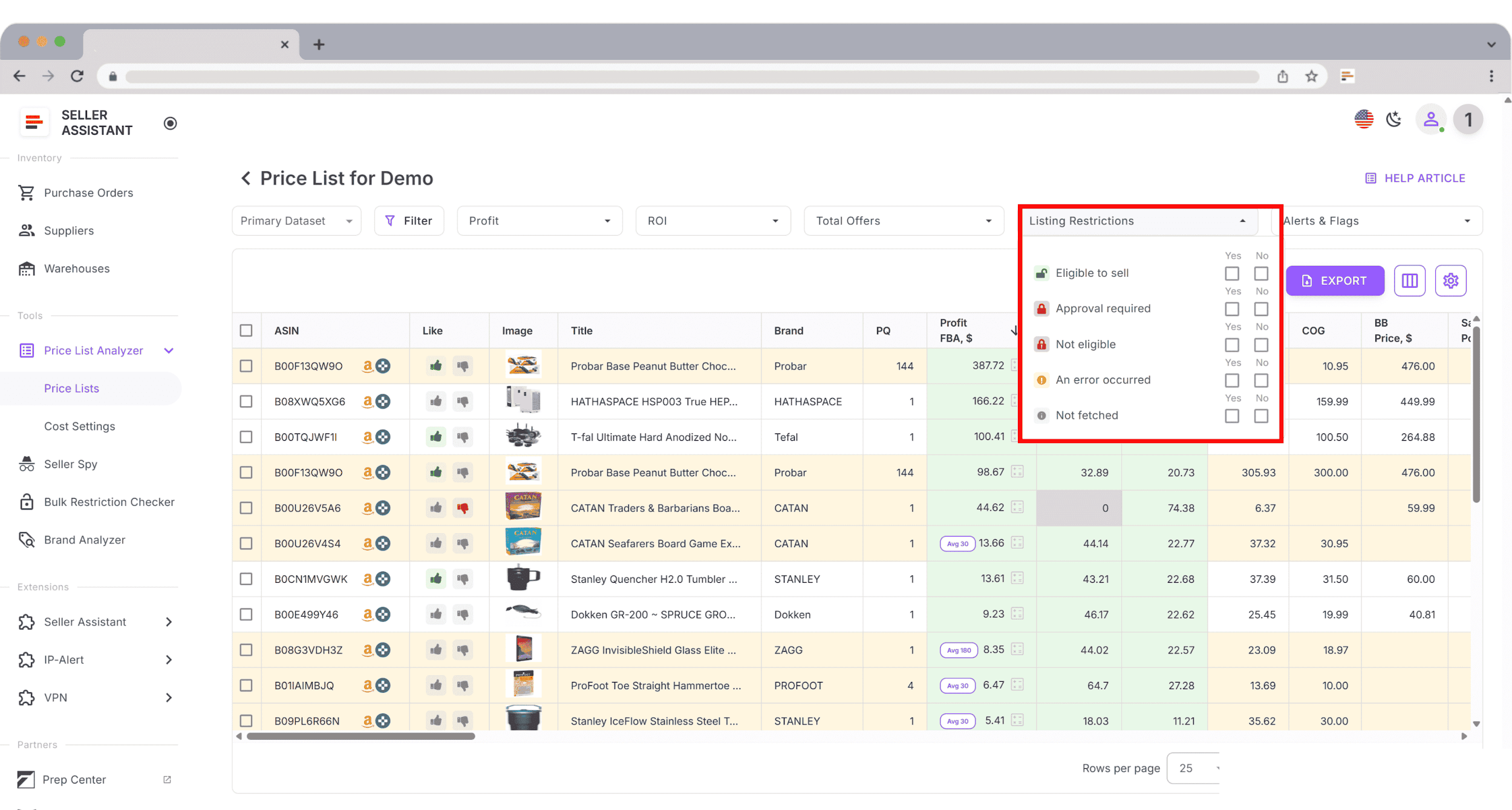
Step 5. Make sourcing decisions
Decide how to proceed: skip flagged ASINs, double-check supplier data, or adjust profitability based on handling costs. Products without any flags are safest to prioritize.
Step 6. Save your table view
Save customized table layouts – for example, Low-Risk Products, Needs Review, or Flagged Items. These saved views streamline your next uploads and maintain a consistent sourcing workflow.

Check Single Product Risks with Seller Assistant Extension
When you analyze products individually, the fastest way to detect potential risks is right on Amazon product pages. Seller Assistant Extension adds a live data panel to listings, search results, supplier websites, and competitor storefronts, showing every key detail – profitability, product risk alerts, IP warnings, FBA fees, and sales metrics – in real time.
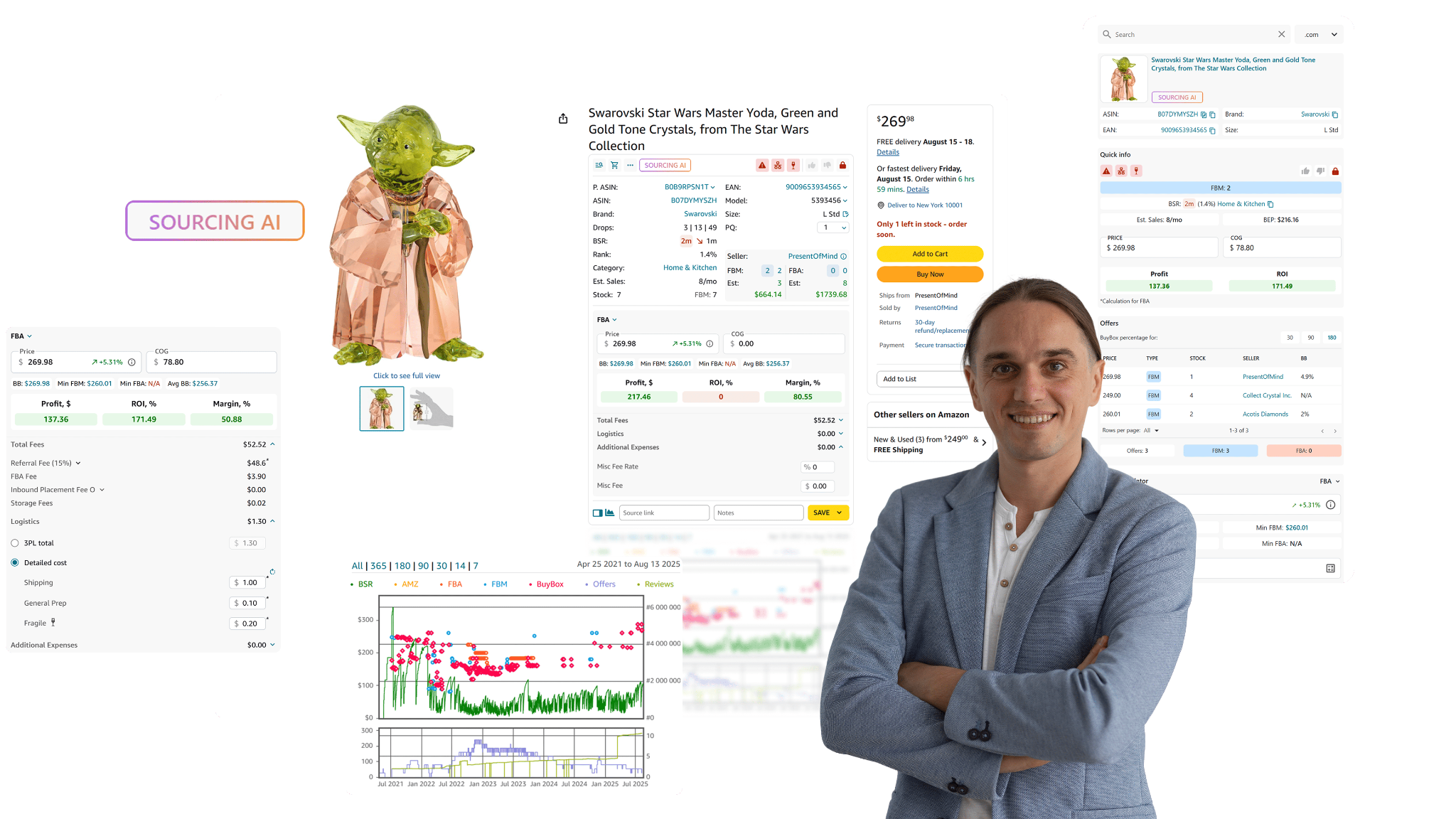
With this tool, you can instantly evaluate a product’s safety and profit potential without switching tabs or relying on guesswork. In a single view, you see all the information you need to decide whether an ASIN is safe, compliant, and worth sourcing.
What Seller Assistant Extension is designed for
Seller Assistant Extension is a real-time product research tool for Amazon resellers who need quick, accurate insights while browsing. It shows you all essential selling data – including product risks, profitability, and competition – directly on the page.
The Extension adds a detailed dashboard to Amazon listings that displays metrics like sales velocity, competition level, Buy Box history, and all relevant Alerts and Flags (IP risk, Hazmat, meltable, or fragile indicators).
On supplier sites, Side Panel View opens alongside product pages, providing full Amazon analytics and risk alerts right next to the supplier offer. In Amazon search results, Quick View gives you a compact summary of product metrics and risk icons, while the Storefront Widget reveals competitor bestsellers and brands with risk information included.
How Seller Assistant Extension helps you
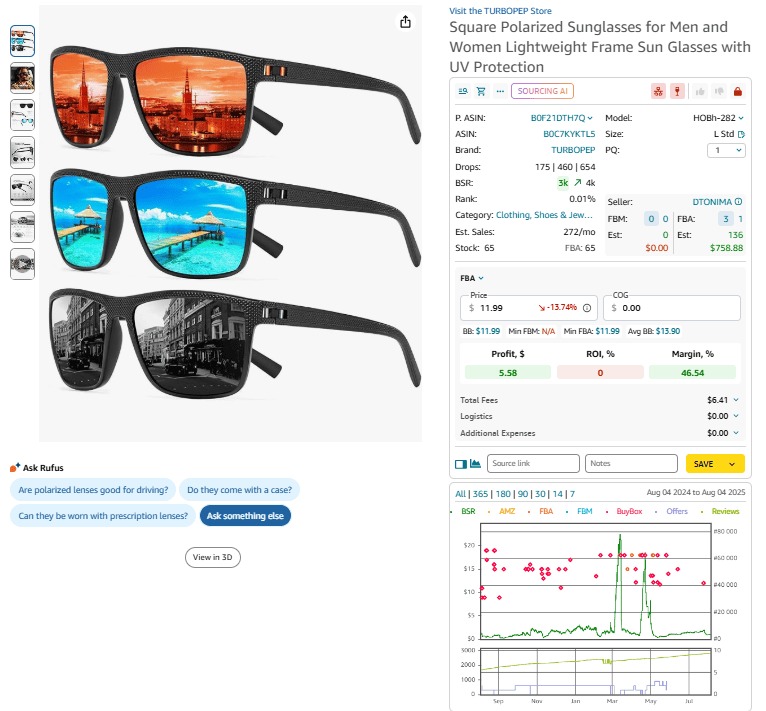
- Access complete Amazon product data directly on listings and search pages.
- Review profitability, BSR trends, demand, and competition.
- Identify product risks and IP warnings instantly through Alerts and Flags.
- Evaluate profit margins with built-in FBA and FBM profit calculators.
- See all Amazon fees, logistics costs, and taxes automatically.
- Detect if Amazon sells the product or dominates the Buy Box.
- Analyze variations, stock levels, and seller competition in real time.
- Export research data directly to Google Sheets for team use.
- Use Sourcing AI to locate U.S.-based suppliers for the same ASIN.
- Add notes, likes, dislikes, and supplier links to stay organized.
- Access detailed price and sales history with integrated Keepa charts.
How to check Alerts and Flags with Seller Assistant Extension
Seller Assistant Extension automatically displays risk alerts wherever you research – on Amazon listings, search results, supplier pages, and even competitor storefronts. The alert icons appear in the Extension panel and next to each product, showing which issues (such as IP, Hazmat, fragile, or sold-by-Amazon) apply.
Step 1. Install and activate the Extension
Install Seller Assistant Extension for Chrome, Edge, or Firefox. Log in to your Seller Assistant account and connect your Seller Central to ensure accurate product data.
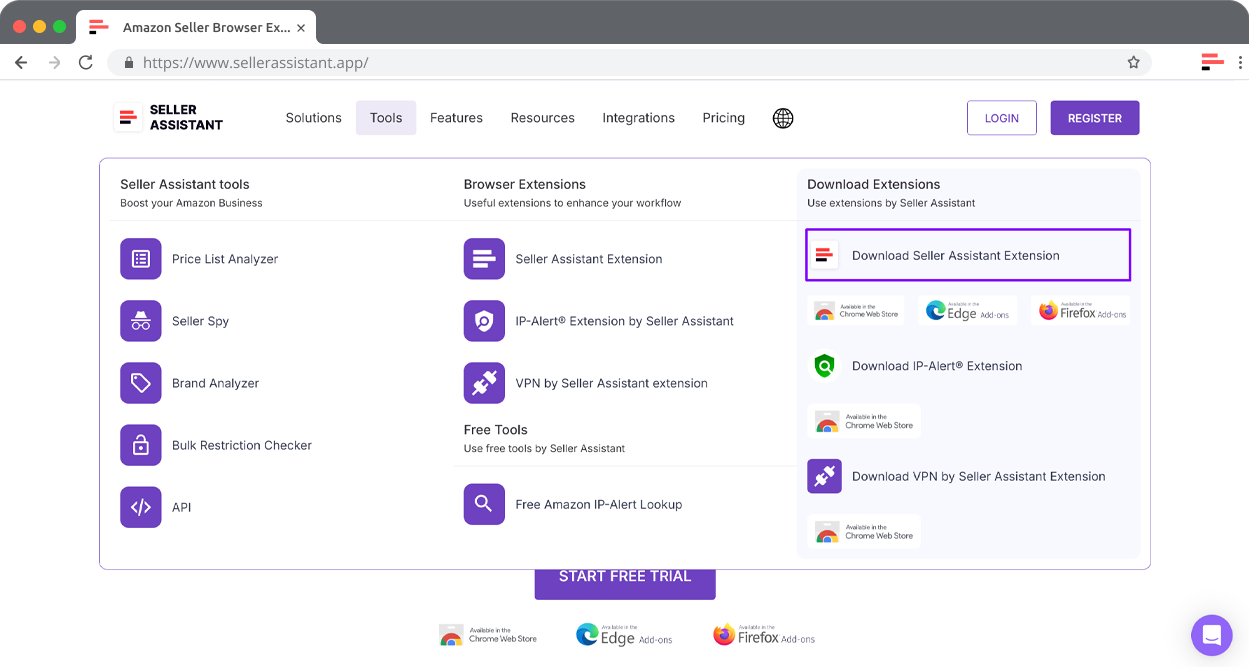
Step 2. Open an Amazon product page
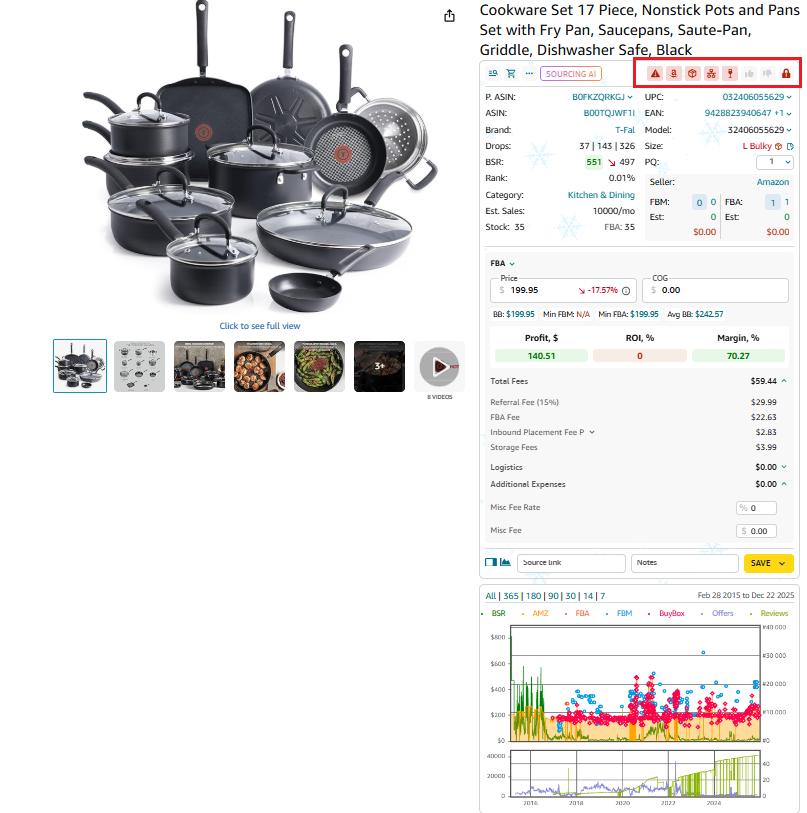
Visit any product listing on Amazon. The Extension panel will appear automatically, showing profitability metrics, Alerts and Flags, IP warnings, and all other relevant details.
Step 3. Review the risk alerts
In the Extension panel, locate the Alerts and Flags section. Each red icon represents a specific product risk – such as Hazmat, IP complaint, or meltable. Hover over any icon for a short description.
Step 4. Analyze products on supplier websites
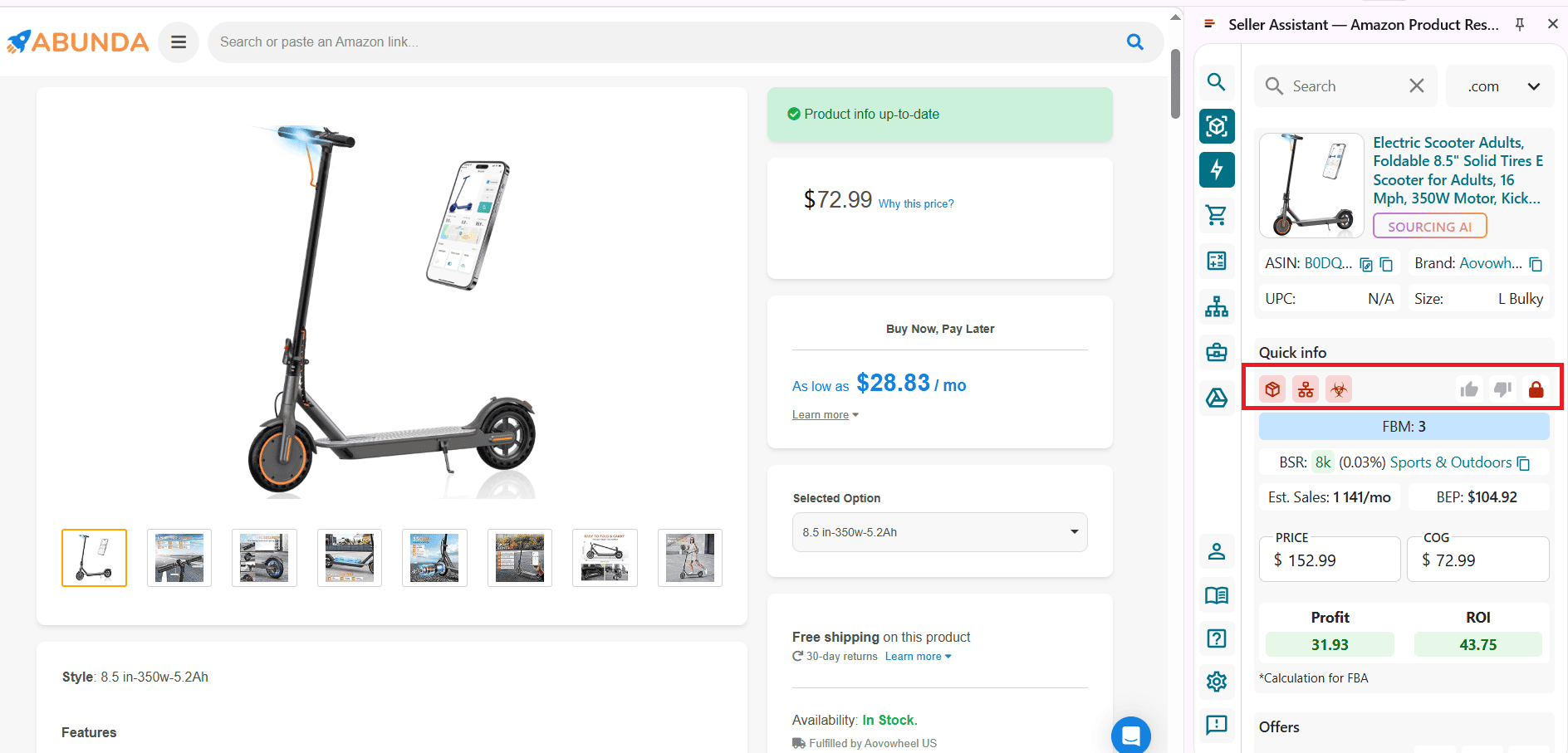
When browsing a supplier’s site, click the Extension icon in your browser to open Side Panel View. This view displays the same risk icons, profit estimates, and FBA data alongside the supplier offer.
Step 5. Review competitor storefronts
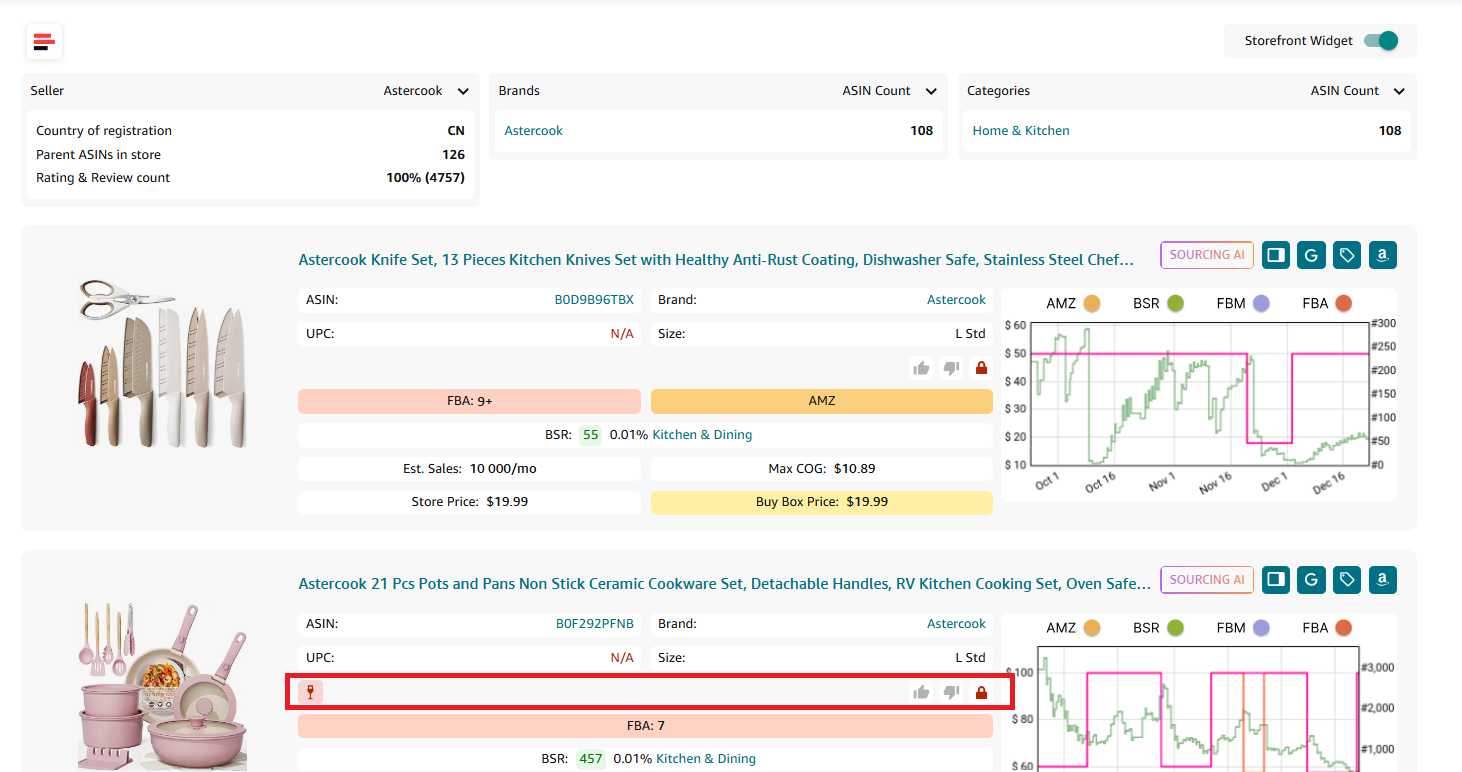
Visit any competitor’s storefront on Amazon. Storefront Widget automatically appears, showing their top-performing products and categories – including any risk alerts tied to those listings.
FAQ
What are Amazon product risk flags?
Product risk flags are visual alerts that show potential issues with a product – such as IP complaints, hazmat status, or being sold by Amazon. They help sellers avoid unsafe or unprofitable ASINs before placing orders.
Where can I see risk flags in Seller Assistant?
You can view them directly in the Seller Assistant Extension on Amazon listings or while scanning supplier catalogs in Price List Analyzer. Both tools display the same red warning icons for quick, automatic detection.
Why should I check risk flags before sourcing products?
Checking risk flags prevents buying items that could cause account health problems, storage restrictions, or high return rates. It ensures you spend time and capital only on safe, profitable deals.
Do risk flags change over time?
Yes, product risks can change as Amazon updates its safety, compliance, or category rules. Regular checks help you stay current and avoid sourcing items that recently became restricted or flagged.
Can I filter or exclude flagged products in bulk?
Yes. In Price List Analyzer, you can filter or sort ASINs by specific flags, such as hazmat or sold-by-Amazon, to remove risky items and focus on viable sourcing opportunities.
Final Thoughts
Identifying product risks early is one of the most effective ways to protect your Amazon business from costly mistakes. Risk flags reveal hidden issues that can impact your profitability, account health, or ability to sell – long before you commit to inventory.
With Seller Assistant’s Alerts and Flags, you can instantly see these warnings while analyzing supplier catalogs in Price List or reviewing individual ASINs in Seller Assistant Extension. This helps you make smarter, safer sourcing decisions, avoid policy violations, and maintain healthy profit margins.
Seller Assistant automates and connects every stage of your Amazon wholesale and arbitrage workflow. It brings together in one platform: workflow management tools – Purchase Orders Module, Supplier Database, Warehouse Database, bulk research & sourcing tools – Price List Analyzer, Bulk Restriction Checker, Sourcing AI, Brand Analyzer, Seller Spy, Chrome extensions – Seller Assistant Browser Extension, IP-Alert Extension, and built-in VPN by Seller Assistant, and integrations & team access features – seamless API connectivity, integrations with Zapier, Airtable, and Make, and Virtual Assistant Accounts.