


Если вы когда-нибудь смотрели на таблицу поставщика, заполненную штрихкодами, и задавались вопросом, какие из этих товаров вообще продаются на Amazon — вы уже знаете, почему важно уметь конвертировать UPC в ASIN.
Каждый листинг Amazon построен вокруг ASIN, тогда как поставщики используют UPC — и связывание этих двух миров определяет, окупится ли ваш поиск. С помощью конвертеров UPC в ASIN от Seller Assistant и мощного Price List Analyzer вы можете мгновенно сопоставлять товары, анализировать прибыльность и формировать готовый список покупок.
Давайте разберём, как умные продавцы конвертируют UPC в ASIN быстро, точно и в масштабе.
Примечание. Seller Assistant — это комплексная платформа управления рабочими процессами Amazon, интегрирующая 10+ решений для оптовой торговли в одну связанную систему. Она объединяет автоматизацию рабочего процесса поиска, инструменты массового исследования и аналитики, а также интегрированные расширения Chrome — предоставляя всё необходимое для оптимизации поиска сделок, управления поставщиками и создания заказов на закупку.

Платформа агрегирует: инструменты управления рабочими процессами — Purchase Orders Module, Suppliers Database, Warehouses Database для организации, автоматизации и масштабирования каждого шага оптовых и арбитражных операций; инструменты массового исследования и поиска — Price List Analyzer, Bulk Restriction Checker, Sourcing AI, Brand Analyzer, Seller Spy для оценки прайс-листов поставщиков, проверки права на продажу и ограничений, открытия новых брендов и обнаружения выигрышных идей товаров у конкурентов для расширения каталога; расширения Chrome — Seller Assistant Browser Extension, IP-Alert Extension и встроенный VPN от Seller Assistant для глубокого исследования товаров, проверки IP-претензий и соответствия требованиям, а также доступа к геоблокированным сайтам поставщиков прямо в браузере; функции интеграций и командного доступа — бесшовная API-связность и интеграции с Zapier, Airtable и Make, а также аккаунты виртуальных ассистентов для безопасного, масштабируемого командного сотрудничества.
С Seller Assistant каждый шаг вашего рабочего процесса оптовой торговли и арбитража на Amazon автоматизирован и взаимосвязан.
Что такое UPC, EAN и ASIN — и как они работают вместе
Каждый товар, продаваемый на Amazon, идентифицируется уникальным набором кодов — UPC, EAN и ASIN, которые связывают инвентарь поставщика с каталогом Amazon.
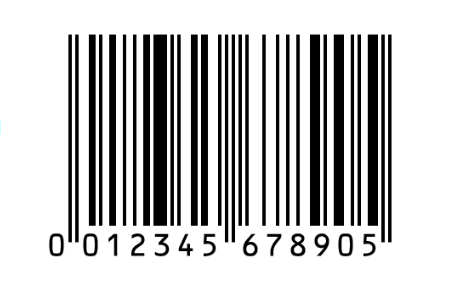
UPC (Universal Product Code) — 12-значный штрихкод, используемый преимущественно в США и Канаде. Это идентификатор производителя, который большинство поставщиков включают в свои прайс-листы.

EAN (European Article Number) служит той же цели в международном масштабе. Это обычно 13-значная версия UPC, используемая европейскими и международными дистрибьюторами.
ASIN (Amazon Standard Identification Number) — внутренний идентификатор каталога Amazon — десятизначный буквенно-цифровой код, присваиваемый каждому товару, выставленному на маркетплейсе.
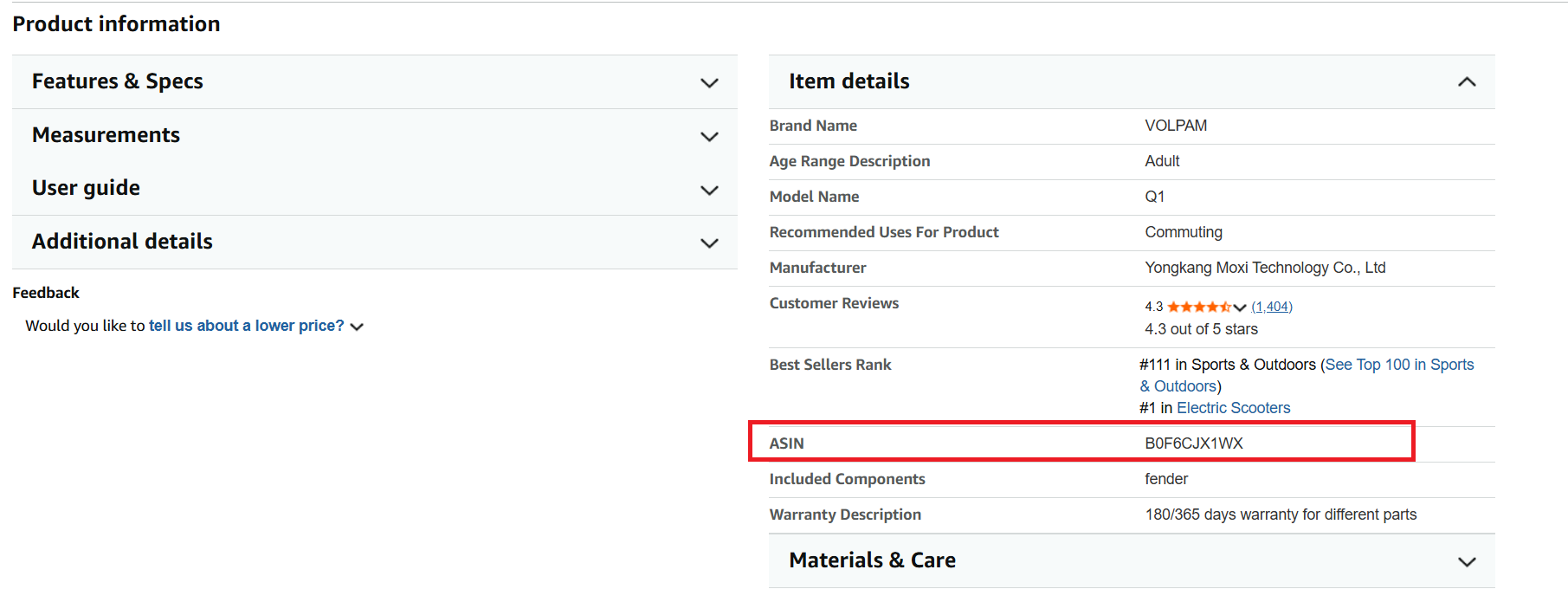
При продаже на Amazon сопоставление UPC или EAN с ASIN устраняет разрыв между данными поставщика и листингами Amazon. Это обеспечивает точное сопоставление товаров, чистые листинги и выгодные решения по поиску.
Пример
UPC: 012345678905 → EAN: 0012345678905 → ASIN: B000VU9BCC
Понимание того, как UPC, EAN и ASIN работают вместе, — это основа точного поиска, эффективного выставления товаров и анализа товаров на основе данных для каждого продавца Amazon.
UPC vs EAN vs ASIN — Таблица сравнения
Атрибут | UPC (Universal Product Code) | EAN (European Article Number) | ASIN (Amazon Standard Identification Number) |
Формат | 12-значный числовой код | 13-значный числовой код (или 8-значная краткая форма) | 10-символьный буквенно-цифровой код |
Используется в | США и Канаде | Европе и по всему миру | Только маркетплейс Amazon |
Присваивается | GS1 (США) | GS1 (международные отделения) | Amazon |
Назначение | Идентифицирует товары для розницы и дистрибуции | Идентифицирует товары международно для розницы и логистики | Идентифицирует и индексирует товары в каталоге Amazon |
Пример | 012345678905 | 0012345678905 | B000VU9BCC |
Используется продавцами для | Поиска и сопоставления файлов поставщика | Международного поиска и сопоставления с поставщиком | Исследования товаров, ценообразования и выставления |
Связь | Штрихкод производителя для сопоставления с ASIN | Международная версия UPC для сопоставления с ASIN | Уникальный идентификатор Amazon для каждого листинга |
Почему конвертация ASIN в UPC и обратно важна для продавцов Amazon
Конвертация ASIN в UPC или UPC в ASIN необходима, когда нужно связать данные поставщика с листингами Amazon. Продавцы используют UPC, EAN и коды производителей при поиске, но Amazon работает на ASIN — поэтому перевод между ними обеспечивает точное сопоставление товаров, чистые листинги и выгодные решения по поиску.
Обеспечить массовую обработку товаров
При работе с прайс-листами оптовиков или таблицами OA вы часто получаете тысячи UPC. Конвертация их в ASIN — или наоборот — позволяет вашим инструментам поиска анализировать их, рассчитывать ROI и автоматически фильтровать прибыльные позиции.
Проверить правильность товаров поставщика
Поставщики передают данные о товарах с использованием UPC или EAN, тогда как Amazon использует ASIN. Конвертация между ними гарантирует, что вы смотрите на нужный товар, а не на похожую вариацию, мультипак или устаревший листинг.
Анализировать прибыльность товара
Решения о поиске зависят от точных данных — и вы получаете полные метрики Amazon только тогда, когда UPC поставщика правильно сопоставлен с ASIN. Это даёт вам комиссии, цены Buy Box, BSR и аналитику конкуренции, которые направляют выгодные закупки.
Избежать несоответствий листингов
Когда вы знаете и ASIN, и UPC, вы снижаете риск прикрепления предложения к неправильному листингу. Эта ошибка может привести к негативным отзывам, возвратам или даже подавлению листинга.
Обнаружить дублирующиеся или объединённые листинги
Некоторые товары имеют несколько ASIN, привязанных к одному и тому же UPC. Конвертация между ними помогает выявлять дубликаты, вариации или объединённые листинги, чтобы выбрать наилучший для продажи.
Проверить подлинность товара
Сопоставление ASIN обратно с его оригинальным UPC помогает подтвердить, что товар подлинный и привязан к правильному производителю. Это предотвращает заказ инвентаря, не соответствующего листингу, и защищает аккаунт от проблем с подлинностью.
Как конвертировать ASIN в UPC
Seller Assistant предлагает быстрый, точный и полностью бесплатный конвертер Amazon ASIN в UPC, позволяющий получить идентификаторы товаров за секунды. Вместо того чтобы рыться в листах производителей или искать вручную, вы просто вводите ASIN и мгновенно получаете его UPC, EAN, GTIN, название товара, категорию, номер модели и номер детали. Это один из простейших способов для продавцов проверить листинги, узнать данные о товаре и связать информацию каталога Amazon с реальными идентификаторами производителя.
🚀 Попробуйте наш бесплатный конвертер ASIN в UPC
Конвертируйте ASIN Amazon в UPC-коды за секунды. Подходит для сопоставления с поставщиками, идентификации товаров и проверки данных каталога во время исследования. Быстро, точно, без регистрации.
Шаг 1. Откройте конвертер ASIN в UPC
Перейдите на сайт Seller Assistant и откройте бесплатный инструмент ASIN to UPC Converter. Инструмент загружается мгновенно — аккаунт и настройка не требуются.
Шаг 2. Введите ASIN для конвертации
Вставьте любой действительный Amazon ASIN в поле ввода. Вы можете конвертировать одиночные ASIN, тестировать вариации или проверять листинги конкурентов.
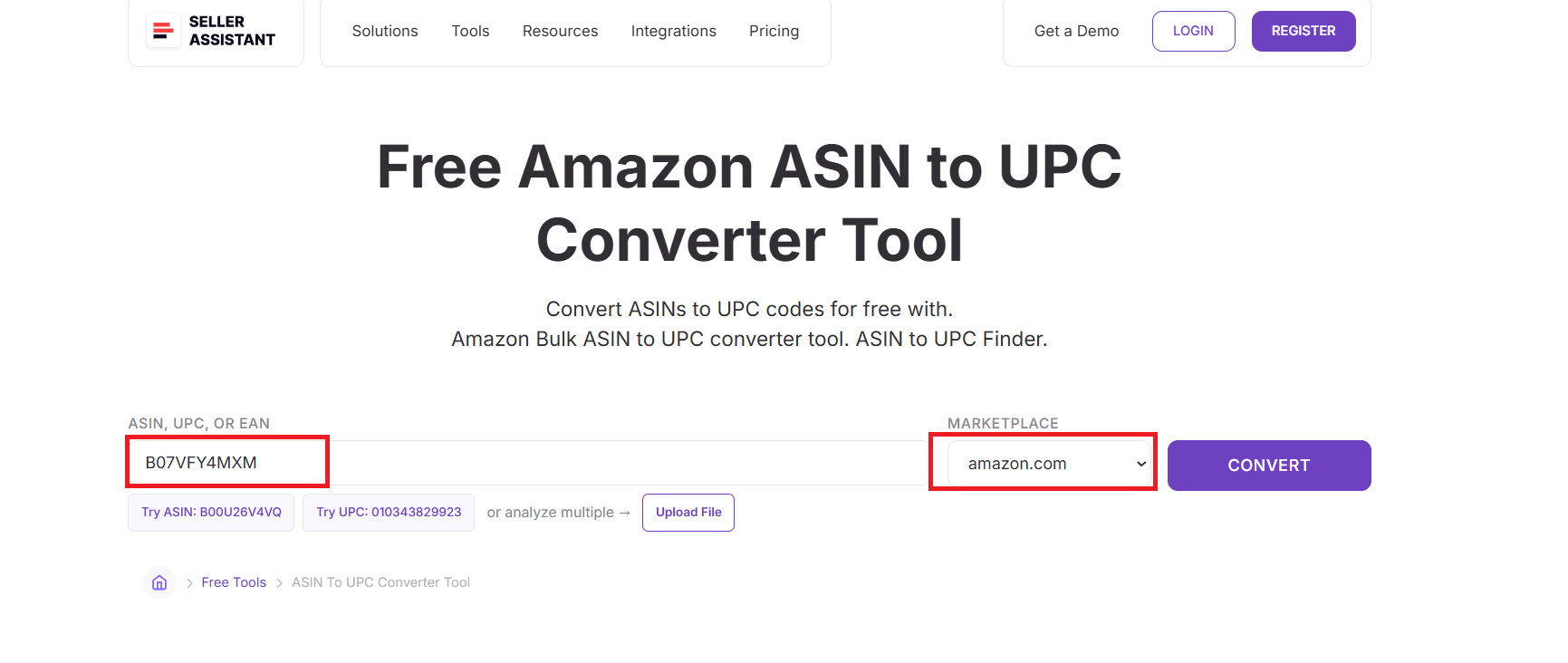
Шаг 3. Выберите маркетплейс Amazon
Выберите маркетплейс, на котором выставлен товар: Amazon.com, Amazon.co.uk или Amazon.de. Это гарантирует, что инструмент извлечёт точные региональные идентификаторы товара.
Шаг 4. Нажмите кнопку «Конвертировать»
Инструмент обрабатывает ASIN и получает официальные идентификаторы товара прямо из каталога Amazon. Ручной поиск или дополнительные исследования не требуются.
Шаг 5. Ознакомьтесь с идентификаторами товара
Вы мгновенно увидите:
- UPC
- EAN
- GTIN
- Название товара
- Категория
- Номер модели
- Номер детали
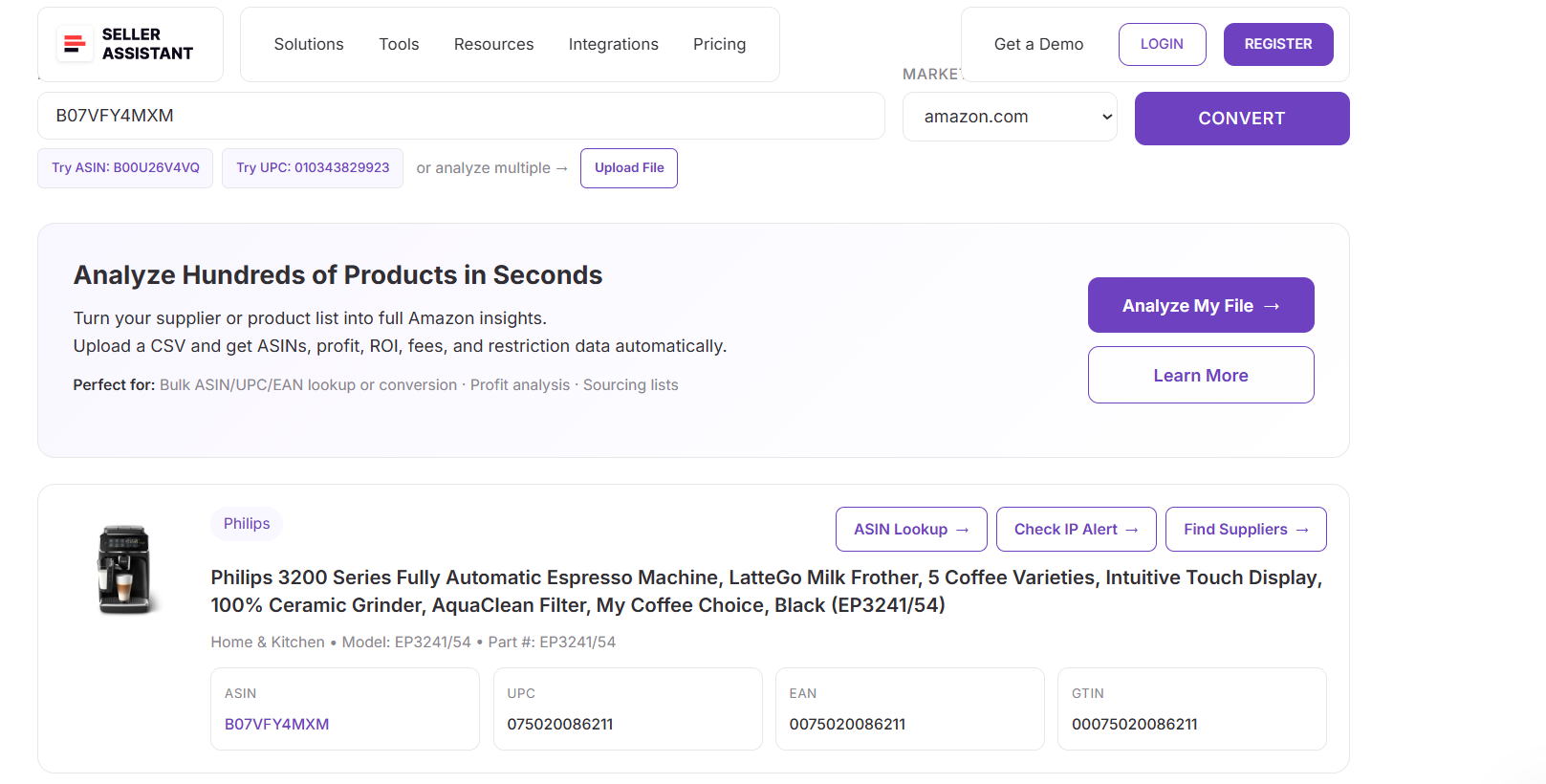
Это подтверждает точное совпадение товара и даёт вам все идентификаторы производителя, необходимые для поиска, перекрёстной проверки поставщиков или подготовки листингов.
Как конвертировать UPC в ASIN
Seller Assistant предоставляет бесплатный, быстрый и точный конвертер UPC в ASIN, который делает сопоставление товаров безупречным. Вместо ручного поиска на Amazon или открытия десятков вкладок вы просто вставляете UPC, выбираете маркетплейс и мгновенно получаете правильный ASIN, название товара, категорию и полные данные каталога Amazon. Это один из быстрейших способов превратить штрихкоды поставщика в идентификаторы, пригодные для Amazon — идеально для оптовых, OA и дропшиппинговых рабочих процессов.
🚀 Попробуйте наш бесплатный конвертер UPC в ASIN
Конвертируйте UPC в ASIN Amazon за секунды, чтобы быстро идентифицировать товары и проверять идеи для поиска. Создан для быстрого и точного исследования товаров. Регистрация не требуется.
Шаг 1. Откройте конвертер UPC в ASIN
Посетите сайт Seller Assistant и откройте бесплатный инструмент UPC to ASIN Converter. Инструмент работает в браузере — установка и вход не требуются.
Шаг 2. Введите UPC для конвертации
Вставьте 12-значный UPC в поле ввода. Вы можете конвертировать отдельные UPC или быстро тестировать несколько товаров поставщика поочерёдно.
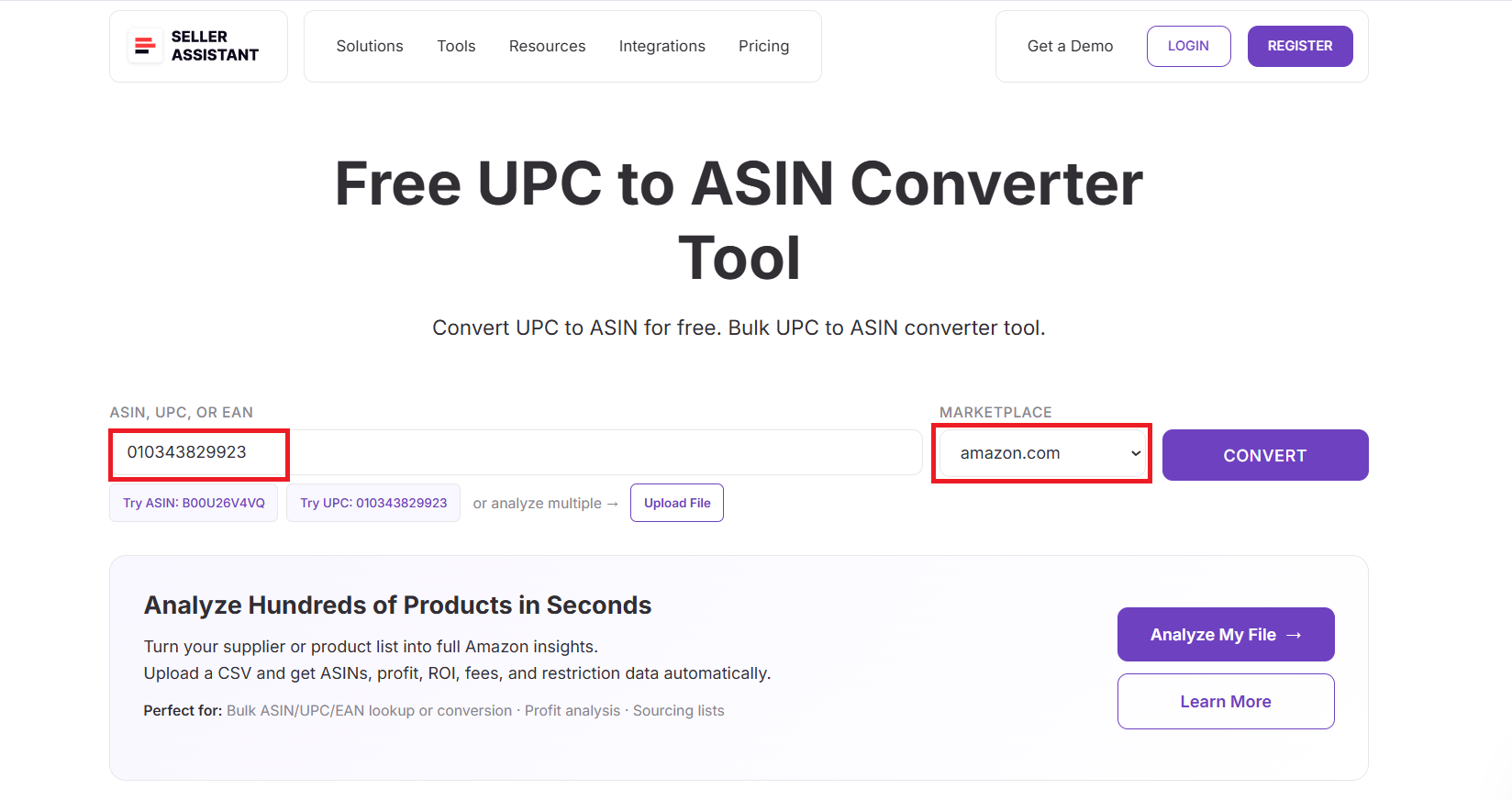
Шаг 3. Выберите маркетплейс Amazon
Выберите маркетплейс, на котором выставлен товар (Amazon.com, Amazon.ca, Amazon.co.uk и т.д.). Это гарантирует, что из каталога региона будет получен правильный ASIN.
Шаг 4. Нажмите кнопку «Конвертировать»
Инструмент проверяет UPC в базе данных товаров Amazon и мгновенно получает сопоставленный ASIN. Ручной поиск в каталоге или догадки не нужны.
Шаг 5. Ознакомьтесь с сопоставленным ASIN и данными товара
Конвертер отображает:
- ASIN
- UPC
- EAN
- GTIN (если доступен)
- Название товара
- Категория
- Бренд
- Модель
- Номер детали
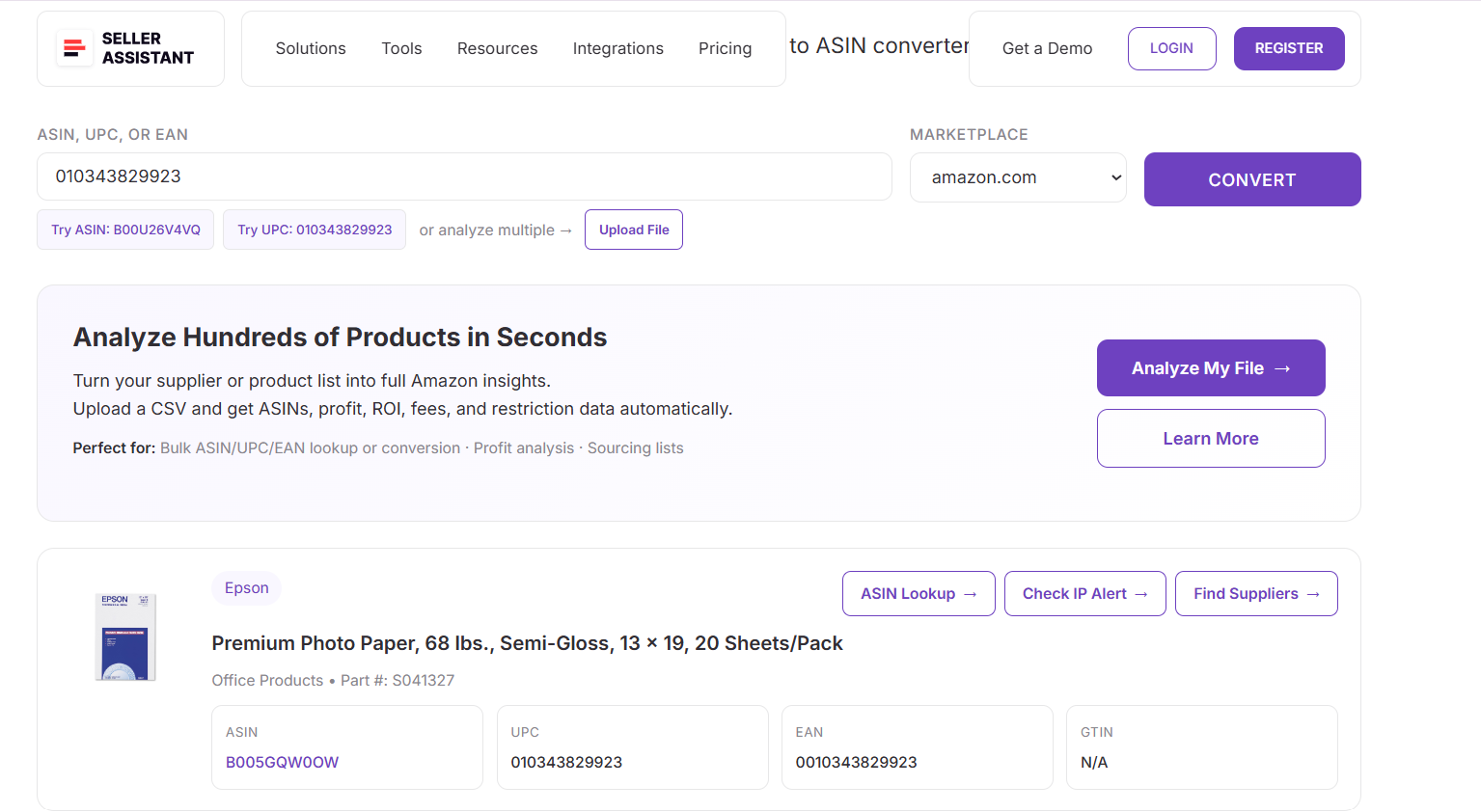
Это обеспечивает полное совпадение между UPC вашего поставщика и точным листингом Amazon — гарантируя точность ваших решений по поиску и выставлению товаров.
Как конвертировать EAN в ASIN
Seller Assistant также предлагает бесплатный и надёжный конвертер EAN в ASIN, упрощающий сопоставление европейских или международных кодов поставщиков с правильным Amazon ASIN. Вместо ручного поиска или опоры на неполные данные третьих лиц вы просто вставляете EAN, выбираете маркетплейс и мгновенно получаете точный ASIN, название товара, категорию и другие детали листинга. Это самый быстрый способ для международных продавцов и оптовых покупателей связать глобальные штрихкоды товаров с листингами Amazon.
🚀 Попробуйте наш бесплатный конвертер EAN в ASIN
Конвертируйте EAN-коды в ASIN Amazon за секунды. Идеально для идентификации товаров, анализа прайс-листов поставщиков и проверки позиций перед закупкой. Быстро, точно, без регистрации.
Шаг 1. Откройте конвертер EAN в ASIN
Перейдите на сайт Seller Assistant и откройте бесплатный инструмент EAN to ASIN Converter. Инструмент работает прямо в браузере — вход не требуется.
Шаг 2. Введите EAN для конвертации
Вставьте 13-значный EAN (или 8-значную краткую форму) в поле ввода. Вы можете быстро протестировать несколько международных кодов товаров.
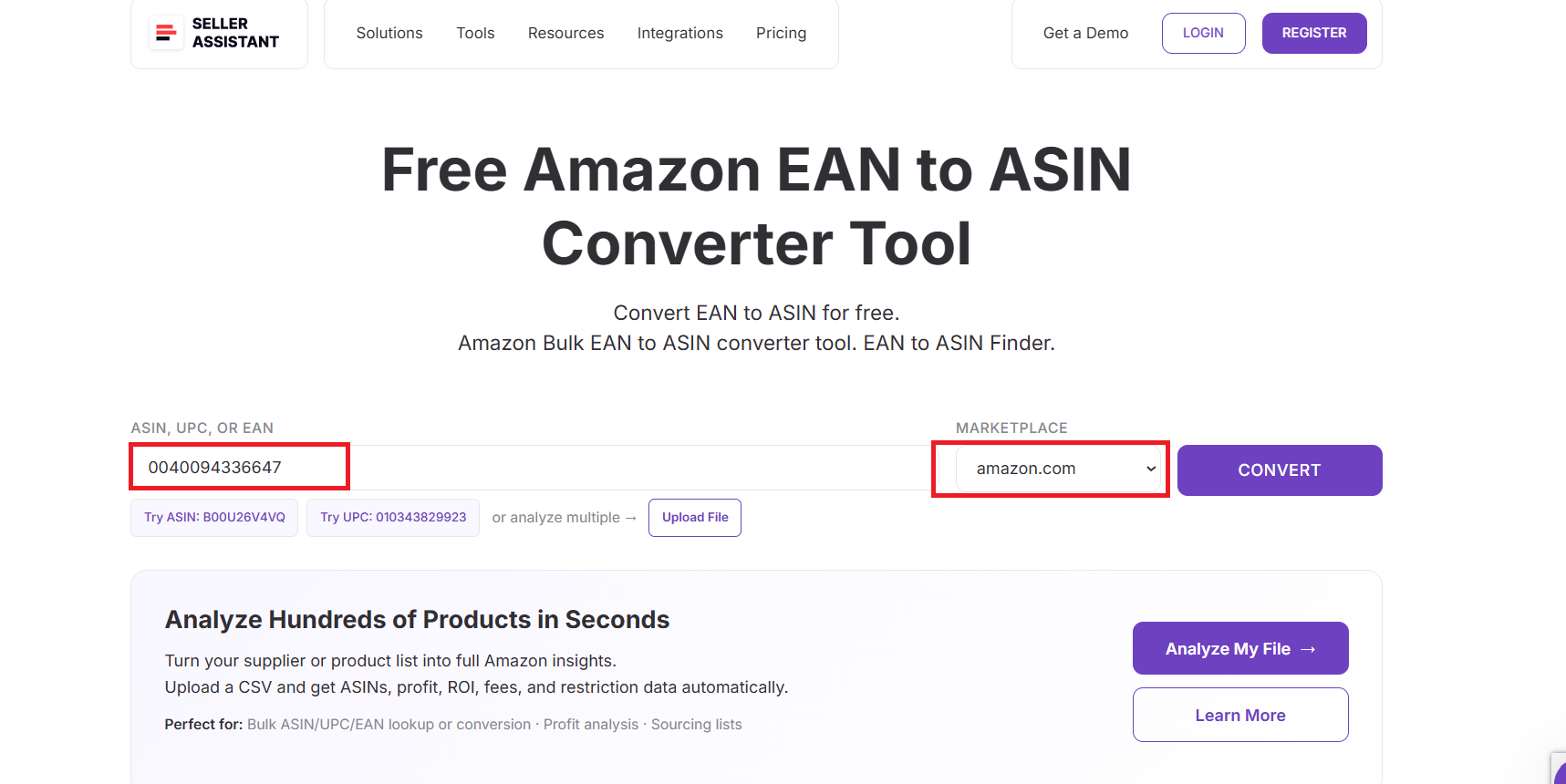
Шаг 3. Выберите маркетплейс Amazon
Выберите правильный маркетплейс: Amazon.co.uk, Amazon.de, Amazon.fr или Amazon.com. Это обеспечивает точное сопоставление ASIN по регионам.
Шаг 4. Нажмите кнопку «Конвертировать»
Инструмент ищет в каталоге Amazon, находит соответствующий листинг и мгновенно возвращает правильный ASIN — ручная проверка не нужна.
Шаг 5. Ознакомьтесь с ASIN и деталями товара
Вы получите:
- ASIN
- UPC
- EAN
- GTIN (если доступен)
- Название товара
- Категория
- Бренд
- Номер модели
- Номер детали
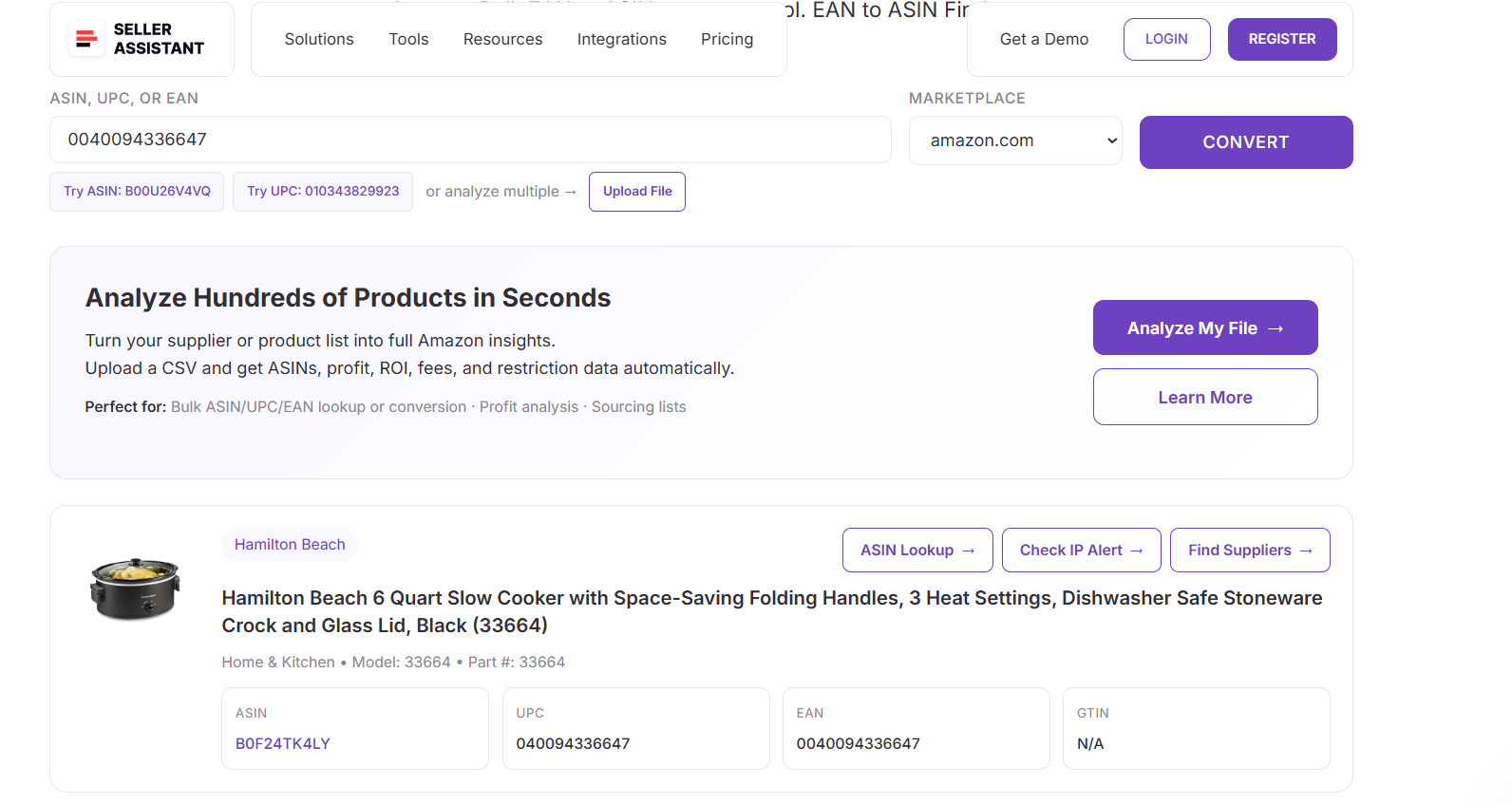
Это даёт вам полное совпадение Amazon для любого международного EAN — идеально для оптового поиска, глобального арбитража и кросс-рыночной проверки товаров.
Как конвертировать UPC/EAN в ASIN в массовом режиме
Массовая конвертация UPC или EAN в ASIN необходима для оптовых, онлайн-арбитражных и дропшиппинговых продавцов, работающих с большими списками поставщиков. Price List Analyzer от Seller Assistant делает этот процесс безупречным — сканирует целые таблицы, автоматически конвертирует идентификаторы товаров и сопоставляет их с правильными Amazon ASIN. Вместо поочерёдной конвертации инструмент выполняет тысячи операций одновременно — экономя часы ручной работы и устраняя ошибки сопоставления товаров.
Что такое Price List Analyzer от Seller Assistant?
Price List Analyzer от Seller Assistant — это продвинутый инструмент массового поиска на Amazon, упрощающий обработку крупных каталогов поставщиков. Он автоматически сканирует прайс-листы, конвертирует идентификаторы UPC/EAN/SKU в Amazon ASIN и обогащает каждую строку всеми основными метриками товара. Разработан для оптовых, OA и дропшиппинговых рабочих процессов — мгновенно превращает статичные файлы поставщиков в готовые к Amazon данные поиска.
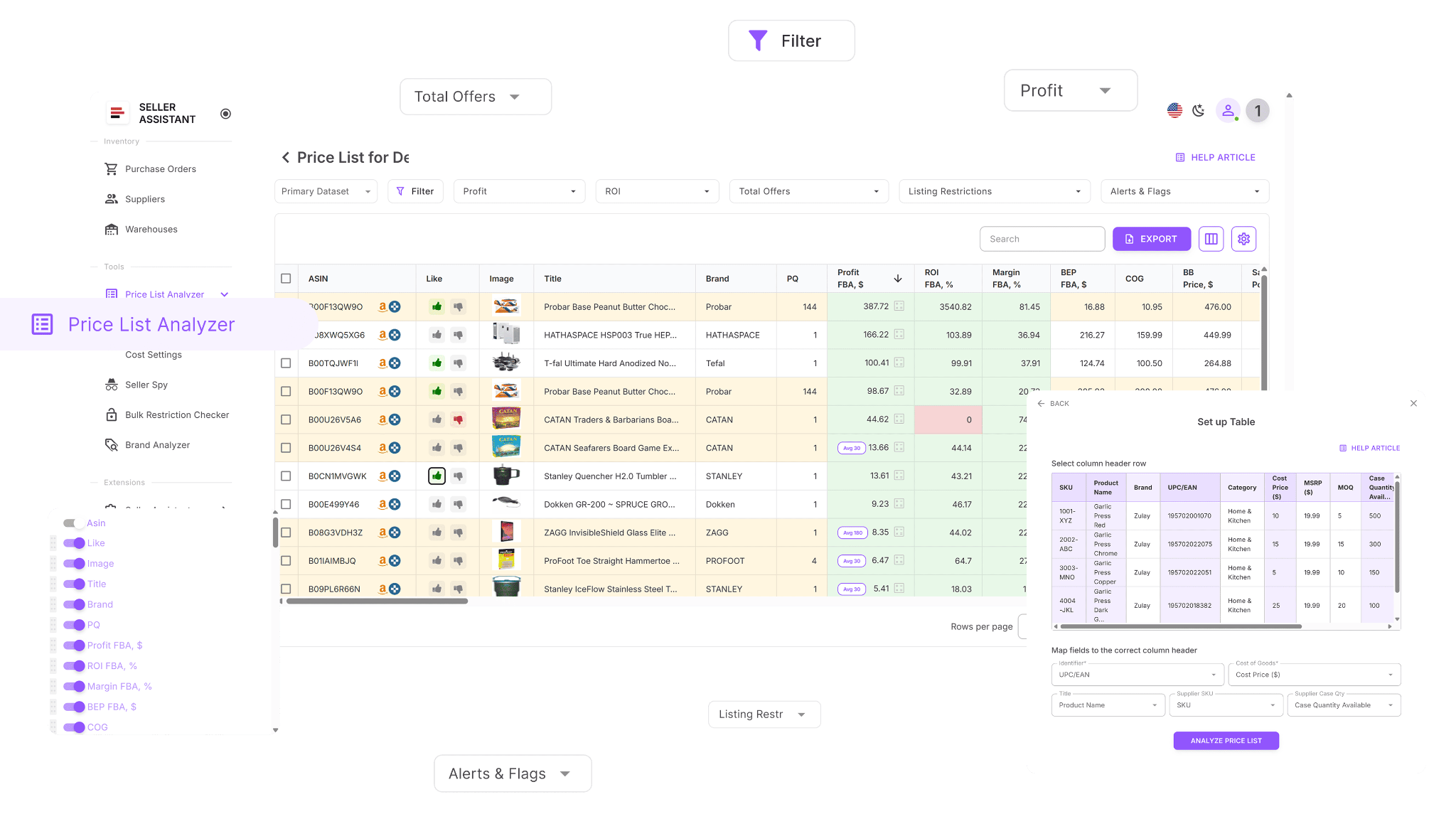
Как работает Price List Analyzer
Price List Analyzer дополняет ваши таблицы более чем 100 основными параметрами данных после конвертации UPC/EAN в ASIN. Это включает историю продаж, производительность Buy Box, комиссии, прибыльность, конкуренцию и многие другие метрики.
Как анализировать прайс-листы поставщиков массово | Обзор Price List Analyzer
Вы можете фильтровать, ранжировать и составлять шортлисты товаров, или корректировать входные данные по стоимости и видеть обновление прибыли в реальном времени. Благодаря скорости и точности Price List Analyzer позволяет продавцам Amazon принимать быстрые, основанные на данных решения по поиску.
Price List Analyzer превращает крупные файлы поставщиков в действенные данные на основе ASIN. Он считывает ваши массовые данные UPC/EAN, сопоставляет каждый товар с точным Amazon ASIN и выделяет позиции, достойные поиска, на основе реальной производительности и прибыльности Amazon.
Что Price List Analyzer делает для вас
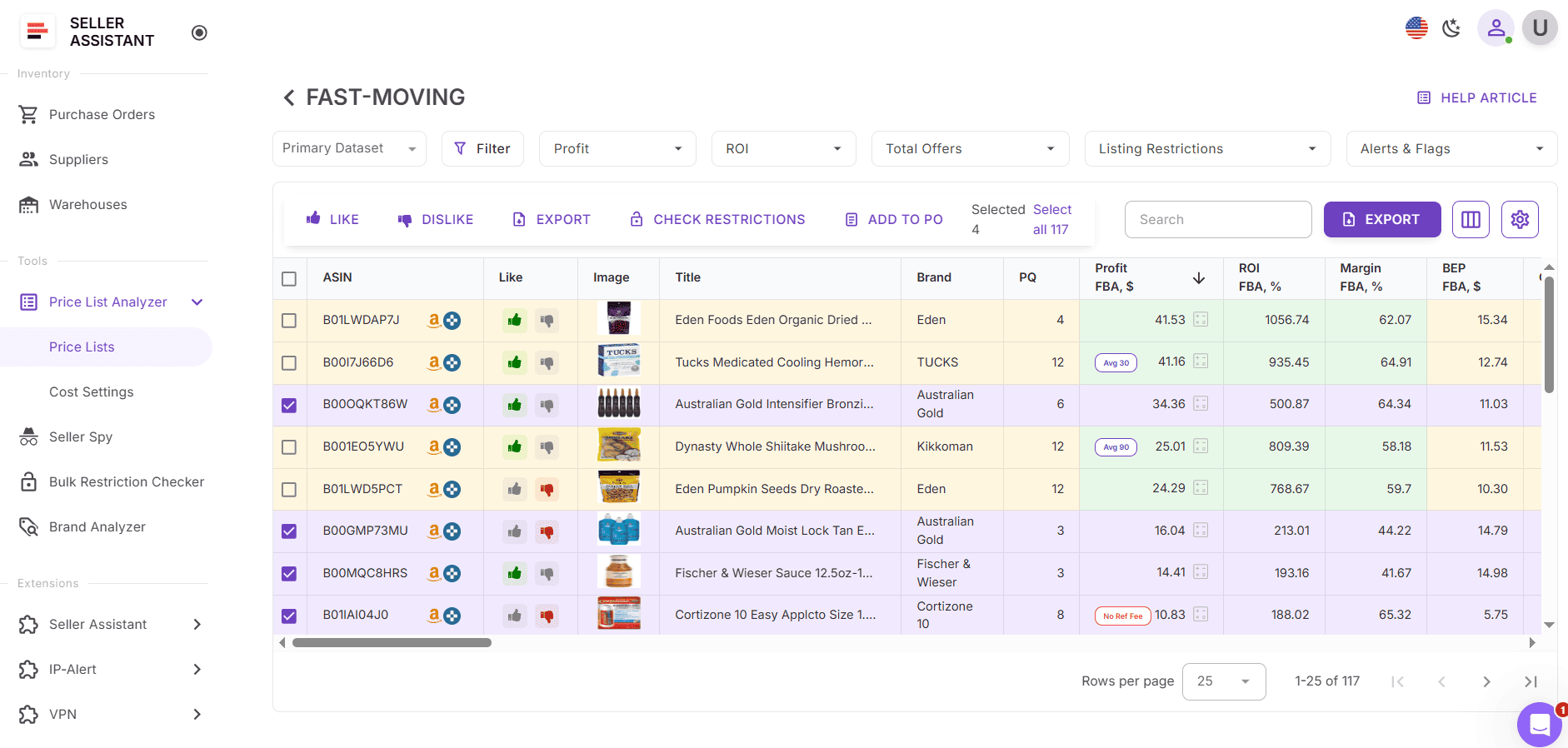
- Сканирует массовые файлы поставщиков и мгновенно конвертирует UPC или EAN в правильные Amazon ASIN.
- Автоматически сопоставляет SKU поставщика и идентификаторы с данными каталога Amazon.
- Проверяет детали листинга и гарантирует, что каждый UPC/EAN сопоставлен с правильным ASIN.
- Заполняет таблицу более чем 100 метриками товара Amazon, включая: производительность продаж — BSR, ранговые тенденции, расчётные ежемесячные продажи, скорость; прибыльность — прибыль, ROI, маржи, цены безубыточности; историю цен — 30/90/180-дневные средние Buy Box; комиссии Amazon — комиссии FBA/FBM, реферальные комиссии, хранение, доставка, подготовка, опасные материалы; конкуренцию — количество продавцов, ротацию Buy Box, долю Amazon в наличии.
- Помечает проблемные ASIN с использованием оповещений, таких как: ASIN Not Found, Set or Bundle, No Buy Box Price, Meltable, HazMat, Oversize, Fragile, Too Low FBA ROI и другие.
- Позволяет полную фильтрацию по прибыли, ROI, скорости продаж, предупреждениям о рисках или производительности.
- Позволяет сохранять пользовательские макеты таблиц и повторно использовать фильтры для будущих загрузок.
- Позволяет ставить лайки/дизлайки товарам, составлять шортлисты и экспортировать чистые списки покупок.
- Пересчитывает прибыль мгновенно при редактировании стоимости, количества в упаковке, доставки или затрат на подготовку.
- Предоставляет общие заметки команды, которые автоматически появляются для повторяющихся ASIN в будущих загрузках.
Как конвертировать UPC/EAN в ASIN с помощью Price List Analyzer
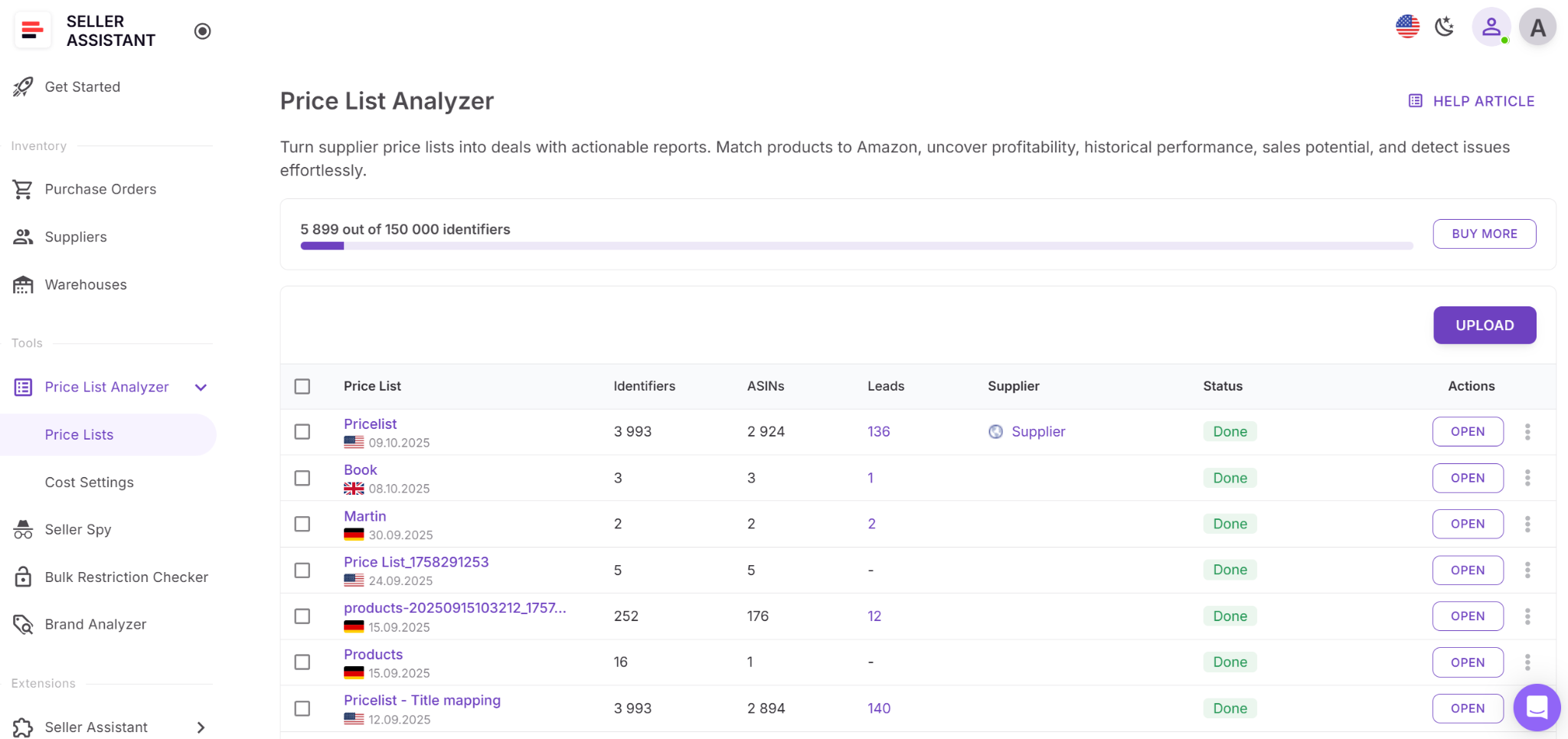
Шаг 1. Загрузите прайс-лист поставщика
Откройте Price List Analyzer в вашем аккаунте Seller Assistant. Загрузите файл Excel или CSV, содержащий UPC, EAN или SKU. После загрузки инструмент автоматически конвертирует эти идентификаторы в ASIN и заполняет таблицу ключевыми метриками, оповещениями и данными производительности.
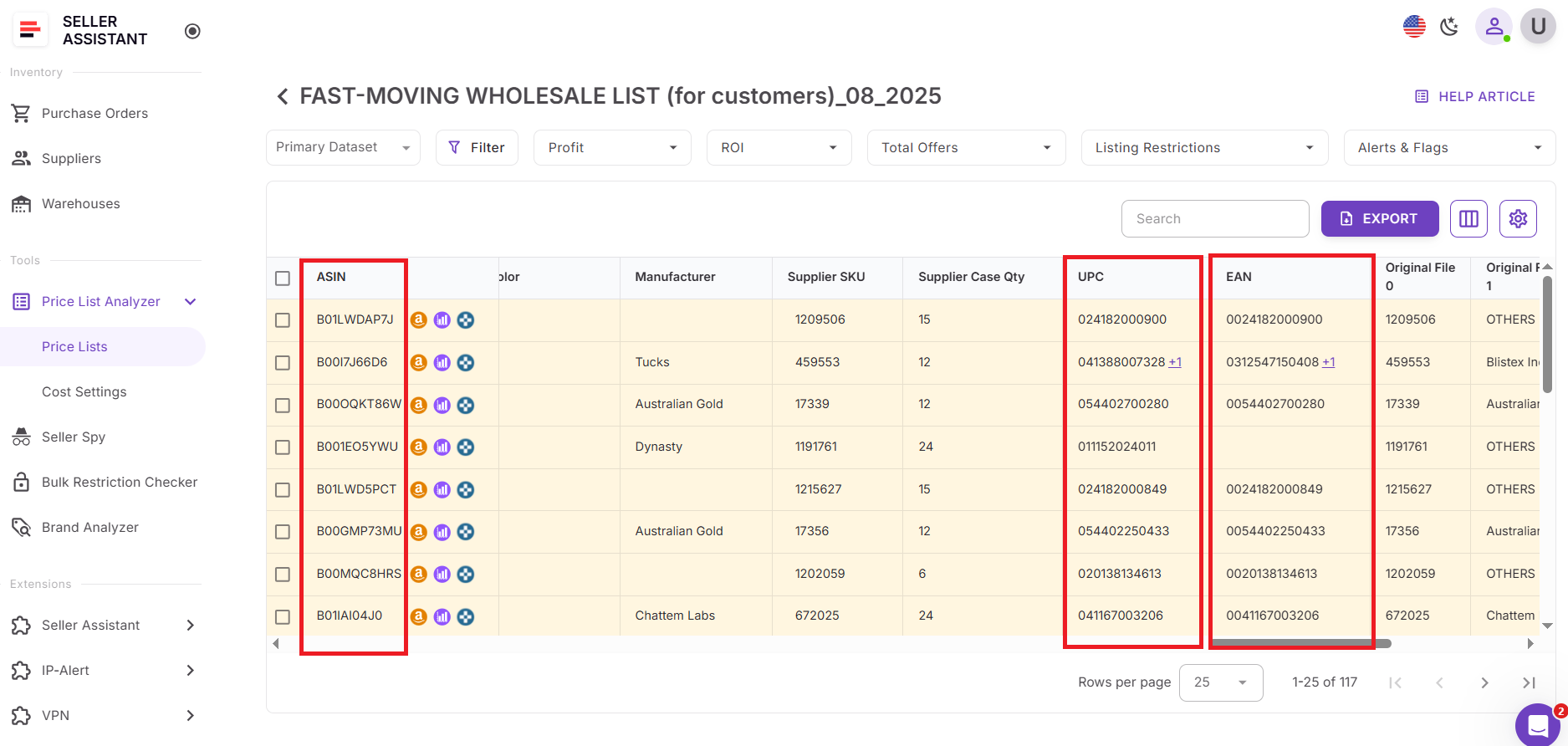
Шаг 2. Найдите столбец ASIN
После обработки откройте таблицу результатов и найдите столбец ASIN. Здесь каждый конвертированный товар отображает сопоставленный Amazon ASIN. Если идентификатор не может быть сопоставлен, вы увидите оповещения, такие как «ASIN Not Found».
Шаг 3. Проверьте конвертированные ASIN
Проверьте полученные ASIN и связанные данные товара. Наведите на оповещения или откройте столбец Warnings, чтобы понять проблемы, такие как несовпадающие идентификаторы, наборы, товары с опасными материалами или неполные данные каталога.
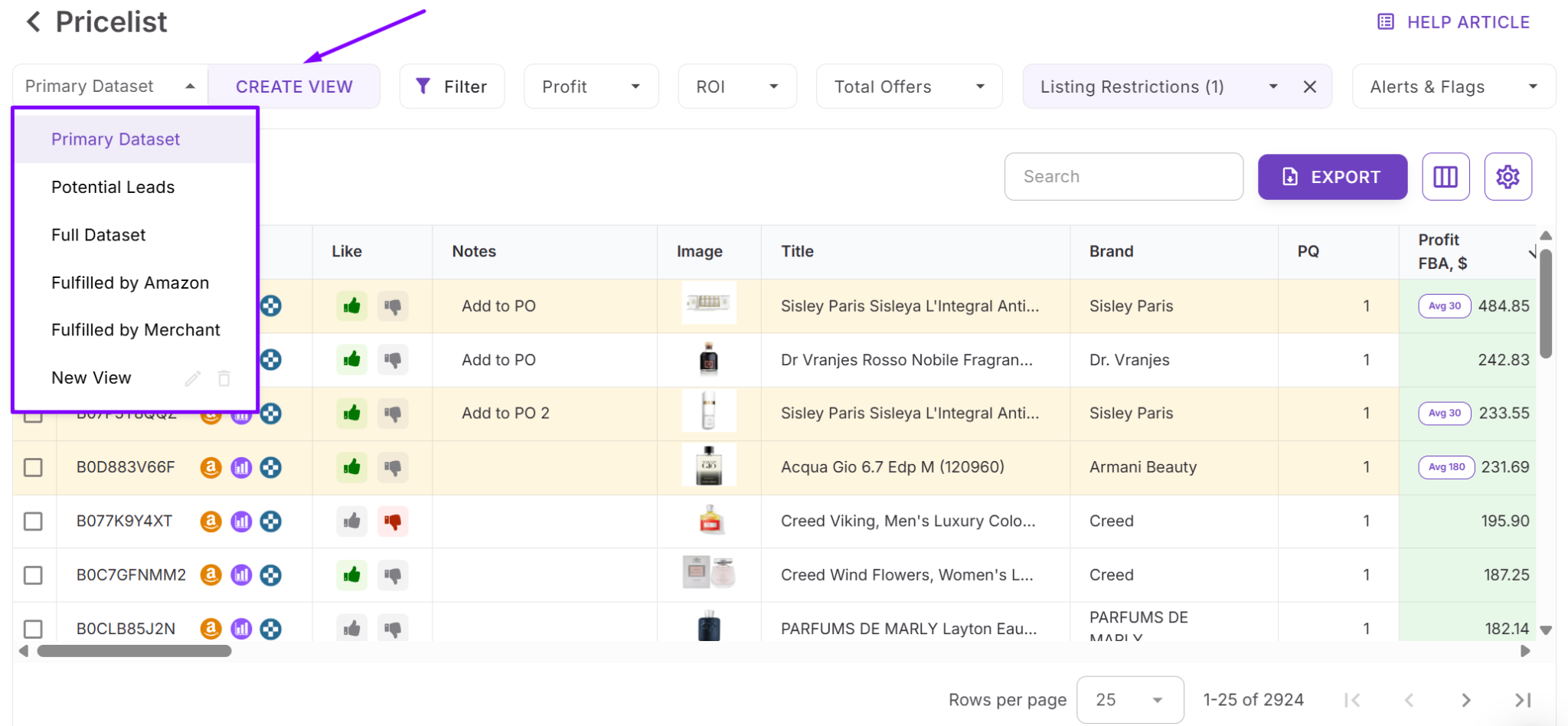
Шаг 4. Сохраните пользовательские представления
Сохраните представление таблицы (например, «Сопоставленные ASIN», «Требуется проверка», «ASIN с высоким ROI»). Эти сохранённые представления помогают поддерживать последовательный рабочий процесс для будущих загрузок поставщиков.
Часто задаваемые вопросы
Можно ли конвертировать коды UPC, EAN или ASIN бесплатно?
Да, Seller Assistant предлагает бесплатные онлайн-конвертеры для UPC → ASIN, EAN → ASIN и ASIN → UPC. Вы можете использовать их прямо на сайте, не входя в систему и ничего не устанавливая.
Что если UPC или EAN не совпадает ни с одним ASIN?
Если товар отсутствует в каталоге Amazon или идентификатор недействителен, инструмент возвращает сообщение «ASIN not found». В Price List Analyzer эти позиции автоматически помечаются, чтобы вы могли их проверить или исключить.
Можно ли конвертировать UPC или EAN в ASIN в массовом режиме?
Да, вы можете конвертировать тысячи UPC или EAN одновременно с помощью Price List Analyzer от Seller Assistant. Он сканирует файл поставщика, сопоставляет каждый идентификатор с ASIN и обогащает каждую строку данными производительности и прибыльности.
Почему у некоторых товаров несколько ASIN для одного UPC или EAN?
Это происходит, когда каталог Amazon содержит дубликаты, вариации или старые объединённые листинги. Price List Analyzer помогает обнаруживать подобные случаи, помечая несоответствия и показывая детальные оповещения.
Точна ли конвертация ASIN для каждого маркетплейса?
Да, инструмент получает идентификаторы на основе выбранного маркетплейса, обеспечивая региональную точность. Разные маркетплейсы могут иметь разные ASIN, поэтому выбор правильного региона важен.
Заключение
Конвертация UPC, EAN и ASIN — ключевая часть рабочего процесса каждого реселлера Amazon, будь то проверка товаров поставщика, оценка прибыльности или формирование нового инвентаря. С бесплатными конвертерами Seller Assistant и мощными массовыми возможностями Price List Analyzer вы можете точно сопоставлять идентификаторы товаров, находить прибыльные ASIN и анализировать файлы поставщиков за минуты, а не часы.
Эти инструменты устраняют догадки, снижают количество несоответствий и дают вам уверенность для принятия основанных на данных решений по поиску в масштабе. Если вы хотите более быстрое, чистое и прибыльное исследование товаров — Seller Assistant делает весь процесс UPC/EAN ↔ ASIN безупречным от начала до конца.
Seller Assistant автоматизирует и связывает каждый этап вашего рабочего процесса оптовой торговли и арбитража на Amazon. Он объединяет в одну платформу: инструменты управления рабочими процессами — Purchase Orders Module, Supplier Database, Warehouse Database; инструменты массового исследования и поиска — Price List Analyzer, Bulk Restriction Checker, Sourcing AI, Brand Analyzer, Seller Spy; расширения Chrome — Seller Assistant Browser Extension, IP-Alert Extension и встроенный VPN от Seller Assistant; а также функции интеграций и командного доступа — бесшовная API-связность, интеграции с Zapier, Airtable и Make, и аккаунты виртуальных ассистентов.

