Free ASIN to UPC & EAN Converter
Convert ASIN to UPC in seconds. Paste any valid Amazon ASIN, click convert, and instantly get the matching UPC, EAN, or GTIN without manual catalog searches.

What is the ASIN to UPC Converter?
The free ASIN to UPC Converter by Seller Assistant instantly converts Amazon ASINs to UPC, EAN, and GTIN codes. Perfect for Amazon sellers and product researchers.
ASIN to UPC in Seconds
Paste any Amazon ASIN and instantly get the matching UPC, EAN, and GTIN without manual catalog searches.
Multiple Identifier Types
Get UPC, EAN, GTIN, and ISBN for every ASIN in a single lookup — no switching between tools.
Any Amazon Marketplace
Supports amazon.com, amazon.co.uk, amazon.de, and 8 more marketplaces for accurate global results.
Bulk Conversion Support
Upload an XLSX or XLS file via Price List Analyzer to convert thousands of ASINs at once with full profit analysis.
Free for Single Lookups
Single ASIN to UPC conversions are completely free. No sign-up or credit card required.
Built for Amazon Sellers
Designed for wholesale and online arbitrage workflows — match supplier SKUs to Amazon listings in seconds.
When to Use ASIN to UPC Converter
Our ASIN to UPC converter is used by different types of Amazon sellers and sourcing models. The most common workflows are:
Online Arbitrage
Found a profitable product on Amazon and need to verify the supplier? Paste the ASIN, get the UPC instantly. Match it back to your supplier catalog and source directly.
Wholesale Sourcing
Already have Amazon ASINs you want to source? Convert them to UPCs to match against your supplier catalogs. Use Price List Analyzer to bulk convert, verify margins, and identify FBA restrictions instantly.
Dropshipping
Converting Amazon ASINs to UPCs helps you find the original manufacturer's barcode. Search that UPC in dropshipping catalogs to establish direct supplier relationships and verify inventory.
Virtual Assistant Workflows
Managing multiple seller accounts means processing Amazon product lists quickly. Convert ASINs to UPCs and use Price List Analyzer to match with supplier catalogs. Handle more accounts with the same effort.
How to Convert ASIN to UPC
Turn supplier catalogs into profitable Purchase Orders with our bulk ASIN to UPC converter and FBA calculator.
- 1
Enter Your Amazon ASIN
Paste or type the ASIN you want to convert into the input field above. ASINs are 10-character alphanumeric codes (e.g., B00U26V4VQ). You can enter one ASIN at a time.
- 2
Select Your Marketplace
Choose the Amazon marketplace where the product is listed (Amazon.com, Amazon.co.uk, Amazon.de, etc.). This ensures you get the correct UPC for that region.
- 3
Click Convert
Click the Convert button. The tool will instantly search Amazon's catalog and find the matching UPC, EAN, and GTIN codes for that ASIN.
- 4
View and Use Results
The tool displays the matching UPC, EAN, and GTIN. Copy the UPC to use in your supplier matching, inventory management, or product research workflows.
Amazon ASIN, EAN, ISBN, and UPC Explained
As an Amazon seller, you may have encountered terms like ASIN, UPC, EAN, and ISBN and wondered what they mean and how they affect your business. ASIN, UPC, EAN, and ISBN are all unique identifiers used to identify products on Amazon. These codes help efficiently manage Amazon product inventory and ensure customers can easily find and purchase the products they seek. Each code serves a specific purpose, and understanding their differences and functions can help you optimize your Amazon business. This post will provide an overview of these codes and explain their significance in the Amazon ecosystem.
Related: Seller Assistant Extension Review
Seller Assistant — the Ultimate Tool for Amazon Online Arbitrage
What Is an ASIN?
ASIN stands for Amazon Standard Identification Number. It is a unique identifier assigned by Amazon to each product listed on their marketplace. ASINs are used to identify and track products in Amazon's catalog.
Sellers use ASINs to list and sell their products on Amazon. When a seller creates a new product listing, they must enter the product's ASIN. If the product already exists in Amazon's catalog, the seller can simply use the existing ASIN. If the product is new and doesn't yet exist in the catalog, the seller can create a new ASIN.
ASINs are essential for sellers because they allow their products to be easily found by customers searching on Amazon. Customers can search for products by ASIN, and Amazon's search algorithm uses ASINs to match products with relevant search queries.
ASINs are universally applicable only for books on Amazon, where ISBN and ASIN are used interchangeably. However, for other products, the ASIN can differ depending on the location. For example, an identical item in the UK and the United States may have different ASINs.
How to get an ASIN?
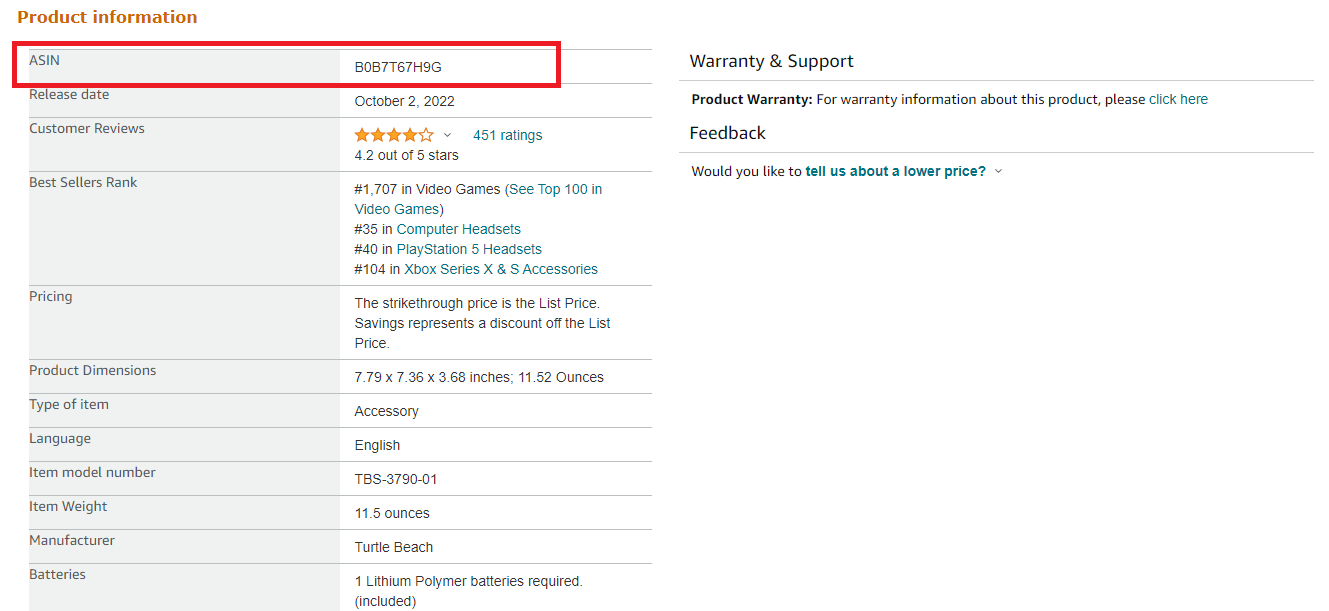
When you list a product on Amazon, the platform automatically assigns an ASIN. However, every third-party seller is responsible for ensuring their inventory is marked with the correct ASIN for the corresponding location. You can quickly locate an ASIN by searching on Amazon, as it is included in the item's URL. You can also find the ASIN on the item’s Amazon product page.
What Is UPC?
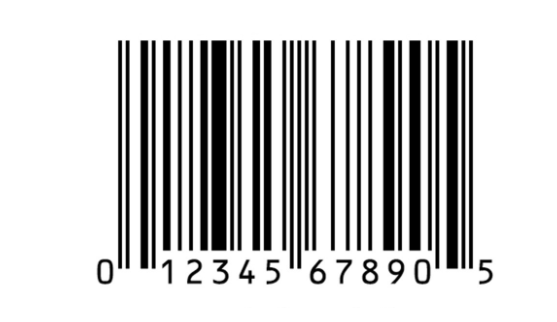
UPC (Universal Product Code) is a unique identification number assigned to a product. Amazon sellers can use UPCs to list and sell their products on the Amazon marketplace. UPCs help identify products and track inventory, making it easier for sellers to manage their listings and for buyers to find the products they are looking for.
Unlike EAN, UPC is primarily used in the United States and Canada. It is a 12-digit-long code containing information about the product’s manufacturer, size, weight, and other data.
Amazon requires sellers to provide a valid UPC for each product they list, as it helps to ensure accurate product information and helps prevent listing duplication. To list a product on Amazon, sellers must first create a product listing, which includes the product’s UPC, title, description, images, and other relevant information. When a buyer searches for a product on Amazon, they can use the product’s UPC to locate the correct listing and purchase the product. To list a product on Amazon, sellers must first create a product listing, which includes the product’s UPC, title, description, other relevant information, and images that you can send to a product retouching service for professional editing and image size compression.
How to get a UPC?
UPCs are typically available on product labels and packaging. Suppose you need to get UPCs for new products. In that case, you can obtain them by purchasing directly from a GS1-certified provider, which is the organization responsible for issuing and managing UPC and EAN codes, or from a third-party provider.
Note. You can use UPC to ASIN convert if you need to match the product’s Amazon ASIN with its UPC.
🚀 Try Our Free UPC to ASIN Converter
Convert UPCs into Amazon ASINs in seconds to quickly identify products and validate sourcing ideas. Built for fast, accurate product research. No signup required.
Convert Now →What Is EAN?
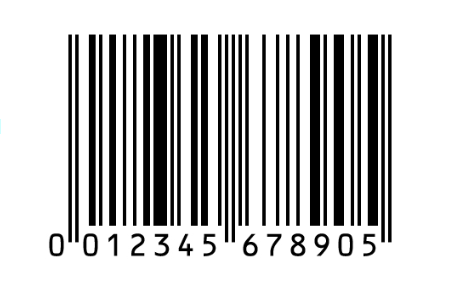
EAN, which stands for European Article Number, is a 13-digit barcode used to identify products uniquely. It is used in Europe and elsewhere globally, while the U.S. and Canada apply UPC.
Amazon sellers must provide a valid EAN or UPC code for their products to list them for sale on Amazon. That ensures each product has a unique identifier which can be used by Amazon's system to track inventory, sales, and shipping information.
Using an EAN code also makes it easier for customers to find and purchase products on Amazon, as they can search for a specific product by its unique code. That can improve the visibility and sales of a seller's products on the platform.
How to get an EAN?
EAN can be found on the product packaging or the back of your product. Like UPC, sellers can obtain EANs for their new products by purchasing them from a GS1.
What Is ISBN?
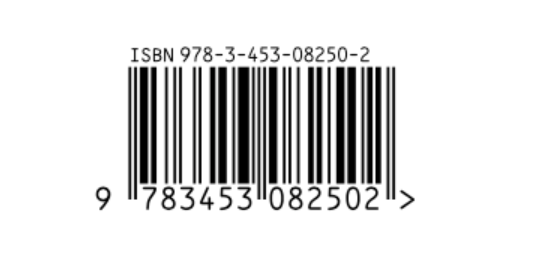
ISBN stands for International Standard Book Number. It is a unique identifier assigned to every published book, which helps to identify and track it in the market. Amazon sellers can use ISBN to list and sell their books on the platform.
Regardless of its title, each book version is assigned a unique ISBN. This identification system enables publishers and authors to determine the number of books sold and the regions where they are in demand. In addition, ISBN is used by retailers, distributors, and libraries to order, stock, and manage the inventory of books.
When a seller creates a listing for a book on Amazon, they can enter the book's ISBN to automatically populate the book's details, such as the title, author, and publication date. That saves time and ensures that the listing is accurate and consistent with other listings of the same book on Amazon. With an ISBN, Amazon sellers can reach a wider audience and make their books available to bookstores, libraries, and individual buyers.
It is important to note that not all books require an ISBN. However, if a seller wants to sell their book through a traditional publishing company or distribute it to bookstores and libraries, having an ISBN is essential.
How to get an ISBN?
To get a new ISBN for a book, you can purchase it from a local ISBN agency. Every country has a designated agency to register new ISBNs, while the ISBNs as such work internationally. If you need ISBN self-published book, you can get one for free through Amazon's Kindle Direct Publishing or other platforms like Draft2Digital or SmashWords.
How to Use ASIN, UPC, EAN, and ISBN on Amazon?
ASIN, UPC, EAN, and ISBN are unique identification codes that can be used to identify products on Amazon. Below we will describe how to use them in your Amazon business.
ASIN: Amazon assigns an ASIN to each product sold on their platform. It is a 10-character unique identifier that helps identify and track products. You can also search for products on Amazon using their ASIN.
EAN and UPC: EAN and UPC are barcodes used to identify products. UPC is used primarily in North America, while EAN is used in Europe and other parts of the world. If you sell products on Amazon, you must obtain a UPC or EAN code for each product you want to list.
ISBN: ISBN is used to identify books and other publications. If you sell books on Amazon, you must obtain an ISBN for each title. You can purchase an ISBN from your national ISBN agency, responsible for assigning and managing ISBNs in your country.
To use these identification codes effectively in your Amazon business, make sure to include them in your product listings. That will help customers find your products more efficiently and ensure that they are correctly identified and tracked by Amazon.
FAQ
What is the difference between UPC and EAN on Amazon?
On Amazon, the main difference between UPC and EAN is their geographical origins. UPCs are primarily used in North America, while EANs are used internationally, including Europe.
Are ASIN and EAN the same?
No, ASIN and EAN are not the same. ASIN is a unique identifier assigned by Amazon to each product in its catalog, while EAN is a globally recognized barcode system used for product identification.
How to create a new ASIN in Amazon?
To create a new ASIN on Amazon, you need to go to "Add a Product" in your Seller Central and select the category for your item. Provide all required information about your product, and follow Amazon’s prompts to complete the listing process.
Final Thoughts
ASIN, UPC, EAN, and ISBN are used to identify a product, making it easier to track inventory, sales, and distribution. They help retailers integrate products into their systems and to manage inventory and sales. Also, these codes allow products to be identified and sold across borders, making it easier for businesses to reach a global audience. Therefore, using them properly will enable you to effectively manage your inventory and ensure timely order delivery to your customers.
Seller Assistant is an all-in-one product sourcing software offering all the features vital for product sourcing. It combines three extensions: Seller Assistant Extension, IP Alert, and VPN by Seller Assistant, tools: Price List Analyzer, Brand Analyzer, Seller Spy, Bulk Restrictions Checker, and API integrations, and features: Storefront Widget, Side Panel View, FBM&FBA Profit Calculator, Quick View, Stock Checker, IP Alert, Variation Viewer, Sales Estimator, Offers, Restrictions Checker, and other features that help quickly find high-profit deals. Seller Assistant also offers integration with Zapier allowing to create custom product sourcing workflows.
Quick Overview of Price List Analyzer
See how to analyze supplier price lists, match UPCs to ASINs, and calculate profit in bulk — all in one workflow.
Frequently Asked Questions
What is an ASIN?
What is a UPC?
Why would an ASIN have multiple UPCs?
What other identifiers can I get besides UPC?
How does the bulk ASIN to UPC converter work?
Can I convert ASINs to both UPC and EAN?
Who should use the bulk ASIN converter?
Is the bulk ASIN converter free?
What should I do if the ASIN doesn't have a matching UPC?
Start Selling Smarter with Seller Assistant
Analyze price lists, check margins, and source products faster with the full Seller Assistant toolkit.
Start free trial14-day risk free trial. Cancel anytime.
Not sure which plan fits your sourcing workflow? Chat with our team — we're happy to help.