A product can look profitable on paper and still be a bad buy – restricted, flagged for an IP complaint, or hazmat-classified in a way that complicates fulfillment – and none of that shows up until you’ve already committed to the purchase order.
Seller Assistant’s Price List Analyzer already flags restrictions, warnings, and risk indicators on every analyzed lead; its MCP Server lets you ask an AI assistant to check those flags before you buy – “which of these leads are restricted,” “does this one have any risk flags” – in the same conversation where you’re deciding what to source.
Why Profitability Alone Cannot Tell You Whether a Deal Is Safe to Source
A supplier deal can look strong by every obvious financial metric – good profit, attractive ROI, and enough demand to justify the purchase. But those numbers answer whether a product could make money, not whether there are other issues that could complicate selling it on Amazon.
Restrictions, IP-related risks, HazMat classification, fulfillment requirements, and other product warnings can change the sourcing decision completely. When sellers focus primarily on profitability, these signals can receive attention only after a product has already reached the shortlist – or even after inventory has been ordered.
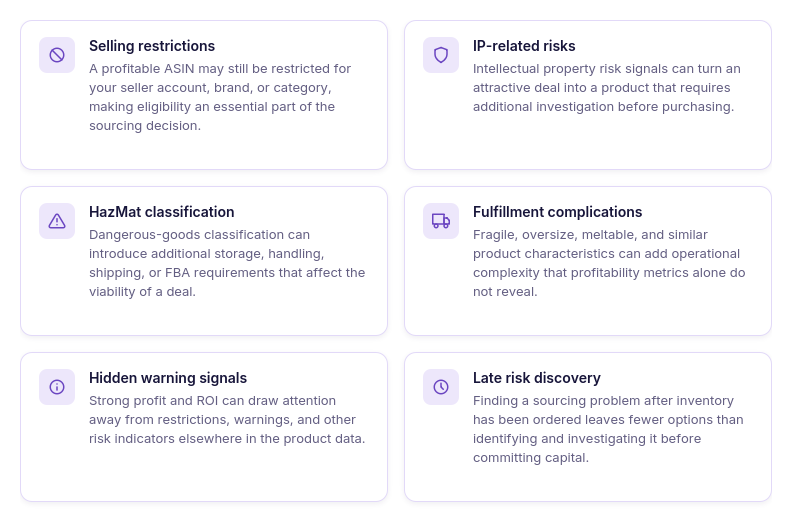
Selling restrictions can block the deal
An ASIN can have attractive sourcing numbers while the seller is restricted from selling the product, brand, or category. That makes eligibility something to verify before committing money to inventory.
IP-related risks need investigation
A profitable product may carry signals associated with intellectual property complaints or brand-related risk. These indicators deserve additional research before the product moves from a sourcing lead to a purchase.
HazMat can change fulfillment
A product classified as dangerous goods may come with different storage, handling, shipping, or FBA requirements. Those complications can affect whether the original sourcing plan still makes sense.
Product characteristics can add complexity
Fragile, oversize, meltable, and similar product characteristics can introduce additional fulfillment considerations. A deal that looks straightforward from its ROI may require a different operational assessment once these factors are considered.
Strong numbers can hide warning signals
High profit or ROI naturally attracts attention, while restrictions and risk indicators may sit elsewhere in the product data. Focusing on the financial upside first can make less prominent warning signals easier to overlook.
Risk checks can happen too late
Finding a problem after inventory has been ordered leaves fewer options than identifying it during product research. Screening leads before purchasing gives sellers a chance to investigate questionable products before capital is committed.
Why AI Needs Access to Actual Product Risk Data
AI can explain what Amazon selling restrictions, IP complaint risk, HazMat, or other sourcing warnings mean. But knowing the definition of a risk is different from determining whether that risk applies to the actual products a seller is considering buying.
To screen supplier deals before purchasing, AI needs access to product-level sourcing data rather than general Amazon knowledge alone. With the actual leads available, the assistant can help bring relevant restrictions and risk signals into the review before a profitable-looking product moves further through the sourcing workflow.
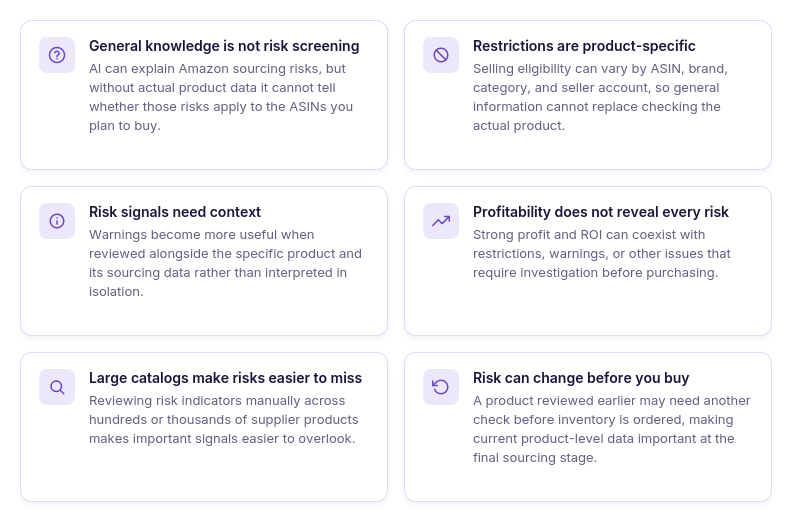
General risk knowledge is not product screening
AI can explain common Amazon sourcing risks, but that does not reveal whether a specific ASIN carries a restriction, warning, or other risk signal. Actual product data is needed to connect general risk knowledge with the deal being evaluated.
Restrictions depend on the actual product
Selling eligibility can differ by ASIN, brand, category, and seller account. A generic answer about Amazon restrictions cannot replace checking the product a seller actually plans to source.
Risk signals need product context
A warning has more value when it can be reviewed alongside the specific product and its sourcing data. This helps sellers investigate what the signal means for that particular deal rather than treating every warning the same way.
Profitability does not expose every risk
Profit and ROI can show attractive economics while saying nothing about restrictions or other product-level concerns. AI needs access to broader analysis to consider risk information alongside the financial opportunity.
Large catalogs make risk checks harder
Checking restrictions and warnings product by product becomes increasingly difficult when a supplier catalog contains hundreds or thousands of items. Access to analyzed product data gives AI a way to assist with risk-focused review across the actual leads being considered.
Risk data should be checked before commitment
A product that looked acceptable during the initial analysis may deserve another check before inventory is purchased. Access to current product-level information lets AI support that additional review at the point when the sourcing decision matters most.
How Seller Assistant Makes AI-Assisted Risk Screening Possible
Screening supplier deals for risk requires more than knowing what Amazon restrictions, IP-related risks, or HazMat classifications mean. The AI needs access to actual product-level sourcing data so it can work with the restrictions, warnings, and risk indicators connected to the leads a seller is considering.
Seller Assistant combines two parts of this workflow. Price List Analyzer analyzes supplier products and surfaces profitability alongside restrictions, warnings, and other sourcing signals, while Seller Assistant MCP Server connects supported Seller Assistant data and operations to AI assistants such as ChatGPT and Claude. Together, they let sellers bring risk checks into the same AI-assisted workflow used to evaluate deals before purchasing.
What risks and warnings does Price List Analyzer show?
Price List Analyzer does more than flag products with selling or fulfillment risks. It also identifies missing data, unusual profitability results, listing conditions, and product characteristics that can make a seemingly profitable deal worth checking again before you buy.
These signals do not all mean that a product should be rejected. Some identify actual selling limitations, while others tell you that the product match, cost data, fees, pricing, or profitability calculation needs additional validation.
| Risk or Warning | What It Means | Why It Matters Before Buying |
|---|---|---|
| Restricted | You are not eligible to sell this product. | Inventory may be unusable for your current seller account. |
| Approval Required | You need Amazon approval to sell the product. | Approval should be confirmed before committing to inventory. |
| IP Complaints risk | The product has a potential intellectual property complaint risk. | The brand or product deserves additional research before sourcing. |
| HazMat | The product is identified as hazardous material. | Dangerous-goods requirements can affect FBA eligibility, handling, and fulfillment. |
| Meltable | The product is flagged as meltable. | Seasonal Amazon storage and fulfillment restrictions may apply. |
| Fragile | The product is identified as fragile. | Additional prep and handling requirements may affect the deal. |
| Oversize | The product is classified as oversized. | Fulfillment requirements and costs can differ significantly from standard-size products. |
| Set or Bundle | The ASIN represents a bundled or multi-pack item. | You need to verify that the supplier item and Amazon listing represent the same quantity and configuration. |
| No Buy Box Price | The product has no active offers, or the Buy Box is suppressed. | Profitability based on an expected selling price deserves additional validation. |
| No FBA Fees | FBA fees are unavailable because the product may be ineligible for FBA or lacks sufficient data for fee calculation. | Profitability may be incomplete or unreliable until the missing fee information is understood. |
| No COGs | Cost data is missing from the original price list. | Profit and ROI cannot be properly evaluated without the product cost. |
| ASIN not found | The ASIN is invalid, does not exist, or has been removed or suppressed by Amazon. | The supplier-to-Amazon match needs investigation before the product can be treated as a valid lead. |
| Too low FBA ROI | FBA ROI is below the –300% threshold. | An extreme negative result can signal an unprofitable product or data that needs checking. |
| Too high FBA ROI | FBA ROI exceeds 200%. | An unusually high return can indicate exceptional economics, but it can also signal missing or incorrect cost, pricing, fee, or matching data that should be verified. |
How Price List Analyzer helps screen supplier deals before you buy
Seller Assistant’s Price List Analyzer researches supplier catalogs in bulk for Amazon wholesale, online arbitrage, and dropshipping sellers. Sellers upload an .xlsx or .xls price list containing product identifiers and COG, allowing potential deals to be evaluated before inventory is purchased rather than researching each supplier product separately.
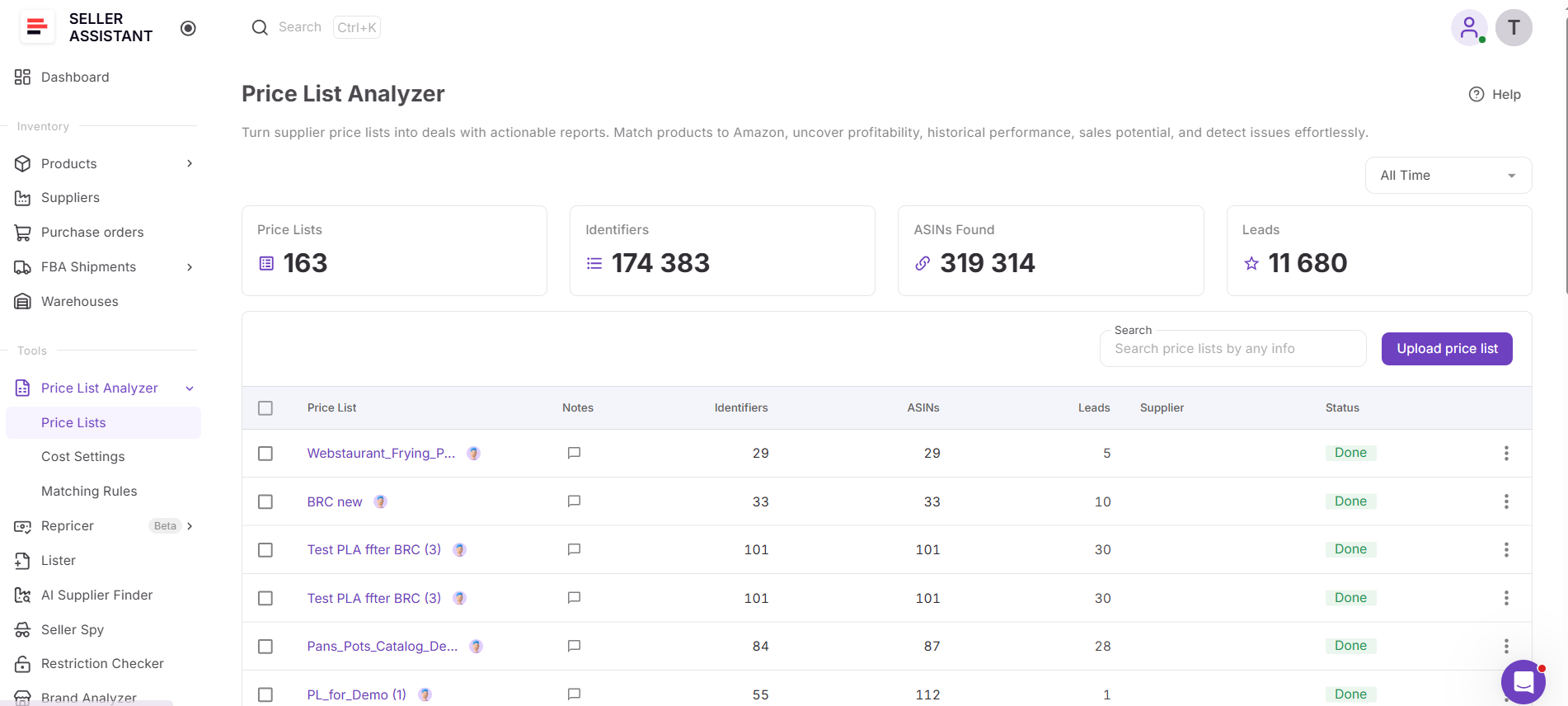
Price List Analyzer matches supplier products to Amazon listings and combines financial and marketplace data with restrictions, warnings, and other risk indicators. This gives sellers a broader view of each deal – not only whether the numbers look profitable, but also whether there are signals that should be investigated before the product moves into purchasing.
What Price List Analyzer helps you check
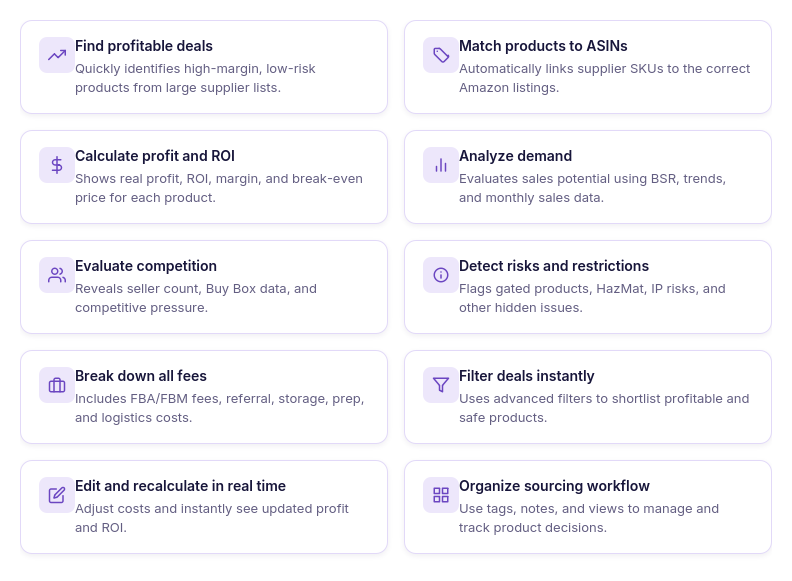
- Research supplier catalogs in bulk
Upload large supplier price lists and analyze hundreds or thousands of products in one workflow instead of researching Amazon listings one by one.
- Match supplier products with Amazon listings
Connect supplier product identifiers with Amazon ASINs automatically, reducing the manual work required to find the corresponding marketplace listing.
- Calculate FBA and FBM profitability
Review profit, ROI, margin, break-even price, Max COG, seller proceeds, and detailed costs based on Amazon fees and your configured sourcing expenses.
- Check product demand
Use sales estimates, Monthly Sold, current and historical BSR, and Sales Rank Drops to assess sales potential and how consistently a product has been selling.
- Review pricing and Buy Box history
Compare the current Buy Box price with historical averages and price dynamics to understand whether the selling price used to evaluate a deal reflects typical market conditions.
- Assess marketplace competition
Review total offers, Buy Box-eligible FBA and FBM offers, top sellers, Buy Box share, and Amazon presence to understand who you may be competing against.
- Identify restrictions and sourcing risks
Check restrictions, warnings, and product flags such as IP-related risks, HazMat, meltable, fragile, oversize, missing Buy Box data, missing fees, and other signals that may require further investigation.
- Filter deals using your sourcing criteria
Narrow the analyzed catalog by profitability, demand, competition, pricing, restrictions, risks, brand, category, tags, and other available metrics, and save views for criteria you use repeatedly.
- Recalculate deals with different costs
Change COG, shipping and prep expenses, package quantity, fees, taxes, and other cost assumptions to see how they affect profitability without uploading the supplier file again.
- Organize products for further review
Use likes and dislikes, tags, notes, and saved views to separate promising products from deals that need additional research and keep sourcing decisions organized.
- Export the products you need
Export the entire analyzed catalog, filtered results, or selected products depending on which data you need outside Price List Analyzer.
- Move selected products into purchasing
Choose products from the analyzed price list and use Add to PO to continue with them in Seller Assistant’s Purchase Orders workflow without manually transferring the product information.
How Price List Analyzer helps catch risky deals before they reach a purchase order
Price List Analyzer puts profitability and sourcing risk data in the same product research workflow. A lead can show attractive profit and ROI while also carrying a selling restriction, IP-related risk, HazMat flag, missing Buy Box price, unusual ROI warning, or another signal that changes how confidently the numbers can be used.
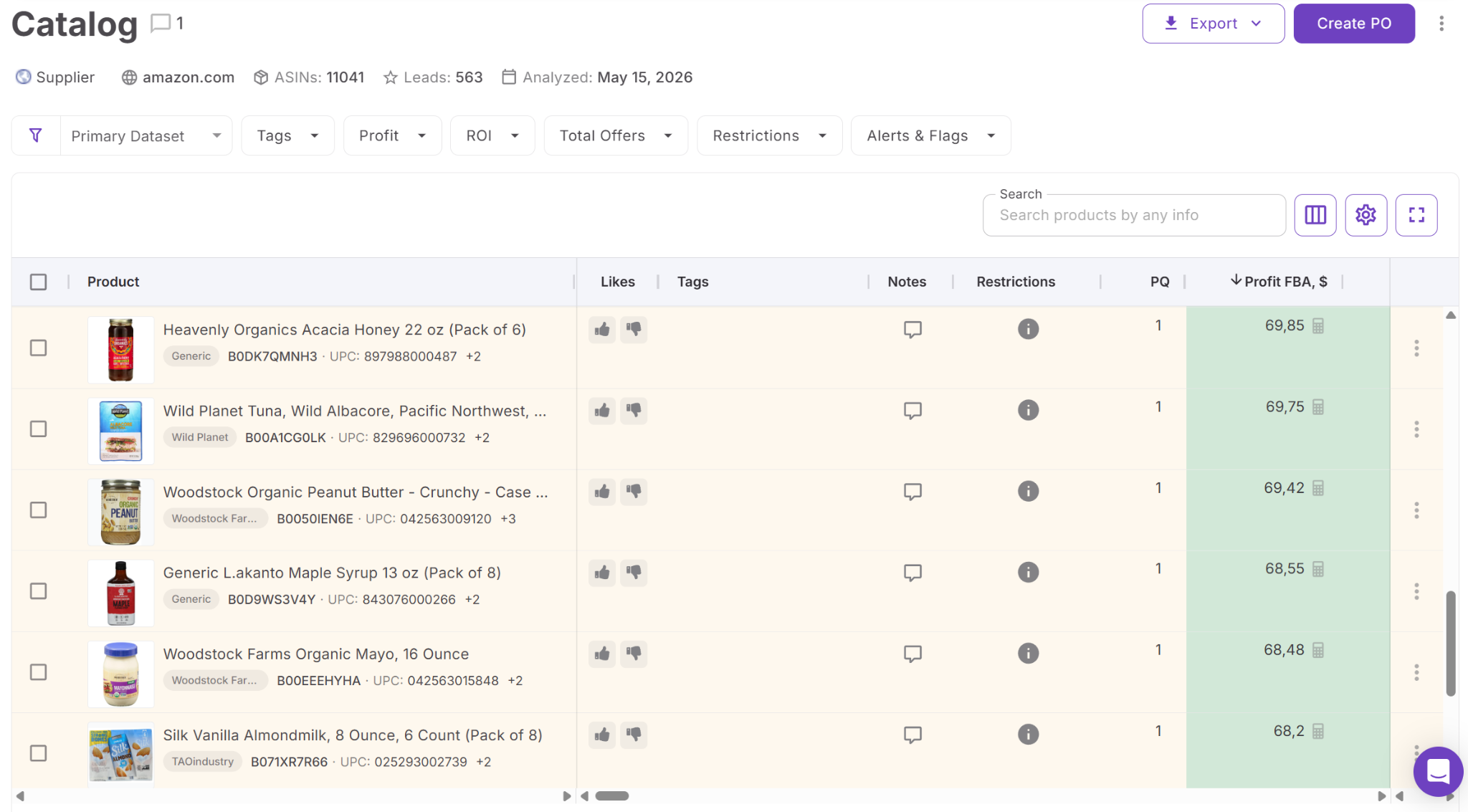
This allows sellers to screen the catalog before committing capital rather than treating risk review as a separate check after products have already been selected. Leads with restrictions can be identified, products with warnings can be investigated further, and questionable data can be validated before the strongest candidates move into the Purchase Orders workflow.
How Seller Assistant MCP brings risk screening into AI chat
Seller Assistant MCP Server connects AI assistants with Seller Assistant tools and account data, allowing sellers to work with supported sourcing operations through natural-language requests. Instead of asking ChatGPT or Claude about Amazon risks in general, sellers can use AI with actual Seller Assistant data and supported actions.
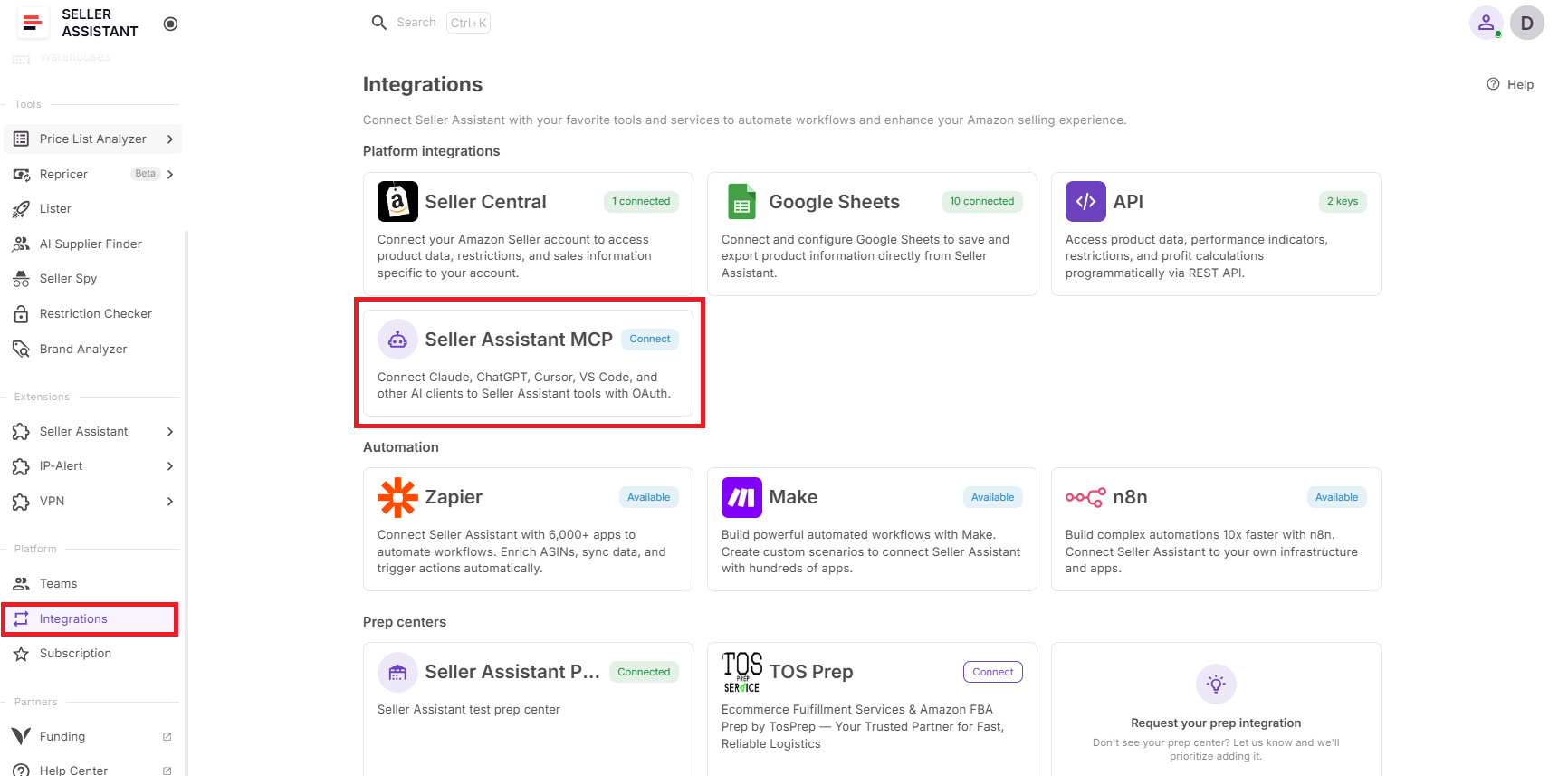
For pre-purchase screening, this means risk review can become part of the same conversation where supplier deals are being investigated. Sellers can work with Price List Analyzer results, examine products that need additional validation, and use supported MCP operations to check relevant product information before promising leads move further into the purchasing workflow.
What you can do with Seller Assistant MCP when screening supplier deals
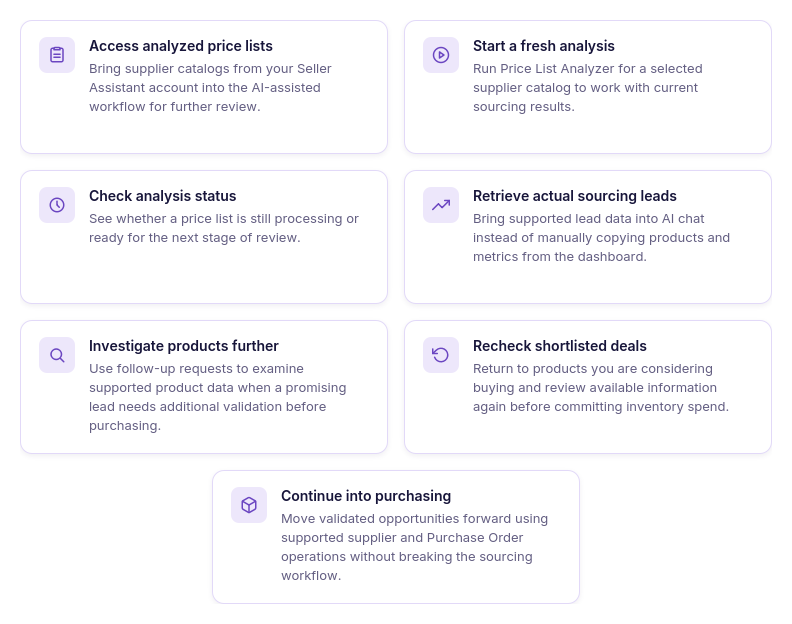
- Access your analyzed price lists
Retrieve supplier price lists from your Seller Assistant account so AI can work with actual analyzed catalogs rather than product information manually copied into the conversation.
- Start a fresh analysis
Run Price List Analyzer for the supplier catalog you plan to source from, giving the workflow current analysis results to use before products are selected for purchasing.
- Check analysis status
Ask whether a price list is still processing or ready for review, then continue with the results once the analysis is complete.
- Retrieve actual sourcing leads
Bring supported Price List Analyzer lead data into AI chat so the products being considered can be reviewed using real Seller Assistant results rather than hypothetical product information.
- Check products before purchasing
Use AI to investigate supported product information for leads you are considering before they move into a purchase order. This adds another review point between finding a profitable product and committing capital to inventory.
- Investigate questionable leads
Continue with follow-up requests when a product needs closer examination instead of making a sourcing decision from profitability alone. This helps keep products that require additional validation separate from straightforward purchasing candidates.
- Continue validated products into sourcing
Once a lead has passed the checks relevant to your sourcing decision, use supported Seller Assistant supplier and Purchase Orders workflows to continue toward purchasing.
How MCP adds a risk-screening step before you buy
MCP moves AI beyond explaining what Amazon restrictions, HazMat, IP complaint risk, or other sourcing issues mean in theory. By connecting the assistant with supported Seller Assistant data and operations, sellers can investigate the actual products they are considering and make risk review part of the sourcing conversation.
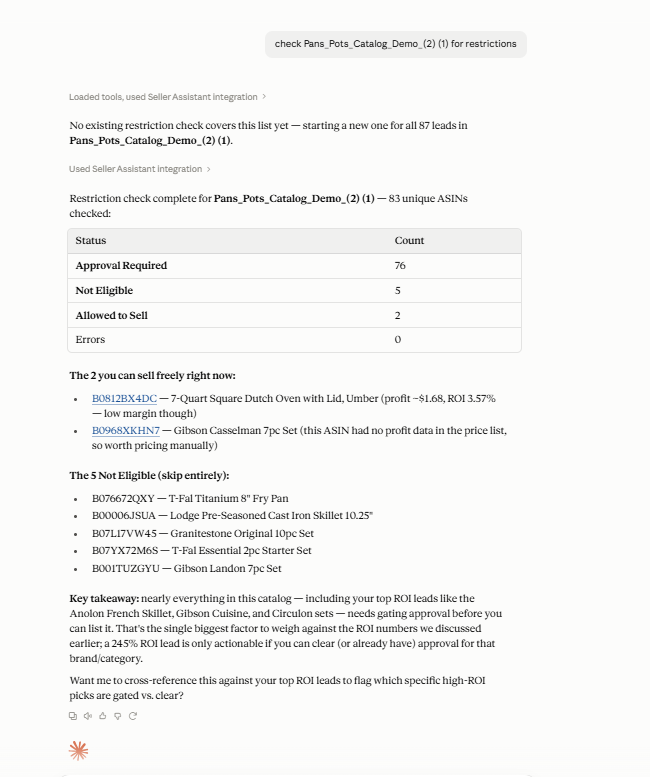
This creates an analyze → shortlist → check → investigate → validate → act workflow. Price List Analyzer performs the underlying supplier-product research and surfaces relevant sourcing signals, MCP connects supported Seller Assistant information and operations to the AI assistant, and the seller decides whether each product has been sufficiently validated before committing to inventory.
Practical Ways to Check Amazon Sourcing Risks with AI AI-assisted risk screening works best when sellers ask specific questions about the products they are considering rather than simply asking whether a deal is “safe.” Different products may require different checks – from selling eligibility and unusual profitability data to missing fees or other sourcing signals that need investigation before inventory is ordered.
With Price List Analyzer handling the underlying supplier-product analysis and Seller Assistant MCP connecting supported data and operations to AI, sellers can use follow-up requests to investigate questionable leads, revisit shortlisted products, and add another validation step before purchasing.
| Risk-Screening Task | What to Check | Prompt Example |
|---|---|---|
| Check selling restrictions | Selling eligibility, restrictions, approval requirements | ”Check ASIN B0XXXXXXXX and help me review its selling eligibility before I buy it.” |
| Investigate IP-related risk | Available IP-related risk signals and product data | ”Review ASIN B0XXXXXXXX and help me investigate the available information before I source it.” |
| Review HazMat and product flags | HazMat, meltable, fragile, oversize, set or bundle, and other flags shown in PLA | ”Help me review this ASIN based on the product flags I found in Price List Analyzer and identify what needs further investigation.” |
| Investigate missing data | No Buy Box Price, No FBA Fees, No COGs, ASIN not found | ”Review the available data for ASIN B0XXXXXXXX and tell me what information I should verify before purchasing.” |
| Check unusual profitability | Too high or too low FBA ROI and the underlying cost and pricing data | ”Review the available profitability data for ASIN B0XXXXXXXX and help me identify anything that needs validation.” |
| Screen shortlisted leads | Available data across several products being considered for purchase | ”Review these shortlisted leads using the available Seller Assistant data and identify which products need additional validation before purchasing.” |
| Recheck repeat purchases | Current available product and sourcing data | ”I sourced ASIN B0XXXXXXXX before. Retrieve the current available data and help me identify what I should recheck before buying it again.” |
Check restrictions before committing to a product
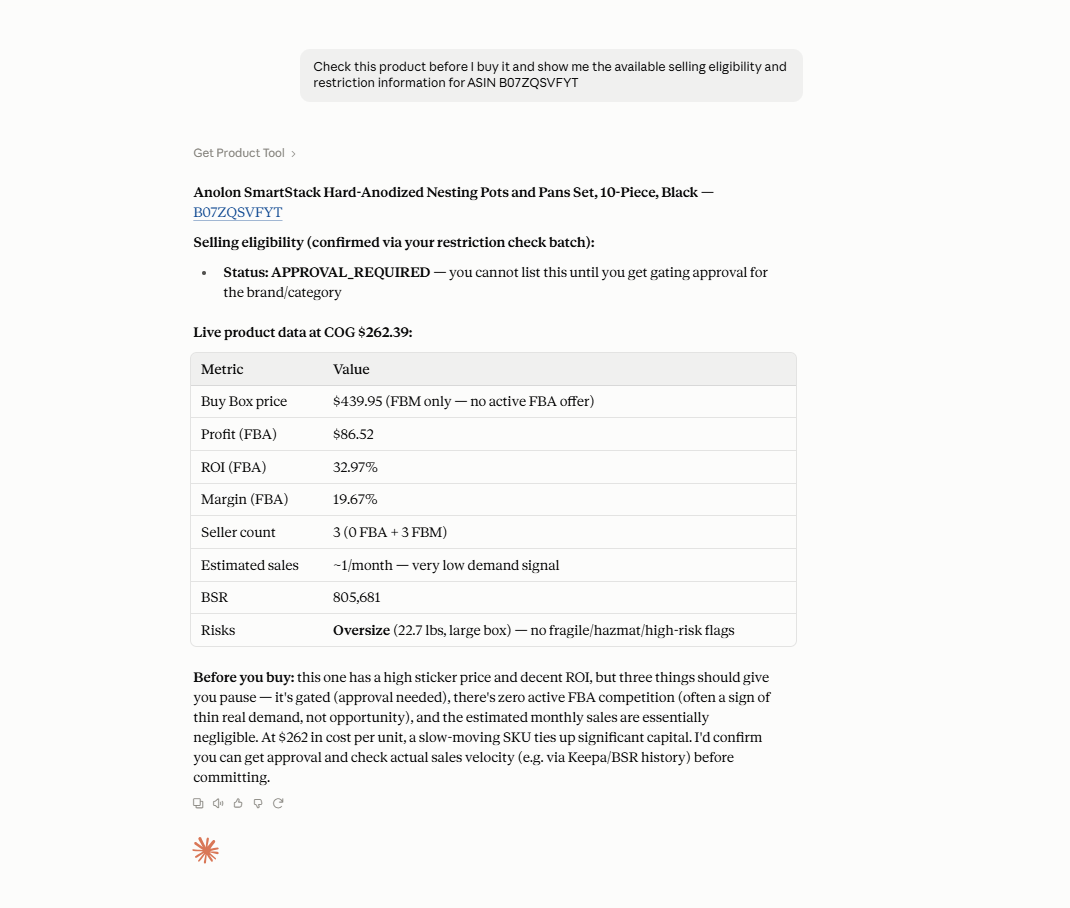
A product can show strong profit, ROI, and demand but still require additional checks before it can be sold. Start by reviewing the product’s selling eligibility and any available restriction information before treating profitability as a reason to buy.
Prompt example
“Check this product before I buy it and show me the available selling eligibility and restriction information for ASIN B07ZQSVFYT.”
Why it matters
Discovering that you cannot sell an ASIN after inventory has been ordered can turn an otherwise attractive deal into unusable stock.
Investigate warnings on a promising lead
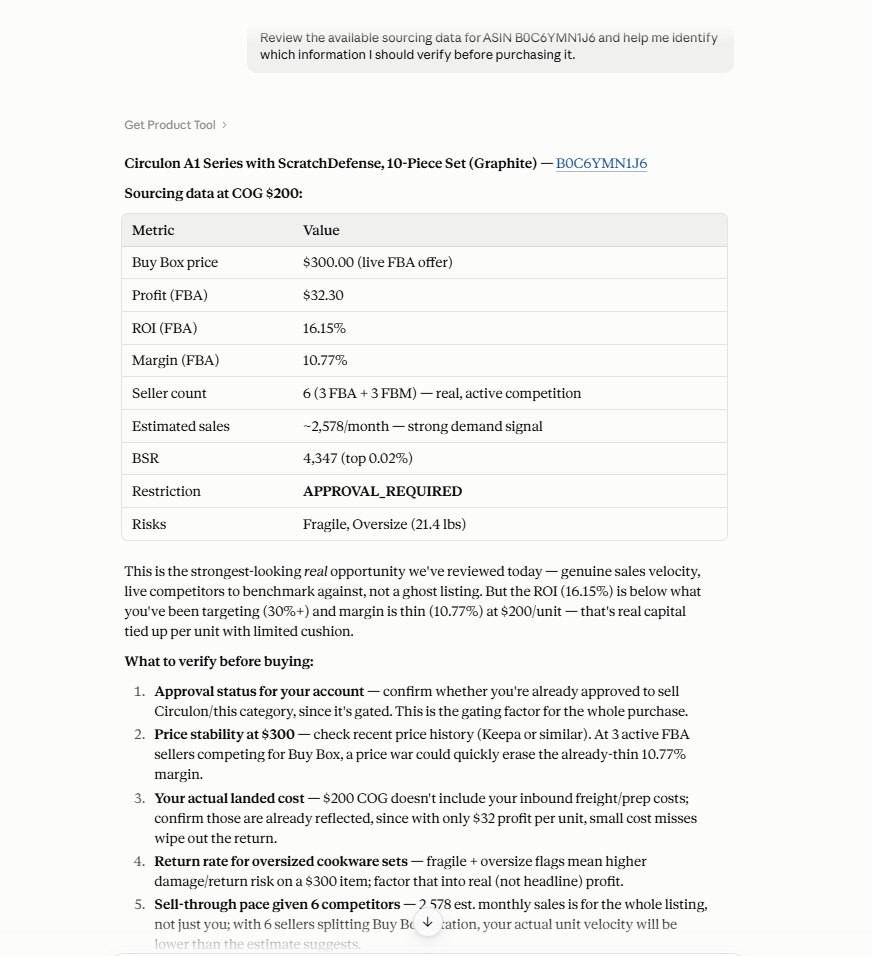
Warnings do not necessarily make a product a bad sourcing opportunity, but they can indicate that some part of the analysis needs verification. If a promising product has a warning in Price List Analyzer, use it as a reason to investigate the underlying data rather than ignoring the signal.
Prompt example
“Review the available sourcing data for ASIN B0C6YMN1J6 and help me identify which information I should verify before purchasing it.”
Why it matters
Missing Buy Box data, unavailable FBA fees, missing COG, or unusually high or low ROI can make an apparently profitable result less reliable.
Review flagged products before rejecting them
Not every product flag means the deal should automatically be rejected. Characteristics such as HazMat, oversize, fragile, meltable, or set/bundle status can instead indicate additional fulfillment, preparation, or product-match considerations.
Prompt example
“Help me review this ASIN before I reject it. Show me the available product data and explain what I should investigate further based on the flags I found in Price List Analyzer.”
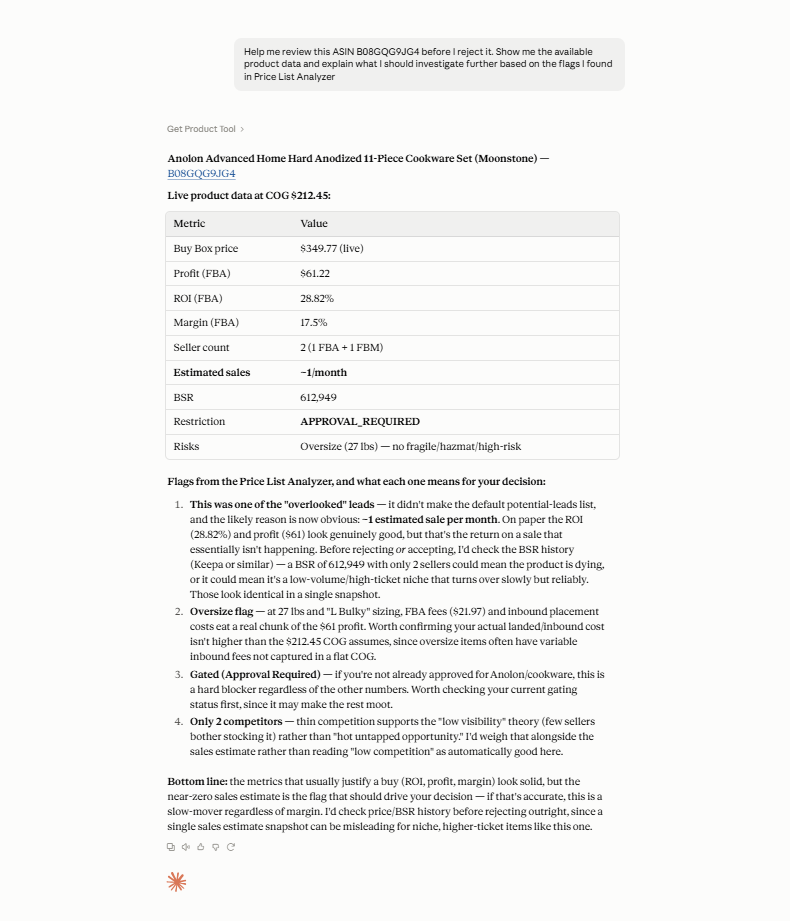
Why it matters
Treating every flag as an automatic rejection can eliminate products that may still fit your sourcing model after further investigation.
Screen multiple leads before purchasing
Risk review becomes more difficult when a supplier catalog produces dozens of attractive leads. Instead of checking only the highest-profit products, review shortlisted products systematically and identify which ones require additional investigation.
Prompt example
“Review these shortlisted leads using the available Seller Assistant data and help me identify which products need additional validation before I add them to my purchase order.”
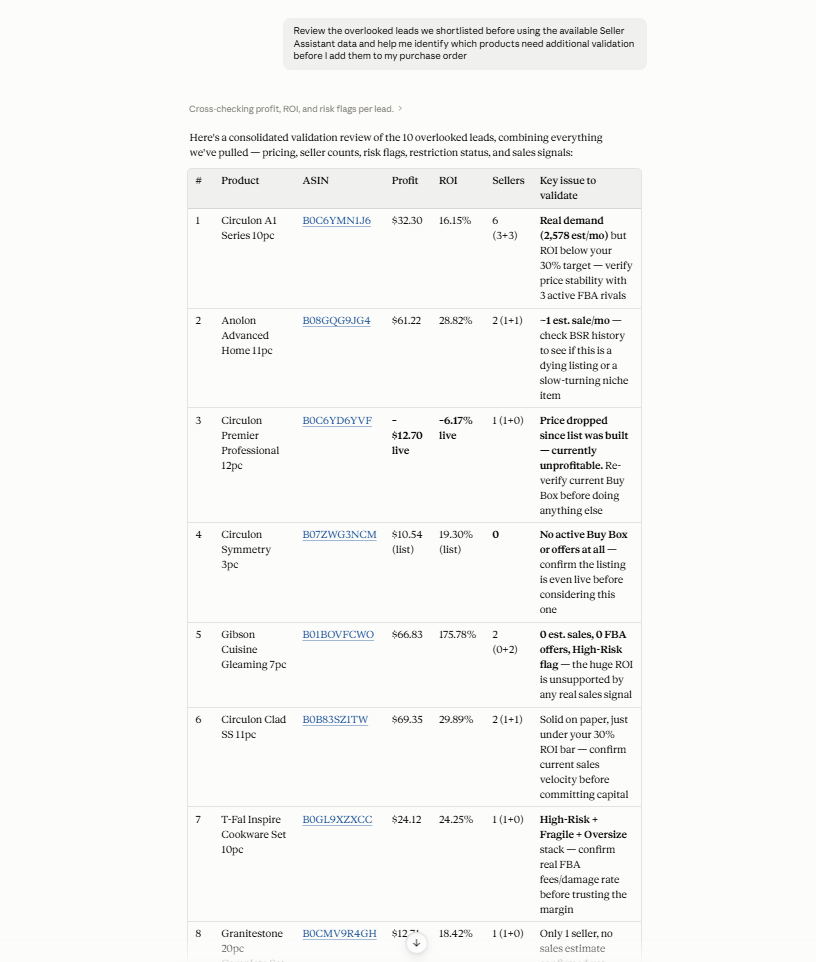
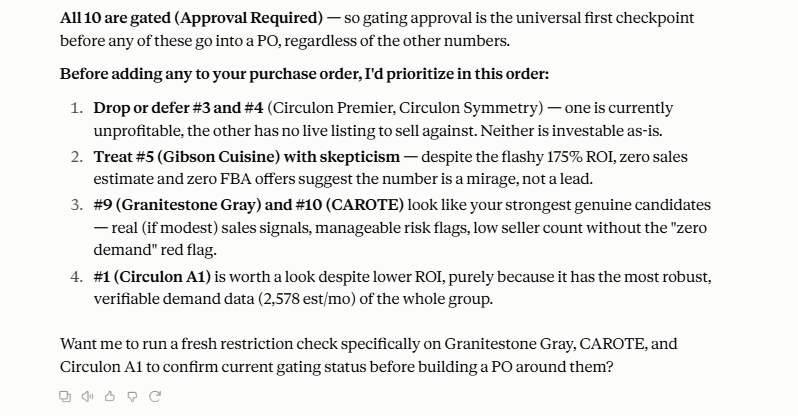
Why it matters
A consistent screening step makes it harder for a strong ROI or profit figure to distract from information that could change the sourcing decision.
Recheck a product before buying again
A product that passed your sourcing checks previously should not automatically be treated as unchanged. Marketplace conditions, available product information, and selling eligibility can change between purchases.
Prompt example
“I sourced ASIN B0DWY2NPNP before. Retrieve the currently available product data and help me identify what I should recheck before placing another order.”
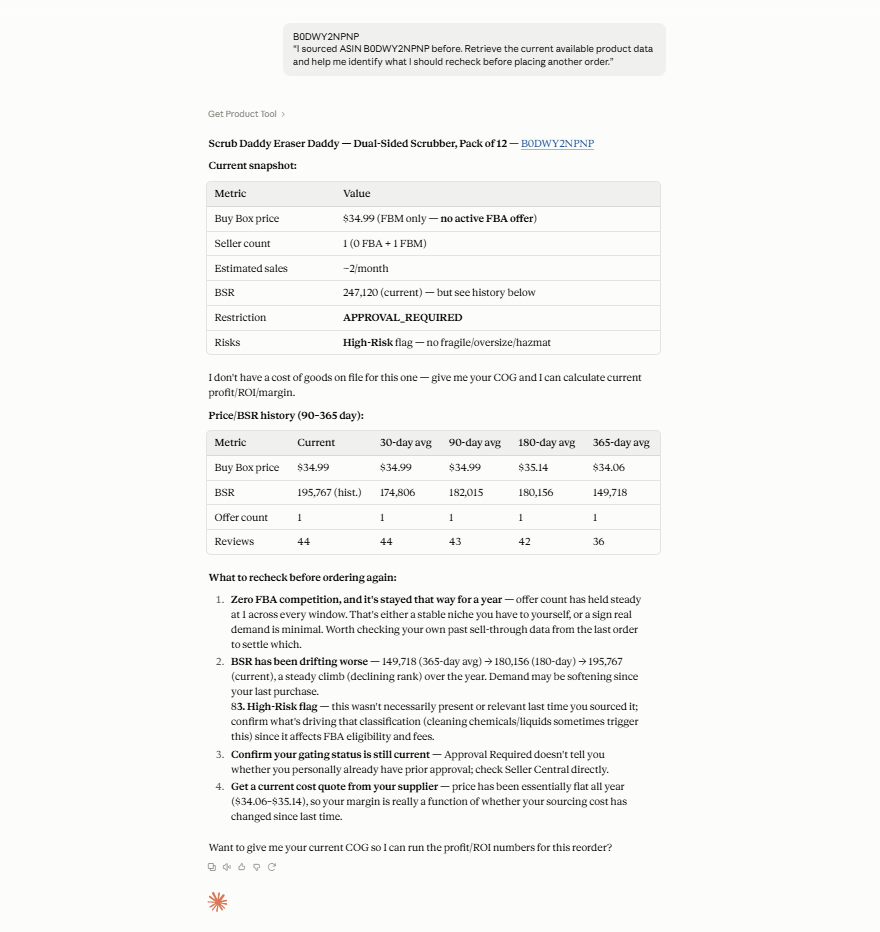
Why it matters
Rechecking repeat purchases helps avoid relying entirely on research performed for an earlier order.
Steps to Screening Amazon Deals for Risk with an AI Assistant
Once Seller Assistant MCP is connected to your AI assistant, you can use the same Price List Analyzer workflow to move from supplier catalog analysis to a final risk check. The process can reuse the same screens and prompts used during product research – the difference is that you are now reviewing shortlisted products specifically for issues that could affect the purchase decision.
Step 1. Connect Seller Assistant MCP to your AI assistant
Connect Seller Assistant MCP Server to ChatGPT, Claude, or another supported MCP client and authorize access to your Seller Assistant account. Once connected, the AI can use supported Seller Assistant tools and account data directly from the conversation.
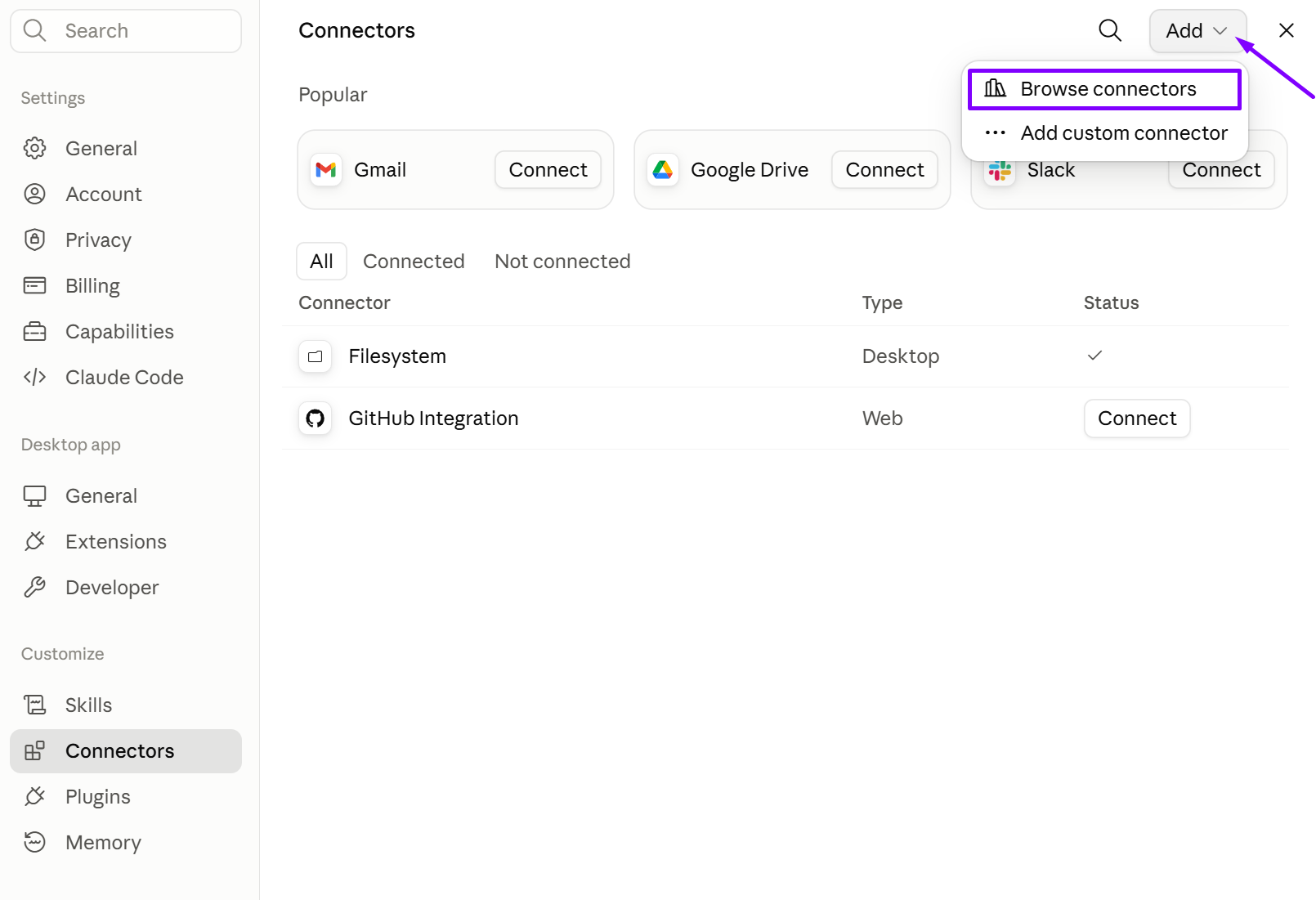
Without MCP access, the AI can explain sourcing risks but cannot work with supported Seller Assistant data and operations from your account.
Step 2. Select and analyze the supplier price list
Choose the supplier catalog you want to research and run it through Price List Analyzer. The tool matches supplier products with Amazon listings and creates the sourcing dataset you will use to evaluate potential deals.
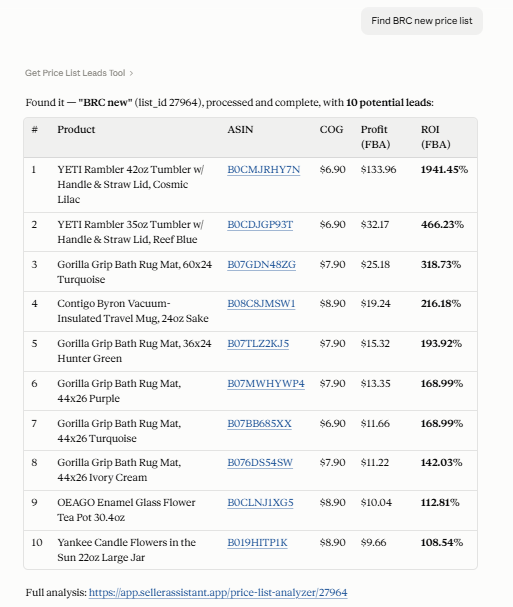
Risk screening should start with actual analyzed supplier products rather than isolated ASINs or manually copied listing information.
Step 3. Retrieve the leads you are considering
Ask AI to retrieve the analyzed leads and narrow your attention to products that look promising based on your sourcing criteria. Review supported metrics such as ASIN, profit, ROI, and seller counts before moving to the risk-screening stage.
Prompt example:
“Show me the leads from this price list with their ASIN, profit, ROI, and seller count.”
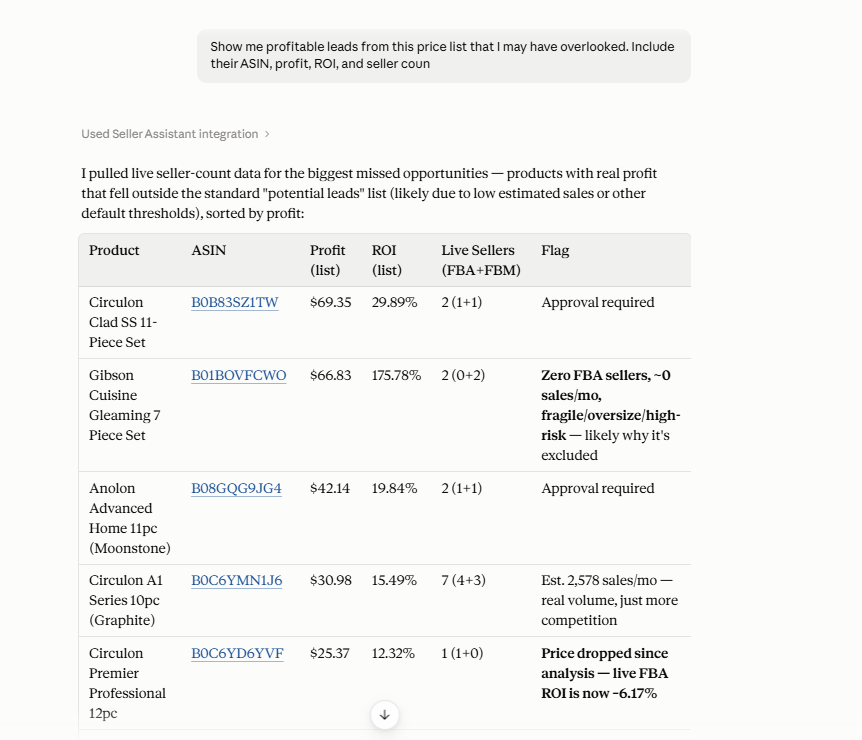
You can focus additional checks on products you are actually considering buying instead of reviewing every product in the catalog equally.
Step 4. Check shortlisted products for sourcing risks
Open the shortlisted products in Price List Analyzer and review their Restrictions, Warnings, and Alerts & Flags. Look for issues such as Restricted, Approval Required, IP-related risks, HazMat, meltable, fragile, oversize, No Buy Box Price, No FBA Fees, No COGs, ASIN not found, and unusually high or low FBA ROI.
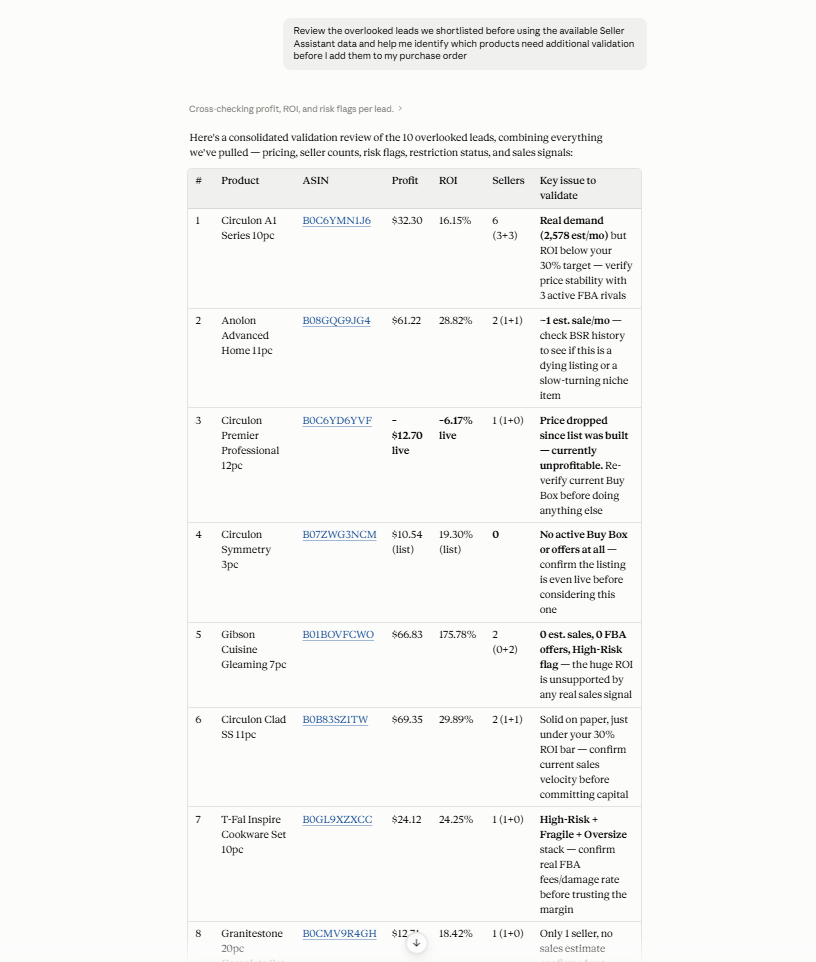
A product can pass your profitability criteria and still contain a signal that requires investigation before purchasing.
Step 5. Use AI to investigate questionable products
For products flagged in the previous step, return to the AI conversation and ask follow-up questions using the available Seller Assistant data. Focus each request on what needs validation rather than asking AI for a simple “safe” or “unsafe” decision.
Prompt example:
“Review the available sourcing data for ASIN B0XXXXXXXX and help me identify which information I should verify before purchasing it.”
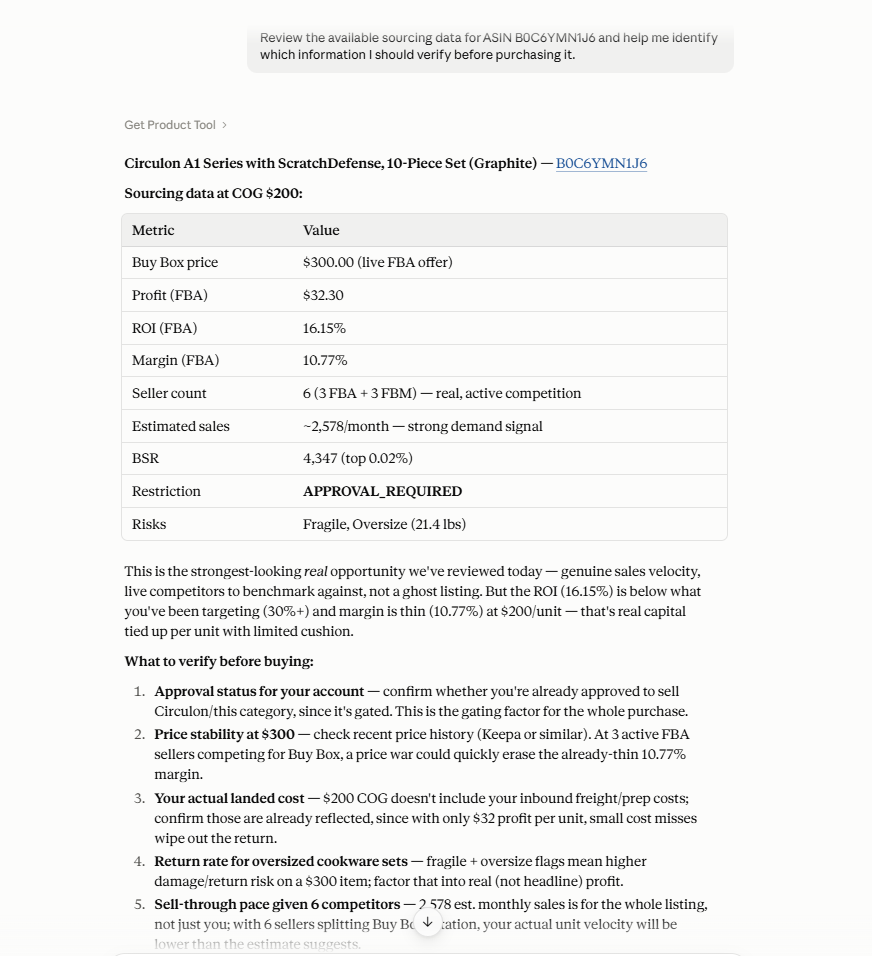
This separates products that need further investigation from products that can continue through your normal sourcing workflow.
Step 6. Recheck your final shortlist before purchasing
Before placing the supplier order, review the remaining candidates once more and make sure unresolved warnings, restrictions, missing data, or unusual results have been investigated. For repeat purchases, retrieve current product data rather than relying entirely on the checks performed for the previous order.
Prompt example:
“I sourced ASIN B0XXXXXXXX before. Retrieve the current available product data and help me identify what I should recheck before placing another order.”
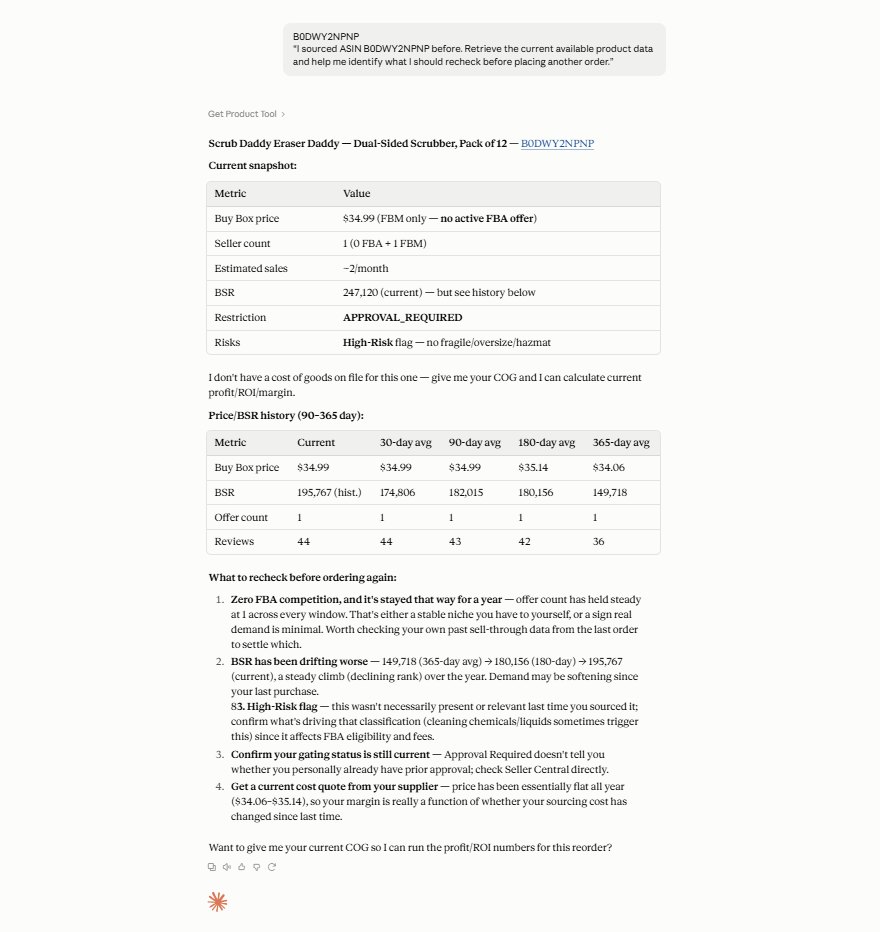
The final check creates another opportunity to catch problems before capital is committed to inventory.
Step 7. Move validated products into your purchasing workflow
Once you have completed the relevant checks and decided which products to source, continue with supported Seller Assistant supplier and Purchase Orders Module workflows. In Price List Analyzer, selected products can also be added to a PO with Add to PO.
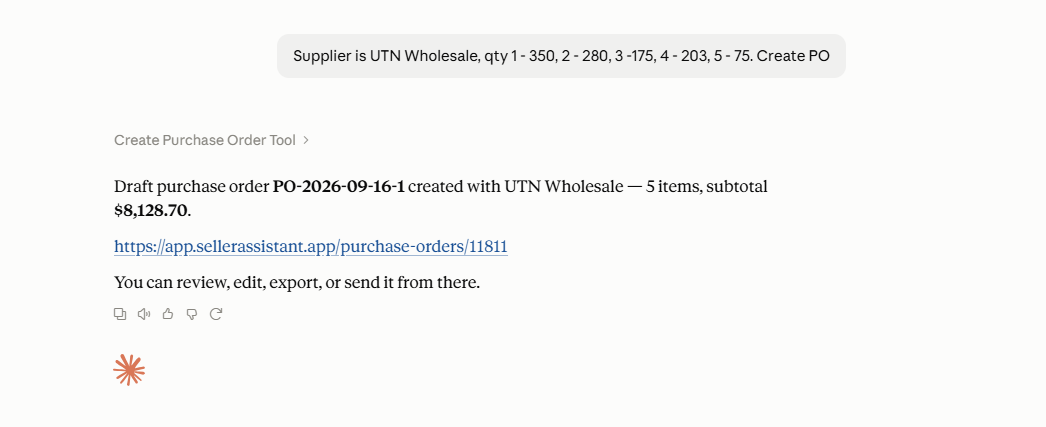
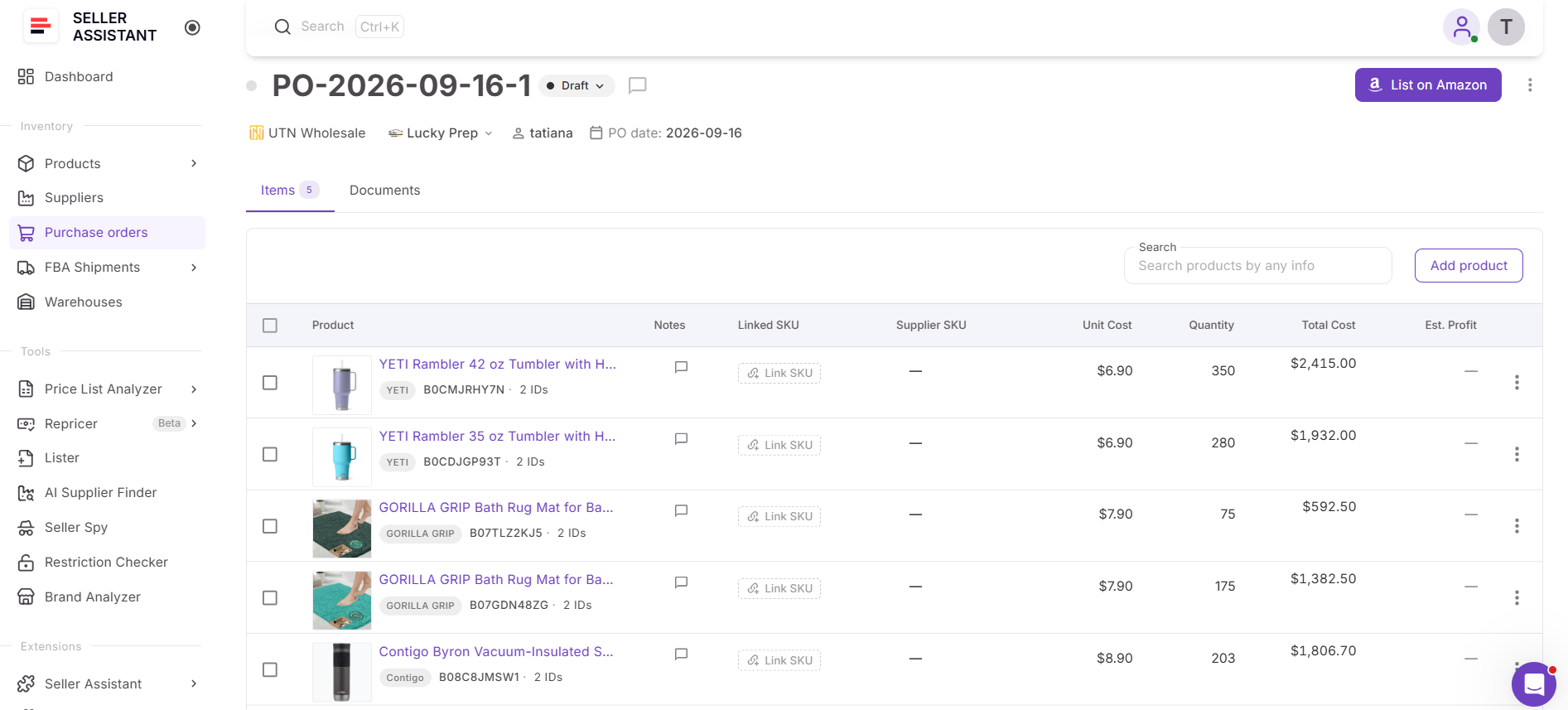
The sourcing workflow stays connected from initial supplier analysis through risk review and purchasing instead of requiring product data to be transferred manually.
FAQ
How do I check if an Amazon product is restricted before buying?
Check selling eligibility for the specific ASIN and seller account before placing the supplier order, because restrictions can vary by product, brand, category, and account. A product marked Restricted cannot currently be sold by that account, while Approval Required means you may be able to sell it after receiving Amazon approval.
What does IP complaint risk mean on Amazon?
An IP complaint risk signal indicates that a product or brand may require additional intellectual property research before sourcing. It does not automatically mean the product cannot be sold, but sellers should investigate the risk and make sure their sourcing documentation is sufficient before committing to inventory.
Does a HazMat flag mean I cannot sell the product?
No – a HazMat flag does not automatically mean that the product cannot be sold on Amazon. It indicates that dangerous-goods requirements may affect storage, shipping, preparation, or FBA fulfillment, so the applicable requirements should be checked before purchasing.
Can an unrestricted Amazon product become restricted later?
Yes, selling eligibility and Amazon requirements can change, so a product that was previously available to sell should not automatically be treated as unrestricted for every future order. Rechecking eligibility is especially useful before repeat purchases or large inventory commitments.
Should I automatically reject every product with a warning?
No – warnings such as No Buy Box Price, No FBA Fees, No COGs, or unusually high or low FBA ROI can indicate missing or unusual data rather than an automatically bad deal. Treat the warning as a reason to investigate the underlying product, pricing, cost, fee, or listing data before making the sourcing decision.
Final Thoughts
A profitable Amazon deal is not automatically a good product to buy. Selling restrictions, IP-related risks, HazMat classification, fulfillment complications, missing data, and unusual profitability results can all change the sourcing decision, which is why risk screening should happen before inventory is ordered rather than after a problem appears.
Seller Assistant’s Price List Analyzer brings profitability, marketplace data, restrictions, warnings, and product flags into the same supplier research workflow, while Seller Assistant MCP Server connects supported data and operations to AI assistants such as ChatGPT and Claude. Together, they help wholesale, online arbitrage, and dropshipping sellers add another validation layer before purchasing – making important risk signals harder to overlook while keeping the final sourcing decision in the seller’s hands..
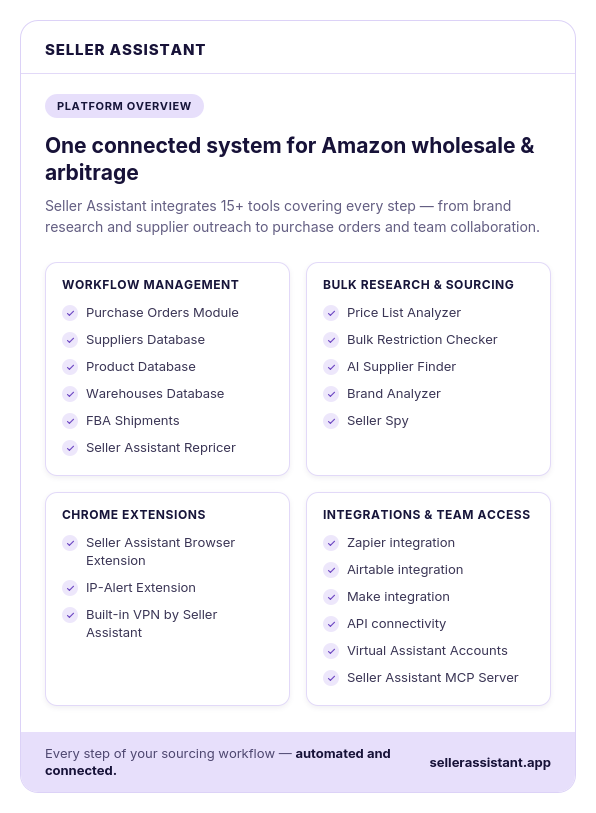
Seller Assistant automates and connects every stage of your Amazon wholesale and arbitrage workflow. It brings together in one platform: workflow management tools – Purchase Orders Module, Suppliers Database, Product Database, Warehouses Database, FBA Shipments, bulk research & sourcing tools – Price List Analyzer, Bulk Restriction Checker, AI Supplier Finder, Brand Analyzer, Seller Spy, Amazon repricing tool – Seller Assistant Repricer, Chrome extensions – Seller Assistant Browser Extension, IP-Alert Extension, and built-in VPN by Seller Assistant, and integrations & team access features – Seller Assistant MCP Server, seamless API connectivity, integrations with Zapier, Airtable, and Make, and Virtual Assistant Accounts.