Buying wholesale and selling on Amazon is one of the most scalable ways to grow a sustainable e-commerce business. Unlike retail arbitrage or private label, wholesale lets you resell branded products with predictable demand and repeatable results.
But how do you find the right suppliers, streamline sourcing, and actually list and sell profitably on Amazon?
In this post, we’ll break down exactly how to buy wholesale–from sourcing strategies to automating workflows with Seller Assistant–and how to sell efficiently by listing, fulfilling, and repricing like a pro. Whether you’re starting or scaling, this is your roadmap to wholesale success on Amazon.
How Buying and Selling on Amazon Works
At its core, buying wholesale and selling on Amazon means sourcing branded products in bulk from authorized suppliers, then reselling them on the Amazon marketplace for a profit. Unlike private label or arbitrage, wholesale focuses on already-established products with proven demand–making it a repeatable and scalable business model.
Buying = sourcing
Sourcing involves everything from picking a product category and researching brands to opening wholesale accounts, analyzing price lists, and negotiating deals.
The workflow includes:
- Choosing categories and brands
- Verifying selling eligibility
- Finding and vetting wholesale suppliers
- Requesting price lists and analyzing them for profit potential
- Negotiating, ordering, and routing shipments
These steps are critical for identifying products that are both profitable and compliant with Amazon’s policies.
Selling = operational execution
Once you have the inventory, selling involves:
- Listing your products in Amazon Seller Central
- Prepping and shipping inventory to Amazon (FBA or FBM)
- Using repricing tools to stay competitive and win the Buy Box
To run a successful wholesale business, both sides–buying and selling–need tight processes and reliable tools. Seller Assistant helps streamline sourcing and automate key parts of this workflow, so you can scale without spreadsheets or manual tracking.
How to Buy Wholesale for Amazon
Sourcing is the foundation of every profitable Amazon wholesale operation. Strong sourcing means finding the right products, vetting legitimate suppliers, and building reliable systems for managing orders. Weak sourcing leads to wasted time, low margins, and policy issues.
This step-by-step workflow walks you through the process of moving from research to your first wholesale order.
Buying wholesale for Amazon step by step
Step 1. Choose your product niche and target brands
Start with a clear plan. Focus on a niche category with proven demand and manageable competition. Research brands already selling well on Amazon and identify those with healthy sales and margin potential.
Step 2. Verify your eligibility to sell
Confirm whether your chosen categories or brands are gated or require approval in your Seller Central account. Check eligibility first to avoid wasted outreach to suppliers.
Step 3. Identify trusted wholesale distributors
Search for authorized U.S.-based wholesale suppliers carrying the brands you want. Prioritize distributors known to work with Amazon resellers and aligned with your profit goals.
Step 4. Check supplier legitimacy
Do a full background check before engaging with any supplier. Verify business credentials, look up reviews, and confirm online presence using LinkedIn, Whois, or ScamAdviser to avoid scams.
Step 5. Initiate contact with suppliers
Reach out professionally through email, phone, or web forms. Introduce your business and request to open a wholesale account.
Step 6. Organize your supplier pipeline
Track every supplier interaction from day one–responses, terms, approvals, and pricing. Use structured systems or Seller Assistant instead of messy spreadsheets.
Step 7. Complete wholesale account applications
When a supplier agrees to work with you, fill out their application with your business license, reseller permit, and contact details. Keep communication professional and prompt.
Step 8. Access your wholesale catalogs
Once approved, you’ll gain access to wholesale pricing and product catalogs, enabling you to evaluate inventory at scale.
Step 9. Request up-to-date price lists
Ask suppliers for their most recent price lists containing SKUs, product details, and bulk pricing. This is the starting point for detailed product analysis.
Step 10. Evaluate products for profit potential
Analyze the price list using research tools to find high-ROI items with consistent demand. Double-check ASINs manually to avoid mismatches, low ROI, or restrictions.
Step 11. Secure better deals with negotiation
After selecting potential products, negotiate volume discounts or improved terms–especially on repeat orders–to increase margins.
Step 12. Set clear shipping and prep rules
Create routing guidelines for each supplier. Decide where inventory goes (warehouse, prep center, or directly to Amazon FBA) and clarify who handles prep and labeling.
Step 13. Place and confirm your initial orders
Send purchase orders for your selected SKUs. Confirm payment method, shipping details, and delivery timelines to kick off your wholesale operations.
How to Automate Your Amazon Wholesale Sourcing Workflow
Scaling a wholesale business on Amazon isn’t just about finding the right products–it’s about building a workflow that doesn’t break when your volume grows. Manual sourcing can only take you so far. Spreadsheets become cluttered, supplier follow-ups fall through the cracks, and mistakes in PO creation or ASIN eligibility cost you time and money.
That’s why automation is critical.
Automating your wholesale sourcing process ensures every repetitive task is handled accurately, consistently, and quickly. With Seller Assistant, you can go from product research to purchase orders with minimal manual work. You stay focused on high-leverage decisions–while the system does the rest.
Note. Seller Assistant is an end-to-end Amazon workflow management platform that integrates 10+ wholesale-focused solutions into one connected system. It combines workflow automation, bulk research, sourcing intelligence tools, and integrated Chrome extensions – giving you everything you need to streamline product sourcing, supplier management, and purchase order creation.

The platform aggregates: workflow management tools:
- Purchase Orders Module, Supplier Database, Warehouse Database to organize, automate, and scale every step of your wholesale and arbitrage operations;
- Bulk research & sourcing tools – Price List Analyzer, Bulk Restriction Checker, Sourcing AI, Brand Analyzer, Seller Spy to evaluate supplier price lists, verify selling eligibility and restrictions, open new brands, and discover winning product ideas from competitors to expand your product catalog;
- Chrome extensions – Seller Assistant Browser Extension, IP-Alert Extension, and built-in VPN by Seller Assistant to deep-research products, check IP claims and compliance, and access geoblocked supplier sites directly within your browser;
- Integrations & team access features – seamless API connectivity and integrations with Zapier, Airtable, and Make, plus Virtual Assistant Accounts for secure, scalable team collaboration.
With Seller Assistant, every step of your Amazon wholesale and arbitrage workflow is automated and connected.
Steps to automate wholesale sourcing workflow
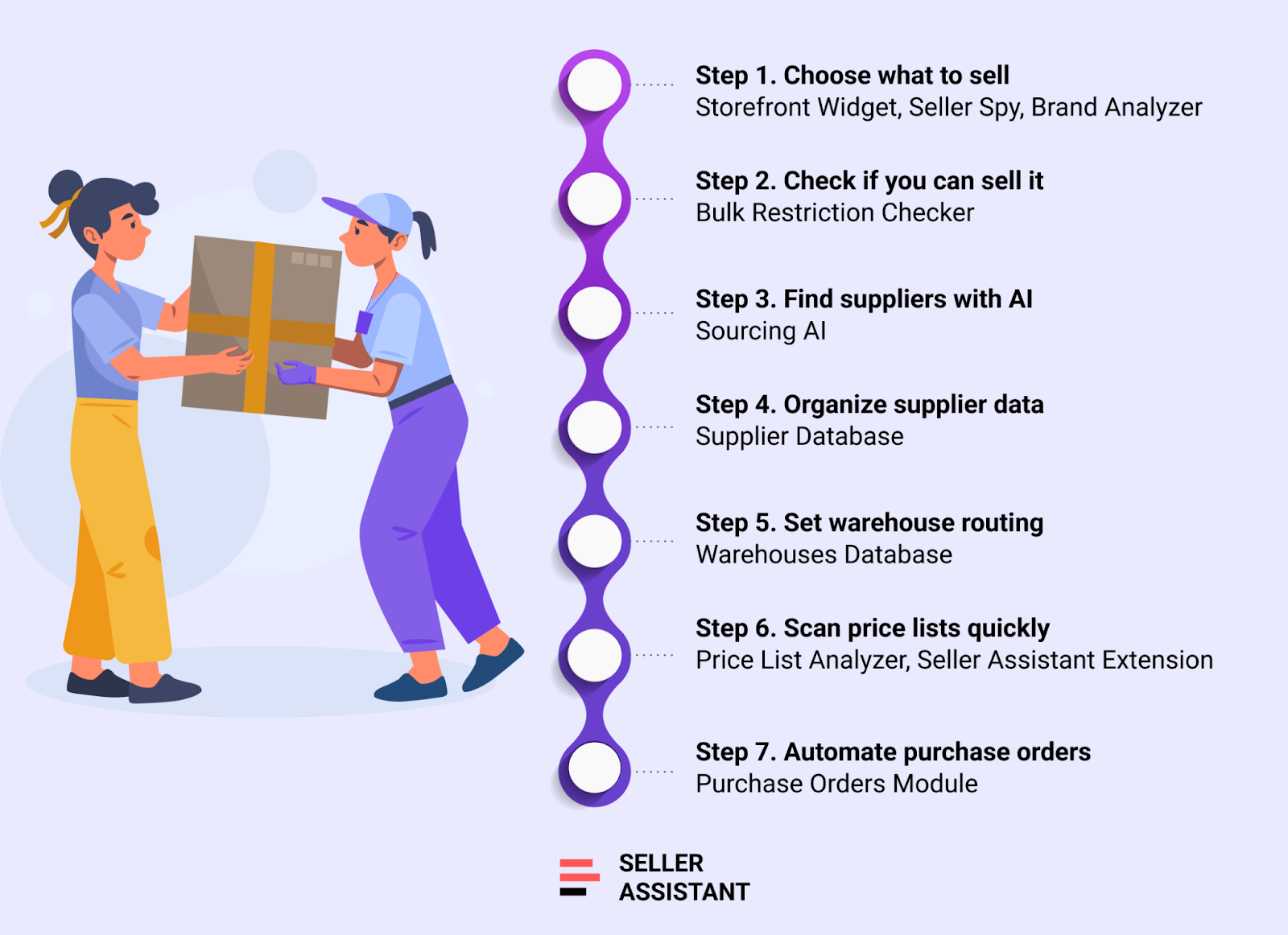
Step 1. Use data to choose what to source
Make smart sourcing decisions with real Amazon performance data, not guesswork.
-
What you can do
-
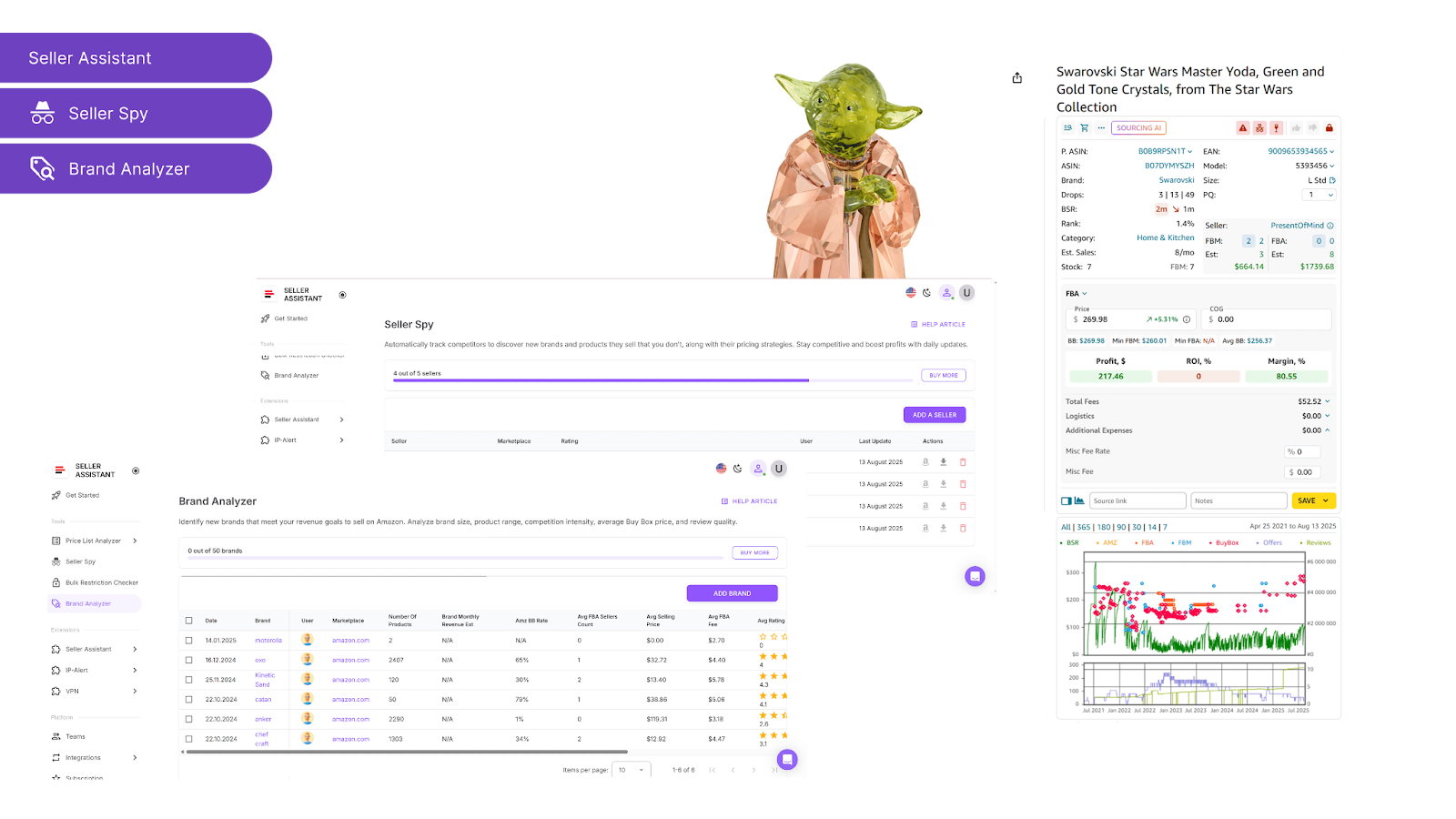
Storefront Widget: Review top-selling brands and categories from other Amazon sellers, including ASIN count and average ratings.
-
Seller Spy: Monitor competitors’ catalogs in real time–track what they add or drop to discover hot products and promising brand leads.
-
Brand Analyzer: Dig into key brand metrics–Buy Box dynamics, revenue potential, competition level, and customer feedback–to spot high-opportunity brands.
Step 2. Confirm your ability to sell the products
Avoid wasting time on ineligible or gated listings by checking restrictions early.
- Tool
-
What you can do
-
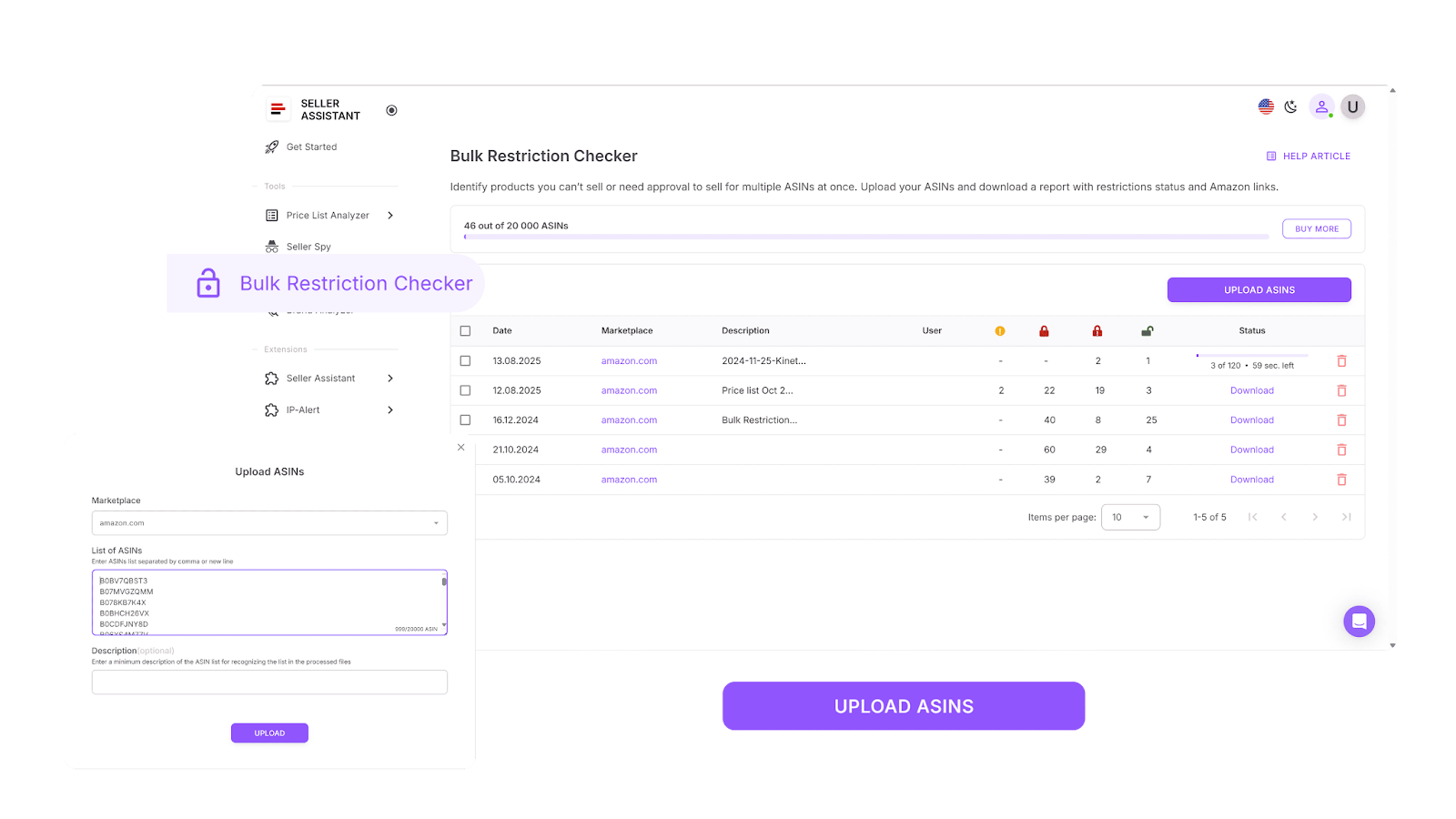
Instantly scan ASINs in bulk to see what your Amazon account can and cannot sell.
-
Detect gated products, brand restrictions, or listings blocked for your account.
-
Eliminate ineligible products from your sourcing list before investing time or money.
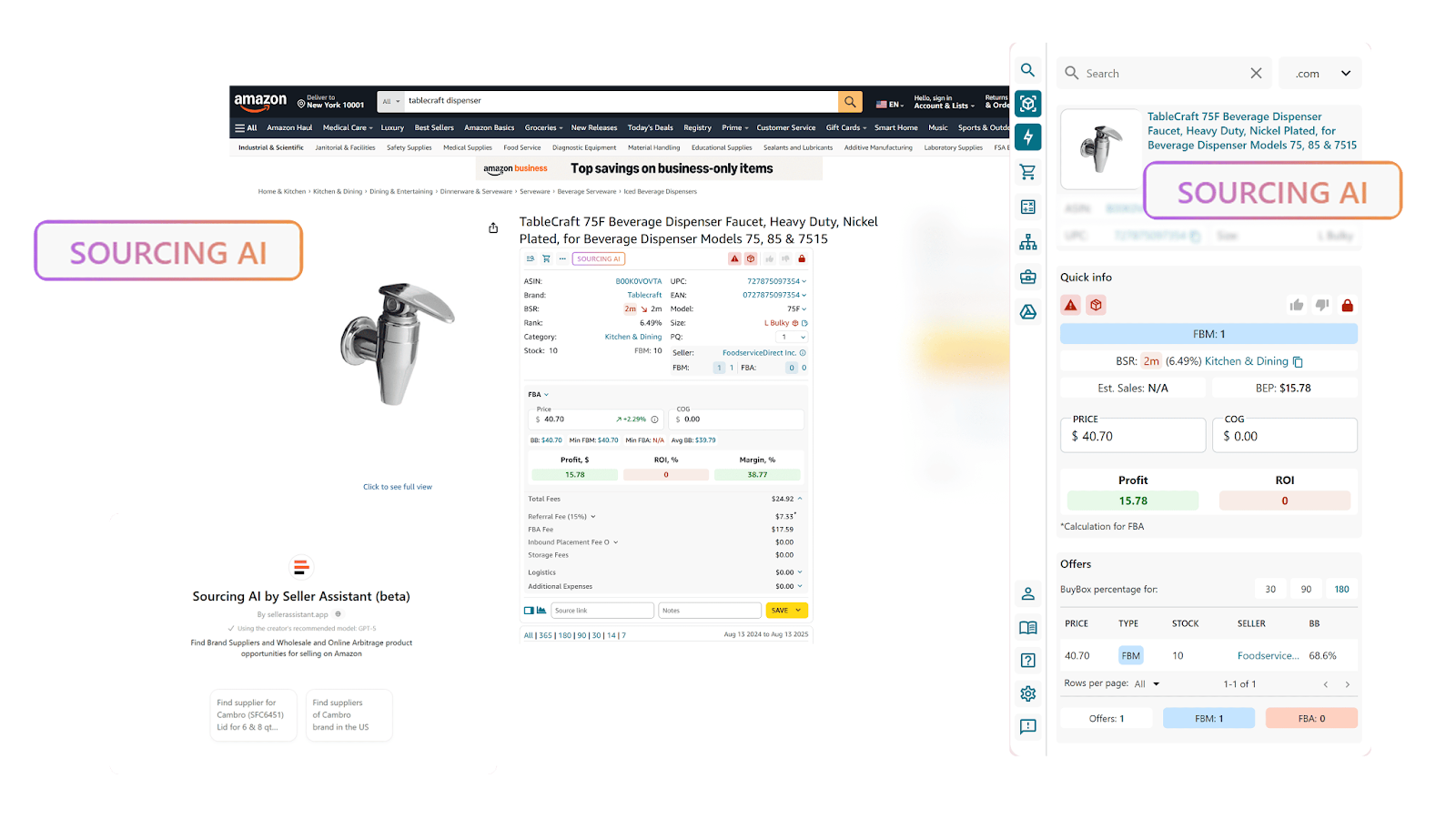
Step 3. Locate verified wholesale sources
Replace random online searches with brand-authorized suppliers.
- Tool
-
What you can do
-
Search by brand name and get up to 10 verified U.S.-based distributors.
-
See current offers with pricing, MOQs, and links to supplier websites.
-
Filter by cost of goods and match quality for efficient supplier discovery.
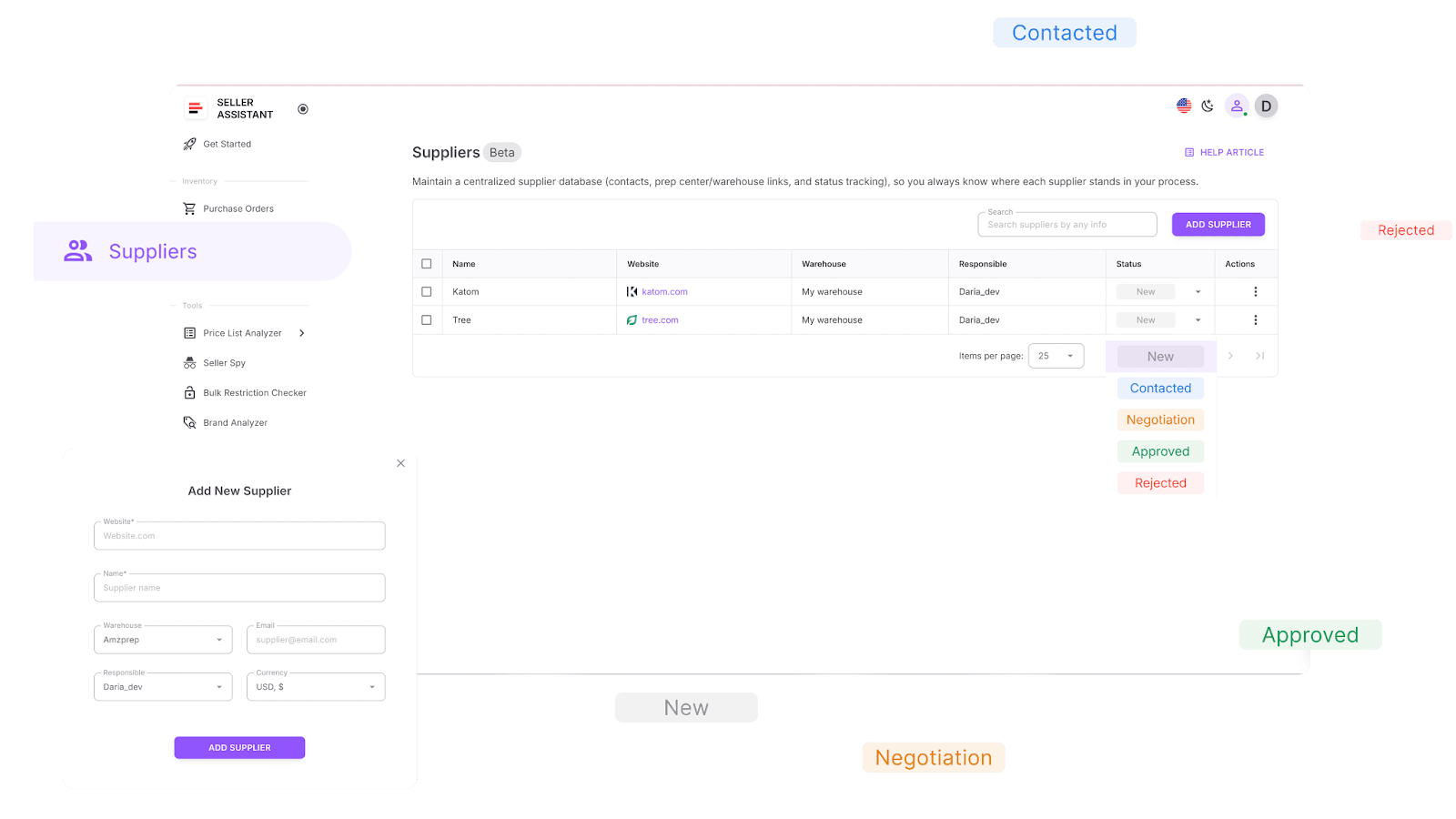
Step 4. Build a centralized supplier list
Organize your supplier relationships in a single, searchable database.
- Tool
-
What you can do
-
Store contact info, supplier websites, and notes for each lead.
-
Assign statuses like “New,” “Negotiating,” “Approved,” or “Rejected.”
-
Link each supplier to their default prep center or warehouse for faster routing later.
Step 5. Automate warehouse and prep center routing
Ensure every supplier’s products are sent to the correct destination–automatically.
- Tool
-
What you can do
-
Save and manage all your prep center and warehouse addresses.
-
Assign default destinations per supplier–no more manual routing or errors.
-
Streamline logistics planning for new orders.
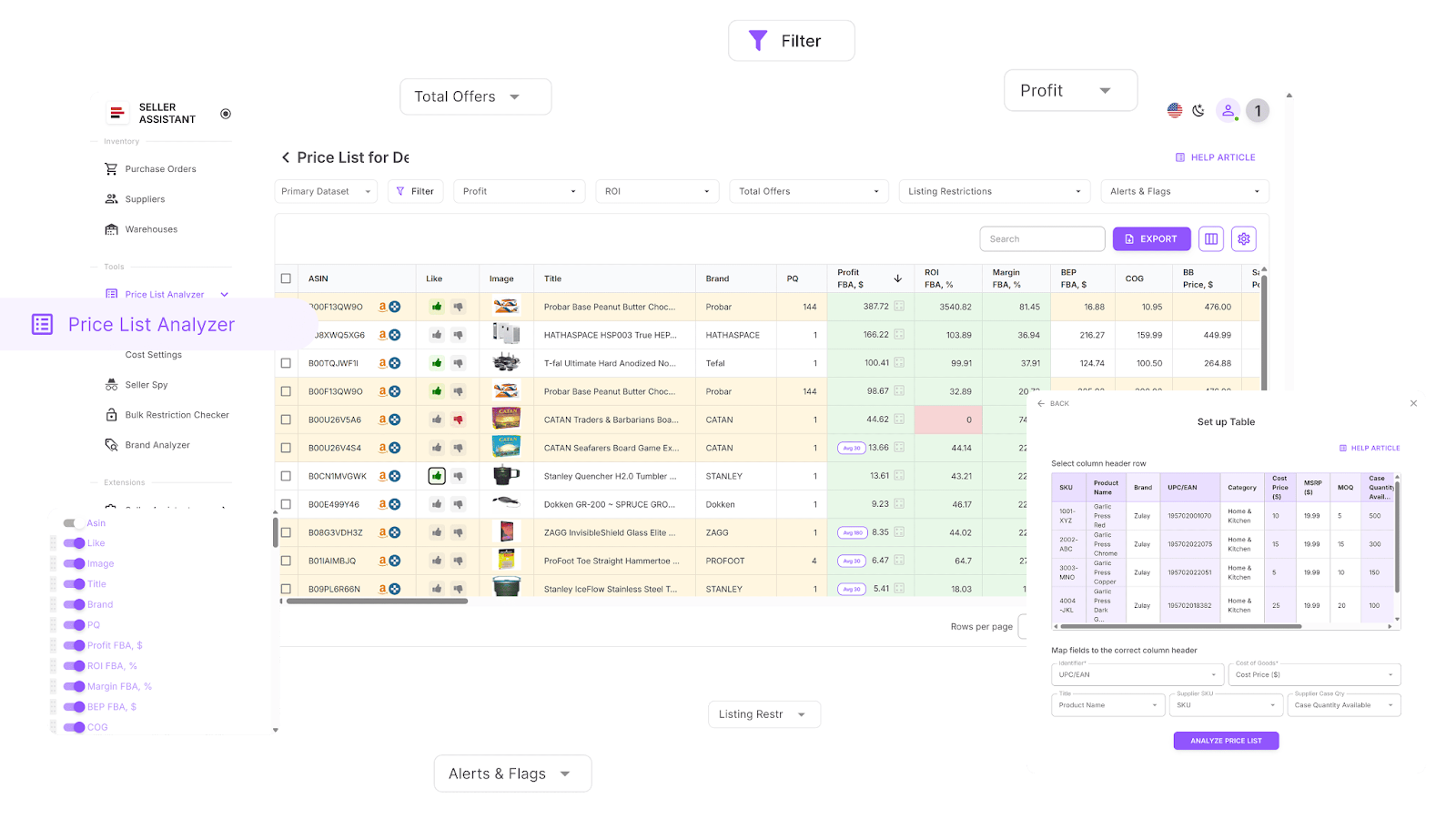
Step 6. Rapidly process and analyze supplier price lists
Turn spreadsheets into smart sourcing dashboards in minutes.
-
Tools
-
What you can do
-
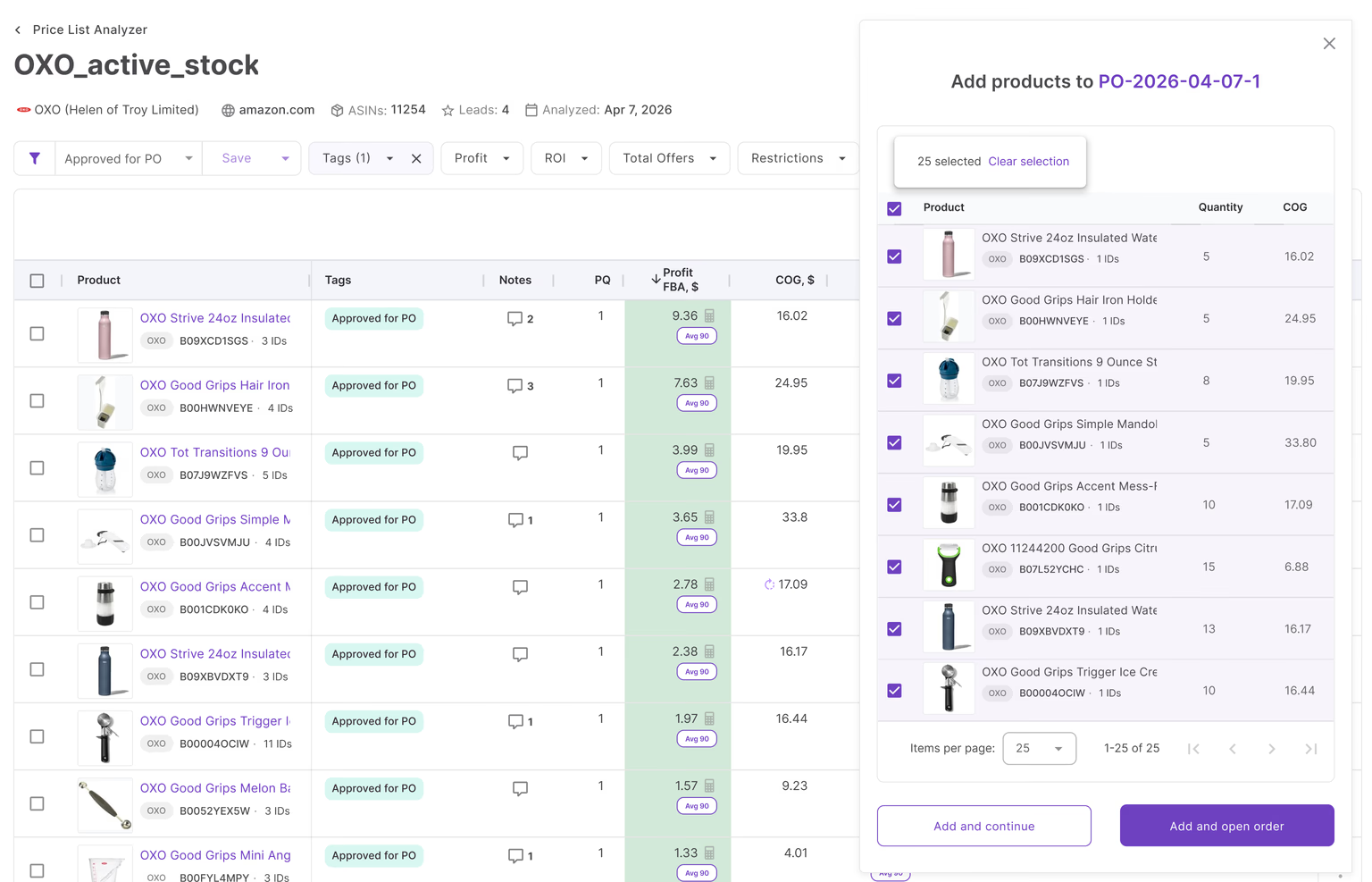
Price List Analyzer: Match SKUs to ASINs and view 70+ product data points–ROI, profit, rank, fees, restrictions, and alerts. Use filters to quickly shortlist profitable items. Like, dislike, shortlist, and export items to POs.
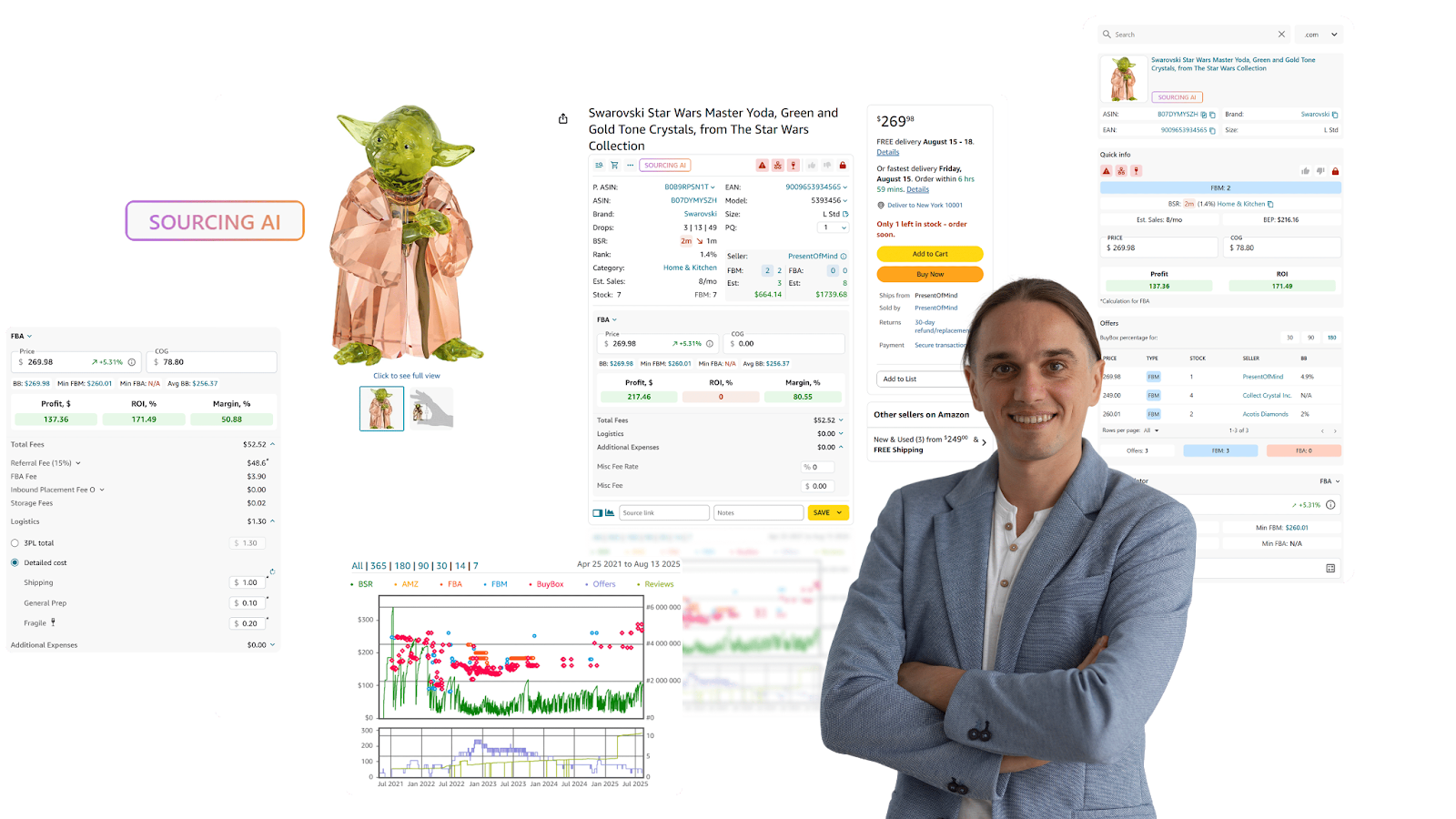
- Seller Assistant Extension: Evaluate product performance, estimated sales, Buy Box activity, competition level, risks, demand, profitability, and other metrics right on the Amazon product and search pages, supplier websites, and competitor storefronts. Make final sourcing decisions with full visibility.
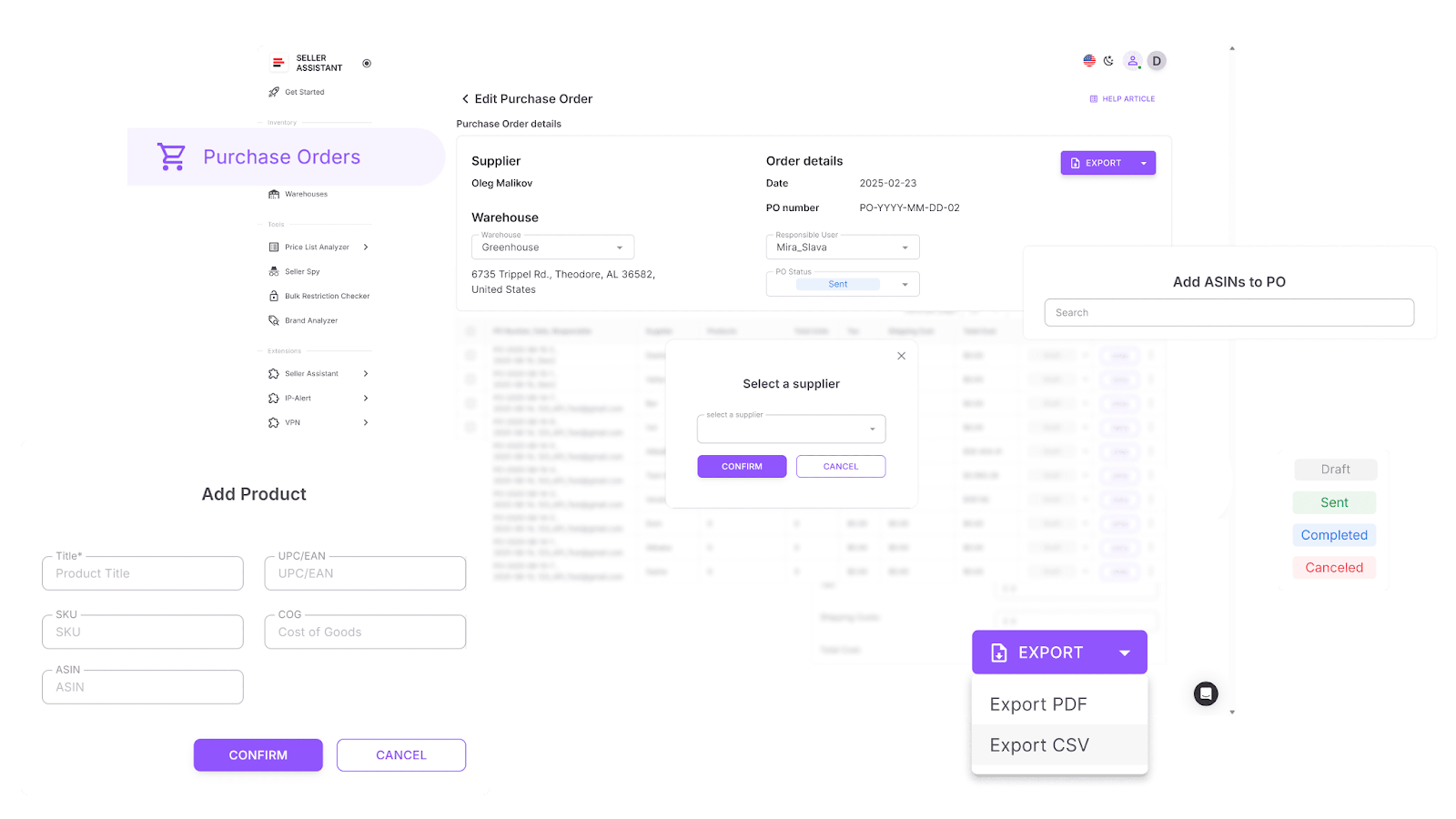
Step 7. Generate clean, exportable purchase orders
Skip the spreadsheet chaos–create purchase orders in seconds.
- Tool
-
What you can do
-
Automatically pull in product, supplier, and warehouse data.
-
Adjust quantities, COGs, and taxes directly in the PO.
-
Export in XLSX or PDF formats for supplier use.
-
Track PO status from draft to sent and completed.
Step 8. Scale with VAs and integrations
Delegate sourcing and automate data sync across your stack.
-
Tools
-
Airtable, Make, Zapier integrations
-
What you can do
-
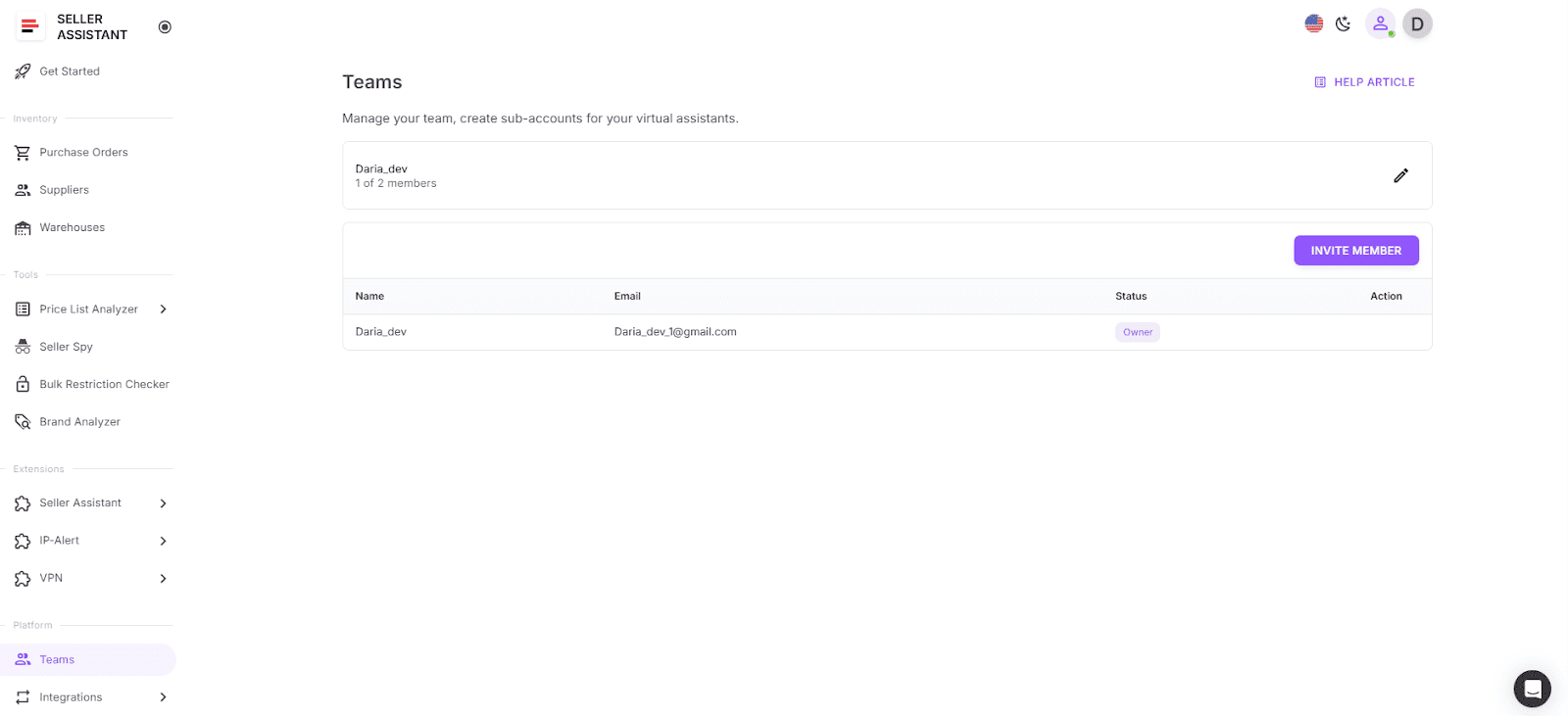
Let VAs check product restrictions securely, without your Seller Central access
-
Control access and keep all actions within Seller Assistant
- Pull live product data from Keepa + SP API automatically
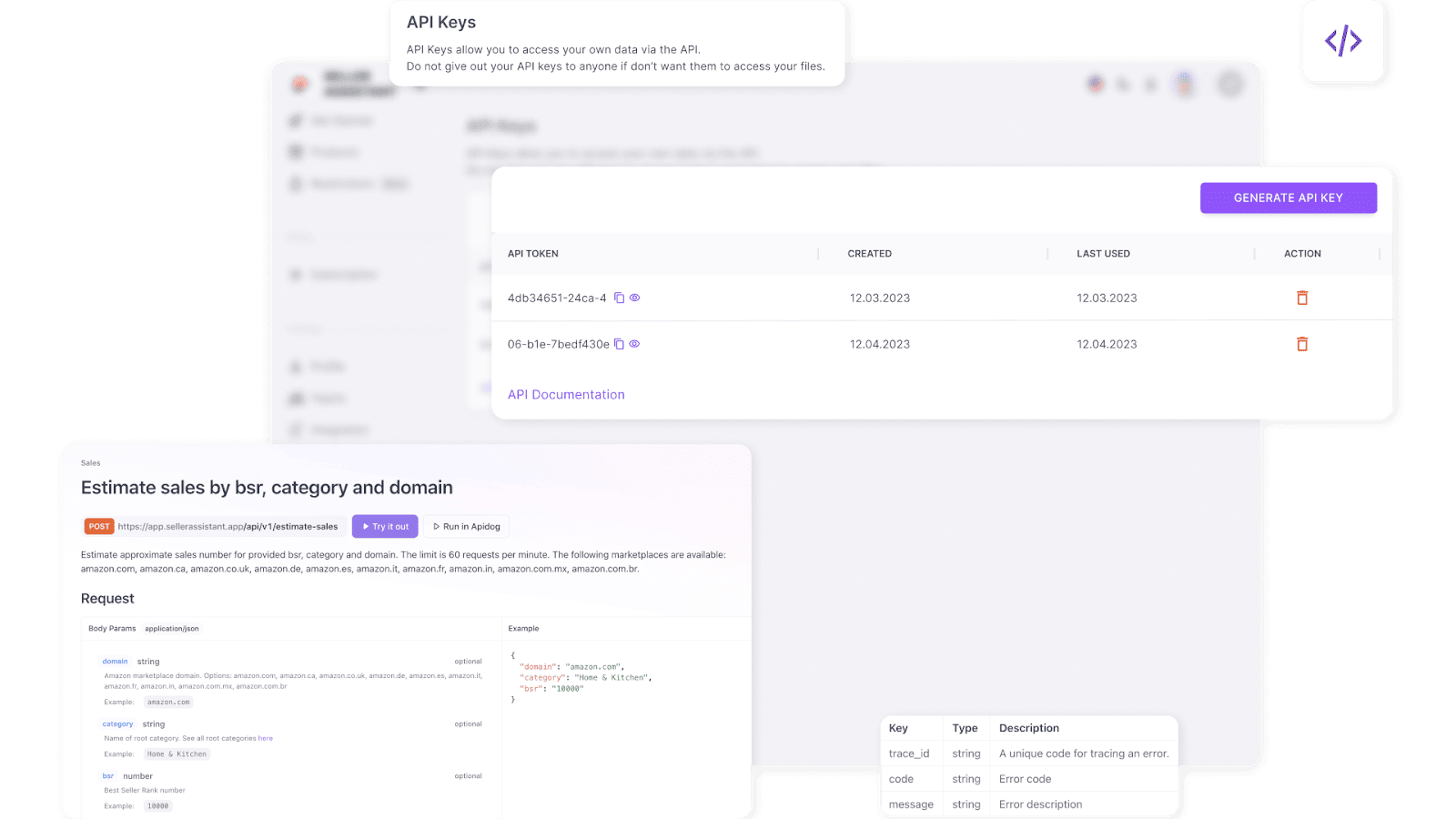
- Sync product data, restriction results, and PO-ready lists across tools without manual work.
How to Sell Wholesale on Amazon
Once you’ve sourced profitable products, the next stage is turning that inventory into sales. Selling wholesale on Amazon isn’t just about listing items and waiting for buyers–it’s about managing the entire process strategically. That means adding your offers to existing listings, choosing the right fulfillment method, and maintaining competitive pricing.
Each part of the selling workflow matters. Listing products on Amazon makes them visible to the customers. A solid fulfillment plan ensures fast delivery and positive customer feedback. Smart repricing keeps you in the Buy Box without sacrificing margins. Handling each of these steps properly is what separates consistent sellers from struggling ones.
How to List Wholesale Products on Amazon?
Wholesale sellers typically don’t create new product listings. Since they deal with established brands and existing catalog items, their job is to add offers to existing product pages already listed on Amazon. This allows them to focus on competitive pricing, inventory management, and fulfillment rather than building listings from scratch.
Because wholesalers often work with hundreds or thousands of SKUs, uploading each listing manually isn’t practical. Instead, sellers use bulk tools like Amazon’s Inventory Loader – a spreadsheet-based feature designed for Professional sellers. It allows you to upload, modify, or delete multiple offers in a single file, keeping your inventory accurate and up to date across all categories.
Upload inventory in bulk using Inventory Loader
What Inventory Loader does
Inventory Loader lets you add offers to existing listings in Amazon’s catalog by uploading a spreadsheet containing product IDs (ASIN, UPC, EAN, or ISBN) and your offer details – such as price, condition, and quantity. It cannot be used to create new product pages, only to match offers to existing listings.
With it, you can:
- Upload thousands of listings in one file
- Update prices or quantities in bulk
- Add or remove inventory quickly
- Replace or purge listings when needed
Step-by-step: how to list wholesale products in bulk
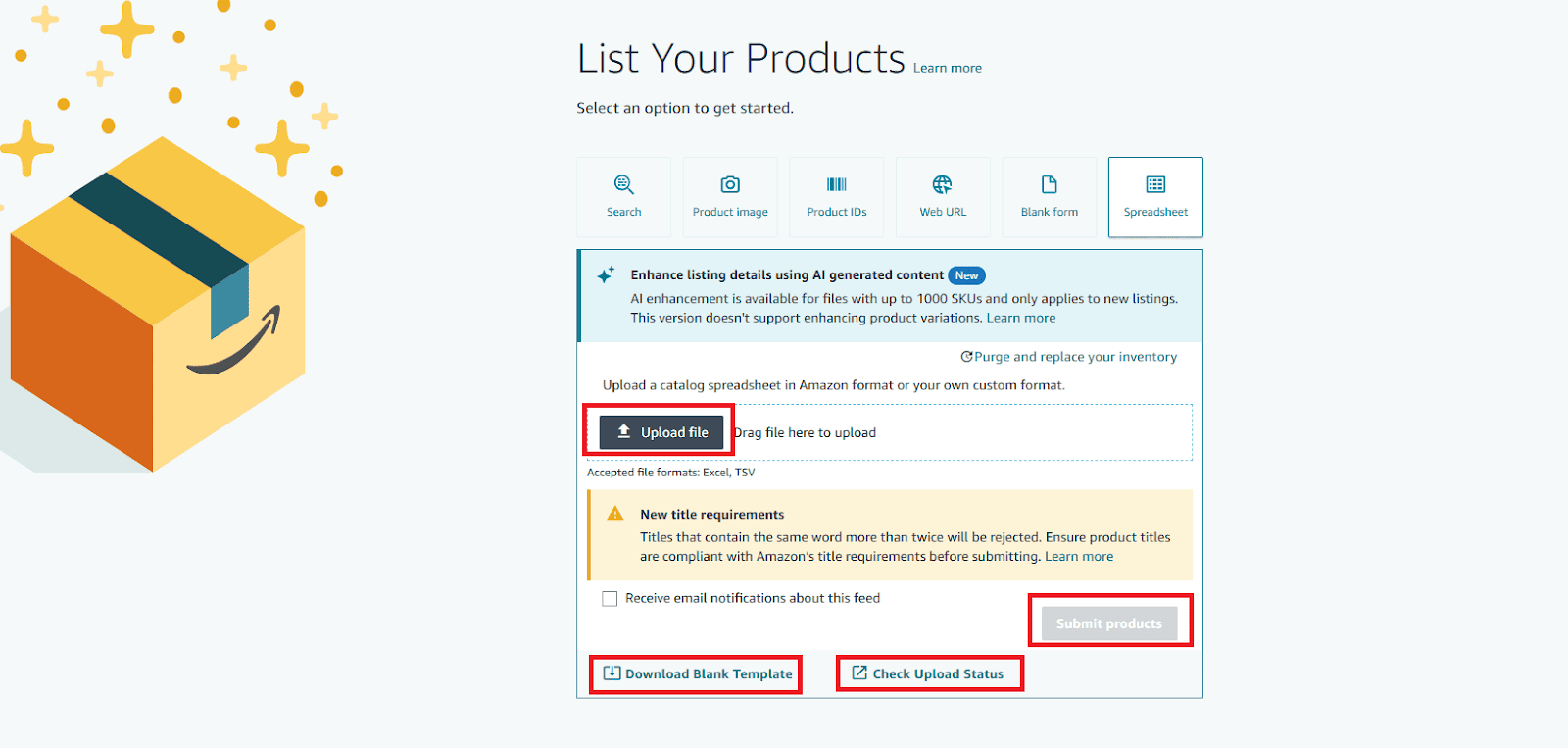
Step 1. Download the Inventory Loader template
- Go to Catalog → Add Products via Upload
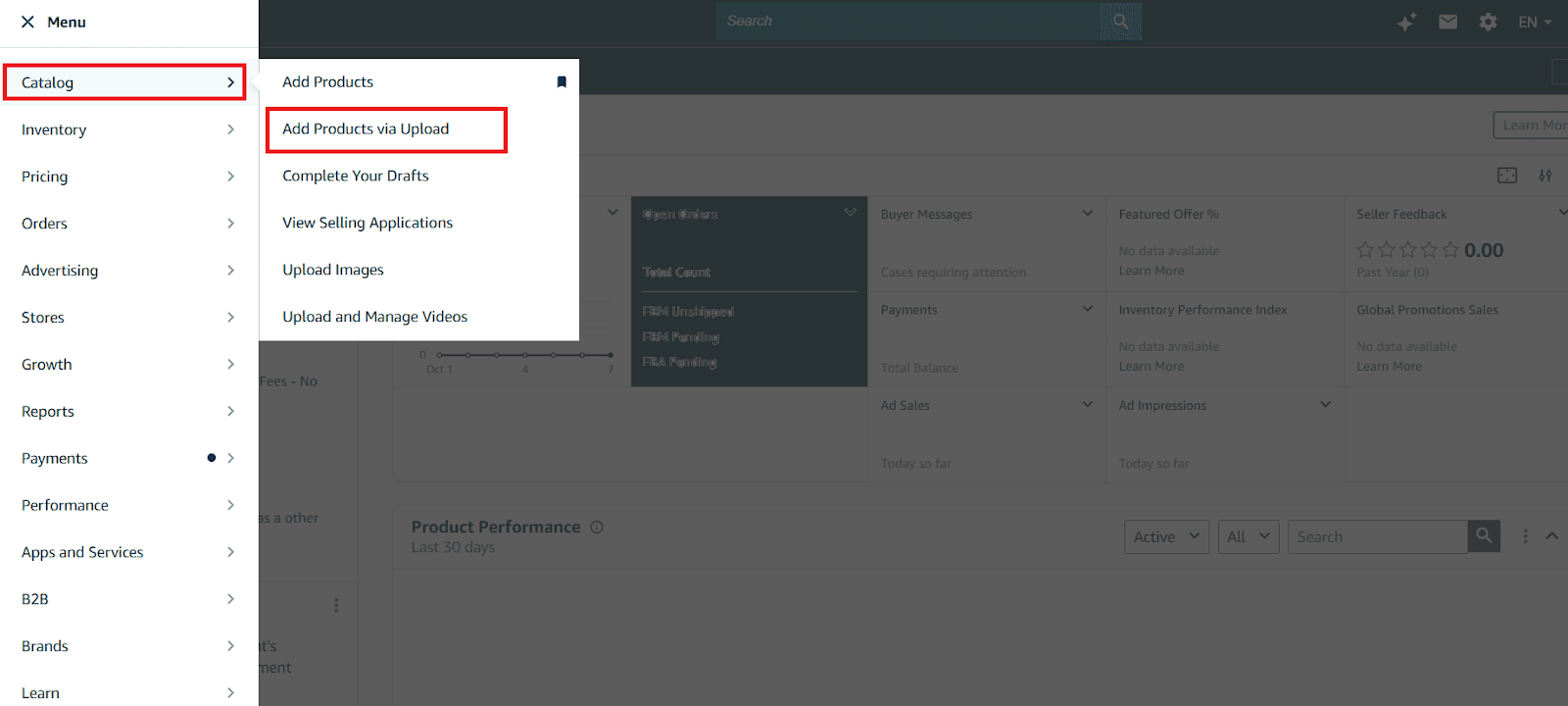
- Click Download a blank template.
- Use the List products already in Amazon’s catalog option.
- Search for your products using identifiers (UPC, EAN, ISBN, or ASIN). You can enter up to 500 at once, separated by commas or line breaks.
Step 2. Generate and review your product list
Click Generate spreadsheet to download a pre-filled file under the Downloads template tab.
Review the returned products and confirm that each matches what you plan to sell.
Step 3. Add your offer details
-
For each matched product, fill in these key columns:
-
Price
-
Quantity
-
Condition
-
Shipping options
-
You can also complete optional fields such as handling time or fulfillment type.
-
Remove unwanted items or mark them as Ignored in the “Action” column.
Step 4. Save and upload your file
- Save the template as a tab-separated values (TSV) text file.
- Return to Add Products → Spreadsheet, then upload your completed file.
Step 5. Verify your upload
- Check your Upload Status to confirm your SKUs were processed successfully.
- Once confirmed, your offers will appear on Amazon under the existing listings for those products.
If a product you sell isn’t in the catalog, you’ll need to use a product creation template instead. However, most wholesale sellers rarely need this – since nearly all branded goods they source already exist in Amazon’s marketplace.
How to Ship Your Orders to the Customers
Once your listings are live, the next major step in selling wholesale on Amazon is fulfillment – delivering products quickly and reliably to customers. Wholesale sellers typically use one of two methods: Fulfillment by Amazon (FBA) or Fulfillment by Merchant (FBM).
- FBA (Fulfillment by Amazon)
- You send your inventory to Amazon’s fulfillment centers, and Amazon handles storage, packaging, shipping, customer service, and returns. It’s ideal for scaling since it automates logistics and ensures Prime delivery eligibility.
- FBM (Fulfillment by Merchant)
- You store and ship products yourself (or via a third-party logistics partner). It gives you more control over handling but requires more operational management.
In short: FBA saves time and boosts visibility (Prime badge), while FBM offers flexibility and potentially lower costs if you manage logistics efficiently. Most wholesale sellers use FBA because it streamlines large-scale operations and ensures a better customer experience.
How to send your products to Amazon FBA
Sending inventory to Amazon FBA follows a specific workflow called Send to Amazon (STA) – a guided shipping plan process designed to help you create, label, and deliver products to fulfillment centers efficiently. You can also manage large shipments via bulk upload using a flat file for multiple SKUs at once.
Step-by-step: Send to Amazon workflow
Step 1. Prepare your products
Pack and label your products according to Amazon’s FBA prep requirements. Follow their packaging checklist to avoid delays or rejections.
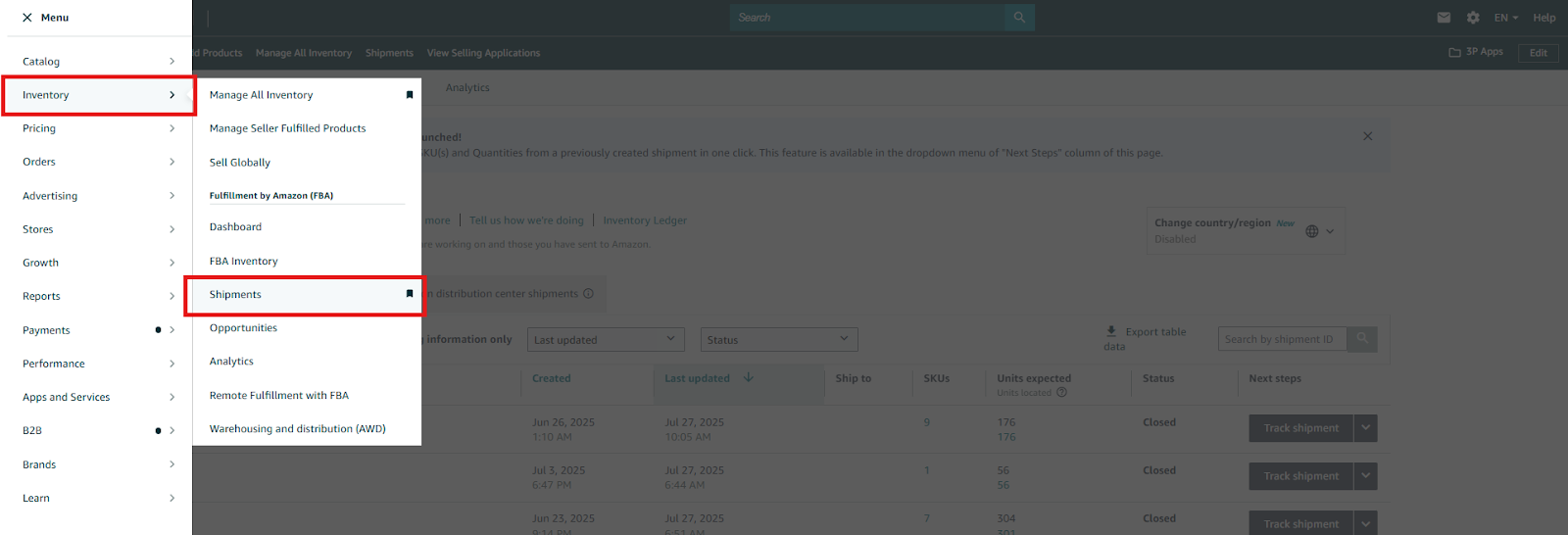
Step 2. Start your shipment
Go to Inventory → Shipments in Seller Central to begin creating your FBA shipment.
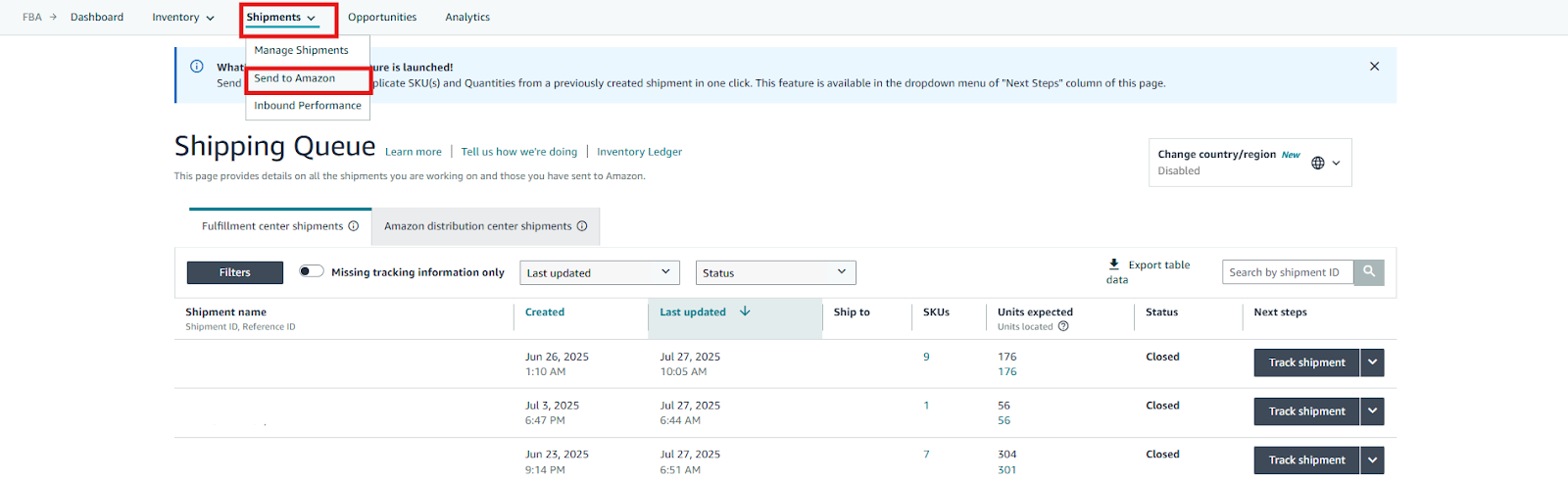
Step 3. Launch the Send to Amazon workflow
From the top menu, select Shipments → Send to Amazon to open your Shipping Queue.
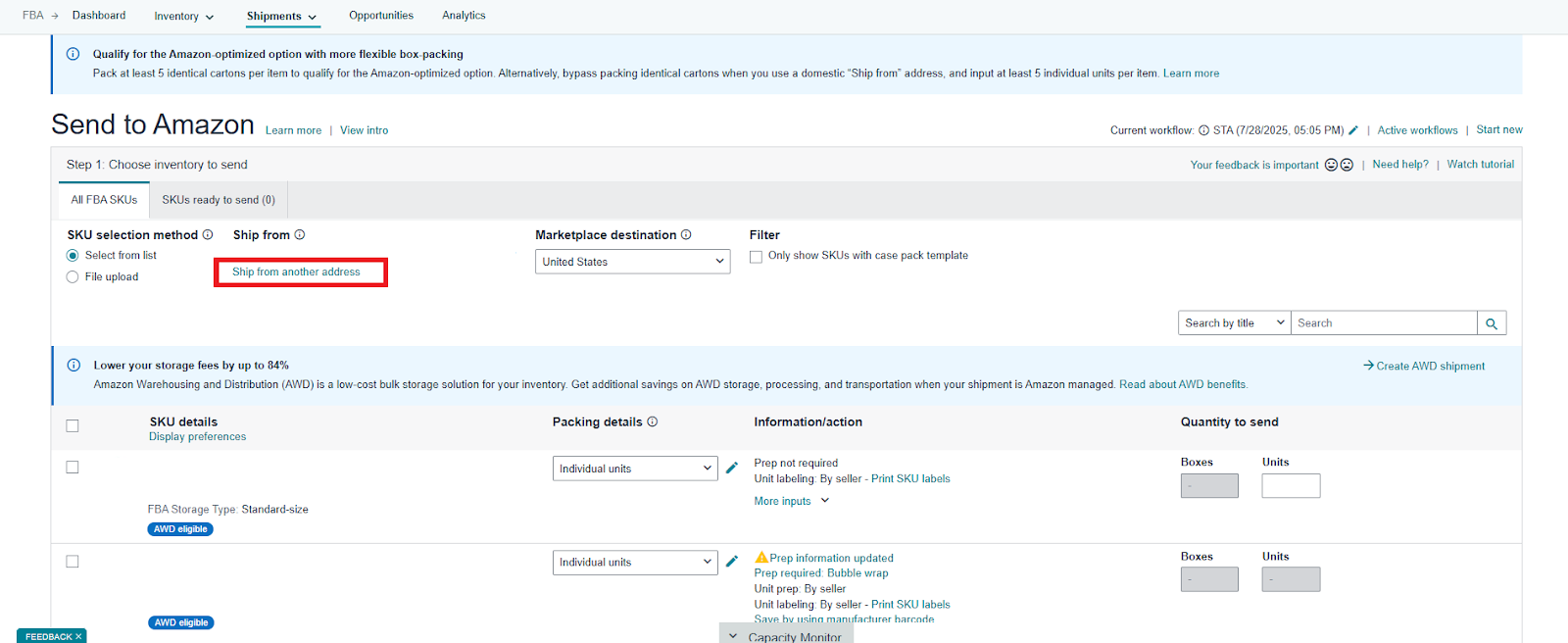
Step 4. Set your ship-from address
Confirm your warehouse or prep center address, or add a new one if needed.
Step 5. Select inventory to send
- Choose SKUs from your inventory list or upload them in bulk using a flat file.
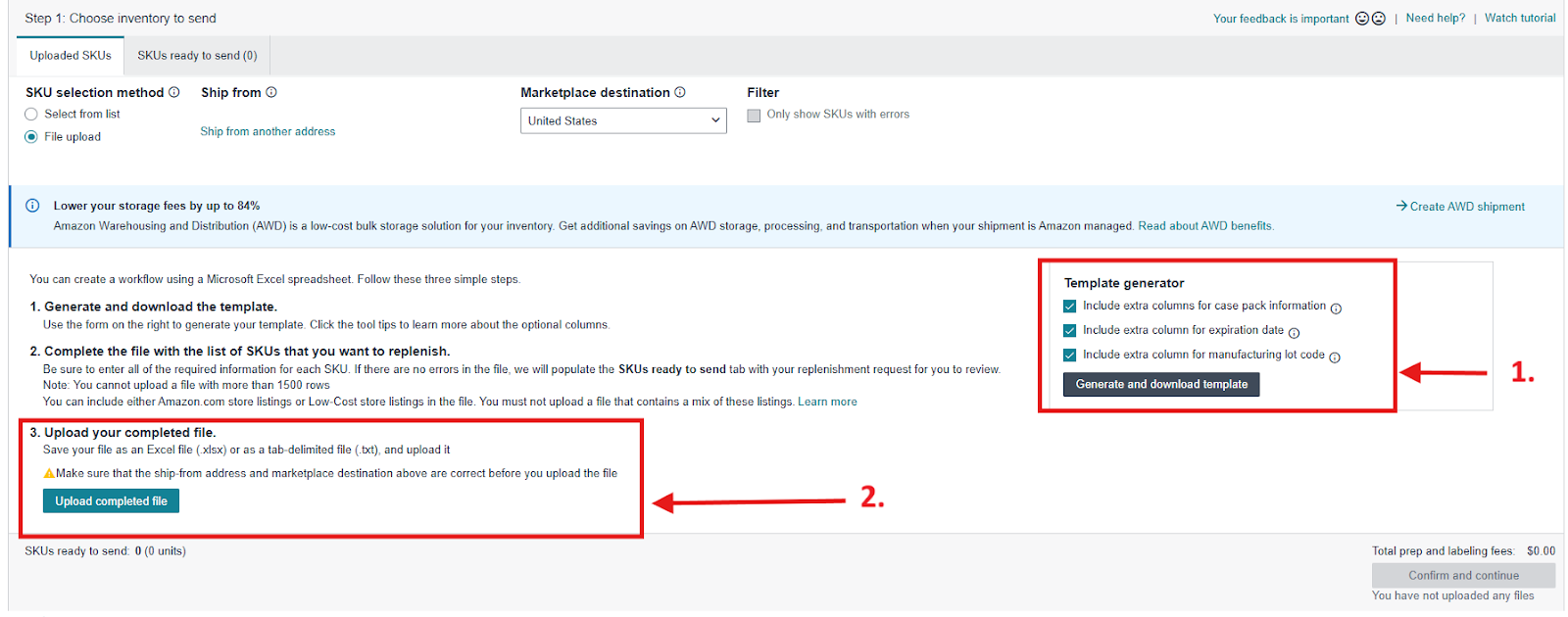
- For small shipments: search by SKU, ASIN, or FNSKU.
- For large shipments: generate and fill in a flat file with SKUs and quantities, then upload it.
Step 6. Specify packaging details
Select whether all units are in one box or multiple boxes, then enter box dimensions, weight, and quantities. This helps Amazon generate accurate labels.
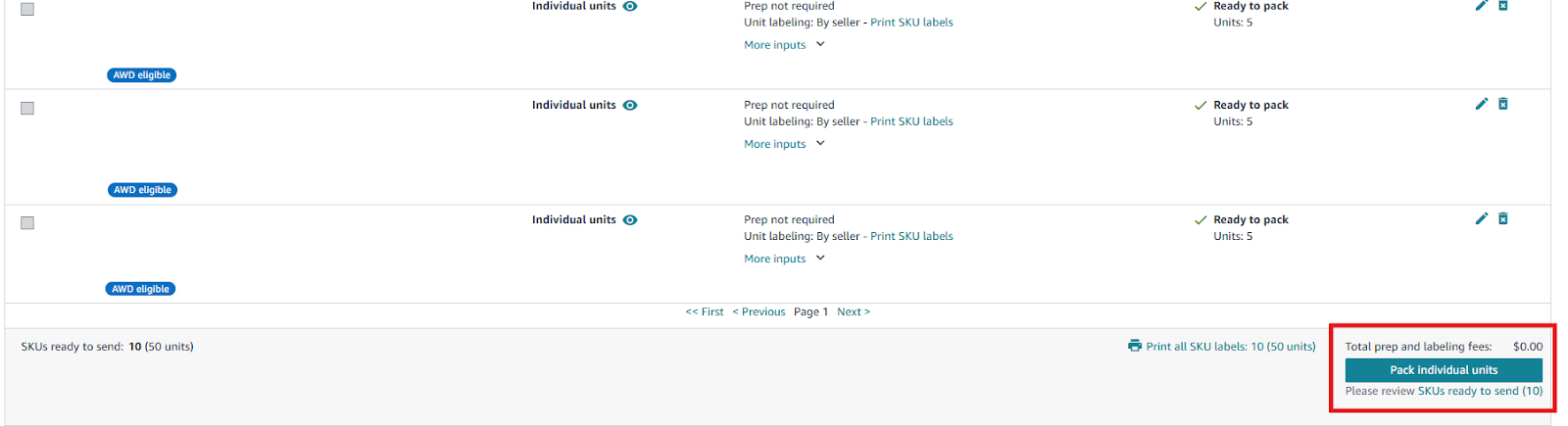
Step 7. Choose ship date and delivery method
-
Pick your shipment date, then choose your delivery mode:
-
SPD (Small Parcel Delivery): individual boxes.
-
LTL/FTL (Less than/Full Truckload): palletized shipments.
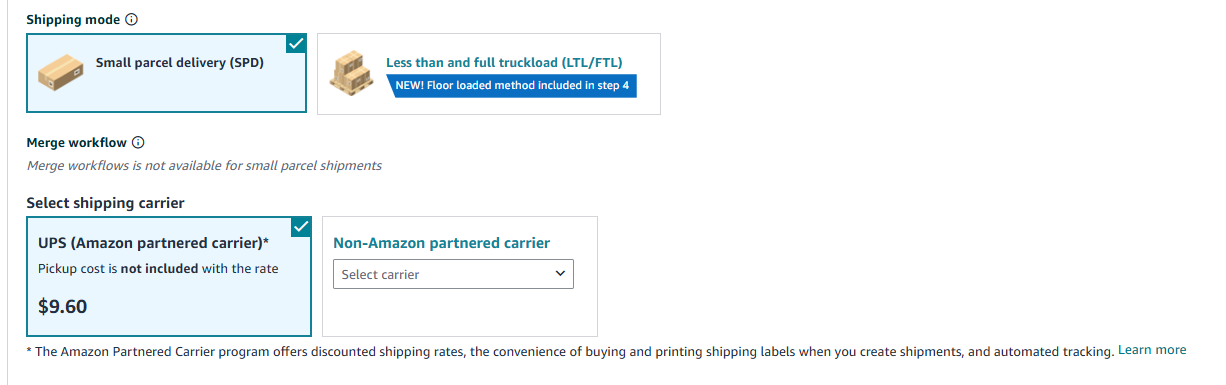
- You can use Amazon’s partnered carrier (UPS) for discounted rates or your own logistics provider.
Step 8. Set shipment split preference
Choose between:
- Minimal shipment split (Amazon sends all inventory to one center for a small fee).
- Amazon-optimized split (Amazon distributes inventory across centers for free, ideal for large shipments).
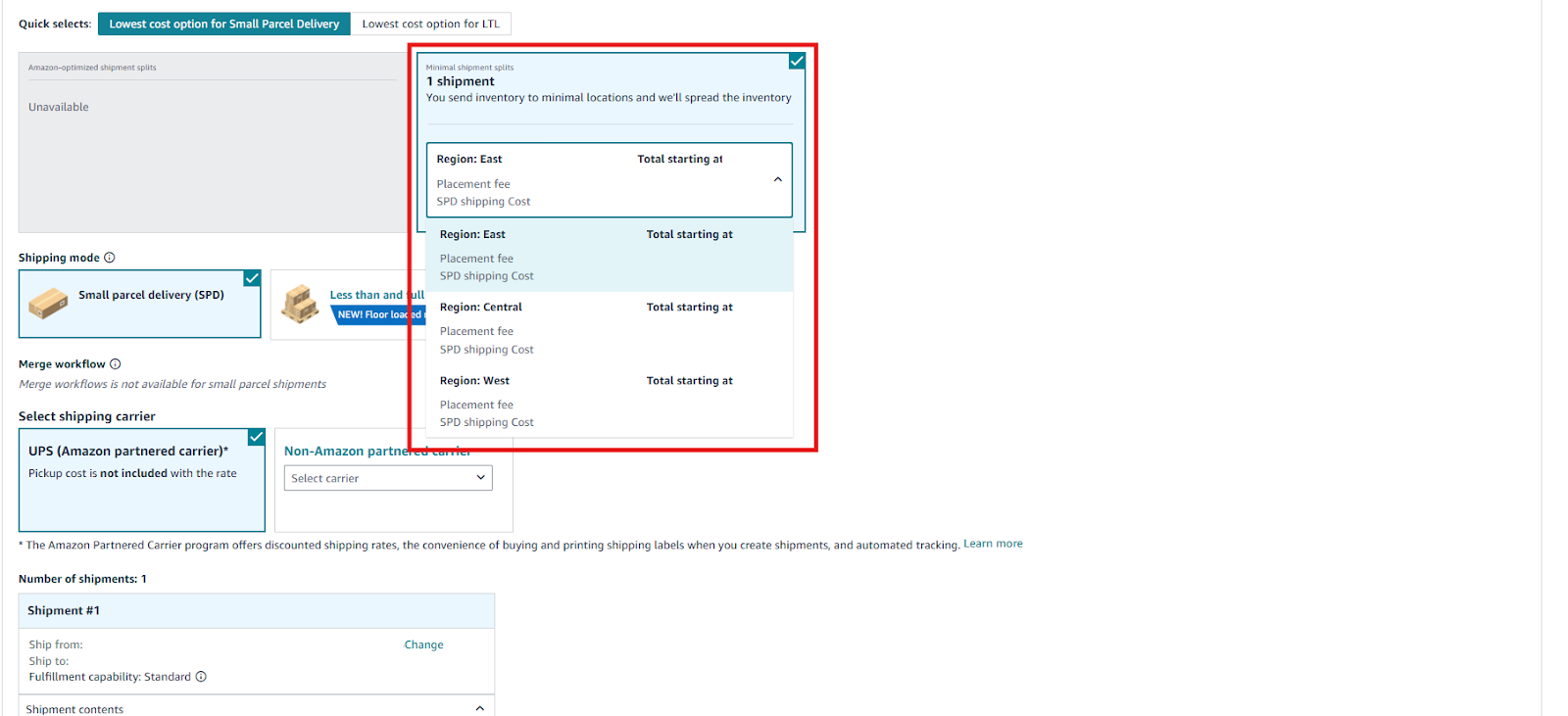
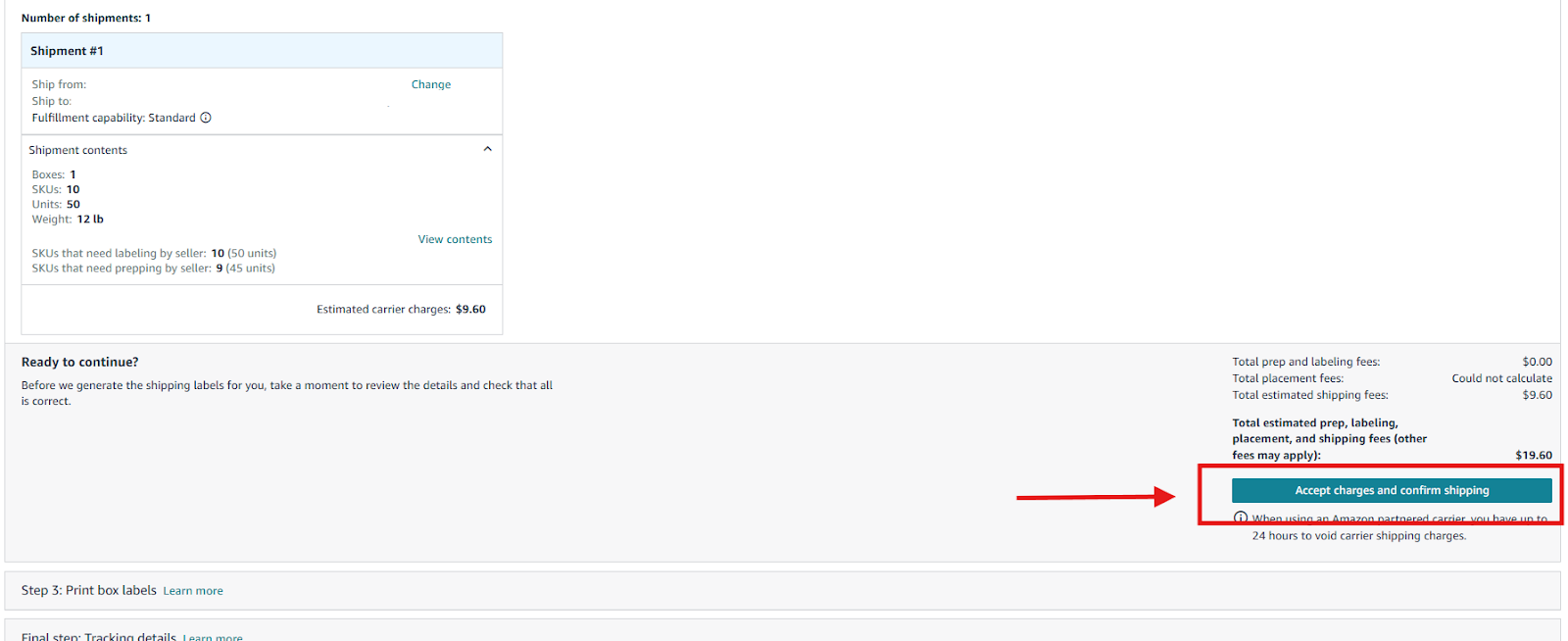
Step 9. Confirm charges and book your shipment
Review costs, click Accept charges, and confirm shipping. This locks in carrier rates.
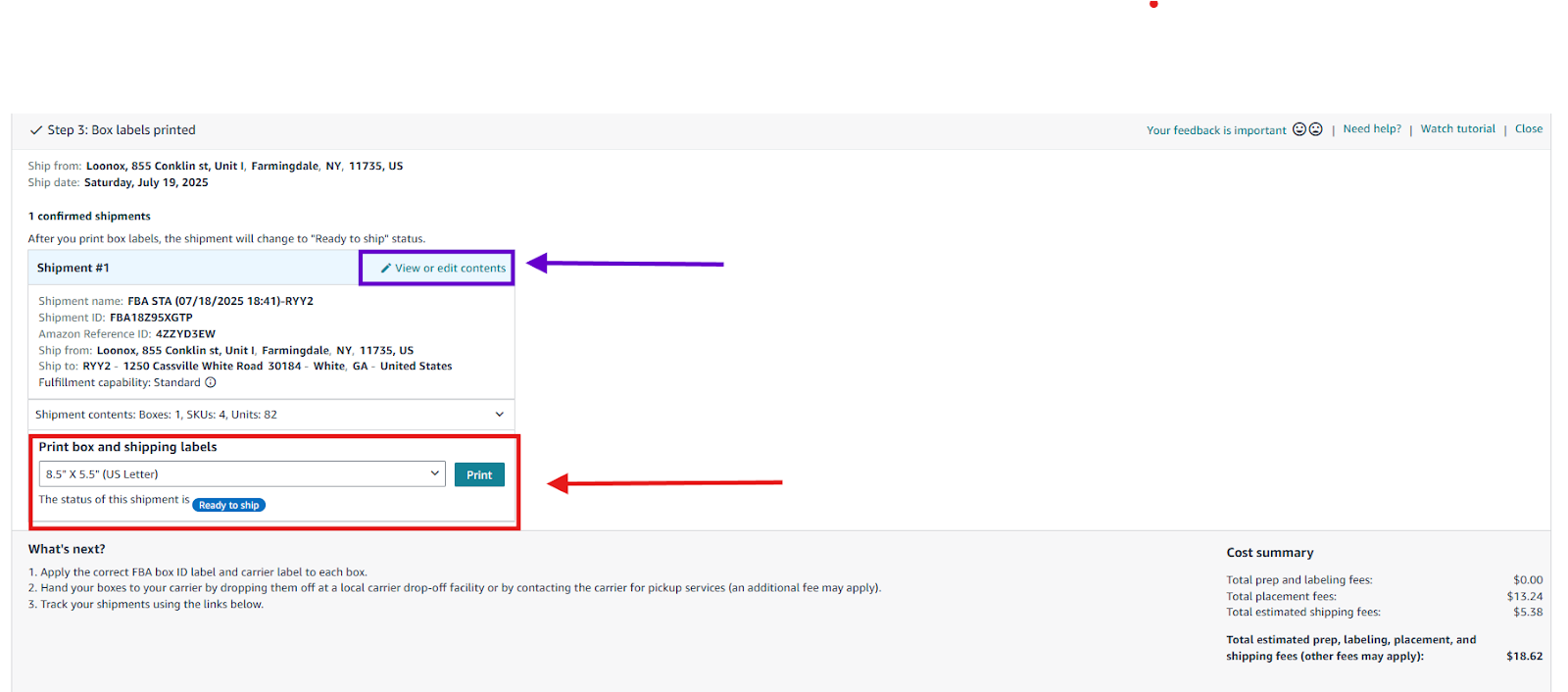
Step 10. Print and apply labels
Download and print FBA box ID and carrier labels. Attach both to every carton. Your shipment will now show as Ready to ship.
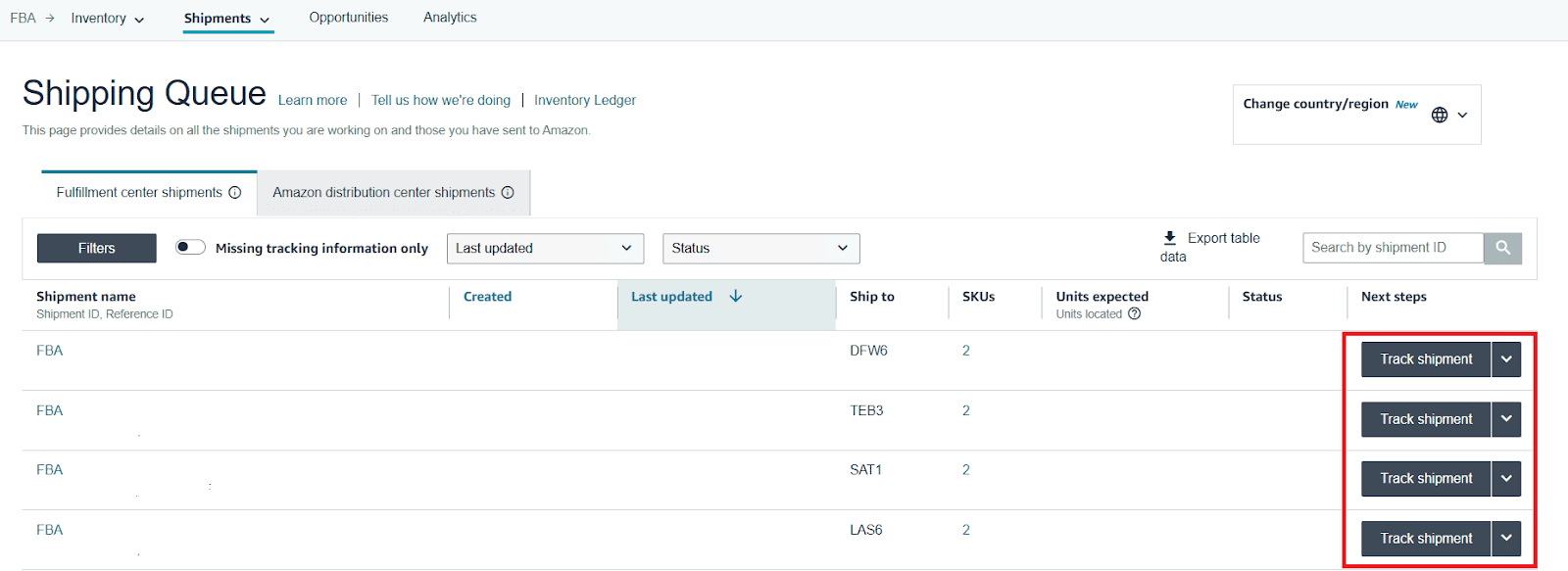
Step 11. Track shipment and wait for check-in
Monitor your shipment in the Shipping Queue. You’ll see updates for creation, delivery, check-in, and final inventory received.
Amazon typically processes inventory within 1–6 weeks before it goes live for sale.
How to send your products to Amazon FBM
With Fulfillment by Merchant (FBM), you – not Amazon – handle product storage, packaging, shipping, and customer service. FBM gives wholesale sellers full control over operations and can be more cost-effective for oversized, fragile, or low-margin items that don’t fit Amazon’s FBA fee structure. You can fulfill orders from your own warehouse or through a trusted third-party logistics provider (3PL).
FBM sellers are responsible for maintaining Amazon’s strict delivery performance metrics: on-time shipping, accurate tracking, and responsive customer support. Getting these right helps you stay competitive and avoid account health issues.
Here’s how to manage and ship your FBM orders efficiently.
Step-by-step: How to fulfill Amazon FBM orders
Step 1. Prepare and store inventory
Keep your stock organized and ready to ship from your warehouse or 3PL. Verify product condition and labeling accuracy before listing – Amazon expects items to match the listing details exactly.
Step 2. Set your shipping settings
- In Seller Central, go to Settings → Shipping Settings.
- Define your shipping regions (e.g., U.S. mainland, Alaska, Hawaii).
- Choose delivery speeds (Standard, Expedited, or Two-Day).
- Set shipping rates or offer free shipping if your margins allow.
- You can also enable Buy Shipping Services to purchase discounted carrier labels directly from Amazon.
Step 3. Monitor and manage orders
When a customer purchases your product, the order appears in Orders → Manage Orders.
Review new orders daily and confirm shipment deadlines – Amazon typically requires sellers to confirm shipping within 24 hours of the promised handling time.
Step 4. Pack and label products
Use sturdy packaging that meets Amazon’s requirements. Include any product inserts or barcodes that match your listing. Double-check SKU and ASIN accuracy to prevent returns.
Step 5. Purchase and print shipping labels
- You can buy shipping labels directly through Amazon using Buy Shipping, which automatically updates tracking numbers.
- Alternatively, use your own carrier – just make sure to add the tracking ID to each order manually to ensure Amazon can verify delivery.
Step 6. Confirm shipment in Seller Central
After dispatching, mark the order as Shipped. Amazon automatically sends tracking and confirmation emails to the buyer once this is done.
Step 7. Manage returns and customer inquiries
As an FBM seller, you handle all returns, refunds, and customer communication.
Respond to messages within 24 hours, process returns promptly, and maintain high customer satisfaction to protect your metrics.
Step 8. Track performance metrics
- Regularly check your Account Health Dashboard for:
- Late shipment rate (keep below 4%)
- Order defect rate (under 1%)
- Valid tracking rate (above 95%)
Strong performance ensures your listings stay active and eligible for the Buy Box.
How to Reprice and Stay Competitive on Amazon
Pricing is one of the most important levers for success in wholesale. Because you’re selling the same branded products as other resellers, your ability to win the Buy Box – the main “Add to Cart” button on Amazon – often depends on how effectively you manage pricing. Repricing isn’t about racing to the bottom; it’s about staying competitive, protecting margins, and reacting to market changes automatically.
There are two main approaches to repricing: manual repricing and automated repricing. Manual repricing means adjusting prices yourself through Seller Central. It gives full control but quickly becomes impractical as your catalog grows. Automated repricing uses software that monitors competitors’ prices, Buy Box changes, and costs, then adjusts your offer within your rules and profit targets. This method saves time and helps maintain competitiveness 24/7.
Let’s look at how to manage repricing effectively for your wholesale business.
Step-by-step: How to reprice on Amazon
Step 1. Set your pricing strategy
Decide how you want to compete – by price, speed, or offer quality. For wholesale sellers, focus on maintaining healthy profit margins while staying within the Buy Box range. Consider costs like FBA fees, shipping, and taxes when setting your minimum price.
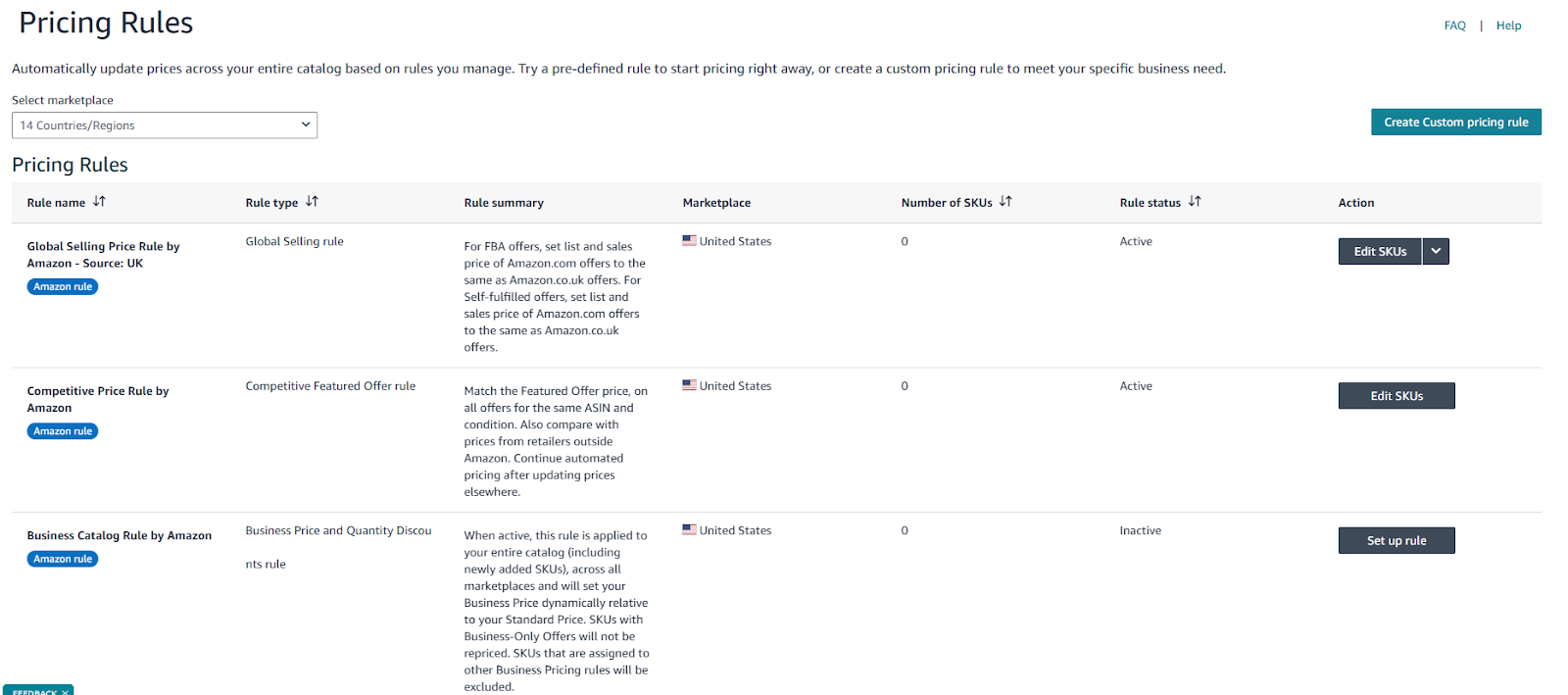
Step 2. Use Amazon’s Automate Pricing tool
Amazon offers a free Automate Pricing feature in Seller Central that automatically adjusts prices based on predefined rules.
-
You can:
-
Match or beat the current Buy Box price.
-
Stay below a specific competitor’s price.
-
Maintain your price within a custom percentage range.
-
Set minimum and maximum limits to protect your margins.
-
To activate it:
-
Go to Pricing → Automate Pricing → Create a Rule, set conditions, and assign the rule to selected SKUs.
Step 3. Implement a third-party repricer
For larger catalogs or advanced strategies, use an external repricing tool. These tools analyze real-time market data, competitor behavior, and Buy Box patterns, allowing for more flexible, dynamic pricing rules.
-
Good repricers for wholesale sellers include:
They allow you to factor in ROI, FBA vs. FBM competition, or specific competitor exclusions – offering finer control than Amazon’s built-in tool.
Step 4. Monitor performance and adjust rules
-
Regularly review your key pricing metrics:
-
Buy Box percentage (how often you hold it)
-
Average profit margin
-
Price change frequency
-
Sales velocity after repricing
-
Adjust your rules when market dynamics shift – for example, when new competitors enter or when FBA fees change.
FAQ
Is selling wholesale on Amazon worth it?
Yes, selling wholesale on Amazon can be highly profitable because you’re working with established brands and proven demand. It offers scalability and stability, though success depends on smart sourcing, strong supplier relationships, and efficient operations.
Can I buy in bulk and sell on Amazon?
Yes, that’s exactly how wholesale selling works – you purchase branded products in bulk from authorized distributors and list them on Amazon. Buying in volume helps you secure better pricing and higher profit margins.
Can I make $1,000 a month selling on Amazon?
Absolutely, many sellers reach $1,000 a month or more once they build consistent product sourcing and sales processes. The key is finding profitable products, pricing strategically, and maintaining good account health.
Can you really make money buying and reselling on Amazon?
Yes, reselling on Amazon can generate real profit when you focus on demand-driven products and efficient fulfillment. Many wholesale and arbitrage sellers build sustainable income streams this way.
Can I buy things on Amazon and resell them?
No, buying products directly from Amazon and reselling them is against their policies and often unprofitable. You should source from authorized wholesalers, distributors, or brands that permit resale.
Final Thoughts
Selling wholesale on Amazon is one of the most reliable and scalable ways to build a long-term eCommerce business. By sourcing from trusted distributors, automating your workflow, and managing pricing and fulfillment strategically, you can turn wholesale operations into a consistent, predictable income stream.
Success doesn’t happen overnight – it’s built on systems, relationships, and data. With the right foundation and tools like Seller Assistant, wholesale selling on Amazon becomes less about guesswork and more about sustainable, repeatable growth.
Seller Assistant automates and connects every stage of your Amazon wholesale and arbitrage workflow. It brings together in one platform: workflow management tools – Purchase Orders Module, Supplier Database, Warehouse Database, bulk research & sourcing tools – Price List Analyzer, Bulk Restriction Checker, Sourcing AI, Brand Analyzer, Seller Spy, Chrome extensions – Seller Assistant Browser Extension, IP-Alert Extension, and built-in VPN by Seller Assistant, and integrations & team access features – seamless API connectivity, integrations with Zapier, Airtable, and Make, and Virtual Assistant Accounts.