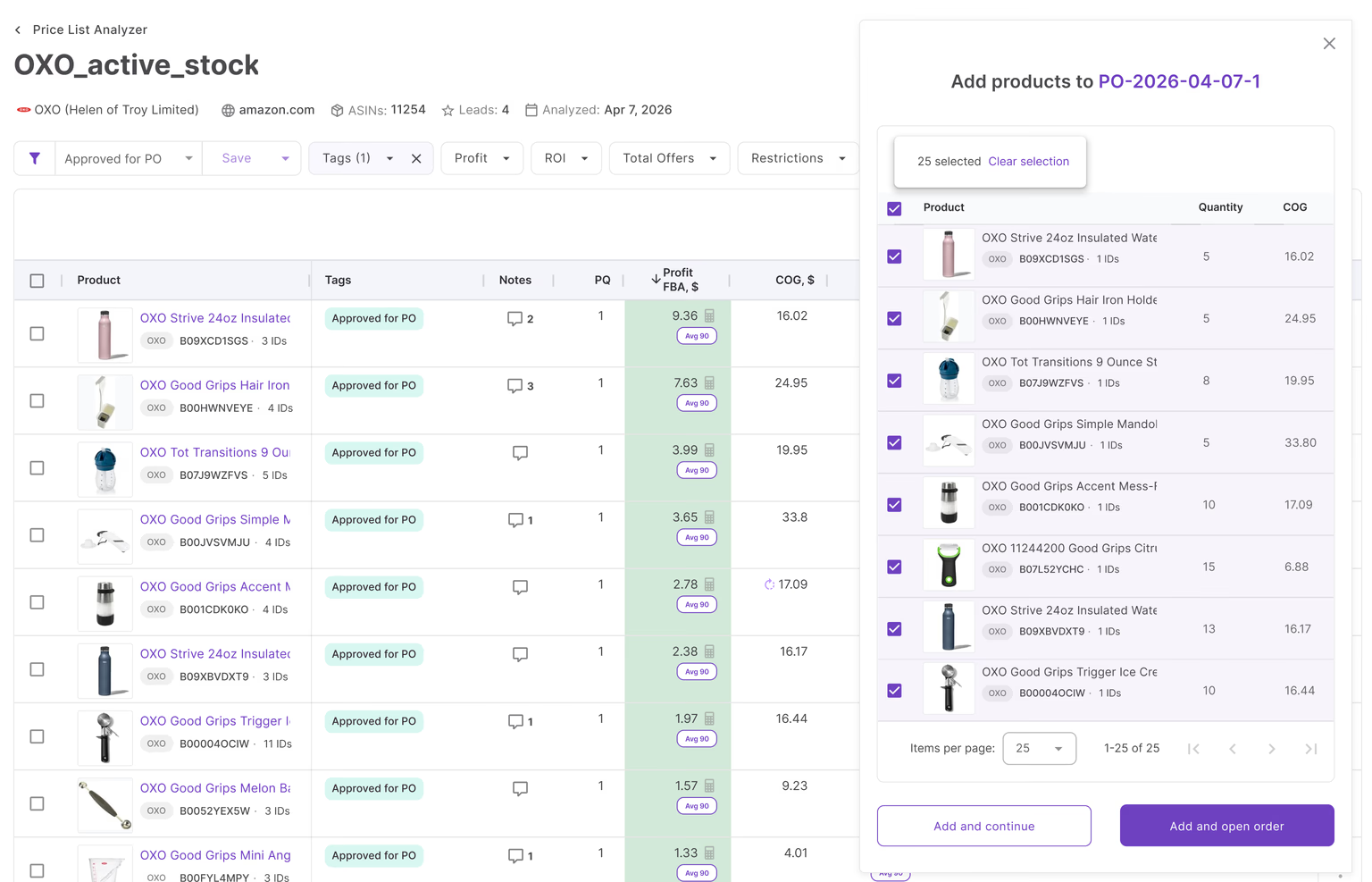


Running a wholesale business on Amazon means managing constant data – from suppliers and price lists to purchase orders and prep centers. Without a reliable system, even experienced sellers can lose time, make costly mistakes, or miss profitable deals.
That’s where Amazon seller tools make the difference. Instead of juggling spreadsheets and browser tabs, modern sellers rely on workflow platforms to streamline sourcing, analyze deals at scale, and coordinate team efforts – all in one place.
This post breaks down how Seller Assistant automates the entire wholesale workflow. With it, you can move from product idea to purchase orders and always stay in control, no matter how fast you scale.
Note. Seller Assistant is an end-to-end Amazon workflow management platform that integrates 10+ wholesale-focused solutions into one connected system. It combines workflow automation, bulk research, sourcing intelligence tools, and integrated Chrome extensions – giving you everything you need to streamline product sourcing, supplier management, and purchase order creation.

Seller Assistant is an end-to-end Amazon workflow management platform
The platform aggregates: workflow management tools:
- Purchase Orders Module, Supplier Database, Warehouse Database to organize, automate, and scale every step of your wholesale and arbitrage operations;
- Bulk research & sourcing tools – Price List Analyzer, Bulk Restriction Checker, Sourcing AI, Brand Analyzer, Seller Spy to evaluate supplier price lists, verify selling eligibility and restrictions, open new brands, and discover winning product ideas from competitors to expand your product catalog;
- Chrome extensions – Seller Assistant Browser Extension and IP-Alert Extension to deep-research products, check IP claims and compliance;
- Integrations & team access features – seamless API connectivity and integrations with Zapier, Airtable, and Make, plus Virtual Assistant Accounts for secure, scalable team collaboration.
With Seller Assistant, every step of your Amazon wholesale and arbitrage workflow is automated and connected.
Why Structured Workflows Are the Foundation of Scalable Wholesale
Operating a wholesale business on Amazon means managing a chain of interlinked actions – evaluating suppliers, sorting through pricing sheets, checking ASIN restrictions, tracking prep details, and building clean purchase orders. A small error in one step can ripple across your entire operation.
That’s where structured automation comes in. Amazon seller tools built for wholesale workflows keep everything connected – from your supplier outreach to knowing exactly where a unit is in transit. The following capabilities aren’t just helpful – they’re essential if you want to scale without burning out your team.
Target brands and suppliers using real performance data
Forget guesswork. Instead of random supplier searches, use Amazon seller tools to find brands and distributors with real demand, healthy margins, and manageable competition – based on live sales data, not assumptions.
Scan and score entire price lists in minutes
Checking ASINs one by one is too slow. With automation, you can bulk match products to Amazon listings, review 70+ metrics per SKU, and instantly highlight the deals worth pursuing – filtered by your exact criteria.
Centralize your sourcing and routing data
Your supplier, product, and prep center data shouldn’t live in separate spreadsheets. A connected system lets you store and reuse everything – from supplier terms to default warehouse routing – ensuring consistency across sourcing and ordering.
Create and repeat purchase orders effortlessly
Once you’ve identified products to buy, generate structured POs in one click. Past orders can be duplicated and edited, turning reorders into a 30-second task instead of starting over every time.
Keep your team on the same page
With multiple VAs or sourcing agents involved, things get messy fast. Workflow tools consolidate all supplier details, order data, and price lists in one shared system – so everyone works off the same source of truth.
Scale operations without losing control
More revenue brings more SKUs, suppliers, and logistics. A standardized workflow makes it possible to expand your catalog and supplier base while maintaining accuracy and avoiding process breakdowns.
Automate what slows you down
Tasks like ASIN matching, eligibility checking, and ROI calculations eat up hours. Amazon seller tools automate these processes, letting you analyze and vet thousands of products in a fraction of the time.
Reduce human error across the board
Manual systems break. One wrong ASIN match or overlooked restriction can wipe out your profit. Automation builds consistency into every step – so listings, shipments, and costs are accurate from day one.
Integrate with your existing tools
Whether you use Airtable, Zapier, Make, or custom systems, the best seller workflow platforms connect seamlessly. Your sourcing, reporting, and purchasing data flows directly into the tools your team already uses.
Seller Assistant: Your Connected System for Wholesale Growth
Seller Assistant is more than just a product research tool – it’s a fully integrated wholesale workflow platform built for Amazon sellers. Whether you’re managing online arbitrage, wholesale, dropshipping, or running an agency, it streamlines the full path from product discovery to ready-to-ship FBA orders. No spreadsheets. No tab chaos. Just one connected system.
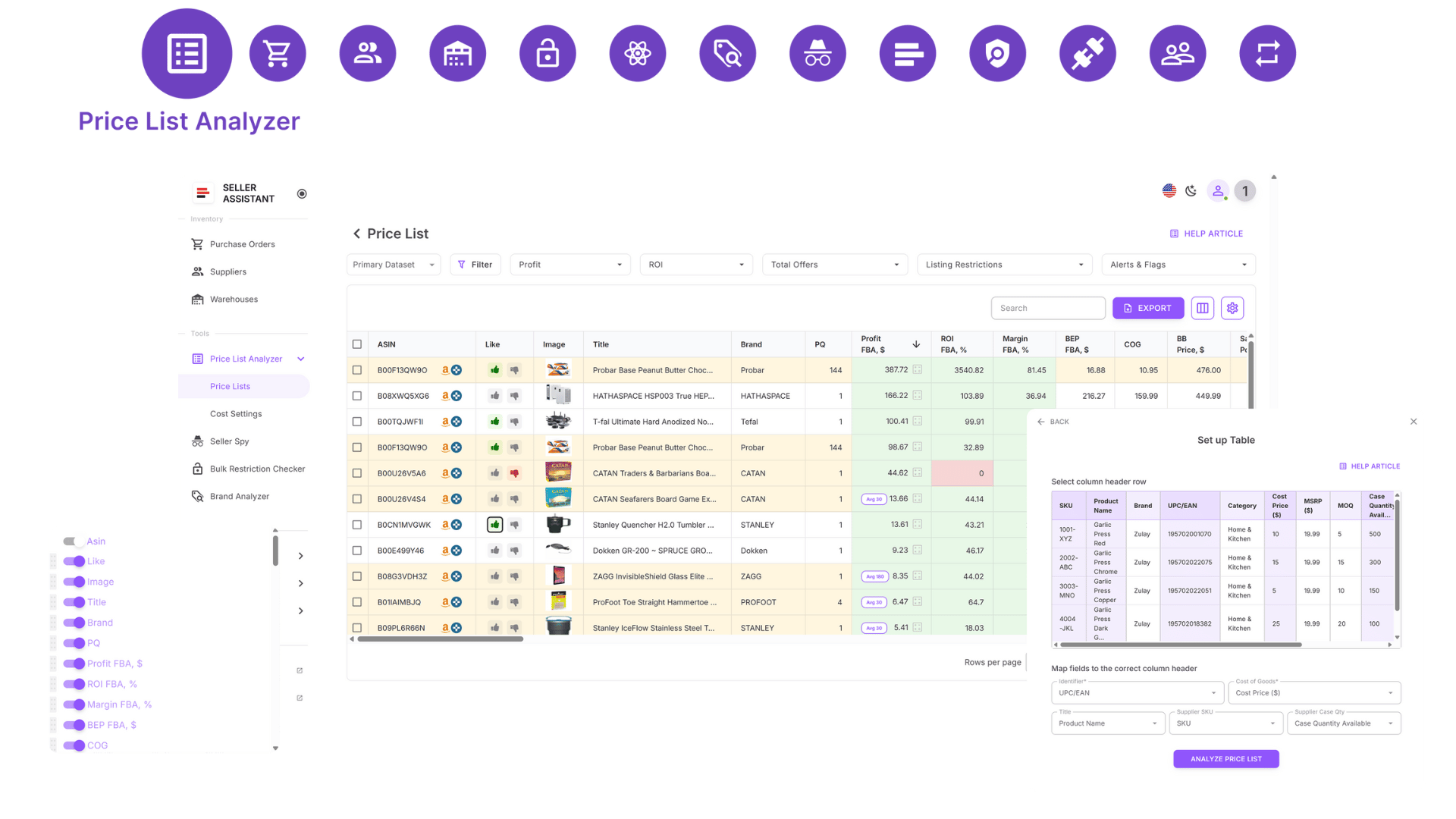
Price List Analyzer
Workflow automation tools
Take control of your core operations with smart databases and automation modules that sync across your sourcing and purchasing pipeline.
- Supplier Database – Save and manage supplier profiles and reuse their data across sourcing and order processes.
- Warehouse Database – Link suppliers to default prep centers or warehouses to automate order routing.
- Product Database (coming soon) – Track ASINs, compare cost offers, manage reorders, and centralize product data.
- Purchase Orders Module – Build, monitor, and export detailed purchase orders that include supplier links, tax info, and shipping costs.
Research and sourcing toolkit
Discover profitable products faster and more reliably with purpose-built tools for bulk analysis, brand research, and competitive insights.
- Price List Analyzer – Upload and match large supplier files to ASINs, get 70+ deal metrics, filter by ROI, restrictions, and profitability to choose the best products.
- Brand Analyzer – Review key brand metrics like catalog size, competition level, and sales potential and choose the best ones to sell.
- Seller Spy – Monitor shifts in competitor storefronts, including added or removed products and pricing trends.
- Bulk Restriction Checker – Run large-scale eligibility checks to avoid sourcing restricted ASINs.
- Sourcing AI – Instantly find verified U.S. suppliers based on Amazon listings or product identifiers like UPCs.
Built-in browser extensions
Get deep insights on any product or storefront while you browse Amazon or supplier sites – without switching tools.
- Seller Assistant Extension – Run in-browser research for ASINs, covering performance, profitability, deal risks, and sales history. Works on Amazon product and search pages, supplier pages, and competitor storefronts.
- IP-Alert Extension – Flag ASINs that carry intellectual property risks or violations.
Advanced product intelligence features
Stay ahead of your competition with built-in research layers that give you deeper data and faster decision-making power.
- Storefront Widget – Analyze any seller’s storefront data directly on Amazon pages.
- Side Panel View – Access sourcing tools in split-screen format for side-by-side analysis.
- Quick View – Preview key product data from search pages without opening each listing.
- FBM&FBA Profit Calculator – Compare ROI, margin, and fees across fulfillment models.
- Stock Checker – Monitor inventory levels of competing sellers.
- Variation Viewer – Identify top-selling variations within a product listing.
- Sales Estimator – Estimate monthly sales based on Best Sellers Rank (BSR).
- Offers – Analyze seller competition and Buy Box dynamics on any ASIN.
- Restriction Checker – Confirm your selling eligibility for specific ASINs directly from the listing.
Automated Amazon Wholesale Workflow Step-By-Step
The Seller Assistant workflow is built for one thing: automating every repeatable task in wholesale. While manual activities like negotiating with suppliers still require your input, everything else – from scanning price lists to generating purchase orders – is fully systematized.
Every step is connected. From the first supplier search to the final PO, your data moves seamlessly between tools, ensuring accuracy, speed, and visibility at every stage.
Step 1. Define what to sell
Start with informed decisions – not assumptions. Use real Amazon sales data to pick categories, brands, and products that fit your strategy.
Tools
Storefront Widget, Seller Spy, Brand Analyzer
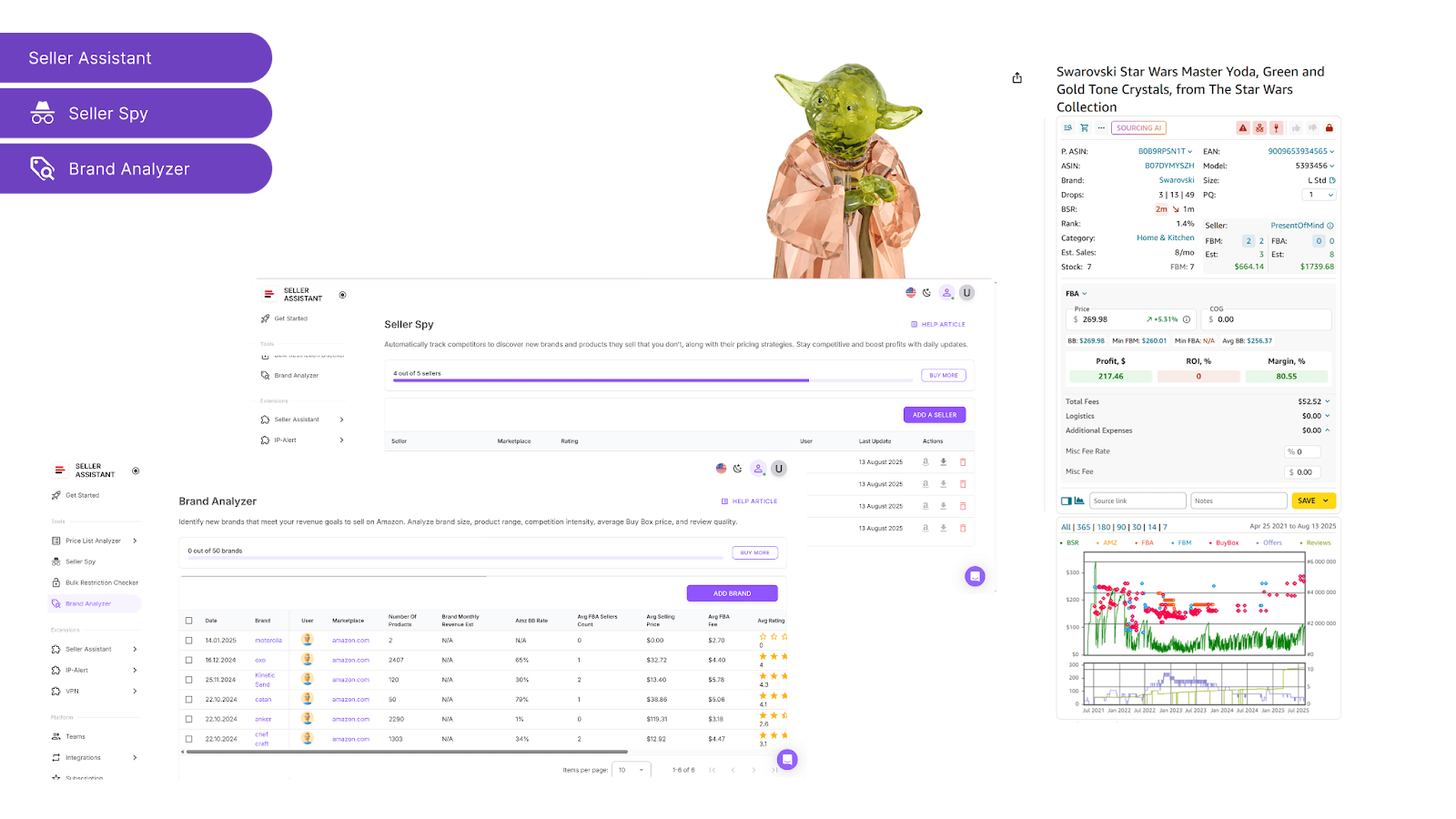
Seller Assistant Tools
Use them to
- Storefront Widget – Analyze what other sellers are listing: top brands, categories, total ASIN count, and ratings.
- Seller Spy – Track what competitors add or remove from their catalog and uncover potential brand leads.
- Brand Analyzer – Evaluate brand size, revenue potential, Buy Box pricing, competition from Amazon, and product review quality to shortlist high-potential brands.
Step 2. Check if you can sell it
Before you invest effort in a product, confirm your eligibility. Avoid gated or restricted ASINs from the start.
Tool
Use it to
- Run instant eligibility checks in bulk
- Identify open, unsellable on your account, and restricted ASINs
- Filter out products that your account can’t sell
Step 3. Find real suppliers
Stop wasting time with random Google searches. Go straight to vetted, U.S.-based wholesale sources.
Tool
Use it to
- Search for verified brand suppliers and distributors based on brand name
- Discover up to 10 U.S.-based brand suppliers
- Find offers for specific items, including pricing, links, and MOQs
- Filter results by maximum cost of goods and match confidence
Step 4. Build your supplier database
Centralize all supplier information in one place. No more tracking contacts in scattered spreadsheets.
Tool
Supplier Database
Use it to
- Store supplier details like names, URLs, team assignments, and statuses
- Assign statuses like New, Contacted, Negotiation, Approved, or Rejected
- Connect suppliers to prep centers or warehouses
Step 5. Set up warehouse routing
Ensure every product goes to the right destination automatically – no manual routing required.
Tool
Warehouses Database
Use it to
- Store all prep center and warehouse details
- Link suppliers to default prep centers or warehouses
Step 6. Organize your product catalog (Coming soon)
Track every ASIN you’re researching, selling, or planning to reorder – all in one shared workspace.
Tools
Product Database, Seller Assistant Extension, Price List Analyzer
Use them to
- Link ASINs to suppliers, COGs, and tags
- Filter by performance, update records, and push products into re-analysis or PO generation
- Centralize product history across tools
Step 7. Analyze price lists at scale
Turn supplier spreadsheets into profitable sourcing lists – fast and accurately.
Tools
Price List Analyzer, Seller Assistant Extension
Use them to
- Price List Analyzer
- Match SKUs to Amazon listings
- View 70+ data points (profit, ROI, rank, fees, restrictions, alerts)
- Use saved filters to shortlist products instantly
- Like/dislike deals, export, and create purchase-ready shortlists
- Seller Assistant Extension
- Validate product performance and demand
- Check IP risk, Buy Box activity, variations, and competition
- View in-depth metrics directly on Amazon, supplier pages, and storefronts
- Confirm if deals are truly worth sourcing
Step 8. Turn shortlists into purchase orders
No more manual entry or messy sheets. Generate clean, structured POs from filtered product lists.
Tool
Purchase Orders Module
Use it to
- Auto-create POs from your filtered shortlist or manually
- Pull in supplier and warehouse data instantly
- Add or edit quantities, COGs, and taxes
- Export in XLSX or PDF for supplier use
- Track PO status (draft, sent, completed)
Step 9. Scale with team and automation
As your business grows, structure and delegation become critical. Use tools that scale with you.
Tools
Virtual Assistant Account, API connectivity
Use them to
- Give VAs tool access (with IP protection) to check restrictions and research
- Automate updates between Seller Assistant and Airtable, Google Sheets, etc.
- Run automated tasks (e.g. filter products by ROI, push deals to PO list) using integrations
- Keep your sourcing workflow centralized while offloading repetitive work
More automation features: Coming soon
Stay tuned for upcoming workflow tools designed to further streamline operations:
- Smart Product Lister – List products to Amazon directly from your workflow
- FBA Shipments – Track and manage shipping, prep, and delivery in real time
- Inventory & Restocks – Forecast demand, set alerts, fix ASIN-UPC links, and manage MSKUs.
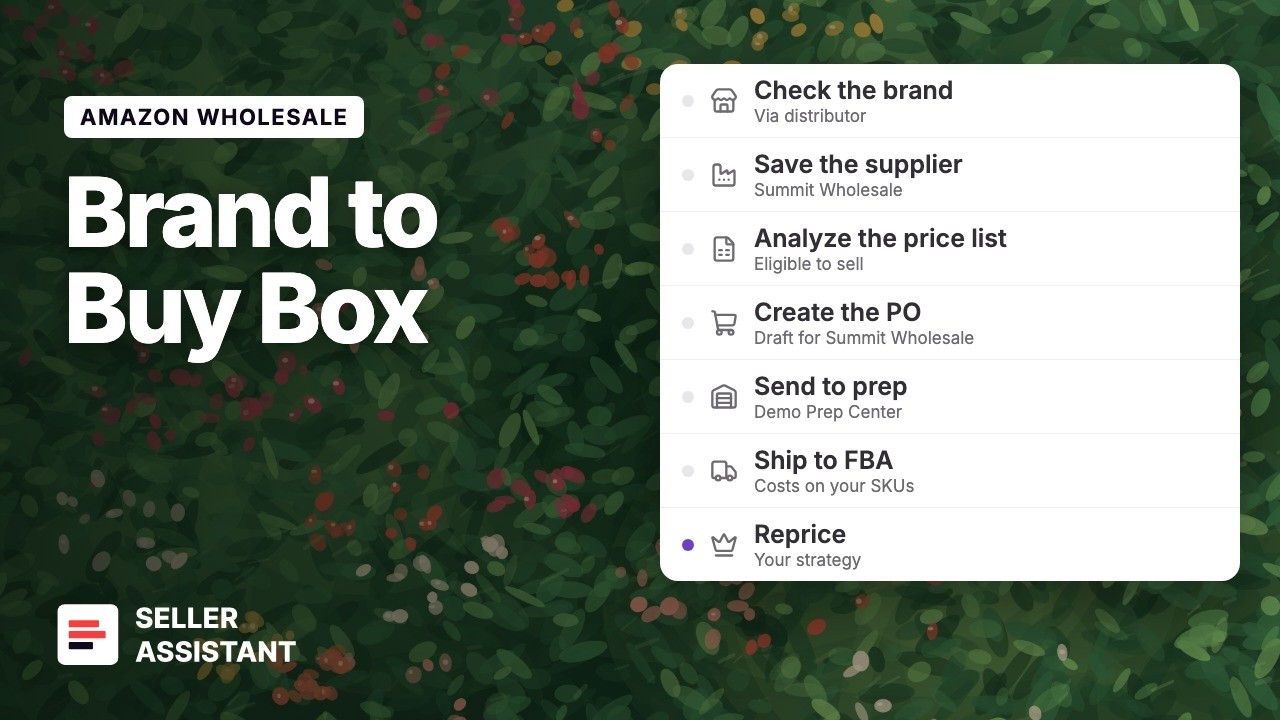
How to Run Amazon Wholesale From Brand to Buy Box (Video)
Here is the whole Amazon wholesale workflow in one video, from the brand check to repricing above your cost, with suppliers, the price list, the purchase order, the prep center and FBA costs.
Run your next wholesale order in one tool.
Inside the System: How Amazon Wholesale Automation Works
Here’s a step-by-step view of how Seller Assistant automates the key parts of your wholesale process – from first product idea to final purchase order.
For each phase, we’ll show what’s being automated, which Amazon seller tools power it, and how to apply them effectively. You’ll see how everything connects – from scanning storefronts to sending POs – within a structured, friction-free system.
Step 1. Choose the right products and brands
Objective
Your Amazon wholesale journey starts with strategy: selecting the right categories and brands to pursue. Unlike private label sellers who build from scratch, wholesale sellers rely on existing listings – and need historical sales data to guide decisions.
The best approach? Study what top sellers already carry, then analyze those brands for size, performance, and profitability.
Tools used
What the tools do
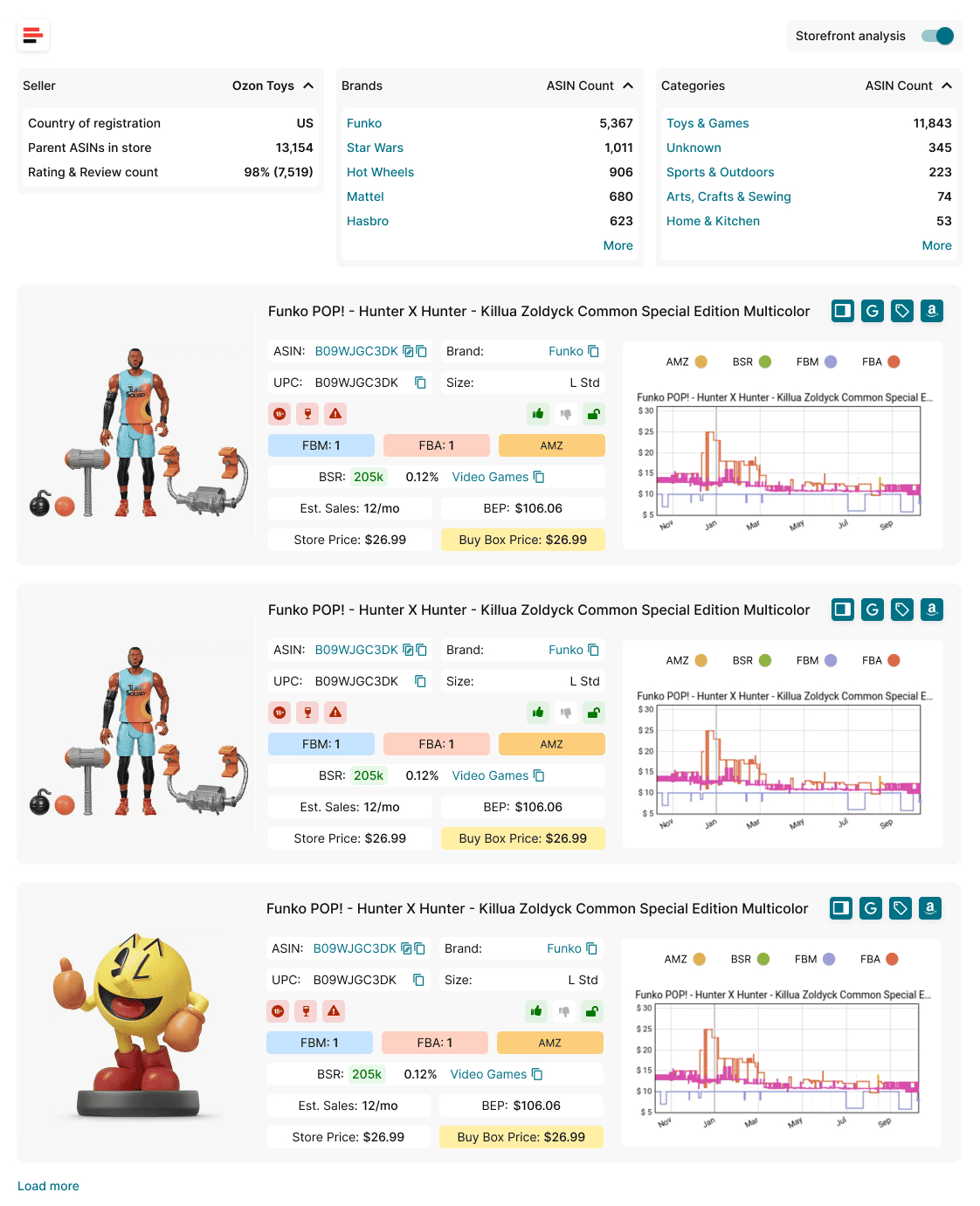
Storefront Widget
- Integrates directly into Amazon storefronts
- Instantly shows seller profiles: total ASINs, category and brand breakdown, ratings, and origin
- Displays interactive product cards with key data: BSR, estimated sales, pricing comparisons, and alerts (e.g., IP complaints, restrictions)
- Lets you filter storefronts by brand or category to uncover valuable segments
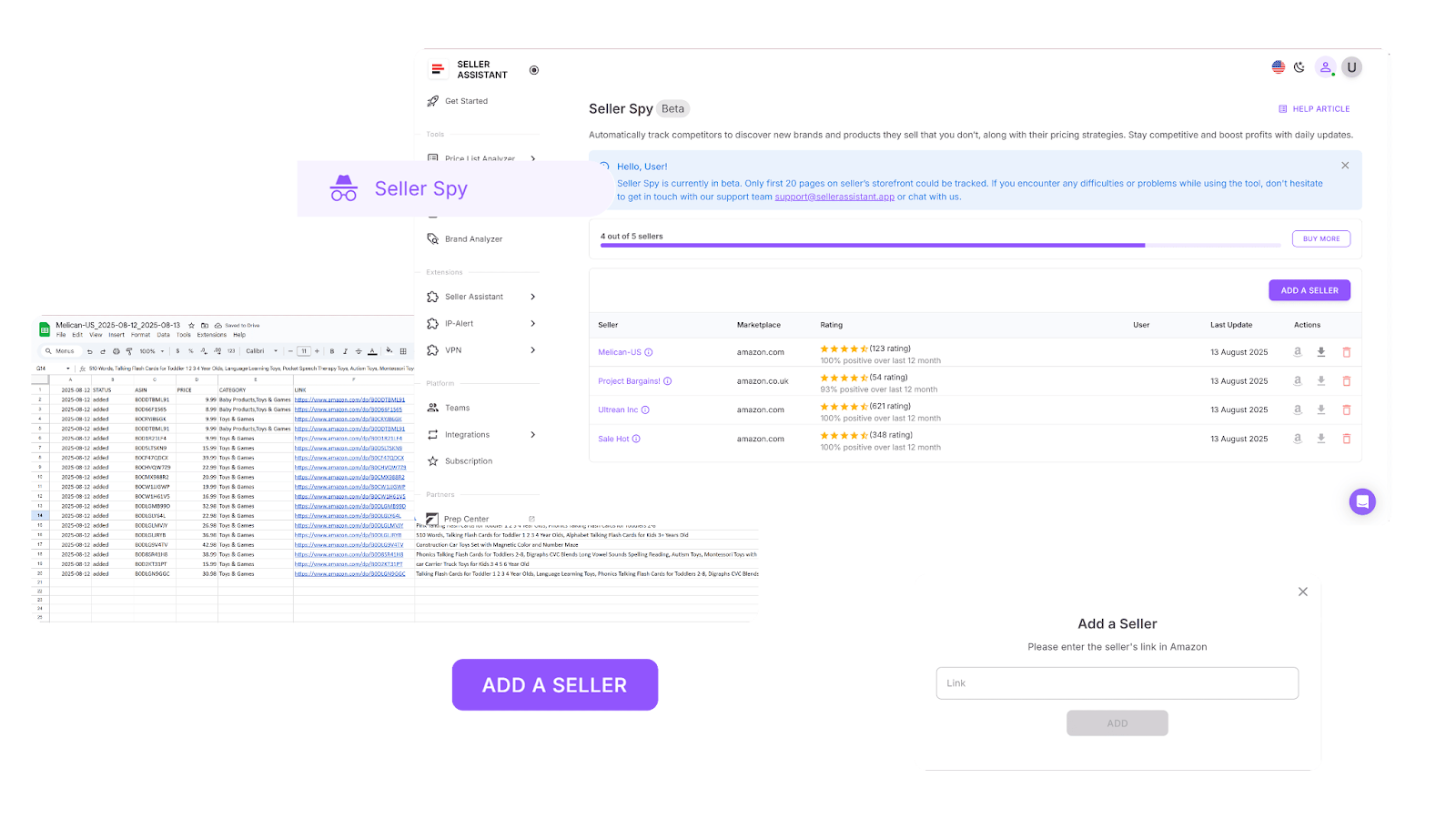
Seller Spy
- Monitors competitor storefronts over time
- Tracks new and removed listings with live ASIN links and prices
- Helps you spot trends – what’s gaining traction and what’s falling off
- Highlights catalog gaps compared to your own
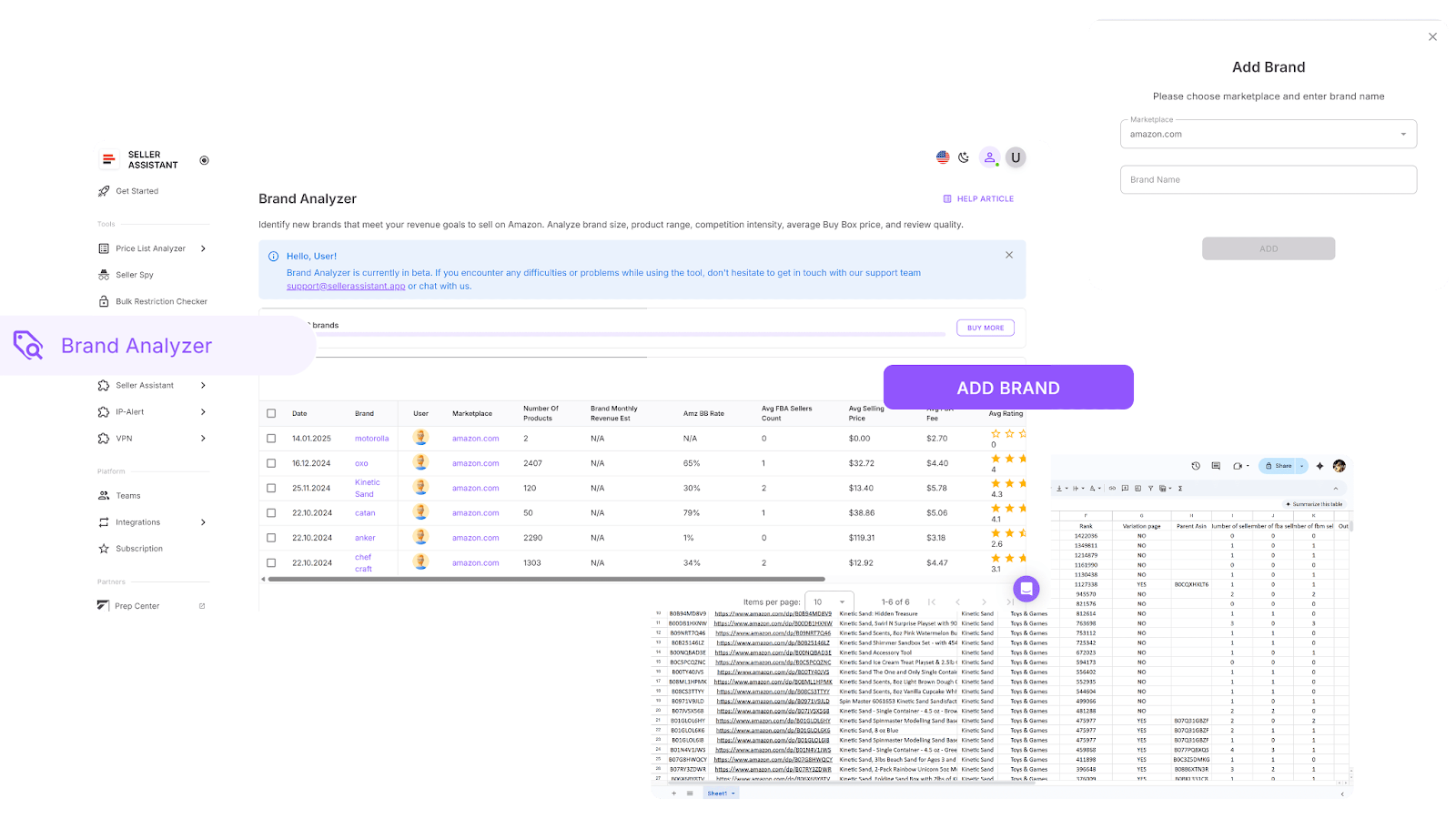
Brand Analyzer
- Determines if a brand is worth pursuing
- Evaluates product range (500+ SKUs preferred), competition level, and estimated revenue
- Flags brands with excessive Amazon presence (over 30% can mean high risk)
- Displays brand reviews and rating quality to assess customer sentiment
How to use them effectively
- Storefront Widget
Open a competitor’s Amazon storefront – Seller Assistant loads data instantly. Explore their top categories and brands, and filter for high-potential ASINs. Product cards reveal sales volume, risks, and price dynamics without switching tabs.
- Seller Spy
Paste seller storefront URLs into the tool and let it monitor daily changes. You’ll get an evolving feed of added and dropped ASINs, helping you identify winners, flops, and trends in real time.
- Brand Analyzer
Search any brand name and evaluate its full profile. Look for brand size, competition ratios, estimated revenue, and listing quality. Use this insight to decide which brands to prioritize for outreach and supplier sourcing.
Step 2. Check if you’re approved to sell
Objective
Before reaching out to suppliers or placing orders, you need to confirm that you’re actually eligible to sell the products on Amazon. Many brands and categories are gated – and some can’t be ungated at all, no matter how experienced your account is.
Skipping this step can result in wasted hours chasing deals that you’ll never be allowed to list.
Tool used
What the tool does
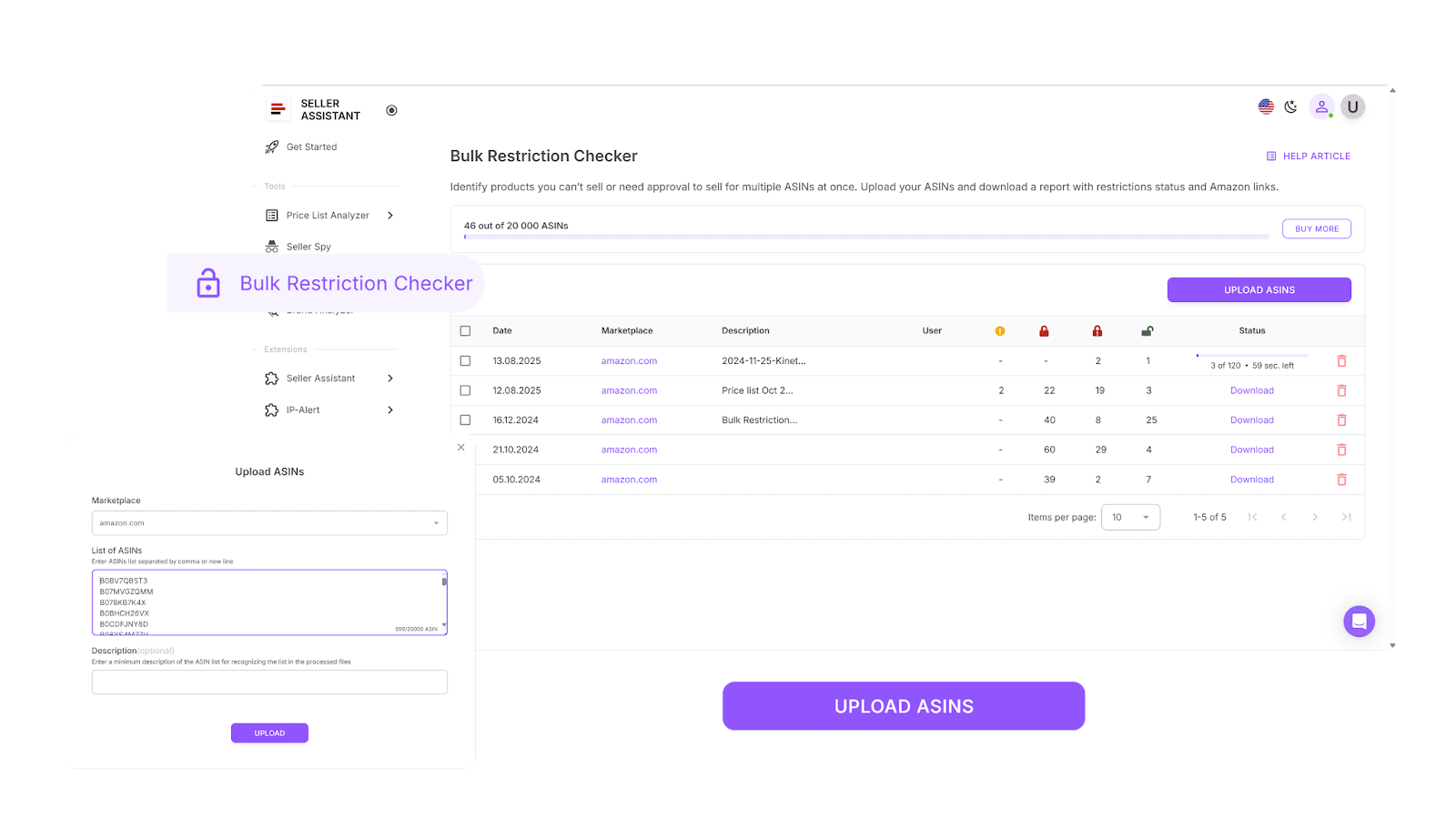
Bulk Restrictions Checker
With the Bulk Restrictions Checker, you can:
- Instantly check your eligibility for dozens – or hundreds – of ASINs in a single run
- Spot ungated products marked with a green open lock, ready to list immediately
- Flag gated ASINs that require brand or category approval
- Detect ASINs that your account is permanently restricted from selling
- Save time and avoid sourcing inventory you’re not authorized to list
How to use it effectively
Log into your Seller Assistant account and open the Bulk Restrictions Checker. Select your Amazon marketplace, upload your ASIN list, and hit scan. Within seconds, you’ll get a visual report showing which products are ready to sell, which require ungating, and which you should avoid entirely. Use the results to clean your shortlist before moving forward with suppliers.
Step 3. Locate trusted wholesale suppliers
Objective
After you’ve selected brands worth pursuing, the next step is to find suppliers who actually stock those products – at margins that make sense for resale. Manually searching online directories or cold-emailing generic wholesalers takes too long and often leads nowhere.
You need a smart, efficient way to uncover verified U.S. suppliers who are open to resellers and offer products that meet your sourcing criteria.
Tool used
What the tool does
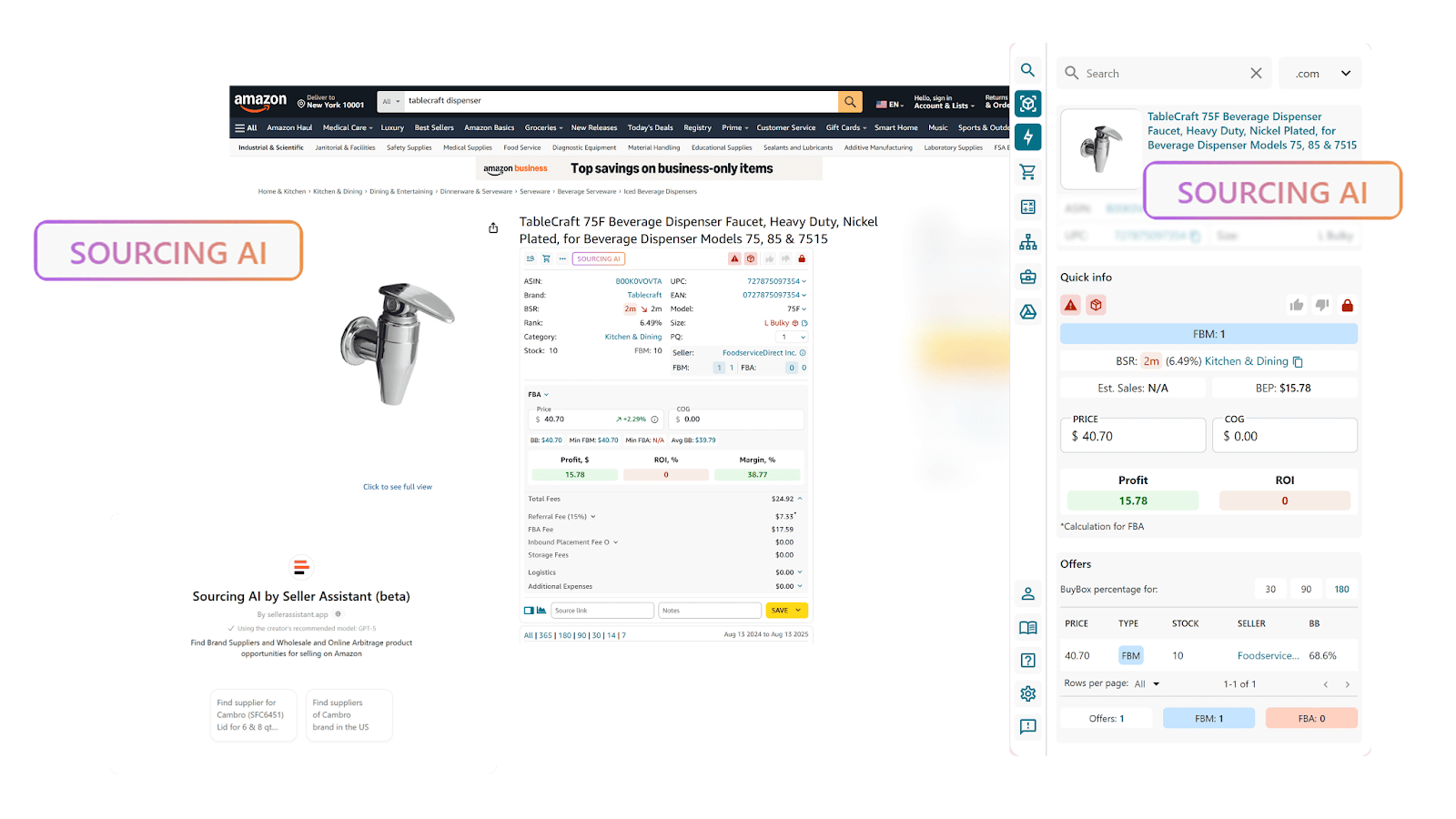
Sourcing AI
With Sourcing AI, you can:
- Instantly run AI-powered searches for U.S.-based suppliers of specific products or brands
- View up to 10 supplier options per product, including pricing, SKU data, links, and minimum order quantities
- Filter supplier offers by your maximum cost of goods (COG) to ensure profitability
- Compare exact vs. likely matches to prioritize the most relevant leads
- Launch searches directly from any Amazon product page, search result, competitor storefront, or supplier site
- Skip the unreliable Google rabbit holes and outdated supplier databases
How to use it effectively
While researching on Amazon, simply click the Sourcing AI button on a product page, storefront, or supplier site. The tool will return a clean list of verified wholesale suppliers, showing prices, links, and MOQ data. This allows you to quickly evaluate, compare, and shortlist suppliers for direct outreach – all without leaving your workflow.
Step 4. Organize and manage your supplier contacts
Objective
Once you begin supplier outreach, staying organized is non-negotiable. In wholesale, the odds aren’t in your favor – only a small percentage of suppliers will respond or approve your application. With hundreds of contacts and different statuses, tracking them across inboxes or spreadsheets quickly becomes chaotic.
The more suppliers you manage, the higher the risk of losing track of critical info – like who you’ve contacted, what terms they offered, or which warehouse they use. That’s why building a structured supplier database is essential to avoid duplicate work, missed opportunities, and costly data-entry mistakes.
Tool used
Suppliers Database
What the tool does
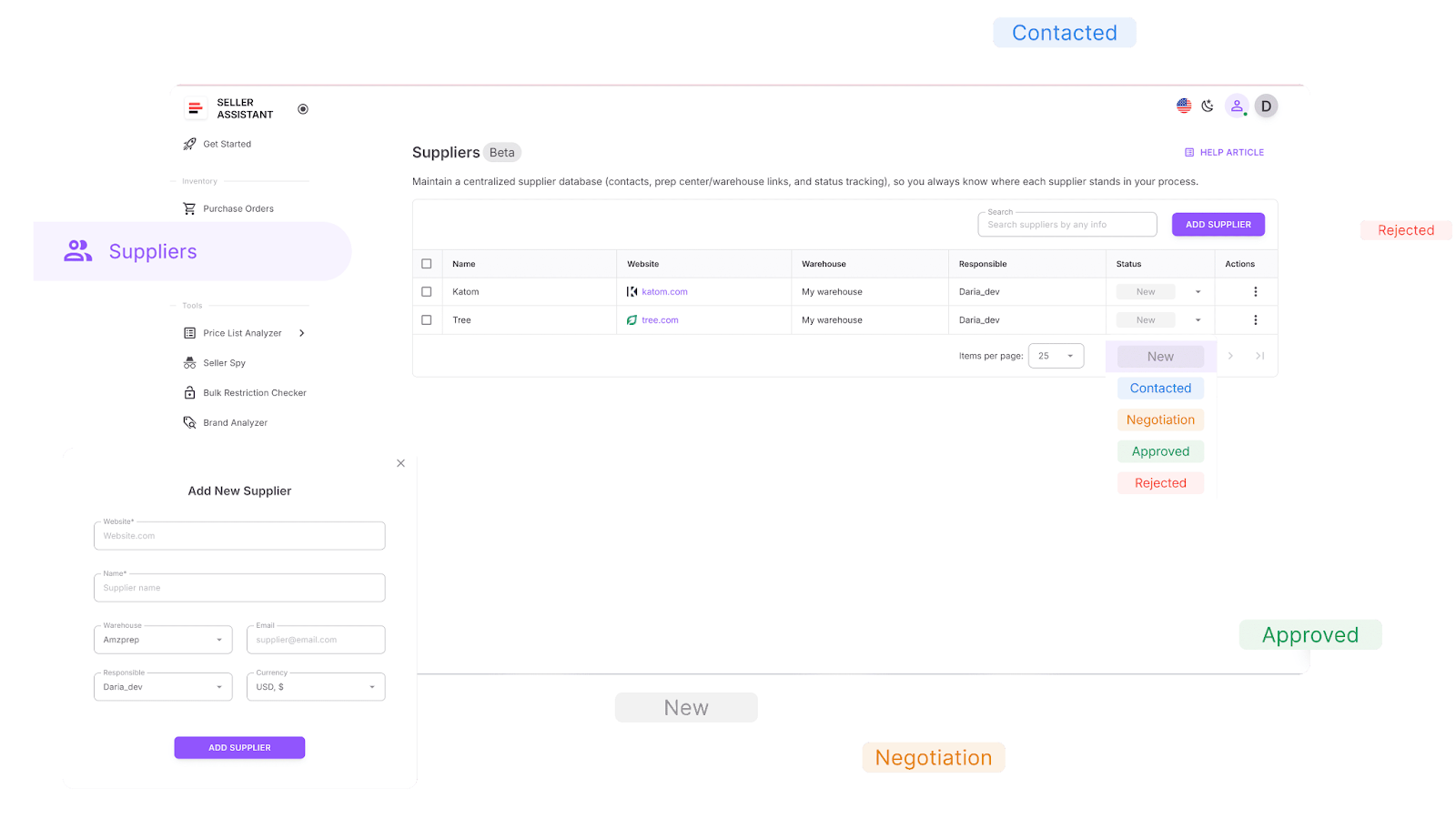
Suppliers Database
With the Suppliers Database, you can:
- Create comprehensive supplier profiles with company name, website, points of contact, warehouse info, currency, and assigned team members
- Filter and search suppliers by name, status, location, warehouse, or site domain
- Assign progress statuses like New, Contacted, In negotiation, Approved, or Rejected for full visibility into your outreach funnel
- Link suppliers to default prep centers or warehouses for auto-routing when placing orders
- Keep data consistent across your tools – any edits made to a supplier profile are reflected wherever that data is used
- Access supplier info directly inside modules like Price List Analyzer and Purchase Orders – no need to retype or re-import
How to use it effectively
Navigate to the Suppliers tab in your Seller Assistant workspace and click Add Supplier. Enter the required fields – supplier name and website – and optionally fill in additional details such as address, assigned warehouse, contact person, and internal rep. Once saved, that supplier becomes immediately available in your workflow. The next time you upload a price list or build a PO, you can select them from your saved records and continue the process without duplicating data entry.
Step 5, Set default routing for suppliers
Objective
When working with multiple suppliers, every order needs to be routed to the correct prep center or warehouse – automatically. Relying on spreadsheets to manage shipping addresses or warehouse rules can result in expensive errors, like products going to the wrong location or prep costs being miscalculated.
A centralized warehouse system ensures that the routing process is seamless, accurate, and fully connected to your sourcing and ordering tools. This minimizes manual handling and keeps your logistics efficient.
Tool used
Warehouses Database
What the tool does
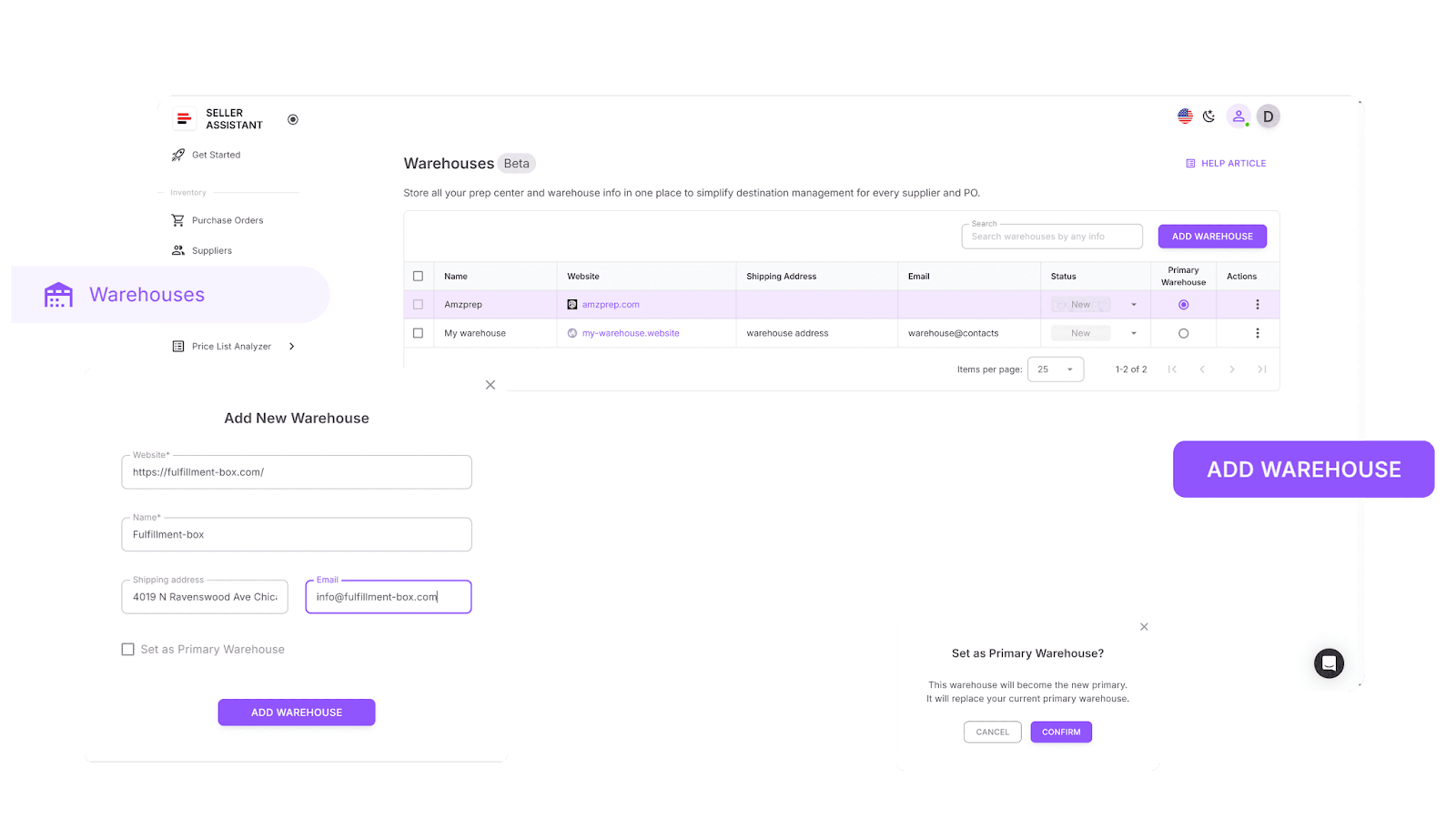
Warehouses Database
The Warehouses Database allows you to:
- Store all relevant prep center and warehouse details, including addresses, contacts, and operating status, in a single system
- Link each supplier to a default warehouse, so that during sourcing or PO creation, products are routed automatically
- Ensure warehouse information is consistent across the system – no more copy-pasting or guesswork during fulfillment setup
How to use it effectively
Head over to the Warehouse Database section in your Seller Assistant dashboard. Add each of your prep centers or warehouses, making sure to include accurate shipping addresses and contact information. Then, assign your suppliers their designated default warehouse. Once set, Seller Assistant will auto-apply these warehouse settings during price list analysis and purchase order creation, keeping your fulfillment flow smooth and error-free.
Step 6. Turn supplier spreadsheets into verified purchase-ready deals
Objective
Scaling your wholesale operation requires evaluating massive supplier price lists – fast. Automation helps with the heavy lifting, but you still need to manually vet each shortlisted product to confirm it’s a smart buy. That means filtering out false ASIN matches, overpriced items, or listings with hidden risks.
Tools used
What the tools do
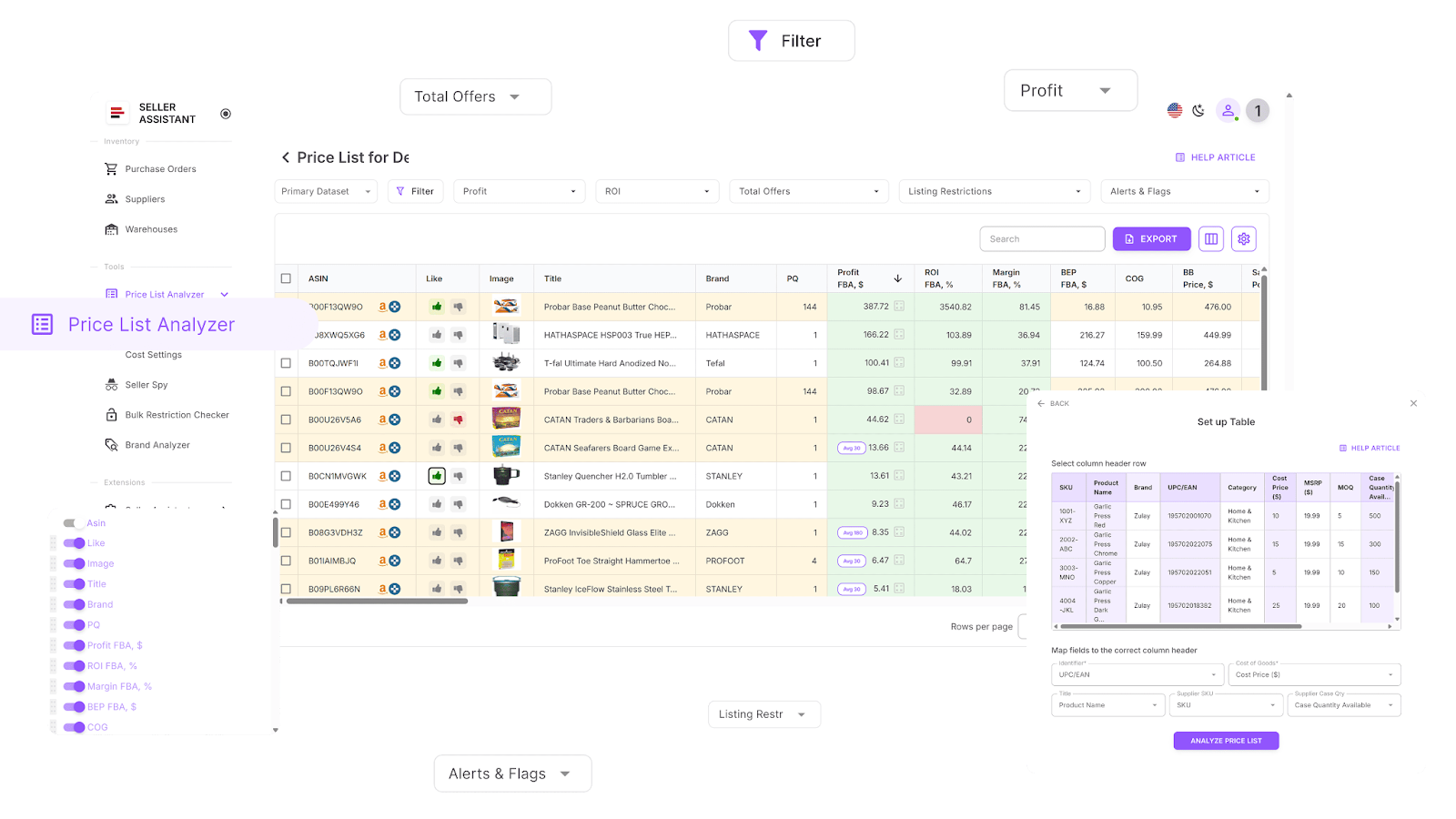
Price List Analyzer
With Price List Analyzer, you can:
- Automatically match products from supplier spreadsheets to Amazon ASINs
- Flag restricted ASINs or listings your account can’t sell
- Enrich your spreadsheet with 70+ metrics:
- Sales performance: BSR, sales velocity, rank trends
- Profitability: ROI, margin, profit, break-even points
- Historical pricing: avg. Buy Box, 30/90/180-day price behavior, FBA/FBM trends
- Fees: FBA, FBM, referral, storage, shipping, prep, hazmat
- Competition: seller count, Buy Box rotation, Amazon in-stock frequency
- Run bulk analysis to isolate high-profit, low-risk products
- Auto-detect critical product flags, such as:
- Hazmat
- Meltable
- Variations or bundles
- IP complaints
- No COGs, FBA fees, or Buy Box
- Approval required
- ROI too high or too low
- Apply custom filters to prioritize deals using your own buying criteria
- Save and reuse table views and filters across multiple lists
- Mark deals with Likes/Dislikes, shortlist directly in the table, and export selected products
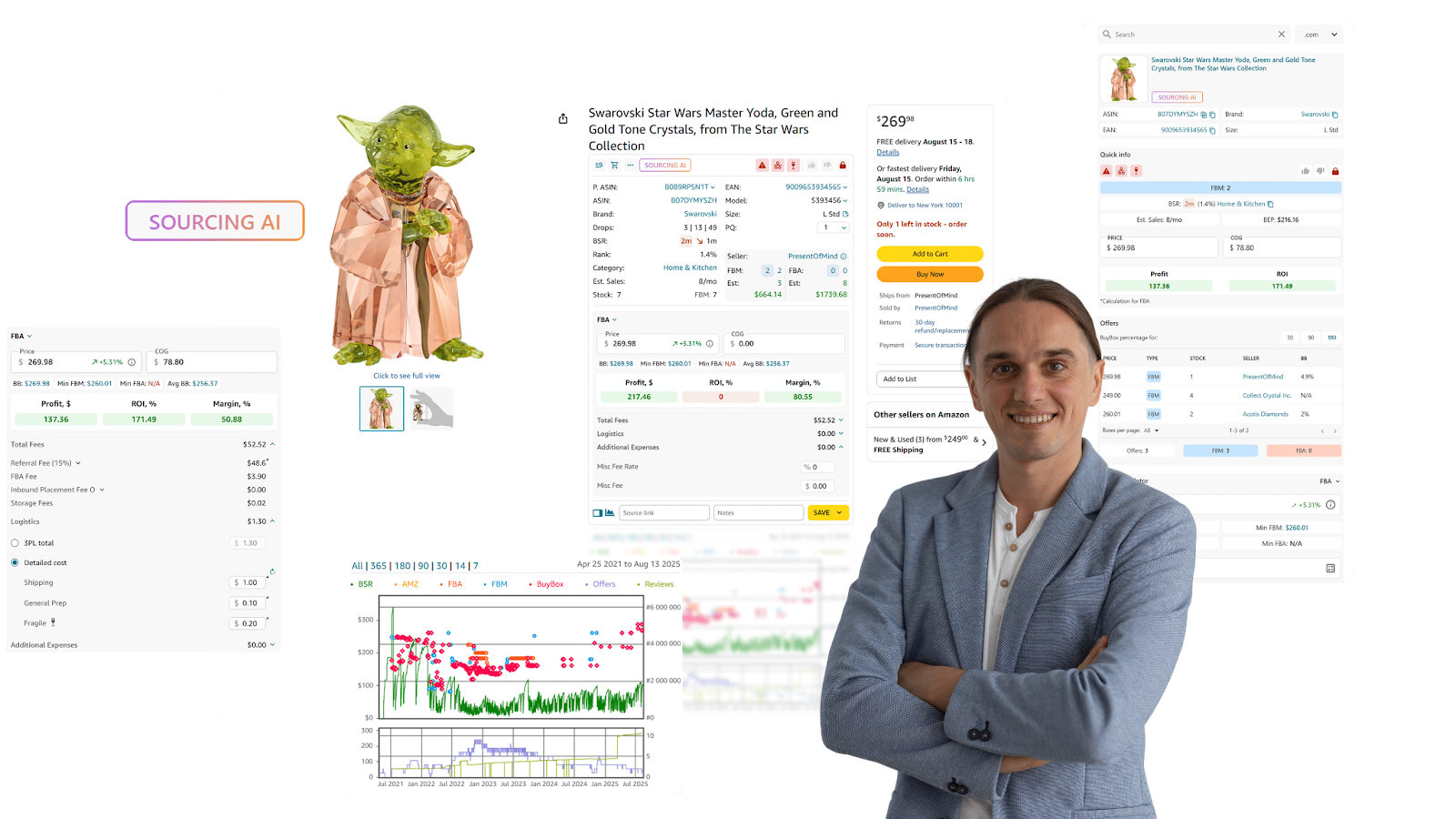
Seller Assistant Extension
This powerful browser extension helps you:
- Research product potential directly on Amazon listing pages, with real-time metrics on sales, profit, risks, and restrictions
- Use Side Panel View on supplier websites to see Amazon data next to their offers
- Leverage Quick View to get essential product data directly from search results
- Use Storefront Widget to analyze competitors – see their top brands, categories, and product performance
- Spot IP complaints and Amazon policy violations using IP Alert
- Calculate exact profit, ROI, and margin with the FBM&FBA Profit Calculator (fully customizable)
- Use the VAT Calculator for accurate tax handling in the US, Canada, and Europe
- Instantly check selling eligibility and restrictions with Restriction Checker
- Receive visual warnings for risks like hazmat, adult, meltable, fragile, or Amazon as a competitor with Alerts and Flags
- Estimate sales potential using Sales Estimator
- Monitor current stock levels via Stock Checker
- Identify best-selling product variations with Variation Viewer
- Analyze all offers on a listing – prices, stock, and Buy Box share – with Offers
- Export findings directly to Google Sheets with one click with Google Sheets Export
- Discover up to 10 U.S. suppliers per product with Sourcing AI
- Run fast lookups across platforms like Google, eBay, Walmart, or Target using Lookup Links
- Record notes, likes/dislikes, and links using the Notes feature
- Dive into historical sales and pricing using Keepa-powered Charts Panel
How to use it effectively
Import your supplier’s CSV or Excel file into Price List Analyzer, let the tool scan and tag ASINs, and apply your filters to surface winning products. Once shortlisted, open each deal in the Seller Assistant Extension to confirm product performance, restriction status, and risk level. Only move forward with the products that pass both the automation check and your manual review.
Step 7. Turn shortlisted deals into ready-to-send purchase orders
Objective
Once you’ve identified profitable ASINs, the next step is to turn them into well-structured purchase orders – fast. In wholesale, the clarity and accuracy of your POs are critical. A single mistake in quantities, costs, or destination details can lead to delays, miscommunication, or margin loss.
Instead of juggling spreadsheets and emails, Seller Assistant gives you a streamlined, automated process to build and manage purchase orders in just a few clicks.
Tool used
Purchase Orders Module
What the tool does
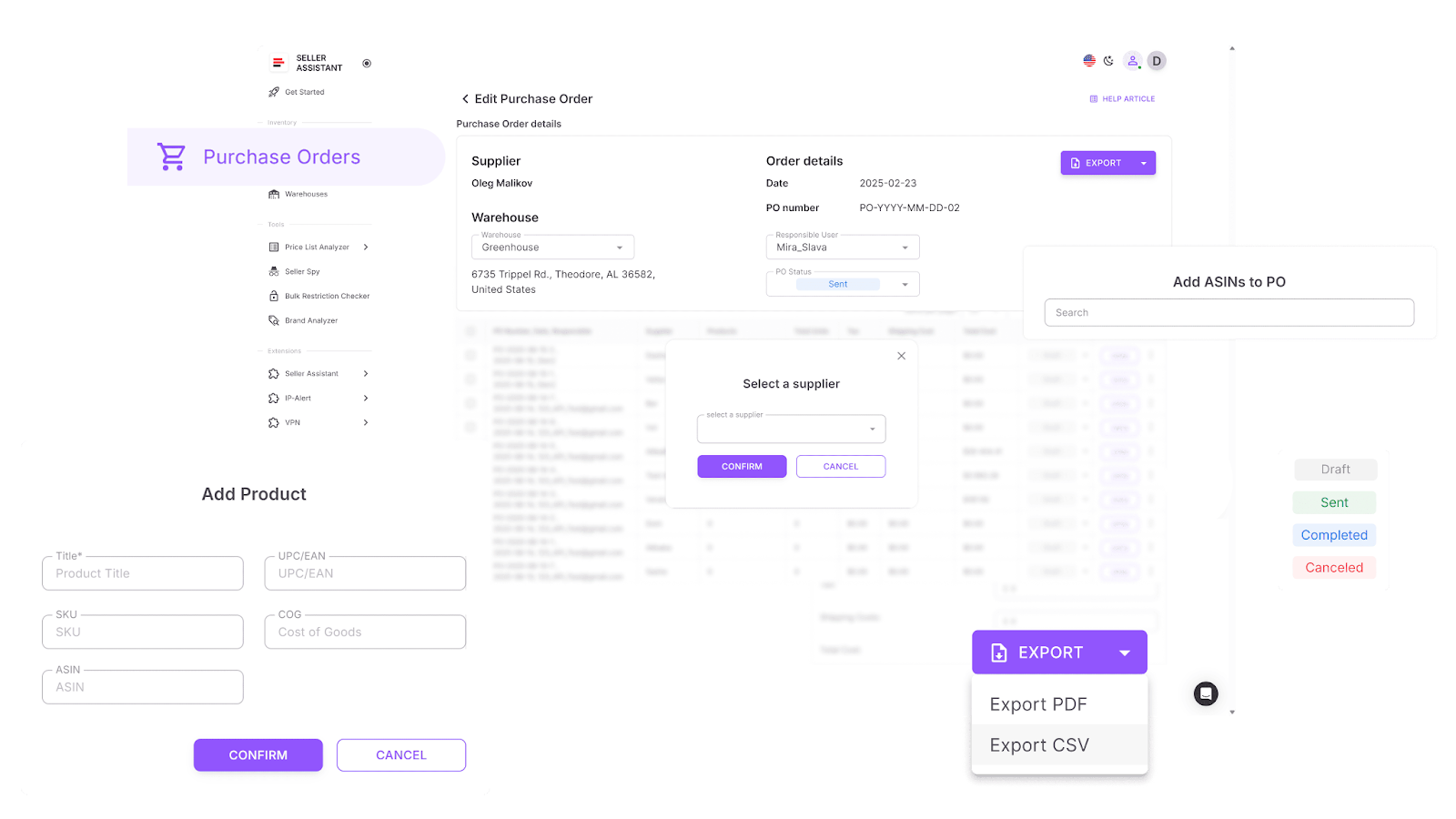
Purchase Order
Purchase Orders Module helps you:
- Instantly generate purchase orders from your Price List Analyzer shortlist or by manually selecting products
- Auto-populate each PO with supplier and warehouse info from your existing databases – reducing errors and setup time
- Edit product details such as order quantity, cost of goods, and shipping or tax fees
- Search and add products by ASIN, UPC/EAN, title, or brand – and even fetch missing data from Keepa if needed
- Export your PO as a PDF or XLSX file to easily share with your suppliers
- Track the real-time status of each PO: Draft, Sent, Completed, or Canceled
- Collaborate with your team using a centralized PO interface
- Ensure no order is incomplete, thanks to built-in validations for missing COGs, ASINs, or routing details
How to use it effectively
After filtering your final product list in Price List Analyzer, select the items you want to order and click “Create PO.” Seller Assistant will open a draft with all supplier and warehouse fields already filled in. Review the line items, adjust quantities or costs as needed, and enter any shipping or tax estimates. Once finalized, export your PO in the format you prefer and send it directly to the supplier. Every order remains tracked and organized in one unified workspace.
Step 8. Scale your operations while maintaining full control
Objective
Once your sourcing pipeline is running smoothly, the real challenge begins – growing your wholesale business without losing grip on quality, compliance, or efficiency. That means empowering your team, delegating low-level tasks to VAs, automating workflows, and syncing data across platforms – without sacrificing visibility or accuracy.
Seller Assistant’s automation tools and integrations make it easy to expand while staying organized and secure.
Tools used
Virtual Assistant Account by Seller Assistant
Airtable, Make, and Zapier integrations
What the tools do
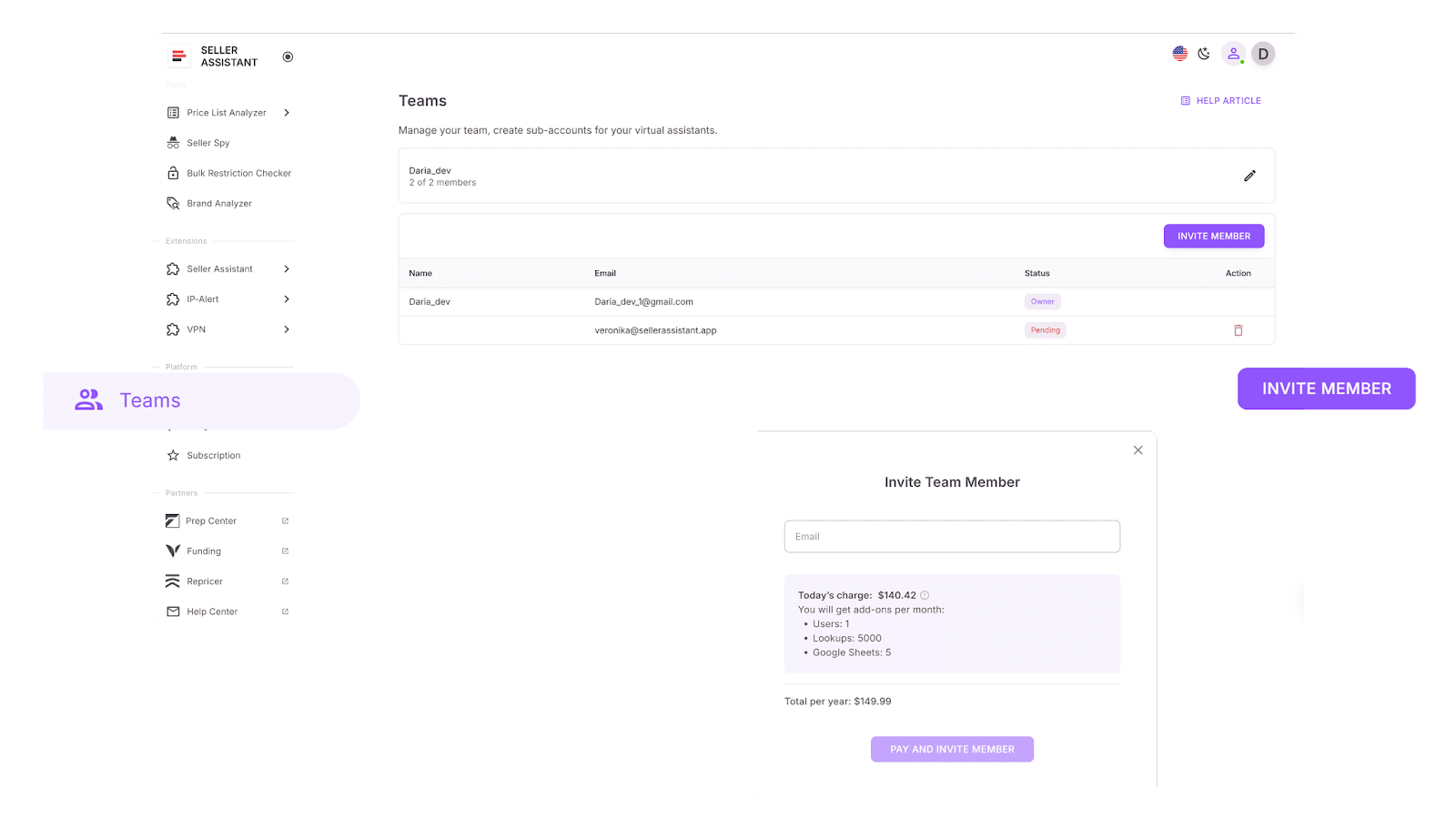
Virtual Assistant
- Grant your sourcing team or VAs access to powerful tools like Restriction Checker and Bulk Restriction Checker
- Keeps your Seller Central credentials secure while still enabling full research capabilities
- Centralizes research and keeps sourcing consistent across the team
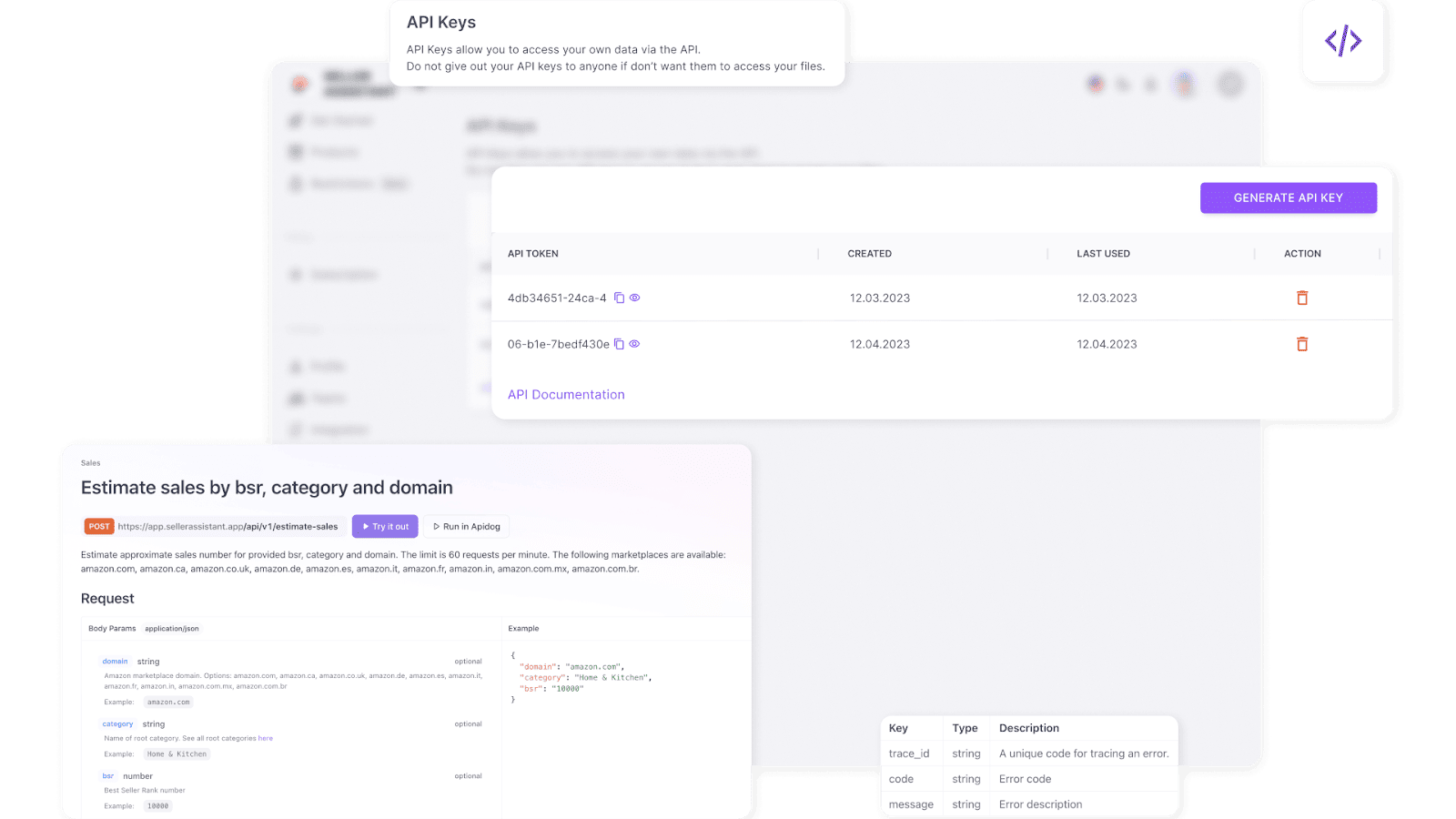
Seller Assistant API
- Pulls real-time product data from Keepa and Amazon SP-API
- Automates the retrieval of sales metrics, ROI, margin, restriction status, and product flags
- Seamlessly integrates with your tools – Google Sheets, Airtable, Zapier, Make, or custom systems
Airtable, Make, and Zapier integrations
- Keep your product data synced and up-to-date
- Automate sourcing filters like ROI thresholds or top % rank
- Trigger alerts, flag high-potential SKUs, and push clean, ready-to-order product lists into your ordering tools – automatically
How to use it effectively
Start by setting up your Virtual Assistant Account inside Seller Assistant. Invite your sourcing team members through the Teams panel. They’ll be able to perform key research tasks – including restriction checks – without ever logging into your Seller Central account.
Then, connect your Seller Assistant API to your spreadsheet or database system (like Airtable). Use Zapier or Make to define your automation rules – such as flagging any product with ROI > 30%, no restrictions, and a top BSR rank.
Once the automation runs, review your clean, pre-vetted product list, and pass the winning SKUs directly into your PO workflow.
FAQ
What are Amazon wholesale seller workflow tools?
Amazon wholesale seller workflow tools are brought together in a platform that automates sourcing, deal analysis, order creation, and inventory routing. It helps sellers manage large volumes of products and suppliers without relying on spreadsheets or manual tracking.
Can I use Seller Assistant even if I’m just starting out?
Yes, Seller Assistant is beginner-friendly and provides step-by-step tools for analyzing products, checking restrictions, and building supplier databases. It’s equally effective for new sellers and advanced wholesale operations.
How does Seller Assistant help reduce mistakes in wholesale sourcing?
It automates ASIN matching, restriction checks, and profit calculations using standardized data and real-time alerts. This eliminates human error and ensures product decisions are based on complete, verified information.
What if I have a team of VAs helping me with product research?
Seller Assistant includes Virtual Assistant Accounts, so your team can work securely without accessing your Seller Central. Their research syncs into your workflow automatically.
Do I need technical skills to set up automation and integrations?
Not at all – Seller Assistant integrates easily with tools like Airtable, Zapier, and Make using simple, no-code connections. You can automate large parts of your workflow without writing a single line of code.
Final Thoughts
Scaling a profitable Amazon wholesale business requires more than spreadsheets and manual guesswork – it demands a connected, automated system that can handle volume without sacrificing accuracy. With Seller Assistant’s Amazon seller tools, you gain full control over your workflow: from supplier research to PO creation, everything runs through one unified platform.
Whether you’re running solo or managing a sourcing team, Seller Assistant equips you with the structure, speed, and insights to grow confidently – without losing visibility or making costly mistakes. It’s the smart way to streamline wholesale operations and stay competitive in the Amazon marketplace.
Seller Assistant automates and connects every stage of your Amazon wholesale and arbitrage workflow. It brings together in one platform: workflow management tools –Purchase Orders Module, Supplier Database, Warehouse Database, bulk research & sourcing tools – Price List Analyzer, Bulk Restriction Checker, Sourcing AI, Brand Analyzer, Seller Spy, Chrome extensions – Seller Assistant Browser Extension, IP-Alert Extension, and integrations & team access features – seamless API connectivity, integrations with Zapier, Airtable, and Make, and Virtual Assistant Accounts.