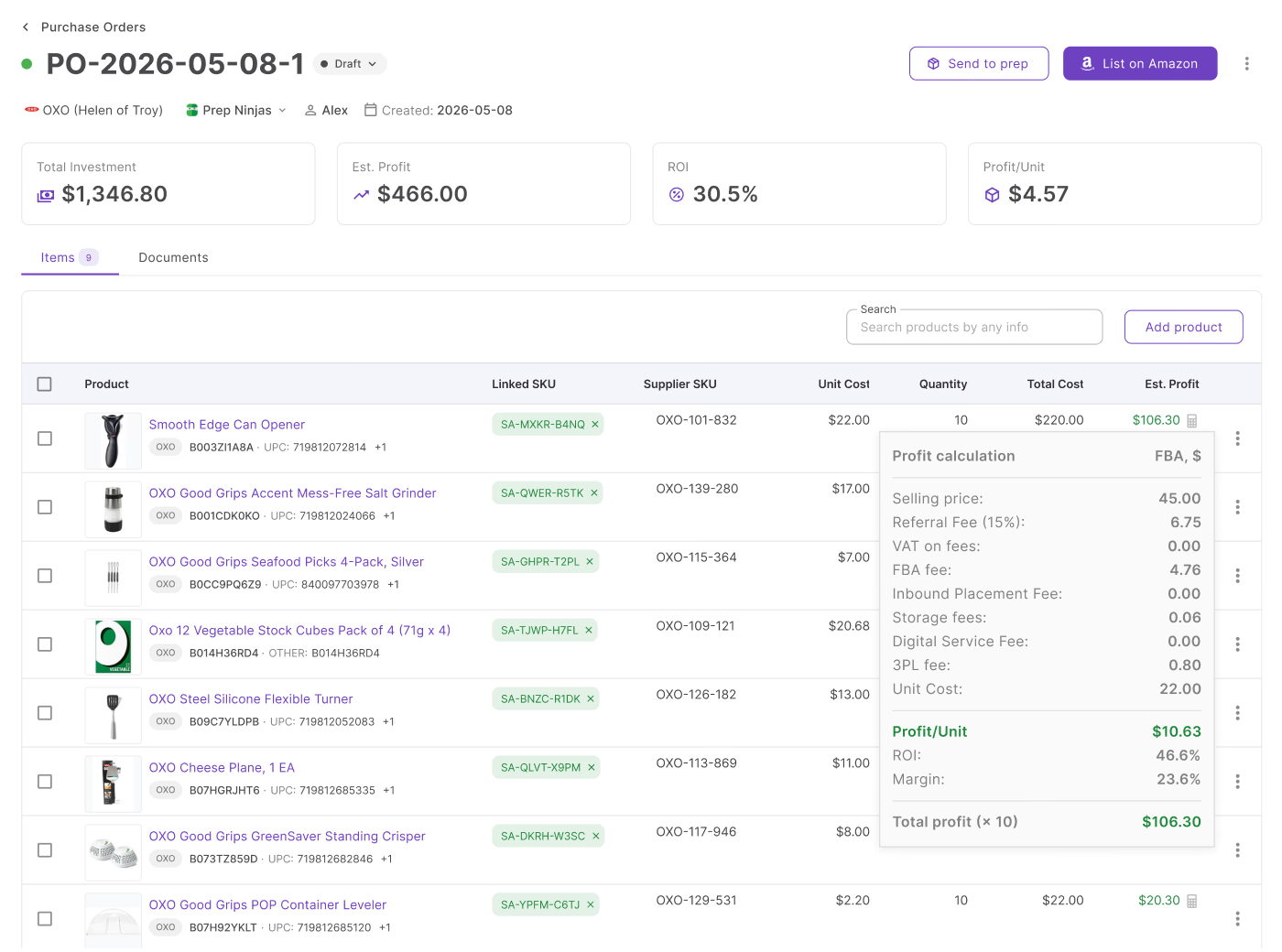
A purchase order can hold dozens of SKUs that each looked profitable on the price list, yet costs shift, quantities change, and shipping and tax get added, so the order you’re about to send may not return what you expected. Checking means opening the order and adding up the numbers yourself.
Seller Assistant’s Purchase Orders Module already tracks total investment, estimated profit, ROI, and profit per unit for each order – and its MCP Server lets an AI assistant read those numbers back to you in plain language: “is this PO still above 25% ROI?” before you hit Sent.
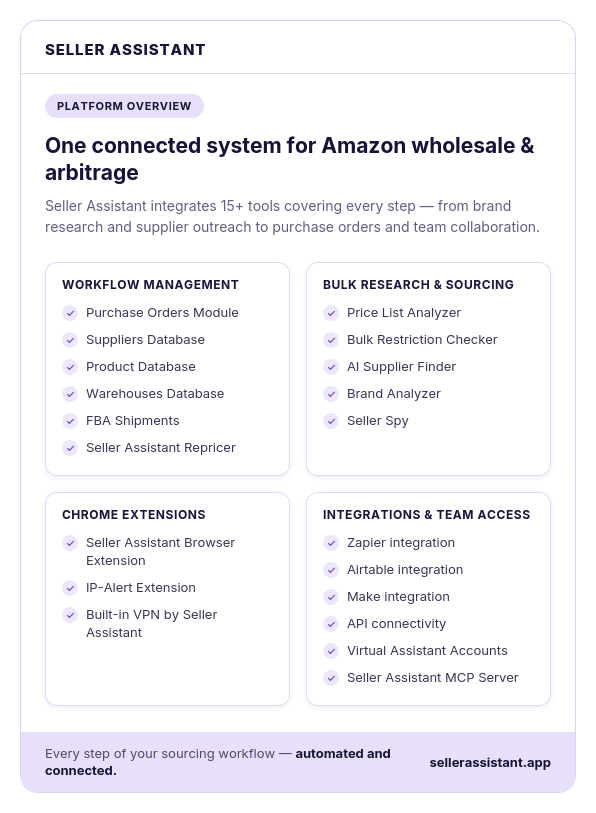
Why Profitable Products Don’t Always Mean a Profitable PO
A product can look profitable when you first analyze it, but that does not guarantee the final purchase order will deliver the same result. A PO combines multiple products, quantities, costs, shipping, and taxes into one investment, and those numbers can change as you build the order.
That makes order-level profitability worth checking before you move forward. Instead of relying only on the ROI of individual sourcing leads, you need to understand what the entire purchase order is expected to return.
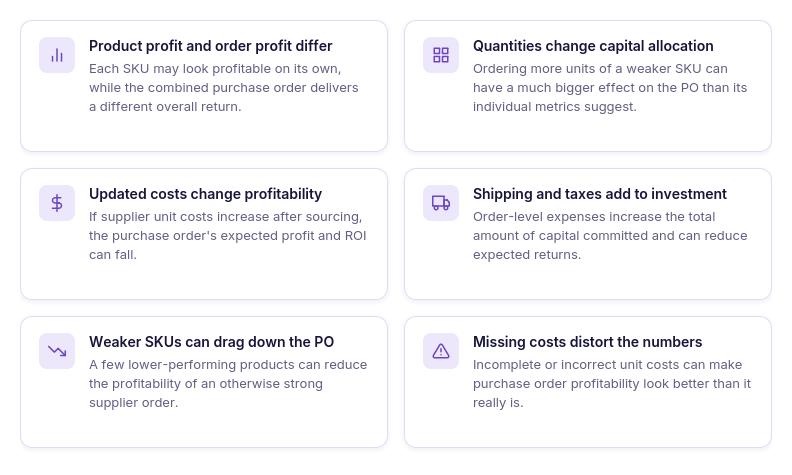
Product profit and order profit are different
Each SKU can meet your sourcing criteria on its own, while the combined purchase order produces a different result. The final ROI depends on how all products, quantities, and costs come together in one order.
Quantities change how much you invest
Ordering 10 units of a product and ordering 100 units create very different capital allocations. A larger quantity of a lower-performing SKU can have a much bigger impact on the overall PO than its individual metrics suggest.
Updated unit costs change profitability
The supplier cost you used during product research may not be the cost you ultimately pay. When unit costs increase, expected profit and ROI can change across the purchase order.
Shipping and taxes add to the investment
Product costs are not the only expenses that affect a supplier order. Shipping and taxes increase the total investment and can reduce the profitability you expected when reviewing products individually.
Weaker products can pull down the order
Not every SKU contributes equally to a purchase order’s expected return. A few products with lower estimated profit can weaken the economics of an otherwise strong order.
Missing costs can make the numbers misleading
Profitability calculations depend on having accurate purchasing data for the products in the order. If a unit cost is missing or incorrect, the estimated profitability can look better than the actual order economics.
Why General AI Can’t Tell You If Your Actual PO Is Profitable
AI can explain ROI, calculate a percentage from numbers you provide, or suggest what profitability metrics to review. But when you ask, “Is this purchase order still profitable?”, the answer depends on the actual products, quantities, costs, and expenses in your current order.
Without access to that purchasing data, a general AI assistant can only work with information you manually copy into the chat. To check the real PO – and keep checking it as the order changes – the assistant needs a connection to the system where the purchase order is managed.
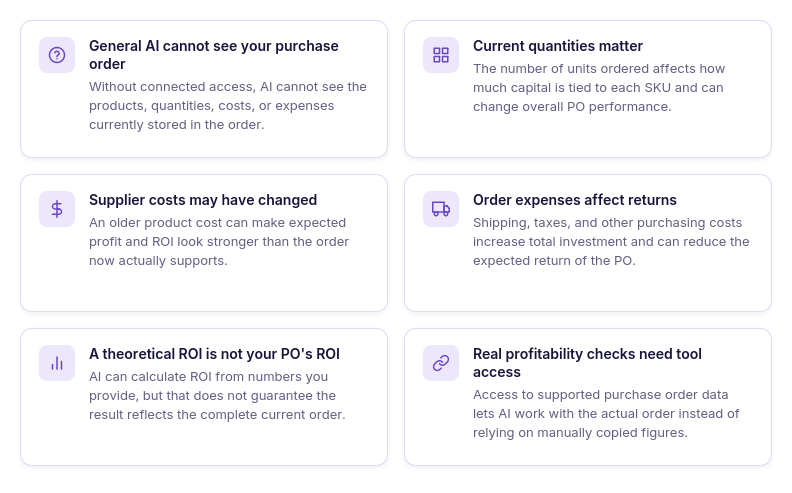
General AI cannot see your purchase order
Without a connection to your seller tools, an AI assistant does not know which products and purchasing details are currently in the PO.
It does not know your current quantities
Quantities determine how much capital is allocated to each product and can significantly affect the economics of the entire order.
It does not know whether costs changed
A supplier price entered earlier may no longer be current, but a general AI assistant cannot see updated unit costs stored in your order.
It cannot see your order expenses
Shipping, taxes, and other purchasing costs can affect the total investment and expected return of the purchase order.
A theoretical ROI is not your PO’s ROI
AI can calculate ROI from numbers you manually provide, but that calculation is only as current and complete as the information you give it.
Checking the real order requires tool access
Connecting AI to your purchasing system gives it access to supported purchase order data instead of relying on manually copied numbers. This turns AI from a general profitability explainer into an interface for working with your actual order.
How Seller Assistant Makes AI-Assisted PO Profitability Checks Possible
Checking whether a purchase order is still profitable requires more than asking AI to calculate ROI. The assistant needs access to the current purchasing data behind the order – including the products, quantities, costs, and profitability metrics that can change as the PO is prepared.
Seller Assistant connects these two parts of the workflow. Purchase Orders Module keeps the order data and profitability calculations in one place, while Seller Assistant MCP Server gives AI assistants such as ChatGPT or Claude access to supported Seller Assistant data and operations through natural-language requests. Together, they let you review an actual purchase order through AI instead of manually transferring its numbers into a chat.
How Purchase Orders Module helps you track PO profitability
Seller Assistant’s Purchase Orders Module provides a centralized workspace for managing supplier orders and their financial performance. Instead of judging a purchase order by the profitability of individual products alone, sellers can see how products, quantities, unit costs, shipping, taxes, and other expenses come together in the economics of the complete order.
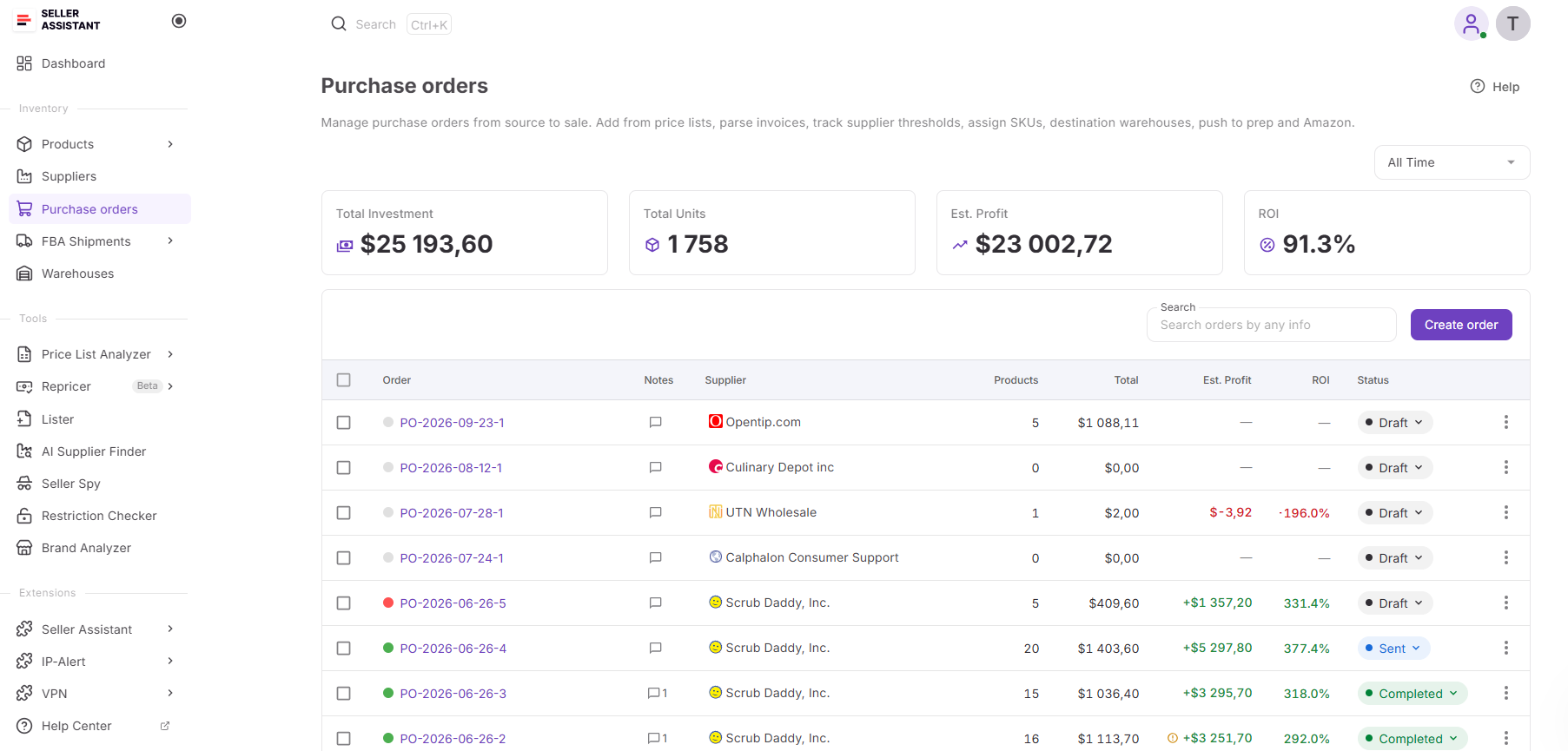
For Amazon wholesale sellers, online arbitrage sellers, and dropshippers, this makes it possible to review profitability while the purchase order is being prepared and as its purchasing data changes. The module calculates key metrics including total investment, estimated profit, ROI, and profit per unit, helping sellers understand whether the current version of the order still meets their purchasing targets before moving forward.
What you can do with Purchase Orders Module
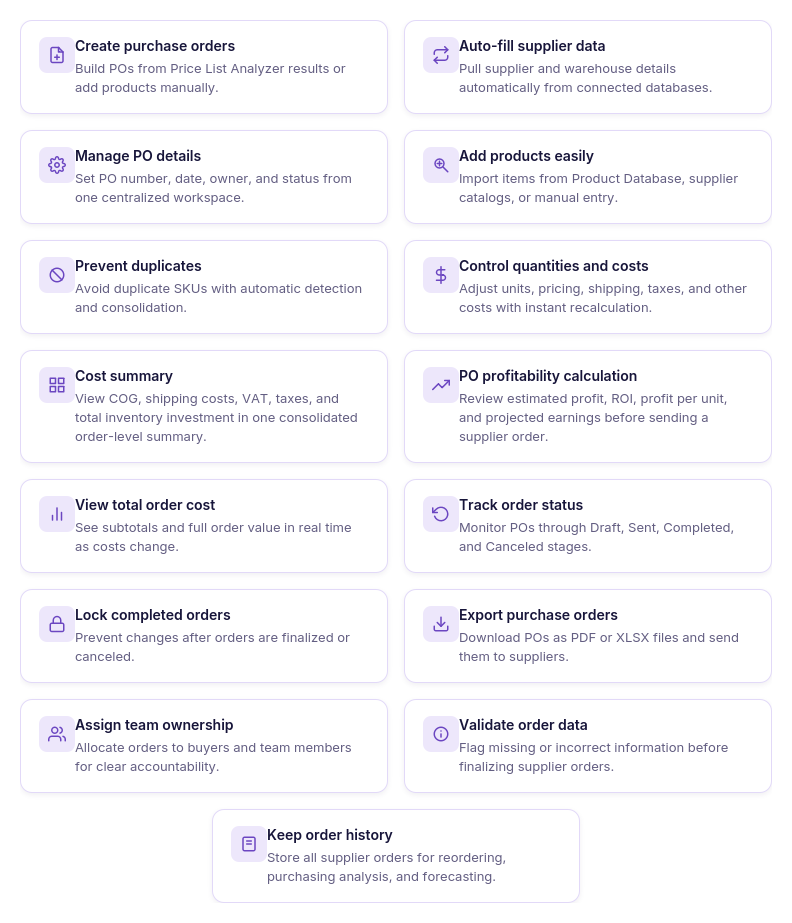
- Create purchase orders efficiently
Build structured supplier orders manually or from products already researched in Seller Assistant, without recreating purchasing data from scratch.
- Connect suppliers and warehouses
Link the appropriate supplier and destination warehouse so purchasing and fulfillment details remain connected to the order.
- Add and organize products
Add products from supplier price lists, analyzed data, product search, or manual entry while avoiding duplicate product lines.
- Set quantities and unit costs
Enter and revise quantities, unit costs, supplier SKUs, and other product-level purchasing information as the order changes.
- Update purchasing expenses
Add shipping costs, taxes, and other expenses while the order totals recalculate as purchasing information is updated.
- Review total order costs
View subtotal, shipping, taxes, miscellaneous expenses, and total investment together to understand the complete cost of the order.
- Monitor purchase order profitability
Track estimated profit, ROI, profit per unit, and total investment to evaluate the expected financial performance of the entire purchase order.
- Adjust the product mix
Change quantities, costs, or included products to improve the order before committing purchasing capital.
- Store purchasing documents
Keep invoices, packing slips, supplier correspondence, and other relevant documents connected to the appropriate purchase order.
- Work with your team
Assign orders to team members, add notes, and keep purchasing information available within a shared workflow.
- Track purchase order status
Move orders through Draft, Sent, Completed, and Canceled stages while maintaining their purchasing history.
- Export purchase orders
Create PDF or Excel versions of purchase orders for supplier communication and internal workflows.
How Purchase Orders Module provides the foundation for AI-assisted profitability checks
For AI to answer whether a purchase order is still profitable, it needs more than a list of products or a few numbers copied into a prompt. The profitability calculation has to be tied to the actual purchasing data behind the order, including quantities, unit costs, shipping, taxes, and other expenses.
Purchase Orders Module provides that financial context. Profitability is calculated from the connected purchasing data, so when quantities, costs, shipping, or taxes change, the expected performance of the order can be reviewed using the updated information.
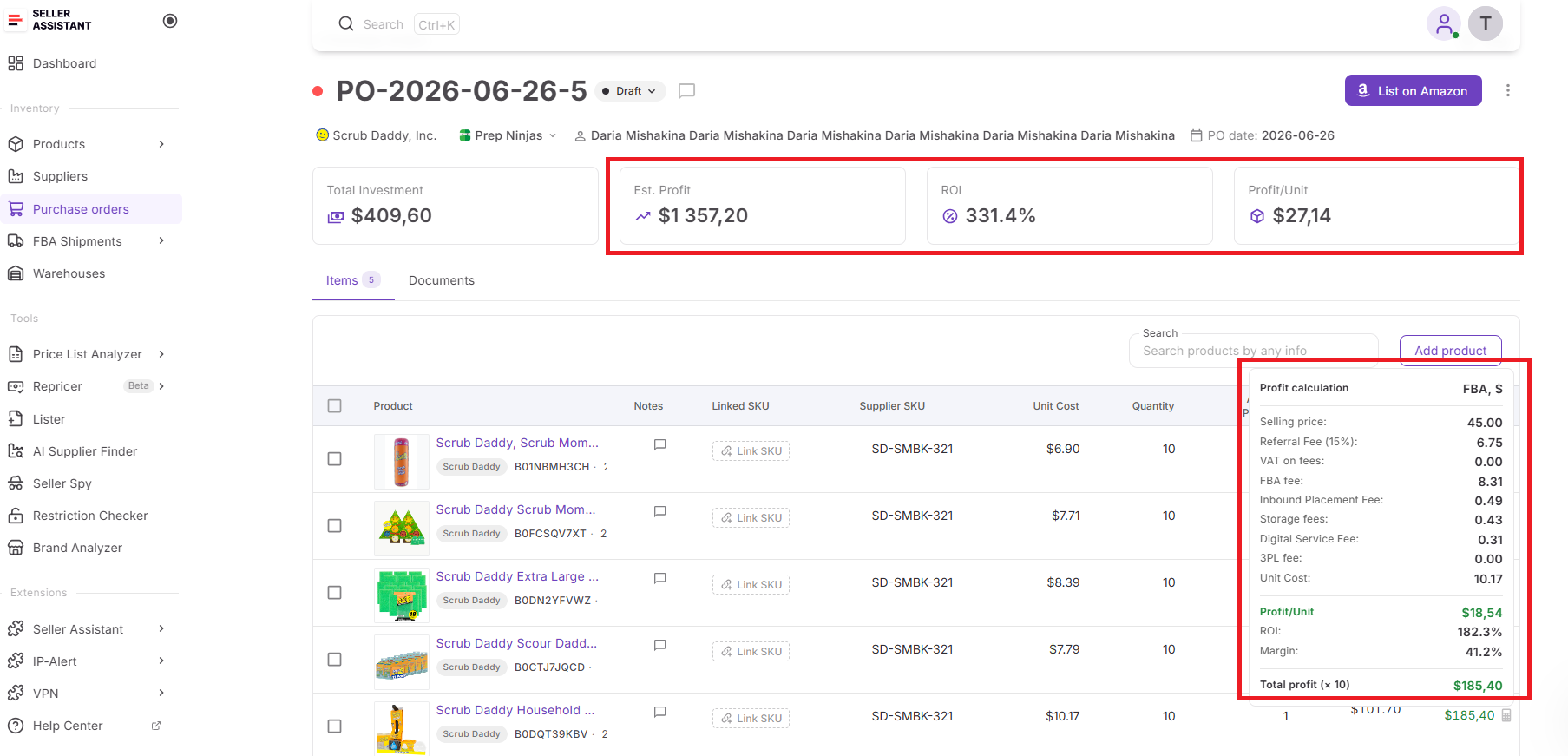
This makes Purchase Orders Module the underlying source for evaluating the economics of a real supplier order rather than estimating profitability from disconnected figures. When connected through Seller Assistant MCP, supported purchase order data can become accessible through AI chat, allowing sellers to review the order’s current numbers without manually transferring them into the conversation.
How Seller Assistant MCP turns AI chat into a PO profitability interface
Seller Assistant MCP Server connects AI assistants with Seller Assistant tools and account data, allowing sellers to work with supported purchase order data and operations through natural-language requests. Instead of asking ChatGPT or Claude how to calculate purchase order ROI and then manually collecting the numbers, MCP gives the assistant a way to work with the actual purchasing data available in Seller Assistant.
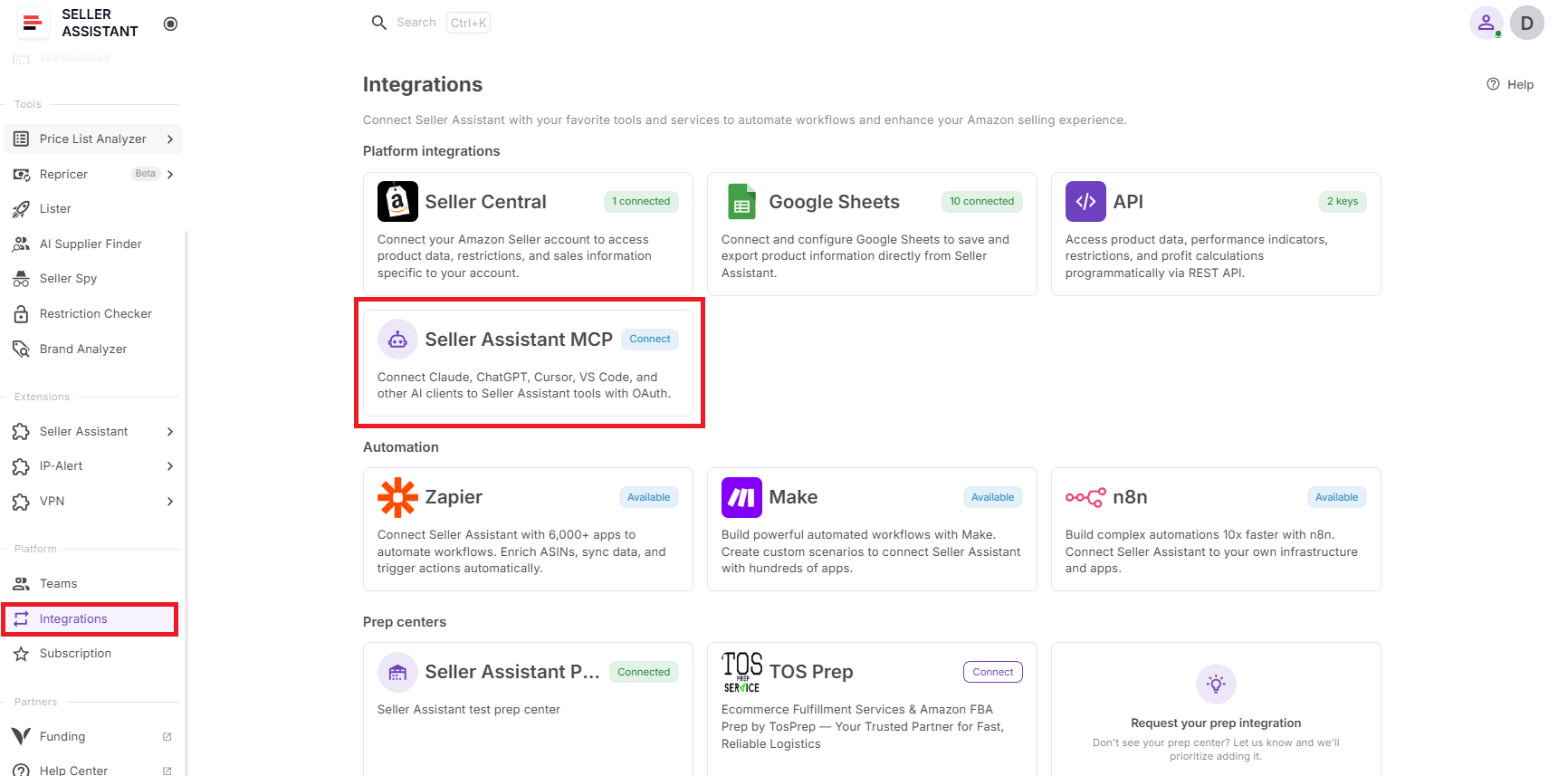
For profitability checks, this changes AI from a general calculator into an interface for reviewing a real purchase order. Sellers can find an existing PO, retrieve its current information, investigate the products and purchasing details behind it, and use follow-up requests to continue working with the order. Purchase Orders Module remains the system where the purchase order and its profitability data are managed, while MCP provides the connection between that system and the AI assistant.
What you can do with Seller Assistant MCP for purchase order profitability
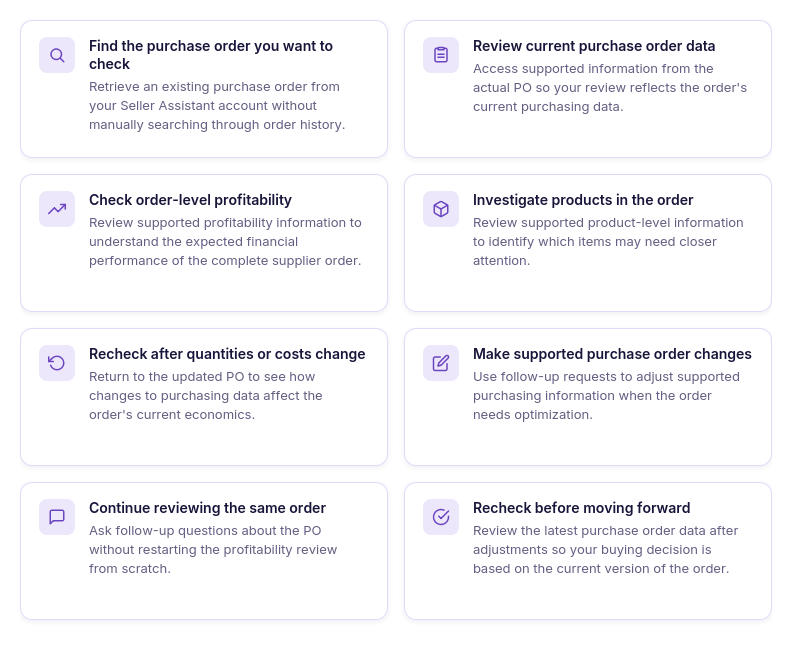
- Find the purchase order you want to check
Ask AI to retrieve an existing purchase order from your Seller Assistant account instead of manually searching through order history.
- Review current purchase order data
Retrieve supported information from the actual PO so your profitability review is based on current order data rather than numbers copied into the chat earlier.
- Check order-level profitability
Ask about supported profitability information for the purchase order to understand how the complete supplier order is expected to perform.
- Review the products behind the order
Use the purchase order data available through supported operations to investigate individual products when you need to understand what is contributing to the overall result.
- Check the order after quantities change
Review the purchase order again after quantity adjustments to see how the updated purchasing data affects its current economics.
- Check the order after costs change
Return to the PO after purchasing costs are updated instead of relying on profitability calculated from older supplier prices.
- Make supported purchase order changes
Use follow-up requests to update supported purchasing information when your profitability review shows that the order needs adjustment.
- Recheck the purchase order before moving forward
Retrieve the updated order information after changes so you can evaluate the latest version rather than making a buying decision from outdated numbers.
How MCP turns purchase order profitability checks into a conversation
MCP replaces part of the manual work involved in reviewing a purchase order with natural-language requests. Instead of opening the order, collecting its current figures, transferring them into a spreadsheet or AI chat, and repeating the process whenever something changes, the seller can work with supported purchase order data through the conversation.
Purchase Orders Module still provides the underlying purchasing structure and profitability calculations. MCP gives the AI assistant access to supported Seller Assistant data and operations, while the seller decides what profitability targets matter and confirms supported write actions before changes are executed.
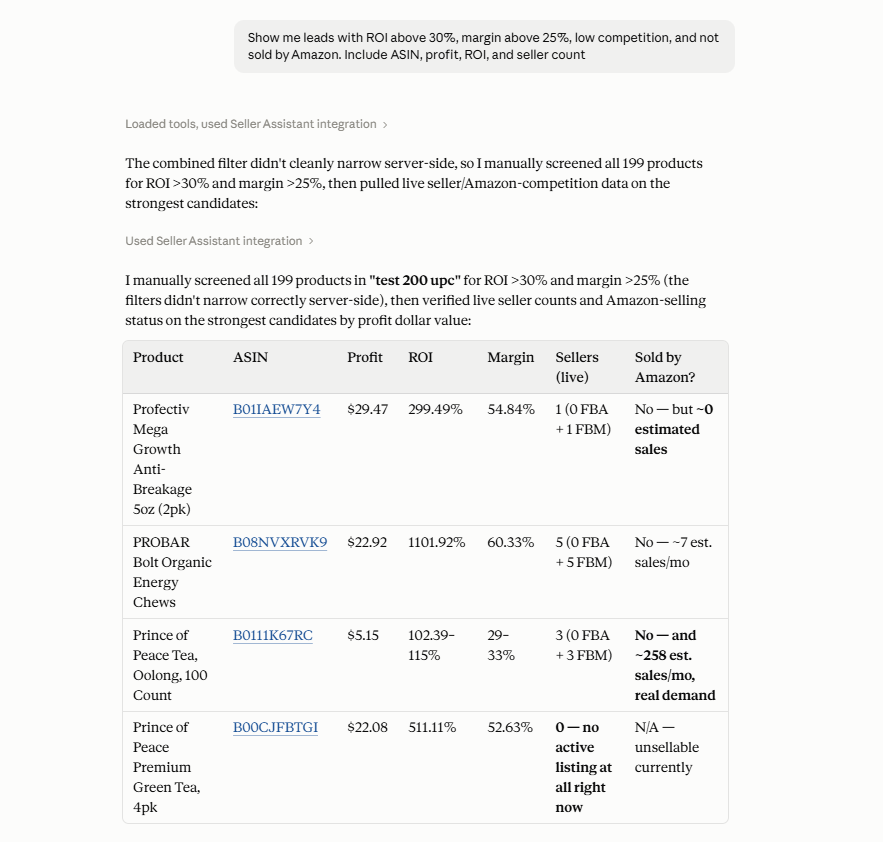
The result is a shorter find → review → investigate → adjust → recheck workflow. Rather than asking AI to estimate whether an order is profitable from manually entered figures, sellers can use it to work with supported data from the actual purchase order and review its current economics before moving forward.
Practical Tips to Check Purchase Order Profitability with AI
AI is most useful for purchase order profitability checks when each request answers a specific buying question. Instead of manually opening the order and reviewing its numbers each time something changes, sellers can use supported MCP operations to retrieve the PO, review its current economics, investigate weaker products, and recheck the order after adjustments.
The seller still decides what ROI and profit targets make an order worth placing. AI makes it easier to access and work with the current purchase order data behind that decision.
| Purchase Order Task | How AI Helps | Prompt Example |
|---|---|---|
| Check overall PO profitability | Retrieve the current order and review its profitability before committing capital. | ”Show me the profitability of my purchase order for [supplier].” |
| Compare the PO with your ROI target | Use the current order data to evaluate it against the ROI threshold you set. | ”Is my purchase order for [supplier] still above my 25% ROI target?” |
| Investigate weaker products | Review supported product-level data to find products that deserve closer attention. | ”Show me the lowest-profit products in this purchase order.” |
| Recheck profitability after changes | Review the updated order after quantities, costs, or other supported purchasing data have changed. | ”Show me the updated profitability of this purchase order.” |
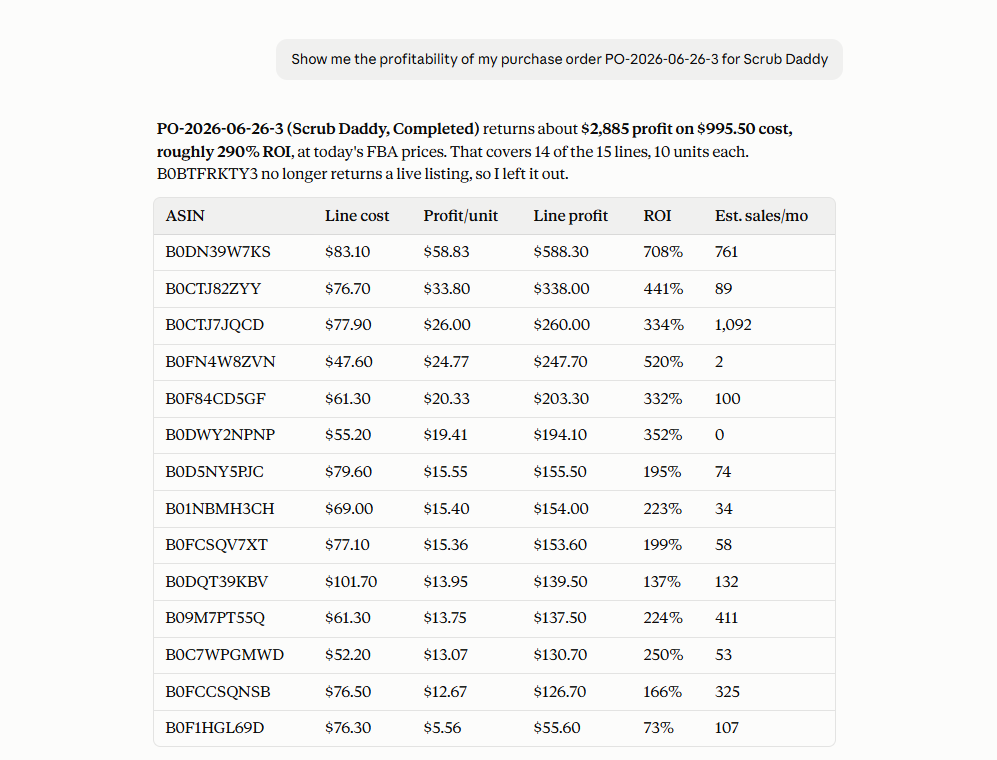
Check the profitability of the complete purchase order
When a supplier order contains multiple products, checking individual sourcing metrics is not enough to understand how the entire investment is expected to perform. Ask the AI assistant to retrieve the purchase order and review its current profitability data.
Prompt example
“Show me the profitability of my purchase order for [supplier].”
Why it matters
The buying decision applies to the complete supplier order, not to each SKU in isolation. Reviewing the PO as a whole helps you evaluate its current economics before moving forward.
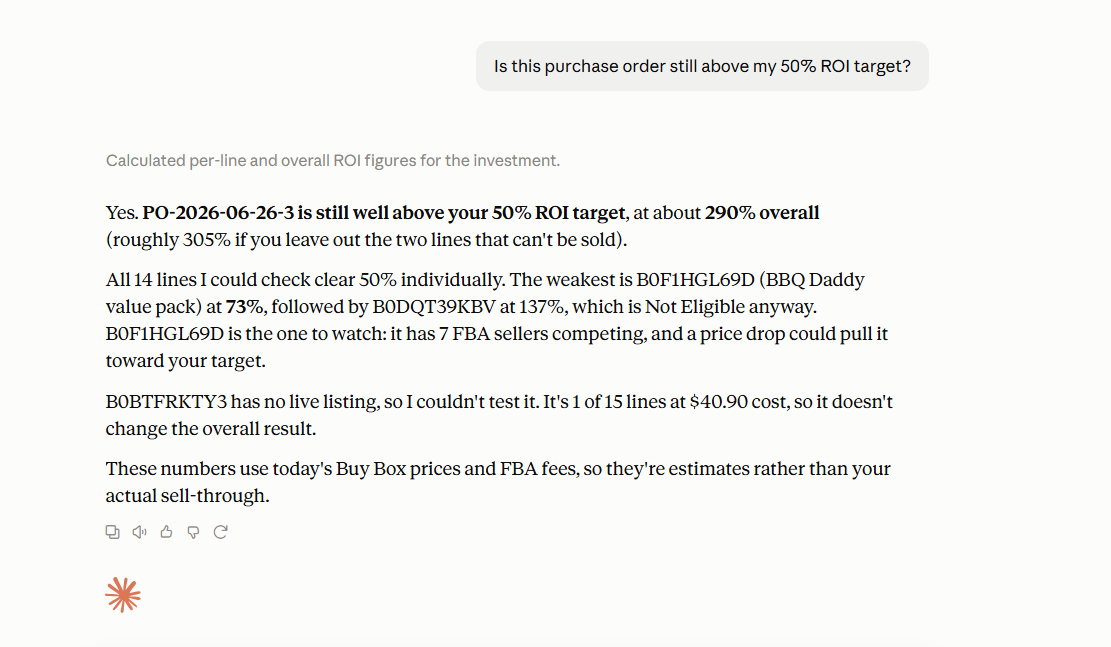
Compare the purchase order with your ROI target
Instead of simply asking whether a purchase order is “good,” give the AI assistant the profitability threshold you use for your sourcing decisions. This turns the request into a comparison against your own buying criteria.
Prompt example
“Is my purchase order for [supplier] still above my 25% ROI target?”
Why it matters
Different sellers have different ROI requirements depending on their business model and sourcing strategy. AI can help compare the current order with your target, while the final decision remains yours.
Investigate the weaker products in the order
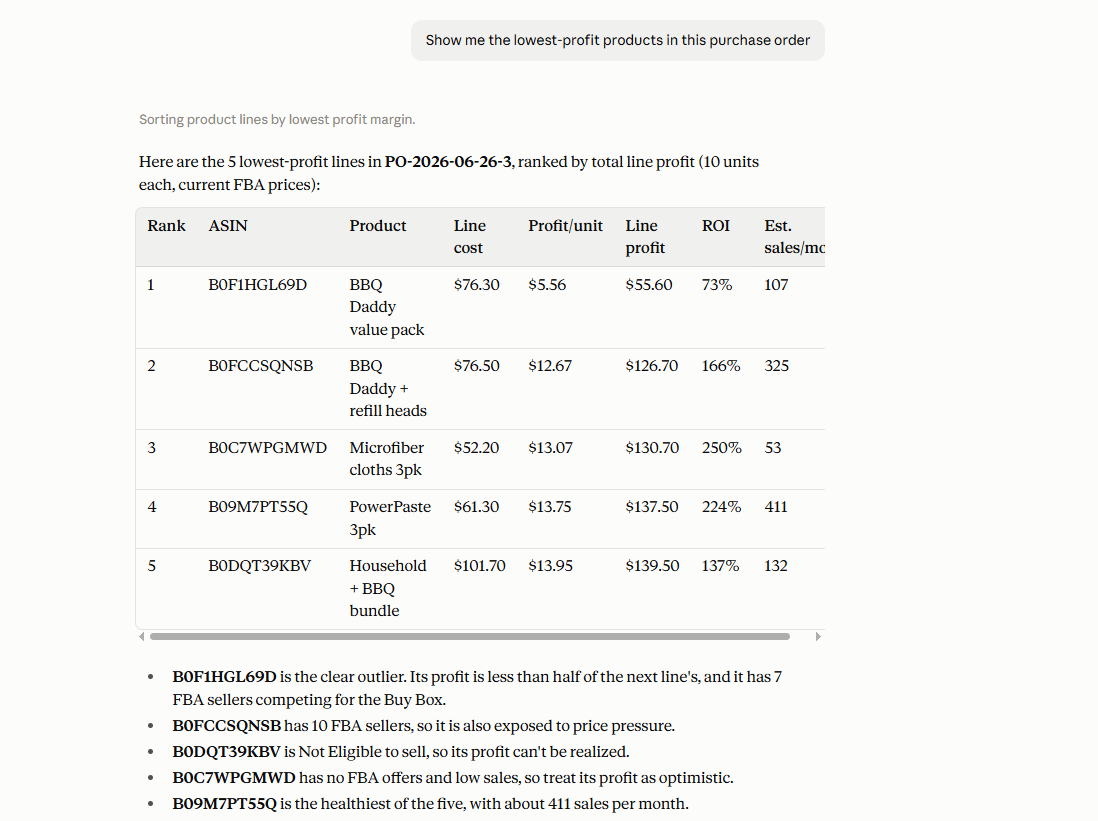
If the overall purchase order is performing below your target, the next step is to look more closely at the products inside it. Ask the assistant to surface supported product-level profitability information so you can identify which lines may need attention.
Prompt example
“Show me the lowest-profit products in this purchase order.”
Why it matters
A few weaker SKUs can affect the expected performance of the complete order, especially when they account for a significant share of the investment. Identifying them gives you a starting point for deciding whether quantities, costs, or the product mix need adjustment.
Recheck profitability after making changes
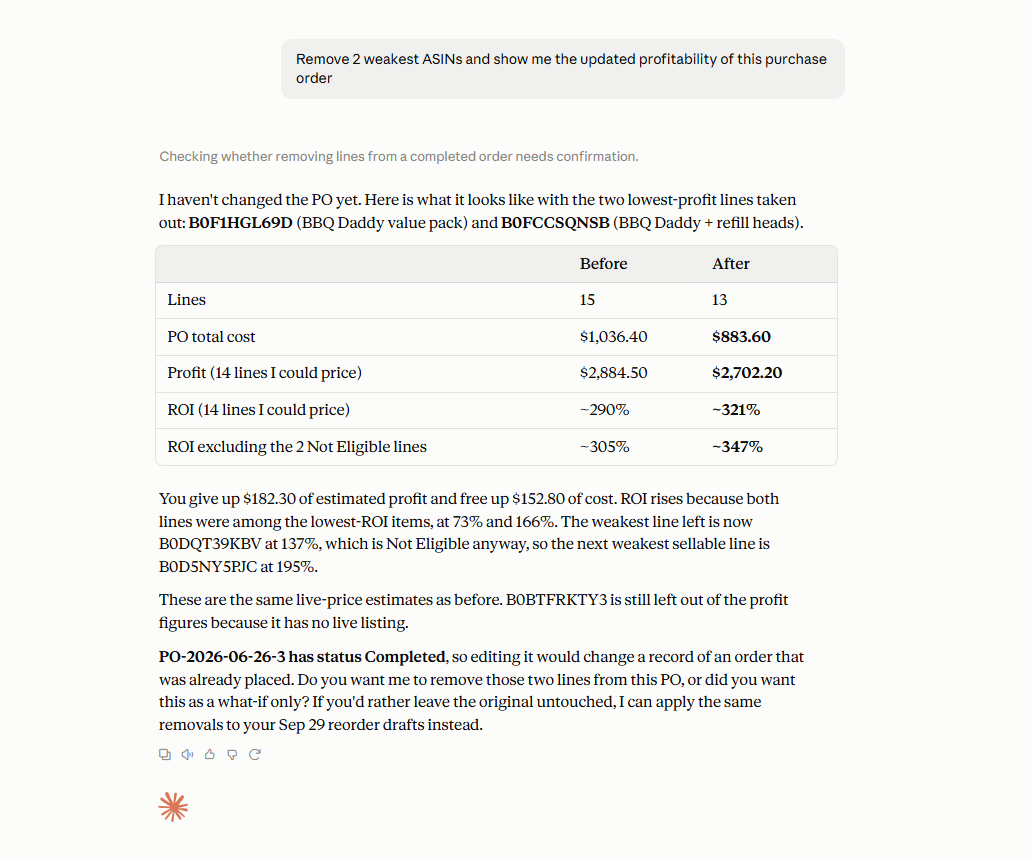
Purchase order profitability can change when quantities, unit costs, shipping, taxes, or other purchasing data are updated. After making supported changes, ask the AI assistant to retrieve the order again and review its latest profitability.
Prompt example
“Show me the updated profitability of this purchase order.”
Why it matters
The numbers you reviewed earlier may no longer represent the current version of the PO. Rechecking after changes helps ensure the final buying decision is based on the latest order data.
How to Check Purchase Order Profitability with AI Step by Step
Step 1. Connect Seller Assistant MCP to your AI assistant
Connect Seller Assistant MCP Server to ChatGPT, Claude, or another supported MCP -compatible assistant and authorize access to your Seller Assistant account. This gives the AI access to supported purchase order data and operations through natural-language requests.
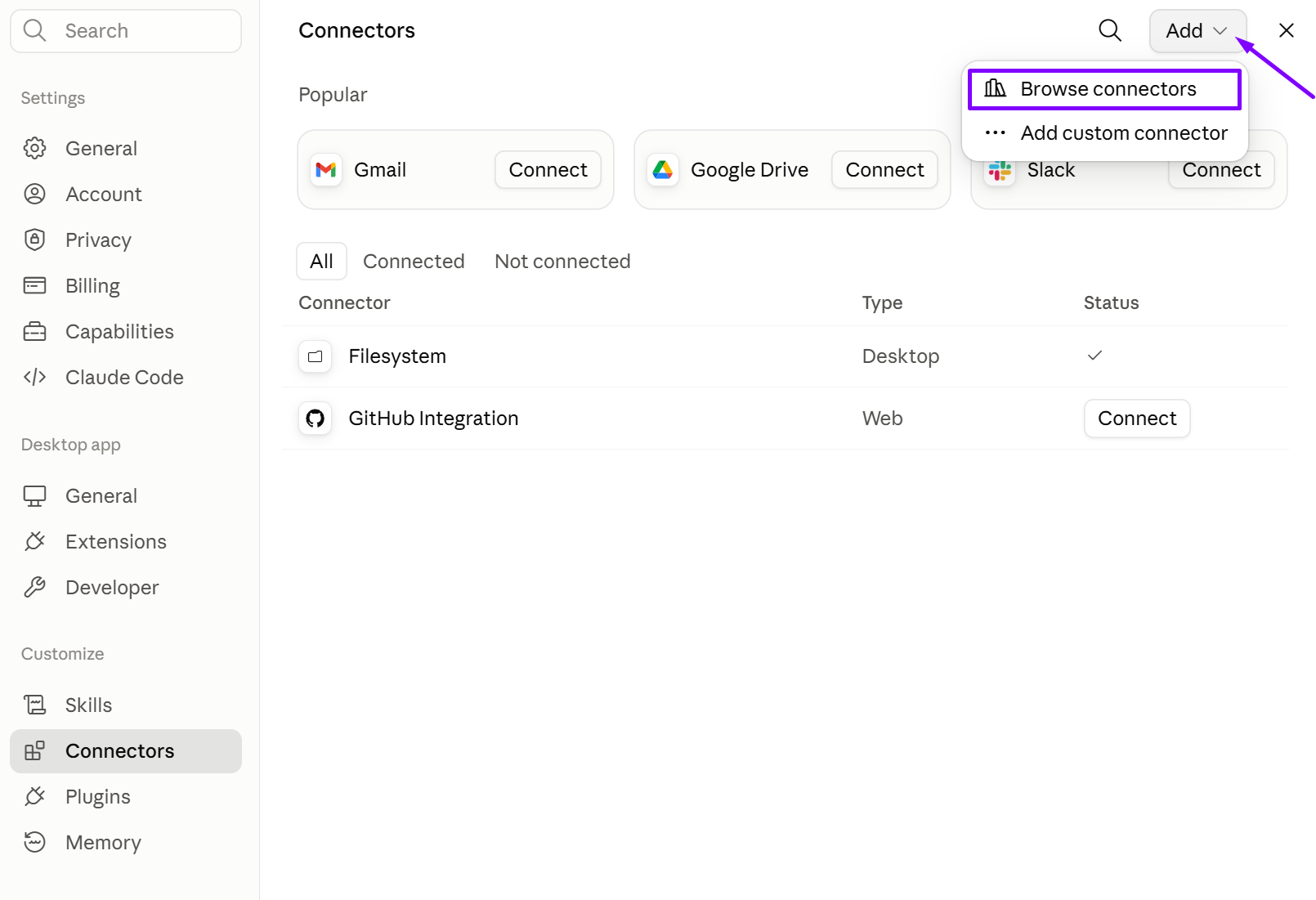
Without the MCP connection, AI can explain profitability concepts but cannot work with the actual purchase order stored in Seller Assistant.
Step 2. Find the purchase order you want to review
Ask AI to locate the relevant PO using the supplier or other available order information. Start with the actual order you are preparing to send rather than recreating its figures manually in the chat.
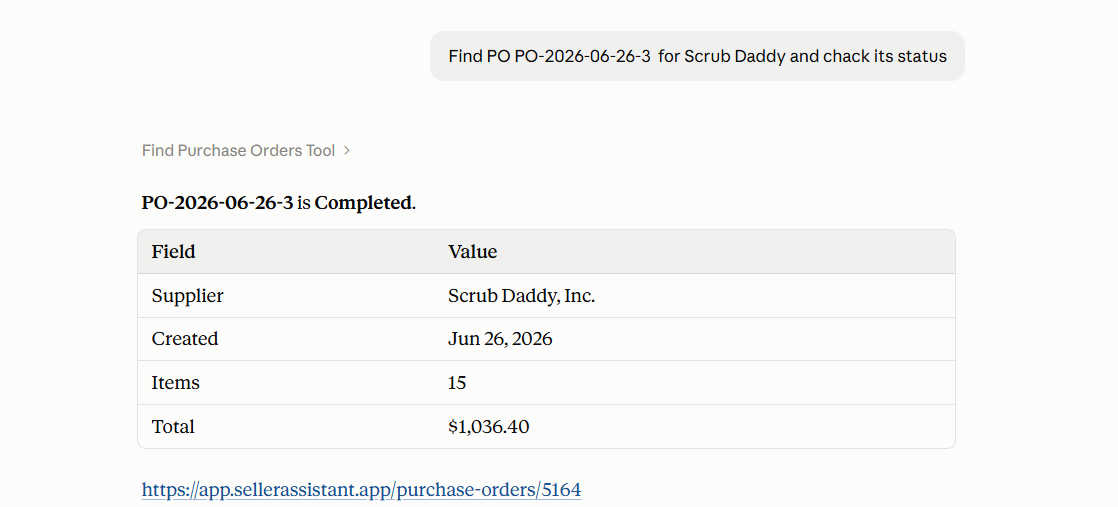
Profitability checks only make sense when they use the latest version of the real purchase order.
Step 3. Review the order’s current profitability
Ask AI to retrieve the profitability information available for the PO, including the current order-level metrics supported by Seller Assistant.
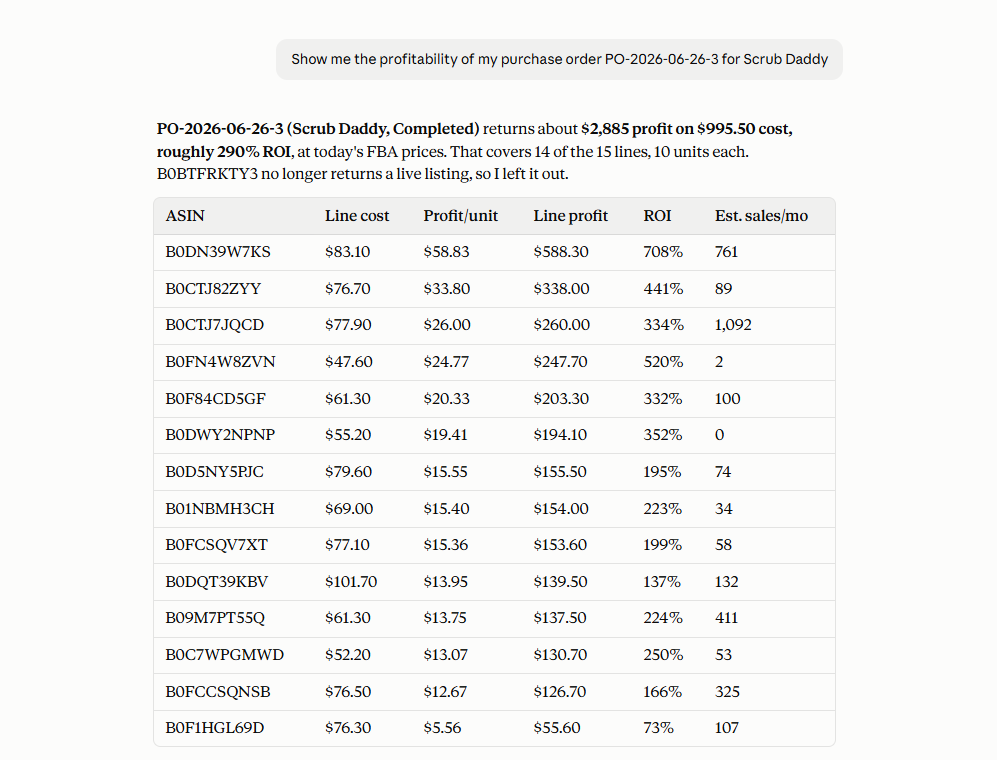
This gives you a complete order-level view instead of relying only on the profitability of the individual SKUs that went into the PO.
Step 4. Compare the PO with your target return
Give the assistant the ROI or other profitability threshold you use when evaluating supplier orders. Ask whether the current purchase order still meets that target.
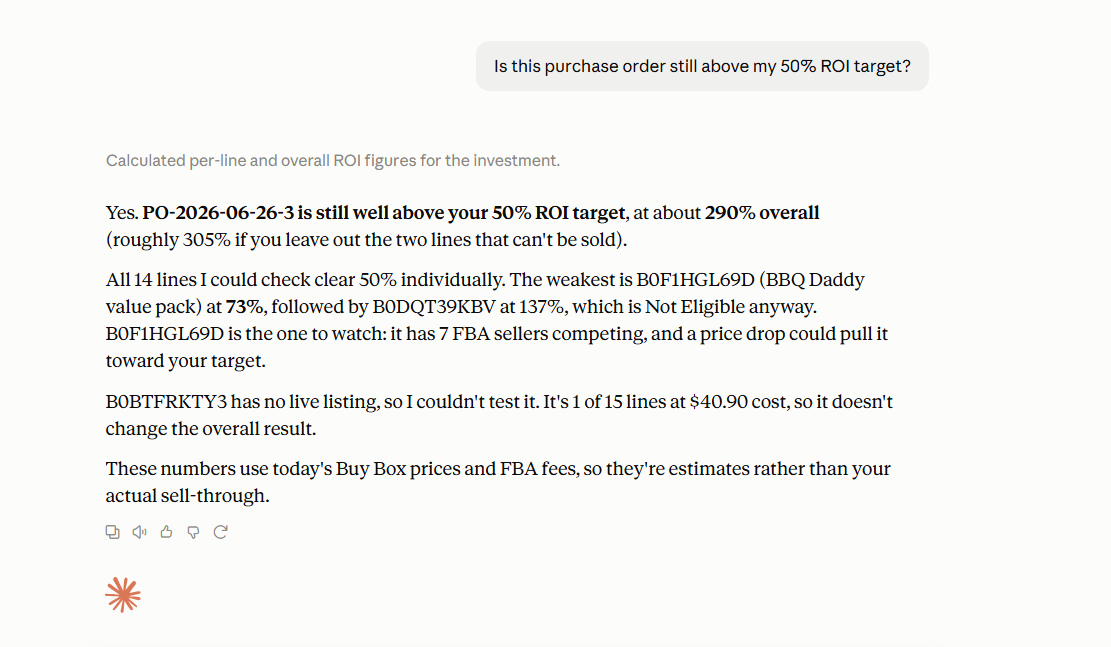
The same PO may be acceptable for one sourcing strategy and too weak for another, so the review should use your own target rather than a generic definition of a good ROI.
Step 5. Identify products that need a closer look
If the purchase order falls below your target or looks weaker than expected, ask AI to review the supported product-level profitability information and surface the lines that may be affecting the result.
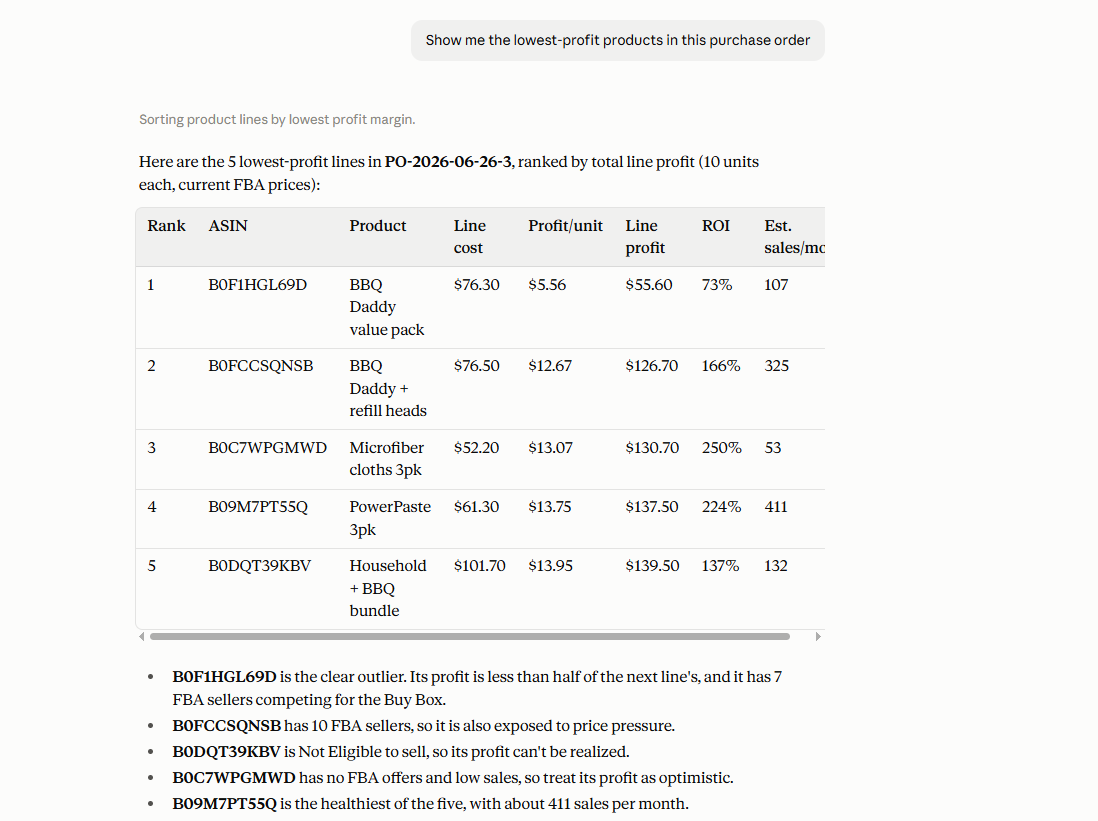
A few weaker SKUs can reduce the expected performance of the whole order and may be the best place to start when optimizing it.
Step 6. Adjust the purchase order if needed
Use supported MCP operations to change relevant purchasing data, such as quantities or costs, when you decide the order needs improvement. Review and confirm the requested write action before it is applied.
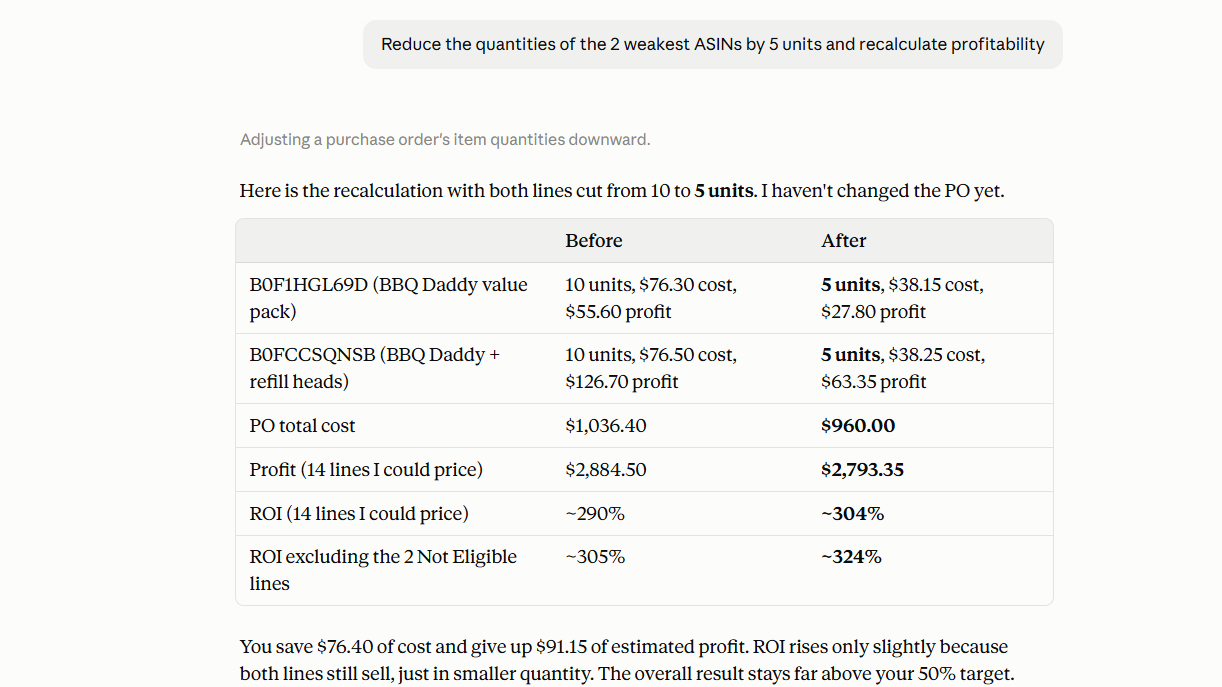
Profitability review becomes actionable when you can correct the parts of the PO that no longer fit your purchasing plan.
Step 7. Recheck the updated purchase order
After the changes are confirmed, ask AI to retrieve the PO again and review its latest profitability. Compare the updated result with your target before moving the order forward.
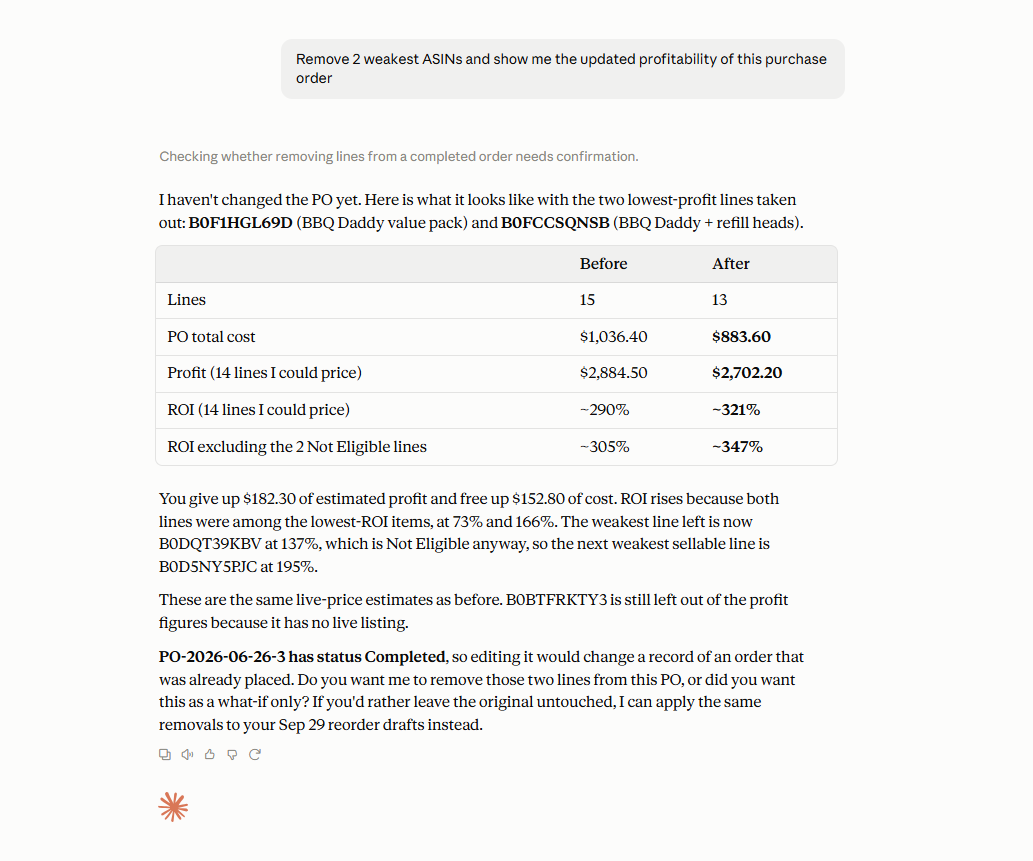
The earlier figures no longer describe the order after quantities, costs, or other purchasing data change, so the final decision should use the recalculated PO.
FAQ
How do I know if a purchase order is profitable?
Look at the complete order rather than evaluating each SKU separately, including total investment, estimated profit, ROI, and profit per unit. This shows how the purchasing costs and product mix work together at the PO level.
Why can profitable products result in a weaker purchase order?
Products contribute differently depending on their unit costs, quantities, and expected profit, while shipping, taxes, and other expenses also affect the complete order. A large investment in weaker SKUs can therefore reduce the overall return even when every product initially passed your sourcing criteria.
When should I check purchase order profitability?
Check it before committing to the order and again whenever important purchasing data changes, such as quantities, unit costs, shipping, or taxes. The profitability you reviewed when the PO was first created may no longer reflect its current economics.
Can AI decide whether I should send a purchase order?
AI can help retrieve and evaluate supported purchase order data against criteria such as your target ROI, but it should not replace your sourcing decision. You still decide whether the expected return, capital commitment, and product mix fit your business strategy.
What should I do if a purchase order falls below my ROI target?
Review the products and costs contributing to the order and determine whether quantities, unit costs, or the product mix can be improved. After making supported changes, recheck the PO profitability to see whether the updated order now meets your target.
Final Thoughts
A purchase order can change significantly between the moment products are selected and the moment the order is ready to move forward. Reviewing the complete PO – including total investment, estimated profit, ROI, profit per unit, quantities, costs, and order expenses – helps sellers make purchasing decisions based on the current order rather than the profitability they expected earlier.
Seller Assistant’s Purchase Orders Module keeps purchasing data and profitability calculations connected, while MCP Server makes supported purchase order data and operations accessible through AI chat. Together, they create a practical find → review → investigate → adjust → recheck workflow that helps Amazon sellers understand whether a purchase order still meets their profitability targets before committing capital.