Seller Assistant vs sellerboard
sellerboard is a profit and PPC suite for Amazon sellers, founded in 2017. Seller Assistant is built for wholesale and arbitrage resellers: it connects price lists, purchase orders, repricing, and realized profit.
Which one fits your workflow?
Choose Seller Assistant if you source and resell through wholesale or arbitrage
One platform from the supplier price list to the realized profit by brand and supplier.
- Price List Analyzer, Brand Analyzer, restriction checks, and IP-Alert before you buy
- Purchase orders and landed cost feed Profitability and Repricer
- Repricer rules, and an AI assistant (MCP) that can act with your approval
See where each tool wins
A tool-by-tool view. sellerboard covers more marketplaces and marketing tools. Seller Assistant covers sourcing and connects profit to suppliers and brands. Facts about sellerboard were read on its public pages on November 10, 2026.

 sellerboard
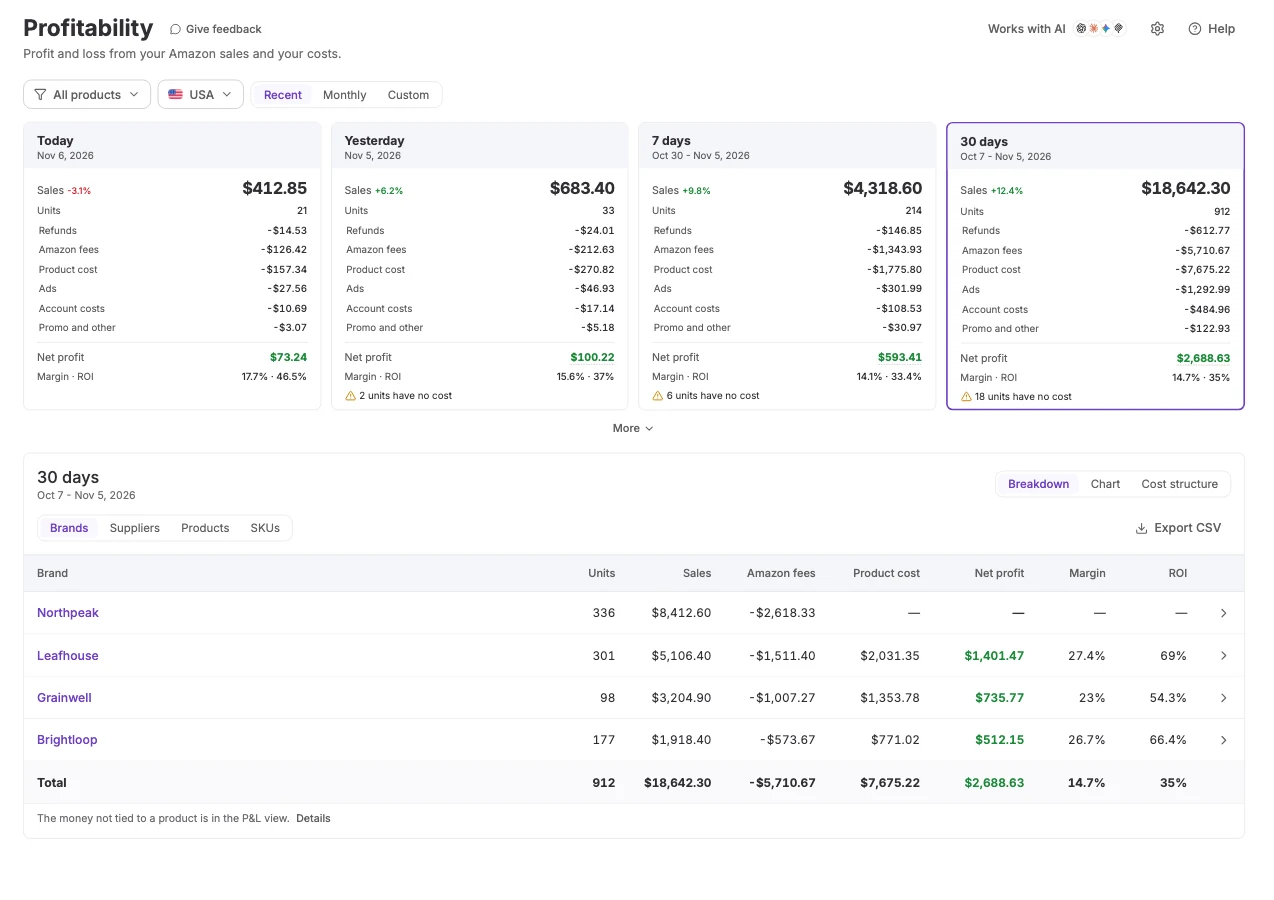
Sales, fees, refunds, ads, product and account costs to net profit, margin, and ROI
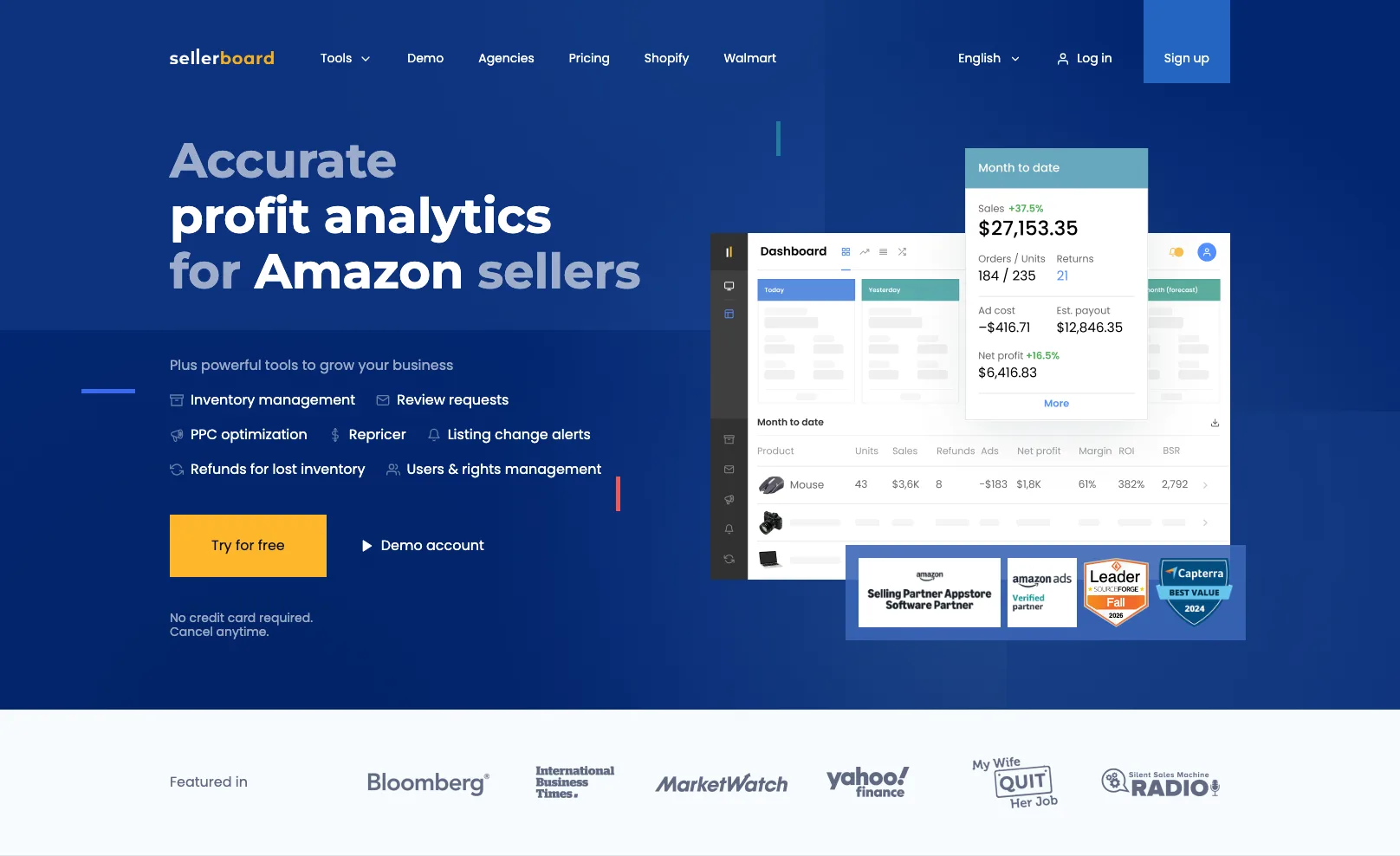
Sales, fees, ads, refunds, COGS, and estimated payout in tiles; more than 100 Amazon fee types
From purchase orders, a completed-order average, or a file import
FIFO, constant, batch, period-based, or per marketplace
Group any period by brand, supplier, product, or SKU
Account, product, and order level. Brand and supplier grouping not listed (Nov 2026)
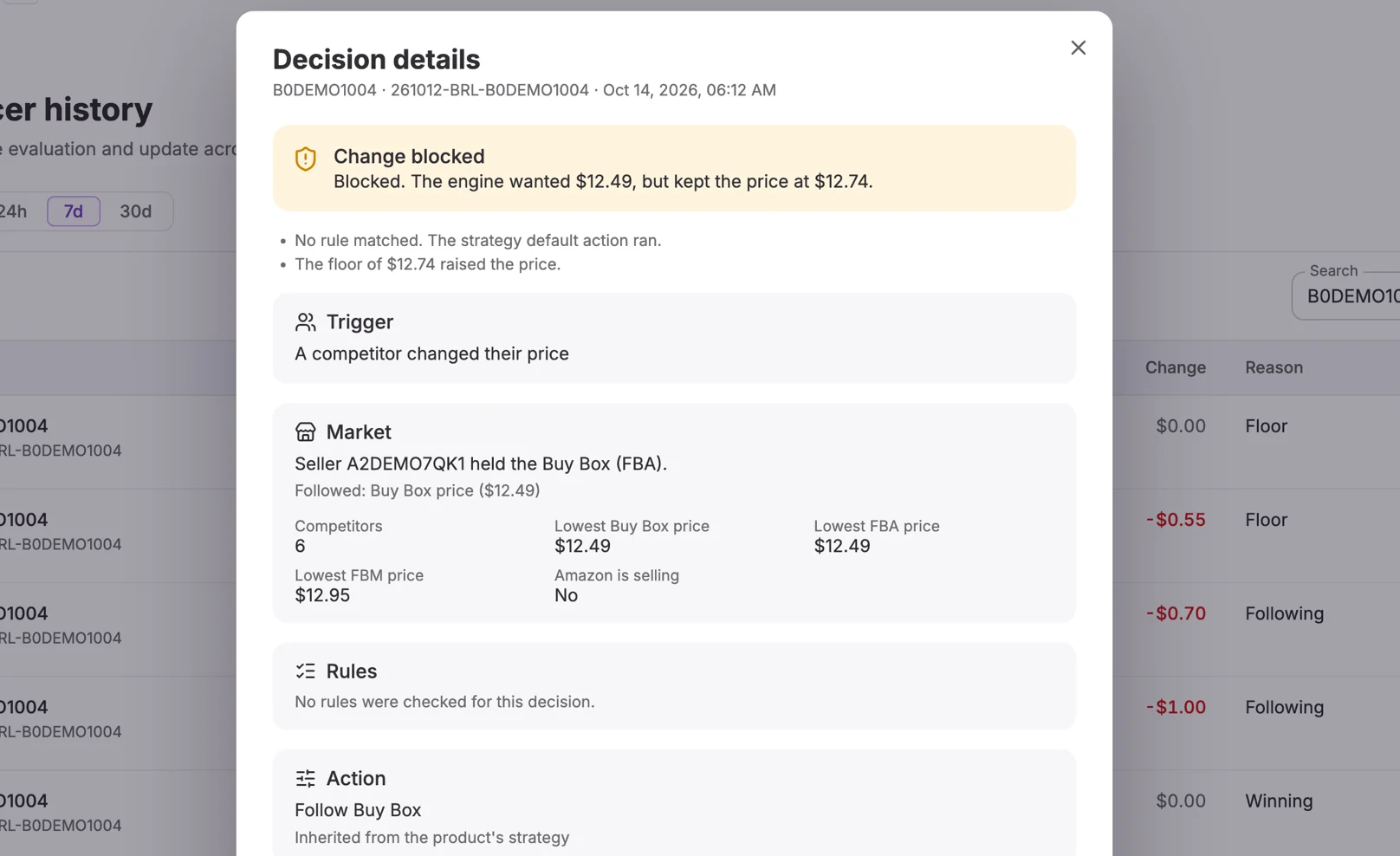
Ready-made templates plus if/then rules for Amazon selling, stock, and time of day. History explains each price change: trigger, market, rules checked, and limits
Three strategies (profit, sales, liquidation by a date), formula-based min and max, and a log of every price change
Purchase orders, suppliers, warehouses, and FBA shipments on one product record
Inventory planner and purchase orders linked to FBA stock
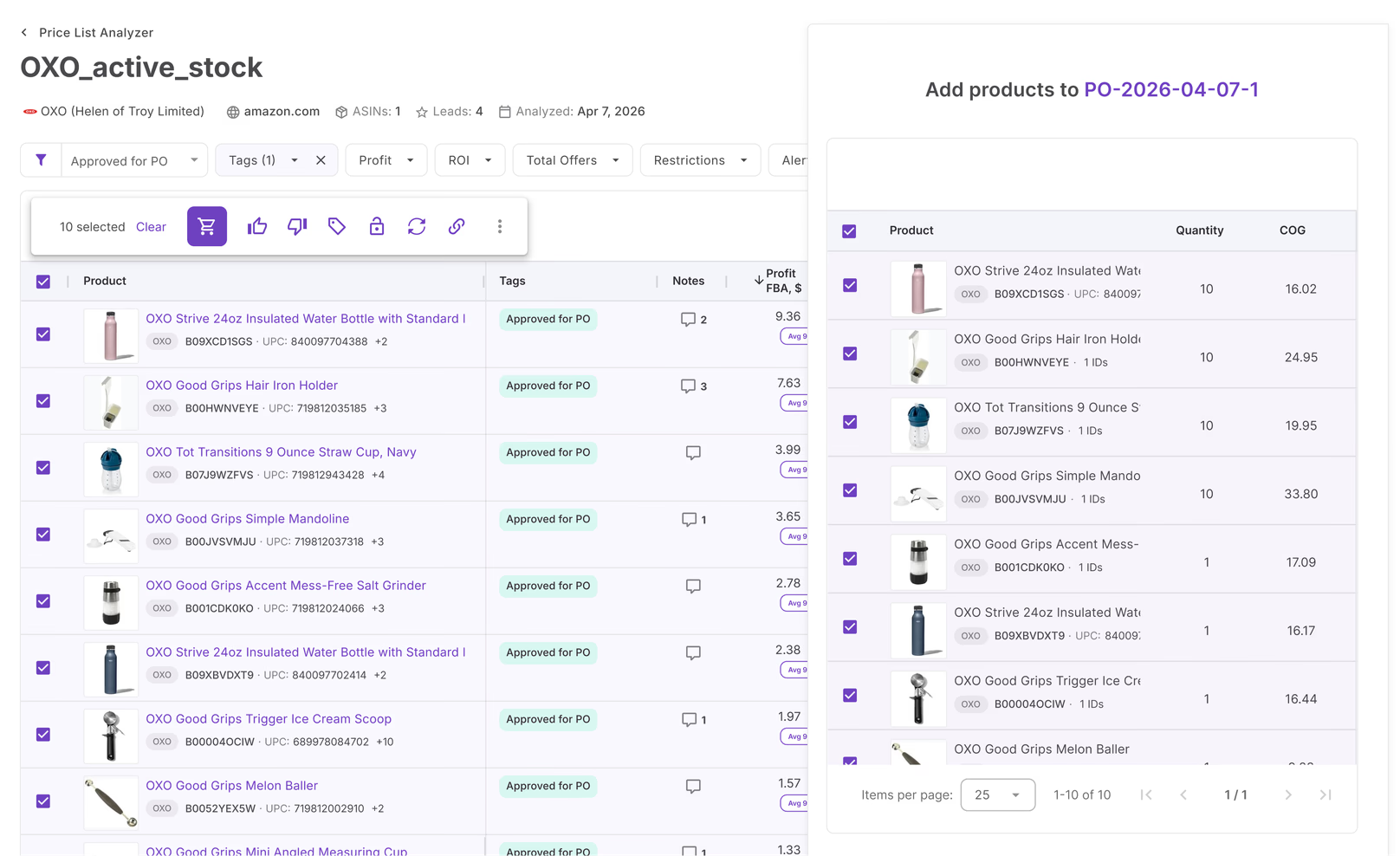
Price List Analyzer checks a whole supplier file against Amazon before you buy
Barcode scanning and buy lists in the mobile app. Bulk price list analysis not listed (Nov 2026)
Brand Analyzer, Bulk Restriction Checker, and IP-Alert
Not listed on their site (Nov 2026)
Seller Spy tracks what a competitor storefront adds, removes, and reprices
Alerts for new sellers and Buy Box loss on your listings. Storefront tracking not listed (Nov 2026)
Lister and FBA Shipments, starting from the purchase order
Reseller Workflow: offers, relisting, FBA shipments, labels, and batch profit
The MCP server reads your data and, with your approval, drafts orders and changes settings. Answers carry suggested next steps
An MCP connector that reads your data. Their page says it is read-only (Nov 2026)
Ad spend counted in profit, no PPC automation
PPC analytics and bid automation
No review requests. FBA Shipments flags inbound discrepancies but does not file claims
Review requests and refunds for lost inventory
Amazon, one marketplace at a time in its own currency
All Amazon marketplaces, plus Walmart and eBay
Operational P&L with CSV export, no bookkeeping sync
QuickBooks integration
Profitability is part of Seller Assistant plans
Its own subscription plans
Four differences that actually matter
Where the two tools differ most for a reseller.
Research, restrictions, and IP checks before you buy
Price List Analyzer checks a supplier file against Amazon. Brand Analyzer, the Bulk Restriction Checker, and IP-Alert flag risky products and brands before a purchase order exists. sellerboard's public pages describe scanning in its mobile app and profit analytics after the sale, and do not list these.
Rules you build, and the reason behind every price
Start from a template, then add if/then rules for Amazon selling, stock, and time of day. Each history row opens the trigger, the market at that moment, the rules checked, the action, and the limit that held the price. sellerboard's Repricer offers three strategies, formula-based limits, and a log of every price change.
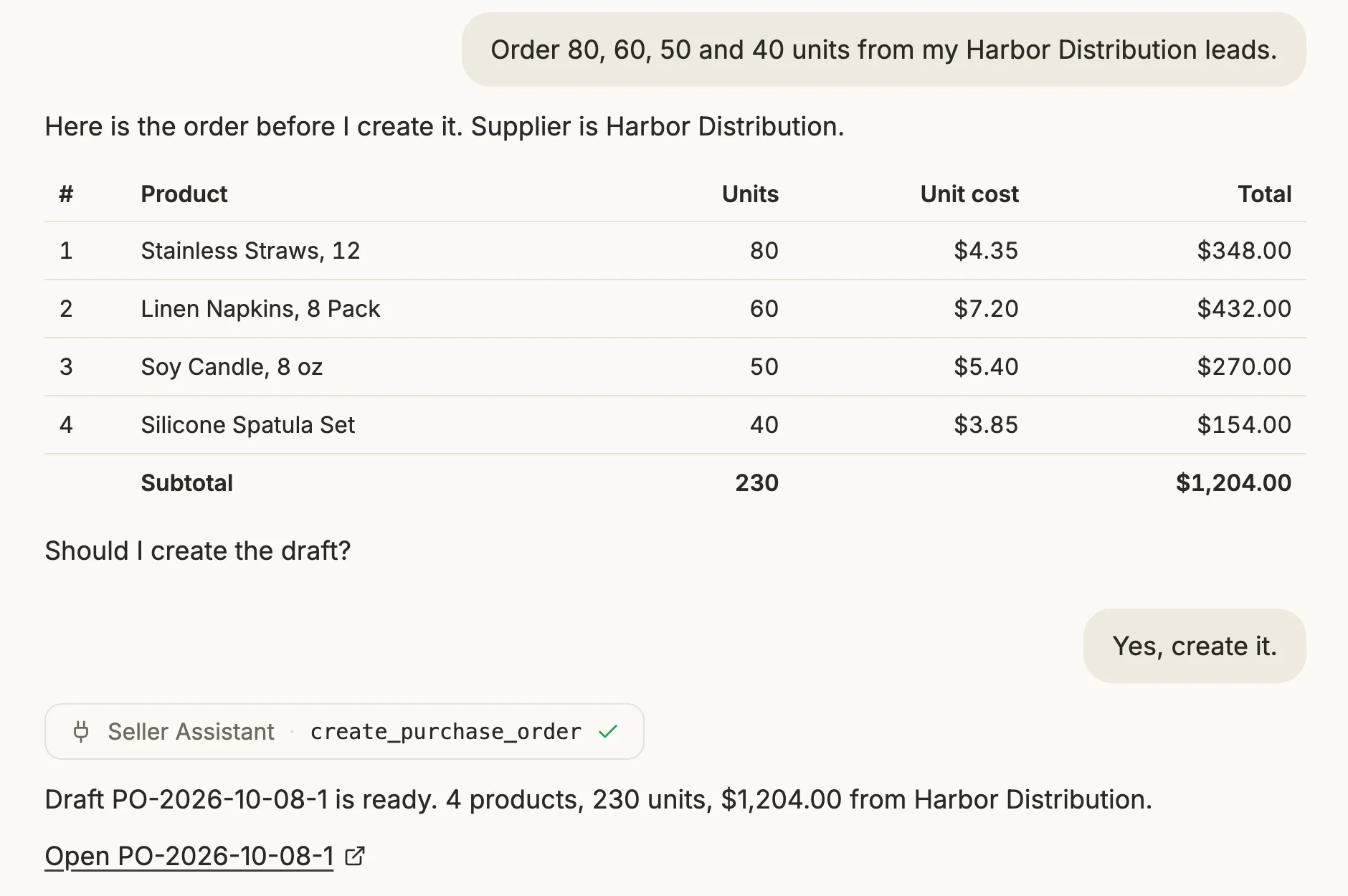
An assistant that suggests the next step
The MCP server reads your profit, price lists, purchase orders, and Repricer. After you approve, it can draft a purchase order or change a setting, and its answers come with suggested next steps from your account. sellerboard's MCP connector is read-only, according to its page.
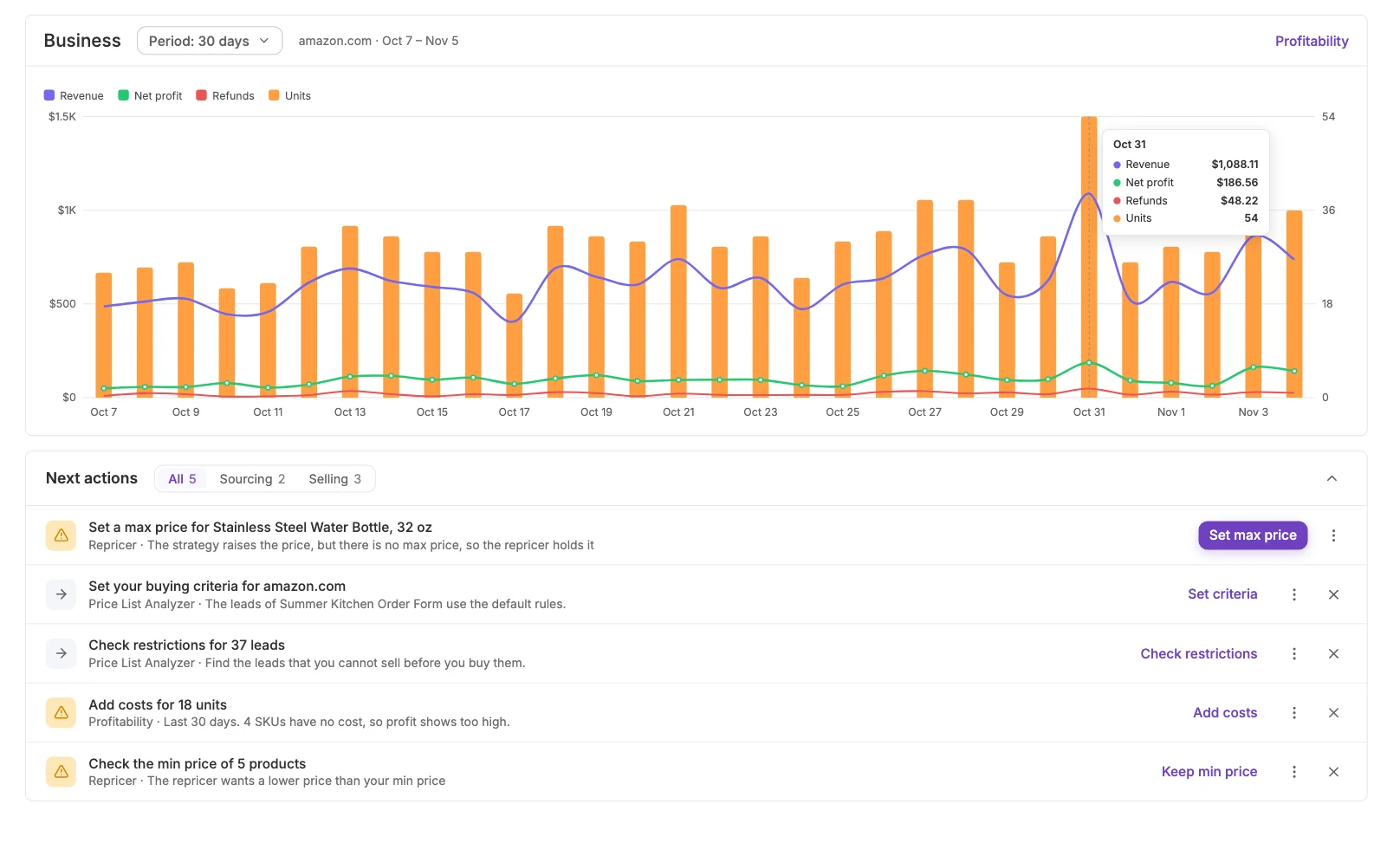
Your sales and profit chart, with the next step under it
The dashboard shows a chart of revenue, net profit, refunds, and units for the period, with Next actions under it: set a max price, check restrictions for new leads, add a missing cost. Each row opens the tool that does it. sellerboard's public pages describe a tile view of sales, ads, refunds, and estimated payout, and do not mention a next-steps list from your account.
Switching from sellerboard?
In sellerboard, open Profit › Products and click Export at the bottom of the page. Drop the Excel file on the Seller Assistant SKU import page as it is, and your product costs carry over to past orders. Do this first: until a unit has a cost, it counts at $0 and profit shows too high.
Period cards, the P&L, and the breakdown by brand, supplier, product, or SKU.
Drop the sellerboard Profit › Products export as it is, or any CSV or XLSX file.
Each purchase order sets the unit cost Profitability reads for the units you sell.
Expected FBA and FBM profit on a supplier file, before you buy.
Start from a ready-made template, then add if/then rules and read the reason behind each price.
Ask Claude or ChatGPT which brands made money last month. MCP is on Business and higher plans.
Compare the profit you expected with the profit you made
Connect your Amazon account, add product costs, and read any week, month, or quarter by brand and supplier.
Start free 14-day trialFrequently asked questions
Visit Help CenterWhat is the best sellerboard alternative for wholesale sellers?
Does sellerboard have a repricer and an MCP server too?
Can I import my product costs from sellerboard?
Do I have to stop using sellerboard to try Seller Assistant?
Is Profitability accounting software?
Why does my payout not match my profit?
Can I ask an AI assistant about my profit?
Which plans include Profitability?
Not sure which plan fits your sourcing workflow? Chat with our team — we're happy to help.