A price list with a few thousand rows gets analyzed, sorted by profit, and skimmed from the top – the deals near the bottom, or the ones buried behind a warning nobody reads, often just don’t get seen.
Seller Assistant’s Price List Analyzer already surfaces every lead with the data behind it; its MCP Server lets you ask an AI assistant to actually go through that data instead of scrolling it – “which leads have warnings I should check,” “anything I’m missing below the top 20.”
This post walks through catching what a quick skim misses in a large price list, through an AI chat instead of scrolling the table.
Why Profitable Amazon Deals Still Get Overlooked
Analyzing a supplier price list solves one problem – it turns thousands of raw products into comparable sourcing data. But it creates another: sellers still need to decide which results deserve attention. When a large list is sorted by profit, ROI, or another familiar metric, the most obvious opportunities rise to the top while less obvious deals can remain buried deeper in the results.
The problem is not always that those products are worse. Some simply do not rank highly by the metric being reviewed, contain a warning that makes them easy to dismiss, or only become interesting when several sourcing signals are considered together. The larger the catalog, the easier it is for potentially profitable Amazon deals to go unnoticed.
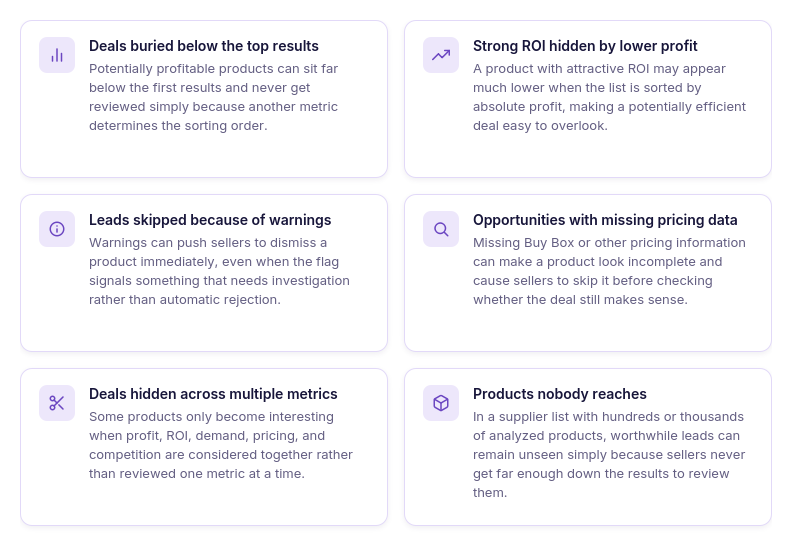
Deals buried below the top results
Products that do not appear among the first results may never be reviewed, even when their profitability and other sourcing metrics make them worth investigating.
Strong ROI with lower absolute profit
A product can offer attractive ROI while generating less profit per unit, causing it to disappear further down a list sorted primarily by profit.
Leads hidden behind warnings
Warnings can make sellers skip products at a glance, even when the warning simply signals that the product needs additional research rather than automatic rejection.
Products with missing pricing data
Missing Buy Box or other pricing information can make a lead look incomplete, but it may still deserve manual validation before being removed from consideration.
Opportunities hidden across multiple metrics
Some deals do not stand out on any single metric and become interesting only when profitability, demand, pricing, and competition are evaluated together.
Products nobody gets around to reviewing
With hundreds or thousands of analyzed SKUs, reviewing every lead individually becomes impractical, so potentially valuable products can remain untouched simply because they appear too far down the list.
Why AI Needs Access to the Actual Analyzed Price List
AI can help define sourcing criteria, explain Amazon metrics, or suggest what makes a product worth a second look. But if it cannot access the actual analyzed supplier list, it cannot know which profitable deals are buried below the first results, which products were skipped because of warnings, or which less obvious combinations of metrics deserve further investigation.
To catch overlooked Amazon deals, the assistant needs a way to work with real analysis results rather than only the products a seller manually brings into the chat. With access to the underlying sourcing data, AI can investigate the list from different angles and help surface opportunities that a standard sort or quick review may miss.
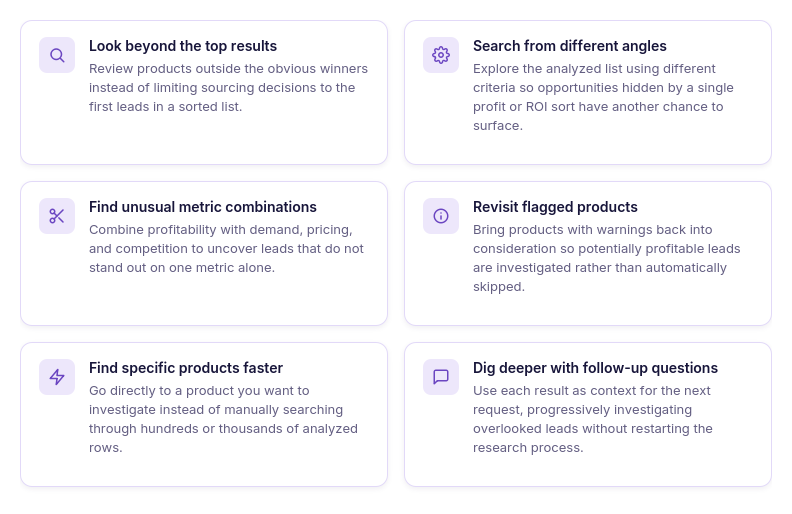
AI cannot review data it cannot see
A general AI assistant can explain sourcing metrics and help define profitable deal criteria, but it cannot identify overlooked products without access to your actual analyzed supplier list. If you only share the first few leads, everything outside that selection remains invisible to the AI.
Sorting shows one view of the opportunity
Sorting by profit, ROI, or another metric prioritizes products according to that single value rather than reviewing every possible sourcing angle. Products that perform well across several metrics can remain buried because they do not rank at the top of the current sort.
Overlooked deals require different search criteria
A second review often means asking a different question of the same dataset, such as looking for profitable products with lower competition or revisiting leads outside the obvious top results. AI needs access to the underlying analysis to search from these different angles instead of working only with a static shortlist.
Warnings need context before rejection
A warning can explain why a product deserves additional investigation, but it can also make the lead easy to dismiss during a quick scan. Access to the analyzed results lets AI bring flagged products back into the review so sellers can decide whether the issue actually disqualifies the deal.
Large catalogs need more than manual review
The more products a supplier list contains, the harder it becomes to inspect every potentially relevant row and metric combination manually. Giving AI access to the analyzed dataset creates another way to investigate the catalog without depending entirely on how far a seller scrolls.
Follow-up questions make analysis iterative
Finding an interesting lead often creates another question about its profitability, competition, pricing, or other sourcing data. With access to the actual results, AI can continue investigating the same products instead of requiring sellers to repeatedly find and copy information into the chat.
How Seller Assistant Helps Catch Missed Profitable Deals
Catching overlooked Amazon deals requires two things: complete sourcing data and a way to investigate that data beyond the default view. The AI needs access to actual product matches, profitability, demand, pricing, competition, warnings, and other analysis results – not just the few products a seller has already selected for review.
Seller Assistant combines these two parts of the workflow. Price List Analyzer turns a large supplier catalog into structured Amazon sourcing data, while Seller Assistant MCP Server connects supported Seller Assistant data and operations to AI assistants such as ChatGPT and Claude. Together, they make it possible to use AI not only to review the obvious leads, but also to investigate products that might otherwise remain buried in a large price list.
How Price List Analyzer reveals opportunities across supplier catalogs
Seller Assistant’s Price List Analyzer is designed for bulk product research across Amazon wholesale, online arbitrage, and dropshipping catalogs. Sellers upload an .xlsx or .xls supplier file with product identifiers and COG, allowing the catalog to be researched as a whole rather than limiting attention to products that already look promising.
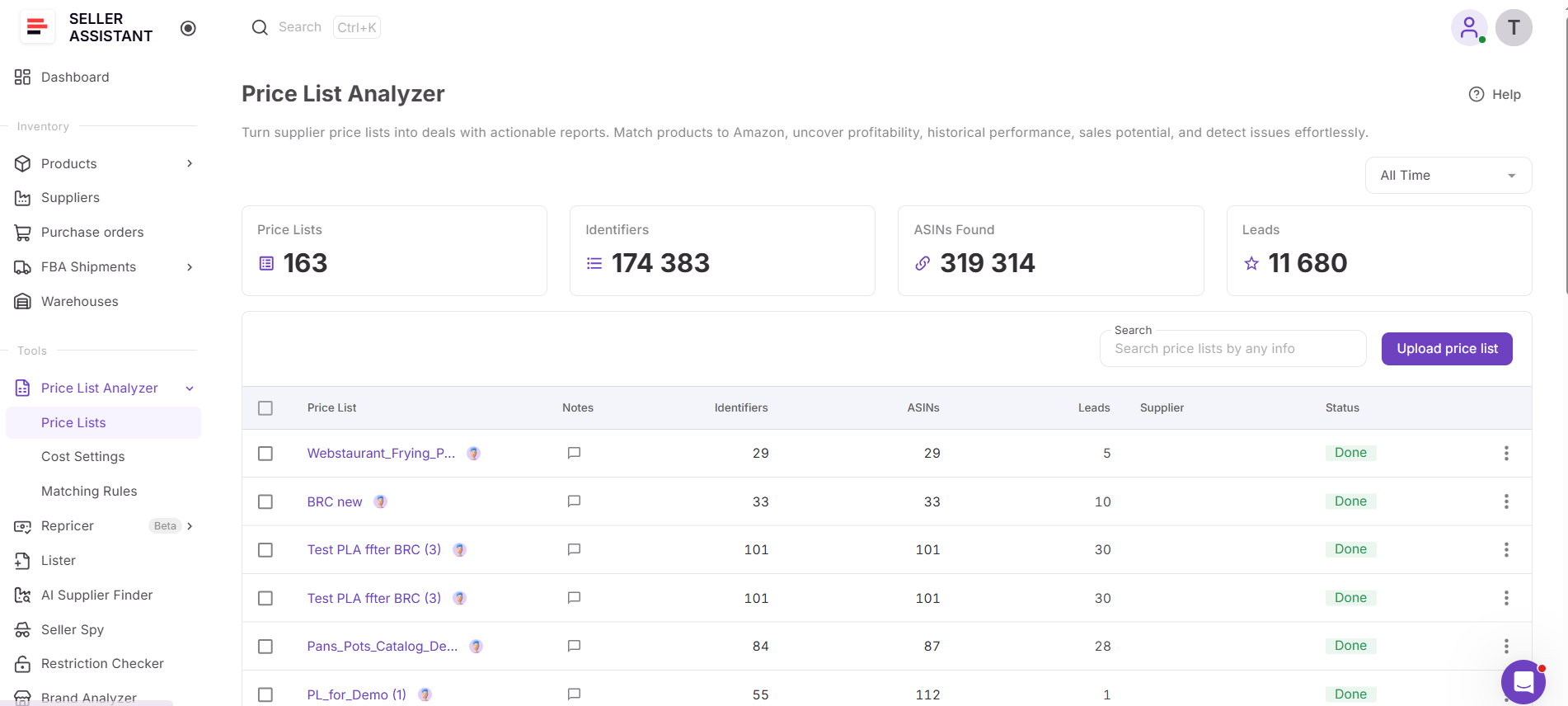
The tool matches supplier products with Amazon listings and builds a detailed sourcing dataset around each match. Profitability, demand, sales history, Buy Box and pricing data, competition, restrictions, warnings, and other product information can all be reviewed together. This matters when looking for missed profitable Amazon deals because sellers are not limited to one ranking or the first products they notice – they can return to the full analyzed catalog and examine it from different angles.
What Price List Analyzer helps you analyze
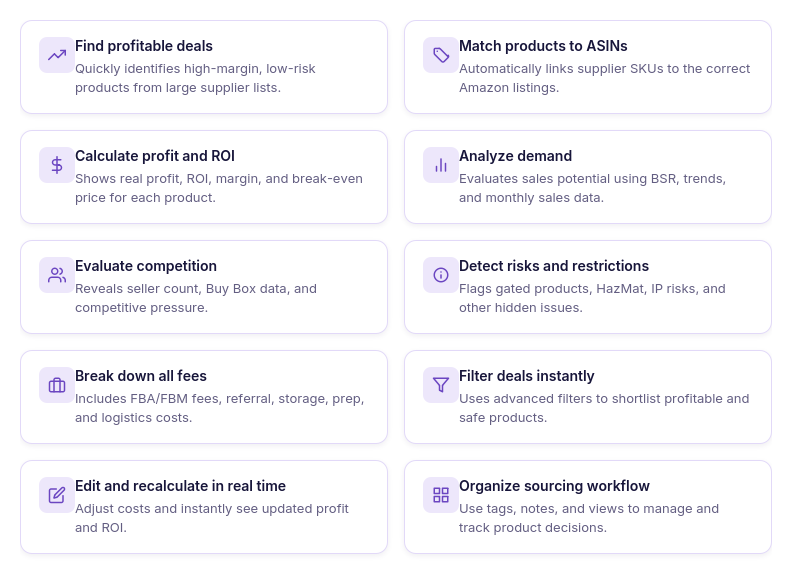
- Analyze supplier catalogs at scale
Upload large supplier price lists and research hundreds or thousands of products in one workflow instead of checking Amazon listings individually.
- Match supplier products to Amazon
Automatically match supplier product identifiers to Amazon ASINs, reducing the manual work required to connect catalog items with the correct listings.
- Calculate FBA and FBM profitability
See profit, ROI, margin, break-even price, Max COG, seller proceeds, and detailed costs using Amazon fees and your configured sourcing expenses.
- Validate product demand
Use sales estimates, Monthly Sold, current and historical BSR, and Sales Rank Drops to evaluate sales potential and demand consistency over time.
- Analyze pricing and Buy Box history
Compare current Buy Box pricing with historical averages and price dynamics to avoid evaluating a deal only against a temporary selling price.
- Evaluate real competition
Review total offers, Buy Box-eligible FBA and FBM offers, top sellers, Buy Box share, and Amazon presence to understand the competitive environment around each ASIN.
- Detect restrictions and sourcing risks
Surface restrictions, warnings, and product flags such as HazMat, meltable, fragile, oversize, IP-related risks, missing Buy Box data, and other issues that may require additional research.
- Filter products by your sourcing criteria
Narrow large catalogs using profitability, demand, competition, pricing, restrictions, risk, brand, category, tags, and other available metrics, then save views to reuse your preferred criteria.
- Test different cost scenarios
Adjust COG, shipping and prep costs, package quantity, fees, taxes, and other cost assumptions and recalculate profitability without uploading the supplier file again.
- Organize and review sourcing leads
Use likes and dislikes, tags, notes, and saved views to shortlist products, record sourcing decisions, and keep research organized across a team.
- Export the leads you need
Export the complete analyzed list, filtered results, or selected products depending on what you want to review or use next.
- Turn analyzed products into purchase orders
Select sourcing candidates from the analyzed price list and use Add to PO to continue with them in Seller Assistant’s Purchase Orders workflow instead of manually transferring product data.
How Price List Analyzer helps uncover deals that are easy to miss
The advantage of analyzing the full supplier catalog is not only finding the products with the highest profit or ROI. Price List Analyzer keeps the broader sourcing data available across the analyzed list, making it possible to revisit products that did not appear among the obvious winners and filter the catalog by different metrics to uncover additional opportunities.
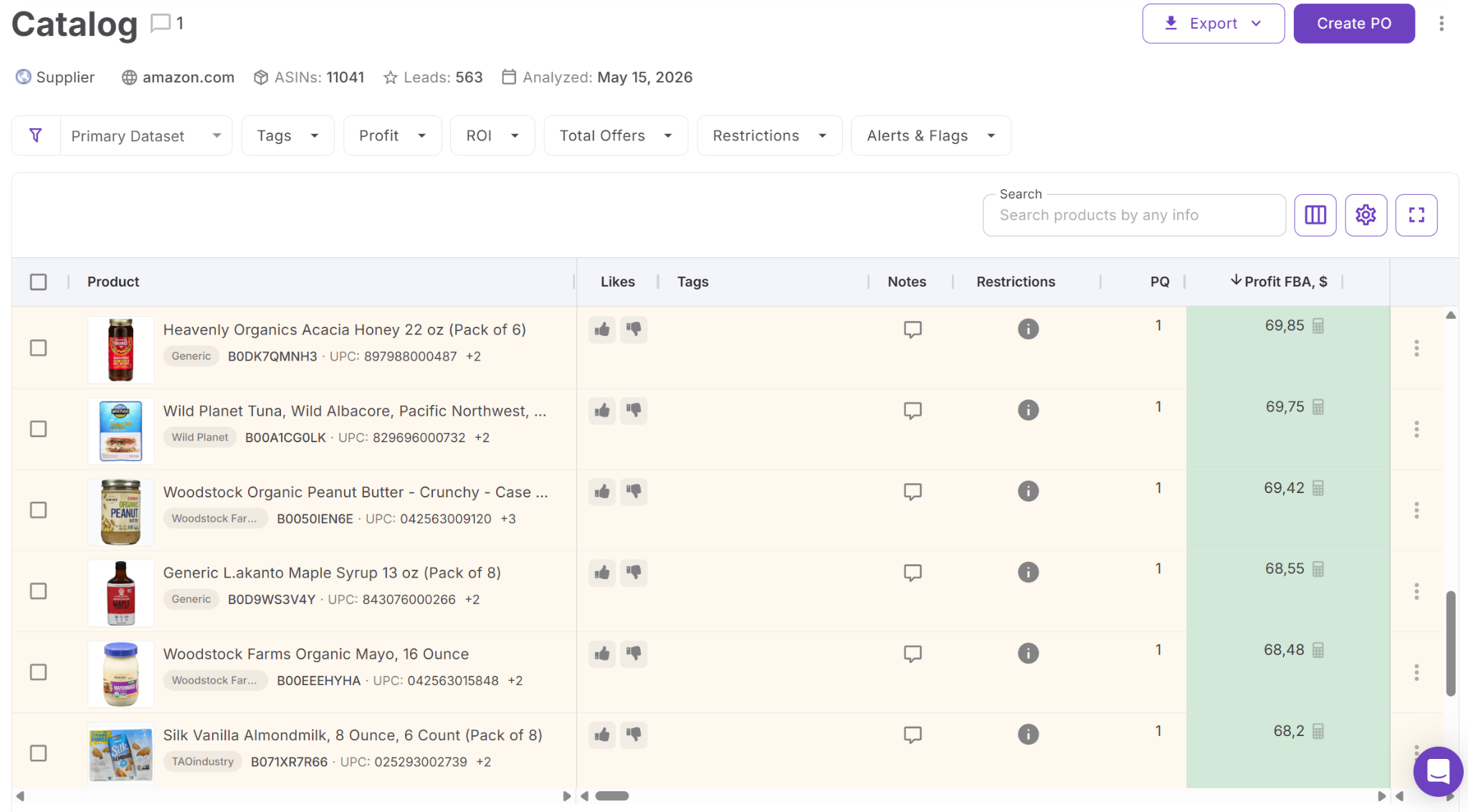
A product buried lower in the results may still have attractive ROI, consistent demand, manageable competition, or other characteristics that make it worth investigating. Another may have been passed over because of a warning or missing data that needs additional review rather than immediate rejection. By filtering the same catalog from different angles, sellers can look beyond the first shortlist and identify potentially profitable deals that a quick scan could miss.
How Seller Assistant MCP brings overlooked leads into AI chat
Seller Assistant MCP Server connects AI assistants with Seller Assistant tools and account data, allowing sellers to work with supported sourcing operations through natural-language requests. Instead of asking ChatGPT or Claude to reason from generic Amazon knowledge or a handful of manually copied products, MCP gives the assistant access to actual Seller Assistant data and supported actions.
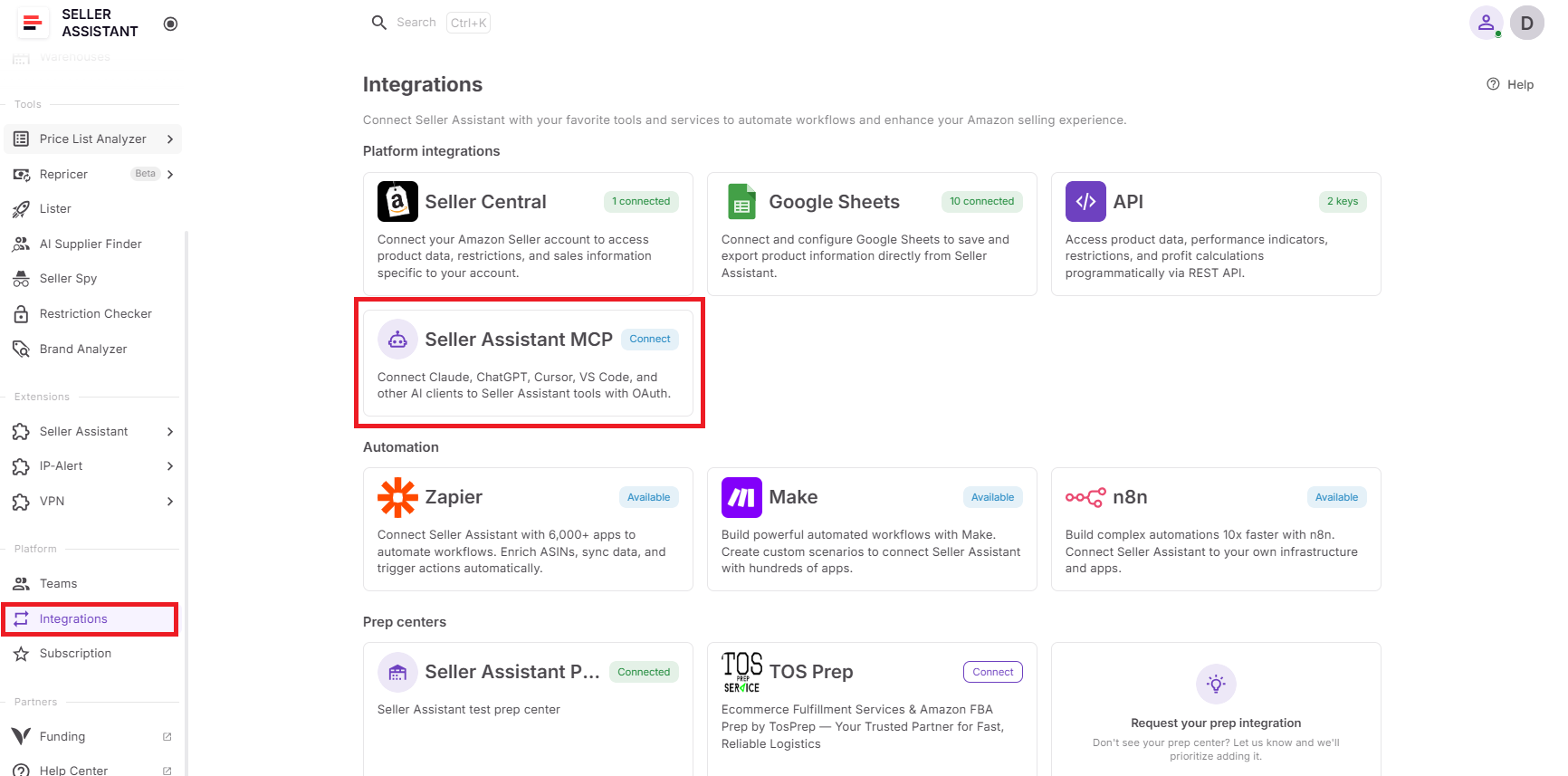
For missed-deal research, this connection makes it possible to return to Price List Analyzer results through AI instead of relying only on the products that caught your attention during the first review. The assistant can access supported price list workflows, retrieve actual leads, and help sellers examine results that might deserve another look.
What you can do with Seller Assistant MCP to catch missed leads
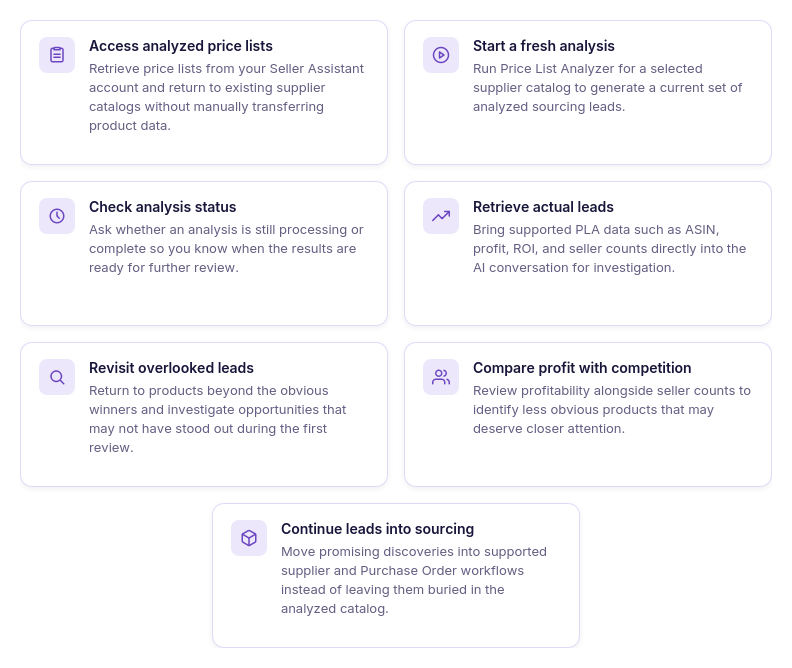
- Access your analyzed price lists
Ask AI to retrieve price lists from your Seller Assistant account so you can return to an existing supplier catalog instead of starting research from a manually selected group of products.
- Start a fresh analysis
Run Price List Analyzer for the supplier catalog you want to investigate. This gives AI a current set of analyzed leads to work with rather than relying on an old shortlist.
- Check when results are ready
Ask AI whether the analysis is still processing or has finished. Once it is complete, you can continue directly retrieving and reviewing the resulting leads.
- Bring actual leads into the conversation
Retrieve Price List Analyzer leads with supported data such as ASIN, profit, ROI, and seller counts. This gives the assistant real sourcing results to work with rather than only the products you manually paste into the chat.
- Revisit leads beyond the obvious winners
Use the retrieved results to examine products that may not have attracted attention during the initial review. A lead does not have to rank first by profit to be worth investigating from another sourcing angle.
- Compare profitability with competition
Review profit and ROI together with supported seller-count data to spot products whose opportunity may look different once competition is considered. This can bring attention to less obvious leads that deserve a closer look.
- Continue promising leads into sourcing
Once an overlooked product proves worth pursuing, supported MCP workflows can take the research further, including supplier and Purchase Order operations. This helps move a rediscovered opportunity toward purchasing instead of leaving it as another product in the analyzed list.
How MCP helps uncover Amazon deals you might otherwise miss
MCP changes the role of AI from explaining sourcing concepts to working with actual Seller Assistant results. Instead of manually choosing a few products from a large price list and giving only those to AI, sellers can bring supported Price List Analyzer data into the conversation and continue investigating the results with follow-up requests.
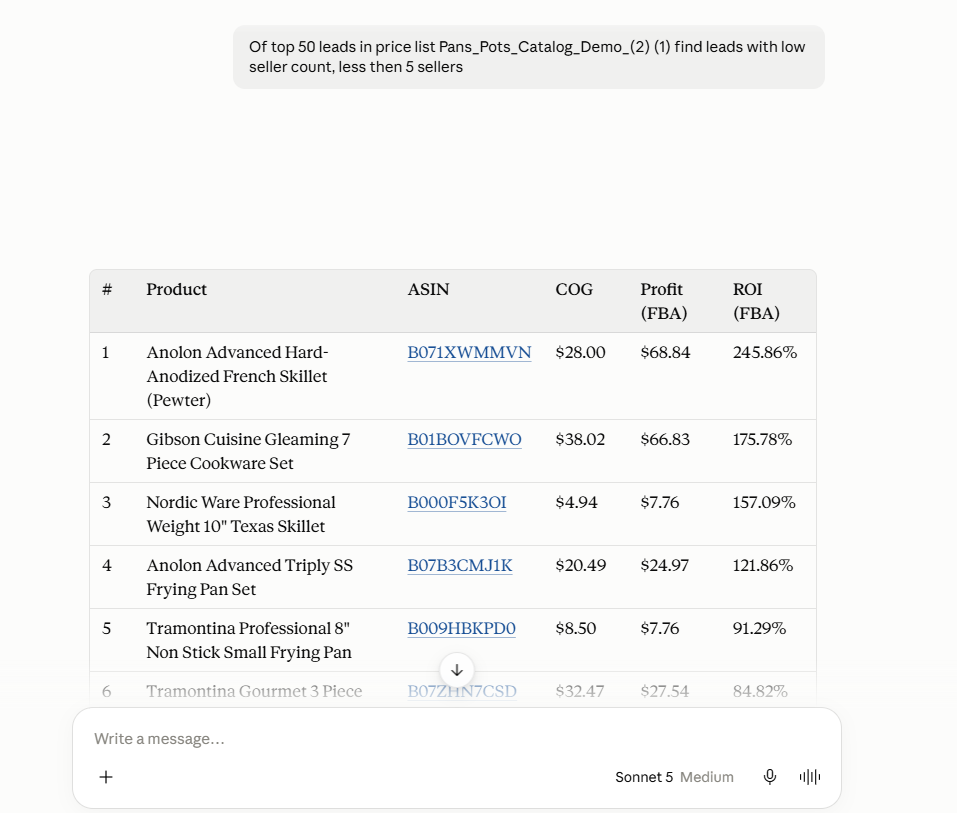
This is especially useful for a second pass through a supplier catalog. Price List Analyzer performs the underlying product matching and analysis, MCP connects supported results and operations to the AI assistant, and the conversation provides another way to review leads beyond the initial shortlist. The result is a analyze → retrieve → revisit → investigate → act workflow designed to give potentially profitable deals another chance to be noticed.
How to Catch Overlooked Amazon Deals with AI
Finding missed profitable Amazon deals is less about running another analysis and more about asking different questions of the results you already have. Instead of repeatedly reviewing the same top products, sellers can use AI to approach the analyzed supplier list from different angles – looking beyond the obvious winners, revisiting leads that were skipped, and investigating products that deserve a second look.
The key is to use targeted requests rather than simply asking AI to “find profitable products.” Each prompt can focus on a specific reason a deal might have been overlooked, turning AI into a second-pass research layer for large supplier price lists.
Practical ways to detect overlooked Amazon deals with AI
| Scenario | What You’re Looking For | Prompt Example |
|---|---|---|
| Look beyond the obvious top leads | Profitable products that may have received less attention because they were not among the first leads reviewed. | ”Show me profitable leads from this price list that I may have overlooked.” |
| Recheck products with warnings | Leads that may have been skipped because a warning made them look less attractive at first glance. | ”Show me leads with warnings that may still be worth investigating.” |
| Find high-ROI opportunities | Products with attractive ROI that may not stand out when the list is reviewed primarily by absolute profit. | ”Show me leads with strong ROI and include their profit and seller counts.” |
| Check profitability against competition | Leads where attractive economics are paired with a potentially more favorable competitive situation. | ”Show me profitable leads and compare their ROI, profit, and seller counts.” |
| Take a second look at a specific product | A product you noticed earlier but did not fully investigate. | ”Find this ASIN in my price list leads and show me its profit, ROI, and seller count.” |
| Review the list from another angle | Additional opportunities that may not have appeared in your initial shortlist. | ”Review the leads from this price list and show me other profitable products I should investigate.” |
| Move a rediscovered lead forward | A previously overlooked product that now looks promising enough for the next sourcing stage. | ”Use this price list lead to continue with the supported sourcing and purchasing workflow.” |
Look beyond the obvious top leads
The products at the top of a price list are not necessarily the only deals worth considering. Ask AI to take another pass through the analyzed leads and surface profitable products that may have received less attention during the initial review.
Prompt example
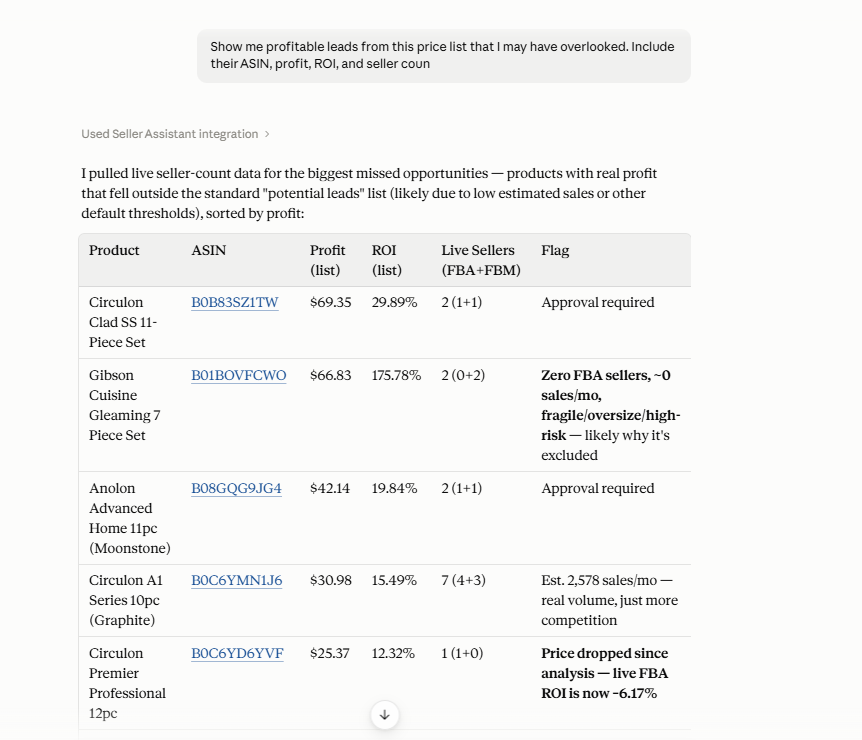
“Show me profitable leads from this price list that I may have overlooked. Include their ASIN, profit, ROI, and seller count.”
Why it matters
Sorting prioritizes products by one metric at a time, so potentially strong deals can remain deeper in the results simply because they do not rank highest by the current sort.
Recheck leads that deserve another look
Some products get skipped because of warnings, missing data, or one metric that looks weak at first glance. Ask AI to bring these leads back into the review so you can investigate whether the issue actually makes the deal unattractive or simply requires a closer look.
Prompt example
“Show me leads with warnings that may still be worth investigating. Include their ASIN, profit, ROI, seller count, and warning.”
Why it matters
A warning or incomplete metric is not always a reason to reject a product. Revisiting these leads can uncover opportunities that were removed from consideration too quickly.
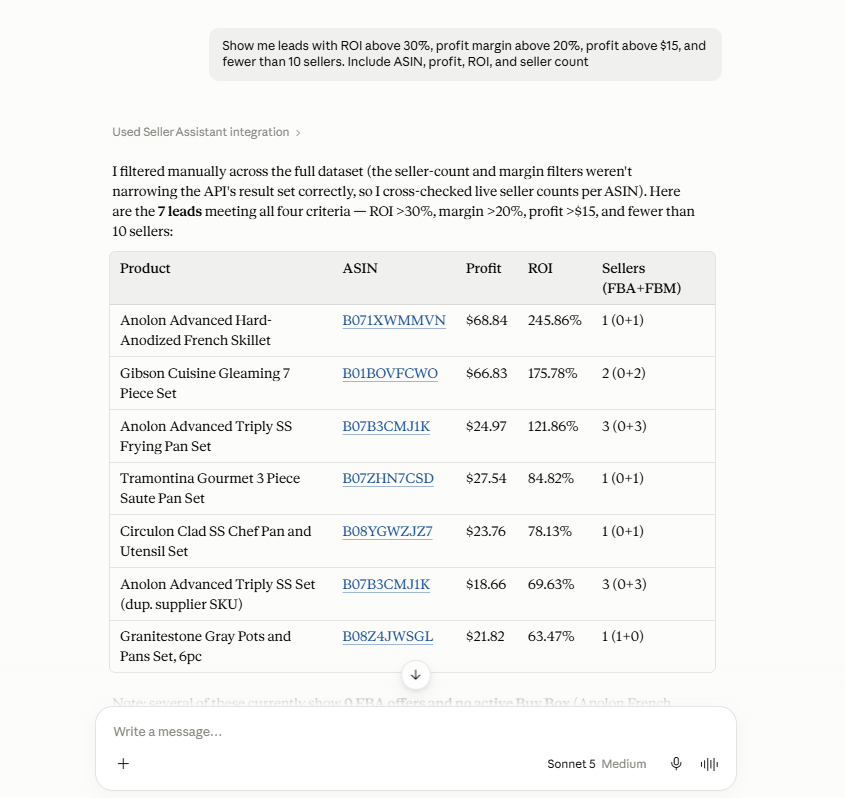
Find products that meet a different combination of criteria
A product may not stand out by profit or ROI alone but become much more interesting when profitability is considered together with competition. Ask AI to review leads using several criteria at once instead of relying on a single ranking.
Prompt example
“Show me leads with ROI above 30%, profit margin above 20%, profit above $15, and fewer than 10 sellers. Include ASIN, profit, ROI, and seller count.”
Why it matters
Different metric combinations can reveal opportunities that a one-dimensional sort pushes further down the list. This gives potentially strong deals another way to surface.
Investigate a specific product directly
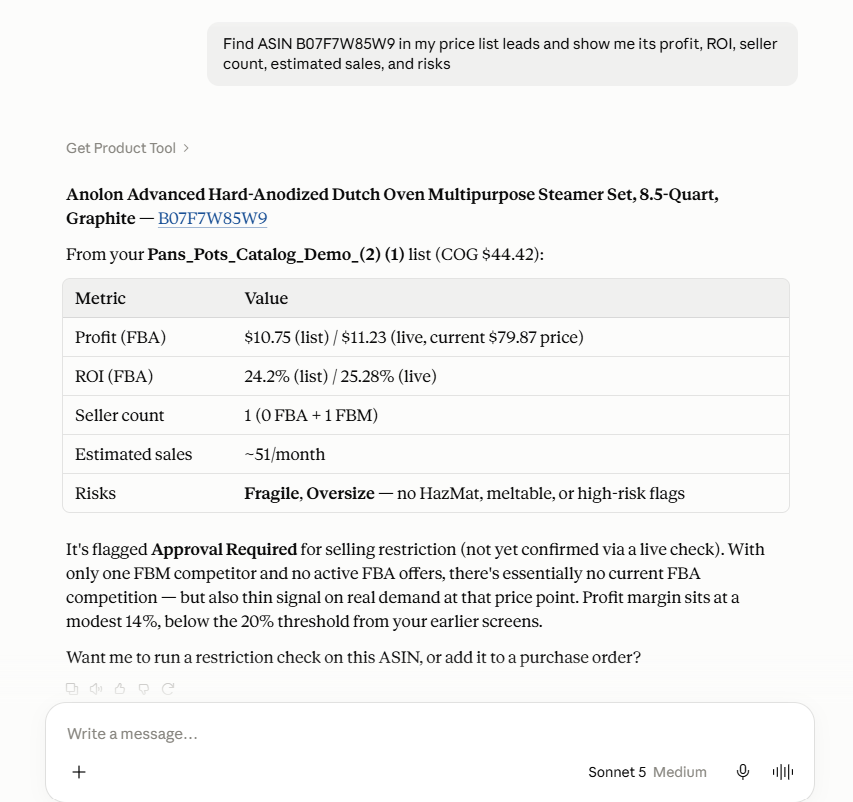
If a product caught your attention earlier, you do not need to search through the entire price list to find it again. Ask AI to retrieve a specific lead by its ASIN or other supported identifier and bring its available sourcing data into the conversation.
Prompt example
“Find ASIN B07F7W85W9 in my price list leads and show me its profit, ROI, seller count, estimated sales, and risks.”
Why it matters
Interesting products can easily get lost in large supplier catalogs, especially when you return to an analysis later. Direct lookup lets you continue investigating a particular lead without repeating the broader search.
Compare overlooked leads before dismissing them
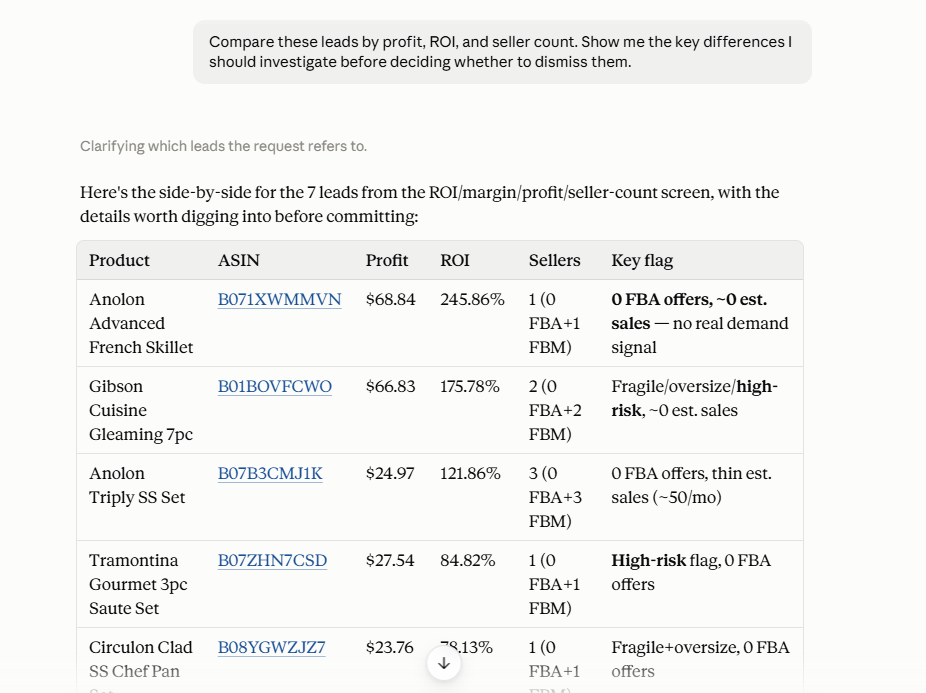
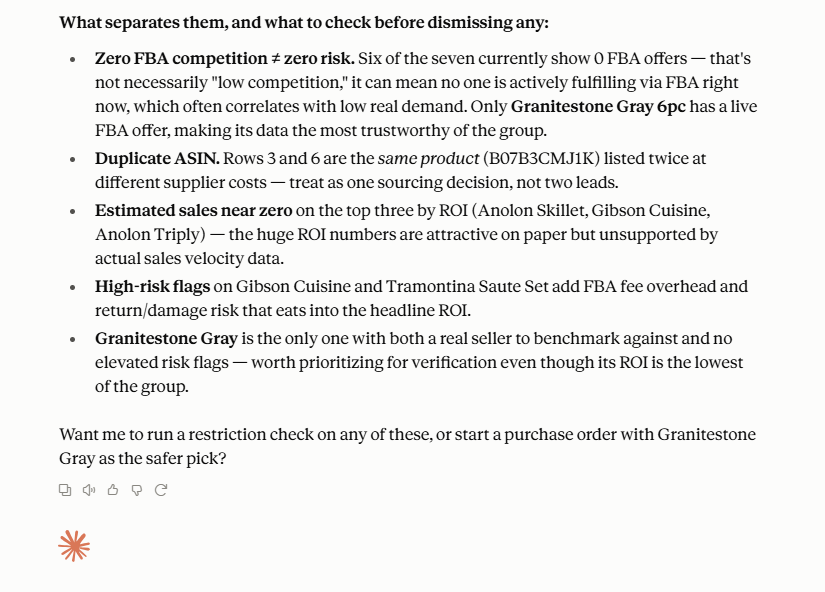
When several less obvious products remain after a second review, compare them side by side instead of evaluating each lead in isolation. Ask AI to organize the available profitability and competition data so differences between the opportunities are easier to spot.
Prompt example
“Compare these leads by profit, ROI, and seller count. Show me the key differences I should investigate before deciding whether to dismiss them.”
Why it matters
A lead that looks weaker on one metric may compare more favorably once ROI, profit, and seller competition are considered together. Comparison helps prevent potentially worthwhile products from being dismissed based on a single number.
How to Stop Missing Profitable Amazon Deals with AI
Step 1. Connect Seller Assistant MCP to your AI assistant
Connect Seller Assistant MCP Server to an MCP-compatible AI assistant such as ChatGPT or Claude and authorize access to your Seller Assistant account.
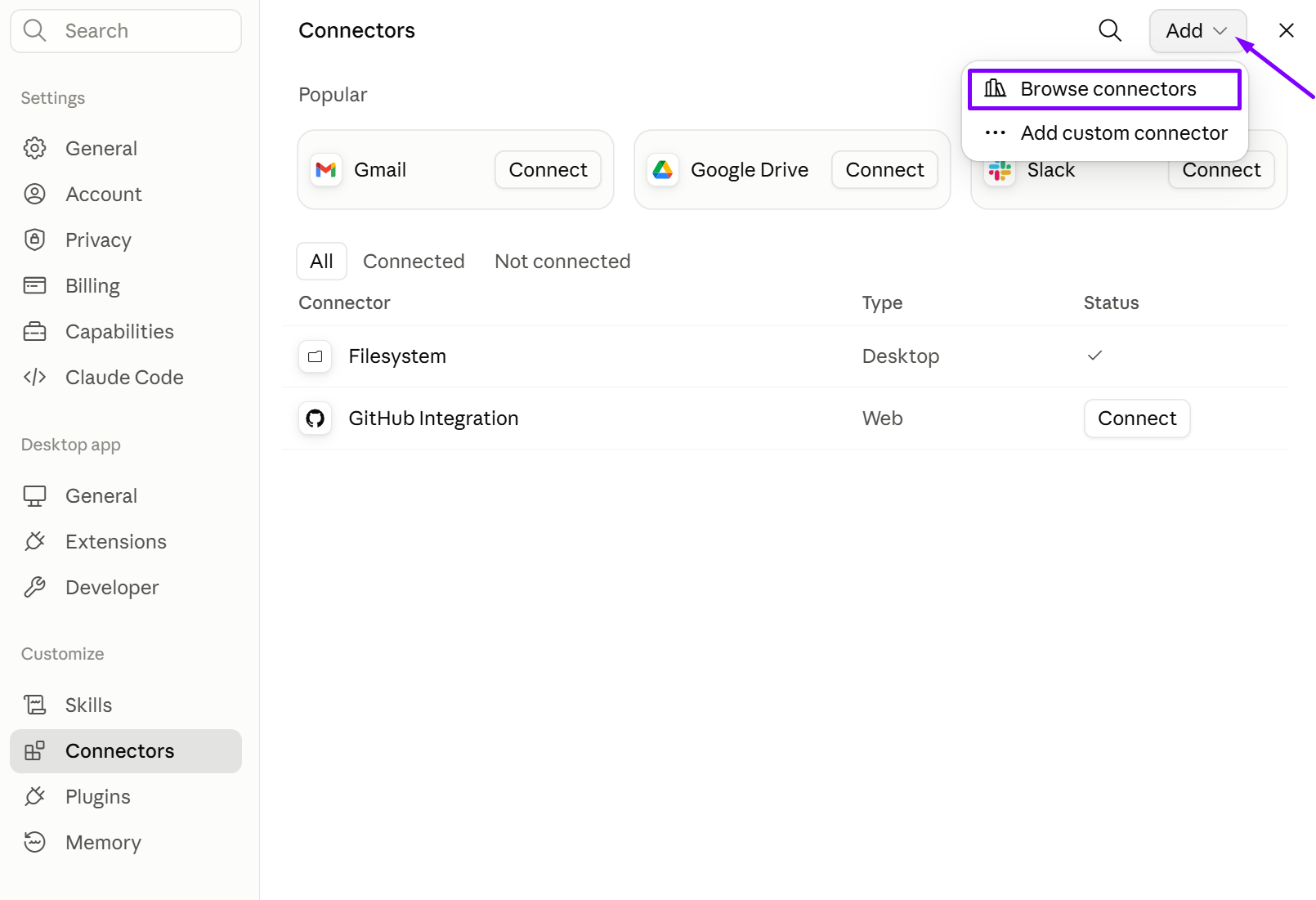
This gives AI access to supported Seller Assistant data and operations, allowing it to work with actual sourcing results rather than generic Amazon knowledge.
Step 2. Select and analyze your supplier price list
Ask AI to identify the supplier price list you want to review and start Price List Analyzer for the selected Amazon marketplace. PLA handles the underlying product matching and analysis.
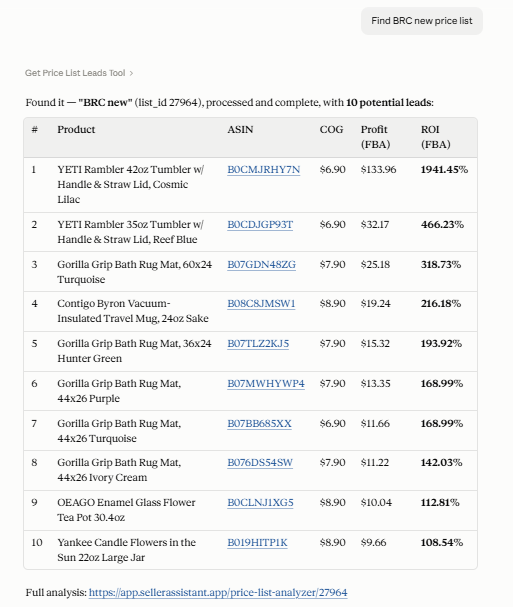
The entire supplier catalog needs to be analyzed before you can look beyond the obvious winners and search for opportunities that might otherwise be missed.
Step 3. Retrieve the analyzed leads
Once processing is complete, ask AI to retrieve the resulting leads with supported data such as ASIN, profit, ROI, and seller counts.
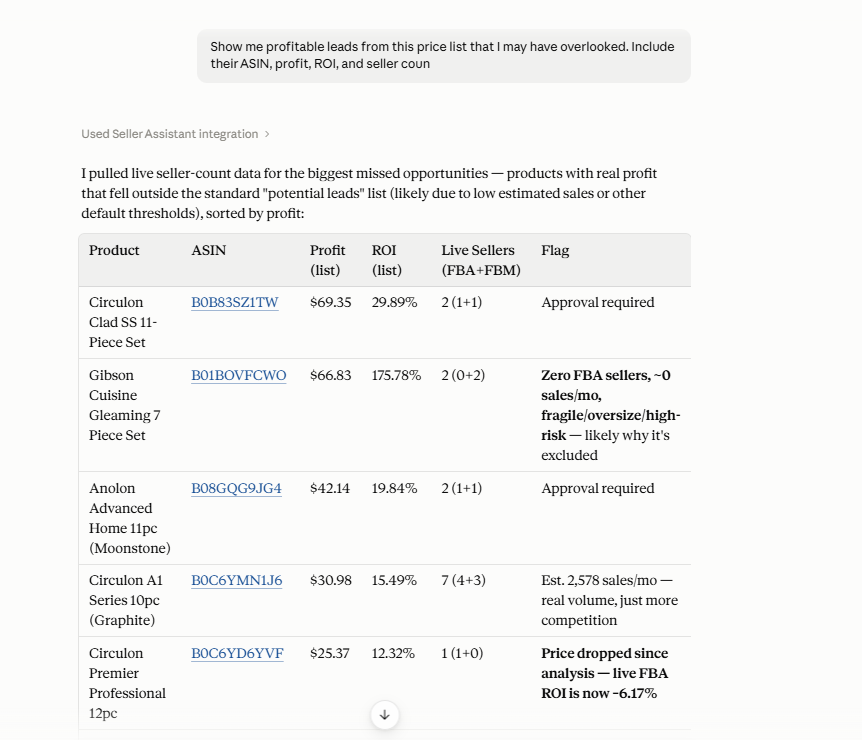
Bringing actual results into the conversation gives AI sourcing data it can work with instead of limiting the review to products you manually select and copy.
Step 4. Run a second pass for overlooked opportunities
Ask AI to revisit the results from another angle – for example, by looking for profitable products that did not attract attention during your initial review.
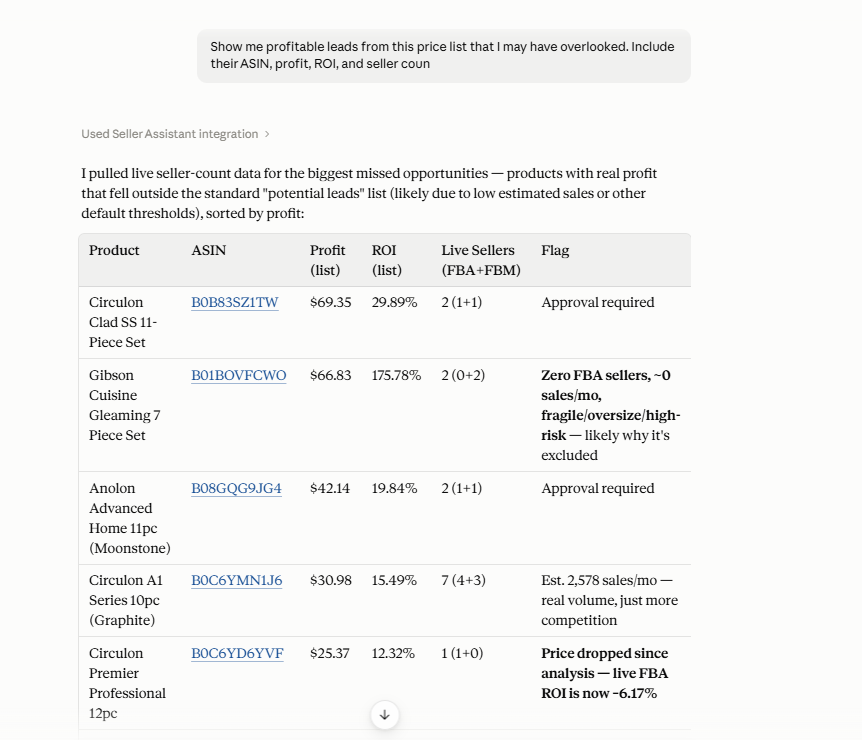
Your first pass usually prioritizes the most obvious deals, while a second review can bring less visible but potentially worthwhile products back into consideration.
Step 5. Change the criteria and compare leads
Use follow-up requests to investigate different combinations of supported metrics, such as profit, ROI, and seller counts, and compare less obvious leads side by side.
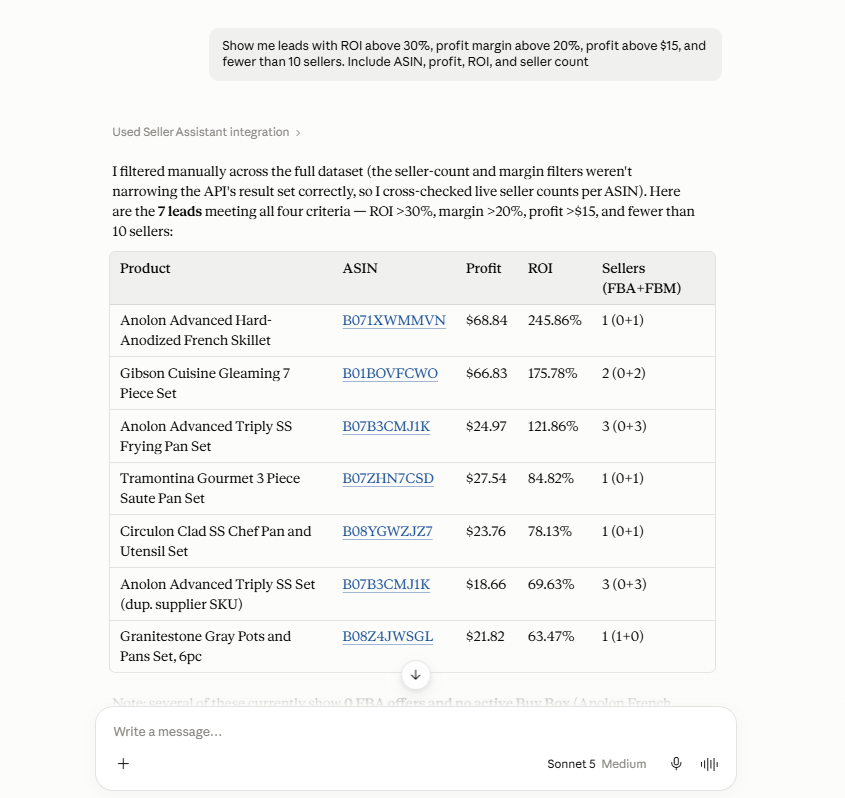
Products that look average under one criterion can become more interesting when profitability and competition are considered together.
Step 6. Investigate individual leads before dismissing them
Take a closer look at specific products that deserve further attention rather than rejecting them based on a single metric or initial impression.
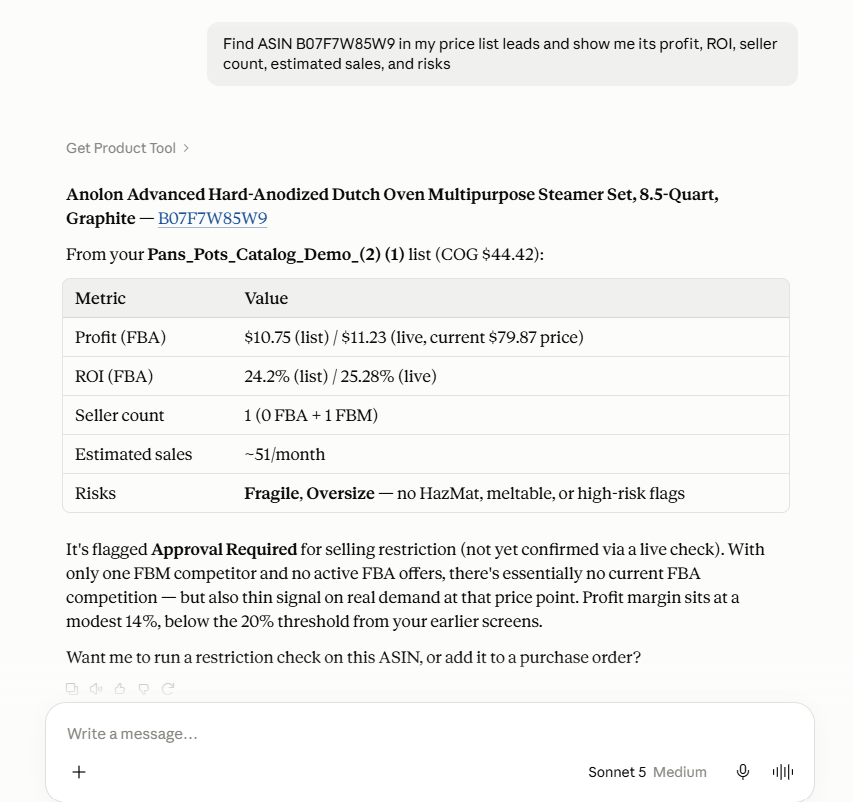
This gives borderline or overlooked products another layer of review before they are removed from your sourcing shortlist.
Step 7. Continue with promising discoveries
Once an overlooked lead proves worth pursuing, use the supported Seller Assistant workflow to continue into the next sourcing stage, such as supplier research or Purchase Orders.
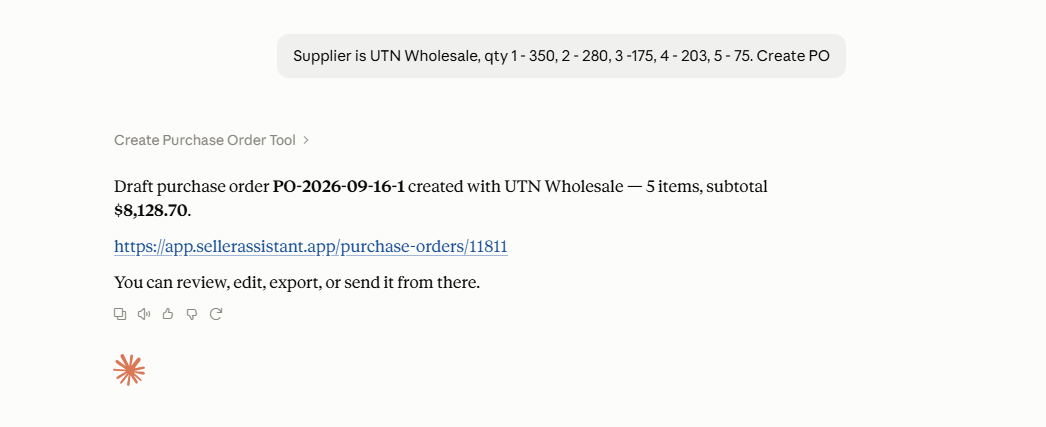
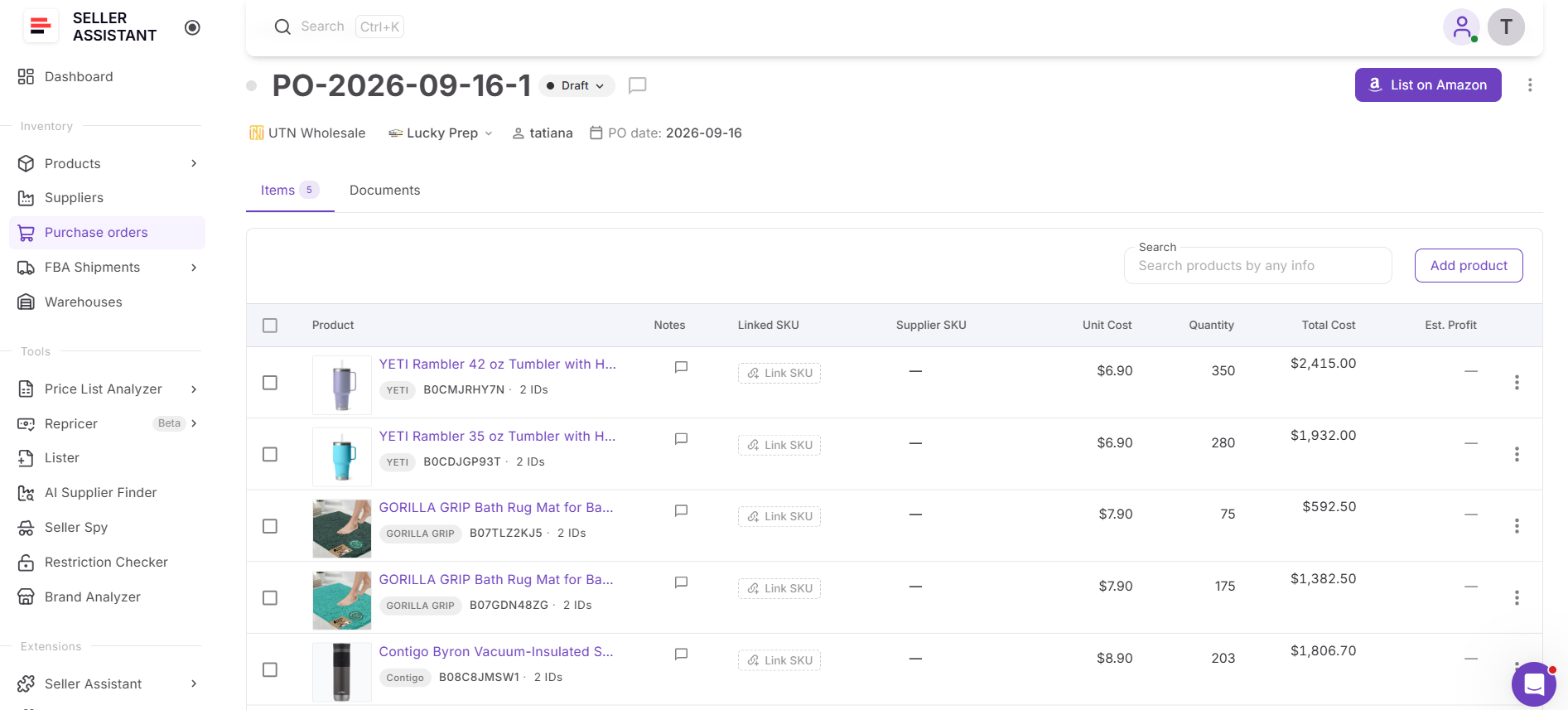
The goal is not simply to discover more leads, but to turn the strongest rediscovered opportunities into actionable sourcing decisions.
FAQ
How many profitable deals can I miss in a large supplier price list?
There is no fixed number because it depends on the size of the catalog, your sourcing criteria, and how thoroughly the results are reviewed. The risk of overlooking products increases when large lists are reviewed using only one sort order or a small number of metrics.
Can AI catch Amazon deals I overlooked?
AI can help surface additional opportunities when it has access to your actual analyzed sourcing data through Seller Assistant MCP. It can provide a second way to investigate the results rather than relying only on the products that caught your attention during the first review.
Does a warning mean I should reject an Amazon lead?
Not necessarily – some warnings indicate that a product needs additional validation rather than that it is automatically unsuitable for sourcing. The underlying issue should be checked before deciding whether the product belongs on or off your shortlist.
How often should I review an analyzed supplier price list again?
A second review can be useful when marketplace conditions or supplier costs have changed, or when your original sourcing criteria produced too few opportunities. Reanalyzing or revisiting the catalog can reveal products that look different under updated data or criteria.
Can an AI agent check supplier price lists for missed deals automatically?
An AI agent can be configured around supported Seller Assistant MCP operations to automate repeatable parts of the price list workflow. This is particularly useful for sellers who regularly process new or updated wholesale, online arbitrage, or dropshipping catalogs.
Final Thoughts
Large supplier price lists can contain profitable Amazon deals that never make it into the first shortlist. Sorting and filtering help sellers manage thousands of products, but opportunities can still be overlooked because they sit deeper in the results, look weaker under one metric, or need additional investigation before their potential becomes clear.
Seller Assistant’s Price List Analyzer provides the sourcing data needed to evaluate the full catalog, while Seller Assistant MCP brings supported results and operations into AI chat. Together, they give wholesale, online arbitrage, and dropshipping sellers another way to review their supplier lists – using AI to revisit overlooked leads, investigate them from different angles, and turn promising discoveries into actionable sourcing opportunities.
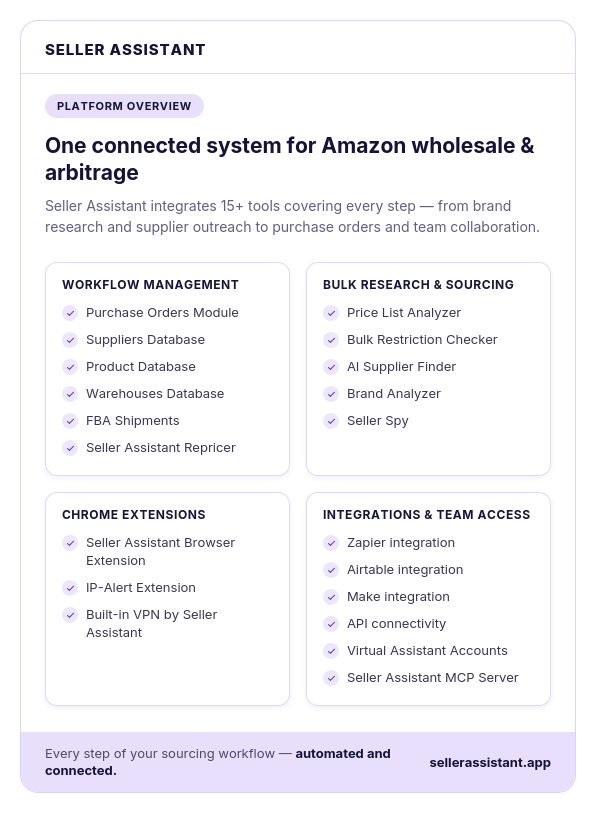
Seller Assistant automates and connects every stage of your Amazon wholesale and arbitrage workflow. It brings together in one platform: workflow management tools – Purchase Orders Module, Suppliers Database, Product Database, Warehouses Database, FBA Shipments, bulk research & sourcing tools – Price List Analyzer, Bulk Restriction Checker, AI Supplier Finder, Brand Analyzer, Seller Spy, Amazon repricing tool – Seller Assistant Repricer, Chrome extensions – Seller Assistant Browser Extension, IP-Alert Extension, and built-in VPN by Seller Assistant, and integrations & team access features – Seller Assistant MCP Server, seamless API connectivity, integrations with Zapier, Airtable, and Make, and Virtual Assistant Accounts.