Any automated repricer that flags issues – missing cost data, a product stuck at its floor, a limit that’s capping the price – is telling you something needs attention, not what to do about it or fixing it for you. That still means opening each flagged product, working out the cause, and correcting it by hand, one SKU at a time.
Seller Assistant Repricer surfaces these exact flags – No cost, On floor, Capped, Price war – and its MCP Server lets an AI assistant like Claude or ChatGPT read and act on them directly: “which of my repriced products have issues,” then “set the cost on this one,” then “raise the floor on these.”
This post walks through fixing each type of repricer issue through an AI chat, with no dashboard involved.
Why Finding Amazon Repricer Issues Is Only the First Step
Amazon repricer issues help you spot products that need attention without reviewing every SKU in your catalog. But a flag such as No cost, On floor, Capped, Failed, or possible Price war only identifies a condition – you still need to understand what caused it and decide whether the cost data, strategy, price limits, or another repricer setting needs attention.
That troubleshooting becomes harder as the catalog grows because different issues require different checks, and even products with the same flag may not need the same action. Fixing Amazon repricer issues therefore starts with finding exceptions, but it also requires investigating the affected products before changing their pricing setup.
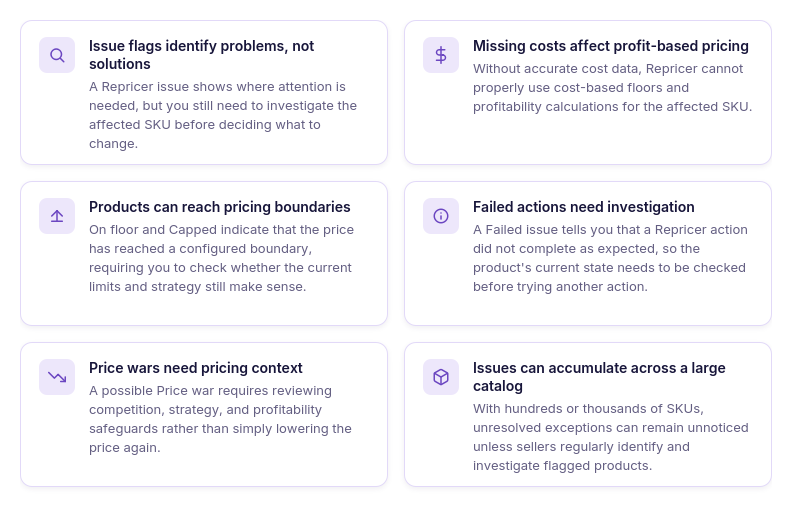
Issue flags identify problems, not solutions
An issue tells you where to look, but it does not automatically tell you what should be changed. For example, a product at floor may require reviewing its costs, strategy, and pricing boundaries rather than simply lowering its minimum price.
Missing costs can break profit-based pricing logic
When SKU cost data is missing, repricer cannot use that cost to support cost-based pricing floors and profitability calculations. A No cost issue therefore needs to be investigated before relying on ROI, margin, or profit-based repricing logic.
Products can get stuck at pricing boundaries
On floor and Capped issues show that a product has reached a pricing boundary and cannot continue moving in that direction under its current setup. Sellers need to determine whether that boundary is still appropriate for the product rather than automatically changing it.
Failed actions need investigation
A Failed issue indicates that a repricer action did not complete as expected, but seeing the flag alone does not explain what needs correction. The affected product and its current repricer state need to be checked before deciding on the next action.
Price wars require more than another price cut
A possible Price war can indicate competitive pricing behavior that is repeatedly pushing offers downward. Before changing the price again, sellers need to review the competition, strategy, and profitability safeguards protecting the SKU.
Repricer issues can accumulate across a large catalog
Checking every flagged SKU manually becomes increasingly difficult when wholesale, online arbitrage, or dropshipping catalogs contain hundreds or thousands of listings. Issues can remain unresolved simply because nobody has filtered for the affected products and investigated what is happening.
Why Fixing Repricer Issues with AI Requires Real Tool Access
AI can make repricer troubleshooting faster, but only when it can work with the products and settings behind the issue. The useful workflow is not simply ask → get an explanation. It is detect → investigate → decide → fix → verify: find the affected SKUs, inspect what is happening, determine the appropriate action, make the change, and check the result.
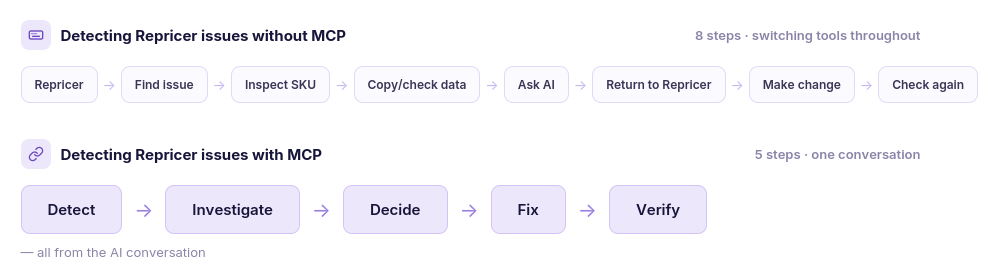
Without MCP, each of those steps is split between AI chat and the repricer dashboard. You can ask AI what an On floor issue means, but you still have to find the affected SKUs, collect their data, make the changes yourself, and return with new information if you want AI to analyze the result. With MCP, the assistant can use Seller Assistant tools throughout the same workflow – reading actual repricer data and performing supported changes after your confirmation.
Why AI needs access to your repricer to fix issues
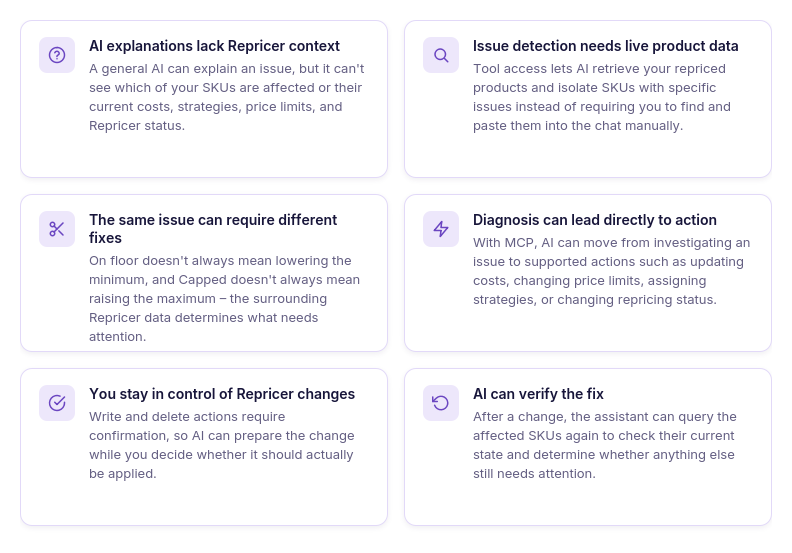
AI explanations don’t include your Repricer context
A general AI assistant can explain why an Amazon repricer might be stuck at floor or what missing cost data means. It cannot know which products in your account have that issue or what strategy, costs, price limits, and repricer status they currently have.
Issue detection needs live product data
Troubleshooting starts by identifying the products that actually require attention. Tool access lets the assistant retrieve your repriced products and isolate SKUs with specific issues instead of asking you to manually find and paste them into the conversation.
The same issue doesn’t always need the same fix
An On floor flag does not automatically mean the minimum price should be lowered, just as Capped does not automatically mean the maximum should be raised. The assistant needs the surrounding repricer data to help determine what should be reviewed before a change is made.
Diagnosis and action can stay in one workflow
Without tool access, AI can recommend a change but the seller still has to leave the conversation and apply it manually. Through MCP, supported actions such as updating SKU costs, changing price limits, assigning strategies, or changing repricing status can follow directly from the investigation.
Repricer changes remain under seller control
Access to repricer tools does not mean the AI silently changes pricing settings whenever it finds an issue. Write and delete actions require confirmation, so the assistant can prepare the correction while the seller remains the approval layer.
AI can verify what happened after the fix
Troubleshooting should not stop when a setting is changed. Because the assistant can query the repricer again, it can recheck the affected SKUs and determine whether the original issue was resolved or whether another product state still needs attention.
What Seller Assistant Tools Help Manage Repricer Issues with AI
Fixing repricer issues with AI requires two parts working together – a repricing tool that has the actual product, pricing, and issue data, and a connection that lets an AI assistant access and act on that data. Seller Assistant combines these roles through its Amazon repricer and Seller Assistant MCP Server.
Repricer monitors and manages Amazon pricing and surfaces SKUs that need attention, while MCP connects supported Repricer data and actions to AI assistants such as ChatGPT and Claude. Together, they let sellers move from spotting repricer issues to investigating and managing them through an AI conversation instead of switching between AI advice and manual work in the Repricer dashboard.
What Is Seller Assistant Repricer?
Seller Assistant Repricer is an automated pricing tool that adjusts Amazon offers according to the strategies and pricing boundaries sellers set. It continuously evaluates marketplace signals such as Buy Box activity, competing offers, inventory, and product costs to determine whether a SKU should be repriced and how far its price can move.
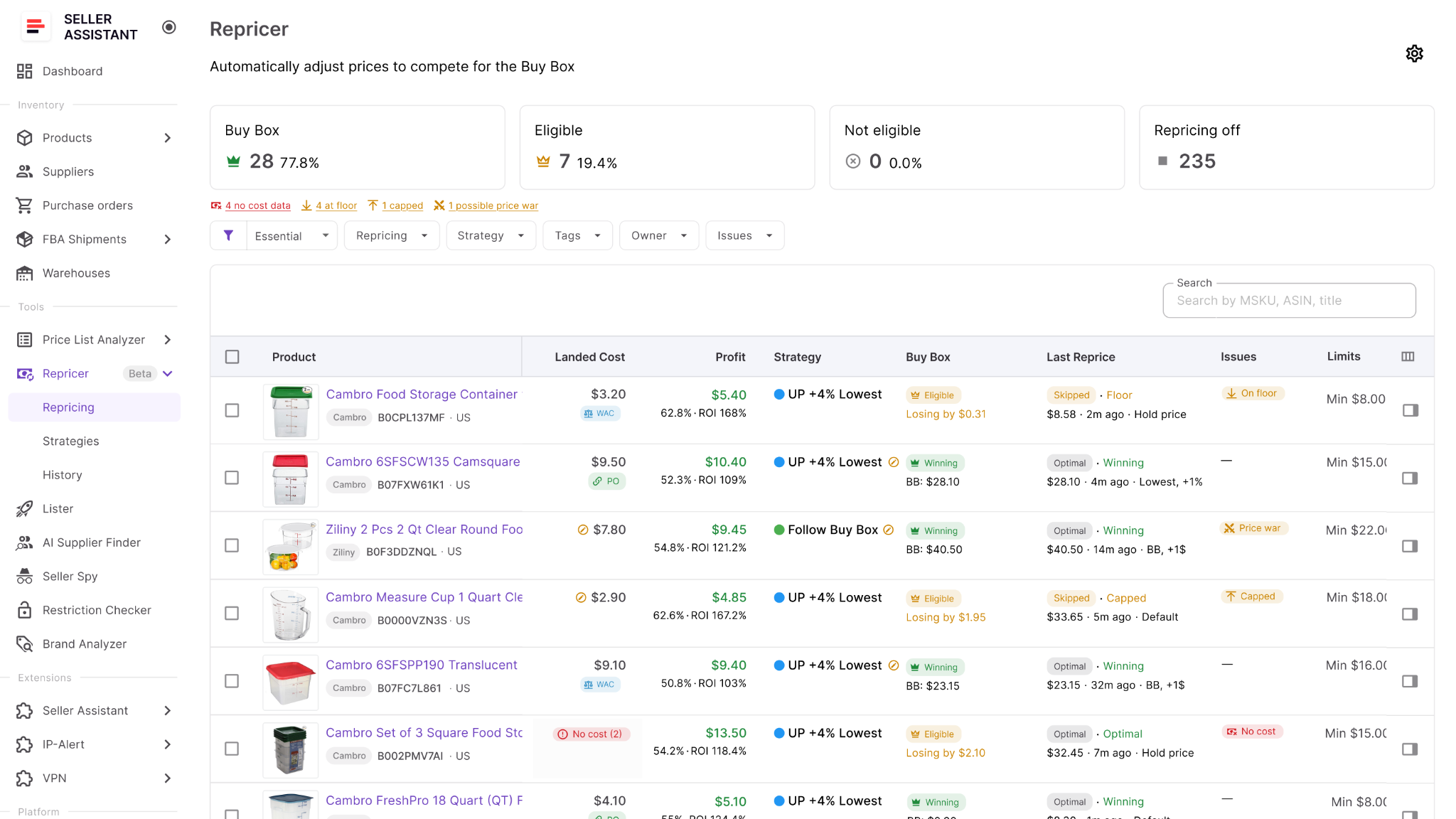
Rather than tracking competitors and updating prices manually in Seller Central, sellers can build reusable strategies for different products and sourcing models. Repricer combines competitive pricing rules with profitability safeguards, allowing prices to react to marketplace changes while staying within defined ROI, margin, profit, and minimum or maximum price limits.
What you can do with Seller Assistant Repricer
Seller Assistant Repricer gives sellers control over how automated pricing works across their Amazon catalog. Strategies, conditional rules, marketplace data, product costs, and price boundaries can be combined to create different repricing logic for individual SKUs or product groups.
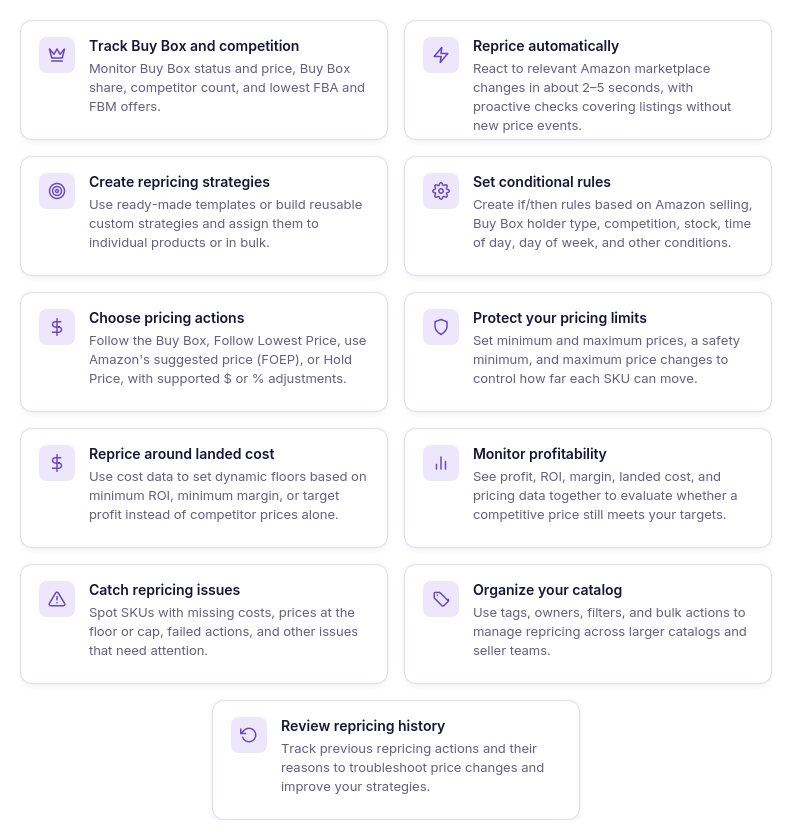
- Monitor the market around each SKU
Track current price, Buy Box price and status, Buy Box share, competitor count, lowest FBA and FBM offers, and stock together with the SKU’s pricing settings. This provides the marketplace context needed to understand why a product is repricing in a particular way.
- Apply different strategies across your catalog
Use reusable strategies for individual products or groups of SKUs instead of applying the same pricing logic everywhere. Different listings can follow Buy Box-focused, profit-focused, inventory-based, or other repricing approaches.
- Respond automatically to marketplace changes
Repricer tracks relevant changes on Amazon and reevaluates products according to their assigned strategies. Prices can therefore react to supported changes in competition and marketplace conditions without sellers adjusting every offer manually.
- Build conditional pricing strategies
Set ordered if/then rules using conditions such as whether Amazon is selling, who holds the Buy Box, competitor position, stock thresholds, time of day, or day of week. AND/OR logic can combine multiple conditions to define how Repricer should respond in different situations.
- Choose how your offers compete
Configure strategies to Follow Buy Box, Follow Lowest Price, follow Amazon’s suggested price (FOEP), or Hold Price. Fixed-dollar and percentage adjustments can further position an offer above or below the selected pricing target.
- Protect profit while repricing
Set profitability and pricing boundaries using minimum ROI, minimum margin, target profit, or manual minimum and maximum prices. These safeguards limit how far automated repricing can move a product’s price.
- Use landed cost in pricing decisions
Include SKU costs in repricing so decisions account for profitability as well as competition. Repricer uses landed cost to calculate profit, ROI, and margin and support cost-based pricing floors and strategies.
- Find products with repricing issues
Use Issues to identify SKUs marked as No cost, On floor, Capped, Failed, or possible Price war. This narrows troubleshooting to products that need attention instead of requiring sellers to review the entire catalog.
- Review repricing history
Check Repricing History to see previous pricing activity and how strategies have performed over time. Historical data can help determine whether unexpected behavior is connected to strategy rules, costs, pricing boundaries, or changing marketplace conditions.
How Repricer helps identify products that need attention
For Repricer troubleshooting, the Issues view is especially important. Instead of discovering a pricing problem only after manually checking a listing, sellers can see which repriced products are currently flagged with conditions such as No cost, On floor, Capped, Failed, or possible Price war.
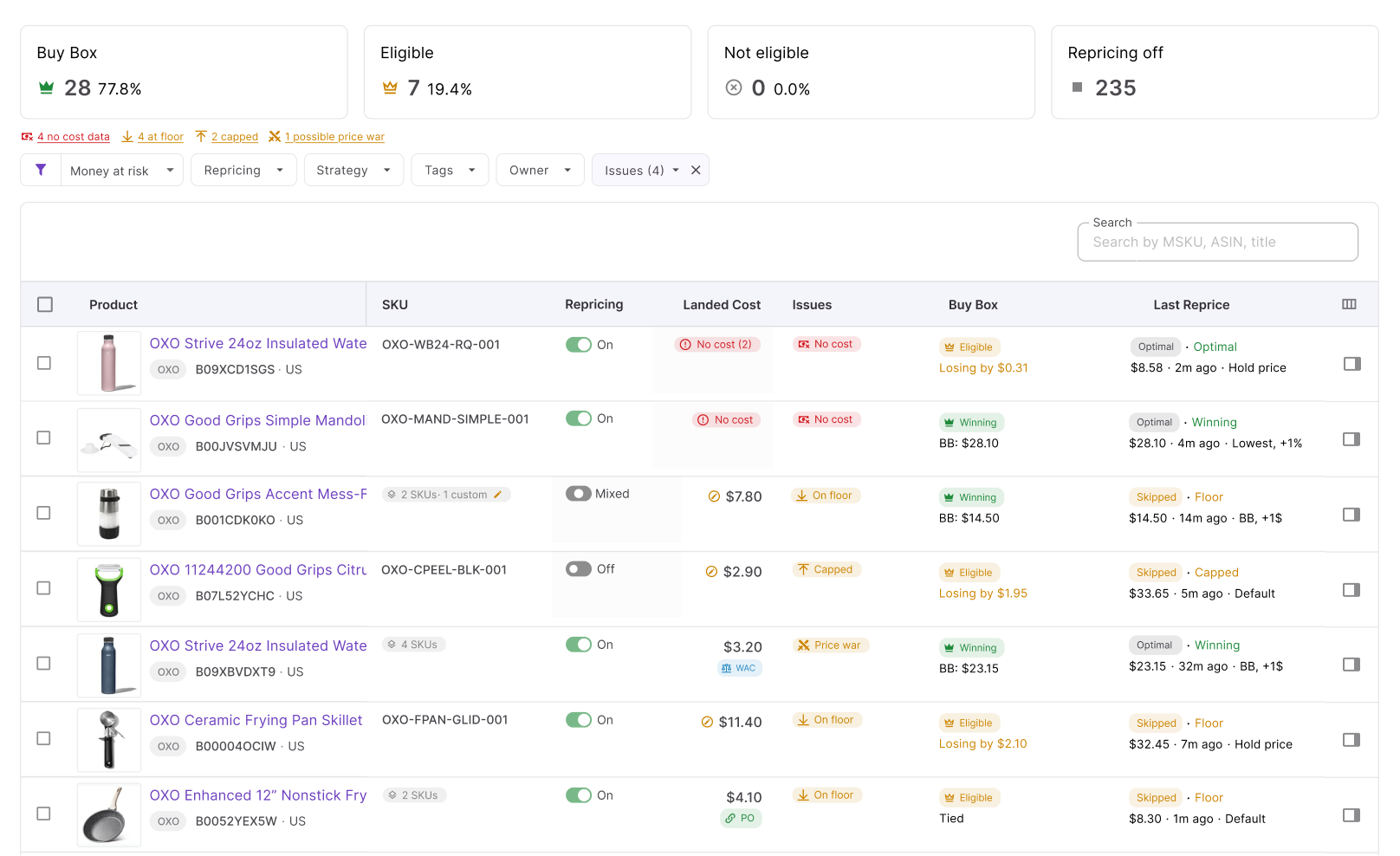
These flags become the starting point for the AI-assisted workflow. Repricer identifies the affected products and provides the pricing context behind them; later, MCP gives the AI assistant a way to retrieve that Repricer data, investigate the flagged SKUs, and help the seller determine what needs to be changed.
What is Seller Assistant MCP Server?
Seller Assistant MCP Server is the connection layer that lets AI assistants work with Seller Assistant tools and account data through natural-language requests. It connects MCP-compatible AI clients such as ChatGPT and Claude with Seller Assistant, allowing the assistant to retrieve actual account information and use supported operations instead of relying only on general Amazon knowledge or data copied manually into the chat.
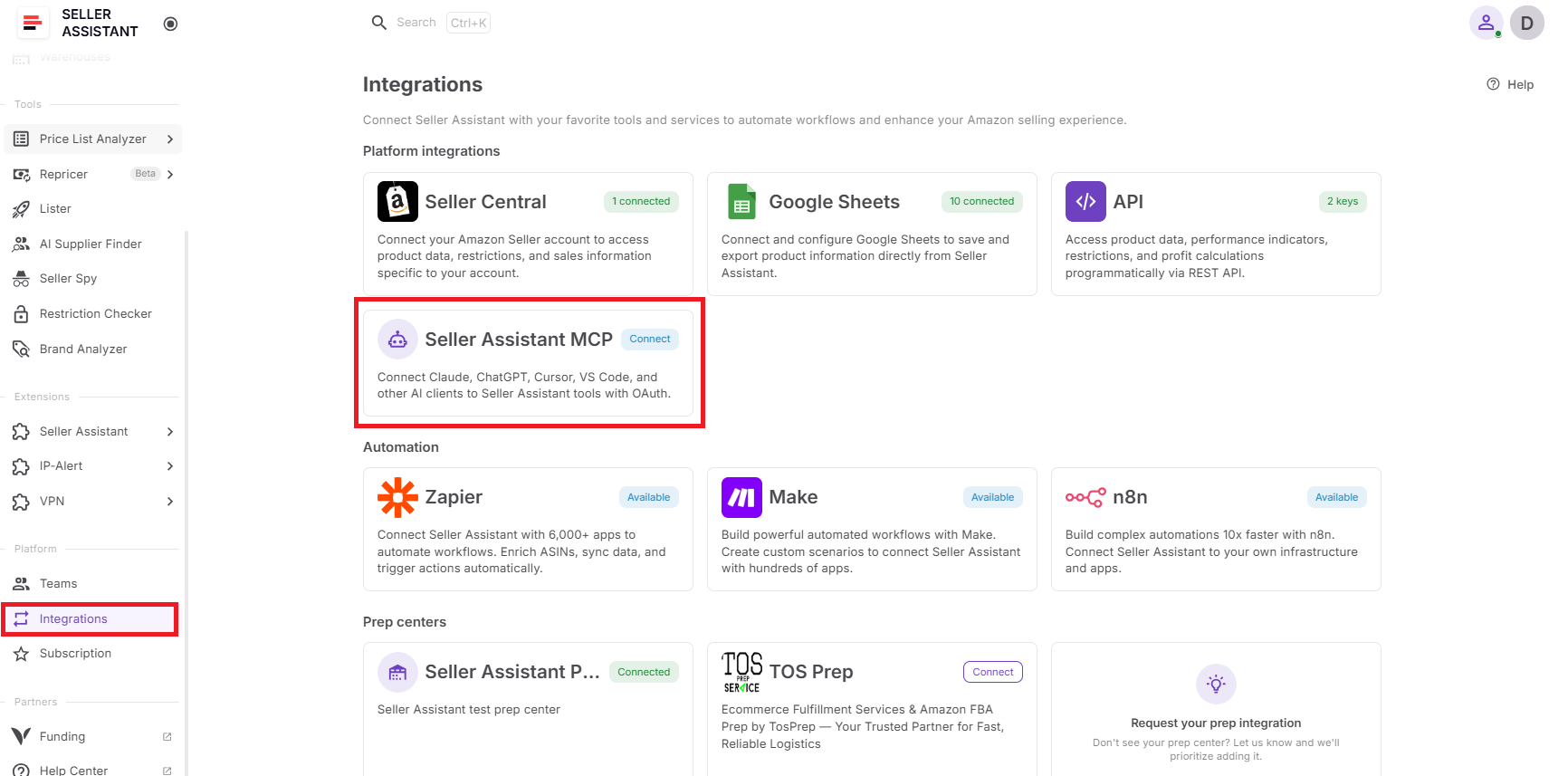
For Repricer troubleshooting, this means AI can work with the products and settings behind an issue. It can retrieve repriced SKUs, identify products that need attention, inspect relevant costs and pricing settings, and perform supported Repricer changes after seller confirmation – keeping investigation and action within the same conversation.
What you can do with Seller Assistant MCP for Repricer
Seller Assistant MCP gives an AI assistant controlled access to Seller Assistant operations across different parts of an Amazon seller’s workflow. For Repricer management, it provides the tools needed to move from asking questions about pricing problems to working with the actual products and settings in the seller’s account.
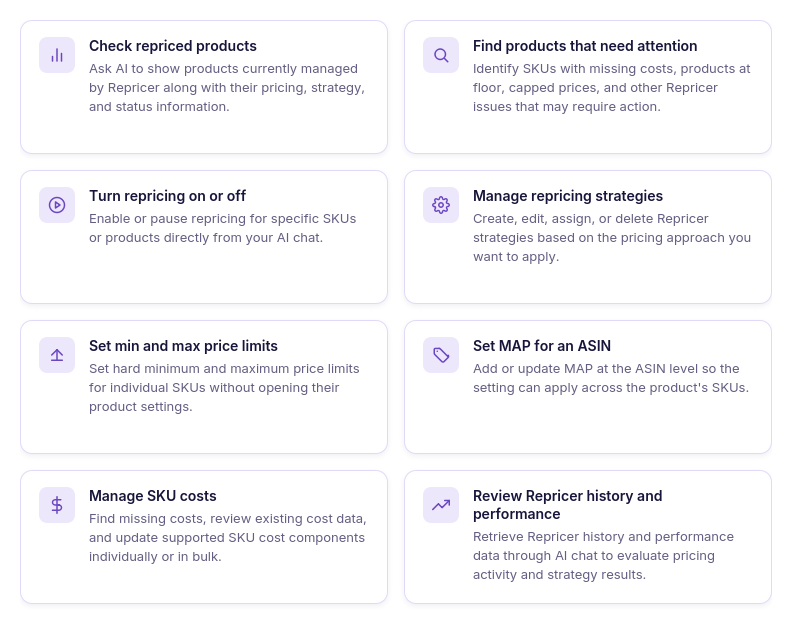
- Check repriced products
Ask AI to retrieve products currently managed by Repricer together with relevant information such as their strategy, current price, and issue status.
- Find products that need attention
Use natural-language requests to isolate repriced SKUs with specific problems, such as missing cost data or products that have reached their pricing floor, instead of filtering the catalog manually.
- Turn repricing on or off
Ask the assistant to enable or disable repricing for supported SKUs when a product needs to be activated, paused, or excluded from automated pricing.
- Manage Repricer strategies
Use AI to list, create, edit, delete, or assign Repricer strategies. This allows strategy changes to become part of the same conversation used to investigate a pricing issue.
- Set minimum and maximum prices
Review and update SKU-level price limits through AI chat when troubleshooting products that have reached their pricing boundaries or need different safeguards.
- Set MAP for an ASIN
Manage Minimum Advertised Price at the ASIN level through supported MCP operations when MAP is relevant to the product’s pricing setup.
- Manage SKU costs
Find SKUs with missing costs, review their current cost data and source, and update supported cost fields. This is particularly useful for resolving No cost issues that prevent cost-based pricing logic from working as intended.
- Review Repricer history and performance
Retrieve Repricer history and performance information to add context when investigating unexpected pricing behavior and previous repricing activity.
How MCP helps turn Repricer issues into actionable tasks
For issue management, MCP bridges the gap between seeing a warning and doing something about it. A seller can start with a broad request such as asking which repriced products have missing costs, continue by inspecting the affected SKUs, and then request the appropriate supported change without rebuilding the context in another tool.
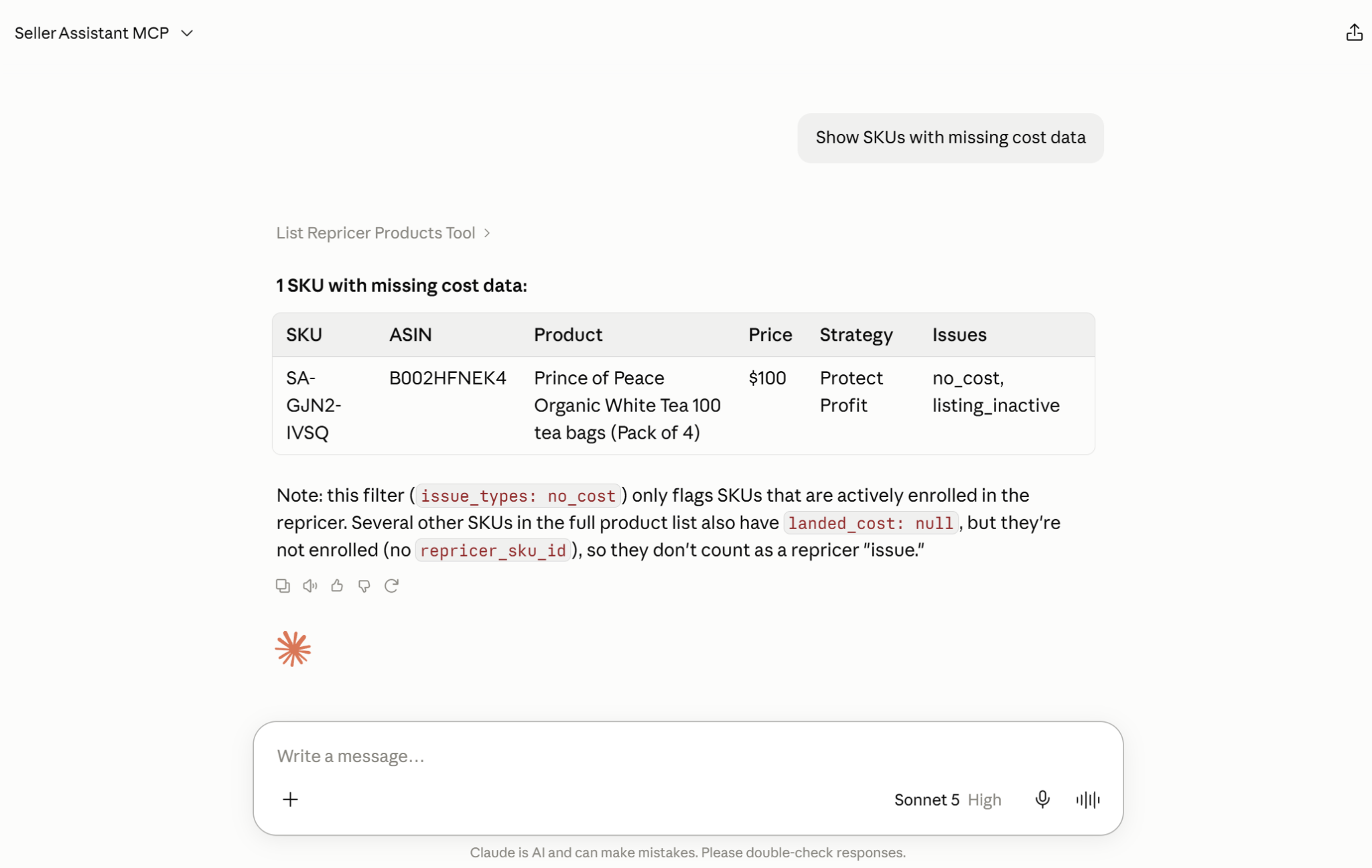
The AI assistant can also query Repricer again after the change. This supports the full troubleshooting cycle – detect → investigate → decide → fix → verify – while Repricer remains the pricing engine and the seller remains in control of changes that require confirmation.
How Seller Assistant MCP Helps Troubleshoot Repricer Issues
Repricer issues are not all solved in the same way. A SKU with missing cost data needs a different investigation from a product that has reached its floor, hit its maximum price, or encountered a failed repricing action.
Seller Assistant MCP lets an AI assistant work with the actual Repricer data behind these flags, so troubleshooting can move from identifying the issue to investigating the affected products and making the appropriate supported change. The assistant can retrieve affected SKUs, inspect relevant Repricer information, perform supported changes after confirmation, and then check the products again.
What Seller Assistant Repricer issues mean
Seller Assistant Repricer highlights SKUs with repricing issues, for instance where pricing may not be working as intended or where the current setup needs attention.
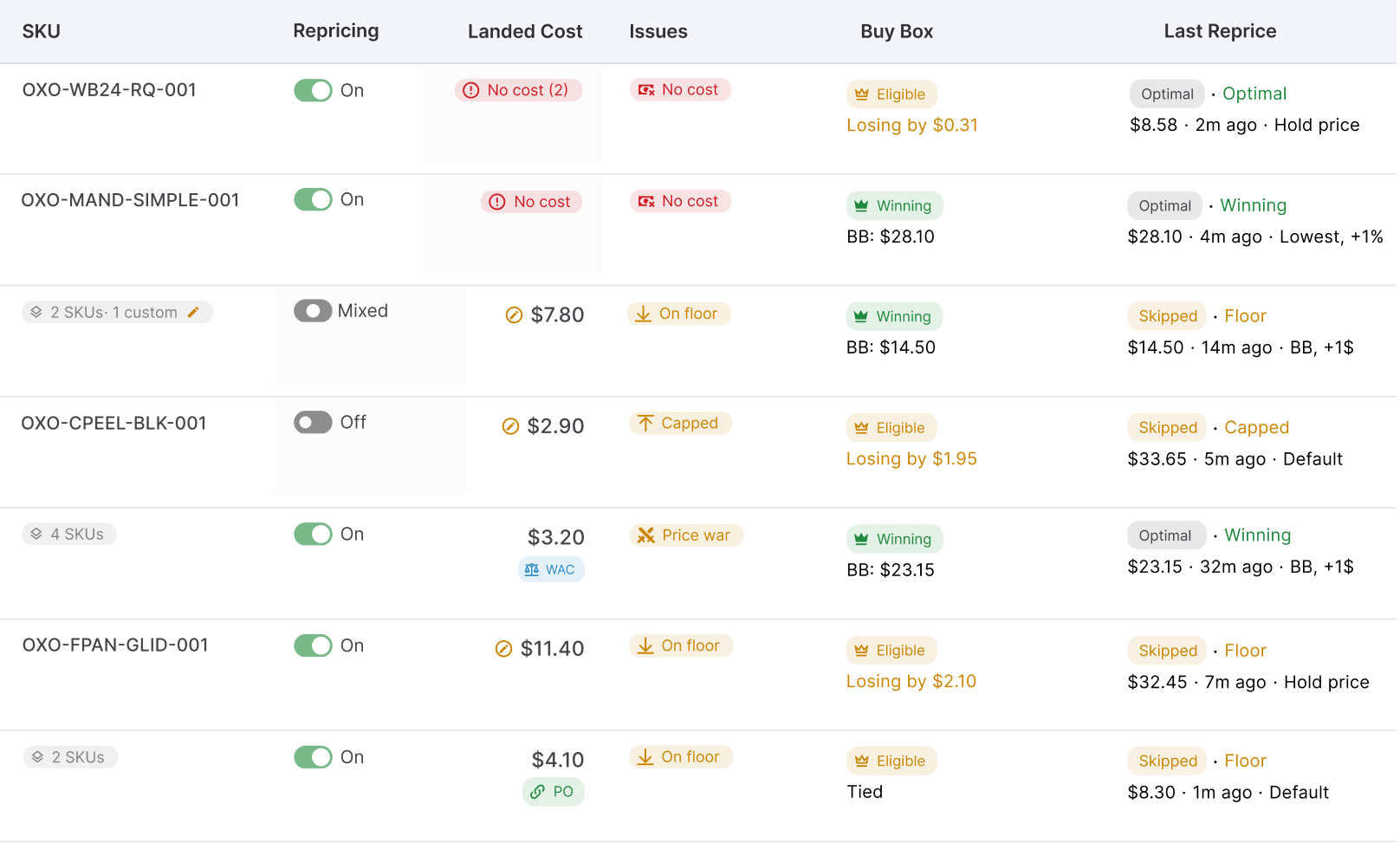
Each flag points to a different condition – from missing cost data to reaching a pricing boundary or detecting unusual competitive behavior – so the right next step depends on the issue. Understanding what each status means helps sellers investigate the cause before changing costs, strategies, or price limits.
| Repricer Issue | What It Means | What to Investigate |
|---|---|---|
| No cost | The SKU is missing cost data needed for cost-based repricing and profitability calculations. | Check the SKU’s landed cost and cost source. Add or correct cost data before relying on cost-based floors, ROI, or margin rules. |
| On floor | The product has reached its effective minimum price and Repricer cannot move the offer lower under the current setup. | Review landed cost, minimum price, assigned strategy, and profit safeguards. Reaching the floor does not automatically mean the minimum price should be lowered. |
| Capped | The offer has reached its maximum price and cannot move higher within its current pricing boundaries. | Check the SKU’s maximum price, current strategy, and marketplace conditions to determine whether the existing cap is still appropriate. |
| Failed | A repricing action could not be completed as expected. | Check the affected SKU and its current Repricer state to understand why the action failed before attempting another change. |
| Possible price war | Repricer detects pricing behavior that may indicate competing offers are repeatedly driving prices downward. | Review competitor pricing, Buy Box conditions, the assigned strategy, and profitability safeguards before deciding how to respond. |
How Seller Assistant Repricer and MCP work together
To manage Repricer through AI, first connect Seller Assistant MCP Server to an MCP-compatible AI client such as ChatGPT or Claude.
In ChatGPT, open the Seller Assistant app and select Connect. In Claude, open Seller Assistant in the Claude directory and select Connect. Then sign in to your Seller Assistant account and approve access. Repricer operations also require your Amazon seller account to be connected to Seller Assistant.
Once connected, enable Seller Assistant in the AI chat and start with a natural-language request. You can ask broadly, for example, “Show the products I am repricing on amazon.com with their strategy and current price,” or go directly to an issue with “Which of my repriced products have no cost data?” The assistant selects the appropriate Seller Assistant MCP operation and retrieves the relevant Repricer data.
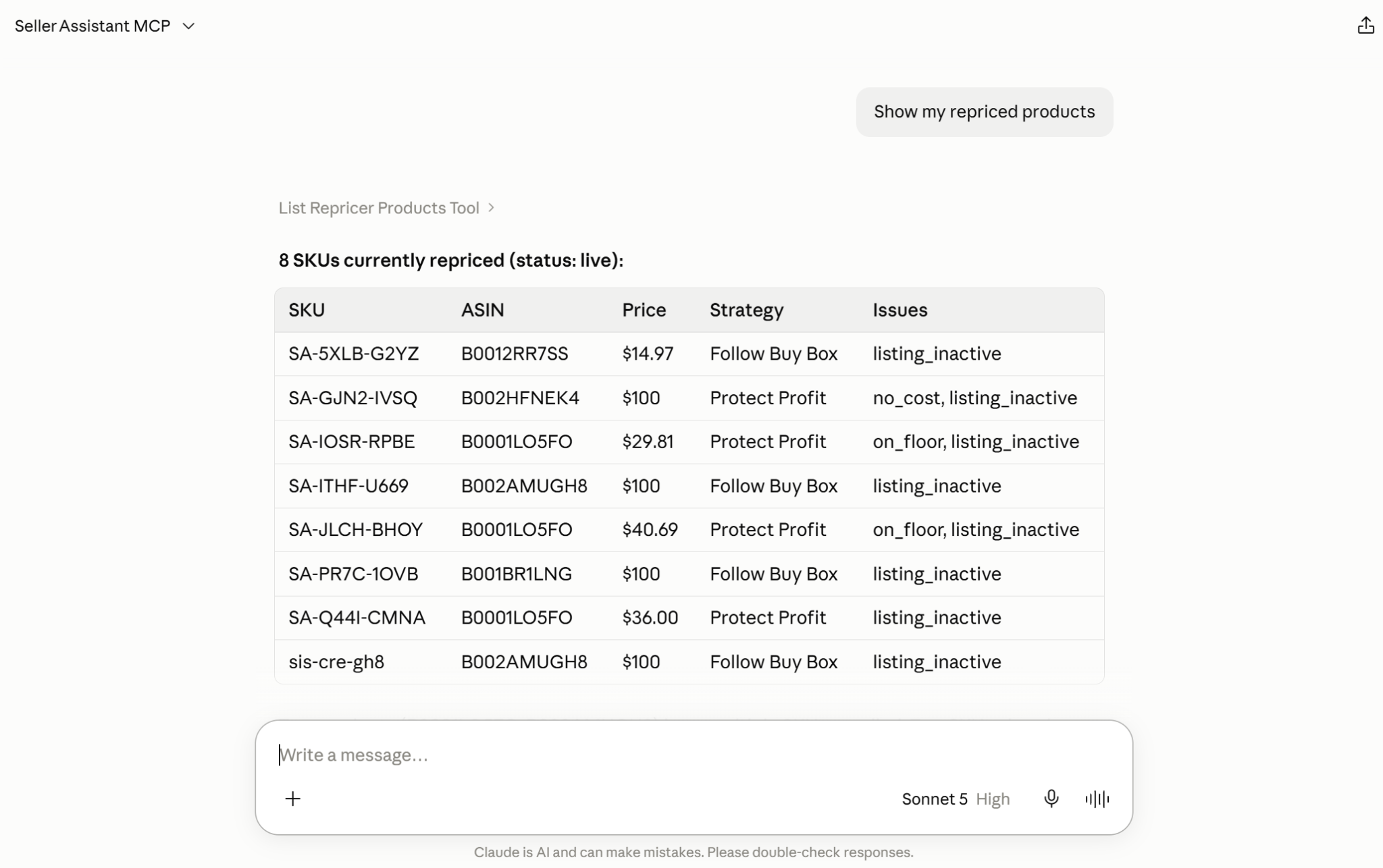
From there, use follow-up prompts to investigate and manage the affected products without starting over. You can ask for SKUs stuck at floor, review costs and their source, set SKU costs, change min and max prices, assign a strategy, set MAP, or switch repricing on or off. Related requests can be chained, so the result of one Repricer check becomes the context for the next action.
When a prompt would change or delete Seller Assistant data, the assistant asks for confirmation before executing it. After the change, you can continue the same conversation and ask AI to retrieve the affected products again, giving you a workflow that moves from finding a Repricer issue to correcting and verifying it through AI chat.
How to fix Amazon Repricer issues with an AI assistant step by step
Step 1. Connect Seller Assistant MCP to your AI assistant
Connect Seller Assistant MCP to a supported AI client such as ChatGPT or Claude and authorize your Seller Assistant account through OAuth. Working with Seller Assistant Repricer through MCP also requires an Amazon seller account connected to Seller Assistant.
In ChatGPT, open the Seller Assistant app and select Connect. In Claude, open Seller Assistant in the Claude directory and select Connect. Then sign in to your Seller Assistant account to approve access. Other MCP clients connect with the server URL from the MCP page.
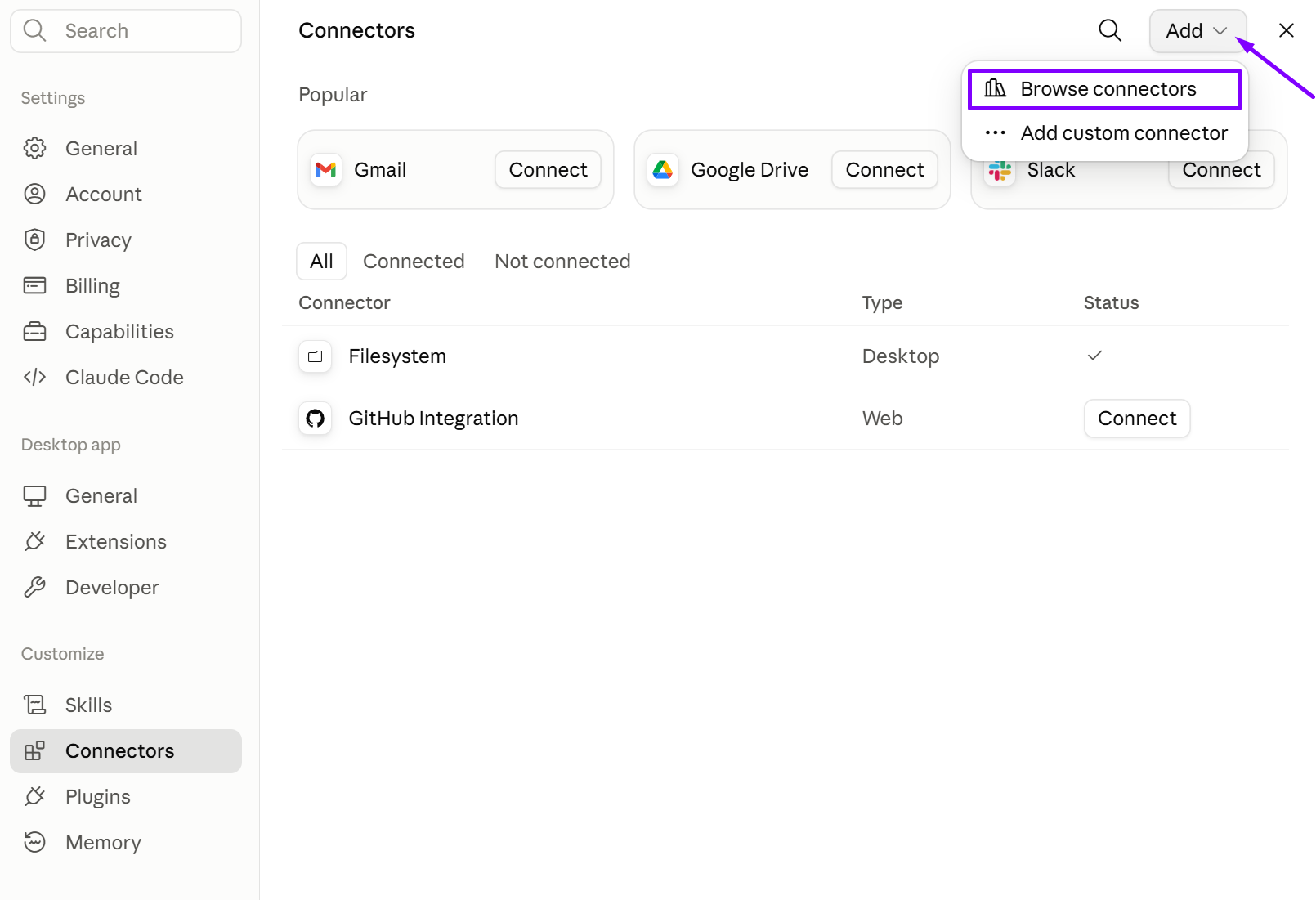
Once connected, the AI can work with your actual Repricer data instead of giving generic advice about why an Amazon repricer may not be working.
Step 2. Check your Repricer for affected products
Start by asking AI to show your repriced products or look specifically for SKUs with an issue you want to investigate. For example, you can ask for products with missing cost data or products that have reached their minimum price.
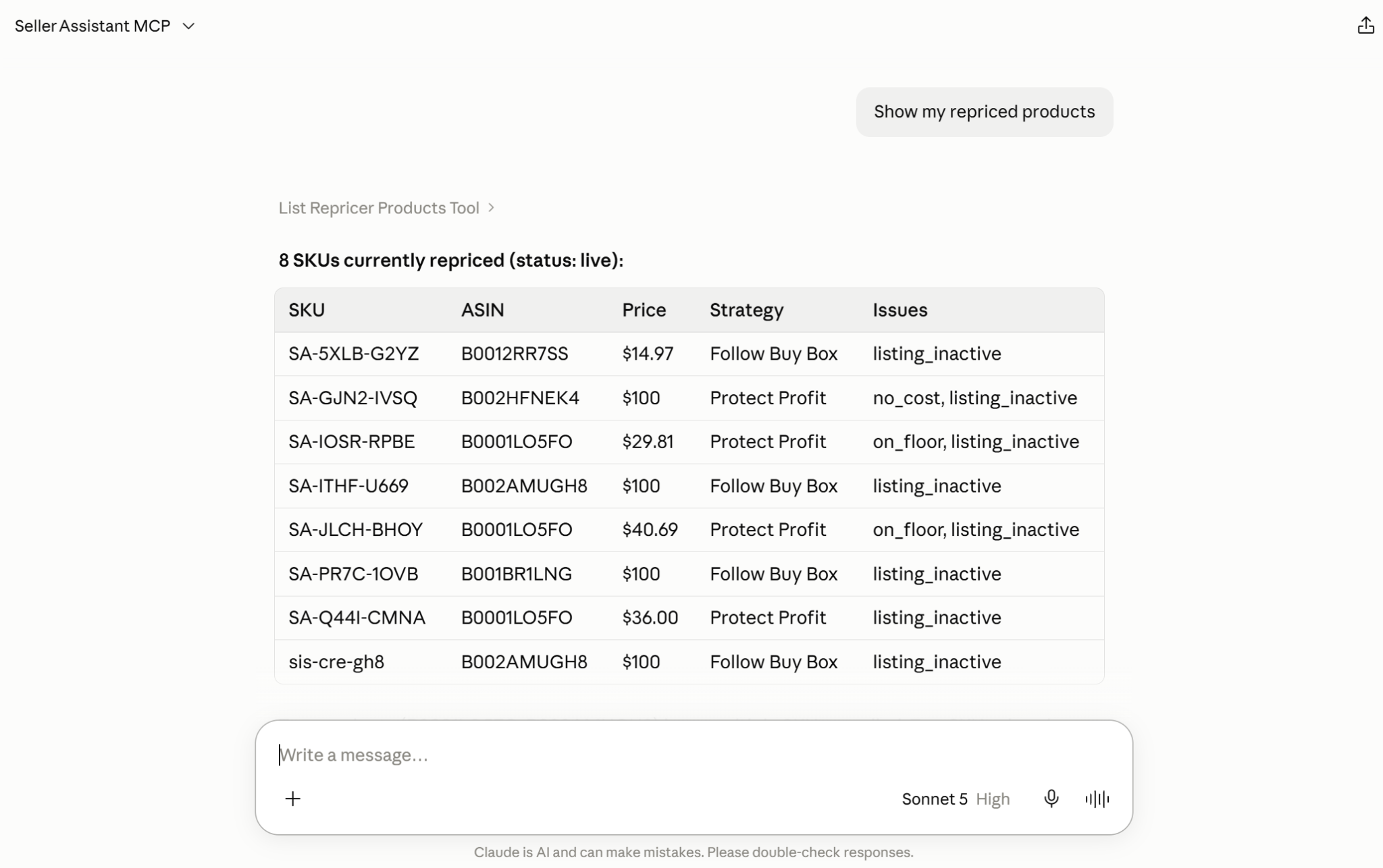
This gives the conversation real Repricer context and lets you narrow the catalog to products that actually need attention.
Step 3. Investigate the flagged SKUs
Before changing anything, ask AI to inspect the relevant information for the affected products. Depending on the issue, this may include cost data, cost source, current strategy, minimum and maximum prices, or Repricer status.
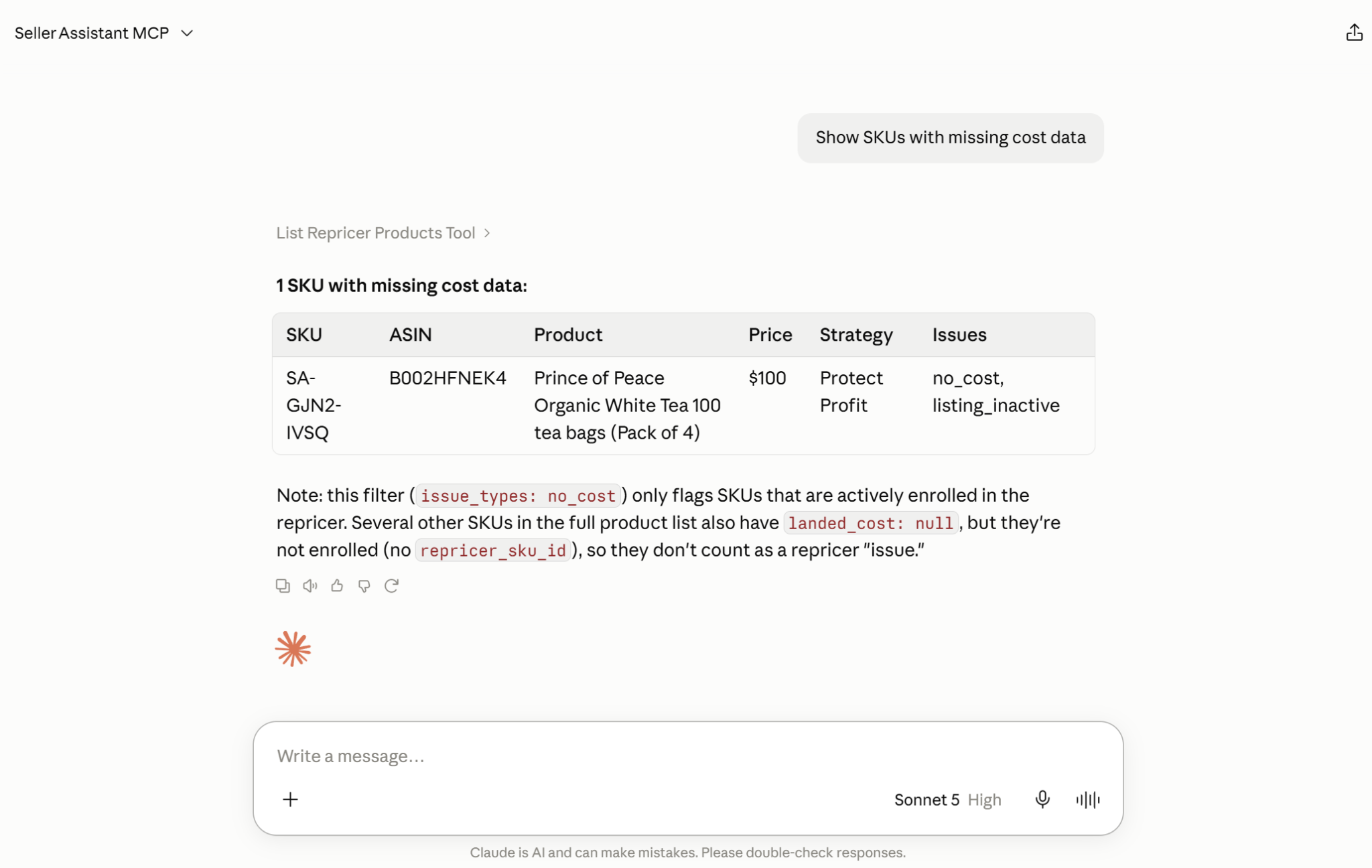
The goal is to understand what is behind the flag before choosing a fix. A product marked On floor, for example, should not automatically have its minimum price lowered.
Step 4. Ask AI to make the appropriate fix
Once you know what needs to change, describe the action in natural language. You might provide missing SKU costs, change minimum and maximum prices, assign another strategy, set MAP for an ASIN, or change the product’s repricing status.
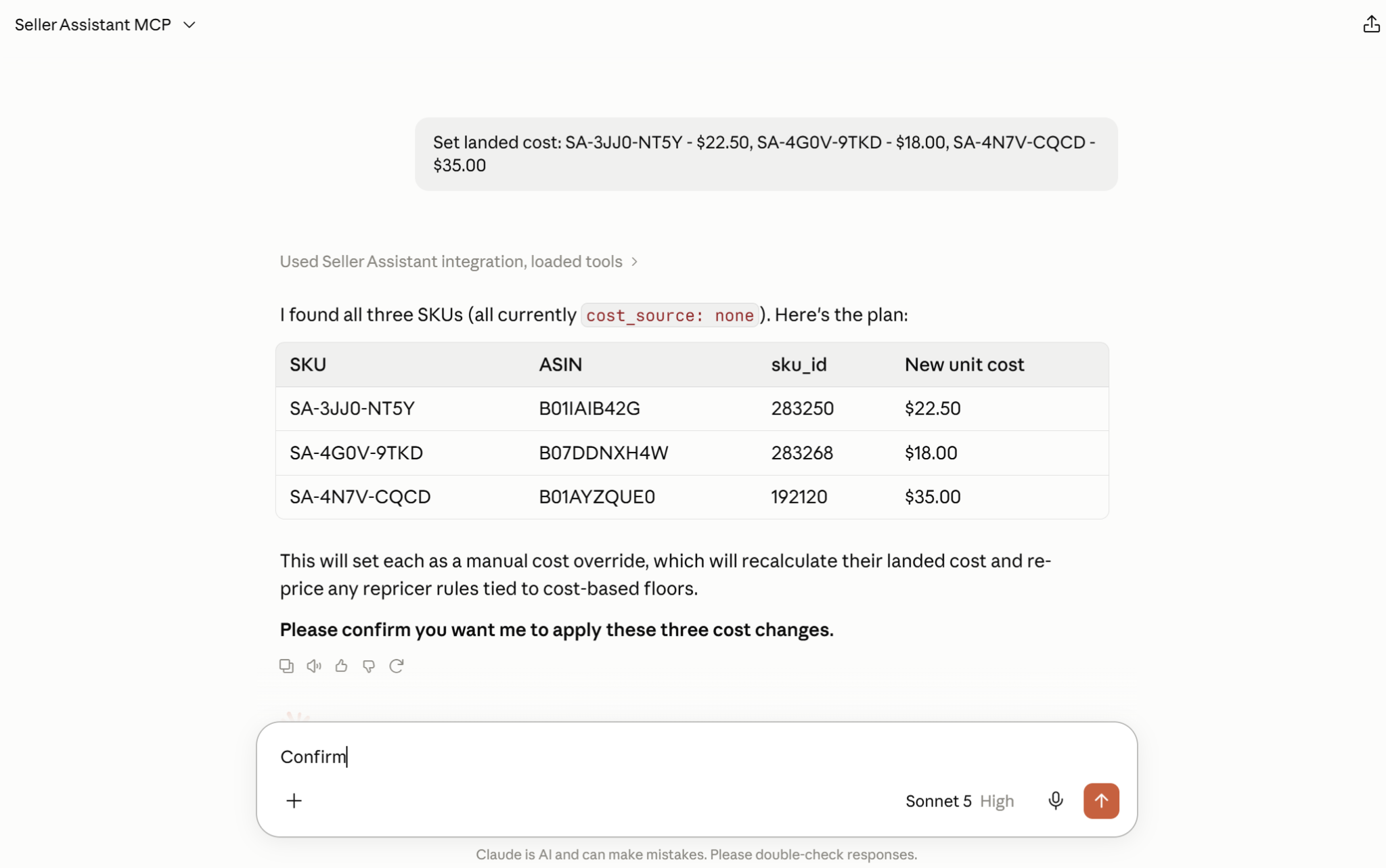
The assistant maps the request to the relevant Seller Assistant MCP operation, so you do not have to open and edit each affected product manually.
Step 5. Review and confirm the change
Changes to Seller Assistant data require confirmation before they are executed. The assistant can show what it is about to modify, giving you an opportunity to review the affected products and settings before approving the action.
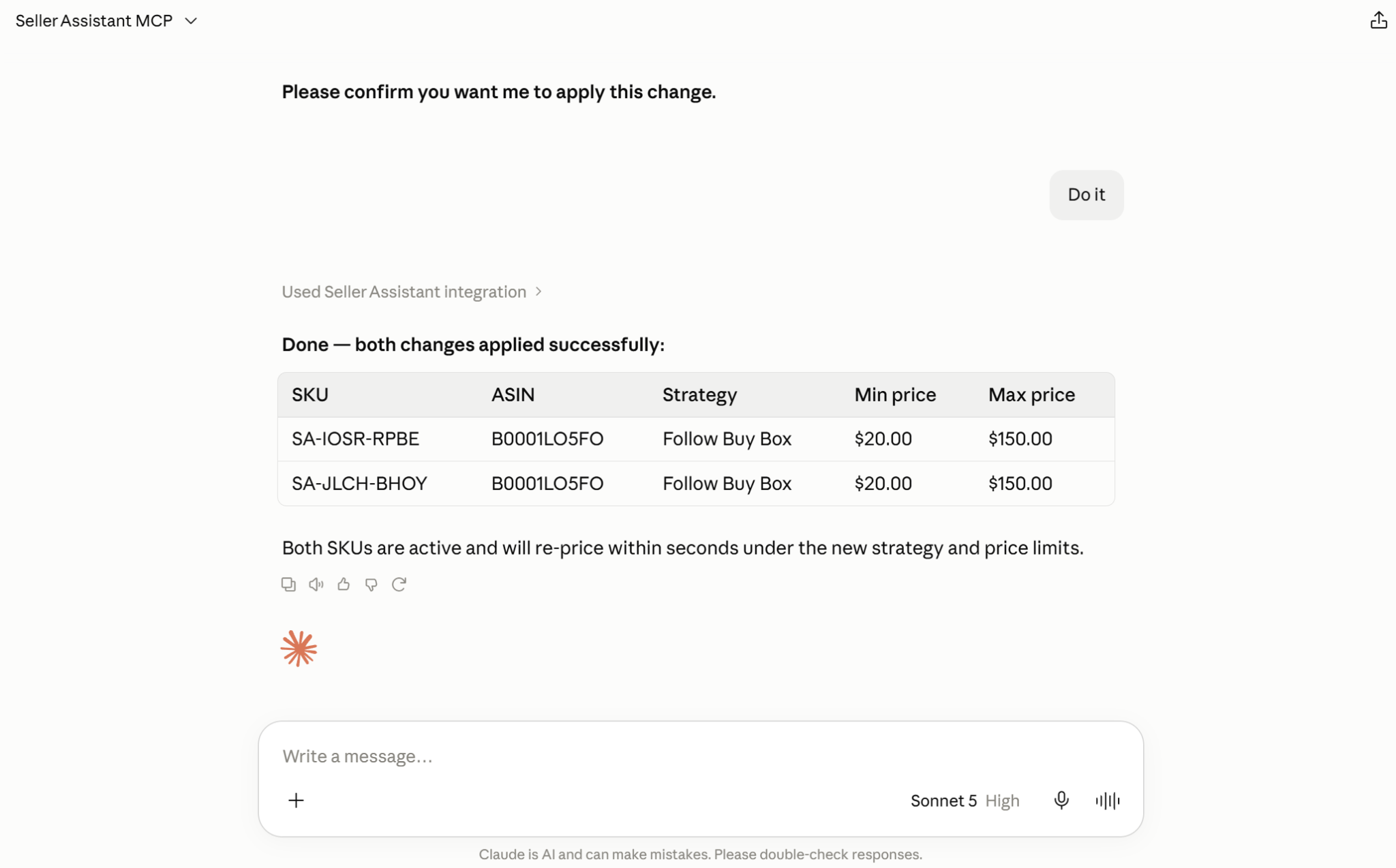
This keeps the seller in control even though the investigation and Repricer management happen through AI chat.
Step 6. Continue troubleshooting related issues
Use the result of one action as context for the next request. For example, you can find SKUs with missing costs → add their costs → recheck those SKUs → identify which products have reached their minimum price → review or adjust their strategy and price limits.
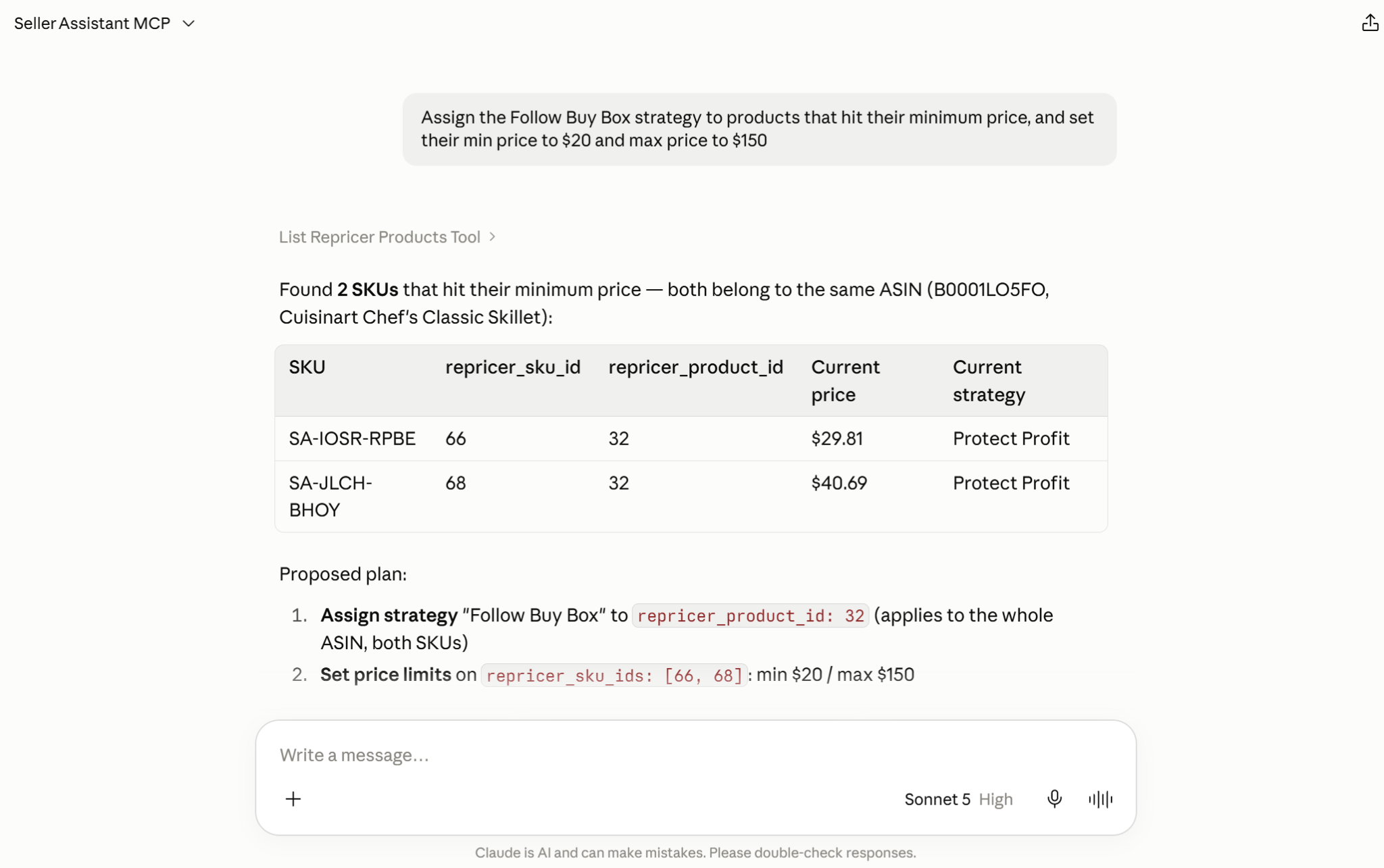
This is especially useful when one Repricer issue leads to another check rather than having a single isolated fix.
Step 7. Recheck the affected products
After making the change, ask AI to retrieve the affected SKUs again and verify their current Repricer state. This helps confirm whether the original issue has been addressed and can reveal whether another status or setting still requires attention.
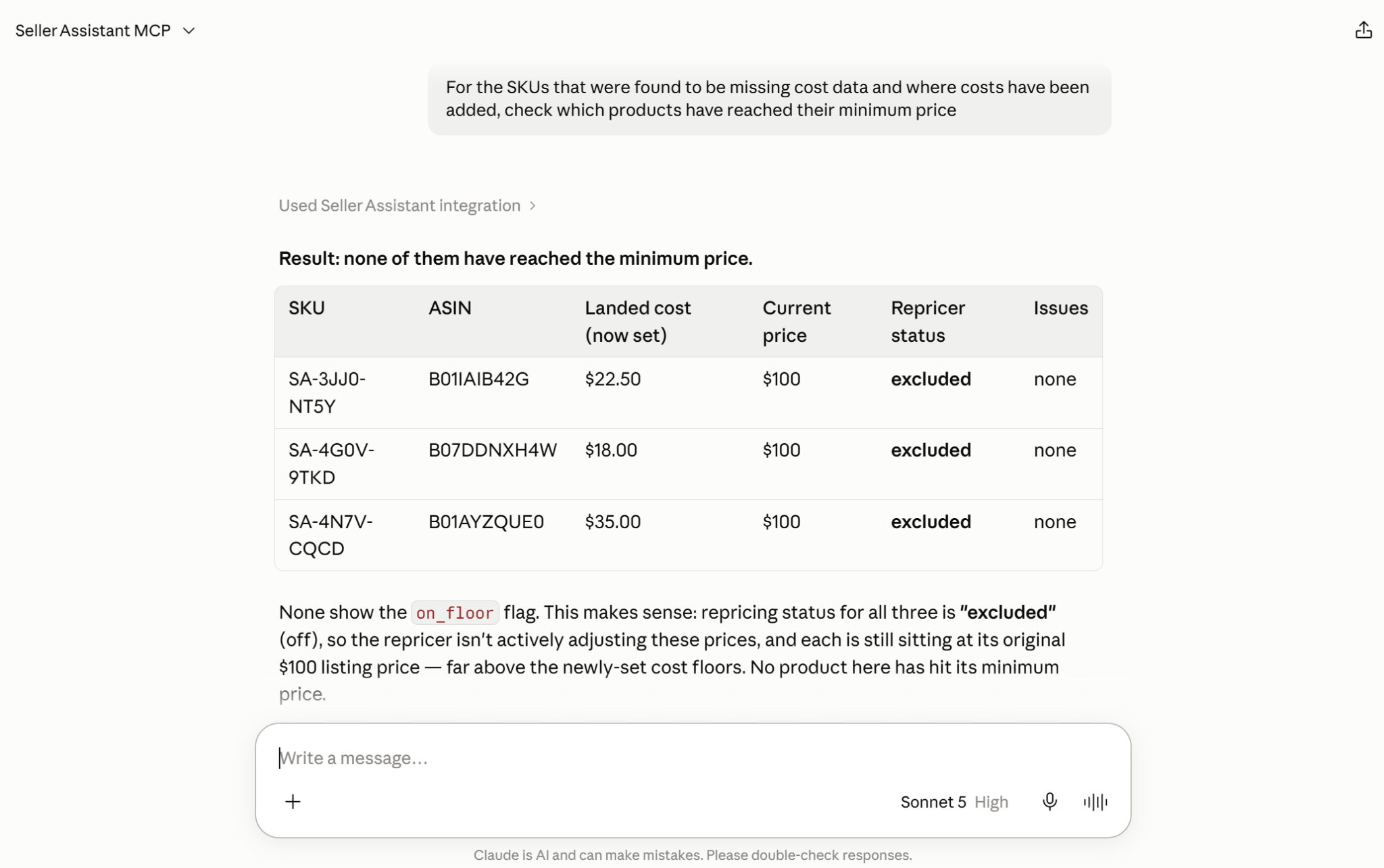
Seller Assistant Repricer then continues managing prices according to the configured strategies, costs, rules, and pricing boundaries, while MCP remains the interface for investigating and managing future exceptions.
FAQ
Can Seller Assistant MCP fix Repricer issues in bulk?
Yes, you can use natural-language requests to work with multiple affected SKUs when the supported operation allows it. This is useful when the same correction, such as updating costs or price limits, needs to be applied across a group of products.
Does a manual SKU cost override the cost imported from a Purchase Order?
Yes, when you manually set a SKU cost, that value takes priority over the cost coming from a Purchase Order. The Purchase Order cost can be used again after the manual override is cleared.
What happens if I delete a Repricer strategy that products are using?
SKUs assigned to a deleted strategy are paused rather than automatically moved to another strategy. The team default strategy itself cannot be deleted.
Does MAP work the same way as a SKU minimum price?
No, minimum and maximum prices are SKU-level limits, while MAP is set at the ASIN level and applies to its SKUs. A strategy can also be configured to ignore MAP, so the two controls should not be treated as interchangeable.
Why can a SKU have cost data but still not be actively repriced?
Having valid costs does not mean that repricing is currently enabled for the SKU. A product can have its costs configured while being paused, excluded, or otherwise outside active repricing, so its Repricer status should be checked separately.
Final Thoughts
Repricer issues are easier to manage when sellers can move directly from finding an exception to understanding what is happening and taking the appropriate action. Instead of manually checking every flagged SKU, Seller Assistant Repricer identifies products that need attention, while Seller Assistant MCP lets an AI assistant investigate the relevant Repricer data and help manage supported changes through natural-language requests.
This turns Repricer troubleshooting into a connected detect → investigate → decide → fix → verify workflow. Sellers remain in control by confirming changes, while AI handles much of the repetitive work of finding affected products, checking their settings, applying approved updates, and verifying the result – making it easier to fix Amazon repricer issues without managing every exception manually.