Set your repricing floor too low, and every price war ends with you selling at a loss without realizing it until the numbers come in. Set it using list price alone, and you’ve ignored Amazon fees, FBA costs, and everything else that separates what a customer pays from what actually lands in your pocket.
A profitable floor isn’t a single number you set once – it’s a calculation that has to reflect your real landed cost, per SKU, as those costs change.
This post walks through what should go into that floor, why it needs to stay live, and how Seller Assistant Repricer calculates and enforces one automatically.
What a Repricing Floor Actually Protects You From
A repricing floor, or minimum price, is the lowest price your Amazon repricer is allowed to set for an offer. Instead of letting automated repricing follow the Buy Box or competing sellers indefinitely downward, the floor creates a boundary where the repricer must stop lowering your price.
For Amazon resellers, that boundary should reflect the economics of the SKU rather than an arbitrary number. Product cost, Amazon fees, prep and inbound costs, other landed-cost expenses, and your required profit, ROI, or margin can all affect where a profitable floor should sit.
Selling below break-even
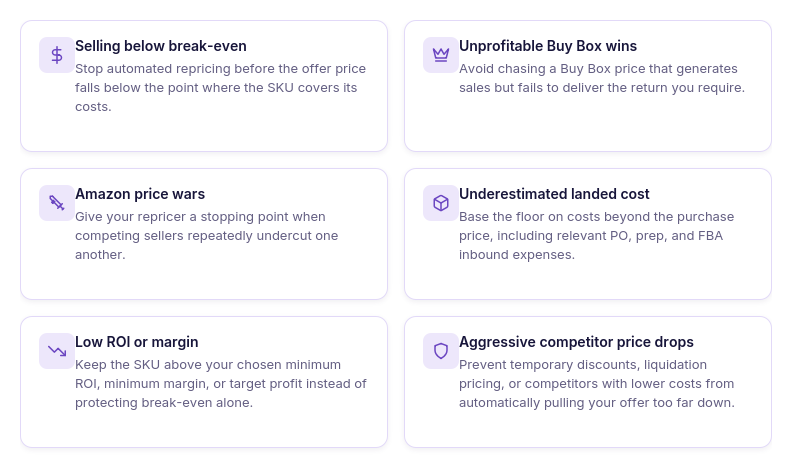
A competitor can sell at a price that makes no financial sense for your cost structure. Following that seller without a floor can push your offer below break-even even while sales continue coming in.
Winning the Buy Box at an unprofitable price
Getting the Buy Box does not automatically mean the sale is worth winning. A profit-aware floor stops your repricer from pursuing a Buy Box price that falls below the return you require from the SKU.
Getting pulled into a price war
Repeated undercutting can send several sellers progressively lower as their repricers react to one another. A defined floor gives your strategy a stopping point instead of letting the SKU follow the competition all the way down.
Ignoring your true landed cost
Purchase price alone does not represent what a unit actually costs to sell. A floor based on landed cost can account for costs such as the unit price, PO expenses, prep, and FBA inbound costs, giving repricing a more realistic financial baseline.
Falling below your ROI or margin target
A price can remain above break-even and still produce too little return to justify the inventory investment. Setting the floor around minimum ROI, minimum margin, or target profit protects the profitability requirement you set for the product.
Reacting too aggressively to sudden price drops
A competitor may temporarily cut their price, liquidate inventory, or simply have a different cost basis. Your repricer does not need to follow every move – a pricing floor defines the point where protecting the economics of your SKU takes priority over following the market.
Why “Lowest Price” Isn’t the Same as “Profitable Price”
The lowest offer on an Amazon listing tells you what a competitor is charging – not whether that price makes sense for your business. Two sellers on the same ASIN can have different supplier costs, prep expenses, inbound shipping, Amazon fees, and profitability targets, so copying the lowest price can turn a competitive SKU into an unprofitable one.
A profitable repricing floor starts with your own landed cost and required return. The goal is to know how low your offer can go before competing for the Buy Box stops making financial sense.
| Pricing Factor | What It Tells You | Why It Matters for Your Floor |
|---|---|---|
| Lowest competitor price | The lowest current competing offer | Useful for competitive context, but says nothing about your costs or required return |
| Buy Box price | The price currently associated with the Buy Box | Shows the price you may be competing against, but matching it may not be profitable |
| Unit cost | What you paid the supplier for one unit | Forms the starting point for calculating the economics of the SKU |
| Landed cost | The fuller cost basis after relevant purchasing, prep, inbound, and other costs are included | Gives the repricer a more realistic basis for calculating how low your price can go |
| Break-even price | The point where the sale covers its costs but generates no meaningful profit | Provides a baseline, but usually should not be the target floor for a profitable product |
| Minimum ROI | The lowest acceptable return relative to your investment in the product | Helps protect the return on the capital tied up in inventory |
| Minimum margin | The minimum percentage of the selling price you want to retain as profit | Prevents repricing from leaving too little profit relative to revenue |
| Target profit | The minimum dollar profit you want from each unit | Useful when you want every sale to contribute at least a specific dollar amount |
| Profitable repricing floor | The lowest acceptable selling price after your costs and profitability target are considered | Tells the repricer where competitive price reductions should stop |
What Goes into a Profitable Amazon Repricing Floor
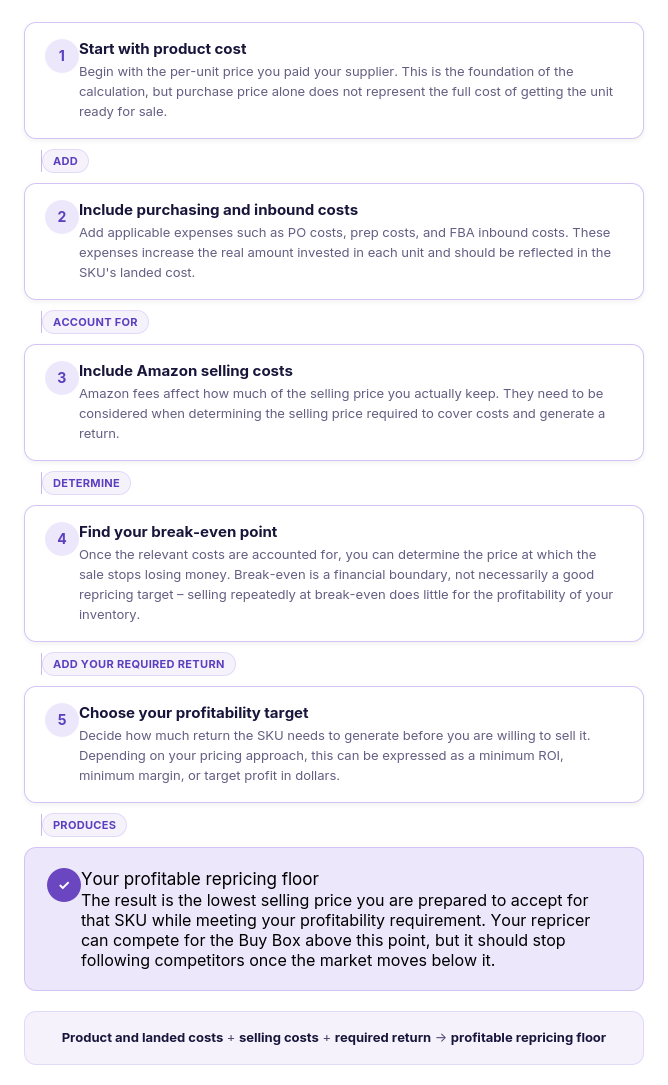
Your repricing floor should come from what the SKU actually costs you – not from the current Buy Box or lowest competitor price. A useful floor starts with your cost basis and then accounts for the minimum return you want to earn before your repricer stops following the market downward.
Think of it as building the minimum acceptable selling price from the bottom up.
How to Set a Profitable Amazon Repricing Floor
Calculating and maintaining profitable minimum prices manually becomes difficult once you manage more than a small number of SKUs. Every product can have a different landed cost and profitability target, while Amazon prices and Buy Box competition keep changing – so a static spreadsheet floor can quickly become disconnected from the price you can actually afford to sell at.
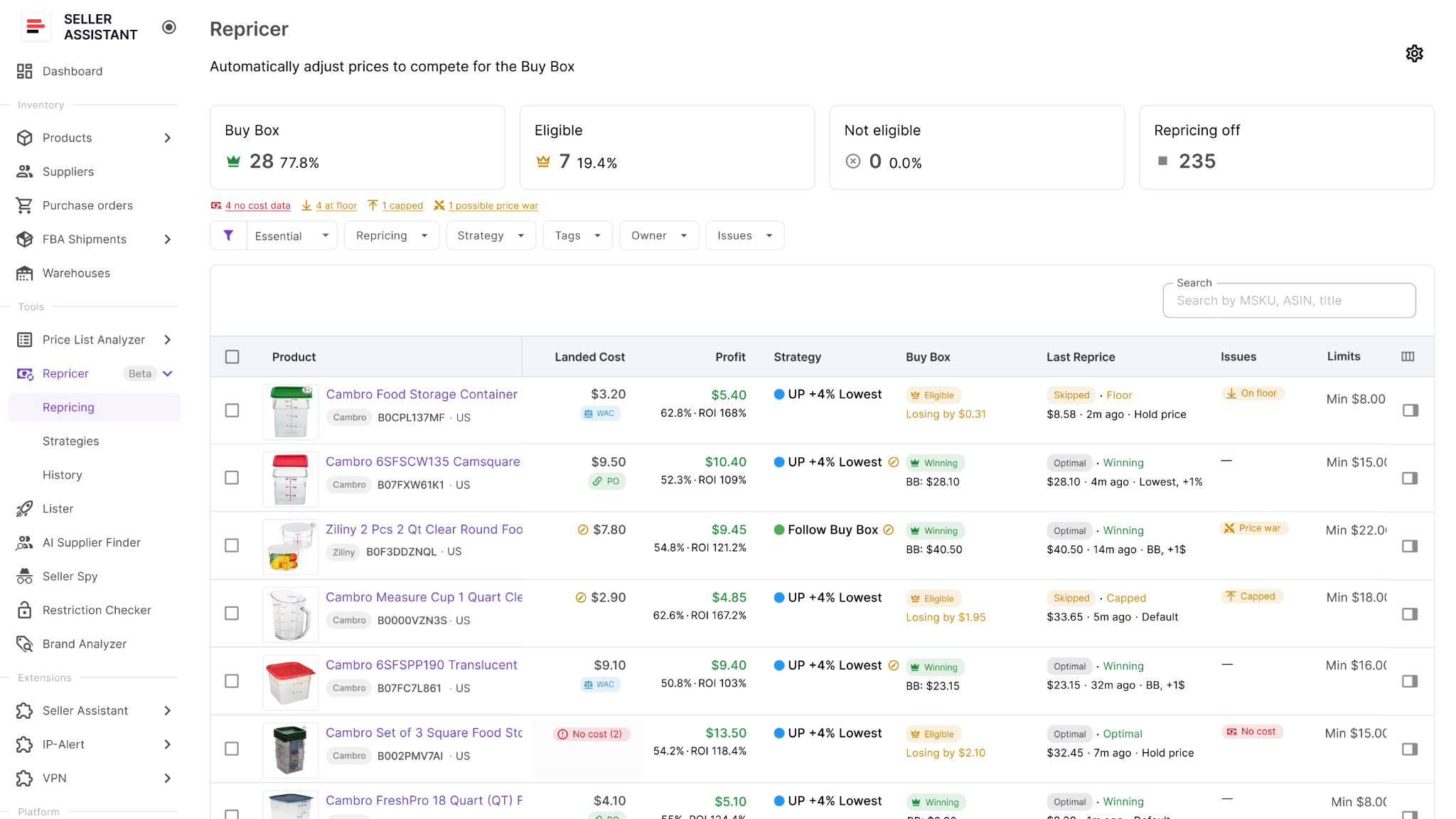
A repricer turns the floor into part of the automated pricing logic. Seller Assistant Repricer can use SKU cost data to calculate dynamic floors based on minimum ROI, minimum margin, or target profit, while safety minimums provide an additional hard boundary. The Repricer can then compete for the Buy Box within those limits instead of blindly following competitors downward.
Start with accurate landed cost
A cost-based floor starts with the actual economics of the SKU. Seller Assistant can use landed cost associated with the product, including available components such as unit cost, PO expenses, prep cost, and FBA inbound cost.
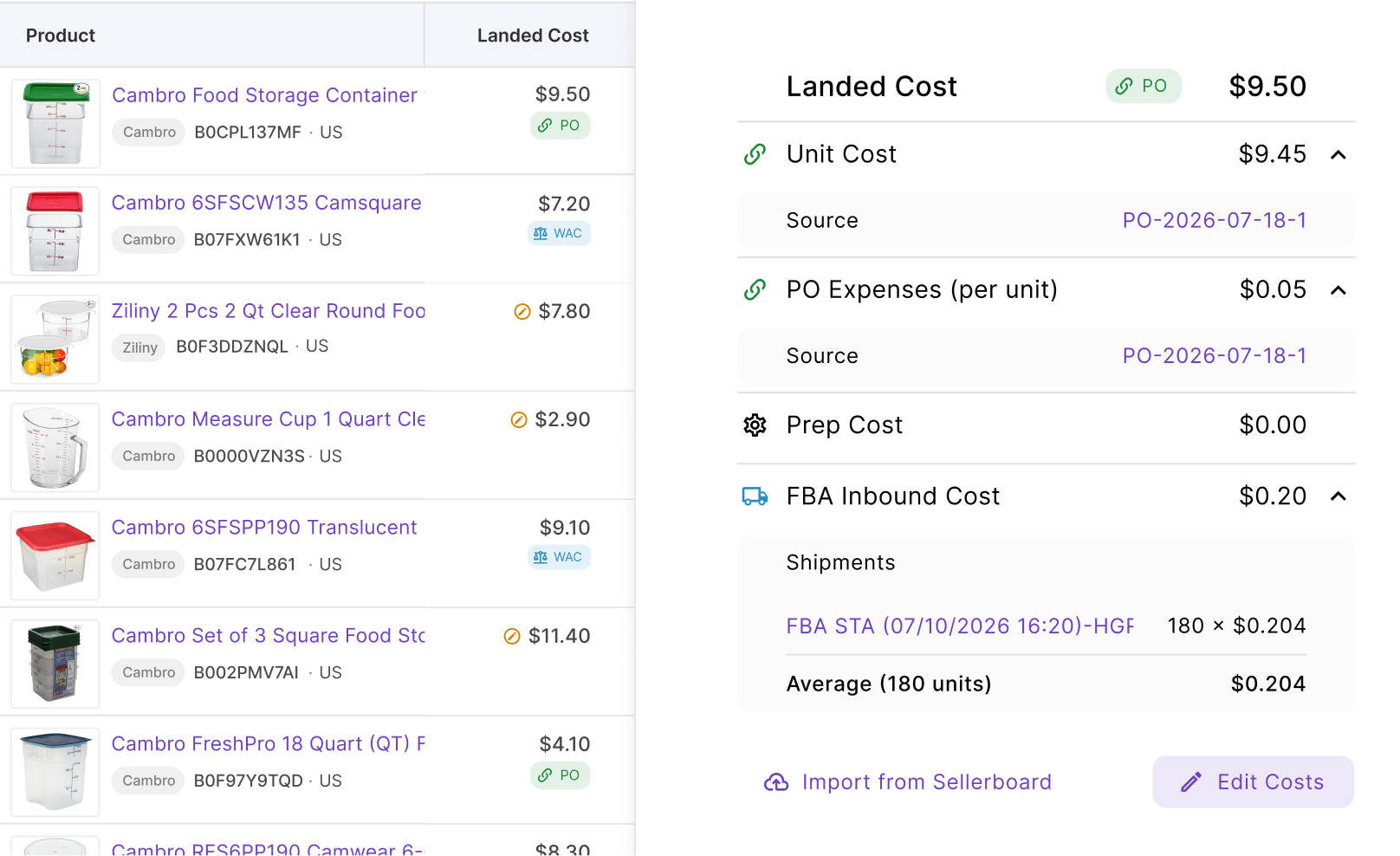
This cost data gives dynamic floor calculations their financial baseline. If the cost is missing or inaccurate, an ROI-, margin-, or profit-based floor cannot reliably protect the return you expect.
Choose how your floor is calculated
Seller Assistant provides several Min price modes, allowing the floor to reflect the way you measure profitability rather than forcing every SKU into the same calculation.
- Manual – sets a fixed minimum price you enter yourself.
- Min ROI % – calculates the minimum price needed to maintain your required return on investment.
- Min margin % – calculates the floor required to preserve your chosen profit margin.
- Target profit $ – calculates the minimum price needed to retain a specified dollar profit per unit.
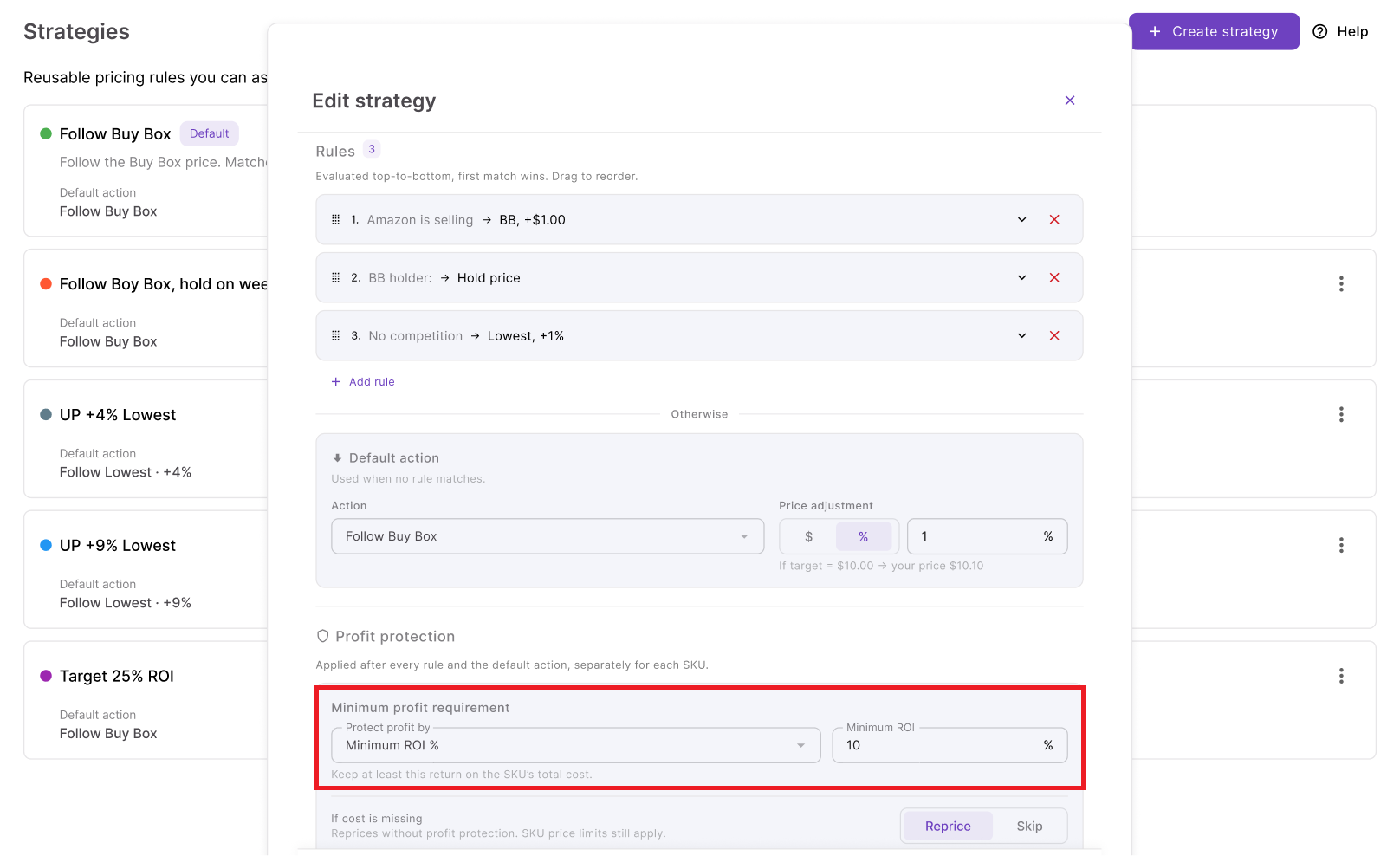
For example, if you require at least 25% ROI, Repricer can calculate the effective minimum from the SKU’s cost data rather than requiring you to manually determine and maintain the corresponding selling price.
Add a safety minimum below the dynamic floor
A dynamic profitability floor and a safety minimum perform different jobs. The dynamic floor changes according to the selected ROI, margin, or profit requirement, while the safety minimum establishes an absolute price Repricer cannot go below.
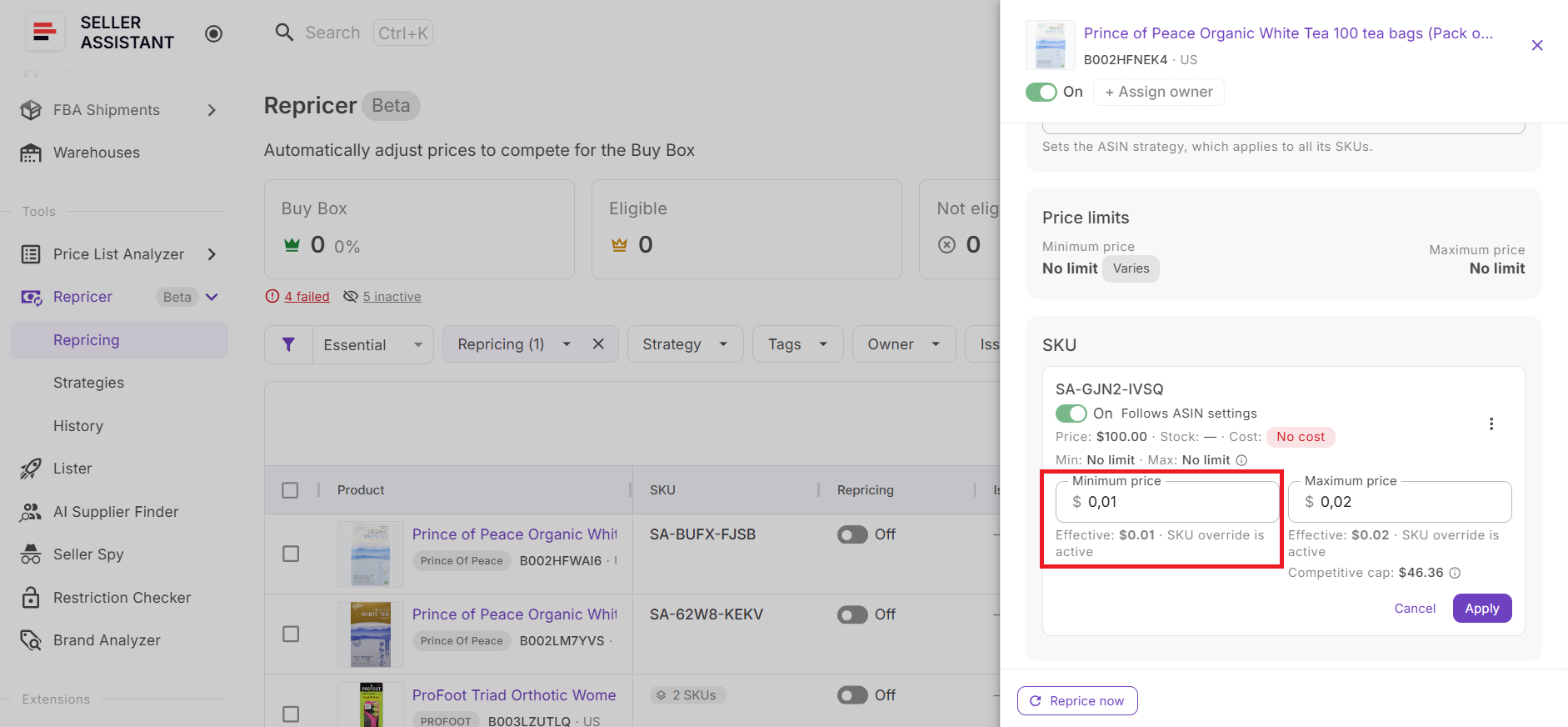
This gives the SKU a final guardrail even when dynamic calculations are being used. Your profitability target determines where Repricer should normally stop, while the safety minimum defines where it must stop.
Set the upper pricing boundary
Profit protection is not only about how low a price can go. Seller Assistant also lets you set a maximum price, creating an allowed pricing range between the lower and upper boundaries.
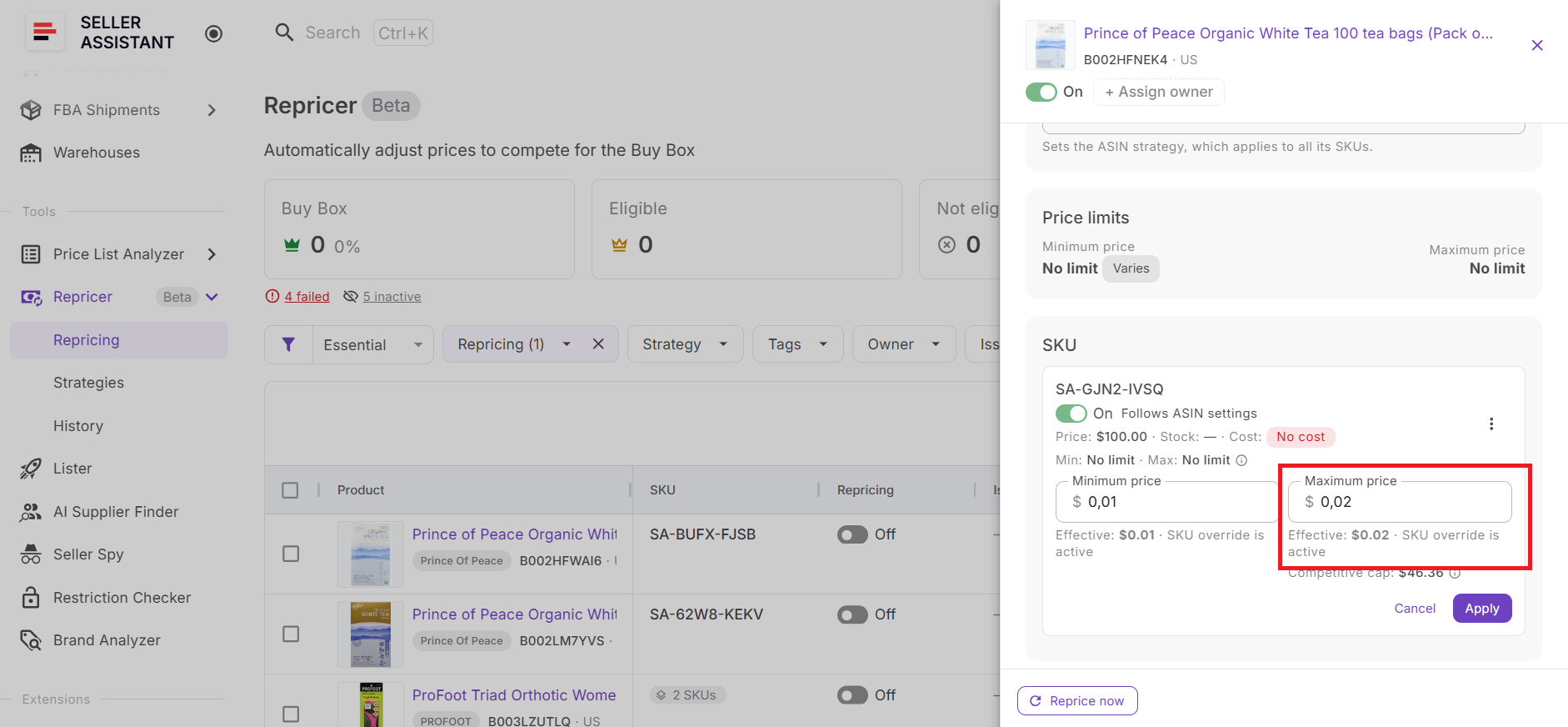
Within that range, your strategy can respond to the Buy Box, lowest offer, Amazon’s suggested price (FOEP), and conditional rules. The limits remain separate from the competitive logic – the strategy decides where it wants to move, while the boundaries determine whether that move is allowed.
Control what happens when cost data is missing
Cost-based floors depend on having cost data available, so Seller Assistant lets you define what Repricer should do when that information is missing. You can configure it to skip repricing, use a manual minimum price, or continue without a floor.
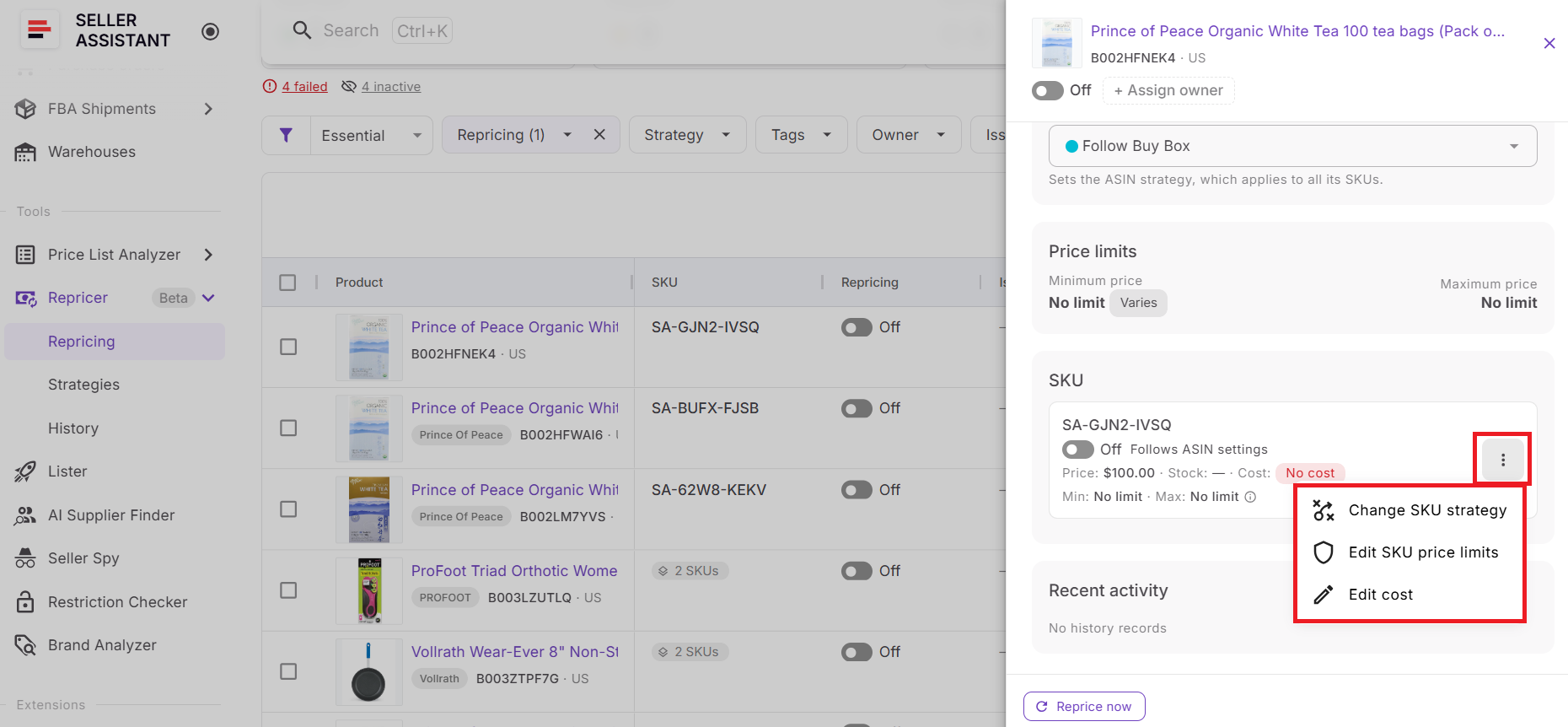
This setting is particularly important when profit protection is the goal. Continuing without a floor removes the cost-based boundary, while skipping repricing keeps the SKU from automatically moving until the required data is available.
Let competitive rules work above the floor
Once the floor is established, it becomes a safeguard underneath your normal repricing strategy. Repricer can still Follow Buy Box, Follow Lowest Price, Follow Amazon’s suggested price (FOEP), Hold Price, or apply conditional rules based on competition, Amazon’s presence, stock, and other supported conditions.
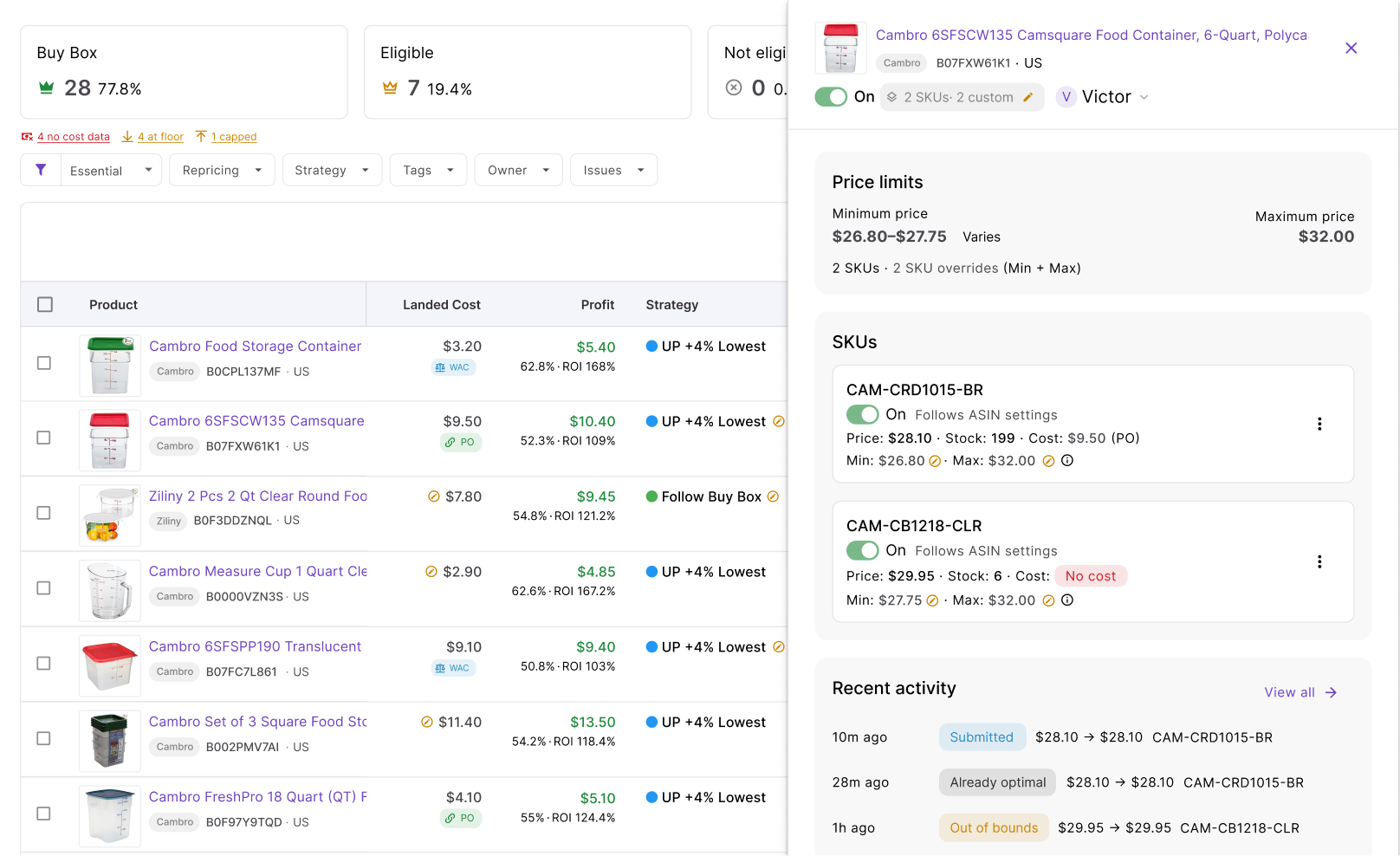
The important distinction is that the competitive target and profitable floor are not the same thing. The target tells Repricer where the market suggests the price should move; the floor determines whether moving that low is acceptable for your business.
Monitor profitability around the floor
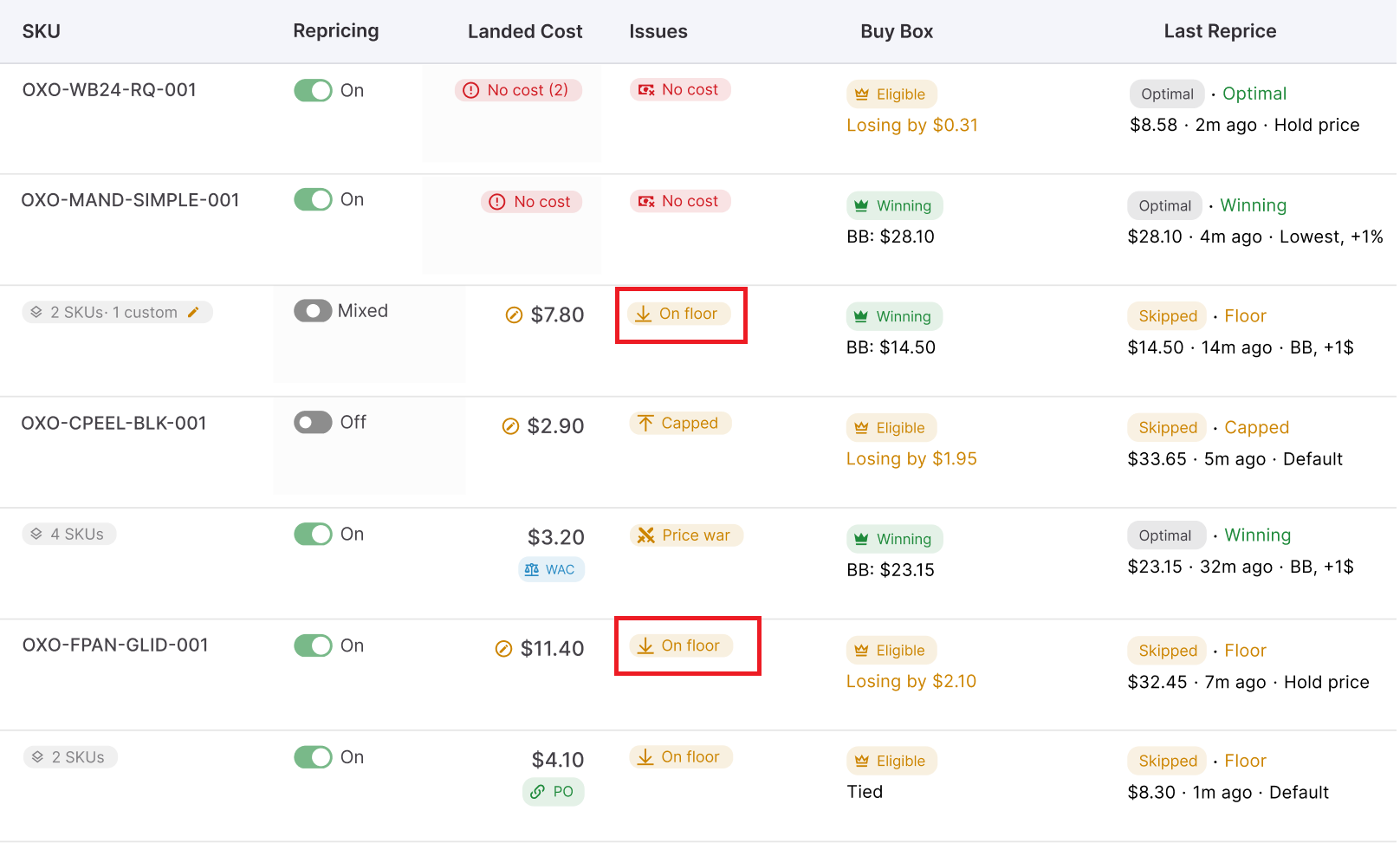
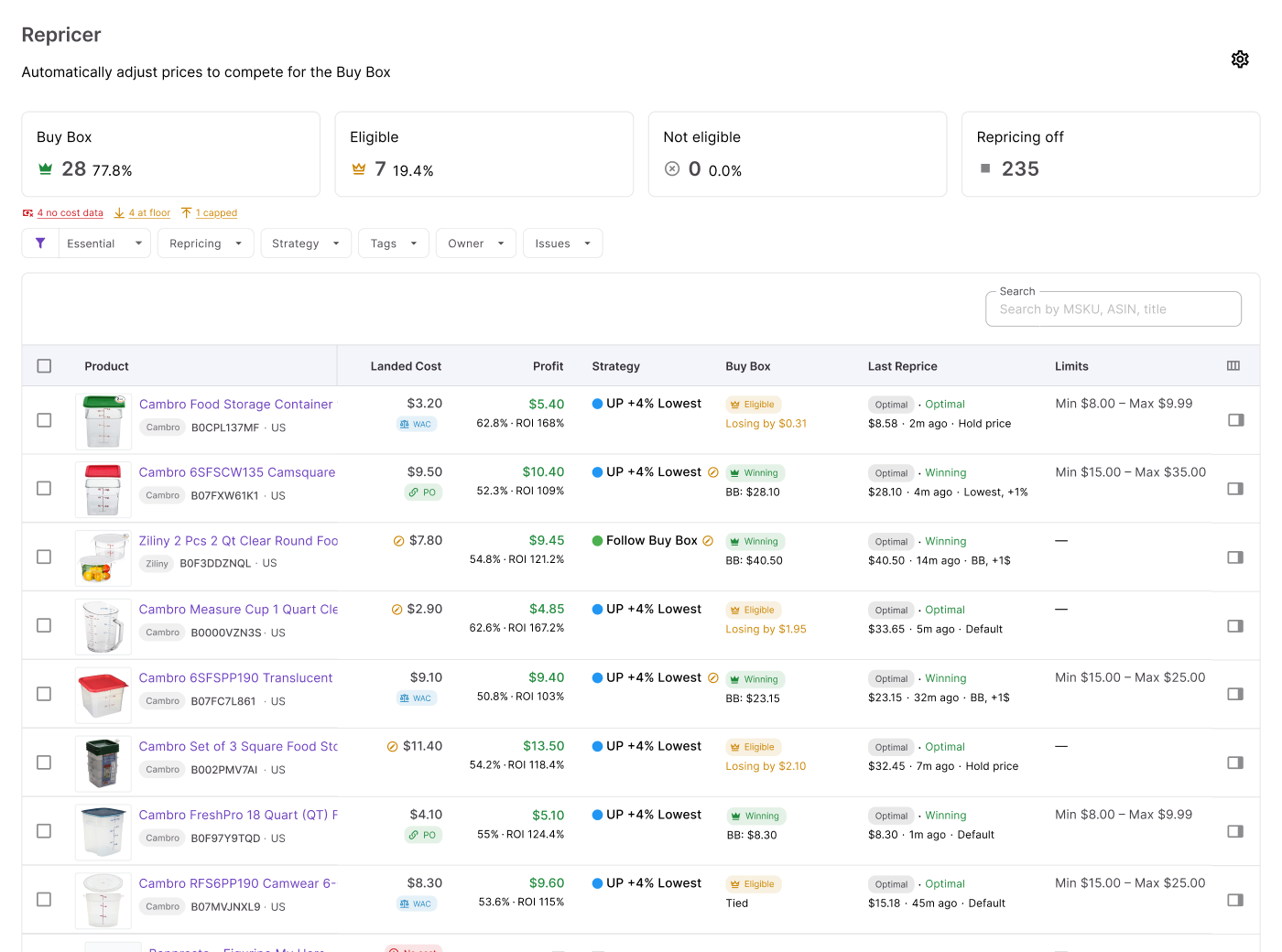
Seller Assistant shows cost and profitability information alongside repricing data, including metrics such as landed cost, profit, ROI, margin, current price, and price limits. This lets you evaluate what happens financially as the offer approaches its minimum rather than looking at competitor prices in isolation.
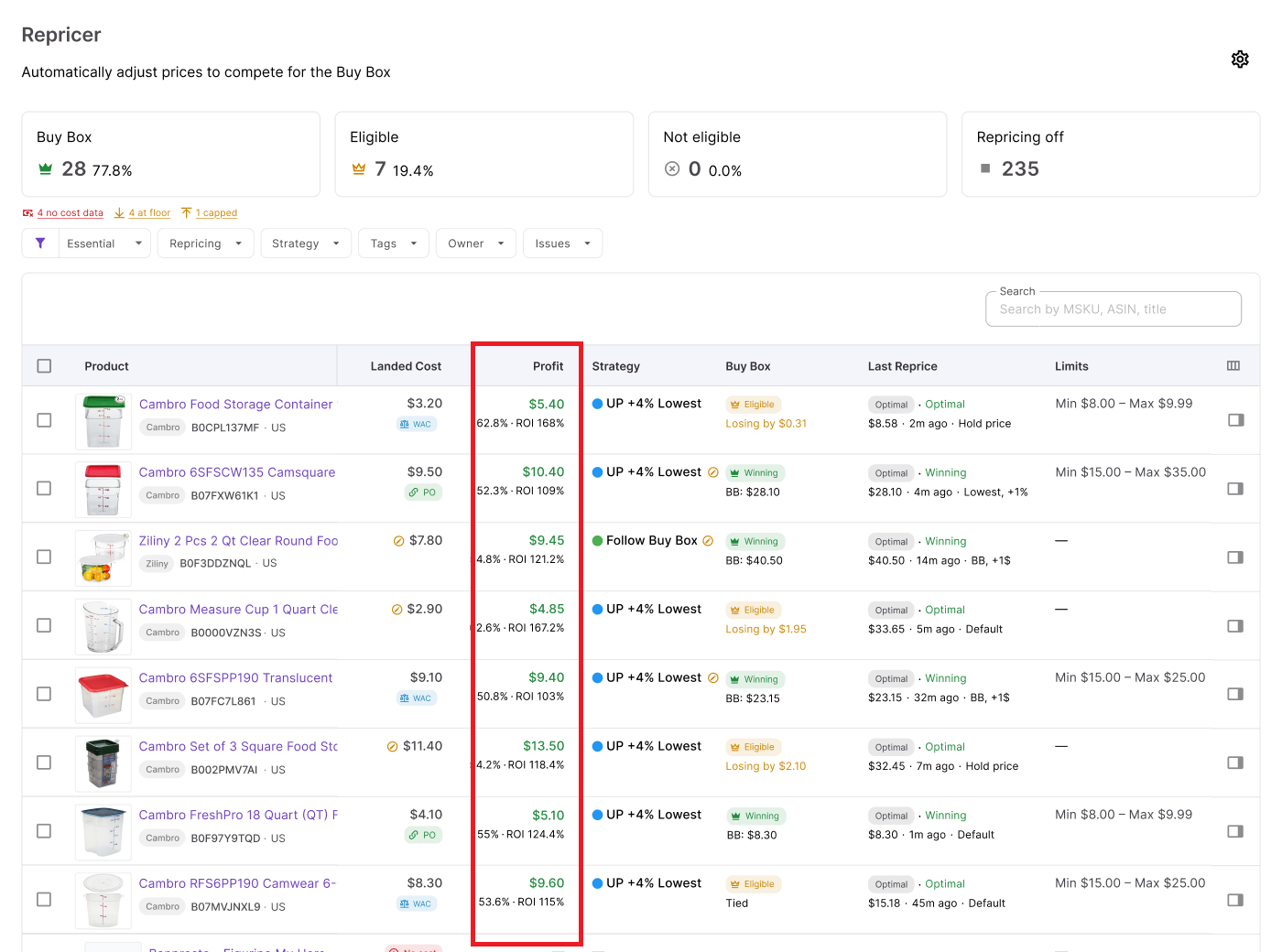
Repricer also surfaces issues such as On floor when a product reaches its lower pricing boundary. If many SKUs repeatedly sit on their floors, that is useful information – the problem may be the competitive market, sourcing cost, or profitability requirement rather than the repricing automation itself.
Revisit the floor when product economics change
A profitable floor is only as current as the numbers behind it. Changes in supplier pricing, purchasing expenses, prep or inbound costs, and your required return can all change the minimum price at which a SKU remains worthwhile.
Use profitability data, Issues, and Repricing History to monitor how products behave around their floors. When a SKU repeatedly reaches its minimum, review its costs and strategy before simply lowering the floor to chase the Buy Box.
The Floor Is Just One Piece: What Seller Assistant Repricer Does
A profitable repricing floor tells your repricer where to stop, but it does not tell it what to do above that boundary. Effective Amazon repricing also requires deciding which market price to follow, how to react when the Buy Box changes, what to do when Amazon appears on the listing, when to hold or raise a price, and how to respond as competition and stock change.
Seller Assistant Repricer combines these decisions with the profitability safeguards covered above. Built for Amazon wholesale, online arbitrage, and dropshipping sellers, it monitors marketplace conditions and automatically adjusts offers according to reusable strategies and conditional rules – while landed cost, dynamic floors, safety minimums, and price limits keep those decisions within the financial boundaries you set.
What you can do with Seller Assistant Repricer
- Track your competitive position
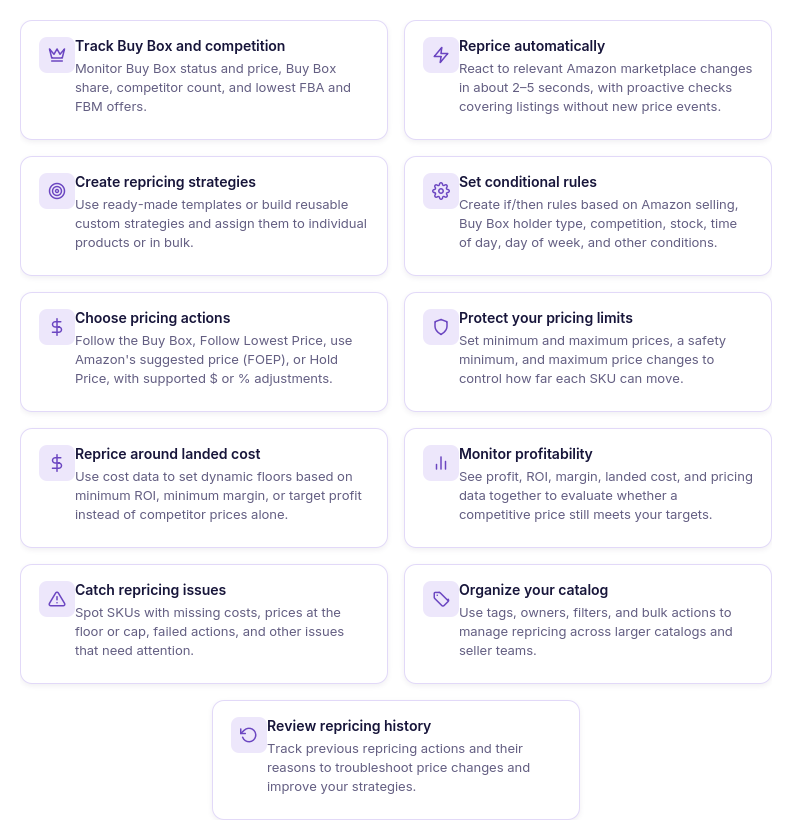
See current price, Buy Box status and price, Buy Box share, competitor count, lowest FBA and FBM prices, and stock alongside your repricing settings. This shows the market conditions behind a pricing decision rather than presenting the lowest competitor price without context.
- Respond to market changes quickly
Reactive repricing can respond to relevant Amazon marketplace changes in approximately 2–5 seconds. Proactive checks also reevaluate quieter listings when there is no new competitor event to trigger an immediate response.
- Build strategies for different selling situations
Create reusable strategies with a default pricing action and ordered if/then rules. Rules can respond to conditions including Amazon selling, Buy Box holder type, competitors above or below your offer, no competition, stock levels, time of day, and day of week.
- Choose which price to follow
Repricer can Follow Buy Box, Follow Lowest Price, follow Amazon’s suggested price (FOEP), or Hold Price when a rule calls for no movement. Fixed-dollar and percentage adjustments let you price relative to the selected target instead of always matching it exactly.
- Keep competition above your profitable floor
Use manual minimum prices or dynamic floors based on minimum ROI, minimum margin, or target profit, with a separate safety minimum as a hard boundary. This allows the strategy to compete while preventing normal repricing logic from following the market below your configured limits.
- Connect pricing with actual product costs
Seller Assistant can use landed cost associated with the SKU, including relevant cost data from the purchasing workflow. Repricer can then show profit, ROI, margin, landed cost, and price limits, giving you financial context for the prices being considered.
- Find products that need attention
The Issues column helps isolate exceptions such as No cost, On floor, Capped, Failed, and possible Price war situations. Instead of checking every SKU manually, you can filter the catalog and focus on products where the pricing setup or market situation needs review.
- See why a price changed
Repricing History records pricing activity and helps explain what happened to individual products. If a price looks unexpected, you can review the decision alongside the strategy, rules, costs, market conditions, and limits that influenced it.
How Seller Assistant Repricer makes a pricing decision
The Repricer combines Amazon market data, strategies, conditional rules, and profitability limits to decide whether a SKU’s price should change. It monitors Buy Box and competitor signals and uses reactive repricing that can respond to relevant marketplace changes in about 2–5 seconds, backed by proactive checks for quieter listings.
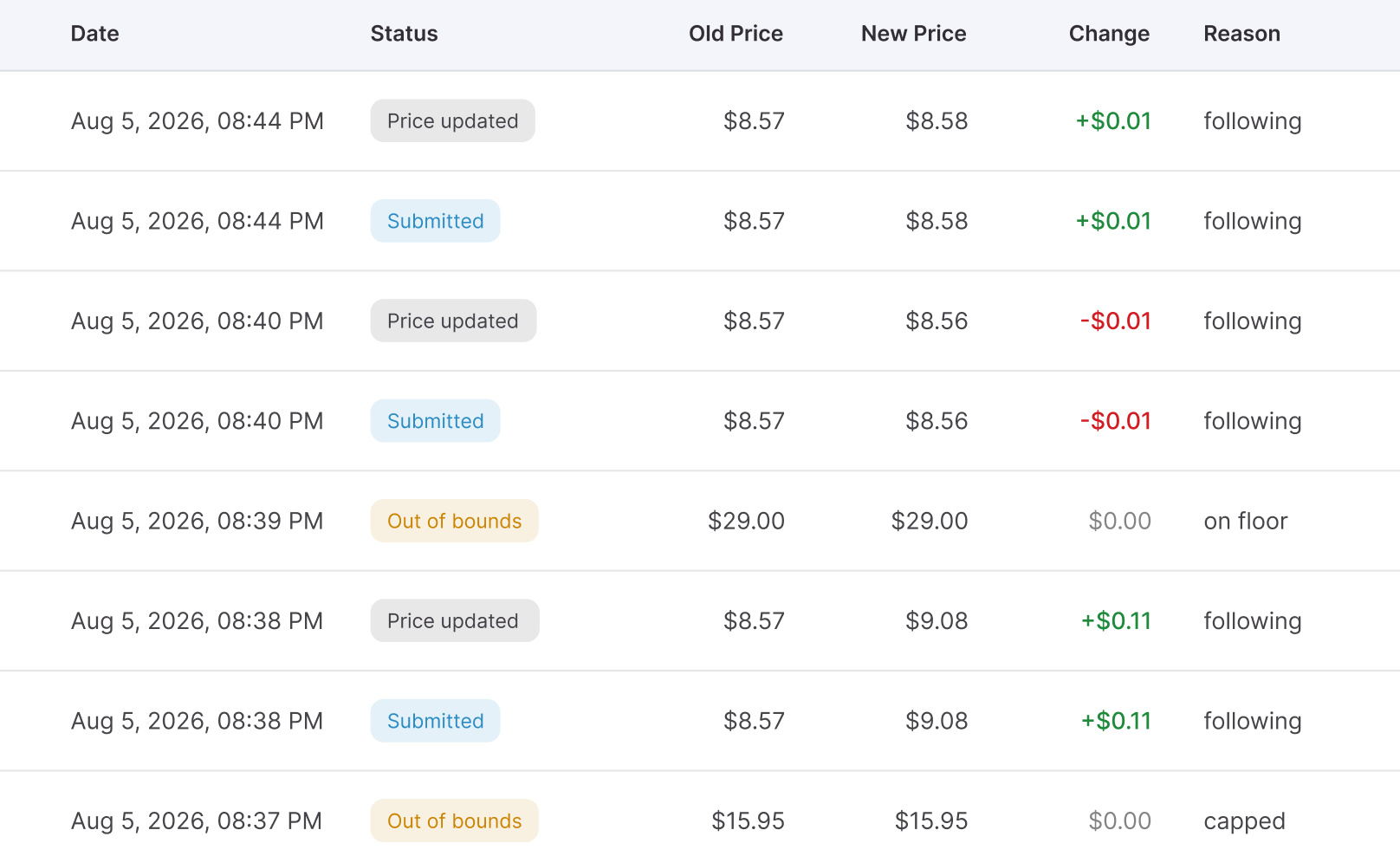
When conditions change, Repricer evaluates the assigned rules in priority order, selects the applicable pricing action, and calculates the target price. Before applying it, the tool checks landed cost, minimum ROI or margin, target profit, safety minimum, maximum price, and other limits – so a competitor price drop cannot automatically pull the offer below the floor you defined.
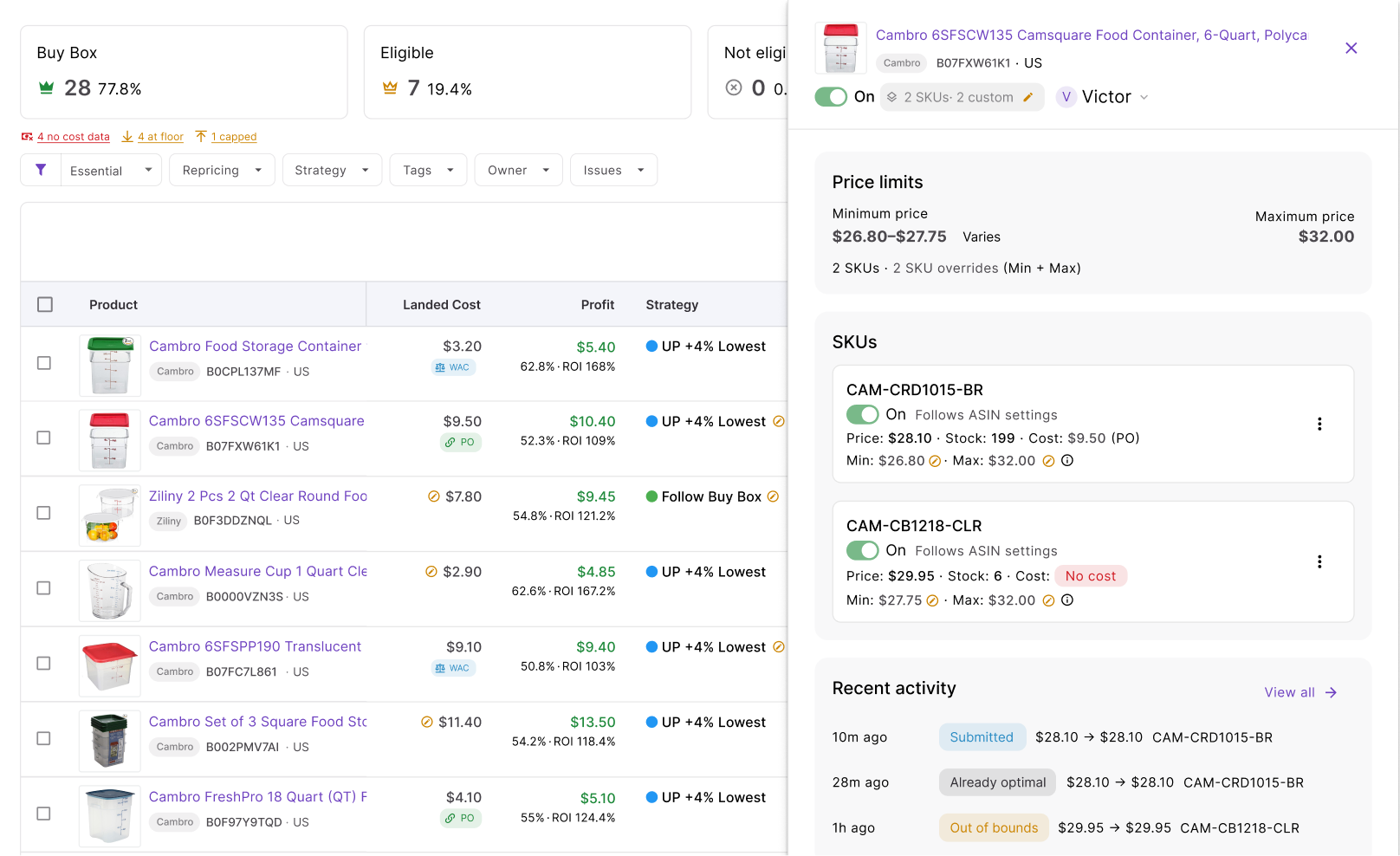
Because Repricer is built into Seller Assistant, these decisions can use cost and profitability data from the broader reseller workflow rather than operating in isolation. Sellers get fast competitive response plus profit protection, while Issues and Repricing History make it easier to identify problems and understand why each SKU did or did not reprice.
How to use Seller Assistant Repricer step by step
Step 1. Open Repricer
In Seller Assistant, go to Repricer → Repricing. This workspace brings together your products and SKUs with repricing status, strategies, market data, owners, tags, profitability information, and Issues.
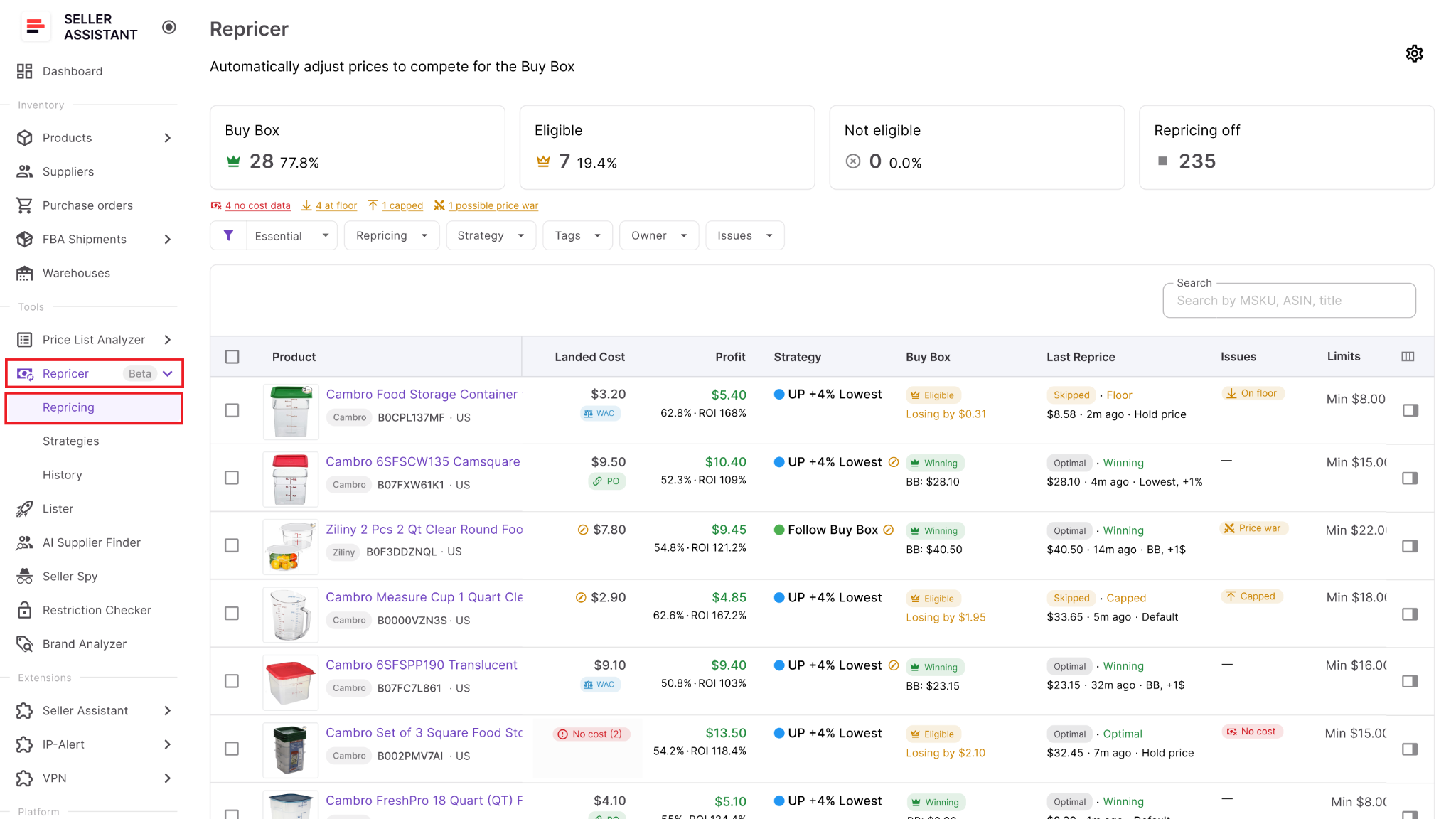
Use it as the main control center for deciding which products are ready for automated repricing.
Step 2. Enable Repricing
Open Settings and turn on Repricing for your team. You can also decide whether newly listed products should automatically enter repricing or remain inactive until they are reviewed.
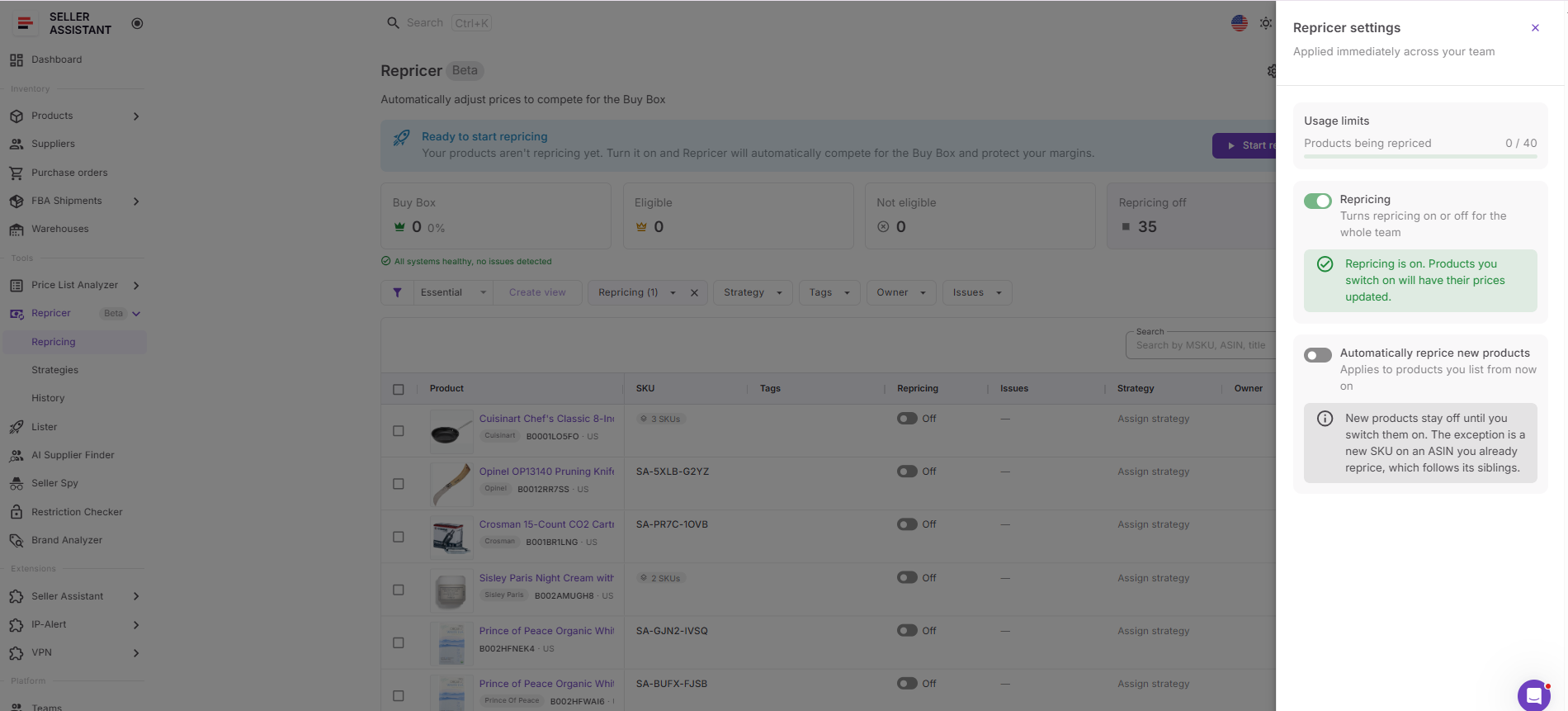
Keeping new products off initially can be useful when you want to verify their cost data, strategy, and price boundaries before automation begins.
Step 3. Assign a repricing strategy
Choose an existing strategy from the Strategy column or create a new one. Seller Assistant provides templates such as Follow Buy Box, Match Buy Box, Smart FBA, Protect Profit, and Target 25% ROI, or you can build your own.
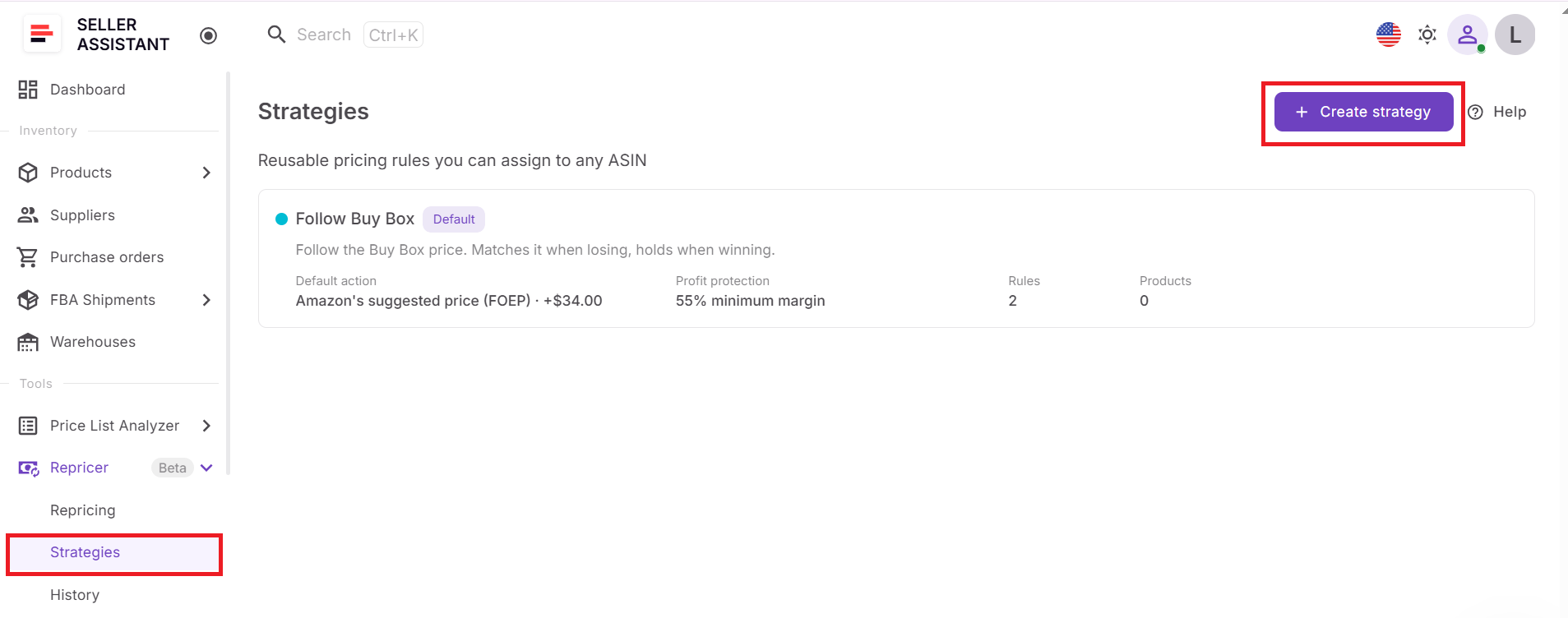
Choose the strategy according to how you want the product to compete rather than simply instructing Repricer to chase the lowest price.
Step 4. Configure rules and profitability limits
Define the conditions that should change the strategy’s behavior and the action Repricer should take when those conditions occur. For example, you can hold when Amazon is selling, use different logic when competition disappears, or change behavior when stock falls below a threshold.
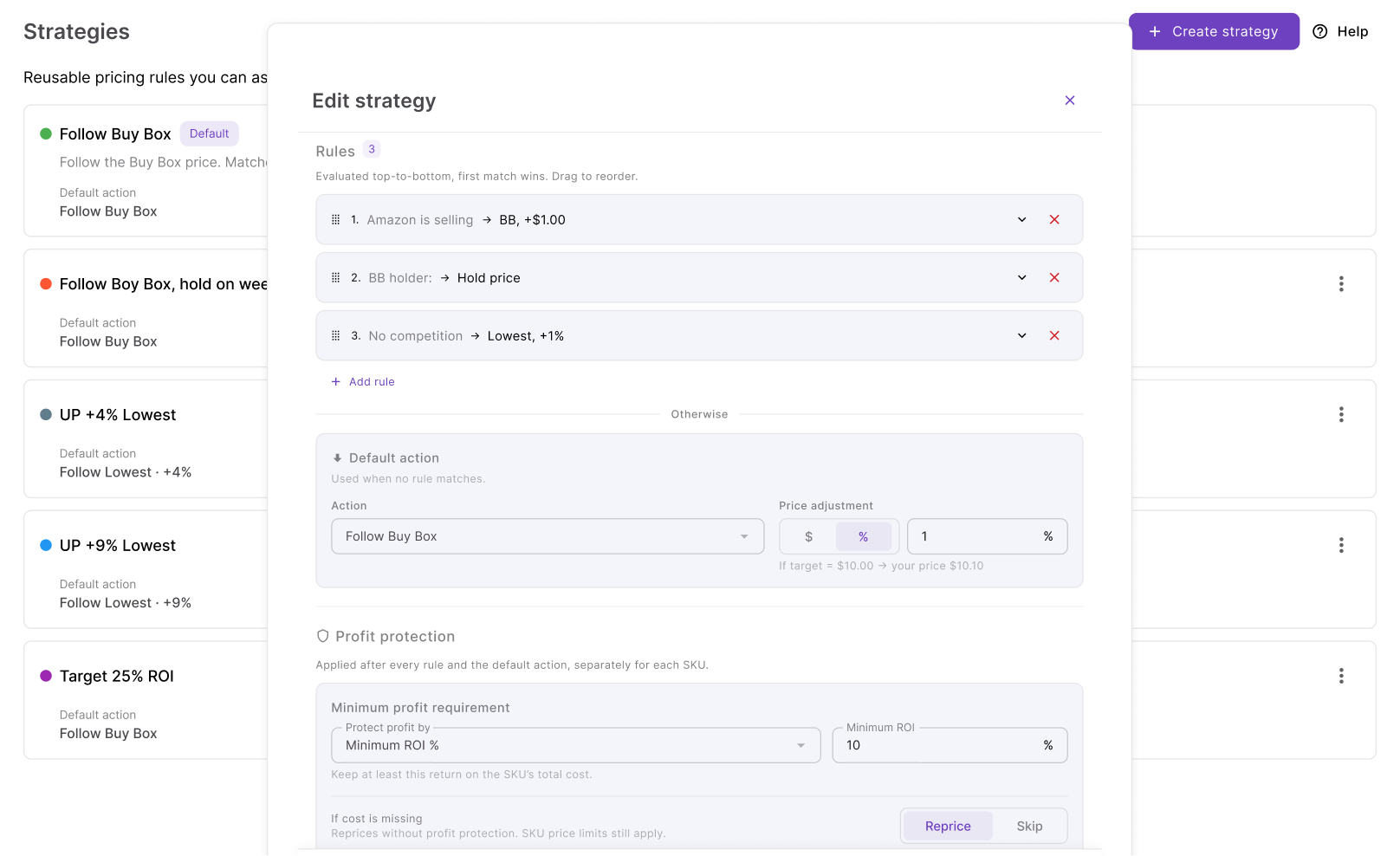
Then configure the SKU’s pricing boundaries – including the minimum-price mode, safety minimum, maximum price, profitability requirement, and maximum change per reprice.
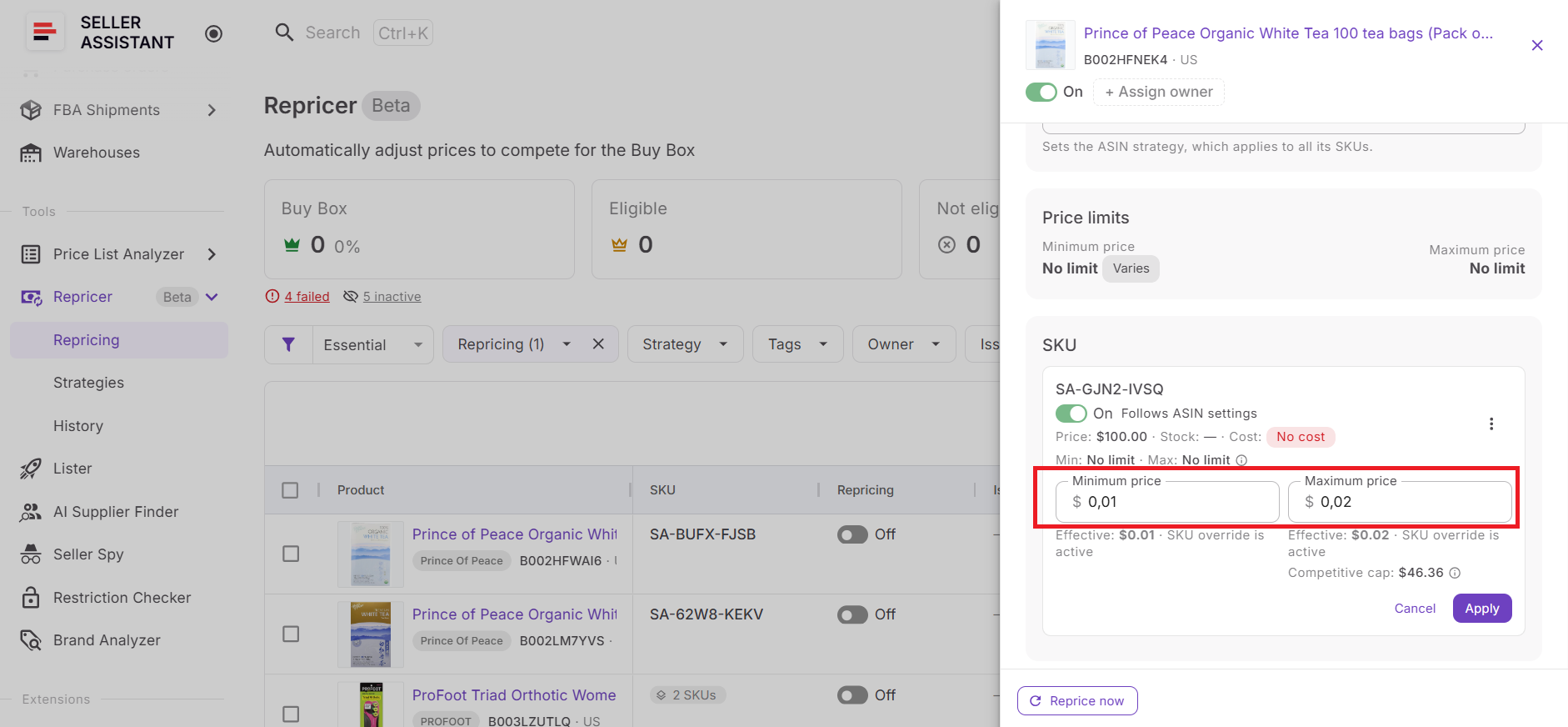
This is where the profitable repricing floor becomes part of your broader competitive strategy.
Step 5. Organize the catalog
Add Tags to group products by supplier, inventory type, season, priority, or another useful category, and assign Owners when different team members manage different products. These controls become increasingly useful as the number of repriced SKUs grows.
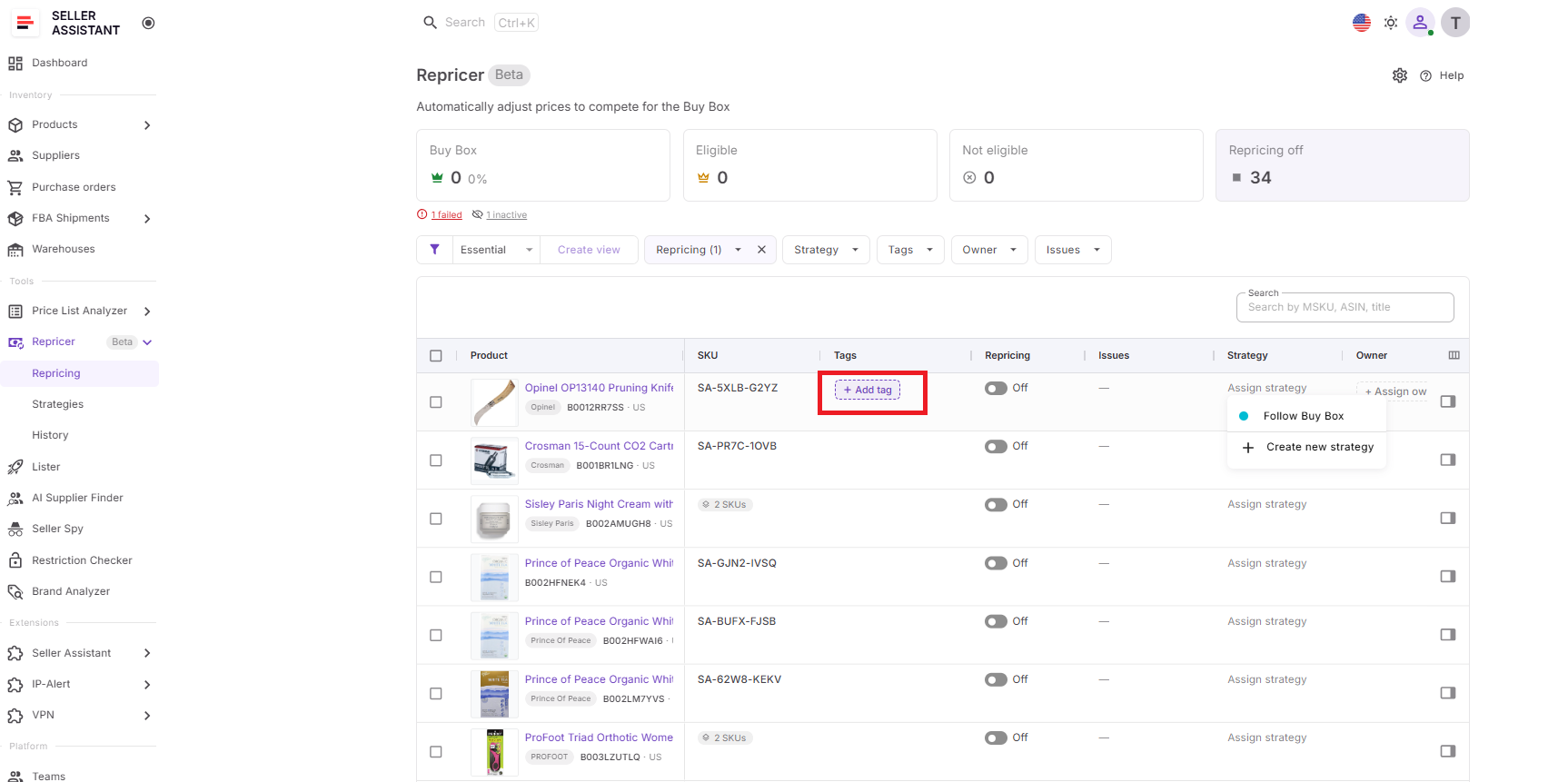
You can then filter and manage related products instead of treating the entire catalog as one undifferentiated list.
Step 6. Verify landed cost
Check Landed Cost before relying on a cost-based floor. Where the relevant data is available, Seller Assistant can account for components such as unit cost, PO expenses, prep cost, and FBA inbound cost.
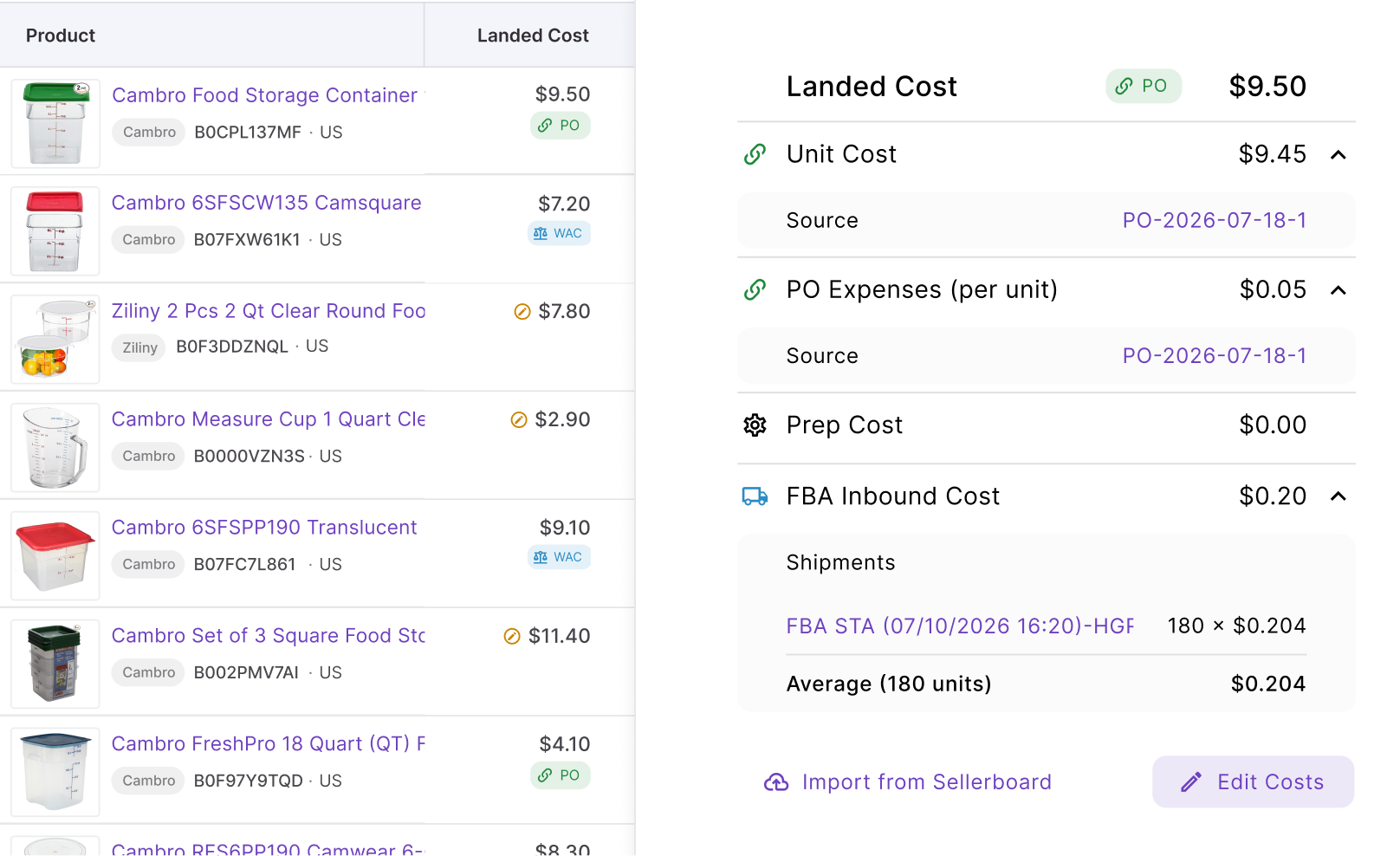
Review the resulting profit, ROI, and margin as well. If cost data is wrong, a mathematically correct dynamic floor can still be the wrong floor for the SKU.
Step 7. Review Issues
Before activation, filter the Issues column for products that require attention. Pay particular attention to conditions such as No cost, On floor, Capped, Failed, and possible Price war.
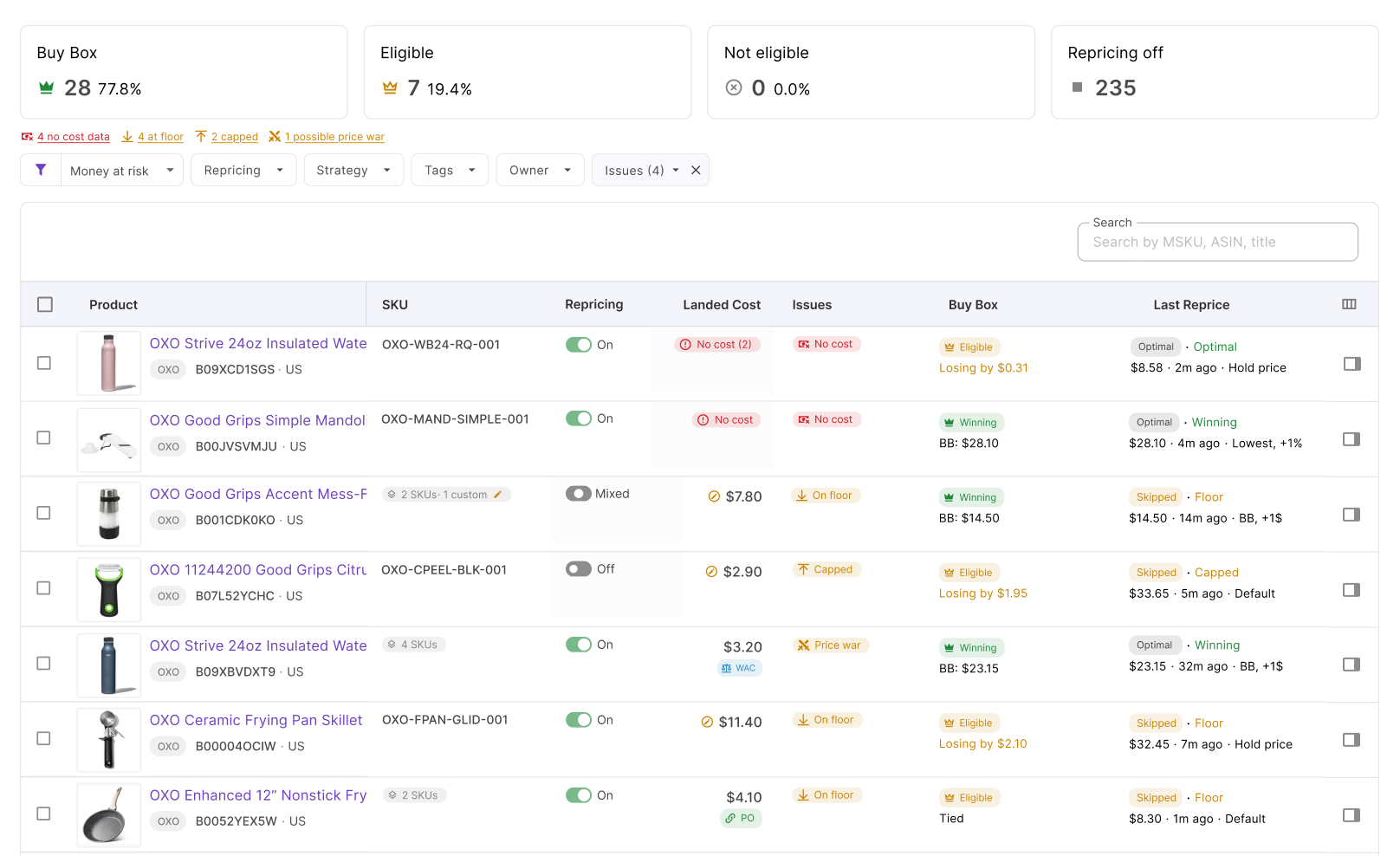
For a floor-focused strategy, No cost and On floor are especially important. One tells you the Repricer may lack the information needed for cost-based protection, while the other tells you the market has already pushed the offer to the lower boundary you defined.
Step 8. Start repricing and monitor performance
Enable repricing for the products that are ready and click Start repricing. Seller Assistant can then respond to marketplace conditions according to the strategies, rules, cost data, and price safeguards you configured.
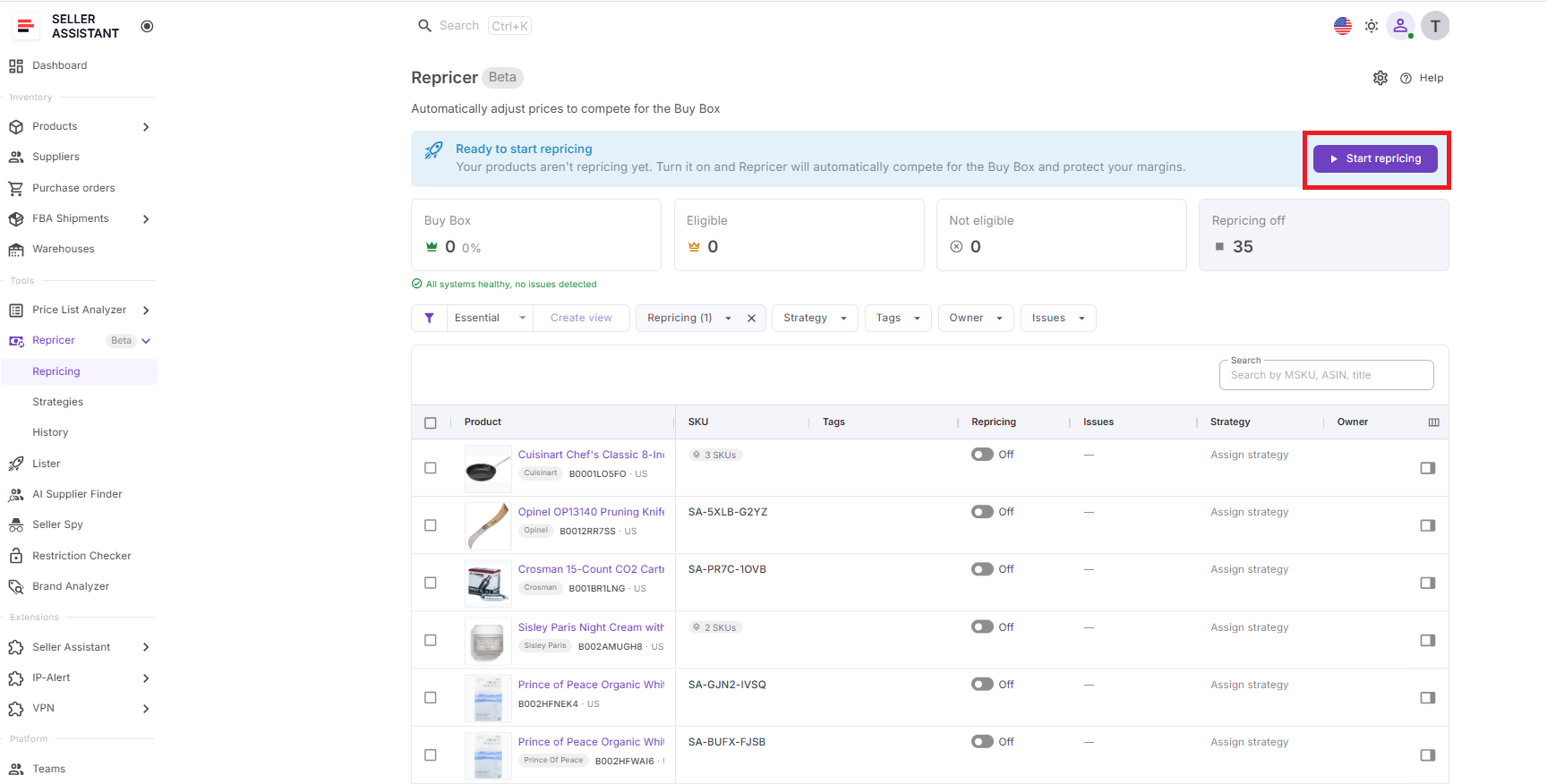
After activation, monitor Buy Box performance, current price, landed cost, profit, ROI, margin, price limits, Issues, and Repricing History. If a SKU repeatedly reaches its floor, don’t automatically lower it to regain competitiveness – first determine whether the problem is your strategy, changed costs, unusually aggressive competition, or a product that no longer meets your profitability requirements.
FAQ
Should my Amazon repricing floor be the same as my break-even price?
Usually not. Break-even is the point where you cover costs, while your repricing floor can sit higher to preserve the minimum profit, ROI, or margin that makes the sale worthwhile.
Should every Amazon SKU have the same profit floor?
No, because SKUs differ in sales velocity, capital requirements, competition, storage risk, and replenishment opportunities. A fast-moving replenishable item may justify a different minimum return than slow-moving or difficult-to-replace inventory.
Can a repricing floor prevent me from winning the Buy Box?
Yes, if the competitive Buy Box price falls below your floor, your offer may become less price-competitive. That can be the correct outcome when winning the Buy Box would require accepting a return below your target.
How often should I review my Amazon repricing floors?
Review floors whenever supplier costs or other significant expenses change, and periodically for products that frequently reach their minimum price. Repeatedly hitting the floor can signal deteriorating competition or product economics rather than a floor that is simply “too high.”
What should I do when competitors keep selling below my floor?
First investigate whether they have a lower cost basis, are liquidating stock, use a different fulfillment model, or are temporarily pricing aggressively. Rather than automatically lowering your floor, reassess the SKU’s sourcing cost and expected return to decide whether continuing to compete still makes financial sense.
Final Thoughts
A profitable Amazon repricing floor gives your pricing strategy a clear stopping point. Instead of chasing the Buy Box or lowest offer at any cost, you can base that boundary on landed cost and the minimum profit, ROI, or margin that makes each sale worthwhile.
With Seller Assistant Repricer, that floor becomes part of a broader automated pricing strategy. Cost-aware limits work together with conditional rules, fast market response, and profitability data, helping wholesale, online arbitrage, and dropshipping sellers compete when it makes financial sense – and stop when it doesn’t.
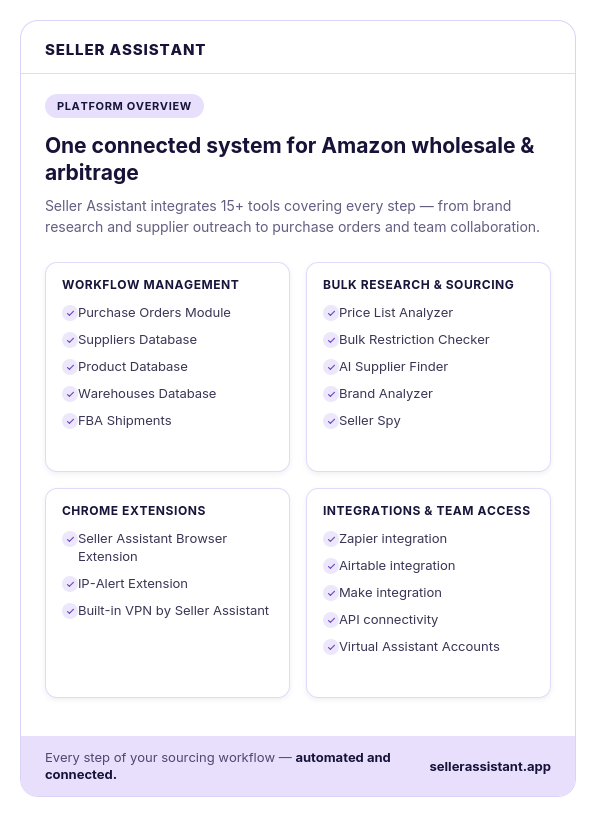
Seller Assistant automates and connects every stage of your Amazon wholesale and arbitrage workflow. It brings together in one platform: workflow management tools – Purchase Orders Module, Suppliers Database, Product Database, Warehouses Database, FBA Shipments, bulk research & sourcing tools – Price List Analyzer, Bulk Restriction Checker, AI Supplier Finder, Brand Analyzer, Seller Spy, Amazon repricing tool – Seller Assistant Repricer, Chrome extensions – Seller Assistant Browser Extension, IP-Alert Extension, and built-in VPN by Seller Assistant, and integrations & team access features – seamless API connectivity, integrations with Zapier, Airtable, and Make, and Virtual Assistant Accounts.