A price war isn’t usually two sellers deliberately racing each other to the bottom – it’s two repricers reacting to each other in a loop, each cent-drop triggering the next, until margin has drained away before either seller “decided” anything.
By the time you notice, the price has often moved a dozen times. Turning off repricing doesn’t stop the loop; it just hands the Buy Box to whoever’s still in it.
The real fix isn’t reacting faster – it’s rules that recognize the pattern and know when to stop chasing, which is exactly what Seller Assistant Repricer is built to do.
What Really Triggers Amazon Price Wars?
An Amazon price war starts when competing sellers repeatedly lower their offers in response to one another. It does not necessarily require sellers to deliberately decide to keep cutting prices – automated repricing can create a feedback loop where one reduction triggers another, pushing the listing progressively lower.
The problem is not repricing itself. Price wars become dangerous when pricing logic treats “competitor went lower” as a reason to automatically go lower again, without considering the Buy Box, competitor type, profitability, stock, or a minimum price where the cycle should stop.
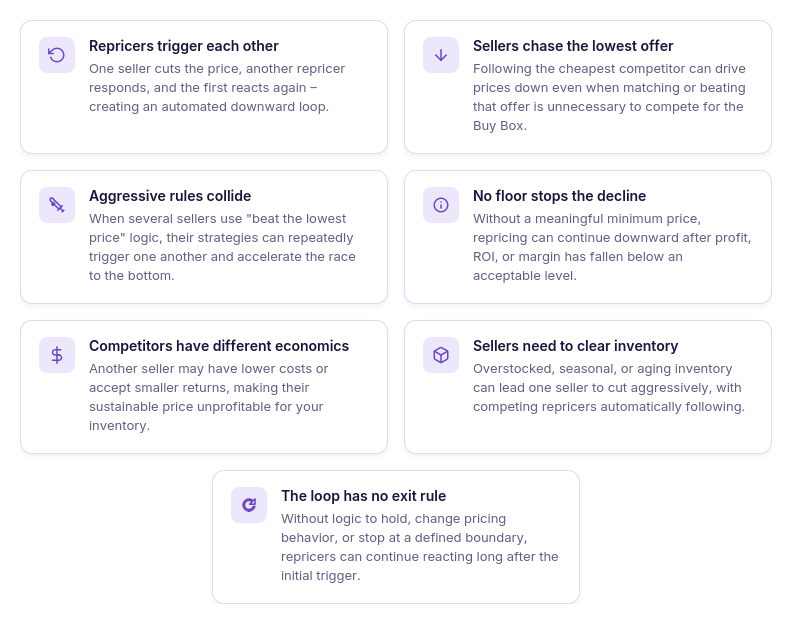
Repricers keep undercutting each other
One seller drops by a few cents, another repricer responds, and the first repricer reacts again. Repeated across multiple sellers, small adjustments can create a rapid race to the bottom.
Sellers target the lowest price instead of the Buy Box
The lowest offer and the Buy Box price are not always the same signal. Automatically chasing the cheapest seller can push prices down even when further undercutting is unnecessary for Buy Box competition.
Everyone uses the same aggressive logic
When several sellers follow rules such as “beat the lowest offer by $0.01,” their repricers can repeatedly trigger one another. The pricing logic itself becomes the mechanism driving the market downward.
No pricing floor stops the decline
Without a meaningful minimum price, automated competition has no financial stopping point. The offer can keep following competitors even after profit, ROI, or margin falls below the seller’s acceptable level.
Different seller economics collide
Competitors on the same ASIN may have very different supplier costs, fulfillment expenses, inventory goals, and acceptable returns. Following a seller with a lower cost basis or a liquidation objective can pull your price into territory that does not make sense for your inventory.
Inventory pressure encourages aggressive pricing
Overstocked, seasonal, or aging inventory can motivate sellers to prioritize sell-through over margin. Other sellers who automatically follow those reductions can turn one seller’s inventory decision into a listing-wide price war.
The loop continues without a reason to exit
Once prices start falling, a poorly configured strategy may keep reacting simply because competitors continue reacting. Without rules that can hold, change behavior, or stop at a defined boundary, the original trigger can matter less than the automated cycle it started.
What a Price War Actually Costs You
The obvious cost of an Amazon price war is lower profit per unit, but the damage can go further. As competing offers keep moving down, you may win more Buy Box time and generate sales while earning progressively less from each order – and if the decline reaches your break-even point, additional sales can start costing you money.
Example
Suppose a SKU sells for $30 and generates $6 profit per unit. A price war pushes the selling price to $27; even if your sales volume stays the same, you have given up $3 of unit profit, and 100 units sold at that price means $300 less profit than at the original economics.
How an Amazon price war affects your profitability
| Price-War Effect | What Happens | Why It Matters |
|---|---|---|
| Profit per unit falls | Repeated price cuts leave fewer dollars on each sale | Higher sales volume may not compensate for the profit surrendered per unit |
| ROI declines | You earn less against the money invested in inventory | Capital remains tied up while producing a weaker return |
| Margin gets compressed | Profit becomes a smaller percentage of the selling price | The SKU has less room to absorb another competitive price cut |
| Price approaches break-even | The offer moves closer to the point where costs consume the proceeds | A small additional reduction can turn a low-profit sale into a loss |
| Buy Box wins become less valuable | You may continue winning the Buy Box at increasingly unattractive prices | Buy Box share can look healthy while the SKU’s economics deteriorate |
| Inventory sells too cheaply | Units purchased for a higher expected return leave at the depressed market price | You cannot recover the surrendered margin after those units are sold |
| Other repricers keep the pressure going | Automated responses can continue pushing prices down | The decline may persist even when there is little business reason for you to keep undercutting |
| Your profitable floor is reached | There is no more acceptable room to follow competitors downward | Continuing the race would require sacrificing your minimum profit, ROI, or margin target |
The key cost is therefore not simply “how much did my Amazon price drop?” It is how much profit you surrendered across every unit sold while the price war was running – and whether winning the Buy Box at that price was worth it.
Why Manual Price-War Control Doesn’t Work
Trying to manage an Amazon price war by watching listings and changing prices manually puts you behind automated competition from the start. A repricer can react to marketplace changes in seconds, so by the time you notice a lower offer, check the Buy Box, calculate whether you can afford to respond, and update your price, competing offers may already have moved several times.
Turning repricing off is not necessarily the answer either. A static price may stop you from following competitors downward, but it can also leave your offer unable to react when the Buy Box becomes winnable again or when competitors raise their prices or sell out. The better solution is repricing logic that knows when to compete and when to stop.
Why better repricing rules beat turning repricing off
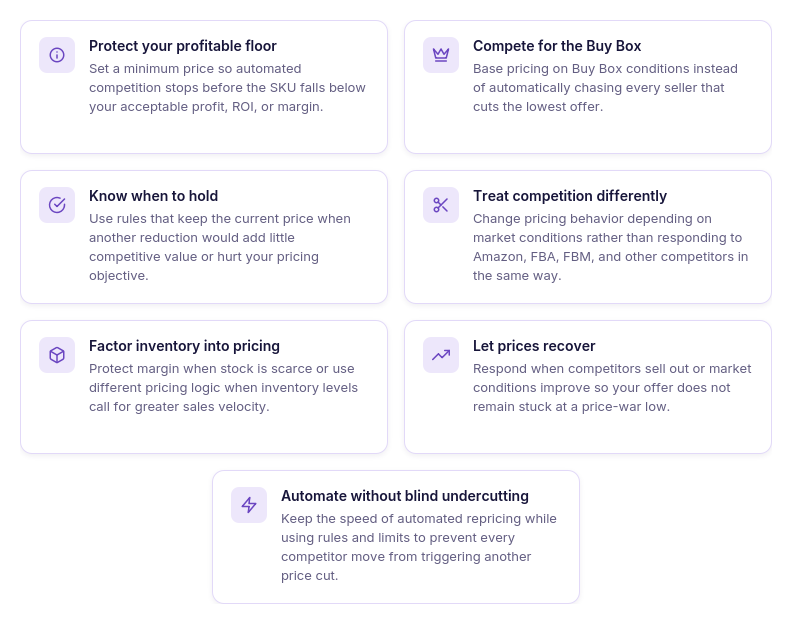
Stop at a profitable boundary
Set a minimum price based on the return you are willing to accept, so competition cannot automatically drag your offer below that boundary.
Compete for the Buy Box, not every price cut
Use Buy Box-oriented logic rather than automatically undercutting the lowest seller. This helps keep your offer competitive without making every competitor reduction a reason to reduce yours.
Hold when lowering makes no sense
A good strategy needs the option to hold the current price when specific market conditions do not justify another reduction.
React differently to different competitors
Amazon, FBA sellers, FBM sellers, and other Buy Box holders do not necessarily require the same response. Conditional rules let pricing behavior change with the competitive situation.
Change behavior as inventory changes
Low stock may justify protecting margin rather than accelerating sales with further cuts. Higher or aging inventory may call for a different balance between price and sales velocity.
Recover when competition eases
Price-war protection should not only stop prices from falling. Your repricer should also be able to respond when competitors leave, stock out, or market pricing improves instead of leaving your offer stuck at the depressed price.
Keep automation without blind undercutting
The goal is not to choose between manual pricing and uncontrolled automation. It is to automate rules, limits, and exceptions so prices can respond quickly without automatically following every seller downward.
How Seller Assistant Repricer Stops the Race to the Bottom
Avoiding an Amazon price war does not mean stepping away from Buy Box competition. The goal is to react quickly when a price change is worth following, hold when another reduction is unnecessary, and stop before competition pushes the SKU outside your profitability limits.
Seller Assistant Repricer combines Buy Box and competitor data with conditional rules, landed cost, price floors, Issues, and pricing history. Reactive repricing can respond to relevant Amazon market changes in approximately 2–5 seconds, while those controls determine whether the right response is to lower, match, raise, or hold your price.
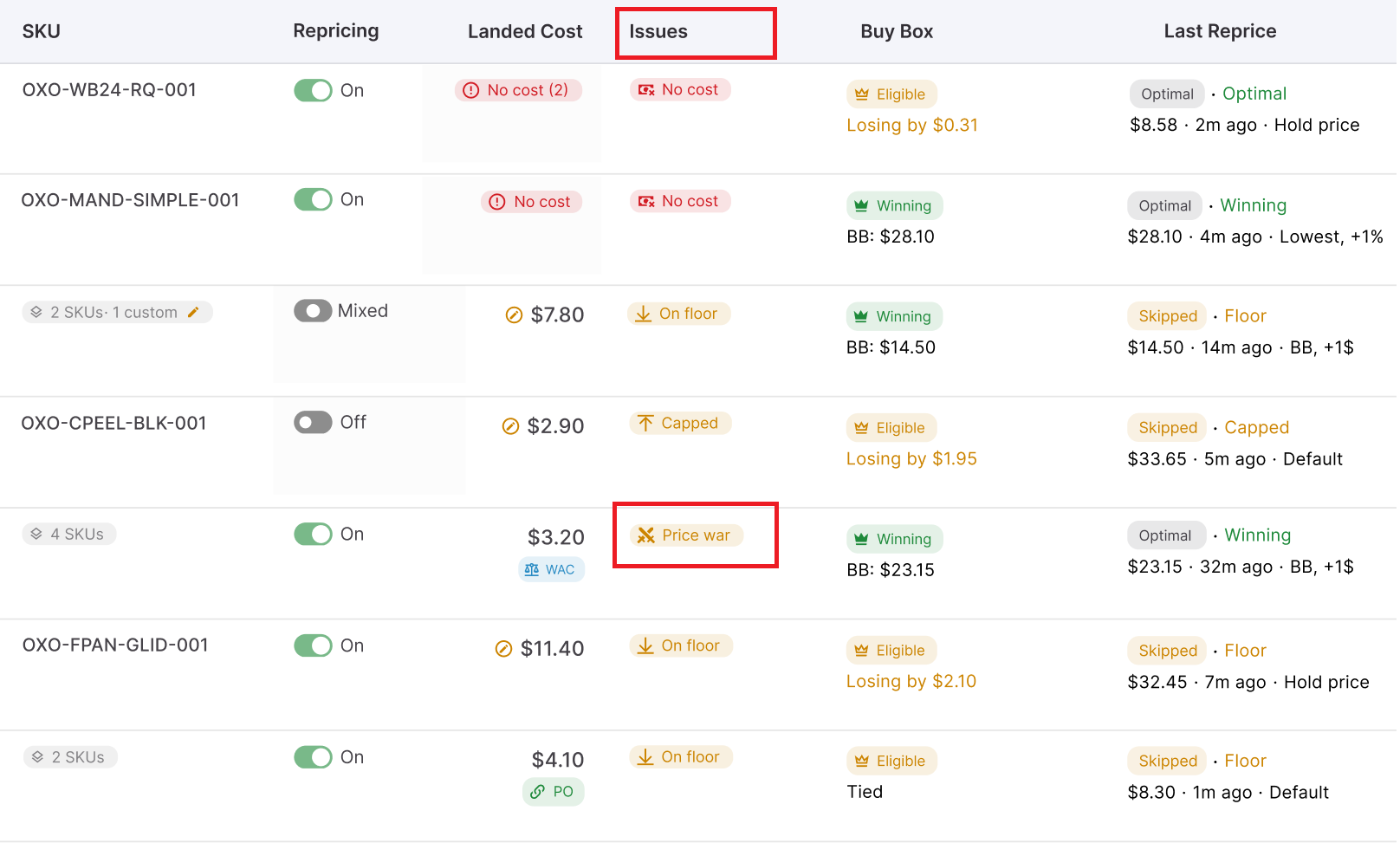
Spot a price war before it drains margin
Seller Assistant Repricer can show a Price war warning in the Repricer’s Issues column, allowing sellers to identify affected SKUs without trying to recognize the pattern manually. Other Issues, including On floor and No cost, provide additional clues that a product has reached its pricing boundary or lacks the cost data needed for profit-aware repricing.
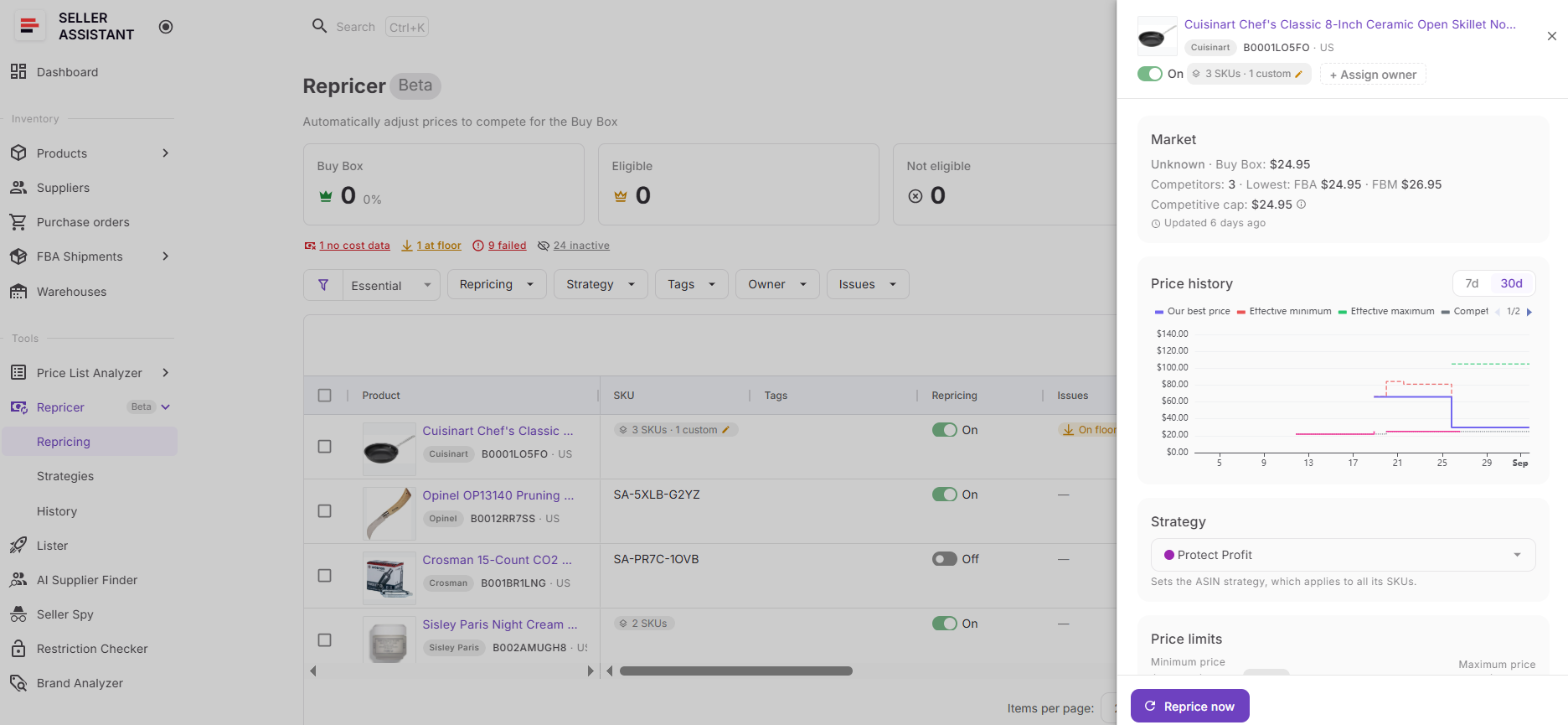
From there, Price History helps you see how your offer and relevant market prices have moved over time.
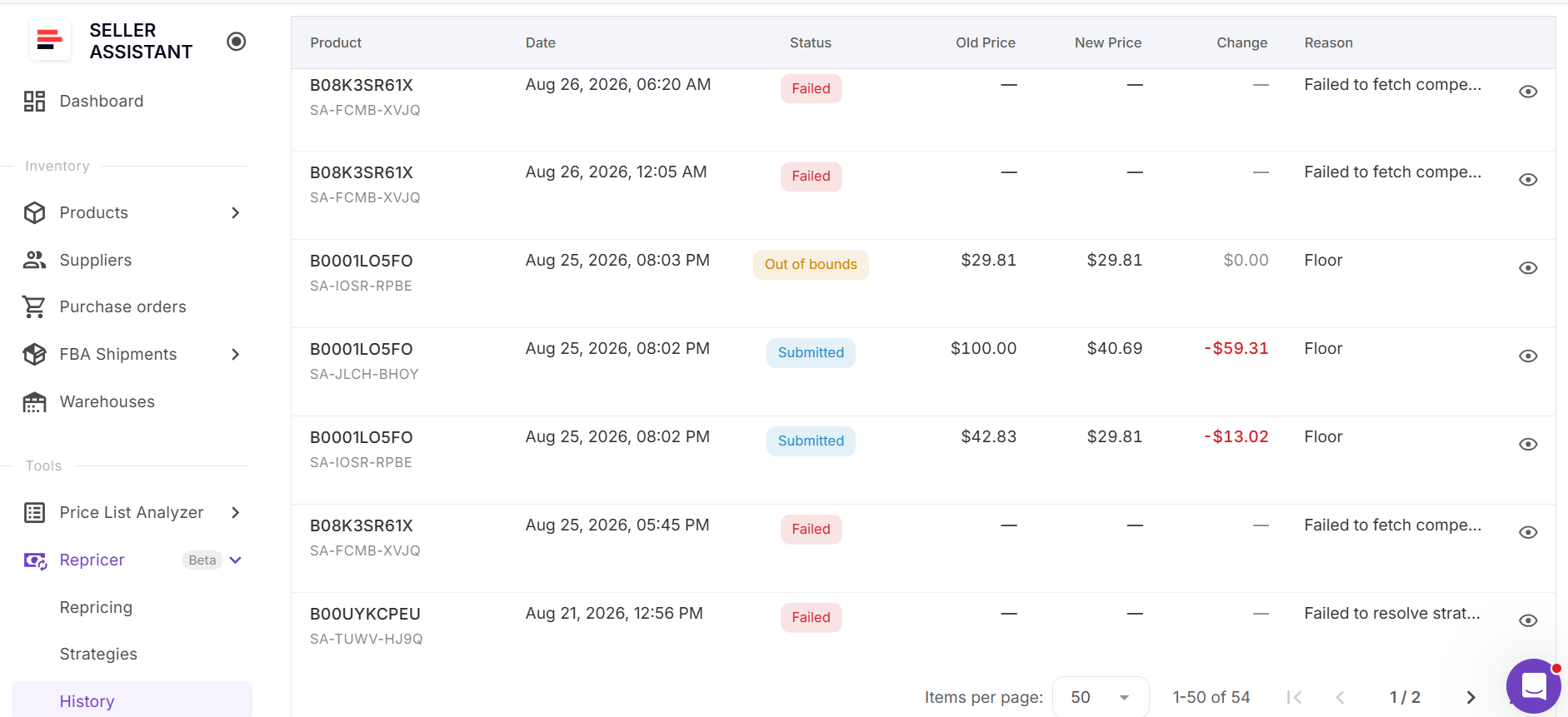
Repricer History goes deeper by recording old and new prices, changes, statuses, and reasons, while Decision details can show the trigger and market conditions behind an individual evaluation.
Break the undercutting loop with smarter rules
Repricer strategies and rules do not have to respond to every competitor reduction with another reduction. You can create ordered if/then rules around conditions such as Buy Box holder type, Amazon selling, competitor levels, no competition, stock, time of day, and day of week.
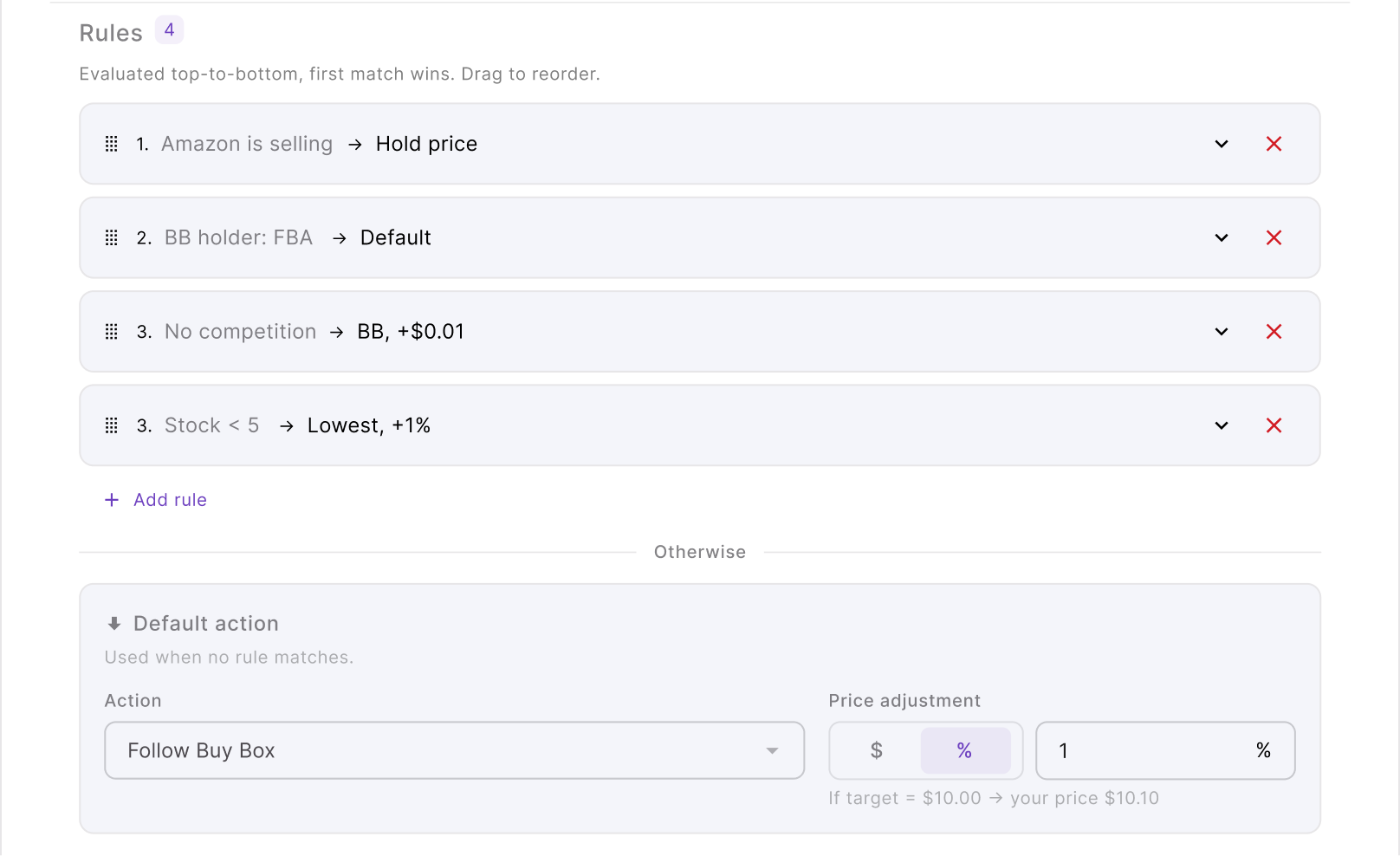
That makes it possible to build exit logic into the strategy. For example, you can hold when your current position does not justify another cut, use different behavior when Amazon enters the listing, or change your strategy during periods when competition becomes unusually aggressive.
Compete for the Buy Box instead of the lowest price
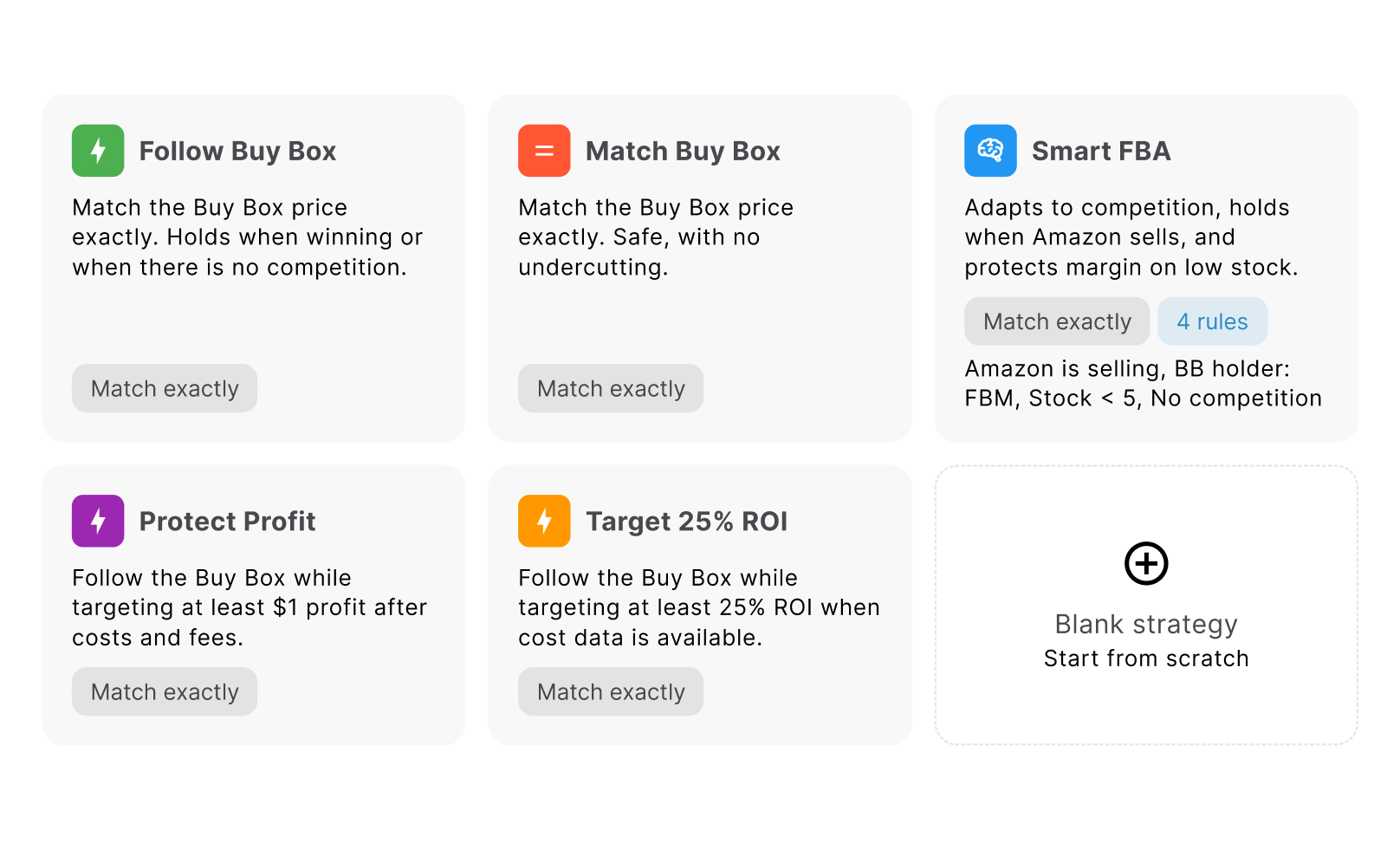
Being the cheapest seller is not the same as winning the Buy Box. Seller Assistant Repricer can Follow Buy Box or Match Buy Box rather than forcing every SKU to chase the lowest competing offer, and strategies can also use fixed-dollar or percentage adjustments where appropriate.
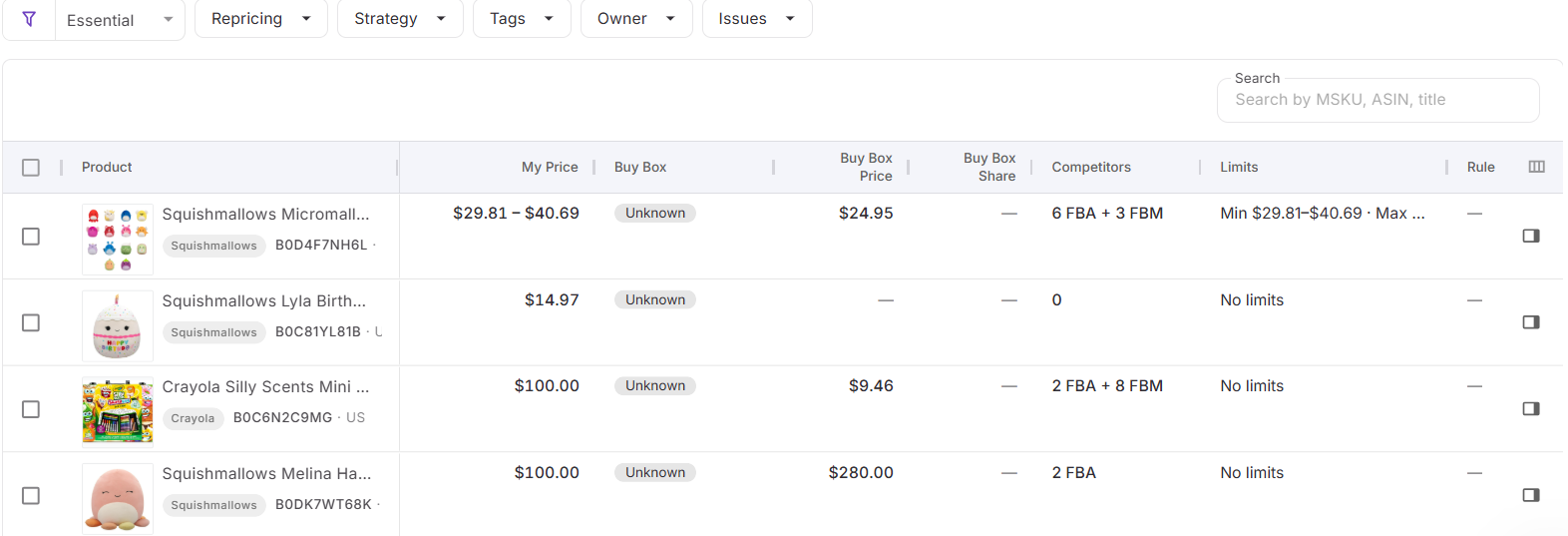
The Repricer also shows Buy Box status and price, Buy Box share, competitor count, and lowest FBA and FBM prices. This gives you enough context to decide whether another price reduction is actually needed to improve your competitive position.
Set a floor the price war cannot cross
Competitive logic needs a financial stopping point. The Repricer can use landed cost to establish dynamic minimum pricing based on minimum ROI, minimum margin, or target profit, while a separate safety minimum provides a hard lower boundary.
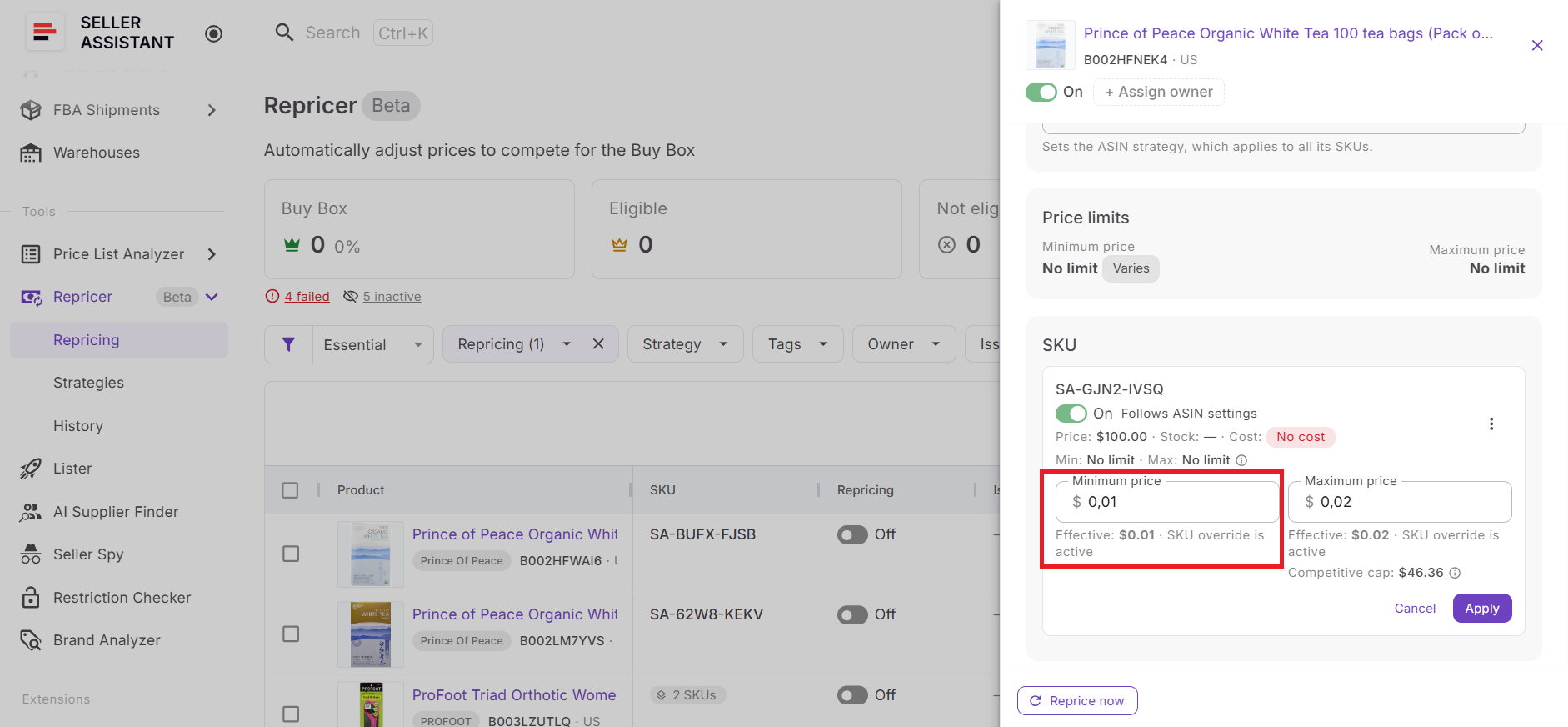
If competition pushes the offer to its configured lower limit, Seller Assistant can surface an On floor issue instead of allowing ordinary repricing logic to keep following the market downward. The floor therefore becomes an explicit point where protecting the SKU’s economics takes priority over another price cut.
Prevent sudden overreactions
Price-war protection is not only about the absolute minimum price. The Repricer can also limit the maximum price change per reprice, controlling how far an offer is allowed to move during a single pricing action.
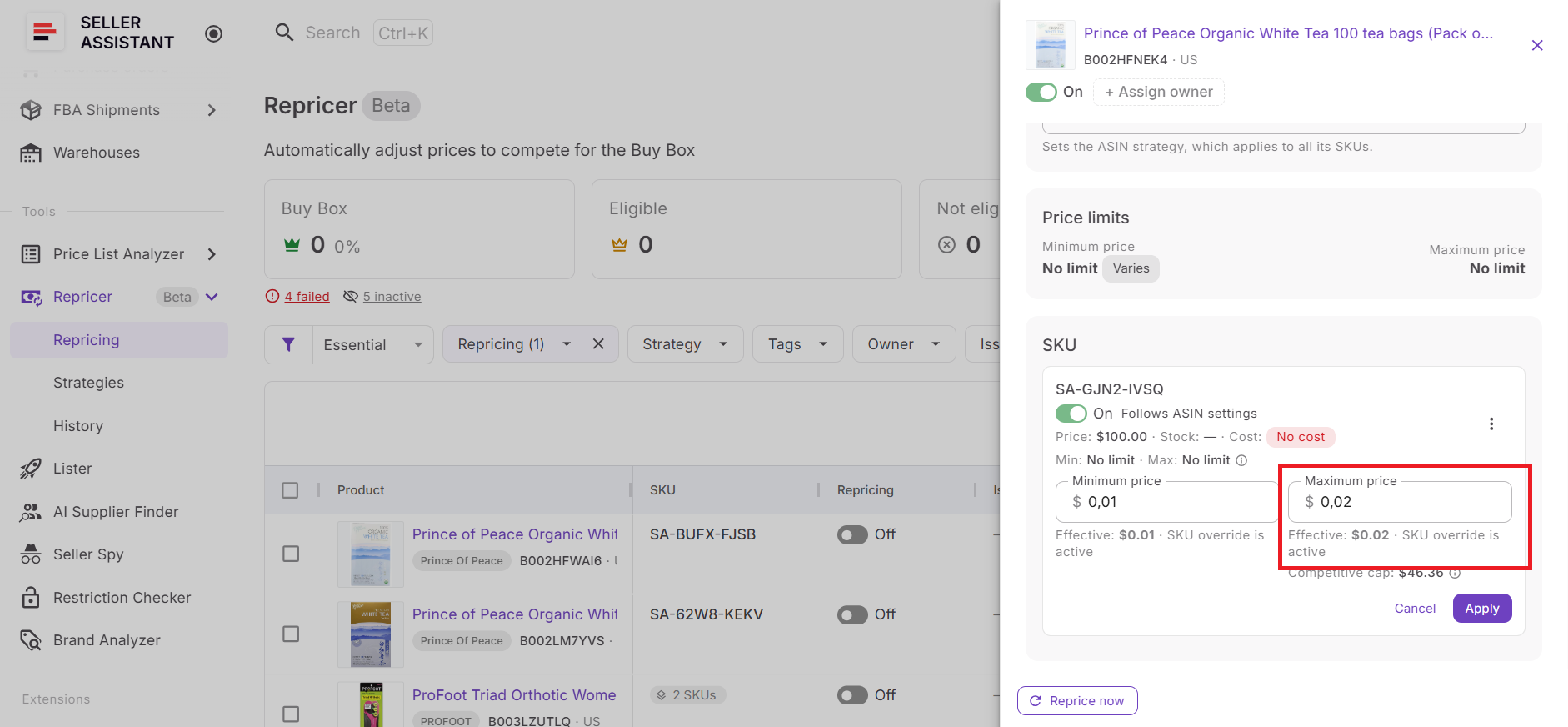
This adds another layer between a sudden market move and your selling price. The strategy can still react quickly without treating a sharp competitor change as permission for an equally large uncontrolled adjustment.
Let prices recover when competition changes
A good repricing strategy should not only know when to stop going down. Seller Assistant Repricer’s reactive repricing can adjust to relevant Amazon marketplace changes in approximately 2–5 seconds, while proactive checks can reevaluate both fast-moving and quieter listings even when there is no new competitor event, allowing the strategy to respond as relevant conditions change.
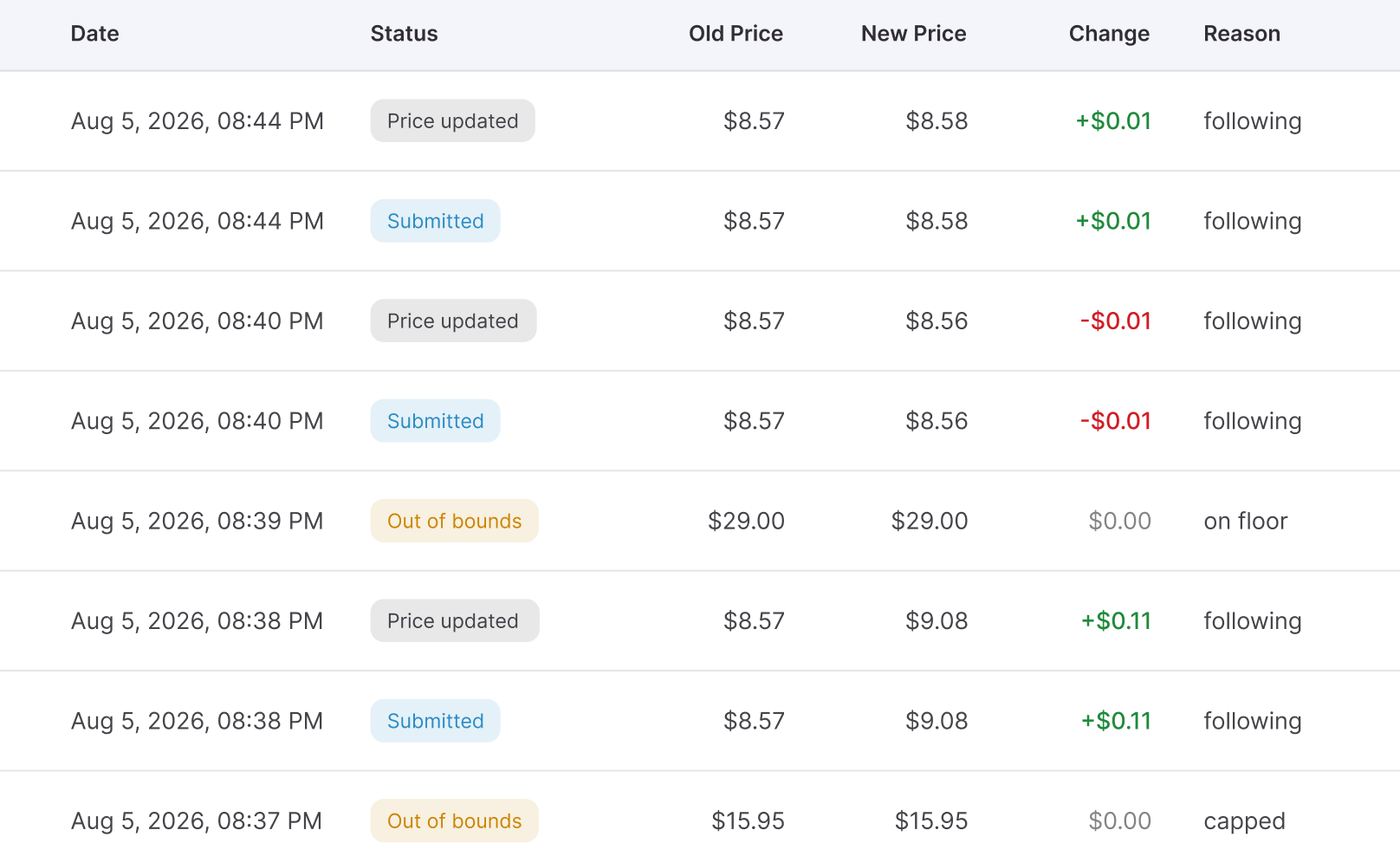
This matters after a price war because you do not want an offer permanently anchored to the depressed price. When the competitive situation changes, your configured strategy can reevaluate the SKU rather than leaving yesterday’s price-war price untouched.
Check why Repricer made the decision
When a price behaves unexpectedly, Repricer History gives you an audit trail instead of leaving you to guess. You can review the old and new price, change, status, and reason, then open Decision details for additional information about the trigger and market conditions behind the evaluation.
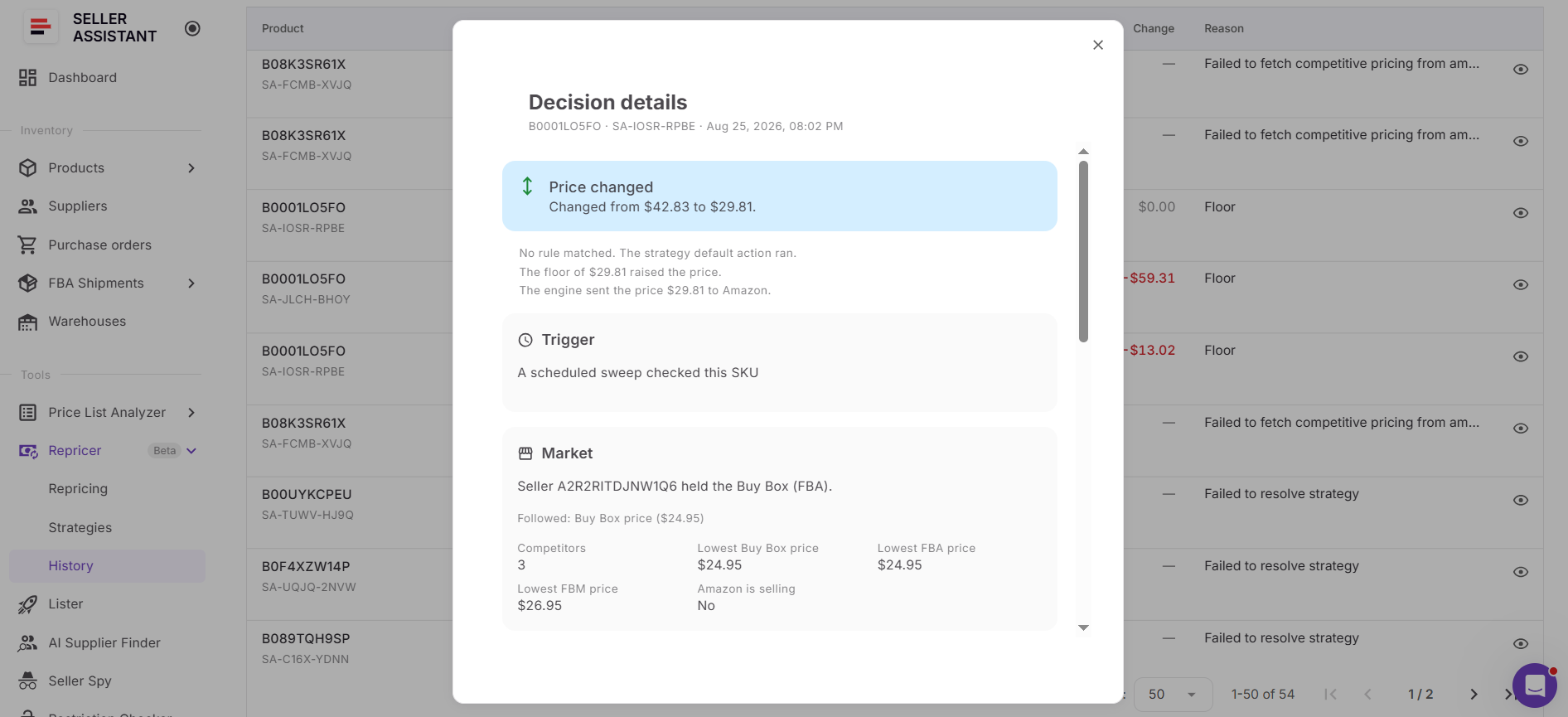
This is especially useful when refining price-war rules. You can determine whether a SKU followed the intended strategy, reached its floor, encountered an error, or needs different logic – then adjust the strategy instead of automatically making it more aggressive.
Signs you’re in an Amazon price war
| Sign | What It Means | Rule to Apply |
|---|---|---|
| Competitors repeatedly cut prices | Repricers may be reacting to one another and creating a downward pricing loop | Hold or change pricing behavior instead of automatically undercutting every new lowest price |
| You keep winning the Buy Box while price falls | Further reductions may be unnecessary because your offer is already competitive | Hold when winning rather than continuing to chase lower offers |
| Your price keeps approaching the floor | Competition is consuming the remaining room between your current price and minimum acceptable price | Use a profit-based minimum and do not follow competitors below it |
| SKU reaches its minimum price | The market is asking for a price below the boundary you configured | Hold at the floor instead of lowering the minimum just to stay competitive |
| Profit, ROI, or margin keeps shrinking | You may still be profitable, but the price war is pushing the SKU below your target return | Set the floor using minimum ROI, minimum margin, or target profit |
| Lowest competitor is below the Buy Box | Chasing the cheapest offer may reduce your price without improving your Buy Box position | Follow or Match Buy Box rather than automatically following the lowest price |
| Amazon enters the listing | Competitive conditions have materially changed and aggressive undercutting may not be useful | Add an Amazon-is-selling condition that changes the action or holds the price |
| Competition becomes aggressive at predictable times | Price pressure may be concentrated during certain selling periods | Use time-of-day or day-of-week rules to change pricing behavior |
| Seller Assistant shows a Price war issue | The SKU has been flagged as a possible price-war situation and needs review | Check Price History and Repricer History, then review the SKU’s strategy, rules, costs, and limits |
| Price remains depressed after competition changes | Your offer may be staying at the price-war level instead of recovering | Use an appropriate strategy plus proactive reevaluation so the SKU can respond when market conditions change |
How to See Why Your Amazon Repricer Changed a Price (Video)
This video shows how Repricer History lists every price check with its reason and the full decision behind it, so you can see why a price moved.

Check the reason behind your next price change in Repricer History.
Seller Assistant Repricer: Smarter Automation Against Amazon Price Wars
Avoiding an Amazon price war is not just about setting a floor and waiting for competitors to stop cutting prices. Your repricer still needs to compete for the Buy Box, recognize when market conditions change, respond quickly when there is a genuine pricing opportunity, and know when another reduction would only sacrifice margin.
Seller Assistant Repricer automates that process for wholesale, online arbitrage, and dropshipping sellers. It combines Buy Box and competitor data with reusable strategies, conditional rules, landed cost, profitability limits, and price-war warnings. Reactive repricing can adjust to relevant Amazon marketplace changes in approximately 2–5 seconds, while proactive checks cover situations where no new competitor event triggers an immediate response.
What Seller Assistant Repricer Does
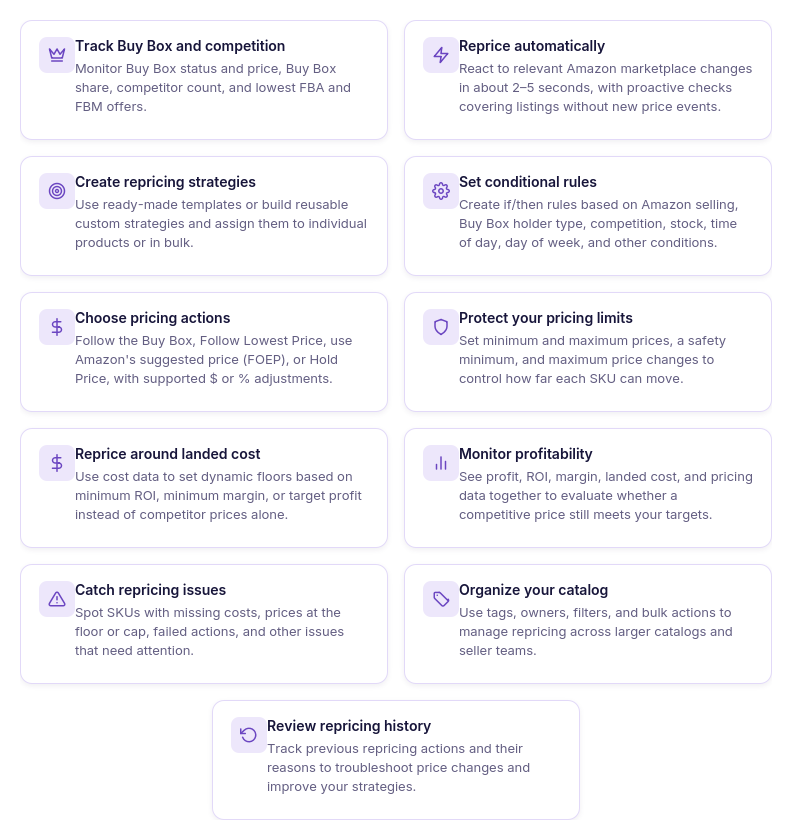
- Compete with context, not just the lowest price
See current price, Buy Box price and status, Buy Box share, lowest FBA and FBM prices, competitor count, and stock together. This helps you understand whether another reduction is actually necessary to remain competitive.
- Use different logic for different SKUs
Assign reusable strategies individually or in bulk instead of making every product follow the same pricing behavior. This lets you separate products that prioritize Buy Box competition, profitability, inventory sell-through, or other objectives.
- Respond to Amazon changes in seconds
Reactive repricing can adjust to relevant Amazon marketplace changes in approximately 2–5 seconds. Proactive checks also reevaluate products when relevant conditions change without a new competitor price event.
- Create rules that can exit a price war
Build ordered if/then rules around Amazon selling, Buy Box holder type, competitors above or below your offer, no competition, stock levels, time of day, and day of week. AND/OR logic lets you create more precise conditions, while the first matching rule determines what Repricer does.
- Decide which price is worth following
Set actions to Follow Buy Box, Follow Lowest Price, follow Amazon’s suggested price (FOEP), or Hold Price. Fixed-dollar and percentage adjustments let you position your offer around the selected target without automatically undercutting it.
- Put a financial stop under price cuts
Use a manual minimum or dynamic minimum based on minimum ROI, minimum margin, or target profit, together with a safety minimum and maximum price. You can also restrict the maximum change per reprice so a sudden market movement does not produce an unrestricted price adjustment.
- Reprice against actual costs
Seller Assistant Repricer can use Landed Cost associated with the SKU and show profit, ROI, and margin alongside pricing information. This helps you judge whether competing for the Buy Box still makes financial sense at the current price.
- Surface price-war warning signs
Use Issues to find products marked Price war, On floor, No cost, Capped, Failed, or other conditions requiring attention. Instead of manually checking every ASIN, you can filter directly to SKUs where pricing behavior or data needs review.
- See how the price war developed
Price History helps visualize how your price and relevant market pricing have changed over time. Repricer History adds the decision layer, showing pricing activity, status, old and new prices, changes, and reasons so you can investigate why a SKU behaved as it did.
How Seller Assistant decides whether to follow a price move
Seller Assistant Repricer evaluates Amazon market conditions against the strategy assigned to the SKU. Reactive repricing can respond to relevant market changes in approximately 2–5 seconds, while proactive repricing regularly checks SKUs even when no competitor event triggers an update.
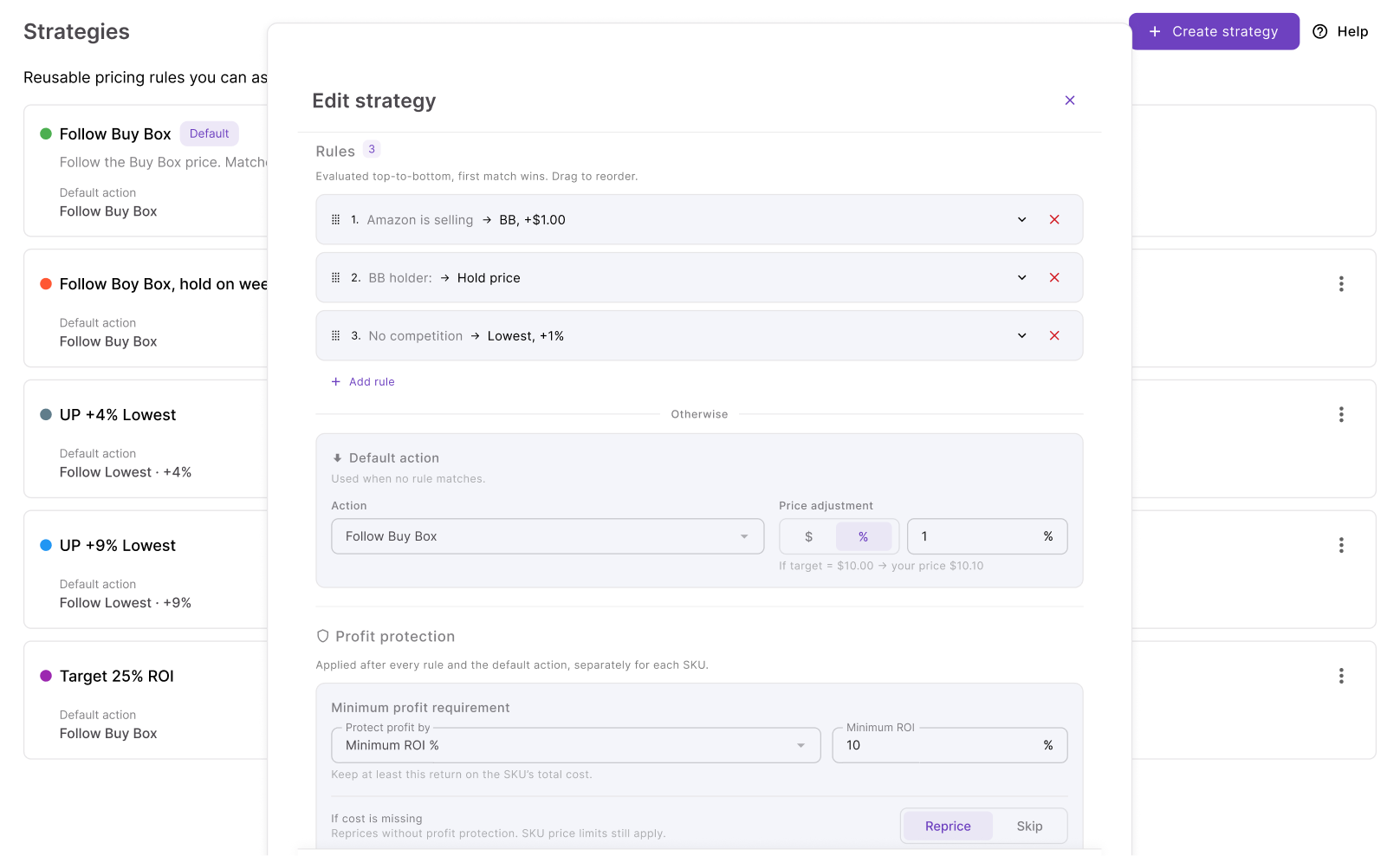
The Repricer then checks conditional rules from top to bottom, with the first matching rule taking priority. If none applies, the default strategy action determines how the offer should respond – for example, following the Buy Box or lowest price – and any configured adjustment is applied.
Before the new price is used, the Repricer checks the applicable minimum price, safety minimum, maximum price, landed cost, and profitability requirements. This is what separates controlled repricing from a simple undercutting loop: a competitor move can trigger an evaluation without automatically forcing your offer to follow it downward.
How to use Seller Assistant Repricer step by step
Step 1. Open the Repricing dashboard
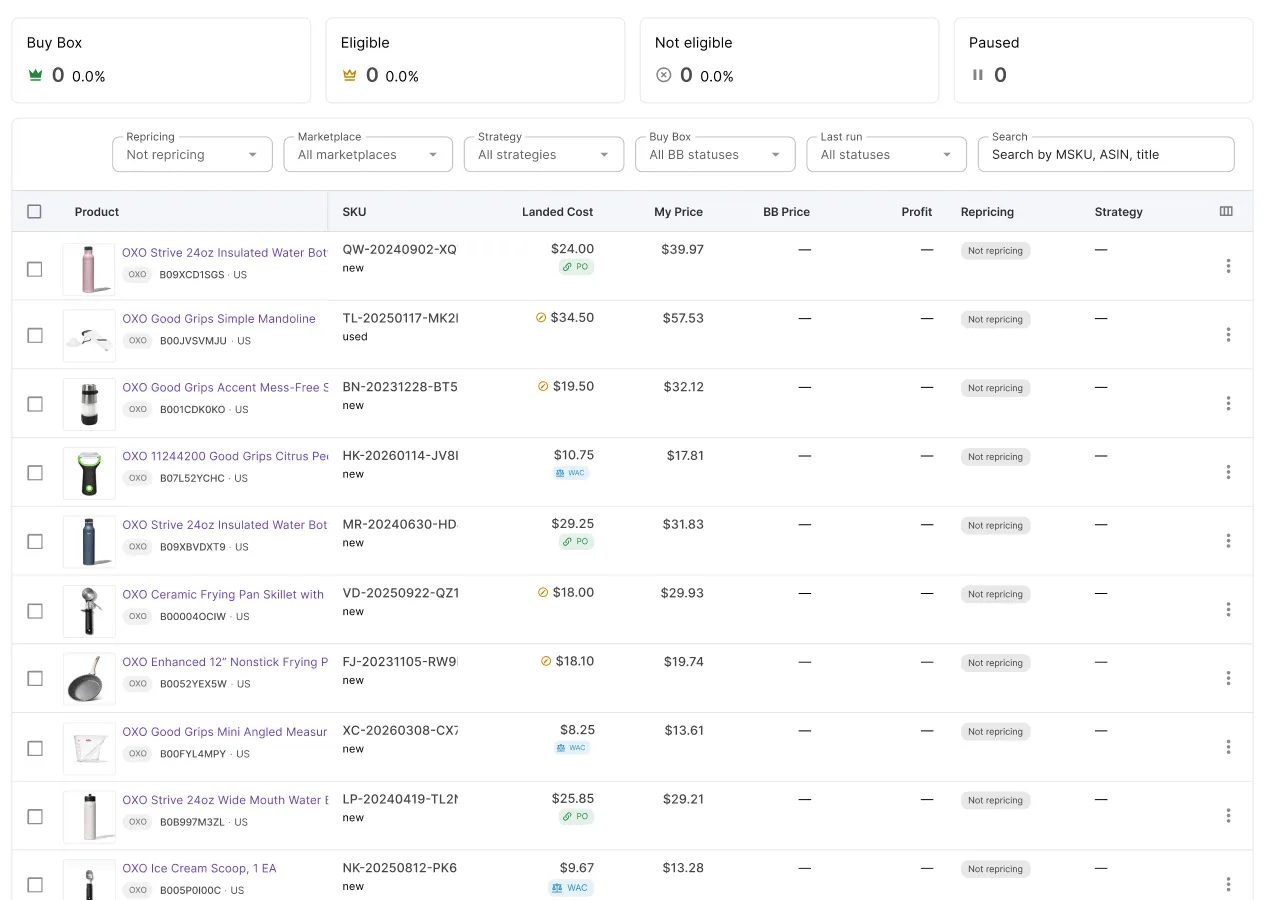
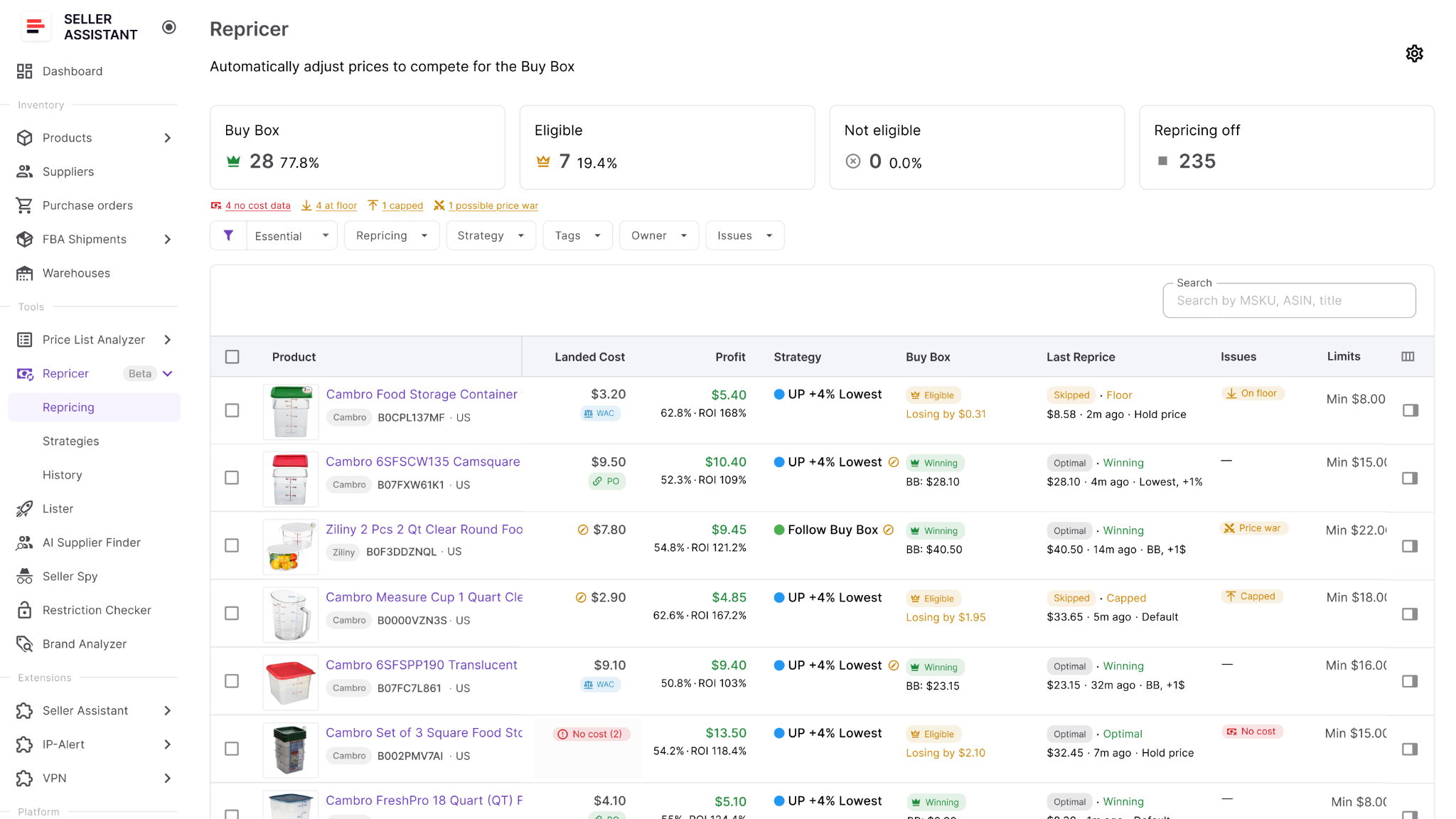
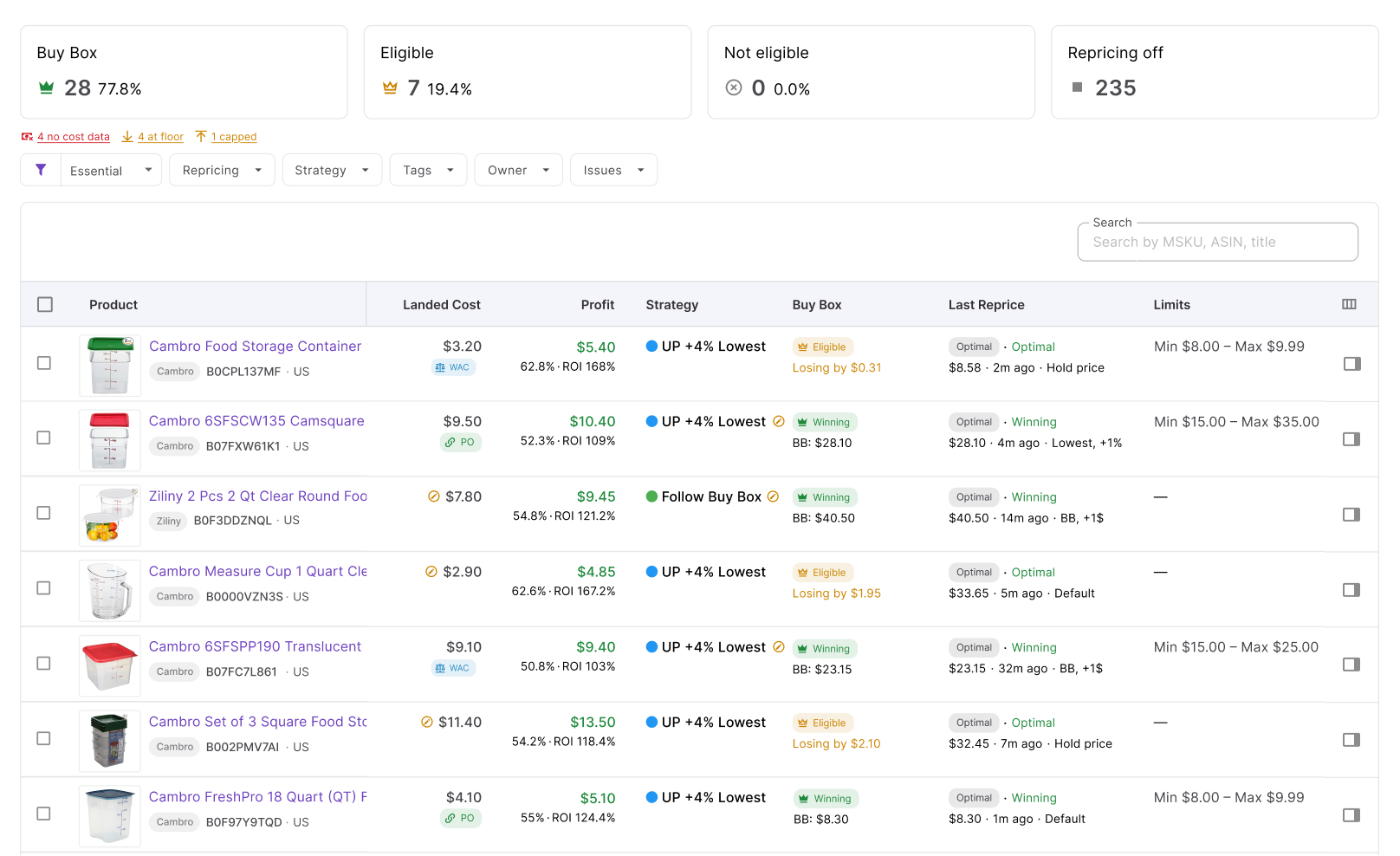
Go to Repricer → Repricing in Seller Assistant. The workspace shows your products and SKUs together with strategies, repricing status, market data, owners, tags, profitability information, and Issues.
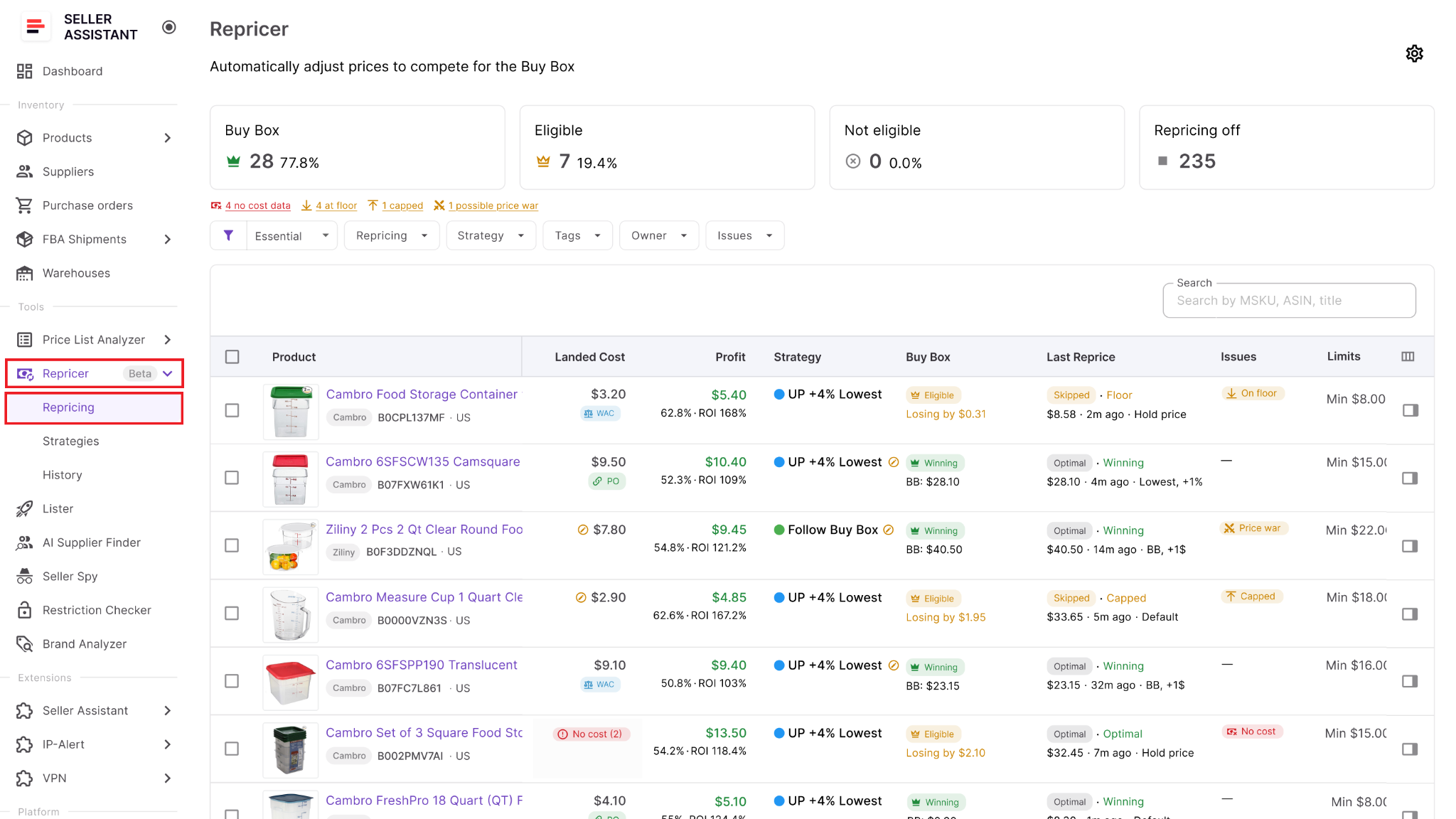
Use this view to identify products already facing aggressive competition and check which SKUs are ready for automation.
Step 2. Enable Repricing
Open Settings and switch Repricing on for your team. You can also choose whether new products should automatically enter repricing or remain inactive until someone reviews them.
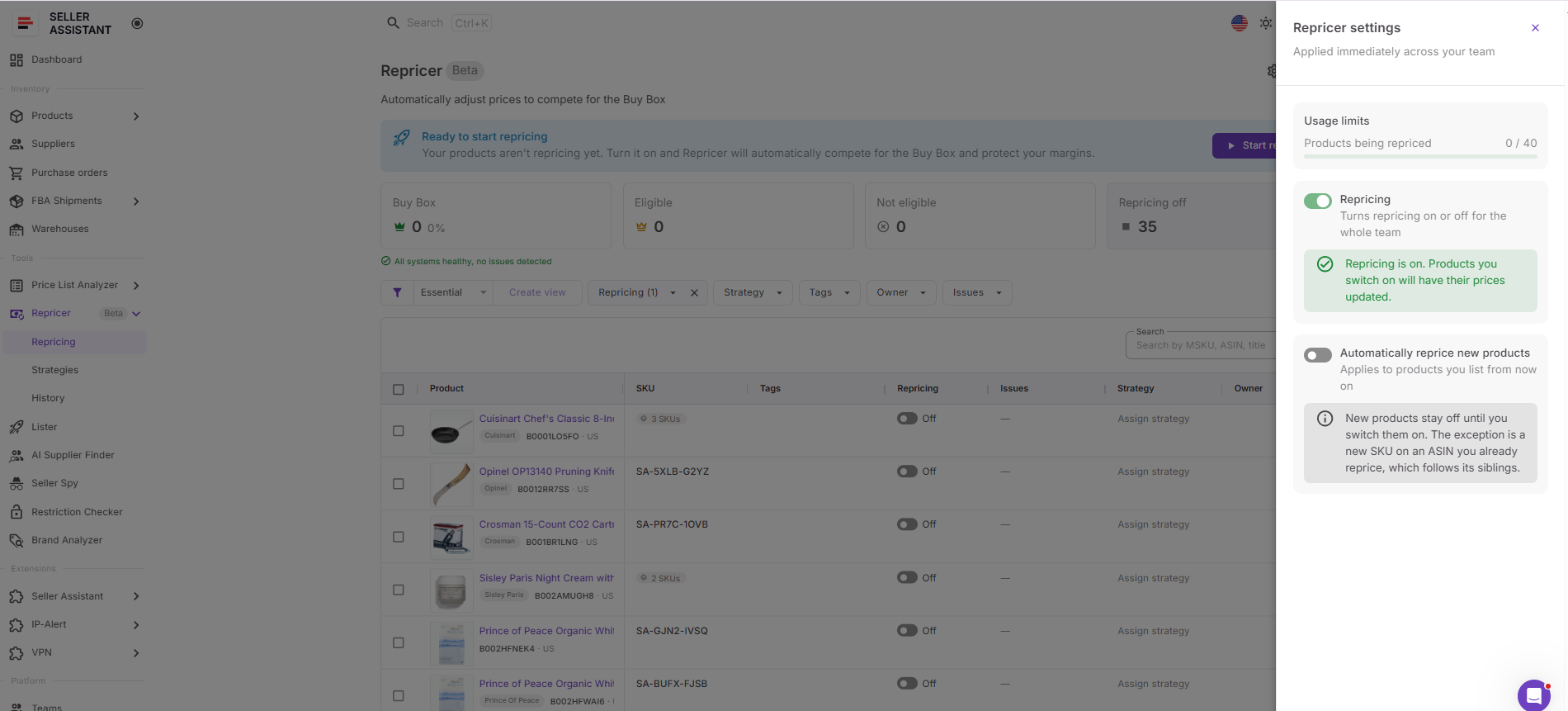
Keeping new listings inactive initially can be useful when you want to confirm costs, price limits, and strategy before letting the SKU respond automatically to competitors.
Step 3. Choose a strategy for each product
Assign a strategy from the Strategy column. Seller Assistant provides Follow Buy Box, Match Buy Box, Smart FBA, Protect Profit, and Target 25% ROI, or you can create a custom strategy.
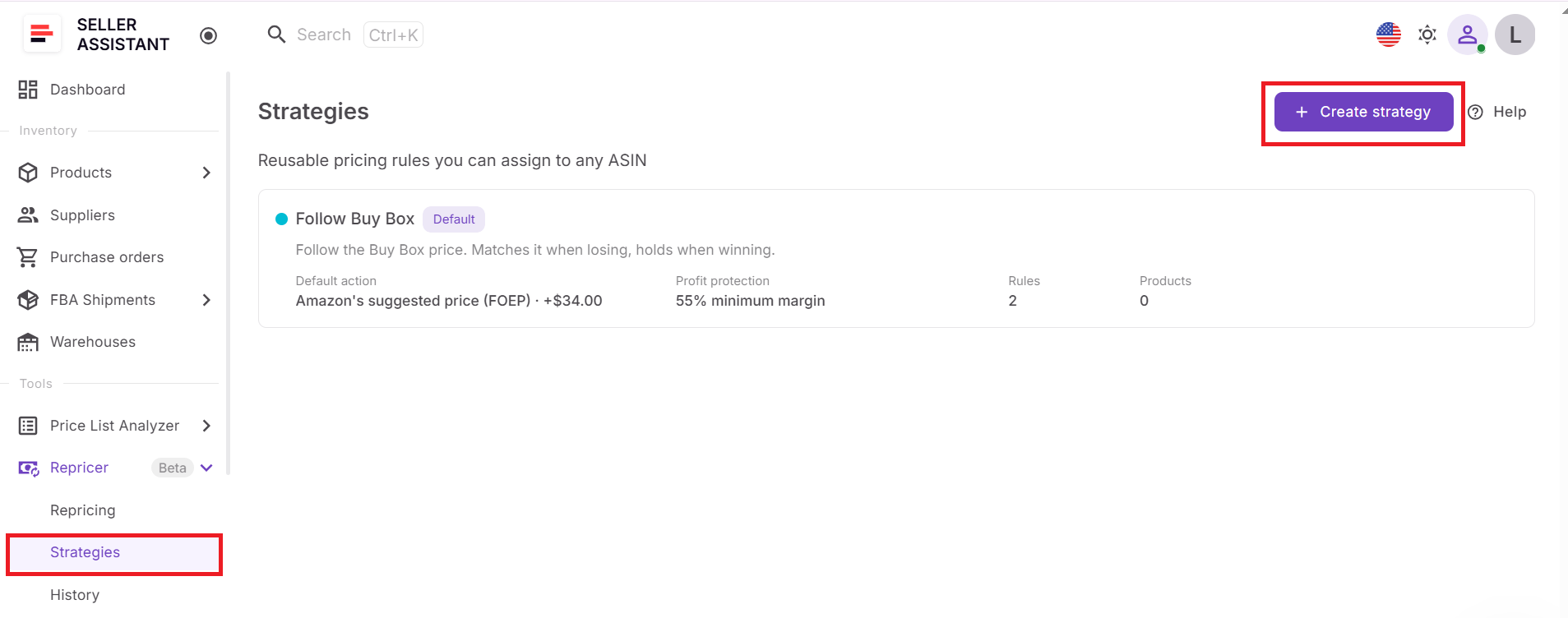
For price-war protection, choose according to what the SKU actually needs. A product that should compete for the Buy Box without unnecessary undercutting may require different logic from one where maintaining a specific ROI is the priority.
Step 4. Build your response rules
Configure the strategy’s default action and add conditional rules for situations where pricing behavior should change. You can, for example, hold when Amazon is selling, change the action when inventory becomes low, or use different logic when competition disappears.
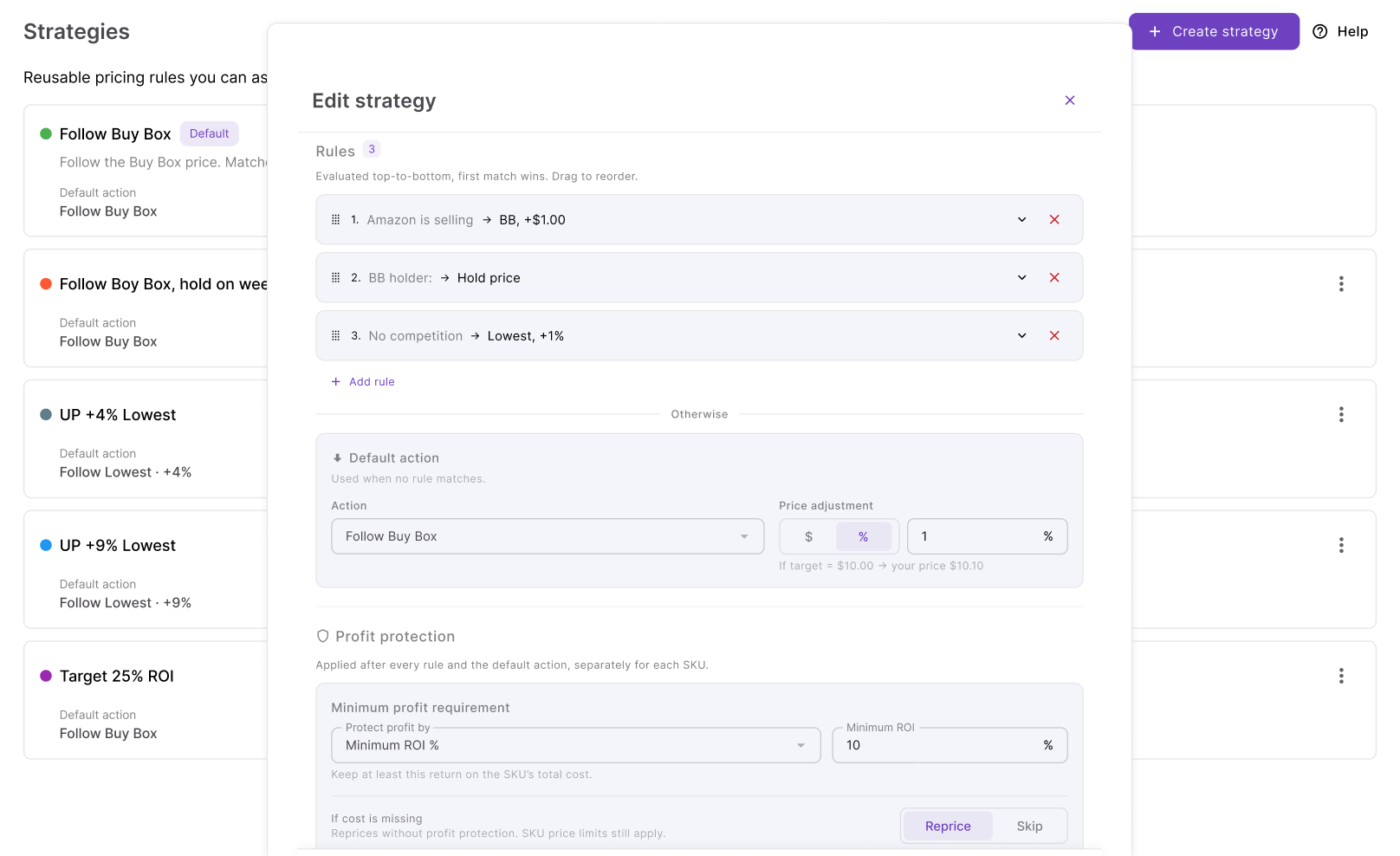
Order the rules carefully because the first matching rule wins. Use AND/OR conditions where the strategy should react only to a specific combination of market signals.
Step 5. Define where repricing must stop
Set the minimum and maximum prices available to the strategy. The minimum can be manual or calculated using minimum ROI, minimum margin, or target profit, while the safety minimum provides a hard lower boundary.
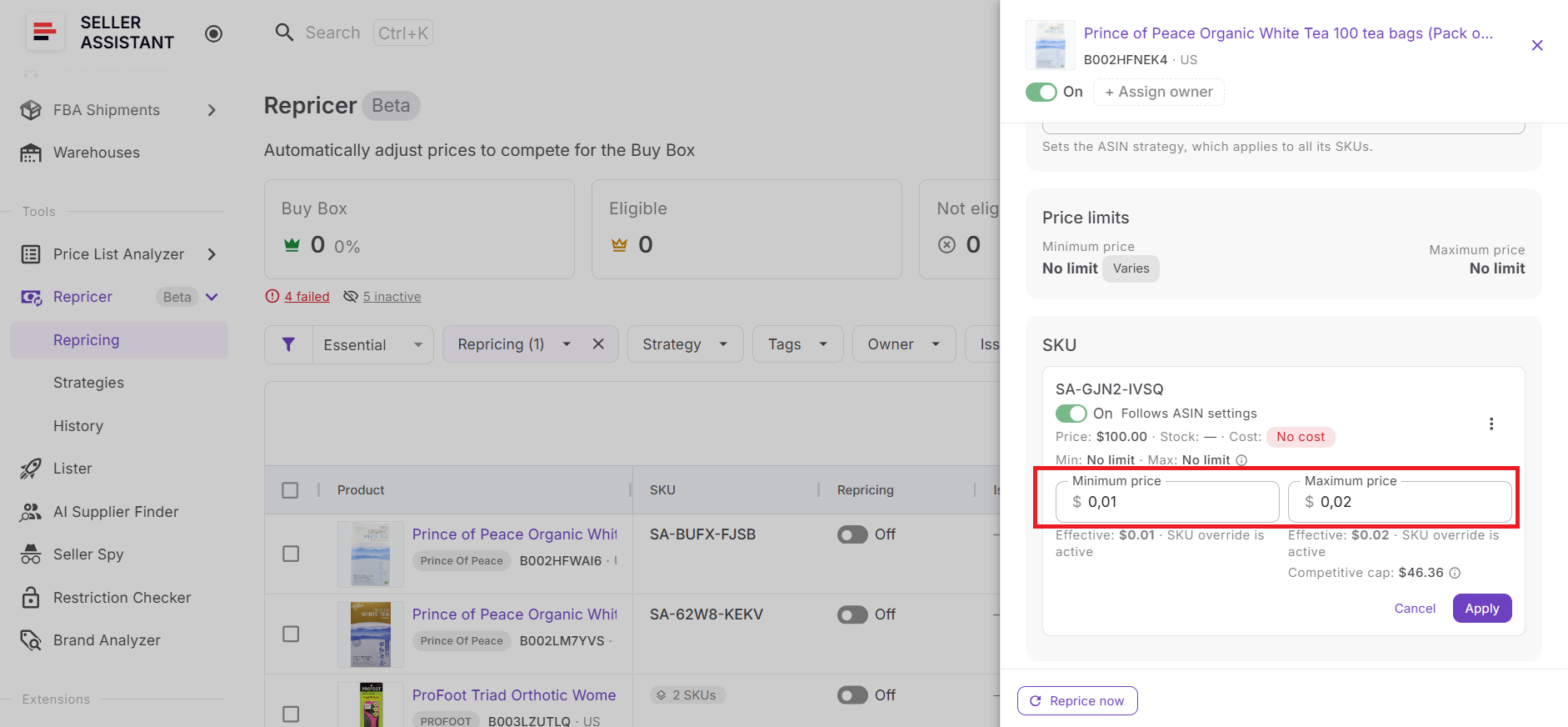
You can also configure the maximum change per reprice. Together, these safeguards put limits around how aggressively the SKU can react during a fast-moving price war.
Step 6. Verify landed cost and profitability
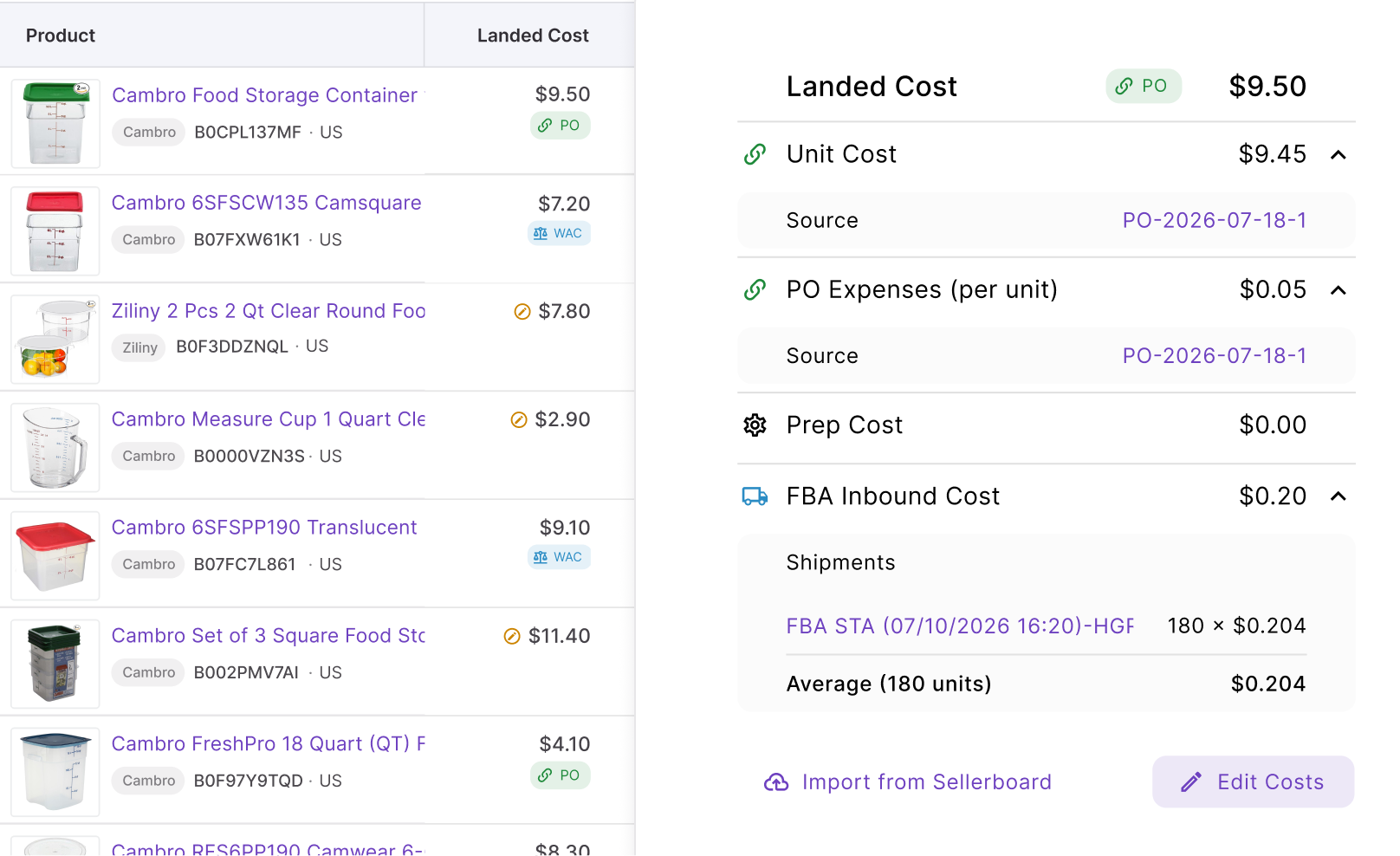
Check Landed Cost before relying on profit-based protection. Where the relevant data is available, Seller Assistant can account for components such as unit cost, PO expenses, prep cost, and FBA inbound cost.
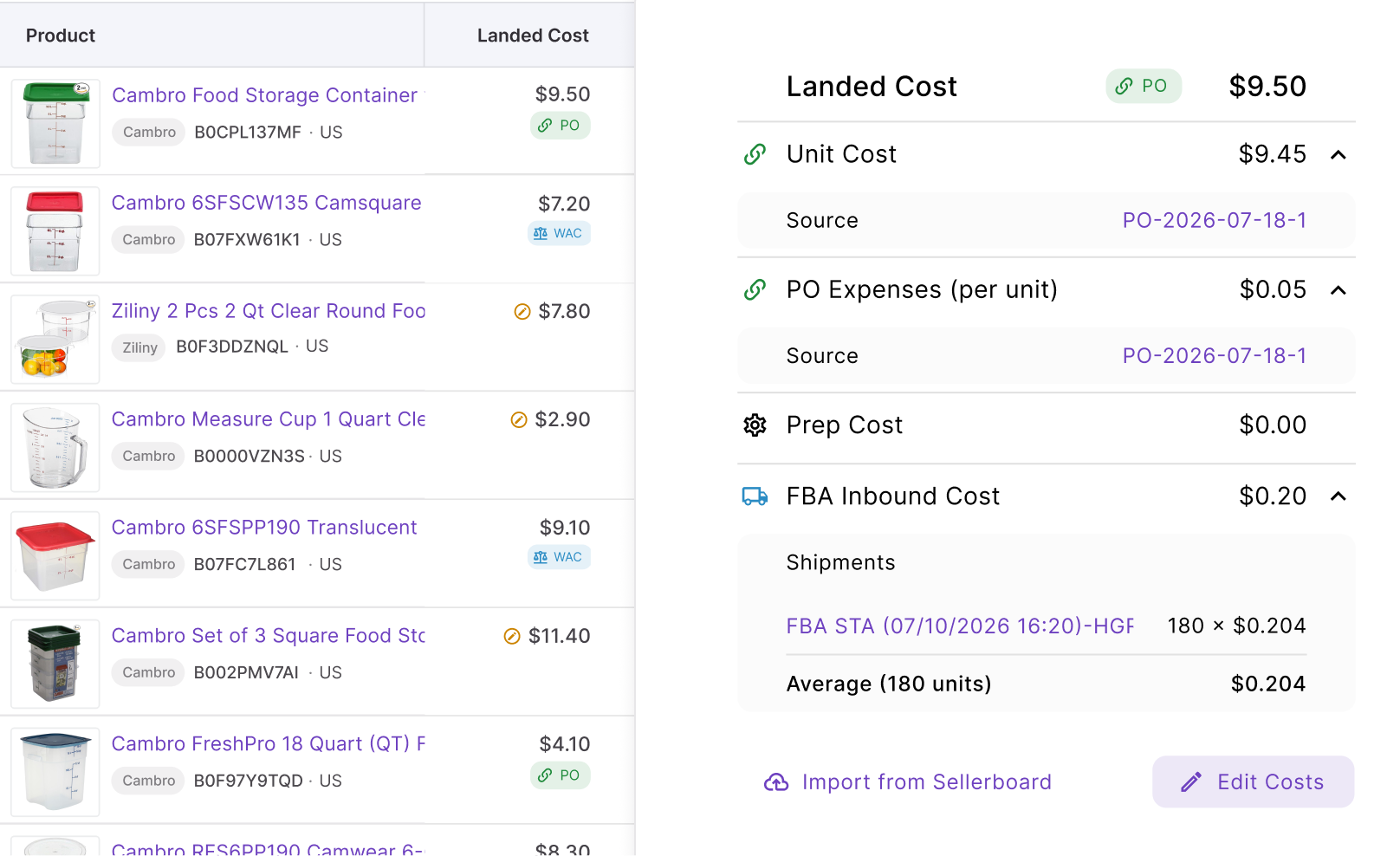
Review profit, ROI, and margin as well. Accurate cost data is essential because a pricing floor can only protect your intended return when the financial inputs behind it are correct.
Step 7. Find SKUs that need intervention
Use Tags to organize products and Owners to assign responsibility across the catalog.
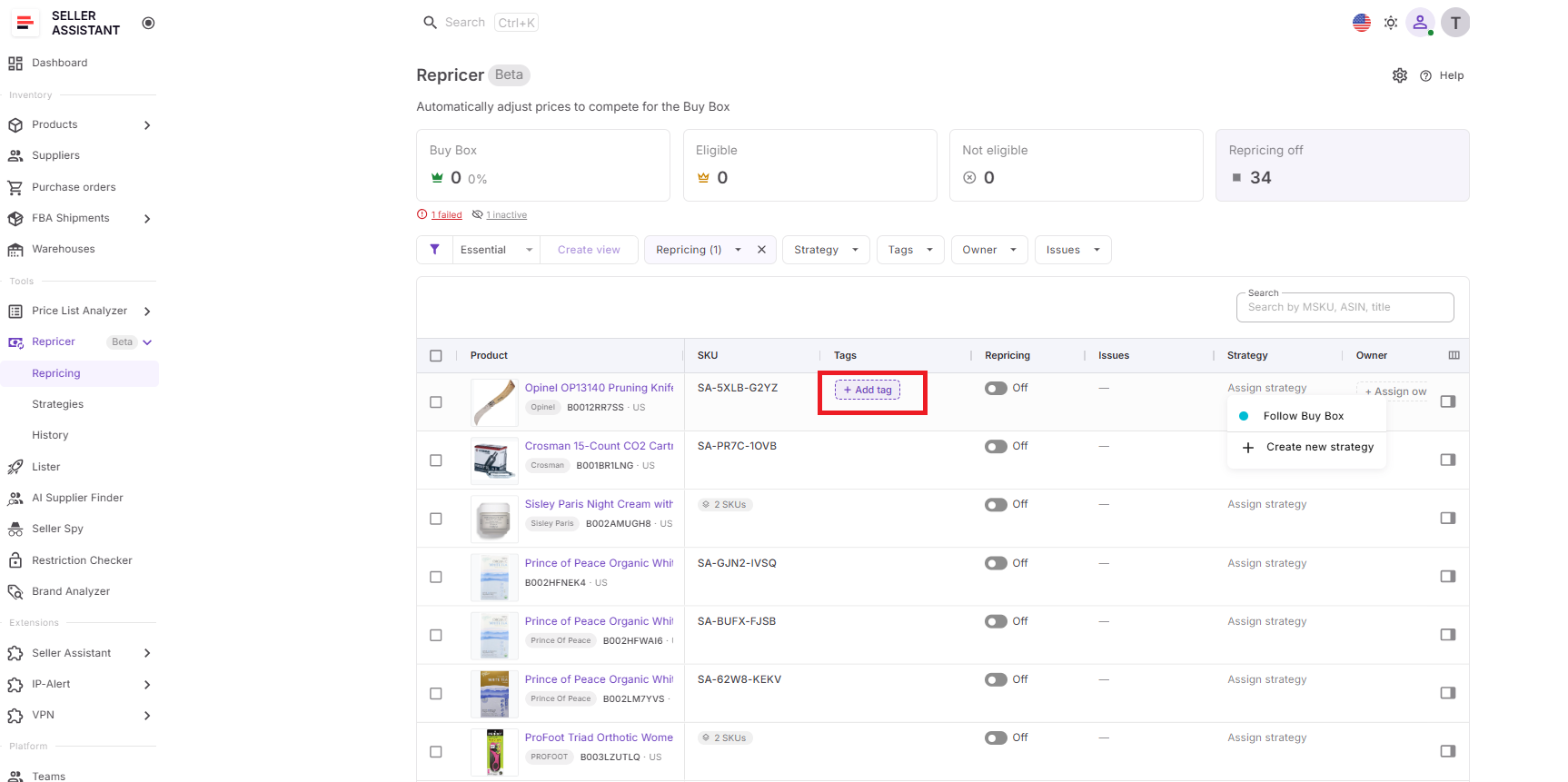
Then filter Issues for conditions such as Price war, On floor, No cost, Capped, and Failed.
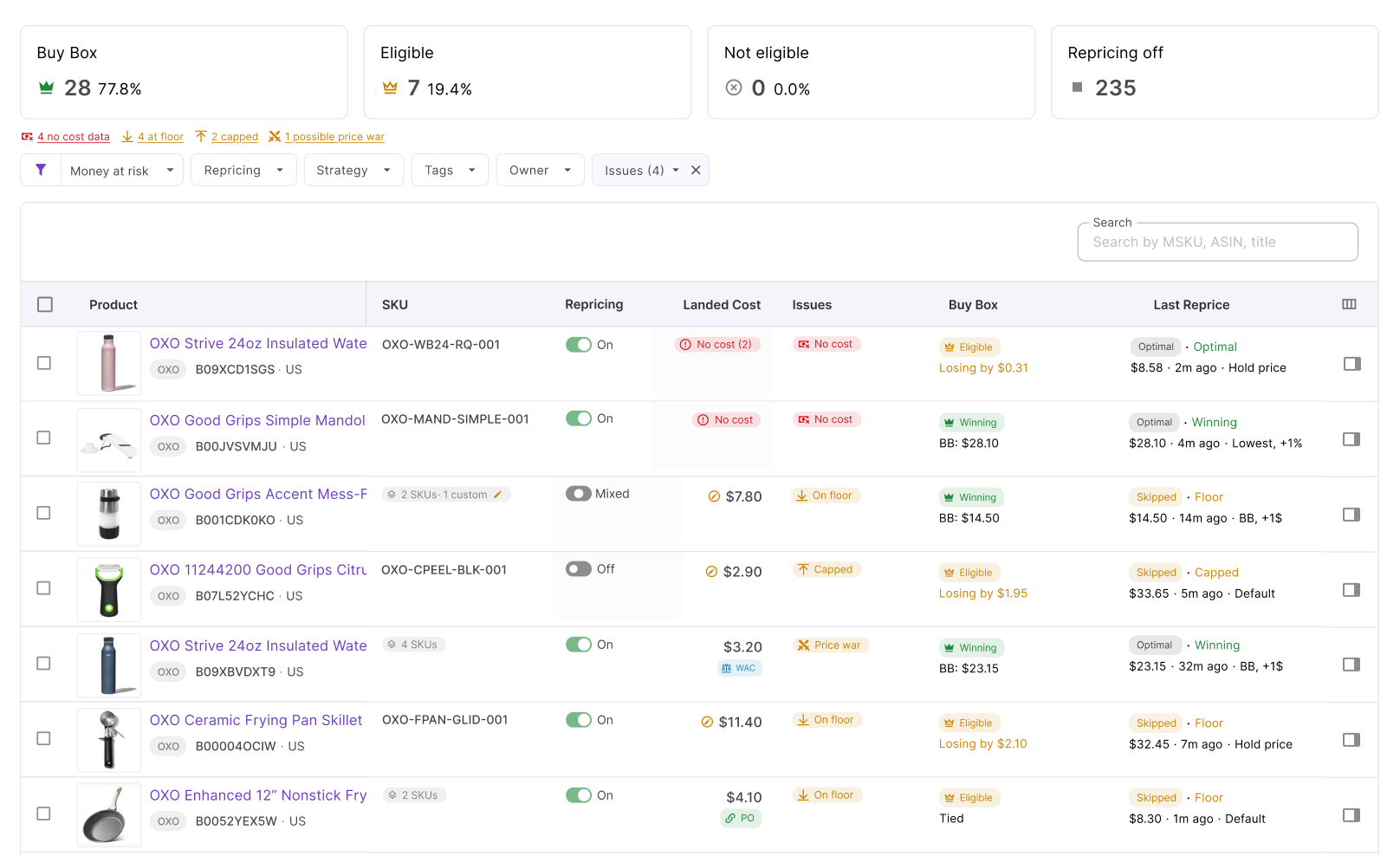
A Price war warning tells you to investigate the competitive situation, while On floor shows that the SKU has reached its configured lower pricing boundary. From there, check Price History and Repricer History before deciding whether the strategy actually needs changing.
Step 8. Start repricing and review the decisions
Enable the products that are ready and click Start repricing. Seller Assistant will begin evaluating them using the strategies, conditional rules, costs, market conditions, and pricing safeguards you configured.
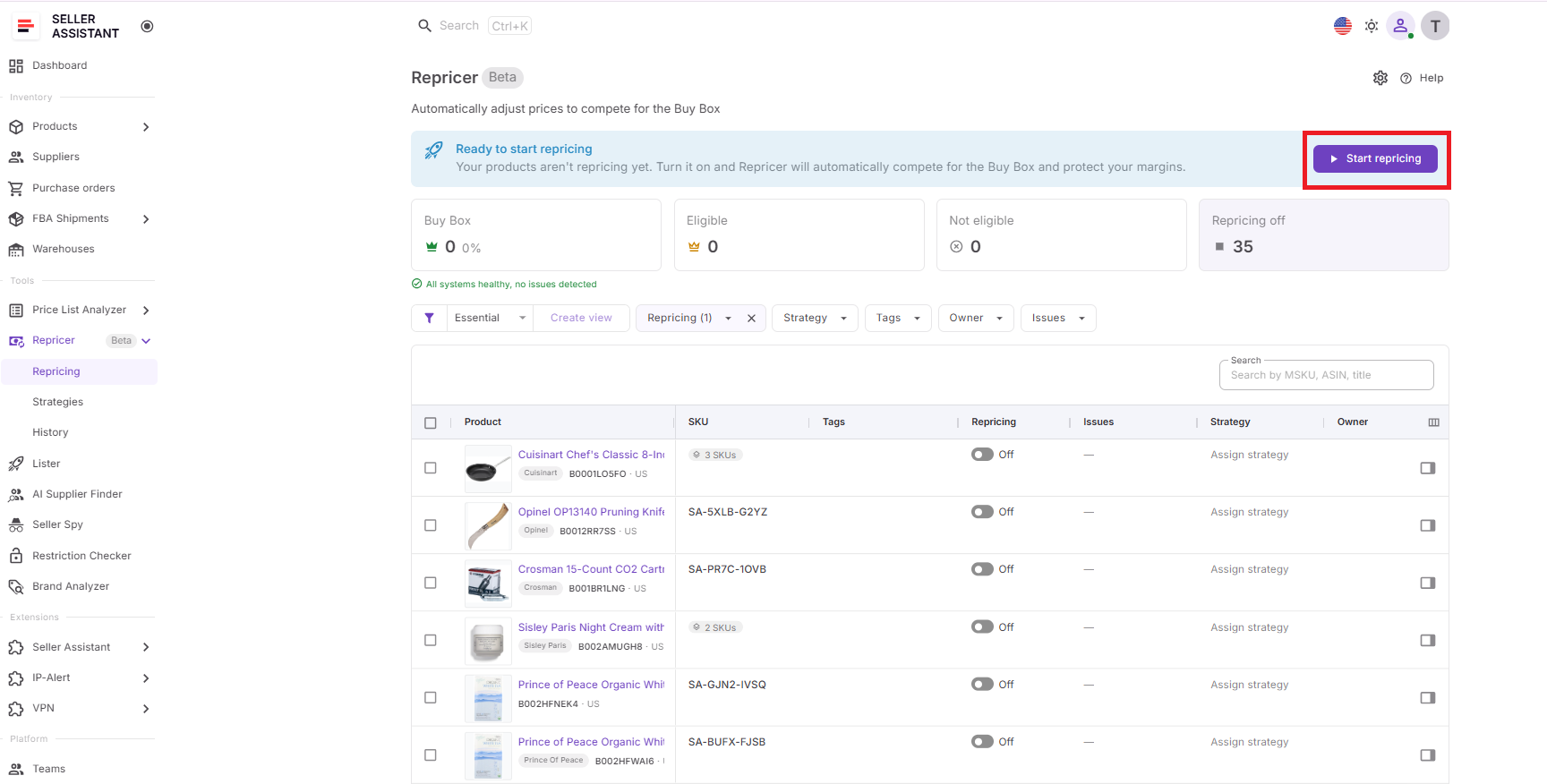
After activation, monitor Buy Box performance, current price, profit, ROI, margin, Issues, Price History, and Repricer History. If a SKU enters a price war, use the history and decision reasons to understand what drove the movement before changing the floor or making the strategy more aggressive.
FAQ
Is undercutting other Amazon sellers illegal?
Generally, simply offering a lower price than another seller is normal marketplace competition and is not, by itself, illegal. The concern for resellers is usually commercial rather than legal – repeated undercutting can trigger a race to the bottom that damages everyone’s margins.
Why do Amazon prices sometimes rise again after a price war?
Aggressive sellers may sell out, change their pricing, or leave the listing, reducing downward pressure on the ASIN. This is why staying at a temporarily depressed price can mean giving away margin after the competitive situation has already improved.
Should I always match the Buy Box price to win it?
No, because price is only one factor Amazon uses when determining the Buy Box winner. Fulfillment method, shipping speed, inventory availability, seller performance, and other offer factors can affect Buy Box eligibility and rotation.
Can two of my own SKUs compete against each other?
If you operate multiple offers that compete on the same ASIN, poorly coordinated pricing can create unnecessary internal price pressure. Review which offers are actually competing and make sure your pricing logic does not encourage your own inventory to repeatedly undercut itself.
When should I leave a price war instead of continuing to compete?
Consider stepping back when the market price no longer meets the return required for that inventory, especially if competitors appear willing to sustain unusually low prices. Waiting for competitors to sell through can sometimes make more financial sense than sacrificing margin simply to maintain short-term Buy Box share.
Final Thoughts
Avoiding an Amazon price war does not mean giving up on the Buy Box or refusing to adjust prices. The better approach is to compete selectively – follow the market when it makes sense, hold when another cut adds no value, and stop when pricing reaches the profitability boundary you have set.
Seller Assistant’s Amazon repricer turns that approach into automated pricing logic. With conditional rules, Buy Box and competitor data, landed-cost-based safeguards, Price war Issues, and detailed pricing history, sellers can respond quickly without blindly joining a race to the bottom – protecting margin while staying ready to capture the Buy Box when the opportunity makes financial sense.