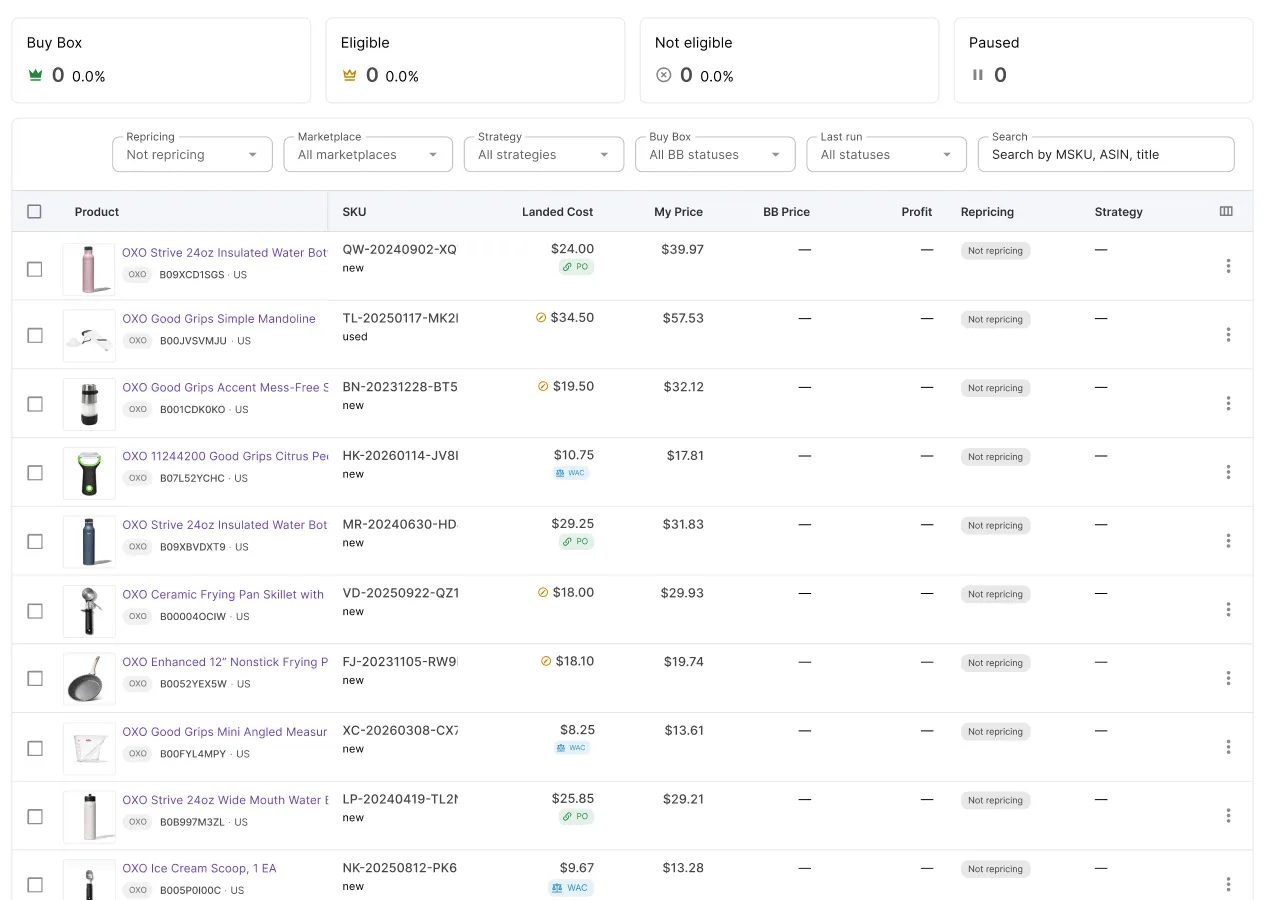
The price on your listing keeps updating and the Buy Box percentage looks fine, but neither number tells you whether you’re still making money.
A price war rarely announces itself with one dramatic drop – it erodes margin a few cents at a time, turning a profitable SKU into a break-even one, and break-even into a loss, without any single moment that looks alarming. Catching this requires seeing profit alongside price, not checking it after the fact.
This post covers the signals that mean you’re losing money in a price war, and how Seller Assistant Repricer surfaces it so the damage is visible before it adds up.
Why Winning the Buy Box Can Still Mean Losing Money
Winning the Buy Box is valuable because it puts your offer in the strongest position to capture sales, but Buy Box performance is not a profitability metric. During an Amazon price war, you can keep matching or beating competing offers and continue winning sales while the price gradually moves closer to break-even – or below the level at which the SKU is worth selling.
That is why sellers need to separate “Am I competitive?” from “Am I making money?” The first question is answered by Buy Box and competitor data; the second requires knowing your costs and measuring profit, ROI, and margin at the price you are actually selling for.
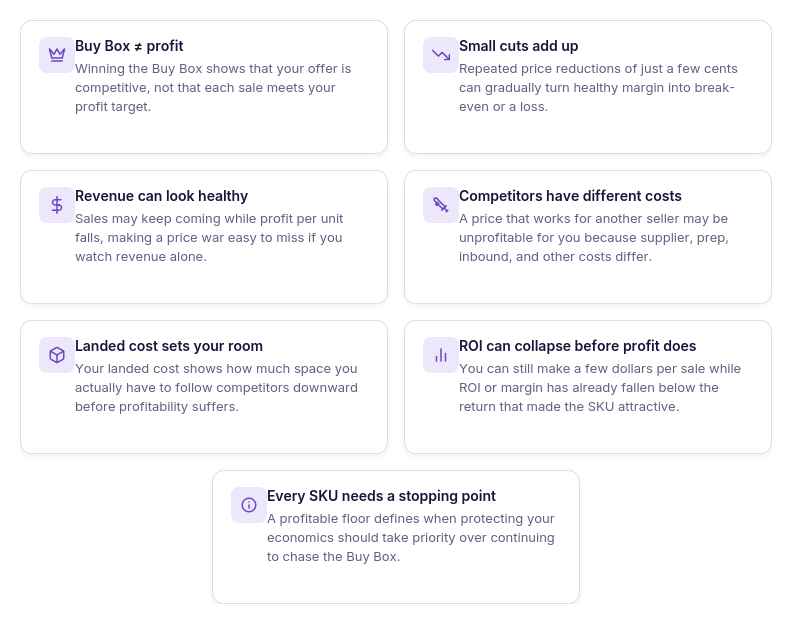
Buy Box wins measure competitiveness, not profit
Winning the Buy Box tells you that your offer is competitive enough to receive Buy Box placement. It does not tell you how much money remains after your product costs and other relevant expenses.
Small undercuts can add up
Price wars do not always look like one dramatic price collapse. Repeated reductions of a few cents can steadily compress margin until a SKU that looked profitable at the starting price is barely breaking even.
Revenue can hide shrinking unit profit
A SKU can continue generating orders and healthy revenue while earning less on every unit sold. Looking only at sales volume can therefore make deteriorating product economics difficult to spot.
Competitors don’t share your cost structure
Another seller may have a lower supplier price, cheaper prep, different inbound costs, or simply be willing to accept a smaller return. Following their price does not mean that the same selling price is profitable for your inventory.
Landed cost determines your real room to compete
Your purchase price alone does not show how much room you have to reduce an offer. The SKU’s landed cost provides the cost basis needed to understand how close the current selling price is getting to your financial limit.
ROI and margin can fall before you reach a loss
You do not have to cross break-even for a price war to become financially damaging. A product may technically remain profitable while its ROI or margin falls below the minimum return you expected when you sourced it.
The profitable stopping point matters
The goal is not necessarily to keep following the Buy Box as far down as competitors take it. A profitable pricing strategy needs a point where protecting the SKU’s economics becomes more important than winning another Buy Box rotation.
Why the Losses Don’t Feel Urgent Until They’ve Added Up
An Amazon price war rarely starts with one price cut large enough to make the problem obvious. More often, competing sellers adjust by small amounts, the Buy Box moves, and prices continue drifting downward while orders keep coming. Each individual change can look insignificant even as the cumulative effect steadily reduces profit per unit.
That delay makes price wars particularly easy to underestimate. By the time declining profit becomes obvious in your overall results, you may have already sold dozens or hundreds of units at a much weaker return than planned.
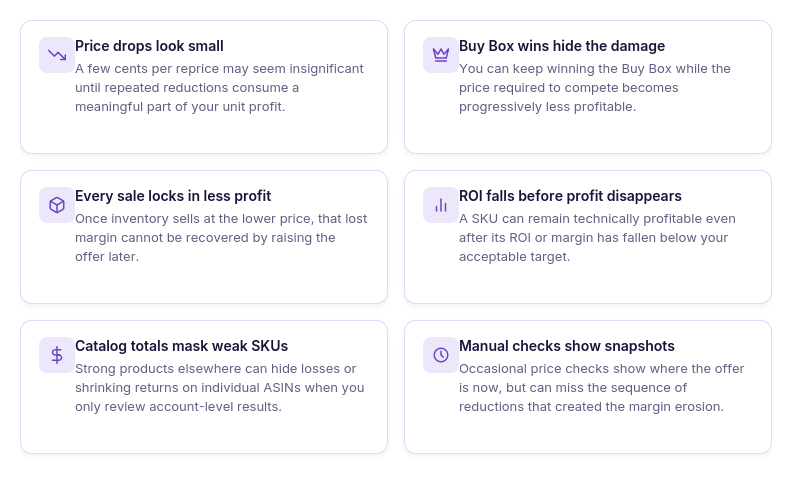
The decline happens gradually
A $0.05 or $0.10 reduction rarely feels like a reason to intervene. A sequence of those reductions, however, can eventually consume several dollars of profit per unit.
Buy Box success can mask the problem
You may continue winning the Buy Box while the selling price falls. That positive competitive signal can make the SKU appear healthy even as its economics deteriorate.
Every sale locks in the lower return
Once a unit sells at the reduced price, the lost margin cannot be recovered by raising the price later. High-velocity SKUs can therefore accumulate meaningful profit loss quickly.
Profitability deteriorates before losses appear
The first warning is not necessarily a negative profit number. Margin and ROI can fall below your targets long before the SKU technically starts selling at a loss.
Catalog totals can hide individual SKUs
Profitable products elsewhere in the catalog can offset a weak SKU in account-level results. Looking only at total revenue or overall profit can therefore hide a product caught in an unproductive price war.
Manual checks see snapshots, not the full pattern
Checking a listing occasionally shows what the price is now, but not necessarily how it got there. To recognize cumulative margin erosion, sellers need visibility into both profitability and the sequence of repricing decisions over time.
Why Price Doesn’t Tell You Whether You’re Making Money
Competitor data tells you what is happening on the Amazon listing, but it does not tell you whether following that market is still profitable for your SKU. You can see the Buy Box price falling, competitors undercutting each other, and your Buy Box share remaining strong while your profit, ROI, and margin quietly shrink.
To answer “Am I losing money on Amazon?”, competitive metrics need to be viewed alongside your own cost and profitability data. The critical question during an Amazon price war is not simply how low competitors are going, but how much room you have left before following them stops making financial sense.
| Metric | What It Tells You | What It Doesn’t Tell You |
|---|---|---|
| Buy Box price | The price currently associated with the Buy Box | Whether matching that price meets your profit target |
| Buy Box share | How much Buy Box exposure your offer is getting | Whether those Buy Box sales are sufficiently profitable |
| Lowest FBA/FBM price | How low competing offers are priced | Whether you have the same cost structure as those sellers |
| Competitor count | How much seller competition exists on the listing | How much further you can afford to compete downward |
| Your current price | The price at which your offer is competing | How much money remains after your costs |
| Landed cost | Your actual cost basis for the SKU | Whether the current return meets your target by itself |
| Profit | How many dollars you earn at the current price | Whether that return is strong enough relative to your investment |
| ROI | The return generated on the money invested in the product | Whether your margin target is also being met |
| Margin | The percentage of the selling price retained as profit | How close the offer is to a specific minimum-price boundary |
| Repricing floor | The lowest price your repricing setup permits | Whether competitors will continue pricing below that point |
The useful picture comes from reading market metrics and profitability metrics together. A falling competitor price is only a market signal; falling profit, ROI, or margin tells you what that price war is actually costing your business.
How Seller Assistant Protects Profit In A Price War
During an Amazon price war, knowing that prices are falling is only half the information you need. To avoid selling at an unacceptable return, your repricer needs to connect those competitive movements with landed cost, profit, ROI, margin, and price limits – so you can see not only what competitors are doing, but what following them means financially.
Seller Assistant Repricer brings those signals into the same pricing workflow. It can flag a possible price war, show the affected SKU alongside its pricing and cost context, enforce the profitability boundaries you configure, and keep a history of repricing decisions. This helps sellers distinguish aggressive competition from a price war that is actually damaging their returns.
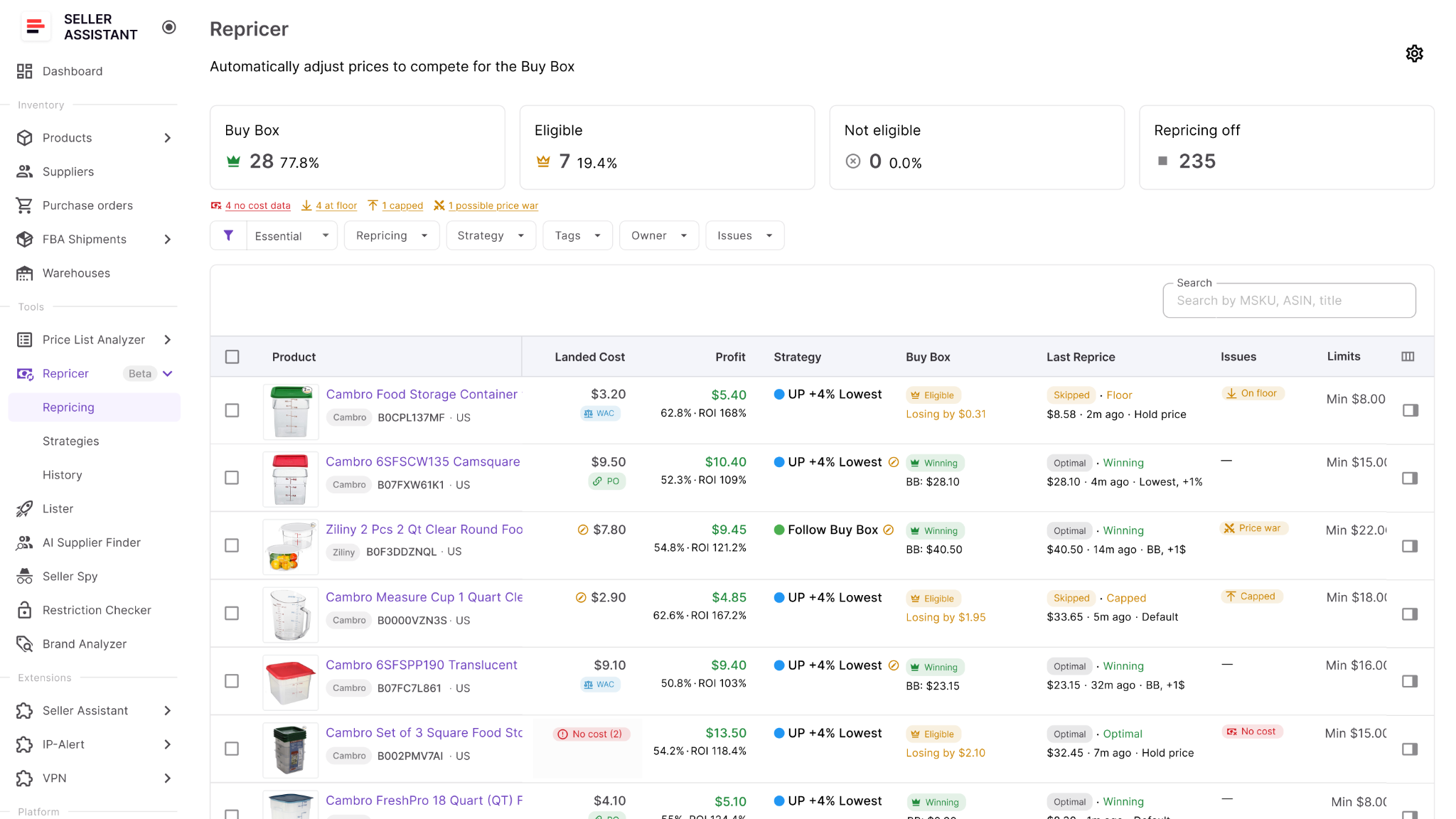
How Seller Assistant Repricer helps spot a price war
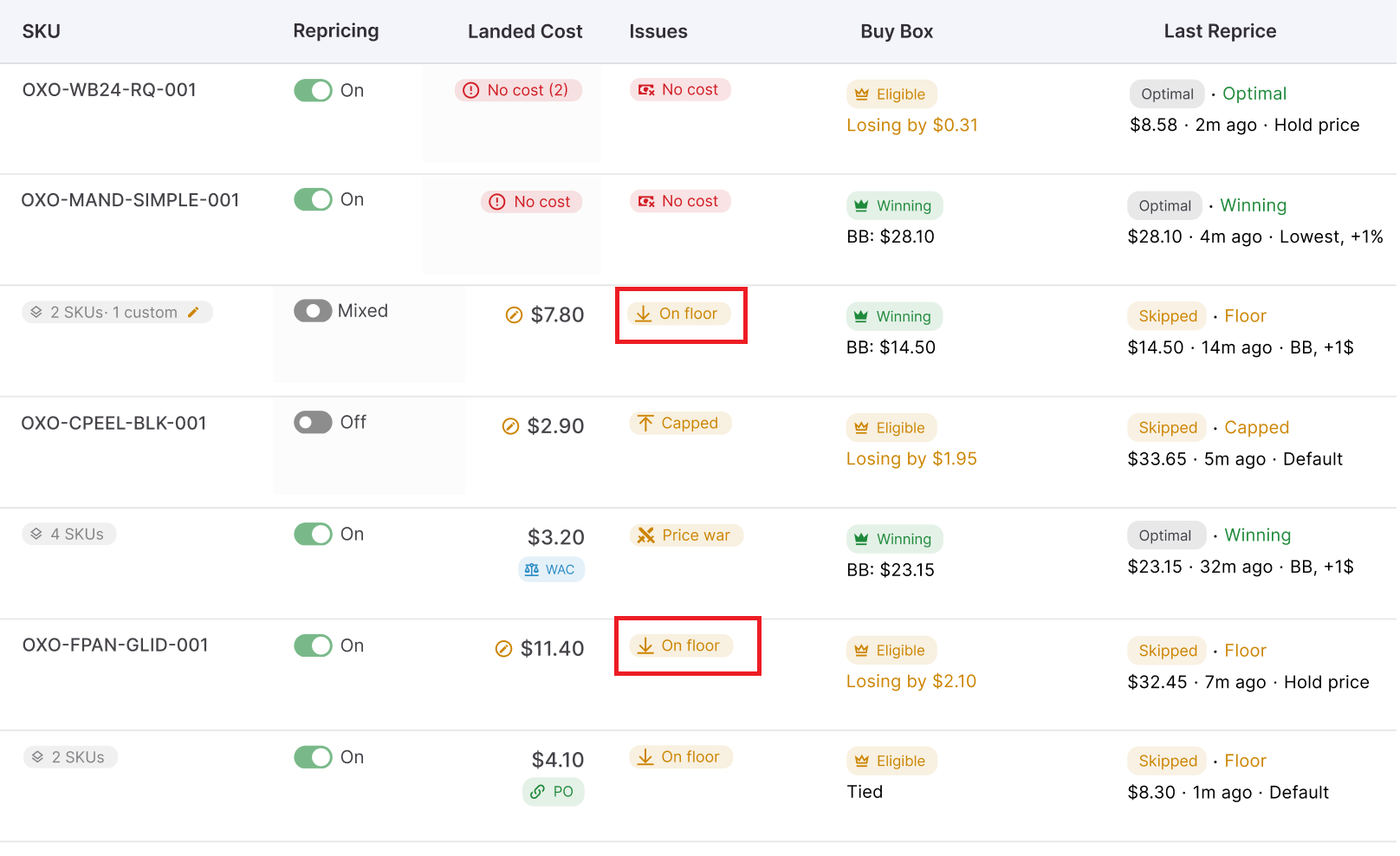
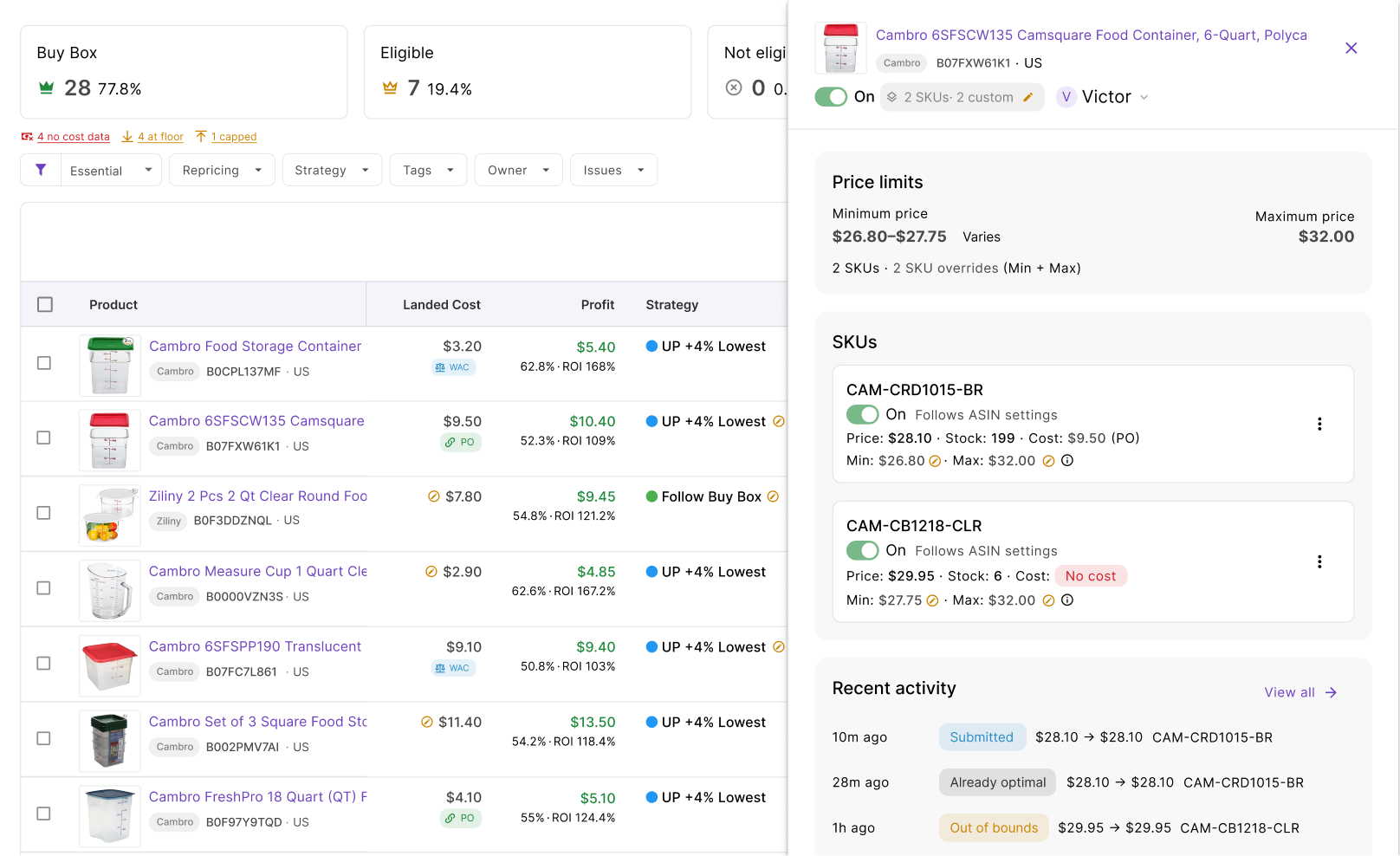
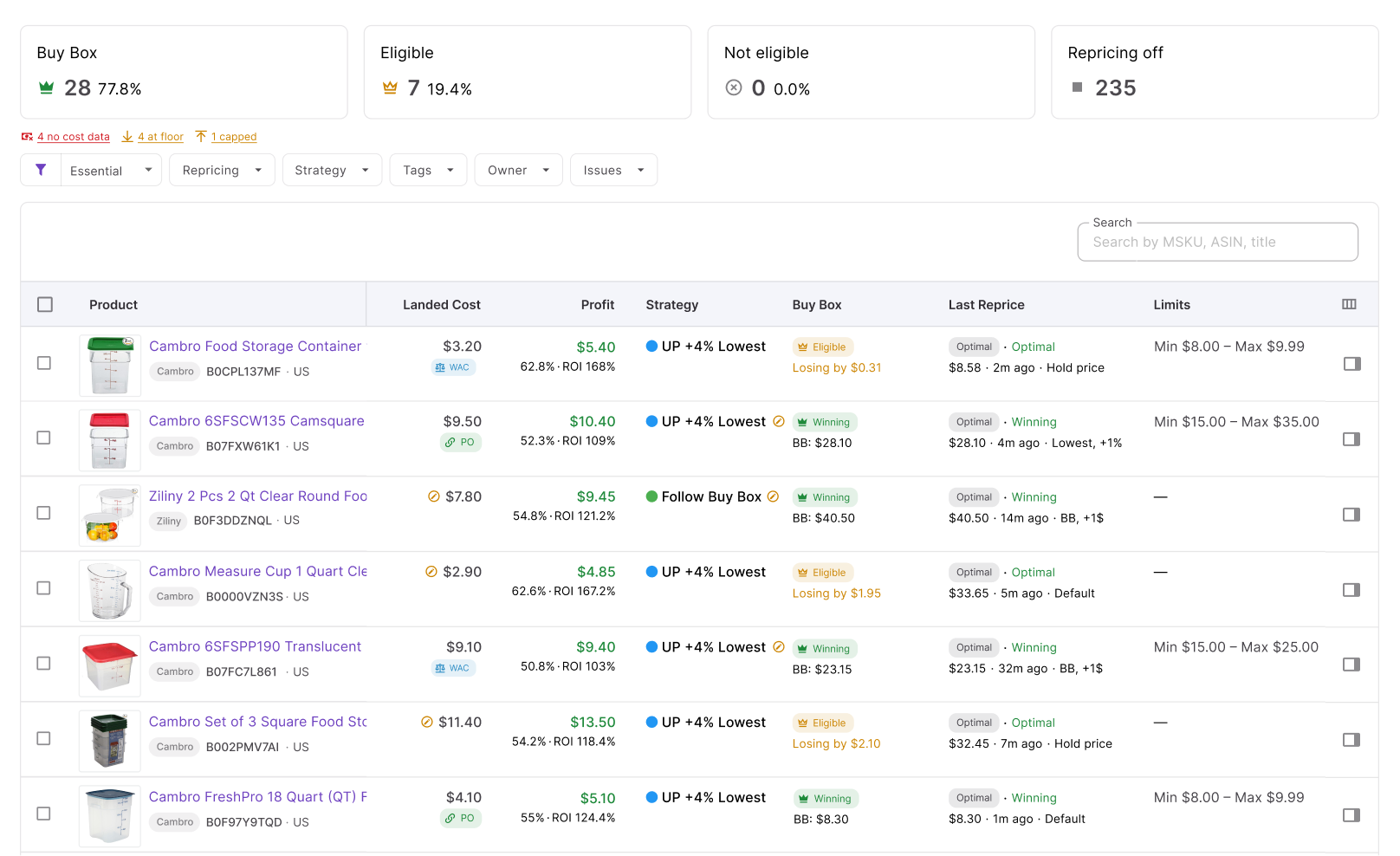
Seller Assistant Repricer surfaces a price war warning directly in the Issues column of the Repricing table. Instead of trying to recognize a price war by repeatedly checking listings or noticing declining profit later, you can filter for affected SKUs and investigate them from the repricing workspace.
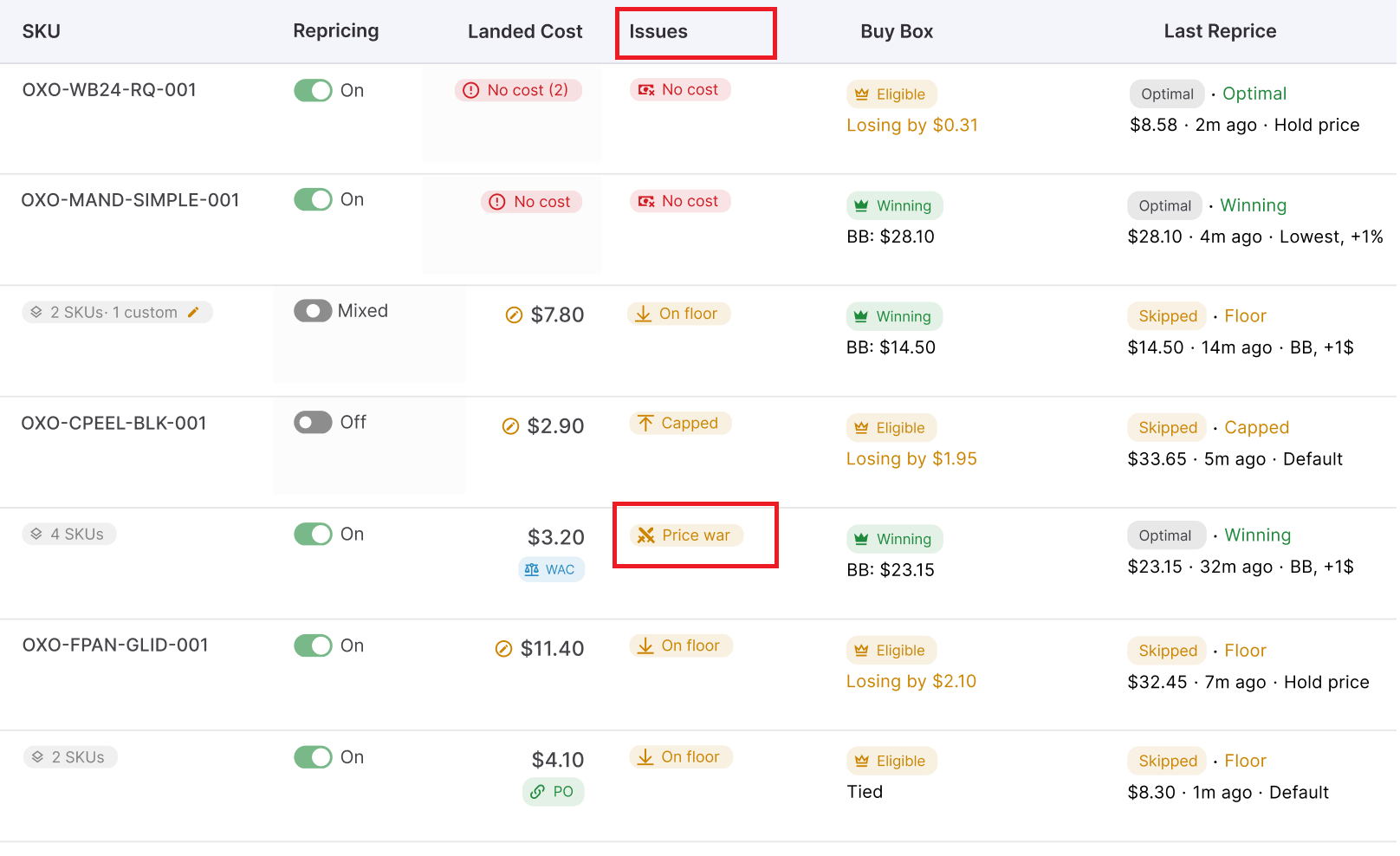
The warning appears alongside information such as Landed Cost, Buy Box data, repricing status, Last Reprice, and other data, giving you immediate context for the affected product. Importantly, a price war issue does not by itself mean that the SKU is losing money – it tells you that the competitive situation needs attention, and profitability data tells you how serious that situation is for your business.
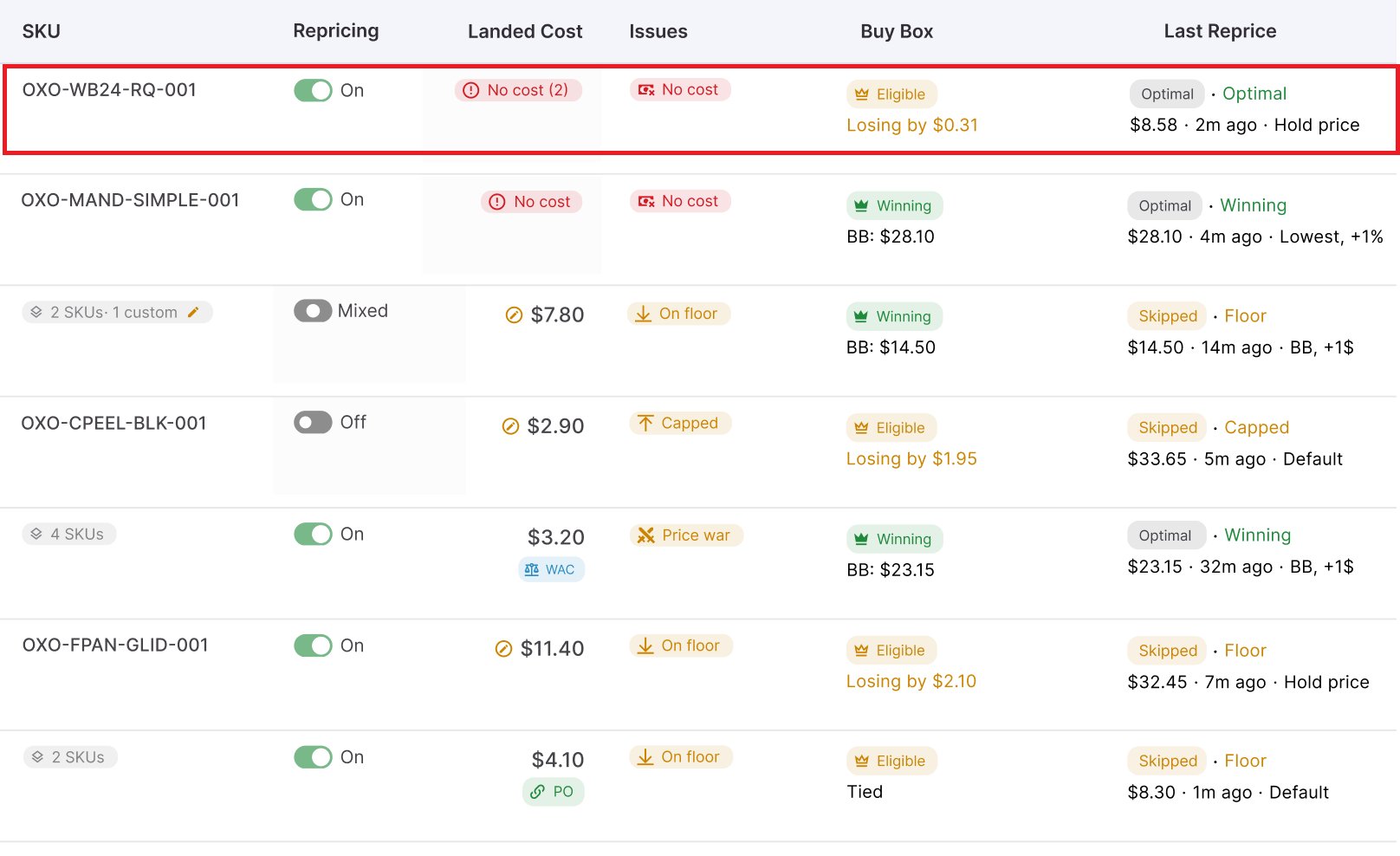
How to tell whether the price war is costing you money
Once a SKU is caught in a possible price war, compare its current selling price with its actual economics. Landed cost establishes your cost basis, while profit, ROI, and margin show what remains at the price you are currently competing at.
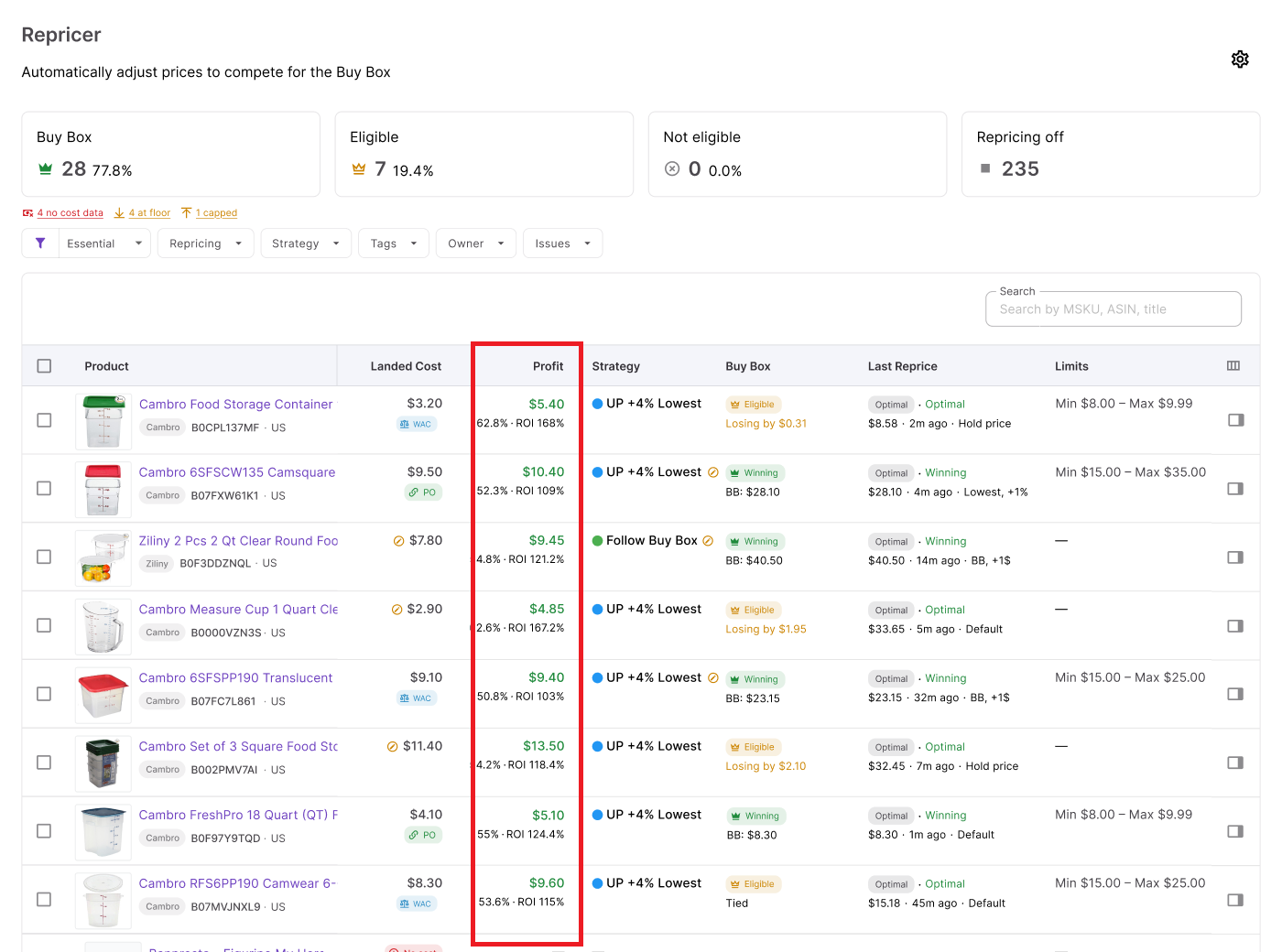
The warning signs start before profit reaches zero. If profit per unit is shrinking, ROI or margin falls below your sourcing target, or the offer keeps approaching its minimum price, the price war is already making the SKU less attractive even if every sale is technically still profitable.
Look at the signals together
Price war warning → current price → landed cost → profit / ROI / margin → minimum price
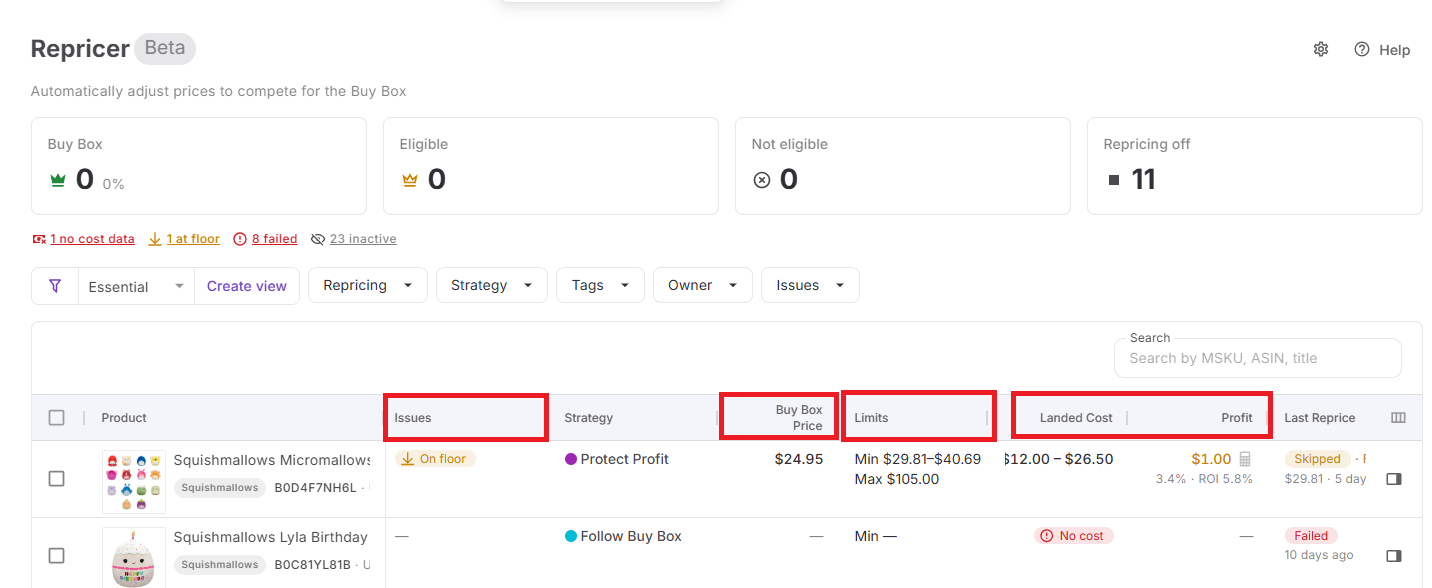
That sequence answers the more useful question than simply “Am I selling at a loss on Amazon?” – “Is this SKU still worth selling at the price required to compete?”
What your repricing floor tells you
Your repricing floor shows where competitive price reductions are supposed to stop. In Seller Assistant Repricer, the minimum can be set manually or calculated according to profitability requirements such as minimum ROI, minimum margin, or target profit, with a safety minimum providing an additional hard boundary.
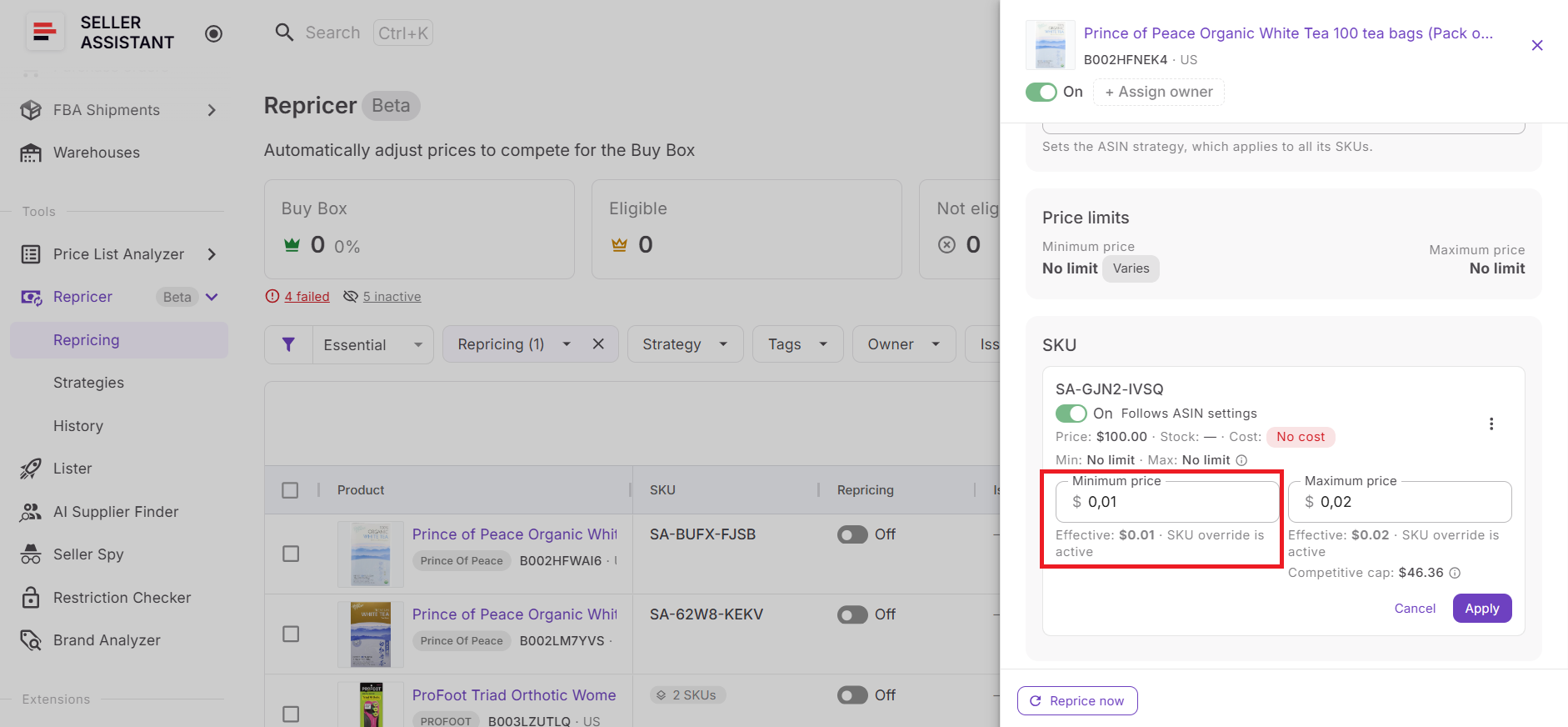
When a SKU reaches its lower pricing boundary, the Repricer can surface an On floor issue. That is an important price-war signal: the market is asking for a lower competitive price, but your configured limits have left the strategy no more room to follow downward.
Reaching the floor does not automatically mean the floor should be lowered. It may instead tell you that competitors have a different cost basis, are liquidating inventory, or are willing to accept returns that do not meet your targets.
How Seller Assistant Repricer prevents blind price cutting
Seller Assistant Repricer does not require every competitive change to produce another price reduction. Repricing strategies can use conditional rules to Follow Buy Box, Follow Lowest Price, Hold Price, or change behavior according to conditions such as Amazon selling, Buy Box holder type, competitor levels, no competition, and stock.
Those competitive rules operate inside the financial safeguards you configure. Landed cost, profit-based floors, safety minimums, maximum prices, and maximum-change limits help prevent a fast-moving competitor from turning automated repricing into uncontrolled undercutting.
The Repricer also combines reactive repricing that can respond to relevant Amazon marketplace changes in approximately 2–5 seconds with proactive checks for quieter listings.
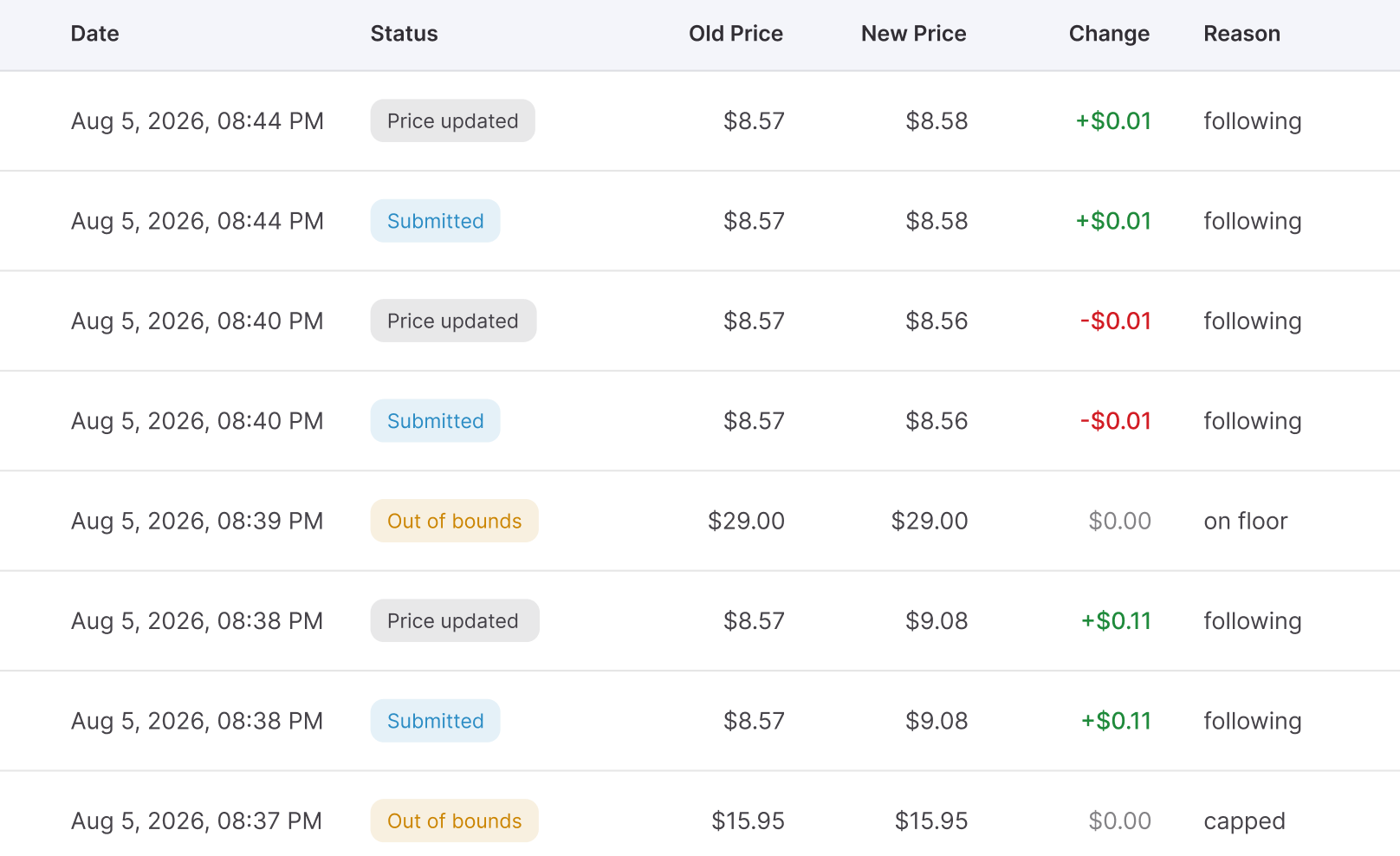
Together with price war and On floor Issues, profitability data, and Repricing History, this gives sellers both sides of price-war control – the speed to respond when competition changes and the financial boundaries to know when not to follow it.
From Price-War Warning to Profit Protection with Seller Assistant
Spotting a price war is useful, but the real goal is to keep it from turning into uncontrolled margin loss. Amazon resellers need to know which SKUs are under pricing pressure, whether those products are still profitable, and where automated price reductions should stop.
Seller Assistant Repricer brings price-war monitoring, competitive data, landed cost, profitability metrics, pricing safeguards, and automated repricing into one workflow. For wholesale, online arbitrage, and dropshipping sellers, this means you can identify affected SKUs, check whether the current price still makes financial sense, and let Repricer compete only according to the strategies and limits you define.
What Seller Assistant Repricer gives you during a price war
- Spot price-war risks in your catalog
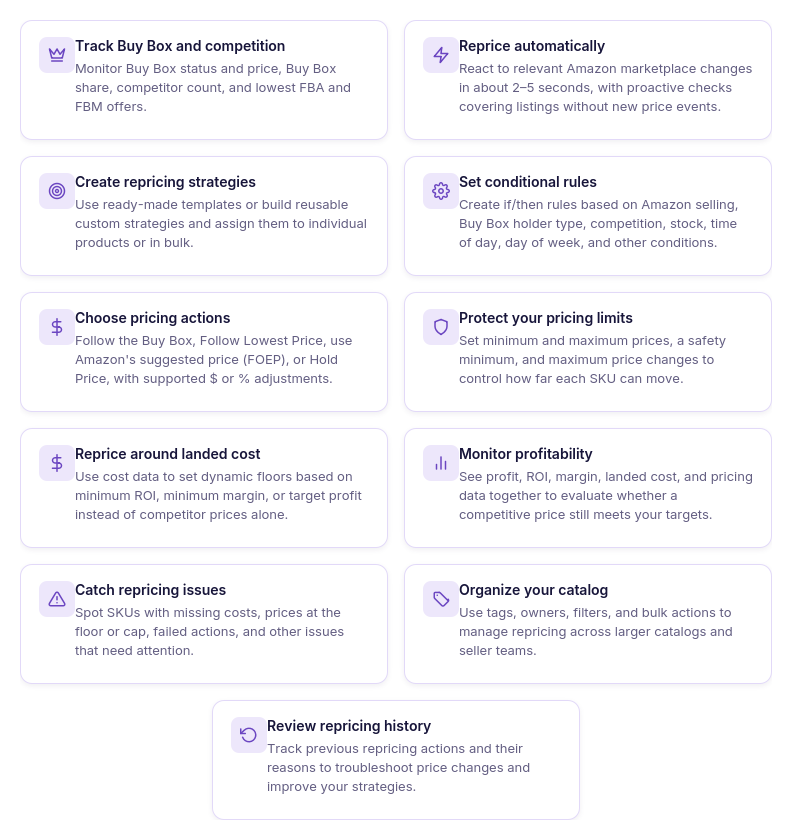
The Issues column can flag a possible Price war directly on the affected SKU. Instead of trying to identify aggressive pricing patterns manually, you can filter for products that need investigation.
- See whether competition is still profitable
View market information together with landed cost, profit, ROI, margin, and price limits. This helps distinguish a competitive price war from one that is actually pushing your return below an acceptable level.
- Track the Buy Box and competing offers
Monitor Buy Box status and price, Buy Box share, competitor count, lowest FBA and FBM prices, and your current price. This gives you the market context needed to understand why pricing pressure is developing.
- Respond to price changes quickly
Reactive repricing can respond to relevant Amazon marketplace events in approximately 2–5 seconds. Proactive checks also reevaluate quieter listings where no new competitor price event has occurred.
- Control how the Repricer responds
Use reusable strategies and ordered if/then rules instead of automatically undercutting every competitor. Rules can account for Amazon selling, Buy Box holder type, competitors above or below your offer, no competition, stock thresholds, time of day, and day of week.
- Choose the right pricing target
The Repricer can Follow Buy Box, Follow Lowest Price, follow Amazon’s suggested price (FOEP), or Hold Price depending on your strategy. Fixed-dollar or percentage adjustments provide additional control over how your offer is positioned.
- Put a financial boundary under competition
Set a manual minimum or calculate a dynamic floor using minimum ROI, minimum margin, or target profit. A separate safety minimum provides a hard lower boundary, while a maximum price and maximum-change setting provide further control over price movement.
- Catch related profitability problems
A price war may not be the only issue affecting a SKU. Seller Assistant can also surface states such as No cost, On floor, Capped, and Failed, helping you identify missing data or pricing boundaries that need attention.
- Trace how the SKU reached its current price
Use Repricing History to review previous pricing activity and investigate unexpected behavior. Looking at the sequence of decisions can reveal more than a single current-price snapshot when competitors have been repeatedly moving downward.
How Seller Assistant controls pricing during a price war
Seller Assistant Repricer continuously compares Amazon marketplace conditions with the strategy assigned to each product. When a relevant market event occurs, reactive repricing can respond in approximately 2–5 seconds, while proactive checks periodically reevaluate products even without a new competitor event.
For each evaluation, the Repricer checks conditional rules in priority order and uses the first matching rule. If no conditional rule applies, it uses the strategy’s default action to determine the pricing target and adjustment.
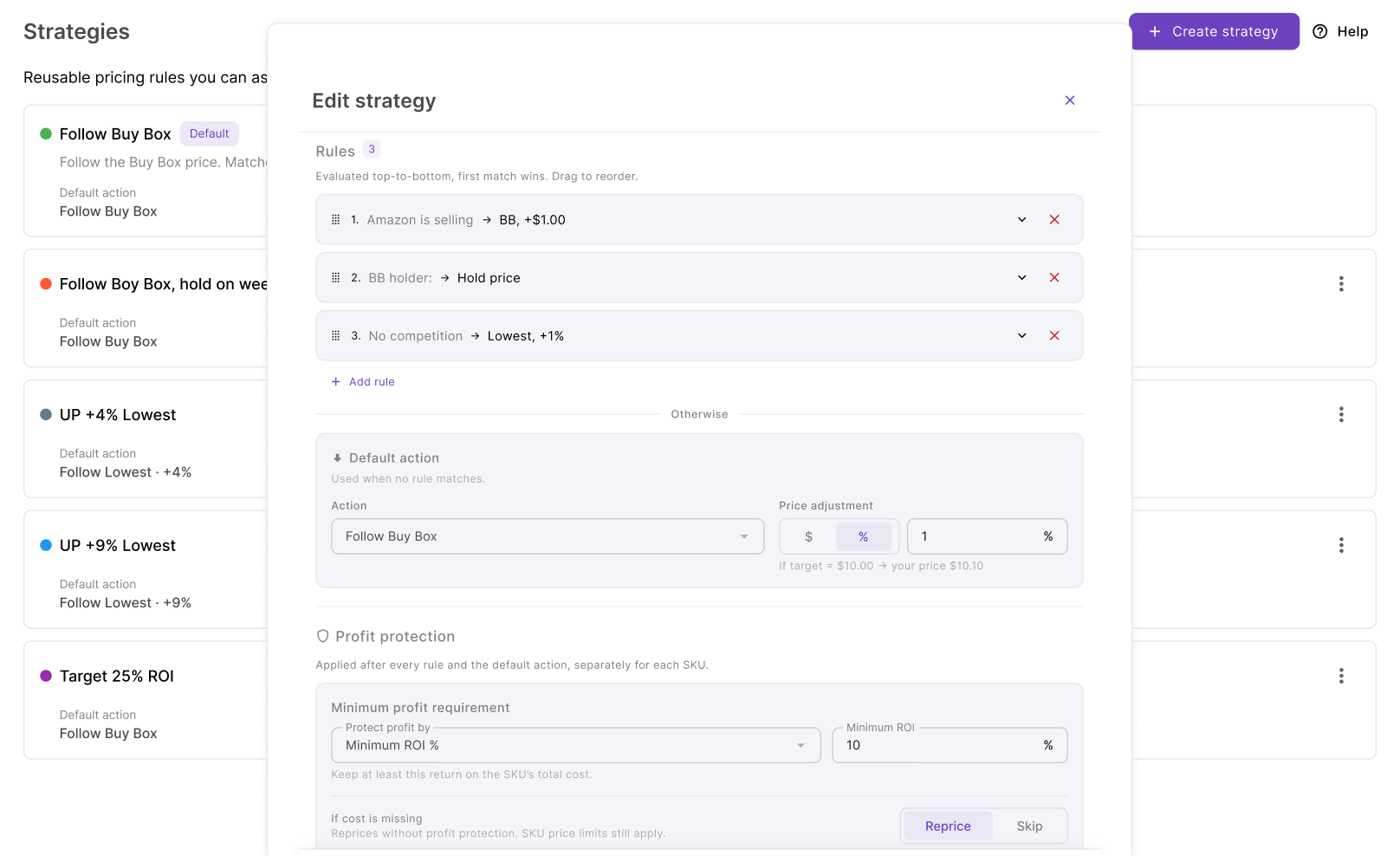
Before applying the resulting price, the Repricer checks the configured minimum price, safety minimum, maximum price, landed cost, and profitability requirements. This separation is important during a price war: competition can tell the strategy where it wants to move, but your rules and financial boundaries determine whether that move is acceptable.
How to set up Seller Assistant Repricer for price-war protection
Step 1. Check your catalog in Repricing
Open Repricer → Repricing in Seller Assistant. The workspace brings together your SKUs, repricing status, strategies, market information, tags, owners, profitability data, and Issues.
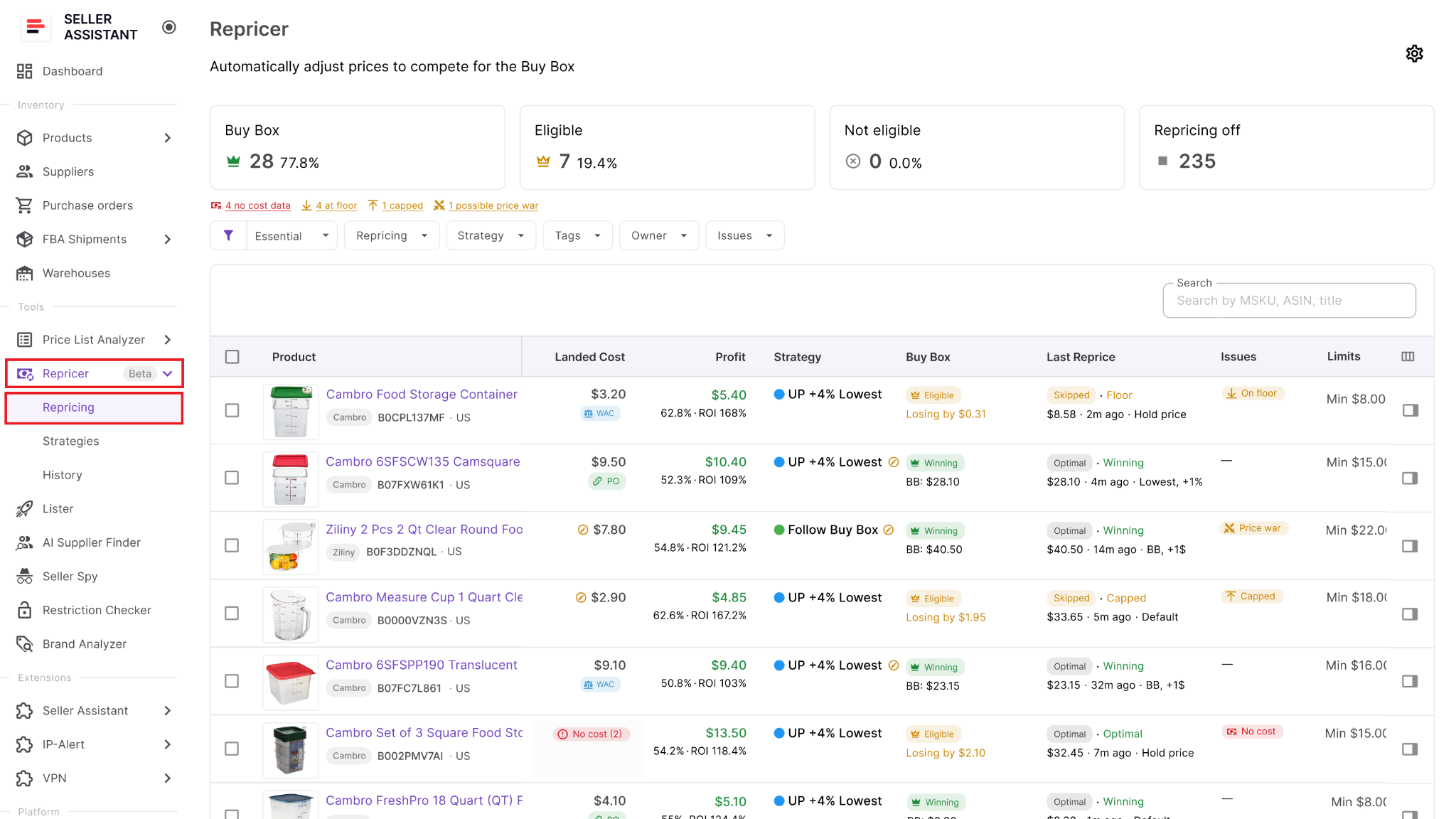
Start by identifying products already showing Price war or other warnings and products you want to protect before automated repricing begins.
Step 2. Switch on Repricing
Open Settings and enable Repricing for your team. You can also choose whether newly listed products should automatically enter repricing or remain inactive until someone reviews them.
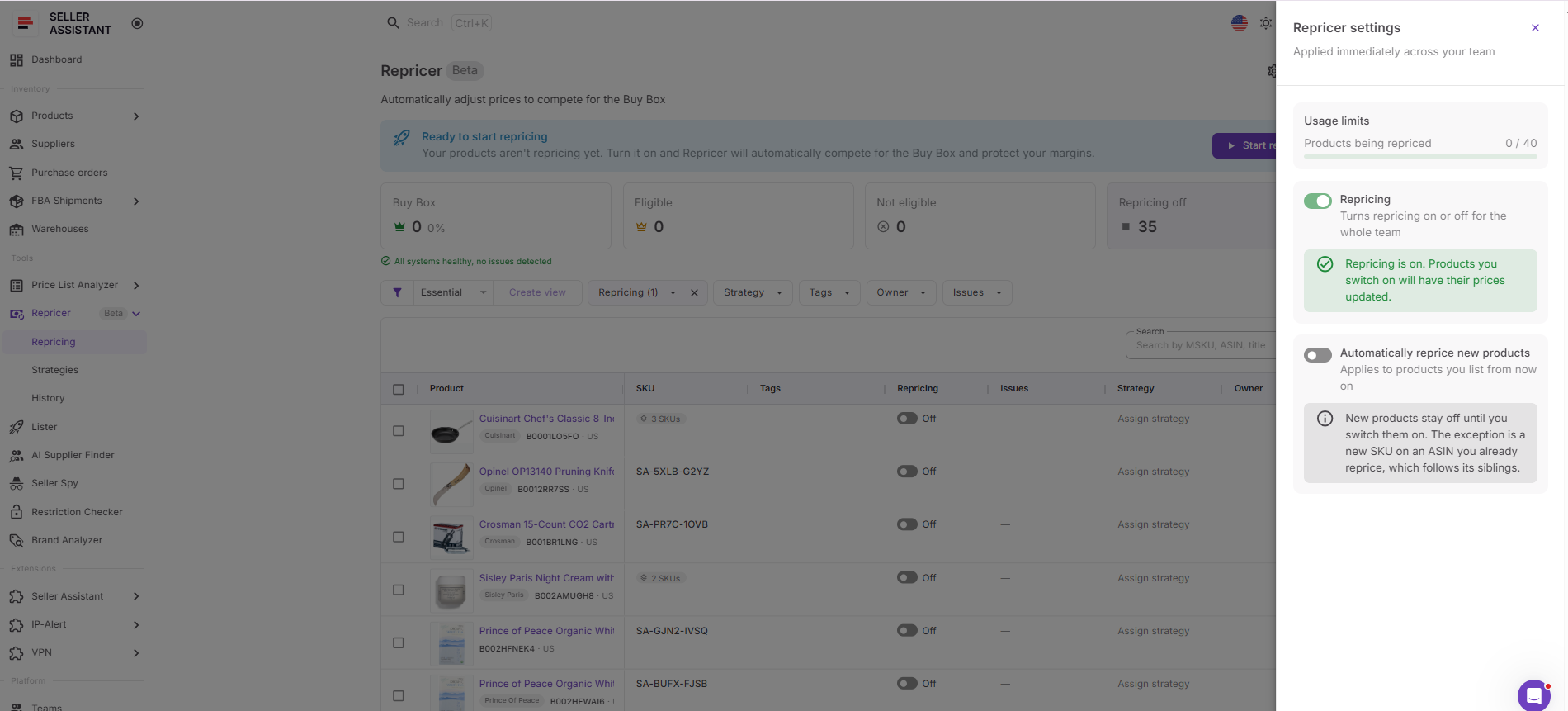
Keeping new SKUs inactive initially gives you an opportunity to verify their costs, strategy, and price limits before they can participate in aggressive competition.
Step 3. Give each SKU the right strategy
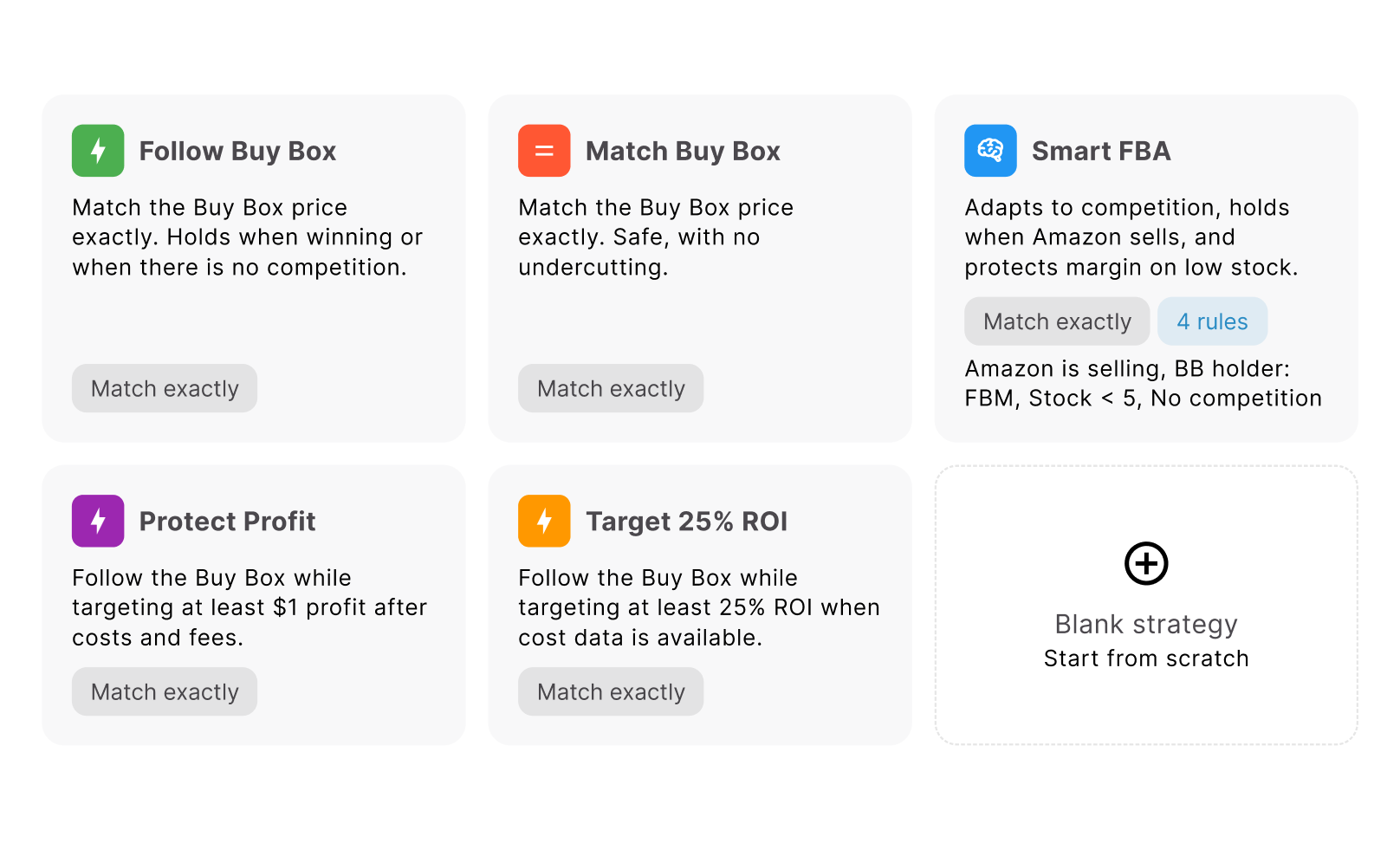
Choose a strategy from the Strategy column. Seller Assistant includes Follow Buy Box, Match Buy Box, Smart FBA, Protect Profit, and Target 25% ROI, or you can create your own.
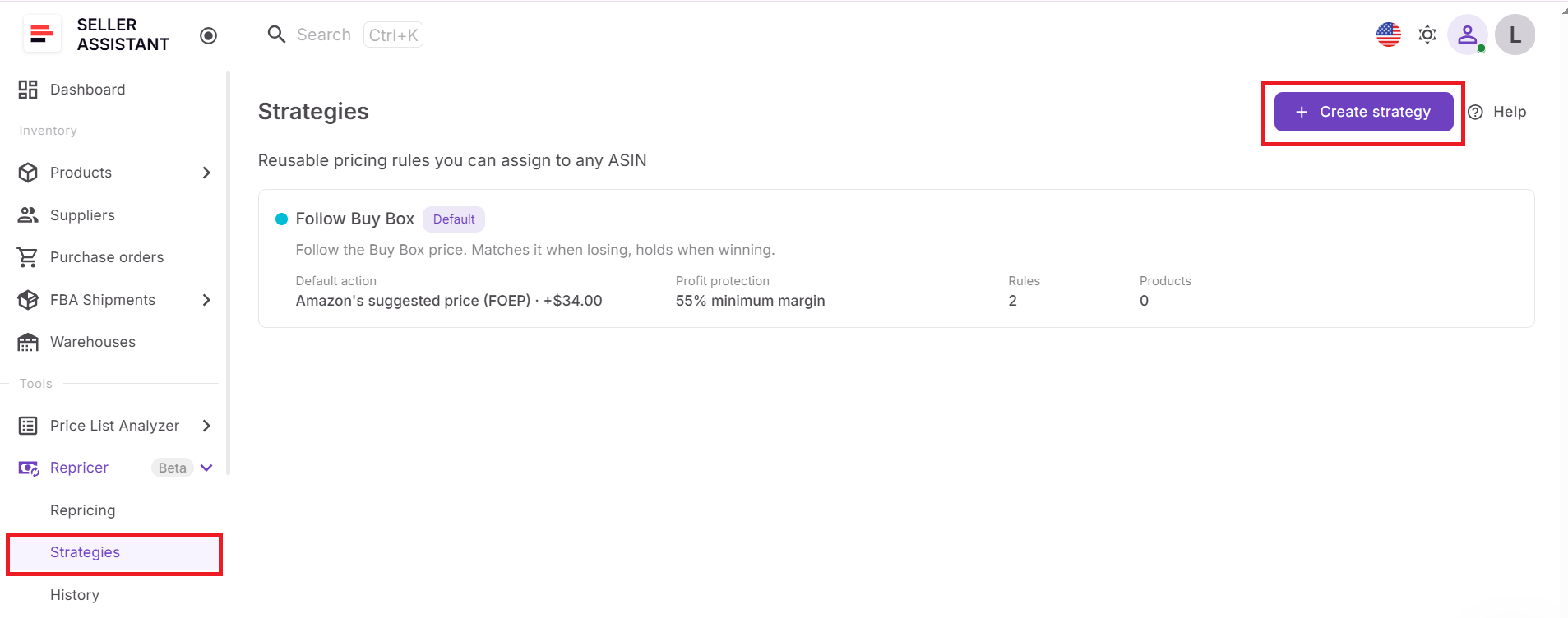
For products vulnerable to price wars, pay particular attention to how the strategy balances competitiveness with profitability. The objective should not automatically be to remain the cheapest seller at every price.
Step 4. Define how the strategy should react
Configure the default pricing action and conditional rules for situations that need different behavior. For example, you can hold when Amazon is selling, change pricing logic when stock becomes low, or react differently when competitors leave the listing.
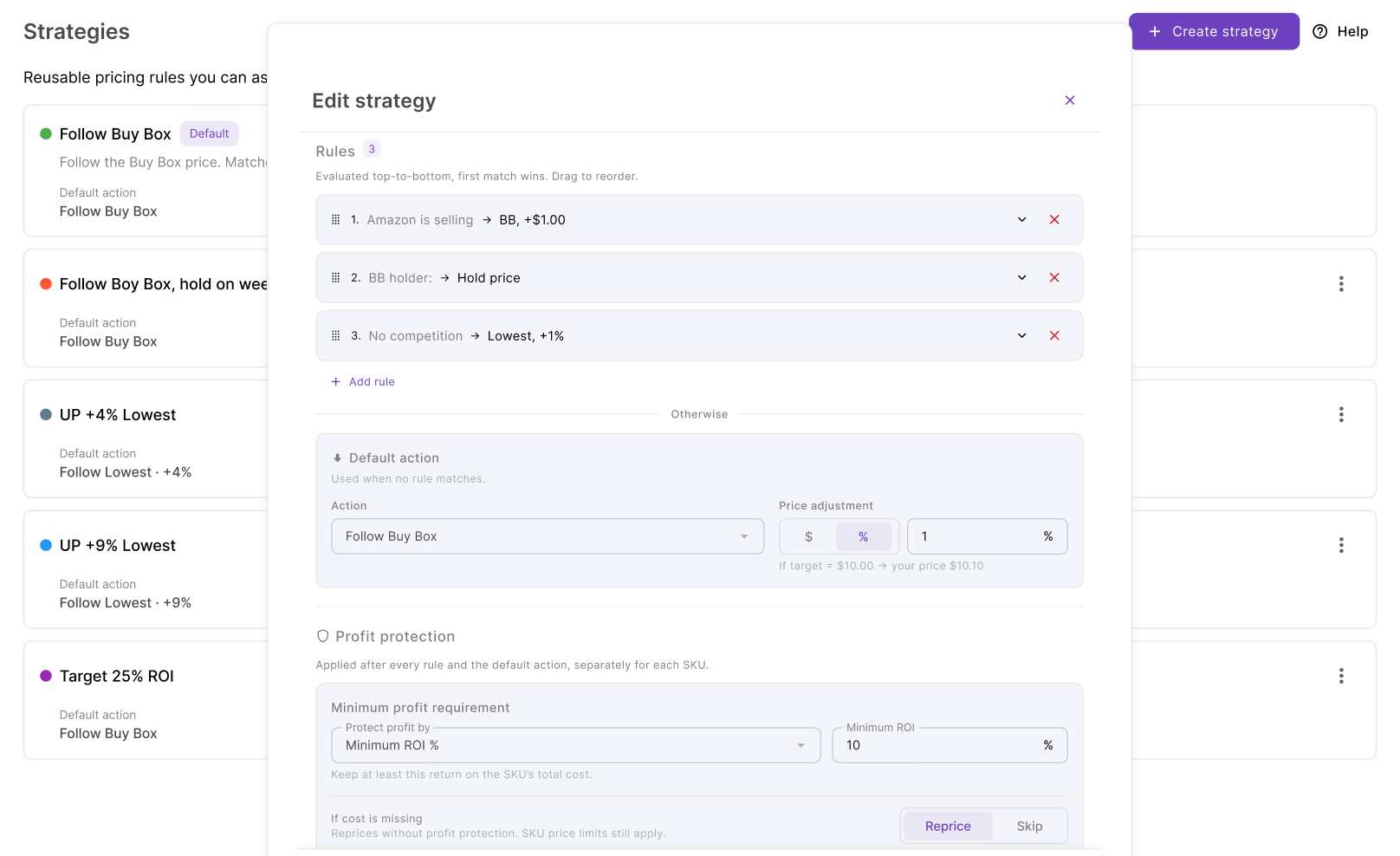
Arrange rules carefully because the Repricer evaluates them from top to bottom and the first matching rule wins. AND/OR logic can make responses more specific when several conditions need to occur together.
Step 5. Put limits around price movement
Set the strategy’s minimum and maximum prices. Your minimum can be entered manually or calculated from minimum ROI, minimum margin, or target profit, while the safety minimum acts as the hard lower boundary.
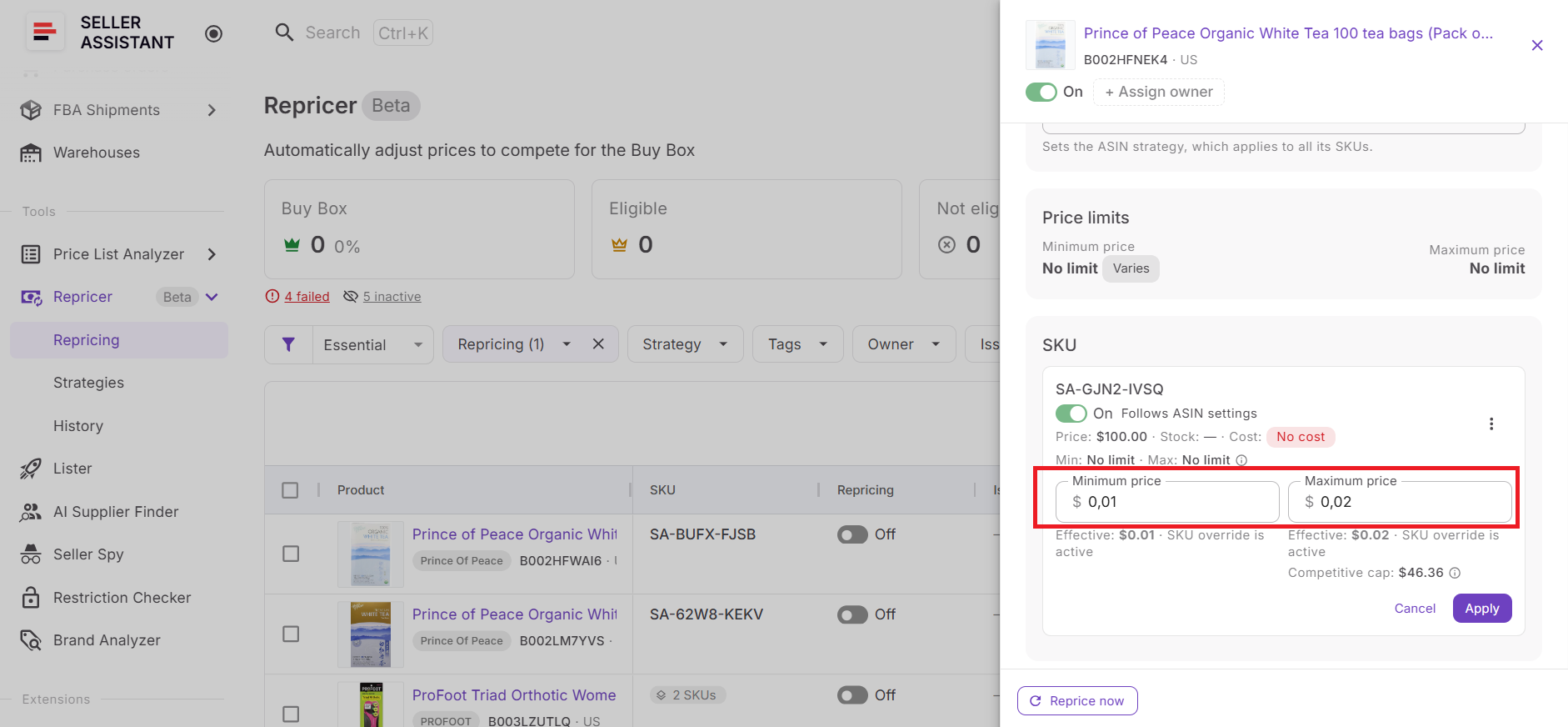
You can also set a maximum change per reprice. These limits are especially important during a price war because they prevent competitive logic from having unrestricted freedom to follow a rapidly falling market.
Step 6. Confirm landed cost and returns
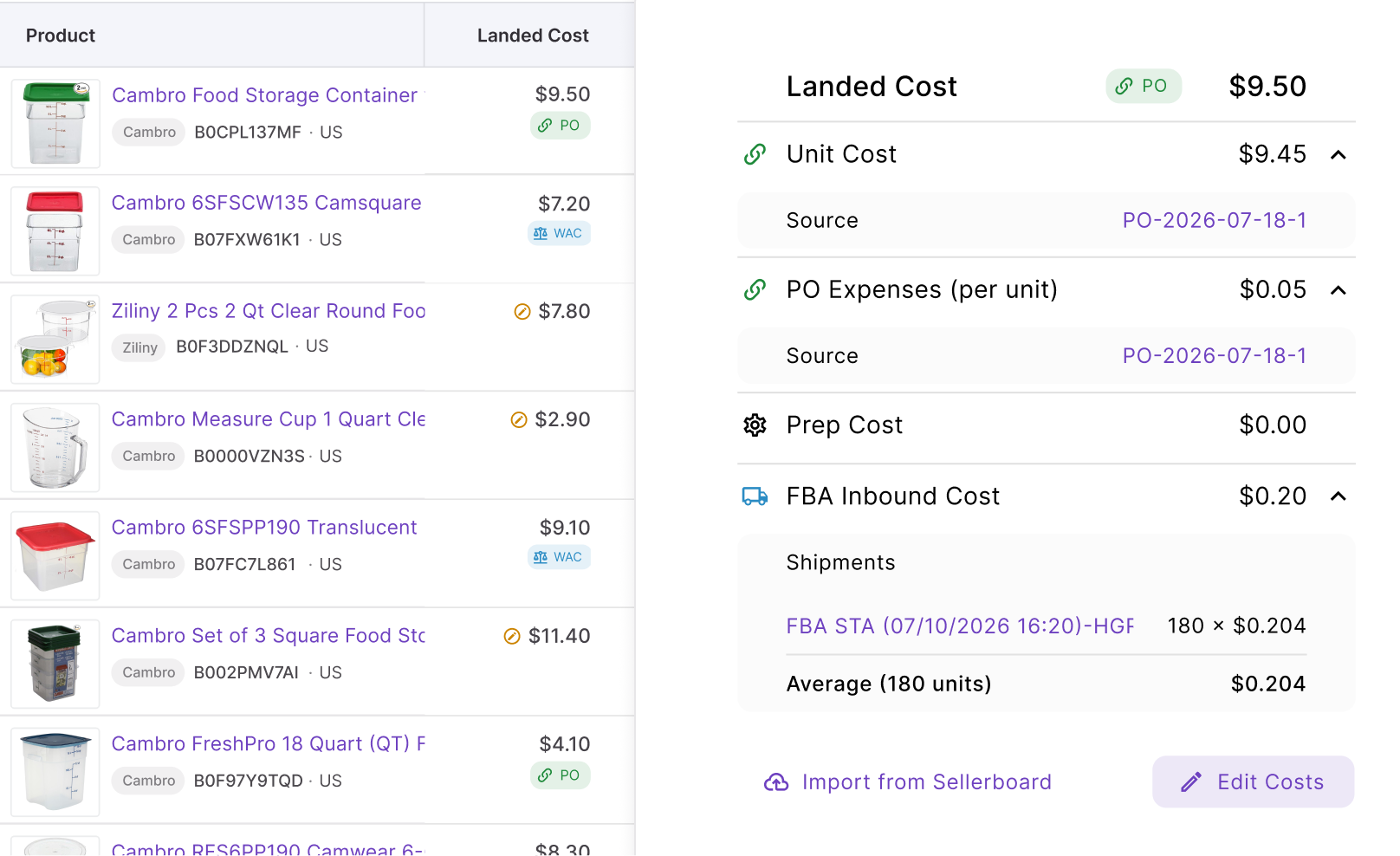
Review Landed Cost for every SKU using profitability-based protection. Depending on the available data, this can include relevant components such as unit cost, PO expenses, prep cost, and FBA inbound cost.
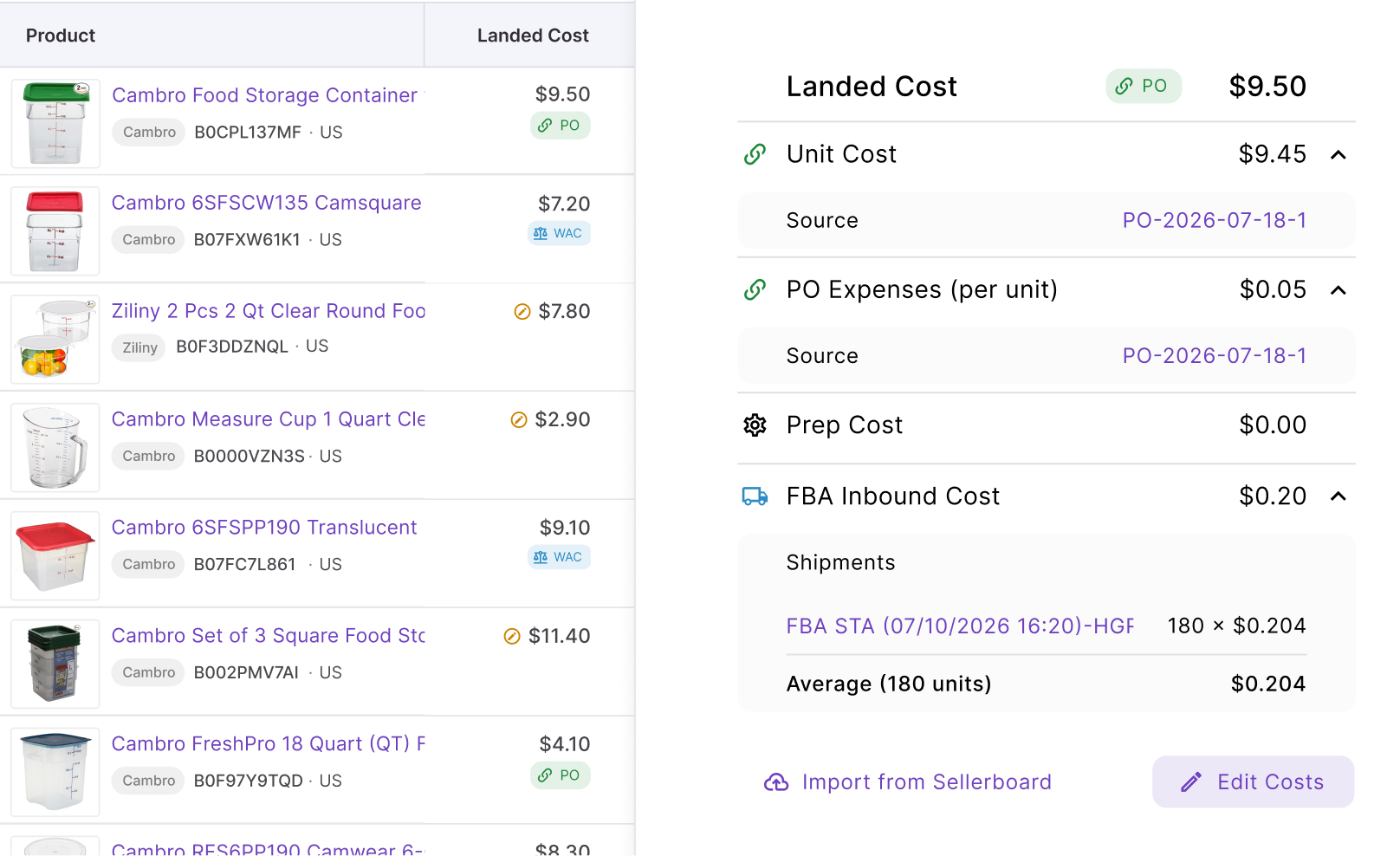
Then check profit, ROI, and margin against the current and allowed prices. Without accurate cost data, you cannot reliably determine whether the price war is reducing return or pushing the SKU toward a loss.
Step 7. Filter for warning signs
Use Tags and Owners to organize responsibility across the catalog.
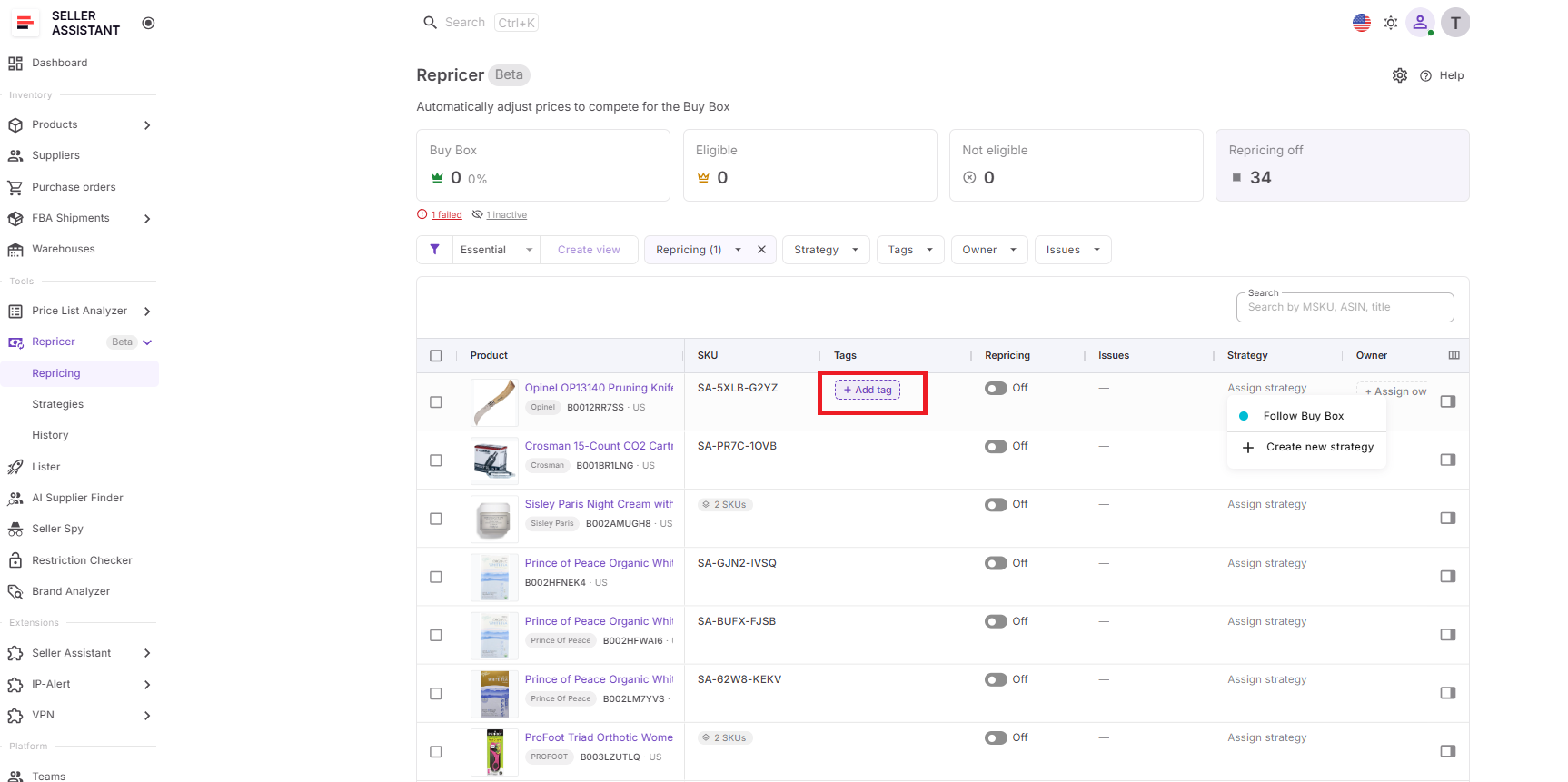
Then review Issues for Price war, On floor, No cost, Capped, Failed, and other exceptions.
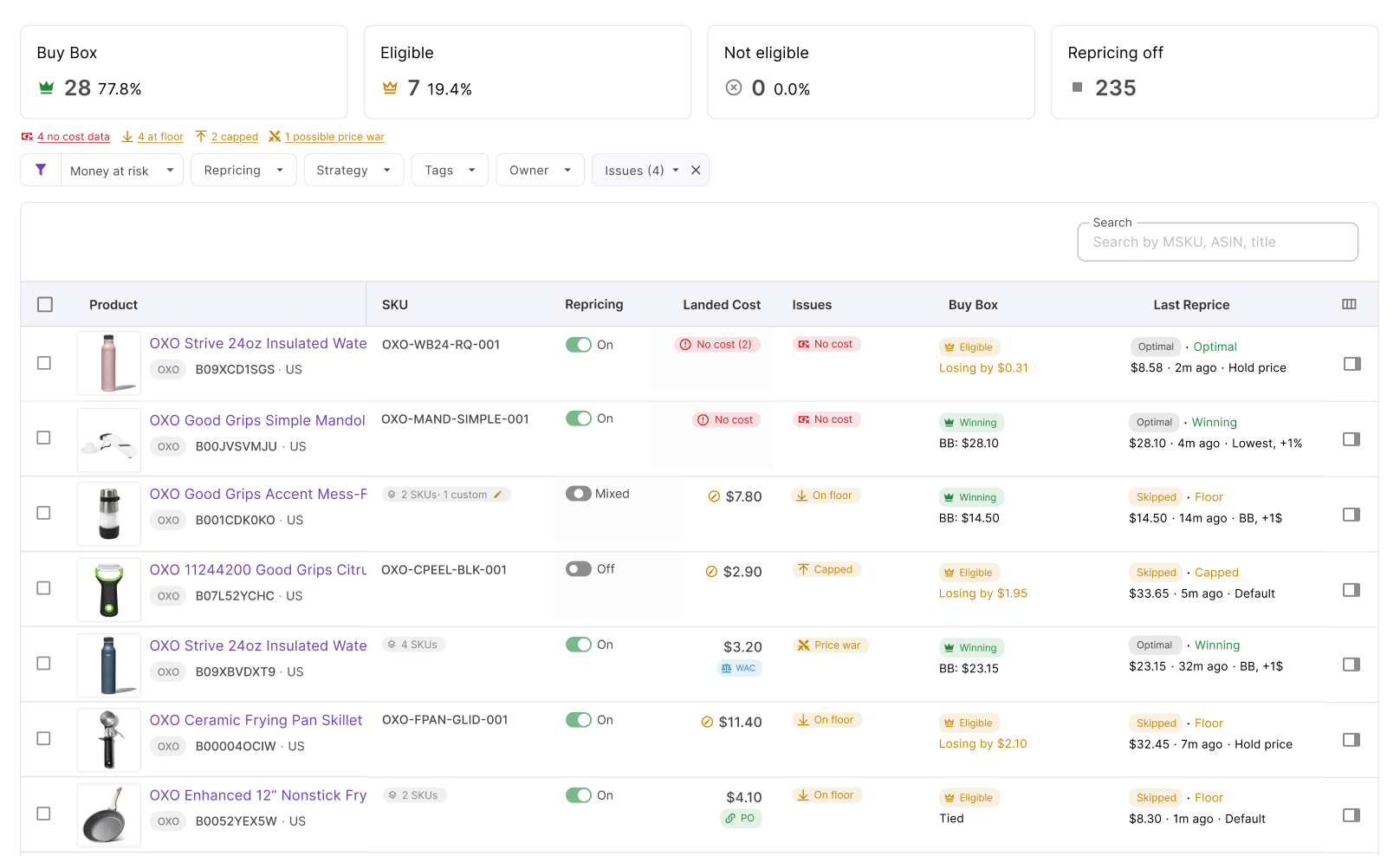
For price-war monitoring, Price war tells you the competitive situation deserves attention, while On floor tells you the offer has reached its configured lower boundary. No cost is also critical because missing cost data can undermine cost-based profitability protection.
Step 8. Start repricing and watch profitability
Enable the products that are ready and click Start repricing. Seller Assistant will begin evaluating them according to their strategies, conditional rules, market conditions, cost data, and pricing safeguards.
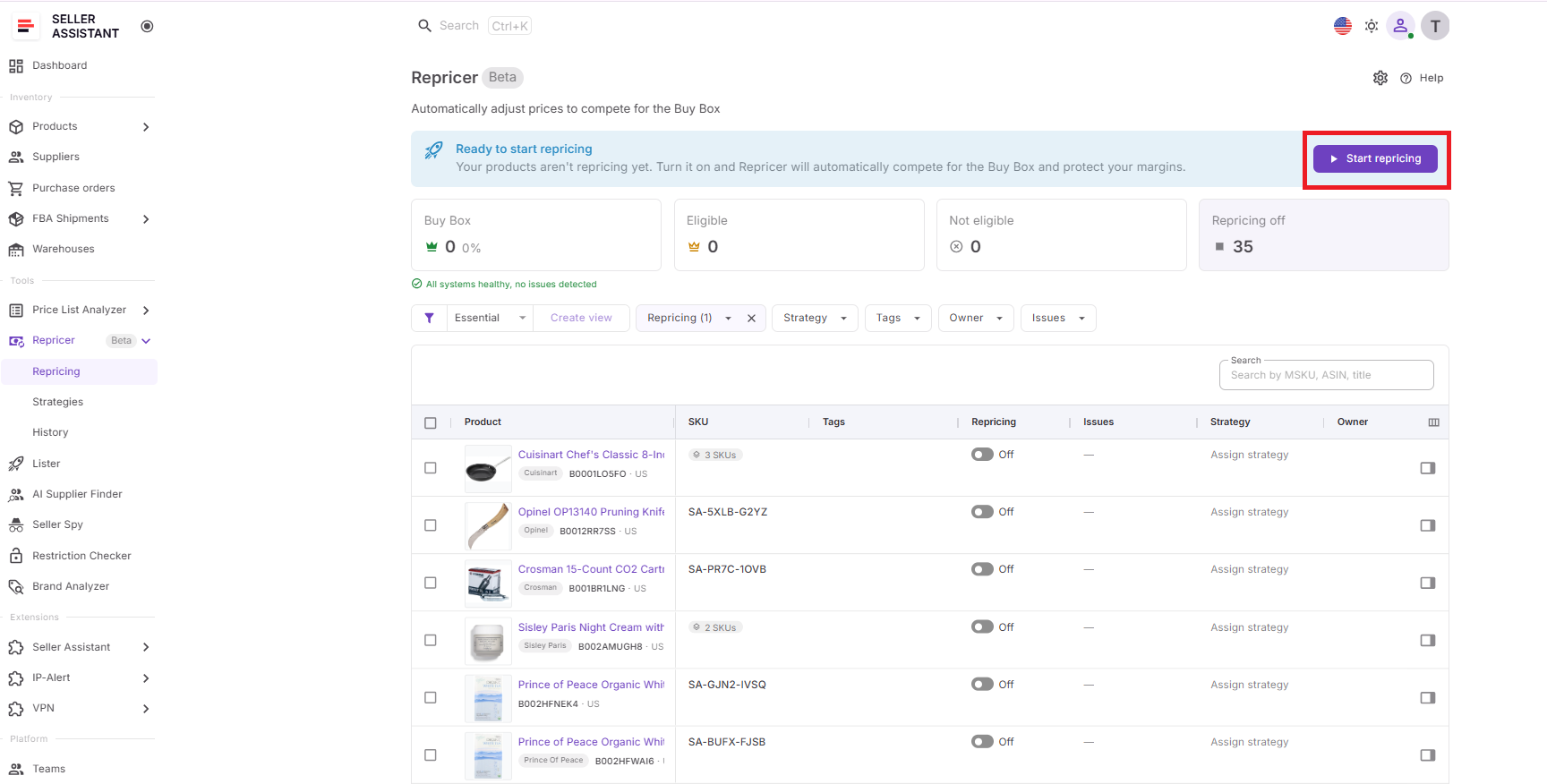
Once active, monitor Price war Issues, Buy Box performance, current price, landed cost, profit, ROI, margin, price limits, and Repricing History. If a SKU repeatedly reaches its floor during a price war, investigate the competition, costs, and product economics before lowering the minimum simply to keep chasing the Buy Box.
FAQ
Does an Amazon price war always mean sellers are selling at a loss?
No. Sellers on the same ASIN can have very different sourcing costs and acceptable returns, so one seller may still be profitable at a price that puts another below break-even.
Should I stop selling a product when a price war starts?
Not necessarily, because some price wars are temporary and competitors may sell through their inventory or change their pricing. Consider your remaining margin, inventory age, sales velocity, and replenishment cost before deciding whether to wait, keep competing, or exit the ASIN.
Can raising my price during a price war ever make sense?
Yes, particularly when protecting margin is more important than maximizing short-term sales velocity. A higher price can also position your remaining inventory for a potential market recovery rather than committing units to increasingly low-margin sales.
How can I calculate how much money a price war has already cost me?
Compare your actual profit per unit during the affected period with the profit you would have earned at your previous sustainable selling price, then multiply the difference by units sold. This measures profit erosion, which can be substantial even when none of those sales produced an accounting loss.
Does Amazon warn sellers when an offer is below their own break-even price?
Do not rely on Amazon to know the complete economics of your inventory, because your sourcing and operational costs are specific to your business. Sellers need their own accurate cost data and profitability tracking to determine whether a competitive Amazon price is still financially acceptable.
Final Thoughts
An Amazon price war becomes a problem long before a SKU necessarily starts showing a negative profit. Falling prices can steadily reduce profit per unit, ROI, and margin while sales and Buy Box performance still look healthy, so sellers need to judge competition against their own landed cost and required return – not against competitor prices alone.
Seller Assistant Repricer makes that connection visible by bringing Price war Issues, Buy Box and competitor data, landed cost, profitability metrics, pricing floors, and Repricing History into the repricing workflow. With cost-aware safeguards and automated pricing rules in place, wholesale, online arbitrage, and dropshipping sellers can stay competitive when the numbers make sense – and know when protecting profit matters more than following the price war down.