Seller Assistant Repricer keeps your Buy Box competitive around the clock, adjusting prices within minutes of a competitor move while protecting your margin against landed cost. But the tool only works as well as it’s set up – strategies, price limits, and cost data all need to be in place before repricing can run safely.
This post walks through turning on Repricer for the first time, building a strategy from rules instead of guesswork, setting minimum and maximum prices per SKU, and reading the signals that tell you when something needs attention.
By the end, you’ll have a working repricing setup, not just a toggle switched on.
Why Smarter Repricing Matters for Amazon Sellers
Amazon prices can change throughout the day as competitors reprice, Buy Box ownership shifts, and stock levels change. For wholesale, online arbitrage, and dropshipping sellers managing many SKUs, manual pricing makes it difficult to react fast enough without sacrificing margin.
Automated repricing solves this by applying predefined pricing strategies, profit safeguards, and market-based rules around the clock. Instead of choosing a new price for every market change, sellers can define when to compete, when to hold, and how low or high each offer is allowed to go.
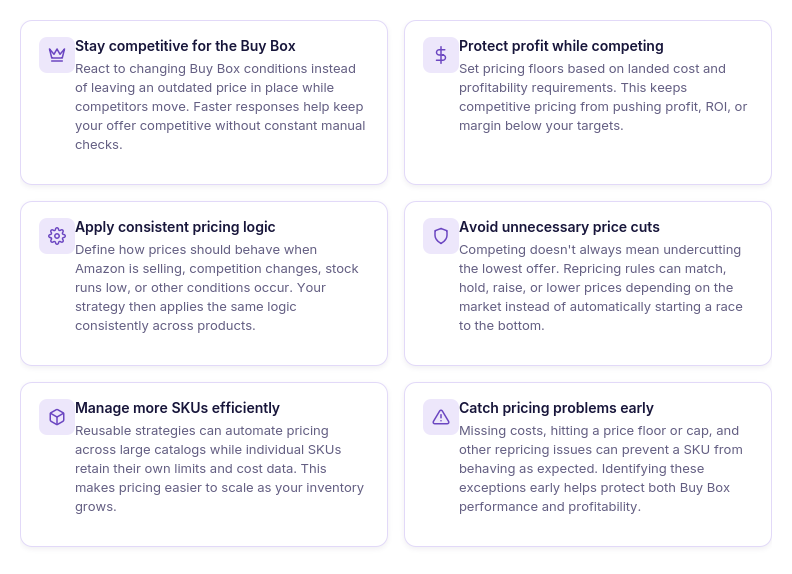
Stay competitive for the Buy Box
Track Buy Box conditions and adjust prices when the competitive situation changes. This helps avoid leaving an outdated price in place while other sellers move.
Protect profit while competing
Use landed cost and minimum price requirements to keep repricing within profitable boundaries. A competitive price should not come at the expense of selling below the return you are willing to accept.
Apply consistent pricing logic
Set rules for situations such as Amazon selling, different Buy Box holder types, no competition, or low stock. The same pricing logic can then be applied automatically instead of making repeated manual decisions.
Avoid unnecessary price cuts
Winning the Buy Box does not always require being the cheapest seller. Structured rules can hold, match, raise, or lower a price depending on market conditions rather than automatically undercutting competitors.
Manage many SKUs at once
Reusable strategies let sellers apply the same pricing approach across multiple products while maintaining SKU-level price limits where needed. This makes repricing practical as a catalog grows.
Catch pricing problems early
Issues such as missing cost data, reaching the price floor, hitting a cap, or problematic pricing behavior can affect how a SKU is repriced. Monitoring these signals helps sellers identify products that need attention instead of discovering the problem after margins or Buy Box performance have already been affected.
What Is Seller Assistant’s Repricer?
Seller Assistant Repricer is an automated Amazon repricing tool that monitors marketplace conditions and adjusts your offer prices according to strategies you define. It combines Buy Box and competitor data with conditional rules, price limits, landed cost, and profitability requirements, so repricing responds to the market without ignoring your financial targets.
The Repricer is designed for Amazon wholesale sellers, online arbitrage sellers, and dropshippers managing multiple SKUs and competing for the Buy Box. It is particularly useful when manual price checks become impractical and sellers need different pricing logic for situations such as Amazon entering a listing, competition disappearing, stock running low, or the Buy Box changing hands.
The main benefit is that competition and profitability are managed together. Seller Assistant can react to market changes in seconds, follow predefined repricing rules, protect a SKU’s effective minimum price using landed cost and profit requirements, flag issues that need attention, and keep a history of repricing decisions – reducing manual work while giving sellers control over how their prices move.
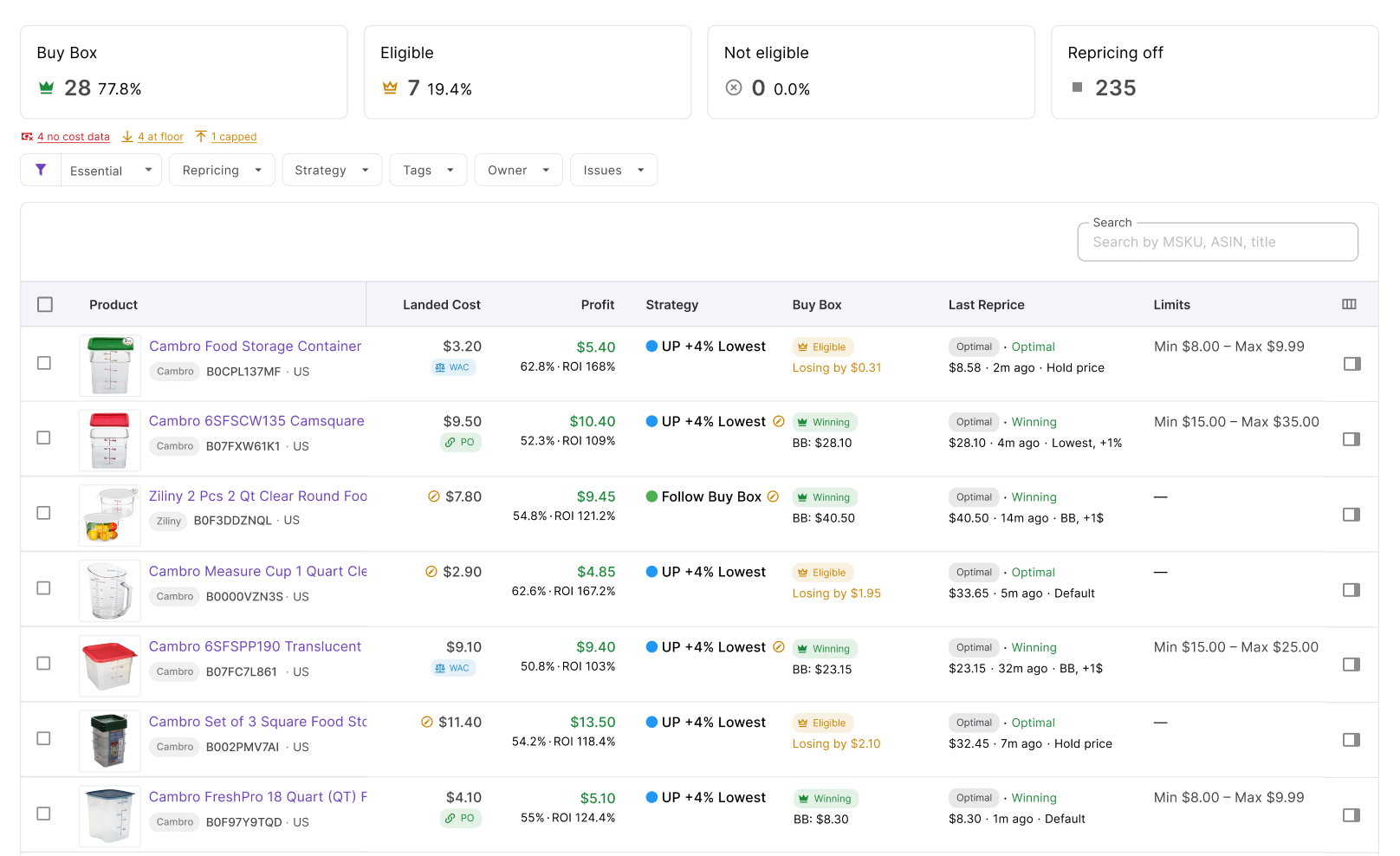
Seller Assistant Repricer at a glance
| Area | Description |
|---|---|
| Fast automated repricing | Monitor Amazon marketplace changes and automatically adjust prices according to your strategy, with reactive repricing responding to relevant price changes in about 2–5 seconds. |
| Buy Box and competitor tracking | See Buy Box status and price, competitor count, lowest FBA and FBM prices, stock, and other market data used to guide repricing decisions. |
| Reusable repricing strategies | Create strategies from templates or from scratch and assign them to individual products or multiple products at once. |
| Conditional pricing rules | Set if/then rules based on Amazon selling, Buy Box holder type, competition, stock, time of day, day of week, and other conditions. |
| Flexible pricing actions | Follow the Buy Box, Follow Lowest Price, follow Amazon’s suggested price (FOEP), or Hold Price, with supported dollar or percentage adjustments. |
| Profit protection | Calculate pricing floors using minimum ROI, minimum margin, target profit, or manual limits so competition doesn’t automatically push prices below your targets. |
| Landed-cost-aware pricing | Use cost data connected to SKUs and purchase order to evaluate profitability and establish safer pricing boundaries. |
| SKU-level price control | Set minimum and maximum prices and other safeguards for individual SKUs while using broader strategies across your catalog. |
| Repricing issue detection | Surface products with missing cost data, prices at the floor or cap, failed repricing, possible price wars, and other situations requiring attention. |
| Repricing history | Review previous pricing decisions, price changes, statuses, and reasons to understand exactly how your strategies behaved. |
| Catalog and team organization | Add tags, assign product owners, use filters, and apply bulk actions to make large repricing catalogs easier to manage. |
| Connected reseller workflow | Keep repricing connected with Seller Assistant’s product, cost, purchase order, inventory, and profitability data instead of managing pricing in an isolated tool. |
What Can You Do with Seller Assistant Repricer?
Seller Assistant Repricer covers the full repricing workflow – from tracking Buy Box and competitor changes to deciding how your price should react and how far it can move. It combines market data, reusable strategies, conditional rules, landed cost, profit protection, issue detection, and repricing history, so sellers can automate pricing without losing control over individual SKUs.
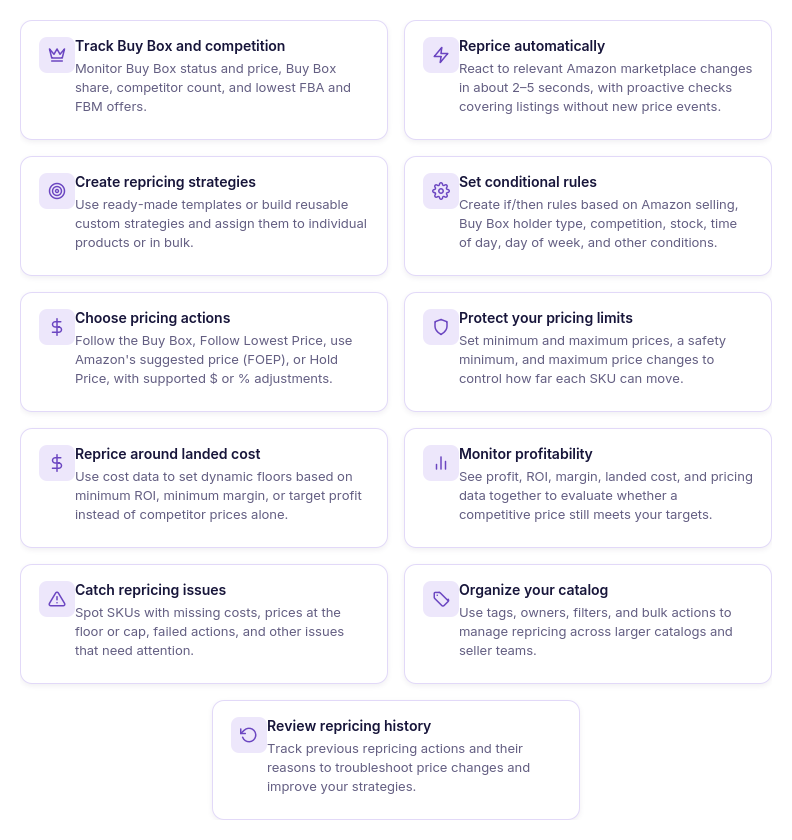
Track Buy Box and competitor changes
Monitor your Buy Box status and price, Buy Box share, competitor count, lowest FBA and FBM offers, stock, and other market data. This gives you the competitive context behind each repricing decision instead of relying on the lowest price alone.
React to price changes automatically
Use reactive repricing to respond to relevant Amazon marketplace changes in about 2–5 seconds, while proactive checks revisit listings even when no new competitor event occurs. This keeps both fast-moving and quieter ASINs covered without manual price monitoring.
Create reusable repricing strategies
Build a strategy from scratch or start with templates such as Follow Buy Box, Match Buy Box, Smart FBA, Protect Profit, and Target 25% ROI. Assign strategies to individual products or in bulk, and set a team default for products without their own strategy.
Build conditional pricing rules
Create if/then rules based on Amazon selling, Buy Box holder type, competitor count, no competition, stock level, time of day, and day of week. Rules run from top to bottom and the first match wins, so you can control which pricing logic takes priority.
Choose how your price responds
Follow the Buy Box, Follow Lowest Price, use Amazon’s suggested price (FOEP), or Hold Price when a condition calls for no change. Apply fixed-dollar or percentage adjustments to price above, match, or price below the selected target.
Set SKU price limits
Control the range in which each SKU can move by setting minimum and maximum prices. You can also limit the maximum change per reprice, helping prevent a single market event from producing a larger price move than you want.
Protect profit with landed cost
Use landed cost from your SKU or purchase order data to calculate pricing floors based on minimum ROI, minimum margin, or target profit. A safety minimum provides an additional hard floor, so dynamic repricing cannot push the offer below it.
Monitor profitability while repricing
Review profit, ROI, margin, and related cost data alongside pricing information. This helps you judge whether competing for a particular Buy Box price still makes financial sense for the SKU.
Catch repricing issues
Use the Issues column and filters to find products that need attention, such as SKUs with no cost data or offers that have reached their floor or cap. Fixing these exceptions helps keep automated strategies working with the data and limits you intended.
Organize products and team responsibility
Add tags to group products and assign owners to specific SKUs or parts of the catalog. Filters and bulk actions make it easier to manage repricing when a wholesale, OA, or dropshipping operation has hundreds or thousands of offers.
Review repricing history
Use History to see previous pricing actions and understand why a price changed, stayed unchanged, or was skipped. This audit trail helps you troubleshoot unexpected behavior and refine rules based on what actually happened on the listing.
How Seller Assistant Repricer Works
Seller Assistant Repricer turns Amazon market data into automatic pricing decisions. It monitors each SKU, checks the strategy and rules assigned to it, applies your profit and price limits, and then decides whether the offer should move, stay where it is, or be skipped.
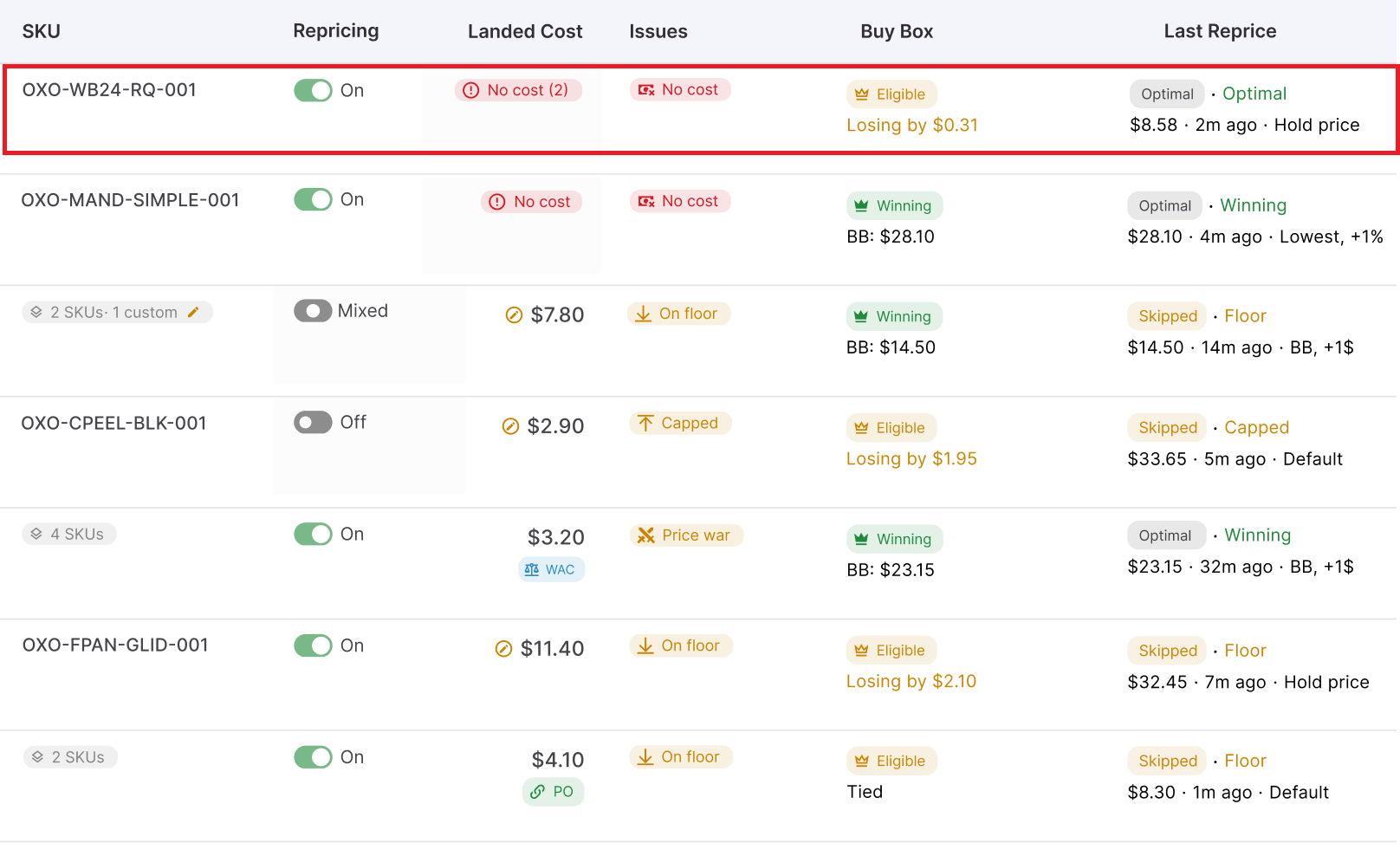
The Repricer also gives sellers the data behind those decisions. Depending on the view, you can monitor metrics such as current price, Buy Box status and price, Buy Box share, lowest FBA and FBM prices, competitor count, stock, landed cost, profit, ROI, margin, price limits, strategy, issues, and repricing history.
Repricing starts with live market data
Seller Assistant syncs SKUs from your connected Amazon account and monitors the marketplace conditions relevant to each offer. The Repricer can see where your price stands against the Buy Box and competing offers rather than changing prices based on a fixed schedule alone.
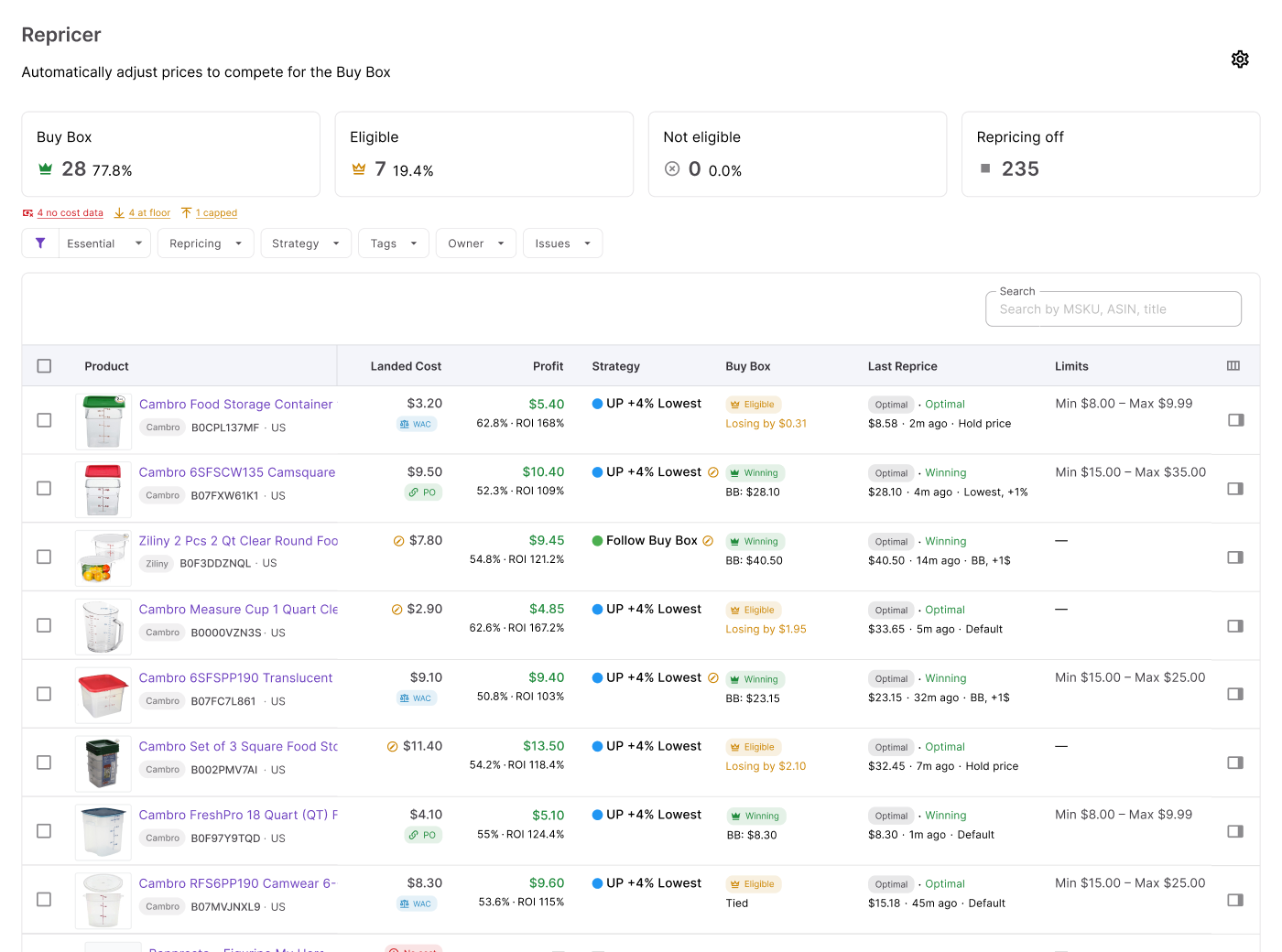
The Repricer workspace also puts market and product data next to your pricing controls. This makes it possible to see whether you have the Buy Box, how much of the Buy Box you are getting, where the lowest FBA and FBM offers sit, how many competitors are active, and how much stock you have before evaluating the pricing result.
Each product follows a repricing strategy
A strategy defines how a product should be repriced. You can assign a strategy to one product, apply it to multiple products in bulk, or use a team default for products without their own strategy.
Seller Assistant provides ready-made templates for common Amazon reseller scenarios:
- Follow Buy Box – follows the Buy Box when you are losing it and holds your price when you are winning.
- Match Buy Box – matches the Buy Box without automatically undercutting it.
- Smart FBA – adapts pricing to the competitive situation, including FBM offers, Amazon’s presence, and low stock.
- Protect Profit – follows the Buy Box while using cost data to keep the offer above break-even plus $1.
- Target 25% ROI – follows the Buy Box while maintaining at least 25% ROI and skips SKUs without the cost data required to calculate that target.
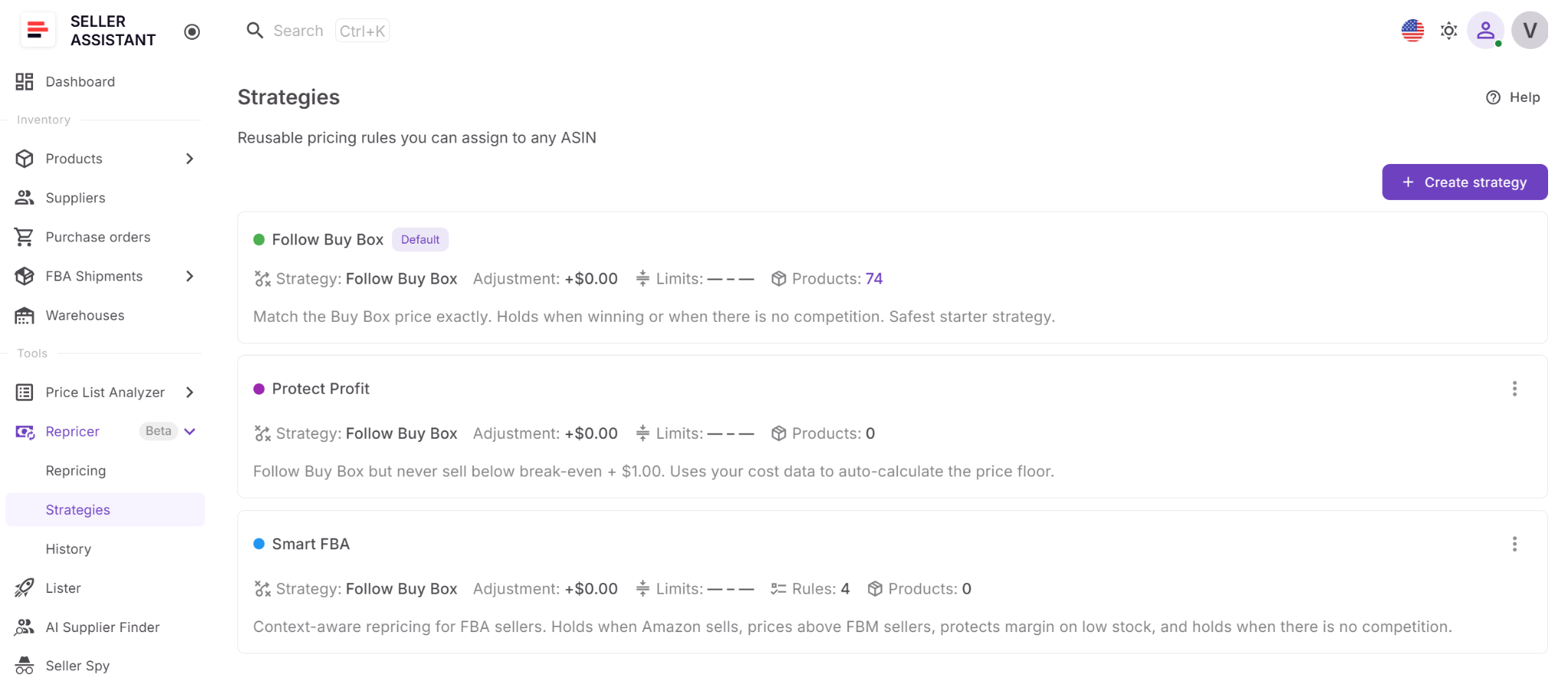
You can also start with a blank strategy when these templates do not fit your pricing model.
Rules change the strategy when conditions change
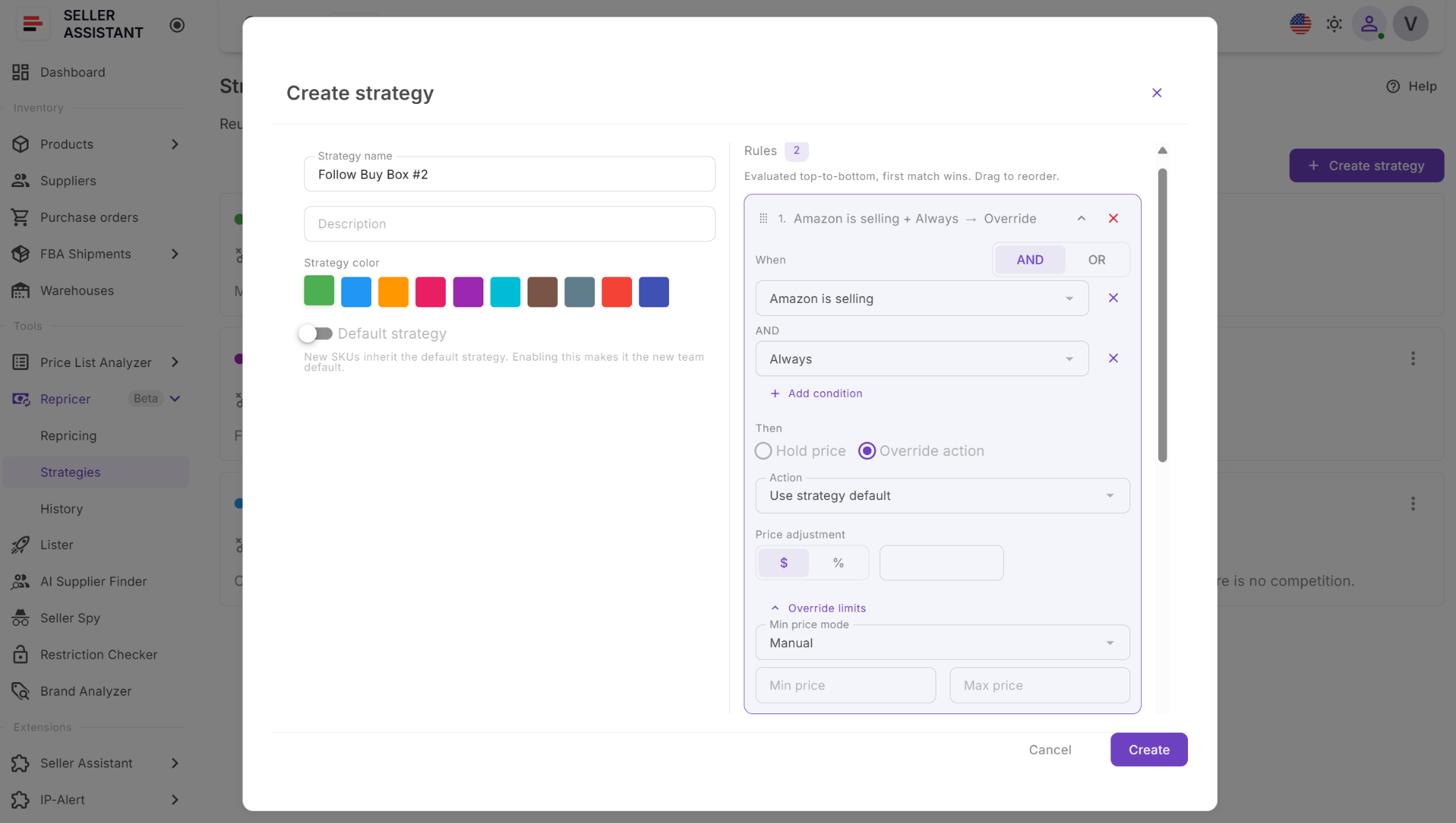
A strategy can contain conditional if/then rules that tell the Repricerr to behave differently in specific situations. Conditions include whether Amazon is selling, Buy Box holder type, competitors above or below your offer, no competition, stock above or below a threshold, time of day, and day of week.
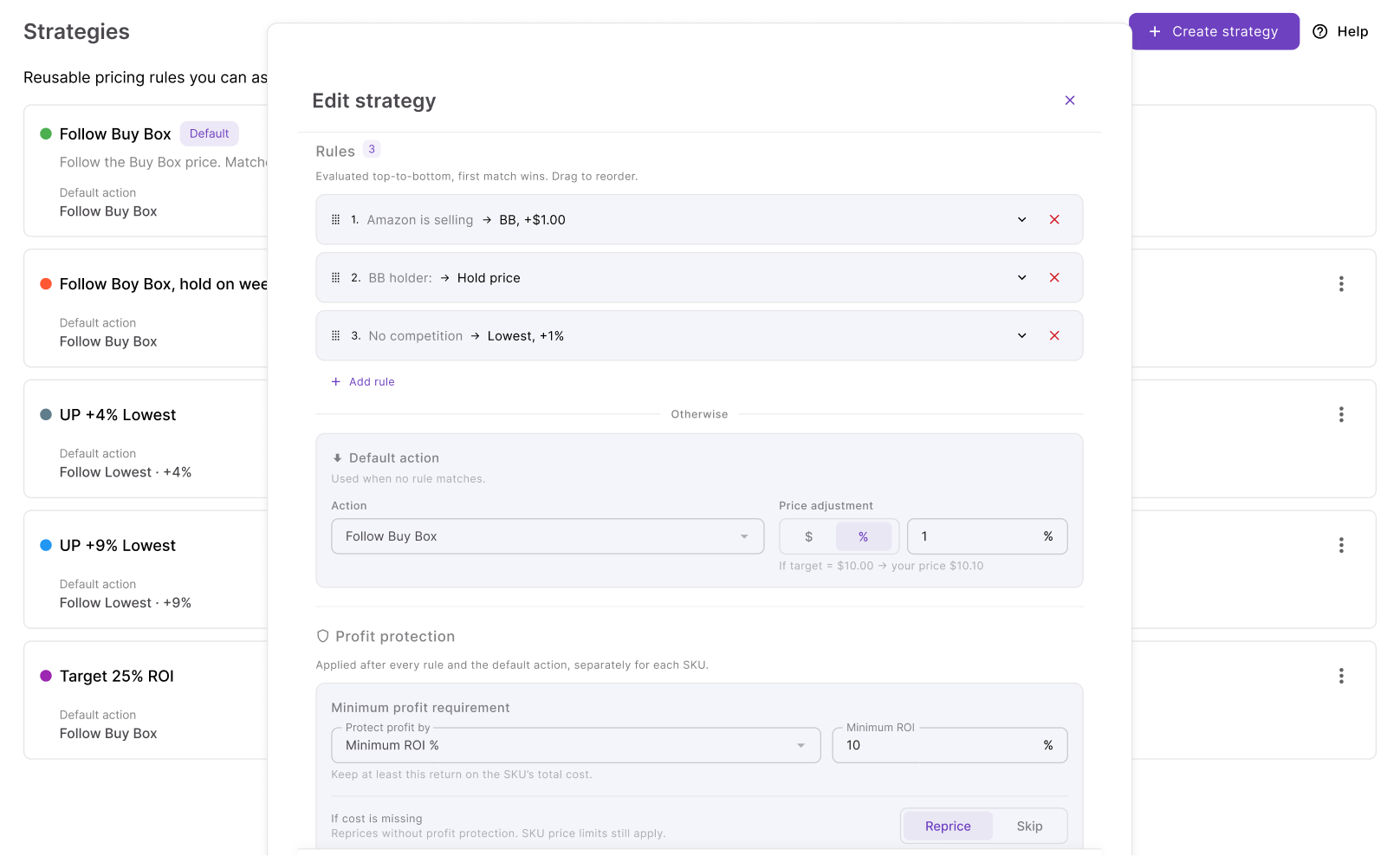
Multiple conditions can use AND or OR logic. Rules run from top to bottom, and the first matching rule wins, so their order determines which instruction takes priority.
For example, you could tell the Repricer to hold when Amazon is selling, raise the price when there is no competition, and use a different action when inventory drops below five units. You can also use time and day conditions to change your pricing approach during specific selling periods.
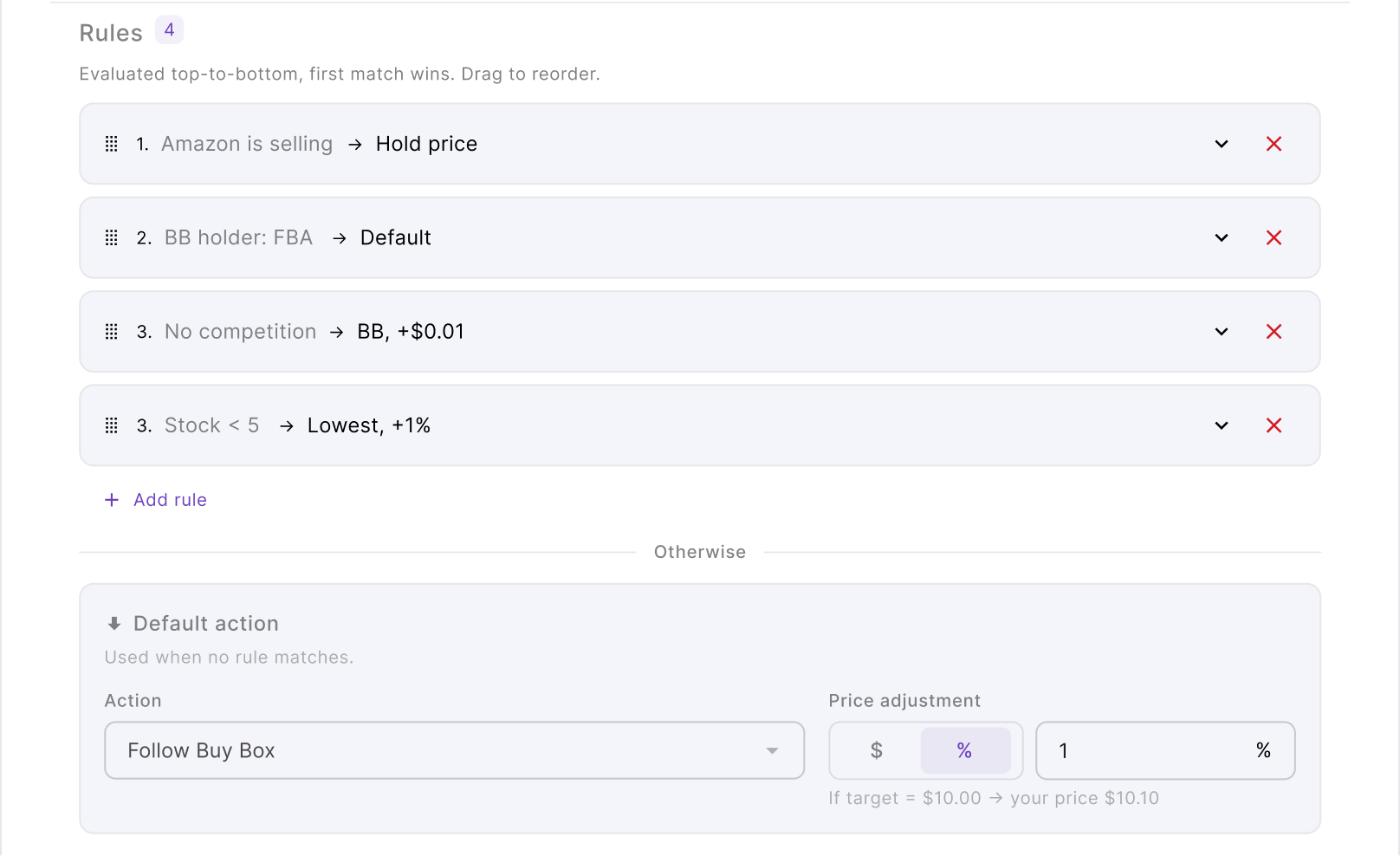
If none of the rules match the current situation, the Repricer uses the strategy’s default action.
Pricing actions determine where the price moves
Once the applicable rule is identified, Seller Assistant determines the pricing target. The Repricer can Follow Buy Box, Follow Lowest Price, follow Amazon’s suggested price (FOEP), or Hold Price when no change is wanted.
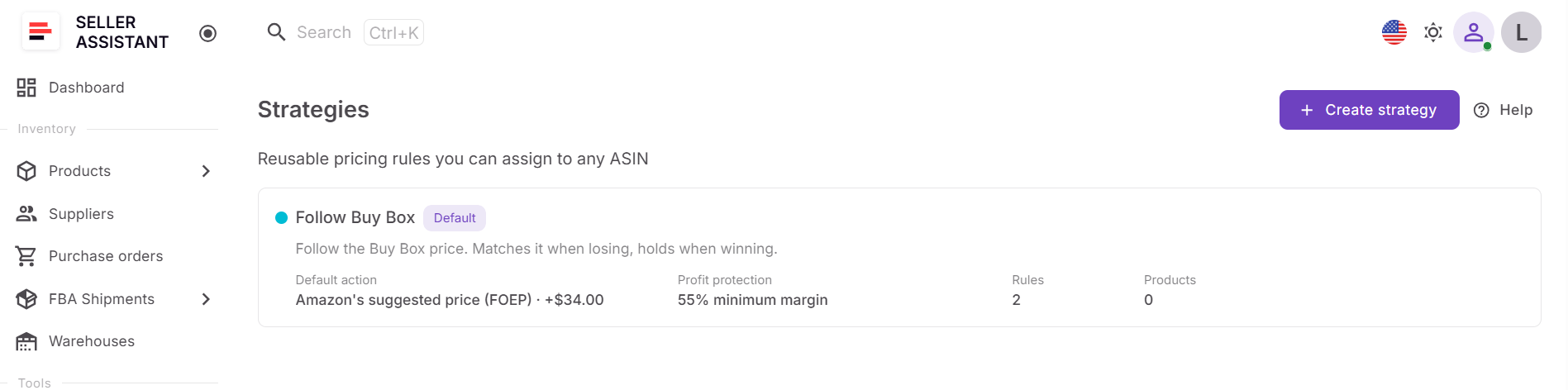
The target does not have to be copied exactly. You can add a fixed-dollar or percentage adjustment, allowing a strategy to match a target or price above or below it according to your selling approach.
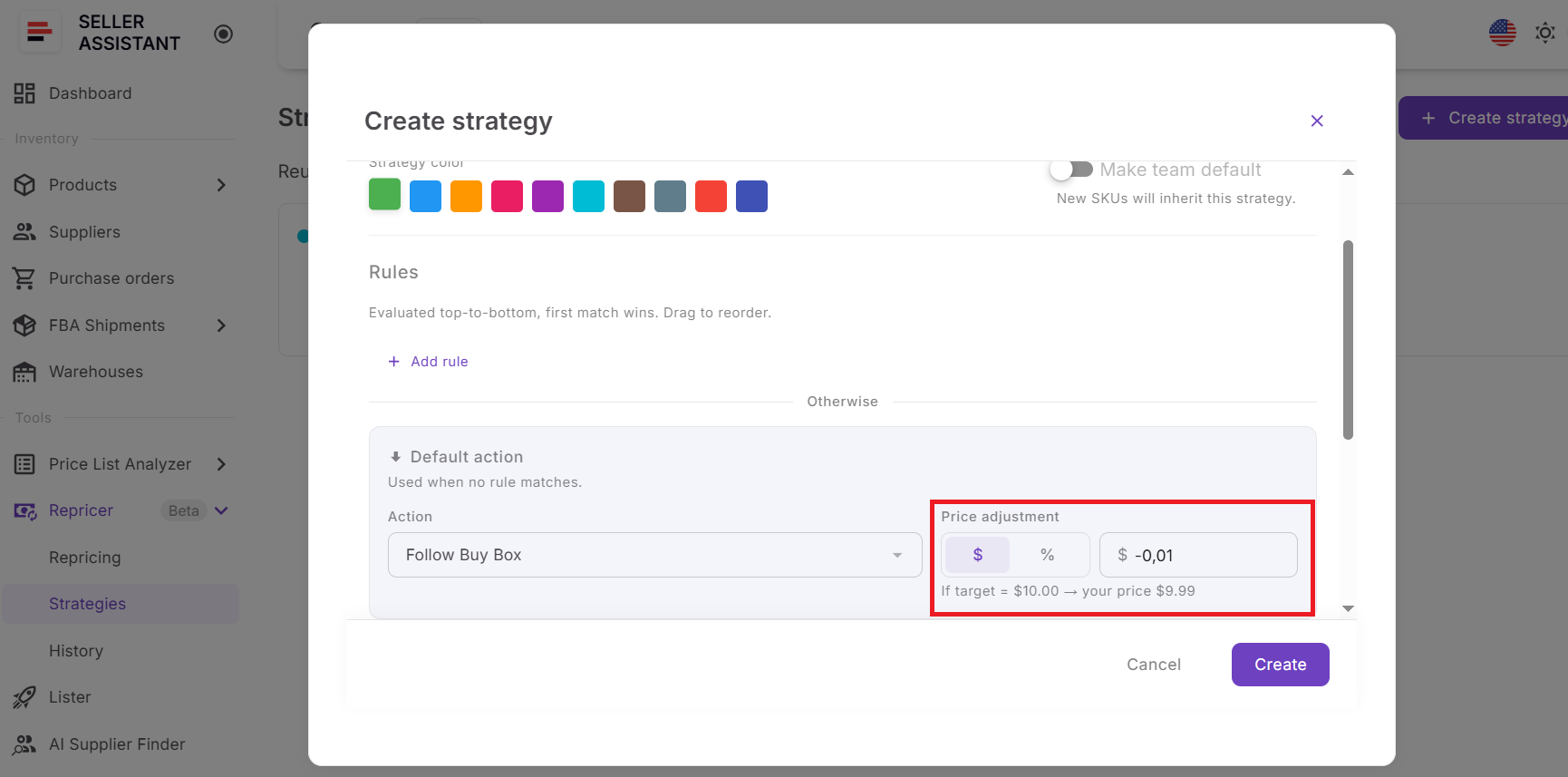
You can also set a maximum change per reprice as a fixed amount or percentage. This limits how much the offer can move in one repricing action even when market conditions change sharply.
Price limits keep repricing within your boundaries
Every competitive action still has to stay inside the pricing boundaries you set. Minimum price can be entered manually or calculated dynamically from minimum ROI, minimum margin, or target profit, while maximum price controls how high the offer is allowed to go.
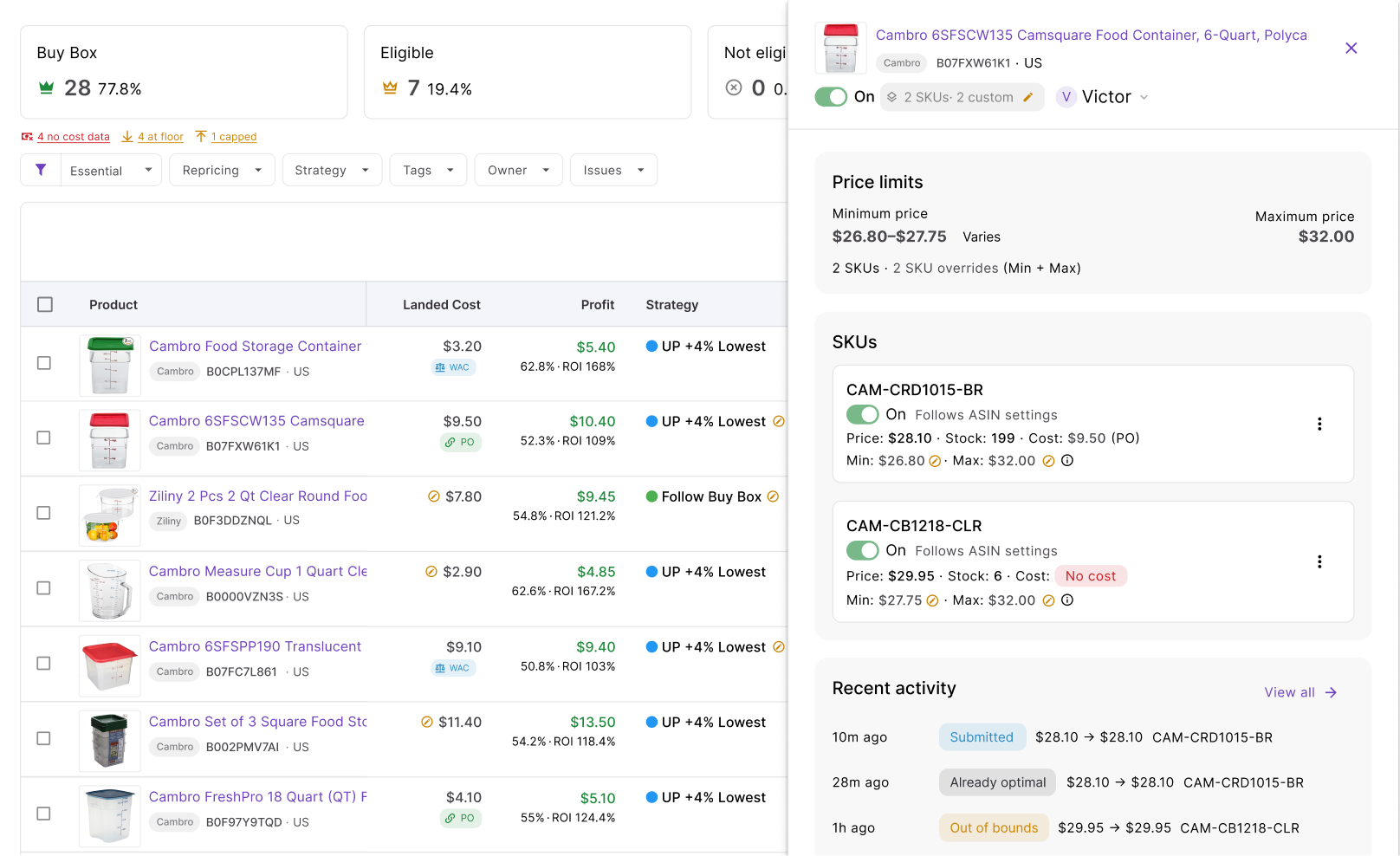
A separate safety minimum acts as the hard lower boundary, including when a dynamic minimum is being calculated. You can also specify what Repricer should do if a SKU has no cost data – skip repricing, use a manual minimum, or reprice without a floor.
SKU-level settings give you more control where individual products need different limits from the broader strategy.
Landed cost connects repricing to actual profitability
Seller Assistant can use landed cost stored at SKU level or received from connected purchase orders. This gives cost-based strategies a financial baseline for deciding how low an offer can safely move.
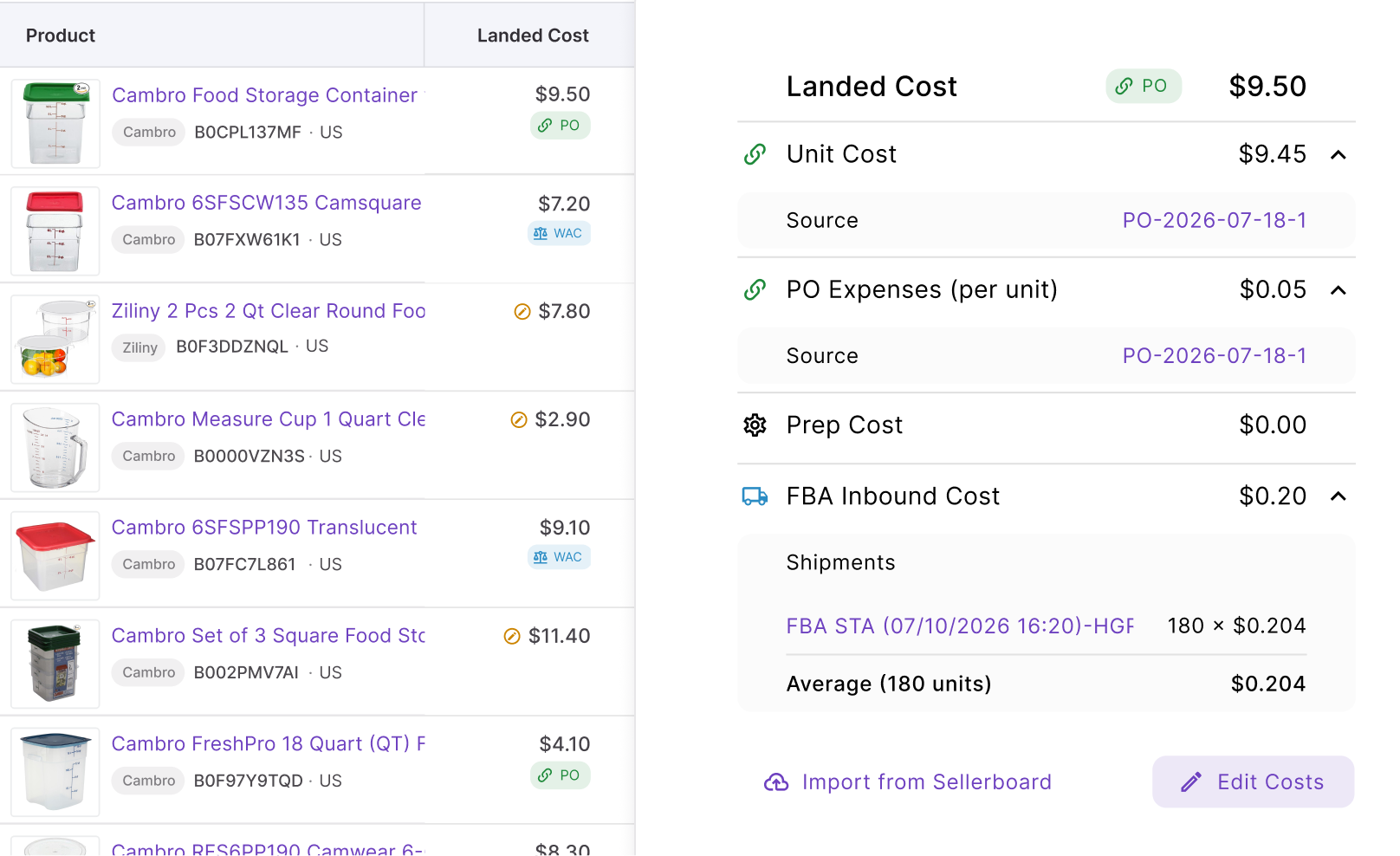
The Repricer also surfaces profitability metrics such as profit, ROI, and margin, including calculations around current and price-limit scenarios where available. Instead of seeing only that a competitor is cheaper, you can see whether following that price still works for your product economics.
Reactive and proactive repricing cover different market situations
Seller Assistant uses two repricing mechanisms. Reactive repricing responds to relevant Amazon marketplace events and can react in approximately 2–5 seconds, making it suited to listings where competing offers and Buy Box conditions change quickly.
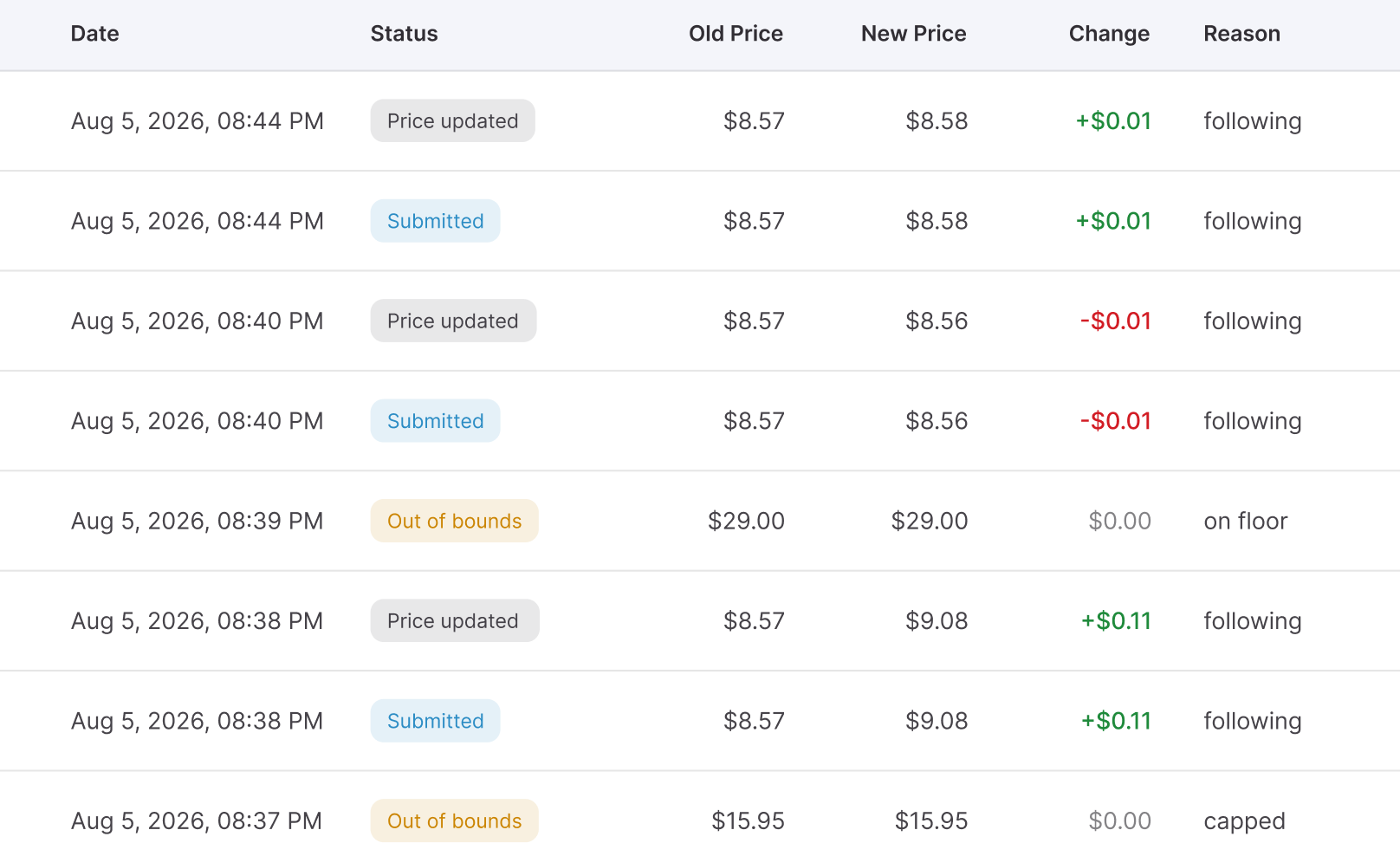
Proactive repricing periodically reevaluates products even when no competitor event has triggered a reaction. This covers quieter ASINs and strategy conditions that can change independently of competitor price moves, such as stock, time-of-day, or day-of-week rules.
Issues show when a SKU needs attention
Not every SKU is ready to reprice safely. Seller Assistant surfaces Issues so you can find products where missing data, price boundaries, or another condition may affect the expected repricing behavior.
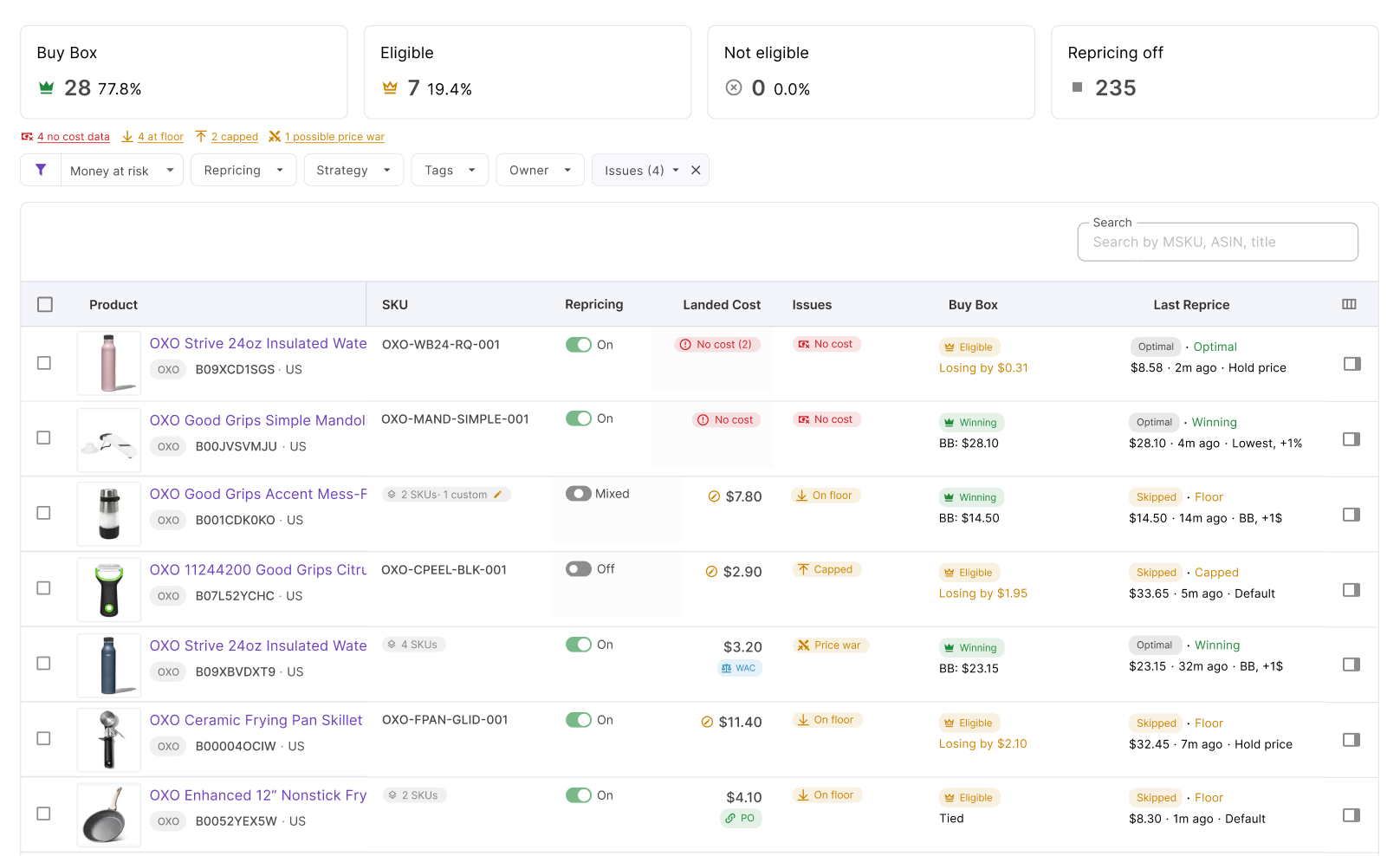
For example, a SKU may have No cost, be On floor, reach its price cap, encounter a failed repricing action, or show signs of a price-war situation. Instead of discovering these exceptions by manually inspecting every listing, you can filter the catalog and correct the affected products.
History explains what the Repricer did
Repricer History records pricing decisions so you can see what happened after a strategy evaluated a product. It helps show when the price changed, when an action was skipped, and which rule or condition was responsible.
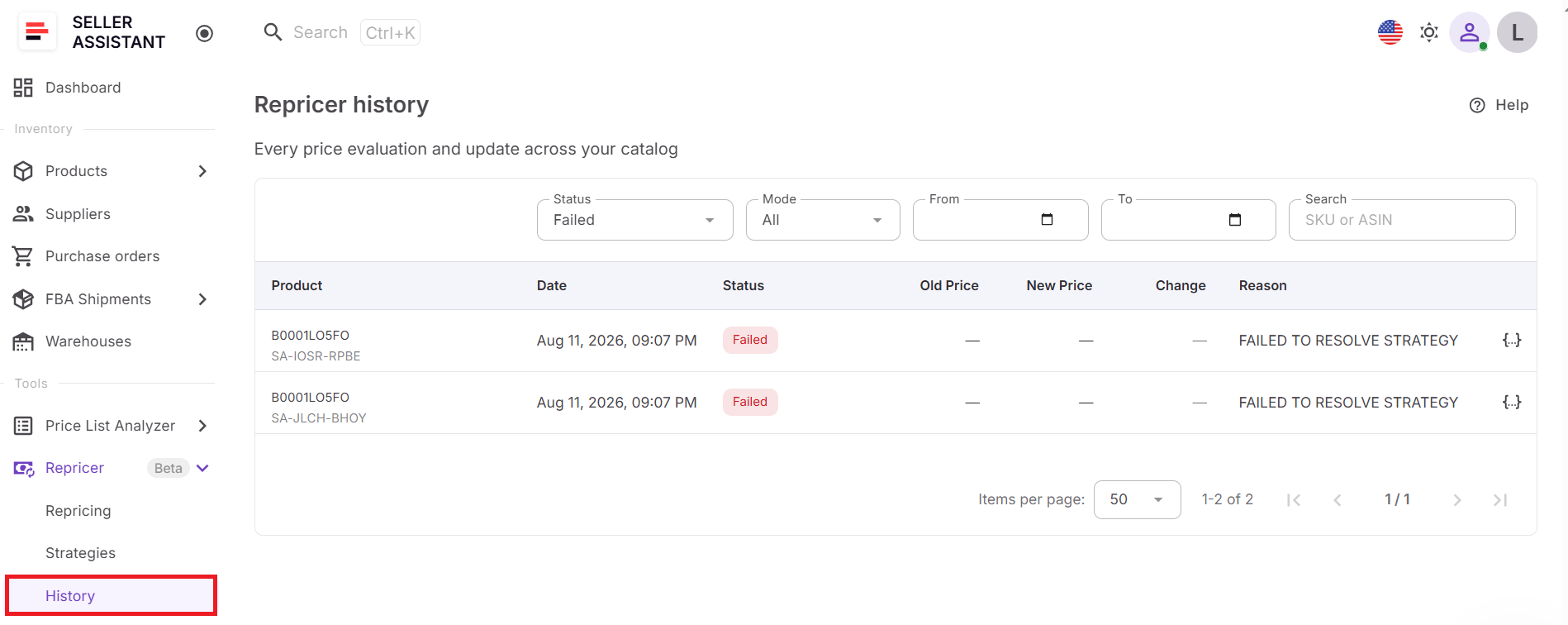
This turns repricing into an auditable process rather than a black box. If a SKU behaves differently from what you expected, you can check its history, market conditions, strategy, rules, costs, and limits to find the reason and adjust the setup.
How to Set Up and Use Seller Assistant Repricer Step by Step
Once your catalog is synced into Seller Assistant, setup moves from market visibility to pricing control. The goal is to configure strategy, ownership, costs, and safeguards first, then switch on repricing only when the products are ready.
Step 1. Open the Repricing workspace
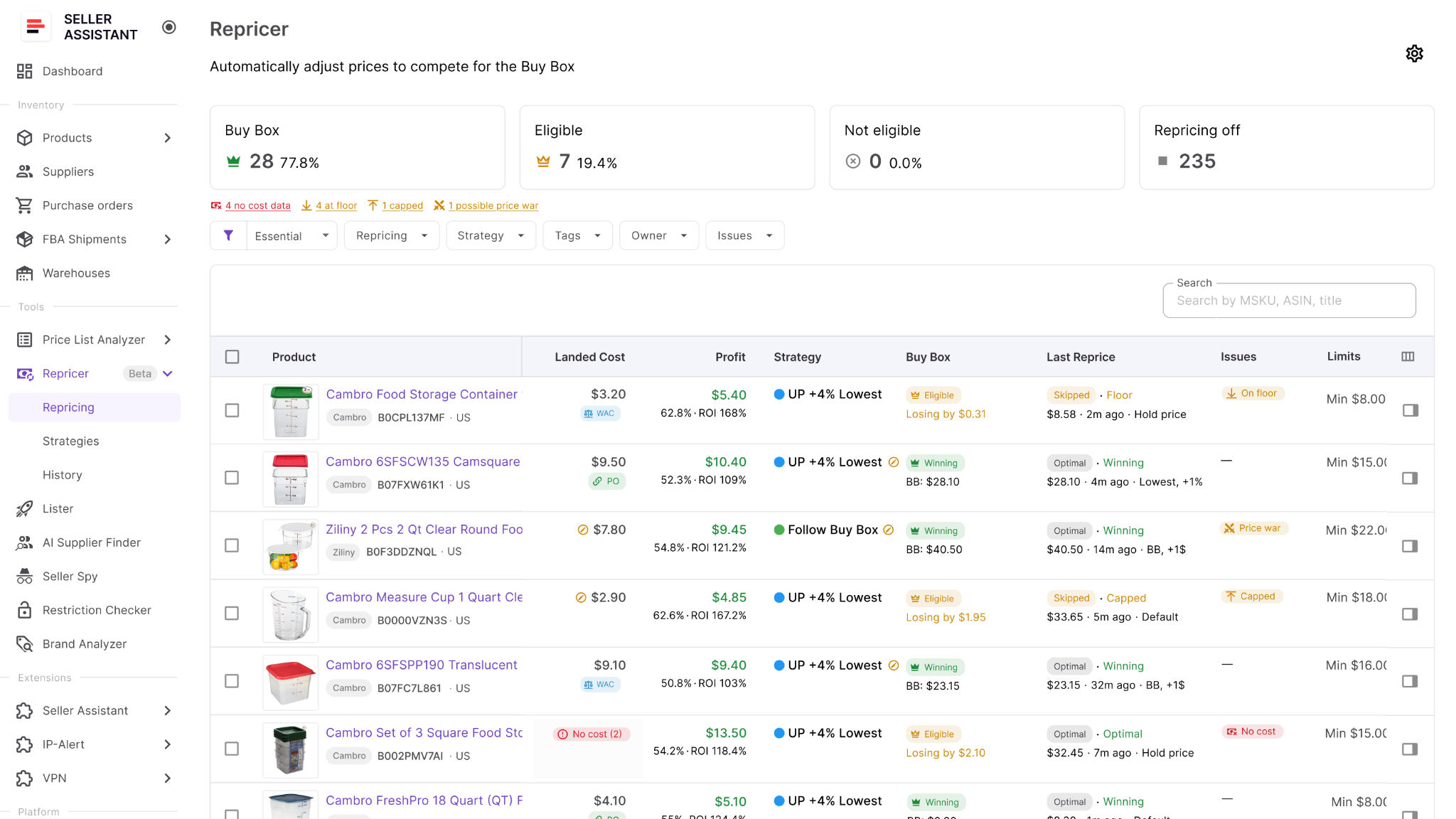
Go to Repricer → Repricing in your Seller Assistant account. The main table brings together products, SKUs, repricing status, assigned strategies, tags, owners, Buy Box data, and detected issues.
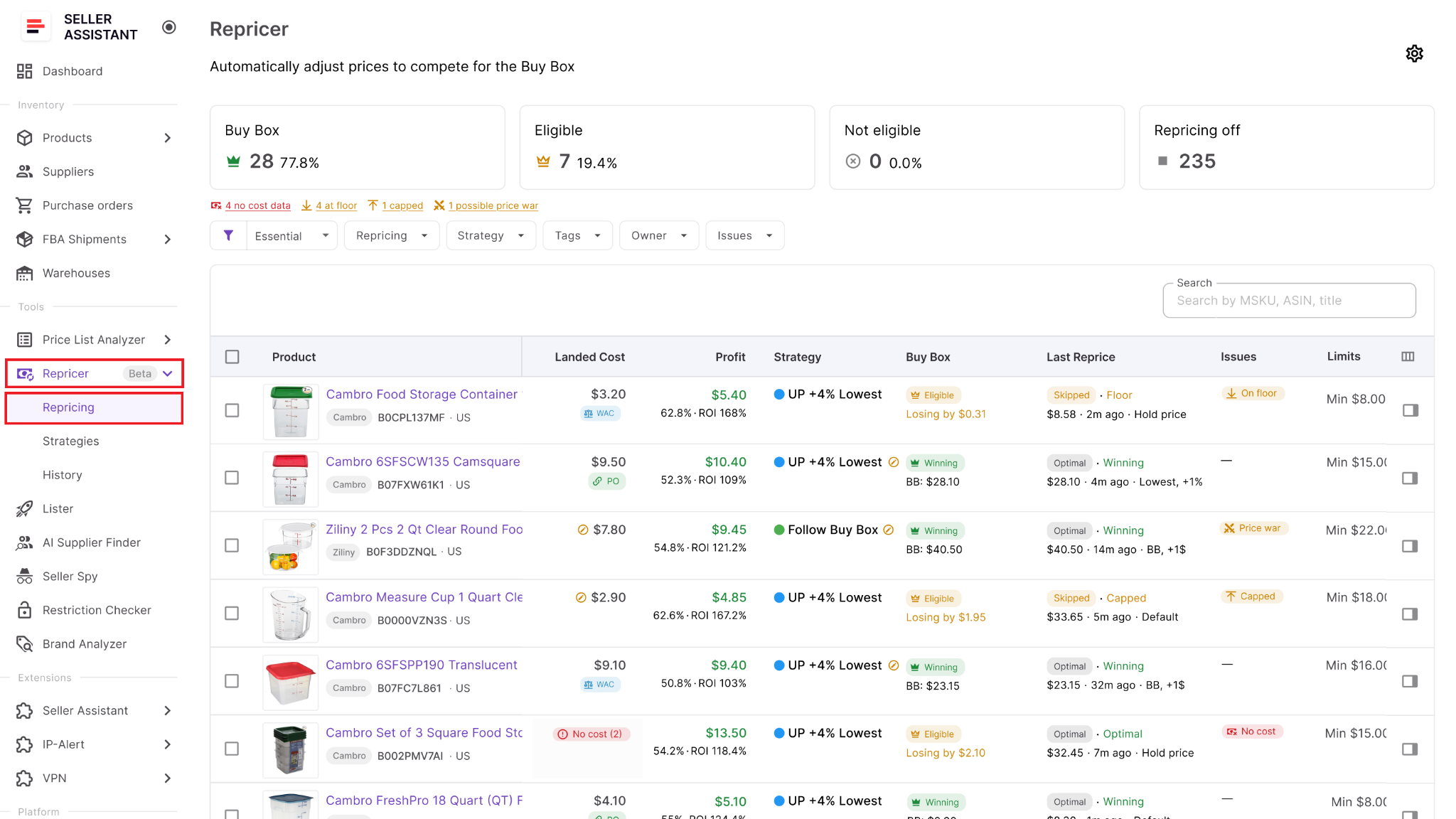
This is where you prepare and monitor the catalog before live price changes begin.
Step 2. Enable Repricing in settings
Open Settings and turn Repricing on for the team. You can also decide whether new products should enter repricing automatically or stay off until someone activates them.
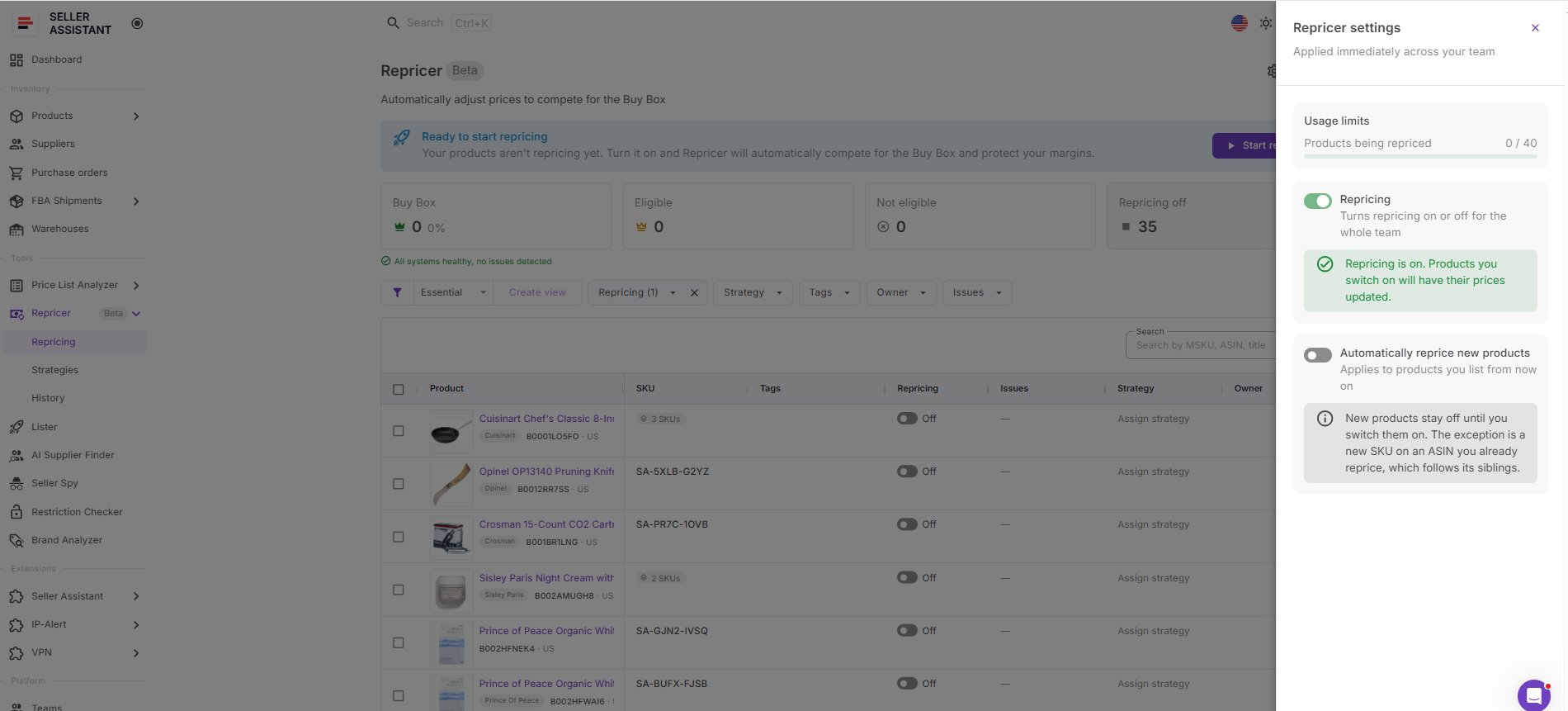
The global switch allows Repricer to submit price changes, while the new-product option controls how much manual review newly added inventory gets.
Step 3. Choose or build a strategy
Select a strategy from the Strategy column, or create a new one if the existing templates do not fit the product. You can start from options such as Follow Buy Box, Match Buy Box, Smart FBA, Protect Profit, or Target 25% ROI and customize them.
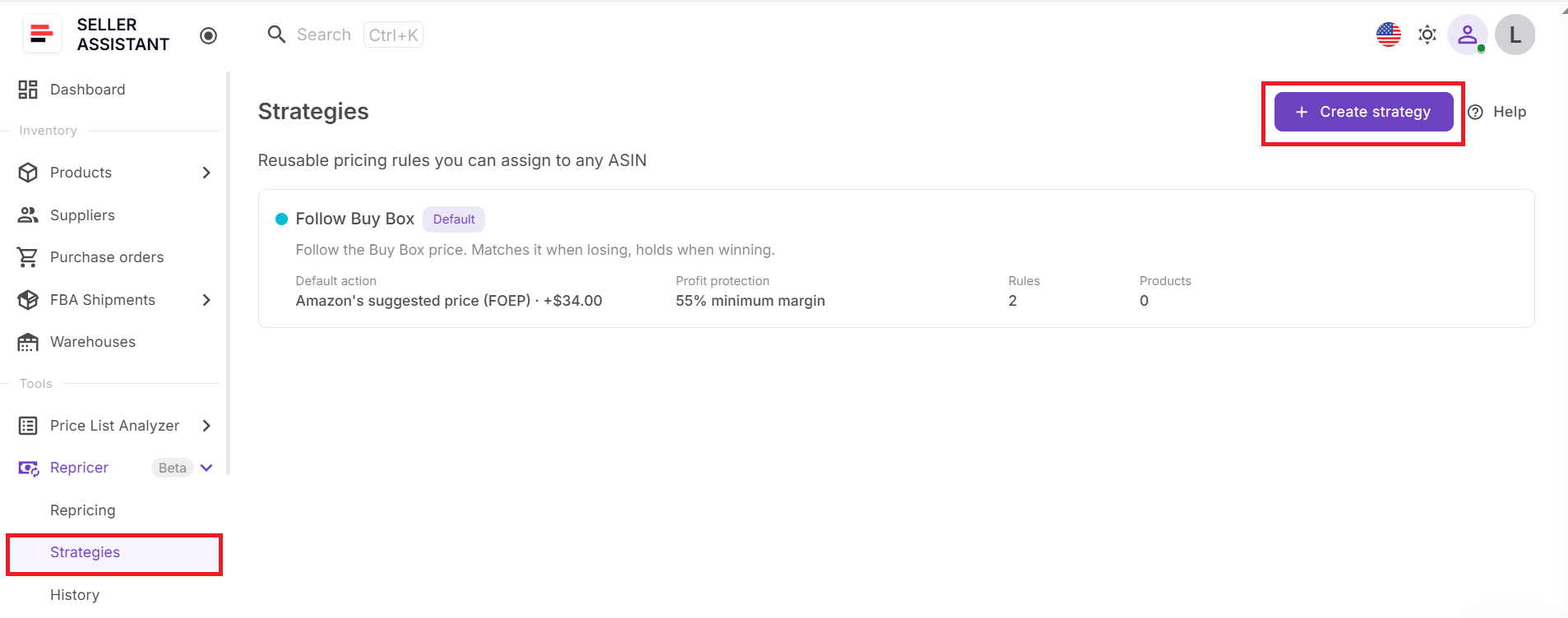
The strategy defines the pricing objective and gives Repricer a consistent set of instructions instead of reacting to every competitor move the same way.
Step 4. Configure rules and price boundaries
Set the conditions that should trigger different actions, such as Amazon selling, Buy Box holder type, competitor levels, stock, time of day, or no competition.
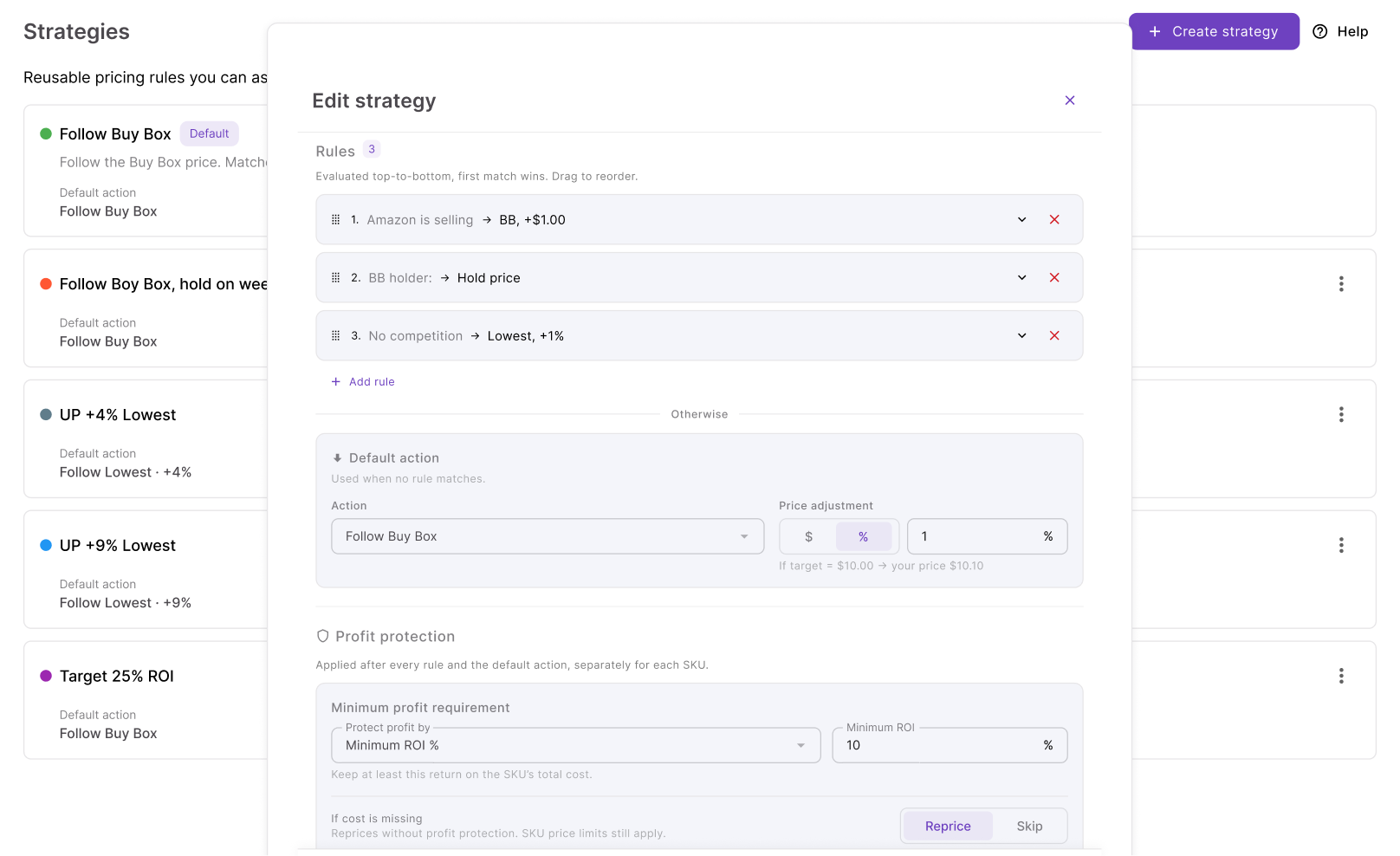
Then define the default action, minimum-price logic, maximum price, safety minimum, profit protection, and maximum change per reprice.
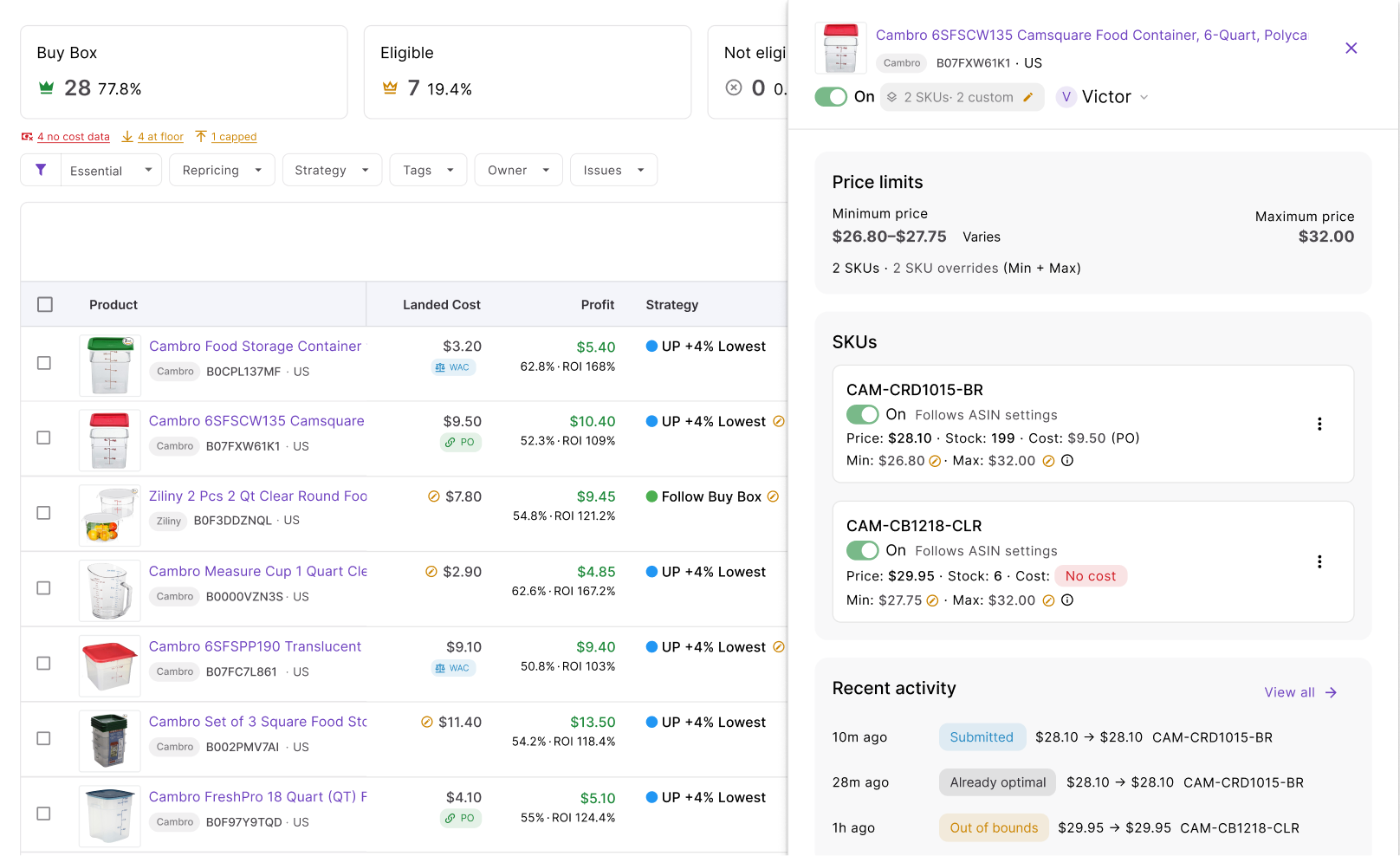
Rules determine what should happen in each market situation, while price boundaries stop the strategy from moving outside the range you are willing to accept.
Step 5. Organize products with tags and owners
Add Tags to group products by the way your team works, such as replenishable inventory, seasonal SKUs, supplier groups, or priority products. Assign an Owner when a specific team member is responsible for reviewing or managing those listings.
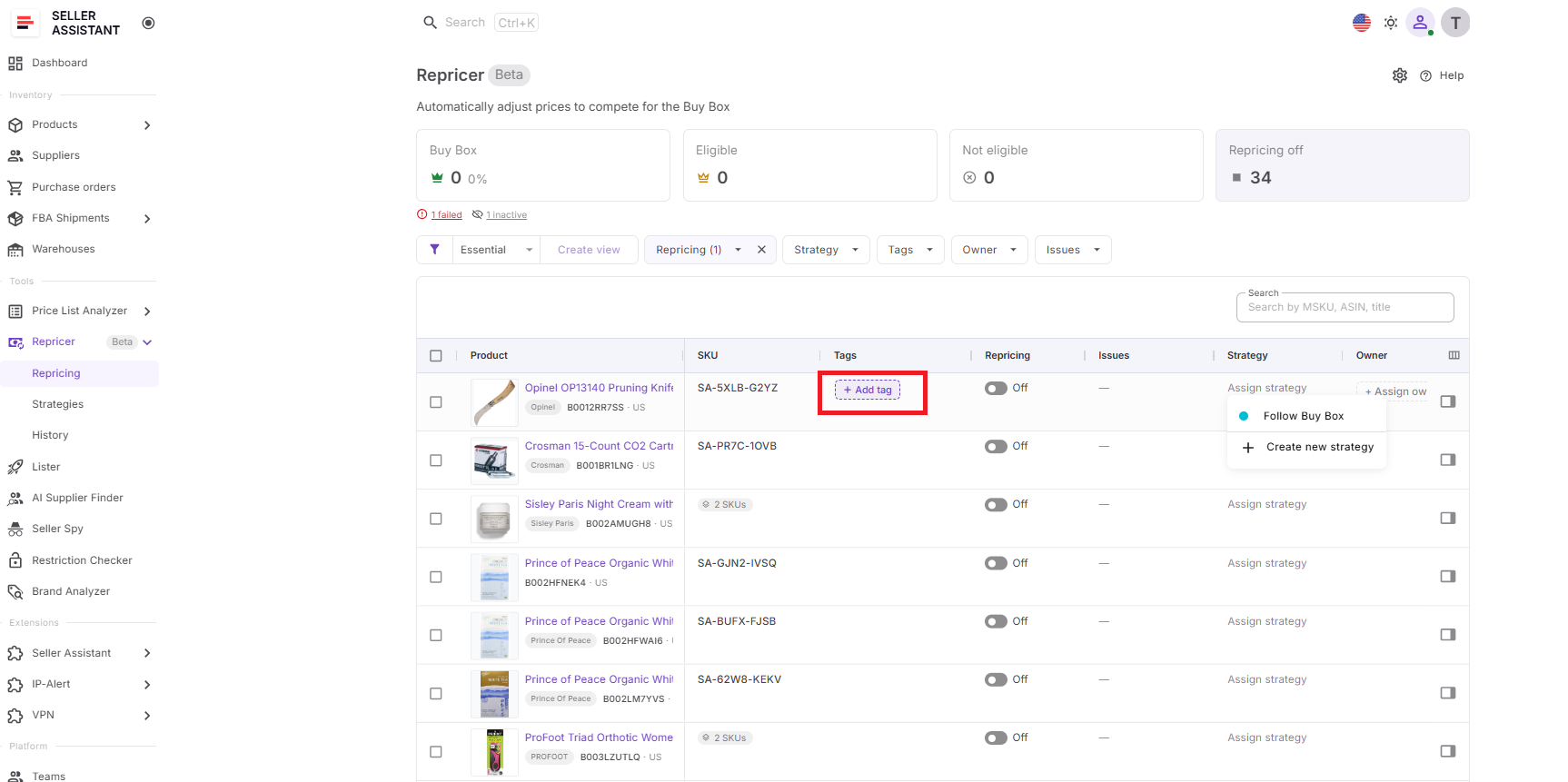
This makes larger catalogs easier to filter and gives each product a clear point of responsibility.
Step 6. Review landed cost and profitability
Check the Landed Cost for the SKUs you plan to automate. Depending on the available data, Seller Assistant can include unit cost, PO expenses, prep cost, FBA inbound cost, and related cost components, then show profit, ROI, and margin at relevant price points.
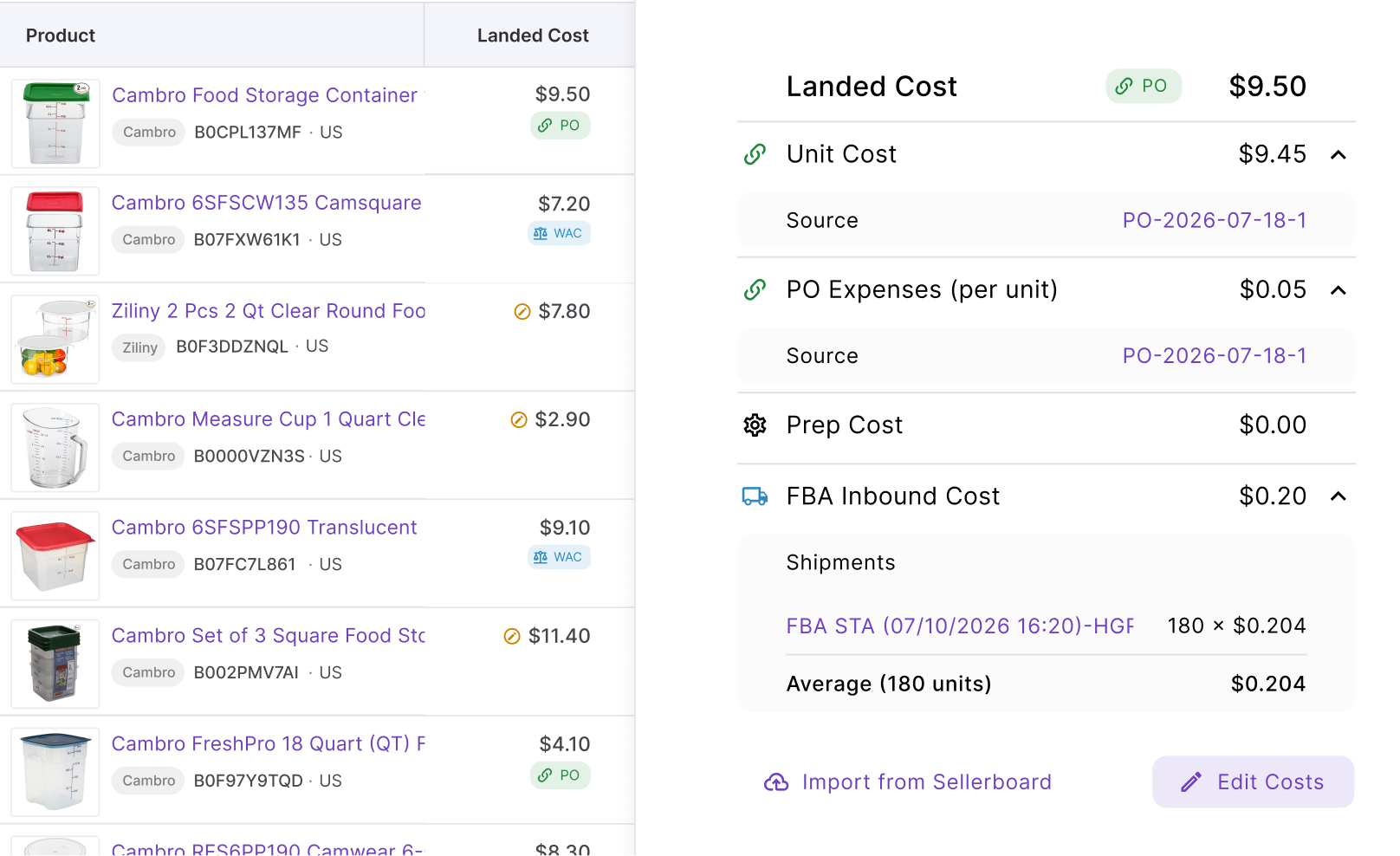
Cost data matters because ROI-, margin-, and profit-based floors depend on it. A repricing rule may be competitive, but it cannot protect profit accurately if the cost basis is missing or outdated.
Step 7. Resolve issues before activation
Use the Issues column and filters to find SKUs that need attention. Repricer can flag states such as No cost, On floor, Capped, Failed, or a possible Price war, depending on what is happening with the product.
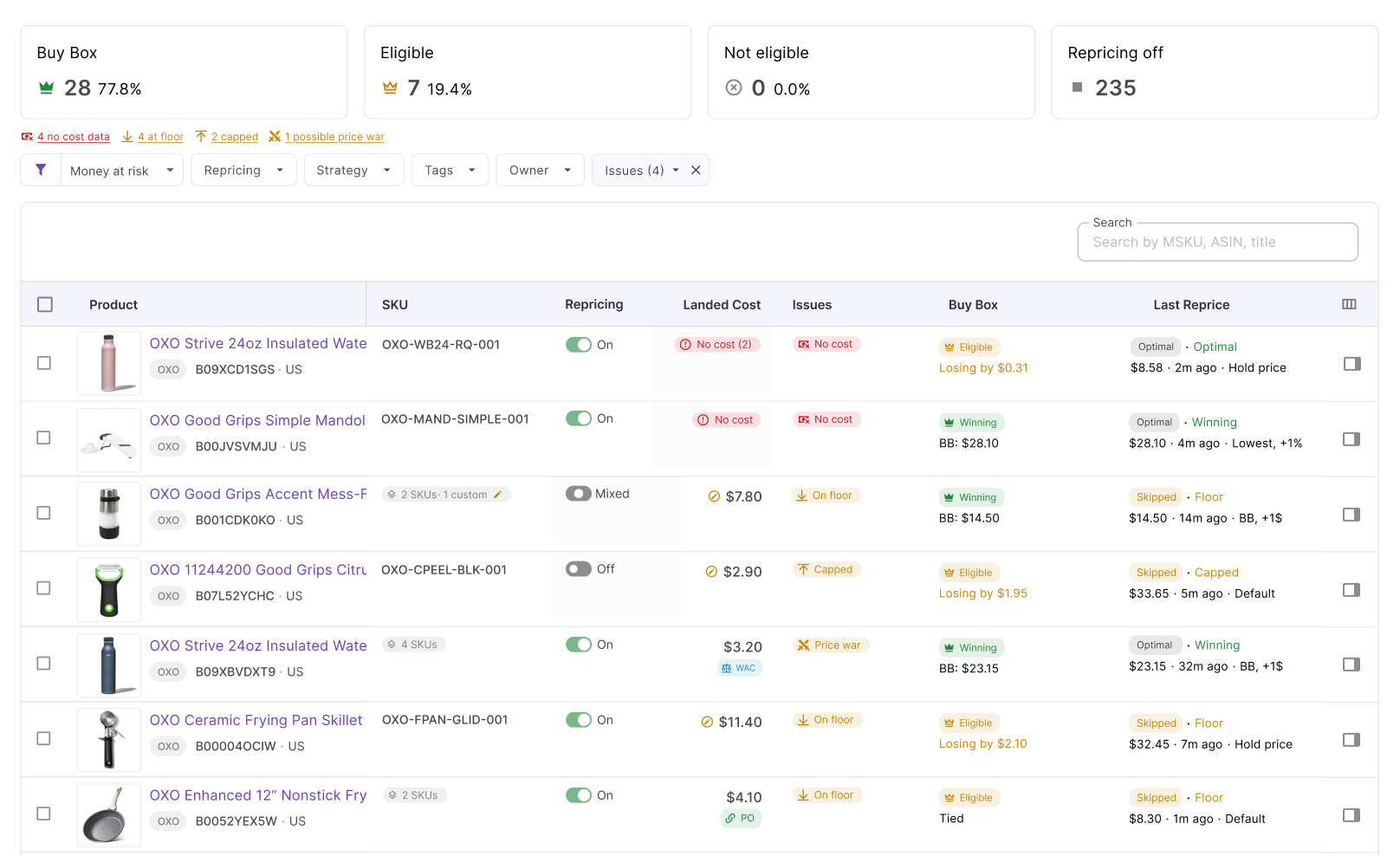
These signals help explain why a SKU may not reprice as expected. Fixing the underlying cost, limit, or strategy problem before activation gives the Repricer better inputs and safer boundaries.
Step 8. Start repricing and monitor the result
Select the products you are ready to automate, turn repricing on for them, and click Start repricing. Confirm the activation and, if relevant, choose whether future products should be added to repricing automatically.
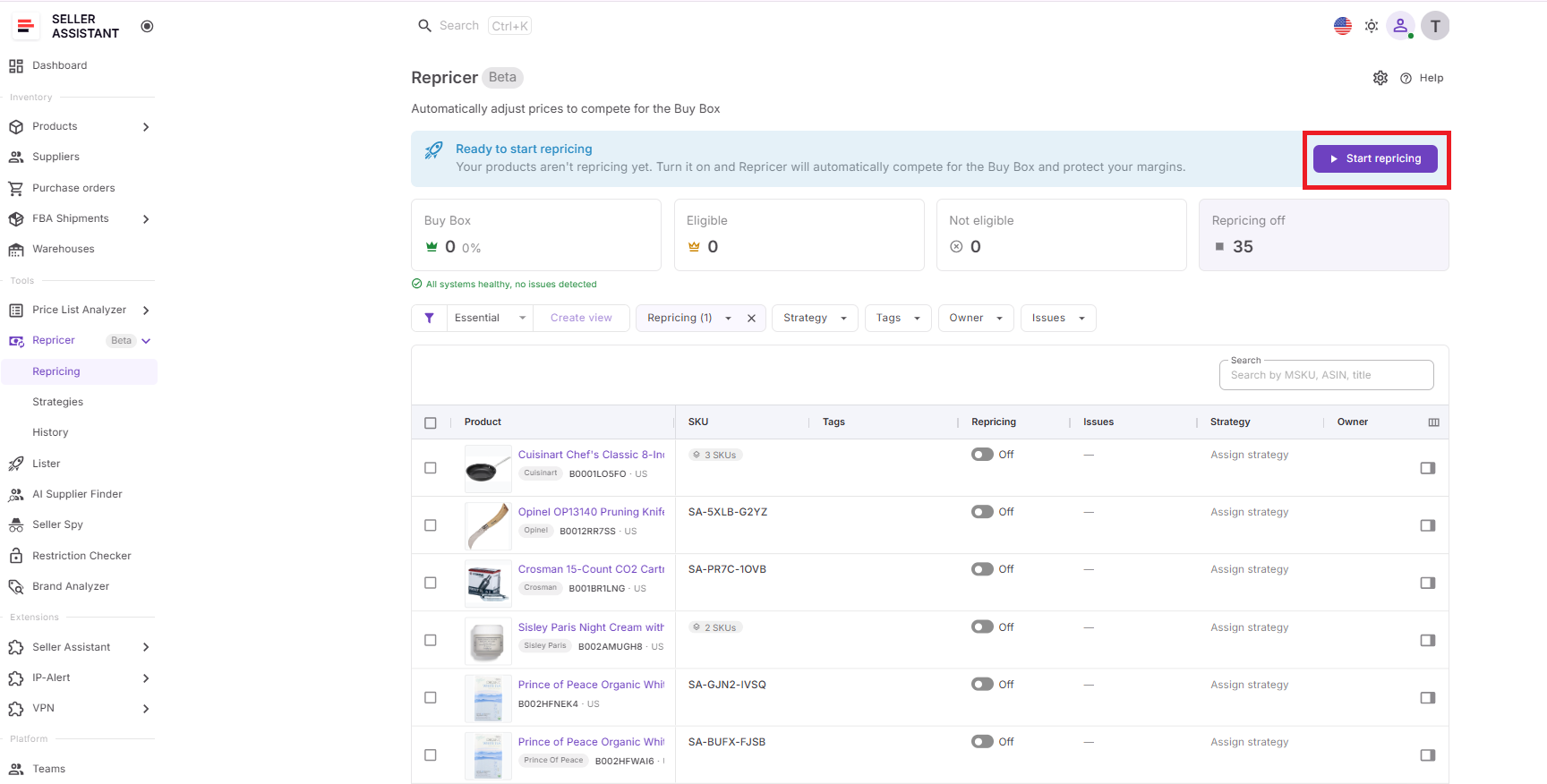
Once live, watch the Repricing table, product side panel, and History to confirm that prices are moving according to the strategy. Review Buy Box status, current price, price limits, profitability, recent actions, and decision reasons so you can adjust the setup based on actual behavior rather than guesswork.
FAQ
Can I use different repricing strategies for different Amazon products?
Yes. Different SKU groups may need different approaches – for example, you may prioritize Buy Box competition for fast-moving replenishable products while protecting a higher margin on slower inventory.
What should I do if my product keeps losing the Buy Box even after repricing?
Check factors beyond price, including fulfillment method, shipping speed, inventory availability, and seller performance, because Amazon does not award the Buy Box based on price alone. Lowering your offer repeatedly may reduce margin without improving your chances of winning it.
When should I change an Amazon repricing strategy?
Revisit a strategy when your sourcing costs, competition, inventory position, or sales goals change materially. A strategy that works for a well-stocked SKU may make less sense when only a few units remain or the competitive landscape changes.
Should I use the same minimum ROI or margin for every SKU?
Not necessarily. Products differ in capital requirements, turnover, risk, storage costs, and expected sales velocity, so a single profitability threshold may be too restrictive for some SKUs and too low for others.
What happens if I temporarily don’t want a product to be repriced?
You can stop automated repricing for products that need manual attention rather than rebuilding their entire pricing strategy. This can be useful when reviewing unusual market conditions, correcting product data, or handling a SKU as an exception to your normal workflow.
Final Thoughts
Seller Assistant Repricer turns Amazon repricing from constant manual price checks into a rules-based workflow. With the right strategies, price limits, and landed cost data in place, you can respond to Buy Box and competitor changes while keeping profit, ROI, and margin targets under control.
Start with a small group of SKUs, check how your rules behave, and use Issues and Repricing History to spot anything that needs adjustment. Once the setup works as intended, you can apply strategies across more products and manage repricing at scale without treating every price change as a manual decision.
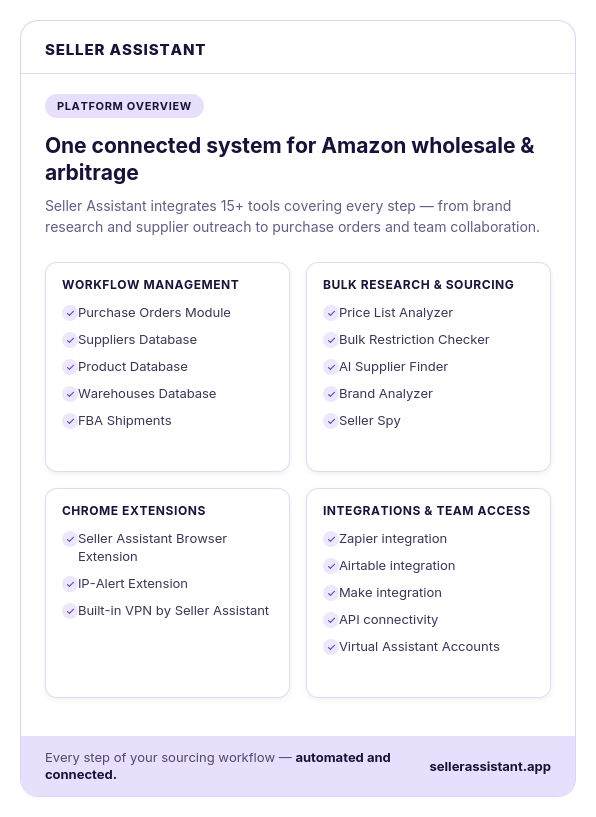
Seller Assistant automates and connects every stage of your Amazon wholesale and arbitrage workflow. It brings together in one platform: workflow management tools – Purchase Orders Module, Suppliers Database, Product Database, Warehouses Database, FBA Shipments, bulk research & sourcing tools – Price List Analyzer, Bulk Restriction Checker, AI Supplier Finder, Brand Analyzer, Seller Spy, Chrome extensions – Seller Assistant Browser Extension, IP-Alert Extension, and built-in VPN by Seller Assistant, and integrations & team access features – seamless API connectivity, integrations with Zapier, Airtable, and Make, and Virtual Assistant Accounts.