Seller Assistant Repricer automatically adjusts your Amazon prices to compete for the Buy Box – reacting to competitor moves within seconds while protecting your margin against landed cost.
It’s built around strategies and rules rather than a single fixed formula, so pricing behavior can differ by SKU, time of day, or stock level.
This post covers everything the tool does: how repricing gets triggered, how strategies and rules are structured, how cost data feeds into your price floor, and how to read the signals – Buy Box status, issues, reprice history – that tell you whether it’s working. Use it as a reference for the full feature set, start to finish.
What Is Seller Assistant Repricer?
Seller Assistant Repricer is a built-in Amazon repricing tool for wholesale sellers, online arbitrage sellers, and dropshippers. It monitors Amazon market conditions and automatically adjusts prices according to seller-defined strategies, conditional rules, price limits, and profitability targets instead of requiring sellers to check competitors and update SKUs manually.
The Repricer combines reactive repricing that can respond to relevant Amazon marketplace changes in about 2–5 seconds with proactive checks for quieter listings. It uses Buy Box and competitor data together with landed cost, profit, ROI, and margin data, while safeguards such as dynamic pricing floors, safety minimums, maximum prices, and maximum price changes help keep repricing within the seller’s financial limits.
Because Repricer is part of Seller Assistant, pricing stays connected with the broader wholesale and arbitrage workflow rather than operating in a separate tool. Sellers can compete for the Buy Box faster, protect margins, automate pricing across large SKU catalogs, catch pricing issues, and review every repricing decision in History while using the same ecosystem for sourcing, purchase orders, costs, inventory, and other reseller operations.
Seller Assistant Repricer summary
| Feature | What It Does | Benefit |
|---|---|---|
| Reactive repricing | Responds to relevant Amazon marketplace changes in about 2–5 seconds | Helps offers react quickly when Buy Box or competitive conditions change |
| Proactive repricing | Periodically reevaluates listings even when no new marketplace event triggers a price check | Keeps quieter ASINs and time-, stock-, or rule-based strategies up to date |
| Buy Box and competitor tracking | Monitors Buy Box price and status, Buy Box share, competitor count, lowest FBA and FBM offers, and other market signals | Gives repricing decisions real competitive context instead of relying only on the lowest price |
| Reusable strategies | Applies ready-made or custom pricing strategies to individual products or multiple products | Makes it easier to manage consistent pricing logic across large catalogs |
| Conditional rules | Uses if/then logic based on Amazon selling, Buy Box holder, competition, stock, time, day, and other conditions | Lets prices respond differently to different marketplace situations |
| Flexible pricing actions | Follows the Buy Box, lowest price, or Amazon’s suggested price (FOEP), or holds the current price | Gives sellers control over when to match, move above or below a target, or avoid changing price |
| Dynamic price floors | Calculates minimum prices using minimum ROI, minimum margin, target profit, or manual limits | Helps protect profitability instead of blindly following competitors downward |
| Landed cost integration | Uses SKU or purchase order cost data as the cost basis for repricing and profitability calculations | Connects pricing decisions to the actual economics of each product |
| Price safeguards | Supports safety minimums, maximum prices, and limits on the maximum change per reprice | Prevents automated pricing from moving outside seller-defined boundaries |
| Profitability metrics | Shows metrics such as profit, ROI, margin, and landed cost alongside pricing data | Helps sellers judge whether a competitive price still meets their financial targets |
| Issue detection | Flags SKUs with problems such as missing cost data, floor or cap limits, failed actions, or possible price wars | Makes products requiring manual attention easier to find and correct |
| Repricing history | Records pricing decisions, changes, skipped actions, and their reasons | Provides an audit trail for troubleshooting and improving strategies |
| Catalog and team management | Supports tags, owners, filters, and bulk actions | Makes repricing easier to organize across large catalogs and multiple team members |
| Connected Seller Assistant workflow | Keeps repricing connected with sourcing, purchase orders, landed costs, inventory, and other Seller Assistant tools | Reduces tab-switching and keeps pricing decisions connected to the wider reseller workflow |
Benefits of Seller Assistant Repricer
Seller Assistant Repricer automates more than price changes. It combines fast market response with Buy Box data, flexible pricing logic, landed cost, and profit safeguards, helping wholesale, online arbitrage, and dropshipping sellers stay competitive without losing control of margins.
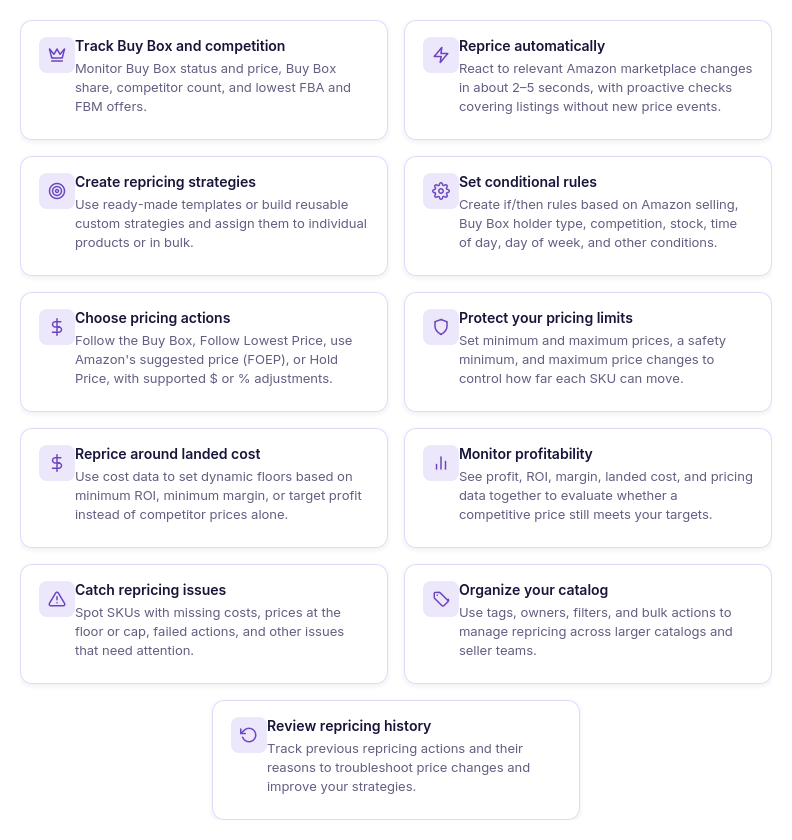
React to Amazon price changes in seconds
Reactive repricing can respond to relevant marketplace changes in about 2–5 seconds, while proactive checks cover listings without a new triggering event. This helps your offers react to fast-moving competition without waiting for manual price checks.
Compete for the Buy Box without blindly undercutting
Strategies can follow or match the Buy Box, follow the lowest offer, hold price, or use other pricing logic depending on market conditions. You can compete for Buy Box share without automatically dropping below every seller.
Protect profit with real cost data
Repricer can use landed cost together with minimum ROI, minimum margin, or target profit to calculate pricing floors. Your competitive strategy can therefore respond to Amazon prices while respecting the economics of each SKU.
Adapt pricing to different selling situations
Conditional rules let you change pricing behavior when Amazon is selling, competition changes, stock runs low, or specific time and day conditions apply. One strategy can handle multiple market scenarios instead of treating every listing event the same way.
Prevent unsafe price movements
Safety minimums, maximum prices, and maximum-change controls put boundaries around automated repricing. These safeguards help prevent sudden competitor moves from pushing your offer farther than intended.
Manage large catalogs with less manual work
Reusable strategies, bulk actions, tags, owners, and filters make it practical to manage pricing across hundreds or thousands of SKUs. Teams can organize responsibility and apply common pricing logic without configuring every offer from scratch.
Find pricing problems faster
Repricer surfaces issues such as No cost, On floor, Capped, Failed, and possible price-war situations. Sellers can focus on exceptions that need attention rather than manually inspecting every SKU.
Understand why prices changed
Repricing History provides a record of pricing actions and the reasons behind them. This makes it easier to investigate unexpected changes, evaluate strategy behavior, and refine rules based on actual results.
Keep repricing connected to your reseller workflow
Repricer works inside Seller Assistant alongside sourcing, purchase orders, landed cost, inventory, and other reseller tools. Pricing decisions can use data already generated elsewhere in the workflow instead of depending on a disconnected standalone repricing system.
What Seller Assistant Repricer Shows
Seller Assistant Repricer combines Amazon market signals, seller-defined strategies, product costs, and pricing safeguards to decide whether and how each SKU should be repriced. It evaluates the current competitive situation, runs the assigned strategy and rules, checks the allowed price range, and then changes the price, holds it, or skips the action.
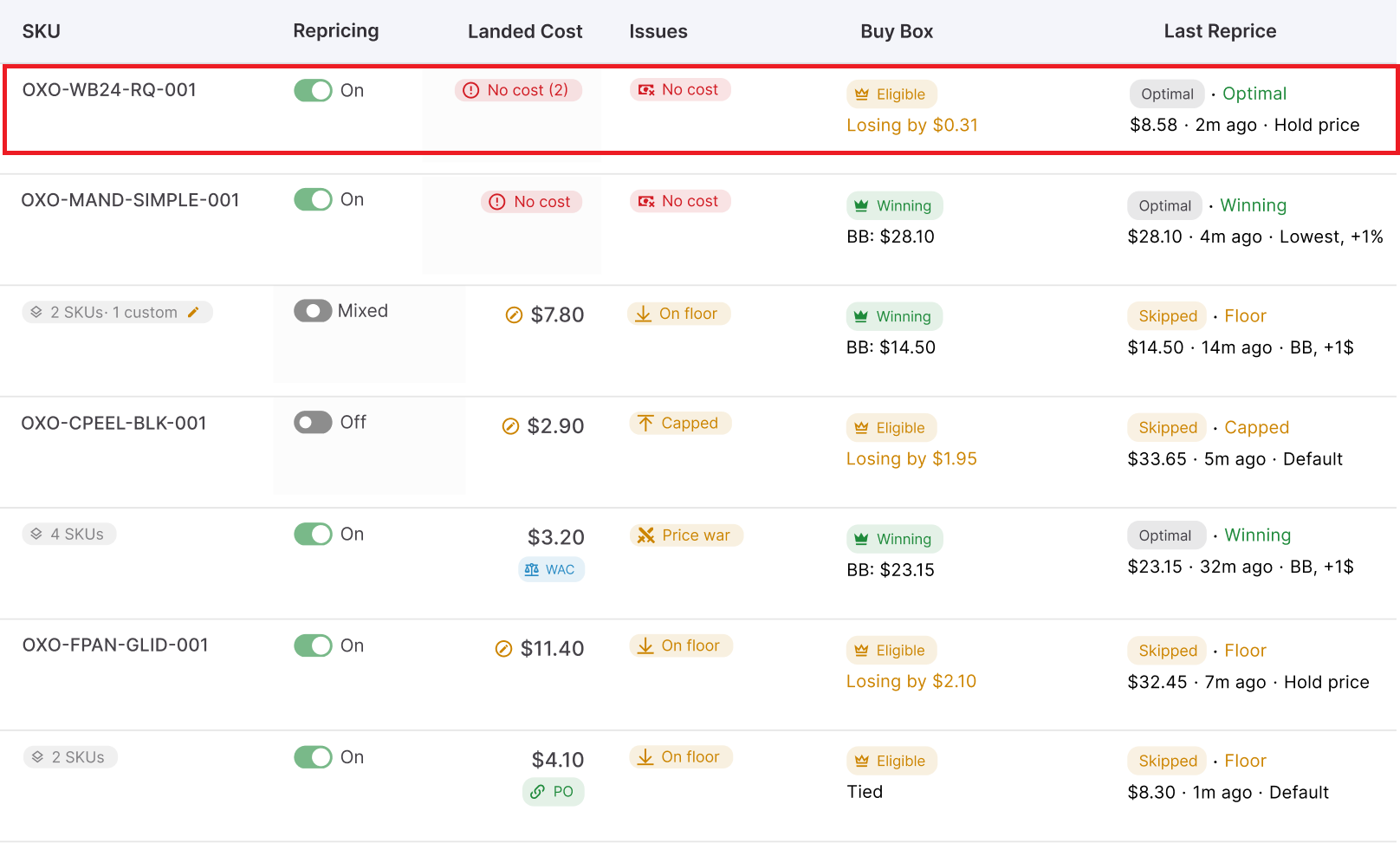
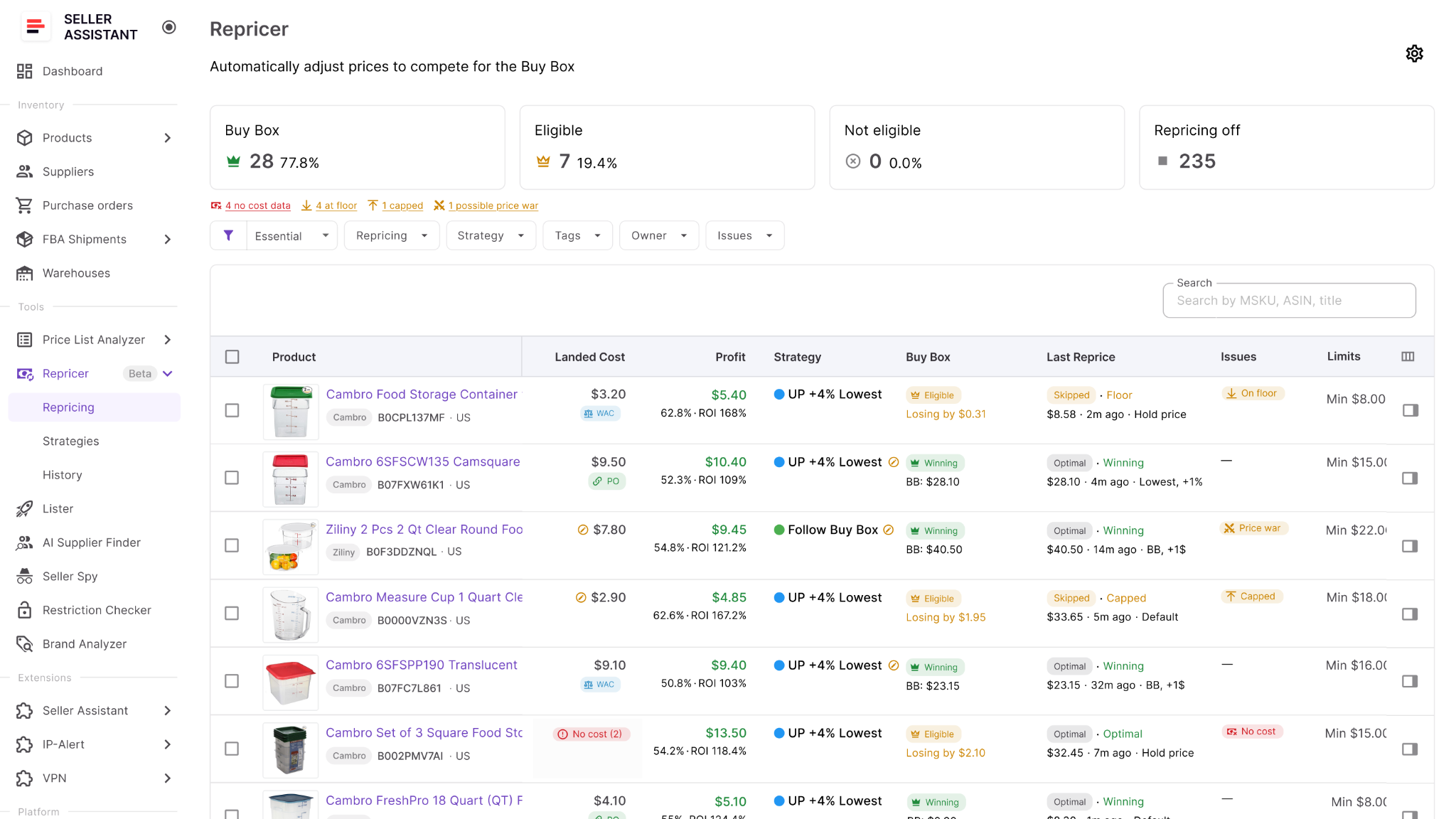
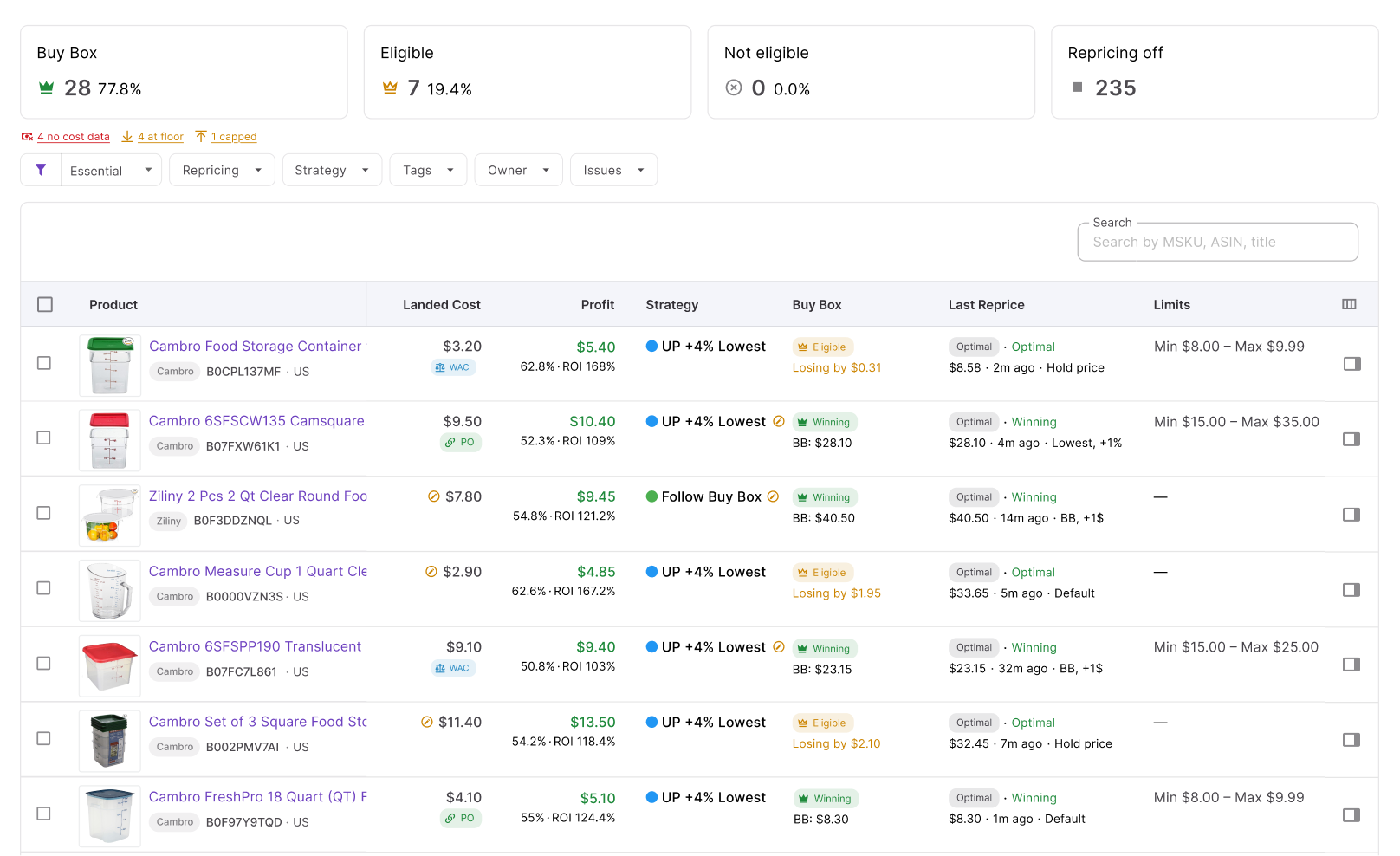
At the same time, Repricer shows the information behind those decisions. Sellers can monitor current price, Buy Box status and price, Buy Box share, lowest FBA and FBM prices, competitor count, stock, landed cost, profit, ROI, margin, price limits, assigned strategy, issues, and repricing history. You can use the column picker to select columns you want to be displayed.
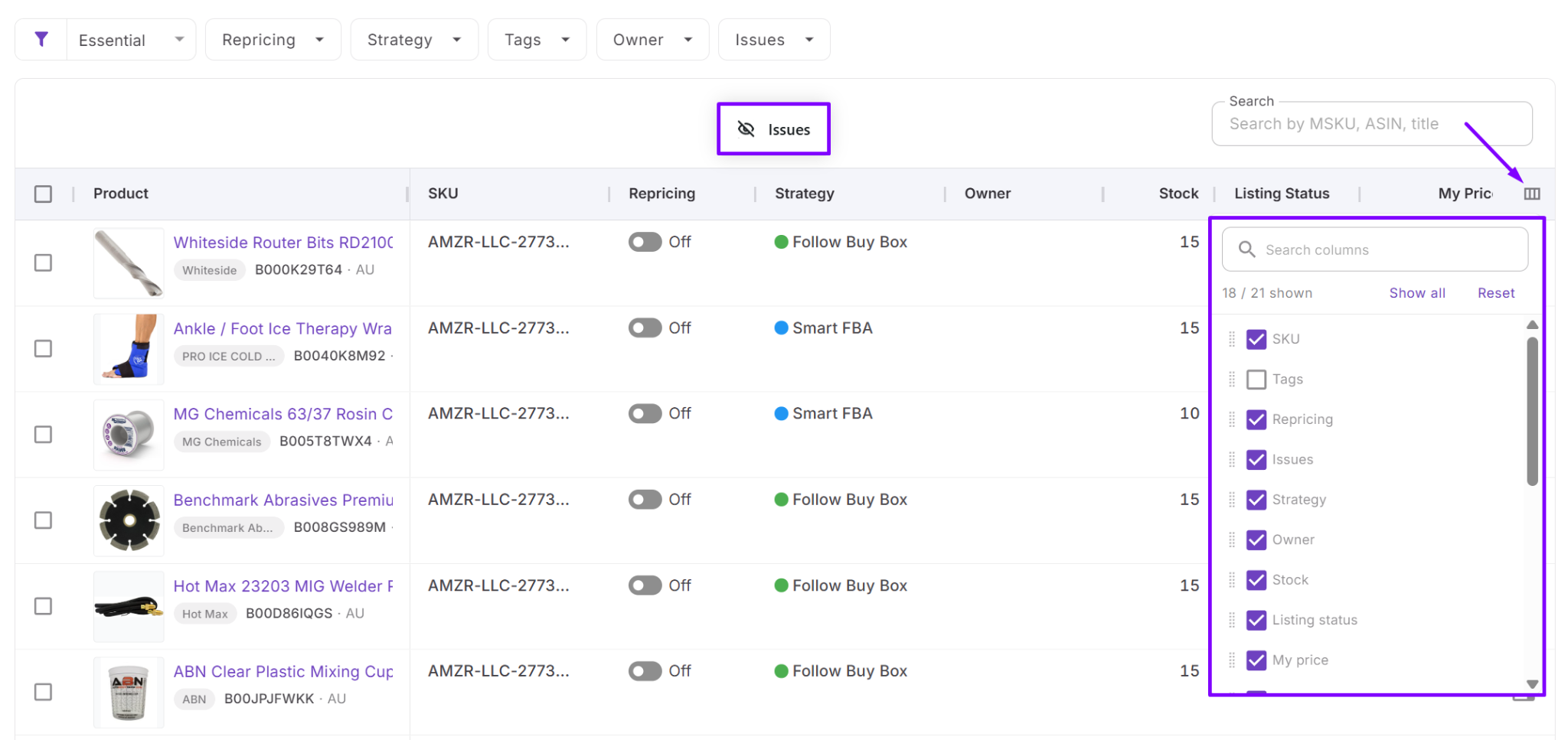
Amazon market and competitor data monitoring
Repricer monitors the Amazon listings connected to your seller account and tracks changes that can affect pricing. For each SKU, you can see your current price, Buy Box status and price, Buy Box share, competitor count, lowest FBA and FBM prices, and stock.
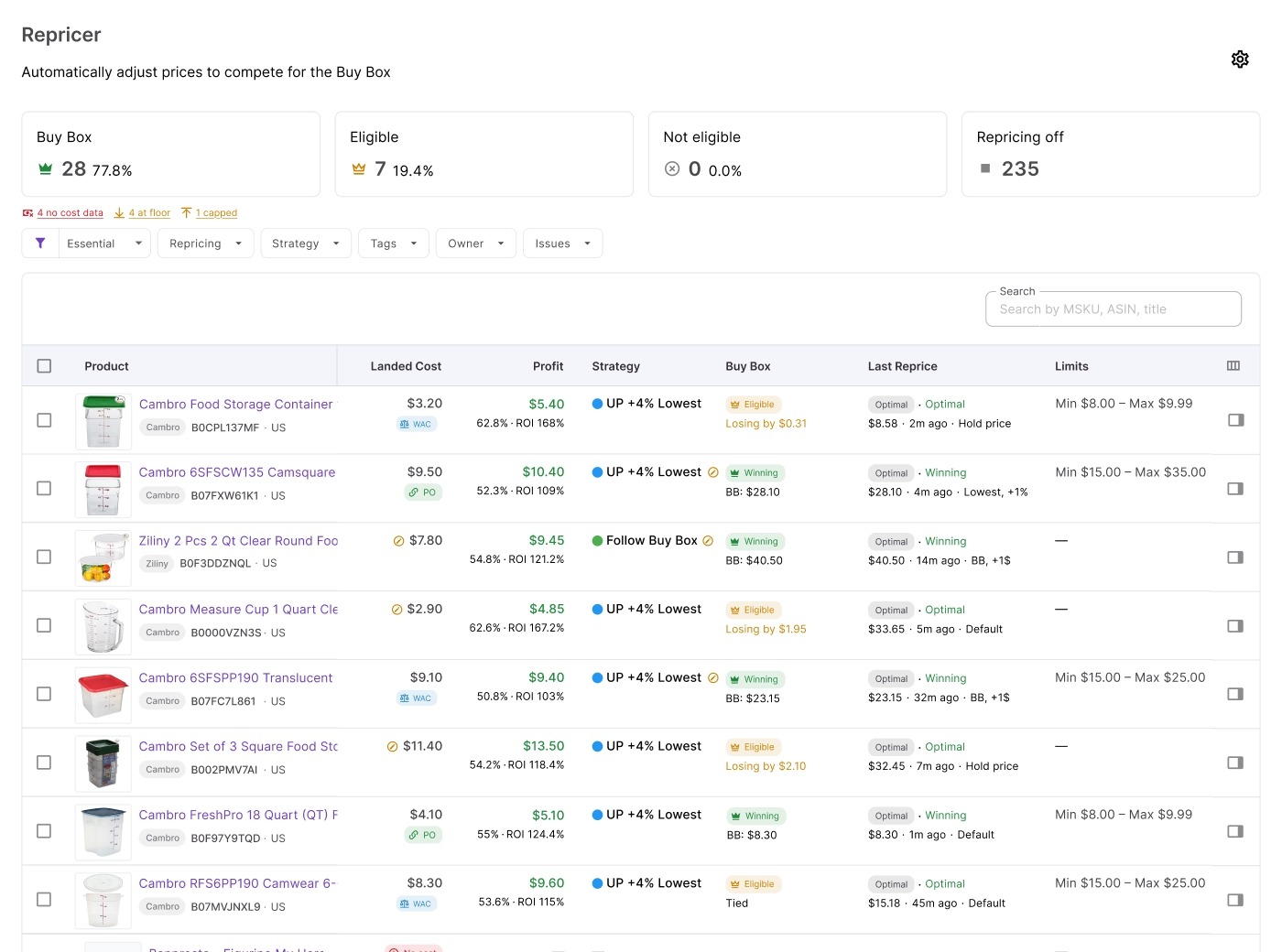
These metrics show where your offer currently stands. Repricer then uses relevant market conditions together with your strategy to determine whether a pricing action is needed.
Strategies define how products should compete
Each product follows an assigned repricing strategy. Strategies are reusable, so you can apply the same pricing logic to one product, multiple products in bulk, or use a default strategy across the team.
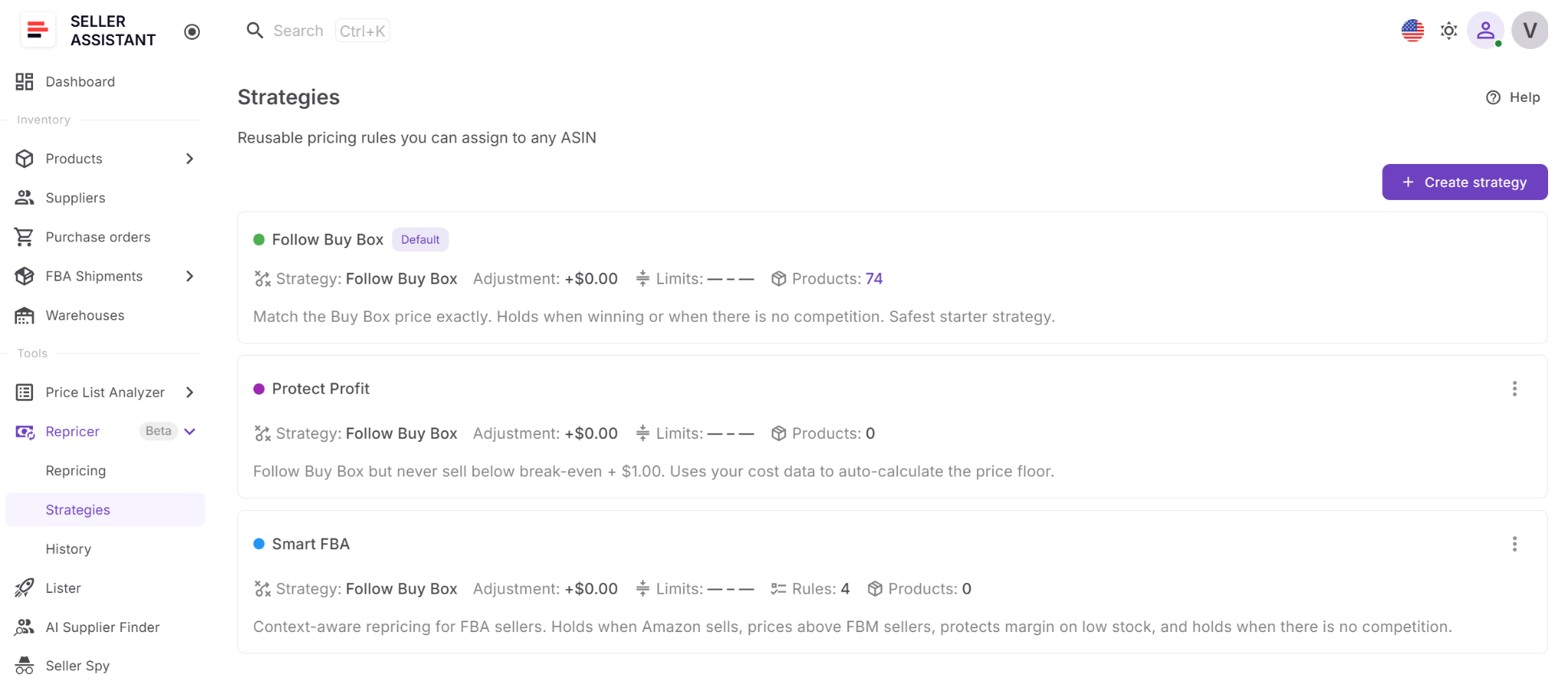
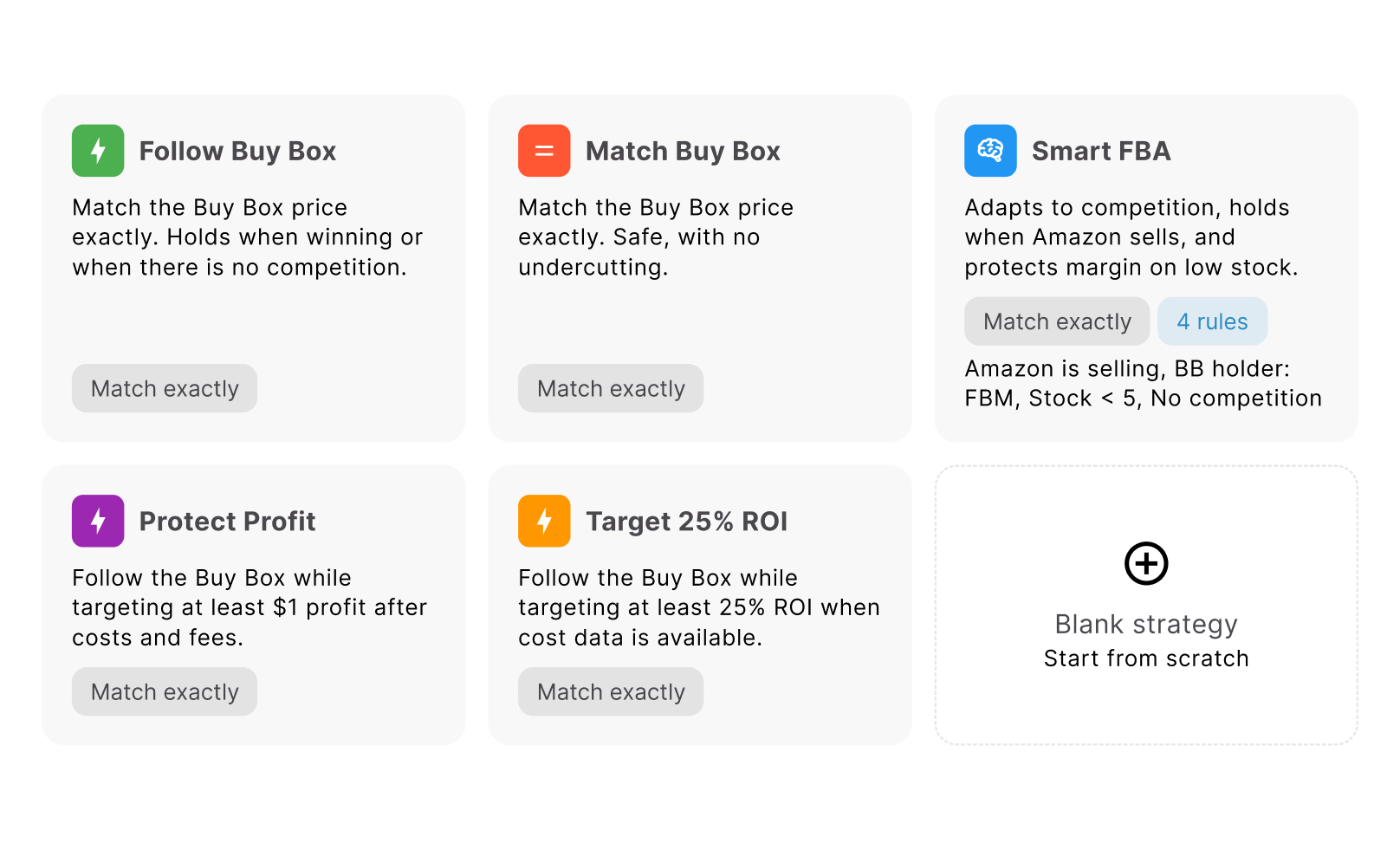
Seller Assistant includes ready-made templates:
- Follow Buy Box – follows the Buy Box when you are losing it and holds your price when you are winning.
- Match Buy Box – matches the Buy Box without automatically undercutting it.
- Smart FBA – changes pricing behavior based on factors such as FBM competition, Amazon selling, and low stock.
- Protect Profit – follows the Buy Box while keeping the price above break-even plus $1 based on cost data.
- Target 25% ROI – follows the Buy Box while maintaining at least 25% ROI and skips products without the cost data needed for the calculation.
You can also build a strategy from scratch when you need different pricing logic.
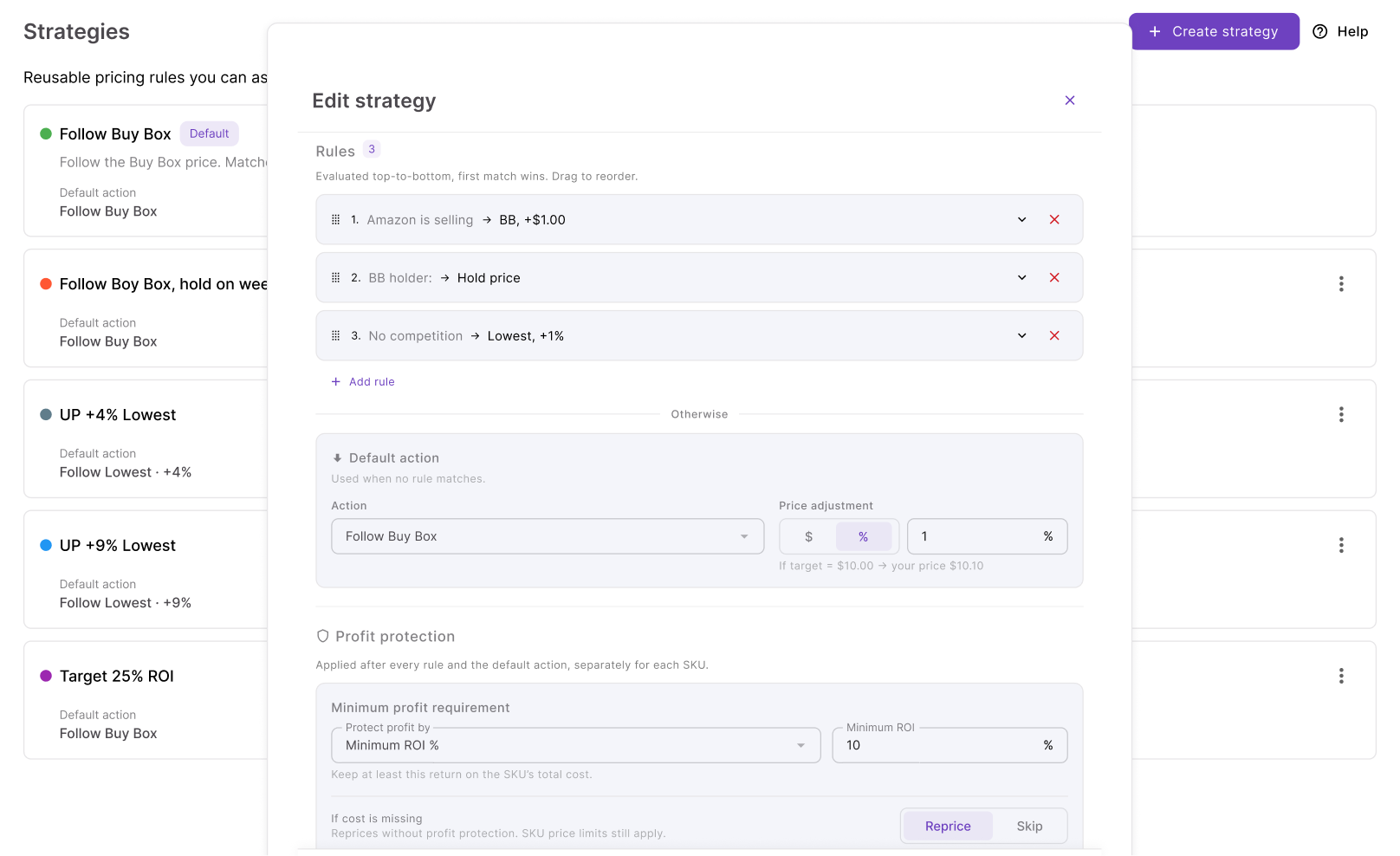
Rules tell Repricer what to do in specific situations
Conditional rules let one strategy behave differently as marketplace conditions change. You can create conditions based on Amazon selling, Buy Box holder type, competitors above or below your offer, no competition, stock level, time of day, and day of week.
Rules can combine conditions with AND or OR, and Repricer checks them from top to bottom. The first matching rule determines what happens, which means rule order lets you prioritize one pricing scenario over another.
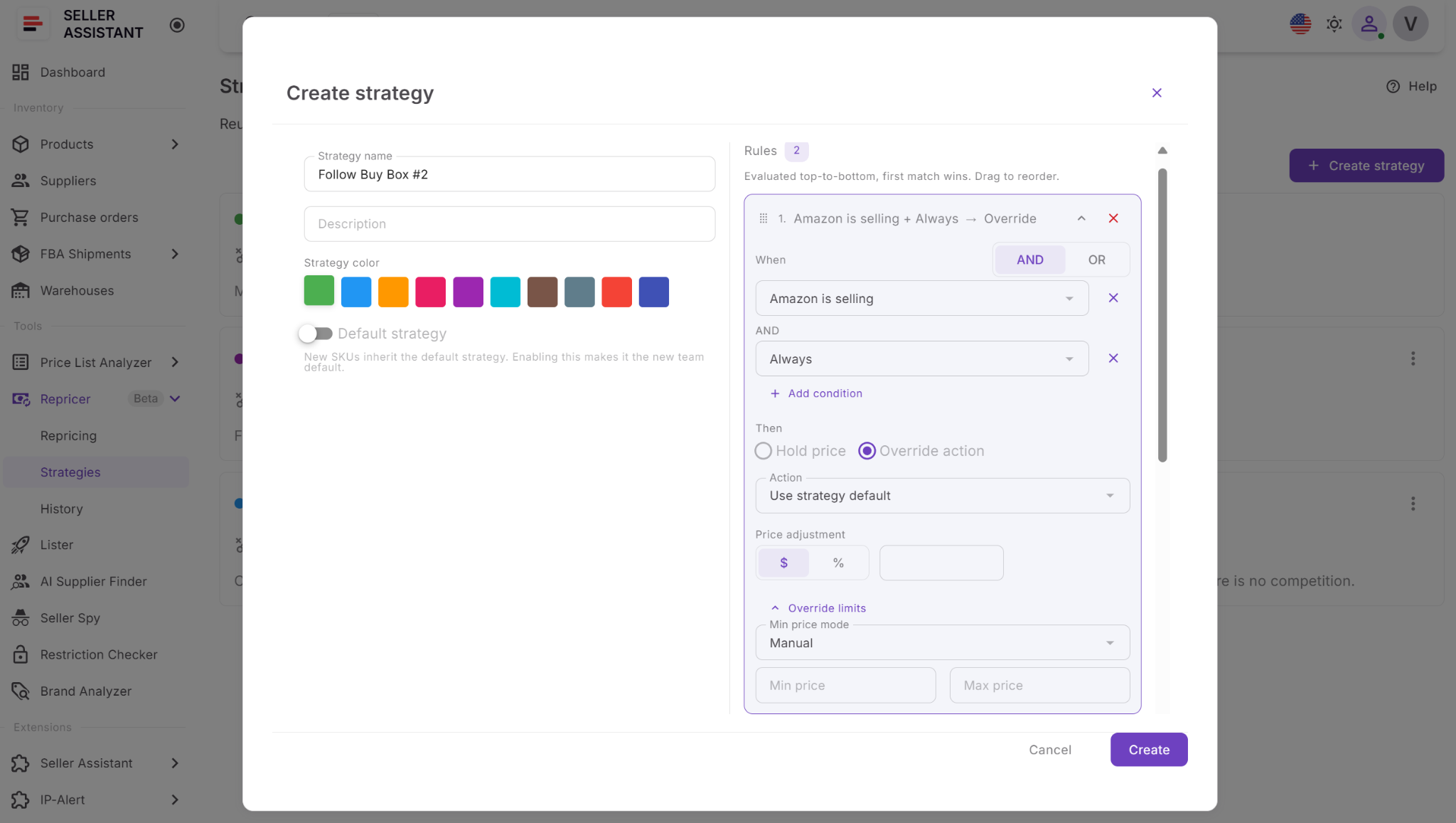
For example, you might hold your price when Amazon is on the listing, increase it when no competitors remain, or change the pricing action when stock falls below five units. If none of the conditional rules match, Repricer follows the strategy’s default action.
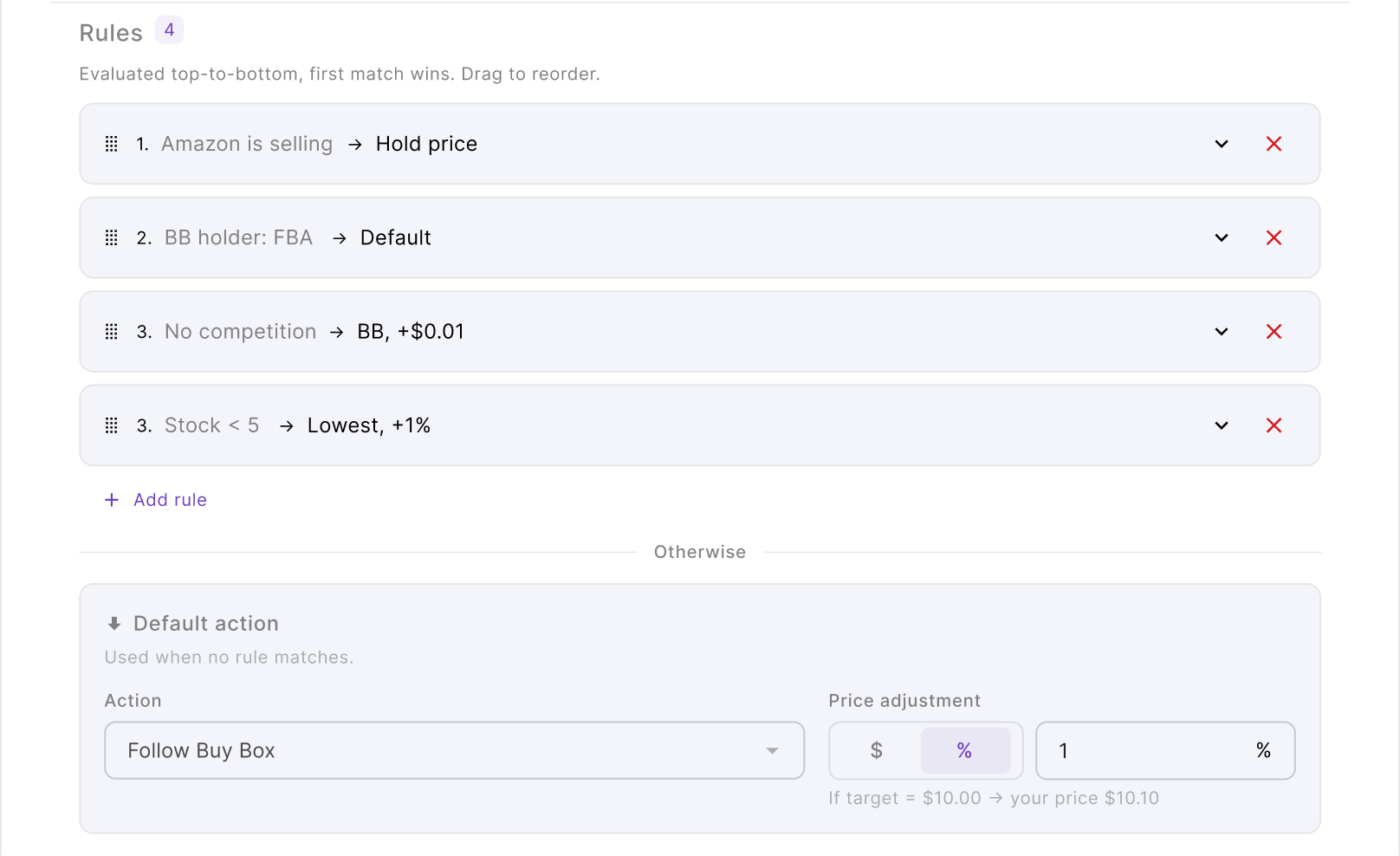
Pricing actions determine the target price
Once Repricer identifies the applicable rule, it determines which market price to follow. Available actions include Follow Buy Box, Follow Lowest Price, Amazon’s suggested price (FOEP), and Hold Price.
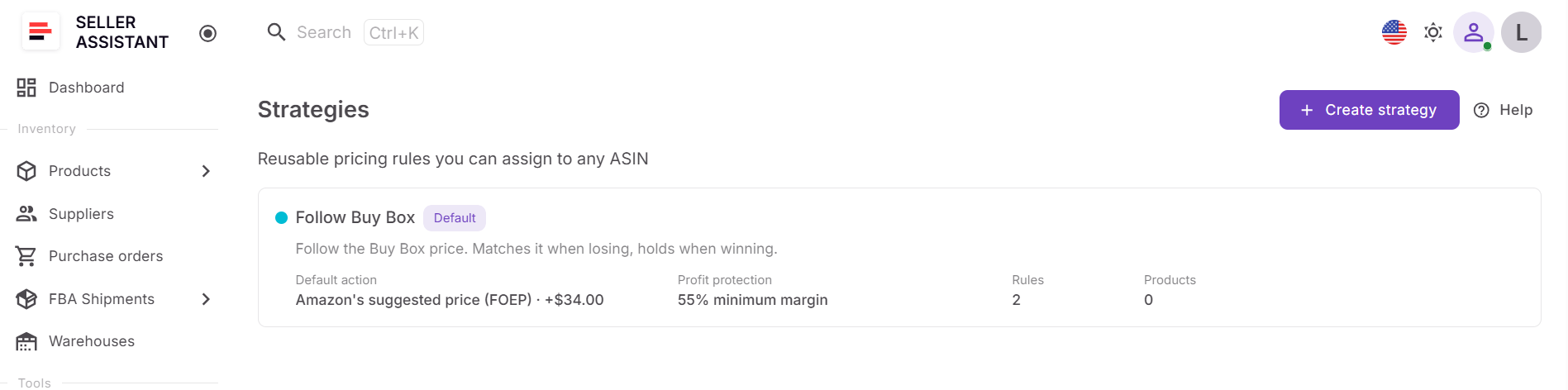
You can match the selected target or apply a fixed-dollar or percentage adjustment. For example, a Buy Box strategy could match the current Buy Box price, while another strategy could price a set amount above or below its target.
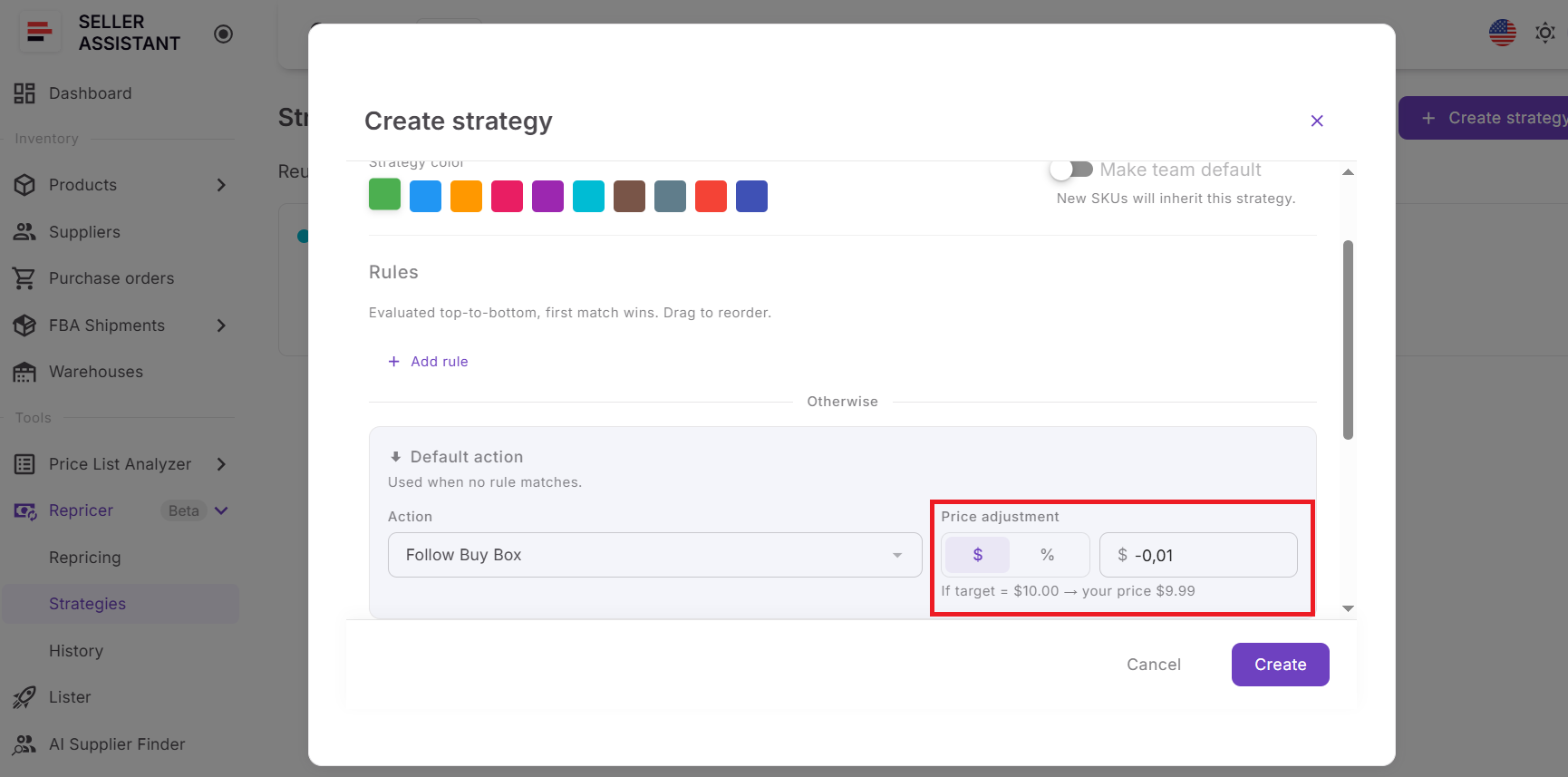
A maximum change per reprice can also restrict how far the offer moves in a single action.
Price limits control how far Repricer can move
The strategy does not have unlimited control over the SKU’s price. Sellers define a minimum and maximum range that Repricer must respect, and these limits are visible alongside the product’s current pricing data.
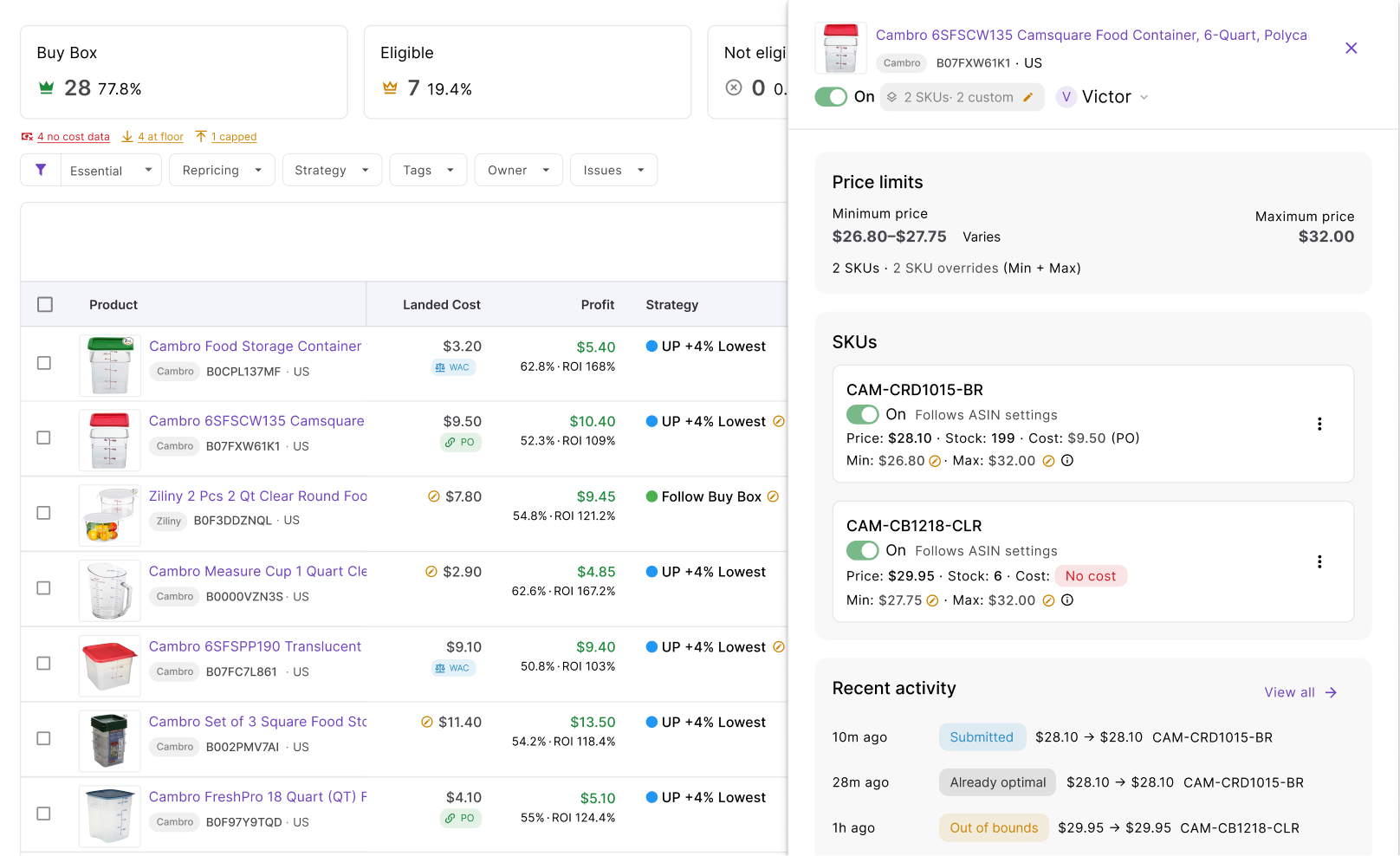
The minimum can be a manual price or a dynamic floor based on minimum ROI, minimum margin, or target profit. A separate safety minimum acts as the hard floor, while the maximum price prevents the strategy from raising the offer beyond your chosen ceiling.
Seller Assistant also lets you define what should happen when cost data is unavailable – skip repricing, use a manual minimum price, or continue without a floor.
Landed cost connects pricing to profitability
Repricer can use landed cost stored for the SKU or cost data coming from Seller Assistant’s purchasing workflow. Instead of deciding how low to go based only on competitors, cost-aware strategies can calculate a floor from the actual economics of the product.
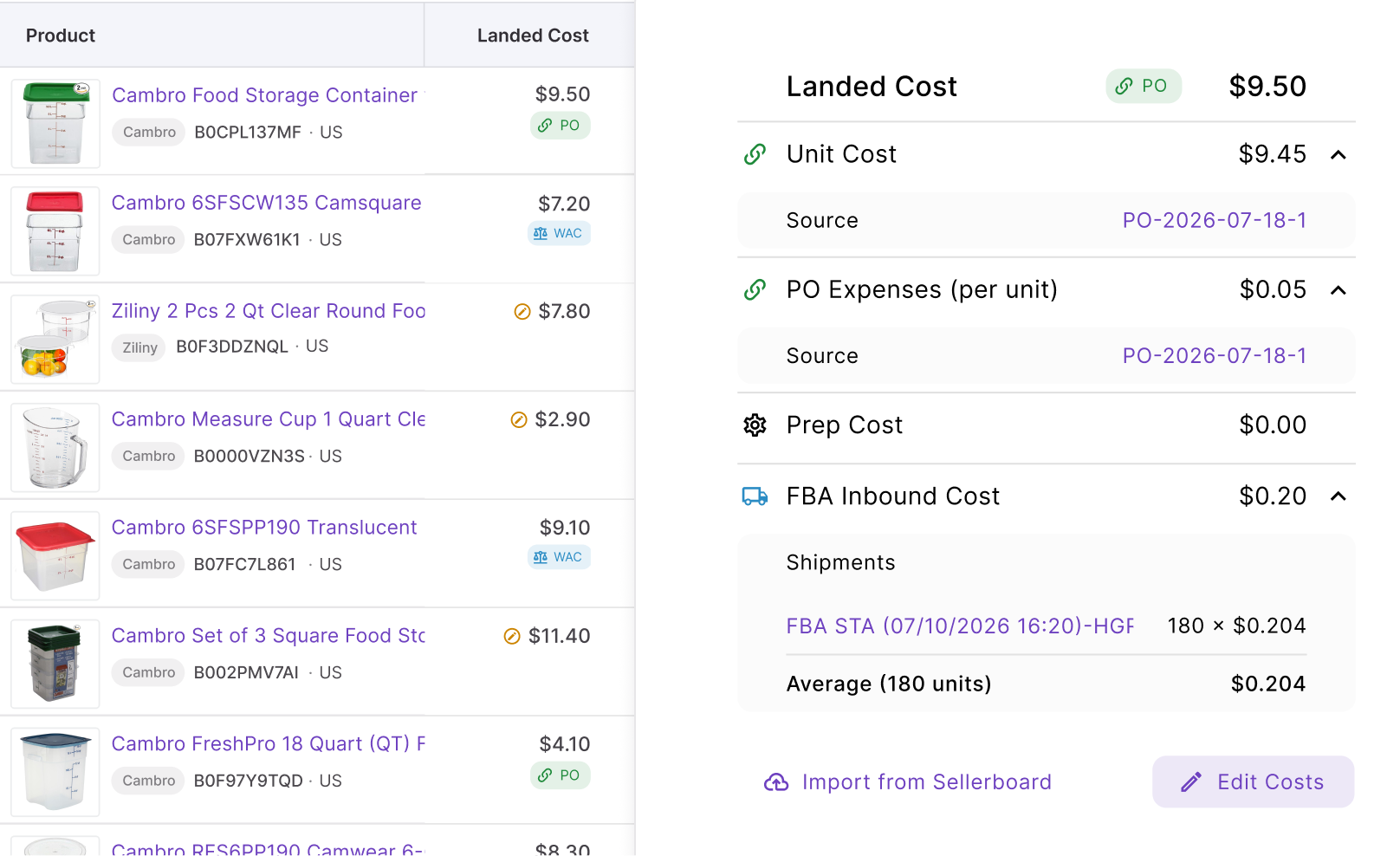
The interface also shows profitability metrics such as landed cost, profit, ROI, and margin, including profitability around relevant price points where available. This helps sellers compare the competitive price with the return they would actually make at that price.
Reactive repricing responds to fast market changes
Seller Assistant’s reactive repricing responds when relevant Amazon marketplace data changes, with a typical response time of around 2–5 seconds. This matters on competitive ASINs where the Buy Box price or competing offers can change before a seller could reasonably react manually.
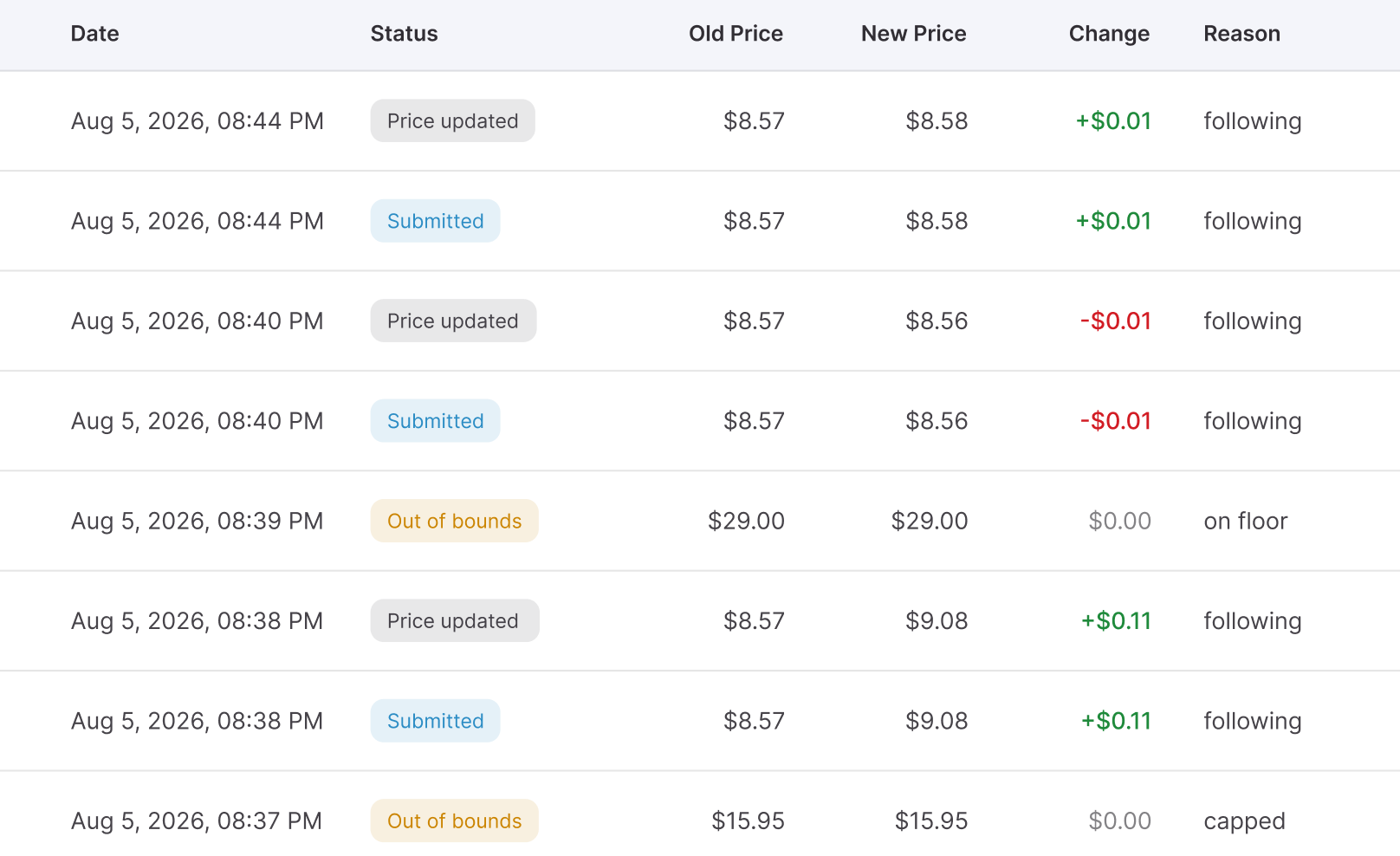
Repricer then runs the new market situation through the assigned strategy, rules, and price limits before deciding what to submit.
Proactive repricing checks listings without waiting for an event
Not every pricing decision starts with a competitor changing a price. Seller Assistant also performs proactive checks that periodically reevaluate listings even when no new marketplace event has triggered reactive repricing.
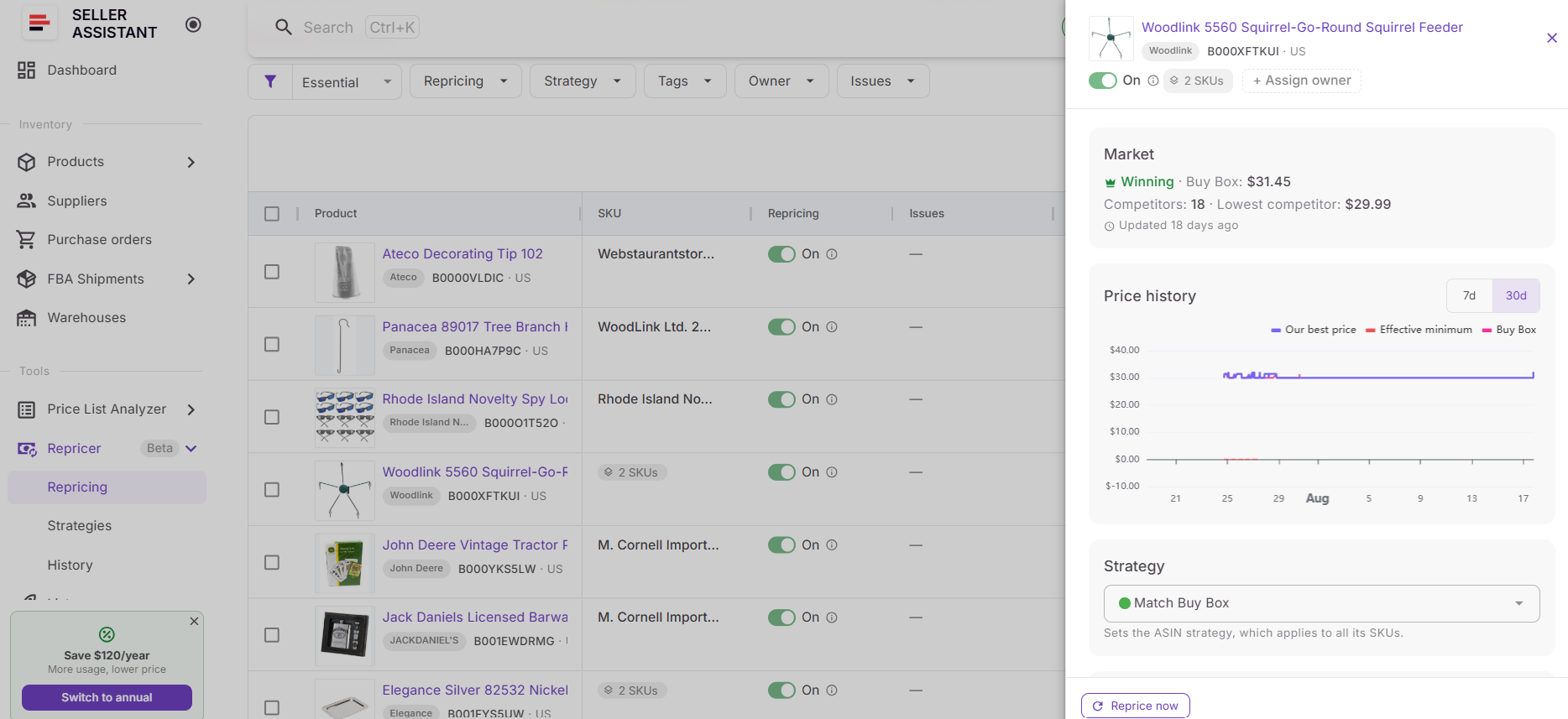
This is useful for conditions that can change independently of a competitor price update, including stock thresholds, time-of-day rules, and day-of-week rules. It also keeps quieter listings under review.
Issues identify products that need intervention
Repricer checks whether something is preventing a SKU from following its strategy as intended and displays these exceptions in Issues. Sellers can filter by issue rather than manually opening every product in the catalog.
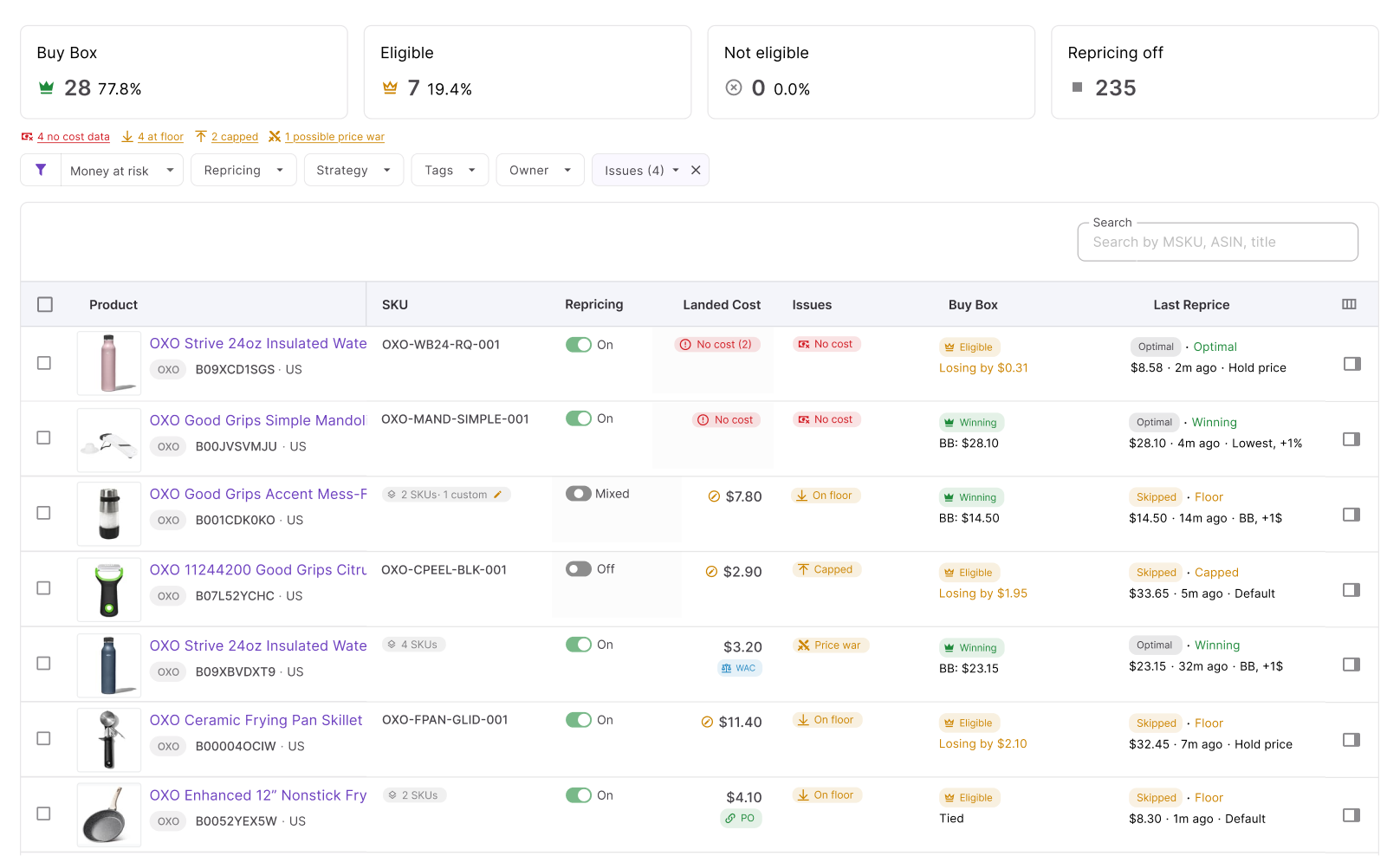
For example, No cost indicates that required cost data is unavailable, On floor shows that the price has reached its lower boundary, and Capped indicates that a limit is restricting further movement. Repricer can also surface Failed actions and possible Price war situations that may require review.
History shows what happened after each decision
Repricer History records previous pricing decisions so sellers can trace what happened to a SKU over time. It shows pricing activity and the context behind actions, including cases where Repricer changed the price or skipped an action.
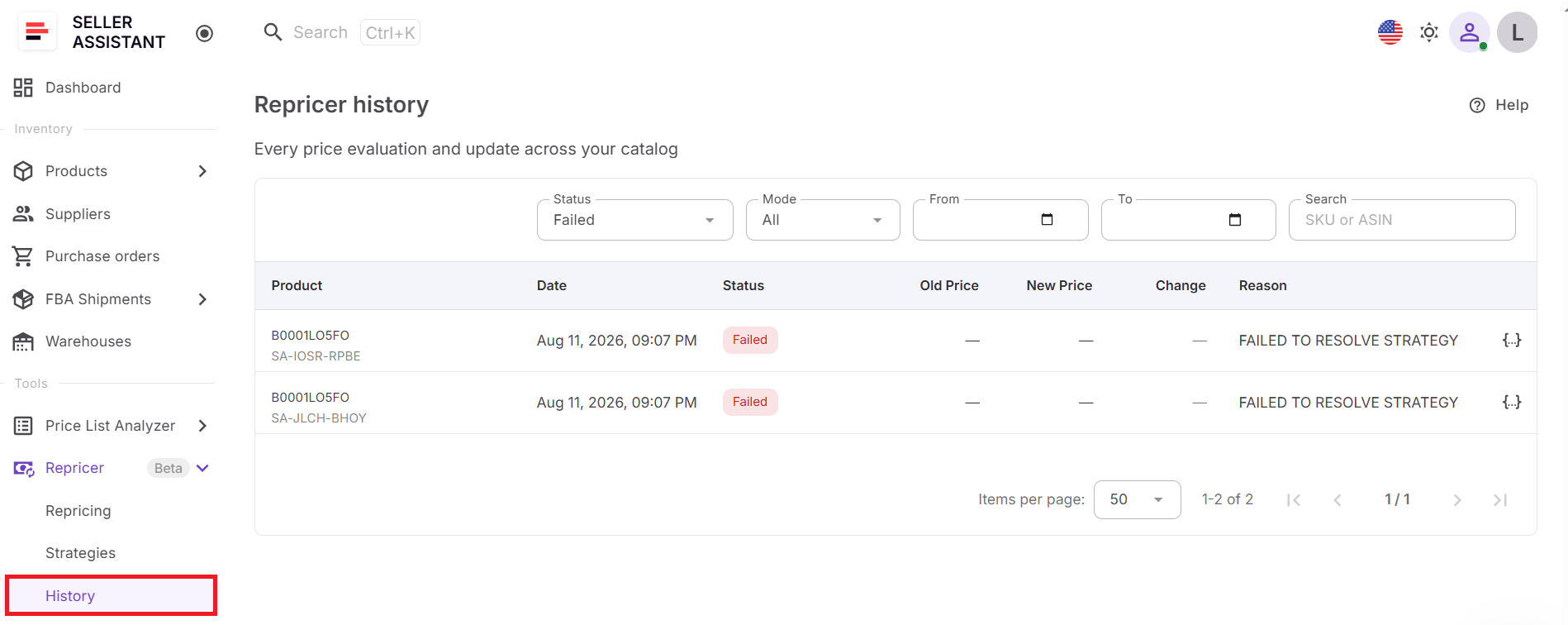
History is useful when a current price looks unexpected. Instead of guessing, you can compare the recorded action with the SKU’s strategy, applicable rule, market data, landed cost, and price limits to understand why Repricer behaved that way and decide whether the setup needs adjustment.
Seller Assistant Repricer Use Cases
Seller Assistant Repricer can support different pricing goals depending on competition, Buy Box position, inventory, and product economics. Wholesale, online arbitrage, and dropshipping sellers can use strategies and conditional rules to automate common pricing scenarios while keeping each SKU within defined profitability limits.
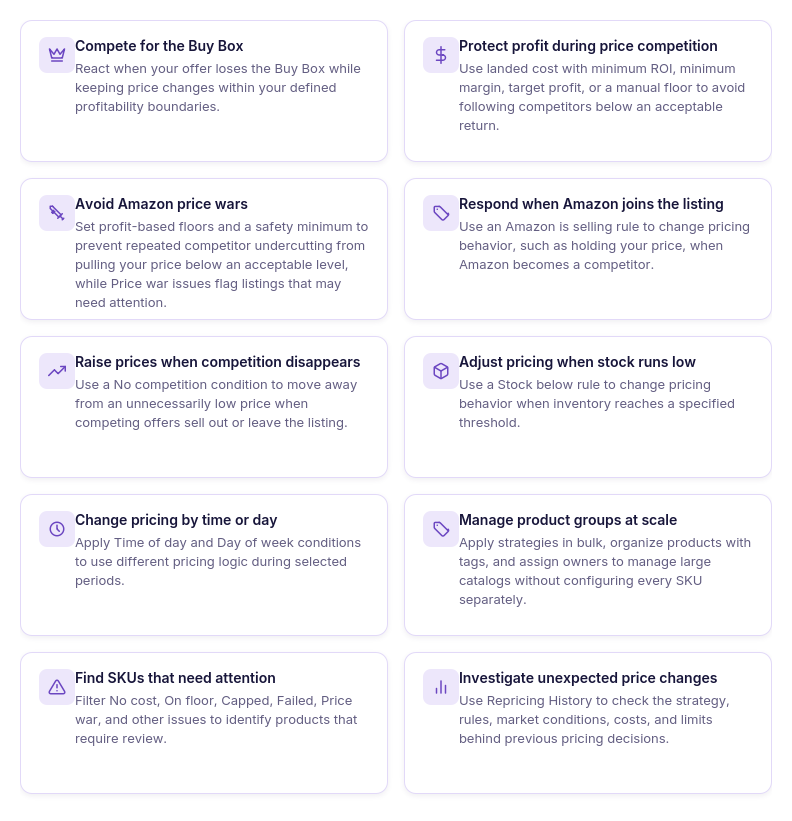
Competing for the Buy Box
Use case
A seller is losing the Buy Box and wants to become more competitive without manually monitoring the listing.
Solution
Assign a Buy Box-based strategy that reacts to changes in the Buy Box price and adjusts the offer according to the configured rules. Price floors and profitability limits keep the strategy from chasing the Buy Box below an acceptable return.
Protecting profit during price competition
Use case
Competitors keep lowering their prices, but the seller does not want automated repricing to turn a profitable SKU into a loss.
Solution
Use landed cost with a dynamic floor based on minimum ROI, minimum margin, or target profit. Repricer can compete while respecting that floor, with a safety minimum providing an additional hard lower boundary.
Avoiding Amazon price wars
Use case
Several sellers repeatedly undercut each other, pushing the Buy Box price down and putting the SKU’s margin at risk.
Solution
Set a profit-based floor using minimum ROI, minimum margin, target profit, or a manual minimum, backed by a safety minimum. Repricer can continue responding to competition without dropping below your defined boundary, while the Price war issue helps flag listings where aggressive price movement may need review.
Responding when Amazon joins the listing
Use case
A wholesale seller competes on an ASIN where Amazon sometimes appears as a seller and does not want to follow the same pricing logic when Amazon is present.
Solution
Create a conditional rule using Amazon is selling and specify a different action, such as Hold Price. When Amazon’s presence changes, the strategy can switch behavior without requiring the seller to edit the SKU manually.
Raising prices when competition disappears
Use case
Other sellers sell out or leave an ASIN, but the seller’s offer remains at the lower price previously needed to compete.
Solution
Use a No competition condition to change the pricing action when competing offers disappear. This gives the strategy an opportunity to move away from an unnecessarily low competitive price within the configured maximum.
Adjusting pricing when stock runs low
Use case
A seller has only a few units left and wants to prioritize margin rather than selling the remaining inventory at the same aggressive price.
Solution
Create a rule based on Stock below a chosen threshold and assign a different pricing action when it matches. The strategy can then hold or adjust the offer rather than continuing to follow the standard high-stock pricing logic.
Using different pricing by time or day
Use case
A seller wants the same SKU to follow different pricing logic during specific hours or days without manually switching strategies.
Solution
Add Time of day or Day of week conditions to the strategy. Repricer reevaluates these conditions during proactive checks and applies the first matching rule according to its priority.
Managing different product groups at scale
Use case
A reseller has hundreds or thousands of SKUs that require different approaches based on supplier, inventory type, profitability, or team responsibility.
Solution
Apply reusable strategies in bulk, organize products with tags, and assign owners to specific listings. This lets teams manage groups of products without building separate pricing logic SKU by SKU.
Finding SKUs that need manual attention
Use case
Most products can run automatically, but some SKUs have missing costs, have reached their price limits, or are not repricing as expected.
Solution
Use Issues and filters to isolate products marked with conditions such as No cost, On floor, Capped, Failed, or possible Price war. The seller can work on exceptions while leaving correctly configured SKUs automated.
Investigating an unexpected price change
Use case
A seller sees an unexpected offer price and wants to know why Repricer made that decision.
Solution
Open Repricing History and review the recorded pricing activity and decision context. Compare it with the product’s strategy, rules, market data, landed cost, and price limits to identify what drove or prevented the price change.
How Seller Assistant Repricer Works
Seller Assistant Repricer works best when setup follows a clear sequence: prepare the catalog, define pricing logic, verify costs and limits, resolve exceptions, and only then activate automatic repricing. This helps make sure the Repricer has the market context, strategy, and profitability data it needs before it starts changing prices.
Step 1. Open the Repricing workspace
Go to Repricer → Repricing in your Seller Assistant account. The main workspace shows products, SKUs, repricing status, assigned strategies, Buy Box data, tags, owners, and detected issues in one place.
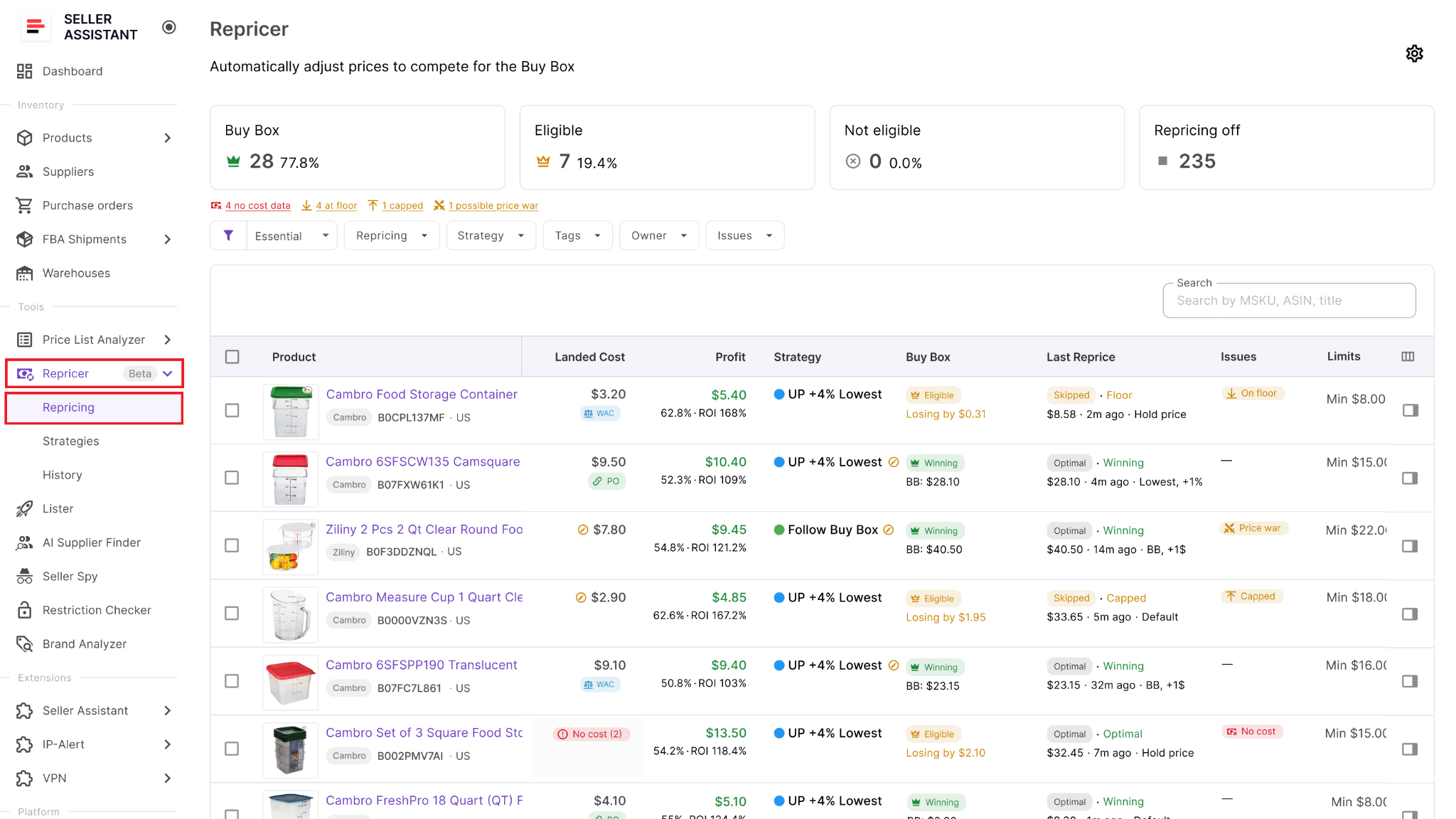
This is the control center for preparing products and checking their status before live repricing starts.
Step 2. Turn on Repricing in settings
Open Settings and enable Repricing for the team. You can also choose whether newly added products should enter repricing automatically or stay off until someone reviews and activates them.
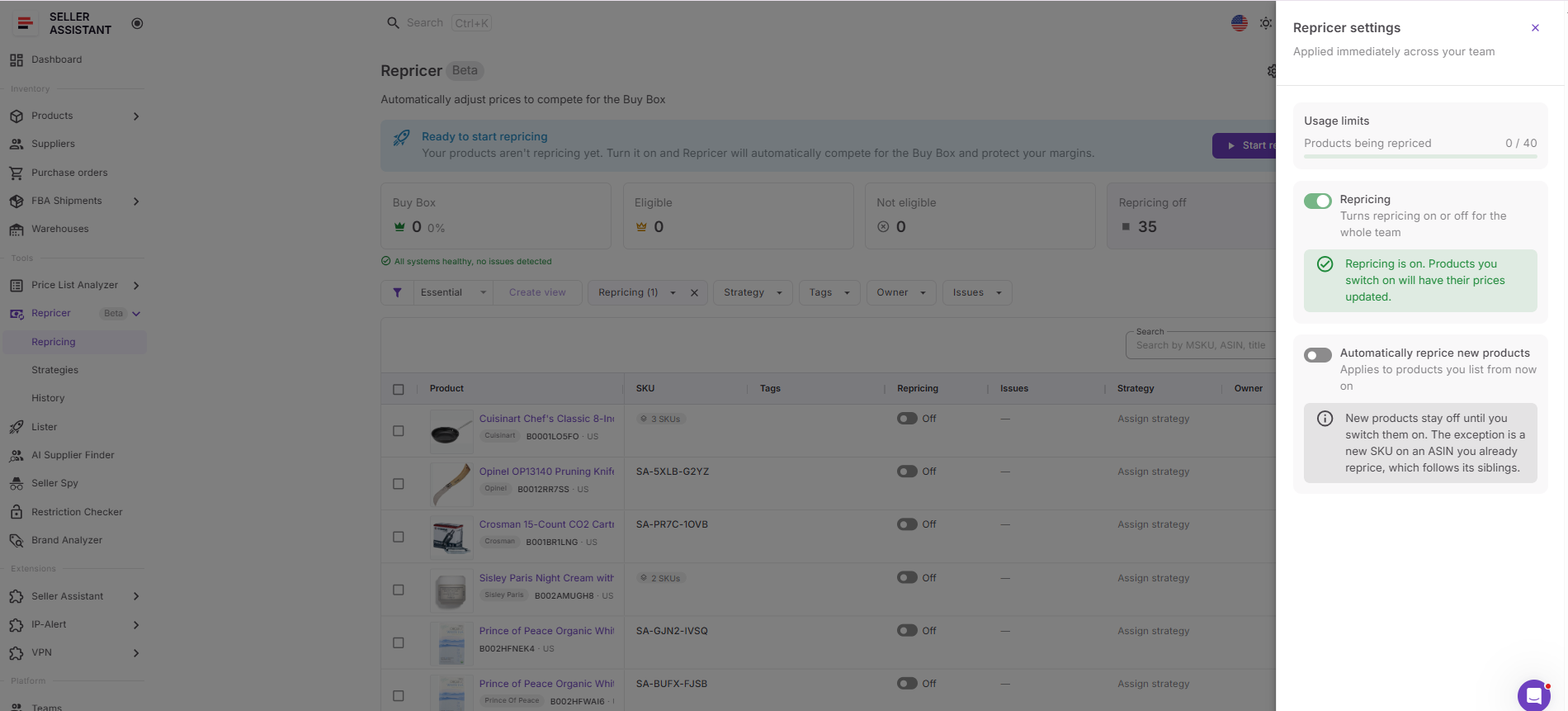
This setting controls whether Seller Assistant can submit automated price changes and how much manual review new inventory receives.
Step 3. Assign or create a strategy
Choose a strategy from the Strategy column or create a new one if the existing options do not match your pricing approach. You can start with templates such as Follow Buy Box, Match Buy Box, Smart FBA, Protect Profit, or Target 25% ROI, then adjust them as needed.
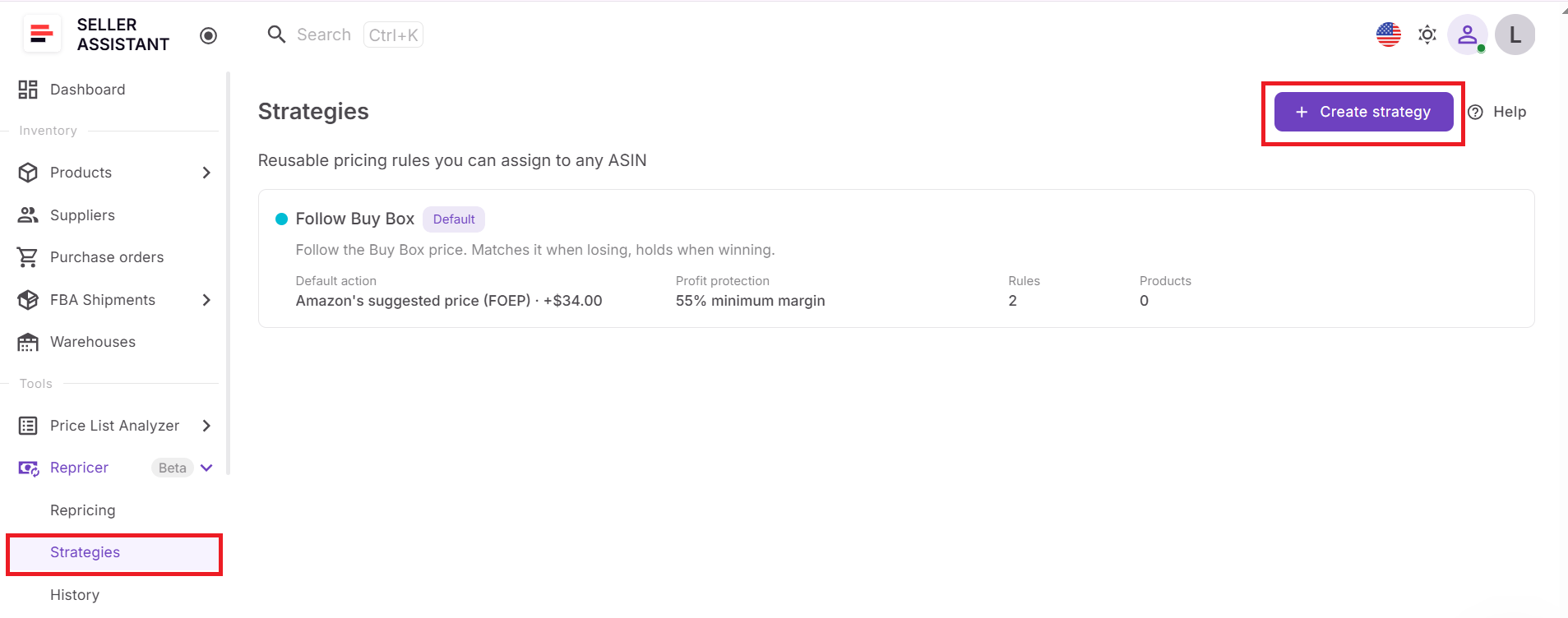
The strategy gives Repricer a defined pricing objective instead of treating every competitor move the same way.
Step 4. Build rules and set price limits
Add conditions that should trigger different pricing behavior, such as Amazon selling, Buy Box holder type, competitor levels, no competition, stock thresholds, time of day, or day of week.
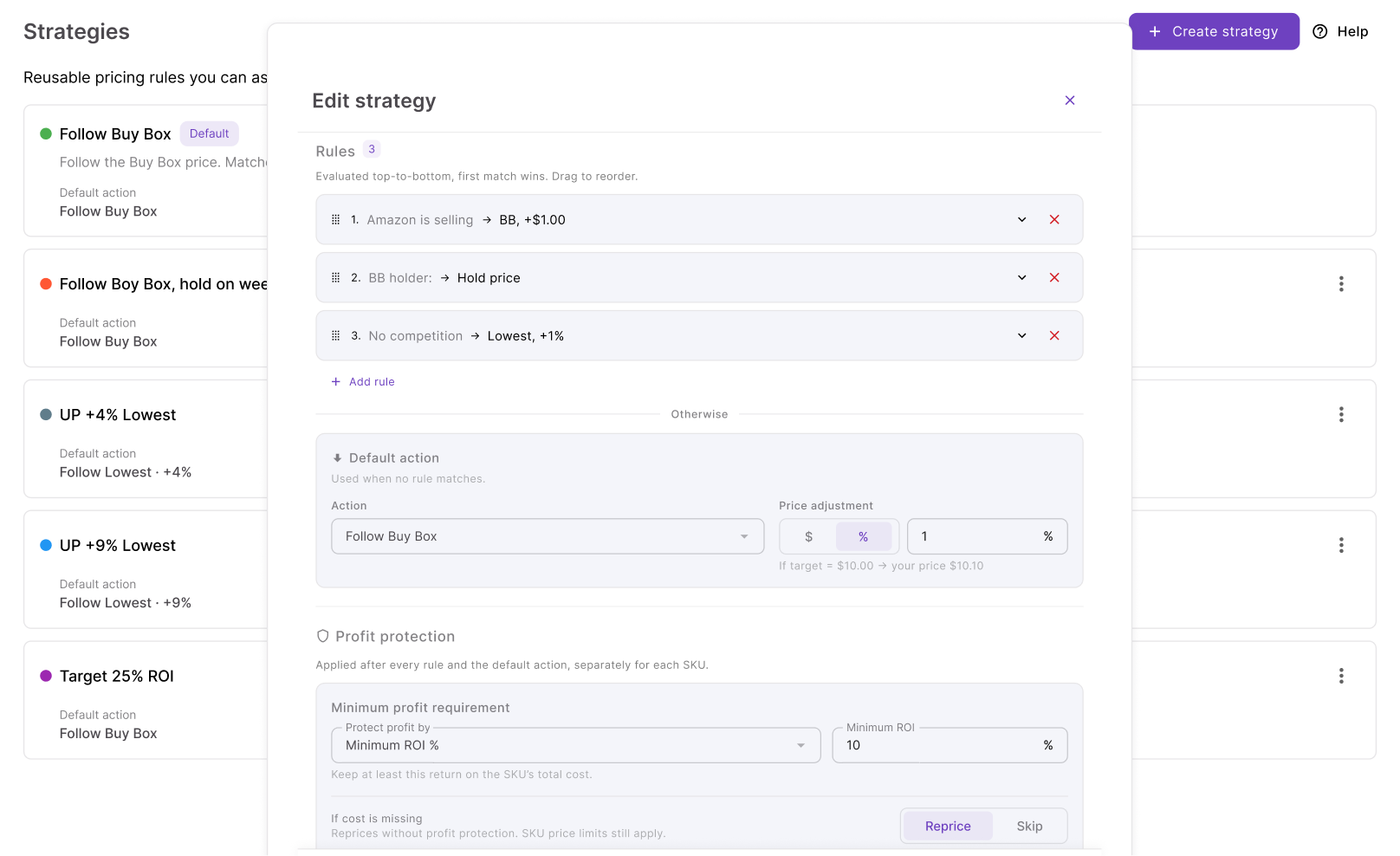
Then configure the default action, minimum-price logic, safety minimum, maximum price, profit protection, and maximum change per reprice.
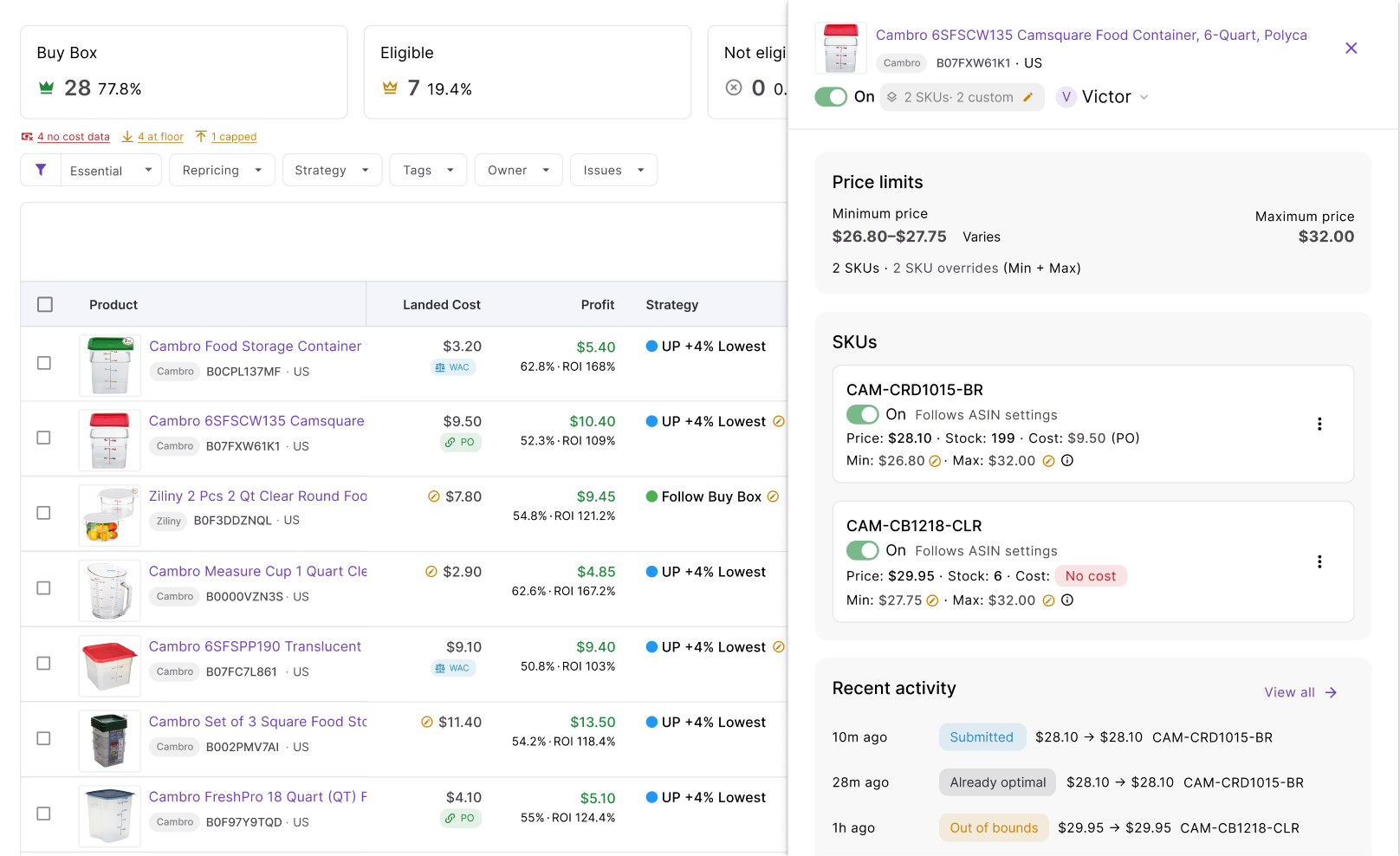
Rules control how Repricer reacts in different market situations, while limits define how far the price is allowed to move.
Step 5. Organize products with tags and owners
Use Tags to group products by criteria such as supplier, season, replenishment status, or priority. Assign an Owner when a team member is responsible for monitoring a specific product group.
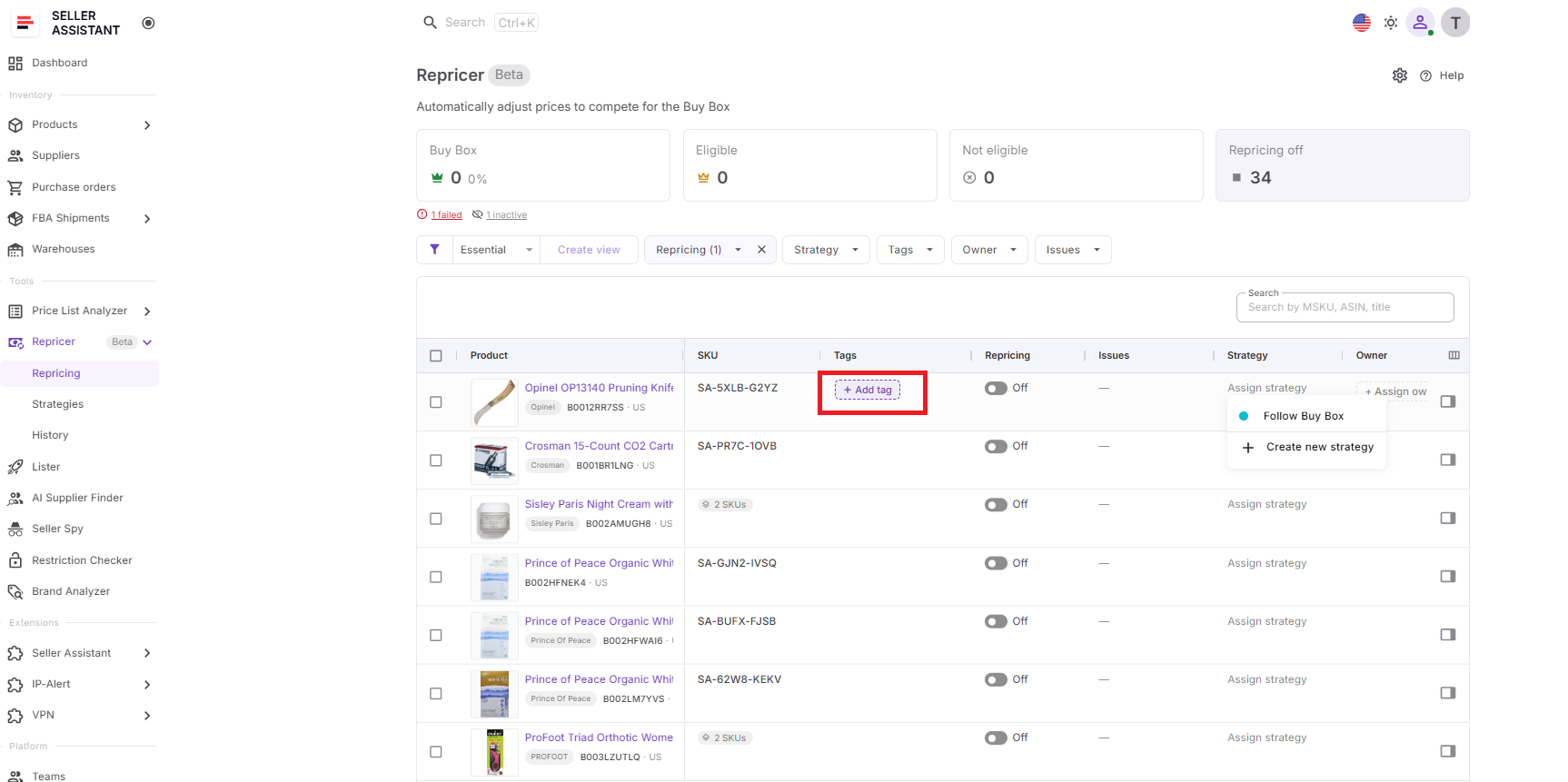
This makes larger catalogs easier to filter and gives each part of the repricing workflow clear ownership.
Step 6. Check landed cost and profitability
Review Landed Cost for the SKUs you plan to automate. Seller Assistant can use cost components such as unit cost, Purchase Order expenses, prep cost, and FBA inbound cost, then show metrics including profit, ROI, and margin.
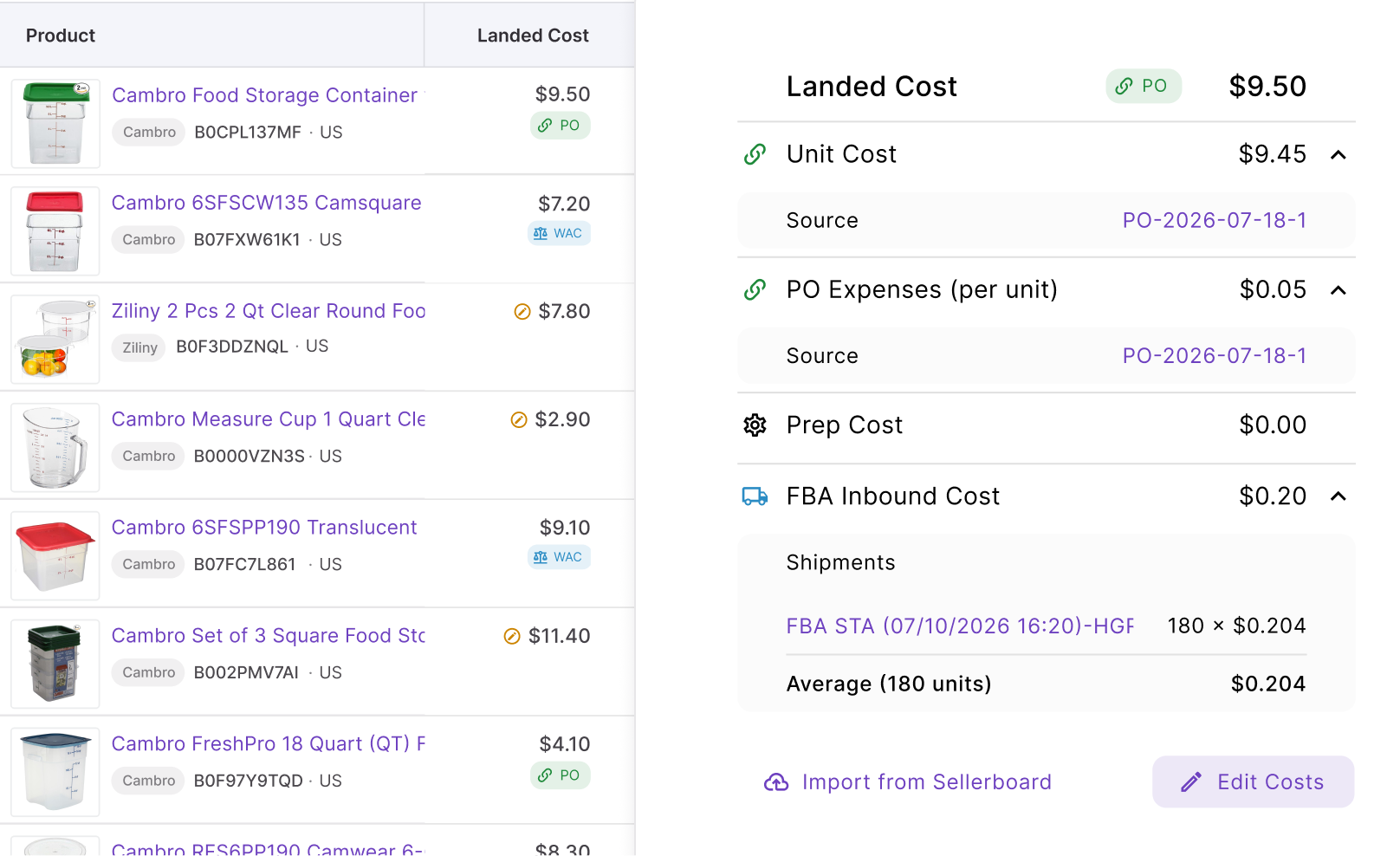
This step matters because dynamic floors based on ROI, margin, or target profit only work as intended when the underlying cost data is accurate.
Step 7. Fix issues before going live
Use the Issues column and filters to identify SKUs that need attention before activation. Repricer can surface states such as No cost, On floor, Capped, Failed, or a possible Price war.
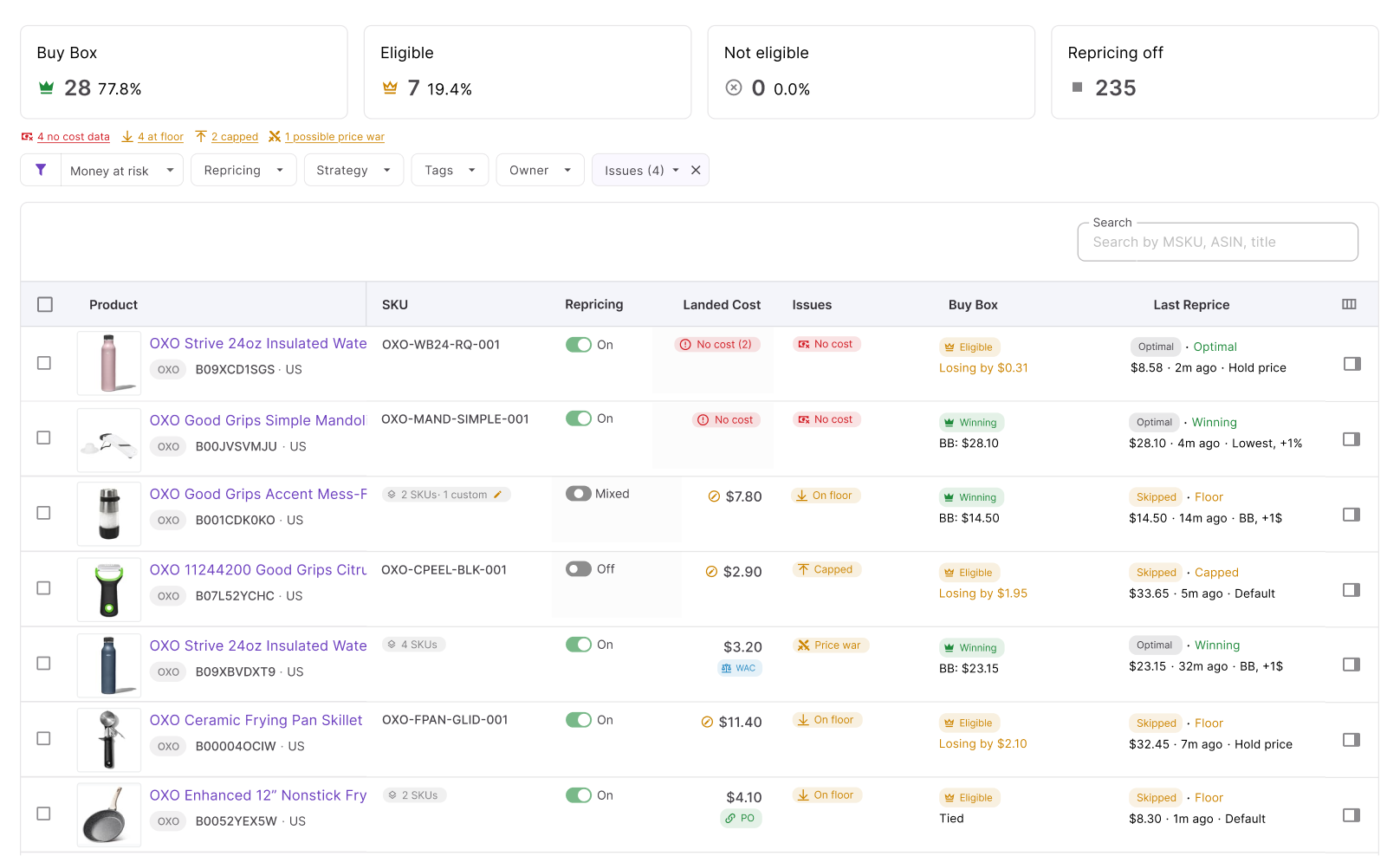
These indicators help explain why a product may not reprice as expected and point to the cost, limit, or strategy setting that needs correction.
Step 8. Start repricing and review results
Select the products you are ready to automate, enable repricing for them, and click Start repricing. Confirm the activation and decide whether future products should be added automatically if that fits your workflow.
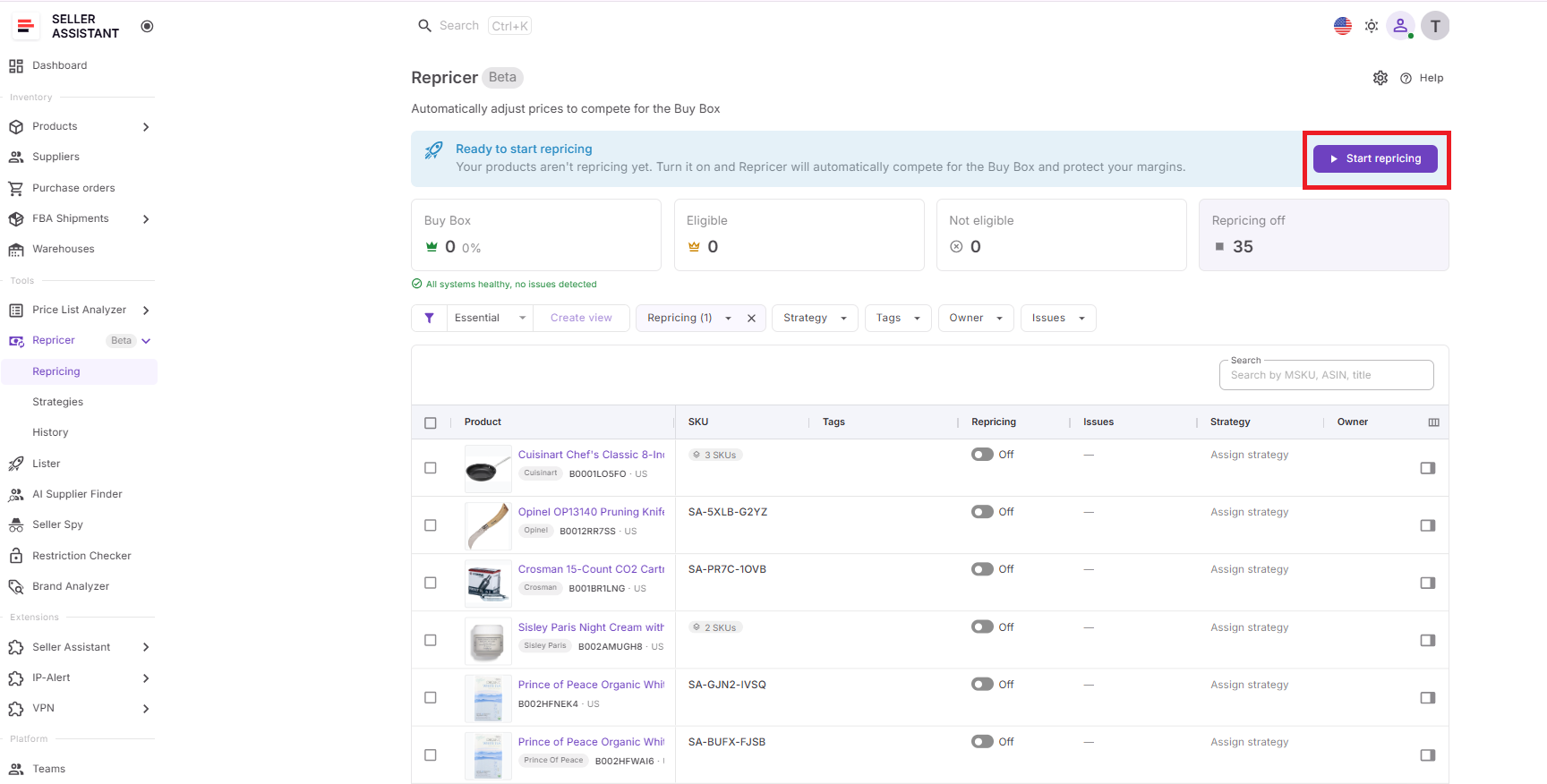
After repricing is live, monitor the Repricing table, product side panel, and History. Check Buy Box status, current price, price limits, profitability, recent actions, and decision reasons to confirm that the strategy is behaving as intended.
FAQ
Can I use Seller Assistant Repricer for both FBA and FBM offers?
Yes, Repricer provides competitive context around both FBA and FBM offers, including their lowest prices. This matters because the fulfillment method can affect how you interpret competition rather than treating every competing offer as equivalent.
Should every Amazon SKU use the same repricing strategy?
No – products with different sales velocity, margins, stock levels, and competitive conditions may need different pricing approaches. Segmenting SKUs lets you compete more aggressively where appropriate while prioritizing margin or inventory control elsewhere.
Does lowering my price guarantee the Amazon Buy Box?
No, because Amazon considers more than offer price when determining Buy Box eligibility and placement. Fulfillment method, delivery promise, seller performance, inventory availability, and other factors can affect whether a lower-priced offer wins.
When should I review my repricing strategy?
Review it when product costs, competition, inventory levels, or your profitability goals change significantly. Periodic reviews are also useful for identifying rules that made sense when a strategy was created but no longer match current selling conditions.
Can I temporarily stop repricing a product?
Yes, you can keep a product out of automated repricing when it requires manual attention instead of deleting its overall pricing setup. This can be useful for unusual competitive situations, temporary cost problems, or SKUs you want to review before returning them to automation.
Final Thoughts
Seller Assistant Repricer gives Amazon resellers a way to automate pricing without reducing repricing to “always be the cheapest.” Fast market response, conditional rules, Buy Box and competitor data, landed-cost-based price floors, and profit safeguards help sellers compete while keeping control over ROI and margin.
For wholesale, online arbitrage, and dropshipping businesses with growing catalogs, the bigger advantage is connecting repricing with the rest of the reseller workflow. With costs, profitability, purchase orders, inventory data, issue tracking, and Repricing History available within Seller Assistant, sellers can spend less time watching prices SKU by SKU and more time managing the products that actually need attention.
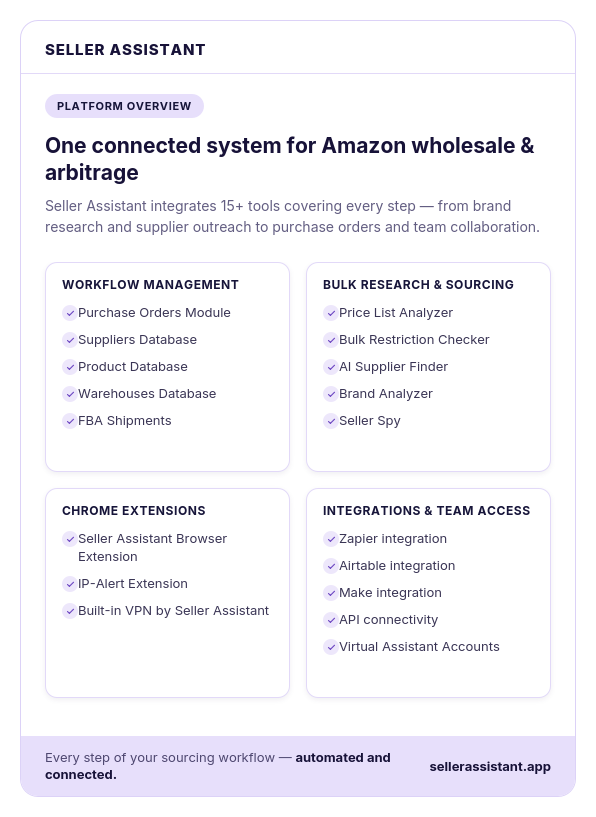
Seller Assistant automates and connects every stage of your Amazon wholesale and arbitrage workflow. It brings together in one platform: workflow management tools – Purchase Orders Module, Suppliers Database, Product Database, Warehouses Database, FBA Shipments, bulk research & sourcing tools – Price List Analyzer, Bulk Restriction Checker, AI Supplier Finder, Brand Analyzer, Seller Spy, Chrome extensions – Seller Assistant Browser Extension, IP-Alert Extension, and built-in VPN by Seller Assistant, and integrations & team access features – seamless API connectivity, integrations with Zapier, Airtable, and Make, and Virtual Assistant Accounts.