Every repricing strategy makes the same basic promise: win more Buy Box, protect your margin. Few actually deliver both at once. Match the Buy Box too closely and you’re one aggressive competitor away from an unprofitable spiral; hold your price too firmly and you watch the Buy Box move to someone else.
The right answer isn’t a single “best” strategy – it’s matching the strategy to what’s actually happening on that listing, whether that’s low competition, thin margins, or a seller trying to undercut you into a loss.
This post breaks down the common approaches, including the ready-made strategies in Seller Assistant Repricer, and how to choose between them.
How a Repricing Strategy Shapes Your Pricing
An Amazon repricing strategy is a set of instructions that tells a repricer how your offer should behave when marketplace conditions change. Instead of simply telling the tool to “lower my price,” a strategy defines which price to follow, when to change or hold your price, how to react to specific competitive situations, and how far the price is allowed to move.
For Amazon wholesale, online arbitrage, and dropshipping sellers, this distinction matters because the lowest price is not always the best price. A good repricing strategy balances Buy Box competitiveness with inventory goals and profitability, so the same SKU can behave differently when Amazon enters the listing, competition disappears, stock runs low, or the Buy Box changes hands.
| Strategy Element | What It Controls | Example |
|---|---|---|
| Pricing target | Which market price your offer follows | Follow the Buy Box instead of automatically chasing the lowest offer |
| Market conditions | When different pricing logic should apply | Change behavior when Amazon starts selling on the ASIN |
| Pricing action | Whether the offer moves, matches a target, or stays unchanged | Hold your price while you have the Buy Box |
| Price adjustment | How far above or below the target to price | Follow the Buy Box with a $0.10 or percentage adjustment |
| Competitor response | How pricing changes under different competitive situations | Raise the price when no competition remains |
| Inventory response | How stock levels influence pricing | Use less aggressive pricing when only a few units remain |
| Repricing floor | The lowest price the strategy is allowed to reach | Stop lowering the price once your minimum ROI is reached |
| Maximum price | The highest price automated repricing can set | Prevent price increases beyond your chosen ceiling |
| Rule priority | Which instruction applies when multiple conditions exist | Prioritize an Amazon-is-selling rule over the standard Buy Box rule |
| Timing rules | Whether pricing behavior changes by time or day | Use different pricing logic overnight or on selected days |
Which market price to follow
A strategy determines the reference point for repricing. Depending on your goal, that might mean following the Buy Box price, lowest competing offer, or Amazon’s suggested price rather than automatically undercutting whoever is cheapest.
When to change or hold the price
Not every marketplace change should trigger a price reduction. A strategy can tell the repricer when to lower, raise, match, or hold the current price based on the situation.
How to react to competition
Different competitors may call for different responses. Your strategy can account for conditions such as Amazon selling, Buy Box holder type, competitors above or below your offer, or no competition at all.
How inventory affects pricing
Stock levels can change what you want from a SKU. When inventory is high you may prioritize sales velocity, while low stock can justify holding or increasing the price to protect margin and extend inventory.
How much to adjust the price
A strategy can define whether to match a pricing target exactly or move above or below it by a fixed dollar amount or percentage. This gives you more control than repeatedly undercutting competitors by the same amount.
How low the price can go
Your repricing floor determines where competitive price reductions must stop. It can be based on a manual minimum or profitability requirements such as minimum ROI, minimum margin, or target profit, using the SKU’s cost data.
How high the price can go
A maximum price sets the upper boundary for automated repricing. This becomes particularly important when competitors disappear and the strategy has room to increase your offer.
How different situations take priority
More advanced Amazon repricing strategies can use multiple conditional rules rather than one instruction for every scenario. Rule priority determines which action wins when several market conditions could apply at the same time.
In short, an Amazon repricing strategy controls the logic between a marketplace change and your next price – not just whether that price goes up or down.
Common Amazon Repricing Strategies Sellers Use
There is no single Amazon repricing strategy that works for every SKU. The right approach depends on whether your priority is winning the Buy Box, maintaining profitability, increasing sales velocity, responding to specific competitors, or extracting more margin when competition is weak.
For wholesale, online arbitrage, and dropshipping sellers, these are the most useful strategy types to understand.
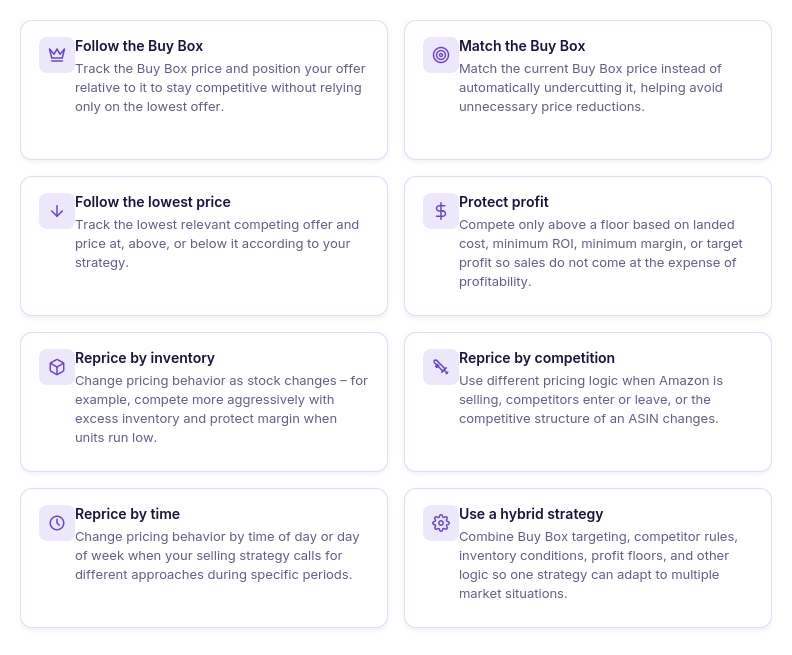
Follow the Buy Box
This strategy uses the current Buy Box price as its pricing target. Your offer can match that price or stay a defined dollar amount or percentage above or below it.
- Best for
Competitive ASINs where Buy Box performance is a major sales driver.
- Watch out for
Following the Buy Box downward without a profitable floor can sacrifice margin just to remain competitive.
Follow the lowest price
This approach tracks the lowest competing offer and adjusts your price relative to it. Sellers can match the lowest price or position their offer slightly above or below it.
- Best for
Listings where price is particularly important and the lowest relevant competitor represents meaningful competition.
- Watch out for
The cheapest offer is not necessarily your true Buy Box competitor, particularly when fulfillment methods and offer conditions differ.
Match the Buy Box
Instead of undercutting, this strategy matches the Buy Box price when appropriate. It is a more controlled approach for sellers who want to compete without automatically pushing the listing price lower.
- Best for
Sellers who want Buy Box competitiveness while reducing unnecessary undercutting.
- Watch out for
Matching price alone does not guarantee the Buy Box because Amazon considers factors beyond price.
Profit-protection strategy
Here, profitability determines how far competitive repricing is allowed to go. The strategy can follow the market while stopping at a floor based on landed cost, minimum ROI, minimum margin, or target profit.
- Best for
Wholesale and OA products where protecting the economics of each unit matters as much as sales velocity.
- Watch out for
Cost-based protection depends on accurate and current cost data.
Inventory-based repricing
Stock becomes part of the pricing decision. A seller might compete more aggressively with excess inventory but hold or increase the price when only a few units remain.
- Best for
Replenishable products, seasonal inventory, and SKUs where stock position should influence sales velocity.
- Watch out for
Inventory rules should complement the overall strategy rather than override profitability safeguards.
Competition-based repricing
This strategy changes behavior according to the competitive situation rather than following one price under every condition. For example, you might hold when Amazon is selling, use one action against FBA competition, or increase your price when no competitors remain.
- Best for
ASINs where the competitive landscape changes frequently.
- Watch out for
More conditions mean rule priority becomes important – conflicting rules can produce unintended behavior if they are ordered poorly.
Time-based repricing
Pricing logic changes according to the time of day or day of week. For example, a seller might use one competitive approach during peak selling hours and another when demand or competition typically changes.
- Best for
Sellers with enough historical experience to know that pricing opportunities vary predictably by time.
- Watch out fo
Don’t add scheduling complexity without evidence that different time periods actually require different pricing behavior.
Hybrid repricing
A hybrid strategy combines several approaches instead of choosing only one. For example, a SKU might normally follow the Buy Box, hold when Amazon is selling, raise its price when competition disappears, protect a minimum ROI, and become less aggressive when stock runs low.
- Best for
Wholesale and OA sellers who need pricing to respond to the actual state of each ASIN rather than a single universal rule.
- Watch out for
Keep the hierarchy clear – the repricer needs to know which rule takes priority when several conditions are true simultaneously.
Why a Single Strategy Rarely Fits an Entire Catalog
Amazon reseller catalogs are rarely uniform. A wholesale or OA seller may have fast-moving replenishable products, slow sellers, seasonal inventory, high-margin SKUs, products where Amazon competes directly, and listings with very different numbers of FBA and FBM sellers. Applying the same Amazon repricing strategy to all of them ignores those differences.
Even the same SKU may need different pricing behavior as conditions change. The right action while you are losing the Buy Box may not make sense when you are winning it, stock drops to a few units, Amazon enters the listing, or competing sellers disappear. Instead of looking for one “best” strategy, sellers need pricing logic that adapts to the situation.
Why rule-based strategies are the better fit for most sellers
Rule-based repricing lets you define what should happen when specific conditions occur, rather than forcing every SKU to follow one pricing instruction all the time.
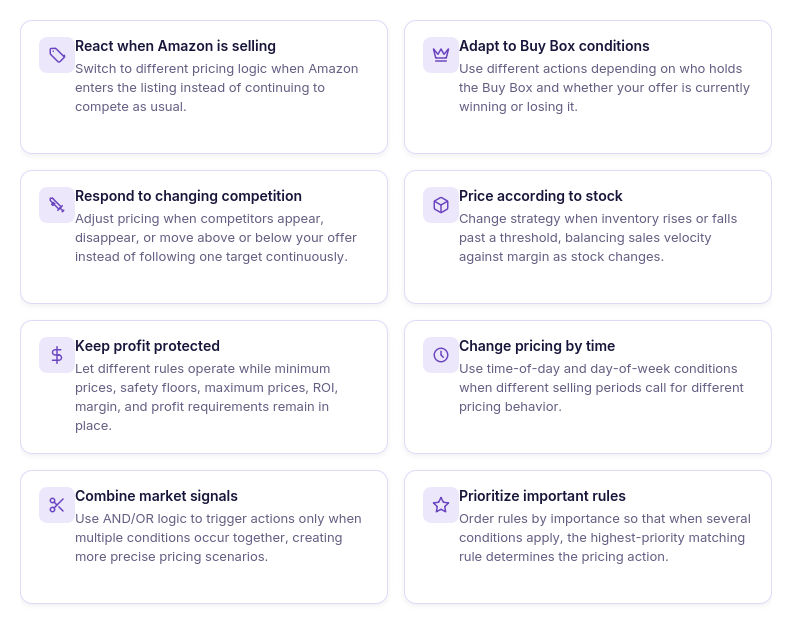
React differently to Amazon
Amazon entering an ASIN can change the competitive situation significantly. A rule can tell the repricer to hold or use different pricing logic while Amazon is selling instead of continuing with the standard action.
Adapt to Buy Box conditions
Winning and losing the Buy Box do not necessarily require the same response. Rules can change the pricing action according to the Buy Box holder or competitive position instead of continuously lowering the offer.
Respond when competition changes
A price that made sense with ten competitors may be unnecessarily low when most of them sell out. Rules can respond to competitors above or below your offer or no competition, allowing the strategy to adjust as the listing changes.
Use stock as a pricing signal
Inventory can influence whether sales velocity or margin should take priority. A seller can use different logic when stock falls below or rises above a defined threshold.
Protect profitability across every rule
Competitive rules can still operate inside a minimum price, safety minimum, maximum price, and profit-based floor. This means different market situations can trigger different actions without abandoning the SKU’s ROI, margin, or profit requirements.
Change behavior by time or day
Rules based on time of day and day of week let sellers vary pricing logic during selected periods. This adds another layer of control without requiring someone to manually switch strategies.
Combine multiple conditions
Rules can use AND/OR logic, allowing a pricing action to depend on more than one signal. For example, a seller could create specific behavior for low stock AND a particular competitive situation rather than reacting to either condition independently.
Prioritize the most important scenarios
When several conditions could apply, rule order determines which one takes precedence. Rules are evaluated from top to bottom and the first matching rule wins, giving sellers explicit control over which pricing scenario matters most.
From Templates to Custom Rules: Repricing Strategies in Seller Assistant
Seller Assistant Repricer is particularly flexible when it comes to strategy design because sellers do not have to choose between a simple preset and building everything manually. You can start with a ready-made strategy for a common Amazon scenario, customize its rules and limits, or build your own strategy from scratch.
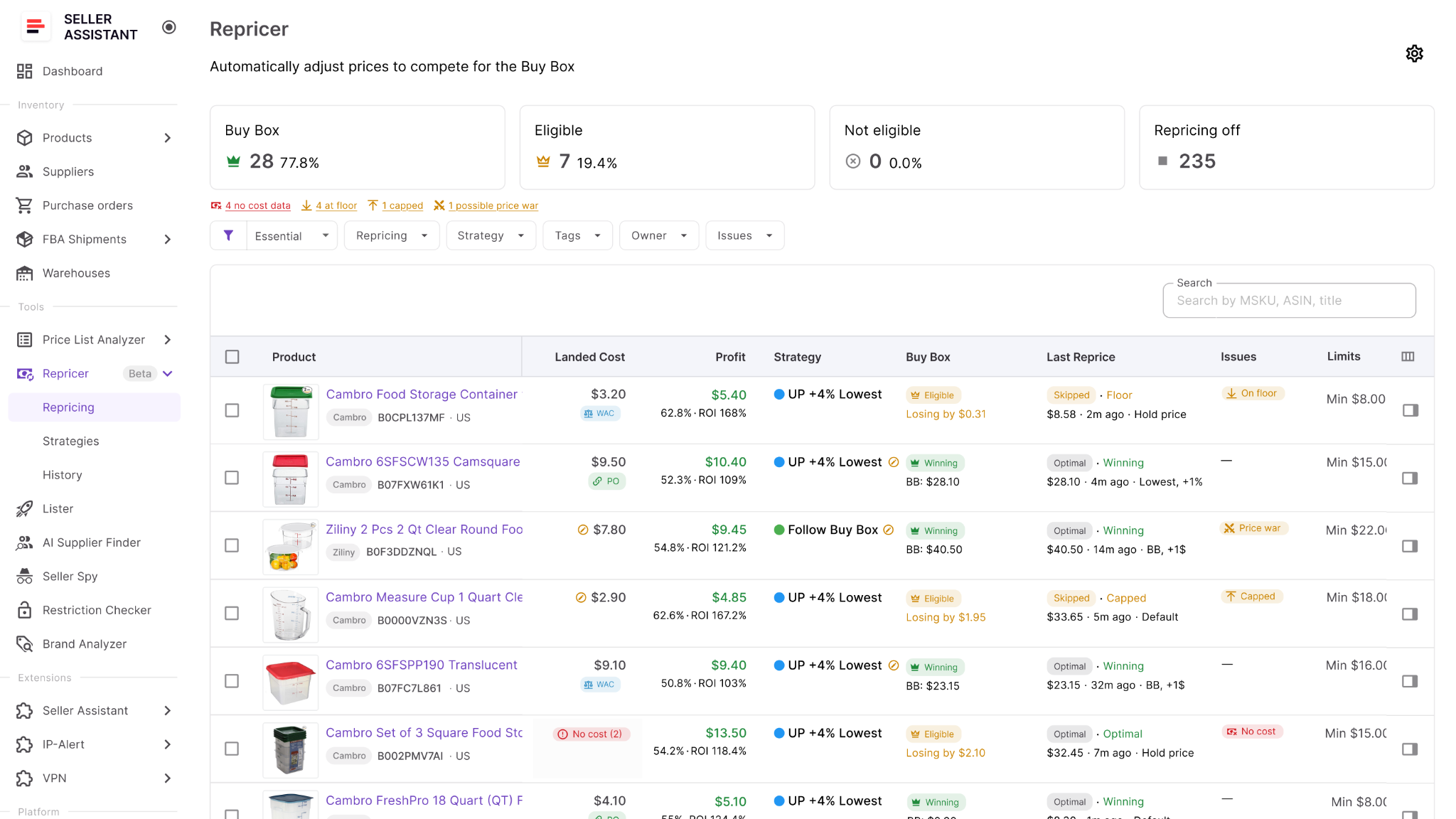
More importantly, strategies can combine Buy Box and competitor signals, Amazon’s presence, stock levels, time and day conditions, landed cost, ROI, margin, target profit, and price limits. Reactive repricing can respond to relevant marketplace changes in about 2–5 seconds, while proactive checks keep evaluating conditions that do not depend on a new competitor price event.
Ready-made strategies in Seller Assistant Repricer
Seller Assistant Repricer includes templates for several common repricing goals. They provide working pricing logic that sellers can use as a starting point rather than configuring every strategy from zero.
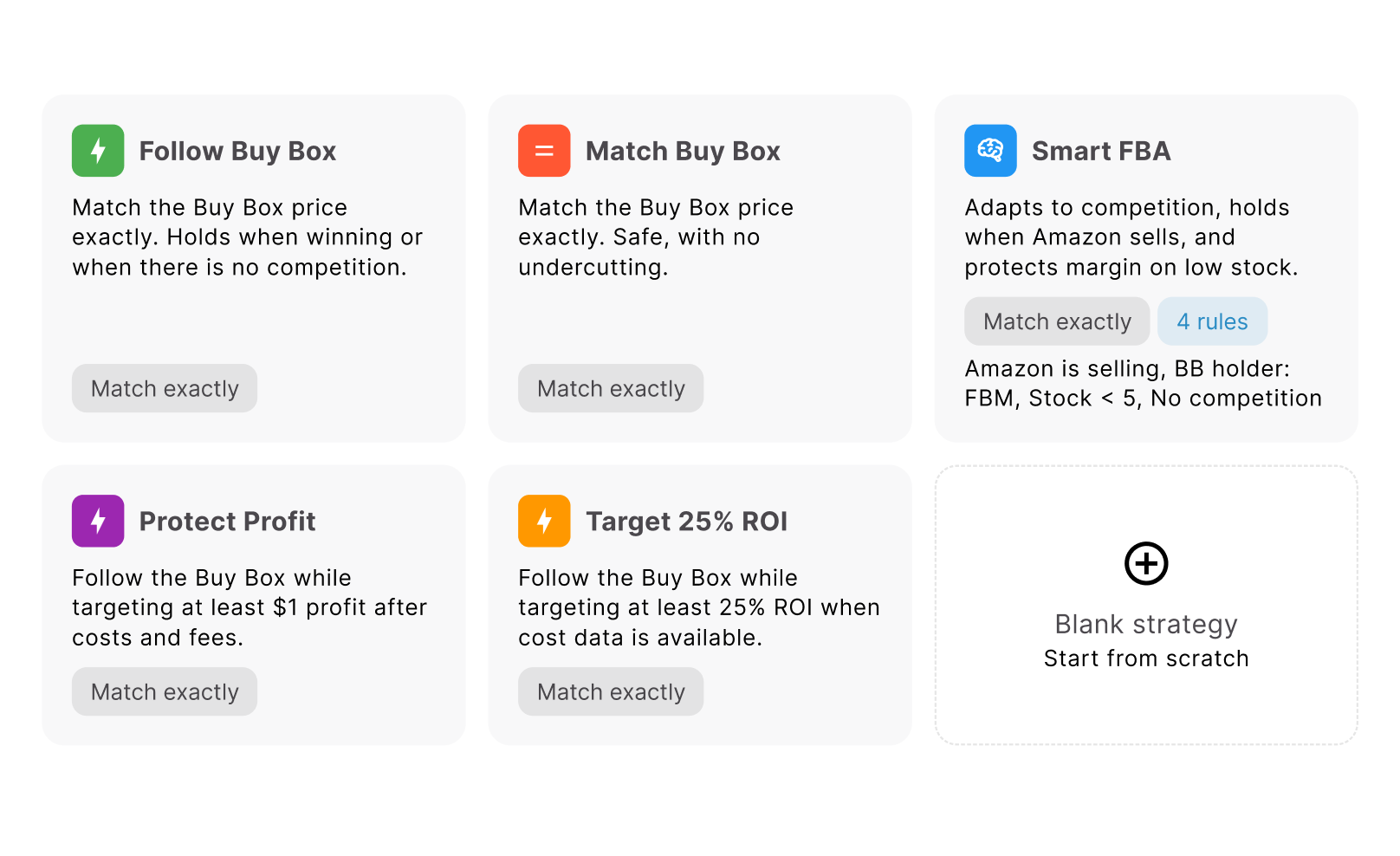
Follow Buy Box
This strategy follows the Buy Box when your offer is losing it and holds your price when you are winning.
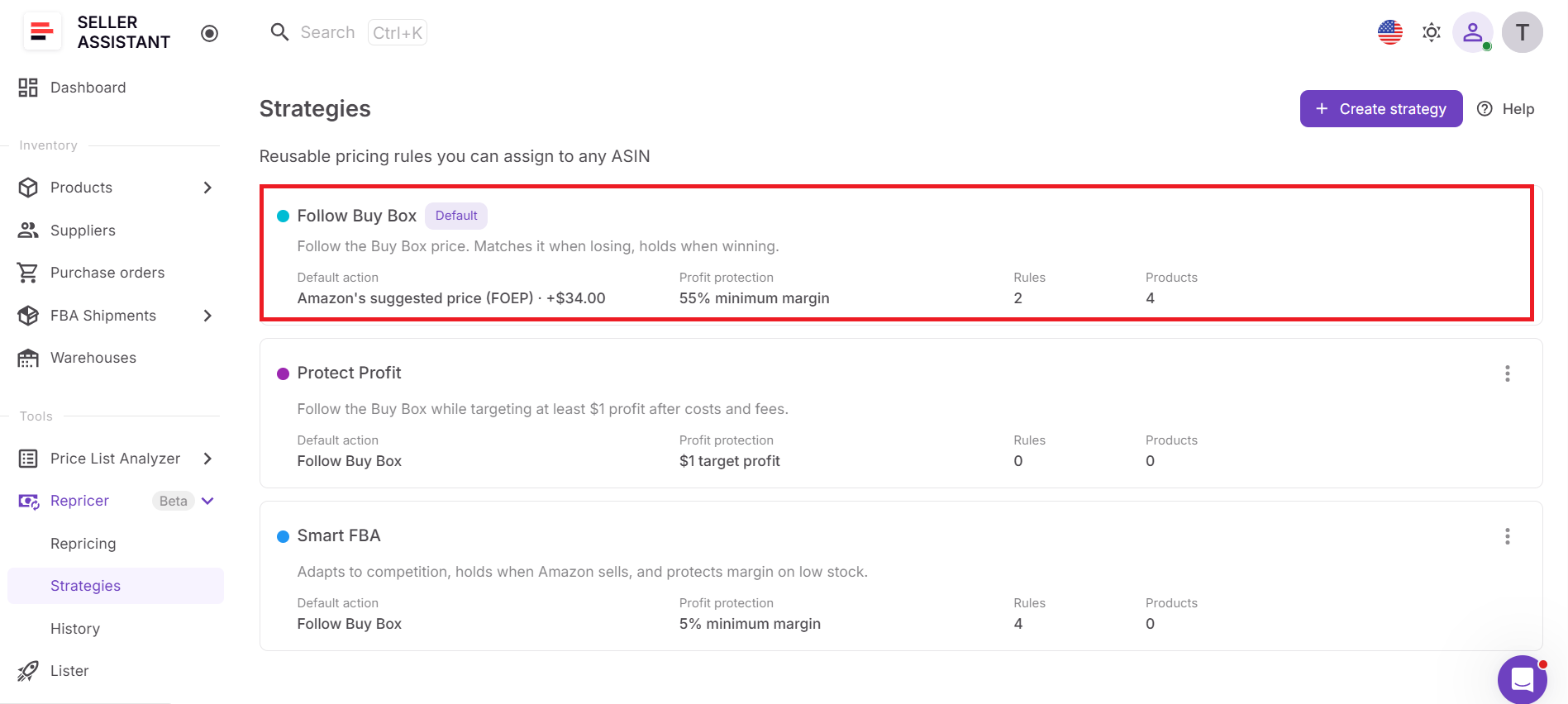
- Best for
Competitive products where maintaining Buy Box competitiveness is the main objective.
- Why use it
It avoids continuously changing an offer that is already winning while responding when the Buy Box moves away from you.
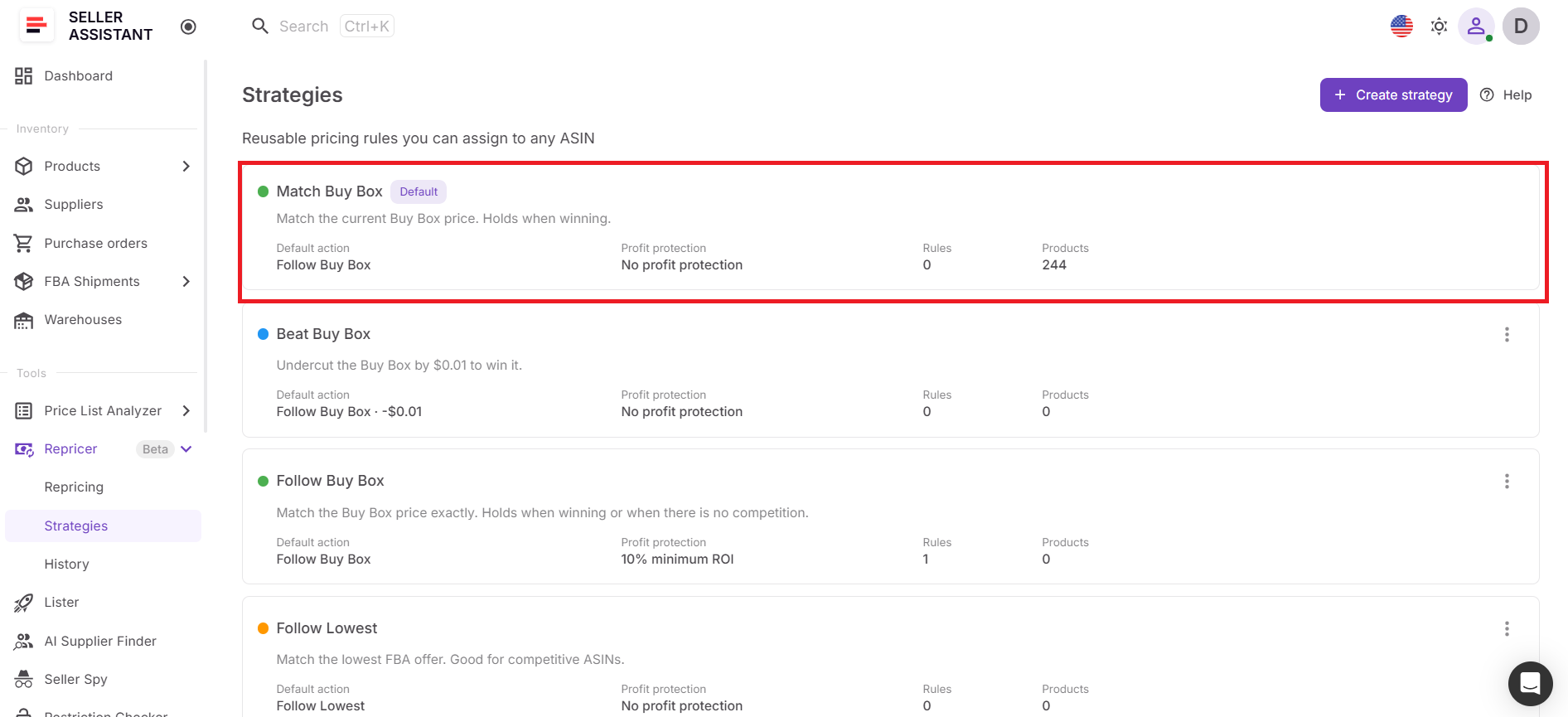
Match Buy Box
Match Buy Box sets your offer to the current Buy Box price without deliberately undercutting it.
- Best for
Sellers who want to remain price-competitive without contributing unnecessarily to downward price movement.
- Why use it
Being cheaper is not always required to compete for the Buy Box, so matching can preserve more price stability.
Smart FBA
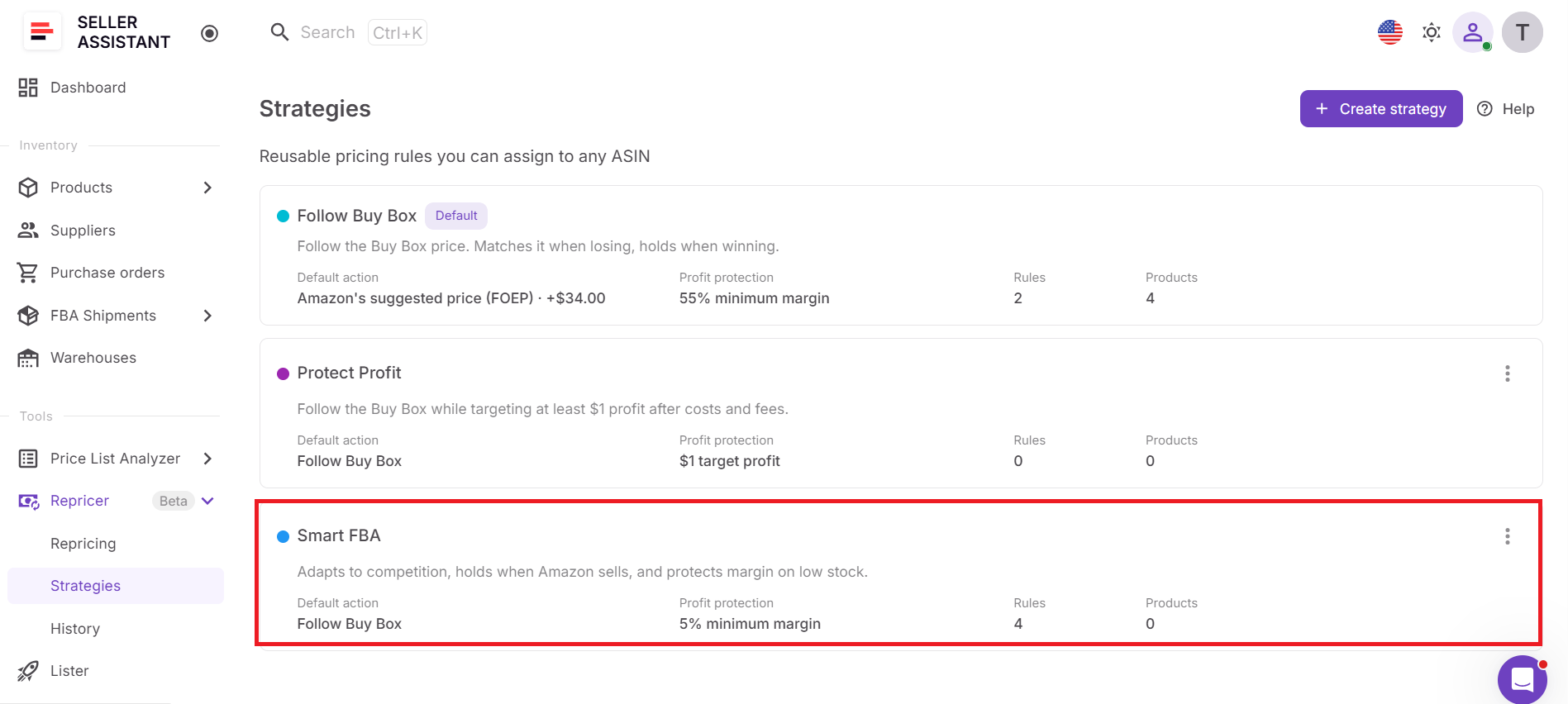
Smart FBA adapts its behavior to the competitive environment. It can price above FBM sellers, hold when Amazon is selling, and protect margin when inventory is low.
- Best for
FBA resellers facing a mixture of Amazon, FBA, and FBM competition.
- Why use it
It recognizes that not every competing offer should trigger the same response.
Protect Profit
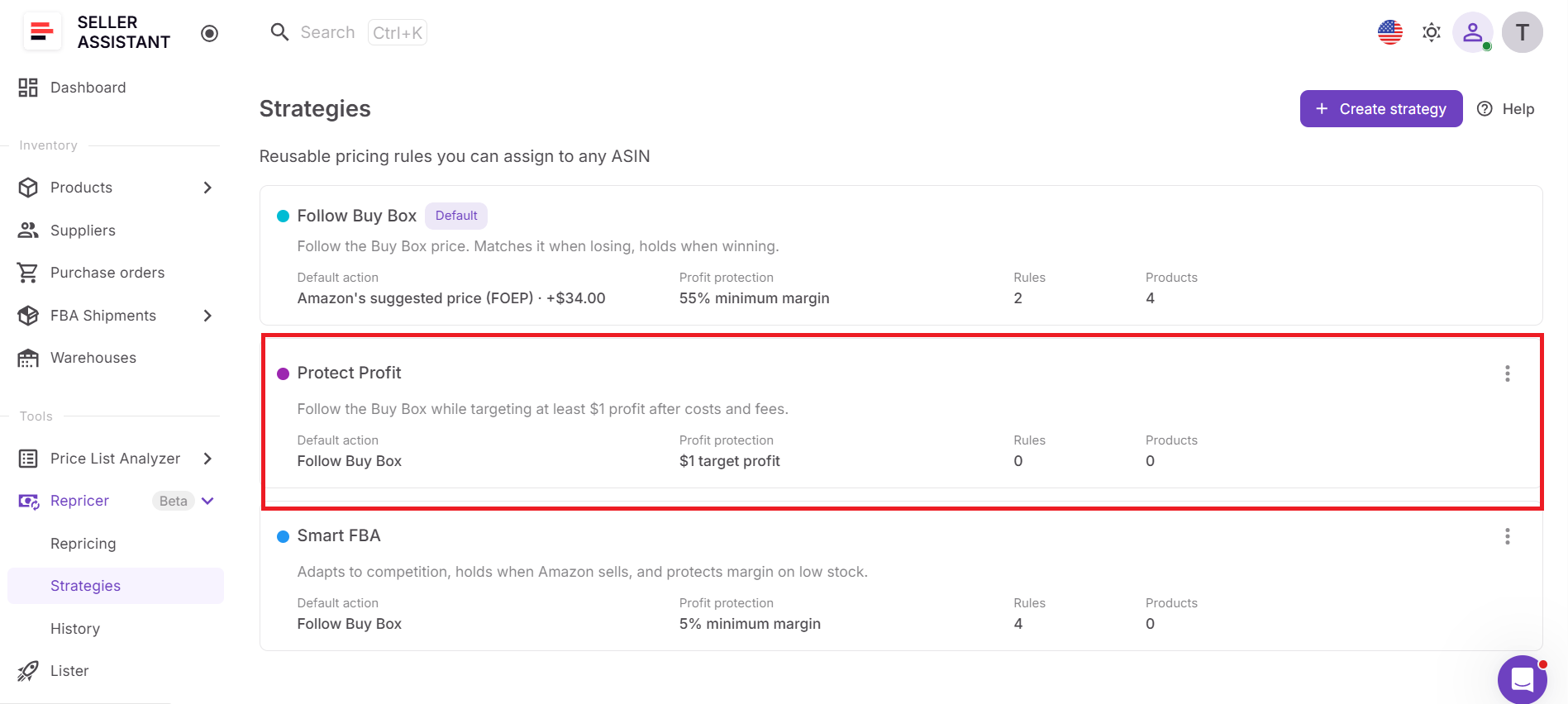
Protect Profit follows the Buy Box while using cost data to prevent the offer from falling below break-even plus $1.
- Best for
Wholesale and OA SKUs where Buy Box competition matters but protecting dollar profit is the priority.
- Why use it
It places a financial boundary underneath competitive repricing instead of following the market regardless of product economics.
Target 25% ROI
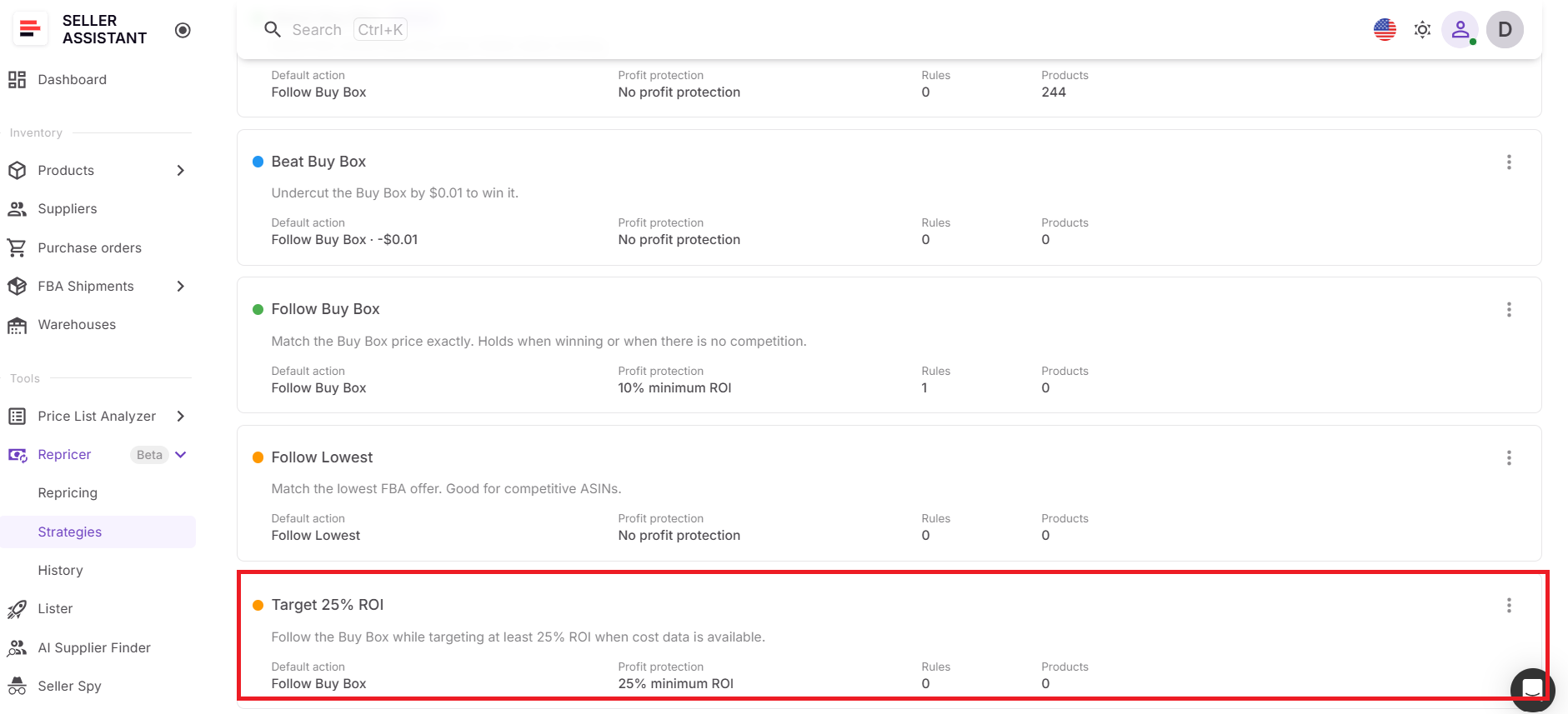
This strategy follows the Buy Box while maintaining at least 25% ROI. If the SKU does not have the cost data required to calculate that return, repricing is skipped.
- Best for
Resellers who evaluate sourcing and inventory performance primarily by ROI.
- Why use it
The strategy connects the price you compete at with the return you expect from the capital invested in the product.
Building your own strategy from rules
Ready-made strategies cover common scenarios, but reseller catalogs often need more specific logic. Seller Assistant Repricer lets you create a blank strategy and define a default pricing action, conditional rules, price adjustments, and price limits yourself.
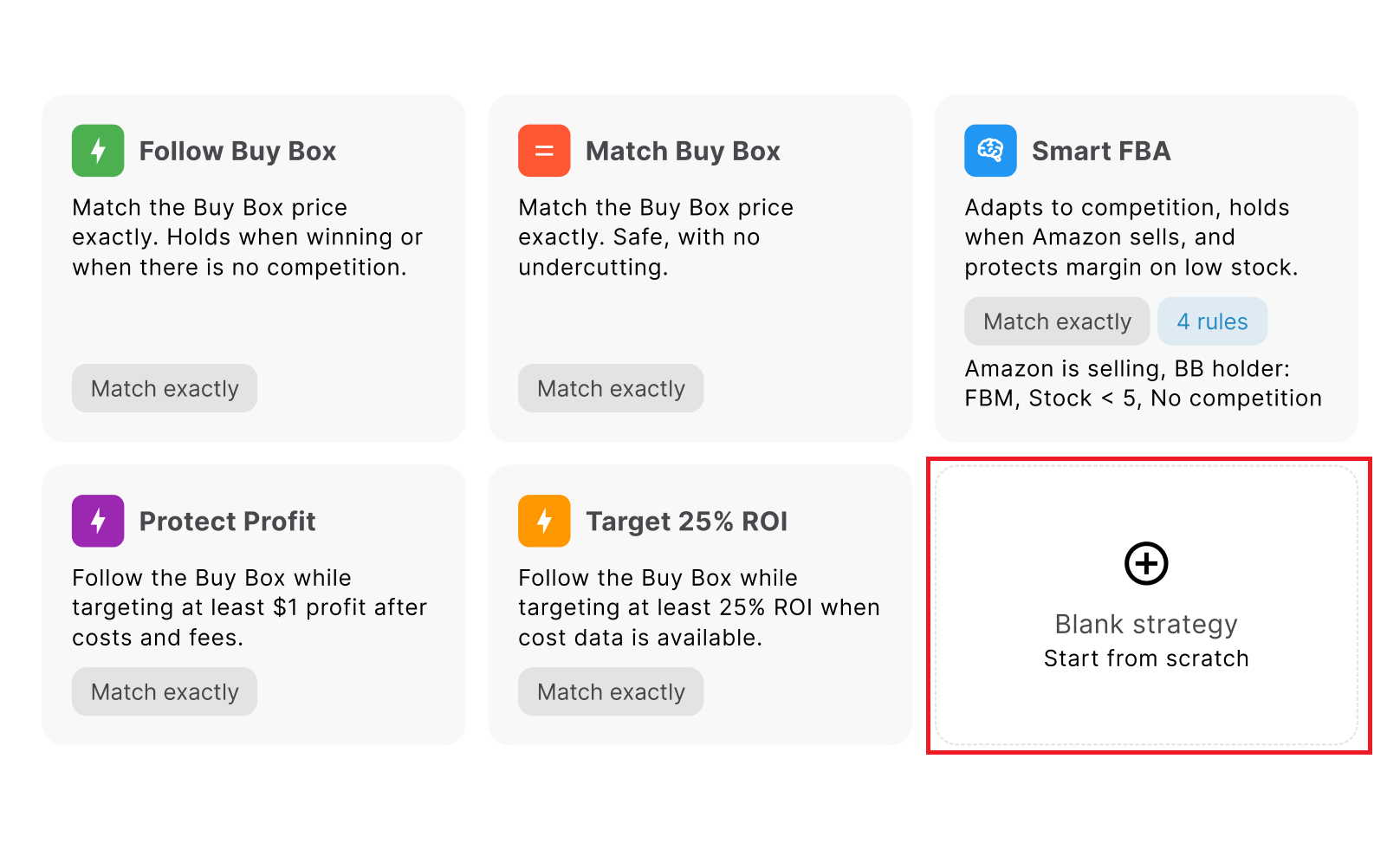
Rules follow an if/then structure. Conditions can include Amazon is selling, Buy Box holder type, competitors above, competitors below, no competition, stock above or below a threshold, time of day, and day of week. Multiple conditions can be combined with AND/OR logic.
Example
- If Amazon is selling → Hold Price
- If stock is below 5 → use a less aggressive pricing action
- If there is no competition → adjust the price upward
- Otherwise → Follow Buy Box
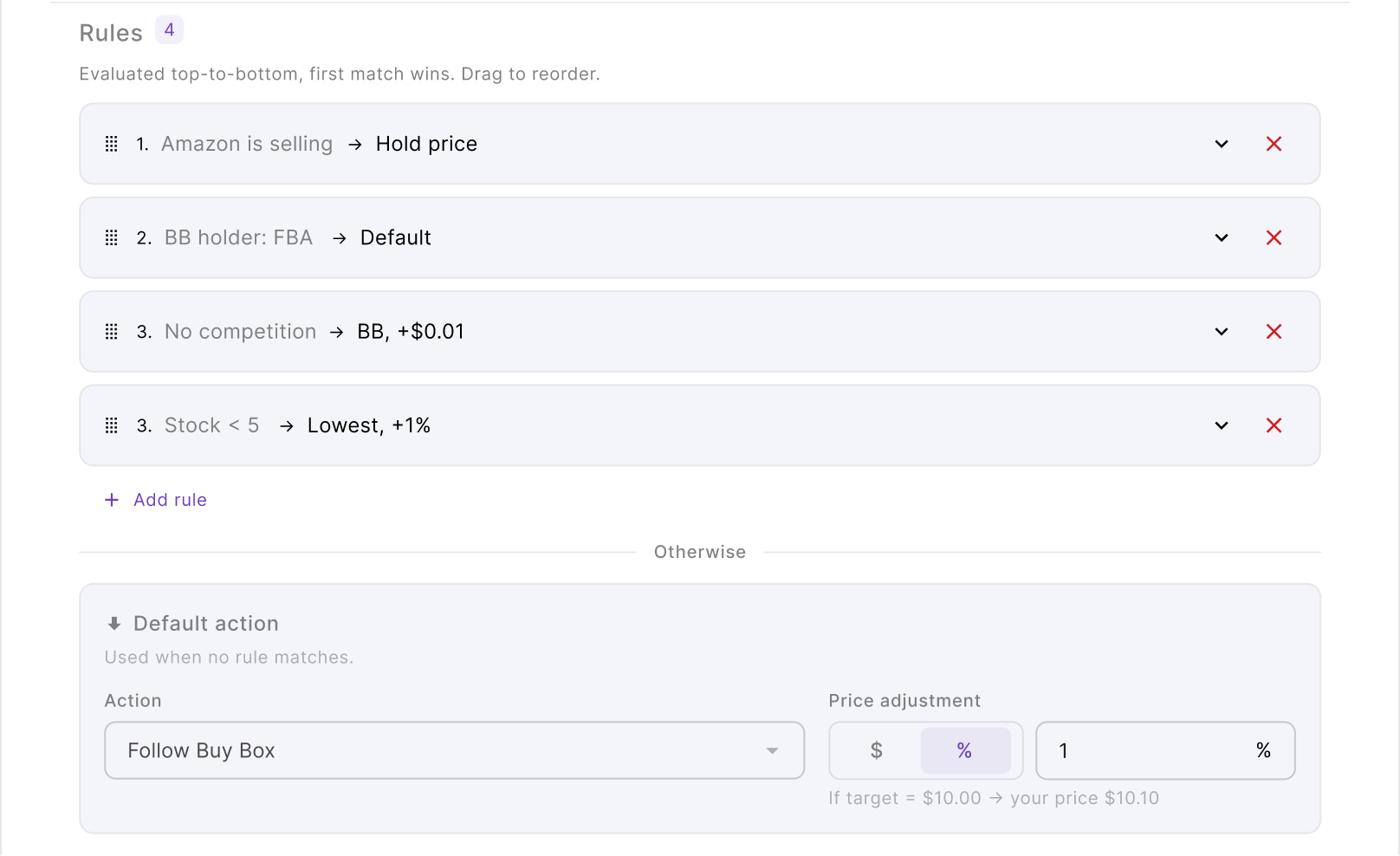
Rule order matters because Seller Assistant evaluates rules from top to bottom and the first matching rule wins. The default action takes over when none of the conditional rules apply.
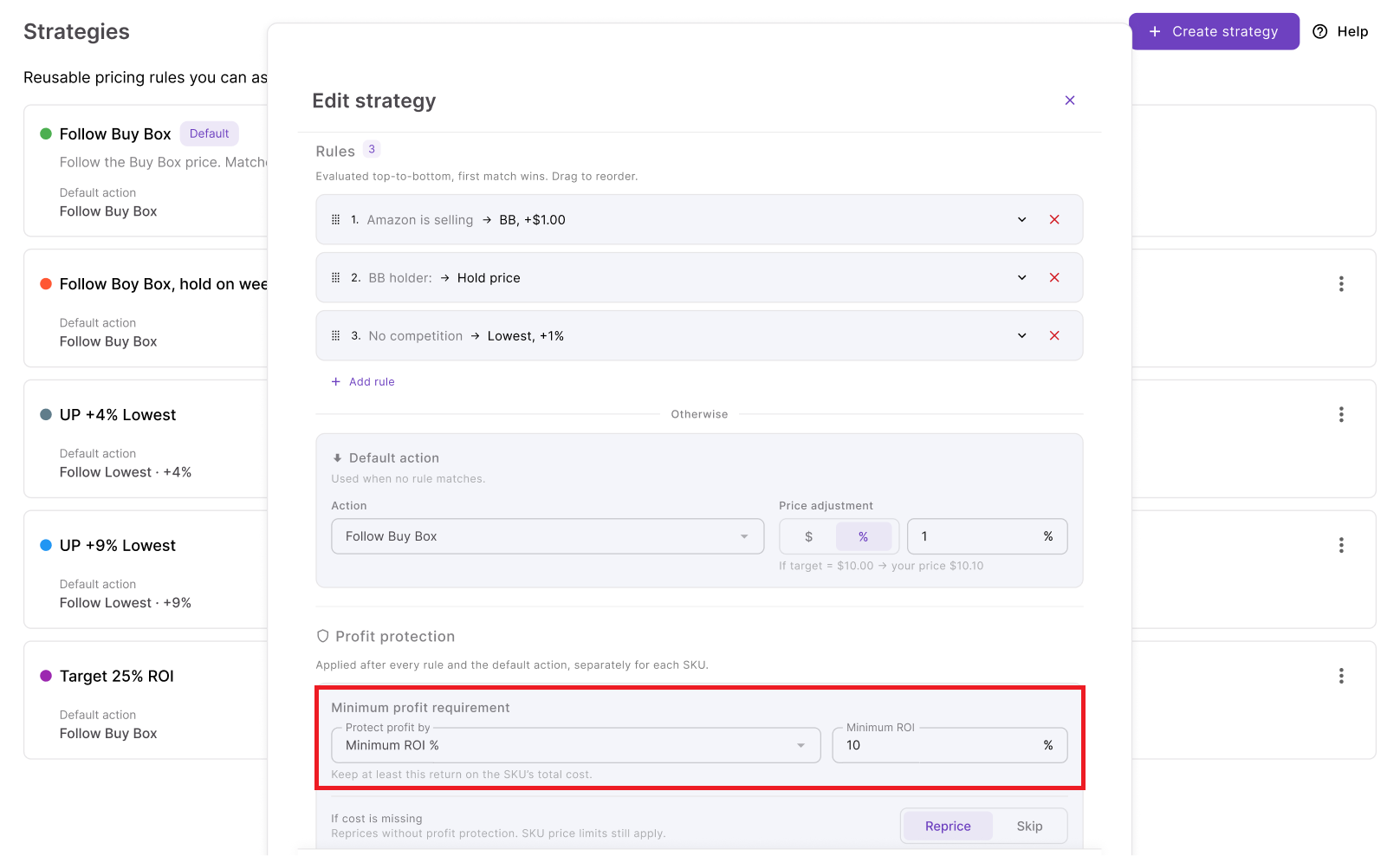
You can then place profitability safeguards underneath that logic. Minimum price can be manual or based on minimum ROI, minimum margin, or target profit, with a safety minimum, maximum price, and maximum-change-per-reprice setting providing additional control.
Matching the strategy to the selling situation
The best Amazon repricing strategy depends on what is happening with the SKU and what you want that inventory to accomplish. A useful way to choose is to start with the business situation rather than asking which strategy is universally “best.”
| Selling Situation | Strategy to Consider | Why It Fits |
|---|---|---|
| You regularly compete for the Buy Box | Follow Buy Box | Responds when you are losing while avoiding unnecessary movement when you are already winning |
| You want to compete without undercutting | Match Buy Box | Keeps the offer aligned with the Buy Box rather than automatically pushing the market lower |
| You face mixed FBA, FBM, and Amazon competition | Smart FBA | Changes behavior according to the type of competition instead of treating every seller alike |
| Protecting dollar profit is the priority | Protect Profit | Uses cost data to keep Buy Box repricing above break-even plus $1 |
| You source around a minimum ROI target | Target 25% ROI | Connects repricing directly to a 25% ROI requirement |
| Amazon frequently enters the listing | Custom rule-based strategy | Lets you create specific behavior for the Amazon is selling condition |
| Competition frequently disappears | Custom rule-based strategy | A No competition rule can use different logic instead of leaving the offer at an unnecessarily competitive price |
| Stock frequently runs low | Smart FBA or custom stock rules | Lets inventory position change how aggressively the SKU competes |
| You need different behavior at specific times | Custom rule-based strategy | Time-of-day and day-of-week rules can change the pricing action automatically |
| The ASIN has several changing conditions | Custom hybrid strategy | Combines competitor, Buy Box, stock, Amazon, timing, and profitability logic in one ordered strategy |
The important point is that strategy choice does not have to be permanent. A SKU’s competition, inventory position, costs, and selling objective can change, so the strategy that fits it today may need to be adjusted as the product moves through its lifecycle.
Beyond the Strategies: What Seller Assistant Repricer Does
Choosing an Amazon repricing strategy is only the first part of the job. To make it work across a real reseller catalog, you need a system that can continuously read Amazon market conditions, apply the right strategy to each SKU, switch behavior when conditions change, and keep every pricing action inside your profitability limits.
Seller Assistant Repricer brings those pieces together for wholesale, online arbitrage, and dropshipping sellers. You can use ready-made or custom strategies, build conditional rules around Buy Box and competitor behavior, connect pricing to landed cost, and automate price changes across your catalog. Reactive repricing can respond to relevant Amazon marketplace changes in about 2–5 seconds, while proactive checks cover listings where no new competitor event occurs.
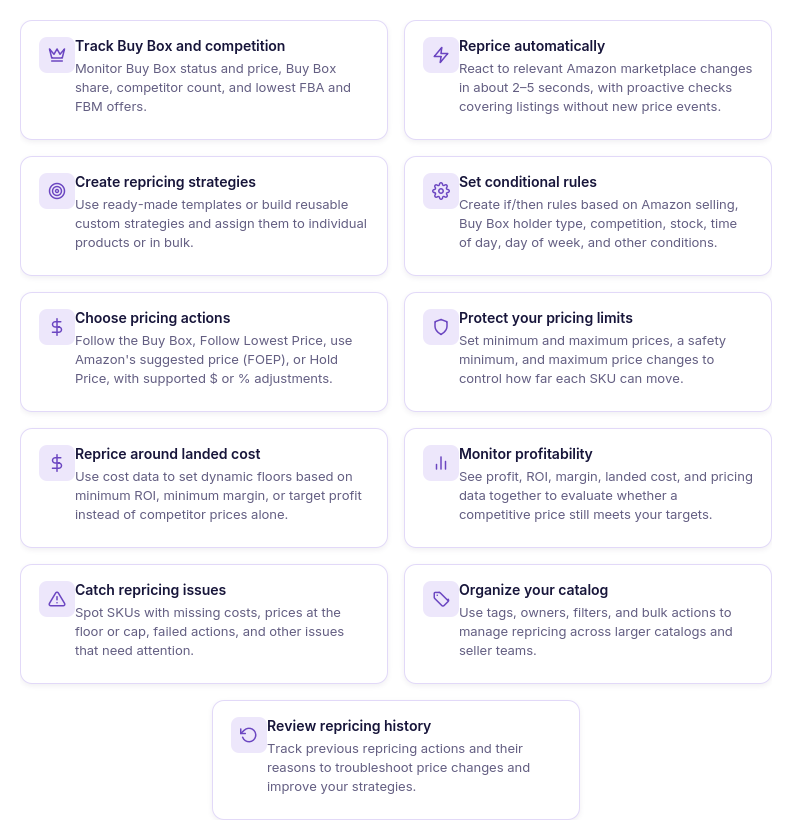
What Seller Assistant Repricer lets you do
- See the market before choosing an action
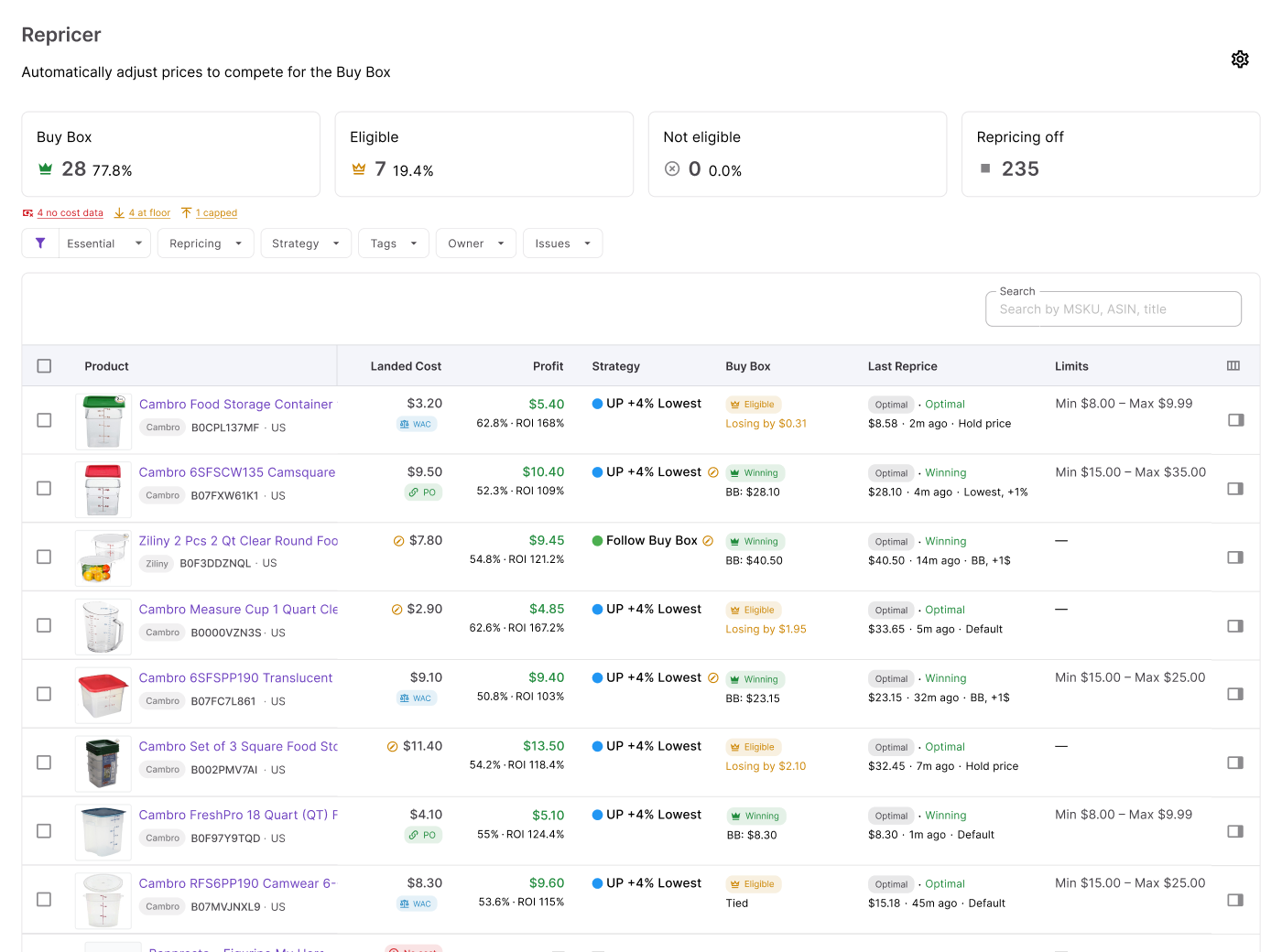
Monitor current price, Buy Box price and status, Buy Box share, competitor count, lowest FBA and FBM prices, and stock alongside your pricing setup. These metrics give your strategy competitive context rather than reducing the decision to whoever currently has the lowest offer.
- Run different strategies across your catalog
Assign reusable strategies to individual products or apply them in bulk. This lets Buy Box-focused, profit-focused, low-stock, or other product groups follow different pricing logic without configuring every SKU independently.
- React to marketplace changes in seconds
Reactive repricing can respond to relevant Amazon events in approximately 2–5 seconds and run the new conditions through your strategy. Proactive checks also reevaluate products when conditions such as stock, time of day, or day of week change without a new competitor pricing event.
- Create conditional pricing logic
Build ordered if/then rules around conditions such as Amazon selling, Buy Box holder type, competitors above or below you, no competition, stock thresholds, time of day, and day of week. Rules can use AND/OR logic, with the first matching rule taking priority.
- Choose how your offer competes
Set your strategy to Follow Buy Box, Follow Lowest Price, follow Amazon’s suggested price (FOEP), or Hold Price. Dollar and percentage adjustments let you position the offer relative to the target rather than simply copying it.
- Keep strategy within profit boundaries
Set manual or dynamic minimum prices based on minimum ROI, minimum margin, or target profit, together with a safety minimum and maximum price. Your strategy can respond aggressively when appropriate without being allowed to move outside the financial range you define.
- Use landed cost in pricing decisions
Connect repricing with the SKU’s actual cost basis rather than relying only on competitor data. Seller Assistant can show landed cost, profit, ROI, and margin, giving you a clearer view of whether a competitive price still works financially.
- Find strategy problems faster
Use Issues to identify SKUs marked with conditions such as No cost, On floor, Capped, Failed, or a possible Price war. Filters help you focus on exceptions rather than manually reviewing every repriced product.
- Review how strategies perform
Repricing History records previous pricing activity and the context behind decisions. You can use it to investigate unexpected price behavior and determine whether the strategy, rule order, costs, or price limits need adjustment.
How Seller Assistant applies your repricing strategy
Seller Assistant Repricer continuously evaluates Amazon market signals against the strategy assigned to each product. Reactive repricing can respond to relevant marketplace changes in approximately 2–5 seconds, while proactive checks periodically reassess products even when there has been no new competitor event.
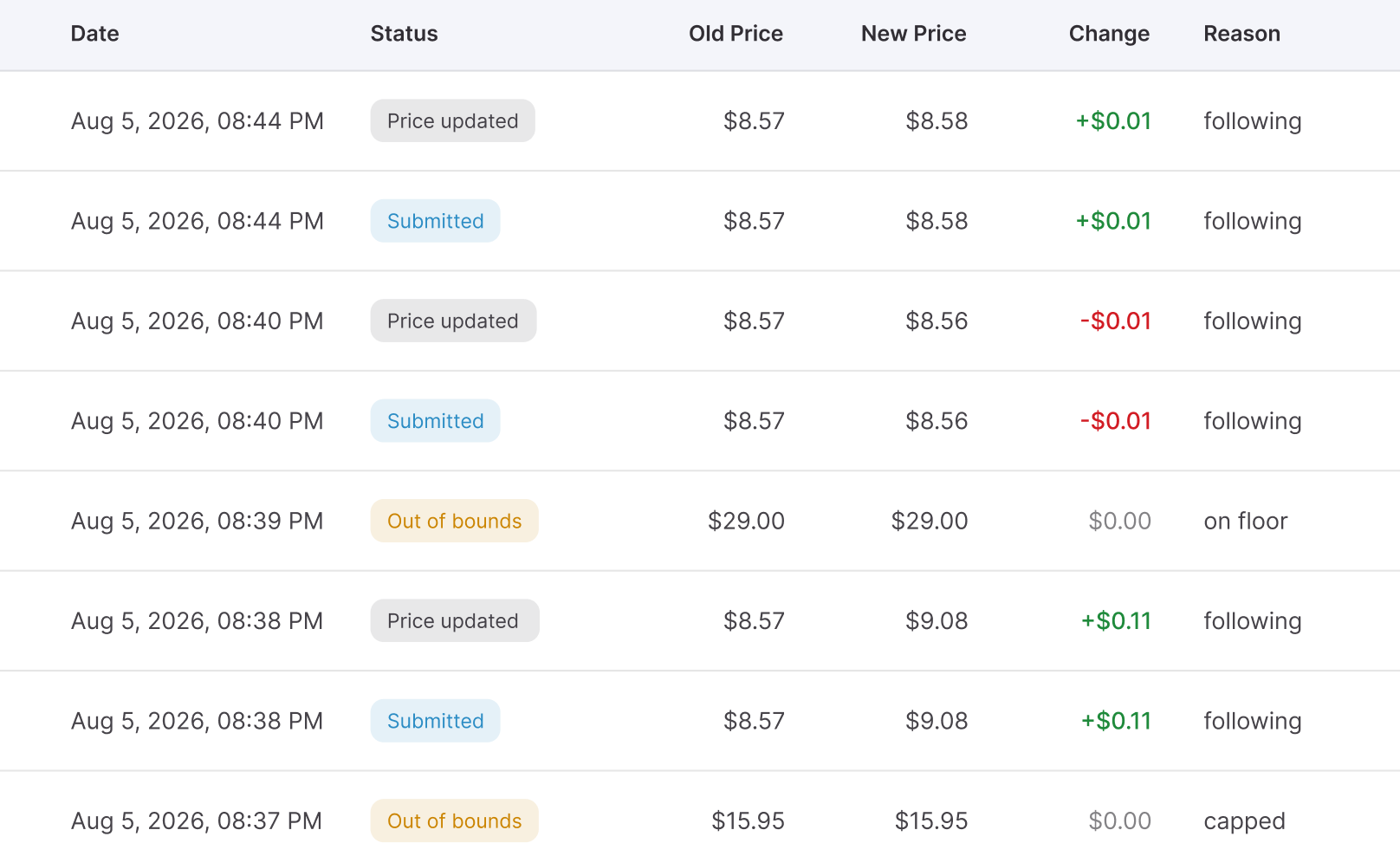
When a product is evaluated, Repricer checks its conditional rules from top to bottom. The first matching rule wins; if no rule applies, the strategy’s default action determines whether the offer should follow the Buy Box, lowest price, Amazon’s suggested price, or another configured action.
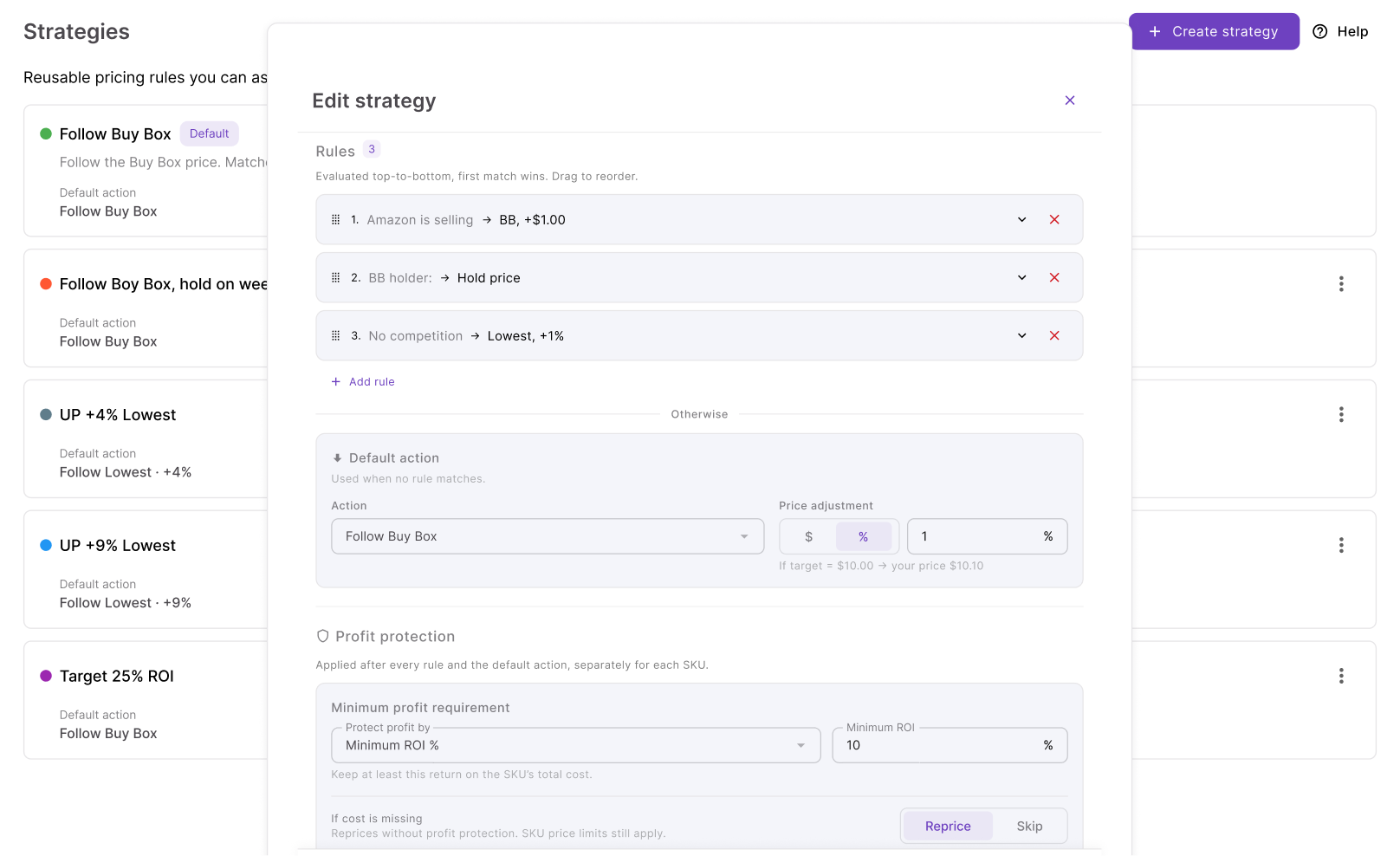
Before a price is applied, Seller Assistant checks the relevant minimum price, safety minimum, maximum price, landed cost, and profitability requirements. The result is a strategy that can react quickly to Amazon competition without treating “lower the price” as the answer to every market change.
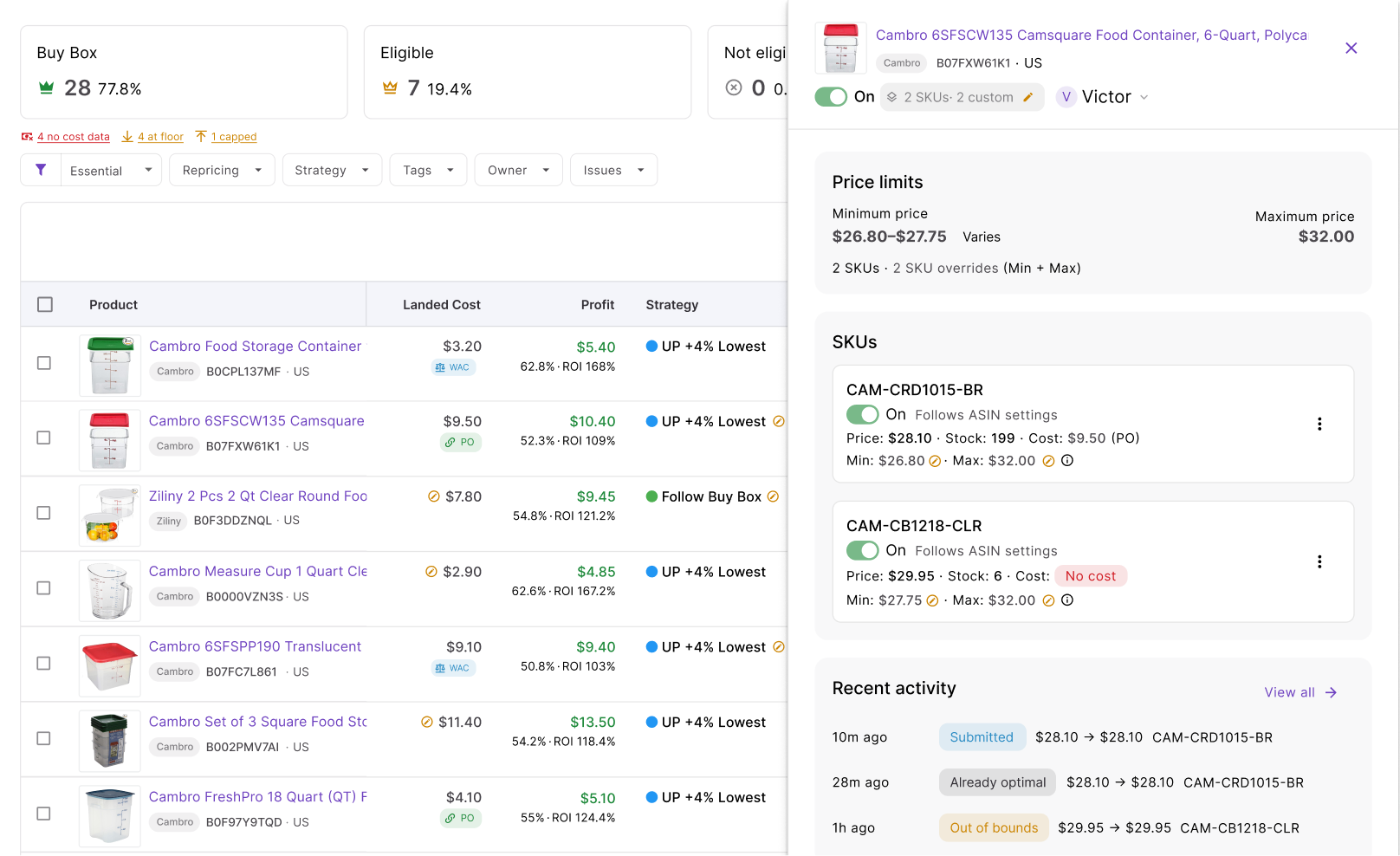
Steps to use Seller Assistant Repricer
Step 1. Enter the Repricing workspace
Open Repricer → Repricing in Seller Assistant. Here you can see your SKUs together with strategies, repricing status, market data, owners, tags, profitability information, and detected Issues.
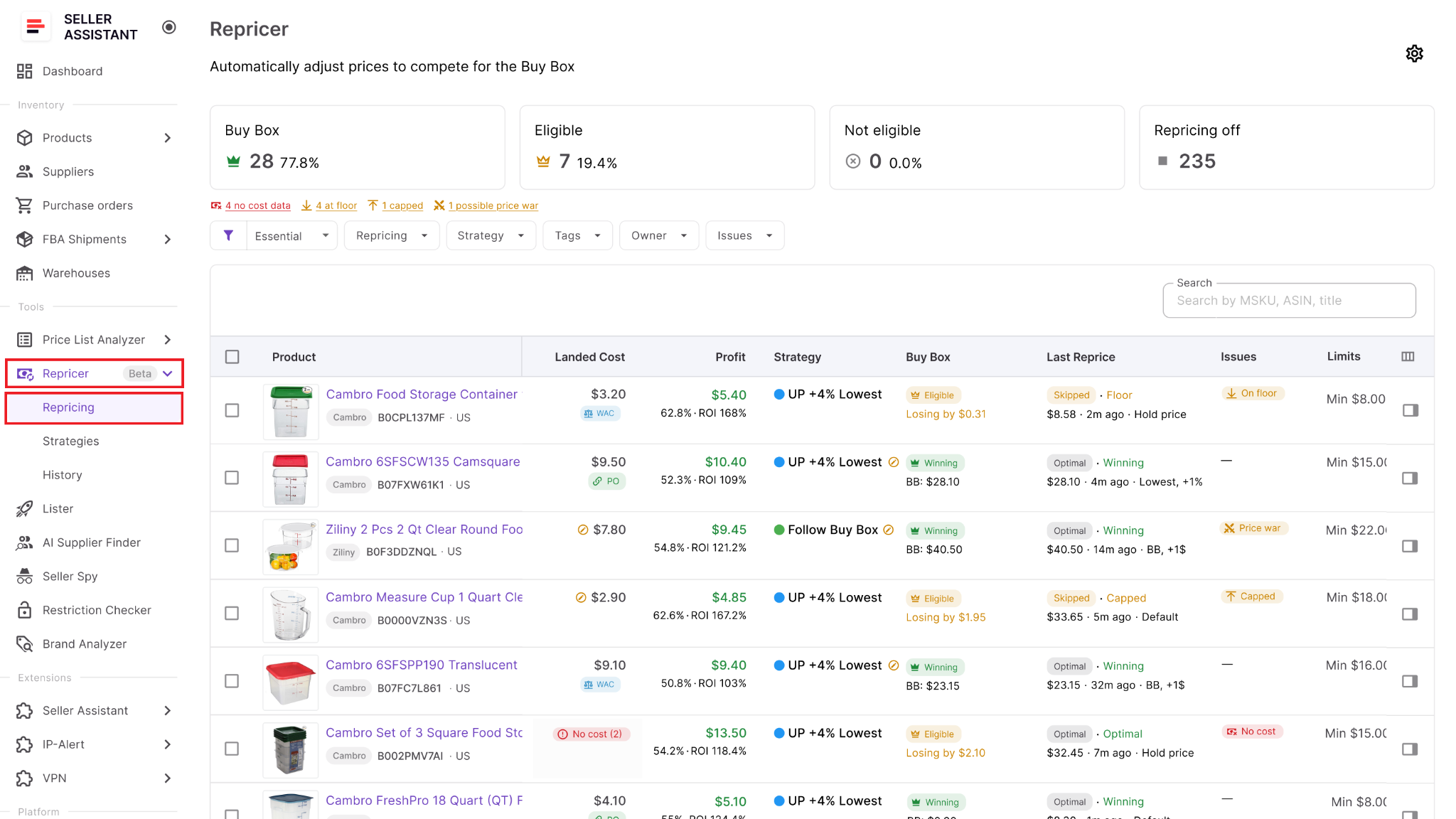
Start here to identify which products need a strategy and which ones require attention before automation.
Step 2. Activate Repricing settings
Open Settings and enable Repricing for your team. You can also choose whether newly listed products should be automatically added to repricing or remain inactive until reviewed.
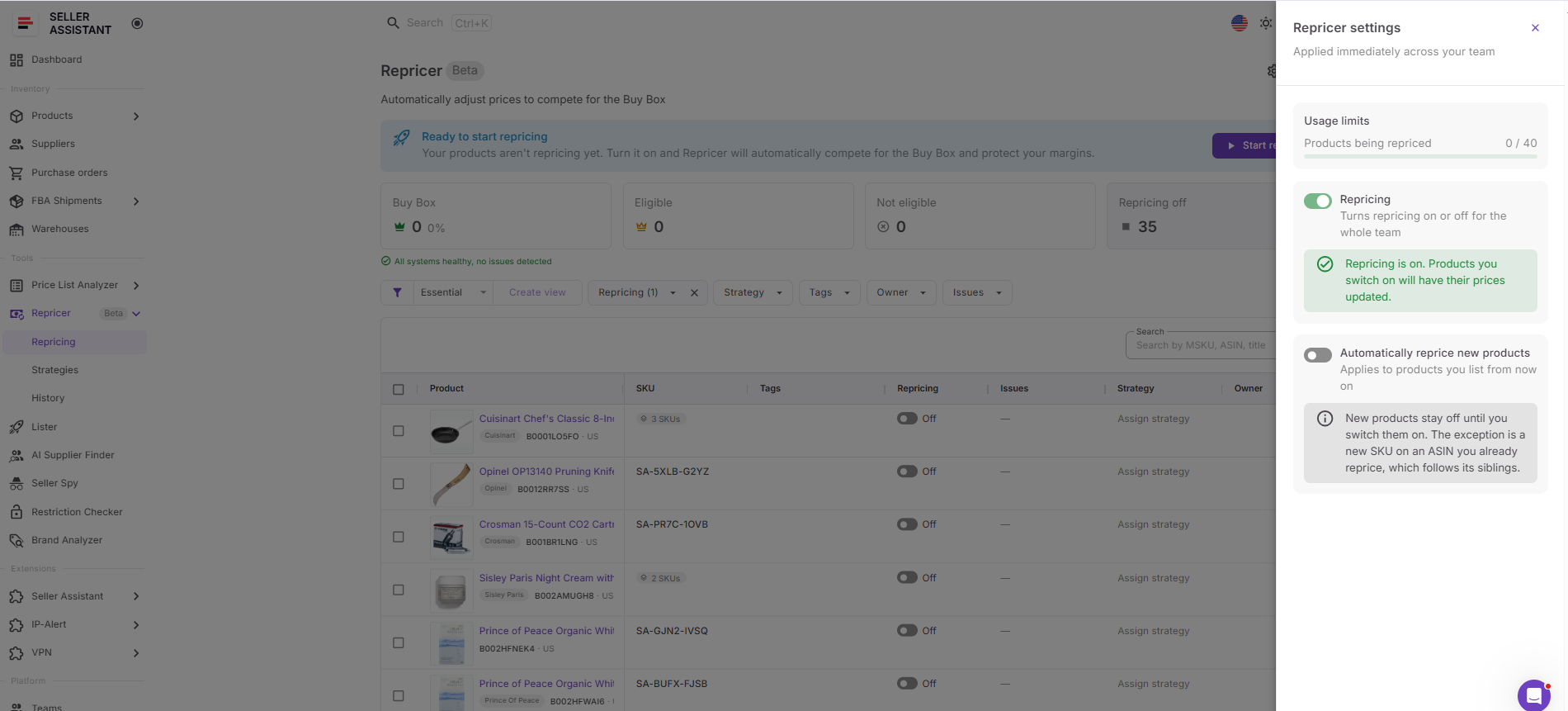
For catalogs where products have different economics, manual review can give you time to confirm the appropriate strategy and cost data before a new SKU starts repricing.
Step 3. Match products with a strategy
Assign a strategy through the Strategy column. You can use Follow Buy Box, Match Buy Box, Smart FBA, Protect Profit, Target 25% ROI, or create a custom strategy.
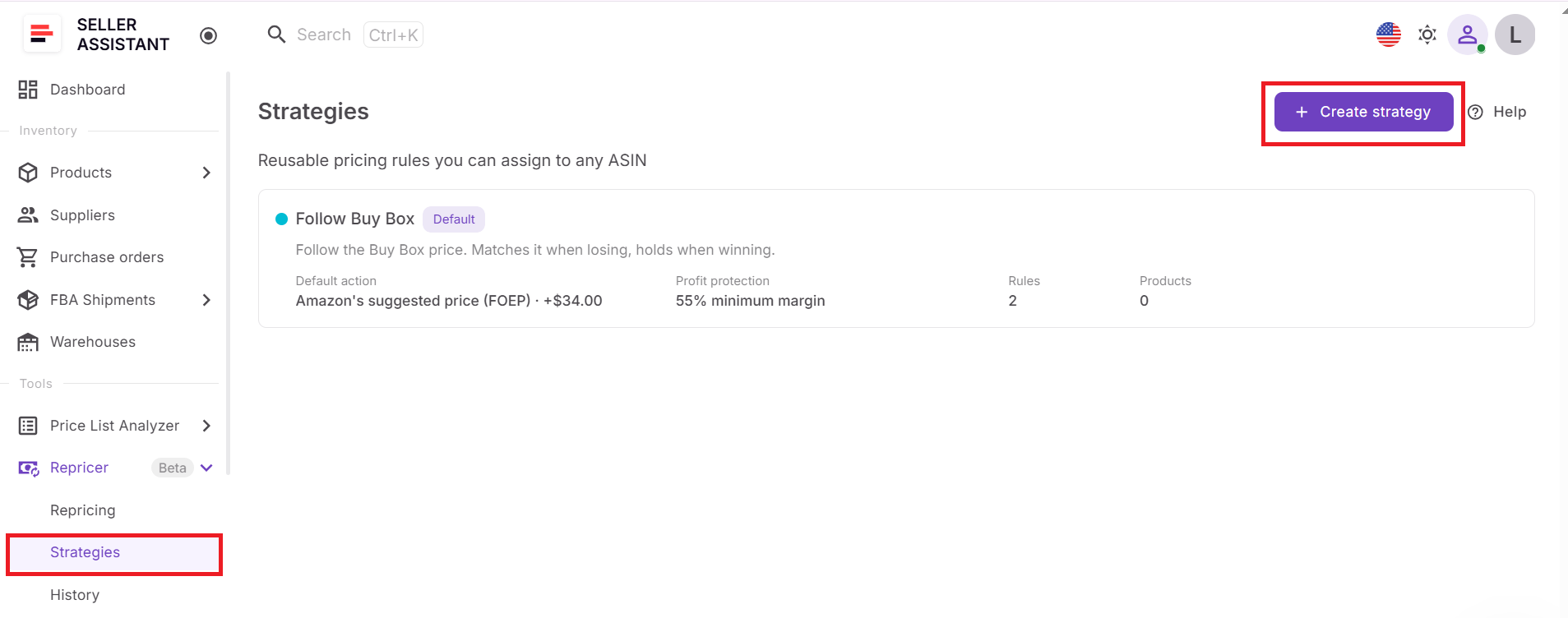
Don’t select a template simply because it sounds more aggressive or conservative. Match it to the SKU’s actual objective – Buy Box competition, ROI protection, mixed FBA/FBM competition, inventory position, or another selling situation.
Step 4. Customize the strategy logic
Configure the strategy’s default action and add conditional rules for situations that require different behavior. For example, you might hold when Amazon is selling, change the action when stock is low, or use different pricing logic when competition disappears.
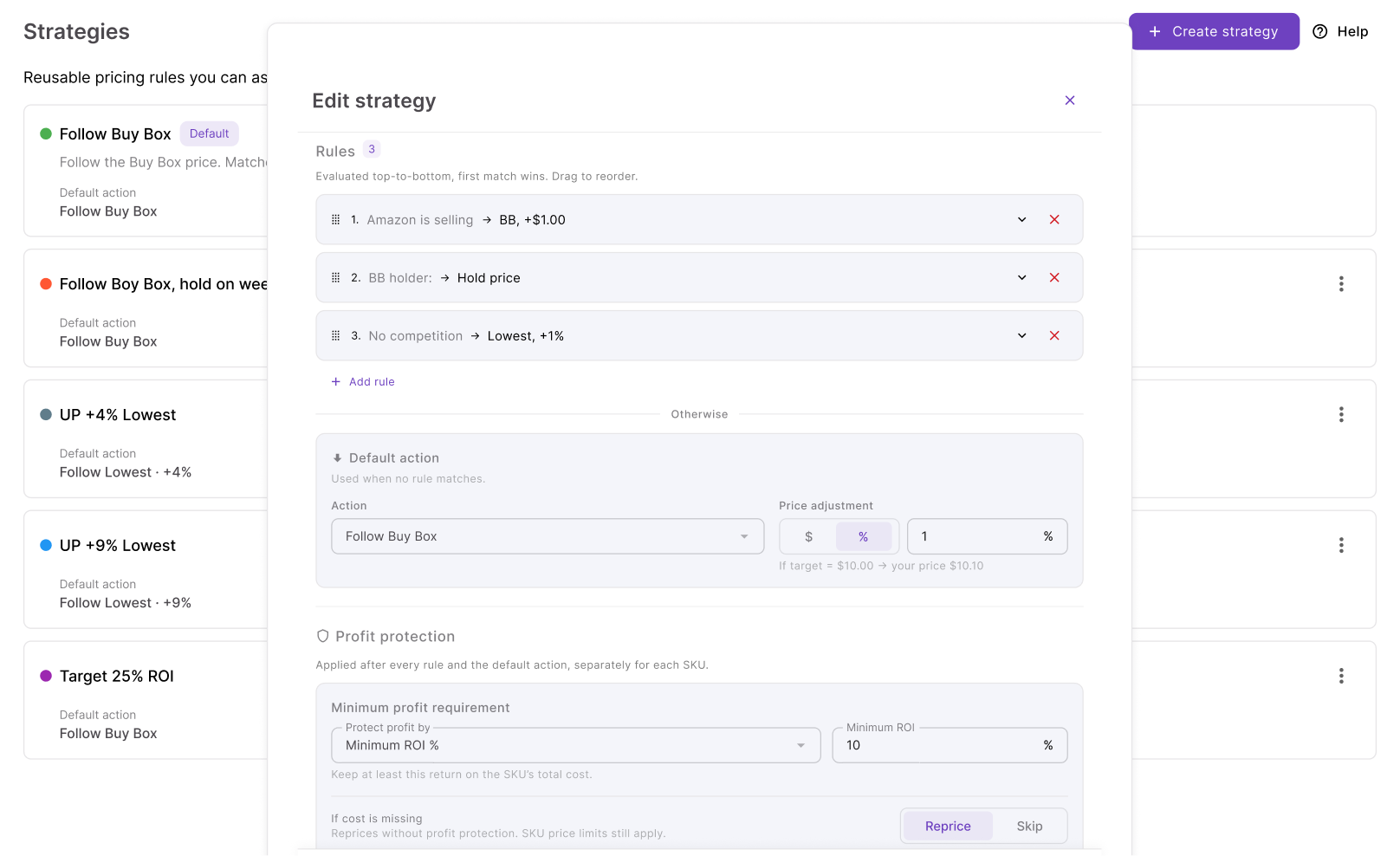
Put the most important conditions higher in the rule order because Seller Assistant uses the first matching rule. Add AND/OR conditions when an action should occur only under a more specific combination of circumstances.
Step 5. Define the strategy’s pricing range
Configure the minimum and maximum prices within which the strategy can operate. The minimum can be fixed manually or calculated using minimum ROI, minimum margin, or target profit, while a separate safety minimum provides a hard lower boundary.
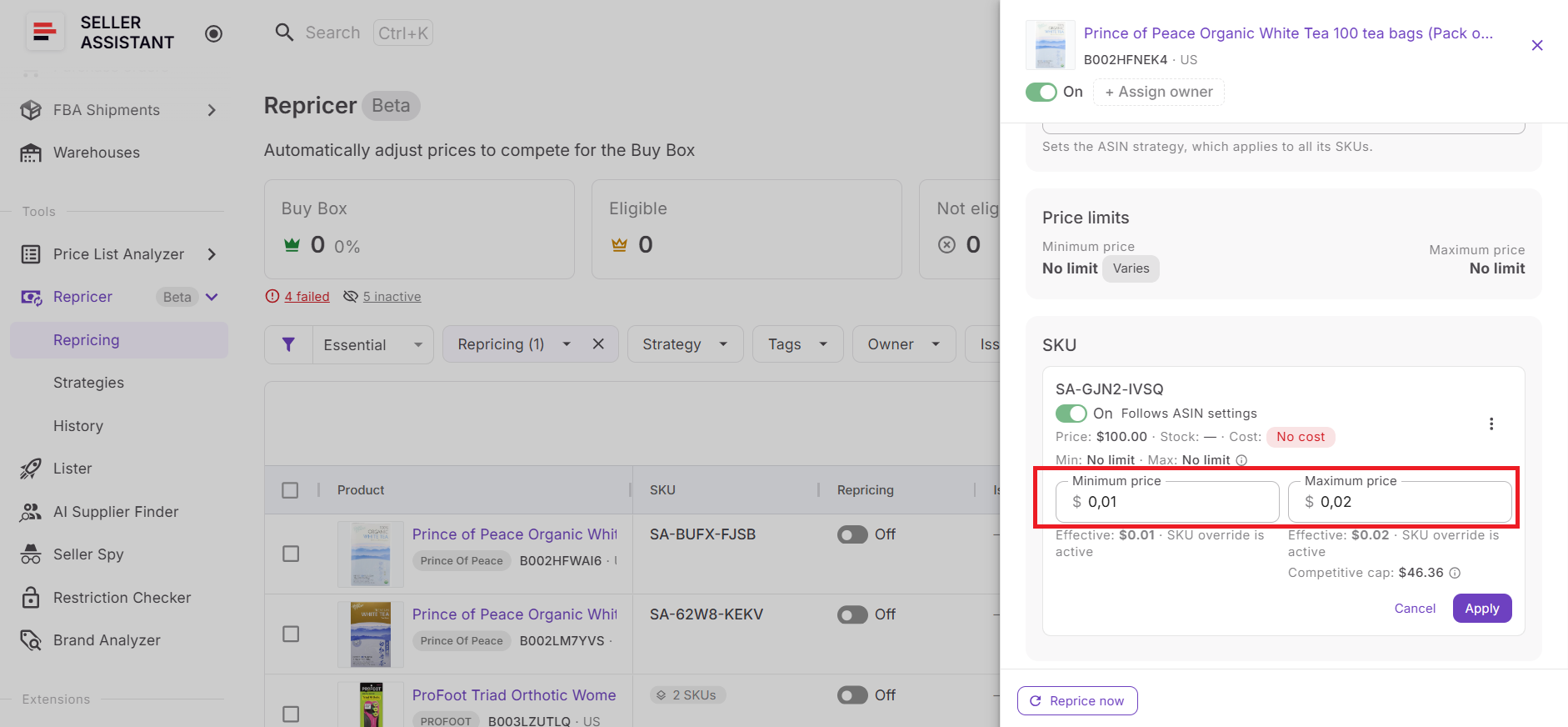
You can also limit the maximum change per reprice. These controls let the strategy respond to the market without giving it unrestricted control over your offer price.
Step 6. Check costs and profitability
Verify Landed Cost for products using cost-aware strategies. Depending on the available data, this can include relevant components such as unit cost, PO expenses, prep cost, and FBA inbound cost.
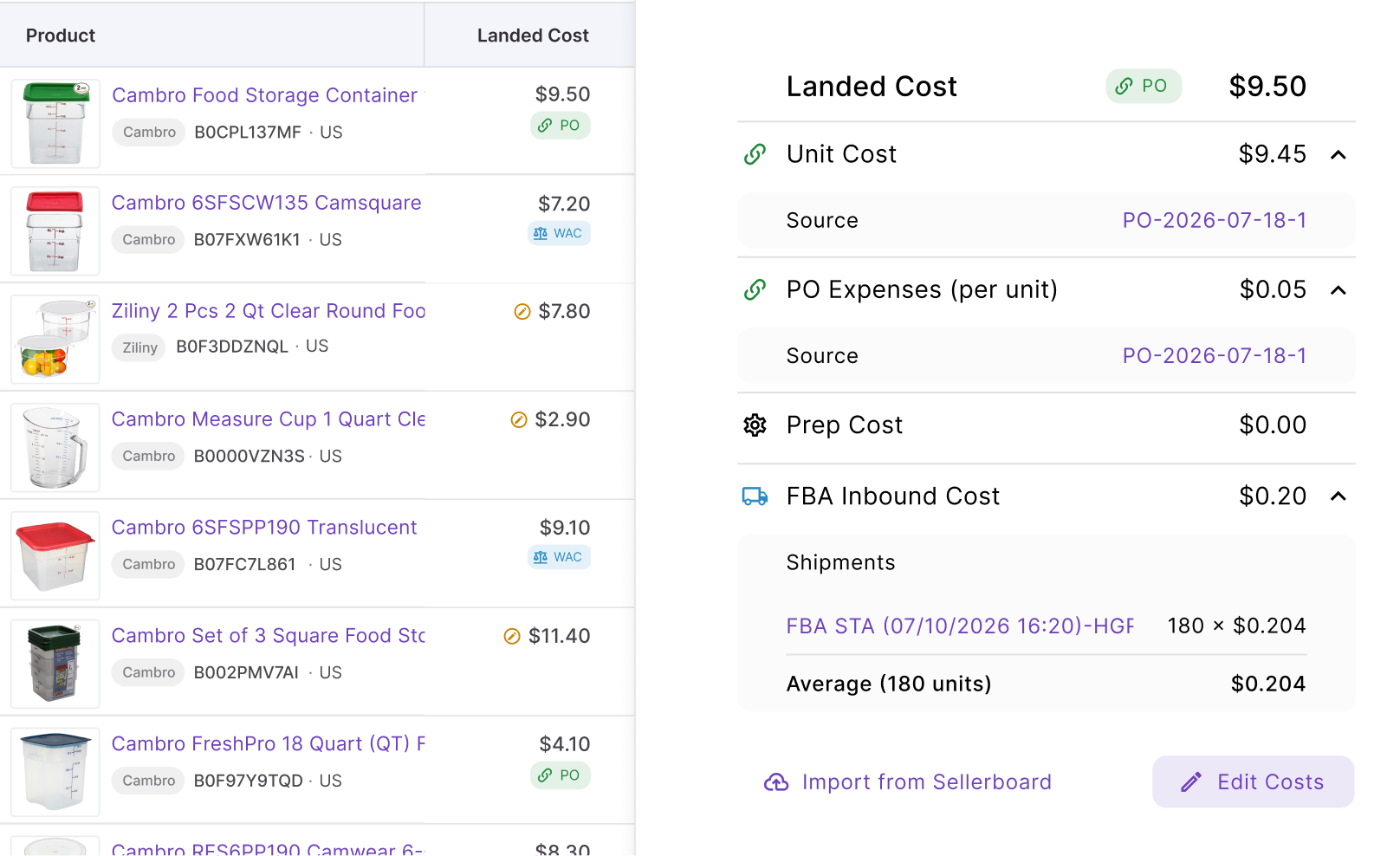
Then review profit, ROI, and margin against your pricing limits. Accurate cost data is essential for strategies such as Protect Profit or Target 25% ROI because their financial safeguards depend on it.
Step 7. Organize and troubleshoot your SKUs
Use Tags to group products by supplier, inventory type, season, strategy, or another useful category, and assign Owners when team members manage different parts of the catalog.
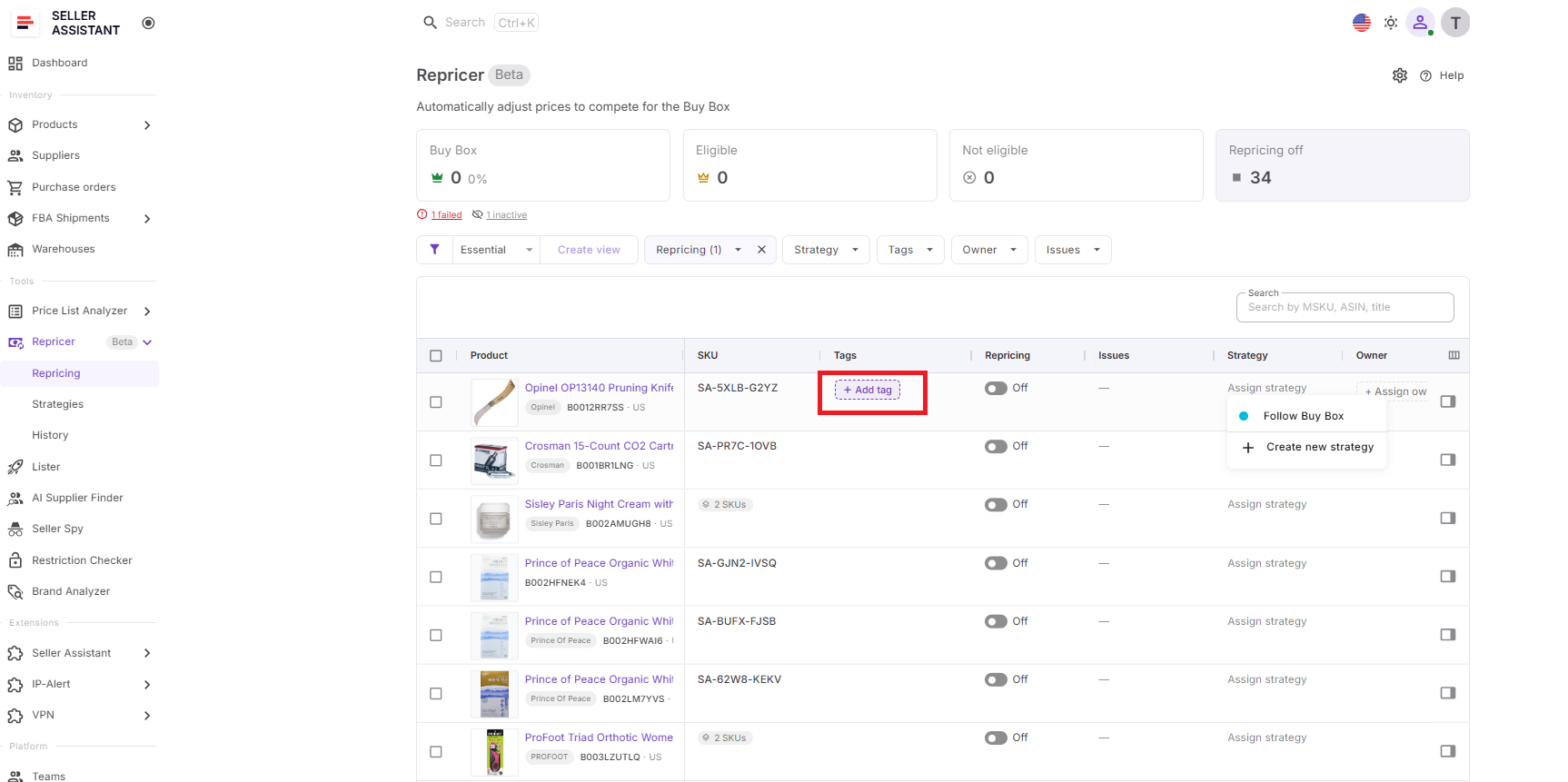
Then check Issues for SKUs marked No cost, On floor, Capped, Failed, Price war, or another condition requiring review.
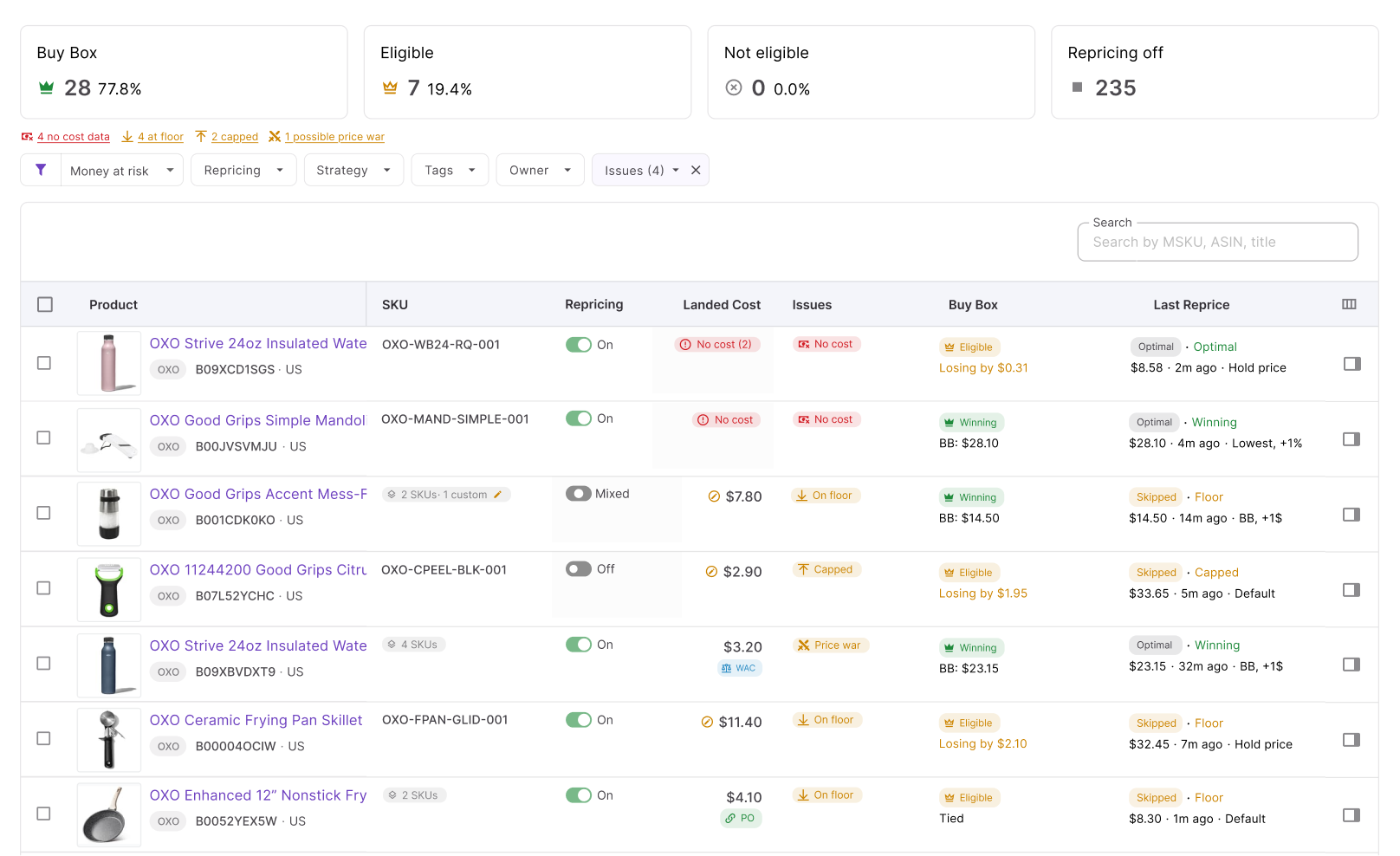
This gives you a cleaner way to manage strategy performance at scale instead of checking products individually.
Step 8. Launch the strategy and refine it
Enable repricing for the products that are ready and click Start repricing. Seller Assistant will begin evaluating those SKUs according to their assigned strategies, rules, market conditions, and pricing safeguards.
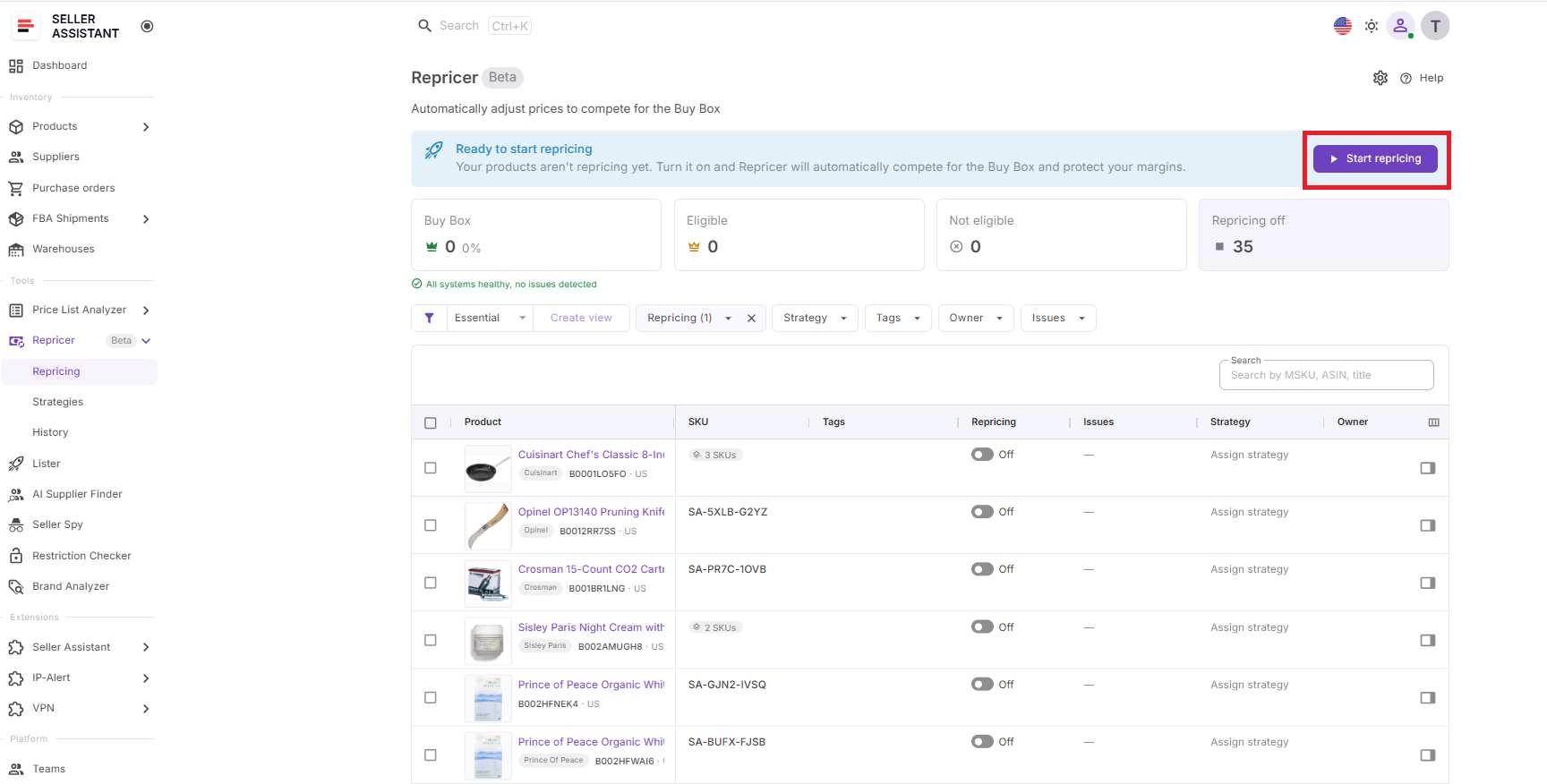
Once live, use Buy Box performance, current price, profit, ROI, margin, Issues, and Repricing History to judge how the strategy behaves in real conditions. If performance is not what you expected, adjust the relevant rule, strategy, or limit rather than assuming that a more aggressive price is automatically the solution.
FAQ
How do I know if my Amazon repricing strategy is working?
Look beyond individual price changes and evaluate the business outcome over time, including Buy Box share, sales velocity, profit, ROI, and margin. A strategy that wins more Buy Box time but significantly reduces profit per unit may not actually be performing better.
How often should I change my Amazon repricing strategy?
Avoid changing strategies in response to every short-term competitor move because the repricer is designed to handle those fluctuations automatically. Reassess your strategy when the SKU’s costs, inventory position, competitive environment, or selling objective changes materially.
Should slow-moving and fast-moving products use different repricing strategies?
Often, yes – a slow-moving SKU may benefit from prioritizing sell-through, while a fast-selling product with limited inventory may give you more room to protect margin. Sales velocity should therefore be considered alongside competition and profitability when deciding how aggressively to price.
Can I use a more aggressive strategy to clear old inventory?
Yes, aging or seasonal inventory may justify accepting a lower return when holding the product creates additional storage costs or ties up capital needed elsewhere. Set a deliberate minimum return before becoming more aggressive so liquidation does not turn into uncontrolled loss-making.
What should I do if my repricing strategy stops winning the Buy Box?
First check whether price is actually the limiting factor because lowering your offer does not guarantee a Buy Box win. Fulfillment method, delivery speed, inventory availability, seller performance, and Buy Box eligibility can also affect the outcome, so investigate those factors before making the strategy more aggressive.
Final Thoughts
The right Amazon repricing strategy is not simply the one that lowers prices fastest. It should reflect what each SKU needs – whether that means competing for the Buy Box, protecting ROI and margin, responding differently to Amazon or other sellers, managing low stock, or taking advantage when competition disappears.
Seller Assistant Repricer turns those goals into automated pricing logic with ready-made strategies, custom if/then rules, profitability safeguards, and market response in approximately 2–5 seconds. By matching strategies to different products and reviewing their results over time, wholesale, online arbitrage, and dropshipping sellers can automate pricing at scale without giving up control over profitability.
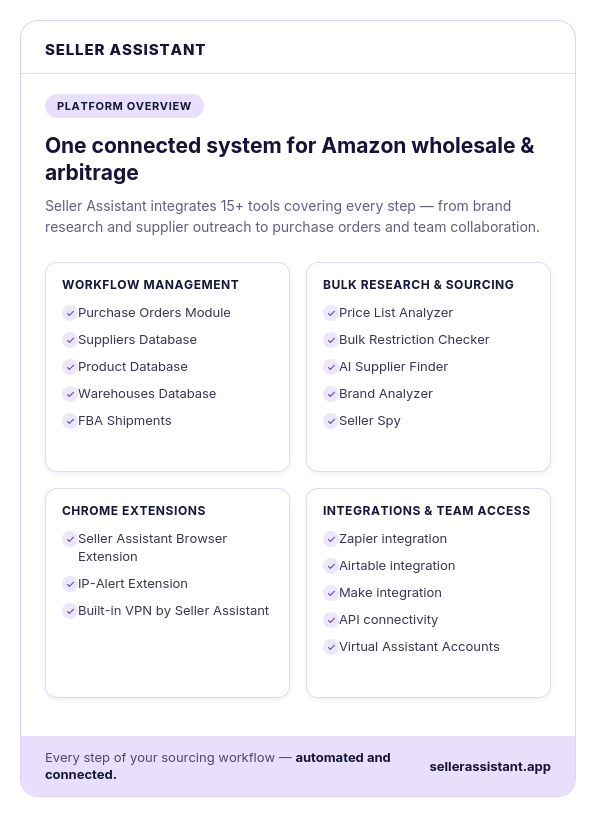
Seller Assistant automates and connects every stage of your Amazon wholesale and arbitrage workflow. It brings together in one platform: workflow management tools – Purchase Orders Module, Suppliers Database, Product Database, Warehouses Database, FBA Shipments, bulk research & sourcing tools – Price List Analyzer, Bulk Restriction Checker, AI Supplier Finder, Brand Analyzer, Seller Spy, Amazon repricing tool – Seller Assistant Repricer, Chrome extensions – Seller Assistant Browser Extension, IP-Alert Extension, and built-in VPN by Seller Assistant, and integrations & team access features – seamless API connectivity, integrations with Zapier, Airtable, and Make, and Virtual Assistant Accounts.