The same repricing logic that wins you the Buy Box at 200 units in stock can be the wrong move at 5 units left. Chasing the lowest price when inventory is nearly gone risks selling out at whatever price won that last sale – and once stock hits zero, the listing closes until restock, at that price.
Most repricing strategies don’t distinguish between a well-stocked SKU and one about to run out, treating the last unit the same as the two-hundredth.
This post covers why low stock changes what “winning” the Buy Box should mean, and how to set stock-based rules in Seller Assistant Repricer so pricing adjusts automatically as inventory runs low.
Why Low Stock Changes What “Winning” the Buy Box Means
Winning the Amazon Buy Box usually means more visibility and a better chance of converting sales. But when an SKU is down to its last few units, maximizing sales velocity may no longer be the smartest pricing objective.
The same aggressive price that makes sense with 200 units available can work against you when only five remain. At low stock, pricing needs to balance Buy Box competitiveness with margin, remaining inventory, and how soon you expect to restock.
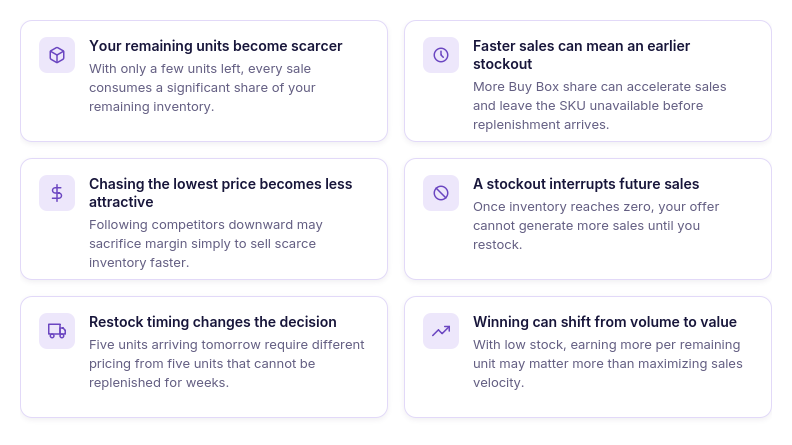
Your last units are more limited
With plenty of inventory, a competitive price can help generate volume. With only a handful of units remaining, every sale consumes a much larger share of the stock you have left.
Faster sales can create an earlier stockout
Winning more Buy Box share can accelerate sales just when inventory is hardest to replace. If replenishment is still days or weeks away, aggressive pricing may shorten the time your offer remains available.
The lowest competitive price may no longer make sense
A low price designed to drive velocity can be useful when you have inventory to move. As stock falls, continuing to chase competitors downward may trade away margin simply to sell the remaining units faster.
A stockout can interrupt future sales
Once inventory reaches zero, there is nothing left to sell until replenishment arrives. Preserving several units at a stronger price can sometimes be more valuable than clearing the SKU quickly at the current competitive price.
Restock timing changes the pricing decision
Five units with replenishment arriving tomorrow are different from five units with the next shipment several weeks away. Amazon low stock pricing should therefore consider not only the quantity remaining but also how costly an early stockout would be.
Winning can mean protecting value, not maximizing velocity
At low stock, the goal may shift from capturing as much Buy Box share as possible to earning a stronger return from scarce remaining inventory. That makes stock level an important input in deciding how aggressively the offer should compete.
What Happens When Repricing Ignores Stock Level
A repricing strategy that ignores inventory treats every unit the same. It may keep chasing the Buy Box or lowest price when you have 200 units available – and continue doing exactly the same when only five remain.
The problem is not automation itself, but automation without stock context. As inventory falls, unchanged pricing logic can accelerate stockouts, give away margin on scarce units, and leave you with no inventory to sell before replenishment arrives.
How stock-blind repricing can affect your offer
| What Happens | Why It Happens | Potential Result |
|---|---|---|
| Price keeps following competitors down | The strategy sees competition but not declining stock | Last units may sell at unnecessarily low margins |
| Buy Box share stays the main objective | Pricing logic remains optimized for competitiveness | Sales velocity can remain high when you actually need inventory to last |
| Low stock sells out faster | The Repricer continues using the same aggressive actions | SKU may stock out before replenishment arrives |
| Scarce units are priced like plentiful inventory | Stock quantity does not influence the pricing decision | You miss an opportunity to earn more per remaining unit |
| Competitor price cuts trigger unnecessary reactions | The strategy keeps following market movements regardless of inventory | You may discount units that were likely to sell anyway |
| Pricing changes only after manual intervention | Someone must notice low inventory and alter the strategy | The SKU may sell out before the seller reacts |
| Restock gaps become more costly | Pricing does not account for how long inventory needs to last | You can end up with days or weeks without an active offer |
Why One Pricing Rule Can’t Serve Both Situations
The pricing logic that makes sense with plenty of inventory can become counterproductive when stock gets low. With 200 units, you may want to compete aggressively for the Buy Box and maintain sales velocity; with five units left, the same rule can sell scarce inventory too quickly or at a lower margin than necessary.
Manually switching to a different strategy every time stock crosses a threshold is not scalable either. A better approach is stock-based repricing rules – keep the main strategy in place, but use inventory level as a condition that changes how pricing behaves automatically.
Why the fix is a condition, not a separate strategy
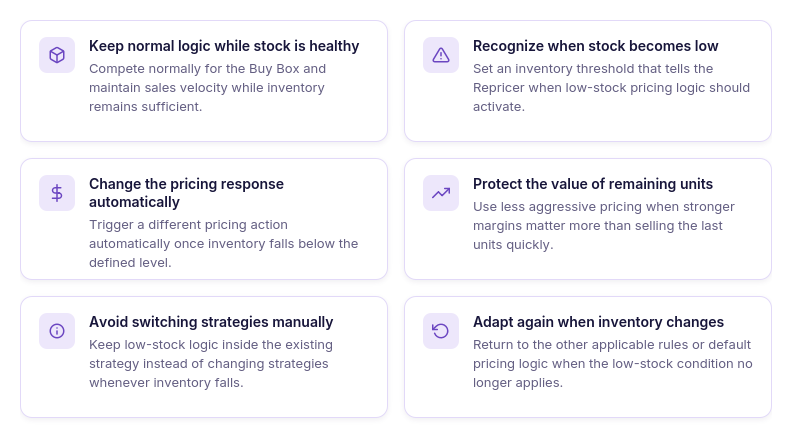
Keep normal logic while stock is healthy
When inventory is sufficient, the Repricer can follow the pricing logic designed for normal competitive conditions. This lets you compete for the Buy Box and maintain sales velocity while stock levels support it.
Recognize when stock becomes low
A stock-level condition defines the inventory threshold at which pricing behavior should change. Once stock falls below that point, the Repricer can apply different logic to the remaining units.
Change the pricing response automatically
When inventory crosses the defined threshold, the rule can trigger a different pricing action automatically. You do not have to notice the stock decline and adjust the offer manually.
Protect the value of remaining units
Low-stock rules can make pricing less aggressive when inventory becomes scarce. This can help you prioritize stronger margins over selling the remaining units as quickly as possible.
Avoid switching strategies manually
Stock-based conditions eliminate the need to replace strategies every time inventory falls. The low-stock response remains part of the existing strategy and activates only when its condition is met.
Adapt again when inventory changes
The low-stock rule does not have to determine pricing permanently. When inventory no longer meets the condition, the Repricer can continue according to the other applicable rules or default strategy logic.
How Seller Assistant Repricer Adapts Pricing When Stock Runs Low
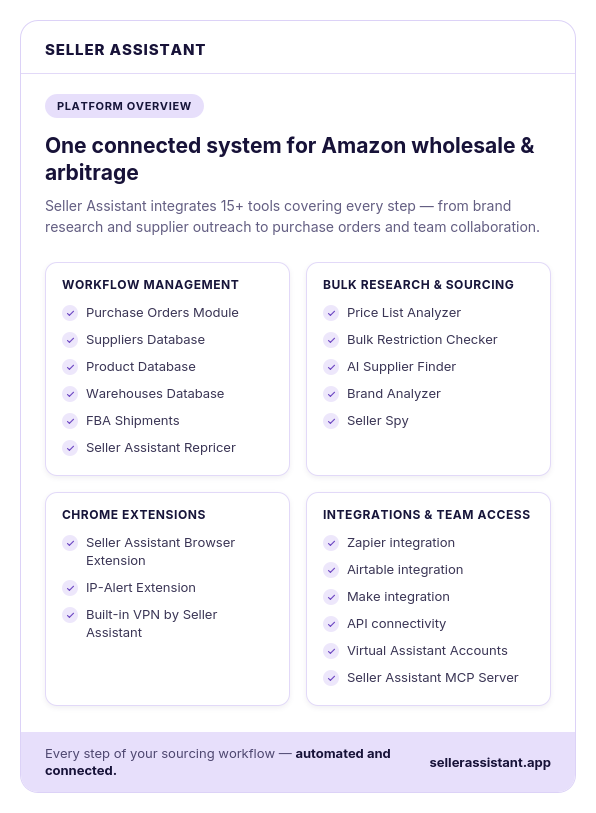
Low inventory does not have to mean manually changing prices or switching strategies. Seller Assistant Repricer lets you use stock level as a condition inside your pricing strategy, so an SKU can compete normally while inventory is healthy and automatically change behavior when stock falls below the threshold you define.
| Stock Situation | Risk | Suggested Rule |
|---|---|---|
| Healthy inventory with reliable replenishment | Pricing too conservatively can unnecessarily slow sales | Use your normal Buy Box or competitive pricing logic |
| Inventory beginning to decline | Current sales velocity may consume stock before the next shipment | Set a Stock condition that activates below your chosen threshold |
| Low stock with replenishment arriving soon | Overreacting can slow sales even though more units are almost available | Keep pricing relatively close to normal unless stockout risk becomes meaningful |
| Low stock with delayed replenishment | Aggressive repricing may sell the remaining units long before restock | Hold price or use a less aggressive competitive action |
| Very low stock and strong demand | The final units may sell quickly at an unnecessarily low price | Consider an upward fixed or percentage adjustment within your configured maximum |
| Competitors are cutting prices while your stock is low | Following them downward can accelerate stockout and reduce margin | Prioritize the low-stock condition over normal downward competitive logic |
| Stock replenished to a healthy level | Low-stock pricing may unnecessarily restrict sales velocity | Allow the normal strategy rules or default action to take over again |
Set a low-stock threshold
Add a Stock condition to a strategy and specify the inventory level that should trigger different pricing logic. This turns declining inventory into an automatic repricing signal.
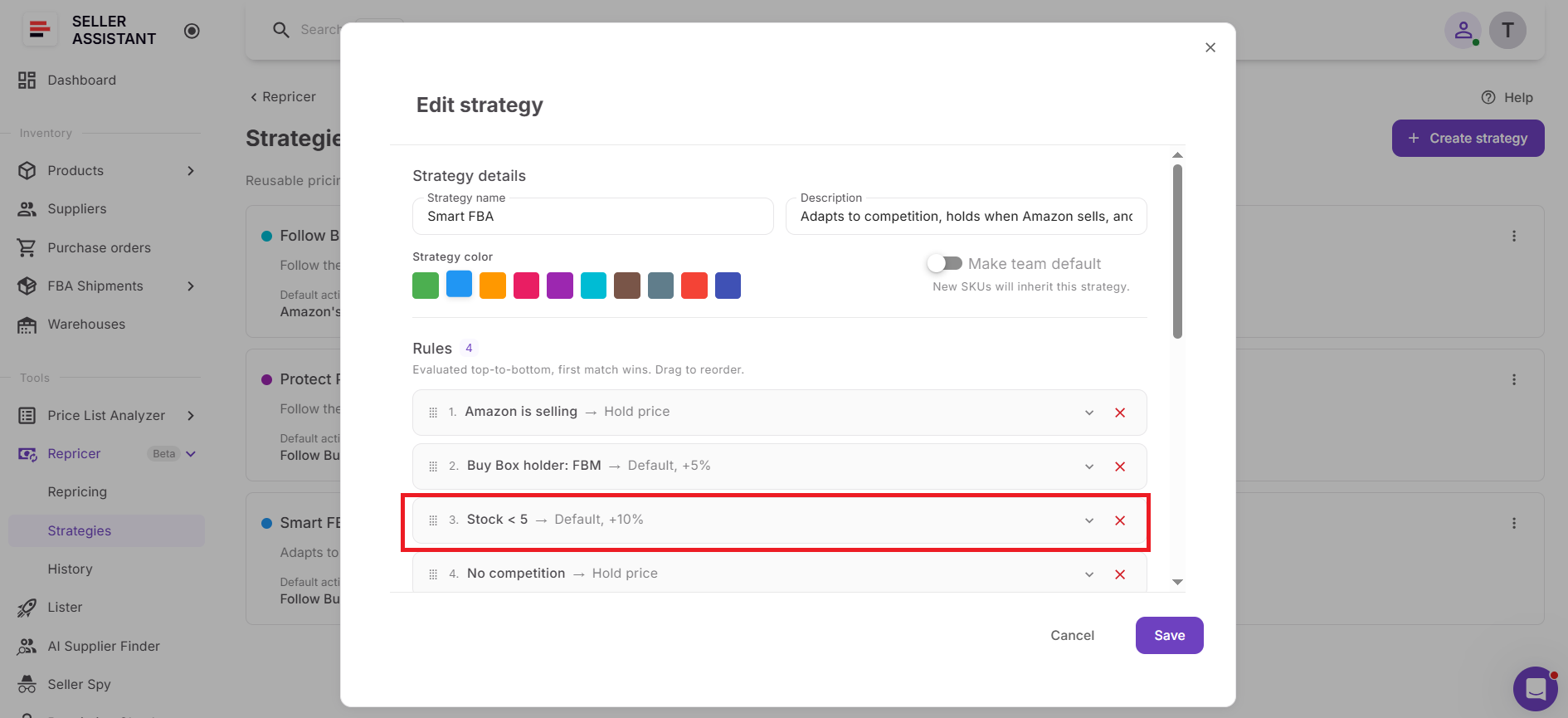
Give low stock its own pricing action
Define what should happen when the stock condition is met. Depending on your pricing objective, you can hold the price or use a different pricing target and adjustment instead of continuing with the normal competitive response.
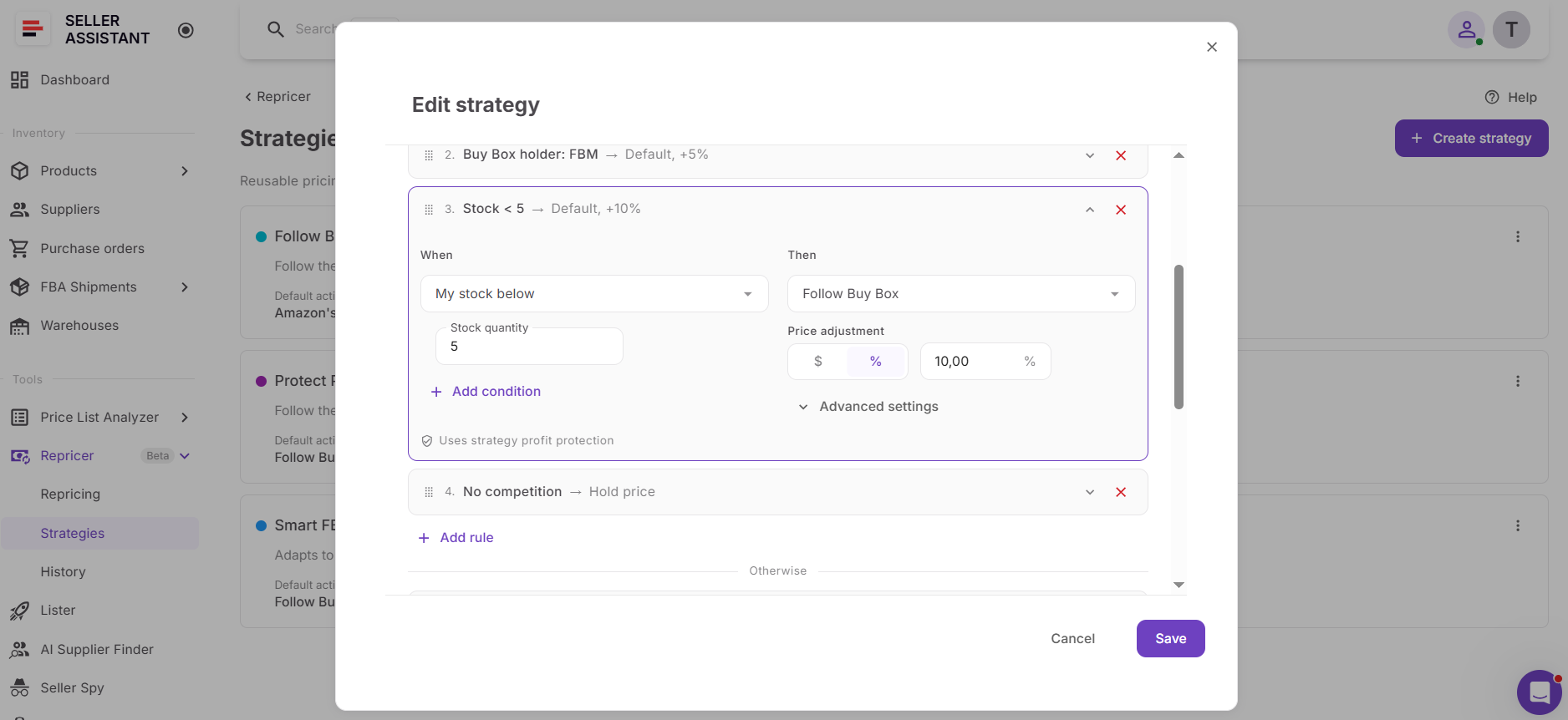
Make the low-stock rule a priority
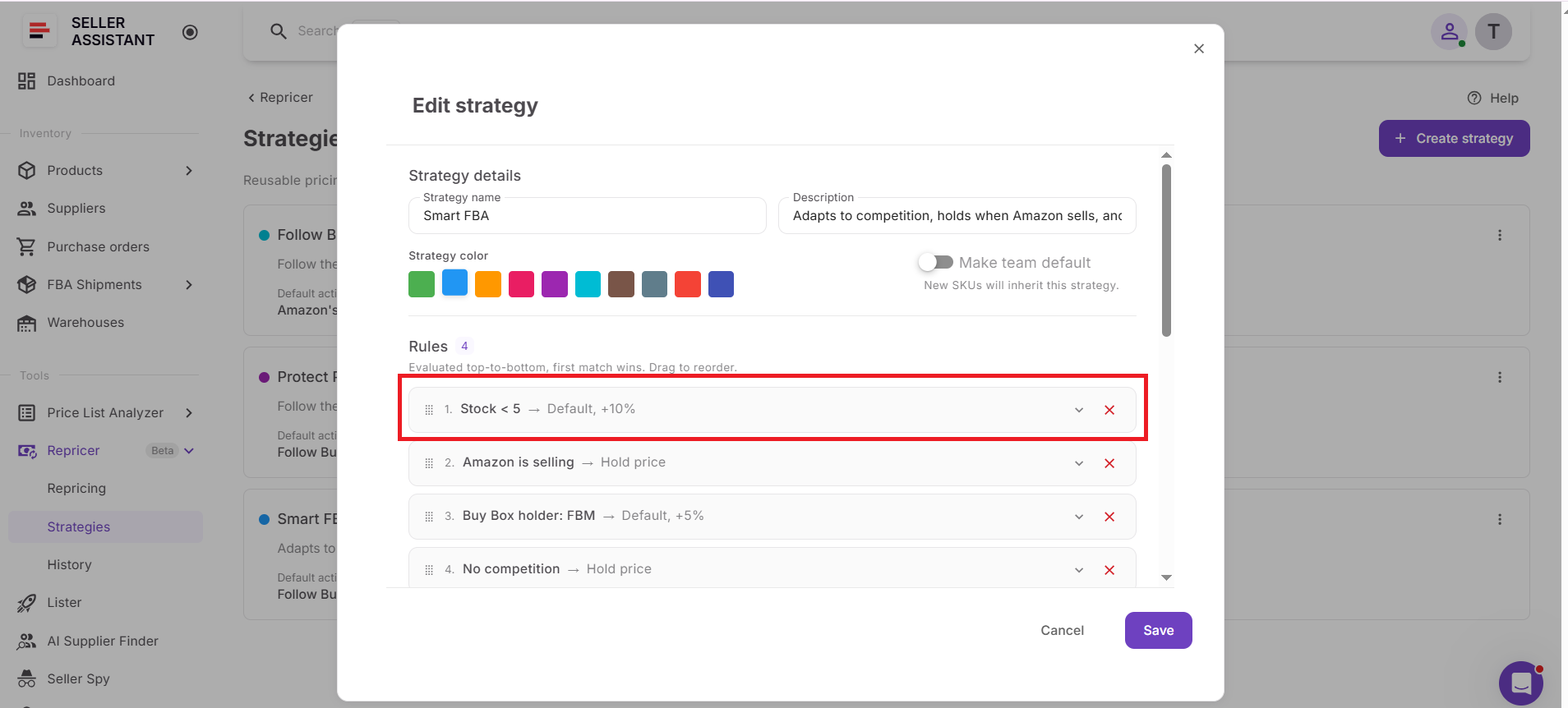
Seller Assistant Repricer evaluates conditional rules from top to bottom and applies the first matching rule. Position the stock rule appropriately so it overrides normal pricing behavior when low inventory becomes the more important condition.
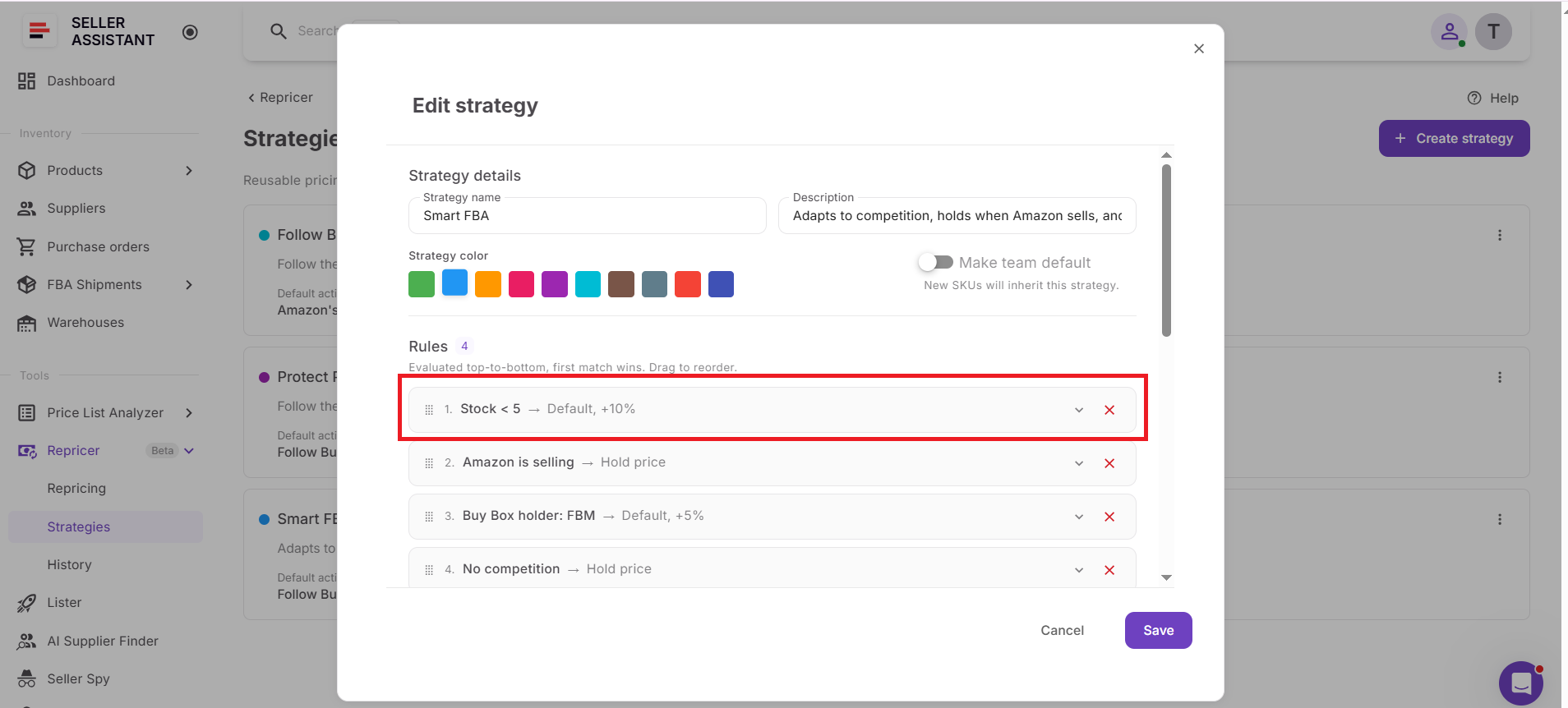
Raise the price instead of chasing downward
A pricing action can include a fixed-dollar or percentage adjustment. This gives you a way to position scarce inventory more conservatively rather than automatically following competitors downward.
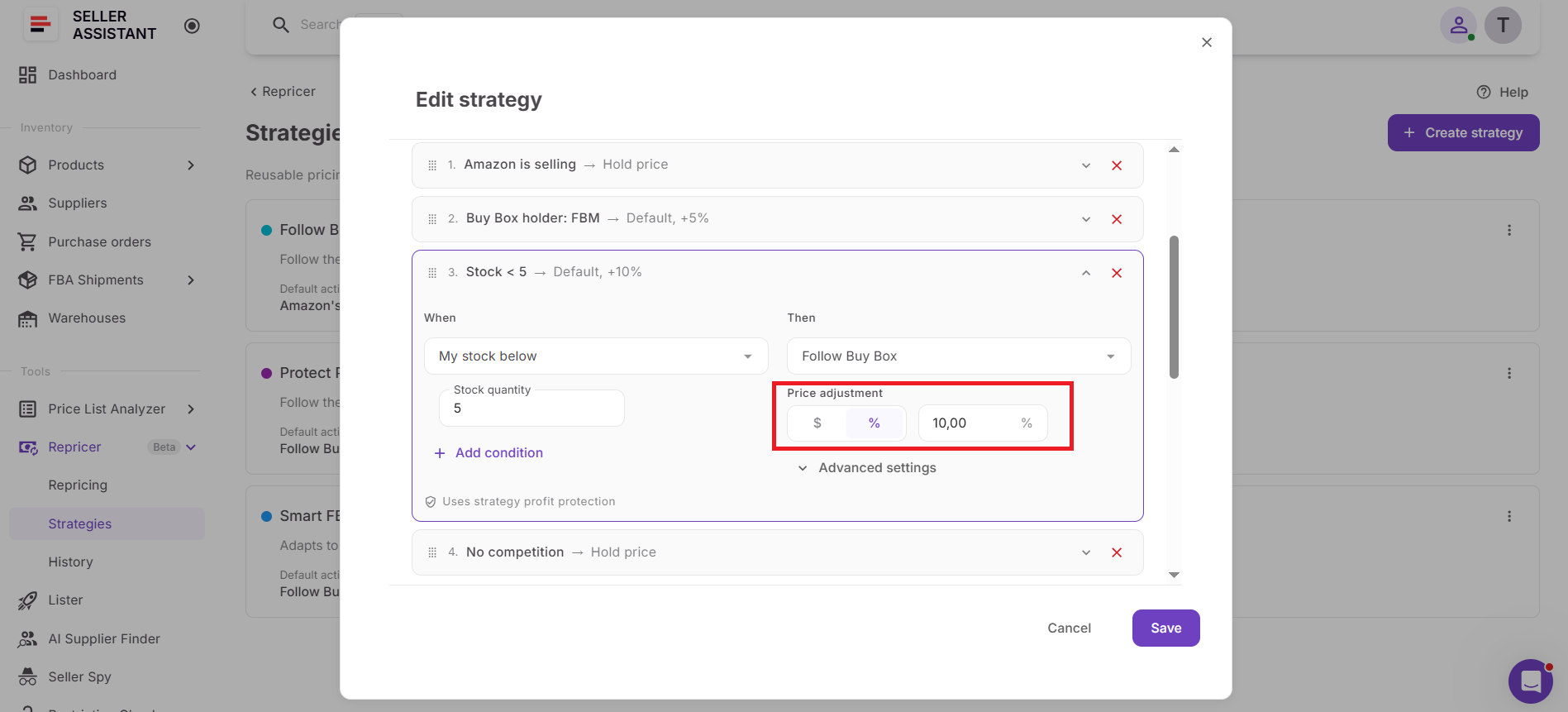
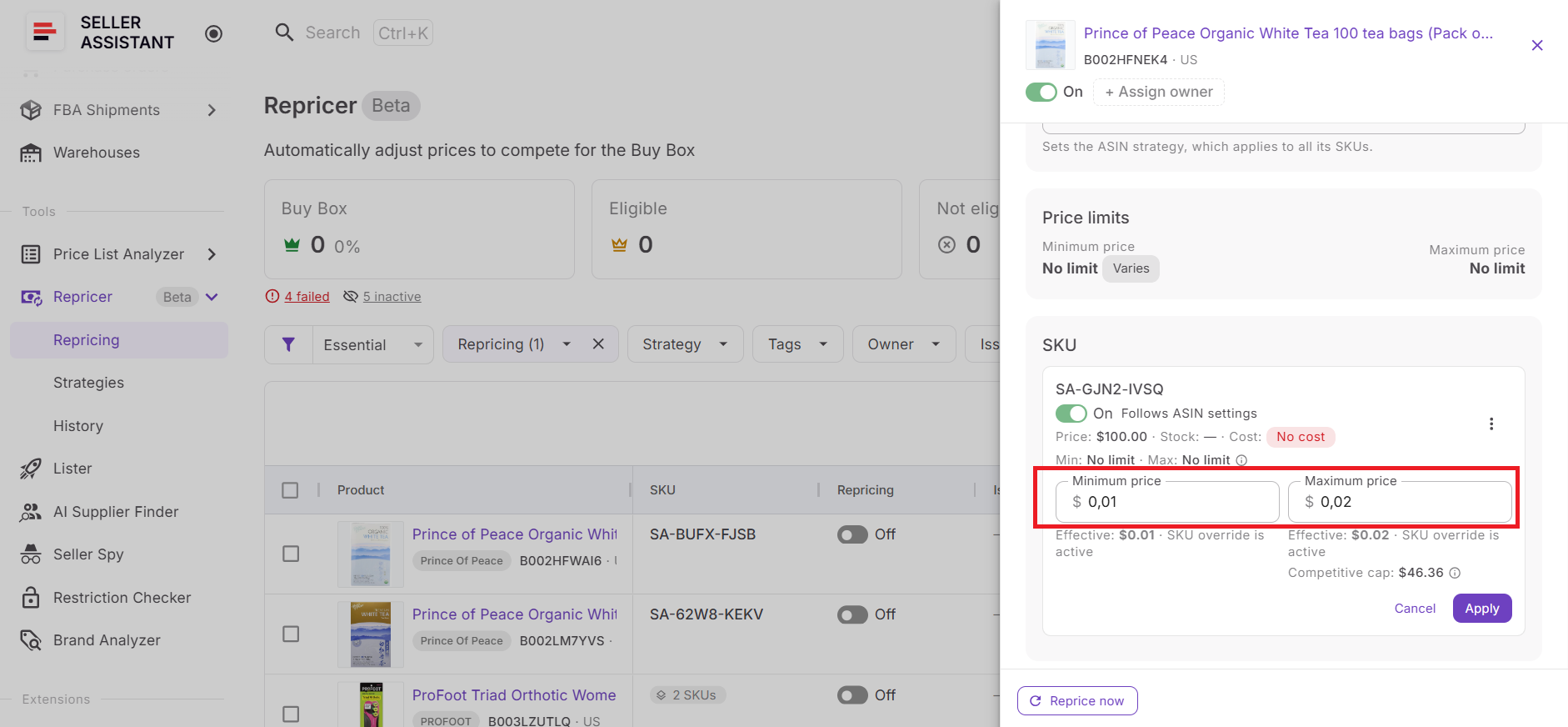
Keep profitability boundaries in place
Minimum price, safety minimum, maximum price, and profitability requirements continue to control the range in which repricing can operate. Low-stock logic therefore changes the pricing response without removing your existing financial safeguards.
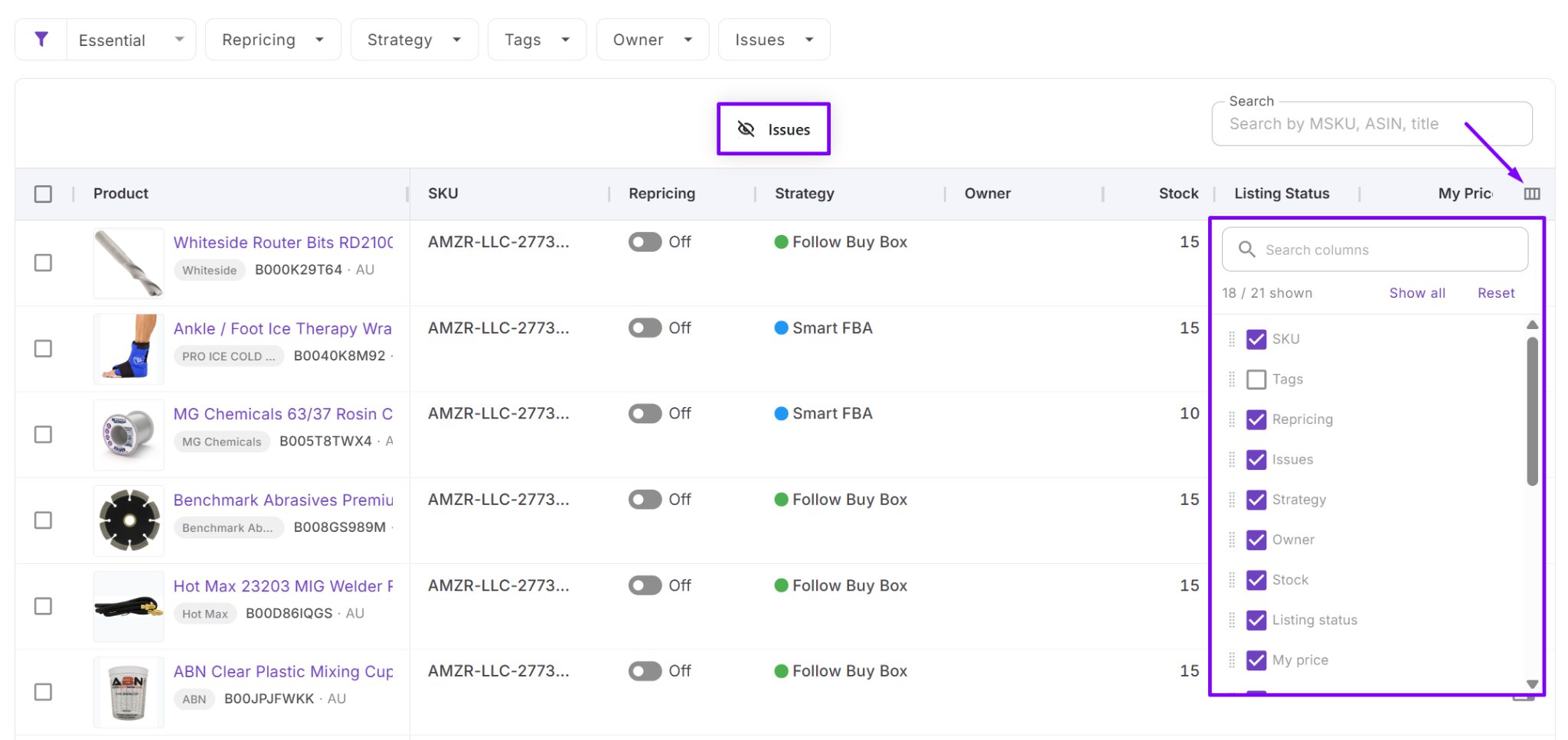
Watch stock and pricing together
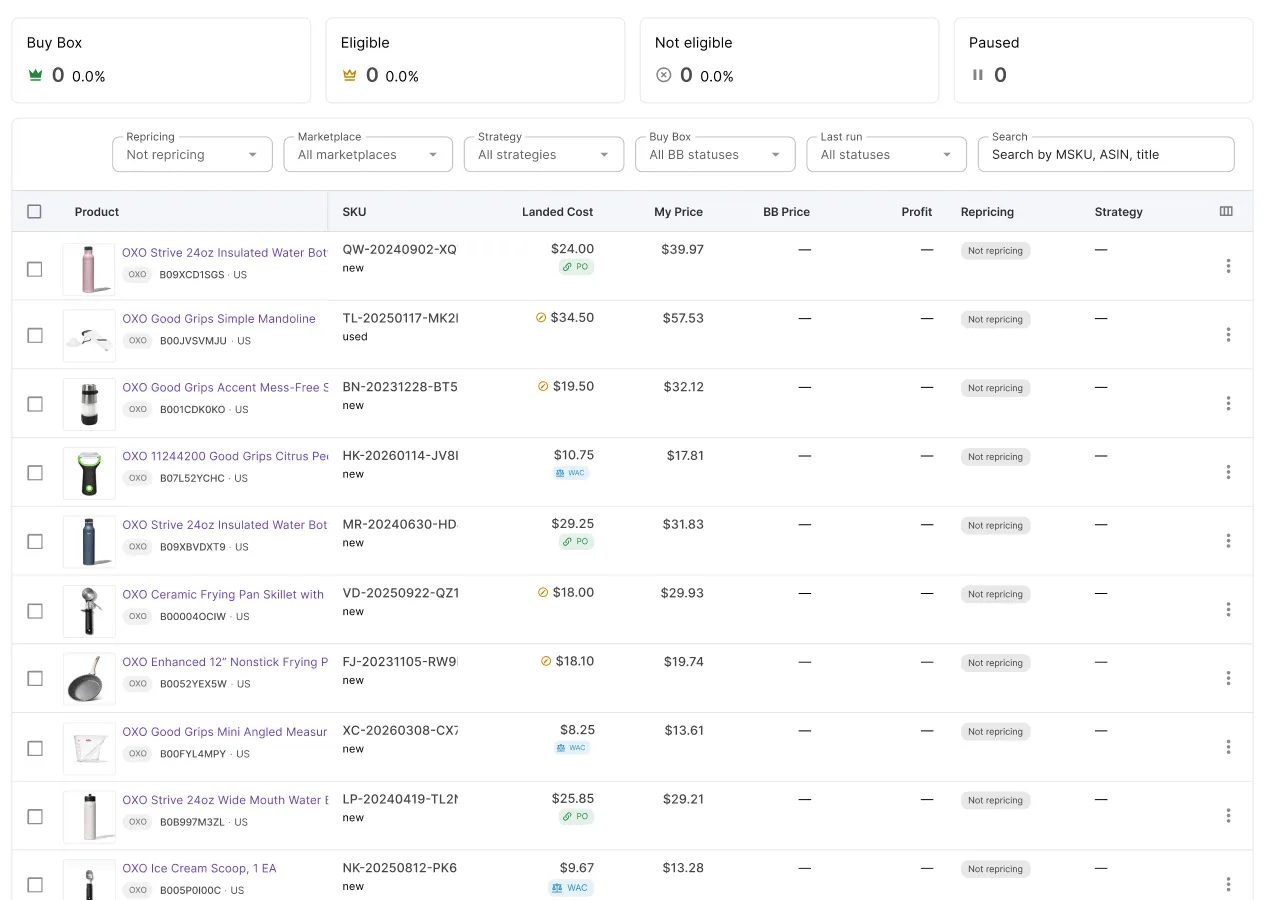
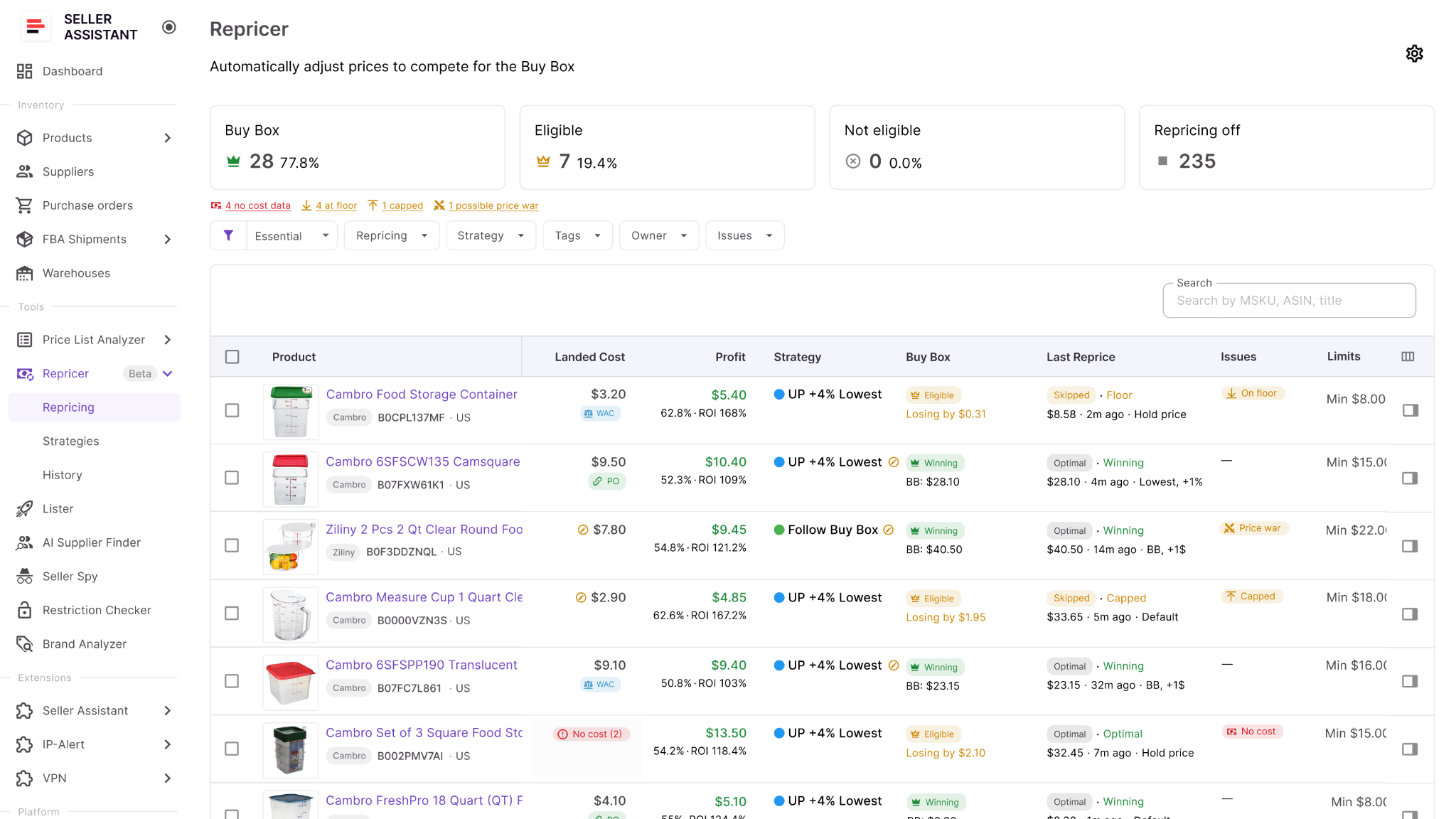
The Repricing workspace lets you review stock, current price, Buy Box data, landed cost, profit, ROI, and margin together. This makes it easier to see whether remaining inventory is selling at a price that still fits your objective. You can use the column picker to hide or show specific columns.
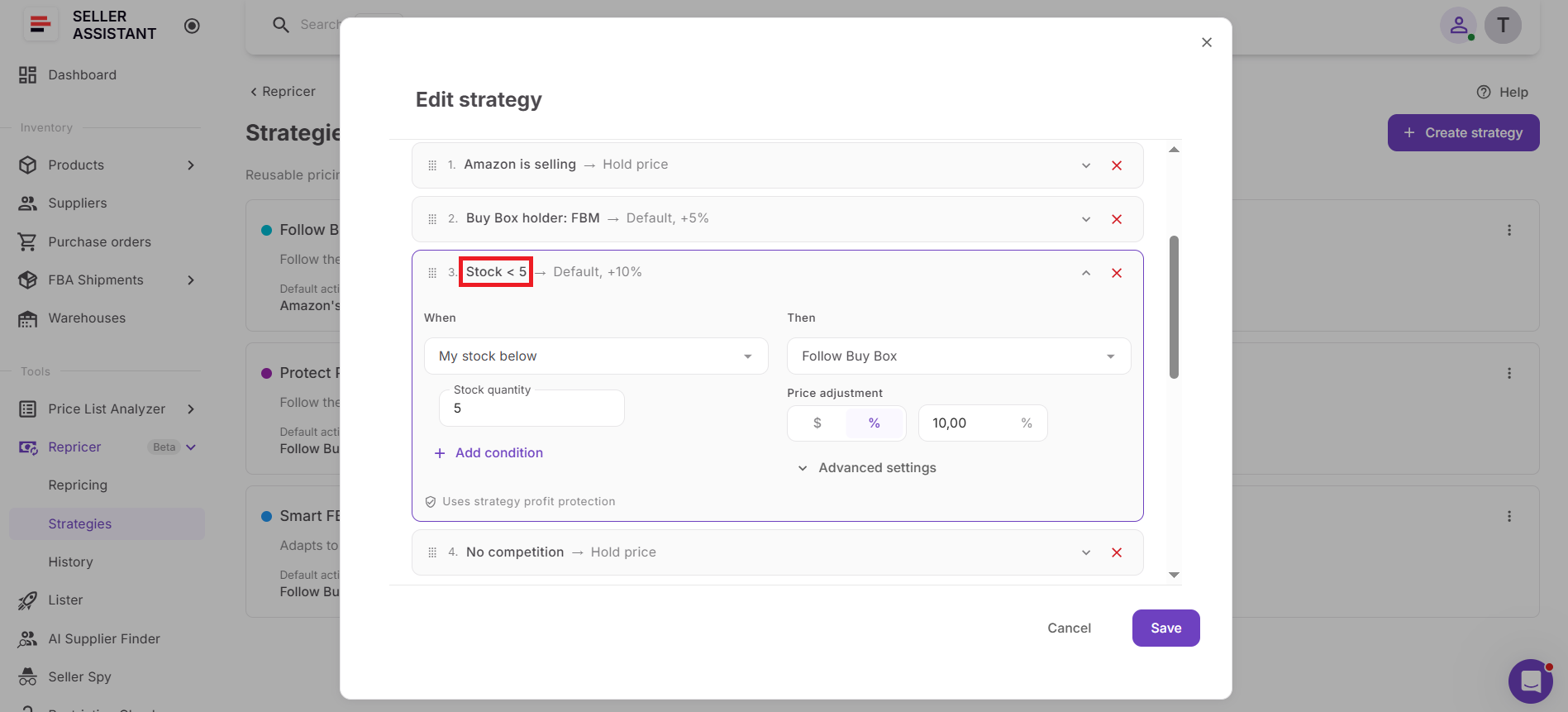
Return to normal pricing automatically
When the stock condition is no longer the first applicable rule, the Repricer can proceed according to another matching rule or the strategy’s default action. You do not need to manually replace the entire strategy just because inventory conditions change.
From Low Stock to Smarter Pricing with Seller Assistant
Low inventory is not just an inventory-management problem – it can change what the right selling price looks like. When only a few units remain, continuing to chase the Buy Box or lowest offer with the same logic used at healthy stock levels can accelerate a stockout and give away margin on scarce inventory.
Seller Assistant Repricer lets Amazon wholesale, online arbitrage, and dropshipping sellers make inventory part of the pricing decision. Stock-based conditions can change how an offer is repriced when inventory crosses a defined threshold, while profitability data, price limits, market signals, and automated rules keep the response controlled.
What Seller Assistant Repricer does when stock gets low
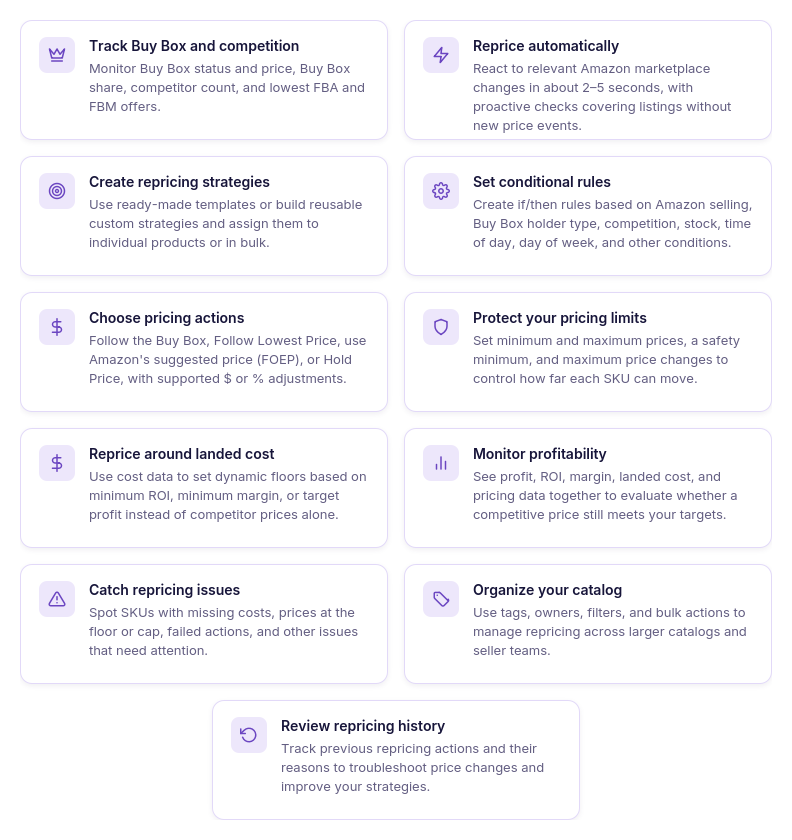
- Recognizes low inventory automatically
Use Stock as a condition inside a repricing strategy and define the quantity at which different pricing logic should apply. The Repricer can then respond to low inventory without waiting for you to notice it manually.
- Changes pricing behavior at your threshold
Once the stock condition is met, a different pricing action can take priority over the strategy’s normal behavior. This allows the same SKU to compete differently when inventory is plentiful and when only a few units remain.
- Makes low-stock pricing less aggressive
The low-stock rule can Hold Price or use another pricing target and adjustment rather than continuing to chase the lowest competitor. Fixed-dollar or percentage adjustments provide additional control over how the offer is positioned.
- Keeps normal pricing when stock is healthy
You do not need a separate strategy every time inventory changes. When the low-stock condition does not apply, the Repricer can proceed to another matching rule or use the strategy’s default action.
- Watches the Buy Box and competition
Monitor Buy Box status and price, Buy Box share, competitor count, lowest FBA and FBM prices, and your current price. This helps you judge whether preserving scarce inventory is worth becoming less aggressive on price.
- Keeps profitability visible
Review landed cost, profit, ROI, margin, and price limits alongside your pricing data. This helps you see what the remaining units are actually worth at the prices your strategy is considering.
- Keeps financial safeguards in place
Set a manual minimum or calculate a dynamic minimum from minimum ROI, minimum margin, or target profit. Safety minimum, maximum price, and maximum-change settings provide additional boundaries around automated price movements.
- Reacts as market conditions change
Reactive repricing can respond to relevant Amazon marketplace events in approximately 2–5 seconds, while proactive checks periodically reevaluate quieter listings. Your stock-aware rules therefore work alongside changing competitive conditions rather than as a one-time price adjustment.
- Shows how the price was reached
Repricing History lets you investigate previous pricing activity and unexpected outcomes. This is useful when you need to understand whether a low-stock rule or another higher-priority condition determined the price.
How Seller Assistant Repricer handles low-stock pricing
Seller Assistant Repricer continuously evaluates Amazon marketplace conditions against the strategy assigned to each SKU. Reactive repricing can respond to relevant marketplace events in approximately 2–5 seconds, while proactive checks periodically reevaluate products even when no new competitor event occurs.
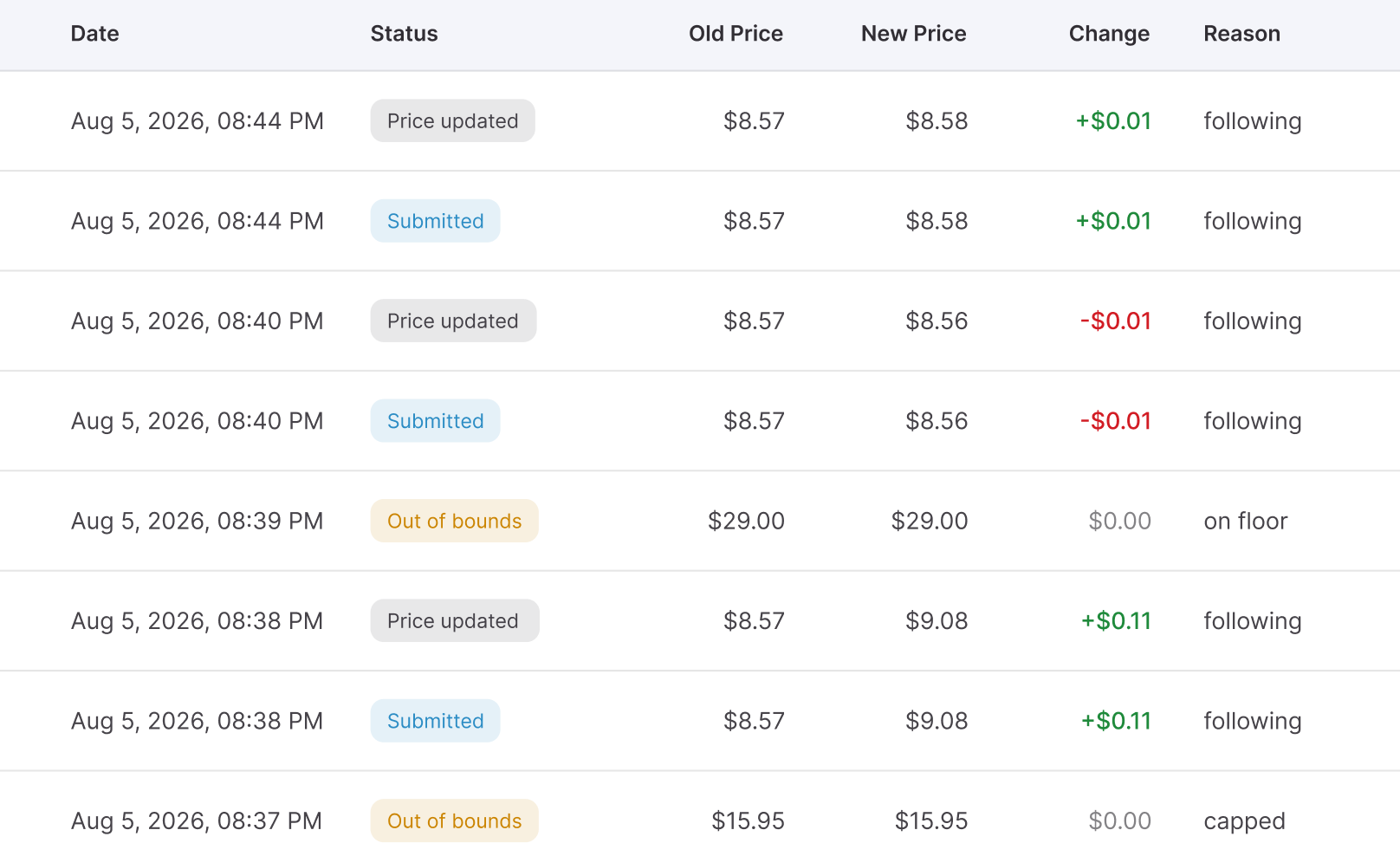
During each evaluation, the Repricer checks conditional rules from top to bottom and applies the first matching rule. That means a rule such as Stock < X can be positioned so that low inventory triggers different pricing behavior instead of allowing the SKU to continue following its normal competitive logic.
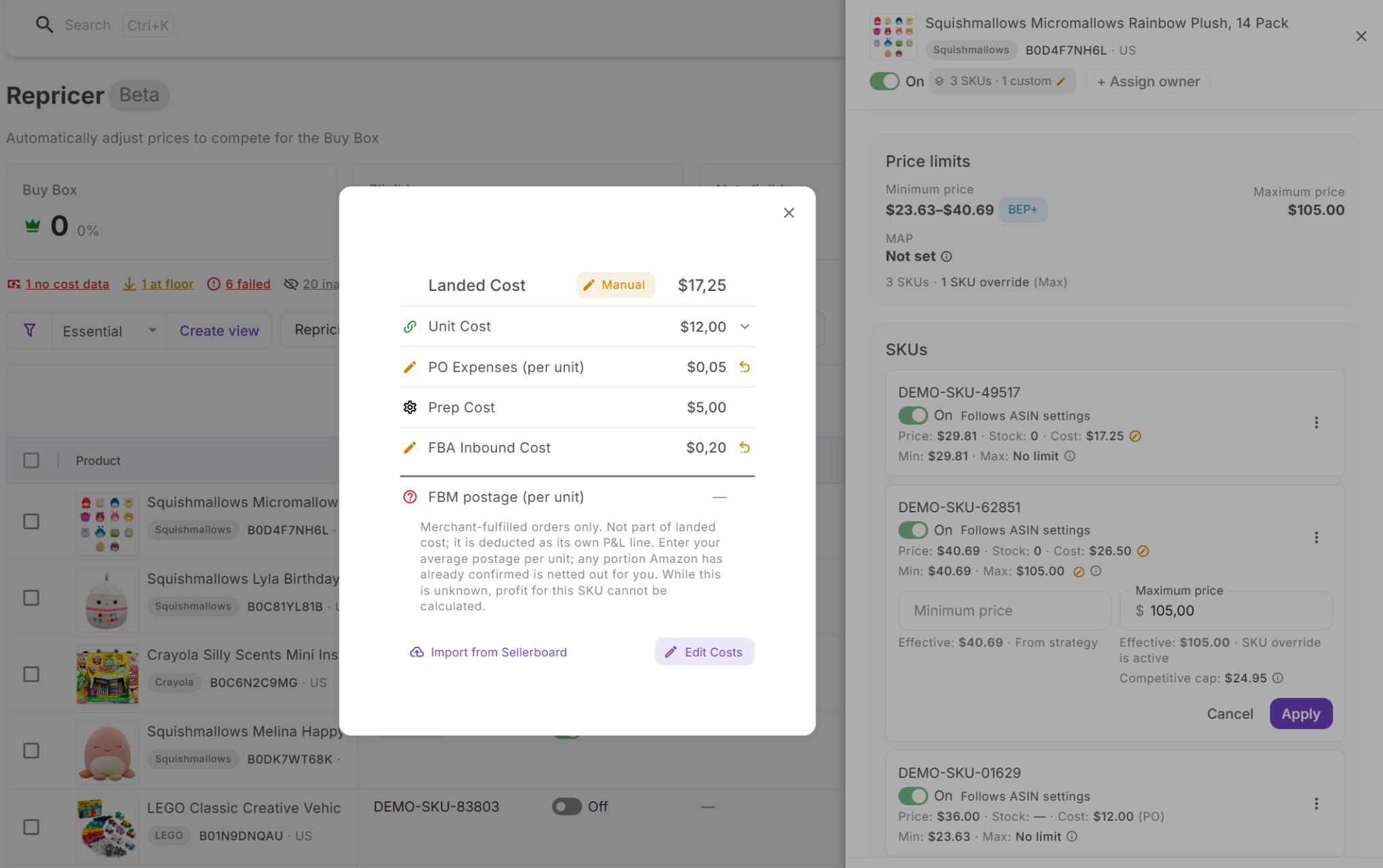
If no conditional rule matches, the Repricer uses the strategy’s default action to determine the pricing target and adjustment. Before applying the resulting price, it checks the configured minimum price, safety minimum, maximum price, landed cost, and profitability requirements, keeping stock-aware pricing inside the financial boundaries you define.
How to set up Seller Assistant Repricer for low-stock pricing
Step 1. Review inventory in Repricing
Open Repricer → Repricing in Seller Assistant. The workspace brings together SKUs, repricing status, strategies, market information, stock, Tags, Owners, profitability data, and Issues.
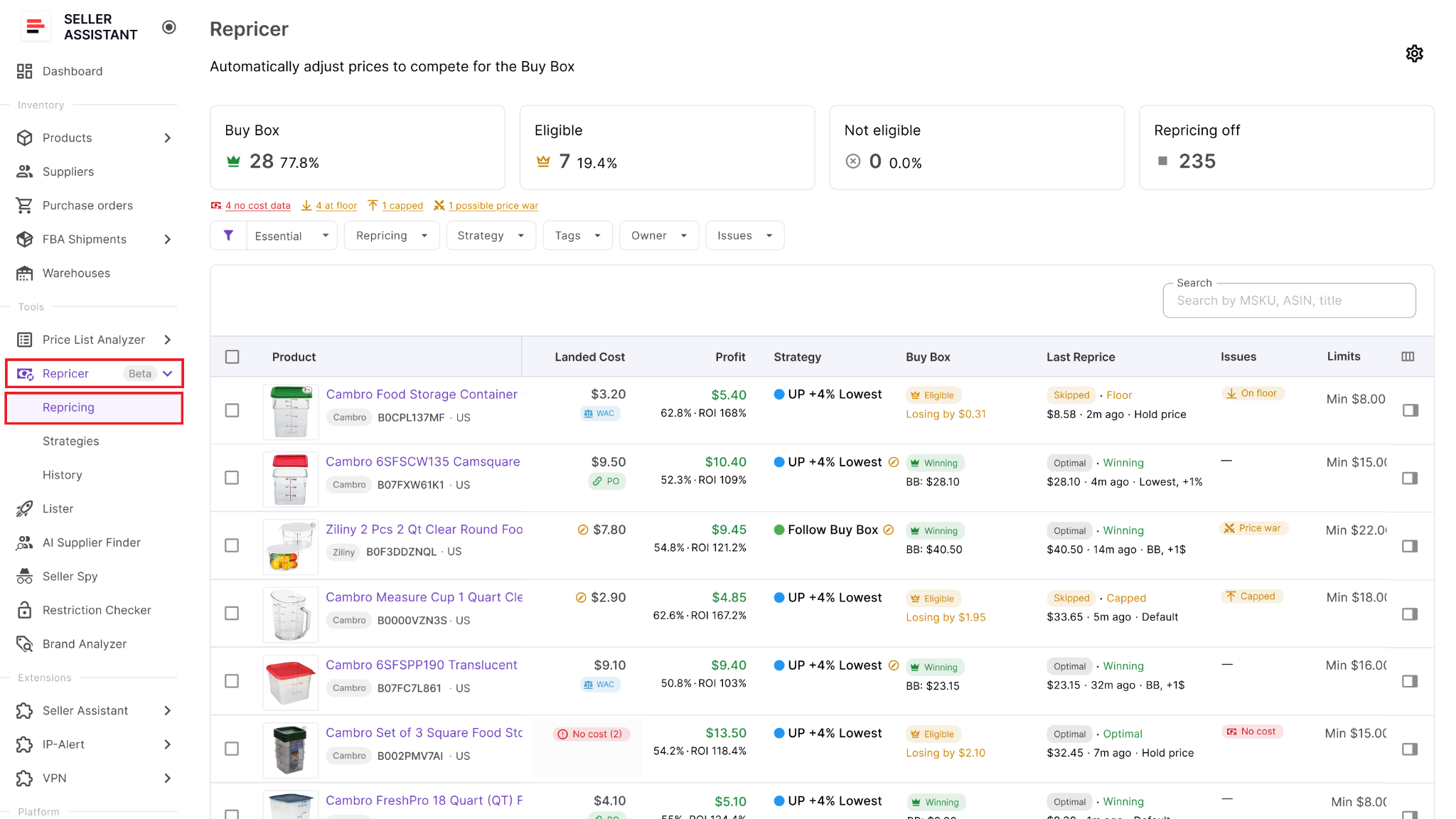
Identify products where inventory is becoming scarce and decide which SKUs need different pricing behavior as stock falls. The appropriate threshold can differ between products depending on sales velocity and replenishment plans.
Step 2. Enable Repricing
Open Settings and enable Repricing for your team. You can also choose whether newly listed products automatically enter repricing or remain inactive until someone reviews them.
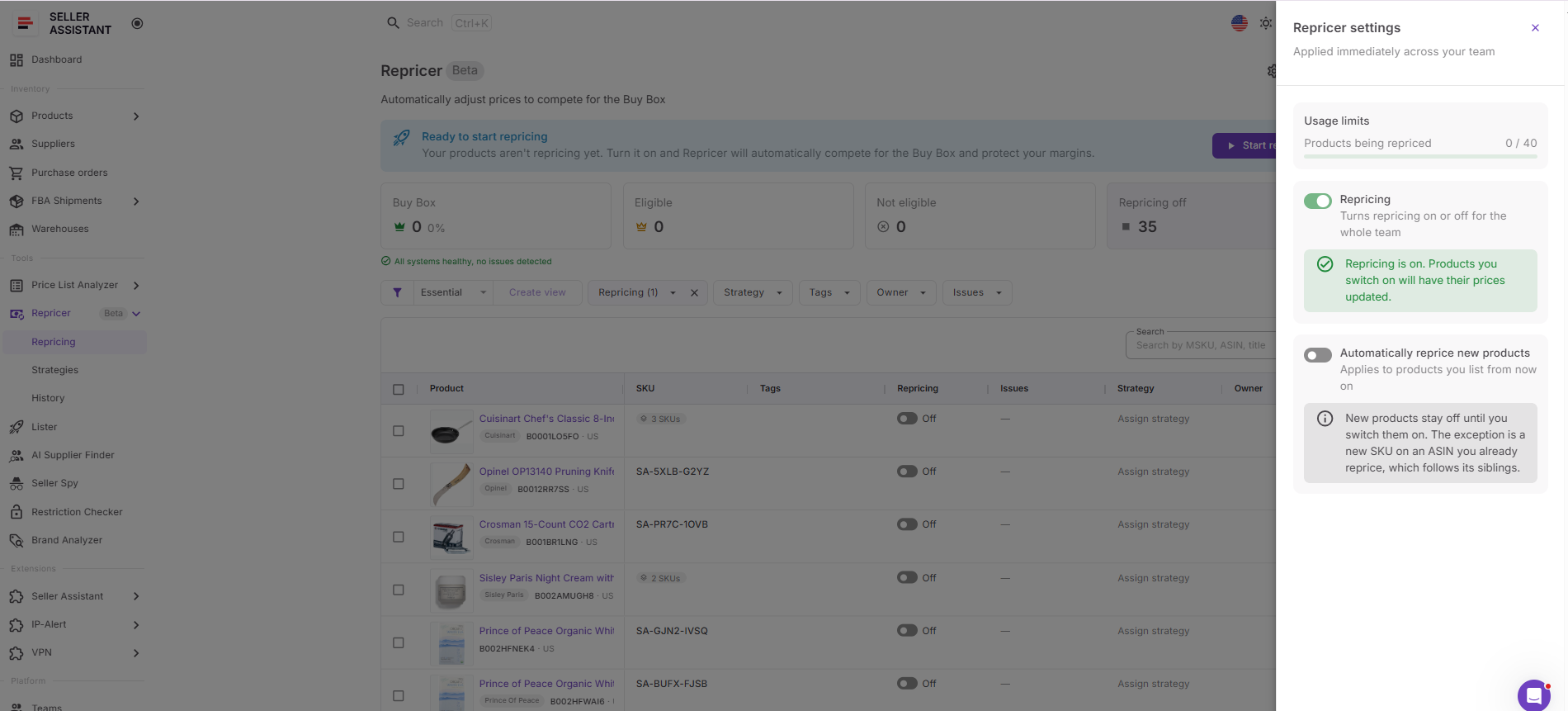
Keeping new SKUs inactive initially can give you time to verify costs, pricing boundaries, strategies, and stock-based rules before automated repricing begins.
Step 3. Assign the right strategy
Choose a strategy from the Strategy column. Seller Assistant Repricer includes Follow Buy Box, Match Buy Box, Smart FBA, Protect Profit, and Target 25% ROI, or you can build your own.
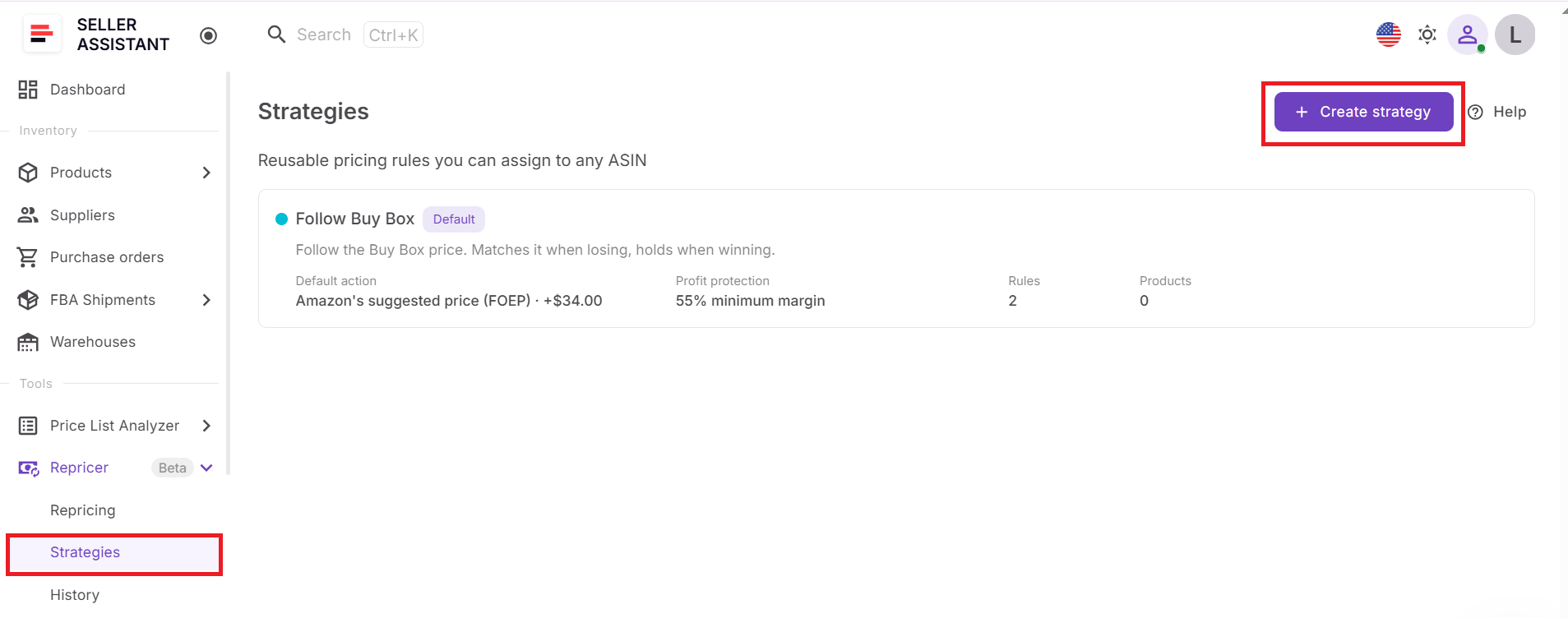
Choose the normal strategy according to how you want the SKU to compete while inventory is healthy. Low-stock behavior can then be added as a conditional exception rather than requiring an entirely separate strategy.
Step 4. Add a stock-level condition
Create a conditional rule using Stock and specify the inventory threshold that should trigger it. For example, you can define different behavior when stock falls below a chosen number of units.
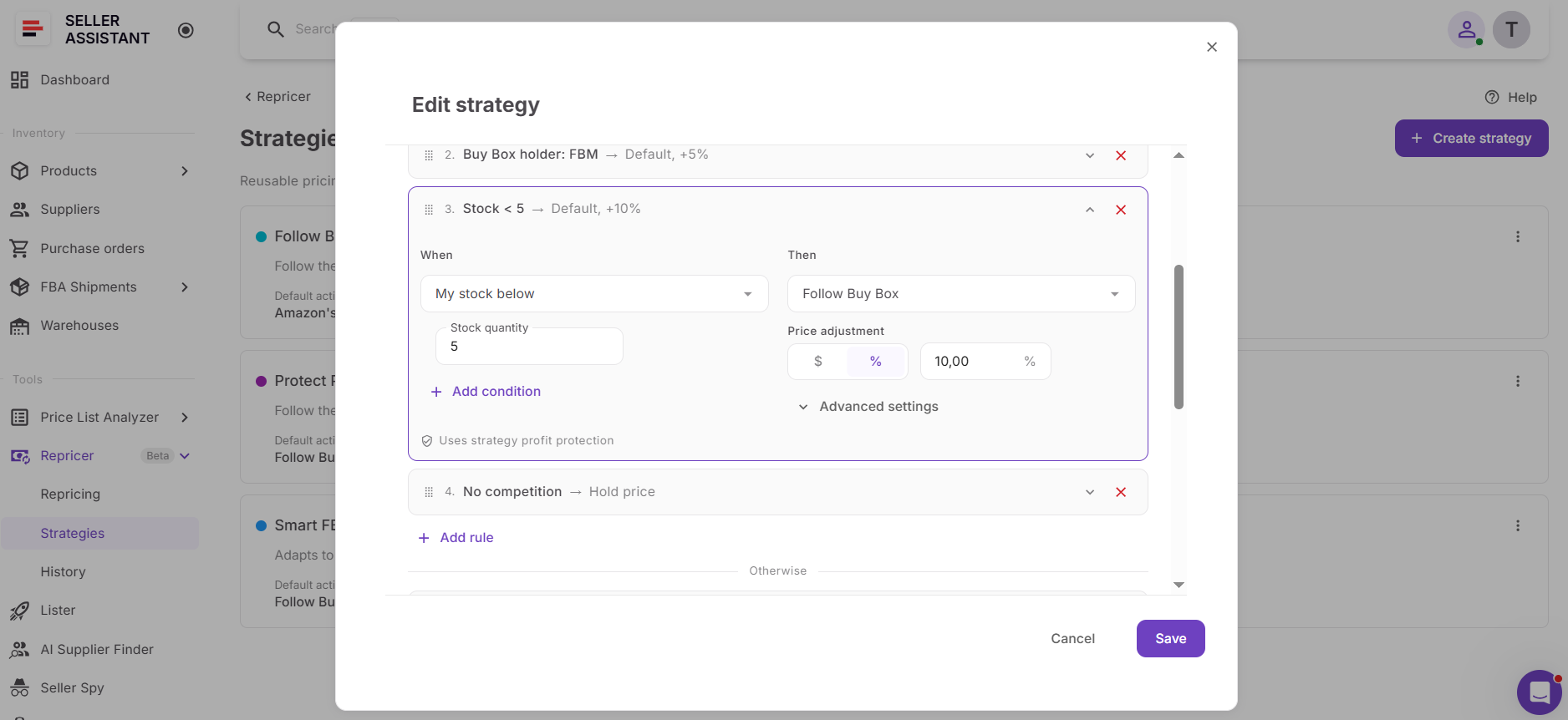
Then select the pricing action you want the Repricer to use when that condition is true. Depending on your objective, that may mean holding the price or applying different pricing logic and adjustments.
Step 5. Put the rule in the right priority
Arrange your conditional rules carefully because Seller Assistant Repricer evaluates them from top to bottom and the first matching rule wins. Place the low-stock condition where it will take precedence over normal competitive rules when inventory scarcity should become the deciding factor.
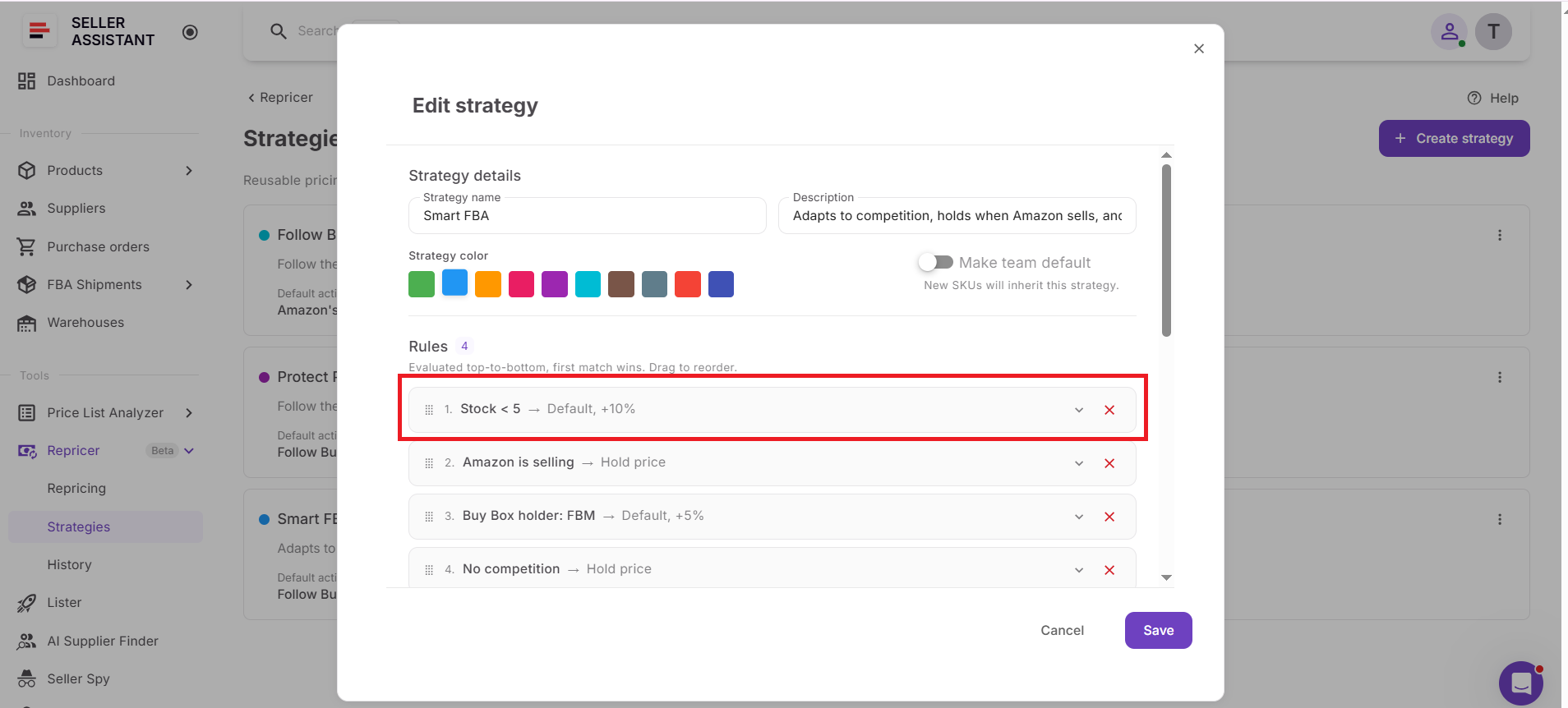
AND/OR logic can make the condition more specific if stock level should be combined with another signal. This allows you to avoid changing pricing behavior solely because one condition happens to be true.
Step 6. Set boundaries around the price
Configure the strategy’s minimum and maximum prices. Your minimum can be entered manually or calculated using minimum ROI, minimum margin, or target profit, while the safety minimum acts as the hard lower boundary.
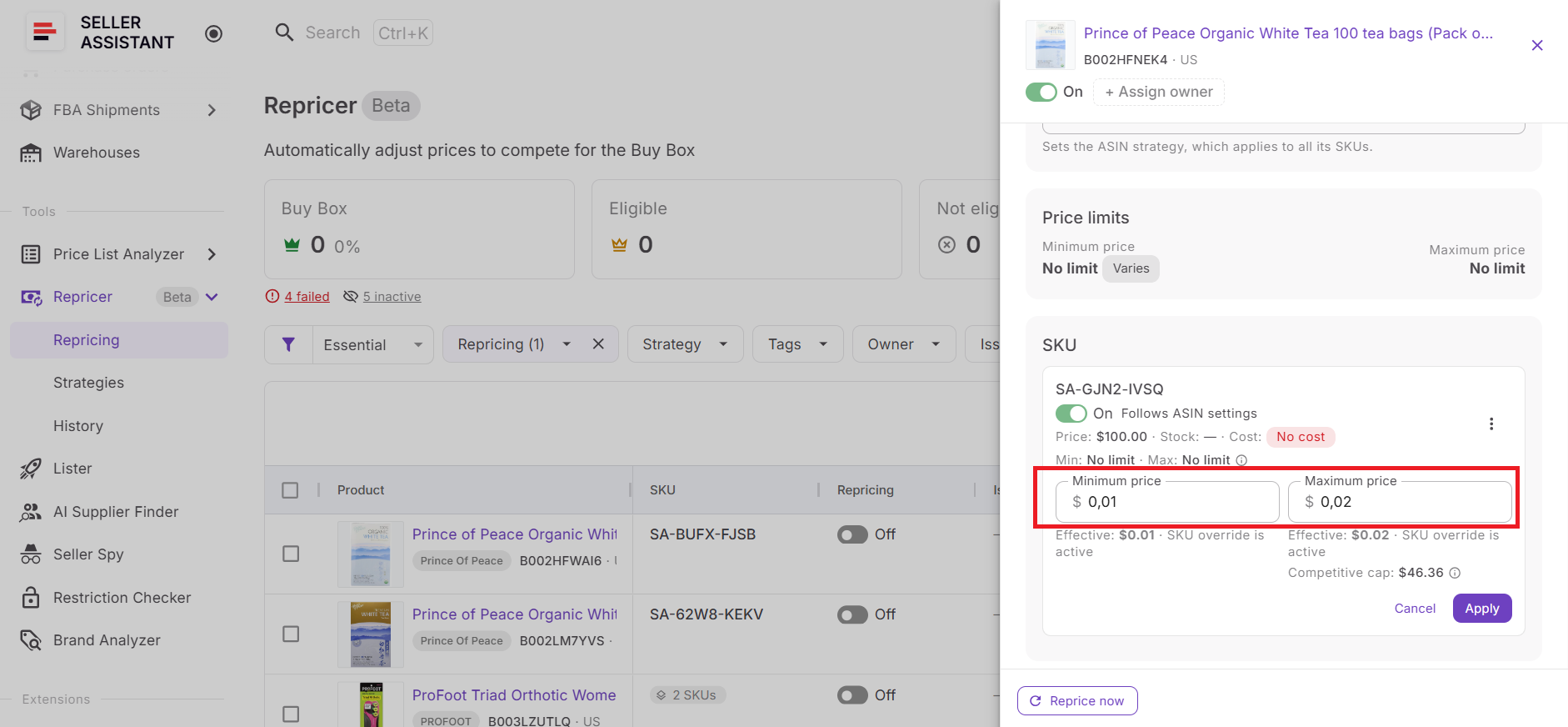
You can also limit the maximum change per reprice. These controls keep both normal and low-stock pricing within the range you consider acceptable.
Step 7. Verify costs and remaining-unit economics
Review Landed Cost for SKUs using profitability-based controls. Depending on available data, this can include relevant components such as unit cost, PO expenses, prep cost, and FBA inbound cost.
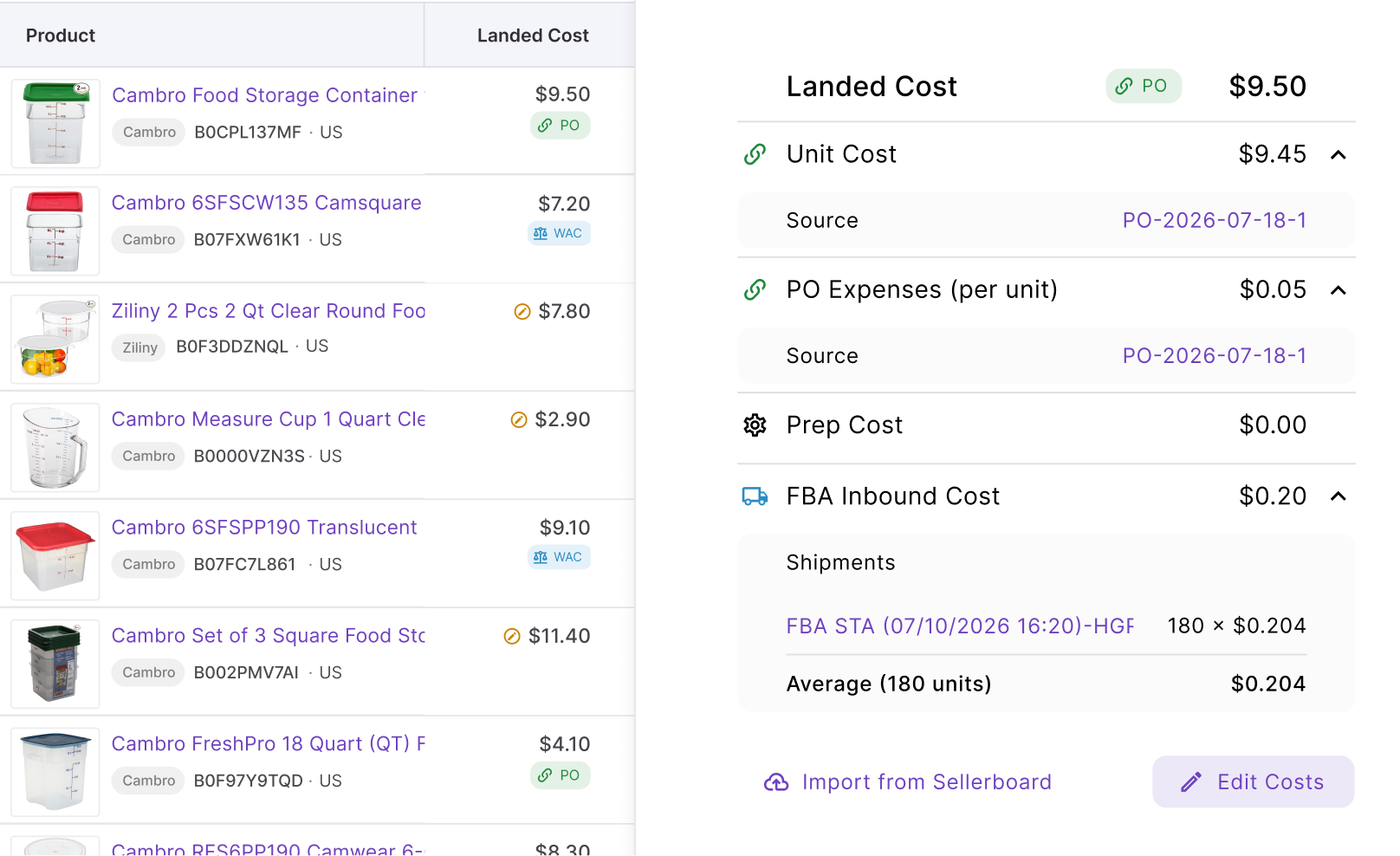
Then check profit, ROI, and margin against the current and permitted prices. This helps you decide whether the low-stock rule should prioritize holding price, becoming less aggressive, or positioning the remaining inventory higher.
Step 8. Start repricing and monitor stock with price
Enable the products that are ready and click Start repricing. Seller Assistant Repricer will evaluate them according to their strategies, stock conditions, other conditional rules, marketplace data, costs, and pricing safeguards.
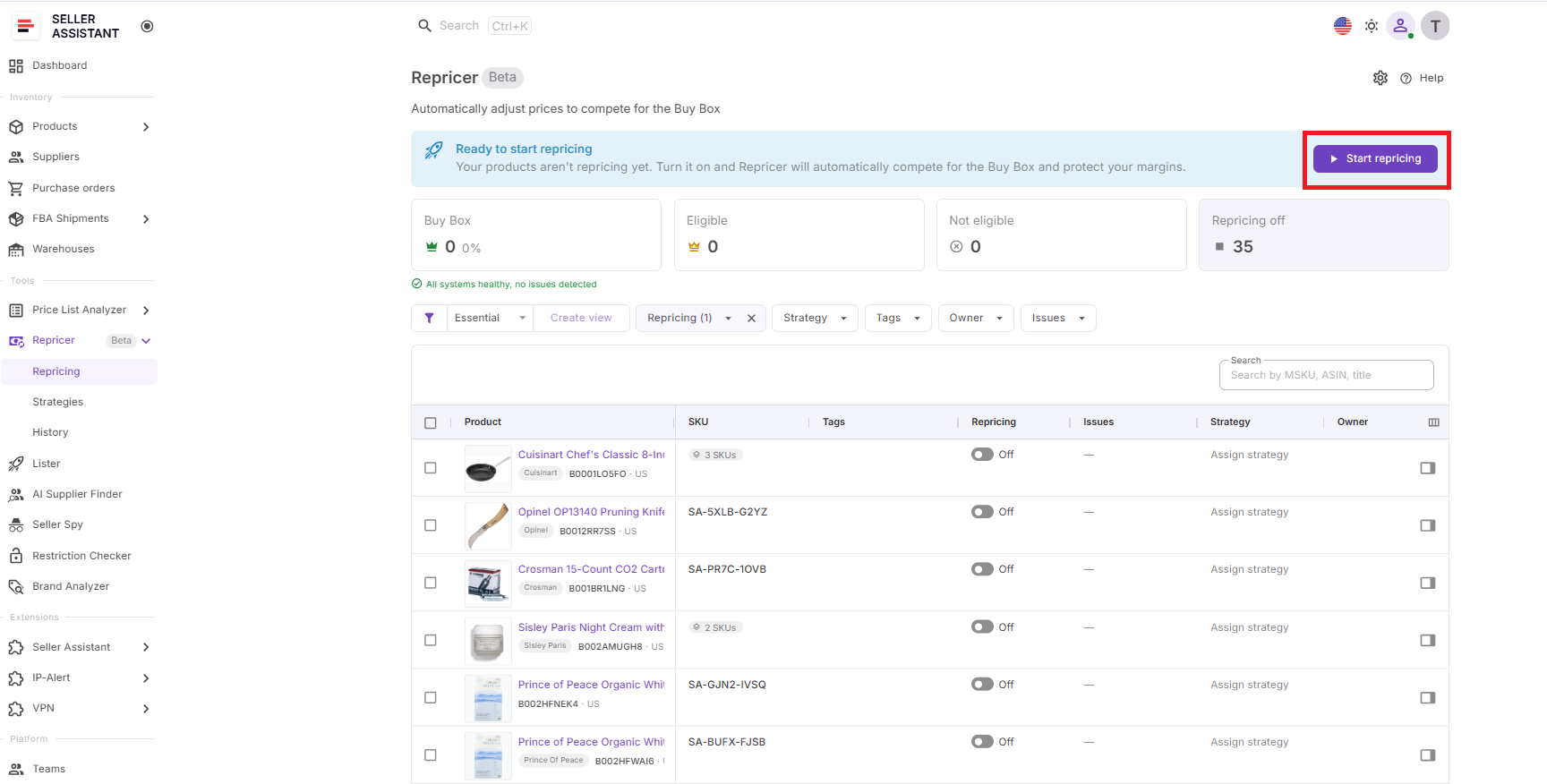
Once active, monitor stock, current price, Buy Box performance, competitor prices, profit, ROI, margin, price limits, Issues, and Repricing History. If inventory repeatedly sells down faster than planned, review the stock threshold and rule behavior instead of manually changing the SKU’s price each time.
How to Set Repricer Rules for Amazon and Low Stock (Video)
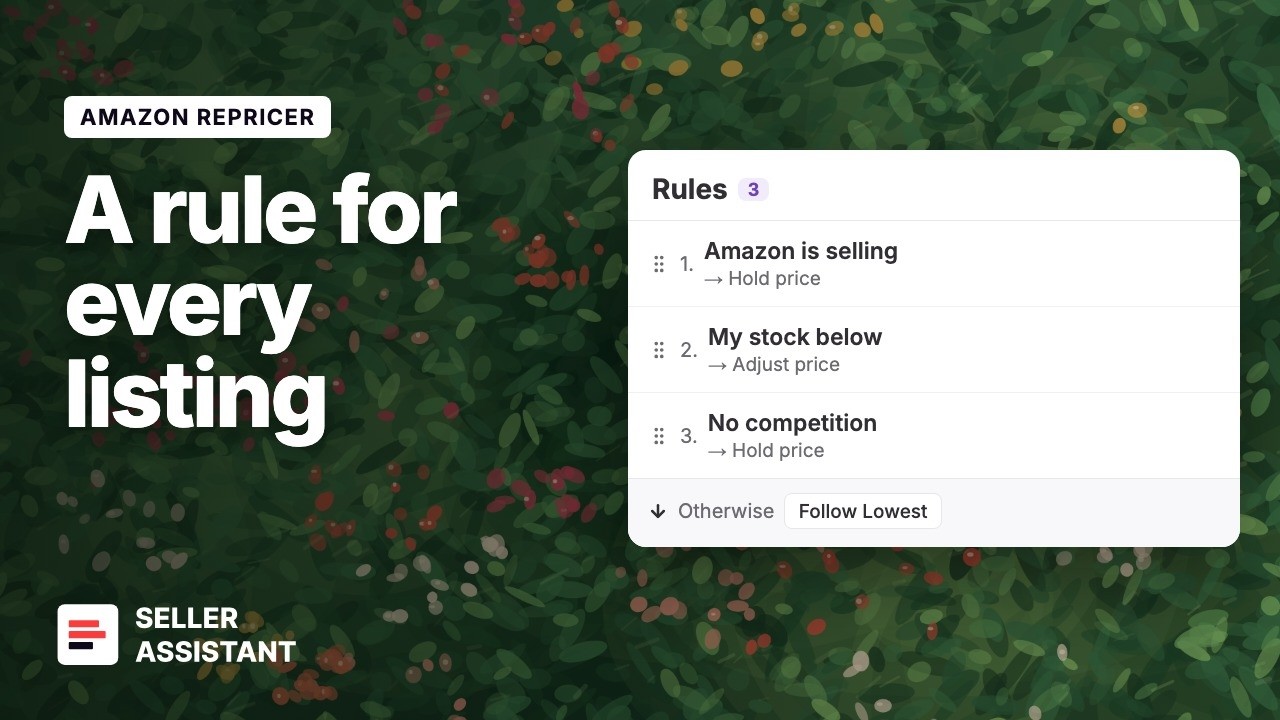
This video shows how one repricer strategy holds a rule for Amazon on the listing, low stock and no competition, with a maximum price per SKU.
Add a low-stock rule to your next repricer strategy.
FAQ
Should you always raise prices when stock is low on Amazon?
No, because low inventory alone does not mean customers will accept a higher price. Consider demand strength, competitor availability, replenishment timing, and how quickly the SKU normally sells before deciding to raise the price.
Does low stock affect the Amazon Buy Box?
Low stock does not automatically mean you will lose the Buy Box while your offer remains available. However, once you sell out, your offer can no longer capture Buy Box sales until sellable inventory becomes available again.
How do you choose the right low-stock threshold?
A fixed number such as five or ten units can be misleading because products sell at different rates. A more useful threshold reflects how many units you expect to sell during the time required to replenish the SKU.
Can raising the price when stock is low hurt sales?
Yes, a higher price can reduce conversion or make competing offers more attractive. The goal is not necessarily to maximize price, but to find a better balance between remaining inventory, expected demand, and the value of staying in stock.
How can you avoid selling out at a bad price?
Review whether the final units are being sold under temporary competitive pressure that may disappear before replenishment arrives. If demand remains healthy, accepting slower sales at a stronger price can sometimes produce a better result than clearing the remaining inventory immediately.
Final Thoughts
Repricing low inventory on Amazon requires different thinking from pricing a fully stocked SKU. As inventory falls, maximizing Buy Box share and sales velocity may become less important than protecting margin, avoiding an early stockout, and making the remaining units last until replenishment.
Seller Assistant’s Amazon repricer makes stock level part of the pricing decision instead of something sellers must monitor manually. With stock-based conditions, conditional pricing actions, profitability safeguards, and real-time market context, Amazon resellers can automatically shift from normal competitive repricing to more controlled low-stock pricing when inventory becomes scarce.