The Buy Box didn’t disappear at random – something changed, and it’s worth knowing what before reacting. Most sellers’ first instinct is to drop the price, but that only helps if price was actually the reason it left; if a competitor’s stock, your shipping speed, or an account metric shifted instead, cutting price just erodes margin while the real cause goes unaddressed.
Figuring this out manually means rechecking the listing while conditions keep changing underneath you.
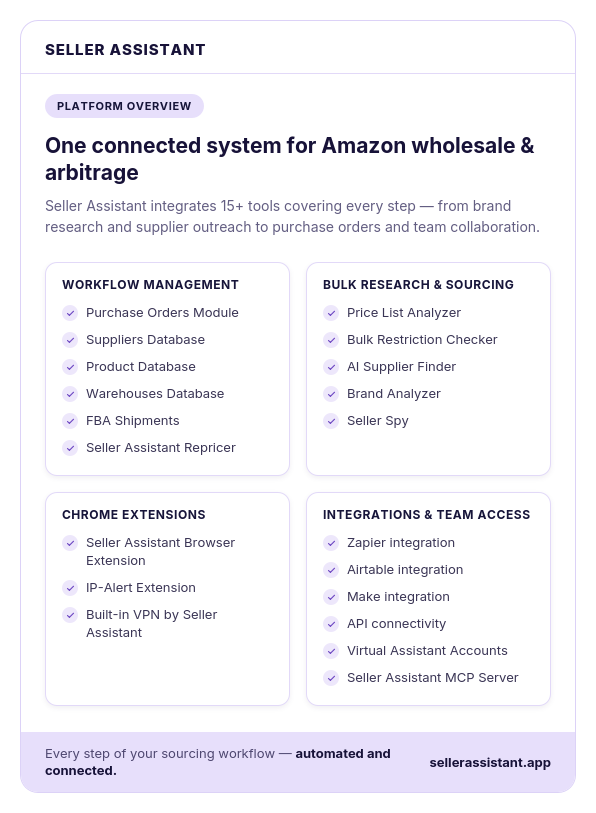
This post covers the common reasons the Buy Box moves, how to tell which one applies, and how Seller Assistant Repricer reacts within seconds once price is the lever that gets it back.
Why You Lost the Buy Box in the First Place
If your Buy Box share dropped, price is an obvious suspect – but it is not the only one. Amazon determines which eligible offer is featured based on multiple competitive and seller-performance signals, so losing the Buy Box usually means something changed either in your offer, your performance, or the competition.
Before lowering your price, identify what changed. Otherwise, you may sacrifice margin without fixing the actual reason another seller’s offer became more competitive.
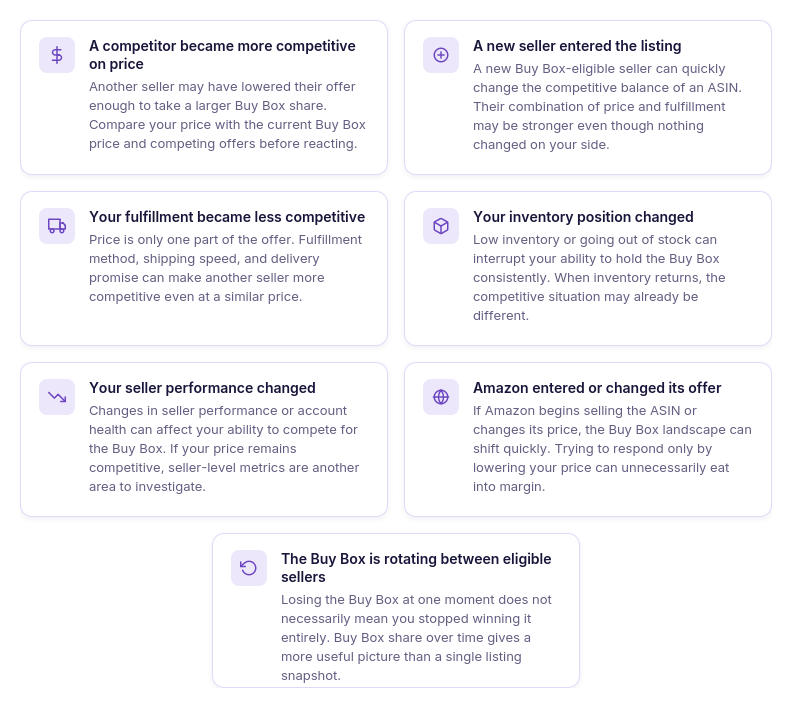
A competitor became more competitive on price
Another seller may have lowered their offer enough to become more attractive for the Buy Box. Compare your price with the current Buy Box price and competing offers before deciding whether a price adjustment makes sense.
A new seller entered the listing
A new Buy Box-eligible seller can change the competitive balance of an ASIN almost immediately. Even if your own offer has not changed, you may suddenly be competing against a seller with a stronger combination of price and fulfillment.
Your fulfillment became less competitive
Price is only part of the customer offer. Differences in fulfillment method, shipping speed, delivery promise, and overall convenience can make another seller more competitive even when your prices are close.
Your inventory position changed
Low inventory or going out of stock can interrupt your ability to hold the Buy Box consistently. When inventory returns, do not assume your previous Buy Box position will automatically return with it because the competitive landscape may have changed.
Your seller performance changed
Changes in seller performance or account health can affect your ability to compete effectively for the Buy Box. If pricing looks competitive but your Buy Box share has fallen, check whether seller-level performance metrics have changed.
Amazon entered or changed its offer
When Amazon itself begins selling the ASIN or changes its price, the Buy Box situation can shift quickly. Trying to beat Amazon purely by lowering your price may lead to unnecessary margin erosion.
The Buy Box is rotating between eligible sellers
Losing the Buy Box does not always mean you have stopped winning it completely. Amazon can rotate the Featured Offer among competitive eligible sellers, so checking Buy Box share over time is more informative than relying on a single listing snapshot.
Why Dropping Your Price Doesn’t Always Bring the Buy Box Back
When sellers lose the Buy Box on Amazon, the instinctive response is often to cut the price. That can help when another seller’s more competitive price is the reason your Buy Box share dropped – but it will not fix problems related to fulfillment, inventory, seller performance, or eligibility.
Worse, repeated price cuts can reduce profit without improving your Buy Box position. The first step in Amazon Buy Box troubleshooting should therefore be identifying what changed and whether price is actually the lever you can use to win it back.
When a lower price can help – and when it can’t
| Why You Lost the Buy Box | Will Lowering Price Help? | What to Check Instead |
|---|---|---|
| Competitor lowered their price | Potentially | Compare your price with the Buy Box price and competing offers before deciding how far to move |
| New competitive seller appeared | Potentially | Compare their price, fulfillment method, and overall offer rather than automatically undercutting |
| Your fulfillment became less competitive | Not necessarily | Check fulfillment method, delivery speed, and delivery promise |
| You went out of stock | No | Restore inventory and confirm the offer is active and available |
| Seller performance declined | Not necessarily | Review relevant seller-performance and account-health metrics |
| Amazon entered the listing | Potentially, but risky | Check Amazon’s offer and determine whether competing on price still makes financial sense |
| Buy Box is rotating between sellers | Not necessarily | Monitor Buy Box share over time instead of reacting to a single loss |
| Your offer is not Buy Box eligible | No | Resolve the eligibility issue first; a cheaper price alone does not guarantee eligibility |
The key is to treat a lost Buy Box as a diagnostic signal, not an automatic instruction to lower price. Once you establish that pricing is the cause, you can decide how aggressively to respond – and how low you are actually willing to go.
Why a Repricer Is Built for the Moment You Lose the Buy Box
Manually checking an Amazon listing works when you happen to notice the Buy Box loss immediately. But competitors can change prices, enter or leave the listing, or take the Buy Box again before you finish investigating – and with dozens or hundreds of SKUs, you cannot keep reopening listings to see whether anything changed.
Once you determine that price is the reason you lost the Buy Box, speed matters. This is where an automated repricer becomes useful: instead of waiting for your next manual check, it can monitor relevant marketplace changes and respond according to pricing rules you have already defined.
Why automated repricing is faster than manual Buy Box recovery
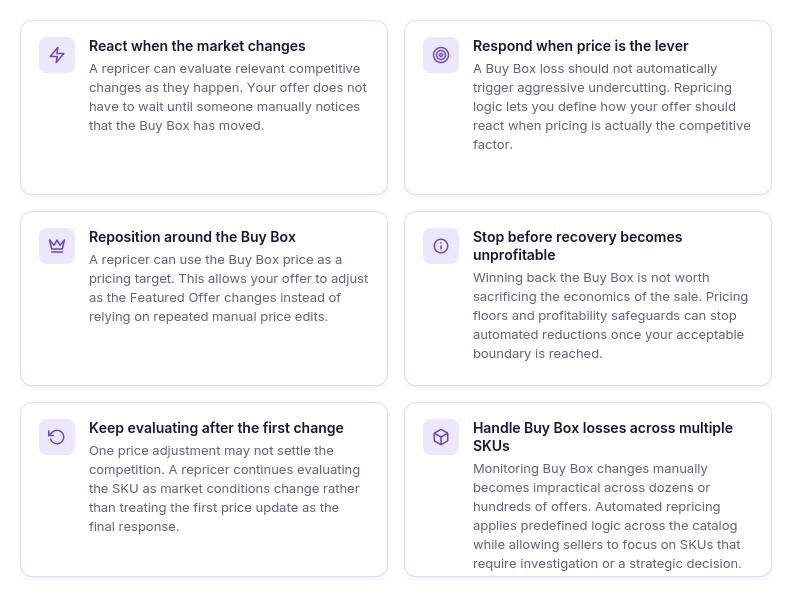
React when the market changes
A repricer monitors relevant pricing and competitive changes continuously. When the Buy Box situation changes, it can evaluate whether your offer should move without waiting for you to notice the listing manually.
Respond only when price is the lever
Losing the Buy Box does not automatically mean you should become the cheapest seller. A well-configured repricing strategy determines how to respond when pricing is relevant rather than treating every Buy Box loss as a reason to undercut.
Reposition around the Buy Box price
Instead of manually checking the Featured Offer and editing your price, repricing logic can use the Buy Box price as a target. This lets your offer adjust as the competitive price changes.
Stop chasing when the price gets too low
Winning the Buy Box back is not useful if the required price destroys your return. Minimum-price and profitability safeguards give automated repricing a point at which it should stop following the market downward.
Keep reacting after the first adjustment
The competitive situation may change again minutes after you update your offer. Automated repricing keeps reevaluating the SKU instead of treating one manual price change as the end of the process.
Handle Buy Box losses across multiple SKUs
Manual recovery becomes increasingly difficult when Buy Box share changes across a large catalog. A repricer can apply predefined logic across many offers simultaneously, leaving sellers to investigate the exceptions that actually require a human decision.
How Seller Assistant Repricer Helps You Win the Buy Box Back
Once you know pricing is behind a lost Buy Box, the challenge is reacting quickly without blindly undercutting competitors. Seller Assistant Repricer combines Buy Box and competitor data, automated pricing strategies, profitability safeguards, and pricing history so you can see what changed, respond to it, and avoid winning the Buy Box back at an unacceptable price.
| Reason | How to Confirm It | What to Do |
|---|---|---|
| A competitor lowered their price | Compare your current price with the Buy Box price and competing FBA/FBM offers | Use Follow Buy Box, Match Buy Box, or appropriate custom logic to reposition your offer within your limits |
| Your price is above the current Buy Box | Check your price against the displayed Buy Box price | Let the assigned strategy adjust toward the Buy Box where your pricing boundaries allow it |
| Amazon became the Buy Box seller | Check whether Amazon is selling and who currently holds the Buy Box | Use a conditional rule to define specifically how Repricer should behave when Amazon is selling |
| A new competitor changed the market | Check competitor count, Buy Box holder, and lowest FBA/FBM prices | Review whether your existing strategy still fits the new competitive situation and adjust its rules if needed |
| Winning it back requires an unprofitable price | Compare the competitive price with landed cost, profit, ROI, margin, and your minimum price | Keep your profitability floor instead of lowering the minimum simply to recover the Buy Box |
| Your offer has reached its floor | Check whether the SKU is marked On floor | Review costs and product economics before deciding whether the floor genuinely needs adjustment |
| Your fulfillment is less competitive | Compare your offer with competing fulfillment and delivery conditions | Repricing alone may not solve it; address the fulfillment disadvantage rather than repeatedly lowering price |
| You are out of stock | Confirm inventory availability and whether the offer is active | Restore inventory; repricing cannot win the Buy Box for an unavailable offer |
| Buy Box eligibility or seller performance is the problem | Check Amazon-side eligibility, account health, and relevant seller-performance metrics | Resolve the underlying Amazon account or eligibility issue instead of trying to compensate with lower prices |
See the Buy Box situation at a glance
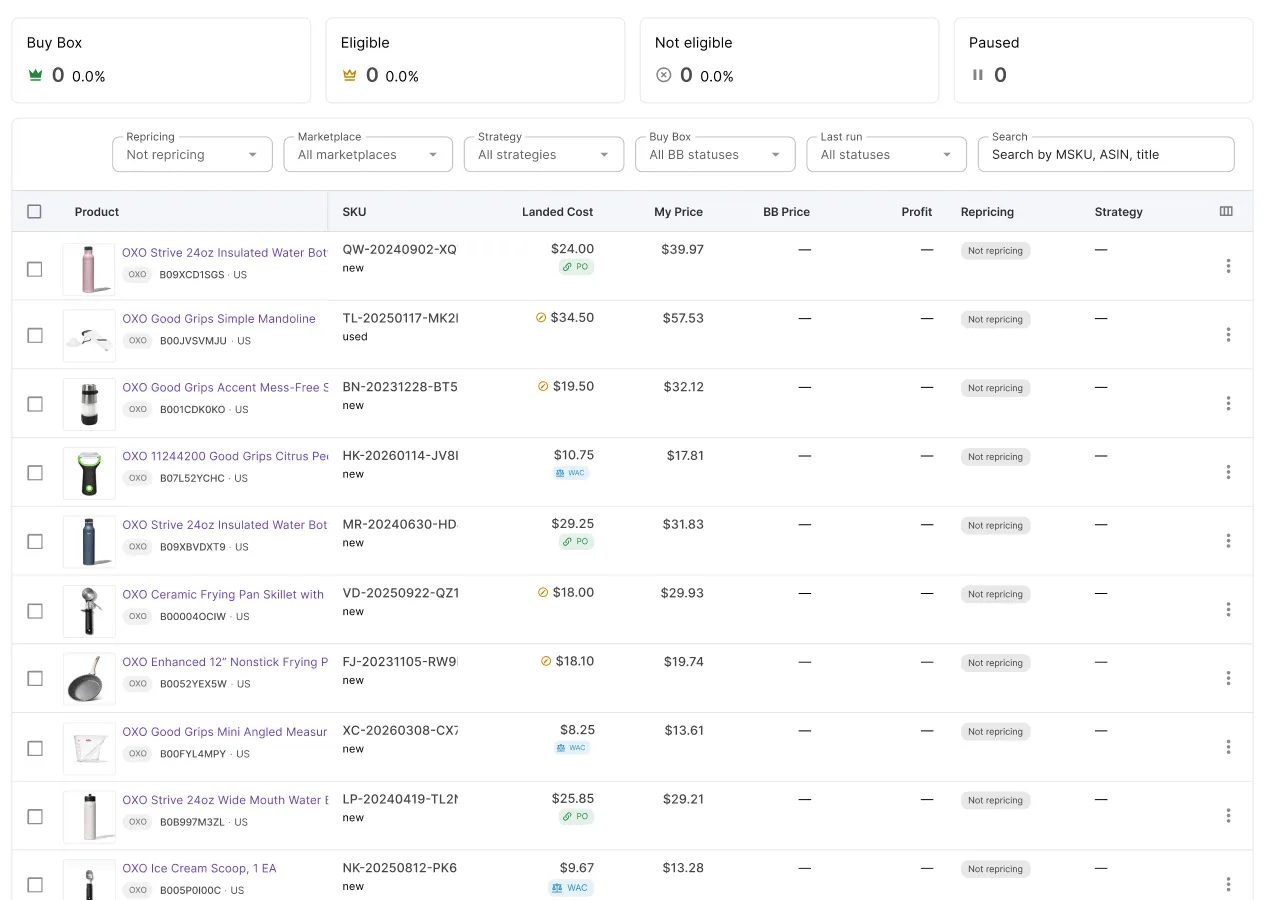
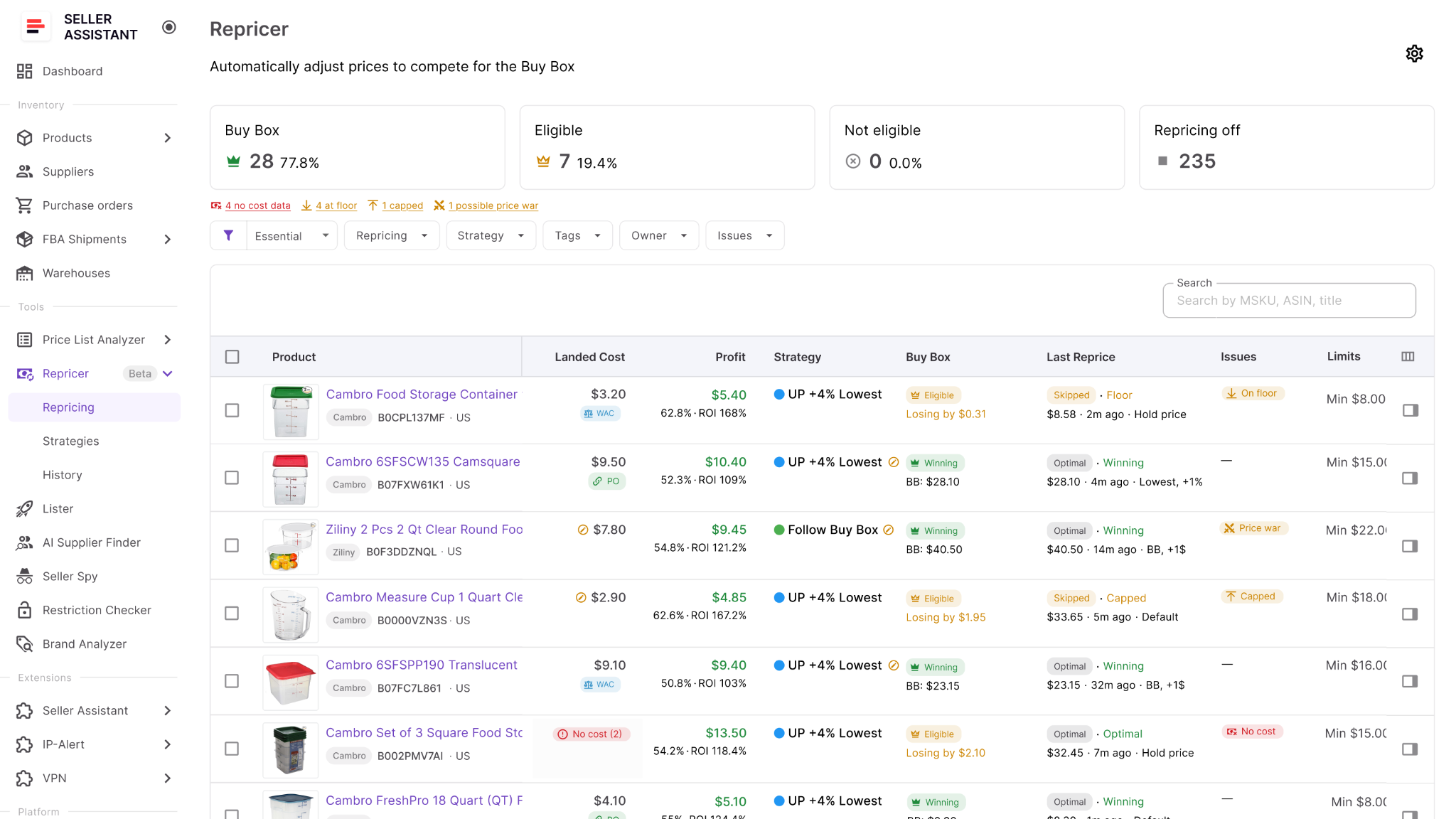
Seller Assistant Repricer shows your Buy Box status and price, Buy Box share, current price, competitor count, and lowest FBA and FBM prices. This helps you see whether your offer has moved out of line with the current competition.
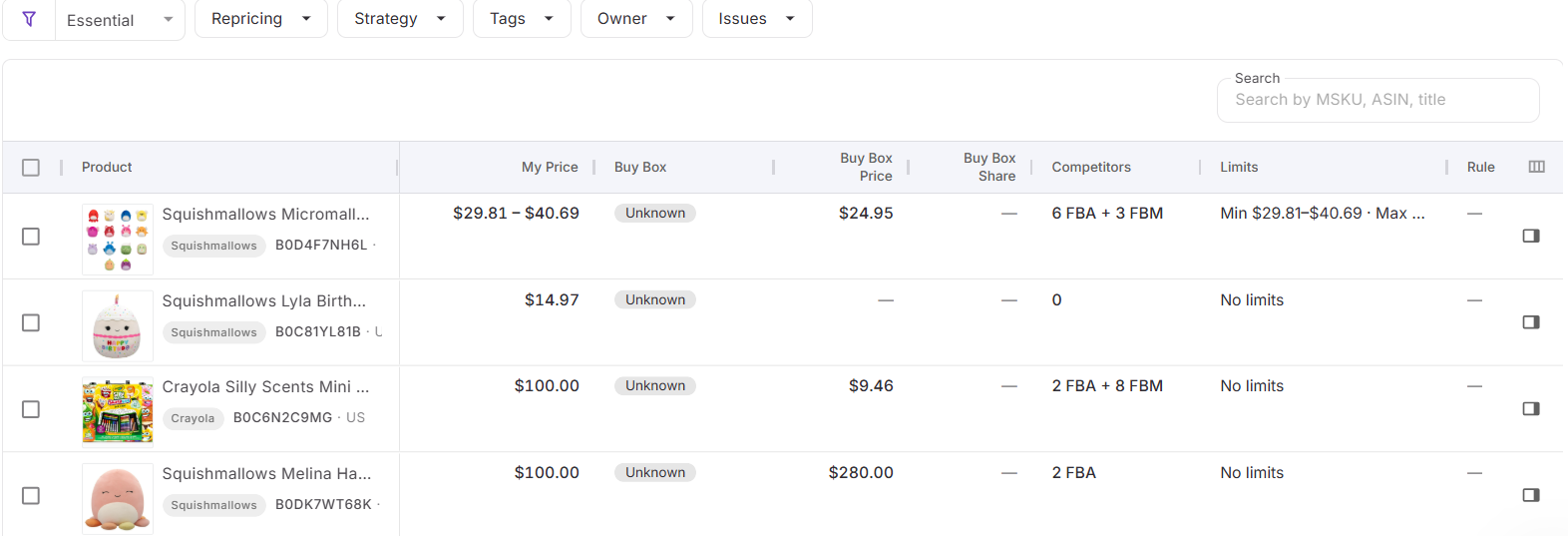
React to pricing changes within seconds
Reactive repricing can respond to relevant Amazon marketplace changes in approximately 2–5 seconds. That reduces the delay between losing the Buy Box because of price and adjusting your offer.
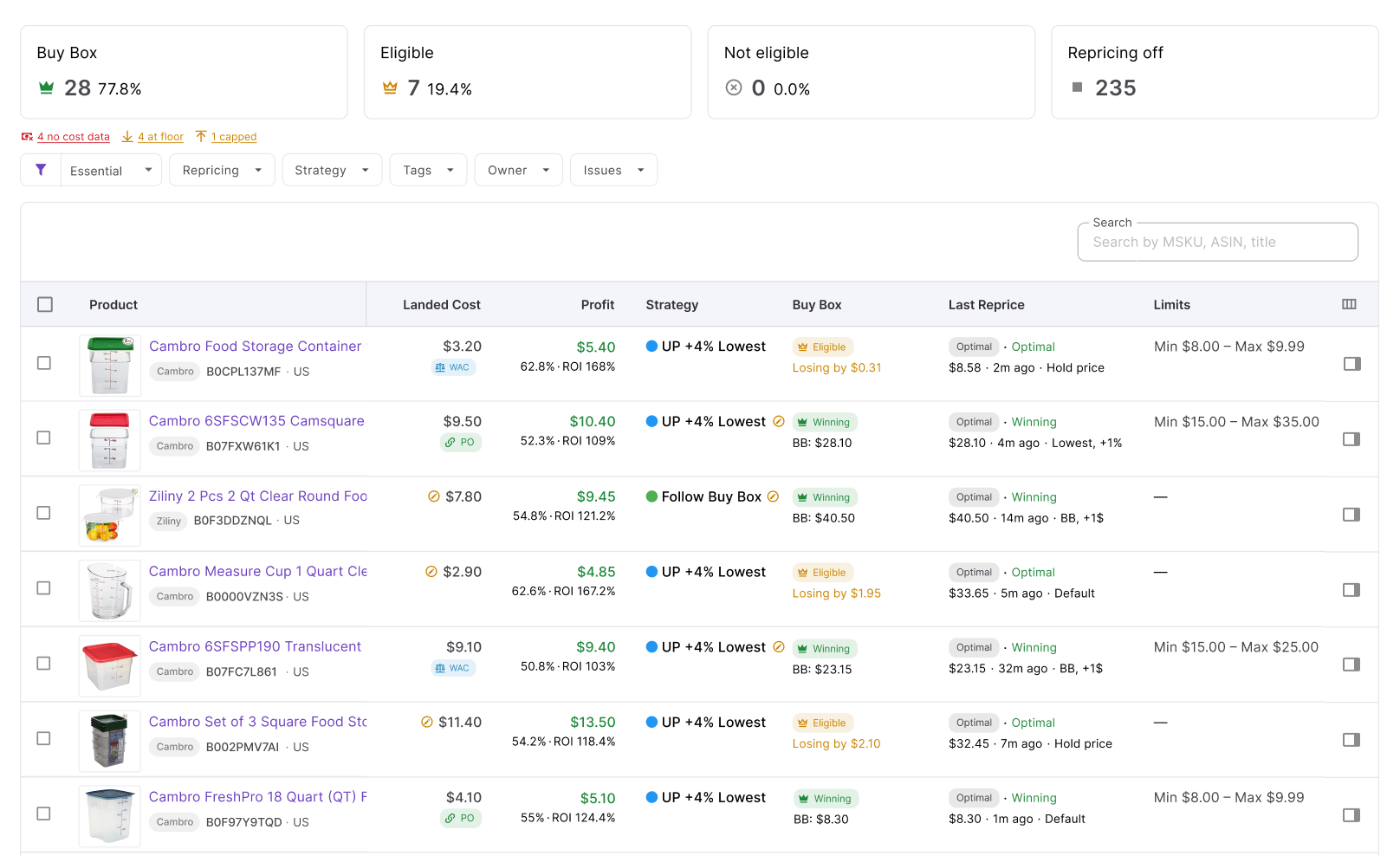
Follow the Buy Box instead of blindly undercutting
Strategies can use actions such as Follow Buy Box or Match Buy Box rather than automatically chasing the lowest seller. This lets you compete around the Featured Offer price instead of starting an unnecessary race to the bottom.
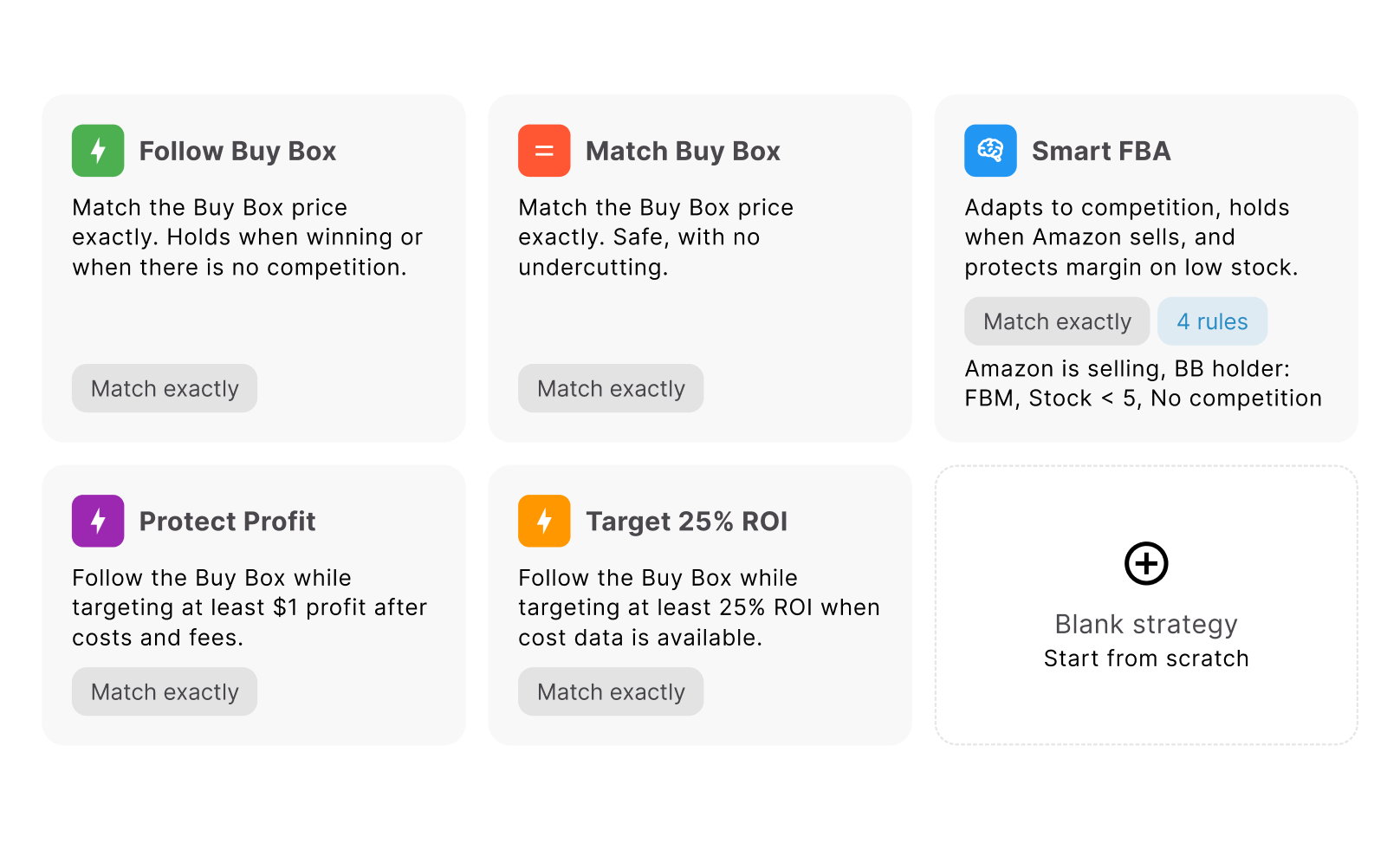
Change the response when conditions change
Conditional if/then rules can react differently depending on factors such as the Buy Box holder, Amazon selling, competitors above or below your offer, stock, or no competition. Seller Assistant Repricer checks rules in priority order and applies the first matching rule.
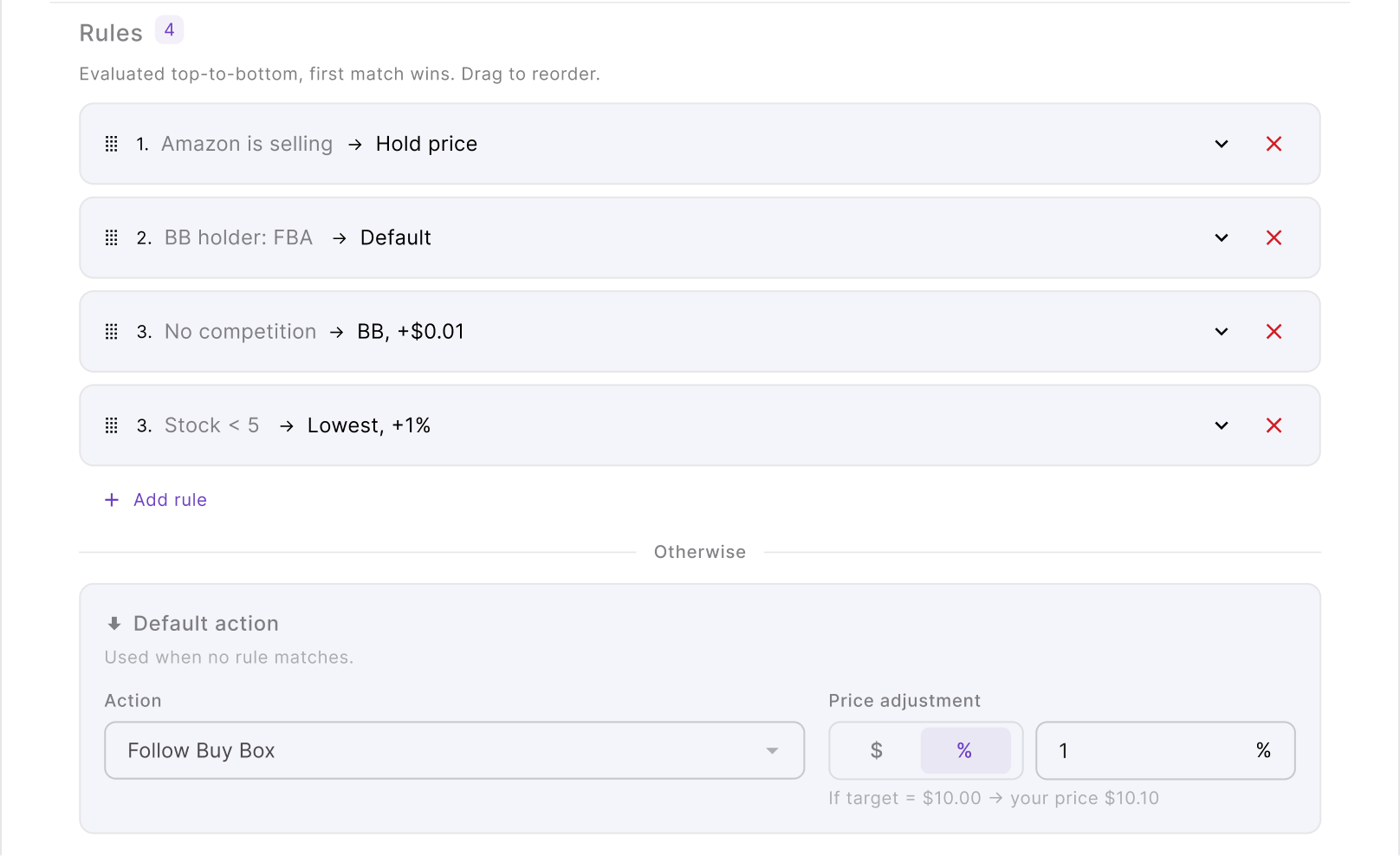
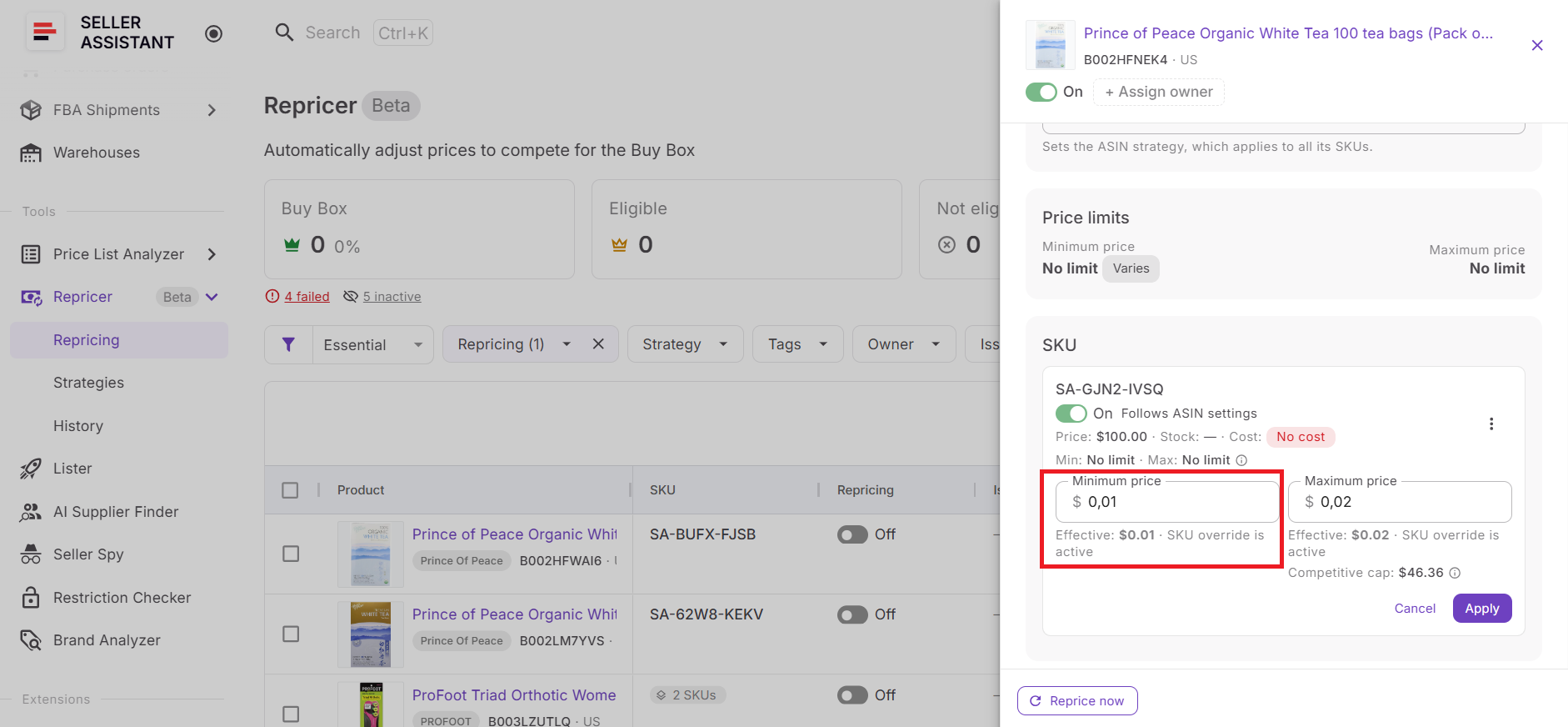
Protect profit while trying to win it back
Set a manual minimum or calculate a dynamic floor from minimum ROI, minimum margin, or target profit. A safety minimum creates a hard lower boundary, so recovering the Buy Box does not mean giving repricing unlimited room to cut price.
Keep checking after the Buy Box changes
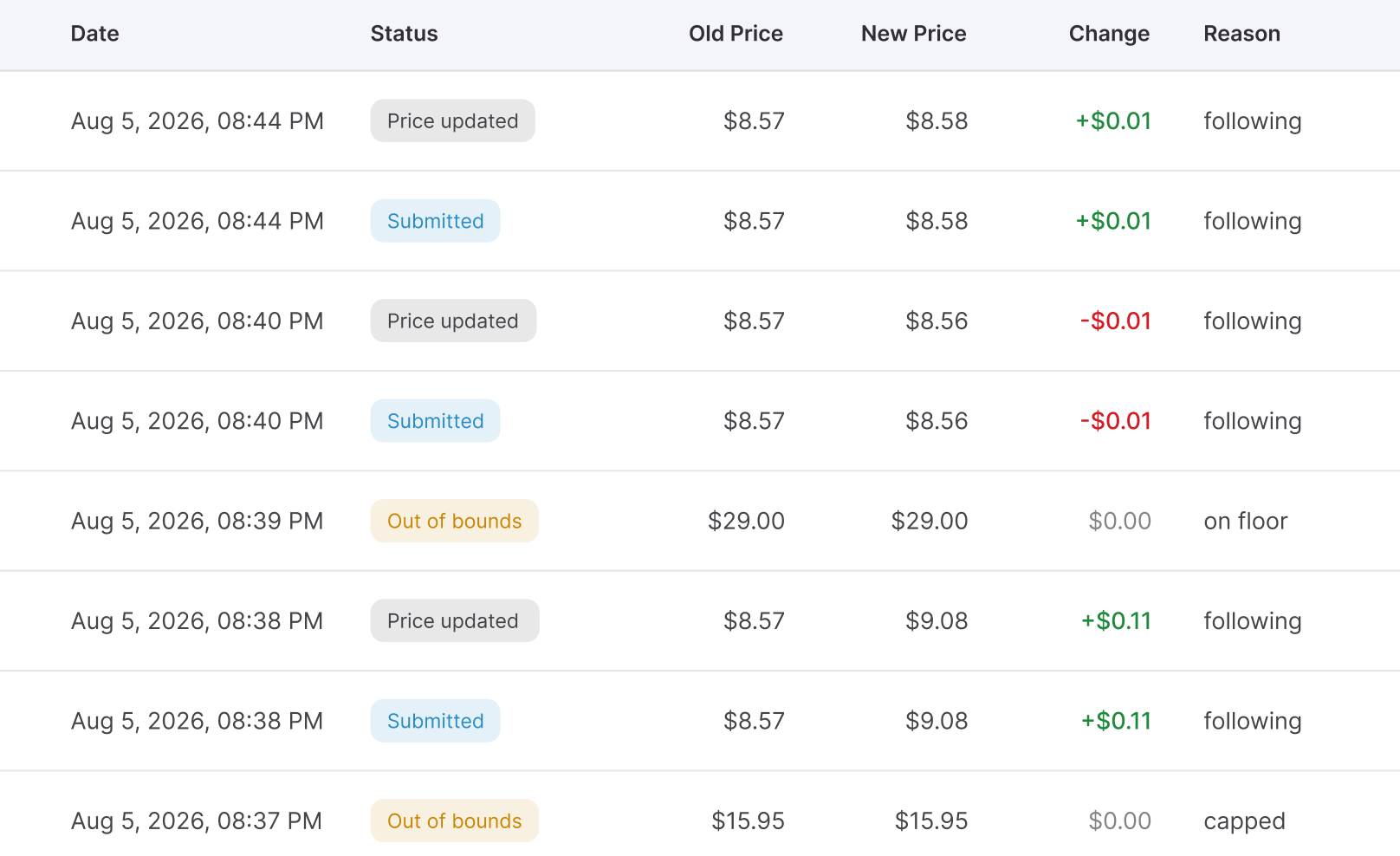
Proactive checks periodically reevaluate quieter listings even when there is no new competitor event. This matters because Buy Box competition is continuous – losing or recovering it once does not mean the market will stay unchanged.
Trace what happened afterward
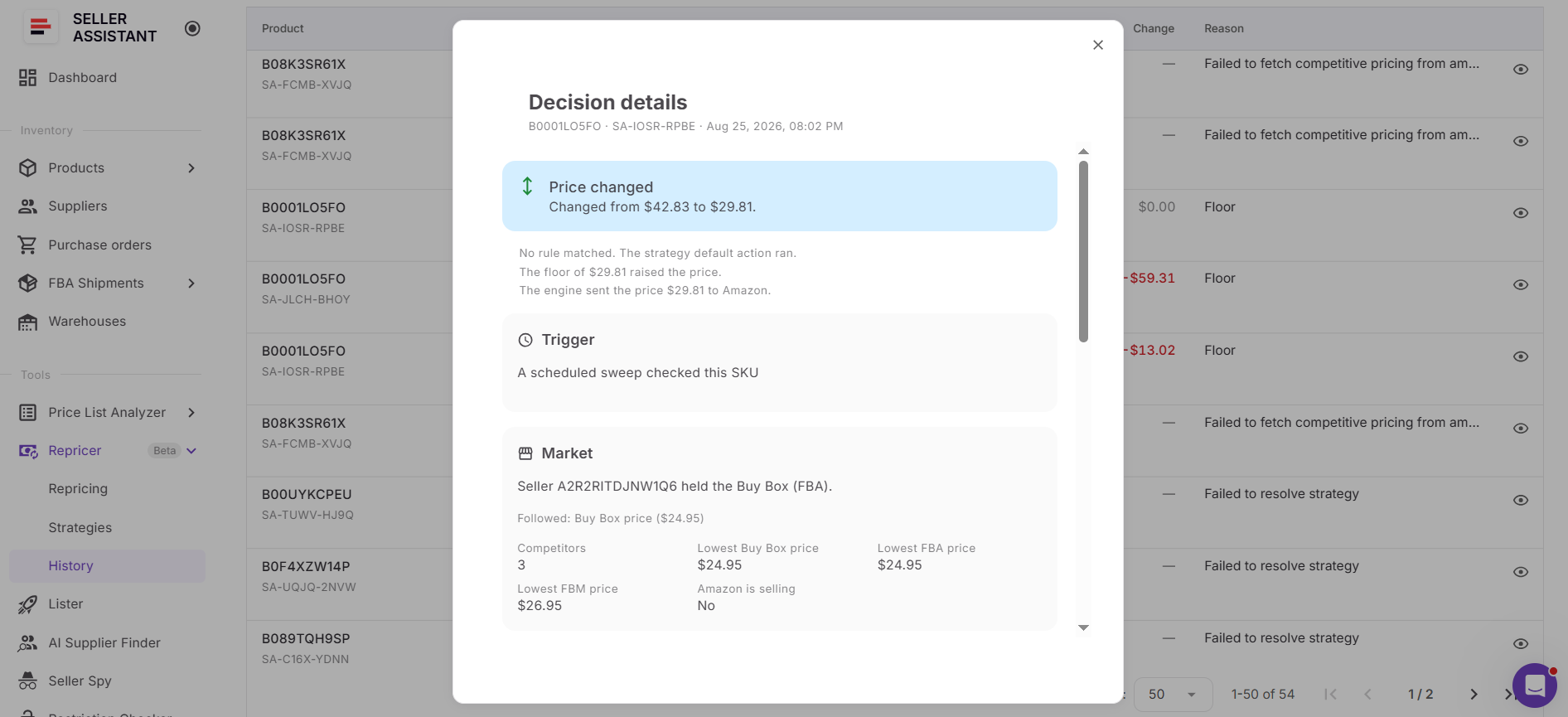
Repricing History lets you review previous price changes and the reasoning behind repricing decisions. If the Buy Box moved again, you can investigate what the Repricer saw and how your strategy responded.
From Lost Buy Box to Competitive Recovery with Seller Assistant
Losing the Buy Box is only the signal that something changed. The real task is understanding whether price caused the loss, determining how far you can afford to move, and reacting quickly enough to compete for the Featured Offer without sacrificing profitability.
Seller Assistant Repricer brings Buy Box monitoring, competitor data, landed cost, profitability metrics, pricing safeguards, and automated repricing into one workflow. For wholesale, online arbitrage, and dropshipping sellers, this means you can see how your offer compares with the current Buy Box, respond automatically when price is the lever, and stop competing when winning it back would require an unacceptable price.
What Seller Assistant Repricer does when you lose the Buy Box
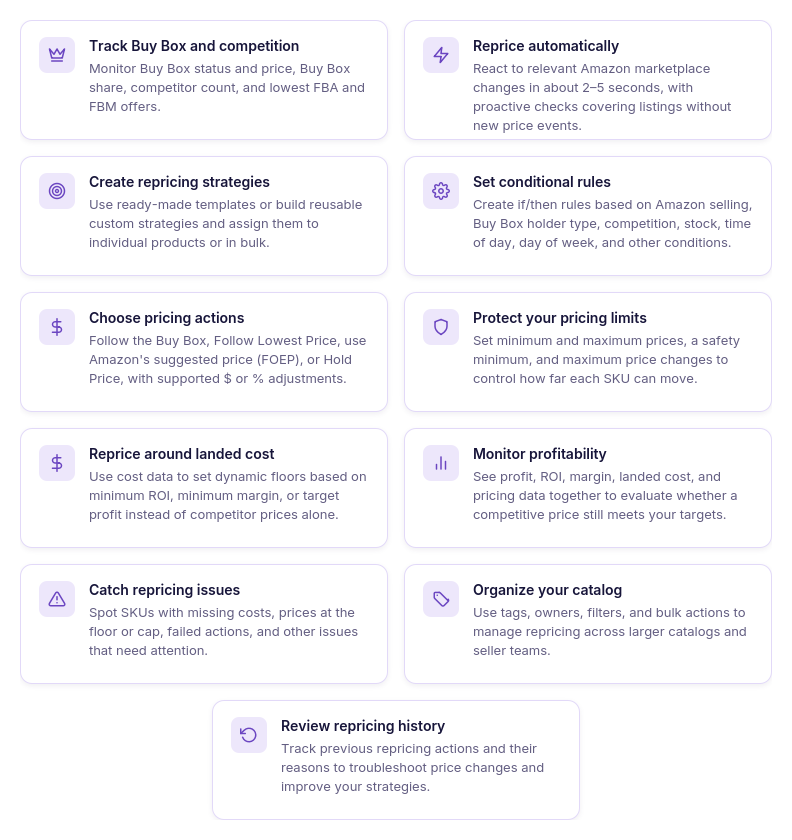
- Shows your current Buy Box position
Monitor Buy Box status and price, Buy Box share, your current price, competitor count, and lowest FBA and FBM prices. This gives you the competitive context to understand whether your offer has fallen behind on price.
- Helps identify what changed
Market data and pricing history give you more context than a single listing snapshot. You can compare your offer with the Buy Box and competing prices and review previous movements to investigate when your position changed.
- Responds to relevant changes quickly
Reactive repricing can respond to relevant Amazon marketplace events in approximately 2–5 seconds. Proactive checks also reevaluate quieter listings when no new competitor pricing event has occurred.
- Lets you compete around the Buy Box
Use reusable strategies and ordered if/then rules rather than automatically becoming the lowest-priced seller. Rules can account for the Buy Box holder, Amazon selling, competitors above or below your offer, no competition, stock thresholds, time of day, and day of week.
- Chooses how your offer should respond
The Repricer can Follow Buy Box, Follow Lowest Price, follow Amazon’s suggested price (FOEP), or Hold Price, depending on your strategy. Fixed-dollar or percentage adjustments let you control how your offer is positioned relative to the selected target.
- Stops Buy Box recovery at your profit boundary
Set a manual minimum or calculate a dynamic floor from minimum ROI, minimum margin, or target profit. A separate safety minimum creates a hard lower boundary, while maximum-price and maximum-change settings further control price movement.
- Shows when another problem needs attention
Issues such as No cost, On floor, Capped, Failed, and Price war can point to conditions affecting repricing. For example, an On floor SKU may indicate that your strategy would like to move lower but has reached the boundary you configured.
- Lets you verify the repricing decision
Use Repricing History to review previous pricing activity and investigate unexpected results. Decision context can help explain what market conditions the Repricer saw and why a particular pricing result was used.
How Seller Assistant Repricer responds after you lose the Buy Box
Seller Assistant Repricer continuously compares Amazon marketplace conditions with the strategy assigned to each product. When a relevant marketplace event occurs, reactive repricing can respond in approximately 2–5 seconds, while proactive checks periodically reevaluate products even without a new competitor event.
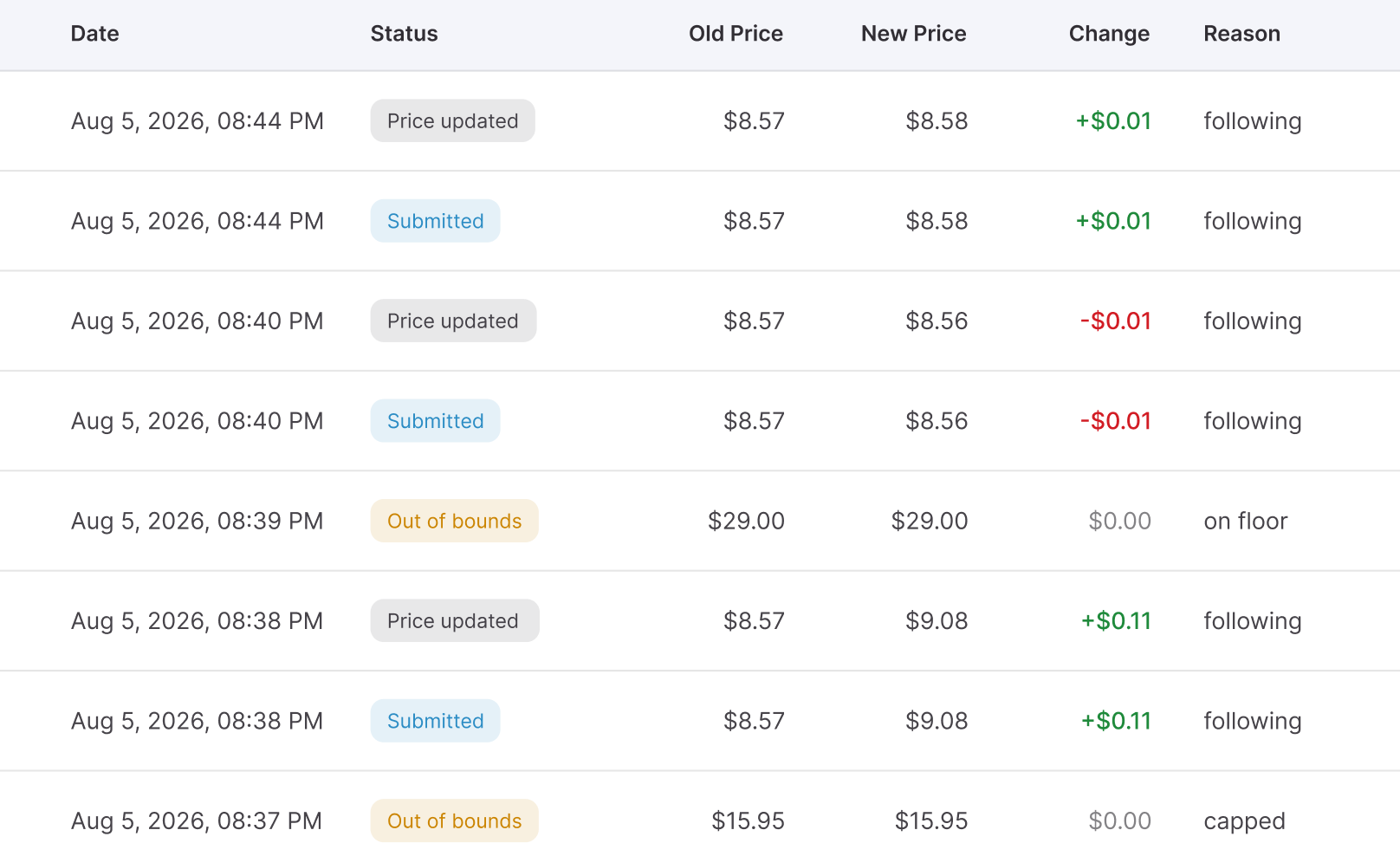
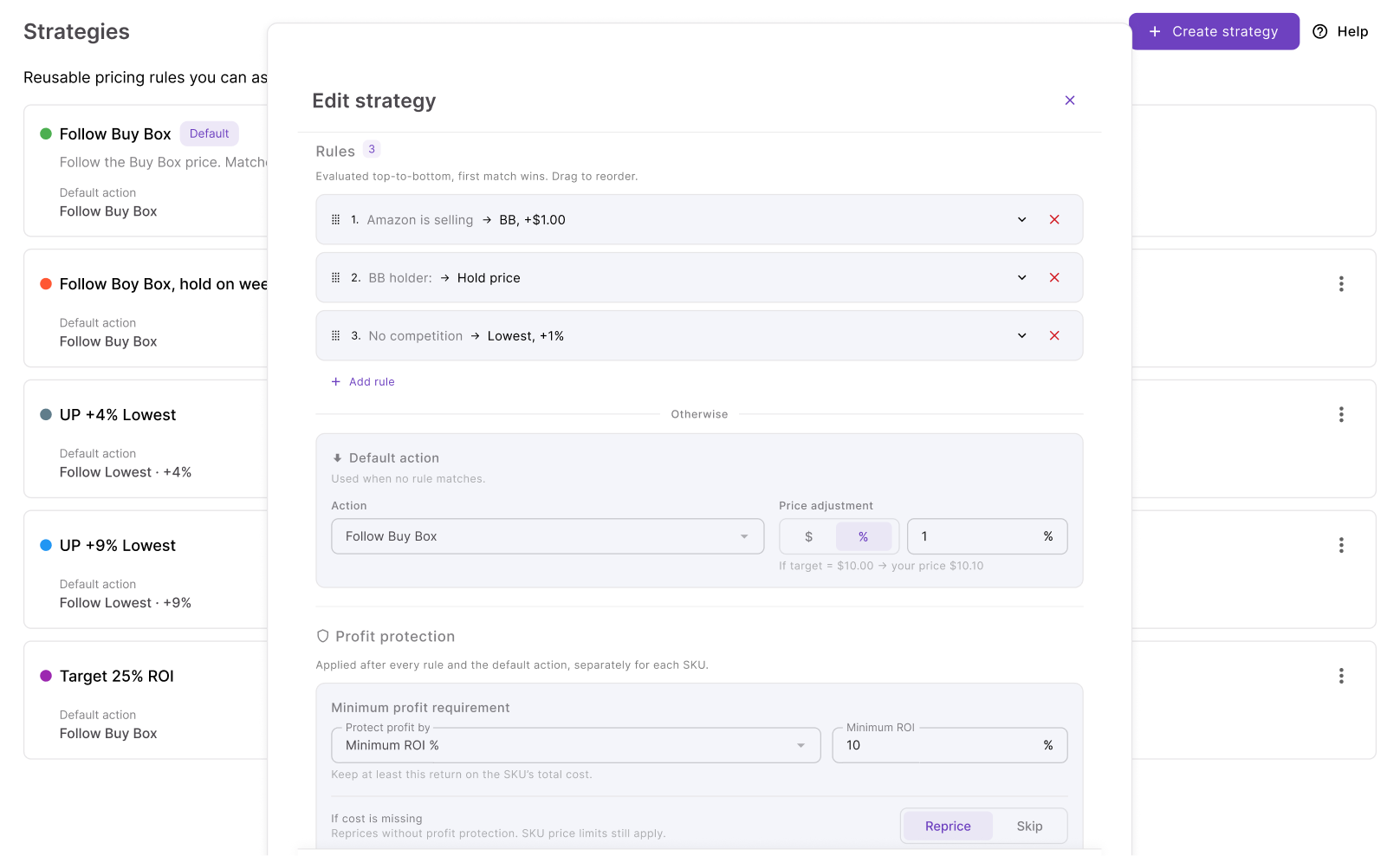
During each evaluation, the Repricer checks conditional rules in priority order and applies the first matching rule. If none of the conditions match, it falls back to the strategy’s default action to determine the pricing target and adjustment.
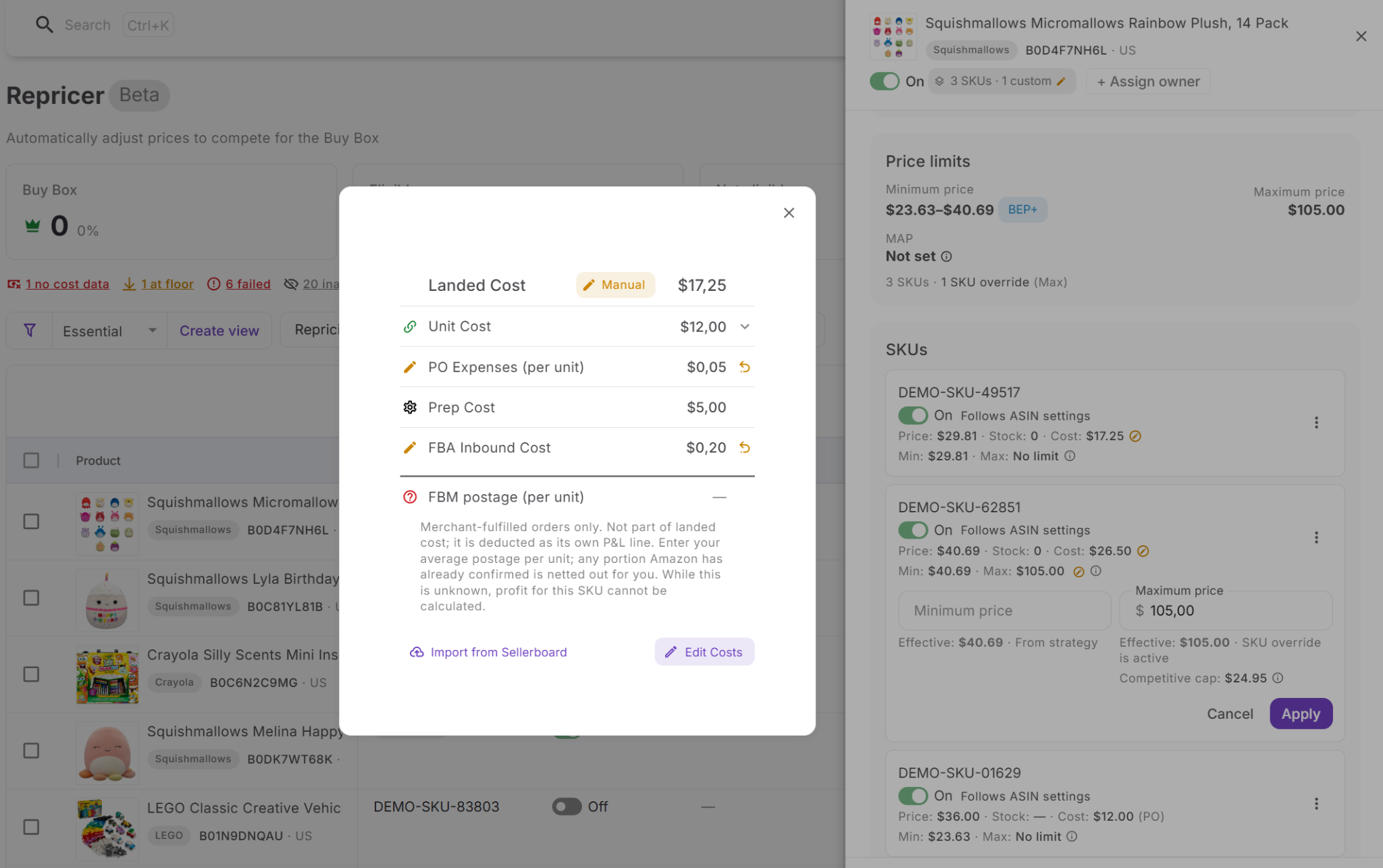
Before applying the resulting price, Repricer checks the configured minimum price, safety minimum, maximum price, landed cost, and profitability requirements. This is particularly important when trying to get the Buy Box back: competitive conditions can indicate where the strategy wants to move, while your rules and financial boundaries determine whether that price is acceptable.
How to set up Seller Assistant Repricer to compete for the Buy Box
Step 1. Review your offers in Repricing
Open Repricer → Repricing in Seller Assistant. The workspace brings together your SKUs, repricing status, assigned strategies, market information, Tags, Owners, profitability data, and Issues.
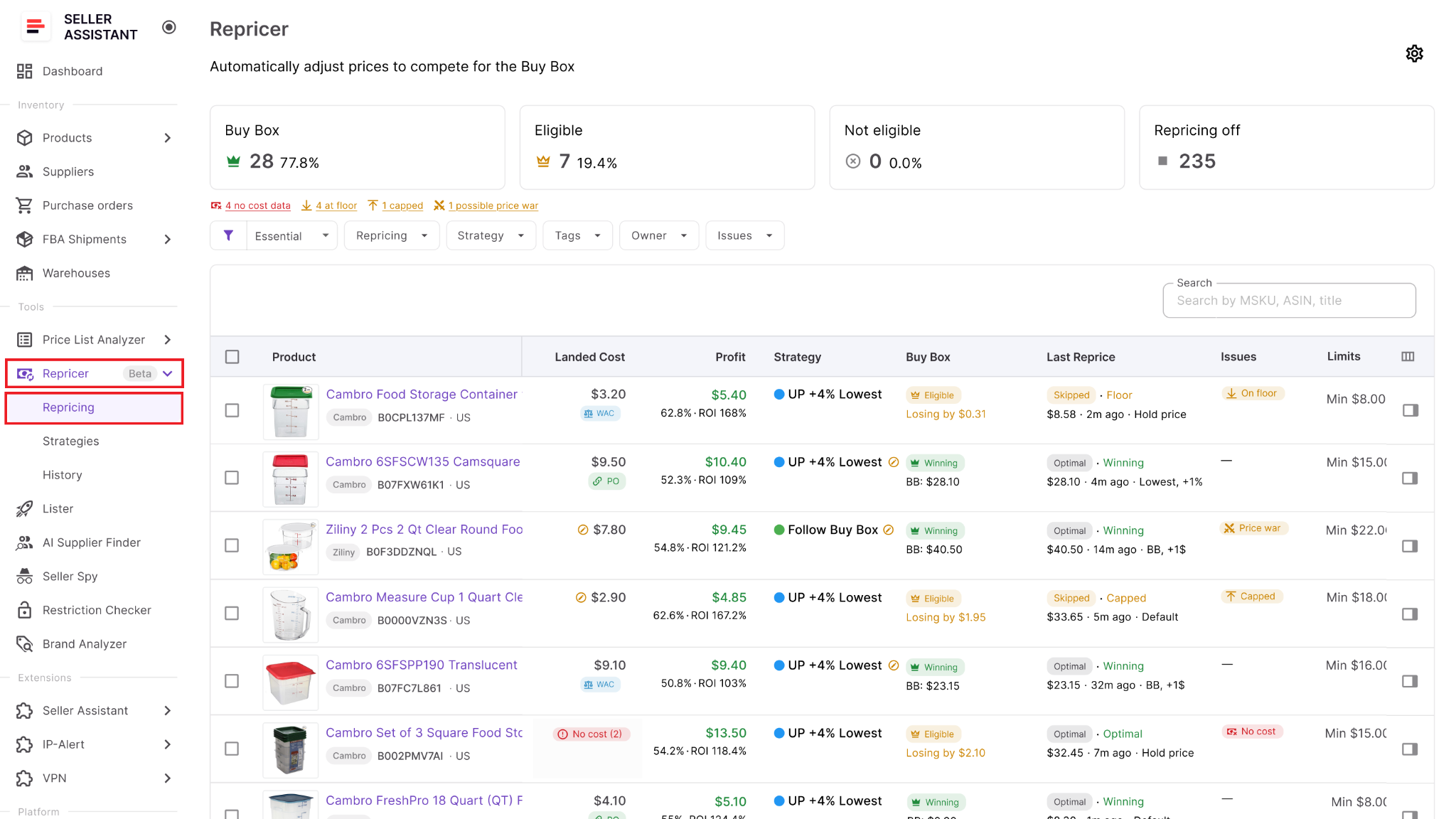
Start with products where Buy Box share has dropped or your offer is no longer holding the Buy Box. Compare the current price and Buy Box data before assuming that a lower price is necessary.
Step 2. Enable Repricing
Open Settings and switch on Repricing for your team. You can also decide whether newly listed products should enter repricing automatically or stay inactive until someone reviews them.
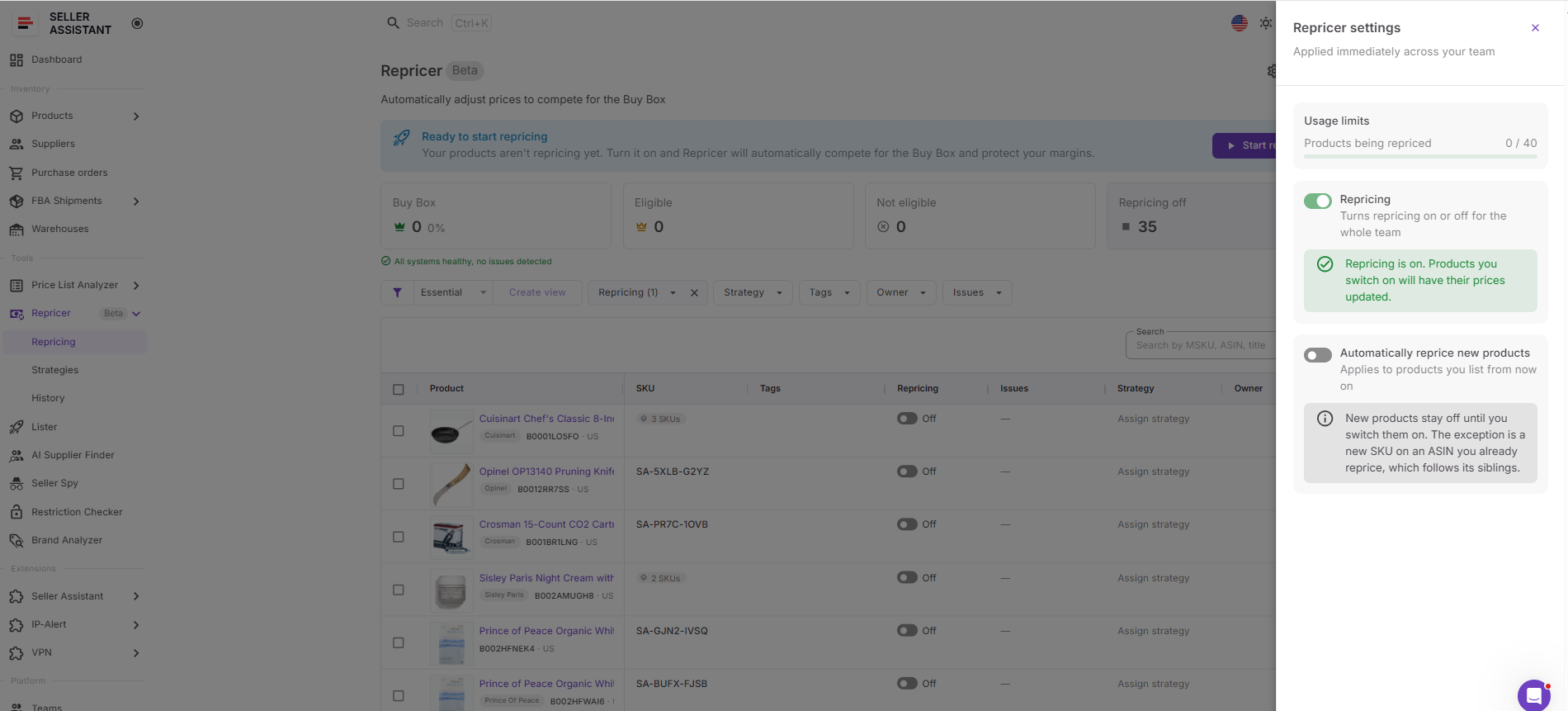
Manual review can be useful for new SKUs when you want to confirm their cost data, pricing boundaries, and strategy before automated pricing begins.
Step 3. Assign the appropriate strategy
Select a strategy from the Strategy column. Seller Assistant Repricer provides Follow Buy Box, Match Buy Box, Smart FBA, Protect Profit, and Target 25% ROI, or you can create a custom strategy.
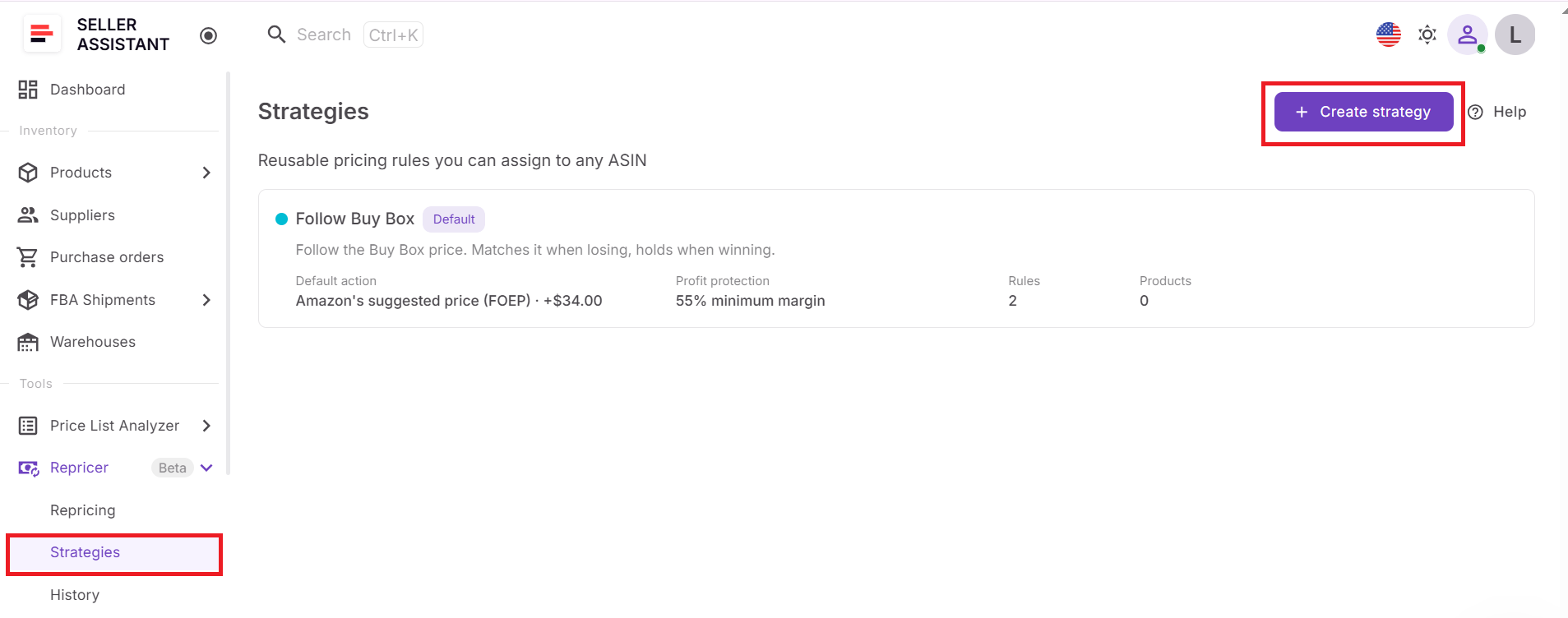
For Buy Box-focused products, choose logic that reflects how aggressively you actually want to compete. Winning the Featured Offer should not automatically mean becoming the cheapest seller regardless of return.
Step 4. Define how Repricer should react
Set the default pricing action and add conditional rules for situations requiring different behavior. For example, you can use different logic when Amazon holds the Buy Box, when competitors move above or below your offer, when stock becomes low, or when competition disappears.
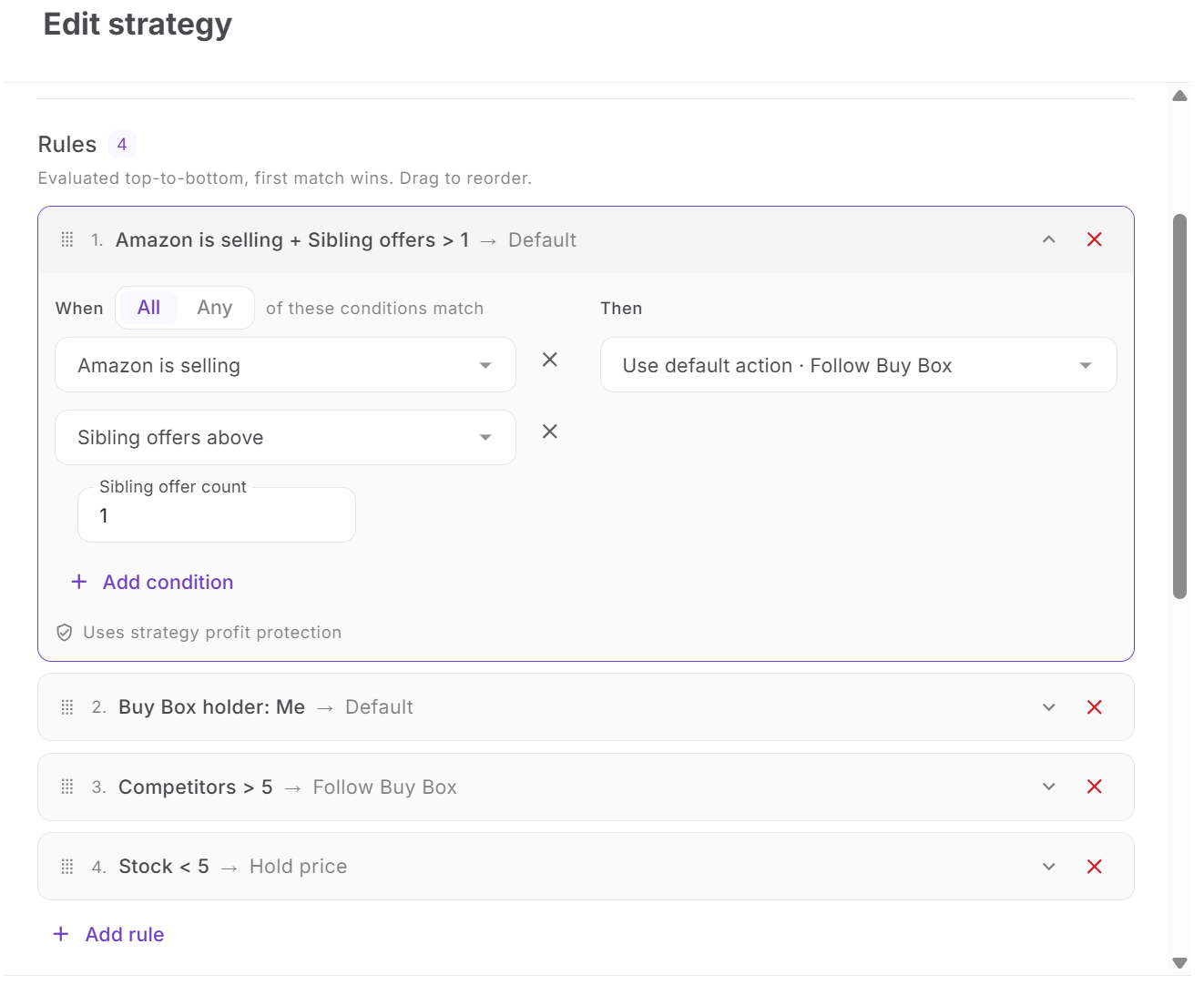
Order the rules carefully because Seller Assistant Repricer evaluates them from top to bottom and the first matching rule wins. AND/OR logic lets you combine conditions when a pricing response should apply only in a specific situation.
Step 5. Set your pricing boundaries
Configure minimum and maximum prices for the strategy. The minimum can be entered manually or calculated from minimum ROI, minimum margin, or target profit, while the safety minimum provides a hard lower limit.
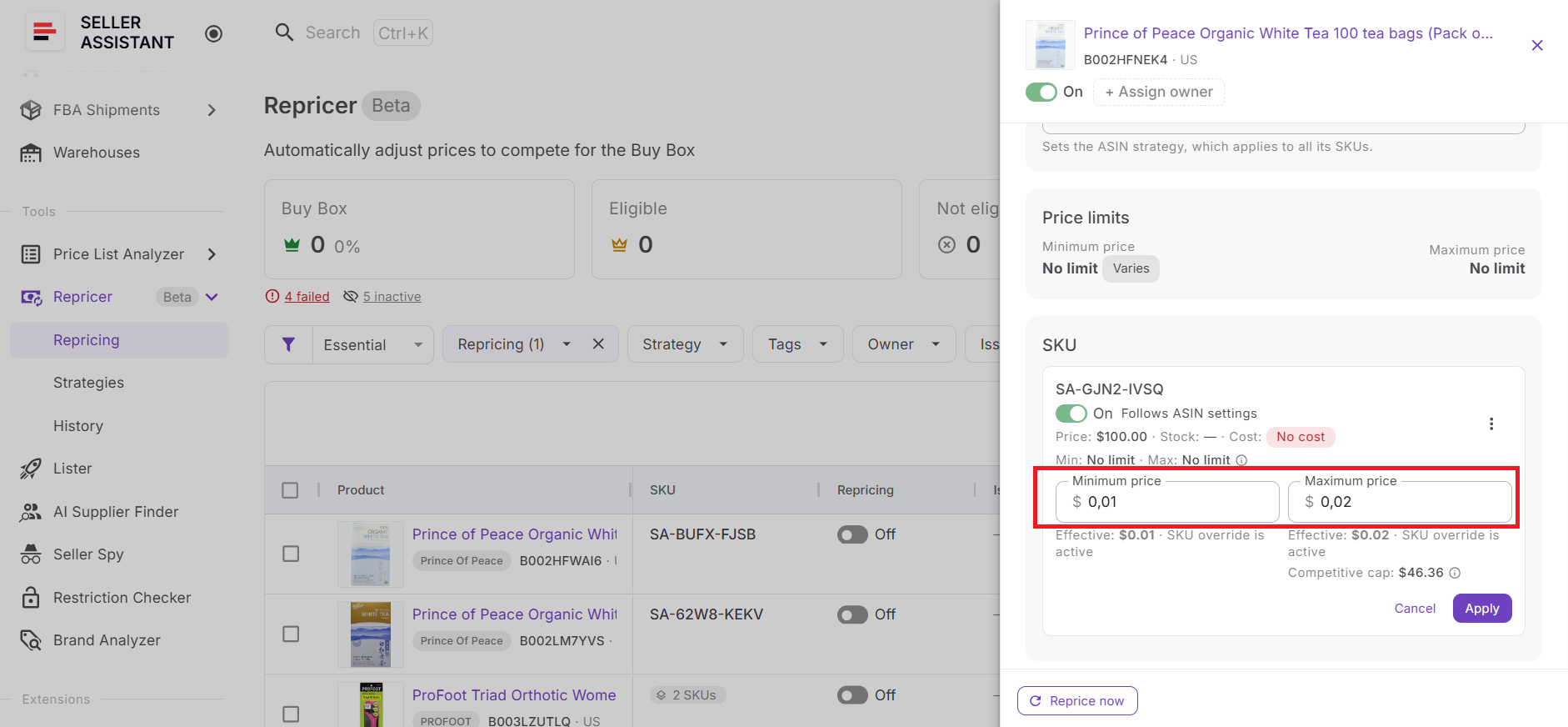
You can also specify a maximum price change per reprice. These safeguards keep an attempt to win the Buy Box back from turning into unrestricted downward pricing.
Step 6. Verify landed cost and profitability
Review Landed Cost for every SKU where your minimum price depends on profitability. Depending on available data, landed cost can include relevant components such as unit cost, PO expenses, prep cost, and FBA inbound cost.
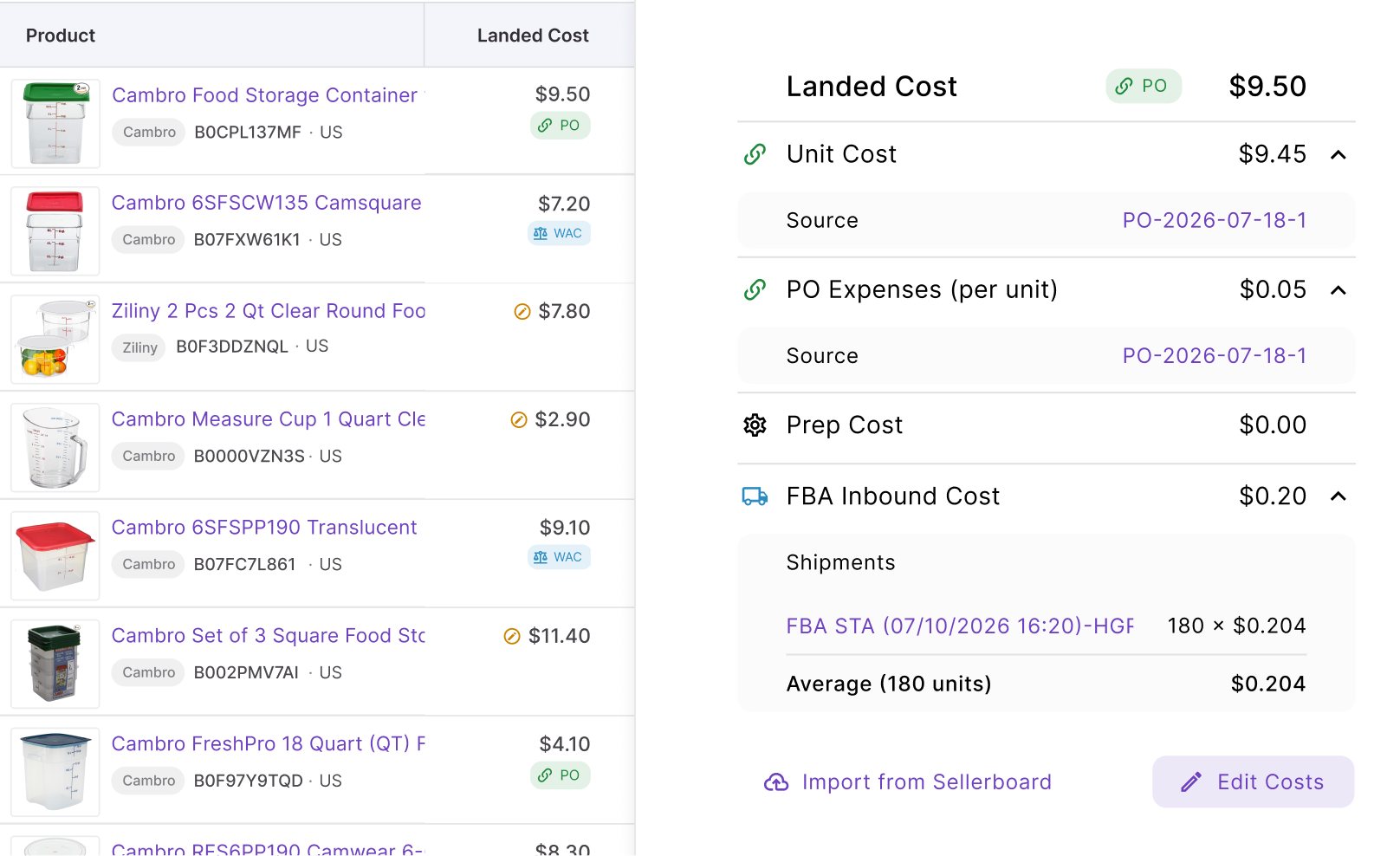
Then check profit, ROI, and margin at the prices your strategy is allowed to use. Accurate costs matter because an attractive Buy Box price may still be a bad selling price for your particular SKU.
Step 7. Check Buy Box signals and exceptions
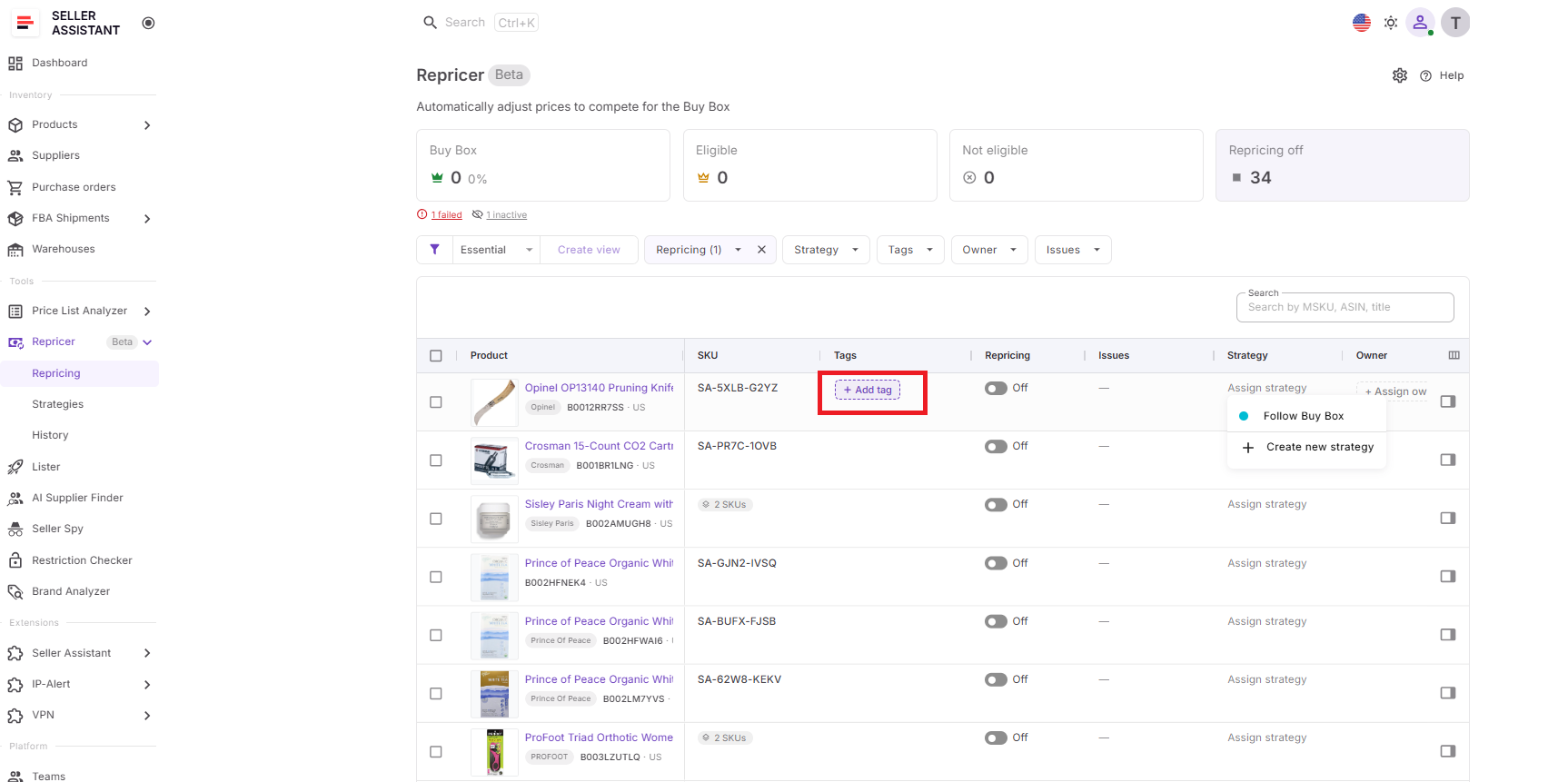
Use Tags and Owners to organize products and responsibility across your catalog.
Then review Buy Box information together with Issues such as On floor, No cost, Capped, Failed, and Price war.
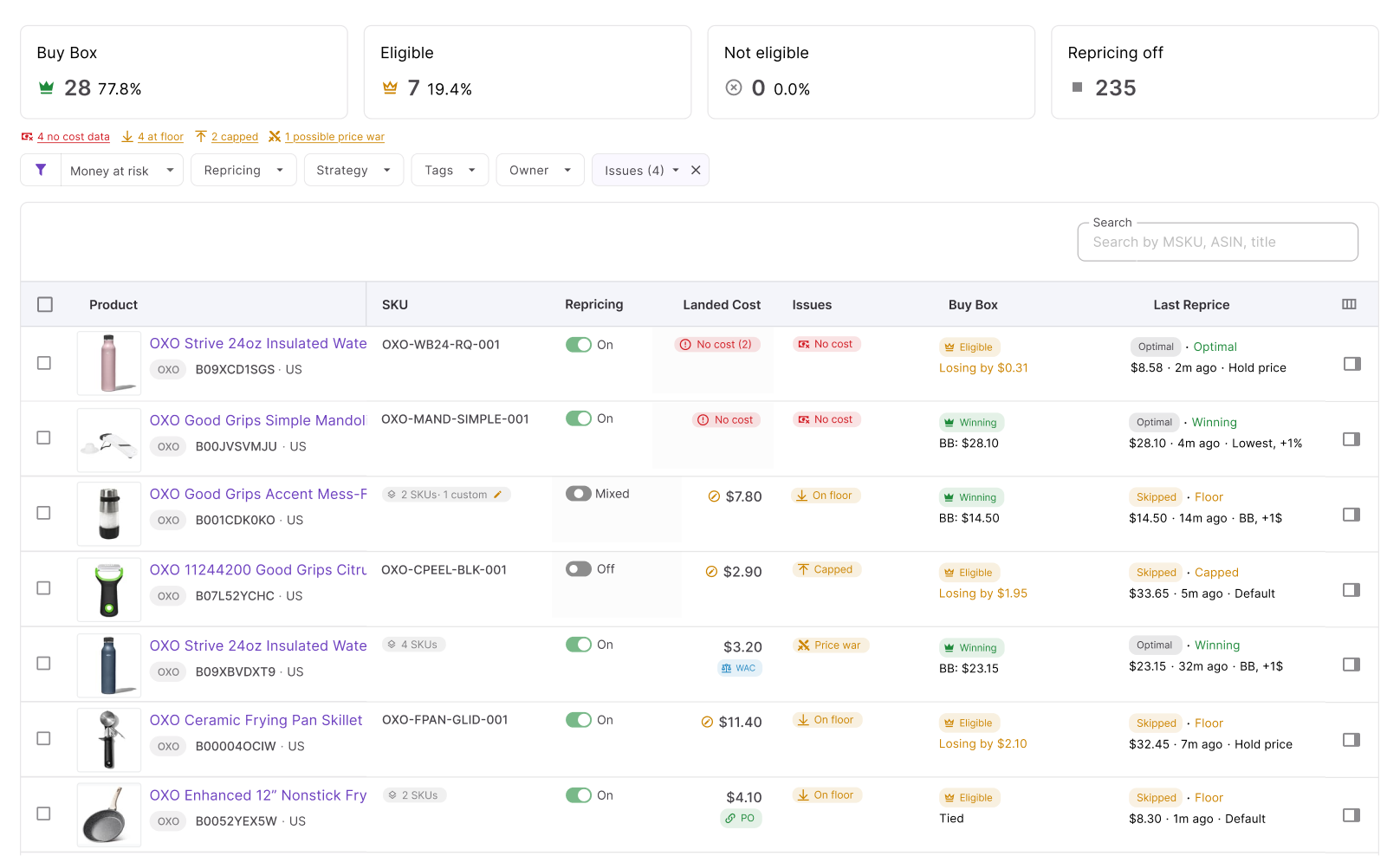
Pay particular attention to SKUs that have lost the Buy Box and reached their floor. That combination may mean your strategy cannot move any lower without crossing the profitability boundary you deliberately set.
Step 8. Start repricing and monitor Buy Box performance
Enable the products that are ready and click Start repricing. Seller Assistant Repricer will evaluate them according to their assigned strategies, conditional rules, market conditions, costs, and pricing safeguards.
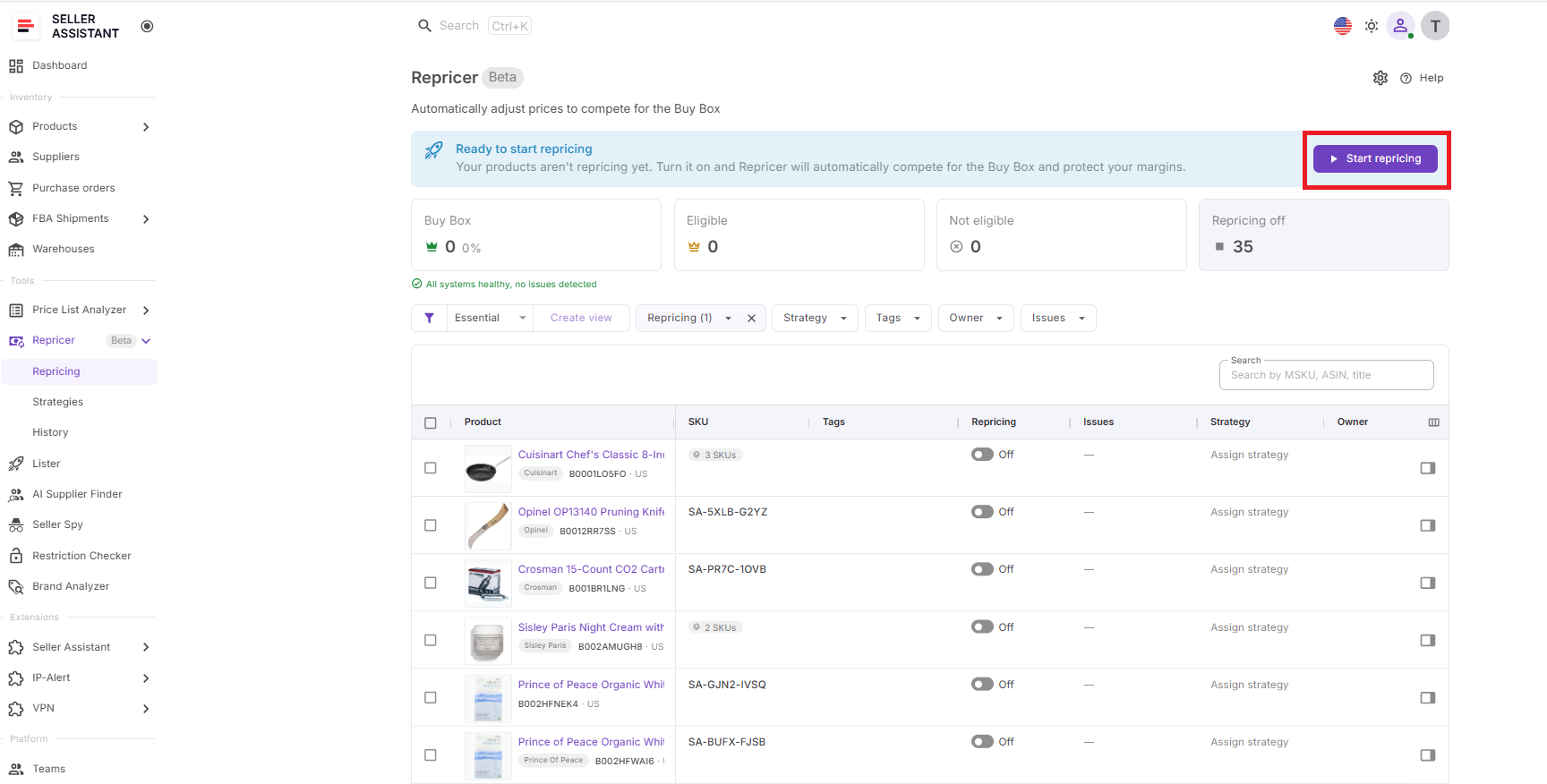
Once active, monitor Buy Box status, Buy Box price and share, current price, competitor data, profit, ROI, margin, price limits, and Repricing History. If the Buy Box does not return despite a competitive price, investigate non-price factors rather than repeatedly lowering your minimum in an attempt to force a win.

Set a profit floor and let the repricer win the Buy Box for you.
FAQ
Why did I suddenly lose the Buy Box on Amazon?
A sudden loss can happen even when you have not changed your offer because Amazon continuously reevaluates competing sellers and their offers. Look at what changed around the time of the loss rather than assuming your previous Buy Box performance guarantees the same position.
How long does it take to get the Buy Box back?
There is no fixed recovery time because Amazon continuously determines which eligible offer should be featured based on current conditions. You may regain it quickly after the relevant disadvantage disappears, or continue sharing it with other competitive sellers.
Does the lowest price always win the Amazon Buy Box?
No, being the lowest-priced seller does not guarantee that Amazon will select your offer as the Featured Offer. This is why cutting below every competitor can reduce your margin without necessarily increasing your Buy Box share.
Can I still get sales when I don’t have the Buy Box?
Yes, shoppers can still purchase from other available offers even when another seller holds the Featured Offer. However, losing the prominent purchase position can reduce your sales opportunity, making Buy Box share an important metric to track over time.
Should I try to win 100% Buy Box share?
Not necessarily, especially on ASINs with several strong eligible sellers where the Buy Box may rotate between offers. Evaluate whether additional Buy Box share produces enough profitable sales to justify the price required to compete for it.
Final Thoughts
Losing the Amazon Buy Box does not automatically mean your price is too high. The right response is to identify what changed first – competition, pricing, fulfillment, inventory, eligibility, or seller performance – and only adjust your price when price is actually the factor you can influence.
When pricing is the cause, Seller Assistant’s Amazon repricing software helps you react quickly without turning Buy Box recovery into a race to the bottom. By combining Buy Box and competitor data with automated strategies, conditional rules, profitability floors, and Repricing History, you can compete to win the Buy Box back while keeping every price move within the boundaries that make sense for your business.