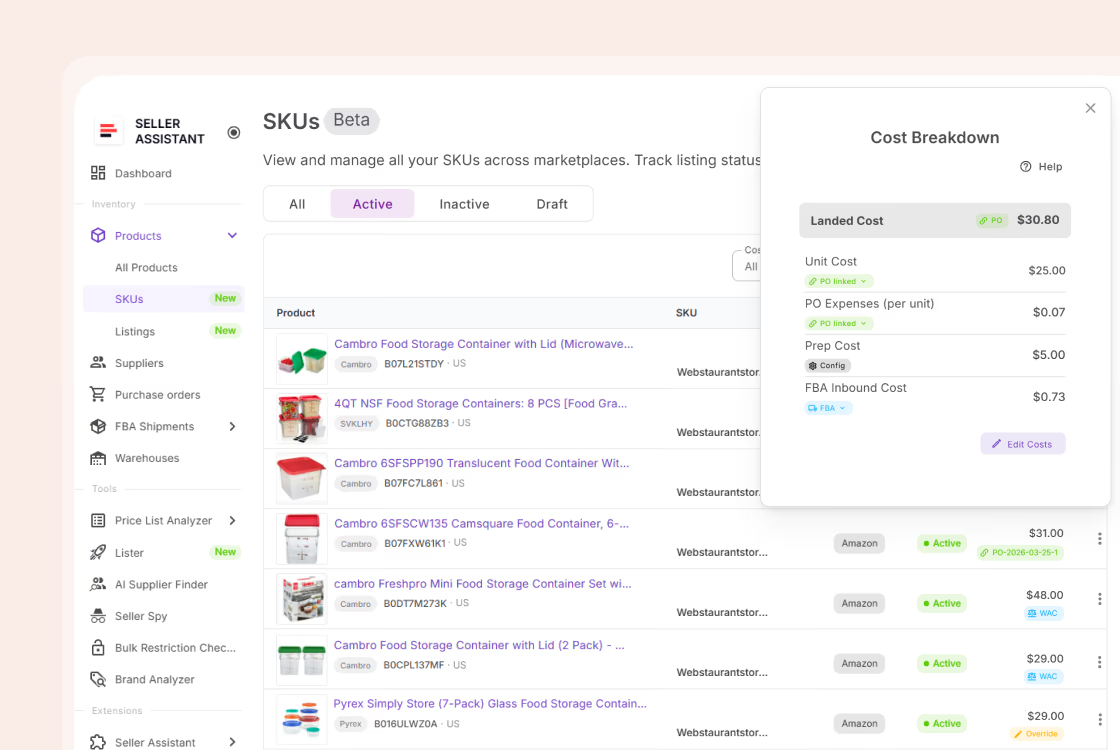
One strategy is easy to manage across ten SKUs – you can eyeball every price change and know it’s right. The same setup across eight hundred SKUs is an entirely different problem: you can’t manually verify anything, so you’re relying completely on whether the system was configured correctly in the first place.
Losing control at scale doesn’t look like one big mistake – it looks like a handful of SKUs quietly missing a strategy, an owner, or accurate cost data until margin has already slipped.
This post covers how to organize a large catalog for repricing, and how Seller Assistant Repricer helps you manage by exception instead of by SKU.
Why Repricing Breaks Down as Your Catalog Grows
Repricing 10 or 20 Amazon SKUs is relatively easy to supervise. You can check prices individually, remember which products use which strategy, notice missing cost data, and investigate unusual changes yourself. At hundreds of SKUs, that approach stops working – not because automated repricing becomes less useful, but because manual oversight becomes the bottleneck.
The challenge with bulk Amazon repricing is therefore control, not simply speed. Every additional SKU brings another strategy, price floor, cost basis, competitive situation, and potential exception to manage. Small setup gaps that are easy to catch in a small catalog can remain unnoticed when multiplied across hundreds of listings.
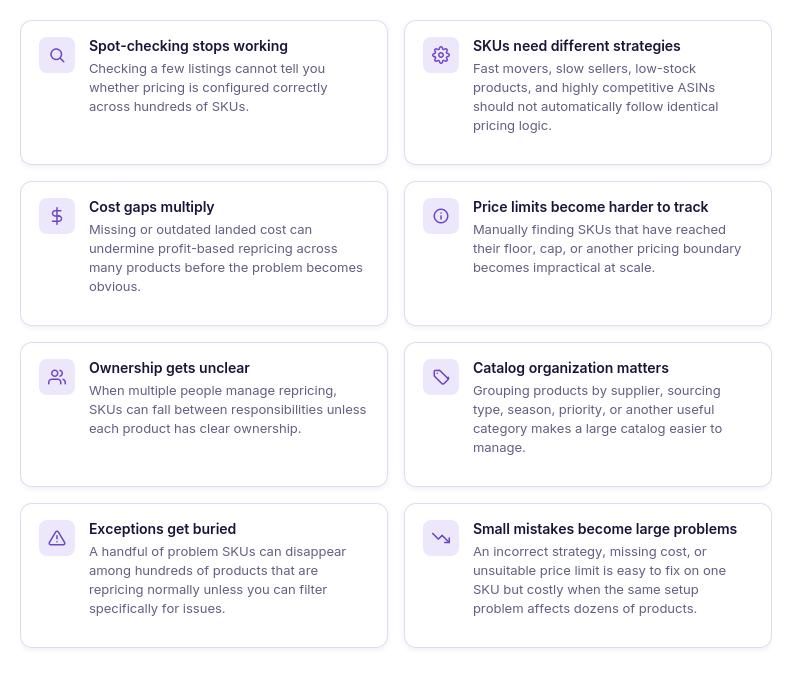
Spot-checking stops being reliable
Checking a handful of listings can tell you whether those particular SKUs look right, but it says little about the rest of a large catalog. As SKU count grows, manual sampling leaves more pricing activity unreviewed.
One pricing setup doesn’t fit every SKU
A large catalog can contain fast movers, slow sellers, low-stock products, high-margin inventory, and ASINs with very different competition. Applying identical repricing logic across all of them can create poor pricing decisions even if the automation itself works correctly.
Cost errors become pricing errors
Profit-based repricing depends on accurate cost data. Missing or outdated landed cost across even a small percentage of a large catalog can affect many SKUs without being obvious from the current selling price alone.
Price limits become harder to supervise
Minimum and maximum prices protect each SKU’s pricing range, but manually verifying those limits becomes impractical as the catalog expands. Sellers need a way to identify products that have reached a floor, cap, or another boundary without opening listings one by one.
Responsibility becomes unclear
With several people managing the same Amazon catalog, it can become difficult to know who should investigate a particular SKU. Without clear ownership, pricing problems can be noticed by multiple team members but resolved by none.
The catalog becomes difficult to segment
Hundreds of SKUs should not be treated as one undifferentiated list. Sellers need ways to group inventory by factors such as supplier, sourcing type, season, priority, or team responsibility so related products can be managed together.
Exceptions disappear inside normal activity
Most automated repricing decisions may be working exactly as intended, while only a small group of SKUs needs intervention. Without issue-based filtering, those exceptions can be buried among hundreds of healthy products.
More SKUs multiply small configuration mistakes
A missing strategy, incorrect cost, unsuitable floor, or poorly chosen rule may have limited impact when it affects one product. At scale, repeated setup errors can quietly turn into catalog-wide margin or Buy Box performance problems.
What “Losing Control” Actually Looks Like
Losing control of bulk Amazon repricing does not necessarily mean prices suddenly go wrong across the entire catalog. More often, it appears as small exceptions scattered across hundreds of SKUs – a product without the right strategy, missing cost data, a SKU sitting at its floor, or an issue that nobody on the team realizes they are responsible for.
Example
For example, imagine managing 800 SKUs and 780 are repricing exactly as intended. If the remaining 20 have missing costs, unsuitable limits, or pricing issues, manually reviewing all 800 products every day is a poor way to find them. At scale, control means being able to identify those 20 exceptions immediately and route attention where it is actually needed.
What losing control means in a large Amazon catalog
| Warning Sign | What Can Go Wrong | What You Need at Scale |
|---|---|---|
| SKUs have the wrong strategy | Products follow pricing logic that does not match their selling objective | Clear strategy assignment and bulk management |
| Cost data is missing | Profit-based pricing decisions may lack the financial data they depend on | Visibility into SKUs with missing cost data |
| Products repeatedly hit their floor | Competition has pushed offers to their configured lower boundary | Floor monitoring and issue filtering |
| Prices reach their cap | Products cannot move higher even when the strategy calls for it | Visibility into capped SKUs |
| Price wars develop | Automated competition can create repeated downward pressure | Price-war warnings and strategy review |
| Repricing actions fail | A SKU may not update as expected | Failed-action visibility and investigation |
| Nobody owns the SKU | Problems can remain unresolved because responsibility is unclear | Defined product ownership across the team |
| Products are difficult to group | Teams repeatedly search for individual SKUs instead of managing related inventory together | Tags and catalog filtering |
| New SKUs enter without review | Products may start with incomplete costs, limits, or strategy setup | A controlled workflow for newly added products |
| Unexpected changes are hard to explain | Teams see the current price but cannot tell how or why it got there | Repricing History and decision-level context |
Why Scaling Repricing Requires Structure, Not More Oversight
Watching prices more closely may work when you manage a few dozen SKUs, but it does not scale with the catalog. With hundreds of products repricing independently, checking every price, strategy, cost, limit, and competitor situation turns pricing management into a permanent manual audit – and important exceptions can still be missed.
The better approach is to automate routine pricing while directing human attention only to SKUs that need intervention. Seller Assistant Repricer is built around this approach to bulk Amazon repricing – helping sellers organize products, apply repeatable pricing logic at scale, surface exceptions, and give team members the data they need to investigate and act.
Why Seller Assistant Repricer turns scale into an advantage
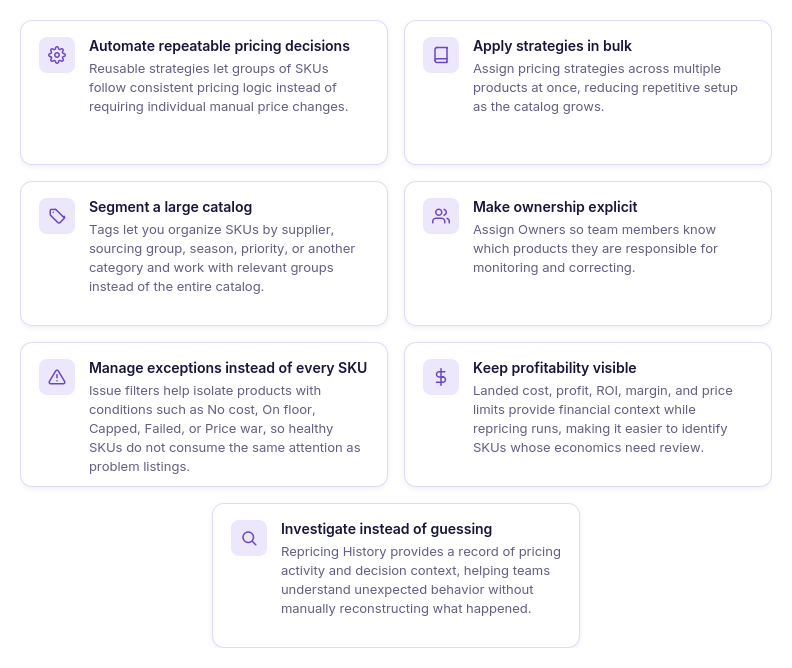
Automate repeatable pricing decisions
Reusable strategies give groups of SKUs consistent pricing logic without requiring sellers to manage each price manually. As the catalog grows, the same strategy framework can be reused across products with similar pricing goals.
Apply strategies in bulk
Strategies can be assigned to multiple products at once rather than SKU by SKU. Bulk assignment makes it faster to introduce or update pricing logic across large product groups.
Organize the catalog with tags
Tags divide hundreds of products into practical groups, such as supplier, sourcing type, seasonal inventory, or priority SKUs. Teams can filter those groups and work with the relevant part of the catalog instead of searching through every listing.
Assign clear product ownership
Owners show which team member is responsible for particular products. This creates accountability when several people manage repricing and reduces the chance that an exception remains unresolved because nobody knows who should handle it.
Focus on exceptions
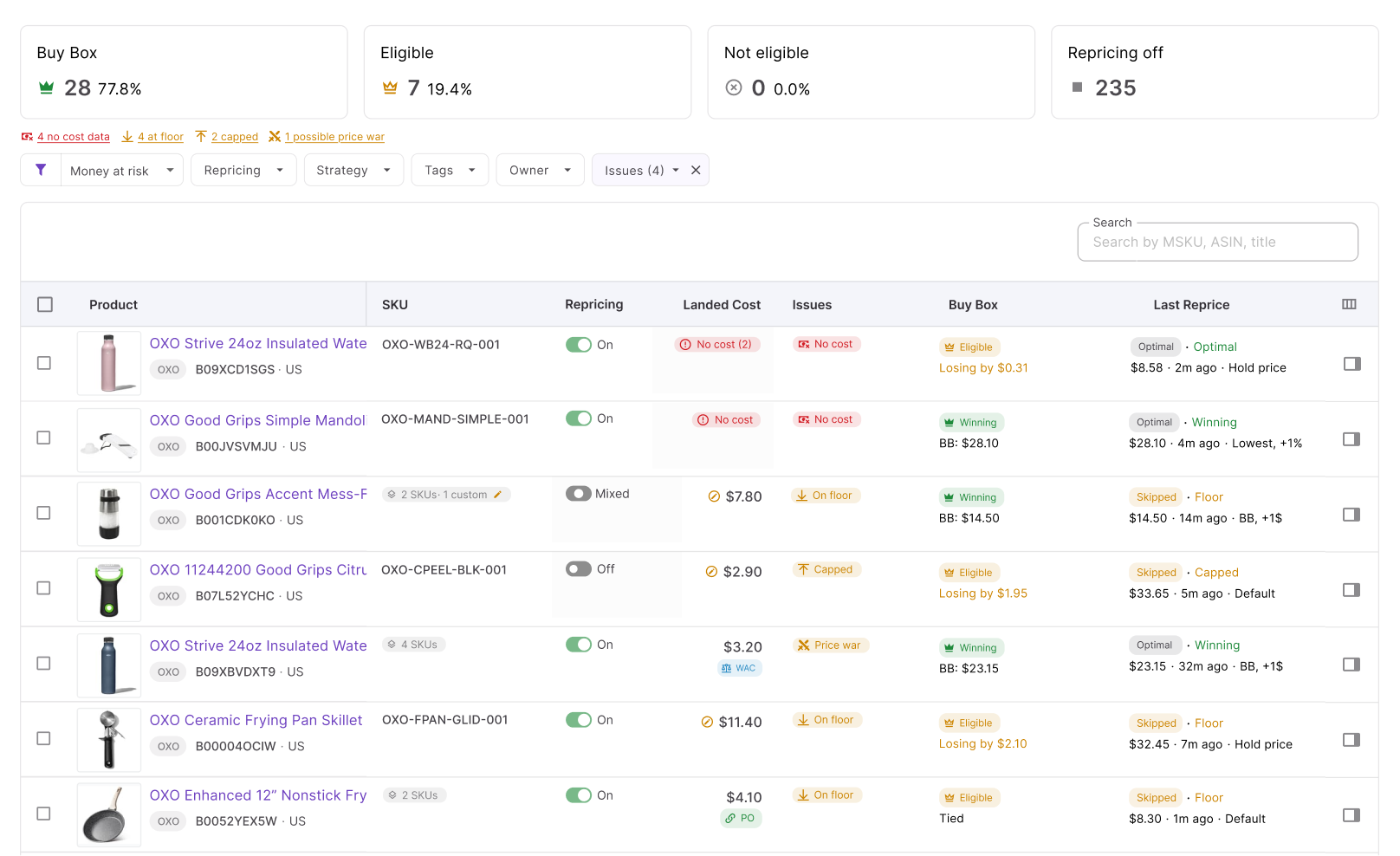
Issues help separate SKUs that need intervention from those repricing normally. Sellers can filter for conditions such as No cost, On floor, Capped, Failed, and Price war, concentrating review time where it matters.
Keep profitability in view
Seller Assistant Repricer puts landed cost, profit, ROI, margin, and price limits into the repricing workflow. That financial context helps teams identify products where competitive pricing may no longer produce the expected return.
Investigate unexpected pricing
Repricing History provides a record of pricing activity and decision context. Instead of reconstructing events manually, teams can investigate why a SKU repriced, failed, or reached a pricing boundary.
Scale the workflow, not the workload
Strategies, bulk actions, tags, owners, filters, Issues, and History become more valuable as the catalog expands. Instead of turning 800 SKUs into 800 products that need constant supervision, Seller Assistant Repricer helps turn them into organized groups, automated workflows, and a manageable set of exceptions.
How Seller Assistant Makes Bulk Repricing Manageable
Bulk Amazon repricing should not mean giving hundreds of SKUs identical settings and hoping they behave correctly. At scale, effective repricing requires a structured way to apply pricing logic across product groups while preserving SKU-level profitability controls, organizing team responsibility, and quickly separating healthy listings from those that need intervention.
Seller Assistant Repricer brings those controls into one workspace. Sellers can assign strategies in bulk, organize products with Tags and Owners, monitor costs and profitability, filter Issues, and review pricing decisions – allowing automation to handle routine repricing while the team concentrates on exceptions.
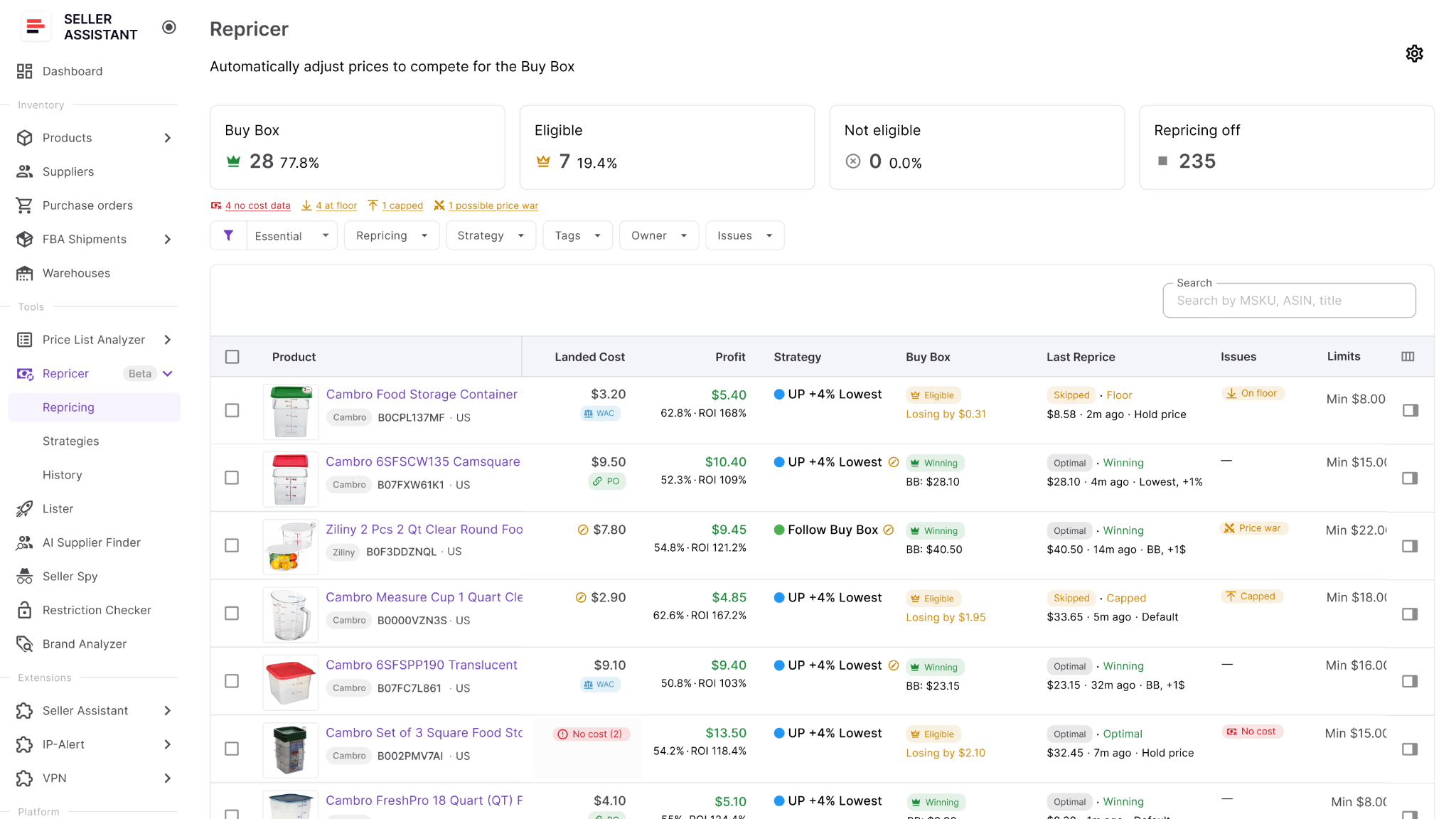
How Seller Assistant Repricer manages repricing at scale
| Bulk Repricing Task | How Seller Assistant Handles It | Why It Matters at Scale |
|---|---|---|
| Assign pricing logic | Applies reusable strategies to multiple products in bulk | Avoids configuring hundreds of SKUs individually |
| Use different strategies | Lets different product groups follow different strategies | Prevents the entire catalog from being forced into one pricing approach |
| Protect SKU economics | Uses landed cost, price limits, and profit, ROI, or margin requirements | Keeps bulk automation connected to each SKU’s financial boundaries |
| Organize products | Uses Tags to group SKUs by supplier, sourcing type, season, priority, or other criteria | Makes large catalogs easier to segment, filter, and manage |
| Divide team responsibility | Assigns Owners to products | Makes it clear who is responsible for reviewing particular SKUs |
| Find problem SKUs | Filters Issues such as No cost, On floor, Capped, Failed, and Price war | Turns catalog monitoring into exception management instead of checking every SKU |
| Monitor competition | Shows Buy Box data, competitor count, lowest FBA/FBM prices, current price, and other market metrics | Gives teams competitive context without opening listings individually |
| Monitor profitability | Shows landed cost, profit, ROI, margin, and pricing boundaries | Helps identify SKUs where competitive pricing is weakening returns |
| Handle new SKUs | Lets teams choose whether new products enter repricing automatically or wait for manual activation | Supports catalog growth without sacrificing setup control |
| React automatically | Reactive repricing can respond to relevant market changes in approximately 2–5 seconds, with proactive checks for quieter SKUs | Allows hundreds of products to respond without continuous manual monitoring |
| Investigate exceptions | Repricing History records pricing activity and decision context | Helps teams understand unexpected behavior without reconstructing price changes manually |
| Scale catalog management | Combines strategies, bulk actions, Tags, Owners, filters, Issues, and History in one workflow | Turns hundreds of individual pricing tasks into organized groups and manageable exceptions |
Apply strategies in bulk instead of SKU by SKU
When multiple products should follow the same pricing approach, you do not need to configure them individually. Seller Assistant Repricer lets you select products and assign reusable repricing strategies in bulk.
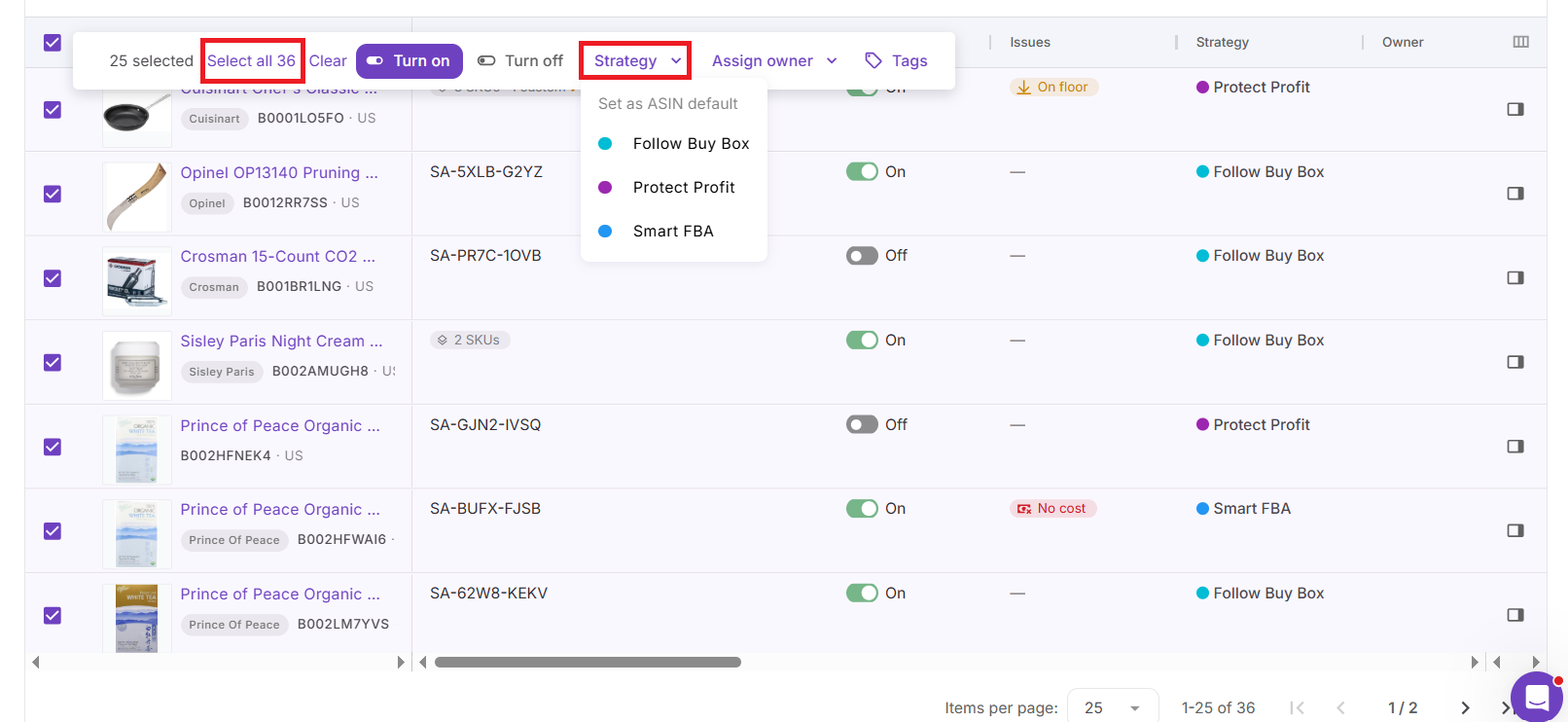
That makes it practical to manage groups with different objectives – for example, SKUs focused on Buy Box competition can use one strategy while products requiring stronger ROI protection use another. You can also use ready-made strategies such as Follow Buy Box, Match Buy Box, Smart FBA, Protect Profit, and Target 25% ROI, or create custom strategies.
Keep SKU-level safeguards inside bulk automation
Bulk management does not remove individual product economics. SKUs can retain their own cost and pricing context while the strategy determines the broader repricing logic.
Seller Assistant Repricer can work with landed cost, minimum and maximum prices, profit, ROI, and margin, while strategies can use dynamic minimums based on profitability requirements.
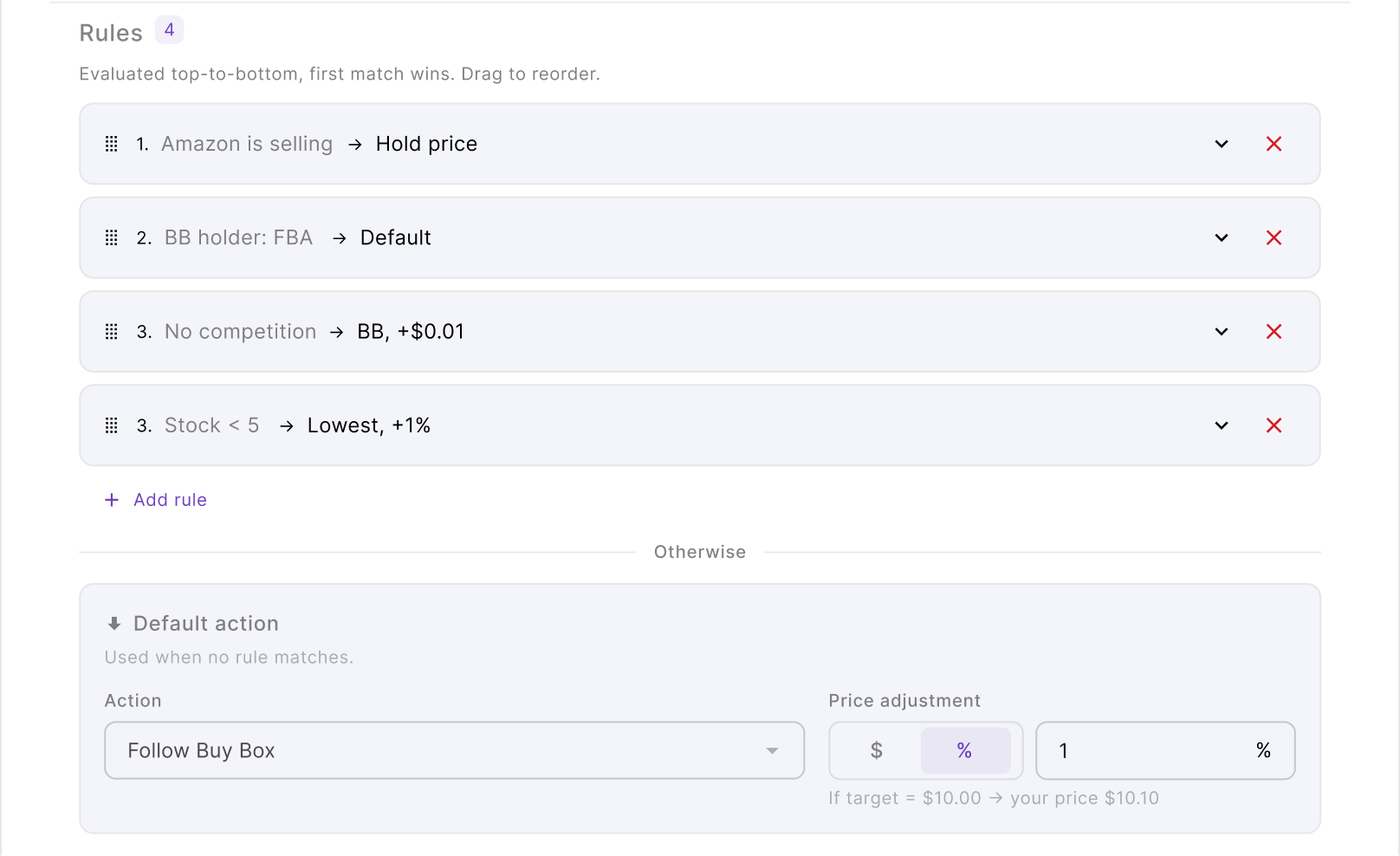
This means a strategy can be reused across many products without assuming that every SKU can afford the same selling price.
Organize a large catalog with Tags and Owners
Hundreds of SKUs become much easier to manage when they can be divided into meaningful groups. Tags can organize products by supplier, sourcing type, season, inventory group, priority, or another structure that matches your operation.
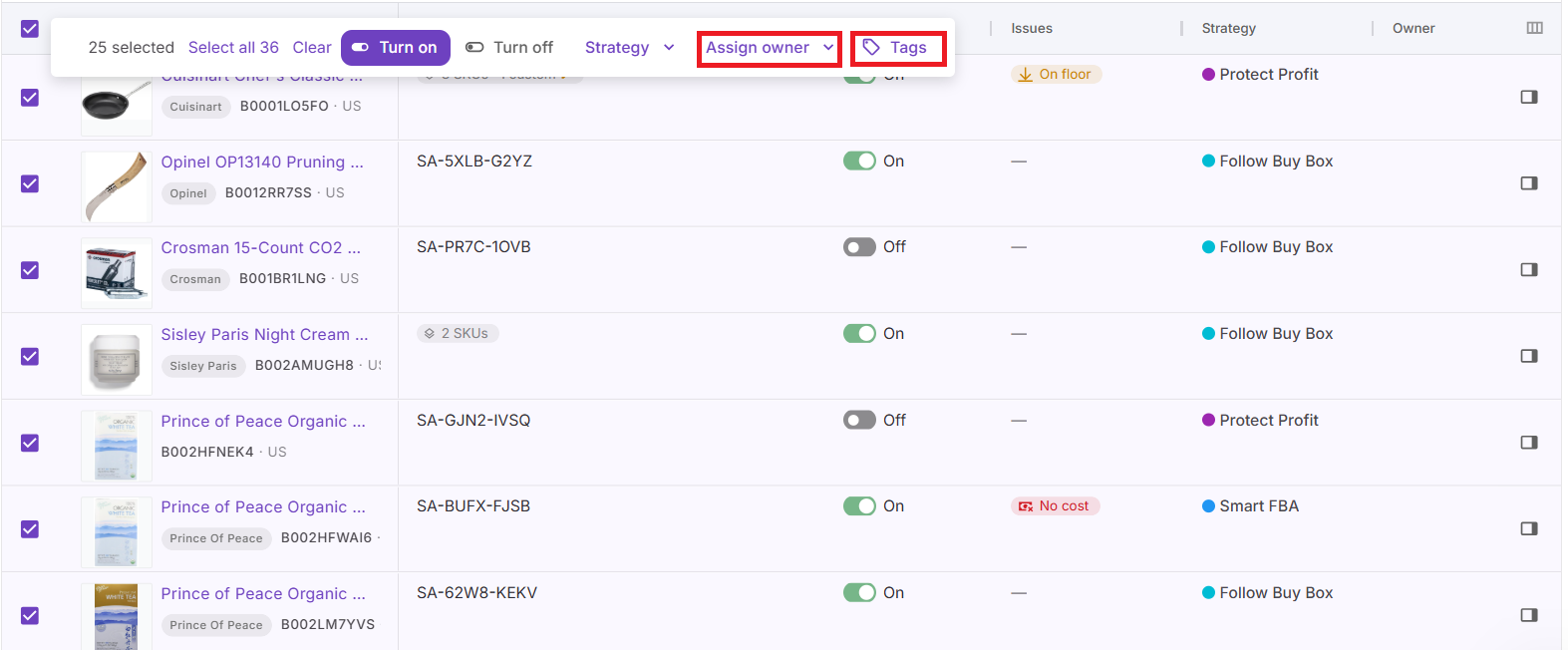
Owners add accountability. When several people manage the catalog, products can be assigned to specific team members so it is clear who should review an issue or investigate unusual repricing behavior.
Filter to the SKUs that actually need attention
The goal at scale is not to inspect every SKU every day. The Repricer’s Issues help identify exceptions such as No cost, On floor, Capped, Failed, and Price war, allowing teams to filter directly to products that may require action.
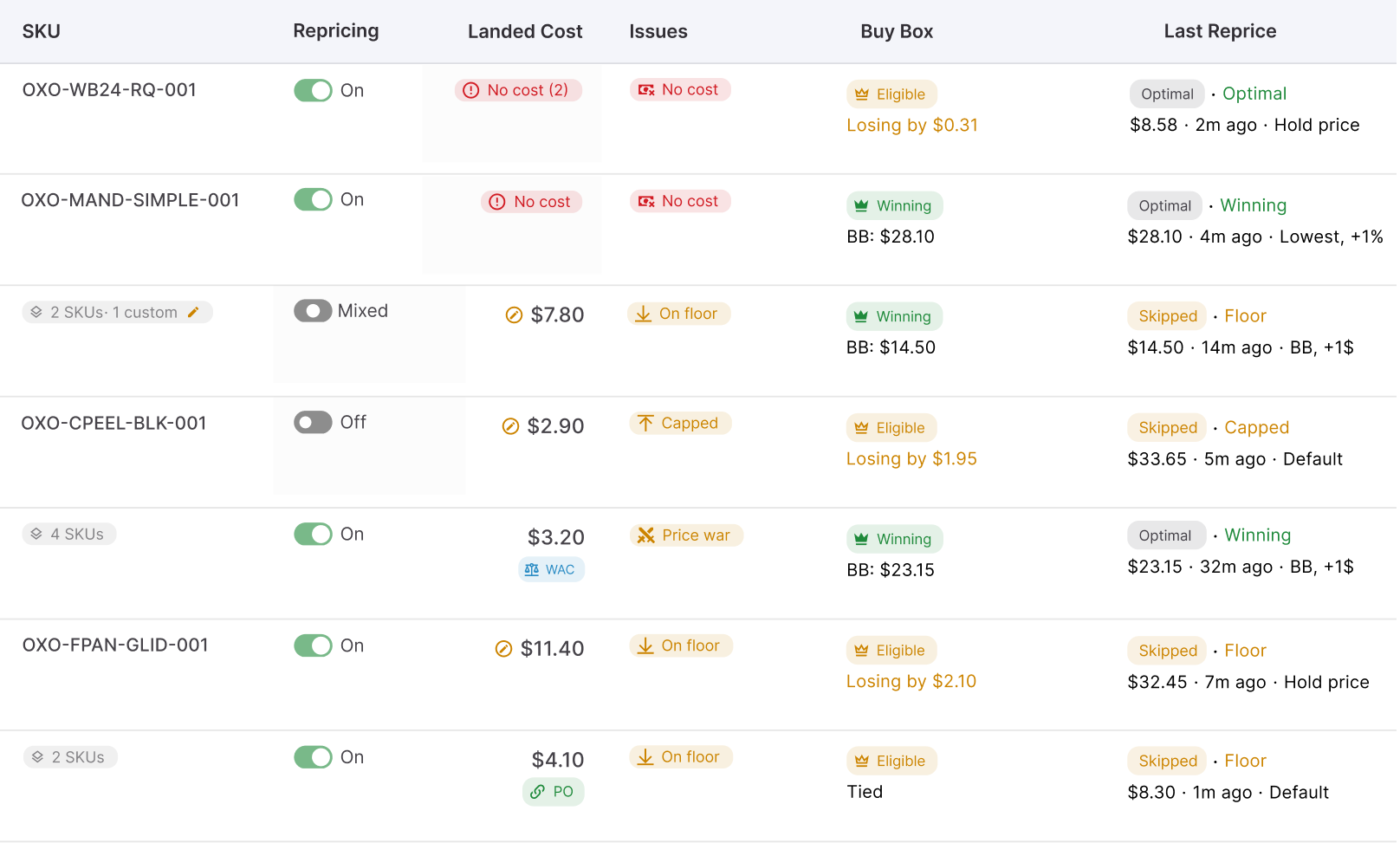
Instead of reviewing hundreds of normally functioning listings to find a handful of problems, you can start with the problem group and investigate the underlying cost, strategy, limit, or market condition.
Bring market and profitability data into one view
Bulk repricing is difficult to supervise when competitive data is in one place and financial data somewhere else. Seller Assistant Repricer brings metrics such as current price, Buy Box status and price, Buy Box share, competitor count, lowest FBA/FBM prices, stock, landed cost, profit, ROI, margin, and price limits into the repricing workflow.
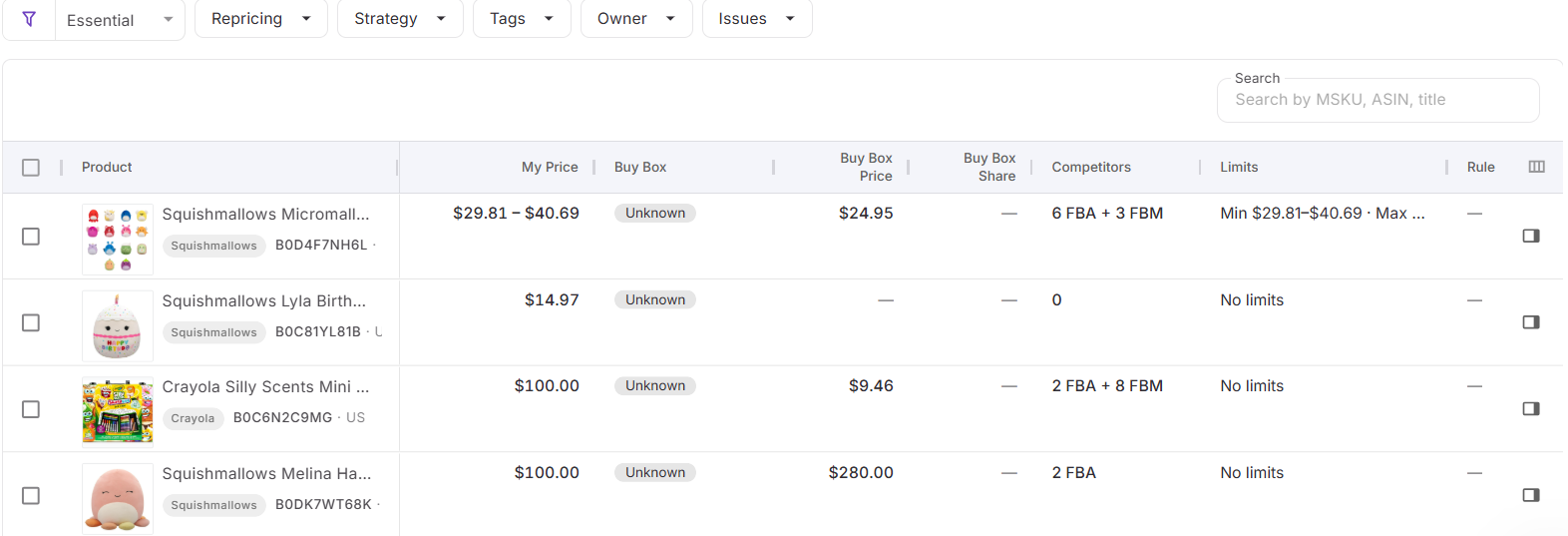
This gives teams context when an exception appears. They can see not only that a SKU needs attention, but also what is happening competitively and financially.
Control how quickly hundreds of SKUs react
Automation at scale still needs to respond quickly to Amazon marketplace changes. The Repricer’s reactive repricing can react to relevant changes in approximately 2–5 seconds, while proactive checks reevaluate products even when no new competitor event triggers an immediate update.
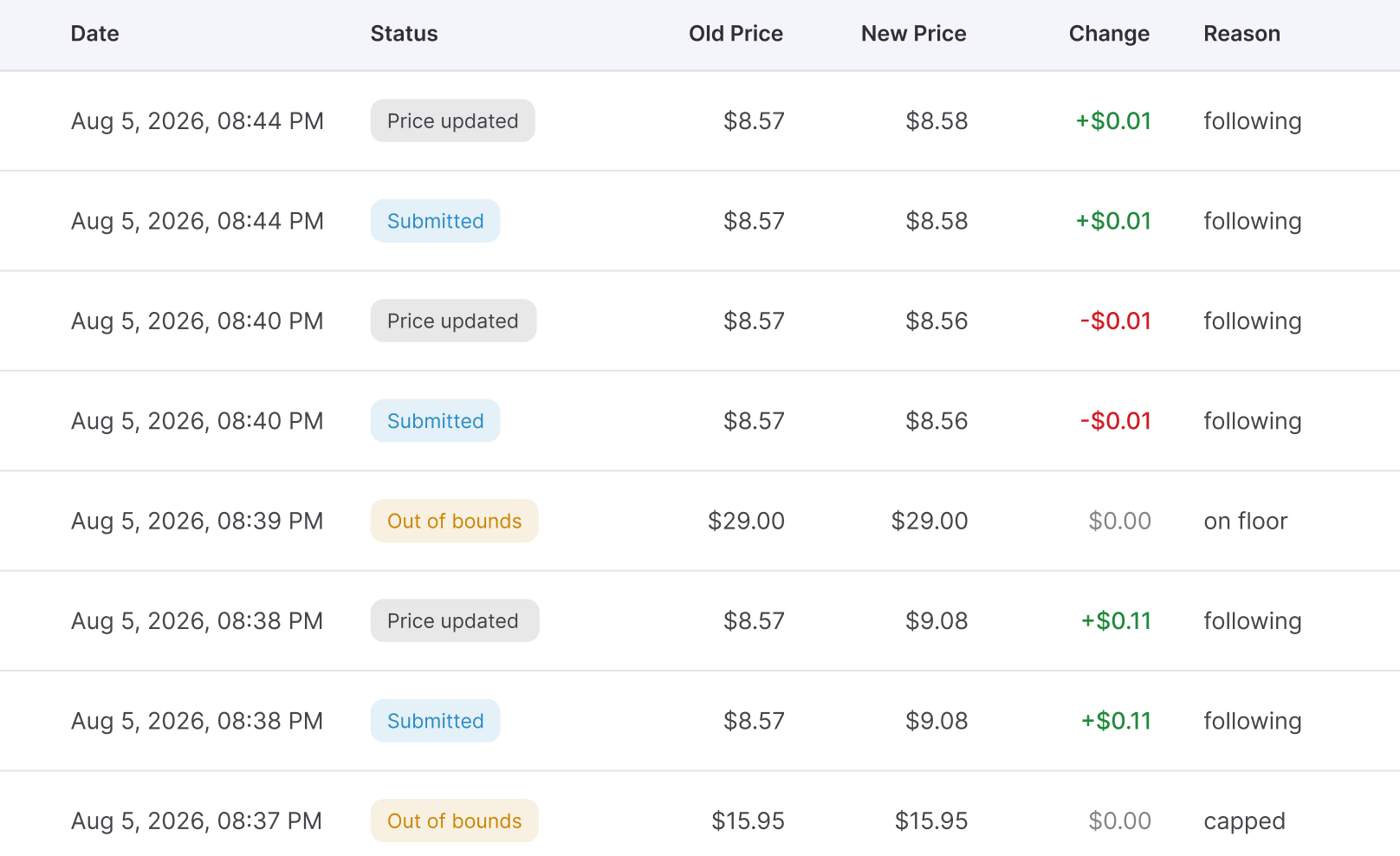
Each SKU still follows its assigned strategy, conditional rules, and pricing limits. Speed therefore does not require giving up control over how different groups of products respond.
Keep new products from becoming a new manual workload
As the catalog grows, newly listed SKUs create another management problem. Seller Assistant Repricer lets you choose whether new products should automatically enter repricing or remain inactive until they have been reviewed.
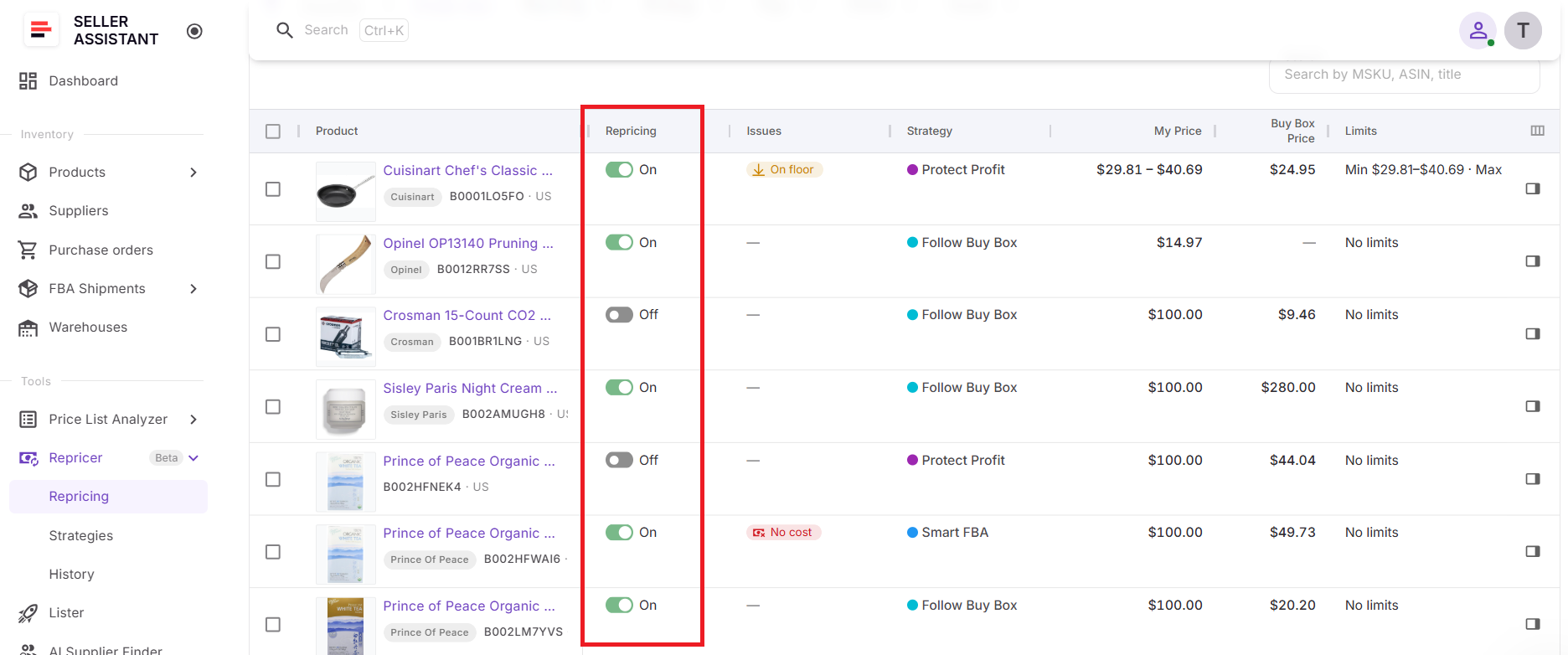
For teams that want tighter control, leaving them inactive provides time to verify strategy, landed cost, profitability requirements, and price limits first. More automated workflows can add new products to repricing without turning every catalog expansion into repetitive manual activation.
Audit pricing decisions without checking every listing
When a SKU behaves unexpectedly, Repricing History lets the team investigate the pricing activity rather than trying to reconstruct it from memory. History can show previous pricing actions and decision context, helping identify whether the cause lies in market conditions, strategy logic, pricing boundaries, or another issue.
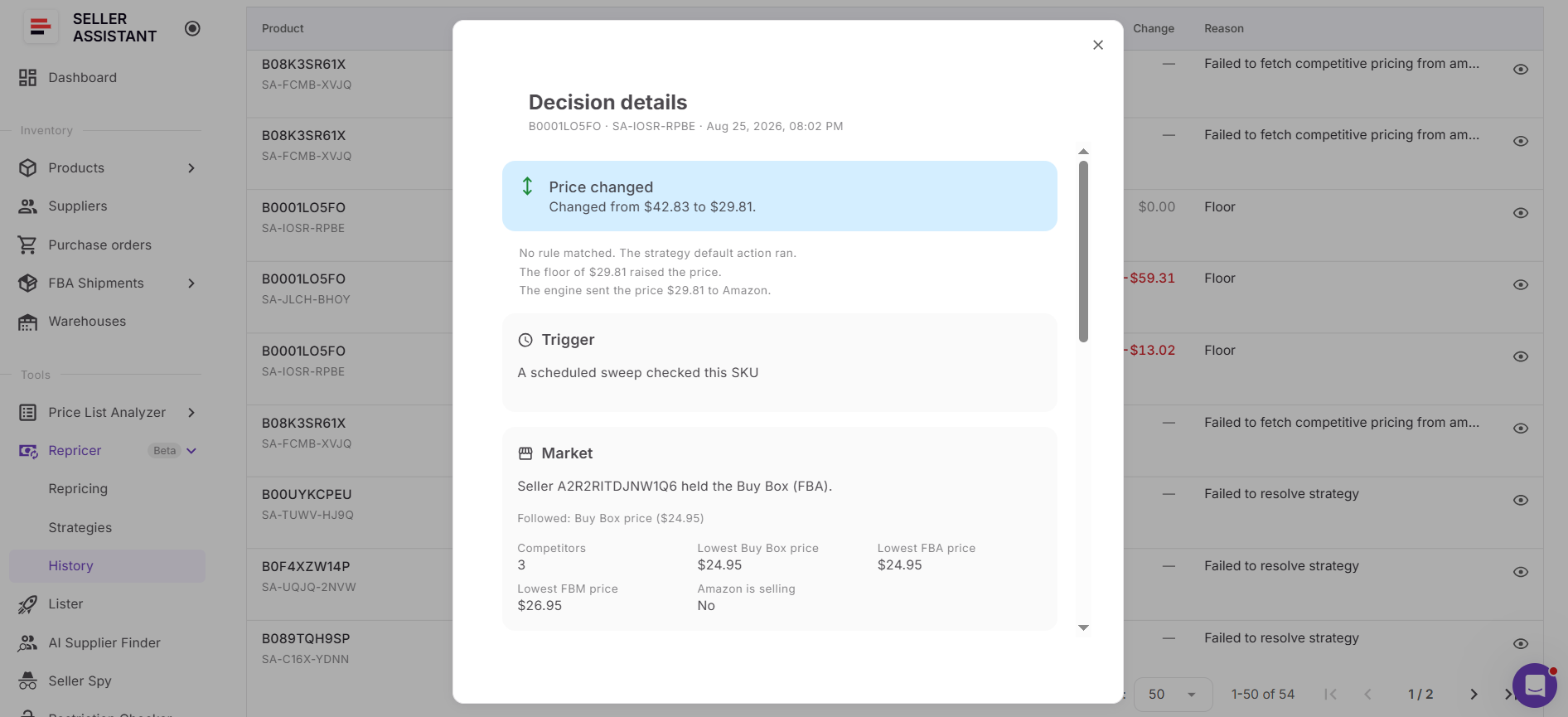
That is what makes repricing hundreds of Amazon SKUs manageable: configure common logic in bulk, preserve the controls that matter at SKU level, organize responsibility, and investigate exceptions instead of babysitting the entire catalog.
Seller Assistant Repricer: Built for Repricing at Scale
Repricing a few Amazon offers is mostly a pricing task. Repricing hundreds of SKUs becomes a catalog-management task: products need the right strategies, accurate costs and limits, clear ownership, and a way to identify exceptions without reviewing every listing individually.
Seller Assistant Repricer brings those controls into one workflow for wholesale, online arbitrage, and dropshipping sellers. It combines automated repricing with bulk strategy management, Tags and Owners, profitability data, Issues and filters, and Repricing History. Reactive repricing can respond to relevant Amazon market changes in approximately 2–5 seconds, while proactive checks keep evaluating quieter SKUs.
What Seller Assistant Repricer lets you do at scale
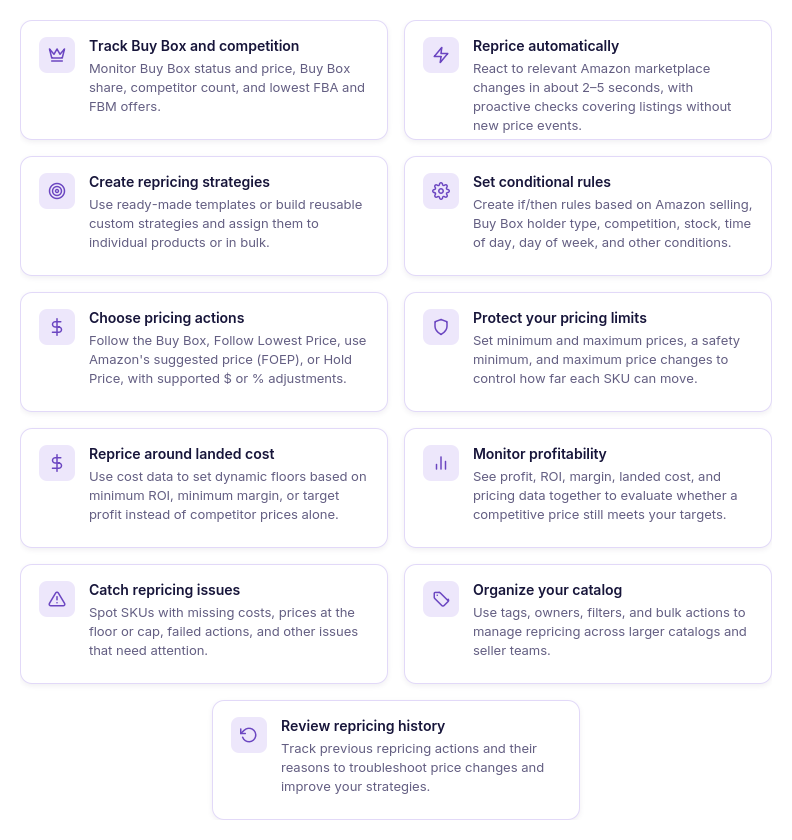
- Apply pricing logic across product groups
Use reusable strategies across multiple products rather than rebuilding pricing logic SKU by SKU. Seller Assistant Repricer includes Follow Buy Box, Match Buy Box, Smart FBA, Protect Profit, and Target 25% ROI, and you can create custom strategies for other pricing objectives.
- Keep different parts of the catalog on different strategies
Bulk repricing does not require one strategy for the entire catalog. You can separate products according to their pricing goals and apply the appropriate strategy to each group.
- Organize hundreds of SKUs
Use Tags to group products by supplier, sourcing type, season, priority, inventory group, or another structure relevant to your operation. Owners show which team member is responsible for particular products, making responsibility clearer as the catalog and team grow.
- Monitor Amazon competition centrally
See current price, Buy Box price and status, Buy Box share, competitor count, lowest FBA and FBM prices, and stock alongside your repricing setup. Teams can review competitive context without opening every Amazon listing individually.
- Automate rapid market responses
Reactive repricing can respond to relevant Amazon marketplace changes in approximately 2–5 seconds. Proactive checks also reevaluate SKUs where no new competitor event has triggered an immediate response.
- Use conditional rules across automated strategies
Build ordered if/then rules for conditions such as Amazon selling, Buy Box holder type, competitors above or below your offer, no competition, stock thresholds, time of day, and day of week. Rules support AND/OR logic, and the first matching rule takes priority.
- Control how each strategy competes
Configure actions such as Follow Buy Box, Follow Lowest Price, follow Amazon’s suggested price (FOEP), or Hold Price. Fixed-dollar and percentage adjustments let strategies position offers relative to a target instead of simply copying competitor prices.
- Preserve SKU-level profitability controls
Bulk automation still operates within the financial boundaries configured for the products. Minimum prices can be manually or dynamically determined from minimum ROI, minimum margin, or target profit, with a safety minimum, maximum price, and maximum-change limit providing additional safeguards.
- Connect pricing with actual costs
Seller Assistant Repricer can use Landed Cost and show profit, ROI, and margin in the repricing workflow. This allows teams to manage competitive pricing and product economics together rather than applying catalog-wide automation without cost context.
- Filter the catalog down to exceptions
Issues help identify SKUs requiring review, including No cost, On floor, Capped, Failed, and Price war. Instead of manually auditing hundreds of normally repricing products, teams can filter directly to the exceptions.
- Investigate unexpected decisions
Repricing History records pricing activity and provides context behind individual decisions. When a SKU behaves unexpectedly, teams can investigate the pricing sequence rather than manually reconstructing what happened.
How Seller Assistant reprices hundreds of SKUs
Seller Assistant Repricer evaluates Amazon marketplace signals against the strategy assigned to each product. Reactive repricing can respond to relevant market changes in approximately 2–5 seconds, while proactive checks periodically reevaluate products even when no competitor event triggers an immediate response.
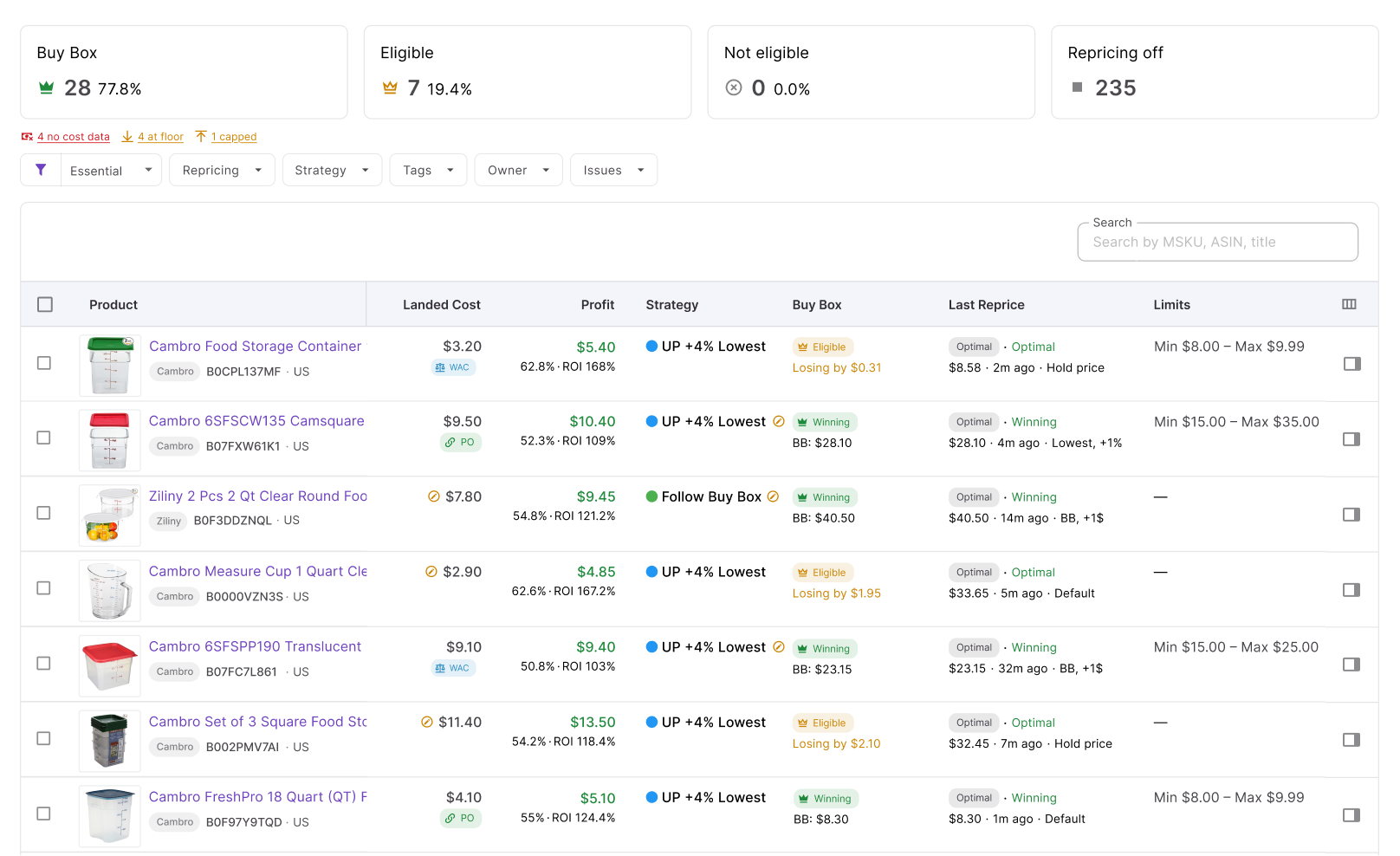
When a SKU is evaluated, the Repricer checks its conditional rules from top to bottom. The first matching rule wins; if no rule matches, the strategy’s default action determines the pricing target and any configured adjustment.
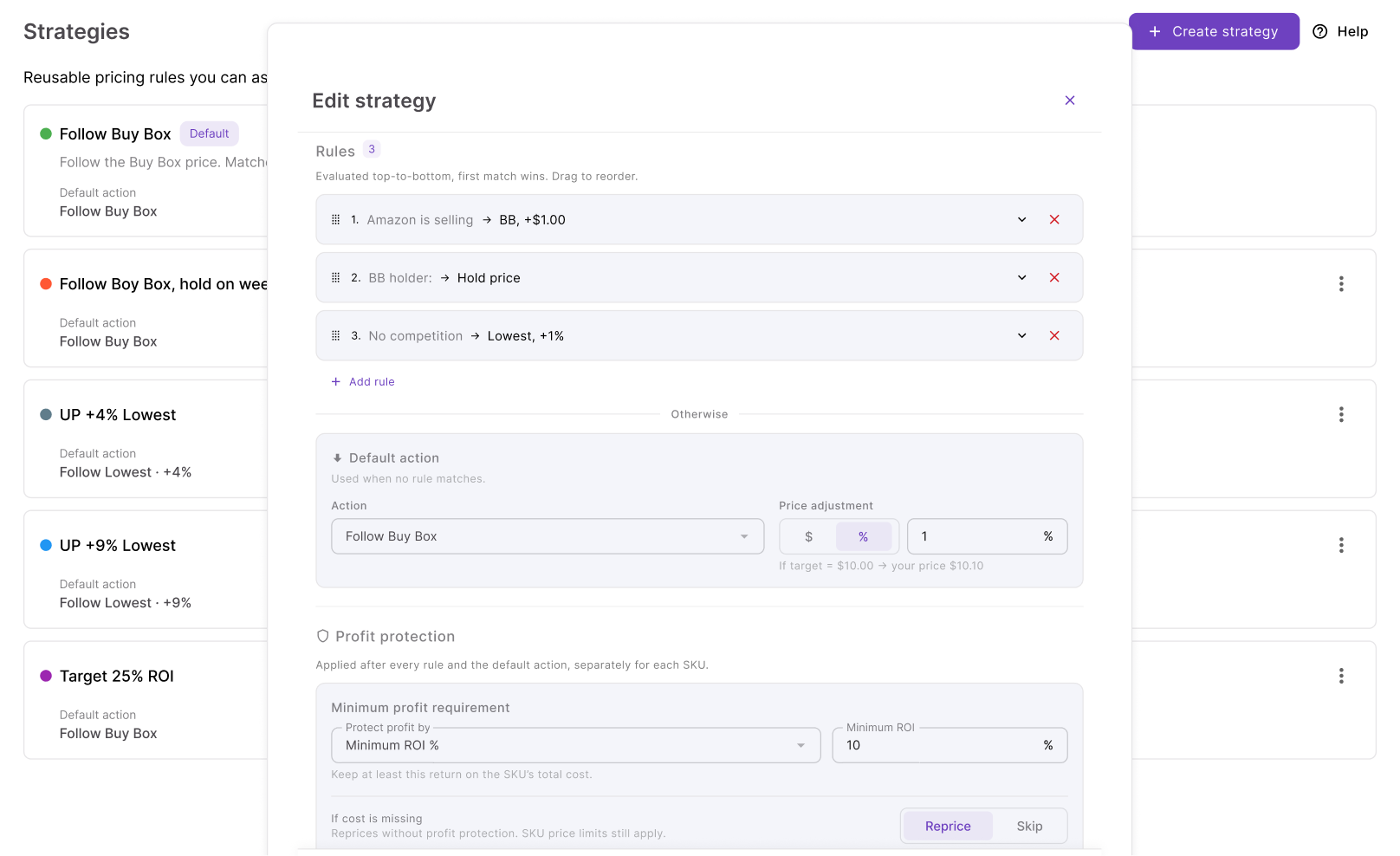
Before a resulting price is applied, the Repricer checks the relevant minimum price, safety minimum, maximum price, landed cost, and profitability requirements. The same automated process can therefore operate across a large catalog while each SKU remains governed by its assigned strategy and financial boundaries.
How to set up Amazon repricing with Seller Assistant
Step 1. Open your Repricing workspace
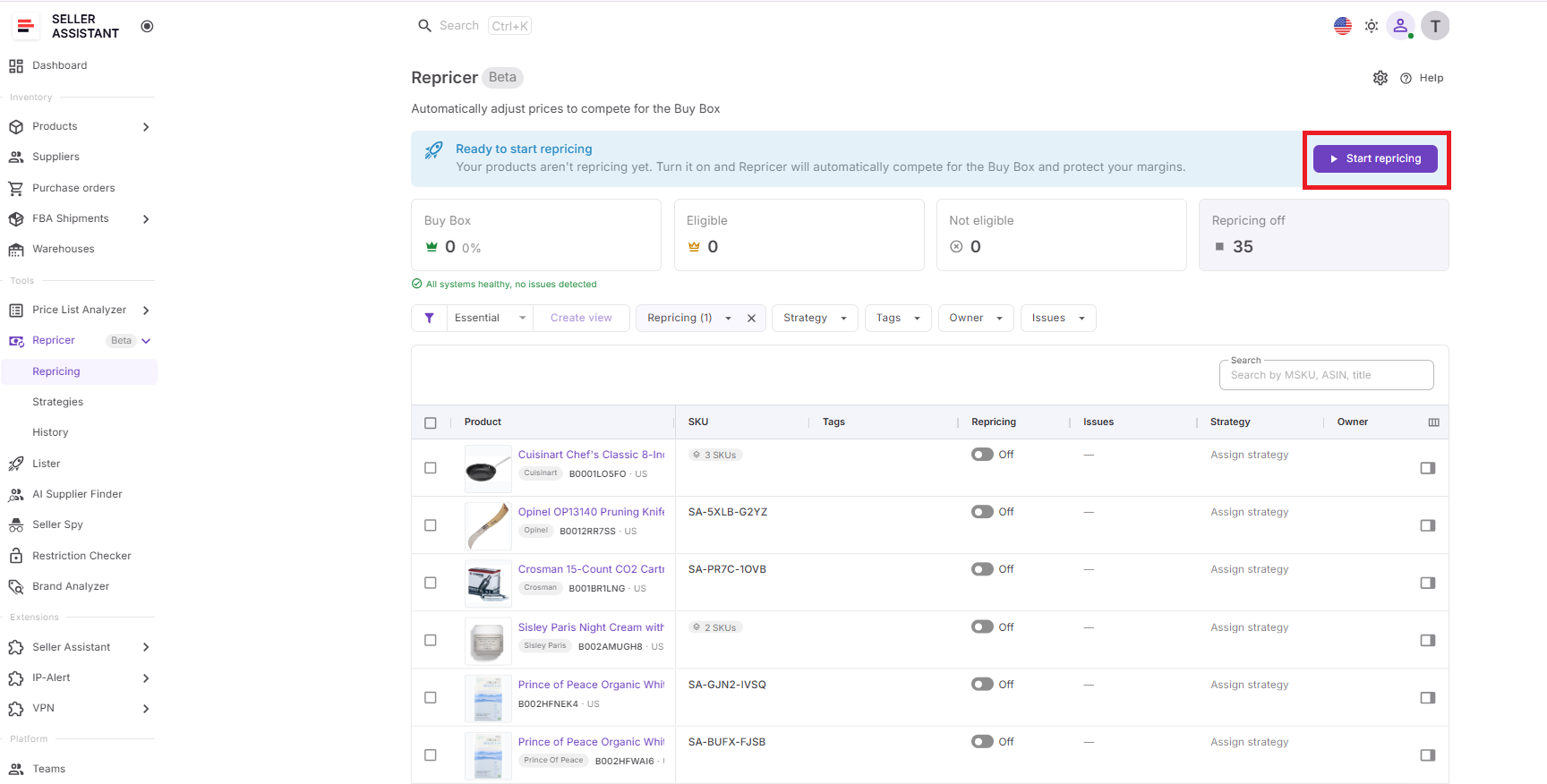
Go to Repricer → Repricing in Seller Assistant. The table brings your SKUs together with strategies, repricing status, market information, Tags, Owners, profitability data, and detected Issues.
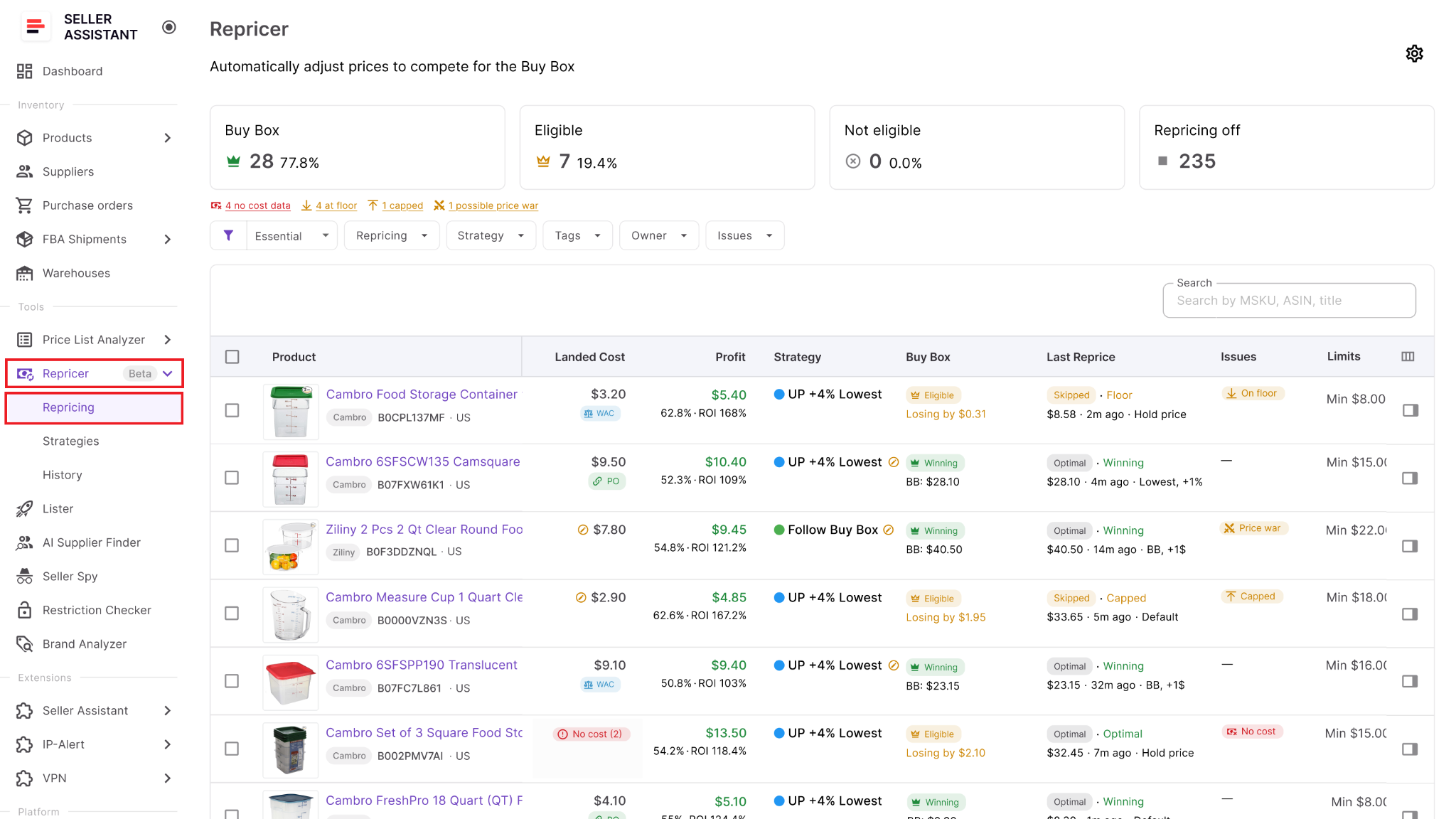
For a large catalog, treat this as the central workspace rather than checking products separately across multiple views.
Step 2. Configure Repricing for the team
Open Settings and enable Repricing. You can also decide whether newly listed products should automatically enter repricing or remain inactive until they are reviewed.
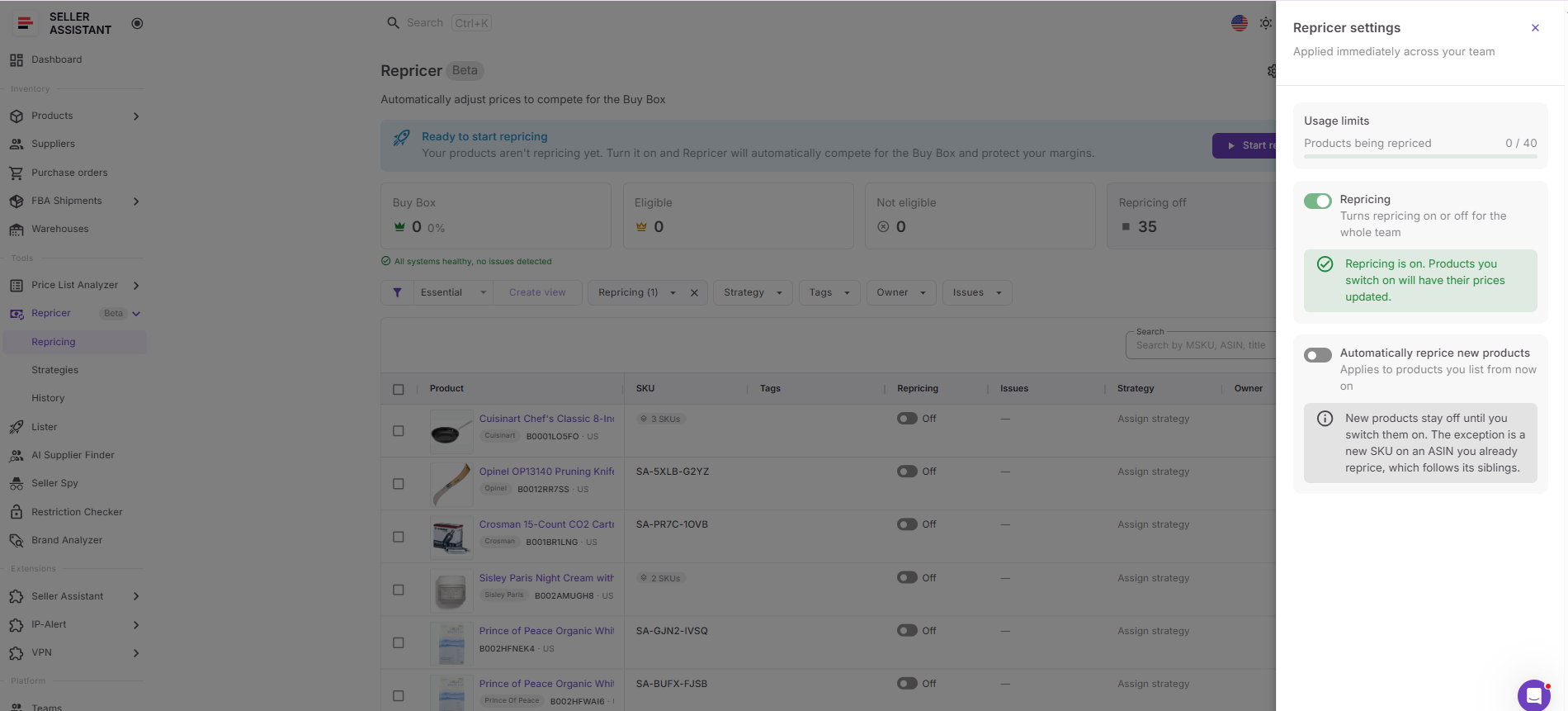
For tighter catalog control, keeping new SKUs inactive gives your team time to verify their strategy, cost data, and pricing boundaries. If your workflow is already standardized, automatic inclusion can reduce repetitive work as new inventory is added.
Step 3. Assign strategies across your catalog
Select the appropriate strategy from the Strategy column. Choose from Follow Buy Box, Match Buy Box, Smart FBA, Protect Profit, Target 25% ROI, or build a custom strategy.
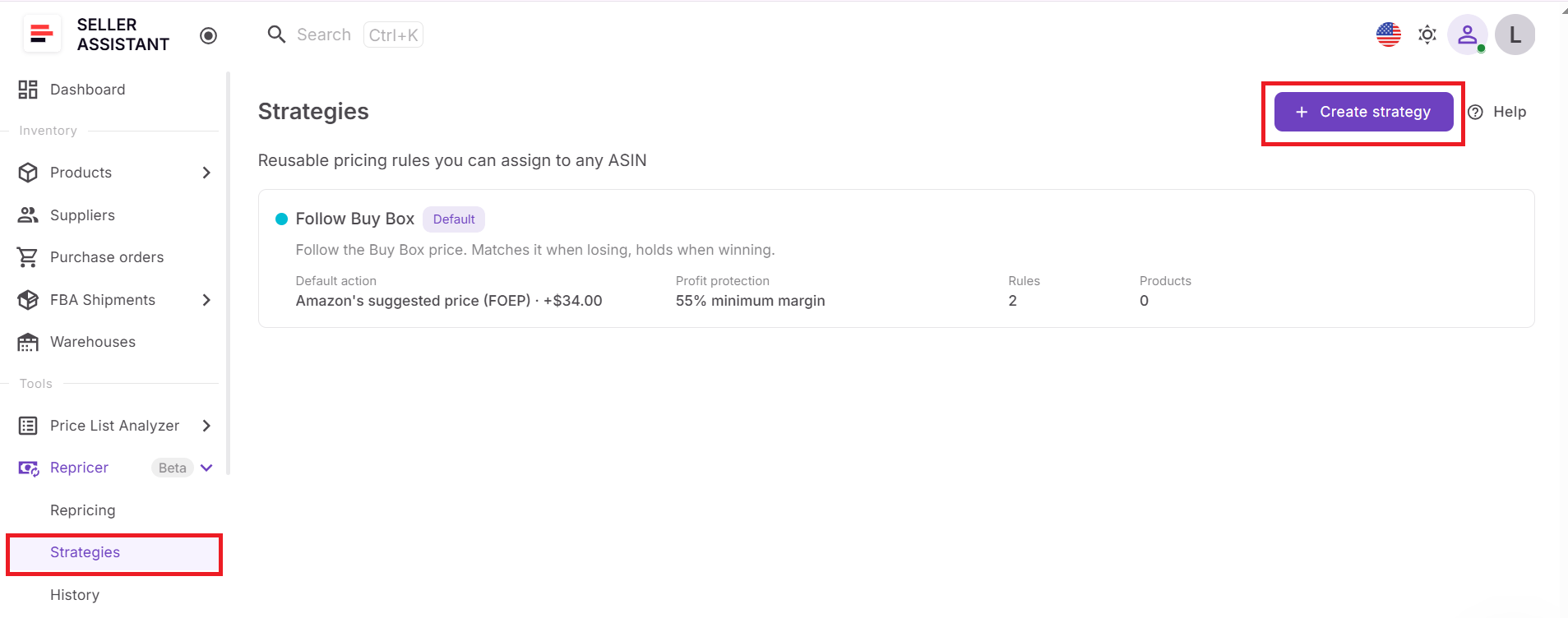
Where multiple products share the same pricing objective, apply strategies in bulk instead of configuring every SKU separately. Divide the catalog into logical groups so different types of inventory can follow different pricing approaches.
Step 4. Build reusable pricing rules
Configure the strategy’s default action and add conditional rules for situations that require different behavior. You might hold when Amazon is selling, change the action when inventory becomes low, or use different logic when competition disappears.
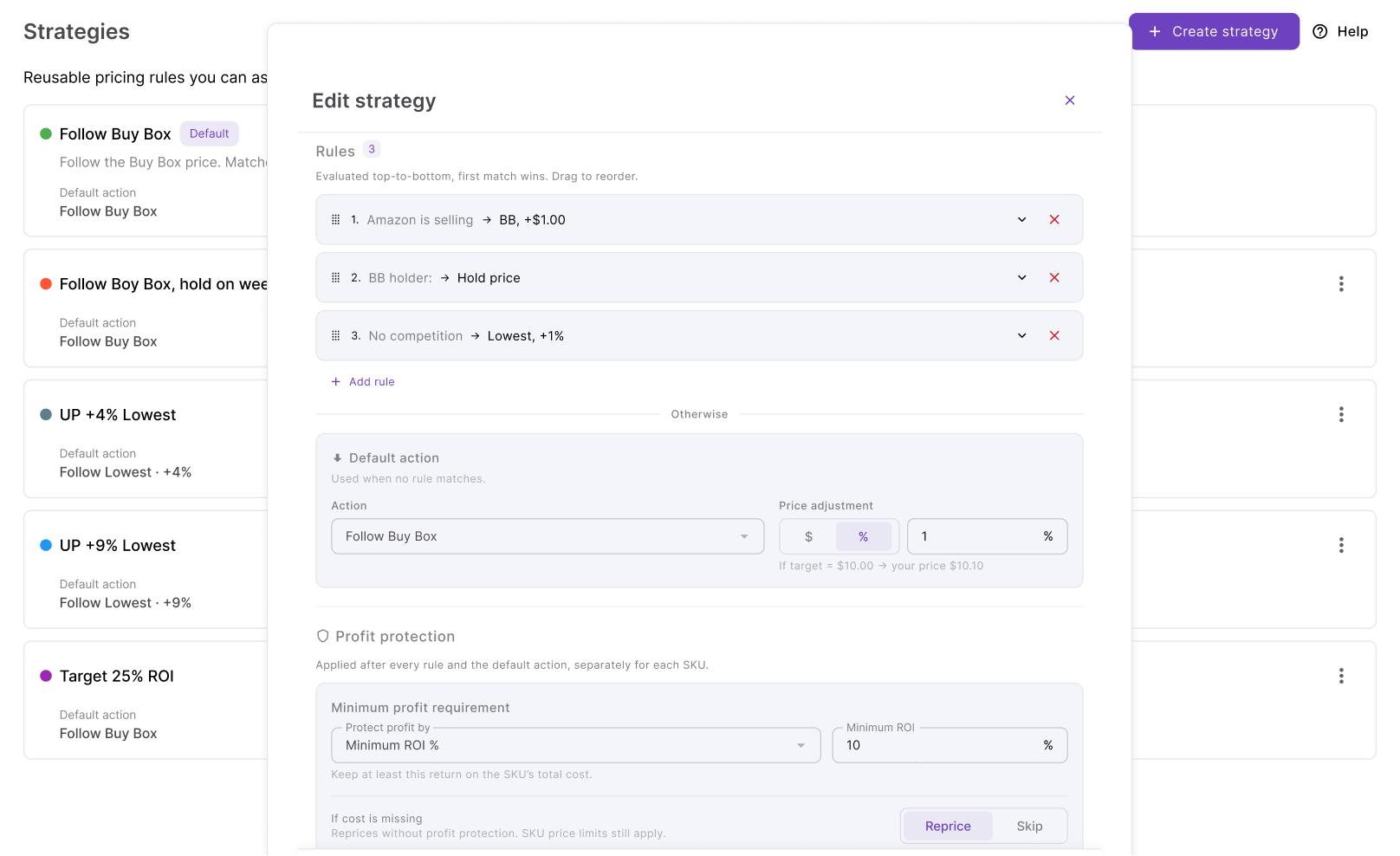
Put higher-priority conditions first because Seller Assistant Repricer evaluates rules in order and uses the first match. AND/OR logic lets you make shared strategies precise enough to handle more specific market situations.
Step 5. Establish pricing boundaries
Configure the minimum and maximum prices within which the strategy can operate. Minimum price can be entered manually or calculated using minimum ROI, minimum margin, or target profit, while the safety minimum provides a hard lower boundary.
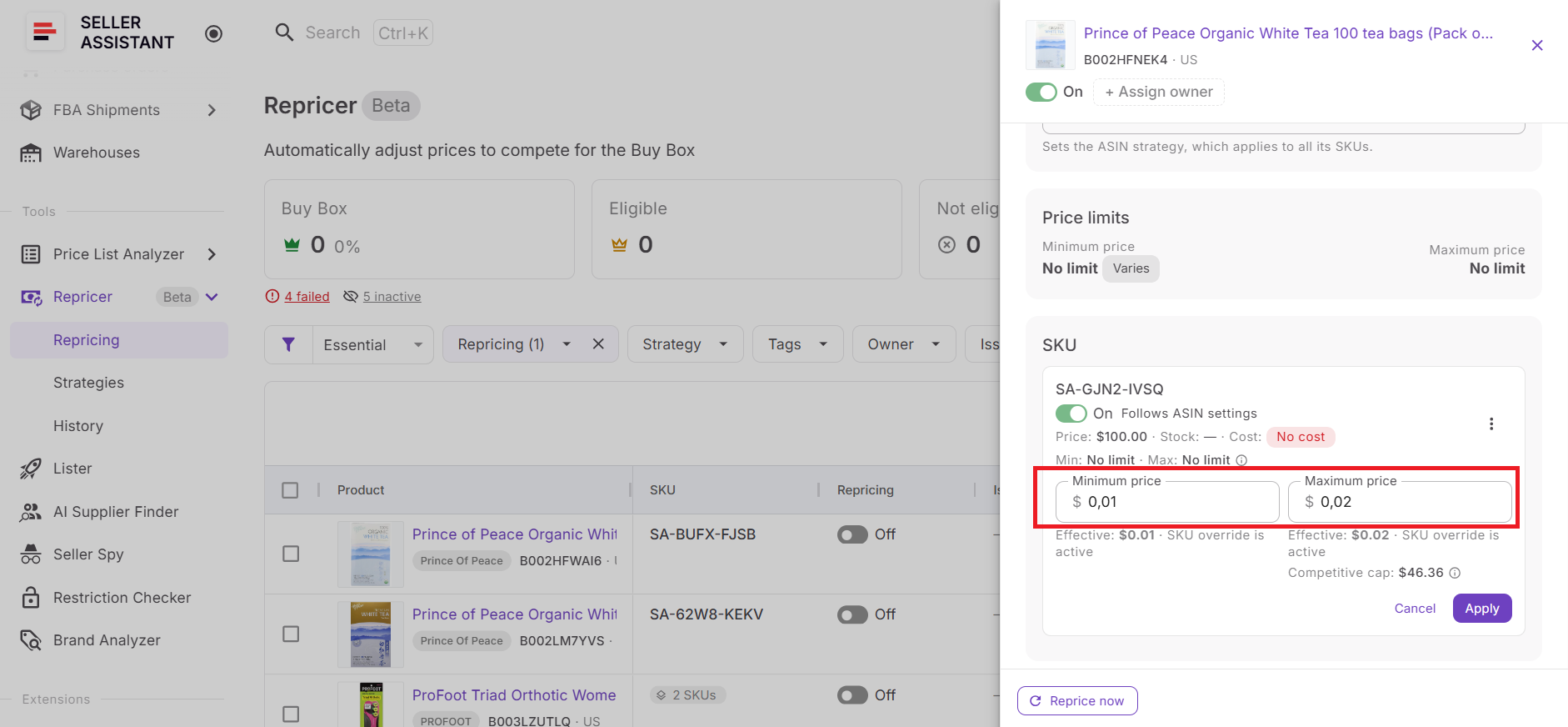
You can also limit the maximum price movement per reprice. These controls are particularly important with hundreds of automated SKUs because they establish boundaries before market changes occur rather than relying on someone to notice an undesirable price afterward.
Step 6. Verify costs and profitability
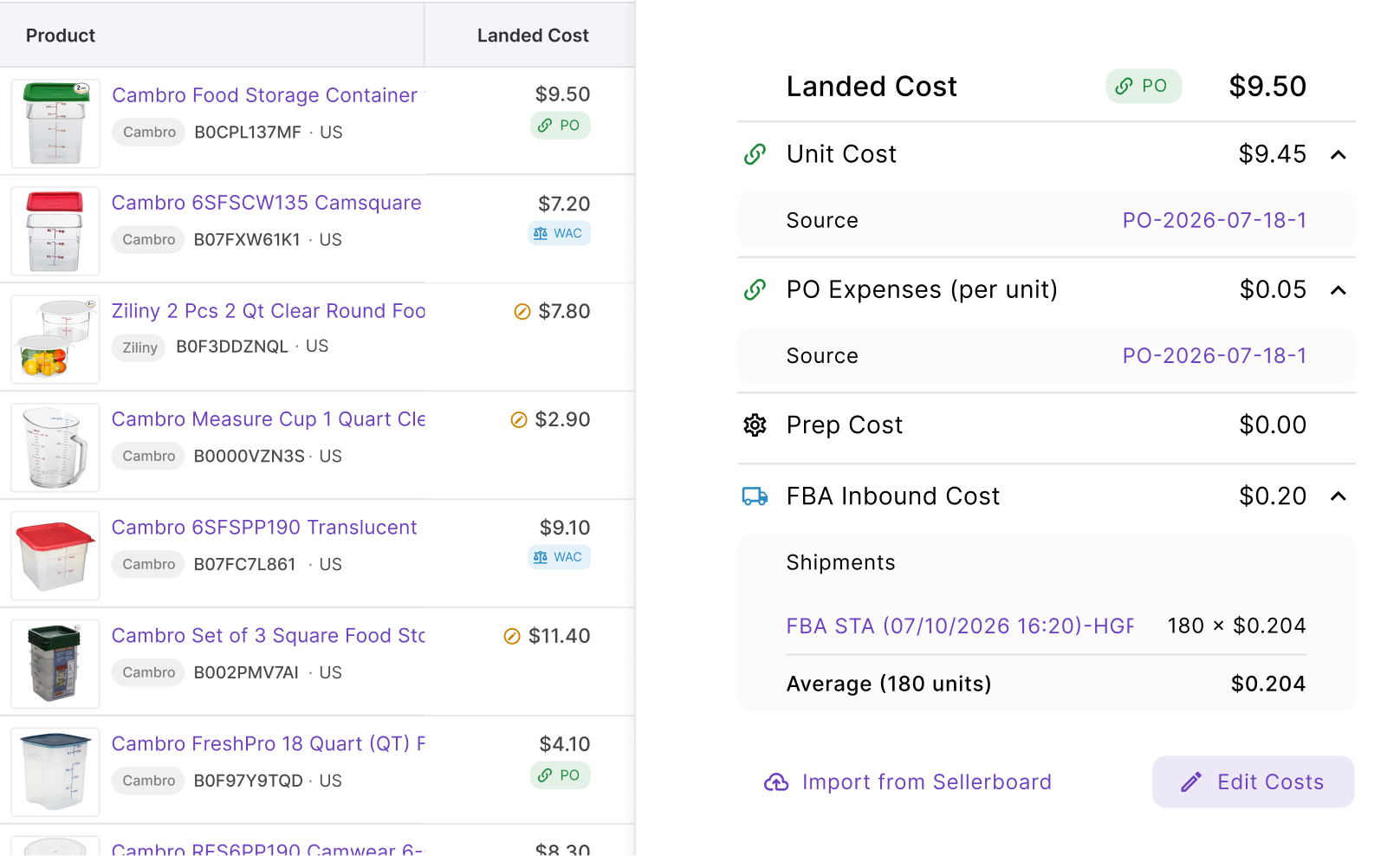
Review Landed Cost for products using cost-aware repricing. Depending on the available data, relevant components can include unit cost, PO expenses, prep cost, and FBA inbound cost.
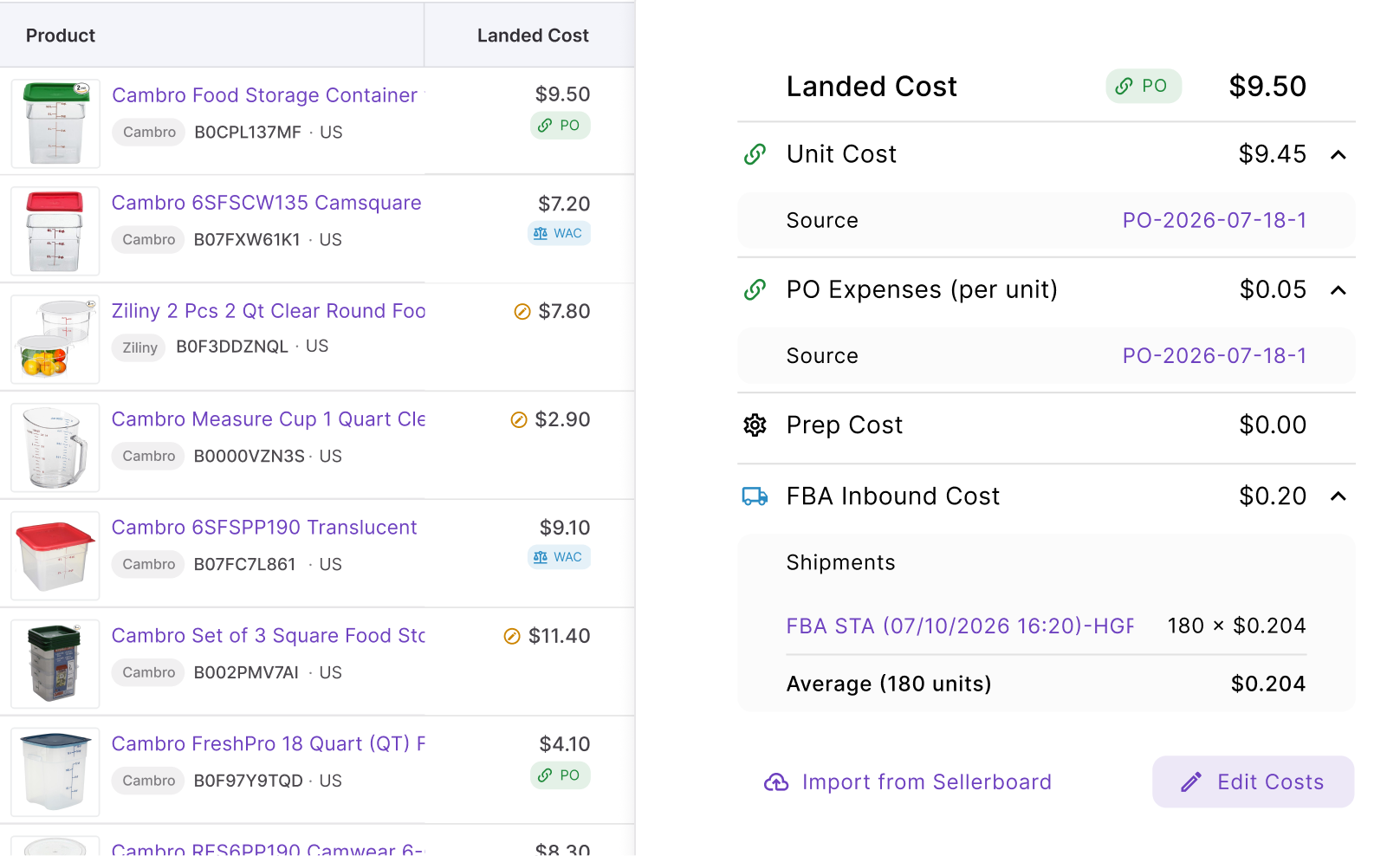
Then review profit, ROI, and margin against the SKU’s pricing boundaries. At scale, accurate cost inputs matter because even a well-designed strategy cannot provide reliable profit protection when its underlying cost data is wrong.
Step 7. Structure ownership and find exceptions
Use Tags to organize products into useful catalog groups and Owners to assign responsibility to team members. This creates a manageable structure for catalogs where different people oversee different suppliers, inventory groups, or product segments.
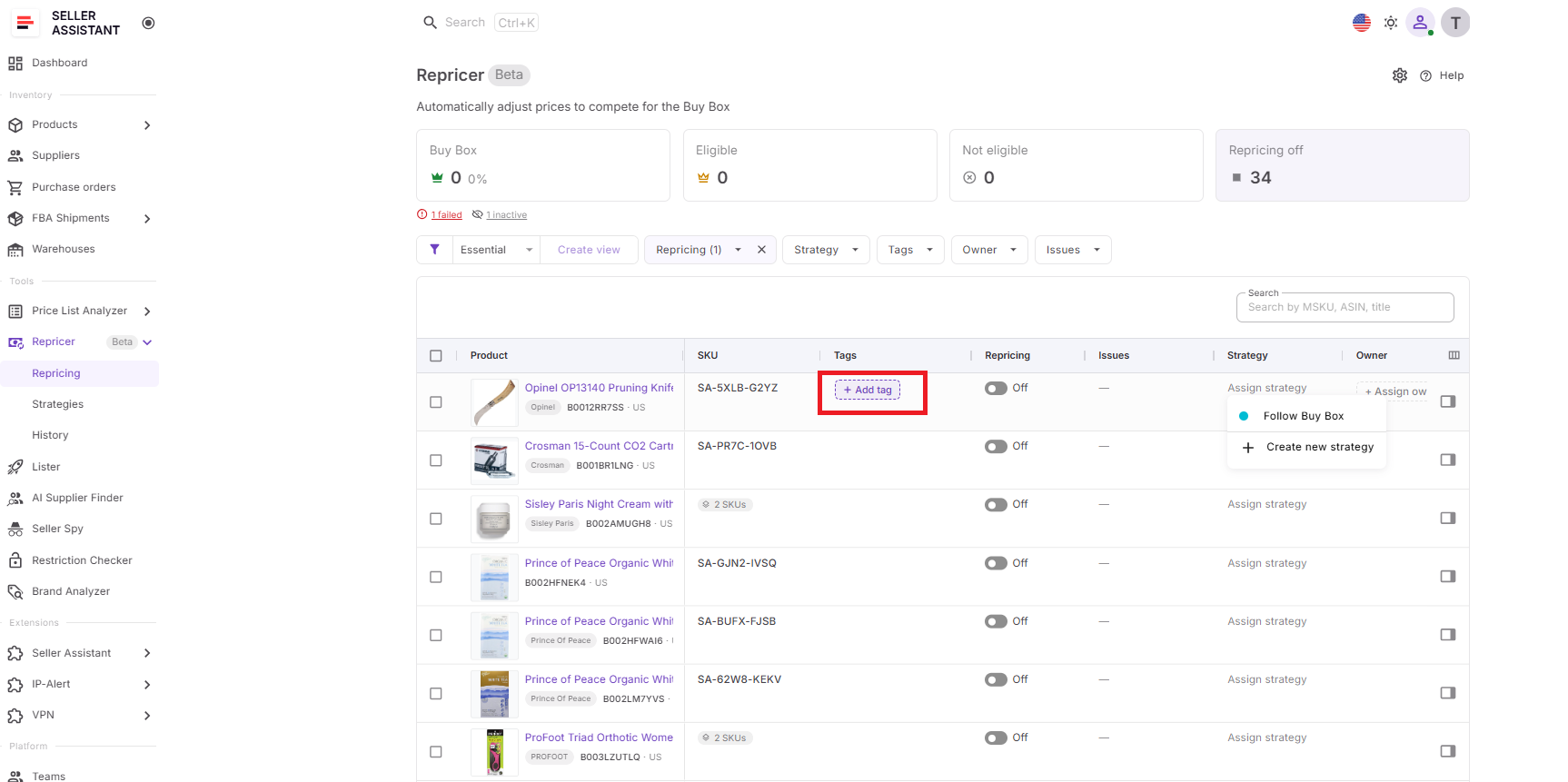
Then filter Issues for SKUs marked No cost, On floor, Capped, Failed, Price war, or other exceptions. This is the key shift in managing Amazon repricing at scale: review the products that need attention instead of reviewing the entire catalog.
Step 8. Start repricing and manage by exception
Enable the products that are ready and click Start repricing. Seller Assistant Repricer will evaluate those SKUs according to their assigned strategies, conditional rules, market conditions, costs, and pricing safeguards.
Once repricing is active, monitor Buy Box performance, current price, profit, ROI, margin, Issues, and Repricing History. When something looks wrong, investigate the affected SKU and adjust the relevant cost, rule, strategy, or limit rather than manually interfering with hundreds of products that are already behaving as expected.

Set a profit floor and let the repricer win the Buy Box for you.
FAQ
How many Amazon SKUs should I manage with automated repricing?
There is no universal SKU count at which automation becomes necessary; complexity depends on how often prices change and how varied your catalog is. If manual reviews are delaying pricing decisions or causing exceptions to be missed, your catalog has likely outgrown manual repricing.
Should every SKU in a large catalog be automatically repriced?
Not necessarily; some products may require manual review because of unusual inventory goals, incomplete data, or temporary pricing decisions. A scalable workflow should let automation cover suitable SKUs without forcing every listing into the same process.
How often should I audit a large repriced catalog?
Use risk-based reviews rather than giving every SKU the same audit frequency. High-value inventory, newly added products, unusual profitability changes, and frequently problematic ASINs generally deserve closer attention than stable listings.
Can multiple team members manage Amazon repricing?
Yes, but teams need clear responsibilities to avoid duplicate changes or neglected products. Establish who can modify strategies and limits, who monitors exceptions, and who approves major pricing-policy changes.
What should I test before applying a repricing strategy to hundreds of SKUs?
Start with a smaller group of representative products and observe how the strategy behaves across different competitive conditions. Validate the results against your intended Buy Box approach and profitability targets before expanding the setup to a larger catalog.
Final Thoughts
Managing bulk Amazon repricing successfully is not about watching hundreds of SKUs more closely. As a catalog grows, control comes from structure – grouping products, applying the right strategies at scale, maintaining accurate costs and pricing limits, assigning responsibility, and focusing attention on exceptions instead of reviewing every price change manually.
Seller Assistant Repricer brings that structure into one workflow. With bulk strategy management, Tags and Owners, profitability safeguards, Issues and filters, fast automated repricing, and Repricing History, wholesale, online arbitrage, and dropshipping sellers can manage Amazon repricing at scale without turning catalog growth into an equally large manual workload.