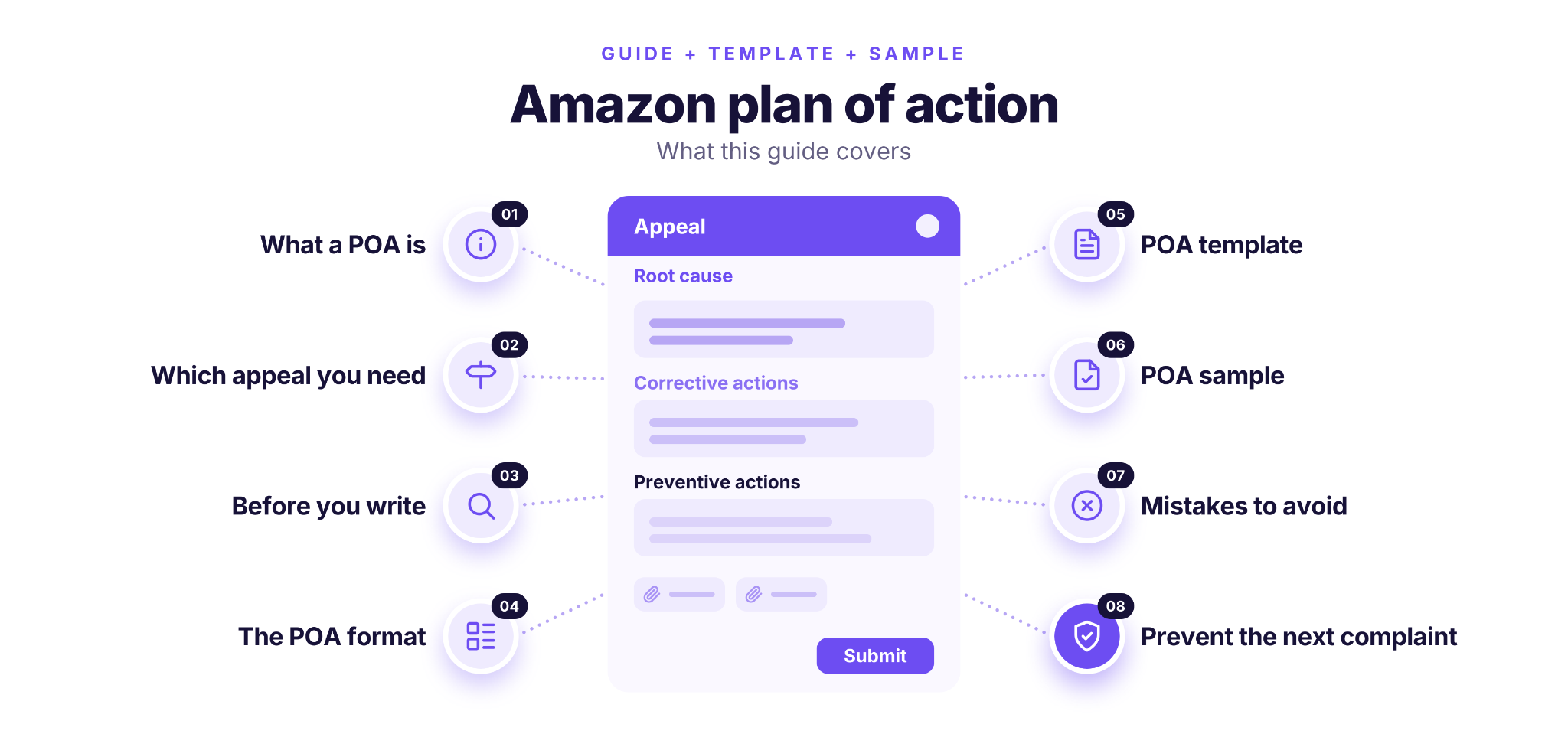
When Amazon deactivates your account or flags a policy violation, an Amazon plan of action (POA) is how you explain what went wrong and why it won’t happen again.
It has three parts: the root cause, the corrective actions you’ve already taken and the preventive actions you’ve put in place, each backed by documents.
For a seller account, you now submit it as answers in the appeal on Account Health, not as a separate letter. Keep it short, factual and specific.
What Is an Amazon Plan of Action?
An Amazon plan of action is a short, factual explanation of a problem on your seller account and how you’ve fixed it. It always answers the following three questions.
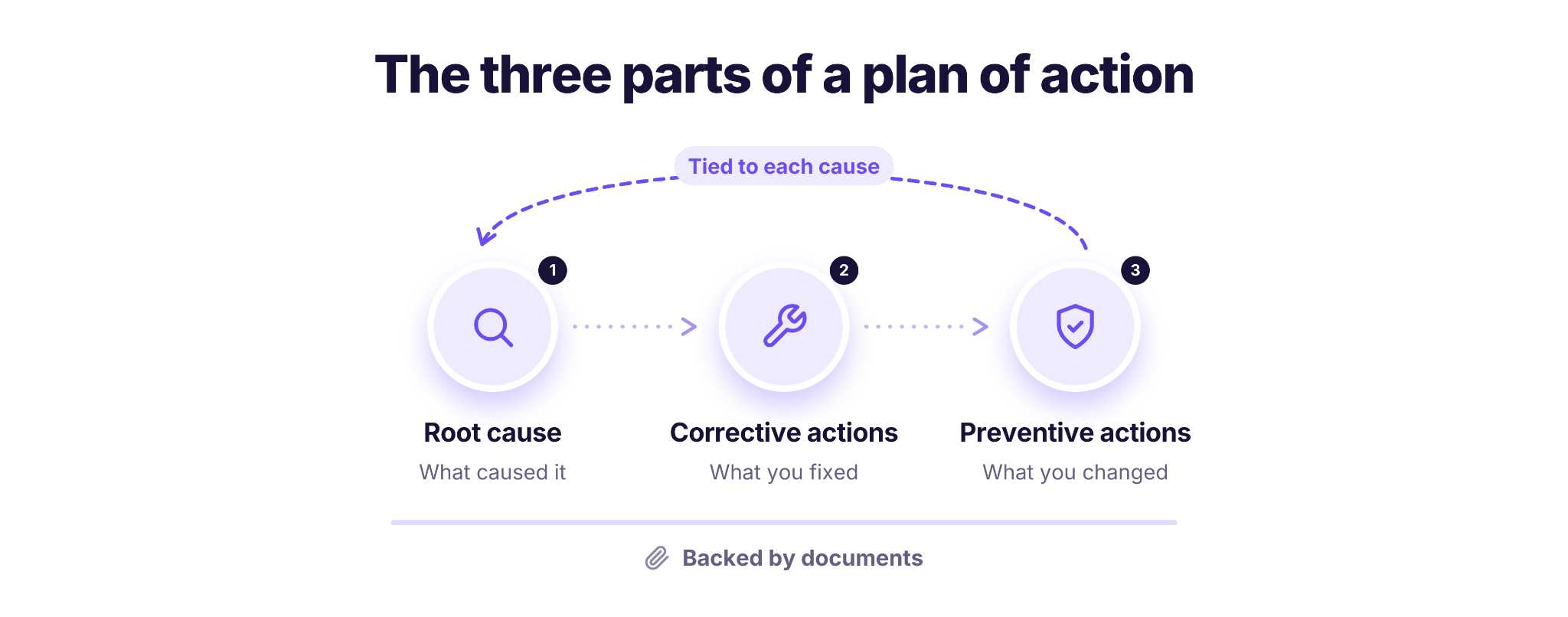
- Root cause
What caused the complaints or violations. Amazon suggests opening with “The root cause of the issue was…”.
- Corrective actions
What you’ve already done to fix the current problem, with dates and proof.
- Preventive actions
What you’ve changed so the same problem doesn’t happen again, with each change tied back to a root cause.
Supporting documents back up every part: supplier invoices, communication records, updated training or quality-check materials.
POA or appeal: the terms today
Sellers still say “POA,” but Amazon’s current Seller Central process calls it an appeal. When your account is deactivated or a violation appears, you open it on the Account Health page and answer an appeal questionnaire in text fields, instead of uploading a letter. A separate, formal plan of action document is used for Amazon Pay merchant accounts.
So today the content of a plan of action matters more than its format. You answer the appeal’s questions with the same three parts.
Which Appeal Do You Need?
The right appeal depends on what Amazon flagged, and the wrong format can get an appeal rejected even when your answers are good. Find your situation in the table below.
| What Amazon Flagged | What You Submit | What to Prepare |
|---|---|---|
| Account deactivation | An appeal via Reactivate your account on Account Health | Answers in POA structure: root cause, corrective actions, preventive actions, plus documents |
| Policy compliance violation | An appeal with one of two options (no plan of action) | Proof of the changes you made, or proof that the violation was an error |
| Product authenticity complaint | A structured appeal with supplier invoices | Invoices dated within the past 365 days and before the notification, covering your sales volume per ASIN, with ASINs highlighted and the supplier’s contact details |
| Trademark or other IP complaint | An appeal for the specific IP violation | Proof that you own the trademark, or a letter of authorization from the rights owner |
| Listing removal | The “Next steps” for that listing, or an appeal | A corrected listing, or documents that show it complies |
The two options for policy compliance violations
Choose “I understand the policy and acknowledge the violation” if you’ve already changed the product condition or description to comply. Choose “I understand the policy and have evidence or documentation…” if you believe the violation was an error. Back up either choice with evidence, such as updated training materials, packaging or quality checks.
If the complaint is about IP
A trademark complaint is usually resolved with proof that you own the brand, or a letter of authorization from the rights owner. You submit it as an appeal for that specific violation on Account Health. This guide focuses on deactivation appeals, where a plan of action structure matters most.
Before You Write: Find The Exact Violation
A strong appeal answers the exact complaint Amazon raised, so start by collecting the facts before you write a word.
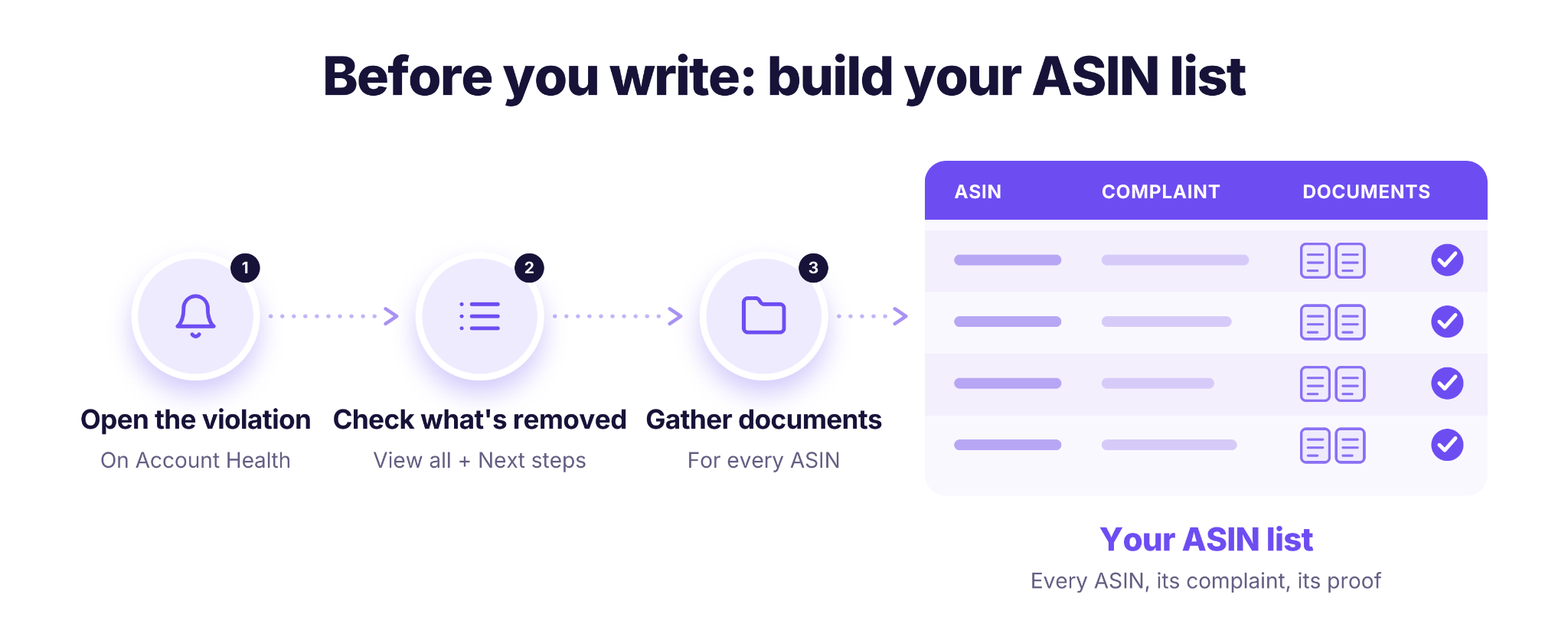
- Open the notification on Account Health
Go to Performance > Account Health and select the violation. Each violation type has its own appeal steps, and the page shows what Amazon expects for yours.
- Check what was removed
Under Product Policy Compliance, click View all to see the history of removed listings and images, their current status, and the Next steps column for each item.
- List every ASIN under review
Write down each ASIN, the complaint or policy named for it, and the dates. You’ll need evidence for every ASIN, not just the main one.
- Match documents to each ASIN
Pull the supplier invoices, supplier contact details, customer messages or carrier records that relate to each item, and check that their dates fit the requirements for your appeal type.
With this list in front of you, the root cause is usually much easier to see, and you won’t miss an item Amazon asked about.
Plan of Action Format for Amazon, Part by Part
The plan of action format for Amazon follows the same three parts in every appeal, plus the evidence that proves them. Amazon wants each part clear, concise and factual. Describe the events that led to the problem, and don’t introduce your business or your products.
Root cause
Name what actually caused the complaints, using Amazon’s suggested opening: “The root cause of the issue was…”. A deactivation can have more than one cause, so cover each one separately. For resellers, typical root causes include an unverifiable supplier, inventory management errors, or missing quality checks before shipping. Add numbers and timeframes, for example how many orders or customers were affected and over which dates, to show you investigated the issue rather than guessed.
Corrective actions
List what you’ve already done to fix the current problem. For each action, give the date and the proof: removed or relisted inventory, refunds to affected customers, corrected listings, or replaced suppliers. “What, when and proof” for every line is the simplest way to stay specific.
Preventive actions
Explain what you’ve changed so the problem doesn’t happen again. Tie each preventive action to a root cause and to the complaints, and explain how it stops a repeat. A new step in your sourcing process, a catalog review or a written checklist for your team all work. A general promise doesn’t.
Supporting evidence
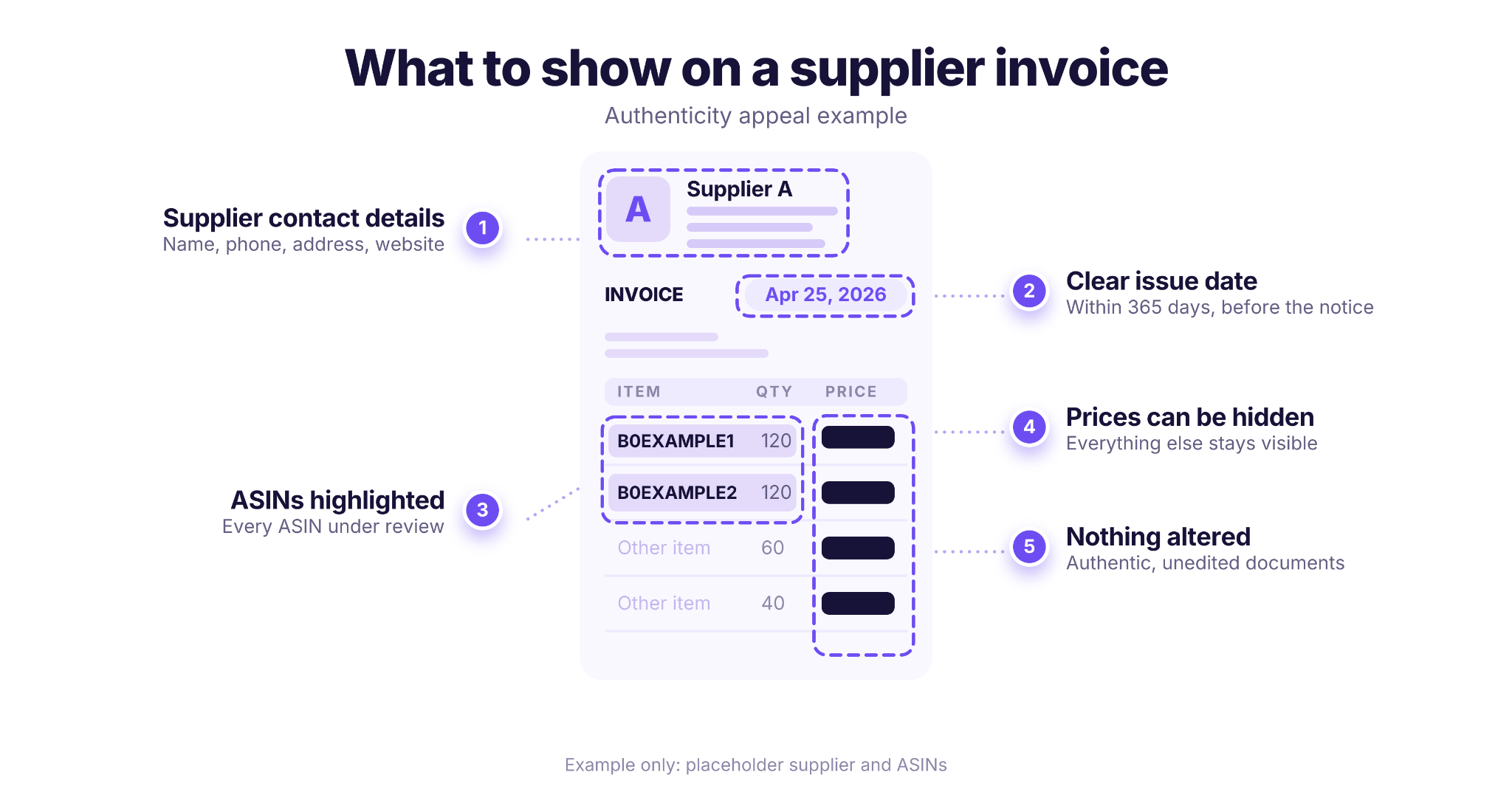
- Trace the supply chain
Your documents should lead back to the original manufacturer, with contact details for your supplier and the manufacturer, even if you bought through a distributor.
- Keep documents authentic
You may hide prices, but everything else must stay visible and unaltered.
- Highlight what matters
Specify the ASINs under review, the supplier’s name and relevant terms.
- Use accepted files
Files under 2 MB, in formats such as PDF, JPG, PNG, Word or Excel.
- Skip inventory and order screenshots
Amazon doesn’t accept images of these pages as evidence.
Amazon Plan of Action Template
Use this Amazon POA template as a worksheet. Fill in the brackets, then paste each block into the matching field of your appeal; the exact questions vary by violation. If Amazon asks for a document instead, the same blocks work as an Amazon plan of action letter: add your seller name, the violation and the date at the top.
POA template
Root cause
The root cause of the issue was [specific cause, e.g. an unverified supplier]. Between [start date] and [end date], [number] orders for ASIN [ASIN] were affected because [what happened].
(Repeat for each root cause.)
Corrective actions
- On [date], we [action taken] for ASIN [ASIN]. Proof: [document or screenshot].
- On [date], we [action taken, e.g. refunded affected customers]. Proof: [document].
Preventive actions
- To address [root cause 1], we [process change], in place since [date]. This prevents a repeat because [how it stops the cause]. Proof: [document].
- To address [root cause 2], we [process change], in place since [date]. This prevents a repeat because [reason]. Proof: [document].
Supporting documents
- [Document type] from [supplier name], dated [date], for ASIN [ASIN], with [ASIN and supplier details] highlighted.
- [Document type] for ASIN [ASIN], dated [date].
How to use the template
- One line, one fact
Keep every sentence about a specific event, action or document.
- Match the numbering
Preventive action 1 answers root cause 1, so Amazon can see the link at a glance.
- Cover every ASIN
Include every ASIN listed in the notification, in both the actions and the documents.
This plan of action Amazon template is a writing aid. It doesn’t guarantee that Amazon will reinstate your account or listings.
Amazon POA Sample
Here’s how the template looks when it’s filled in. This Amazon plan of action sample is for a common reseller case: an account deactivated after several “inauthentic” complaints, all traced to one supplier that couldn’t prove where its stock came from. All names, ASINs, dates and numbers are examples.
POA sample
Root cause
The root cause of the issue was a supplier we did not verify. Between March 3 and April 18, 2026, we bought 240 units of [Brand] products for ASINs B0EXAMPLE1 and B0EXAMPLE2 from Supplier A, a wholesaler that could not provide documents tracing the products to the manufacturer. Seven customers reported these items as not authentic.
A second root cause was our sourcing process: we approved new suppliers based on price and availability, without checking that they were authorized by the brand or keeping supply chain documents for each purchase.
Corrective actions
- On April 20, 2026, we created a removal order for all 96 remaining units from Supplier A. Proof: removal order confirmation.
- On April 21, 2026, we refunded all seven customers who reported the issue. Proof: refund records.
- On April 22, 2026, we stopped all purchases from Supplier A and reviewed our full catalog. We found no other ASINs sourced from this supplier.
- On April 25, 2026, we bought new stock for both ASINs from [Distributor B], an authorized distributor of [Brand]. Proof: attached invoice and the distributor’s authorization from [Brand].
Preventive actions
- To address root cause 1, since April 25, 2026, we only buy from brands or from distributors the brand confirms as authorized. This prevents a repeat because every unit now has a verifiable source. Proof: our updated supplier approval checklist.
- To address root cause 2, we now keep an invoice and the manufacturer’s contact details for every purchase, filed by ASIN. This lets us trace any product to its manufacturer within one day. Proof: sample supply chain file.
- Also to address root cause 2, before the first order from any new brand, we now check its complaint history and our selling eligibility. This flags risky brands before we buy. Proof: brand check record for [Distributor B].
Supporting documents
- Invoice from [Distributor B], dated April 25, 2026, for ASINs B0EXAMPLE1 and B0EXAMPLE2, with the ASINs and supplier details highlighted and prices hidden.
- Letter from [Brand] confirming [Distributor B] as an authorized distributor.
- Updated supplier approval checklist.
Why this Amazon plan of action example works
Each preventive action answers a numbered root cause, every corrective action has a date and proof, and the numbers show how many units and customers were affected. It describes events only, with no business introduction or emotional language.
Prevent The Next Complaint Before You List
The best preventive action is one that stops a risky product before you buy it. The sample’s third preventive action, checking every new brand’s complaint history and your selling eligibility, takes minutes with two Seller Assistant tools: IP-Alert and Bulk Restriction Checker.
Seller Assistant’s IP Alert Extension
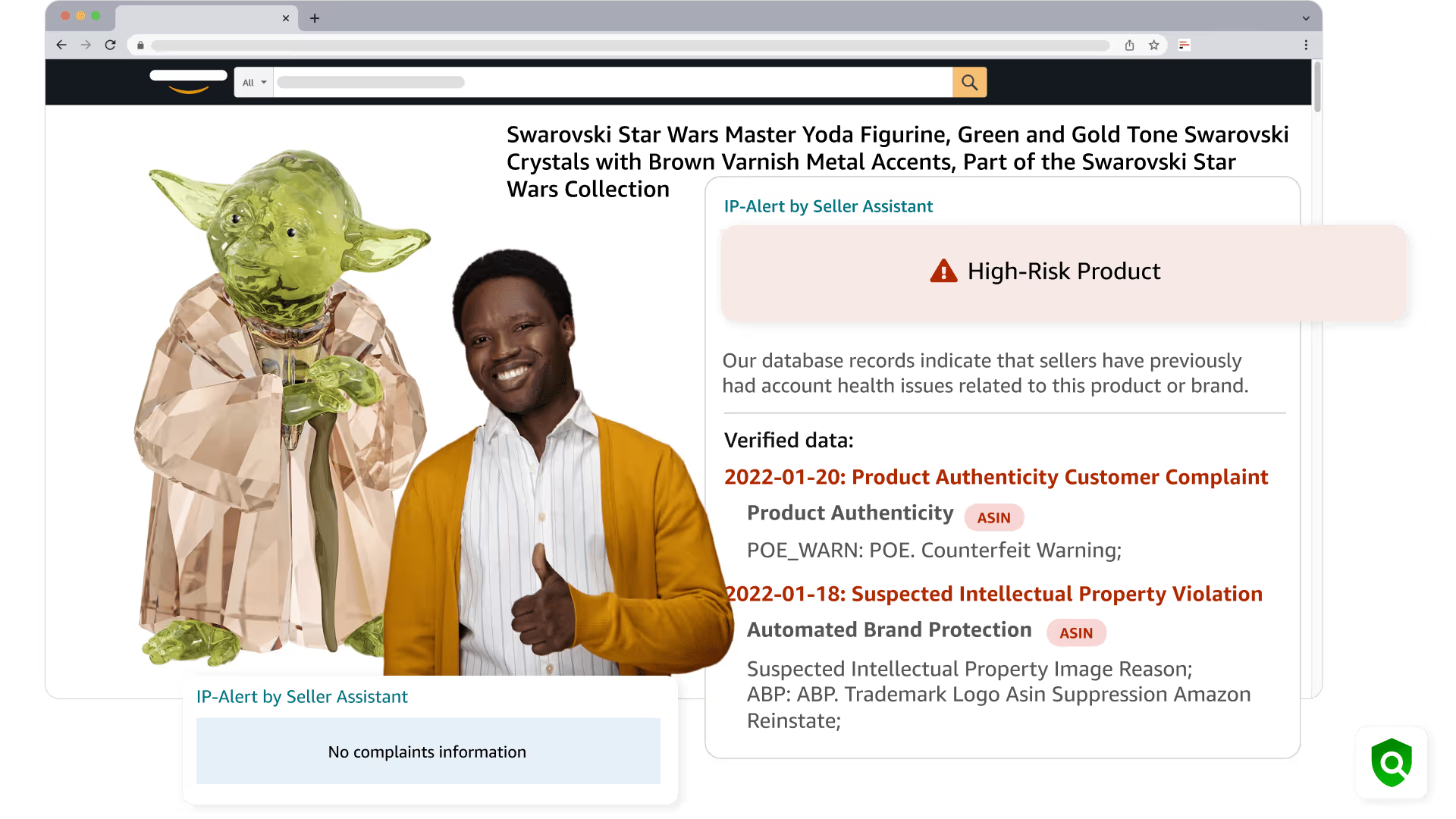
IP-Alert is a Chrome extension that shows known complaints filed by brand owners right on the Amazon product page.
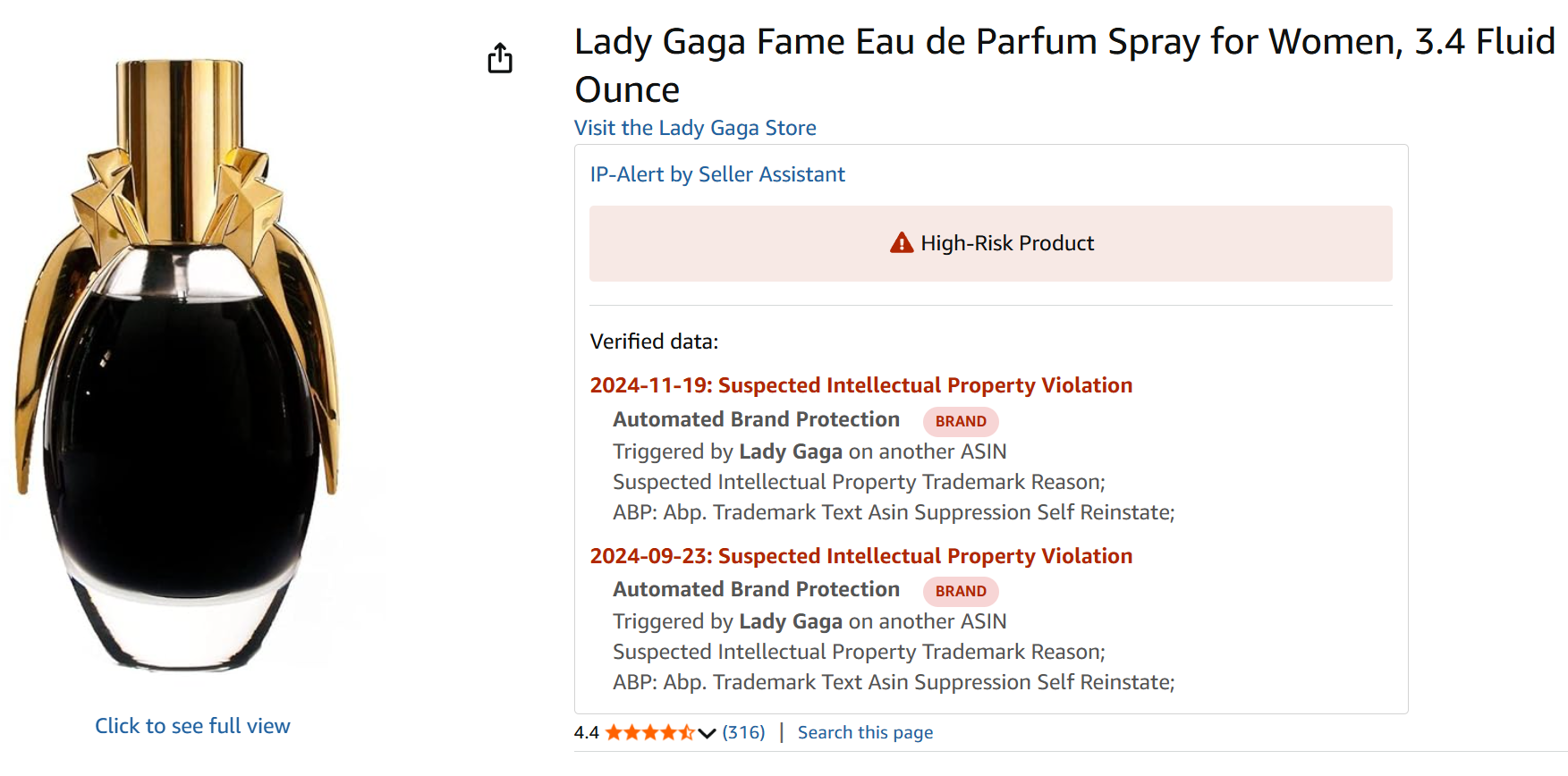
The complaint data comes from Seller Assistant users’ Account Health pages and is collected daily, so you see whether a brand has complained about other sellers before you place your first order.
What you can do with IP Alert
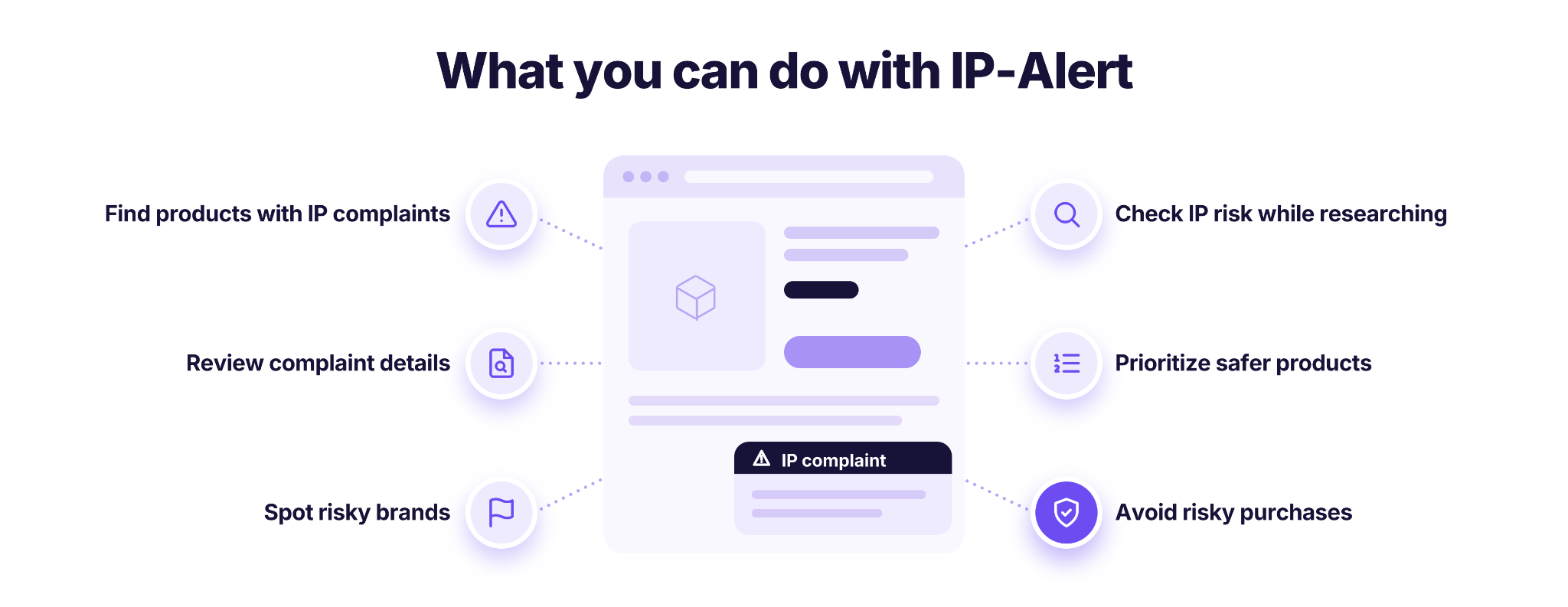
- Identify products with reported IP complaints
See warnings associated with products or brands that have a history of IP-related issues.
- Review complaint information
See the details of each reported complaint.
- Spot risky brands during sourcing
Flag brands to investigate before buying products for resale.
- Check IP risks while researching products
See IP-Alert warnings within supported Seller Assistant product research tools instead of checking every product separately.
- Prioritize safer sourcing candidates
Use IP warnings alongside profitability, demand, competition, and selling eligibility data to decide which products deserve further research.
- Reduce avoidable purchasing risks
Investigate potential IP concerns before committing money to inventory that could expose your account to complaints.
Steps to use IP Alert
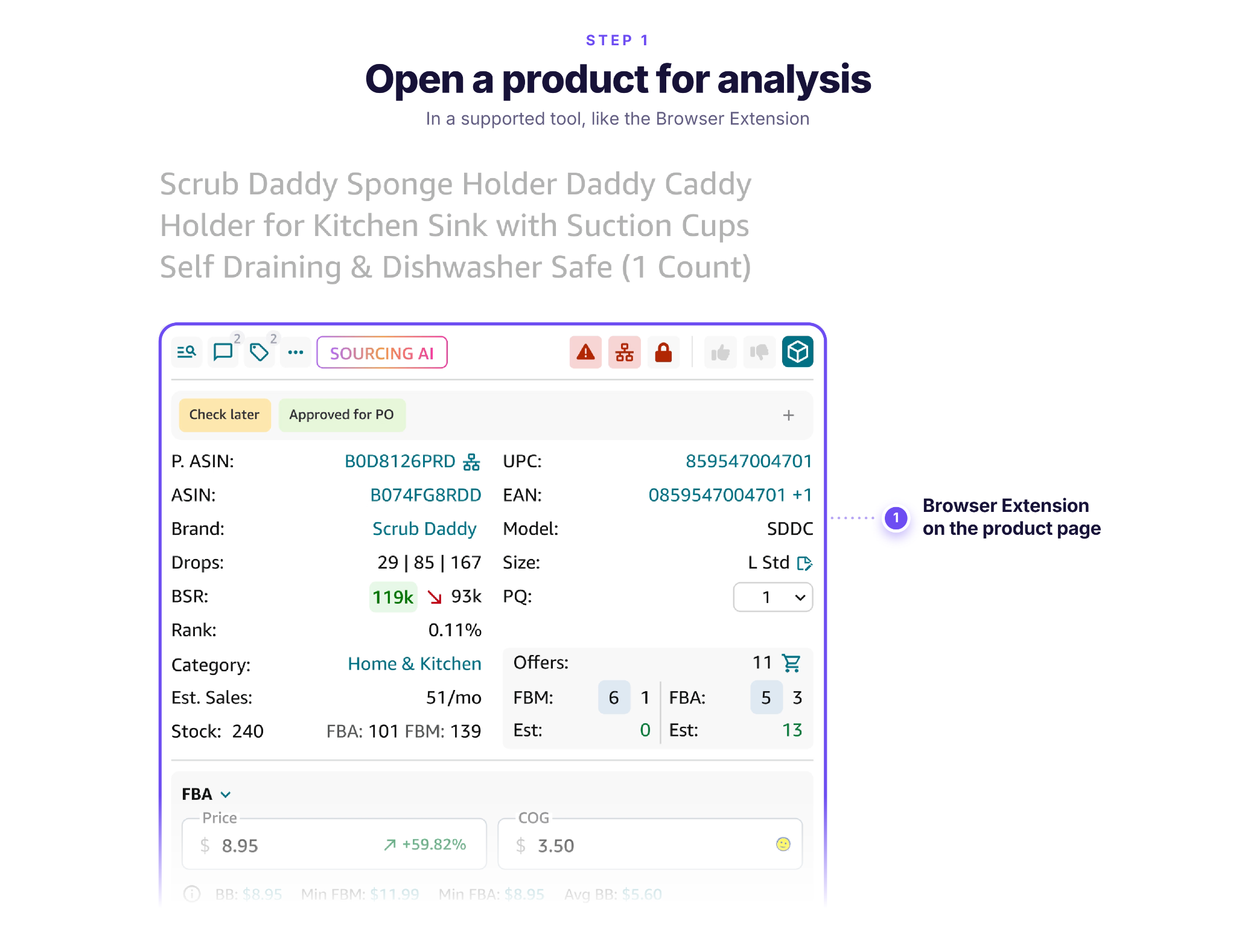
Step 1. Open a product for analysis
Sign in to Seller Assistant and open a product in a supported research tool, such as Seller Assistant Browser Extension on an Amazon product page.
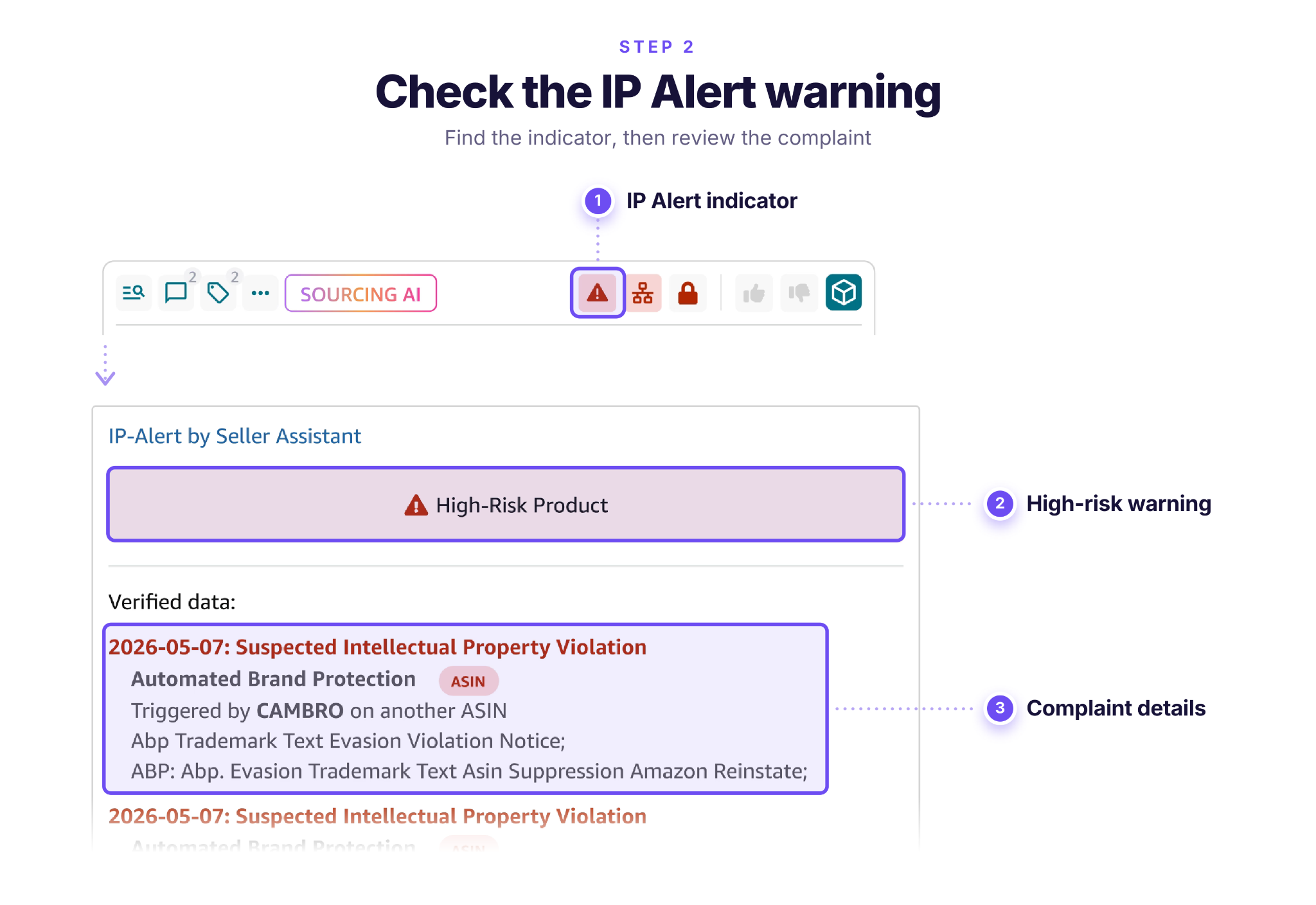
Step 2. Check the IP Alert warning
Look for the IP Alert indicator in the product analysis data. If a warning appears, review the available complaint information to understand the reported issue.
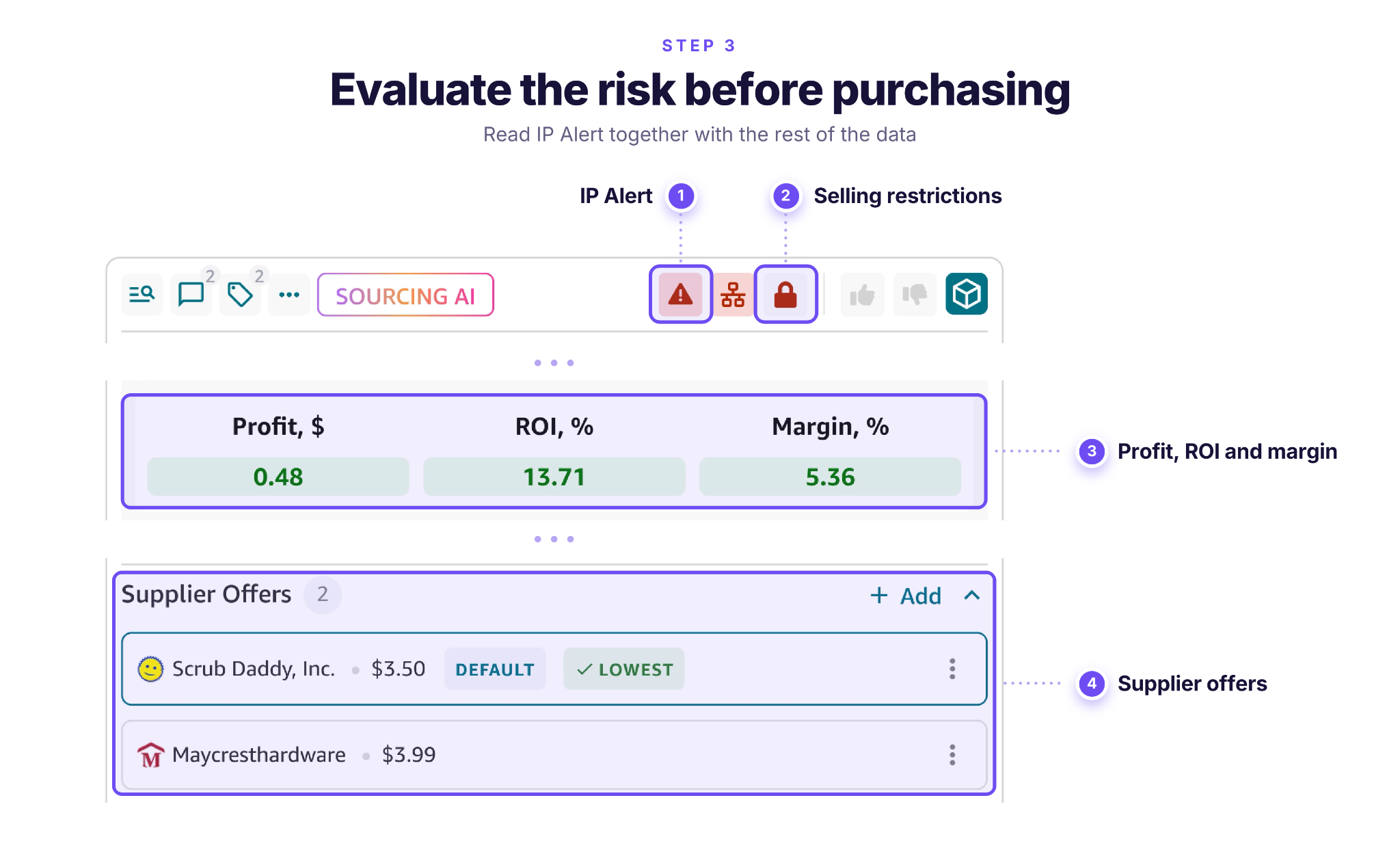
Step 3. Evaluate the risk before purchasing
Consider the IP Alert results alongside selling restrictions, supplier documentation, and product profitability. Investigate flagged products further and confirm that you have appropriate sourcing documentation before placing an order.
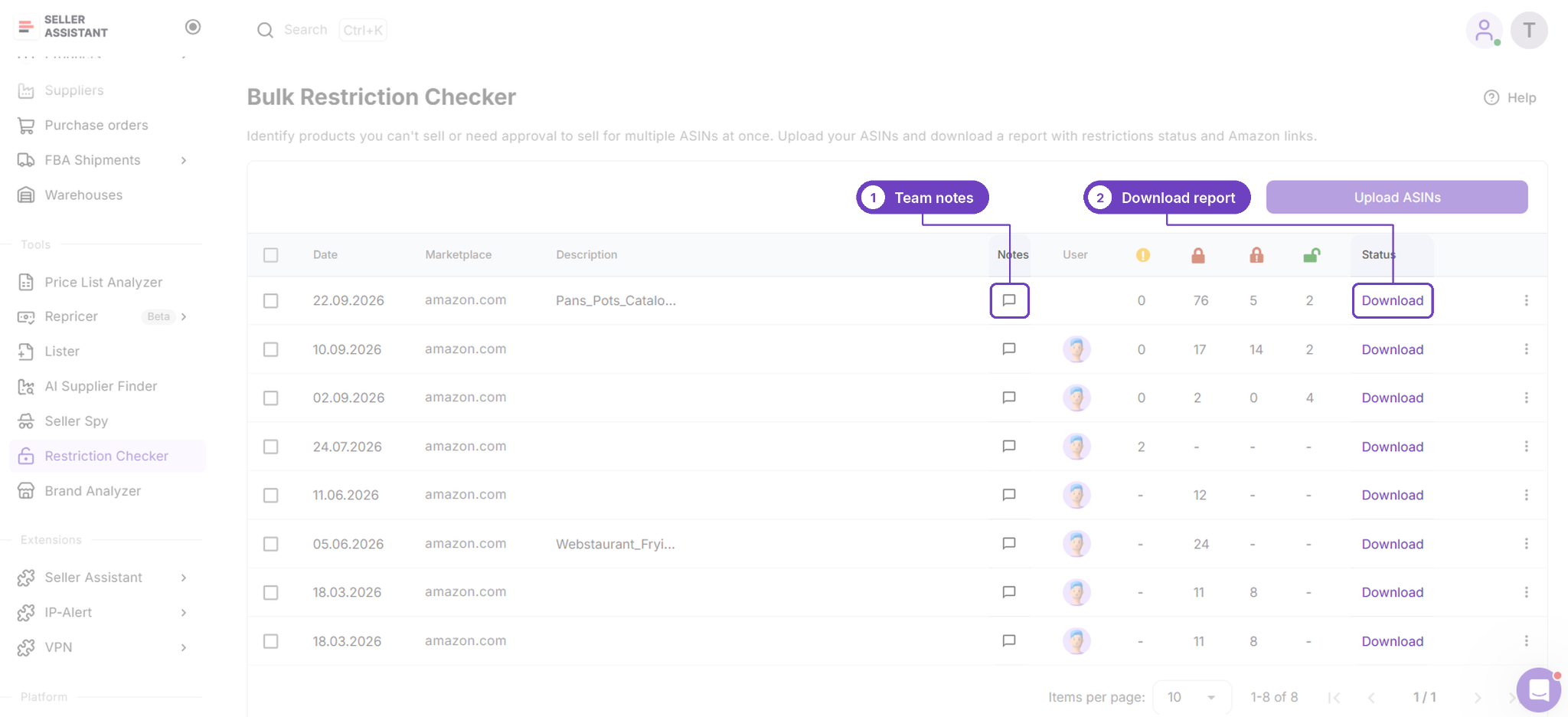
Bulk Restriction Checker
Bulk Restriction Checker checks up to 20,000 ASINs against your own seller account and and selected marketplace, and shows which products you can sell, which need approval and which are blocked.
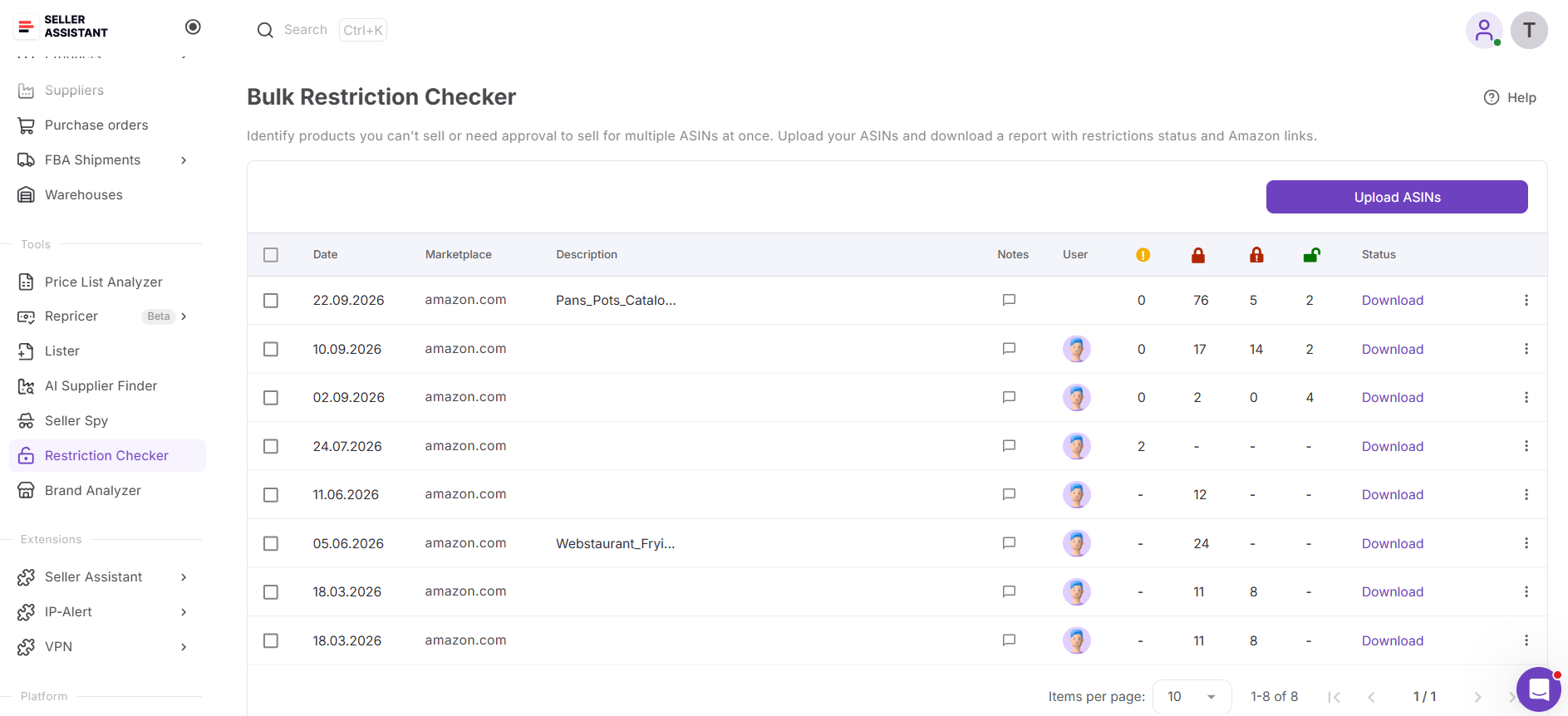
checks whether you’re eligible to sell multiple Amazon products based on your connected seller account and selected marketplace. It identifies ASINs you can sell, products that require approval, and items you’re blocked from selling. For gated products, the tool provides direct links to the corresponding approval applications in Seller Central.
What you can do with Bulk Restriction Checker
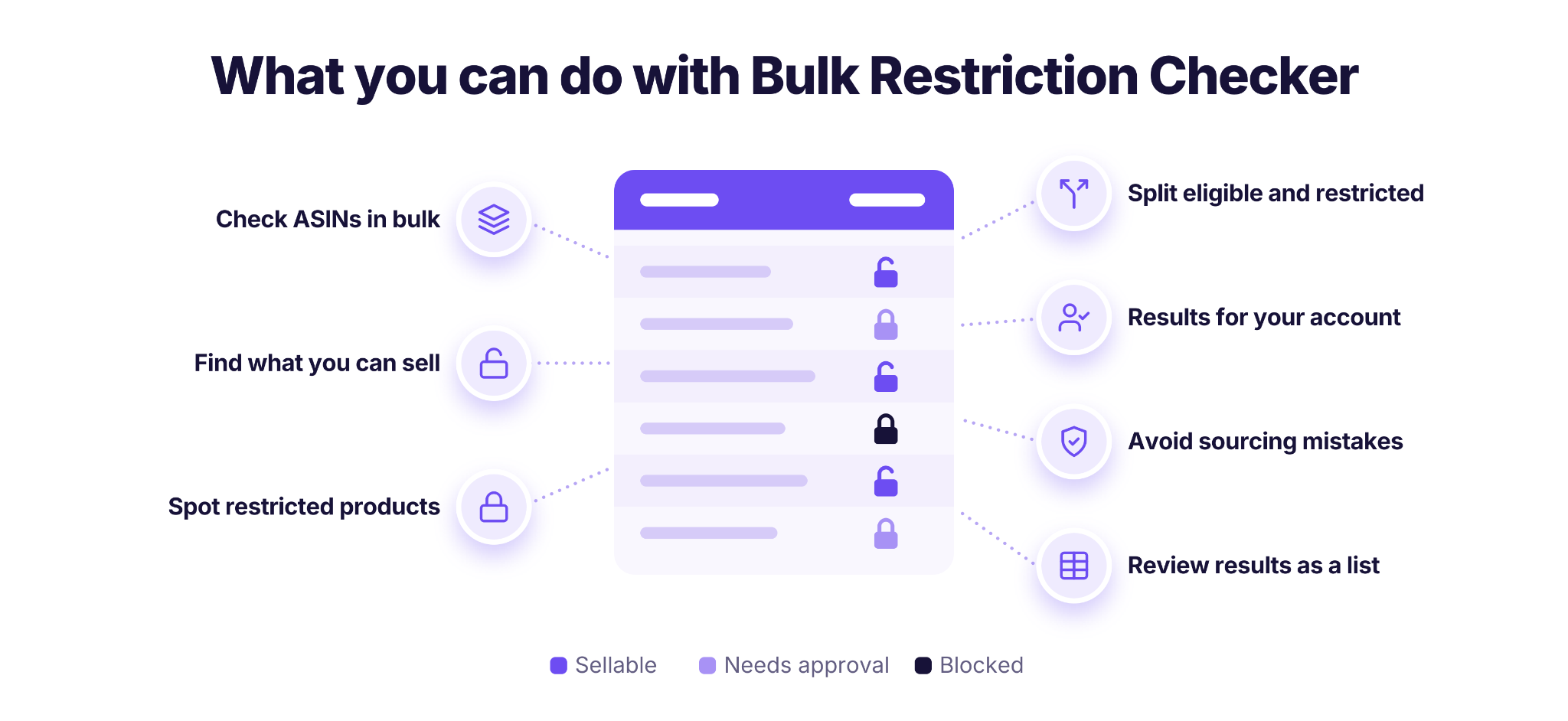
- Check selling eligibility in bulk
Analyze a list of ASINs in one run instead of looking up restrictions for each product separately.
- Find products you’re approved to sell
Identify ASINs you can list through your connected Amazon seller account without requesting additional approval.
- Detect gated products and brands
See which ASINs require authorization before you can offer them for sale.
- Sort products by restriction status
Distinguish eligible, approval-required, and blocked items to focus your sourcing research on products you can actually sell.
- Get account-specific results
Check restrictions for your own seller account and marketplace, since selling eligibility can differ between Amazon sellers.
- Avoid purchasing restricted inventory
Identify approval requirements before ordering products that you may not be permitted to list.
- Access approval applications directly
Follow the links for gated ASINs to open their approval pages in Seller Central.
Steps to use Bulk Restriction Checker
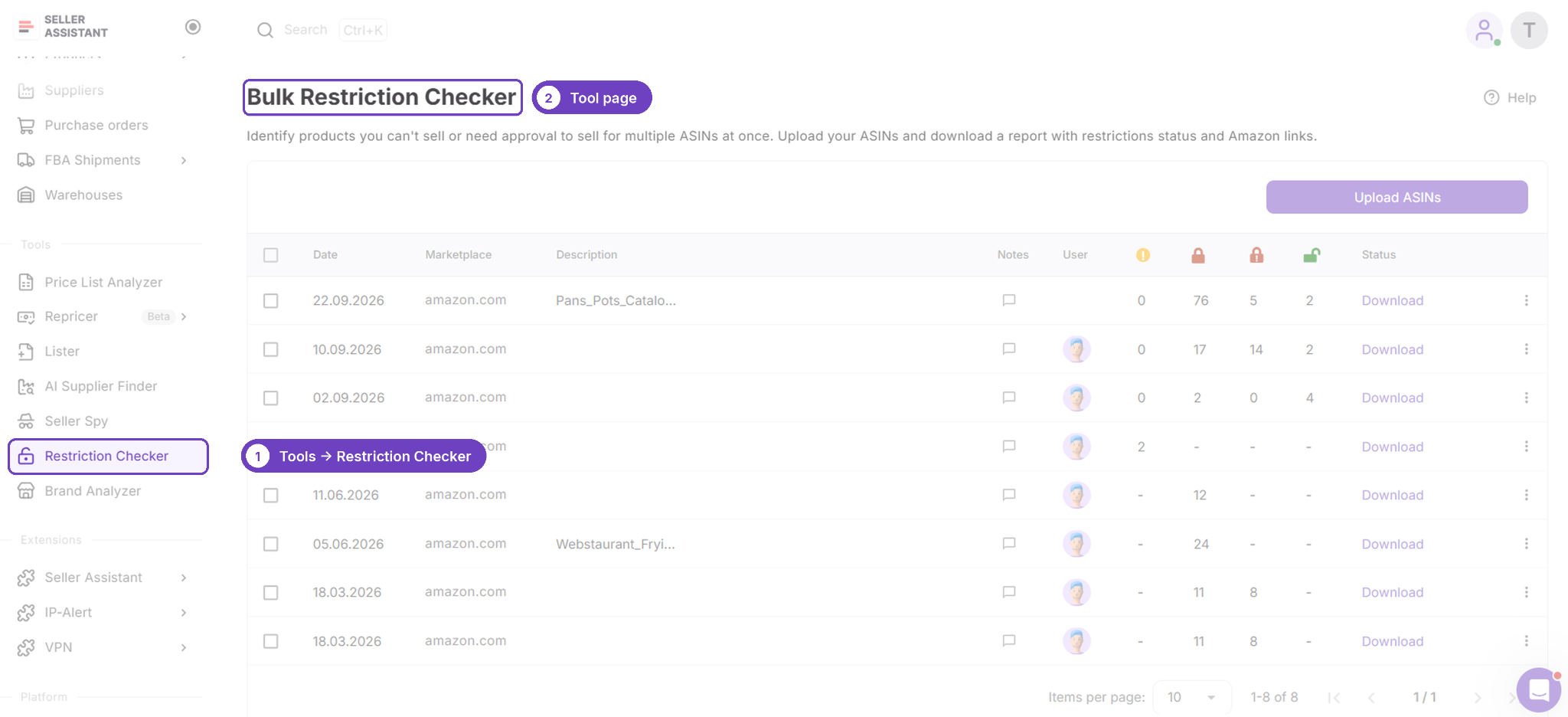
Step 1. Access Bulk Restriction Checker
Log in to Seller Assistant and select Bulk Restriction Checker from the tools menu. Confirm that your Amazon seller account is connected so the tool can retrieve the relevant restriction information.
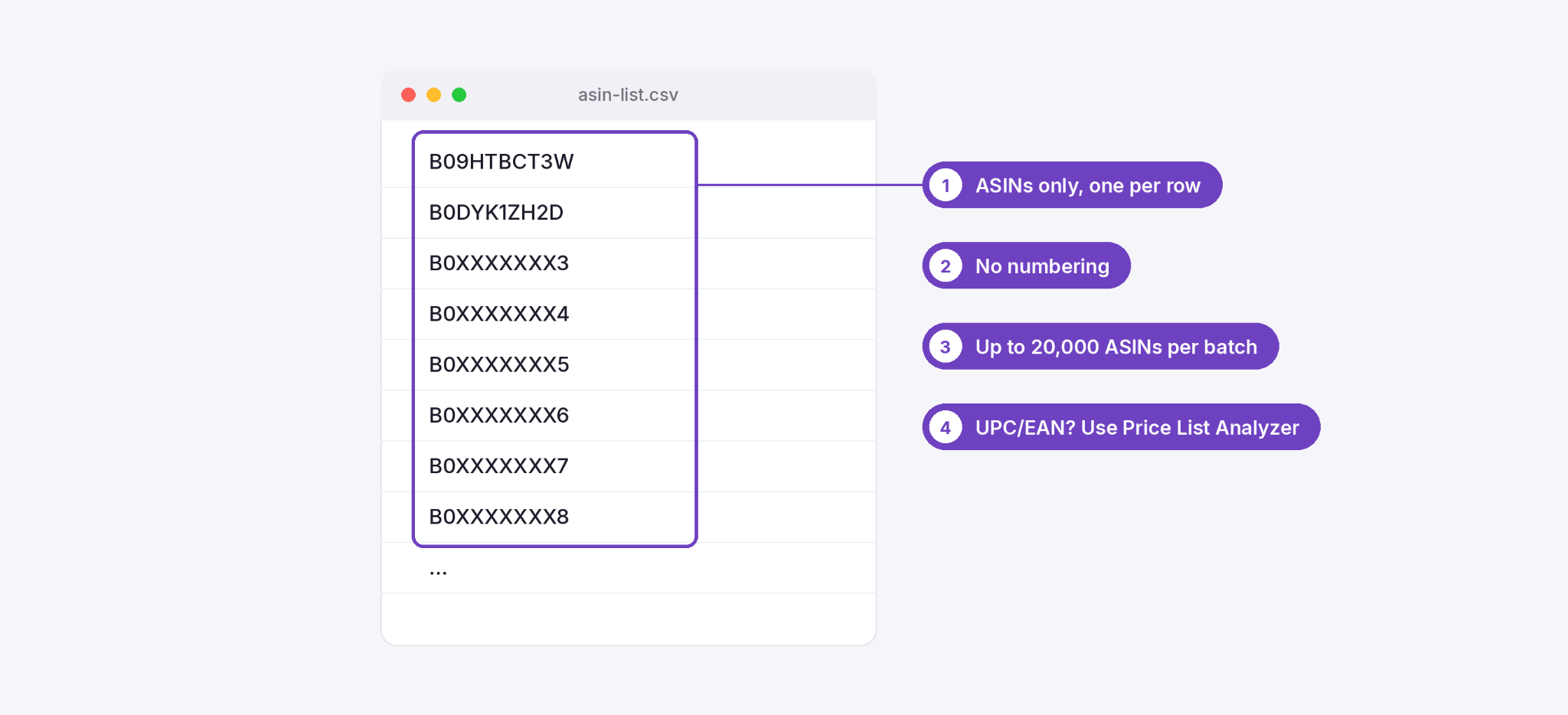
Step 2. Gather the ASINs you want to check
Prepare a list of Amazon ASINs from your supplier price list, wholesale catalog, or product shortlist. Double-check the identifiers to ensure you’re checking the correct listings.
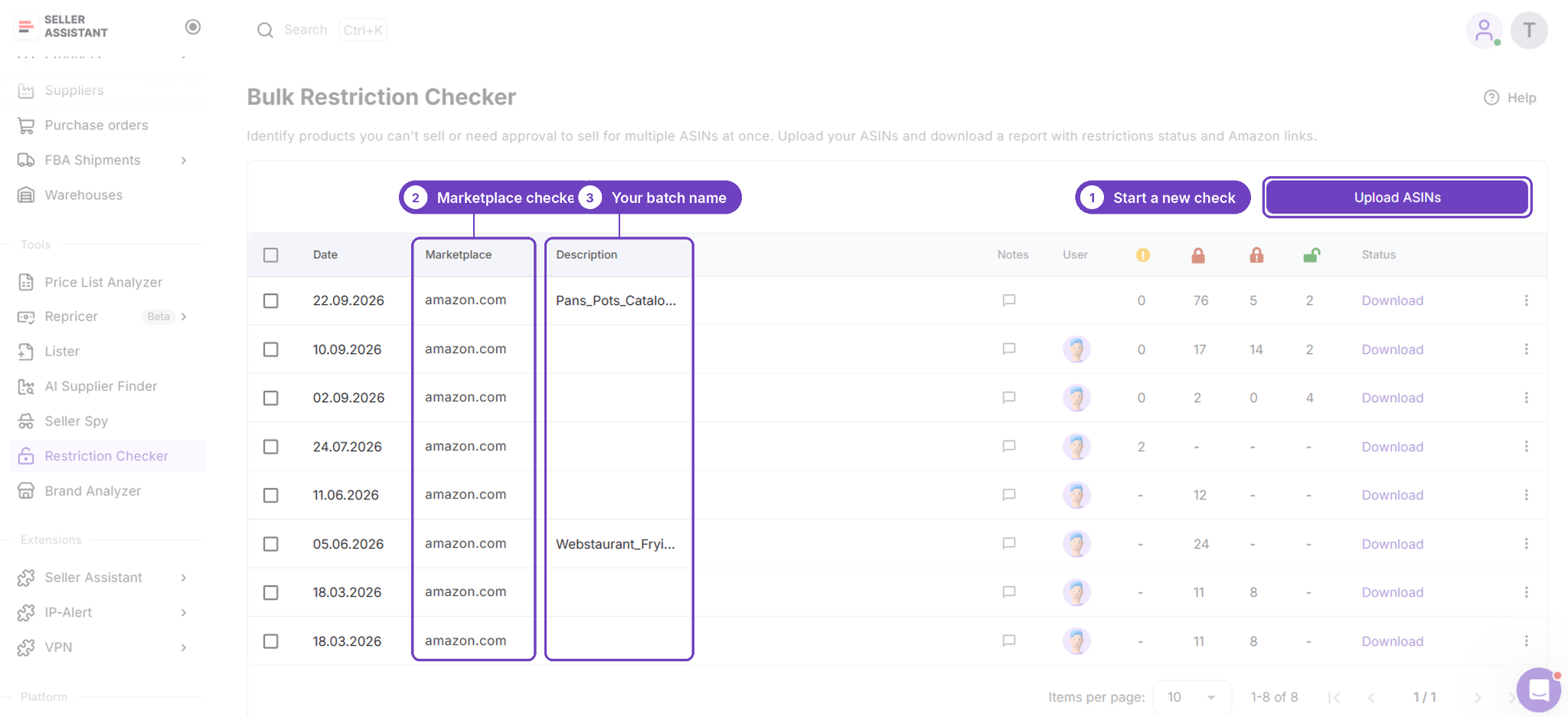
Step 3. Submit your product file
Upload the file containing your ASINs and launch the restriction check. Seller Assistant will evaluate the products in bulk against your connected seller account and selected marketplace.
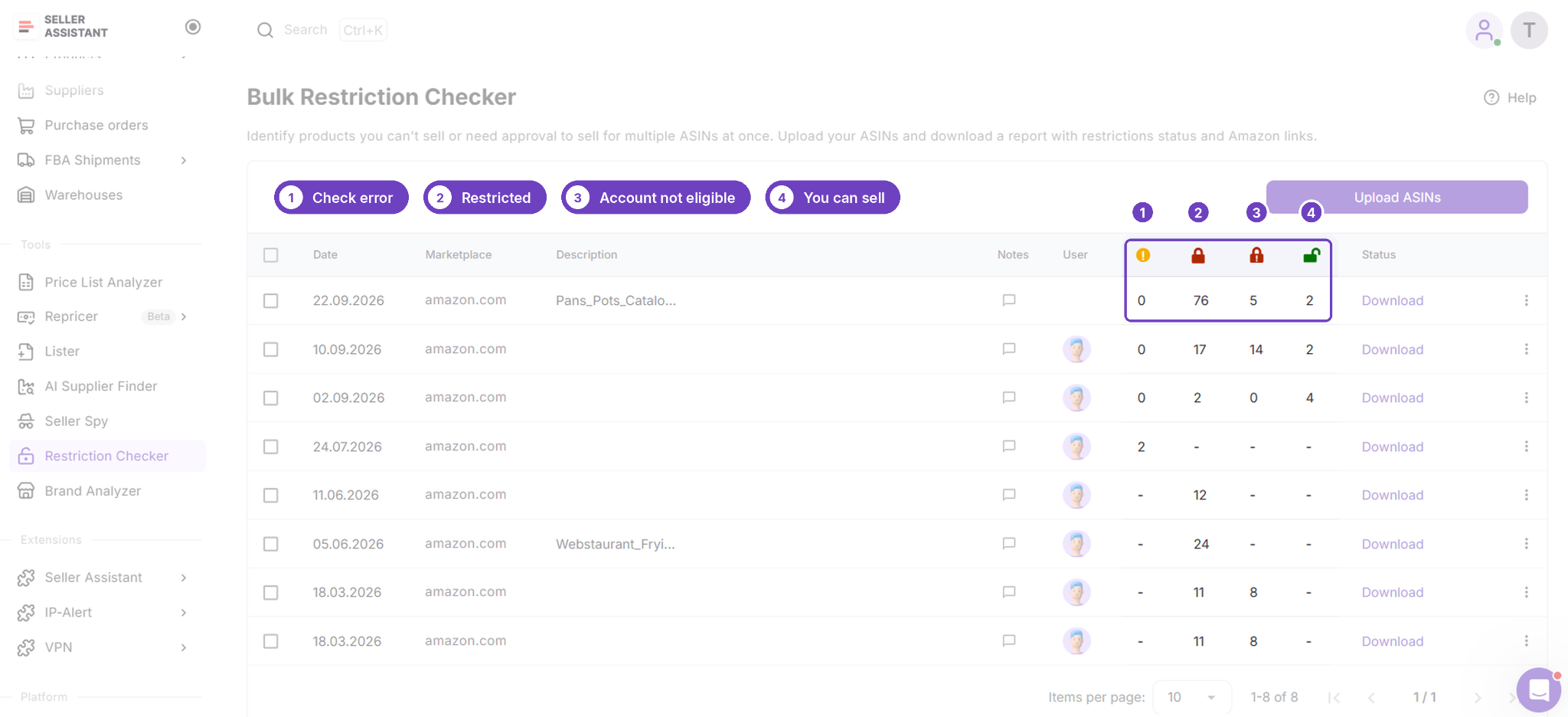
Step 4. Examine the restriction results
Review the status of each ASIN to see which products are eligible for sale, which need approval, and which are blocked. For gated listings, use the provided Seller Central links to review the approval requirements.
Step 5. Update your sourcing shortlist
Keep eligible products for further evaluation and decide whether pursuing approval for gated items is worthwhile. Set aside products you cannot sell, then assess the remaining candidates for profitability, demand, competition, and other sourcing risks before purchasing.
Mistakes That Get an Appeal Rejected
Most weak appeals fail in a few predictable ways, and Amazon’s own guidance names many of them. Check your draft against this list before you submit.
In your preventive actions
- Vague promises
“I’ll be more careful” is not a preventive action. Describe the process you changed instead.
- Relying on Seller Support to pre-screen products
Amazon doesn’t pre-screen products, so contacting support before listing isn’t a compliance mechanism.
- Only marking items out of stock
It doesn’t stop the same violation from happening again.
In your writing
- Emotive language
Stick to facts and events.
- Introducing your business, products or customers
Focus on what led to the issue.
- References to other support cases
Leave them out of the submission.
- Resubmitting an old plan of action
Amazon asks for explanations of specific, recent issues, so write a new one for the current problem.
In your evidence
- Missing ASINs
Provide evidence for every ASIN under review, not only the main one.
- Inventory or order page screenshots
Amazon doesn’t accept them as evidence.
- Edited documents
Hide prices if you like, but never change dates, quantities or names.
Two more habits come from our own experience, not from Amazon. Don’t blame Amazon or the buyer, because it shifts the focus from your root cause. And keep each answer short, since a clear, specific paragraph reads better than a long one.
FAQ
How soon should I submit an appeal?
Submit it as soon as you can. Amazon’s guidance for authenticity complaints is to appeal quickly, and a policy violation notice asks you to address the behavior right away. Start collecting invoices and ASINs the day the notice arrives, so that writing is the only step left.
What happens after I submit my appeal?
Watch the email address on your seller account for Amazon’s decision. If Amazon needs more, open View Appeal on Account Health to send the extra documents; Amazon’s help page for deactivation and listing removal appeals says to expect a reply within two days.
What if I can’t find the root cause?
Compare each complaint with the supplier, shipment and listing behind it. If several complaints trace back to one supplier, one process or one batch, that’s your root cause, and since a deactivation can come from a combination of issues, cover every cause you find.
How do I get my documents under 2 MB?
Compress the PDF, save scans at a lower resolution, or split a long invoice into separate files. Keep the ASINs, supplier details and dates readable, and don’t crop or edit anything to save space, because only prices may be hidden.
Can I reuse the invoices from my brand approval application?
You can, if the invoice meets the appeal’s rules too. Brand approval invoices must be dated within 180 days, while authenticity appeal invoices must be dated within 365 days and before the notification. An invoice that works for one may not meet the other, so compare it with the details Amazon lists for your appeal type, such as the supplier’s contact information.
Final Thoughts
An Amazon plan of action explains three things: what caused the problem, what you’ve already fixed and what you’ve changed so it won’t happen again, each backed by documents. For a seller account, you now give those answers in the appeal on Account Health, so the structure matters more than the format.
- Match the appeal to the problem. Deactivations, policy violations and authenticity complaints each have their own appeal.
- Collect everything first. List every ASIN under review and match documents to each one.
- Name every root cause and tie each preventive action back to it.
- Give a date and proof for every corrective action.
- Keep it factual and short. Leave out emotive language, business introductions and old plans of action.
No plan of action guarantees reinstatement, but a specific, documented one gives Amazon what it asks for. The better outcome is not needing one at all. IP-Alert shows known brand complaints on Amazon product pages before you buy, and Bulk Restriction Checker shows what you’re allowed to sell. Start a free trial to check your next sourcing list, and see how to read your Account Health Rating and avoid account suspension.