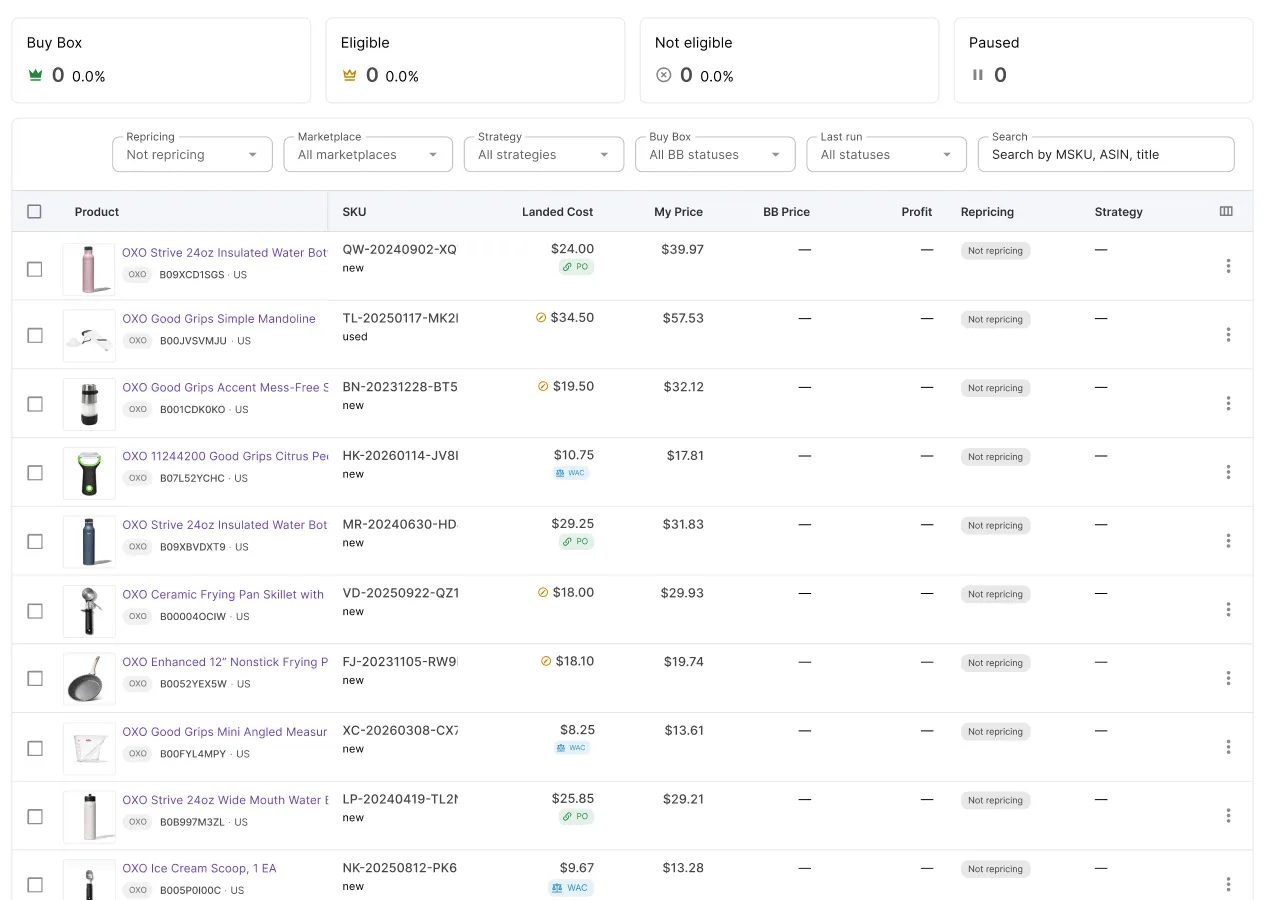
Your repricer can’t protect profit on a SKU that has no cost, and an AI assistant connected through Seller Assistant’s MCP Server can assign those costs for you. With Claude or ChatGPT, you can list the SKUs missing a cost and then update them one by one or in bulk from a supplier spreadsheet. You skip opening each SKU and reshaping a file for import.
This matters because Seller Assistant Repricer builds every floor from the SKU’s own costs: Target profit $, Minimum ROI %, and Minimum margin % all depend on them, and a stale cost quietly moves the floor.
This post shows how to assign costs for your repricer by asking instead of clicking.
Why a Repricer Can’t Protect Profit Without Knowing Your Costs
A repricer reacts to competitor prices and the Buy Box, but the lowest price you can afford depends on each SKU’s cost and Amazon fees. Without the cost, the repricer can’t calculate the floor that protects your profit target.
With hundreds or thousands of SKUs, costs drift. They differ between SKUs, change with each new purchase, or never get entered.
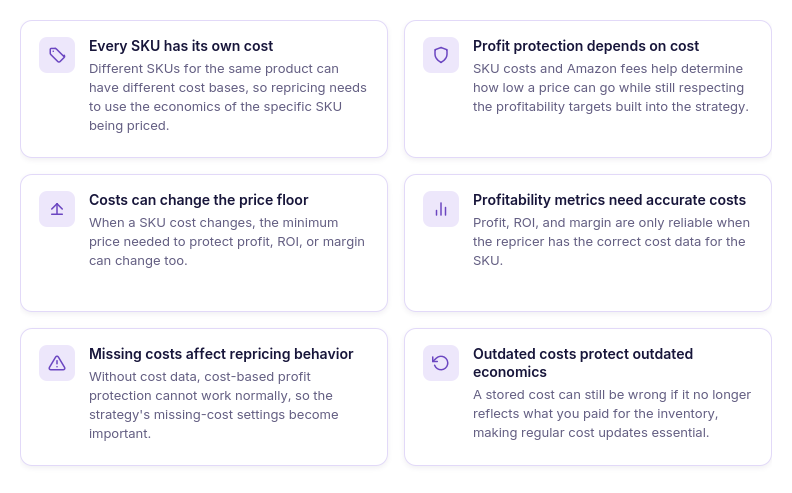
Every SKU has its own cost
Cost is stored per SKU, so two SKUs for the same product can have different costs. Repricer prices each one from its own number.
Profit protection depends on cost
Repricer uses the SKU’s cost and Amazon fees to work out how low the price can go before it breaks your profit, ROI, or margin requirement.
A cost change moves the floor
When the cost goes up or down, the price that keeps your profit, ROI, or margin target changes with it. An outdated cost leaves the floor where the old cost put it.
Profitability metrics need cost data
The profit, ROI, and margin shown for a repriced product are correct only when the SKU’s cost is correct. A missing or wrong cost makes those numbers misleading.
Missing costs change repricing behavior
Without a cost, Repricer can’t apply cost-based floors. What happens to the SKU then depends on the strategy setting for products without cost data.
Old costs protect the wrong economics
A SKU with an outdated cost still has a cost, so it doesn’t appear as missing. Update the cost each time you restock at a new price.
Why General AI Can’t Fix Missing Repricer Costs
ChatGPT or Claude can calculate profit, ROI, or margin from a cost and a selling price you type in. That cost stays in the conversation, and your repricer keeps pricing the SKU with the data already stored. To manage costs, the assistant needs tool access to see your repriced products, read their stored costs, and write new ones to the real SKUs.
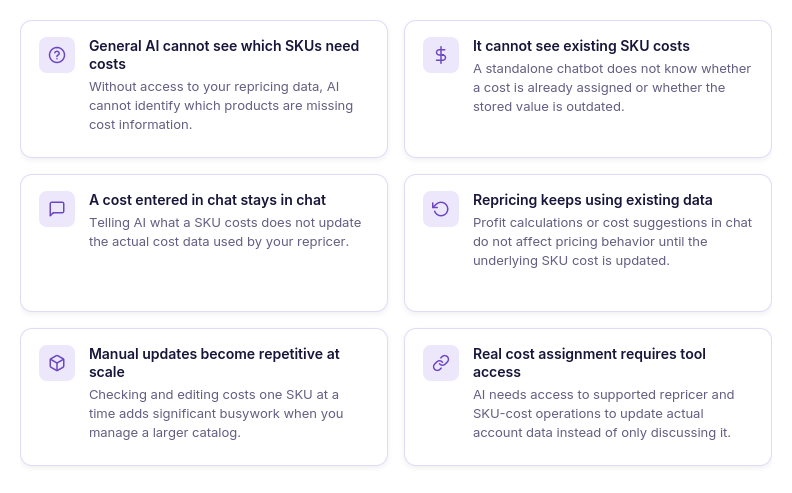
It can’t see which SKUs need costs
Without access to your repricer data, the AI doesn’t know which products have no cost. You have to find them yourself first.
It can’t see the costs already assigned
A general chat doesn’t know whether a SKU has a cost or what that cost is, so it can’t spot missing or outdated values.
A cost entered in chat stays in chat
Telling the AI that a SKU costs $20 doesn’t change the SKU. Repricer keeps using the cost stored in Seller Assistant.
Repricing runs on the stored data
A better cost or target worked out in chat changes nothing until it’s entered where Repricer reads it.
Manual updates repeat for every SKU
Opening SKUs one by one and typing costs into separate fields works for a few listings. Across hundreds of SKUs, the same steps repeat for each one.
Cost assignment needs tool access
When the assistant is connected to Repricer and SKU-cost operations, it works with your account data instead of numbers you paste in.
How Seller Assistant Makes AI-Assisted Repricer Cost Management Possible
Assigning costs with AI takes two pieces: a repricer that prices from SKU-level costs, and an AI connection that can read and write those costs. Seller Assistant Repricer is the first piece. Seller Assistant MCP Server is the second, giving ChatGPT or Claude access to Repricer and SKU-cost operations through plain-language requests. Together they cover the path from finding SKUs with no cost to assigning and checking the new costs in chat.
How Seller Assistant Repricer uses cost data for profitable repricing
Seller Assistant Repricer is an automated Amazon repricing tool that adjusts prices based on marketplace conditions, competition, and the rules you define. Costs are assigned per SKU and feed its profitability calculations.
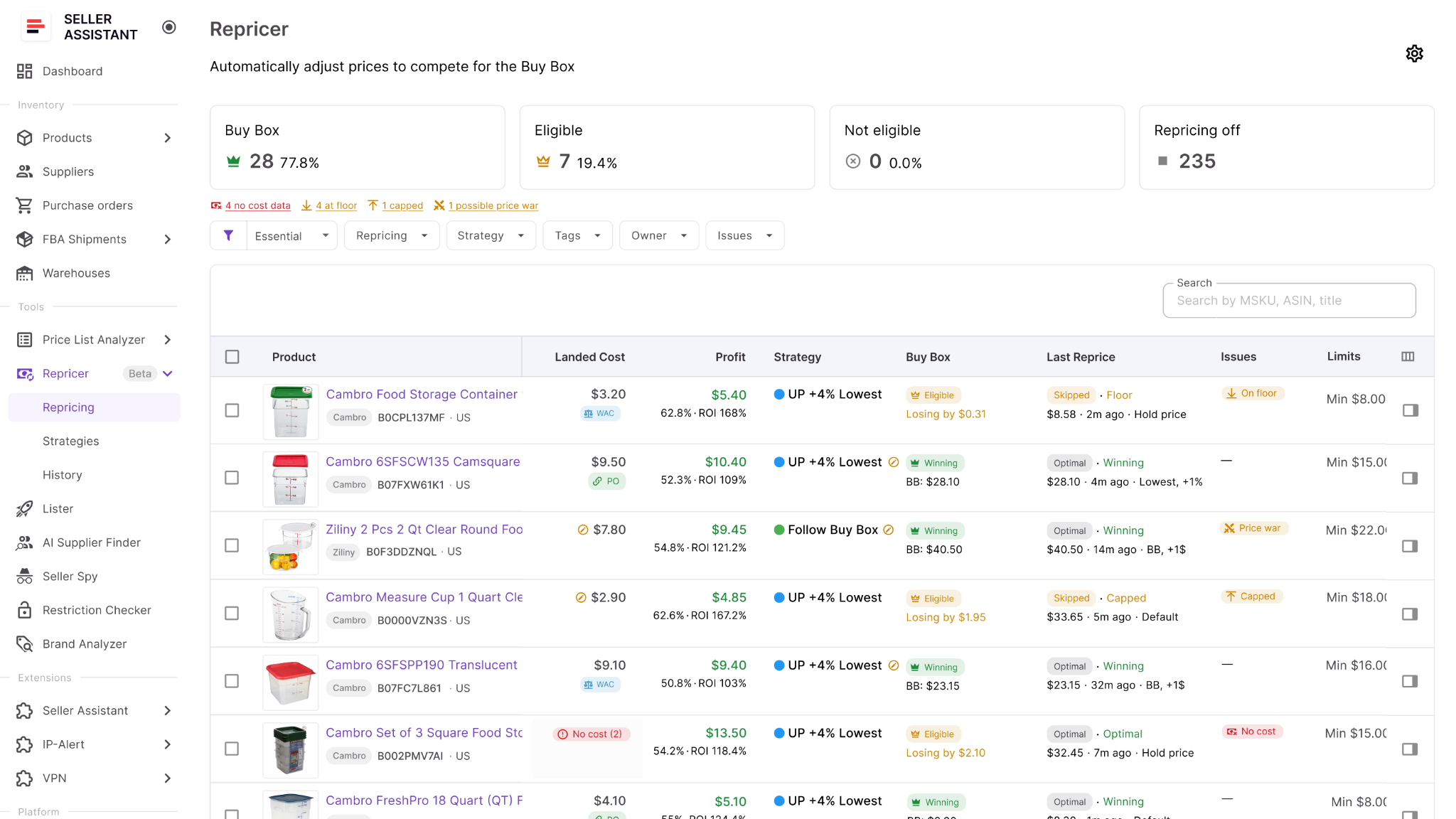
With the correct cost in place, you see landed cost, profit, ROI, and margin for each SKU, and you can set minimum ROI, minimum margin, or target profit to limit how far automated pricing can move.
What you can do with Seller Assistant Repricer
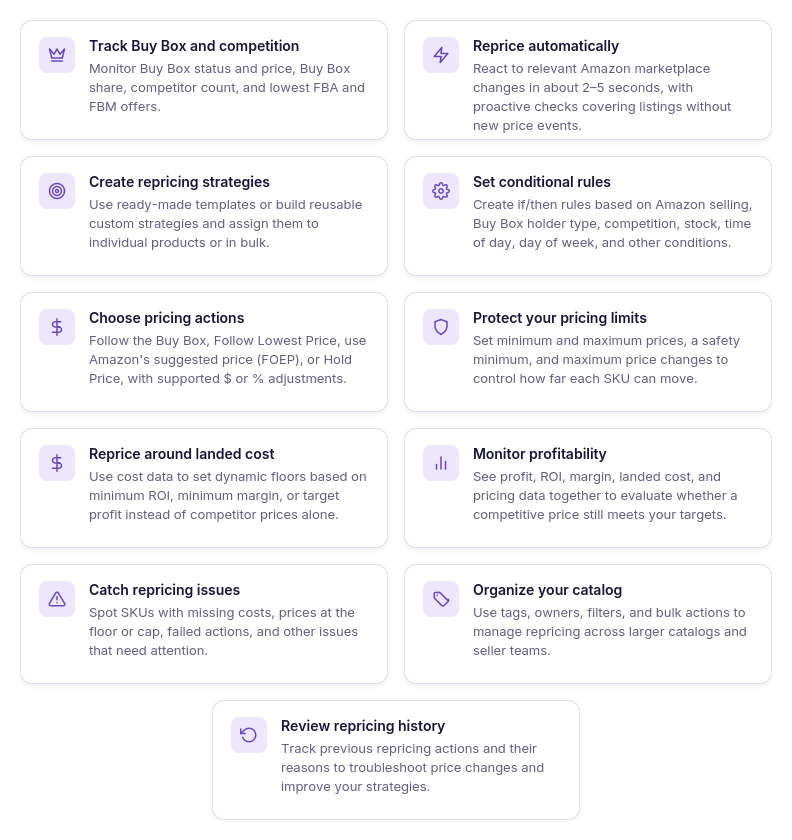
- Monitor the market around each SKU
See your price next to Buy Box data, competitor offers, stock, and your pricing settings.
- Apply different strategies across your catalog
Assign reusable repricing strategies to single products or groups of SKUs, so each part of your catalog follows rules that fit its products and sourcing model.
- Respond automatically to marketplace changes
Repricer tracks Amazon marketplace changes and reevaluates each product against its assigned strategy, so prices move without manual edits.
- Build conditional pricing strategies
Create ordered if/then rules with conditions such as Amazon presence, Buy Box holder type, competitor position, stock thresholds, time of day, and day of week. Combine conditions with AND/OR logic.
- Choose how your offers compete
Set a strategy to Follow Buy Box, Follow Lowest Price, follow Amazon’s suggested price (FOEP), or Hold Price, then add a fixed-dollar or percentage adjustment to position your offer against that target.
- Protect profit while repricing
Set minimum ROI, minimum margin, target profit, or manual minimum and maximum prices. Repricer keeps prices inside these limits.
- Use landed cost in pricing decisions
Repricer calculates landed cost, profit, ROI, and margin from SKU costs and uses them for profitability-based price limits.
- Find products with repricing issues
Filter Issues by No cost, On floor, Capped, Failed, or possible Price war to narrow a large catalog to the SKUs that need a look.
- Review repricing history
Repricing History shows past price changes, so you can check whether an unexpected result came from strategy rules, costs, price limits, or marketplace changes.
How SKU costs connect Repricer with AI-assisted cost management
Accurate SKU costs connect marketplace repricing with profitability protection. Seller Assistant Repricer uses SKU costs together with Amazon fees to calculate profitability and support cost-based pricing boundaries, so missing or outdated costs can prevent those calculations from reflecting the SKU’s actual economics.
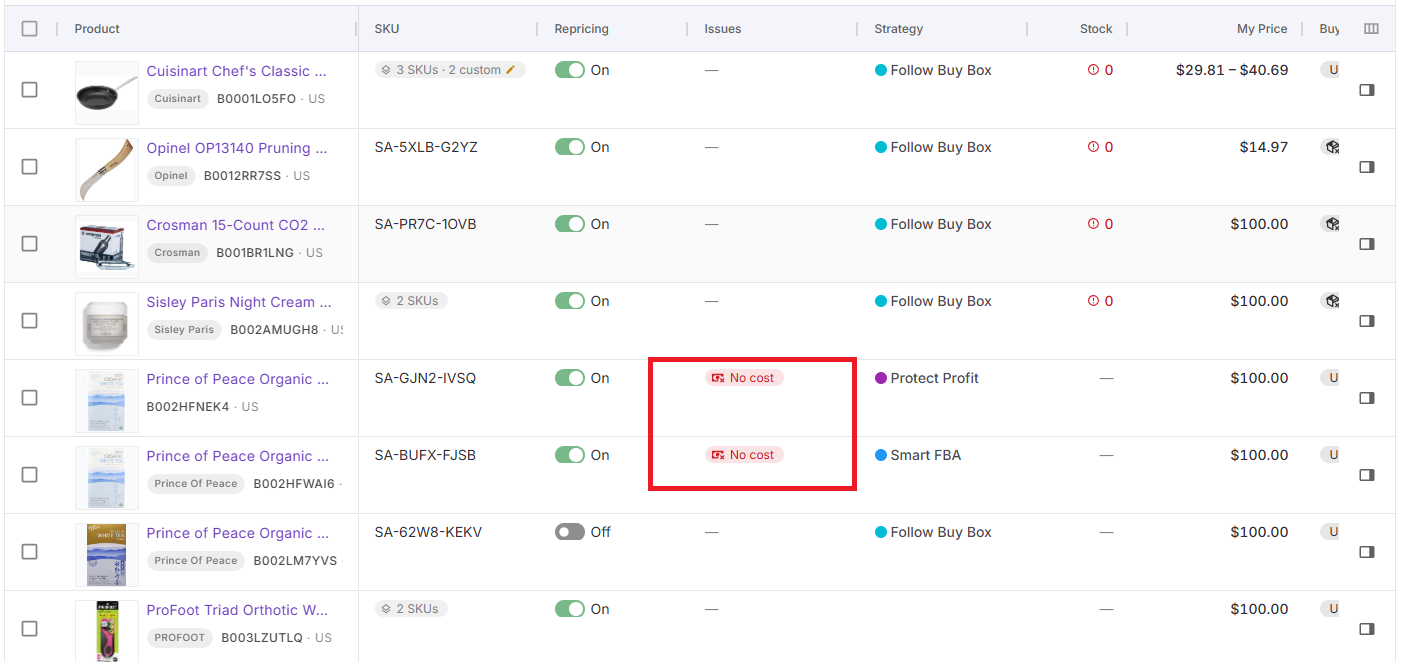
Seller Assistant MCP adds the conversational layer for managing this data. Through supported MCP operations, an AI assistant such as ChatGPT or Claude can help find repriced products with missing costs, retrieve existing SKU costs, and set new cost values provided by the seller, with confirmation required before supported write actions run.
How Seller Assistant MCP helps manage Repricer costs with AI
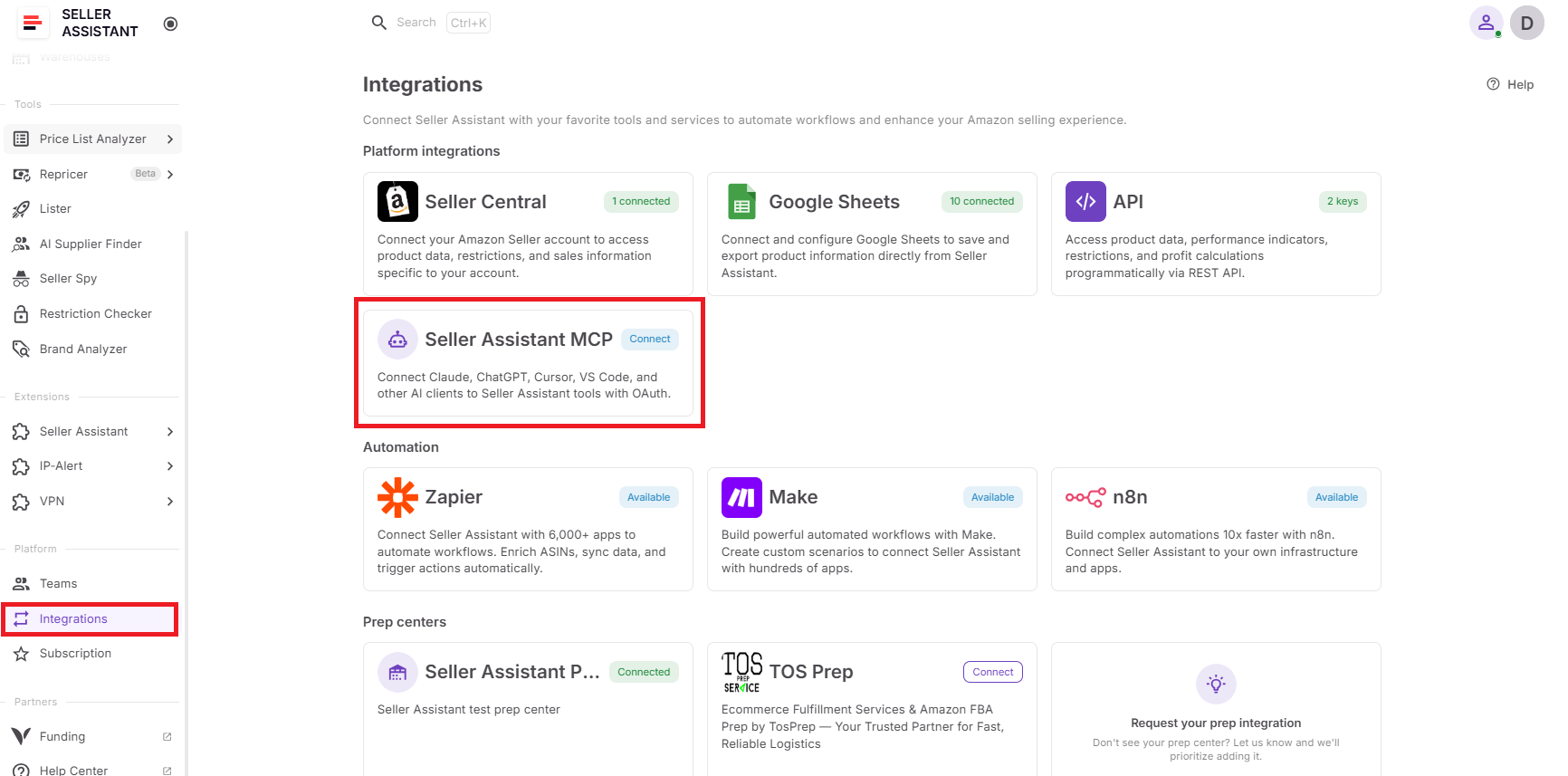
Seller Assistant MCP Server connects ChatGPT and Claude to Seller Assistant tools and your account data. For costs, the assistant works with your real SKUs and repriced products, so you don’t copy product data into chat and then repeat the change in the Repricer dashboard.
Repricer still does the pricing. You supply or verify each cost and confirm each write, and the AI finds the SKUs that need attention and makes the edits.
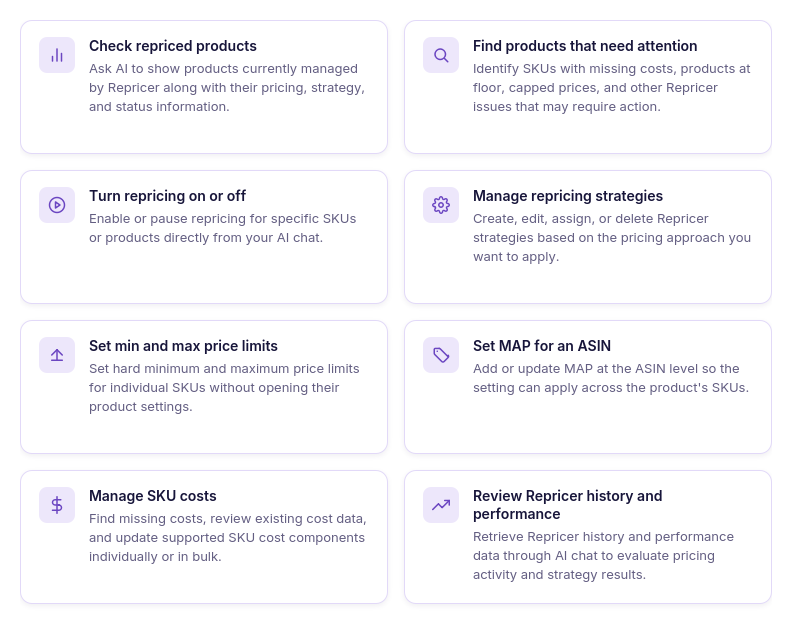
What you can do with Seller Assistant MCP for Repricer costs
- Find repriced products with missing costs
Ask for products managed by Repricer that have no cost and work from that list.
- Check existing SKU costs
Retrieve the cost stored for a SKU before you add or change it.
- Set costs for individual SKUs
Give the SKU and its cost in a chat message, and the assistant writes it through the SKU-cost operation.
- Update costs across multiple SKUs
Update several SKUs in one request instead of editing each product separately.
- Review repriced products after cost updates
Pull up the updated Repricer products in chat to check their current price and profitability.
- Find products at their price floor
Ask which products are on floor when you want to check whether a cost, profitability requirement, or price limit needs review.
- Continue investigating through follow-up requests
Go from a missing-cost SKU to its current data to an update in the same conversation.
- Manage related Repricer settings
From the same chat, review or change price limits, strategies, MAP, or repricing status for products that need more than a cost update.
How MCP turns Repricer cost management into a conversation
In a typical session, you ask which repriced products have no cost, check those SKUs, give the correct costs, confirm the updates, and check the result in Repricer. Each step happens in one chat instead of a separate dashboard task.
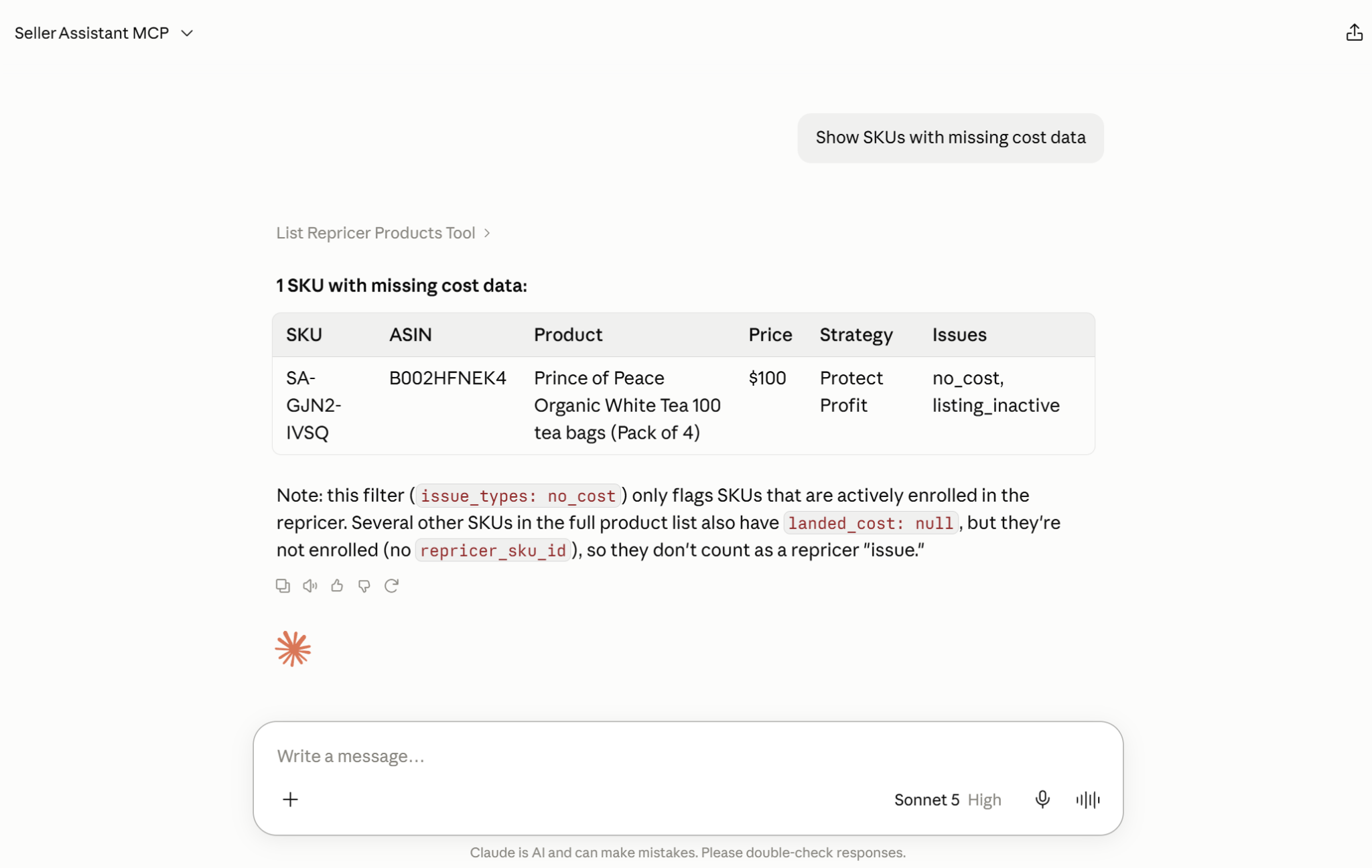
The AI doesn’t know what your inventory cost and doesn’t replace Repricer’s pricing logic. You provide or verify the cost, MCP gives the assistant access to your data, and Repricer uses the updated cost in its profitability calculations and price limits.
Practical Tips to Assign and Manage Repricer Costs with AI
Each request below covers one step of the cost workflow: find SKUs with no cost, check stored costs, assign new costs, and review Repricer afterward. You still decide what each SKU costs. The AI gets that number into the SKU data Repricer uses for profit protection.
| Repricer Cost Task | How AI Helps | Prompt Example |
|---|---|---|
| Find SKUs without costs | Identify repriced products where cost data is missing instead of filtering the catalog manually. | ”Show me my repriced products with no cost data.” |
| Check an existing SKU cost | Retrieve the cost currently stored for a SKU before deciding whether it needs an update. | ”What cost is currently set for SKU [SKU]?” |
| Assign a cost to a SKU | Send the correct cost through a supported SKU-cost operation instead of entering it manually. | ”Set the cost for SKU [SKU] to $25.” |
| Review Repricer after the update | Return to the repriced products after costs are assigned to investigate their current pricing situation. | ”Show me which of my repriced products are currently at their floor.” |
Find Repricer products with missing costs
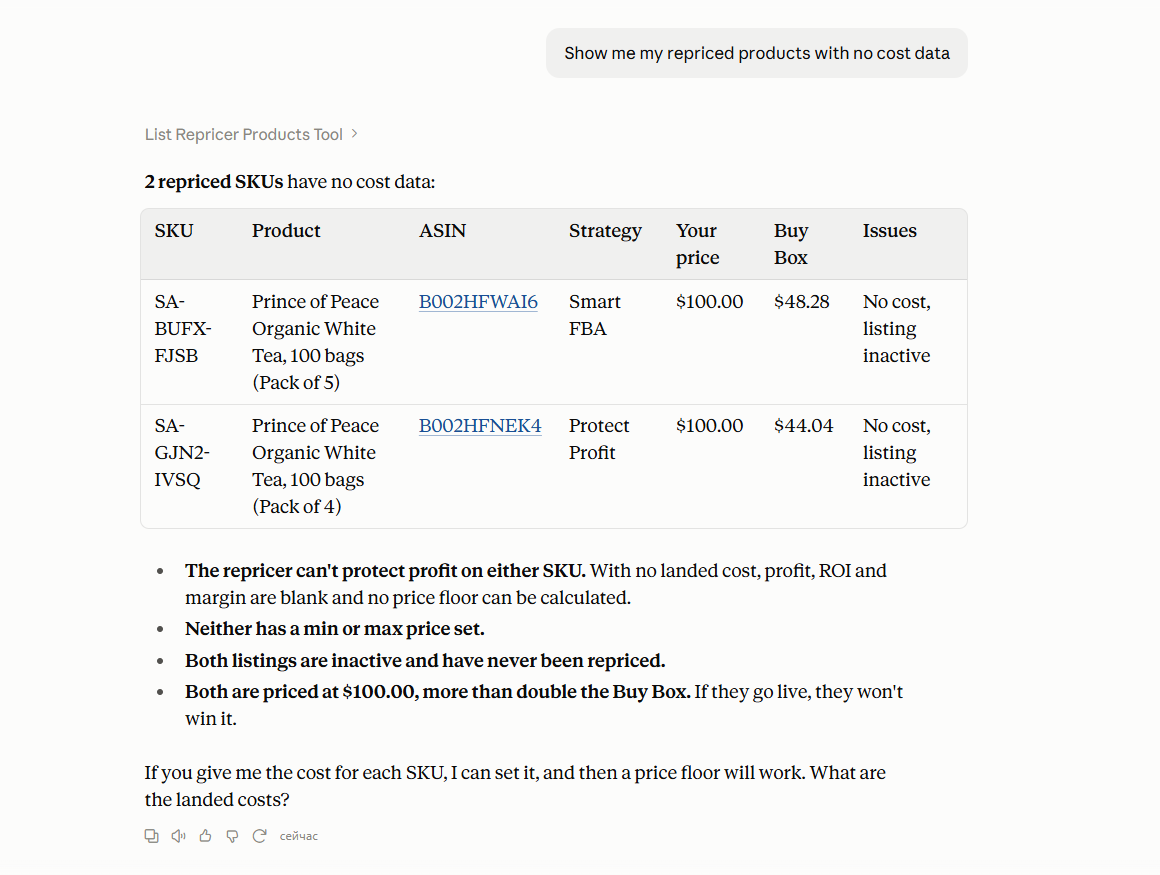
Ask the assistant for repriced products with no cost data instead of reviewing the whole Repricer catalog.
Prompt example
“Show me my repriced products with no cost data.”
Why it matters
Without a cost, Repricer can’t set a cost-based floor for the SKU. A list of these products gives you a defined set to work through.
Check the cost already stored for a SKU
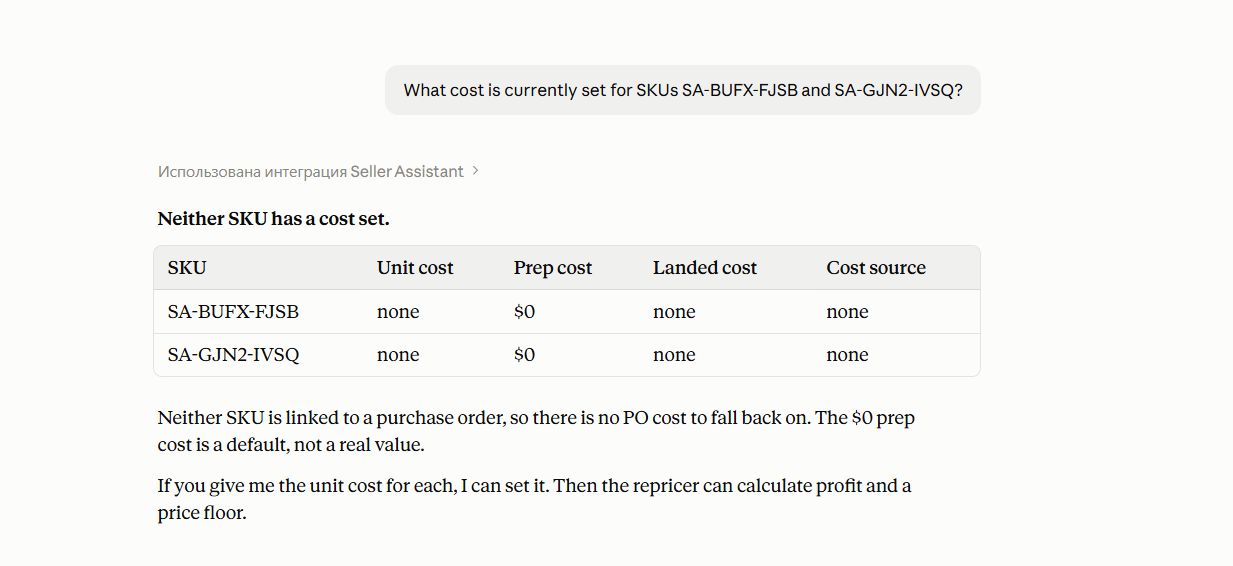
Before you replace a value, ask for the cost currently stored. This tells you whether the SKU has no cost or a cost that may be outdated.
Prompt example
“What cost is currently set for SKU [SKU]?”
Why it matters
Some SKUs have a cost from an earlier purchase. Checking the stored value shows whether it matches your latest purchase price.
Assign the correct cost through AI chat
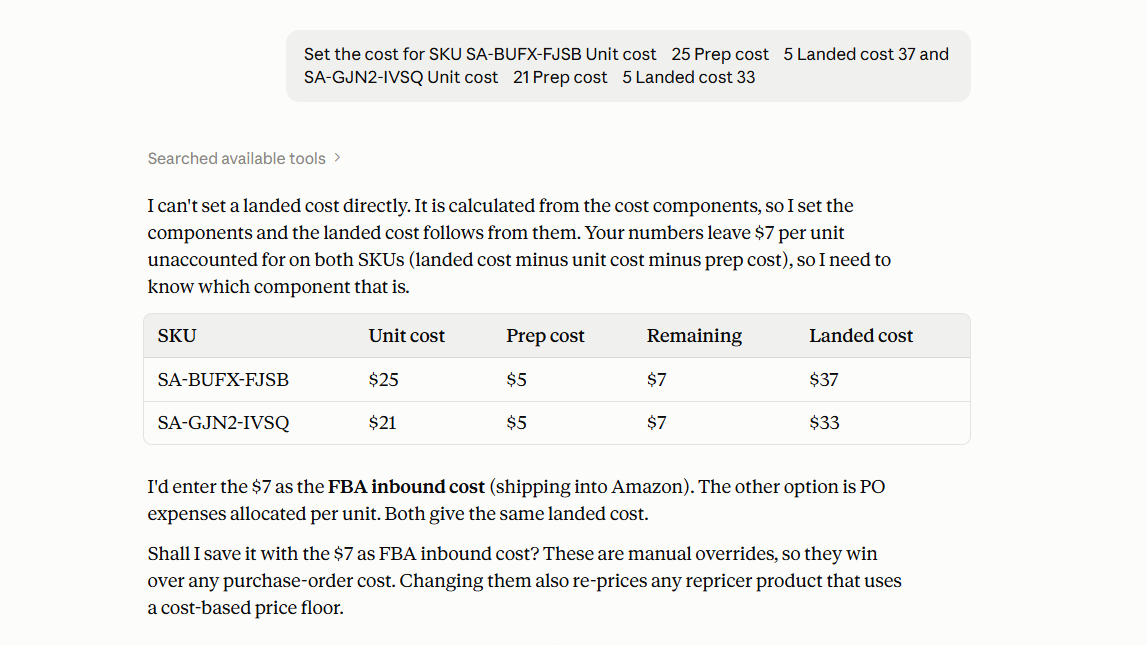
Tell the assistant the SKU and the cost. It asks for your confirmation before it writes the new value.
Prompt example
“Set the cost for SKU [SKU] to $25.”
Why it matters
The cost is saved to the SKU in Seller Assistant, where Repricer reads it for floors and profitability.
Review the Repricer after assigning costs
After the updates, ask which products still need attention, such as listings on their price floor.
Prompt example
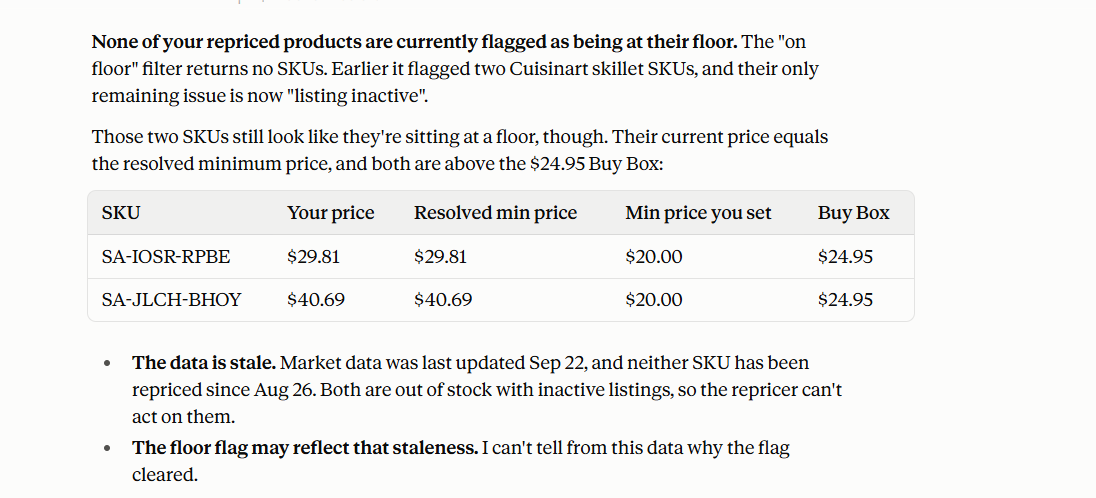
“Show me which of my repriced products are currently at their floor.”
Why it matters
A product with a correct cost can still sit on its floor because of its price limits, strategy, or competition. Checking on-floor products shows where to adjust next.
How to Assign Repricer Costs With AI Step by Step
Step 1. Connect Seller Assistant MCP to your AI assistant
Connect Seller Assistant MCP Server to a supported AI assistant such as ChatGPT or Claude and authorize access to your Seller Assistant account. This gives the assistant access to supported Repricer and SKU-cost operations through natural-language requests.
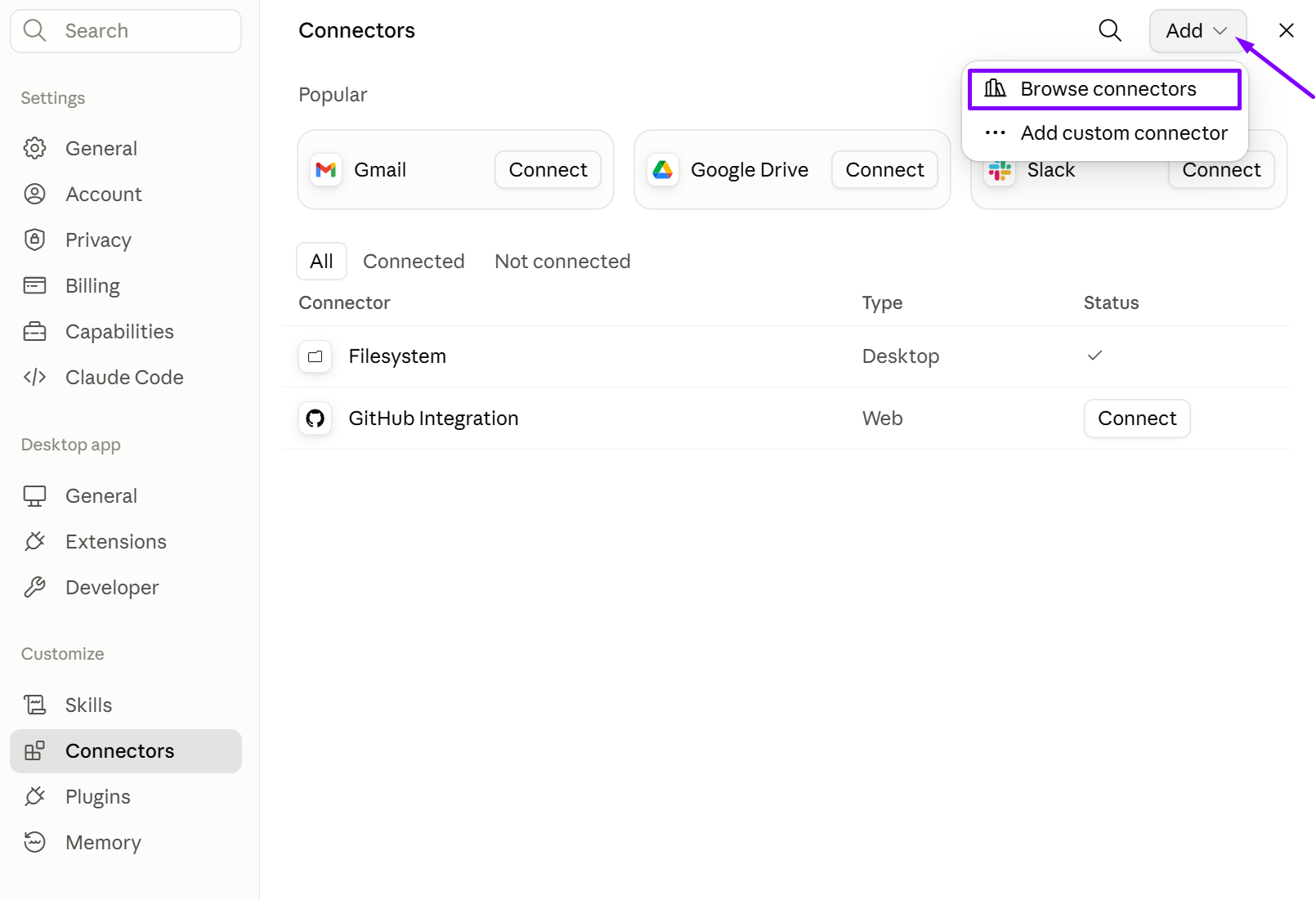
Without the MCP connection, AI can discuss cost management but cannot work with the actual SKU data used by Seller Assistant Repricer.
Step 2. Find repriced products with missing cost data
Ask AI to identify the products currently managed by Repricer that do not have cost information assigned.
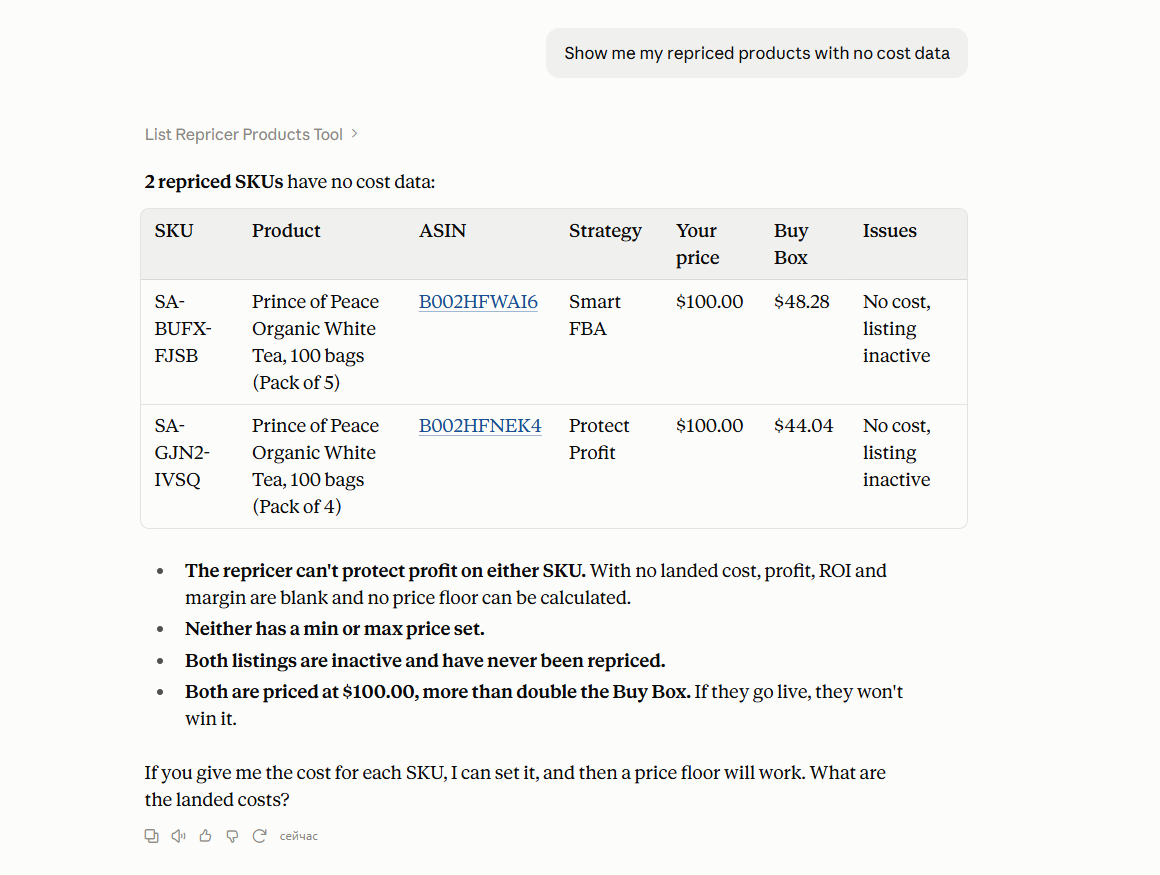
This gives you a focused list of SKUs that need attention instead of reviewing the entire repriced catalog manually.
Step 3. Choose the SKU you want to update
Select one of the returned SKUs and ask AI to retrieve the cost information currently stored for it. This helps you confirm whether the cost is actually missing or whether an existing value needs to be replaced.
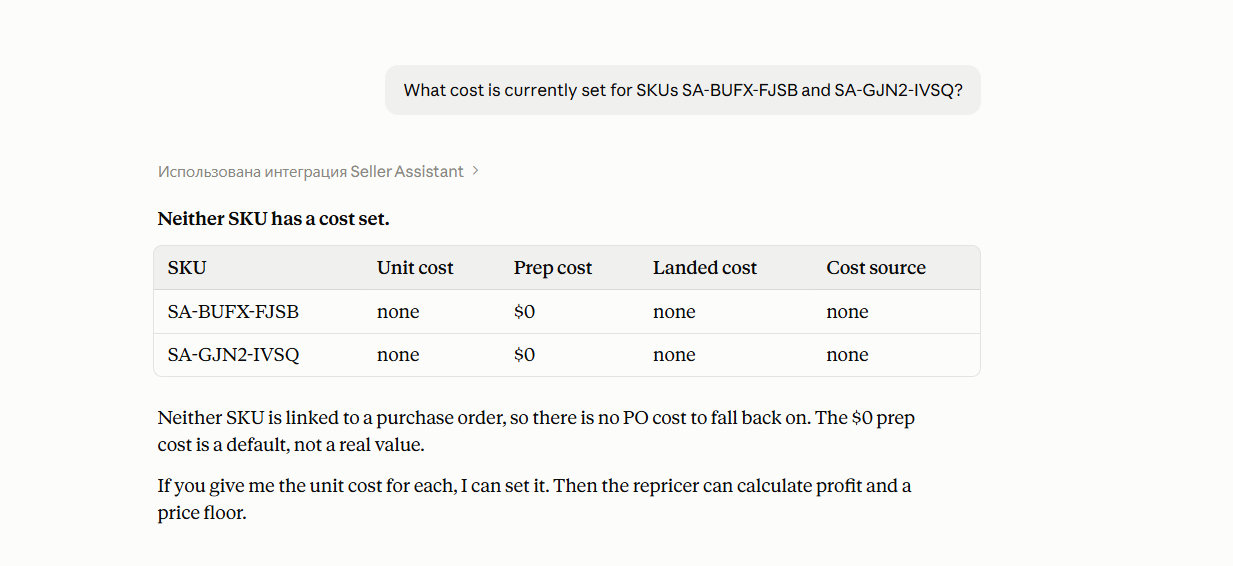
Checking the existing value first helps prevent unnecessary or incorrect cost updates.
Step 4. Provide the correct cost
Tell the AI assistant the cost that should be assigned to the SKU. Use the current purchasing information for that inventory rather than relying on an older cost value.
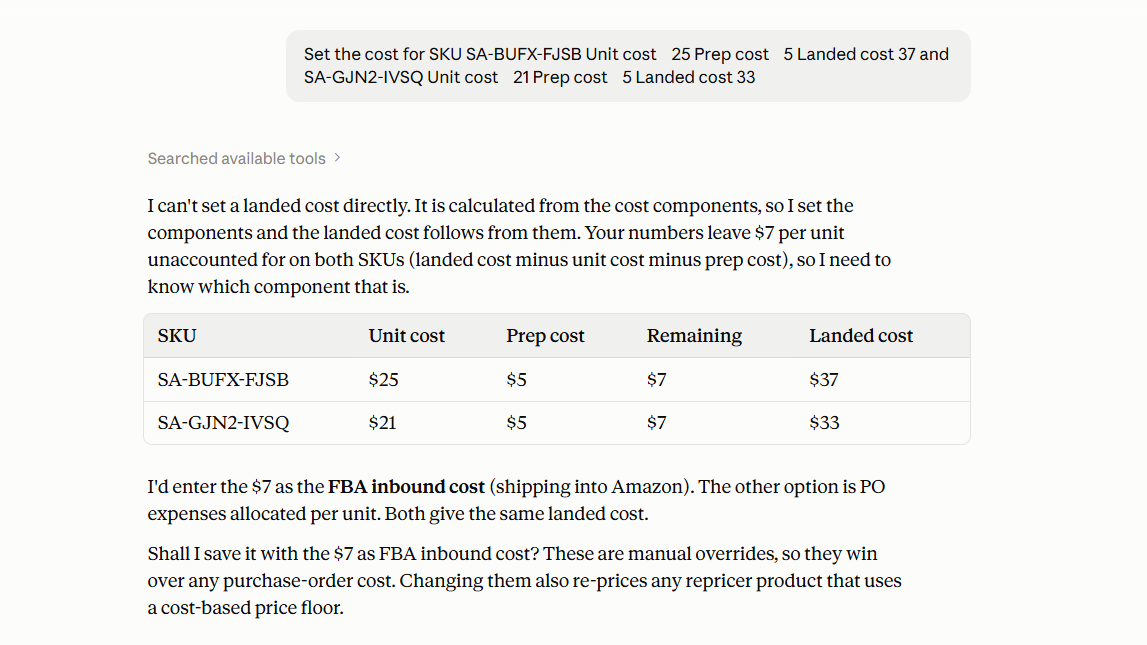
Repricer uses SKU cost data in profitability calculations and cost-based profit protection, so the stored value needs to reflect the economics of the inventory being repriced.
Step 5. Review Repricer after the updates
Once the relevant costs are assigned, ask AI to retrieve the affected repriced products again or check products that still need attention, such as SKUs currently at their price floor.
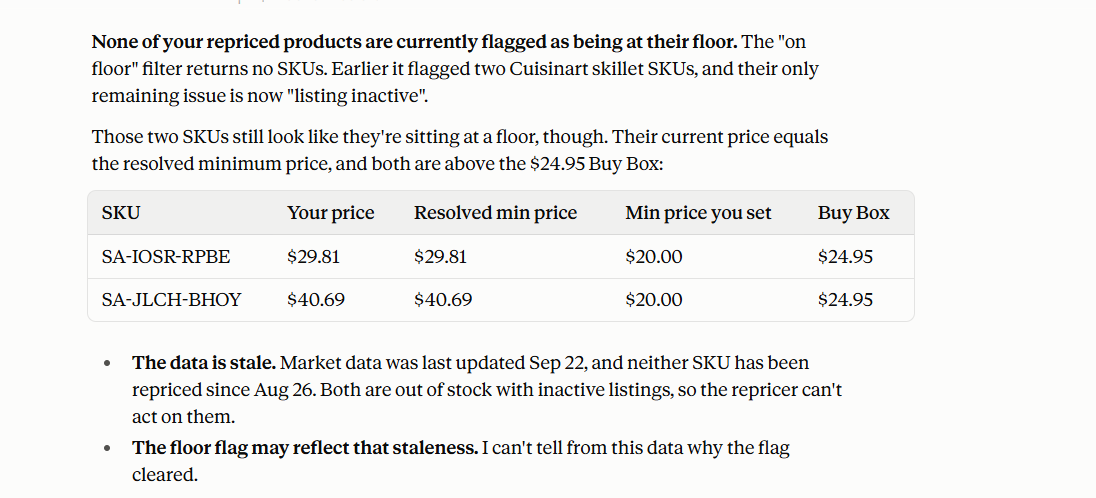
Updating cost data improves the financial context Repricer can use, but the SKU may still require review because of its strategy, pricing boundaries, or current marketplace conditions.
FAQ
Why does an Amazon repricer need cost data?
Repricer uses the SKU’s cost to calculate profit, ROI, and margin, and to enforce your minimum ROI, minimum margin, or target profit. Without an accurate cost, those limits are calculated from the wrong numbers.
What happens if a SKU has no cost in Seller Assistant Repricer?
Seller Assistant flags the SKU with the No cost issue, so you can filter for it. How Repricer prices the SKU in the meantime depends on the missing-cost setting in its strategy.
Can different SKUs for the same ASIN have different costs?
Yes. Costs are stored per SKU, so two SKUs on the same ASIN can have different costs, and Repricer calculates profit and floors for each one separately.
Does changing a SKU cost affect its repricing floor?
Yes, when the strategy uses a cost-based limit. Seller Assistant calculates the floor from the SKU’s cost and Amazon fees, so a new cost changes the minimum price that keeps your profit, ROI, or margin target.
Can AI assign costs directly to Repricer SKUs?
Yes, with Seller Assistant MCP connected. The AI assistant can read and set SKU costs in Seller Assistant. You provide or verify the cost and confirm each update before it is saved.
Final Thoughts
With the correct cost on each SKU, Seller Assistant Repricer calculates profit, ROI, and margin from your real purchase price and holds prices inside the cost-based limits set in your strategy.
Seller Assistant MCP lets you maintain those costs through AI chat. Ask for SKUs with no cost, check the stored values, assign new costs, confirm each update, and recheck the products in Repricer. Repricer keeps handling the Amazon pricing.
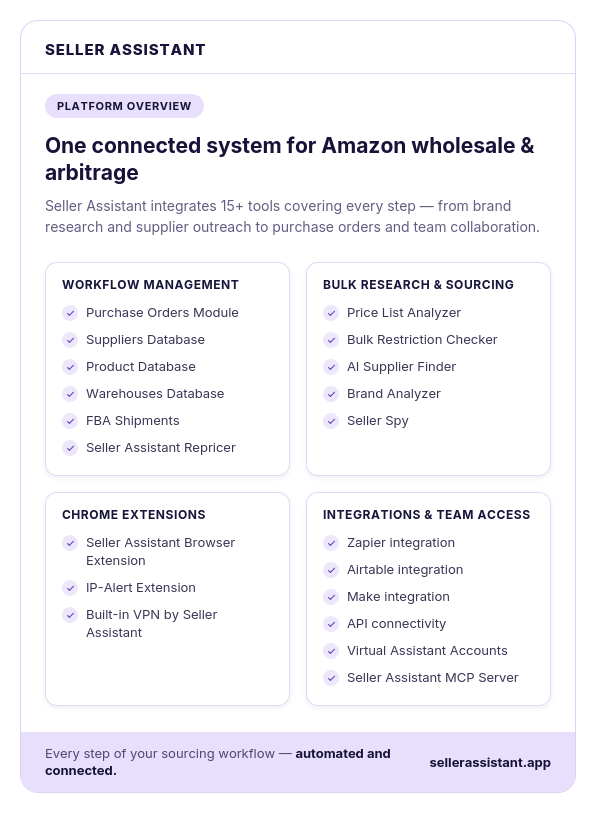
Seller Assistant automates and connects every stage of your Amazon wholesale and arbitrage workflow. It brings together in one platform: workflow management tools – Purchase Orders Module, Suppliers Database, Product Database, Warehouses Database, FBA Shipments, bulk research & sourcing tools – Price List Analyzer, Bulk Restriction Checker, AI Supplier Finder, Brand Analyzer, Seller Spy, Amazon repricing tool – Seller Assistant Repricer, Chrome extensions – Seller Assistant Browser Extension, IP-Alert Extension, and built-in VPN by Seller Assistant, and integrations & team access features – Seller Assistant MCP Server, seamless API connectivity, integrations with Zapier, Airtable, and Make, and Virtual Assistant Accounts.