.svg)
How to Choose Brands for Resale on Amazon
Download Amazon Seller Guide
This guide will help you get started, understand the basics of Amazon selling, and explain in simple words how it all works.

Finding the right brand to sell is one of the most important decisions Amazon sellers make. A strong brand can unlock reliable demand, stable margins, and long-term growth – but choosing the wrong one leads to wasted buying budgets and heavy competition.
With thousands of brands and millions of products on Amazon, researching them manually is slow and often inaccurate. That’s why sellers rely on specialized tools that reveal revenue potential, competition levels, eligibility, restrictions, and customer sentiment.
In this post, you’ll learn how to choose profitable, resale-friendly brands and how Seller Assistant's Brand Analyzer makes this process fast and precise.
Note. Seller Assistant is an end-to-end Amazon workflow management platform that integrates 10+ wholesale-focused solutions into one connected system. It combines sourcing workflow automation, bulk research and intelligence tools, and integrated Chrome extensions – giving you everything you need to streamline finding deals, managing suppliers, and creating purchase orders.

The platform aggregates: workflow management tools – Purchase Orders Module, Suppliers Database, Warehouses Database to organize, automate, and scale every step of your wholesale and arbitrage operations; bulk research & sourcing tools – Price List Analyzer, Bulk Restriction Checker, Sourcing AI, Brand Analyzer, Seller Spy to evaluate supplier price lists, verify selling eligibility and restrictions, open new brands, and discover winning product ideas from competitors to expand your product catalog; Chrome extensions – Seller Assistant Browser Extension, IP-Alert Extension, and built-in VPN by Seller Assistant to deep-research products, check IP claims and compliance, and access geoblocked supplier sites directly within your browser; and integrations & team access features – seamless API connectivity and integrations with Zapier, Airtable, and Make, plus Virtual Assistant Accounts for secure, scalable team collaboration.
With Seller Assistant, every step of your Amazon wholesale and arbitrage workflow is automated and connected.
Why Choosing the Right Brand Matters
Choosing the wrong brand can lead to losing money on unpopular or unprofitable products, heavy competition, or items you can’t legally or safely sell. A careful brand check protects your budget, your inventory, and your Amazon account.
Financial losses
If a brand has low demand or unstable pricing, your inventory can sit for months and drain your capital. Unsold products freeze your cash flow and limit your ability to source profitable items.
Unsellable inventory
There are brands your account may not be eligible to sell on Amazon. Some others may be restricted on your account and you will need to ungate them. If you don’t check this in advance, you’re left with inventory you cannot sell on Amazon at all.
Too high competition
Brands with too many sellers or strong Amazon presence make it nearly impossible to win the Buy Box. Intense competition forces prices down and cuts into your margins until the product becomes unprofitable.
Supply issues
Working with unreliable or non-verified suppliers can lead to authenticity problems and delayed restocks. These issues make scaling difficult and increase the risk of receiving customer complaints.
What to Look at When Choosing a Brand to Resell
Choosing the right brand to resell is more than finding popular products – it’s about making sure the brand is safe, profitable, and reseller-friendly. Even if you purchase items from a trusted supplier, the brand itself may still be restricted or risky. Reviewing the right criteria beforehand protects your account and ensures your inventory can be sold without issues.

Eligibility and restrictions
The first step is confirming the brand is approved for sale on your Amazon account. Some brands require additional approval, while others cannot be sold at all. Checking eligibility early prevents wasted buying budgets.
U.S. supplier priority
Brands supported by the U.S.-based suppliers offer faster delivery and more reliable documentation. These suppliers typically provide invoices that meet Amazon’s verification standards. Having compliant invoices is essential, especially during authenticity or account health checks.
Minimum listing number
A good resale-friendly brand typically has at least 500 products listed on Amazon. Larger catalogs increase your chances of finding profitable ASINs that meet your margin and competition criteria. Many brands have items dominated by a single seller or by the Buy Box leader, so more listings give you room to filter out weak products.
Brand shouldn’t sell on Amazon
If the brand sells its own catalog directly on Amazon, you’ll face tough competition and higher chances of restrictions. Such brands often protect their listings and may not welcome third-party resellers. Avoid brands with exclusive Amazon distributors, as they rarely allow additional sellers.
Amazon shouldn’t sell the brand
Competing with Amazon is almost never profitable because Amazon holds a high Buy Box share and rarely gives it up. If Amazon sells more than 30% of the brand’s catalog, your chances of winning sales drop significantly.
Revenue potential
A strong brand should meet your minimum revenue and pricing requirements across multiple ASINs. Reviewing average monthly sales helps you understand whether the brand supports consistent cash flow. Seller Assistant’s Brand Analyzer estimates monthly revenue, making it easier to assess profitability.
Competition among sellers
Too many sellers on listings often results in price drops and shrinking margins. Reviewing the average seller count per product shows you how competitive the brand really is. A brand with more than 15 sellers per listing usually presents higher risk and lower profit stability.
Brand reputation
Brands with high ratings and strong review volume tend to convert better and sell more predictably. Customer feedback reveals product quality, demand, and potential issues long before you place an order. Brand Analyzer gives you rating and review data so you can select brands with strong reputations and healthier Buy Box prices.
How to Check if You Can Sell a Brand on Amazon?
You can quickly check your selling eligibility and brand restrictions with Seller Assistant's Bulk Restriction Checker. It helps you verify whether a brand’s products are sellable before you commit to buying inventory. The tool processes up to 20,000 ASINs in one upload and instantly shows which items are approved, require gating, or are fully blocked on your account. By confirming eligibility at scale, you avoid sourcing brands that create listing issues or unsellable stock.
Because it reads your Amazon marketplace permissions directly, the tool catches brand and product restrictions early. This makes it ideal for reviewing supplier catalogs, scanning wholesale spreadsheets, or validating sourcing lists long before you place an order.
What is Bulk Restriction Checker
Bulk Restriction Checker helps resellers confirm whether a brand’s products can be listed on their account across thousands of ASINs at once. It reviews every item you upload, compares it to your Seller Central permissions, and highlights which products meet Amazon’s rules. This gives you a clear overview of which brands are safe to sell and which ones may cause problems.
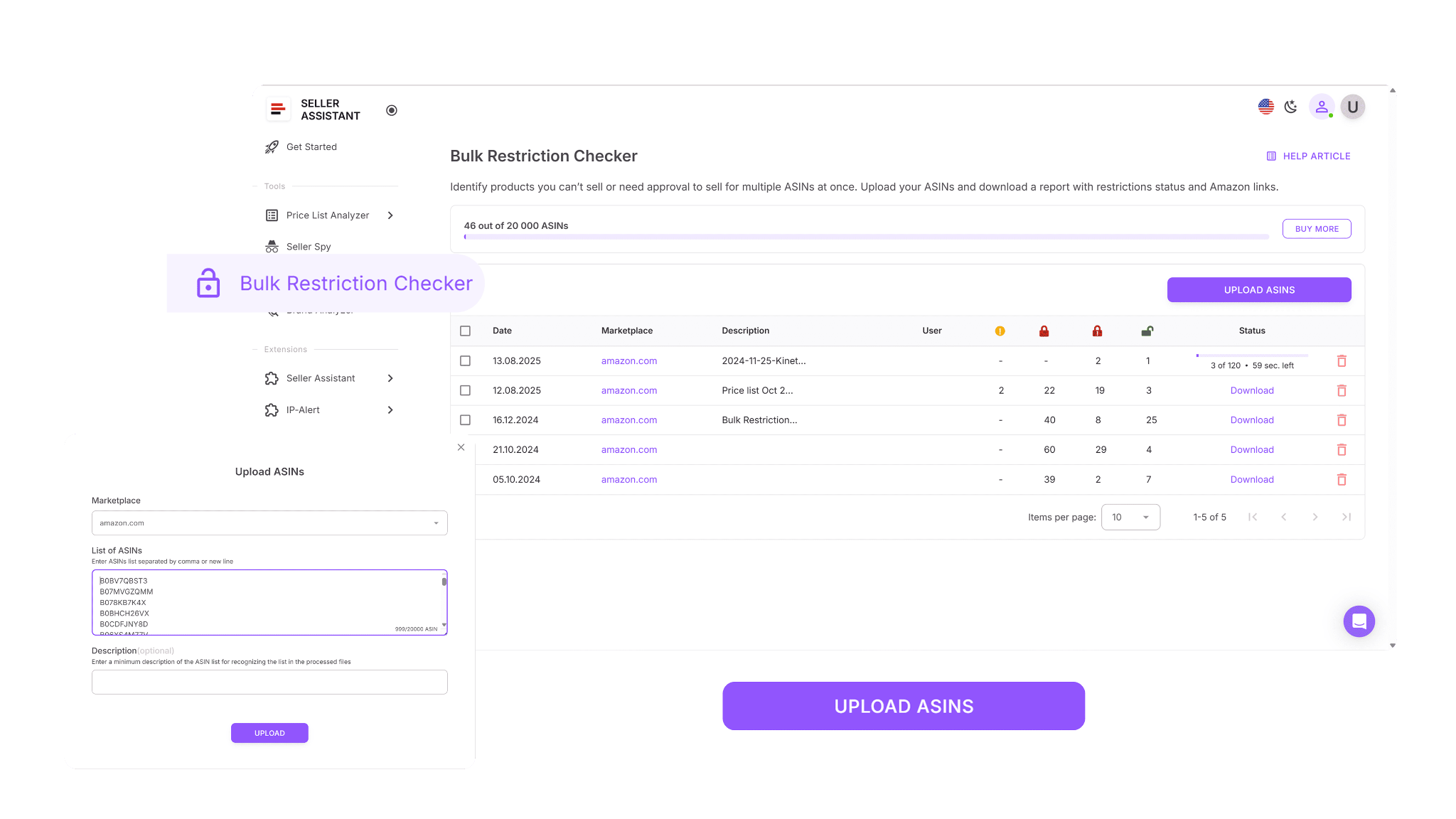
Bulk Restriction Checker evaluates each ASIN, identifies its restriction type, and sorts products into three groups: eligible, approval required, or not eligible. In just a few minutes, you receive a structured, easy-to-read report showing exactly which brand items you can confidently source.
How Bulk Restriction Checker helps you

- Clean and validate large sourcing lists by checking eligibility for thousands of ASINs in one pass.
- Spot gated brand products early so you can decide whether ungating is worth the effort.
- Avoid buying products your account is blocked from selling.
- Download organized reports you can sort, filter, or share with your team for quick decision-making.
- Support efficient sourcing across wholesale, OA, and dropshipping workflows by confirming a brand’s sellability upfront.
How to check restrictions with Bulk Restriction Checker
Log in to your Seller Assistant account, select your Amazon marketplace, and upload your ASIN file. After processing, the tool provides a downloadable report where each item is labeled as ELIGIBLE (you can sell it), APPROVAL_REQUIRED (gated), or NOT_ELIGIBLE (your account cannot sell it). This ensures you always know which brand products are safe to purchase.
How to use Bulk Restriction Checker
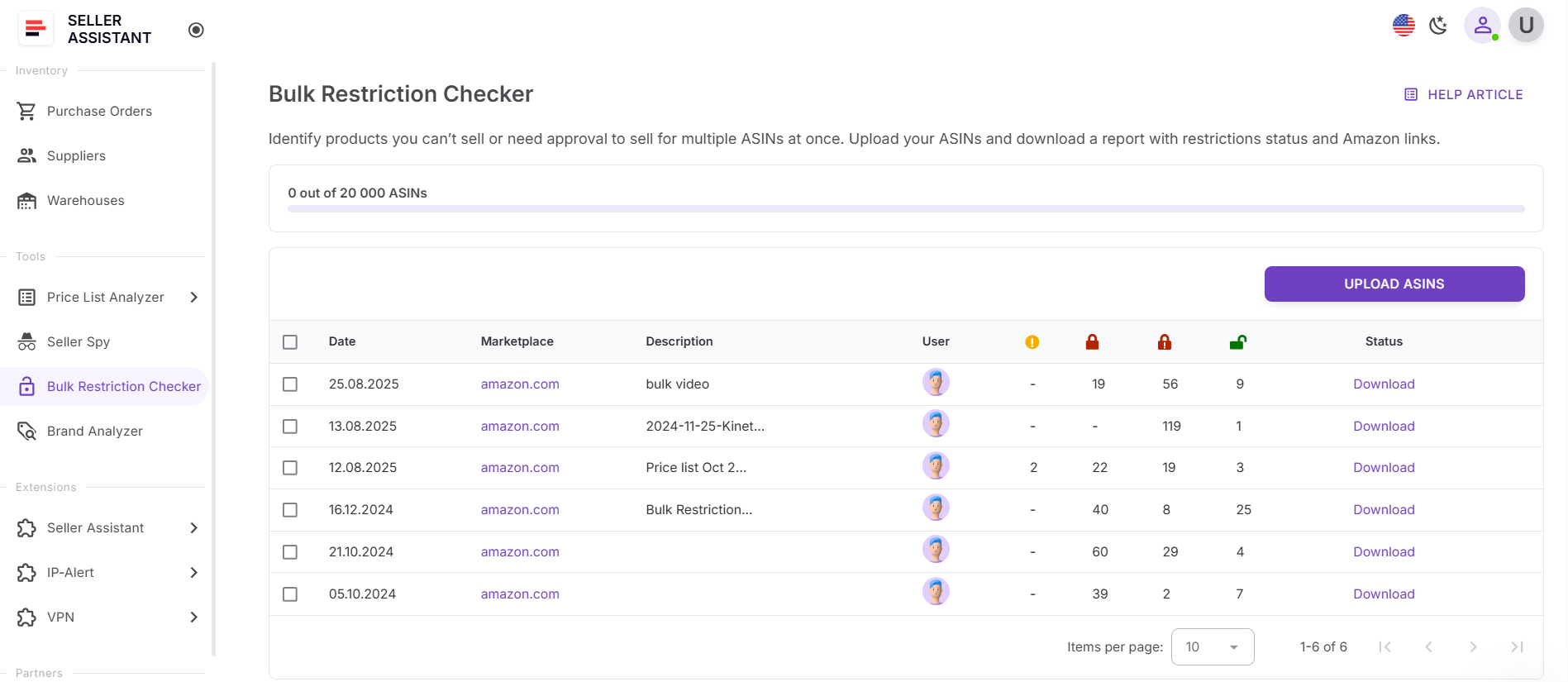
Step 1. Open Bulk Restriction Checker in your Seller Assistant account
Go to the Tools section in your Seller Assistant account and select Bulk Restriction Checker.
Step 2. Upload your ASIN list
Upload a file with up to 20,000 ASINs. The tool automatically starts scanning and compares each product to your Amazon selling permissions.

Step 3. Wait for your notification email
Once the file is analyzed, you’ll receive an email letting you know your results are ready.
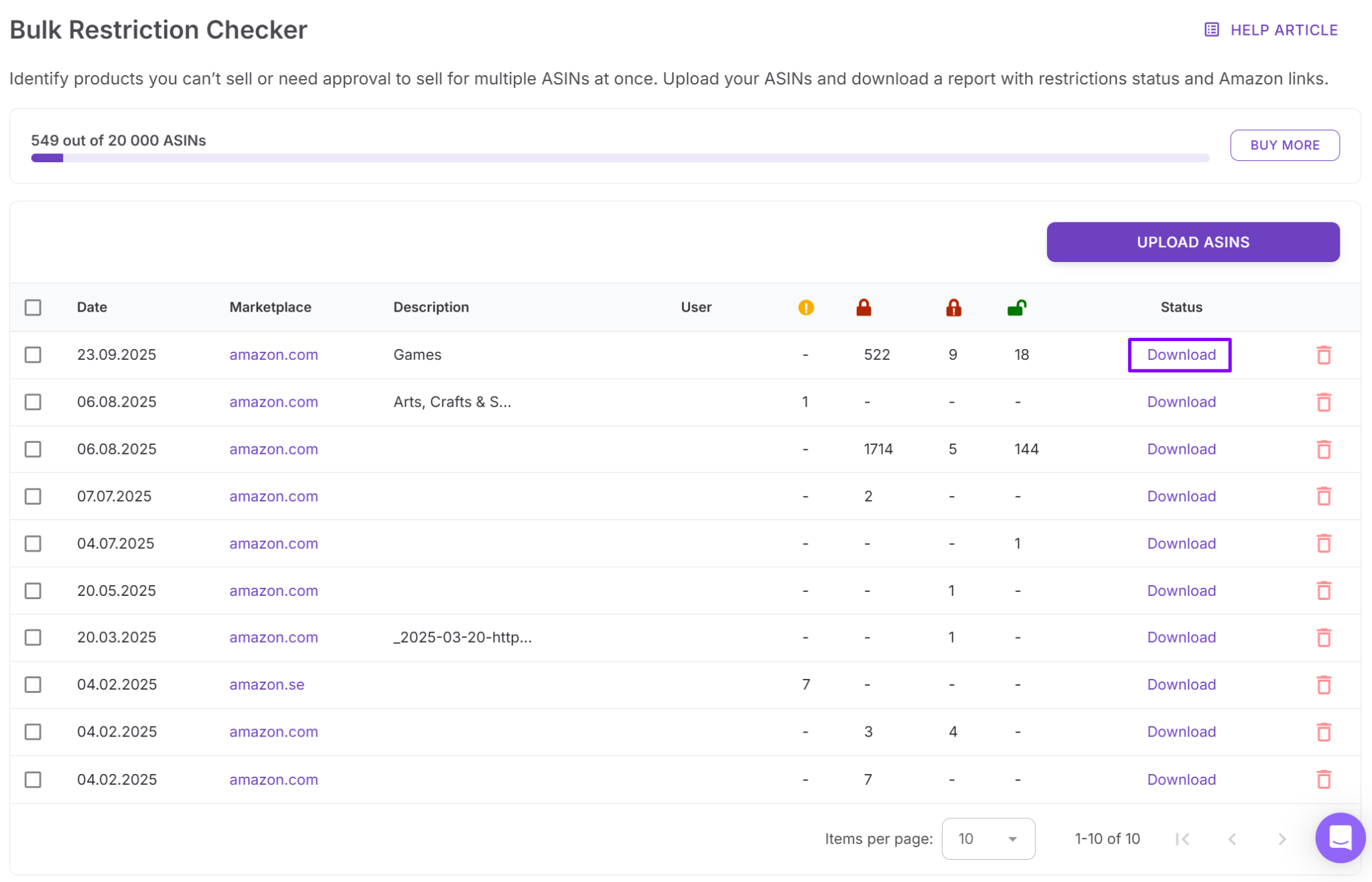
Step 4. Download your completed report
Download your restriction report to see all eligibility statuses. You can sort, filter, and share the file to guide sourcing decisions and brand validation for your team.
How to Choose a Brand for Amazon?
Seller Assistant's Brand Analyzer shows you instantly whether a brand has real resale potential.
It gives you a complete, data-driven view of any brand’s performance on Amazon, allowing you to focus only on brands that match your profitability and competition criteria.
It shows how large the brand is, how many products it offers, the potential revenue you can generate, how competitive the listings are, the average Buy Box price, and the overall rating and review quality. With this information, you can filter out risky brands and prioritize the ones worth selling.
What is Brand Analyzer
Brand Analyzer is a dedicated Amazon brand research tool that helps identify profitable, resale-friendly brands. It automates the evaluation process and shows whether a brand aligns with your revenue goals, competition tolerance, and product requirements. This makes it easy to determine if the brand is a good fit for your store before you invest time or money.
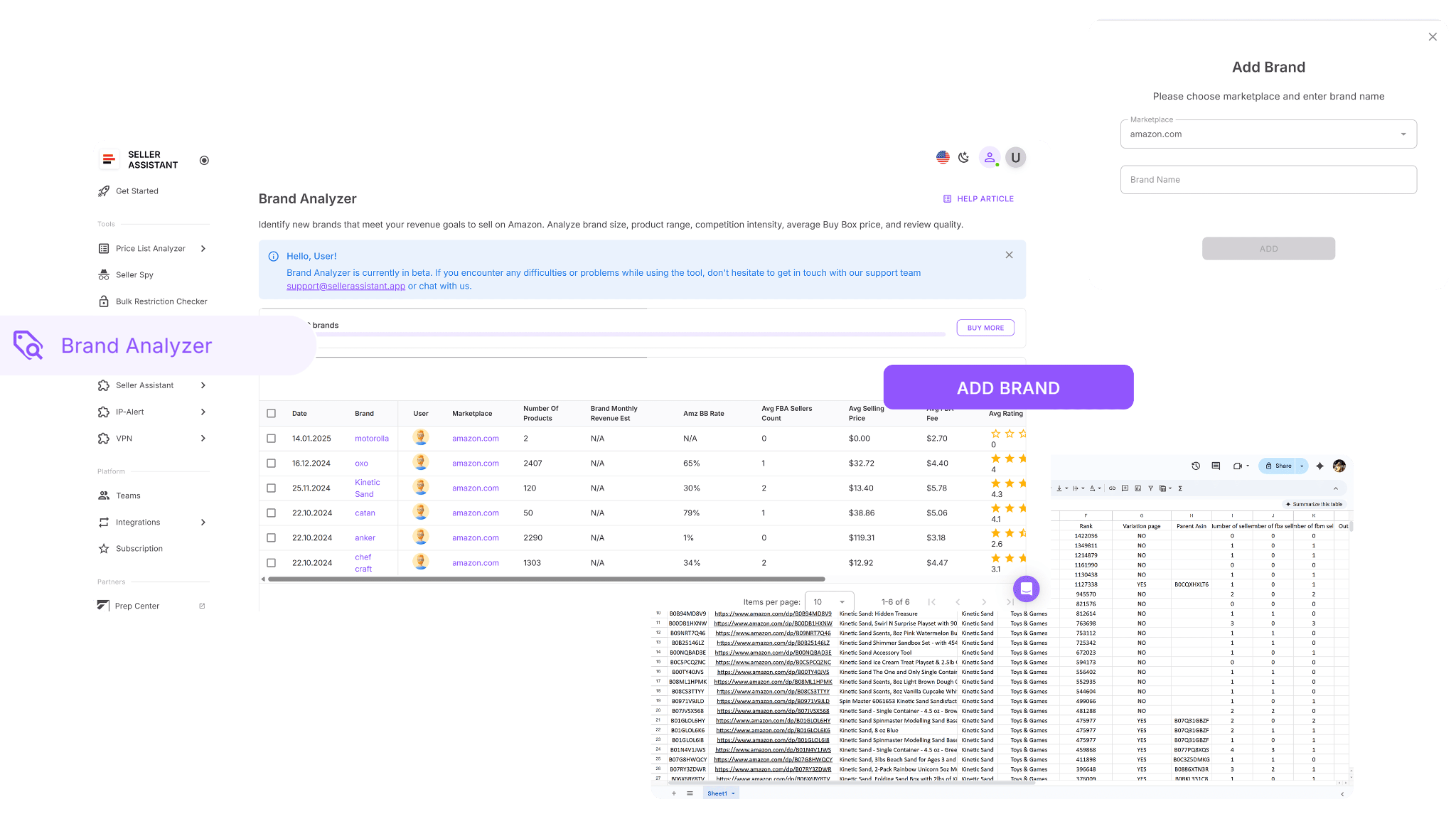
The tool is built for Amazon wholesale sellers, online arbitrage sellers, and dropshippers to simplify brand research. Just enter the brand name, and Brand Analyzer provides all the data you need to decide if the brand is safe and profitable to resell. You can also download a full report containing every ASIN the brand offers along with detailed product metrics.
How Brand Analyzer helps you
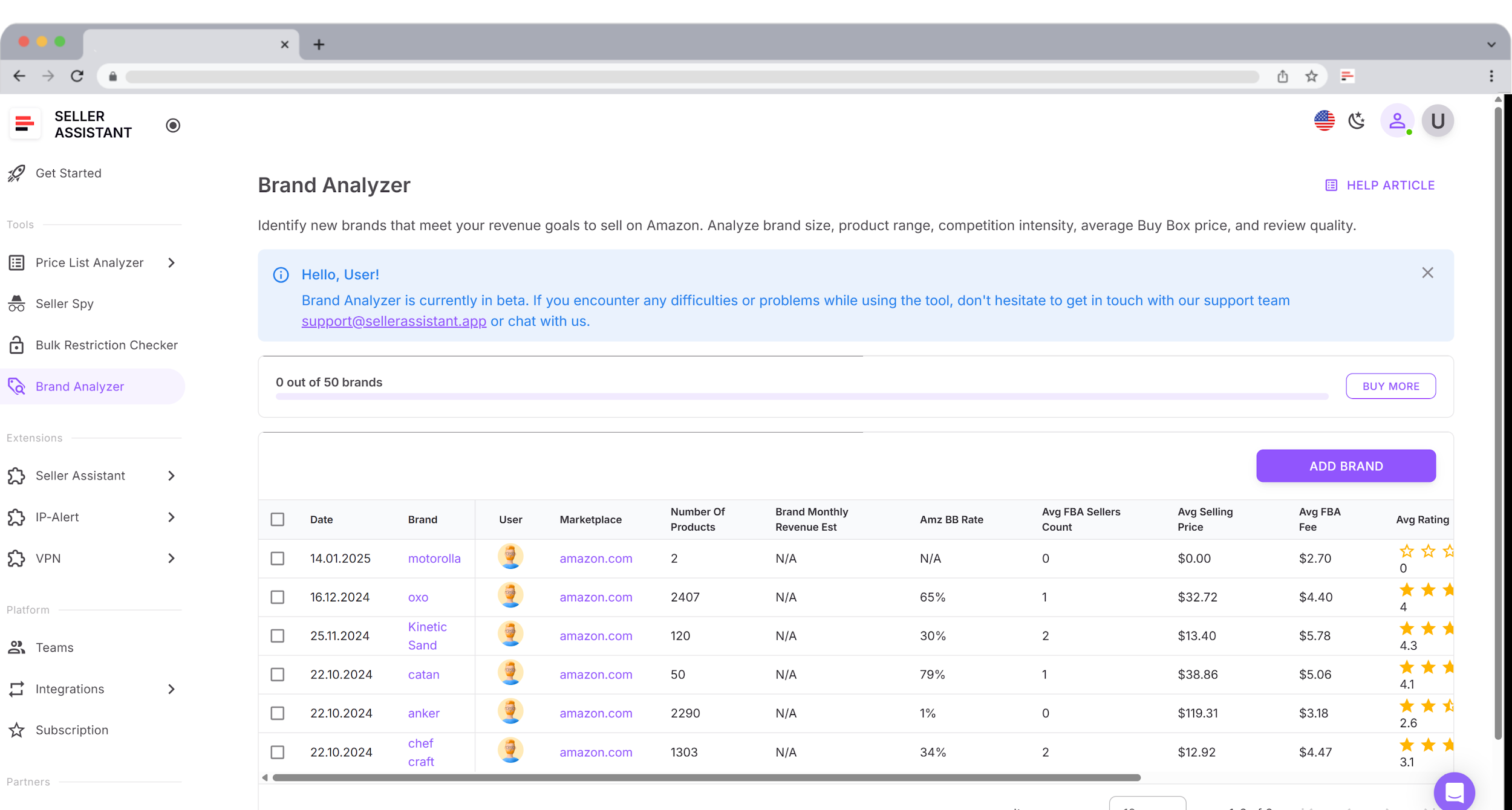
- See whether a brand is resale-friendly before contacting suppliers
- Automate brand research instead of manually browsing brand catalogs
- Estimate monthly revenue for the brand’s full product portfolio
- Check Amazon’s Buy Box share to understand Amazon competition
- Review average FBA seller counts to evaluate competitiveness
- Measure brand size by total ASIN count
- Assess customer trust using average ratings and total reviews
- View average Buy Box prices to build a solid pricing strategy
- Check average FBA fees to understand cost structure and margins
- Access a consolidated dashboard showing revenue, pricing, competition, in-stock rate, and reputation
- Identify high-potential brands quickly and skip brands that won’t deliver profit
How to choose a brand with Brand Analyzer
Brand Analyzer automates the entire brand evaluation process. Enter the brand name, and the tool instantly analyzes its market presence, revenue potential, competition, pricing, and reputation.
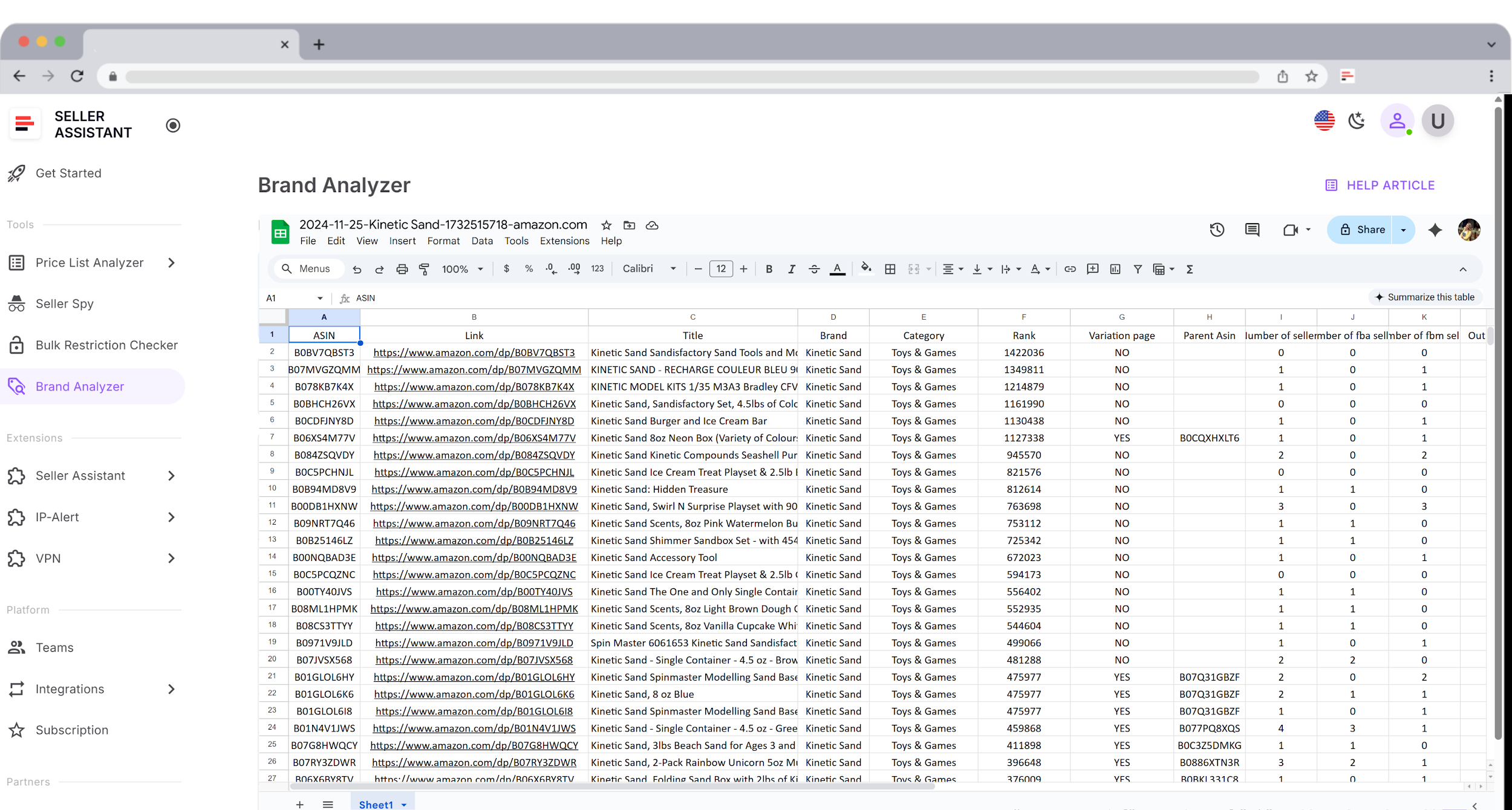
The tool also generates a complete downloadable report containing all ASINs and their essential metrics so you can filter, sort, and compare products as needed. You can find Brand Analyzer in your Seller Assistant personal account, where you can add brands, run analyses, and download .xls reports with detailed product insights.
How to use Brand Analyzer
Step 1. Open Brand Analyzer in Seller Assistant
Go to your Seller Assistant personal account. Navigate to the Tools section and select Brand Analyzer, then click Add Brand.
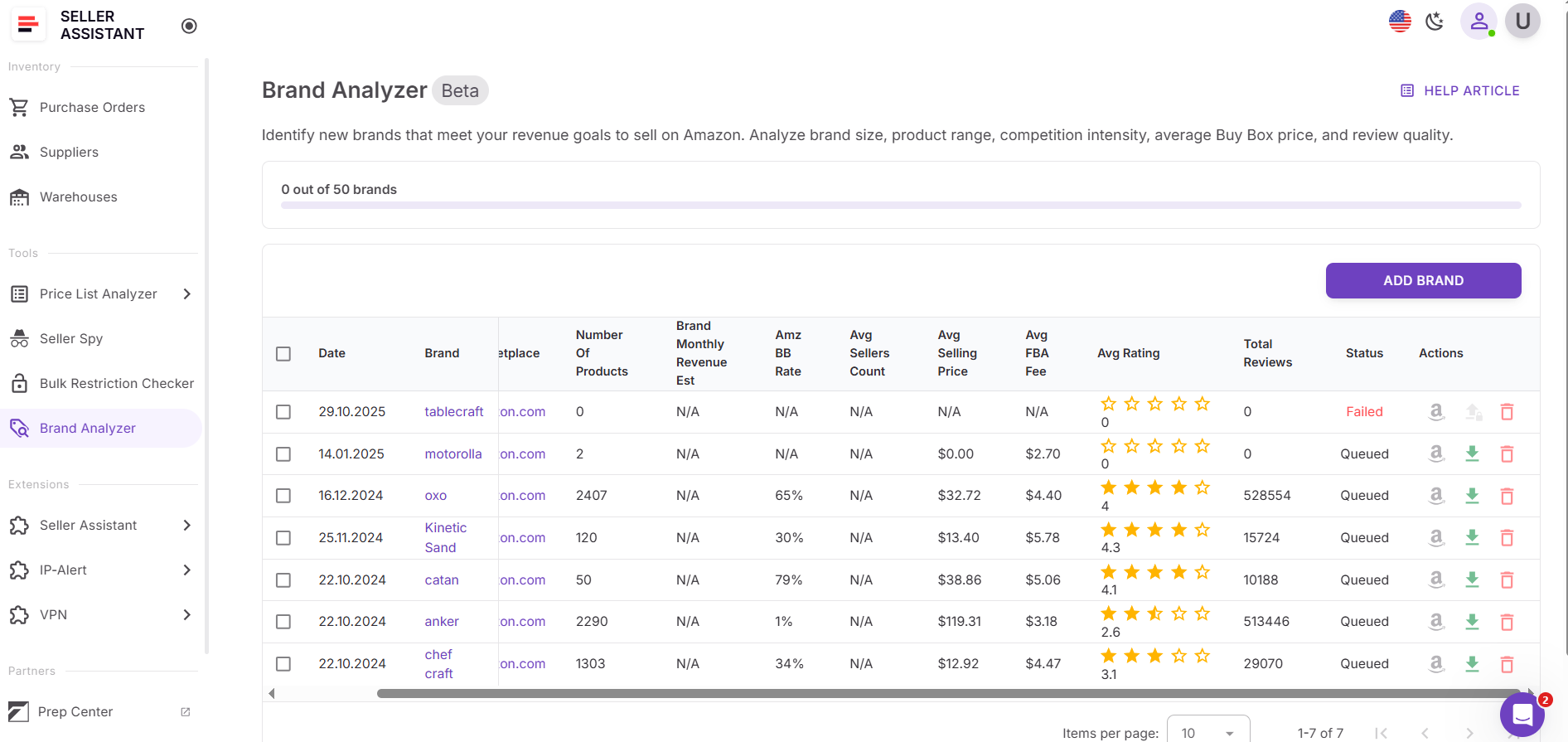
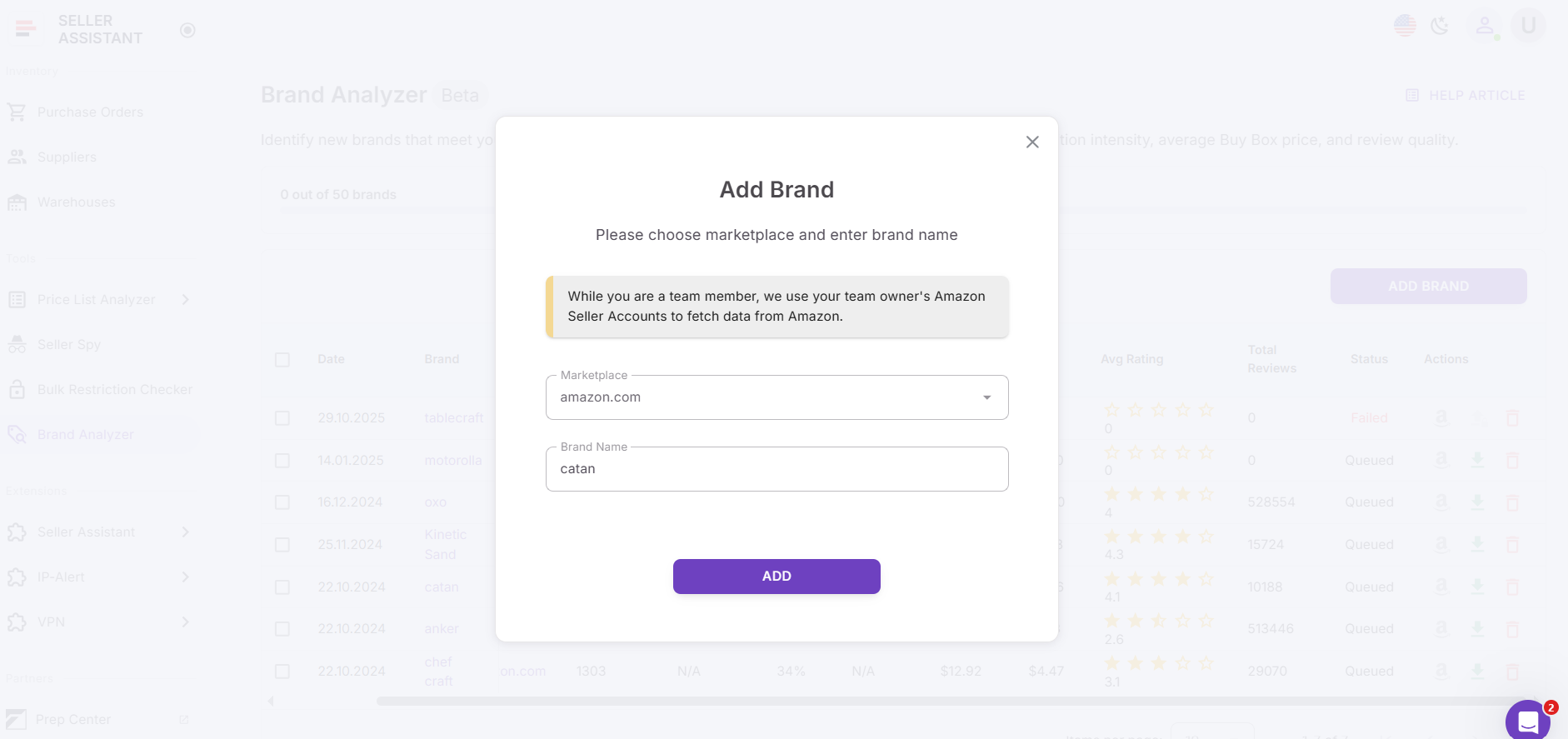
Step 2. Enter brand details
Choose your preferred marketplace, type in the brand name, and click the Add button.
Step 3. Wait for the analysis to complete
Brand Analyzer processes the brand and collects all relevant Amazon metrics. Once complete, the dashboard will show the finalized analysis. Review the results and estimate if a brand meets your expectations.
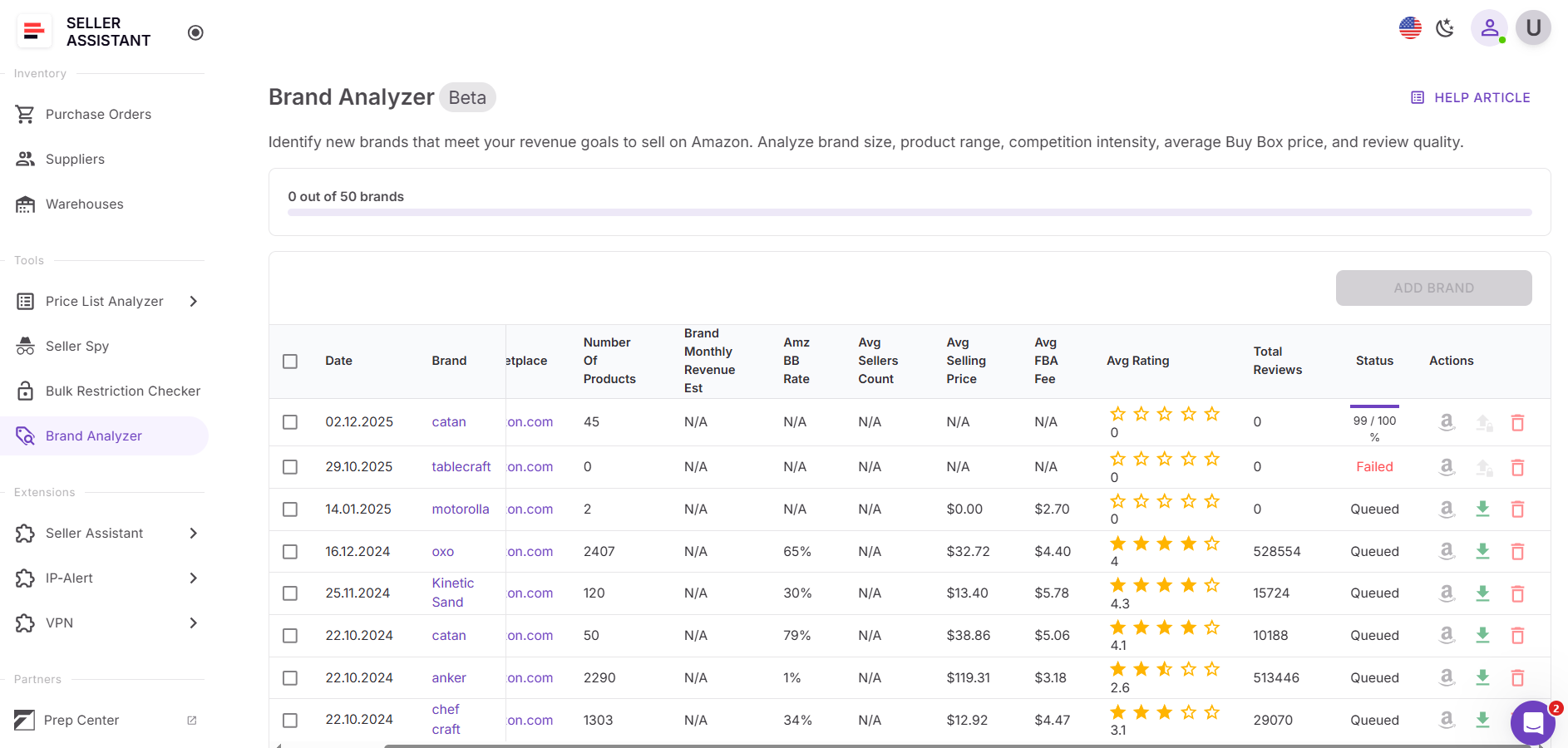
Step 4. Download your brand report
After the analysis finishes, download the .xls report containing the brand’s full ASIN list. The file includes all key metrics you need for deeper evaluation and filtering.
FAQ
How do I know if a brand is safe to resell on Amazon?
You must check eligibility, restrictions, and IP history before sourcing any brand. Tools like Seller Assistant’s Bulk Restriction Checker and Brand Analyzer show whether products are sellable on your account and free from risk.
What makes a brand profitable for wholesale or OA?
A profitable brand has strong demand, stable Buy Box prices, and manageable competition. Revenue estimates, average rating, and seller counts help confirm whether the brand can support consistent margins.
Should I avoid brands that Amazon sells?
Yes – if Amazon holds a high in-stock rate, winning the Buy Box becomes extremely difficult. It’s safer to choose brands where Amazon has little or no catalog presence.
Why does brand size matter for resellers?
Brands with larger catalogs offer more product opportunities and higher chances of finding profitable ASINs. Small catalogs often mean fewer options and higher risk of running into restricted or low-demand items.
What data does Brand Analyzer give me?
Brand Analyzer shows revenue potential, competition levels, Amazon participation, seller counts, ratings, pricing, and FBA fees. It consolidates everything you need to decide whether a brand is worth sourcing.
Final Thoughts
Choosing the right brand is one of the most important steps in building a profitable and sustainable Amazon business. When you evaluate eligibility, seller competition, Amazon participation, pricing, and customer reputation upfront, you avoid unsellable inventory, price wars, and costly mistakes.
Tools like Seller Assistant's Brand Analyzer and Bulk Restriction Checker make this process faster, safer, and far more accurate by giving you data-driven insights into every brand and product. With the right systems and the right brands, you can scale your catalog confidently and focus on adding products that consistently generate real profit.
Seller Assistant automates and connects every stage of your Amazon wholesale and arbitrage workflow. It brings together in one platform: workflow management tools – Purchase Orders Module, Supplier Database, Warehouse Database, bulk research & sourcing tools – Price List Analyzer, Bulk Restriction Checker, Sourcing AI, Brand Analyzer, Seller Spy, Chrome extensions – Seller Assistant Browser Extension, IP-Alert Extension, and built-in VPN by Seller Assistant, and integrations & team access features – seamless API connectivity, integrations with Zapier, Airtable, and Make, and Virtual Assistant Accounts.