



Bulk sourcing on Amazon runs on speed and precision. When you’re processing supplier spreadsheets packed with thousands of SKUs, manual research simply can’t keep up.
You need an Amazon price list analyzer that matches products to ASINs, calculates real FBA or FBM profit, flags restrictions and IP risks, and helps you shortlist winners in minutes.
In this post, we compare the best Amazon bulk analysis tools in 2026 – Seller Assistant’s Price List Analyzer, Scan Unlimited, and Analyzer.Tools – to show which solution fits wholesale, online arbitrage, and dropshipping workflows best.
What Is an Amazon Price List Analyzer?
An Amazon price list analyzer is a bulk sourcing tool that processes supplier spreadsheets and automatically matches products to Amazon ASINs. Instead of checking items one by one, sellers can upload thousands of SKUs and receive a data-enriched table with profitability, sales performance, competition insights, fees, and risk indicators.
For wholesale, online arbitrage, and dropshipping sellers, this means faster sourcing decisions, fewer costly mistakes, and the ability to filter large catalogs down to purchase-ready deals in minutes.
Key metrics an Amazon price list analyzer should show
A serious bulk analyzer should surface the data that directly impacts buying decisions:
Profitability metrics
Profit (FBA/FBM), ROI, margin, and break-even price. These show whether a product is worth buying after Amazon fees, shipping, prep, tax, or VAT.
Buy Box and pricing data
Current Buy Box price and 30/90/180-day average Buy Box. This helps avoid false positives caused by temporary price spikes.
Sales performance indicators
BSR, BSR trends or drops, and estimated monthly sales. These reveal demand and sales velocity.
Competition insights
Total seller count, FBA vs. FBM split, and Amazon presence in the Buy Box. These metrics help evaluate Buy Box potential.
Fees and cost breakdown
Referral fees, FBA/FBM fulfillment costs, storage, inbound shipping, prep, hazmat, and other expenses. Accurate fee modeling protects margins.
Restrictions and risk flags
Selling eligibility, brand gating, IP alerts, HazMat, meltable, oversize, variation or bundle warnings. These prevent account issues and unsellable inventory.
When combined, these metrics turn a raw supplier list into a structured decision-making system.
Why Bulk Analysis Is Mission-Critical In 2026
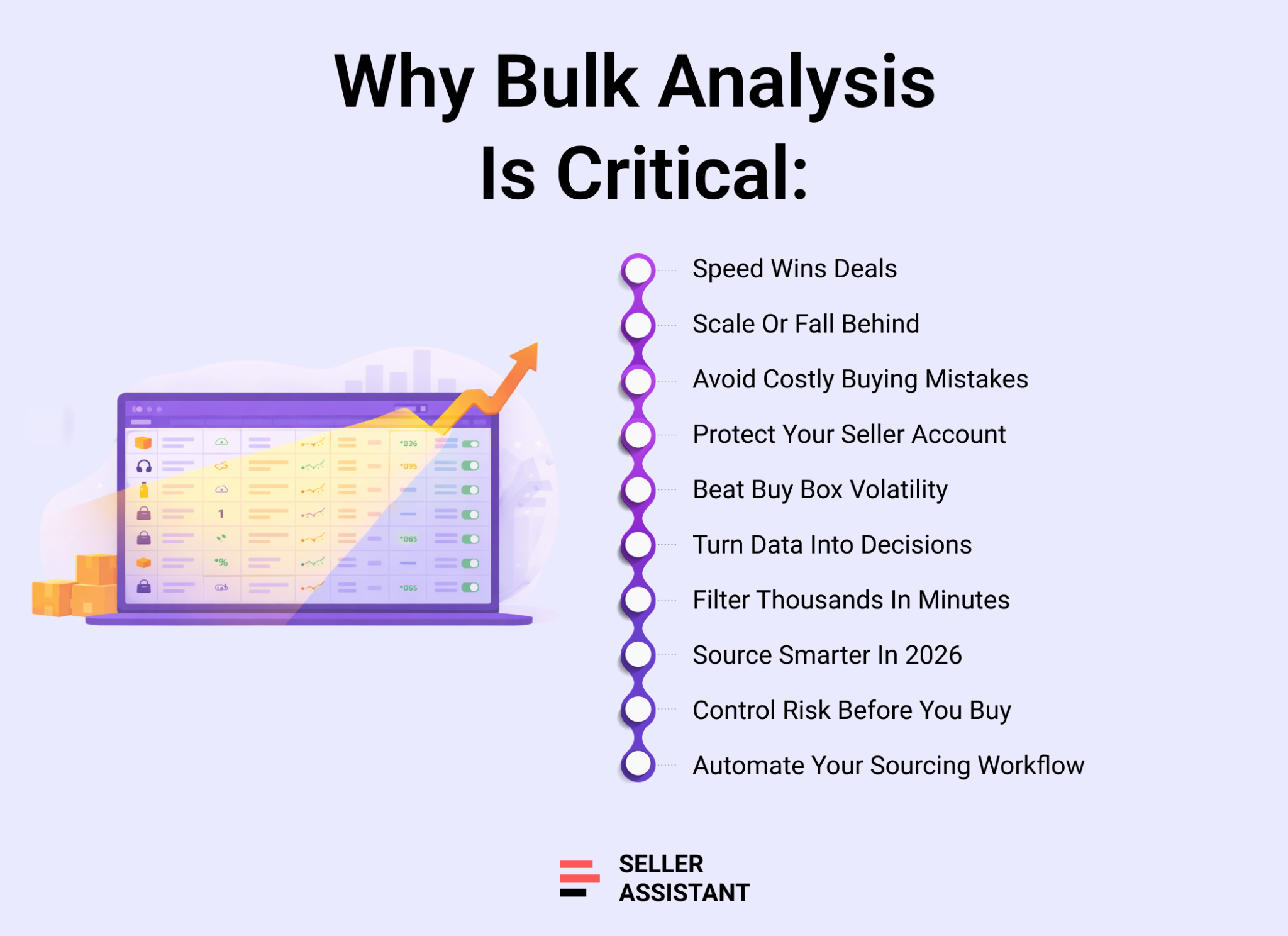
Amazon sourcing in 2026 is faster, more competitive, and less forgiving than ever. Supplier catalogs are larger, Buy Box prices fluctuate daily, and compliance risks can shut down profitable listings overnight. Sellers who rely on manual research or basic spreadsheet scans fall behind. Bulk analysis is no longer a convenience – it’s a core operational requirement for wholesale, online arbitrage, and dropshipping businesses that want consistent, scalable results.
Higher competition and thinner margins
More sellers compete for the same ASINs, which compresses margins and increases Buy Box rotation pressure. Accurate profit modeling – including fees, tax, VAT, prep, and average Buy Box pricing – is essential to avoid deals that look profitable but collapse after purchase.
Buy Box volatility and price instability
Current Buy Box prices can spike due to stockouts, seasonal demand, or temporary repricing gaps. Sellers who base decisions only on the current price risk overpaying. Bulk tools that analyze 30/90/180-day average Buy Box data provide more stable and realistic profit forecasts.
Increased gating and IP risk
Brand restrictions, category approvals, and intellectual property complaints are more common. Without bulk eligibility checks and IP alerts, sellers can unknowingly purchase inventory they cannot list or that threatens account health.
Scaling with teams and virtual assistants
Wholesale operations increasingly rely on VAs and sourcing teams. Bulk analysis platforms with shared views, notes, tagging, and repeatable filters ensure consistent decision-making across users and supplier uploads.
Speed as a competitive advantage
Suppliers release updated price lists frequently. Sellers who can scan, filter, and shortlist thousands of SKUs within minutes secure the best opportunities before competitors react. Bulk analysis transforms sourcing from slow research into a structured, high-speed workflow.
How We Evaluated the Tools
To keep this comparison objective, we evaluated each Amazon price list analyzer using the same criteria. Instead of focusing on marketing claims, we assessed how each tool performs in real wholesale, online arbitrage, and dropshipping workflows.
ASIN matching accuracy
Bulk sourcing starts with correct product matching. We looked at how reliably each tool converts UPC, EAN, GTIN, or title data into the correct Amazon ASIN, including support for multipacks and variation listings.
Profit modeling depth
Accurate profit calculations prevent costly mistakes. We examined whether tools include break-even pricing, full fee breakdowns, sales tax, VAT/DST support, and the ability to calculate profit using average Buy Box prices (30/90/180 days), not just the current Buy Box.
Risk and restriction detection
We evaluated whether tools provide real selling eligibility checks, brand gating visibility, IP alerts, and product risk flags such as HazMat, meltable, fragile, oversize, or bundle indicators.
Competition insights
Strong bulk analyzers should show seller count, FBA vs FBM distribution, Amazon presence in the Buy Box, and signals that help estimate Buy Box competitiveness.
Workflow and team features
Sourcing at scale requires more than data. We assessed saved views, reusable filters, notes persistence, tagging, collaboration tools, and whether the system supports structured shortlisting and purchasing workflows.
Support for wholesale, OA, and dropshipping
Some tools are wholesale-only. We reviewed whether each platform supports multiple sourcing models, including online arbitrage and dropshipping research.
Integrations and automation
Finally, we considered API access, integrations with tools like Keepa, Zapier, Airtable, or Google Sheets, and whether the platform connects bulk analysis with purchase orders, supplier databases, or broader automation workflows.
Comparison of Top Amazon Price List Analyzers
In 2026, the strongest Amazon bulk analysis scanning tools for wholesale and high-volume resellers are Seller Assistant, Scan Unlimited, and Analyzer.Tools. All three can scan supplier price lists, match products to ASINs, and calculate baseline profitability, making them viable options for spreadsheet-driven wholesale workflows.
The difference appears after the scan. Some tools stop at bulk data output. Others connect bulk analysis to eligibility checks, risk protection, deep listing research, team collaboration, and purchase order workflows. Below is a side-by-side comparison based on real reseller operations – from catalog upload to shortlist to buying decision.
Seller Assistant vs Scan Unlimited vs Analyzer.Tools
| Capability | Seller Assistant | Scan Unlimited | Analyzer.Tools |
|---|---|---|---|
| Primary focus | End-to-end wholesale workflow platform + bulk scanner | High-speed wholesale spreadsheet scanner | Advanced wholesale spreadsheet scanner with storefront analysis |
| Supported models | Wholesale, online arbitrage, dropshipping | Wholesale only | Wholesale only |
| Bulk price list scanning | 100+ metrics, multipack, saved views, advanced filters, filter presets, instant recalculation, notes, likes/dislikes, workflow tagging | ~60 metrics, multipack, filtering | ~75+ metrics, multipack, favorites, brand blocklist |
| ASIN matching | UPC/EAN/GTIN + title matching | UPC/EAN/title | UPC/EAN/title |
| Profit modeling depth | FBA/FBM profit, ROI, margin, break-even, VAT/DST, sales tax, shipping, prep, custom cost rules | FBA/FBM profit, VAT, shipping (no sales tax or break-even) | Profit/ROI, VAT (no sales tax or break-even) |
| Price basis options | Current Buy Box + average Buy Box (30/90/180 days, selectable default) | Current BB + 30/90/365 days | Average BB (30/90/180 days) |
| Instant profit recalculation | Yes – edit COG, shipping, prep, pack size directly in table | No | No |
| Sales performance | BSR, BSR drops, estimated sales (dual estimator), ratings, reviews | BSR + estimated sales (US only) | BSR, “Bought in past month,” BSR drops, proprietary estimates |
| Competition insights | FBA/FBM split, seller count, Amazon in BB %, rotation | Seller count, Amazon in BB % | Seller count, Amazon in BB % |
| Risk & restrictions | Bulk Restriction Checker, IP Alert, HazMat, meltable, fragile, oversize, bundle/set flags, extensive warnings | Basic risk warnings only | Brand IP + HazMat alerts only |
| On-Amazon research | Seller Assistant Browser Extension (Quick View, Product View, Side Panel View, Storefront Widget) | No | No |
| Supplier search | AI Supplier Finder, Sourcing AI | No | No |
| Supplier-site research | Side Panel View + built-in VPN | No | No |
| Competitor research | Seller Spy + Storefront Widget | Basic competitor CSV export | Competing Seller Scan |
| Reverse sourcing | AI Product Finder by Brand, Sourcing AI, Storefront Widget, Seller Spy | Limited | Reverse source browser scan (manual) |
| Workflow tagging & shortlisting | Yes – tags by sourcing stage, reusable decisions across uploads | No | Favorites only |
| Team & VA support | Teams, VA Accounts, shared views, persistent notes | No | No |
| Supplier database | Yes | No | No |
| Warehouses database | Yes | No | No |
| Purchase Orders module | Yes | No | No |
| Connected workflow | Full sourcing → eligibility → bulk scan → shortlist → PO → routing | No workflow tools | No workflow tools |
| Integrations | API, Zapier, Make, Airtable, Google Sheets, Keepa | Keepa only | API, Keepa, CamelCamelCamel |
| Pricing | From $13.33/mo | From $70/mo | From $49/mo |
Key takeaway from the comparison
Scan Unlimited and Analyzer.Tools are strong spreadsheet analyzers. They help sellers evaluate large supplier files quickly and identify potential deals based on rank, pricing, and baseline profit data.
Seller Assistant goes further. Price List Analyzer operates inside a connected ecosystem that includes:
- Account-level restriction verification
- IP and risk detection before purchase
- Instant profit recalculation without re-uploading files
- Saved views and reusable filter presets
- Shared notes that persist across uploads
- Workflow tagging by sourcing stage
- Deep single-product research directly on Amazon via the Seller Assistant Extension
- Purchase order generation and supplier routing
- For sellers who want more than raw CSV output – and need a structured sourcing workflow from analysis to buying – that distinction matters.
Tool-by-Tool Breakdown
All three tools can scan supplier price lists and return Amazon-linked data. The real difference is what happens next: how accurate the match is, how realistic the profit math is, how well risks and restrictions are surfaced, and whether you can turn a scan into a clean shortlist your team can actually buy from.
Below is a practical breakdown of each option.
Seller Assistant’s Price List Analyzer
Summary
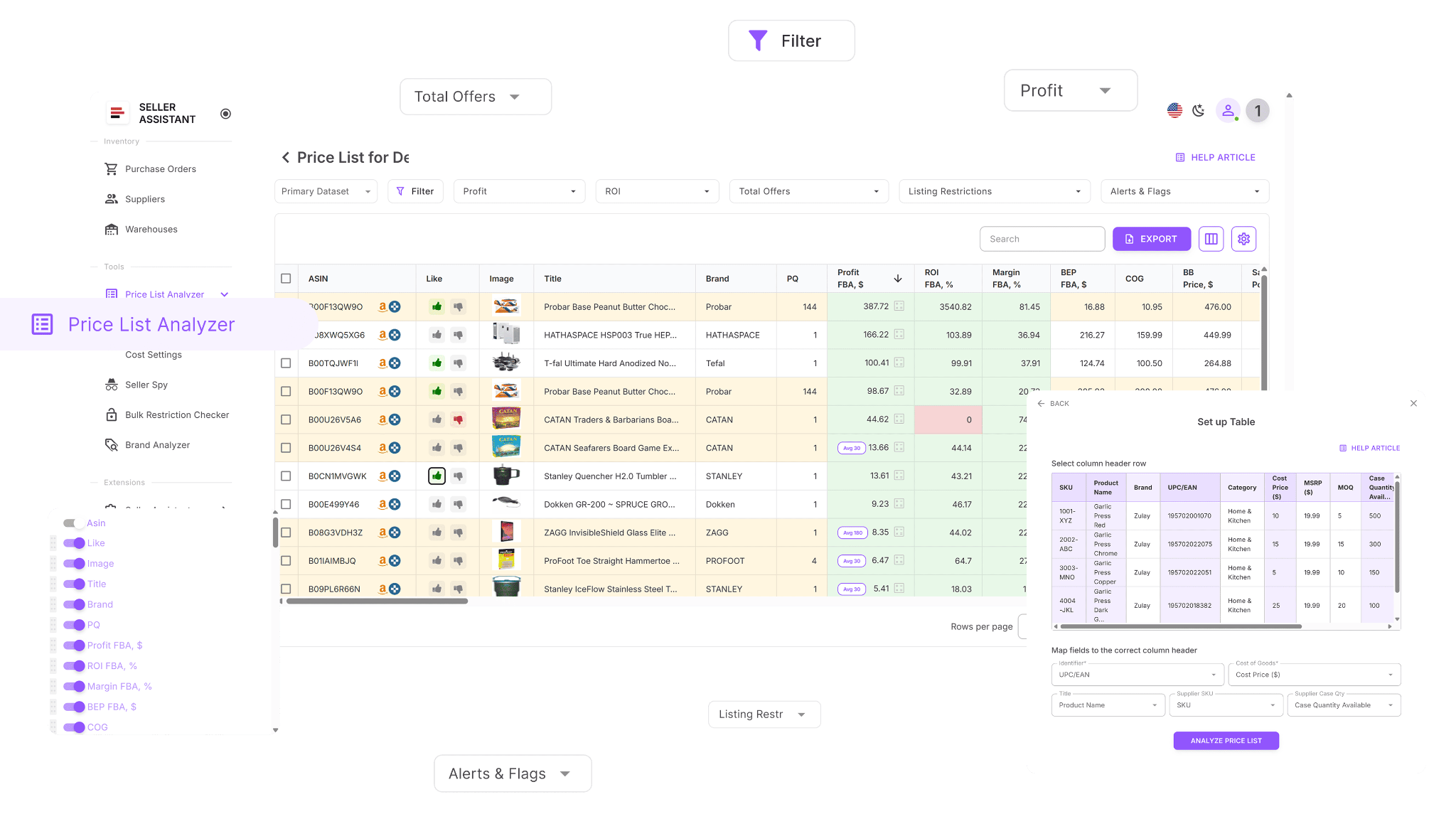
Seller Assistant’s Price List Analyzer is a bulk sourcing module built for wholesale, online arbitrage, and dropshipping. It converts supplier spreadsheets into a deal table with profitability, demand, competition, restrictions, and risk signals – then lets you filter, tag, comment, and shortlist products in a workflow that’s designed for real buying decisions, not just data exports.
Note. Seller Assistant is an end-to-end Amazon workflow management platform that integrates 10+ wholesale-focused solutions into one connected system. It combines sourcing workflow automation, bulk research and intelligence tools, and integrated Chrome extensions – giving you everything you need to streamline finding deals, managing suppliers, and creating purchase orders.

The platform aggregates: workflow management tools – Purchase Orders Module, Suppliers Database, Warehouses Database to organize, automate, and scale every step of your wholesale and arbitrage operations; bulk research & sourcing tools – Price List Analyzer, Bulk Restriction Checker, Sourcing AI, Brand Analyzer, Seller Spy to evaluate supplier price lists, verify selling eligibility and restrictions, open new brands, and discover winning product ideas from competitors to expand your product catalog; Chrome extensions – Seller Assistant Browser Extension, IP-Alert Extension, and built-in VPN by Seller Assistant to deep-research products, check IP claims and compliance, and access geoblocked supplier sites directly within your browser; and integrations & team access features – seamless API connectivity and integrations with Zapier, Airtable, and Make, plus Virtual Assistant Accounts for secure, scalable team collaboration.
With Seller Assistant, every step of your Amazon wholesale and arbitrage workflow is automated and connected.
Core features
This Software Makes Amazon FBA Wholesale Selling 10x Easier
- Scan large supplier catalogs and surface ASINs with real profit potential
- Auto-match supplier items to the correct Amazon ASINs using UPC/EAN/GTIN and optional titles
- Identify products you can’t sell by running restriction checks tied to your account
- Measure demand with BSR, rank movement, and estimated monthly sales volume
- Calculate net profit, ROI, margin, and break-even price for FBA and FBM
- Evaluate pricing stability using Buy Box averages across 30, 90, and 180 days
- Show full fee math: referral fees, FBA/FBM fees, storage, prep, inbound shipping, and custom costs
- Flag risk-heavy listings: HazMat, meltable, oversize, fragile, bundles/sets, and variation traps
- Trigger warnings like approval required, missing Buy Box, missing fees, or weak FBA profitability
- Filter by profit, ROI, demand, competition, risks, restrictions, and alerts
- Save custom table layouts and filter presets for future uploads
- Edit COG, shipping, prep, and pack size in-table and see profits recalculate instantly
- Add shared notes that stay linked to ASINs across uploads
- Tag products by sourcing stage and filter by workflow status (so decisions carry across lists)
Limitations
If you only want a lightweight “scan and export” tool and won’t use workflow features, Seller Assistant may feel like more system than you need. It’s built for sellers who want the scan connected to decision-making and purchasing.
Best for
- Wholesale sellers and teams processing large lists weekly
- OA and dropshippers who need bulk analysis plus deeper research workflows
- Sellers who care about eligibility, IP/risk protection, and repeatable sourcing decisions
- Teams and VAs who need shared views, notes, tagging, and clean shortlists
How to use it step by step
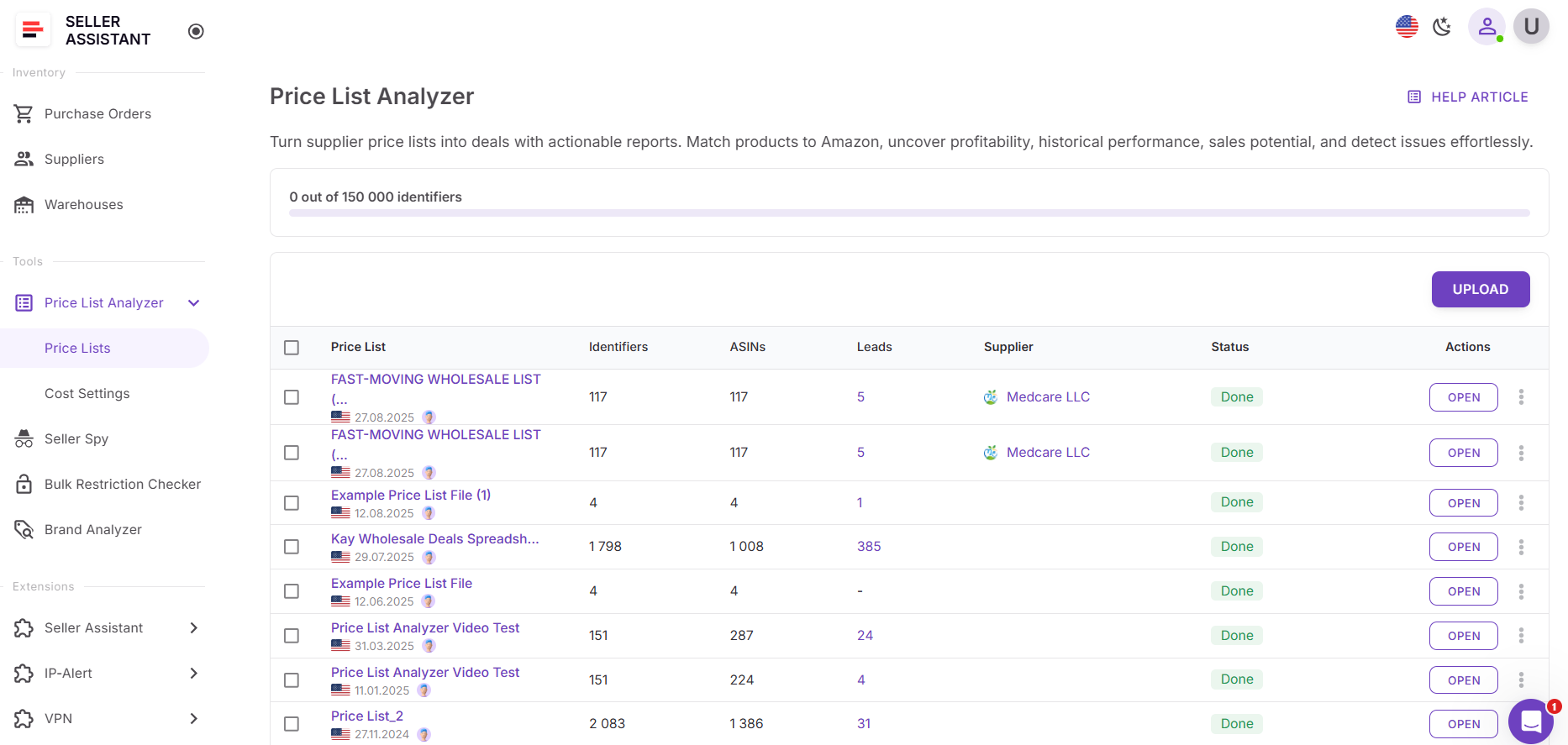
Step 1. Open Price List Analyzer
Log in to your Seller Assistant account, go to the Tools section, and open Price List Analyzer. Click Upload.
Step 2. Upload your price list
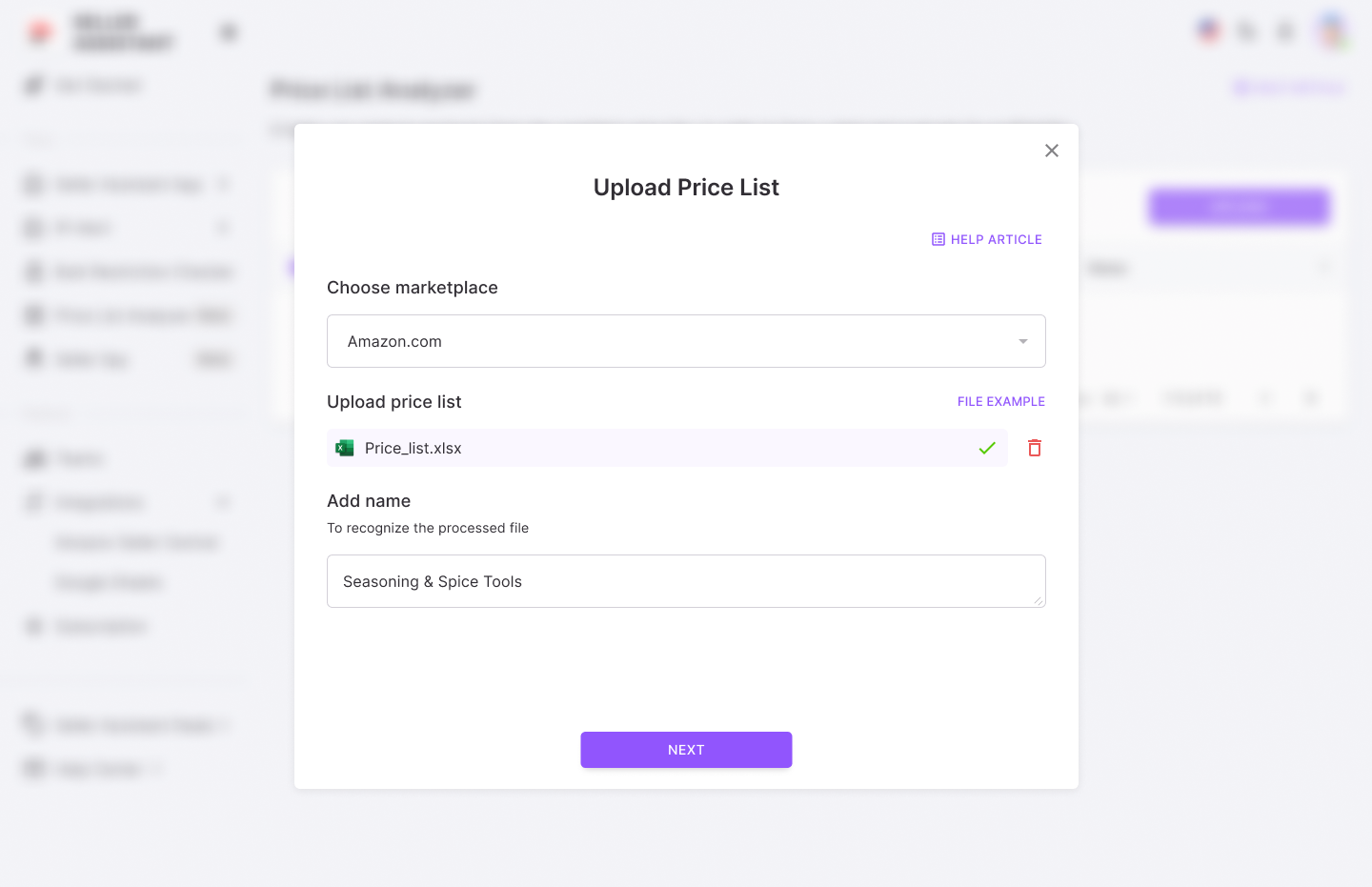
Choose the Amazon marketplace and upload your supplier file in .xlsx or .xls format.
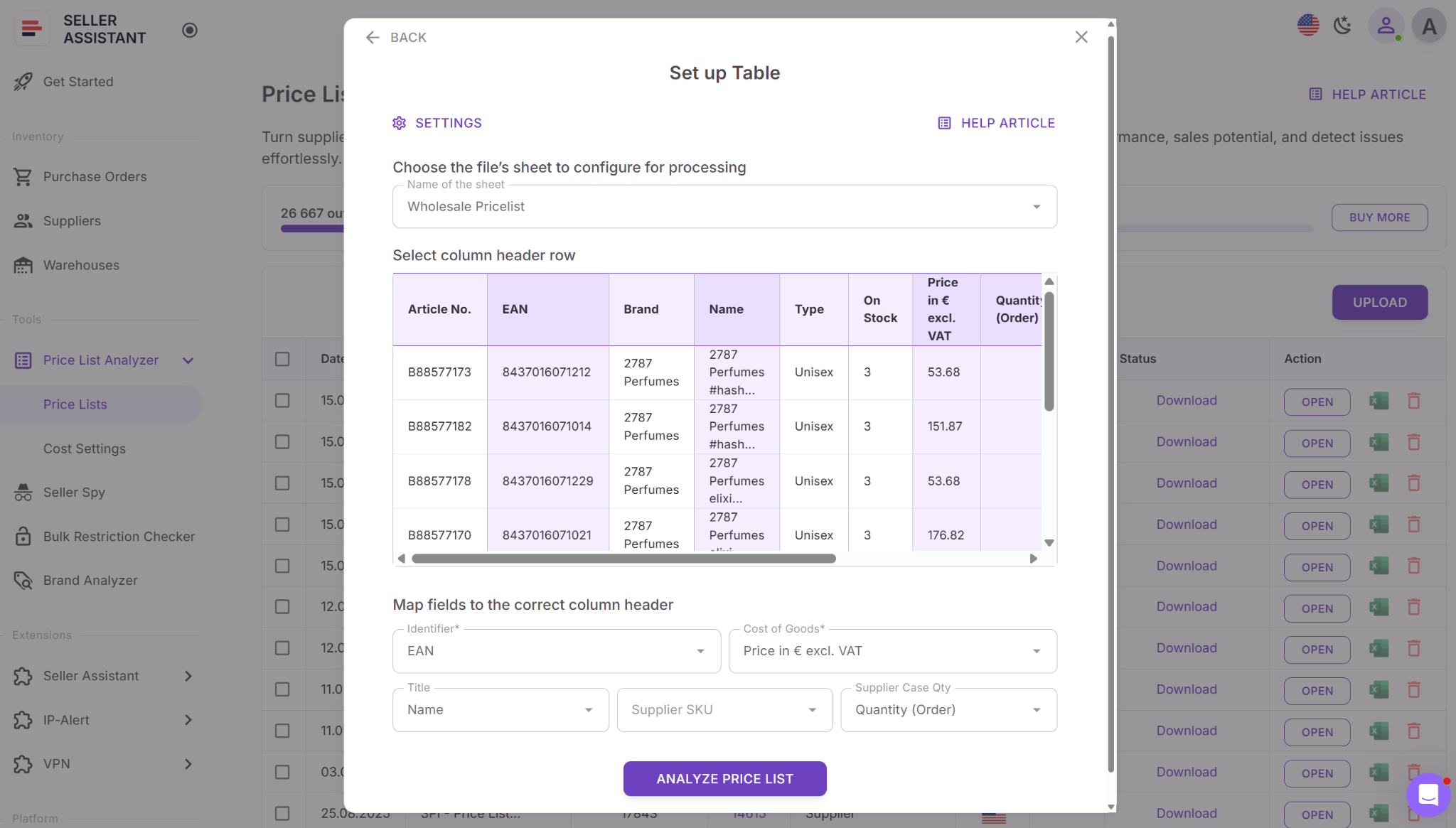
Step 3. Map your fields
Select the sheet, define the header row, and map identifiers (UPC/EAN/GTIN). Map COG and add titles if your file has them.
Step 4. Run the scan
Click Analyze price list to start ASIN matching and bulk enrichment.
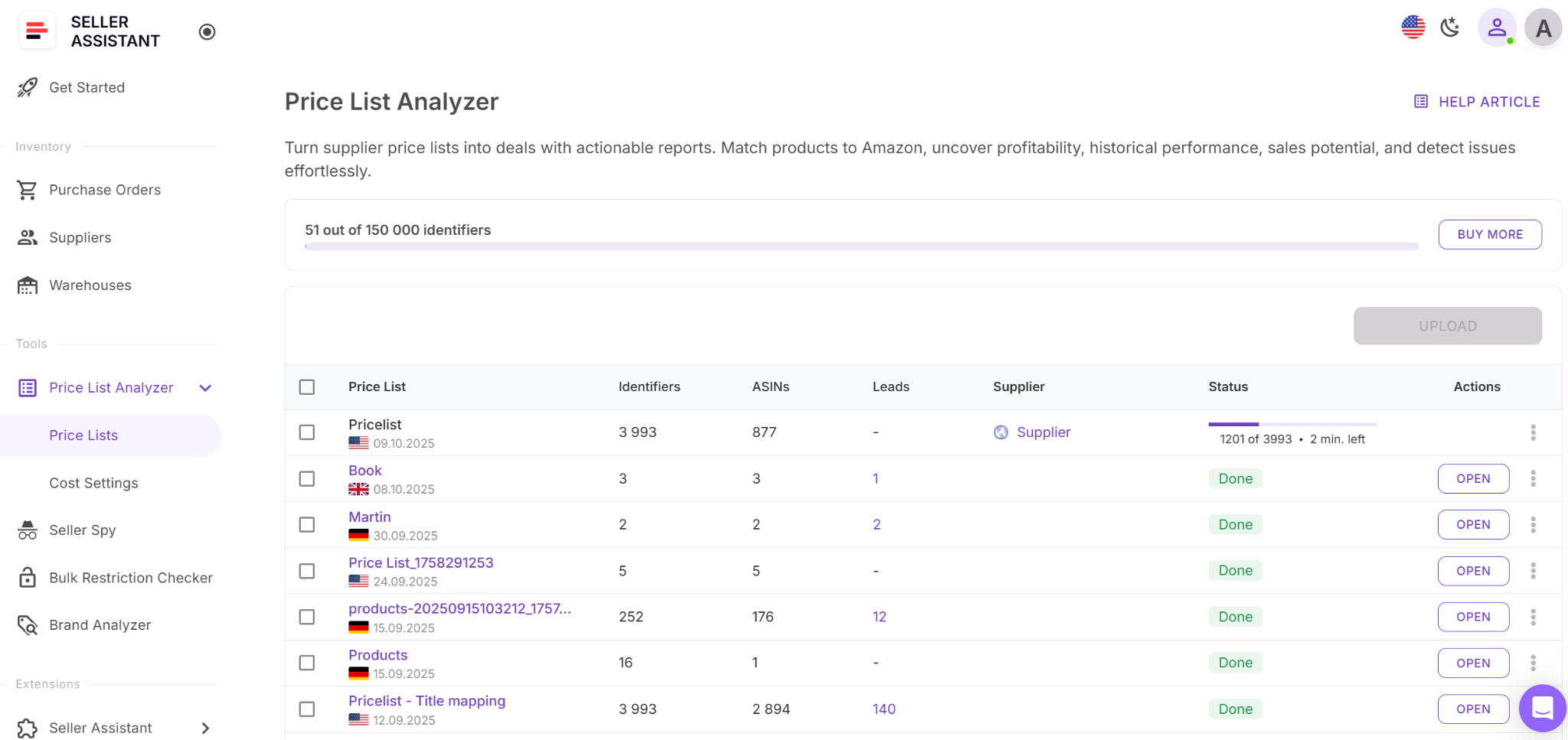
Step 5. Review enriched results
Open the interactive table to see the matched ASINs and all metrics. Export the full dataset if needed.
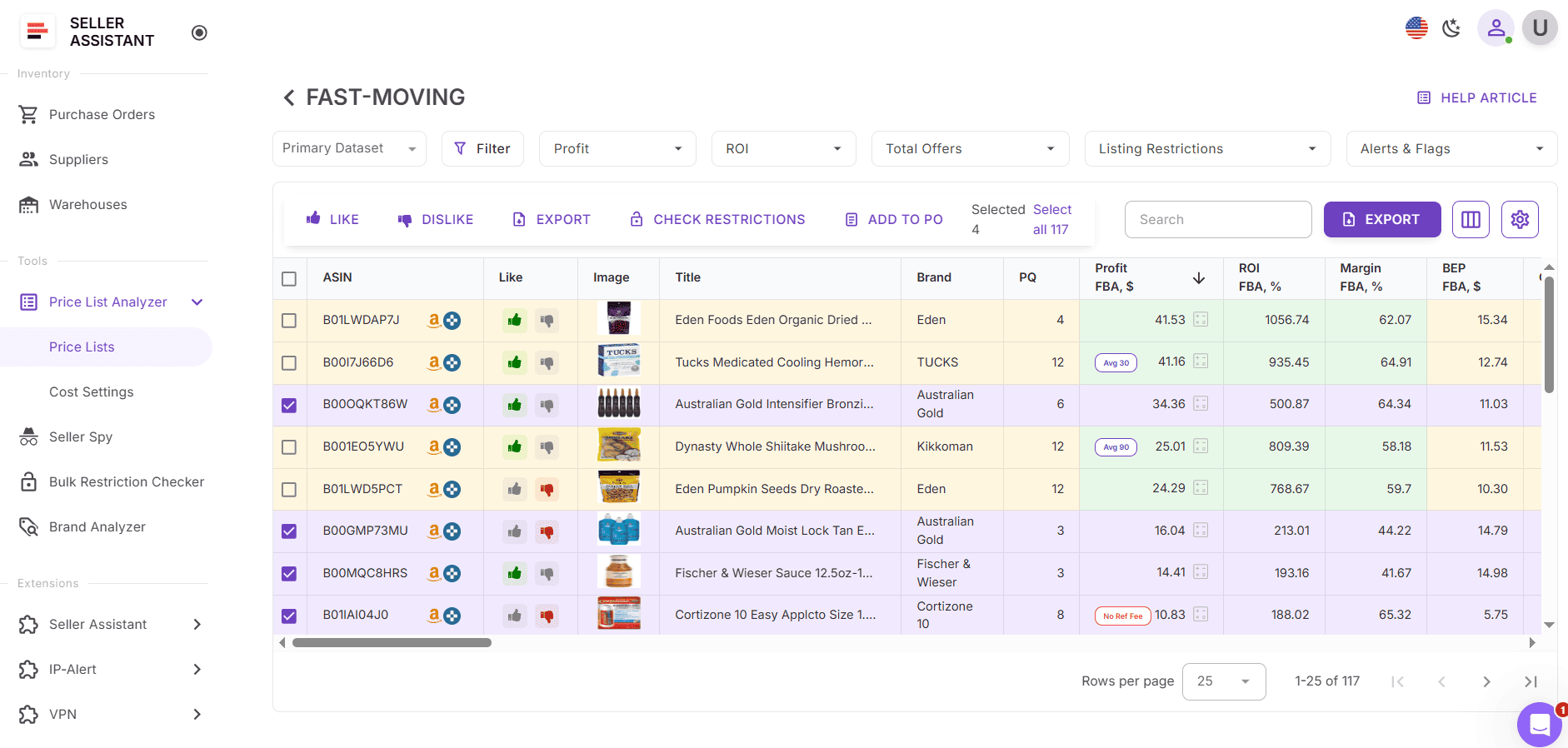
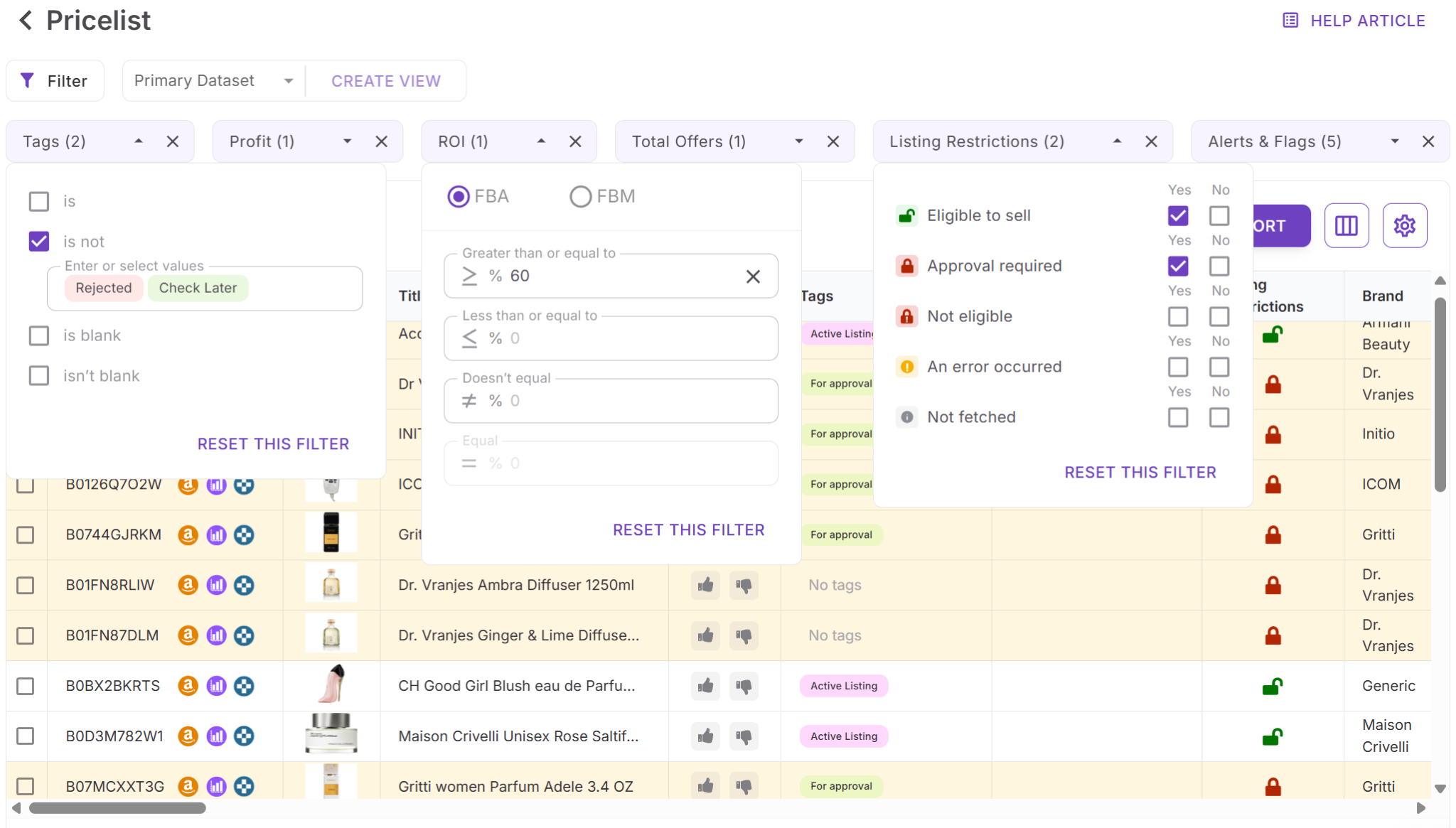
Step 6. Filter and shortlist
- Use quick filters for Profit, ROI, offer count, listing restrictions, alerts, flags, and tags to remove obvious non-starters.
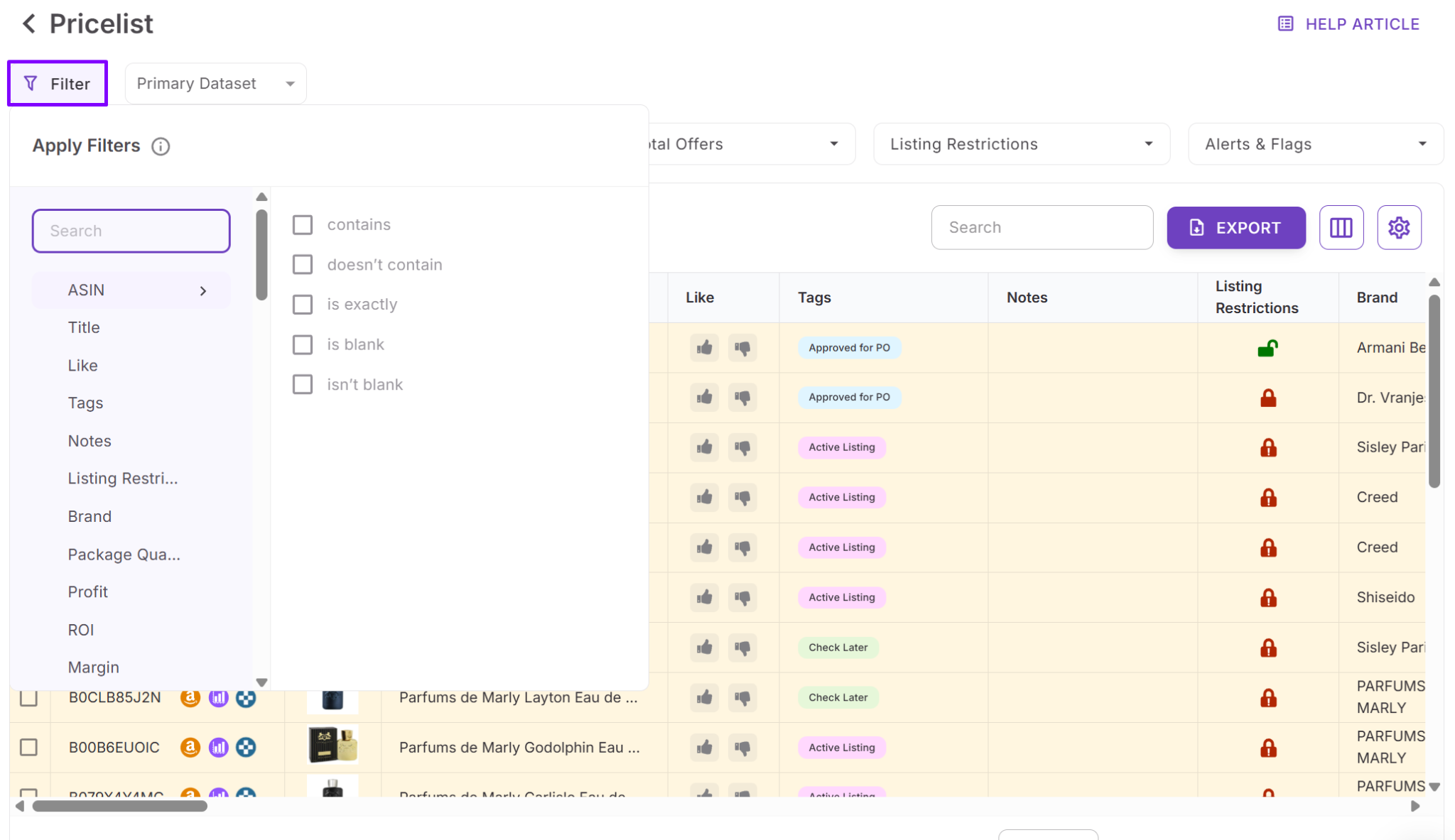
- Then apply advanced filters for profitability thresholds, risk flags, eligibility, demand, brand, category, and competition.
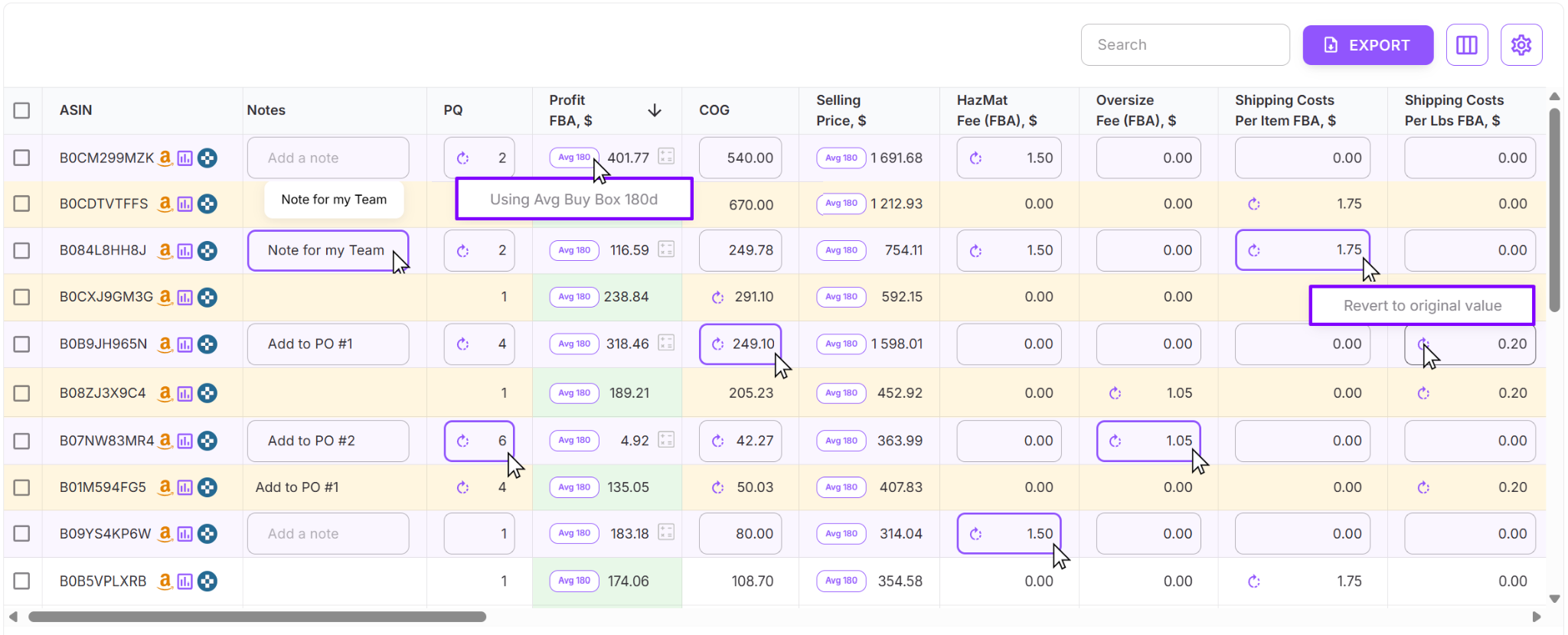
Step 7. Adjust costs and recalculate instantly
Edit COG, shipping, prep costs, or pack quantity directly in the table. Profit, ROI, and margin update immediately.
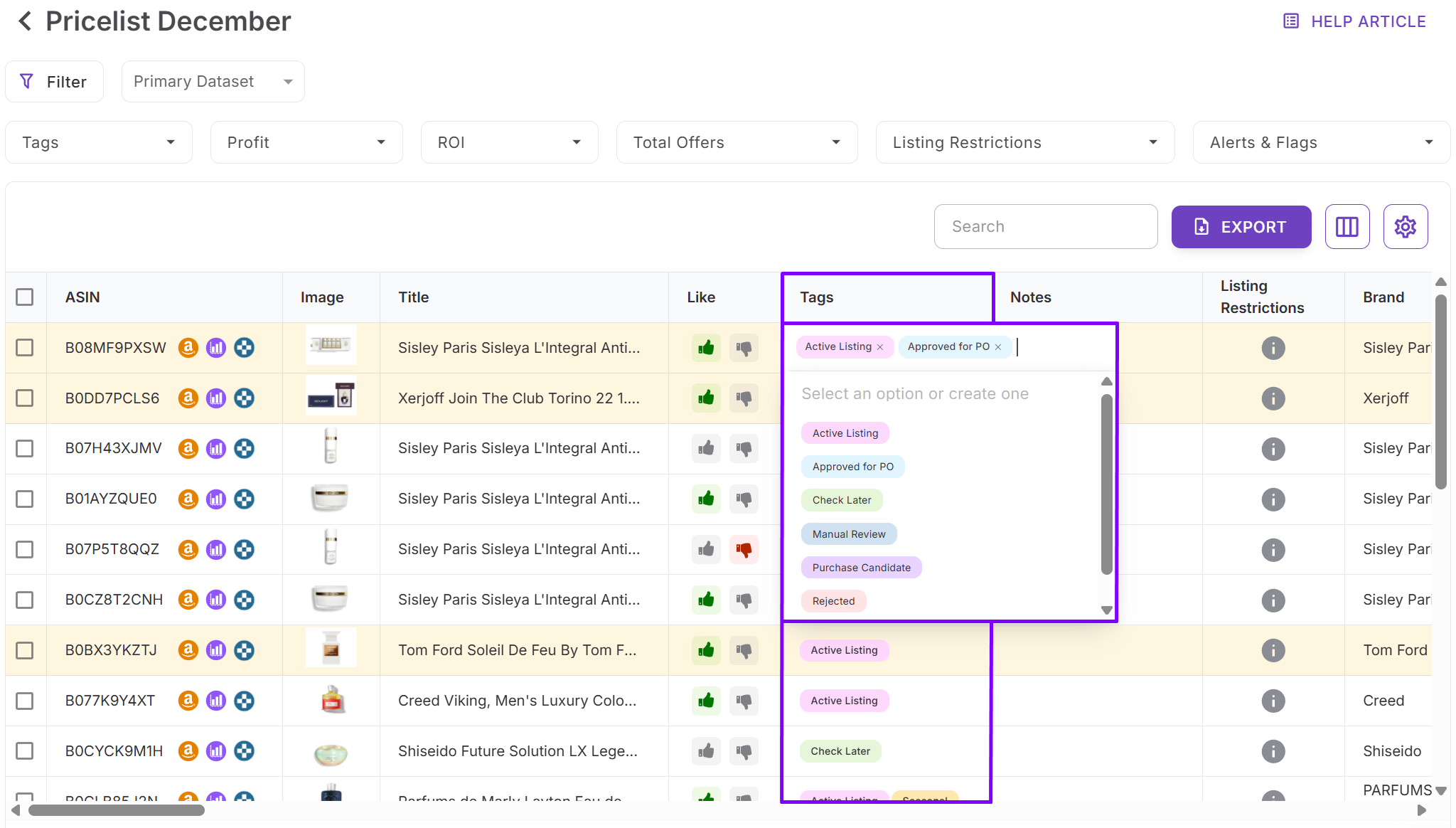
Step 8. Add tags and notes for workflow control
Tag products by sourcing stage (for example: review, validate, approved, reject). Add team notes tied to the ASIN so context shows up again in future uploads.
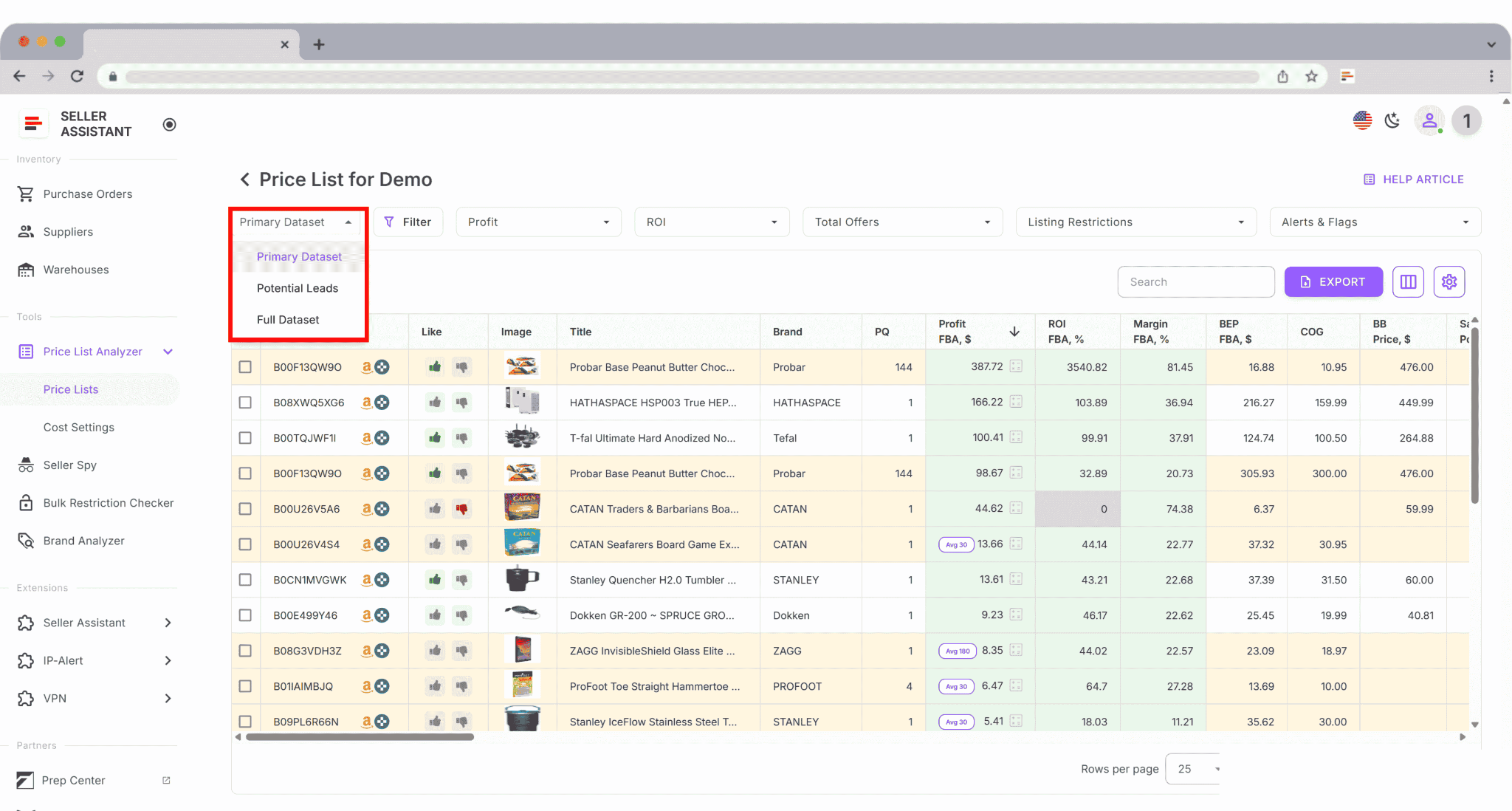
Step 9. Save views and export purchase-ready lists
Save column setups and filter rules as reusable views (for example: Top leads). Like/Dislike items to build a shortlist, then export only the filtered or selected products you’re ready to buy.
Scan Unlimited
Summary
Scan Unlimited is a fast wholesale spreadsheet scanner built for sellers who want quick ASIN matching and basic profitability output. It’s designed for simple, spreadsheet-first workflows where you scan, filter, and export – without deeper compliance checks or workflow tooling.
The tool is built for speed and straightforward bulk processing. Wholesale sellers can upload large supplier spreadsheets and quickly receive Amazon-matched results, making it suitable for those who prioritize fast catalog turnover without deeper workflow layers.
It includes multipack handling, flexible sorting and filtering, historical pricing snapshots, and Keepa-integrated charts. These features allow sellers to assess price consistency, rank trends, and basic profit potential directly within the bulk results table, without switching between multiple tools.
Core features
Bulk processing and ASIN matching
- Built for high-volume wholesale spreadsheets with thousands of SKUs
- Matches UPC, EAN, or title data to Amazon ASINs
- Retrieves essential listing details for each matched product
- Supports multipack and pack-quantity configurations
Pricing and profitability data
- Displays current Buy Box price
- Provides 30/90/365-day pricing windows
- Calculates basic FBA and FBM profit
- Supports VAT inputs for EU sellers
- Includes COG and shipping fields for margin calculation
- Profit modeling covers standard use cases but does not include sales tax handling, break-even pricing, or expanded fee logic required in more complex workflows.
Historical pricing and demand signals
- 30/90/365-day average Buy Box pricing
- Keepa-integrated charts
- Historical FBA and FBM price comparisons
- Basic sales trend signals based on BSR movement
- These data points help sellers identify long-term pricing patterns and avoid unstable listings.
Competition data
- Total seller count
- Basic FBA vs FBM offer breakdown
- Overview of competitive landscape
Risk and compliance indicators
- Included: HazMat-type warnings; basic IP or data alerts; simple matching issues
- Not included: Account-level selling eligibility verification; gating or approval indicators; detailed IP complaint history; meltable, fragile, or oversize flags; restrictions tied to the seller’s specific account
- Compliance validation must be completed outside the platform.
Filtering and export options
- Filter by price, ROI, BSR, offers, and standard metrics
- Apply basic filters to isolate higher-margin or faster-moving items
- Save simple layouts (no team-level shared views)
- Export full scans for external processing
Scan Unlimited functions as a fast, data-focused bulk scanner rather than a connected wholesale workflow system.
Limitations
- Wholesale-only (not built for OA or dropshipping workflows)
- No account-level restriction checks
- Limited risk flags compared to advanced platforms
- No saved team views, persistent notes, tagging, or workflow controls
- Profit modeling lacks sales tax and break-even logic
Best for
- Wholesale sellers who want a quick scanner and handle the rest elsewhere
- Operators who work entirely inside spreadsheets and don’t need workflow features
How to use it step by step
- Step 1. Upload your supplier file
- Step 2. Map UPC/EAN/title and cost columns
- Step 3. Run the scan
- Step 4. Review Buy Box, rank, and profit fields
- Step 5.Filter for your ROI/profit thresholds
- Step 6. Export results and complete restrictions/risk checks in separate tools.
Analyzer.Tools
Summary
Analyzer.Tools is a wholesale-focused bulk analysis platform designed for sellers who operate primarily in spreadsheets and want deeper per-SKU historical data. It processes large supplier catalogs, matches products to Amazon ASINs, and enriches each row with approximately 75+ pricing, performance, and competition metrics.
The platform is built around data density and historical trend analysis rather than connected workflow automation.
Core features
- Bulk scanning with UPC/EAN/GTIN/title matching
- Support for large supplier files with thousands of SKUs
- Multipack configuration for accurate cost handling
- Detailed product data panels with past performance indicators
Historical pricing and demand insights
- Buy Box averages across 30/90/180 days
- Lowest and highest price windows
- Price change percentages
- Average BSR and BSR ranges
- BSR drop counts as a sales velocity signal
- “Bought in past month” demand indicator
- Amazon in-stock rate over 30/90/180 days
Competition and offer data
- Seller count
- FBA/FBM offer mix
- Review count and rating summaries
Profitability metrics
- Profit and ROI fields
- VAT support
- COG + shipping + multipack calculations
Competitor and sourcing tools
- Competing Seller Scan to export full storefronts into spreadsheets
- Reverse Source Browser Scan for manual product loading
- Business Product Opportunities (BPO) for Amazon B2B-focused ASIN suggestions
- Brand blocklist to exclude unwanted brands
- Favorites lists for shortlisting
Limitations
- Wholesale-only (not built for OA or dropshipping workflows)
- No account-level selling eligibility verification
- No personalized restriction checks
- Limited compliance coverage (brand IP alert + HazMat only)
- No meltable, fragile, oversize, or detailed IP complaint flags
- No browser extension or on-page Amazon research tools
- No supplier database, warehouse routing, or PO module
- No team accounts, shared notes, or workflow tagging
- Operates as a scanning system rather than a connected sourcing workflow
Best for
- Wholesale sellers who rely heavily on spreadsheet analysis
- Operators who prioritize historical data and storefront exports
- Sellers building sourcing lists from competitor storefront scans
How to use it step by step
- Step 1. Upload your supplier spreadsheet.
- Step 2. Map UPC/EAN/GTIN/title and cost fields.
- Step 3. Run the bulk scan to generate enriched ASIN data.
- Step 4. Review historical pricing, BSR trends, and competition metrics.
- Step 5. Apply advanced filters or use Favorites and brand blocklists to narrow results.
- Step 6. Export shortlisted ASINs for further validation and purchasing decisions outside the platform.
Analyzer.Tools functions as a data-focused bulk analysis engine for wholesale sourcing, rather than a full workflow management system.
Final Thoughts
In 2026, bulk analysis is no longer optional for Amazon resellers. Supplier catalogs are larger, competition is tighter, and pricing volatility makes shallow profit calculations risky. The tools you use to evaluate price lists directly impact your margins, account health, and ability to scale.
Scan Unlimited and Analyzer.Tools provide solid spreadsheet-based bulk scanning for wholesale sellers who mainly need fast data exports and historical pricing insight. For sellers who want deeper profit modeling, account-level restriction checks, risk detection, on-page Amazon research, and a connected workflow from sourcing to purchase order, Seller Assistant’s Price List Analyzer offers a more complete system.
Seller Assistant automates and connects every stage of your Amazon wholesale and arbitrage workflow. It brings together in one platform: workflow management tools – Purchase Orders Module, Supplier Database, Warehouse Database, bulk research & sourcing tools – Price List Analyzer, Bulk Restriction Checker, Sourcing AI, Brand Analyzer, Seller Spy, Chrome extensions – Seller Assistant Browser Extension, IP-Alert Extension, and built-in VPN by Seller Assistant, and integrations & team access features – seamless API connectivity, integrations with Zapier, Airtable, and Make, and Virtual Assistant Accounts.

