


Finding reliable wholesale suppliers for Amazon isn’t easy. You analyze a profitable product, check sales velocity, calculate ROI – and then hit a wall trying to locate a legitimate distributor or brand contact.
Seller Assistant’s AI Supplier Finder solves that problem. It helps Amazon wholesale sellers, online arbitrage resellers, and dropshippers quickly find verified suppliers by brand, prioritize trusted options, and move straight into supplier management.
This post shows how instead of wasting hours searching Google or filtering out retail stores, you get structured, resale-focused results designed specifically for Amazon sourcing workflows.
Note. Seller Assistant is an end-to-end Amazon workflow management platform that integrates 10+ wholesale-focused solutions into one connected system. It combines sourcing workflow automation, bulk research and intelligence tools, and integrated Chrome extensions – giving you everything you need to streamline finding deals, managing suppliers, and creating purchase orders.

The platform aggregates: workflow management tools – Purchase Orders Module, Suppliers Database, Warehouses Database to organize, automate, and scale every step of your wholesale and arbitrage operations; bulk research & sourcing tools – Price List Analyzer, Bulk Restriction Checker, Sourcing AI, Brand Analyzer, Seller Spy to evaluate supplier price lists, verify selling eligibility and restrictions, open new brands, and discover winning product ideas from competitors to expand your product catalog; Chrome extensions – Seller Assistant Browser Extension, IP-Alert Extension, and built-in VPN by Seller Assistant to deep-research products, check IP claims and compliance, and access geoblocked supplier sites directly within your browser; and integrations & team access features – seamless API connectivity and integrations with Zapier, Airtable, and Make, plus Virtual Assistant Accounts for secure, scalable team collaboration.
With Seller Assistant, every step of your Amazon wholesale and arbitrage workflow is automated and connected.
What Is AI Supplier Finder?
Seller Assistant’s AI Supplier Finder is an AI-powered sourcing tool inside Seller Assistant that helps Amazon resellers find wholesale suppliers by brand. Instead of manually searching Google, filtering out retail stores, or guessing which distributors are legitimate, sellers enter a brand name and receive a structured list of potential suppliers prioritized by trust level and resale suitability.
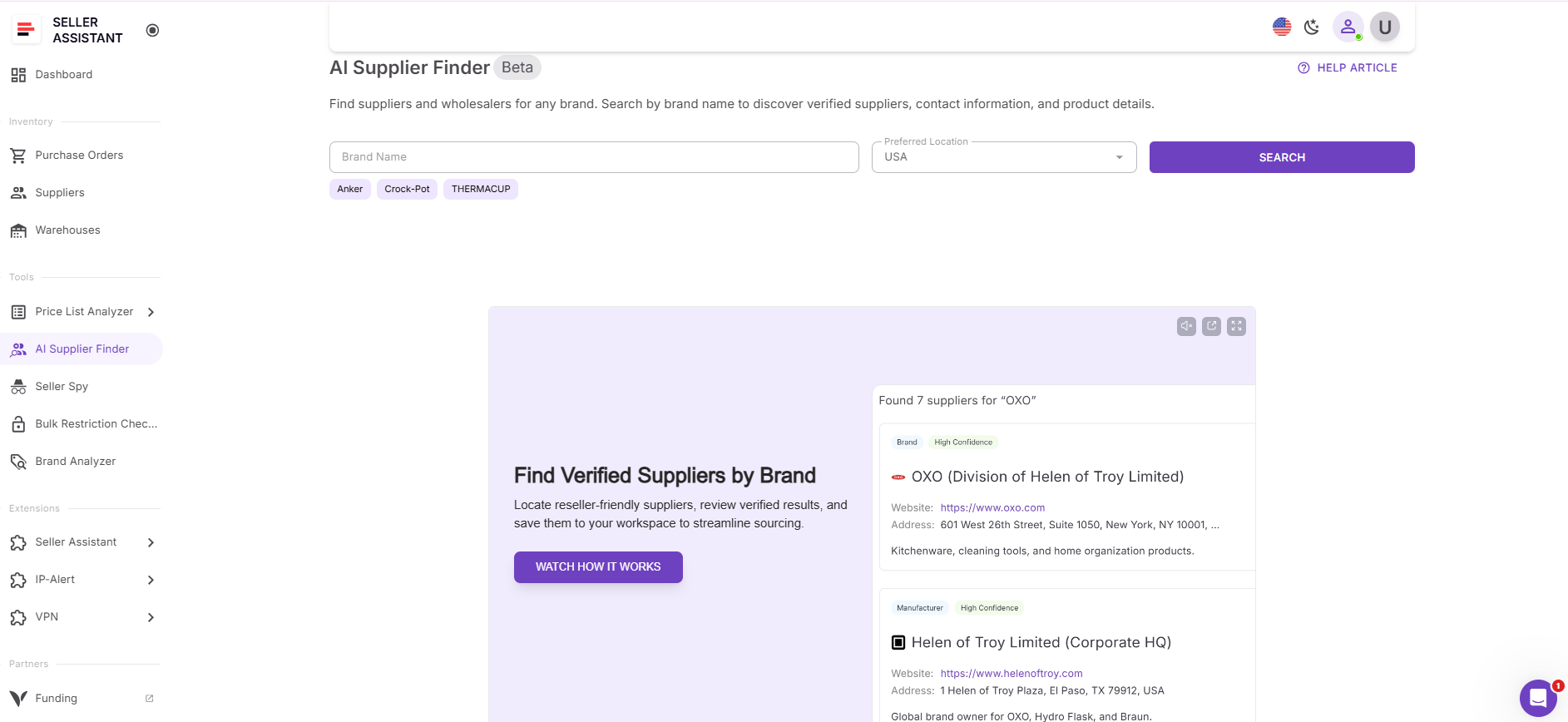
The tool is built for Amazon wholesale sellers, online arbitrage resellers, and dropshippers who need direct brand, manufacturer, or distributor accounts to scale. It prioritizes brands and authorized distributors first, then wholesalers, while excluding marketplaces and B2C stores.
Reliable suppliers are critical for Amazon success. Without them, you risk IP complaints, inauthentic claims, unstable inventory, and thin margins. AI Supplier Finder reduces that risk by surfacing business domains evaluated for legitimacy and relevance to resale. It connects product research directly to supplier discovery, turning a profitable ASIN into a real wholesale opportunity within the same workflow.
Why Finding Wholesale Suppliers Is So Hard for Amazon Sellers
Finding a profitable product on Amazon is often easier than finding a legitimate supplier for it. You can validate demand, check BSR, analyze competition, and calculate ROI in minutes. But securing a real wholesale source behind that product is where most sellers get stuck.
Search results full of retail stores
When sellers search for “brand + distributor” or “brand + wholesale,” search engines return marketplaces, small retail shops, and Shopify-style stores. Many of them sell at or near retail prices. They are not true wholesale suppliers, and buying from them often destroys margins.
Hard to identify authorized distributors
Not every company claiming to be a distributor is authorized by the brand. Some operate in gray areas. Others cannot provide proper invoices. Without authorized documentation, Amazon sellers risk inauthentic complaints or IP claims.
Amazon private label sellers and restricted brands
Many brands belong to private label sellers or are restricted on Amazon. New resellers waste time trying to open accounts with brands that do not offer wholesale partnerships at all.
No clear signal of supplier legitimacy
Even when you find a business website, it is difficult to assess whether the company is:
- A manufacturer
- An authorized distributor
- A general wholesaler
- Or just another reseller
There is no built-in trust score when searching manually.
Time-consuming manual research
Wholesale sourcing often means:
- Checking multiple websites
- Verifying contact details
- Comparing business domains
- Filtering out B2C stores
- Contacting suppliers one by one
This process can take hours for a single brand.
For Amazon wholesale sellers, online arbitrage resellers, and dropshippers who want to scale, this friction slows growth. Without reliable suppliers, inventory becomes unstable, margins shrink, and account risk increases. That’s why structured, resale-focused supplier discovery is essential in modern Amazon sourcing workflows.
Inside AI Supplier Finder: Supplier Matching Logic Explained
AI Supplier Finder is not just a brand search box. It uses structured logic to identify suppliers that make sense specifically for Amazon resale. Here’s what happens when you enter a brand name.
Brand-based search logic
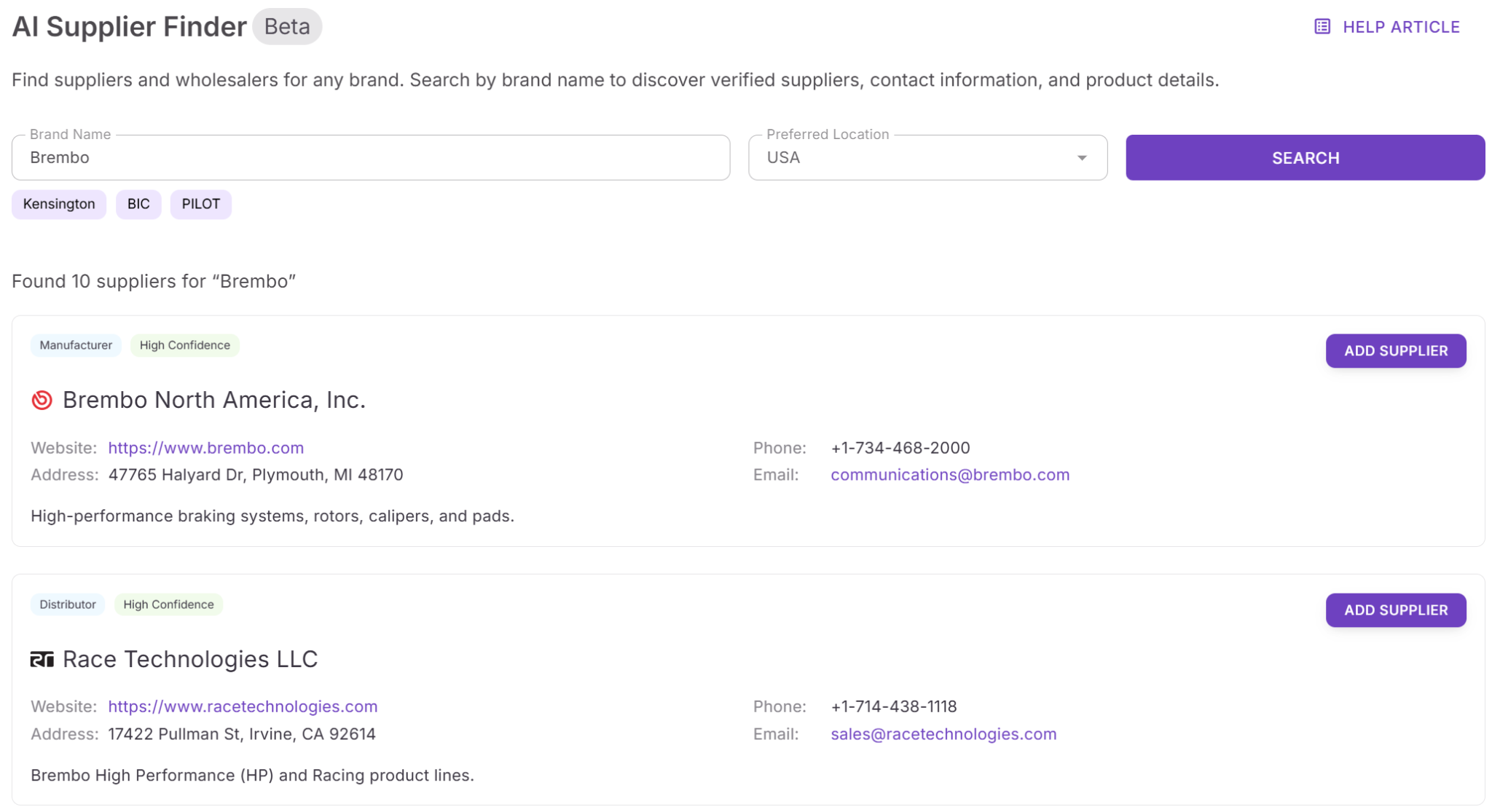
The system starts with the brand. It analyzes brand data and looks for business entities connected to manufacturing, distribution, or wholesale supply of that brand. The focus stays on B2B domains, not retail storefronts. This keeps the results aligned with wholesale sourcing, not casual buying.
AI prioritization: brand → distributor → wholesaler
Results are not random. The tool prioritizes:
- Brand owners or manufacturers
- Authorized distributors
- Wholesalers
- Alternative suppliers if primary options are limited
This mirrors how experienced Amazon wholesale sellers build accounts. Direct relationships come first. Distributors come next. General wholesalers serve as backup.
Match confidence scoring
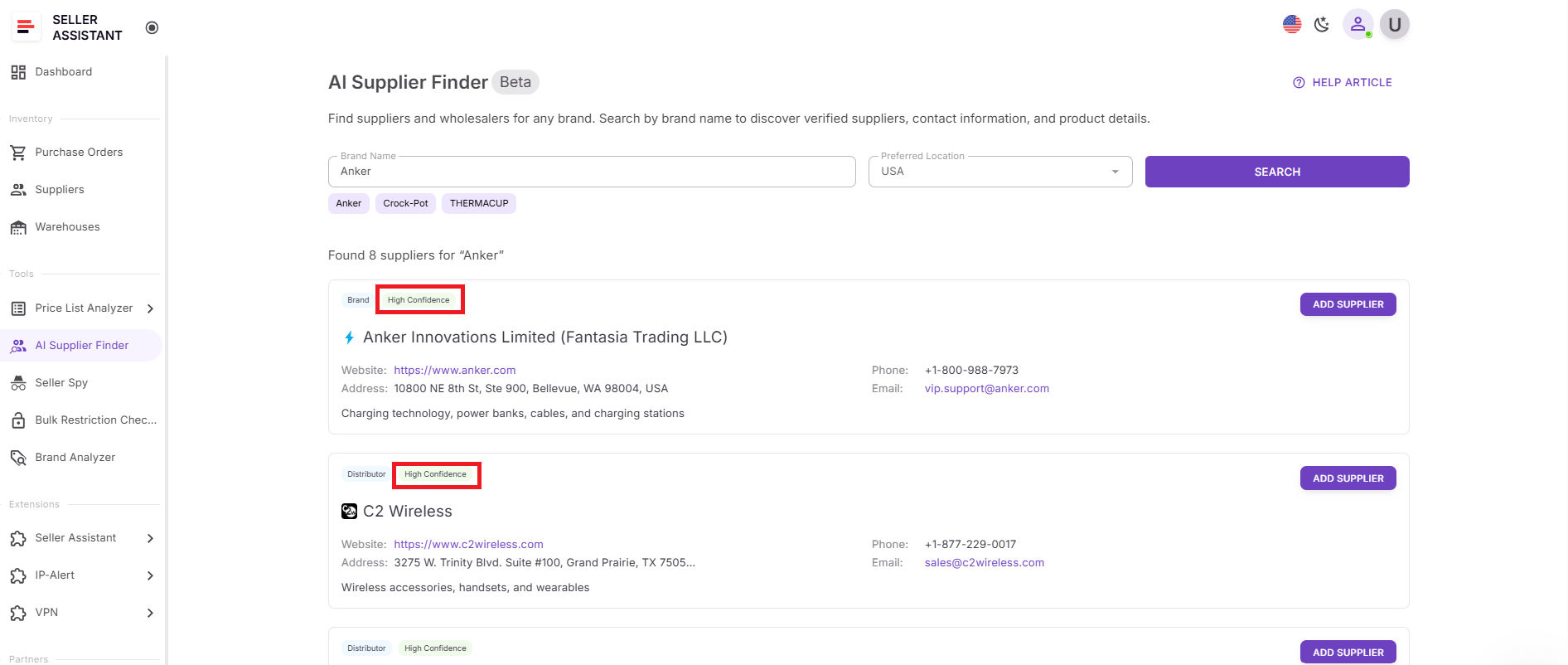
Each supplier receives a match confidence level: High, Medium, or Low.
This score reflects how relevant and suitable the supplier appears for resale. A High score signals strong alignment with the brand and wholesale intent. Lower scores indicate weaker or indirect connections. Instead of guessing, sellers get a clear signal to guide outreach priority.
Marketplace and B2C exclusion
Retail marketplaces like Amazon or eBay and consumer-focused Shopify-style stores are automatically excluded. The system filters out B2C sellers that typically sell at retail pricing and do not support wholesale accounts. This removes the noise that normally dominates manual search results.
Resale suitability filtering
The tool evaluates suppliers for legitimacy and resale relevance. It looks at business domains, contact information, and supplier type to surface companies more likely to support Amazon resellers.
This filtering reduces the risk of:
- Buying from another reseller
- Receiving improper invoices
- Facing inauthentic or IP complaints
By combining brand-based logic, structured prioritization, confidence scoring, and B2B filtering, AI Supplier Finder turns supplier discovery into a structured process rather than trial and error.
How AI Supplier Finder Works
AI Supplier Finder is built directly into your Seller Assistant Personal Area. To find wholesale suppliers, you simply open the tool, enter a brand name, select your preferred region, and click Search. The system analyzes the brand and returns a structured list of potential suppliers suitable for Amazon resale.
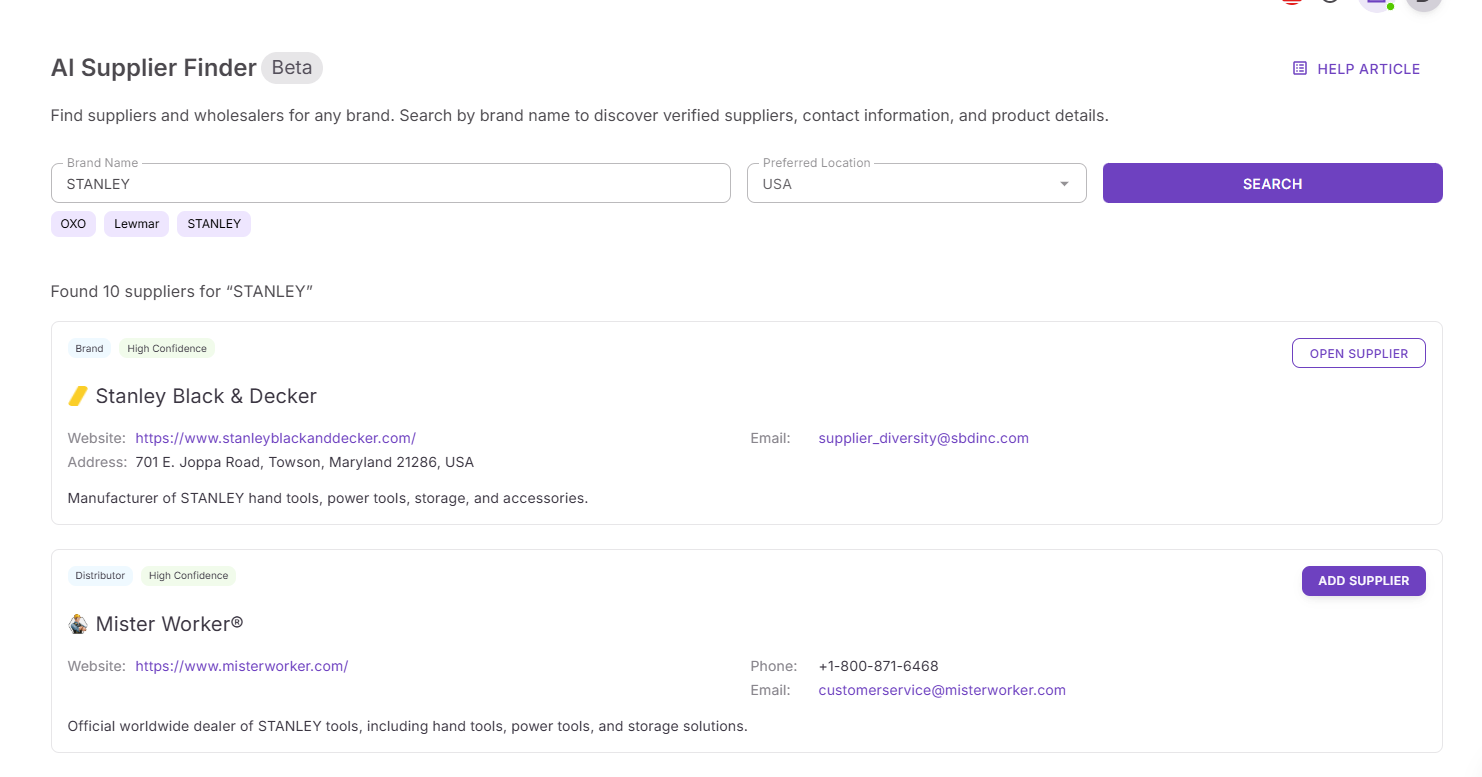
Each result is organized to help you evaluate suppliers quickly and confidently.
Structured supplier results
Suppliers are grouped by type:
- Brand or manufacturer (when available)
- Authorized distributors
- Wholesalers
- Alternative suppliers if primary options are not found
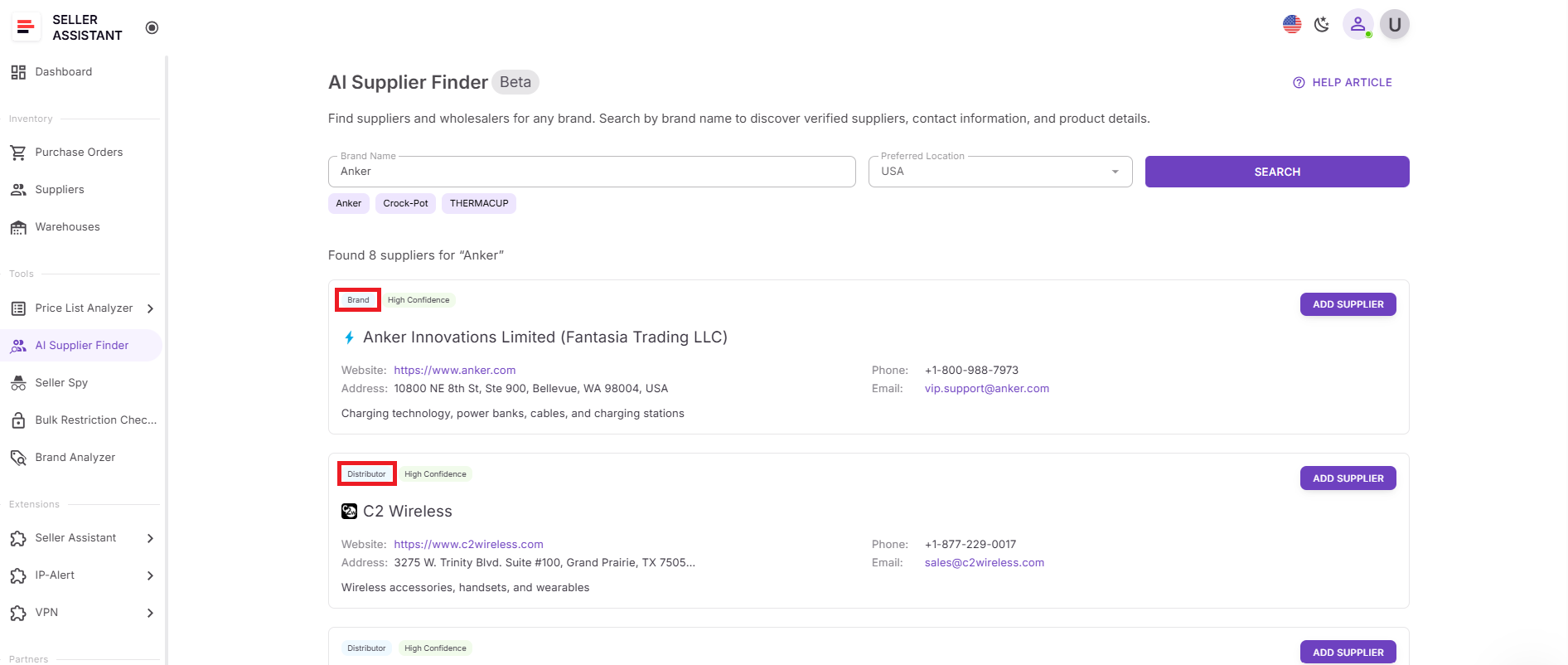
This hierarchy reflects how experienced Amazon wholesale sellers build sourcing relationships.
Each supplier listing includes:
- Company name
- Business website (B2B domains only)
- Supplier type
- Match confidence score: High, Medium, or Low
- Contact information (phone, email, address, when available)
- Description and notes
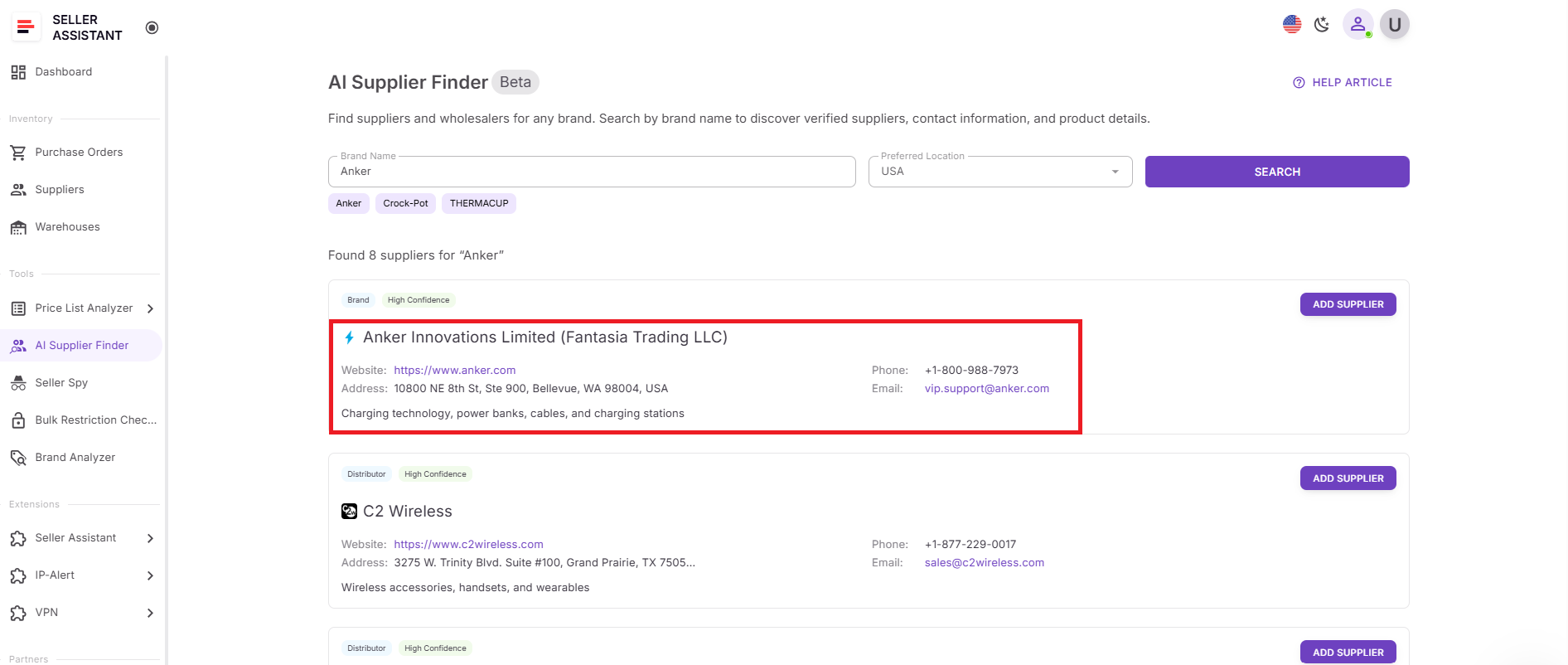
The match confidence score shows how relevant and appropriate the supplier appears for resale. A High score indicates strong alignment with the brand and wholesale intent.
Retail marketplaces and B2C stores are automatically excluded. You won’t see Amazon, eBay, or consumer-focused Shopify stores in the results. This keeps the search focused on real wholesale opportunities.
Supplier actions and workflow integration
When results load, you can take immediate action:
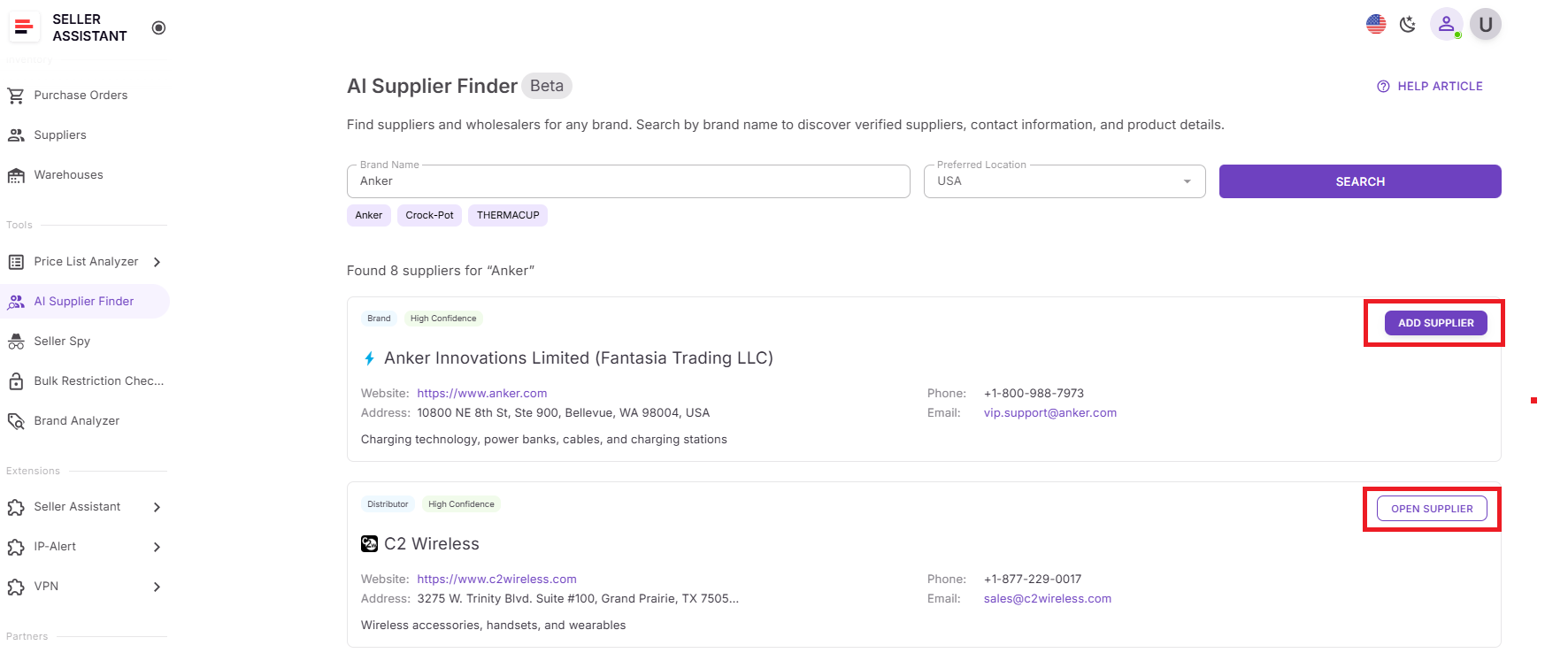
- Add Supplier – creates a new supplier profile, automatically fills available data, and opens the profile.
- Open Supplier – opens the existing supplier profile if it already exists in your system.
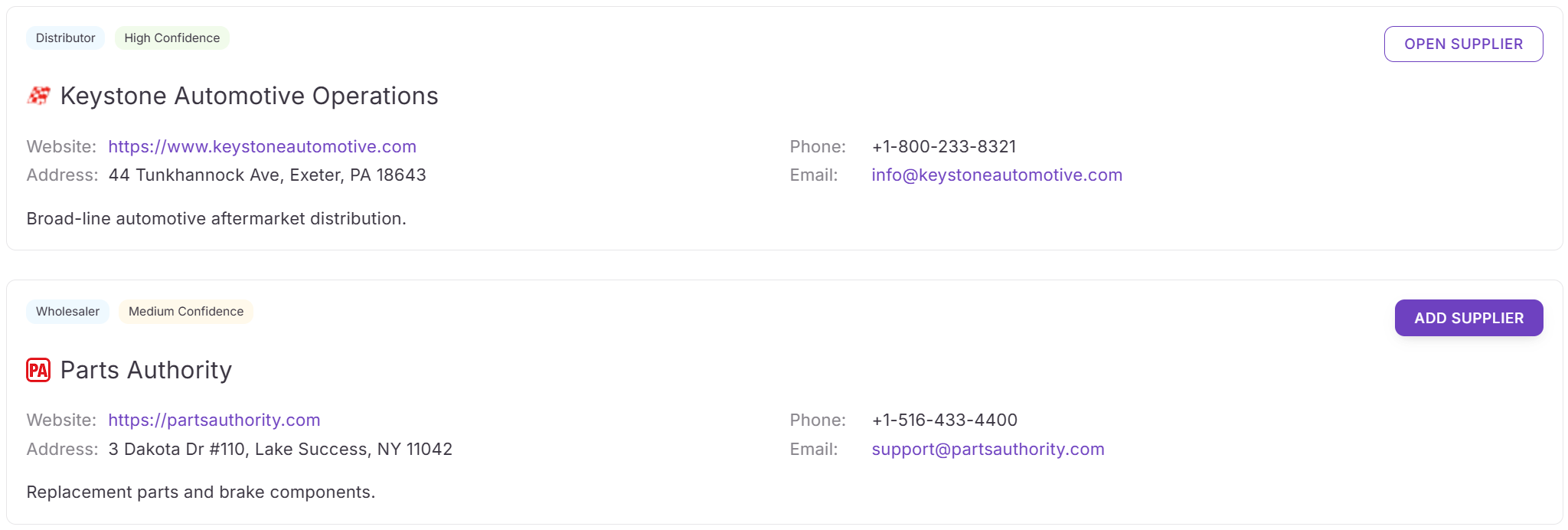
This allows you to move directly from supplier discovery to supplier management without switching tools.
AI Supplier Finder is also integrated across Seller Assistant workflows. You can launch it from:
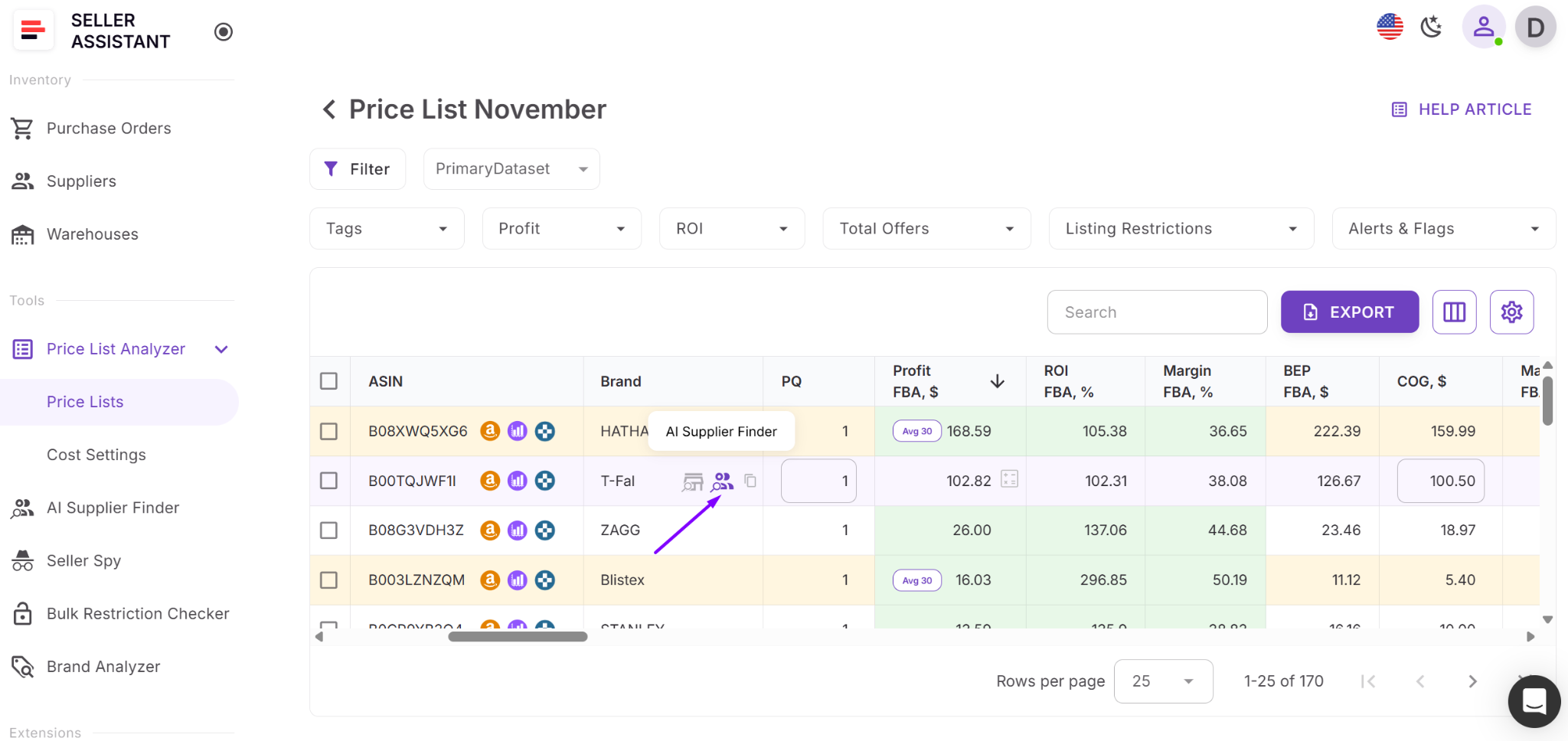
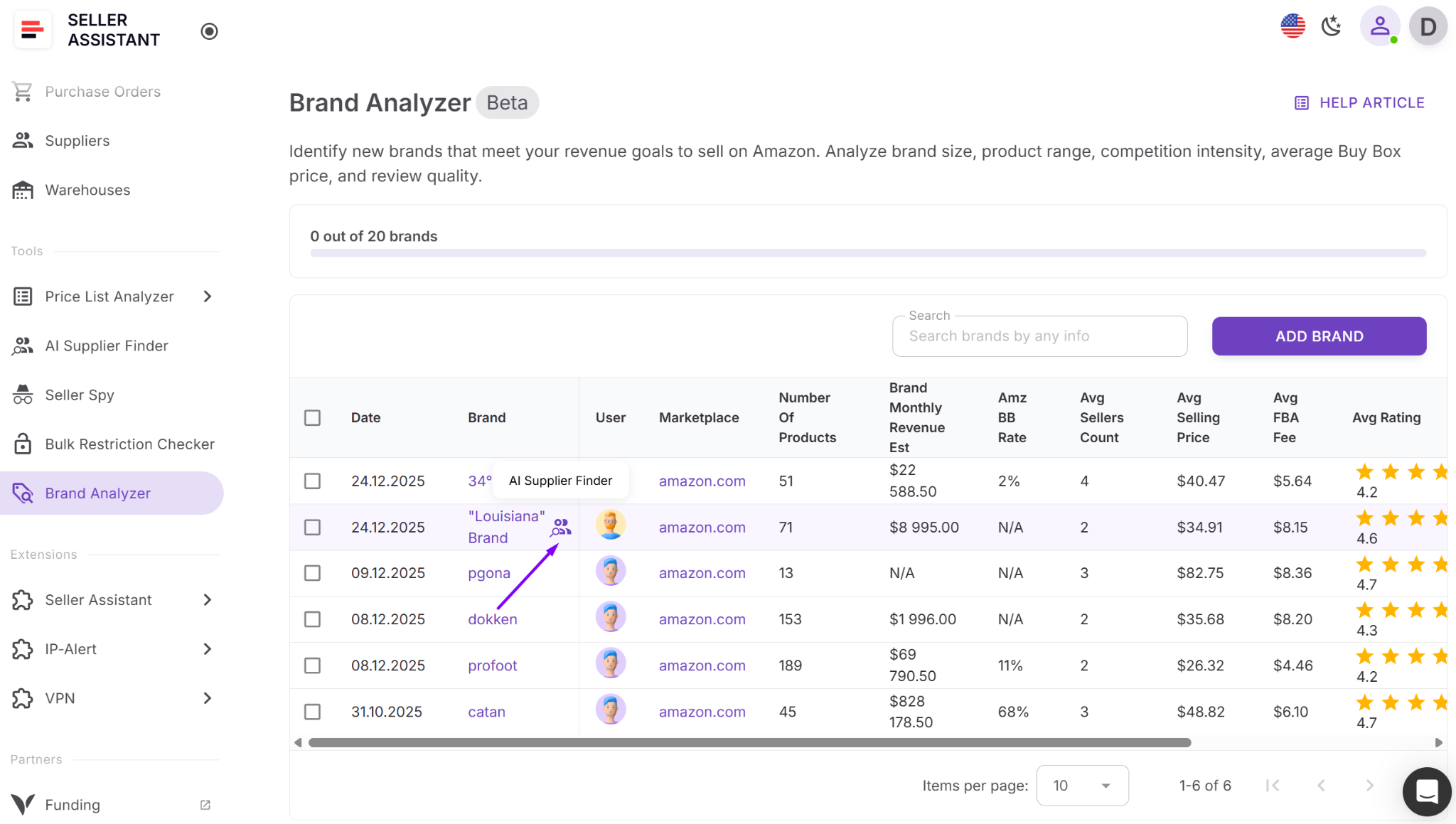
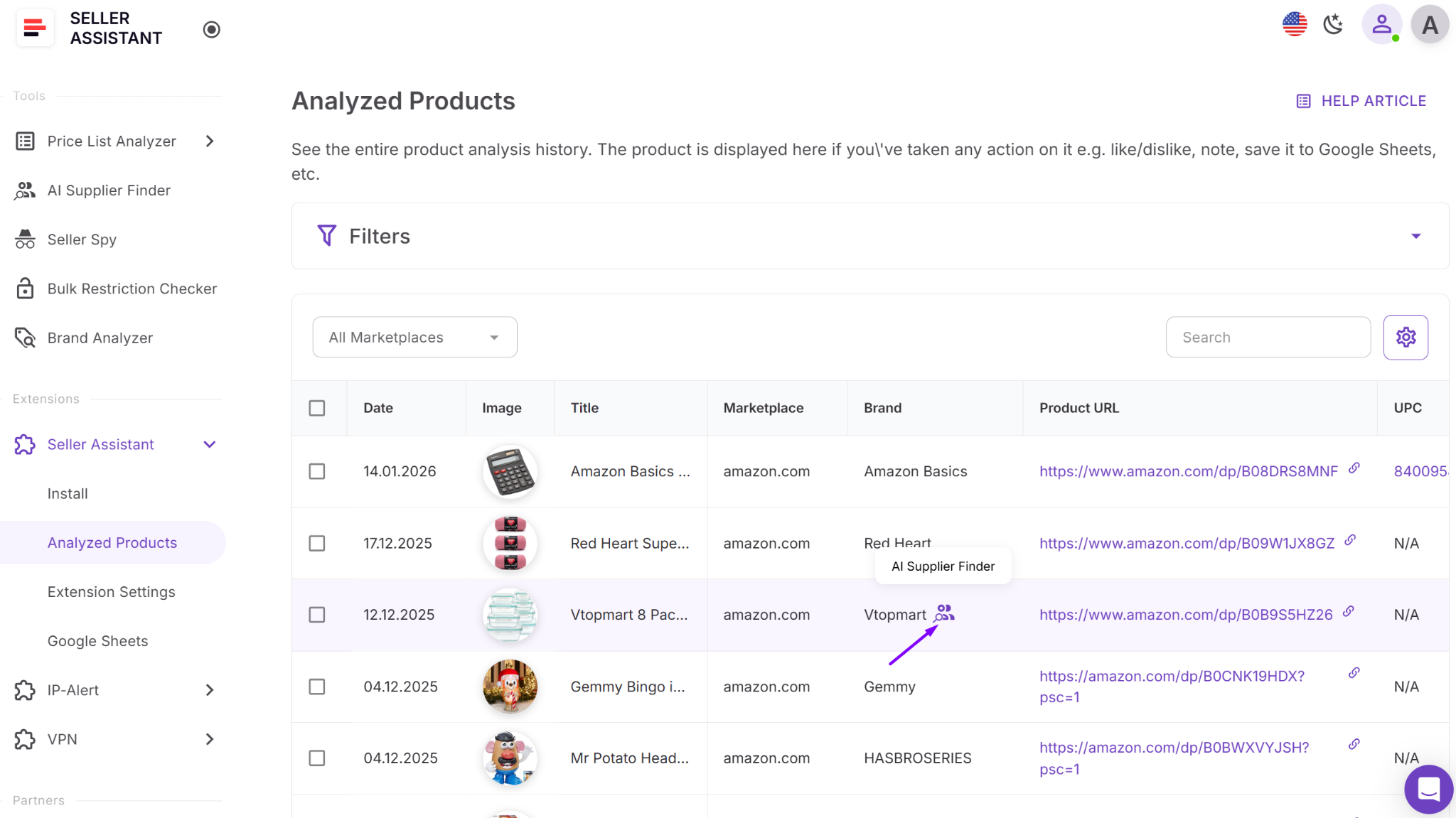
- Seller Assistant Extension (Amazon Product Page, Quick View, Storefront Widget)
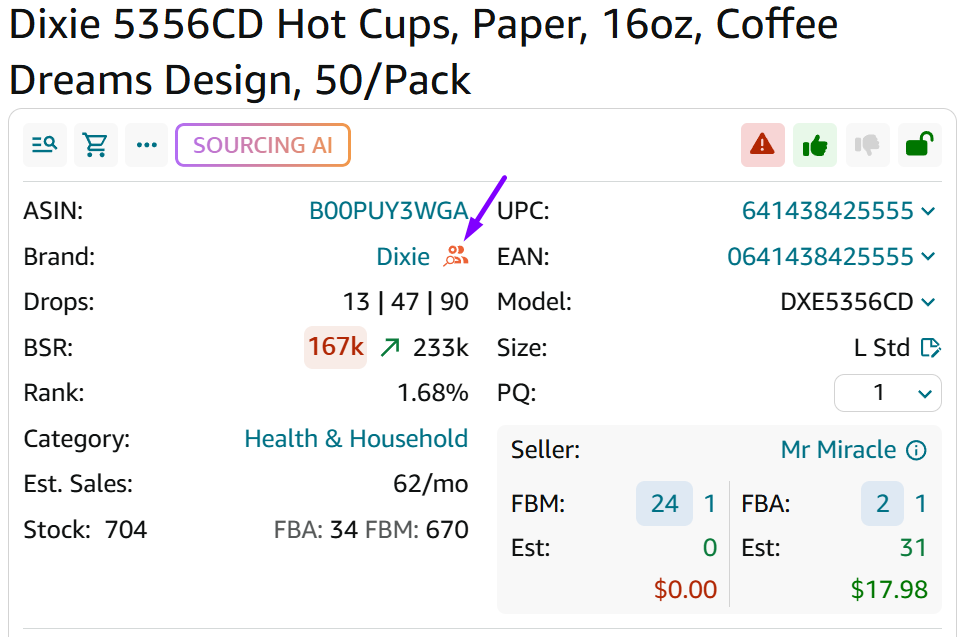
When launched from Seller Assistant Extension, the brand name is prefilled and the search starts automatically. You can go from analyzing an ASIN to viewing potential wholesale suppliers in seconds.
Smart brand suggestions: faster sourcing based on your activity
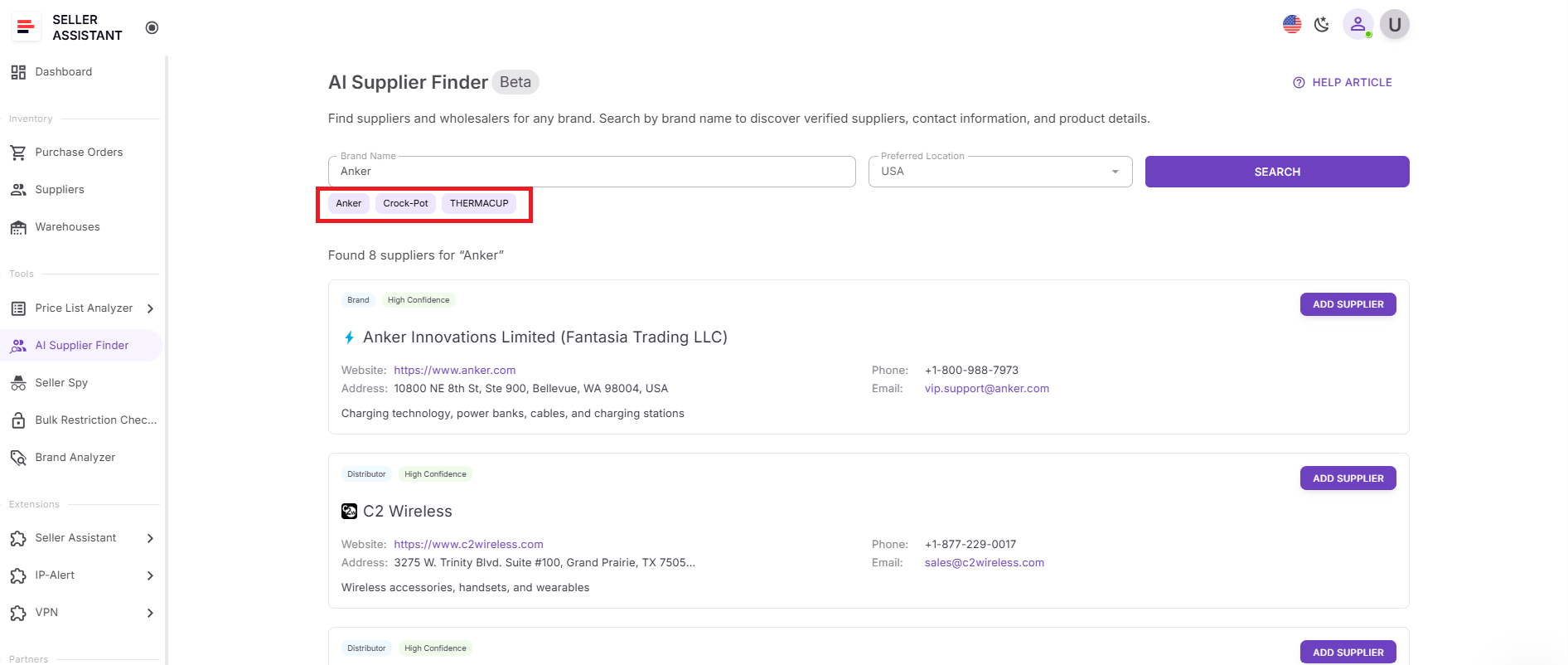
AI Supplier Finder does more than respond to manual searches. It actively suggests brands based on your recent activity inside Seller Assistant.
Dynamic brand suggestions
If you’ve analyzed products in the Seller Assistant extension, the system displays up to three brand suggestions based on the last unique brands you interacted with. This means your supplier search adapts to your sourcing behavior.
If fewer brands are available, fewer suggestions are shown.
Filtering of Amazon and private label brands
Not every brand on Amazon offers wholesale opportunities. The system automatically skips:
- Products without a valid brand
- Amazon-owned brands such as Amazon Basics, Amazon Essentials, Amazon Fresh, and others
- Private label or restricted brands that do not support wholesale accounts
This prevents wasted time pursuing brands that cannot be sourced through traditional wholesale channels.
Static fallback brands
If you have not analyzed any products yet, or no eligible brands are available, the tool shows static brand suggestions such as:
- Cambro
- Rubbermaid
- Winco
These give new users a starting point for testing supplier search.
How this speeds up wholesale discovery
Instead of thinking, “Which brand should I search for next?”, the tool guides you. It connects your product research activity with supplier discovery.
This reduces friction in the sourcing process:
- You analyze a product.
- The system suggests the brand.
- You click once.
- Supplier search starts automatically.
For Amazon wholesale sellers, online arbitrage resellers, and dropshippers, this creates a faster path from product validation to building real supplier relationships.
How to Use AI Supplier Finder Step-by-Step
AI Supplier Finder is designed to fit into your sourcing flow. You can run a supplier search in under a minute and immediately save suppliers for outreach.
Step 1. Access the tool
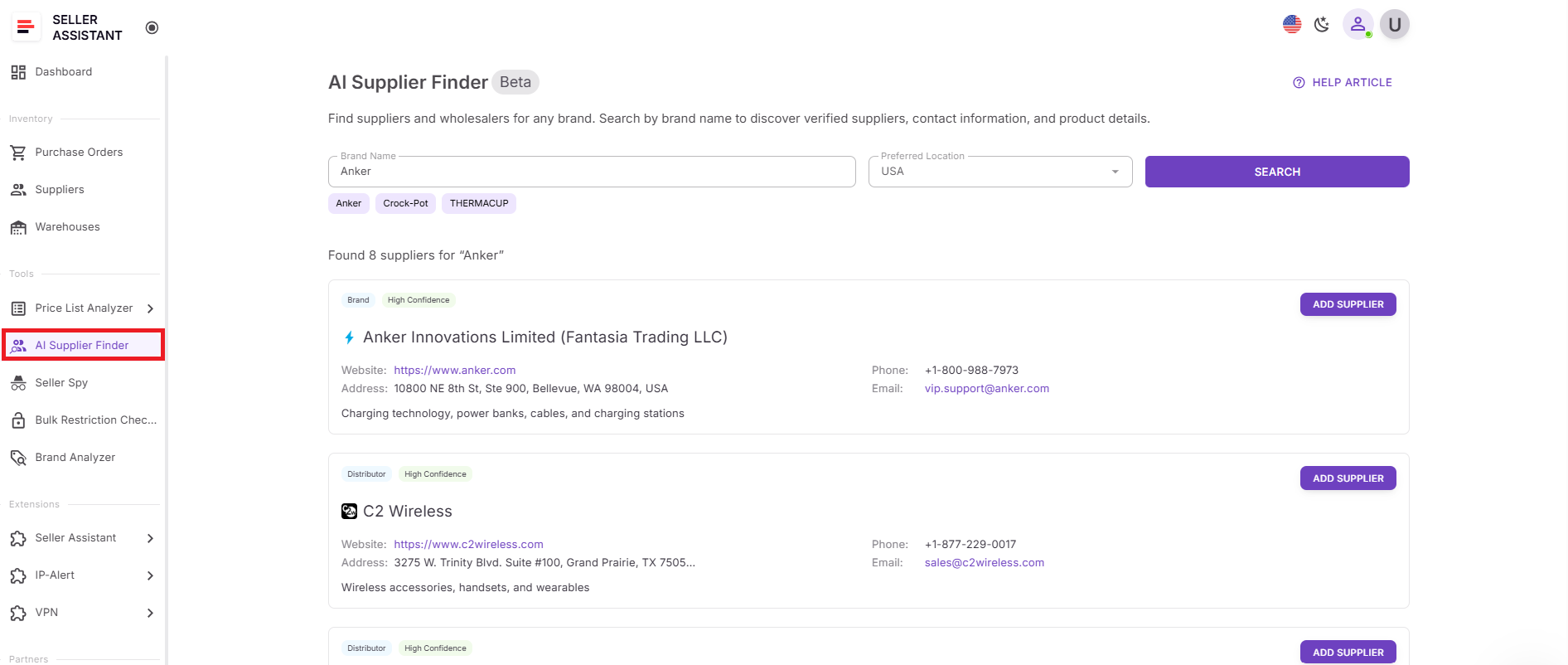
Open Seller Assistant Personal Account and go to Tools → AI Supplier Finder.
Step 2. Enter the brand and select a region
- Type the brand name into the search field.
- Choose your preferred location/region from the list.
- Click Search.
Tip. You can also click one of the suggested brands to start instantly.
Step 3. Review supplier types
Results are grouped by supplier type so you can prioritize the best sourcing path:
- Brand or manufacturer (best option when available)
- Authorized distributors (strong choice for invoices and compliance)
- Wholesalers (good for broader catalogs, sometimes weaker brand ties)
- Alternative suppliers (shown when primary options are limited)
This structure helps you avoid random leads and focus on suppliers that match wholesale resale.
Step 4. Interpret match confidence
Each supplier includes a match confidence score:
- High confidence – strong reseller relevance and clear connection to the brand/supply chain
- Medium confidence – likely relevant, but may require extra verification
- Low confidence – weaker signal; treat as a backup lead.
Practical rule. start outreach with High, then move to Medium if you need more options.
Step 5. Evaluate website and contact data
Each supplier card includes details to qualify the lead fast:
- Company name + business website (business domains only)
- Email, phone, address (when available)
- Description/notes to understand what the company does.
Retail marketplaces and B2C stores are excluded automatically, so you’re not wasting time on Amazon, eBay, or consumer storefronts.
Step 6. Save suppliers and move to outreach
Use the action buttons in the results:
- Add supplier – creates a supplier profile, auto-fills available data, and opens it
- Open supplier – takes you to the existing supplier profile if you’ve already saved it.
This is the fastest way to go from “this brand looks good on Amazon” to “I have supplier info saved and ready for outreach.”
FAQ
Is AI Supplier Finder only for wholesale sellers?
No. It’s built for wholesale sellers, online arbitrage resellers, and dropshippers who want to move from product research to real supplier discovery. Any Amazon seller looking for brand-level sourcing can use it.
Does AI Supplier Finder show retail stores or marketplaces?
No. Retail marketplaces like Amazon or eBay and B2C Shopify-style stores are automatically excluded. The tool focuses on business domains suitable for wholesale and resale.
What does match confidence mean?
Match confidence (High, Medium, Low) reflects how relevant and appropriate the supplier appears for resale. It helps you prioritize outreach instead of contacting suppliers randomly.
Can I save suppliers directly from the search results?
Yes. You can click Add Supplier to create a new supplier profile or Open Supplier if it already exists in your account. This connects supplier discovery directly with supplier management.
Can I launch supplier search while analyzing products on Amazon?
Yes. AI Supplier Finder is integrated into the Seller Assistant extension, including Product Page, Quick View, and Storefront Widget. Clicking the supplier icon next to a brand automatically opens the tool with the brand pre-filled and starts the search.
Final Thoughts
Finding profitable products on Amazon is only half the equation. Without reliable wholesale suppliers, you can’t scale, protect your account, or maintain stable margins. Manual searches are slow, noisy, and full of dead ends.
Seller Assistant’s AI Supplier Finder simplifies that process. It connects brand research with structured supplier discovery, filters out retail noise, prioritizes legitimate B2B sources, and lets you move directly into supplier management. Instead of guessing which distributor might work, you get organized, resale-focused results inside your existing workflow.
Seller Assistant automates and connects every stage of your Amazon wholesale and arbitrage workflow. It brings together in one platform: workflow management tools – Purchase Orders Module, Supplier Database, Warehouse Database, bulk research & sourcing tools – Price List Analyzer, Bulk Restriction Checker, Sourcing AI, Brand Analyzer, Seller Spy, Chrome extensions – Seller Assistant Browser Extension, IP-Alert Extension, and built-in VPN by Seller Assistant, and integrations & team access features – seamless API connectivity, integrations with Zapier, Airtable, and Make, and Virtual Assistant Accounts.

