



If you work with bulk supplier price lists containing thousands of SKUs, checking profitability manually quickly becomes a bottleneck.
Prices change, new products appear, and every item still needs to be matched to an ASIN, checked for eligibility, and validated after Amazon fees, taxes, and logistics.
Seller Assistant’s Price List Analyzer is designed for this exact workflow. It scans supplier price lists in minutes, matches UPCs and EANs to Amazon listings, and enriches each product with 100+ metrics – profit, ROI, Buy Box history, sales performance, competition, restrictions, and risk flags – so you can filter down to high-margin, low-risk deals fast.
Note. Seller Assistant is an end-to-end Amazon workflow management platform that integrates 10+ wholesale-focused solutions into one connected system. It combines sourcing workflow automation, bulk research and intelligence tools, and integrated Chrome extensions – giving you everything you need to streamline finding deals, managing suppliers, and creating purchase orders.

The platform aggregates: workflow management tools – Purchase Orders Module, Suppliers Database, Warehouses Database to organize, automate, and scale every step of your wholesale and arbitrage operations; bulk research & sourcing tools – Price List Analyzer, Bulk Restriction Checker, Sourcing AI, Brand Analyzer, Seller Spy to evaluate supplier price lists, verify selling eligibility and restrictions, open new brands, and discover winning product ideas from competitors to expand your product catalog; Chrome extensions – Seller Assistant Browser Extension, IP-Alert Extension, and built-in VPN by Seller Assistant to deep-research products, check IP claims and compliance, and access geoblocked supplier sites directly within your browser; and integrations & team access features – seamless API connectivity and integrations with Zapier, Airtable, and Make, plus Virtual Assistant Accounts for secure, scalable team collaboration.
With Seller Assistant, every step of your Amazon wholesale and arbitrage workflow is automated and connected.
How to Calculate Amazon Profitability the Right Way
Profitability shows whether a product makes sense to sell after all real costs are accounted for – not just the supplier price and Amazon fees, but also taxes, logistics, storage, and extra expenses. For Amazon wholesale, online arbitrage, and dropshipping sellers working with bulk price lists, profitability matters because one weak assumption can turn dozens of “good-looking” SKUs into losing inventory. Accurate profitability calculations help you filter out bad deals early and focus only on products that protect your cash flow and scale safely.
Key profitability metrics explained
Profit (FBA / FBM)
Profit is the net money you earn per unit after all costs.
- Example
If you sell at $35 and your total costs are $28, your profit is $7.
ROI (Return on Investment, %)
ROI shows how efficiently your invested cash works. It compares profit to the money you actually spend upfront.
- Example
$7 profit on $20 invested = 35% ROI.
Margin (%)
Margin shows how much of the selling price is profit.
- Example
$7 profit on a $35 price = 20% margin.
Break-Even Price
The lowest price where profit equals zero.
- Example
If your break-even is $29, selling below that loses money.
Together, these metrics let you rank deals, set filters, and avoid costly mistakes when analyzing thousands of products at once.
Key Profitability Metrics (Quick Reference)
Metric | What it shows | How it’s calculated (simplified) | Example |
Profit (FBA / FBM), $ | Net money earned per unit after all costs | Selling Price − COG − Amazon fees − taxes − logistics − extra expenses | Sell at $35, total costs $28 → $7 profit |
ROI (FBA / FBM), % | How efficiently your invested cash works | Profit ÷ (COG + taxes + logistics + extra costs) × 100 | $7 profit on $20 invested → 35% ROI |
Margin (FBA / FBM), % | Share of profit in the selling price | Profit ÷ Selling Price × 100 | $7 profit on $35 → 20% margin |
Break-Even Price (FBA / FBM), $ | Lowest price where profit = 0 | Total costs per unit | Break-even at $29 means selling below loses money |
COG, $ | Supplier cost per unit | From supplier price list | Supplier price = $15 |
Max COG (FBA / FBM), $ | Highest supplier cost you can pay without losing money | Selling Price − all non-COG costs | Max COG = $18 at current price |
Selling Price | Price used for profit calculation | Buy Box price or historical average if BB is missing | Avg BB 90 days = $34 |
Why Profitability Matters for Amazon Sellers
Profitability is the foundation of every sustainable Amazon business. It’s not just about finding products that sell, but about knowing exactly how much money each sale puts back into your business after fees, taxes, and logistics.
For wholesale, online arbitrage, and dropshipping sellers working with bulk price lists, weak profitability checks can quietly turn scale into losses. Understanding profitability metrics helps you protect cash flow, avoid risky inventory, and grow with confidence.
It protects your cash flow
Cash flow is often the biggest constraint for Amazon sellers. Profitability analysis shows whether a product ties up capital for weeks with little return or generates cash fast enough to fund the next purchase order.
It prevents scaling bad deals
Products can look attractive based on the Buy Box price alone. Accurate profitability calculations expose thin margins early, before you invest in inventory that scales losses instead of profits.
It helps you rank and filter deals in bulk
When reviewing thousands of SKUs, intuition doesn’t work. Profit, ROI, and break-even price let you filter lists fast and focus only on deals that meet your minimum requirements.
It reduces pricing and Buy Box risks
Knowing your break-even price gives you a clear lower limit for repricing. This helps you stay competitive without dropping into negative profit during Buy Box battles.
It supports smarter supplier decisions
Profitability data shows which suppliers, brands, or categories consistently perform better. That insight helps you negotiate pricing, drop weak suppliers, and double down on profitable ones.
How Profitability Works in Price List Analyzer
Seller Assistant’s Price List Analyzer calculates profitability at scale by breaking every product down into real costs and real returns. Instead of relying on a single price or simplified Amazon calculator logic, it evaluates each SKU using a structured pricing fallback, full fee coverage, and separate calculations for FBA and FBM. This makes profitability data consistent, comparable, and reliable when you’re analyzing thousands of products at once.
Selling price logic used for calculations
Profitability always starts with a selling price. By default, Price List Analyzer uses the current Buy Box price. If no Buy Box is available, it automatically falls back to historical or minimum prices in the following order:
- Buy Box price
- Minimum FBA or FBM price
- Average Buy Box price over 30 days
- Average Buy Box price over 90 days
- Average Buy Box price over 180 days
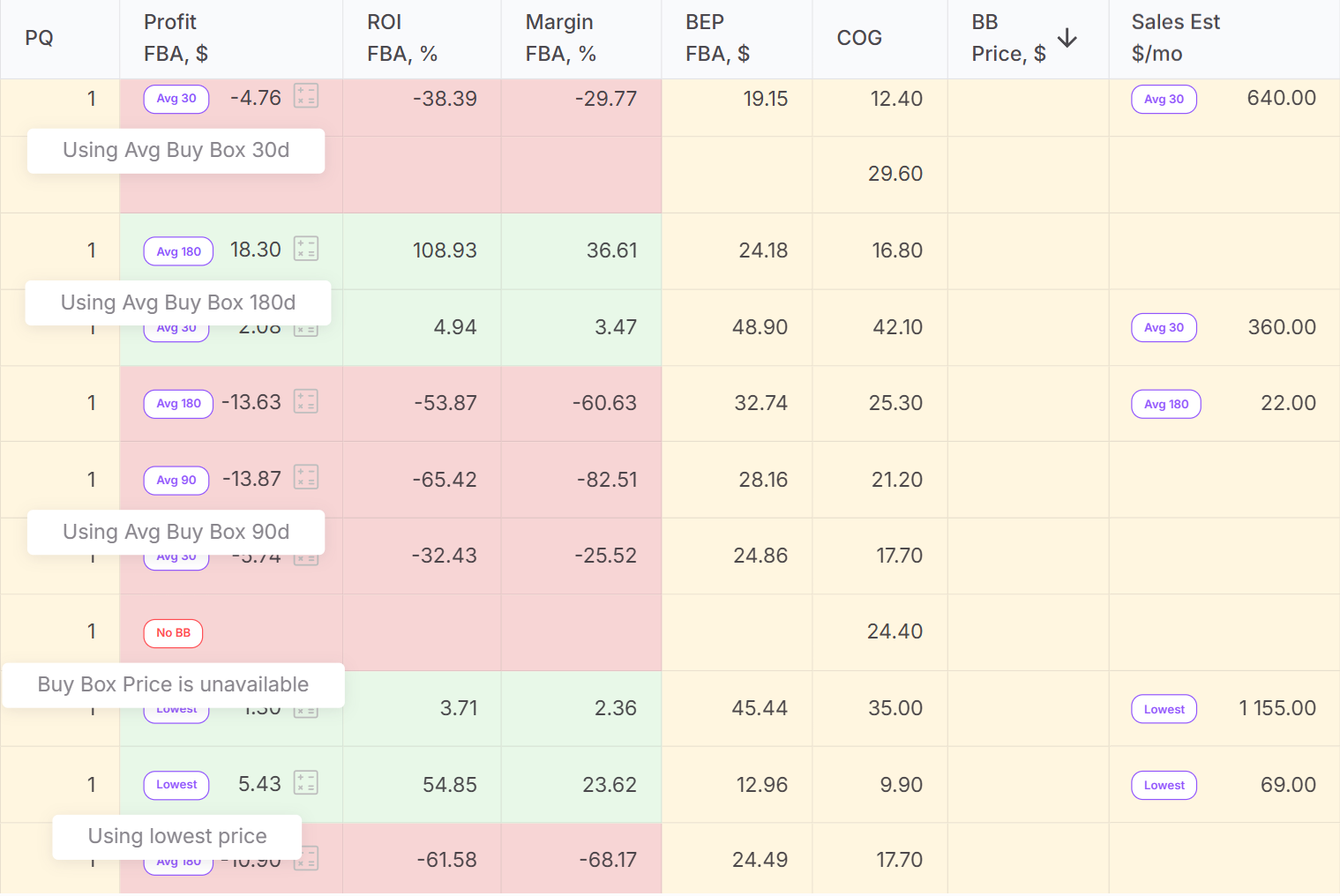
If no valid price exists, the product is marked as No BB, and profit is not calculated. This prevents false-positive deals caused by temporary spikes or missing pricing data.
How FBA Profit is calculated
FBA profit shows how much money you earn per unit after all FBA-related costs are deducted.
FBA profit includes:
- Cost of goods (COG)
- Referral fee
- Sales tax and VAT (if applicable)
- FBA fulfillment fee
- Monthly storage fees
- Digital Service Fee (if applicable)
- Inbound placement service fee (if applicable)
- FBA logistics costs (3PL)
- Any additional expenses
Example
If a product sells for $40 and total FBA-related costs add up to $32, your Profit FBA is $8.
How FBA ROI is calculated
FBA ROI measures how efficiently your upfront capital is used. Only costs you actually pay out of pocket are included. Amazon fees are excluded because they are deducted after the sale.
ROI FBA is based on:
- COG
- Sales tax (if any)
- FBA logistics costs (3PL)
- Additional expenses
Example
$8 profit on $20 invested upfront results in 40% ROI.
FBA margin and break-even price
FBA margin shows profit as a percentage of the selling price.
Example
$8 profit on a $40 price equals 20% margin.
FBA Break-even price is the lowest selling price where profit equals zero after all Amazon fees, taxes, and logistics costs. It defines your absolute pricing floor during the Buy Box competition.
How FBM profitability is calculated
Price List Analyzer calculates FBM profitability separately, using the same logic but without FBA-specific fees.
FBM profit includes:
- COG
- Referral fee
- Sales tax and VAT (if applicable)
- Digital Service Fee (if applicable)
- FBM logistics costs (3PL)
- Additional expenses
FBM ROI and FBM margin follow the same formulas as FBA, using FBM costs instead.
FBM break-even price shows the minimum price where FBM profit equals zero.
By separating FBA and FBM calculations, Price List Analyzer lets you compare fulfillment models side by side and choose the option that delivers the strongest returns for each product.
How to Calculate Profitability in Bulk with Price List Analyzer
Manually calculating profitability works when you’re checking one or two SKUs. It stops working the moment you open a real supplier price list. Hundreds or thousands of products, different fee structures, taxes, fulfillment methods, and constant price changes make spreadsheets slow and unreliable.
Seller Assistant’s Price List Analyzer solves this by calculating profitability metrics at scale for every product in your supplier file. Instead of guessing or simplifying the math, you get profit, ROI, margin, and break-even prices for wholesale, online arbitrage, and dropshipping products – ready for filtering and decision-making.
How Price List Analyzer calculates profitability at scale
Price List Analyzer is built to turn raw supplier data into clear profitability signals. Instead of forcing sellers to calculate margins, ROI, and break-even prices manually, it applies the same logic consistently across every SKU in your price list. This makes it possible to compare deals objectively and focus only on products that meet your profit standards.
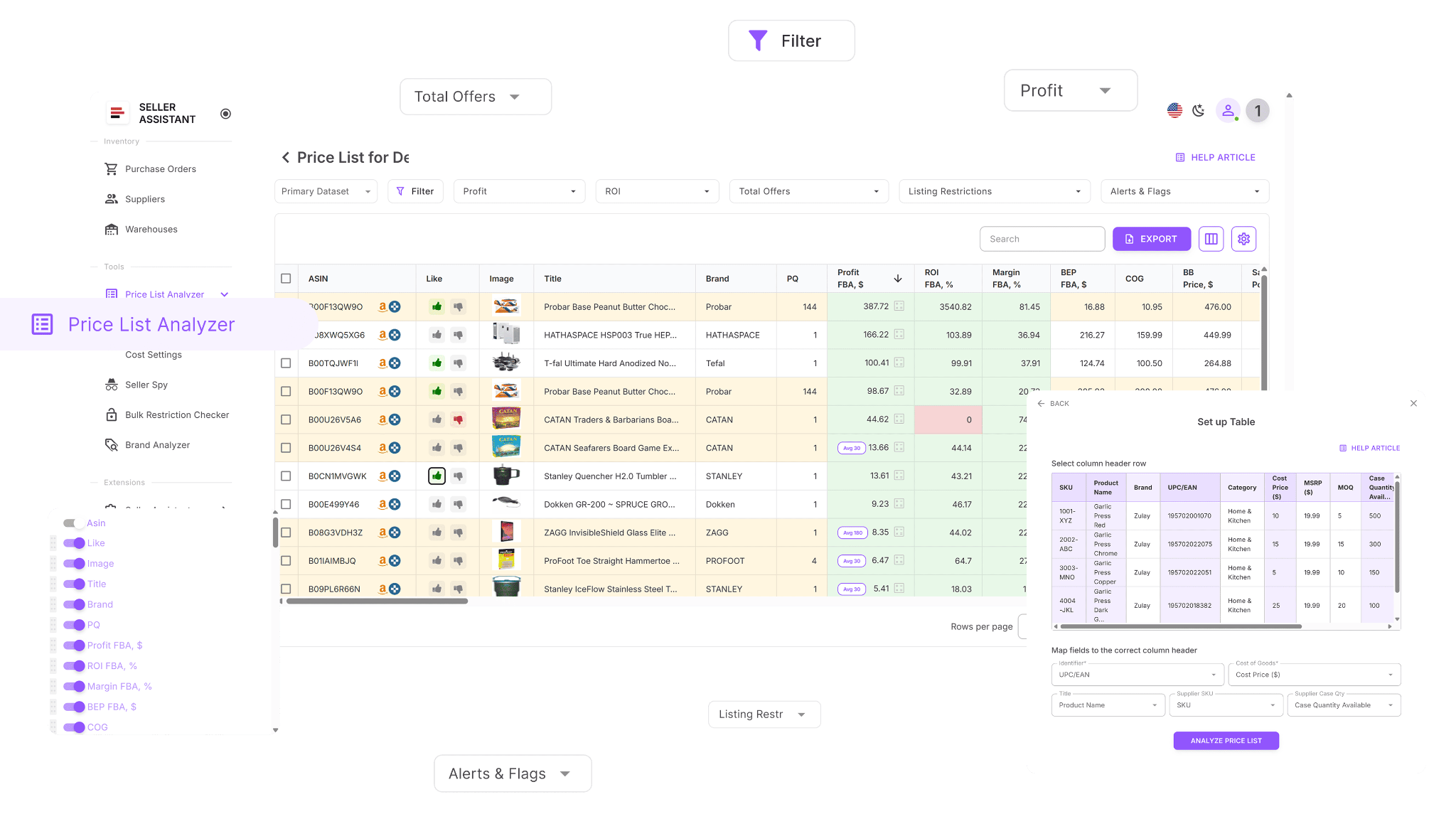
Calculates true profit for every SKU
Price List Analyzer breaks each product down into real costs – COG, Amazon fees, taxes, fulfillment, storage, shipping, and additional expenses. It then calculates net profit per unit, so you see exactly how much money a product can make before committing capital.
Separates FBA and FBM profitability
Profitability is calculated independently for FBA and FBM. This allows you to compare fulfillment methods side by side and choose the option that delivers better profit, ROI, or pricing flexibility for each product.
Uses reliable pricing for profit calculations
Profit is based on the Buy Box when available, with automatic fallback to minimum or historical average Buy Box prices. This prevents inflated profitability caused by short-term price spikes or missing Buy Box data.
Updates profitability in real time
When you adjust COG, shipping, prep costs, or pack quantity, Price List Analyzer recalculates profit, ROI, margin, and break-even prices instantly across the entire file – no re-uploads or spreadsheets required.
Makes profitable deals easy to filter
Once profitability is calculated, you can filter products by profit, ROI, margin, or break-even thresholds. This lets you narrow thousands of SKUs down to a short list of deals that actually fit your sourcing criteria.
What Price List Analyzer helps you calculate and analyze
This Software Makes Amazon FBA Wholesale Selling 10x Easier
With Price List Analyzer, you can:
- Review large supplier catalogs to find Amazon products with real profit potential
- Automatically match supplier SKUs to the correct Amazon ASINs
- Instantly identify restricted products or items you can’t sell on your account
- Measure demand using BSR data, sales trends, and estimated monthly sales volume
- Calculate net profit, ROI, margin, and break-even price for each ASIN
- Analyze Buy Box pricing behavior over 30, 90, and 180 days
- See a full Amazon fee breakdown, including referral fees, FBA or FBM costs, storage, prep, and shipping
- Flag high-risk products such as hazmat, meltable, oversized, fragile, or bundled listings
- Get alerts for issues like approval required, missing Buy Box, or weak FBA profitability
- Filter products by profit, ROI, demand, competition, and risk indicators
- Save custom table views and filter presets for future price list uploads
- Adjust COG, shipping, prep, or pack size and see profitability recalculate instantly
- Add shared team notes that stay linked to ASINs across multiple uploads
- Tag products by sourcing status, reuse decisions across lists, and filter by workflow stage
- This approach lets you move from raw supplier data to clear, profitability-driven sourcing decisions – without manual calculations or guesswork.
Steps to calculate profitability in bulk with Price List Analyzer
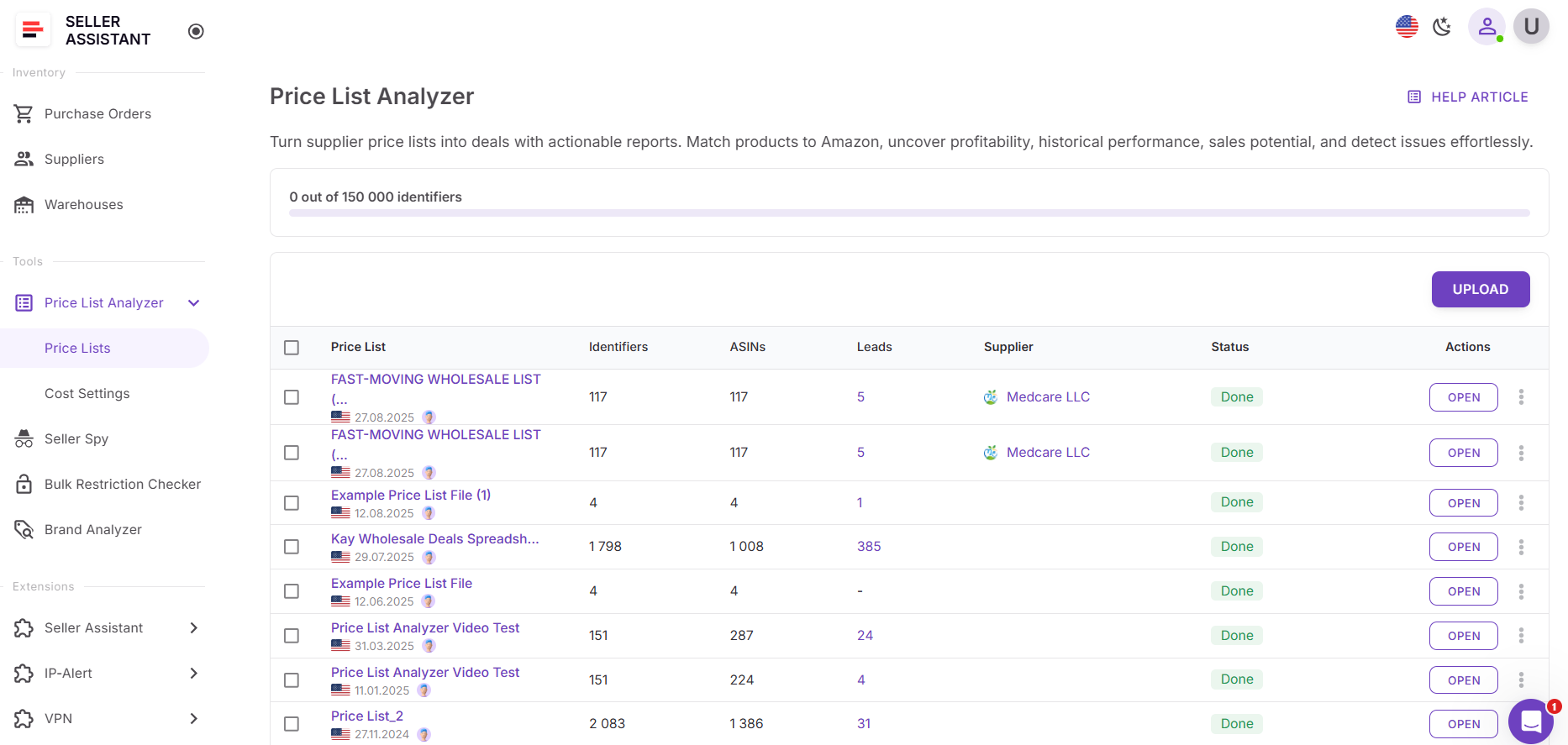
Step 1. Upload your supplier file
Open Price List Analyzer in your Seller Assistant dashboard and upload your Excel or CSV file containing UPCs or EANs and cost of goods. The tool automatically matches each product to its Amazon ASIN and begins calculating profitability metrics across the entire list.
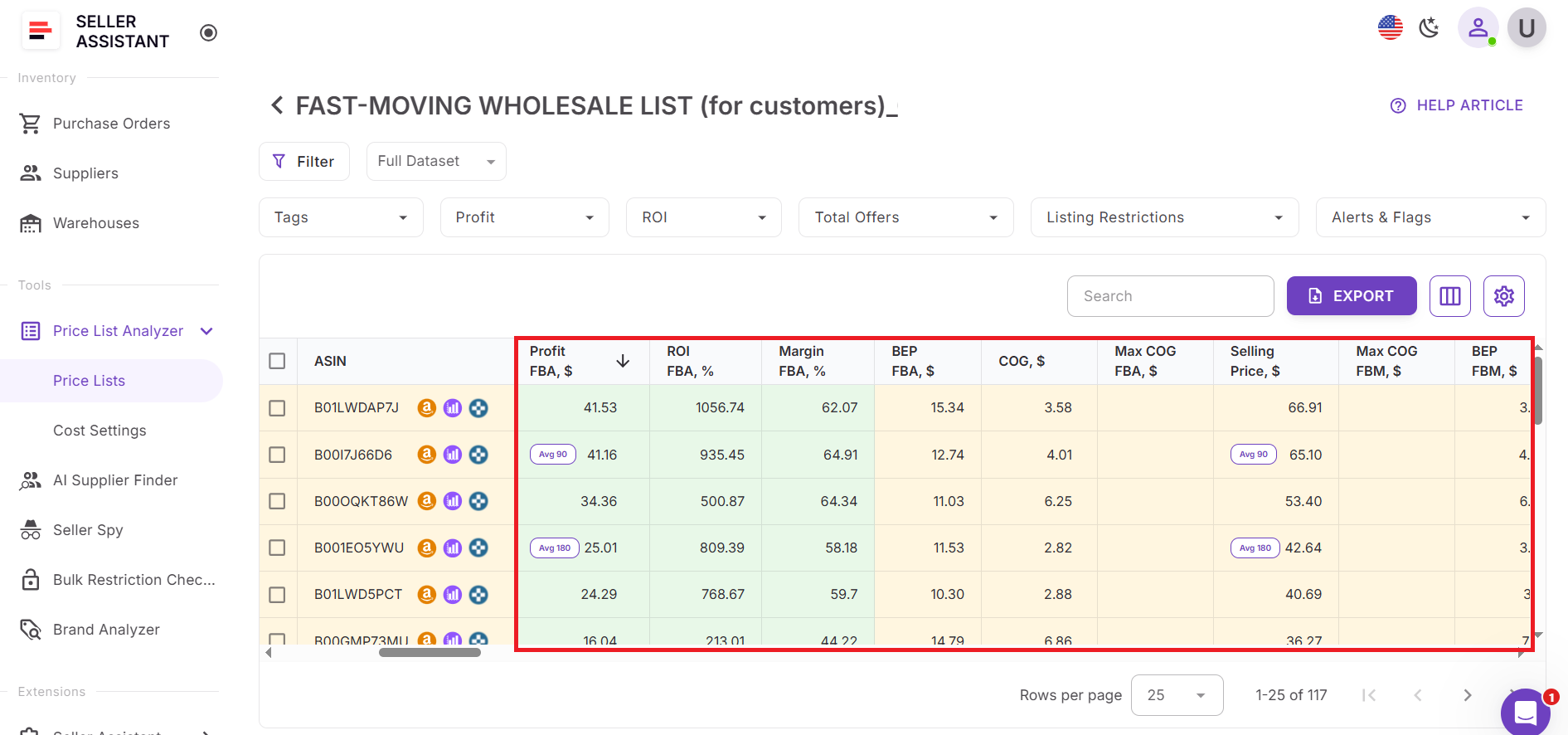
Step 2. Review profitability metrics
After processing is complete, review the profitability columns in the table. Each row shows net profit, ROI, margin, and break-even price, giving you a clear picture of how each product performs financially. Profitability is calculated separately for FBA and FBM, allowing you to compare fulfillment options.
Step 3. Flag low-profit and risky SKUs
Look for products where profit is minimal, ROI is weak, or the break-even price is close to or above the current Buy Box price. These SKUs signal high risk and can be removed from consideration early.
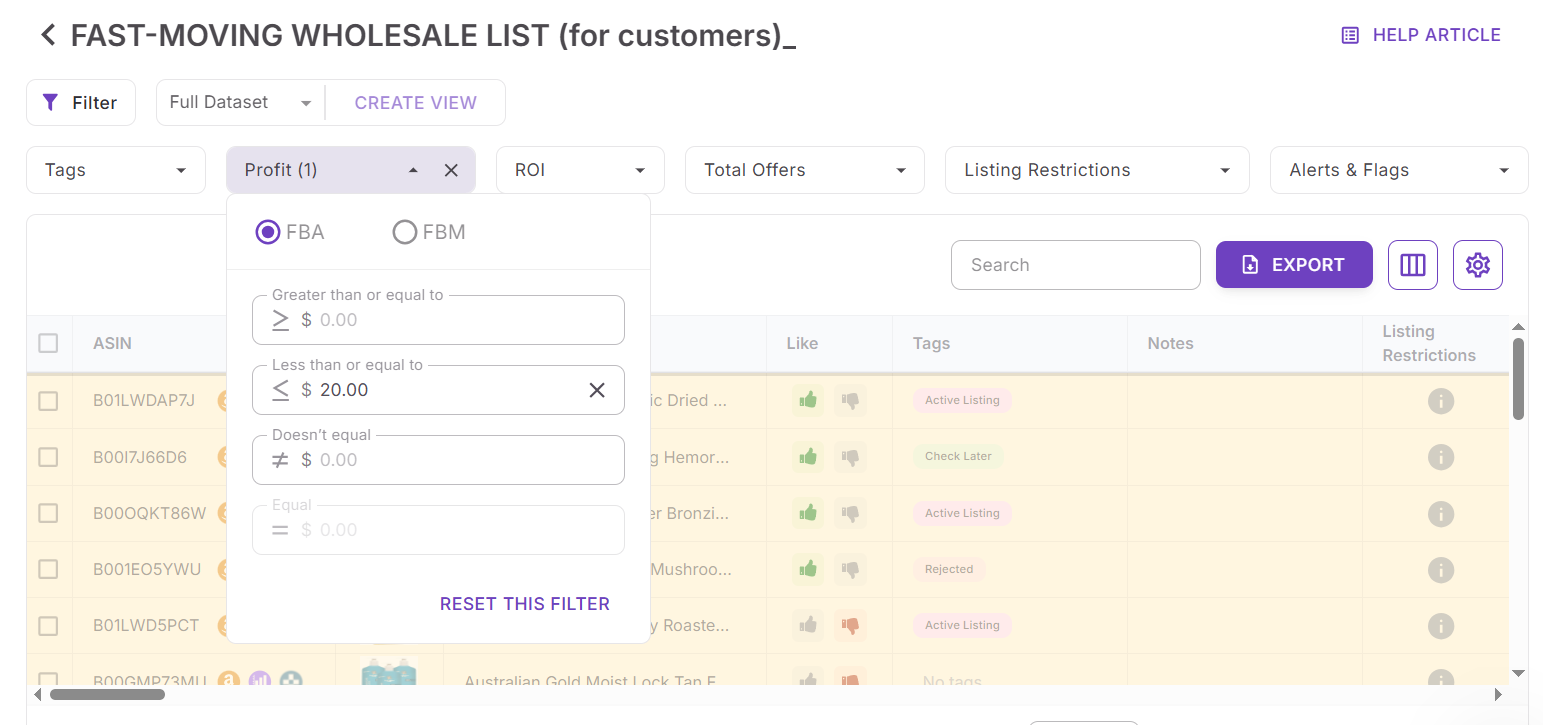
Step 4. Filter by profitability criteria
Apply filters to keep only products that meet your profit, ROI, and break-even thresholds. Combine these filters with sales volume, competition, and risk indicators to narrow thousands of SKUs down to strong, viable deals.
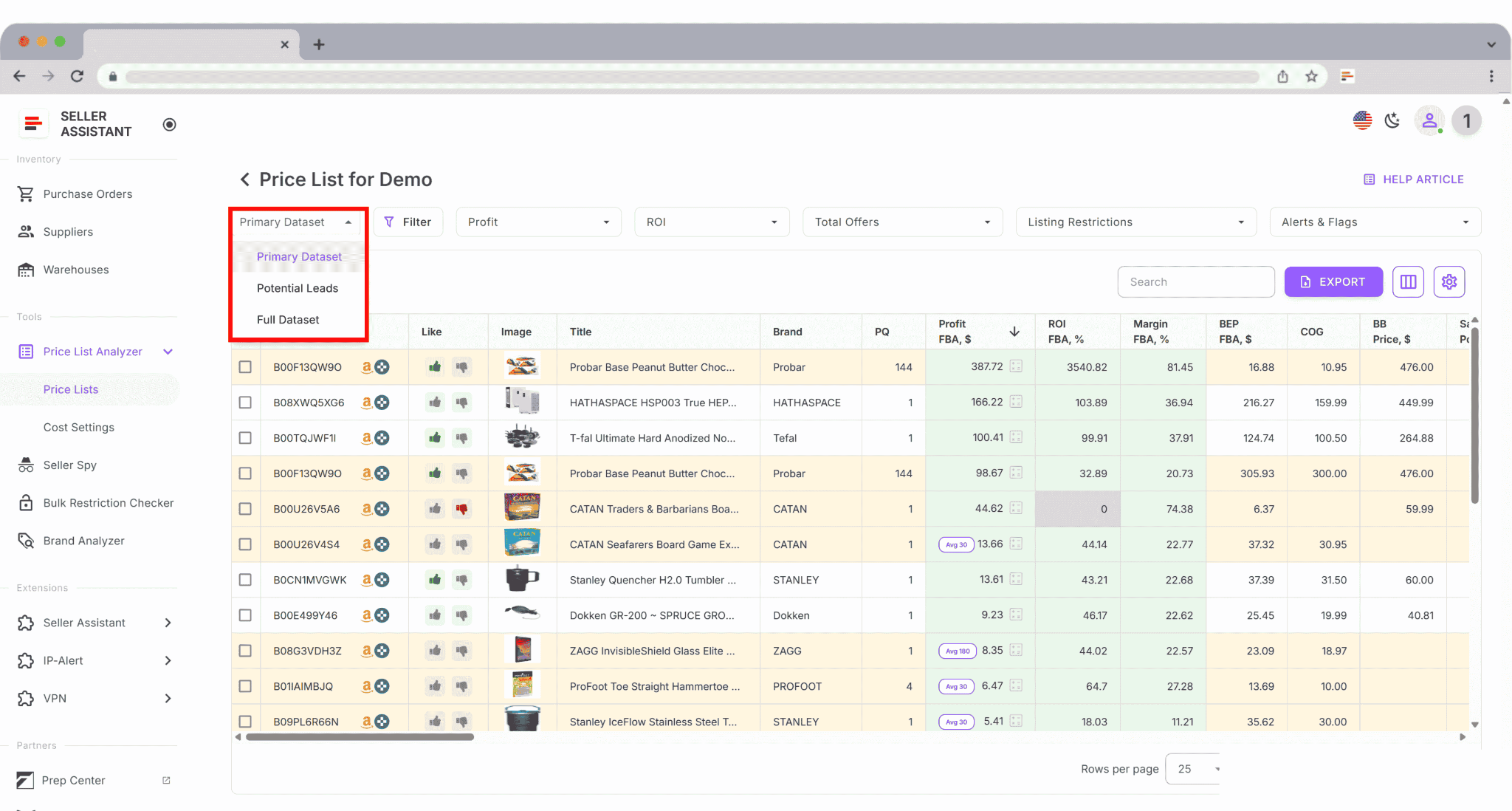
Step 5. Save and reuse your setup
Create and save custom table views such as “High ROI,” “Profitable FBA,” or “Buy list.” These saved layouts can be reused for future supplier uploads, helping you review new price lists faster and more consistently.
FAQ
Can Price List Analyzer calculate profitability for both FBA and FBM?
Yes, profitability is calculated separately for FBA and FBM using the correct fee and logistics structure for each model. This lets you compare fulfillment options and choose the one that delivers better returns for a specific product.
What price does Price List Analyzer use to calculate profit?
By default, it uses the current Buy Box price. If no Buy Box is available, it automatically falls back to minimum or historical average Buy Box prices over 30, 90, or 180 days.
Why does ROI in Price List Analyzer differ from Amazon fee calculators?
ROI is based only on costs you pay upfront, such as COG, taxes, and logistics. Amazon fees are excluded because they are deducted after the sale, which gives a more realistic view of capital efficiency.
Can I update costs and recalculate profitability without reuploading the file?
Yes, you can edit COG, shipping, prep, or pack quantity directly in the table. All profitability metrics update instantly across the entire price list.
Is Price List Analyzer suitable for large supplier catalogs?
Yes, it is built to process thousands of SKUs in minutes. This makes it practical for wholesale, online arbitrage, and dropshipping sellers working with bulk supplier price lists.
Final Thoughts
Checking profitability in bulk is no longer optional for Amazon sellers who want to scale without unnecessary risk. When you work with large supplier price lists, small miscalculations can quickly turn into expensive mistakes. Seller Assistant’s Price List Analyzer removes guesswork by calculating profit, ROI, margin, and break-even prices consistently across every SKU, using realistic pricing and full cost coverage.
By automating profitability analysis and combining it with filtering, risk flags, and team workflows, Price List Analyzer helps you focus on deals that actually make sense for your business. Instead of spending hours in spreadsheets, you can move faster, protect your capital, and make sourcing decisions based on data – not assumptions.
Seller Assistant automates and connects every stage of your Amazon wholesale and arbitrage workflow. It brings together in one platform: workflow management tools – Purchase Orders Module, Supplier Database, Warehouse Database, bulk research & sourcing tools – Price List Analyzer, Bulk Restriction Checker, Sourcing AI, Brand Analyzer, Seller Spy, Chrome extensions – Seller Assistant Browser Extension, IP-Alert Extension, and built-in VPN by Seller Assistant, and integrations & team access features – seamless API connectivity, integrations with Zapier, Airtable, and Make, and Virtual Assistant Accounts.

