



When you work with supplier price lists that contain hundreds or thousands of SKUs, speed alone isn’t enough. The real challenge is remembering why you skipped, approved, or flagged a product the last time you saw it.
The same ASINs keep showing up across different suppliers, weeks or months apart – and without context, sellers and teams end up repeating the same research and mistakes. Product Notes in Seller Assistant’s Price List Analyzer solve this problem. They let you capture sourcing decisions once and reuse them everywhere you research products.
In this post, we’ll show how to use Notes to make bulk sourcing faster, smarter, and consistent across your entire Amazon workflow.
Note. Seller Assistant is an end-to-end Amazon workflow management platform that integrates 10+ wholesale-focused solutions into one connected system. It combines sourcing workflow automation, bulk research and intelligence tools, and integrated Chrome extensions – giving you everything you need to streamline finding deals, managing suppliers, and creating purchase orders.

The platform aggregates: workflow management tools – Purchase Orders Module, Suppliers Database, Warehouses Database to organize, automate, and scale every step of your wholesale and arbitrage operations; bulk research & sourcing tools – Price List Analyzer, Bulk Restriction Checker, Sourcing AI, Brand Analyzer, Seller Spy to evaluate supplier price lists, verify selling eligibility and restrictions, open new brands, and discover winning product ideas from competitors to expand your product catalog; Chrome extensions – Seller Assistant Browser Extension, IP-Alert Extension, and built-in VPN by Seller Assistant to deep-research products, check IP claims and compliance, and access geoblocked supplier sites directly within your browser; and integrations & team access features – seamless API connectivity and integrations with Zapier, Airtable, and Make, plus Virtual Assistant Accounts for secure, scalable team collaboration.
With Seller Assistant, every step of your Amazon wholesale and arbitrage workflow is automated and connected.
What Are Amazon Product Notes?
Amazon product notes are short, internal comments sellers use to record decisions, risks, or insights about a specific ASIN. Instead of relying on memory or scattered spreadsheets, notes capture why a product was approved, skipped, or flagged – information that becomes critical when the same ASIN appears again in future sourcing cycles. For wholesale, online arbitrage, and dropshipping sellers who repeatedly analyze overlapping catalogs, notes prevent duplicated research and costly mistakes.
In Seller Assistant, Product Notes are built into the entire sourcing ecosystem – not locked to a single file or tool. Notes are tied to the product (ASIN) and your team, meaning everyone sees the same context wherever they research.
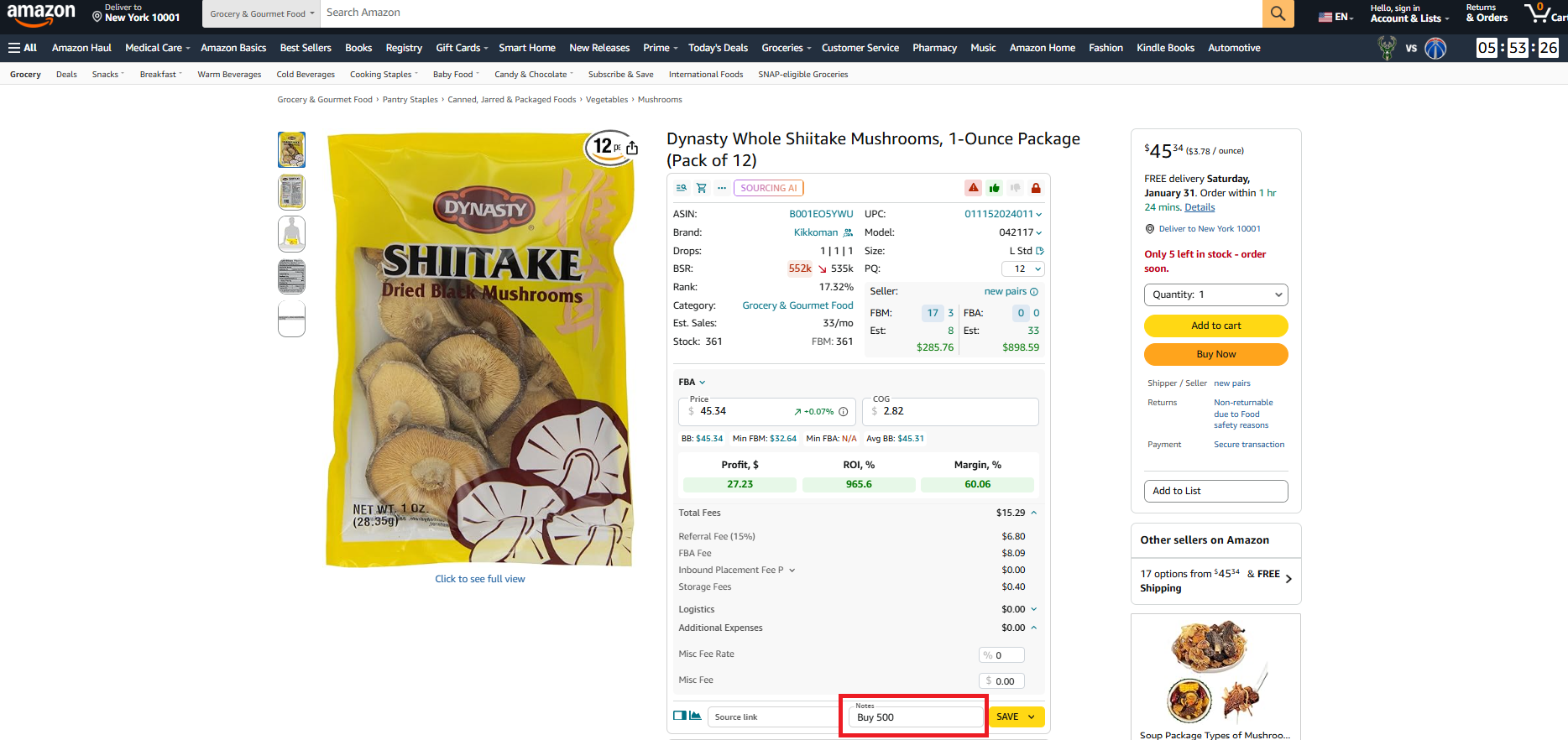
You can add and view notes in Price List Analyzer while reviewing bulk supplier lists.
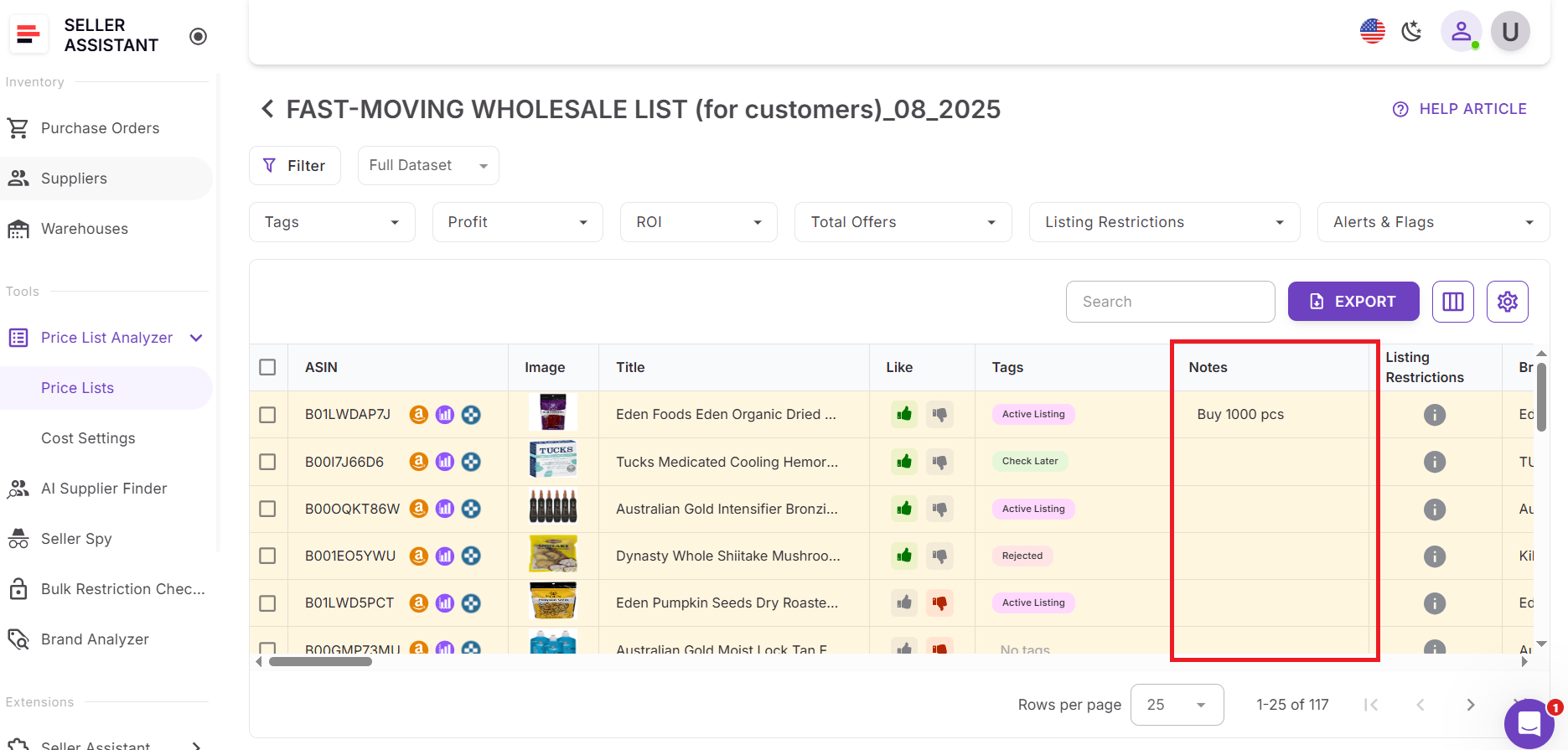
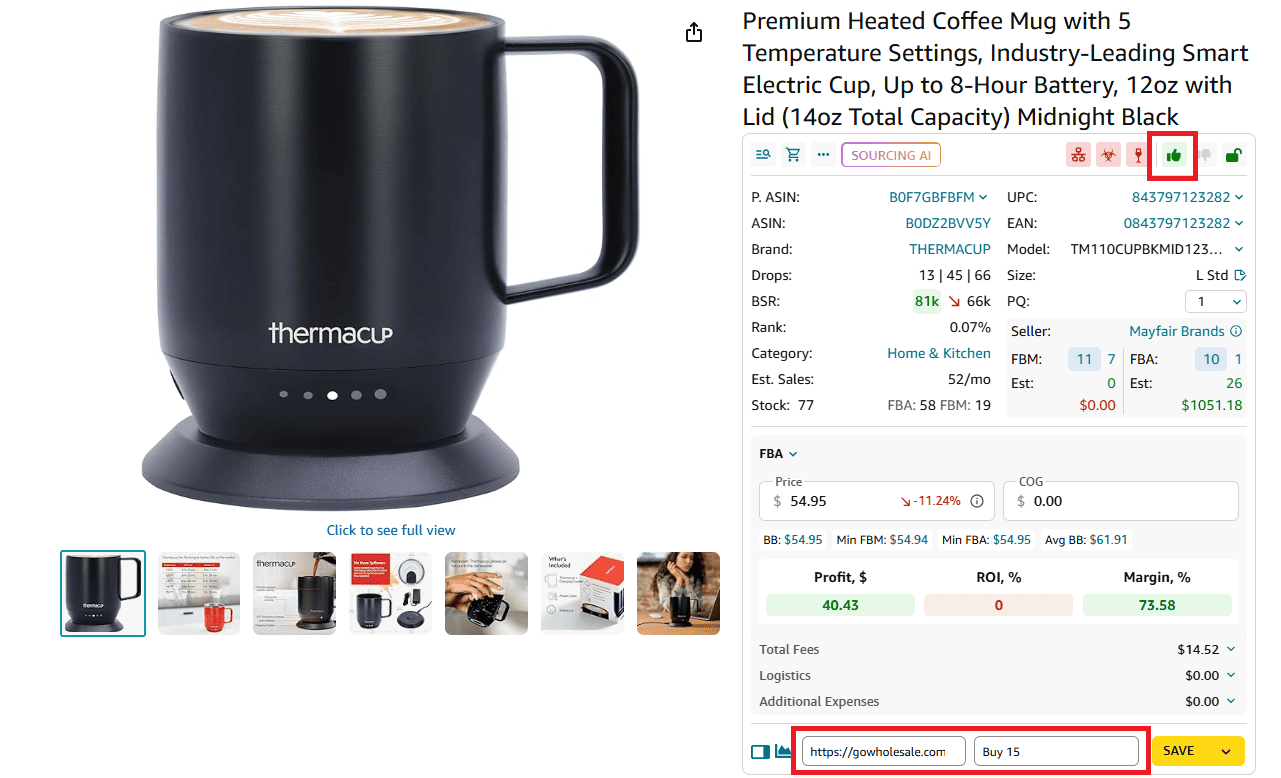
Additionally, the same notes automatically surface across Seller Assistant Browser Extension, including:
- Product View on Amazon product pages
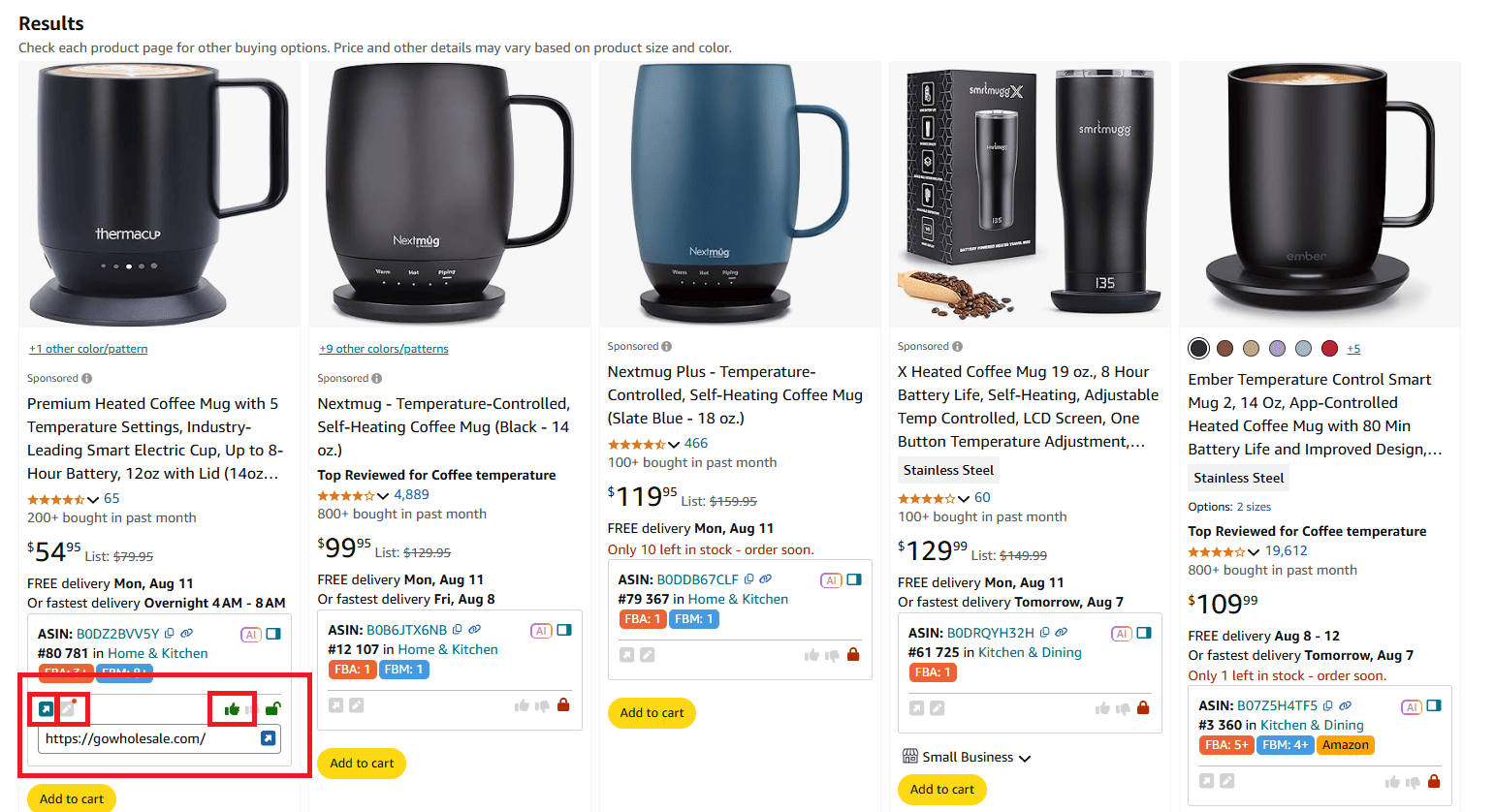
- Quick View on Amazon search results
- Side Panel View on supplier websites
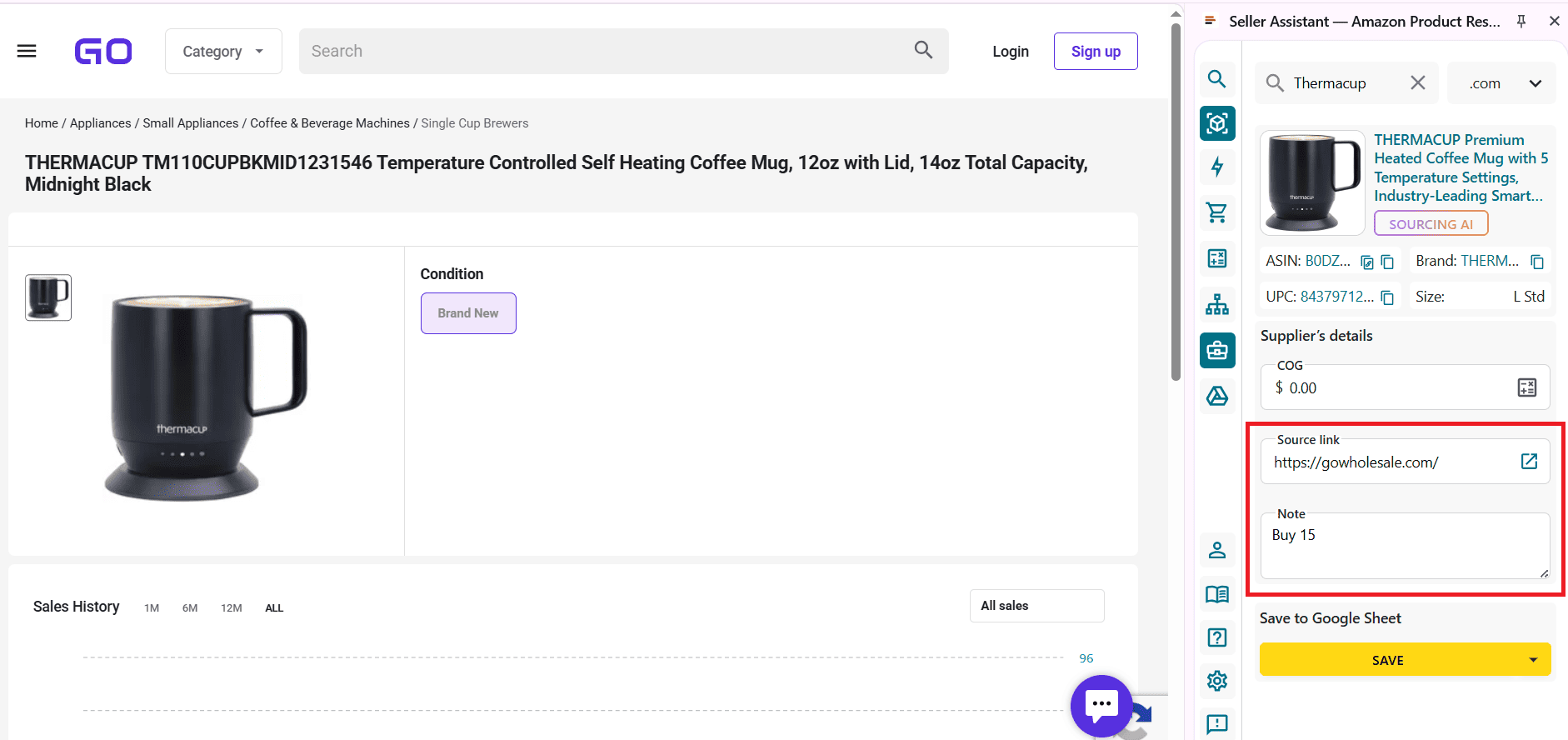
Because notes sync across all Seller Assistant tools, every sourcing touchpoint shows prior decisions instantly – turning product research into a connected, repeatable, and team-aligned workflow.
Why Notes Matter for Amazon Sellers
Bulk sourcing on Amazon is repetitive by nature. The same ASINs appear across different suppliers, marketplaces, and time periods. Without a system to preserve context, sellers waste time rechecking products, repeating mistakes, and second-guessing past decisions. Product Notes solve this by turning every sourcing action into reusable knowledge.
Prevent repeated research
Notes store the reason behind a decision – brand gated, low ROI after fees, IP risk, or unstable Buy Box – so you don’t research the same ASIN again when it reappears in another price list.
Reduce costly sourcing mistakes
When notes flag past issues like IP complaints, meltable products, or approval failures, sellers avoid ordering inventory that already proved risky or unprofitable.
Speed up bulk price list reviews
Instead of analyzing every product from scratch, notes give instant context during filtering. You can skip, prioritize, or re-evaluate products in seconds.
Keep team decisions consistent
Shared notes align sellers and VAs around the same rules and insights. Everyone sees the same product history, which eliminates conflicting decisions across team members.
Build long-term sourcing intelligence
Over time, notes create a living decision database tied to ASINs. This turns sourcing from one-off analysis into a scalable, memory-driven workflow.
What Can You Do With Product Notes?
Product Notes are designed to support real sourcing decisions, not just store comments. They help sellers add context, speed up reviews, and keep product research consistent across tools and team members.
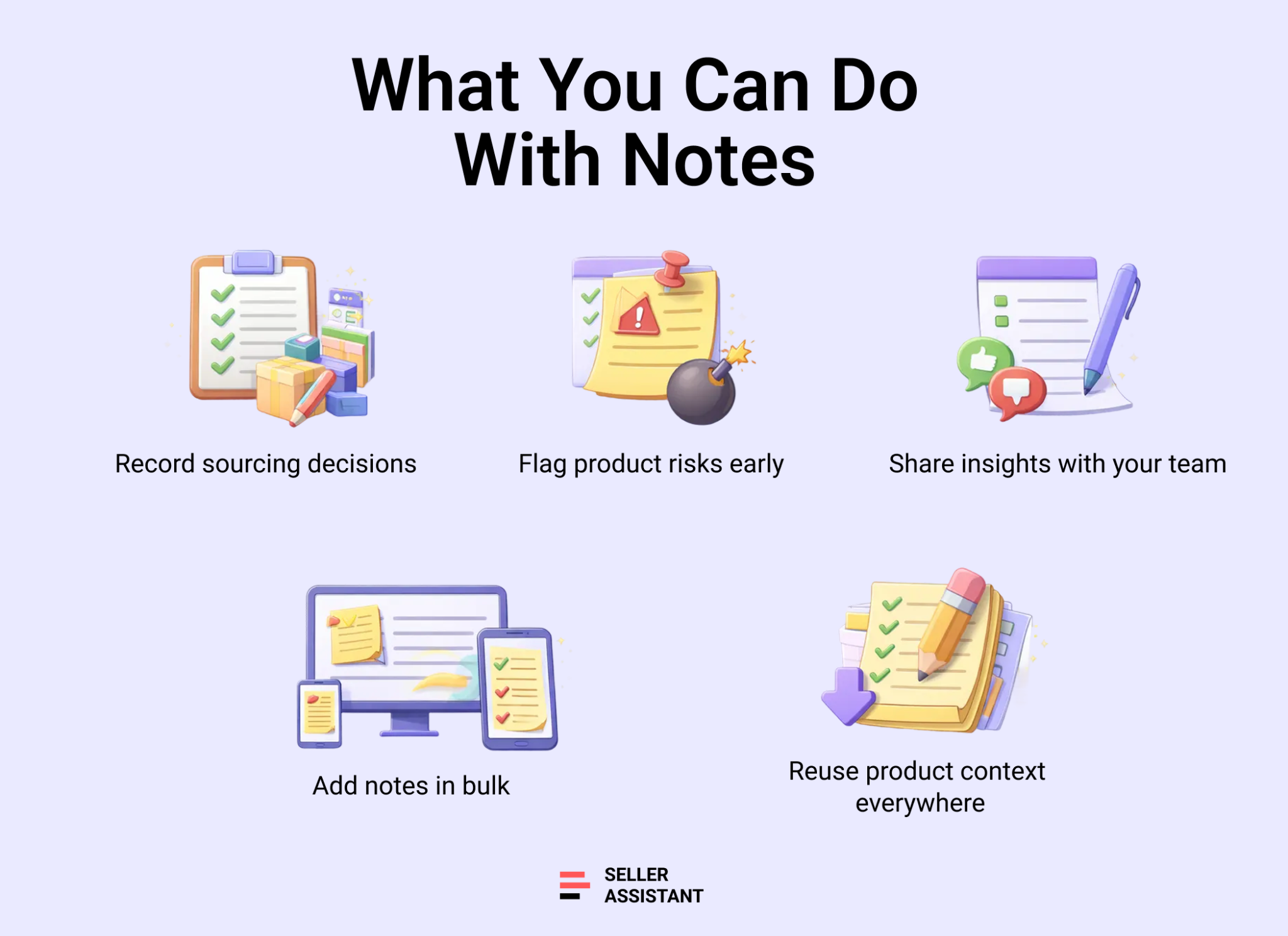
Record sourcing decisions
Use notes to document why a product was approved, rejected, or postponed. This can include reasons like brand gating, low margin after fees, unstable pricing, or supplier mismatch.
Flag risks and warnings
Notes are ideal for marking potential issues such as IP complaints, meltable or HazMat products, frequent returns, or Buy Box suppression. These warnings resurface automatically the next time you see the ASIN.
Capture team insights
When working with VAs or multiple researchers, notes allow anyone to leave insights for the team. Every member sees the same product history, which keeps decisions aligned.
Add notes in bulk
You can select multiple products at once in Price List Analyzer and add notes in one click. This is especially useful when reviewing large supplier files with similar issues or decisions.
Reuse product context everywhere
Notes added once appear across Price List Analyzer and the Seller Assistant Extension, giving you instant context on Amazon listings, supplier websites, and competitor storefronts without repeating research.
How to Use Notes in Price List Analyzer
Reviewing a handful of ASINs manually is manageable. Reviewing thousands across multiple supplier files is not. The same products resurface again and again, and without context, sellers end up repeating research, reopening risky listings, and forgetting why a product was skipped before.
Product Notes in Seller Assistant’s Price List Analyzer fix this by preserving decisions at the ASIN level and making them reusable across every sourcing cycle. Add context once, and it follows the product everywhere you analyze it.
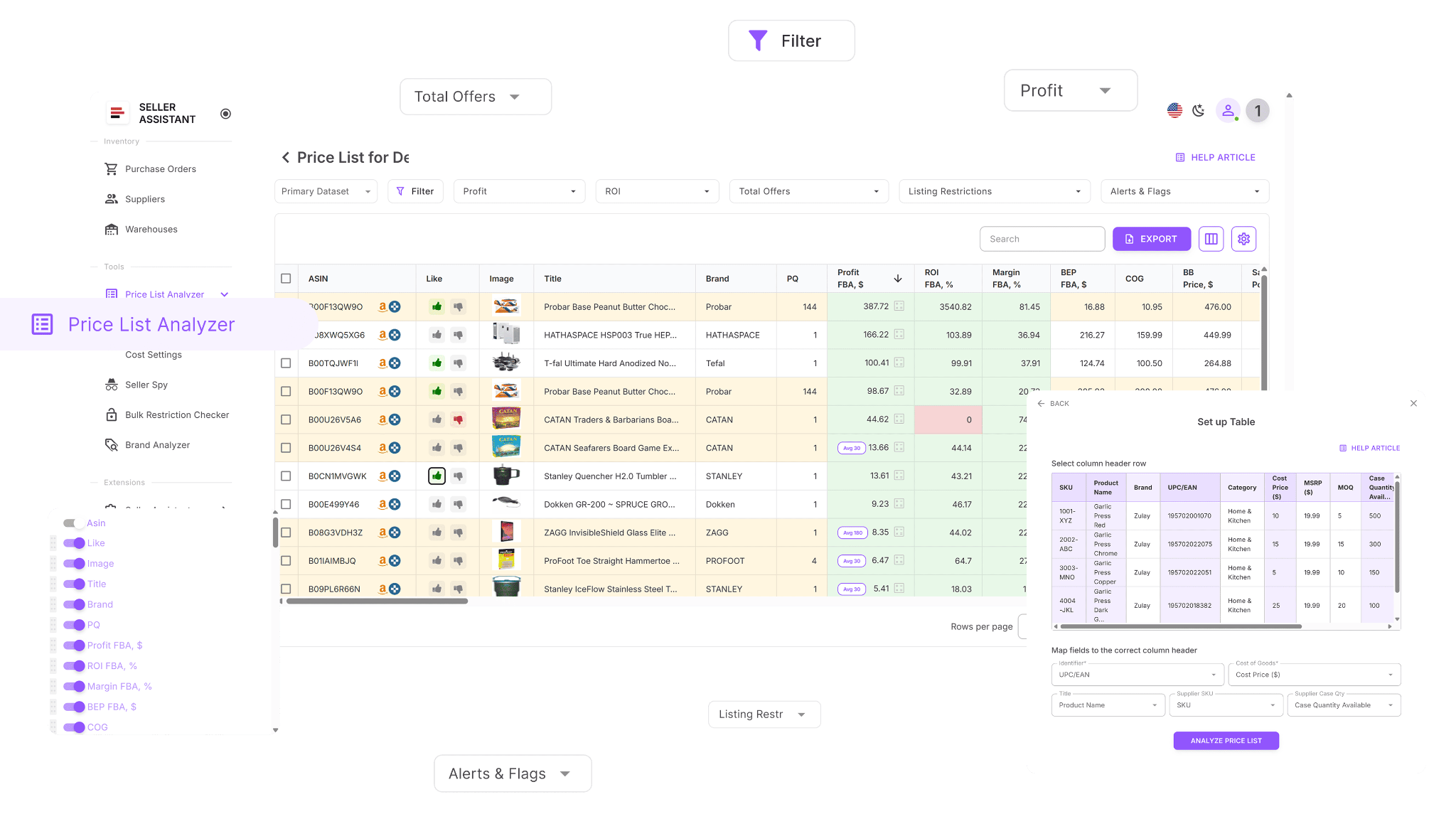 How Price List Analyzer streamlines bulk sourcing decisions
This Software Makes Amazon FBA Wholesale Selling 10x Easier
With Price List Analyzer, you’re able to:
- Go through large supplier price lists and surface Amazon products that show strong profit potential
- Automatically connect supplier SKUs or UPC/EAN codes to the right Amazon ASINs, without manual lookup
- See right away which products are gated, restricted, or not eligible to sell on your Amazon account
- Evaluate product demand using BSR metrics, sales trends, and estimated monthly unit sales
- Calculate essential profitability figures for each ASIN, including ROI, margin, net profit, and break-even price
- Review Buy Box pricing behavior using 30-, 90-, and 180-day historical averages
- Access a full breakdown of Amazon selling costs, such as referral fees, FBA or FBM fulfillment, storage, prep, and shipping
- Automatically identify high-risk listings, including HazMat, meltable, oversized, fragile, or bundle products
- Receive clear alerts for common issues like approval required, missing Buy Box data, or low FBA profitability
- Narrow results using filters for profit, ROI, demand, competition, and risk signals
- Save custom table layouts and filter setups to apply the same review logic to future uploads
- Update COG, shipping, prep costs, or pack quantity and see profitability update instantly
- Add team-wide product notes that remain linked to ASINs across multiple uploads and tools
- Mark products with the tags by sourcing status, reuse those decisions across price lists, and filter results by workflow stage.
How Price List Analyzer uses notes for bulk workflows
Designed for high-volume product reviews
While analyzing a processed price list, you can select one or multiple products and add notes in one click. This makes it easy to document decisions at scale without opening individual listings.
Adds decision context to supplier data
Each ASIN carries its notes alongside profitability, demand, and risk metrics. Notes explain why a product is worth revisiting, skipping, or monitoring.
Remembers decisions across time and suppliers
When an ASIN with existing notes appears in another supplier file, Price List Analyzer automatically shows the note. This prevents repeated evaluation and keeps decisions consistent.
Keeps focus on the right opportunities
Instead of reviewing every row again, notes help you move faster through large files by highlighting products with known outcomes and clear next steps.
How to Use Notes Step By Step in Price List Analyzer
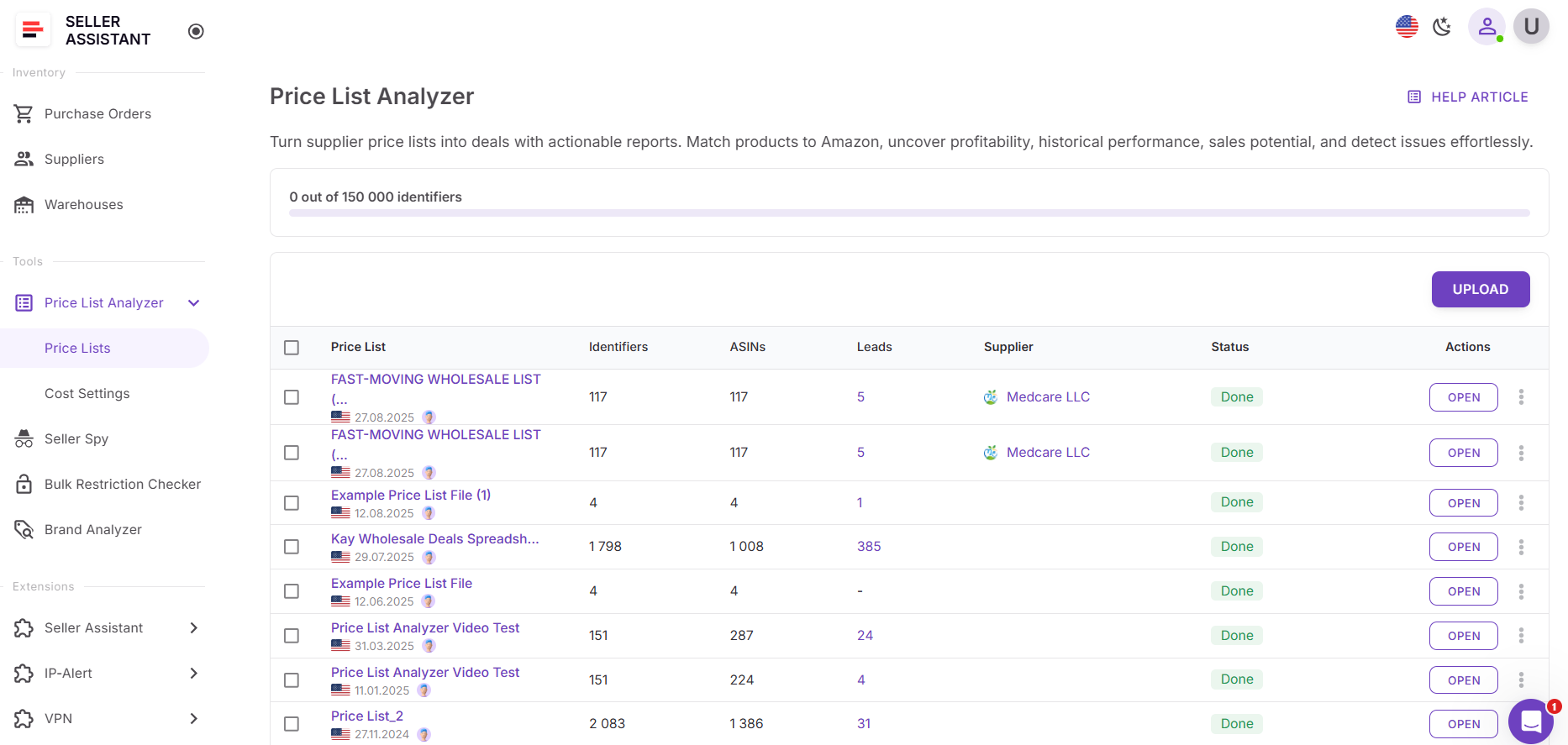
Step 1. Upload your supplier price list
Open Price List Analyzer in your Seller Assistant dashboard and upload your Excel or CSV file with UPC/EANs and product costs. The tool matches each supplier item to its Amazon ASIN and prepares the file for bulk analysis.
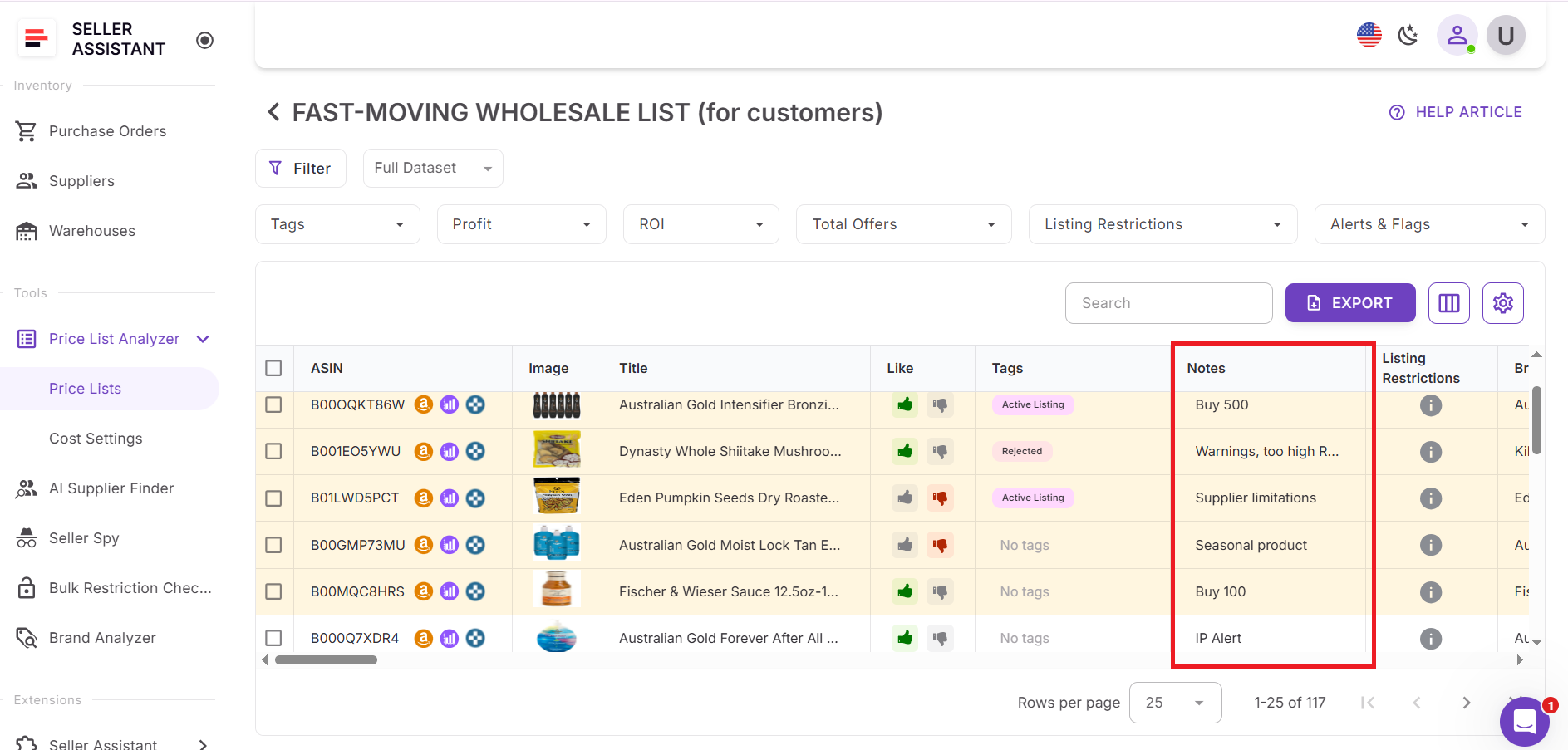
Step 2. Review products and add notes
After processing is complete, review the analyzed table with profitability, demand, competition, and risk metrics. As you scan the list, add notes to products that require context or explanation. Notes are saved at the ASIN level and shared across your team.
Use notes to record decisions such as:
- why a product was approved, rejected, or postponed
- past issues like brand gating, IP complaints, or unstable pricing
- special conditions such as seasonal demand or supplier-specific limitations
These notes preserve decision context and prevent repeated research.
Step 3. Reuse notes across tools and team members
When a product with existing notes appears in another price list, Price List Analyzer automatically shows the note. The same notes also appear in the Seller Assistant Extension on Amazon product pages, search results, supplier websites, and competitor storefronts. Share notes with the team members.
Step 4. Combine notes with filters and workflow views
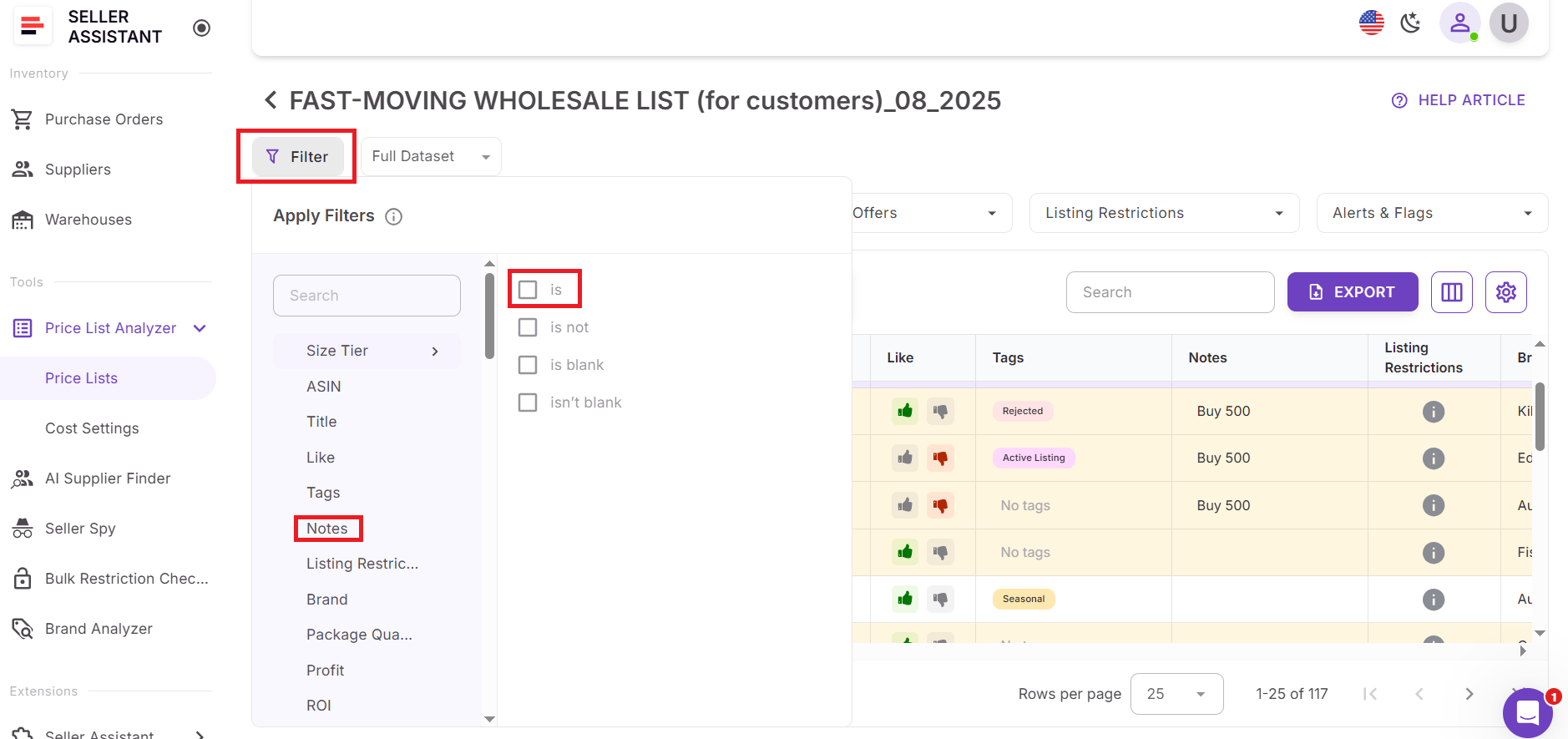
Use notes together with filters for profit, ROI, demand, risk flags, and sourcing status to focus on the right products. Save custom table views to reuse the same review logic for future uploads, while notes continue to carry product-specific context forward.
FAQ
What are product notes in Price List Analyzer?
Product notes are short, internal comments linked to a specific ASIN and your team. They store sourcing decisions, risks, or insights and automatically reappear whenever you encounter that product again.
Are notes shared with my team?
Yes, notes are shared across the entire team. Everyone sees the same notes in Price List Analyzer and in the Seller Assistant Extension, which keeps decisions consistent.
Do notes stay saved if the product appears in another price list?
Yes, notes persist across uploads and suppliers. When the same ASIN shows up in a new price list, its existing note is displayed automatically.
Where can I see product notes outside Price List Analyzer?
Notes also appear in the Seller Assistant Extension, including Amazon product pages, Quick View on search results, the Side Panel View on supplier websites, and the Storefront Widget on competitor storefronts.
Can product notes be edited or updated later?
Yes, you can edit or update a product note at any time. The updated note instantly replaces the old one and is reflected everywhere the ASIN appears across Seller Assistant tools.
Final Thoughts
Bulk sourcing on Amazon isn’t just about finding profitable numbers – it’s about keeping context as your catalog, suppliers, and team grow. Without a way to remember past decisions, sellers end up repeating research and revisiting the same risks again and again. Product Notes in Seller Assistant’s Price List Analyzer solve this by attaching decision history directly to ASINs and making it visible across every sourcing tool you use. When notes travel with products through price lists, Amazon listings, supplier sites, and storefronts, sourcing becomes faster, more consistent, and easier to scale.
Seller Assistant automates and connects every stage of your Amazon wholesale and arbitrage workflow. It brings together in one platform: workflow management tools – Purchase Orders Module, Supplier Database, Warehouse Database, bulk research & sourcing tools – Price List Analyzer, Bulk Restriction Checker, Sourcing AI, Brand Analyzer, Seller Spy, Chrome extensions – Seller Assistant Browser Extension, IP-Alert Extension, and built-in VPN by Seller Assistant, and integrations & team access features – seamless API connectivity, integrations with Zapier, Airtable, and Make, and Virtual Assistant Accounts.

