.svg)
How to Use Likes and Dislikes in Price List Analyzer
Download Amazon Seller Guide
This guide will help you get started, understand the basics of Amazon selling, and explain in simple words how it all works.

Processing supplier price lists with thousands of SKUs is one of the biggest bottlenecks for Amazon wholesale, online arbitrage, and dropshipping sellers. Even with advanced filters, the real challenge isn’t finding possible deals – it’s remembering which ASINs are actually worth your time and which should be skipped for good.
This is where Likes and Dislikes in Seller Assistant’s Price List Analyzer change the workflow. They let you mark profitable opportunities, permanently rule out bad fits, and instantly recognize products you’ve already evaluated when they appear again.
In this post, we’ll show how to use Likes and Dislikes inside Seller Assistant's Price List Analyzer to move faster from bulk analysis to confident buying decisions.
Note. Seller Assistant is an end-to-end Amazon workflow management platform that integrates 10+ wholesale-focused solutions into one connected system. It combines sourcing workflow automation, bulk research and intelligence tools, and integrated Chrome extensions – giving you everything you need to streamline finding deals, managing suppliers, and creating purchase orders.

The platform aggregates: workflow management tools – Purchase Orders Module, Suppliers Database, Warehouses Database to organize, automate, and scale every step of your wholesale and arbitrage operations; bulk research & sourcing tools – Price List Analyzer, Bulk Restriction Checker, Sourcing AI, Brand Analyzer, Seller Spy to evaluate supplier price lists, verify selling eligibility and restrictions, open new brands, and discover winning product ideas from competitors to expand your product catalog; Chrome extensions – Seller Assistant Browser Extension, IP-Alert Extension, and built-in VPN by Seller Assistant to deep-research products, check IP claims and compliance, and access geoblocked supplier sites directly within your browser; and integrations & team access features – seamless API connectivity and integrations with Zapier, Airtable, and Make, plus Virtual Assistant Accounts for secure, scalable team collaboration.
With Seller Assistant, every step of your Amazon wholesale and arbitrage workflow is automated and connected.
What Are Amazon Product Likes and Dislikes?
Amazon product Likes and Dislikes are simple decision markers sellers use to label ASINs as worth pursuing or not worth revisiting. A Like signals that a product meets your sourcing criteria and is a potential buy. A Dislike marks an ASIN you’ve already reviewed and ruled out – because of low margins, high risk, restrictions, unstable pricing, or any other deal-breaker.
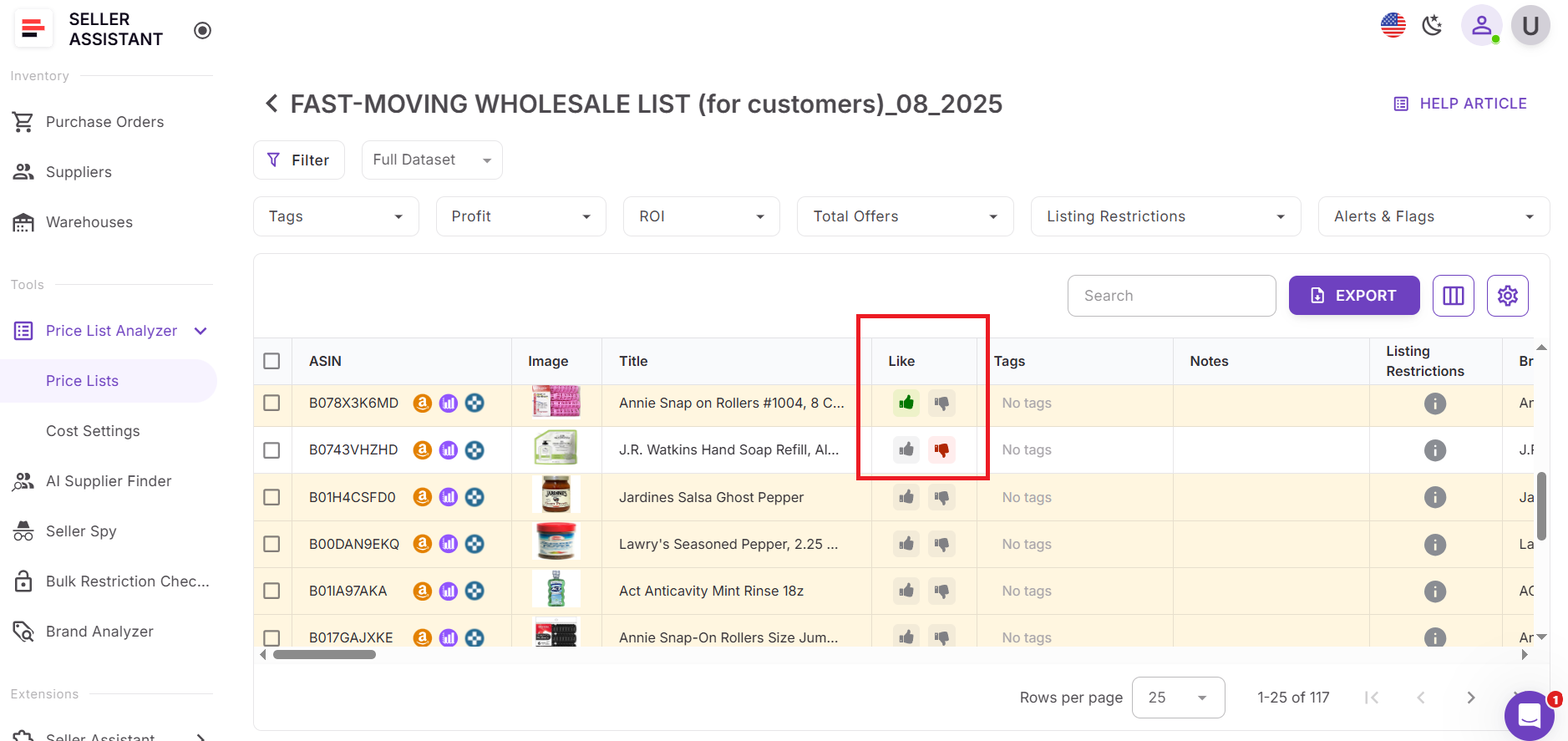
Sellers need Likes and Dislikes because bulk sourcing creates a memory problem. When you analyze thousands of SKUs across supplier lists, storefronts, and search results, the same ASINs appear again and again. Without a way to remember past decisions, you end up rechecking the same unprofitable or risky products – wasting time and slowing down buying decisions. Likes and Dislikes solve this by turning one-time product evaluations into permanent signals you can reuse.
In Seller Assistant, Likes and Dislikes work as a unified system across all tools. In Price List Analyzer, you can like or dislike products directly in the UI table, filter by status, highlight selected rows, and build shortlists for export and purchasing. When a product you’ve already reviewed appears in a new price list, Price List Analyzer instantly shows its existing status – so you know at a glance whether it’s a candidate or a pass.
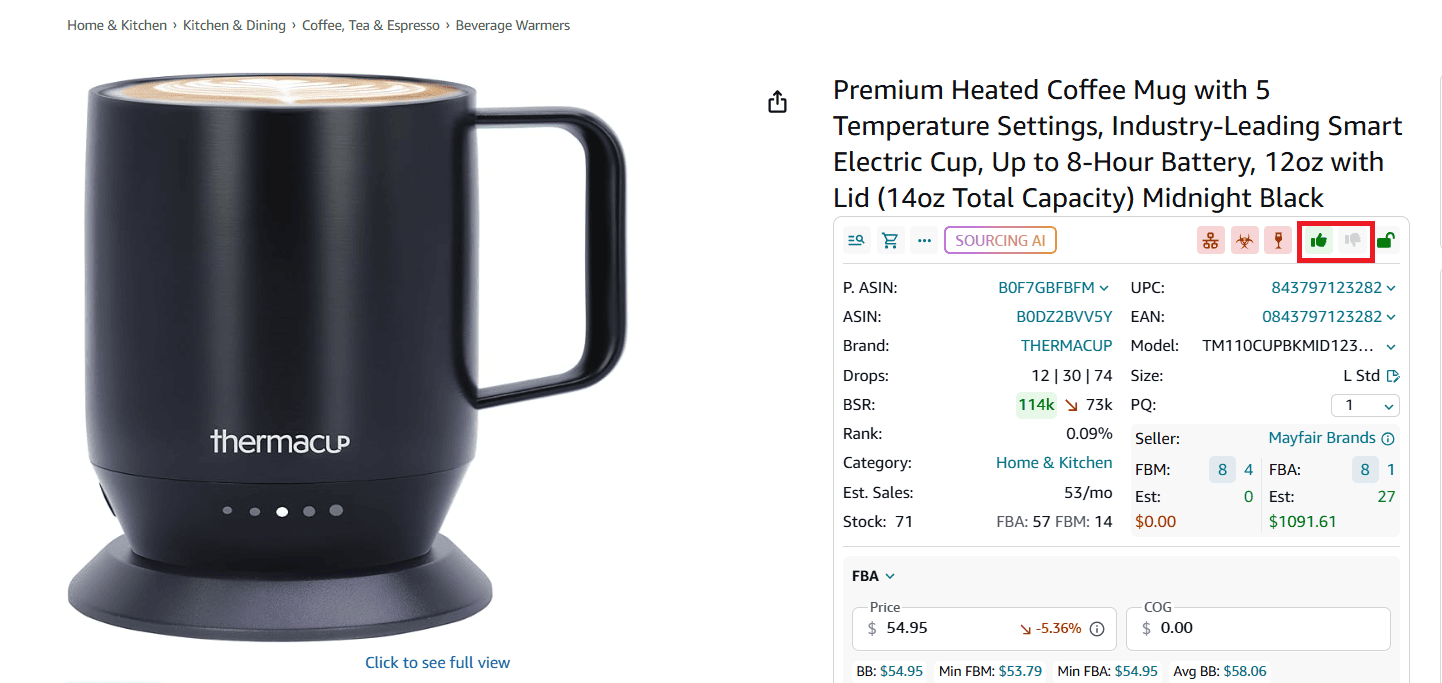
The same Like/Dislike status is synced across Seller Assistant Browser Extension, including:
- Product View on Amazon product pages
- Quick View on Amazon search results
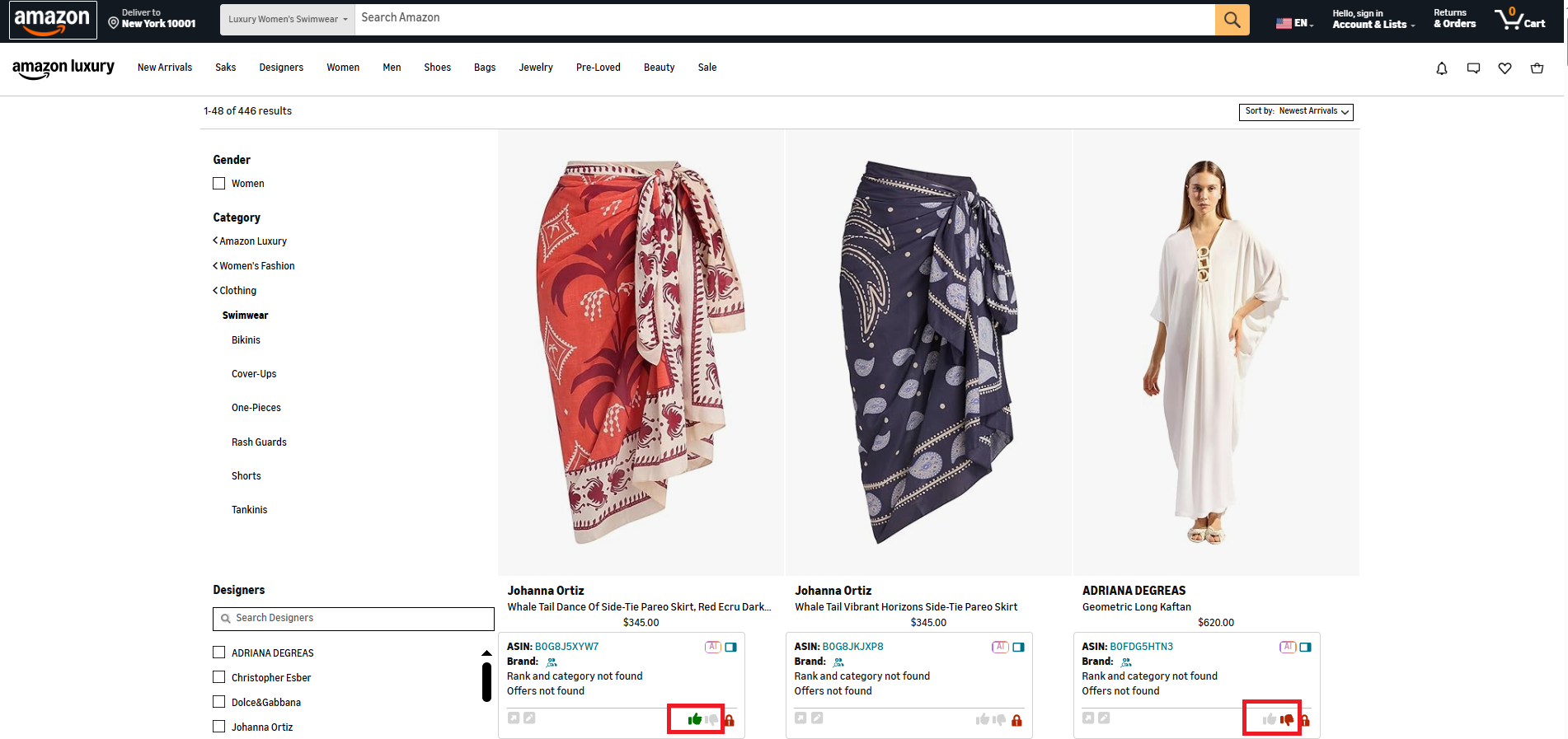
- Side Panel View on supplier websites
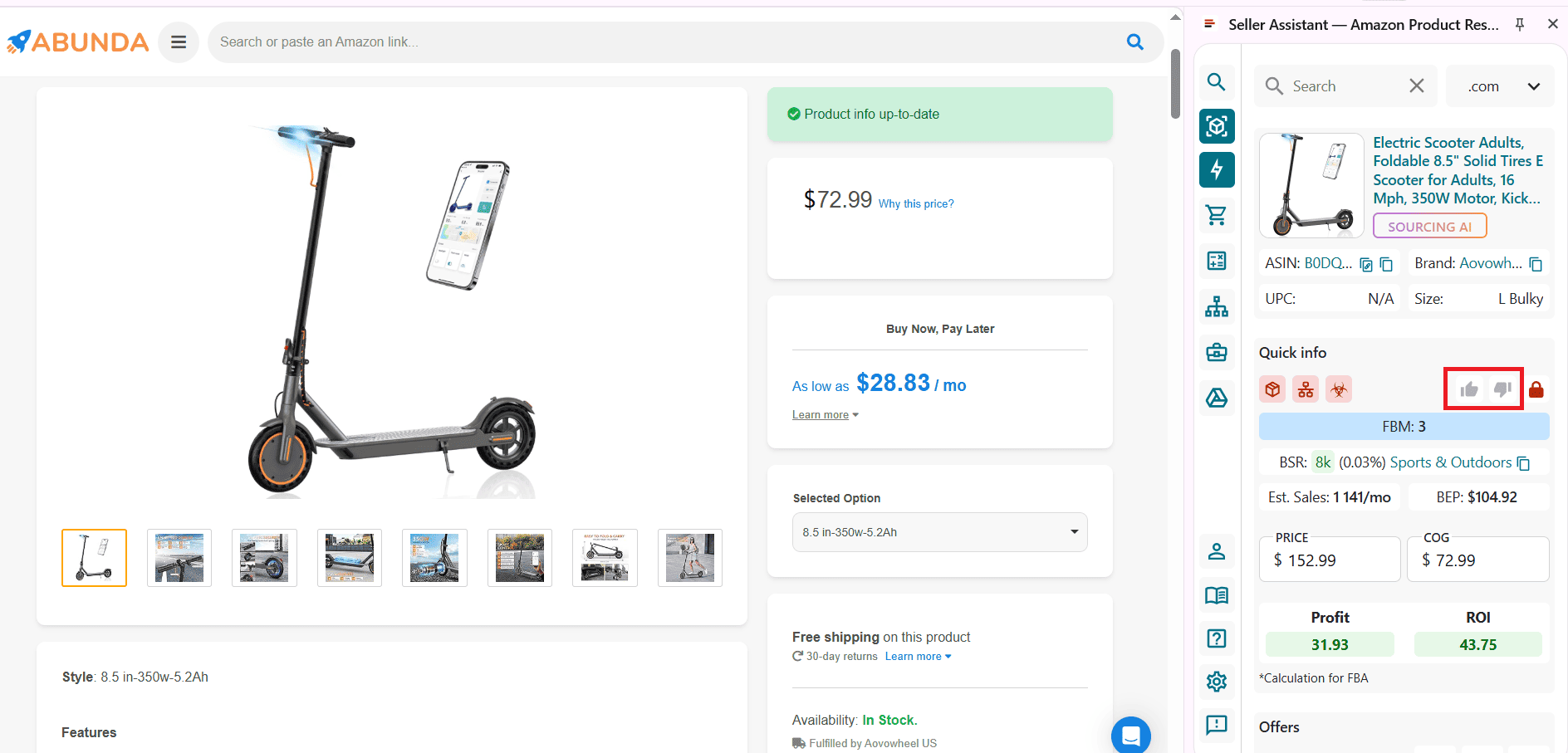
- Storefront Widget on competitor storefronts
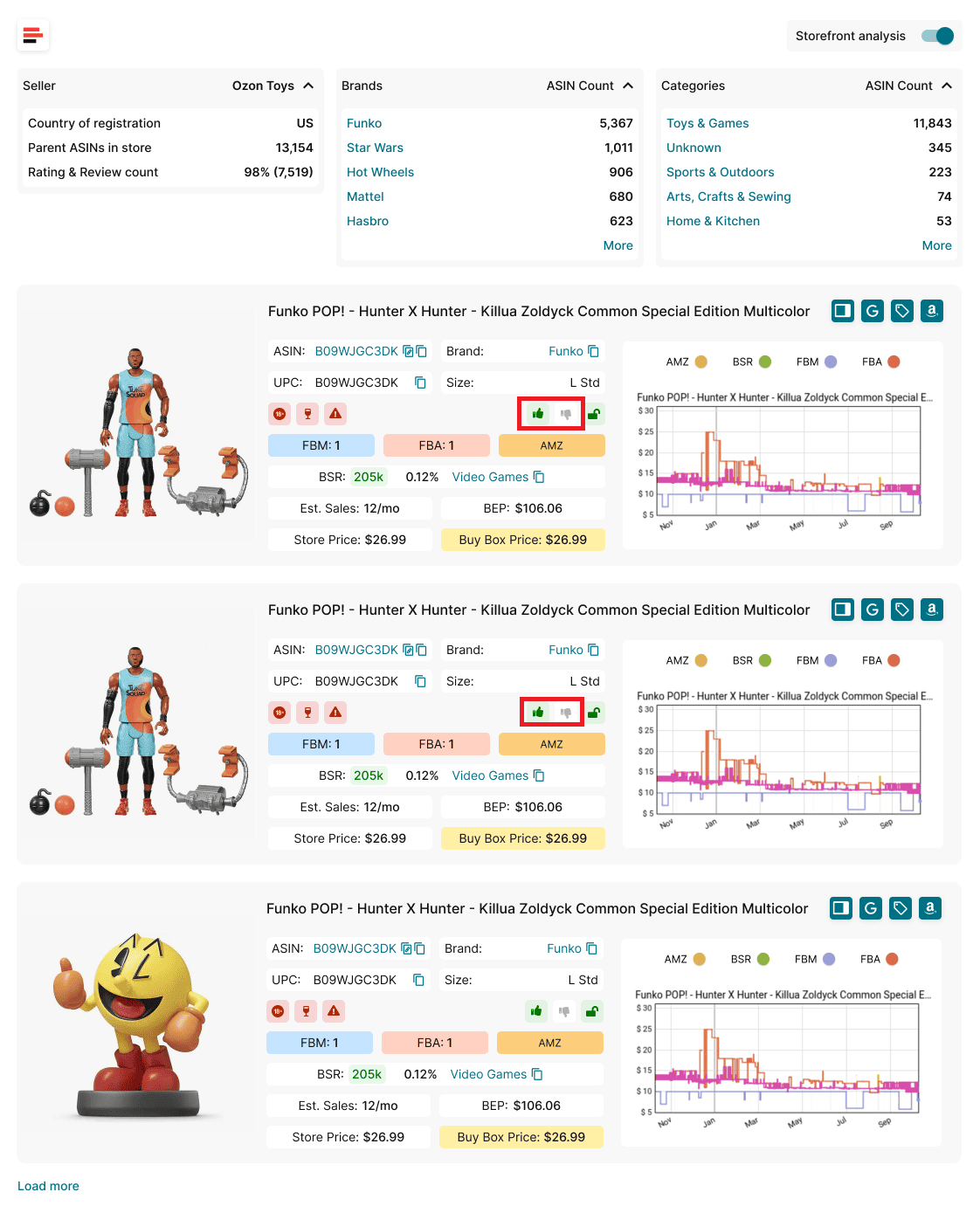
No matter where you encounter an ASIN – bulk files or one-by-one research – Seller Assistant remembers your latest decision and shows it everywhere. This cross-tool consistency helps sellers move faster, stay focused, and turn bulk analysis into action without repeating the same work.
Why Likes and Dislikes Matter for Amazon Sellers
For Amazon wholesale, online arbitrage, and dropshipping sellers, the biggest challenge in sourcing isn’t access to data – it’s making fast, repeatable decisions at scale. Likes and Dislikes solve this by turning individual product evaluations into a reusable decision system that works across bulk analysis and manual research.
Eliminate repeated research
The same ASINs appear again and again in supplier price lists, Amazon search results, and competitor storefronts. Likes and Dislikes let you mark a product once and instantly recognize it everywhere later, so you don’t waste time rechecking items you’ve already approved or rejected.
Speed up bulk price list analysis
When you’re working with thousands of rows in Price List Analyzer, Likes help you quickly shortlist promising deals, while Dislikes remove obvious dead ends. This keeps your focus on products that actually deserve deeper validation or purchasing consideration.
Turn analysis into action
Likes aren’t just markers – they’re action signals. By filtering and exporting liked products in Price List Analyzer, sellers can move directly from bulk analysis to purchase planning without rebuilding lists or second-guessing earlier decisions.
Reduce costly sourcing mistakes
Dislikes act as permanent stop signs. Low-margin items, restricted products, IP-risk ASINs, or unstable listings are clearly marked, helping you avoid repeating the same unprofitable or risky decisions across future price lists.
Maintain consistency across tools and workflows
Because Likes and Dislikes are shared across Price List Analyzer and the Seller Assistant Extension, your decisions stay consistent whether you’re sourcing in bulk or researching products one by one. This creates a reliable, scalable workflow that supports growth instead of slowing it down.
What Can You Do With Likes and Dislikes?
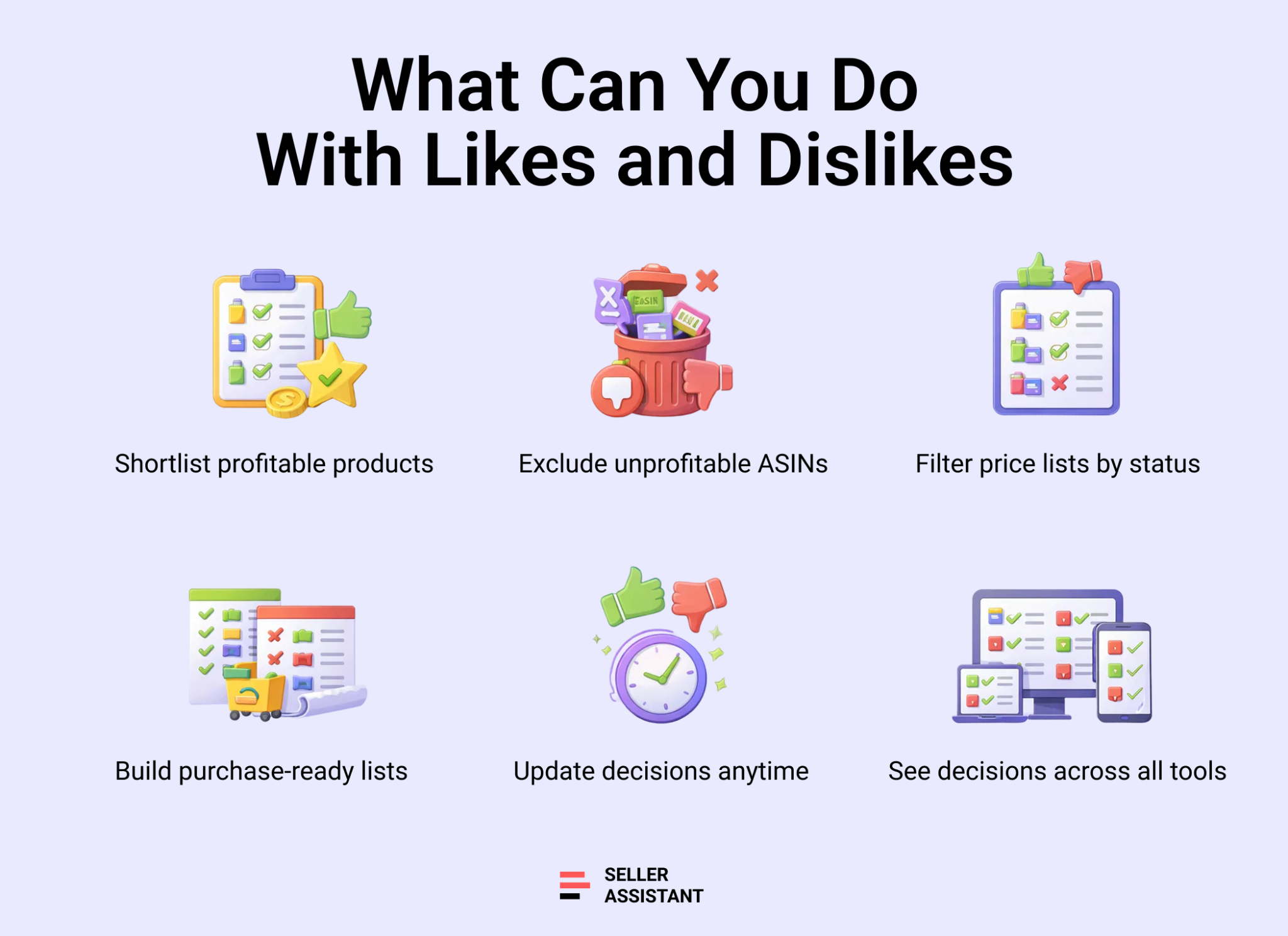
Likes and Dislikes give Amazon sellers practical control over product selection during bulk and manual sourcing. Instead of treating every price list or ASIN as new, you can turn past decisions into clear actions that guide what to analyze, ignore, or move forward with.
Shortlist profitable products
You can mark high-potential ASINs with a Like directly in Price List Analyzer. These liked products form an instant shortlist of deals worth deeper validation, negotiation with suppliers, or purchasing.
Exclude bad deals automatically
Dislikes help you permanently rule out products that don’t fit your criteria – low ROI, unstable Buy Box, restrictions, IP risk, or operational issues. When these ASINs appear again, you can filter them out and avoid wasting time.
Filter price lists by decision status
In Price List Analyzer, you can filter results to show only liked products, only disliked products, or exclude dislikes entirely. This lets you focus on relevant items when working with thousands of rows.
Build export-ready buying lists
By selecting liked products, you can export clean, decision-ready lists for purchasing, supplier discussions, or further research – without re-sorting or rebuilding files.
Update decisions as conditions change
You can switch a product from Like to Dislike or the other way around at any time. The system saves the latest status and applies it everywhere the ASIN appears.
Keep decisions consistent across tools
Likes and Dislikes are shared across Price List Analyzer and the Seller Assistant Extension. Whether you encounter an ASIN in bulk files, on Amazon product pages, search results, supplier sites, or competitor storefronts, your decision is always visible and up to date.
How to Use Likes And Dislikes in Price List Analyzer
Manually deciding which products to keep or discard might work when you review a few ASINs, but it quickly falls apart with real supplier price lists. Hundreds or thousands of rows, repeated ASINs across different files, and constant market changes make it easy to lose track of past decisions and redo the same work again.
Likes and Dislikes in Seller Assistant's Price List Analyzer solve this problem by turning product selection into a scalable, repeatable process. Instead of relying on memory or notes scattered across spreadsheets, you can mark products once and reuse those decisions every time the ASIN appears again – whether in a new price list or during manual research.
How Price List Analyzer helps sellers
This Software Makes Amazon FBA Wholesale Selling 10x Easier
With Price List Analyzer, you can:
- Scan large supplier catalogs and quickly identify Amazon products with solid profit potential
- Automatically match supplier SKUs or UPC/EANs to the correct Amazon ASINs, without manual lookup
- See instantly whether products are gated, restricted, or not sellable on your Amazon account
- Evaluate demand using BSR, sales trends, and estimated monthly sales volume
- Calculate key profitability metrics for every ASIN, including ROI, margin, net profit, and breakeven thresholds
- Analyze Buy Box pricing behavior using 30-, 90-, and 180-day averages to avoid unstable or inflated prices
- Review a full breakdown of Amazon fees, including referral fees, FBA or FBM fulfillment, storage, prep, and shipping costs
- Automatically flag high-risk products such as hazmat, meltable, oversized, fragile, or bundled listings
- Get clear alerts for potential issues like approval required, missing Buy Box, or weak FBA profitability
- Filter products by profitability, demand, competition, risk factors, and Like or Dislike status
- Save custom table views and filter setups to reuse across future price list uploads
- Edit COG, shipping, prep costs, or pack quantity and see profitability recalculated in real time
- Add shared team notes that stay linked to ASINs across multiple uploads and tools
- Use Likes and Dislikes to tag products by sourcing decision, reuse those decisions across price lists, and filter results by workflow stage
How Price List Analyzer uses likes and dislikes
Built for bulk product selection
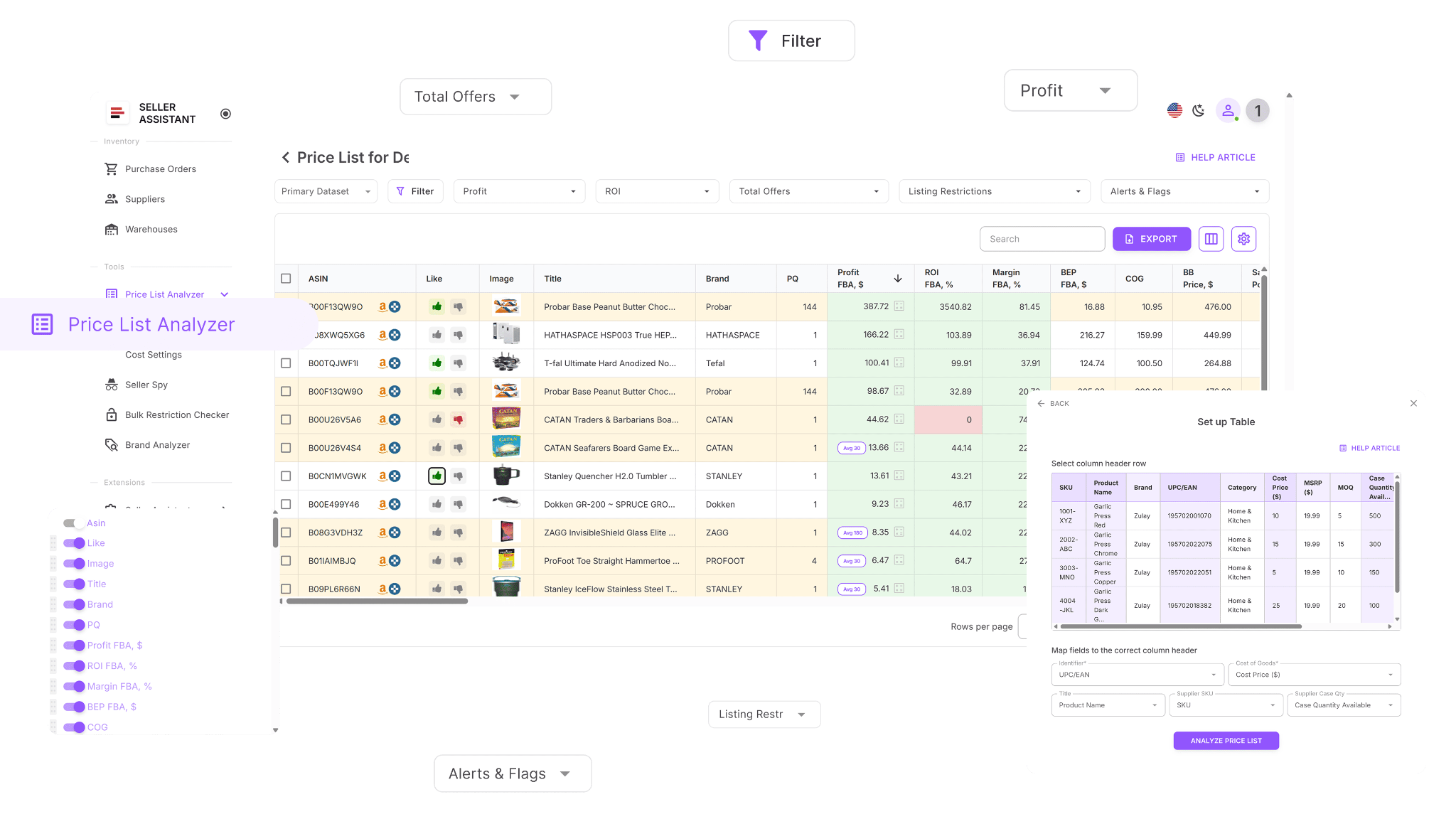
Price List Analyzer is designed for sellers who work with large supplier catalogs. As your price list is processed and matched to Amazon ASINs, you can like or dislike products directly in the UI table. This lets you make quick decisions at scale without opening each listing individually.
Adds decision signals to your supplier data
Once your file is analyzed, each ASIN can carry a Like or Dislike status alongside profitability, demand, and risk metrics. These statuses act as clear signals: which products are worth moving forward with and which should be excluded from future consideration.
Remembers decisions across uploads
When an ASIN you’ve previously liked or disliked appears in another price list, Price List Analyzer automatically shows its existing status. This prevents repeated evaluation of the same products and keeps your workflow consistent across suppliers and time.
Handles large files efficiently
Instead of reviewing products row by row, you can work with thousands of items at once. Likes help you surface viable deals, while Dislikes quickly remove products that don’t meet your criteria, keeping your focus on the most relevant opportunities.
How to use Likes and Dislikes step by step in Price List Analyzer
Step 1. Upload your supplier price list
Open Price List Analyzer in your Seller Assistant dashboard and upload your Excel or CSV file with UPC/EANs and product costs. The system matches each supplier item to its Amazon ASIN and prepares the file for bulk analysis and product selection.
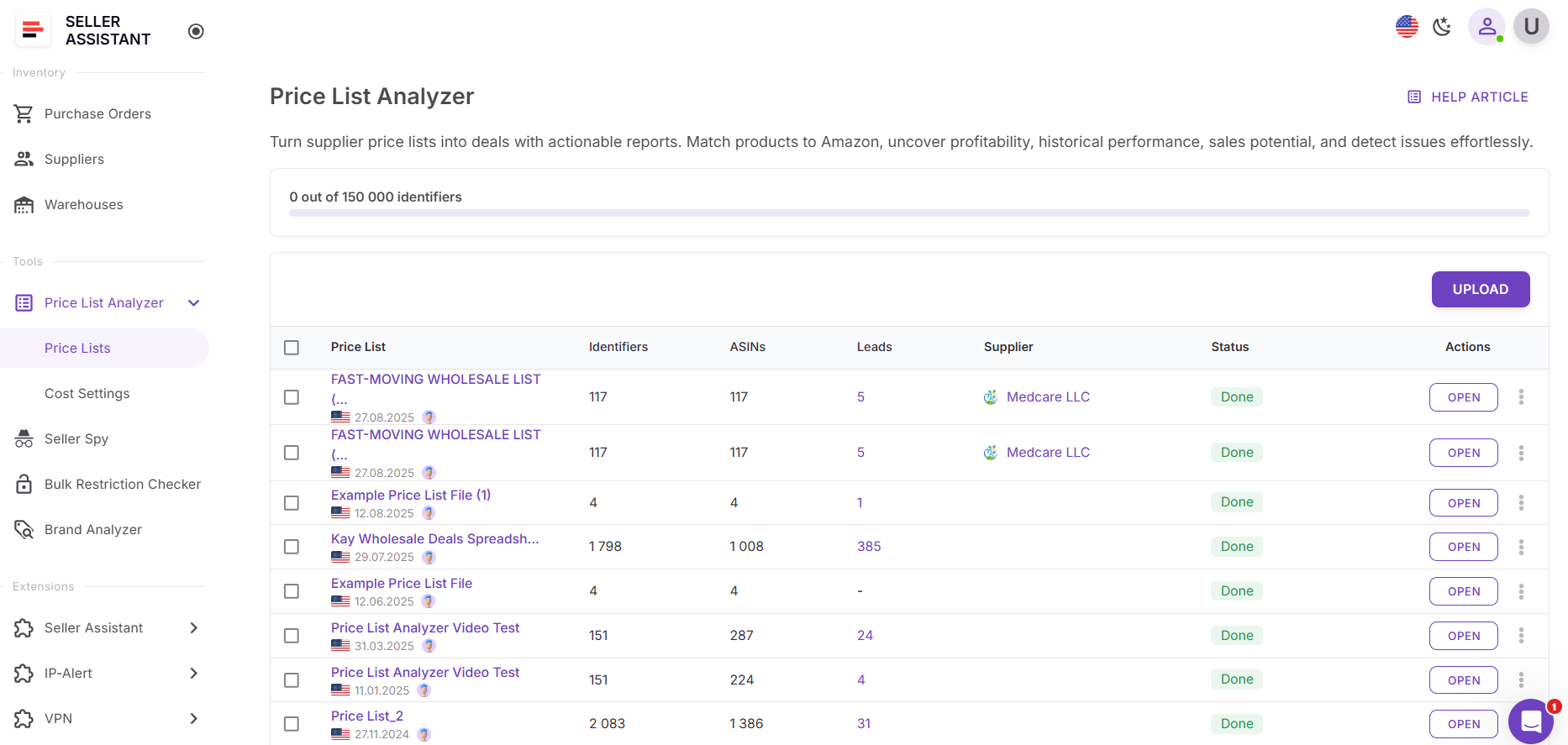
Step 2. Review products and apply likes or dislikes
Once processing is complete, review the analyzed table with profitability, demand, and risk metrics. As you scan the list, mark products with a Like if they fit your sourcing criteria, or a Dislike if they don’t. Each status is saved at the ASIN level.
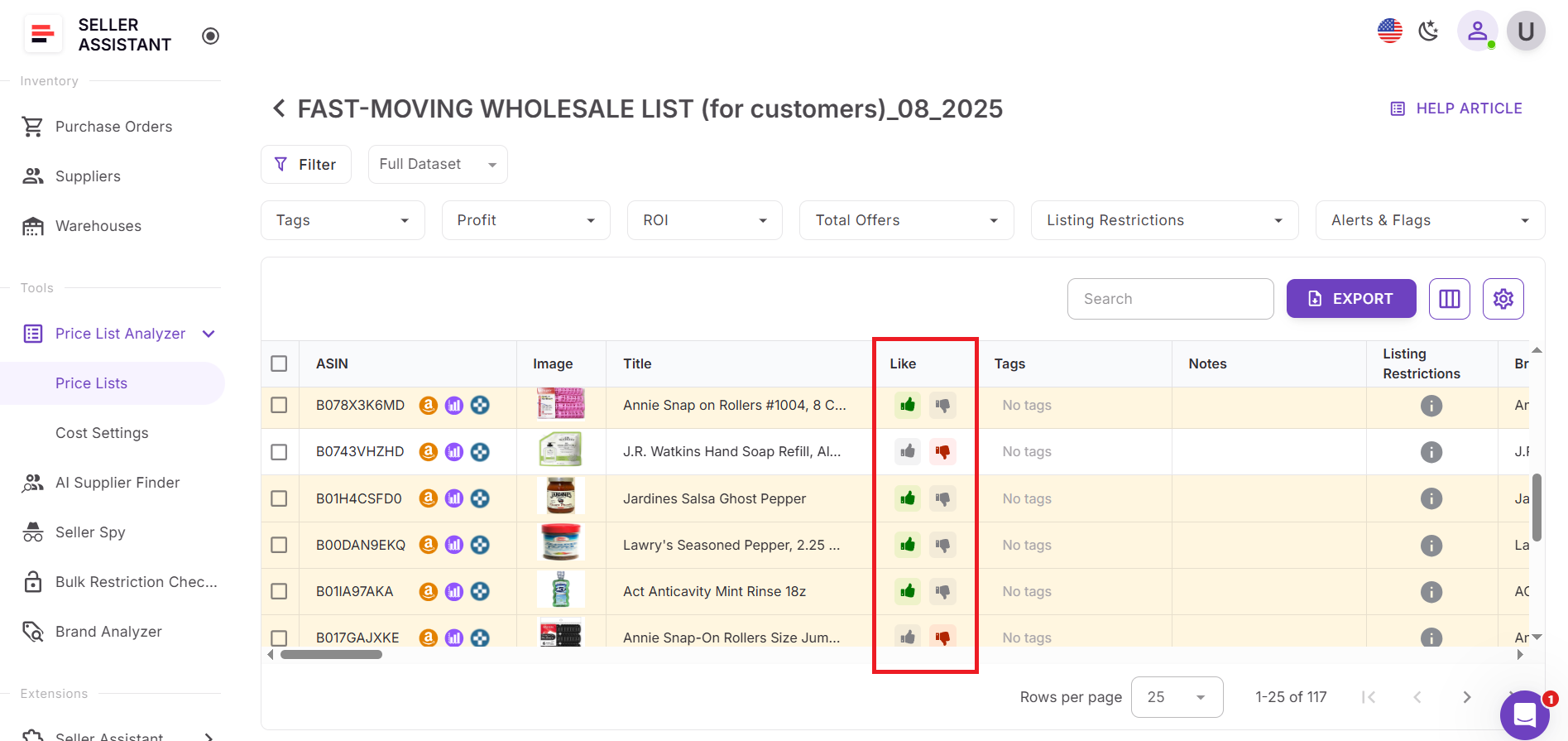
- Use Likes to highlight products worth deeper validation or purchasing.
- Dislikes act as clear stop signals for low-margin, restricted, risky, or operationally complex ASINs.
These decisions help you focus only on viable deals.
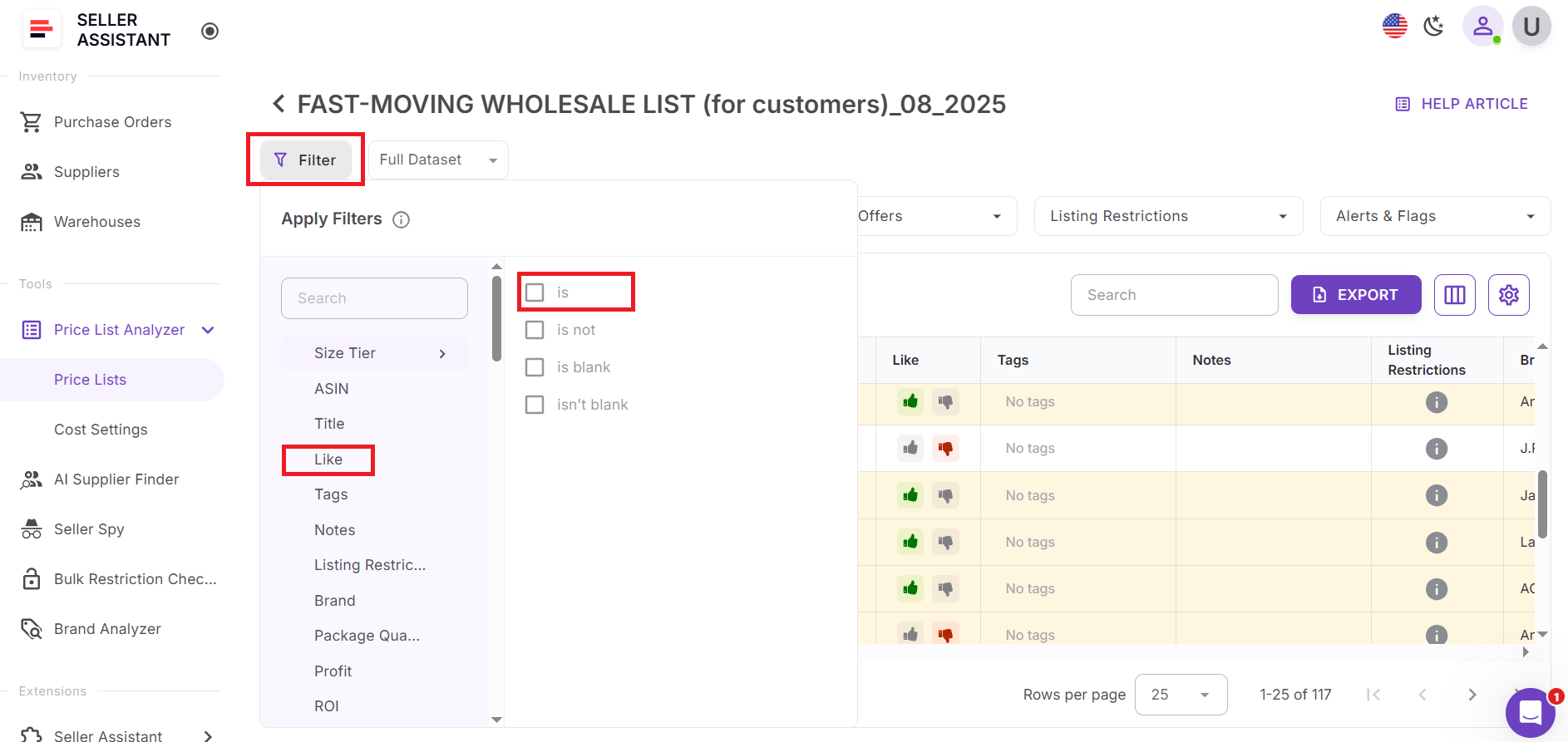
Step 3. Filter by like and dislike status
Apply filters to show only liked products, exclude disliked ones, or review previously rejected ASINs. You can combine Like/Dislike filters with ROI, sales volume, Buy Box behavior, and competition metrics to narrow down strong opportunities.
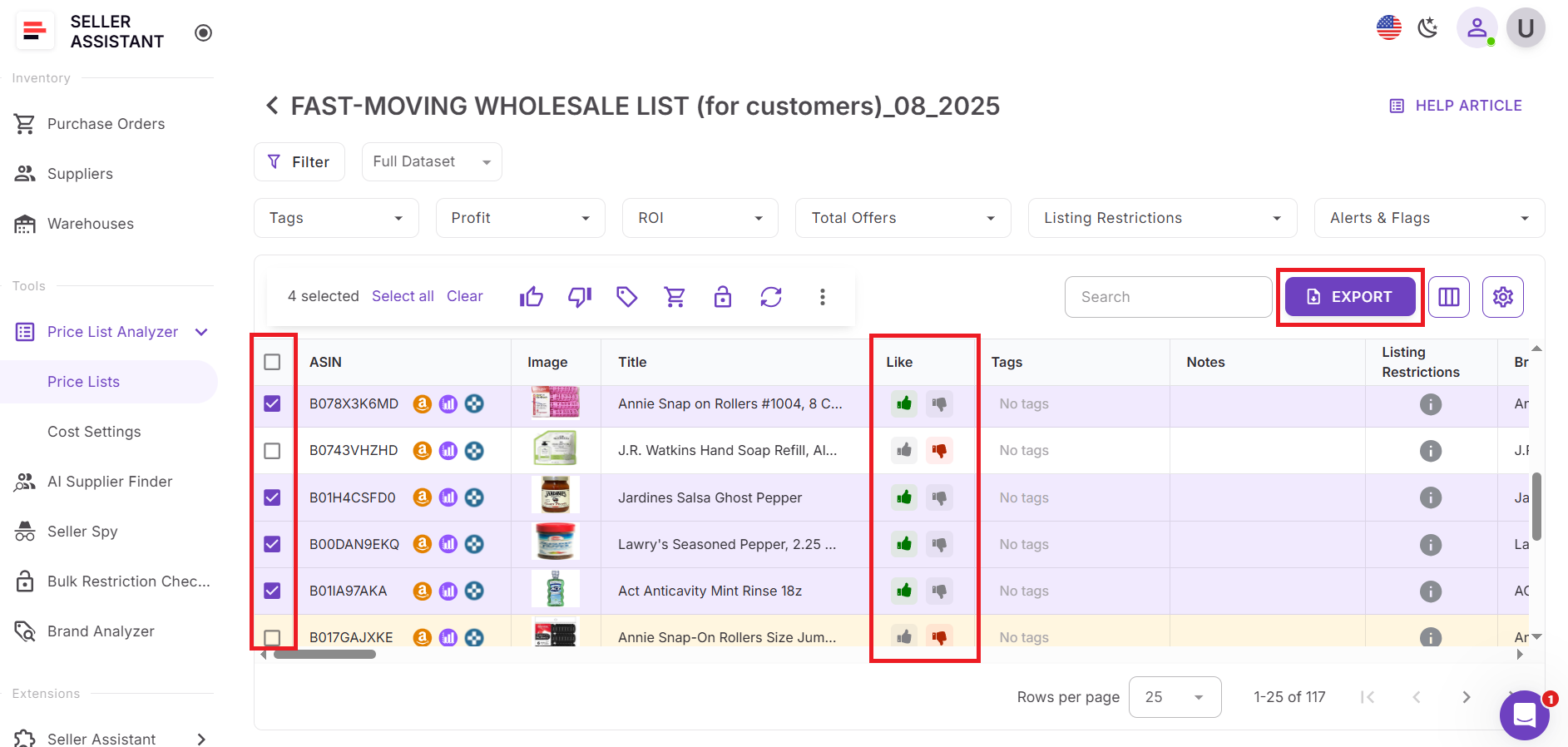
Step 4. Build and export your shortlist
Select liked products directly in the UI table and export them as a clean shortlist for purchasing, supplier negotiations, or further analysis. You can also change a product’s status from Like to Dislike (or vice versa) if conditions change.
Step 5. Save and reuse your workflow
Save custom table views such as Liked products, Excluded deals, or Purchase orders. These views can be reused for future price list uploads, allowing you to apply the same decision logic without starting from scratch.
FAQ
Can I use Likes and Dislikes only in Price List Analyzer?
No. Likes and Dislikes are shared across Price List Analyzer and the Seller Assistant Extension, so the same status appears on Amazon product pages, search results, supplier sites, and storefronts.
What happens if an ASIN I disliked appears in a new supplier price list?
Price List Analyzer automatically shows the Dislike status for that ASIN. You can filter it out instantly and avoid reviewing the same unprofitable or risky product again.
Can I change a Like to a Dislike later?
Yes. You can update a product’s status at any time, and the system will save the latest decision and apply it everywhere the ASIN appears.
Do Likes and Dislikes affect profitability calculations or filters?
No. Likes and Dislikes don’t change metrics like profit or ROI – they act as decision tags that help you filter, shortlist, and organize products based on your sourcing strategy.
Can my team see my Likes and Dislikes?
Yes. Likes and Dislikes are shared across team accounts, which helps keep sourcing decisions consistent and prevents duplicated work during bulk research.
Final Thoughts
For Amazon sellers working with large supplier price lists, speed and consistency matter as much as data accuracy. Likes and Dislikes in Seller Assistant's Price List Analyzer turn one-time product evaluations into lasting decisions you can reuse across bulk uploads and daily research. Instead of rechecking the same ASINs, you can focus on products that truly move your business forward and permanently exclude those that don’t fit your strategy. By combining Likes and Dislikes with Price List Analyzer’s filtering and export tools, you move faster from analysis to action – building clean shortlists, avoiding repeated mistakes, and scaling your sourcing workflow with confidence.
Seller Assistant automates and connects every stage of your Amazon wholesale and arbitrage workflow. It brings together in one platform: workflow management tools – Purchase Orders Module, Supplier Database, Warehouse Database, bulk research & sourcing tools – Price List Analyzer, Bulk Restriction Checker, Sourcing AI, Brand Analyzer, Seller Spy, Chrome extensions – Seller Assistant Browser Extension, IP-Alert Extension, and built-in VPN by Seller Assistant, and integrations & team access features – seamless API connectivity, integrations with Zapier, Airtable, and Make, and Virtual Assistant Accounts.