



Thinking about starting your own business? There’s no better place to begin than Amazon – the world’s largest online marketplace. With $158.88 billion in quarterly sales and over 2.6 billion monthly visits, Amazon offers unmatched opportunities for entrepreneurs.
However, new sellers often don’t know where to begin, and getting started is the biggest challenge.
In this post, we’ll walk you through the steps of becoming an Amazon seller. We will help you understand how selling on Amazon works, how to find profitable deals to grow your business, and how to avoid costly mistakes.
What Do You Need to Start Selling on Amazon?
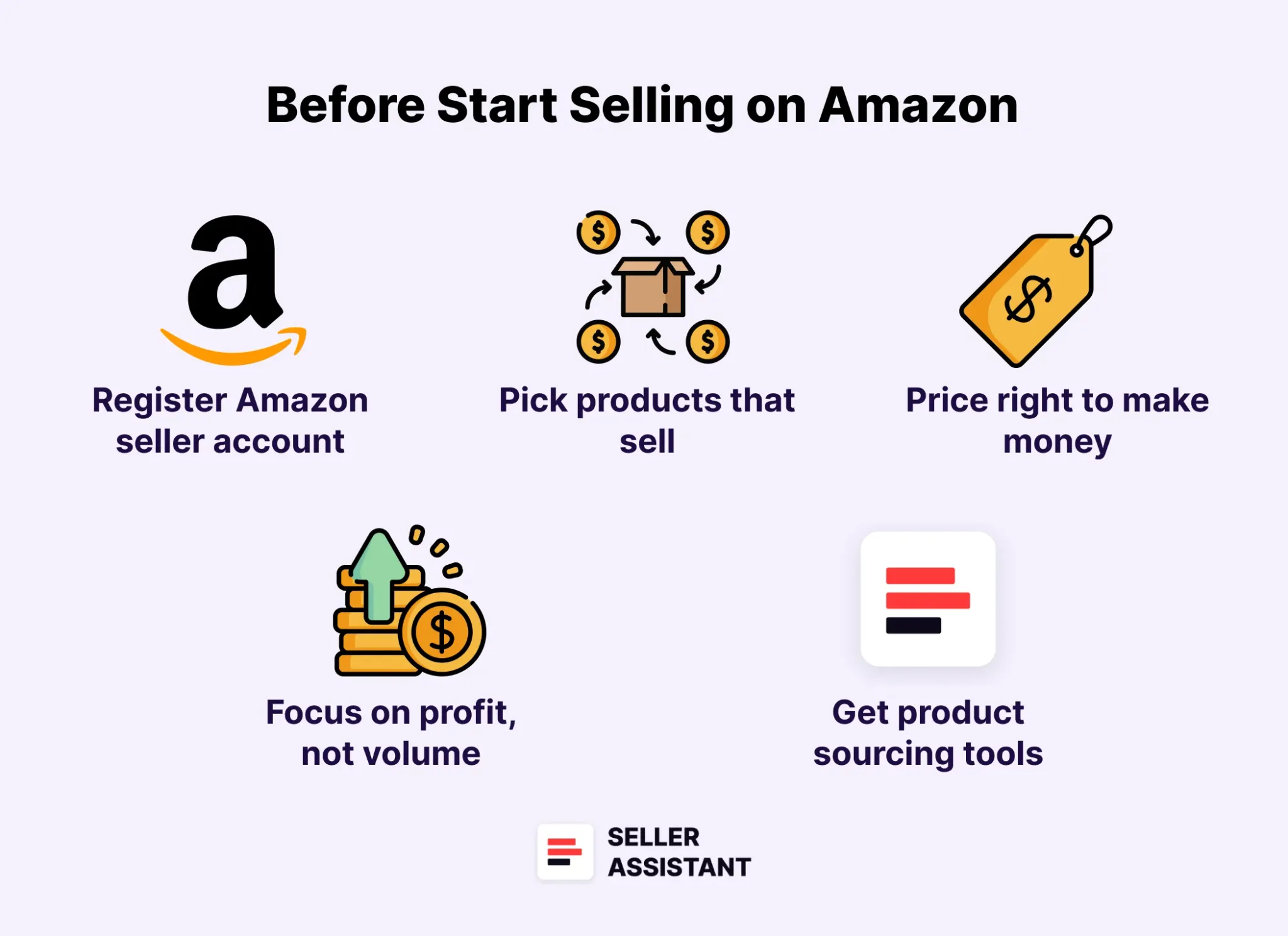
Starting to sell on Amazon is easier than you might think. You don’t need many things to get started, but it’s important to understand the basics before you begin. To help you launch your business smoothly, here’s everything you need to start selling on Amazon.
What Do You Need to Start Selling on Amazon?
Amazon seller account
First, sign up for an account on Amazon Seller Central. You can choose an Individual plan (pay-per-sale) or a Professional plan ($39.99/month) based on your sales goals.
Legal business information
Amazon requires basic legal details to verify your identity. You’ll need a government-issued ID, tax information, and a bank account for payments.
Product to sell
Decide what you want to sell, whether it’s through retail arbitrage, private label, or wholesale. Picking the right product is key to making sales and growing your business.
Product sourcing tools
Product sourcing tools like Seller Assistant, the best product sourcing software that helps quickly find profitable products with high demand and low competition. Using this tool can guide you toward more profitable choices.
Inventory and fulfillment plan
Choose how you’ll handle inventory and shipping. You can let Amazon take care of it with Fulfillment by Amazon (FBA) or handle it yourself with Fulfillment by Merchant (FBM).
Product listings
To start selling your product on Amazon, you need to create an offer by adding it to the platform. This is done through a product listing, which is the page where customers find and learn about items they’re interested in purchasing. Every shopper browsing for products on Amazon is directed to these listings.
UPC/EAN barcode
Amazon requires a UPC or EAN barcode for most products. These are product identifiers that help recognize and track your products. Typically these codes are available from the product supplier or manufacturer. If you don’t have them, you can buy these codes or apply for GTIN exemption.
Pricing strategy
Set competitive prices by checking what similar products are selling for. A good pricing strategy can help you stay profitable while attracting customers.
Shipping and packaging
If you use Fulfillment by Merchant (FBM, fulfill orders yourself), you need to plan how you’ll pack and ship orders. If you choose Fulfillment by Amazon (FBA, use Amazon’s fulfillment services), follow Amazon’s shipping guidelines to send products to their warehouses.
Related: Amazon FBA for Beginners
What to Sell on Amazon 2024
Selling on Amazon: How to Make Money?
How to Sell on Amazon for Beginners - Complete Guide
How Selling on Amazon Works?
Selling on Amazon is similar to other online marketplaces: you create an account, find a product with good demand and profit potential, list it for sale, wait for customers to buy it, and earn a profit.
However, Amazon has some unique processes that make it different from other platforms. To help you understand how it all works, here’s a step-by-step guide to the entire selling process.
How to become an Amazon seller step-by-step
Step 1. Create an Amazon seller account
Start by registering for an account on Amazon. Choose between an Individual plan (pay-per-sale) for casual sellers or a Professional plan ($39.99/month) for those selling larger quantities.
Step 2. Choose your selling strategy
Decide how you want to sell on Amazon by selecting a business model. Popular options include retail arbitrage, online arbitrage, wholesale, dropshipping, and private label. You can also sell handmade or custom products you create.
Step 3. Find a profitable product
Conduct product research to find items that have high demand and low competition. Use product sourcing tools like Seller Assistant, to help you choose profitable products.
Step 4. Source your product
Once you’ve identified a product, find a reliable supplier offering it at a price low enough for you to make a profit. Depending on your business model, this could be a manufacturer, wholesale supplier (brand), brand’s distributor, online or retail store.
Step 5. Manage your inventory
If you’re not using dropshipping, you’ll need to purchase inventory upfront. Start with a manageable quantity and use sales estimates from tools like Seller Assistant to avoid overstocking.
Step 6. List your product on Amazon
Create a product offer on Amazon. If the product already exists on Amazon, add your offer to the existing listing. If not, you’ll need to create a new listing with high-quality images, clear descriptions, and relevant keywords.
Step 7. Set a competitive price
Price your product competitively to increase your chances of winning the Buy Box (Amazon’s Featured Offer). Factor in all costs – product sourcing, Amazon fees, shipping – to ensure you’re making a profit.
Step 8. Choose a fulfillment method
Decide how you’ll handle order fulfillment. You can pack and ship orders yourself using Fulfillment by Merchant (FBM) or let Amazon handle storage, packing, and shipping with Fulfillment by Amazon (FBA).
Step 9. Customer buys your product
Once your product is listed, customers can purchase it. If you’re using FBA, Amazon takes care of packing and shipping the order. If you’re using FBM, you’ll need to handle shipping directly.
Step 10. Order is shipped to the customer
With FBA, Amazon automatically ships the order to the customer and manages customer service. All you need to do is prep the orders according to Amazon’s requirements and ship your products to Amazon. If you’re fulfilling orders yourself, ensure timely shipping and proper packaging to keep customers satisfied.
Step 11. Receive payment from Amazon
Amazon collects payment from the customer and deposits your earnings (minus fees) into your Amazon seller account. You can then transfer these funds to your bank account.
How to Register an Amazon Seller Account
Setting up an Amazon Seller account is a straightforward process, but it’s important to have the right information and documents ready. Whether you’re planning to sell casually or build a full-time business, Amazon offers two types of selling plans to fit your needs.
Step-by-step guide to register your Amazon Seller account
Step 1. Gather your personal and business information
Before starting the registration, make sure you have the following
- A valid government-issued ID or passport
- A bank account or a recent credit card statement
- A valid credit or debit card
- A working mobile phone number.
Step 2. Choose your selling plan
.webp)
Choose your selling pla
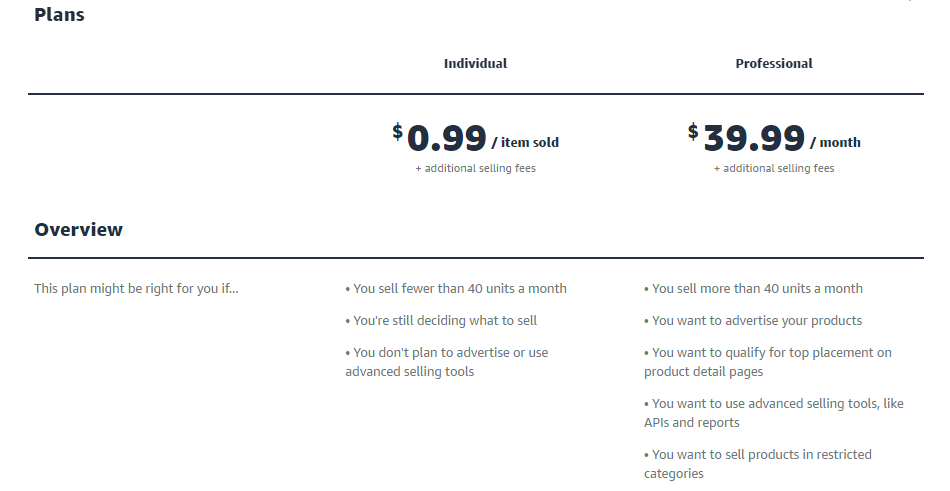
Amazon offers two selling plans
- Individual plan
Best for selling fewer than 40 items per month. You pay $0.99 for each item sold.
- Professional plan
Ideal for selling more than 40 items monthly, with a flat fee of $39.99/month. This plan offers advanced tools, eligibility for the Buy Box, and access to special seller programs.
Amazon selling plans
Step 3. Go to the Amazon seller registration page
Visit the Selling on Amazon website.
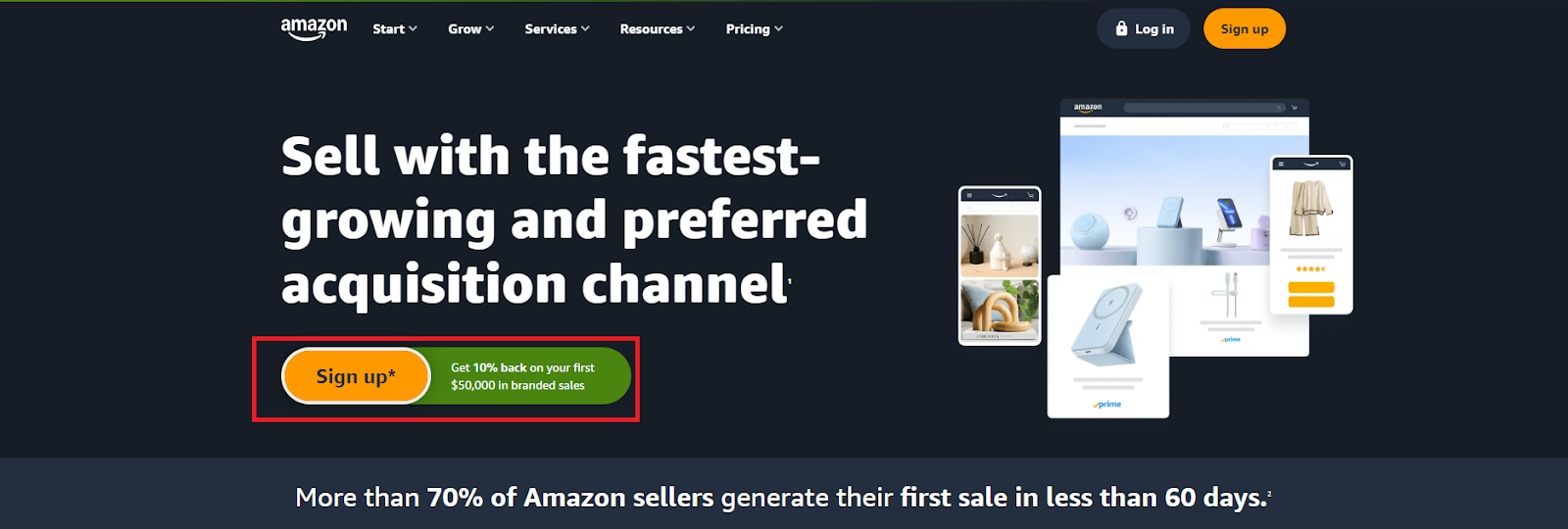
- For Professional plan
To select the Professional plan, click “Sign up.”
To select the Professional plan, click “Sign up.”
- For Individual plan
To choose the Individual plan, scroll down and click “Sign up to become an individual seller.”

To choose the Individual plan, scroll down and click “Sign up to become an individual seller.”
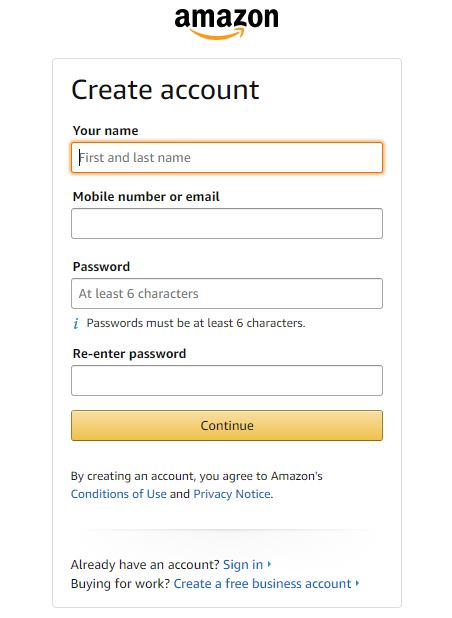
Step 4. Enter your email and create a password
Provide your email address and create a password. Amazon will send a one-time password (OTP) to your email for verification. Enter the OTP to continue.
Amazon sign-up page
Step 5. Provide your business location and type
Select the country where your business is registered or where you live. Then, choose your business type from the list. If you don’t have a registered business, select “None, I am an individual.”
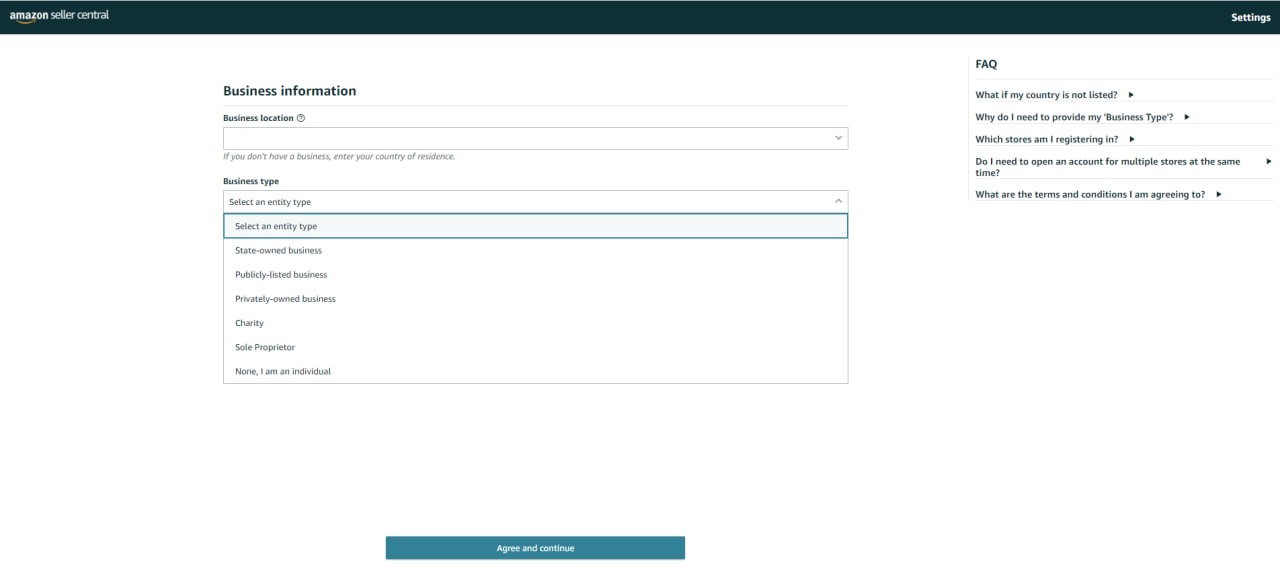
From the drop-down, choose your business type option.
Step 6. Enter your personal and business details
Fill in your first, middle, and last name. Confirm your business information by checking the box labeled “I confirm my business location and type is correct.”
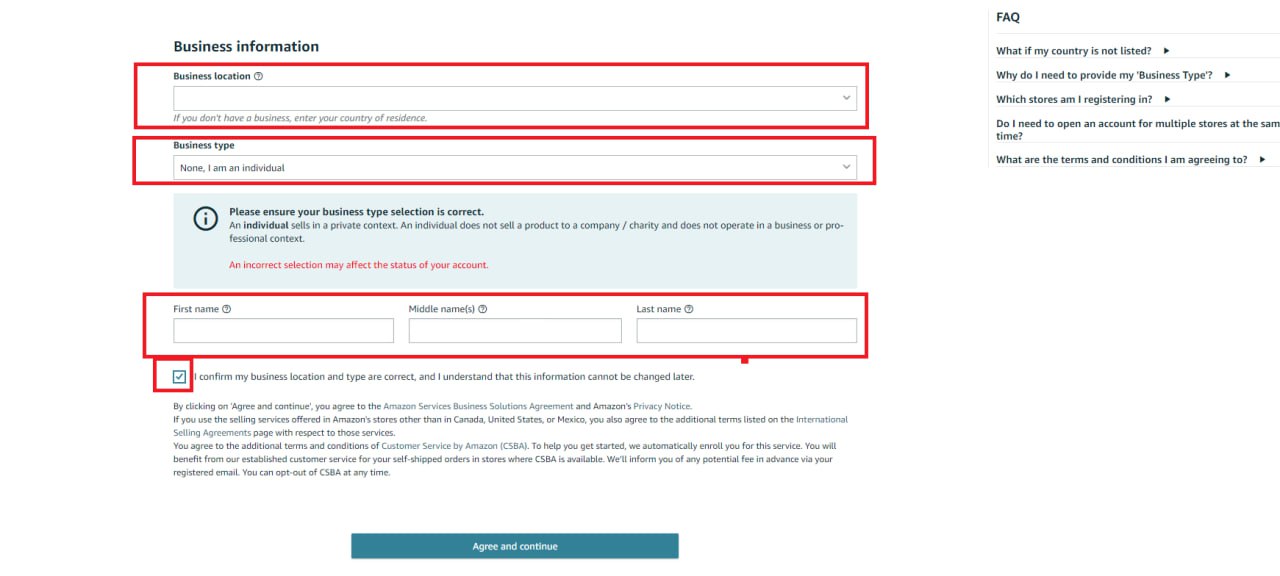
Enter your personal and business details
Step 7. Verify your contact information
Provide your country of residence, date of birth, and home address. Enter your mobile number, click “Send SMS”, and input the verification code sent by Amazon.
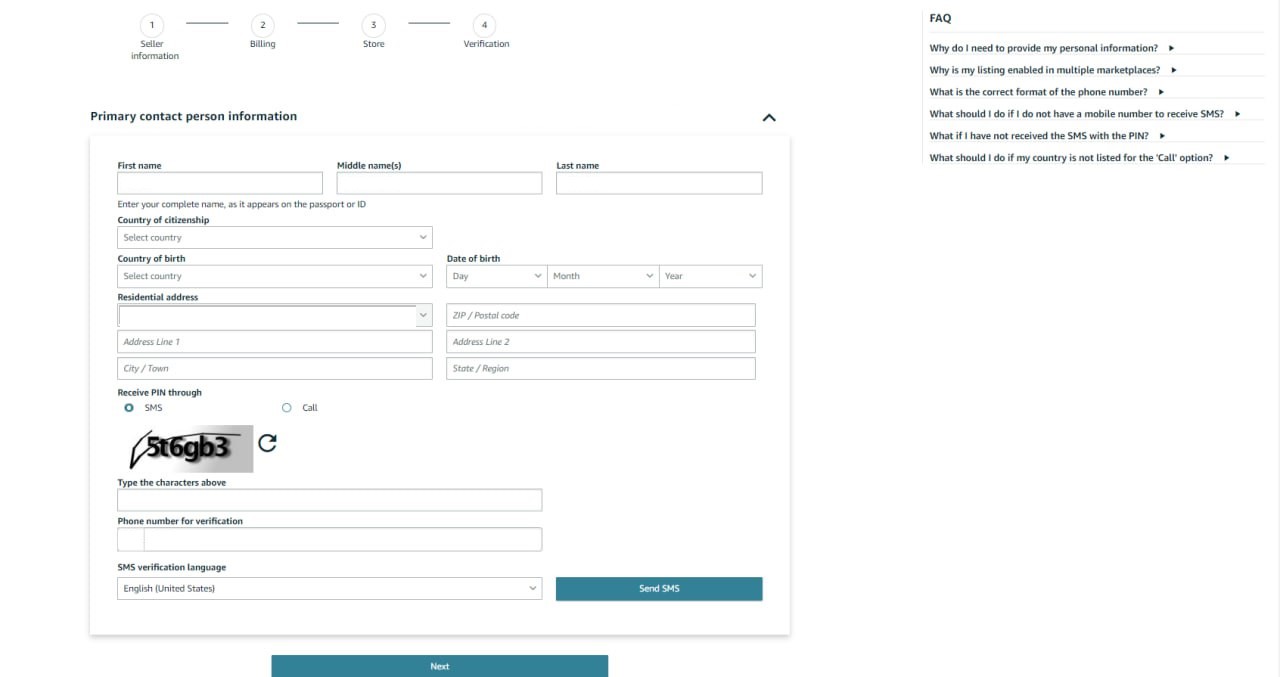
Primary contact person information page
Step 8. Add your payment information
Enter your credit or debit card details, including the card number, expiration date, and the cardholder’s name. This is required for account verification and fee payments.
Step 9. Choose your Amazon store name
Pick a unique name for your Amazon store. You can change this name later if needed. Confirm whether your products have universal product codes (UPCs) by selecting “Yes” (most products do).
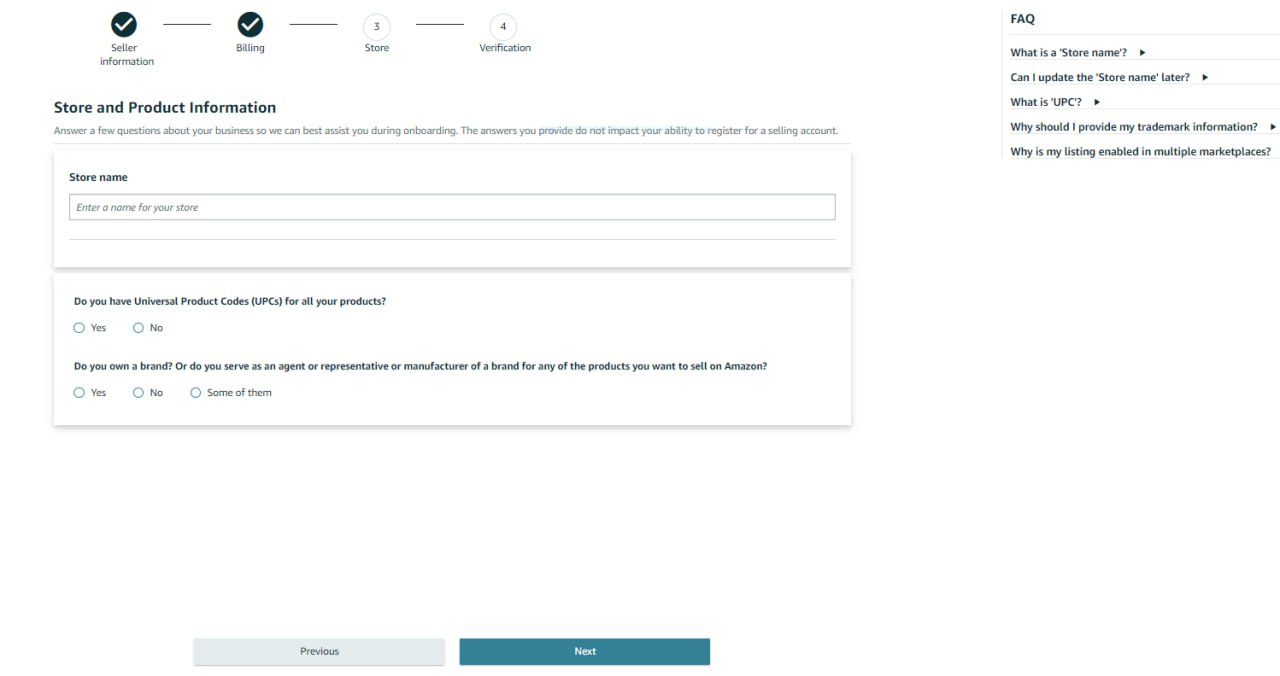
Store and Product Information page
Step 10. Verify your identity
- Upload clear images of your passport or driver’s license and a recent bank or credit card statement.
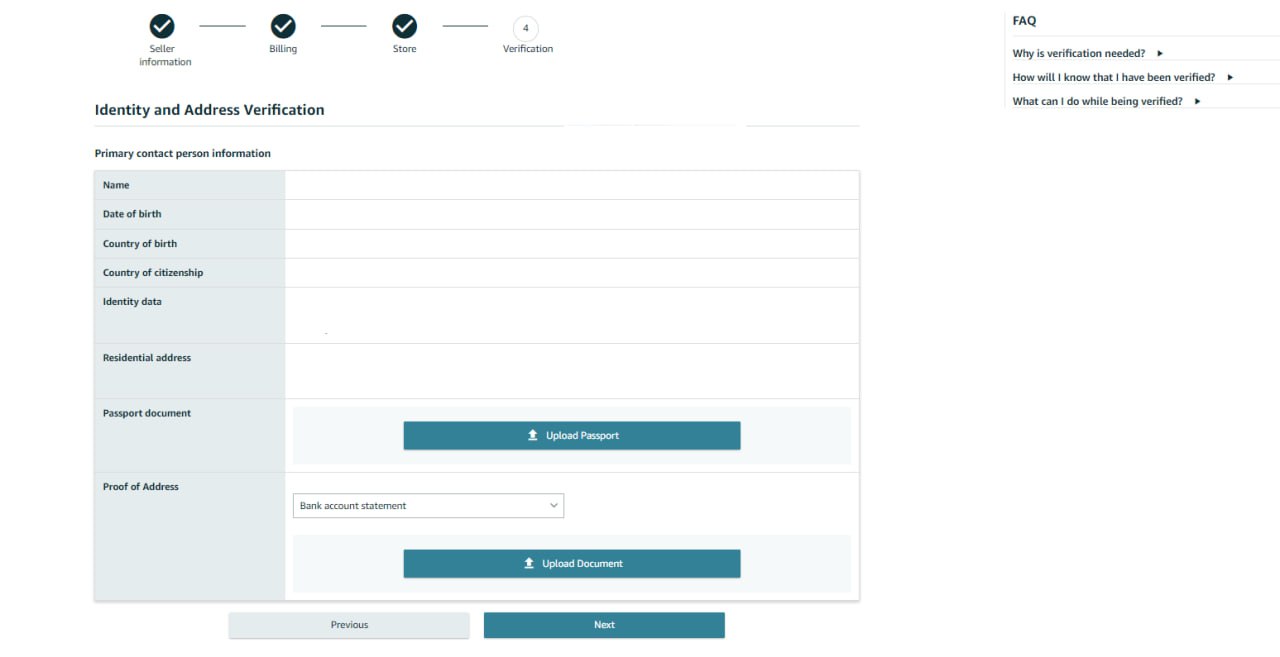
Verify your identity
- Schedule a video call with an Amazon associate for final identity verification.
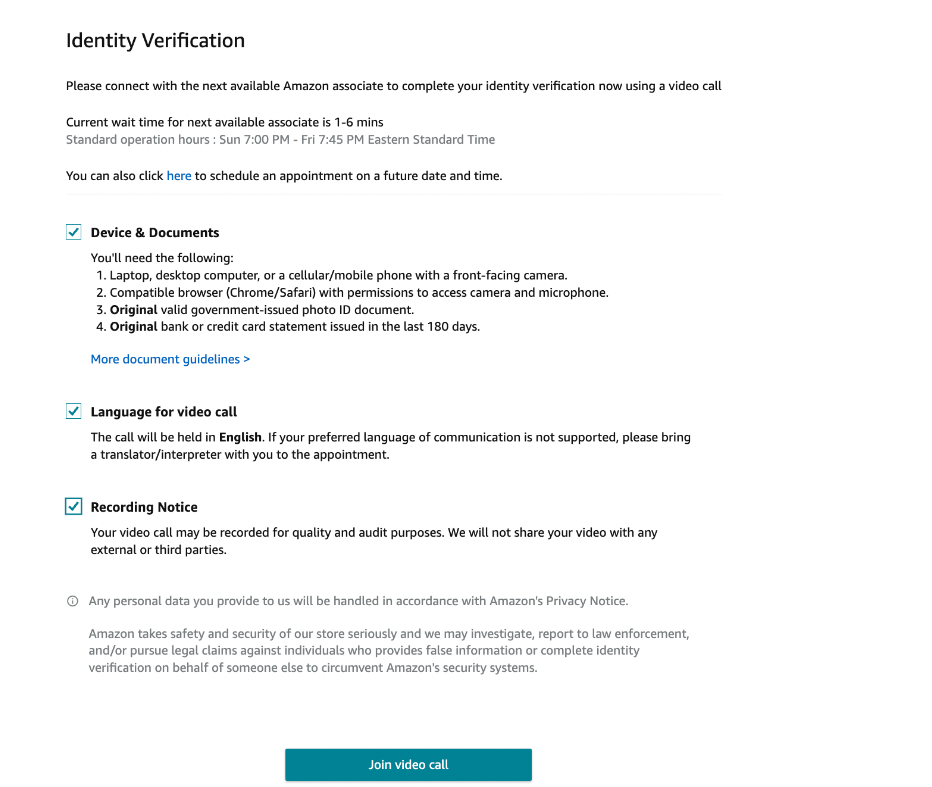
Identity Verification page
Step 11. Wait for account approval
Once your information is submitted and verified, Amazon will review your application. You’ll receive a notification when your account is approved, and then you can start selling.
How to Choose Your Selling Strategy on Amazon?
Amazon offers several business models designed to suit different entrepreneurial goals and levels of investment. The five main models are private label, wholesale, online arbitrage, dropshipping, and retail arbitrage. Each model has its own unique strategies for sourcing products and generating profits, making it important to choose the one that aligns best with your business goals.
Let’s explore how each model works and what makes them profitable.
Private label
.webp)
Wholesale vs. Private Label
- Definition
Private label involves creating your own branded products by partnering with manufacturers to produce items under your brand name. These products are then sold exclusively on Amazon.
- How it works
Sellers research trending products, find manufacturers (often through sites like Alibaba), customize the product and packaging with their branding, and sell it on Amazon.
3 key insights
- Brand control and higher profits
Owning your brand allows for more control over pricing and product quality, leading to potentially higher profit margins.
- Upfront investment required
Private labeling demands significant initial investment for product development, manufacturing, and marketing.
- Amazon Brand Registry benefits
Registering your brand with Amazon protects against counterfeiters and gives access to enhanced marketing tools like A+ Content. Brand is an asset and adds value if you once decide to sell your business.
Wholesale
.webp)
Amazon Wholesale
- Definition
Wholesale selling means purchasing products in bulk directly from manufacturers or authorized distributors and reselling them individually on Amazon.
- How it works
Sellers negotiate bulk purchase deals with brands or suppliers to get products at a lower cost, then list and sell them on Amazon at retail prices.
3 key insights
- Higher profits need larger investments
Bulk buying leads to better profit margins but requires more upfront capital.
- Supplier relationships are essential
Building strong partnerships with trusted suppliers ensures product quality and consistent stock.
- Smart product selection reduces risk
Careful product research helps avoid issues with low demand or restricted items. Tools like Seller Assistant can automate product vetting for profitability.
Online arbitrage
- Definition
Online arbitrage involves purchasing discounted products from online retailers and reselling them on Amazon for a profit.
- How it works
Sellers browse online stores for products sold at lower prices and list them on Amazon at a markup. Profits are made after covering Amazon fees and shipping costs.
3 key insights
- Product research is crucial
Finding high-demand, low-competition products is key. Avoid products with selling risks or carefully consider them (restricted products, items with IP complaints, hazmat, fragile, meltable, etc.).
- Time investment required
It takes time to search for profitable deals, but tools like Seller Assistant can simplify the process.
- Risk management matters
Always check for product restrictions, IP risks, and policy violations to prevent selling issues.
Dropshipping
.webp)
Amazon Dropshipping
- Definition
Dropshipping allows sellers to offer products on Amazon without holding inventory. When a customer places an order, the supplier ships the product directly to the buyer.
- How it works
Sellers list products from suppliers on Amazon. Once a sale is made, the supplier handles packaging and shipping. Due to Amazon’s dropshipping policies, dropshippers agree with their suppliers to ship orders to fulfillment centers to repackage them in the dropshipper’s name for a fee. The fulfillment center then ships the order to the customer. The seller profits from the price difference.
3 key insights
- Strict policy compliance
Dropshippers must be listed as the seller of record and remove all third-party branding from packaging.
- Supplier reliability is critical
Sellers rely heavily on suppliers for product quality and timely delivery. Poor supplier performance can lead to negative reviews or account issues.
- IP and policy risks
Selling branded products without authorization can result in intellectual property complaints and account suspension.
Related: How to start Amazon Dropshipping business?
Retail arbitrage
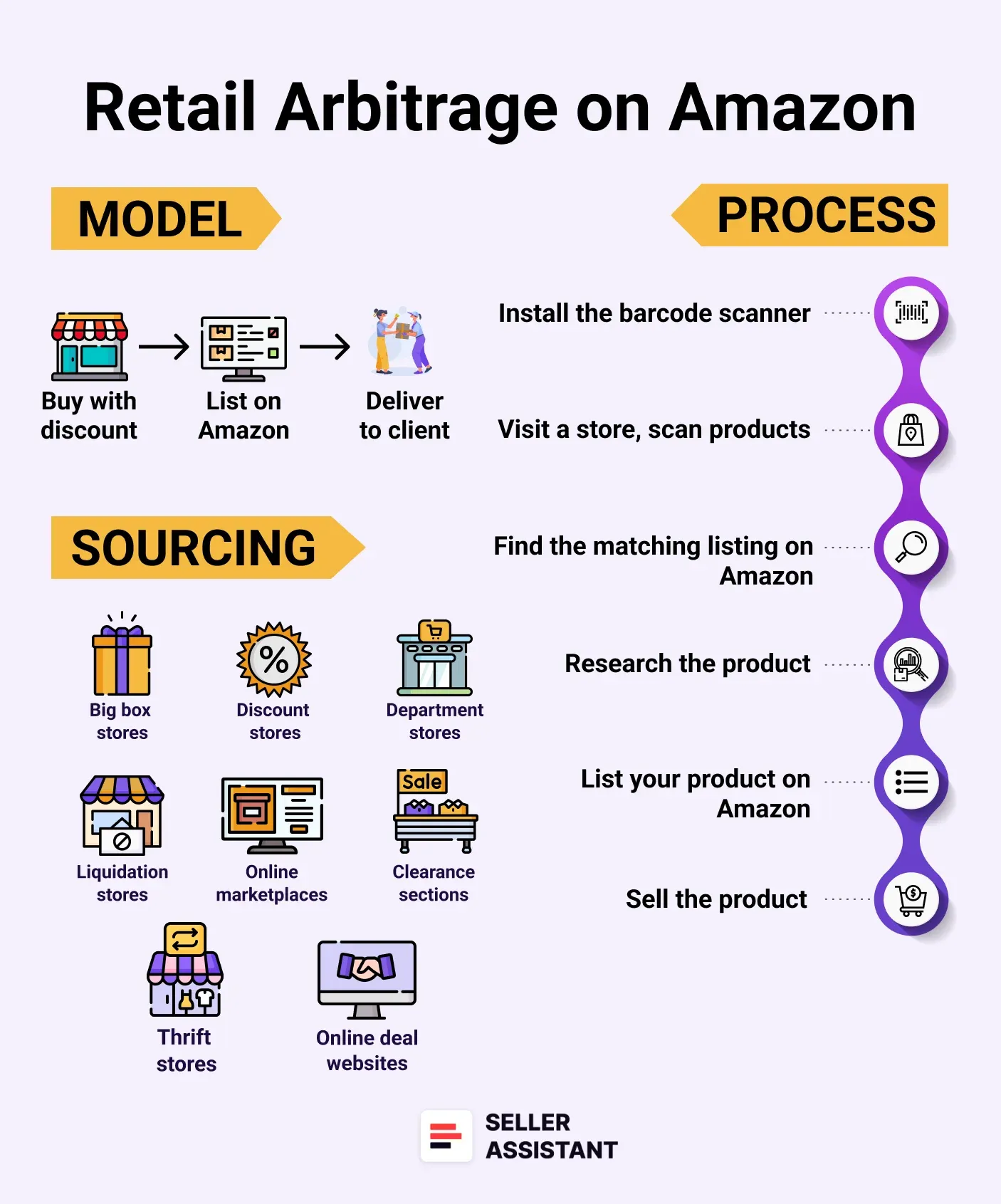
Amazon Retail arbitrage
- Definition
Retail arbitrage involves buying discounted or clearance items from physical retail stores and reselling them on Amazon for profit.
- How it works
Sellers visit stores like Walmart, Target, or local outlets to find discounted items. These products are then listed on Amazon at higher prices.
3 key insights
- In-store research is necessary
Sellers use barcode scanning apps to check product profitability while shopping.
- Time-consuming process
This model requires significant time to visit stores, find deals, and restock inventory.
- Limited and inconsistent stock
Retail inventory is often limited and may not be restocked, making it harder to scale the business.
How to Find Profitable Products to Sell on Amazon
Finding high-margin products and trustworthy suppliers is a key step in Amazon sales. However, there are millions of offers in there and can be challenging and time-consuming to identify product ideas. Typically, you start with choosing a category and brand, and then do product research to identify profitable deals that sell well and don’t have any risks.
To simplify this process and uncover profitable deals, many sellers turn to advanced tools like Seller Assistant. Below are five effective strategies to help you efficiently discover products and brands that can boost your Amazon business. This section is mostly helpful for wholesale, online arbitrage sellers, and dropshippers.
Note. Seller Assistant is a comprehensive product-sourcing software that helps Amazon sellers quickly find high-profit deals. It combines three extensions: Seller Assistant Browser Extension, and IP-Alert Chrome Extension by Seller Assistant, and VPN by Seller Assistant, Amazon seller tools: Price List Analyzer, Brand Analyzer, Seller Spy, Bulk Restrictions Checker, and API integrations, and features: Side Panel View, FBM&FBA Profit Calculator, Quick View, ASIN Grabber, UPC/EAN to ASIN converter, Stock Checker, IP Alert, and Restrictions Checker.
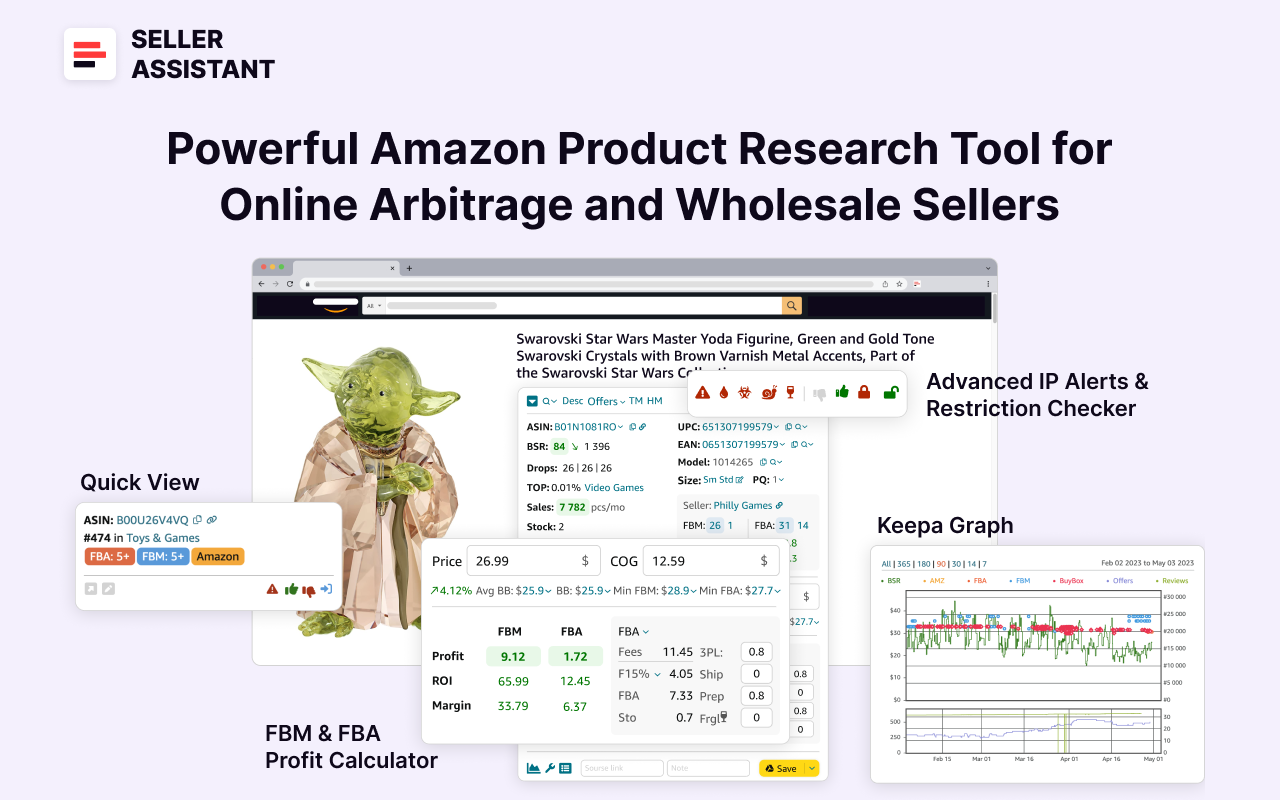
Seller Assistant
Seller Assistant shows all essential product data on Amazon search, product, and inventory pages, and on any website to help you find high-margin deals. By using this FBA and FBM product sourcing software, you can easily identify products that have the potential to be sold well on Amazon.
Related: Amazon FBA Fees 2025
Seller Assistant Extension Review
Strategy 1. Discover profitable brands with automated brand research
- What it is
Automated brand research involves using data-driven tools to identify brands that are both profitable and open to working with resellers. This method is ideal for sellers looking to build long-term relationships with brands and suppliers.
- What it achieves
The goal is to uncover brands with strong revenue potential, low competition, and products that align with Amazon’s selling policies. Prioritize brands with excellent customer feedback, scalable product lines, and minimal direct competition from Amazon itself.
- How it works
By using Seller Assistant’s Brand Analyzer, you can search for brands and get insights into their sales performance, competition, pricing, and customer reviews. The tool also flags brands where Amazon is a major seller, helping you avoid excessive competition.
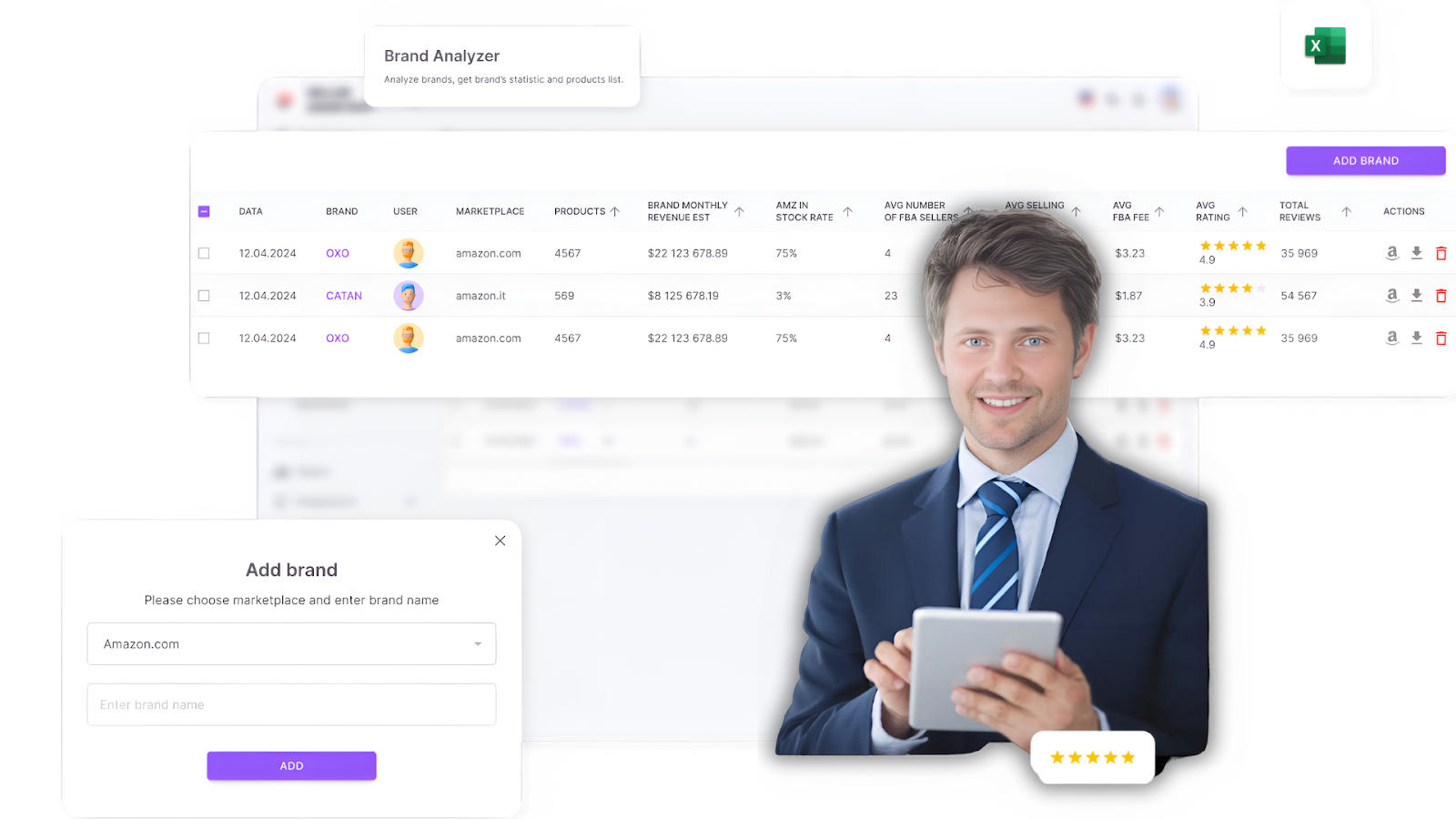
Seller Assistant’s Brand Analyzer
Tips for effective research
- Analyze sales trends
Check revenue and sales performance to measure demand.
- Evaluate competition
Avoid brands where Amazon controls more than 30% of sales or those saturated with third-party sellers.
- Expand product range
Focus on brands offering 500+ products for more selling opportunities.
Look for brands with 4+ star ratings and positive customer reviews.
- Check product restrictions
Use Seller Assistant’s Bulk Restriction Checker to ensure products are eligible for resale. A green open lock means the product is eligible for resale, a red closed lock indicates restrictions, and a red lock with an exclamation mark means the product cannot be sold on your account.
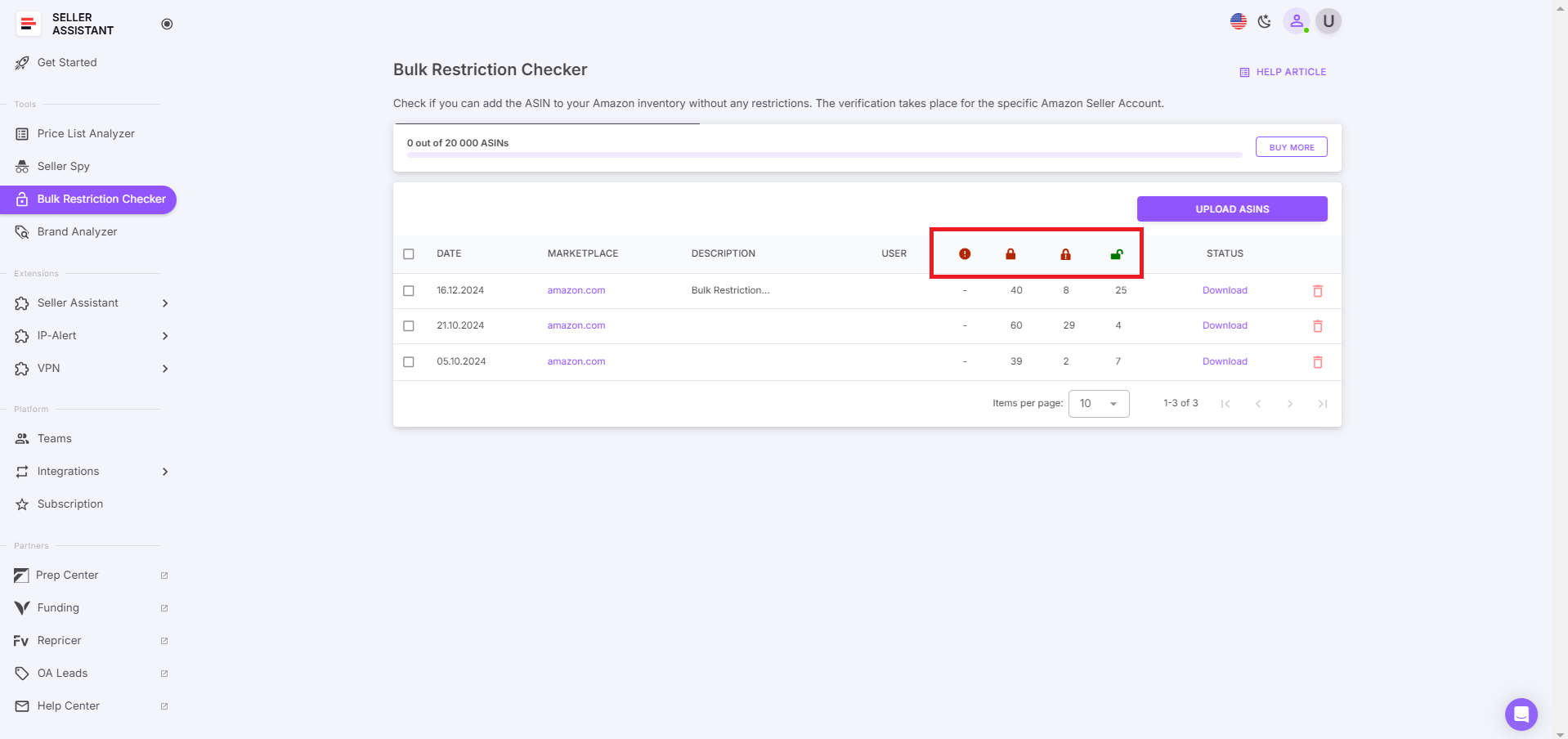
Seller Assistant’s Bulk Restriction Checker
- Best for
- Wholesale sellers seeking brand partnerships.
- Online arbitrage sellers and dropshippers targeting specific brands.
Strategy 2. Scan wholesale price lists automatically
- What it is
Automated wholesale list scanning helps sellers analyze supplier catalogs to quickly identify profitable products. This approach is ideal for sellers managing large product inventories.
- What it achieves
This method saves time by filtering bulk product lists, allowing sellers to focus on high-profit, low-risk items while avoiding costly mistakes.
- How it works
Upload supplier price lists into Seller Assistant’s Price List Analyzer, which matches items to Amazon listings, calculates profitability, detects high competition, flags product restrictions, and provides a lot of other product data. You can filter the results by essential metrics, product warnings, and flags, and see which deals are profitable, and which have hidden risks or alerts.
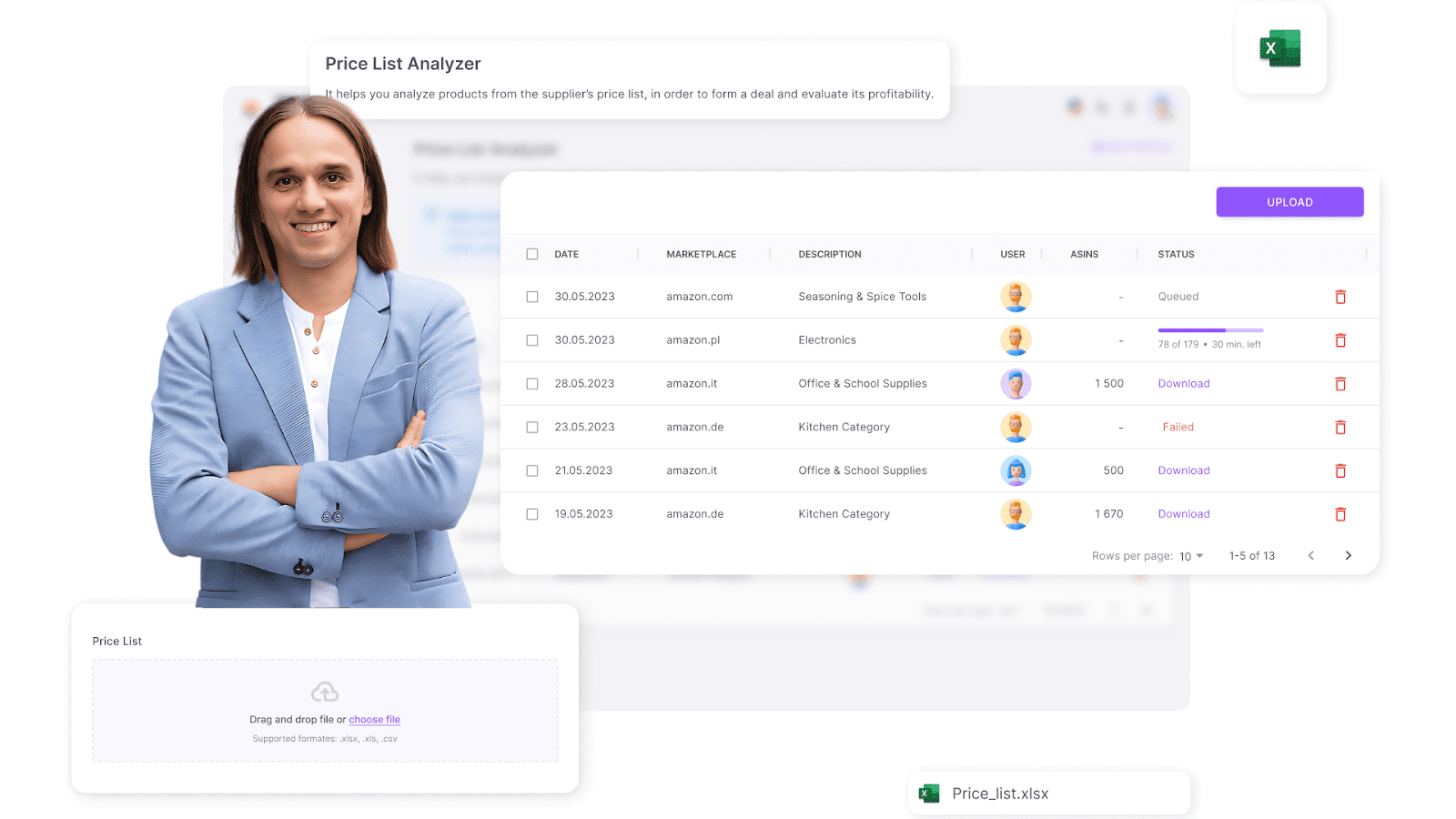
Seller Assistant’s Price List Analyzer
Tips for effective research
- Evaluate sales rank
Check the Best Sellers Rank (BSR) to confirm demand.
- Assess competition
Avoid products with more than 15 sellers or where Amazon dominates.
- Analyze Buy Box ownership
Understand who controls the Buy Box and whether you can compete.
- Profit check
Review ROI, profit margins, and breakeven points.
- Compliance check
Use the Bulk Restriction Checker and IP-Alert® Extension to identify restricted products you need to ungate and products with IP complaints and Amazon policy violations.
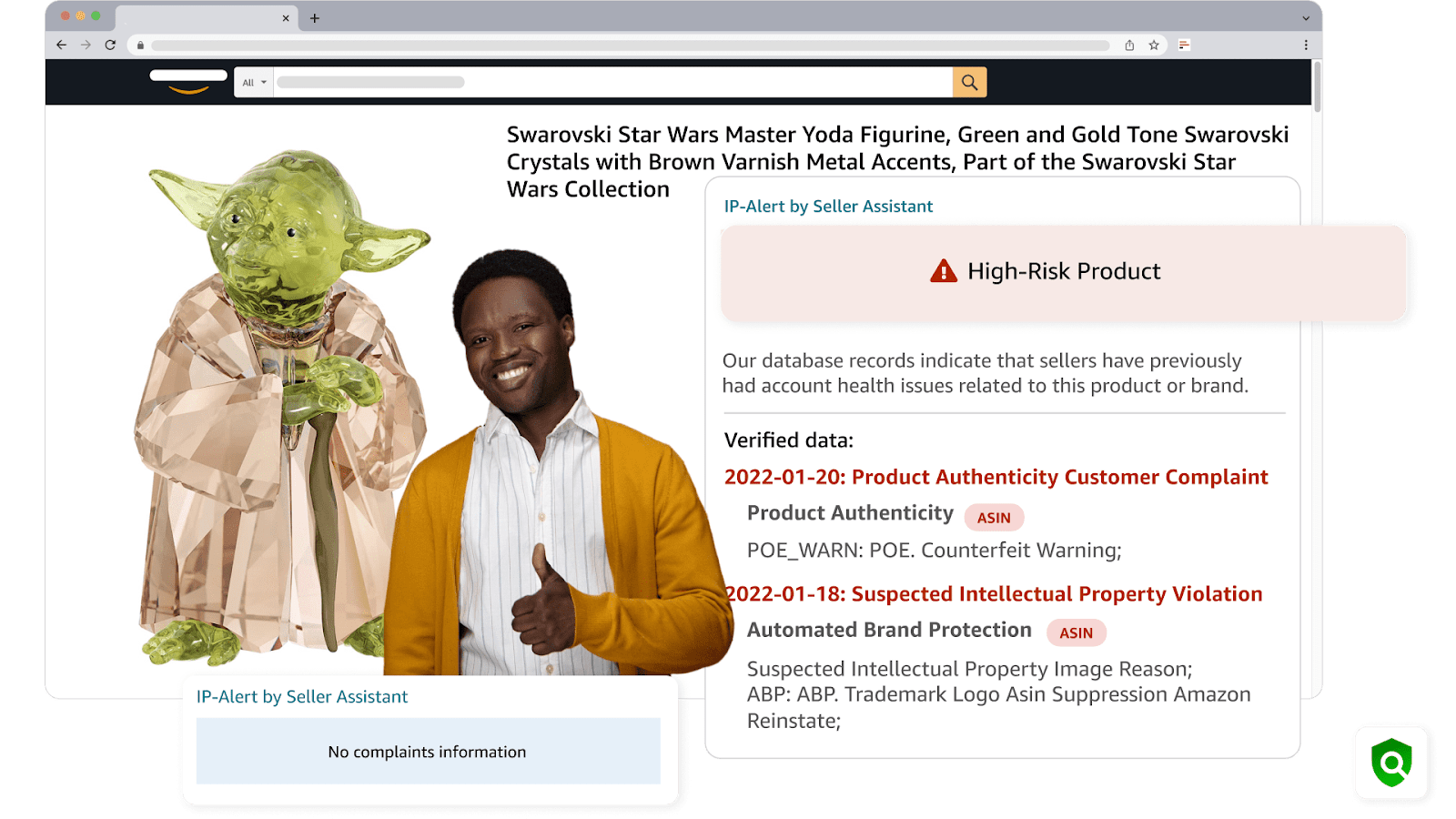
IP-Alert® Extension
- Best for
- Wholesale sellers processing large supplier lists.
- Online arbitrage sellers managing bulk product sourcing.
Strategy 3. Analyze competitors to find winning products
- What it is
Competitor research involves studying other Amazon sellers’ product lines to identify popular and high-performing items. This strategy helps sellers capitalize on market trends and proven products.
- What it achieves
By identifying top-selling products and brands competitors are offering, you can add similar items to your own inventory and increase sales potential.
- How it works
Seller Assistant’s Seller Spy tracks competitor stores, showing what products they sell, recently added or removed items, and pricing strategies. This insight allows you to sell the same best-selling products your competitors sell to repeat their success and adjust pricing to stay competitive.
.png)
Seller Spy by Seller Assistant
Tips for effective research
- Monitor new listings
Track competitor additions to spot trending products.
- Identify product removals
Avoid items that competitors have stopped selling.
- Analyze feedback
Study competitor reviews for product performance insights.
- Review pricing strategies
Adjust your pricing to stay competitive and profitable.
- Best for
- Online arbitrage sellers seeking high-demand products.
- Wholesale sellers looking to match competitor strategies.
- Dropshippers who need to adapt quickly to trends.
Strategy 4. Conduct in-depth product research for smart sourcing
- What it is
Manual product research focuses on thoroughly evaluating individual products for profitability, demand, and potential risks. This strategy is best for sellers who prefer a hands-on approach to product selection.
- What it achieves
The goal is to carefully vet products for profitability, sales potential, and compliance before adding them to your inventory.
- How it works
Seller Assistant Extension provides real-time data on product performance, competition, profitability, and risks across Amazon product pages, search results, supplier sites, and competitor storefronts.
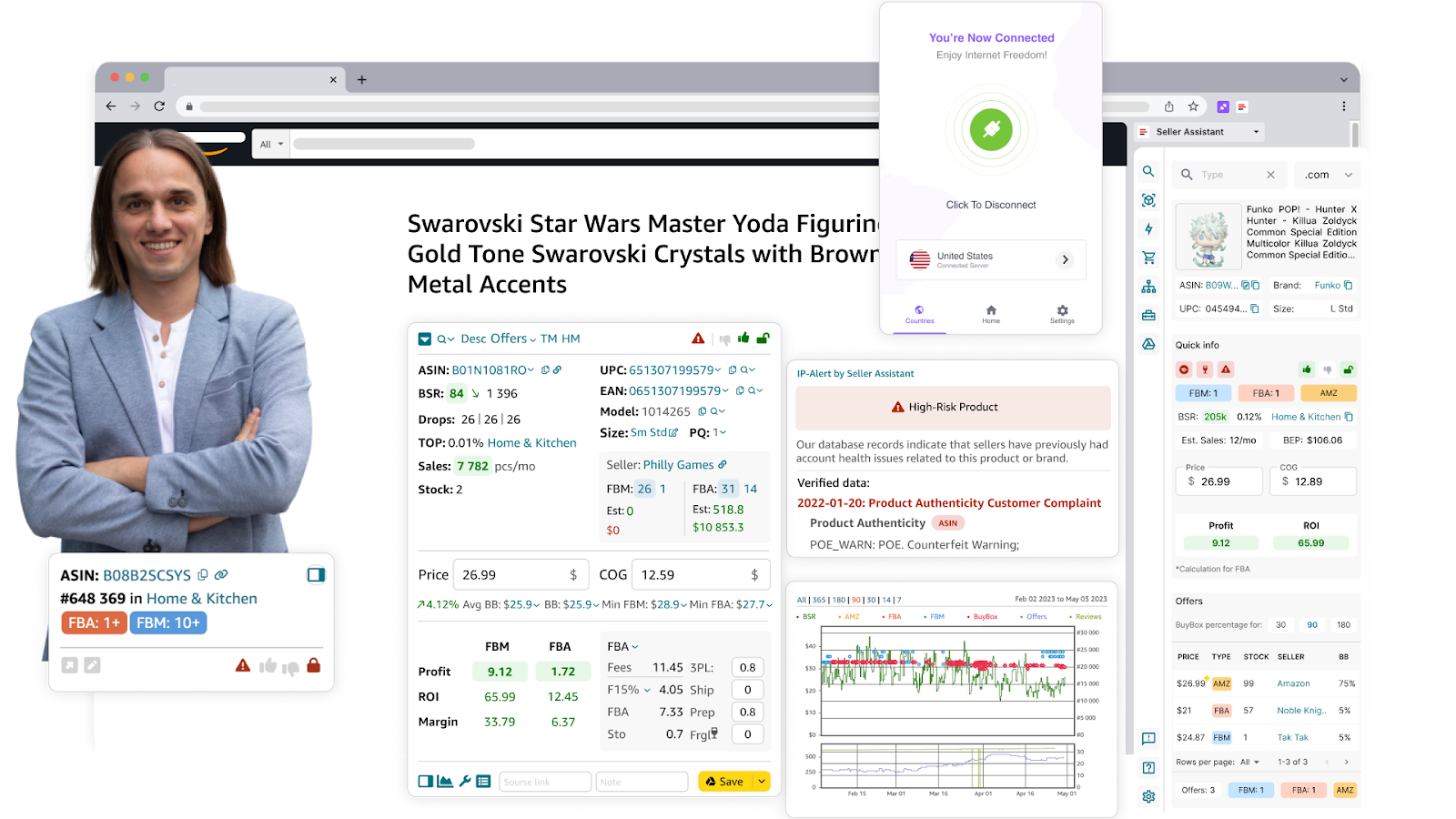
Seller Assistant Extension
Tips for effective research
- Review sales data
Check BSR (ideally between 1–200,000) and historical trends.
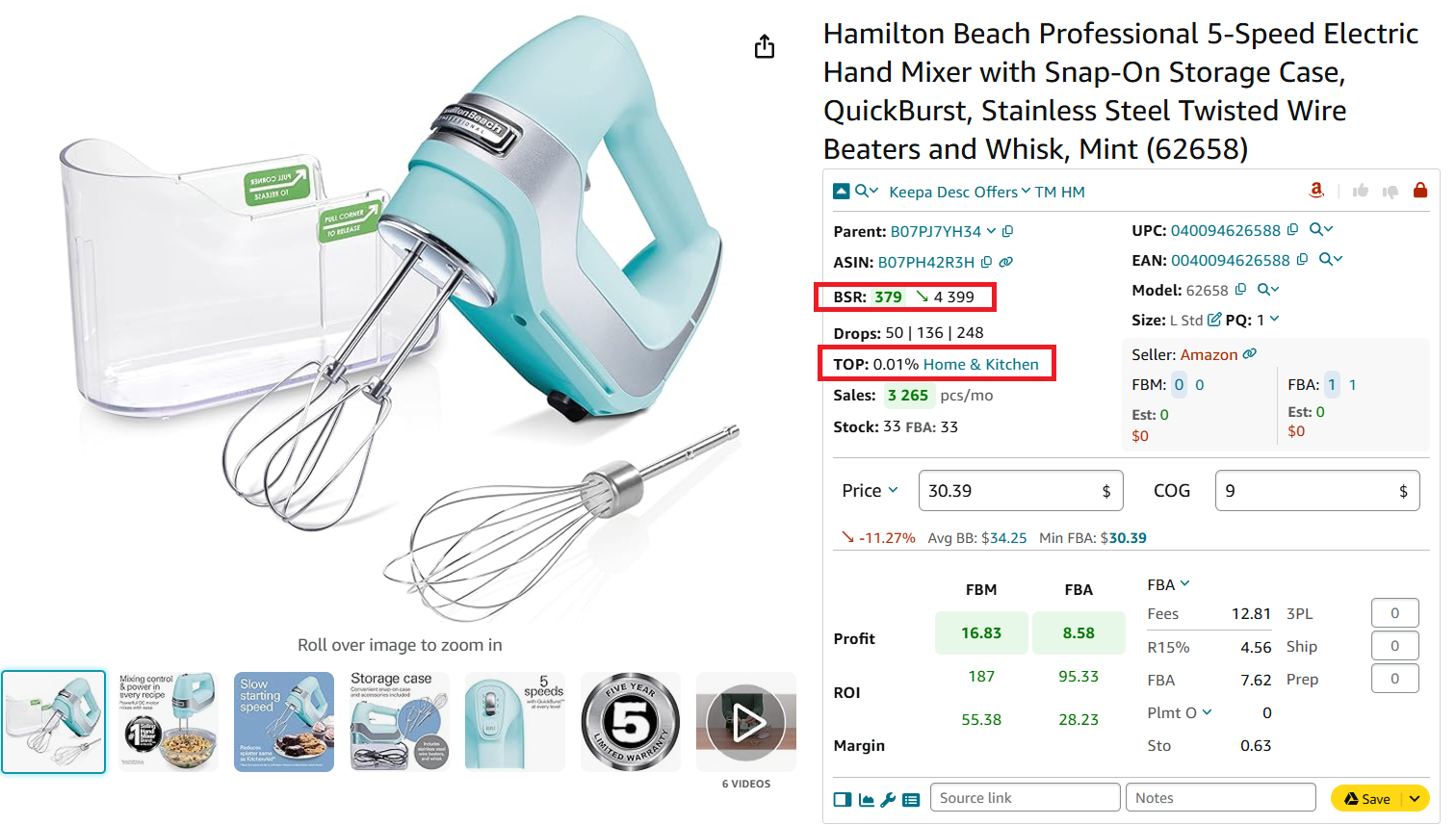
Check how well the product sells
- Assess competition
Target products with 2–15 competing sellers.
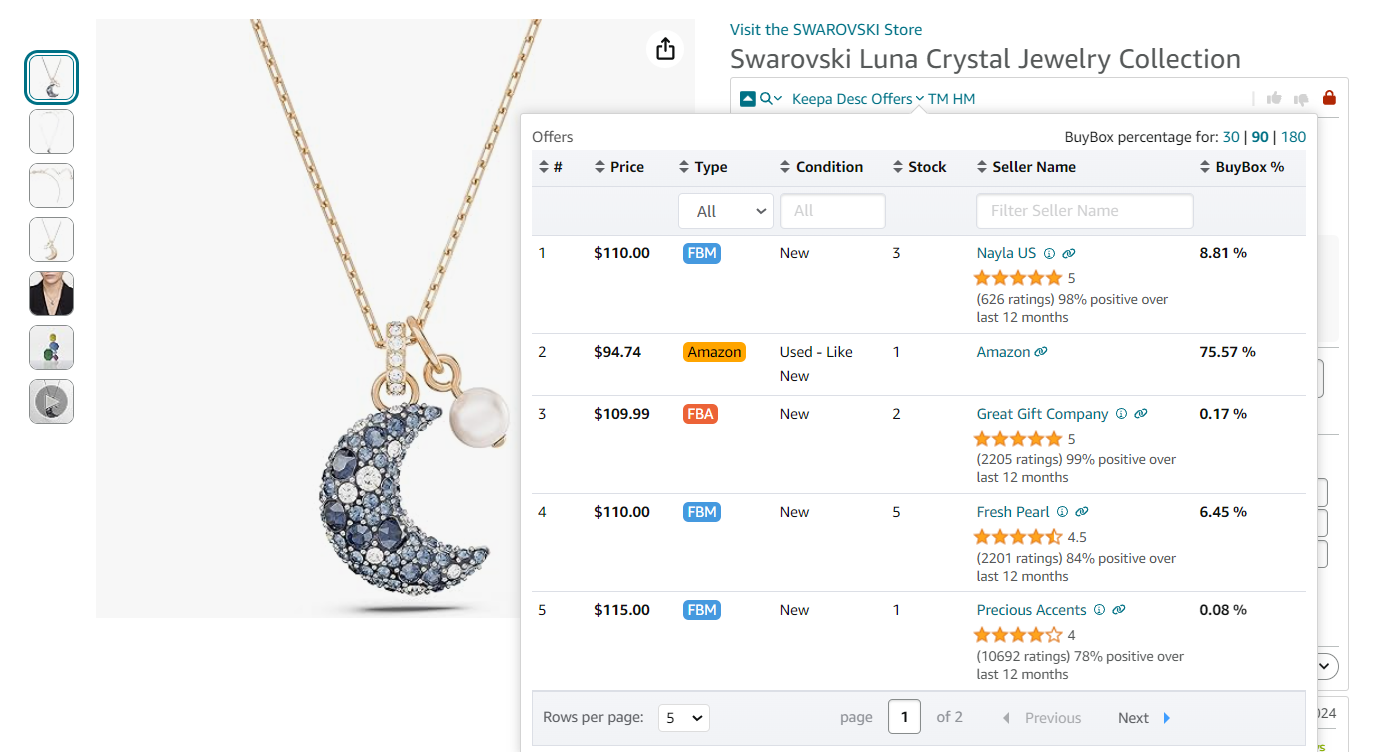
Offers is the extension’s feature that allows to research all seller offers of a product
- Avoid competing with Amazon
Look for the red Amazon icon to avoid direct competition.
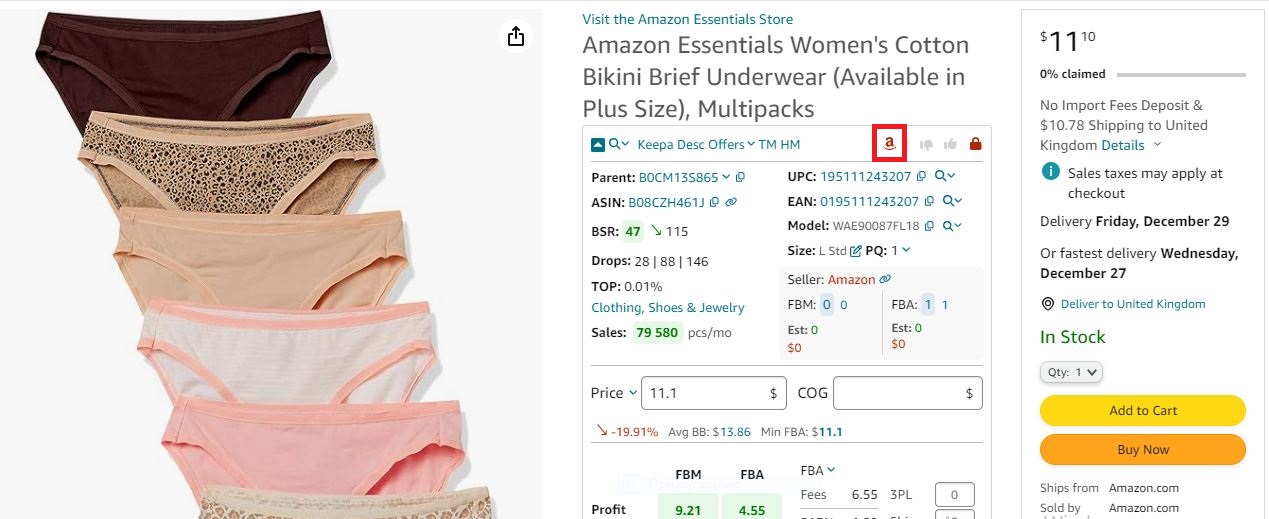
If Amazon is a seller, Seller Assistant shows the red Amazon icon on the product pages
- Profit analysis
Use the FBA&FBM profit calculator to verify ROI, profit margins, and breakeven points.
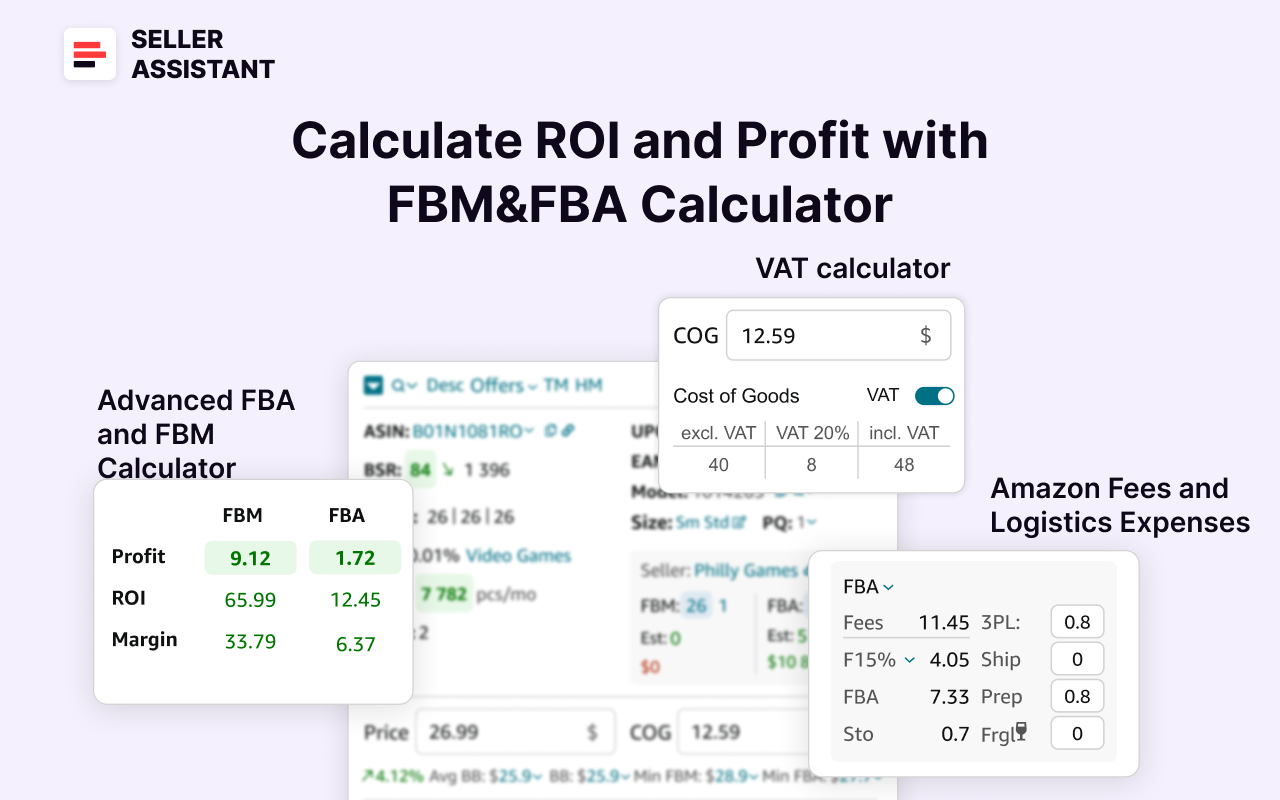
Seller Assistant’s FBA&FBM profit calculator
- Evaluate risks
Identify potential IP issues, fragile items, restricted products, and other flags and risks.
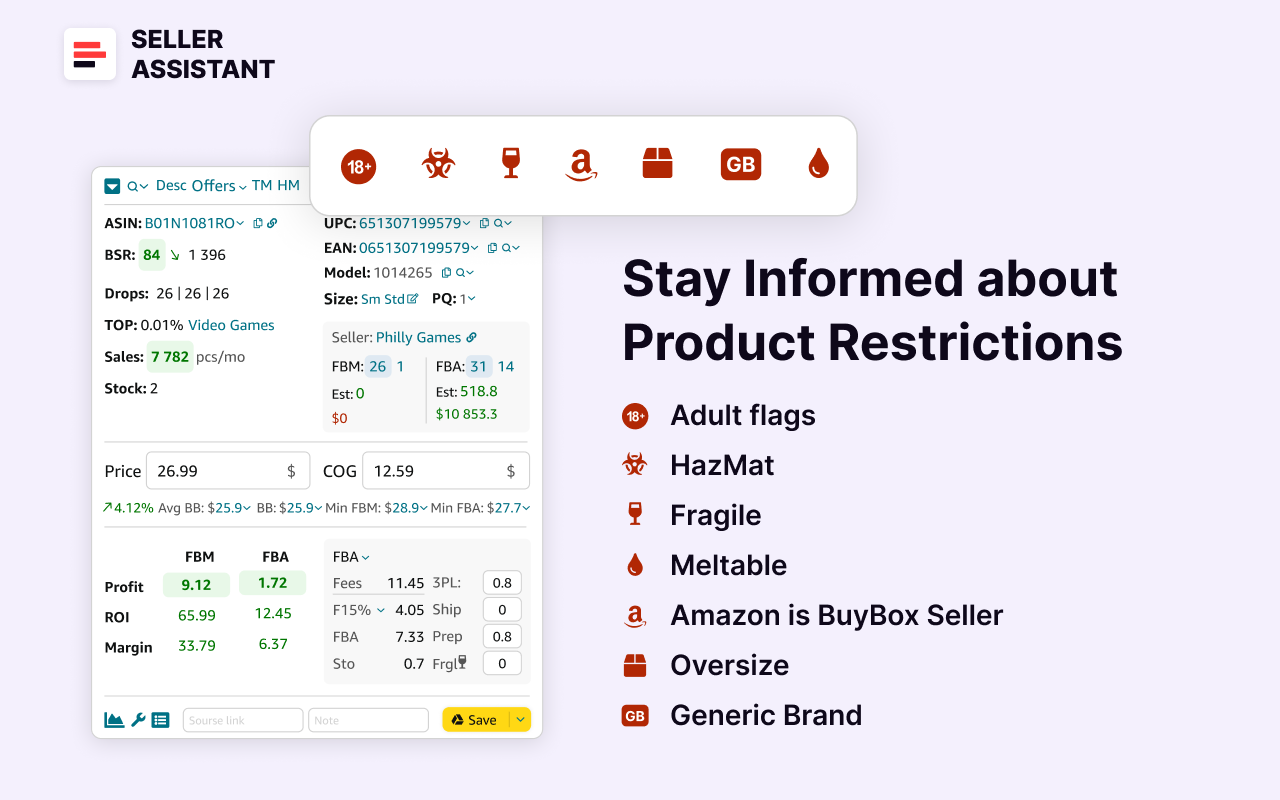
Seller Assistant’s product flags
- Analyze historical trends
Use Keepa charts for pricing and sales history.
If it’s a new product, it’s difficult to estimate its sales history and see if it will sell well.
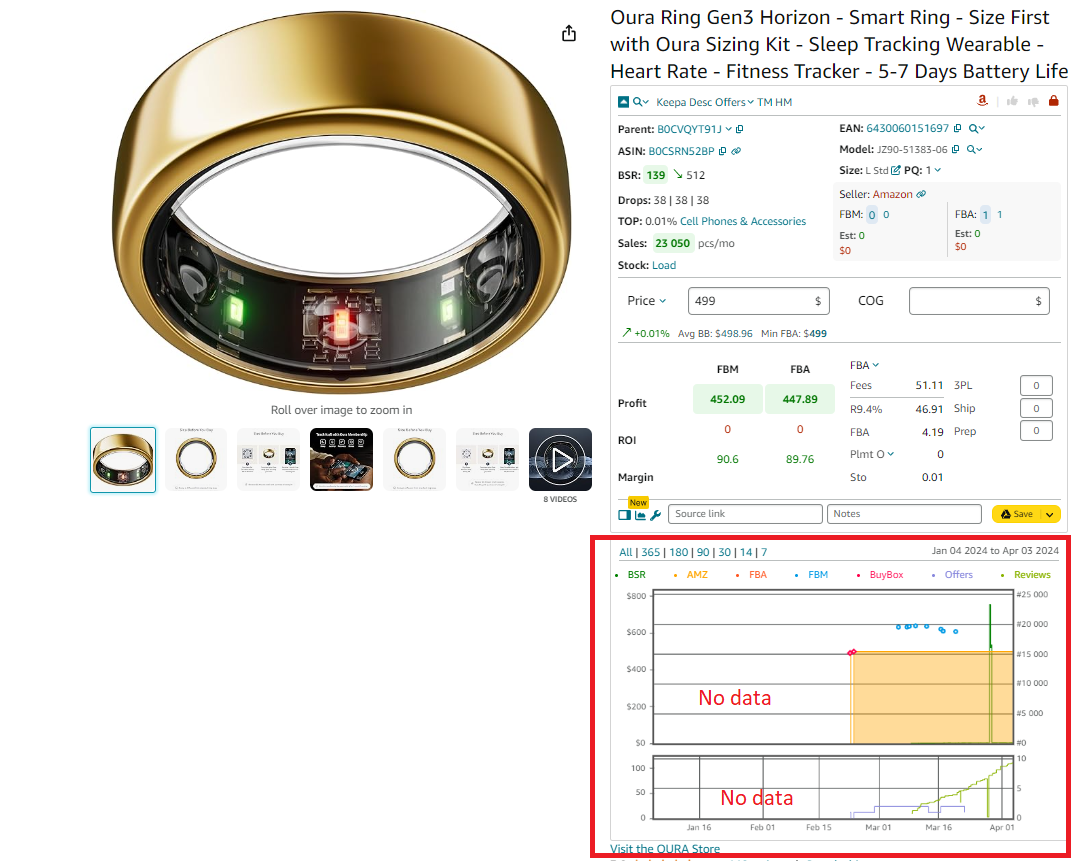
Use Keepa charts for pricing and sales history
- Best for
- Online arbitrage sellers needing detailed profitability checks.
- Dropshippers manually sourcing products.
Strategy 5. Purchase ready-to-sell deals from Seller Assistant Deals Marketplace
- What it is
This strategy involves buying pre-researched, high-margin product leads from Seller Assistant Deals marketplace. It’s ideal for sellers who want to save time on product research.
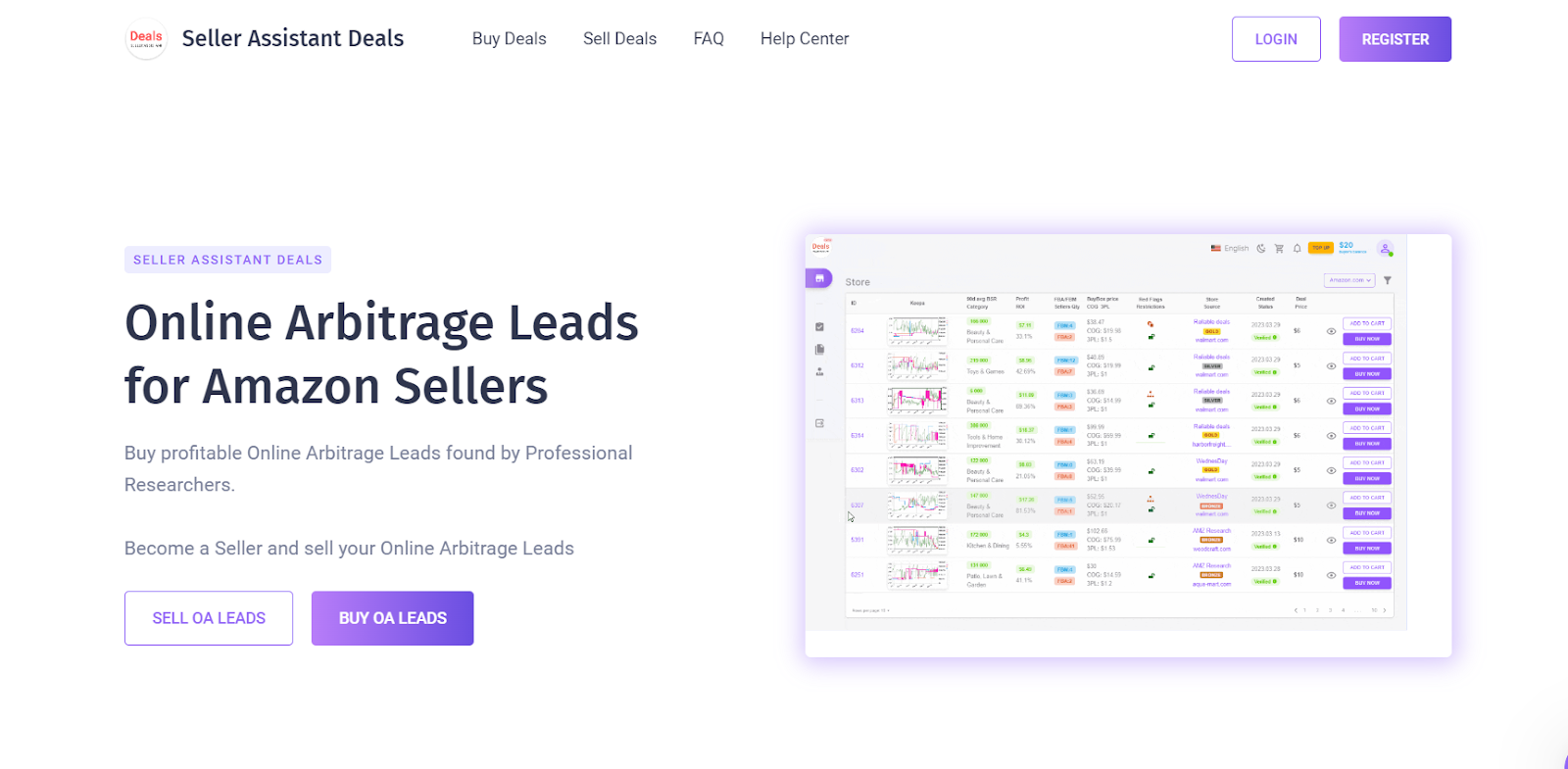
Seller Assistant Deals
- What it achieves
It offers quick access to profitable products without spending hours on research, helping sellers scale their business faster.
- How it works
Browse the Seller Assistant Deals Marketplace for vetted product deals with complete data on ROI, profits, sales rank, and competition. These deals are sold to a limited number of sellers to reduce market saturation.
Tips for effective research
- Pick high-ROI deals
Choose deals based on profit margins and sales performance.
- Analyze product data
Review Buy Box pricing, BSR, and competition before purchasing.
- Check for risks
Verify product compliance and selling restrictions.
- Access deal info
After purchase, receive ASINs, supplier links, and buying instructions.
- Best for
- New sellers looking for easy product sourcing.
- Busy sellers wanting to scale quickly.
- Online arbitrage sellers seeking high-ROI deals without manual research.
How to List Products on Amazon
Listing products on Amazon is a critical step in launching your online business. This process involves not only adding your product to Amazon’s catalog but also choosing the right fulfillment method and setting a competitive price to maximize sales. Depending on if your product already exists on Amazon or is completely new, the steps to list it are different. Here’s how to do it effectively.
Listing existing products on Amazon
If you’re selling products through online arbitrage, retail arbitrage, wholesale, or dropshipping, your products likely already exist in Amazon’s catalog. According to Amazon’s rules, you must add your offer to the existing product listing and not create a duplicate.
Steps to listing existing products
Step 1. Access the product listing dashboard
Log into your Seller Central account. From the left-hand menu, select Catalog > Add Products.
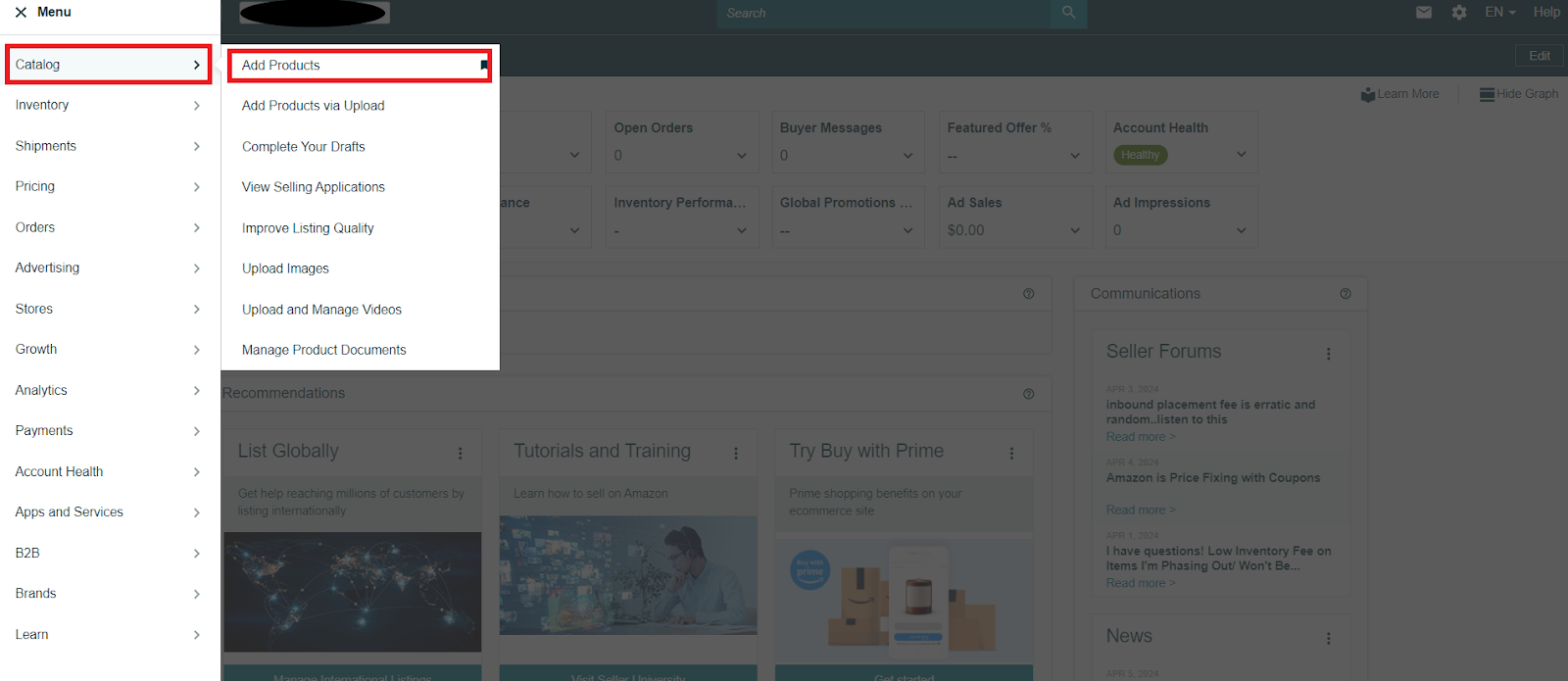
Go to your Seller Central account. In the menu, select Catalog > Add Products.’
Step 2. Search for your product
In the search bar under “Find your products in Amazon’s catalog,” enter the product’s title, description, or relevant keywords.
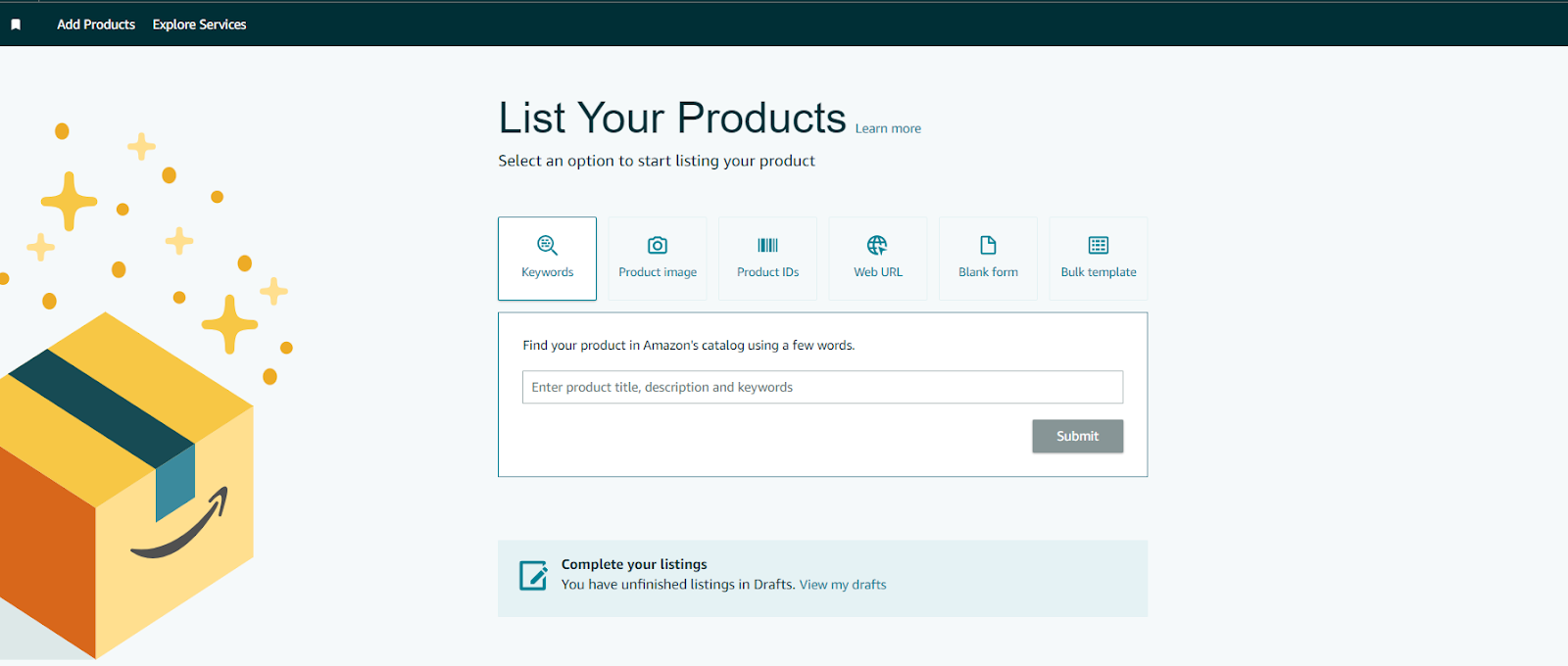
Search for your product
Step 3. Select the product and condition
Find your product in the search results, choose the product’s condition (new, used, etc.), and click “Sell this product.”
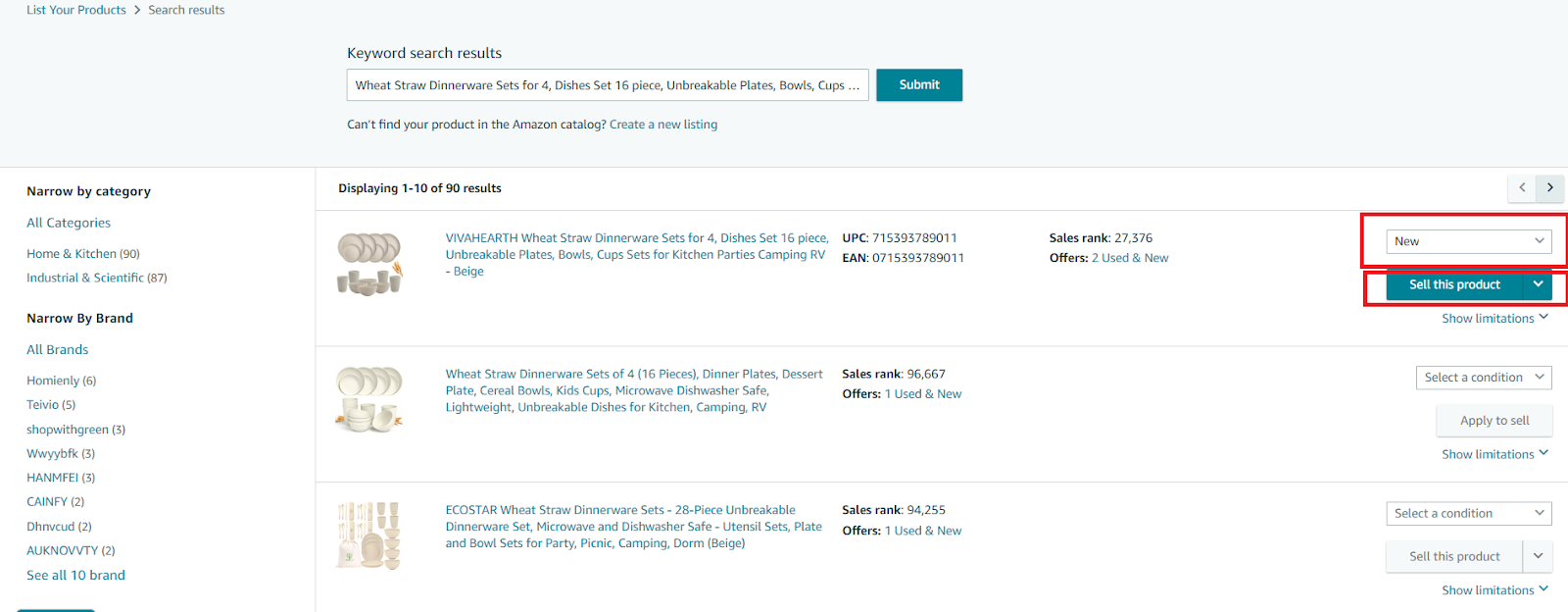
Find your product in the list, select a condition, and click ‘Sell this product.’
Step 4. Set price and fulfillment method
Complete your product offer by entering:
- The selling price
Buy Box price or other option
- The product condition
New, used, or refurbished
- The fulfillment method
- Fulfilled by Amazon (FBA): Amazon stores, packs, and ships your products.
- Fulfilled by Merchant (FBM): You manage storage, packing, and shipping yourself.
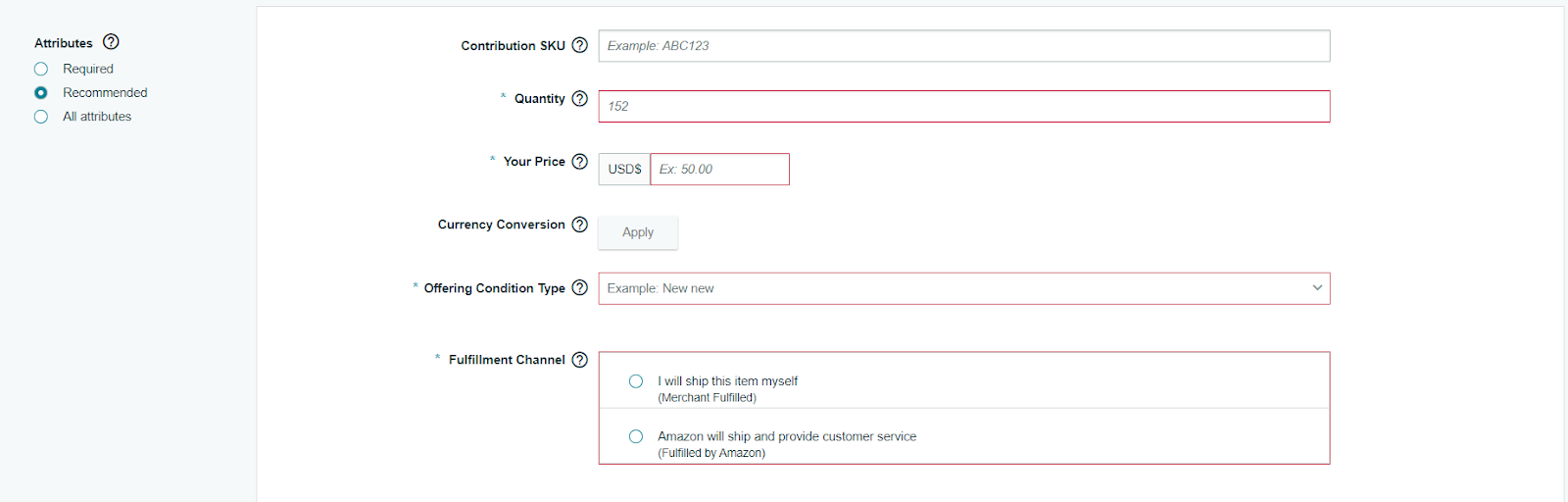
Create your offer by filling in all necessary fields
Step 5. Finalize and publish your listing
Click “Save and finish” to publish your offer and make your product available to buyers.
Listing new products on Amazon
If you’re selling a product that doesn’t already exist on Amazon – common for private label or handmade items – you must create a new product listing.
Steps to listing new products
Step 1. Open the product listing form
Log into your Seller Central account. Go to Catalog > Add Products > List Your Products, then click the “Blank form” button and hit “Start.”
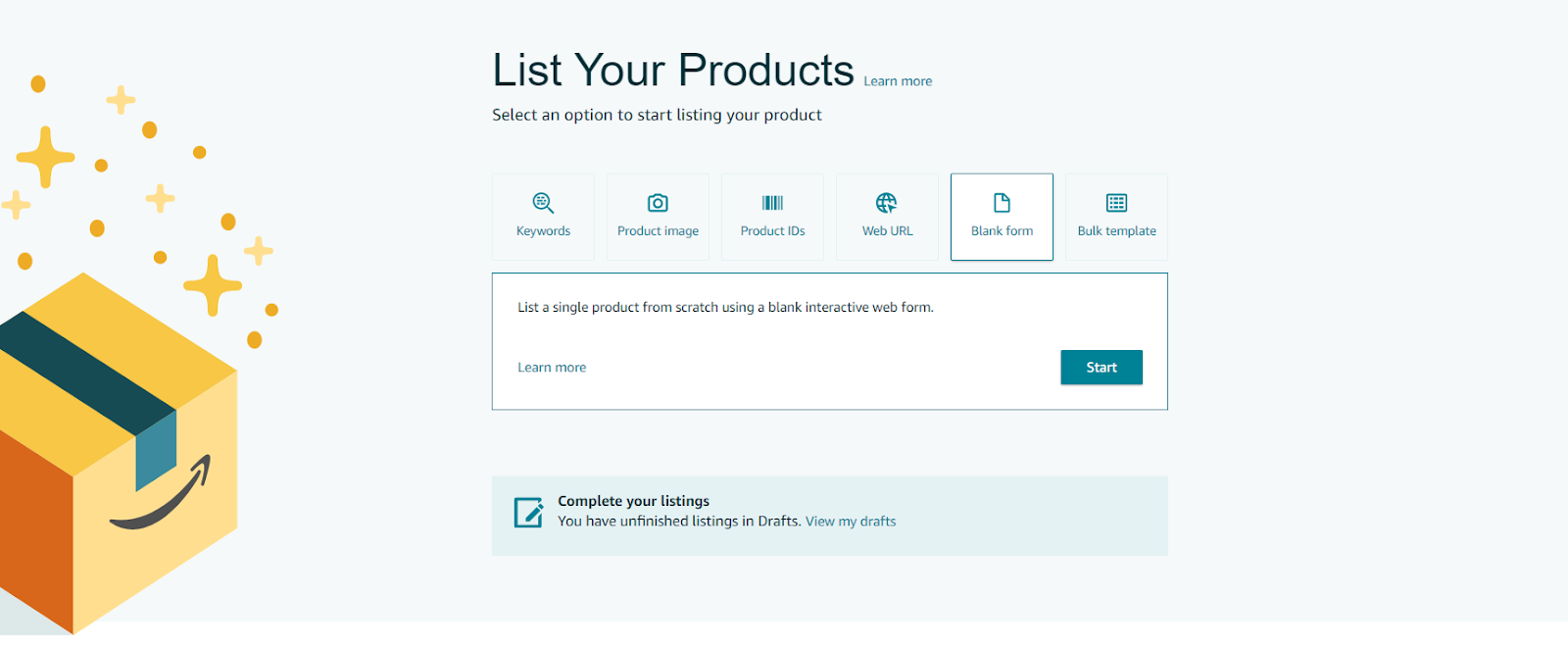
Go to your Seller Central account. In the menu, select ‘Catalog’ > ‘Add Products’ > ‘List Your Products.’ Click the ‘Blank form’ button above the search bar
Step 2. Enter product name and category
Type in your product name and confirm or update the primary product category to ensure it appears in the right section on Amazon.
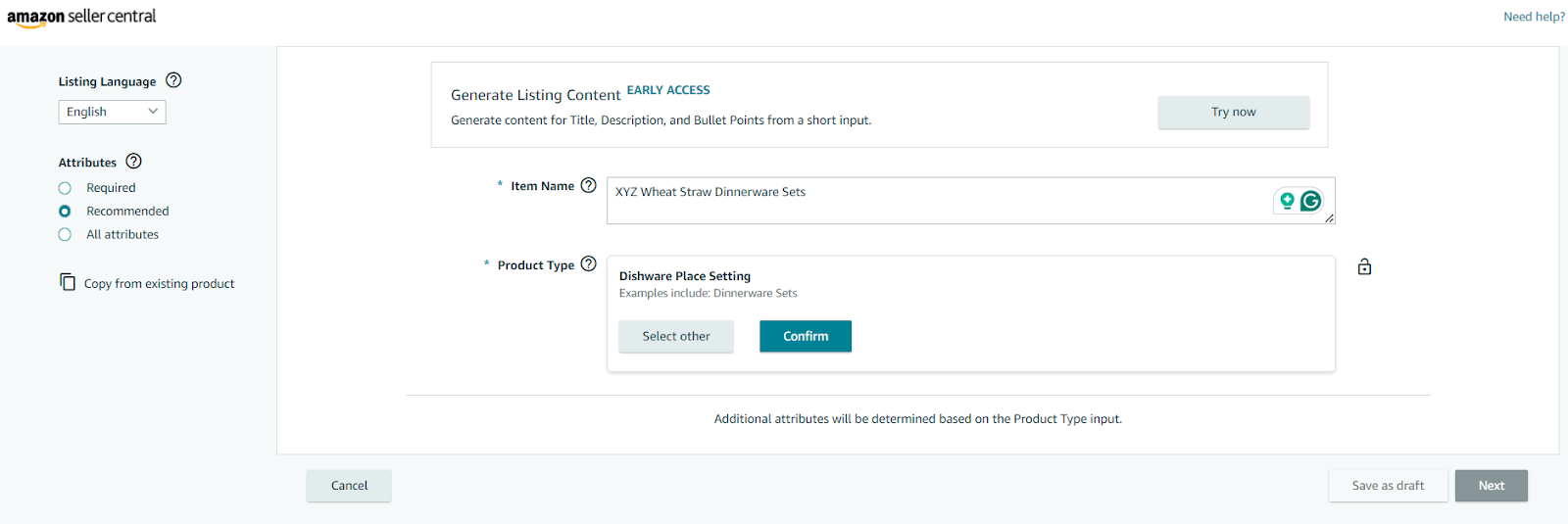
Enter product name and category
Step 3. Provide brand and product ID
Enter your product’s brand name and a valid product ID (UPC, EAN, or ISBN), then click “Next.” If the product is new and you don’t have the codes, ask for GTIN exemption.
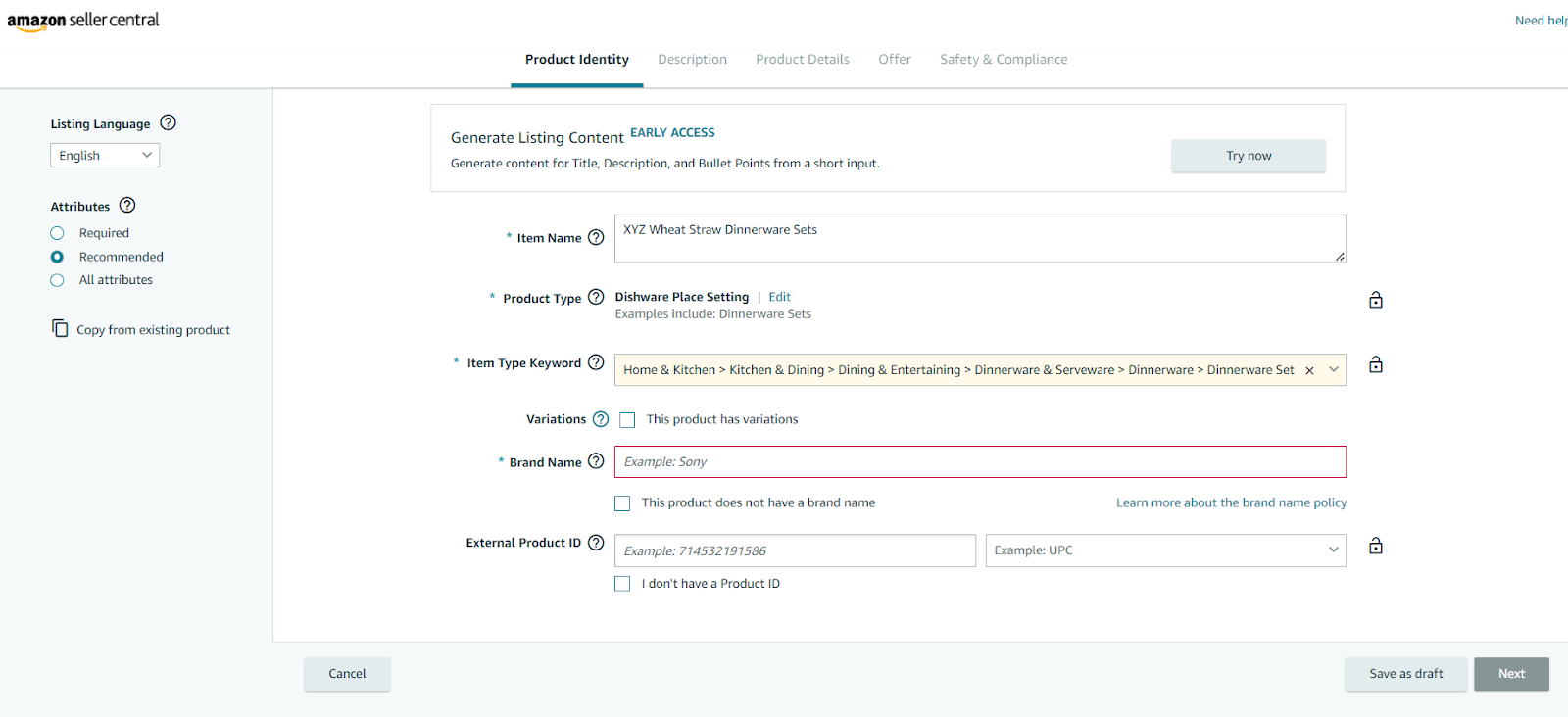
Add a brand and product ID, and click ‘Next.’
Step 4. Complete brand approval (if required)
If your product is branded, Amazon might ask for brand authorization. Click “Apply to Sell” and submit the requested documentation. Wait for Amazon to approve your application.
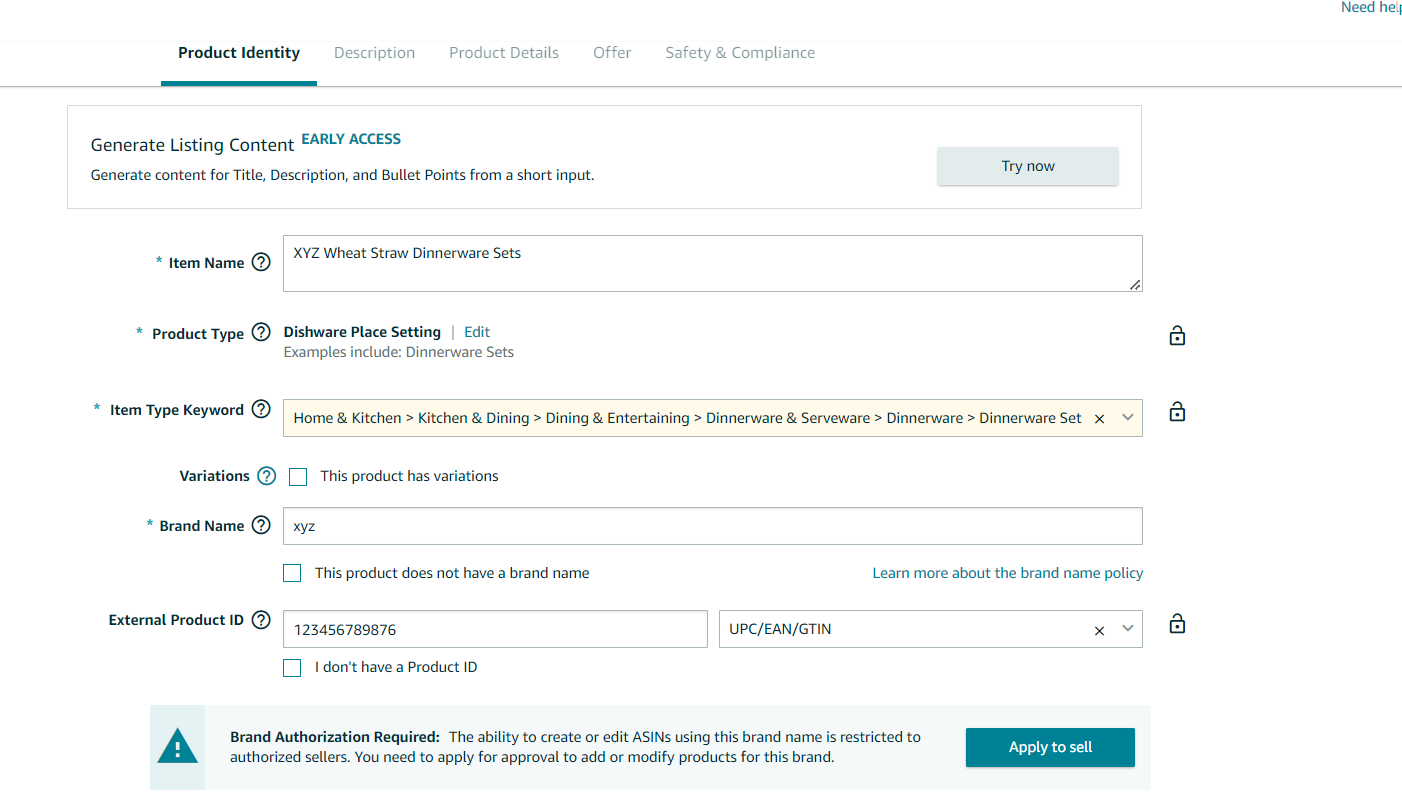
Amazon will ask you to get brand authorization. Click ‘Apply to Sell’ and provide the necessary information. Wait for approval.
Step 5. Add product details and images
Fill in the following details to complete your listing:
- Product description and bullet points
- High-quality images
- Specifications and product details
- Any required safety or compliance documents.
Step 6. Set price, choose fulfillment, and publish
Enter your product price, select your fulfillment method (FBA or FBM), and click “Save and finish” to make your product live on Amazon.
How to Choose a Fulfillment Method on Amazon?
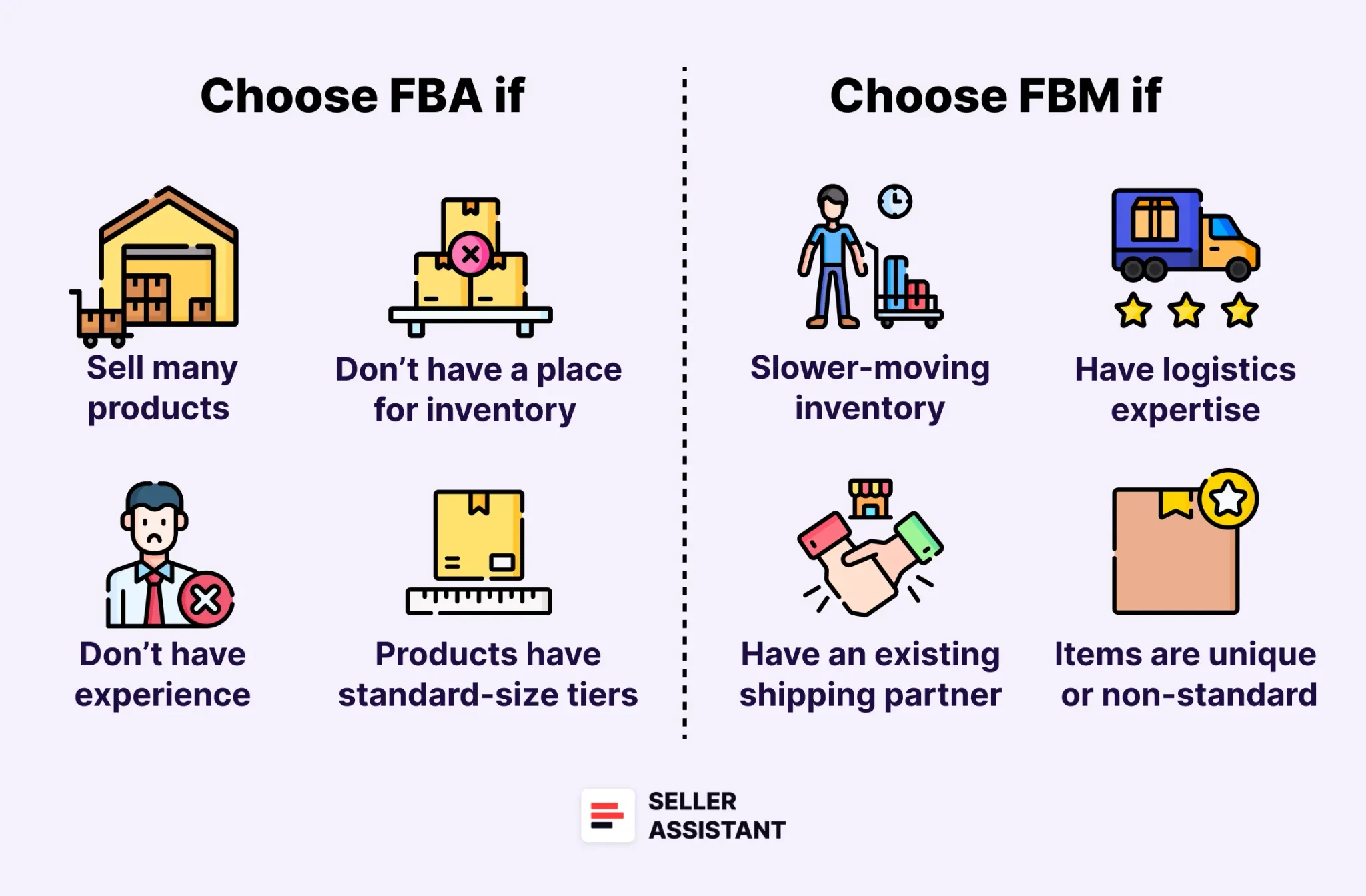
How to Choose a Fulfillment Method on Amazon?
When listing your products on Amazon, one of the most important decisions you’ll make is how to fulfill customer orders. This process, known as fulfillment, involves storing, packing, and shipping products to customers.
Amazon offers two main fulfillment options: Fulfillment by Amazon (FBA) and Fulfillment by Merchant (FBM). Each method has its advantages, and the right choice depends on your business size, product type, and fulfillment capabilities.
In addition to deciding how to ship your products, you’ll also need to choose a competitive pricing strategy that complements your fulfillment method. Here’s what you need to know about both options to help you make the best decision for your business.
Fulfillment by Amazon (FBA)
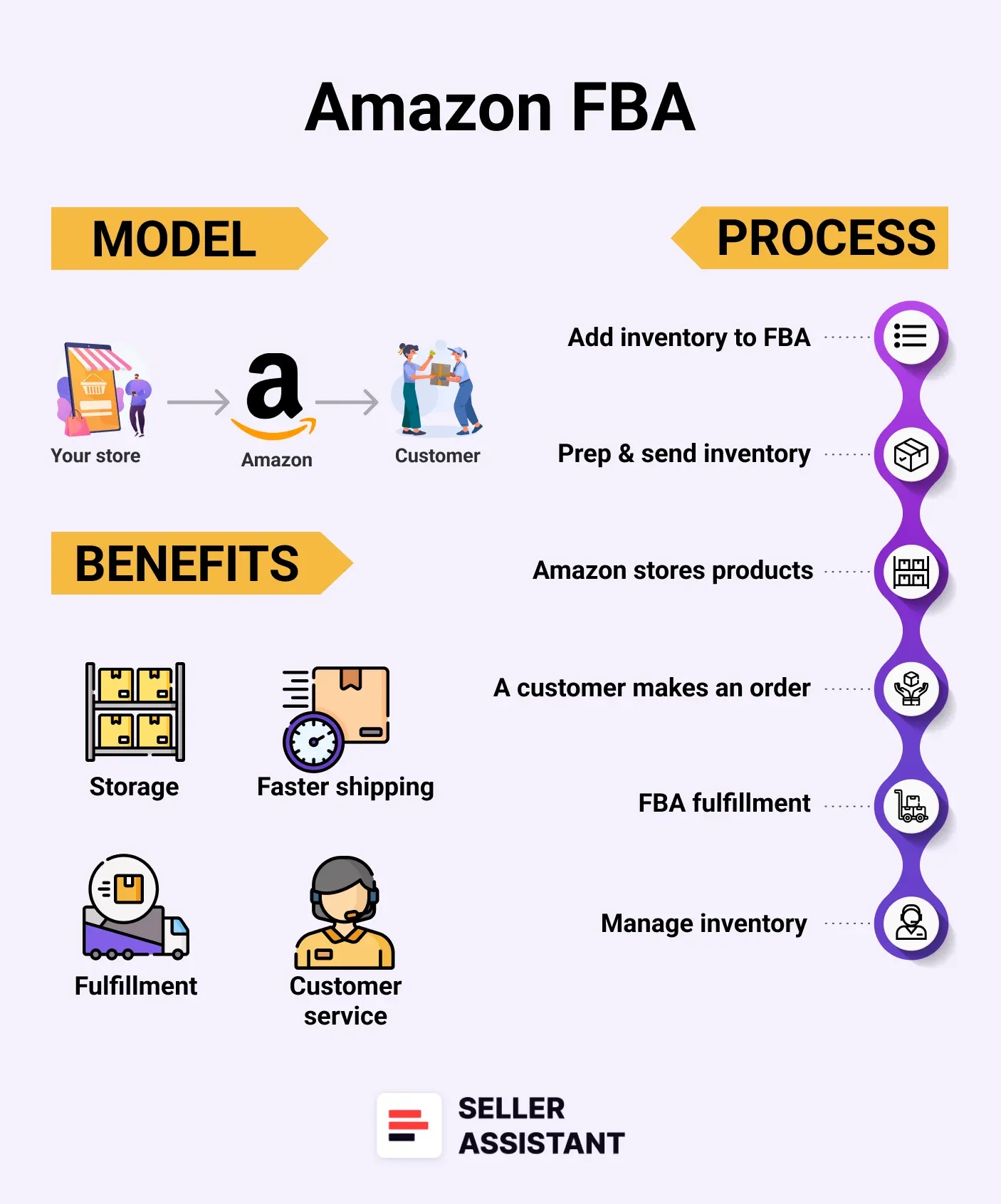
Fulfillment by Amazon (FBA)
- Definition
With FBA, sellers send their inventory to Amazon’s fulfillment centers. Amazon then takes care of storage, picking, packing, shipping, and customer service for a fee.
- How it works
After choosing FBA in Seller Central, you’ll ship your inventory to Amazon’s warehouses. When a customer places an order, Amazon handles everything – from packaging to shipping. They also manage customer service and returns, saving you time and effort. However, sellers must regularly monitor inventory levels and replenish stock to avoid running out.
- Best for
- Sellers managing large order volumes.
- Businesses without storage space for inventory.
- Products that fit Amazon’s standard-size requirements.
- New sellers who lack experience in logistics and packaging.
When to choose FBA
- High sales volume
FBA is ideal if you’re selling a large number of products and can’t manage fulfillment on your own.
- Lack of storage space
If you don’t have a warehouse or storage facility, Amazon will store your inventory for you (note: storage fees apply).
- Limited fulfillment experience
If you’re new to packaging and shipping, Amazon can handle these tasks professionally.
- Standard-size product
FBA works best for standard-size items since Amazon charges higher fees for bulky or heavy products.
Fulfillment by Merchant (FBM)
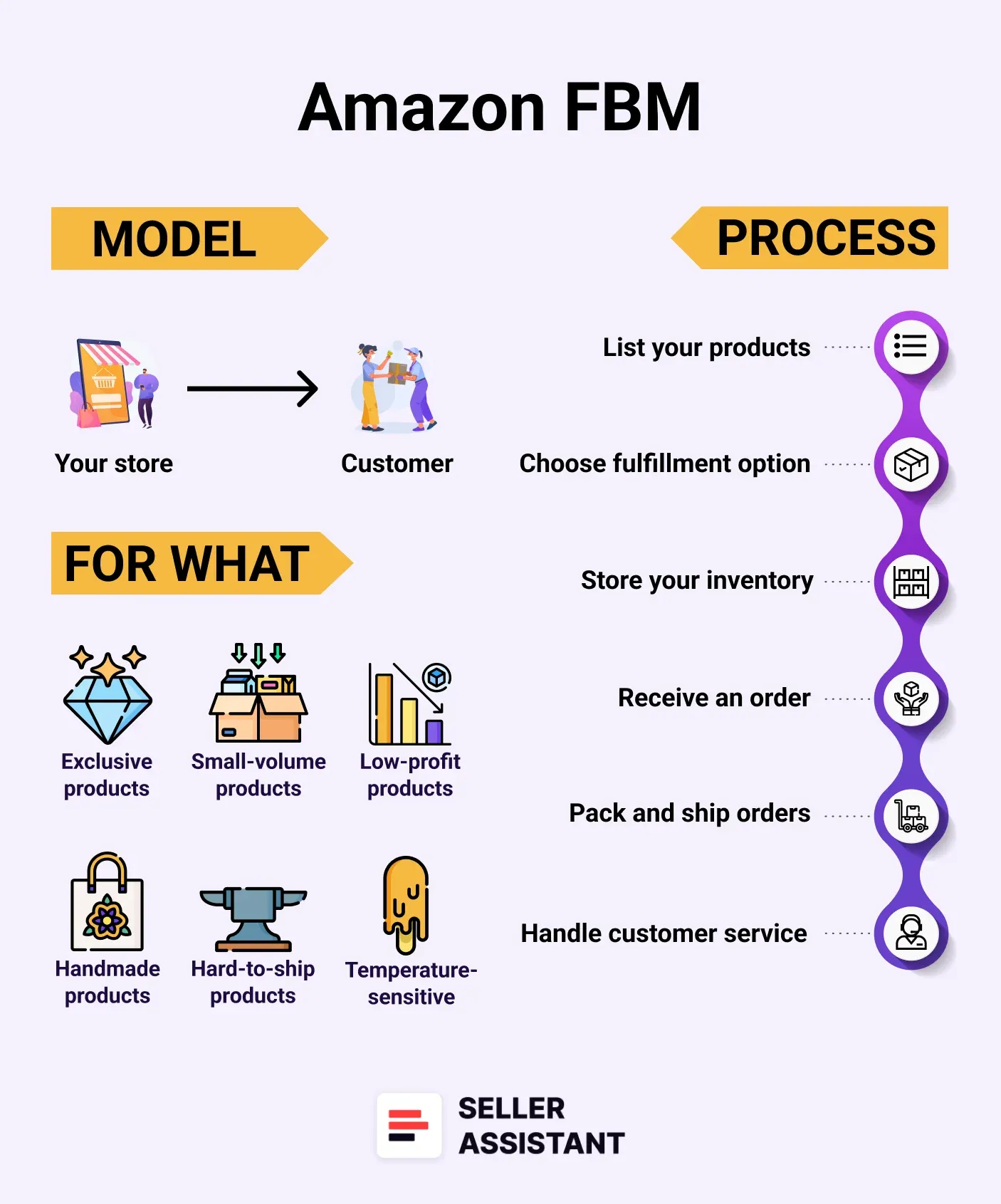
Fulfillment by Merchant (FBM)
- Definition
With FBM, sellers are responsible for storing, packing, and shipping products directly to customers. This method gives sellers full control over the entire fulfillment process.
- How it works
When a customer orders a product, the seller handles all aspects of fulfillment, including packaging, shipping, and customer service. Sellers must use proper packaging materials and ship orders promptly to maintain positive feedback and avoid delays. FBM is especially useful for products with low sales volumes or those that are bulky or require custom packaging.
- Best for
- Sellers with slower-moving or niche products.
- Businesses with experience in logistics and shipping.
- Sellers with existing warehouse space or third-party shipping partners.
- Unique, handcrafted, or oversized products that don’t fit Amazon’s standard fulfillment model.
When to choose FBM
- Slow-moving products
FBM is more cost-effective for items that don’t sell quickly, as it avoids Amazon’s storage fees.
- Fulfillment expertise
If you have experience in shipping, packaging, and customer service, FBM allows you to maintain control and reduce costs.
- Existing shipping partnerships
Sellers with established logistics partners can often negotiate better shipping rates than Amazon’s FBA fees.
- Unique or non-standard products
Handmade, custom, or oversized products may require special handling that is better managed through FBM.
How to Set Your Product Price on Amazon?
Pricing your products correctly on Amazon is essential for making a profit and staying competitive. A well-set price must cover all your costs – such as product sourcing, Amazon fees, and shipping – while also being attractive to customers. The goal is to strike a balance between profitability and competitiveness, especially when aiming to win the Buy Box.
Costs to include in your product price
To ensure profitability, your selling price should cover all expenses and still leave room for profit. Here are the main costs to consider.
- Cost of Goods Sold (COG)
The price you paid for the product.
[Amazon fees
](https://www.sellerassistant.app/blog/amazon-fba-fees)
Selling plan fees
- $0.99 per item for the Individual plan or $39.99/month for the Professional plan.
Referral fees
- A percentage of the sale price (8%–15% depending on the product category).
Fulfillment costs
FBA
- Fulfillment and storage fees
Fees for picking, packing, and shipping (based on product size and weight) and storage fees for inventory at Amazon warehouses.
- Shipping to Amazon
Fees for sending products to fulfillment centers.
Costs for product labeling and preparation (if used).
FBM
- Packaging costs
Costs for order prepping, packaging and labelling
- Logistics expenses
Third-party logistics (3PL) and shipping services.
Taxes
- Sales tax and VAT, depending on your selling region.
Profitability metrics to track
When setting your price, it’s important to monitor how profitable your product will be. Key metrics include the following.
- Profit
The amount earned after subtracting all costs from the selling price.
ROI (Return on Investment): Profit divided by total costs, multiplied by 100%. A good ROI is typically 15% or higher.
Profit divided by selling price, multiplied by 100%. A healthy margin is usually 10–15% and up.
- Break-even price
The minimum price at which you cover all costs without making a profit or loss.
Calculating the right price
The easiest way to calculate product pricing and profitability is by using tools like Seller Assistant’s FBM&FBA Calculator. It helps break down all costs and ensures you price your products correctly.
Steps to calculate your product price
Step 1. Set your target price.
Use Seller Assistant Extension to check the current Buy Box price (Avg BB figure) and adjust your price to match or slightly exceed it by 2–3%.
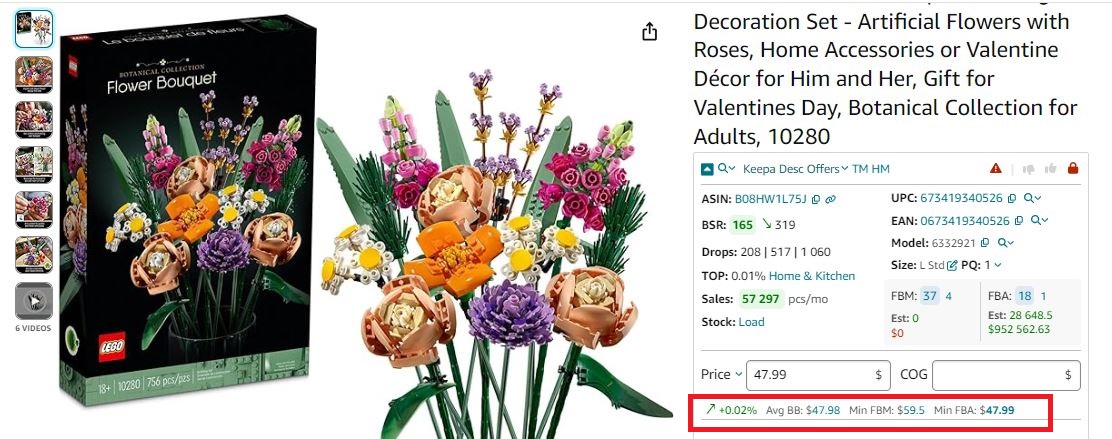
Buy Box
Step 2. Factor in Amazon fees.
Enter your product’s COG and select the fulfillment method (FBA or FBM) to calculate all applicable Amazon fees.
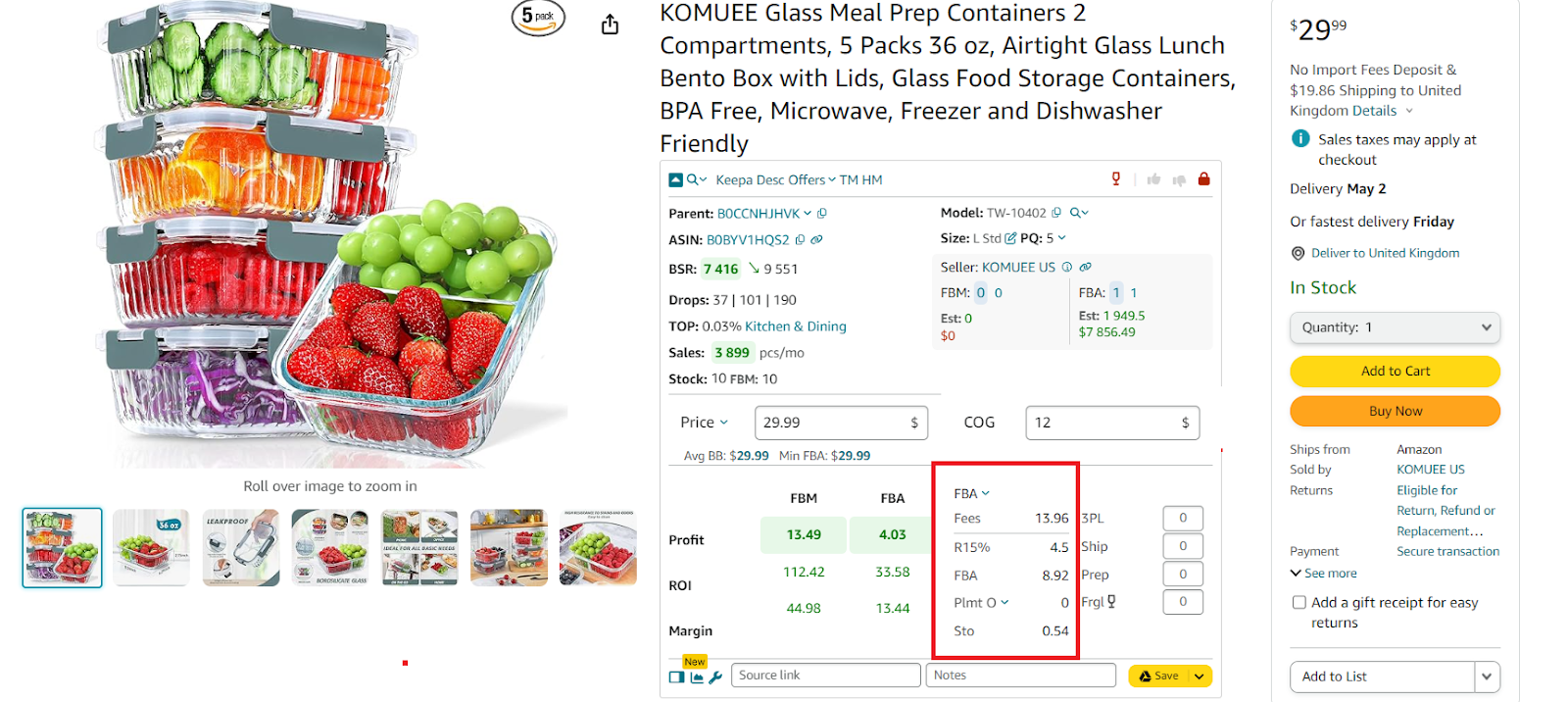
Select the fulfillment method (FBA or FBM) to calculate all applicable Amazon fees
Step 3. Add logistics costs
Include shipping, 3PL fees (for FBM), or prep and inbound shipping fees (for FBA).
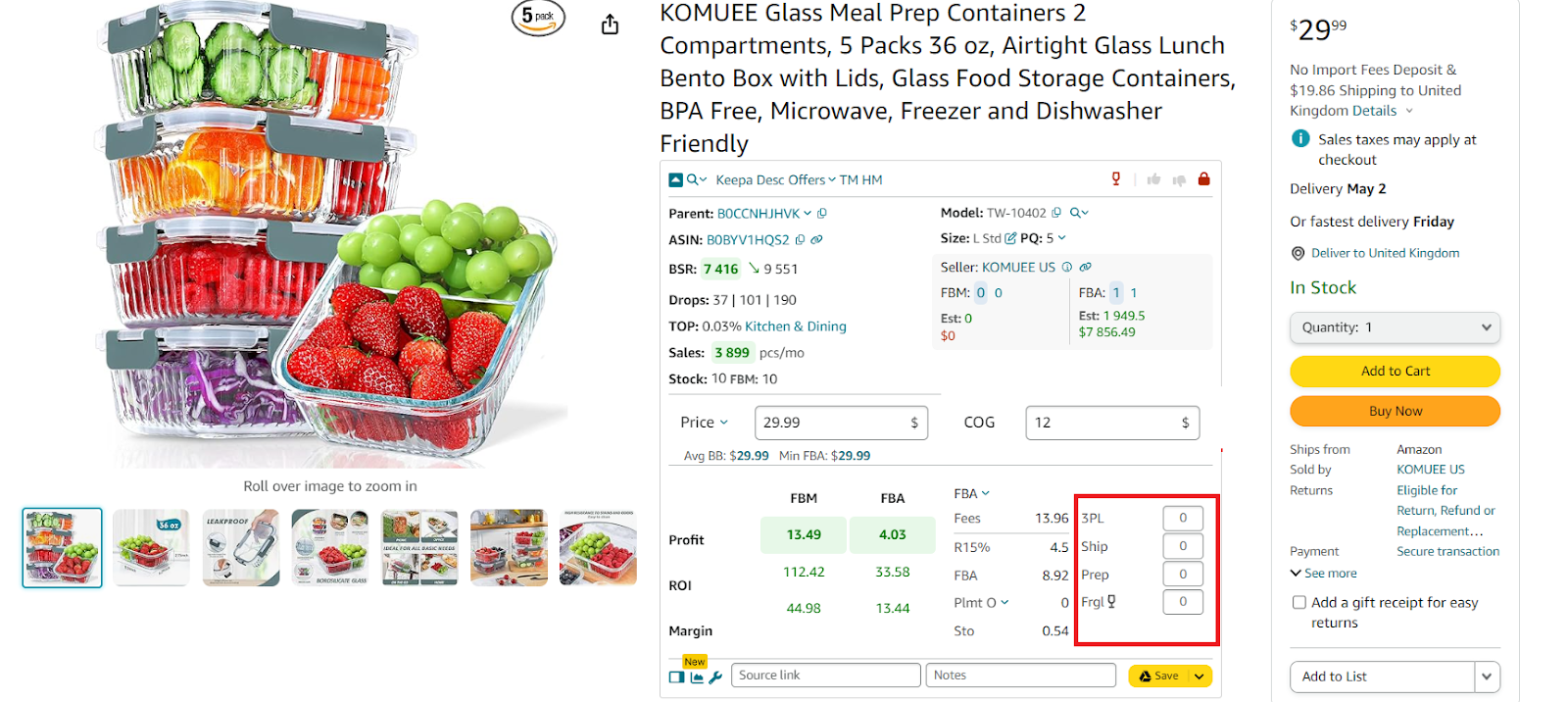
Add logistics costs
Step 4. Analyze profitability.
Review the calculated profit, ROI, and margin to ensure your pricing is profitable.
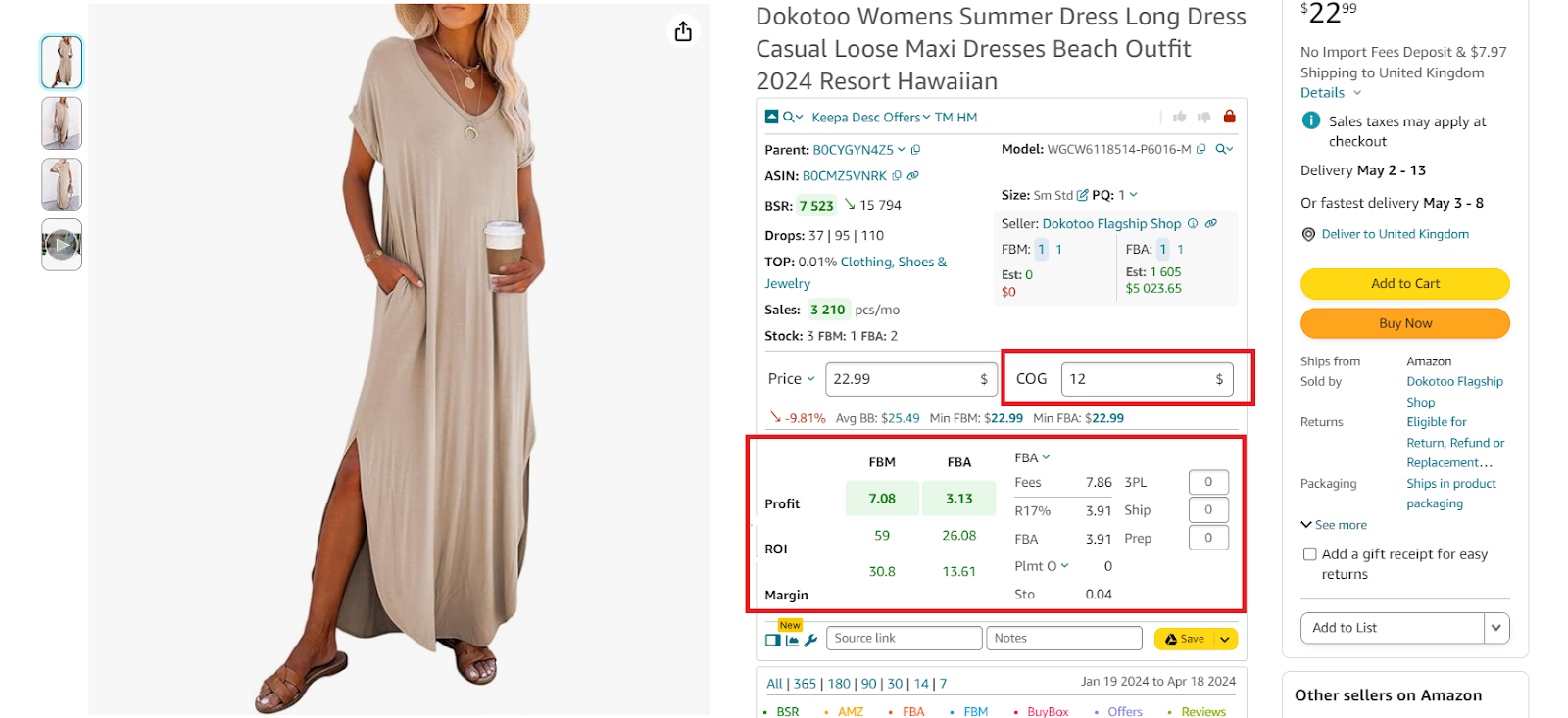
Seller Assistant’s FBA&FBM profit calculator
FAQ
What is the best fulfillment method for new Amazon sellers?
For new sellers, Fulfillment by Amazon (FBA) is often the best choice because Amazon handles storage, packing, shipping, and customer service, making it easier to focus on growing your business. However, sellers with experience in logistics or specialized products might prefer Fulfillment by Merchant (FBM) for more control over fulfillment.
How can I find profitable products to sell on Amazon?
Use product sourcing software like Seller Assistant to identify high-demand, low-competition products. Additionally, analyzing competitor products and trends can help you spot profitable deals.
How much does it cost to start selling on Amazon?
Startup costs on Amazon typically range from $500 to $3,000 or more, depending on your business model. The most expensive models to start are wholesale and private label due to higher inventory, branding, and marketing expenses.
How do I win the Buy Box on Amazon?
To increase your chances of winning the Buy Box, price your product competitively, maintain excellent customer service, and choose a reliable fulfillment method like FBA. Positive reviews, fast shipping, and consistent stock availability also improve your chances.
Can I switch between FBA and FBM after listing a product?
Yes, Amazon allows you to switch between FBA and FBM at any time through your Seller Central account. This flexibility lets you adapt your fulfillment strategy as your business grows.
Final Thoughts
To become a successful Amazon seller, you need to understand how the platform works, from sourcing profitable deals to choosing the right fulfillment method. It’s important to focus on products that are in high demand with moderate competition and to price items smartly by factoring in all fees to ensure profitability. Instead of chasing high sales volume, sellers should prioritize making consistent profits and growing their business steadily over time.
The key to earning profits on Amazon is finding the right products to sell, and the most effective way to do this is by using Seller Assistant. This powerful product sourcing tool makes it easy to discover high-margin products and simplifies the product sourcing process, giving you the best chance to succeed on Amazon.
Seller Assistant is an all-in-one product sourcing software offering all the features vital for product sourcing. It combines three extensions: Seller Assistant Extension, IP Alert, and VPN by Seller Assistant, tools: Price List Analyzer, Seller Spy, Bulk Restrictions Checker, and API integrations, and features: Side Panel View, FBM&FBA Profit Calculator, Quick View, ASIN Grabber, UPC/EAN to ASIN converter, Stock Checker, and other features that help quickly find high-profit deals. Seller Assistant also offers integration with Zapier allowing to create custom product sourcing workflows.


