



Amazon wholesale sourcing doesn’t break because sellers can’t find suppliers – it breaks when supplier data becomes impossible to manage. As outreach grows, Amazon sellers must track contacts, terms, minimum order values (MOV), prep center routing, and purchase orders across dozens of partners.
When that information lives in spreadsheets, emails, and scattered notes, mistakes happen and sourcing slows down.
Seller Assistant’s Suppliers Database solves this problem by centralizing supplier management in one connected system. Instead of re-entering supplier details across tools, sellers organize contacts, terms, and workflow stages in one place – keeping sourcing, purchasing, and inventory routing accurate as their wholesale business scales.
Note. Seller Assistant is an end-to-end Amazon workflow management platform that integrates 10+ wholesale-focused solutions into one connected system. It combines sourcing workflow automation, bulk research and intelligence tools, and integrated Chrome extensions – giving you everything you need to streamline finding deals, managing suppliers, and creating purchase orders.

The platform aggregates: workflow management tools – Purchase Orders Module, Suppliers Database, Warehouses Database to organize, automate, and scale every step of your wholesale and arbitrage operations ; bulk research & sourcing tools – Price List Analyzer, Bulk Restriction Checker, AI Supplier Finder, Brand Analyzer, Seller Spy to evaluate supplier price lists, verify selling eligibility and restrictions, open new brands, and discover winning product ideas from competitors to expand your product catalog ; Chrome extensions – Seller Assistant Browser Extension, IP-Alert Extension, and built-in VPN by Seller Assistant to deep-research products, check IP claims and compliance, and access geoblocked supplier sites directly within your browser; and integrations & team access features – seamless API connectivity and integrations with Zapier, Airtable, and Make, plus Virtual Assistant Accounts for secure, scalable team collaboration.
With Seller Assistant, every step of your Amazon wholesale and arbitrage workflow is automated and connected.
Why Amazon Wholesale Sellers Must Organize Supplier Data
Managing suppliers becomes complicated quickly in Amazon wholesale. After initial outreach, sellers must track contacts, payment terms, minimum order values (MOV), prep center routing, and purchase history for every partner.
When this information is scattered across spreadsheets, inboxes, and notes, mistakes are easy to make – and those mistakes can delay orders or increase costs. Keeping supplier data organized in one structured system helps sellers maintain accurate records, move faster during sourcing, and ensure purchase orders are created with the correct terms and routing.
Supplier terms and requirements
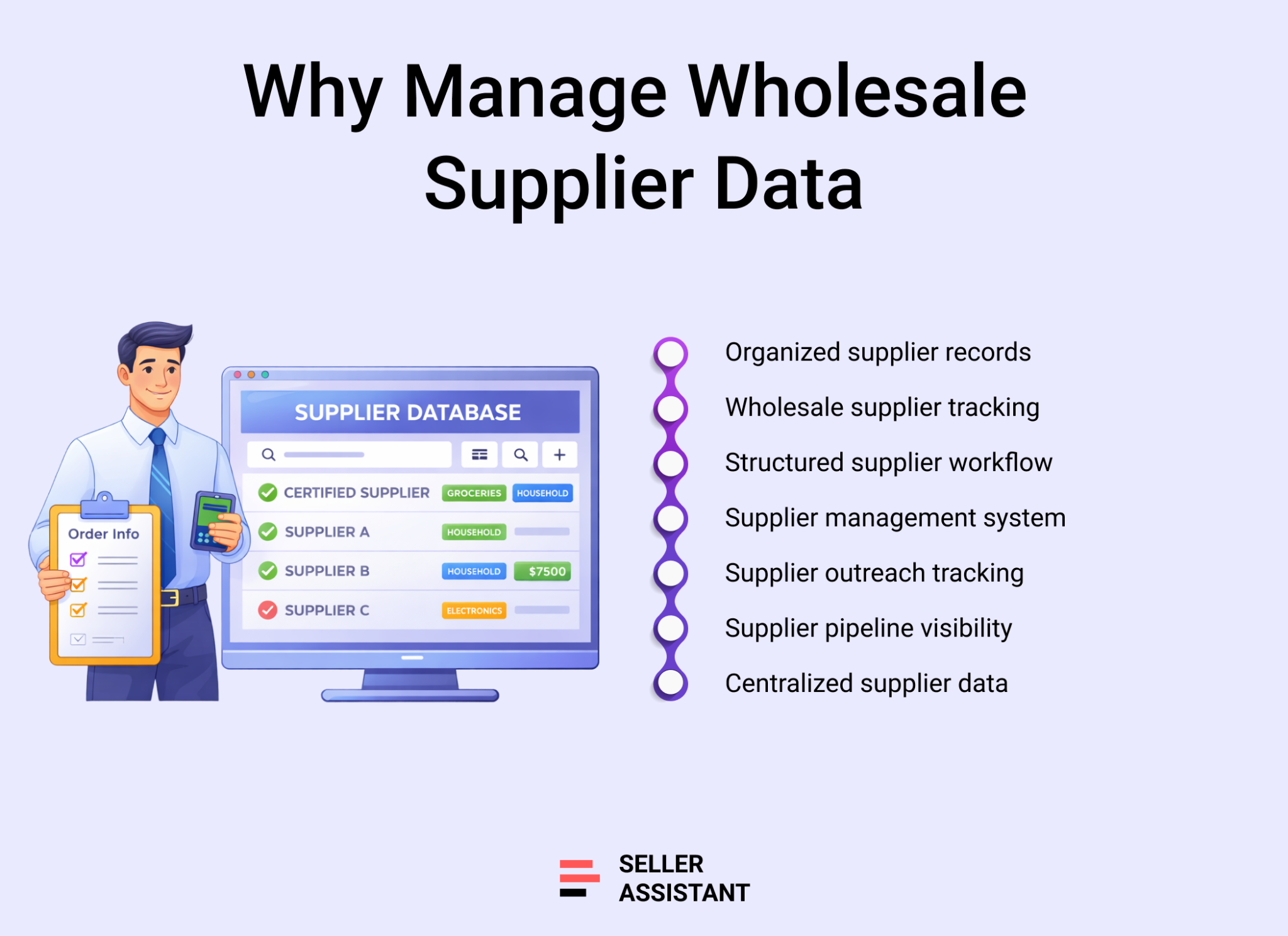
Each supplier operates under different conditions – including MOV, payment terms, lead times, and shipping rules. If these details are not tracked clearly, sellers may submit incorrect orders or miss important requirements. Organized supplier records ensure every purchase follows the correct terms.
Supplier outreach and relationship tracking
Wholesale sourcing involves ongoing communication with many suppliers. Sellers must track which companies have been contacted, which are negotiating, and which have approved accounts. Clear status tracking prevents duplicate outreach and helps maintain a structured supplier pipeline.
Team collaboration and accountability
Many wholesale operations rely on virtual assistants or sourcing teams. Without a shared system, supplier information can be overwritten or duplicated. Centralized supplier records allow teams to work from the same data while assigning clear ownership for each supplier relationship.
Consistent routing and purchasing
Supplier orders often ship to specific warehouses or prep centers before reaching Amazon FBA. Organized supplier profiles ensure the correct routing details are applied during purchase order creation, reducing errors and keeping inventory moving smoothly through the fulfillment process.
What Is Seller Assistant’s Suppliers Database?
Seller Assistant’s Suppliers Database is a supplier management system built for Amazon wholesale sellers, online arbitrage sellers, and dropshippers who work with multiple suppliers and need to keep their sourcing operations organized.
Instead of storing supplier contacts, terms, and routing details in spreadsheets or email threads, the database centralizes all supplier information in one structured workspace.
Supplier profiles and operational data
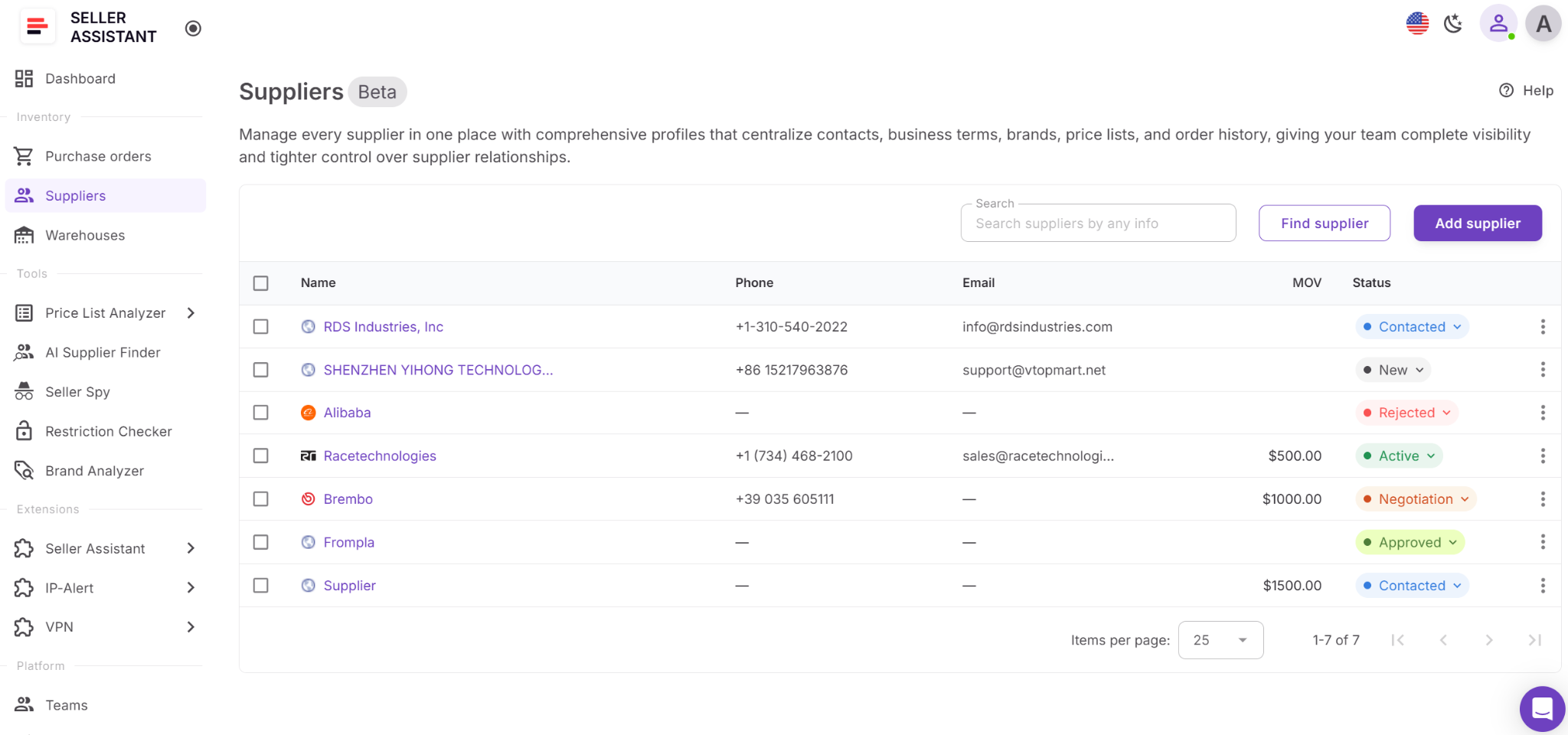
Suppliers Database stores detailed supplier profiles that include contact information, websites, currencies, supply terms, relationship status, and routing rules. Sellers can also track operational details such as minimum order value (MOV), payment terms, lead times, assigned team members, and default warehouses or prep centers. This allows every supplier relationship to be documented clearly and reused across sourcing and purchasing workflows.
Beyond contact records, the database provides visibility into supplier activity. Sellers can track outreach stages, access supplier price lists, and manage purchase orders linked to each supplier profile. This keeps supplier communication, sourcing decisions, and purchasing history connected.
Why centralized supplier management matters
Wholesale sourcing involves managing multiple suppliers at the same time. Without a centralized system, sellers must manually track outreach progress, supplier terms, and shipping requirements. This increases the risk of duplicate outreach, incorrect purchase orders, or missing supplier conditions. Suppliers Database keeps supplier data organized and accessible so teams can work faster and make more accurate purchasing decisions.
Part of a connected wholesale workflow
Suppliers Database operates inside Seller Assistant’s connected wholesale workflow automation system. Suppliers discovered through AI Supplier Finder can be saved directly into the database. Supplier profiles are reused when uploading catalogs into Price List Analyzer, routing shipments through Warehouses Database, and generating structured orders in the Purchase Orders Module.
Because supplier data flows across tools automatically, sellers avoid repeated data entry and keep their sourcing workflow consistent. Within Seller Assistant’s wholesale ecosystem – which includes bulk research tools, supplier and warehouse databases, Chrome extensions, and purchase order management – Suppliers Database acts as the supplier management layer that connects sourcing research to purchasing execution.
What Can You Do with Suppliers Database?
Suppliers Database helps Amazon wholesale sellers organize supplier relationships and keep sourcing operations structured as their business grows. Instead of storing supplier contacts, terms, and routing details across multiple tools, everything is managed in one connected system. This allows sellers to track supplier communication, manage operational requirements, and reuse supplier data across sourcing and purchasing workflows. By keeping supplier information centralized and synchronized with other Seller Assistant tools, sellers reduce manual work, avoid errors, and move faster from supplier discovery to purchase orders.
Create complete supplier profiles
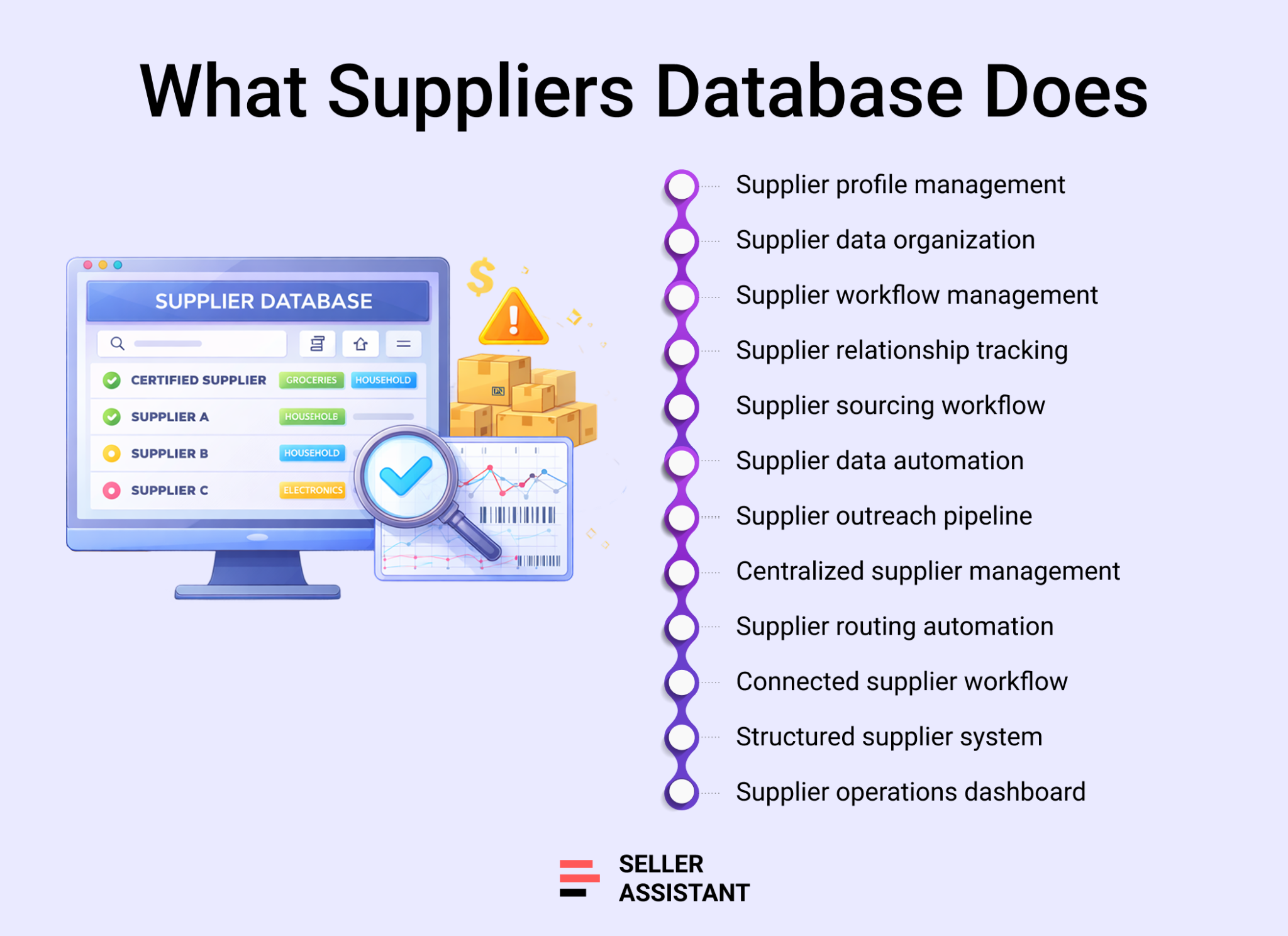
Suppliers Database allows you to create detailed supplier profiles that store essential business information in one place. Each profile can include the supplier’s name, website, contact details, currency, payment terms, and other key data. This ensures every supplier relationship is documented and easy to access when working with price lists, orders, or supplier communication.
Store operational supply terms
You can record important operational conditions for each supplier, such as minimum order value, free shipping thresholds, lead times, and other supply terms. Keeping these details inside supplier profiles helps ensure purchase orders follow the correct requirements and prevents mistakes when placing orders.
Assign supplier ownership
For teams working with multiple suppliers, Suppliers Database allows you to assign a responsible team member to each supplier. This creates clear ownership of supplier relationships and helps avoid confusion when several people handle sourcing or supplier communication.
Track supplier relationship stages
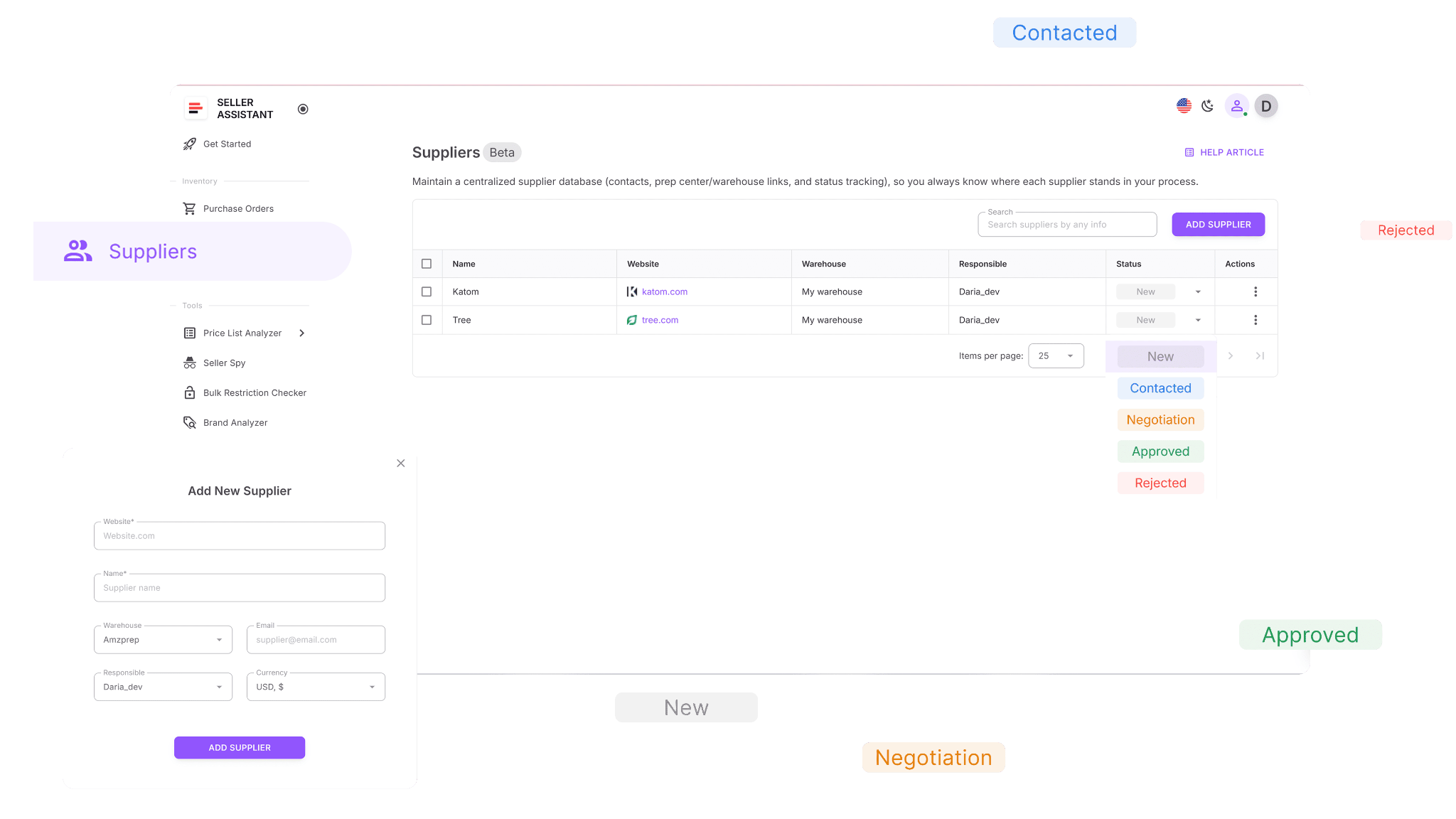
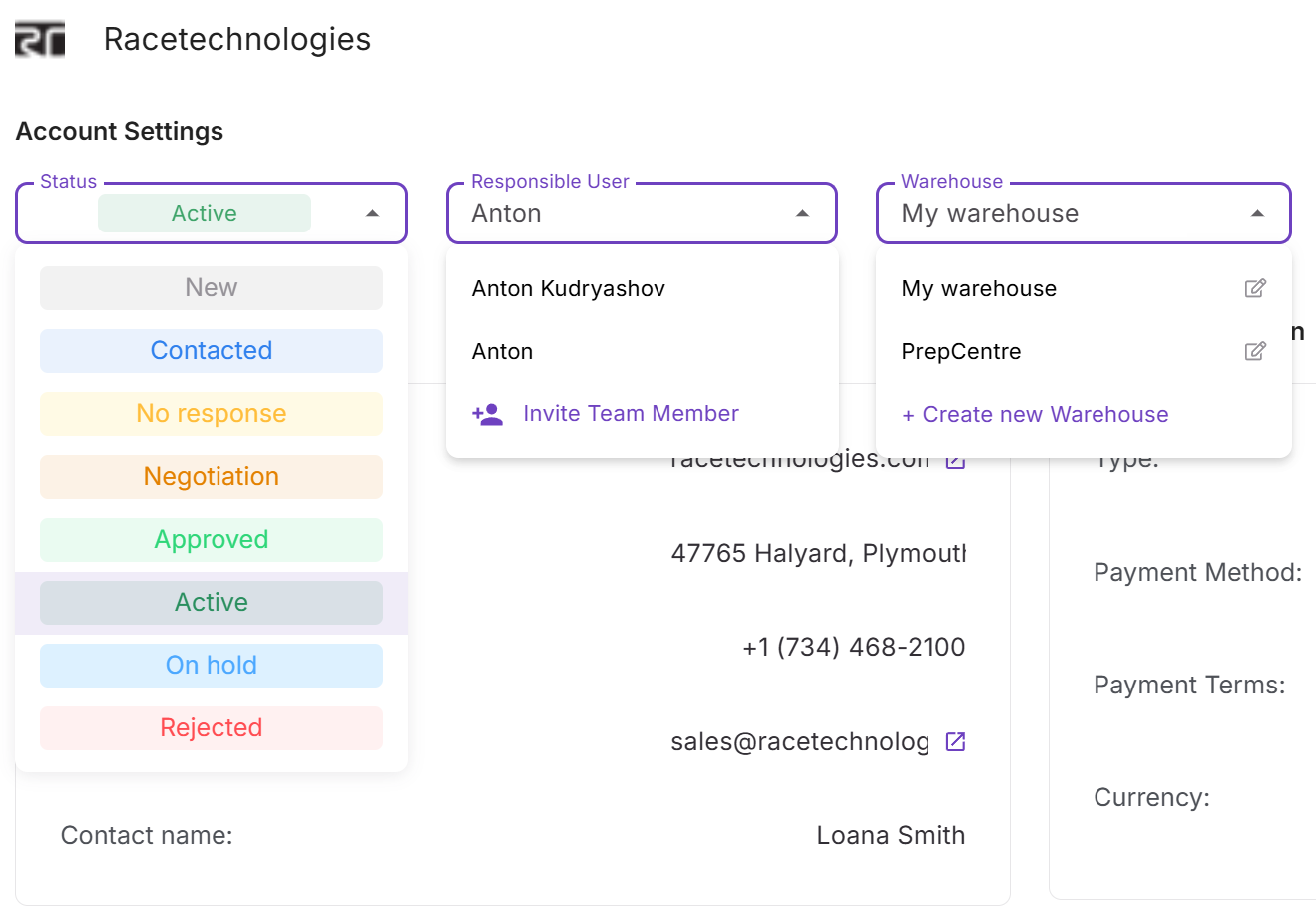
Suppliers move through different stages during the sourcing process. The database allows you to track these stages with clear statuses such as New, Contacted, Negotiation, Approved, Active, or Rejected. This makes it easier to manage outreach pipelines and quickly see which suppliers are ready for sourcing and purchasing.
Automate routing with warehouses and prep centers
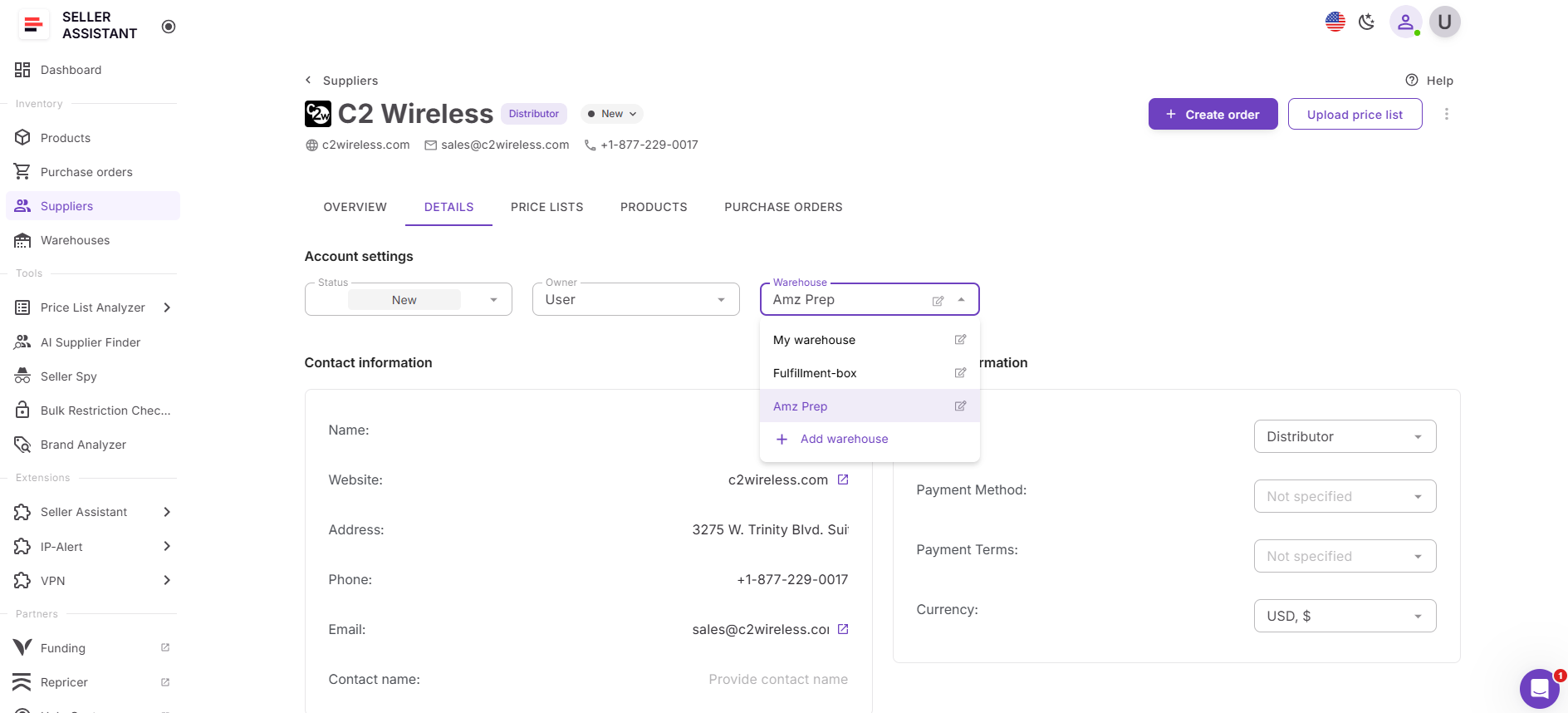
Suppliers can be linked to a default warehouse or prep center. When a purchase order is created, the system automatically applies the correct routing details. This helps maintain consistent shipping destinations and prevents fulfillment errors.
Reuse supplier data across sourcing tools
Supplier profiles are automatically available across Seller Assistant tools. When uploading supplier catalogs in Price List Analyzer or creating orders in the Purchase Orders Module, supplier details are filled in automatically. This eliminates repeated data entry and speeds up sourcing workflows.
Update supplier data without breaking workflows
Supplier information can be edited at any time. Changes made in the supplier profile are applied across connected tools without breaking links between price lists, purchase orders, or warehouse routing.
Access supplier profiles across the platform
Suppliers Database integrates directly with other Seller Assistant tools. You can open supplier profiles directly from Price List Analyzer or Purchase Orders Module, making it easy to review supplier terms or update details while working inside other parts of the workflow.
Add suppliers directly from sourcing tools
When you discover new suppliers through AI Supplier Finder, they can be saved directly into Suppliers Database. This keeps supplier discovery connected to your supplier management system and ensures every potential partner becomes part of your structured sourcing workflow.
How Suppliers Database Works
Suppliers Database turns supplier information into a structured, reusable part of your Amazon wholesale workflow. Instead of storing supplier contacts, supply terms, and routing rules across spreadsheets or emails, sellers manage everything inside a centralized system.
You create a supplier profile once, add key operational details, and then reuse that data across sourcing tools, price list analysis, and purchase order creation. As your supplier network grows, the database keeps outreach status, operational terms, and purchasing history organized in one place.
Supplier profiles as the central workspace
Each supplier is managed through a Supplier Profile, which serves as the main workspace for supplier information and activity. A profile combines supplier contact details, operational terms, related price lists, and purchase orders in one view.
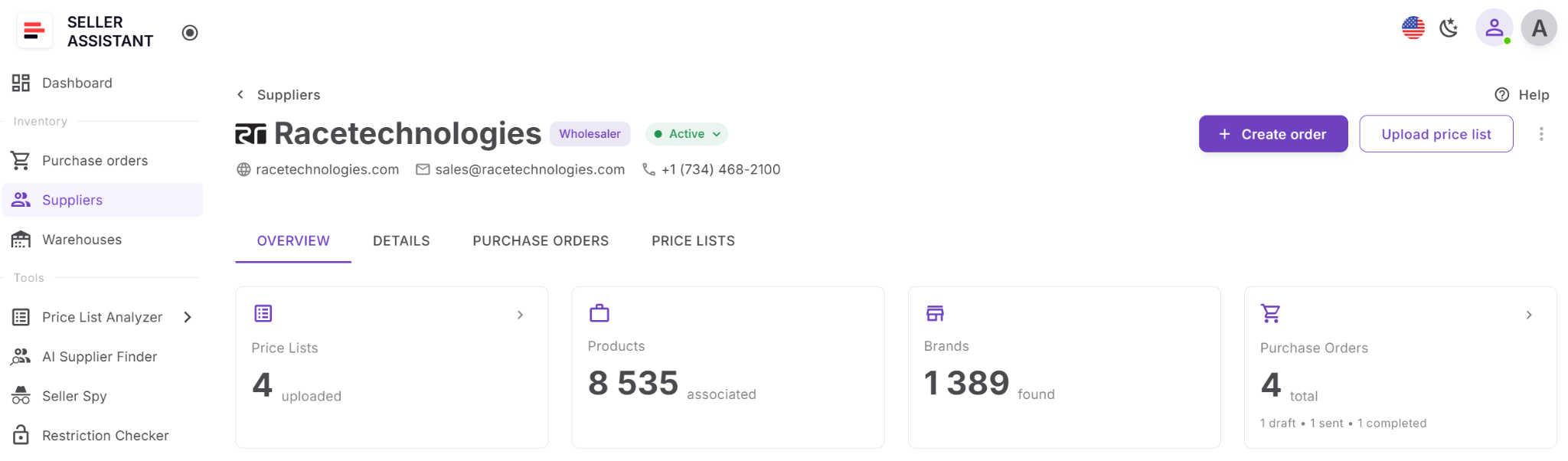
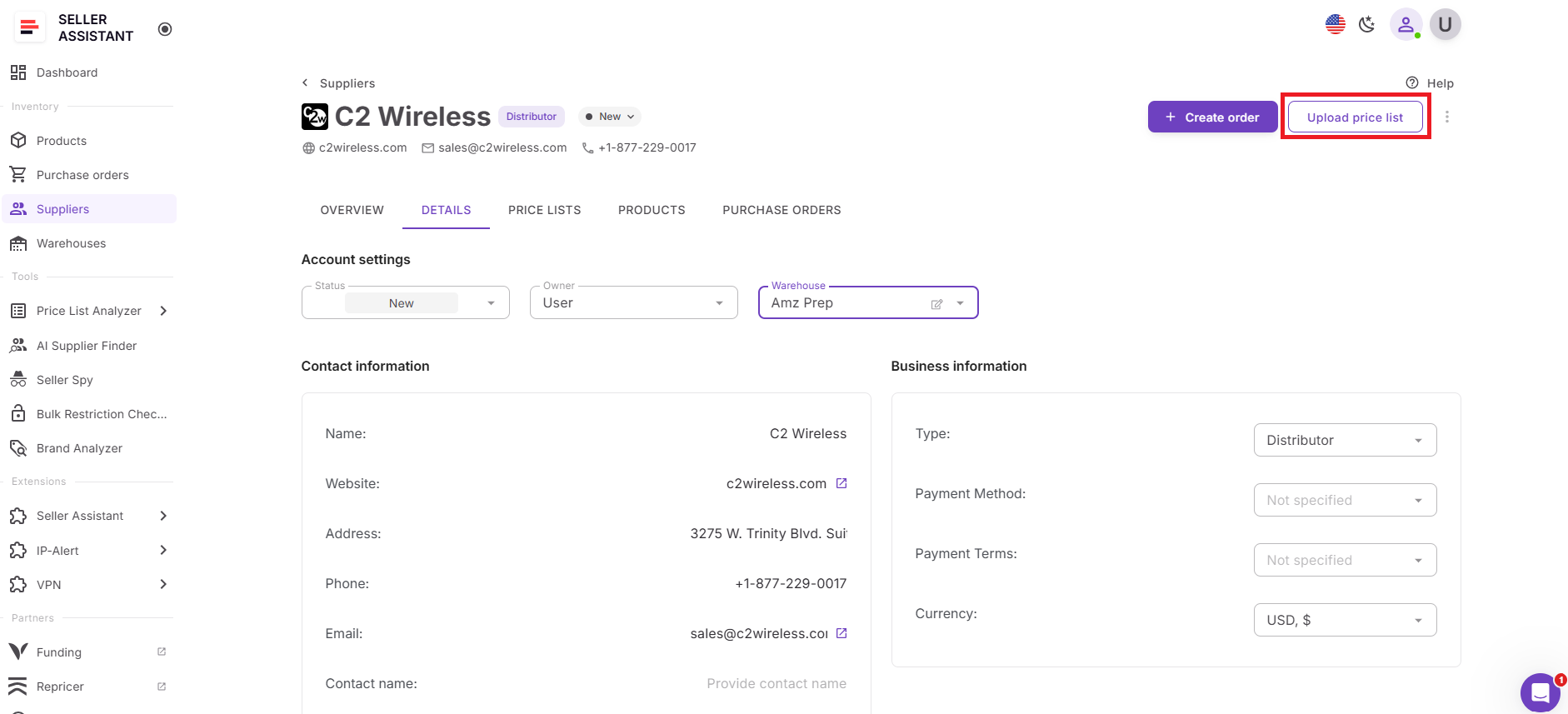
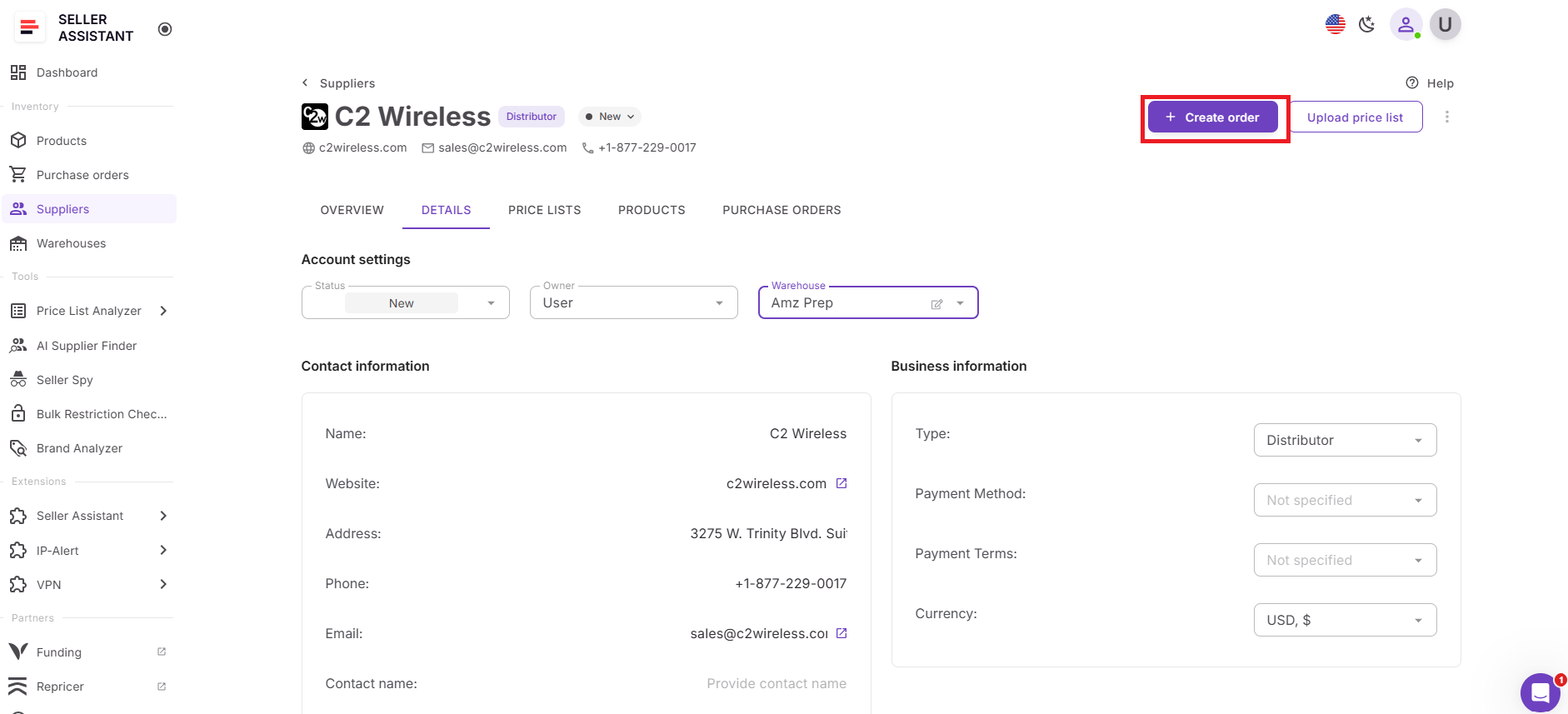
At the top of the profile, sellers can see key supplier information such as the supplier logo, name, website, email, phone number, supplier type, and relationship status. From the same panel, you can quickly create a new purchase order, edit an existing draft order, upload a price list linked to the supplier, or delete the supplier if needed.
The profile is organized into several tabs that keep supplier data structured and easy to navigate.
Overview of supplier activity
The Overview tab provides a quick snapshot of supplier activity across your sourcing workflow. Summary blocks display the total number of uploaded price lists, unique products, and unique brands associated with the supplier. The system also shows purchase order counts grouped by status, including draft, sent, and completed orders.
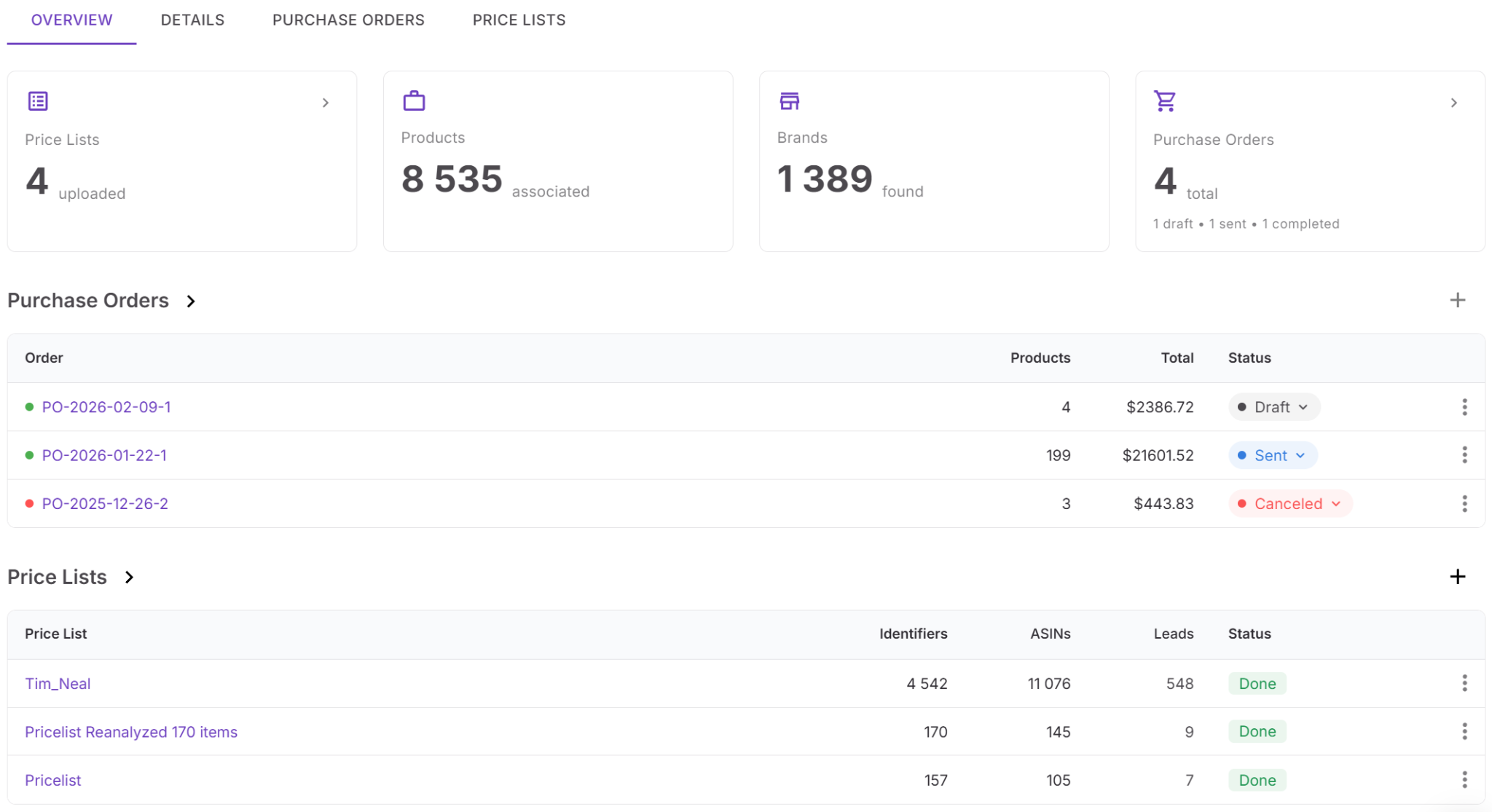
Below the summary blocks, preview sections display the three most recent price lists and the three latest purchase orders. These entries are clickable, allowing you to open the full records directly from the supplier profile.
Supplier configuration and operational terms
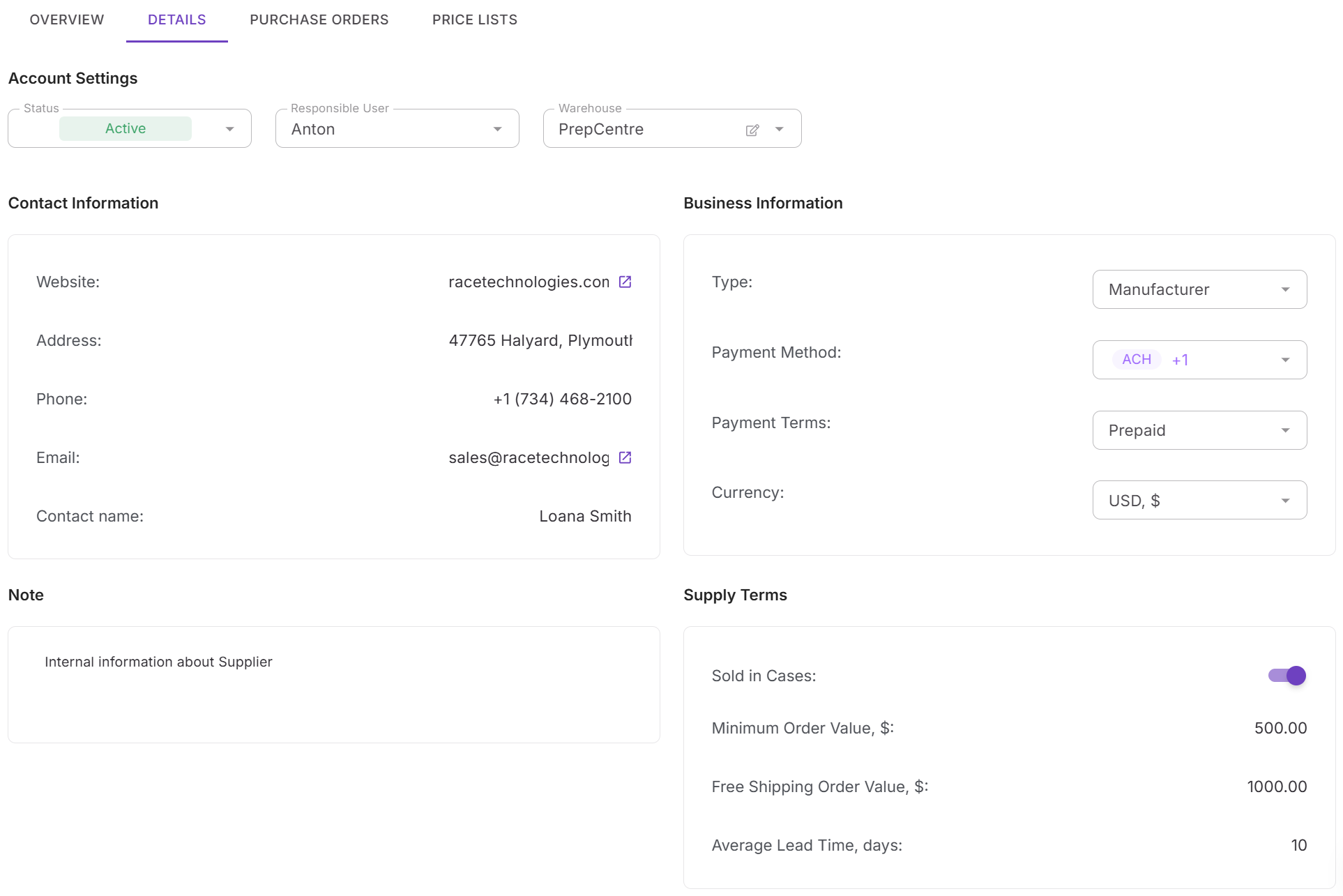
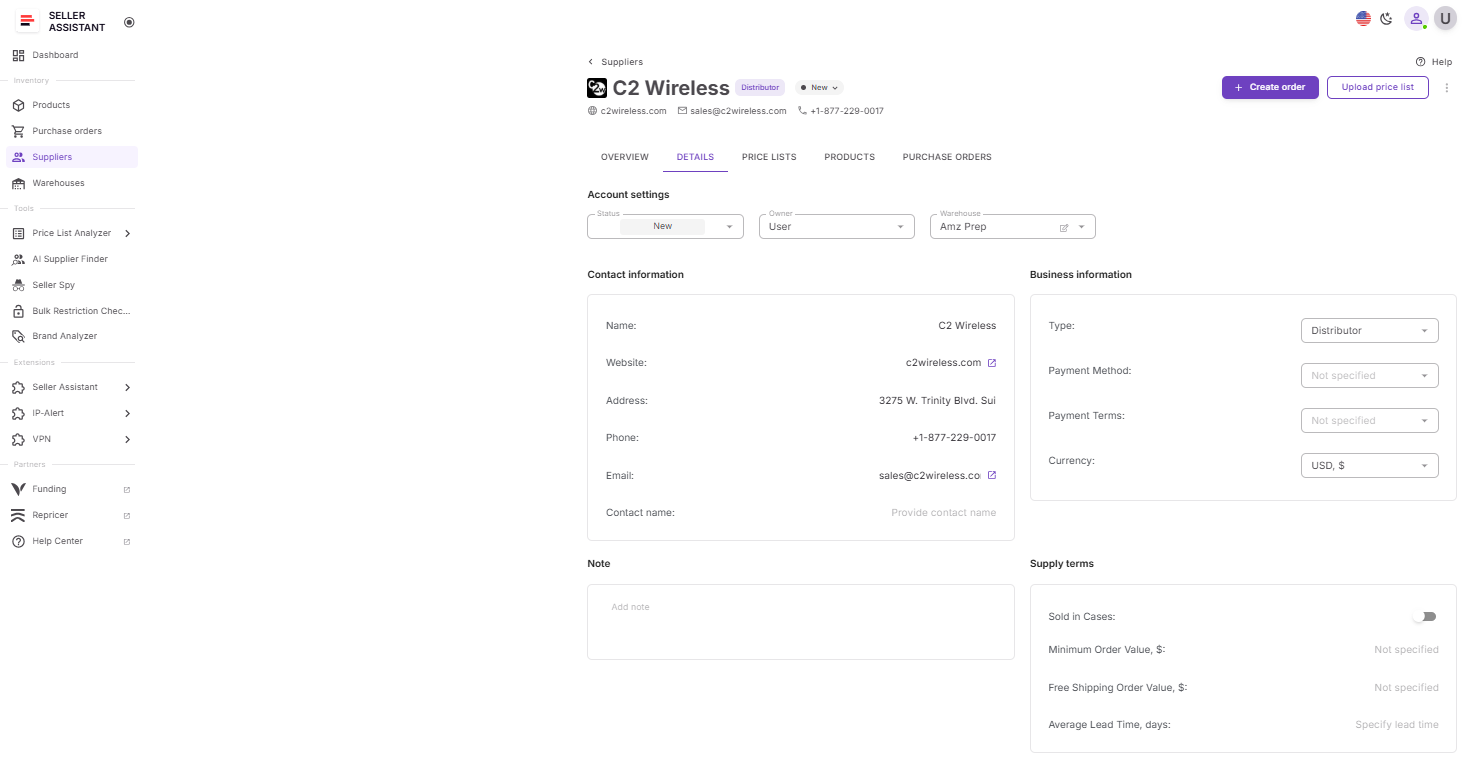
- The Details tab contains the full configuration for each supplier. This section organizes supplier information into several structured groups.
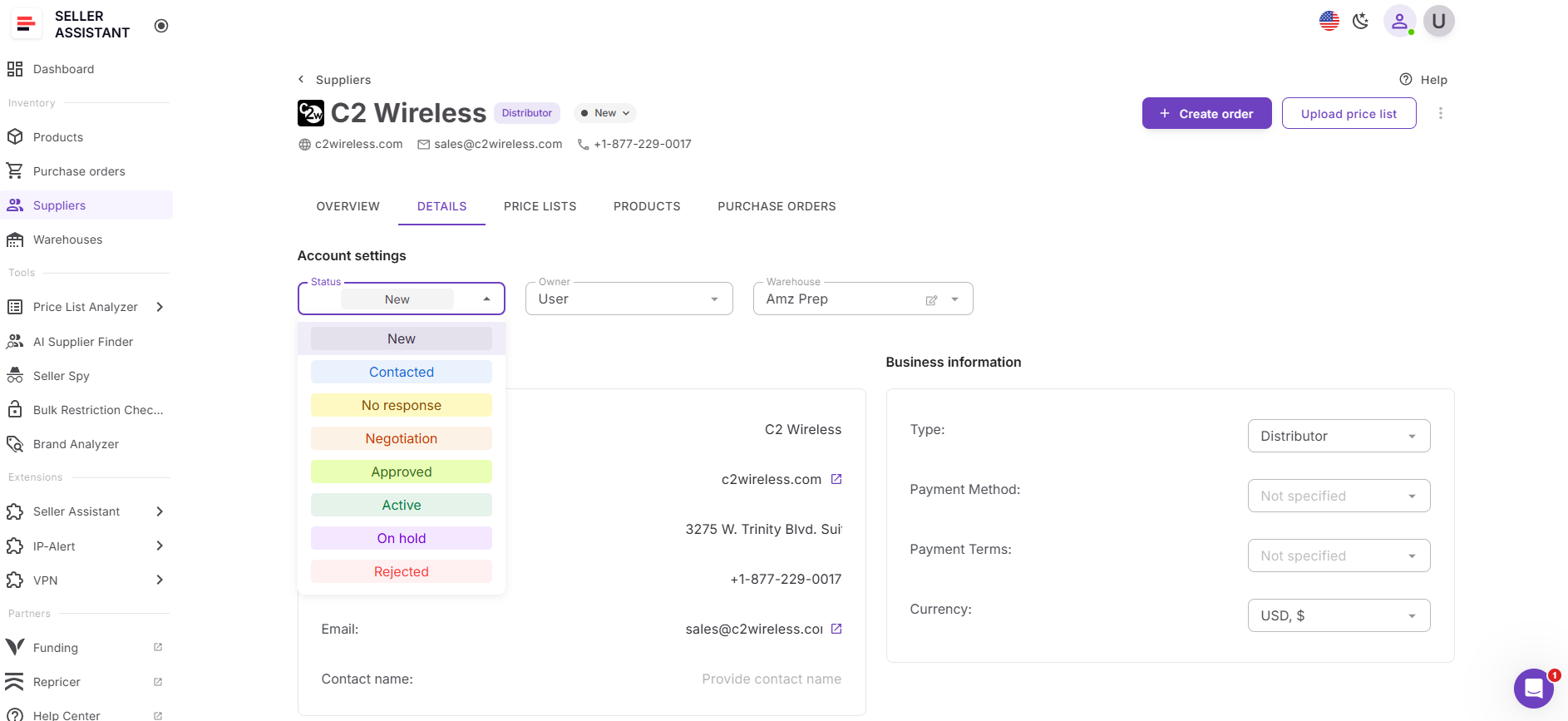
- Account settings allow you to assign the responsible team member, select the linked warehouse, and track the supplier’s relationship status. Status stages include New, Contacted, No response, Negotiation, Approved, Active, On hold, and Rejected.
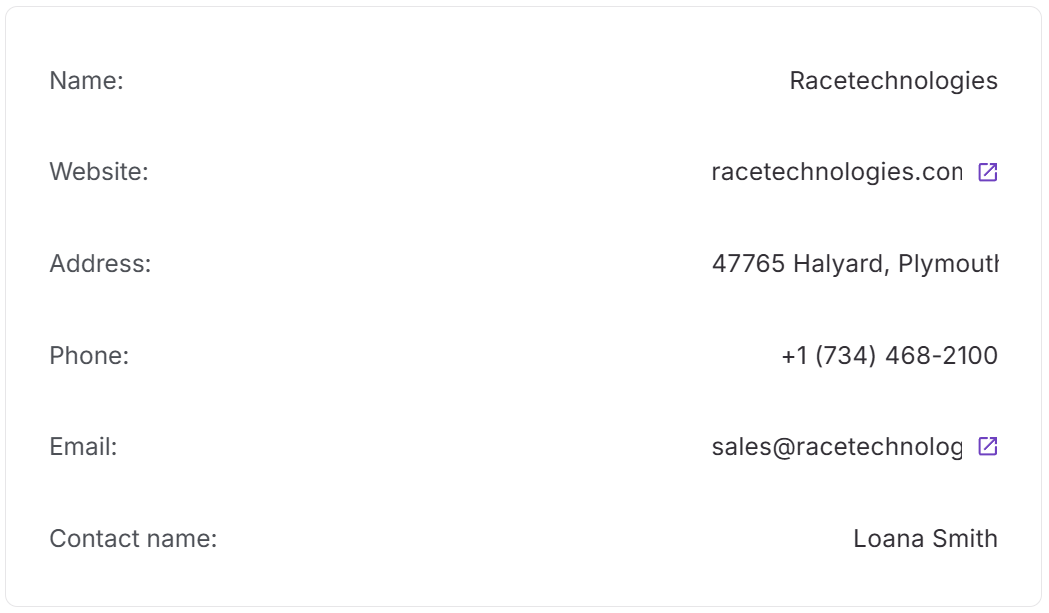
- Contact information stores communication details such as website, address, phone number, email, and contact name. The system validates supplier websites to prevent duplicates and keep your supplier database clean.
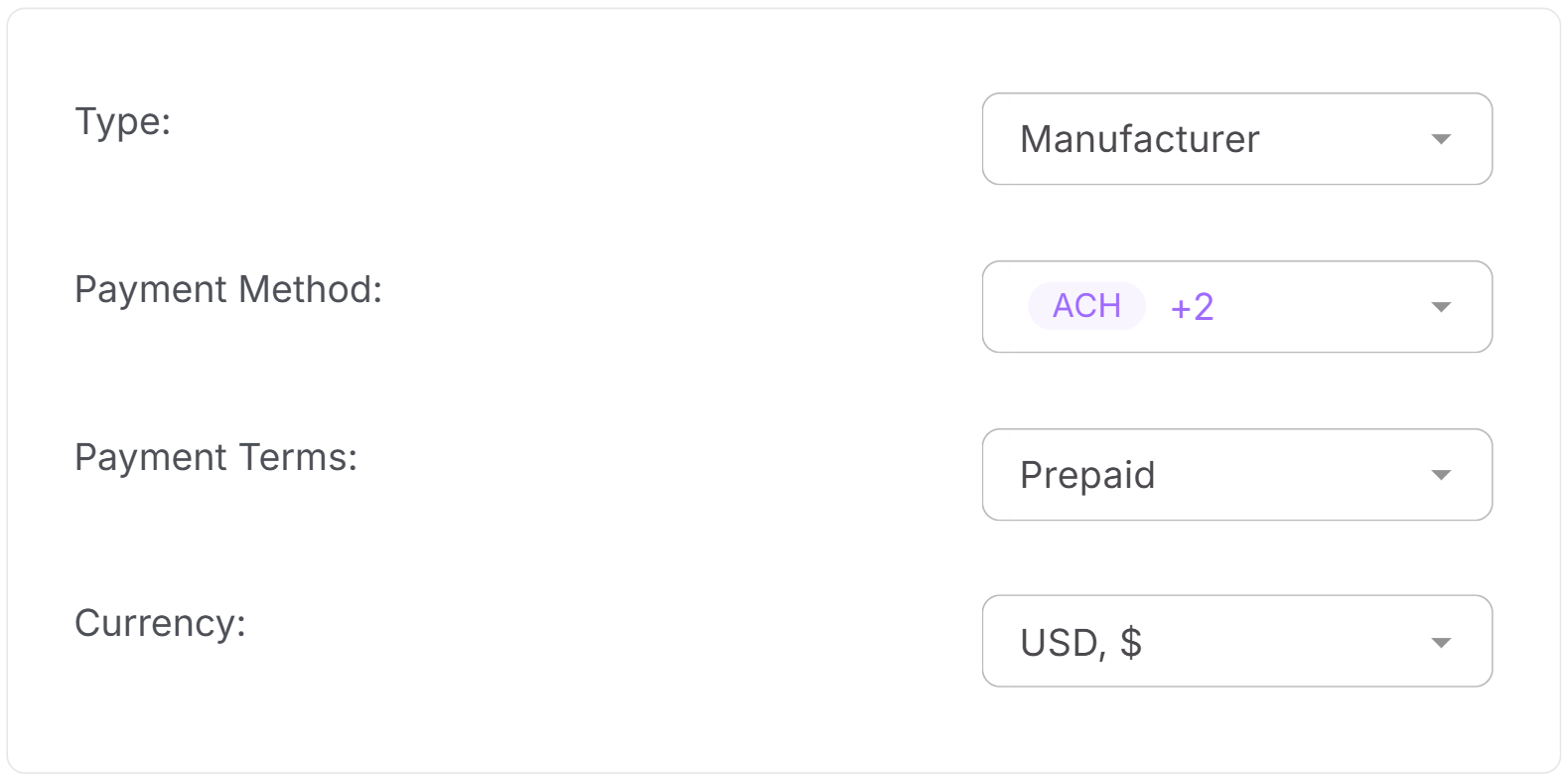
- Business information describes how the supplier operates. Here you can define the supplier type, supported payment methods, payment terms, and transaction currency. These details ensure purchase orders use the correct financial expectations.
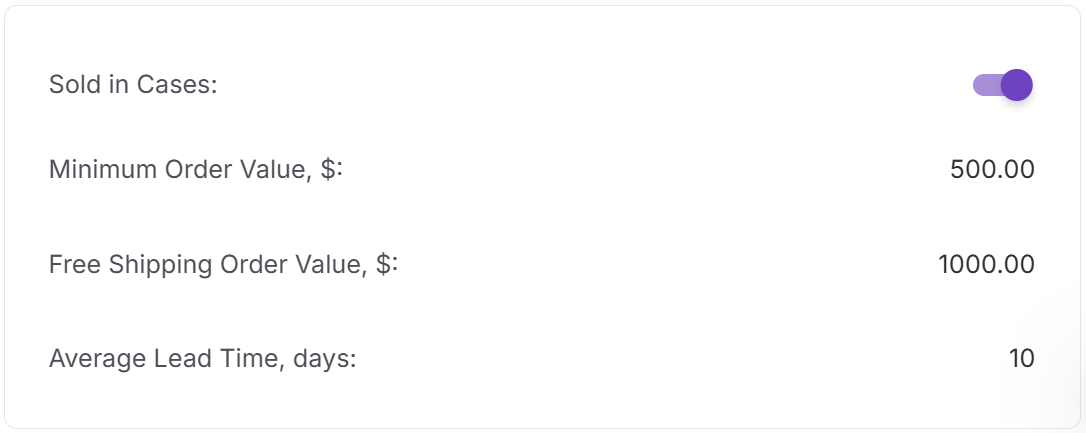
- Supply terms define supplier-specific rules that affect purchasing. These include minimum order value (MOV), free shipping order value, average lead time, and whether products are sold in cases. These settings are automatically applied when creating purchase orders.
- A notes section allows you to store internal comments, reminders, or additional agreements related to the supplier.

Purchase orders linked to suppliers
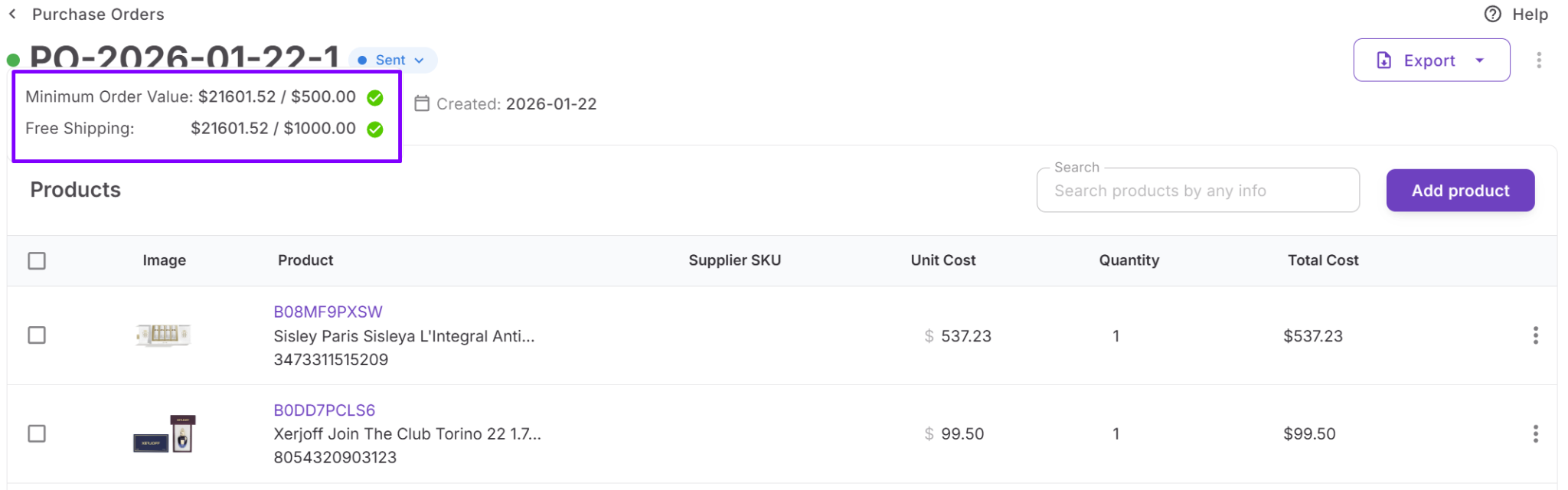
The Purchase Orders tab displays all orders associated with the supplier. From this tab, sellers can create new purchase orders or open existing ones for editing. Supplier rules such as MOV or free shipping thresholds are applied automatically inside purchase orders.
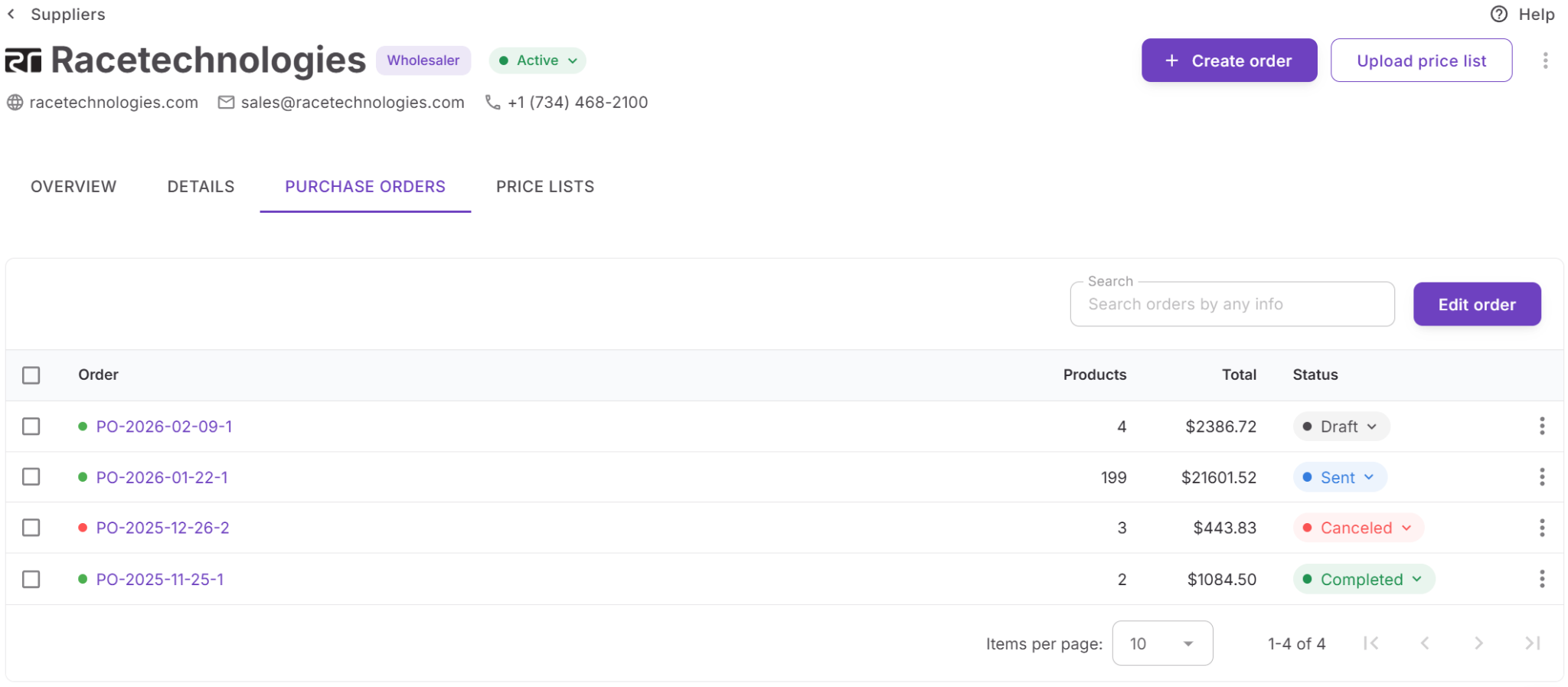
Within the order interface, visual indicators show whether the current order meets supplier thresholds. This helps sellers confirm orders as quantities and costs are adjusted.
Price lists connected to suppliers
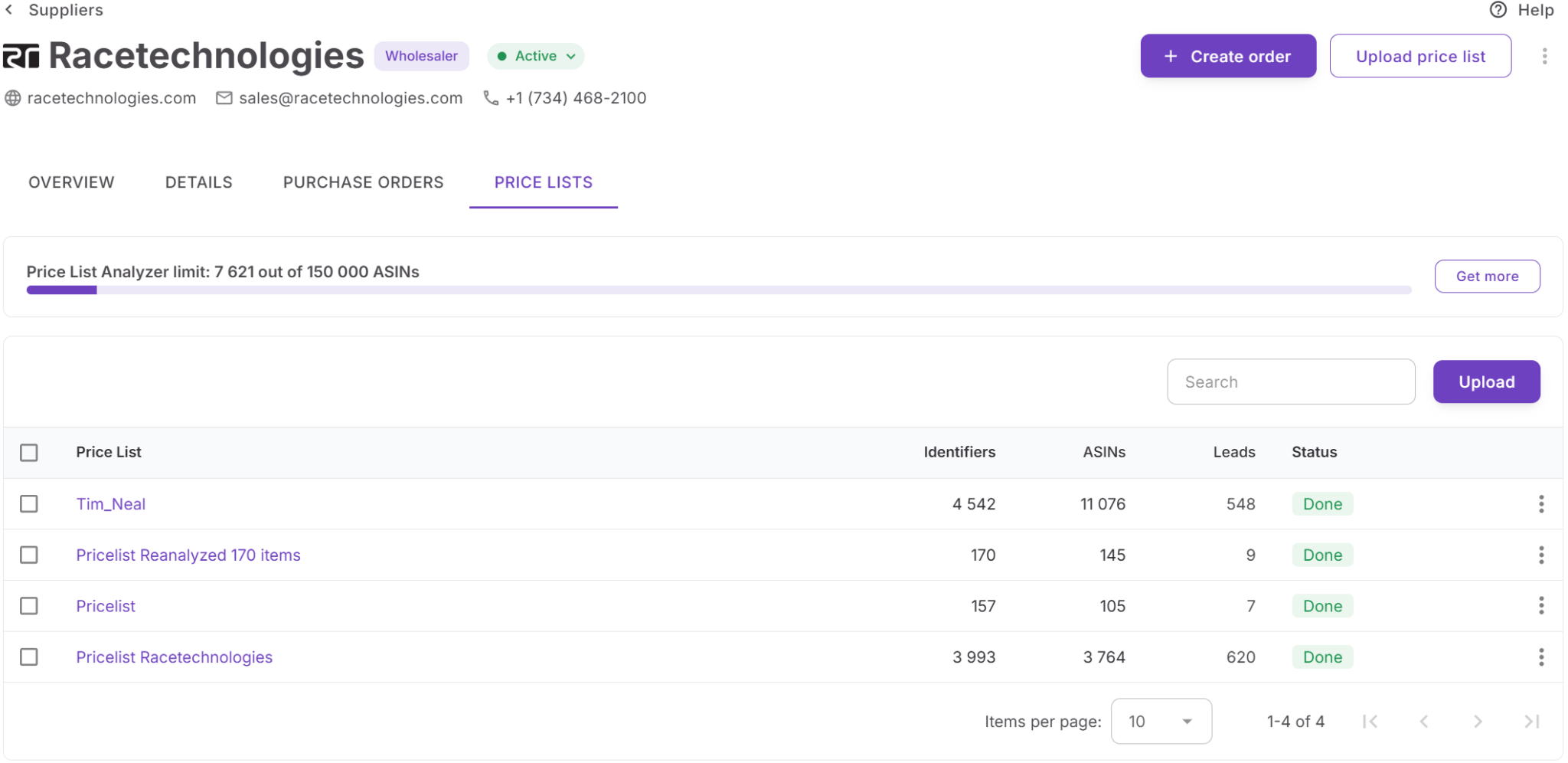
The Price Lists tab contains all supplier price lists uploaded to Price List Analyzer. Each list is linked directly to the supplier profile, keeping supplier catalogs organized and easy to access.
From this tab, sellers can upload new price lists or open existing lists for review and product analysis. Because the supplier is already assigned, uploads require fewer manual steps.
How Suppliers Database connects with other tools
Suppliers Database operates inside Seller Assistant’s connected wholesale workflow. Supplier profiles created in the database are reused automatically across other tools, which eliminates duplicate data entry and keeps sourcing decisions consistent.
For example, suppliers discovered through AI Supplier Finder can be saved directly into the database. Supplier profiles are then used when uploading catalogs to Price List Analyzer, assigning routing in Warehouses Database, and generating structured orders inside the Purchase Orders Module.
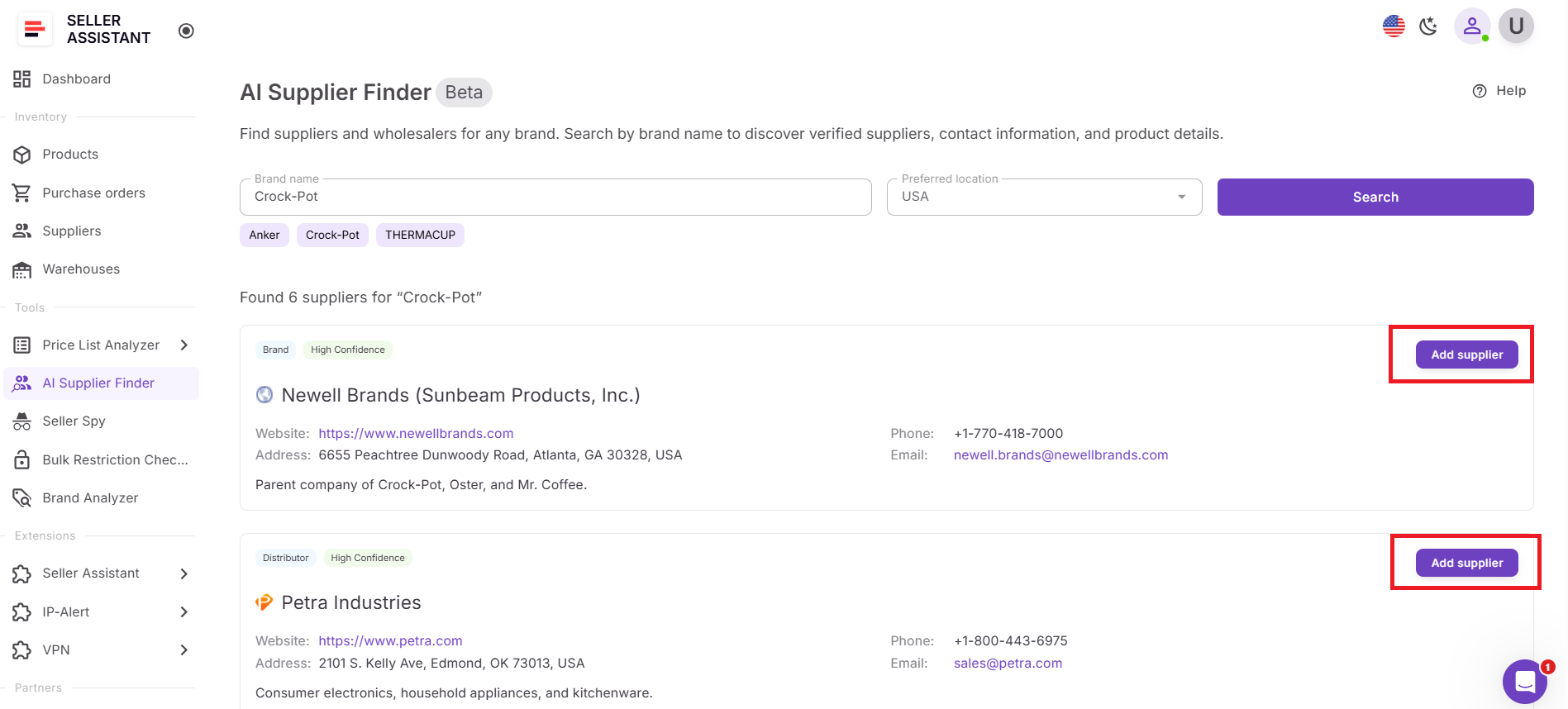
Because supplier data flows across tools automatically, sellers can move from supplier discovery to product analysis and purchasing without re-entering supplier information. This keeps wholesale workflows organized and scalable even as supplier networks grow.
How to Use Suppliers Database Step by Step
Suppliers Database is designed to make supplier management simple and repeatable. You create a supplier profile once, add the details that matter for sourcing and purchasing, and then reuse that information across Seller Assistant tools. As supplier relationships develop, you can update each profile, track progress, and keep purchasing workflows aligned with the correct terms and routing.
Step 1. Open Suppliers Database
Log in to your Seller Assistant account and go to Inventory → Suppliers. This opens your supplier list, where you can search, sort, and manage all supplier records in one place.
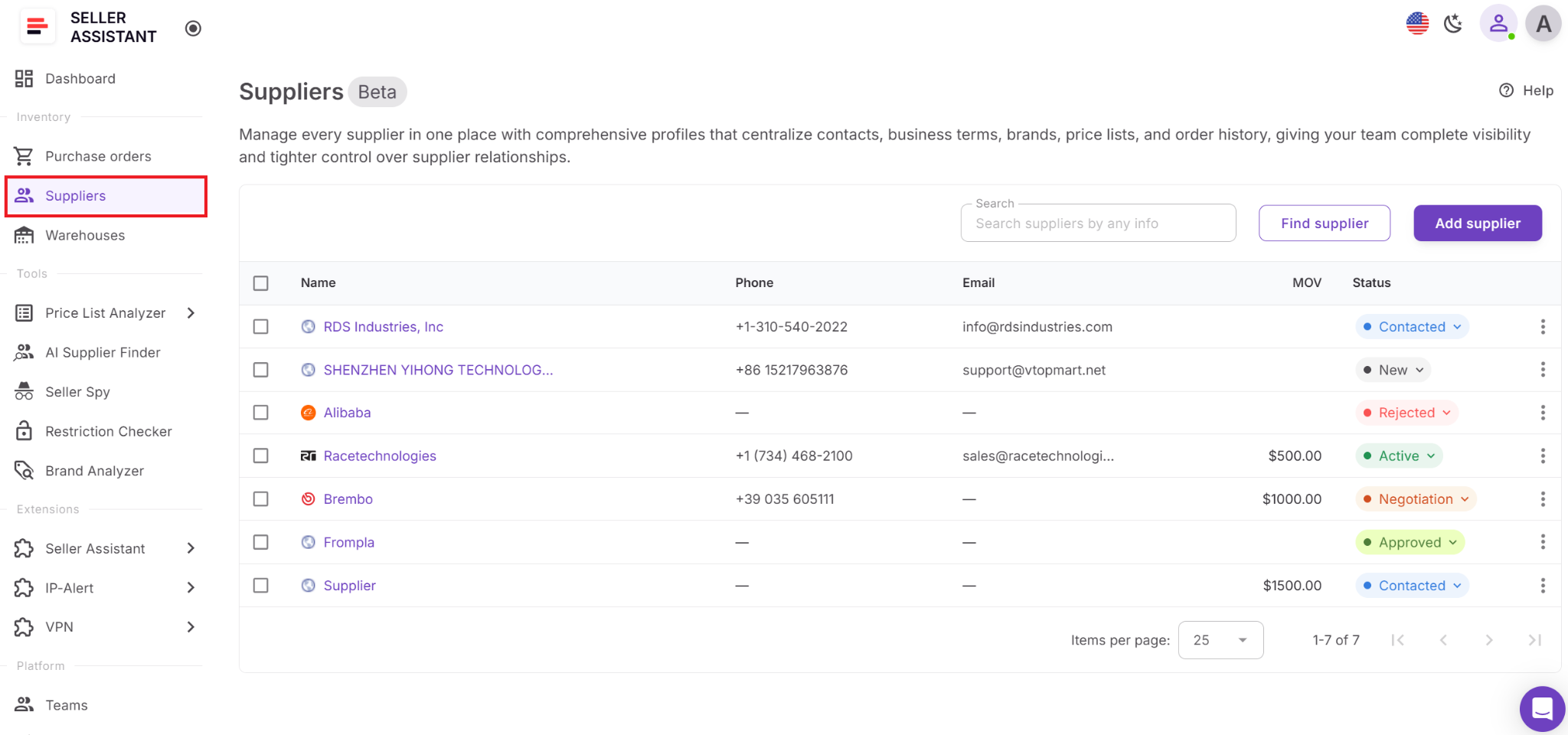
Step 2. Add a new supplier
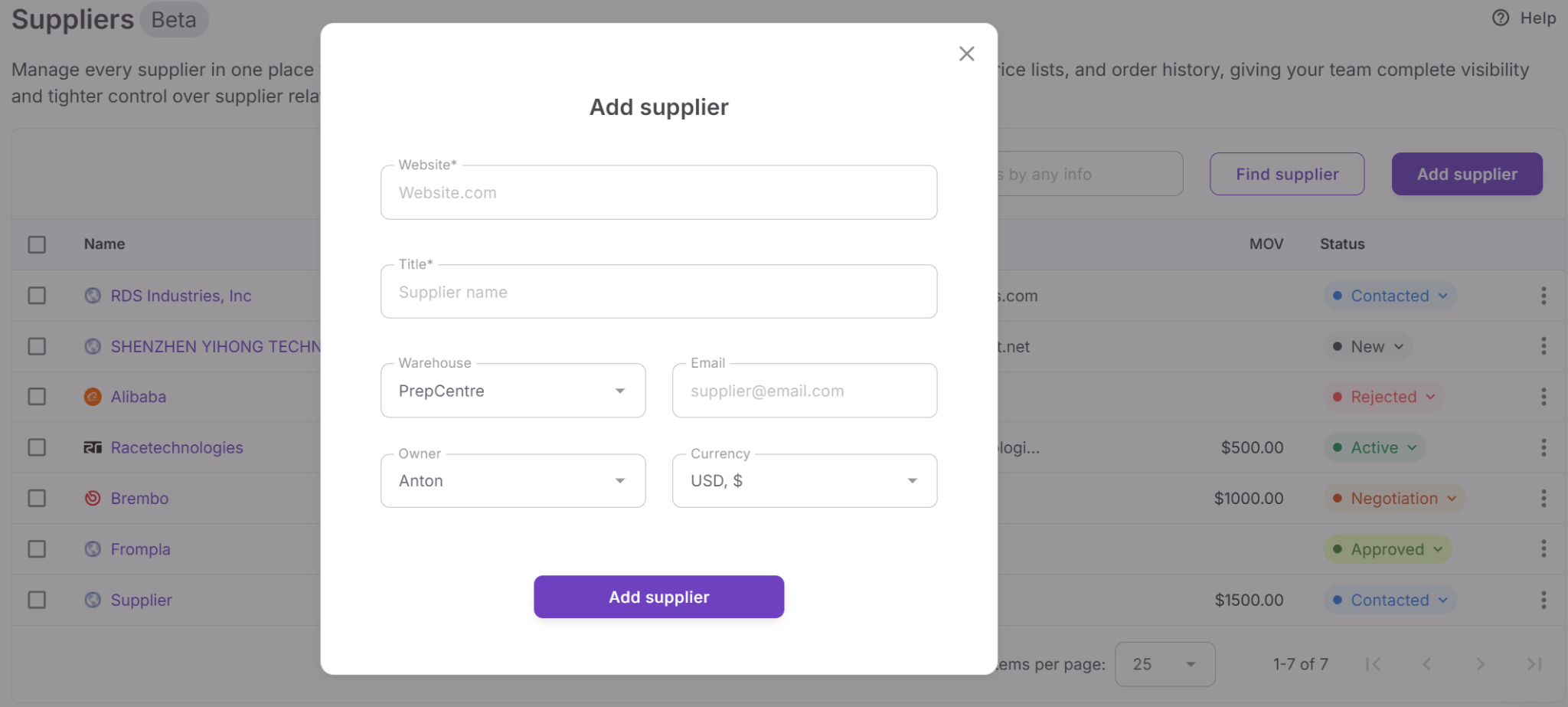
Click Add supplier and enter the required details, including the supplier’s website and name. You can also add optional information such as email, phone number, currency, responsible team member, warehouse, and supplier status.
Step 3. Complete the supplier profile
Open the supplier profile to add more detailed information. Fill in contact details, business information, payment terms, notes, and supply terms such as MOV, Free Shipping Order Value, Average Lead Time, and Sold in Cases settings.
Step 4. Set supplier status and ownership
Assign the supplier’s current relationship stage, such as New, Contacted, Negotiation, Approved, Active, or Rejected. You can also assign the supplier to a team member so responsibility is clear across your workflow.
Step 5. Link routing details
Connect the supplier to a default warehouse or prep center. This ensures that routing information is applied automatically when creating purchase orders.
Step 6. Upload supplier price lists
From the supplier profile, click Upload Price List to send the supplier’s catalog to Price List Analyzer. The supplier is prefilled automatically, which saves time and keeps uploads connected to the correct supplier.
Step 7. Create purchase orders
When you are ready to buy, create a purchase order directly from the supplier profile. Supplier details, warehouse routing, and key supply terms are applied automatically, which reduces manual entry and helps keep orders accurate.
Step 8. Track supplier activity
Use the Overview tab in the supplier profile to monitor supplier activity. You can review summary data such as total price lists, unique products, unique brands, and purchase orders by status, along with previews of the latest price lists and orders.
Step 9. Update supplier information as needed
As supplier relationships progress, update statuses, contacts, notes, and supply terms directly in the profile. Any changes stay connected across Seller Assistant tools, so your sourcing and purchasing data remains accurate.
FAQ
Can I manage multiple suppliers in Suppliers Database?
Yes. Suppliers Database is built to manage large supplier networks and keeps all supplier profiles organized in one place. You can search, filter, and update supplier records as your wholesale operation grows.
Can my team access the same supplier data?
Yes. Teams and virtual assistants can work from the same centralized supplier database. You can also assign a responsible team member to each supplier to keep ownership clear.
Can supplier details be reused across other tools?
Yes. Supplier profiles automatically connect with tools like Price List Analyzer, Warehouses Database, and the Purchase Orders Module. This allows you to reuse supplier data without re-entering it during sourcing and purchasing workflows.
Can I update supplier information after creating a profile?
Yes. Supplier profiles can be edited at any time to update contact details, supply terms, routing information, or relationship status. Changes stay synchronized across all connected Seller Assistant tools.
Can I add suppliers discovered through other Seller Assistant tools?
Yes. Suppliers found using AI Supplier Finder or Sourcing AI can be saved directly into Suppliers Database. This keeps supplier discovery connected to your centralized supplier management system.
Final Thoughts
Managing suppliers efficiently is essential for scaling an Amazon wholesale business. As your supplier network grows, tracking contacts, supply terms, routing rules, and purchase history across spreadsheets or emails quickly becomes difficult and error-prone. Seller Assistant’s Suppliers Database solves this challenge by centralizing supplier information and connecting it directly to your sourcing and purchasing workflow.
With structured supplier profiles, automated routing, and seamless integration with tools like Price List Analyzer, AI Supplier Finder, Warehouses Database, and the Purchase Orders Module, you can move from supplier discovery to purchasing without duplicating data. By organizing supplier relationships in one system, you gain better visibility, reduce operational mistakes, and build a more reliable wholesale sourcing process.
Seller Assistant automates and connects every stage of your Amazon wholesale and arbitrage workflow. It brings together in one platform: workflow management tools – Purchase Orders Module, Supplier Database, Warehouse Database, bulk research & sourcing tools – Price List Analyzer, Bulk Restriction Checker, AI Supplier Finder, Brand Analyzer, Seller Spy, Chrome extensions – Seller Assistant Browser Extension, IP-Alert Extension, and built-in VPN by Seller Assistant, and integrations & team access features – seamless API connectivity, integrations with Zapier, Airtable, and Make, and Virtual Assistant Accounts.


