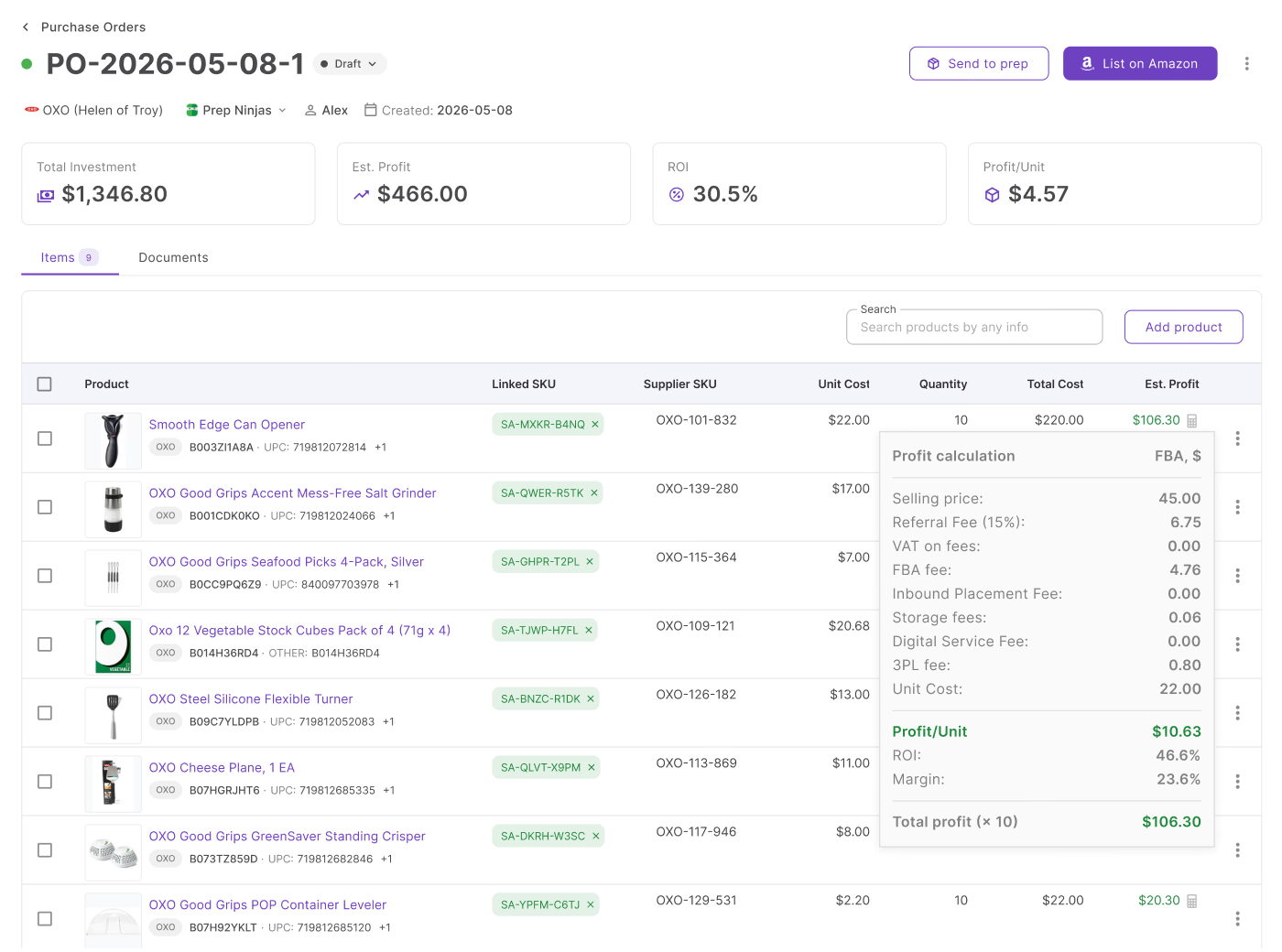
Every purchase order needs a ship-to address – but where that address comes from matters more than it seems. Type it in manually each time, and you’re one typo away from inventory landing at the wrong prep center. Pull it from a connected warehouse record instead, and routing stops being something you have to think about.
That’s the relationship between two of Seller Assistant’s workflow tools: Warehouses Database and Purchase Orders Module. Once a warehouse is set as primary or linked to a supplier, its address auto-fills when a new PO is created – and can still be changed order by order when a shipment needs to go somewhere else.
This post breaks down how that connection actually works.
Why Warehouse Routing Matters for Purchase Orders
A purchase order doesn’t just specify what products to buy – it also tells the supplier where to send them. As Amazon businesses grow and work with multiple suppliers, warehouses, and prep centers, routing becomes just as important as product selection.
Without a structured system, sellers waste time entering shipping information manually, risk sending inventory to the wrong location, and make purchasing harder to scale. Warehouse routing ensures every purchase order includes the correct fulfillment destination, keeping inventory moving efficiently from suppliers to Amazon.
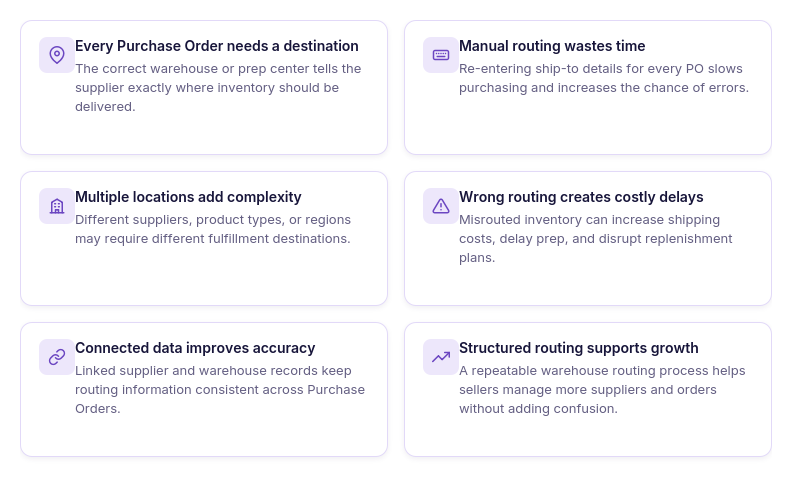
Every purchase order needs a destination
A supplier can’t fulfill an order without knowing where to ship it. Assigning the correct warehouse or prep center ensures inventory is delivered to the right fulfillment location from the start.
Manual routing creates unnecessary work
Entering ship-to addresses for every purchase order takes time and increases the risk of selecting the wrong warehouse. Reusing saved warehouse records makes purchasing faster and more consistent.
Multiple warehouses require organized routing
Many Amazon sellers work with different warehouses or prep centers based on suppliers, product categories, or geographic regions. Structured routing keeps these fulfillment locations organized and easy to manage.
Accurate routing reduces fulfillment mistakes
Sending inventory to the wrong warehouse can delay prep, increase shipping costs, and disrupt replenishment plans. Consistent warehouse routing helps suppliers deliver inventory where it’s expected.
Connected data improves purchasing
When supplier and warehouse information is connected, purchase orders automatically use existing fulfillment data instead of requiring repeated manual entry. This keeps purchasing workflows accurate and efficient.
Scalable operations need consistent fulfillment
As your supplier network and purchasing volume grow, warehouse routing helps standardize fulfillment across every order. A connected routing workflow makes it easier to expand your business without adding operational complexity.
How Seller Assistant Brings Warehouse Routing into Purchase Orders
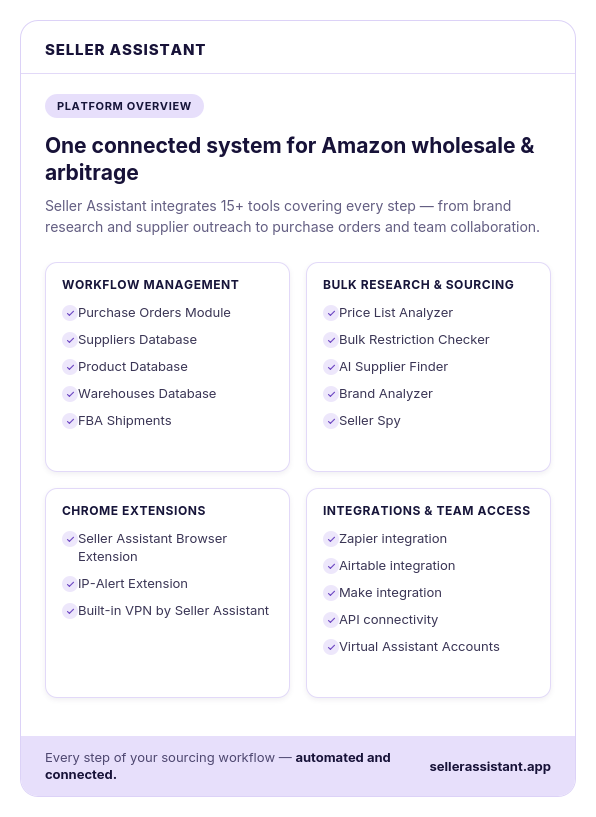
Purchase orders are most effective when fulfillment information is already part of the purchasing process. Instead of manually entering ship-to addresses or switching between warehouse records and supplier documents, Seller Assistant connects Warehouses Database with Purchase Orders Module, allowing warehouse information to flow directly into every order.
Whether you work with multiple prep centers or manage your own warehouse, the platform keeps fulfillment locations connected to purchasing. This reduces repetitive work, improves routing accuracy, and ensures suppliers always receive the correct destination for every order.
This workflow is powered by two Seller Assistant tools – Warehouses Database and Purchase Orders Module.
Warehouses Database – the source of fulfillment locations
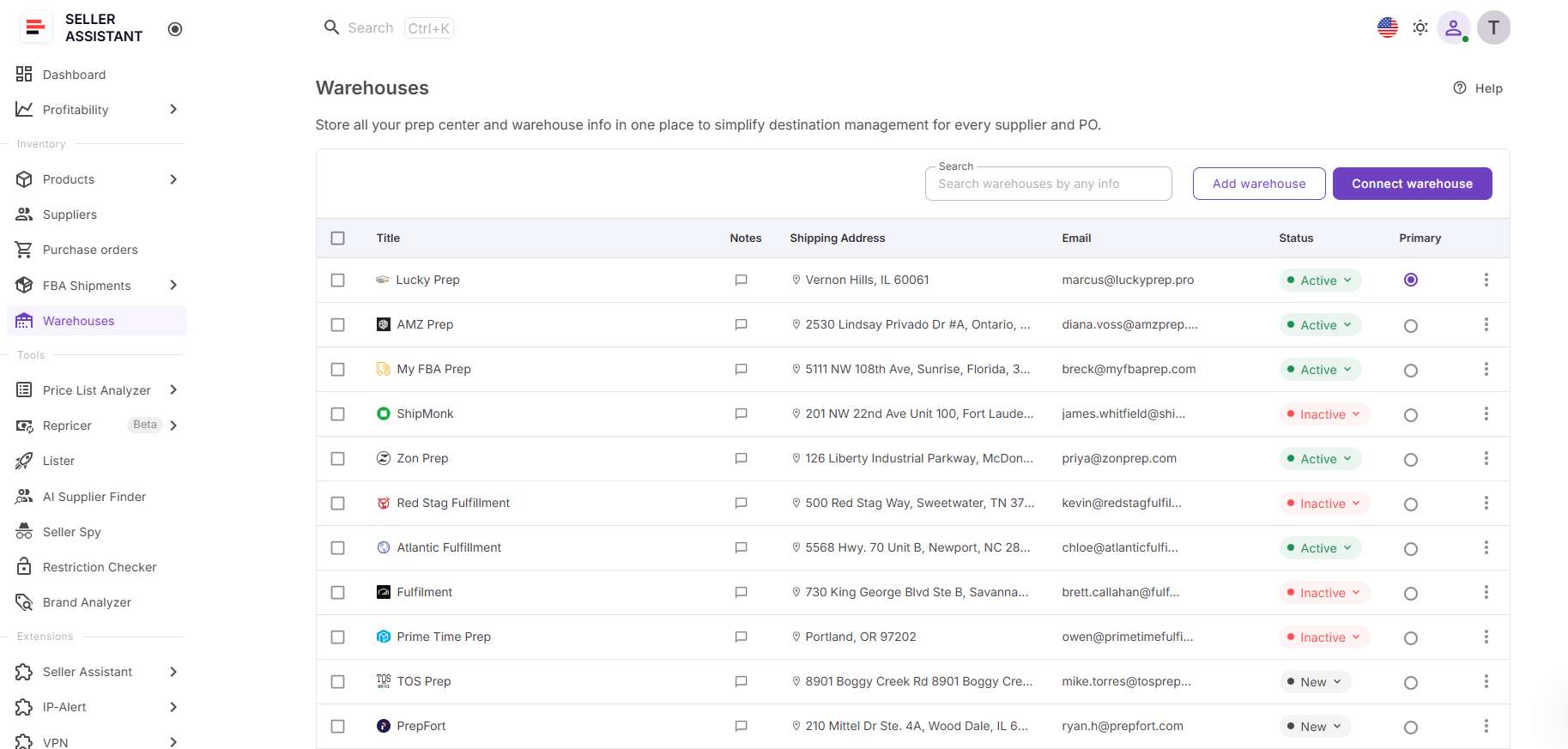
Warehouses Database stores all warehouses and prep centers in one centralized workspace. It keeps shipping addresses, contacts, notes, operational statuses, and synced prep center locations organized, making them available whenever you create or update a purchase order.
Purchase Orders Module – where warehouse routing is applied
Purchase Orders Module brings products, suppliers, and fulfillment locations together in one purchasing workspace. When creating a purchase order, you can select an existing warehouse or use the one already associated with the supplier, ensuring every order includes the correct ship-to destination.
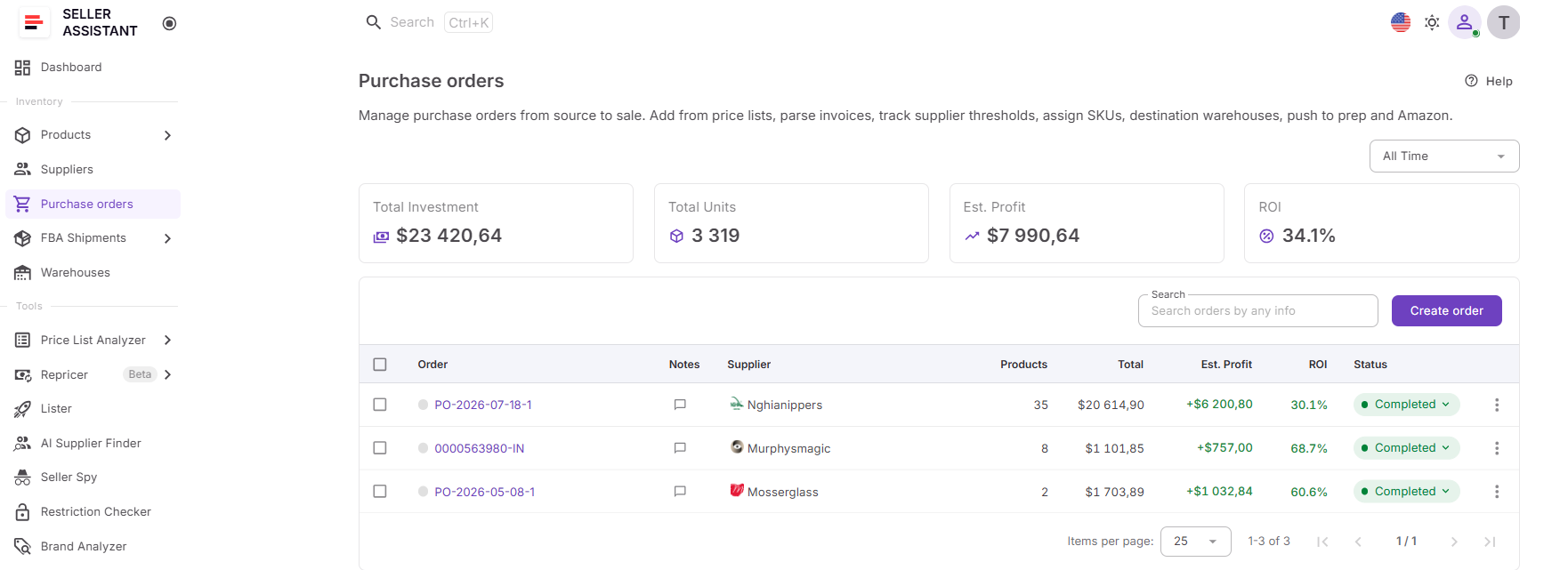
Warehouse routing that stays with every order
Once a warehouse is assigned to a purchase order, it becomes part of that order’s fulfillment instructions. The routing information remains attached throughout the purchasing process, giving suppliers clear delivery details and helping your team track where inventory is expected to arrive.
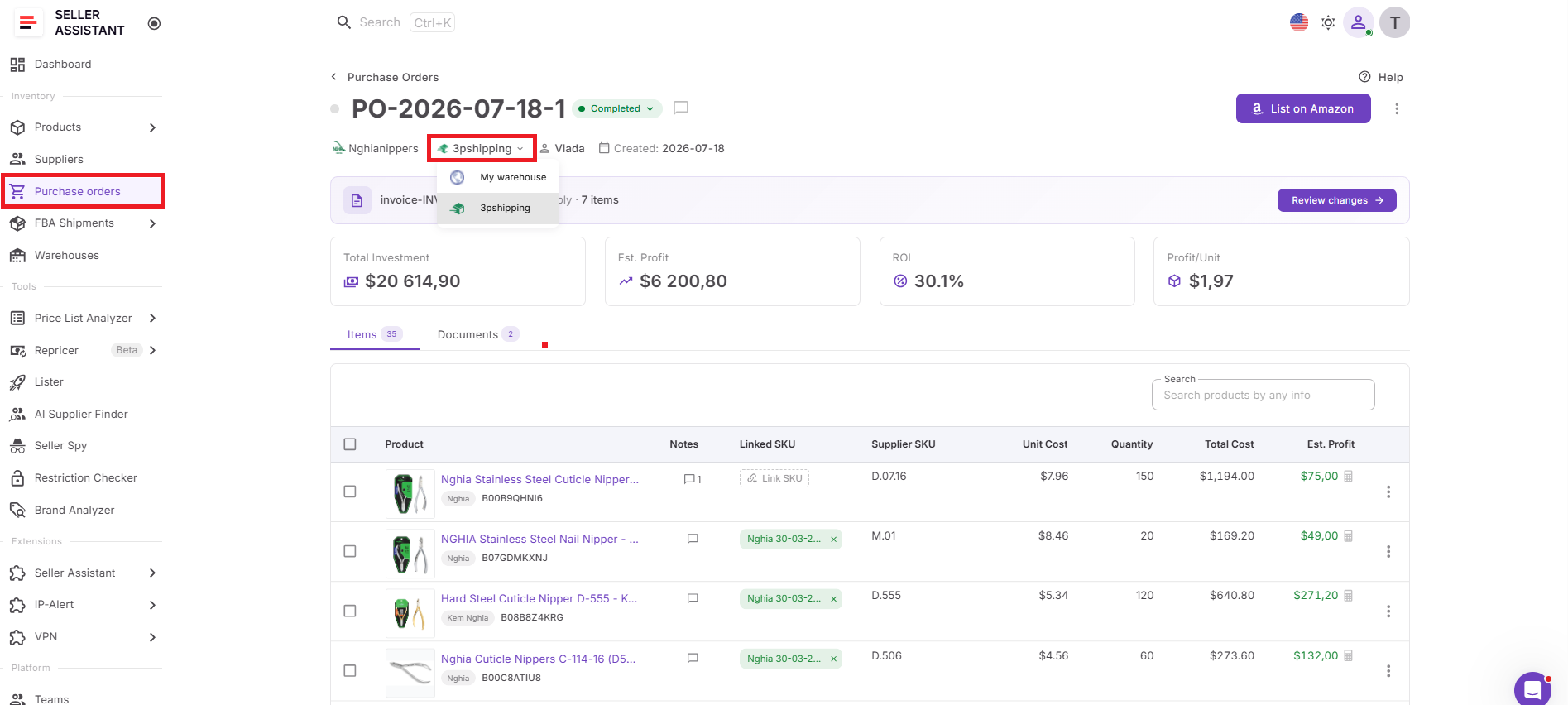
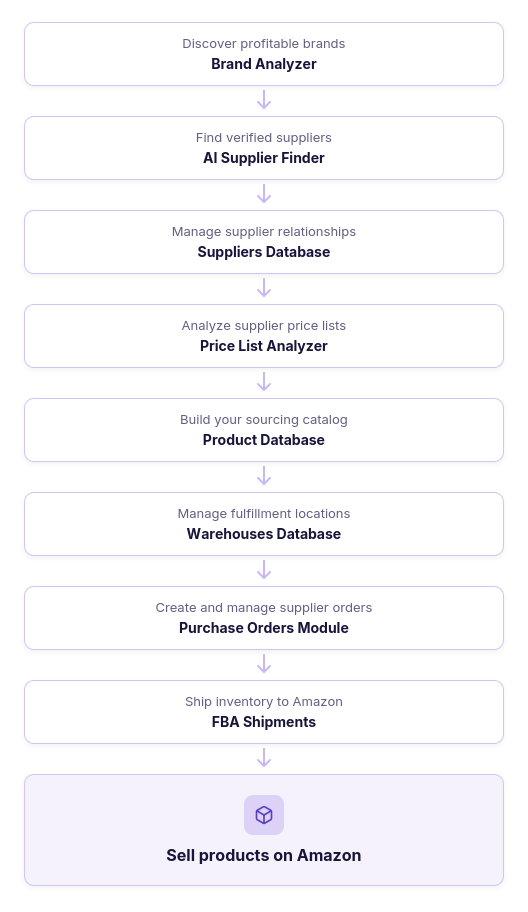
How warehouse routing fits into your Amazon workflow
Warehouse routing isn’t an isolated task – it’s part of the entire sourcing, purchasing, and fulfillment process. Seller Assistant connects every stage of this workflow, allowing product, supplier, warehouse, and purchase order data to flow seamlessly from one tool to the next, reducing manual work and keeping inventory moving toward Amazon.
What Is Warehouses Database?
Seller Assistant’s Warehouses Database is a fulfillment location management tool that helps Amazon wholesale sellers, online arbitrage sellers, and dropshippers keep warehouse routing accurate throughout the purchasing process. It centralizes warehouses, prep centers, and shipping destinations, making them immediately available when creating purchase orders.
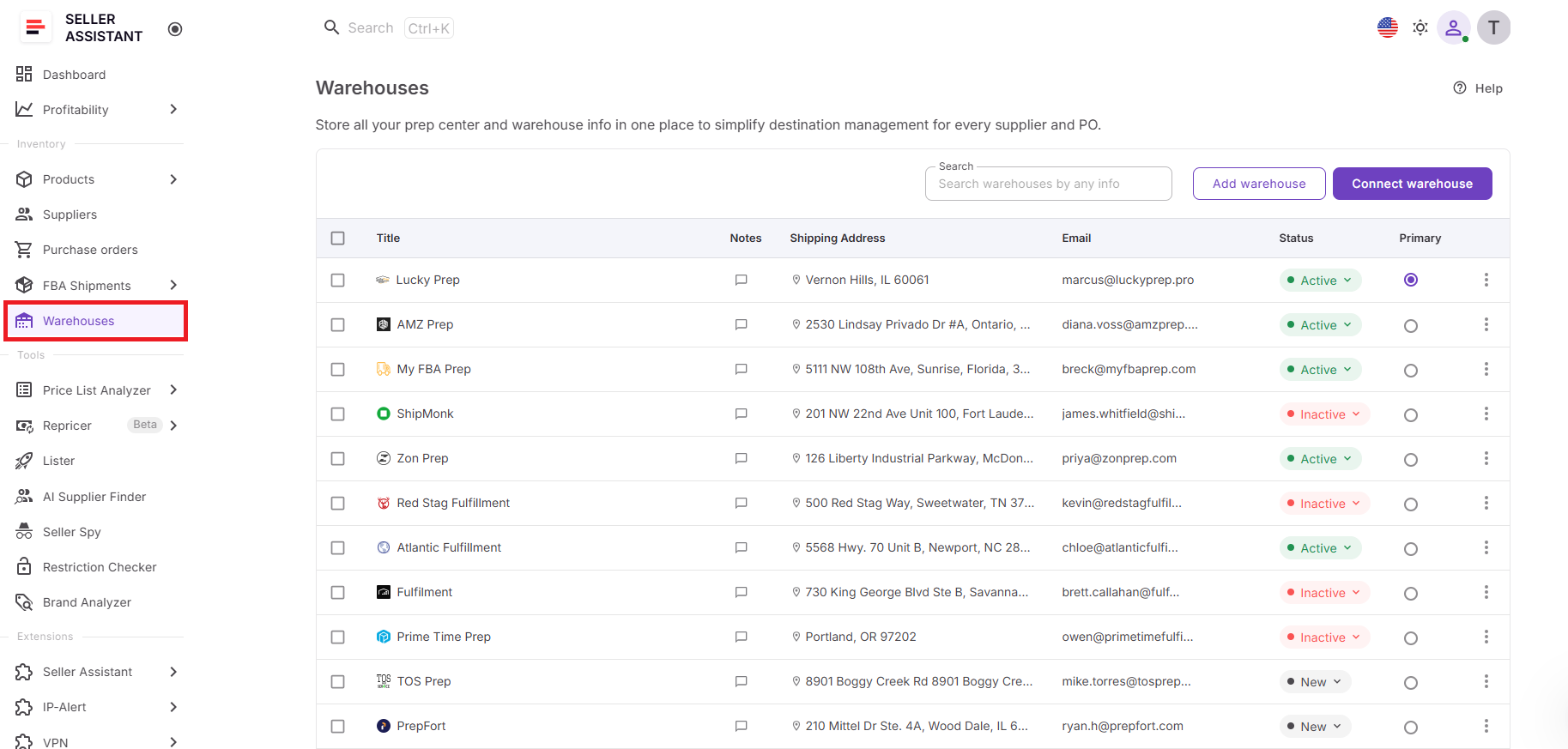
Instead of searching for ship-to addresses or entering warehouse details manually, sellers can maintain a structured database of fulfillment locations and reuse that information across Seller Assistant. The database supports manually created warehouses as well as synced prep center locations, helping ensure every purchase order is routed to the correct destination while reducing repetitive data entry.
What you can do with Warehouses Database
Warehouses Database provides everything you need to manage fulfillment locations and power warehouse routing in your purchase orders.
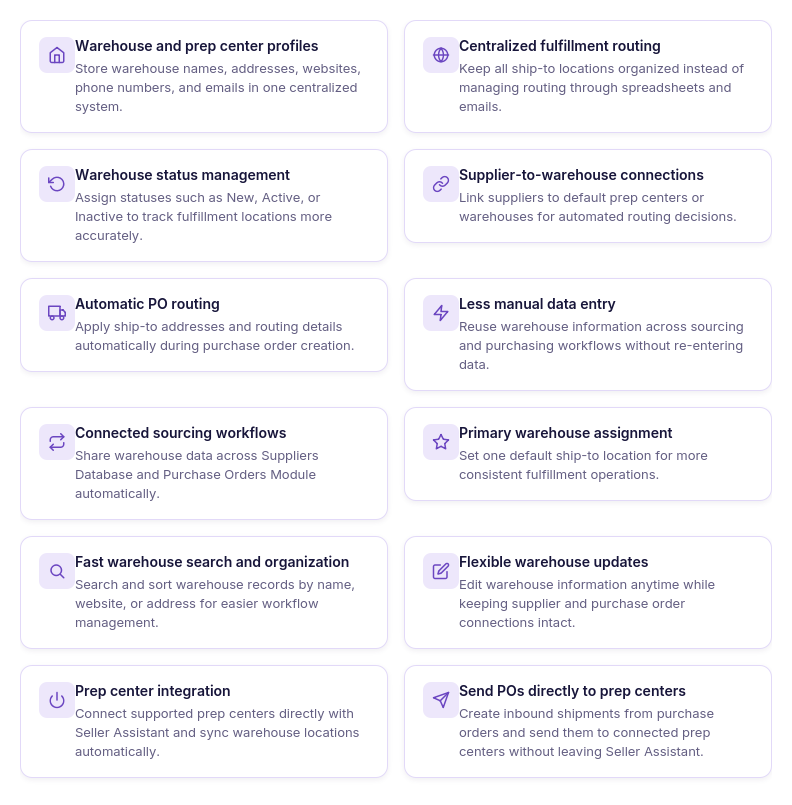
- Build a centralized warehouse directory
Create warehouse and prep center profiles with shipping addresses, contact information, websites, notes, and operational statuses, keeping every fulfillment location organized in one place.
- Keep fulfillment locations organized
Search, sort, update, and manage warehouse records from a single database, making it easy to maintain accurate routing information as your fulfillment network expands.
- Assign a default fulfillment location
Set one warehouse as your Primary Warehouse to use as the default ship-to destination across your purchasing workflow.
- Synchronize prep center locations
Connect supported prep centers through Prep Center Integration and automatically import warehouse locations into Seller Assistant eliminating duplicate records.
- Route purchase orders accurately
Select warehouses directly when creating or editing purchase orders, ensuring every supplier order is linked to the correct fulfillment destination.
- Reuse routing information
Apply saved warehouse records throughout Seller Assistant instead of repeatedly entering shipping addresses, improving purchasing speed and consistency.
- Keep routing data current
Update manually created warehouse records whenever fulfillment details change, while synced prep center locations stay automatically aligned with connected providers.
How Warehouses Database powers purchase orders
Warehouses Database supplies the routing information used throughout the purchasing process. Every warehouse profile stores the fulfillment details needed to direct supplier shipments, allowing purchase orders to reference existing warehouse records instead of relying on manual entry.
When creating a purchase order, sellers can select a warehouse from the centralized database, including both manually managed locations and synced prep center warehouses. This connected workflow improves routing accuracy, reduces purchasing errors, and helps inventory move efficiently from suppliers to warehouses, prep centers, and ultimately to Amazon FBA.
What Is Purchase Orders Module?
Seller Assistant’s Purchase Orders Module is a purchase order management tool that helps Amazon wholesale sellers, online arbitrage sellers, and dropshippers create, organize, and track supplier orders while keeping warehouse routing built into every purchase.
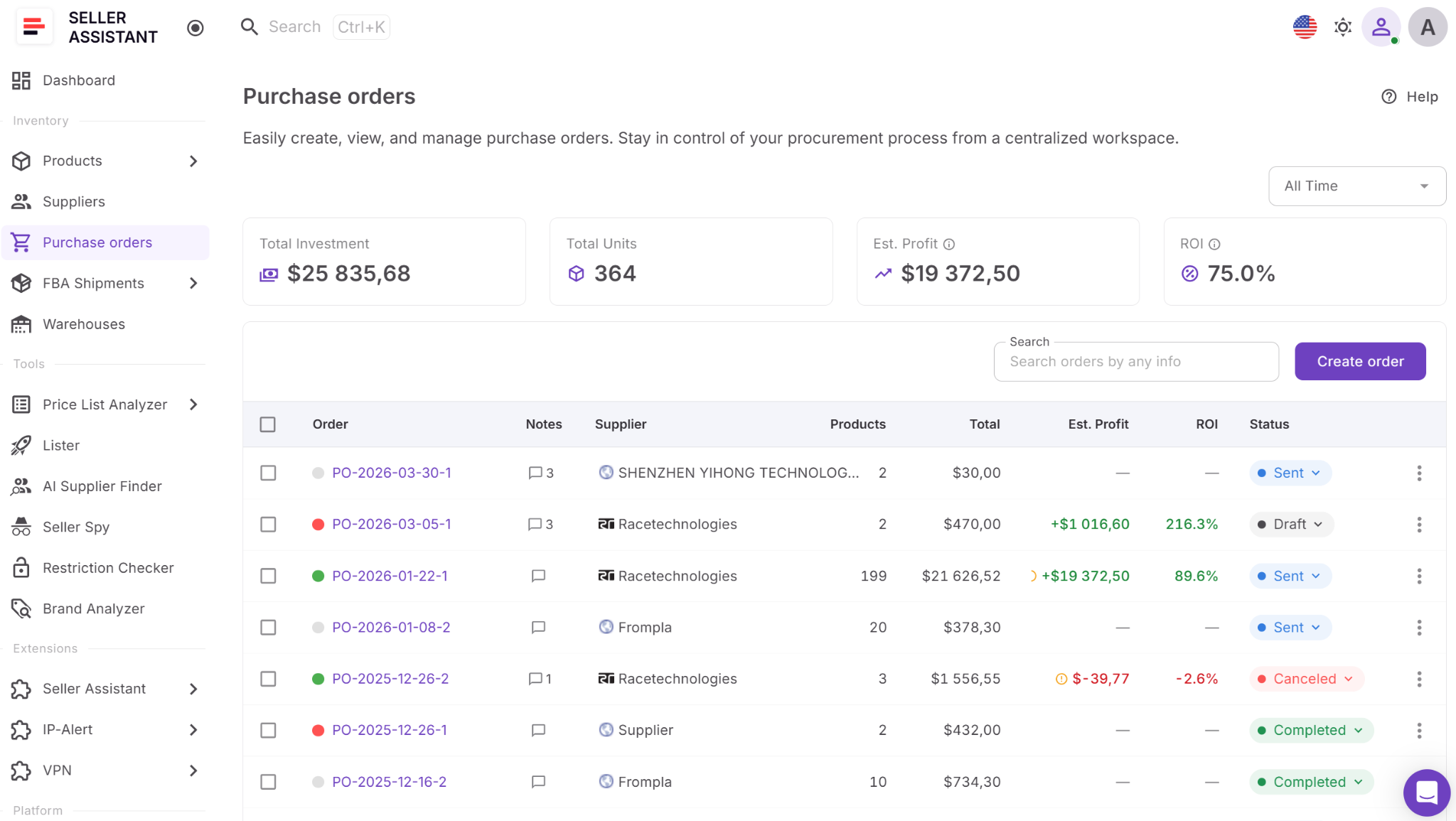
Instead of creating purchase orders manually and entering ship-to information for every order, the module combines supplier, product, and warehouse data in one workspace. Sellers can generate purchase orders from sourced products, assign fulfillment locations, manage costs and quantities, monitor order status, and reuse connected data across Seller Assistant. This reduces manual work, improves routing accuracy, and helps purchasing scale as order volume grows.
What you can do with Purchase Orders Module
Purchase Orders Module helps sellers manage purchasing from order creation to supplier fulfillment while keeping warehouse routing connected throughout the workflow.
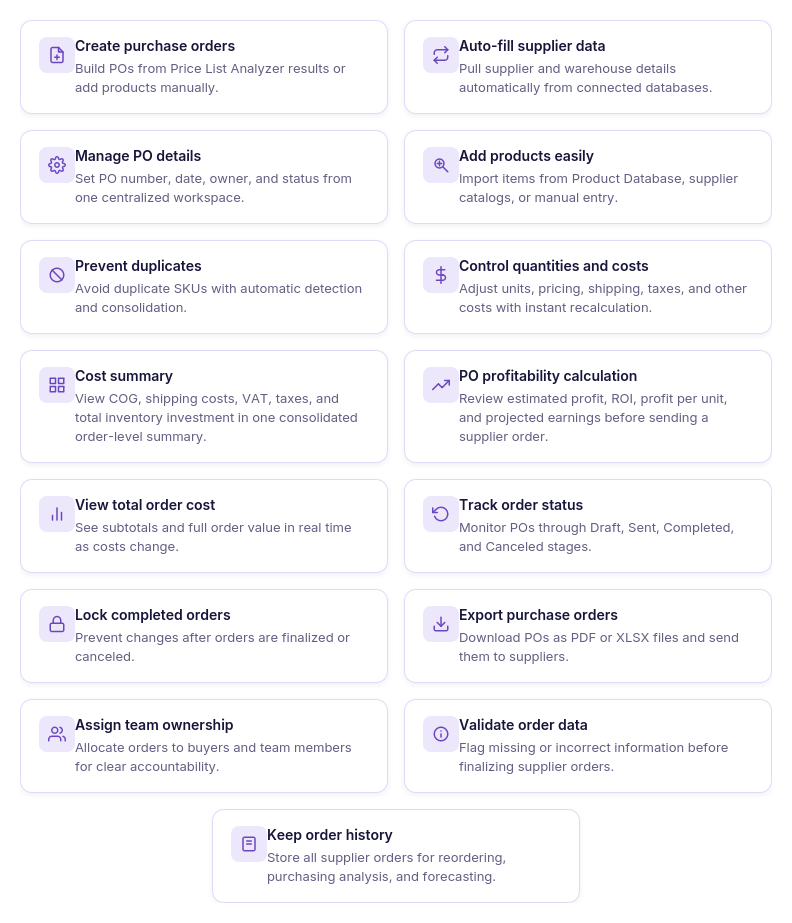
- Create purchase orders your way
Start a purchase order from scratch or generate one directly from Price List Analyzer or Product Database, eliminating repetitive setup and speeding up purchasing.
- Apply warehouse routing automatically
Use warehouse information from Warehouses Database so every purchase order includes the correct fulfillment destination. You can also change the assigned warehouse whenever your routing requirements change.
- Build orders from multiple product sources
Add products from supplier price lists, Product Database, Keepa search, or manual entry, keeping all purchasing activity inside one workspace.
- Manage costs and quantities
Update quantities, unit costs, shipping, taxes, and other order details while the module recalculates totals automatically as changes are made.
- Track purchasing progress
Monitor every purchase order through its lifecycle using Draft, Sent, Completed, and Canceled statuses, making procurement easier to organize and follow.
- Collaborate across your team
Share purchase orders with team members, assign ownership, and use notes to keep purchasing activities coordinated in one centralized workspace.
- Export supplier-ready documents
Generate purchase orders as PDF or Excel files that can be sent directly to suppliers or shared internally for review.
How Purchase Orders Module supports warehouse routing
Purchase Orders Module turns warehouse records into actionable fulfillment instructions. Instead of manually selecting shipping destinations for every supplier order, Seller Assistant uses connected warehouse data to populate purchase orders with the correct fulfillment location.
Warehouse information comes directly from Warehouses Database, including manually created warehouses and synchronized prep center locations. Because warehouse routing is built into the purchasing workflow, sellers can create supplier orders faster, reduce routing errors, and keep inventory moving efficiently from suppliers to prep centers and ultimately to Amazon FBA.
How Warehouses Database and Purchase Orders Module Work Together
The workflow starts in Warehouses Database, where you create and manage warehouse and prep center records, store shipping addresses, contact information, and routing details, and organize fulfillment locations in one place. Instead of entering ship-to information every time you place an order, you build a centralized warehouse directory that can be reused throughout your purchasing workflow.
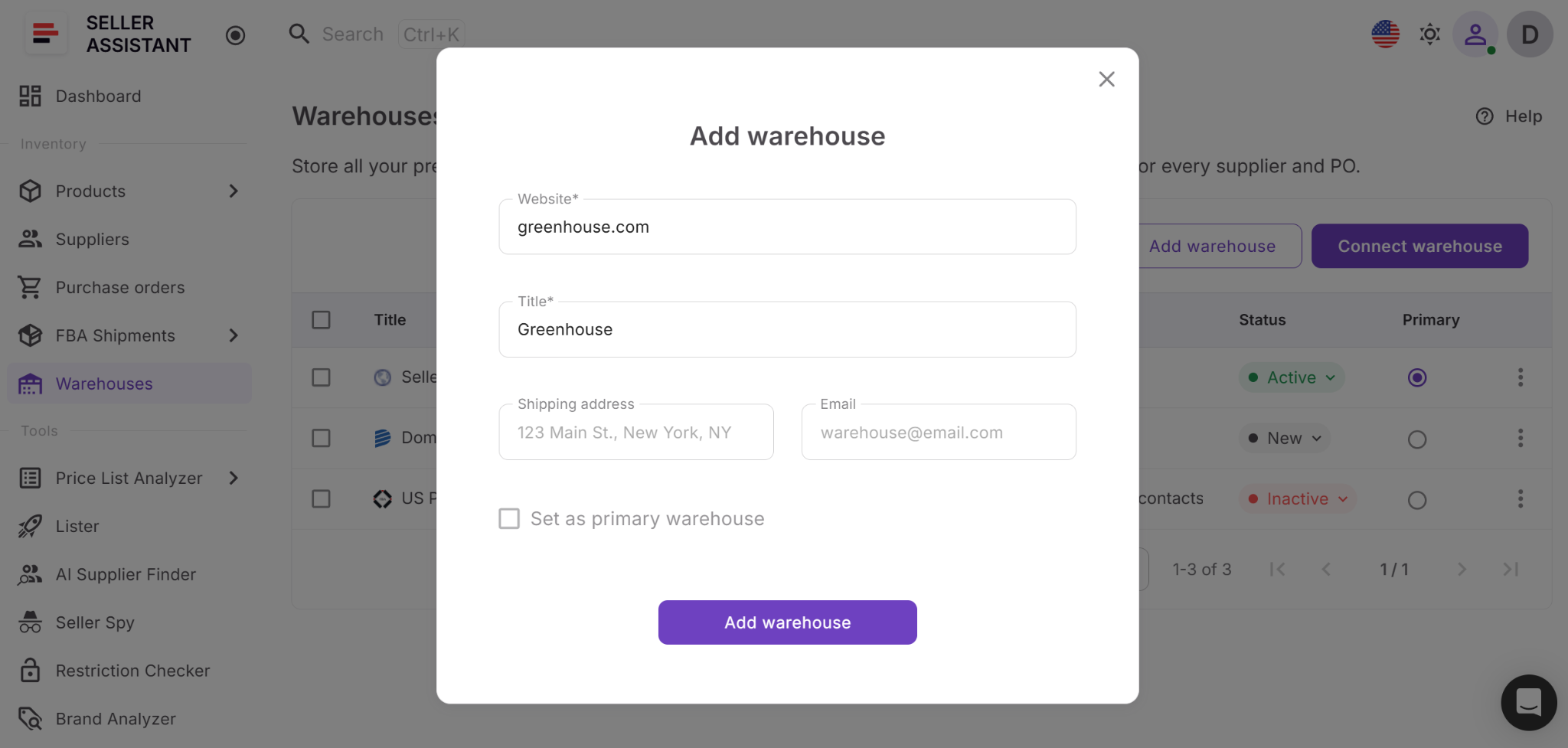
When creating or editing a purchase order, simply select a warehouse from the Warehouse field in the PO header. You can choose a manually created warehouse or a synced prep center location from the dropdown.
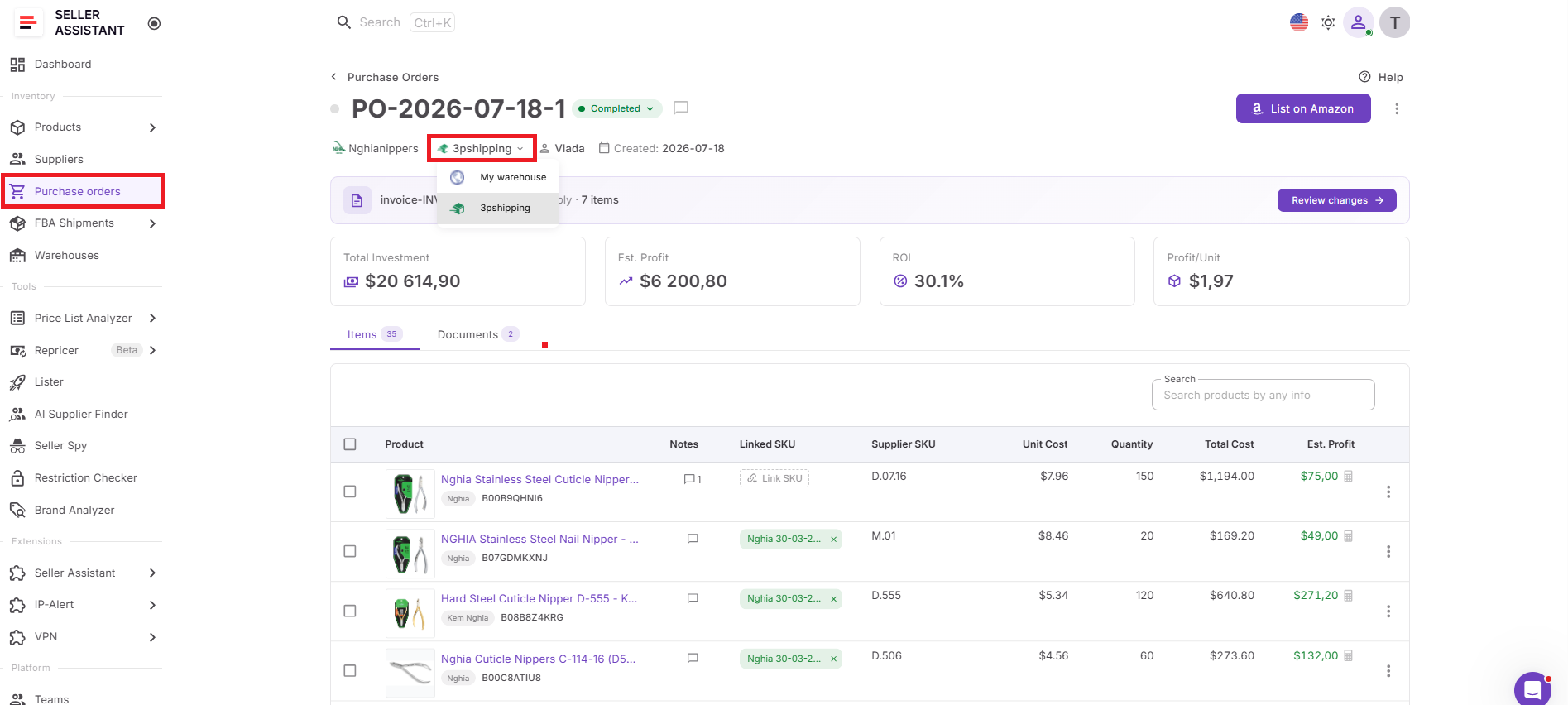
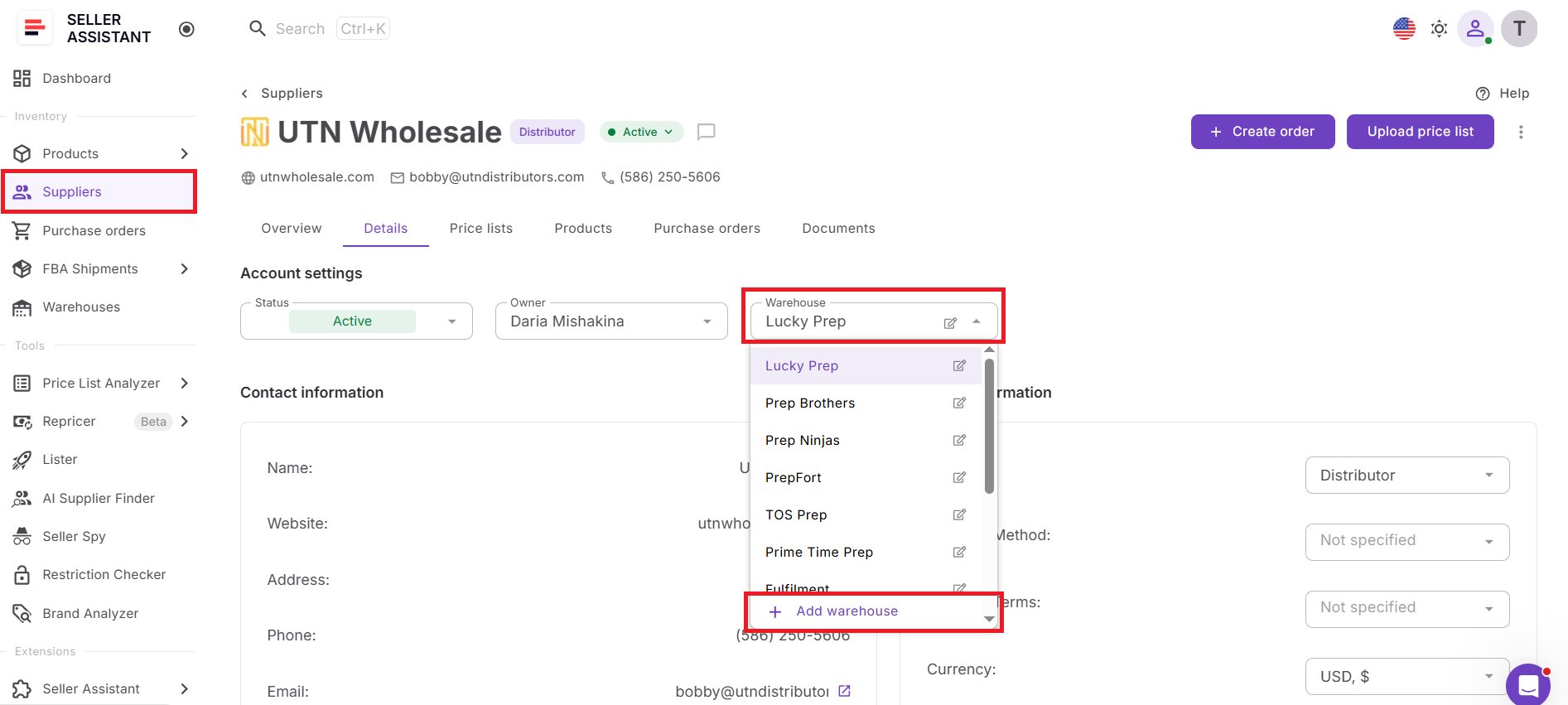
If the required warehouse doesn’t exist yet, you can create it in Suppliers Database and link to PO by selecting from the warehouse drop-down.
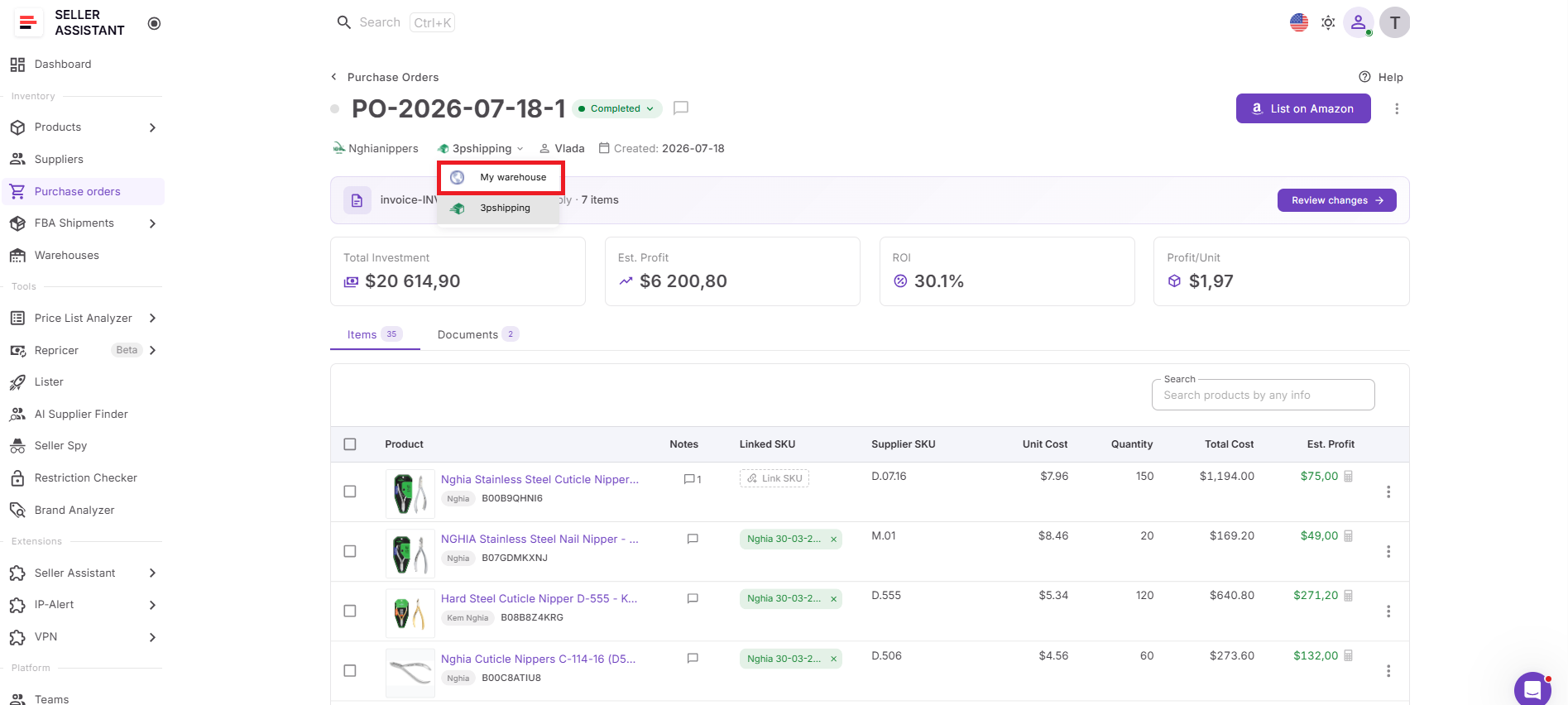
Purchase Orders Module uses this warehouse information to power routing for every supplier order. Along with products, supplier details, and purchasing data, each purchase order includes the selected fulfillment destination, ensuring suppliers know exactly where inventory should be shipped. If your routing changes before the order is processed, you can assign a different warehouse directly from the purchase order.
This connected workflow eliminates the need to copy warehouse addresses between spreadsheets, emails, and supplier documents. Instead, Amazon wholesale sellers, online arbitrage sellers, and dropshippers can create purchase orders using centralized warehouse data, improving routing accuracy, reducing manual work, and making purchasing operations easier to manage as their business grows.
How to Use Warehouse Routing in Purchase Orders Step by Step
Warehouse routing in Seller Assistant is designed to keep fulfillment information connected to every purchase order. By reusing warehouse records instead of entering shipping details manually, you can create supplier orders faster and ensure inventory is routed to the correct destination.
Step 1. Prepare your warehouse records
Open Inventory → Warehouses and make sure the warehouse or prep center you want to use is already in Warehouses Database. If necessary, create a new warehouse profile or connect a supported prep center.
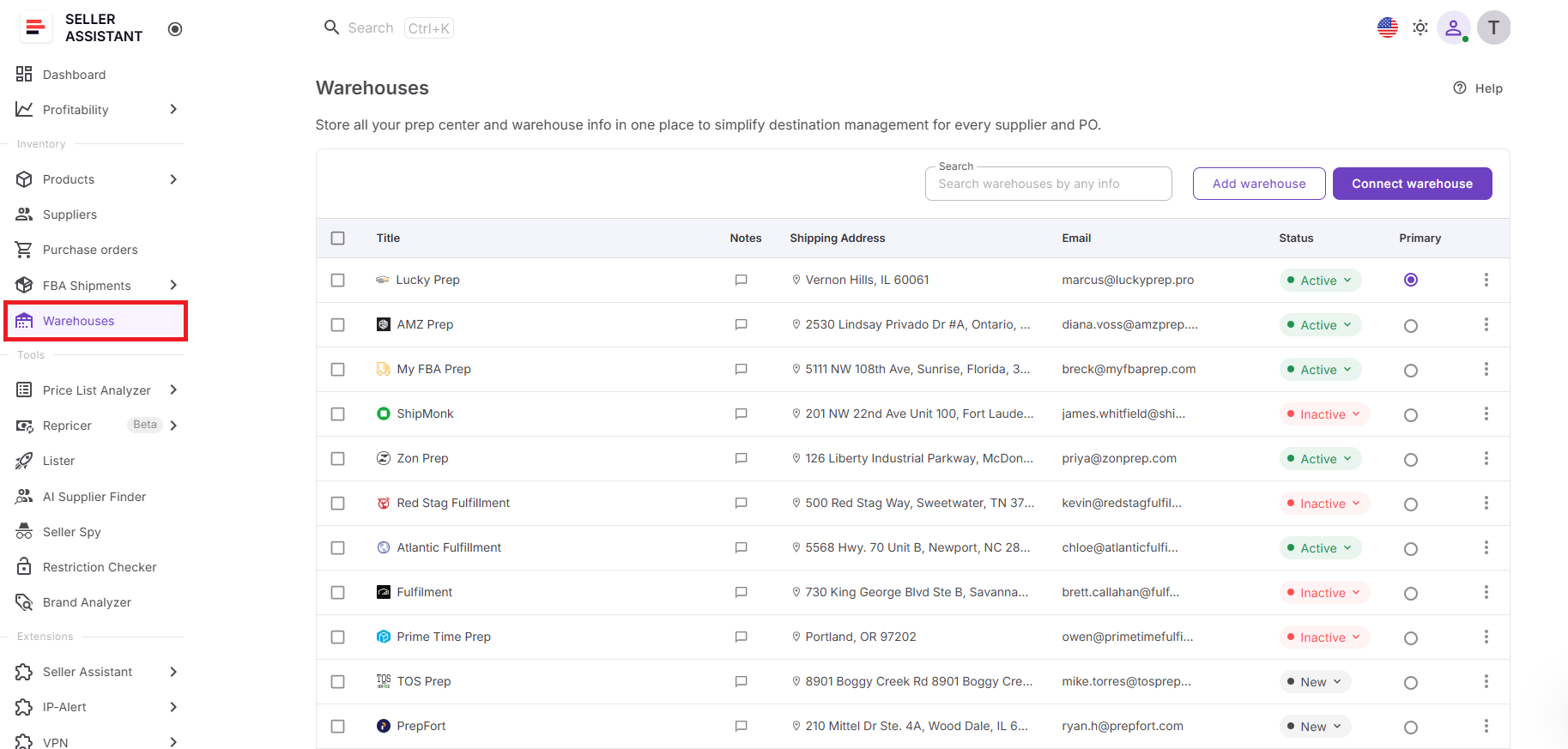
Accurate warehouse records provide the routing information used throughout the purchasing workflow.
Step 2. Create a purchase order
Go to Inventory → Purchase Orders and create a new purchase order or open an existing draft. Select your supplier and begin building the order.
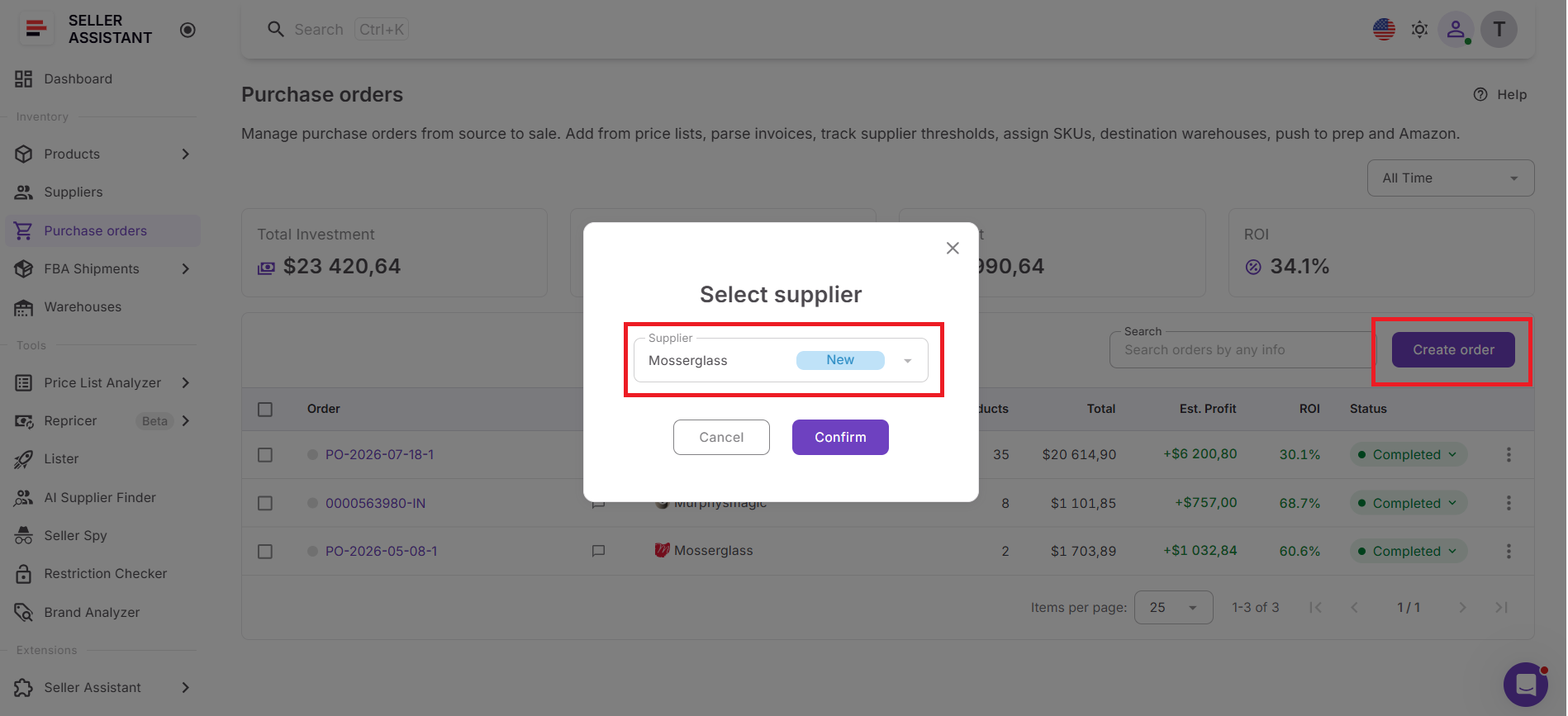
The purchase order is where warehouse routing becomes part of the supplier order.
Step 3. Assign the warehouse
Review the Warehouse field in the purchase order header and select the appropriate warehouse or prep center from the dropdown.
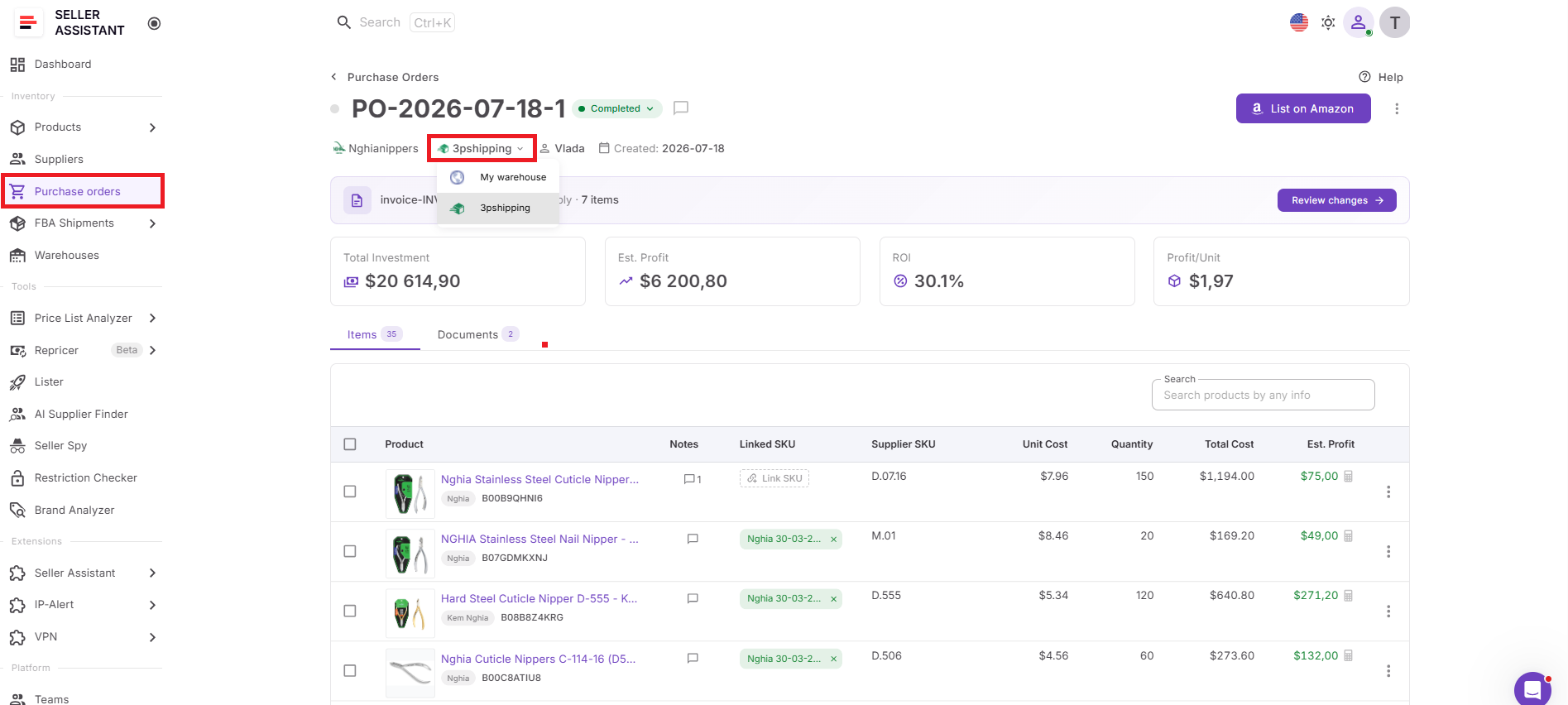
Assigning the correct fulfillment location ensures suppliers know exactly where inventory should be delivered.
Step 4. Add products and review the order
Add products from Price List Analyzer, Product Database, supplier price lists, Keepa, or manual entry, then verify quantities, costs, and routing information.
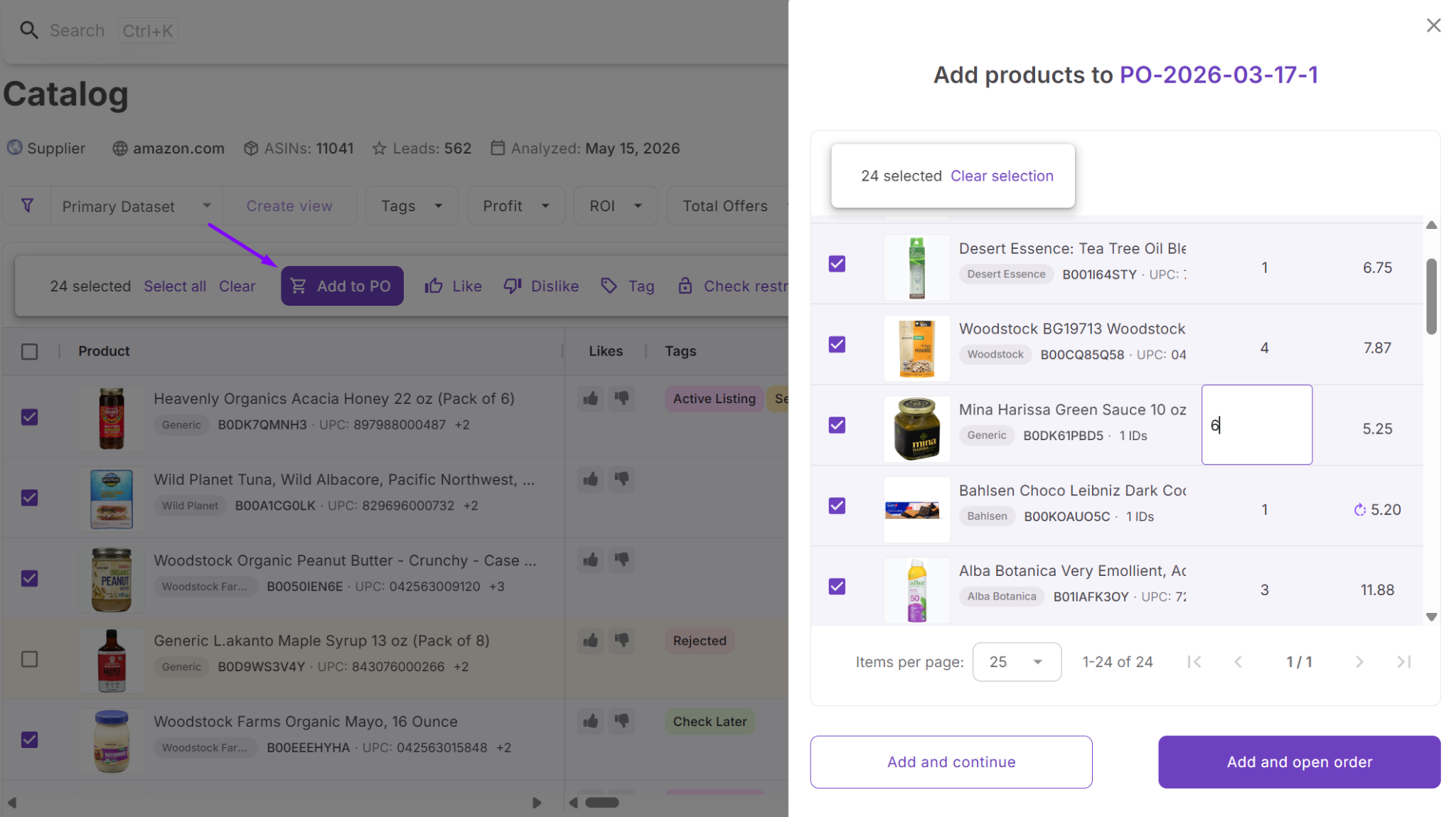
Reviewing all order details together helps ensure both purchasing and fulfillment information are correct before sending the order.
Step 5. Update routing if needed
If your fulfillment plan changes, simply choose another warehouse before the purchase order is finalized. If the order is already linked to a prep center shipment, unlink the shipment first before changing the warehouse. Unlinking deletes that draft shipment at the prep.
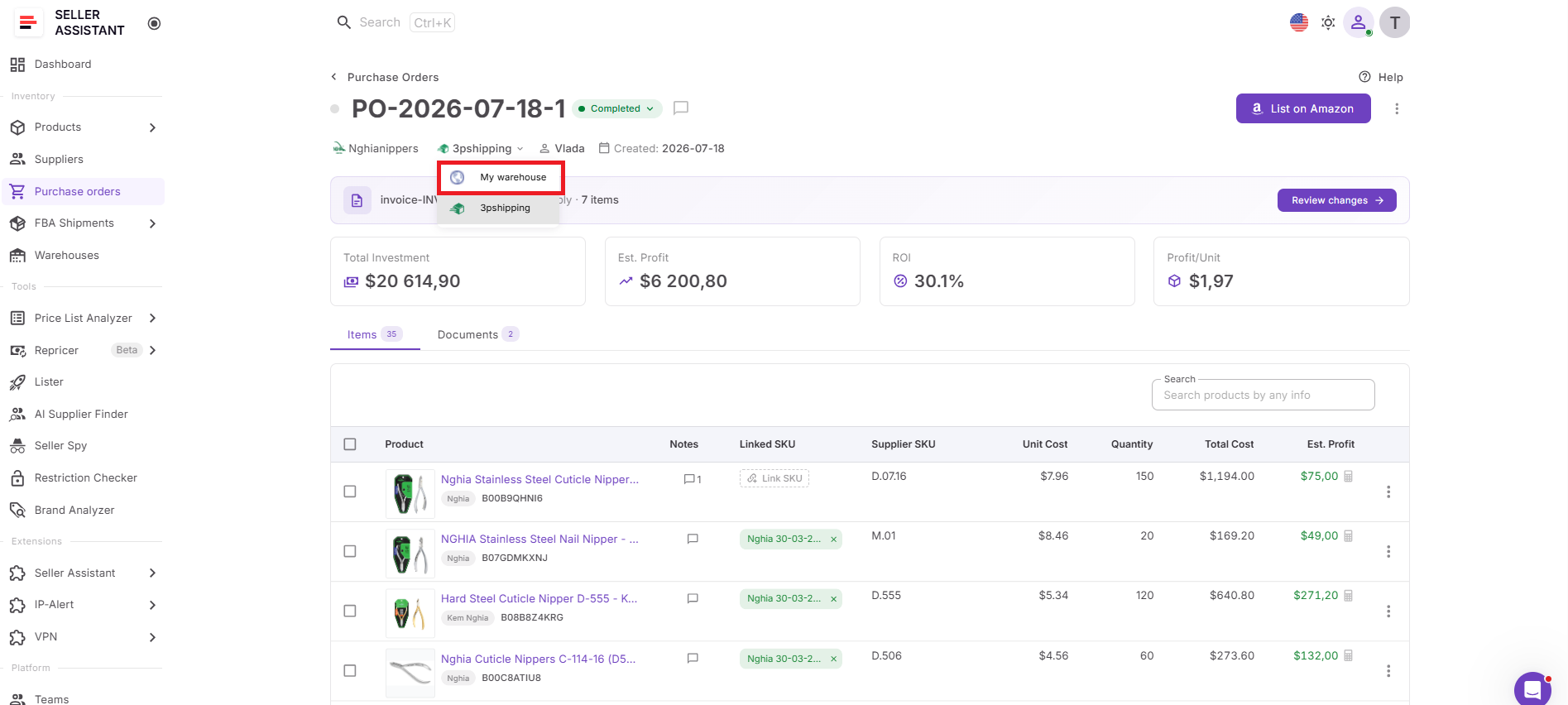
Flexible routing allows you to adapt to operational changes without creating a new purchase order.
Step 6. Finalize and send the purchase order
Confirm the warehouse assignment, change the PO status when appropriate, and export or send the purchase order to your supplier.
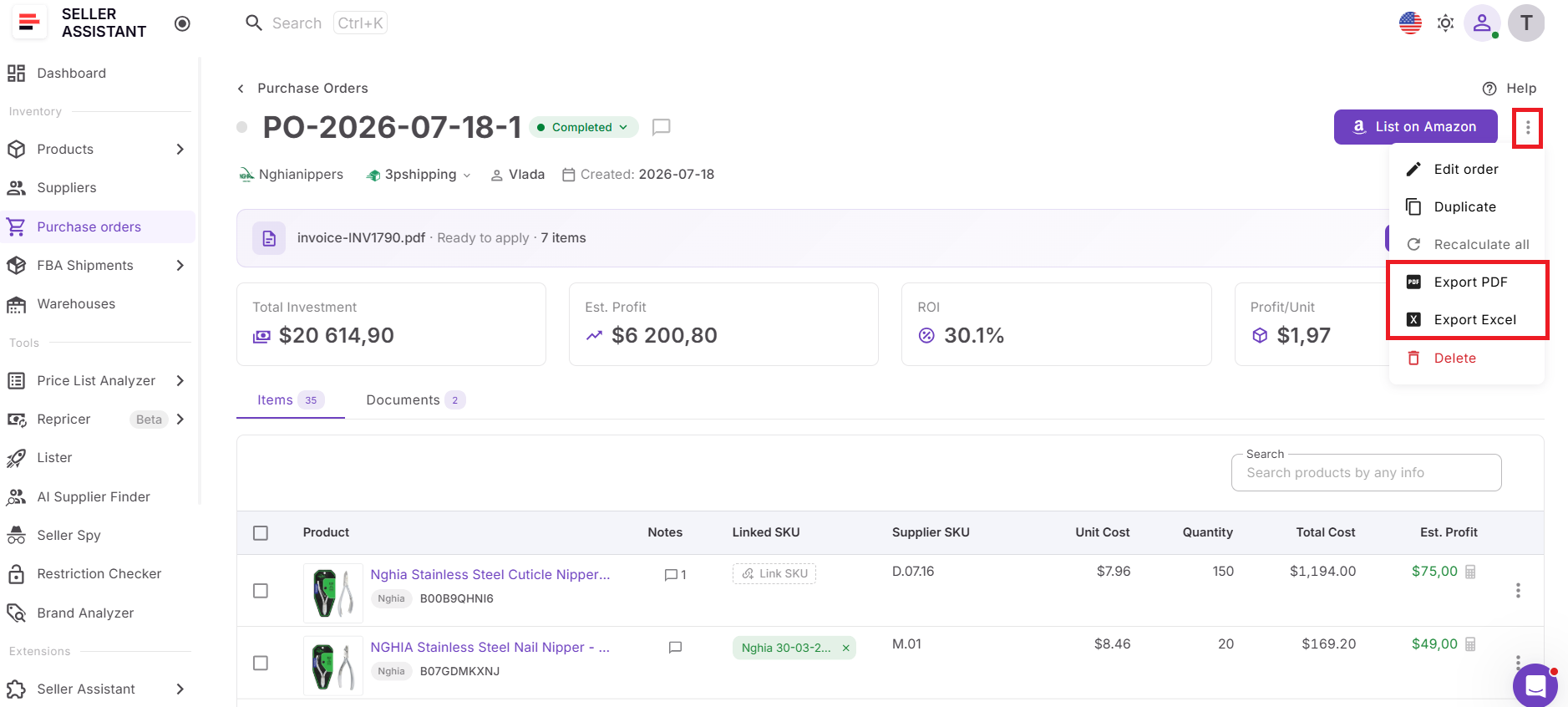
A correctly routed purchase order gives suppliers clear shipping instructions, helping inventory move efficiently to your warehouse, prep center, and ultimately Amazon FBA.
What Changes Once Warehouse Routing Is Built into Purchase Orders
Assigning a warehouse to a purchase order does more than fill in a ship-to address. It connects fulfillment information with the purchasing process, allowing every order to follow a consistent routing workflow while reducing manual work.
Warehouse information is reused automatically
Instead of entering shipping details for every new purchase order, you select an existing warehouse record. This saves time and helps keep fulfillment information consistent across supplier orders.
Every purchase order includes a clear destination
Each order is linked to a specific warehouse or prep center, giving suppliers clear delivery instructions and reducing uncertainty during fulfillment.
Routing becomes easier to manage
If your fulfillment strategy changes, you can update the warehouse assigned to a purchase order before it’s finalized. This provides flexibility without rebuilding the order from scratch.
Connected prep centers stay available
Warehouses synchronized through Prep Center Integration appear alongside manually created locations, allowing you to route purchase order using the same centralized fulfillment data.
Purchasing becomes more scalable
As you add suppliers, warehouses, and prep centers, warehouse routing remains organized and repeatable. Instead of increasing administrative work, every new purchase order follows the same structured routing process.
FAQ
Can I use different warehouses for different purchase order from the same supplier?
Yes. Even if you typically ship inventory from one supplier to the same warehouse, you can select a different fulfillment location for a specific purchase order whenever your logistics requirements change. This is useful when splitting inventory between prep centers or routing seasonal purchases to another facility.
What happens if I assign the wrong warehouse to a purchase order?
If the purchase order hasn’t been linked to a prep center shipment, you can simply choose another warehouse before sending the order. Reviewing the warehouse assignment before exporting or sharing the purchase order helps avoid shipping delays and unnecessary rerouting costs.
Can I use synced prep center warehouses in purchase order?
Yes. Warehouses imported through Prep Center Integration appear in the same warehouse selection list as manually created locations. This allows you to route purchase order using the most up-to-date fulfillment locations from your connected prep center.
Does warehouse routing replace warehouse management software?
No. Warehouse routing in Seller Assistant is designed to ensure purchase orders use the correct fulfillment destination, not to manage warehouse inventory or operations. It complements warehouse management by connecting fulfillment locations with your Amazon purchasing workflow.
Can I change the warehouse after creating a purchase order?
Yes. You can update the warehouse assigned to a purchase order while it’s still editable, allowing you to adapt to changes in your fulfillment plan. If the purchase order has already been linked to a prep center shipment, unlink it before selecting a different warehouse. Unlinking deletes that draft shipment at the prep.
Final Thoughts
Warehouse routing is a fundamental part of an efficient purchasing process. When every purchase order includes the correct fulfillment destination, suppliers know exactly where to send inventory, purchasing becomes more consistent, and your team spends less time correcting routing mistakes or re-entering shipping information.
Seller Assistant simplifies this process by connecting Warehouses Database with Purchase Orders Module in one integrated workflow. Whether you manage your own warehouse, work with multiple prep centers, or use both, centralized warehouse routing helps you create Purchase Orders faster, improve fulfillment accuracy, and move inventory from suppliers to Amazon FBA more efficiently.