Every purchase order needs two essential things to go right: the correct supplier terms and the correct ship-to address. When these live in separate systems – supplier details in one spreadsheet, warehouse addresses in another – it’s easy for the two to fall out of sync, and a single mismatch can send inventory to the wrong prep center.
Seller Assistant closes that gap by linking Suppliers Database directly to Warehouses Database. Once a supplier is connected to a warehouse or prep center, that routing information carries through automatically – no re-entering addresses, no double-checking which prep center handles which account.
This post shows how the connection works and why it matters as your supplier list grows.
Why Supplier and Warehouse Data Can’t Live Apart
Suppliers and warehouses are two sides of the same purchasing workflow. Every supplier needs a designated destination for inventory, and every purchase order depends on accurate routing information.
When supplier records and warehouse details are managed separately, sellers spend more time entering ship-to addresses, checking routing instructions, and correcting avoidable mistakes. Connecting supplier and warehouse data creates a more efficient workflow, helping Amazon sellers automate purchasing, improve fulfillment accuracy, and scale operations with confidence.
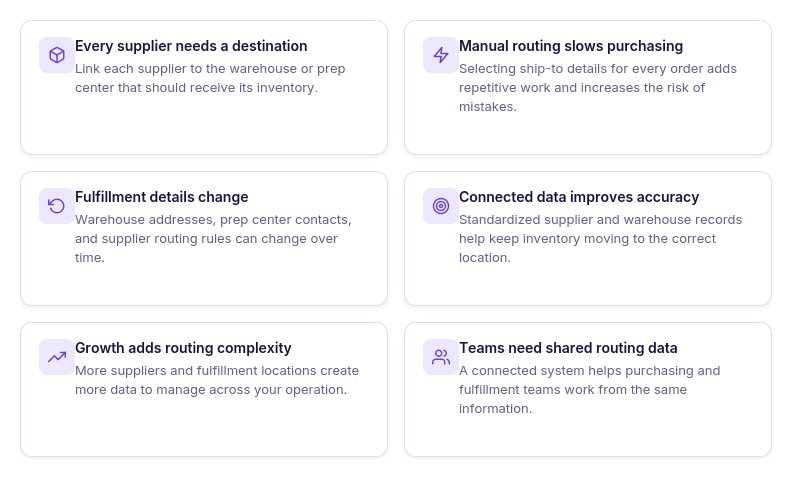
Every supplier needs a fulfillment destination
Suppliers don’t just need your company information—they also need to know where to ship inventory. Assigning a default warehouse or prep center to each supplier ensures every order is routed to the correct destination.
Manual routing slows purchasing
Selecting warehouse information manually for every purchase order adds unnecessary work and increases the chance of choosing the wrong fulfillment location. Connected supplier and warehouse records eliminate repetitive routing tasks.
Fulfillment information changes over time
Warehouses relocate, prep centers update contact details, and suppliers begin shipping to different destinations. Keeping warehouse information linked to supplier profiles makes these changes easier to manage across your purchasing workflow.
Consistent routing reduces fulfillment errors
Using standardized warehouse records helps ensure suppliers always receive accurate ship-to information. This minimizes shipping mistakes, prevents inventory from being sent to the wrong location, and keeps fulfillment moving efficiently.
Growing businesses need connected data
As your supplier network expands, so does the number of fulfillment locations you manage. Connecting supplier profiles with warehouse records creates a scalable system that supports higher purchasing volumes without increasing administrative work.
Better collaboration across your team
When suppliers and warehouses are connected in one system, everyone works from the same routing information. This improves communication, reduces duplicate updates, and keeps purchasing and fulfillment teams aligned.
What Seller Assistant Tools Connect Suppliers and Warehouses
Managing suppliers and fulfillment locations as separate processes creates unnecessary work. Every time you create a purchase order, you need the correct supplier information, shipping destination, and routing details. If these records are stored in different spreadsheets or systems, you’re more likely to make mistakes, duplicate data, or slow down purchasing. Seller Assistant’s Suppliers Database and Warehouses Database solve this problem by connecting supplier management with warehouse management in one workflow.
Instead of maintaining separate supplier lists and warehouse records, you can link suppliers to their default fulfillment locations and reuse that information throughout your purchasing process. This creates a faster, more organized workflow while keeping supplier and warehouse data consistent as your business grows.
This workflow is powered by two Seller Assistant tools – Suppliers Database and Warehouses Database.
Suppliers Database
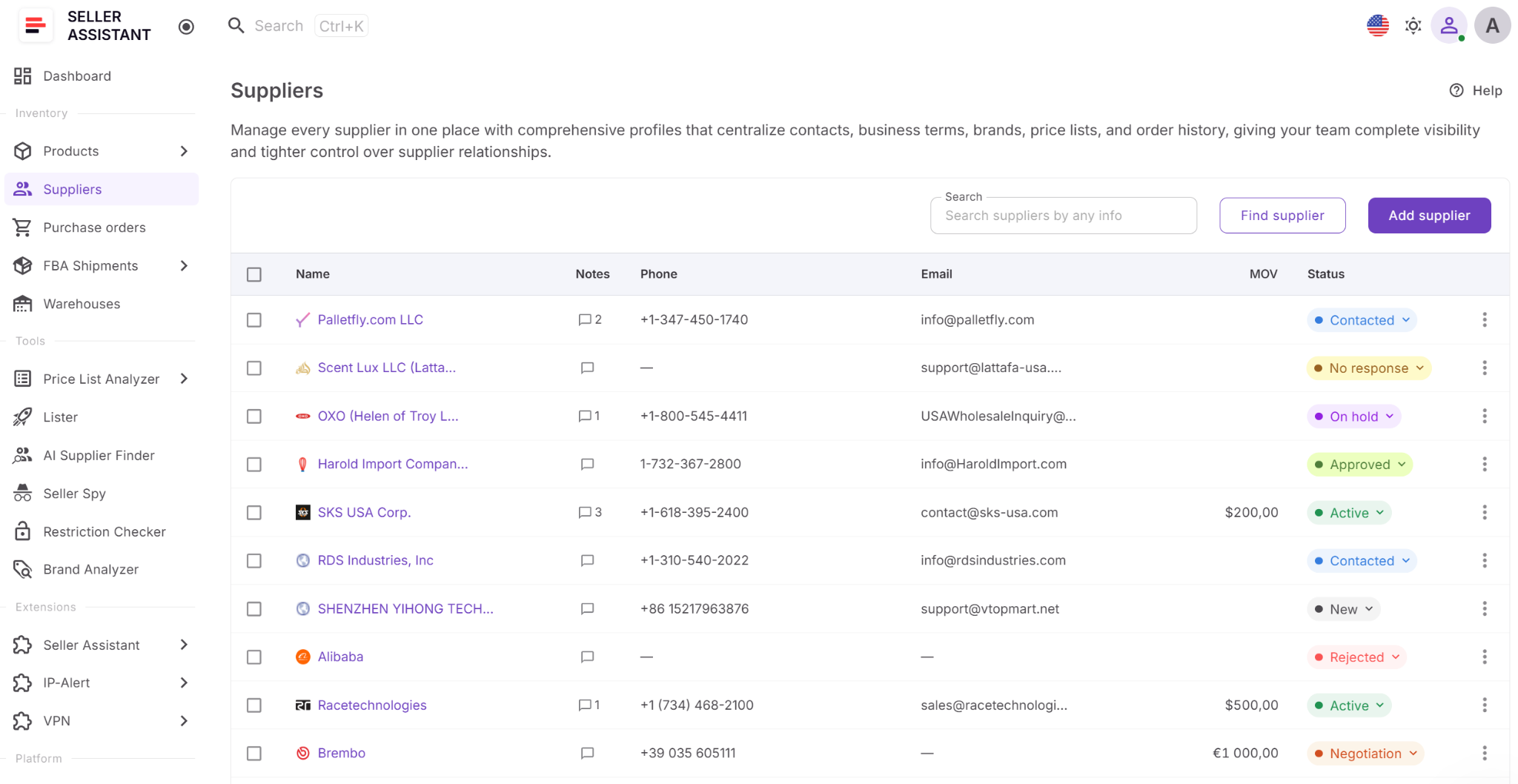
Suppliers Database helps Amazon wholesale sellers, online arbitrage sellers, and dropshippers organize supplier relationships in one centralized system. It stores supplier profiles, contact information, operational terms, relationship status, assigned warehouses, and purchasing history, making supplier data available throughout your sourcing and purchasing workflow.
Warehouses Database
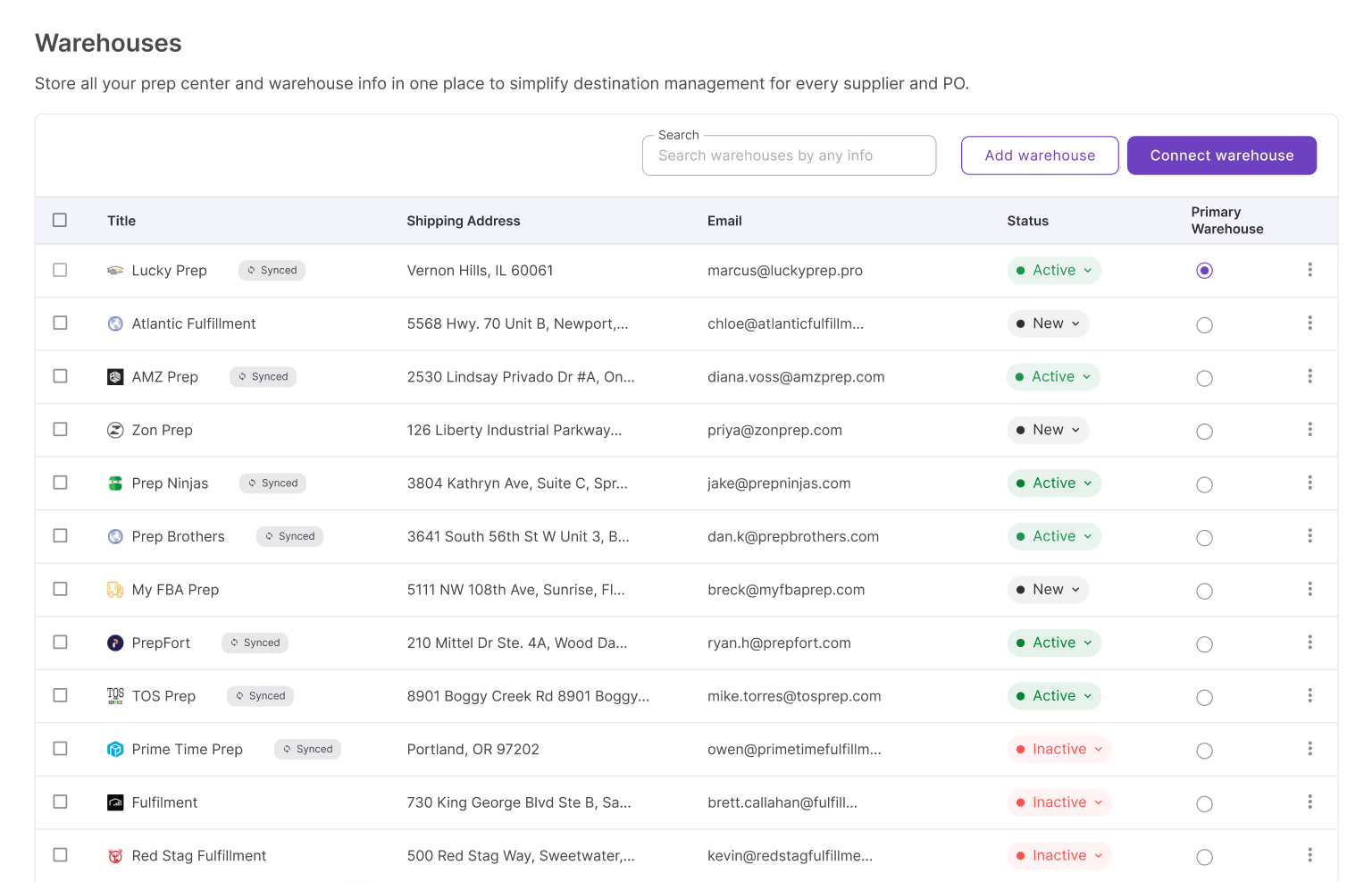
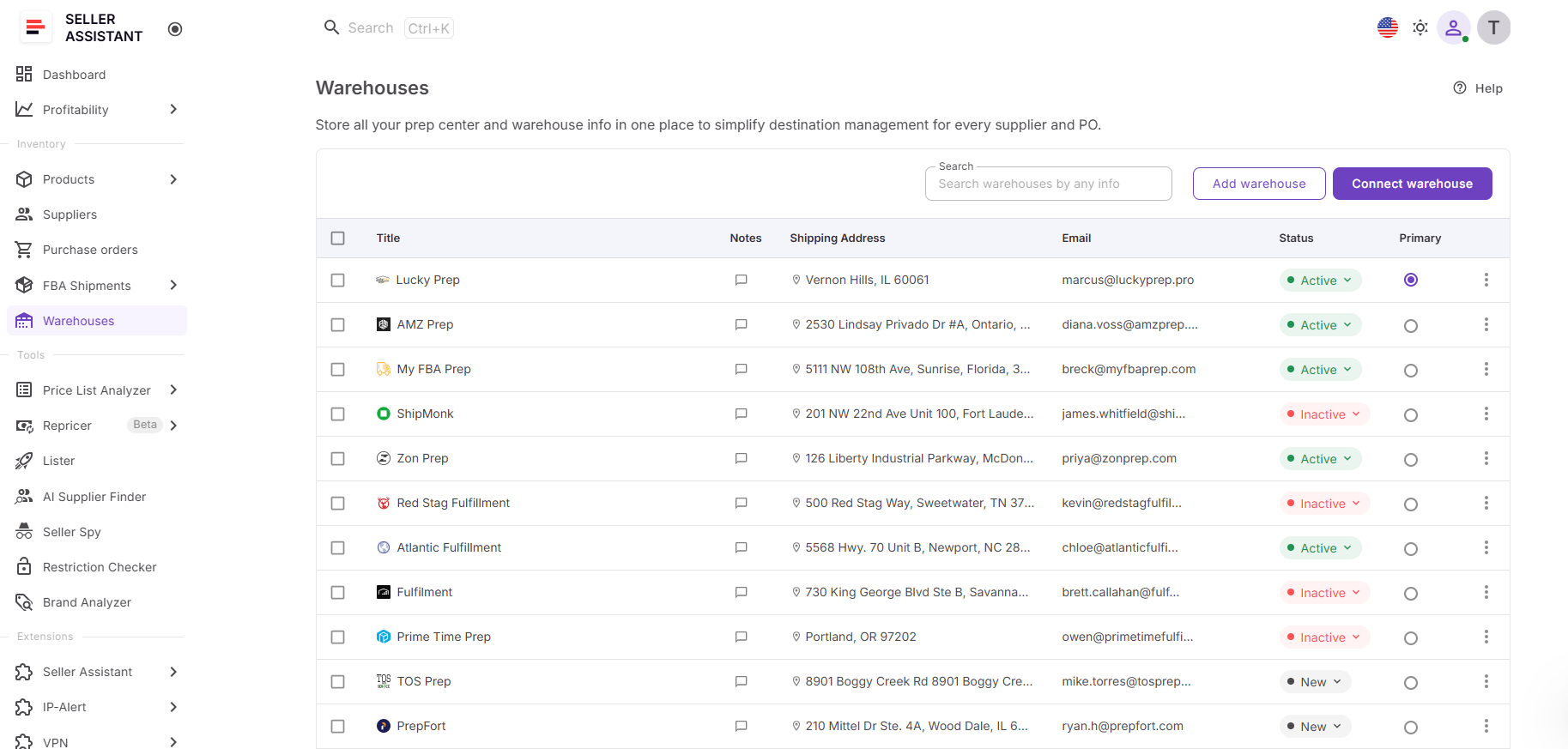
Warehouses Database centralizes warehouse and prep center management by storing fulfillment locations, shipping addresses, contacts, operational statuses, and routing information in one place. It also supports Prep Center Integration, allowing sellers to synchronize supported prep center warehouses automatically and reuse fulfillment data across Seller Assistant.
From supplier management to fulfillment routing
Once you’ve created a supplier profile, you can assign a default warehouse or prep center directly from the supplier’s Details page. The linked warehouse becomes the supplier’s default fulfillment destination, so routing information is already available when you create purchase orders, eliminating repetitive data entry and reducing the risk of selecting the wrong location.
One connected purchasing workflow
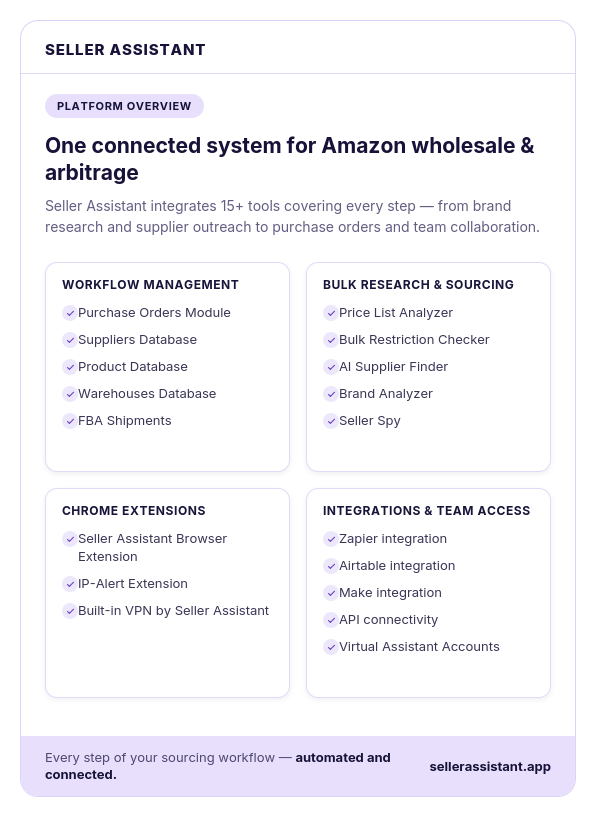
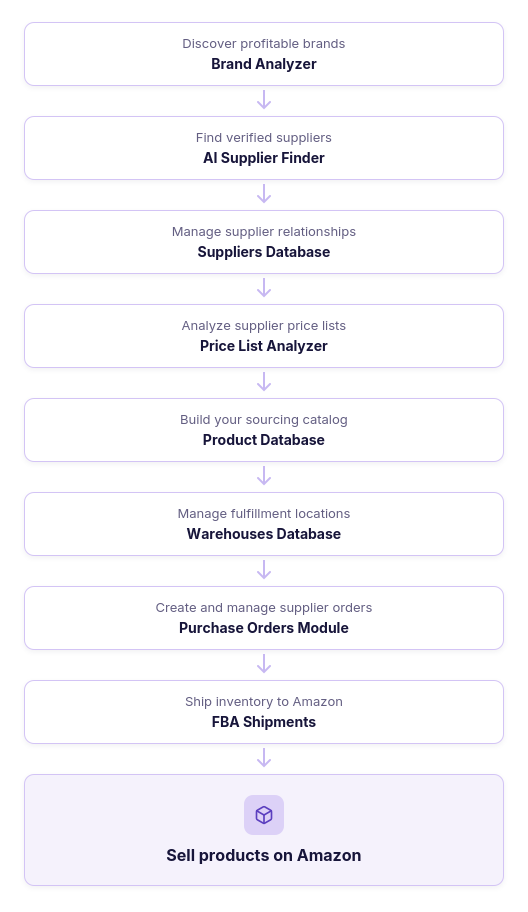
Supplier management is most effective when it’s connected to fulfillment operations. Seller Assistant links AI Supplier Finder, Suppliers Database, Price List Analyzer, Product Database, Warehouses Database, Purchase Orders Module, and FBA Shipments into one continuous workflow. You can discover suppliers, organize supplier profiles, assign fulfillment locations, create purchase orders, and prepare inventory for Amazon using the same connected data, reducing manual work and making wholesale operations easier to scale.
What Is Suppliers Database?
Seller Assistant’s Suppliers Database is a supplier management tool that helps Amazon wholesale sellers, online arbitrage sellers, and dropshippers organize supplier relationships and connect them with the rest of their sourcing and purchasing workflow.
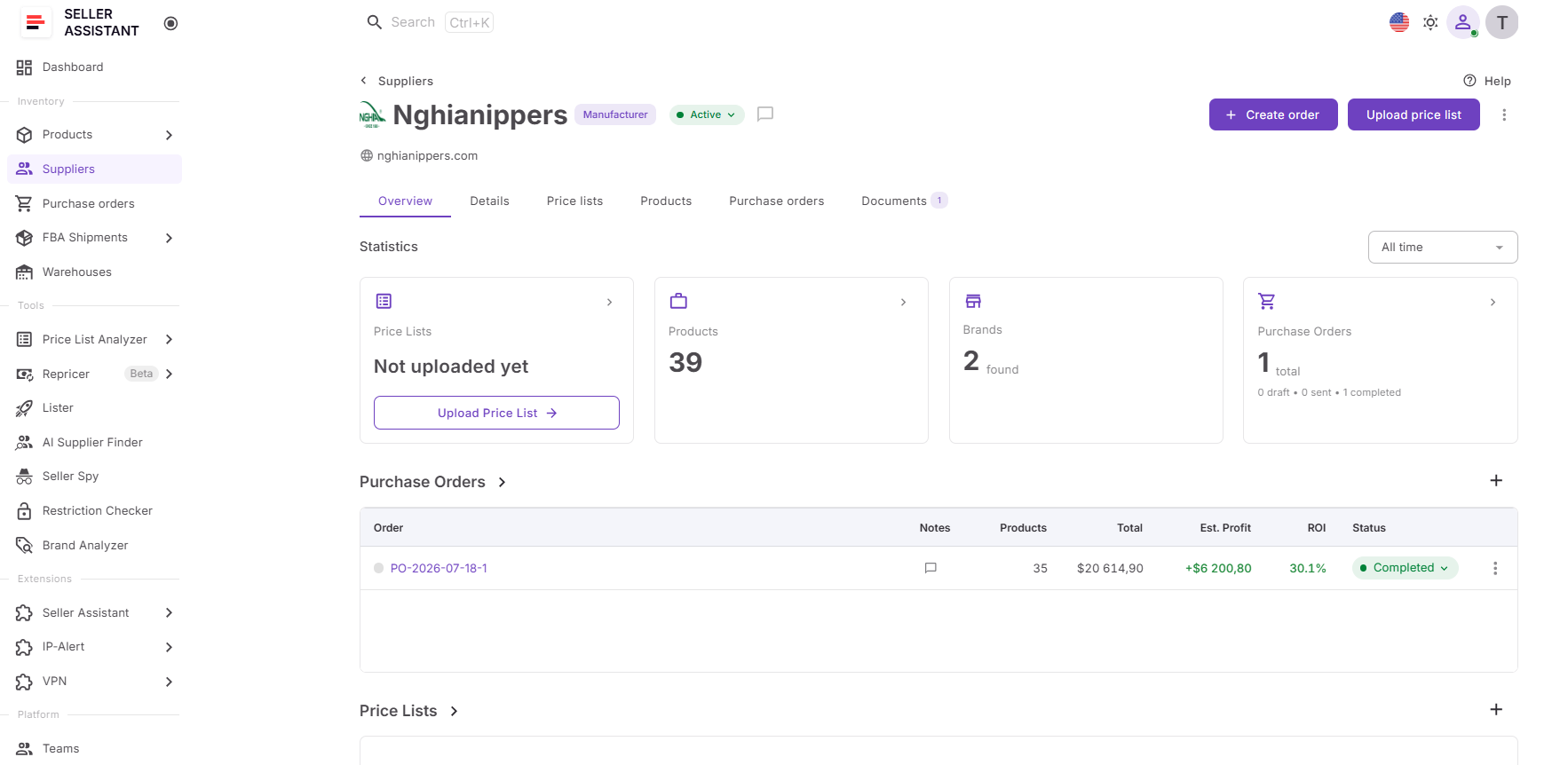
Instead of storing supplier contacts, payment terms, warehouse assignments, and order history in spreadsheets or email threads, Suppliers Database centralizes everything in one workspace. Sellers can manage supplier profiles, track relationship status, assign fulfillment locations, and reuse supplier information across Seller Assistant, reducing manual work and keeping sourcing operations organized as their business grows.
What you can do with Suppliers Database
Suppliers Database helps sellers manage supplier relationships from initial outreach to purchasing while keeping supplier data connected across their workflow.
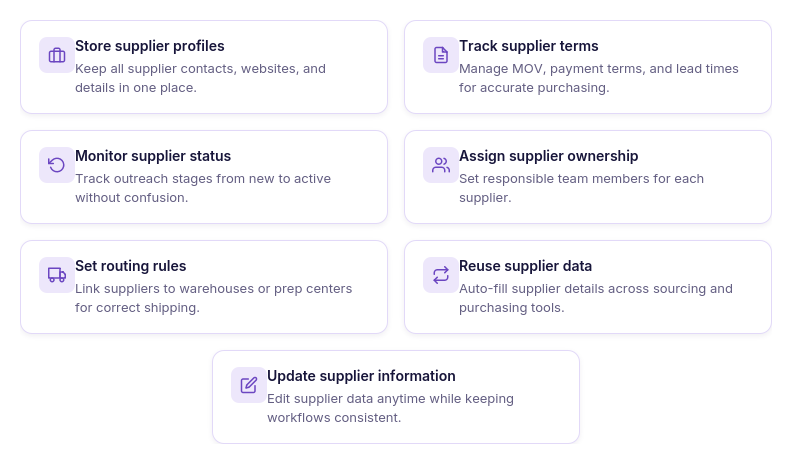
- Organize supplier information
Create detailed supplier profiles with contact information, websites, currencies, payment terms, minimum order values (MOV), lead times, notes, and assigned team members.
- Track supplier relationships
Monitor every supplier’s progress using customizable statuses such as New, Contacted, Negotiation, Approved, Active, and Rejected, making it easy to manage your sourcing pipeline.
- Connect suppliers to warehouses
Assign a default warehouse or prep center to each supplier so fulfillment routing is applied consistently when creating purchase orders.
- Reuse supplier data
Use the same supplier profiles throughout Seller Assistant instead of entering supplier information repeatedly when analyzing catalogs or creating orders.
- Manage supplier catalogs
Upload supplier price lists directly to Price List Analyzer from the supplier profile, keeping catalogs linked to the correct supplier for faster product analysis.
- Create purchase orders faster
Generate purchase orders directly from supplier profiles with supplier information and routing details already populated, reducing manual entry and improving accuracy.
- Collaborate with your team
Assign suppliers to specific team members, keep internal notes, and maintain a complete history of supplier communication and operational updates in one place.
How Suppliers Database supports purchasing workflows
Suppliers Database connects supplier management with sourcing, purchasing, and fulfillment. Instead of treating supplier records as isolated contact lists, Seller Assistant makes supplier information reusable throughout the entire workflow.
Suppliers discovered with AI Supplier Finder can be saved directly to the database. Their catalogs can then be analyzed in Price List Analyzer, qualified products added to Product Database, warehouses assigned through Warehouses Database, and Purchase Orders Module created using the same supplier profile. This connected workflow reduces duplicate data entry, improves routing accuracy, and helps sellers move from supplier discovery to inventory ready for Amazon FBA more efficiently.
What Is Warehouses Database?
Seller Assistant’s Warehouses Database is a warehouse and prep center management tool that helps Amazon wholesale sellers, online arbitrage sellers, and dropshippers organize fulfillment locations and connect them with the rest of their sourcing, purchasing, and fulfillment workflow.
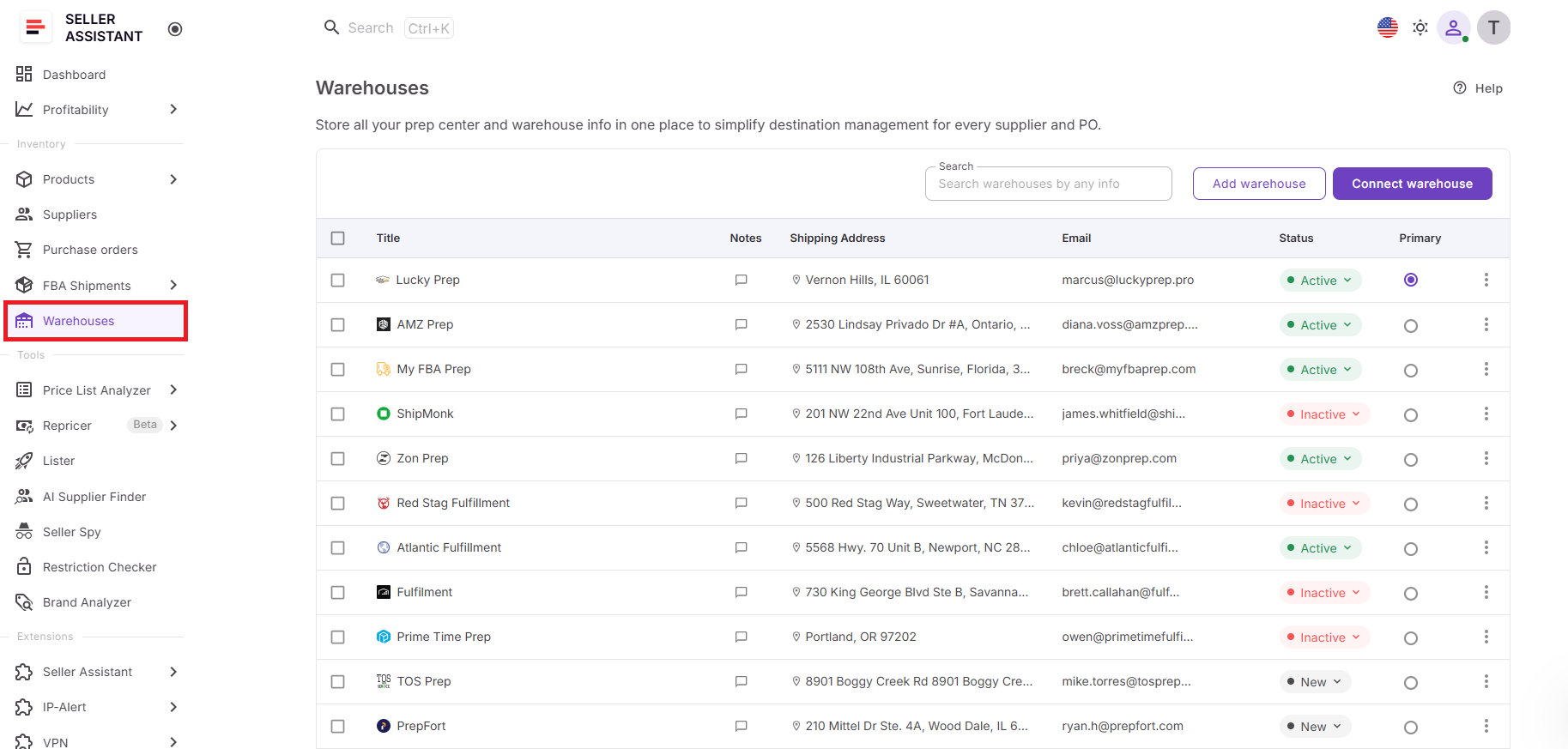
Instead of storing warehouse addresses, prep center contacts, and routing information in spreadsheets or separate documents, Warehouses Database centralizes everything in one workspace. Sellers can manage warehouse profiles, assign a primary warehouse, connect supported prep centers, and reuse fulfillment information across Seller Assistant, reducing manual work and keeping inventory routing accurate as their business grows.
What you can do with Warehouses Database
Warehouses Database helps sellers organize fulfillment operations and keep warehouse information connected throughout their Amazon workflow.
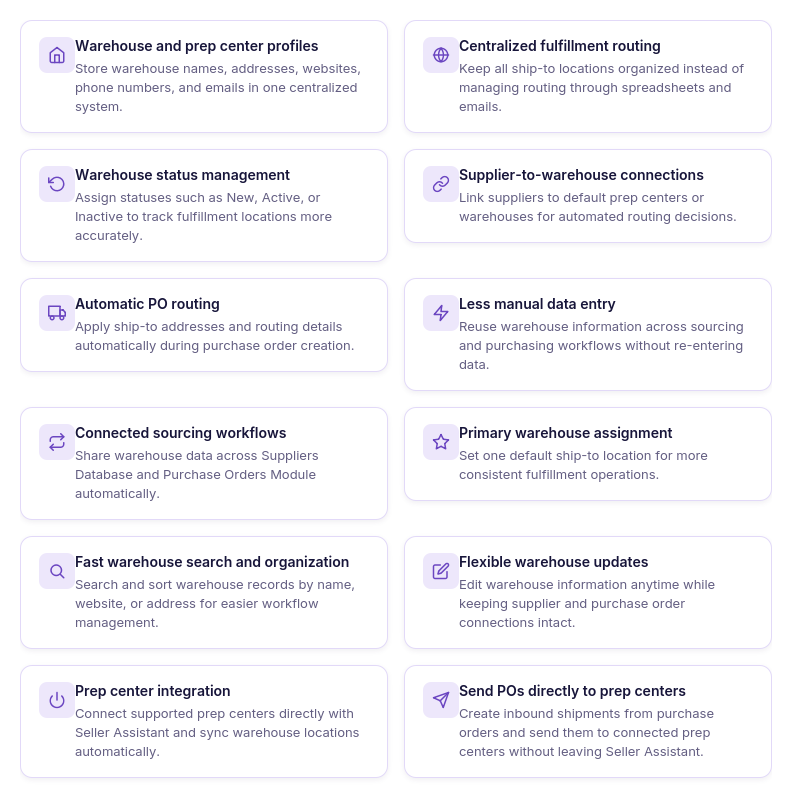
- Manage fulfillment locations
Create detailed warehouse and prep center profiles with shipping addresses, contact information, notes, websites, and operational statuses, keeping all fulfillment locations organized in one place.
- Organize warehouse records
Search, sort, update, and manage warehouse information from a centralized database, making it easy to maintain accurate fulfillment records as your business expands.
- Set a primary warehouse
Designate one warehouse as the default fulfillment location to standardize routing and reduce repetitive setup across your workflow.
- Connect prep centers
Use Prep Center Integration to connect supported prep centers and automatically synchronize warehouse locations with Seller Assistant.
- Reuse warehouse information
Apply the same warehouse records across Seller Assistant instead of entering shipping details repeatedly, helping reduce manual work and improve consistency.
- Support purchasing workflows
Make warehouse information available during purchase order creation so the correct fulfillment destination is always associated with supplier orders.
- Keep fulfillment data up to date
Update manually created warehouse records whenever details change, while synchronized prep center locations stay aligned automatically through supported integrations.
How Warehouses Database supports purchasing and fulfillment
Warehouses Database connects fulfillment management with the rest of your Amazon workflow. Instead of treating warehouse records as a standalone address book, Seller Assistant makes fulfillment locations available wherever they’re needed.
Warehouses can be linked to suppliers in Suppliers Database, reused when creating purchase orders, synchronized through Prep Center Integration, and carried into FBA Shipments. This connected workflow reduces duplicate data entry, improves routing accuracy, and helps sellers move inventory from suppliers to Amazon FBA more efficiently.
How Suppliers Database and Warehouses Database Work Together
The workflow starts in Suppliers Database, where you create and manage supplier profiles, store contact information, define supply terms, and assign a default warehouse or prep center. Instead of looking up shipping destinations every time you place an order, you connect each supplier to the fulfillment location that should receive its inventory. This keeps purchasing organized and ensures every supplier has the correct routing information.
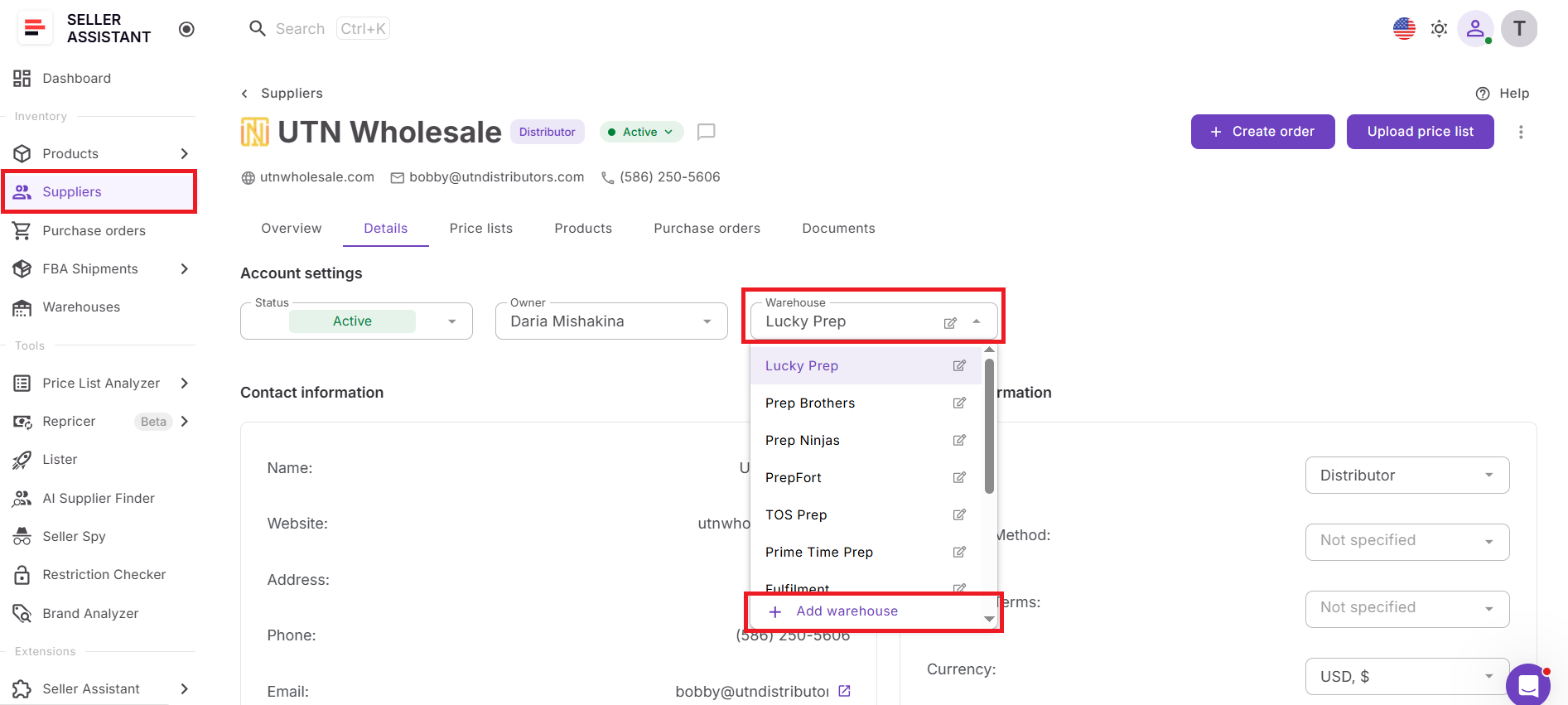
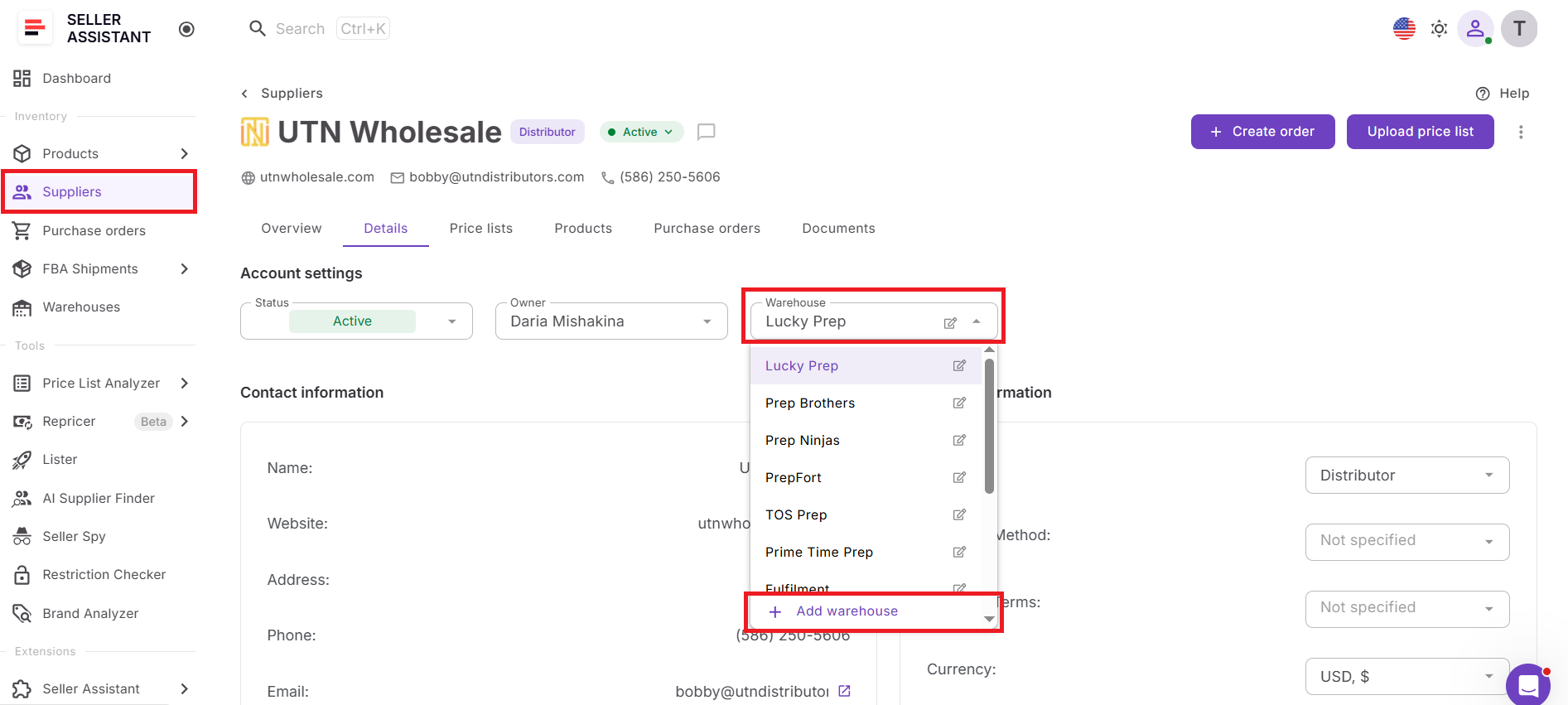
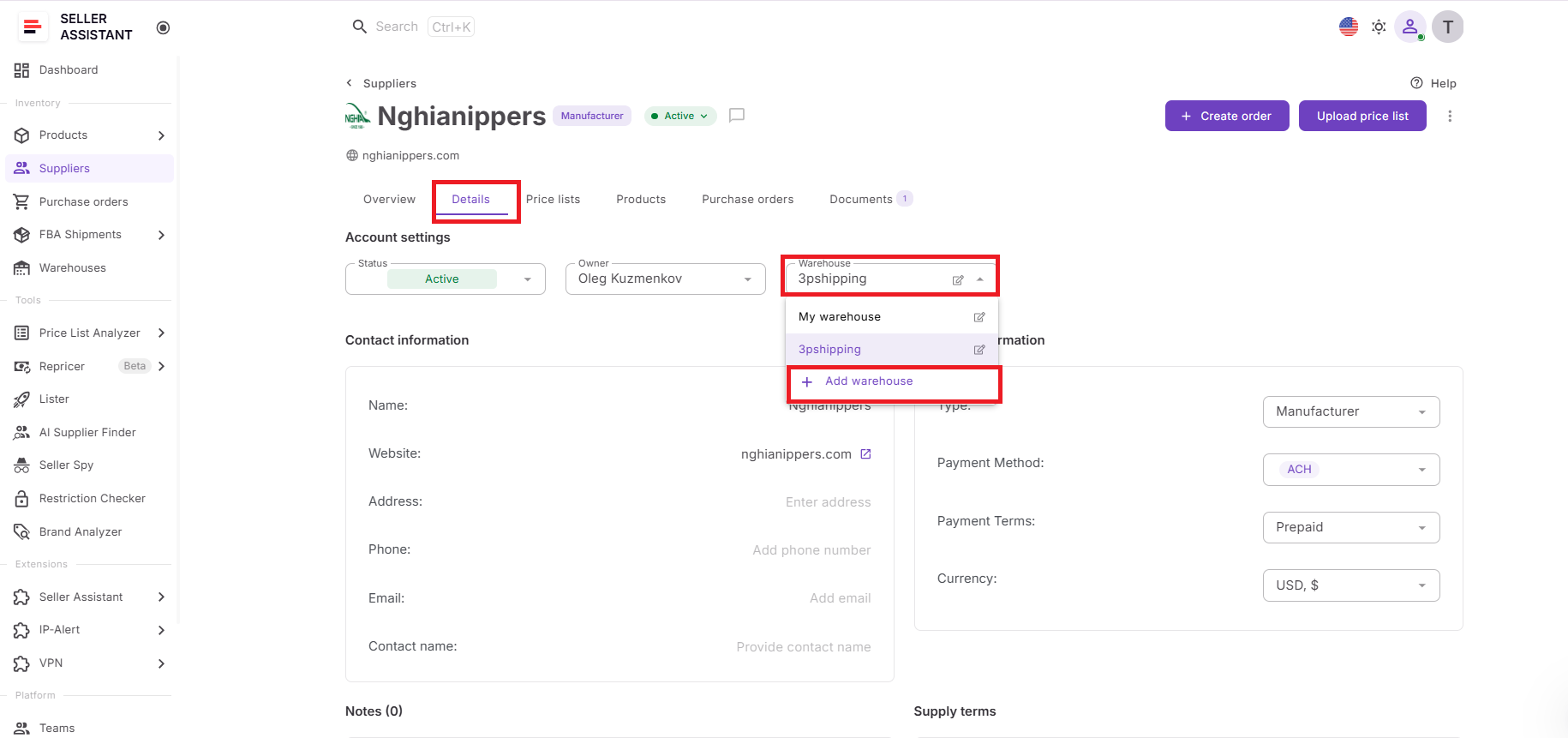
When adding or editing a supplier, simply select a warehouse from the Warehouse field in the supplier profile. If the warehouse doesn’t exist yet, you can create a new one without leaving the page. The selected warehouse becomes the supplier’s default fulfillment location and is automatically available throughout your purchasing workflow.
Warehouses Database provides the fulfillment layer of this workflow by storing warehouse and prep center profiles, shipping addresses, contacts, operational statuses, and synced prep center locations in one centralized database. If you use Prep Center Integration, connected warehouse locations are synchronized automatically, ensuring supplier routing always references the latest fulfillment information.
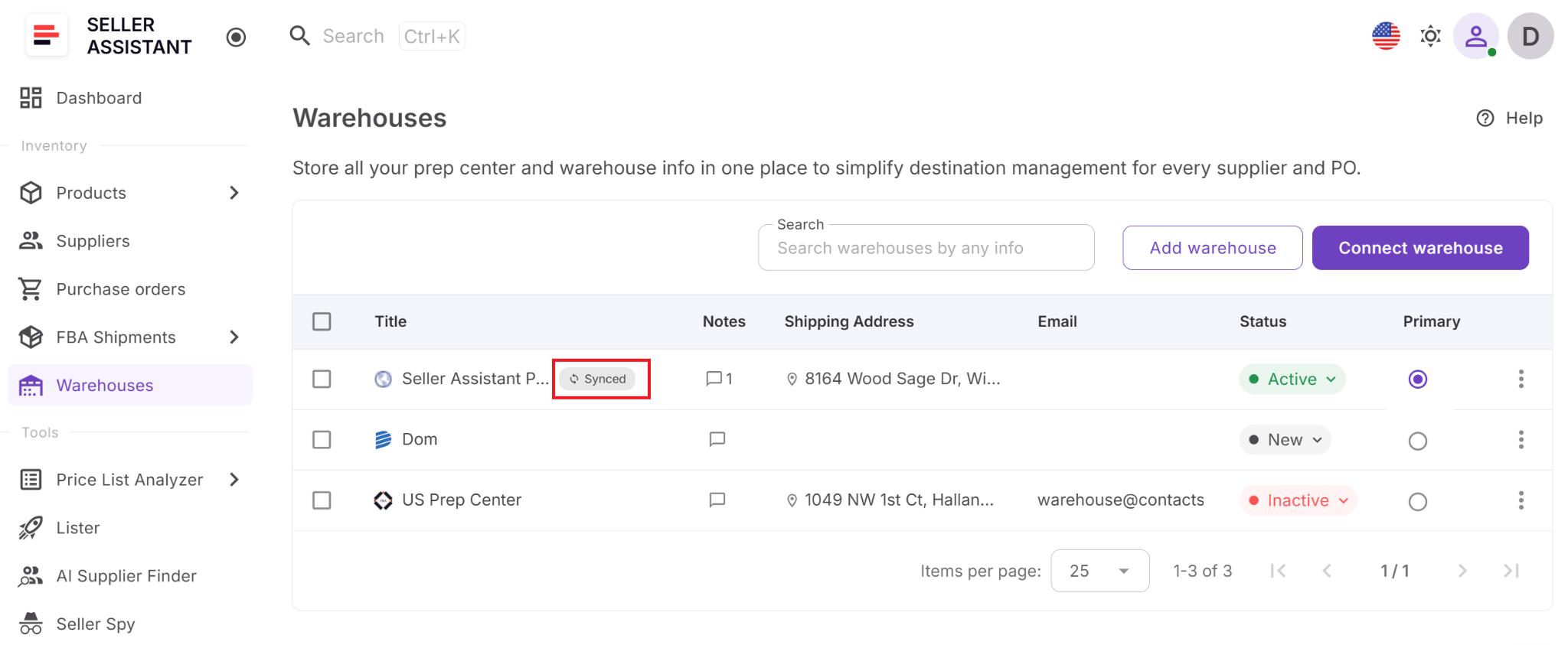
This connected workflow eliminates the need to maintain supplier records and warehouse information in separate systems or repeatedly enter ship-to addresses. Instead, Amazon wholesale sellers, online arbitrage sellers, and dropshippers can move from supplier management to purchasing and fulfillment using the same connected data, reducing routing errors, speeding up order creation, and making operations easier to scale.
How to Link Suppliers and Warehouses Step by Step
Connecting a supplier to a warehouse in Seller Assistant takes only a few minutes. Once linked, the warehouse becomes the supplier’s default fulfillment destination, allowing routing information to flow automatically through your purchasing workflow and reducing manual data entry.
Step 1. Open Suppliers Database
Go to Inventory → Suppliers in your Seller Assistant account and open the supplier profile you want to update.
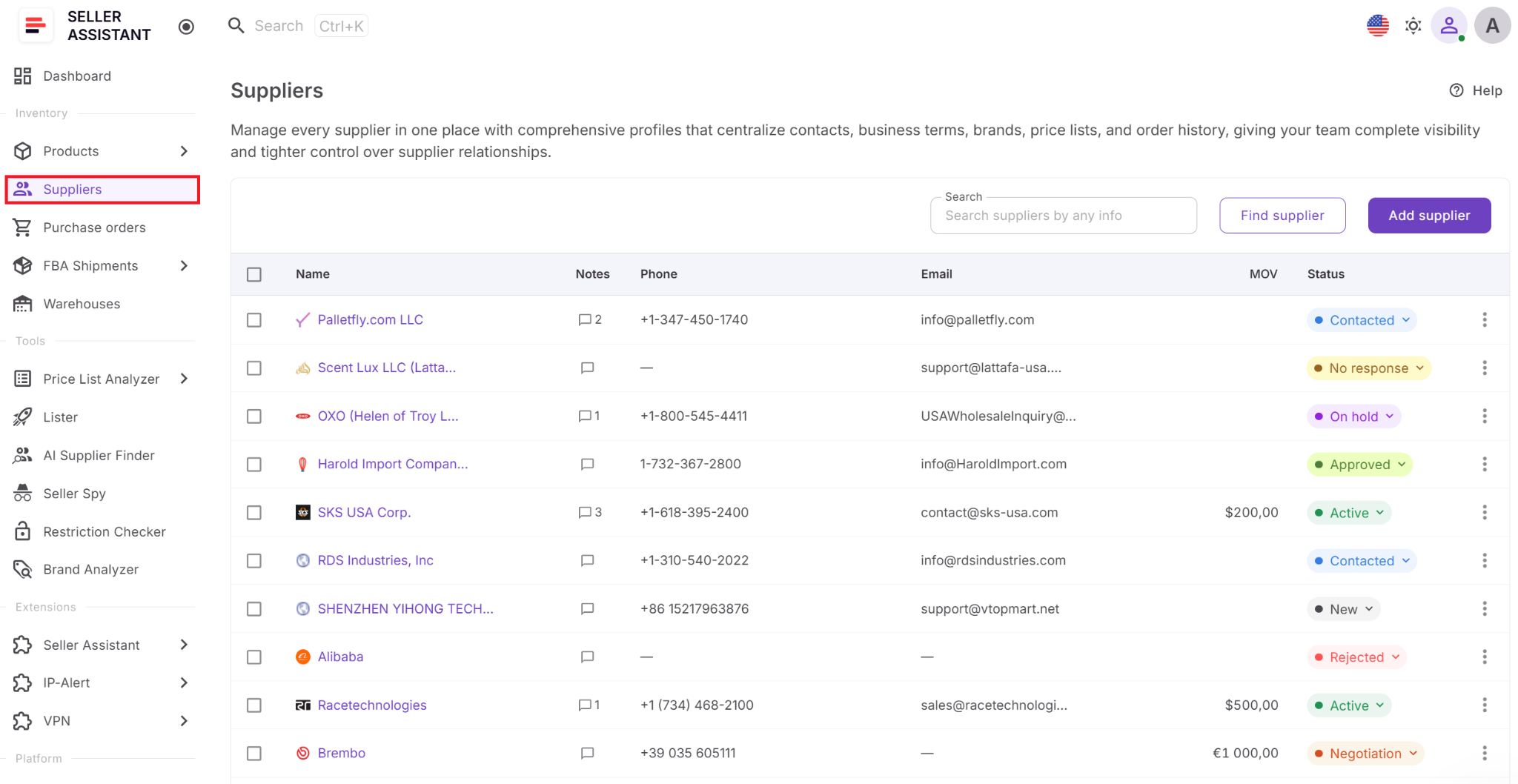
The supplier profile is the central place where all supplier information is managed, including contacts, supply terms, warehouse assignments, and purchasing activity.
Step 2. Open the Details tab
Click the Details tab to access the supplier’s configuration settings, including account information, contact details, business terms, and warehouse assignment.
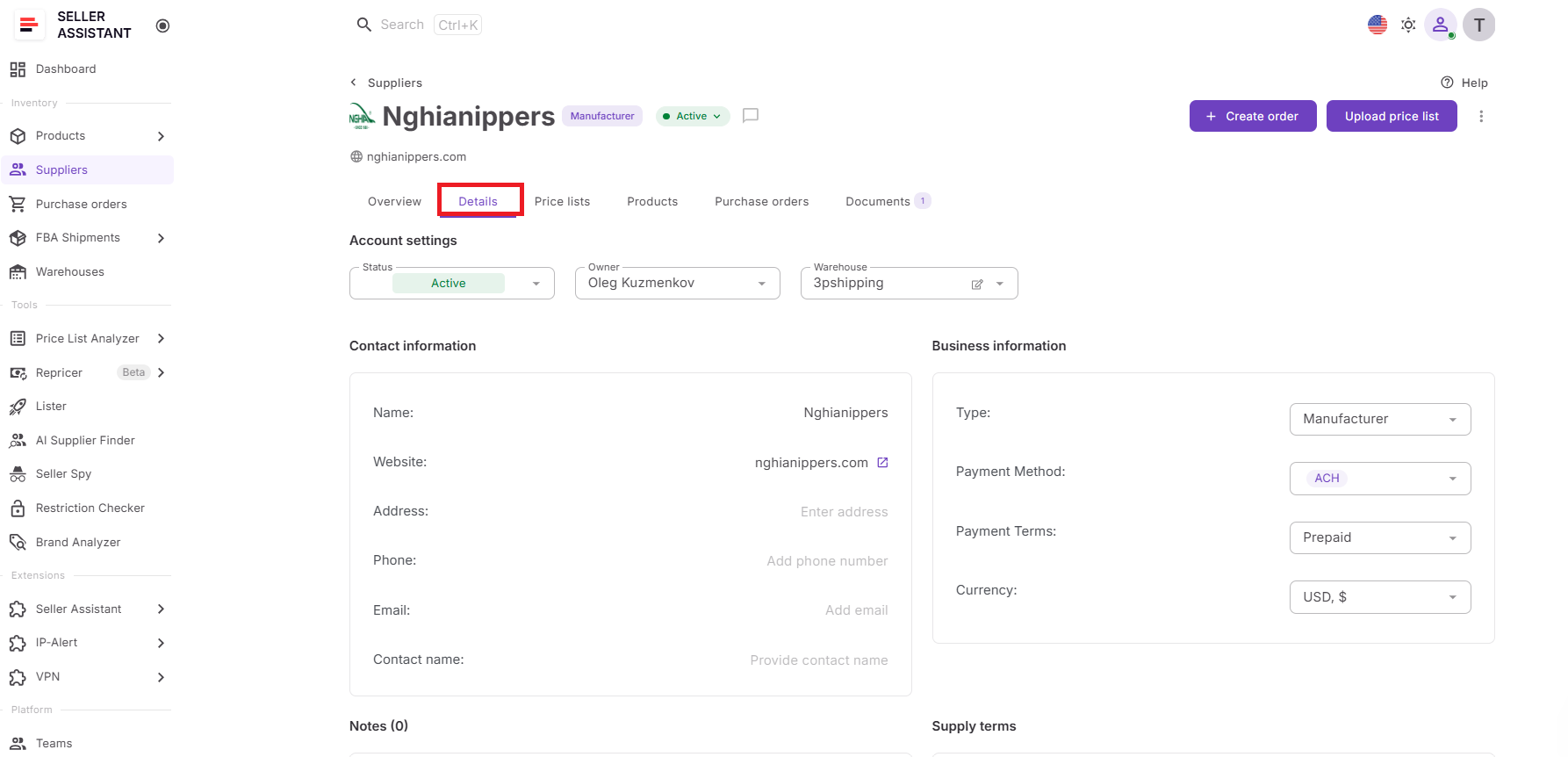
Keeping operational settings together ensures routing information stays connected to the rest of the supplier profile.
Step 3. Select a warehouse
Locate the Warehouse field under Account settings and choose a warehouse or prep center from the dropdown list.
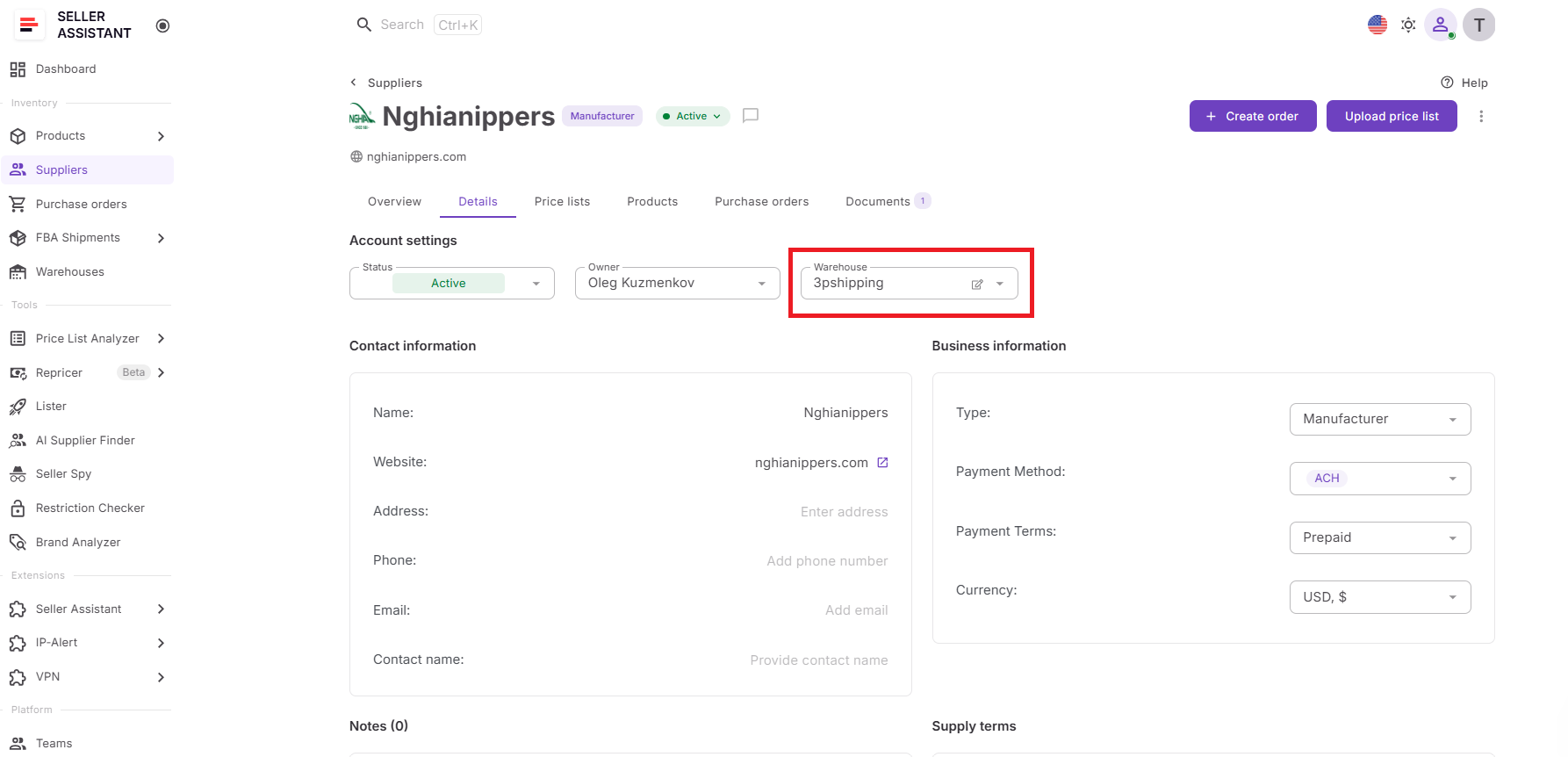
Linking a warehouse creates a default fulfillment destination for the supplier, eliminating the need to select a ship-to location every time you create a Purchase Order.
Step 4. Create a new warehouse if necessary
If the required fulfillment location isn’t available, click Add warehouse directly from the dropdown and create a new warehouse profile.
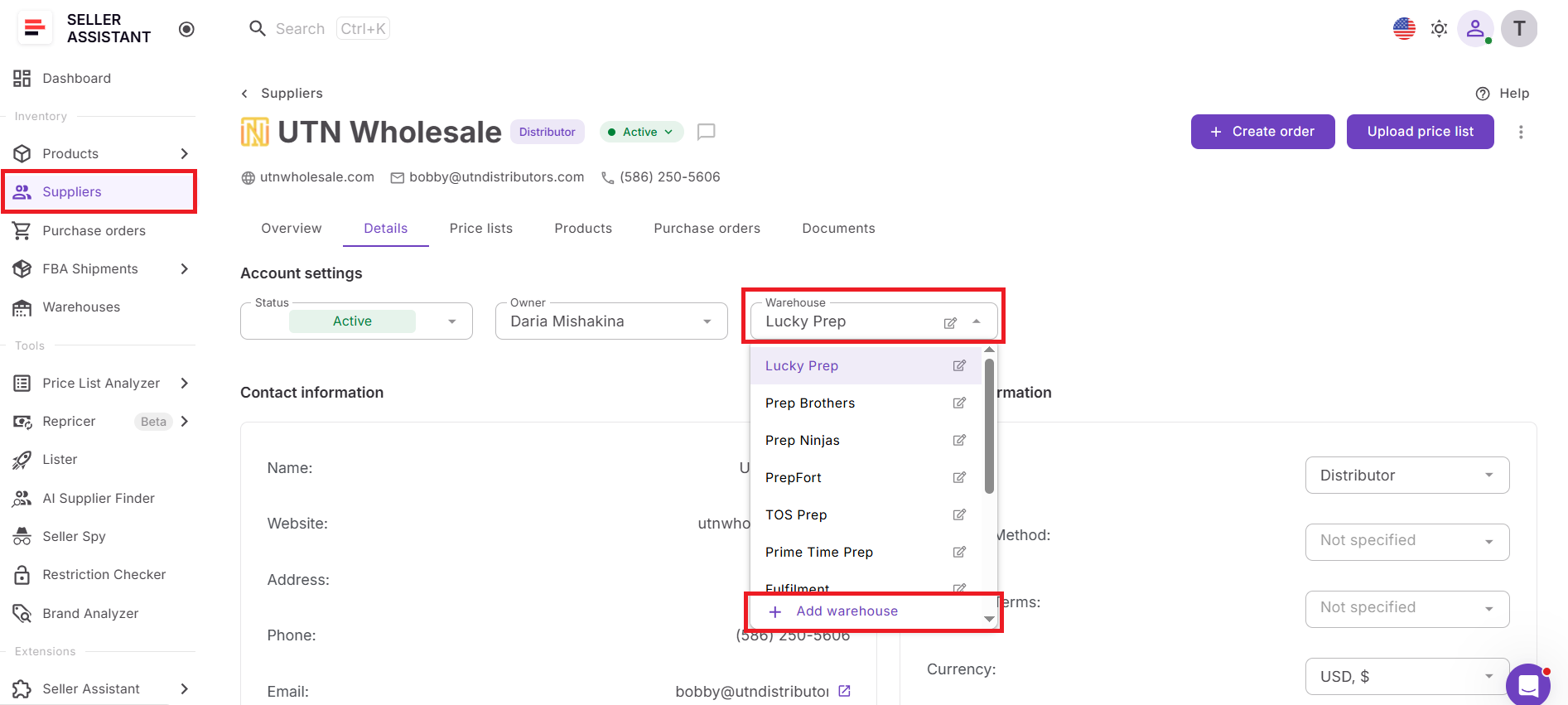
Adding warehouses without leaving the supplier profile keeps your workflow uninterrupted and ensures every supplier can be linked to the correct destination immediately.
Step 5. Reuse the warehouse in purchase orders
Create a purchase order for the supplier. Seller Assistant automatically makes the linked warehouse available as the supplier’s default fulfillment location.
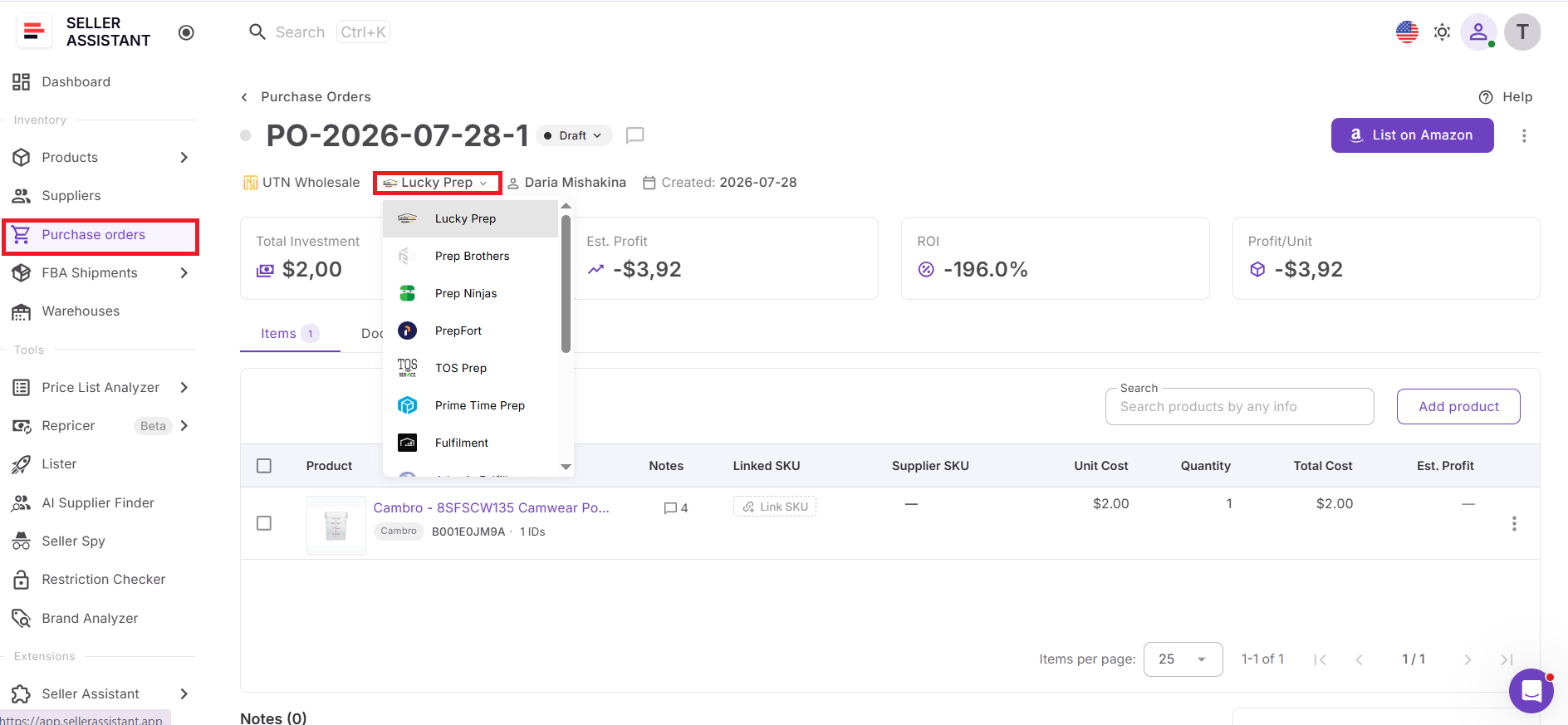
Reusing saved routing information speeds up order creation, improves consistency, and reduces the risk of shipping inventory to the wrong warehouse or prep center.
Step 6. Update routing when your workflow changes
If the supplier begins shipping to a different warehouse or prep center, simply edit the supplier profile and assign a new fulfillment location.
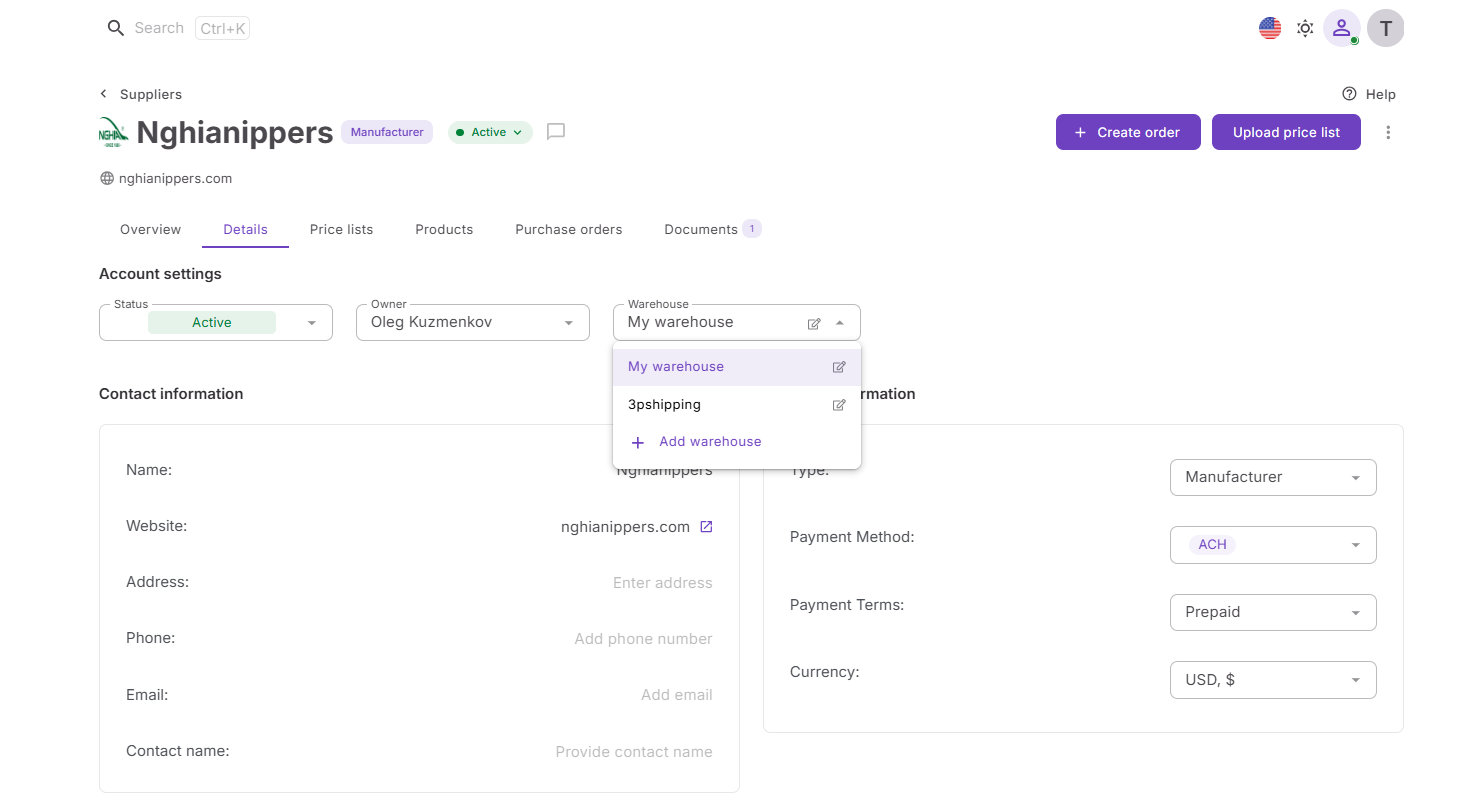
Maintaining current warehouse assignments ensures future purchase orders always use accurate routing information without requiring manual corrections.
What Changes Once Supplier and Warehouse Data Are Linked
Linking a supplier to a warehouse does more than save a shipping address. It connects supplier and fulfillment data across Seller Assistant, allowing purchasing and inventory routing to follow a consistent workflow instead of relying on manual updates.
Purchase orders use the correct destination
When you create a purchase order, the linked warehouse is automatically available as the supplier’s default fulfillment location. This reduces manual setup and helps ensure inventory is routed to the correct warehouse or prep center.
Routing stays consistent
Every future order for that supplier uses the same default fulfillment destination unless you choose a different warehouse. This keeps purchasing consistent, especially when working with multiple suppliers and fulfillment locations.
Supplier and warehouse data stay connected
Supplier profiles and warehouse records remain linked, so your team doesn’t have to match suppliers with shipping destinations manually each time inventory is ordered.
Warehouse updates are easier to manage
If a manually created warehouse’s address or contact information changes, updating the warehouse profile makes the latest information available wherever that warehouse is used. This eliminates the need to update multiple supplier records individually.
Prep center synchronization continues automatically
If the linked warehouse comes from a connected prep center, Prep Center Integration keeps the warehouse information synchronized automatically. This helps ensure supplier routing always references the latest fulfillment data from the prep center.
Your workflow becomes more scalable
As you add suppliers, warehouses, and prep centers, the connection between Suppliers Database and Warehouses Database reduces repetitive work, improves routing accuracy, and makes it easier to manage a growing purchasing operation.
FAQ
Can one warehouse be linked to multiple suppliers?
Yes. A single warehouse or prep center can be assigned to multiple supplier profiles if inventory from those suppliers is delivered to the same location. This is useful when consolidating shipments from several distributors before prep or Amazon FBA.
What if one supplier ships to different warehouses?
The linked warehouse serves as the default fulfillment destination, but you can choose a different warehouse when creating a Purchase Order if a specific shipment needs to be routed elsewhere. This gives you flexibility without changing the supplier’s standard routing setup.
Will changing a supplier’s warehouse affect previous Purchase Orders?
No. Updating the linked warehouse only applies to future purchasing activities. Existing Purchase Orders retain the warehouse information that was assigned when they were created, preserving your order history.
Can I link a supplier to a synced prep center warehouse?
Yes. Warehouses imported through Prep Center Integration appear alongside manually created warehouse records and can be selected as the default fulfillment location for any supplier. This keeps routing aligned with your connected prep center without additional setup.
When should I update a supplier’s default warehouse?
Update the linked warehouse whenever your fulfillment strategy changes, such as switching prep centers, opening a new warehouse, or assigning a supplier to a different receiving location. Keeping the default destination current helps ensure future orders follow the correct routing automatically.
Final Thoughts
Managing suppliers and warehouses separately may work for a small operation, but as your Amazon business grows, disconnected data creates unnecessary work and increases the risk of fulfillment errors. Linking supplier profiles with their default warehouses helps standardize inventory routing, streamline purchasing, and ensure every order starts with accurate fulfillment information.
Seller Assistant brings these processes together by connecting Suppliers Database and Warehouses Database into one integrated workflow. Combined with other Seller Assistant workflow tools, they help Amazon wholesale sellers, online arbitrage sellers, and dropshippers move from supplier discovery to inventory ready for sale with greater speed, accuracy, and efficiency.