



Managing Amazon bulk orders involves much more than purchasing large quantities of inventory. Sellers must identify the right brands, find reliable suppliers, evaluate wholesale catalogs, select profitable products, organize supplier relationships, and accurately calculate order profitability before committing capital.
As purchasing volume grows, managing these activities across spreadsheets, emails, and disconnected tools becomes increasingly difficult. A structured workflow helps sellers keep supplier data, product research, inventory planning, and purchasing decisions connected from start to finish.
In this post, we’ll show how Amazon wholesale sellers, online arbitrage sellers, and dropshippers can manage bulk orders more efficiently with Seller Assistant, from brand research and supplier sourcing to catalog analysis, purchase order creation, and profitability tracking.
Note. Seller Assistant is an end-to-end Amazon workflow management platform that integrates 15+ wholesale-focused solutions into one connected system. It combines sourcing workflow automation, bulk research and intelligence tools, and integrated Chrome extensions – giving you everything you need to streamline finding deals, managing suppliers, and creating purchase orders.

The platform aggregates: workflow management tools – Purchase Orders Module, Suppliers Database, Product Database, Warehouses Database, FBA Shipments to organize, automate, and scale every step of your wholesale and arbitrage operations; bulk research & sourcing tools – Price List Analyzer, Bulk Restriction Checker, AI Supplier Finder, Brand Analyzer, Seller Spy to evaluate supplier price lists, verify selling eligibility and restrictions, open new brands, and discover winning product ideas from competitors to expand your product catalog; Chrome extensions – Seller Assistant Browser Extension, IP-Alert Extension, and built-in VPN by Seller Assistant to deep-research products, check IP claims and compliance, and access geoblocked supplier sites directly within your browser; and integrations & team access features – seamless API connectivity and integrations with Zapier, Airtable, and Make, plus Virtual Assistant Accounts for secure, scalable team collaboration.
With Seller Assistant, every step of your Amazon wholesale and arbitrage workflow is automated and connected.
How Amazon Sellers Manage Bulk Inventory Purchases
Managing Amazon bulk orders involves far more than placing large inventory orders with suppliers. Before inventory is purchased, sellers must evaluate brands, establish supplier relationships, analyze wholesale catalogs, identify profitable products, organize fulfillment destinations, and verify expected returns. The most successful sellers treat bulk purchasing as a structured process where every decision is backed by data.
From brand selection to bulk order execution
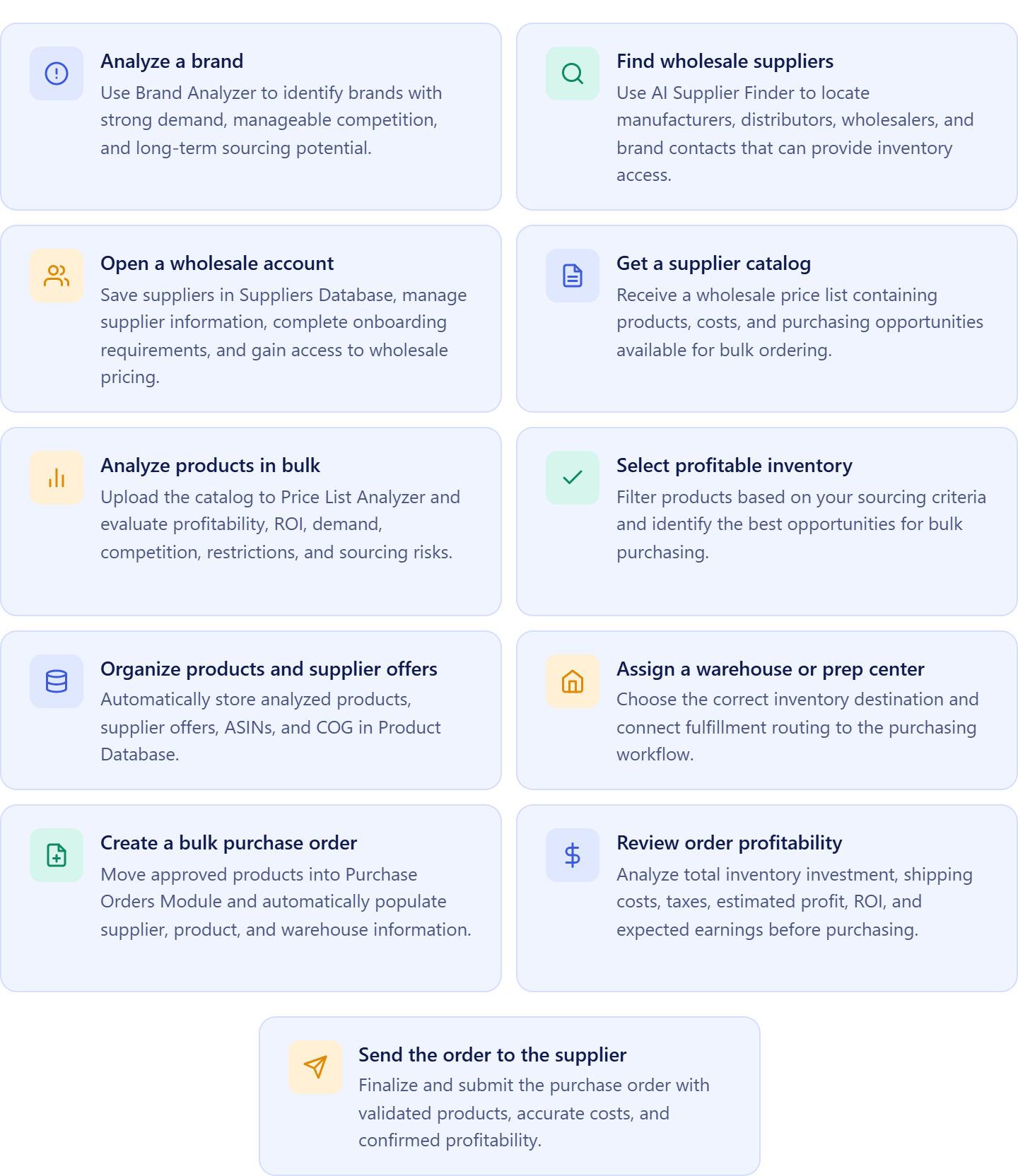
The process typically begins with identifying a brand that offers strong resale potential. After finding and onboarding a supplier, sellers obtain access to wholesale pricing and product catalogs. Those catalogs are then analyzed to determine which products offer the best combination of profitability, demand, competition, and risk.
Once the strongest opportunities are identified, sellers organize supplier information, product data, costs, and warehouse routing details before creating a bulk purchase order. Before inventory is ordered, projected profitability is reviewed to ensure the investment supports business goals.
Why bulk purchasing requires careful planning
Large inventory orders involve significant capital and carry greater risk than smaller purchases. Selecting the wrong products, working with unreliable suppliers, overlooking restrictions, or miscalculating costs can impact margins, cash flow, and inventory performance.
A disciplined purchasing process helps sellers make informed buying decisions, reduce sourcing risks, and maximize the return on every inventory investment.
Why bulk order management works best as a workflow
As operations expand, sellers often manage multiple brands, supplier accounts, wholesale catalogs, warehouses, and replenishment cycles simultaneously. Keeping these activities in separate spreadsheets and systems creates unnecessary complexity and increases the likelihood of errors.
A connected workflow links brand research, supplier sourcing, catalog analysis, product management, inventory routing, purchase order creation, and profitability tracking. This gives sellers better visibility across the entire purchasing process and makes Amazon bulk order management easier to scale.
Why Amazon Bulk Orders Are Easier to Manage in a Connected Workflow
Managing bulk inventory purchases requires sellers to coordinate multiple stages of the sourcing process. Brands must be evaluated, suppliers identified, wholesale accounts opened, catalogs analyzed, products selected, warehouses assigned, and purchase orders prepared. When these activities are managed across separate spreadsheets, emails, and tools, it becomes harder to maintain accuracy and visibility.
A connected workflow keeps every stage of bulk purchasing linked together. Supplier information, product data, sourcing decisions, inventory routing, and purchasing records remain synchronized, helping Amazon wholesale sellers, online arbitrage sellers, and dropshippers manage larger inventory purchases more efficiently.
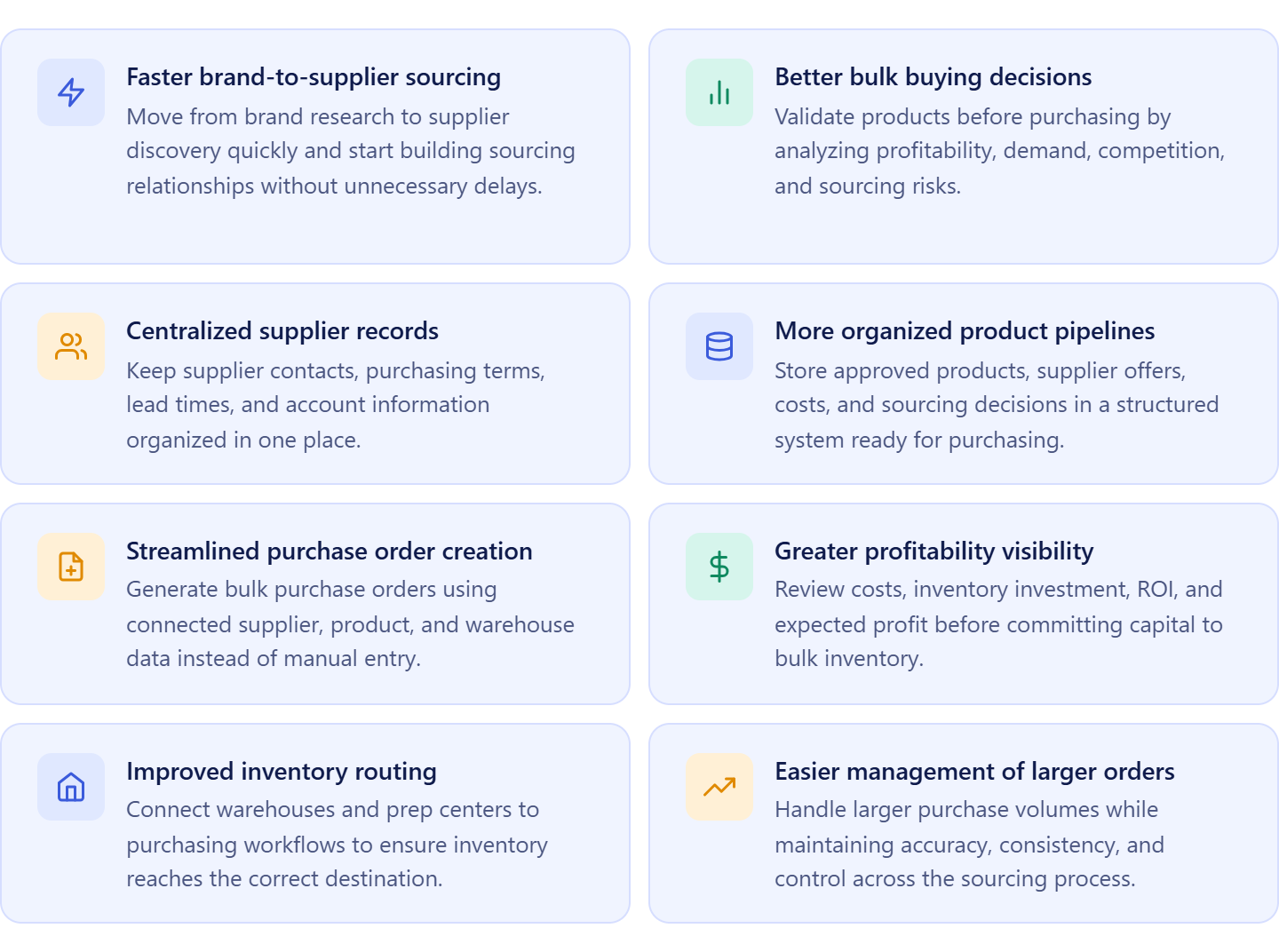
Faster brand-to-supplier sourcing
Moving from brand research to supplier discovery becomes more efficient when both activities are part of the same workflow. Sellers can quickly identify sourcing opportunities and begin building supplier relationships.
Better bulk buying decisions
Analyzing supplier catalogs before purchasing helps sellers focus on products with strong margins, stable demand, and manageable competition while avoiding costly inventory mistakes.
Centralized supplier records
Keeping supplier contacts, purchasing terms, account details, and communication history in one place makes supplier relationships easier to manage and maintain.
More organized product pipelines
Storing approved products, supplier offers, costs, and sourcing notes in a centralized system creates a structured inventory purchasing process and reduces duplicate work.
Streamlined purchase order creation
When supplier information, product data, and warehouse details remain connected, bulk purchase orders can be created faster and with fewer manual inputs.
Greater visibility into profitability
Keeping costs, supplier pricing, and purchasing data connected helps sellers evaluate inventory investments more accurately and make better purchasing decisions.
Improved inventory routing
Connecting warehouses and prep centers to purchasing workflows helps ensure inventory is routed to the correct destination and reduces fulfillment errors.
Easier management of larger orders
As purchasing volume increases, connected workflows help sellers maintain consistency, control, and operational efficiency without adding unnecessary complexity.
How Seller Assistant Streamlines Amazon Bulk Order Management
Managing Amazon bulk orders requires sellers to coordinate several processes at once. Before inventory can be purchased, sellers must identify promising brands, find suppliers, gain access to wholesale pricing, analyze large product catalogs, organize sourcing decisions, assign fulfillment destinations, and verify order profitability. When these tasks are handled in separate systems, managing inventory purchases becomes slower, more complex, and more prone to errors.
Seller Assistant brings every stage of bulk purchasing into one connected workflow. Information collected during brand research, supplier onboarding, product analysis, inventory planning, and purchase order creation remains linked throughout the process, reducing manual work and improving purchasing accuracy.
How the workflow works
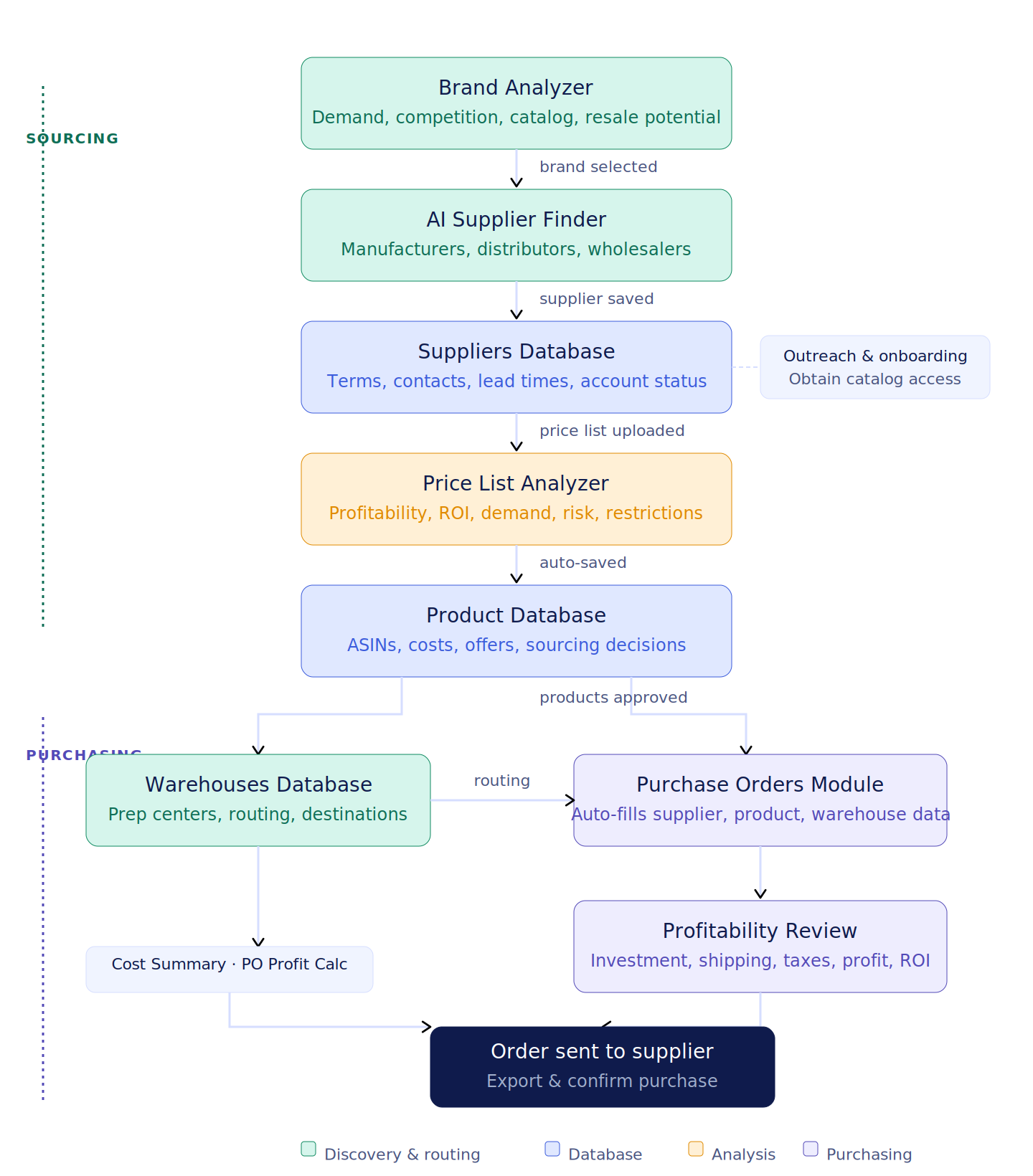
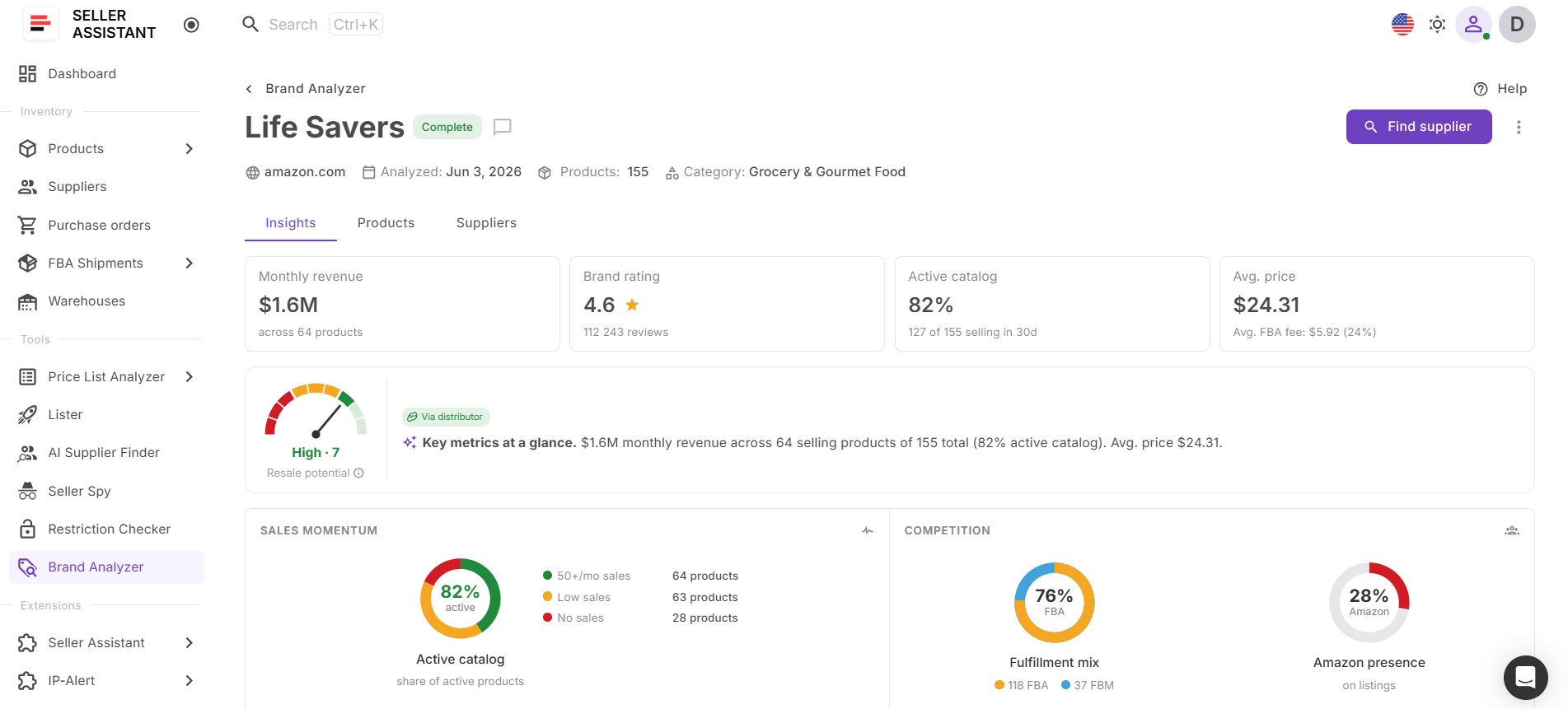
The process begins with Brand Analyzer, where sellers evaluate brands based on demand, competition, catalog strength, and sourcing potential. Once a promising brand is identified, AI Supplier Finder helps locate manufacturers, distributors, wholesalers, and brand-authorized suppliers that can provide inventory access.
After selecting a supplier, the seller saves supplier information in Suppliers Database. Contact details, purchasing terms, lead times, account status, and supplier relationships are managed in one place while the seller completes onboarding and gains access to wholesale pricing.
Once a supplier catalog is received, it is uploaded to Price List Analyzer for bulk evaluation. The tool analyzes profitability, ROI, demand, competition, restrictions, HazMat status, IP risks, and other sourcing factors to identify products suitable for bulk purchasing.
All analyzed products and supplier offers are automatically stored in Product Database, creating a centralized sourcing pipeline. Sellers can compare opportunities, manage supplier offers, and organize buying decisions before committing capital.
Next, inventory destinations are assigned through Warehouses Database, where sellers can manage warehouses, prep centers, and fulfillment routing information.
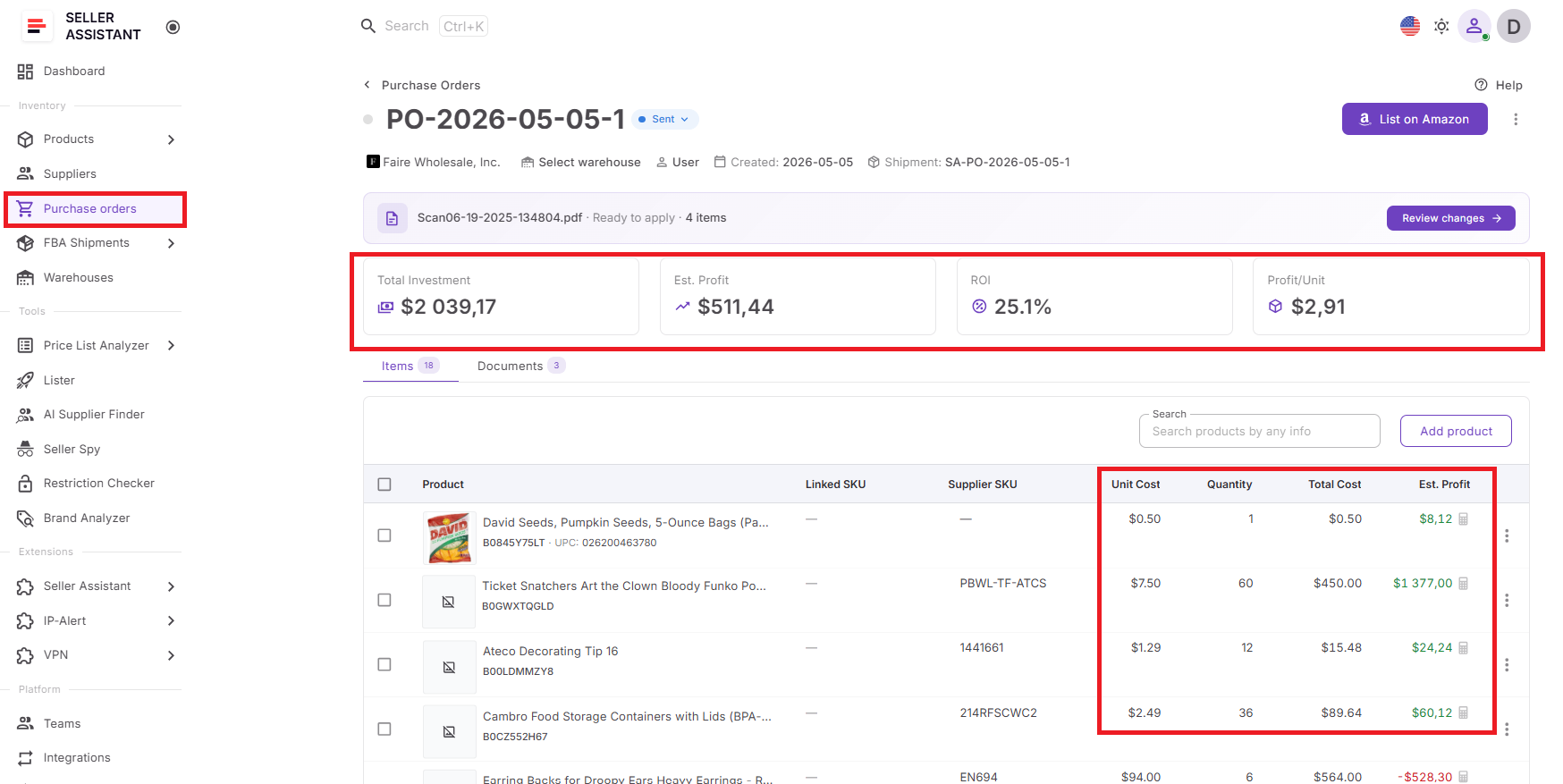
Finally, approved products are moved into Purchase Orders Module. Supplier details, product information, costs, and warehouse routing data are populated automatically. Before placing the order, sellers can review total inventory investment, shipping costs, taxes, estimated profit, ROI, and projected earnings to ensure the bulk purchase meets profitability targets.
Seller Assistant tools powering the workflow
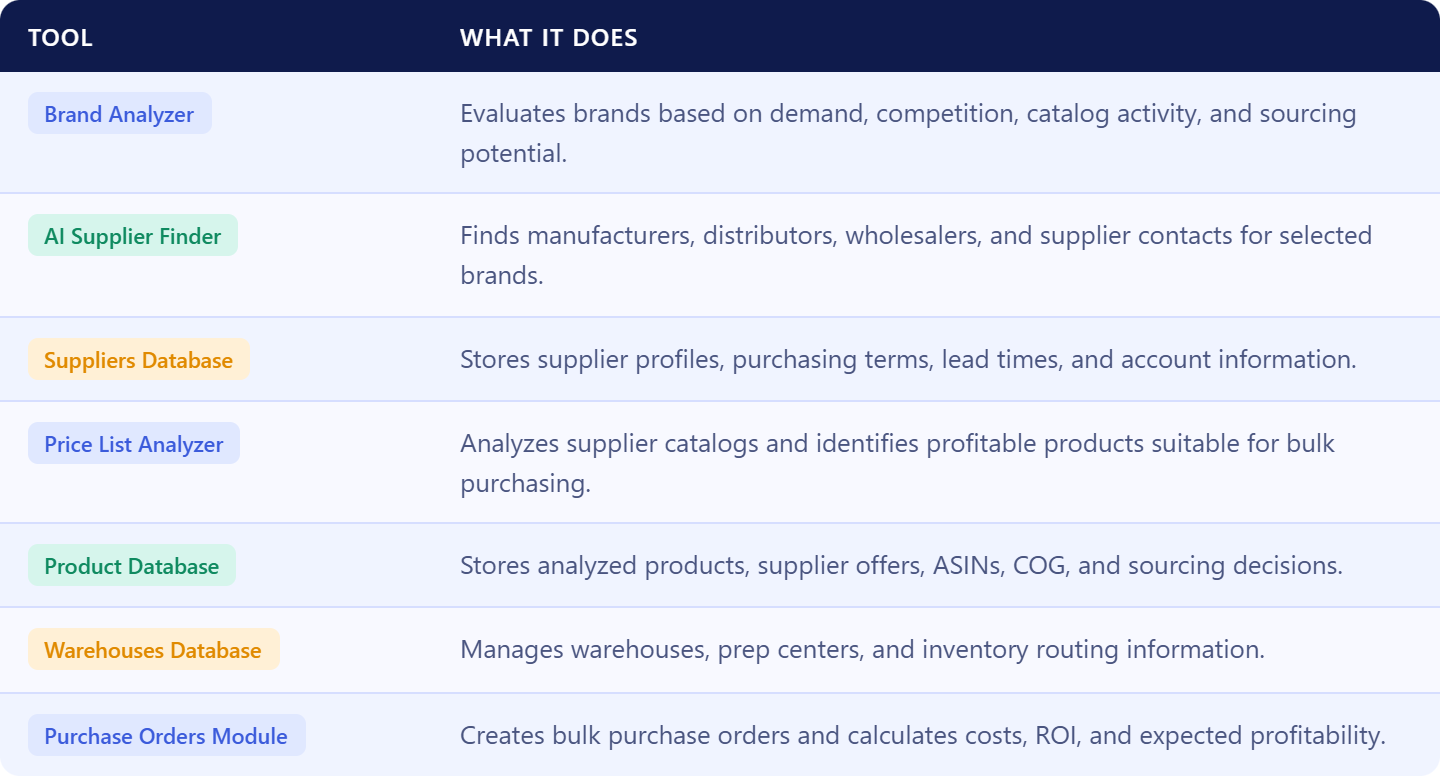
How Brand Analyzer Helps Identify Profitable Brands
Brand Analyzer is Seller Assistant’s brand qualification and opportunity discovery tool built for Amazon wholesale sellers, online arbitrage sellers, and dropshippers. It helps sellers evaluate whether a brand is worth sourcing before spending time on supplier outreach, account applications, product research, and inventory purchases.
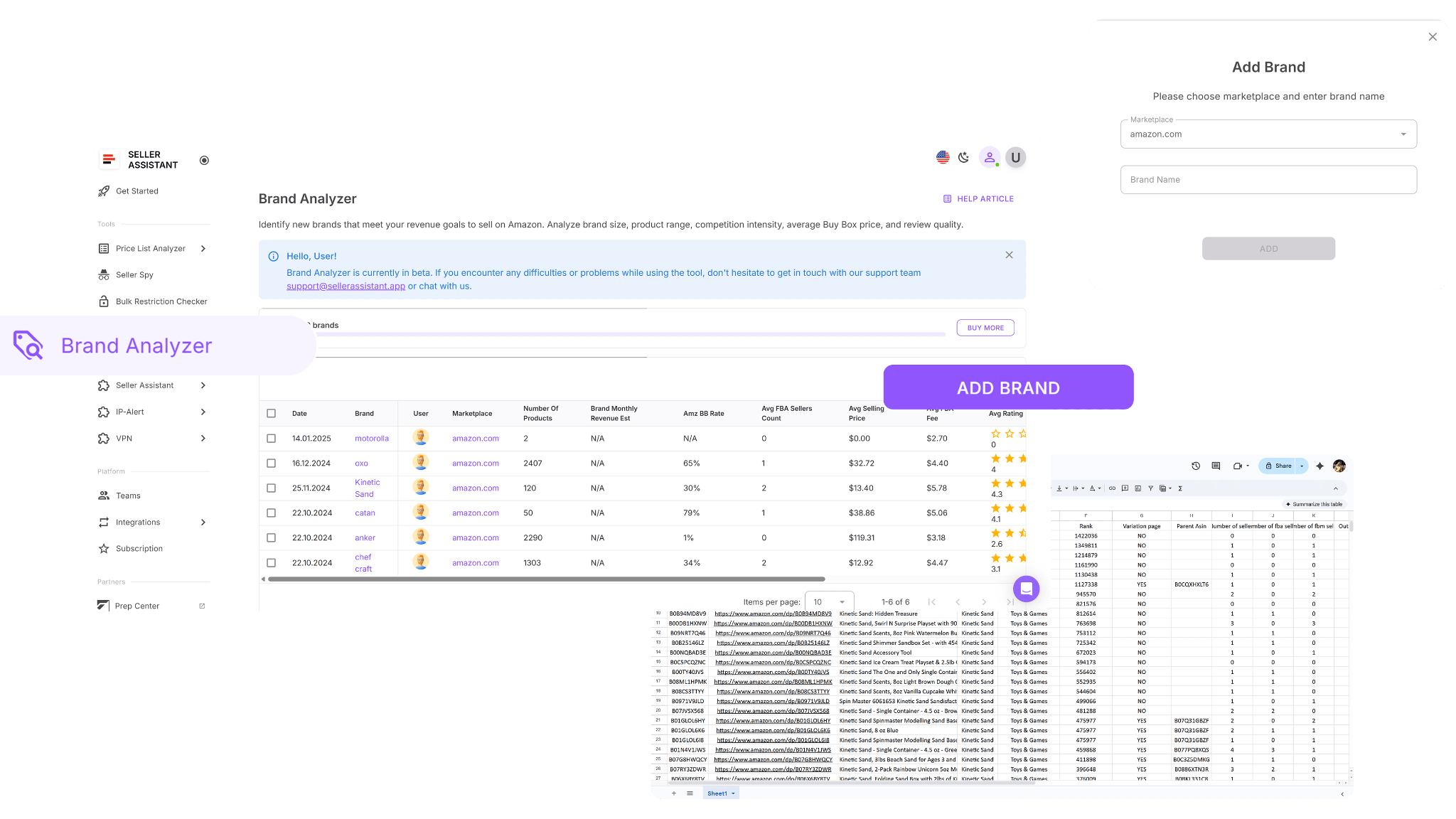
Instead of researching dozens of ASINs individually, sellers can analyze an entire brand and understand its demand, competition, catalog activity, pricing environment, and sourcing potential from one dashboard. This helps prioritize stronger opportunities and eliminate weak brands early in the sourcing process.
What Brand Analyzer does
Brand Analyzer helps sellers identify brands that can support profitable and scalable sourcing opportunities.
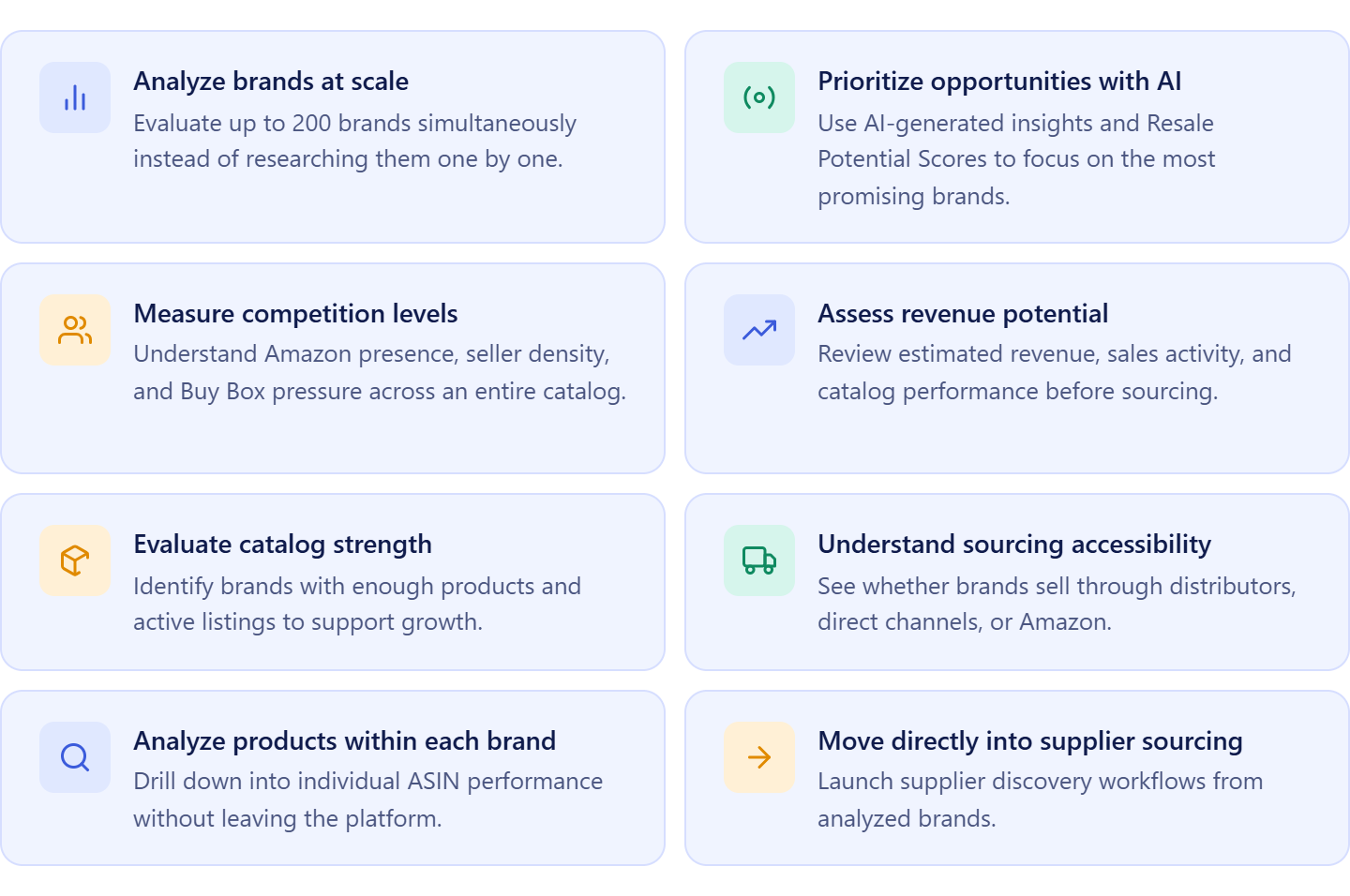
It allows sellers to:
- Analyze up to 200 brands simultaneously;
- Evaluate demand using estimated revenue and sales activity metrics;
- Measure competition through seller counts and Amazon Buy Box presence;
- Review catalog size and active product percentages;
- Analyze average pricing and pricing stability across a brand;
- Assess Amazon Retail participation and Buy Box ownership;
- Evaluate FBA penetration and fulfillment trends;
- Review brand ratings and customer trust signals;
- Generate AI-powered Resale Potential Scores;
- Receive AI-generated brand summaries and opportunity insights;
- Compare multiple brands side by side;
- Drill down from brand-level metrics to individual ASIN performance;
- Identify supplier accessibility and distribution opportunities;
- Launch supplier discovery workflows directly from qualified brands;
- Export brand data for sourcing and team review.
How Brand Analyzer helps find the best bulk purchasing opportunities
Brand Analyzer serves as the first stage of Amazon bulk order management by helping sellers focus on brands that can support long-term purchasing opportunities. Instead of investing time in brands with weak demand, excessive competition, or limited catalog depth, sellers can qualify opportunities before contacting suppliers or reviewing wholesale catalogs.
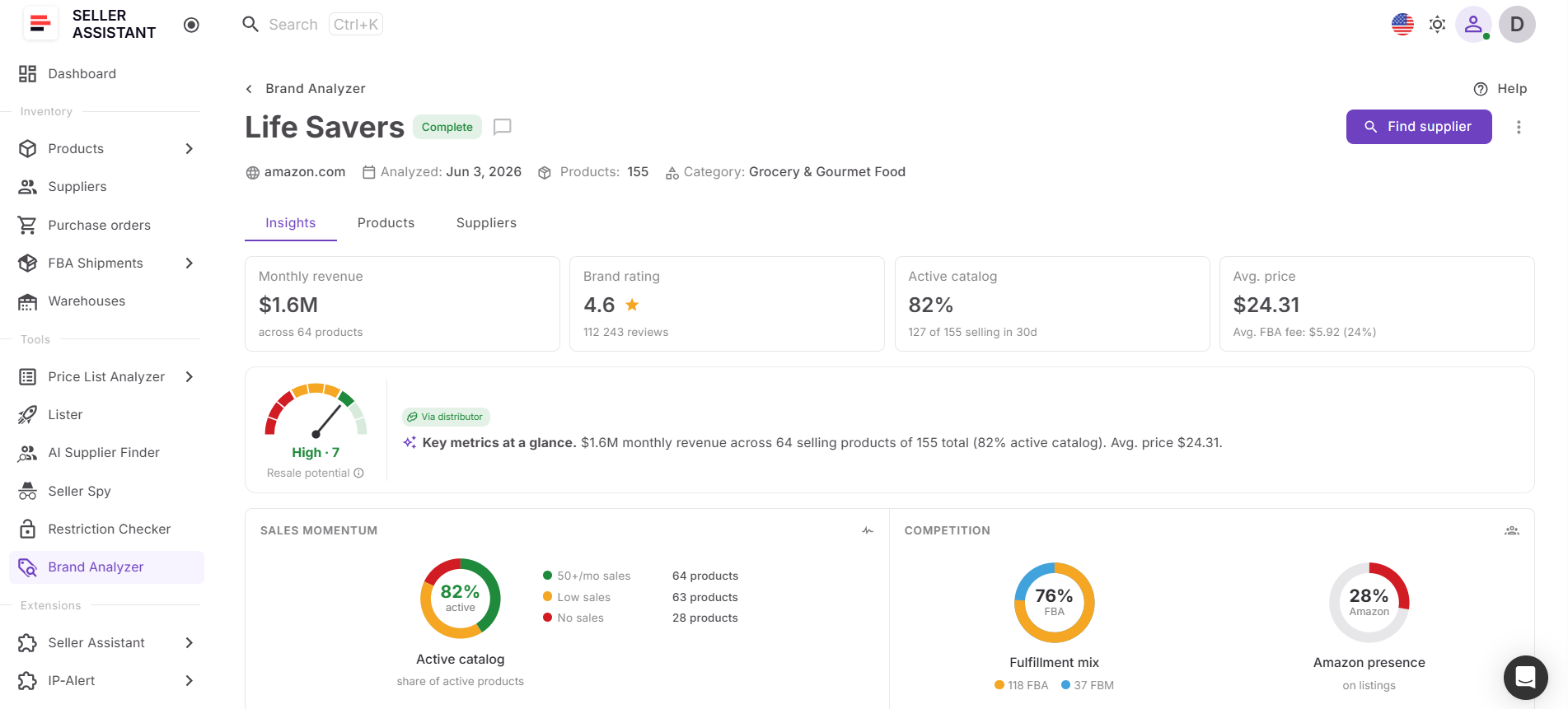
Once a brand meets the seller’s criteria, it becomes the foundation for the rest of the workflow. Sellers can move directly into AI Supplier Finder, identify wholesale suppliers, obtain price lists, and begin evaluating products for bulk purchasing. By connecting brand qualification with supplier discovery and catalog analysis, Brand Analyzer helps sellers build bulk orders from stronger sourcing opportunities and make purchasing decisions with greater confidence.
How AI Supplier Finder Helps Build Reliable Supplier Networks
AI Supplier Finder is Seller Assistant’s supplier discovery solution built for Amazon wholesale sellers, online arbitrage sellers, and dropshippers. It helps sellers quickly identify legitimate sourcing partners for the brands they want to purchase in bulk, including manufacturers, distributors, wholesalers, and brand-authorized suppliers.
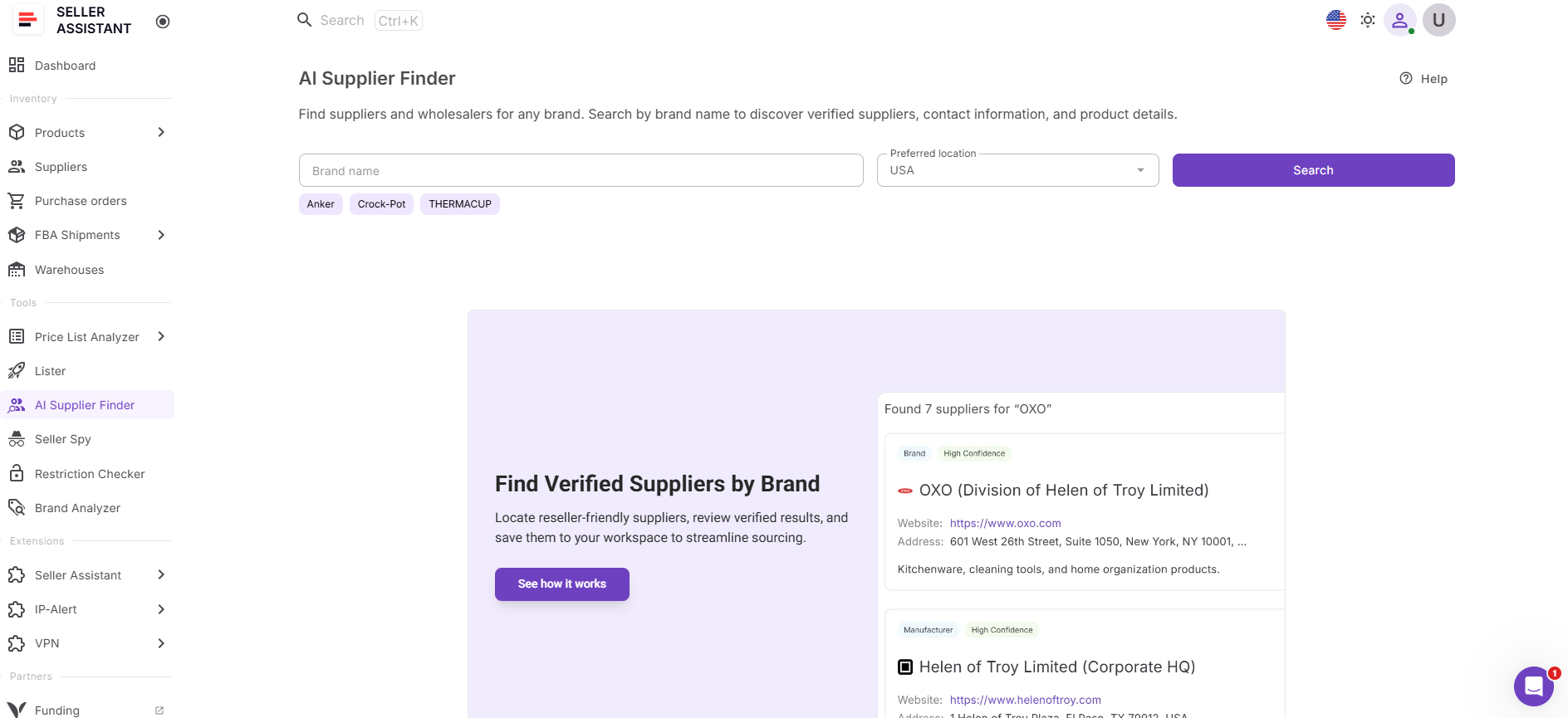
Instead of spending hours searching online, filtering out retail stores, and verifying supplier legitimacy manually, sellers receive supplier recommendations tailored specifically to wholesale sourcing and Amazon resale.
What AI Supplier Finder does
AI Supplier Finder helps sellers connect qualified brands with qualified suppliers.
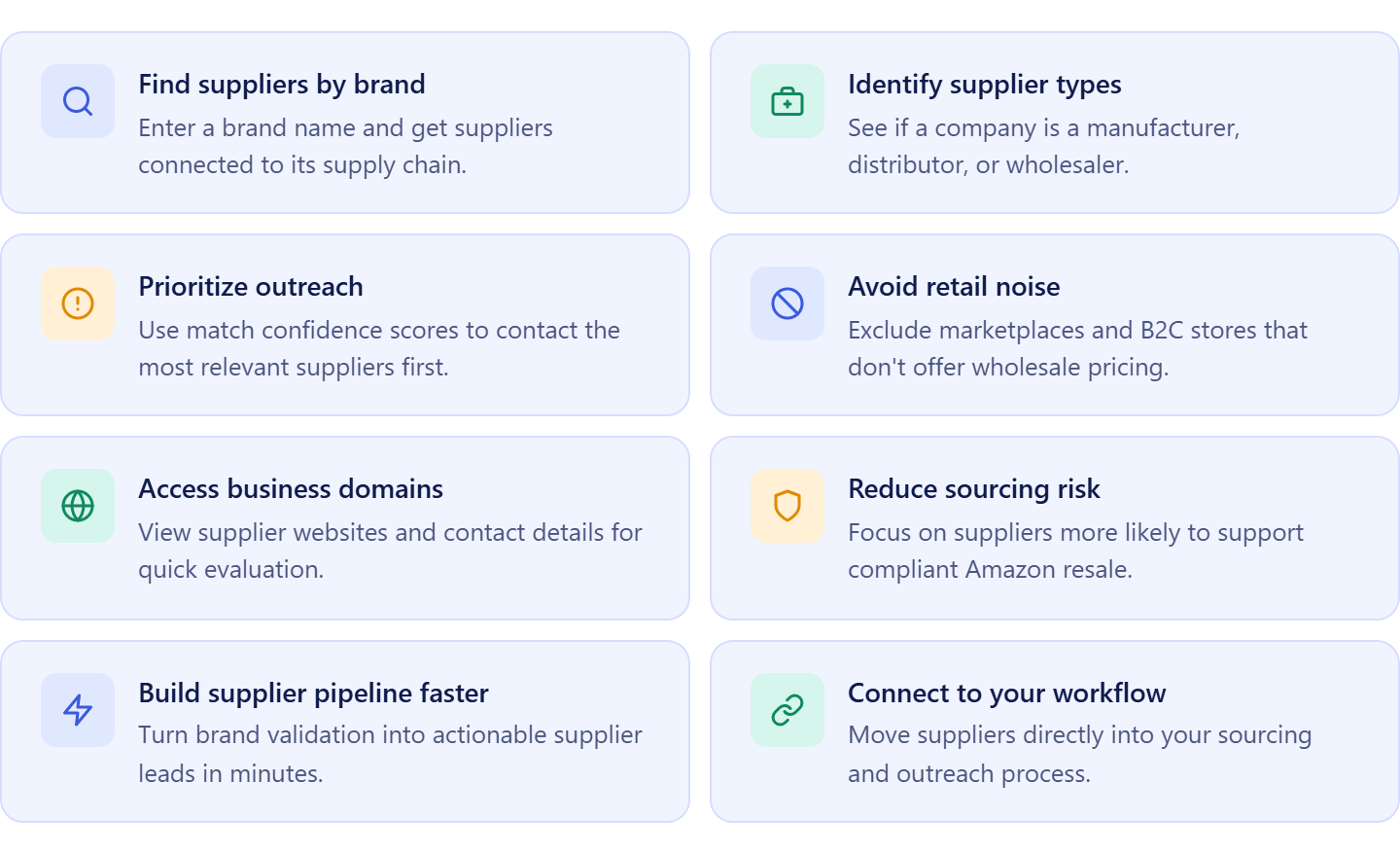
It allows sellers to:
- Find suppliers by entering a brand name;
- Discover manufacturers, distributors, wholesalers, and brand contacts;
- Prioritize suppliers based on wholesale suitability;
- View supplier websites and available business contact information;
- Evaluate supplier relevance using match confidence scores;
- Filter out marketplaces, retailers, and consumer-focused websites;
- Identify potential sourcing channels for approved brands;
- Launch supplier searches directly from Brand Analyzer and sourcing workflows;
- Save suppliers directly into Suppliers Database;
- Move from brand research to supplier outreach faster.
How AI Supplier Finder helps build profitable bulk orders
AI Supplier Finder bridges the gap between brand research and inventory purchasing. Once sellers identify a promising brand, the next challenge is finding suppliers that can provide access to wholesale pricing, inventory availability, and long-term sourcing opportunities.
Rather than researching suppliers manually, sellers can quickly identify potential sourcing partners and begin the account approval process.
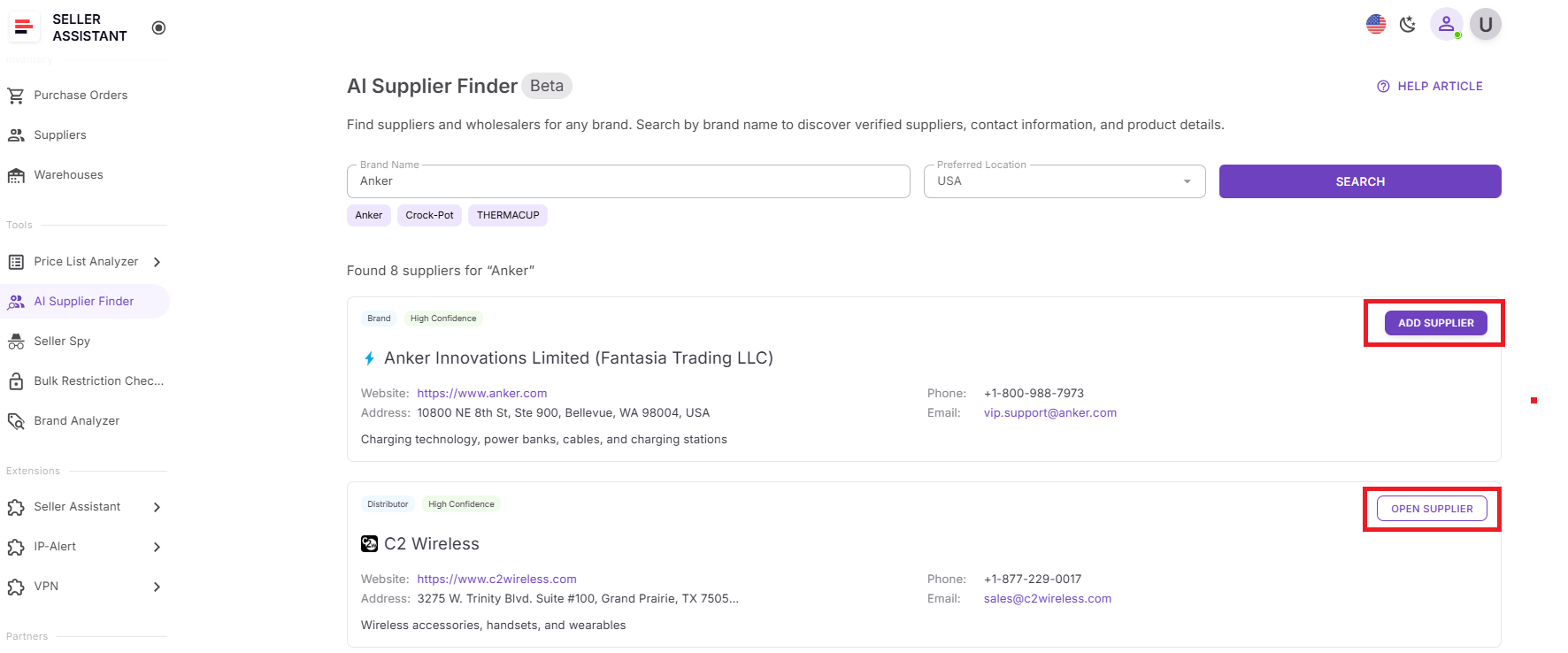
After a supplier is selected, it becomes part of the connected workflow where supplier records, wholesale catalogs, product analysis, and future purchase orders remain linked. This allows sellers to move efficiently from brand qualification to supplier onboarding and ultimately to building profitable bulk inventory orders.
How Suppliers Database Helps Manage Wholesale Supplier Relationships
Finding suppliers is only the first step in Amazon bulk order management. To purchase inventory efficiently, sellers must keep track of supplier contacts, account status, purchasing terms, lead times, and communication history. As supplier networks grow, managing this information manually becomes increasingly difficult.
Suppliers Database is Seller Assistant’s centralized supplier organization tool designed for Amazon wholesale sellers, online arbitrage sellers, and dropshippers. It provides a structured workspace where supplier records remain organized, accessible, and connected to the purchasing workflow.
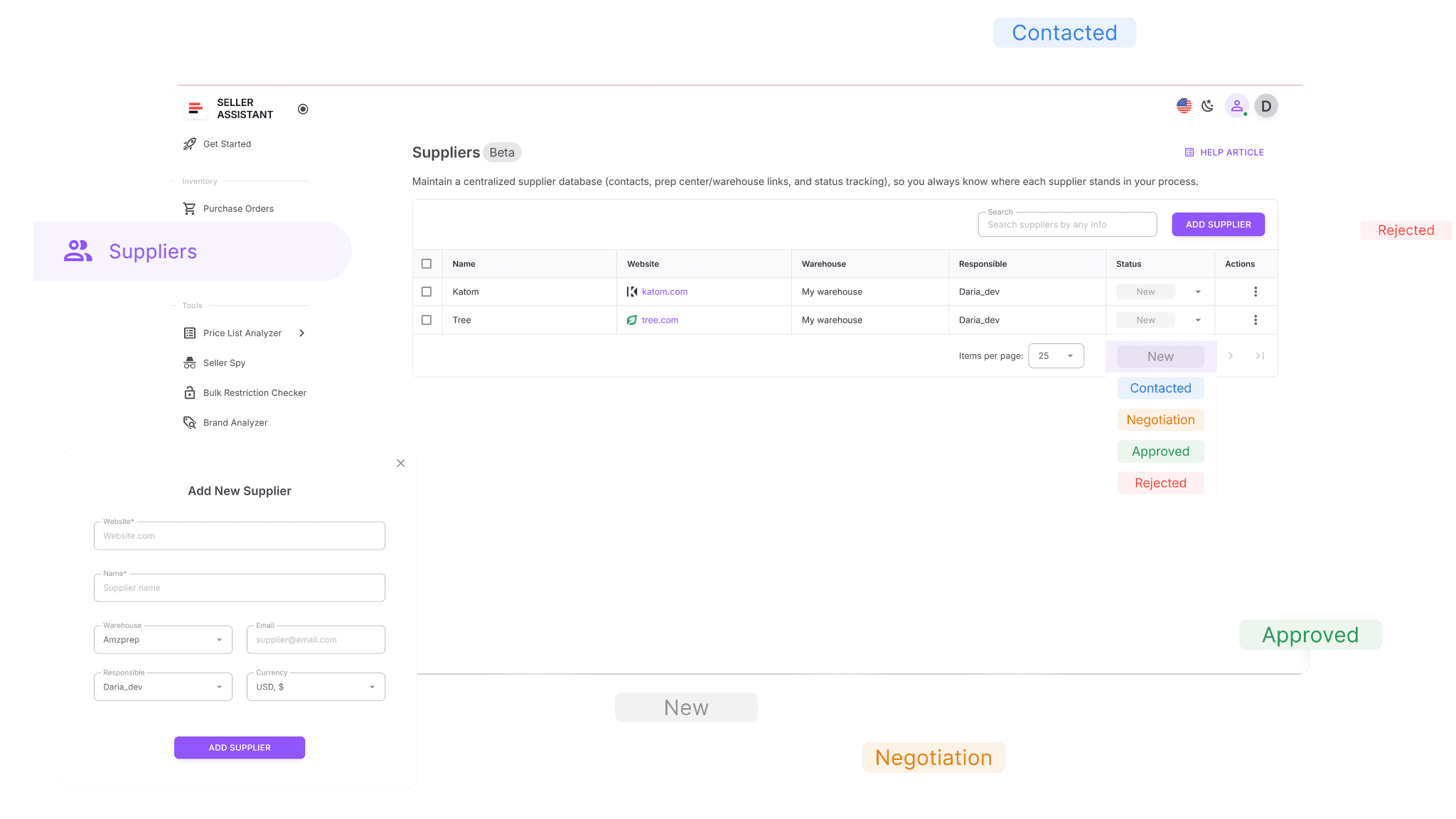
What Suppliers Database does
Suppliers Database helps sellers maintain supplier relationships and organize purchasing information in one place.
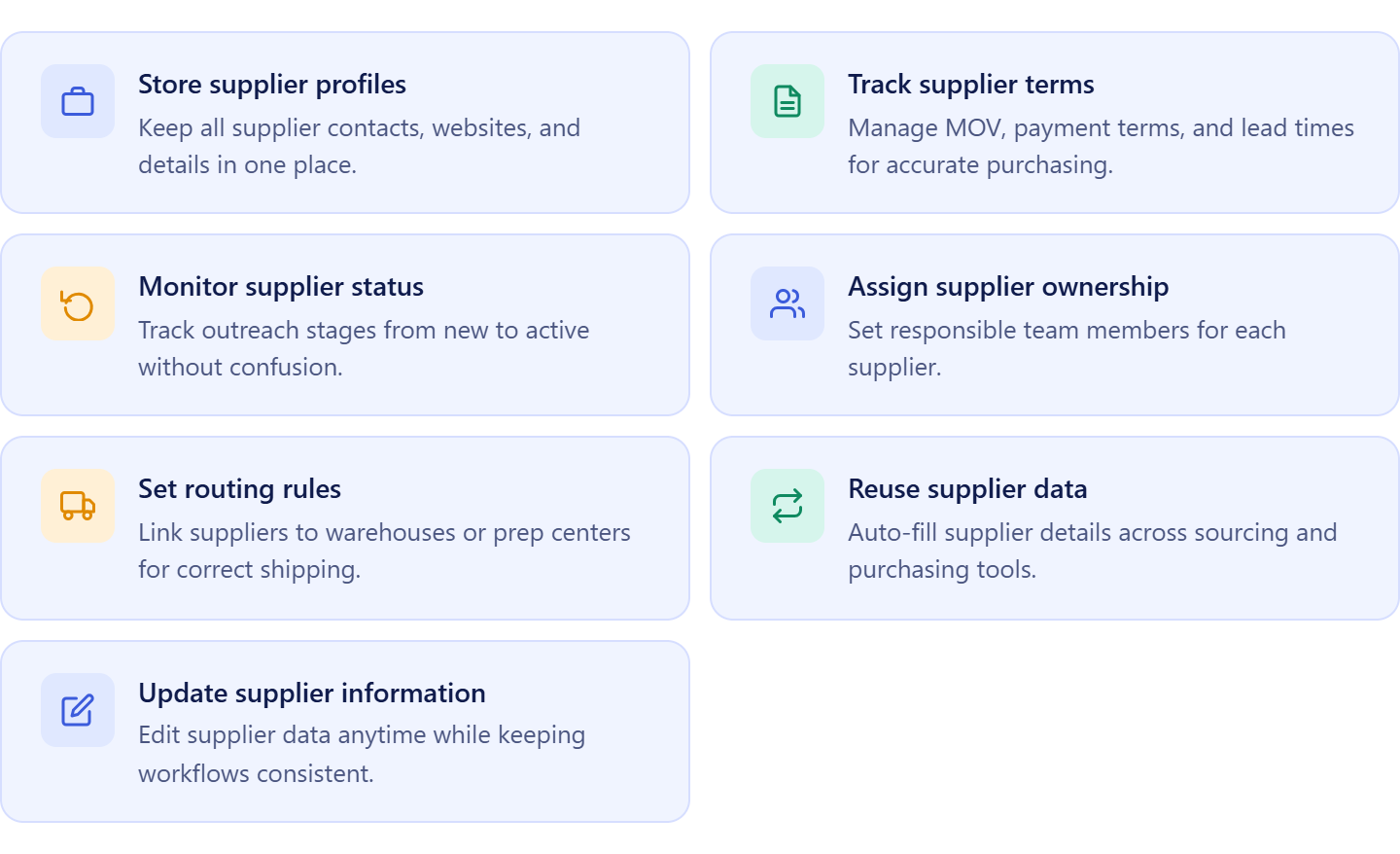
It allows sellers to:
- Store supplier profiles, websites, and contact information;
- Manage MOQ requirements, payment terms, lead times, and shipping conditions;
- Track supplier onboarding, approval status, and relationship progress;
- Assign suppliers to buyers, sourcing specialists, or virtual assistants;
- Connect suppliers to warehouses and prep center destinations;
- Keep supplier records linked to sourcing and purchasing activities;
- Reuse supplier information when creating purchase orders;
- Search, filter, and organize supplier records efficiently;
- Update supplier information as relationships evolve.
How Suppliers Database helps manage Amazon bulk orders
Suppliers Database plays a central role in bulk purchasing by keeping supplier information connected to every stage of the workflow. Instead of searching through emails, spreadsheets, and documents for supplier details, sellers can access all purchasing information from a single supplier profile.
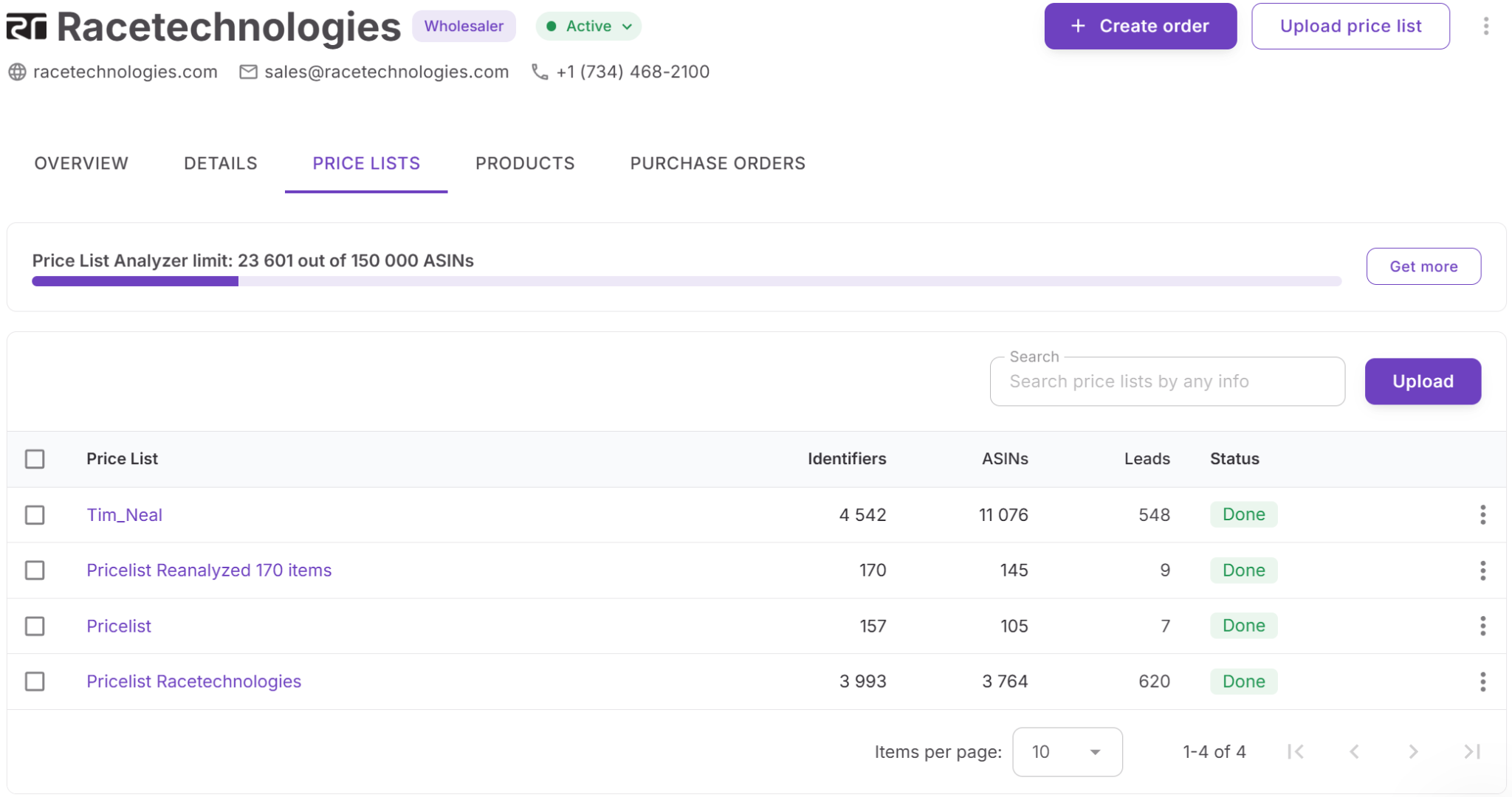
As suppliers provide new catalogs, pricing updates, and inventory opportunities, those records remain linked to product analysis, warehouse routing, and purchase order creation. This reduces administrative work, improves supplier communication, prevents purchasing errors, and helps sellers manage larger supplier networks while maintaining consistency across bulk ordering operations.
How Price List Analyzer Helps Identify the Best Products for Bulk Orders
Getting access to a supplier catalog is only the beginning of the purchasing process. The real challenge is determining which products deserve a place in a bulk order. Sellers must evaluate profitability, demand, competition, restrictions, and potential risks before committing inventory dollars.
Price List Analyzer is Seller Assistant’s bulk catalog intelligence tool designed for Amazon wholesale sellers, online arbitrage sellers, and dropshippers. It helps sellers evaluate large supplier price lists quickly and identify products that align with their purchasing and profitability goals.
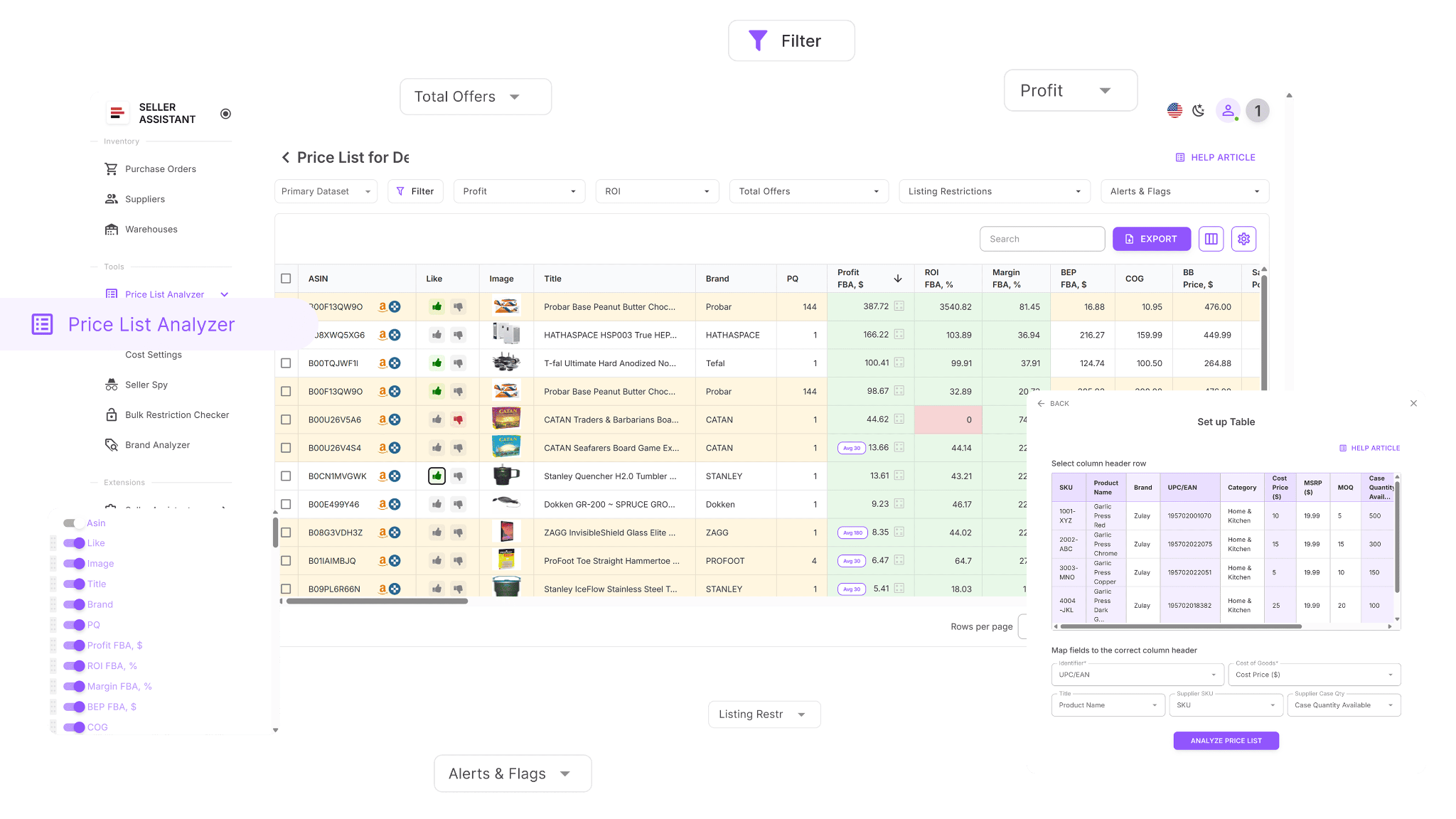
What Price List Analyzer does
Price List Analyzer helps sellers transform wholesale catalogs into purchase-ready opportunities.
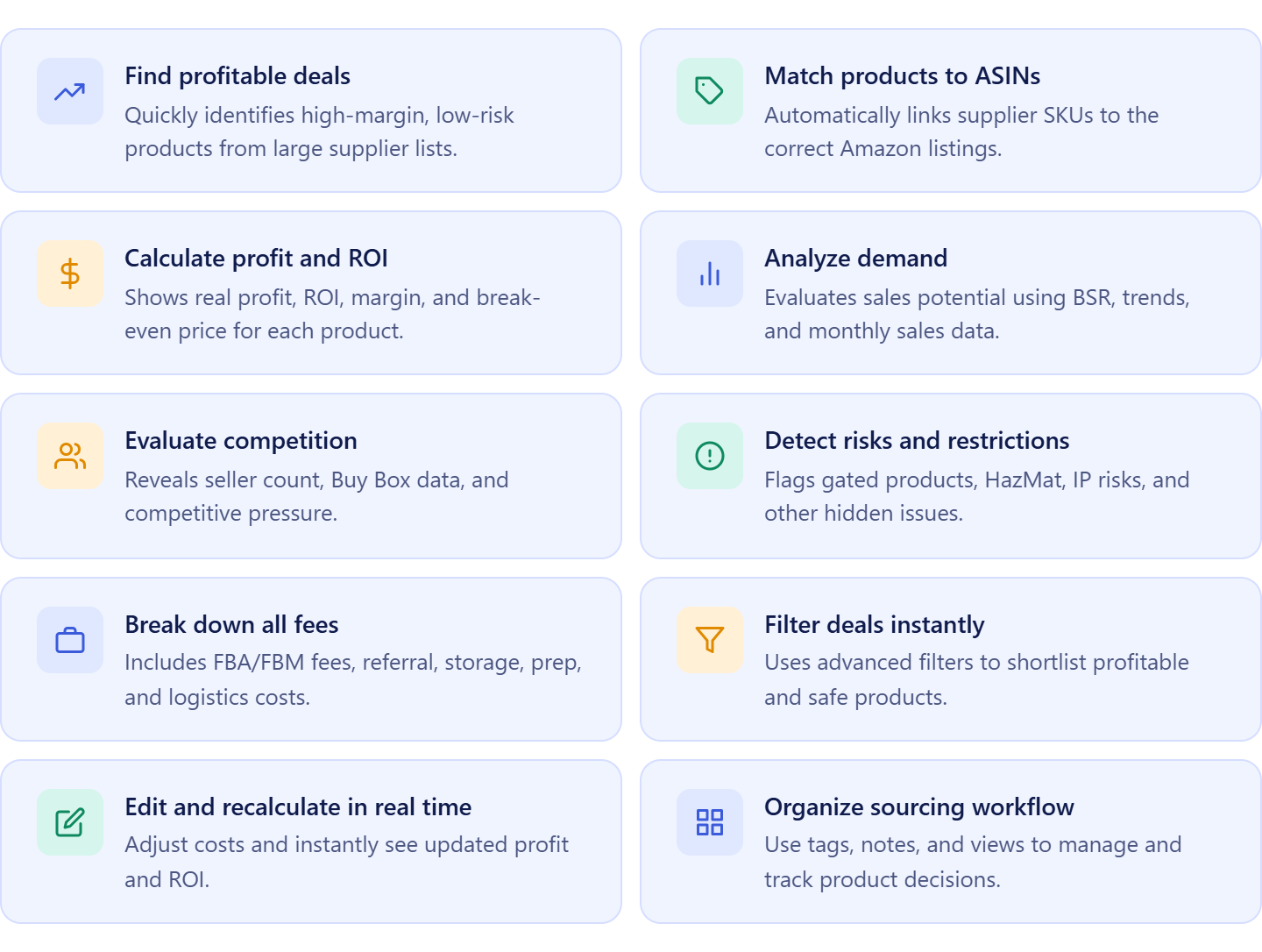
It allows sellers to:
- Process hundreds or thousands of supplier products simultaneously;
- Match supplier items to Amazon listings automatically;
- Calculate ROI, margin, net profit, and break-even pricing;
- Analyze sales potential using sales estimates and BSR trends;
- Review competition levels, Buy Box conditions, and Amazon presence;
- Detect restrictions, HazMat products, IP complaints, and sourcing risks;
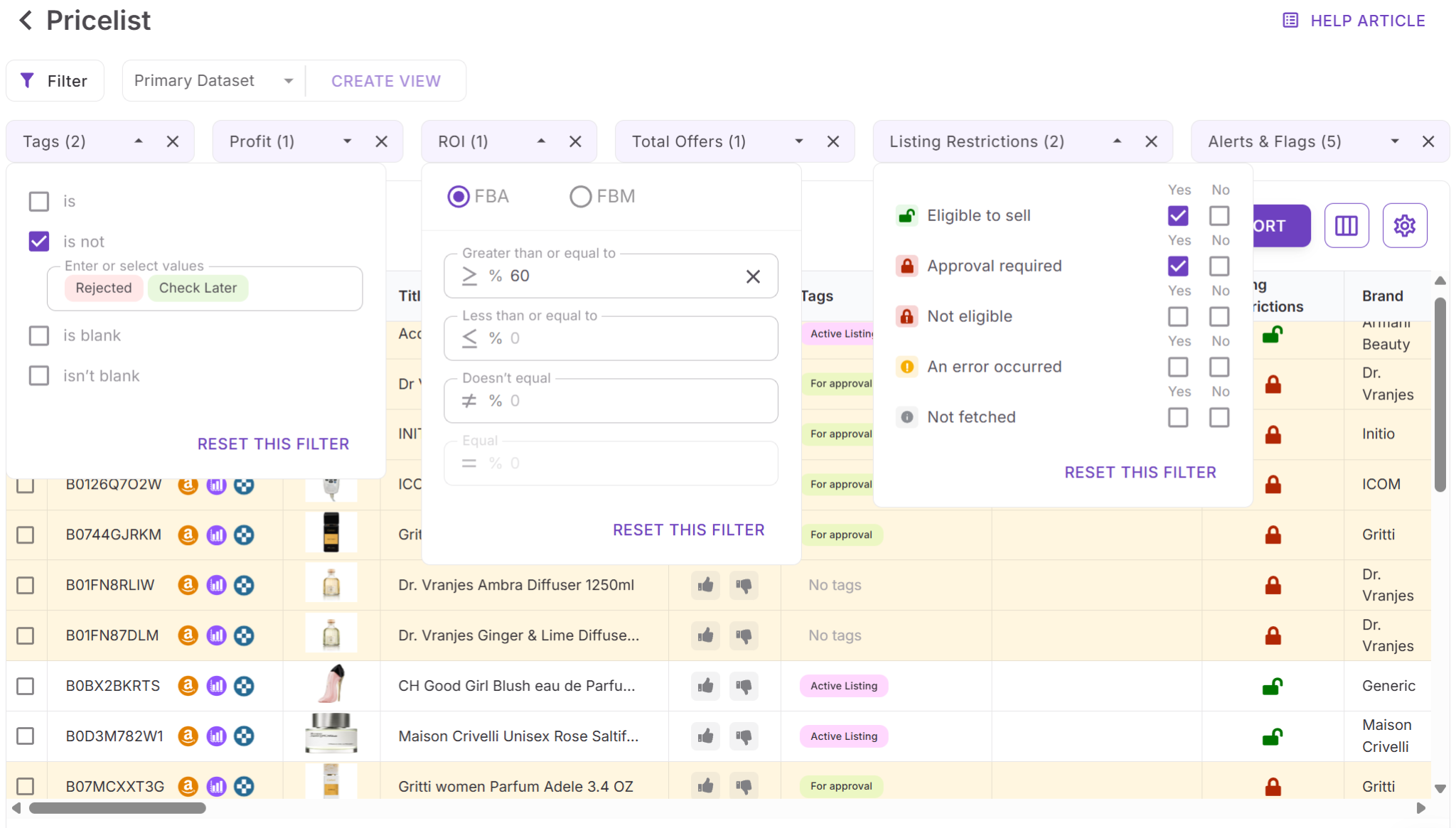
- Filter opportunities based on profitability, demand, competition, and risk;
- Adjust COG, shipping, prep, and logistics expenses dynamically;
- Organize sourcing decisions with tags, notes, and saved views;
- Transfer approved products into Product Database automatically.
How Price List Analyzer helps build profitable bulk orders
Price List Analyzer is where bulk purchasing decisions are validated. Instead of selecting products based solely on supplier pricing, sellers can evaluate every opportunity using real Amazon marketplace data before placing large inventory orders.
The tool helps sellers identify products with the strongest combination of margin, demand, and sales potential while eliminating low-performing or high-risk inventory. Once the best opportunities are approved, product data, supplier offers, and cost information remain connected throughout the workflow. This helps sellers build bulk orders using verified product data, reduce purchasing risk, and allocate inventory budgets more effectively.
How Product Database Helps Organize Bulk Purchasing Opportunities
Analyzing supplier catalogs can generate hundreds or even thousands of potential buying opportunities. Without a structured system, tracking supplier offers, product costs, sourcing decisions, and purchasing priorities quickly becomes difficult.
Product Database is Seller Assistant’s centralized sourcing management tool designed for Amazon wholesale sellers, online arbitrage sellers, and dropshippers. It provides a single workspace where approved products, supplier offers, ASINs, costs, and purchasing data remain organized and ready for future inventory orders.
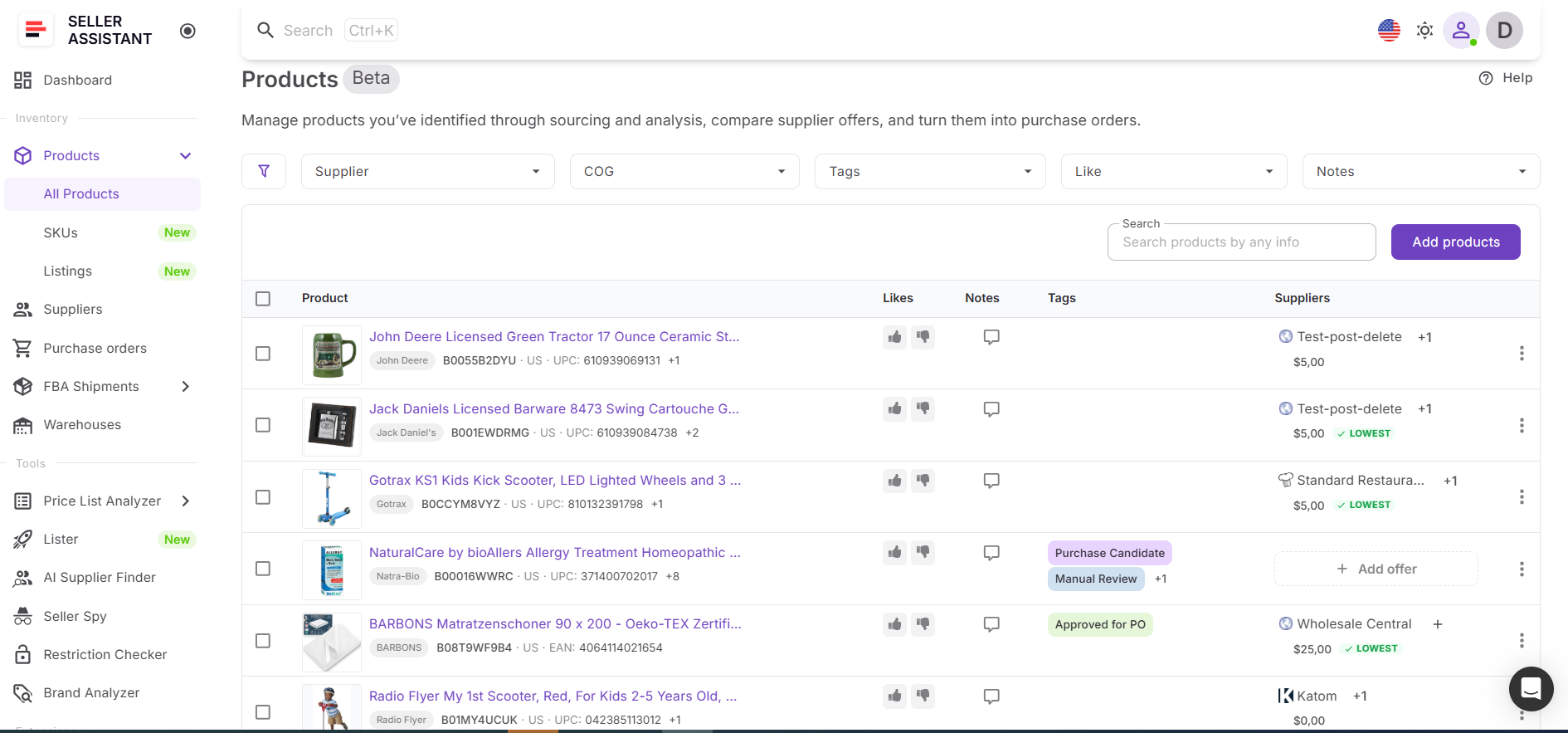
What Product Database does
Product Database helps sellers build and manage a structured pipeline of purchase-ready products.
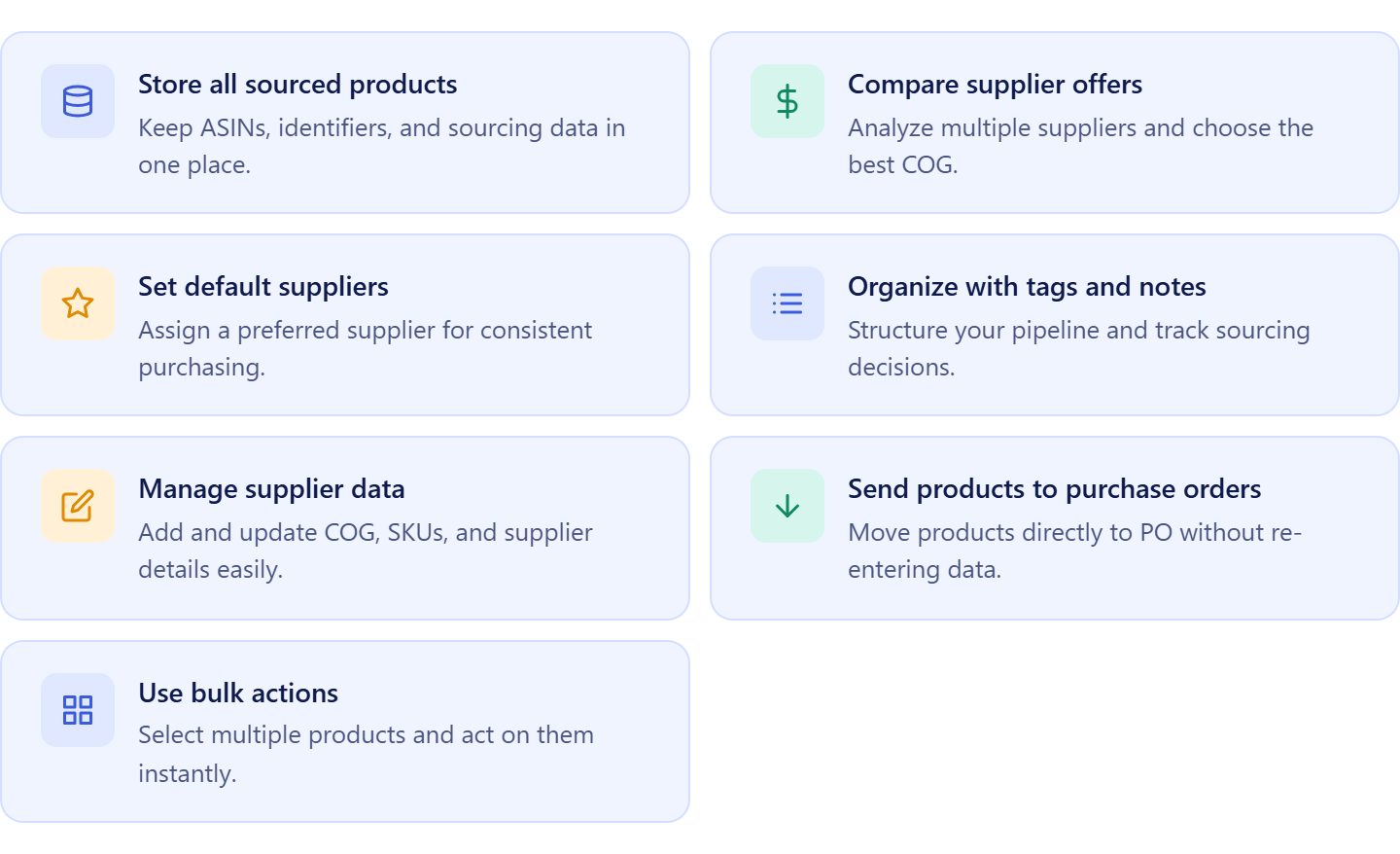
It allows sellers to:
- Store approved products and ASIN information in one location;
- Automatically save products analyzed in Price List Analyzer;
- Keep supplier offers connected to individual products;
- Compare multiple supplier offers for the same ASIN;
- Assign preferred suppliers to purchasing opportunities;
- Manage COG, supplier SKUs, and product identifiers;
- Organize products with tags, notes, and likes;
- Track sourcing decisions and buying history;
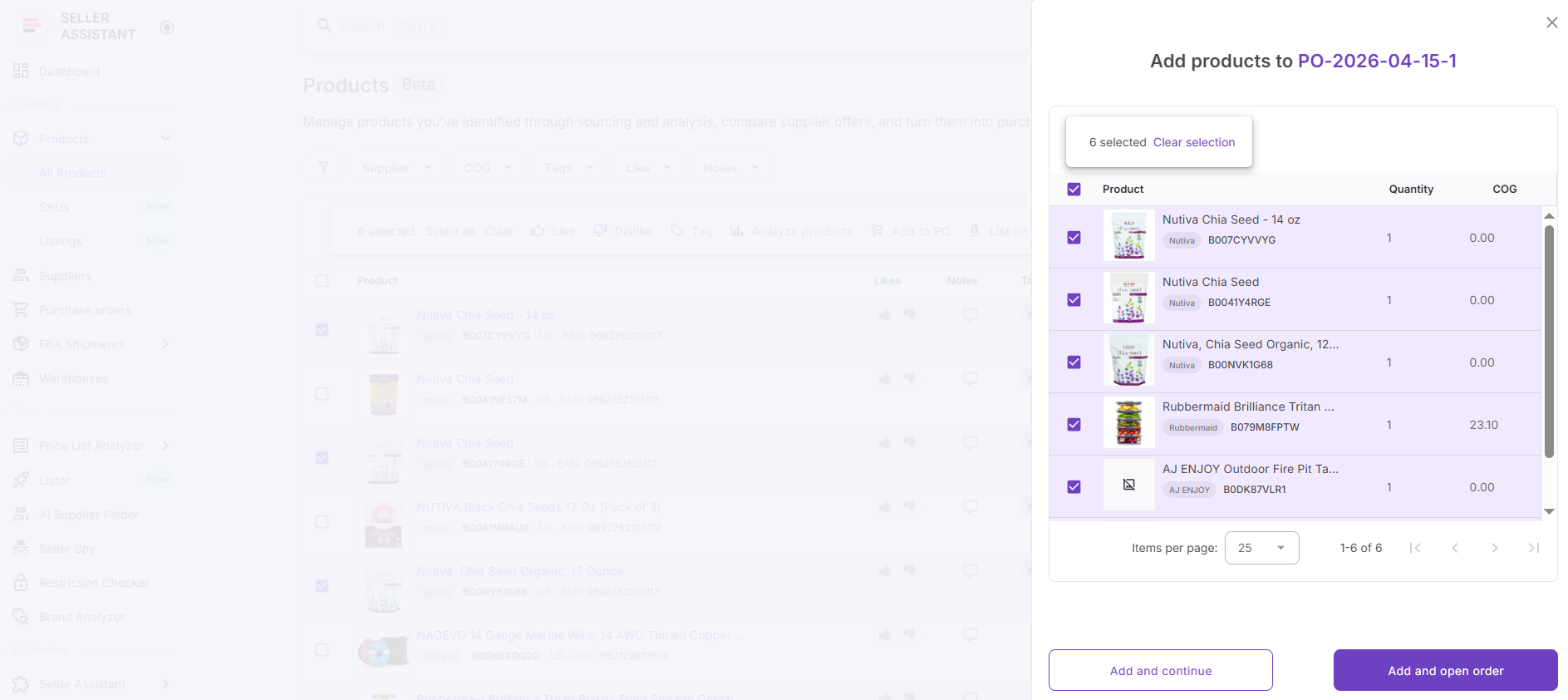
- Add products directly to purchase orders;
- Apply bulk updates and actions across multiple products.
How Product Database helps manage Amazon bulk orders
Product Database serves as the bridge between product analysis and purchasing execution. Once products have been validated, they are automatically stored together with supplier offers, costs, and sourcing decisions, creating a centralized inventory pipeline.
Instead of revisiting supplier catalogs or repeating product research, sellers can access all purchasing information from a single product record. When it’s time to place a bulk order, products can move directly into the purchasing workflow with supplier and cost data already attached. This reduces manual work, improves order accuracy, and helps sellers manage larger inventories, supplier networks, and purchasing cycles more efficiently.
How Warehouses Database Helps Manage Inventory Routing
Managing Amazon bulk orders doesn’t end when products are selected. Sellers also need to ensure inventory is shipped to the correct warehouse, prep center, or fulfillment destination. As order volume grows, tracking shipping locations manually can lead to routing errors, shipment delays, and operational inefficiencies.
Warehouses Database is Seller Assistant’s inventory routing and fulfillment management tool designed for Amazon wholesale sellers, online arbitrage sellers, and dropshippers. It centralizes warehouse records, prep center information, and shipping destinations, making them available throughout the purchasing workflow.
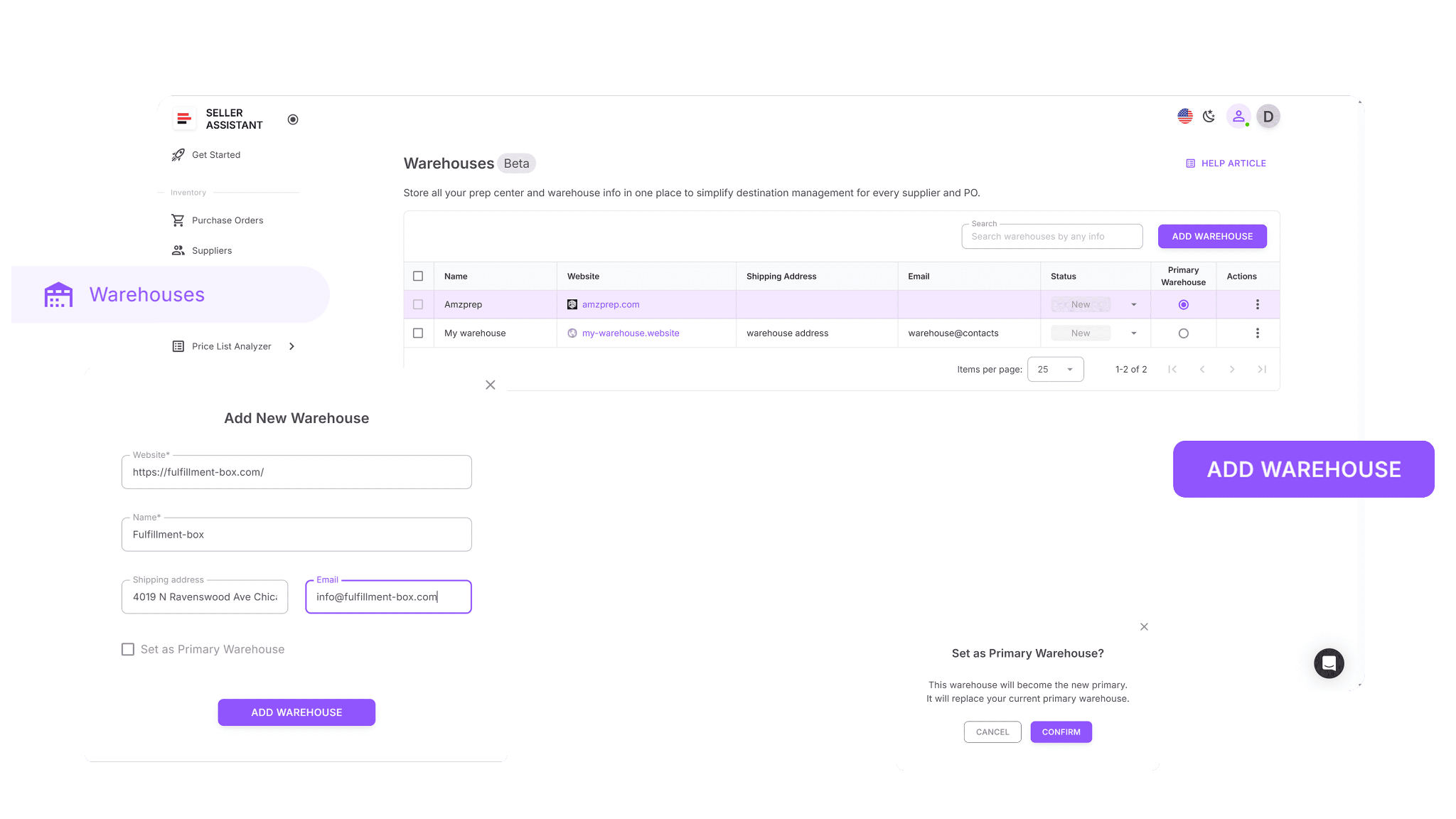
What Warehouses Database does
Warehouses Database helps sellers keep inventory routing organized and consistent across all purchasing activities.
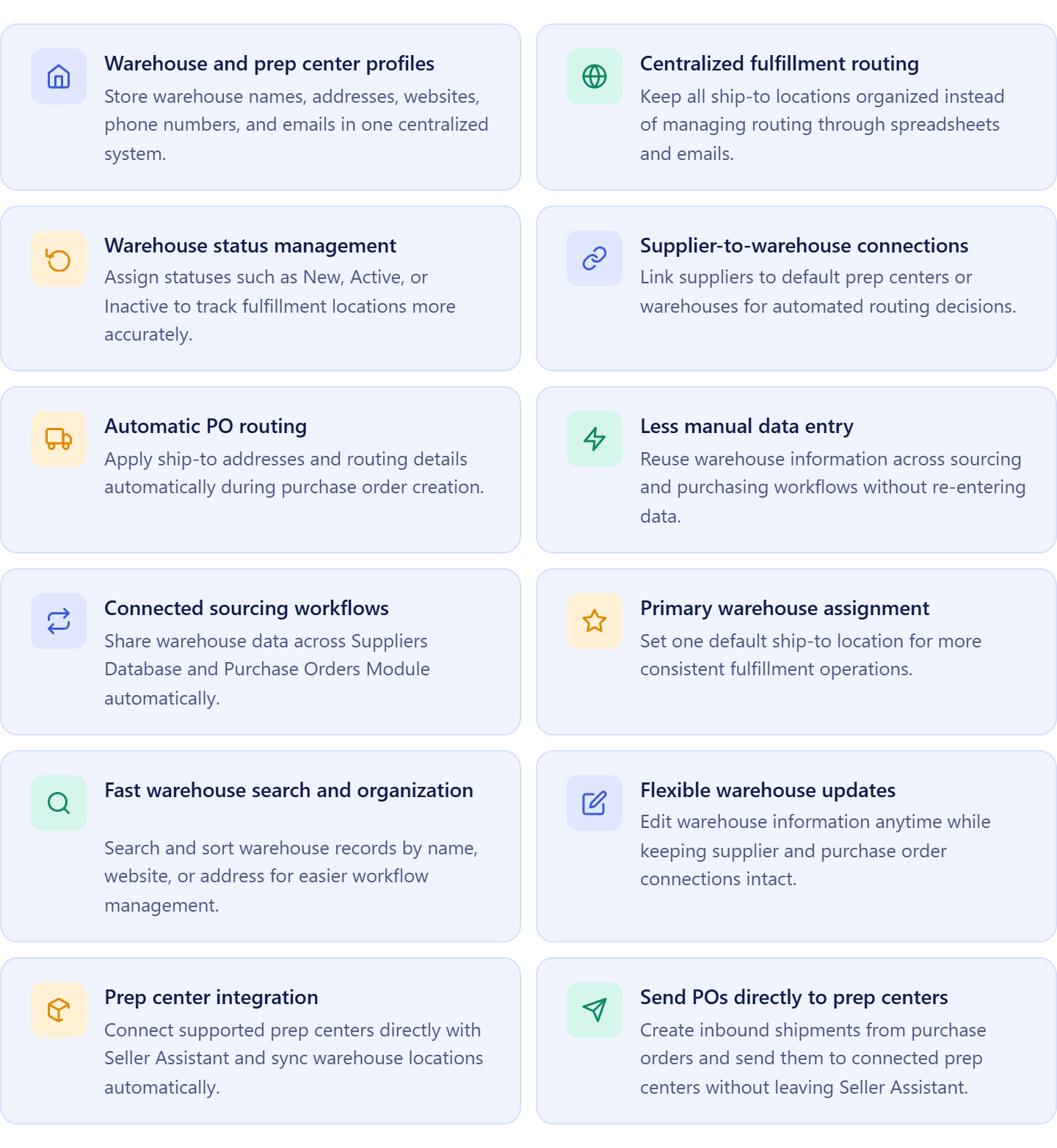
It allows sellers to:
- Create and manage warehouse and prep center profiles;
- Store shipping addresses, contact information, and routing details;
- Maintain active fulfillment locations in one centralized system;
- Assign default warehouses to suppliers;
- Reuse ship-to destinations across multiple purchase orders;
- Set preferred fulfillment destinations for purchasing workflows;
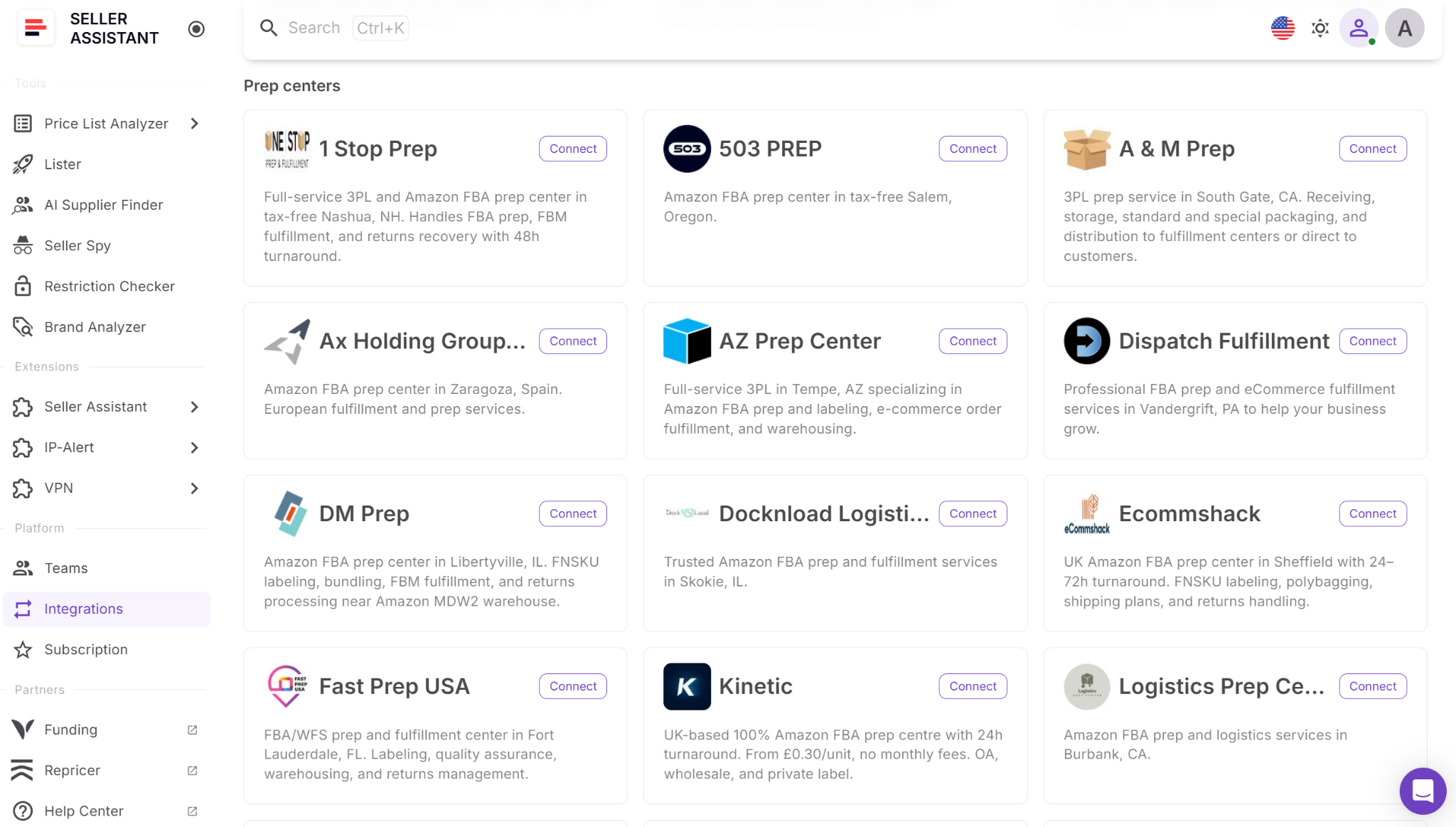
- Connect and sync supported prep centers directly with Seller Assistant;
- Search, organize, and update warehouse records easily;
- Keep routing information connected to suppliers and purchase orders.
How Warehouses Database helps manage Amazon bulk orders
Warehouses Database ensures that inventory routing remains connected to purchasing decisions. Instead of manually entering shipping destinations every time a bulk order is created, sellers can automatically apply warehouse and prep center information from existing records.
For sellers using integrated prep centers, synced warehouse locations become available directly within the workflow. Inventory can move from supplier to prep center using connected routing information, helping reduce shipping mistakes and improve fulfillment accuracy. By keeping warehouses, prep centers, suppliers, and purchase orders connected, sellers can manage larger inventory purchases more efficiently and maintain greater control over inventory movement.
How Purchase Orders Module Helps Manage Amazon Bulk Orders
After products have been selected and inventory routing has been planned, sellers need a reliable way to convert sourcing decisions into supplier orders. Managing large inventory purchases manually often leads to duplicate work, inconsistent data, and costly ordering mistakes.
Purchase Orders Module is Seller Assistant’s bulk purchasing and procurement management tool designed for Amazon wholesale sellers, online arbitrage sellers, and dropshippers. It centralizes order creation, cost tracking, profitability analysis, and order management, allowing sellers to manage inventory purchases from one workspace.
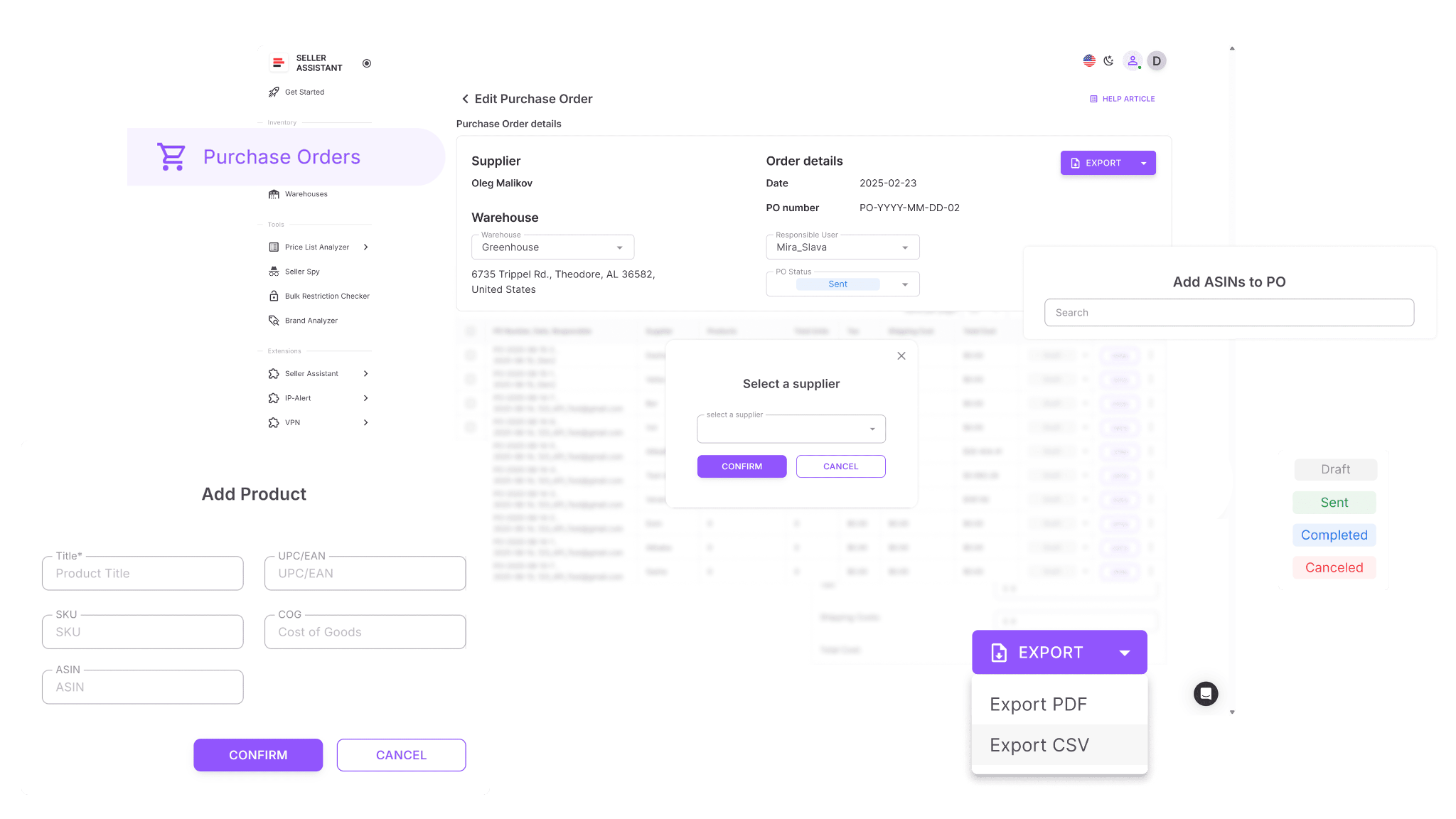
What Purchase Orders Module does
Purchase Orders Module helps sellers create, manage, and evaluate bulk inventory orders more efficiently.
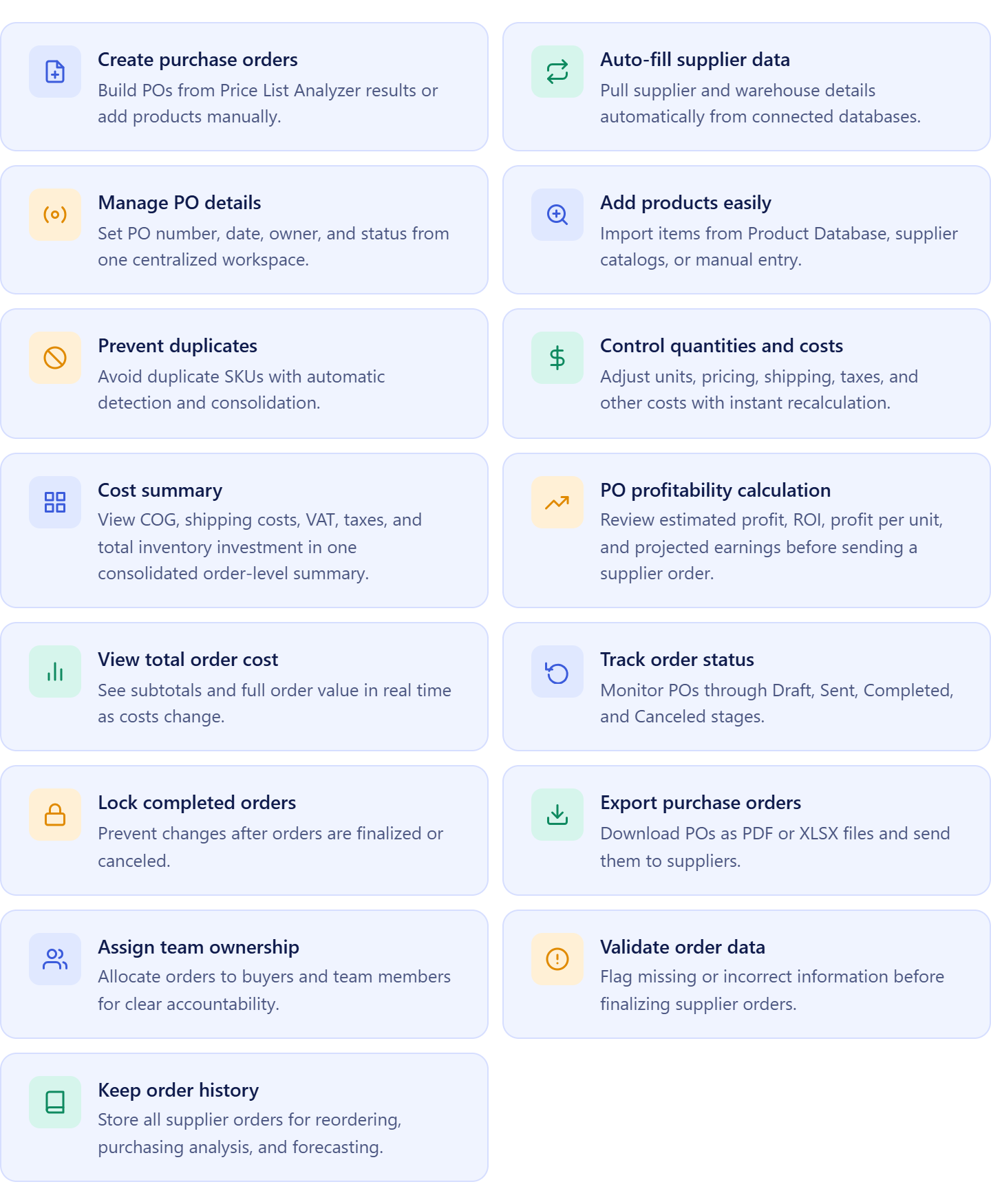
It allows sellers to:
- Create purchase orders from approved products;
- Automatically apply supplier, product, and warehouse information from the workflow;
- Manage PO numbers, dates, ownership, and order statuses;
- Add products from Product Database, supplier catalogs, or manual entry;
- Prevent duplicate SKUs within the same order;
- Adjust quantities, unit costs, shipping fees, taxes, and other purchasing expenses;
- View a consolidated cost summary with COG, VAT, taxes, shipping, and total inventory investment;
- Calculate estimated profit, ROI, and expected earnings before purchasing inventory;
- Track orders through Draft, Sent, Completed, and Canceled stages;
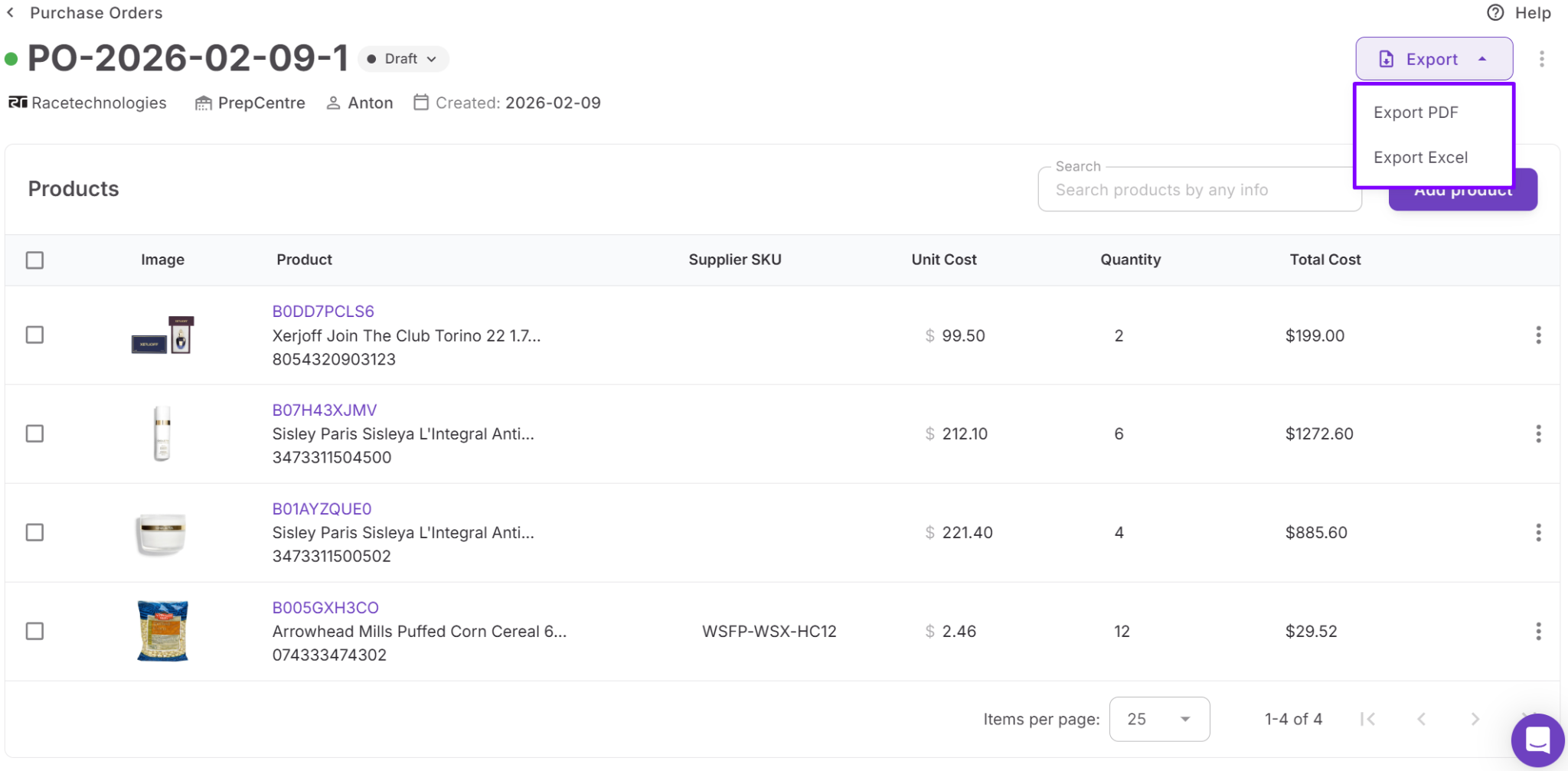
- Export purchase orders as PDF or XLSX files;
- Assign orders to buyers and team members;
- Detect missing supplier or routing information before sending;
- Maintain a complete purchasing history for reorders and forecasting.
How Purchase Orders Module helps manage Amazon bulk orders
Purchase Orders Module is the final stage of the bulk ordering workflow where sourcing decisions become inventory purchases. Once products have been validated, suppliers selected, and warehouses assigned, sellers can generate purchase orders without manually rebuilding order information.
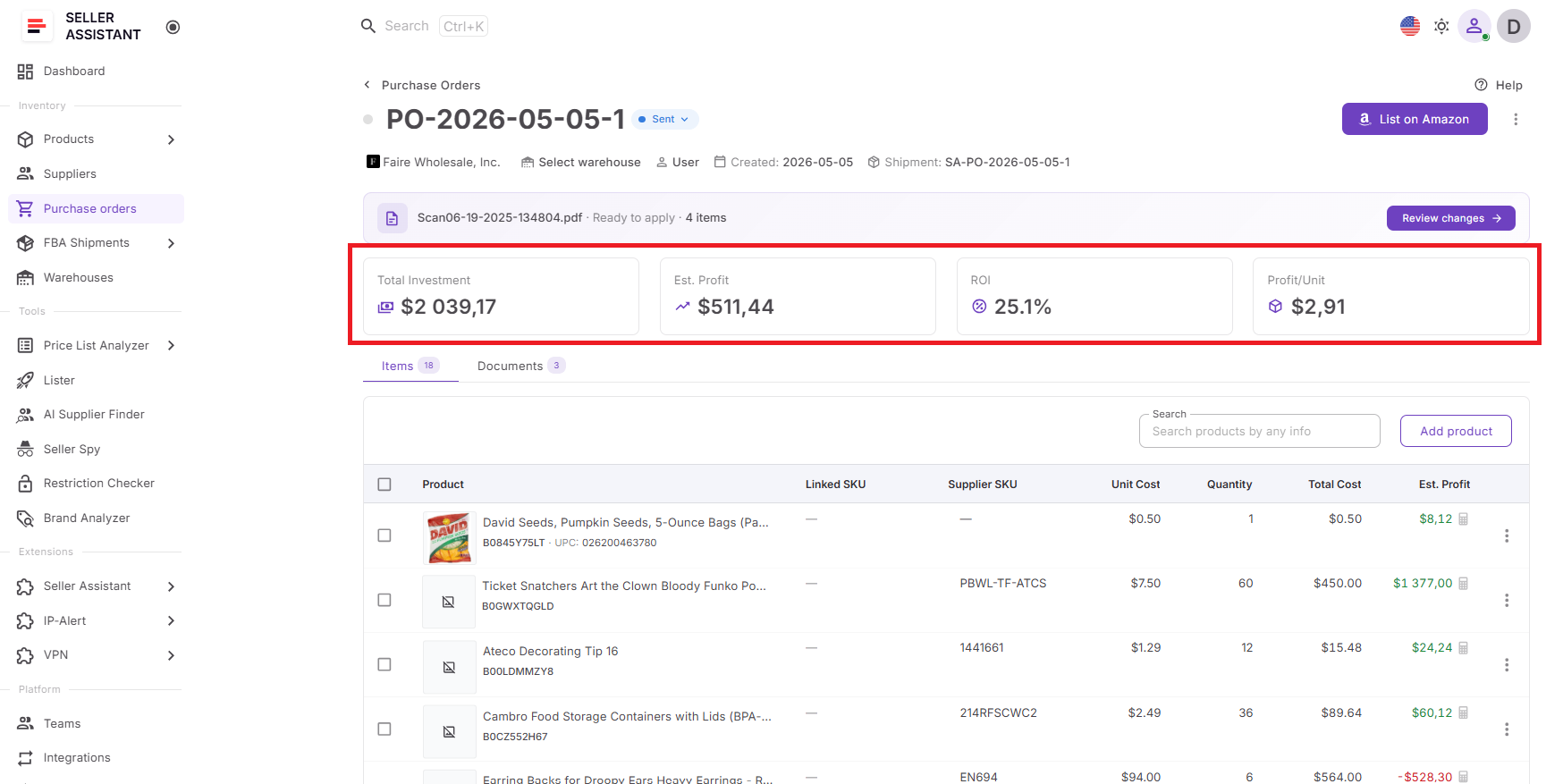
The module also provides complete financial visibility before inventory is purchased. A built-in cost summary consolidates all order-level expenses, including product costs, shipping, VAT, taxes, and other purchasing charges, allowing sellers to see the total inventory investment instantly.
At the same time, profitability calculations show estimated profit, ROI, profit per unit, and projected earnings for the entire order. This helps sellers optimize quantities, compare purchasing scenarios, and ensure every bulk order meets profitability goals before capital is committed. By connecting supplier data, product information, routing details, costs, and profitability metrics in one workflow, Purchase Orders Module makes Amazon bulk order management faster, more accurate, and easier to scale.
How to Manage Amazon Bulk Orders Step by Step
Successful bulk purchasing starts long before a purchase order is created. Amazon sellers must identify the right brands, find reliable suppliers, validate products, organize purchasing data, and confirm profitability before investing in inventory. A structured workflow helps keep every stage connected and makes bulk order management more accurate and efficient.
Step 1. Identify a brand worth sourcing
Start by evaluating potential brands with Brand Analyzer. Review demand, competition, catalog activity, Amazon presence, and reseller potential to determine whether a brand is worth pursuing before spending time on supplier outreach.
Step 2. Find and qualify wholesale suppliers
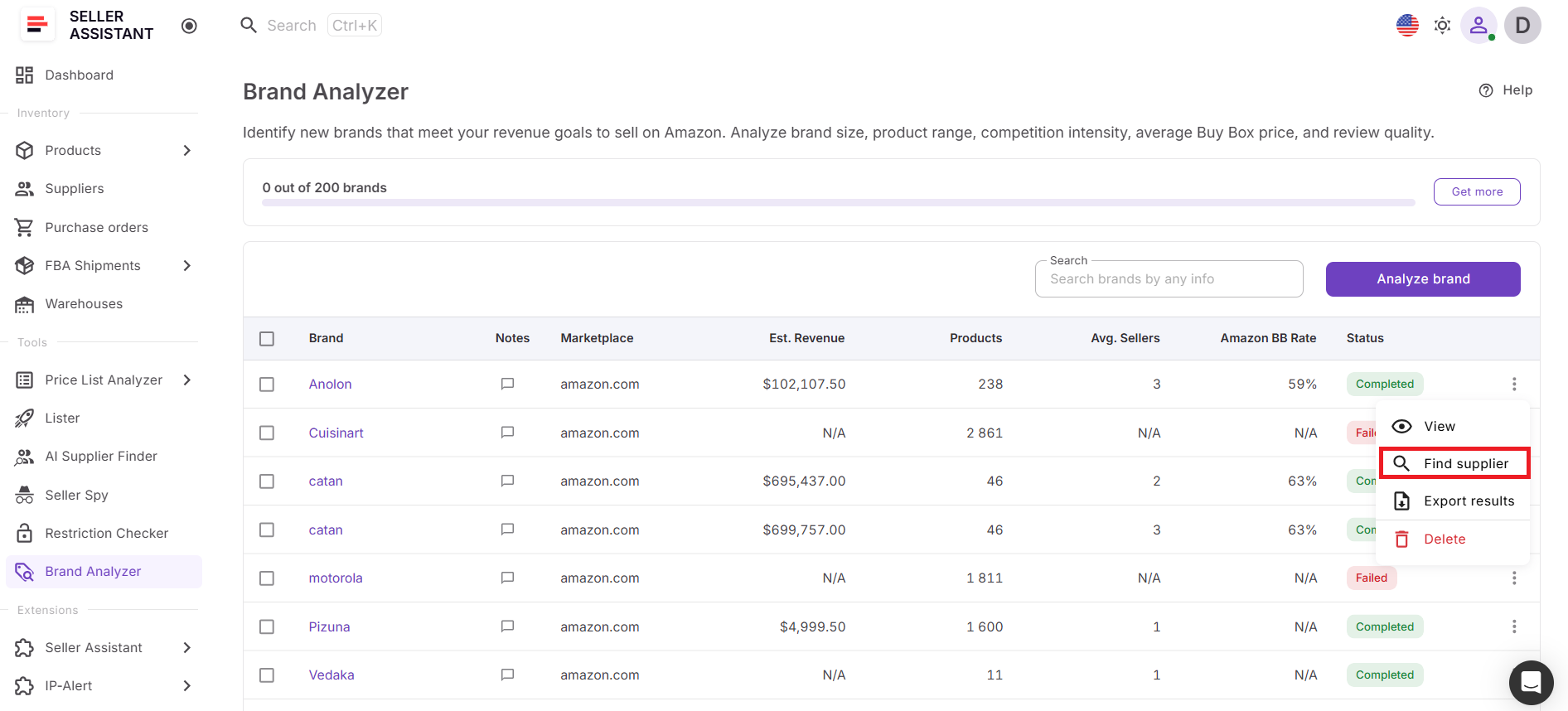
Use AI Supplier Finder to locate manufacturers, distributors, wholesalers, and brand-authorized suppliers. Focus on suppliers that can provide wholesale pricing, inventory access, and long-term sourcing opportunities.
Step 3. Build and manage supplier relationships
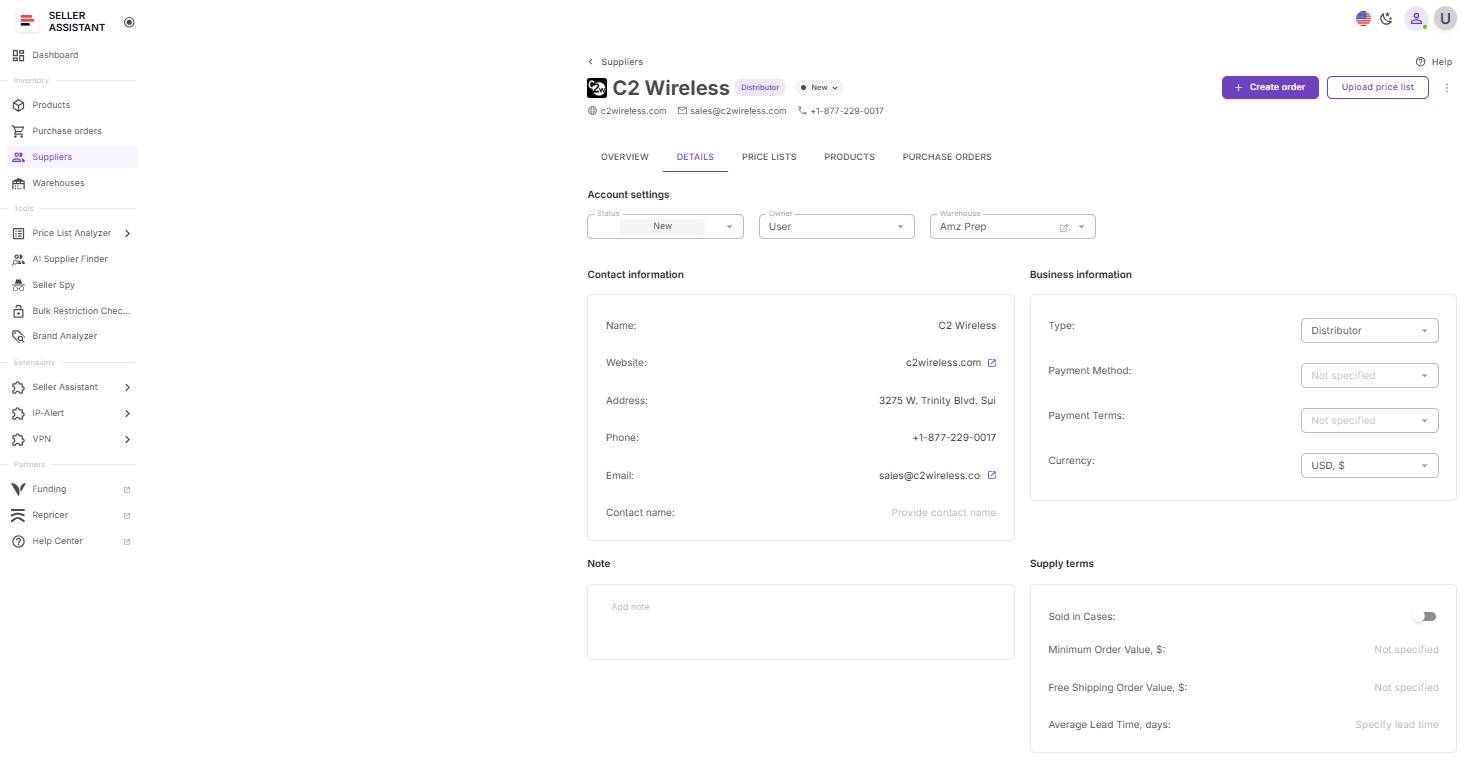
Save suppliers in Suppliers Database and organize important information such as contact details, payment terms, MOQ requirements, lead times, and account status. Complete supplier applications, get approved, and open wholesale accounts.
Step 4. Analyze the supplier catalog
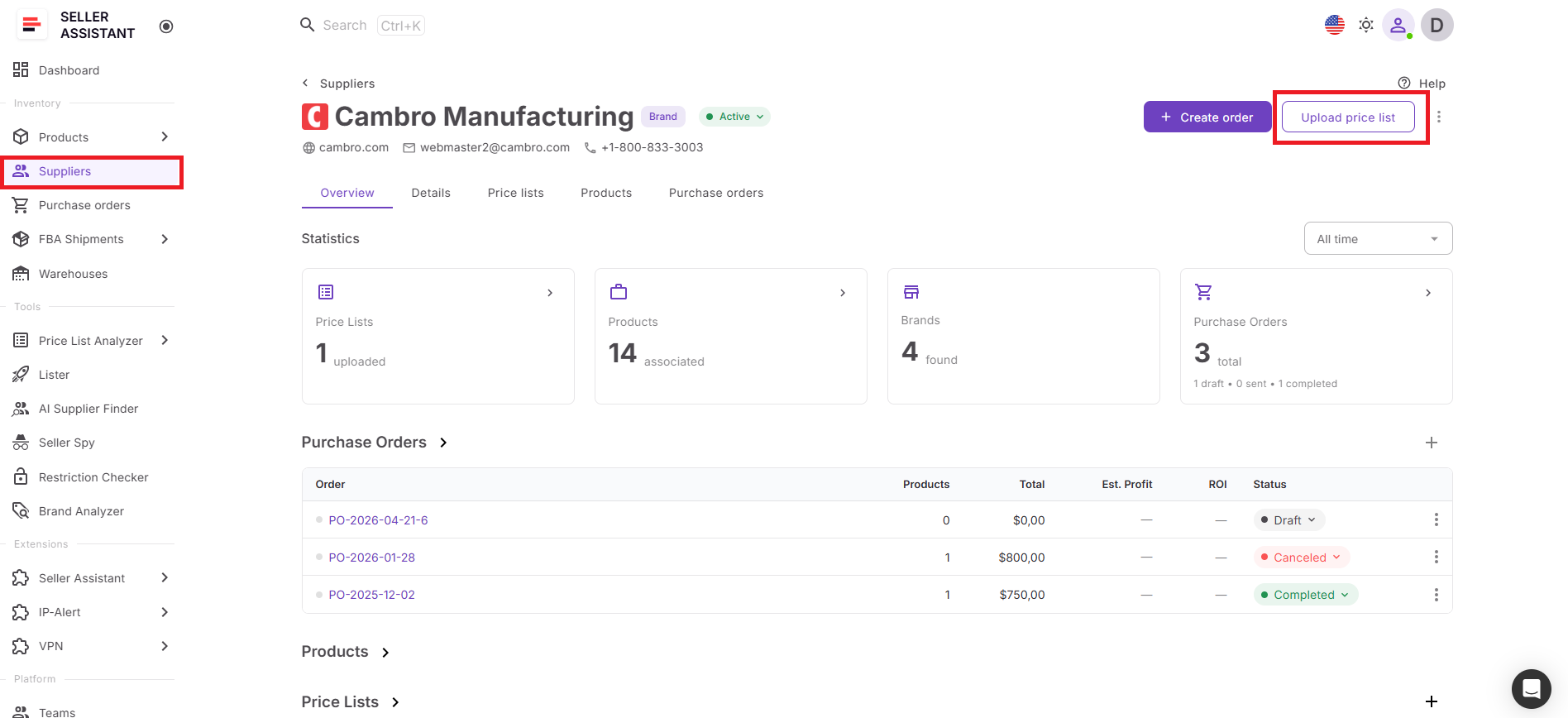
Request a price list from the supplier and upload it to Price List Analyzer. Evaluate profitability, ROI, demand, competition, restrictions, HazMat flags, IP risks, and other sourcing factors to identify products suitable for bulk purchasing.
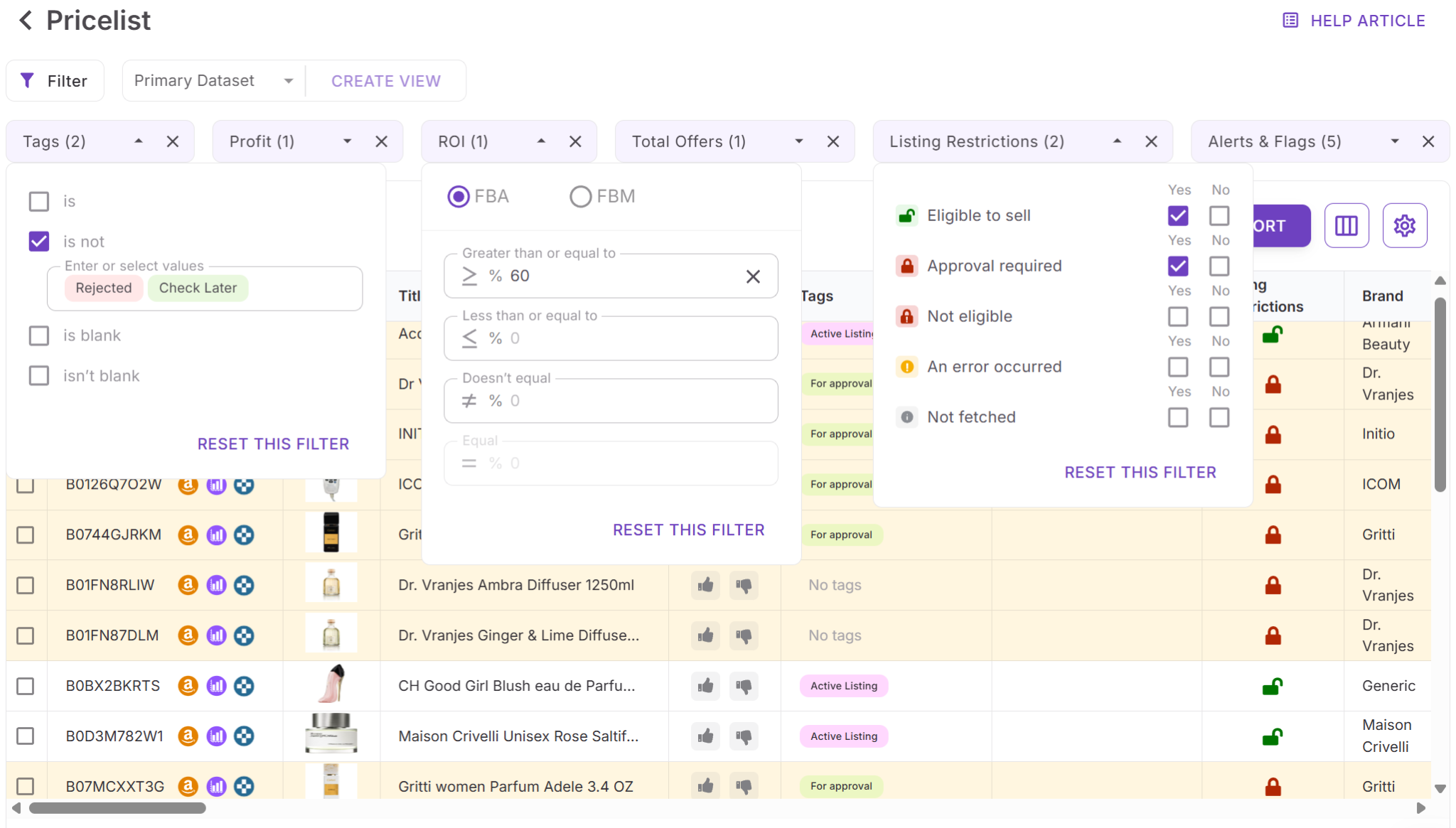
Step 5. Create a shortlist of profitable products
Filter out low-margin, high-risk, and low-demand products. Focus on inventory that aligns with your profitability targets and purchasing strategy.
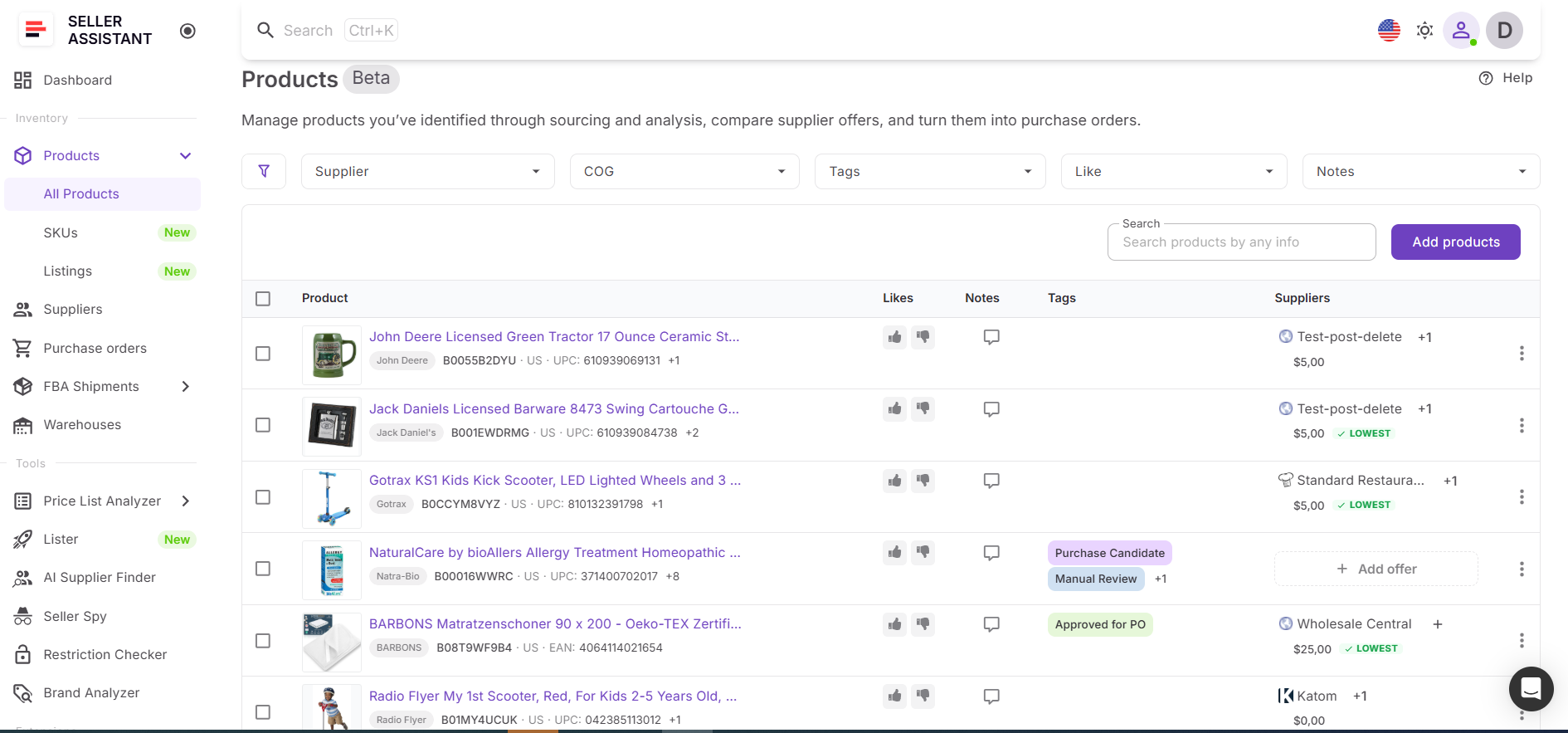
Step 6. Organize approved products
All analyzed products and supplier offers are automatically stored in Product Database. Keep ASINs, costs, supplier offers, notes, and sourcing decisions organized and ready for purchasing.
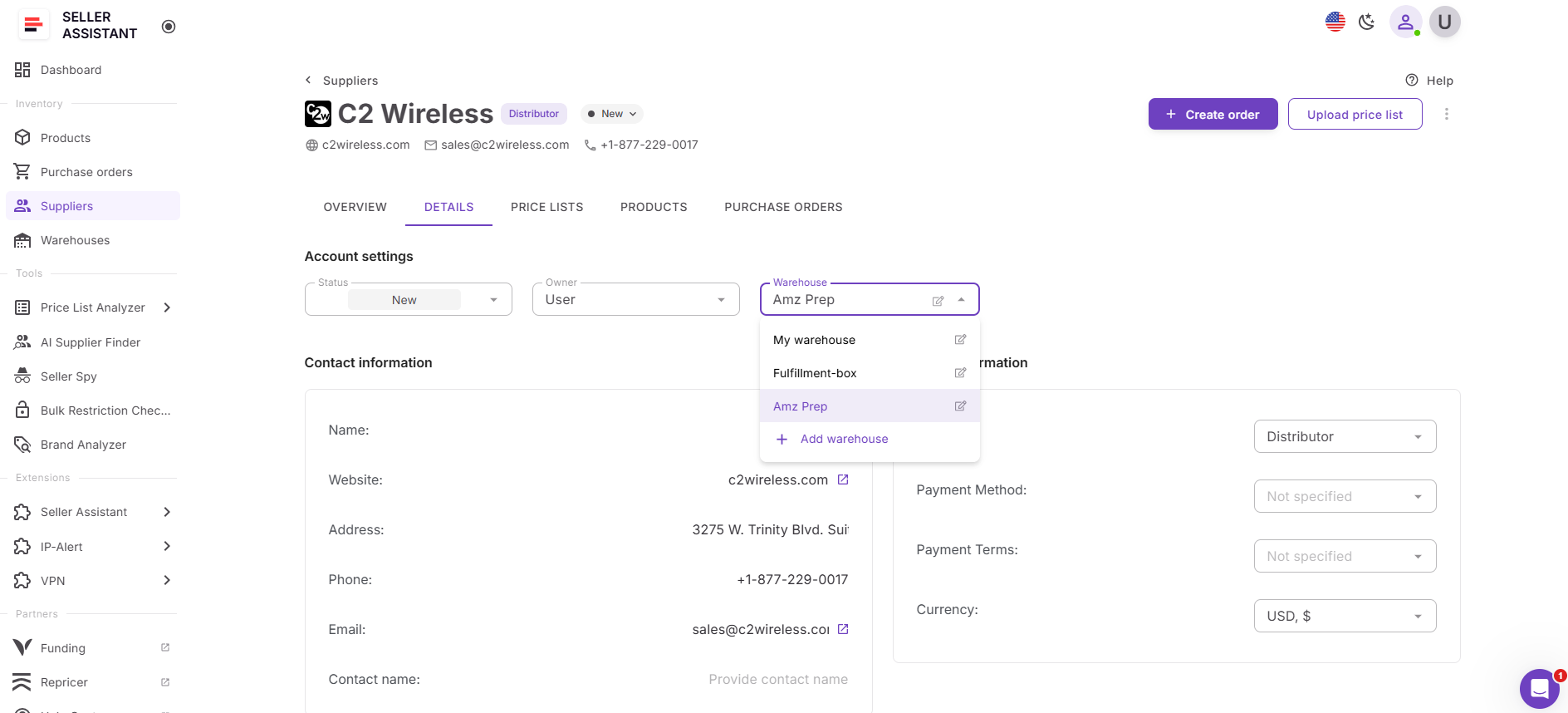
Step 7. Assign inventory destinations
Use Warehouses Database to select the appropriate warehouse, prep center, or fulfillment destination. Existing locations can be reused, new destinations can be added, and supported prep centers can be synced directly with Seller Assistant.
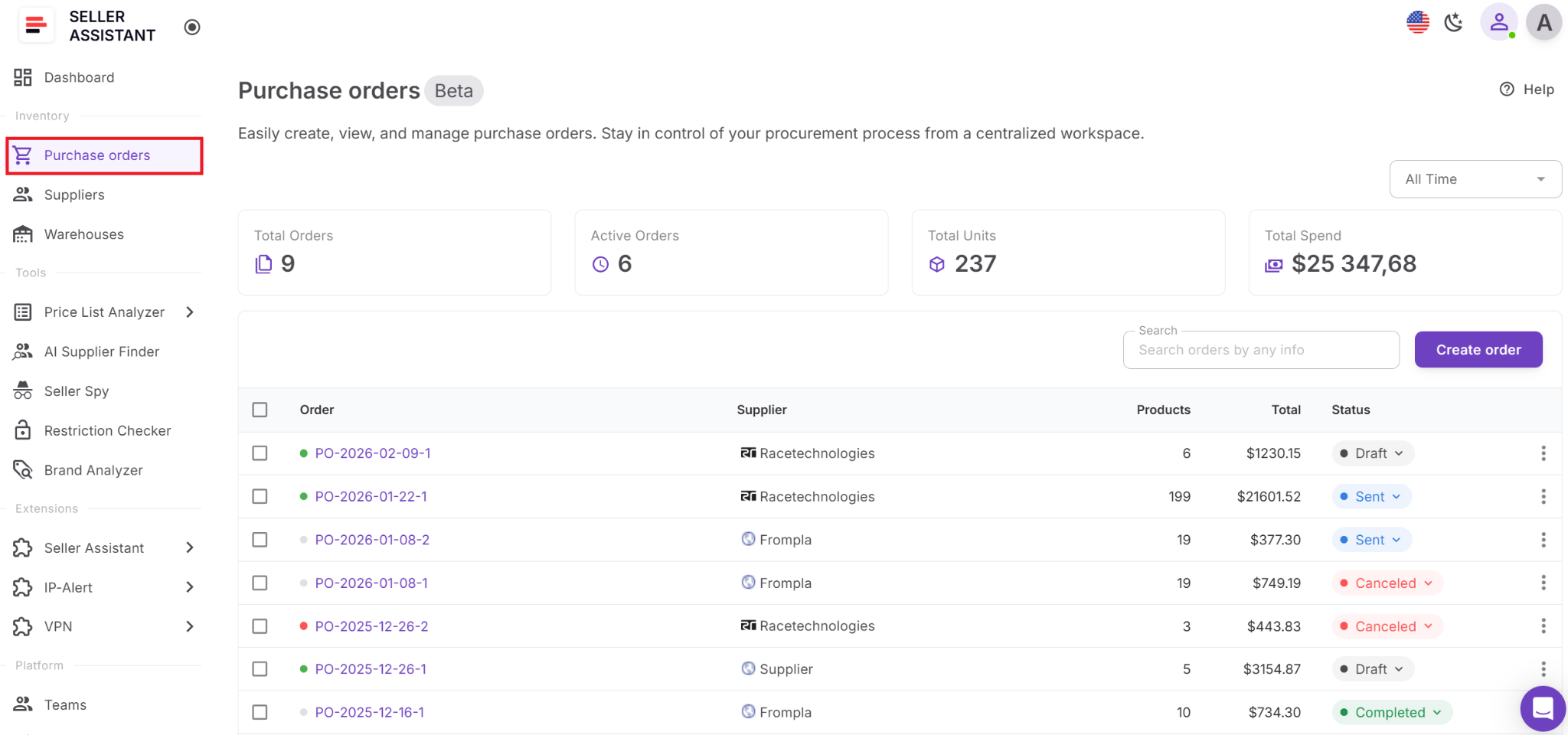
Step 8. Build the bulk purchase order
Move approved products into Purchase Orders Module. Supplier information, product details, costs, and warehouse routing data are filled automatically from the connected workflow, reducing manual work and improving accuracy.
Step 9. Validate costs and expected returns
Before placing the order, review the complete cost summary and profitability calculations. Analyze inventory investment, shipping expenses, taxes, estimated profit, ROI, and profit per unit to ensure the order meets your financial goals.
Step 10. Submit and manage the order
Export the purchase order as a PDF or XLSX file and send it to the supplier. Keep order records connected to suppliers, products, and warehouses for tracking, replenishment planning, forecasting, and future reorders.
FAQ
What is Amazon bulk order management?
Amazon bulk order management is the process of planning, creating, tracking, and optimizing large inventory purchases from suppliers. It includes supplier management, catalog analysis, product selection, inventory routing, purchase order creation, and profitability review.
How do sellers decide which products to include in a bulk order?
Successful sellers evaluate products based on profitability, demand, competition, restrictions, and potential risks before purchasing inventory. Analyzing supplier catalogs helps identify products that offer the best balance of margin and sales potential.
Why is supplier management important for bulk purchasing?
Supplier relationships directly impact pricing, inventory availability, lead times, and purchasing efficiency. Keeping supplier information organized makes it easier to manage accounts, compare opportunities, and place orders accurately.
How can sellers reduce mistakes when creating bulk purchase orders?
Using connected supplier, product, and warehouse data helps eliminate manual entry and keeps purchasing information consistent. This reduces the risk of ordering incorrect products, using outdated costs, or sending inventory to the wrong destination.
Why should sellers review profitability before placing a bulk order?
Bulk orders often require significant capital, so understanding the expected return is essential. Reviewing total inventory costs, estimated profit, and ROI helps sellers make informed purchasing decisions and avoid tying up money in low-performing inventory.
Final Thoughts
Effective Amazon bulk order management requires more than creating purchase orders and buying inventory in larger quantities. Sellers must evaluate brands, find reliable suppliers, analyze wholesale catalogs, organize product data, assign fulfillment destinations, and verify profitability before committing capital.
Seller Assistant connects every stage of this process into one workflow. From identifying sourcing opportunities with Brand Analyzer and AI Supplier Finder to analyzing catalogs with Price List Analyzer, organizing products in Product Database, managing suppliers and warehouses, and creating purchase orders with built-in profitability calculations, sellers can manage bulk purchasing with greater accuracy and control.
Seller Assistant automates and connects every stage of your Amazon wholesale and arbitrage workflow. It brings together in one platform: workflow management tools – Product Database, Purchase Orders Module, Suppliers Database, Warehouses Database, FBA Shipments, bulk research & sourcing tools – Price List Analyzer, Bulk Restriction Checker, Sourcing AI, Brand Analyzer, Seller Spy, Chrome extensions – Seller Assistant Browser Extension, IP-Alert Extension, and built-in VPN by Seller Assistant, and integrations & team access features – seamless API connectivity, integrations with Zapier, Airtable, and Make, and Virtual Assistant Accounts.


