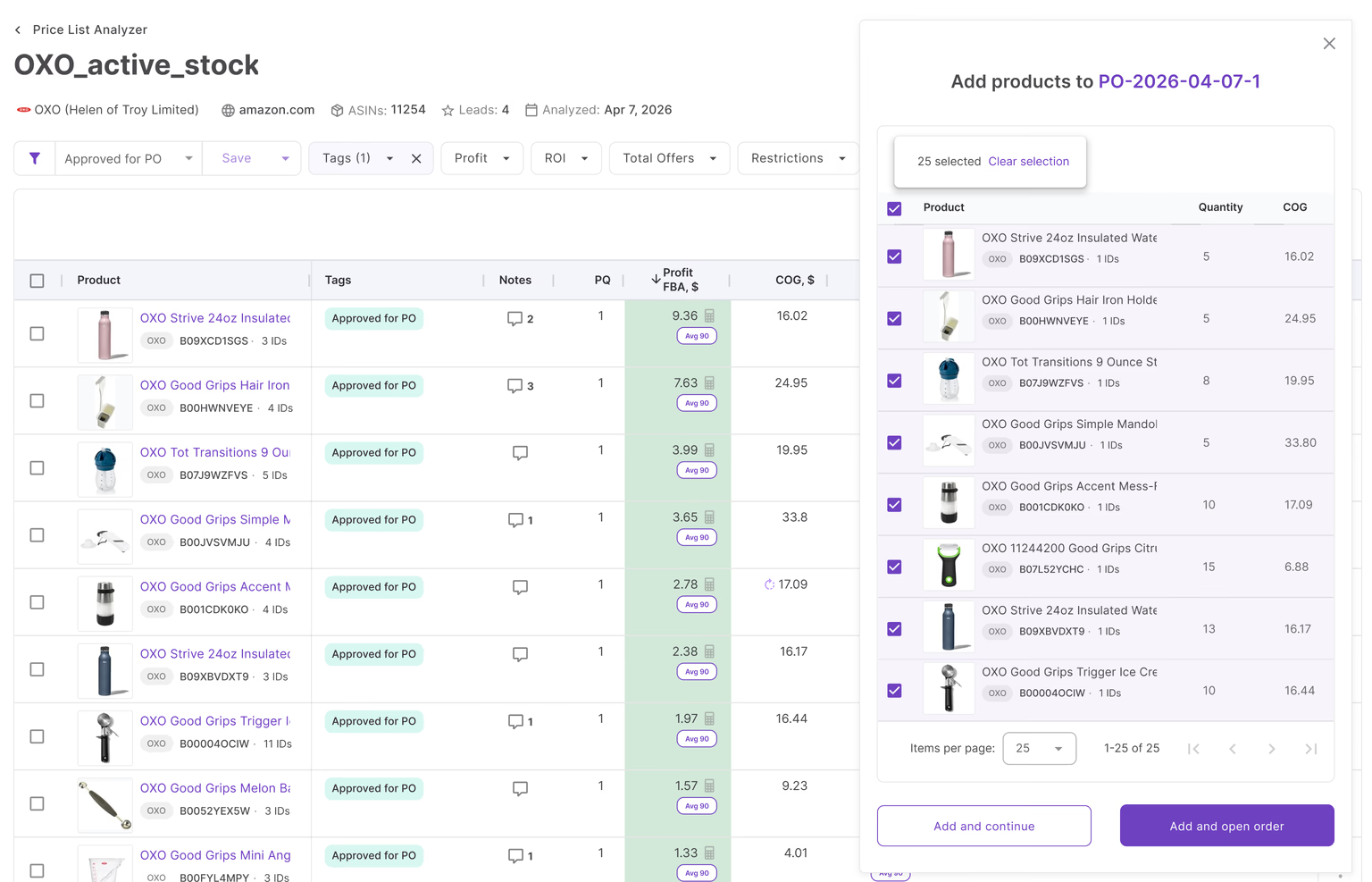
Picture this: a supplier sends over a price list with 1,800 SKUs, no ASINs, just item numbers and unit costs. Somewhere in that list are a handful of genuinely profitable products – and a lot of dead weight that ties up cash and eats into margin if you buy the wrong ones.
Turning a supplier price list into a profitable purchase order takes more than a fast spreadsheet. It requires the right process – and the right Seller Assistant tools – at every step: finding and vetting suppliers, analyzing the price list, organizing the data, and calculating expected profit before you place the order. Here’s how to do it right.
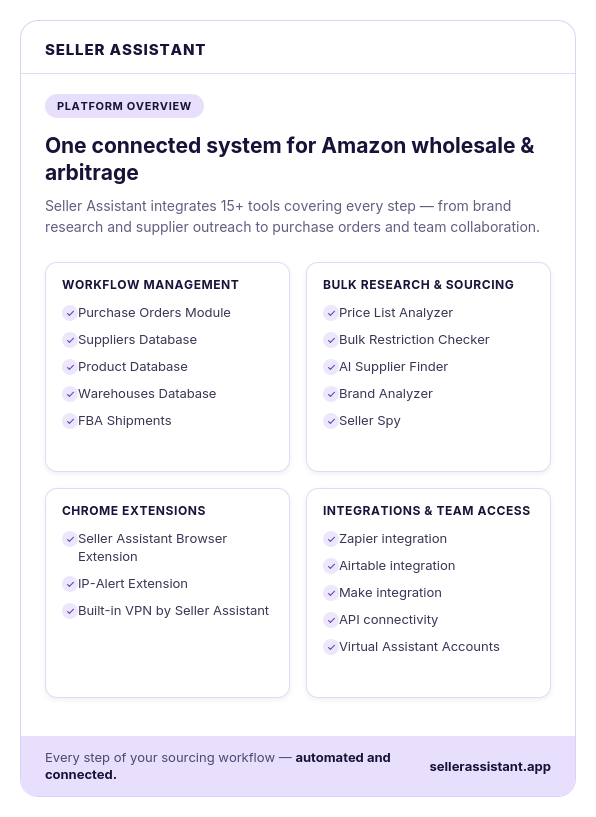
5 Decisions That Turn Supplier Price List Into Profitable PO
Receiving a wholesale price list doesn’t automatically lead to a profitable inventory purchase. Between opening a supplier catalog and sending a purchase order, Amazon sellers make a series of decisions that determine whether the order will generate strong returns or tie up capital in slow-moving inventory. Each decision presents a different challenge, from managing supplier relationships to selecting profitable products and verifying order profitability.
Here’s how Seller Assistant helps solve each challenge with the right tool at the right stage of the purchasing workflow.
| Decision | The challenge | Seller Assistant solution |
|---|---|---|
| Is this a supplier worth working with? | Supplier contacts, payment terms, and purchasing requirements become scattered across emails and spreadsheets. | Suppliers Database centralizes supplier profiles, purchasing terms, lead times, contact information, and relationship history in one place. |
| Which products should I buy? | Large supplier catalogs make it difficult to identify profitable products while avoiding low-demand items and sourcing risks. | Price List Analyzer evaluates supplier catalogs in bulk, calculates profitability, and highlights the best purchasing opportunities. |
| How do I keep approved products organized? | Product research, supplier offers, and sourcing decisions are easily lost across multiple files and tools. | Product Database automatically stores analyzed products, supplier offers, ASINs, costs, and buying decisions for future purchasing. |
| How do I create an accurate purchase order? | Building purchase orders manually requires repetitive data entry and increases the risk of errors. | Purchase Orders Module creates purchase orders using connected supplier and product data, with key information filled automatically. |
| Will this purchase order be profitable? | Product-level margins don’t always reflect the profitability of the entire order after shipping, taxes, and other costs are included. | PO Profitability Calculator calculates total investment, estimated profit, ROI, profit per unit, and overall purchase order profitability before you buy. |
Decision 1. Is this a supplier I want to buy from?
The challenge
Supplier information quickly becomes scattered across emails, spreadsheets, and notes, making it difficult to manage purchasing terms, communication, and future orders.
The solution
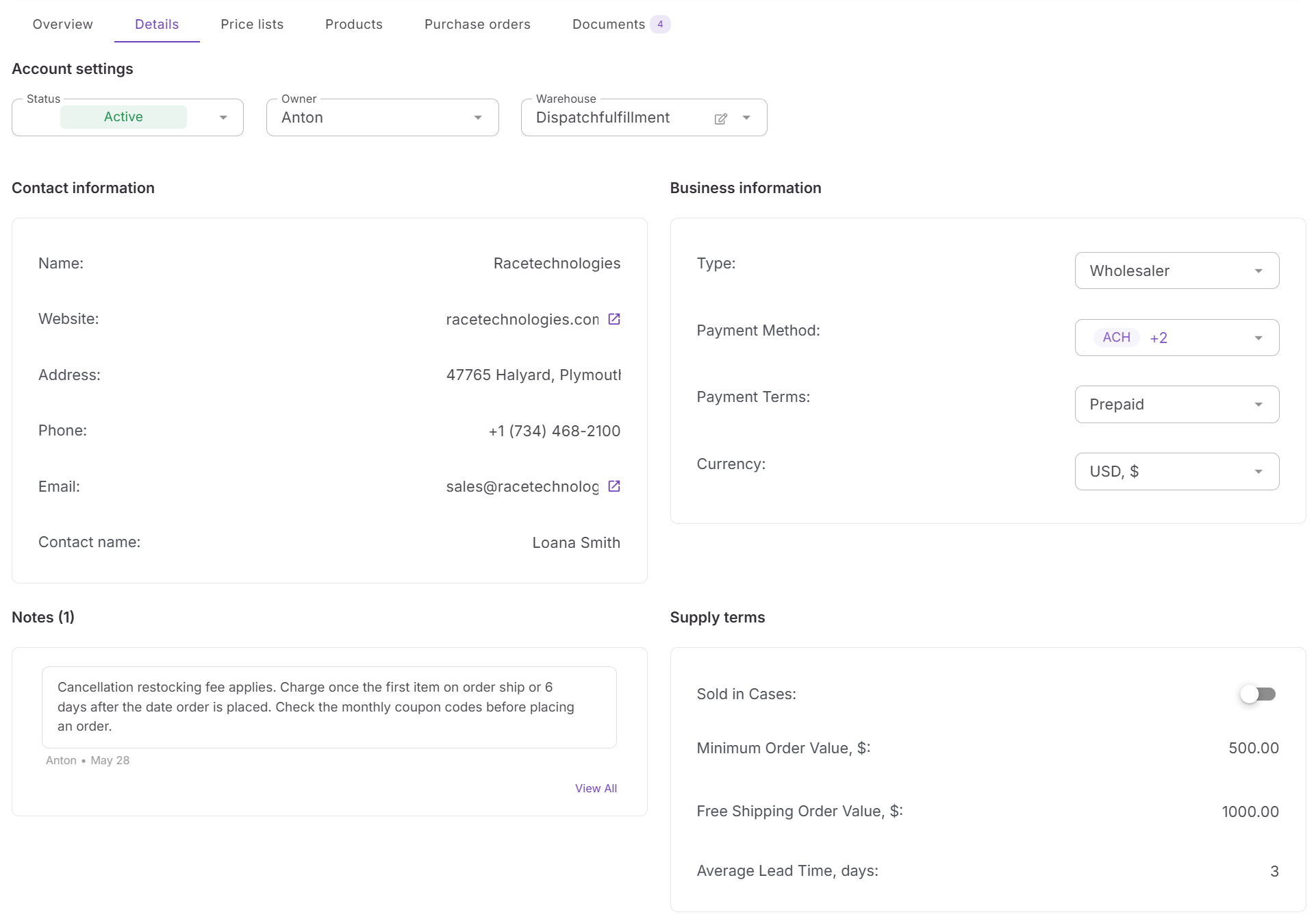
Suppliers Database centralizes supplier profiles, contact information, payment terms, lead times, and relationship history, keeping every supplier record organized and connected to your purchasing workflow.
Decision 2. Which products are actually worth buying?
The challenge
A supplier catalog may contain thousands of products, but only a small percentage will meet your profitability, demand, and risk requirements.
The solution
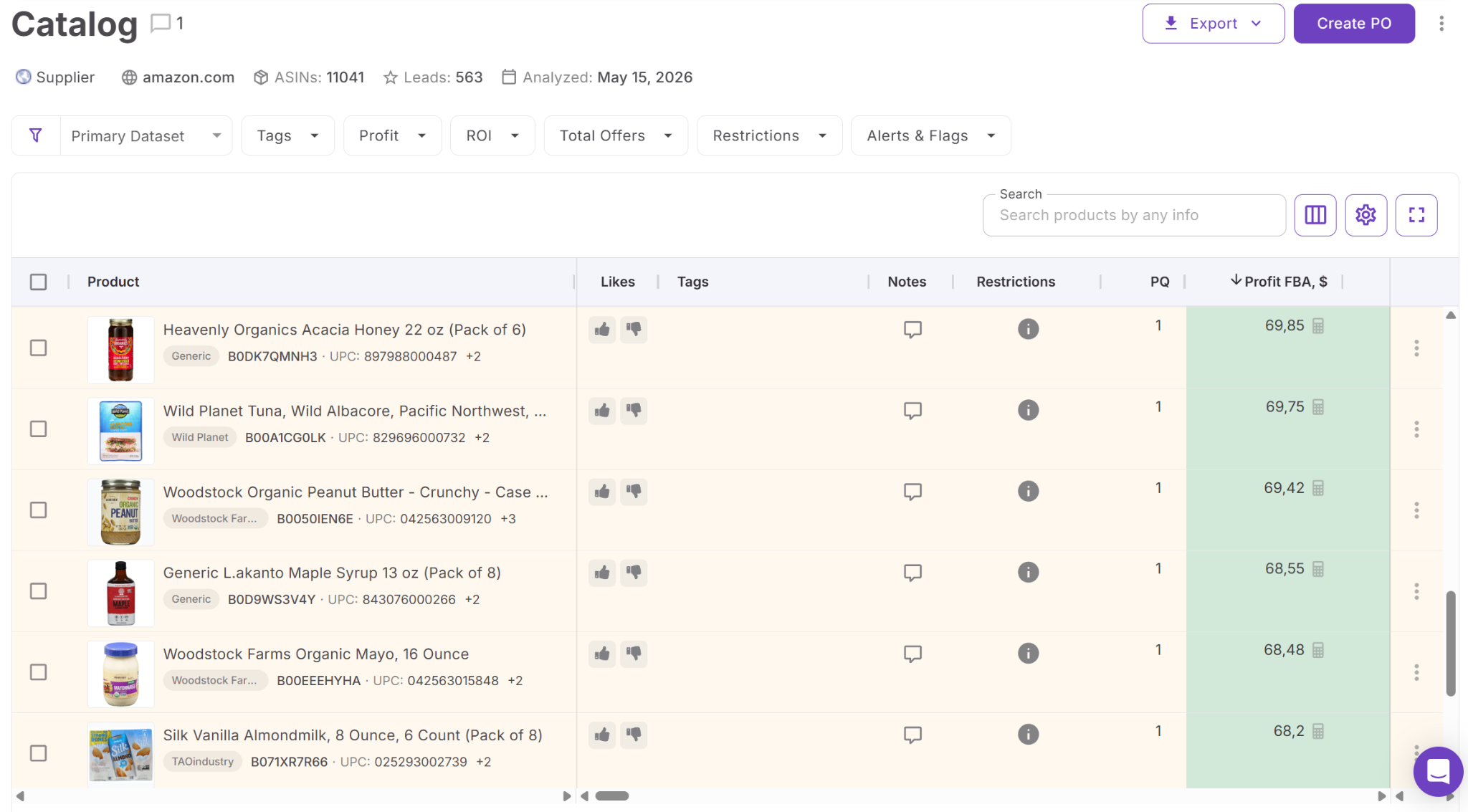
Price List Analyzer evaluates supplier catalogs in bulk, helping you identify profitable, low-risk products using Amazon marketplace data before investing in inventory.
Decision 3. How do I keep my best sourcing opportunities organized?
The challenge
After analyzing a catalog, it’s easy to lose track of approved products, supplier offers, costs, and sourcing decisions if they’re stored in multiple places.
The solution
Product Database automatically saves analyzed products, supplier offers, ASINs, and costs in one centralized workspace, keeping purchase-ready inventory organized for future orders.
Decision 4. How do I build an accurate purchase order quickly?
The challenge
Creating purchase orders manually often means copying supplier details, product information, quantities, and costs between multiple documents, increasing the risk of mistakes.
The solution
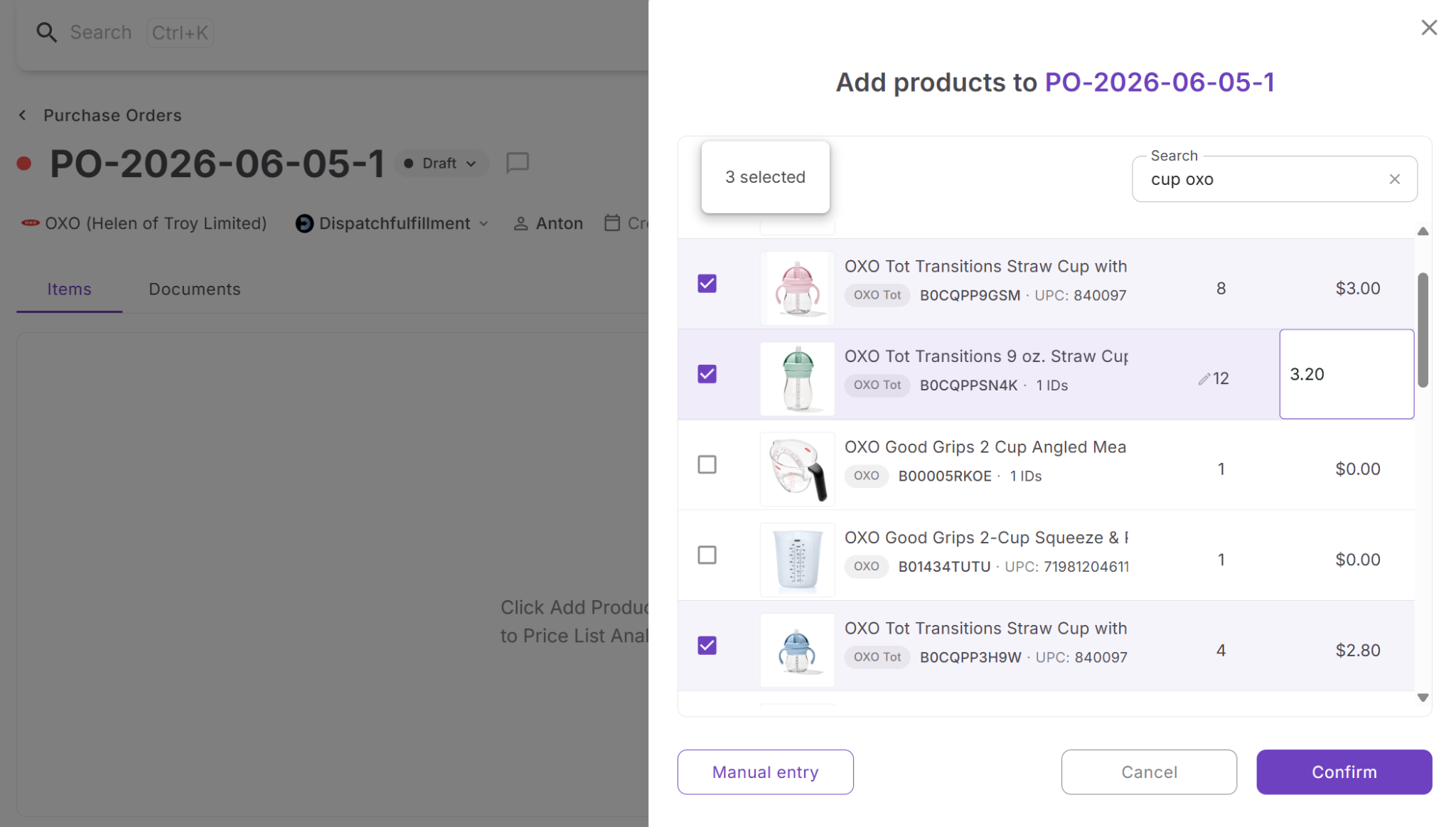
Purchase Orders Module generates structured purchase orders using connected supplier and product data, reducing manual entry and making order creation faster and more accurate.
Decision 5. Will this purchase order actually make money?
The challenge
Even if individual products look profitable, shipping, taxes, and other purchasing costs can significantly reduce the profitability of the complete order.
The solution
PO Profitability Calculator calculates total investment, estimated profit, ROI, profit per unit, and other key metrics, helping you confirm that the purchase order meets your financial goals before you place it.
Decision #1. Is This a Supplier You Can Rely on for Future Purchases?
Getting approved by a wholesale supplier is an important milestone, but it’s only the beginning. As your supplier network expands, keeping track of contacts, payment terms, account status, lead times, and purchasing requirements becomes increasingly difficult. When supplier information is scattered across emails, spreadsheets, and notes, creating purchase orders and managing reorders takes more time and increases the risk of costly mistakes.
The solution: Suppliers Database
Suppliers Database is Seller Assistant’s supplier relationship management tool designed for Amazon wholesale sellers, online arbitrage sellers, and dropshippers. It provides a centralized workspace where you can organize supplier profiles, account information, purchasing terms, and wholesale relationships, keeping every supplier connected to your purchasing workflow.
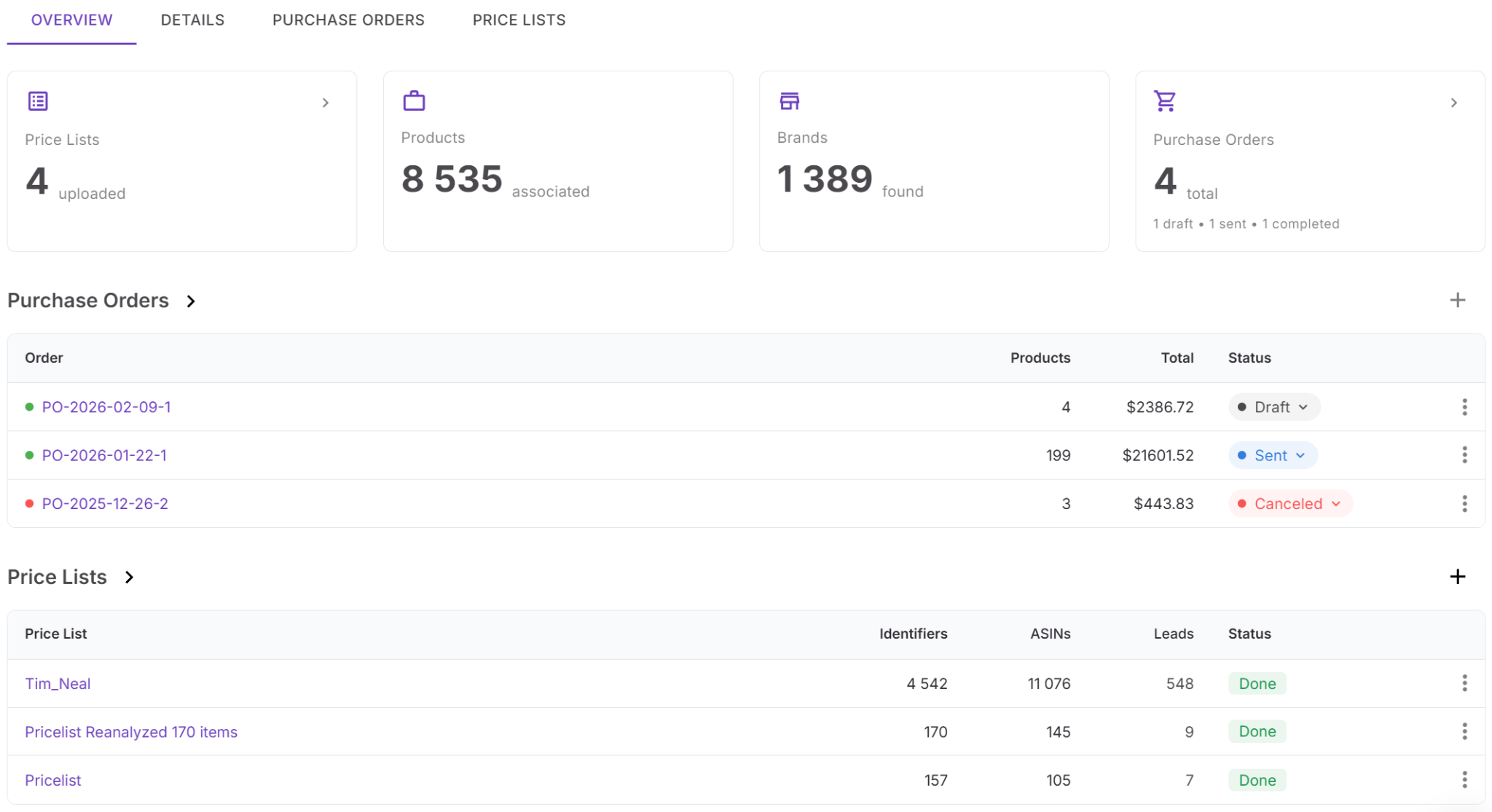
Suppliers Database functionality
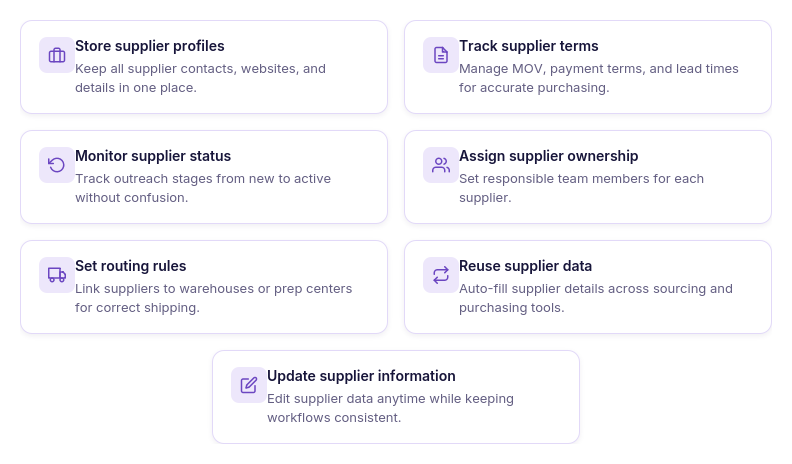
With Suppliers Database, you can:
- Store supplier profiles, websites, and business contact information;
- Track wholesale account approvals and supplier relationship status;
- Manage payment terms, minimum order values (MOV), lead times, and shipping requirements;
- Upload and organize supplier price lists;
- Assign suppliers to buyers, sourcing specialists, or virtual assistants;
- Link suppliers to purchase orders and purchasing workflows;
- Reuse supplier information when creating future orders;
- Search, update, and manage supplier records from one place.
Why organized supplier data matters
Managing supplier information in one centralized database makes purchasing faster and more consistent. Instead of searching through emails or manually entering supplier details every time you place an order, all purchasing information is readily available and connected to the rest of your workflow.
As your supplier network grows, Suppliers Database helps you maintain stronger supplier relationships, streamline reordering, reduce administrative work, and ensure every purchase order starts with accurate, up-to-date supplier information.
Decision #2. Which products deserve a place in your purchase order?
Receiving a supplier price list is just the starting point. A wholesale catalog can include hundreds or even thousands of products, but only a fraction will match your profitability goals and sourcing criteria. Reviewing every item manually is slow and makes it easy to overlook profitable opportunities or purchase products with restrictions, weak demand, or intense competition.
The solution: Price List Analyzer
Price List Analyzer is Seller Assistant’s bulk wholesale catalog analysis tool designed for Amazon wholesale sellers, online arbitrage sellers, and dropshippers. It helps sellers evaluate entire supplier price lists in minutes, making it easy to identify products that are profitable, in demand, and suitable for resale on Amazon before placing a purchase order.
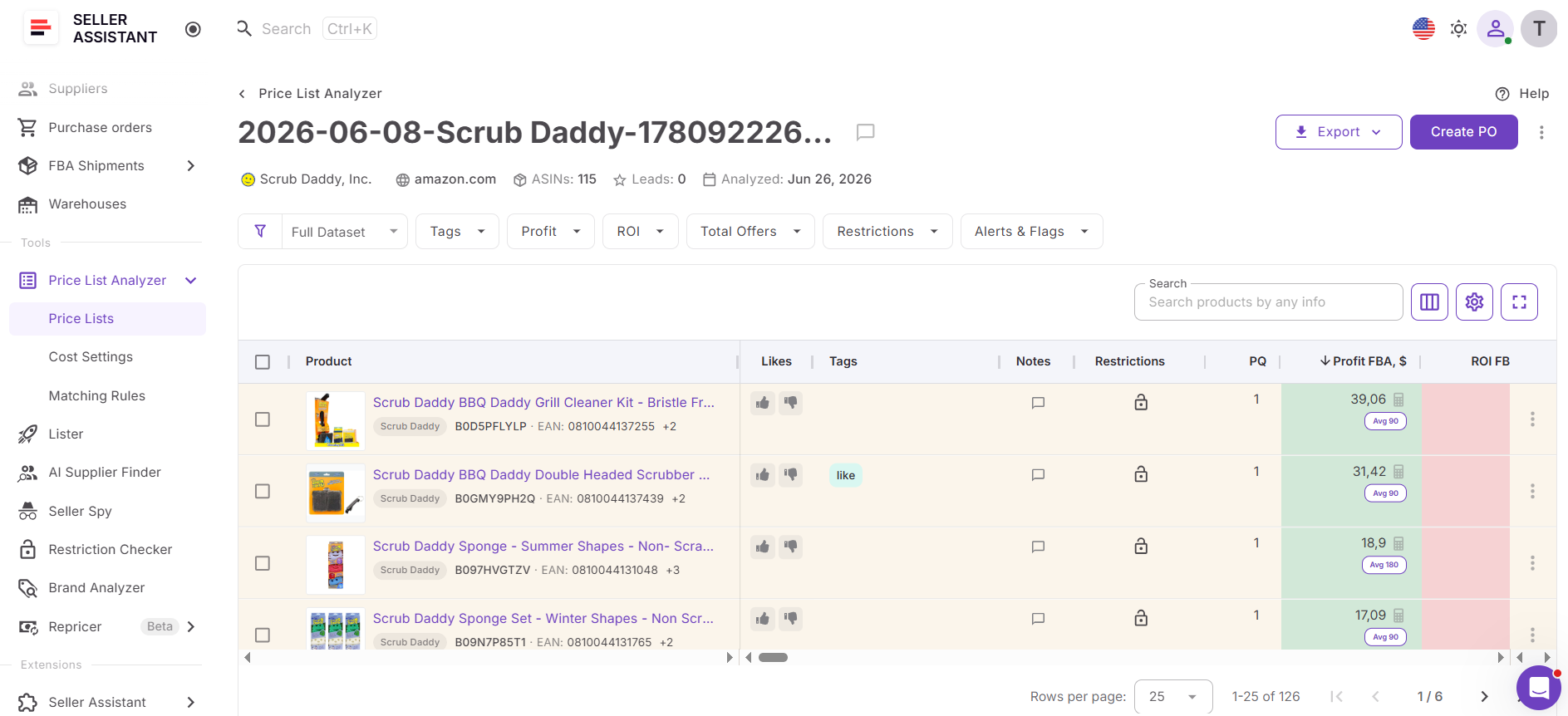
Price List Analyzer functionality
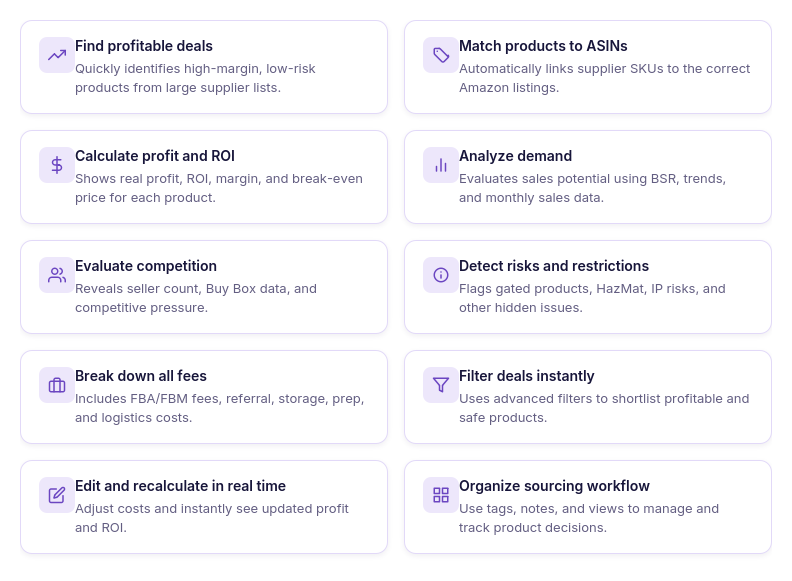
With Price List Analyzer, you can:
- Upload and analyze wholesale supplier price lists in bulk;
- Automatically match supplier products to Amazon ASINs;
- Calculate ROI, profit, margin, and break-even prices;
- Evaluate demand using sales estimates and BSR history;
- Review competition, Buy Box conditions, and Amazon presence;
- Detect restrictions, HazMat products, IP complaints, and other sourcing risks;
- Filter products by profitability, demand, competition, and risk;
- Adjust COG, shipping, prep, and logistics costs dynamically;
- Organize product evaluations with tags, notes, and saved views;
- Automatically save approved products and supplier offers to Product Database.
Why bulk catalog analysis matters
The quality of your purchase order depends on the quality of the products you select. By validating every opportunity before investing, Price List Analyzer helps eliminate guesswork and ensures you’re building purchase orders from products with the strongest sales and profit potential.
Because approved products automatically flow into Product Database, your research doesn’t stop after analysis. Product data, supplier offers, and sourcing costs remain connected throughout the purchasing workflow, allowing you to create purchase orders faster without repeating research or manually transferring information.
Decision #3. Where Should Approved Products Live Before You Build the PO?
Finding good products is only half the job. Sellers also need a reliable place to keep supplier offers, COG, ASINs, notes, and buying decisions organized until they are ready to create a purchase order. When this information is spread across supplier files and sourcing sheets, the same research gets repeated and the risk of using outdated data increases.
The solution: Product Database
Product Database is Seller Assistant’s centralized product management workspace for Amazon wholesale sellers, online arbitrage sellers, and dropshippers. It keeps analyzed products, supplier offers, costs, and sourcing decisions connected in one place, creating a clear pipeline from product research to purchasing.
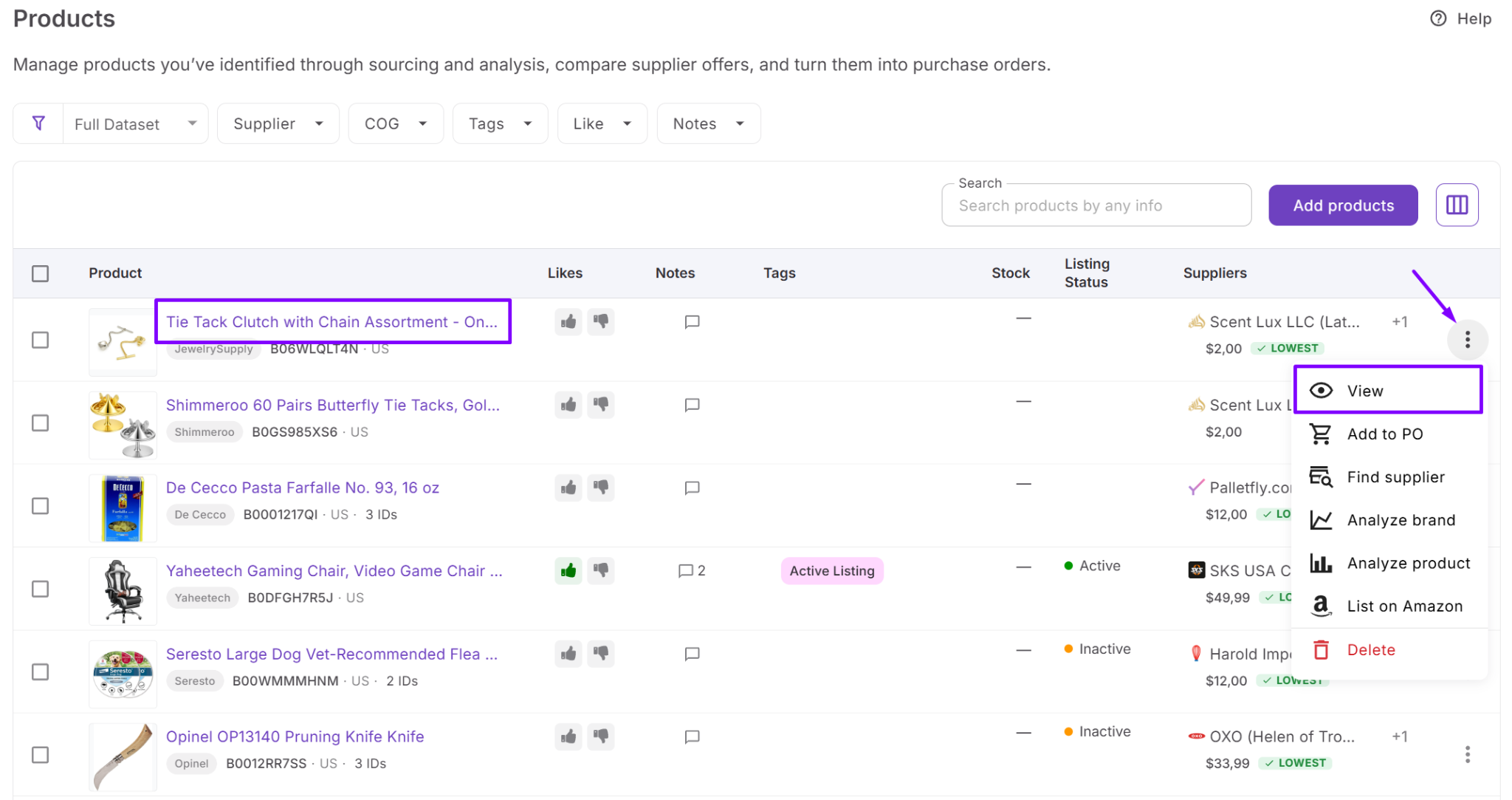
Product Database functionality
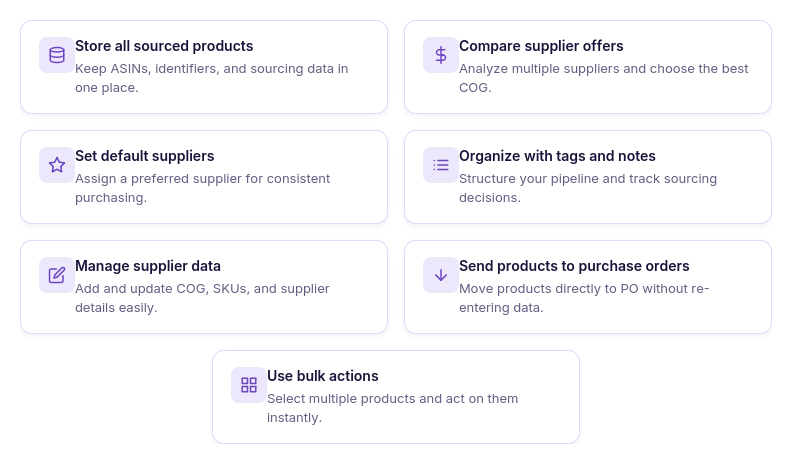
With Product Database, you can:
- Store analyzed products and ASIN data in one workspace;
- Keep supplier offers linked to each product;
- Compare multiple supplier offers for the same ASIN;
- Assign a preferred supplier for future purchases;
- Organize sourcing decisions with tags, notes, and likes;
- Manage COG, supplier SKUs, and product identifiers;
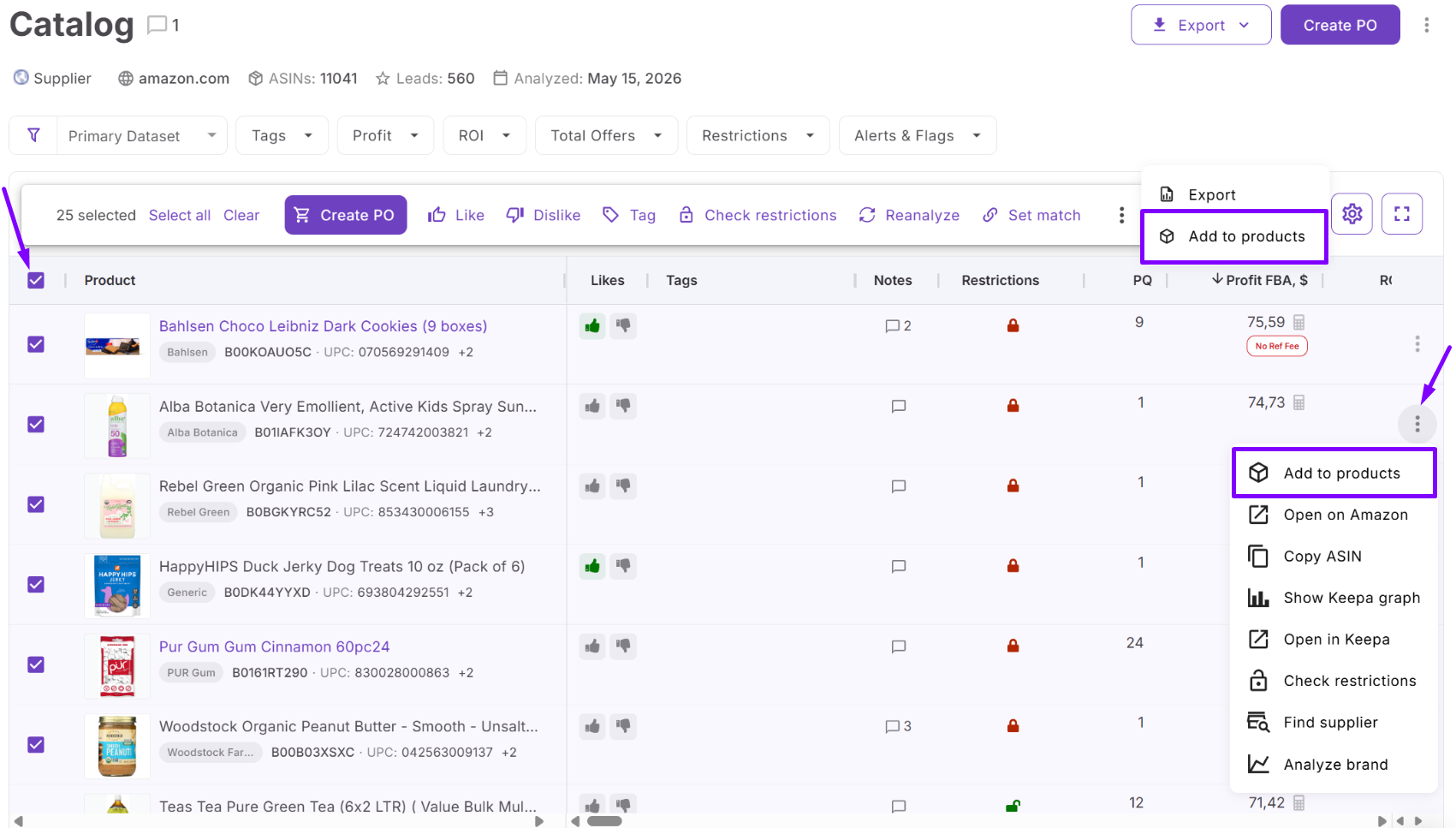
- Move selected products directly into purchase orders;
- Apply bulk actions across multiple products.
Why a centralized product pipeline matters
Product Database keeps validated opportunities ready for action. Once products are analyzed, they remain stored with supplier offers, costs, and sourcing history, so sellers can compare options, revisit earlier decisions, and build a shortlist without starting over.
This matters when catalogs grow and multiple suppliers offer the same ASIN. A structured product record helps sellers choose the strongest offer, avoid duplicate work, and move approved products into the Purchase Orders Module with the right data already attached.
Decision #4. How Do You Turn Selected Products Into An Accurate Purchase Order?
After identifying profitable products, the next challenge is creating a purchase order without copying information between spreadsheets, supplier catalogs, and sourcing documents. Manual order creation takes time, increases the risk of data-entry errors, and makes it harder to keep purchasing information consistent as your business grows.
The solution: Purchase Orders Module
Purchase Orders Module is Seller Assistant’s purchase order management tool designed for Amazon wholesale sellers, online arbitrage sellers, and dropshippers. It transforms approved products into structured supplier purchase orders by automatically using connected supplier and product data collected throughout the sourcing workflow.
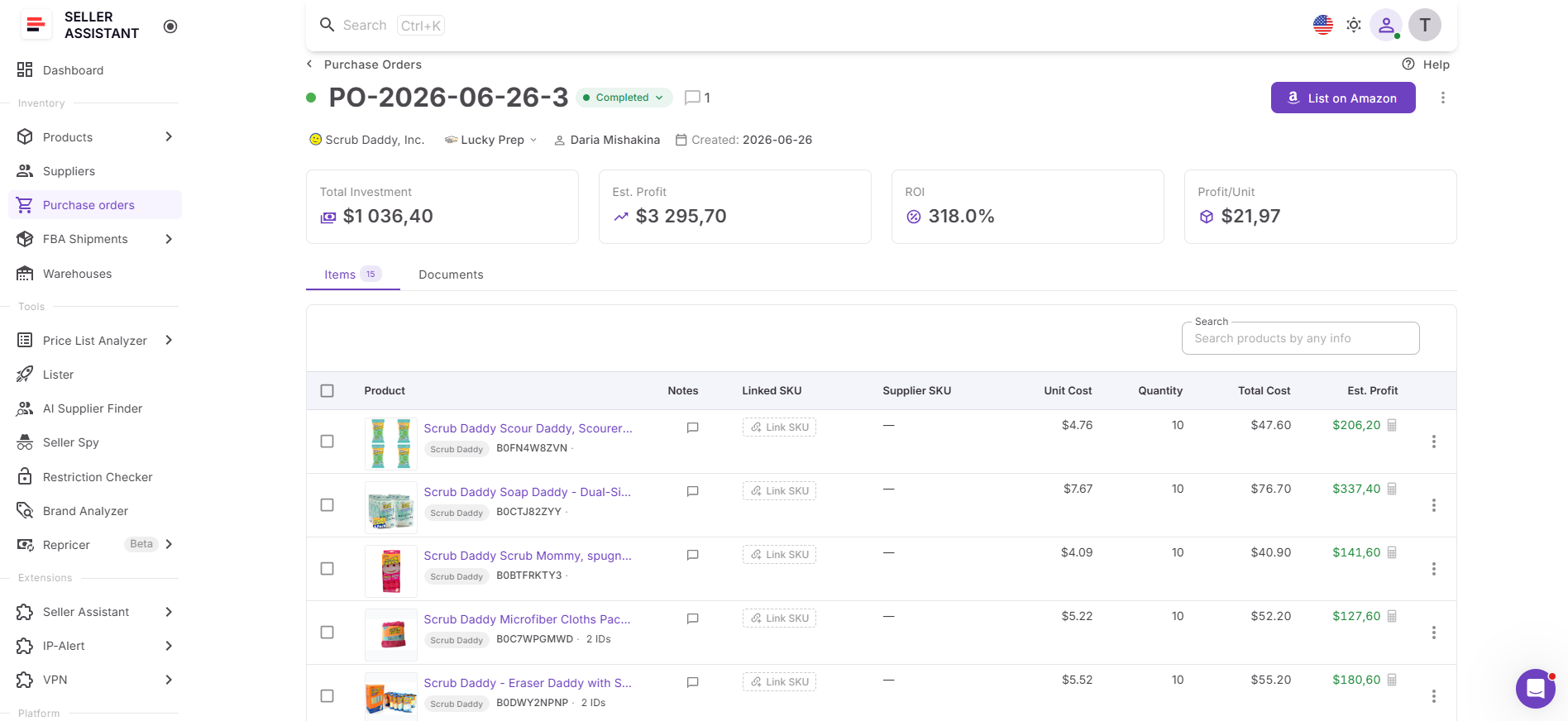
Purchase Orders Module functionality
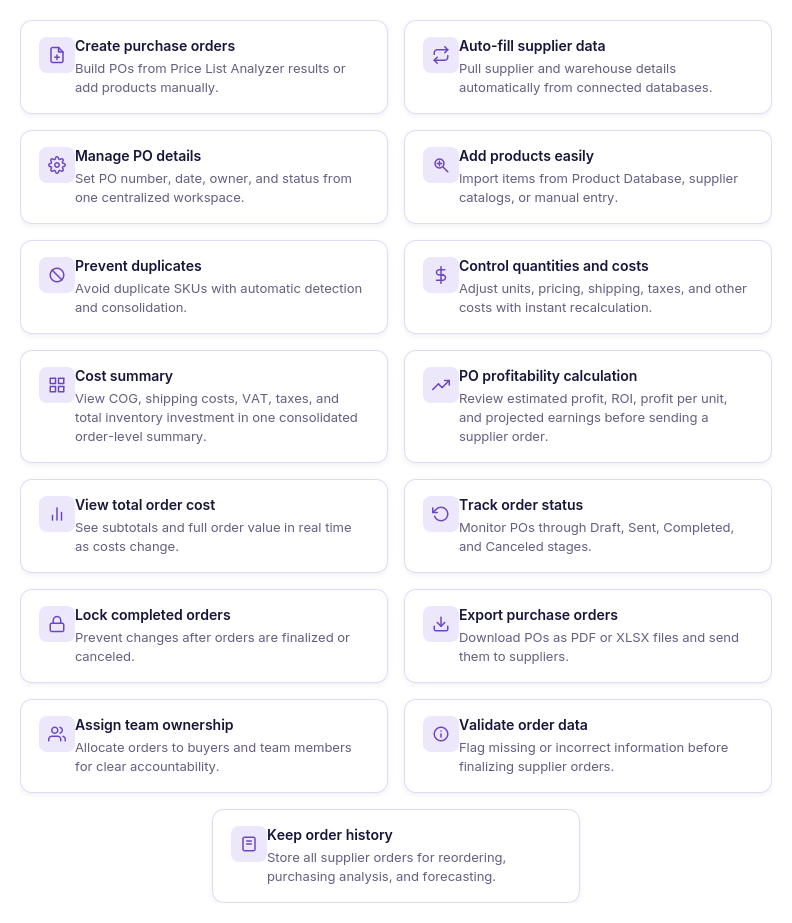
With Purchase Orders Module, you can:
- Create purchase orders from approved products;
- Automatically populate supplier information from Suppliers Database;
- Add products directly from Product Database or supplier price lists;
- Manage PO numbers, ownership, dates, and order statuses;
- Prevent duplicate products within the same purchase order;
- Update quantities, unit costs, shipping fees, taxes, and other purchasing expenses;
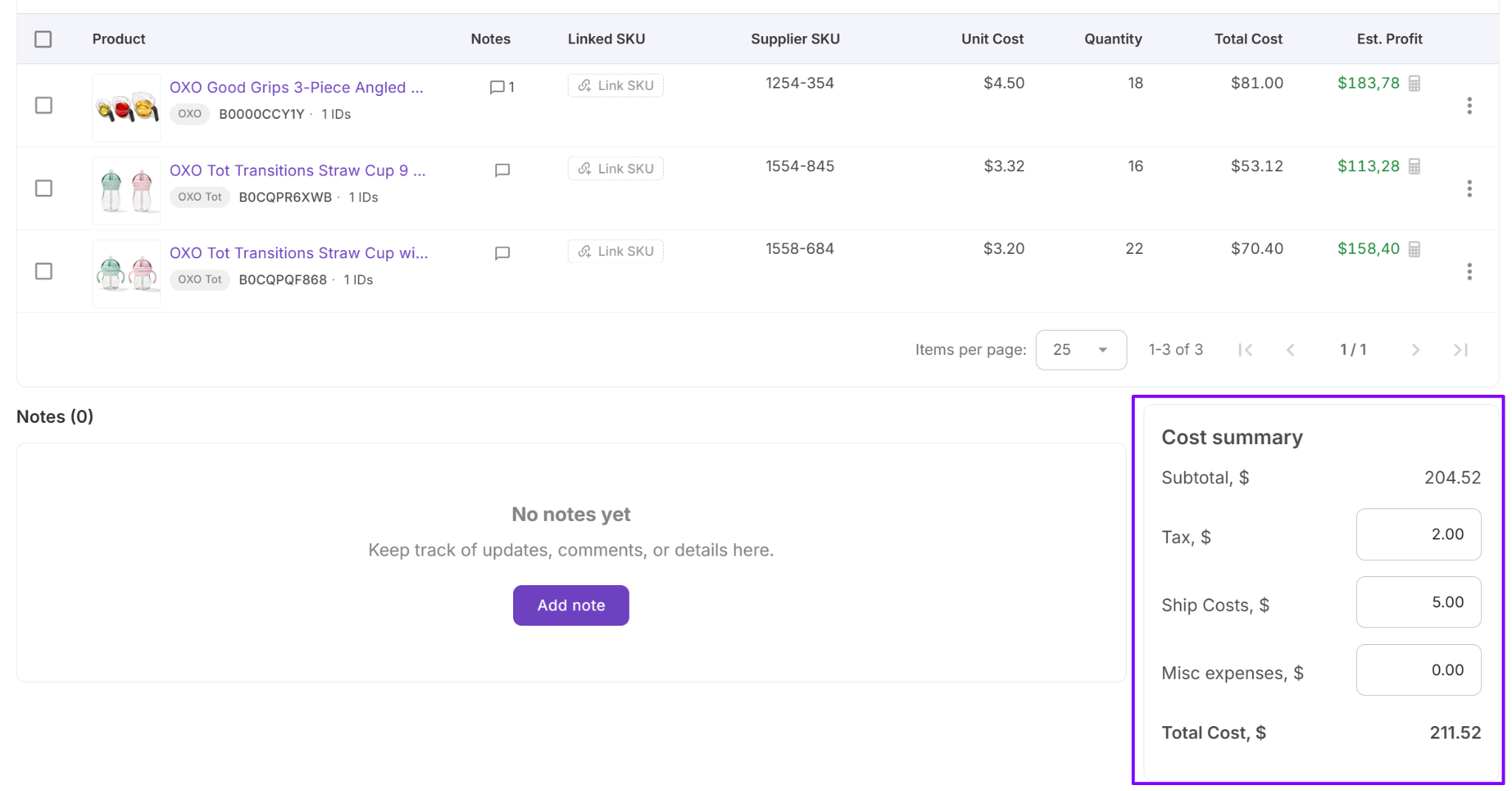
- View a consolidated cost summary with COG, shipping, VAT, taxes, and total inventory investment;
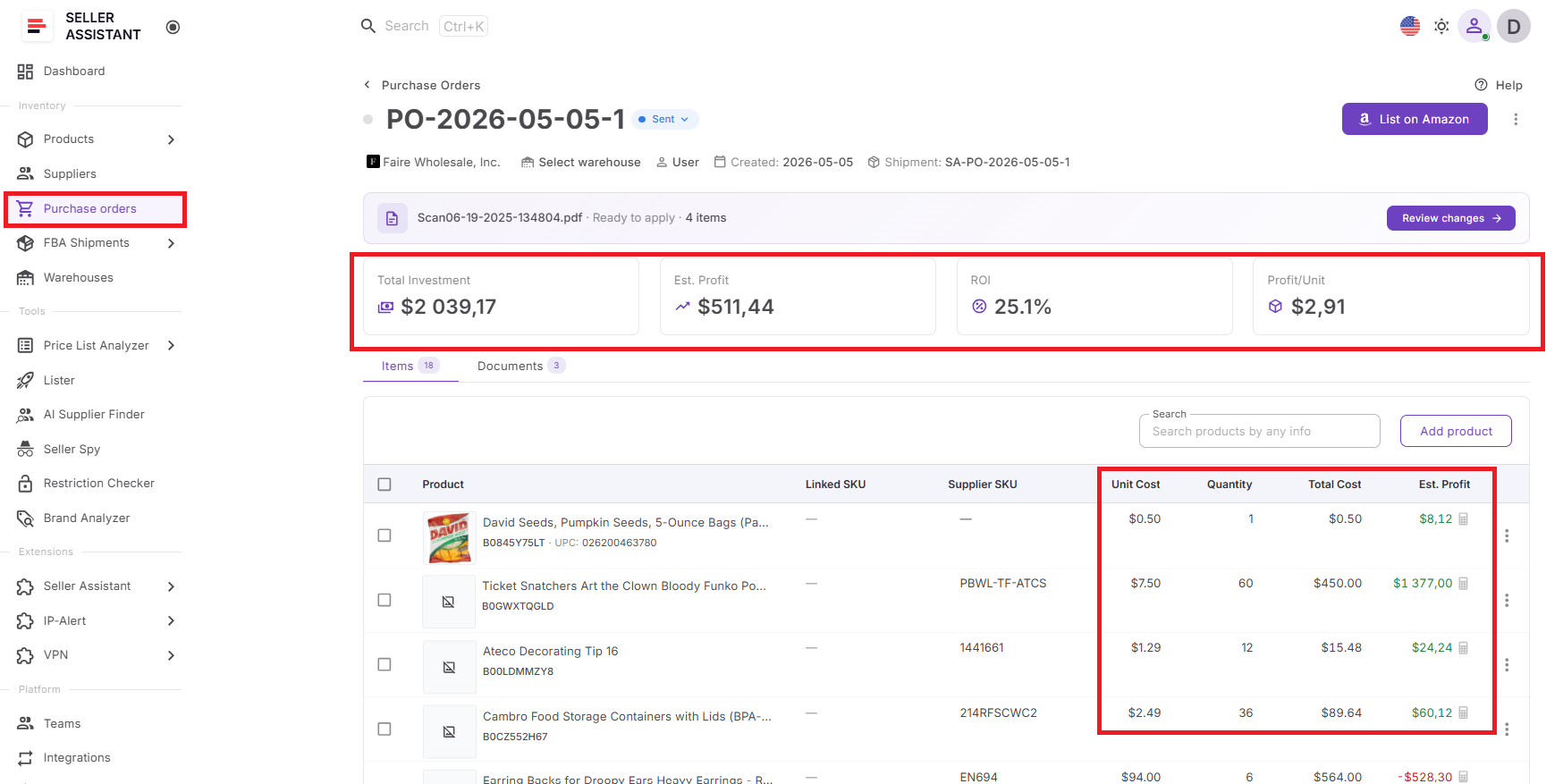
- Calculate estimated profit, ROI, profit per unit, and expected earnings before placing an order;
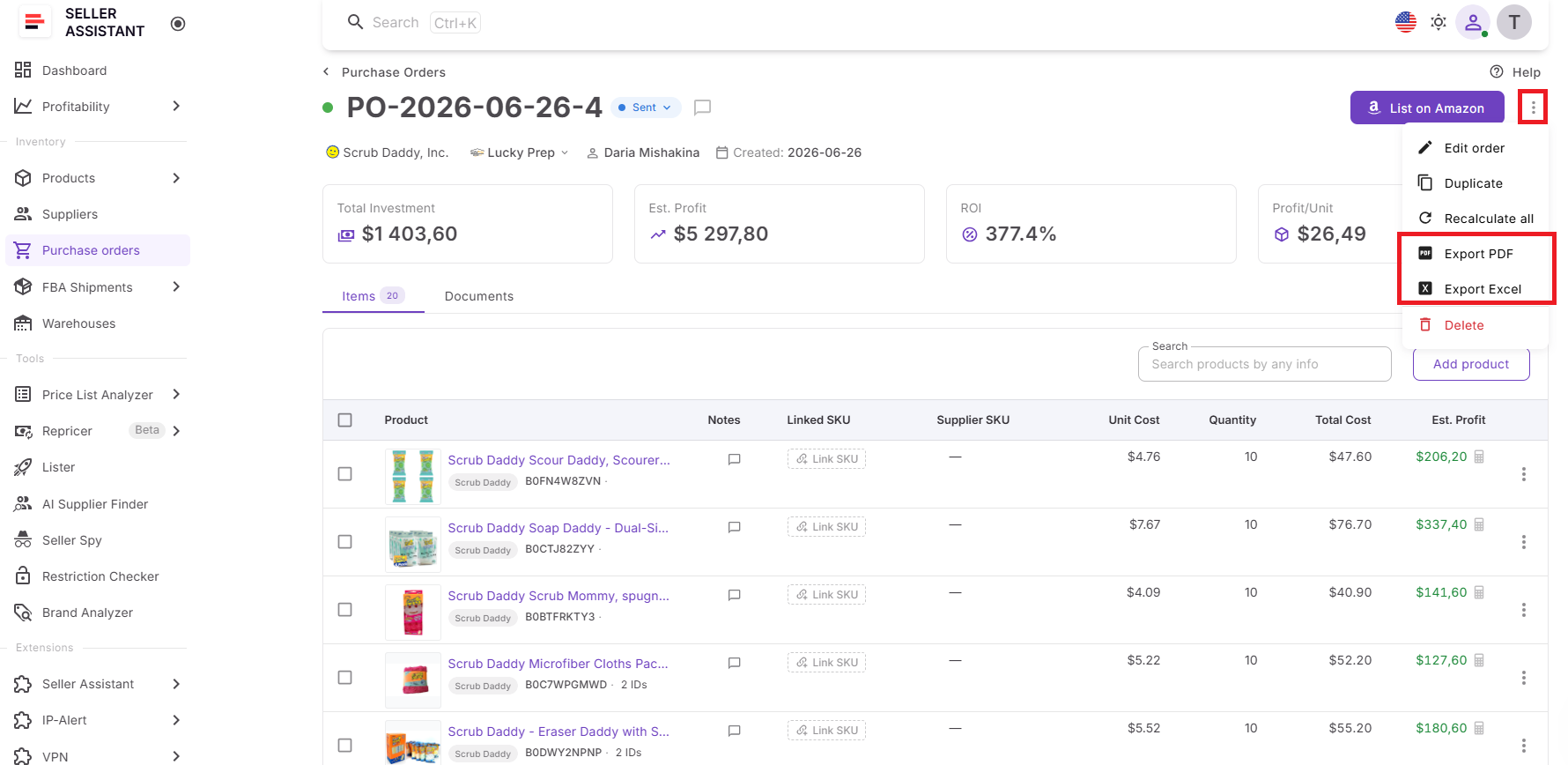
- Export purchase orders as PDF or XLSX files;
- Assign purchase orders to buyers and team members;
- Review missing information before sending orders;
- Maintain a complete history of supplier purchases and reorders.
Why connected purchase orders matter
Creating a purchase order should be the final step – not the point where you have to rebuild everything you’ve already done. Purchase Orders Module brings together supplier records, approved products, and purchasing costs into one workspace, allowing you to generate accurate supplier orders in minutes.
Before sending the order, you can also review the complete financial picture. Built-in cost summaries and profitability metrics help you verify total investment, expected profit, ROI, and other key purchasing metrics, making it easier to adjust quantities, remove weaker products, and place orders with confidence.
Decision #5. Will This Purchase Order Generate the Profit You Expect?
A purchase order may contain products with strong margins, but that doesn’t guarantee the order as a whole will be profitable. Shipping costs, taxes, unit quantities, and other purchasing expenses can significantly reduce returns. Before committing capital, sellers need to understand exactly how much they’re investing and what they can expect to earn.
The solution: PO Profitability Calculator
PO Profitability Calculator is Seller Assistant’s built-in profitability analysis tool within the Purchase Orders Module. It helps Amazon wholesale sellers, online arbitrage sellers, and dropshippers evaluate the financial performance of a purchase order before placing it with a supplier. Instead of relying on spreadsheets or estimating returns manually, sellers can review real-time profitability metrics directly inside the purchasing workflow.
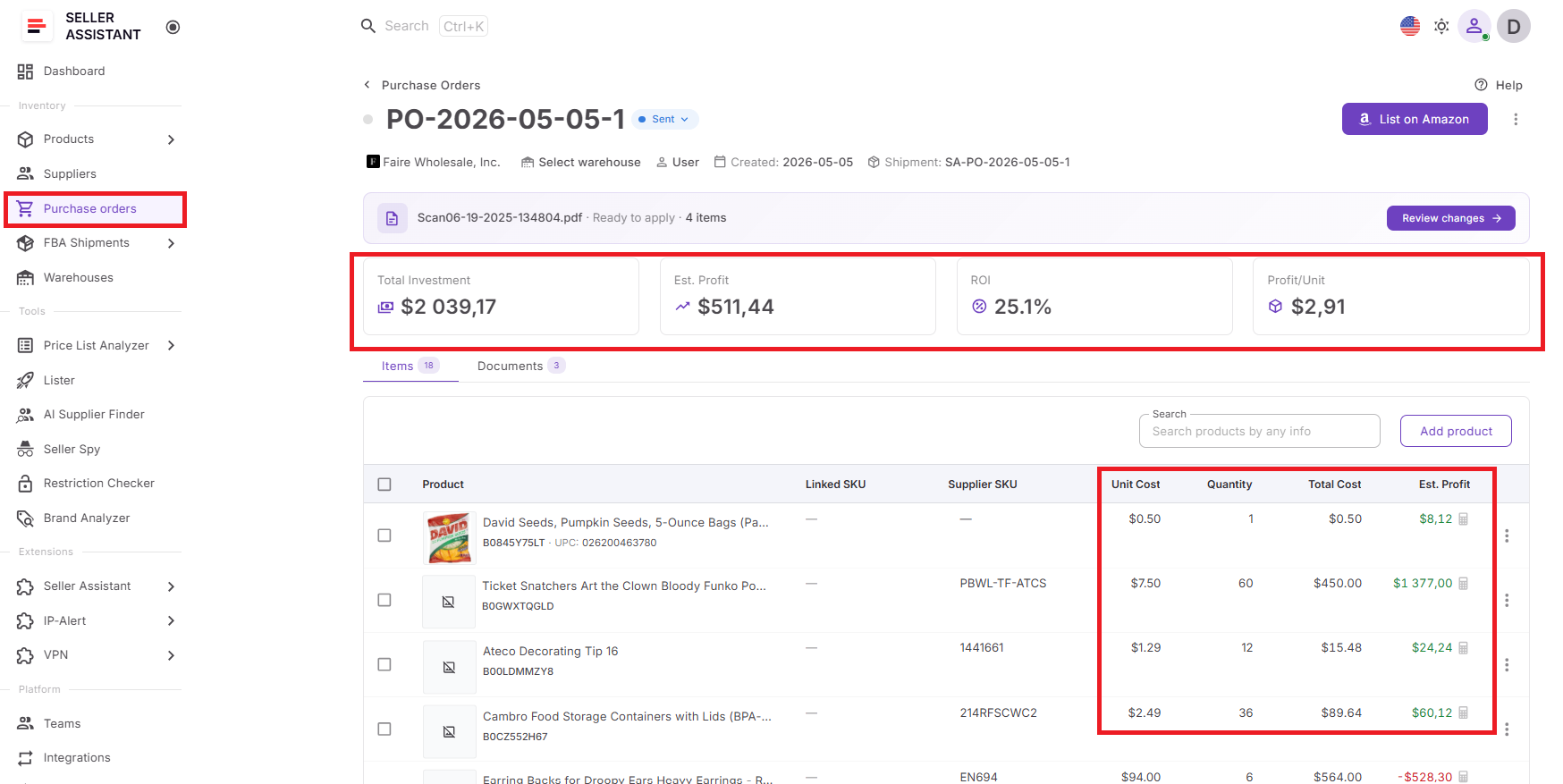
PO Profitability Calculator functionality
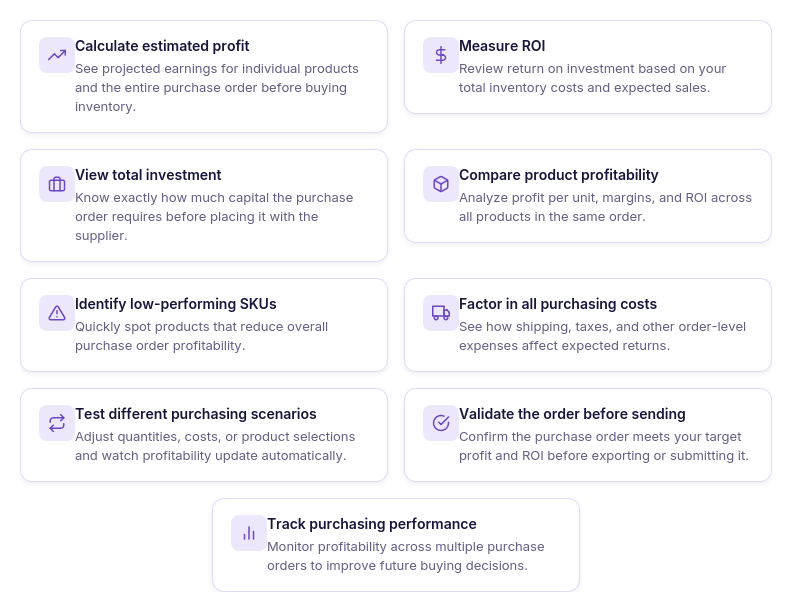
With PO Profitability Calculator, you can:
- Calculate estimated profit for individual products and complete purchase orders;
- Measure ROI based on total inventory investment;
- View total capital required for each purchase order;
- Analyze profit per unit across all products;
- Compare product profitability within the same order;
- Identify low-performing SKUs that reduce overall order returns;
- See how shipping, taxes, and other purchasing costs affect profitability;
- Test different purchasing scenarios by adjusting quantities and costs;
- Review profitability before exporting or sending a purchase order;
- Track purchasing performance across multiple supplier orders.
Why profitability validation matters
The final purchasing decision should always be based on complete financial data, not just supplier pricing or product-level margins. PO Profitability Calculator gives sellers a clear picture of the expected performance of an entire purchase order before inventory is purchased.
As costs, quantities, and order details change, profitability metrics update automatically. This makes it easy to compare different buying scenarios, optimize product selection, and remove SKUs that weaken the order. By validating total investment, estimated profit, ROI, and profit per unit before placing an order, sellers can invest with greater confidence and maximize the return on every wholesale purchase.
Manual Workflow Vs. Connected Seller Assistant Workflow
Managing wholesale purchases with spreadsheets and email may work when you’re placing a few orders, but it becomes increasingly difficult as your supplier network and product catalog grow. Information gets scattered, product research is repeated, costs are tracked in separate files, and purchase orders require hours of manual work.
See the difference at every stage of the purchasing process
A connected workflow keeps supplier records, product analysis, purchasing data, and profitability calculations linked from the moment you receive a supplier price list until the purchase order is sent. Instead of moving information between multiple tools, Seller Assistant automatically carries it through each stage of the purchasing process, helping sellers save time, reduce errors, and make better buying decisions.
The comparison below shows how a connected workflow simplifies every major task involved in turning a supplier price list into a profitable purchase order.
| Task | Spreadsheets and Email | Connected Workflow |
|---|---|---|
| Supplier records | Contacts, terms, and lead times scattered across inboxes and notes | Centralized supplier profiles with terms, status, and history in one place |
| Catalog analysis | Manual ASIN matching and margin math, product by product | Bulk analysis of profitability, demand, competition, and risk in minutes |
| Cost visibility | Shipping, VAT, and prep costs tracked separately, easy to miss | All order-level costs consolidated into one running total |
| Order accuracy | Product and supplier data re-entered by hand for every PO | Product, supplier, and warehouse data populate the PO automatically |
| Time to PO | Days, often longer as catalog size grows | Hours, with profitability confirmed before sending |
Purchase Order Readiness Checklist
Before you send a purchase order to your supplier, make sure you’ve completed these key steps.
Confirm your supplier details
Verify contact information, payment terms, lead times, and account status in Suppliers Database to avoid purchasing delays.
Analyze the supplier price list
Use Price List Analyzer to identify products that meet your profitability, demand, and risk criteria instead of relying on wholesale prices alone.
Review your shortlisted products
Check that approved products, supplier offers, and costs are organized in Product Database and remove any products that no longer fit your sourcing strategy.
Build an accurate purchase order
Create your PO using connected supplier and product data so quantities, pricing, and purchasing information are complete and up to date.
Verify total order costs
Review the cost summary, including COG, shipping, taxes, and other purchasing expenses to understand your total inventory investment.
Confirm order profitability
Use the PO Profitability Calculator to validate estimated profit, ROI, and profit per unit before committing capital.
Send the purchase order with confidence
Once every detail has been verified, export the PO and send it to your supplier, knowing your purchasing decision is backed by accurate data.
FAQ
How often should I analyze a supplier price list?
Analyze every new price list or price update you receive from a supplier, even if you’ve worked with them before. Wholesale costs, product availability, competition, and Amazon fees change regularly, so products that were profitable last month may no longer meet your buying criteria.
Should I keep products that aren’t profitable today?
Yes, if they have strategic value. Market conditions change frequently, and products that are unprofitable today can become profitable after supplier discounts, seasonal demand shifts, Buy Box changes, or lower competition.
What’s the biggest mistake sellers make after receiving a supplier catalog?
Many sellers focus only on products with the highest margins instead of evaluating the entire order. A balanced purchase order should also consider sales velocity, inventory turnover, capital requirements, and product risk to support healthier cash flow.
Why is it important to track supplier terms instead of just contact information?
Supplier terms directly affect purchasing flexibility and profitability over time. Knowing payment terms, minimum order values, lead times, and shipping requirements helps you compare suppliers more effectively and plan inventory replenishment with fewer surprises.
Can I improve a purchase order without changing the products?
Yes. Small adjustments – such as changing order quantities, negotiating better supplier pricing, or consolidating shipping – can significantly improve overall ROI and reduce the total cost of inventory without replacing the products in the order.
Final Thoughts
A supplier price list is full of opportunities, but profitable purchasing depends on the decisions you make after you receive it. Choosing the right supplier, identifying the best products, organizing sourcing data, building accurate purchase orders, and verifying profitability all play a role in determining whether your inventory investment will deliver the expected return.
Seller Assistant connects these decisions into one streamlined workflow. With Suppliers Database, Price List Analyzer, Product Database, Purchase Orders Module, and PO Profitability Calculator, sellers can move from a wholesale catalog to a purchase-ready order without relying on disconnected spreadsheets or repeating manual work.