Sending a purchase order to a prep center usually means a second trip: log into the prep center’s portal, create an inbound shipment, then copy over item details from the PO by hand.
Do that across multiple suppliers and prep centers every week, and it adds up to a lot of repeated data entry – with plenty of room for a mismatched quantity or missed SKU along the way.
Seller Assistant’s Prep Center Integration removes that extra trip. Once a supported prep center is connected to Seller Assistant, warehouses sync automatically. Send to prep reviews every purchase order line against the prep center, then creates the inbound shipment from the PO screen. A successful send moves the purchase order from Draft to Ordered.
This post walks through how the connection works from setup to shipment.
Beyond Auto-Fill: Why Prep Centers Need Their Own Sync
Saving a prep center’s address and other data in your purchasing system is only part of the solution. As your Amazon business grows, you need warehouse information that stays synchronized with your prep center, integrates with your purchasing workflow, and eliminates repetitive work.
That’s where Prep Center Integration comes in. Instead of treating prep centers as static warehouse records, Seller Assistant connects them directly to your account, keeping fulfillment locations current and making them available throughout your sourcing and purchasing workflow.
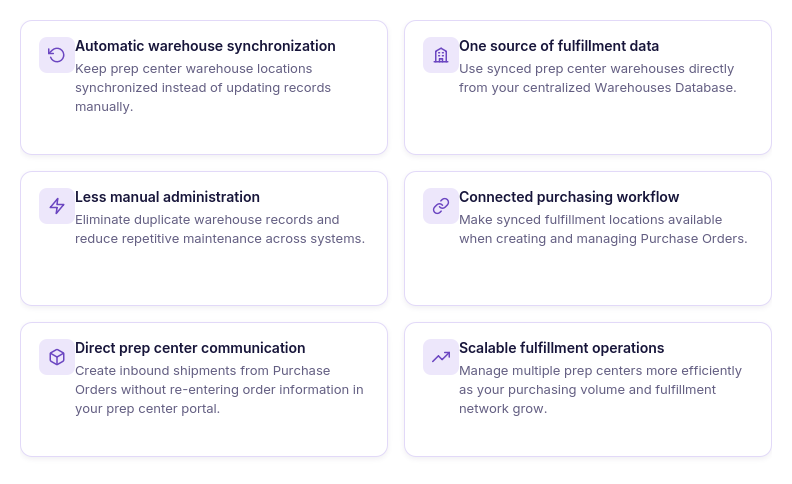
Stored warehouse records become outdated
Prep center information can change over time, including warehouse locations and operational details. Synchronization helps ensure you’re always working with the latest fulfillment data.
Manual updates create duplicate work
Maintaining the same warehouse records in both Seller Assistant and your prep center portal wastes time and increases the chance of inconsistencies. Integration keeps the two systems connected.
Switching between platforms slows fulfillment
Without integration, sellers must move between Seller Assistant and their prep center portal to recreate shipment information. A connected workflow keeps purchasing and prep operations in one place.
Synced warehouses improve routing
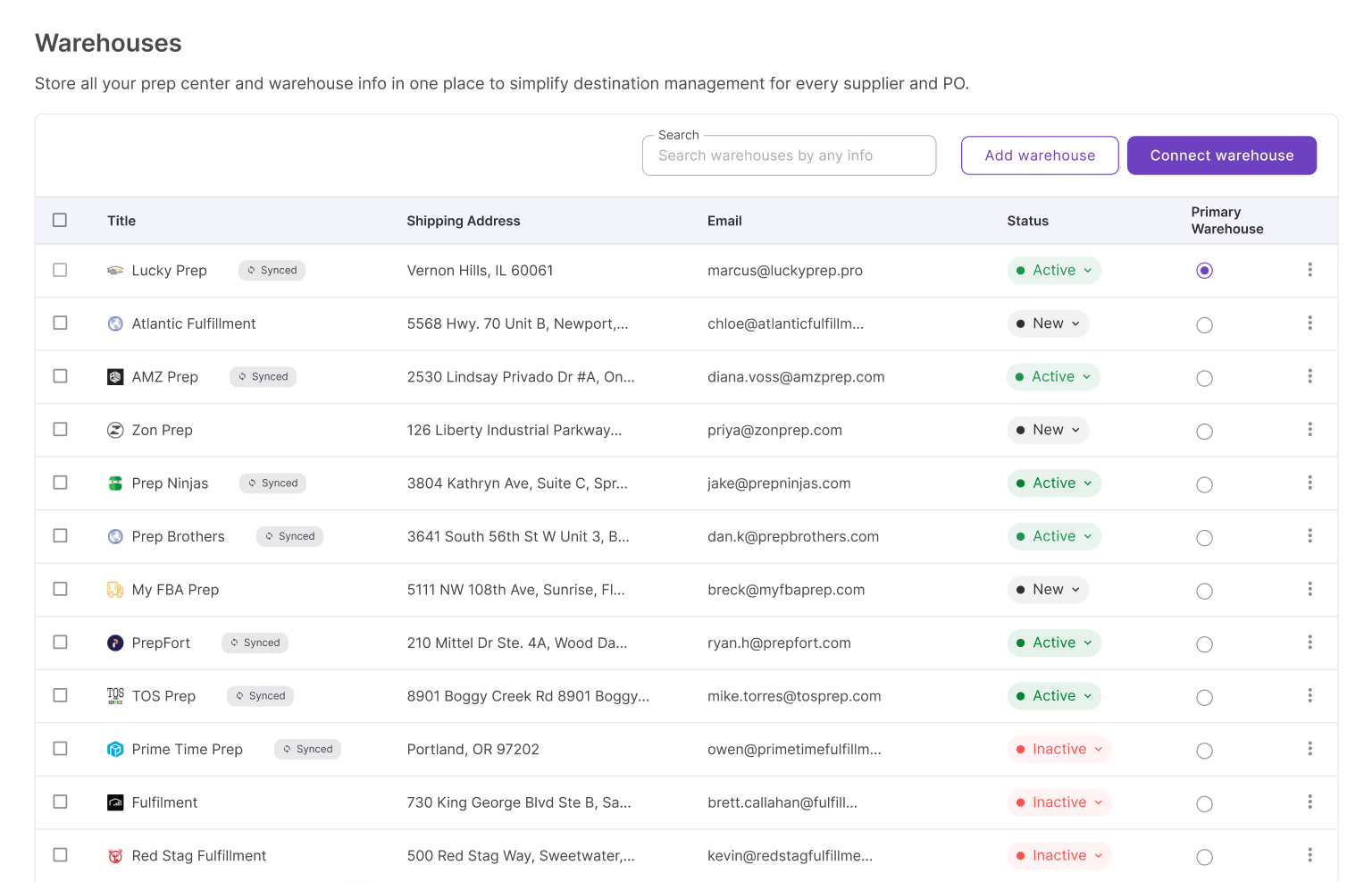
Connected prep center warehouses appear directly in Warehouses Database, making them available whenever you need to assign fulfillment locations to purchase orders.
Purchasing and prep stay connected
Prep Center Integration links purchasing with fulfillment by allowing purchase orders to create inbound shipments for connected prep centers, reducing manual handoffs between systems.
Connected workflows scale more easily
As you add suppliers, warehouses, and prep centers, synchronized fulfillment data helps keep operations organized while reducing manual maintenance and routing errors.
What Is Prep Center Integration?
Seller Assistant’s Prep Center Integration is a fulfillment integration tool that connects supported prep center accounts directly to Seller Assistant. Instead of managing prep center locations and inbound shipments separately, sellers can synchronize warehouse data, keep fulfillment locations up to date, and work with their prep center as part of the same purchasing workflow.
As purchasing volume grows, manually maintaining warehouse records and recreating inbound shipments in multiple systems becomes time-consuming and increases the risk of routing errors. Prep Center Integration eliminates these repetitive tasks by connecting Seller Assistant with your prep center, helping keep fulfillment data synchronized and purchasing operations more efficient.
Once connected, the integration automatically imports warehouse locations from the prep center into Warehouses Database, where they’re marked as synced and available throughout Seller Assistant. Sellers can then use these synced locations in purchase orders and create inbound shipments directly from the PO view, reducing manual work, eliminating duplicate data entry, and keeping purchasing and prep operations connected in one platform.
Prep Center Integration at a glance
| Area | Description |
|---|---|
| Prep center connectivity | Connect supported prep center accounts directly to Seller Assistant using secure API credentials. |
| Automatic warehouse sync | Import warehouse locations from your connected prep center and keep them synchronized automatically. |
| Synced warehouse records | View imported fulfillment locations in Warehouses Database, clearly marked with a Synced badge and provider label. |
| Purchase Order integration | Use synced warehouses when creating and managing purchase orders, ensuring inventory is routed to the correct prep center. |
| Send to prep review | Review every purchase order line, match or create the prep item, and send without leaving Seller Assistant. |
| Receipt sync | Received, damaged, and missing units sync back to the Prep tab about every 30 minutes, with the stage in the header. |
| Centralized fulfillment workflow | Manage prep center connections, warehouse routing, and purchasing from one platform instead of switching between multiple systems. |
What Can You Do with Prep Center Integration?
Prep Center Integration connects your prep center directly to Seller Assistant, making fulfillment data available across your purchasing workflow. Instead of managing warehouse locations and inbound shipments in separate systems, you can synchronize prep center data, route purchase orders more efficiently, and reduce repetitive administrative work.
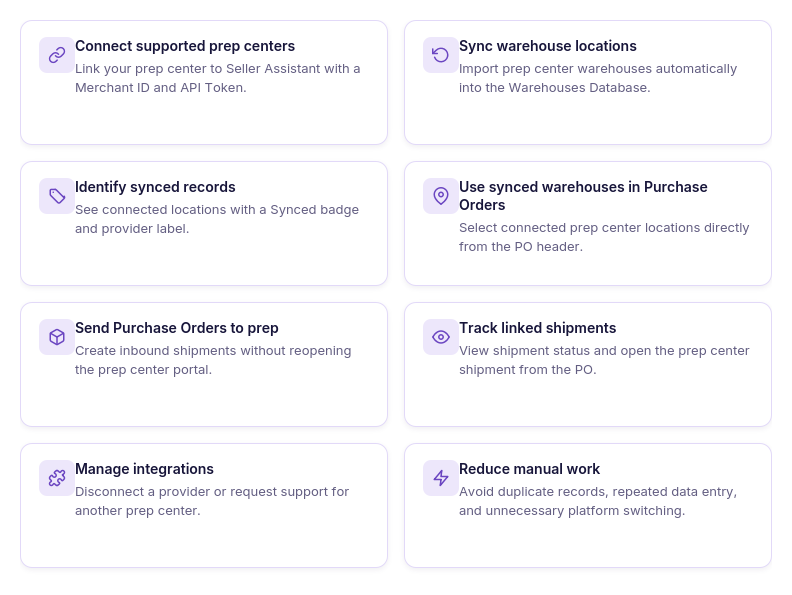
Connect supported prep centers
Link a supported prep center to Seller Assistant with your API token to establish a secure connection. Seller Assistant reads the merchant account from the token.
Synchronize warehouse locations
Automatically import warehouse locations from your prep center into Warehouses Database, eliminating the need to create duplicate warehouse records.
Keep fulfillment data current
Maintain up-to-date warehouse information through automatic synchronization instead of manually updating fulfillment records.
Manage synced warehouses
View synced prep center locations alongside manually created warehouses, clearly identified with a Synced badge and provider label.
Use synced warehouses across Seller Assistant
Select synchronized warehouse locations wherever fulfillment destinations are required, including the Purchase Orders Module.
Review every line before the shipment is created
Send to prep opens a review of every purchase order line against items at the connected prep center. Seller Assistant matches each line by a saved match, SKU, UPC or EAN, or ASIN with the same condition, or creates the item on send. You choose only when more than one item fits. Each line goes with its SKU, or a suggested SKU in your team’s format, so the prep item and the Amazon listing share one SKU. This applies to prep centers connected through PrepBusiness-based integrations.
Track what the prep received
After a successful send, the purchase order moves from Draft to Ordered. Received, damaged, and missing units sync back to the Prep tab about every 30 minutes. The header shows the stage, for example Receiving 52/60. Resolve a gap on the line: claim from the supplier, the prep, or the carrier, accept the loss, or mark the units still expected, and add a note on the purchase order. A Next actions card lists what to do next, including a failed send, receiving gaps, and new SKUs to list.
Manage prep center connections
Disconnect an existing prep center or request support for additional providers as your fulfillment network expands.
How Prep Center Integration Works
Prep Center Integration connects Seller Assistant with supported prep center providers, allowing fulfillment data to move automatically between the two systems. Instead of manually recreating warehouse records and inbound shipments, sellers can synchronize prep center locations, reuse them in purchase orders, and manage prep operations from the same workflow.
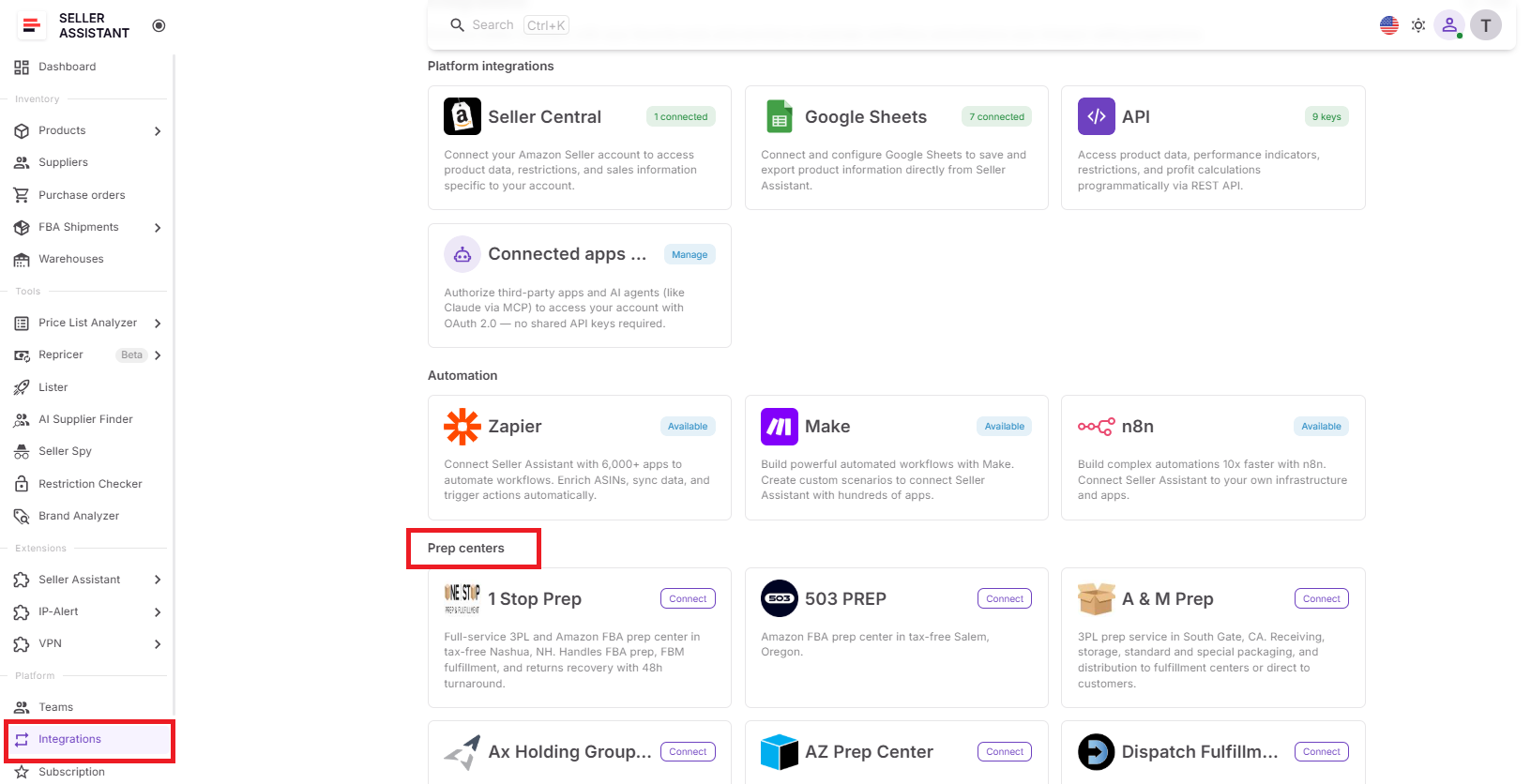
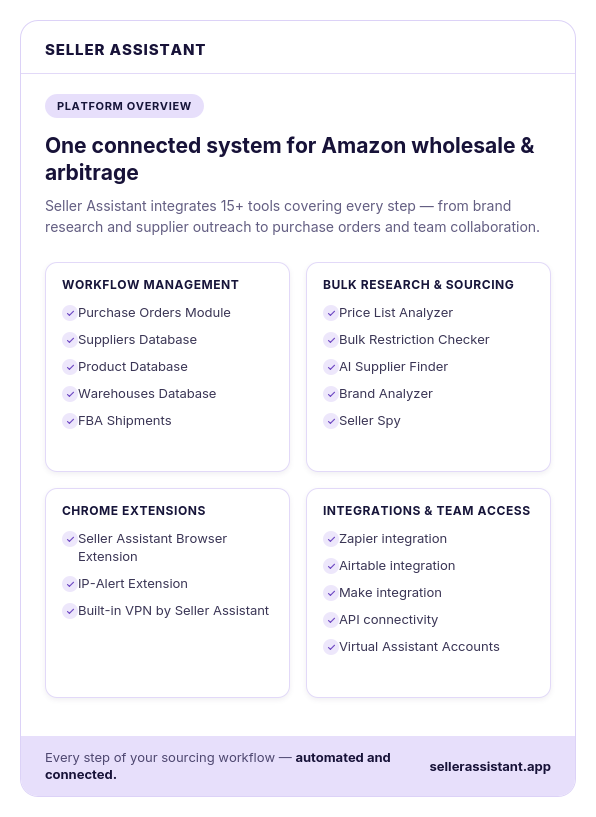
Located in the Integrations section of Seller Assistant, the integration extends Warehouses Database and Purchase Orders Module by keeping fulfillment locations synchronized and enabling direct communication with your prep center. This creates a more connected purchasing process while reducing repetitive administrative work.
Connecting your prep center
Getting started takes only a few steps. Open the Prep Centers section in Integrations, choose a supported provider, and connect your account with your API token. Seller Assistant reads the merchant account from the token, and you pick one if the token has several merchant accounts. Once Seller Assistant verifies the token, the integration is activated automatically.
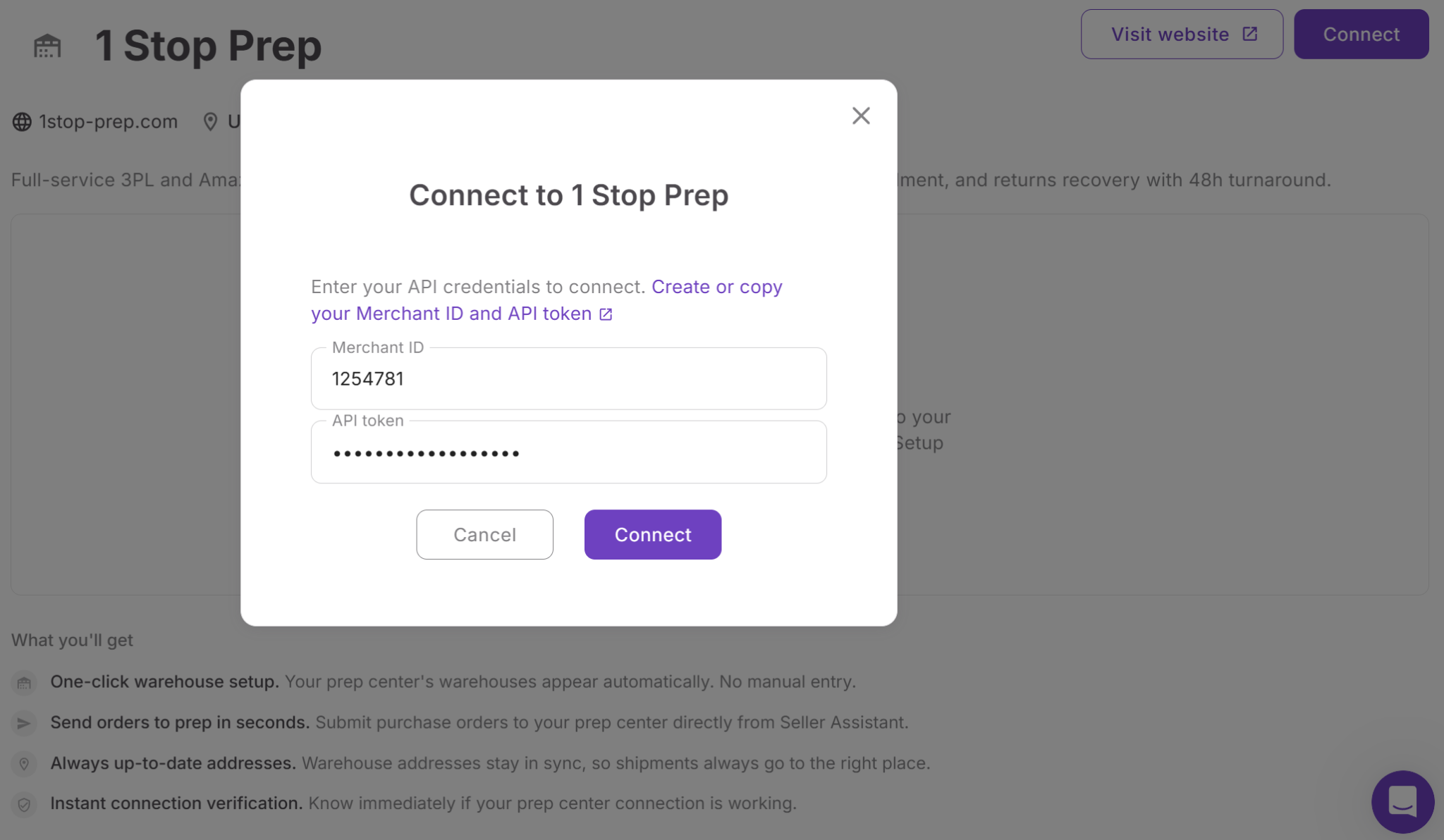
Connecting the two systems eliminates the need to maintain separate fulfillment records and creates a direct link between Seller Assistant and your prep center.
Synchronizing warehouse locations
After the connection is established, Seller Assistant automatically imports warehouse locations from your prep center into Warehouses Database. Imported locations appear alongside manually created warehouses and are clearly identified with a Synced badge and provider label.
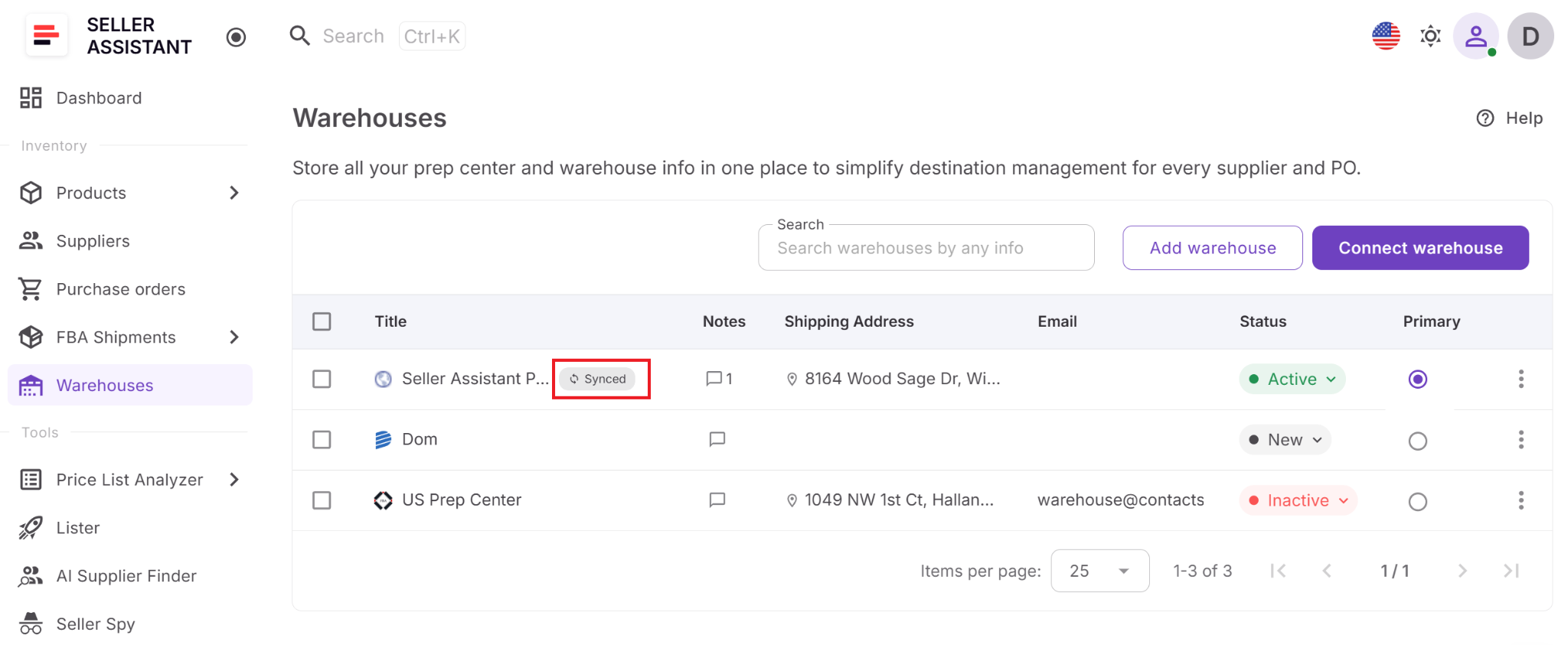
Because synchronized warehouses are managed through the integration, there’s no need to recreate or manually update the same fulfillment locations in multiple systems.
Using synced warehouses in purchase orders
Synchronized prep center locations become available directly in Purchase Orders Module. When creating or editing a purchase order, you can select a synced warehouse from the warehouse dropdown just like any other fulfillment location.
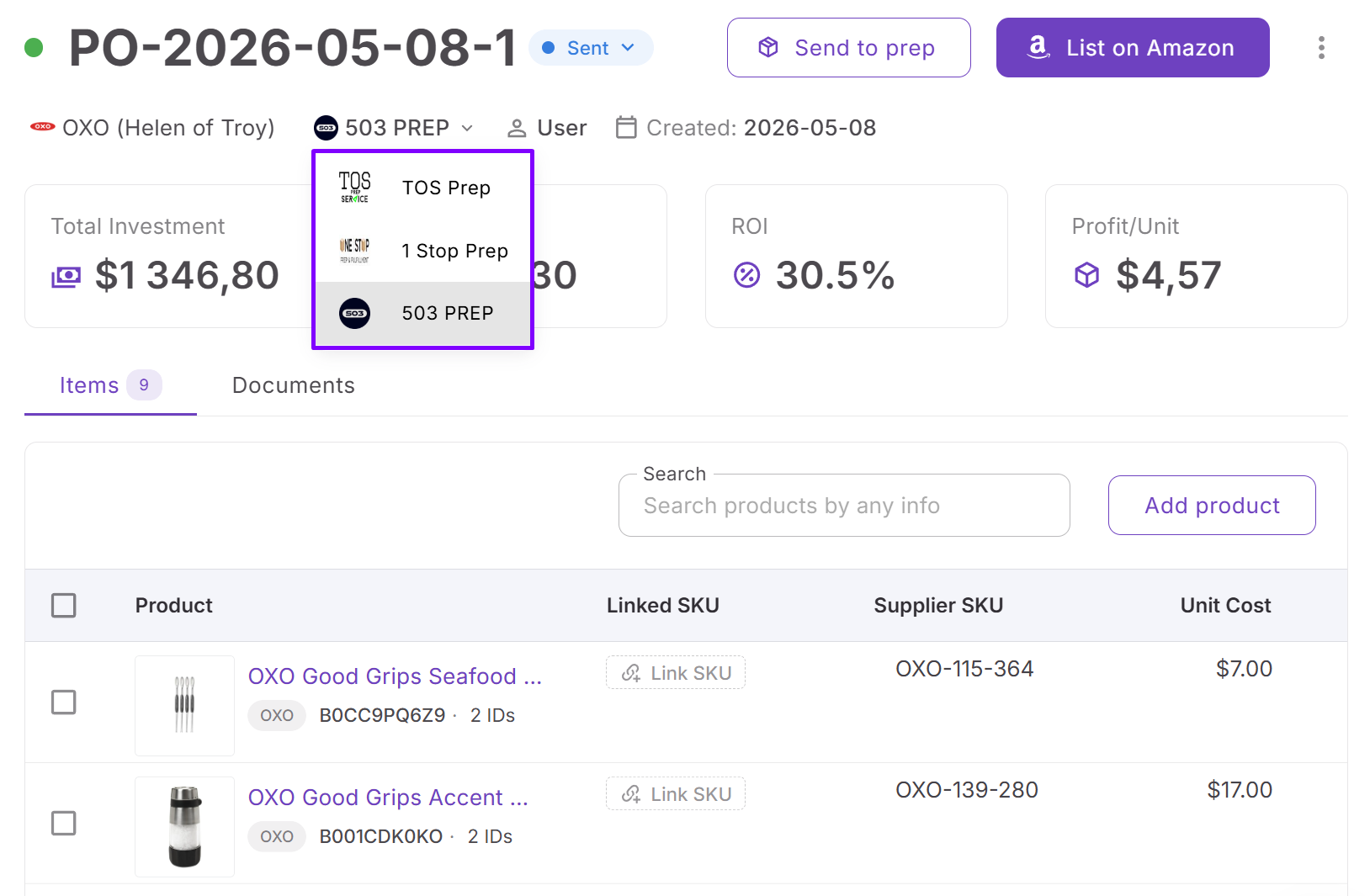
This keeps warehouse routing consistent and ensures supplier orders use the same fulfillment data stored in your connected prep center.
Creating inbound shipments
For purchase orders assigned to a synced warehouse, Seller Assistant displays a Send to prep button in the PO header. It opens a review of every line against items at the prep center. Seller Assistant matches each line by a saved match, SKU, UPC or EAN, or ASIN with the same condition, or creates the item on send. You choose only when more than one item fits. Each line goes with its SKU or a suggested SKU in the team’s format, so you do not re-enter the order in the provider’s portal. A successful send moves the purchase order from Draft to Ordered.
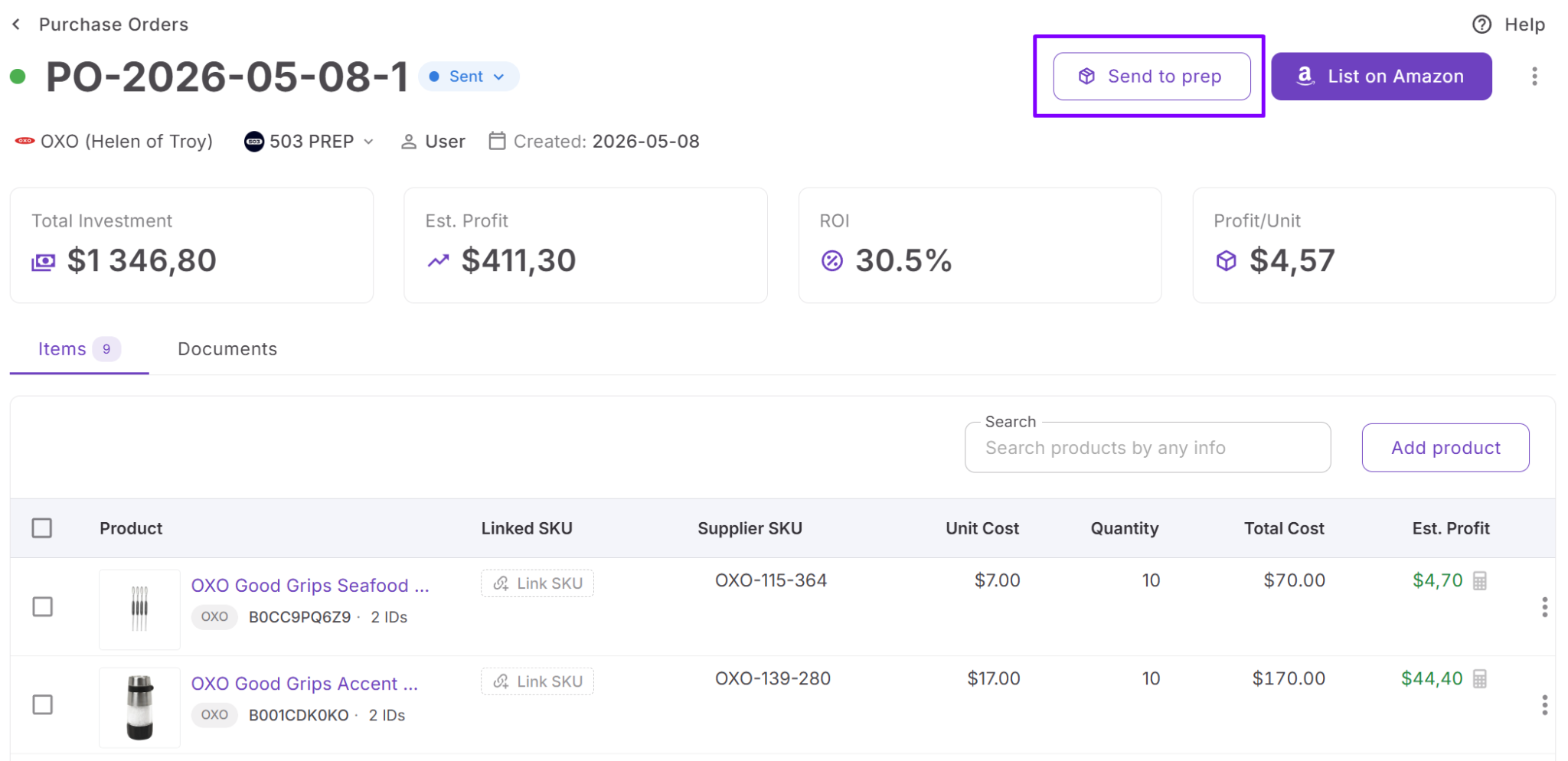
After the shipment is created, the Prep tab shows received, damaged, and missing units. Seller Assistant syncs those counts about every 30 minutes. The header shows the stage, for example Receiving 52/60, and you can open the shipment at the prep center from the same purchase order. For a gap, claim from the supplier, the prep, or the carrier, accept the loss, or mark the units still expected, and add a note on the purchase order. Lister opens from the PO when new SKUs still need a listing, with the PO marketplace and your listing defaults already set.
Managing connected prep centers
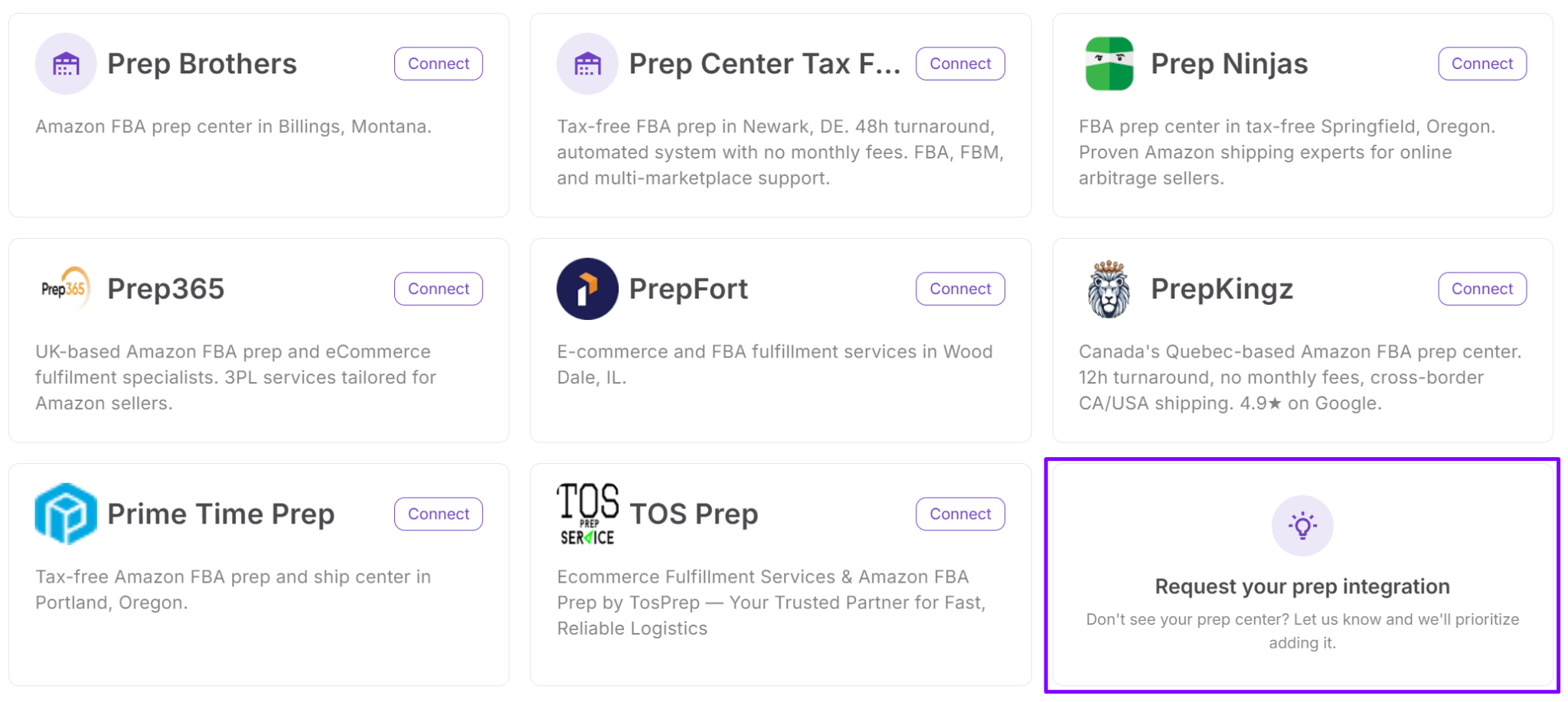
Prep Center Integration is designed to remain flexible as your fulfillment network changes. You can disconnect a prep center at any time, while Seller Assistant preserves historical warehouse references in existing purchase orders. If your preferred provider isn’t currently supported, you can submit an integration request directly from the Prep Centers page to help expand the available integrations.
Connected fulfillment workflow
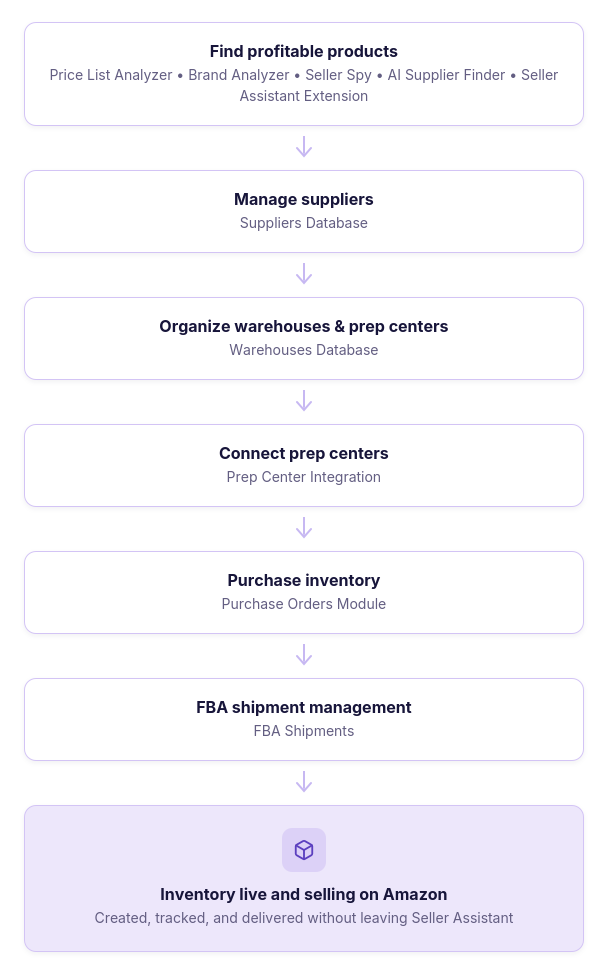
Prep Center Integration works alongside Warehouses Database, Purchase Orders Module, and FBA Shipments to create a connected fulfillment workflow. Warehouse locations synced from your prep center are automatically stored in Warehouses Database, where they’re available for routing inventory in purchase orders without maintaining duplicate records or switching between systems.
When a purchase order is assigned to a synced warehouse, it can be sent directly to the connected prep center as an inbound shipment. From there, inventory continues through FBA Shipments and on to Amazon, allowing Seller Assistant to connect warehouse management, prep operations, purchasing, and fulfillment in one streamlined workflow.
How Prep Center Integration Works Step by Step
Step 1. Open the Prep Centers page
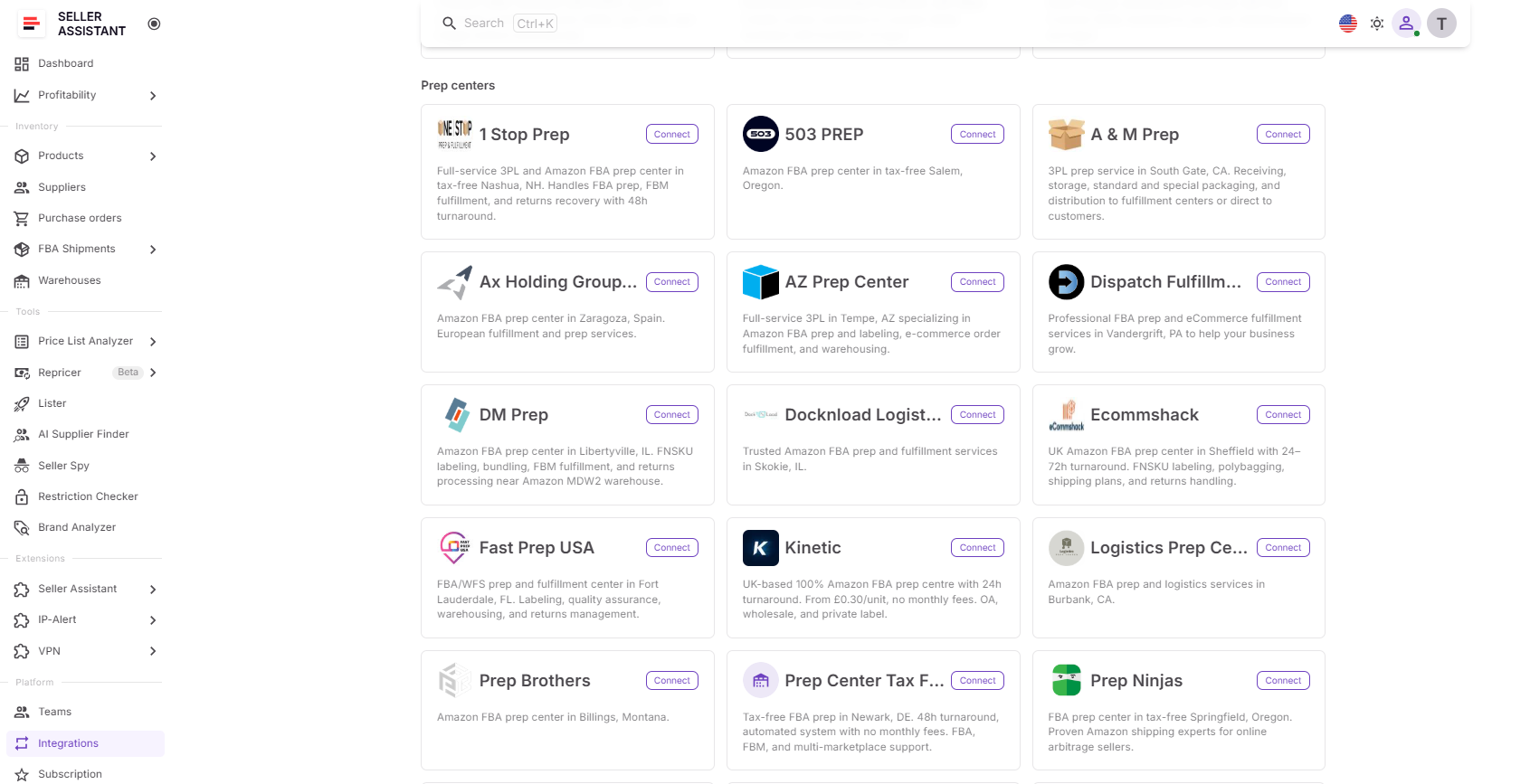
Go to Integrations → Prep Centers in your Seller Assistant account. The page displays all supported prep center providers, whether you’ve already connected one or not.
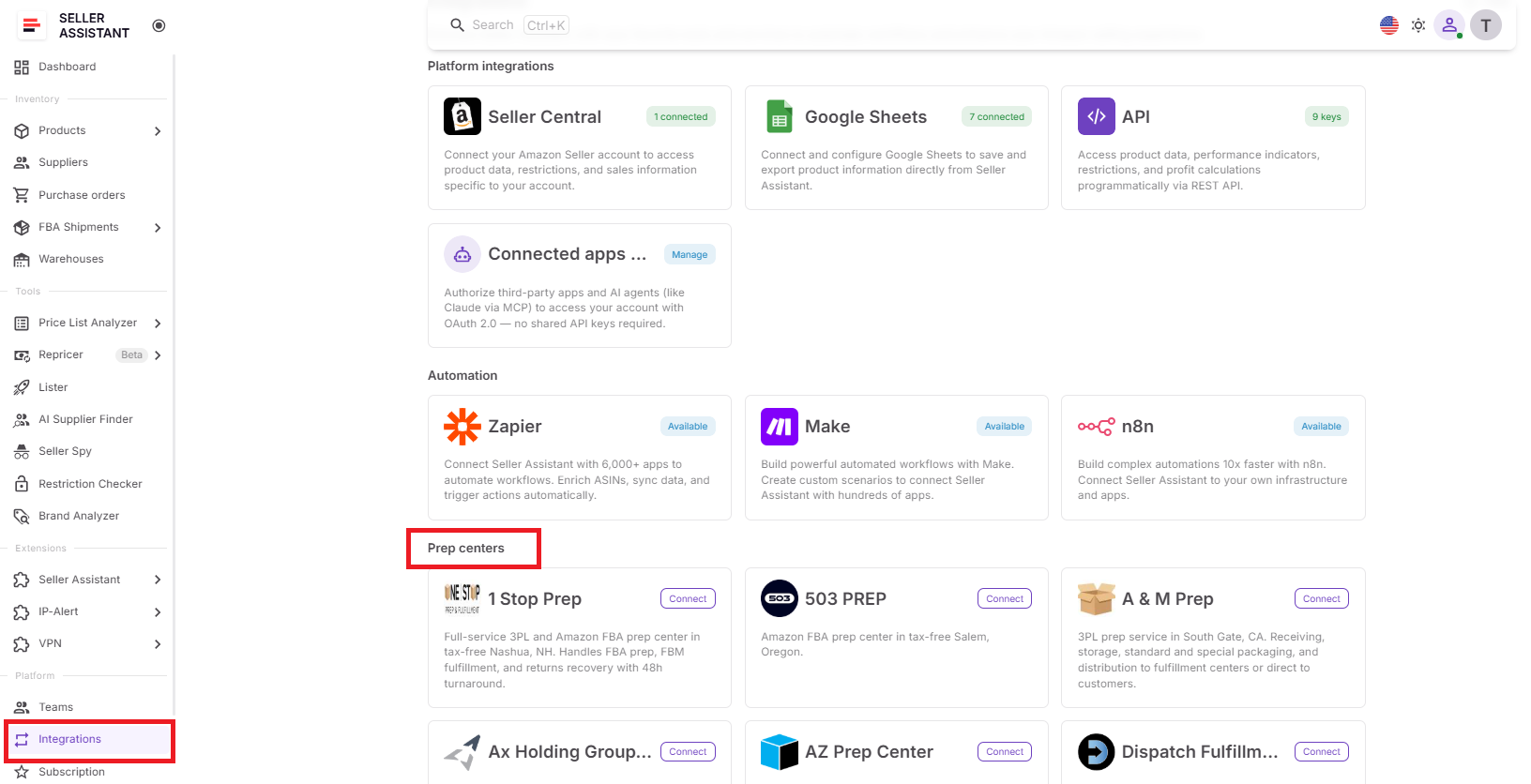
This is your central hub for managing prep center integrations and discovering supported providers.
Step 2. Choose a prep center
Click the card for the prep center you want to connect, then open its integration page.
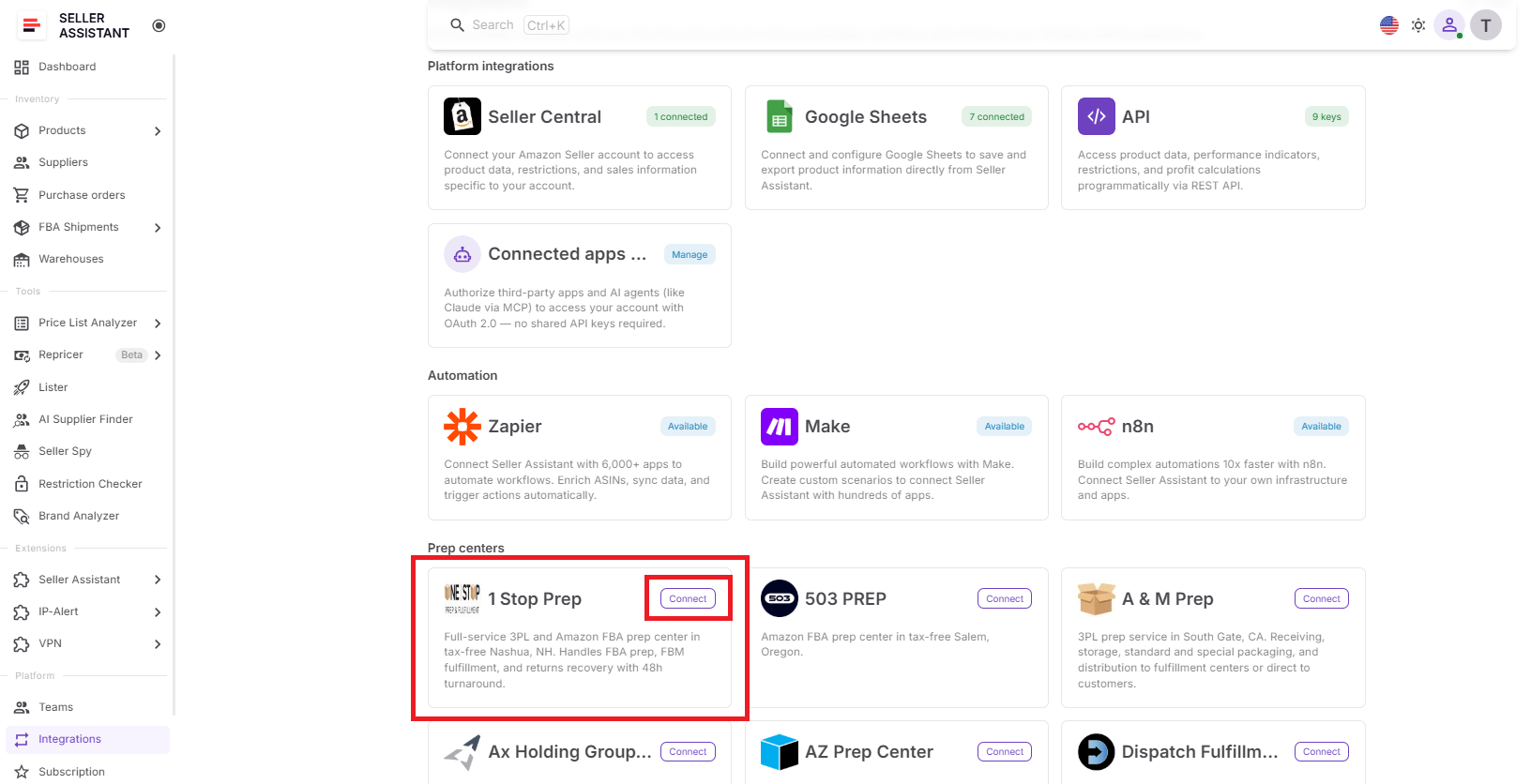
Each provider has its own connection settings, allowing you to manage integrations individually.
Step 3. Connect your account
Click Connect prep center, then enter your API token from your prep center account. Seller Assistant reads the merchant account from the token. If the token has several merchant accounts, pick one. The dialog links to where to create or copy the token.
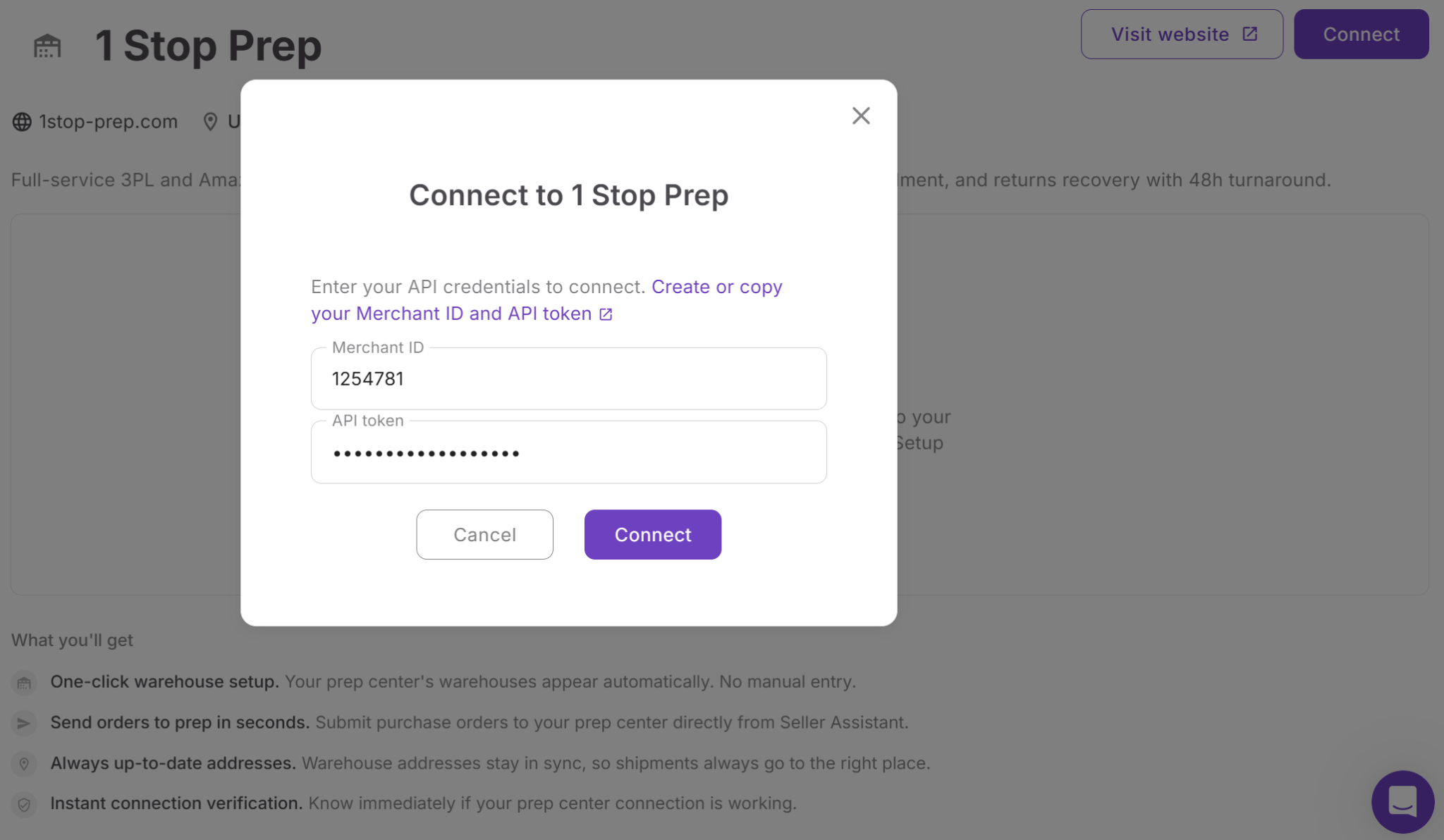
Seller Assistant uses the token to establish a secure connection and communicate with your prep center.
Step 4. Sync warehouse locations
After your credentials are verified, Seller Assistant automatically imports warehouse locations into Warehouses Database, where they’re marked with a Synced badge.
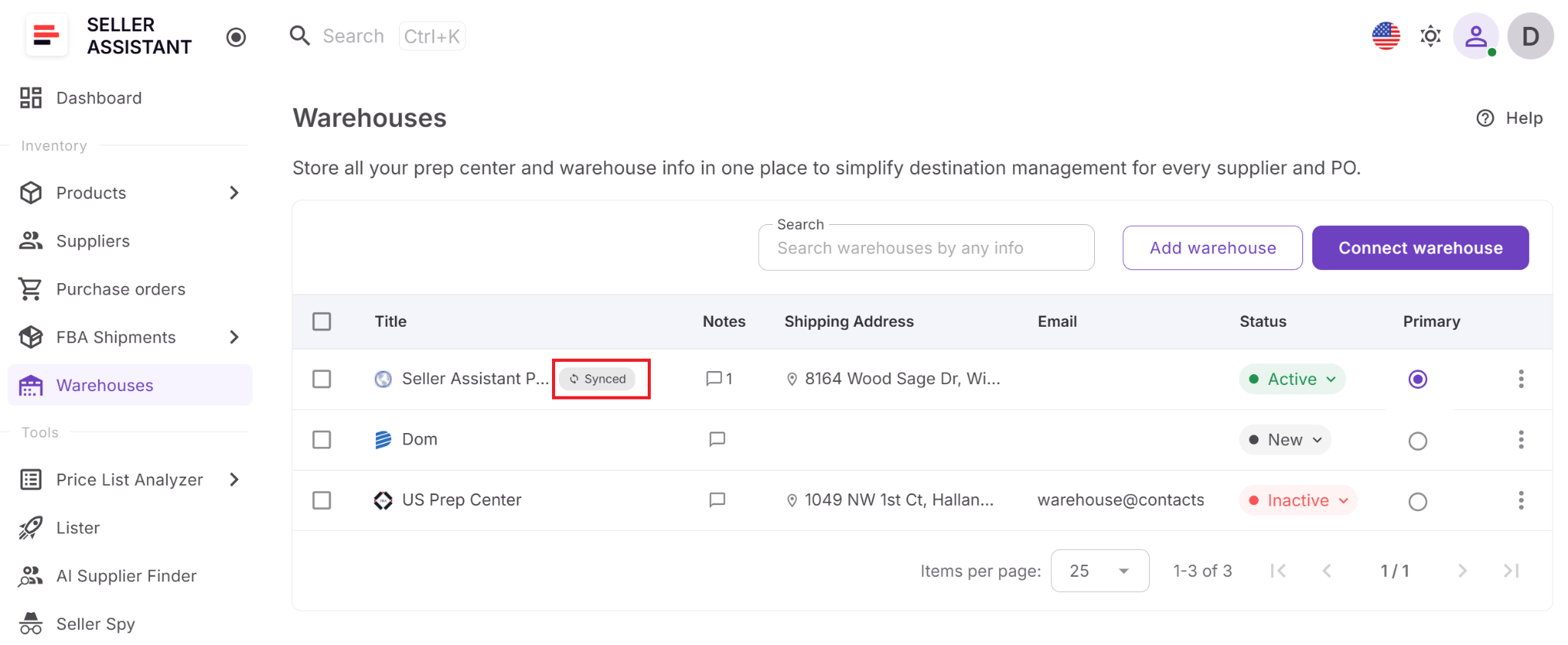
You no longer need to recreate or manually update the same warehouse records in multiple systems.
Step 5. Send purchase orders to prep
For purchase orders assigned to a synced warehouse, click Send to prep. Review every line, confirm a match only when more than one prep item fits, and send. Seller Assistant creates or matches the prep item with the line’s SKU, or with a suggested SKU in your team format. The purchase order moves to Ordered. The Prep tab then shows received, damaged, and missing units, synced about every 30 minutes, and the header shows the stage.
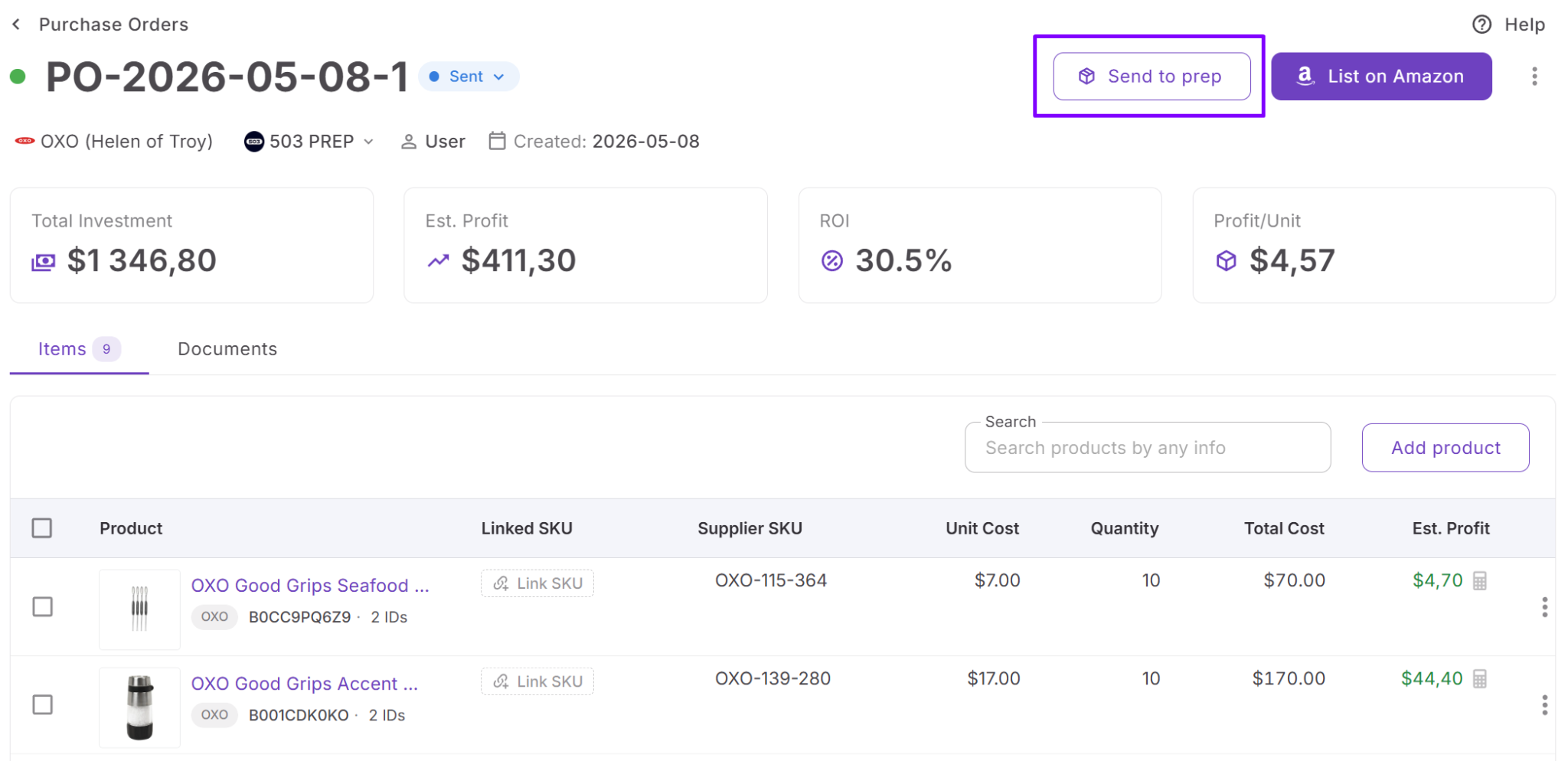
This eliminates manual shipment creation and keeps purchasing and prep operations connected in one workflow.
Step 6. Manage the integration
Disconnect a prep center when needed or request support for additional providers directly from the Prep Centers page. If a purchase order is already linked to a prep center shipment, unlink it before changing the assigned warehouse. Unlinking deletes that draft shipment at the prep.
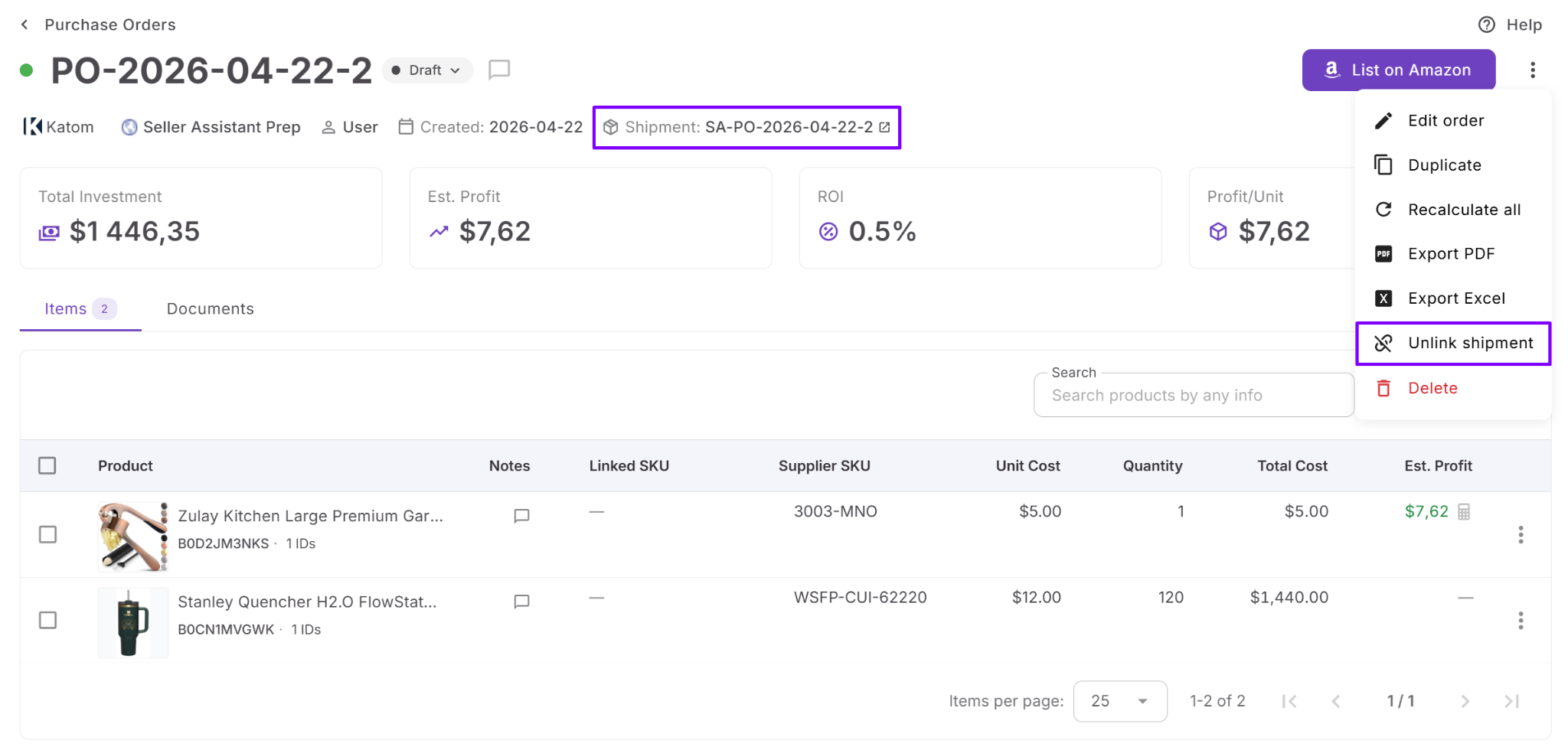
You can adapt your fulfillment network as your business evolves while maintaining accurate routing and purchase order history.
How to Send Purchase Orders to Your Prep Center (Video)
Here is how to send purchase orders to your prep center from Seller Assistant, by connecting the prep center, sending a PO to prep and tracking what arrived item by item.
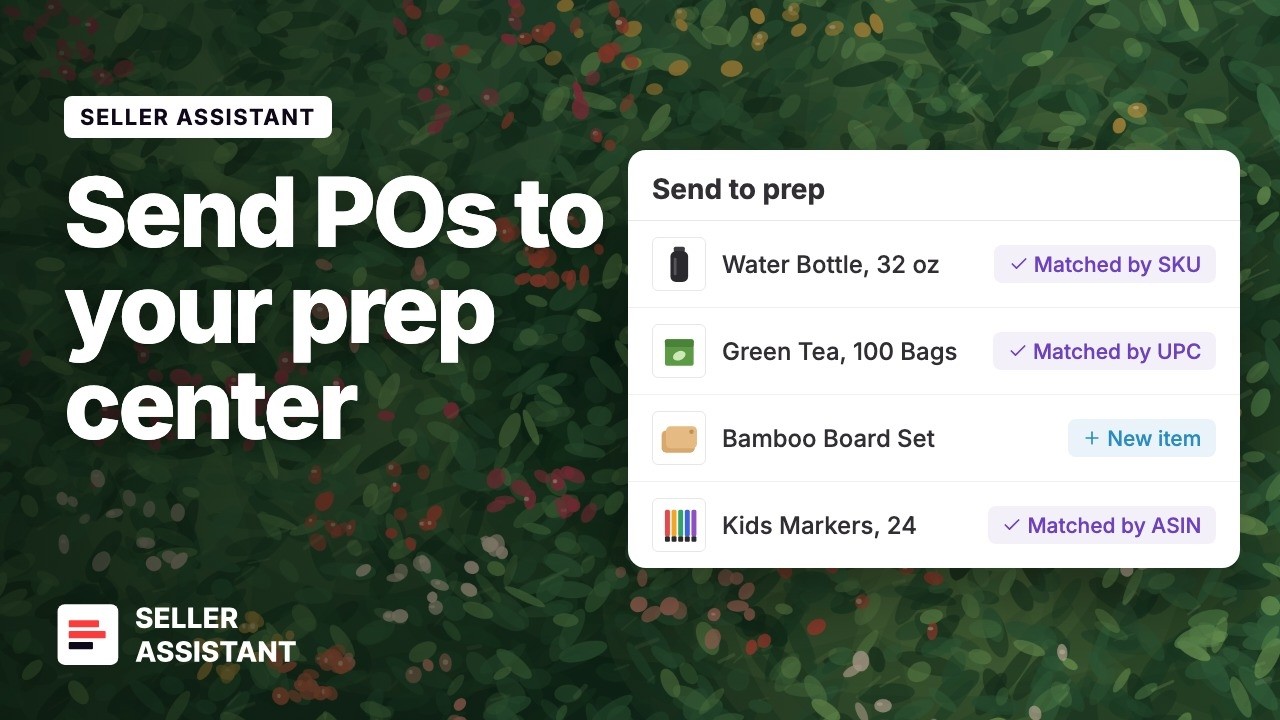
Connect your prep center and review your next purchase order before it goes to prep.
FAQ
Do I need to recreate my prep center warehouses in Seller Assistant after connecting?
No. Once the connection is established, supported prep center warehouses are imported automatically into Warehouses Database. These synced records are managed through the integration, so creating duplicate manual warehouses isn’t necessary.
Can I connect more than one prep center?
At launch, Seller Assistant supports PrepBusiness as the first integrated provider. If your prep center isn’t available yet, you can request support directly from the Prep Centers page to help prioritize future integrations.
What happens if I disconnect a prep center?
Disconnecting removes the synchronization with that provider, and synced warehouse records are removed from the active warehouse list. Existing purchase orders keep the warehouse name they used, preserving your purchasing history.
What happens to a purchase order line that has no SKU?
Seller Assistant suggests a SKU and reuses an existing one first. One click links it or creates it in the format set under Settings > SKUs & listings: supplier code plus item number, supplier code plus UPC, ASIN plus condition, batch, or random. Send to prep matches the line to a prep item by a saved match, SKU, UPC or EAN, or ASIN with the same condition, or creates the item on send. You choose only when more than one item fits. The prep item and the Amazon listing share that SKU.
Is Prep Center Integration included in every Seller Assistant plan?
No. Prep Center Integration is available as a Business plan feature. Once enabled, it integrates seamlessly with the Warehouses Database, Purchase Orders Module, and the rest of your fulfillment workflow.
Final Thoughts
Prep Center Integration eliminates one of the most time-consuming parts of Amazon fulfillment – manually keeping warehouse records synchronized and recreating inbound shipments across multiple systems. By connecting your prep center directly to Seller Assistant, you can keep fulfillment locations current, simplify warehouse routing, and reduce repetitive administrative work throughout the purchasing process.
Working alongside Warehouses Database, Purchase Orders Module, and FBA Shipments, Prep Center Integration creates a connected fulfillment workflow from supplier orders to Amazon. Whether you manage a single prep center or plan to expand your fulfillment network, integrating your prep operations helps improve routing accuracy, streamline purchasing, and move inventory to Amazon more efficiently.