Managing fulfillment locations becomes increasingly challenging as your Amazon business grows. Working with multiple suppliers, warehouses, and prep centers means keeping shipping information accurate and organized, and relying on spreadsheets or scattered notes can quickly lead to mistakes.
Seller Assistant’s Warehouses Database gives wholesale sellers, online arbitrage sellers, and dropshippers one centralized place to manage warehouse and prep center information. In this guide, you’ll learn how the Warehouses Database works, what you can do with it, and how it helps streamline warehouse management and keep fulfillment operations organized as your business scales.
Why Sellers Need Structured Warehouse Management
Running an Amazon wholesale operation usually means working with multiple suppliers, prep centers, and Amazon FBA destinations. As the number of purchase orders grows, keeping track of where each shipment should go becomes harder.
When warehouse addresses and routing rules are stored in spreadsheets or scattered notes, sellers risk sending inventory to the wrong location, which can delay fulfillment and create confusion with suppliers.
Multiple suppliers require clear routing
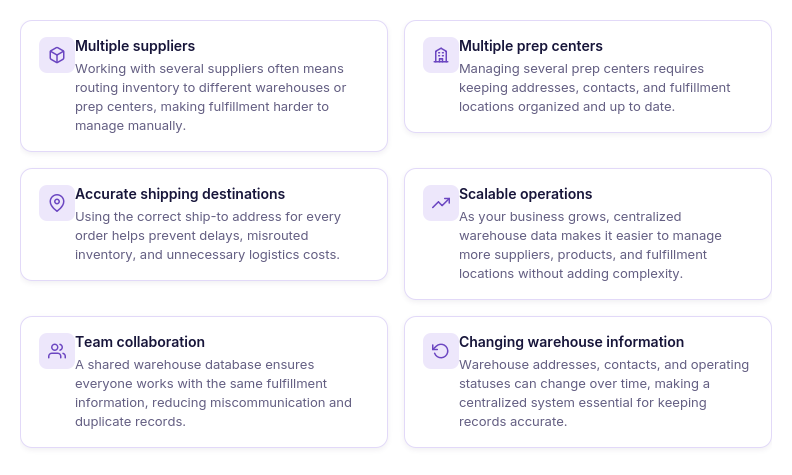
Wholesale sellers often purchase products from several distributors or brand owners at the same time. Each supplier may ship inventory to a different prep center or directly to Amazon FBA. Without a structured system, sellers must manually check and enter ship-to addresses for every purchase order, which increases the chance of mistakes.
Prep centers and warehouses must stay organized
Many Amazon sellers use prep centers to label, bundle, or inspect products before sending them to Amazon. Managing several prep centers means keeping track of their addresses, contacts, and operational status. A centralized warehouse record makes it easier to maintain accurate information and reuse it across orders.
Accurate shipping destinations prevent costly errors
Sending a purchase order with the wrong ship-to address can delay inventory processing and create additional logistics costs. Organized warehouse management ensures that suppliers always receive the correct destination details, keeping fulfillment smooth and predictable.
Scalable operations need consistent logistics data
As a wholesale business grows, the number of suppliers, products, and purchase orders increases quickly. Centralizing warehouse information allows sellers to reuse routing data across their workflow, reduce manual entry, and keep operations organized as they scale.
Team collaboration requires shared warehouse data
As your business grows, multiple team members may be responsible for sourcing products, managing suppliers, or creating purchase orders. Storing warehouse information in one centralized system ensures everyone works with the same addresses, contacts, and fulfillment locations, reducing miscommunication and duplicate records.
Warehouse information changes over time
Prep centers and warehouses may update their addresses, contact details, or operating status. When fulfillment information is stored in multiple spreadsheets or documents, keeping every record current becomes difficult. A centralized warehouse database makes it easier to update information once and maintain accurate records across your operations.
What Is Seller Assistant’s Warehouses Database?
Seller Assistant’s Warehouses Database is a centralized warehouse and prep center management tool designed for Amazon wholesale sellers, online arbitrage sellers, and dropshippers. It helps organize warehouses, prep centers, shipping destinations, and inventory routing information in one place, making fulfillment easier to manage as your business grows.
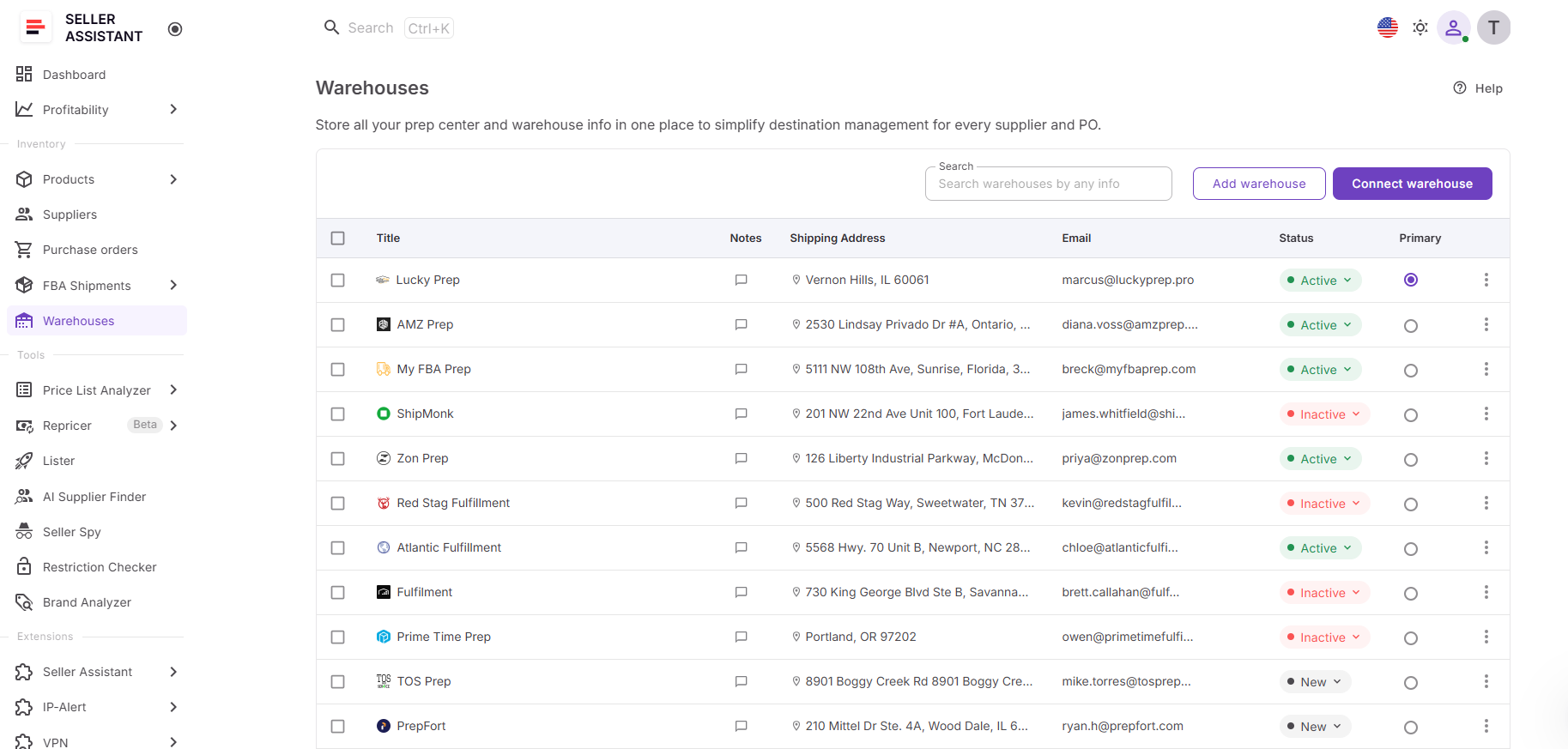
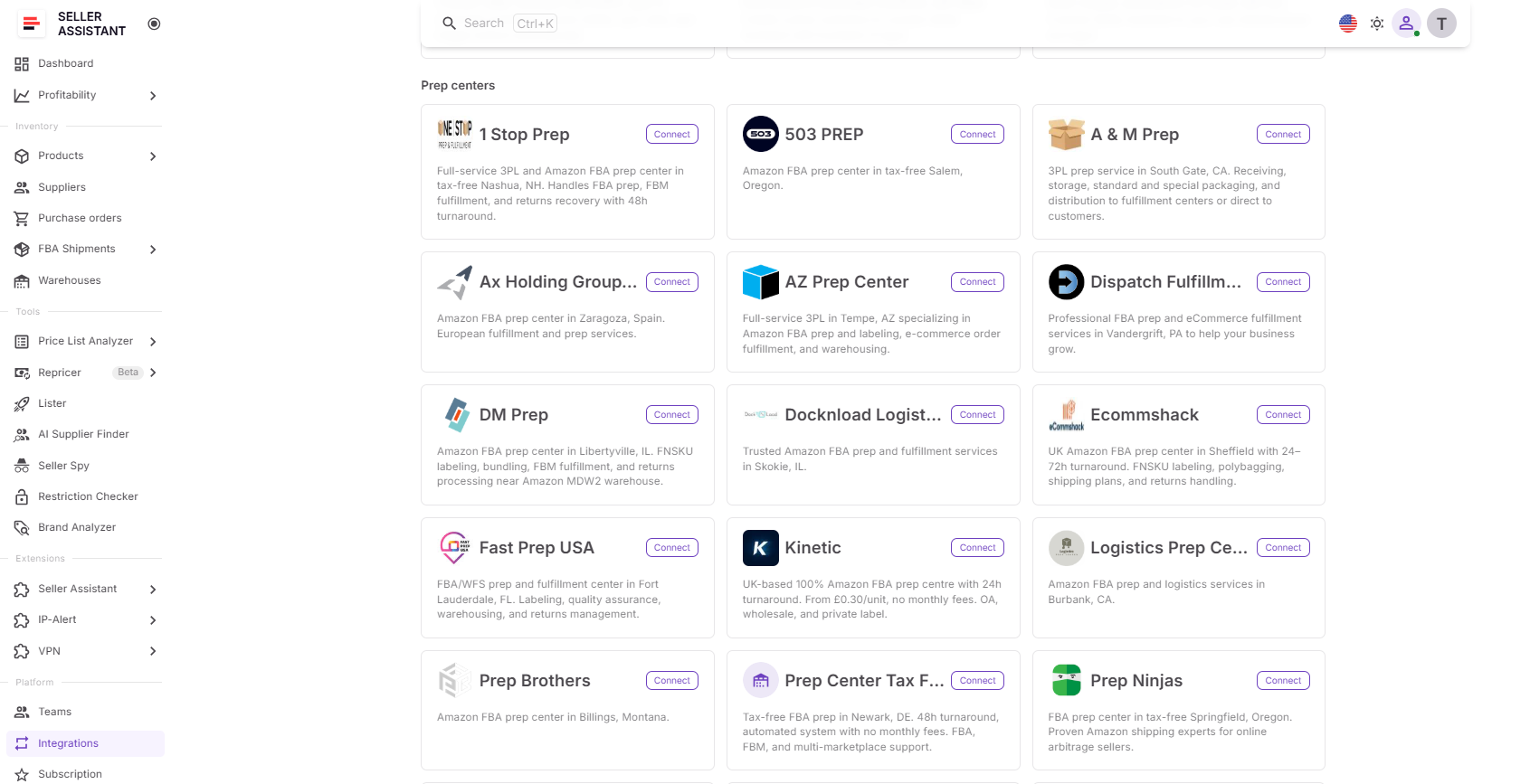
In addition to storing warehouse and prep center records, Warehouses Database supports Prep Center Integration, allowing you to connect supported prep center accounts, automatically synchronize warehouse locations, and keep fulfillment data consistent across Seller Assistant. Instead of maintaining warehouse information in spreadsheets, emails, or separate systems, sellers can manage all fulfillment locations from one centralized database and reuse them throughout their workflow.
Warehouses Database at a glance
| Area | Description |
|---|---|
| Centralized warehouse management | Store and manage all warehouse and prep center information in one database instead of scattered spreadsheets or documents. |
| Warehouse profiles | Create detailed profiles with warehouse names, shipping addresses, contact information, notes, and operational statuses. |
| Primary warehouse | Assign one warehouse as your default fulfillment location to simplify routing across your Seller Assistant workflow. |
| Warehouse organization | Search, sort, edit, and manage warehouse records by title, website, address, or contact information as your fulfillment network grows. |
| Prep Center Integration | Connect supported prep center accounts to automatically sync warehouse locations and keep fulfillment information up to date. |
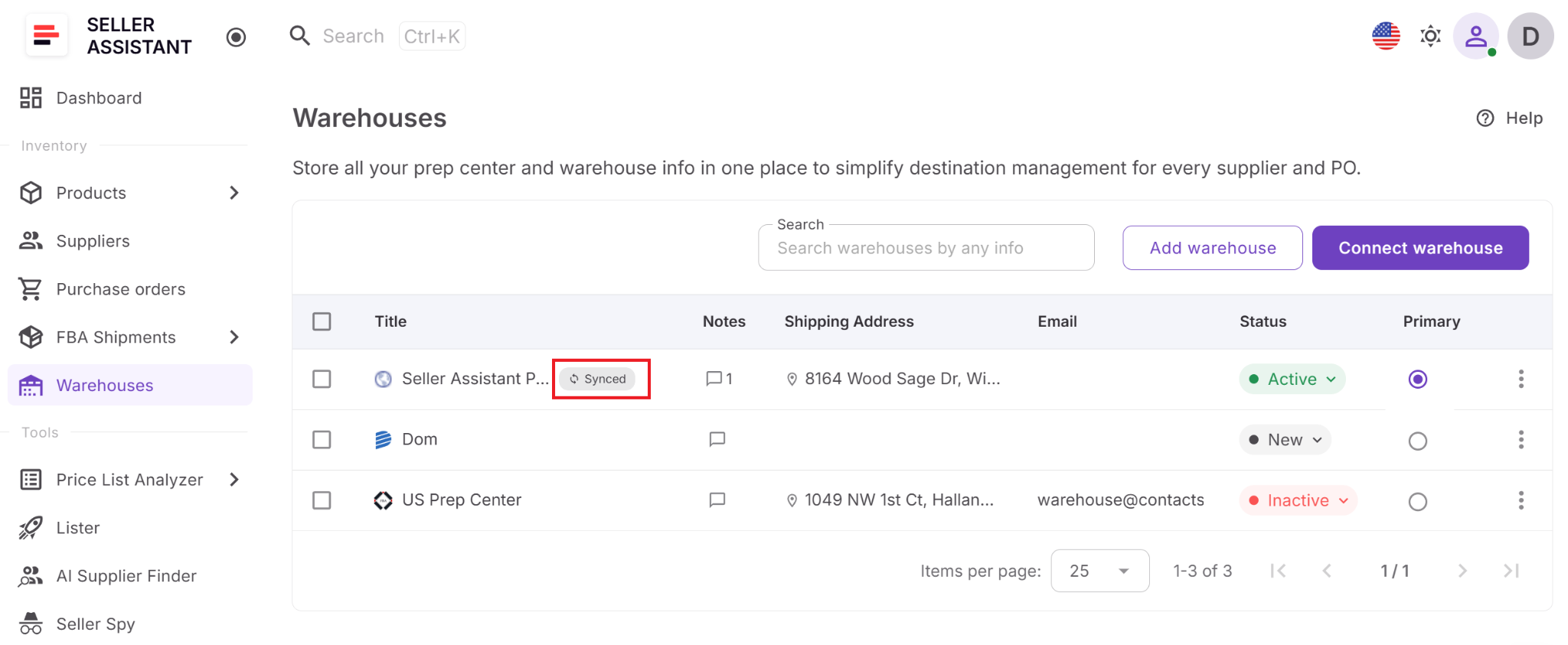
| Synced warehouses | View imported warehouse locations alongside manually created records, clearly identified with a Synced badge. |
| Connected workflow | Reuse warehouse information across the Suppliers Database, Purchase Orders Module, and FBA Shipments, eliminating duplicate data entry and keeping fulfillment information consistent. |
What Can You Do with Warehouses Database?
Warehouses Database helps Amazon sellers organize fulfillment locations and simplify warehouse management from one centralized workspace. Instead of maintaining warehouse information across spreadsheets or separate systems, you can manage warehouses, prep centers, shipping destinations, and routing information in one place.
With built-in Prep Center Integration, you can also connect supported prep centers, synchronize warehouse locations automatically, and extend your fulfillment workflow without duplicating data.
Warehouse and prep center profiles
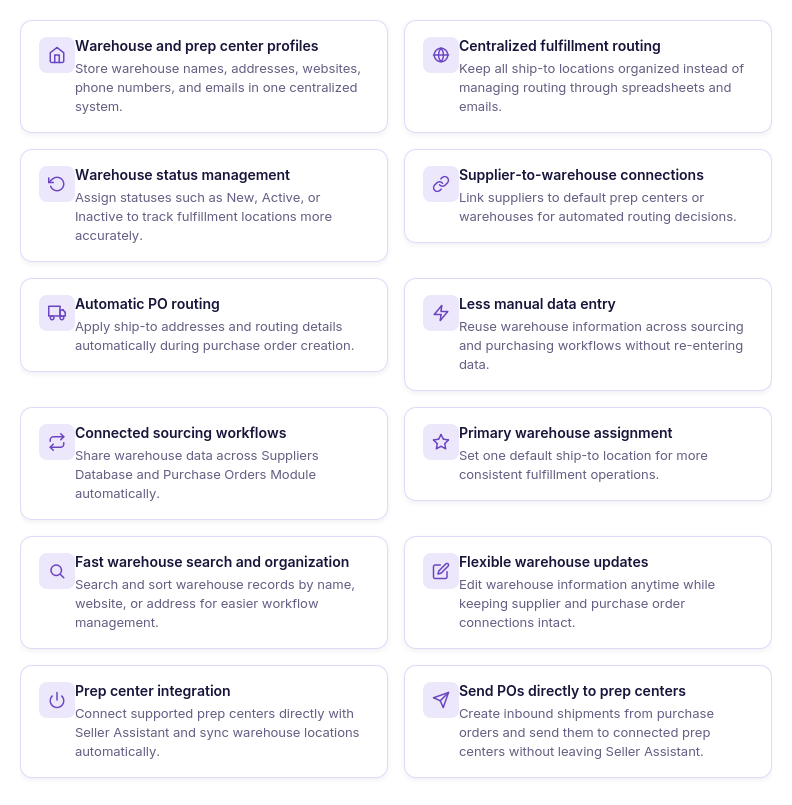
Create detailed profiles for every warehouse and prep center, including names, addresses, websites, phone numbers, and email addresses, all stored in one centralized system.
Centralized fulfillment routing
Keep all ship-to locations organized in one place instead of managing fulfillment routing through spreadsheets, emails, or scattered documents.
Warehouse status management
Assign New, Active, or Inactive statuses to track which fulfillment locations are currently in use and keep your warehouse network organized.
Supplier-to-warehouse connections
Assign default warehouses or prep centers to suppliers so the correct fulfillment location is available throughout your purchasing workflow.
Automatic routing for Purchase Orders
Reuse warehouse information when creating Purchase Orders, automatically applying ship-to addresses instead of entering them manually each time.
Less manual data entry
Maintain warehouse information once and reuse it across Seller Assistant, reducing duplicate records and repetitive updates.
Connected sourcing workflows
Share warehouse data across the Suppliers Database, Purchase Orders Module, and FBA Shipments, creating one connected operational workflow.
Primary warehouse assignment
Choose one warehouse as your default fulfillment location to standardize routing across your operations.
Fast warehouse search and organization
Search and sort warehouse records by name, website, address, or contacts to quickly find the fulfillment location you need.
Flexible warehouse updates
Update warehouse details whenever addresses, contacts, or other information changes while preserving existing workflow connections.
Prep Center Integration
Connect supported prep centers directly to Seller Assistant to automatically synchronize warehouse locations and eliminate duplicate warehouse records.
Direct prep center workflow
Use synchronized warehouse locations throughout Seller Assistant and send Purchase Orders to connected prep centers without leaving the platform, keeping warehouse management and prep operations connected.
How Warehouses Database Works
Warehouses Database centralizes warehouse and prep center management, helping Amazon sellers organize fulfillment locations and keep routing information consistent across their operations. It is located in the Inventory section of your Seller Assistant account and acts as the central hub for managing all prep centers and warehouse destinations used in your sourcing and purchasing workflow.
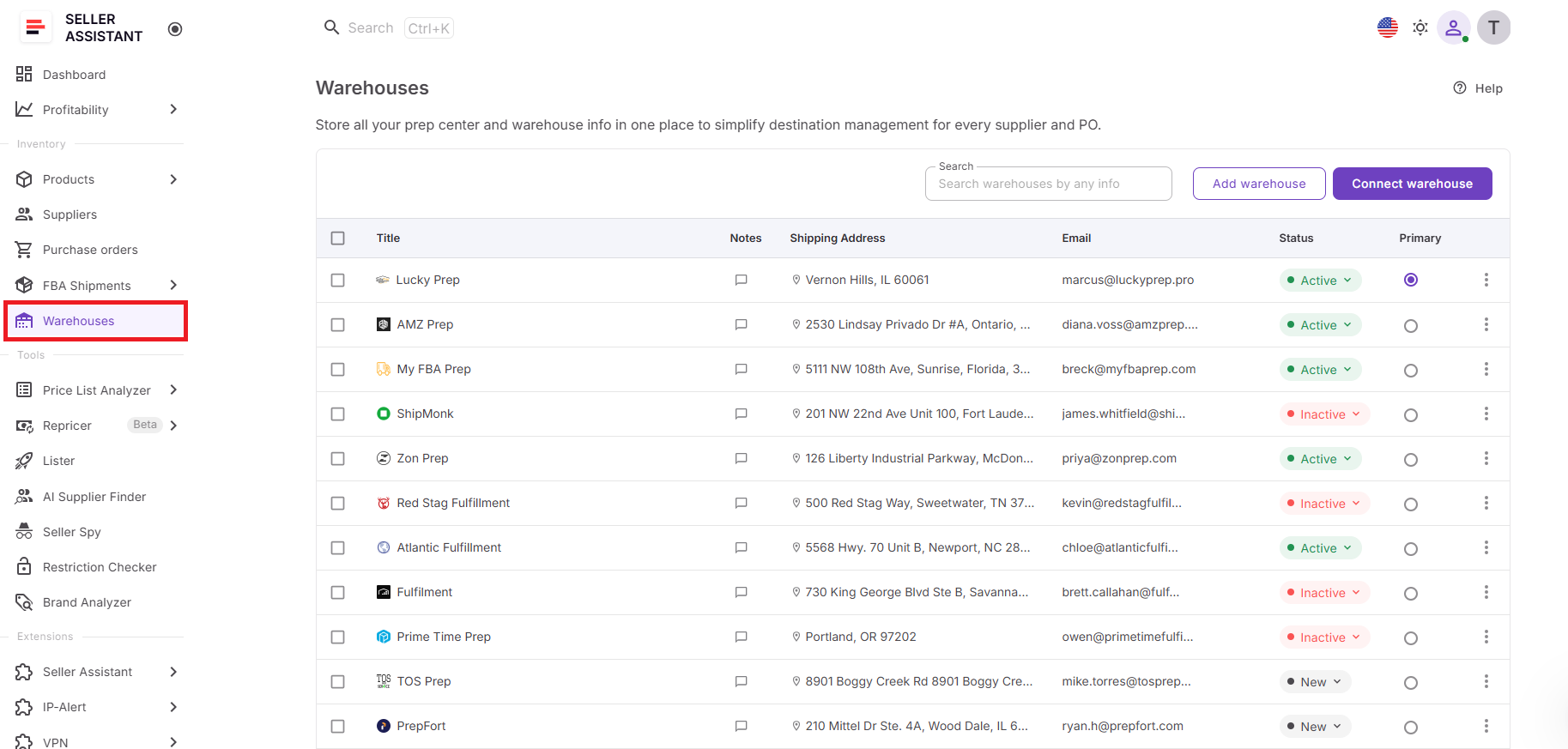
Instead of maintaining warehouse records in spreadsheets or separate systems, sellers can manage warehouse profiles, fulfillment destinations, and prep center connections from one place.
With built-in Prep Center Integration, warehouse data stays synchronized with supported prep centers, creating a connected fulfillment workflow.
Centralized warehouse management
The Warehouses page is the main workspace for managing fulfillment locations. Each warehouse or prep center is stored as an individual profile containing the information needed for day-to-day operations.
Each warehouse profile includes:
- Warehouse or prep center name;
- Website;
- Shipping address;
- Email and phone number;
- Additional contacts;
- Notes with note history;
- Status (New, Active, or Inactive).
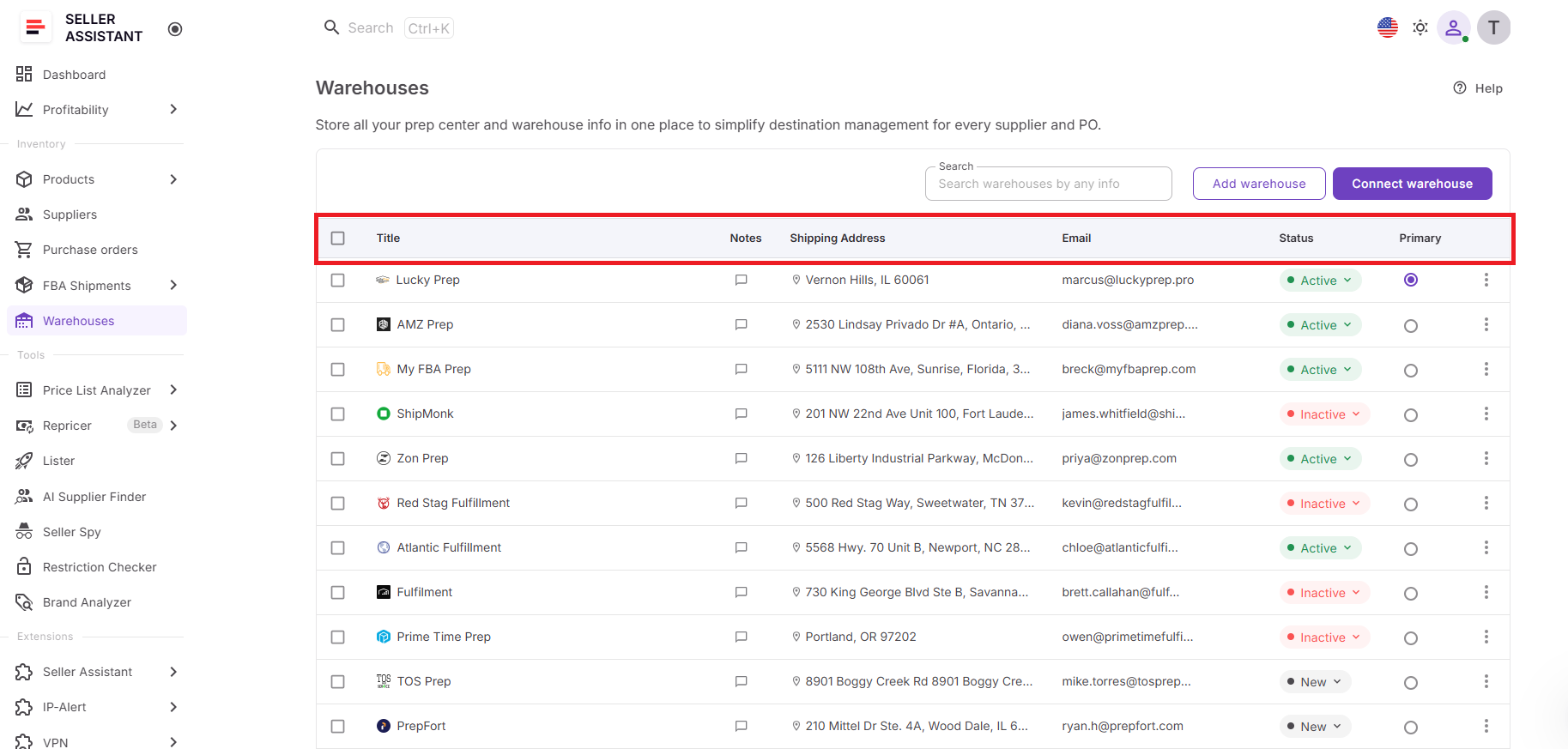
As your fulfillment network grows, you can search warehouse records by title, website, address, or contacts and sort the database by any column, making it easy to locate and manage fulfillment locations.
Managing fulfillment locations
Adding a warehouse takes only a few steps. Enter the warehouse website, and Seller Assistant automatically generates the warehouse name, which you can edit if needed. You can then complete the profile by adding shipping details, contact information, notes, and assigning an operational status.
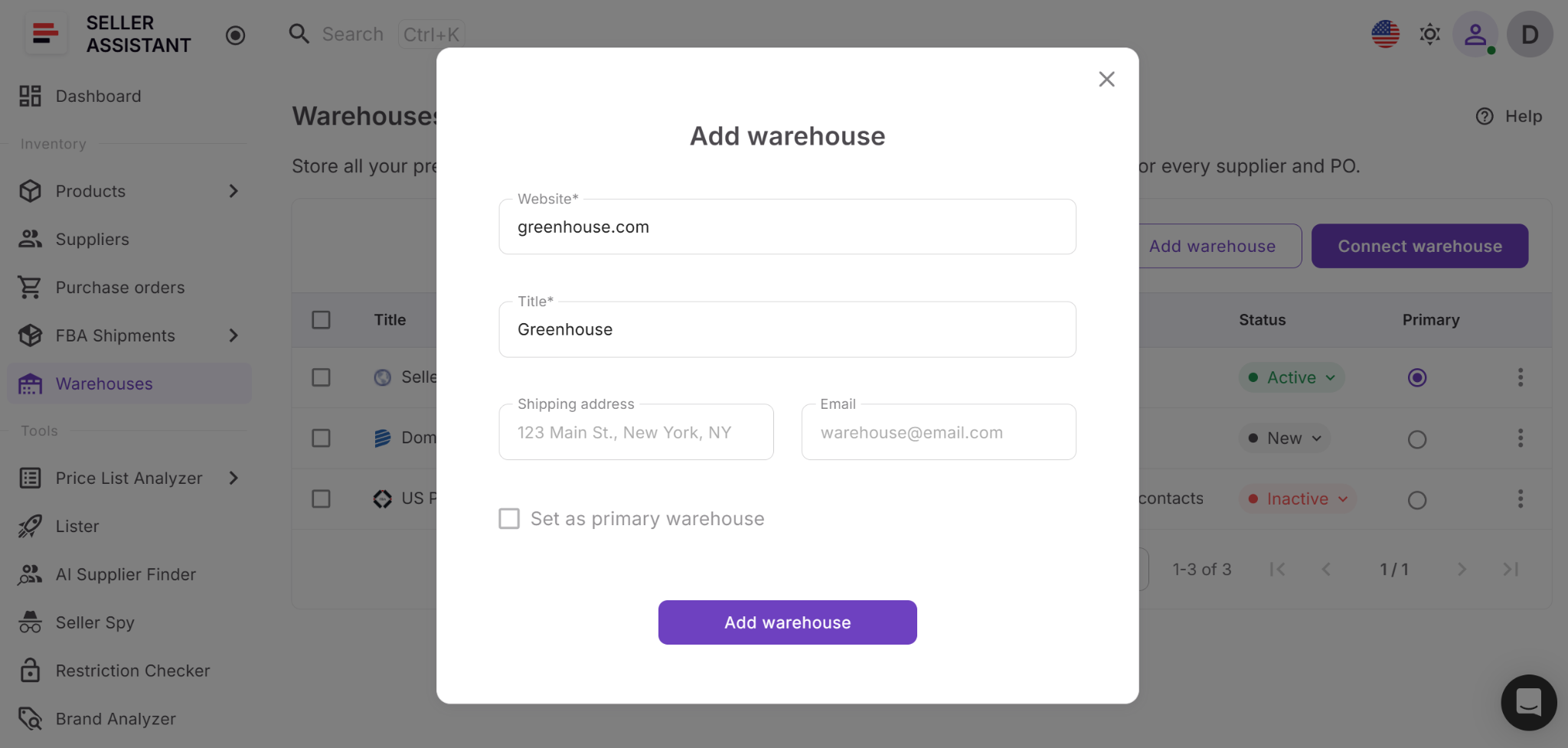
Warehouse records remain flexible throughout their lifecycle. If a warehouse changes its address or contact details, you can update the record at any time without affecting connected workflows.
Primary warehouse management
Warehouses Database allows you to designate one primary warehouse for your account. This location becomes the default fulfillment destination throughout Seller Assistant, helping standardize routing and reduce repetitive setup.
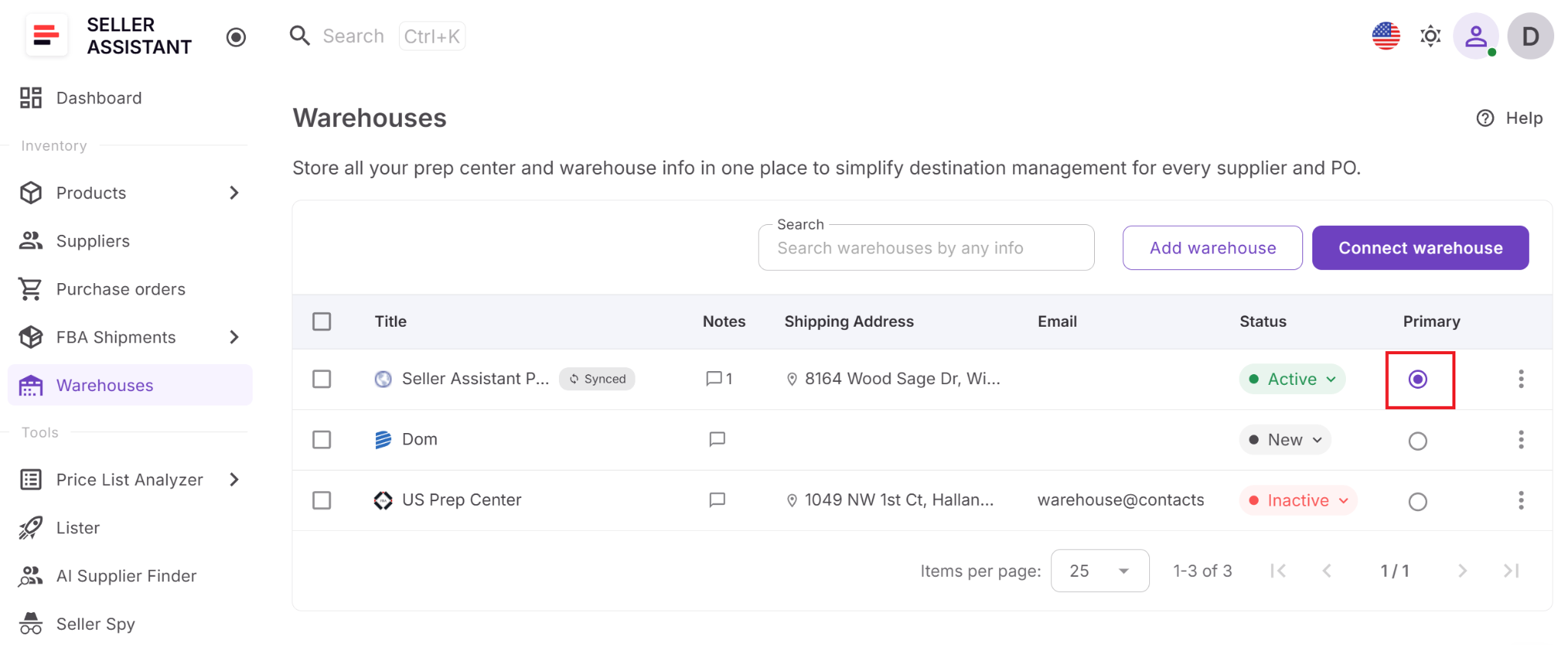
Every account includes a default warehouse called My Warehouse, and only one primary warehouse can be assigned at a time. Before removing the current primary warehouse, another location must first be designated as the new primary warehouse.
Prep Center Integration
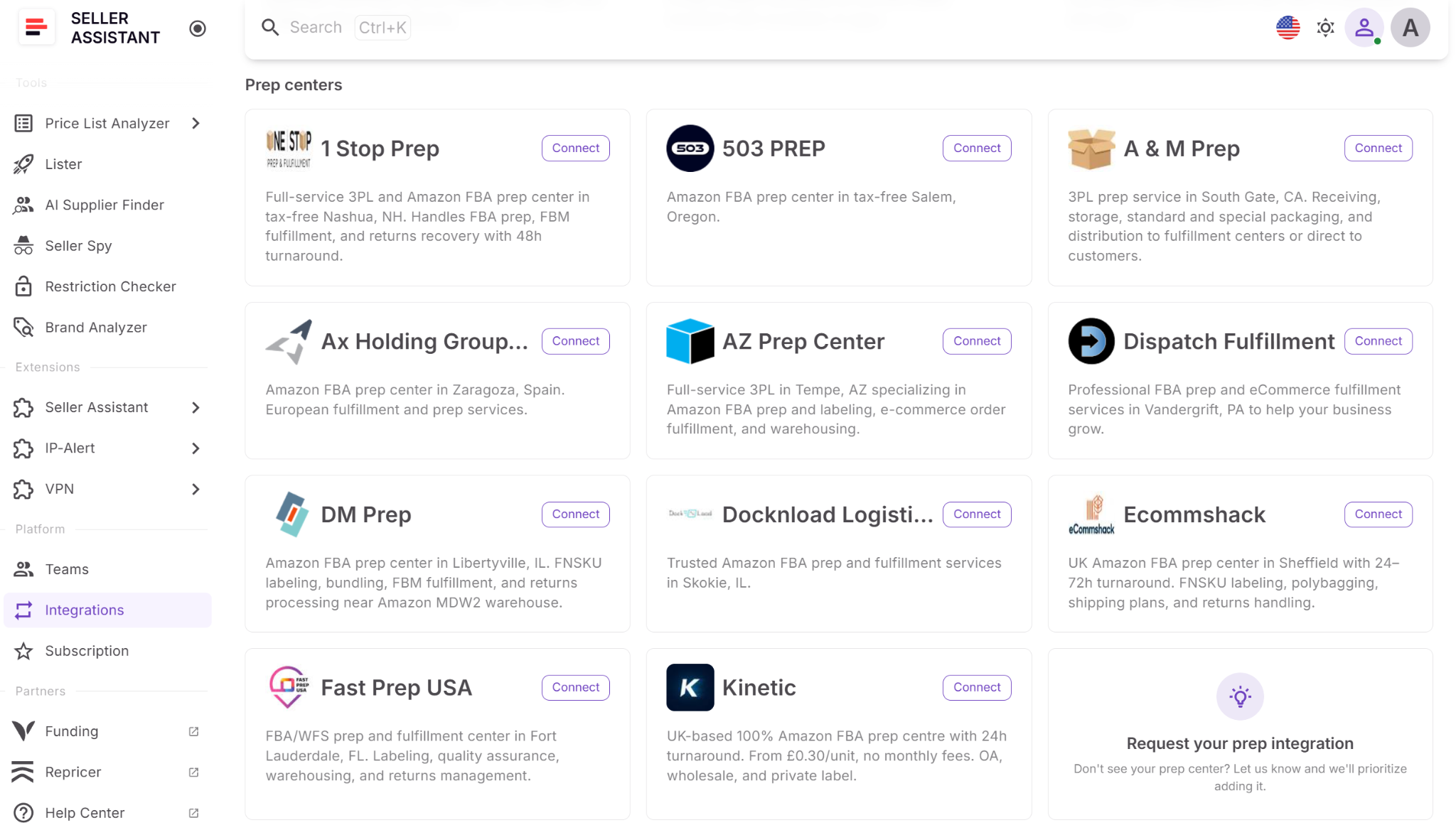
Warehouses Database also includes Prep Center Integration, allowing you to connect supported prep center accounts directly to Seller Assistant. After entering your Merchant ID and API Token, Seller Assistant verifies the connection and automatically imports warehouse locations from the prep center.
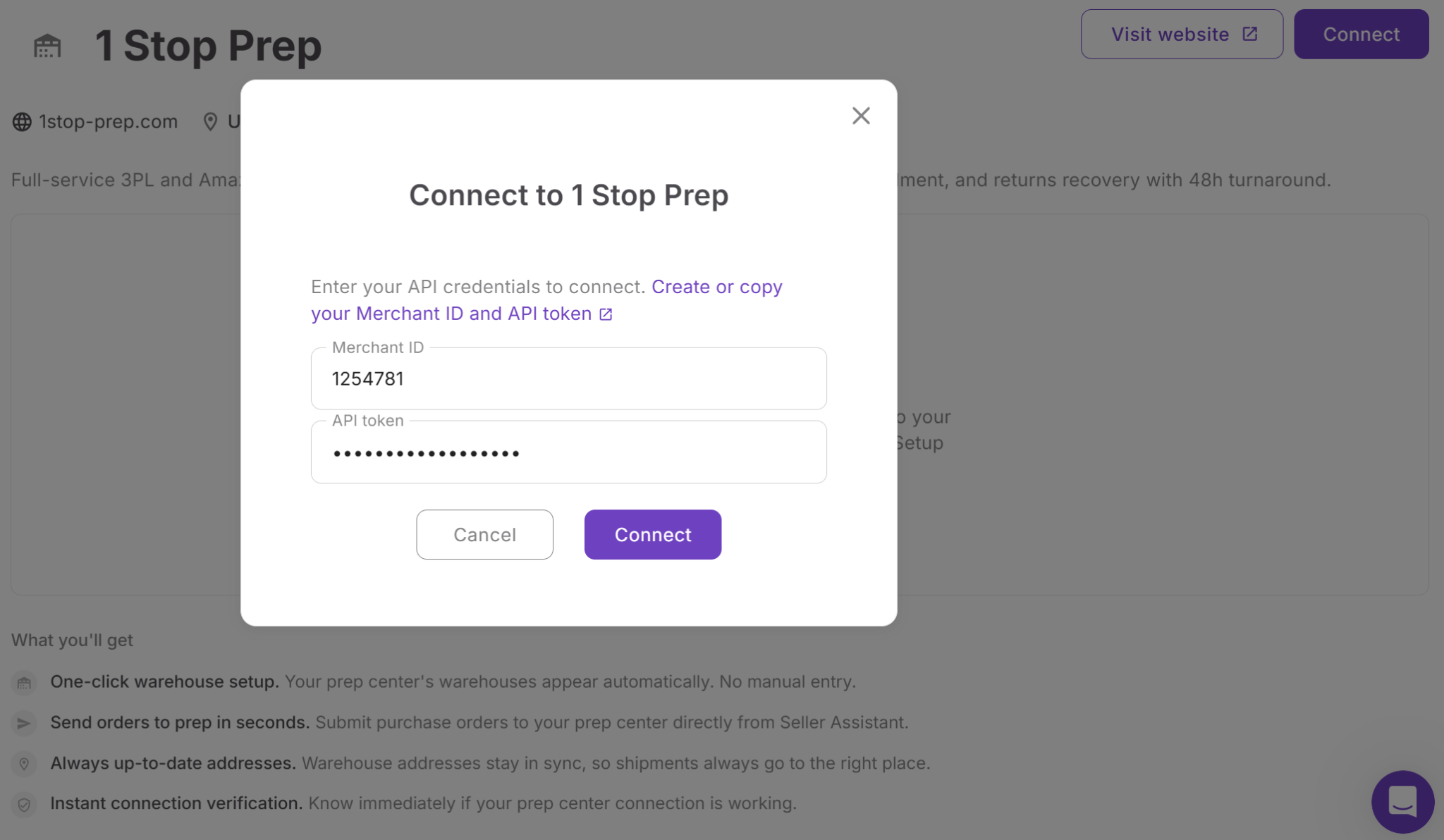
Imported locations appear in Warehouses Database with a Synced badge, making it easy to distinguish synchronized warehouses from manually created records. Because these locations are maintained through the integration, sellers don’t need to recreate or manually update the same warehouse information in multiple systems.
Connected fulfillment workflow
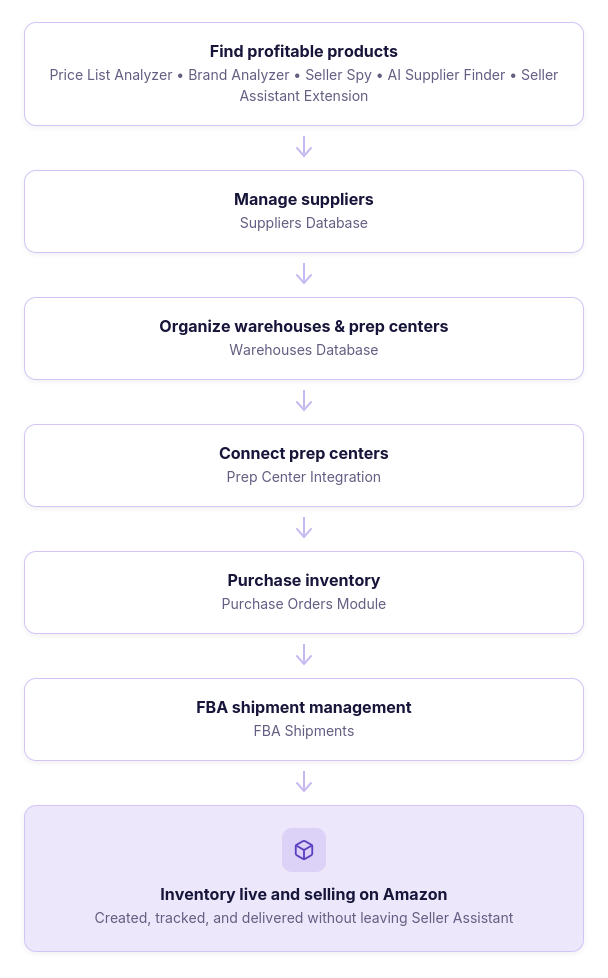
Warehouses Database is designed to work with the rest of Seller Assistant’s operational tools. Warehouse records can be assigned to suppliers in Suppliers Database, reused in the Purchase Orders Module, synchronized through Prep Center Integration, and carried forward into FBA Shipments. Instead of re-entering fulfillment information at every stage, sellers manage warehouse data once and reuse it throughout their sourcing, purchasing, and fulfillment workflow.
How to Use Warehouses Database Step by Step
Warehouses Database gives Amazon sellers one place to create, organize, and reuse warehouse and prep center information. The workflow is simple: add fulfillment locations, keep their details current, connect them to the rest of Seller Assistant, and sync supported prep centers when needed.
Step 1. Open Warehouses Database
Go to Inventory → Warehouses in your Seller Assistant account. This page shows all manually added and synced warehouse locations in one workspace.
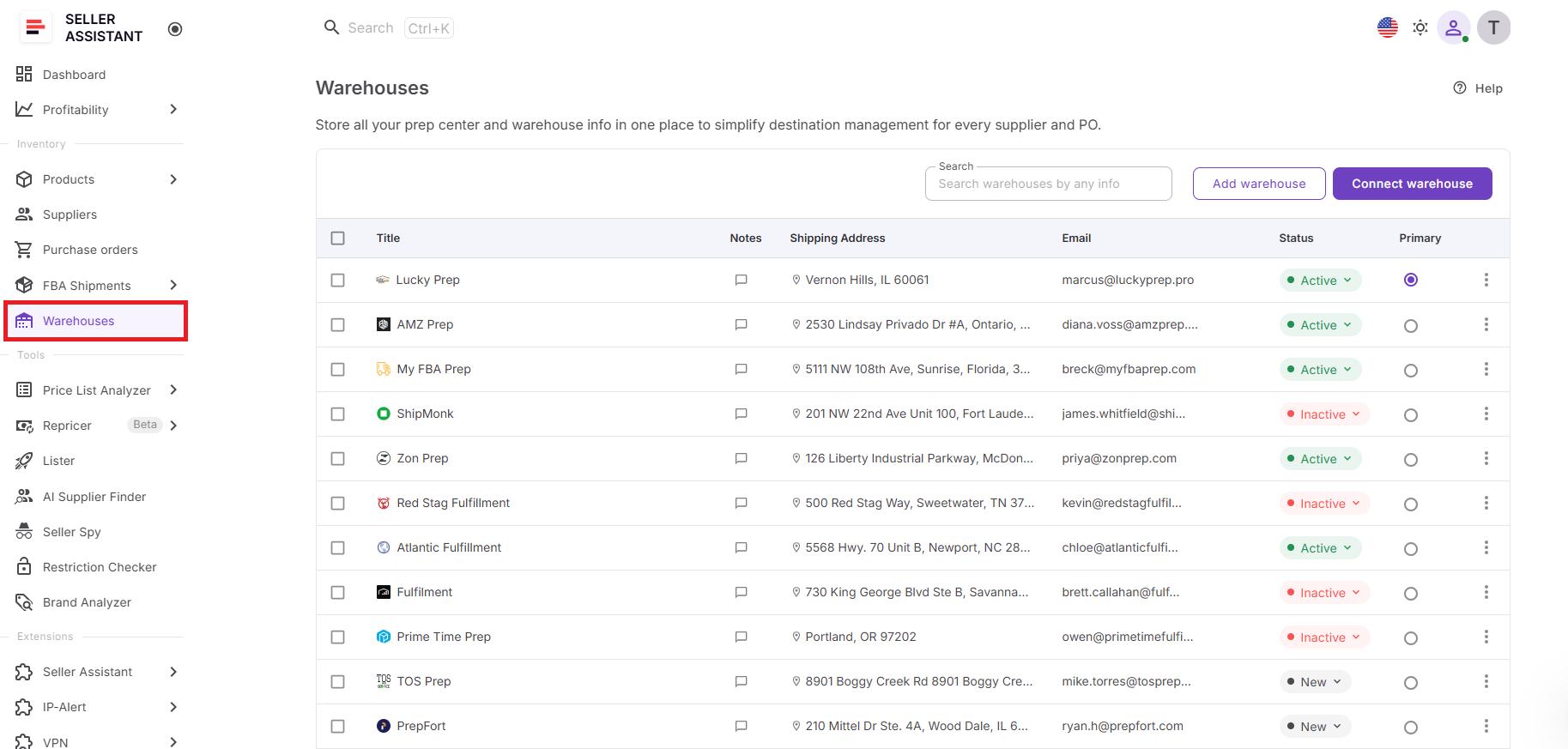
A centralized view makes it easier to find active locations, spot outdated records, and avoid managing fulfillment data across spreadsheets or emails.
Step 2. Add a warehouse or prep center
Click Add Warehouse and enter the location’s website and title. Seller Assistant can prefill the title from the website, and you can edit it before saving.
You can also add:
- Shipping address;
- Email and phone number;
- Other contact details;
- Notes;
- Operational status.
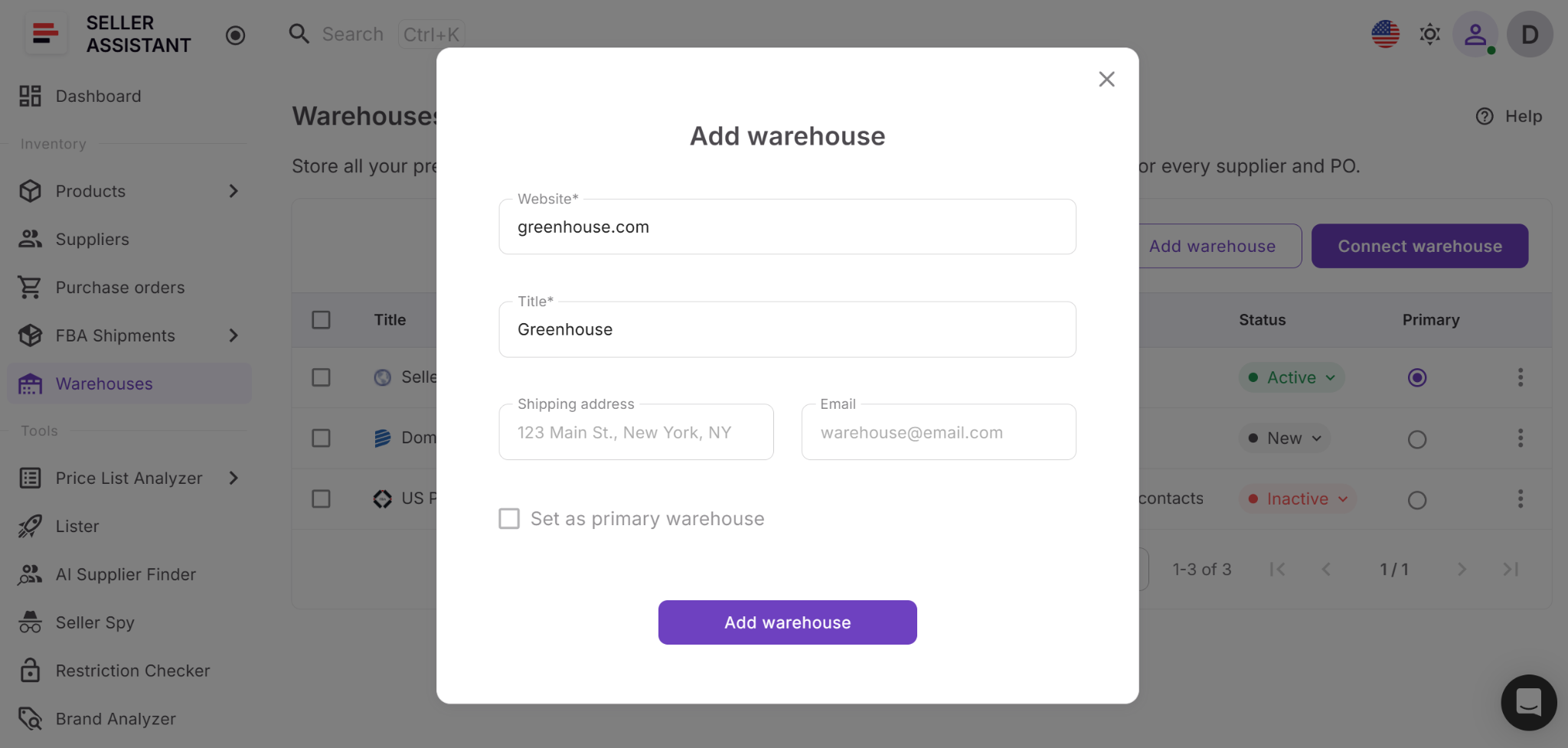
A complete profile gives your team one reliable record for each fulfillment location instead of several versions stored in different places.
Step 3. Assign the warehouse status
Choose one of three statuses:
- New – recently added or not yet used;
- Active – currently used for fulfillment;
- Inactive – no longer used but kept for reference.
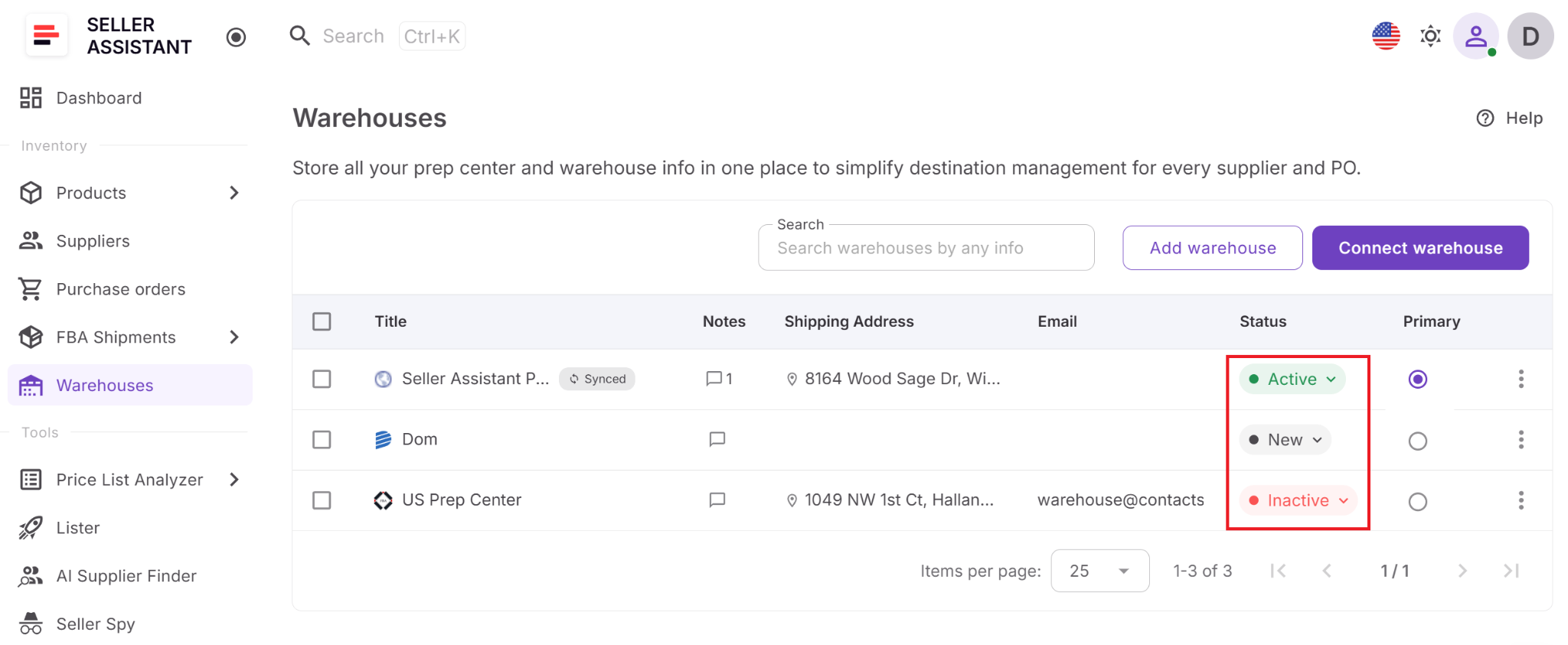
Statuses help sellers separate current fulfillment locations from older records without deleting useful historical information.
Step 4. Set a primary warehouse
Choose one location as the primary warehouse. Seller Assistant uses it as the default ship-to location when no other warehouse is selected.
Every account starts with a default location called My Warehouse. Only one primary warehouse can exist at a time, and another warehouse must be assigned as primary before the current one can be deleted.
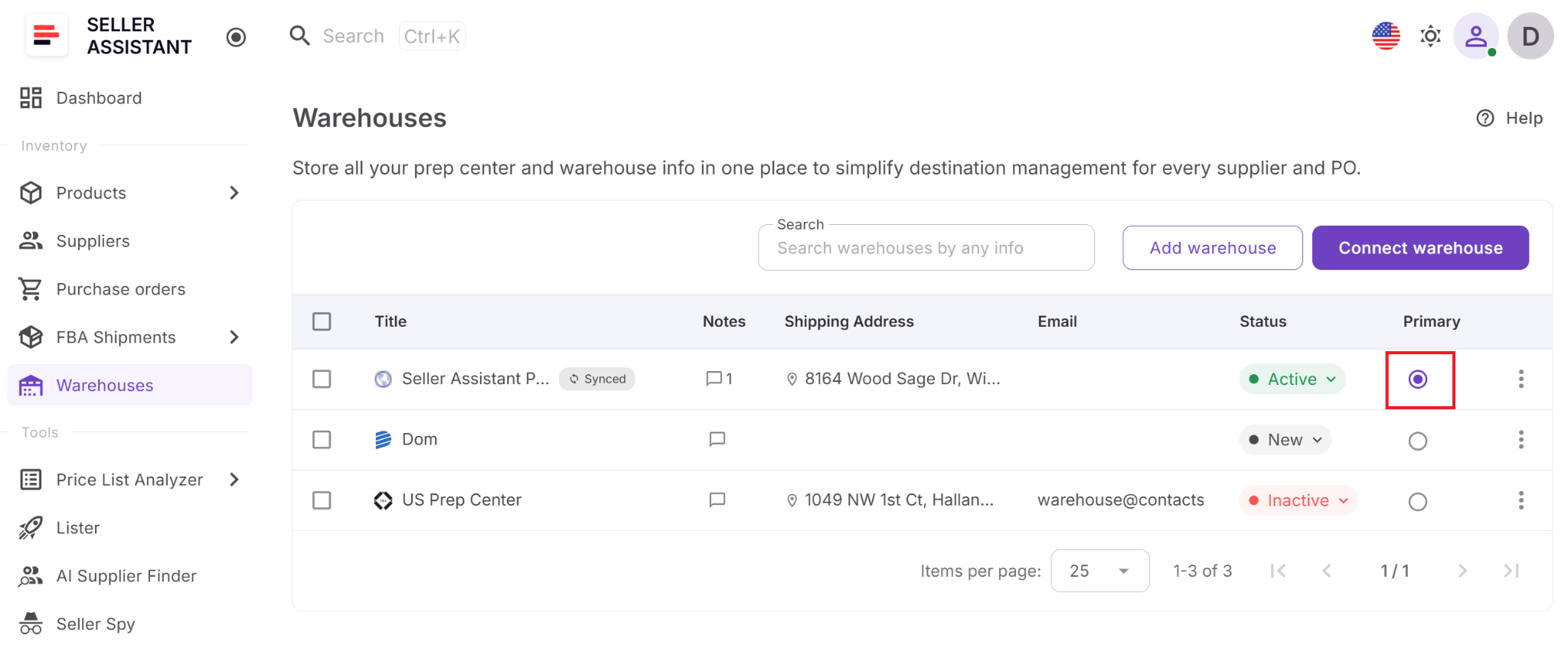
A primary warehouse reduces repeated setup and keeps routing consistent when most inventory goes to the same location.
Step 5. Add notes for your team
Use the Notes section to record delivery instructions, account details, service updates, contact changes, or other operational information. Seller Assistant keeps the note history so team members can review previous updates.
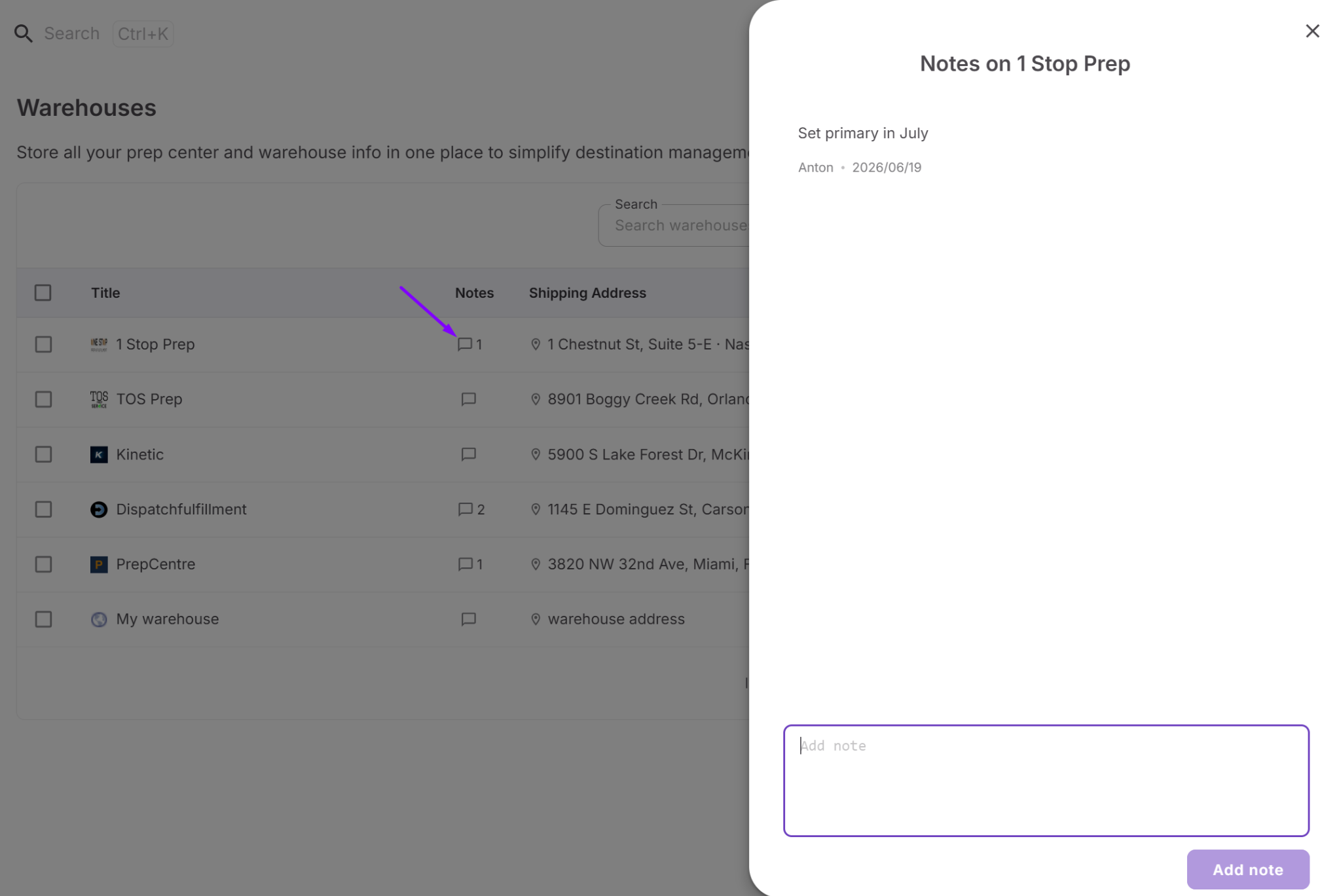
Shared notes reduce back-and-forth communication and help everyone work with the same warehouse instructions.
Step 6. Connect the warehouse to suppliers
Assign the correct warehouse or prep center to supplier records in Suppliers Database. That location then becomes available as the supplier’s default destination.
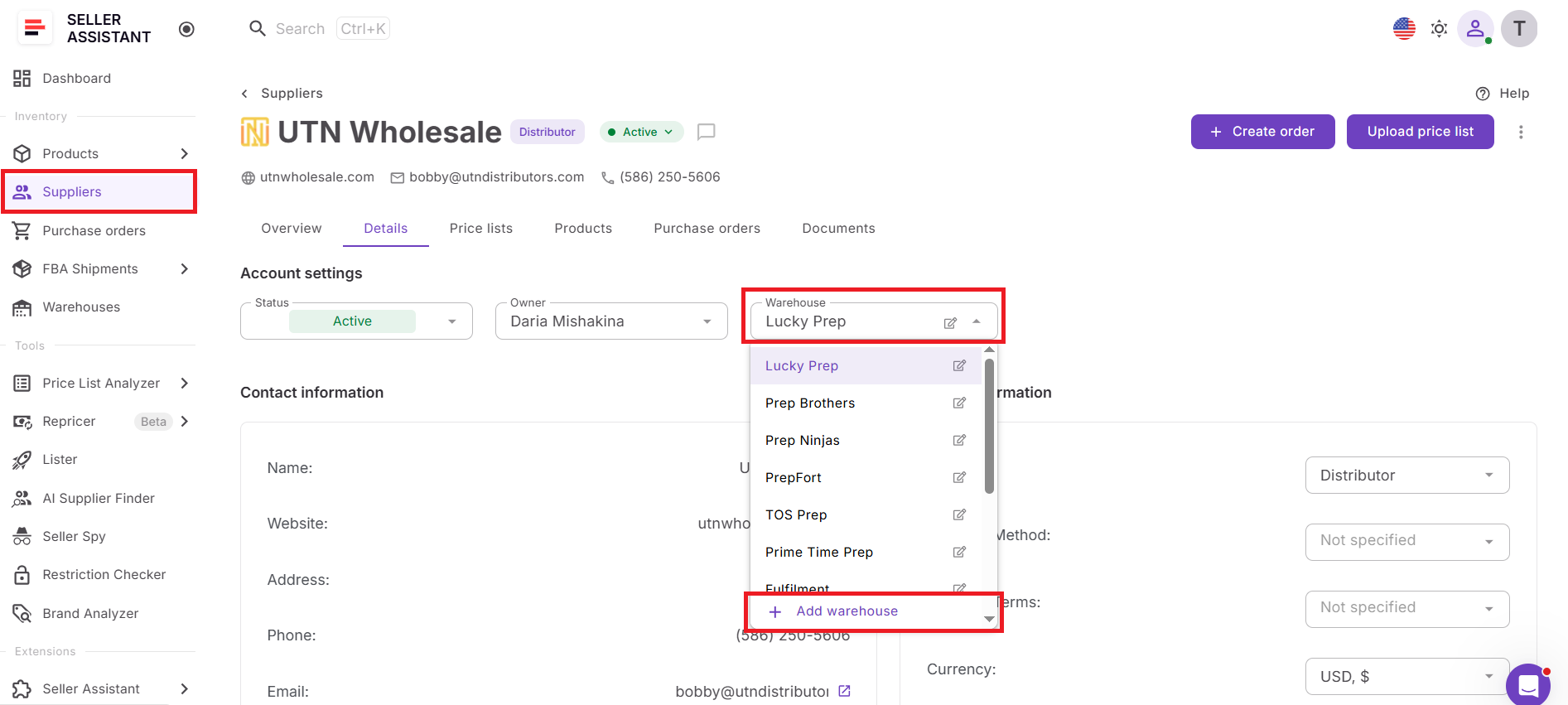
Linking suppliers to fulfillment locations reduces the need to check routing details every time you place an order.
Step 7. Reuse warehouse data in Purchase Orders
When creating a purchase order, select the warehouse assigned to the supplier or choose another location from the available records. Seller Assistant applies the saved ship-to information instead of requiring manual entry.
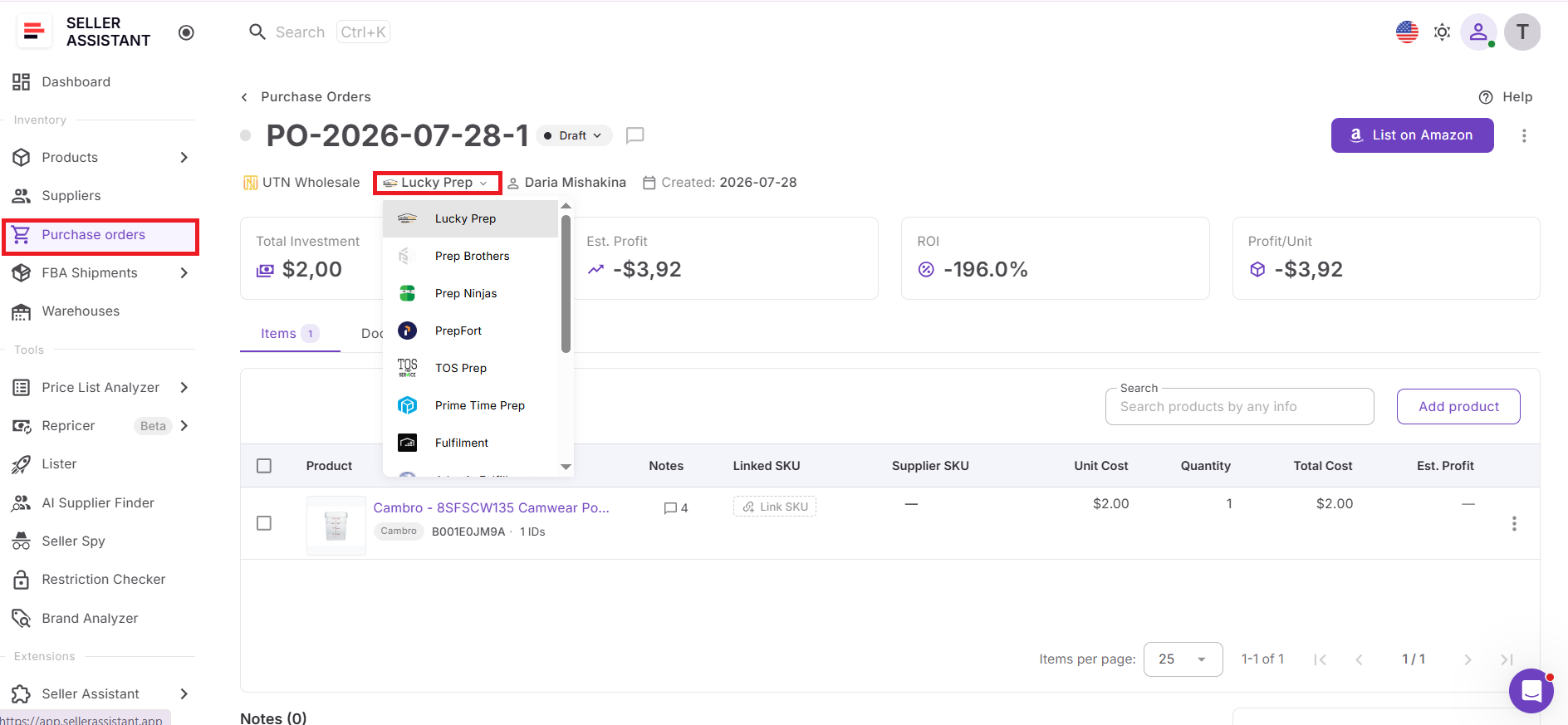
Reusing existing records speeds up order creation and lowers the risk of typing an outdated or incorrect address.
Step 8. Connect a supported prep center
Open Integrations → Prep Centers, choose a supported provider, and enter your Merchant ID and API Token. After Seller Assistant validates the connection, the prep center’s warehouse locations sync automatically.
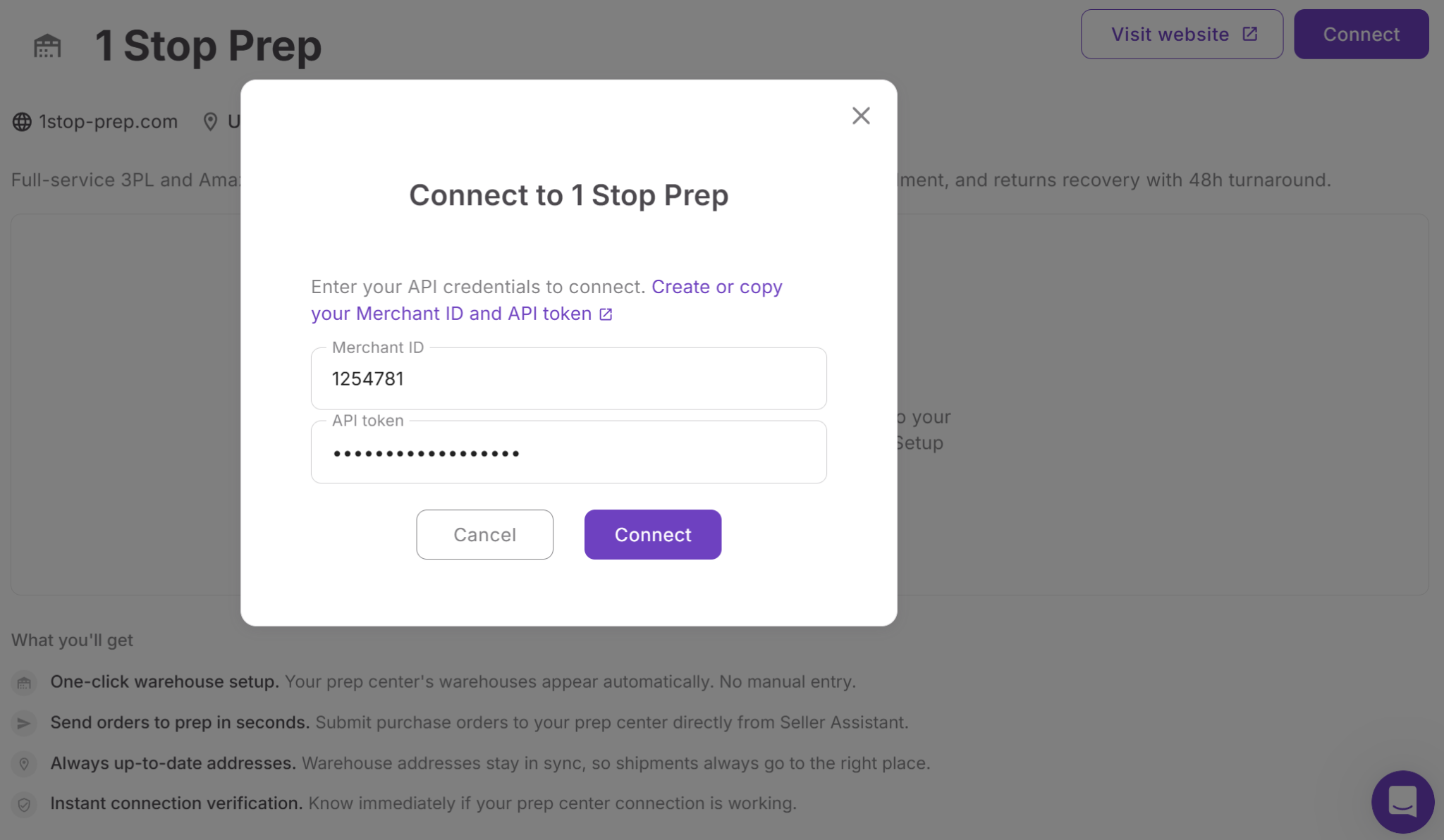
Direct integration removes the need to recreate the same prep center records manually in Seller Assistant.
Step 9. Review synced warehouses
Synced locations appear in the Warehouses Database with a Synced badge and provider label. These records are imported from the connected prep center and cannot be edited manually inside Seller Assistant.
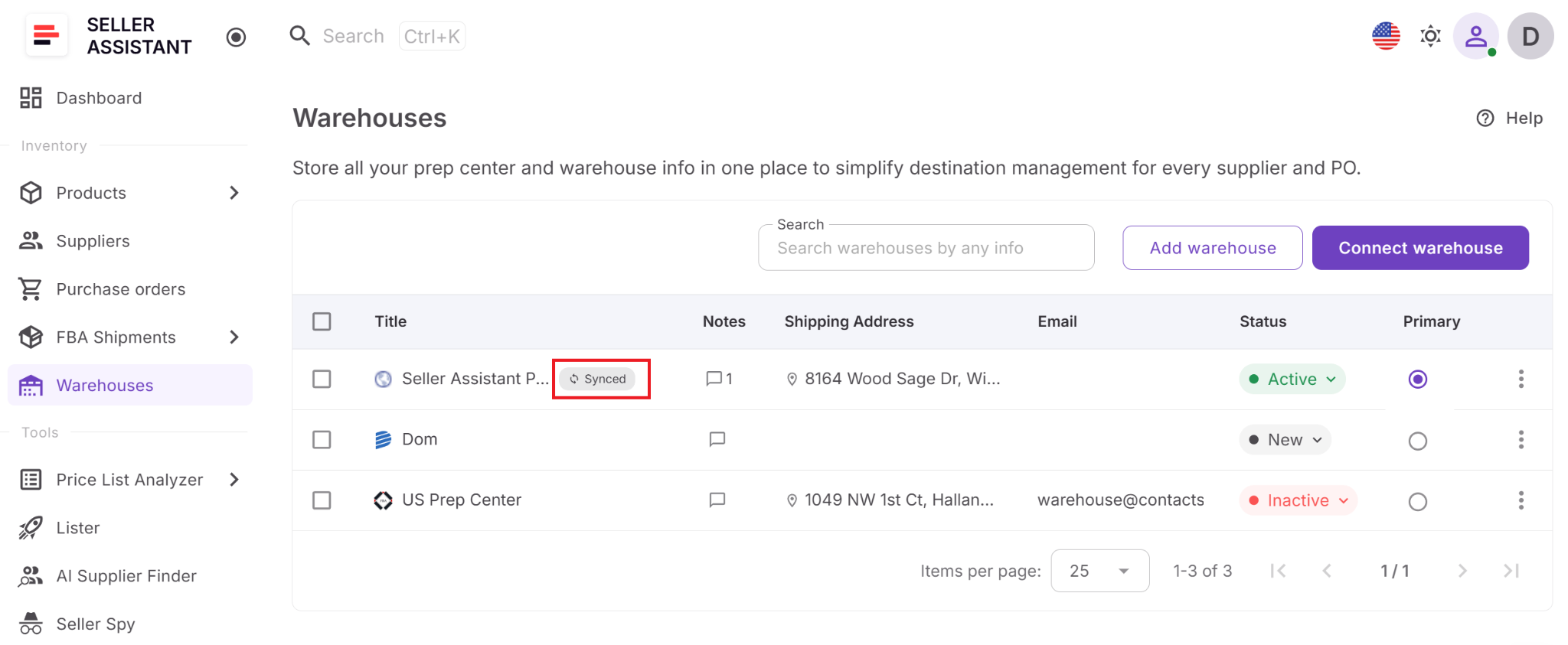
The badge helps sellers distinguish provider-managed records from manually created warehouses and reduces duplicate entries.
Step 10. Keep records current
Update manually created warehouse profiles whenever addresses, contacts, notes, or statuses change. For connected prep centers, rely on synced records rather than creating duplicate manual versions.
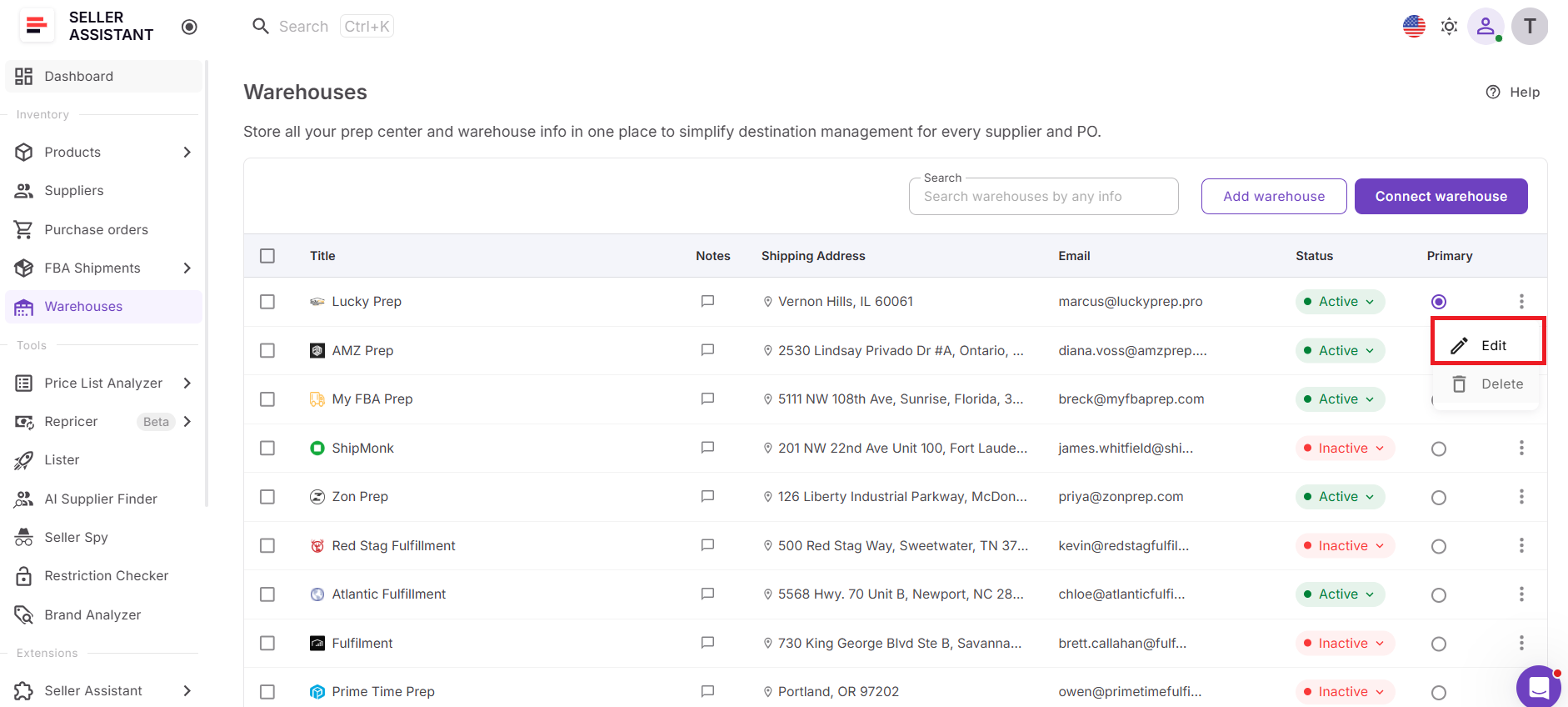
Current warehouse data keeps supplier routing, purchasing, and fulfillment workflows aligned as your operation grows.
FAQ
Can I use the Warehouses Database for both FBA and non-FBA inventory?
Yes. You can store any warehouse or prep center you use, regardless of whether inventory is ultimately shipped to Amazon FBA or another destination. This makes the tool useful for sellers with mixed fulfillment strategies or multiple sales channels.
How many warehouses and prep centers can I add?
You can add as many fulfillment locations as your business requires. This allows you to expand your supplier network and fulfillment operations without reorganizing your warehouse management process.
Can I move from manual warehouse records to a connected prep center later?
Yes. You can start by creating warehouse records manually and connect a supported prep center whenever you’re ready. After connecting, synchronized warehouse locations are imported automatically, making it easier to manage fulfillment data as your operations grow.
Can I use the Warehouses Database if I work with several prep centers?
Absolutely. You can organize all your warehouse and prep center locations in one centralized database, making it easier to manage different fulfillment partners and choose the right destination for your inventory.
Does the Warehouses Database replace a warehouse management system (WMS)?
No. Warehouses Database is designed to organize fulfillment locations and routing information within your Amazon workflow, not to manage warehouse inventory, picking, packing, or stock movements. It complements your existing warehouse or prep center operations by keeping fulfillment data connected across Seller Assistant.
Final Thoughts
As your Amazon business grows, managing warehouses and prep centers becomes increasingly important for keeping fulfillment organized and operations running efficiently. A centralized system for storing warehouse information, assigning fulfillment locations, and maintaining accurate routing data helps reduce manual work, improve collaboration, and minimize costly shipping errors.
Seller Assistant’s Warehouses Database provides that centralized foundation by bringing warehouse management and Prep Center Integration together in one place. Whether you manage a single prep center or a growing network of fulfillment locations, the tool helps you organize warehouse data, keep information up to date, and seamlessly connect it with the rest of your sourcing, purchasing, and fulfillment workflow.
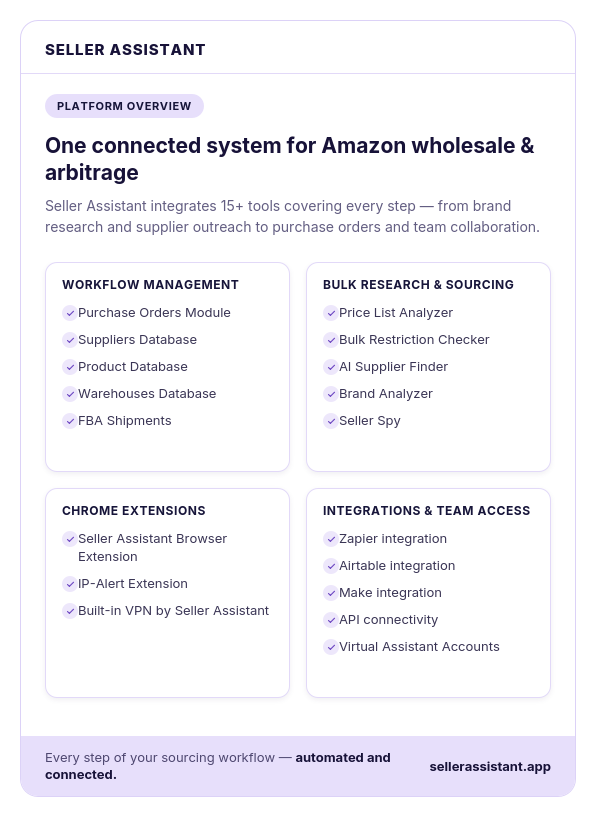
Seller Assistant automates and connects every stage of your Amazon wholesale and arbitrage workflow. It brings together in one platform: workflow management tools – Purchase Orders Module, Suppliers Database, Product Database, Warehouses Database, FBA Shipments, bulk research & sourcing tools – Price List Analyzer, Bulk Restriction Checker, AI Supplier Finder, Brand Analyzer, Seller Spy, Chrome extensions – Seller Assistant Browser Extension, IP-Alert Extension, and built-in VPN by Seller Assistant, and integrations & team access features – seamless API connectivity, integrations with Zapier, Airtable, and Make, and Virtual Assistant Accounts.