.svg)
How to Manage Amazon Wholesale Supplier Database
Download Amazon Seller Guide
This guide will help you get started, understand the basics of Amazon selling, and explain in simple words how it all works.

Managing suppliers is one of the hardest parts of running an Amazon wholesale business. You contact hundreds of distributors, track replies, negotiate terms, request price lists, and plan shipments – and without a system, everything quickly falls apart.
A supplier database fixes that. It organizes contacts, statuses, MOVs, lead times, and routing rules so your outreach and operations stay clean and scalable.
In this post, you’ll learn what a supplier database is, why every wholesale, online arbitrage, and dropshipping seller needs one, and how to build a fully connected version using Seller Assistant.
Note. Seller Assistant is an end-to-end Amazon workflow management platform that integrates 10+ wholesale-focused solutions into one connected system. It combines sourcing workflow automation, bulk research and intelligence tools, and integrated Chrome extensions – giving you everything you need to streamline finding deals, managing suppliers, and creating purchase orders.

The platform aggregates: workflow management tools – Purchase Orders Module, Suppliers Database, Warehouses Database to organize, automate, and scale every step of your wholesale and arbitrage operations; bulk research & sourcing tools – Price List Analyzer, Bulk Restriction Checker, Sourcing AI, Brand Analyzer, Seller Spy to evaluate supplier price lists, verify selling eligibility and restrictions, open new brands, and discover winning product ideas from competitors to expand your product catalog; Chrome extensions – Seller Assistant Browser Extension, IP-Alert Extension, and built-in VPN by Seller Assistant to deep-research products, check IP claims and compliance, and access geoblocked supplier sites directly within your browser; and integrations & team access features – seamless API connectivity and integrations with Zapier, Airtable, and Make, plus Virtual Assistant Accounts for secure, scalable team collaboration.
With Seller Assistant, every step of your Amazon wholesale and arbitrage workflow is automated and connected.
What Is a Supplier Database?
A supplier database is a centralized system where you store every detail about the suppliers you work with – or plan to work with – as an Amazon seller. Instead of juggling scattered spreadsheets, email threads, and sticky notes, all supplier information lives in one place: contacts, MOV requirements, lead times, routing rules, statuses, and pricing notes.
Think of it as your supplier pipeline. It tracks every stage of outreach, approvals, and orders, giving you a clear picture of who’s worth following up with and who’s not. Wholesale, OA sellers, and dropshipping sellers all use it to stay organized as their supplier lists grow.
Unlike a basic spreadsheet, a real supplier database is connected to your workflow. It powers price list analysis, purchase orders, team collaboration, and warehouse routing. Once you contact more than 20 suppliers – which happens fast in wholesale – maintaining accuracy becomes impossible without a structured system.
A supplier database sits at the center of your sourcing workflow, helping you scale with confidence.
Why a Supplier Database Is Critical for Amazon Wholesale
Managing suppliers isn’t just another admin task – it’s the backbone of a scalable wholesale operation. Outreach, approvals, price lists, lead times, MOVs, and routing rules all move quickly, and without a structured system, it becomes impossible to track who replied, who approved you, and who is actually profitable to work with.
A supplier database turns that chaos into a predictable, trackable workflow. Below are the core reasons every Amazon wholesale seller needs one.
Outreach pipeline management
Most suppliers won’t reply, and even fewer will approve your account. A supplier database helps you track every stage – New, Contacted, No response, Negotiation, Approved, or Rejected – so you never duplicate outreach or lose track of warm leads.
Operational accuracy
Supplier terms vary widely: different MOVs, lead times, payment rules, shipping details, and prep requirements. A centralized database prevents errors in POs, avoids misrouted shipments, and keeps all decision-critical data consistent across your team.
Scaling and delegation
As soon as you work with VAs or scale beyond a few suppliers, you need a shared source of truth. A supplier database assigns ownership, organizes notes, and lets teams collaborate without overwriting or losing information.
Speed and efficiency
With supplier data stored in one system, you don’t retype contacts, addresses, or currency every time you analyze a price list or create a PO. This makes sourcing faster, reduces bottlenecks, and keeps operations running smoothly.
Profitability and decision-making
Clean supplier data lets you quickly compare terms, reliability, pricing, and margins across all suppliers. You can prioritize the most profitable relationships and drop the ones that waste time – something a spreadsheet simply can’t manage at scale.
Common Mistakes Sellers Make Without a Supplier Database
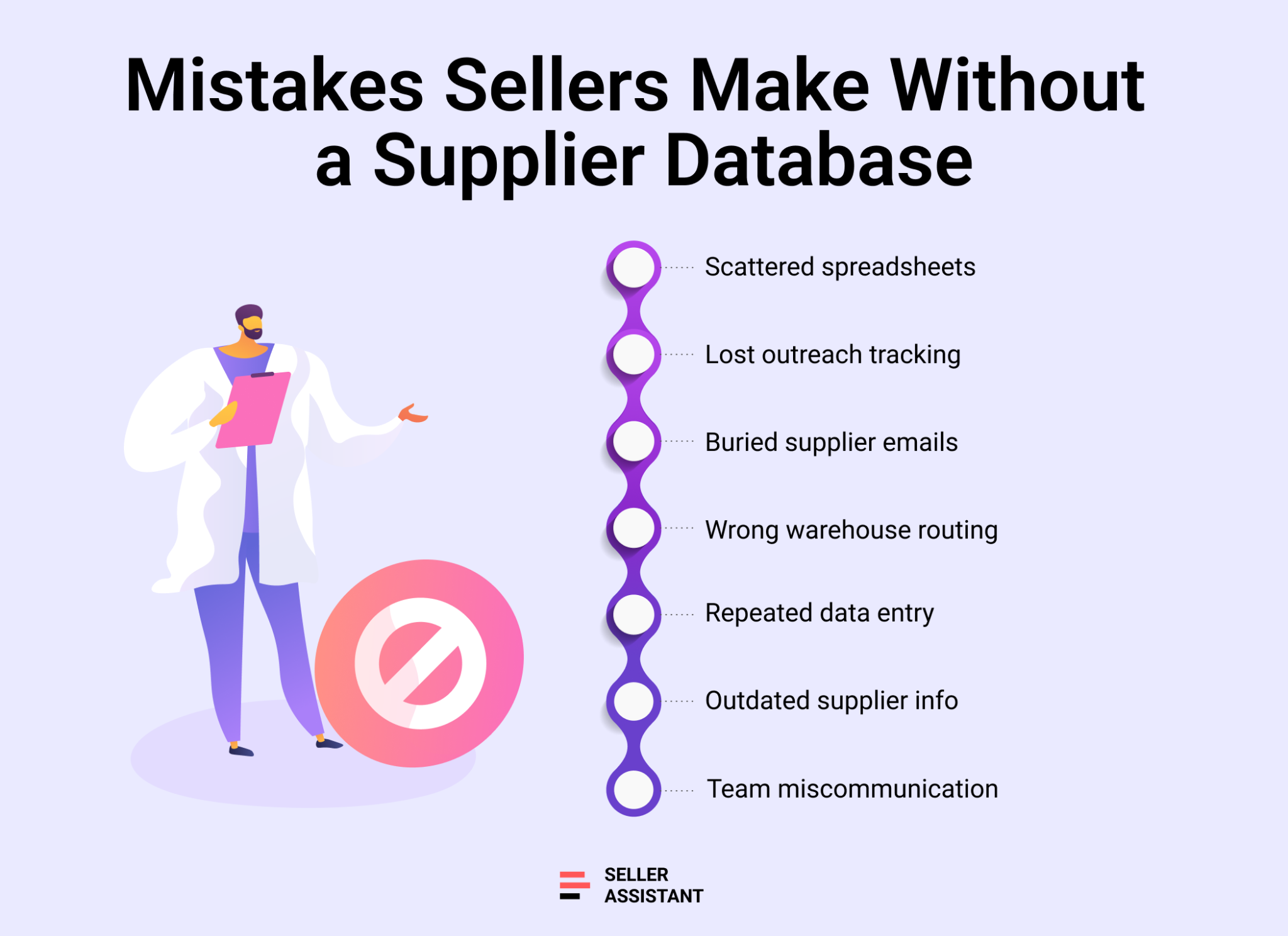
When sellers start contacting suppliers, everything feels manageable – until it isn’t. Once you juggle dozens of emails, scattered spreadsheets, changing MOVs, and multiple prep centers, disorganization starts to cost real money. A supplier database prevents those losses. Here are the most common mistakes sellers face when they try to run wholesale operations without a structured system.
Using multiple spreadsheets for basic data
Many sellers keep contacts in one sheet, MOVs in another, and routing rules in a third. As lists grow, mismatches and outdated information creep in, creating errors that impact sourcing, POs, and profitability.
Losing track of outreach and follow-ups
Without statuses like New, Contacted, or Approved, sellers forget who they already emailed, who never replied, and which suppliers are close to approving them. This leads to duplicated outreach and missed opportunities.
Mixing supplier communication across email and notes
Important details – MAP policies, updated pricing, lead times, account restrictions – get buried in email threads or DMs. Without a central record, sellers lose context that affects negotiations and decision-making.
Misrouting shipments to the wrong warehouse or prep center
When routing rules aren’t stored in one place, sellers accidentally ship Supplier A’s pallets to Supplier B’s prep center. These mistakes create delays, extra fees, and strained relationships with both suppliers and shipping mistakes.
Re-entering the same supplier info over and over
Manual data entry slows down price list analysis and PO creation. Repeatedly typing addresses, MOVs, and contact details increases the chance of errors and wastes time during busy sourcing cycles.
Making decisions based on outdated supplier data
Lead times change. MOVs change. Payment terms change. Without a unified system, sellers rely on old notes and incorrect assumptions, leading to bad orders and cash flow issues.
Losing visibility when working with VAs or teams
When each VA tracks suppliers independently, information fragments fast. A missing note or incorrect status can cause team-wide confusion and hurt your ability to scale cleanly.
How to Create Your Supplier Database with Seller Assistant
Suppliers Database is a structured system where you store all supplier information in one place – names, websites, contacts, terms, routing rules, and relationship status. In Amazon wholesale, this database becomes a core part of your workflow because you rely on supplier accuracy at every stage: outreach, sourcing, analyzing price lists, and creating purchase orders.
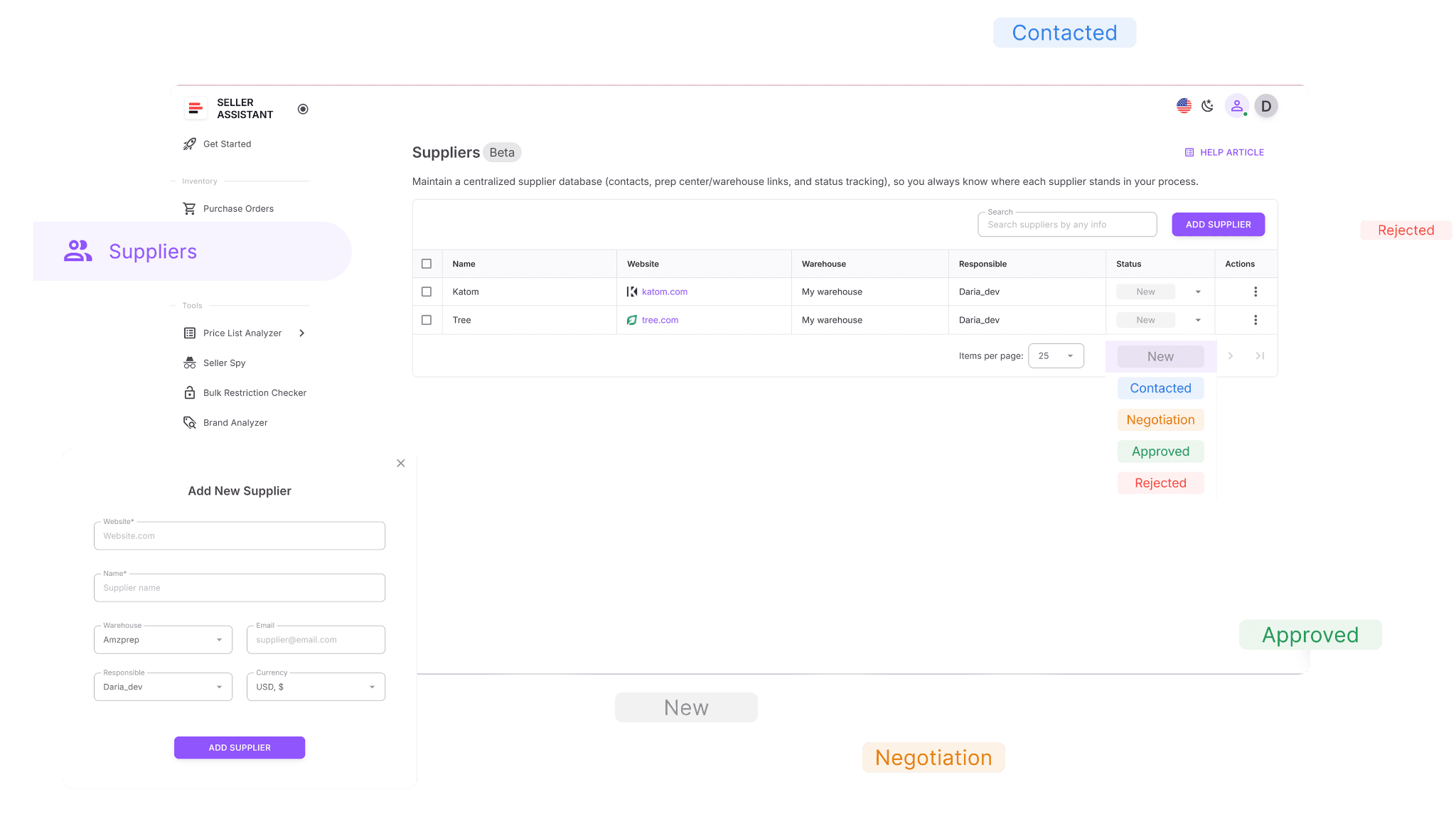
Seller Assistant enhances this traditional database by integrating it directly into your sourcing and purchasing workflow, eliminating manual work and automating repetitive steps.
Within Seller Assistant, Suppliers Database connects seamlessly to tools like Price List Analyzer, Purchase Orders Module, Warehouses Database, and Supplier Search via Sourcing AI. Instead of functioning as a separate document, it becomes the backbone of your operational workflow.
Every supplier you add automatically becomes available everywhere you need them. This allows you to move from outreach → approval → price list analysis → PO creation without re-entering the same details. It keeps your supplier relationships organized, prevents errors, and speeds up the entire sourcing cycle.
What you can do with Suppliers Database
Suppliers Database is designed to manage suppliers end-to-end.
With it, you can:
- Create complete supplier profiles with names, websites, contact details, linked warehouses, currencies, and assigned team members.
- Search and filter suppliers by any meaningful parameter – name, website, address, status, or warehouse – which helps you quickly find who you need inside a large database.
- Track relationships using statuses such as New, Contacted, Negotiation, Approved, Active, or Rejected.
- Link suppliers to default prep centers or warehouses, speeding up purchase order creation by auto-filling ship-to addresses.
- All supplier profiles can be edited or updated without breaking their connections across tools, so Purchase Orders and Price List Analyzer always stay consistent.
- Supplier details are automatically accessible across Seller Assistant modules, and with supplier search via Sourcing AI inside Seller Assistant Browser Extension, you can discover new suppliers directly on Amazon and add them to your database instantly.
How Suppliers Database works
To add a supplier, navigate to the Suppliers tab in your Seller Assistant workspace and click Add Supplier. Enter the required fields – supplier name and website – and optionally include additional details like address, warehouse assignment, contact person, and internal representative. Once saved, the supplier becomes immediately available in your workflow: when uploading a price list or creating a purchase order, you simply select them from your saved records with no duplicate data entry.
Steps to use Suppliers Database
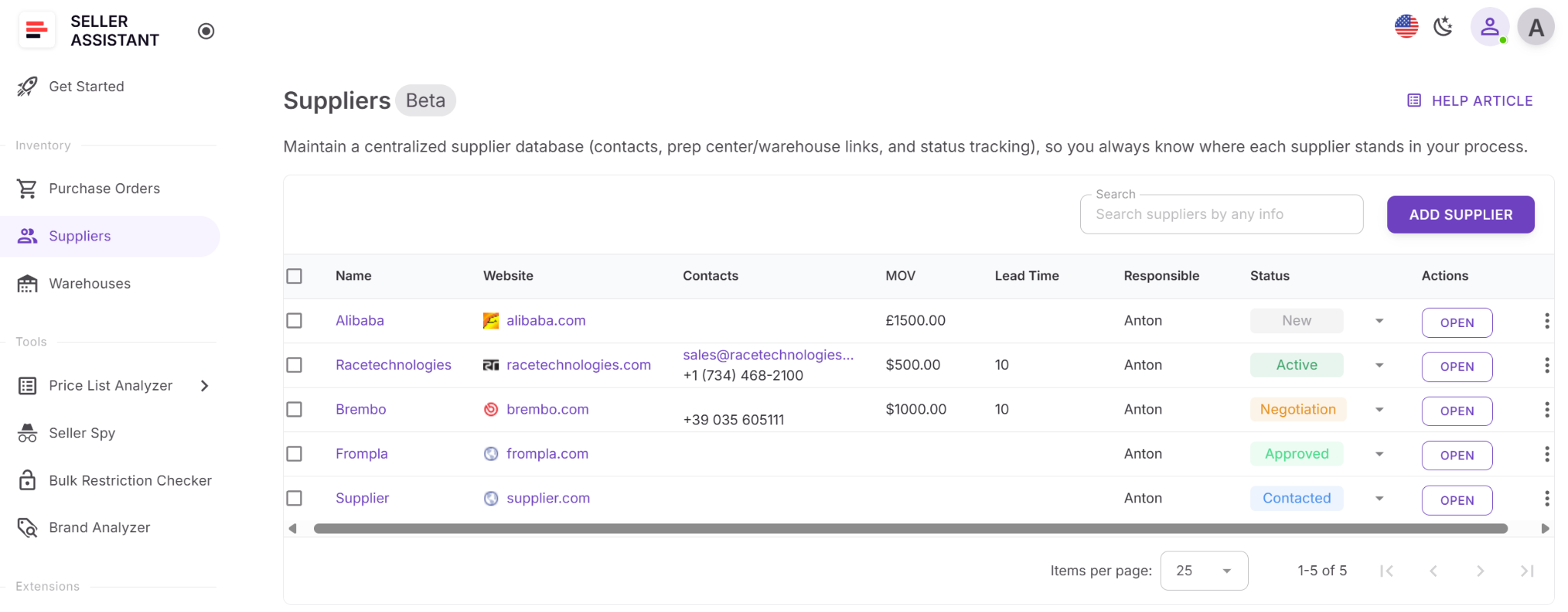
Step 1. Access Suppliers Database
Open your Seller Assistant account and go to Inventory → Suppliers.
This page becomes your central hub for storing and managing all supplier profiles.
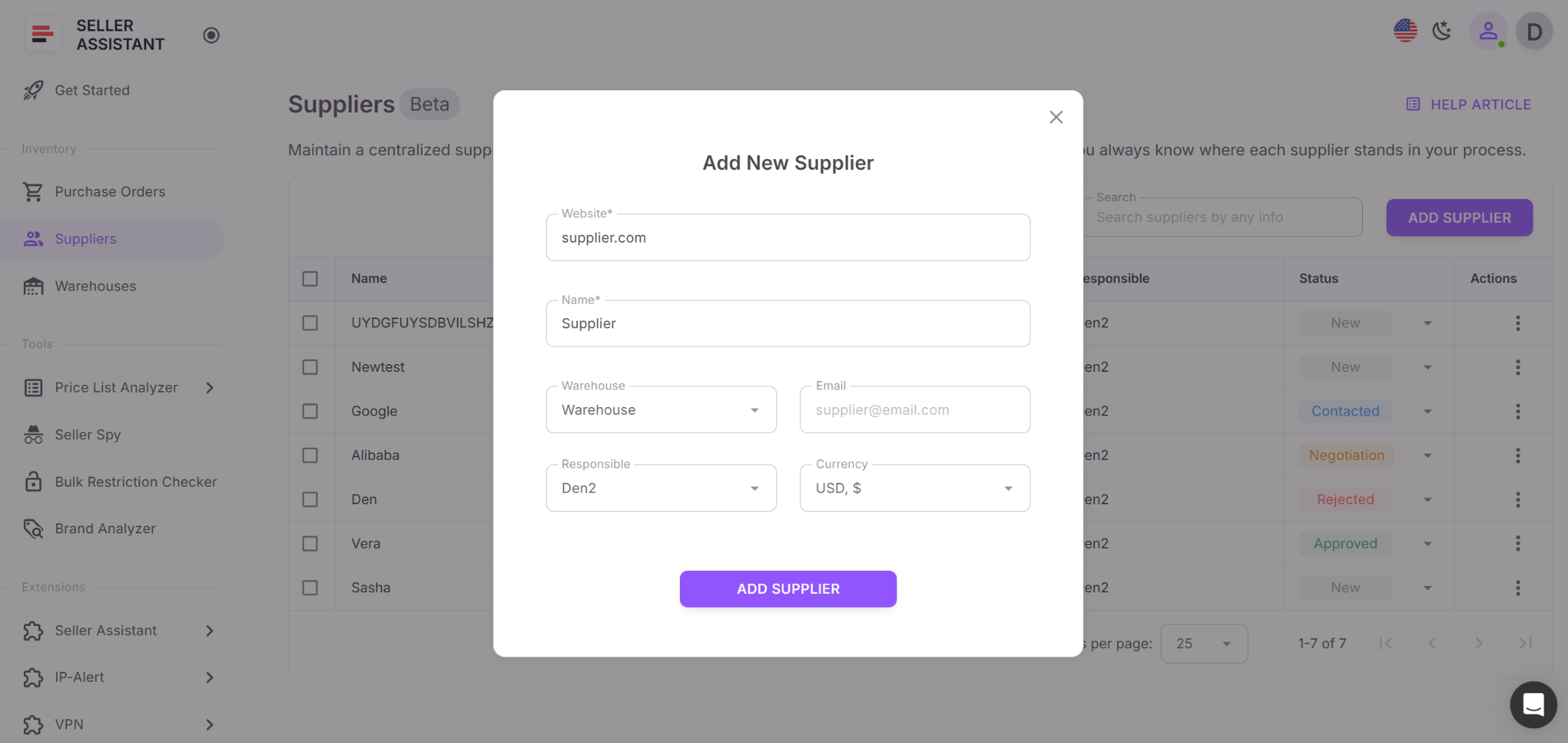
Step 2. Create a supplier profile
Click Add Supplier. Enter the website and name, then fill in optional fields such as email, warehouse, currency, responsible team member, MOV, and lead time. Adding detailed information early keeps operations cleaner as your workflows expand.
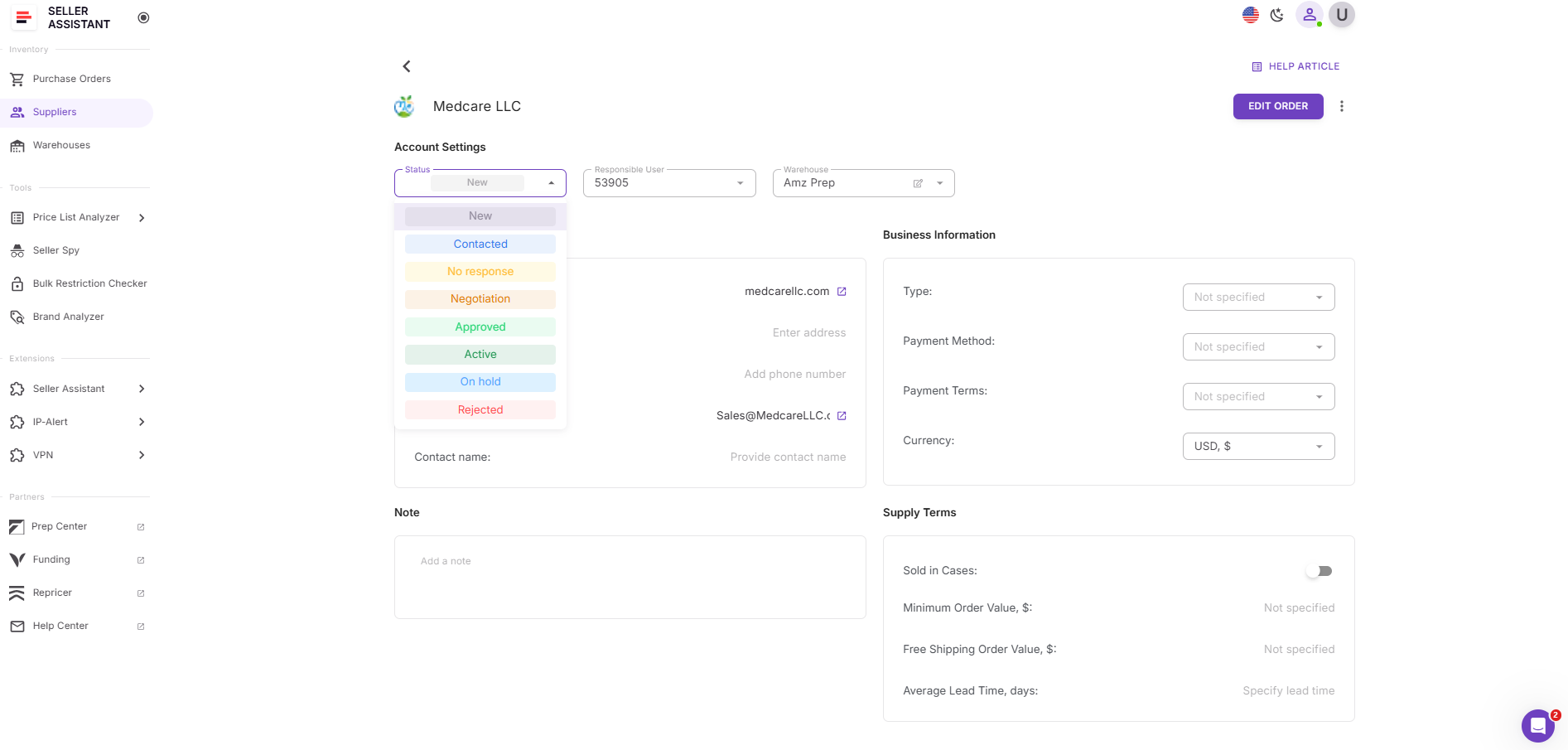
Step 3. Assign a supplier status
Choose the correct stage of your supplier relationship – for example, New, Contacted, Negotiation, or Approved.
Statuses help you maintain a real outreach pipeline rather than relying on memory or email threads.
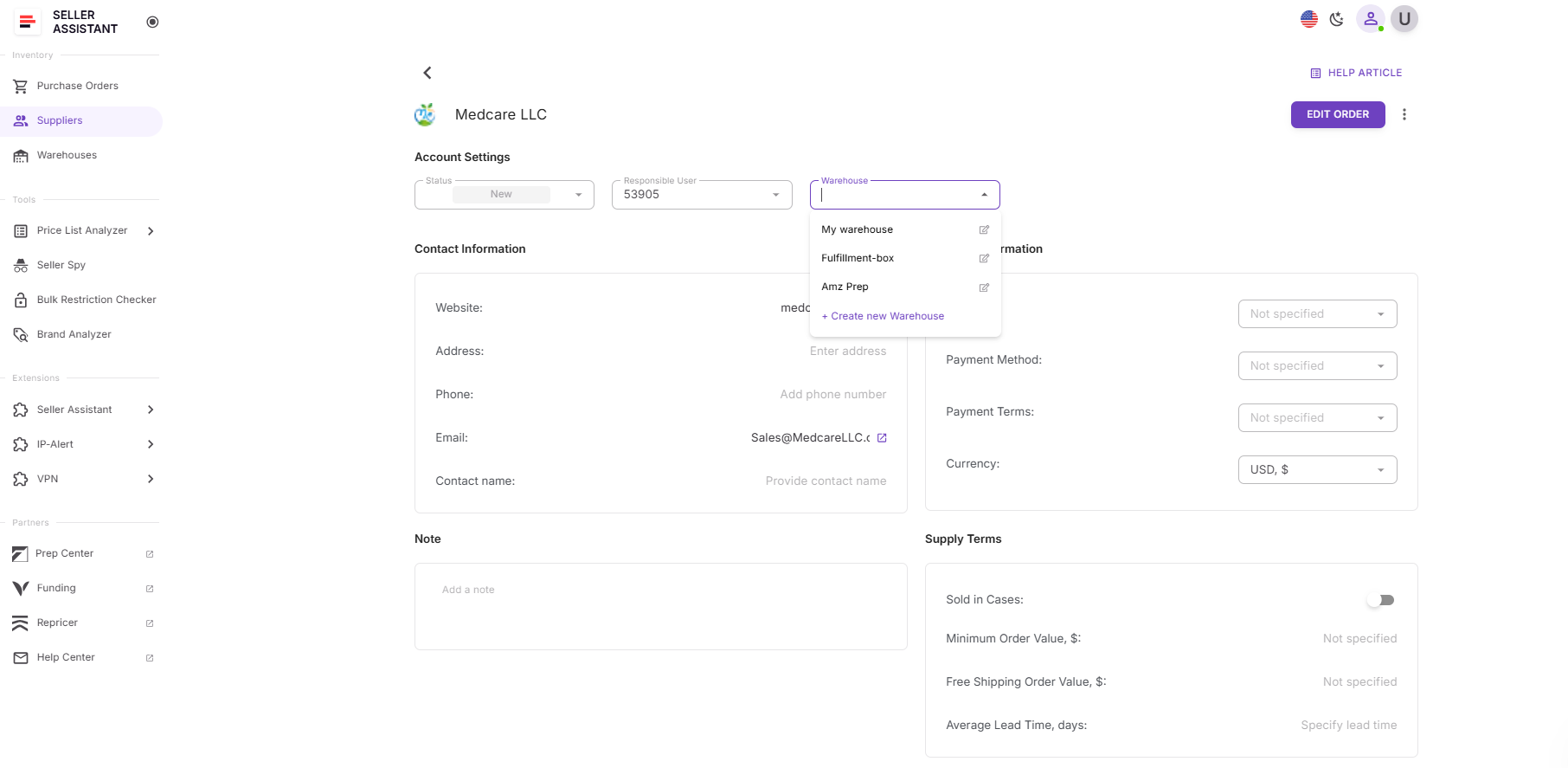
Step 4. Link a default warehouse or prep center
Assign a warehouse to ensure all shipments or purchase orders route correctly.
This eliminates repeated address entry and prevents shipping mistakes.
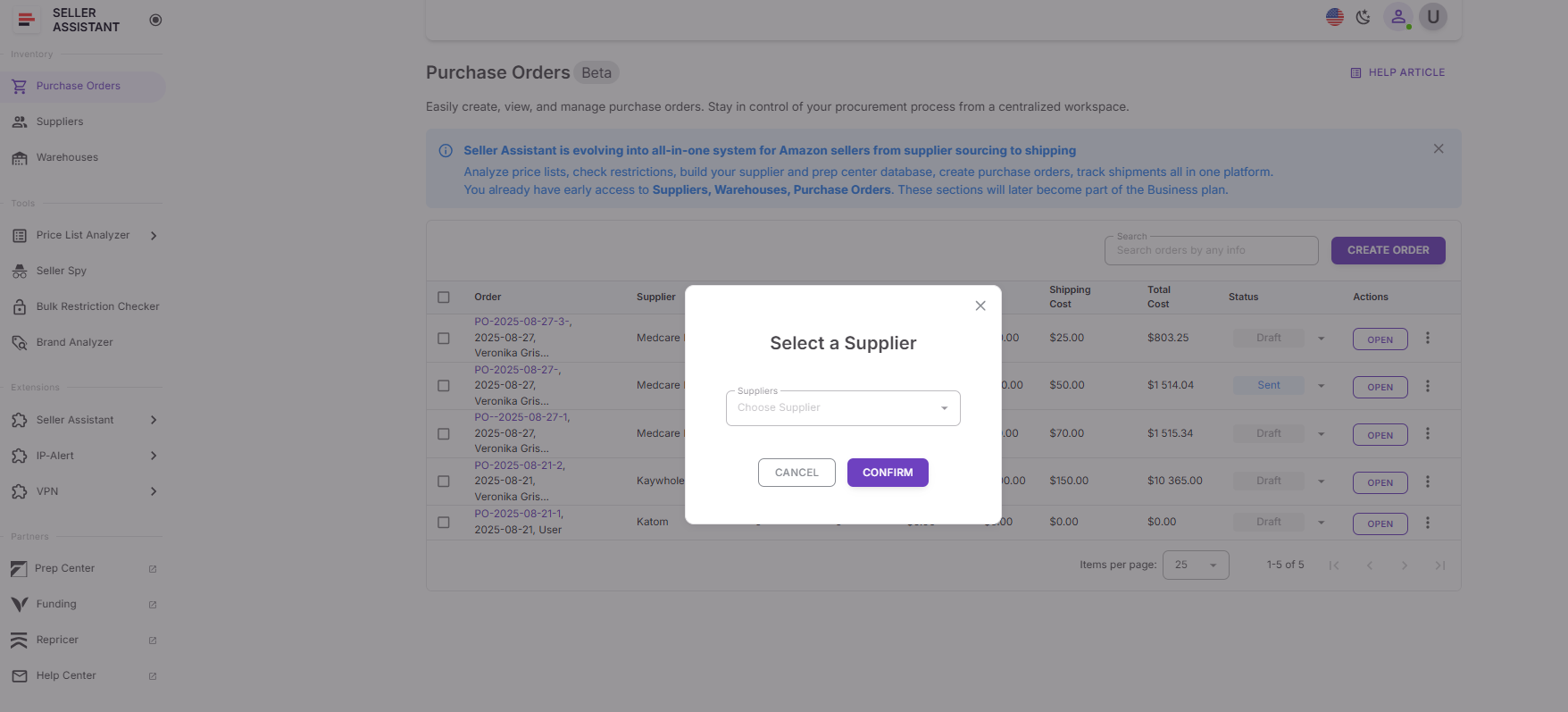
Step 5. Save and use the supplier throughout your workflow
Once saved, the supplier is automatically available across Seller Assistant.
You can choose them when analyzing price lists, building purchase orders, updating warehouse routing, or discovering new opportunities via Sourcing AI.
Step 6. Keep supplier information updated
As communication progresses, update statuses, notes, MOVs, and lead times.
Maintaining current data ensures accurate sourcing decisions and smooth operational planning.
FAQ
Do I need a supplier database if I’m just starting wholesale?
Yes – even beginners benefit from a simple, structured system. Once you contact more than a handful of suppliers, tracking replies, approvals, and terms becomes unmanageable without a database.
How many suppliers should I add to my database?
Add every supplier you contact, even if they don’t respond. This helps you avoid duplicate outreach and keeps your approval pipeline organized long-term.
Does the Suppliers Database work for OA and dropshipping?
Absolutely – OA sellers and dropshippers also manage multiple suppliers, prep centers, and routing rules. A centralized database keeps all relationships and logistics consistent across different sourcing methods.
How often should I update supplier information?
Update details whenever a supplier replies, changes terms, or sends a new price list. Frequent updates ensure accurate sourcing decisions and prevent errors in purchase orders.
What’s the biggest advantage of using Seller Assistant’s Suppliers Database?
It connects supplier data directly to your sourcing and purchasing tools, eliminating repetitive typing and manual syncing. This creates a faster, cleaner, and fully automated wholesale workflow.
Final Thoughts
A well-structured supplier database is the foundation of every successful Amazon wholesale operation. It gives you control over outreach, protects your workflow from errors, and connects your sourcing and purchasing processes into one smooth system.
With Seller Assistant, creating and managing this database becomes effortless. Every supplier you add instantly integrates with your price lists, routing rules, and purchase orders, allowing you to operate faster and make cleaner decisions.
Seller Assistant automates and connects every stage of your Amazon wholesale and arbitrage workflow. It brings together in one platform: workflow management tools – Purchase Orders Module, Supplier Database, Warehouse Database, bulk research & sourcing tools – Price List Analyzer, Bulk Restriction Checker, Sourcing AI, Brand Analyzer, Seller Spy, Chrome extensions – Seller Assistant Browser Extension, IP-Alert Extension, and built-in VPN by Seller Assistant, and integrations & team access features – seamless API connectivity, integrations with Zapier, Airtable, and Make, and Virtual Assistant Accounts.