


What is Amazon wholesale? It’s a high-volume reselling model where you buy branded products directly from brands or distributors and resell them on Amazon – without creating new listings or building a private label.
For many sellers, it’s the fastest way to scale with proven demand and lower risk. But getting started isn’t always simple: looking for suppliers, product research, and managing wholesale workflow can be tricky. In this post, you’ll learn exactly how Amazon wholesale works, what makes it different from other models, and how to launch your own profitable wholesale operation – step by step.
What Is Amazon Wholesale?
Amazon wholesale is a reselling business model where you buy branded products in bulk directly from the brand or from authorized distributors, then resell them on Amazon under the existing product listings. You’re not creating a new brand – you’re leveraging the demand of well-known products that already sell.
Where does the money come from?
You buy in bulk from suppliers for the low wholesale price and resell at a higher retail price on Amazon. The profit lies in the margin between your buy cost and the sale price after Amazon fees.
For example, if you purchase a product for $12 and sell it for $25, your profit (after fees) might be $5–7 per unit.
Key tasks of wholesale seller
In a wholesale business model, your key tasks include:
- Finding authorized product suppliers (brands or distributors)
- Choosing popular, in-demand brands that allow resellers
- Analyzing supplier price lists to pick profitable ASINs
- Creating a purchase order and buying inventory
- Sending products to Amazon FBA (Fulfillment By Amazon) or prepping from your own warehouse
- Listing and reselling those products on Amazon
By working within existing listings, wholesale sellers skip branding and focus on choosing and negotiating with suppliers, product sourcing, logistics, and Buy Box strategy – key levers of success in this model.
Pros and Cons of Wholesale
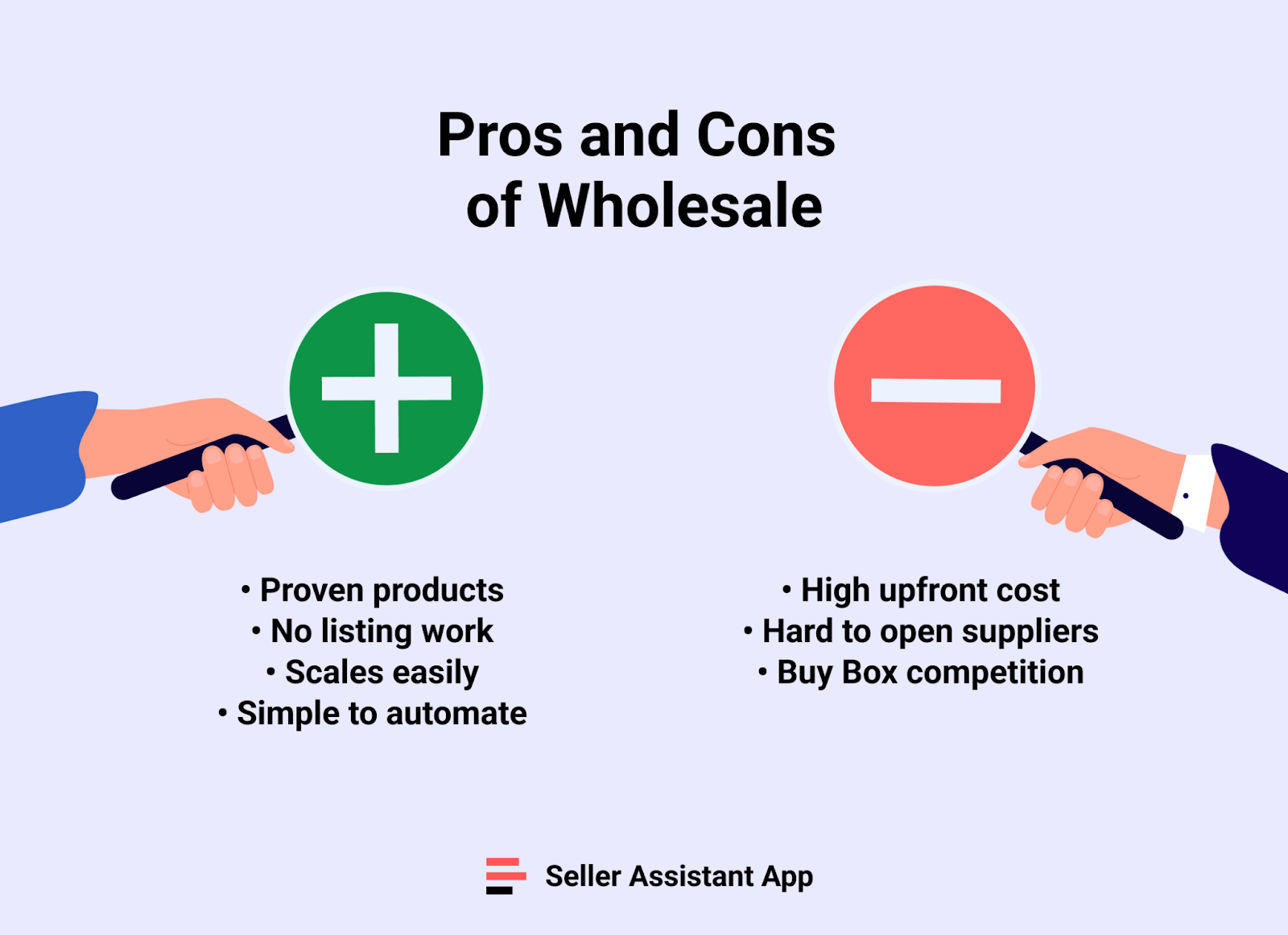
Amazon wholesale is one of the most scalable and proven business models – but it’s not without challenges. Below are the main advantages and disadvantages to help you decide if wholesale is the right fit for your business.
Pros
Lower risk than private label
You’re selling established products with existing demand, not testing new ones. This reduces the chances of product failure or dead inventory.
No need to create listings or drive traffic
Wholesale sellers list under existing ASINs, so there’s no need to optimize product pages or invest in advertising to get visibility.
High scalability potential
Once you find a good supplier and winning products, it’s easy to reorder and grow volume. You can scale by expanding product lines or supplier relationships.
Easier to delegate and automate
With repeatable processes like restocking and price monitoring, wholesale is easier to systematize. Tools like Seller Assistant can streamline the workflow.
Cons
Opening suppliers can be a challenge
Getting authorized access to brands and distributors often requires business credentials, and meeting minimum order quantities, which can block new or low-capital sellers. Many brands enforce MAP policies, strict reseller agreements, or selective distributor lists, so building trust and negotiating favorable terms takes time and outreach.
Competitive Buy Box environment
Multiple sellers may be offering the same ASIN, making it harder to win the Buy Box consistently without competitive pricing and fast shipping.
Upfront investment required
Most suppliers have minimum order quantities (MOQs), so you’ll need capital to place bulk orders – often in the thousands of dollars.
Margins can be thin
Because you’re competing on price and reselling known brands, profit margins are generally lower than private label – making efficiency and volume critical.
Wholesale vs. Other Models – What’s the Difference?
If you’re exploring how to sell on Amazon, you’re likely comparing wholesale to models like retail arbitrage, online arbitrage, private label, and dropshipping. Each approach has its own workflow, capital needs, and long-term potential – here’s how wholesale stacks up.
Wholesale vs. other business models
| Model | Inventory Source | Listing Creation | Scalability | Startup Cost | Risk Level | Notes |
|---|---|---|---|---|---|---|
| Wholesale | Brands or authorized distributors | No (use existing ASINs) | High | Medium–High | Medium | Requires supplier relationships and approval to sell certain brands. |
| Retail arbitrage | Brick-and-mortar stores | No | Low | Low | Low–Medium | Manual sourcing, limited by local inventory and store policies. |
| Online arbitrage | Online retail websites | No | Medium | Low | Medium | Flexible but time-consuming and competitive. |
| Private label | Custom manufacturer | Yes | Very High | High | High | Full control, branding potential, but needs marketing and launch. |
| Dropshipping | Supplier (via prep center) | No or minimal | Low–Medium | Low | Medium–High | Must follow Amazon’s policy—orders often routed through prep centers. |
Wholesale
Buy branded products in bulk directly from brands or authorized distributors. You sell under existing listings with proven demand. It’s scalable, more stable, but requires supplier relationships and upfront investment.
Retail arbitrage
Buy discounted products from local retail stores (e.g., Walmart) and resell on Amazon. It’s easy to start with low capital but harder to scale and often limited by stock availability.
Online arbitrage
Same as retail arbitrage, but done entirely online. You hunt for deals on websites, research, buy, and resell. It’s flexible, but time-intensive and highly competitive.
Private label
Create your own branded product and launch it on Amazon. Offers full control and branding, but also higher risk, more marketing work, and upfront investment in product development and promotion.
Dropshipping
Sell products without holding inventory. To comply with Amazon’s policies, most dropshippers route orders through a prep center for repackaging before shipping to the customer.
Key takeaway
Wholesale is the middle ground – more scalable and stable than arbitrage, less risky and capital-heavy than private label, and fully TOS-compliant compared to dropshipping.
How Does Amazon Wholesale Work?
Amazon wholesale runs on a systemized workflow: find the right products, source them from verified suppliers, and resell them under existing listings. While the business model skips branding and marketing, success depends on smart product selection, building supplier relationships, and maintaining margin control at scale. Below is a full breakdown of each step to launch and run your wholesale business on Amazon.
Step 1. Get your reseller permit
Before doing anything else, register for a valid reseller permit in your state. This license allows you to buy products tax-free from suppliers and collect sales tax from customers instead.
Step 2. Pick your product category and brands to resell
Start with strategy. Choose a niche category that fits your interest but also has demand and low competition. Then, research brands already sold by top Amazon sellers and look for those that show strong performance and margin potential.
Step 3. Confirm your selling eligibility
Check if the category or brand you’re targeting is gated. Many brands on Amazon require approval (or are ineligible on your seller account), so make sure you’re eligible before contacting suppliers to avoid wasting time.
Step 4. Find wholesale suppliers
Search for official U.S.-based distributors that carry the brands you want to resell. Look for legitimate suppliers who work with resellers and carry products that align with your sourcing strategy and profit goals.
Step 5. Run supplier background checks
Research every supplier before engaging. Verify their business credentials, check third-party reviews, look them up on LinkedIn, and use tools like Whois or ScamAdviser to ensure they’re legitimate and not fraudulent.
Step 6. Reach out to suppliers
Contact suppliers via email, call, or their website form. Introduce yourself, mention your business, and request to open a wholesale account with them.
Step 7. Manage supplier outreach
Keep your outreach organized from the start. Most suppliers won’t respond or approve you, so tracking communication status, account approvals, pricing terms, and shipping requirements is essential. Build a structured supplier database to avoid messy spreadsheets and duplicated work.
Step 8. Submit your wholesale applications
When a supplier agrees to work with you, you’ll need to complete their application. Typically, this includes your business license, reseller permit, and contact info. Keep your communication professional and concise.
Step 9. Set up your wholesale accounts
Once approved, you’ll receive access to wholesale pricing and ordering. This gives you full visibility into the supplier’s product catalog.
Step 10. Request the price lists
Ask your supplier for their latest wholesale price list, which should include SKUs, product info, and bulk pricing. This is where product sourcing begins.
Step 11. Analyze price lists for profitable items
Review the list for products with healthy margins and stable demand. Use tools to speed up this process, but always verify results manually to spot issues like mismatched ASINs, low ROI, or brand restrictions. Focus on items with solid BSR, good ROI, and consistent Buy Box rotation.
Step 12. Negotiate better pricing
After shortlisting products, try to negotiate price breaks – especially for bulk or repeat orders. Strong supplier relationships can unlock better long-term deals and terms.
Step 13. Define shipping rules by supplier
If you’re working with multiple suppliers, create routing rules for each. Specify where their inventory should be sent – your warehouse or prep center – and how each handles labeling and prep costs.
Step 14. Place your first orders
Create clear purchase orders for your chosen products and send them to suppliers. Pay via your preferred method (credit card, ACH, or wire transfer). Confirm delivery details and lead time.
Step 15. Ship your inventory
Decide between Fulfillment by Amazon (FBA) or Fulfillment by Merchant (FBM).
FBA: Amazon stores, ships, and handles customer service. Most wholesale sellers use this.
FBM: You or a 3PL fulfill orders directly. Offers more control but requires logistics infrastructure.
How to Automate Amazon Wholesale Workflow with Seller Assistant
Seller Assistant is designed to automate every repeatable task in your wholesale business. While strategic actions like negotiating with suppliers still rely on you, everything else – from scanning massive price lists to generating polished purchase orders – is completely streamlined.
Every part of the process connects seamlessly. From your first supplier search to the final PO, Seller Assistant keeps your data synced across tools for accuracy, speed, and transparency at every step.
Note. Seller Assistant is an end-to-end Amazon workflow management platform that integrates 10+ wholesale-focused solutions into one connected system. It combines workflow automation, bulk research, sourcing intelligence tools, and integrated Chrome extensions – giving you everything you need to streamline product sourcing, supplier management, and purchase order creation.

The platform aggregates: workflow management tools:
- Purchase Orders Module, Supplier Database, Warehouse Database to organize, automate, and scale every step of your wholesale and arbitrage operations;
- Bulk research & sourcing tools – Price List Analyzer, Bulk Restriction Checker, Sourcing AI, Brand Analyzer, Seller Spy to evaluate supplier price lists, verify selling eligibility and restrictions, open new brands, and discover winning product ideas from competitors to expand your product catalog;
- Chrome extensions – Seller Assistant Browser Extension, IP-Alert Extension, and built-in VPN by Seller Assistant to deep-research products, check IP claims and compliance, and access geoblocked supplier sites directly within your browser;
- Integrations & team access features – seamless API connectivity and integrations with Zapier, Airtable, and Make, plus Virtual Assistant Accounts for secure, scalable team collaboration.
With Seller Assistant, every step of your Amazon wholesale and arbitrage workflow is automated and connected.
Automated Amazon wholesale workflow – step by step
| Seller Assistant Tool | Main Function | Use It To | Workflow Stage |
|---|---|---|---|
| Storefront Widget | Competitor and brand analysis | See what other sellers list — top brands, categories, ASIN counts, and ratings. | Product research |
| Seller Spy | Competitor tracking | Monitor competitors’ catalog changes and find potential brand leads. | Product research |
| Brand Analyzer | Brand evaluation | Assess brand size, revenue, Buy Box trends, Amazon competition, and review quality. | Product research |
| Bulk Restriction Checker | Eligibility verification | Instantly check if your account can sell selected ASINs; remove restricted or gated items. | Product validation |
| Sourcing AI | Supplier discovery | Find verified U.S.-based suppliers or distributors by brand or product name; view pricing and MOQs. | Supplier sourcing |
| Supplier Database | Supplier management | Centralize supplier data, assign statuses (New, Contacted, Approved), and connect to warehouses. | Supplier management |
| Warehouses Database | Routing automation | Store prep center and warehouse details; set automatic routing for supplier shipments. | Logistics setup |
| Price List Analyzer | Bulk product analysis | Match SKUs to Amazon listings, analyze 70+ metrics (ROI, BSR, fees, restrictions), and shortlist profitable products. | Product sourcing |
| Seller Assistant Extension | Listing validation | Evaluate products directly on Amazon or supplier sites — IP risk, Buy Box, competition, variations, demand. | Product validation |
| Purchase Orders Module | Order creation | Generate clean POs from filtered product lists, auto-fill supplier data, and export in XLSX or PDF. | Order management |
| Virtual Assistant Account | Team collaboration | Give VAs secure access to research, filter, and manage data without exposing your account. | Scaling & team operations |
| API Connectivity | Workflow automation | Connect Seller Assistant to Airtable, Google Sheets, and other platforms for automated updates and data sync. | Workflow automation |
Step 1. Identify what to sell
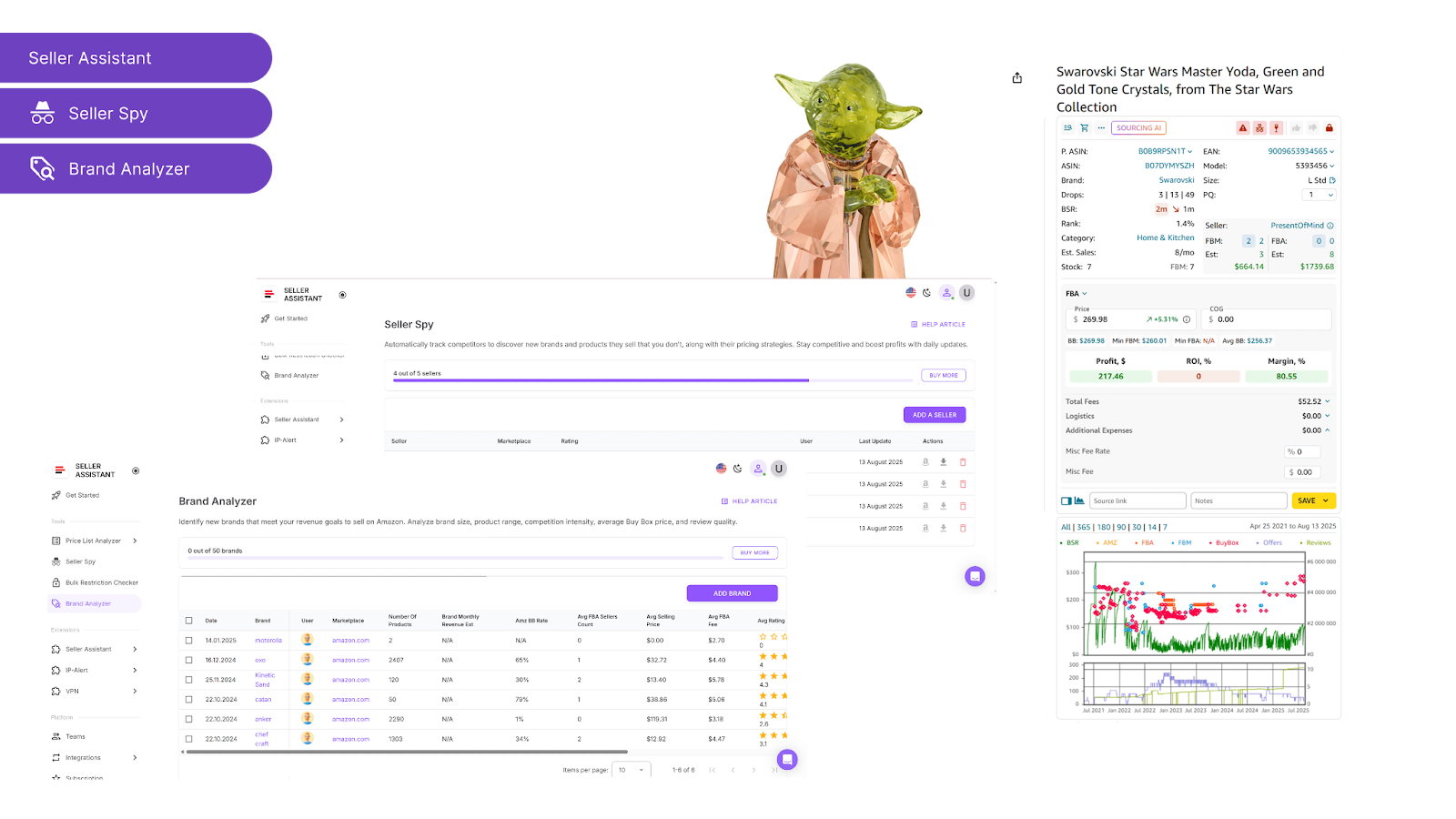
Make decisions based on real Amazon data, not assumptions. Use market insights to select categories, brands, and products that align with your strategy.
- Tools
Storefront Widget, Seller Spy, Brand Analyzer
-
How to use them
-
Storefront Widget – Explore what other sellers list, including brands, categories, ASIN counts, and ratings.
-
Seller Spy – Monitor competitor storefronts to see which products they add or remove and uncover new brand opportunities.
-
Brand Analyzer – Assess brand performance, revenue potential, Buy Box pricing, Amazon competition, and review strength to shortlist the most profitable options.
Step 2. Verify your selling eligibility
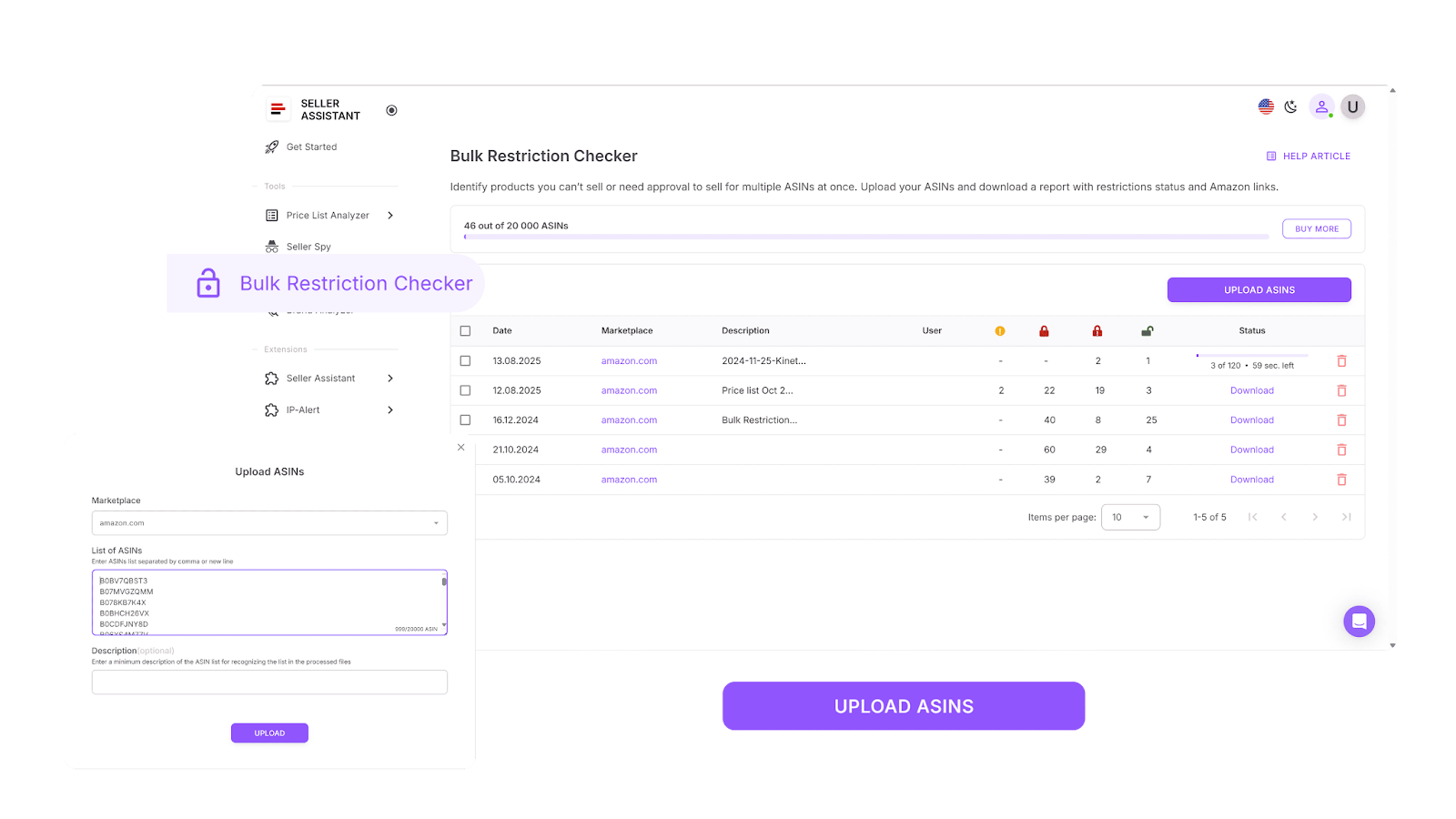
Before investing in any product, make sure you can legally sell it on Amazon. Avoid gated, restricted, or brand-protected ASINs right from the start.
- Tool
-
How to use it
-
Instantly verify your selling eligibility in bulk
-
Identify which ASINs are open, restricted, or unsellable on your account
-
Filter out ineligible items to avoid wasted time and capital
Step 3. Locate your suppliers
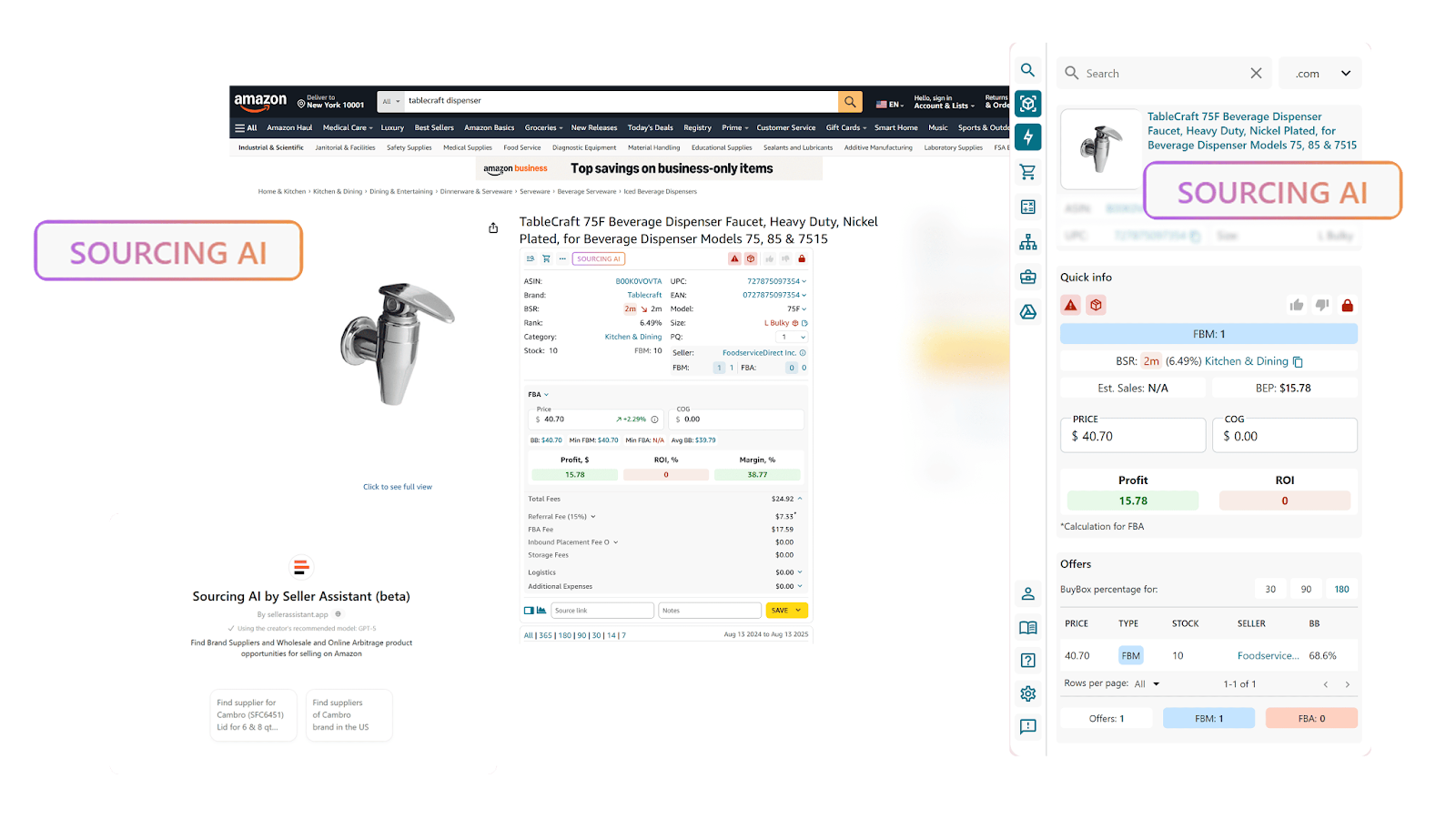
Skip the endless Google searches and go straight to the U.S.-based wholesale suppliers.
- Tool
-
How to use it
-
Search by brand name to find verified distributors and brand partners
-
Discover up to 10 U.S.-based sources per brand
-
View supplier details including pricing, links, and minimum order quantities (MOQs)
-
Filter by your target cost and confidence level for precise matches
Step 4. Centralize your supplier data
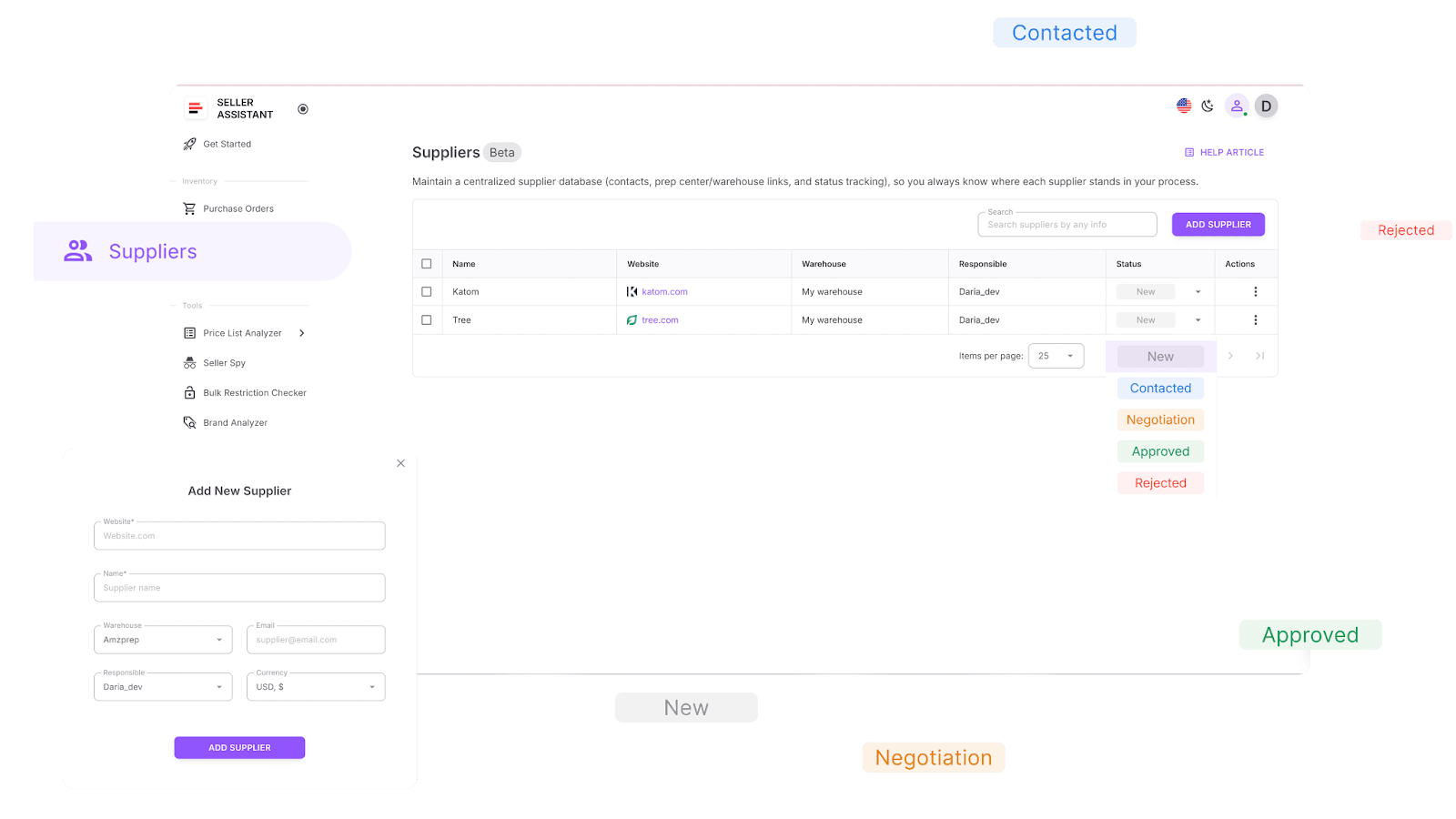
Keep all supplier details organized in one secure place. Stop juggling spreadsheets and inbox threads.
- Tool
-
How to use it
-
Save supplier names, links, team contacts, and statuses
-
Assign progress stages (New, Contacted, Negotiation, Approved, Rejected)
-
Link suppliers directly to your warehouses or prep centers
Step 5. Automate warehouse routing
Set up automatic routing so every supplier’s shipment goes to the right warehouse or prep center – no manual entry needed.
- Tool
-
How to use it
-
Store full details for all prep centers and warehouses
-
Assign default routing rules to each supplier for smoother fulfillment
Step 6. Process and evaluate price lists
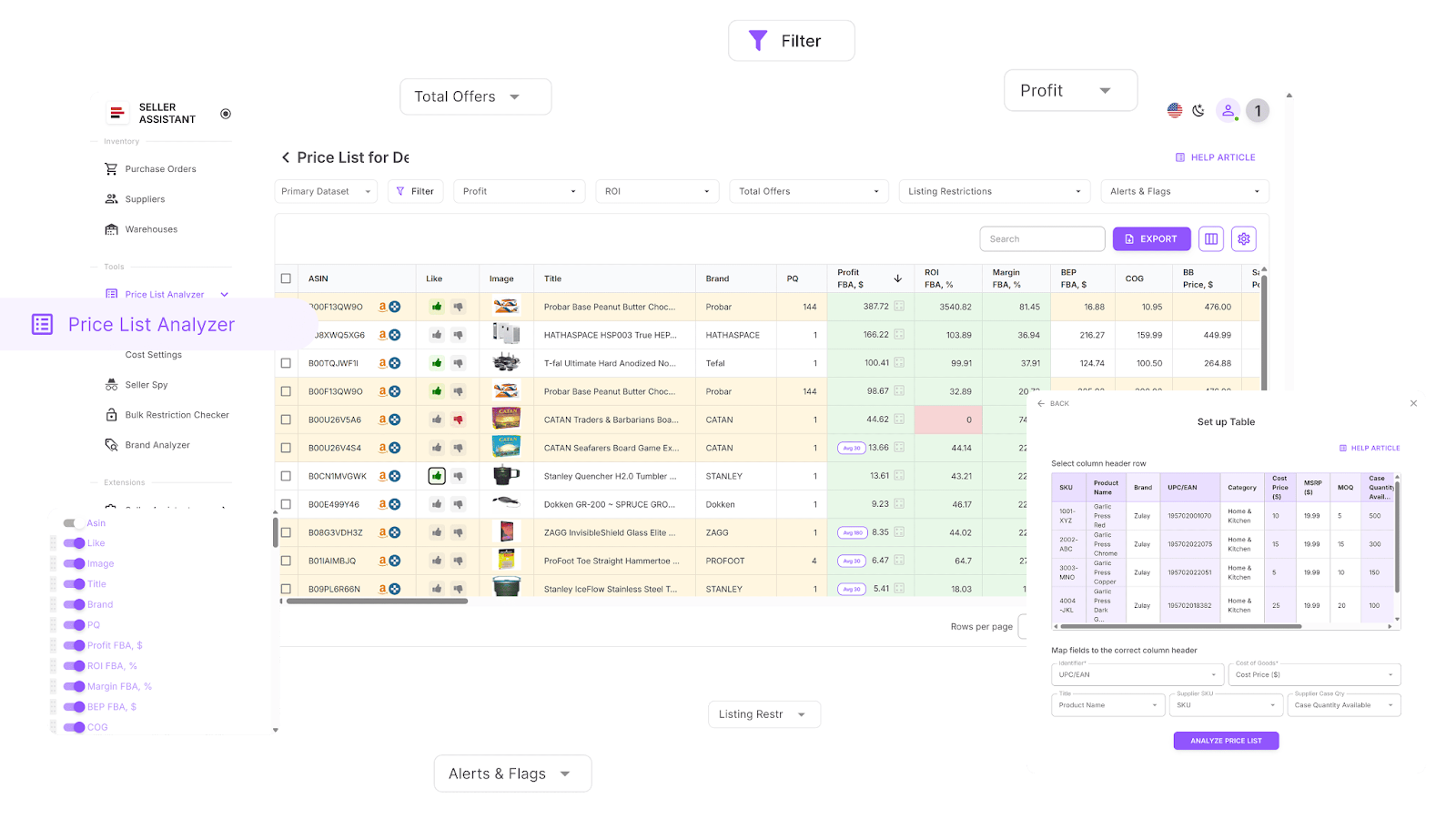
Transform raw supplier spreadsheets into clean, profitable sourcing lists in minutes.
- Tools
Price List Analyzer, Seller Assistant Extension
-
How to use them
-
Price List Analyzer – Match SKUs to Amazon listings, check over 70 data points (profit, ROI, fees, restrictions, alerts), and filter instantly using saved criteria. Like/dislike deals, export shortlists, and create purchase-ready selections.
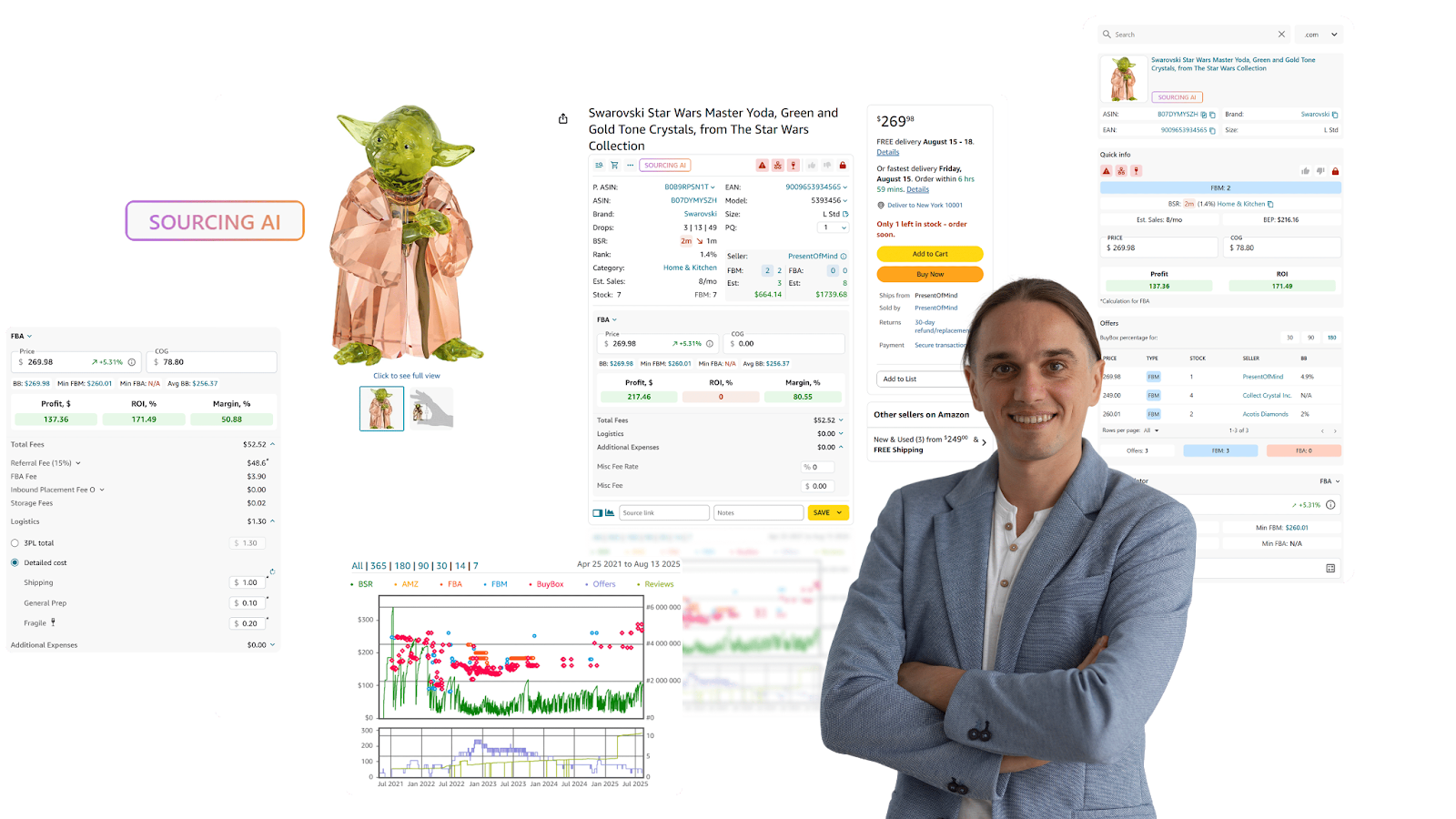
- Seller Assistant Extension – Analyze deals directly the Amazon product and search pages, supplier websites, and competitor storefronts. Review product performance, estimated sales, Buy Box activity, competition level, risks, demand, profitability, and other metrics to confirm each product’s true potential.
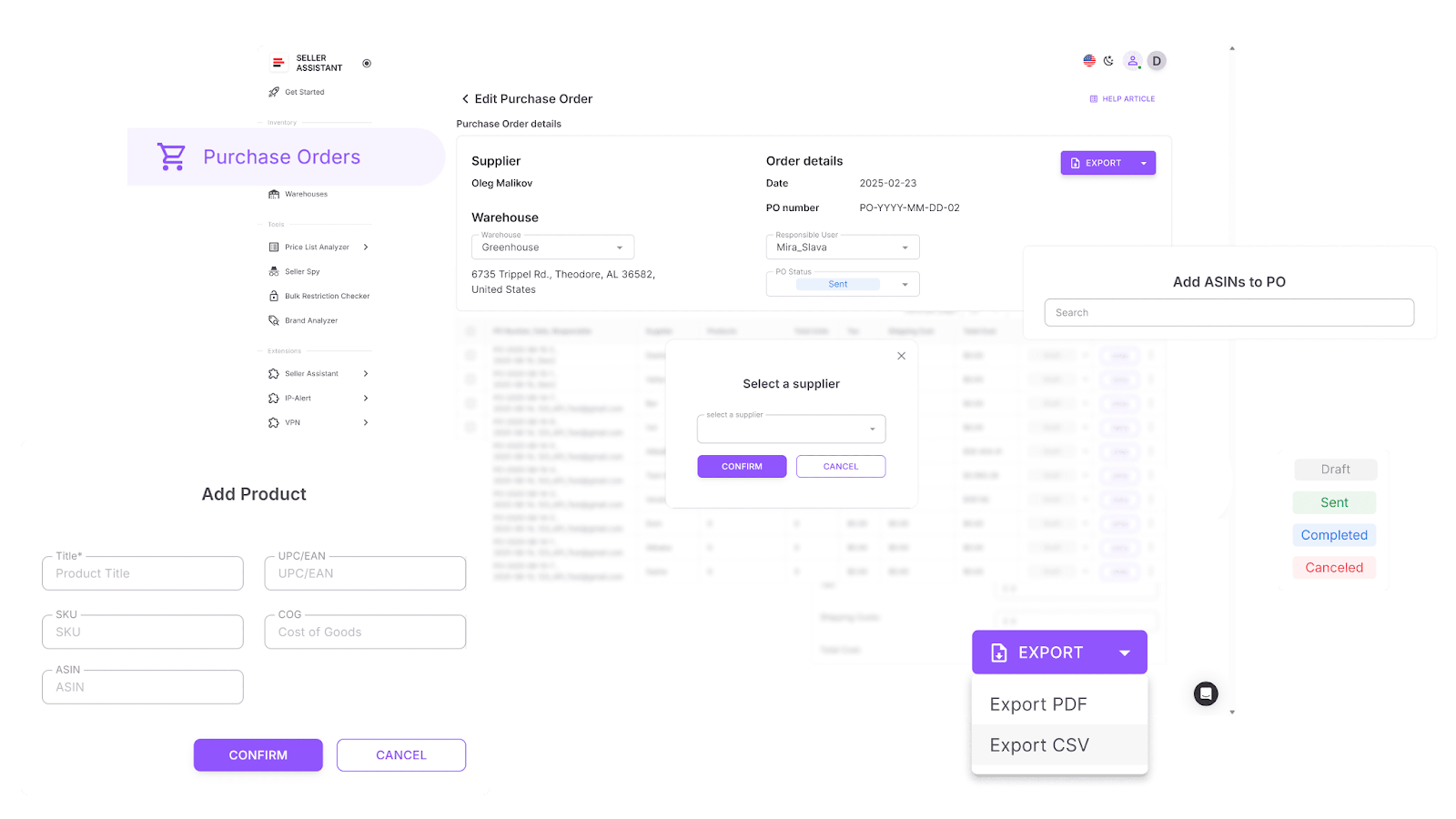
Step 7. Generate purchase orders automatically
No more copying data into spreadsheets. Create structured, ready-to-send purchase orders in a few clicks.
- Tool
-
How to use it
-
Auto-generate POs from filtered shortlists or build them manually
-
Automatically pull in supplier and warehouse details
-
Adjust quantities, COGs, and tax fields
-
Export as XLSX or PDF for supplier use
-
Track each PO’s progress (draft, sent, completed)
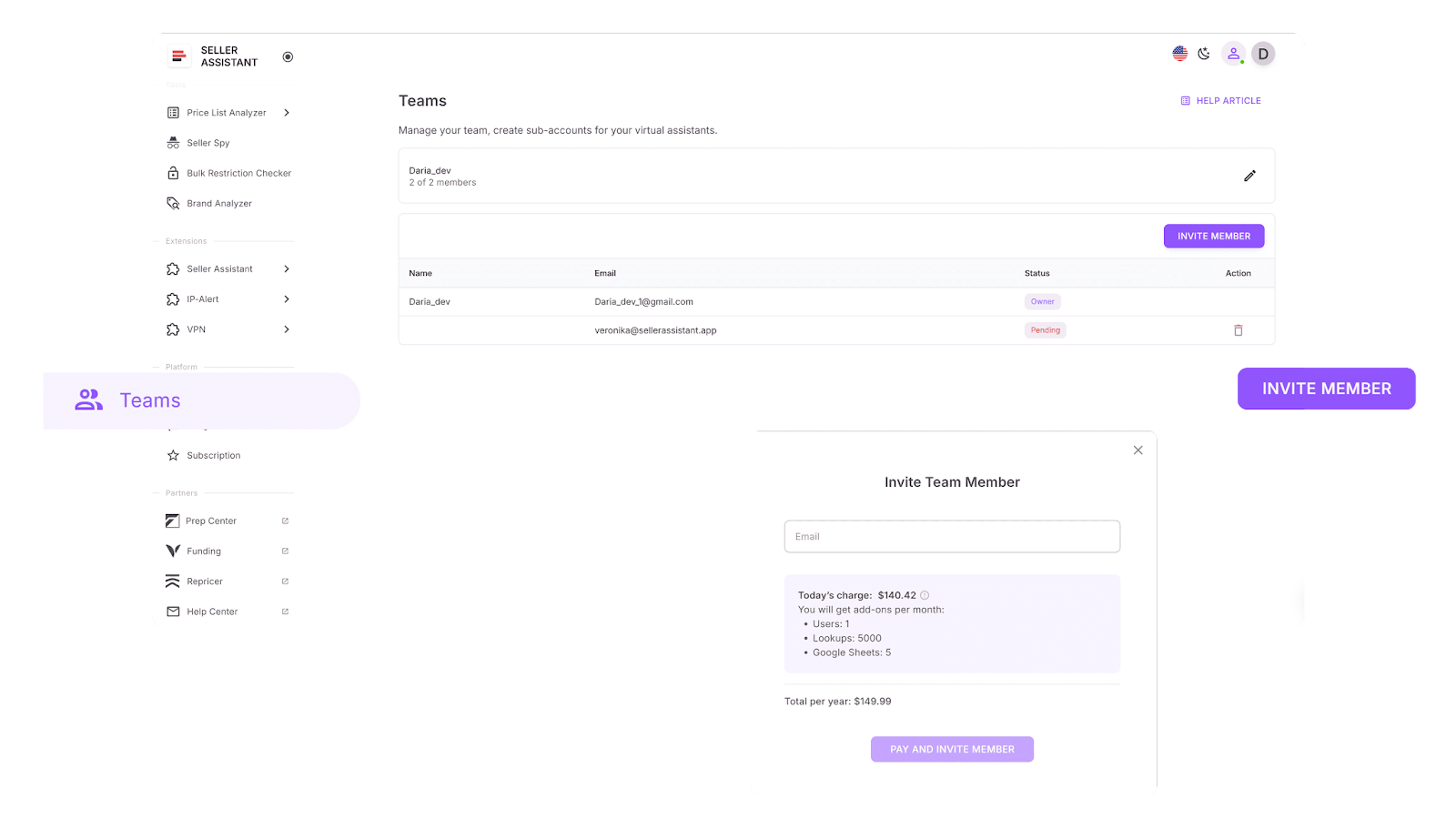
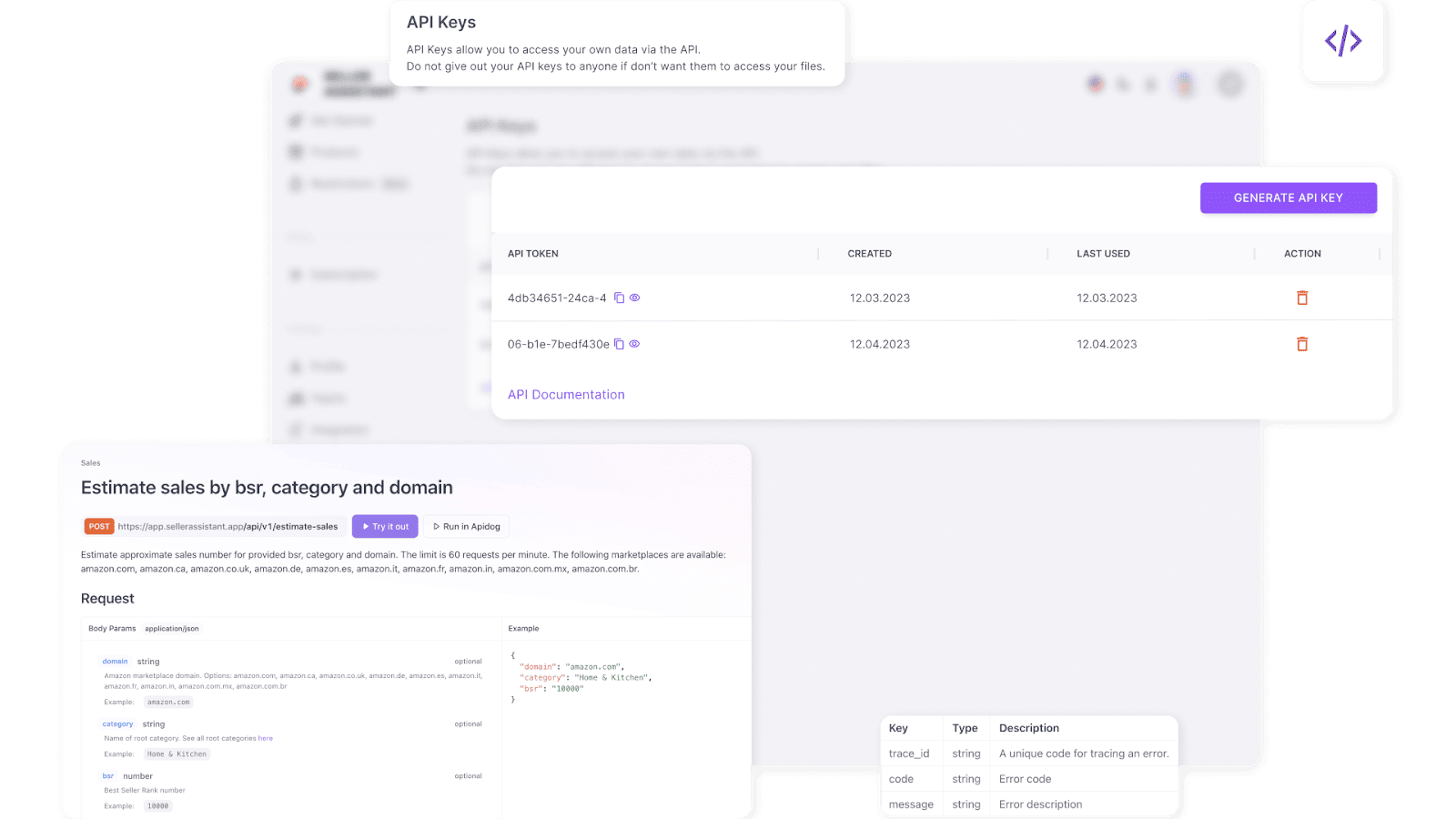
Step 8. Scale through delegation and integrations
As your operation grows, maintaining structure and efficiency becomes vital. Seller Assistant provides tools built for scaling.
-
How to use them
-
Give VAs secure access to without sharing your Amazon account credentials to check restrictions, research ASINs, and manage tasks securely
-
Automate data updates between Seller Assistant and tools like Airtable or Google Sheets
-
Set up rules to automatically filter high-ROI deals or send products to your PO list
-
Keep your entire sourcing ecosystem connected and automated while freeing your time for strategy.
Is Amazon Wholesale Right For You?
Amazon wholesale isn’t for everyone – but for the right seller, it can be one of the most stable and scalable business models on the platform. Instead of gambling on untested products or creating new brands, you work with existing demand and proven listings, focusing on logistics, supplier relationships, and smart sourcing.
Wholesale is ideal if you:
- Have access to startup capital (typically $2,000–$10,000+)
- Prefer data-driven decisions over creative branding
- Enjoy negotiating with suppliers and managing relationships
- Want a scalable model built on repeatable systems
- Value long-term consistency over quick one-hit products
It may not be the best fit if you:
- Want full control over branding and packaging (consider private label instead)
- Have very limited capital or prefer quick flips (arbitrage might suit you better)
- Dislike handling logistics, paperwork, or supplier communication
If you’re analytical, process-oriented, and ready to build a real B2B foundation, Amazon wholesale offers sustainable growth, predictable profits, and long-term scalability – especially when supported by automation tools like Seller Assistant.
FAQ
What does Amazon wholesale mean?
Amazon wholesale means buying branded products in bulk directly from authorized distributors or brands and reselling them on Amazon under existing listings. You earn profit by purchasing at wholesale prices and selling at retail prices while leveraging proven product demand.
What is the difference between Amazon FBA and Amazon wholesale?
Amazon FBA (Fulfillment by Amazon) is a logistics service where Amazon stores, ships, and handles customer service for your products. Amazon wholesale is a business model, and you can choose to fulfill your wholesale inventory through FBA or handle fulfillment yourself (FBM).
Is Amazon wholesale worth it?
Yes – Amazon wholesale can be highly profitable if you focus on sourcing in-demand products and building strong supplier relationships. It offers predictable, scalable growth with less risk than launching private-label products.
Can I buy wholesale from Amazon?
No, you don’t buy wholesale from Amazon – you buy from approved distributors or brands and then sell those products on Amazon. You’ll need a business license and reseller permit to purchase inventory tax-free.
Which is better, Amazon wholesale or private label?
Amazon wholesale is better for sellers who prefer stability, lower risk, and data-backed products. Private label offers higher margins and full brand control but requires more capital, marketing, and risk tolerance.
Final Thoughts
Amazon wholesale remains one of the most reliable and system-driven ways to build a sustainable business on Amazon. Instead of gambling on untested products, you focus on brands and items that already sell – reducing risk while increasing scalability. Success in this model comes down to three things: choosing profitable products, working with trusted suppliers, and running an efficient workflow.
By automating research, supplier management, and order creation with tools like Seller Assistant, you can turn a manual, time-consuming process into a streamlined wholesale operation that scales effortlessly.
Seller Assistant automates and connects every stage of your Amazon wholesale and arbitrage workflow. It brings together in one platform: workflow management tools – Purchase Orders Module, Supplier Database, Warehouse Database, bulk research & sourcing tools – Price List Analyzer, Bulk Restriction Checker, Sourcing AI, Brand Analyzer, Seller Spy, Chrome extensions – Seller Assistant Browser Extension, IP-Alert Extension, and built-in VPN by Seller Assistant, and integrations & team access features – seamless API connectivity, integrations with Zapier, Airtable, and Make, and Virtual Assistant Accounts.

