.svg)
How to Use Seller Assistant’s Brand Analyzer
Download Amazon Seller Guide
This guide will help you get started, understand the basics of Amazon selling, and explain in simple words how it all works.

Choosing the right brand is one of the most important decisions for Amazon wholesale and online arbitrage sellers. A brand may look profitable at first glance, yet be gated, dominated by Amazon Retail, or crowded with sellers fighting for the Buy Box.
Analyzing products one by one wastes time and often leads to costly sourcing mistakes. Seller Assistant's Brand Analyzer solves this by automating brand-level research.
It shows revenue potential, competition intensity, catalog size, and reseller viability in minutes – so you can qualify brands before contacting suppliers or investing in inventory.
Note. Seller Assistant is an end-to-end Amazon workflow management platform that integrates 10+ wholesale-focused solutions into one connected system. It combines sourcing workflow automation, bulk research and intelligence tools, and integrated Chrome extensions – giving you everything you need to streamline finding deals, managing suppliers, and creating purchase orders.

The platform aggregates: workflow management tools – Purchase Orders Module, Suppliers Database, Warehouses Database to organize, automate, and scale every step of your wholesale and arbitrage operations; bulk research & sourcing tools – Price List Analyzer, Bulk Restriction Checker, AI Supplier Finder, Brand Analyzer, Seller Spy to evaluate supplier price lists, verify selling eligibility and restrictions, open new brands, and discover winning product ideas from competitors to expand your product catalog; Chrome extensions – Seller Assistant Browser Extension, IP-Alert Extension, and built-in VPN by Seller Assistant to deep-research products, check IP claims and compliance, and access geoblocked supplier sites directly within your browser; and integrations & team access features – seamless API connectivity and integrations with Zapier, Airtable, and Make, plus Virtual Assistant Accounts for secure, scalable team collaboration.
With Seller Assistant, every step of your Amazon wholesale and arbitrage workflow is automated and connected.
Why Amazon Wholesale Sellers Must Analyze Brands First
Many sellers start with product-level research – checking BSR, price, and Buy Box rotation on individual ASINs. That approach often leads to wasted time and risky inventory decisions. Brand-level analysis gives you a wider view of competition, Amazon Retail presence, catalog depth, and revenue stability before you ever contact a supplier. When you evaluate the brand first, you avoid sourcing products that are gated, oversaturated, or structurally unprofitable.
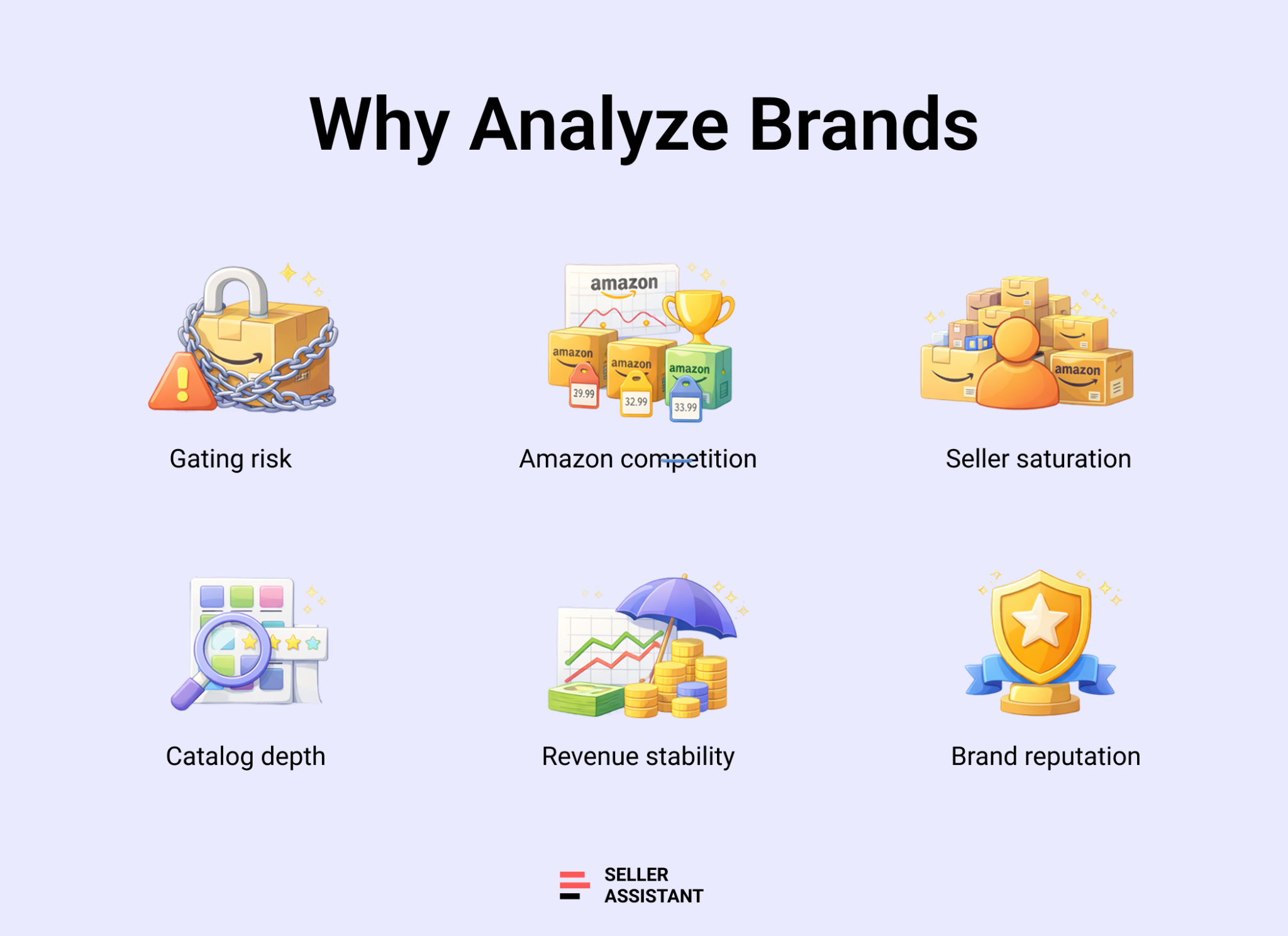
Account approval and gating risk
Some brands require approval, invoices, or direct authorization. Others are not eligible on your seller account. If you skip this step and focus only on individual products, you may secure inventory you cannot list. Brand analysis helps you confirm selling eligibility before investing capital.
Amazon Retail and Buy Box pressure
When Amazon holds a large Buy Box share across a brand’s catalog, third-party sellers struggle to compete. Even strong products become difficult to scale. Checking Amazon Buy Box rate at the brand level reveals whether you’re entering a winnable market or a controlled ecosystem.
Seller density and margin compression
High average FBA seller counts across listings often signal price wars and unstable margins. Instead of discovering oversaturation product by product, brand-level metrics show whether competition is manageable across the entire catalog.
Catalog depth and scalability
Brands with hundreds of active ASINs offer room to expand. Smaller catalogs – often private label brands – limit sourcing options and increase dependency on a few listings. A larger catalog supports long-term scaling and diversified revenue.
Revenue consistency across ASINs
One or two strong products do not guarantee brand viability. Stable monthly revenue distributed across multiple ASINs indicates reliable demand. Brand-level revenue estimates help determine whether the opportunity supports consistent cash flow.
Brand reputation and customer trust
Average rating and total review volume reflect product quality and buyer satisfaction. Brands with strong ratings tend to maintain healthier pricing and Buy Box stability. Reviewing reputation at the brand level reduces the risk of selling weak or declining products.
What Is Seller Assistant's Brand Analyzer?
Seller Assistant’s Brand Analyzer is an Amazon brand research tool built for wholesale sellers, online arbitrage sellers, and dropshippers who need to evaluate brands before investing in inventory. Instead of manually reviewing dozens or hundreds of ASINs, you enter a brand name and receive a structured overview of its Amazon performance.
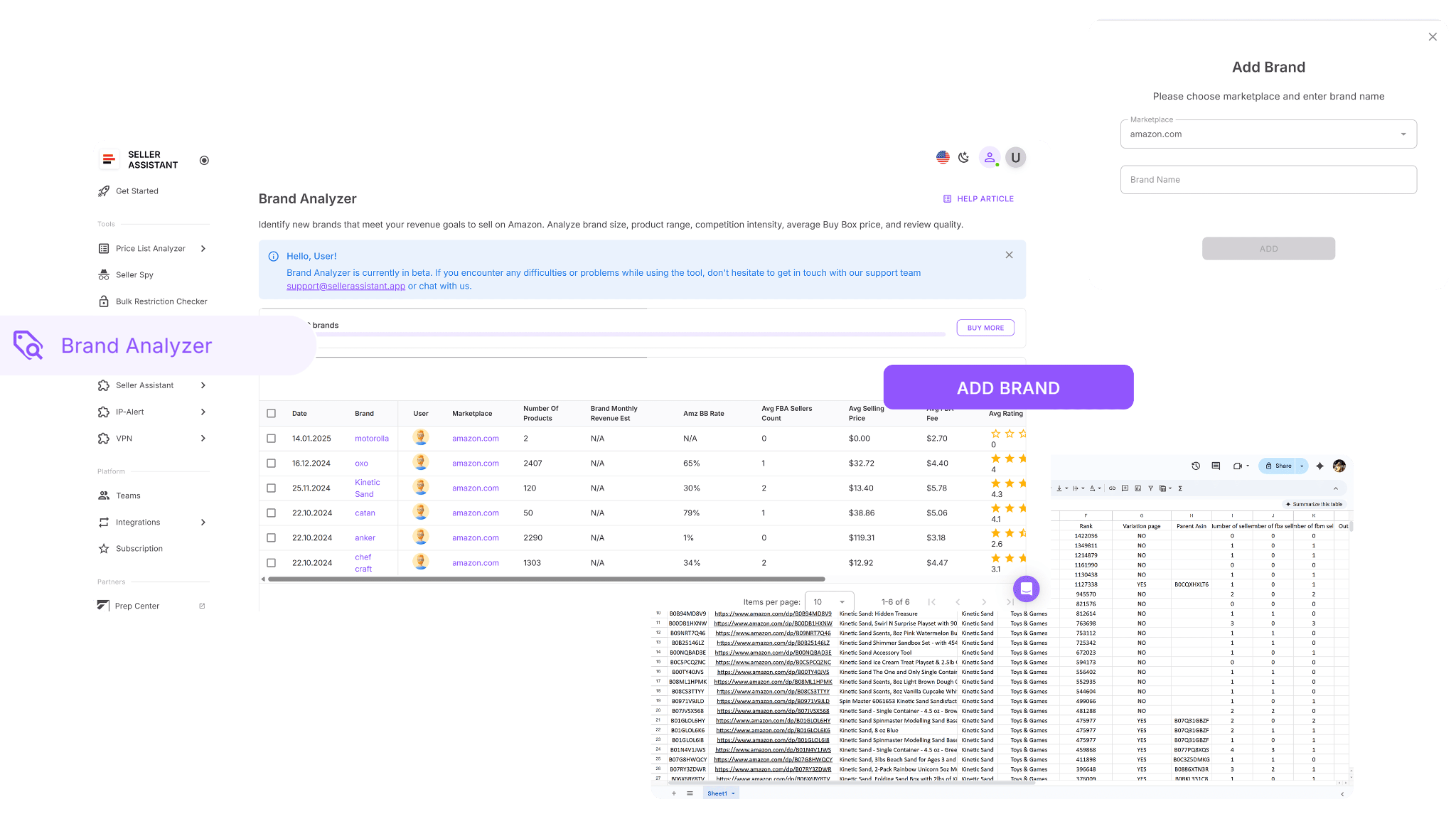
Brand Analyzer’s two-layer brand and product analysis
At the brand level, Brand Analyzer displays catalog size, estimated monthly revenue, average Buy Box price, average FBA fees, Amazon Buy Box share, average seller count, rating, and review volume. These metrics help you quickly assess demand, competition intensity, pricing behavior, and overall scalability before moving deeper into product research.
Beyond summary metrics, Brand Analyzer provides a complete product-level breakdown. You can review individual ASIN data such as sales rank trends, seller counts, Buy Box pricing, stock status, and revenue estimates. This allows you to identify specific opportunities while still evaluating the brand as a whole.
Why brand-level analysis matters
Wholesale sourcing begins with brand qualification. If a brand is dominated by Amazon Retail, oversaturated with sellers, too small to scale, or structurally low-margin, no individual ASIN will fix that. Brand Analyzer helps you qualify or reject a brand before contacting suppliers, requesting price lists, or committing capital.
Part of a connected wholesale workflow
Brand Analyzer operates inside Seller Assistant’s connected wholesale workflow automation system. Brands identified through analysis can move directly into supplier outreach via AI Supplier Finder, eligibility verification with Bulk Restriction Checker, bulk price evaluation with Price List Analyzer, and structured purchasing inside the Purchase Orders Module. Data flows across tools without being re-entered, which reduces errors and keeps sourcing decisions consistent.
Within Seller Assistant’s wholesale ecosystem – including bulk research tools, supplier and warehouse databases, Chrome extensions, and purchase order management – Brand Analyzer acts as the brand qualification layer. It helps you decide where to focus before scaling research, negotiating with suppliers, and building repeatable buying workflows.
What Can You Do with Brand Analyzer?
Brand Analyzer helps Amazon wholesale sellers evaluate brands before investing time, money, or supplier effort. Instead of manually browsing product catalogs and checking ASINs one by one, you get a structured, data-driven view of how a brand performs across Amazon. The tool highlights demand, competition, pricing behavior, and reseller viability in one place, allowing you to qualify brands faster and reduce sourcing risk.

Evaluate reseller viability
Quickly determine whether a brand is suitable for third-party sellers. Review Amazon’s presence, competition density, and overall catalog structure before contacting suppliers or requesting price lists.
Automate brand research
Replace manual catalog browsing with automated data aggregation. Brand Analyzer collects and processes performance metrics across the entire brand, saving hours of repetitive analysis.
Measure total revenue potential
View estimated monthly revenue across the brand’s full product portfolio. This helps you judge whether the opportunity supports meaningful cash flow at scale.
Analyze Amazon competition
Check Amazon’s Buy Box share to understand how often Amazon Retail controls listings. High Amazon presence signals stronger competition and lower margin flexibility.
Assess seller competition levels
Review average FBA seller counts across the catalog. This reveals whether listings are moderately competitive or saturated with sellers fighting for the Buy Box.
Review catalog size and scalability
See the total number of ASINs under the brand. Larger catalogs typically provide more sourcing flexibility and long-term expansion opportunities.
Check brand reputation and demand
Evaluate average product ratings and total review volume to understand customer satisfaction, product quality, and brand stability.
Understand pricing and cost structure
Review average Buy Box prices and FBA fee levels to estimate realistic margin potential and identify brands with sustainable pricing behavior.
Access all metrics in one dashboard
Revenue, pricing, competition, Amazon presence, seller counts, and brand reputation appear in a single consolidated interface. This makes decision-making structured and fast.
Identify high-potential brands faster
Filter out brands with weak revenue, excessive competition, or low ratings. Focus your sourcing efforts only on brands that meet your profitability and competition standards.
Review products inside the platform
Use the Brand Details Page to inspect all products within a brand before exporting data.
You can:
- Search by keyword
- Sort available columns
- Navigate through paginated results
This allows you to explore brand catalogs directly in the platform and export the full dataset only when deeper filtering is needed.
How Brand Analyzer Works
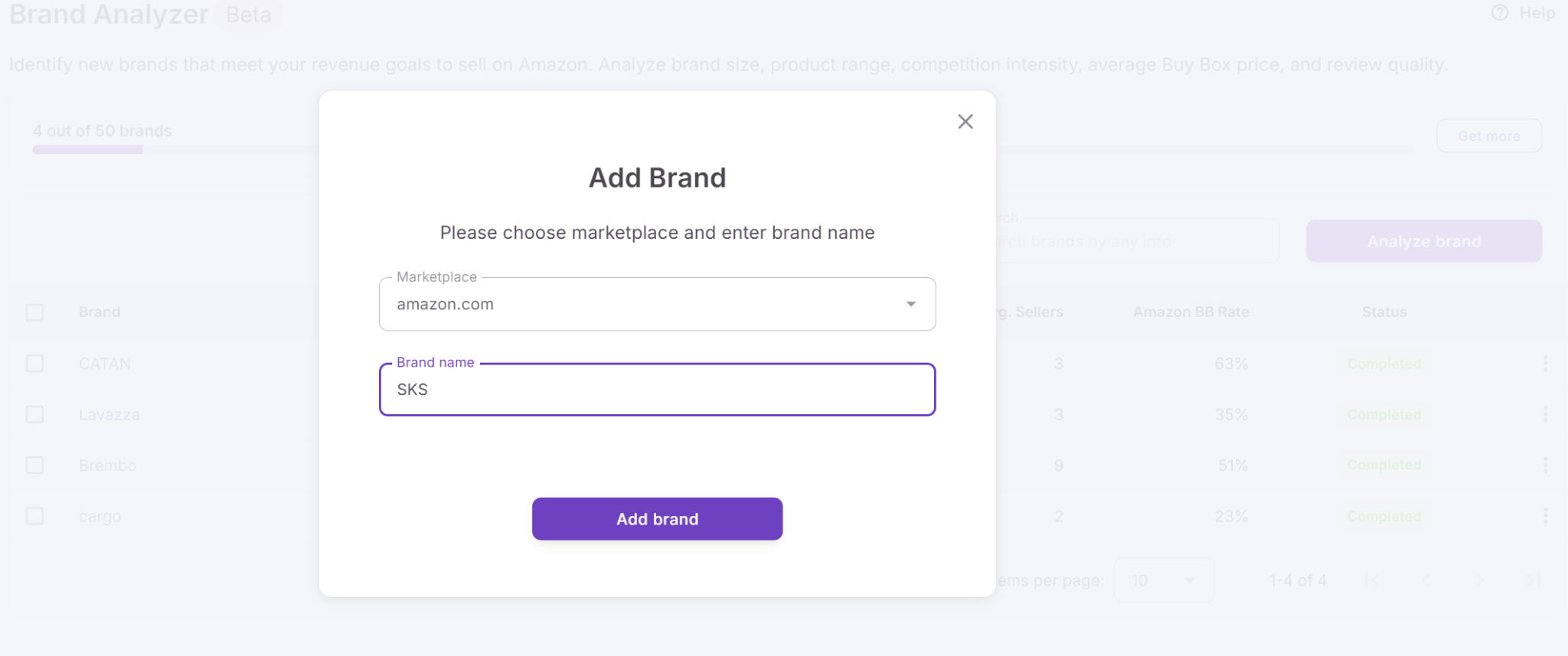
To analyze a brand, open Brand Analyzer inside your Seller Assistant account, select your marketplace, enter the brand name, and click Add brand. The system collects Amazon data across the entire catalog and builds a structured performance dashboard. Once the analysis is complete, you can open the Brand Details Page to review all products within the brand directly inside the platform.
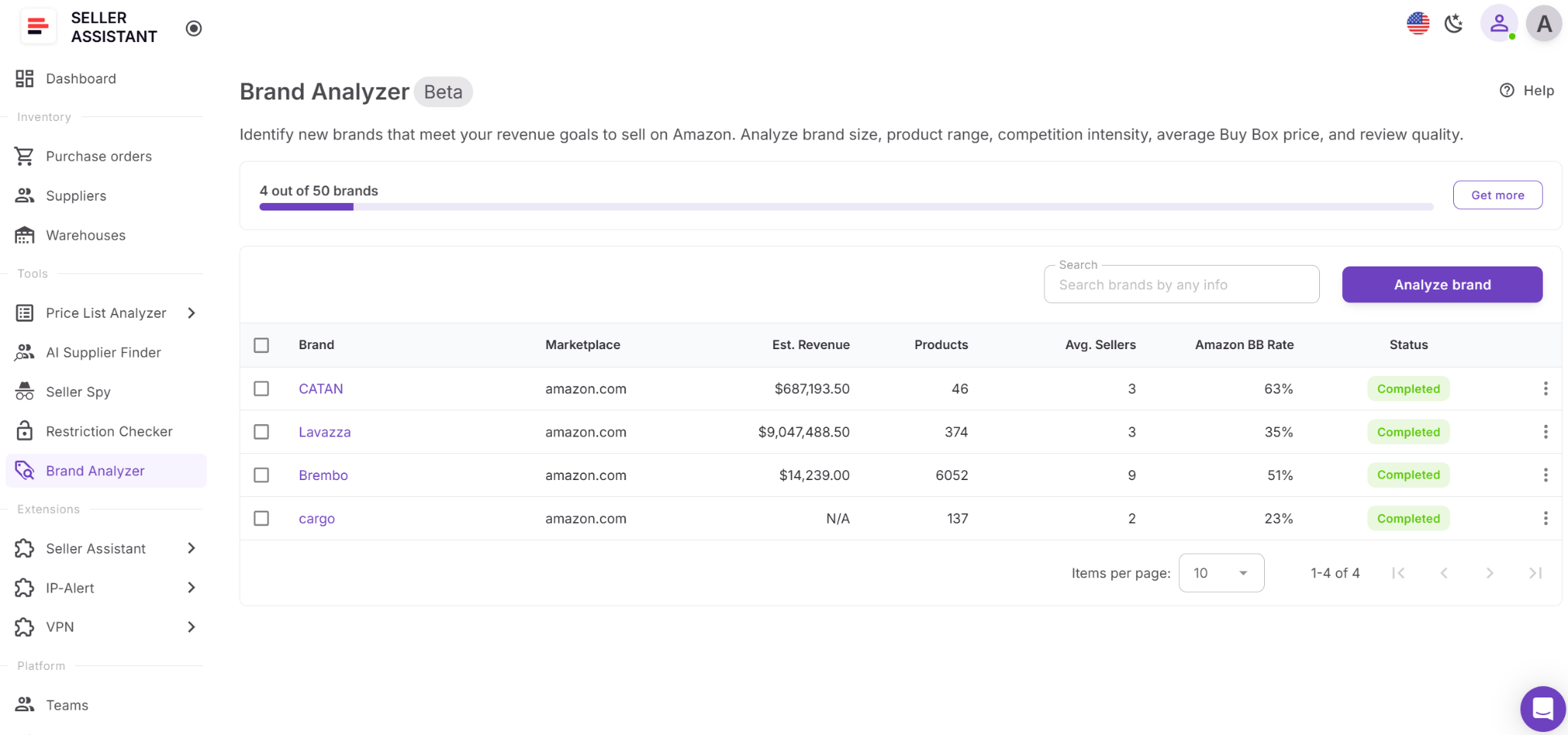
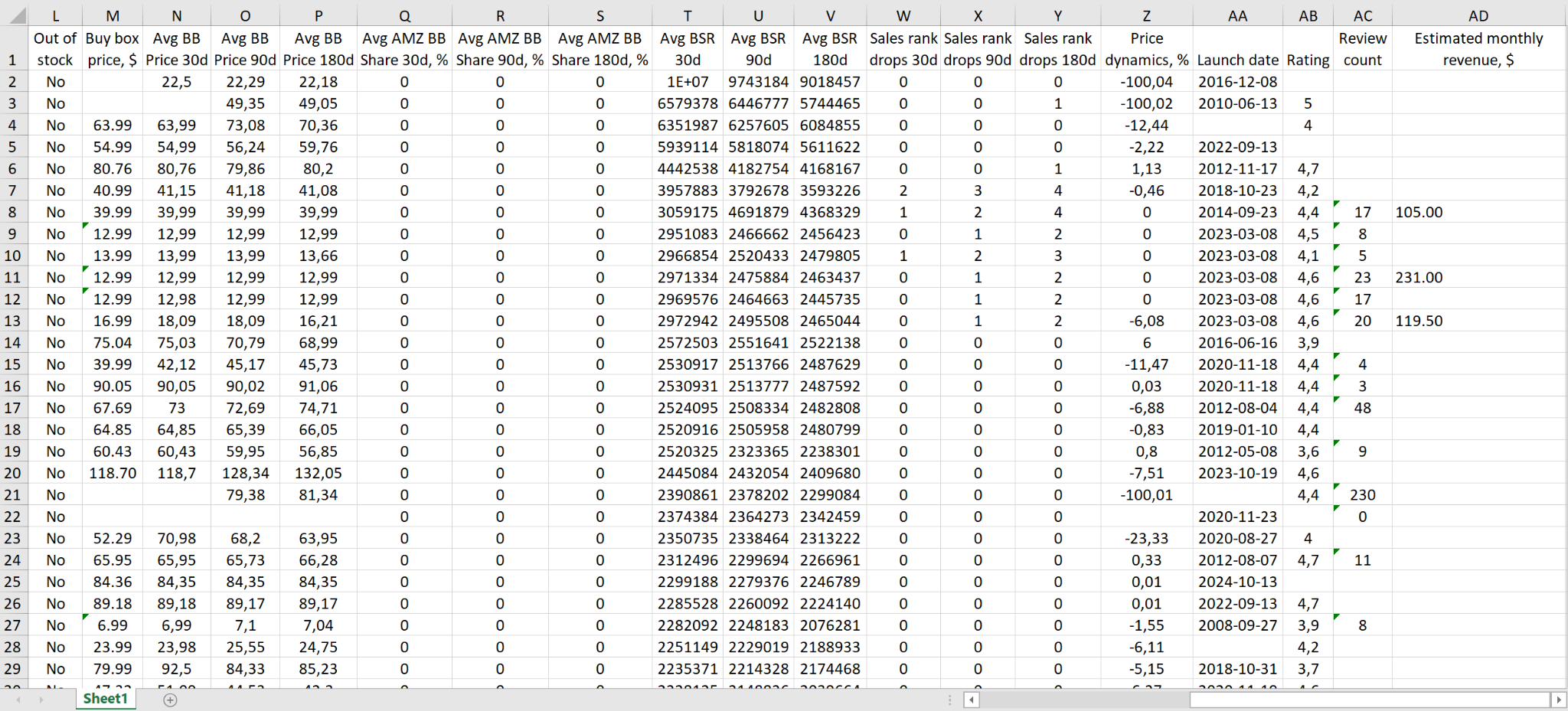
The Brand Details Page allows you to inspect the full product list before exporting. You can search by keyword, sort columns, and navigate paginated results. When deeper filtering is required, download the complete Excel report. The export always includes all ASINs within the brand, regardless of on-screen sorting or search.
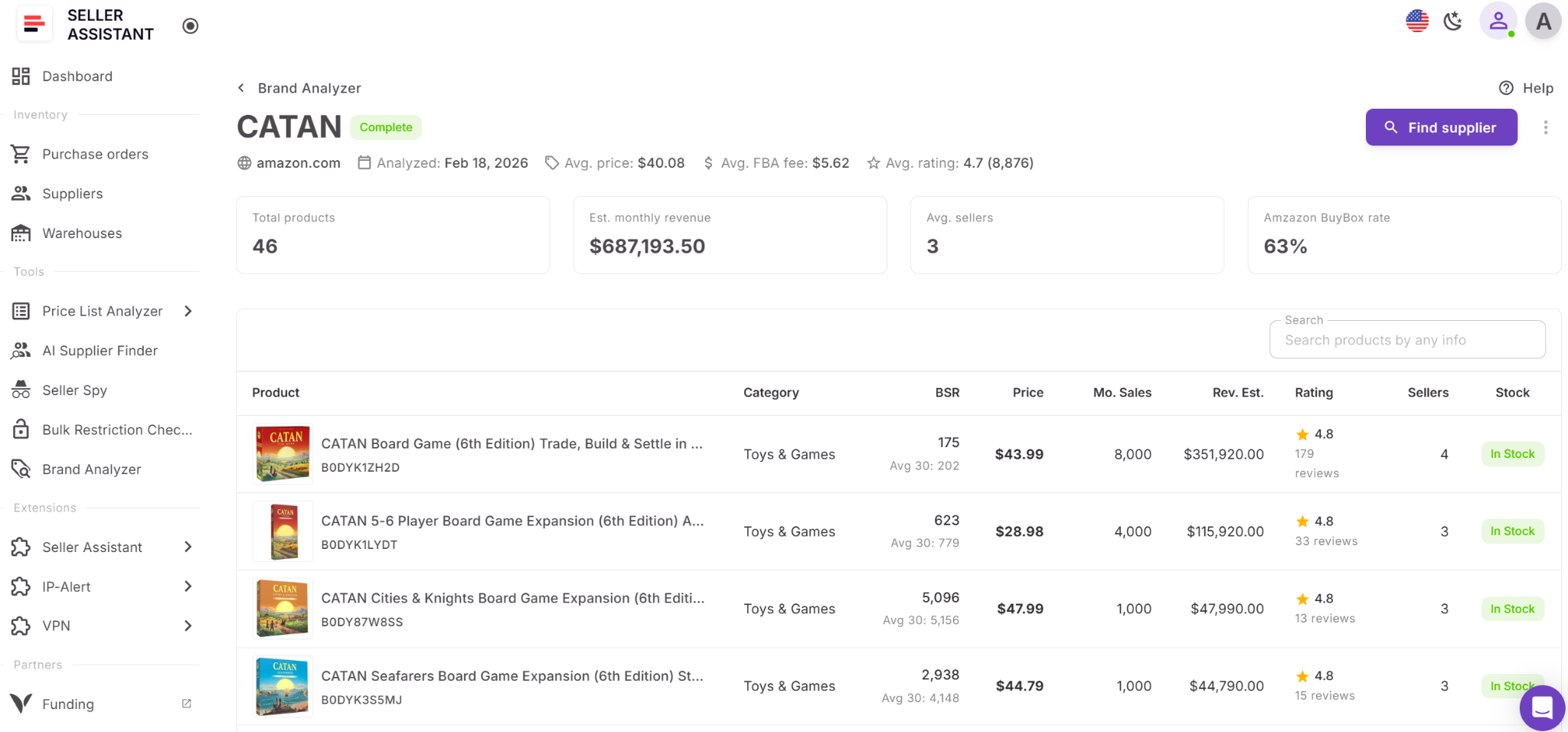
Where you can launch Brand Analyzer from
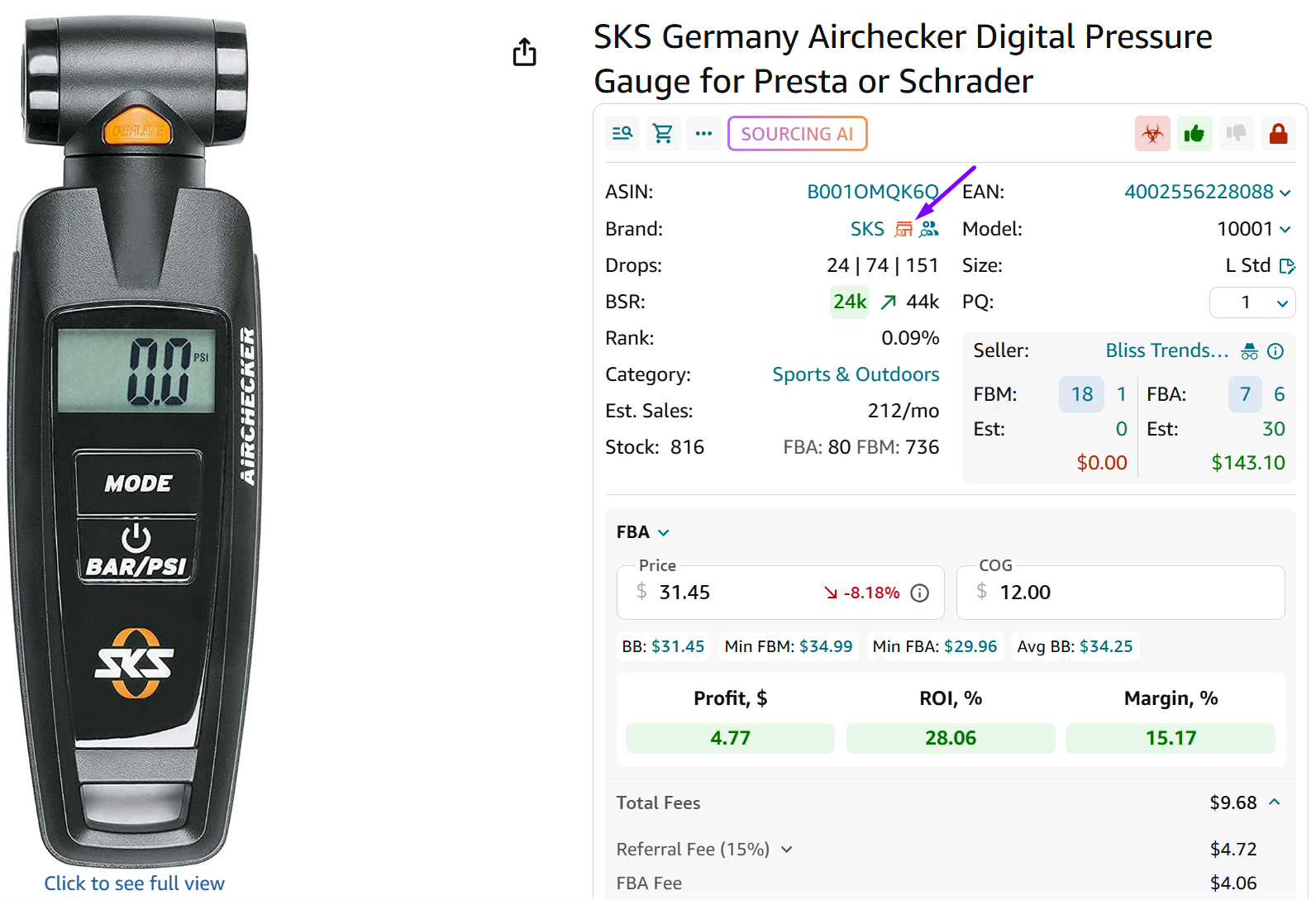
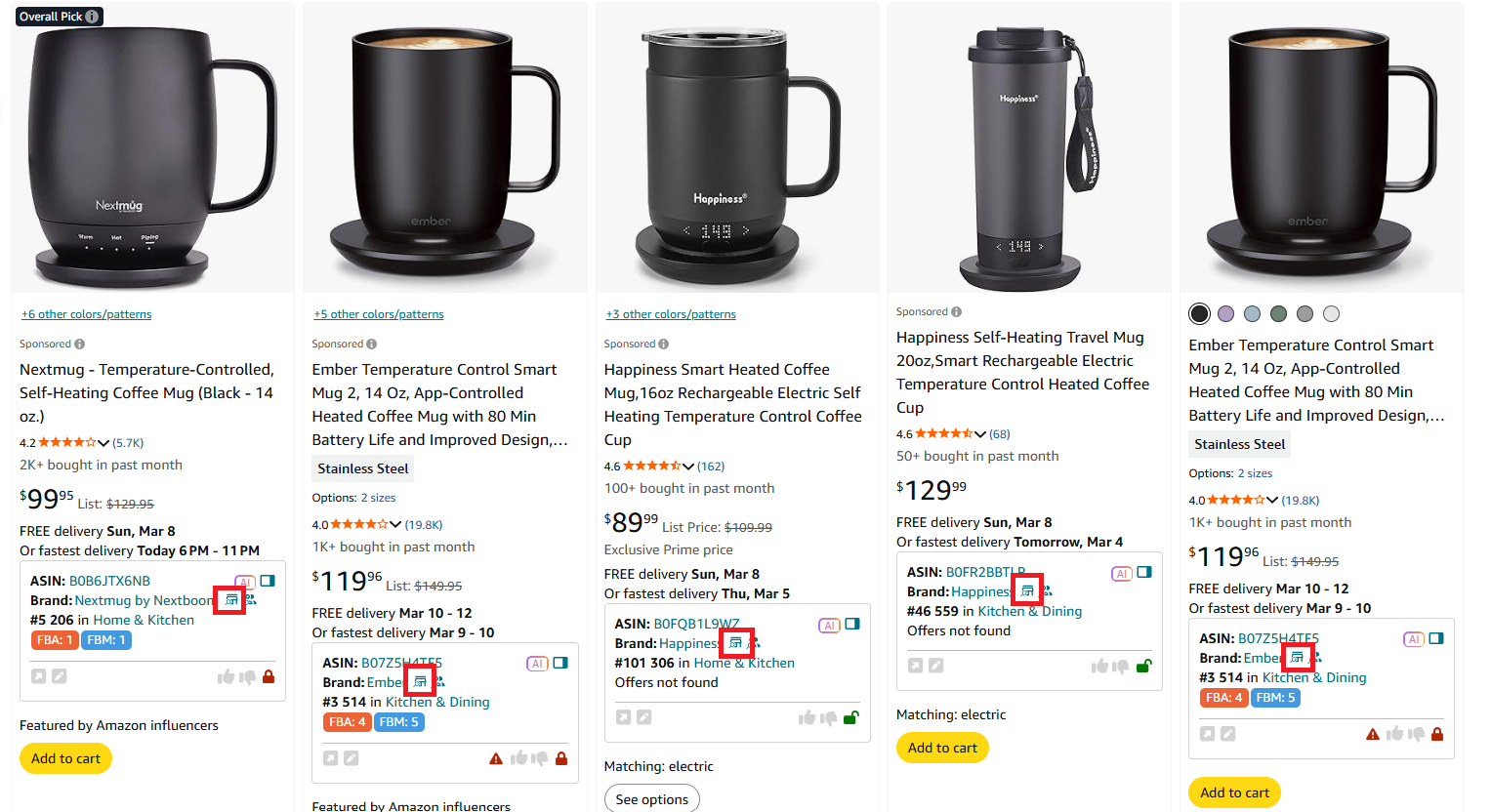
Brand Analyzer is integrated across Seller Assistant’s ecosystem, allowing you to start analysis wherever you work.
You can launch it from:
- Seller Assistant dashboard
- Seller Assistant Browser Extension (brand icon) on Amazon product pages
- Amazon search result pages in Quick View
- Amazon storefront pages in Storefront Widget

- Price List Analyzer
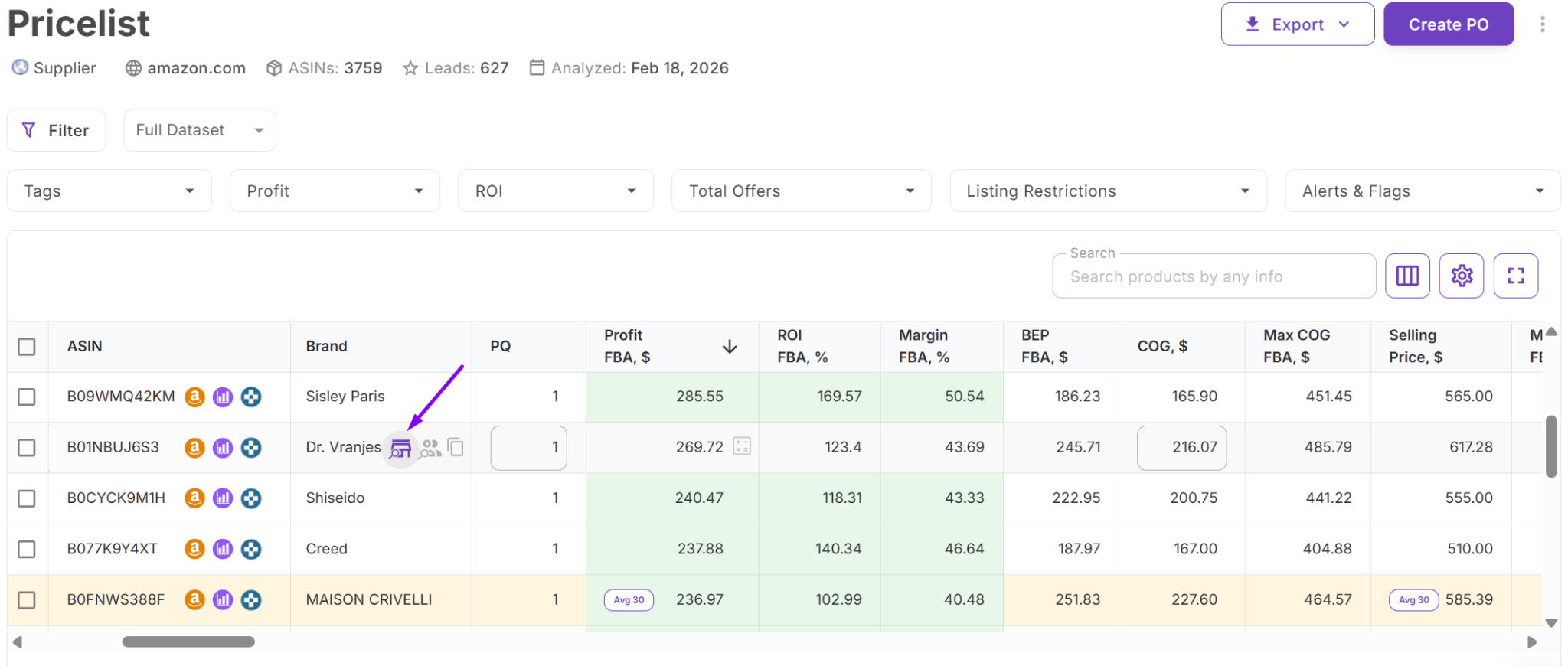
This integration allows you to move from product research to brand evaluation in seconds without switching tools or re-entering data.
What metrics Brand Analyzer shows
Brand Analyzer provides brand-level and product-level metrics that help sellers qualify or reject a brand based on revenue, competition, pricing behavior, and quality signals.
Revenue and scale metrics
These metrics show whether the brand is large enough and profitable enough to support wholesale sourcing:
- Estimated monthly revenue (brand portfolio total)
- Total number of products (ASIN count)
- Average Buy Box price
- Average FBA fee
- Analyzed date
- Marketplace
Sellers use these metrics to determine if the catalog has enough depth and revenue distribution to support scalable sourcing rather than relying on one or two strong listings.
Competition risk indicators
These metrics reveal whether competition is manageable or structurally aggressive:
- Amazon Buy Box share (30, 90, 180 days in export)
- Amazon in-stock rate
- Average FBA seller count
- Total seller count per listing
- FBA seller count
- FBM seller count
- In Buy Box indicator
- Out-of-stock indicator
An Amazon Buy Box share above 30% often signals strong Amazon Retail dominance. An average seller count above 15 suggests high competition and potential margin compression.
Demand and performance signals
These metrics show how products perform over time:
- BSR
- Average BSR (30, 90, 180 days)
- Sales rank drops (30, 90, 180 days)
- Monthly sales
- Estimated monthly revenue (per ASIN)
- Price dynamics
- Launch date
- Variation status
- Parent ASIN
Sellers analyze these signals to identify stable demand, pricing consistency, and listing maturity.
Brand quality and customer trust
These metrics reflect brand reputation and buyer confidence:
- Average rating
- Total review count
- Rating (per ASIN)
- Review count (per ASIN)
Brands with strong ratings and meaningful review volume tend to maintain healthier pricing and Buy Box stability.
Product identification data
The export file also includes structured product identifiers:
- ASIN
- Image
- Link
- Title
- Brand
- Category
- Rank
- Buy Box price
- Average Buy Box price (30, 90, 180 days)
These fields allow deeper filtering, sorting, and bulk analysis in Excel.
How to Use Brand Analyzer Step by Step
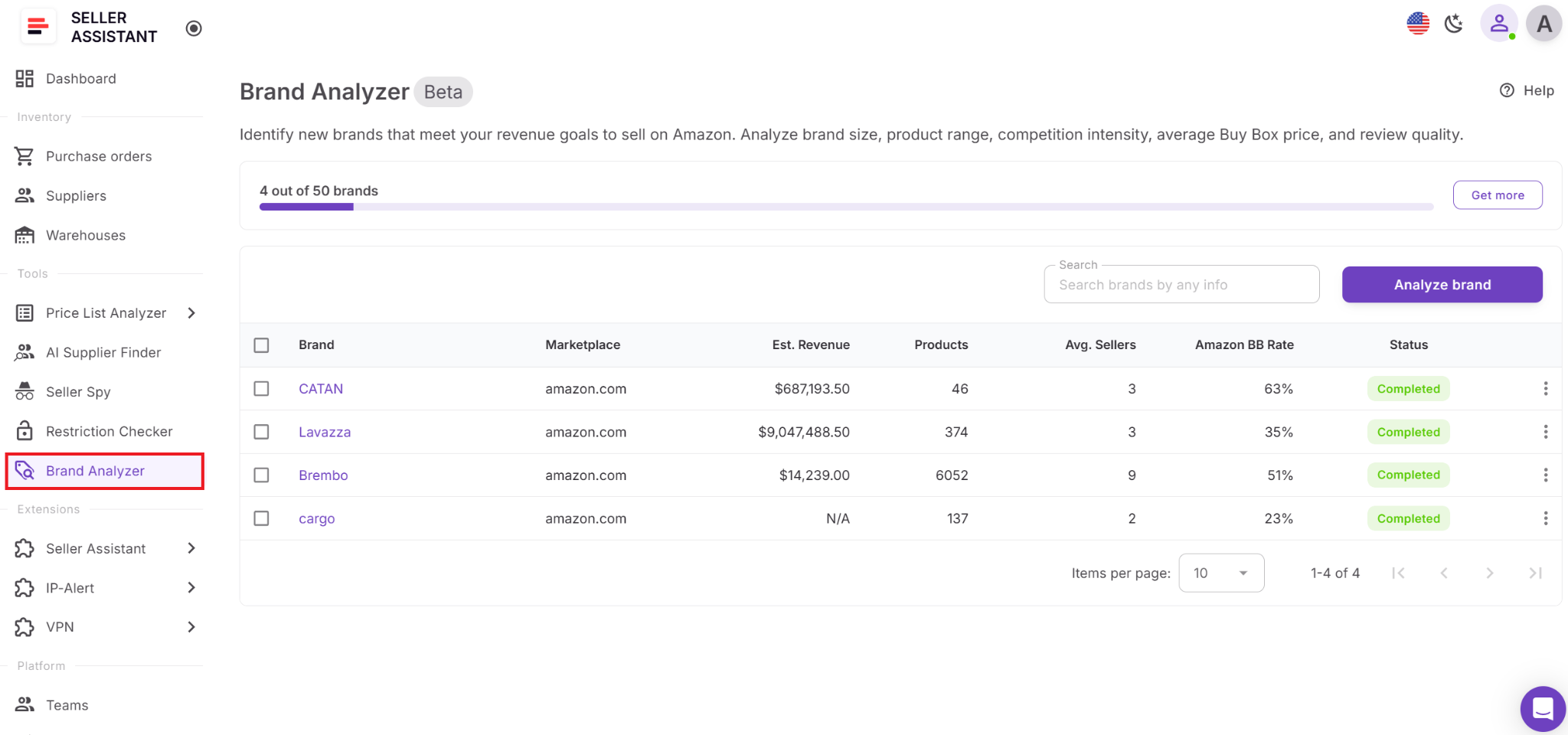
Step 1. Open Brand Analyzer
Log in to your Seller Assistant account, go to Tools, open Brand Analyzer, and click the Analyze Brand button.
Step 2. Start a new brand analysis
Choose your marketplace, enter the brand name, and click Add brand to launch the scan.
Step 3. Wait for the analysis to finish
Brand Analyzer needs a short time to collect and process Amazon data. When the scan is complete, the brand appears in your list with summary metrics.
Step 4. Open the Brand Details Page
Click the brand name to open the Brand Details Page. Review brand-level metrics and the full product list inside the platform.
Step 5. Review products on-platform
Use the table to:
- search by keyword
- sort available columns
- navigate paginated results
Search and sorting affect only the on-screen table.

Step 6. Download the Excel report
Click Download Excel to export the complete product list for that brand. The export always includes all brand ASINs, even if you searched or sorted on-screen.

Step 7. Take next actions
From the Brand Details Page, you can:
- click View on Amazon to open the brand on Amazon
- click Find supplier to launch AI Supplier Finder and start supplier research by brand
- delete the brand if you no longer need it.

FAQ
What is the difference between Brand Analyzer and Price List Analyzer?
Brand Analyzer evaluates an entire brand before you contact suppliers, focusing on catalog size, competition, and revenue potential. Price List Analyzer works after you receive a supplier file and helps you filter profitable ASINs in bulk.
How long does Brand Analyzer take to analyze a brand?
The analysis usually takes a short time, depending on catalog size and marketplace data volume. Once completed, all brand-level and product-level metrics become available in your dashboard.
Does on-screen filtering affect the Excel export?
No, search and sorting inside the Brand Details Page only change the visible table. The Excel export always includes the complete list of brand ASINs.
How do I know if a brand is too competitive to resell?
Check Amazon Buy Box share and average seller count across the catalog. High Amazon presence or an average of 15+ sellers per listing often signals tighter margins and stronger competition.
Can I use Brand Analyzer for online arbitrage or dropshipping?
Yes, Brand Analyzer works for wholesale, online arbitrage, and dropshipping models. It helps evaluate brand demand and competition before investing time in sourcing or supplier outreach.
Final Thoughts
Profitable Amazon wholesale sourcing starts long before you upload a price list or place a purchase order – it starts with brand qualification. Seller Assistant’s Brand Analyzer gives you a structured way to evaluate demand, competition, catalog depth, and reseller viability in minutes instead of hours. By filtering brands first, you avoid gated listings, Amazon-dominated catalogs, and oversaturated markets.
As part of Seller Assistant's connected wholesale workflow, Brand Analyzer helps you move from brand validation to supplier search, bulk analysis, and purchase orders without breaking your process. Use it to build a cleaner sourcing pipeline and scale with data, not guesswork.
Seller Assistant automates and connects every stage of your Amazon wholesale and arbitrage workflow. It brings together in one platform: workflow management tools – Purchase Orders Module, Supplier Database, Warehouse Database, bulk research & sourcing tools – Price List Analyzer, Bulk Restriction Checker, AI Supplier Finder, Brand Analyzer, Seller Spy, Chrome extensions – Seller Assistant Browser Extension, IP-Alert Extension, and built-in VPN by Seller Assistant, and integrations & team access features – seamless API connectivity, integrations with Zapier, Airtable, and Make, and Virtual Assistant Accounts.