.svg)
What Is Breakeven Price? How to Calculate It in Bulk
Download Amazon Seller Guide
This guide will help you get started, understand the basics of Amazon selling, and explain in simple words how it all works.

Selling on Amazon without knowing your breakeven price is a fast way to lose money – even when your products sell well.
Fees stack up quickly: referral fees, FBA or FBM costs, storage, shipping, prep, and occasional surcharges. Miss just one, and a “profitable” SKU turns into a loss. That’s why Amazon sellers rely on breakeven price (BEP) as their safety line.
In this post, you’ll learn what Amazon breakeven price is, which fees it includes, and how to calculate it accurately. More importantly, we’ll show how to calculate breakeven prices in bulk using Seller Assistant's Price List Analyzer, so you can evaluate wholesale lists, OA leads, and dropshipping catalogs at scale – before you buy.
Note. Seller Assistant is an end-to-end Amazon workflow management platform that integrates 10+ wholesale-focused solutions into one connected system. It combines sourcing workflow automation, bulk research and intelligence tools, and integrated Chrome extensions – giving you everything you need to streamline finding deals, managing suppliers, and creating purchase orders.

The platform aggregates: workflow management tools – Purchase Orders Module, Suppliers Database, Warehouses Database to organize, automate, and scale every step of your wholesale and arbitrage operations; bulk research & sourcing tools – Price List Analyzer, Bulk Restriction Checker, Sourcing AI, Brand Analyzer, Seller Spy to evaluate supplier price lists, verify selling eligibility and restrictions, open new brands, and discover winning product ideas from competitors to expand your product catalog; Chrome extensions – Seller Assistant Browser Extension, IP-Alert Extension, and built-in VPN by Seller Assistant to deep-research products, check IP claims and compliance, and access geoblocked supplier sites directly within your browser; and integrations & team access features – seamless API connectivity and integrations with Zapier, Airtable, and Make, plus Virtual Assistant Accounts for secure, scalable team collaboration.
With Seller Assistant, every step of your Amazon wholesale and arbitrage workflow is automated and connected.
What Is Amazon Breakeven Price (BEP)?
Amazon breakeven price (BEP) is the lowest price you can sell a product for on Amazon without losing money. At this price, your total revenue from a sale exactly covers all costs – Amazon fees, product cost, fulfillment, shipping, prep, and other expenses. Anything below BEP means you’re selling at a loss.
It’s important to separate BEP from other pricing benchmarks:
- Breakeven price: covers all costs, profit is $0
- Profit price: any price above BEP where you earn money per unit
- Target ROI price: a price that delivers a specific return (for example, 20% or 30% ROI)
BEP is always SKU-specific, not “per product.” The same ASIN can have different breakeven prices depending on supplier cost, FBA vs FBM, shipping method, size tier, or even prep requirements. That’s why accurate breakeven pricing must be calculated per SKU, not guessed at the product level.
Breakeven Price vs. Profit Price vs. Target ROI Price
Price type | What it means | Profit outcome | How Amazon sellers use it |
Breakeven price (BEP) | The lowest price that covers all costs: product cost, Amazon fees, fulfillment, shipping, prep, and other expenses | $0 profit | Sets your absolute floor price to avoid selling at a loss |
Profit price | Any price above breakeven | Positive profit per unit | Used to earn money while staying competitive |
Target ROI price | A price calculated to achieve a specific return (for example, 20% or 30% ROI) | Predictable, planned profit | Used to meet sourcing rules and decide if a deal is worth buying |
Why Breakeven Price Matters for Amazon Sellers
For Amazon resellers, breakeven price is not theory – it’s a control tool. Wholesale, online arbitrage, and dropshipping all run on tight margins, fast price changes, and heavy fee pressure. Without a clear breakeven price, it’s easy to scale sales while quietly draining cash. BEP shows where profit starts and where losses begin, SKU by SKU.
Protects you from selling at a loss
Amazon fees, fulfillment costs, and shipping add up fast. Breakeven price defines the lowest safe price so you don’t win the Buy Box while losing money on every unit.
Keeps pricing decisions grounded
Market prices change daily. BEP gives you a fixed reference point, so repricing decisions are based on costs, not guesses or competitor moves.
Helps evaluate deals before buying
For wholesale lists, OA leads, and dropshipping catalogs, breakeven price shows instantly which SKUs can’t work – before you invest capital or time.
Prevents margin erosion at scale
When you sell hundreds or thousands of SKUs, small pricing mistakes multiply. BEP protects overall account profitability, not just individual products.
Supports smarter repricing strategies
Breakeven price sets your hard floor. Anything above it is negotiable; anything below it is a red flag. This keeps automated repricing from crossing into loss territory.
What Costs Are Included in Amazon Breakeven Price?
Amazon breakeven price includes every cost directly tied to selling one unit. If a cost is missing, your BEP is wrong. Breakeven price works only when all applicable costs are included per SKU. Skipping even a small fee can turn a “safe” price into a loss once the product sells.
Below are the core cost components Amazon resellers must account for.
Cost type | What it includes | Why it matters for BEP |
Product cost | Supplier price per unit, including discounts and purchase taxes | Sets the base cost of every SKU |
Amazon referral fee | Percentage of the total sales price charged by Amazon | Applies to every sale and directly scales with price |
Fulfillment fees | FBA fulfillment fee based on size tier and weight, or FBM shipping cost paid by the seller | Often the largest per-unit expense |
Inbound shipping and placement fees | Cost to ship inventory to Amazon and any inbound placement service fees | Impacts true landed cost for FBA inventory |
Storage fees | Monthly FBA storage fees and possible aged inventory surcharges | Affects slow-moving or bulky SKUs |
Preparation and labeling costs | Prep center fees, labeling, polybags, packaging materials | Adds hidden per-unit costs many sellers overlook |
Additional Amazon fees | Closing fees, refund administration fees, returns processing fees, low-inventory-level fees, digital services fees | Small fees that can quietly erase profit |
Taxes and adjustments (if applicable) | VAT, DST-related fees, or marketplace-specific charges | Can materially change BEP in certain regions |
Product cost
This is the price you pay your supplier for one unit. For wholesale, it’s the invoice price. For online arbitrage and dropshipping, it’s the retail or supplier cost, including any discounts or taxes paid at purchase.
Amazon referral fee
A percentage of the total sales price charged by Amazon. The rate depends on the product category and is applied to every unit sold, regardless of using FBA or FBM.
Fulfillment fees (FBA or FBM)
- FBA: fulfillment fee based on size tier, weight, and product type
- FBM: shipping cost you pay to deliver the order to the customer
This is often one of the largest cost components in BEP.
Inbound shipping and placement costs
For FBA sellers, this includes shipping inventory to Amazon fulfillment centers and any inbound placement service fees, depending on how shipments are split.
Storage fees
Monthly FBA storage fees apply to inventory stored in Amazon warehouses. Long-term storage or aged inventory surcharges must also be considered for slower-moving SKUs.
Preparation and labeling costs
Prep, labeling, polybags, bubble wrap, or third-party prep center fees all count toward breakeven price if they apply to the SKU.
Additional Amazon fees and adjustments
Depending on the product and account, this may include refund administration fees, closing fees, low-inventory-level fees, returns processing fees, or digital services fees.
Amazon Breakeven Price Formula
Amazon breakeven price is calculated by adding all per-unit costs and finding the minimum selling price where profit equals zero.
At a basic level, the formula looks like this:
Breakeven price = total costs per unit ÷ (1 − referral fee rate)
Where total costs per unit include:
- Product cost
- Fulfillment cost (FBA or FBM)
- Inbound shipping and placement fees
- Storage fees (if applicable)
- Prep and labeling costs
- Any additional Amazon fees tied to the SKU
- The referral fee is calculated as a percentage of the selling price, which is why it’s separated in the formula.
Example: how to calculate Amazon breakeven price
Let’s say you’re selling a standard-size FBA product with the following costs:
- Product cost: $10.00
- FBA fulfillment fee: $4.50
- Inbound shipping and placement fees: $0.80
- Prep and labeling: $0.70
- Storage and other fees: $0.50
Total costs per unit (excluding referral fee):
$10.00 + $4.50 + $0.80 + $0.70 + $0.50 = $16.50
Assume the Amazon referral fee for the category is 15%.
Now apply the formula:
Breakeven price = $16.50 ÷ (1 − 0.15)
Breakeven price = $16.50 ÷ 0.85
Breakeven price = $19.41
This means:
Selling below $19.41 results in a loss
Selling at $19.41 means $0 profit
Any price above $19.41 generates profit.
How to Calculate BEP in Bulk with Price List Analyzer
Manually calculating breakeven price works for one or two SKUs, but it breaks down the moment you start reviewing real supplier lists. Hundreds of products, different fees, and constant price changes make spreadsheets slow and error-prone.
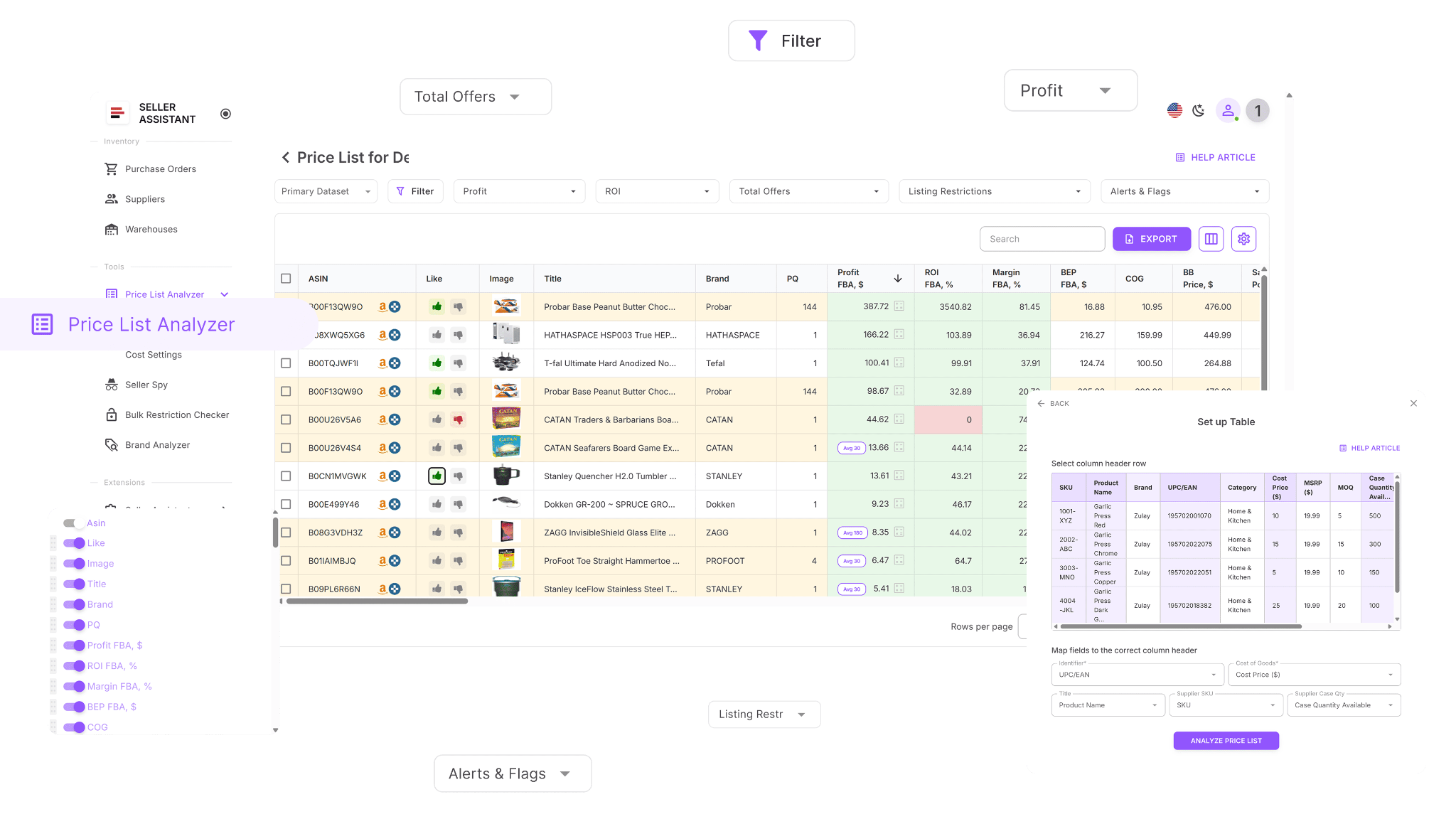
Seller Assistant's Price List Analyzer solves this by automatically calculating all key deal metrics – including breakeven price (BEP) – for every item in your supplier file, so you can evaluate wholesale, OA, and dropshipping opportunities at scale.
How Price List Analyzer works
Built for bulk breakeven analysis
Price List Analyzer is designed for sellers who work with large supplier catalogs. It processes your spreadsheet, matches each item to the correct Amazon ASIN, and calculates BEP alongside profit, ROI, and other deal-critical metrics in one place.
Enhances your supplier data for accurate BEP
Once uploaded, your file is enriched with over 100 data points that directly affect breakeven price, including Amazon fees, fulfillment costs, storage, shipping, prep, and competition data. You can adjust cost inputs and instantly see updated BEP values across the entire list.
Handles large files in minutes
Instead of calculating breakeven price SKU by SKU, Price List Analyzer evaluates thousands of items at once. It highlights products with safe breakeven thresholds and flags SKUs where fees or risks push BEP too high to be viable.
What Price List Analyzer helps you calculate
This Software Makes Amazon FBA Wholesale Selling 10x Easier
With Price List Analyzer, you can:
- Review large supplier catalogs to uncover Amazon products with real profit potential
- Link supplier SKUs to the correct Amazon ASINs automatically, without manual searches
- Instantly spot products that are gated, restricted, or not sellable on your accountMeasure demand using BSR data, sales trends, and estimated monthly sales volume
- Calculate ROI, profit margin, net profit, and breakeven price for each ASIN
- Analyze Buy Box pricing trends over 30, 90, and 180 days
- View a complete Amazon fee breakdown, including referral fees, FBA or FBM costs, storage, prep, and shipping
- Flag high-risk products such as hazmat, meltable, oversized, fragile, or bundled ASINs
- Get alerts for issues like approval required, missing Buy Box, or weak FBA profitability
- Filter products by profit, ROI, demand, competition, and risk indicators
- Save custom table views and filter presets for future price list uploads
- Adjust COGs, shipping, prep, or pack size and see profits recalculate instantly
- Add shared team notes that stay linked to ASINs across multiple uploads
- Tag products by sourcing status, reuse decisions across lists, and filter by workflow stage
Steps to calculate BEP in bulk with Price List Analyzer
Step 1. Upload your supplier file
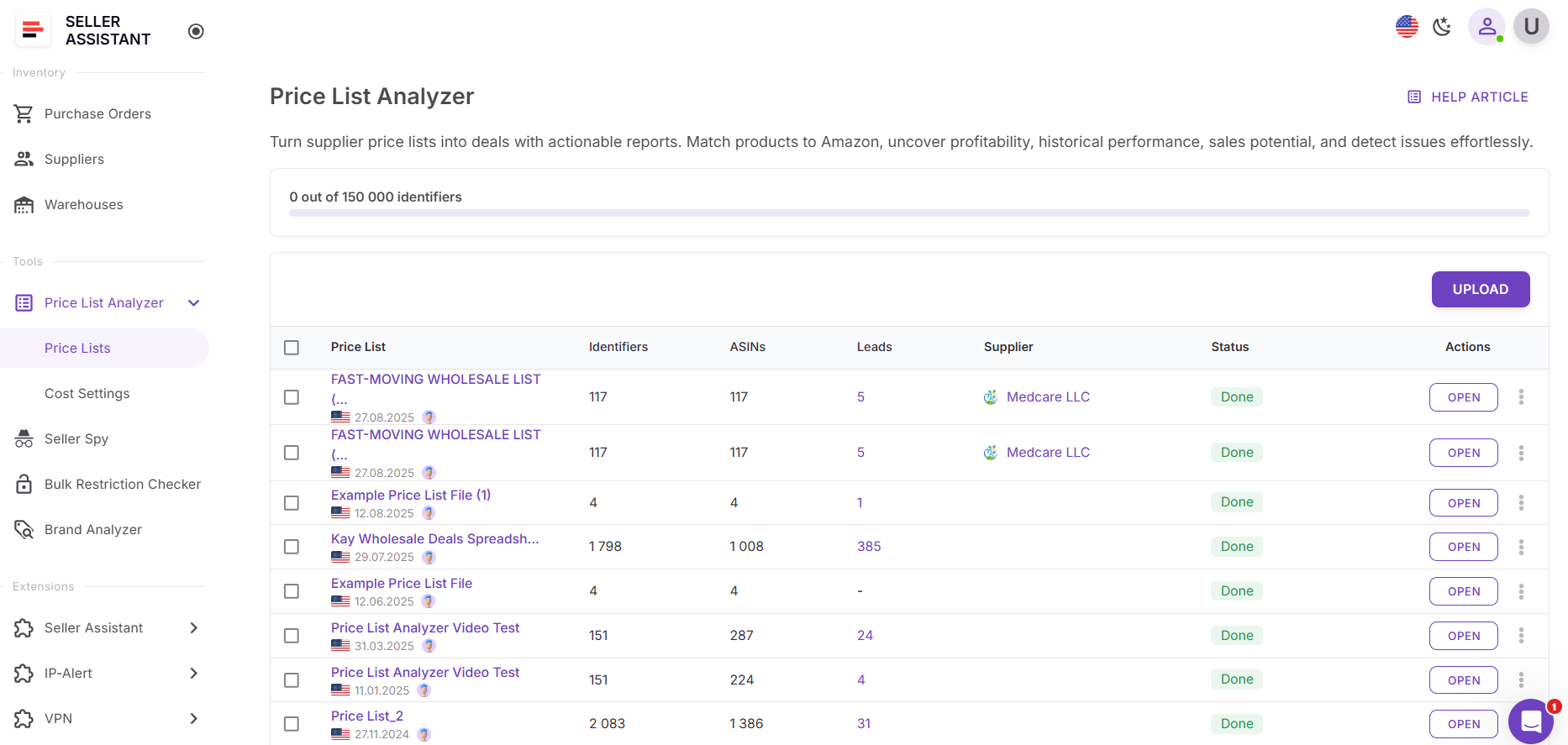
Open Price List Analyzer in your Seller Assistant dashboard and upload your Excel or CSV file with UPC/EANs and cost of goods. The tool links each item to its Amazon ASIN and starts calculating BEP and all related metrics.
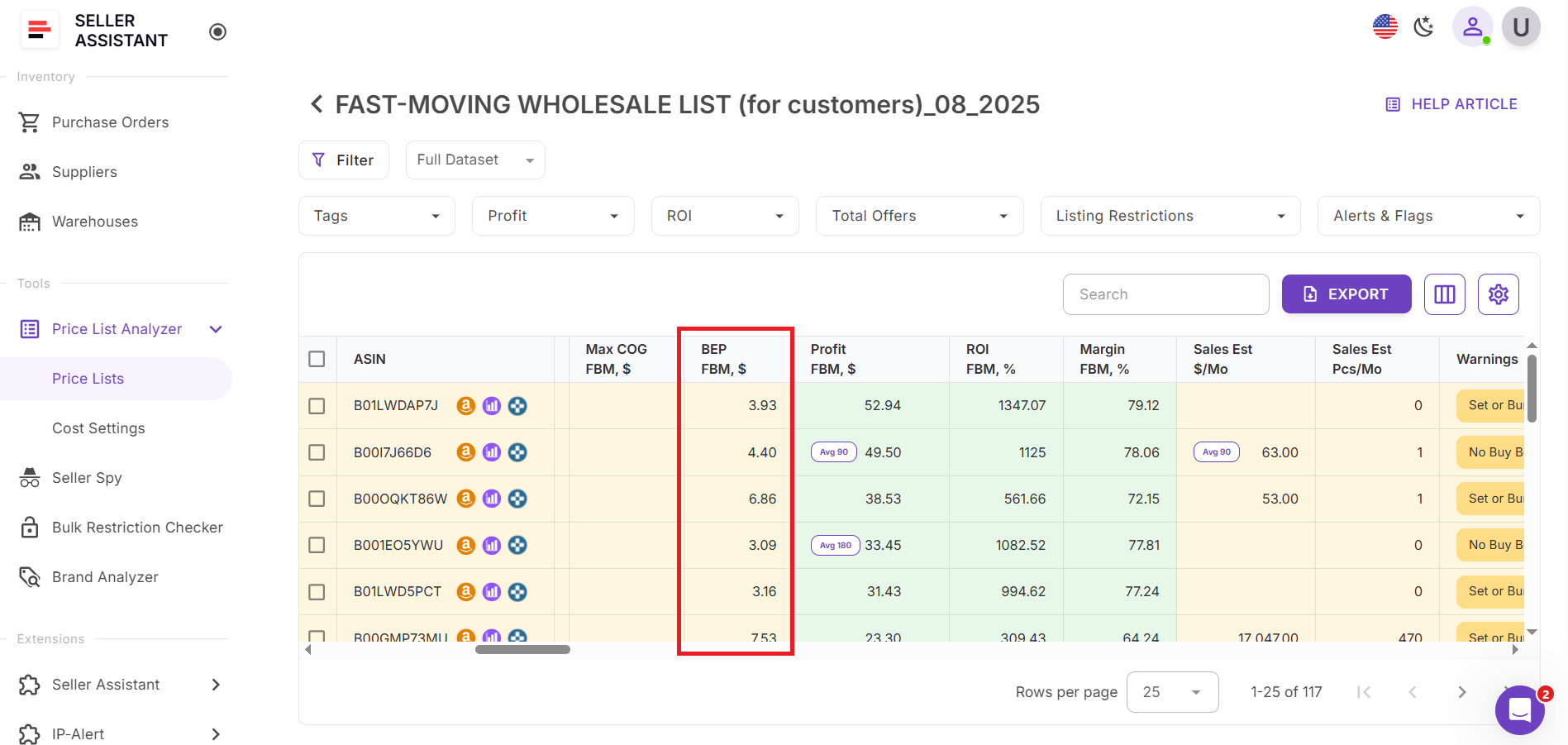
Step 2. Review breakeven price columns
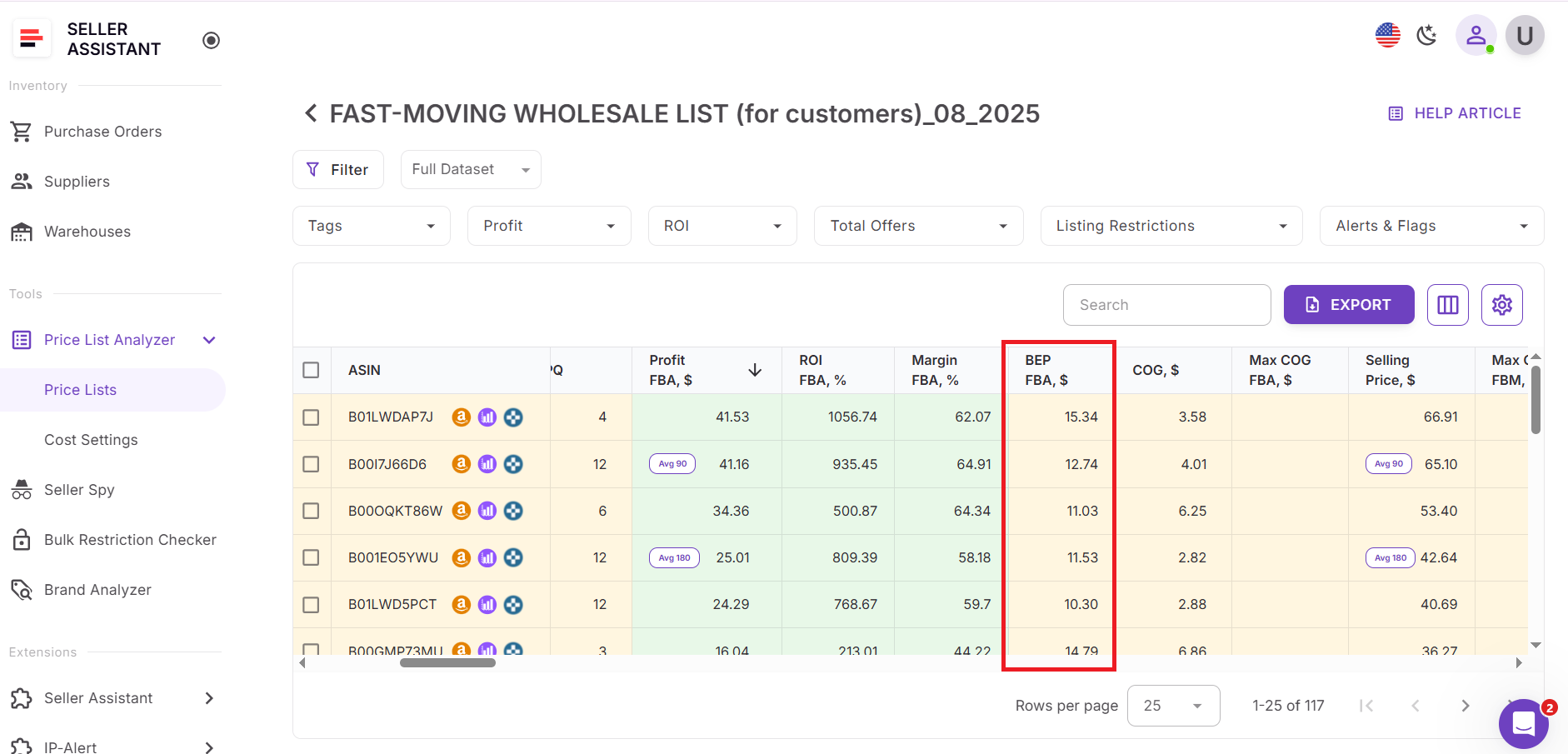
Once processing is complete, locate the breakeven price and profitability columns. Each row shows the minimum price you can sell at without losing money.
Price List Analyzer shows BEP for different fulfillment types:
- FBA
- and FBM
Step 3. Identify SKUs with unsafe BEP
Scan for products where breakeven price is close to or higher than the current Buy Box price. These SKUs are immediate red flags and can be filtered out.
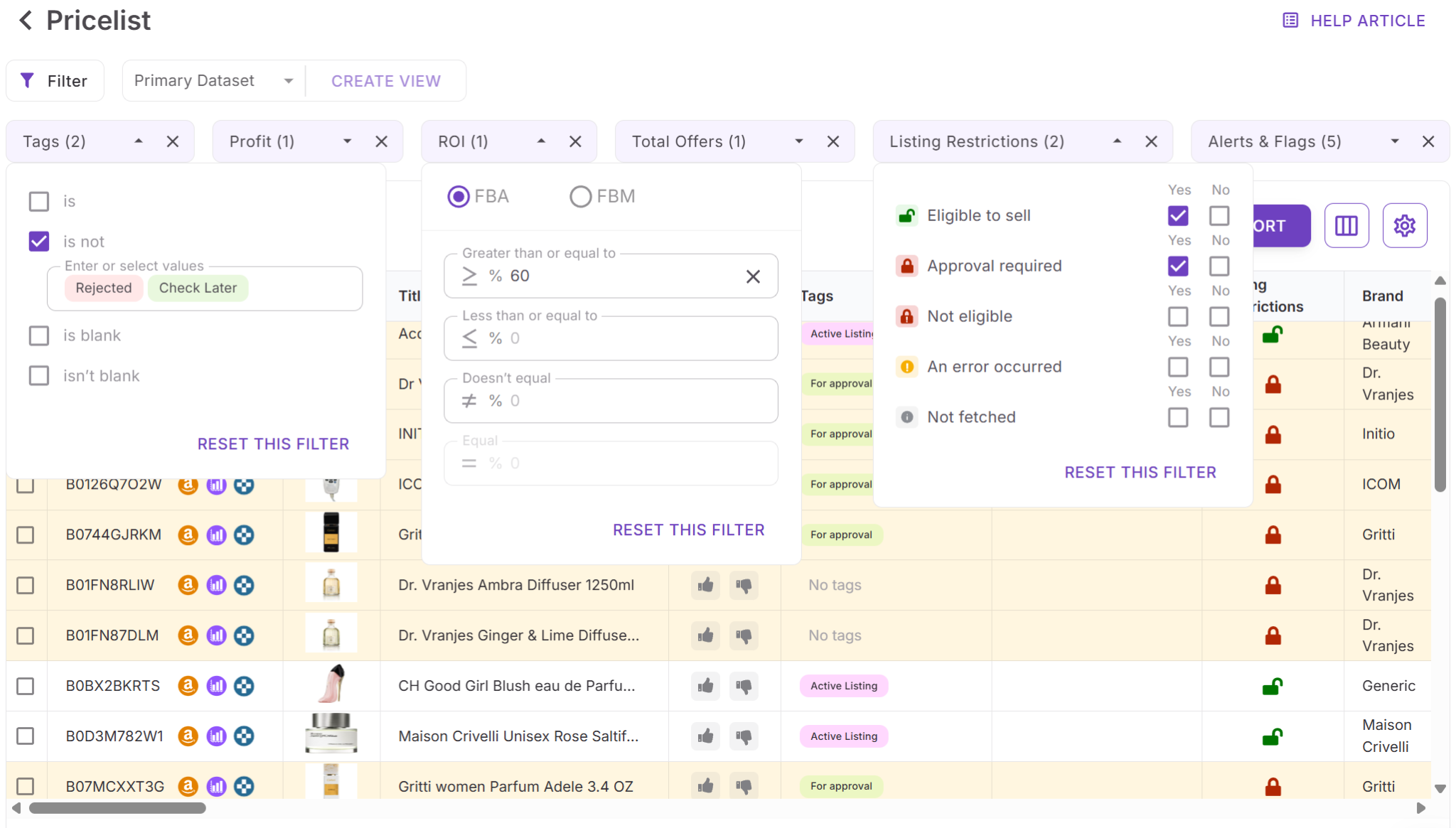
Step 4. Filter by BEP and profitability
Use filters to keep only products with acceptable breakeven thresholds. Combine BEP filters with ROI, sales volume, and competition data to narrow down strong deals.
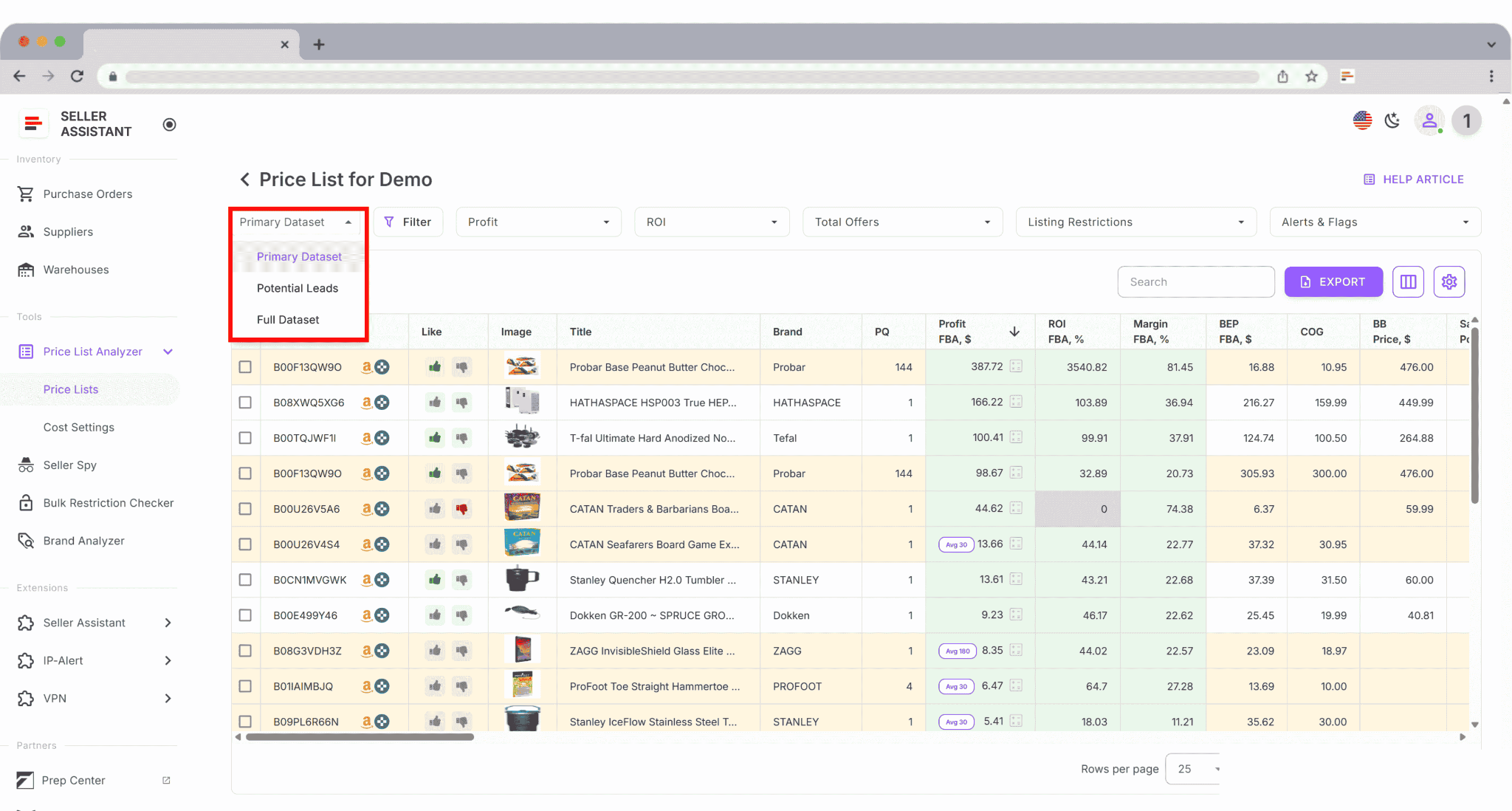
Step 5. Save and reuse your setup
Save custom table views such as “BEP safe,” “Low margin risk,” or “Buy list.” These layouts can be reused for future supplier uploads to speed up sourcing decisions.
Common Breakeven Price Mistakes Amazon Sellers Make
Most breakeven price mistakes don’t come from bad math – they come from missing costs, wrong assumptions, or treating BEP as a rough estimate. These errors are especially dangerous for resellers working with thin margins and large SKU counts.
Ignoring smaller Amazon fees
Sellers often include referral and fulfillment fees but forget closing fees, refund administration fees, low-inventory-level fees, returns processing fees, or digital services fees. Individually they look small, but together they can push a SKU below breakeven.
Treating breakeven price as static
Amazon fees, storage rates, and Buy Box prices change. A breakeven price calculated once and never updated quickly becomes inaccurate, especially for long-term or slow-moving inventory.
Calculating BEP per product instead of per SKU
The same ASIN can have different costs based on supplier price, prep method, shipment type, or fulfillment option. Using one breakeven price for all variations hides real losses.
Forgetting inbound shipping and prep costs
Inbound shipping, placement fees, labeling, and prep are often estimated loosely or skipped entirely. These costs directly raise BEP and are common reasons “profitable” deals fail.
Using average fees instead of real fees
Relying on average FBA fees or outdated calculators ignores size-tier changes, HazMat status, or apparel vs non-apparel differences. BEP must be based on the actual fees for that SKU.
Letting repricers go below breakeven
Automated repricing without a hard BEP floor can win the Buy Box at a loss. Sellers notice the problem only after margins disappear at scale.
Confusing breakeven price with target profit
Breakeven price is not a goal – it’s a boundary. Treating BEP as an acceptable selling price leaves no buffer for refunds, returns, or fee changes.
FAQ
What is the difference between breakeven price and minimum price on Amazon?
Breakeven price is the lowest price where you cover all costs and make $0 profit. A minimum price is a pricing rule you set in a repricer, which should always stay above breakeven to protect margins.
Does breakeven price change over time?
Yes, breakeven price changes when Amazon fees, storage costs, supplier prices, or shipping expenses change. That’s why it should be recalculated regularly, especially for long-term or slow-moving inventory.
Is breakeven price the same for FBA and FBM?
No, FBA and FBM have different fulfillment and shipping costs, which directly affect breakeven price. The same ASIN can have two very different BEP values depending on the fulfillment method.
Can I sell below breakeven price on purpose?
Some sellers do this temporarily to clear inventory or improve account metrics. However, doing it without knowing your exact BEP can lead to uncontrolled losses at scale.
How do I calculate breakeven price for hundreds of SKUs at once?
Manual spreadsheets don’t scale well for large supplier lists. Tools like Seller Assistant’s Price List Analyzer calculate breakeven price automatically for every SKU in bulk, using real Amazon fees and costs.
Final Thoughts
Amazon breakeven price is the foundation of every smart pricing decision. When you know your BEP, you know exactly where profit begins and where losses start – per SKU, not in theory. This matters even more for resellers working with large catalogs, thin margins, and fast-moving prices.
Manually calculating breakeven price doesn’t scale, and small mistakes multiply quickly. Calculating BEP in bulk with Seller Assistant's Price List Analyzer lets you evaluate deals faster, price with confidence, and avoid buying inventory that never had a chance to be profitable. Seller Assistant automates and connects every stage of your Amazon wholesale and arbitrage workflow. It brings together in one platform: workflow management tools – Purchase Orders Module, Supplier Database, Warehouse Database, bulk research & sourcing tools – Price List Analyzer, Bulk Restriction Checker, Sourcing AI, Brand Analyzer, Seller Spy, Chrome extensions – Seller Assistant Browser Extension, IP-Alert Extension, and built-in VPN by Seller Assistant, and integrations & team access features – seamless API connectivity, integrations with Zapier, Airtable, and Make, and Virtual Assistant Accounts.