



Amazon deal research gets messy fast when you’re working with supplier price lists that contain thousands of SKUs. Manually adjusting fees, shipping, VAT, and Buy Box assumptions for every file wastes time and often produces misleading profit numbers. That’s where preconfigured settings make a real difference.
By locking in your cost logic, pricing assumptions, and risk thresholds upfront, you can analyze bulk supplier lists faster and with far more consistency.
In this post, we’ll break down how preconfigured settings inside Seller Assistant’s Price List Analyzer simplify Amazon deal research – helping wholesale sellers, online arbitrage sellers, and dropshippers spot profitable, low-risk deals without redoing the same calculations over and over.
Note. Seller Assistant is an end-to-end Amazon workflow management platform that integrates 10+ wholesale-focused solutions into one connected system. It combines sourcing workflow automation, bulk research and intelligence tools, and integrated Chrome extensions – giving you everything you need to streamline finding deals, managing suppliers, and creating purchase orders.

The platform aggregates: workflow management tools – Purchase Orders Module, Suppliers Database, Warehouses Database to organize, automate, and scale every step of your wholesale and arbitrage operations; bulk research & sourcing tools – Price List Analyzer, Bulk Restriction Checker, Sourcing AI, Brand Analyzer, Seller Spy to evaluate supplier price lists, verify selling eligibility and restrictions, open new brands, and discover winning product ideas from competitors to expand your product catalog; Chrome extensions – Seller Assistant Browser Extension, IP-Alert Extension, and built-in VPN by Seller Assistant to deep-research products, check IP claims and compliance, and access geoblocked supplier sites directly within your browser; and integrations & team access features – seamless API connectivity and integrations with Zapier, Airtable, and Make, plus Virtual Assistant Accounts for secure, scalable team collaboration.
With Seller Assistant, every step of your Amazon wholesale and arbitrage workflow is automated and connected.
What Are Preconfigured Settings in Price List Analyzer?
Preconfigured settings (or cost settings) in Seller Assistant’s Price List Analyzer are preset rules that define how your bulk supplier price lists are analyzed before you review a single product. They lock in your pricing logic, cost assumptions, and calculation methods so every uploaded file is processed using the same framework.
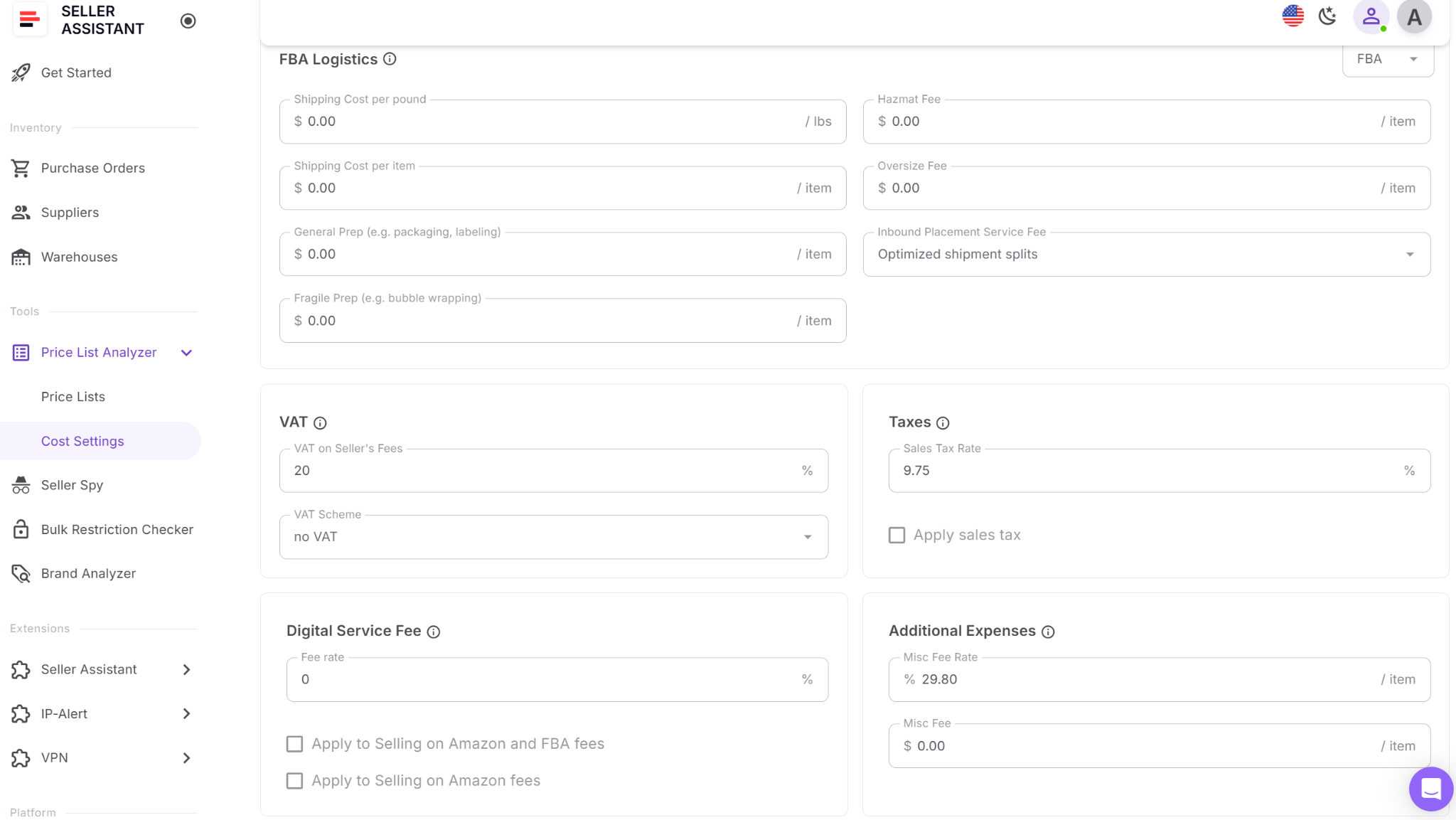
Instead of re-entering shipping costs, prep fees, VAT, or Buy Box assumptions for every list, you set them once and apply them automatically at scale.
These settings work in the background during file processing, enriching each SKU with profit, ROI, fees, and risk data based on your business model. They matter because bulk deal research isn’t about individual guesses – it’s about consistent, repeatable decisions across thousands of products, without hidden cost mismatches or misleading profit signals.
Key preconfigured settings and how they’re used in deal research
Selling price calculation method
Defines whether profit is calculated using the current Buy Box or the 30/90/180-day average Buy Box. This helps sellers avoid false positives caused by short-term price spikes and evaluate deals based on stable pricing.
FBA and FBM shipping cost presets
Weight-based and per-item shipping costs are preset separately for FBA and FBM. This ensures logistics are factored in automatically for every SKU, making bulk profitability filtering accurate from the start.
Prep, HazMat, oversize, and fragile fees
Common “forgotten costs” are applied upfront. Products that look profitable on paper but fail after prep or compliance costs are filtered out early.
VAT, taxes, Digital Service Fee, and misc expenses
Marketplace-specific tax logic and additional expenses are consistently applied, preventing incorrect profit calculations across large files.
Marketplace-specific configurations
Each Amazon marketplace has its own presets, ensuring currency, measurements, and fee structures match local conditions – critical for sellers sourcing internationally.
How Preconfigured Settings Help Research Deals
Preconfigured settings turn Amazon deal research from a repetitive, error-prone task into a structured, repeatable process. Instead of adjusting costs and assumptions for every supplier list, sellers define their deal logic once and apply it automatically across thousands of SKUs. This speeds up analysis, improves consistency, and reduces the risk of approving deals that only look profitable on the surface.
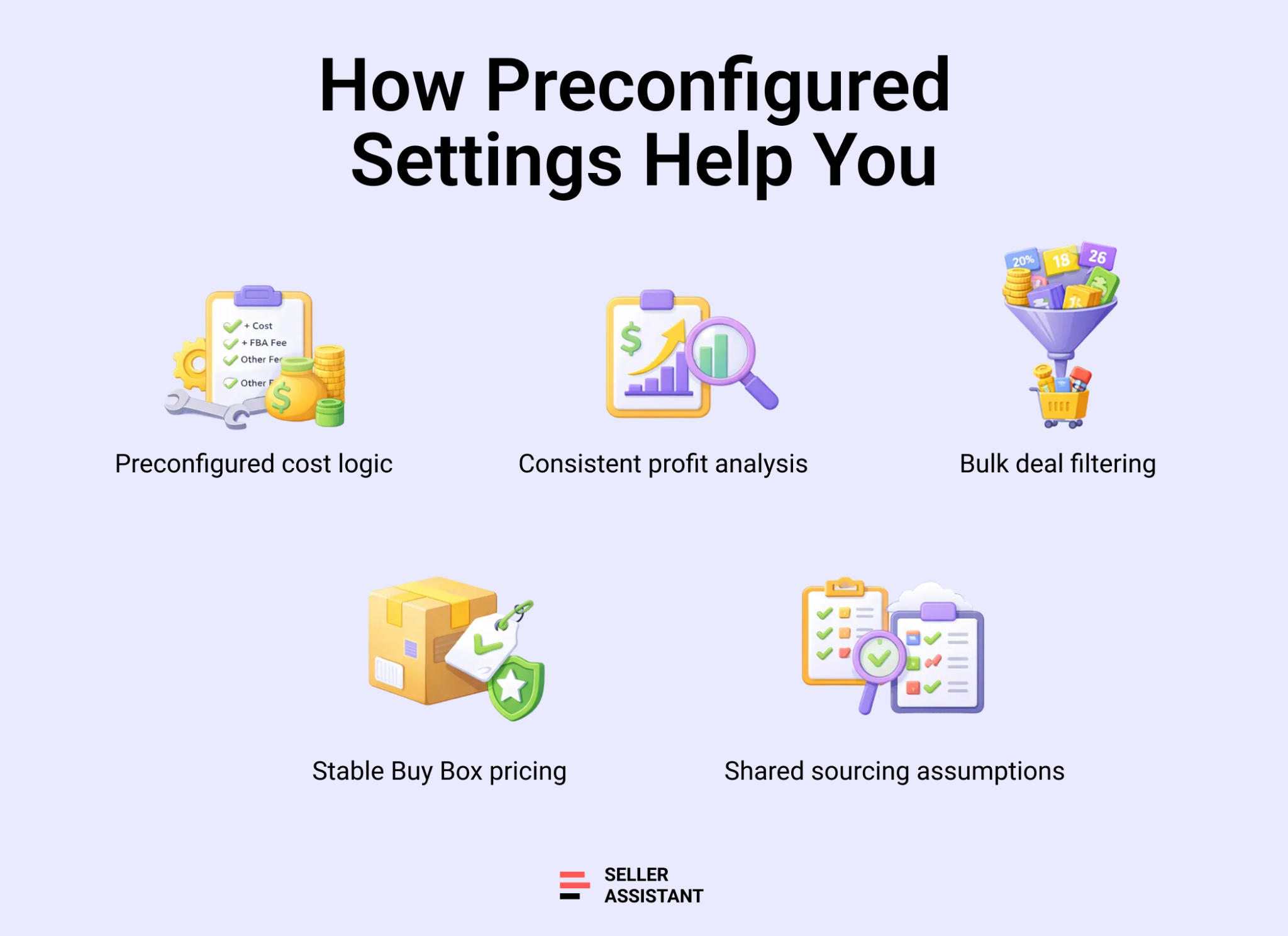
Eliminate repetitive setup work
Cost assumptions, fees, and pricing logic are applied automatically to every uploaded list. Sellers can focus on filtering and decision-making instead of reconfiguring calculators.
Ensure consistent profitability analysis
Every product is evaluated using the same shipping, tax, and fee assumptions. This prevents mismatched profit numbers and makes results comparable across different suppliers and files.
Reduce false positives in bulk research
Using preset Buy Box averaging and full cost logic filters out deals inflated by price spikes or missing expenses before they reach manual review.
Speed up shortlist creation
With accurate profit and risk data calculated upfront, sellers can filter by ROI, margin, sales, and flags to surface viable deals in minutes.
Support team-based workflows
Shared settings and in-table visibility ensure everyone reviews deals using the same assumptions, reducing confusion and rework when multiple team members handle sourcing.
How Preconfigured Settings Work
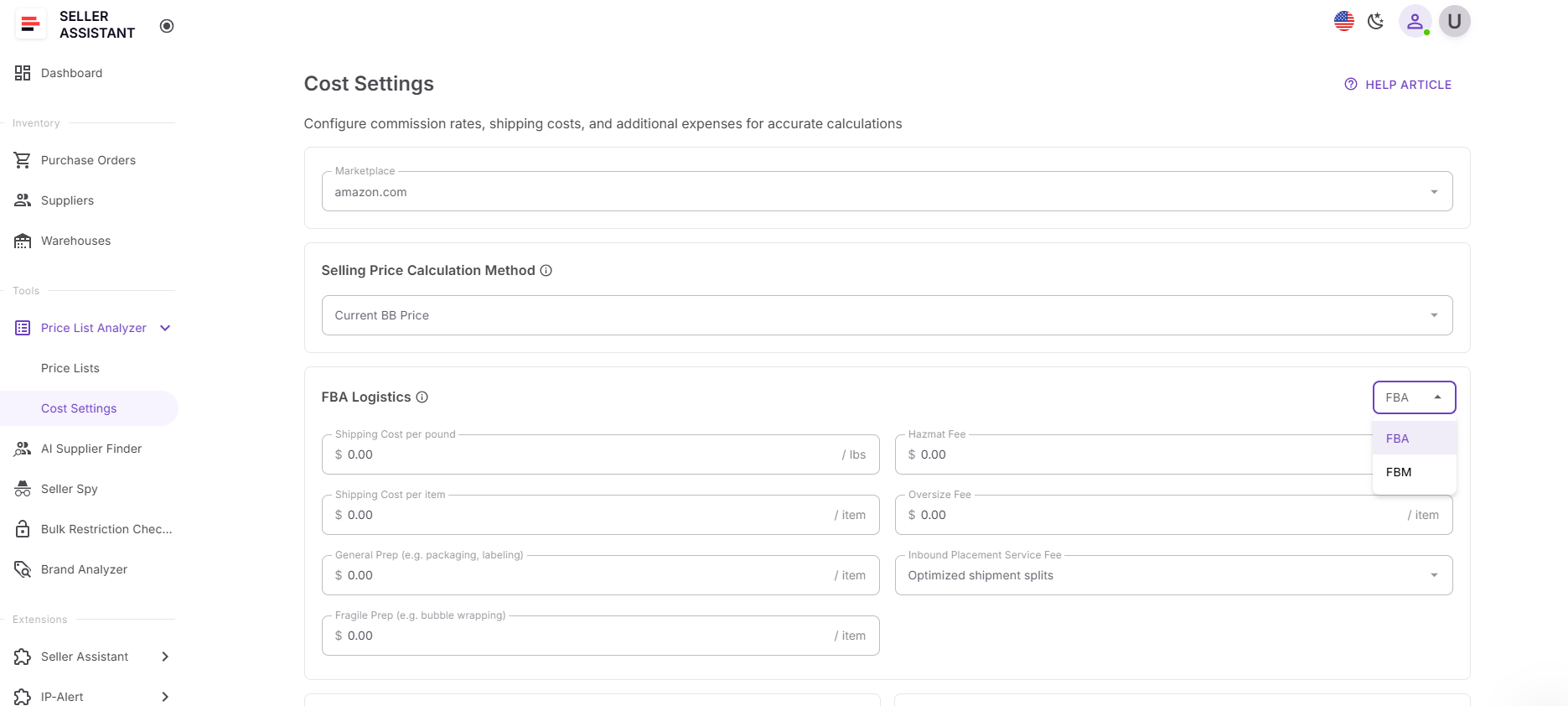
Preconfigured settings in Price List Analyzer are set up once in your Seller Assistant account and automatically applied every time you process a supplier price list. You access them from Tools → Price List Analyzer → Cost settings, where you first select the Amazon marketplace the settings will apply to. Each marketplace has its own configuration, so fees, currency, and measurements always match local Amazon rules.
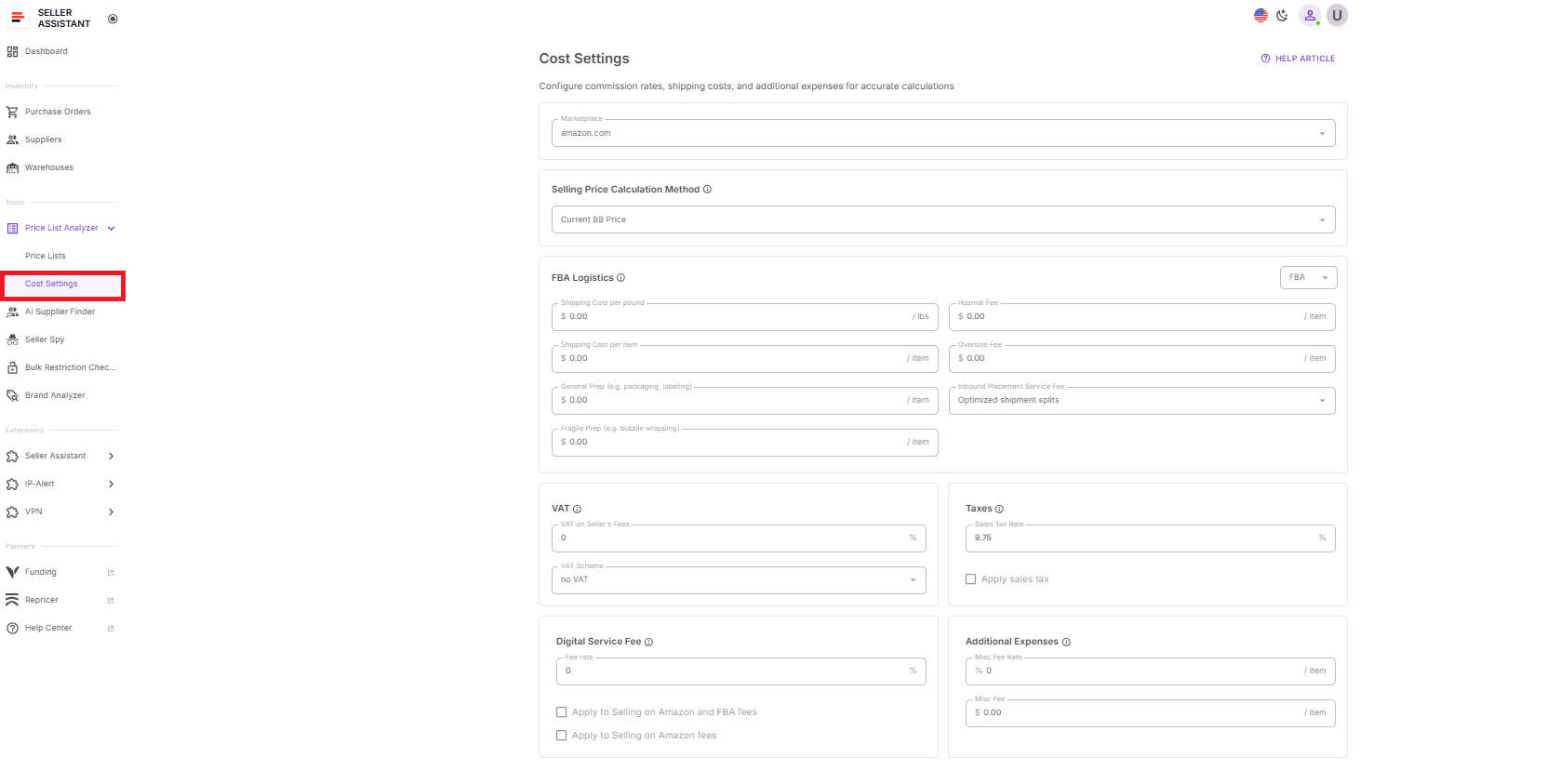
Before analysis starts, you define how profit should be calculated by choosing a selling price calculation method – current Buy Box or a 30, 90, or 180-day average. This pricing logic is then used consistently across the entire file.
Next, you pre-set FBA and FBM logistics costs separately. Shipping is calculated using weight-based and per-item formulas, while prep, fragile handling, HazMat, oversize fees, and inbound placement service options are applied automatically. Measurements and currency adjust based on the selected marketplace, removing manual conversions.
You can also configure VAT, taxes, Digital Service Fee, and additional expenses, including fixed misc fees or percentage-based costs tied to COG. Once a price list is processed, these settings are locked to that file. If you adjust costs later, the table recalculates results instantly and clearly indicates which values were affected – ensuring transparency and accurate deal evaluation at scale.
How to Use Preconfigured Settings in Deal Research
Manually adjusting costs for every supplier file may work for a handful of SKUs, but it quickly falls apart when you’re analyzing real price lists with hundreds or thousands of products. Different shipping rules, prep fees, taxes, and pricing assumptions turn spreadsheets into slow, error-prone tools. Preconfigured cost settings in Seller Assistant’s Price List Analyzer remove that friction by applying your cost logic automatically to every product in bulk.
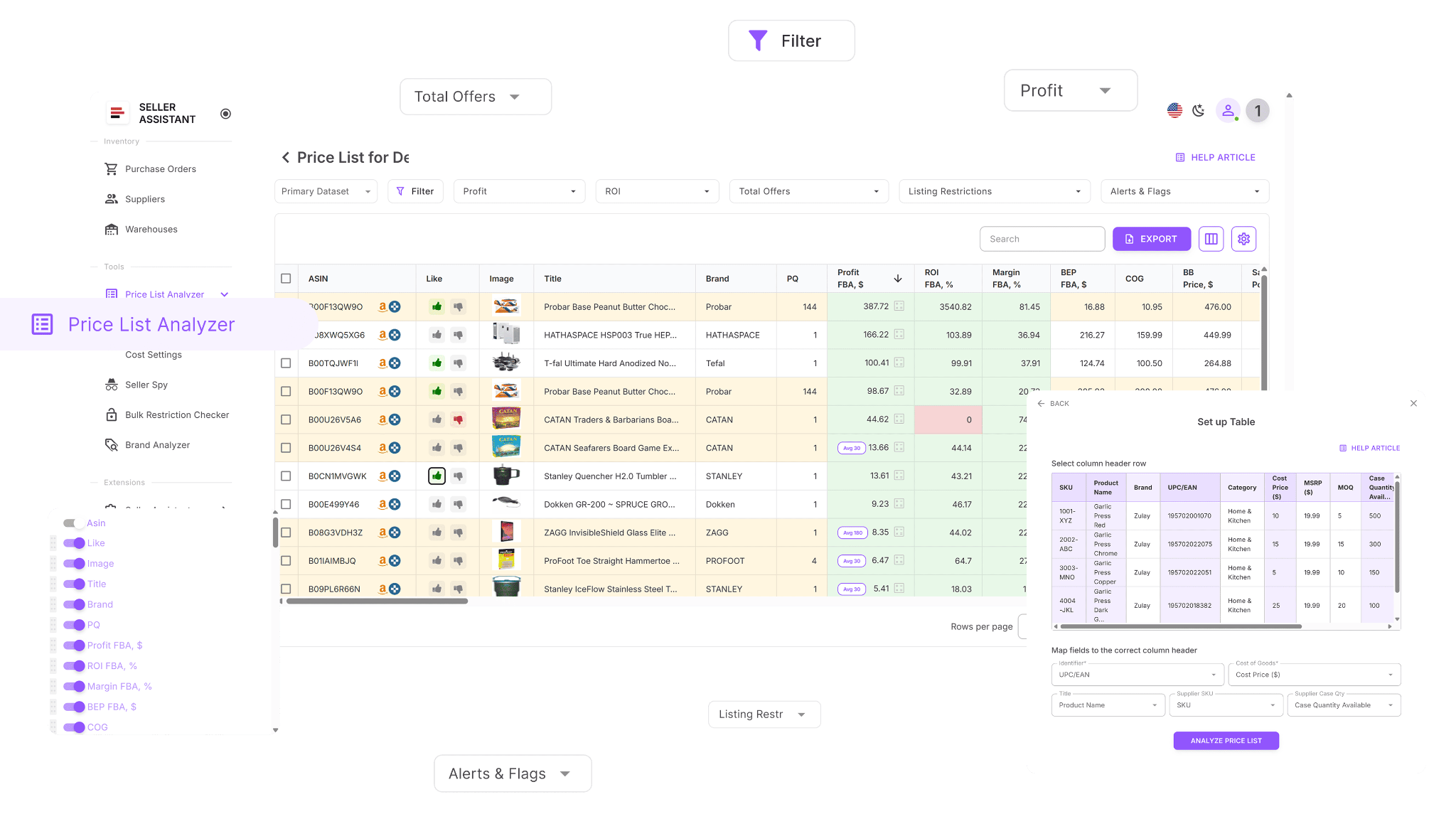
Built for bulk cost analysis
Price List Analyzer is designed for large supplier lists. Once your cost settings are preset, the tool processes your spreadsheet, matches products to Amazon ASINs, and applies the same shipping, prep, tax, and fee assumptions across the entire file.
Enriches supplier data with real costs
Each uploaded list is enhanced with all cost components that affect deal viability, including fulfillment fees, logistics, prep, VAT, Digital Service Fee, and additional expenses. This ensures profit, ROI, and margin are based on complete, realistic inputs – not partial estimates.
Supports fast iteration and validation
If costs change or something looks off, you can adjust cost settings and instantly recalculate results across the full list. This lets you test scenarios, validate assumptions, and filter out unviable deals in minutes instead of reworking calculations SKU by SKU.
How Price List Analyzer helps research deals
This Software Makes Amazon FBA Wholesale Selling 10x Easier
With Price List Analyzer, you can:
- Scan large supplier price lists and surface Amazon products with genuine profit potential
- Automatically match supplier SKUs to the correct Amazon ASINs, removing manual lookup work
- Quickly identify restricted products or items you’re not eligible to sell on your account
- Evaluate demand using BSR, sales trends, and estimated monthly unit sales
- See ROI, profit margin, net profit, and breakeven price calculated for every ASIN
- Review Buy Box pricing behavior using 30-, 90-, and 180-day averages
- Access a full Amazon fee breakdown, including referral fees, FBA or FBM fulfillment, storage, prep, and shipping
- Detect high-risk listings such as HazMat, meltable, oversized, fragile, or bundled products
- Receive alerts for approval requirements, missing Buy Box data, or weak FBA economics
- Filter products by profitability, demand, competition level, and risk signals
- Save custom table layouts and filter presets for repeated use across uploads
- Update COG, shipping, prep costs, or pack quantities and see results recalculate instantly
- Leave shared product notes that remain attached to ASINs across multiple files
- Mark products by sourcing status and reuse past decisions to streamline future reviews.
Steps to use preconfigured settings in deal research
Step 1. Set up cost settings before analysis
Open Tools → Price List Analyzer → Cost settings in your Seller Assistant account. Select the Amazon marketplace and define your selling price calculation method, shipping logic, prep fees, taxes, and additional expenses. These settings will be applied automatically to every product during file processing.
Step 2. Configure cost settings for FBA and FBM
Define shipping costs separately for FBA and FBM in Cost settings. Set weight-based and per-item shipping values, then add prep, labeling, packaging, and other fees for each fulfillment model. This ensures profitability is calculated correctly no matter how you plan to fulfill the product.
Step 3. Upload and process your supplier price list
Upload your Excel or CSV file. Price List Analyzer matches products to Amazon ASINs and applies your preconfigured cost logic automatically during processing.
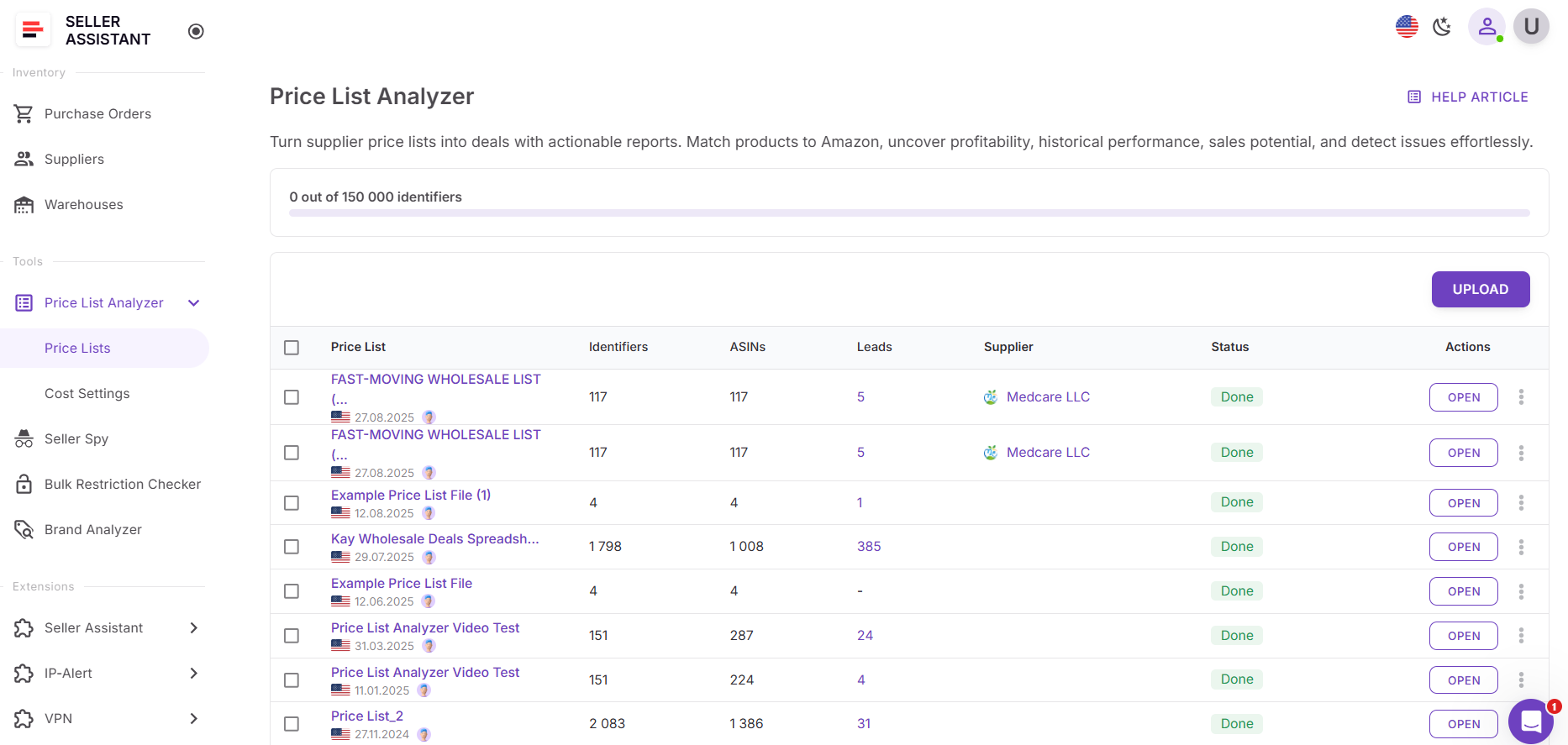
Step 4. Review results by fulfillment model
Once processing is complete, switch between FBA and FBM views in the table to compare profit, ROI, and fees using the preset costs for each model.
Step 5. Adjust cost settings per price list if needed
From the analyzed price lists preview screen, you can change any costs or fees for a specific file (except the selling price calculation method). The tool immediately recalculates all affected metrics for every product.
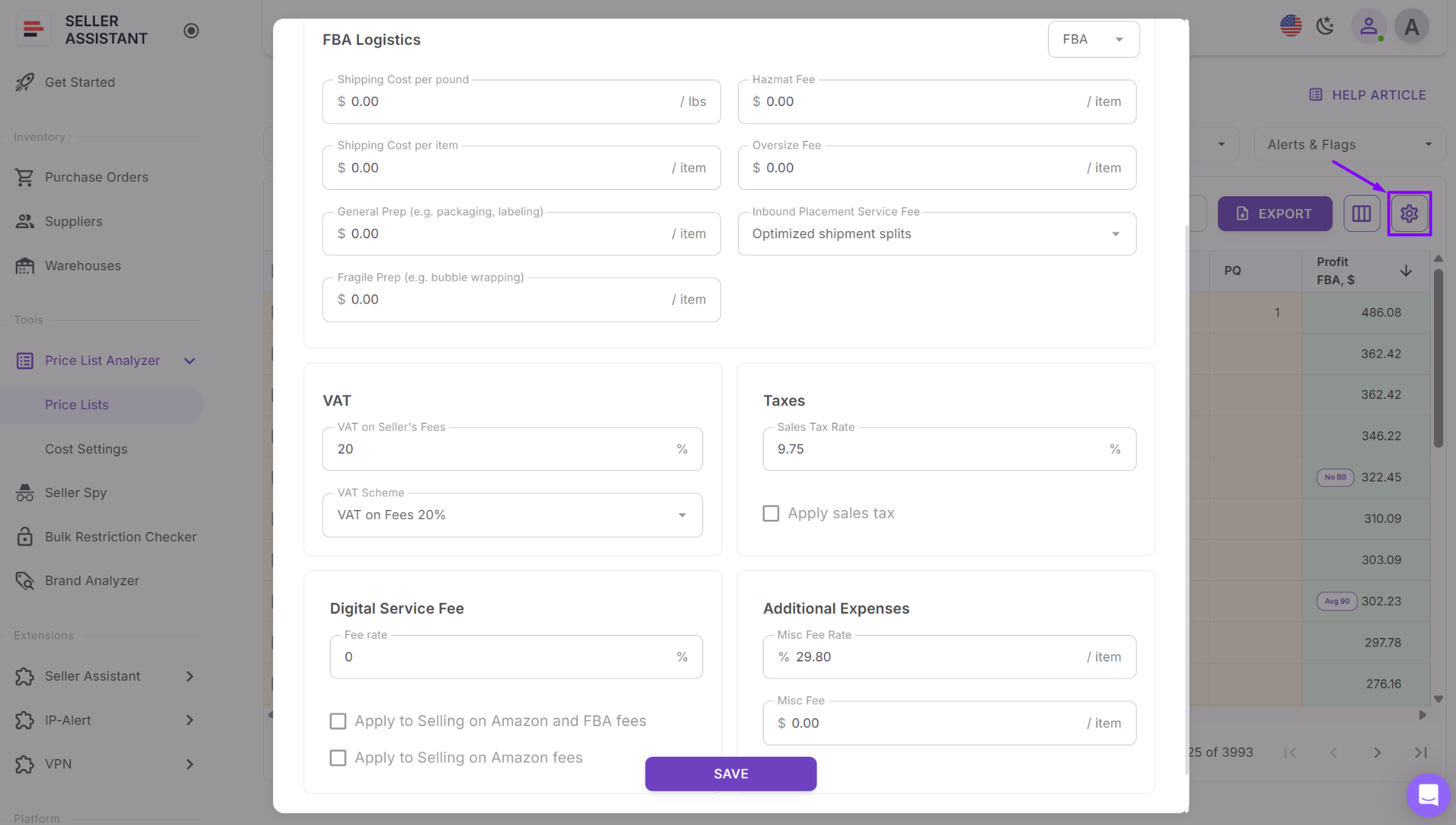
Step 6. Understand recalculation indicators
If you change settings while a file is still processing, updates are applied and a revert icon appears next to values calculated using previous settings. This makes it easy to see which numbers were affected.
FAQ
What are preconfigured settings in Price List Analyzer?
Preconfigured settings are saved cost and pricing rules that define how supplier price lists are analyzed. They automatically apply your shipping, fees, taxes, and pricing logic to every product in a bulk file.
Do preconfigured settings apply to all Amazon marketplaces?
No, cost settings are configured per Amazon marketplace. This ensures fees, currency, and measurements align with local Amazon rules for each region.
Can I use different cost logic for bulk analysis and single-product research?
Yes, Price List Analyzer has its own Cost Settings separate from Extension Settings. This allows sellers to use different assumptions for bulk sourcing versus real-time ASIN checks.
What happens if I change cost settings after uploading a price list?
You can adjust costs and fees after processing, and all profit data will be recalculated instantly. The tool also shows indicators when values were calculated using previous settings for full transparency.
Why are preconfigured settings important for bulk deal research?
They ensure every product is evaluated using the same assumptions, making results consistent and comparable. This helps sellers avoid false positives and make faster, more accurate sourcing decisions at scale.
Final Thoughts
Amazon deal research becomes far more manageable when your assumptions are set before the analysis begins. Preconfigured settings in Price List Analyzer allow sellers to apply consistent cost logic, pricing rules, and fee structures across every supplier list – removing guesswork and repeat work from bulk sourcing. Instead of recalculating the same numbers for each file, you can focus on filtering, validating, and acting on the best opportunities.
For wholesale sellers, online arbitrage sellers, and dropshippers working at scale, this approach leads to faster decisions, fewer false positives, and more reliable profitability insights. By standardizing how deals are evaluated, Seller Assistant’s Price List Analyzer helps turn complex supplier data into clear, actionable sourcing decisions.
Seller Assistant automates and connects every stage of your Amazon wholesale and arbitrage workflow. It brings together in one platform: workflow management tools – Purchase Orders Module, Supplier Database, Warehouse Database, bulk research & sourcing tools – Price List Analyzer, Bulk Restriction Checker, Sourcing AI, Brand Analyzer, Seller Spy, Chrome extensions – Seller Assistant Browser Extension, IP-Alert Extension, and built-in VPN by Seller Assistant, and integrations & team access features – seamless API connectivity, integrations with Zapier, Airtable, and Make, and Virtual Assistant Accounts.

