



Processing supplier price lists with thousands of SKUs is a daily reality for Amazon wholesale, online arbitrage, and dropshipping sellers. The real challenge isn’t getting the data – it’s quickly understanding which products will actually sell and which ones just look good on paper. Estimating demand, sales volume, and revenue at scale is critical before you place a purchase order.
Seller Assistant’s Price List Analyzer is built for this exact task. It automates bulk product matching, calculates realistic sales estimates based on BSR and category data, and ties those estimates to reliable pricing sources. In this guide, we’ll break down how bulk sales estimation works and how to use it to spot high-potential deals faster.
Note. Seller Assistant is an end-to-end Amazon workflow management platform that integrates 10+ wholesale-focused solutions into one connected system. It combines sourcing workflow automation, bulk research and intelligence tools, and integrated Chrome extensions – giving you everything you need to streamline finding deals, managing suppliers, and creating purchase orders.

The platform aggregates: workflow management tools – Purchase Orders Module, Suppliers Database, Warehouses Database to organize, automate, and scale every step of your wholesale and arbitrage operations; bulk research & sourcing tools – Price List Analyzer, Bulk Restriction Checker, Sourcing AI, Brand Analyzer, Seller Spy to evaluate supplier price lists, verify selling eligibility and restrictions, open new brands, and discover winning product ideas from competitors to expand your product catalog; Chrome extensions – Seller Assistant Browser Extension, IP-Alert Extension, and built-in VPN by Seller Assistant to deep-research products, check IP claims and compliance, and access geoblocked supplier sites directly within your browser; and integrations & team access features – seamless API connectivity and integrations with Zapier, Airtable, and Make, plus Virtual Assistant Accounts for secure, scalable team collaboration.
With Seller Assistant, every step of your Amazon wholesale and arbitrage workflow is automated and connected.
What Are Amazon Sales Estimates?
Amazon Sales Estimates are an approximation of how many units a product sells per month and how much revenue it generates. In Seller Assistant, sales estimates are calculated using Best Sellers Rank (BSR) and the product’s category, then translated into two practical metrics: Sales Estimate (pcs/month) and Sales Estimate ($/month). Units show demand. Revenue shows earning potential.
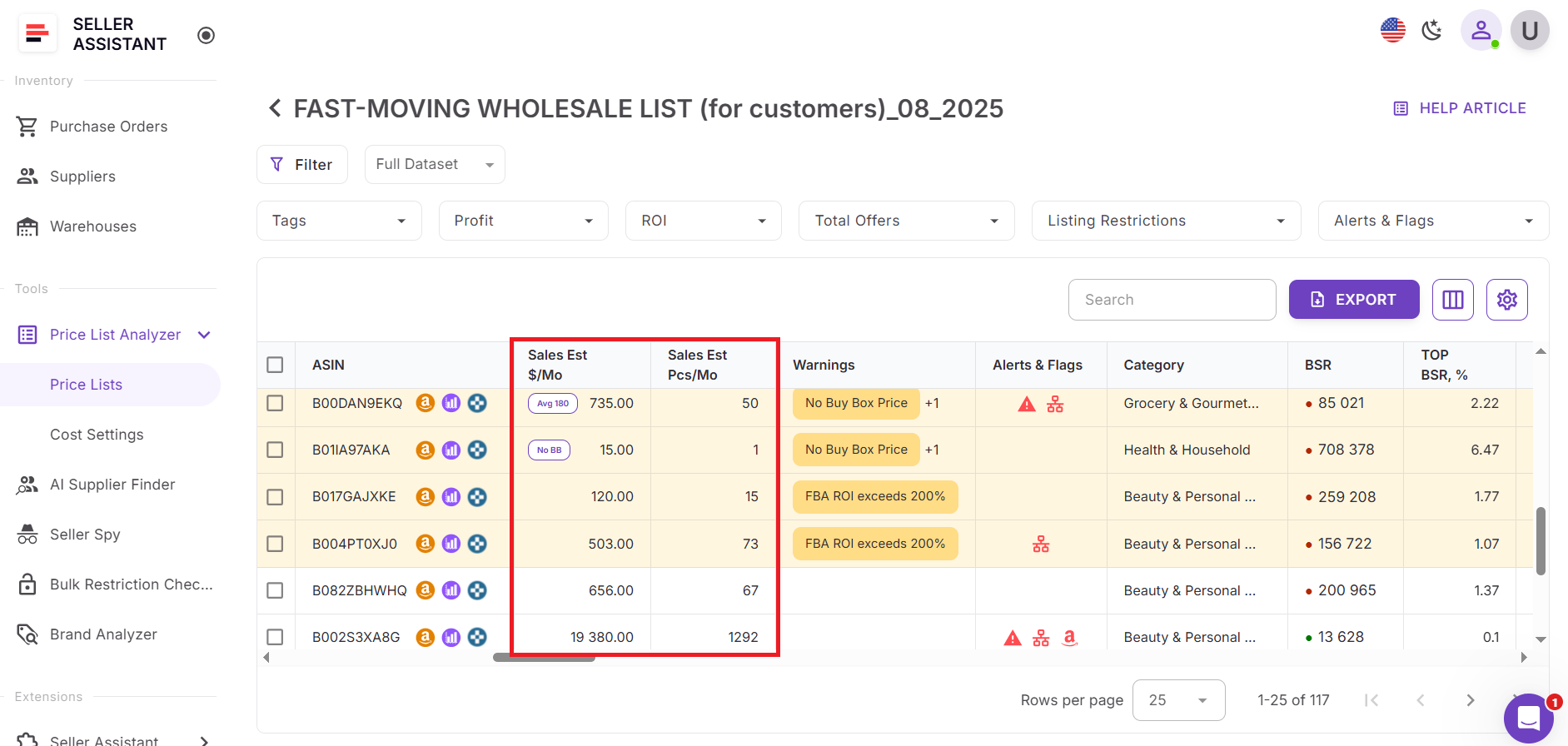
When calculating revenue, Seller Assistant doesn’t rely on a single snapshot price. If a current Buy Box price isn’t available, the system clearly shows which price source is used instead: the lowest FBA/FBM price or the average Buy Box price over 30, 90, or 180 days. This transparency helps sellers avoid inflated projections caused by short-term price spikes.
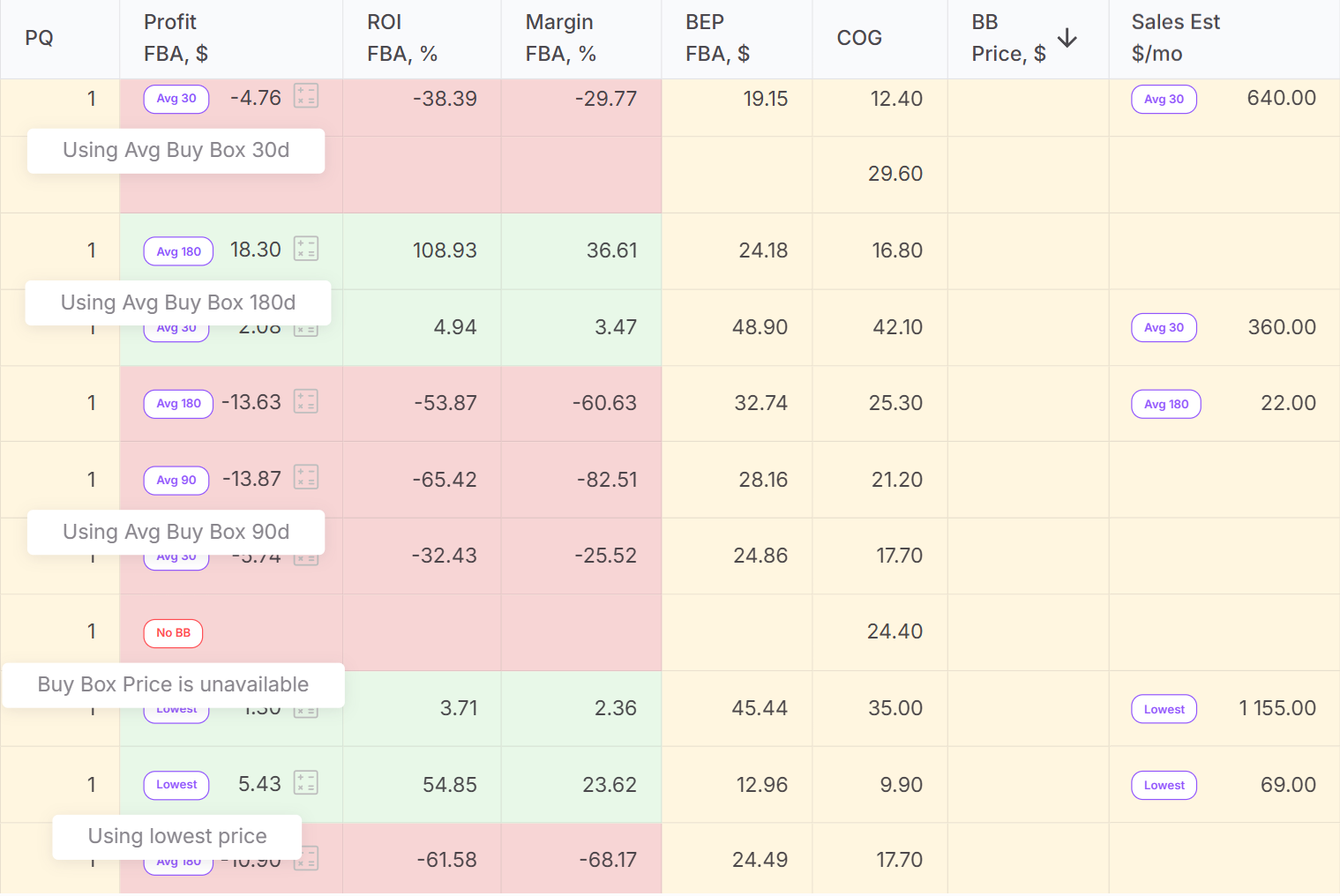
How Sales Estimates work in Seller Assistant
In Seller Assistant, sales estimates work as a shared signal across the entire ecosystem, not as a metric locked inside one report. In Price List Analyzer, sales estimates appear directly in the UI table, where you can sort, filter, and shortlist products based on estimated monthly units or revenue. When the same ASIN shows up in a new supplier price list, its sales estimate is immediately visible again, helping you judge demand without starting research from scratch.
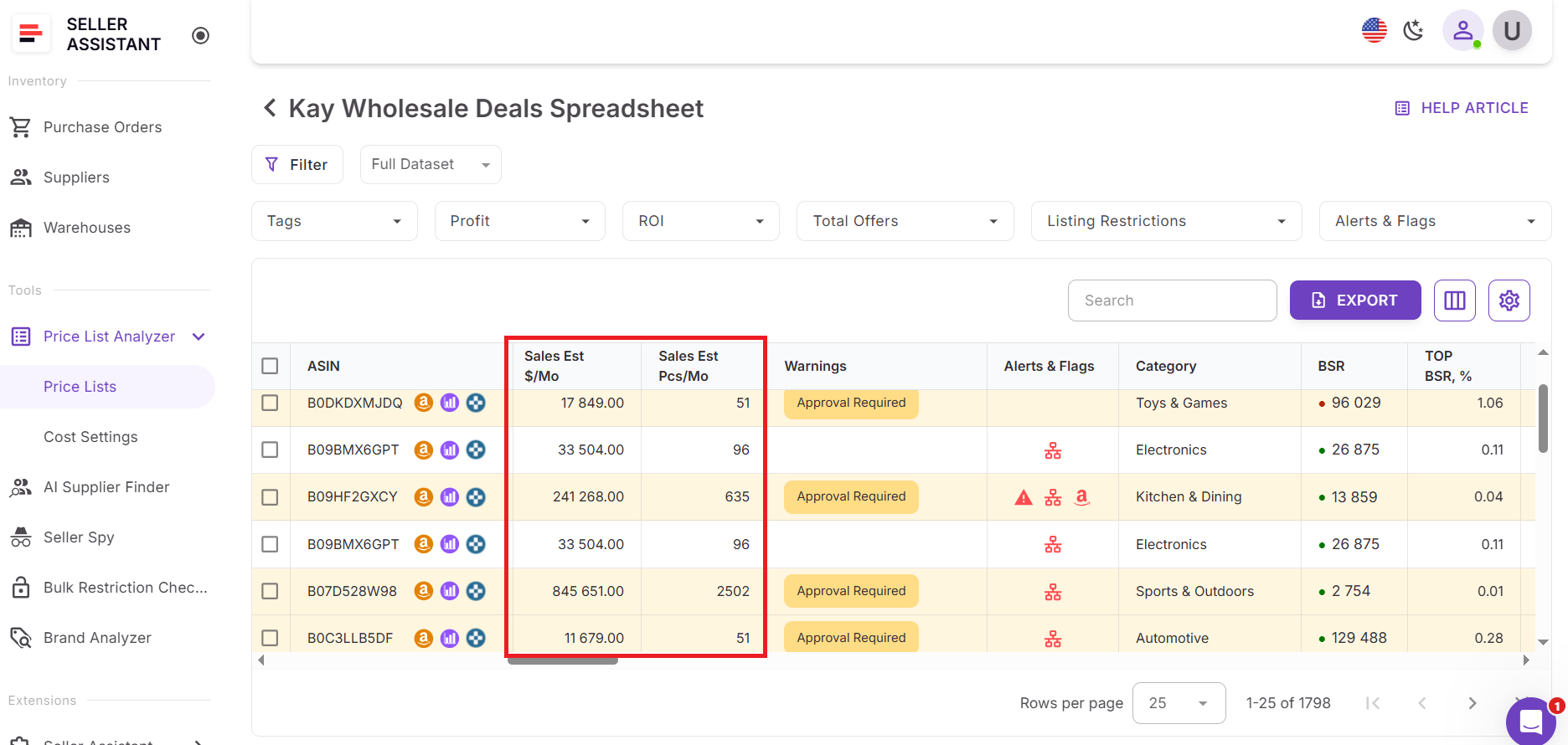
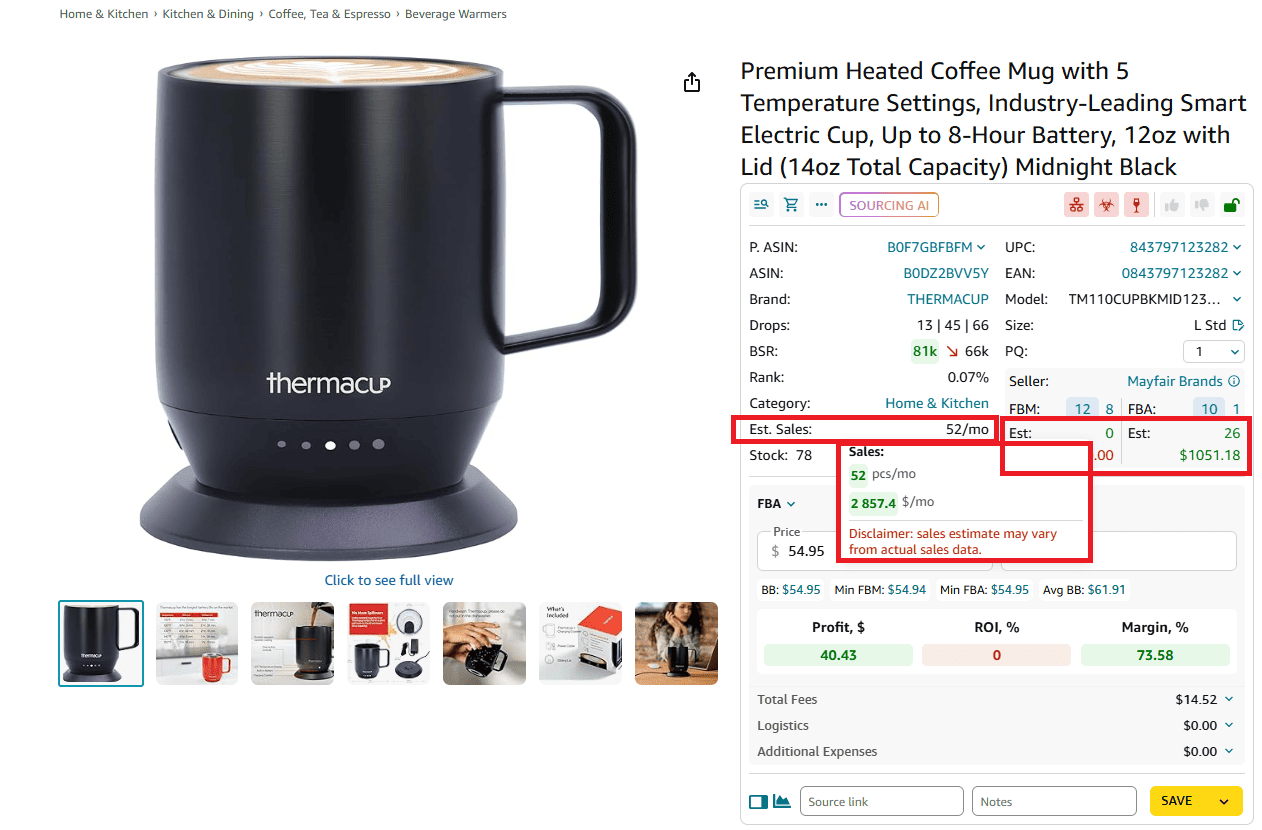
The same sales estimate data is surfaced throughout Seller Assistant tools, including Seller Assistant Extension:
- Product View on the Amazon product pages
- Side Panel View on supplier websites
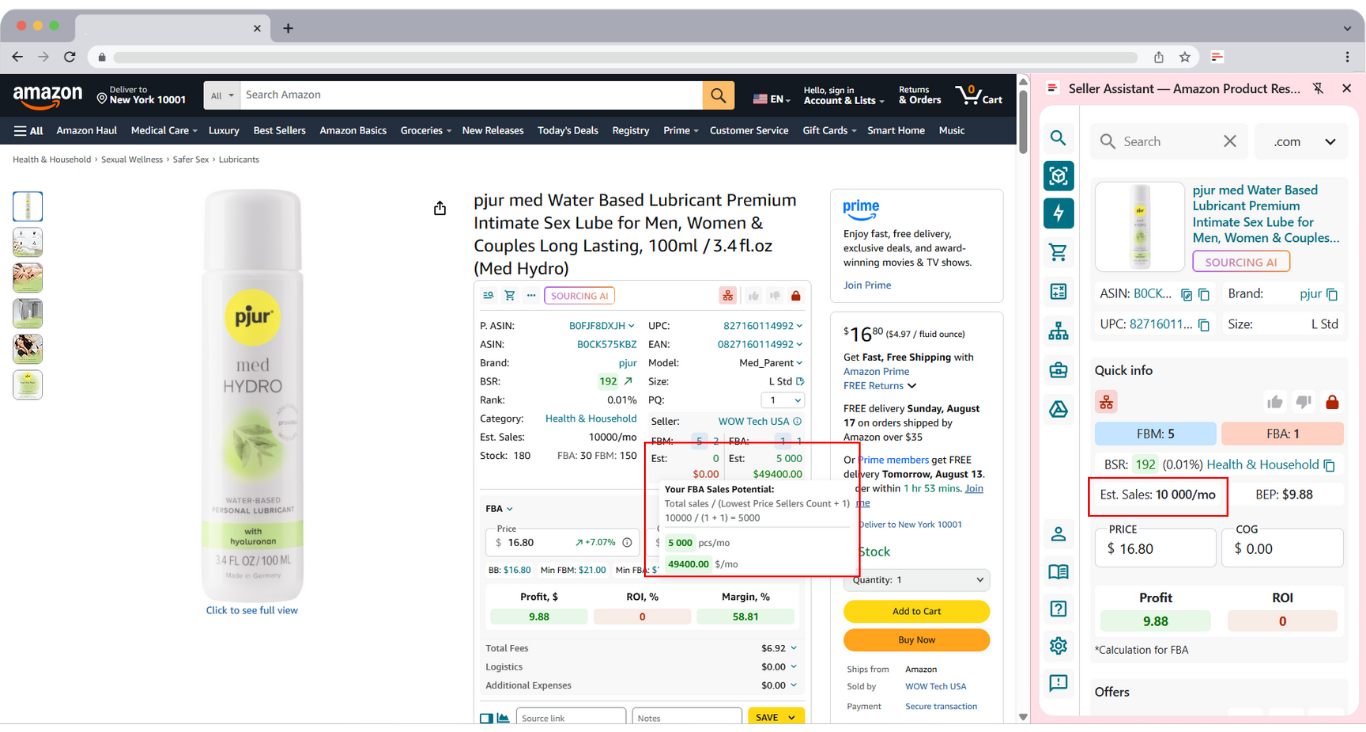
- Storefront Widget on your Amazon competitor storefronts
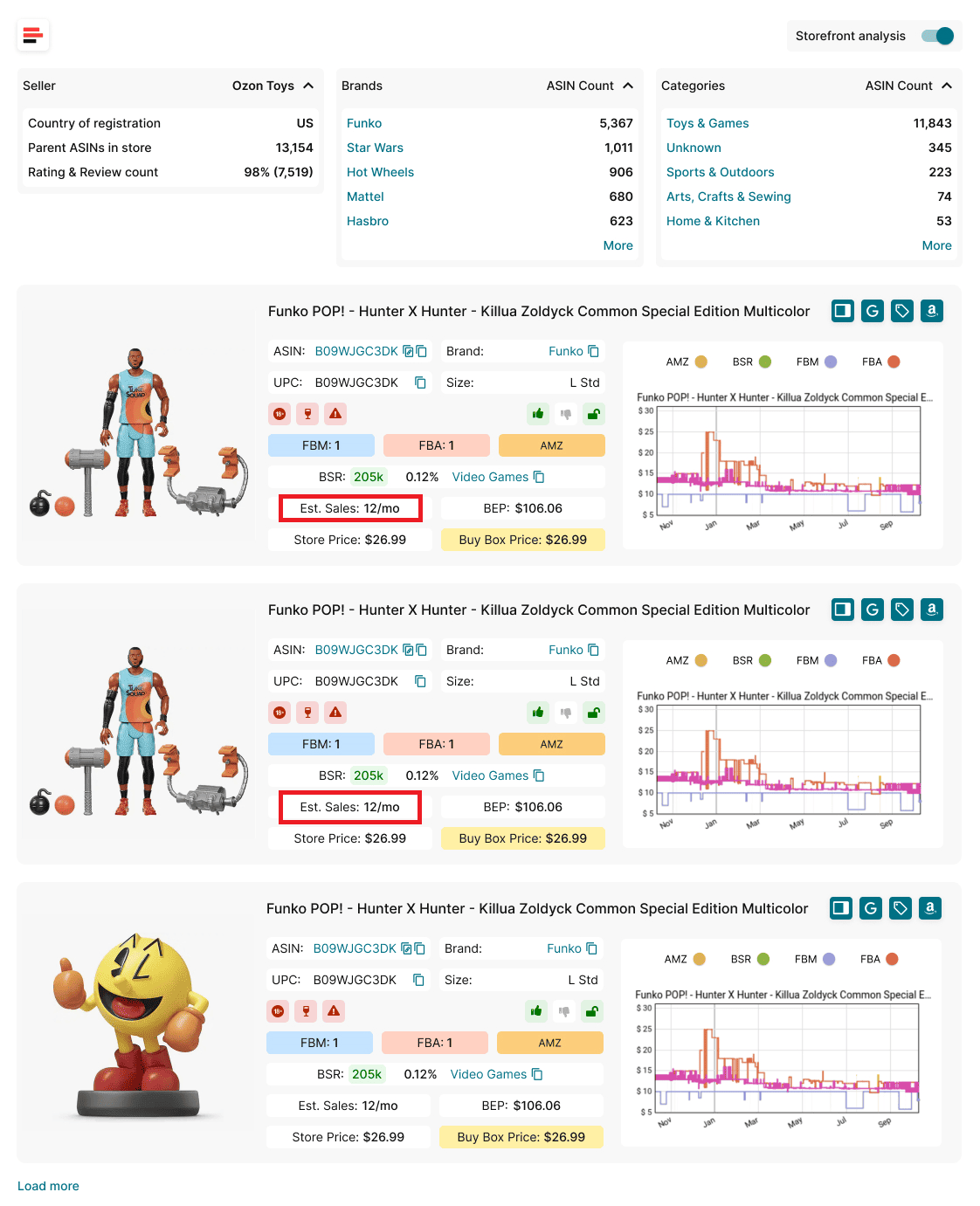
No matter where you encounter a product – bulk files or individual listings – Seller Assistant shows consistent demand signals, allowing you to make faster sourcing decisions and avoid repeatedly analyzing low-volume products.
Why Sales Estimates Matter for Amazon Sellers
Sales Estimates turn raw product data into buying decisions. For Amazon sellers working with bulk supplier lists, knowing how many units a product actually sells matters more than spotting a low price or a high margin on paper. Sales Estimates help sellers prioritize demand, manage risk, and place smarter purchase orders before capital is tied up.
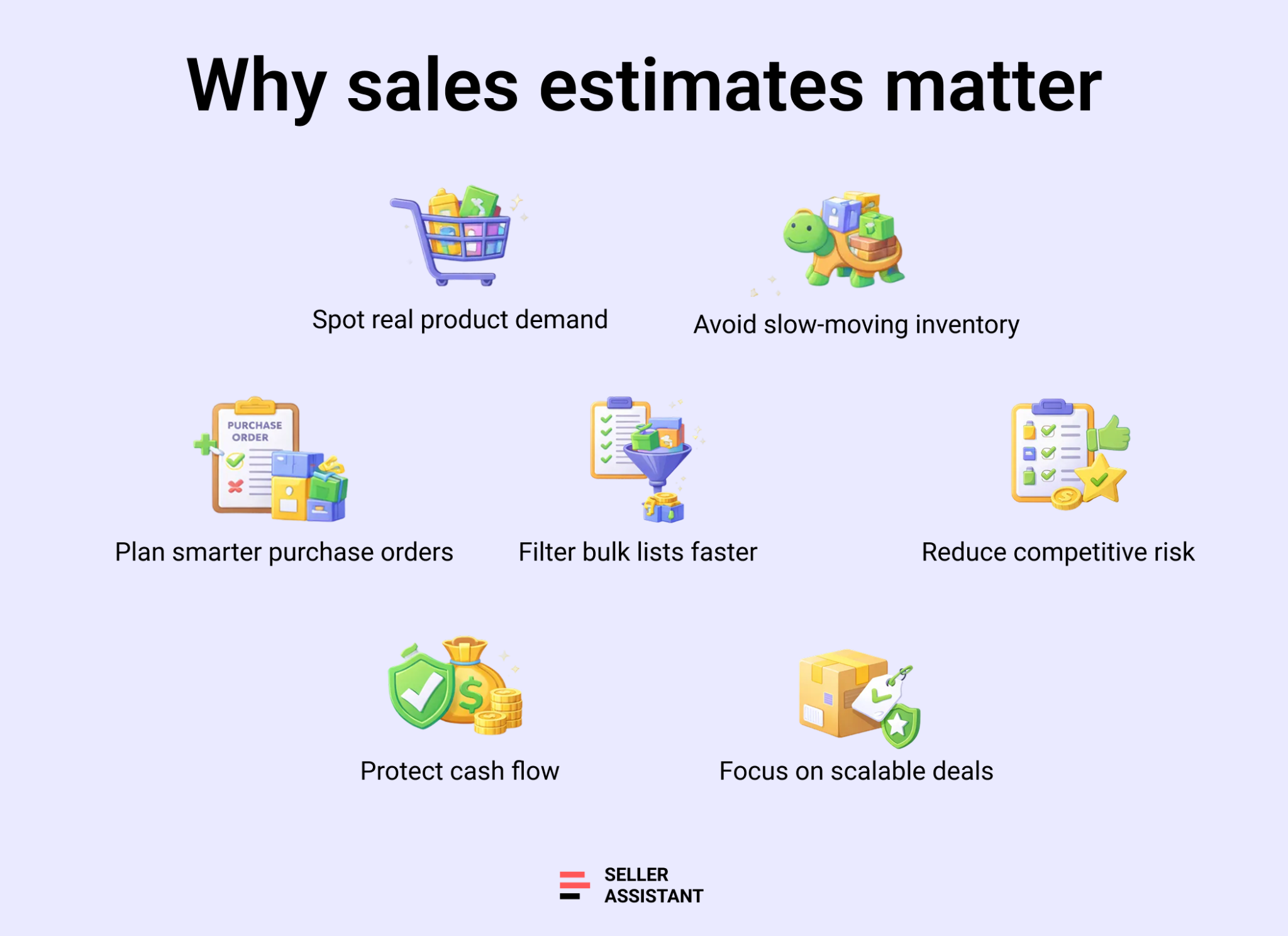
They show real demand, not just potential profit
Profit calculations mean little if a product doesn’t sell. Sales Estimates reveal whether a product has steady buyer demand or moves only occasionally, helping sellers avoid slow-moving inventory.
They help size purchase orders correctly
Estimated monthly unit sales guide how many units to buy. This reduces overordering, limits storage fees, and keeps cash flow predictable.
They filter bulk lists faster
When thousands of SKUs are analyzed at once, sales estimates allow sellers to instantly eliminate low-volume products and focus only on listings with proven velocity.
They reduce risk in competitive categories
Sales Estimates combined with seller count and Buy Box data help sellers avoid crowded listings where demand is split too thin to stay profitable.
They support consistent decisions across workflows
Seeing the same sales estimates in bulk tools and one-by-one research helps sellers stay aligned, move faster, and avoid re-evaluating weak products repeatedly.
How to Calculate Sales Estimates in Bulk with Price List Analyzer
Estimating Amazon sales for one or two ASINs is manageable. Doing it across real supplier price lists is not. Thousands of SKUs, different categories, shifting BSRs, and unstable pricing quickly turn spreadsheets into guesswork. Manual checks slow sourcing down and increase the risk of buying products with weak or inconsistent demand.
Price List Analyzer solves this by automatically calculating sales estimates for every product in your supplier file, allowing wholesale, online arbitrage, and dropshipping sellers to evaluate demand at scale – before placing a purchase order.
How Price List Analyzer calculates sales estimates
Price List Analyzer is built for bulk demand analysis. Once you upload your supplier spreadsheet, the tool matches each product to the correct Amazon ASIN and calculates estimated monthly unit sales and revenue using BSR and category data. Revenue estimates are tied to transparent pricing logic, using the current Buy Box or average Buy Box prices over 30, 90, or 180 days when needed.
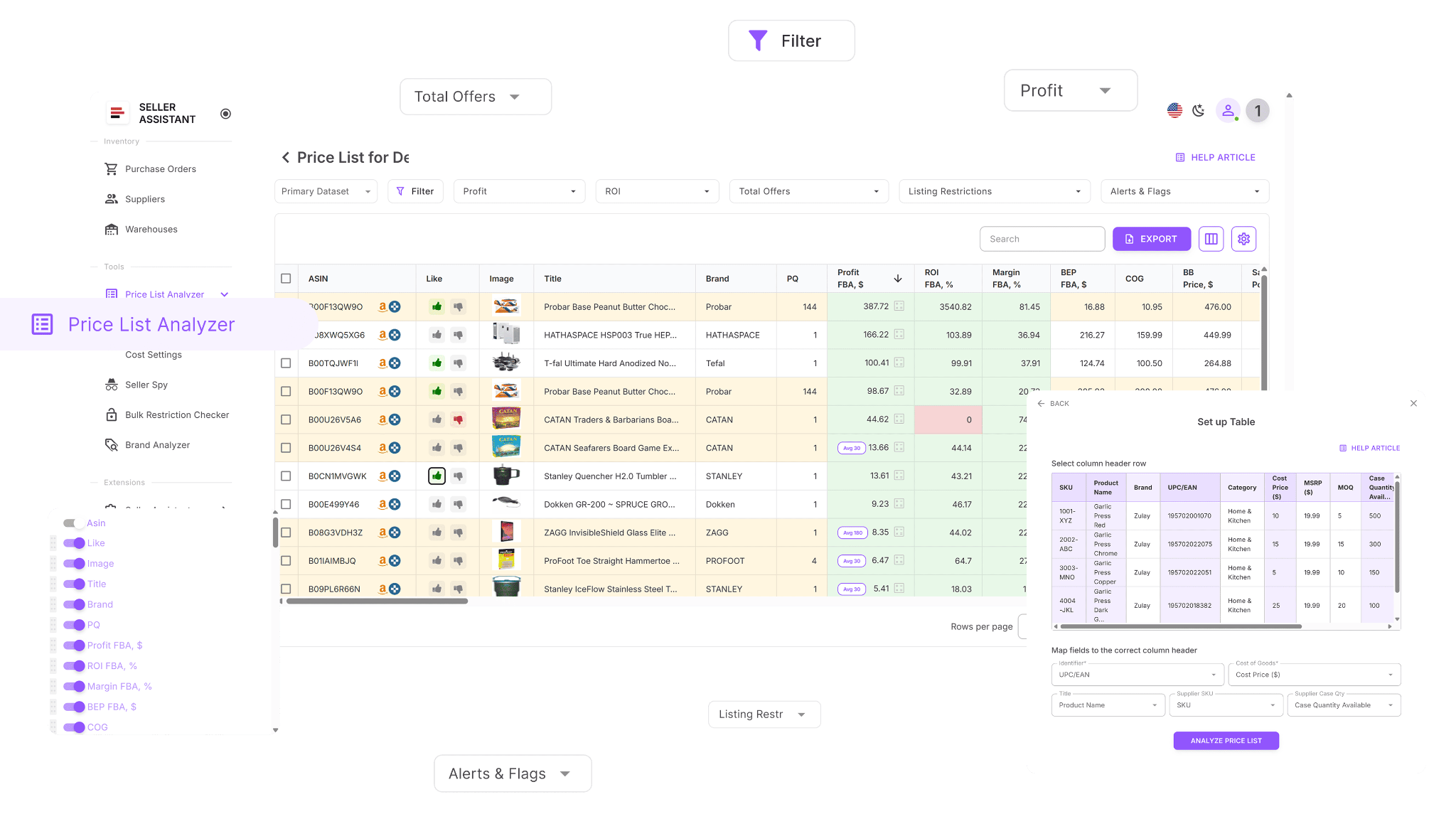
Your supplier file is enriched with dozens of data points that affect demand interpretation, including sales trends, pricing history, competition levels, and Buy Box dynamics. As you adjust cost inputs or switch pricing timeframes, sales-related insights remain visible across the entire list, helping you quickly spot products with stable, repeatable demand.
What can you do with Price List Analyzer
This Software Makes Amazon FBA Wholesale Selling 10x Easier
With Price List Analyzer, you can:
- Analyze large supplier price lists to identify products with consistent sales volume
- Automatically match supplier UPCs or EANs to the correct Amazon ASINs
- Estimate monthly unit sales and monthly revenue for each product
- Understand demand stability using BSR trends and historical performance
- See which price source is used for revenue estimates when Buy Box data is missing
- Review Buy Box pricing behavior over 30, 90, and 180 days
- Identify products with weak demand despite attractive margins
- Detect restricted or non-sellable products before deeper analysis
- Flag risky ASINs such as hazmat, oversized, meltable, fragile, or bundled items
- Filter bulk lists by sales volume, demand trends, competition, and risk signals
- Save custom table views and filters for repeatable sourcing workflows
- Update product data and instantly reassess demand signals
- Add shared team notes tied to ASINs across multiple uploads
- Reuse sourcing decisions across price lists to avoid rechecking low-demand products
Steps to calculate Sales Estimates
Step 1. Upload your supplier file
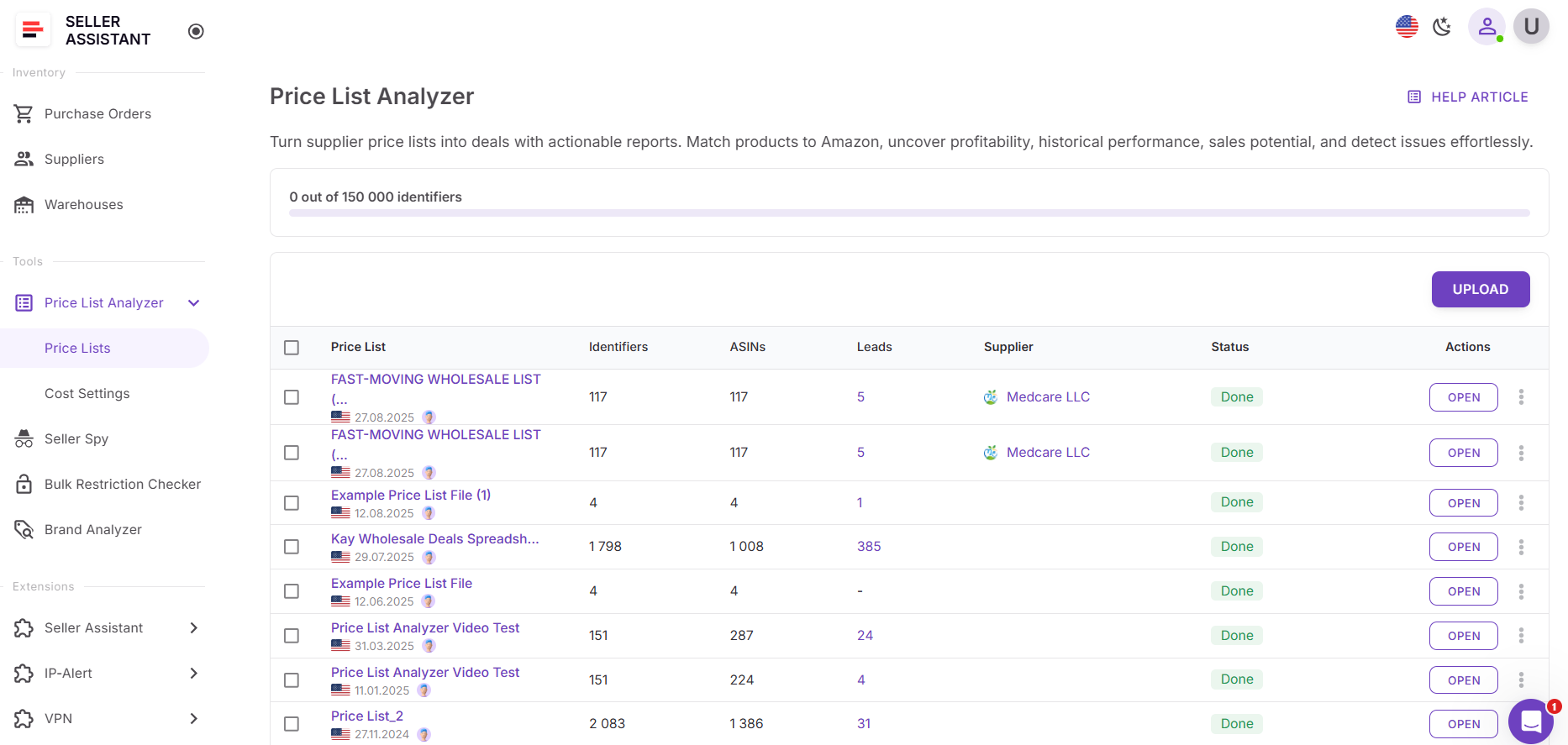
Open Price List Analyzer in your Seller Assistant dashboard and upload your Excel or CSV file containing UPCs or EANs and cost of goods. The tool automatically matches each supplier item to the correct Amazon ASIN and begins calculating estimated monthly unit sales and revenue for every product.
Step 2. Review sales estimate columns
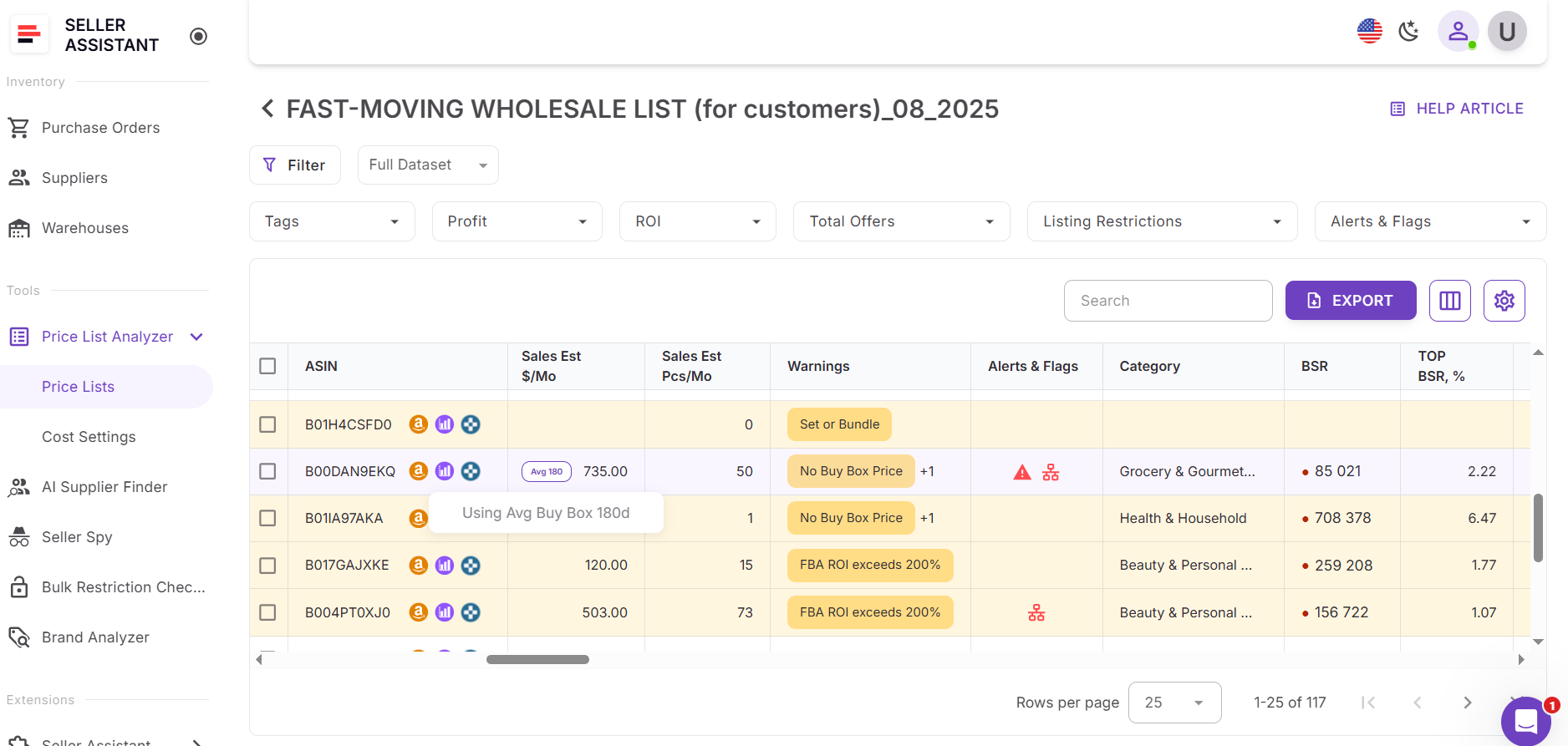
After processing is complete, locate the Sales Estimate (pcs/month) and Sales Estimate ($/month) columns in the UI table. Each row shows how many units the product is estimated to sell per month and the approximate monthly revenue based on BSR, category data, and the available price source.
If there is no current Buy Box price, Price List Analyzer clearly indicates which price is used for revenue estimation:
- Lowest FBA or FBM price
- Average Buy Box price over 30, 90, or 180 days
Step 3. Identify low-demand SKUs
Scan for products with weak estimated monthly sales or inconsistent demand signals. SKUs with very low unit estimates or unstable pricing are early warning signs and can be deprioritized or excluded before deeper analysis.
Step 4. Filter by sales estimates and deal quality
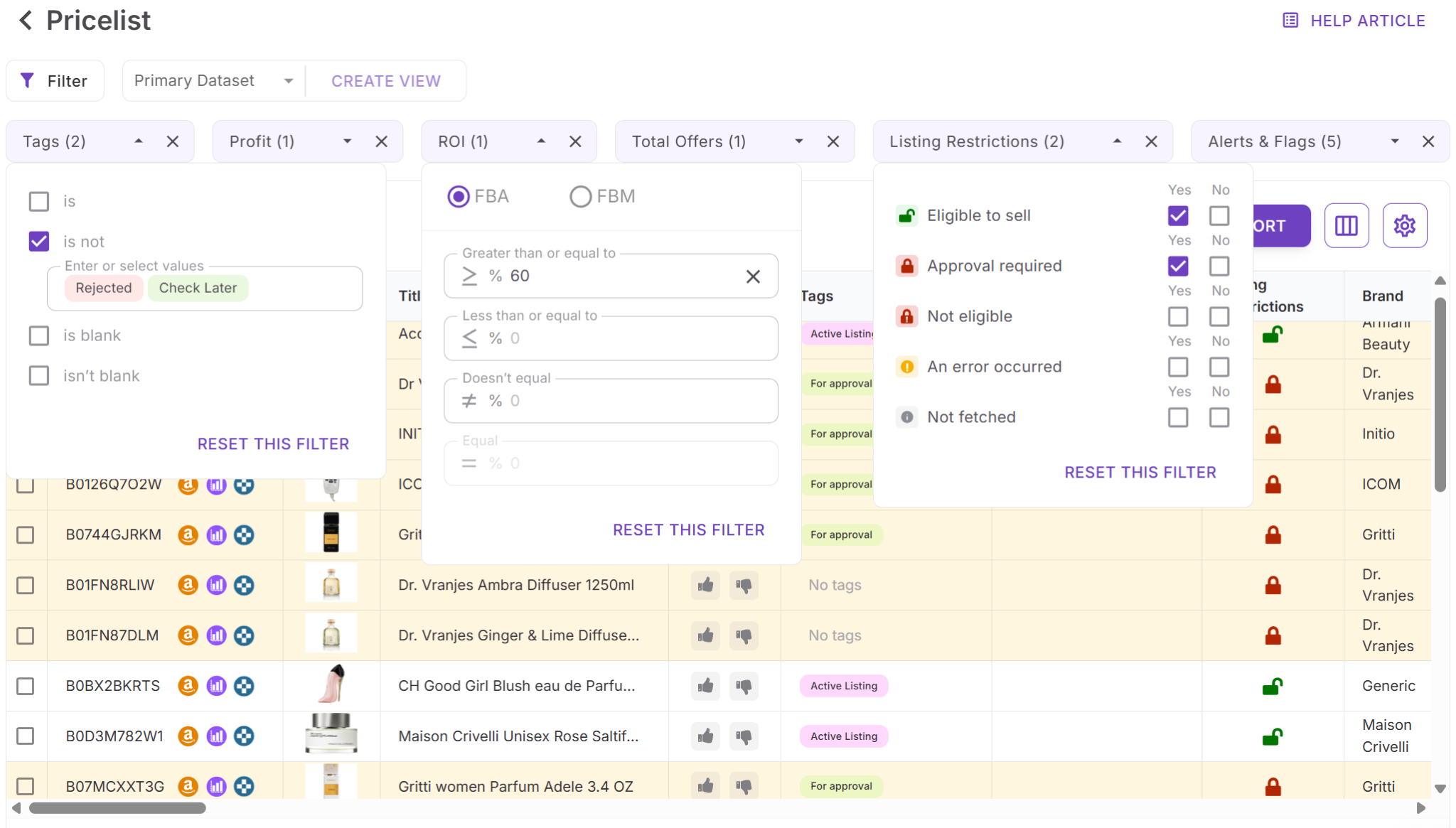
Use filters to keep only products that meet your demand criteria. Combine sales estimate filters with profitability, ROI, competition level, and risk indicators to narrow your list to products that both sell consistently and support your sourcing goals.
Step 5. Save and reuse your setup
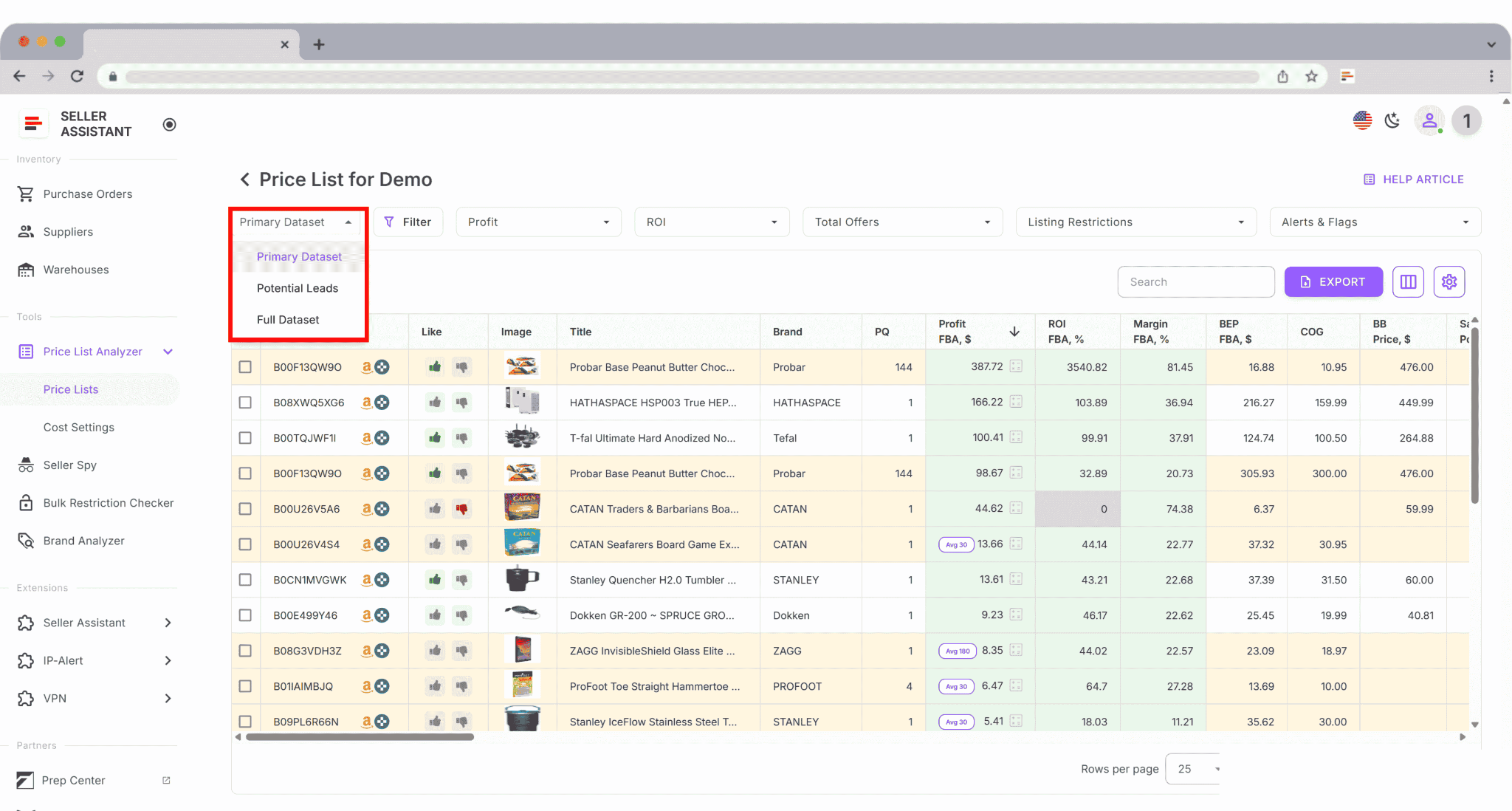
Save custom table views such as “High demand,” “Stable sales,” or “Bulk buy candidates.” These saved layouts can be reused for future supplier uploads, helping you evaluate sales potential faster and keep your sourcing decisions consistent at scale.
FAQ
What is an Amazon sales estimate?
An Amazon sales estimate is an approximation of how many units a product sells per month and how much revenue it generates. In Seller Assistant, it’s calculated using BSR and category data and displayed as monthly units and monthly revenue.
How accurate are Sales Estimates in Price List Analyzer?
Sales Estimates are directional, not exact numbers, and are designed to help compare products at scale. They are most reliable when combined with BSR trends, pricing history, and competition data.
What happens if a product has no Buy Box price?
If there’s no current Buy Box price, Price List Analyzer uses the lowest FBA or FBM price or the average Buy Box price over 30, 90, or 180 days. The tool always shows which price source was used so sellers understand how revenue was calculated.
Can I see sales estimates outside Price List Analyzer?
Yes, sales estimates are shown consistently across Seller Assistant tools, including the Browser Extension on Amazon product pages, search results, supplier websites, and competitor storefronts. This allows sellers to evaluate demand wherever they encounter an ASIN.
Should I rely on sales estimates alone when sourcing products?
No, sales estimates should be used alongside profitability, competition, restrictions, and risk indicators. Together, these metrics help sellers decide not just what sells, but what sells profitably and safely.
Final Thoughts
Estimating Amazon product sales in bulk is no longer optional for sellers who want to scale efficiently. Without clear demand signals, even profitable-looking deals can turn into slow-moving inventory and tied-up capital. Sales estimates help sellers focus on products that actually move, size purchase orders correctly, and avoid repeating the same sourcing mistakes across supplier lists.
Seller Assistant’s Price List Analyzer brings sales estimation directly into the bulk sourcing workflow. By combining BSR-based demand estimates, transparent pricing logic, and consistent visibility across tools, it allows sellers to evaluate thousands of products quickly and confidently. Instead of guessing which SKUs might sell, you can make data-driven decisions that turn bulk analysis into predictable buying actions.
Seller Assistant automates and connects every stage of your Amazon wholesale and arbitrage workflow. It brings together in one platform: workflow management tools – Purchase Orders Module, Supplier Database, Warehouse Database, bulk research & sourcing tools – Price List Analyzer, Bulk Restriction Checker, Sourcing AI, Brand Analyzer, Seller Spy, Chrome extensions – Seller Assistant Browser Extension, IP-Alert Extension, and built-in VPN by Seller Assistant, and integrations & team access features – seamless API connectivity, integrations with Zapier, Airtable, and Make, and Virtual Assistant Accounts.

