.svg)
Why Package Quantity Matters: How to Calculate Profit Right
Download Amazon Seller Guide
This guide will help you get started, understand the basics of Amazon selling, and explain in simple words how it all works.

You can analyze thousands of products, find solid ROI, and still lose money on Amazon because of one small detail: package quantity.
When a supplier’s cost is per unit but the Amazon listing sells a multipack, your profit math breaks instantly. ROI looks great, margins seem safe, and the deal passes your filters – until you actually buy it. Package quantity directly affects COG, taxes, break-even price, and real profit, especially in wholesale and online arbitrage.
In this post, we’ll break down what package quantity really means, why it matters for profitability, and how to calculate it correctly in bulk using Seller Assistant's Price List Analyzer.
Note. Seller Assistant is an end-to-end Amazon workflow management platform that integrates 10+ wholesale-focused solutions into one connected system. It combines sourcing workflow automation, bulk research and intelligence tools, and integrated Chrome extensions – giving you everything you need to streamline finding deals, managing suppliers, and creating purchase orders.

The platform aggregates: workflow management tools – Purchase Orders Module, Suppliers Database, Warehouses Database to organize, automate, and scale every step of your wholesale and arbitrage operations; bulk research & sourcing tools – Price List Analyzer, Bulk Restriction Checker, Sourcing AI, Brand Analyzer, Seller Spy to evaluate supplier price lists, verify selling eligibility and restrictions, open new brands, and discover winning product ideas from competitors to expand your product catalog; Chrome extensions – Seller Assistant Browser Extension, IP-Alert Extension, and built-in VPN by Seller Assistant to deep-research products, check IP claims and compliance, and access geoblocked supplier sites directly within your browser; and integrations & team access features – seamless API connectivity and integrations with Zapier, Airtable, and Make, plus Virtual Assistant Accounts for secure, scalable team collaboration.
With Seller Assistant, every step of your Amazon wholesale and arbitrage workflow is automated and connected.
What Is Amazon Package Quantity?
Amazon package quantity (also called pack count or quantity per package) is the number of individual units included in one sellable Amazon listing. In other words, it defines how many supplier units a customer receives when they buy a single unit on Amazon.
This matters because suppliers often price products per single unit, while Amazon listings frequently sell multipacks – 2-packs, 4-packs, or bundles. If you treat a multipack listing like a single unit, your cost of goods and profit calculations will be wrong from the start.
Package quantity is a core data point that connects supplier pricing to real Amazon selling conditions.
How package quantity works in practice
Here’s how package quantity plays out in real sourcing scenarios:
- Your supplier list shows COG = $5 per unit
- The Amazon listing is a 2-pack
- One Amazon sale actually requires 2 supplier units
That means your real COG is $10 per Amazon sale, not $5. Taxes tied to COG also increase accordingly, which affects break-even price, profit, ROI, and margins.
If package quantity isn’t accounted for, tools and spreadsheets assume you’re selling one unit when you’re actually selling two (or more). That’s how “profitable” deals quietly turn into losses.
Why Package Quantity Impacts Profitability
Package quantity is one of the most common reasons Amazon deals look profitable on paper but fail in reality. When package quantity is wrong or ignored, every downstream metric is distorted. Profit, ROI, break-even price, and even sourcing decisions are based on assumptions that don’t match how the product is actually sold on Amazon.
Below are the main ways incorrect package quantity affects your business.
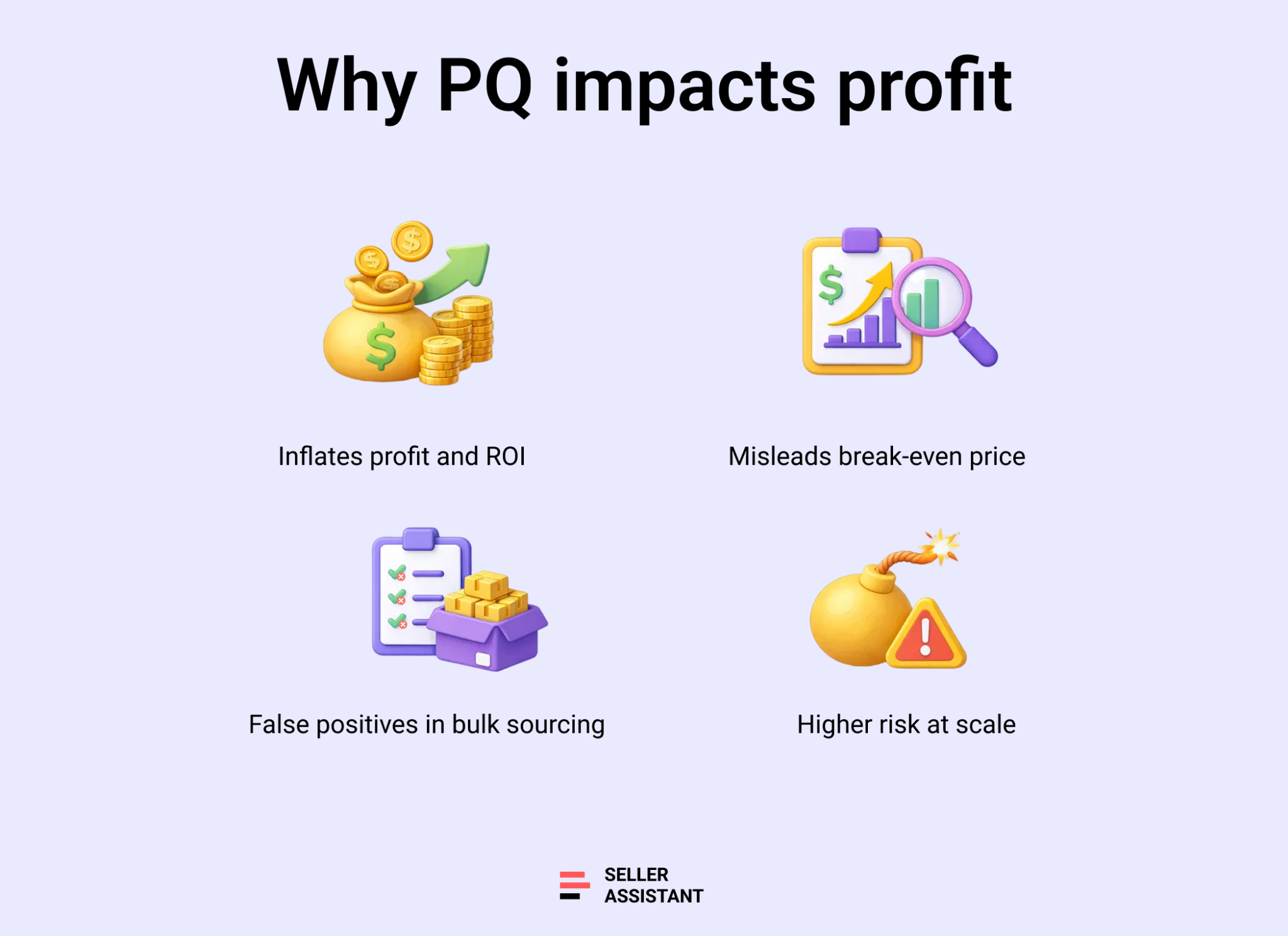
Inflates profit and ROI
If a listing sells a multipack but your calculations assume a single unit, your cost of goods is understated. The result is inflated profit and ROI that disappear once you account for the real number of units required for one Amazon sale.
Hides true break-even price
Package quantity directly affects your break-even price. When COG is too low because PQ isn’t applied, the break-even price looks safe even though you may already be selling close to – or below – zero profit in real terms.
Creates false positives in bulk sourcing
In wholesale and online arbitrage, bulk analysis relies on filters. Incorrect package quantity allows unprofitable products to pass ROI and profit thresholds, filling your shortlists with deals that should have been eliminated early.
Increases risk at scale
The larger the price list, the higher the risk. One incorrect assumption multiplied across hundreds or thousands of SKUs can lock up cash in inventory that never meets your margin targets.
How Package Quantity Influences Profit
Package quantity doesn’t just tweak your numbers – it rewrites the entire profit equation. When PQ changes, your cost base changes, and everything built on top of it shifts with no mercy. This is why deals that look solid during sourcing often collapse after a closer look.
Scenario | What changes when PQ is applied | Impact on profit |
How PQ changes profit math | COG is multiplied by PQ; taxes tied to COG increase | Net profit shrinks or disappears |
PQ and real Amazon profit | Profit is calculated per Amazon sale, not per supplier unit | “Per-unit profit” assumptions become invalid |
When PQ turns profit negative | Small margins can’t absorb higher real costs | Deals flip from green to red instantly |
PQ vs real margins | Margins are recalculated on true capital invested | Thin margins become visible and riskier |
How incorrect PQ distorts ROI | Understated COG inflates ROI percentages | ROI drops sharply once PQ is corrected |
PQ effect on profit and ROI | Profit and ROI move together downward | Many deals fail sourcing thresholds |
Where PQ breaks profit calculations | Supplier unit ≠ Amazon sellable unit | Multipacks and bundles become loss-makers |
How PQ changes profit math
Profit is calculated after costs, not intentions. When PQ increases, your cost of goods multiplies, taxes tied to COG increase, and net profit shrinks. A $6 profit can quickly become $1 – or disappear entirely – once PQ reflects how the product is actually sold.
PQ and real Amazon profit
Amazon profit is earned per listing sale, not per supplier unit. If one Amazon sale requires two or four supplier units, your real profit exists only after covering the full package cost. Ignoring PQ means you’re measuring profit on the wrong unit.
When PQ turns profit negative
Many deals flip from profitable to unprofitable the moment PQ is applied.
Example
Supplier COG is $8 per unit, Amazon listing is a 2-pack.
Without PQ, COG = $8. With PQ, real COG = $16. After fees, a small positive margin may turn negative.
PQ vs real margins
Margins calculated without PQ are artificial. Once PQ is applied, margins reflect actual capital at risk. This matters for wholesale orders where thin margins compound across large quantities.
How incorrect PQ distorts ROI
ROI is especially sensitive to PQ. Because ROI is calculated against cost, understating COG inflates returns. A deal showing 40% ROI may drop to 12% once PQ is corrected – or fail your sourcing criteria entirely.
Where PQ breaks profit calculations
PQ breaks profit calculations whenever supplier pricing and Amazon packaging don’t match. This happens most often with multipacks, bundles, and kits – exactly the listings that dominate wholesale and online arbitrage catalogs.
How to Calculate Package Quantity in Bulk with Price List Analyzer
Correct package quantity can’t be an afterthought in bulk sourcing. The fastest way to avoid inflated ROI and “profitable” deals that fall apart is to factor PQ into your analysis while you’re reviewing supplier price lists, not after your shortlist is built.
What is Price List Analyzer
Seller Assistant's Price List Analyzer is a bulk product research tool for wholesale, online arbitrage, and dropshipping sellers. It processes supplier price lists, matches items to Amazon listings, and shows profitability, fees, sales signals, and risk flags in one table – so you can make sourcing decisions at scale.
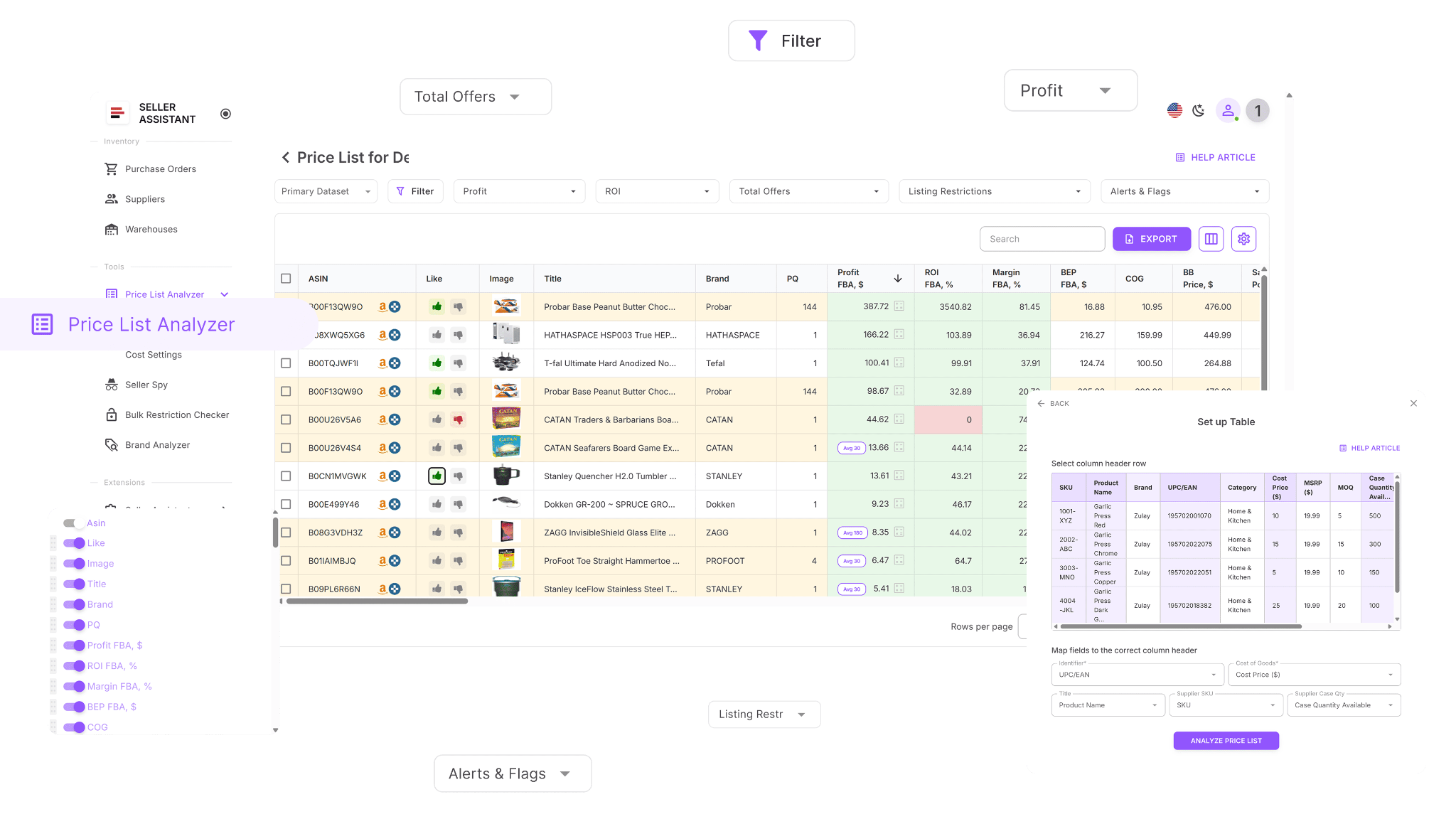
What you can do with Price List Analyzer
Price List Analyzer allows you to account for package quantity across thousands of products without manual spreadsheets or reuploads. With PQ factored in, profitability metrics reflect real selling conditions instead of theoretical unit costs.
This Software Makes Amazon FBA Wholesale Selling 10x Easier
With Price List Analyzer, you can:
- Process large supplier catalogs fast and surface sourcing-ready opportunities
- Match supplier SKUs/identifiers to the correct Amazon ASINs automaticallySee whether products are eligible, approval required, or ineligible on your account
- Estimate demand using BSR, sales trends, and monthly sales estimates
- Calculate profit, ROI, margin, and break-even price per ASIN
- Check Buy Box behavior using price history across 30/90/180 days
- Review the full fee stack: referral, FBA/FBM, storage, prep, and shipping costs
- Spot higher-risk listings (HazMat, meltable, oversized, fragile, set/bundle)
- Surface alerts like approval required, missing Buy Box price, or low FBA ROI
- Filter by profitability, demand, competition, and risk signals to build a clean shortlist
- Save table layouts and filter sets so future uploads follow the same workflow
- Edit inputs like COG, shipping, prep, or pack size and see profit recalculate instantly
- Add shared product notes that follow the ASIN across future uploads
- Tag items by sourcing stage and filter by workflow status
How package quantity works inside Price List Analyzer
Price List Analyzer treats package quantity as a multiplier that aligns supplier pricing with Amazon listings.
Here’s how it works in practice:
- If PQ = 1, profit is calculated using the supplier COG as-is
- If PQ = 2, profit is calculated using COG × 2
- Taxes tied to COG are recalculated automatically based on the adjusted cost
- Profit, ROI, margin, and break-even price update instantly
Changing package quantity updates cost and tax values in real time, so you can immediately see whether a deal still meets your sourcing criteria.
How to factor in package quantity step by step
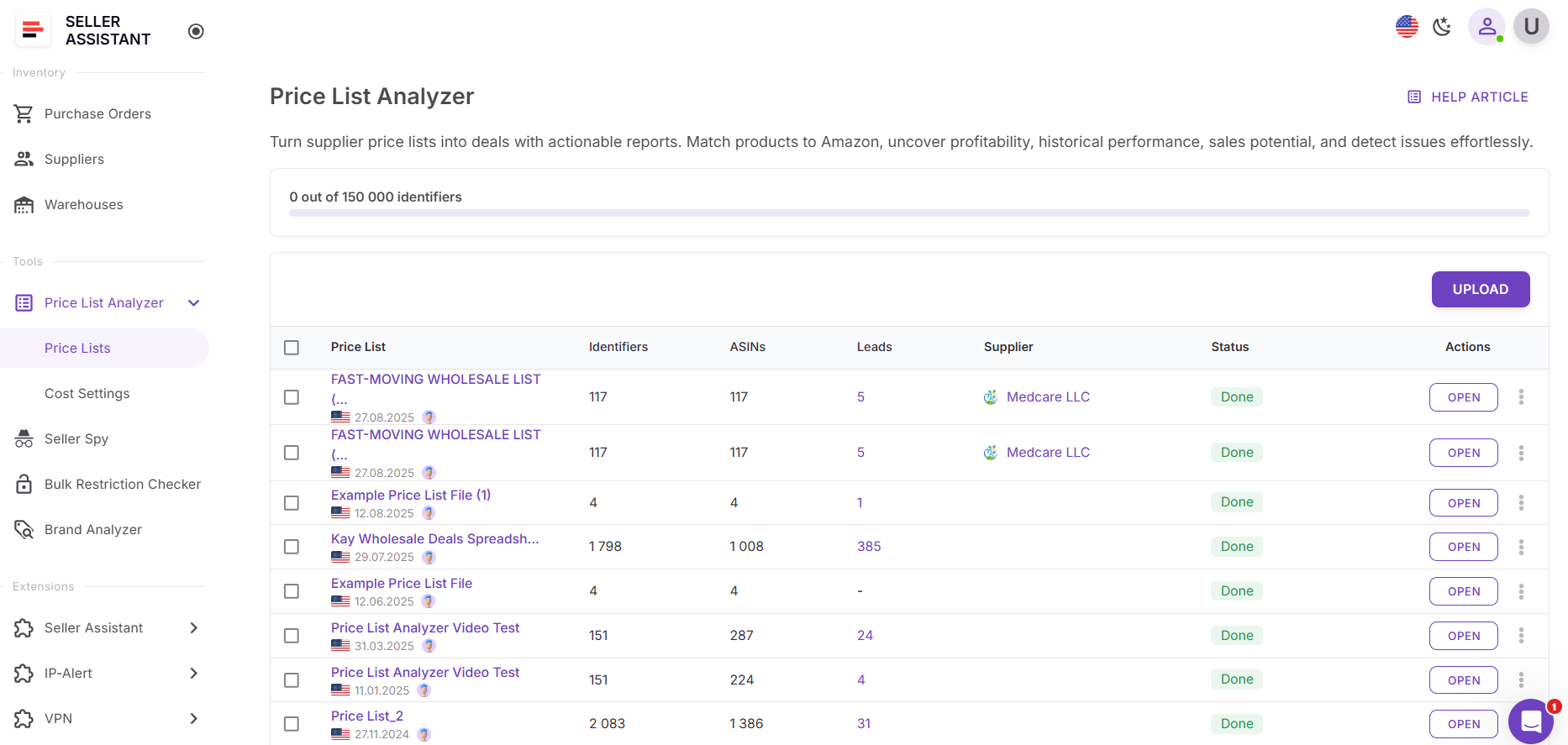
Step 1. Upload your supplier price list
Open Price List Analyzer in your Seller Assistant account and upload your Excel/CSV file. Make sure your file includes:
- Product identifier (UPC/EAN/GTIN)
- Supplier price (COG)
- After upload, the tool matches products to ASINs and generates a results table.
Step 2. Review package quantity
After the price list is processed, review package quantity in the column Supplier Case Qty.
This value shows how many supplier units are included in one sellable Amazon listing.
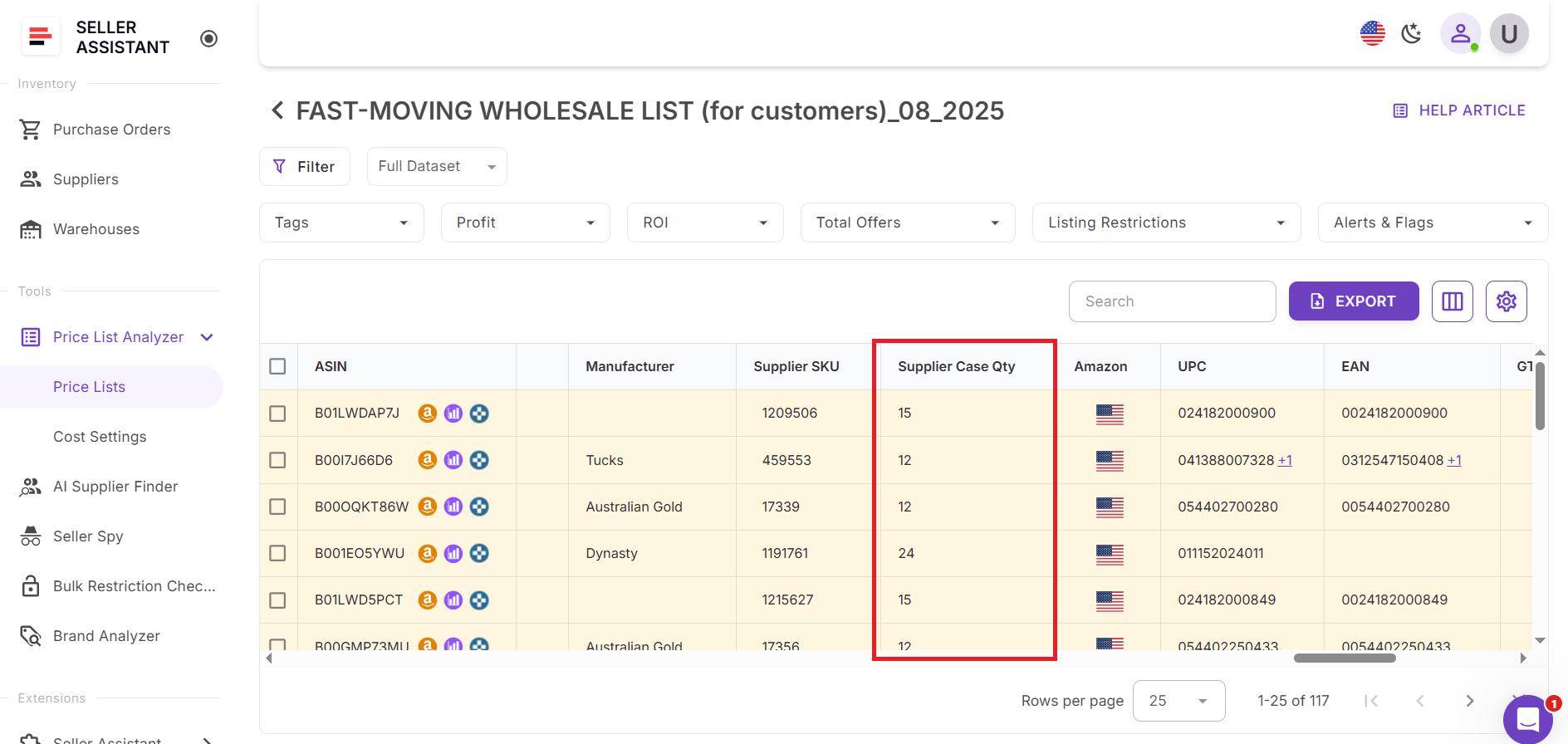
Package quantity is already factored in automatically wherever it impacts calculations:
- COG is multiplied by package quantity
- Tax is adjusted accordingly based on the total cost
- Profit, ROI, margin, and break-even price all reflect the applied package quantity
You can review the exact calculation logic in the profit tooltip.
Step 3. Correct package quantity if it’s wrong
If you see that the package quantity is incorrect, enter the correct value directly in the Supplier Case Qty field.
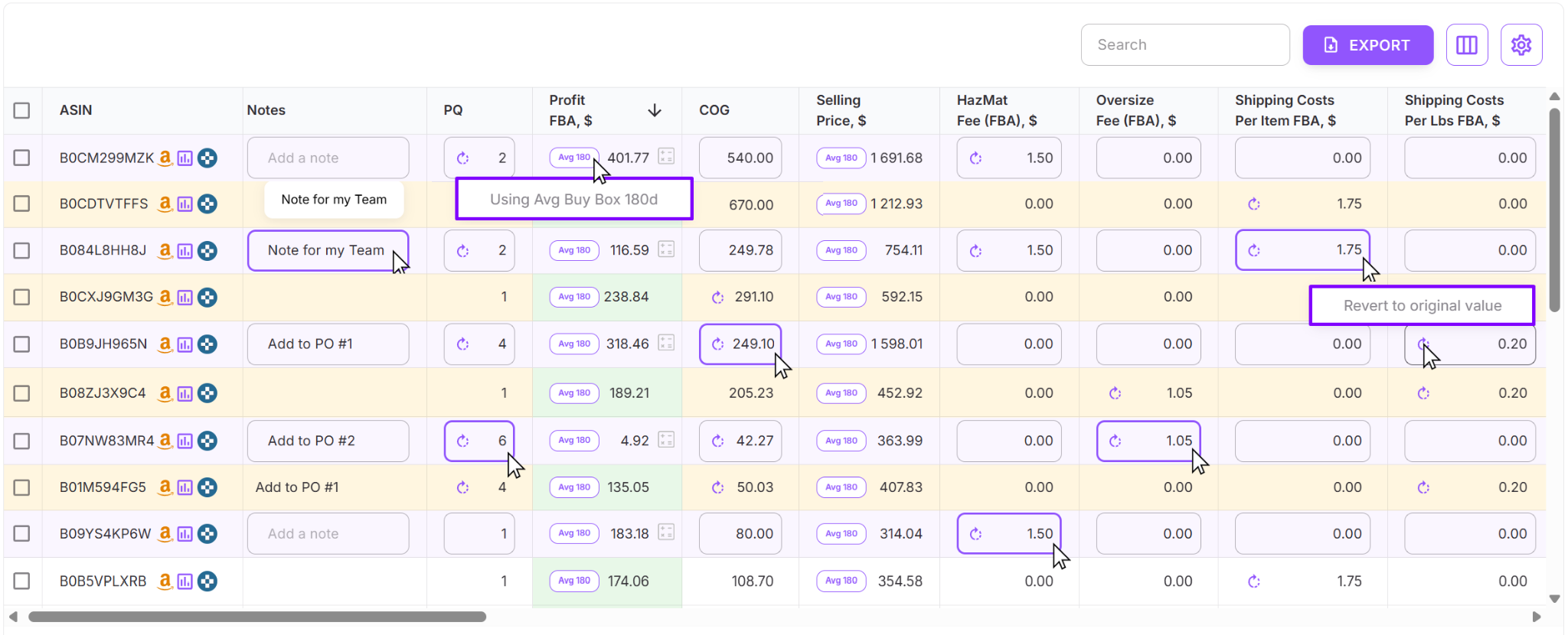
As soon as you update it, Price List Analyzer recalculates profit and all related metrics in real time. There’s no need to re-upload the file or rerun the analysis – the updated package quantity is immediately applied across profit, ROI, margin, and break-even calculations.
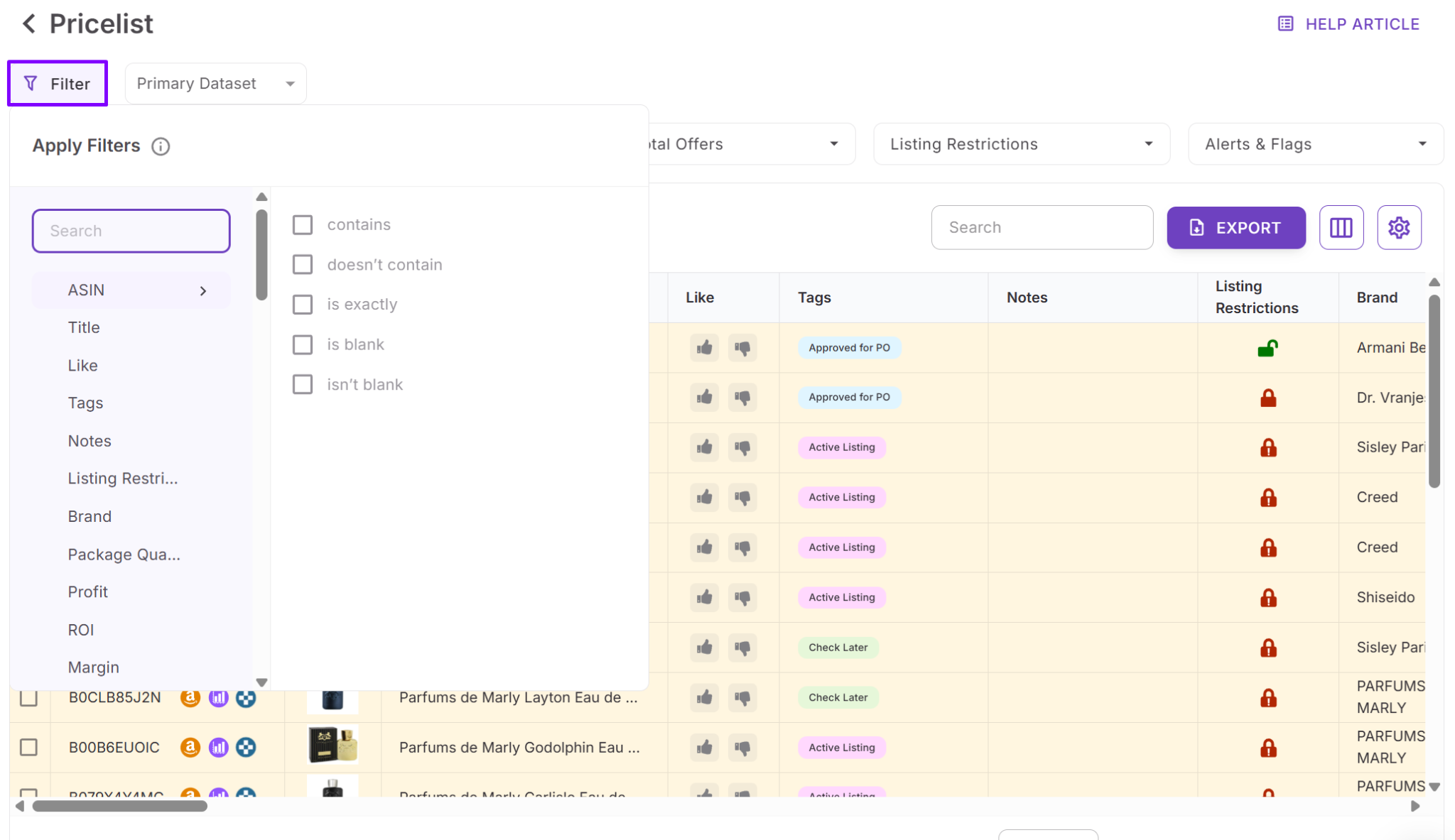
Step 4. Use your sourcing filters
Filter your list by profit, ROI, margin, or break-even. This is where “false positives” drop out fast – exactly what you want before you place an order.
FAQ
What is package quantity on Amazon?
Package quantity is the number of supplier units included in one sellable Amazon listing. It defines how many units you must buy to fulfill a single Amazon sale.
Why does package quantity affect profit so much?
Because Amazon profit is calculated per listing sale, not per supplier unit. If package quantity is wrong, your COG, tax, ROI, and break-even price are all miscalculated.
Does Price List Analyzer calculate package quantity automatically?
Yes, package quantity is factored into profit calculations automatically using the Supplier case qty field. COG is multiplied by PQ and tax is adjusted accordingly wherever needed.
What happens if package quantity is incorrect?
If PQ is wrong, profit and ROI may look higher than they really are. Once corrected, Price List Analyzer recalculates profit and related metrics in real time.
Do I need to re-upload my price list after fixing package quantity?
No, re-uploading is not required. Updating the package quantity directly in the table instantly applies the change across all profit calculations.
Final Thoughts
Package quantity is a small detail with a big impact. When supplier unit costs don’t match how products are sold on Amazon, profit, ROI, and break-even calculations stop reflecting reality. That’s why deals that look strong during sourcing often fail after purchase.
Seller Assistant's Price List Analyzer solves this problem at scale by factoring package quantity directly into bulk profit calculations and letting you review and correct it in real time. When PQ is accurate, your numbers are accurate – and your sourcing decisions are based on real margins, not assumptions.
Seller Assistant automates and connects every stage of your Amazon wholesale and arbitrage workflow. It brings together in one platform: 




Follow Us







