



Knowing whether you can actually list a product on Amazon is the first step of profitable sourcing. Yet many sellers still analyze price, BSR, and competition before checking restrictions – and end up with inventory they can’t sell.
Amazon listing restrictions apply at the category, brand, and ASIN level, and they can change without warning. For wholesale, online arbitrage, and dropshipping sellers working with large product lists, manual checks simply don’t scale.
In this post, you’ll learn what Amazon listing restrictions mean, which categories and top-selling ASINs are gated, why manual checks fail at scale, and how to check restrictions in bulk while analyzing supplier price lists or thousands of ASINs at once.
What Amazon Listing Restrictions Mean for Sellers
Amazon listing restrictions are rules that control who can sell specific products, brands, or entire categories. Amazon uses these restrictions to protect buyers, prevent counterfeits, and make sure regulated or sensitive products are sold only by qualified sellers. Every time you try to add a listing, Amazon checks your account’s permissions in real time.
For sellers, this means one critical thing: a product can look profitable but still be unsellable for your account. Restrictions may apply at the category, brand, or ASIN level, and they can change without notice. That’s why verifying eligibility before you source – especially when working with large product lists – is essential to avoid unsellable inventory and protect your account health.
Types of Amazon Listing Restrictions
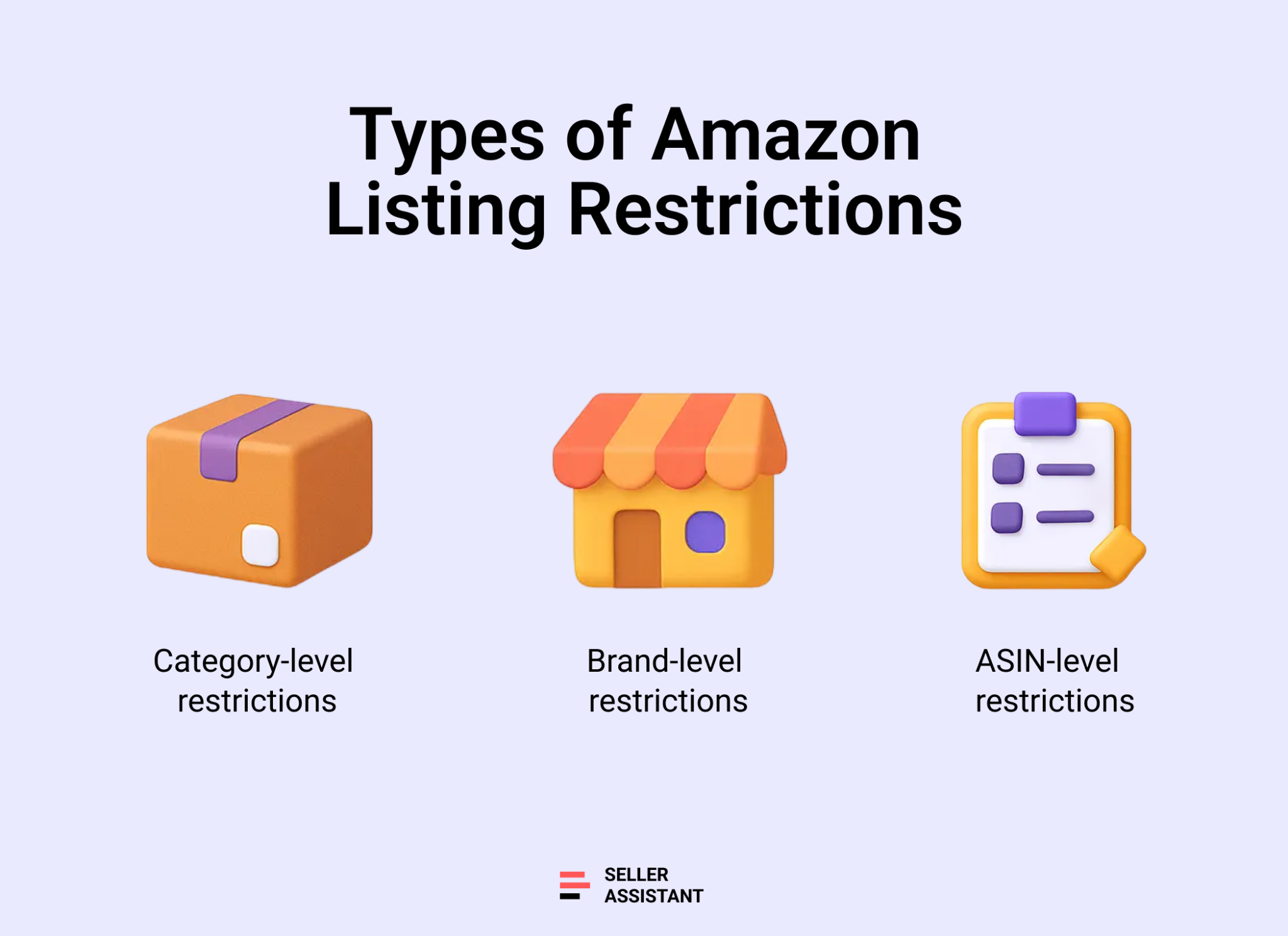
Amazon listing restrictions are not one-size-fits-all. A product can be blocked for different reasons, and understanding the type of restriction helps sellers know whether an item is worth pursuing, ungating, or skipping altogether. Restrictions are applied at multiple levels and are checked against your specific seller account every time you try to list a product.
Below are the main types of Amazon listing restrictions sellers encounter.
Category-level restrictions
Some Amazon categories are gated by default. To list products in these categories, sellers must first receive Amazon’s approval. Approval usually depends on account history, documentation, and compliance with category-specific requirements. Category gating is common for regulated or high-risk product types.
Brand-level restrictions
Certain brands control who can sell their products on Amazon. Even if a category is open, a brand may still be gated. In these cases, sellers must apply for approval, often by submitting invoices from authorized distributors. Brand gating frequently affects wholesale and online arbitrage sellers.
ASIN-level restrictions
Amazon can restrict individual ASINs regardless of the category or brand. This often applies to top-selling products, sensitive, or high-risk products. An ASIN may be blocked for one seller but available to another, depending on account age, performance, and permissions.
Amazon categories that require approval
Amazon requires approval before you can list products in several categories, including:
- Automotive Parts / Motorcycle & ATV
- Clothing, Accessories & Luggage
- Collectible Books
- Industrial & Scientific
- Jewelry
- Shoes
- Toys & Games (seasonal approval during Q4 )
- Watches
Selling in these categories usually involves additional checks, and approval is not guaranteed – especially for newer accounts.
ASIN-level restrictions on top-selling products
Beyond category gating, Amazon also restricts many top-selling ASINs. Only approved sellers can list high-demand products in categories such as Electronics, Computer & Video Games, Software, and Toys & Games. This is where many sellers run into trouble: a category may be open, but the specific ASIN is not. For online arbitrage and dropshipping sellers in particular, ASIN-level restrictions are one of the most common reasons profitable-looking products turn out to be unsellable.
Why Manual Restriction Checks Don’t Scale
Manually checking Amazon listing restrictions might work for one or two products, but it quickly breaks down once you start sourcing at scale. Wholesale price lists, OA deal feeds, and dropshipping catalogs often contain hundreds or thousands of SKUs. Checking each ASIN one by one in Seller Central is slow, repetitive, and unreliable for real-world reseller workflows.
Below are the main reasons manual restriction checks fail as your sourcing volume grows.
Too many products to check
Wholesale catalogs and OA deal lists often include hundreds or thousands of items. Checking each ASIN individually in Seller Central is time-consuming and makes large-scale sourcing impractical.
Time wasted on unsellable ASINs
Without bulk checks, sellers often analyze profitability, sales rank, and competition for products they are not even eligible to list. This leads to wasted research time and missed opportunities elsewhere.
Restrictions change without notice
Amazon updates category, brand, and ASIN restrictions regularly. A product that was eligible yesterday may be gated today, making manual spot checks unreliable for ongoing sourcing.
Higher risk of costly mistakes
Manual checks increase the chance of human error. Missing a restriction can result in buying inventory you can’t list, leading to tied-up capital and avoidable losses.
How to Bulk-Check Amazon Restrictions with Seller Assistant
Seller Assistant allows you to check restrictions across large product lists instead of reviewing ASINs one by one in Seller Central.
With Price List Analyzer, you upload your supplier price list and analyze sellability and profitability at the same time. The tool automatically matches products to Amazon ASINs and displays restriction status directly in the results table. This lets you spot restricted, gated, and eligible items while reviewing margins, fees, and demand.
With Bulk Restriction Checker, you can upload up to thousands of ASINs at once and receive a clean report showing which products your account can sell, which require approval, and which are completely blocked. This is ideal for validating sourcing lists before placing orders or committing capital.
Note. Seller Assistant is an end-to-end Amazon workflow management platform that integrates 10+ wholesale-focused solutions into one connected system. It combines sourcing workflow automation, bulk research and intelligence tools, and integrated Chrome extensions – giving you everything you need to streamline finding deals, managing suppliers, and creating purchase orders.

The platform aggregates: workflow management tools – Purchase Orders Module, Suppliers Database, Warehouses Database to organize, automate, and scale every step of your wholesale and arbitrage operations; bulk research & sourcing tools – Price List Analyzer, Bulk Restriction Checker, Sourcing AI, Brand Analyzer, Seller Spy to evaluate supplier price lists, verify selling eligibility and restrictions, open new brands, and discover winning product ideas from competitors to expand your product catalog; Chrome extensions – Seller Assistant Browser Extension, IP-Alert Extension, and built-in VPN by Seller Assistant to deep-research products, check IP claims and compliance, and access geoblocked supplier sites directly within your browser; and integrations & team access features – seamless API connectivity and integrations with Zapier, Airtable, and Make, plus Virtual Assistant Accounts for secure, scalable team collaboration.
With Seller Assistant, every step of your Amazon wholesale and arbitrage workflow is automated and connected.
What restriction statuses Seller Assistant shows
Seller Assistant checks your account permissions and assigns one of the following restriction statuses to each product.
Eligible
You can list and sell the product immediately. Your account meets all Amazon requirements for that ASIN, brand, and category, and no approval or documents are needed.
Approval required (gated)
The product is restricted and requires Amazon approval before you can sell it. You must submit invoices or compliance documents to ungate the item. This is common for specific brands, regulated products, and restricted categories.
Ineligible
Your account cannot list the product. When attempting to add an offer, Amazon displays the message “Your account does not qualify.” This usually happens due to account age, marketplace location, or limited selling privileges.
Check Restrictions While Analyzing Supplier Price Lists
The most effective way to avoid restricted inventory is to verify restrictions while you are actively researching products – not once your analysis is finished. Seller Assistant’s Price List Analyzer builds restriction checks directly into your sourcing workflow, allowing you to evaluate sellability and profitability at the same time.
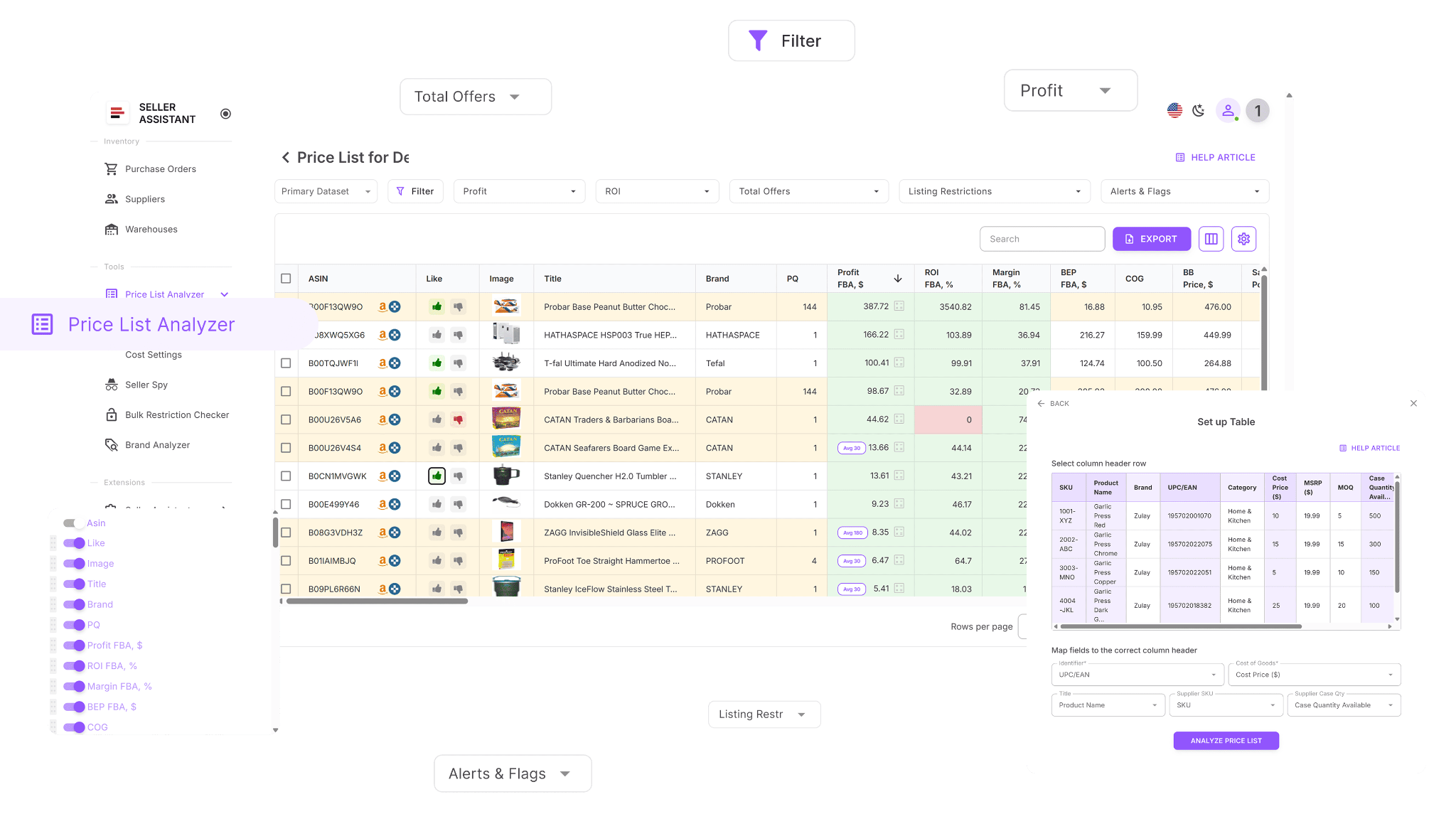
When you upload a supplier price list, the tool automatically links each item to its Amazon ASIN, calculates key profit metrics, and displays restriction statuses in one unified table. This approach removes hours of manual checks, reduces the risk of buying unsellable inventory, and helps you focus immediately on high-margin products your account can list.
What is Seller Assistant’s Price List Analyzer?
Seller Assistant’s Price List Analyzer is a bulk Amazon product research tool built for wholesale, online arbitrage, and dropshipping sellers. It simplifies supplier catalog analysis by automatically scanning price lists, matching products to Amazon ASINs, and calculating essential profitability metrics – so you can spot strong opportunities in minutes instead of days.
How to Analyze Suppliers’ Price Lists in Bulk | Price List Analyzer Review
The tool enriches your spreadsheets with more than 100 data points, including sales performance, Buy Box behavior, Amazon fees, selling restrictions, competition data, ROI, and more. You can filter results, highlight top deals, and adjust costs to recalculate profit in real time. Designed for speed and accuracy, Price List Analyzer helps sellers make confident, data-driven sourcing decisions.
Price List Analyzer converts large, complex supplier files into clear, actionable insights. Within minutes, it analyzes your bulk uploads, maps products to the correct Amazon ASINs, and highlights high-margin, low-risk items worth sourcing.
What Price List Analyzer helps you do
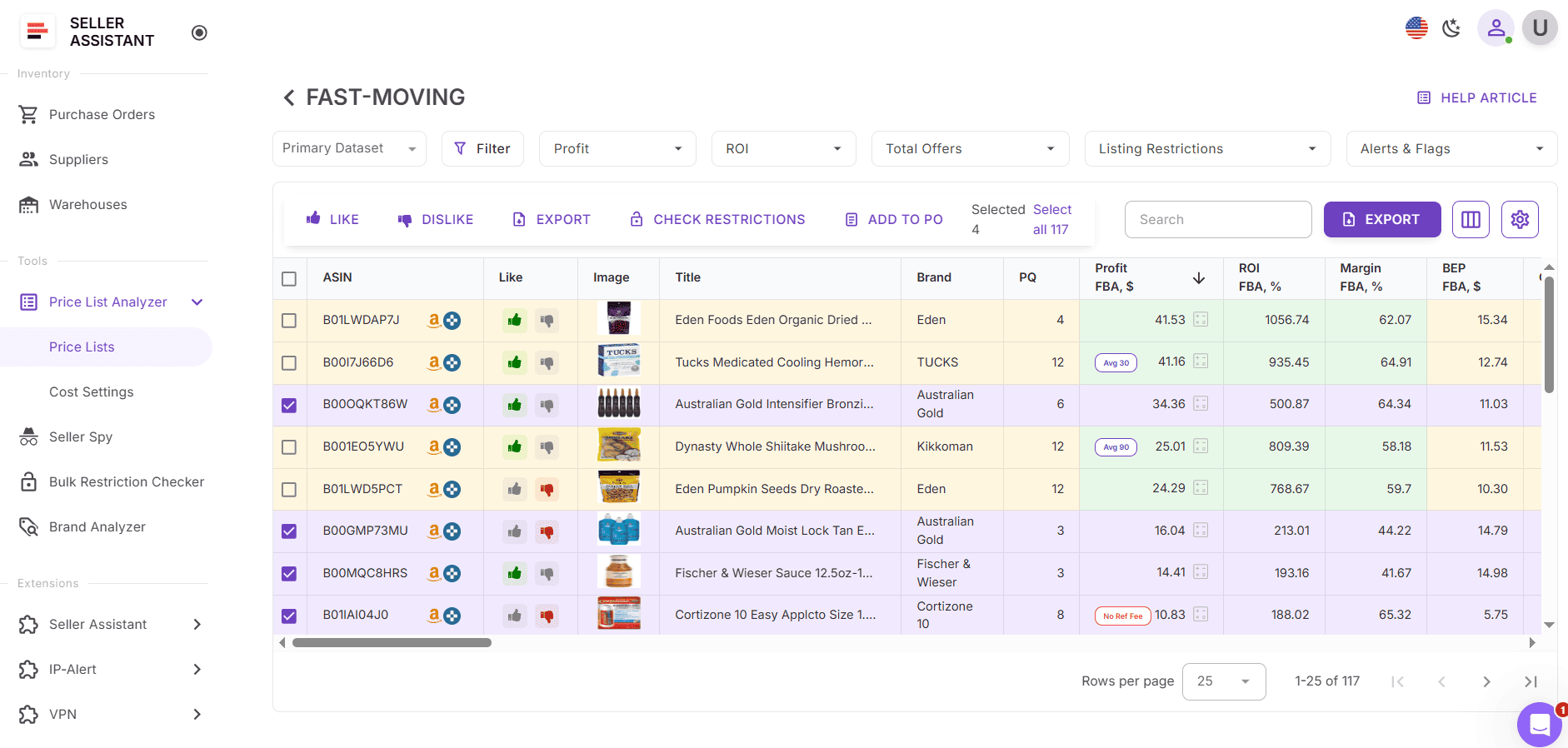
- Analyze large supplier files to uncover profitable, low-risk products quickly
- Automatically connect supplier SKUs to their matching Amazon ASINs
- Check selling restrictions and flag items your account cannot sell
- Enhance your spreadsheet with 100+ product metrics, including: sales performance – BSR, ranking trends, estimated monthly sales, and velocity; profitability– net profit, ROI, margins, and breakeven prices; price trends – 30/90/180-day Buy Box averages; Amazon fees – FBA/FBM fees, referral fees, storage, shipping, prep, HazMat, and fragile handling ; competition data – number of sellers, Buy Box rotation, and Amazon’s Buy Box share.
- The tool also flags product risks automatically, such as oversize, HazMat, meltable, fragile, IP-sensitive, or bundle listings. Built-in warnings include No FBA Fees, No Buy Box Price, No COGs, ASIN Not Found, Set or Bundle, Approval Required, Too Low FBA ROI, and Too High FBA ROI.
- You can filter products by profit, performance, or risk, save custom table layouts, and reuse those filters for future uploads. Items can be marked with Likes or Dislikes, added to purchase shortlists, and exported for ordering.
- Profit calculations can be based on 30/90/180-day average Buy Box prices to reflect realistic long-term margins. Any updates to COGs, shipping, pack quantity, or prep costs are recalculated instantly. Shared product notes can also be added for your team and will automatically reappear whenever the same ASIN is uploaded again.
How to check restrictions with Price List Analyzer
When you analyze a supplier catalog using Price List Analyzer, the tool automatically detects and displays all three Amazon restriction types for every product.
- Eligible – the product can be sold on your account (green open lock)
- Approval required – the product is gated and needs Amazon approval (red closed lock)
- Ineligible – your account cannot sell the product (red closed lock with an exclamation mark)
These visual indicators make it easy to see which products are ready to list, which may be worth ungating, and which should be excluded entirely – saving time and preventing compliance issues.
How to Use Price List Analyzer | Seller Assistant (For Amazon Sellers)
How to use Price List Analyzer
Step 1. Upload your supplier price list
Open Price List Analyzer in your Seller Assistant account and upload your Excel or CSV file with UPC/EAN codes and cost of goods. The tool automatically matches products to Amazon ASINs, analyzes them, and fills your table with profit data, restriction statuses, and alerts.
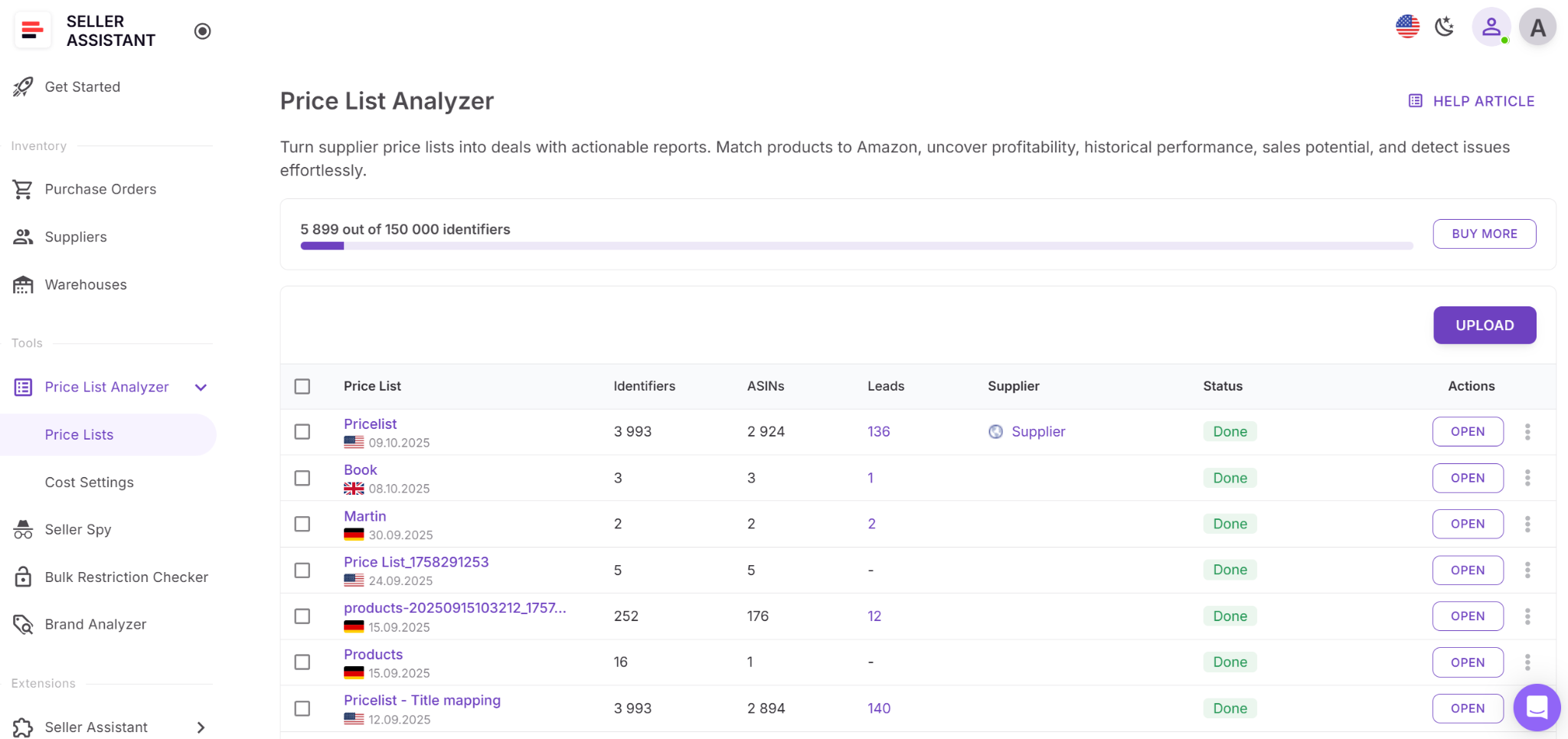
Step 2. Find the restriction indicators
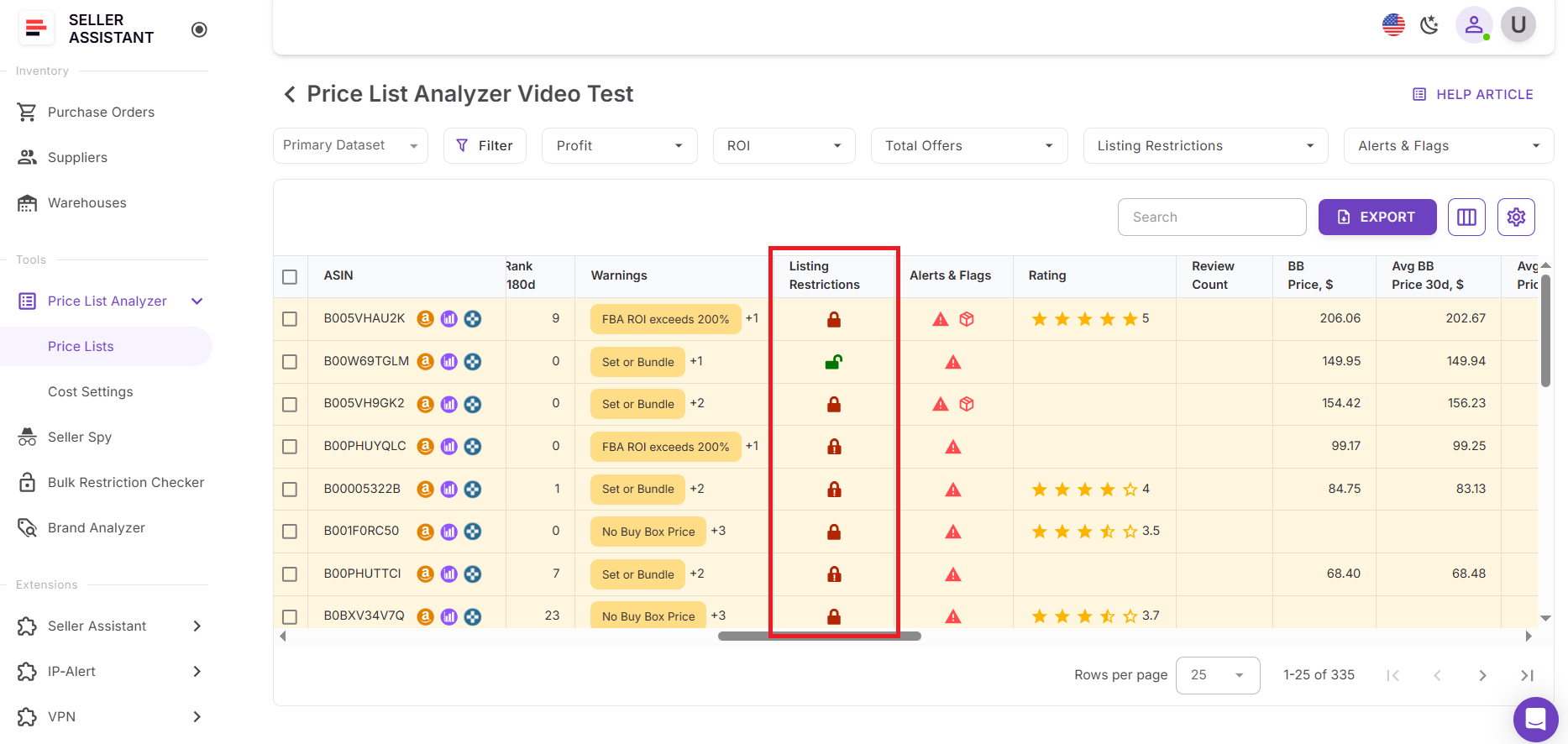
Once processing is complete, open the results table and locate the Listing restrictions column. Each product shows a lock icon indicating its status:
- Green open lock – eligible to sell
- Red closed lock – approval required
- Red closed lock with exclamation mark – ineligible
Step 3. Review blocked and gated items
Scan all rows marked with red locks. Hover over the icon or review the Warnings column to see details such as Approval Required, Brand Gate, or Category Restriction. This helps you understand why an item is restricted and what action is possible.
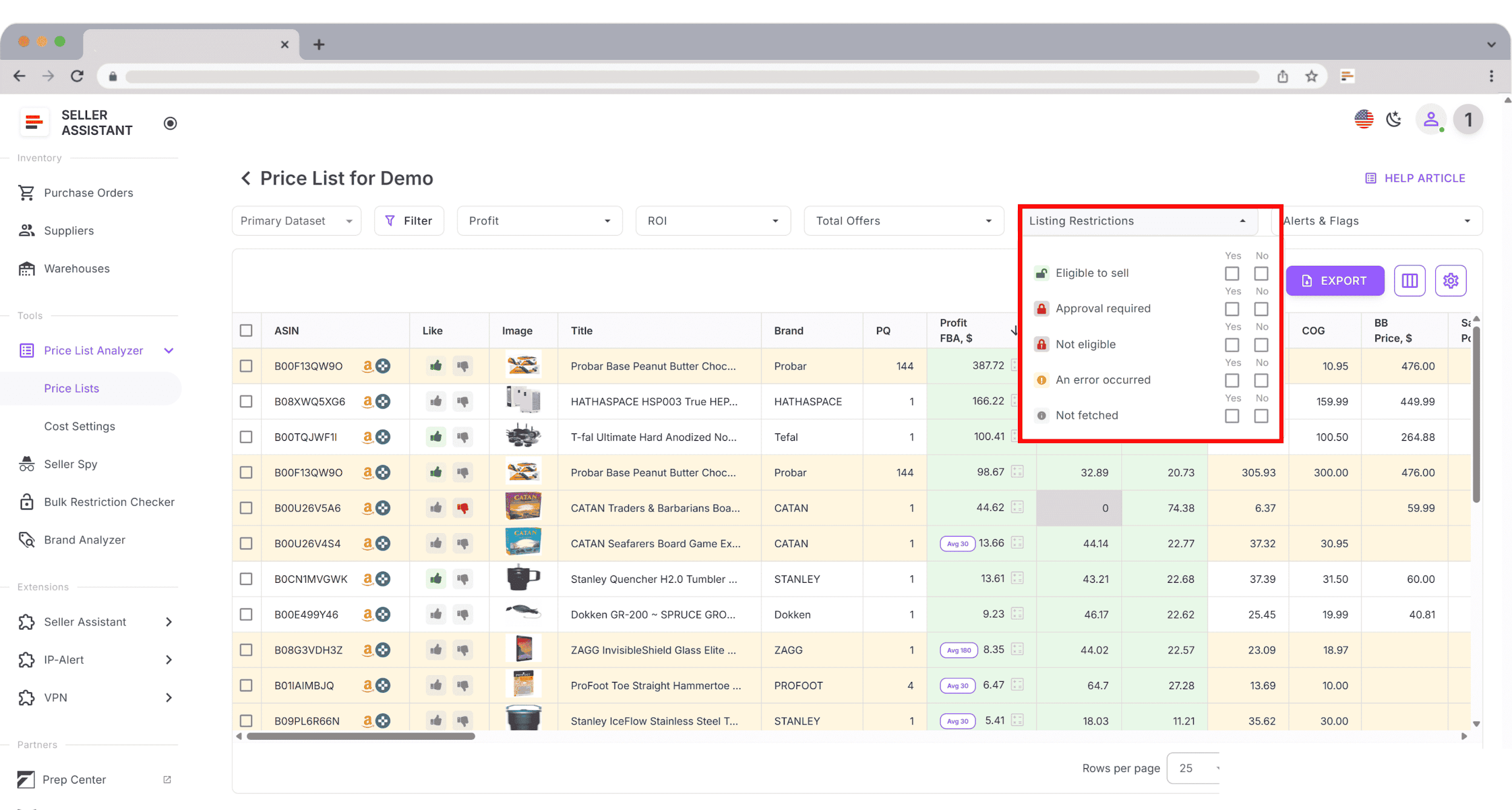
Step 4. Filter by restriction status
Use the Filters menu to display only restricted products or specific lock types. Combine restriction filters with Profit, ROI, or Sales filters to focus on gated items that may still be worth ungating due to strong margins.
Step 5. Decide on next steps
For approval required, evaluate the brand or category and decide whether to apply for ungating in Seller Central
For ineligible, skip the item or revisit it later when your account qualifies
For eligible, move forward with sourcing but still review IP, HazMat, or compliance warnings
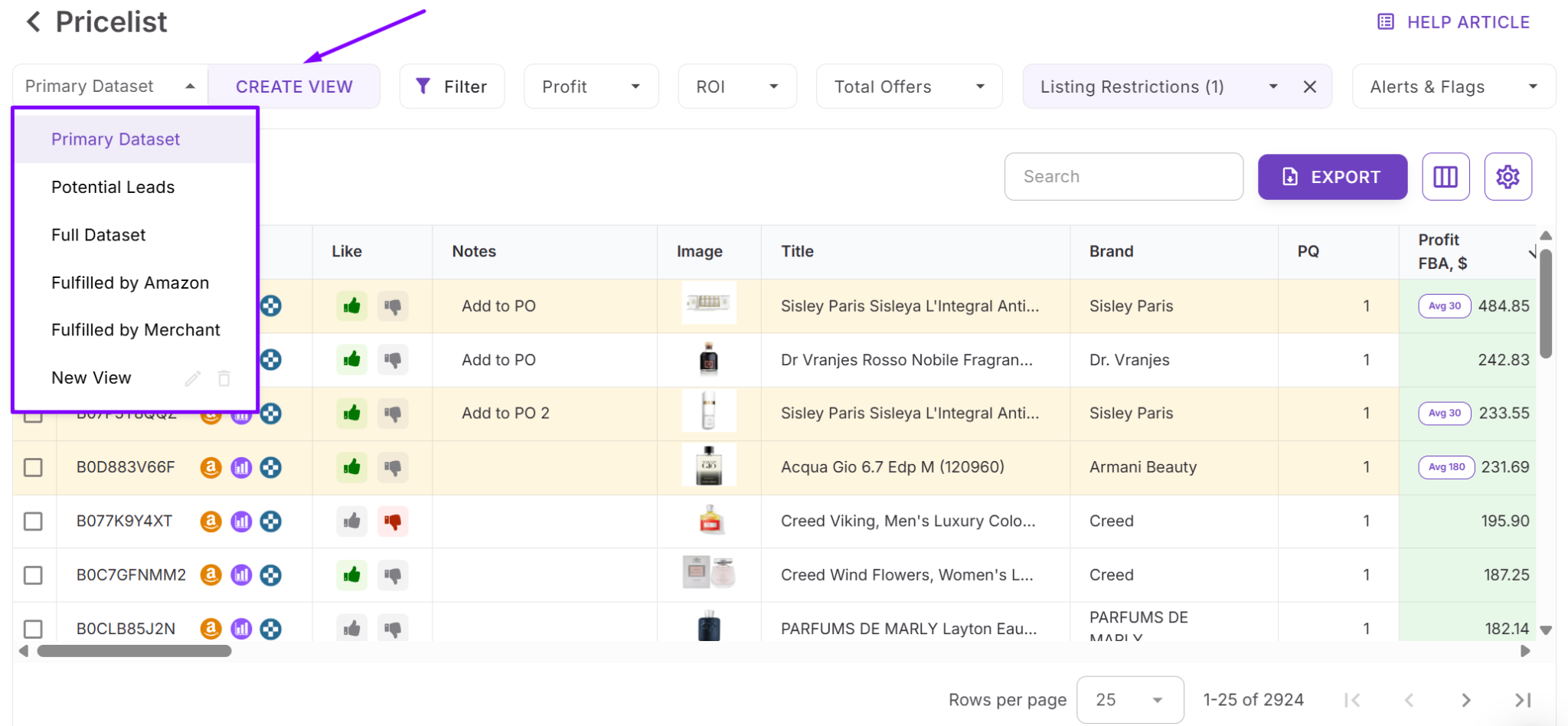
Step 6. Save custom table views
After organizing your data, save your table layout – such as “Sellable deals,” “Ungate targets,” or “Restricted items.” Saved views let you reuse filters for future uploads and keep your sourcing workflow consistent and efficient.
Check Restrictions for Thousands of ASINs at Once
Seller Assistant’s Bulk Restriction Checker is built for sellers who need to validate large ASIN lists in a single step. It allows you to check selling eligibility before investing in inventory and can process up to 20,000 ASINs at once, instantly showing which products are sellable, gated, or completely blocked for your account.
Because the tool reads your marketplace permissions directly, it flags restriction issues early. This makes it ideal for reviewing supplier spreadsheets, cleaning sourcing lists, or validating large catalogs before you buy.
What is Seller Assistant’s Bulk Restriction Checker?
Bulk Restriction Checker helps resellers verify selling eligibility across thousands of products at the same time. It analyzes every ASIN you upload, compares it with your Seller Central permissions, and delivers a clear overview of what you can and cannot list.
The tool evaluates each ASIN, checks its restriction status, and groups products by eligibility – eligible, approval required, or not eligible. Within minutes, it generates a clean, organized report showing exactly which items are safe to source.
What Bulk Restriction Checker helps you do
- Clean large sourcing lists by confirming eligibility for thousands of ASINs at once
- Identify gated products early and decide whether they are worth ungating
- Avoid purchasing inventory your account cannot list
- Download organized reports for filtering, sharing, or team collaboration
- Support efficient sourcing across wholesale, online arbitrage, and dropshipping workflows
How to check restrictions with Bulk Restriction Checker
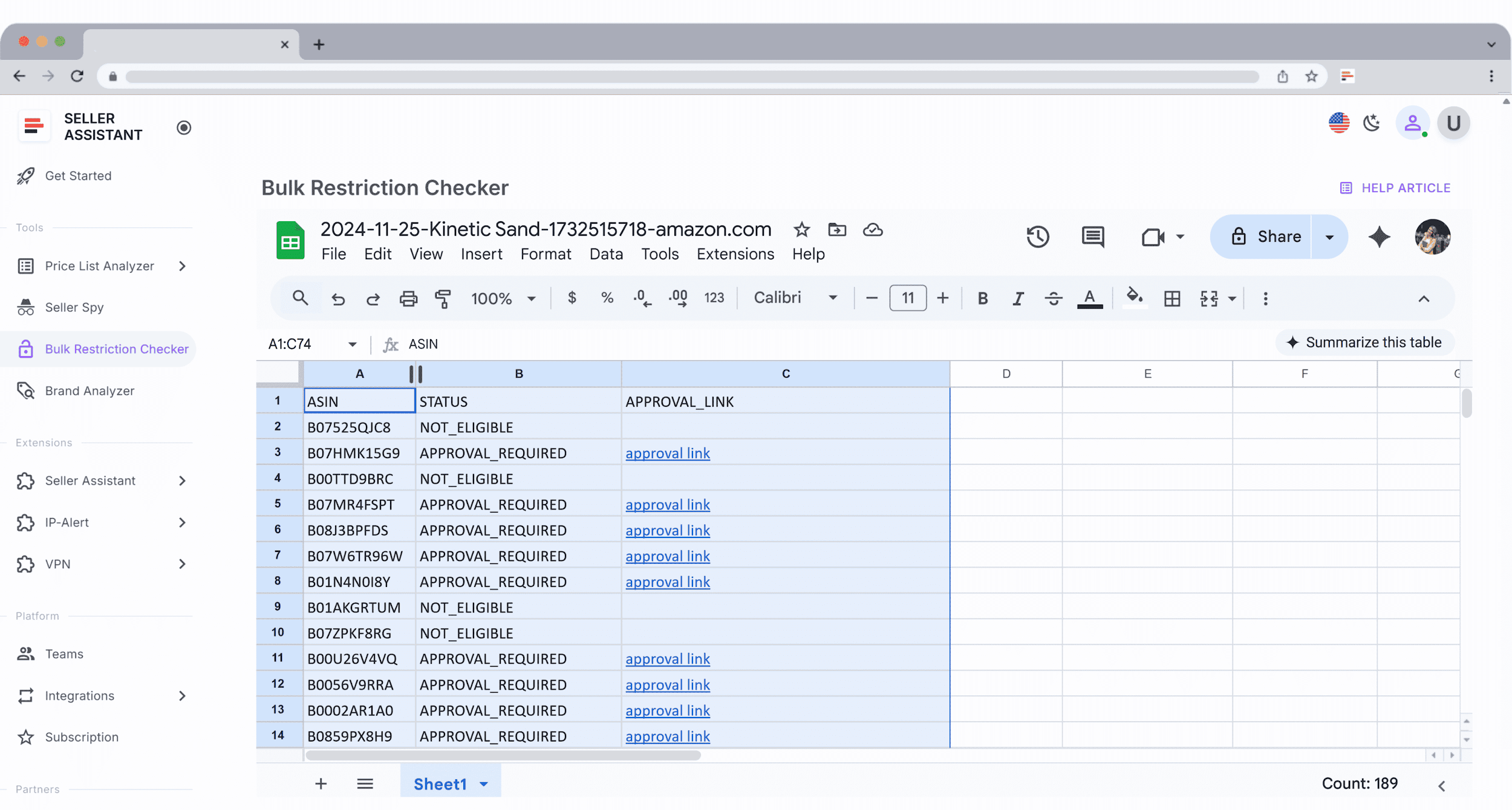
Log in to your Seller Assistant account, select your Amazon marketplace, and upload your ASIN list. Once processing is complete, you can download the results file. Each ASIN is clearly labeled:
- ELIGIBLE – products your account can sell
- APPROVAL_REQUIRED – restricted products that need Amazon approval
- NOT_ELIGIBLE – products your account cannot list
How to use Bulk Restriction Checker
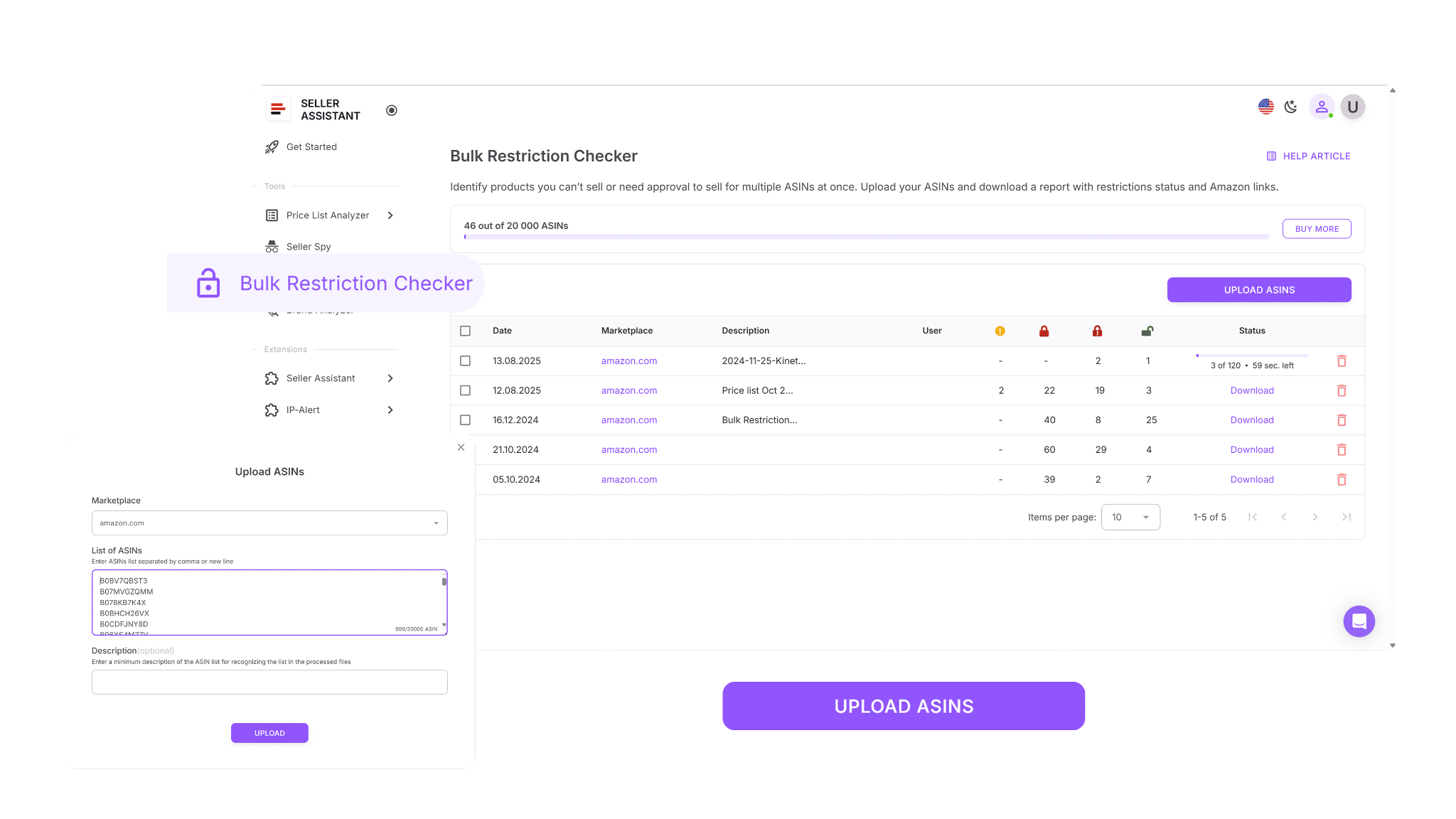
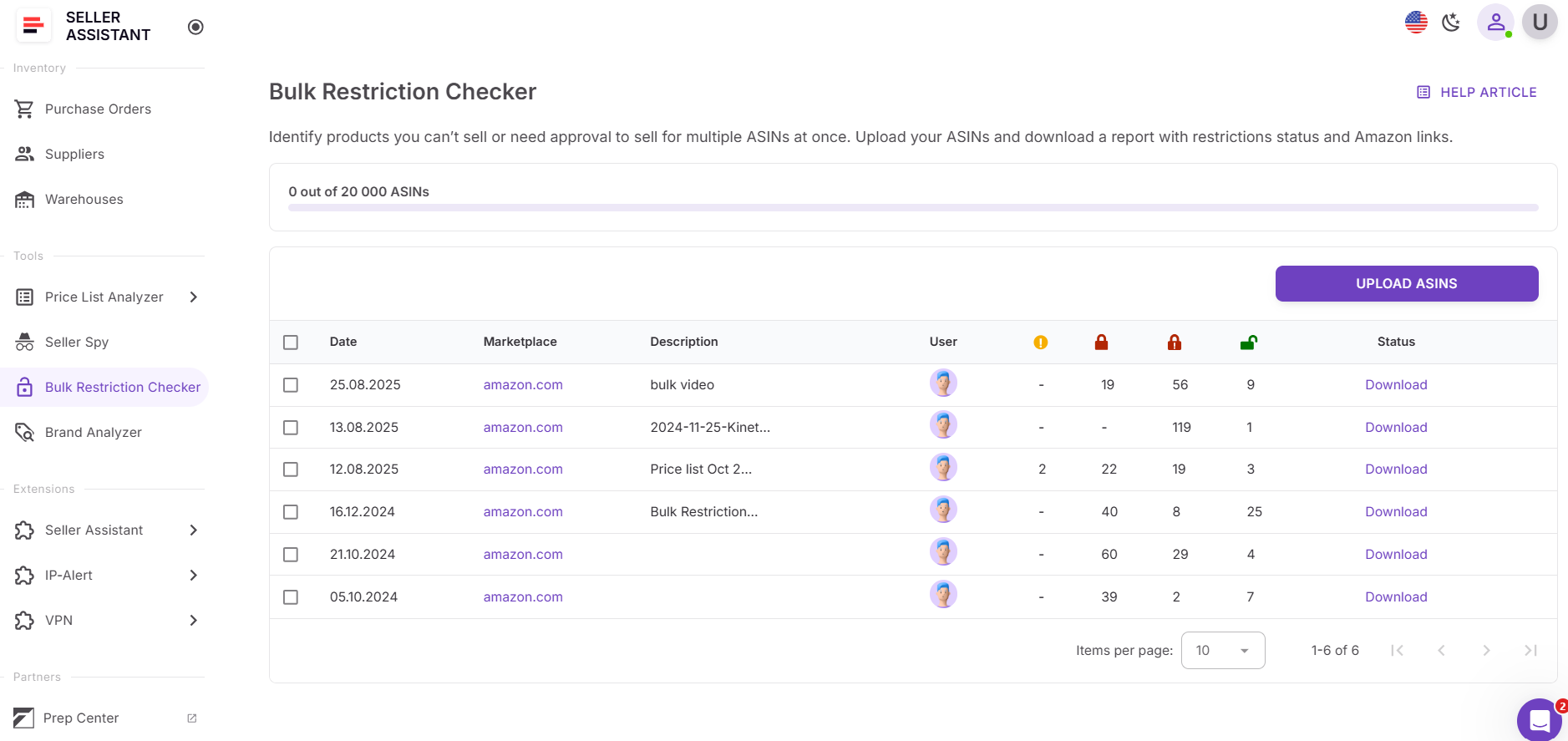
Step 1. Open Bulk Restriction Checker
Go to the Tools section in your Seller Assistant account and select Bulk Restriction Checker.
Step 2. Upload your ASIN list
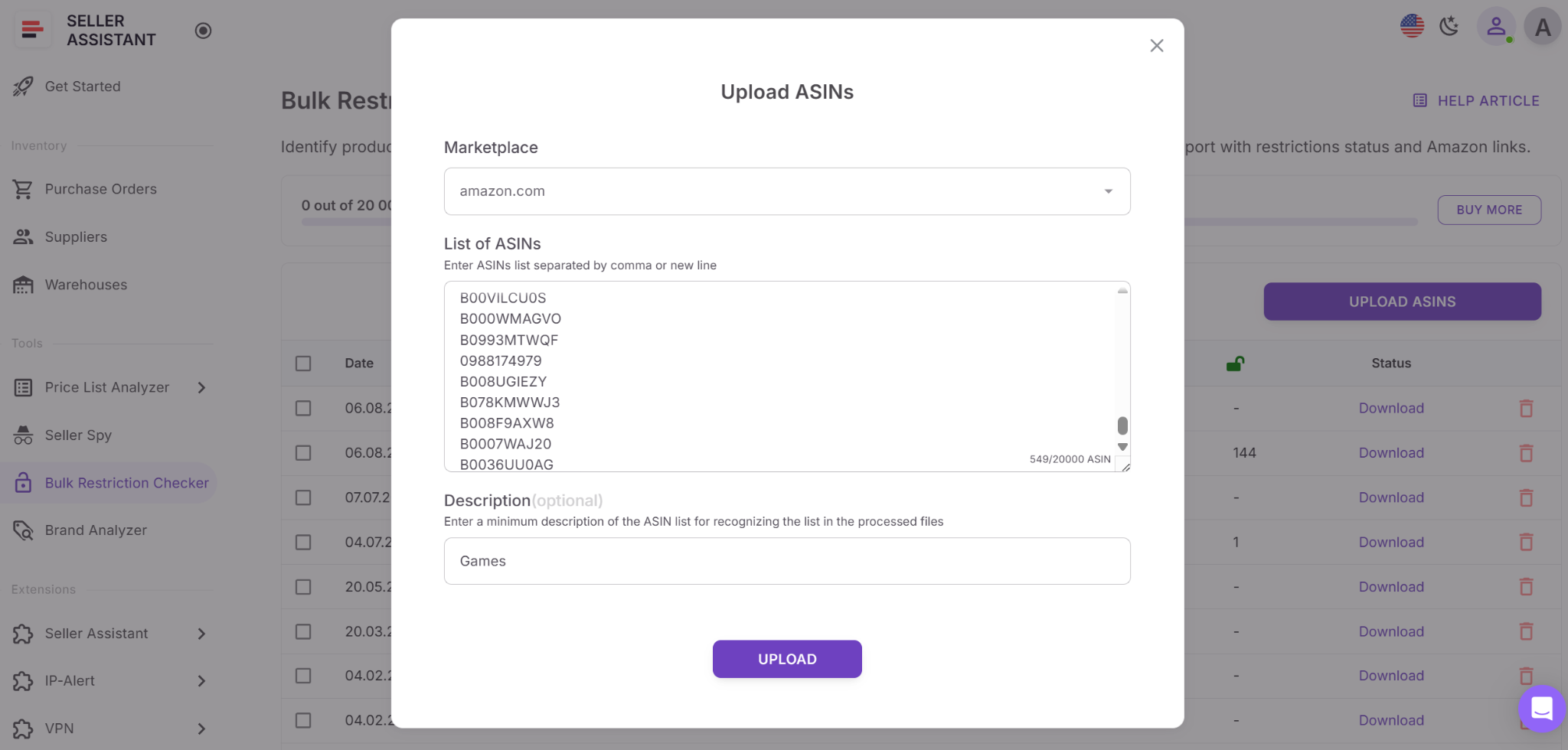
Upload a file containing up to 20,000 ASINs. The tool immediately begins checking each ASIN against your Amazon selling permissions.
Step 3. Wait for the notification email
After processing is complete, you’ll receive an email confirming that your results are ready.
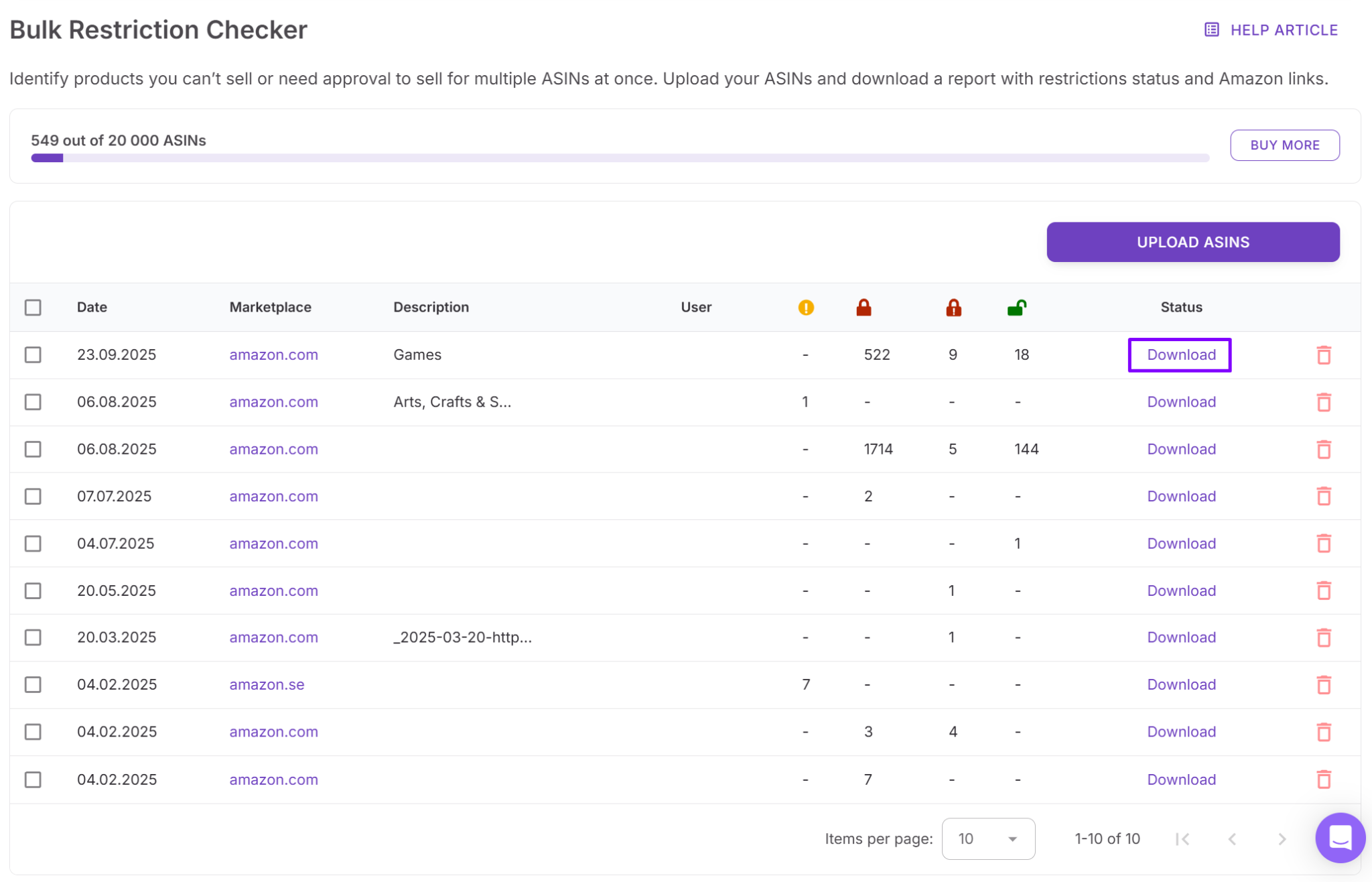
Step 4. Download your completed report
Download the final report to review all restriction statuses. You can sort, filter, and share the file to guide sourcing decisions and coordinate with your team.
FAQ
How do I check if a product is restricted on Amazon?
You can check restrictions manually in Seller Central by searching the ASIN and viewing listing limitations. Bulk tools like Seller Assistant show restriction status instantly across single listings or large ASIN lists.
Why do Amazon listing restrictions change so often?
Amazon updates restrictions based on safety rules, brand policies, and regulatory requirements. Because these changes can happen without notice, sellers should verify restrictions every time they source products.
Can I check Amazon restrictions for thousands of ASINs at once?
Yes, bulk-check tools can scan thousands of ASINs in one upload and show which products are eligible, gated, or blocked. This helps sellers validate sourcing lists before investing in inventory.
What happens if I buy a restricted product without checking?
If a product is gated or ineligible, Amazon may block you from adding your offer entirely. This turns inventory into an immediate loss and can negatively affect your account health.
Does an open category mean all ASINs are sellable?
No, even if a category is open, individual brands or ASINs may still be restricted. Always check eligibility at the ASIN level to avoid sourcing products you cannot list.
Final Thoughts
Checking Amazon listing restrictions is not an optional step – it’s a foundation of profitable and safe sourcing. When sellers skip eligibility checks, they risk wasting time on deals they can’t list or buying inventory that becomes an instant loss. This risk grows even more when you source at scale across wholesale catalogs, OA deal lists, or dropshipping inventories.
By verifying restrictions in bulk and directly within your sourcing workflow with Seller Assistant, you can focus only on products your account is allowed to sell, avoid costly mistakes, and protect your account health.
Seller Assistant automates and connects every stage of your Amazon wholesale and arbitrage workflow. It brings together in one platform: workflow management tools – Purchase Orders Module, Supplier Database, Warehouse Database, bulk research & sourcing tools – Price List Analyzer, Bulk Restriction Checker, Sourcing AI, Brand Analyzer, Seller Spy, Chrome extensions – Seller Assistant Browser Extension, IP-Alert Extension, and built-in VPN by Seller Assistant, and integrations & team access features – seamless API connectivity, integrations with Zapier, Airtable, and Make, and Virtual Assistant Accounts.


