


Growing your online arbitrage Amazon business requires more than just finding discounted products – it’s about using smart sourcing strategies to stay ahead of the competition.
The key to scaling is identifying profitable brands, automating deal discovery, and streamlining verification processes. With the right product sourcing tools, what once took hours of manual research can now be done efficiently, allowing you to focus on growth and long-term profitability.
In this post, we’ll walk through five essential steps to optimize your sourcing strategy, identify winning deals, and expand into wholesale business.
Related: Seller Assistant Extension
Seller Assistant — the Ultimate Tool for Amazon Online Arbitrage
How Growing Your Online Arbitrage Amazon Business Works
As your online arbitrage Amazon business expands, you’ll naturally start thinking about scaling it to the next level. Finding a handful of profitable deals each month isn’t enough – you need a system that consistently identifies new winning deals at scale. To achieve this, you must discover new brands and leverage automated sourcing tools to pinpoint low-risk, high-margin products.
At this stage, your business starts resembling the wholesale model – the key difference being that you don’t negotiate directly with brands for wholesale price lists. However, once you’ve mastered large-scale sourcing, transitioning into wholesale becomes the logical next step. This is the natural evolution of every growing online arbitrage business.
So, how do you make this transition effectively? Here are five key steps to scaling your Amazon online arbitrage business and setting the foundation for wholesale growth.
5 Steps to Grow Beyond Online Arbitrage
To grow your online arbitrage Amazon business beyond its current limits, you need a structured approach to finding new suppliers (brands) to sell, sourcing and deal validation. The five steps below will help you find profitable brands, automate product research, verify deals efficiently, and streamline your operations.
We will show you how an ultimate product sourcing tool, Seller Assistant, helps you automate and streamline your online arbitrage growth. By following the steps below, you’ll be able to consistently identify high-margin, low-risk products, setting the foundation for long-term growth and a smooth transition into wholesale.
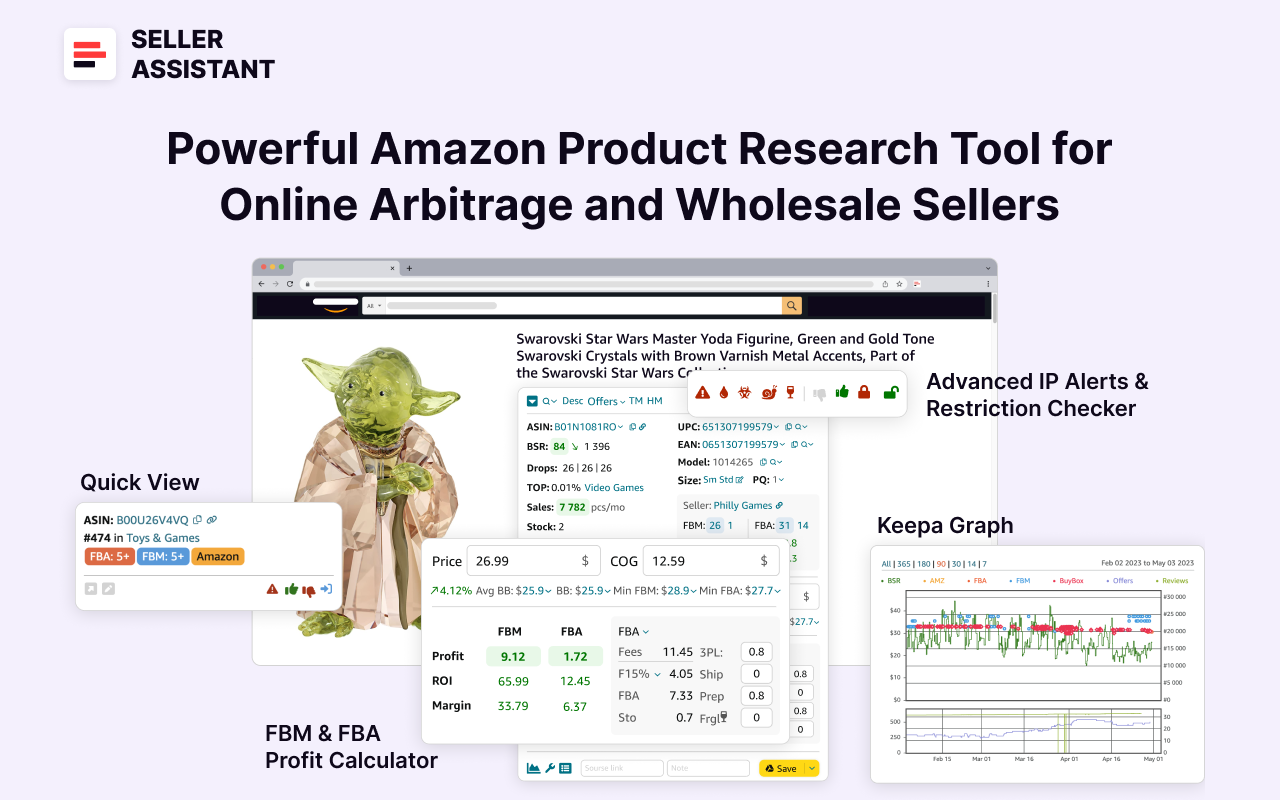
Note. Seller Assistant is all-in-one product-sourcing software offering 20+ tools that helps Amazon sellers quickly find profitable and low-risk deals. It provides you with effective solutions for bulk wholesale price list scanning and brand analysis alongside advanced product research extensions, tools, and features providing you with in-depth product research data.
Seller Assistant
It combines three extensions: Seller Assistant Browser Extension, and IP-Alert Chrome Extension by Seller Assistant, and VPN by Seller Assistant, Amazon seller tools: Price List Analyzer, Brand Analyzer, Seller Spy, Bulk Restrictions Checker, and API integrations, and features: Side Panel View, Storefront Widget. Quick View, FBM&FBA Profit Calculator, Sales Estimator, Offers, Variation Viewer, Stock Checker, and offers secure and efficient solutions for teamwork.
Step 1. Research competitor storefronts to sell the best brands
Your competitors are already selling proven profitable brands – so why not leverage that data? Start by analyzing competitor storefront summaries to identify their most popular categories and top-selling brands. Look at their storefront reviews, ratings, and product offerings to determine demand.
What it is
Analyzing competitor storefronts allows you to gain valuable insights into which brands, categories, and products are performing well. By examining your competitors’ top-selling brands and their review and rating counts, you can identify profitable products and low-competition opportunities to expand your inventory.
What is achieved
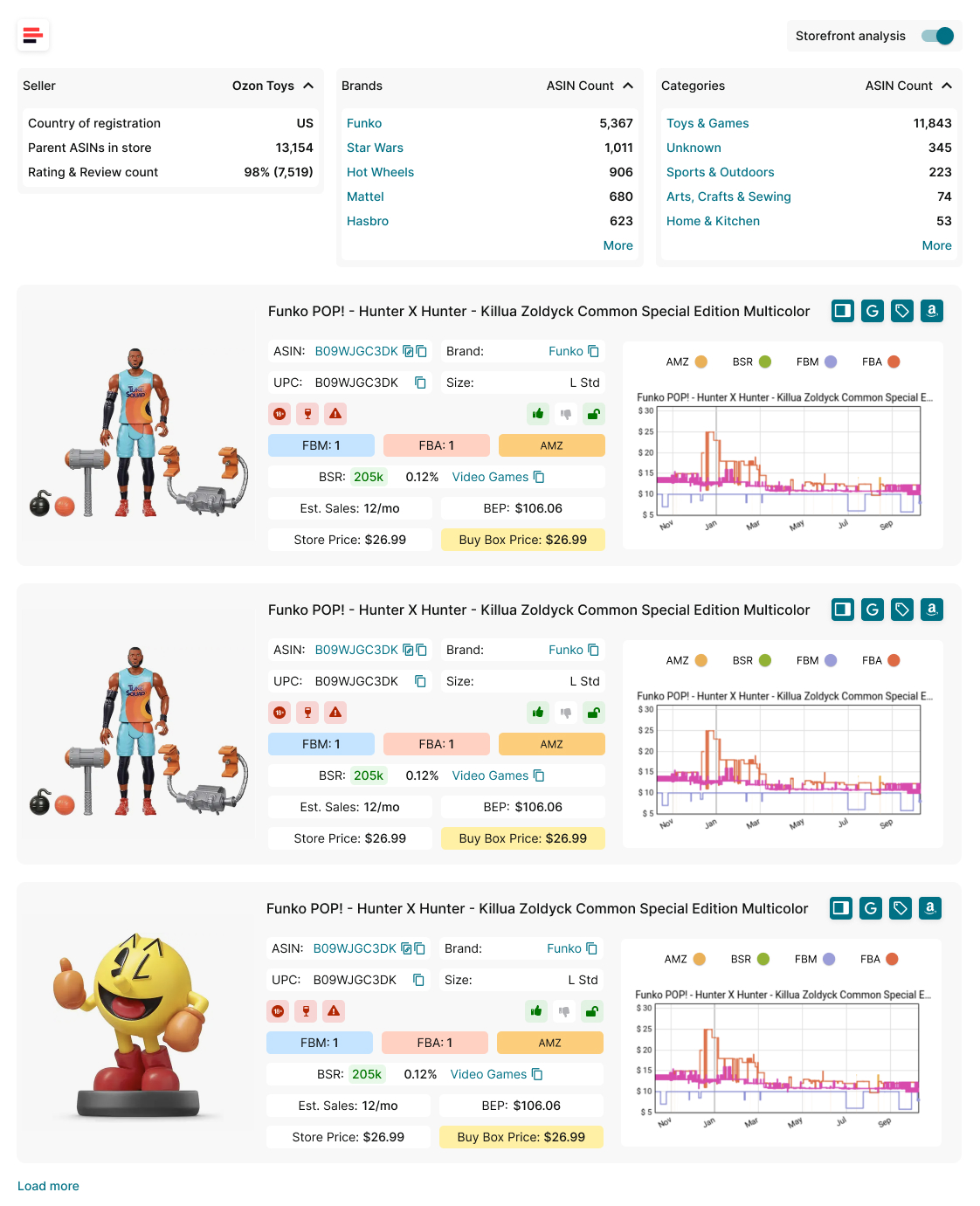
To do this efficiently, use Seller Assistant’s Storefront Widget to quickly extract storefront summaries, identify biggest competitor categories, pinpoint high-demand brands that you should be selling, their product offerings, and competitor storefront review and rating counts to see if their stores are popular.
Storefront Widget
With Storefront Widget, you can:
- Get a summary of competitor storefronts, including categories, brands, product offerings, and performance metrics.
- Identify high-demand, low-competition products based on competitor insights.
- Access pricing data, brand performance, and deal risks to make data-driven sourcing decisions.
- Expand your product portfolio by selling the most successful brands your competitors offer.
How it works
- Visit a competitor’s storefront on Amazon.
- The Storefront Widget automatically loads, displaying key storefront insights.
- View store summary statistics, including total product count, best-selling brands, ratings, and reviews.
- Analyze individual product performance based on metrics like Best Seller Rank (BSR), price fluctuations, estimated sales, and competition levels.
- Sort and filter results by brand or category to identify the most profitable niches.
Step 2. Conduct brand research to identify best-selling brands
Once you’ve identified top-performing brands, it’s time to analyze them in-depth. You need to evaluate:
- Brand size
The number of products it offers
- Revenue potential
How much you can earn if you sell this brand
- Competition analysis
How intense is the competition from Amazon and other other third-party sellers
- Average product price
Average Buy Box price per product
- Brand popularity
Review and rating quality
What it is
Brand research helps sellers determine whether a brand is worth reselling based on critical metrics such as competition levels, product volume, revenue potential, and brand restrictions. This ensures that sellers focus on high-demand, profitable brands that align with their business model.
What is achieved
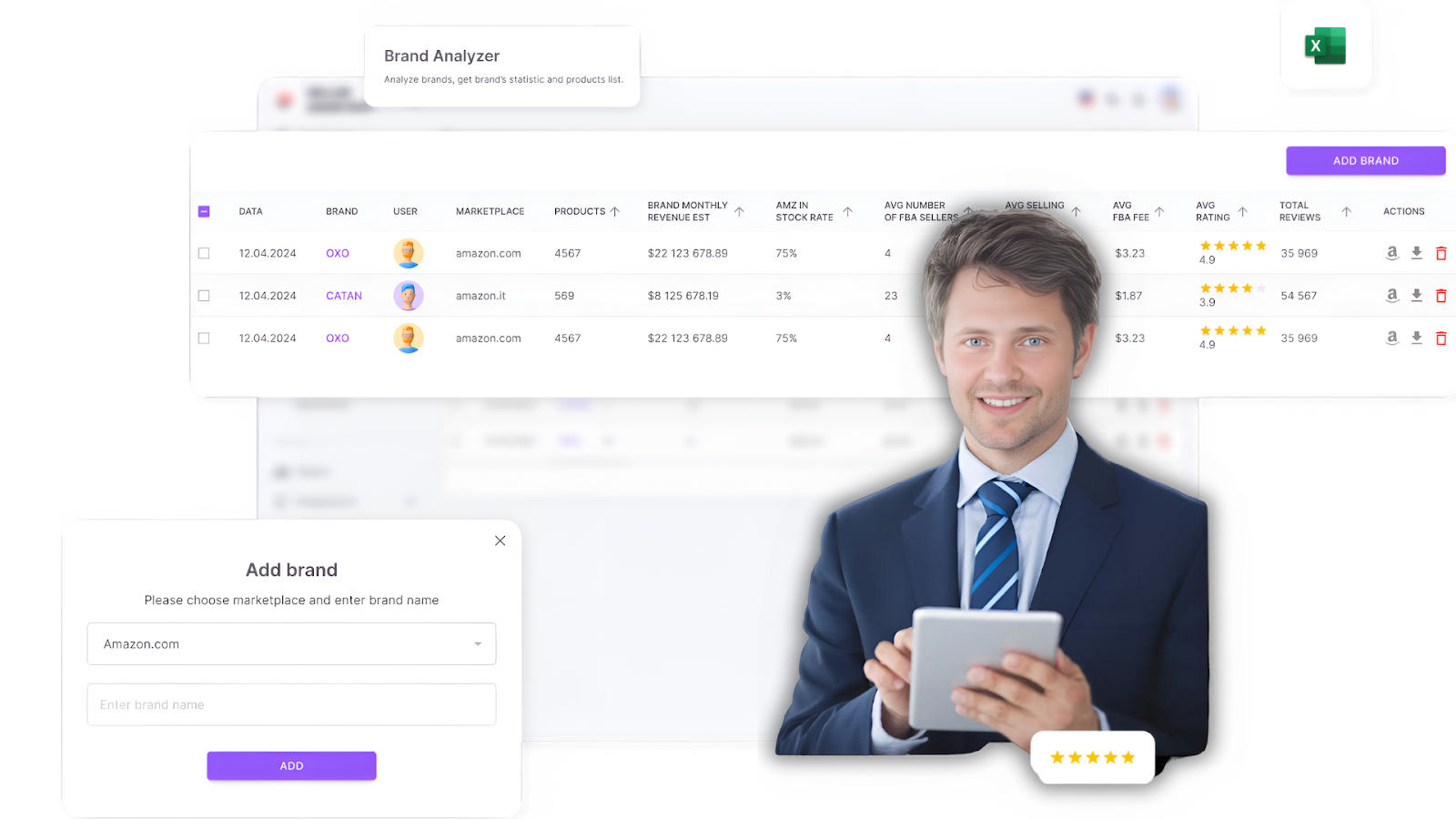
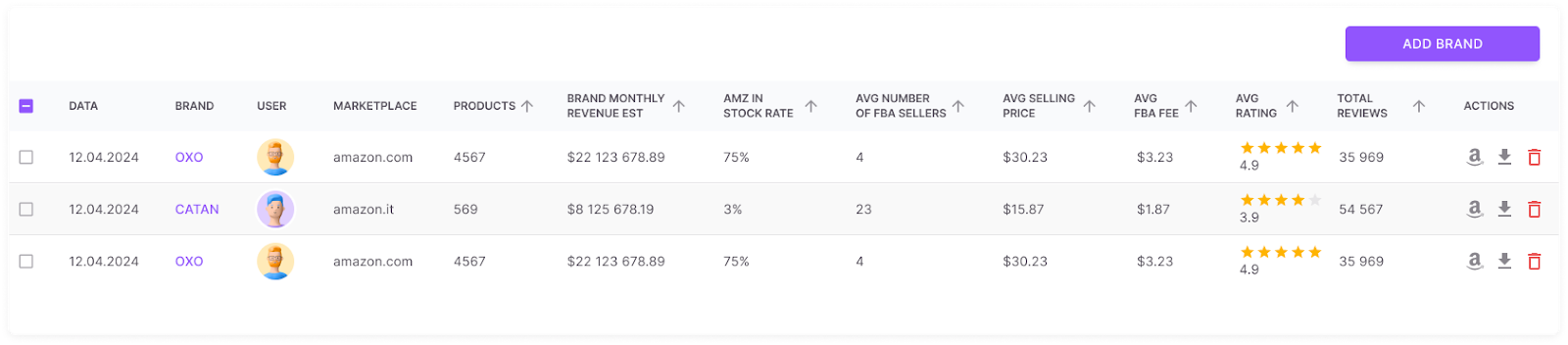
A great tool for brand research is Seller Assistant’s Brand Analyzer. It provides an instant brand summary and lets you download the brand’s full product list, helping you make data-driven sourcing decisions.
Seller Assistant’s Brand Analyzer
Brand Analyzer allows you to:
- Get a comprehensive brand overview, including revenue, product count, pricing, competition, and customer feedback.
Brand Analyzer
- Identify brands with high product volumes (ideally over 500 products) to increase sourcing opportunities.
- Evaluate revenue potential based on sales performance and pricing.
- Avoid competition with Amazon by analyzing the percentage of products Amazon sells within the brand (if Amazon sells more than 30% of a brand’s product, the competition with Amazon is too high).
- Assess competition levels by checking the number of third-party sellers per product to avoid oversaturated brands.
- Choose brands with high ratings and strong customer feedback to ensure demand and profitability.
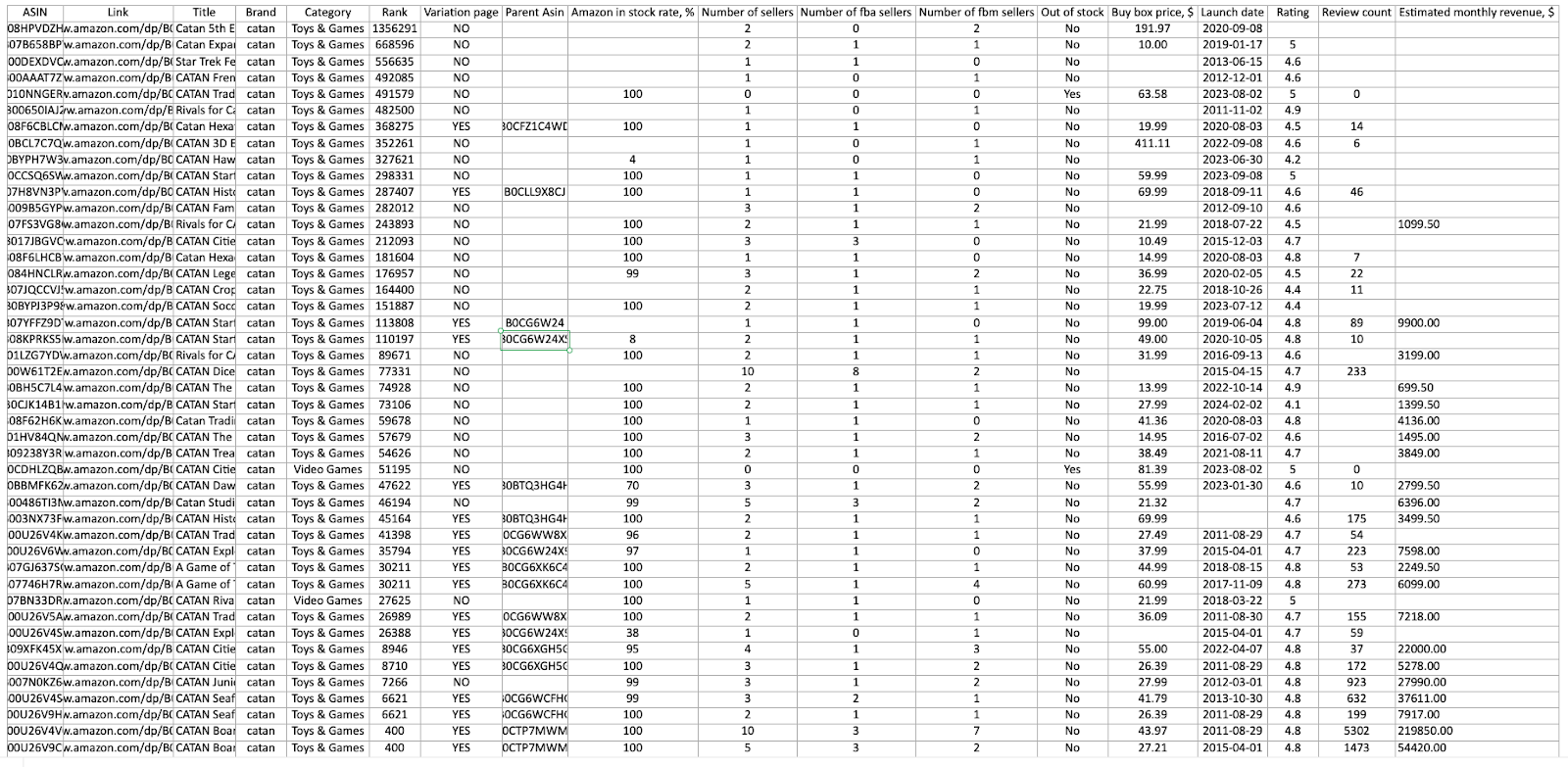
- Get a full brand’s product list with essential data.
Brand Analyzer detailed report
How it works
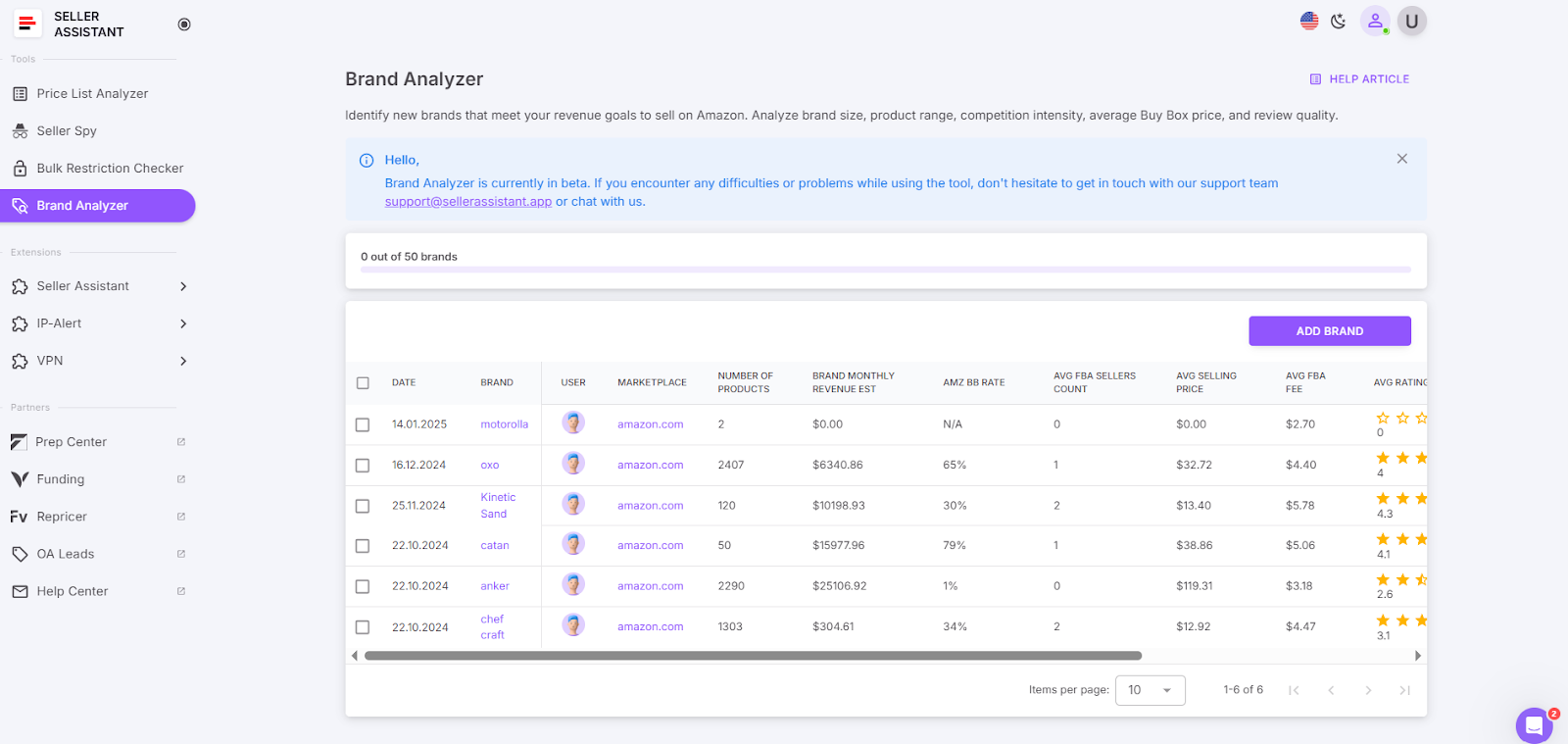
- Log in to your Seller Assistant account and access Brand Analyzer.
Brand Analyzer detailed report
- Select your marketplace and enter the brand name you want to research.
- Review the brand summary, including sales volume, competition level, and pricing data.
- To access the brand’s store on Amazon, click the Amazon “A” icon.
- Download a detailed report (.xls file) with all the brand’s product data, including pricing and profitability metrics.
Related: Online Arbitrage for Beginners
Amazon Online Arbitrage: How to Make Money
Step 3. Parse and automatically scan supplier lists
Parse your chosen brand’s products with prices from their website. With a brand’s product list in hand, the next step is to match those products to Amazon and identify high-margin, low-risk deals. To identify deals that are worth reselling on Amazon, use an automated product list scanner.
What it is
Supplier list analysis helps sellers match supplier products to Amazon listings and identify high-margin, low-risk deals. Automated scanning tools eliminate manual work and ensure that only profitable, in-demand products make it into the sourcing pipeline.
What is achieved
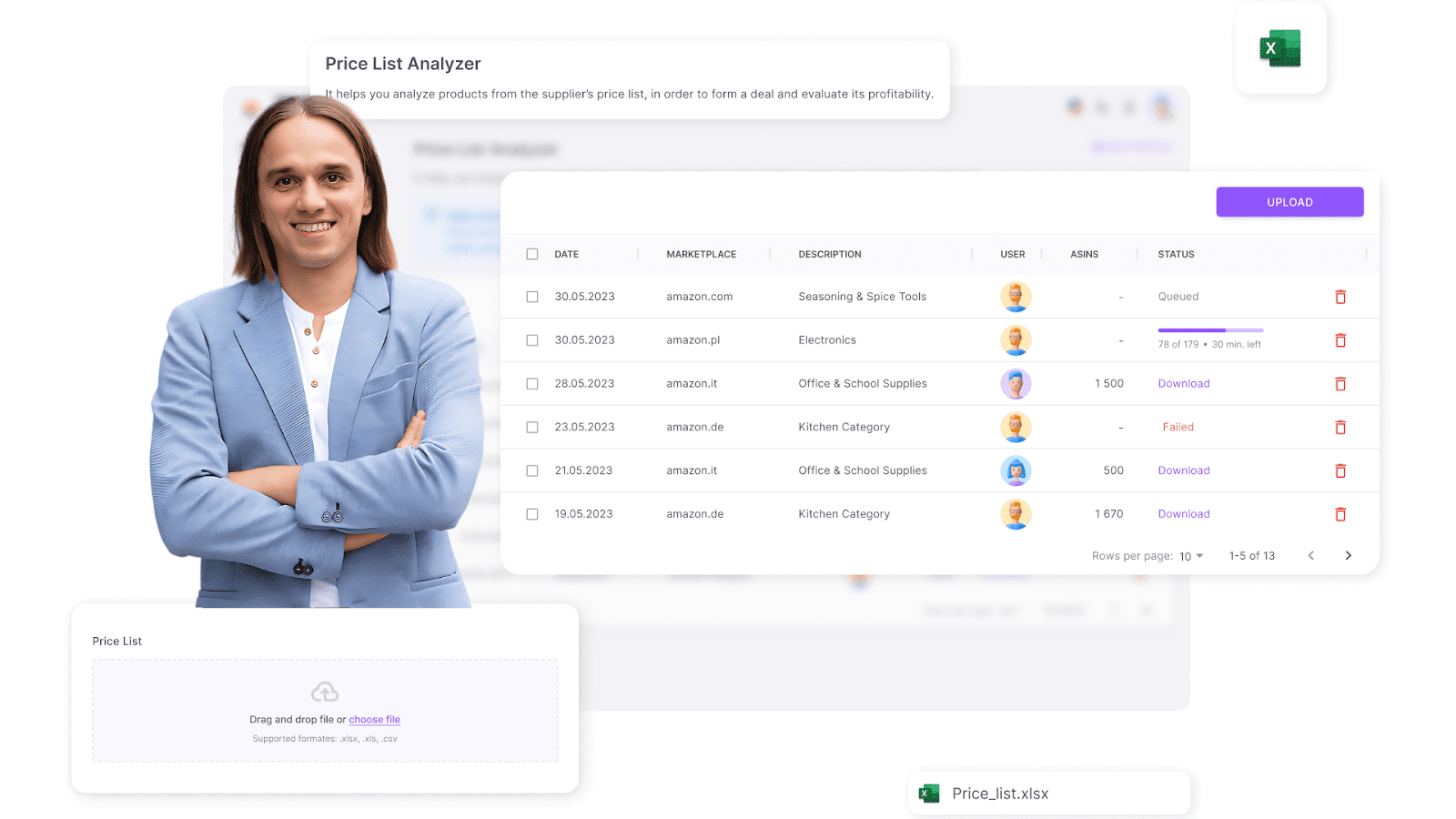
Seller Assistant’s Price List Analyzer is one of the best product list scanner tools designed for Amazon sellers. It automatically matches your products to Amazon, populates your spreadsheet with key product data and allows you to filter the products by your selling eligibility, profitability, sales performance, and risks, to identify best-selling high-ROI products. Automation eliminates manual errors and speeds up the sourcing process, allowing you to scale efficiently.
Price List Analyzer
Price List Analyzer helps you:
- Automatically match supplier products to their Amazon ASINs.
- Verify if you can sell a product on your account and product restrictions
- Enrich product sheets with essential sourcing metrics, including profitability and risk assessments.
- Bulk process supplier lists to quickly identify high-ROI deals.
- Get detailed product performance data including potential profitability, sales volume, and velocity
- Analyze profitability metrics such as profit, ROI, margin, break-even point, and estimated sales to pinpoint high-margin products.
- Evaluate competition level by FBA and FBM seller offers
- Analyze average Buy Box price, trends over 30, 90, and 180 days, and price dynamics
- Detect sourcing risks like selling restrictions, IP complaints, and Amazon’ as a product seller.
- Filter products based on eligibility, sales velocity, and pricing to refine sourcing decisions.
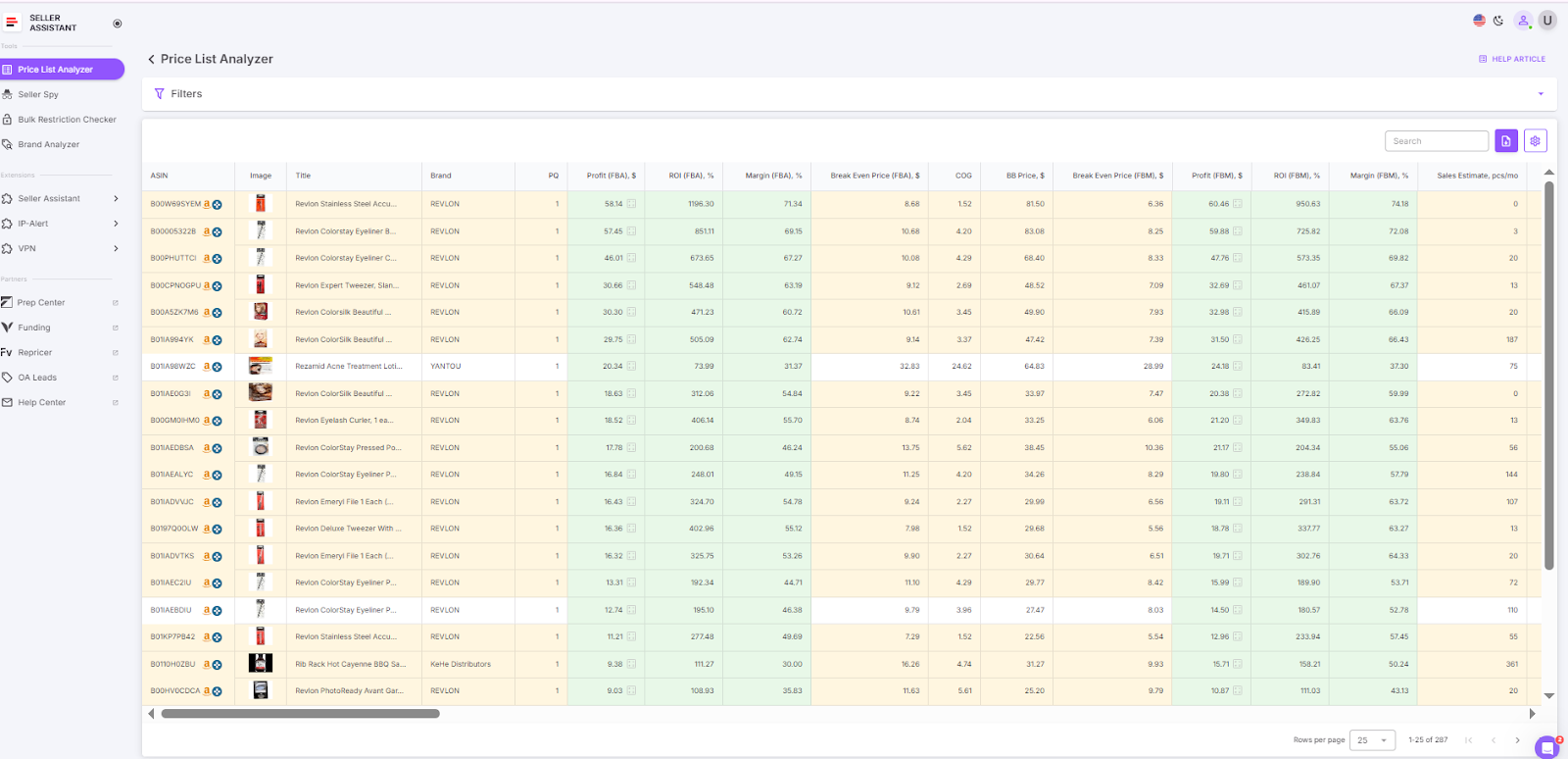
Price List Analyzer data
How it works
- Log in to your Seller Assistant account and navigate to Price List Analyzer.
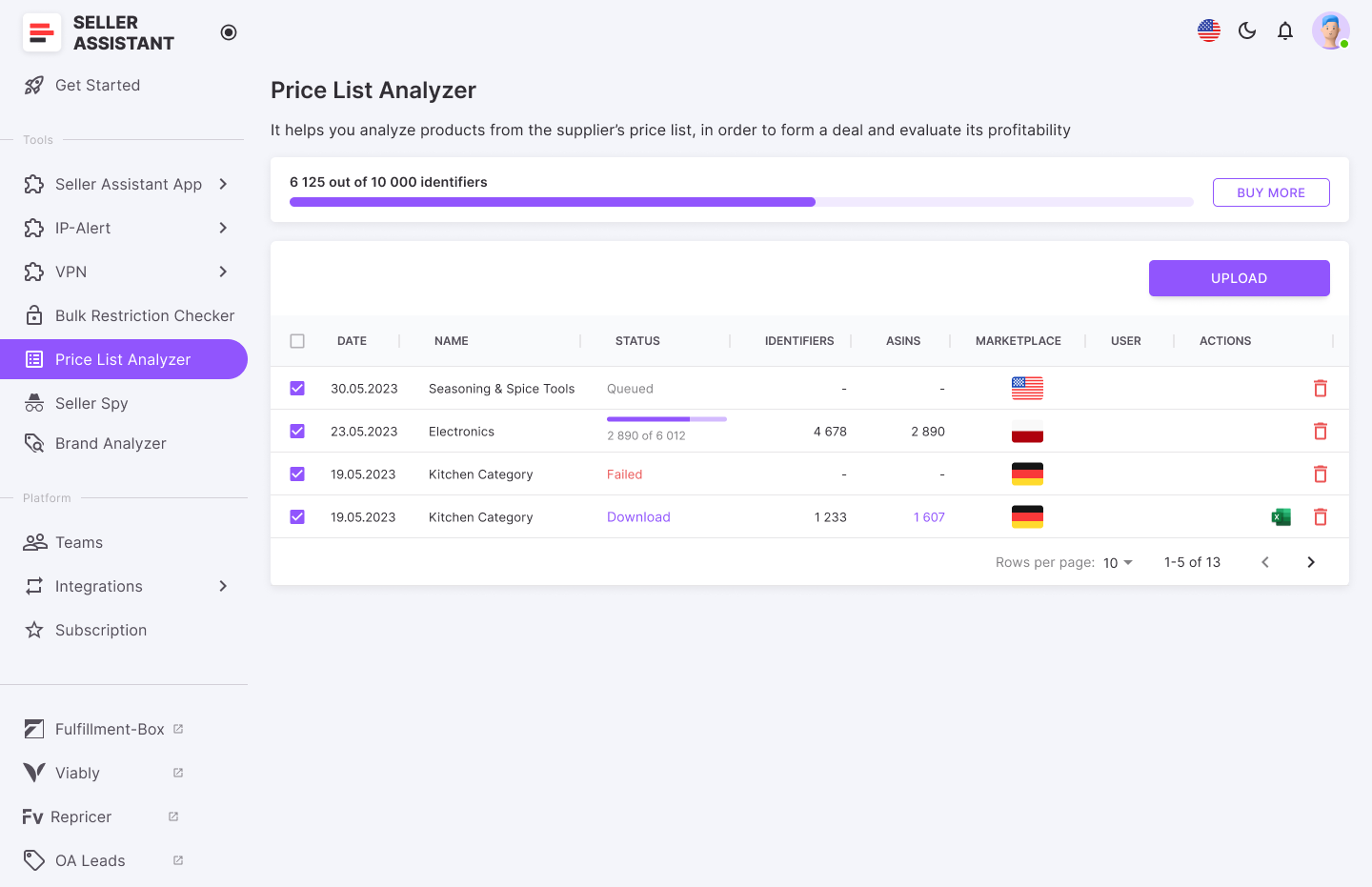
Get the Price List Analyzer results
- Click Upload, select your marketplace, and drag and drop your Excel file containing the wholesale price list.
- Set up the file for processing by mapping key data fields like price, ASIN, and supplier cost.
- Click Analyze Price List to begin processing.
- Once the analysis is complete, review the detailed report and apply filters to identify the most profitable and low-risk deals.
- Download the refined sourcing list for final review and purchase decisions.
Related: How to Find Amazon FBA Wholesale Suppliers
A dozen ways to find suppliers for reselling on Amazon.com and a checklist to verify them
Step 4. Hire virtual assistants to verify deals
As your business grows, verifying hundreds of product deals manually isn’t feasible. This is where virtual assistants (VAs) come in. A VA can analyze, filter, and verify deals, ensuring that only the most profitable and low-risk items make it to your inventory.
What it is
Hiring virtual assistants allows sellers to outsource deal verification and product analysis. VAs can handle time-consuming research tasks, allowing sellers to focus on business growth.
What is achieved
To manage VAs securely, use Seller Assistant’s Virtual Assistant Account feature, which provides built-in VPN access, therefore you don’t need to pay for it separately. Also, the feature allows VAs to conduct deal research securely without needing access to your Amazon seller account credentials.
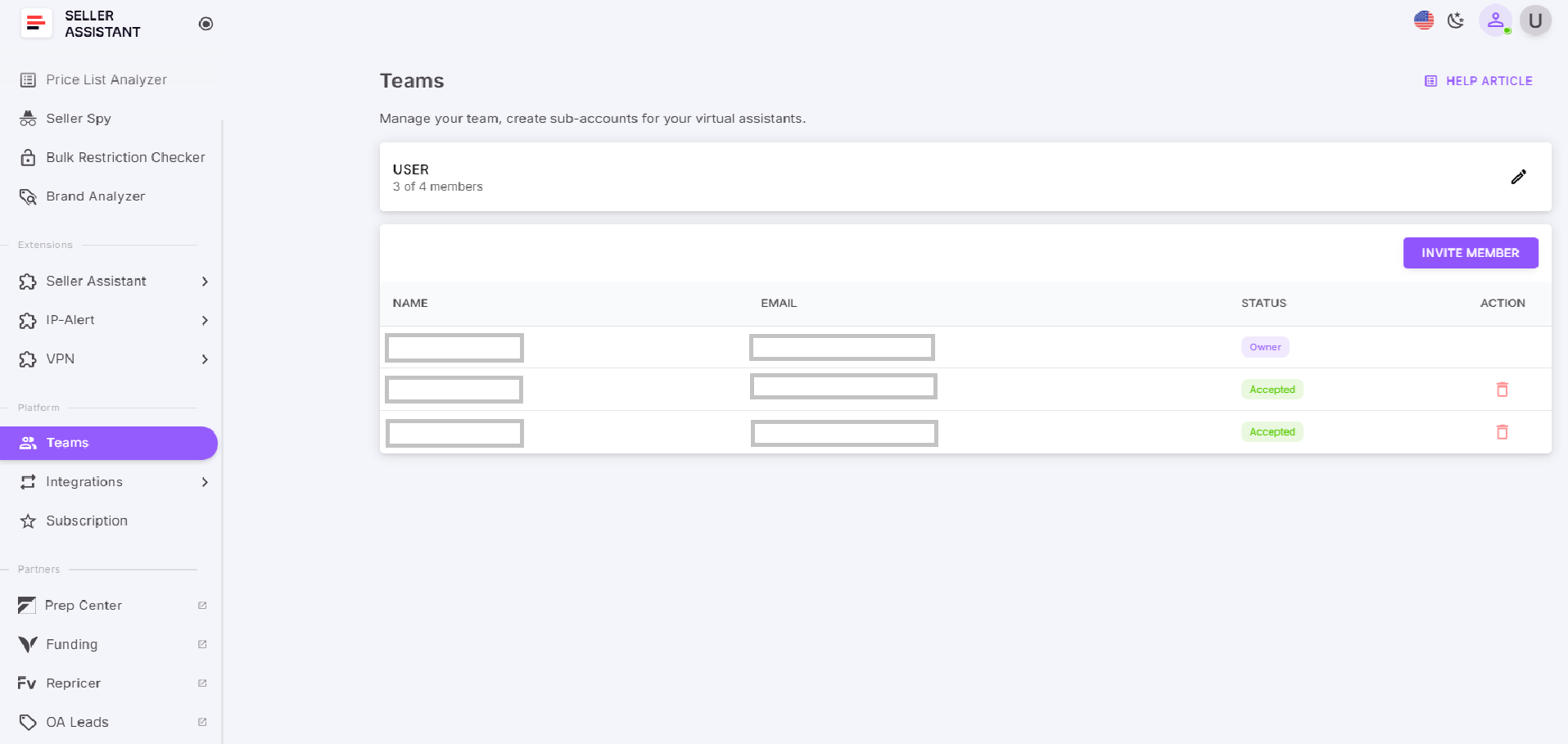
Virtual Assistant Account
- Ensure in-depth deal verification with Seller Assistant Extension, ensuring products meet profit and risk criteria before purchase.
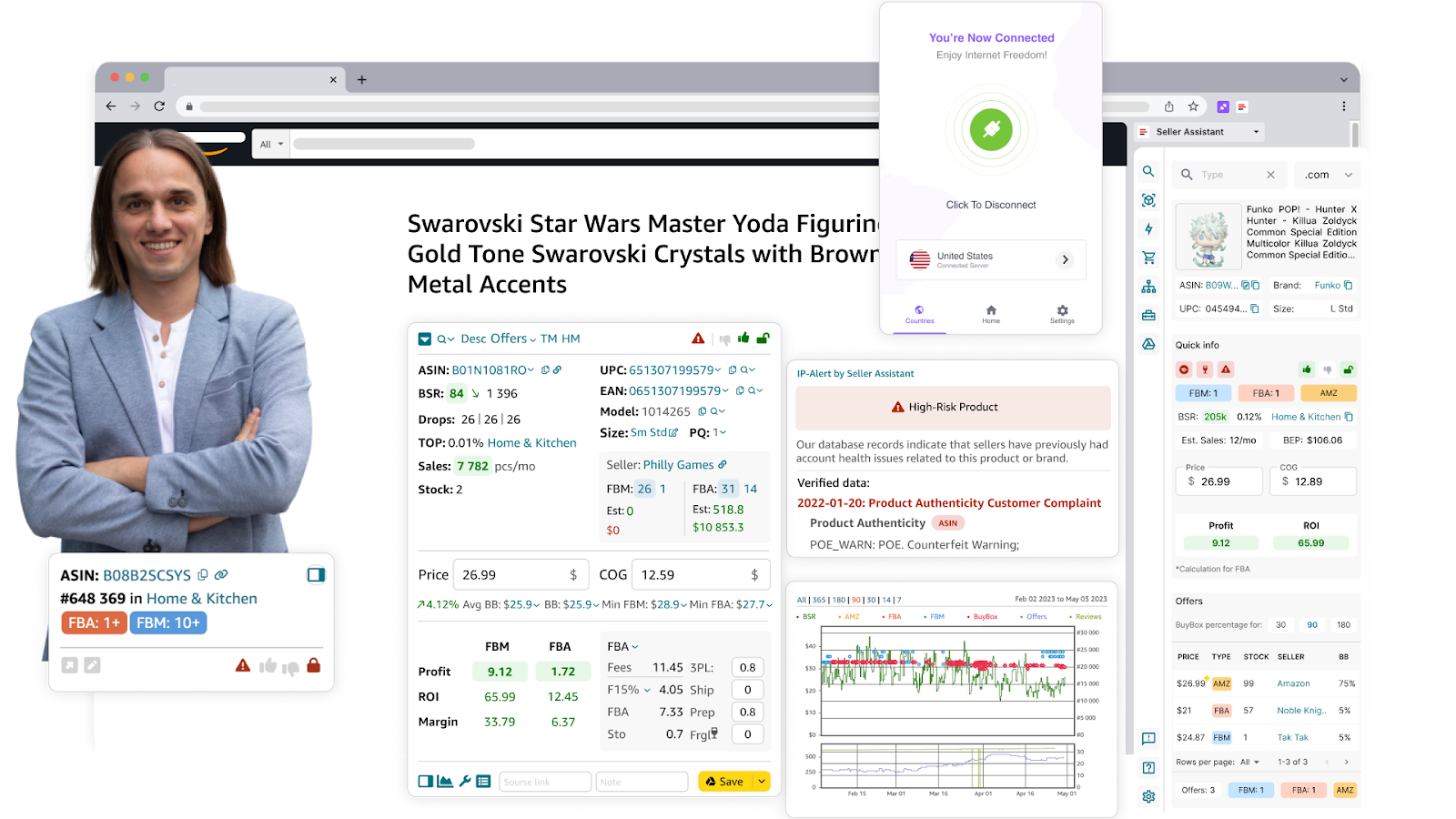
Seller Assistant Extension
- Reduce time spent on manual product research and filtering.
- Increase sourcing efficiency by allowing trained VAs to handle repetitive tasks.
- Use secure access controls to keep Amazon account data protected while VAs perform research.
How it works
Seller Assistant’s Virtual Assistant Account allows to securely manage sourcing teams:
- Assign VAs to conduct deal research without granting full access to your Amazon Seller Central account.
- VAs can check product restrictions directly within Amazon using the Restriction Checker, which marks restricted items with red lock icons.
- Use the Bulk Restriction Checker to scan up to 20,000 ASINs at once and identify brand gates or approval requirements.
- Secure VA access using built-in VPN functionality, allowing them to access supplier websites without restrictions.
- Ensure efficient, risk-free sourcing while maintaining data security and compliance
- Get free built-in VPN access.
Related: What Are the Funding Options for Amazon Sellers?
Wise US Bank Account for Amazon Sellers - Complete Review
What Is the Deposit Method on Amazon?
Step 5. Transition to wholesale
By this point, you’ve mastered large-scale sourcing – now it’s time to go wholesale. Instead of sourcing individual products, you can start negotiating with suppliers to buy in bulk, secure lower costs, and maximize profits.
At this stage, you have:
- The capital to invest in bulk orders
- The experience to choose profitable products
- A scalable system for sourcing and verification.
Key Differences: Amazon Wholesale vs. Online Arbitrage
Wholesale and online arbitrage work differently, each with distinct sourcing methods, investment levels, and profitability potential. Below, we compare these models to help you understand the difference and successfully scale your business.
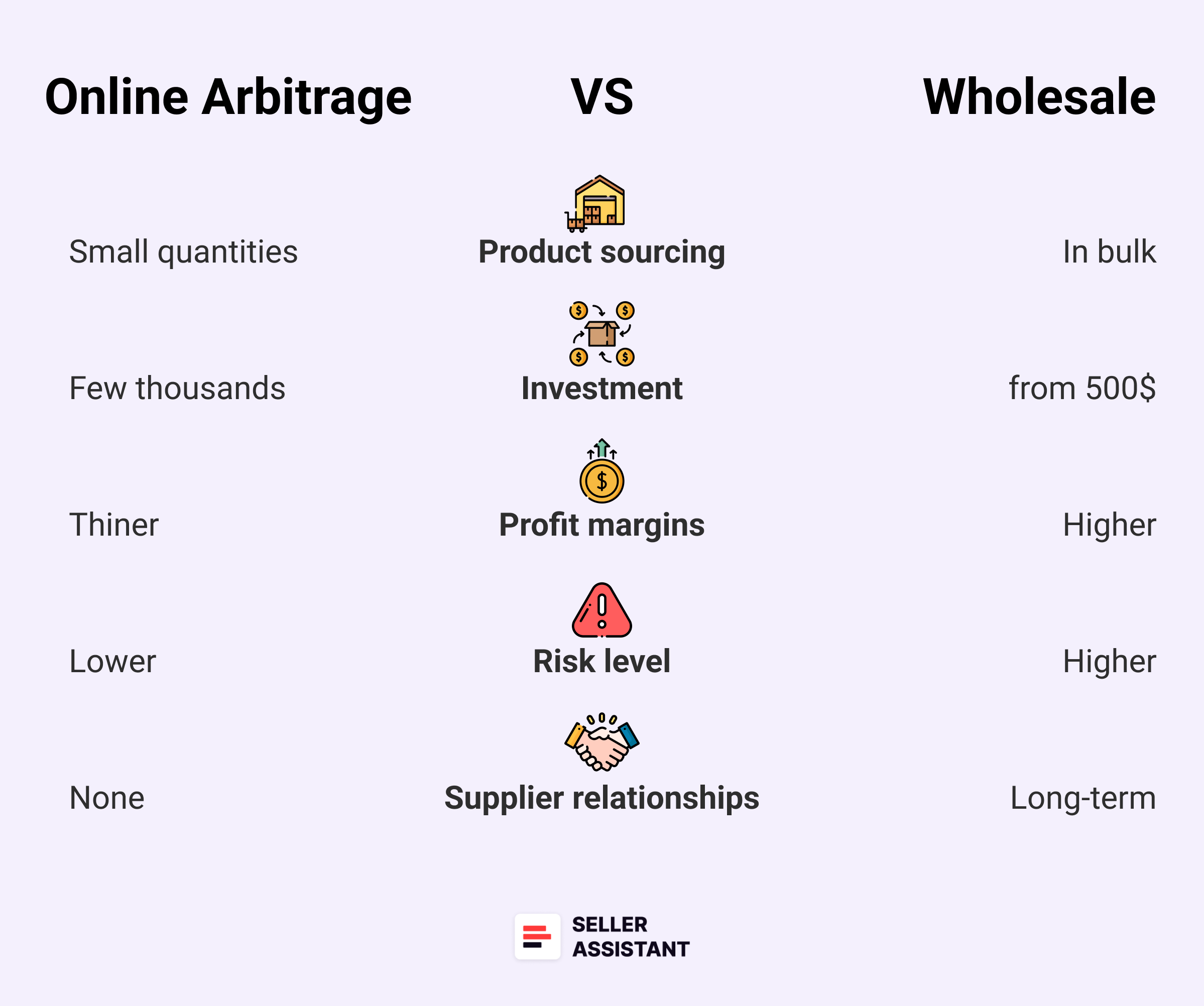
Online Arbitrage vs. Wholesale
Product sourcing
- Wholesale
Sellers purchase products in bulk directly from brands or authorized distributors at discounted rates. This often involves building supplier relationships.
- Online arbitrage
Sellers buy discounted products in small quantities from online retailers and resell them on Amazon – no supplier negotiations required.
Investment and quantity
- Wholesale
Requires a larger upfront investment due to Minimum Order Quantities (MOQs). Sellers often need thousands of dollars to place bulk orders.
- Online arbitrage
Requires a smaller budget, as products are bought individually. Sellers can start with as little as $500.
Profit margins
- Wholesale
Offers higher and more stable profit margins (typically 30% and up), as products are sourced at lower prices in bulk.
- Online arbitrage
Margins can be thinner due to competition and additional costs like shipping and Amazon fees.
Risk and scalability
- Wholesale
Higher risk due to large upfront costs, but easier to scale with steady supplier relationships and product availability.
- Online arbitrage
Lower risk and easier to start, but scalability is slower since sellers must constantly find new deals and rely on limited stock from retailers.
Supplier relationships
- Wholesale
Requires negotiating and maintaining long-term relationships with brands and suppliers, which can be challenging but leads to consistent inventory access.
- Online arbitrage
No supplier relationships needed – sellers simply source discounted products from various online stores.
Product research and tools
- Wholesale
Research involves finding reliable suppliers and scanning wholesale price lists for profitable, high-demand products. Seller Assistant automates this process by scanning wholesale lists to identify the best deals.
- Online arbitrage
Requires constant product research to find profitable deals across different platforms. Seller Assistant simplifies this by analyzing key product metrics, profitability, and risks across Amazon product pages, search results, supplier websites, and competitor storefronts.
Related: Amazon Wholesale: All You Need To Know
Online Arbitrage vs Wholesale on Amazon. What is the difference?
FAQ
Is Amazon online arbitrage profitable?
Yes, Amazon online arbitrage can be profitable if you consistently source high-margin, low-risk products and manage your costs effectively. Success depends on product research, pricing strategy, and the right tools to identify winning deals.
How do I grow my Amazon sales?
To grow your Amazon sales, focus on scaling product sourcing, optimizing pricing, and using the right product sourcing tool like Seller Assistant. Leveraging automation tools and virtual assistants can help streamline deal sourcing and inventory management.
Is Amazon FBA very profitable?
Amazon FBA can be highly profitable when you source products at competitive prices and manage storage fees effectively. Success comes from choosing in-demand products, optimizing listings, and keeping costs low.
What does FBA mean?
FBA (Fulfillment by Amazon) is a service where Amazon stores, packs, and ships products on behalf of sellers. It simplifies logistics, providing fast shipping and customer service while allowing sellers to focus on sourcing and sales.
What is online arbitrage in Amazon?
Online arbitrage is a business model where sellers buy discounted products from online retailers and resell them on Amazon for a profit. It requires market research, competitive pricing, and sourcing tools to identify profitable deals.
Can I make $1000 a month on Amazon?
Yes, many sellers make $1,000+ per month on Amazon by consistently sourcing profitable products and reinvesting earnings. The key is scalability, using automation, and maintaining a steady product pipeline.
Final Thoughts
Scaling your Amazon online arbitrage business requires a strategic approach – identifying profitable brands, automating deal research, verifying product opportunities, and optimizing sourcing efficiency. By following these five steps, you’ll not only grow beyond online arbitrage but also set the foundation for a seamless transition into wholesale selling, unlocking higher profit margins and long-term business stability.
To make this journey faster and easier, Seller Assistant provides the ultimate suite of tools for both online arbitrage and wholesale sellers. From competitor research and brand analysis to bulk product scanning and secure VA management, Seller Assistant streamlines the entire sourcing process, helping you scale with confidence.
Seller Assistant is an all-in-one product sourcing software offering all the features vital for product sourcing. It combines three extensions: Seller Assistant Extension, IP Alert, and VPN by Seller Assistant, tools: Price List Analyzer, Seller Spy, Bulk Restrictions Checker, and API integrations, and features: Side Panel View, FBM&FBA Profit Calculator, Quick View, ASIN Grabber, UPC/EAN to ASIN converter, Stock Checker, and other features that help quickly find high-profit deals. Seller Assistant also offers integration with Zapier allowing to create custom product sourcing workflows.

