.svg)
Amazon Profit Margin for Sellers
Download Amazon Seller Guide
This guide will help you get started, understand the basics of Amazon selling, and explain in simple words how it all works.

Understanding your Amazon profit margin isn’t just important – it’s how you stay in business. Many sellers chase revenue without realizing they’re operating at a loss.
Whether you're doing wholesale, online arbitrage, or dropshipping, knowing your true margins is key to making smart sourcing decisions.
In this post, we’ll break down what Amazon profit margin really means, how fees eat into it, and how you can accurately calculate it using Seller Assistant's tools – both for individual products and entire price lists. If you're ready to move from guessing to scaling profitably, this guide is for you.
What Is Amazon Profit Margin, Really?
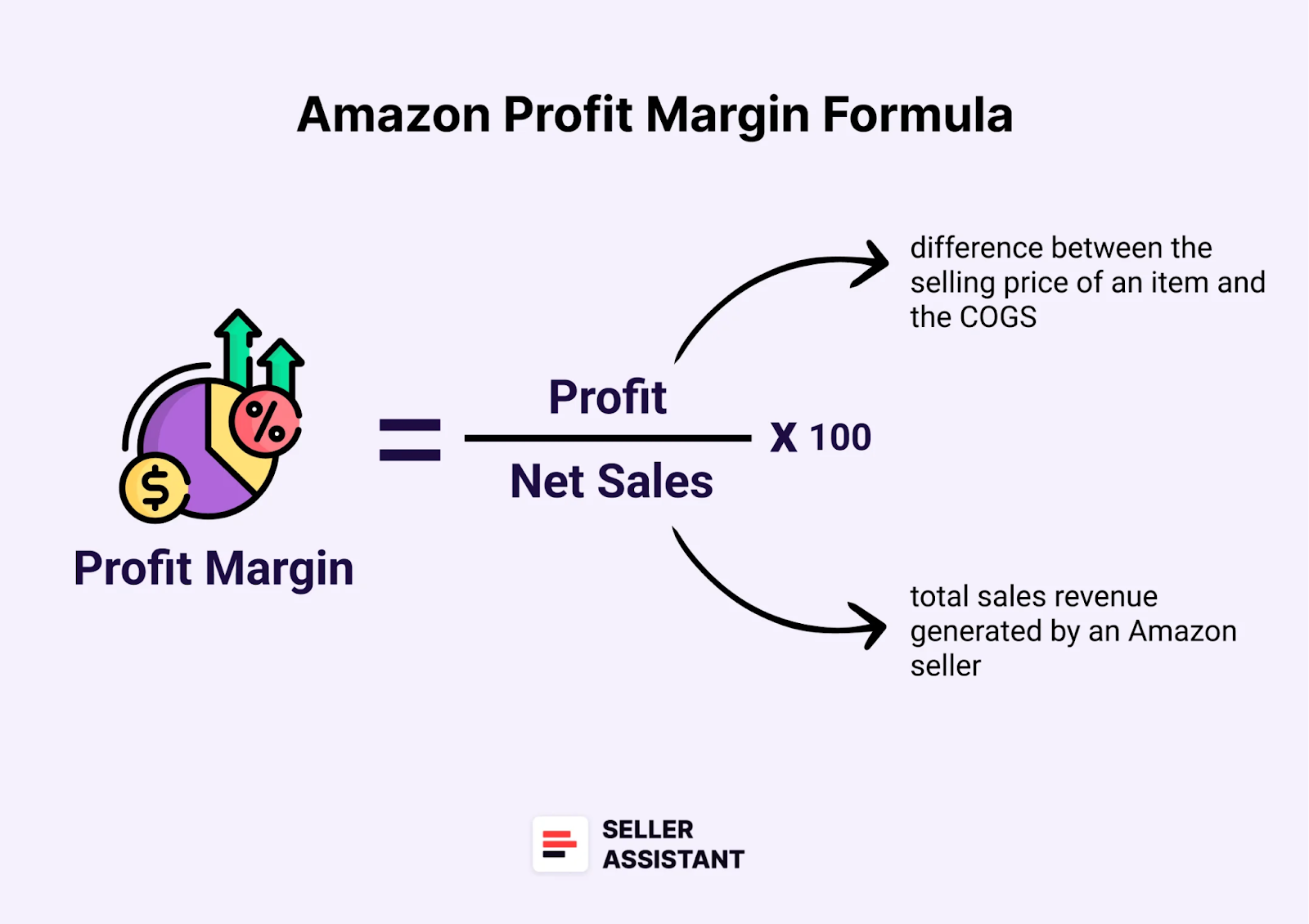
Your Amazon profit margin is the percentage of profit you make on each sale after subtracting all costs – including COGS (Cost of Goods Sold), Amazon fees, shipping, returns, and other business expenses. It’s your true financial pulse as a seller.
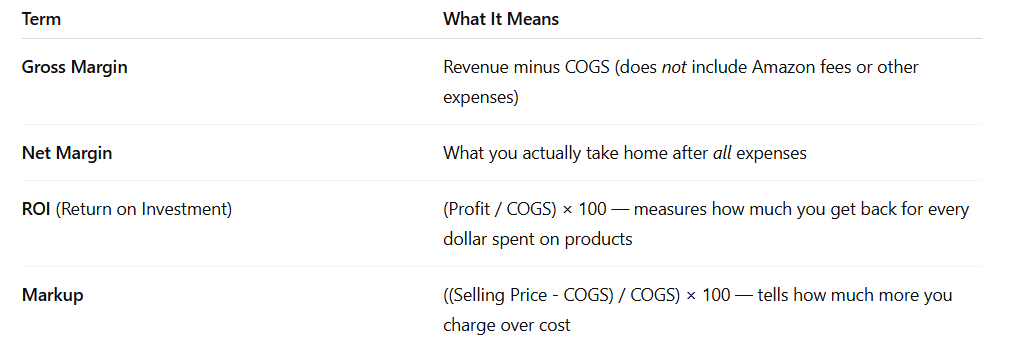
Profit margin and other profitability metrics
Profit margin vs. ROI
Profit margin ≠ ROI. Here's the difference:
Profit Margin = (Profit / Net Sales) × 100
ROI = (Profit / COGS) × 100
- Example
If you buy a product for $10 and sell it for $30, with $12 total costs (Amazon fees, shipping, etc.), your profit is $8.
- Profit Margin = (8 / 30) × 100 = 26.6%
- ROI = (8 / 10) × 100 = 80%
Both metrics matter – but profit margin is what defines your business health.
Profit margin vs. net profit
Also, you shouldn’t confuse profit margin with net profit.
- Profit margin is profit per product (used to assess product-level health).
- Net profit is what’s left over after all your business-wide expenses – including software, subscriptions, ads, and payroll.
Profit margin vs. other profitability metrics
What’s a “good” profit margin?
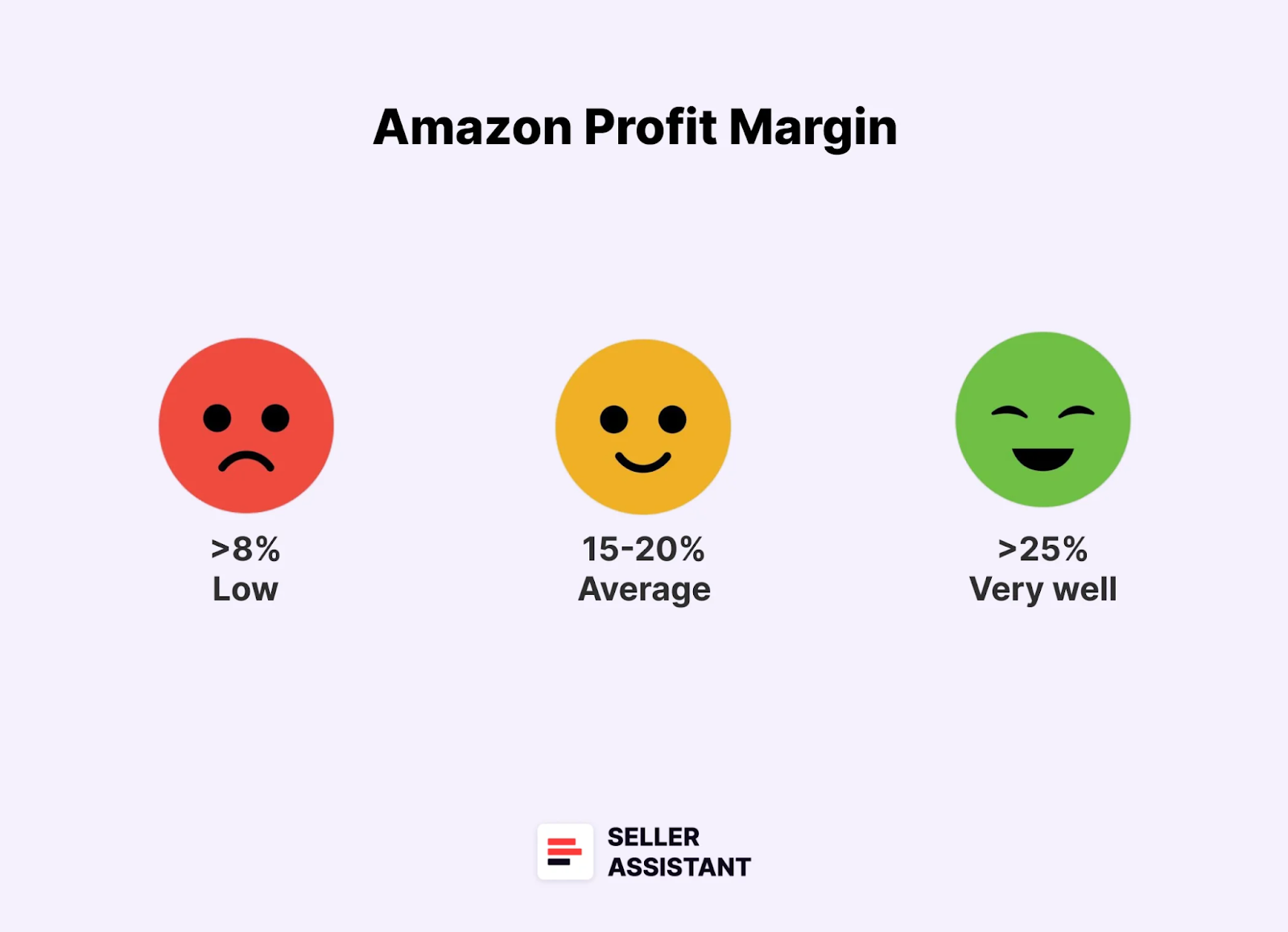
- 15–20% = Average Amazon seller profit margin
- 25%+ = Strong and scalable
- Below 8% = Risky – you’ll need to optimize sourcing or reduce costs to stay viable
According to Jungle Scout report, 61% of Amazon sellers have margins over 10%, and one-third exceed 20%.
However, this can vary depending on the product category, the seller's pricing strategy, and the amount of competition. For example, sellers in high-margin categories such as Electronics and Home & Kitchen typically have higher profit margins than sellers in low-margin categories such as Apparel and Groceries.
Why Margin Tracking Matters for Sellers
Margins aren’t just numbers – they’re the difference between growth and burnout. Whether you're flipping retail products, scaling wholesale SKUs, or running lean dropshipping ops, knowing your profit margins is the only way to avoid running blind. Each model has different risks, fee structures, and margin potential – but they all need margin visibility to be sustainable.
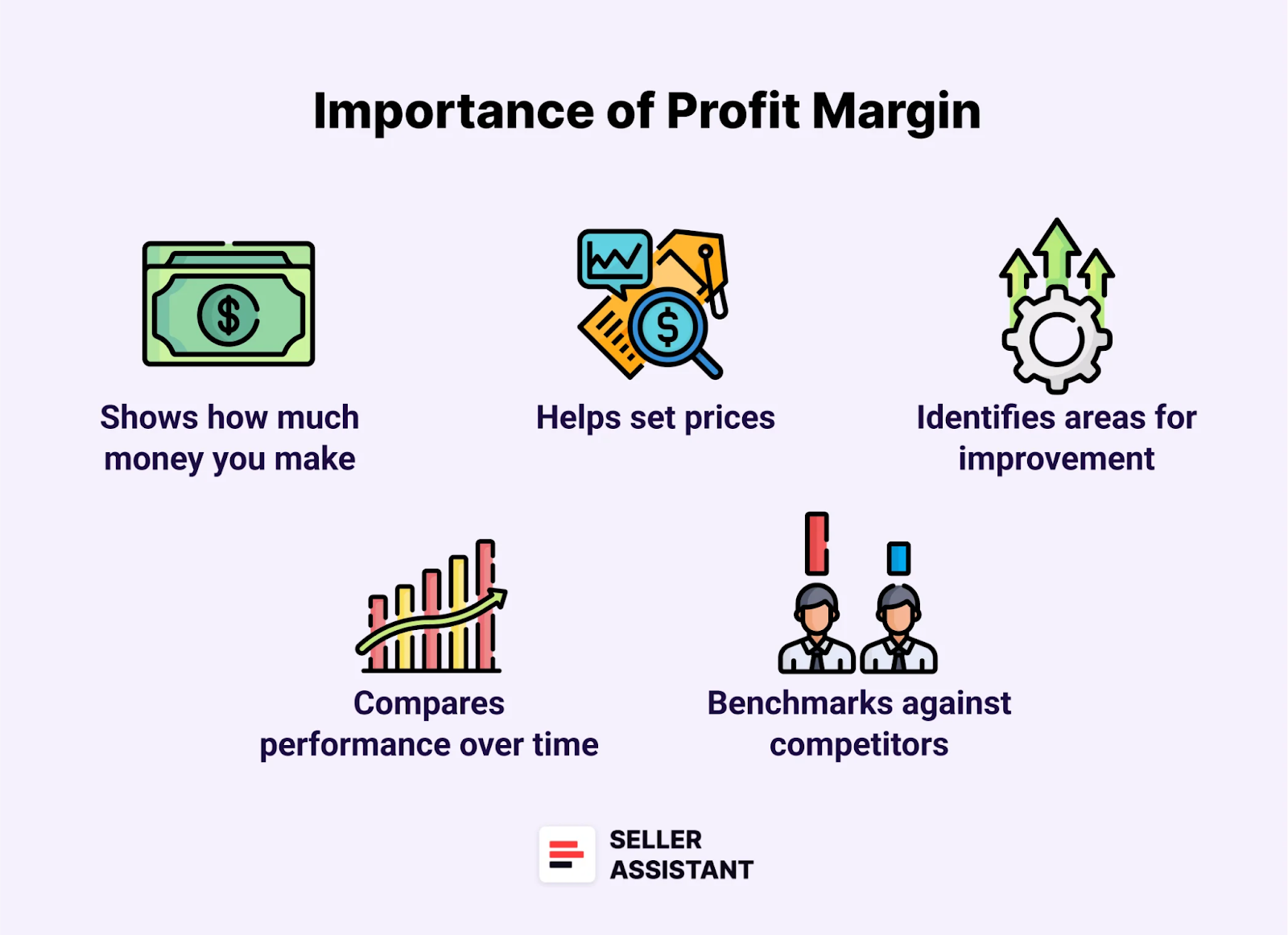
Here's why it matters for sellers of different business types.
Wholesale: scale doesn't fix bad margins
Buying in bulk? A few percentage points off your margin can kill your profits across hundreds of units. With wholesale, you need to know your margins before you place the PO – not after.
Online arbitrage: small wins add up – or eat you alive
Margins in OA are usually tight, and it’s easy to overestimate profitability when you’re moving fast. Without real-time margin tracking, you could be flipping ASINs that look great but lose money after fees and returns.
Dropshipping: razor-thin margins mean zero room for error
Dropshipping has the slimmest margins of all. Every fee, return, or delay eats into your tiny profit window. Without accurate margin calculation, you’re gambling – not selling.
Repricing without margin control leads to silent losses
Using a repricer? If you don’t set minimum profit thresholds based on your true costs, you’re risking automatic losses. Sellers often undercut themselves into unprofitability without even realizing it.
Scaling without control breaks your cash flow
More SKUs, more sales – and more chances to lose track of what’s actually profitable. Margin tracking is your defense against scaling revenue while shrinking profits.
How to Calculate Profit Margins Accurately
If you're a wholesale seller working with massive supplier catalogs – or a dropshipper or online arbitrage seller analyzing bulk product lists – one of your most important deal criteria is profit margin.
The process usually starts with scanning supplier price lists to filter out high-margin products. Once filtered, each potential deal needs to be verified and its margin recalculated based on the latest Amazon data, real fulfillment costs, and business-specific variables. Doing this manually for hundreds or thousands of listings? Not scalable.
That’s where automation with Seller Assistant makes the difference.
Note. Seller Assistant is an end-to-end Amazon workflow management platform that integrates 10+ wholesale-focused solutions into one connected system. It combines sourcing workflow automation, bulk research and intelligence tools, and integrated Chrome extensions – giving you everything you need to streamline finding deals, managing suppliers, and creating purchase orders.

The platform aggregates: workflow management tools – Purchase Orders Module, Suppliers Database, Warehouses Database to organize, automate, and scale every step of your wholesale and arbitrage operations; bulk research & sourcing tools – Price List Analyzer, Bulk Restriction Checker, Sourcing AI, Brand Analyzer, Seller Spy to evaluate supplier price lists, verify selling eligibility and restrictions, open new brands, and discover winning product ideas from competitors to expand your product catalog; Chrome extensions – Seller Assistant Browser Extension, IP-Alert Extension, and built-in VPN by Seller Assistant to deep-research products, check IP claims and compliance, and access geoblocked supplier sites directly within your browser; and integrations & team access features – seamless API connectivity and integrations with Zapier, Airtable, and Make, plus Virtual Assistant Accounts for secure, scalable team collaboration.
With Seller Assistant, every step of your Amazon wholesale and arbitrage workflow is automated and connected.
How to calculate profit margin in bulk
Manually checking product profitability one by one is out of the question at scale. You need a reliable way to run margin calculations across entire spreadsheets – and adjust them instantly as costs or Amazon fees change. Seller Assistant’s Price List Analyzer does exactly that.
Tool to use: Price List Analyzer by Seller Assistant
Price List Analyzer is a bulk price list scanner tool built specifically for Amazon sellers. It analyzes your supplier files and turns them into detailed, data-rich deal sheets – complete with automated ASIN matching and margin calculations.

Key features and what it does
Price List Analyzer streamlines the entire bulk sourcing process by helping you:
- Analyze entire spreadsheets at once to spot profitable, low-risk products fast
- Auto-match SKUs to the correct Amazon ASINs – no manual searching required
- Identify restricted, gated, and blocked products instantly
- Enrich every product row with 70+ key metrics, including:
- Sales metrics:
- BSR
- Historical sales rank
- Estimated monthly sales
- Product demand signals
- Profitability metrics:
- Profit
- ROI
- Profit margin
- Break-even price
- Pricing history:
- Average Buy Box price
- Price trends over 30/90/180 days
- Historical FBA/FBM pricing
- Fee breakdowns:
- Referral fee
- FBA/FBM fulfillment costs
- Monthly storage fees
- Shipping, prep, hazmat, fragile item surcharges
- Competition insights:
- Number of active seller offers
- Buy Box rotation behavior
- Frequency of Amazon owning the Buy Box
- Risk and compliance alerts:
- Oversized, hazmat, meltable, fragile, or bundled products
- Missing or invalid ASINs
- Missing COGS or FBA fees
- Approval required
- Abnormal ROI (too high or too low)
- No Buy Box price detected
- Sales metrics:
- Advanced features for smarter decisions
- Filter by profitability, sales volume, risk, or custom tags
- Save filters and table layouts for future file uploads
- Tag products, shortlist favorites, and export only vetted deals
- Use historical Buy Box prices (30/90/180-day averages) to account for seasonality or pricing volatility
- Inline editing: Change COGS, shipping, prep, or package quantity and see profit recalculate live
- Bulk editing: Update shipping or fees across hundreds of rows in one step
- PQ-aware logic: If the ASIN sells as a 2-pack but your supplier’s price is per unit, the tool auto-adjusts COGS and taxes
How it works in practice
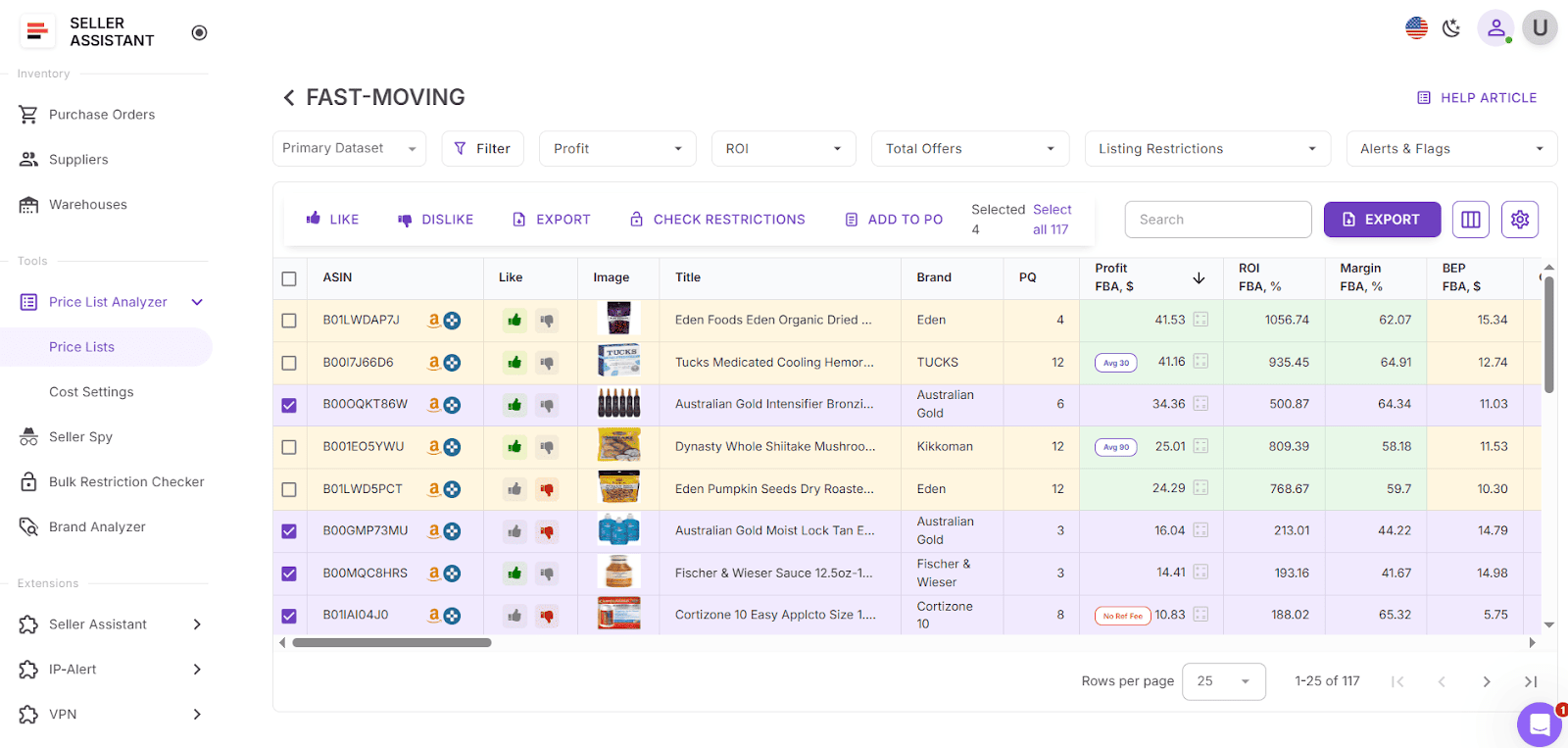
In your Seller Assistant personal account, locate Price List Analyzer and upload your supplier price list. The tool automatically matches your SKUs to the correct ASINs and populates each product with real Amazon data – from sales performance to profit margins, competition, and risks. Every edit you make updates profit numbers in real time. Whether you're working with 50 or 5,000 SKUs, you’ll see actual profitability – not estimates from a spreadsheet. You can filter deals by any metric to choose what you need, and shortlist them in the UI table to create purchase orders.
How to calculate profit margins for single products
All Amazon sellers who research products in bulk or one-by-one, need to do in-depth product analysis to find winning deals. In every case, accurate profitability data at the individual product level is non-negotiable.
That’s where Seller Assistant's FBM and FBA Calculator, built directly into Seller Assistant Extension, becomes essential.
Tool to use: Seller Assistant Browser Extension
Seller Assistant Extension transforms Amazon product pages, supplier sites, and competitor storefronts into full-featured research dashboards. You get instant access to sales, pricing, profitability, and risk data – all in one view – without leaving your workflow. FBM and FBA Calculator, a built-in tool inside the Extension, displays detailed profitability insights – including profit, ROI, margin, and break-even point – directly on Amazon product pages or supplier listings.
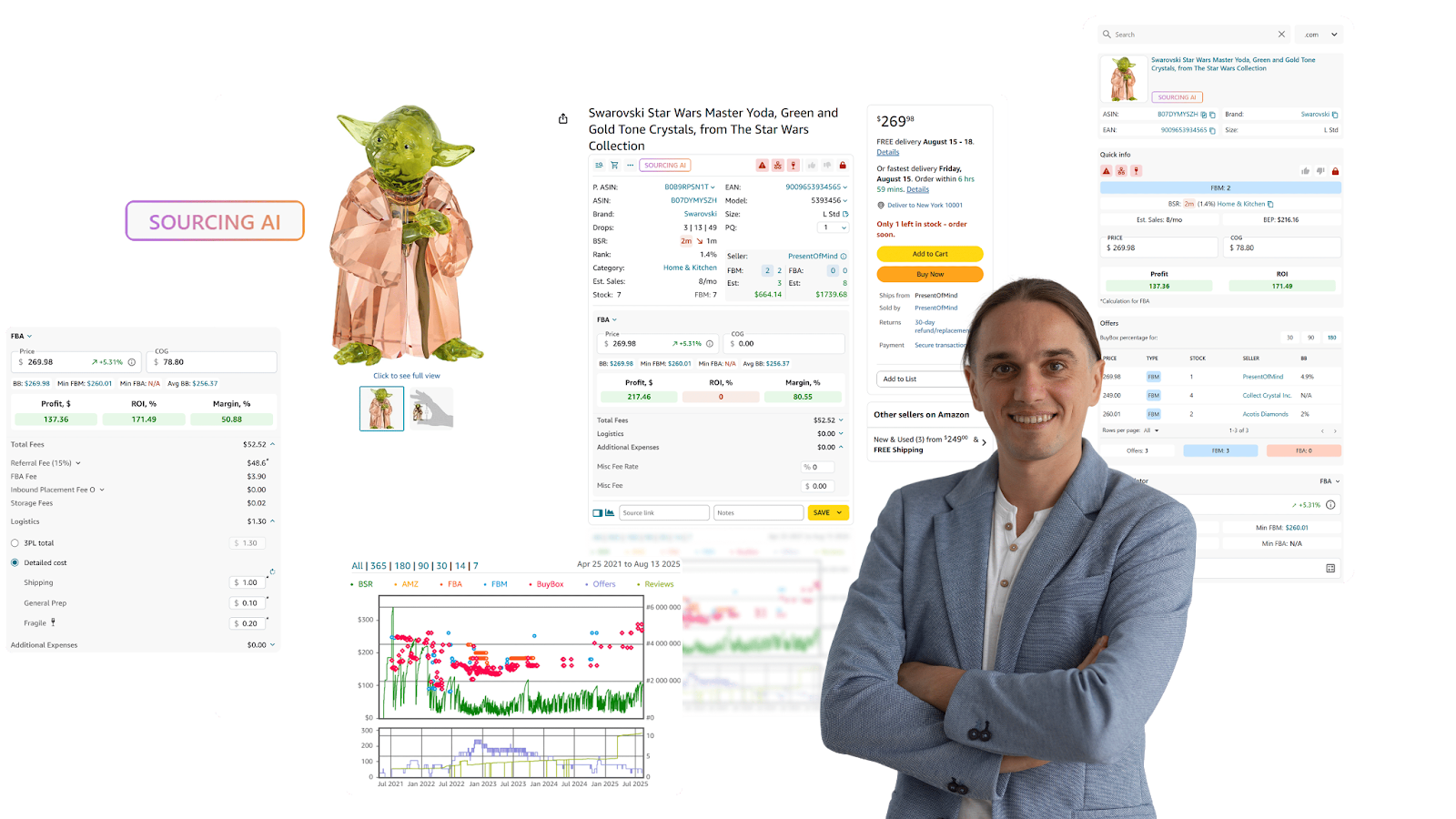
Key features and what it does
With Seller Assistant Extension, you can:
- Analyze products directly on Amazon: View real-time metrics like sales velocity, BSR, Buy Box stats, profit, ROI, restrictions, and pricing history
- Use Quick View to preview key data in Amazon search results without opening listings
- Enable Side Panel View on supplier sites to cross-check Amazon data side by side
- Overlay Storefront Widget to analyze competitor storefronts, best-selling categories, and top-performing brands
- Deepen your product analysis
- Instantly estimate profit, ROI, and margin with the built-in FBM&FBA Profit Calculator
- Forecast sales with Sales Estimator
- See live FBA and FBM inventory using Stock Checker
- Check IP complaints with detailed violation info using IP Alert
- Check restrictions for brands, categories, or ASINs using Restriction Checker
- Get automatic alerts for hazmat, fragile, meltable, adult, oversized, or Amazon-dominated listings with Alerts and Flags
- Uncover top-performing product variations via Variation Viewer
- Analyze seller offers using the Offers feature
- Review complete price history with interactive Keepa-powered Charts
- Optimize your workflow:
- Use Sourcing AI to find verified U.S. suppliers for any listing
- Lookup products across Walmart, eBay, Target, and others using Lookup Links
- Save notes, links, likes/dislikes per product with the Notes feature
- Push data into Google Sheets with one click with Google Sheets Export
How the tool works in practice
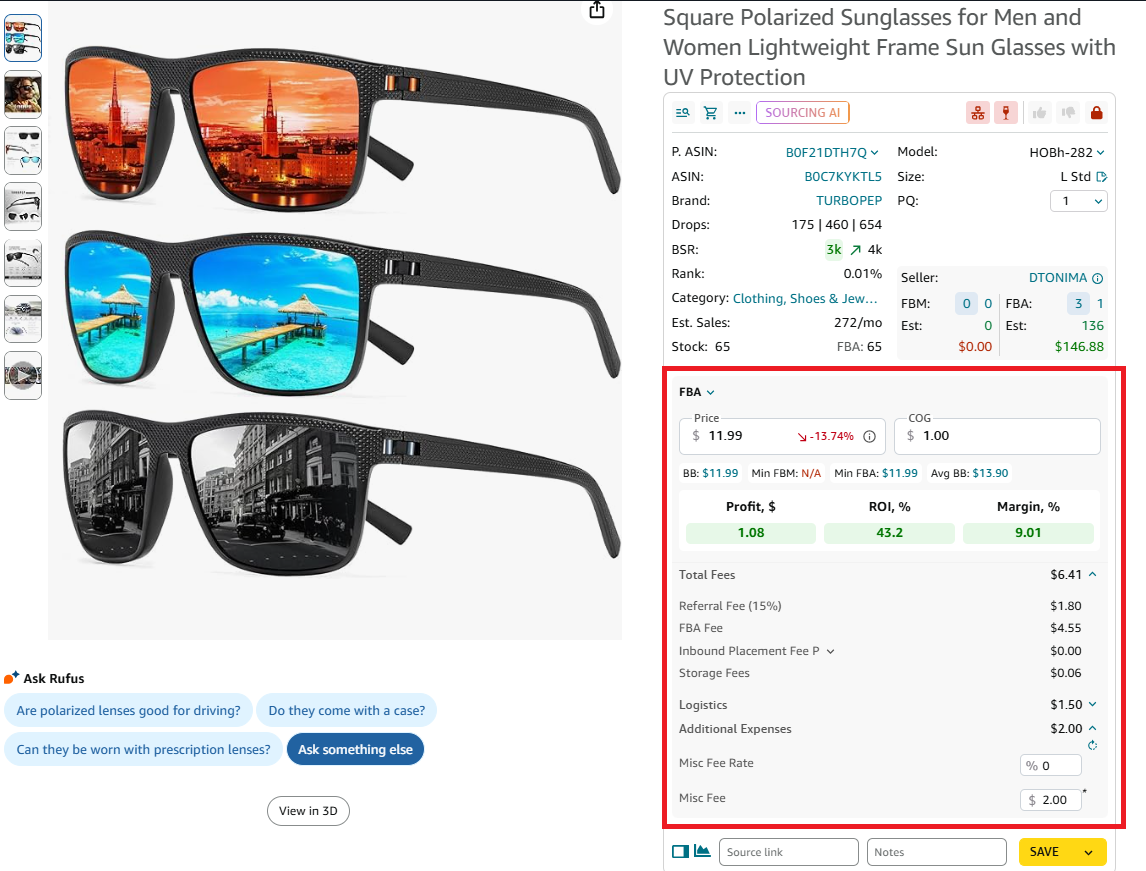
Once installed, the Seller Assistant Extension runs automatically in your browser while you browse Amazon, supplier websites, or competitor storefronts. As you open a product page, the extension overlays a powerful data panel that gives you everything you need – sales velocity, pricing trends, Buy Box stats, profit, ROI, risk alerts, stock levels, and more – all in one view.
To calculate profit margin using the FBM and FBA Calculator, simply open any Amazon product page or a supplier listing. First, enter your Cost of Goods (COG) – the product price from your supplier, excluding tax and shipping. Then, add your logistics costs, such as shipping, prep, or 3PL fees. You can enter them manually or pre-set them in your Seller Assistant account to auto-fill with every calculation. As soon as your numbers are in, the calculator displays your net profit, ROI, profit margin, and break-even price – and updates them live as you make changes.
Pro Tips to Improve Margins Once You Know Them
Once you’ve calculated your true margins, the next step is making them stronger. Even small improvements can mean thousands of dollars in profit over time. Whether you’re running wholesale, online arbitrage, or dropshipping, these margin-boosting strategies will help you protect and grow your bottom line.
Sell high-margin products
Some categories naturally support higher margins, giving you more room for profit. Health & Wellness, Home & Kitchen, Pet Products, and Beauty & Personal Care are examples where sellers often see stronger margins compared to commodity or highly competitive categories.
Use prep centers and logistics strategically
Optimizing fulfillment reduces wasted time and hidden costs. A well-chosen prep center or 3PL can cut storage fees, reduce shipping errors, and speed up delivery, all of which protect your profits.
Watch out for storage fees
Amazon’s storage costs can silently drain margins. Monitor inventory turnover, avoid overstocking, and stay clear of categories with high return rates unless margins are very strong.
Focus on low-return categories
Certain categories like books or kitchen supplies tend to have lower return rates compared to apparel or electronics. Choosing categories with predictable buyer behavior reduces lost profit from frequent returns.
Spot and eliminate hidden costs
Margins often shrink because of overlooked expenses – like stranded inventory, mislabeled products, or extra prep fees. Regularly auditing your operations helps uncover and fix these leaks before they eat your profit.
FAQ
What is Amazon's average profit margin?
The average Amazon seller profit margin is around 15-20%. That means that for every $100 in sales, an Amazon seller makes $15-20 in profit.
Is a 30% profit margin good on Amazon?
Yes, a 30% profit margin is good for Amazon. It is higher than the average Amazon seller profit margin of 15-20%.
Why is Amazon profit margin so low?
There are many reasons why Amazon profit margin might be low. Some of the most common reasons include: you sell in a product category that has lower profit margins than others; your selling costs are high; poor inventory management; poor customer service.
Does Amazon have a good gross profit margin?
Amazon has a good gross profit margin compared to other marketplaces. The average Amazon seller profit margin is around 15-20%, while the average eBay seller's profit margin is about 10-15%.
How to calculate gross profit margin?
To calculate the gross profit margin, subtract the cost of goods sold (COGS) from total revenue to find the gross profit, then divide the gross profit by total revenue and multiply by 100 to get a percentage. The formula is: (Total Revenue−COGS) / Total Revenue × 100.
How to find gross profit margin?
To find the gross profit margin, subtract the cost of goods sold (COGS) from total revenue to get the gross profit, then divide this number by total revenue. Multiply the result by 100 to convert it to a percentage, using the formula (Total Revenue−COGS) / Total Revenue × 100.
Final Thoughts
In the end, your business doesn’t run on revenue – it runs on profit. That’s why understanding and tracking your Amazon profit margin is the foundation of long-term success. Sellers who know their true margins make smarter sourcing choices, avoid costly mistakes, and scale with confidence.
With tools like Seller Assistant Extension for single-product checks and the Price List Analyzer for bulk lists, you can move beyond guesswork and calculate profitability in seconds. Protecting and improving your profit margin isn’t optional – it’s what separates thriving Amazon sellers from those who burn out.
Seller Assistant automates and connects every stage of your Amazon wholesale and arbitrage workflow. It brings together in one platform: workflow management tools – Purchase Orders Module, Supplier Database, Warehouse Database, bulk research & sourcing tools – Price List Analyzer,Bulk Restriction Checker, Sourcing AI, Brand Analyzer,Seller Spy, Chrome extensions – Seller Assistant Browser Extension, IP-Alert Extension, and built-in VPN by Seller Assistant, and integrations & team access features – seamless API connectivity, integrations with Zapier, Airtable, and Make, and Virtual Assistant Accounts.