.svg)
Best Amazon Wholesale Bulk Analysis Software
Download Amazon Seller Guide
This guide will help you get started, understand the basics of Amazon selling, and explain in simple words how it all works.

Bulk sourcing on Amazon doesn’t reward slow research. When you’re processing supplier spreadsheets with thousands of SKUs, you need an Amazon wholesale bulk analysis software that can match products to ASINs, calculate real FBA or FBM profit, and flag restrictions before you place an order.
The right tool turns raw price lists into purchase-ready shortlists in minutes.
In this post, we compare three leading solutions in 2026 – Seller Assistant's Price List Analyzer, Scan Unlimited, and Analyzer.Tools – to see which platform best supports scalable wholesale, online arbitrage, and dropshipping workflows.
Why Bulk Analysis Software Is Critical for Amazon Wholesale
Wholesale sourcing in 2026 runs on speed, margin accuracy, and compliance control. Supplier price lists are larger, Buy Box prices move faster, and restrictions appear without warning. Sellers who still rely on manual lookups or basic spreadsheets expose themselves to pricing errors, gated ASINs, and shrinking margins.
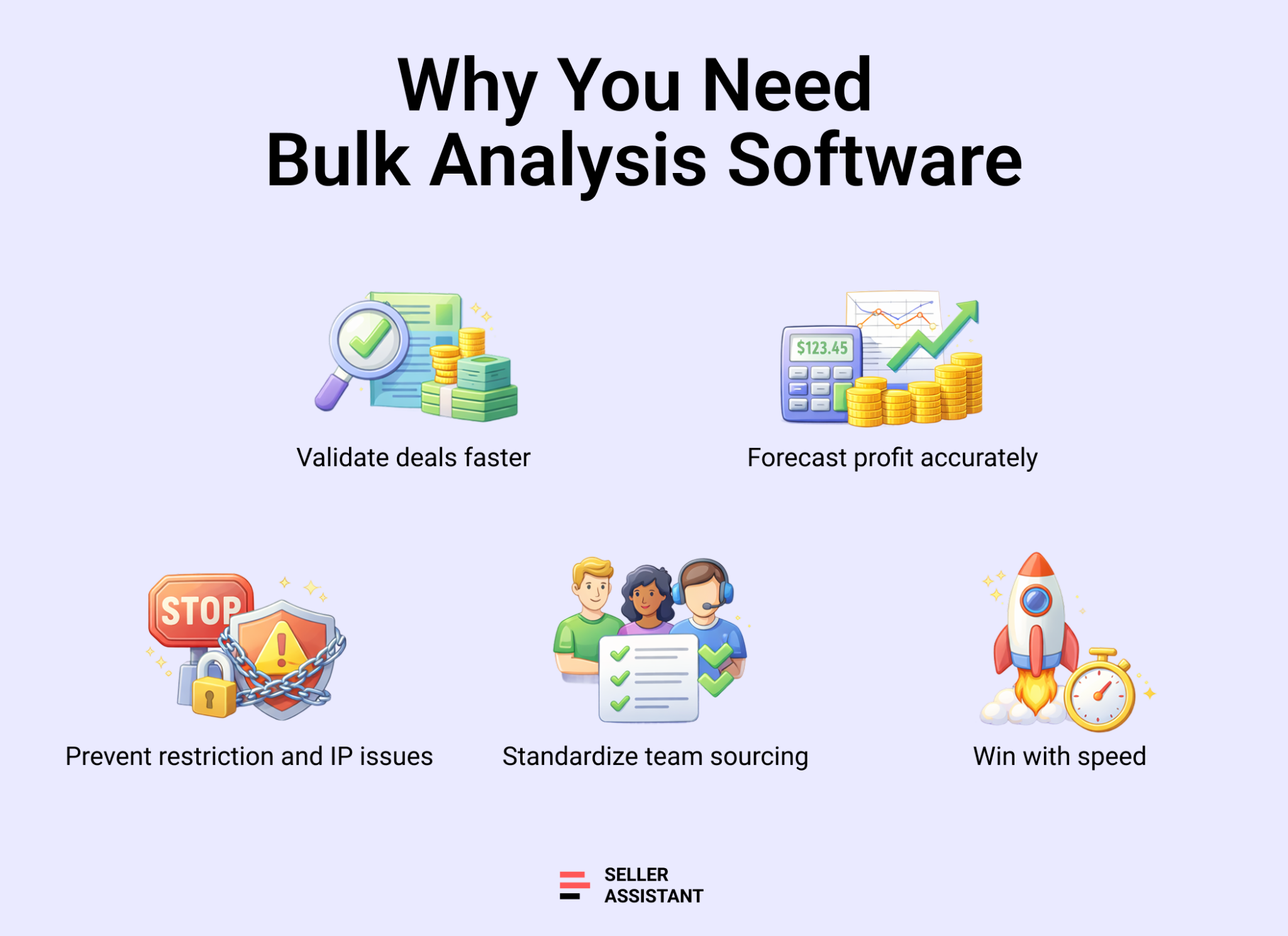
Wholesale bulk analysis software turns sourcing into a structured system. It allows sellers to scan thousands of SKUs, evaluate demand and competition, and eliminate restricted products before money leaves the bank.
Faster deal validation at scale
Wholesale suppliers release updated catalogs constantly. Checking items one by one wastes hours and delays buying decisions. Bulk analysis software matches UPC, EAN, or GTIN codes to ASINs instantly and enriches each row with profit, BSR, seller count, and Buy Box data. Sellers can filter thousands of products down to a shortlist in minutes, not days.
More accurate profit forecasting
Current Buy Box prices often spike due to stockouts or repricing gaps. Sellers who base decisions on temporary prices overestimate ROI. Advanced bulk tools calculate profit using historical Buy Box averages, full Amazon fee breakdowns, shipping, prep, tax, or VAT inputs. This prevents buying products that look profitable on paper but collapse after fees.
Built-in restriction and risk control
Brand gating, category approvals, IP complaints, HazMat rules, and oversize fees create hidden risk. Without bulk eligibility checks, sellers can purchase inventory they cannot list. Wholesale bulk analysis software flags restrictions, approval requirements, and product risk indicators before purchase, protecting account health.
Structured team sourcing workflows
Most growing wholesale businesses rely on VAs or sourcing teams. Bulk analysis platforms allow shared views, saved filters, notes, and tagging so everyone evaluates products using the same criteria. This reduces inconsistent decisions and creates a repeatable buying process.
Competitive advantage through speed
Profitable ASINs disappear quickly. Sellers who scan, filter, and validate supplier lists faster secure inventory before competitors react. Bulk analysis transforms sourcing from reactive research into a high-speed decision system built for scale.
Side-by-Side Comparison of Leading Bulk Analysis Platforms
In 2026, three platforms dominate the amazon wholesale bulk analysis software space: Seller Assistant, Scan Unlimited, and Analyzer.Tools. Each can process supplier spreadsheets, match products to ASINs, and calculate core profitability metrics. For sellers who operate with large wholesale catalogs, all three provide bulk scanning capabilities that replace manual product checks.
The real difference appears after the initial scan. Some tools focus strictly on spreadsheet output. Others extend bulk analysis into restriction checks, IP and compliance alerts, detailed listing research, collaboration features, and purchasing workflows. The comparison below reflects how each solution performs across a full sourcing cycle – from uploading a supplier file to making a confident buying decision.
Seller Assistant vs Scan Unlimited vs Analyzer.Tools
Feature Area | Seller Assistant | Scan Unlimited | Analyzer.Tools |
Core positioning | Complete wholesale workflow system with integrated bulk analyzer | Fast spreadsheet-driven wholesale scanner | Data-heavy wholesale scanner with storefront analysis tools |
Supported sourcing models | Wholesale, online arbitrage, dropshipping | Wholesale only | Wholesale only |
Bulk scan depth | 100+ data points, multipack handling, advanced filters, saved views, in-table edits, tagging system | ~60 data points, multipack support, basic filters | 75+ data points, multipack support, favorites, brand exclusions |
ASIN matching logic | UPC, EAN, GTIN, optional title matching | UPC, EAN, title | UPC, EAN, title |
Profit calculation scope | FBA and FBM profit, ROI, margin, break-even, VAT/DST, sales tax, shipping, prep, custom cost logic | FBA and FBM profit, VAT, shipping (no break-even or sales tax modeling) | Profit, ROI, VAT (no break-even or sales tax modeling) |
Pricing reference options | Current Buy Box plus selectable 30/90/180-day average | Current Buy Box plus 30/90/365-day average | 30/90/180-day Buy Box averages |
Live profit recalculation | Yes – edit COG, shipping, prep, pack size directly in table | No | No |
Demand and sales signals | BSR, BSR drops, dual sales estimator, ratings, reviews | BSR and US sales estimate | BSR trends, BSR drops, “Bought in past month,” internal estimates |
Competition visibility | Seller count, FBA/FBM split, Amazon presence % (+30/90/180 days), rotation indicators | Seller count, Amazon presence % | Seller count, Amazon presence % (+30/90/180 days) |
Restriction and compliance checks | Account-level restriction checker, IP alerts, HazMat, meltable, fragile, oversize, bundle warnings | Basic alerts only | Brand IP and HazMat alerts only |
On-Amazon research tools | Integrated Browser Extension with Quick View, Product View, Side Panel, Storefront Widget | Not available | Not available |
Supplier discovery tools | AI Supplier Finder, Sourcing AI | Not available | Not available |
Supplier-site evaluation | Side Panel View with built-in VPN | Not available | Not available |
Competitor analysis | Seller Spy and storefront research tools | CSV competitor export | Competing Seller Scan |
Reverse sourcing tools | AI Product Finder, Sourcing AI, storefront-based research | Limited | Manual reverse browser scan |
Shortlisting system | Workflow tagging, persistent notes, reusable decisions across uploads | No workflow layer | Favorites only |
Team collaboration | Team accounts, VA accounts, shared views, saved notes | Not supported | Not supported |
Supplier management | Integrated supplier database | Not available | Not available |
Warehouse tracking | Warehouses Database included | Not available | Not available |
Purchase order system | Built-in PO module | Not available | Not available |
End-to-end workflow | Sourcing → eligibility check → bulk scan → shortlist → PO → warehouse routing | Spreadsheet scan only | Spreadsheet scan only |
Integrations | API, Zapier, Make, Airtable, Google Sheets, Keepa | Keepa only | API, Keepa, CamelCamelCamel |
Entry pricing | From $13.33/month | From $70/month | From $49/month |
What this comparison shows
Scan Unlimited and Analyzer.Tools function primarily as bulk spreadsheet analyzers. They allow wholesale sellers to process large catalogs quickly and evaluate rank, price history, and baseline profit.
Seller Assistant extends beyond scanning. Its bulk analyzer connects directly to restriction verification, IP protection, advanced profit modeling, on-Amazon research tools, supplier management, and purchase order generation. For sellers who want more than exported CSV data – and prefer a structured sourcing system tied to real buying decisions – that broader workflow coverage becomes a practical advantage rather than just an added feature set.
Detailed Overview of Bulk Analysis Platforms
All three platforms can process supplier spreadsheets and attach Amazon data to each SKU. The difference shows up after the scan finishes. Accuracy of ASIN matching, depth of profit calculation, visibility into restrictions, and the ability to move from data to a purchase-ready shortlist separate basic scanners from workflow-driven systems.
Below, we take a closer look at how each solution approaches bulk analysis and what type of seller it fits best.
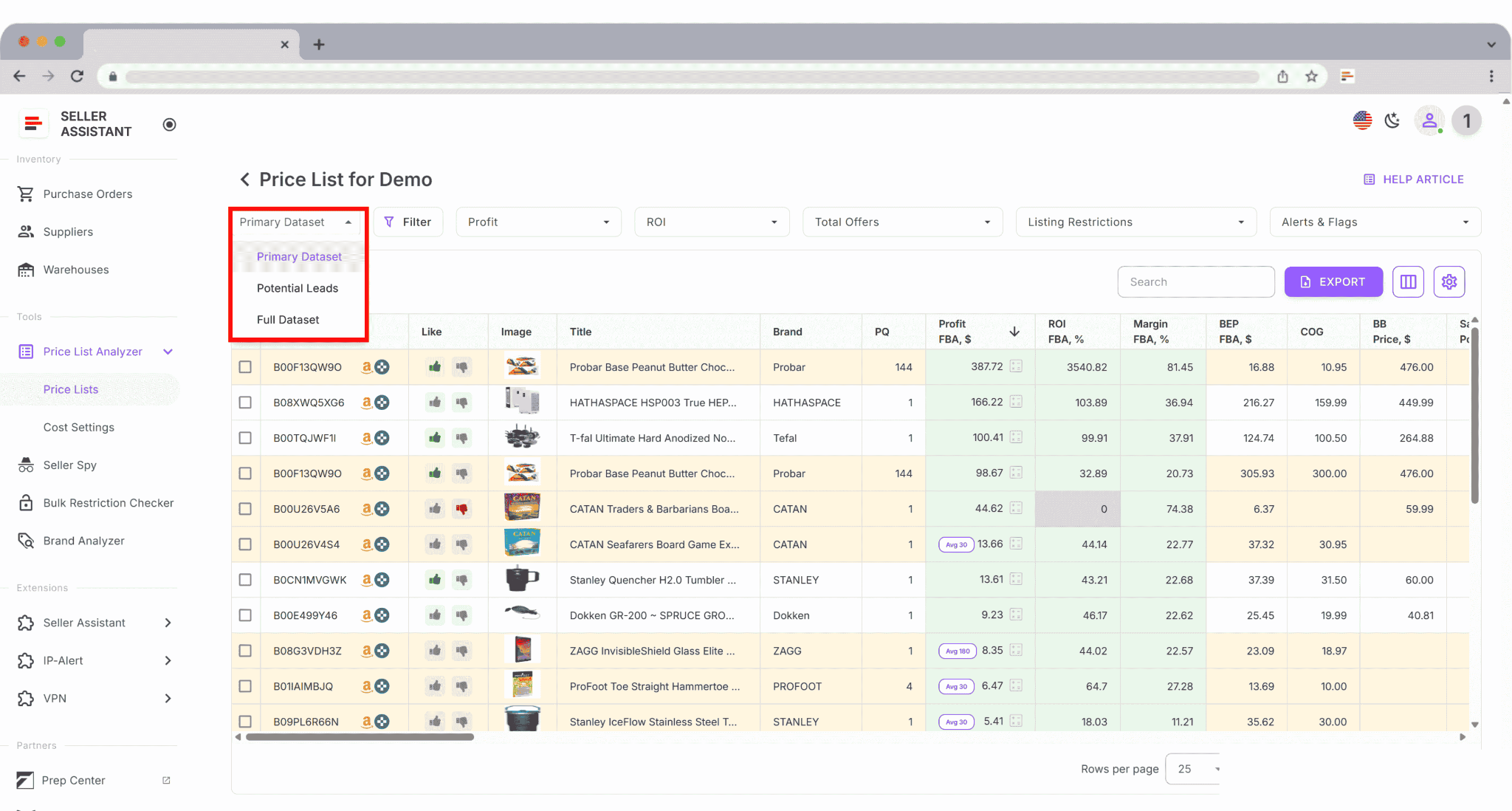
- Seller Assistant's Price List Analyzer is a bulk sourcing engine built inside a broader wholesale workflow system. It combines deep profit modeling, account-level restriction checks, IP and risk alerts, advanced filtering, instant recalculation, and structured shortlisting with tagging and team collaboration.
- Scan Unlimited is a high-speed wholesale spreadsheet scanner focused on fast ASIN matching and baseline profitability metrics. It works well for sellers who prefer to scan, filter, export, and handle compliance or workflow management outside the platform.
- Analyzer.Tools is a data-dense wholesale bulk analyzer that emphasizes historical pricing, BSR trends, and storefront-based competitor research. It is suited for sellers who rely heavily on spreadsheet analysis and external validation processes.
Seller Assistant’s Price List Analyzer
Platform overview
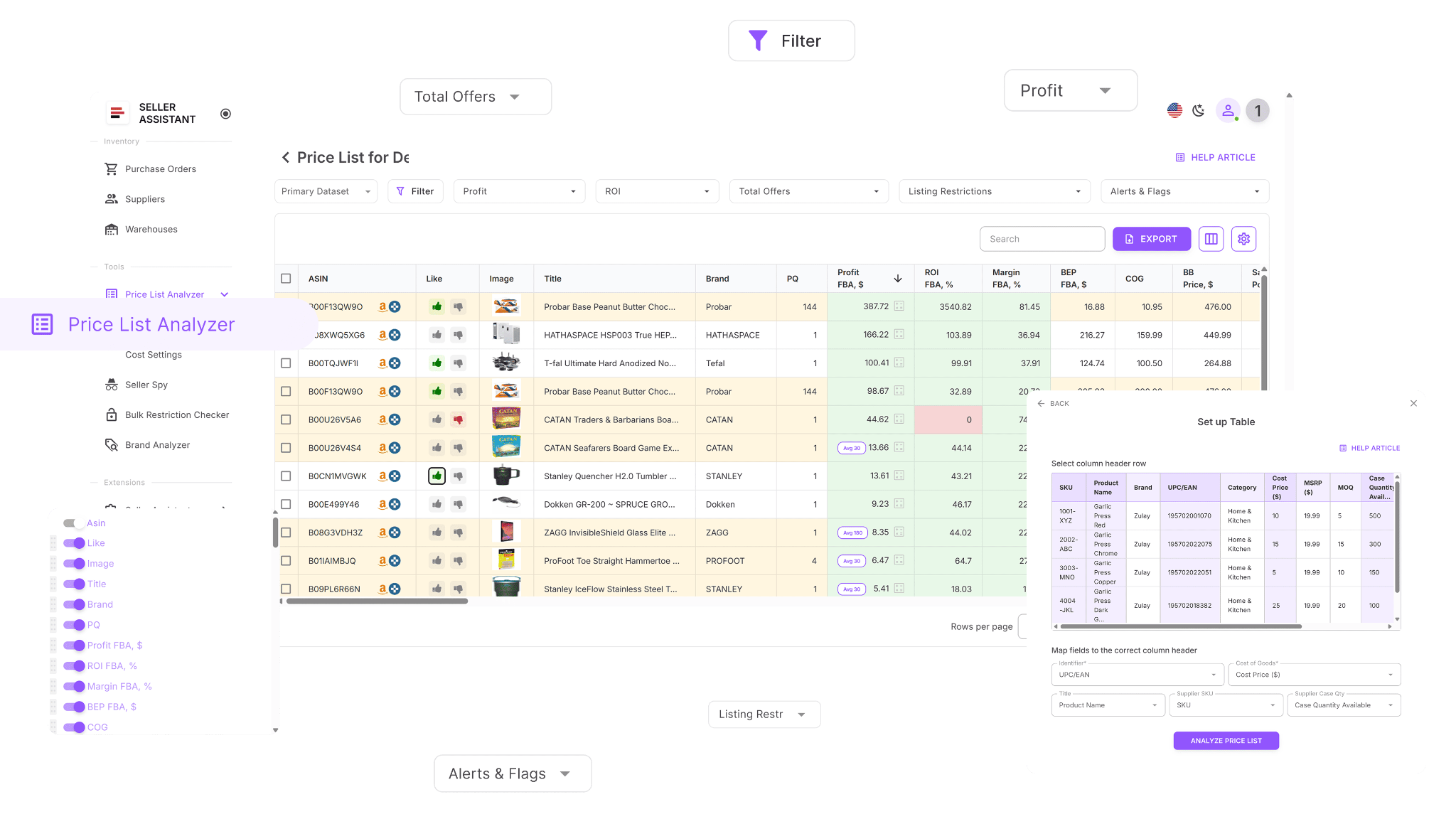
Seller Assistant's Price List Analyzer is a bulk sourcing solution built for wholesale, online arbitrage, and dropshipping sellers. It transforms supplier spreadsheets into an interactive decision table that displays profitability, demand signals, competitive landscape, restrictions, and risk markers. Instead of exporting raw scan data, sellers can filter, organize, and move products toward purchasing inside a structured sourcing workflow.
Note. Seller Assistant is an end-to-end Amazon workflow management platform that integrates 10+ wholesale-focused solutions into one connected system. It combines sourcing workflow automation, bulk research and intelligence tools, and integrated Chrome extensions – giving you everything you need to streamline finding deals, managing suppliers, and creating purchase orders.

The platform aggregates: workflow management tools – Purchase Orders Module, Suppliers Database, Warehouses Database to organize, automate, and scale every step of your wholesale and arbitrage operations; bulk research & sourcing tools – Price List Analyzer, Bulk Restriction Checker, Sourcing AI, Brand Analyzer, Seller Spy to evaluate supplier price lists, verify selling eligibility and restrictions, open new brands, and discover winning product ideas from competitors to expand your product catalog; Chrome extensions – Seller Assistant Browser Extension, IP-Alert Extension, and built-in VPN by Seller Assistant to deep-research products, check IP claims and compliance, and access geoblocked supplier sites directly within your browser; and integrations & team access features – seamless API connectivity and integrations with Zapier, Airtable, and Make, plus Virtual Assistant Accounts for secure, scalable team collaboration.
With Seller Assistant, every step of your Amazon wholesale and arbitrage workflow is automated and connected.
Key capabilities
This Software Makes Amazon FBA Wholesale Selling 10x Easier
Bulk scanning and ASIN matching
- Process large supplier catalogs at scale
- Match UPC, EAN, GTIN, and optional titles to correct ASINs
- AI-powered column mapping that automatically detects header rows, selects correct sheets, and maps identifiers more accurately
- Support multipack and pack-size logic
- Full-screen table view for easier large-list analysis
Advanced profit calculation
- Compute FBA and FBM profit, ROI, margin, and break-even price
- Include VAT/DST, sales tax, prep, inbound shipping, and custom cost rules
- Seller Proceeds (FBA/FBM) column showing gross margin before COGS and logistics
- Use 30/90/180-day Buy Box averages for stable forecasting
- Edit COG, shipping, prep, or pack size directly in-table with instant recalculation
Expanded demand validation and velocity metrics
- BSR and BSR movement
- Estimated monthly sales
- MonthlySold (Amazon-reported purchase bracket, not an estimate)
- Historical MonthlySold views (30/90/180 days)
- Amazon in-stock rate across 30/90/180 days
- Frequently Bought Together ASINs for bundling opportunities
Advanced competition and Buy Box intelligence
- Seller count and FBA/FBM split
- Amazon presence and Buy Box signals
- Buy Box Eligible Offers (FBA/FBM) – counts only active sellers priced within Buy Box +5%
- Competitive Price Threshold indicating risk of losing Buy Box eligibility
- Top Seller (30/90/180 days) with Buy Box win percentage tracking
- Top Seller Buy Box % visibility for dominance analysis
- Buy Box suppression warning when no seller qualifies
Restriction, risk, and quality signals
- Account-level selling eligibility checks
- IP alerts
- HazMat, meltable, oversize, fragile, bundle, and variation warnings
- Return rate alerts (low or high deviation from category average)
- Alerts for approval required, missing Buy Box, incomplete fee data, or weak FBA economics
- Out-of-stock status visibility directly in the analysis table
Variation and listing intelligence
- Variation-level visibility showing all ASINs within a product family (clickable)
- Variation-specific MonthlySold values
- Product description (truncated when required)
- Up to five feature bullet points per listing
Workflow and collaboration tools
- Advanced filters and reusable filter presets
- Saved table layouts
- Tagging by sourcing stage
- Persistent notes tied to ASINs across uploads
- Shared views for teams and VAs
- Purchase order generation inside the same system
Considerations
Sellers who only need a simple “scan and export” utility may not use the full workflow layer. The platform is designed for businesses that want bulk analysis connected to eligibility checks, structured decision-making, and purchasing execution.
Ideal user profile
- Wholesale sellers processing large price lists regularly
- Online arbitrage and dropshipping operators who combine bulk and listing-level research
- Sellers focused on compliance, IP risk control, and repeatable sourcing rules
- Teams working with VAs who require shared views, notes, and tagging
How the supplier sheet analysis works
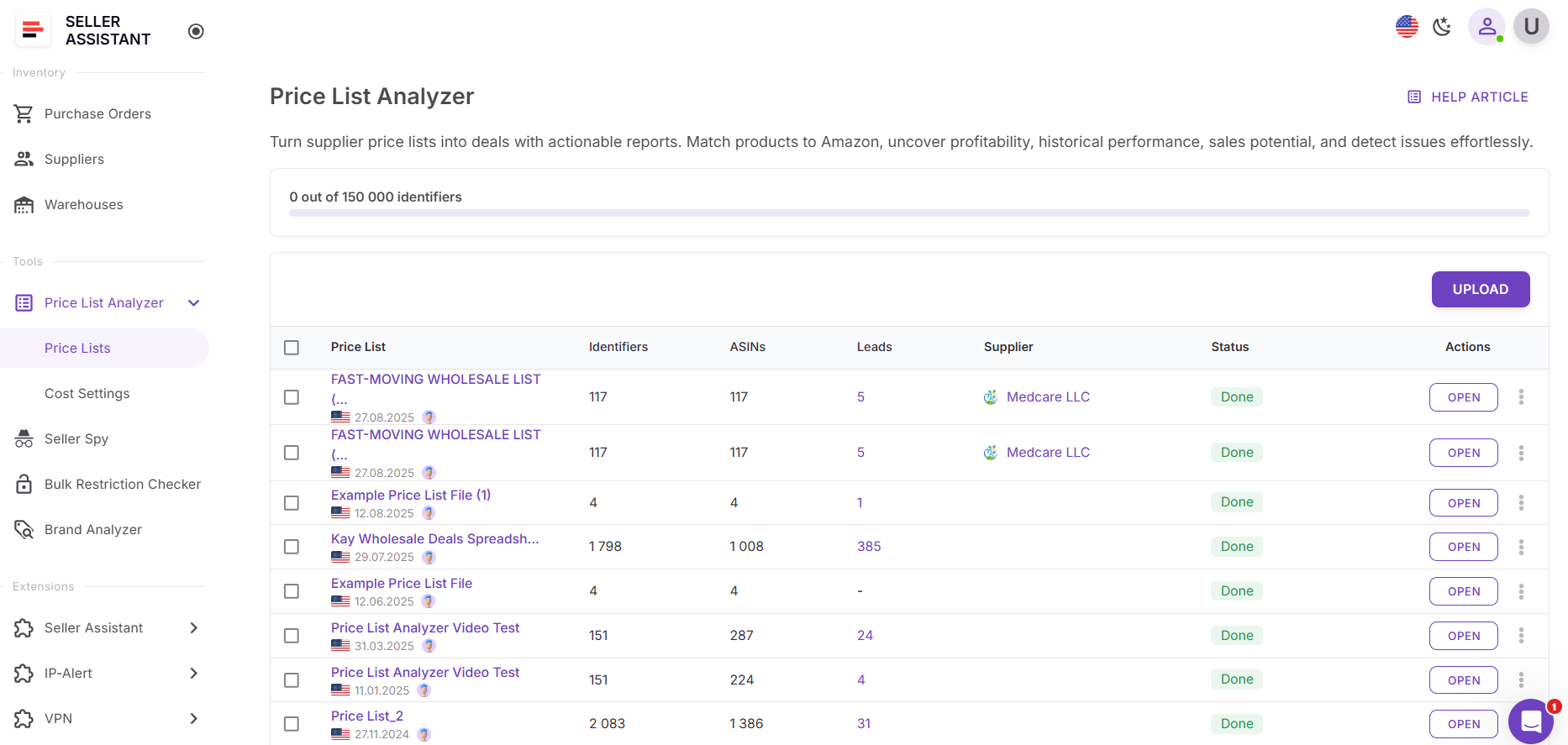
Step 1. Access Price List Analyzer
Open Seller Assistant, navigate to Tools, and select Price List Analyzer.
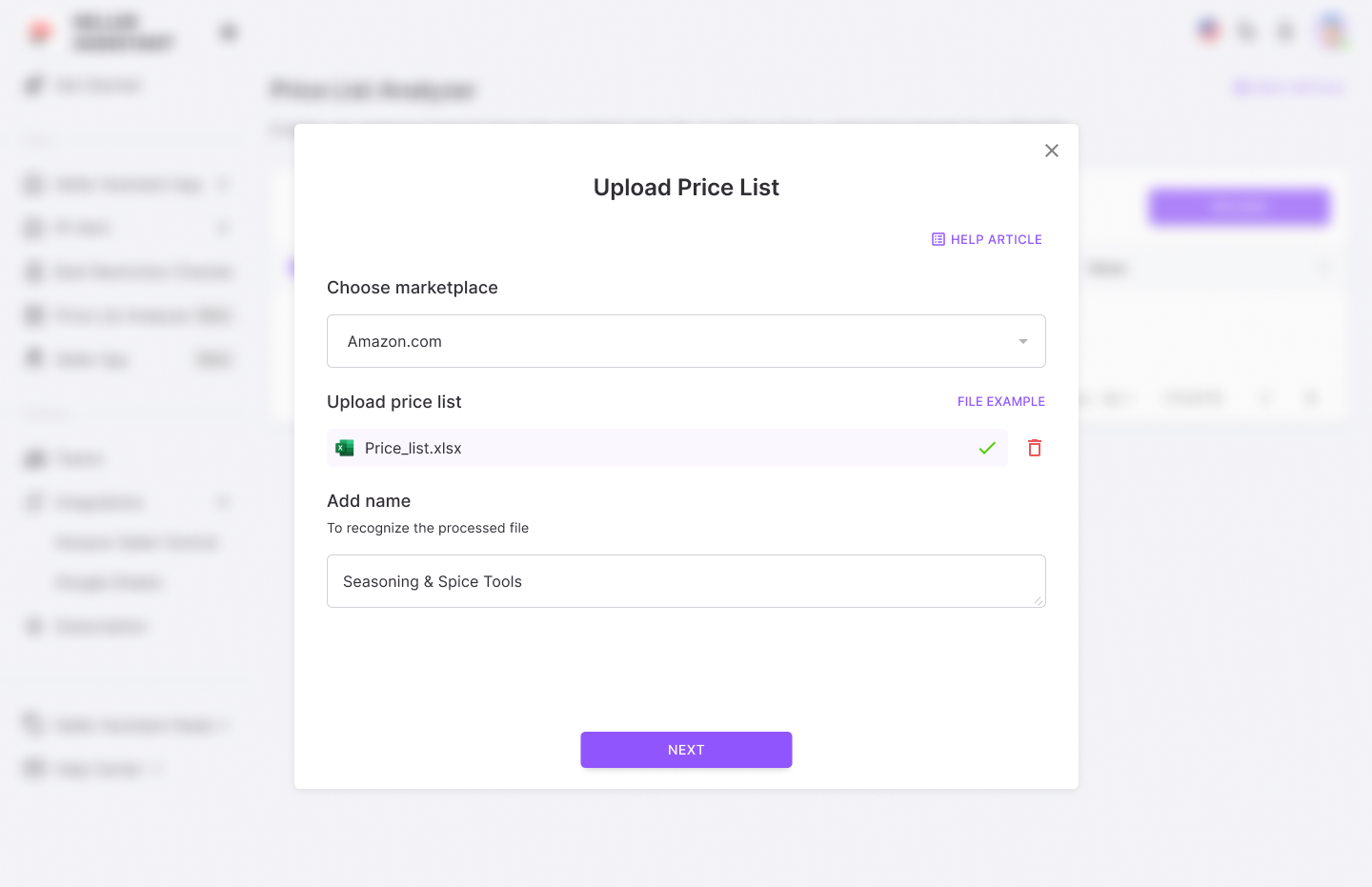
Step 2. Upload the supplier file
Choose the marketplace and upload an .xlsx or .xls spreadsheet.
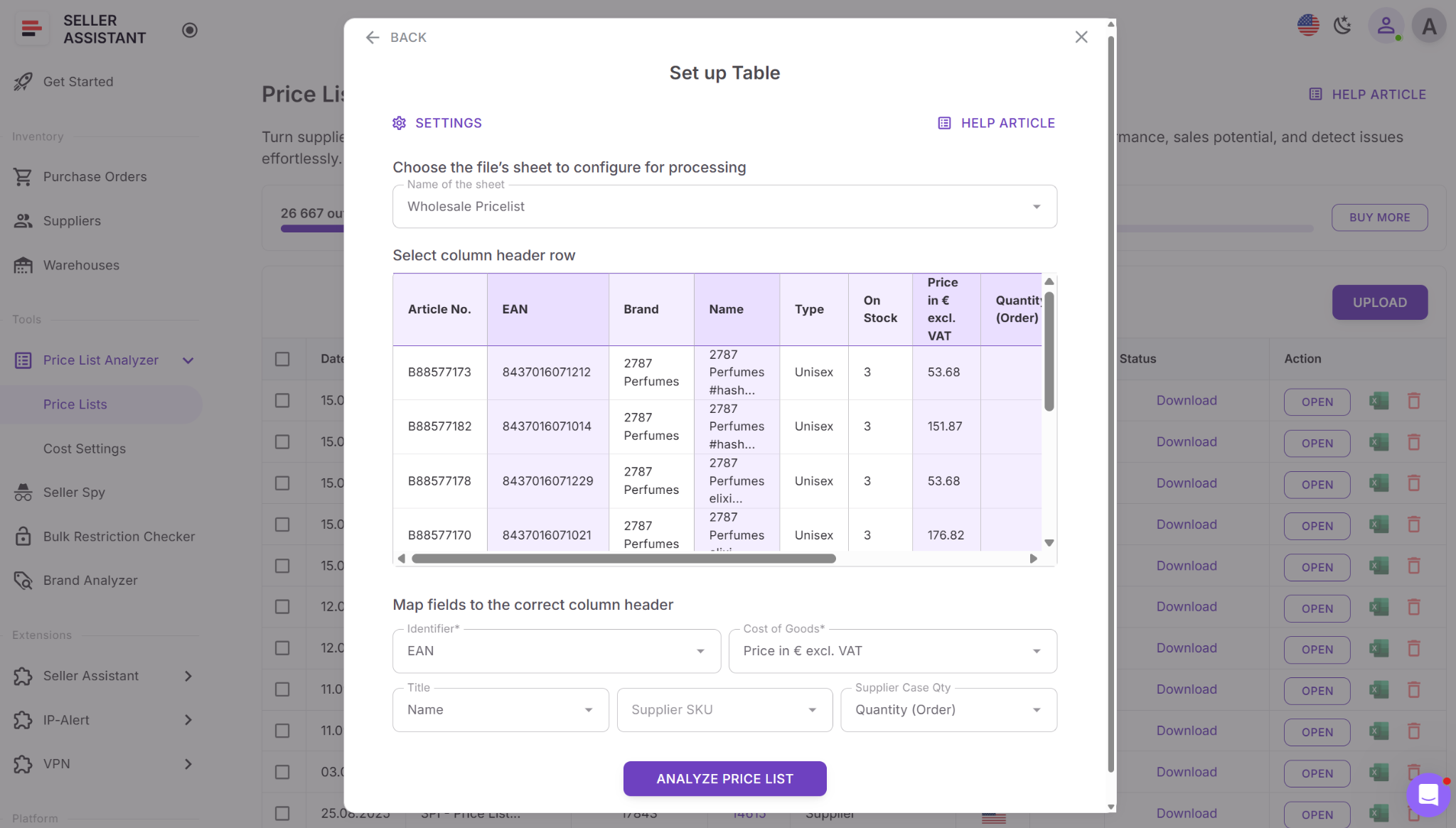
Step 3. Configure column mapping
Set the header row and match UPC/EAN/GTIN fields. Map cost columns and optional titles.
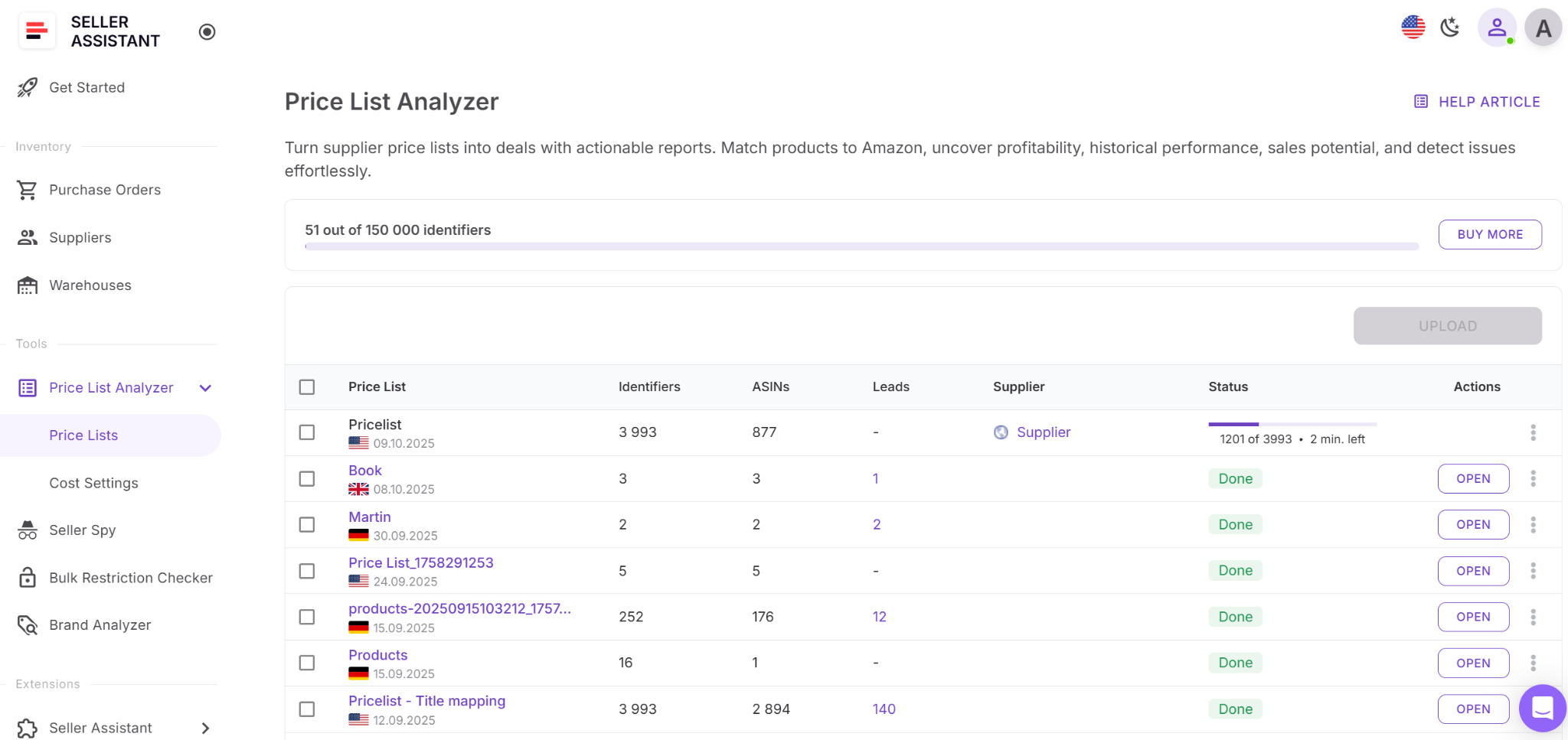
Step 4. Run ASIN matching and enrichment
Launch the scan to generate profitability, demand, competition, and restriction data.
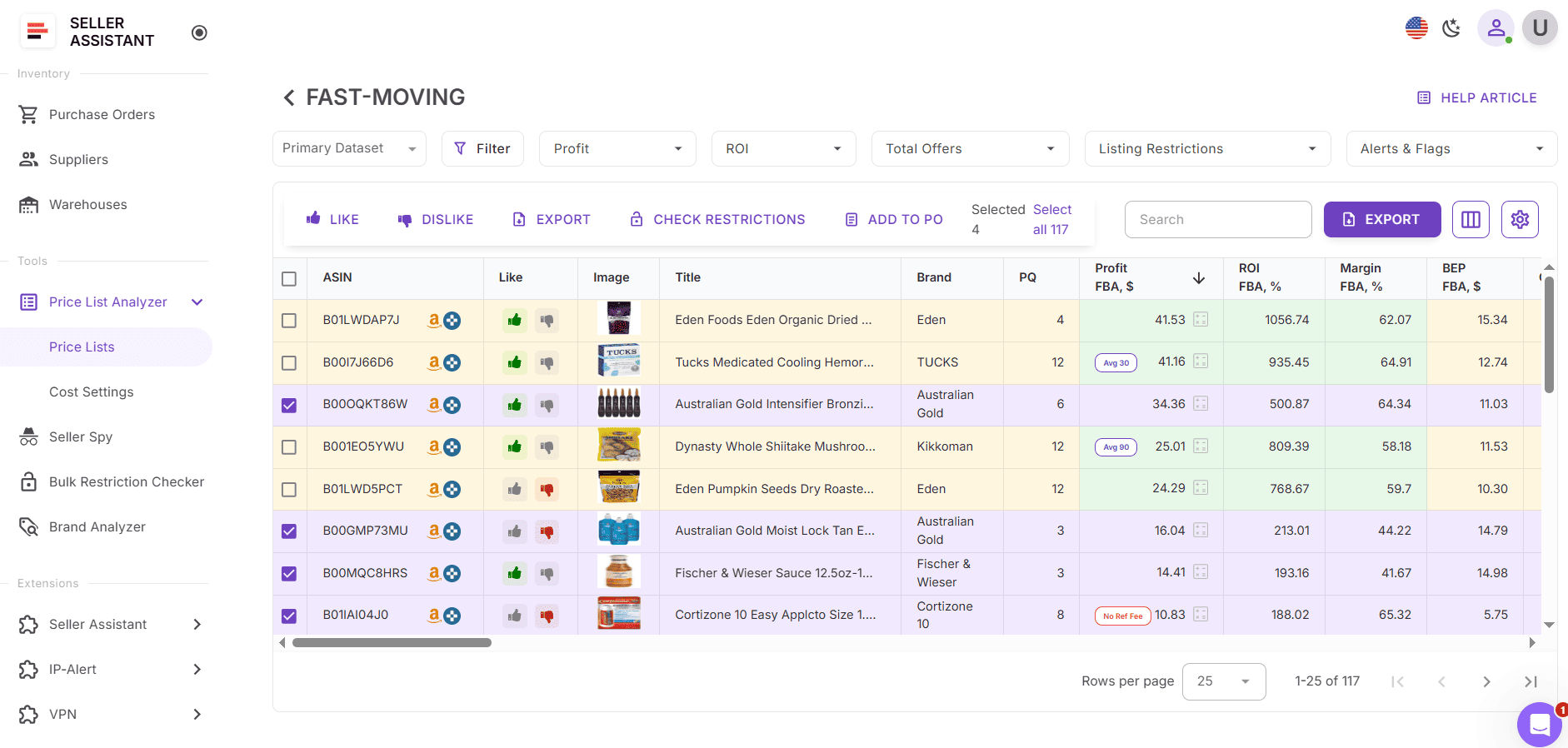
Step 5. Review the interactive results table
Analyze enriched metrics directly in the dashboard.
Step 6. Apply filtering logic
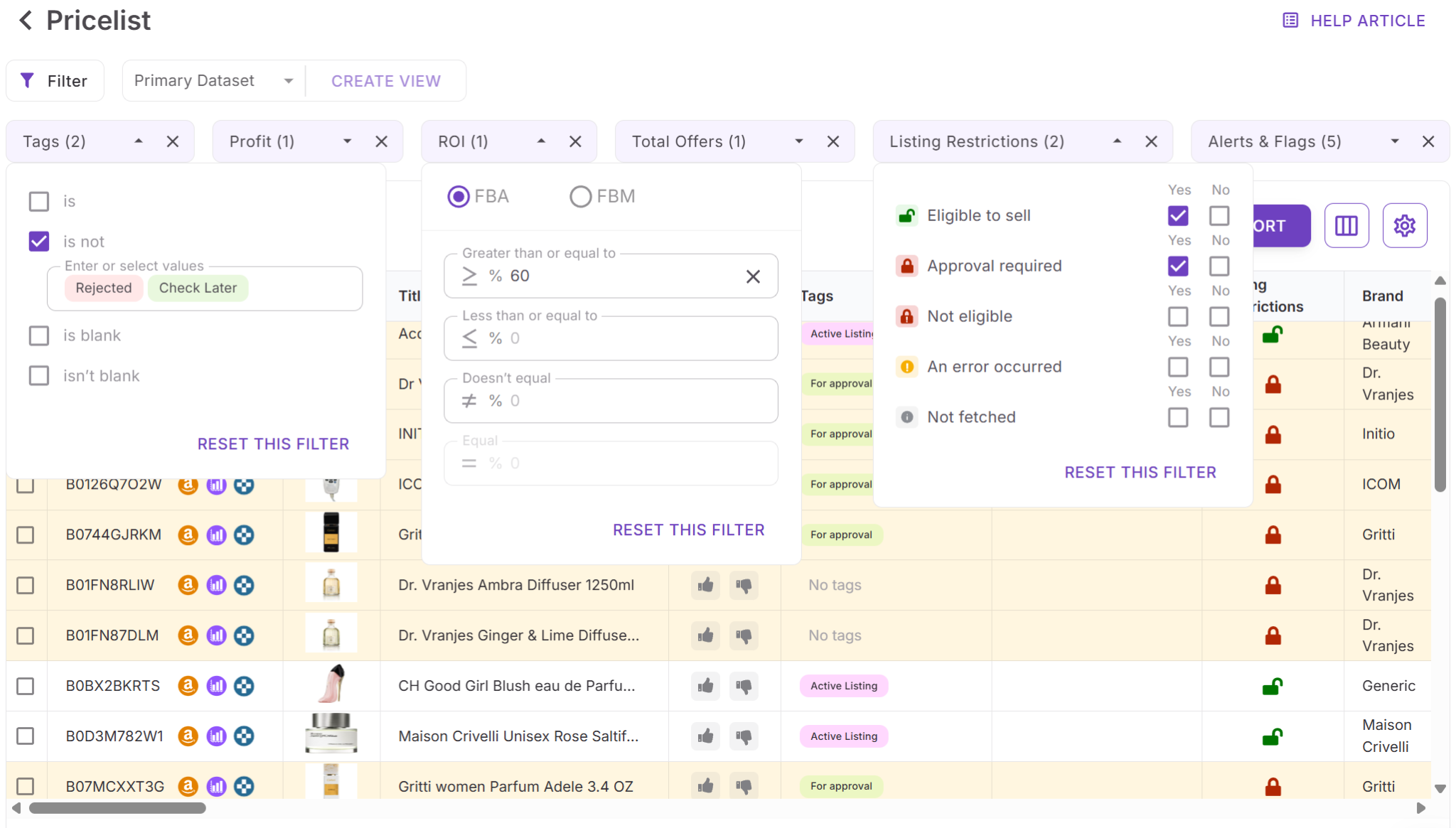
- Use quick filters for profit, ROI, offer count, restrictions, flags, and alerts.
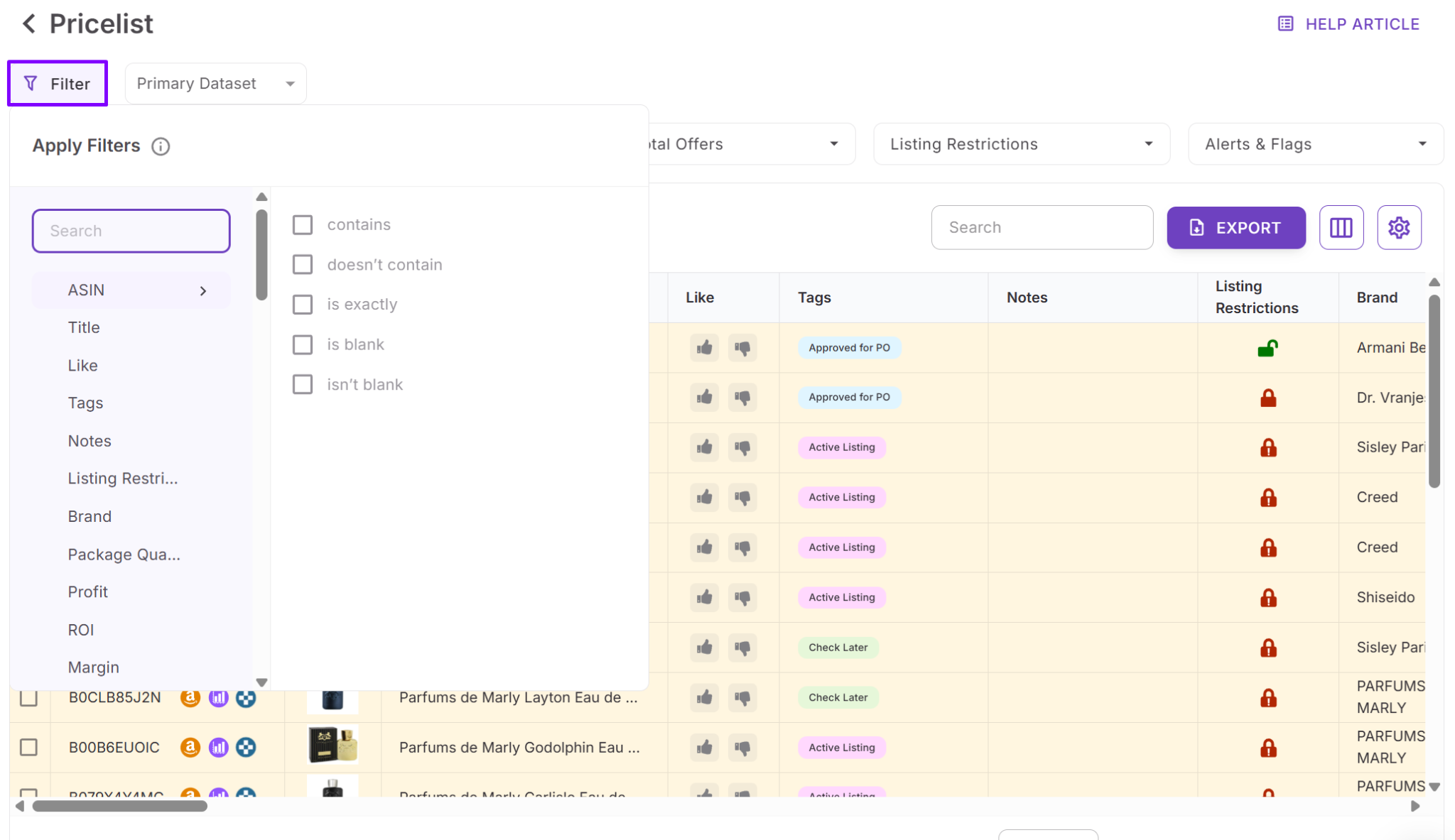
- Refine further with advanced criteria such as demand thresholds, risk factors, brand, category, and competition metrics.
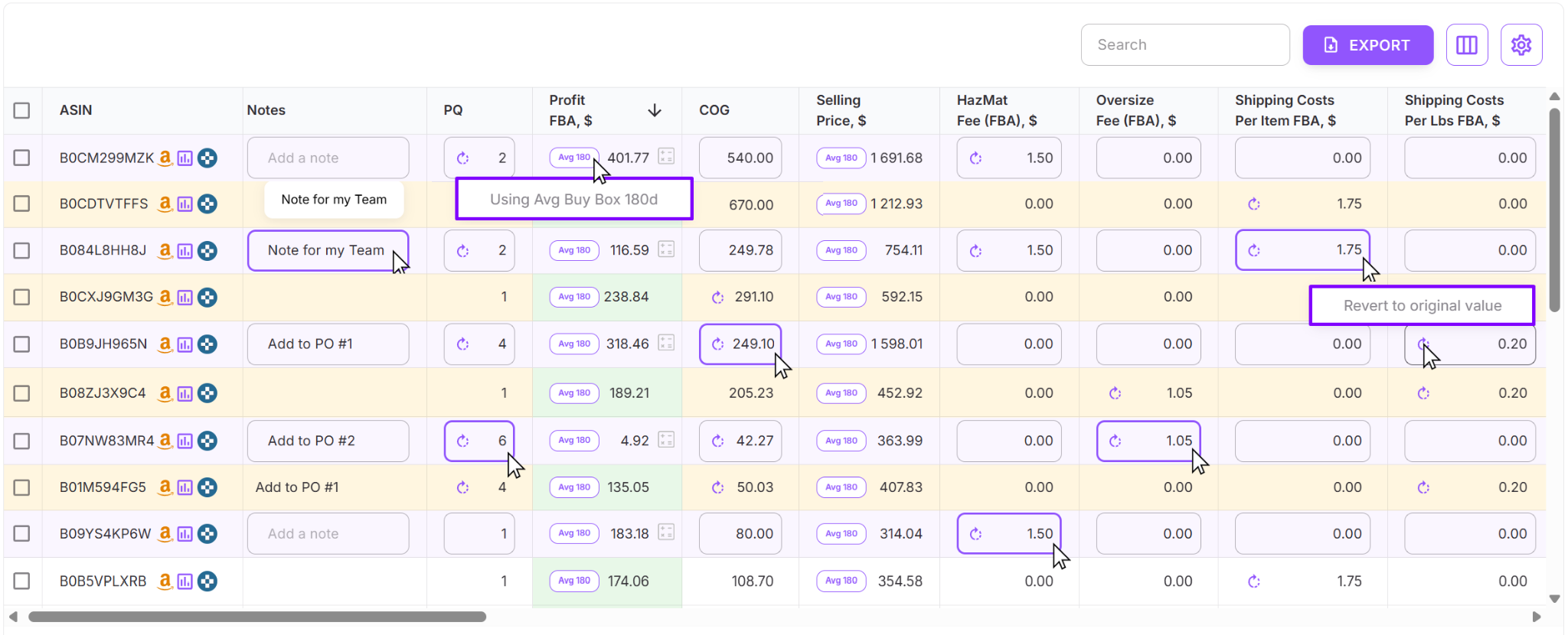
Step 7. Adjust costs dynamically
Modify COG, shipping, prep, or pack quantities inside the table. Profit updates instantly.
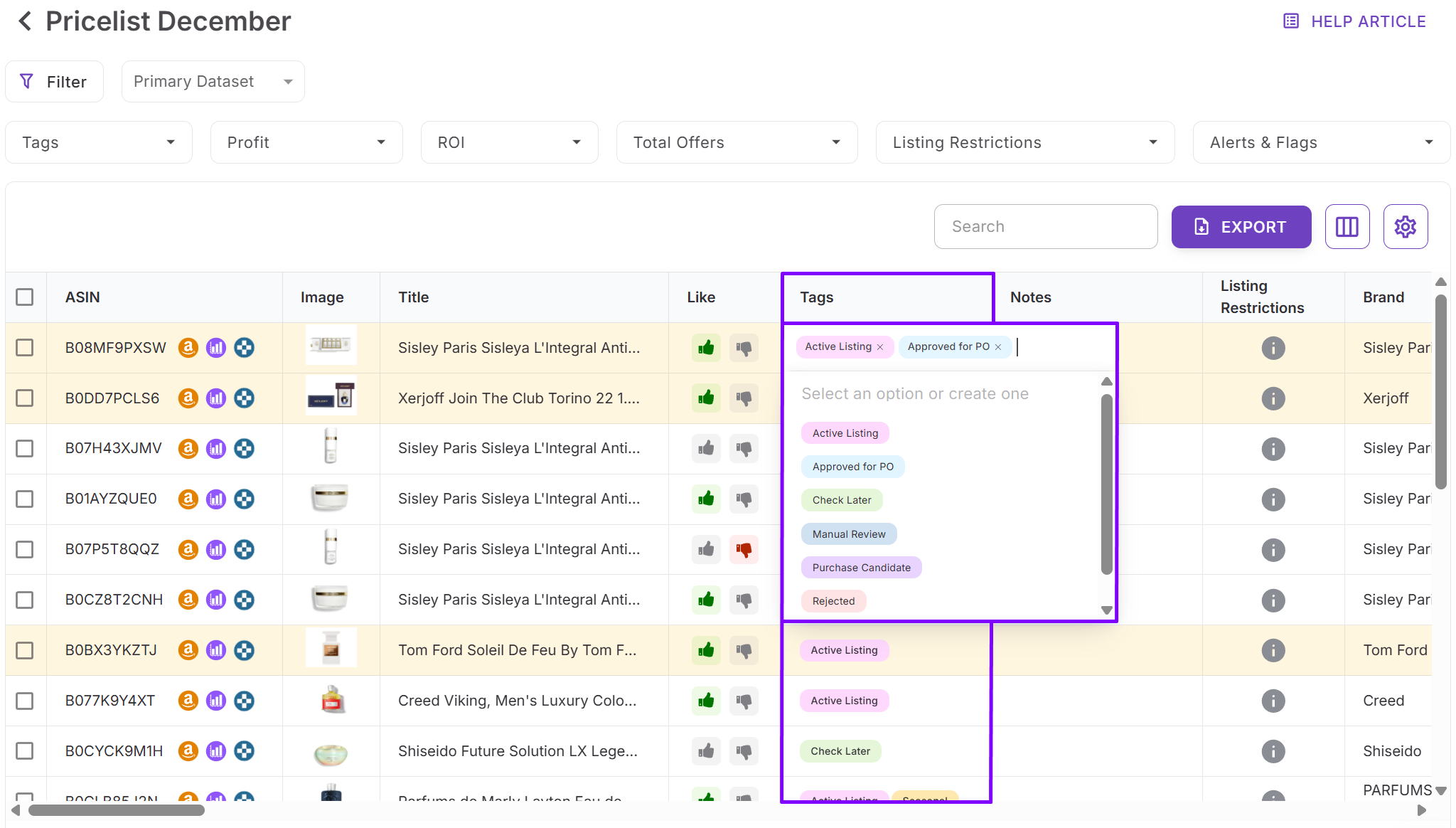
Step 8. Organize decisions
Tag products by sourcing stages and add notes tied to the ASIN for future reference.
Step 9. Export a purchase-ready shortlist
Save reusable views and export only validated products ready for ordering.
Scan Unlimited
Platform overview
Scan Unlimited is a high-speed wholesale spreadsheet scanner built for sellers who want quick ASIN matching and simple profit numbers. It’s made for a spreadsheet-first workflow: upload a supplier list, scan, filter by a few key metrics, then export and finish validation elsewhere.
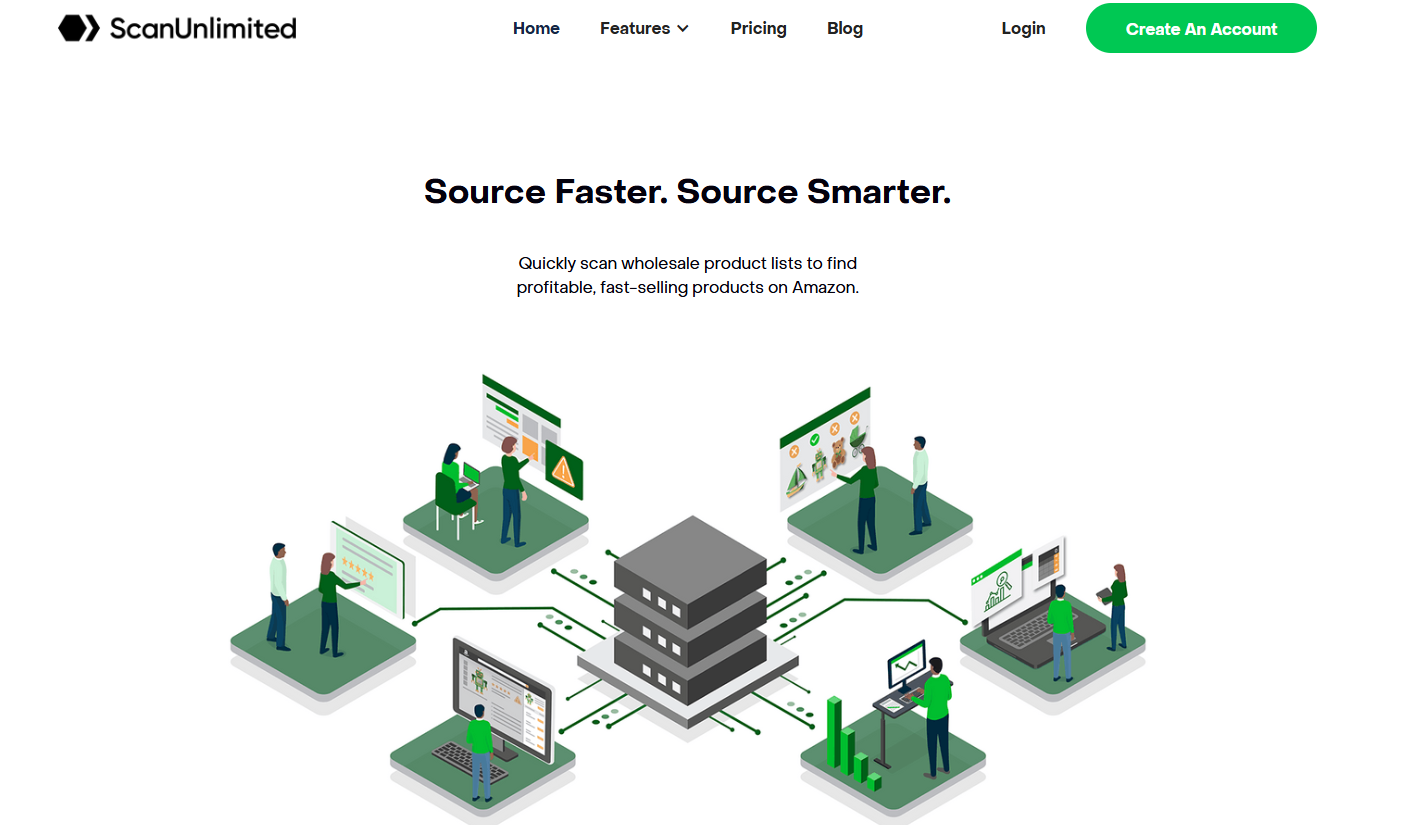
The platform prioritizes fast processing for large catalogs. It also supports multipacks, flexible filtering, and Keepa-connected pricing views, so sellers can spot price stability and basic demand signals without bouncing between tools.
Key capabilities
- Bulk scanning and ASIN matching
- Handle large wholesale spreadsheets with thousands of SKUs
- Match products to ASINs using UPC, EAN, and/or title fields
- Pull core listing data for each match
- Support multipack and pack-quantity setups
Pricing and basic profitability
- Show current Buy Box price
- Provide average pricing windows (30/90/365 days)
- Calculate baseline FBA and FBM profit
- Allow VAT inputs for EU workflows
- Include COG and shipping fields for margin calculations
- Profit math covers standard cases, but doesn’t include sales tax modeling, break-even pricing, or more advanced fee logic
Historical signals and demand context
- Buy Box averages across 30/90/365 days
- Keepa-integrated charts and snapshots
Price comparisons across FBA and FBM history
- Simple demand indicators based on BSR movement
- Competition visibility
- Total offer/seller count
- Basic FBA vs FBM offer split
- Quick read on how crowded a listing is
Risk and compliance visibility
- Includes basic warnings (for example, HazMat-type flags, data issues, simple mismatch alerts)
- Does not include account-level eligibility checks, gating/approval status, detailed IP risk history, or expanded risk flags like meltable, fragile, or oversize
- Restrictions and compliance checks typically need to be done in separate tools
Filtering and exporting
- Filter by ROI, profit, BSR, price, offer count, and other standard fields
- Narrow lists to higher-margin or faster-moving candidates
- Save basic layouts (not built for shared team views)
- Export scan results for external review and purchasing
Overall, Scan Unlimited works as a fast bulk scanning engine rather than a connected wholesale workflow platform.
Considerations
Scan Unlimited is wholesale-only and doesn’t cover online arbitrage or dropshipping workflows. It also lacks account-level restriction checks, deeper risk coverage, team collaboration features, and advanced profit modeling like sales tax or break-even calculations.
Ideal user profile
- Wholesale sellers who need fast scans and prefer to validate restrictions outside the tool
- Operators who live in spreadsheets and want quick scan → filter → export execution
- Sellers focused on speed and catalog turnover over workflow automation
How the bulk analysis process works
Step 1. Upload your supplier spreadsheet
Import your supplier file into Scan Unlimited.
Step 2. Map identifiers and cost columns
Assign UPC/EAN/title fields and map your cost/COG columns.
Step 3. Run the scan
Start the bulk match and enrichment process.
Step 4. Review the results
Check Buy Box pricing, BSR signals, and FBA/FBM profit outputs.
Step 5. Filter for your thresholds
Apply ROI/profit, price, and offer-count filters to shortlist candidates.
Step 6. Export and validate externally
Export the results and complete restriction and risk checks using separate tools before ordering.
Analyzer.Tools
Platform overview
Analyzer.Tools is a wholesale-first bulk analysis platform built for sellers who live in spreadsheets and want more historical depth per SKU. It scans large supplier catalogs, matches products to Amazon ASINs, and enriches each row with roughly 75+ pricing, demand, and competition data points.
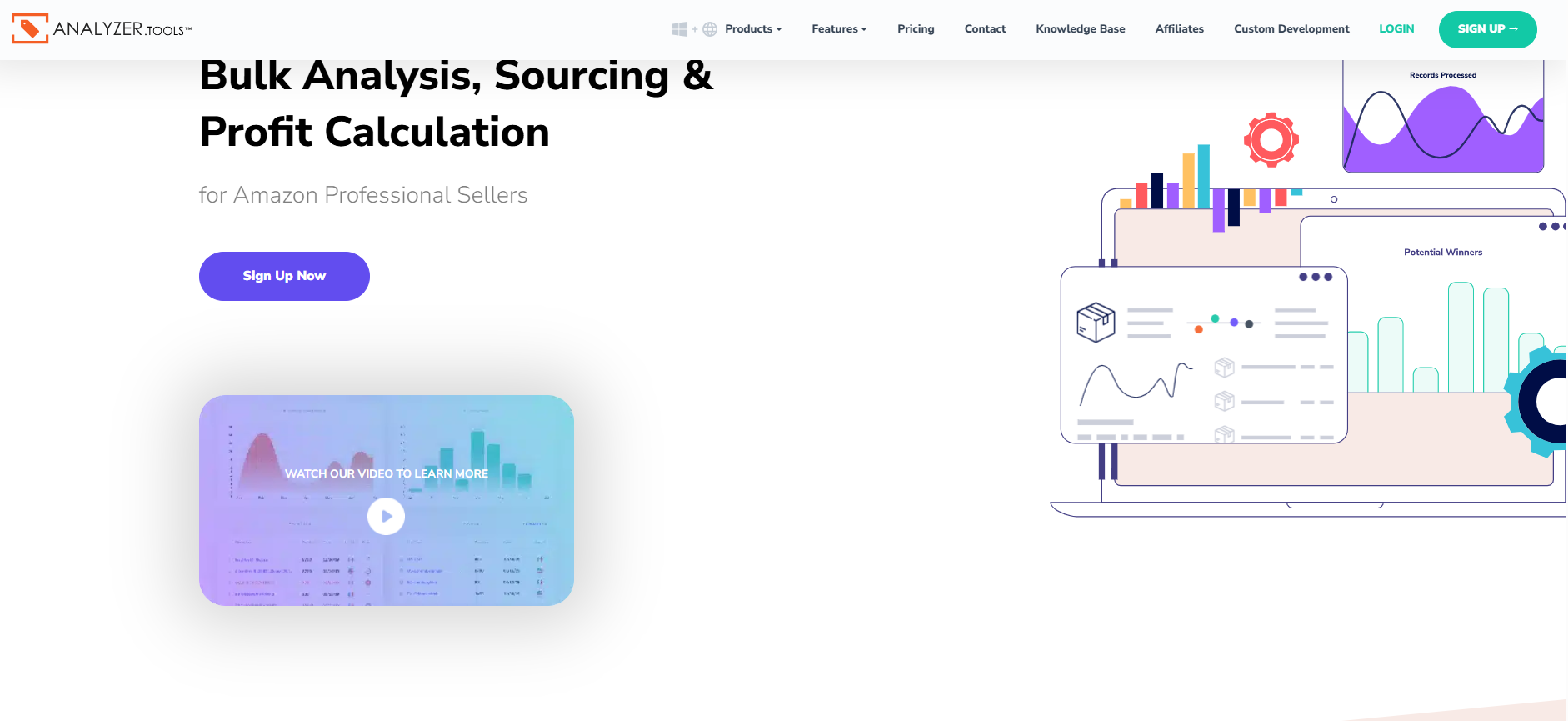
The product is geared toward dense data and trend visibility (what happened over time) rather than an all-in-one workflow that carries you from scan to purchase order.
Key capabilities
Bulk scanning and ASIN matching
- Process large wholesale price lists with thousands of SKUs
- Match using UPC, EAN, GTIN, and/or title fields
- Support multipacks for more accurate cost and pack-size handling
- Provide detailed product panels with historical context
Historical pricing and demand signals
- Buy Box averages across 30/90/180 days
- Lowest and highest price ranges over set windows
- Price change percentages to spot volatility
- Average BSR and BSR ranges
- BSR drop counts as a velocity signal
- “Bought in past month” indicator
- Amazon in-stock rate over 30/90/180 days
Competition and offer landscape
- Seller count
- FBA vs FBM offer mix
- Review count and rating summaries
Profit and cost modeling
- Profit and ROI metrics
- VAT support
- COG, shipping, and multipack calculations
Competitor and list-building tools
- Competing Seller Scan to export storefront catalogs into spreadsheets
- Reverse Source Browser Scan for manual product loading
- Business Product Opportunities (BPO) for Amazon B2B-style ASIN ideas
- Brand blocklist to exclude brands you don’t want
- Favorites lists for basic shortlisting
Considerations
Analyzer.Tools is wholesale-only and doesn’t support online arbitrage or dropshipping workflows. It also doesn’t provide account-level selling eligibility checks or personalized restriction verification. Compliance coverage is limited to brand IP alerts and HazMat-style warnings, without expanded flags like meltable, fragile, oversize, or deeper IP complaint risk history.
It also doesn’t include a browser extension for on-Amazon research, supplier databases, warehouse routing, purchase order creation, or team collaboration features like shared notes and workflow tagging.
Ideal user profile
- Wholesale sellers who prefer spreadsheet-heavy decision-making
- Operators who prioritize historical pricing and demand context
- Sellers building sourcing opportunities from competitor storefront exports
How the bulk analysis process works
Step 1. Upload your supplier spreadsheet
Import your supplier file into Analyzer.Tools.
Step 2. Map identifiers and costs
Map UPC/EAN/GTIN/title fields and set your cost/COG columns (plus shipping and multipack details if needed).
Step 3. Run the bulk scan
Generate the enriched ASIN dataset for the full catalog.
Step 4. Review trend and competition metrics
Check Buy Box averages, BSR movement, seller counts, and Amazon in-stock signals.
Step 5. Narrow with filters and lists
Apply advanced filters, Favorites, and brand blocklists to isolate candidates.
Step 6. Export and validate externally
Export shortlisted ASINs and complete restriction checks and final purchase validation outside the platform.
Analyzer.Tools works best as a data-dense bulk scanning engine for wholesale sourcing, not as a connected end-to-end workflow system.
Which Tool Should You Choose?
All three tools can process supplier price lists. The right choice depends on how you source, how complex your workflow is, and whether you need compliance checks and team collaboration – or just fast spreadsheet output. Here’s a simple breakdown by seller type.
Seller Type | Best Choice | Why |
Wholesale seller with team-based sourcing or VAs | Seller Assistant | Full wholesale workflow cycle all-tools-in-one. Shared views, tagging by workflow stage, persistent notes across uploads, and structured shortlisting improve collaboration. |
Seller Assistant | Built-in eligibility checks, restriction visibility, IP and risk flags reduce costly beginner mistakes. | |
Large spreadsheet-only operation | Scan Unlimited or Analyzer.Tools | Strong bulk scanning and historical pricing analysis for sellers who handle compliance and workflows separately. |
Seller Assistant | Supports OA and dropshipping workflows with on-page Amazon research tools and supplier-site analysis via Seller Assistant Extension and other tools. |
If you only need fast CSV scanning, standalone analyzers may be enough. If you want bulk analysis connected to eligibility, risk control, deep listing research, and workflow management, a connected platform makes the decision process more structured and scalable.
FAQ
What is amazon wholesale bulk analysis software?
Amazon wholesale bulk analysis software scans supplier price lists, matches products to ASINs, and calculates profitability, demand, competition, and risk metrics in bulk. It replaces manual SKU-by-SKU research with structured, data-driven sourcing decisions.
Can bulk analysis tools show if I’m eligible to sell an ASIN?
Some tools provide only general risk indicators, while others include account-level restriction checks tied to your Seller Central account. If eligibility isn’t verified before buying, you risk purchasing inventory you cannot list.
Is using the current Buy Box price enough for profit calculations?
The current Buy Box reflects real-time conditions but may spike temporarily due to stockouts or repricing gaps. Using 30/90/180-day Buy Box averages provides a more stable and realistic margin forecast.
Do bulk scanners replace manual product validation?
Bulk analysis eliminates repetitive research and surfaces high-potential SKUs quickly. However, sellers should still review high-investment products manually before placing large purchase orders.
Are these tools only for wholesale sellers?
Some platforms are built exclusively for wholesale spreadsheet workflows. Others support wholesale, online arbitrage, and dropshipping by combining bulk analysis with on-Amazon research and compliance checks.
Final Thoughts
Bulk sourcing on Amazon in 2026 is no longer about who finds products first — it’s about who validates them faster and more accurately. Supplier catalogs are larger, margins are tighter, and compliance risks are higher. The amazon wholesale bulk analysis software you choose directly affects your profit forecasting, Buy Box competitiveness, and account safety.
Scan Unlimited and Analyzer.Tools provide strong spreadsheet-driven scanning for wholesale sellers focused on data extraction and historical pricing. Seller Assistant's Price List Analyzer goes further by connecting bulk analysis with eligibility checks, deeper demand validation, Buy Box intelligence, risk detection, and structured workflow management.
Seller Assistant automates and connects every stage of your Amazon wholesale and arbitrage workflow. It brings together in one platform: workflow management tools – Purchase Orders Module, Supplier Database, Warehouse Database, bulk research & sourcing tools – Price List Analyzer, Bulk Restriction Checker, Sourcing AI, Brand Analyzer, Seller Spy, Chrome extensions – Seller Assistant Browser Extension, IP-Alert Extension, and built-in VPN by Seller Assistant, and integrations & team access features – seamless API connectivity, integrations with Zapier, Airtable, and Make, and Virtual Assistant Accounts.