.svg)
How to Easily Calculate FBA and FBM Fees in Bulk
Download Amazon Seller Guide
This guide will help you get started, understand the basics of Amazon selling, and explain in simple words how it all works.

Calculating Amazon fees at scale is one of the biggest bottlenecks for wholesale, online arbitrage, and dropshipping sellers. When supplier price lists contain thousands of SKUs, manually estimating FBA and FBM fees, margins, and ROI quickly becomes inaccurate and slow.
One missed fee – storage, inbound placement, referral minimums – can turn a “profitable” deal into a loss.
In this post, you’ll learn how to easily calculate FBA and FBM fees in bulk using Seller Assistant's Price List Analyzer, so you can spot high-margin deals faster, compare FBA vs FBM accurately, and make data-driven sourcing decisions without wasting hours on manual calculations.
Note. Seller Assistant is an end-to-end Amazon workflow management platform that integrates 10+ wholesale-focused solutions into one connected system. It combines sourcing workflow automation, bulk research and intelligence tools, and integrated Chrome extensions – giving you everything you need to streamline finding deals, managing suppliers, and creating purchase orders.

The platform aggregates: workflow management tools – Purchase Orders Module, Suppliers Database, Warehouses Database to organize, automate, and scale every step of your wholesale and arbitrage operations; bulk research & sourcing tools – Price List Analyzer, Bulk Restriction Checker, Sourcing AI, Brand Analyzer, Seller Spy to evaluate supplier price lists, verify selling eligibility and restrictions, open new brands, and discover winning product ideas from competitors to expand your product catalog; Chrome extensions – Seller Assistant Browser Extension, IP-Alert Extension, and built-in VPN by Seller Assistant to deep-research products, check IP claims and compliance, and access geoblocked supplier sites directly within your browser; and integrations & team access features – seamless API connectivity and integrations with Zapier, Airtable, and Make, plus Virtual Assistant Accounts for secure, scalable team collaboration.
With Seller Assistant, every step of your Amazon wholesale and arbitrage workflow is automated and connected.
What Are Amazon Fees?
Amazon fees are the costs sellers pay to list products, complete sales, and fulfill orders on the Amazon marketplace. The exact fees you pay depend on how you fulfill orders – using Fulfillment by Amazon (FBA) or Fulfillment by Merchant (FBM) – and on the services you use.
With FBA, Amazon handles storage, picking, packing, shipping, customer service, and returns. In exchange, sellers pay Amazon fulfillment and storage fees on top of standard selling fees.
With FBM, sellers ship orders themselves or use a third-party logistics provider (3PL). Amazon still charges selling fees, but fulfillment and shipping costs are paid outside Amazon.
The key difference is simple: FBA bundles fulfillment into Amazon fees, while FBM shifts fulfillment costs to your own logistics setup.
Types of Amazon fees
Selling plan fees
The cost of having an Amazon seller account. Sellers choose between:
- Individual plan (per-unit fee)
- Professional plan (monthly subscription)
Referral fees
Amazon’s commission on each sale. It’s calculated as a percentage of the total sale price (item price plus shipping and gift wrap, excluding tax), with a minimum per-item referral fee applied when applicable.
FBA fulfillment fees
Per-unit fees charged to FBA sellers for order picking, packing, outbound shipping, customer service, and returns. These fees depend on size tier, weight, category, and special handling requirements.
Storage fees
Monthly fees for storing inventory in Amazon fulfillment centers. Based on product volume, time of year, and inventory age.
Inbound placement service fees
Fees charged when Amazon redistributes your inbound inventory across its fulfillment network, depending on shipment options and product size.
Closing fees
Per-item fees applied to specific categories such as books, music, video, Blu-ray, and DVDs.
Digital Services Fee (DST-related)
A percentage-based fee applied in certain marketplaces to cover digital services taxes, calculated on eligible Amazon fees.
FBM fulfillment and shipping costs
Not paid to Amazon. These include carrier shipping rates, packaging, prep, and 3PL fees, which vary by seller and logistics setup.
Understanding these fee types is essential for accurate profit, ROI, and break-even calculations – especially when analyzing deals in bulk.
Why Accurate Amazon Fee Calculation Is Critical
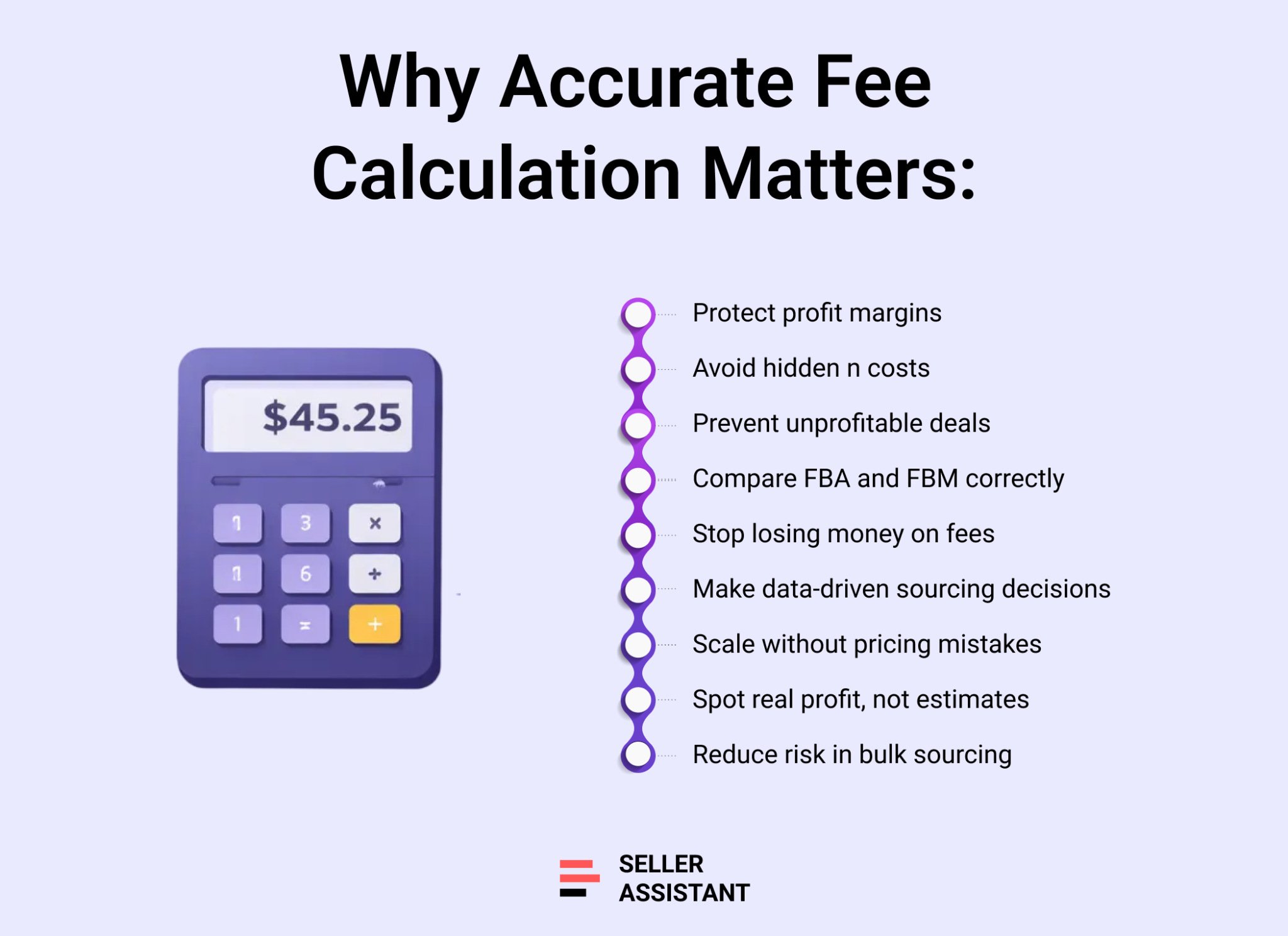
Amazon fees directly determine whether a product is profitable or a loss. When you work with large supplier price lists, even small miscalculations multiplied across dozens or hundreds of units can wipe out margins. Accurate fee calculation is not optional – it’s the foundation of smart sourcing decisions.
Protects your profit margins
Missing or underestimating fees like storage, inbound placement, referral minimums, or prep costs can turn a deal that looks profitable on paper into a losing SKU once it starts selling.
Enables true FBA vs FBM comparison
FBA and FBM have very different cost structures. Accurate calculations let you see which fulfillment method actually delivers higher profit for each product, instead of relying on assumptions.
Prevents costly sourcing mistakes
Bulk sourcing decisions are often made quickly. Precise fee data helps you filter out low-margin, high-risk products before you invest cash in inventory.
Supports scalable decision-making
When fees are calculated correctly in bulk, you can confidently analyze thousands of products at once, prioritize the best opportunities, and scale your Amazon business without relying on manual spreadsheets or guesswork.
How FBA and FBM Fee Calculation Works in Price List Analyzer
Seller Assistant's Price List Analyzer processes supplier price lists at scale by matching UPC/EANs to Amazon ASINs and calculating all applicable fees per product automatically. It applies Amazon selling fees, fulfillment fees, and seller-defined logistics costs in one pass, then recalculates profit, ROI, and margins instantly across thousands of SKUs.
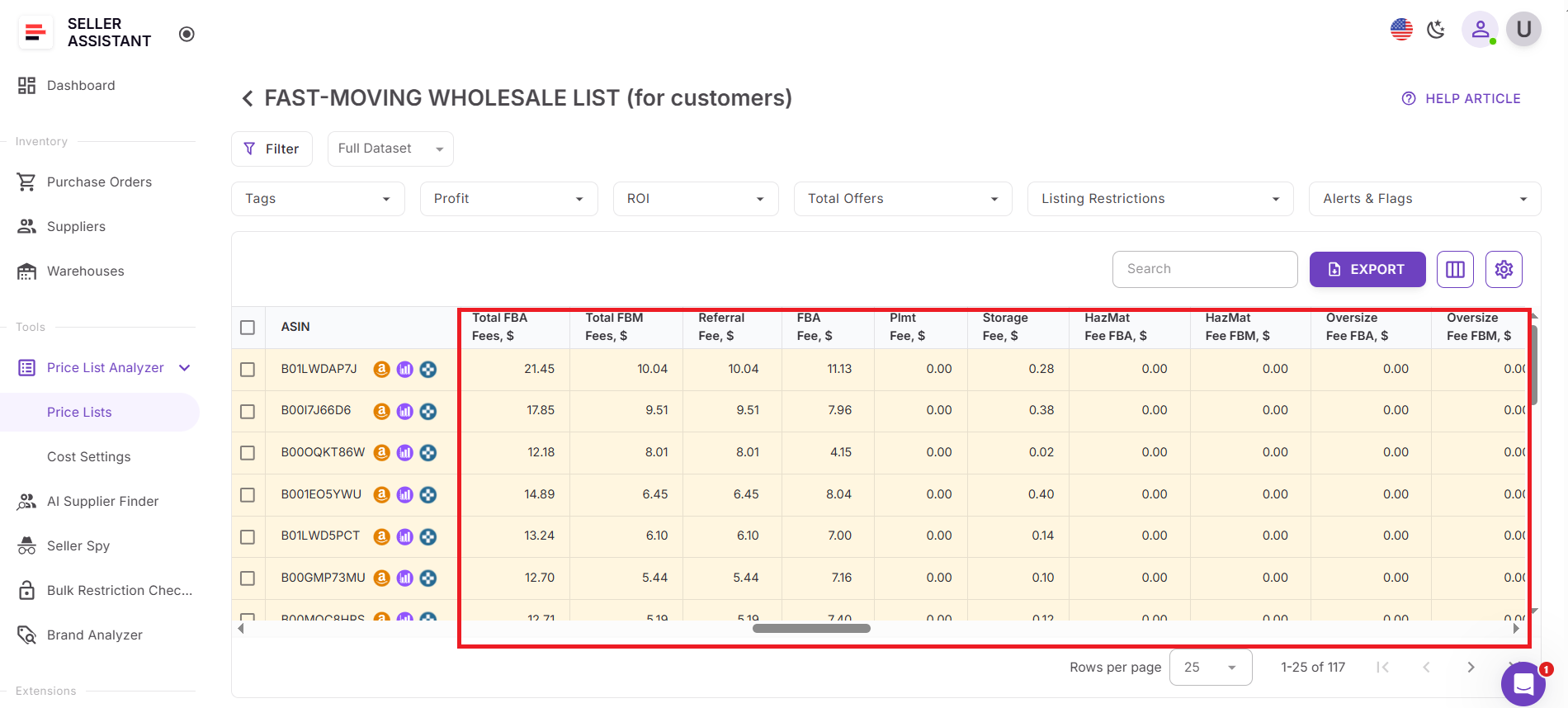
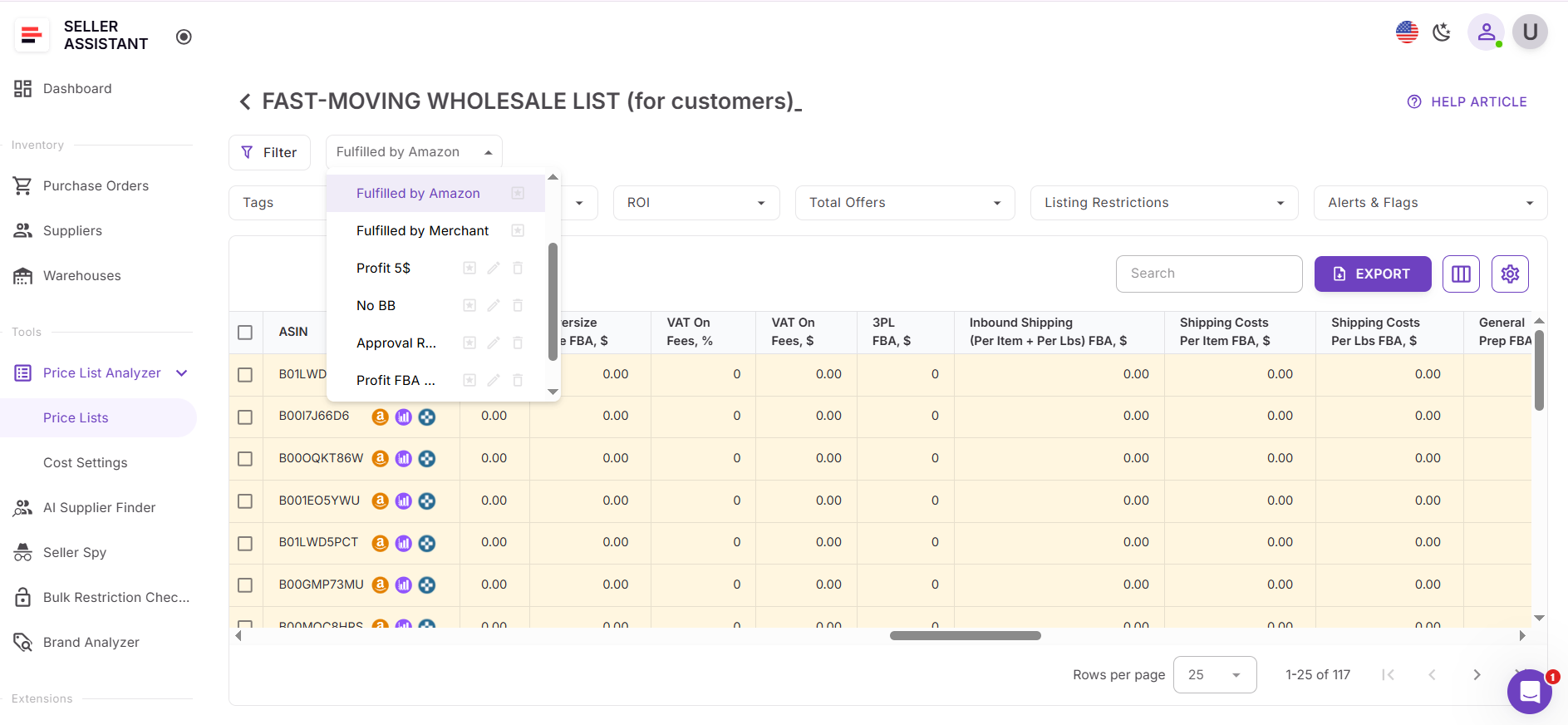
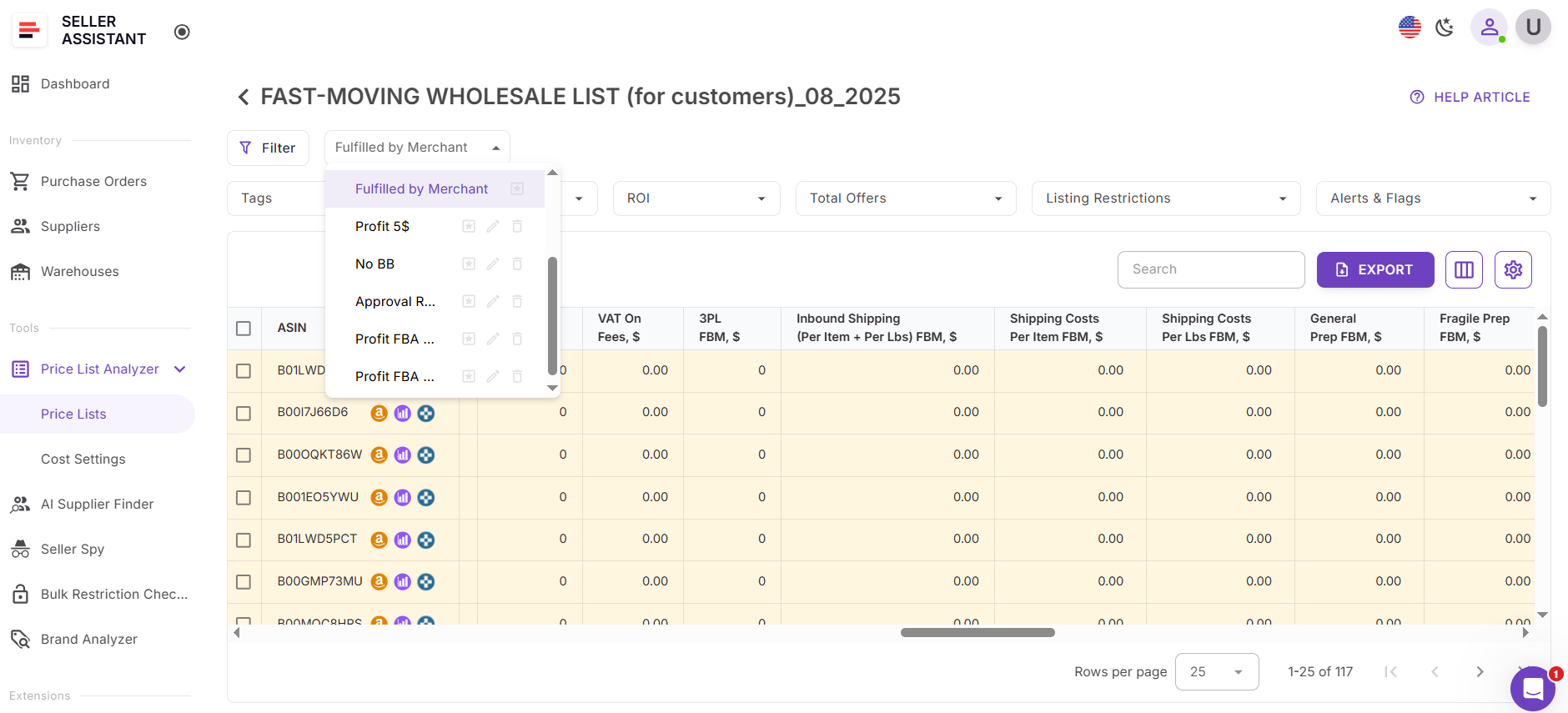
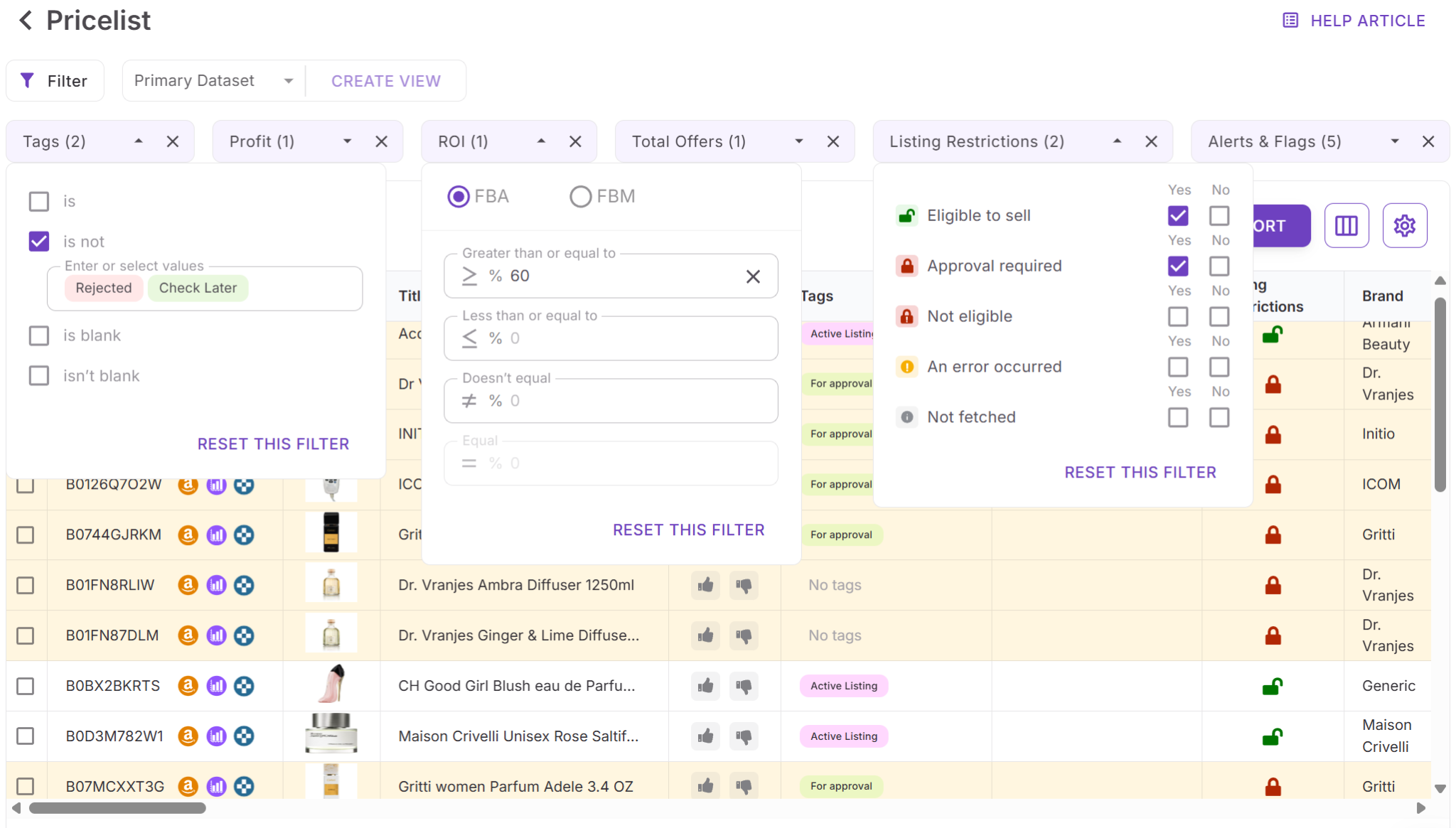
Price List Analyzer uses table views to focus your analysis. You can switch to Fulfilled by Amazon to hide FBM-specific columns and review only FBA fees, or to Fulfilled by Merchant to hide FBA columns and analyze FBM costs. Advanced filters let you narrow results by any fee, total cost, or profitability metric, so you can quickly eliminate high-cost or low-margin items.
Amazon and logistics fees shown in Price List Analyzer
Core totals
- Total FBA Fees, $
The total amount of Amazon commissions and charges for FBA per unit.
- Total FBM Fees, $
The total amount of Amazon commissions and charges for FBM per unit.
Amazon selling fees
- Referral fee, $
A fee Amazon charges for every sale. Amazon deducts the greater of the category percentage or the minimum per-item referral fee. If the calculated amount is below the threshold, a $0.30 minimum applies.
- Variable Closing fee, $
Per-item fee for books, music, video, Blu-ray, and DVDs.
FBA-specific Amazon fees
- FBA Fee, $
Fees for fulfillment by Amazon, including picking, packing, shipping, customer service, and returns.
- Inbound Placement Service Fee, $
Charged when Amazon redistributes inbound inventory; depends on your extension settings.
- Storage fee, $
Monthly fee Amazon charges for storing inventory in fulfillment centers.
- Digital Service Fee, % / Digital Service Fee FBA, $
Applied in applicable marketplaces; depends on your extension settings.
- VAT on Fees Rate, % / VAT on Fees, $
VAT applied to eligible Amazon fees, based on your settings.
Seller-defined misc fees
- Misc Fee Rate, % / Misc Fee Fixed, $ / Misc Fee, $
Custom costs you add (percentage or fixed) to account for extra expenses not covered elsewhere.
Third-party logistics fees
- Third party logistics FBA
- Third Party Logistics (FBA), $
- Total non-Amazon logistics costs (Ship + Prep + Frgl).
- Inbound Shipping FBA cost (per item + per lbs), $
- Shipping costs/item (FBA), $
- Shipping costs/lbs (FBA), $
- Prepare/Labeling Cost (FBA), $
- Fragile/Bubble Wrapping (FBA), $
- HazMat Fee FBA, $
- Oversize Fee FBA, $
All depend on your settings and recalculate in real time.
Third party logistics FBM
- Third Party Logistics (FBM), $
- Total fulfillment costs outside Amazon (Ship + Prep + Frgl).
- Inbound Shipping FBM cost (per item + per lbs), $
- Shipping costs/item (FBM), $
- Shipping costs/lbs (FBM), $
- Prepare/Labeling Cost (FBM), $
- Fragile/Bubble Wrapping (FBM), $
- HazMat Fee FBM, $
- Oversize Fee FBM, $
Also driven by your settings for accurate FBM profitability.
Together, these calculations let you filter, compare, and prioritize products based on true all-in costs, whether you plan to sell via FBA or FBM.
How to Calculate Amazon Fees In Bulk with Price List Analyzer
Manually calculating Amazon fees works for one or two SKUs, but it quickly falls apart when you start reviewing real supplier price lists. Hundreds or thousands of products, different fee structures for FBA and FBM, referral minimums, storage costs, and constant Amazon fee updates make spreadsheets slow, inconsistent, and risky.
Seller Assistant's Price List Analyzer solves this by automatically calculating all Amazon fees for every product in your supplier file. Instead of estimating costs, you get accurate FBA and FBM fee breakdowns at scale – so you can evaluate wholesale, online arbitrage, and dropshipping deals faster and with confidence.
How Price List Analyzer works
Built for bulk fee calculation
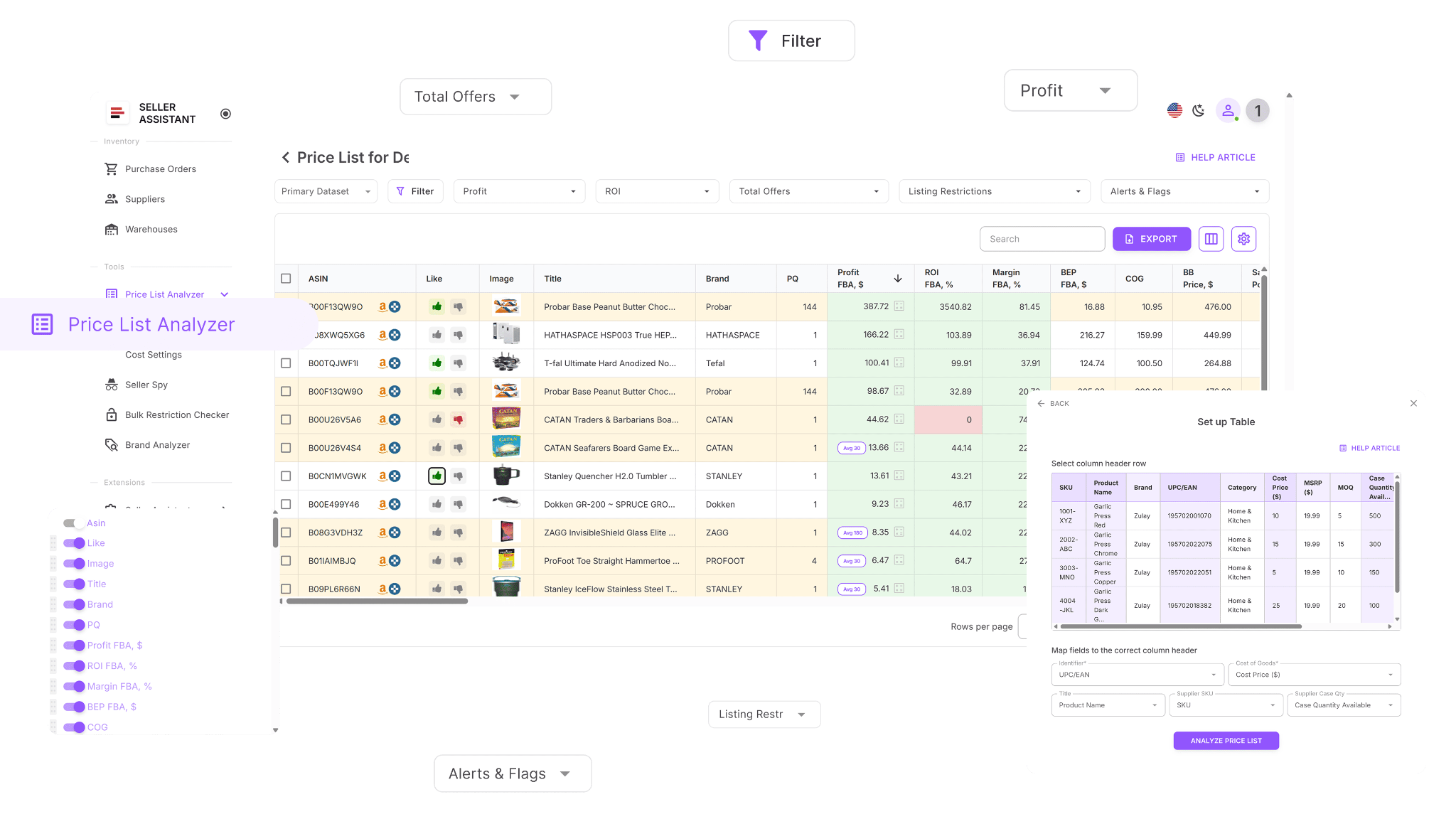
Price List Analyzer is designed for sellers who analyze large supplier catalogs. It processes your spreadsheet, matches each item to the correct Amazon ASIN, and calculates all applicable fees – including referral fees, FBA or FBM fees, storage, inbound placement, and logistics costs – in one unified workflow.
Enriches your supplier data with full fee breakdowns
Once uploaded, your file is enriched with dozens of fee-related data points that directly impact profitability. These include Amazon selling fees, fulfillment fees, storage costs, inbound and prep expenses, and seller-defined logistics costs. You can adjust cost settings once and instantly see updated fee totals across the entire list.
Handles large files in minutes
Instead of calculating fees SKU by SKU, Price List Analyzer evaluates thousands of products at once. It highlights items with acceptable total fees, flags SKUs where costs eat into margins, and lets you filter products based on FBA or FBM fees – so you can focus only on deals that make financial sense.
How Price List Analyzer simplifies sourcing
This Software Makes Amazon FBA Wholesale Selling 10x Easier
Price List Analyzer turns complex wholesale sourcing into a fast, structured workflow. Instead of manually reviewing supplier catalogs line by line, the tool helps you analyze thousands of products at once and focus only on deals that meet your profit and risk criteria.
With Price List Analyzer, you can:
- Scan large supplier price lists to identify products with genuine profit potential on Amazon
- Automatically match supplier SKUs and UPCs/EANs to the correct Amazon ASINs
- Quickly detect restricted or ineligible products on your seller account
- Evaluate demand using BSR history, sales trends, and estimated monthly unit sales
- Calculate ROI, profit margin, net profit, and breakeven price for every ASIN
- Analyze Buy Box price behavior over 30, 90, and 180 days
- See a full Amazon fee breakdown, including referral fees, FBA or FBM costs, storage, prep, and shipping
- Flag risky products such as hazmat, meltable, oversized, fragile, or bundled listings
- Receive alerts for issues like approval requirements, missing Buy Box, or weak FBA profitability
- Filter products by profitability, demand, competition level, and risk signals
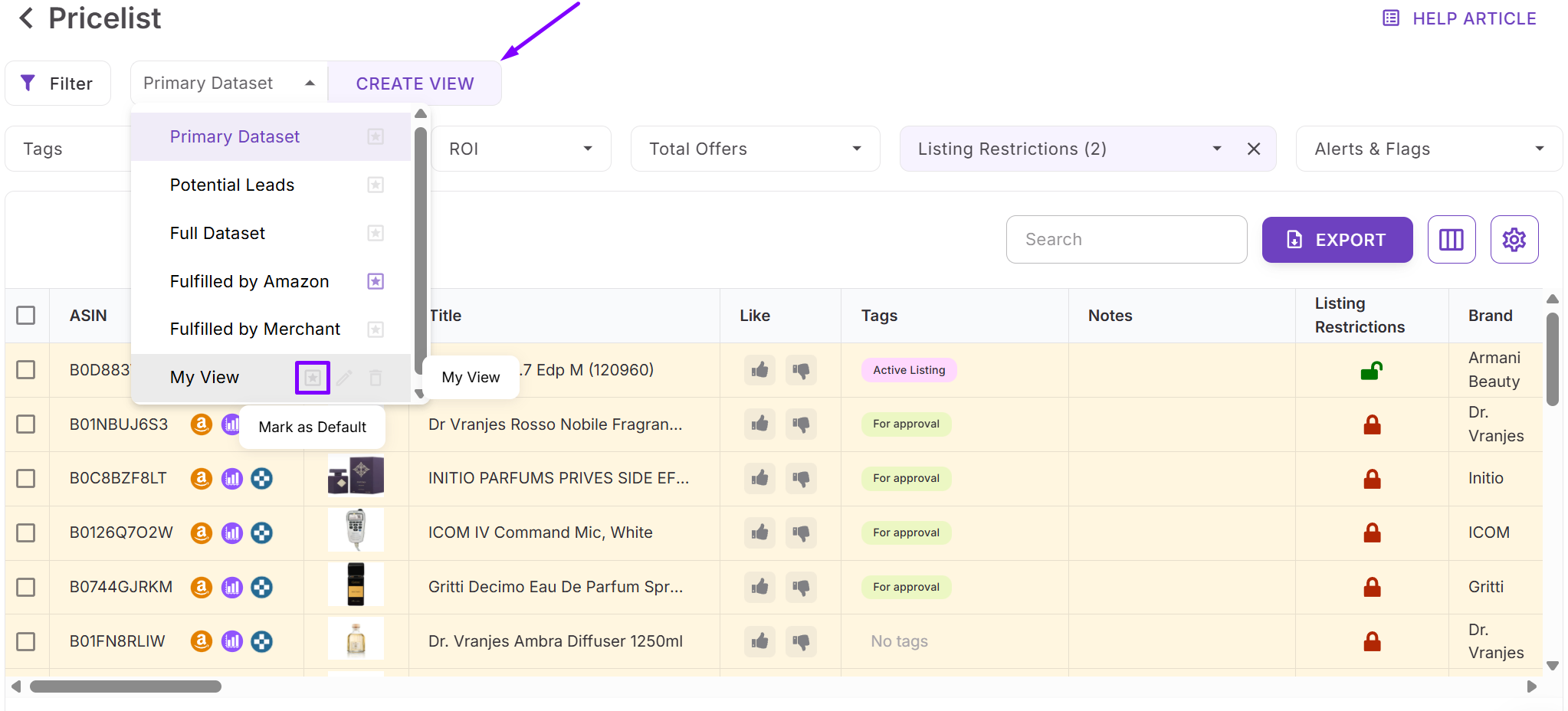
- Save custom table views and filter setups for future supplier uploads
- Update COGs, shipping, prep, or pack quantities and instantly recalculate profitability
- Add shared team notes that remain linked to ASINs across multiple files
- Tag products by sourcing stage, reuse past decisions, and filter by workflow status.
Steps to calculate FBA and FBM fees in bulk with Price List Analyzer
Step 1. Upload your supplier file
Open Price List Analyzer in your Seller Assistant dashboard and upload your Excel or CSV file containing UPC/EANs and cost of goods. The tool automatically matches each product to its Amazon ASIN and begins calculating all applicable Amazon fees and cost components for both fulfillment methods.
Step 2. Review FBA and FBM fee columns
Once processing is complete, switch to the relevant table view to focus your analysis. Each row displays detailed fee breakdowns and total FBA or FBM fees per unit.
If you select FBA of FBM table view:
- Fulfilled by Amazon view shows all FBA-related fees while hiding FBM-specific columns.
- Fulfilled by Merchant view shows FBM fees while hiding FBA-related columns.
Step 3. Identify SKUs with high or risky fees
Scan the fee columns to spot products where total FBA or FBM fees consume too much of the selling price. These SKUs often indicate thin margins, referral minimum issues, high storage costs, or expensive prep and shipping.
Step 4. Filter by fees and profitability
Use filters to keep only products with acceptable total fees, profit, and ROI. Combine fee filters with sales volume, Buy Box pricing, and competition metrics to isolate deals that make financial sense at scale.
Step 5. Save and reuse your setup
Save custom table views such as “Low FBA fees,” “FBM-friendly,” or “High fee risk.” These views can be reused for future supplier uploads, allowing you to calculate and evaluate fees consistently across new price lists.
FAQ
Can Price List Analyzer calculate both FBA and FBM fees in bulk?
Yes. Price List Analyzer calculates FBA and FBM fees separately for every product in your supplier file. You can switch between Fulfilled by Amazon and Fulfilled by Merchant views to focus on each fulfillment method.
Which Amazon fees are included in Price List Analyzer calculations?
The tool includes referral fees, FBA fulfillment fees, storage fees, inbound placement fees, variable closing fees, Digital Service Fees, VAT on fees, and seller-defined misc costs. Third-party logistics costs are also included to show true all-in fees.
Can I filter products based on high or low fees?
Yes. You can filter products by total FBA fees, total FBM fees, or any individual fee component to remove high-cost or low-margin SKUs quickly.
Do fee calculations update if my costs change?
Yes. If you edit COGs, shipping, prep, or other cost settings, Price List Analyzer recalculates all fees and profitability metrics instantly across the entire list.
Is Price List Analyzer suitable for wholesale, online arbitrage, and dropshipping?
Yes. The tool is designed for bulk analysis and works for wholesale, online arbitrage, and dropshipping sellers who need fast, accurate fee calculations at scale.
Final Thoughts
Accurately calculating Amazon fees is one of the most important steps in building a profitable and scalable selling business. When you rely on estimates or manual spreadsheets, hidden costs can easily erase margins – especially when sourcing in bulk.
Seller Assistant's Price List Analyzer removes that risk by calculating FBA and FBM fees automatically, showing clear fee breakdowns, and letting you filter out unprofitable or high-risk products in minutes. By using bulk fee analysis, saved views, and real-time recalculations, you can make faster, more confident sourcing decisions and focus your capital only on deals that truly make sense.
Seller Assistant automates and connects every stage of your Amazon wholesale and arbitrage workflow. It brings together in one platform: workflow management tools – Purchase Orders Module, Supplier Database, Warehouse Database, bulk research & sourcing tools – Price List Analyzer, Bulk Restriction Checker, Sourcing AI, Brand Analyzer, Seller Spy, Chrome extensions – Seller Assistant Browser Extension, IP-Alert Extension, and built-in VPN by Seller Assistant, and integrations & team access features – seamless API connectivity, integrations with Zapier, Airtable, and Make, and Virtual Assistant Accounts.