.svg)
Find Best Product Leads with Filters in Price List Analyzer
Download Amazon Seller Guide
This guide will help you get started, understand the basics of Amazon selling, and explain in simple words how it all works.

Finding profitable Amazon products isn’t about scanning more supplier lists – it’s about filtering smarter. Wholesale, online arbitrage, and dropshipping sellers deal with thousands of SKUs, gated brands, low-ROI offers, and hidden risks like Amazon meltables or Amazon hazmat. Without strong deal filtering, good opportunities get buried fast.
That’s where Seller Assistant's Price List Analyzer changes the game. By turning raw supplier price lists into structured, filterable data, it helps you surface high-margin, low-risk deals in minutes – not hours.
In this post, we’ll break down how deal filtering improves Amazon product sourcing and show how to use Price List Analyzer filters to consistently find your best product leads.
Note. Seller Assistant is an end-to-end Amazon workflow management platform that integrates 10+ wholesale-focused solutions into one connected system. It combines sourcing workflow automation, bulk research and intelligence tools, and integrated Chrome extensions – giving you everything you need to streamline finding deals, managing suppliers, and creating purchase orders.

The platform aggregates: workflow management tools – Purchase Orders Module, Suppliers Database, Warehouses Database to organize, automate, and scale every step of your wholesale and arbitrage operations; bulk research & sourcing tools – Price List Analyzer, Bulk Restriction Checker, Sourcing AI, Brand Analyzer, Seller Spy to evaluate supplier price lists, verify selling eligibility and restrictions, open new brands, and discover winning product ideas from competitors to expand your product catalog; Chrome extensions – Seller Assistant Browser Extension, IP-Alert Extension, and built-in VPN by Seller Assistant to deep-research products, check IP claims and compliance, and access geoblocked supplier sites directly within your browser; and integrations & team access features – seamless API connectivity and integrations with Zapier, Airtable, and Make, plus Virtual Assistant Accounts for secure, scalable team collaboration.
With Seller Assistant, every step of your Amazon wholesale and arbitrage workflow is automated and connected.
Why Deal Filtering Matters in Amazon Product Sourcing
Deal filtering is the process of narrowing large product datasets down to items that actually make sense to sell on Amazon. Instead of reviewing every SKU manually, Amazon sellers apply rules – profit, ROI, eligibility, competition, risks, etc. – to surface only viable opportunities.
For wholesale, online arbitrage, and dropshipping sellers, filtering isn’t optional. Supplier lists are huge, margins are tight, and mistakes are expensive. Strong deal filtering helps you move faster, protect capital, and focus on products that can win the Buy Box without surprises.
Scale without burning time
Amazon sellers often analyze thousands of SKUs per supplier. Filters remove unprofitable and irrelevant products instantly, so time is spent on decision-making, not data cleanup.
Protect margins and cash flow
By filtering on profit, ROI, fees, and price stability, sellers avoid low-margin deals that look good on paper but fail after Amazon fees and competition.
Reduce risk before you buy
Filters help eliminate gated brands, Amazon restricted ASINs, Amazon hazmat, Amazon meltables, and other risky products before capital is committed.
Focus on sellable demand
Filtering by sales velocity, Amazon BSR trends, and offer count keeps attention on products that actually move, not dead inventory.
Build repeatable sourcing systems
Consistent filtering rules turn Amazon product sourcing into a predictable process, not guesswork – making it easier to scale across suppliers and teams.
How Price List Analyzer Helps You Find the Best Deals
Price List Analyzer is a bulk Amazon price list analysis tool built to remove manual Amazon product research from wholesale, online arbitrage, and dropshipping workflows. Instead of checking SKUs one by one, sellers upload supplier files or parse supplier websites and get a structured, Amazon-ready dataset.
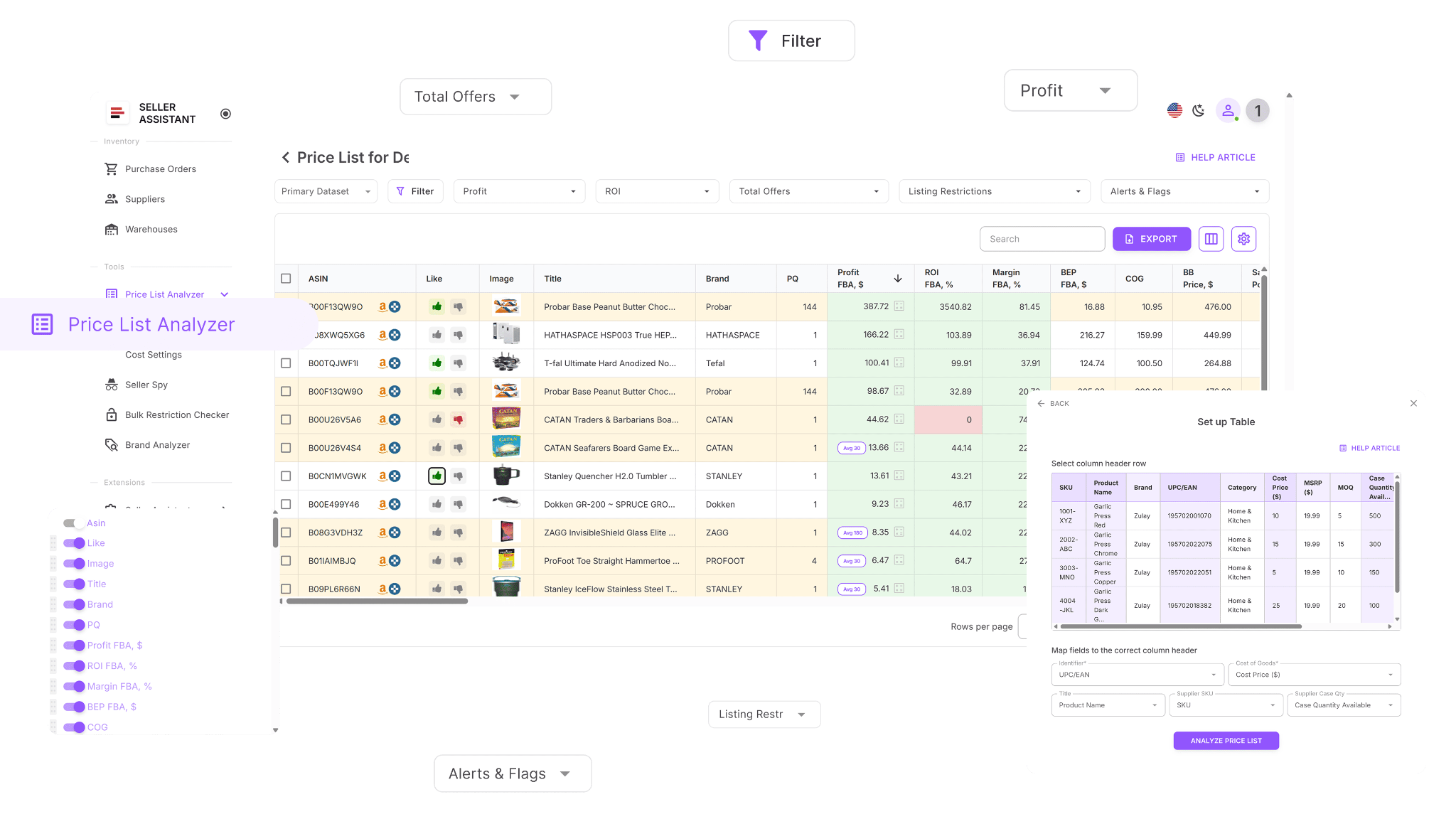
Each product is automatically matched to an Amazon ASIN and enriched with 100+ data points, allowing sellers to evaluate profitability, demand, competition, and risk at scale.
How it helps uncover profitable Amazon deals
Price List Analyzer helps sellers find profitable Amazon deals by turning raw supplier data into actionable sourcing intelligence. It enriches each product with key deal factors – profitability, demand, competition, fees, and selling eligibility – so sellers can quickly see which items are worth attention.
This Software Makes Amazon FBA Wholesale Selling 10x Easier
Filters play a central role in this process, allowing sellers to narrow large price lists down to products that meet specific sourcing criteria, such as minimum ROI, stable Buy Box pricing, or low offer counts. Instead of guessing or manually checking SKUs, sellers use data-driven filtering to surface consistent, repeatable buying opportunities. This filtering-first approach makes it easy to focus only on Amazon deals that are worth buying.
Price List Analyzer functionality
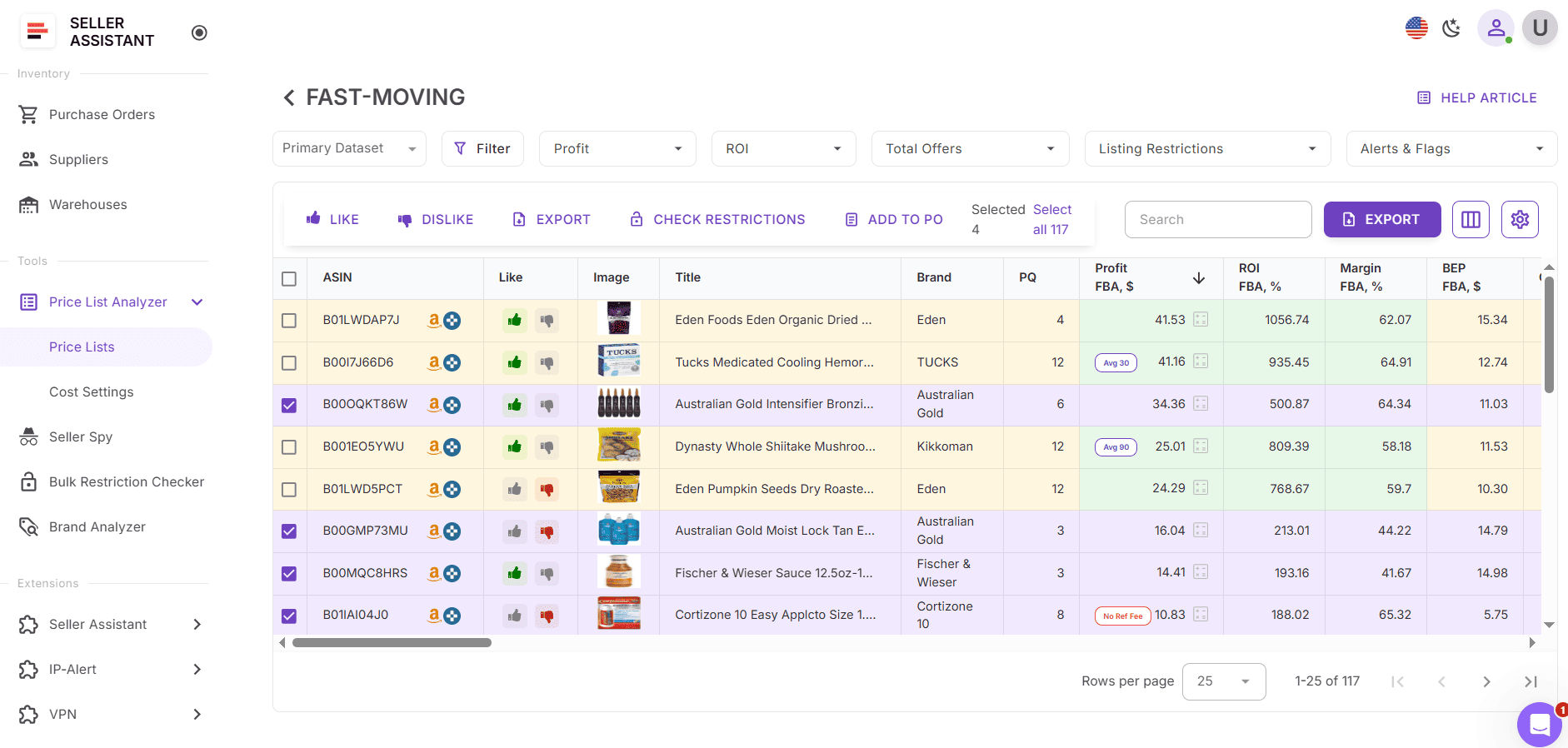
- Scan large supplier price lists and surface high-potential product leads
- Auto-match supplier SKUs to Amazon ASINs without manual lookup
- Instantly flag gated, restricted products, or ineligible products
- Analyze demand using Amazon BSR, sales trends, and monthly velocity
- Calculate ROI, margins, net profit, and breakeven points
- Review Buy Box price history over 30, 90, and 180 days
- See full Amazon fee breakdowns, including referral, FBA/FBM, storage, prep, and shipping
- Detect risky ASINs such as Amazon meltable, Amazon hazmat, Amazon oversized, fragile, or selling bundles on Amazon
- Receive alerts like “Approval required,” “No Buy Box price,” or “Too low FBA ROI”
- Filter products by profit, ROI, velocity, competition, and risk signals
- Save table views and filters for reuse across future price lists
- Edit costs and instantly see updated profit calculations
- Add shared team notes that persist across uploads
- Use tags to mark sourcing status, reuse decisions across price lists, and filter products by workflow stage.
What Are Filters in Price List Analyzer?
Filters in Price List Analyzer are the control layer that turns bulk product data into usable sourcing decisions. Instead of reviewing every SKU in a supplier list, filters let you narrow results based on profitability, demand, competition, eligibility, size, and risk.
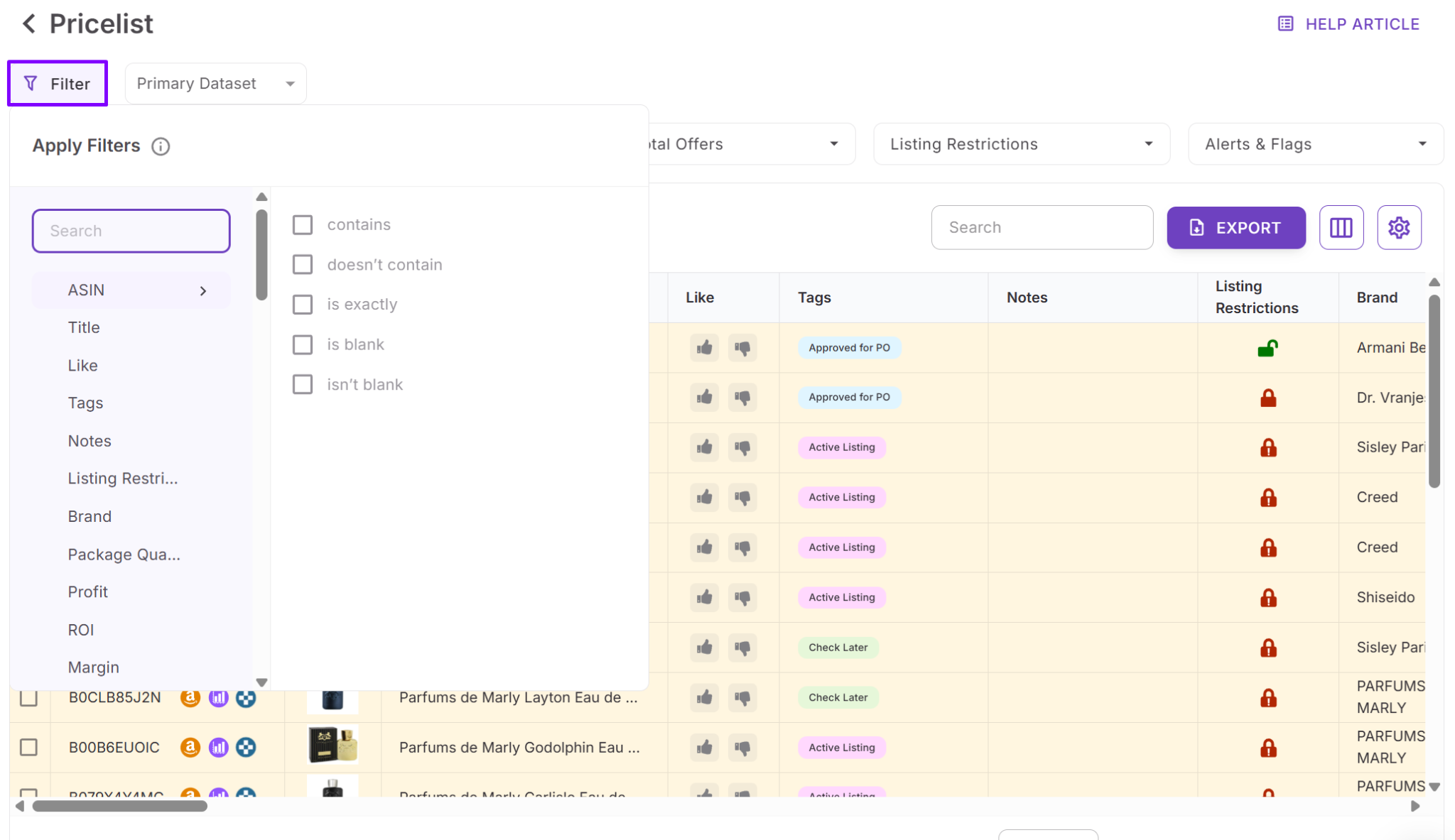
They work directly inside the product table, updating results in real time, so you can quickly isolate Amazon-ready deals and remove anything that doesn’t meet your sourcing criteria. Filters can be combined, reset, reused in views, and applied before exporting a buy-ready list.
Types of filters in Price List Analyzer
Price List Analyzer uses several filter types, each designed to solve a specific Amazon sourcing problem – from margin control to restriction checks and data cleanup.
Quick access filters
Quick access filters are one-click filters for the most important Amazon sourcing metrics: tags, profit, ROI, total offers, Amazon listing restrictions, Alerts & Flags, etc. They are always visible and synced with the main filter panel.
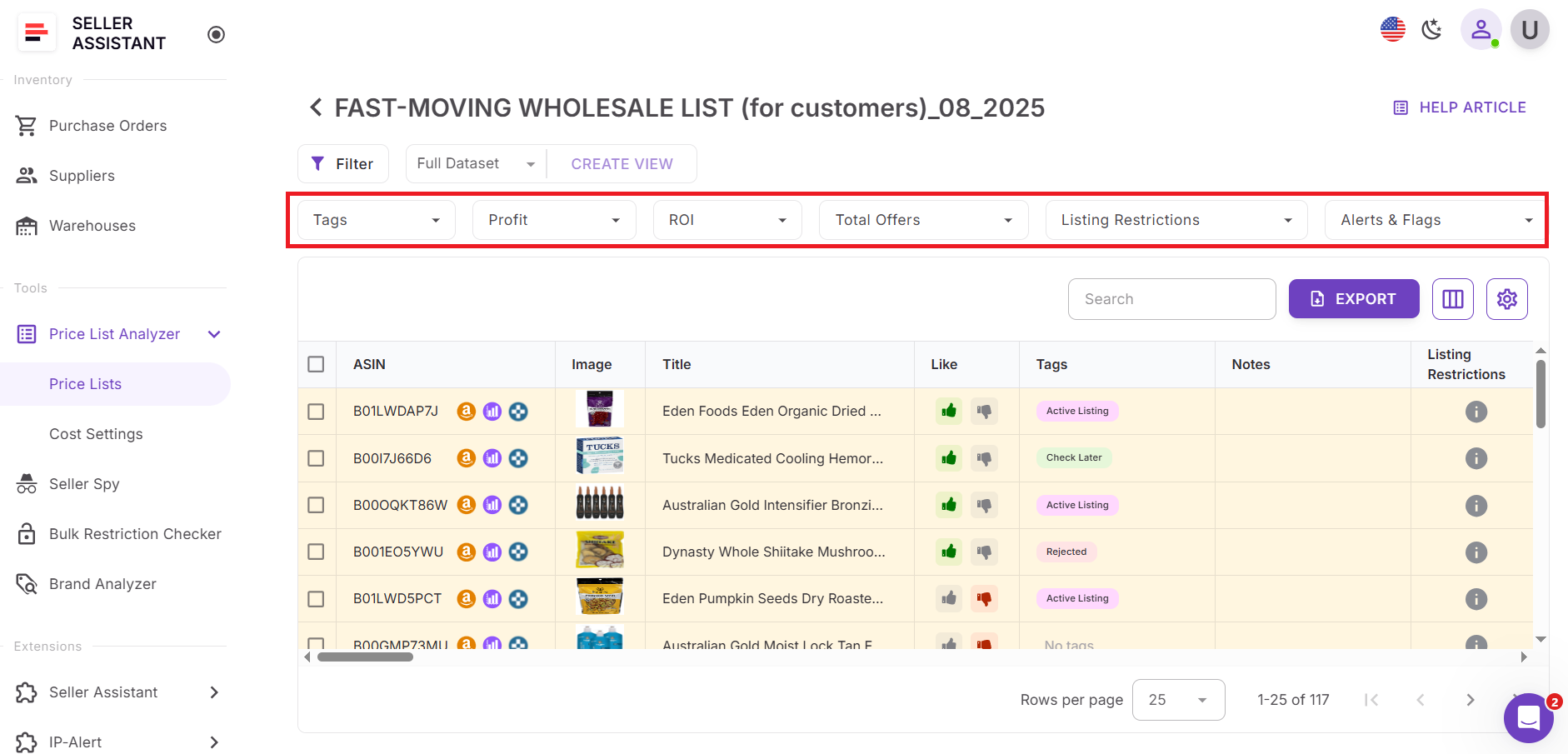
How quick access filters work
Sellers can instantly apply filters for key deal indicators such as profit, ROI, offers count, listing restrictions, alerts and flags, and tags. Clicking a quick access filter opens the filter with the relevant field pre-selected, allowing fast adjustments without digging through the full filter list. This makes it easy to spot profitable or risky products early in the sourcing process.
Numeric filters
Numeric filters apply to fields with measurable values, such as profit, ROI, fees, ratings, or offer count.
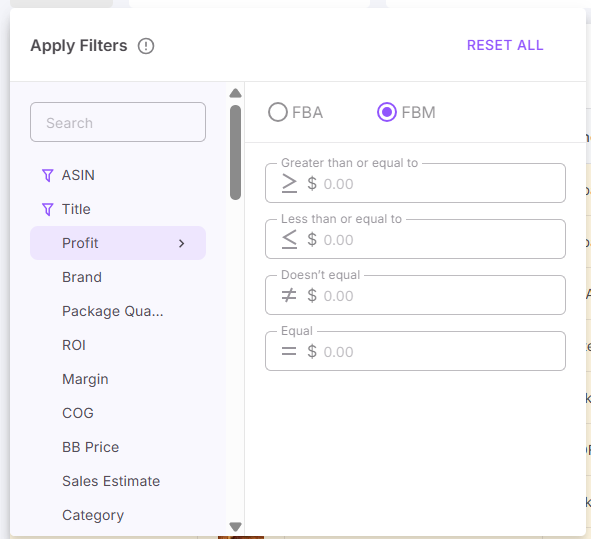
How numeric filters work
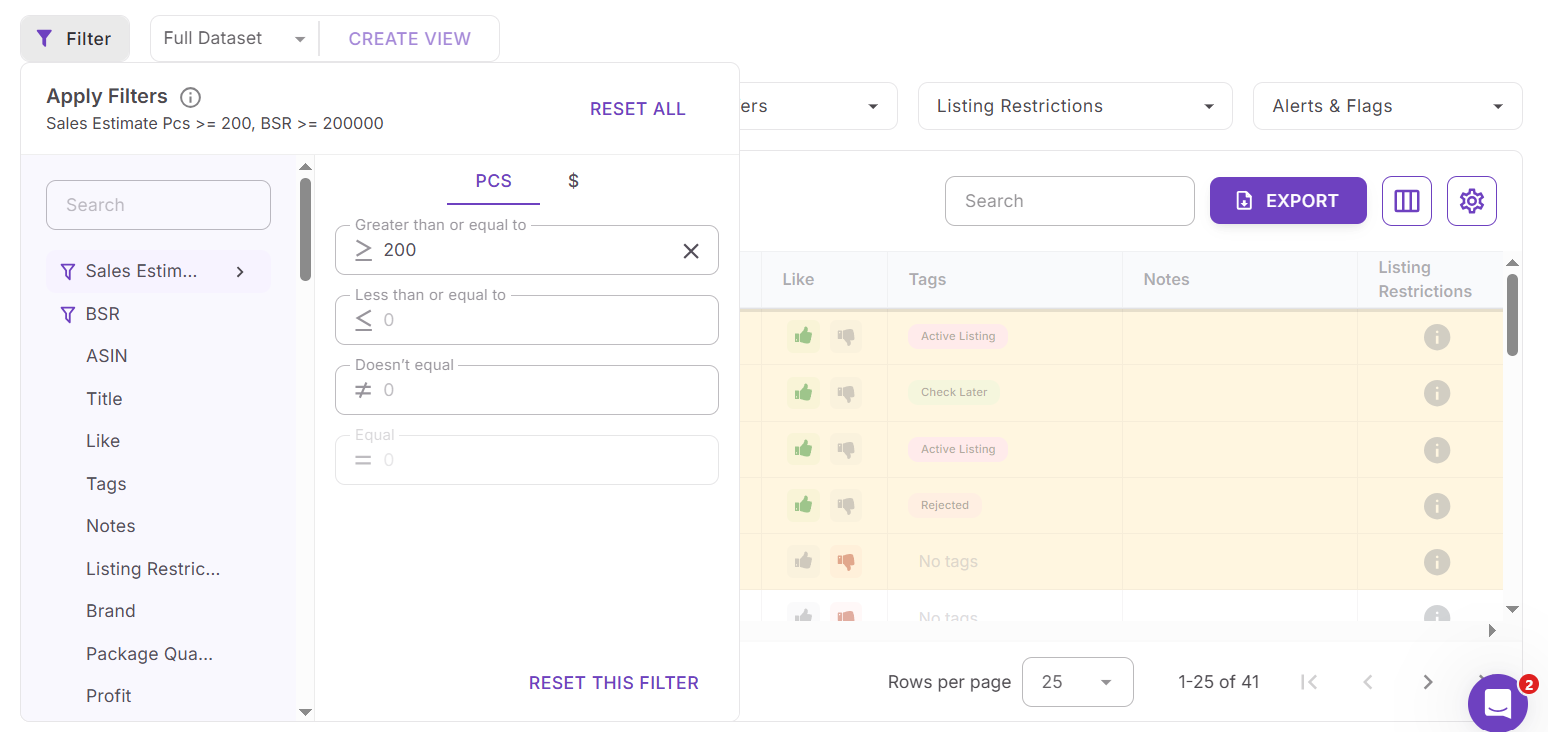
You can filter by greater than, less than, or not equal values to set clear thresholds. For example, sellers often filter for minimum ROI or profit to eliminate low-margin deals. Blank values are excluded automatically, and the system prevents invalid ranges, such as a minimum value higher than a maximum.
Text and ID filters
Text and ID filters are used for fields like ASIN, product title, or model.
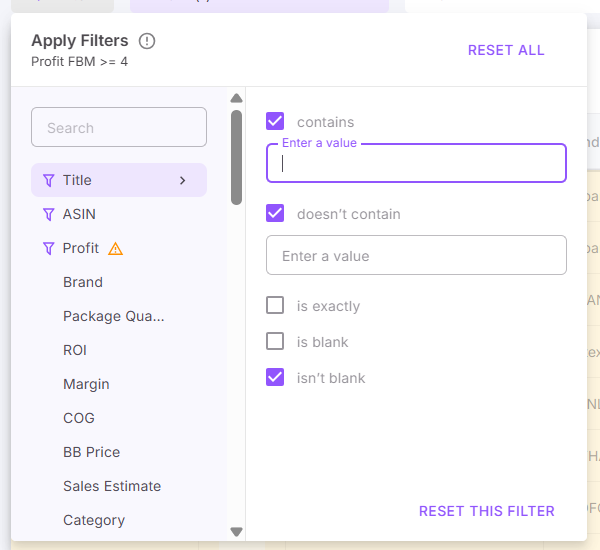
How text and ID filters work
These filters support conditions such as contains, doesn’t contain, is exactly, is blank, and isn’t blank. They are useful for targeting specific ASINs, excluding unwanted keywords, or finding products with missing identifiers that may need review.
Category and brand filters
Category and brand filters help sellers control eligibility, risk, and brand strategy.
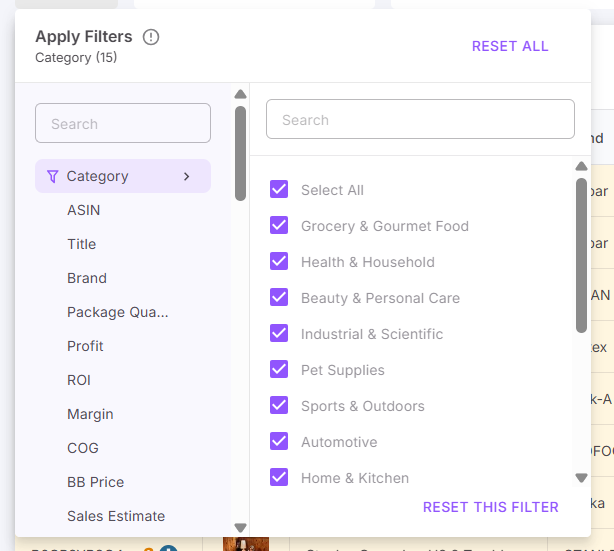
How category and brand filters work
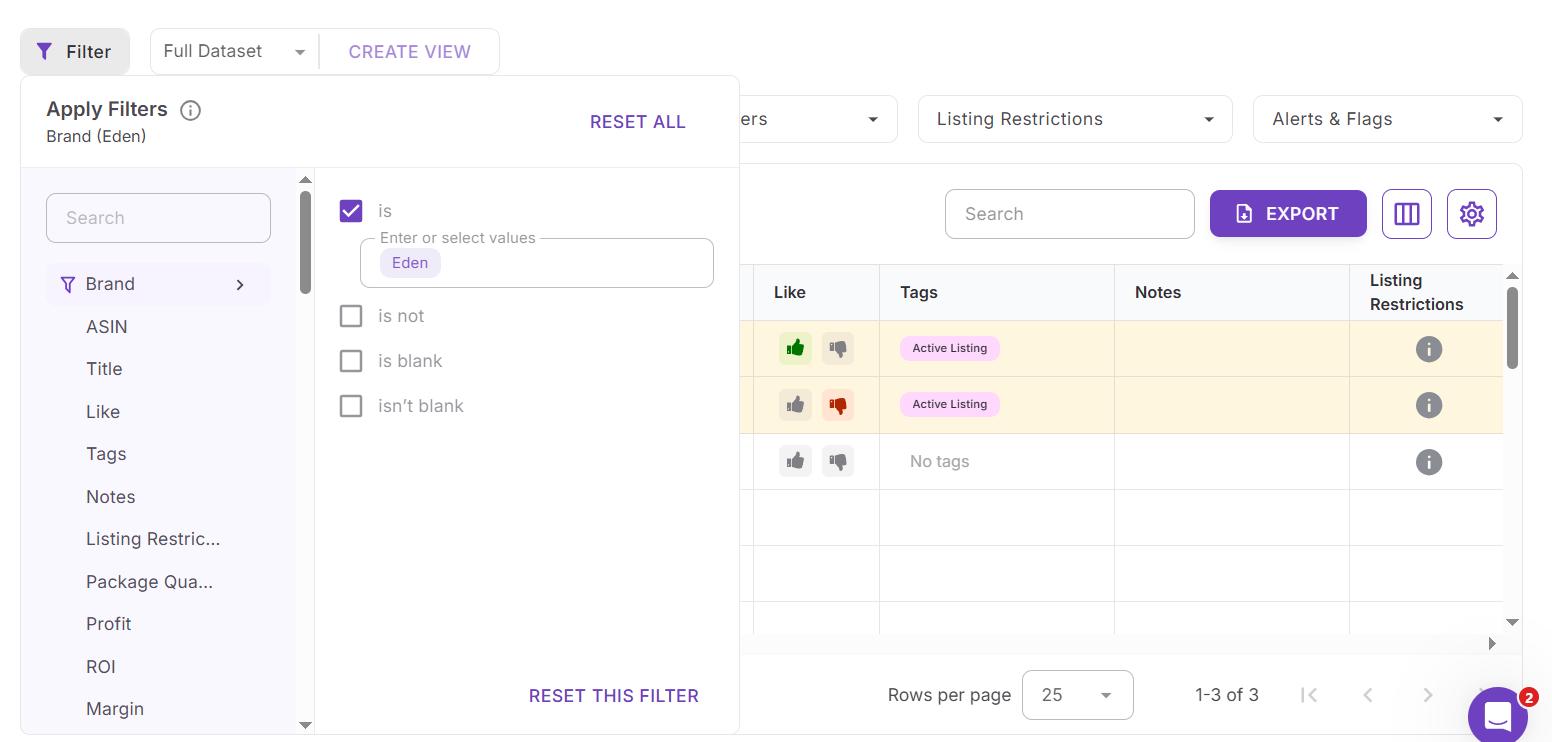
Available categories and brands are pulled directly from the current price list and selected using checkboxes. Sellers can include or exclude specific categories or brands, or surface products with missing brand data using is blank. These filters are commonly used to avoid Amazon gated categories, exclude brands that require approval, or focus on approved brand relationships.
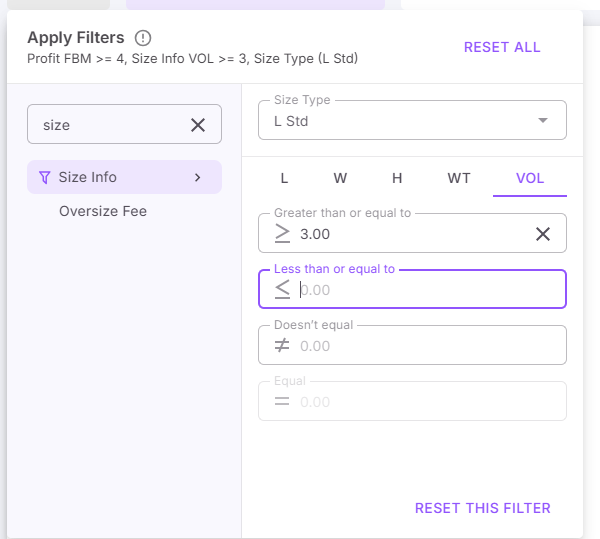
Product size filters
Product size filters help manage fulfillment costs, prep requirements, and operational risk.
How product size filters work
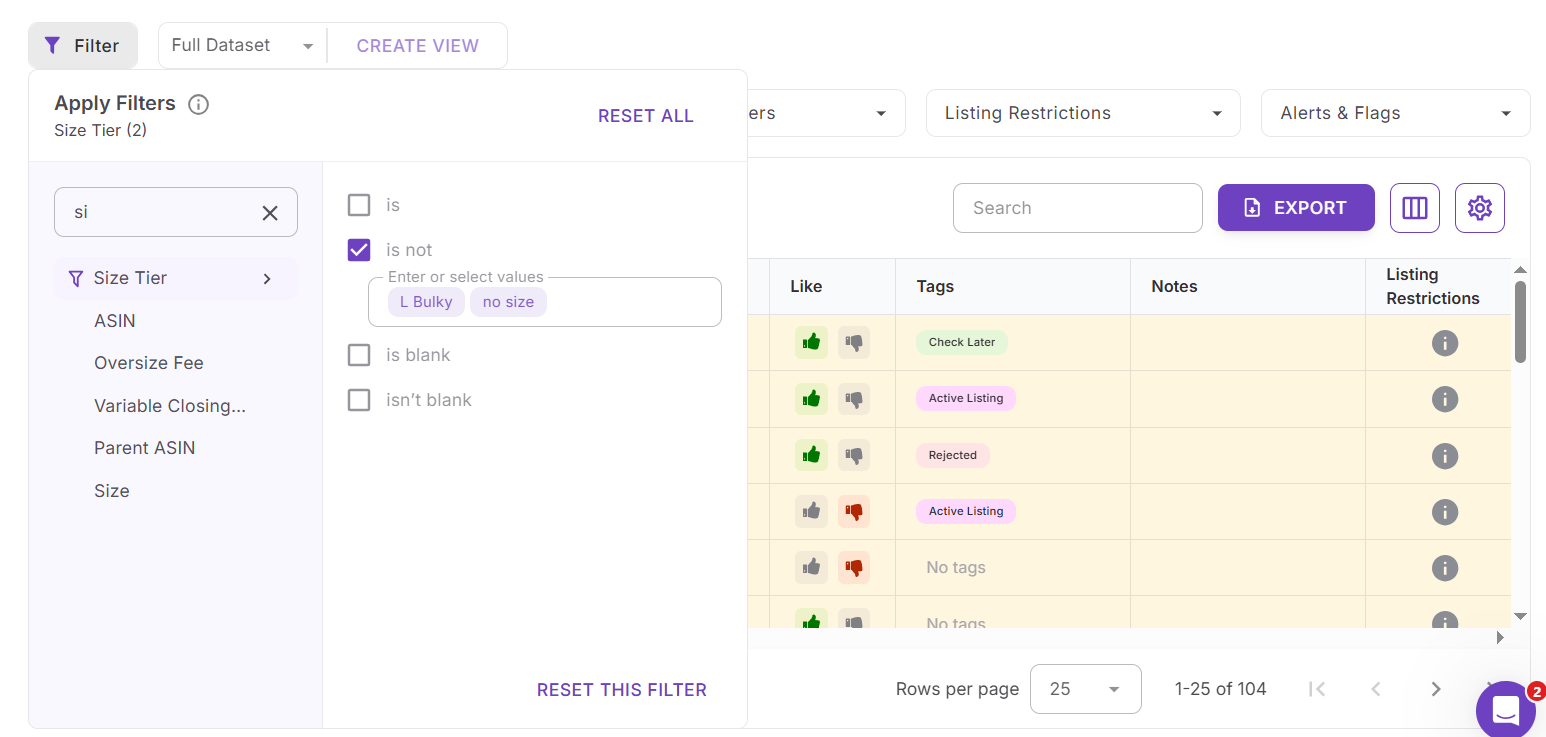
Sellers can filter by Amazon size tier, such as Small Standard or Large Oversize, or apply exact dimension filters using length, width, height, weight, and volume. Tabs help organize size-related criteria, making it easier to exclude Amazon oversized, heavy, or prep-intensive products before fees and logistics become an issue.
List-based filters
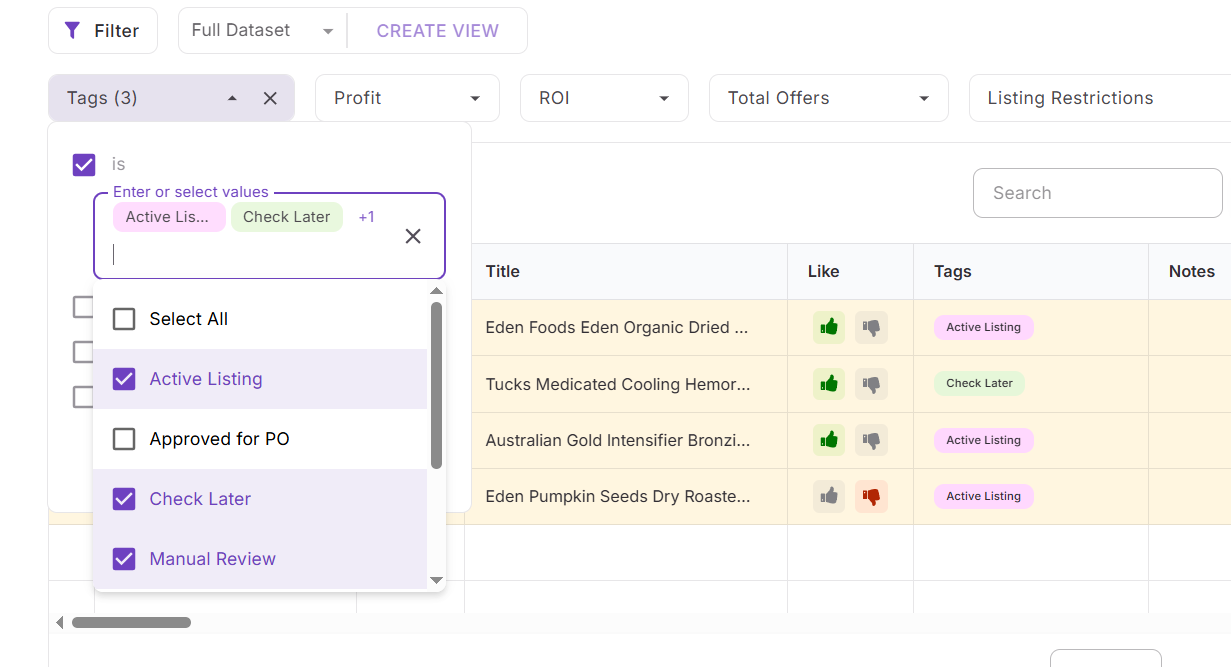
List-based filters apply to structured fields pulled directly from the price list, such as brand, category, size tier, and tags.
How list-based filters work
You can include or exclude specific values using is or isn’t conditions, or surface incomplete data using is blank. The available values always match the current price list, making filtering predictable and accurate. These filters are commonly used to exclude gated categories, remove unwanted brands, or focus on specific size tiers.
Alerts and warnings filters
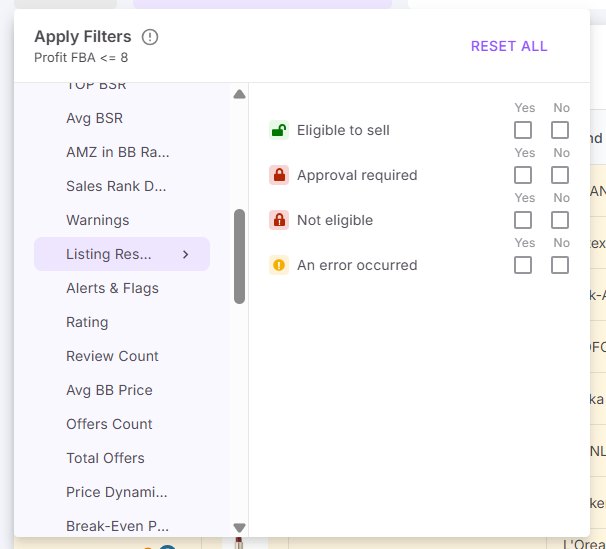
Alerts and warnings filters help sellers eliminate risk before buying.
How alerts and warnings filters work
These filters use simple yes or no logic to surface or exclude products with Amazon listing restrictions, alerts, or warnings. Sellers can instantly remove ASINs that require approval, have compliance issues, or trigger risk flags.
Timeframe and model-based filters
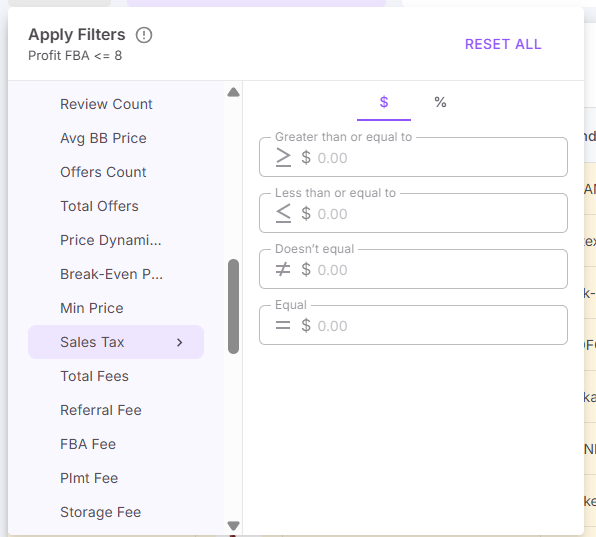
Some filters are tied to time-based data and fulfillment models.
How timeframe and model-based filters work
Sellers can filter using multiple timeframes, such as 30, 90, and 180 days, to analyze trends over time. Filters split by Amazon FBA and FBM models must be applied separately, ensuring accurate fee and profitability calculations.
Together, these filter types allow sellers to build precise, repeatable sourcing logic – turning large supplier lists into focused sets of high-quality Amazon product leads.
How You Can Use Price List Analyzer Filters
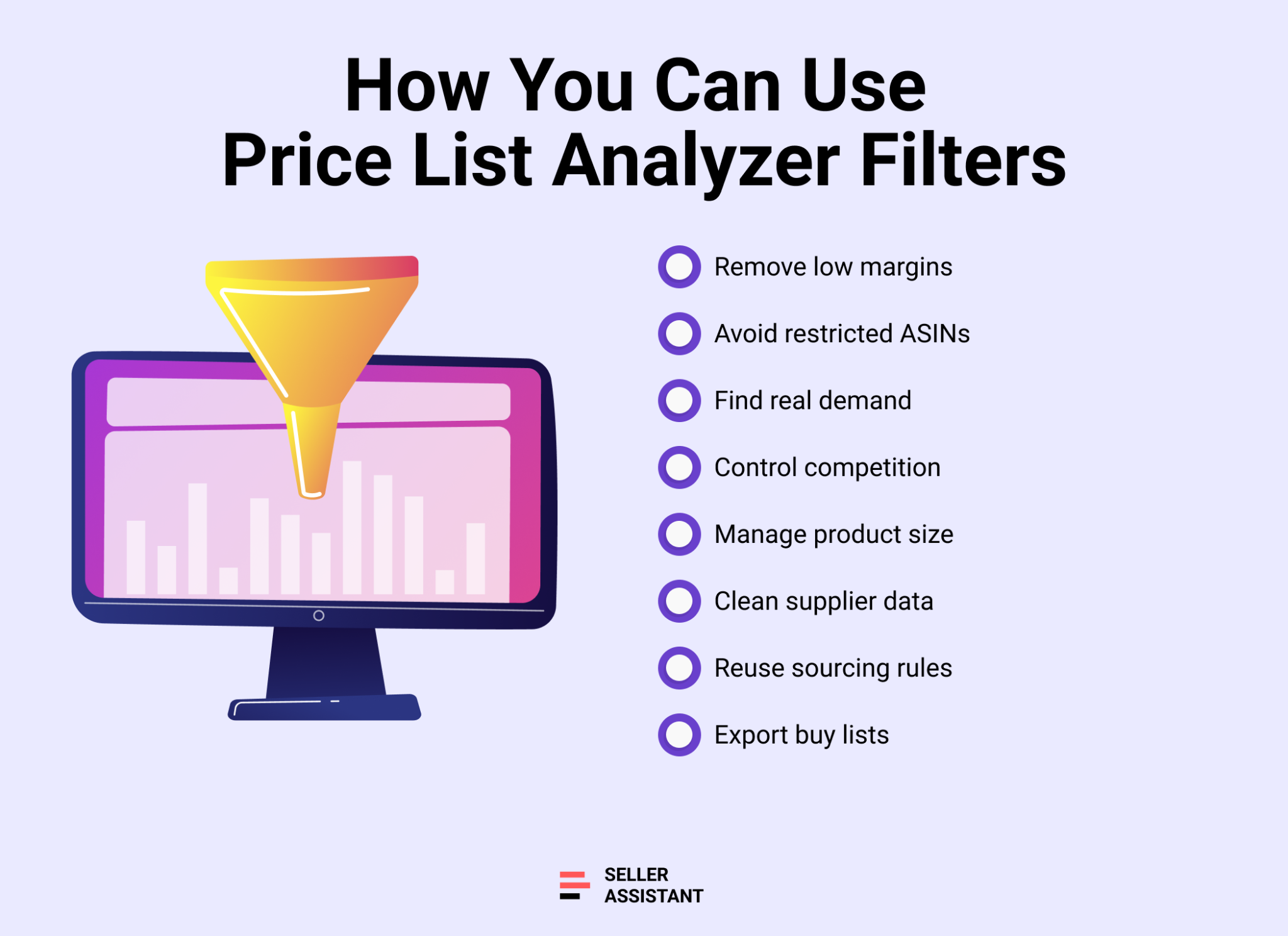
Price List Analyzer filters are designed to turn bulk supplier data into clear sourcing decisions. Instead of reacting to individual SKUs, sellers use filters to control margins, reduce risk, and build repeatable buying logic. By combining different filter types, you can move from a raw price list to a clean, purchase-ready deal list that matches your Amazon business model.
Eliminate unprofitable products at scale
Filters let you set minimum profit, ROI, and fee thresholds, instantly removing low-margin products that can’t support Amazon fees, prep costs, or price competition.
Remove restricted and risky ASINs early
By filtering for Amazon listing restrictions, alerts, and warnings, you can exclude gated, approval-required, hazmat, meltable, or otherwise risky products before capital is committed.
Focus on products with real demand
Filters based on sales velocity, Amazon BSR trends, and offer count help you concentrate on products that actually sell, not listings with stagnant demand or oversaturated competition.
Control competition and Buy Box pressure
Using offers count and Buy Box data filters, you can avoid listings with excessive competition and focus on ASINs where pricing and rotation are more favorable.
Manage size, fees, and fulfillment costs
Product size and dimension filters allow you to exclude oversized or heavy items that drive up Amazon FBA fees, storage costs, and prep complexity.
Clean and audit supplier data
Category, brand, and text-based filters help identify missing brand data, incorrect mappings, or unwanted categories, improving data quality before buying.
Build reusable sourcing rules
Filters can be saved as views and reused across multiple price lists, allowing you to apply the same sourcing logic to different suppliers without rebuilding it each time.
Create export-ready buy lists
Once filters are applied, you can export only the filtered or selected products, preserving your table setup and turning analysis results into Amazon purchase-order–ready files.
How to Use Price List Analyzer Filters Step By Step
Price List Analyzer filters are built for fast, repeatable sourcing. The goal is simple: start with a raw supplier list, apply your deal rules, remove risk, and export a buy-ready shortlist. Follow these steps to go from “too many SKUs” to a clean set of profitable Amazon leads.
Step 1. Open filters
Click Filter to open the filter modal. Use the search bar to find any filter field fast.
Step 2. Start with quick access filters
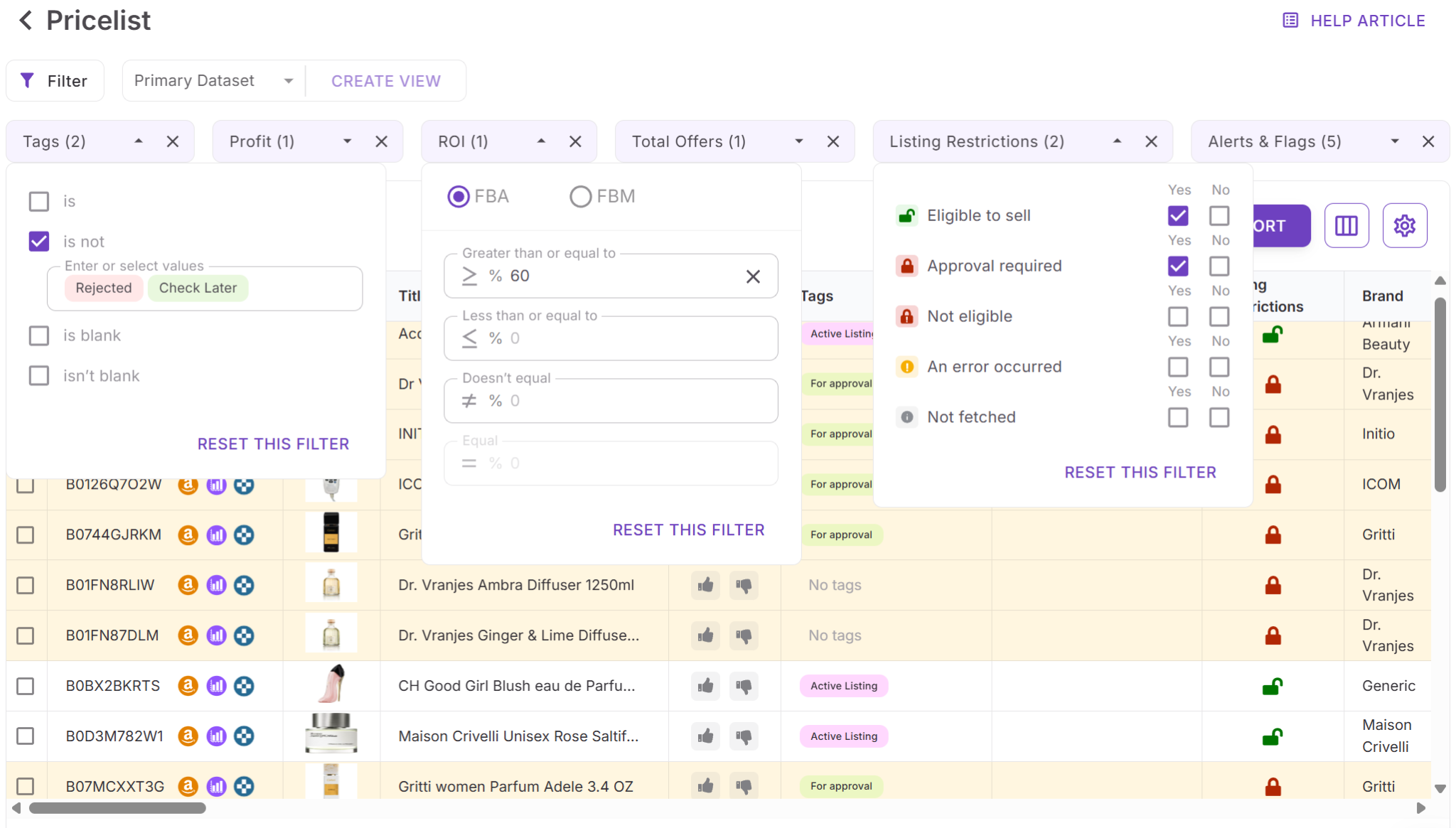
Apply your core deal gates first using Quick access filters like Profit, ROI, Offers count, Amazon Listing restrictions, Alerts & flags, and Tags. This quickly removes obvious non-starters.
Step 3. Set profitability thresholds
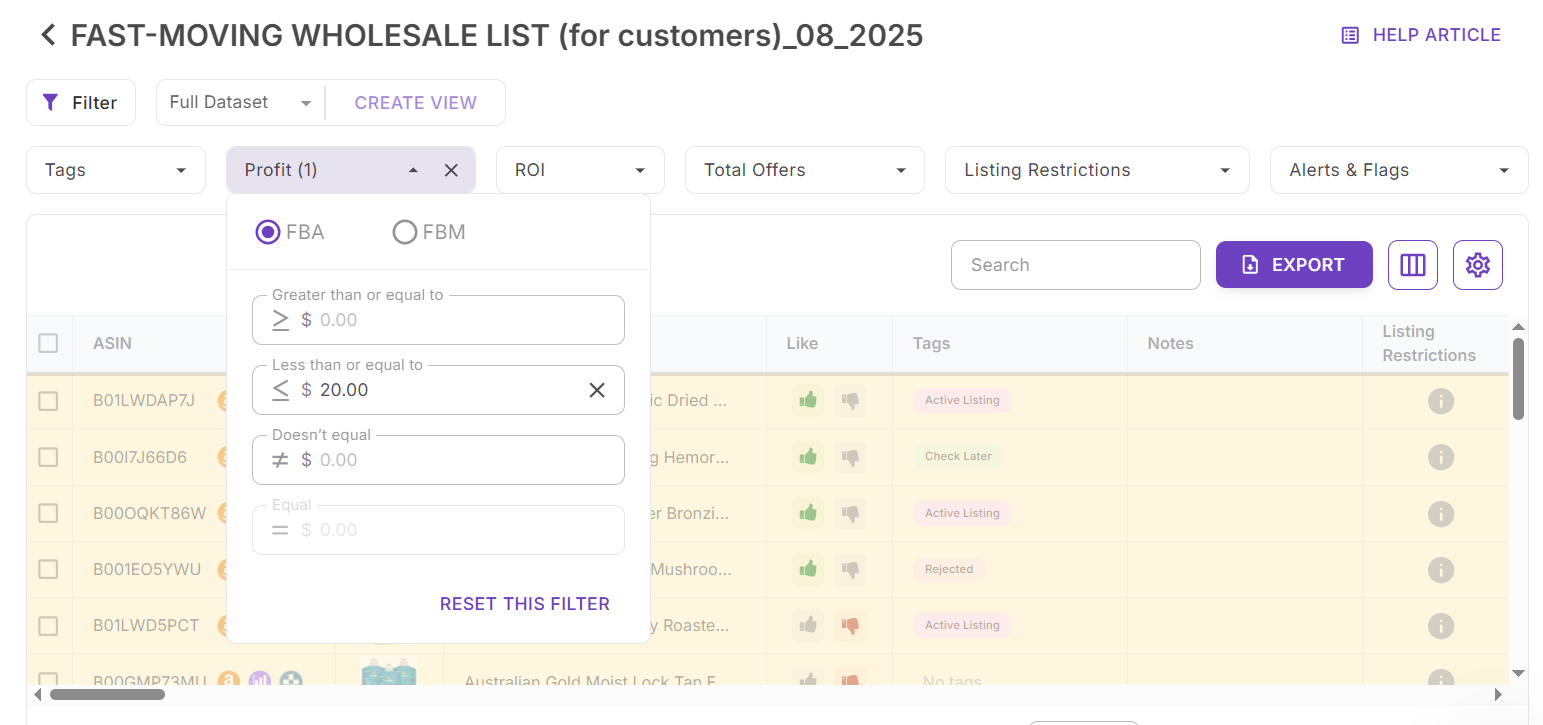
Use Numeric filters to define minimum profit and ROI, plus any other thresholds you rely on (fees, ratings, etc.). If you enter an invalid range, Price List Analyzer shows an error so you can fix it.
Step 4. Filter by eligibility and risk
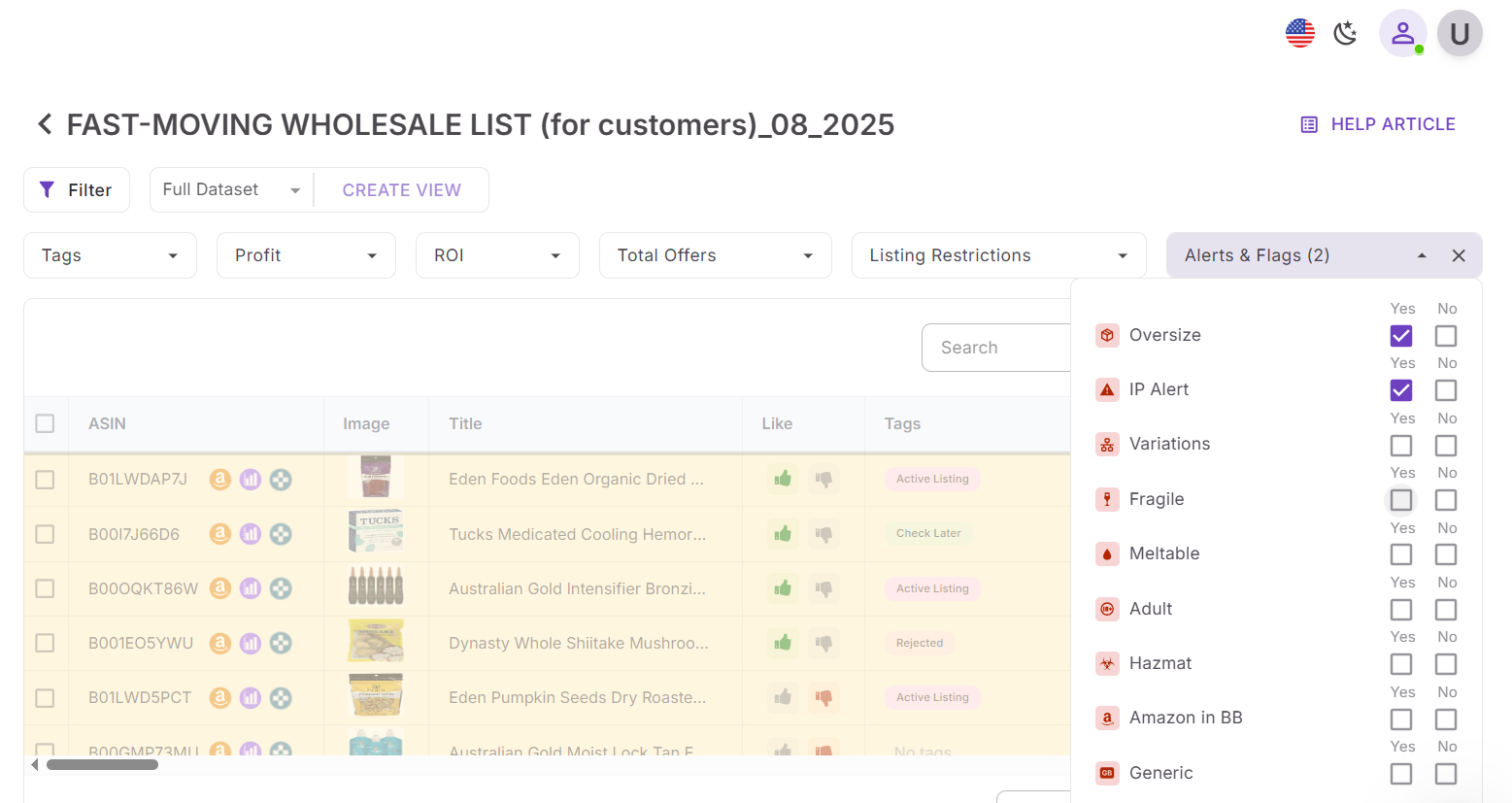
Use Alerts and warnings filters to exclude approval required, restricted, or high-risk items. This step protects you from building a buy list you can’t sell.
Step 5. Narrow by demand and competition
Filter by performance signals like Amazon BSR trends, sales velocity, and offers count to focus on products that move and avoid listings with heavy Buy Box pressure.
Step 6. Refine by brand and category
Use Category and brand filters to include approved brands, exclude problem categories, and spot missing data when needed.
Step 7. Control size and fulfillment cost
Use Product size filters (size tier and dimensions) to remove oversized, heavy, or prep-intensive products that can crush margins with Amazon FBA fees and storage.
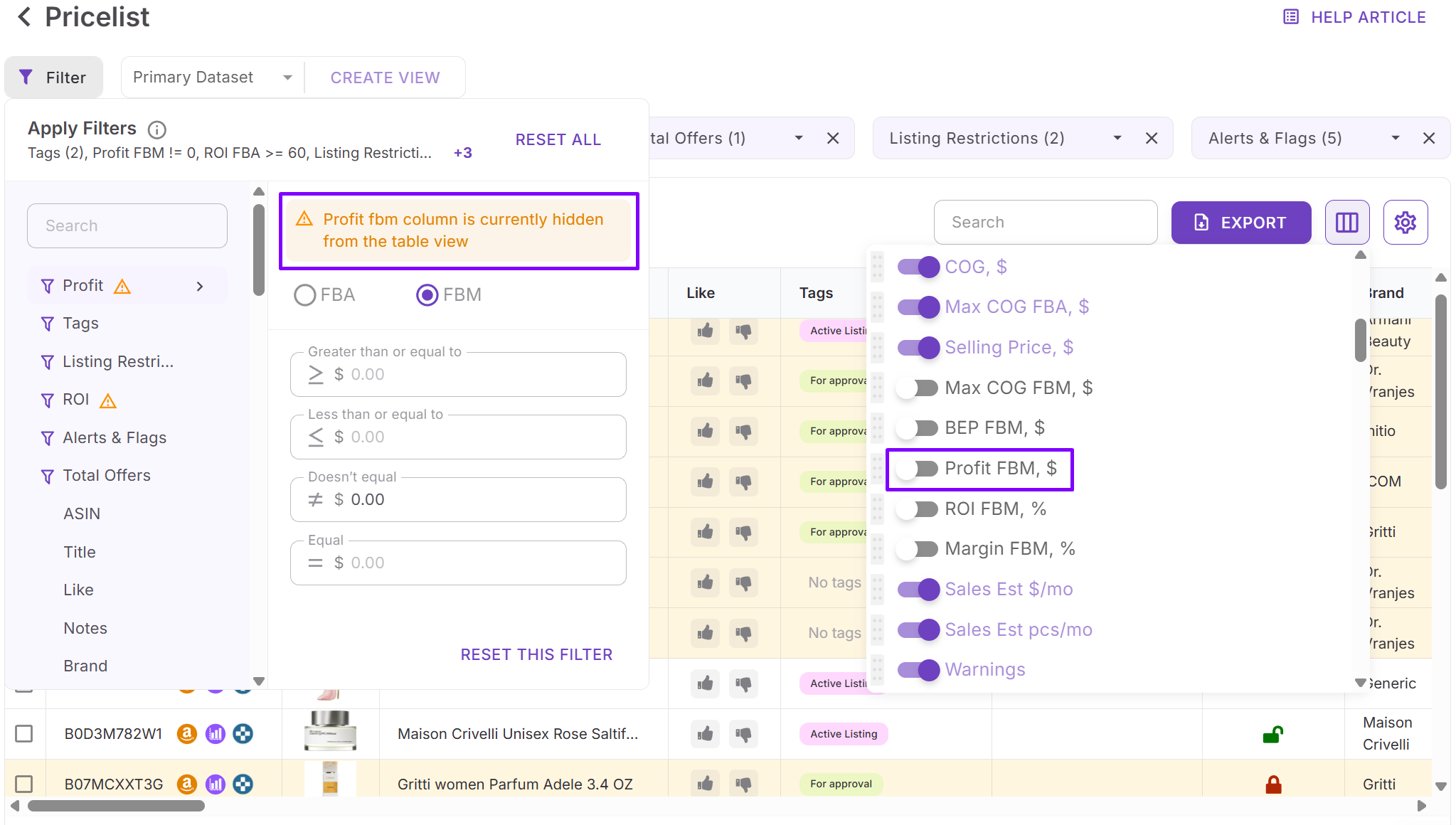
Step 8. Check hidden columns and zero results
If a filtered column is hidden, Price List Analyzer shows a warning so you know the filter is active. If you get no results, use Reset filters to troubleshoot quickly.
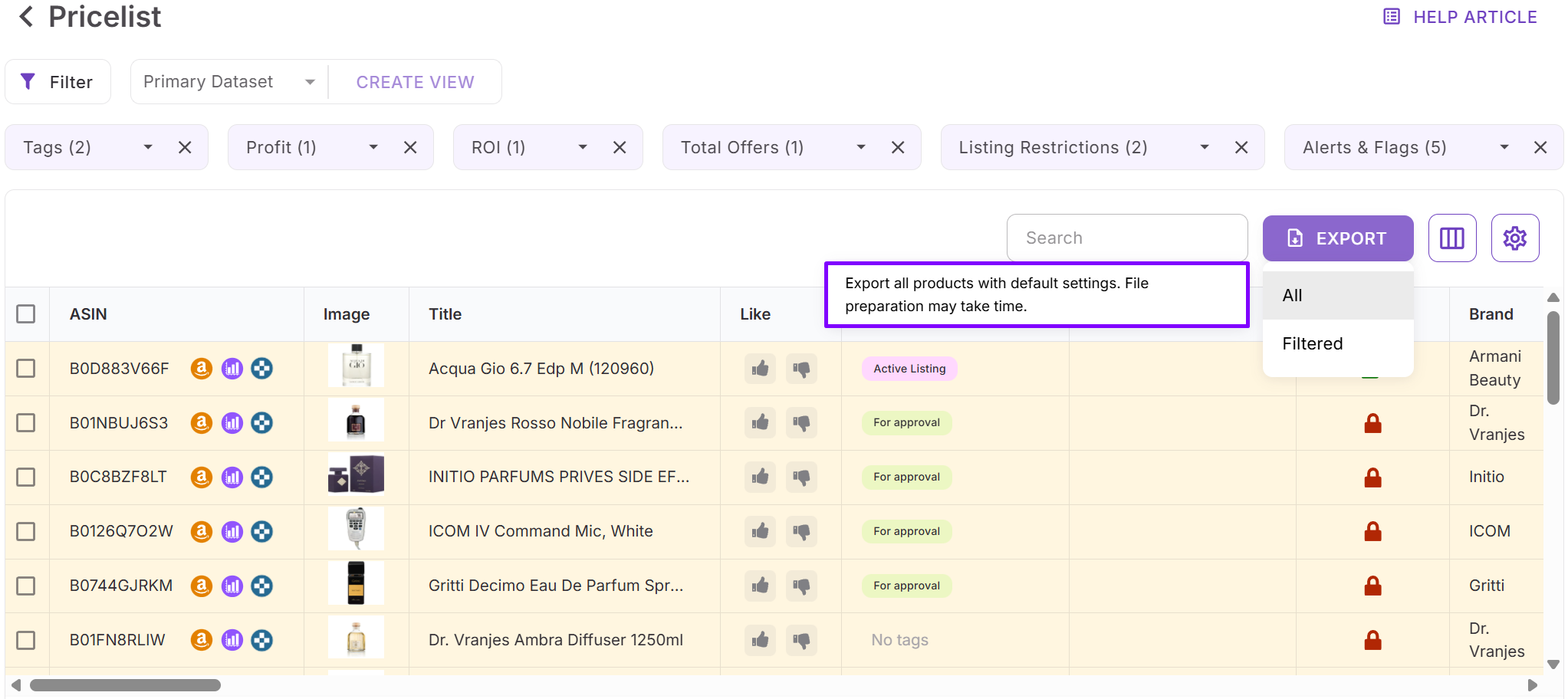
Step 9. Export filtered results
Export based on your workflow:
- Filtered to download only the filtered results (keeps your column setup)
- Selected to export only the products you checked for purchase
- All if you need the full file for reference.
FAQ
What is deal filtering in Amazon product sourcing?
Deal filtering is the process of narrowing large supplier lists down to products that meet your profit, demand, and risk criteria. It helps sellers focus only on ASINs that are worth buying instead of reviewing every SKU manually.
Who should use Price List Analyzer filters?
PLA filters are built for wholesale sellers, online arbitrage sellers, and dropshippers who analyze large price lists. They are especially useful for sellers working with multiple suppliers or high-SKU catalogs.
Can I reuse the same filters across different supplier price lists?
Yes, you can save filters as views and apply them to other price lists. If some values don’t exist in a new list, the view stays valid and applies automatically when matching data appears.
Do filters affect how my exported price list looks?
When you export a filtered list, PLA keeps your selected columns and column order. This makes exports ready for purchase orders, sharing with VAs, or supplier negotiations.
Can filters help reduce Amazon selling risks?
Yes, filters let you exclude restricted ASINs, gated brands, risky product types, and listings with alerts before you buy. This reduces the chance of inventory you can’t list or profitably sell.
Final Thoughts
Amazon product sourcing doesn’t fail because of a lack of opportunities – it fails because too much data hides the right deals. Deal filtering is what turns supplier price lists into clear buying decisions, helping sellers protect margins, reduce risk, and move faster. Seller Assistant's Price List Analyzer brings structure to this process by combining bulk product analysis with powerful, flexible filters that mirror how real Amazon sellers think and source.
When you apply the right filters, you stop guessing, build repeatable sourcing rules, and consistently export buy-ready product leads that support profitable, scalable Amazon growth.
Seller Assistant automates and connects every stage of your Amazon wholesale and arbitrage workflow. It brings together in one platform: workflow management tools – Purchase Orders Module, Supplier Database, Warehouse Database, bulk research & sourcing tools – Price List Analyzer, Bulk Restriction Checker, Sourcing AI, Brand Analyzer, Seller Spy, Chrome extensions – Seller Assistant Browser Extension, IP-Alert Extension, and built-in VPN by Seller Assistant, and integrations & team access features – seamless API connectivity, integrations with Zapier, Airtable, and Make, and Virtual Assistant Accounts.