



When you analyze Amazon deals in bulk, the biggest risk isn’t bad math – it’s bad timing. A product can look profitable today because the Buy Box spiked, only to crash back to its normal price after you place an order.
Checking price history ASIN by ASIN doesn’t scale when you’re working with thousands of SKUs. What you need is a fast way to see how current prices compare to historical norms, across your entire supplier list.
In this post, we’ll show how Amazon sellers can estimate product price dynamics in bulk with Seller Assistant’s Price List Analyzer, spot unstable pricing early, and base sourcing decisions on realistic Buy Box behavior instead of short-term spikes.
Note. Seller Assistant is an end-to-end Amazon workflow management platform that integrates 10+ wholesale-focused solutions into one connected system. It combines sourcing workflow automation, bulk research and intelligence tools, and integrated Chrome extensions – giving you everything you need to streamline finding deals, managing suppliers, and creating purchase orders.

The platform aggregates: workflow management tools – Purchase Orders Module, Suppliers Database, Warehouses Database to organize, automate, and scale every step of your wholesale and arbitrage operations; bulk research & sourcing tools – Price List Analyzer, Bulk Restriction Checker, Sourcing AI, Brand Analyzer, Seller Spy to evaluate supplier price lists, verify selling eligibility and restrictions, open new brands, and discover winning product ideas from competitors to expand your product catalog; Chrome extensions – Seller Assistant Browser Extension, IP-Alert Extension, and built-in VPN by Seller Assistant to deep-research products, check IP claims and compliance, and access geoblocked supplier sites directly within your browser; and integrations & team access features – seamless API connectivity and integrations with Zapier, Airtable, and Make, plus Virtual Assistant Accounts for secure, scalable team collaboration.
With Seller Assistant, every step of your Amazon wholesale and arbitrage workflow is automated and connected.
What Is Amazon Product Price Dynamics?
Amazon product price dynamics describe how a product’s Buy Box price changes over time. Instead of looking at a single snapshot price, price dynamics show whether pricing is stable, volatile, trending up, or trending down based on historical Buy Box behavior (typically over 30, 90, or 180 days).
Price dynamics matter because many deals look profitable only due to short-term price spikes. By analyzing pricing behavior over time, sellers can avoid false positives, estimate realistic margins, and choose products with predictable pricing. If a product does not have a Buy Box, price dynamics cannot be calculated, since there is no reliable market price to analyze.
Below are the key factors that influence price dynamics and how sellers use them in deal research.
Parameters that influence price dynamics
Historical Buy Box averages (30/90/180 days)
These averages show how the price behaves over time. Sellers use them to base profit calculations on typical pricing, not temporary spikes.
Buy Box availability
Price dynamics are calculated only when a Buy Box exists. If there is no Buy Box, there is no stable reference price, which increases deal risk.
Seller competition and Buy Box rotation
Frequent Buy Box rotation and many sellers usually increase price swings. Fewer sellers often result in more stable pricing.
Amazon in the Buy Box
When Amazon frequently holds the Buy Box, prices tend to drop. Sellers use this signal to avoid listings where Amazon suppresses margins.
By combining price dynamics with profit, ROI, and sales metrics, Amazon sellers can prioritize deals with stable pricing and sustainable margins, rather than relying on risky, short-term price signals.
Why Price Dynamics Matters for Amazon Sellers
Price dynamics help Amazon sellers understand whether a product’s profitability is stable or misleading. A deal that looks good at today’s Buy Box price can turn unprofitable if pricing fluctuates heavily or drops after you place an order. By factoring in price dynamics, sellers make decisions based on realistic market behavior, not short-term spikes.
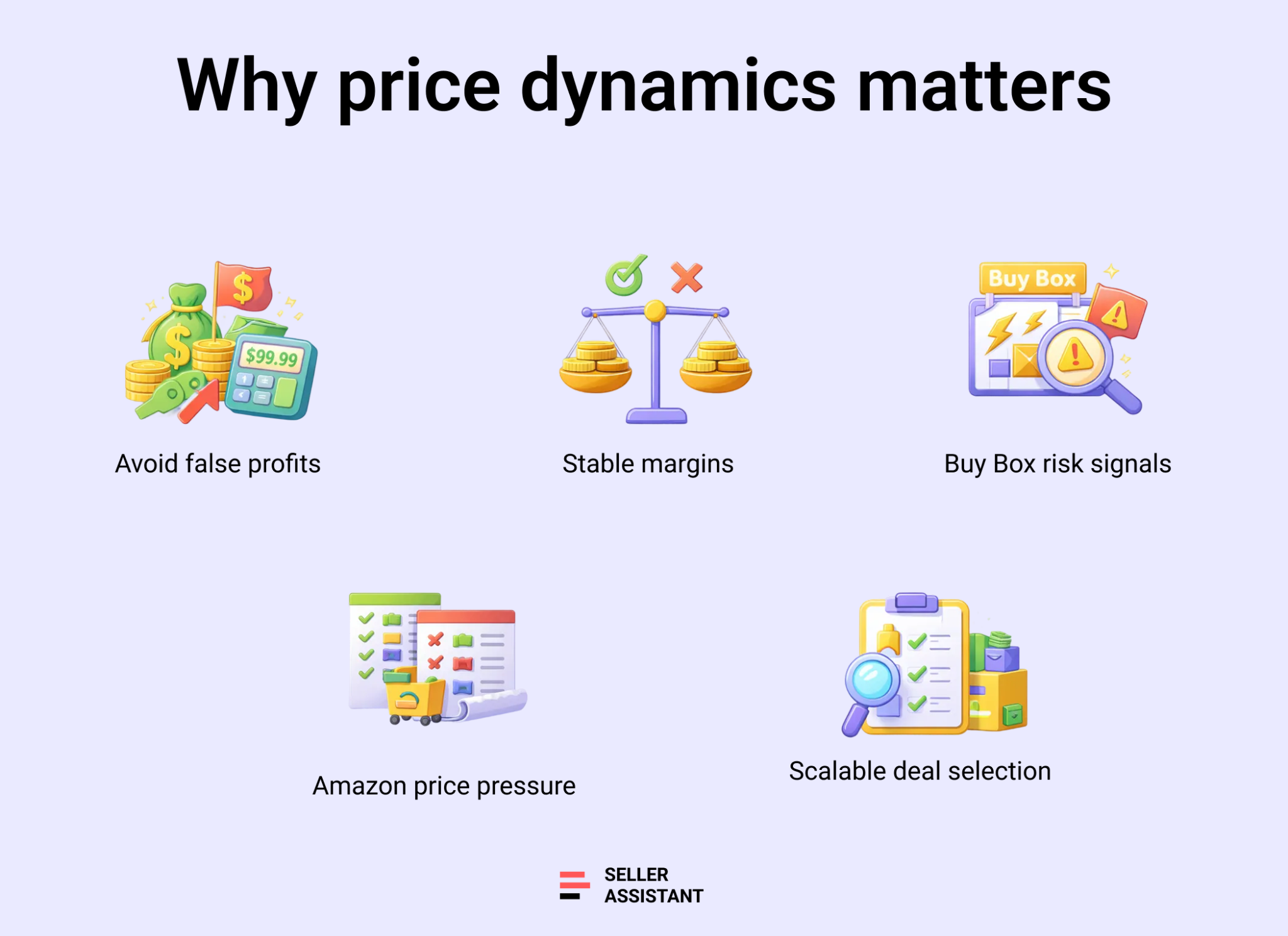
Avoid false-positive deals
Price dynamics reveal whether high profits come from temporary price jumps. Sellers use this to avoid buying inventory that will lose margin once prices normalize.
Estimate realistic profitability
Average Buy Box prices over time provide a more accurate basis for profit and ROI calculations. This helps sellers plan margins that hold after launch.
Reduce Buy Box risk
Unstable pricing often signals intense competition or aggressive repricing. Sellers use price dynamics to avoid listings where Buy Box control is hard to maintain.
Spot Amazon price pressure
When Amazon frequently wins the Buy Box, prices tend to fall. Price dynamics help sellers identify listings where Amazon is likely to compress margins.
Support long-term scaling
Consistent pricing is easier to scale across suppliers and teams. Price dynamics help sellers focus on repeatable, sustainable deals rather than one-off wins.
How Price Dynamics Works in Price List Analyzer
Seller Assistant’s Price List Analyzer calculates Amazon price dynamics automatically and in bulk, across entire supplier price lists. Instead of checking pricing history ASIN by ASIN, the tool pulls all data points that influence price behavior and turns them into a clear, comparable signal for every product in your file.
At its core, price dynamics show how the current Buy Box price compares to historical Buy Box averages, revealing whether today’s price is inflated, compressed, or stable relative to normal market conditions.
For each matched ASIN, Price List Analyzer displays
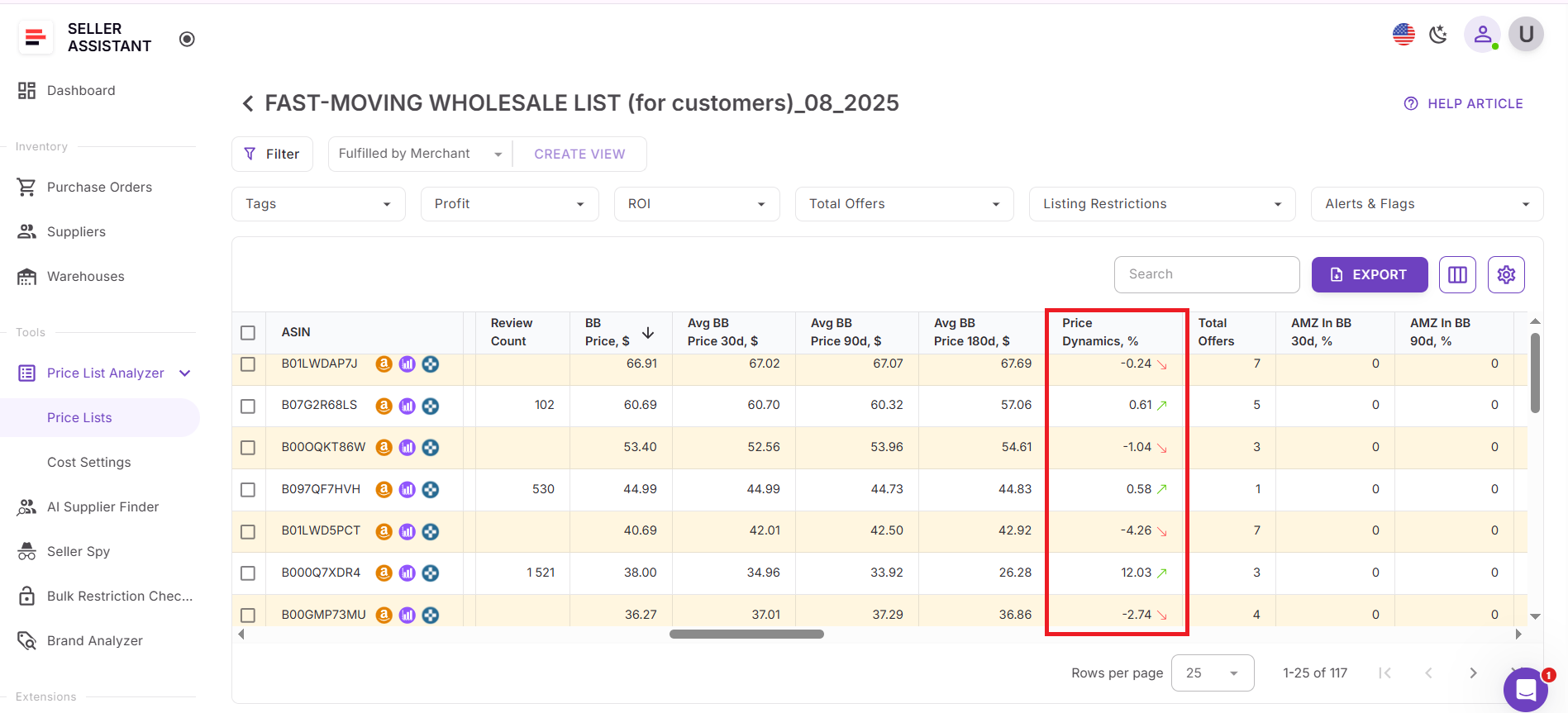
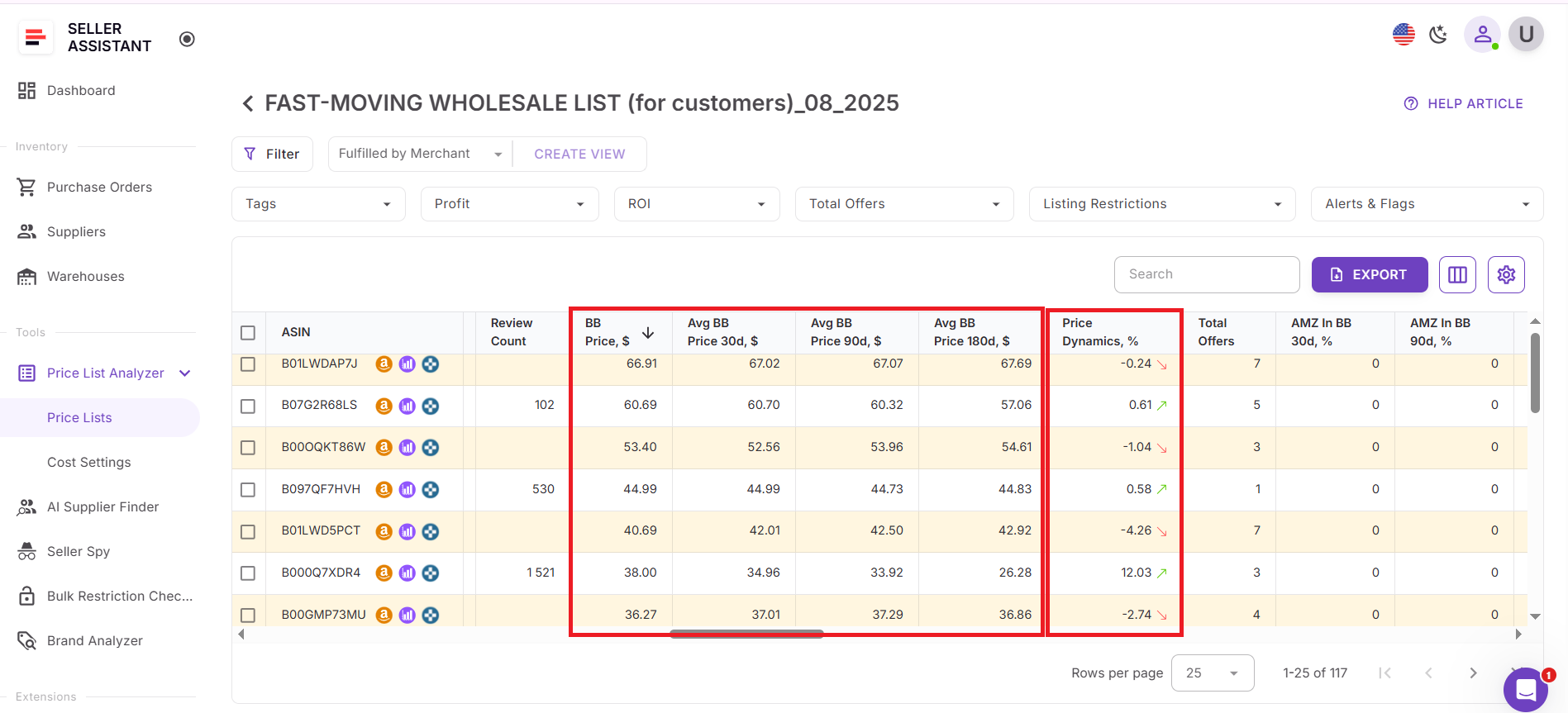
Price Dynamics (%)
The percentage difference between the current Buy Box price and the 90-day average, with visual up/down indicators
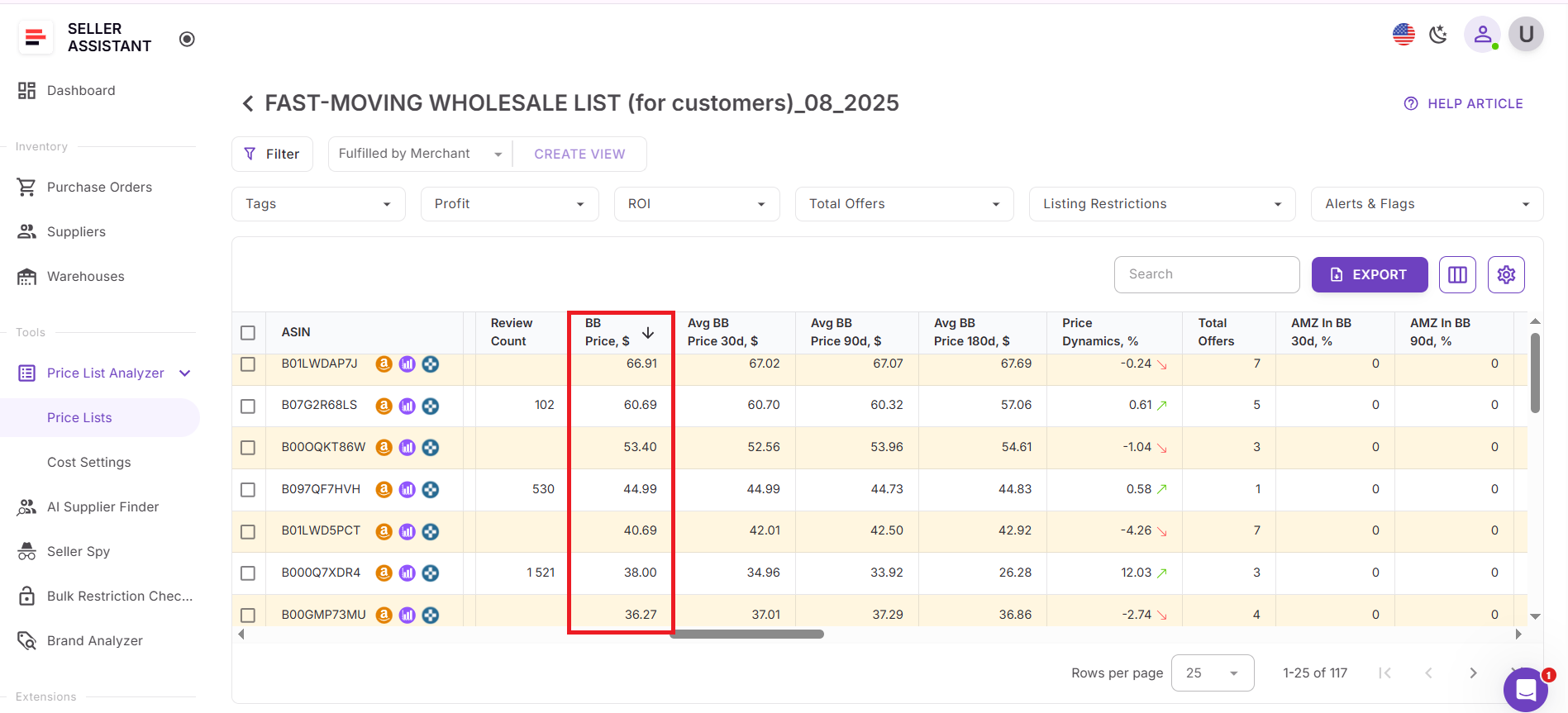
Buy Box Price ($)
The current market price used as a reference point
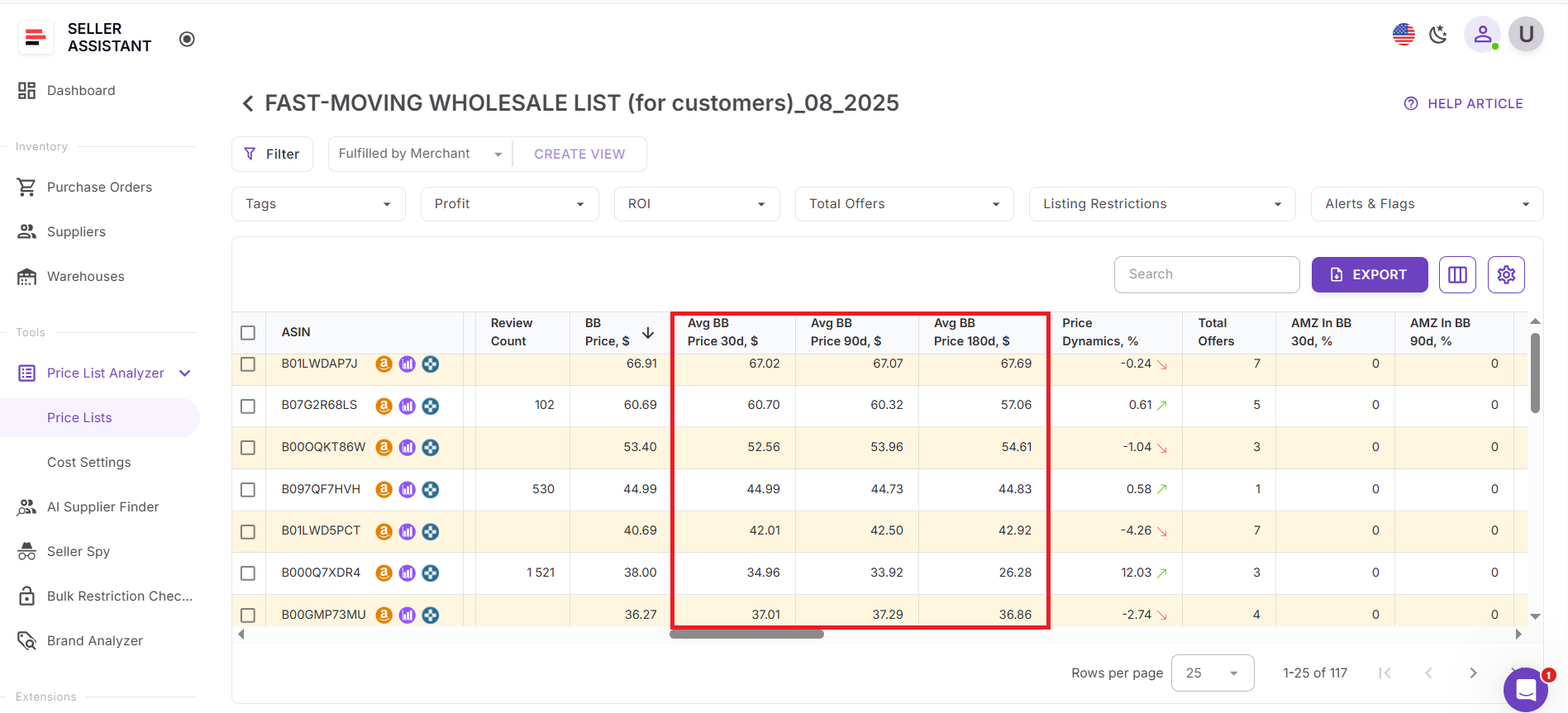
Average Buy Box Price (30 / 90 / 180 days)
Historical benchmarks that show typical pricing behavior over time
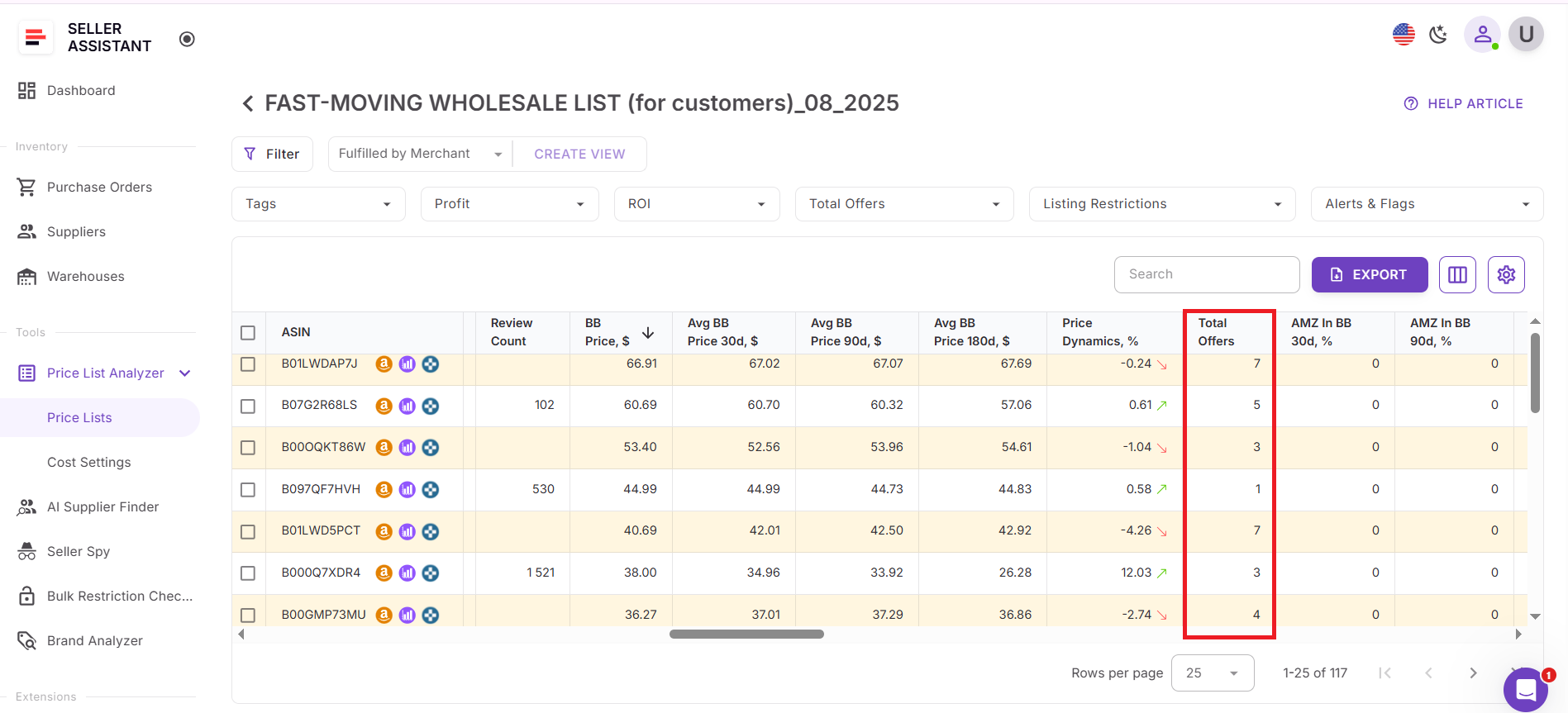
Total Offers
Seller count influencing pricing pressure
Average Amazon Buy Box Share (30 / 90 / 180 days)
How often Amazon holds the Buy Box, signaling potential margin suppression.
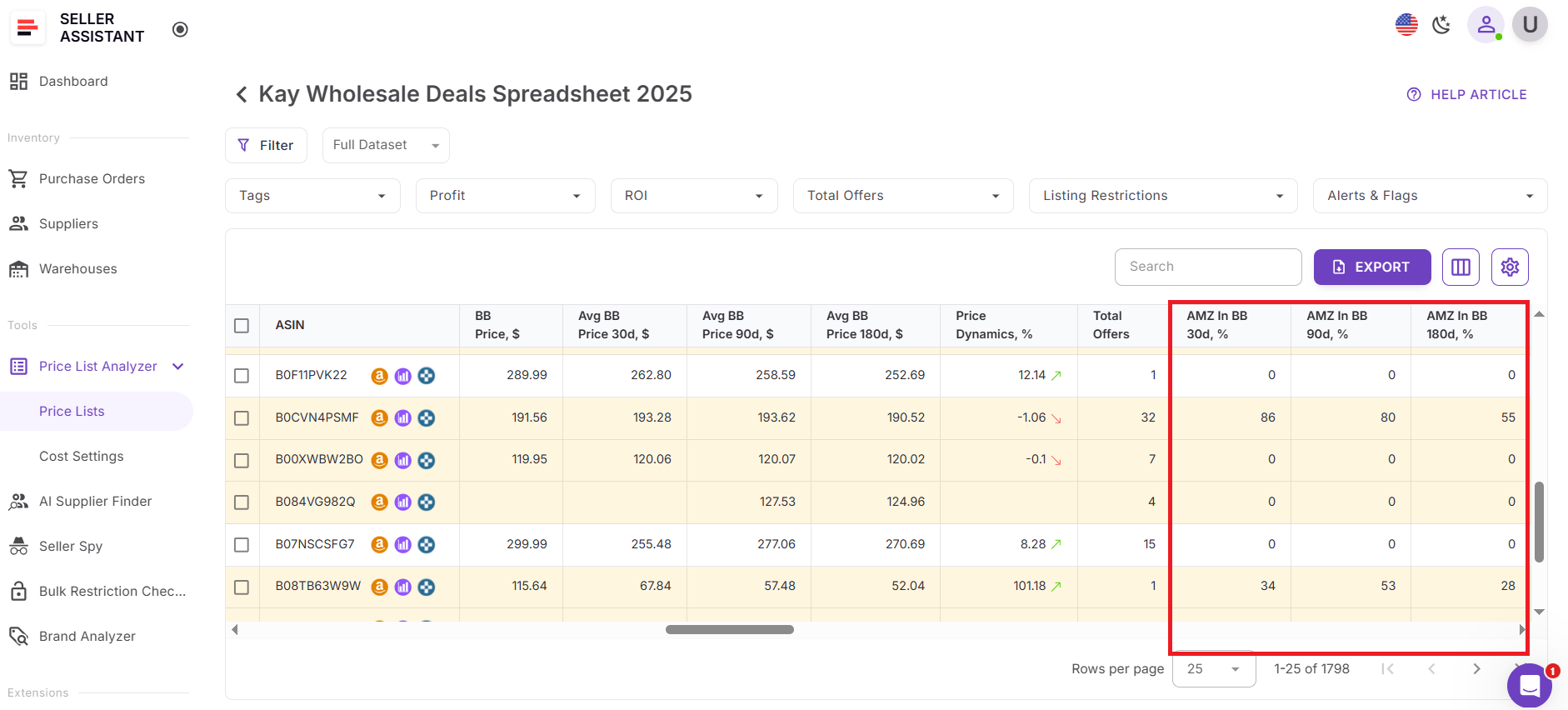
All metrics are calculated automatically for thousands of products at once, allowing sellers to filter out unstable pricing, spot Buy Box spikes, and focus on deals with predictable, repeatable margins before committing to inventory.
How to Calculate Price Dynamics in Bulk with Price List Analyzer
Estimating price dynamics manually might work for a couple of ASINs, but it quickly falls apart when you’re reviewing real supplier price lists. Hundreds or thousands of products, constant Buy Box changes, and shifting competition make manual checks slow and unreliable.
Price List Analyzer solves this by calculating price dynamics automatically for every product in your file. It compares the current Buy Box price to historical Buy Box averages and surfaces pricing stability signals across your entire list – so wholesale, online arbitrage, and dropshipping sellers can evaluate deals at scale.
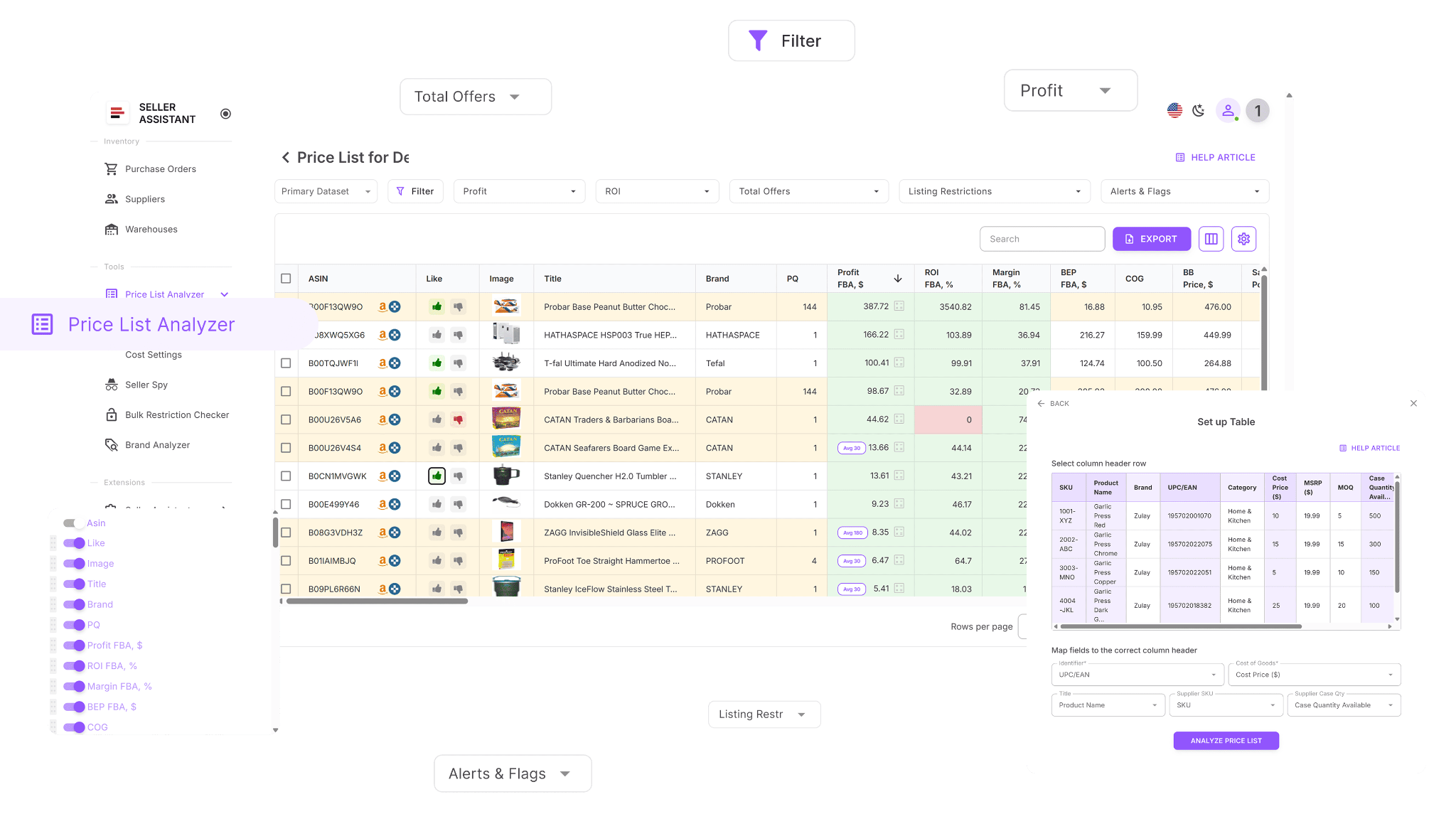
Bulk price dynamics calculation across your entire supplier list
Built for bulk price dynamics analysis
Price List Analyzer processes large supplier spreadsheets in one run. It matches each supplier item to the correct Amazon ASIN and calculates all parameters that influence price behavior, including current Buy Box price, historical Buy Box averages, seller competition, and Amazon’s Buy Box share. The result is a clear price dynamics signal for every SKU, not just a handful.
Enriches supplier data to assess pricing stability
Once uploaded, your file is enhanced with 100+ data points that impact price dynamics, such as Buy Box history (30/90/180 days), total offers, and Amazon’s presence in the Buy Box. These inputs let you see whether today’s price reflects normal market behavior or a temporary spike.
Handles thousands of SKUs in minutes
Instead of checking price history one listing at a time, Price List Analyzer evaluates entire supplier lists at once. It helps you quickly spot price-stable products, flag volatile listings, and focus on deals with predictable pricing before committing to inventory.
What Price List Analyzer calculates for price dynamics and deal stability
Price List Analyzer is built to help Amazon sellers evaluate price dynamics and deal quality at scale, not SKU by SKU. It processes large supplier catalogs and surfaces all data points needed to understand how stable a product’s pricing really is before you buy.
This Software Makes Amazon FBA Wholesale Selling 10x Easier
With Price List Analyzer, you can:
- Scan large supplier price lists to find products with sustainable margins, not short-term price spikes
- Automatically match supplier SKUs to the correct Amazon ASINs without manual lookups
- See whether products are restricted or not sellable on your Amazon account
- Assess demand using BSR, sales trends, and estimated monthly unit sales
- Calculate profit, ROI, margin, and break-even price, alongside price dynamics signals
- Analyze Buy Box pricing behavior using 30-, 90-, and 180-day average Buy Box prices
- Track Amazon’s Buy Box share to identify listings where Amazon may suppress pricing
- Review a full Amazon fee breakdown, including referral, FBA/FBM, storage, prep, and shipping costs
- Flag risky products such as hazmat, meltable, oversized, fragile, or bundle listings
- Receive alerts for issues like approval required, missing Buy Box, or weak FBA profitability
- Filter products by pricing stability, profitability, demand, competition, and risk factors
- Save custom table views and filter presets for consistent analysis across uploads
- Adjust COGs, shipping, prep costs, or pack size and see pricing and profit recalculated instantly
- Add shared team notes that stay linked to ASINs across future price list uploads
- Tag products by sourcing status and reuse decisions across multiple supplier lists
This combination of bulk price dynamics data and deal metrics allows sellers to focus on products with predictable pricing behavior – making sourcing decisions faster, safer, and easier to scale.
Steps to calculate price dynamics in bulk with Price List Analyzer
Step 1. Upload your supplier price list
Open Price List Analyzer in your Seller Assistant account and upload your Excel or CSV file containing UPCs or EANs and supplier costs. The tool automatically matches each product to the correct Amazon ASIN and starts calculating price dynamics and all related pricing signals across the entire list.
Step 2. Review Buy Box history and price dynamics columns
Once processing is complete, locate the pricing columns in the UI table. For each ASIN, Price List Analyzer shows the current Buy Box price, average Buy Box prices over 30, 90, and 180 days, and the price dynamics percentage, which indicates whether today’s price is above or below the historical norm.
Step 3. Identify SKUs with unstable pricing
Scan for products where the current Buy Box price is significantly higher or lower than the 90-day average. Large deviations often signal temporary price spikes, heavy competition, or Amazon price pressure. These SKUs can be treated as higher risk and filtered out early.
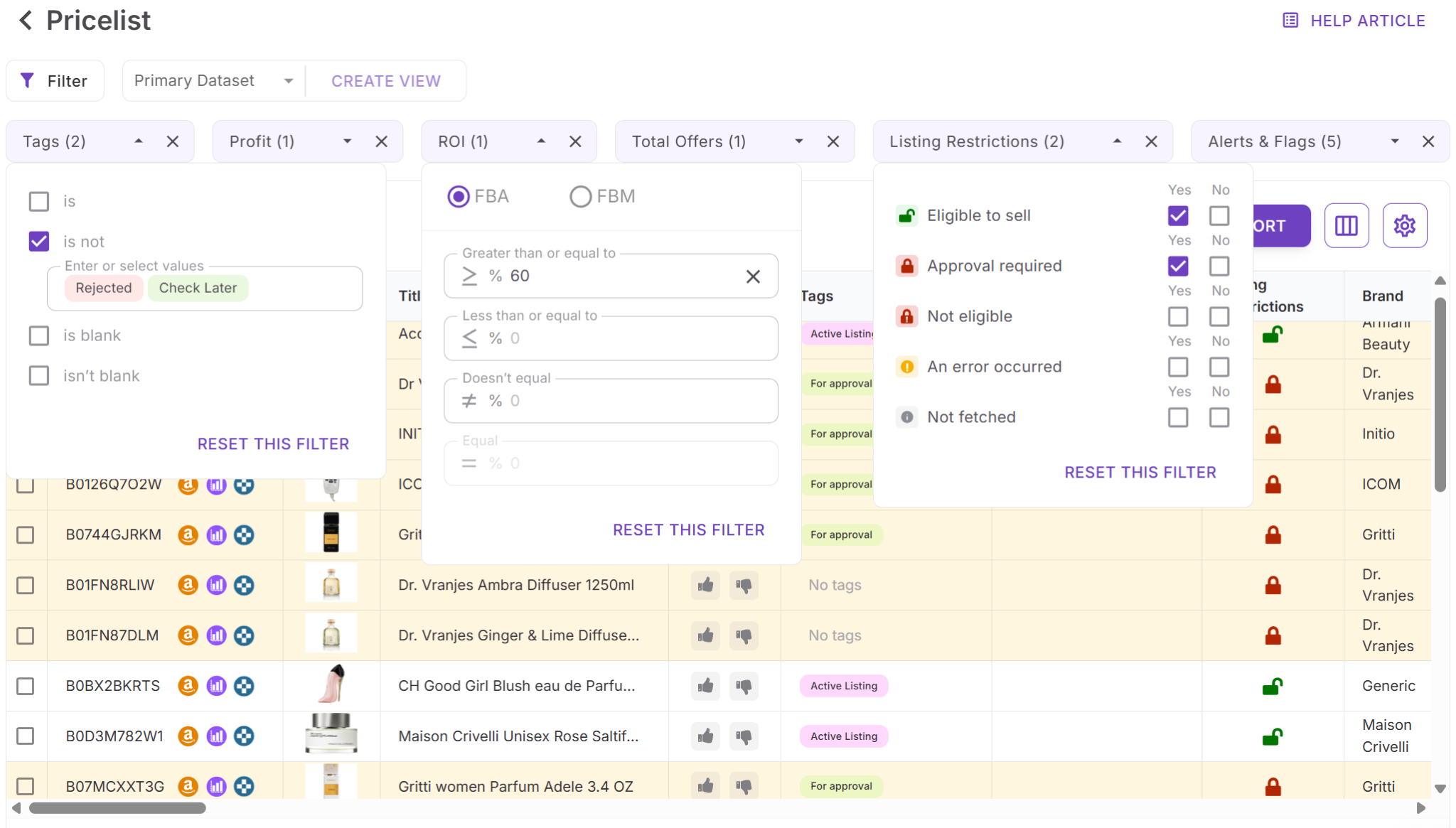
Step 4. Filter by price stability and deal quality
Use filters to keep only products with acceptable price dynamics. Combine price dynamics filters with profit, ROI, sales volume, and seller competition to narrow your list down to deals with stable pricing and realistic margins.
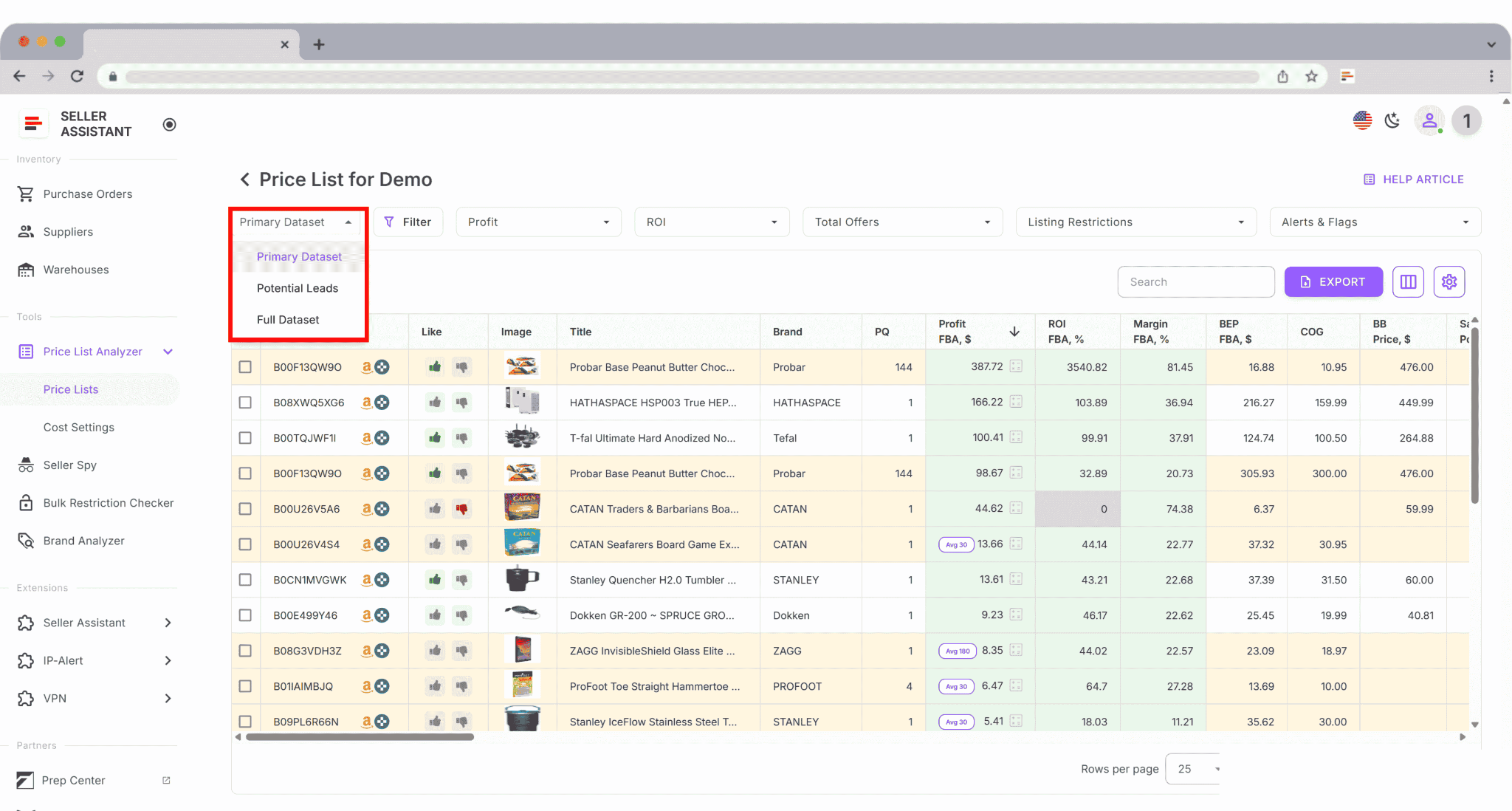
Step 5. Save and reuse your analysis setup
Save custom table views such as “Price-stable deals,” “High volatility,” or “Safe Buy Box range.” These views can be reused for future supplier uploads, allowing you to assess price dynamics consistently and speed up sourcing decisions at scale.
FAQ
What does price dynamics mean in Price List Analyzer?
Price dynamics show how the current Buy Box price compares to the historical average Buy Box price, expressed as a percentage. This helps sellers see whether today’s price is inflated, compressed, or aligned with normal market behavior.
Which timeframe does Price List Analyzer use to calculate price dynamics?
Price dynamics are calculated by comparing the current Buy Box price to the 90-day average Buy Box price. The tool also displays 30- and 180-day averages so sellers can understand short-term and long-term pricing trends.
Can price dynamics be calculated if a product has no Buy Box?
No. If a product does not have an active Buy Box, there is no reliable market price, so price dynamics cannot be calculated and the deal carries higher risk.
How should sellers use price dynamics when sourcing products?
Sellers use price dynamics to filter out products with unstable pricing or temporary Buy Box spikes. This helps base sourcing decisions on realistic margins rather than short-term price movements.
Is price dynamics useful for wholesale, online arbitrage, and dropshipping?
Yes. Price dynamics apply to all sourcing models because they reveal pricing stability, Buy Box risk, and Amazon price pressure regardless of how the product is sourced.
Final Thoughts
Price dynamics are one of the fastest ways to separate real Amazon deals from misleading ones. Looking at today’s Buy Box price alone often hides volatility, competition pressure, or short-term spikes that disappear after you place an order. By comparing current prices to historical Buy Box averages, sellers can judge whether margins are supported by stable market behavior or temporary conditions.
Seller Assistant’s Price List Analyzer makes this process practical at scale by calculating price dynamics automatically for entire supplier lists. Instead of guessing or checking ASINs one by one, you can quickly filter for price-stable products, reduce Buy Box risk, and base sourcing decisions on realistic, repeatable pricing.
Seller Assistant automates and connects every stage of your Amazon wholesale and arbitrage workflow. It brings together in one platform: workflow management tools – Purchase Orders Module, Supplier Database, Warehouse Database, bulk research & sourcing tools – Price List Analyzer, Bulk Restriction Checker, Sourcing AI, Brand Analyzer, Seller Spy, Chrome extensions – Seller Assistant Browser Extension, IP-Alert Extension, and built-in VPN by Seller Assistant, and integrations & team access features – seamless API connectivity, integrations with Zapier, Airtable, and Make, and Virtual Assistant Accounts.

